
15-440 Distributed Systems Lecture 20 – DNS and
DJ
Published · 57 slides · 0 views

1 / 1

Description
15-440 Distributed Systems Lecture 20 DNS and CDNs Copyright , 2007-10 Carnegie Mellon University Outline DNS Design DNS Today Content Distribution Networks 2 Naming How do we efficiently locate resources? DNS: name IP address
Related Topics
Share
Embed code
Download this presentation From Below
"15-440 Distributed Systems Lecture 20 – DNS and" is the property of its rightful owner. Permission is granted to download and print the materials on this website for personal, non-commercial use only, and to display it on your personal computer provided you do not modify the materials and that you retain all copyright notices contained in the materials. By downloading content from our website, you accept the terms of this agreement.
Presentation Transcript
01
15-440 Distributed Systems Lecture 20 – DNS and CDNs Copyright ©, 2007-10 Carnegie Mellon University<br>
02
Outline DNS Design
DNS Today
Content Distribution Networks 2<br>
DNS Today
Content Distribution Networks 2<br>
03
Naming How do we efficiently locate resources?
DNS: name IP address
Challenge
How do we scale this to the wide area? 3<br>
DNS: name IP address
Challenge
How do we scale this to the wide area? 3<br>
04
Obvious Solutions (1) Why not use /etc/hosts?
Original Name to Address Mapping
Flat namespace
/etc/hosts
SRI kept main copy
Downloaded regularly
Count of hosts was increasing: machine per domain machine per user
Many more downloads
Many more updates 4<br>
Original Name to Address Mapping
Flat namespace
/etc/hosts
SRI kept main copy
Downloaded regularly
Count of hosts was increasing: machine per domain machine per user
Many more downloads
Many more updates 4<br>
05
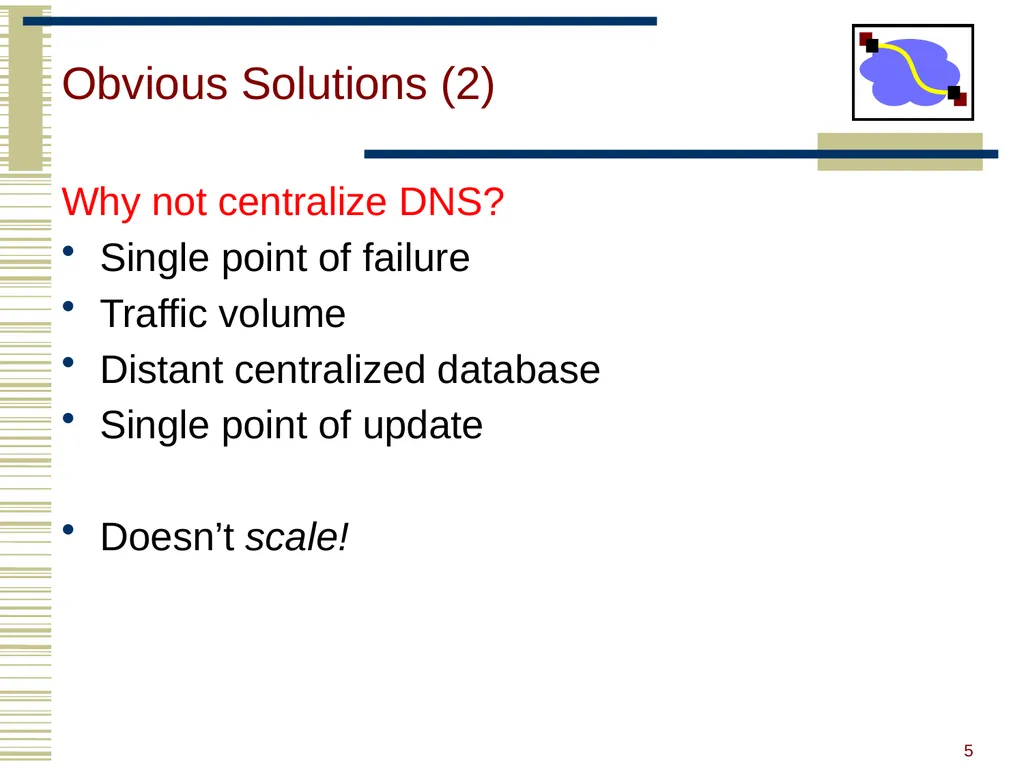
Obvious Solutions (2) Why not centralize DNS?
Single point of failure
Traffic volume
Distant centralized database
Single point of update
Doesn’t scale! 5<br>
Single point of failure
Traffic volume
Distant centralized database
Single point of update
Doesn’t scale! 5<br>
06
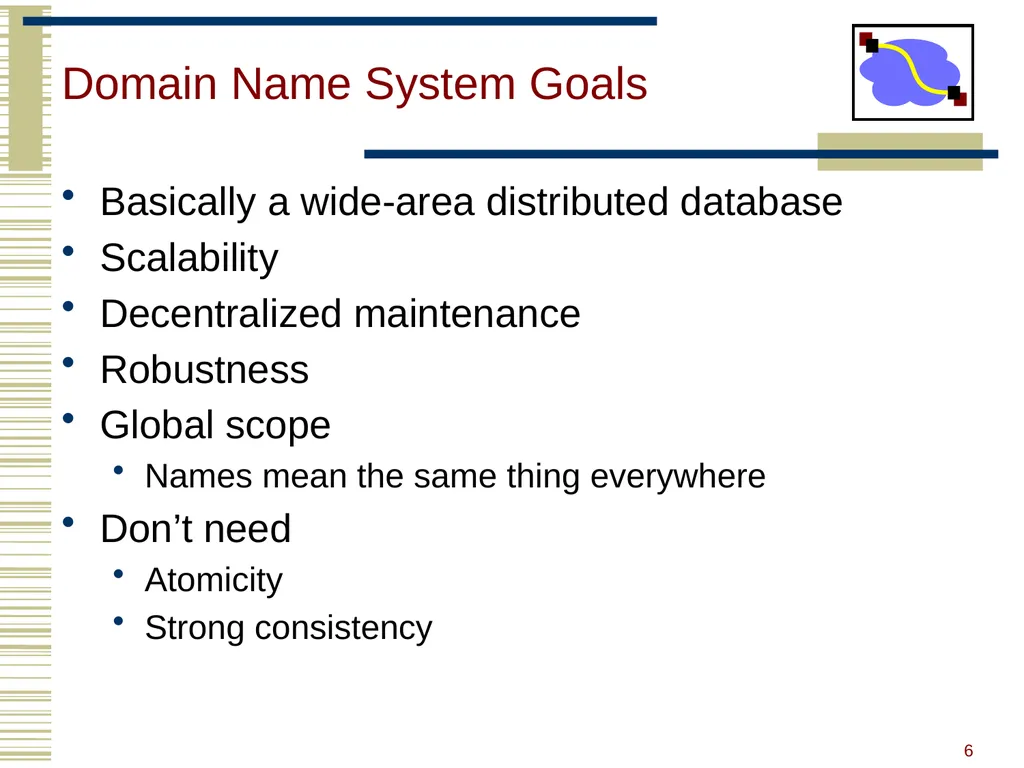
Domain Name System Goals Basically a wide-area distributed database
Scalability
Decentralized maintenance
Robustness
Global scope
Names mean the same thing everywhere
Don’t need
Atomicity
Strong consistency 6<br>
Scalability
Decentralized maintenance
Robustness
Global scope
Names mean the same thing everywhere
Don’t need
Atomicity
Strong consistency 6<br>
07
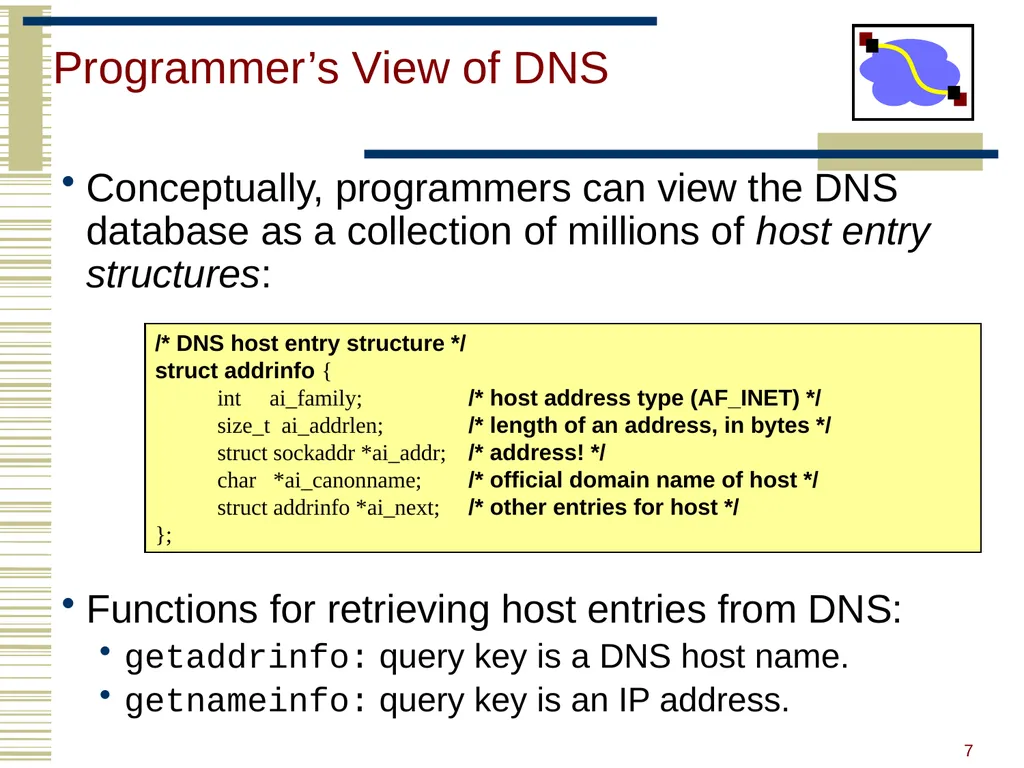
Programmer’s View of DNS Conceptually, programmers can view the DNS database as a collection of millions of host entry structures:
Functions for retrieving host entries from DNS:
getaddrinfo: query key is a DNS host name.
getnameinfo: query key is an IP address. /* DNS host entry structure */
struct addrinfo {
int ai_family; /* host address type (AF_INET) */
size_t ai_addrlen; /* length of an address, in bytes */
struct sockaddr *ai_addr; /* address! */
char *ai_canonname; /* official domain name of host */
struct addrinfo *ai_next; /* other entries for host */
}; 7<br>
Functions for retrieving host entries from DNS:
getaddrinfo: query key is a DNS host name.
getnameinfo: query key is an IP address. /* DNS host entry structure */
struct addrinfo {
int ai_family; /* host address type (AF_INET) */
size_t ai_addrlen; /* length of an address, in bytes */
struct sockaddr *ai_addr; /* address! */
char *ai_canonname; /* official domain name of host */
struct addrinfo *ai_next; /* other entries for host */
}; 7<br>
08
DNS Message Format Identification No. of Questions No. of Authority RRs Questions (variable number of answers) Answers (variable number of resource records) Authority (variable number of resource records) Additional Info (variable number of resource records) Flags No. of Answer RRs No. of Additional RRs Name, type fields for a query RRs in response to query Records for authoritative servers Additional “helpful info that may be used 12 bytes 8<br>
09
DNS Header Fields Identification
Used to match up request/response
Flags
1-bit to mark query or response
1-bit to mark authoritative or not
1-bit to request recursive resolution
1-bit to indicate support for recursive resolution 9<br>
Used to match up request/response
Flags
1-bit to mark query or response
1-bit to mark authoritative or not
1-bit to request recursive resolution
1-bit to indicate support for recursive resolution 9<br>
10
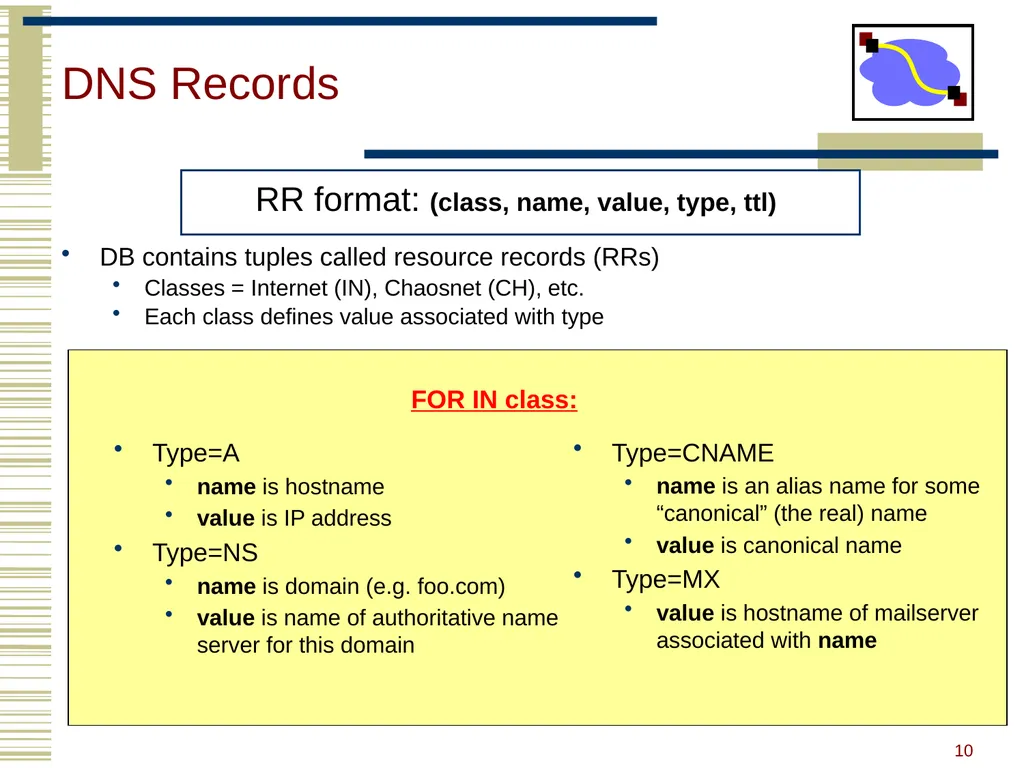
DNS Records DB contains tuples called resource records (RRs)
Classes = Internet (IN), Chaosnet (CH), etc.
Each class defines value associated with type FOR IN class: Type=A
name is hostname
value is IP address
Type=NS
name is domain (e.g. foo.com)
value is name of authoritative name server for this domain Type=CNAME
name is an alias name for some “canonical” (the real) name
value is canonical name
Type=MX
value is hostname of mailserver associated with name 10<br>
Classes = Internet (IN), Chaosnet (CH), etc.
Each class defines value associated with type FOR IN class: Type=A
name is hostname
value is IP address
Type=NS
name is domain (e.g. foo.com)
value is name of authoritative name server for this domain Type=CNAME
name is an alias name for some “canonical” (the real) name
value is canonical name
Type=MX
value is hostname of mailserver associated with name 10<br>
11
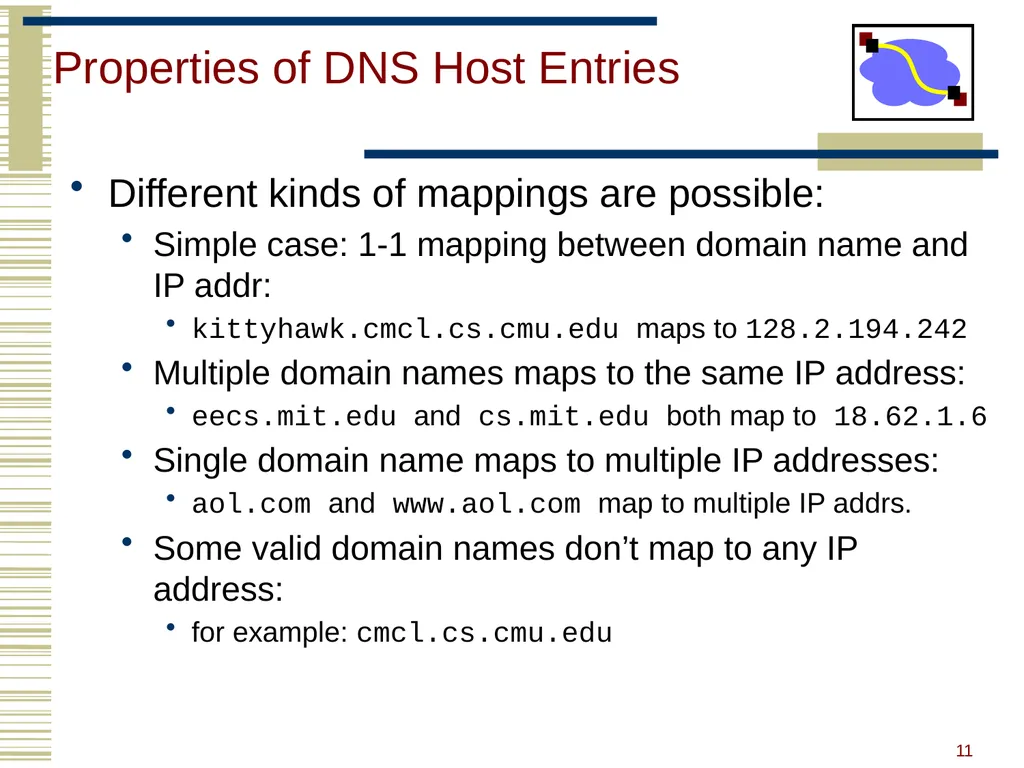
Properties of DNS Host Entries Different kinds of mappings are possible:
Simple case: 1-1 mapping between domain name and IP addr:
kittyhawk.cmcl.cs.cmu.edu maps to 128.2.194.242
Multiple domain names maps to the same IP address:
eecs.mit.edu and cs.mit.edu both map to 18.62.1.6
Single domain name maps to multiple IP addresses:
aol.com and www.aol.com map to multiple IP addrs.
Some valid domain names don’t map to any IP address:
for example: cmcl.cs.cmu.edu 11<br>
Simple case: 1-1 mapping between domain name and IP addr:
kittyhawk.cmcl.cs.cmu.edu maps to 128.2.194.242
Multiple domain names maps to the same IP address:
eecs.mit.edu and cs.mit.edu both map to 18.62.1.6
Single domain name maps to multiple IP addresses:
aol.com and www.aol.com map to multiple IP addrs.
Some valid domain names don’t map to any IP address:
for example: cmcl.cs.cmu.edu 11<br>
12
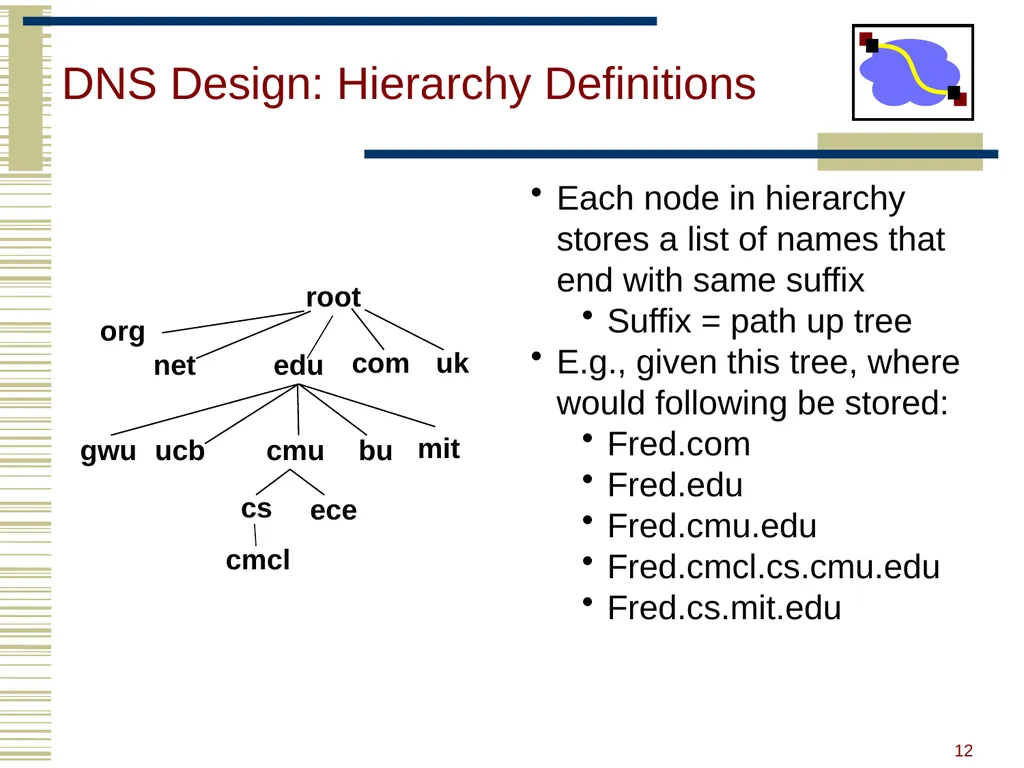
DNS Design: Hierarchy Definitions root edu net org uk com gwu ucb cmu bu mit cs ece cmcl Each node in hierarchy stores a list of names that end with same suffix
Suffix = path up tree
E.g., given this tree, where would following be stored:
Fred.com
Fred.edu
Fred.cmu.edu
Fred.cmcl.cs.cmu.edu
Fred.cs.mit.edu 12<br>
Suffix = path up tree
E.g., given this tree, where would following be stored:
Fred.com
Fred.edu
Fred.cmu.edu
Fred.cmcl.cs.cmu.edu
Fred.cs.mit.edu 12<br>
13
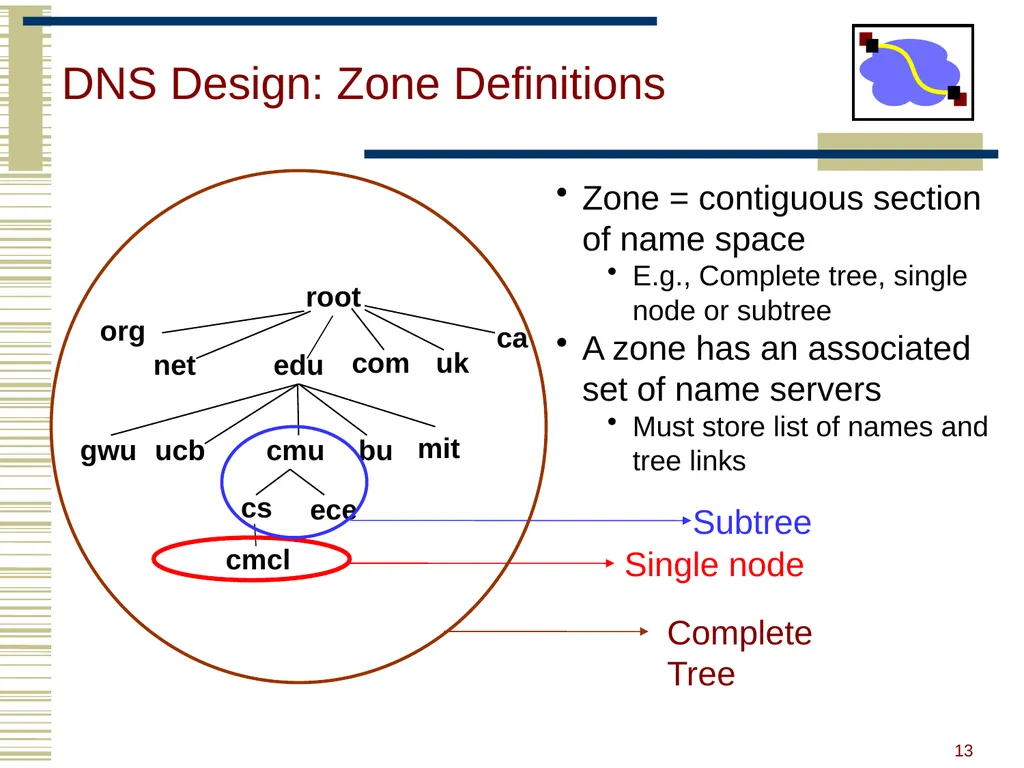
DNS Design: Zone Definitions root edu net org uk com ca gwu ucb cmu bu mit cs ece cmcl Single node Subtree Complete Tree Zone = contiguous section of name space
E.g., Complete tree, single node or subtree
A zone has an associated set of name servers
Must store list of names and tree links 13<br>
E.g., Complete tree, single node or subtree
A zone has an associated set of name servers
Must store list of names and tree links 13<br>
14
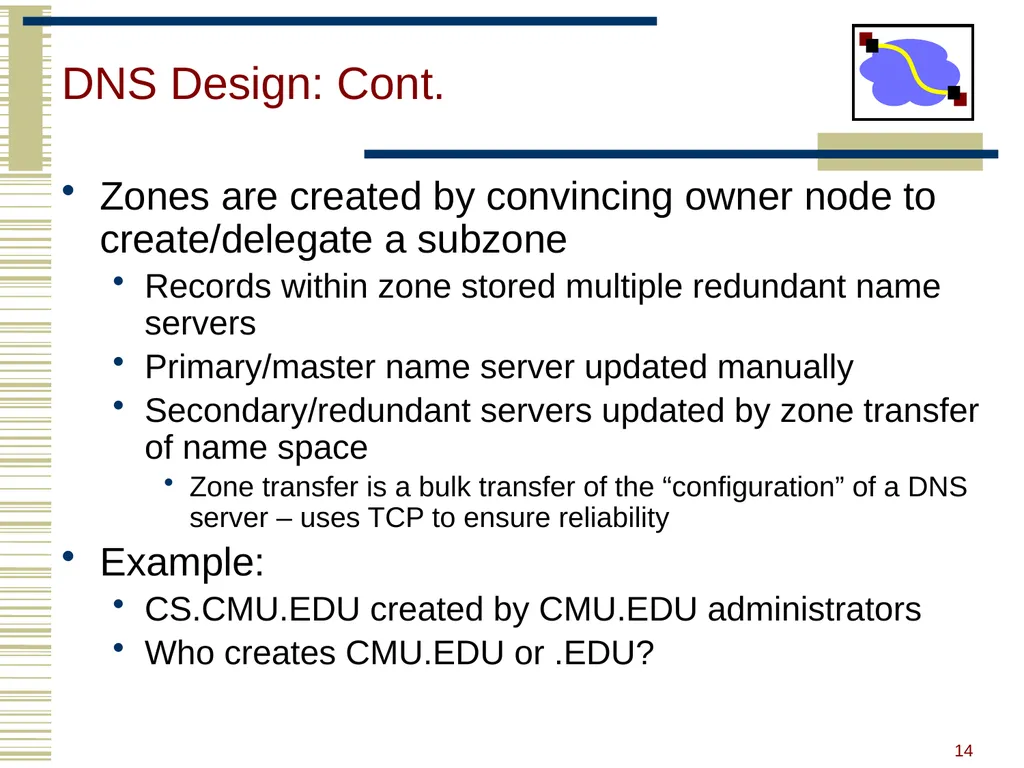
DNS Design: Cont. Zones are created by convincing owner node to create/delegate a subzone
Records within zone stored multiple redundant name servers
Primary/master name server updated manually
Secondary/redundant servers updated by zone transfer of name space
Zone transfer is a bulk transfer of the “configuration” of a DNS server – uses TCP to ensure reliability
Example:
CS.CMU.EDU created by CMU.EDU administrators
Who creates CMU.EDU or .EDU? 14<br>
Records within zone stored multiple redundant name servers
Primary/master name server updated manually
Secondary/redundant servers updated by zone transfer of name space
Zone transfer is a bulk transfer of the “configuration” of a DNS server – uses TCP to ensure reliability
Example:
CS.CMU.EDU created by CMU.EDU administrators
Who creates CMU.EDU or .EDU? 14<br>
15
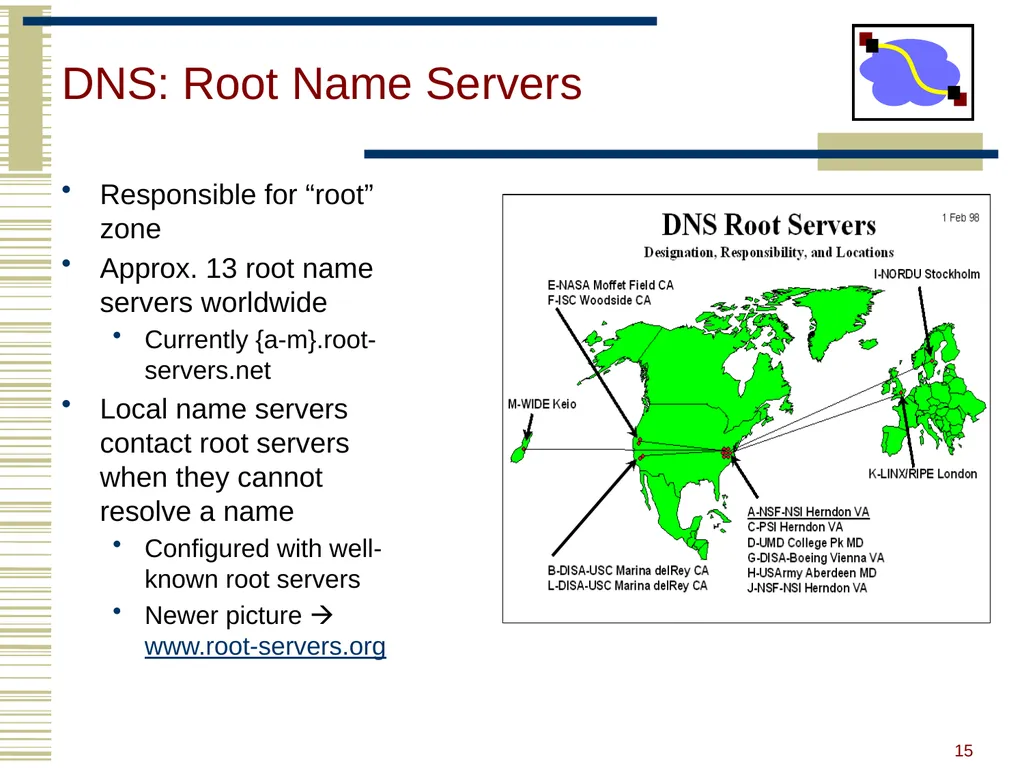
DNS: Root Name Servers Responsible for “root” zone
Approx. 13 root name servers worldwide
Currently {a-m}.root-servers.net
Local name servers contact root servers when they cannot resolve a name
Configured with well-known root servers
Newer picture www.root-servers.org 15<br>
Approx. 13 root name servers worldwide
Currently {a-m}.root-servers.net
Local name servers contact root servers when they cannot resolve a name
Configured with well-known root servers
Newer picture www.root-servers.org 15<br>
16
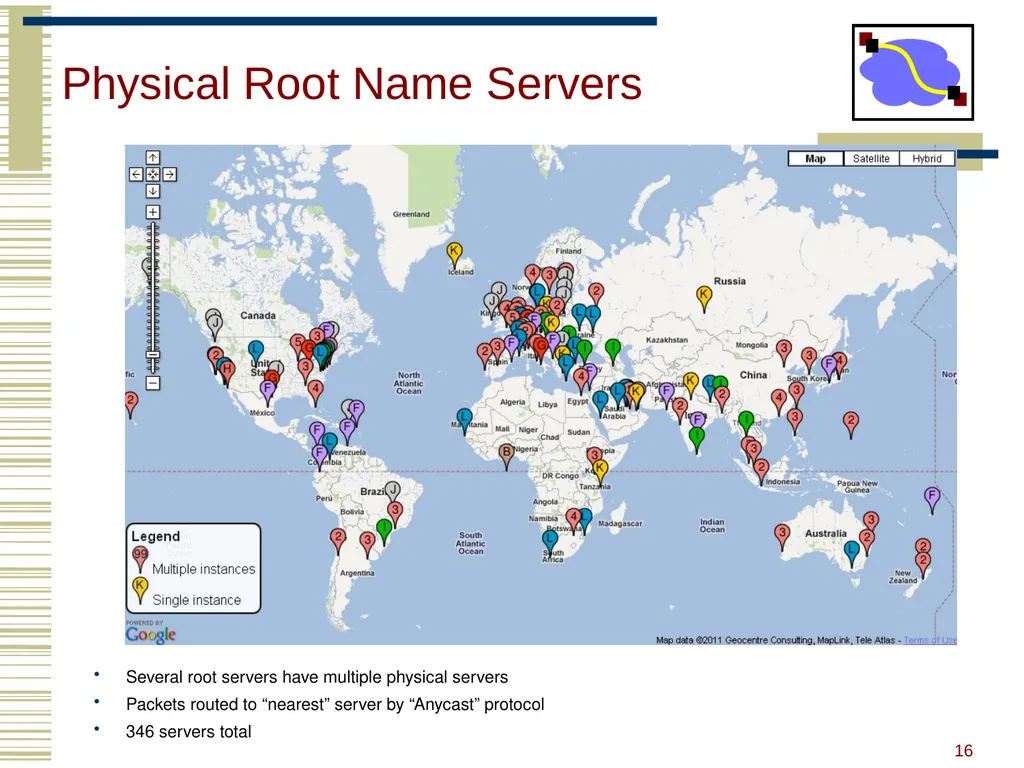
Physical Root Name Servers Several root servers have multiple physical servers
Packets routed to “nearest” server by “Anycast” protocol
346 servers total 16<br>
Packets routed to “nearest” server by “Anycast” protocol
346 servers total 16<br>
17
Servers/Resolvers Each host has a resolver
Typically a library that applications can link to
Local name servers hand-configured (e.g. /etc/resolv.conf)
Name servers
Either responsible for some zone or…
Local servers
Do lookup of distant host names for local hosts
Typically answer queries about local zone 17<br>
Typically a library that applications can link to
Local name servers hand-configured (e.g. /etc/resolv.conf)
Name servers
Either responsible for some zone or…
Local servers
Do lookup of distant host names for local hosts
Typically answer queries about local zone 17<br>
18
Typical Resolution Client Local
DNS server root & edu
DNS server ns1.cmu.edu
DNS server www.cs.cmu.edu ns1.cs.cmu.edu
DNS
server 18<br>
DNS server root & edu
DNS server ns1.cmu.edu
DNS server www.cs.cmu.edu ns1.cs.cmu.edu
DNS
server 18<br>
19
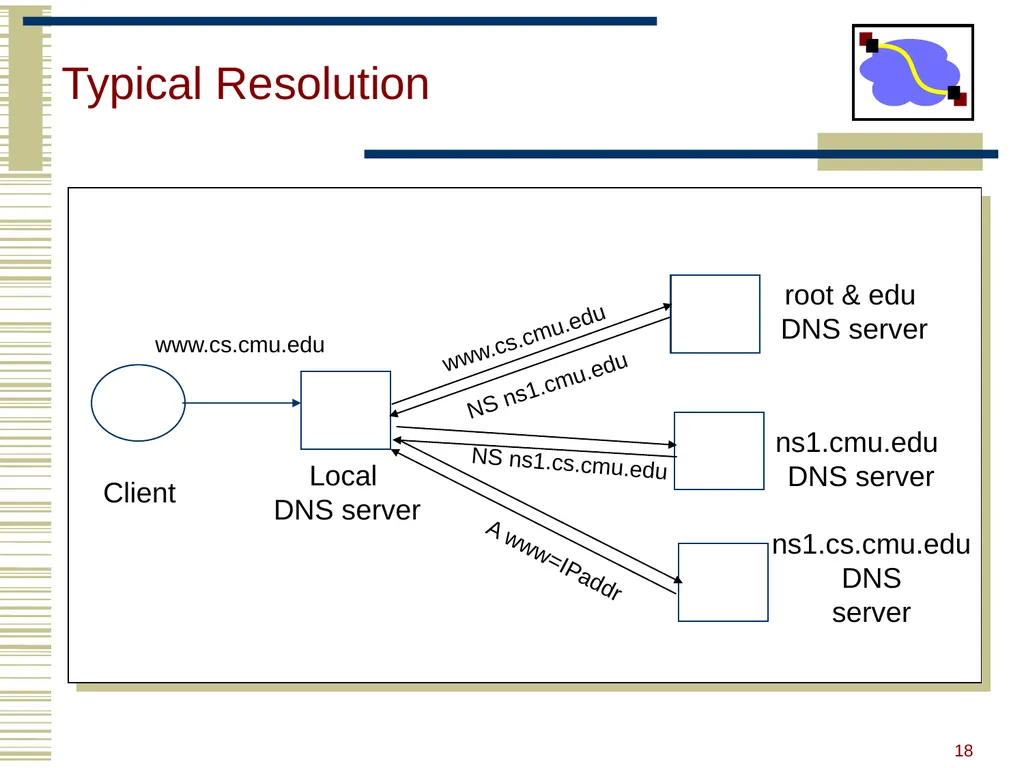
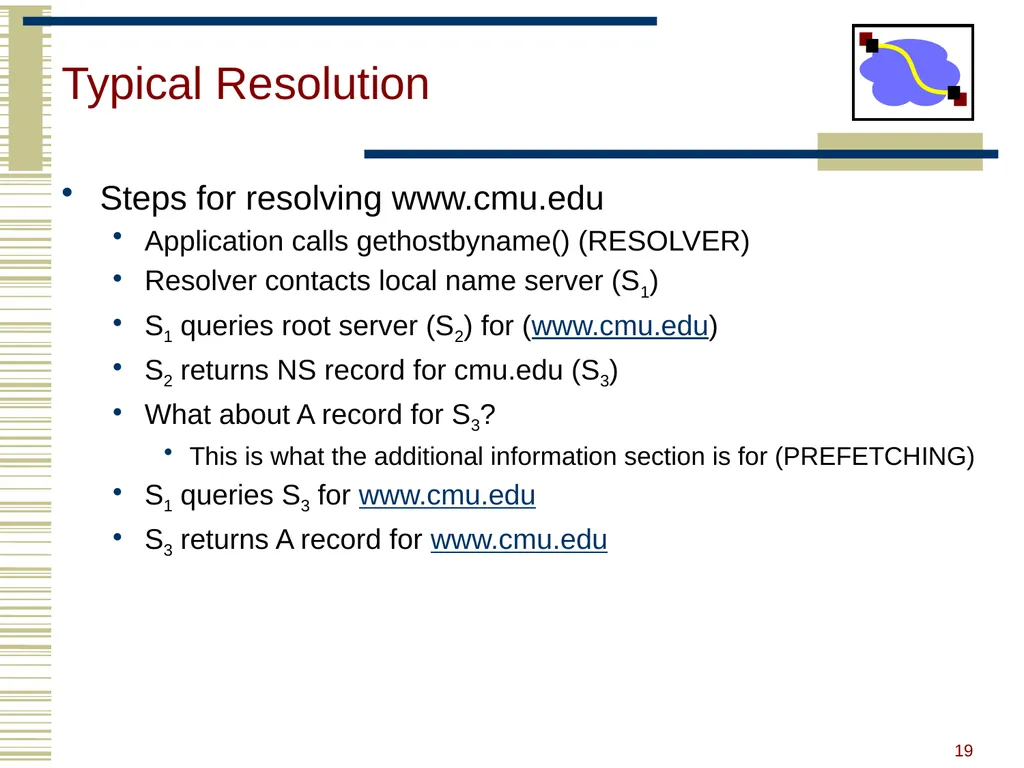
Typical Resolution Steps for resolving www.cmu.edu
Application calls gethostbyname() (RESOLVER)
Resolver contacts local name server (S1)
S1 queries root server (S2) for (www.cmu.edu)
S2 returns NS record for cmu.edu (S3)
What about A record for S3?
This is what the additional information section is for (PREFETCHING)
S1 queries S3 for www.cmu.edu
S3 returns A record for www.cmu.edu 19<br>
Application calls gethostbyname() (RESOLVER)
Resolver contacts local name server (S1)
S1 queries root server (S2) for (www.cmu.edu)
S2 returns NS record for cmu.edu (S3)
What about A record for S3?
This is what the additional information section is for (PREFETCHING)
S1 queries S3 for www.cmu.edu
S3 returns A record for www.cmu.edu 19<br>
20
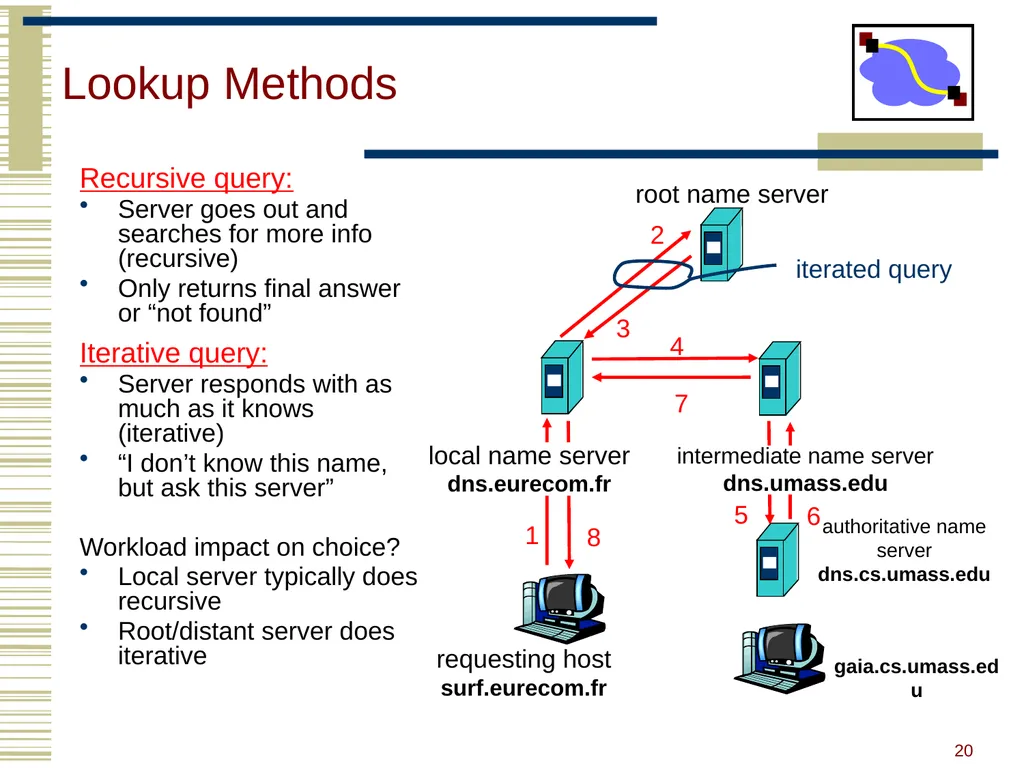
Lookup Methods Recursive query:
Server goes out and searches for more info (recursive)
Only returns final answer or “not found”
Iterative query:
Server responds with as much as it knows (iterative)
“I don’t know this name, but ask this server”
Workload impact on choice?
Local server typically does recursive
Root/distant server does iterative requesting host
surf.eurecom.fr gaia.cs.umass.edu root name server 1 2 3 4 5 6 authoritative name server
dns.cs.umass.edu 7 8 iterated query 20<br>
Server goes out and searches for more info (recursive)
Only returns final answer or “not found”
Iterative query:
Server responds with as much as it knows (iterative)
“I don’t know this name, but ask this server”
Workload impact on choice?
Local server typically does recursive
Root/distant server does iterative requesting host
surf.eurecom.fr gaia.cs.umass.edu root name server 1 2 3 4 5 6 authoritative name server
dns.cs.umass.edu 7 8 iterated query 20<br>
21
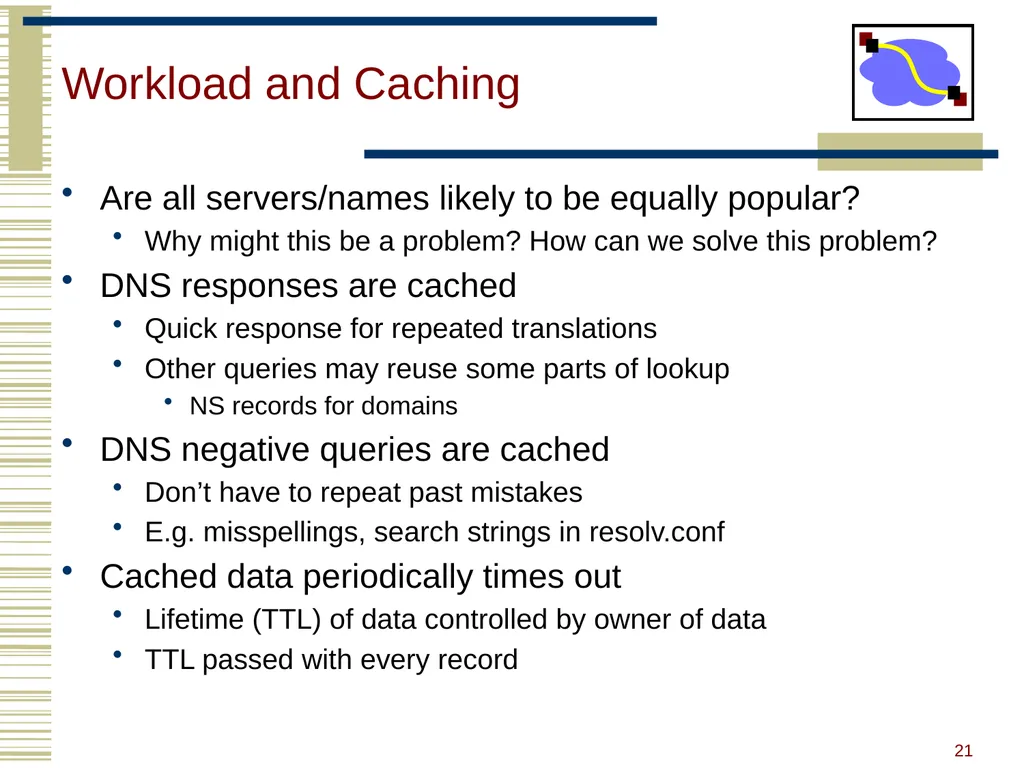
Workload and Caching Are all servers/names likely to be equally popular?
Why might this be a problem? How can we solve this problem?
DNS responses are cached
Quick response for repeated translations
Other queries may reuse some parts of lookup
NS records for domains
DNS negative queries are cached
Don’t have to repeat past mistakes
E.g. misspellings, search strings in resolv.conf
Cached data periodically times out
Lifetime (TTL) of data controlled by owner of data
TTL passed with every record 21<br>
Why might this be a problem? How can we solve this problem?
DNS responses are cached
Quick response for repeated translations
Other queries may reuse some parts of lookup
NS records for domains
DNS negative queries are cached
Don’t have to repeat past mistakes
E.g. misspellings, search strings in resolv.conf
Cached data periodically times out
Lifetime (TTL) of data controlled by owner of data
TTL passed with every record 21<br>
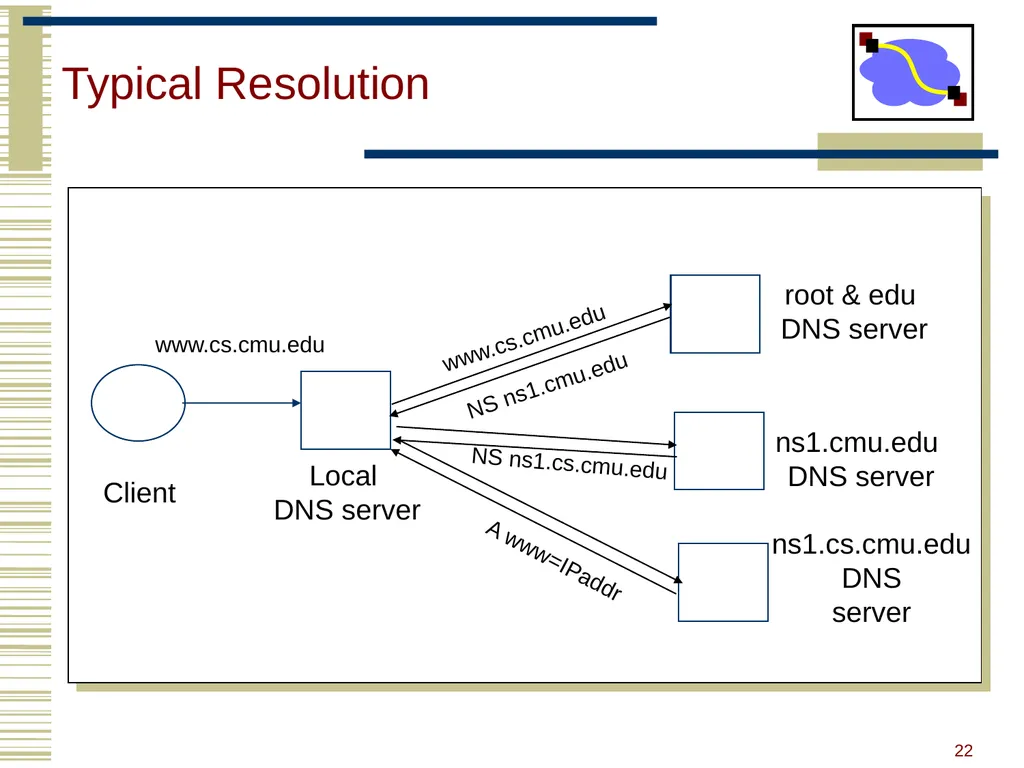
22
Typical Resolution Client Local
DNS server root & edu
DNS server ns1.cmu.edu
DNS server www.cs.cmu.edu ns1.cs.cmu.edu
DNS
server 22<br>
DNS server root & edu
DNS server ns1.cmu.edu
DNS server www.cs.cmu.edu ns1.cs.cmu.edu
DNS
server 22<br>
23
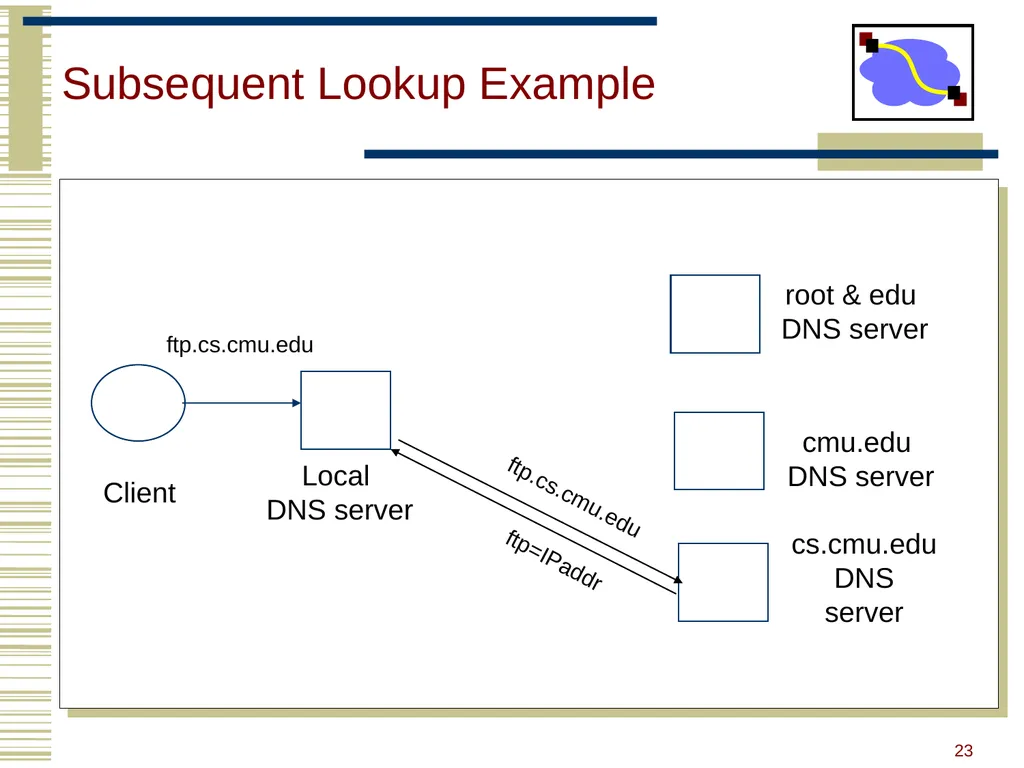
Subsequent Lookup Example Client Local
DNS server root & edu
DNS server cmu.edu
DNS server cs.cmu.edu
DNS
server ftp.cs.cmu.edu ftp=IPaddr ftp.cs.cmu.edu 23<br>
DNS server root & edu
DNS server cmu.edu
DNS server cs.cmu.edu
DNS
server ftp.cs.cmu.edu ftp=IPaddr ftp.cs.cmu.edu 23<br>
24
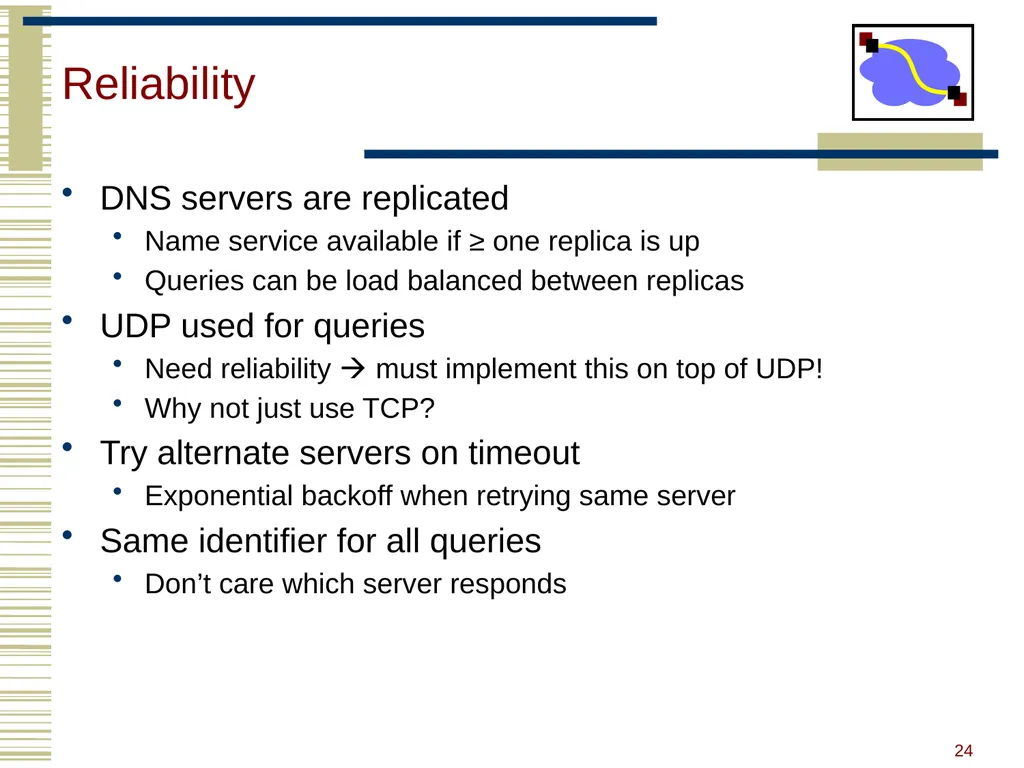
Reliability DNS servers are replicated
Name service available if ≥ one replica is up
Queries can be load balanced between replicas
UDP used for queries
Need reliability must implement this on top of UDP!
Why not just use TCP?
Try alternate servers on timeout
Exponential backoff when retrying same server
Same identifier for all queries
Don’t care which server responds 24<br>
Name service available if ≥ one replica is up
Queries can be load balanced between replicas
UDP used for queries
Need reliability must implement this on top of UDP!
Why not just use TCP?
Try alternate servers on timeout
Exponential backoff when retrying same server
Same identifier for all queries
Don’t care which server responds 24<br>
25
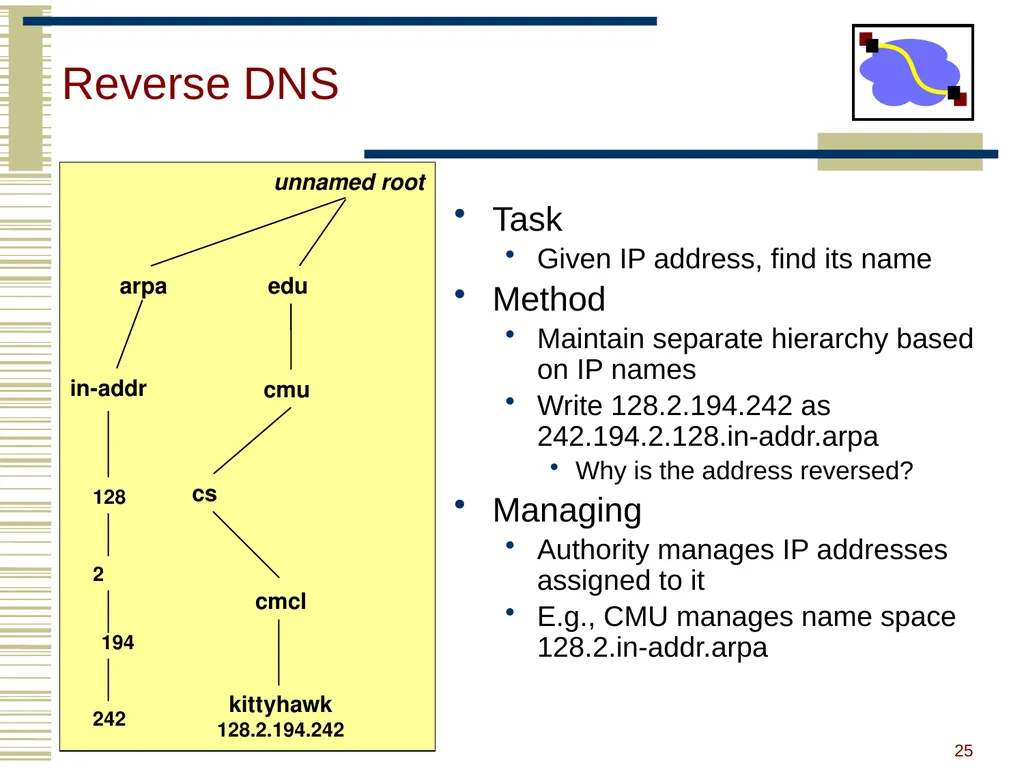
Reverse DNS Task
Given IP address, find its name
Method
Maintain separate hierarchy based on IP names
Write 128.2.194.242 as 242.194.2.128.in-addr.arpa
Why is the address reversed?
Managing
Authority manages IP addresses assigned to it
E.g., CMU manages name space 128.2.in-addr.arpa 25<br>
Given IP address, find its name
Method
Maintain separate hierarchy based on IP names
Write 128.2.194.242 as 242.194.2.128.in-addr.arpa
Why is the address reversed?
Managing
Authority manages IP addresses assigned to it
E.g., CMU manages name space 128.2.in-addr.arpa 25<br>
26
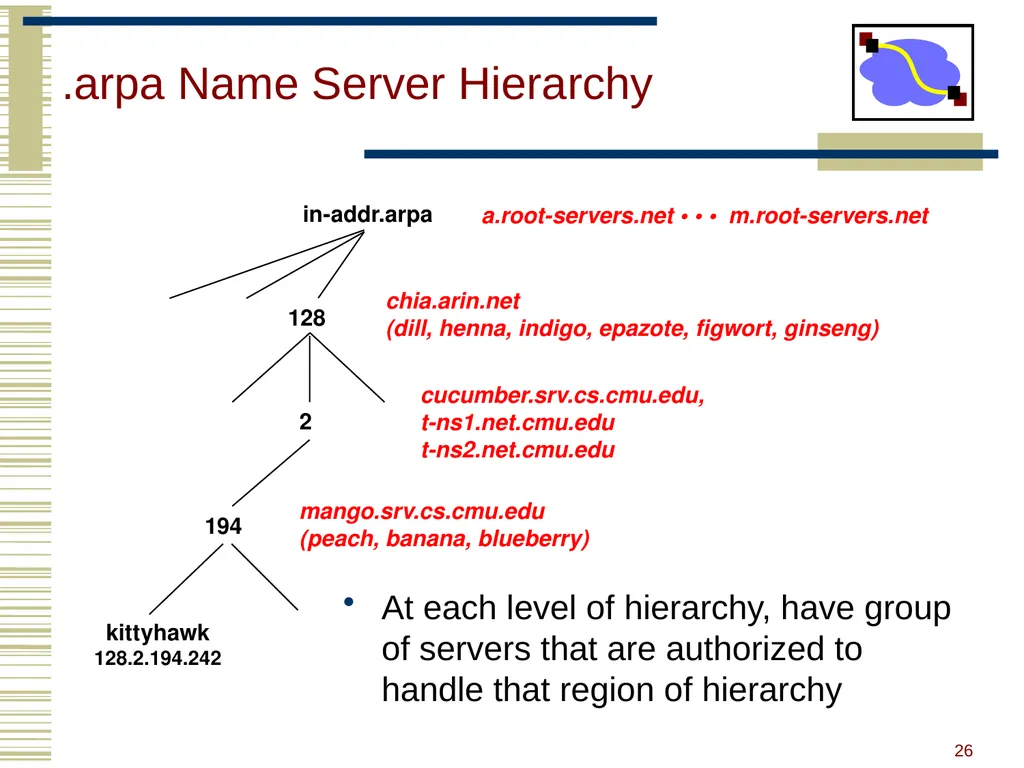
.arpa Name Server Hierarchy At each level of hierarchy, have group of servers that are authorized to handle that region of hierarchy 128 2 194 kittyhawk
128.2.194.242 in-addr.arpa a.root-servers.net • • • m.root-servers.net chia.arin.net
(dill, henna, indigo, epazote, figwort, ginseng) cucumber.srv.cs.cmu.edu,
t-ns1.net.cmu.edu
t-ns2.net.cmu.edu mango.srv.cs.cmu.edu
(peach, banana, blueberry) 26<br>
128.2.194.242 in-addr.arpa a.root-servers.net • • • m.root-servers.net chia.arin.net
(dill, henna, indigo, epazote, figwort, ginseng) cucumber.srv.cs.cmu.edu,
t-ns1.net.cmu.edu
t-ns2.net.cmu.edu mango.srv.cs.cmu.edu
(peach, banana, blueberry) 26<br>
27
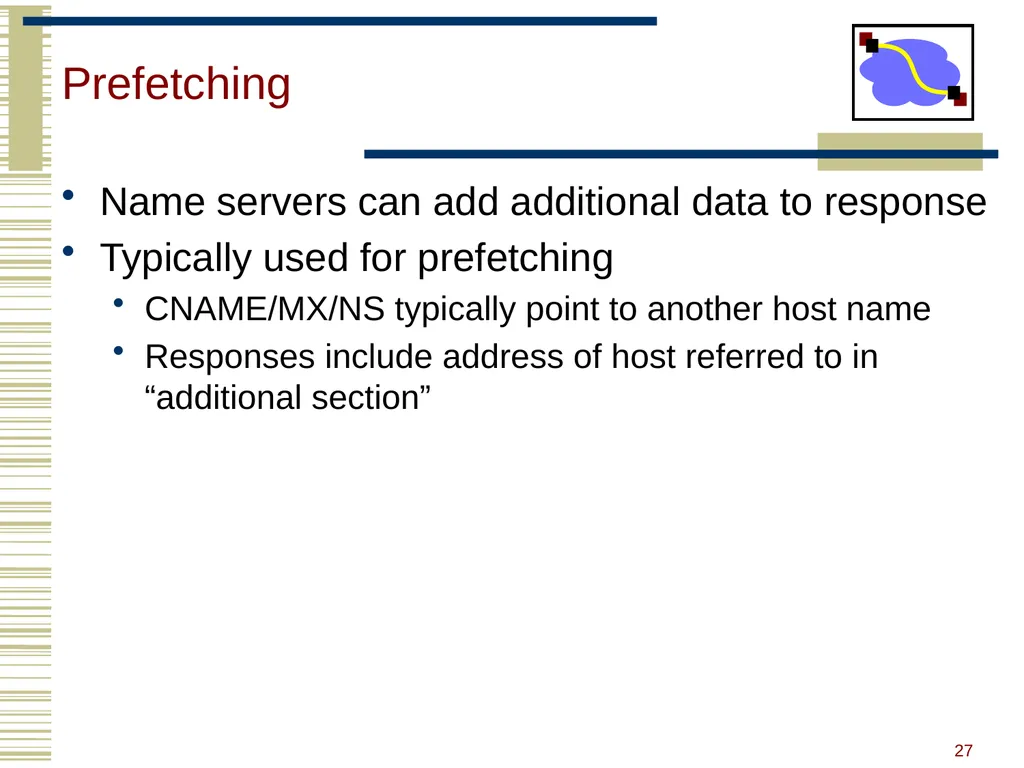
Prefetching Name servers can add additional data to response
Typically used for prefetching
CNAME/MX/NS typically point to another host name
Responses include address of host referred to in “additional section” 27<br>
Typically used for prefetching
CNAME/MX/NS typically point to another host name
Responses include address of host referred to in “additional section” 27<br>
28
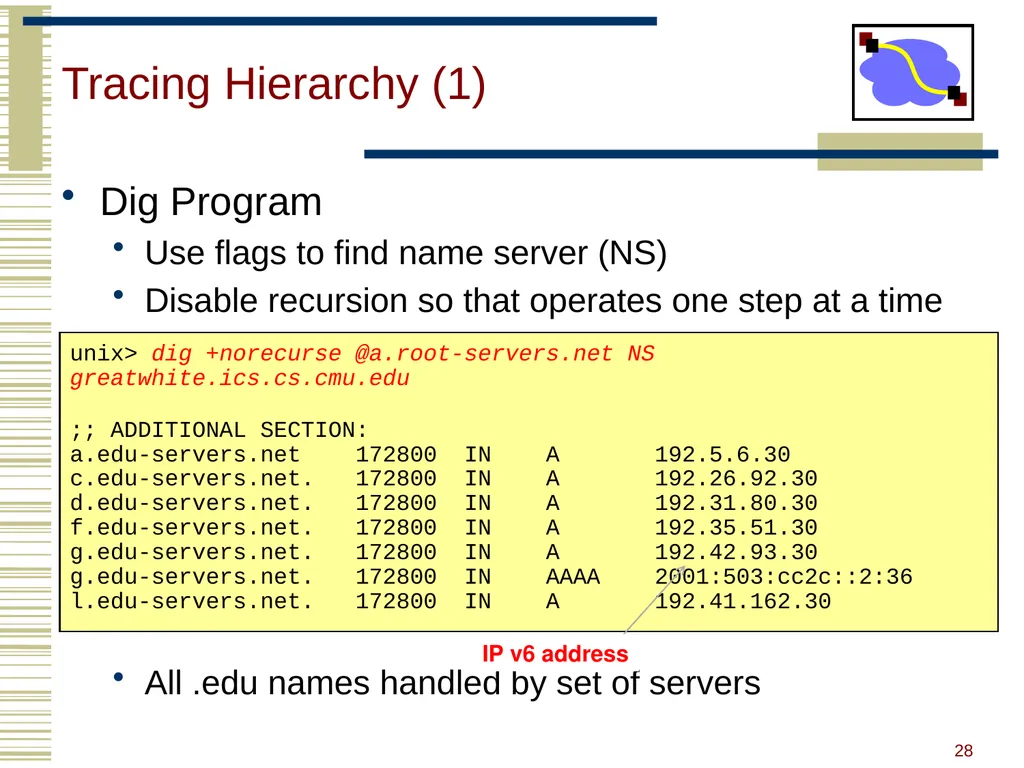
Tracing Hierarchy (1) Dig Program
Use flags to find name server (NS)
Disable recursion so that operates one step at a time
All .edu names handled by set of servers unix> dig +norecurse @a.root-servers.net NS greatwhite.ics.cs.cmu.edu
;; ADDITIONAL SECTION:
a.edu-servers.net 172800 IN A 192.5.6.30
c.edu-servers.net. 172800 IN A 192.26.92.30
d.edu-servers.net. 172800 IN A 192.31.80.30
f.edu-servers.net. 172800 IN A 192.35.51.30
g.edu-servers.net. 172800 IN A 192.42.93.30
g.edu-servers.net. 172800 IN AAAA 2001:503:cc2c::2:36
l.edu-servers.net. 172800 IN A 192.41.162.30 IP v6 address 28<br>
Use flags to find name server (NS)
Disable recursion so that operates one step at a time
All .edu names handled by set of servers unix> dig +norecurse @a.root-servers.net NS greatwhite.ics.cs.cmu.edu
;; ADDITIONAL SECTION:
a.edu-servers.net 172800 IN A 192.5.6.30
c.edu-servers.net. 172800 IN A 192.26.92.30
d.edu-servers.net. 172800 IN A 192.31.80.30
f.edu-servers.net. 172800 IN A 192.35.51.30
g.edu-servers.net. 172800 IN A 192.42.93.30
g.edu-servers.net. 172800 IN AAAA 2001:503:cc2c::2:36
l.edu-servers.net. 172800 IN A 192.41.162.30 IP v6 address 28<br>
29
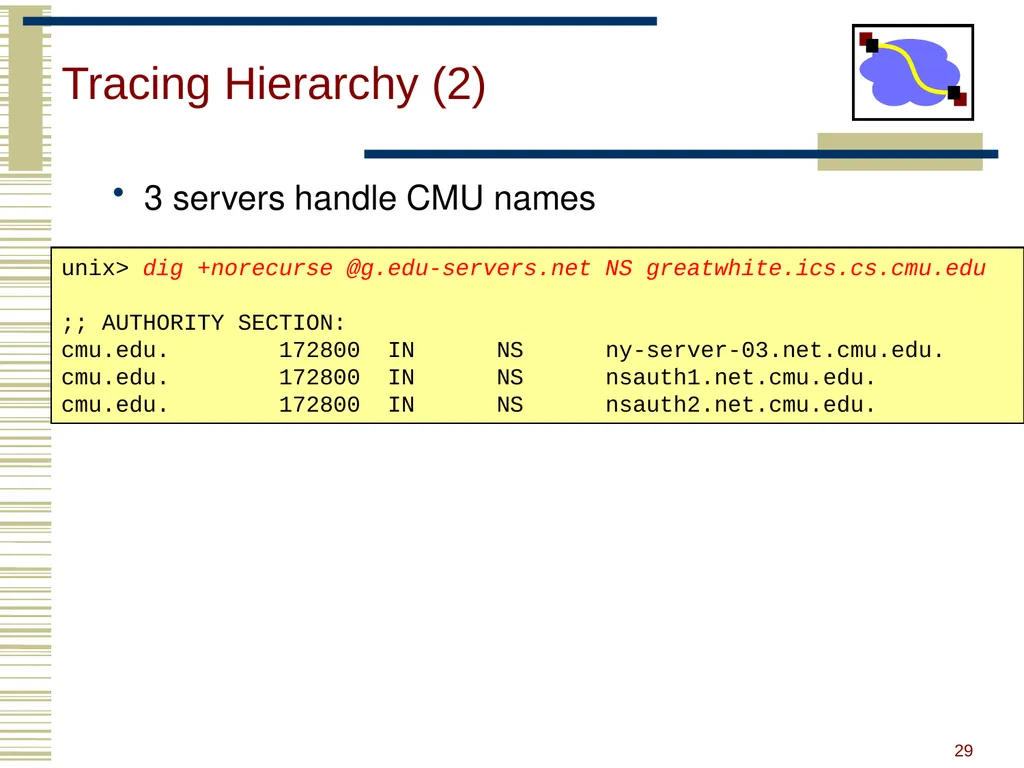
Tracing Hierarchy (2) 3 servers handle CMU names unix> dig +norecurse @g.edu-servers.net NS greatwhite.ics.cs.cmu.edu
;; AUTHORITY SECTION:
cmu.edu. 172800 IN NS ny-server-03.net.cmu.edu.
cmu.edu. 172800 IN NS nsauth1.net.cmu.edu.
cmu.edu. 172800 IN NS nsauth2.net.cmu.edu. 29<br>
;; AUTHORITY SECTION:
cmu.edu. 172800 IN NS ny-server-03.net.cmu.edu.
cmu.edu. 172800 IN NS nsauth1.net.cmu.edu.
cmu.edu. 172800 IN NS nsauth2.net.cmu.edu. 29<br>
30
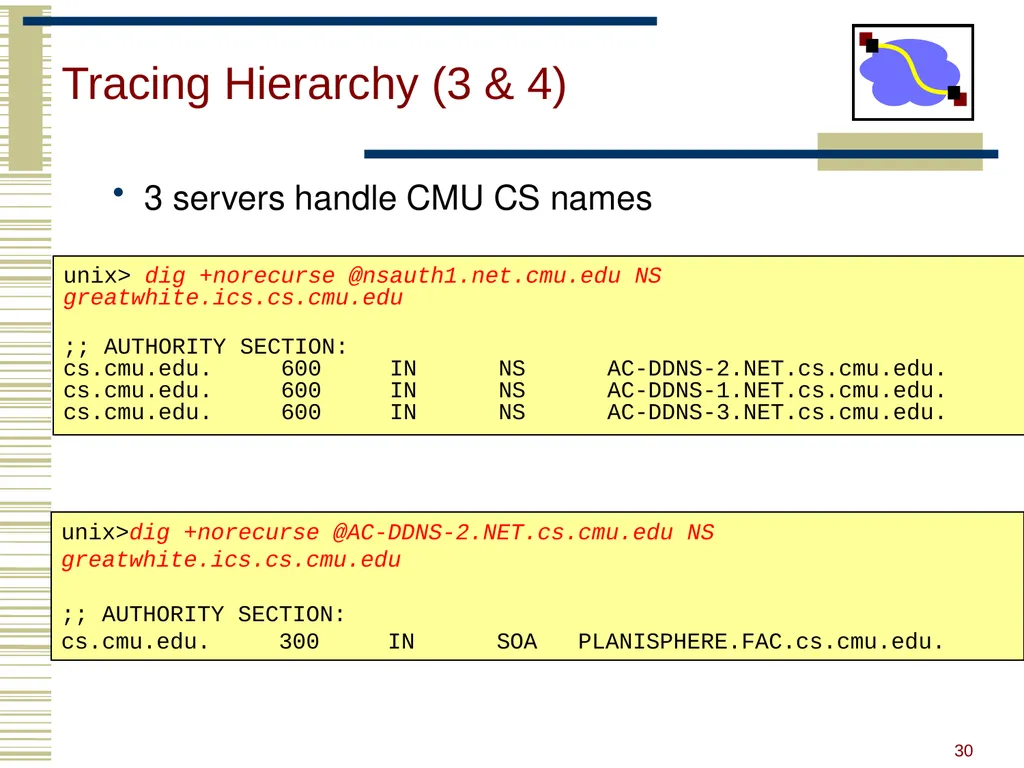
Tracing Hierarchy (3 & 4) 3 servers handle CMU CS names
Server within CS is “start of authority” (SOA) for this name unix> dig +norecurse @nsauth1.net.cmu.edu NS greatwhite.ics.cs.cmu.edu
;; AUTHORITY SECTION:
cs.cmu.edu. 600 IN NS AC-DDNS-2.NET.cs.cmu.edu.
cs.cmu.edu. 600 IN NS AC-DDNS-1.NET.cs.cmu.edu.
cs.cmu.edu. 600 IN NS AC-DDNS-3.NET.cs.cmu.edu. unix>dig +norecurse @AC-DDNS-2.NET.cs.cmu.edu NS greatwhite.ics.cs.cmu.edu
;; AUTHORITY SECTION:
cs.cmu.edu. 300 IN SOA PLANISPHERE.FAC.cs.cmu.edu. 30<br>
Server within CS is “start of authority” (SOA) for this name unix> dig +norecurse @nsauth1.net.cmu.edu NS greatwhite.ics.cs.cmu.edu
;; AUTHORITY SECTION:
cs.cmu.edu. 600 IN NS AC-DDNS-2.NET.cs.cmu.edu.
cs.cmu.edu. 600 IN NS AC-DDNS-1.NET.cs.cmu.edu.
cs.cmu.edu. 600 IN NS AC-DDNS-3.NET.cs.cmu.edu. unix>dig +norecurse @AC-DDNS-2.NET.cs.cmu.edu NS greatwhite.ics.cs.cmu.edu
;; AUTHORITY SECTION:
cs.cmu.edu. 300 IN SOA PLANISPHERE.FAC.cs.cmu.edu. 30<br>
31
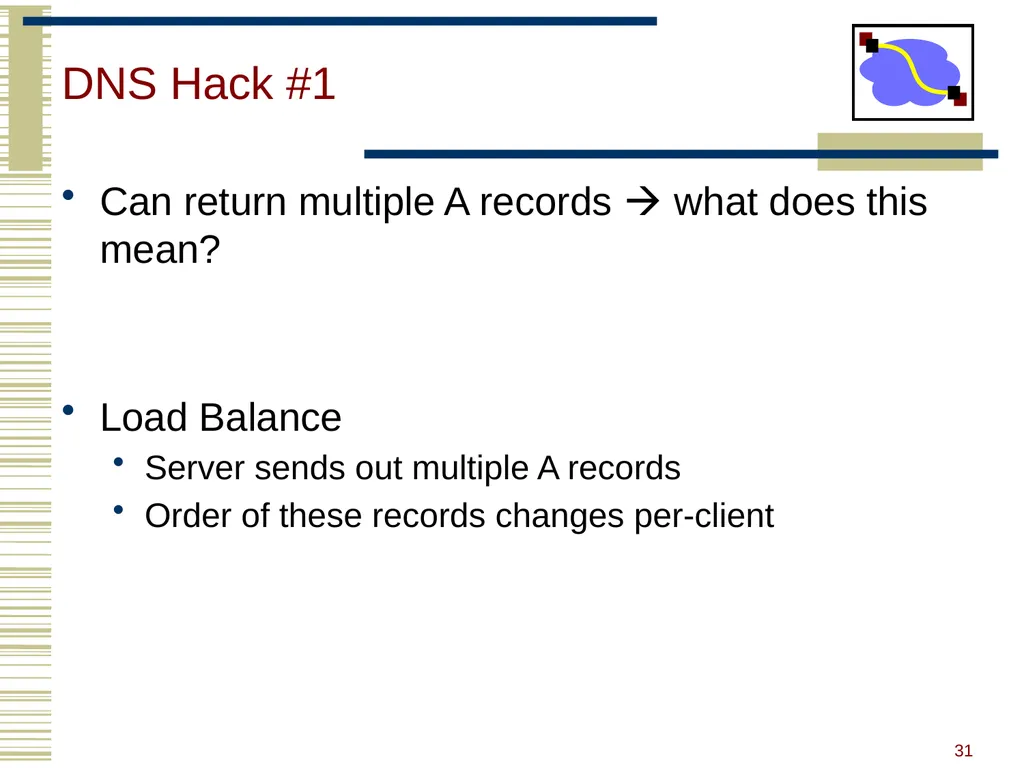
DNS Hack #1 Can return multiple A records what does this mean?
Load Balance
Server sends out multiple A records
Order of these records changes per-client 31<br>
Load Balance
Server sends out multiple A records
Order of these records changes per-client 31<br>
32
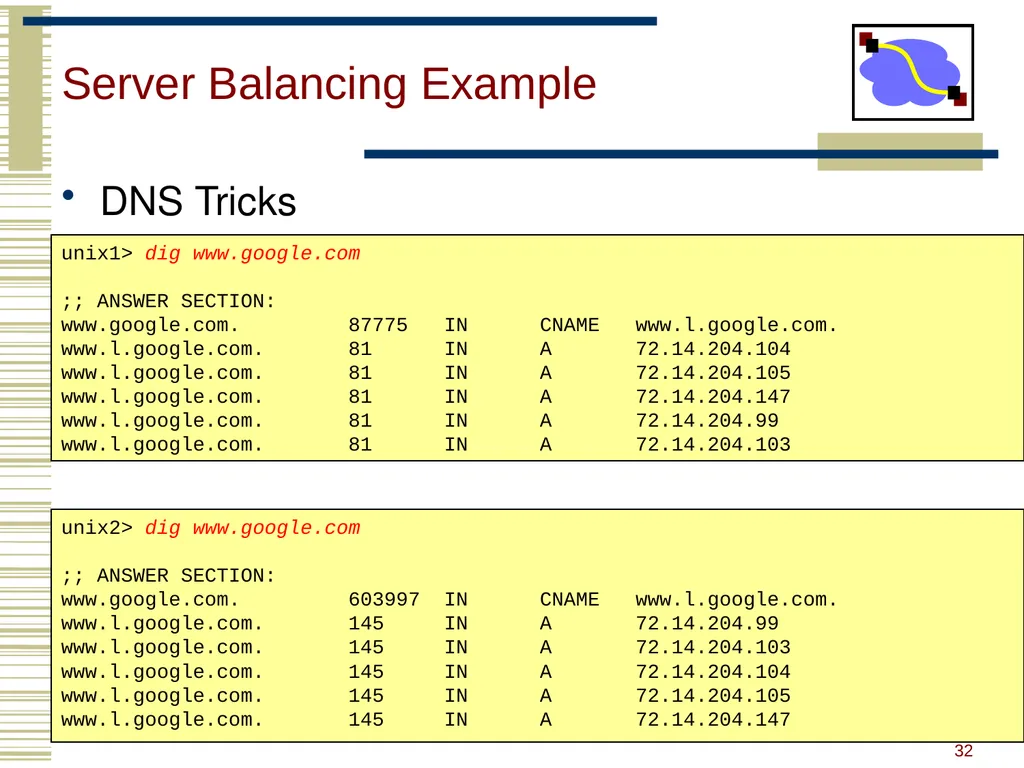
Server Balancing Example DNS Tricks
Different responses to different servers, short TTL’s unix1> dig www.google.com
;; ANSWER SECTION:
www.google.com. 87775 IN CNAME www.l.google.com.
www.l.google.com. 81 IN A 72.14.204.104
www.l.google.com. 81 IN A 72.14.204.105
www.l.google.com. 81 IN A 72.14.204.147
www.l.google.com. 81 IN A 72.14.204.99
www.l.google.com. 81 IN A 72.14.204.103 unix2> dig www.google.com
;; ANSWER SECTION:
www.google.com. 603997 IN CNAME www.l.google.com.
www.l.google.com. 145 IN A 72.14.204.99
www.l.google.com. 145 IN A 72.14.204.103
www.l.google.com. 145 IN A 72.14.204.104
www.l.google.com. 145 IN A 72.14.204.105
www.l.google.com. 145 IN A 72.14.204.147 32<br>
Different responses to different servers, short TTL’s unix1> dig www.google.com
;; ANSWER SECTION:
www.google.com. 87775 IN CNAME www.l.google.com.
www.l.google.com. 81 IN A 72.14.204.104
www.l.google.com. 81 IN A 72.14.204.105
www.l.google.com. 81 IN A 72.14.204.147
www.l.google.com. 81 IN A 72.14.204.99
www.l.google.com. 81 IN A 72.14.204.103 unix2> dig www.google.com
;; ANSWER SECTION:
www.google.com. 603997 IN CNAME www.l.google.com.
www.l.google.com. 145 IN A 72.14.204.99
www.l.google.com. 145 IN A 72.14.204.103
www.l.google.com. 145 IN A 72.14.204.104
www.l.google.com. 145 IN A 72.14.204.105
www.l.google.com. 145 IN A 72.14.204.147 32<br>
33
Outline DNS Design
DNS Today
Content Distribution Networks 33<br>
DNS Today
Content Distribution Networks 33<br>
34
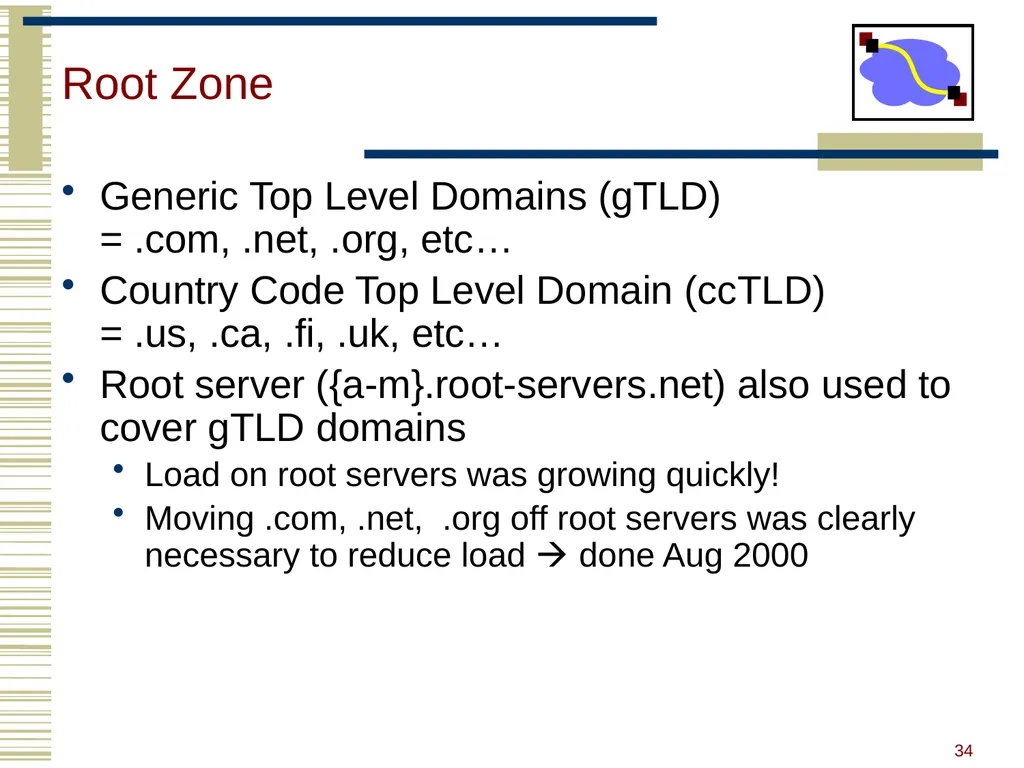
Root Zone Generic Top Level Domains (gTLD) = .com, .net, .org, etc…
Country Code Top Level Domain (ccTLD) = .us, .ca, .fi, .uk, etc…
Root server ({a-m}.root-servers.net) also used to cover gTLD domains
Load on root servers was growing quickly!
Moving .com, .net, .org off root servers was clearly necessary to reduce load done Aug 2000 34<br>
Country Code Top Level Domain (ccTLD) = .us, .ca, .fi, .uk, etc…
Root server ({a-m}.root-servers.net) also used to cover gTLD domains
Load on root servers was growing quickly!
Moving .com, .net, .org off root servers was clearly necessary to reduce load done Aug 2000 34<br>
35
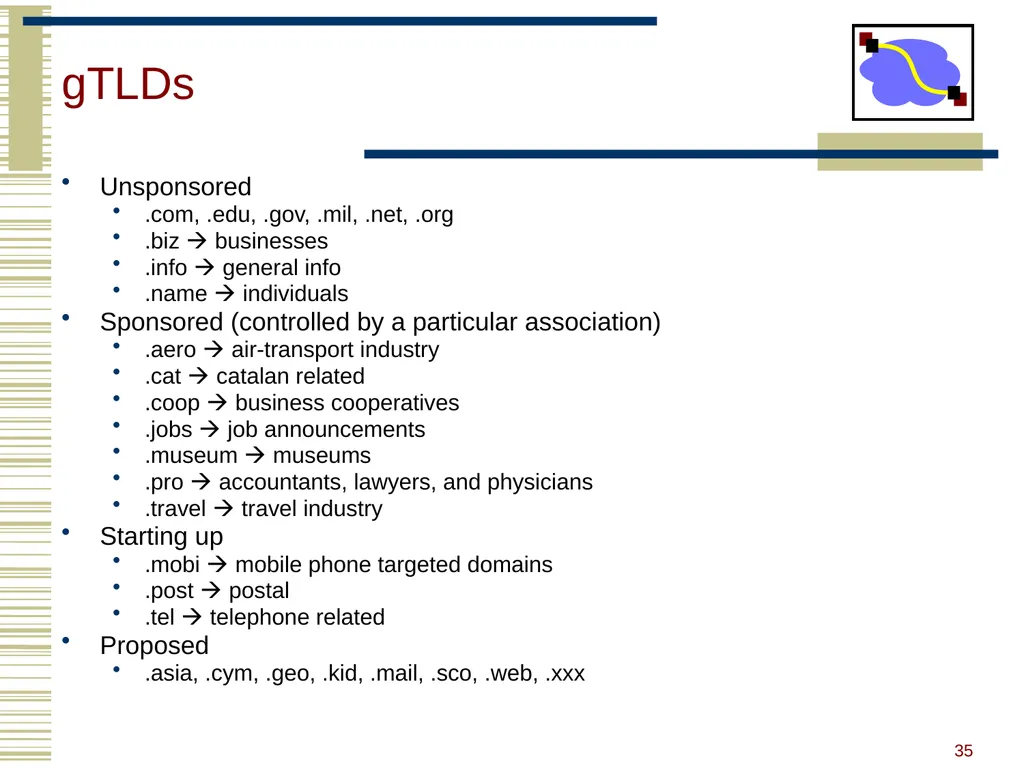
gTLDs Unsponsored
.com, .edu, .gov, .mil, .net, .org
.biz businesses
.info general info
.name individuals
Sponsored (controlled by a particular association)
.aero air-transport industry
.cat catalan related
.coop business cooperatives
.jobs job announcements
.museum museums
.pro accountants, lawyers, and physicians
.travel travel industry
Starting up
.mobi mobile phone targeted domains
.post postal
.tel telephone related
Proposed
.asia, .cym, .geo, .kid, .mail, .sco, .web, .xxx 35<br>
.com, .edu, .gov, .mil, .net, .org
.biz businesses
.info general info
.name individuals
Sponsored (controlled by a particular association)
.aero air-transport industry
.cat catalan related
.coop business cooperatives
.jobs job announcements
.museum museums
.pro accountants, lawyers, and physicians
.travel travel industry
Starting up
.mobi mobile phone targeted domains
.post postal
.tel telephone related
Proposed
.asia, .cym, .geo, .kid, .mail, .sco, .web, .xxx 35<br>
36
New Registrars Network Solutions (NSI) used to handle all registrations, root servers, etc…
Clearly not the democratic (Internet) way
Large number of registrars that can create new domains However NSI still handles A root server 36<br>
Clearly not the democratic (Internet) way
Large number of registrars that can create new domains However NSI still handles A root server 36<br>
37
Do you trust the TLD operators? Wildcard DNS record for all .com and .net domain names not yet registered by others
September 15 – October 4, 2003
February 2004: Verisign sues ICANN
Redirection for these domain names to Verisign web portal (SiteFinder)
What services might this break? 37<br>
September 15 – October 4, 2003
February 2004: Verisign sues ICANN
Redirection for these domain names to Verisign web portal (SiteFinder)
What services might this break? 37<br>
38
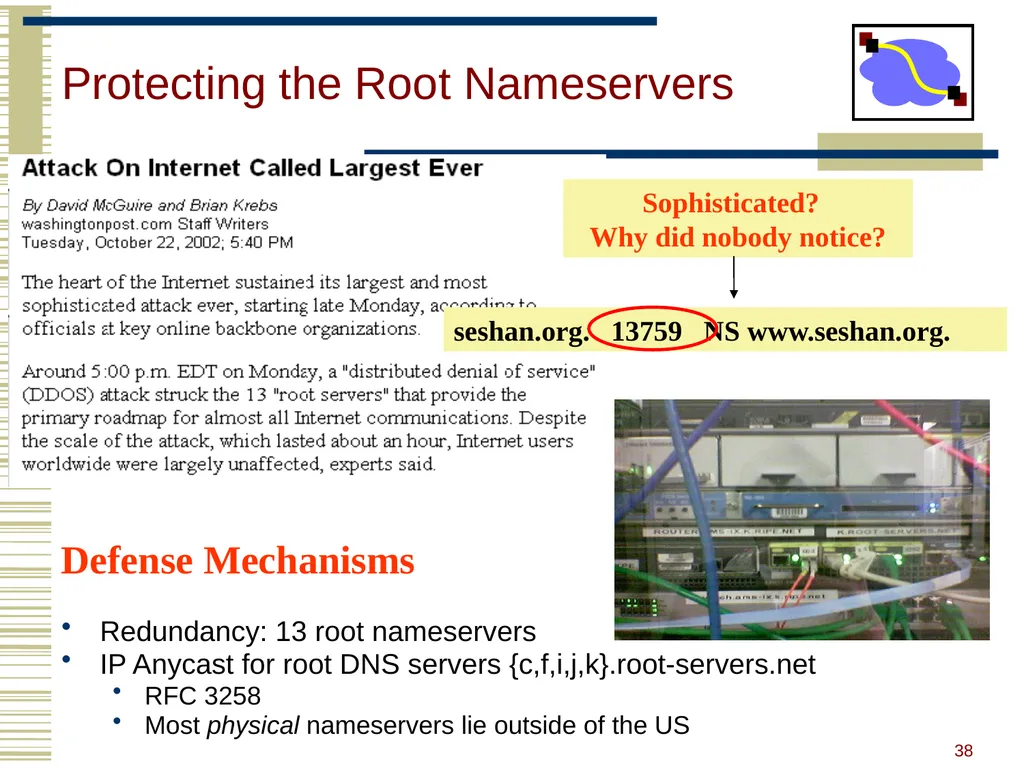
Protecting the Root Nameservers Redundancy: 13 root nameservers
IP Anycast for root DNS servers {c,f,i,j,k}.root-servers.net
RFC 3258
Most physical nameservers lie outside of the US Sophisticated? Why did nobody notice? seshan.org. 13759 NS www.seshan.org. Defense Mechanisms 38<br>
IP Anycast for root DNS servers {c,f,i,j,k}.root-servers.net
RFC 3258
Most physical nameservers lie outside of the US Sophisticated? Why did nobody notice? seshan.org. 13759 NS www.seshan.org. Defense Mechanisms 38<br>
39
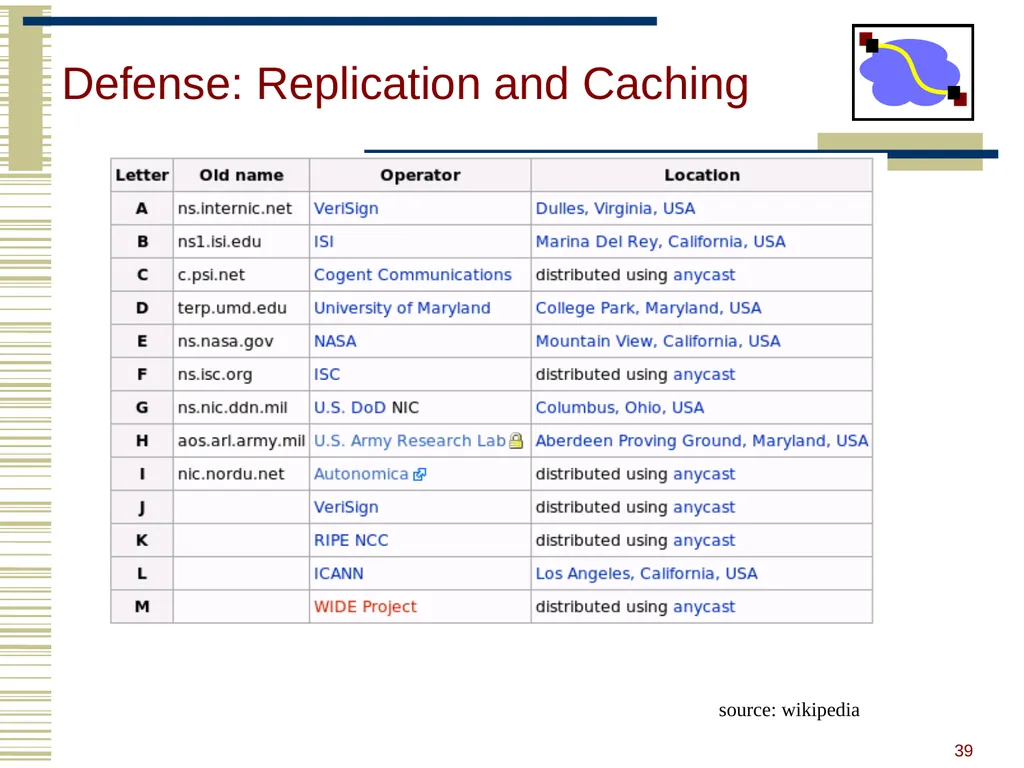
Defense: Replication and Caching source: wikipedia 39<br>
40
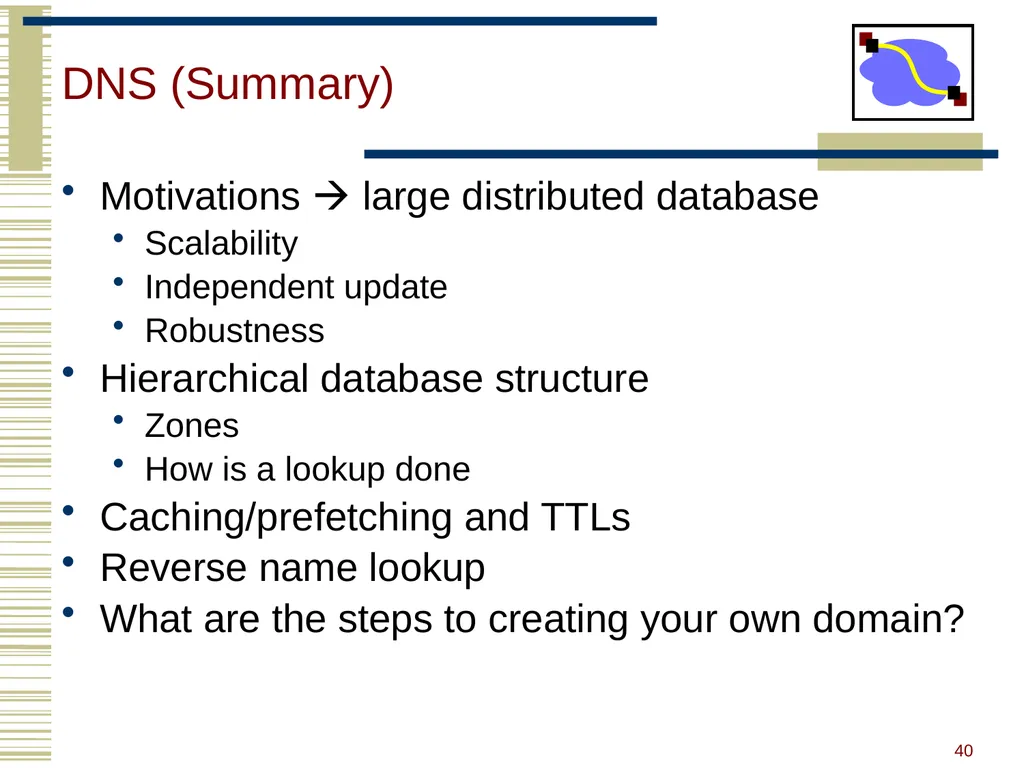
DNS (Summary) Motivations large distributed database
Scalability
Independent update
Robustness
Hierarchical database structure
Zones
How is a lookup done
Caching/prefetching and TTLs
Reverse name lookup
What are the steps to creating your own domain? 40<br>
Scalability
Independent update
Robustness
Hierarchical database structure
Zones
How is a lookup done
Caching/prefetching and TTLs
Reverse name lookup
What are the steps to creating your own domain? 40<br>
41
Outline DNS Design
DNS Today
Content Distribution Networks 41<br>
DNS Today
Content Distribution Networks 41<br>
42
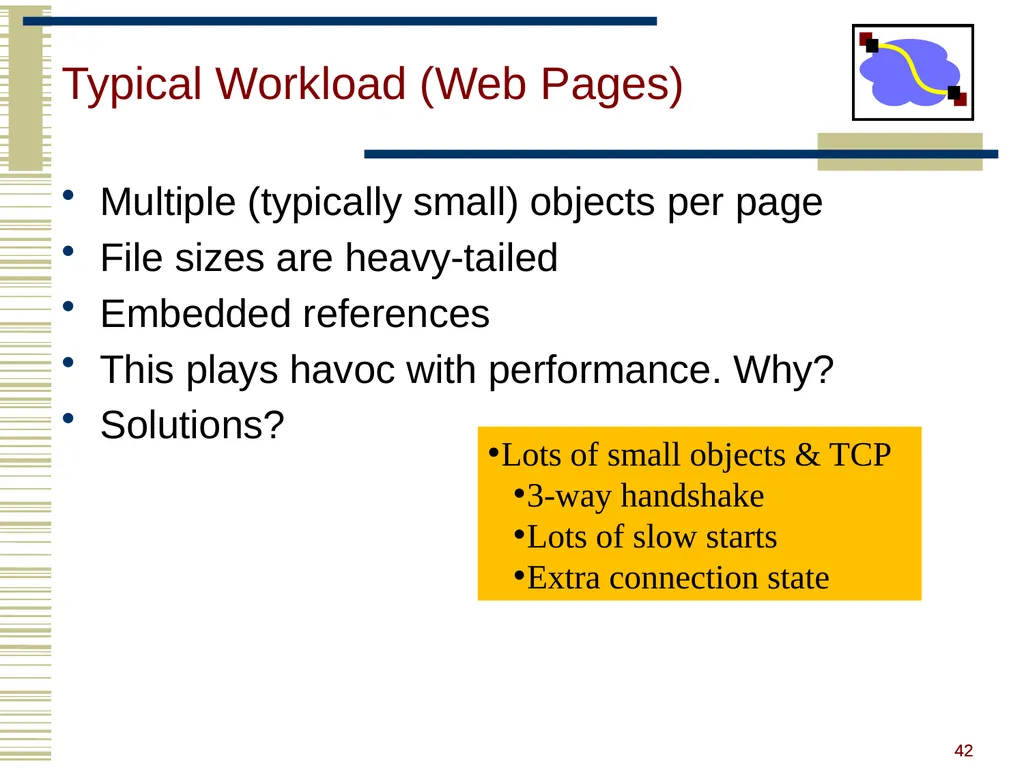
42 Typical Workload (Web Pages) Multiple (typically small) objects per page
File sizes are heavy-tailed
Embedded references
This plays havoc with performance. Why?
Solutions? Lots of small objects & TCP
3-way handshake
Lots of slow starts
Extra connection state 42<br>
File sizes are heavy-tailed
Embedded references
This plays havoc with performance. Why?
Solutions? Lots of small objects & TCP
3-way handshake
Lots of slow starts
Extra connection state 42<br>
43
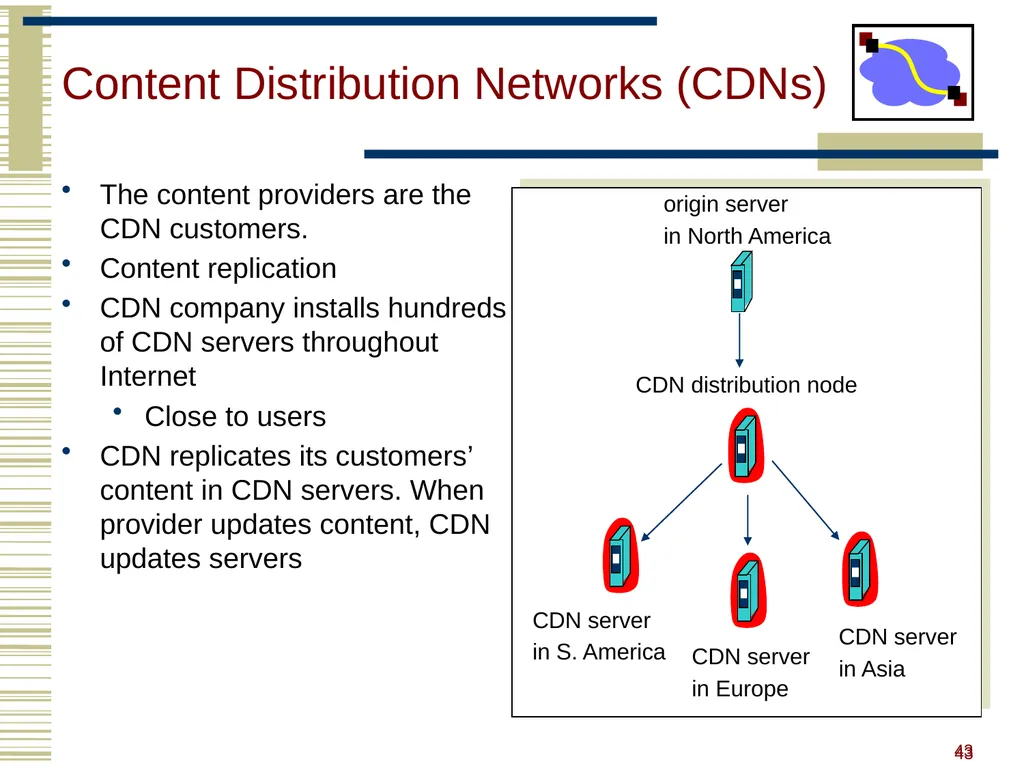
43 origin server
in North America CDN distribution node CDN server
in S. America CDN server
in Europe CDN server
in Asia Content Distribution Networks (CDNs) The content providers are the CDN customers.
Content replication
CDN company installs hundreds of CDN servers throughout Internet
Close to users
CDN replicates its customers’ content in CDN servers. When provider updates content, CDN updates servers 43<br>
in North America CDN distribution node CDN server
in S. America CDN server
in Europe CDN server
in Asia Content Distribution Networks (CDNs) The content providers are the CDN customers.
Content replication
CDN company installs hundreds of CDN servers throughout Internet
Close to users
CDN replicates its customers’ content in CDN servers. When provider updates content, CDN updates servers 43<br>
44
44 http://www.akamai.com/html/technology/nui/news/index.html 44<br>
45
45 Content Distribution Networks &
Server Selection Replicate content on many servers
Challenges
How to replicate content
Where to replicate content
How to find replicated content
How to choose among known replicas
How to direct clients towards replica 45<br>
Challenges
How to replicate content
Where to replicate content
How to find replicated content
How to choose among known replicas
How to direct clients towards replica 45<br>
46
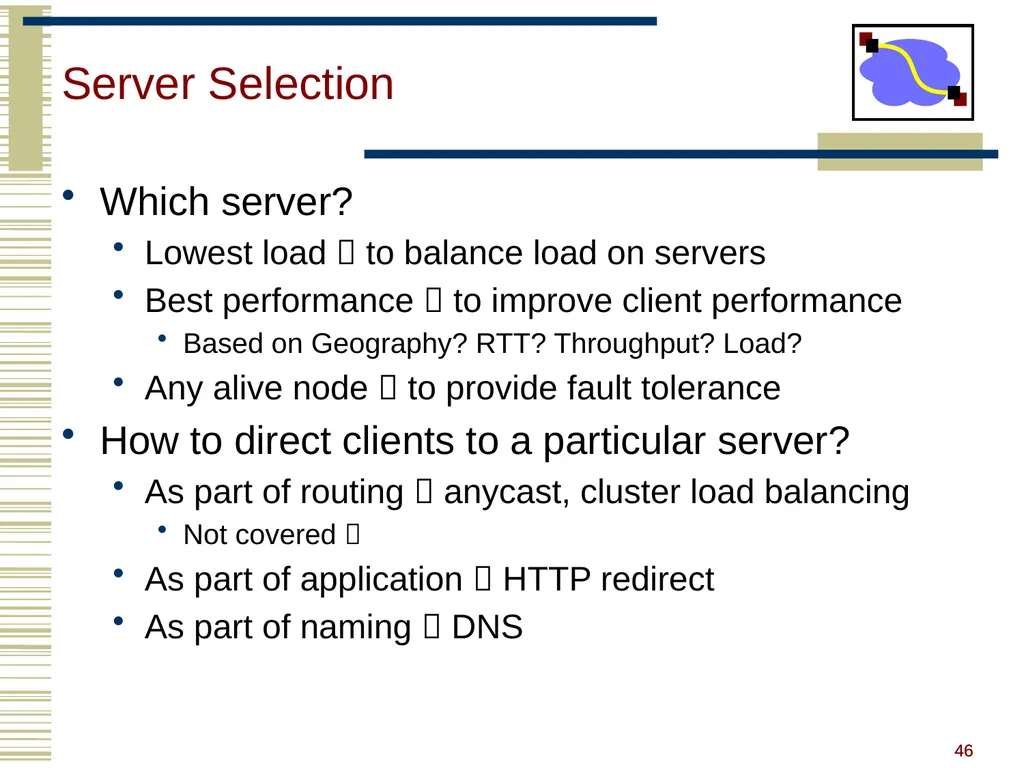
46 Server Selection Which server?
Lowest load to balance load on servers
Best performance to improve client performance
Based on Geography? RTT? Throughput? Load?
Any alive node to provide fault tolerance
How to direct clients to a particular server?
As part of routing anycast, cluster load balancing
Not covered
As part of application HTTP redirect
As part of naming DNS 46<br>
Lowest load to balance load on servers
Best performance to improve client performance
Based on Geography? RTT? Throughput? Load?
Any alive node to provide fault tolerance
How to direct clients to a particular server?
As part of routing anycast, cluster load balancing
Not covered
As part of application HTTP redirect
As part of naming DNS 46<br>
47
47 Application Based HTTP supports simple way to indicate that Web page has moved
(30X responses)
Server receives Get request from client
Decides which server is best suited for particular client and object
Returns HTTP redirect to that server
Can make informed application specific decision
May introduce additional overhead multiple connection setup, name lookups, etc.
While good solution in general, but…
HTTP Redirect has some design flaws – especially with current browsers 47<br>
Server receives Get request from client
Decides which server is best suited for particular client and object
Returns HTTP redirect to that server
Can make informed application specific decision
May introduce additional overhead multiple connection setup, name lookups, etc.
While good solution in general, but…
HTTP Redirect has some design flaws – especially with current browsers 47<br>
48
48 Naming Based Client does name lookup for service
Name server chooses appropriate server address
A-record returned is “best” one for the client
What information can name server base decision on?
Server load/location must be collected
Information in the name lookup request
Name service client typically the local name server for client 48<br>
Name server chooses appropriate server address
A-record returned is “best” one for the client
What information can name server base decision on?
Server load/location must be collected
Information in the name lookup request
Name service client typically the local name server for client 48<br>
49
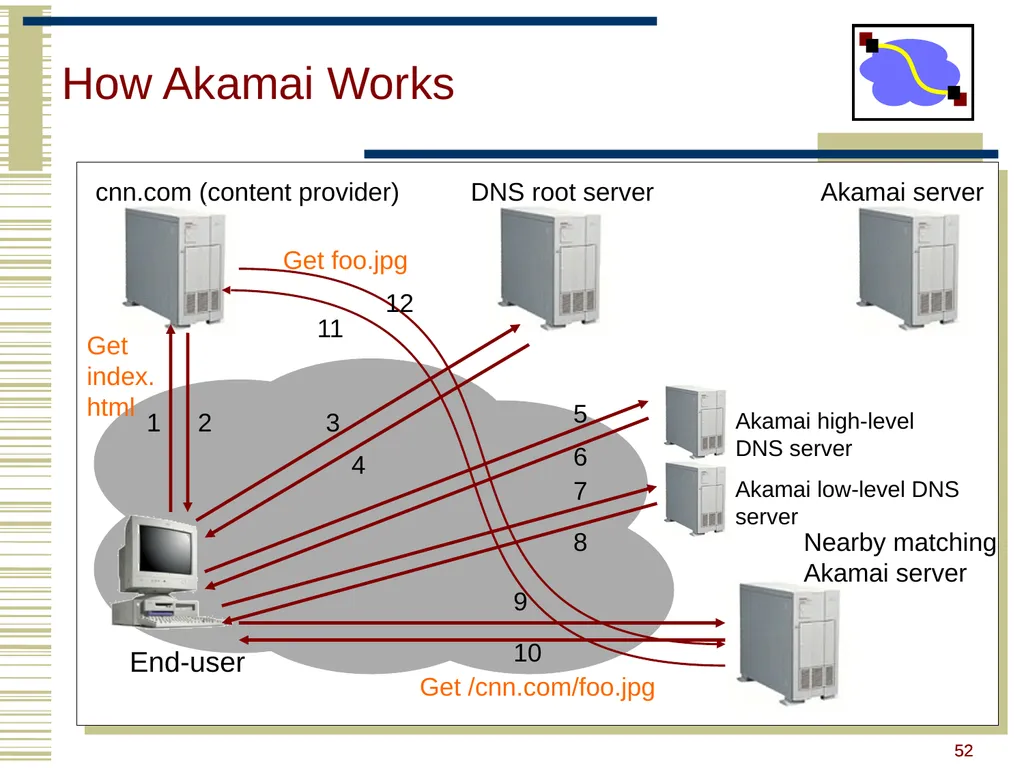
49 How Akamai Works Clients fetch html document from primary server
E.g. fetch index.html from cnn.com
URLs for replicated content are replaced in html
E.g. <img src=“http://cnn.com/af/x.gif”> replaced with <img src=“http://a73.g.akamaitech.net/7/23/cnn.com/af/x.gif”>
Client is forced to resolve aXYZ.g.akamaitech.net hostname Note: Nice presentation on Akamai at
www.cs.odu.edu/~mukka/cs775s07/Presentations/mklein.pdf 49<br>
E.g. fetch index.html from cnn.com
URLs for replicated content are replaced in html
E.g. <img src=“http://cnn.com/af/x.gif”> replaced with <img src=“http://a73.g.akamaitech.net/7/23/cnn.com/af/x.gif”>
Client is forced to resolve aXYZ.g.akamaitech.net hostname Note: Nice presentation on Akamai at
www.cs.odu.edu/~mukka/cs775s07/Presentations/mklein.pdf 49<br>
50
50 How Akamai Works How is content replicated?
Akamai only replicates static content (*)
Modified name contains original file name
Akamai server is asked for content
First checks local cache
If not in cache, requests file from primary server and caches file
* (At least, the version we’re talking about today. Akamai actually lets sites write code that can run on Akamai’s servers, but that’s a pretty different beast) 50<br>
Akamai only replicates static content (*)
Modified name contains original file name
Akamai server is asked for content
First checks local cache
If not in cache, requests file from primary server and caches file
* (At least, the version we’re talking about today. Akamai actually lets sites write code that can run on Akamai’s servers, but that’s a pretty different beast) 50<br>
51
51 How Akamai Works Root server gives NS record for akamai.net
Akamai.net name server returns NS record for g.akamaitech.net
Name server chosen to be in region of client’s name server
TTL is large
G.akamaitech.net nameserver chooses server in region
Should try to chose server that has file in cache - How to choose?
Uses aXYZ name and hash
TTL is small why? 51<br>
Akamai.net name server returns NS record for g.akamaitech.net
Name server chosen to be in region of client’s name server
TTL is large
G.akamaitech.net nameserver chooses server in region
Should try to chose server that has file in cache - How to choose?
Uses aXYZ name and hash
TTL is small why? 51<br>
52
52 How Akamai Works End-user cnn.com (content provider) DNS root server Akamai server 1 2 3 4 Akamai high-level DNS server Akamai low-level DNS server Nearby matching
Akamai server 11 6 7 8 9 10 Get index.html Get /cnn.com/foo.jpg 12 Get foo.jpg 5 52<br>
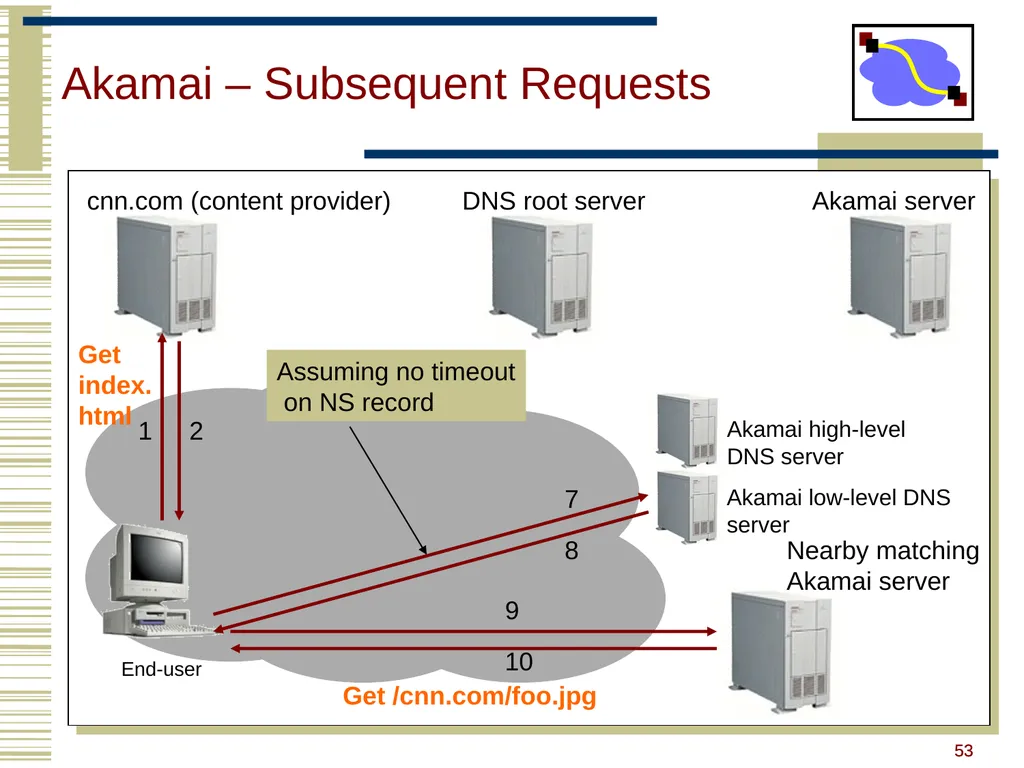
53
53 Akamai – Subsequent Requests End-user cnn.com (content provider) DNS root server Akamai server 1 2 Akamai high-level DNS server Akamai low-level DNS server 7 8 9 10 Get index.html Get /cnn.com/foo.jpg Nearby matching
Akamai server Assuming no timeout
on NS record 53<br>
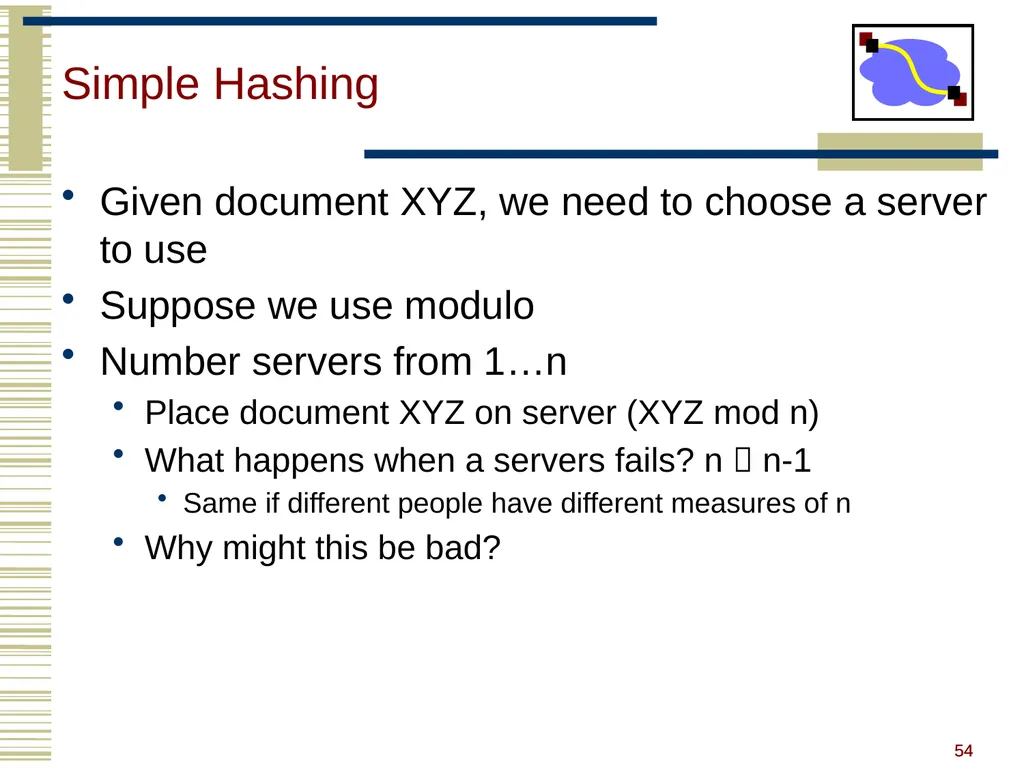
54
54 Simple Hashing Given document XYZ, we need to choose a server to use
Suppose we use modulo
Number servers from 1…n
Place document XYZ on server (XYZ mod n)
What happens when a servers fails? n n-1
Same if different people have different measures of n
Why might this be bad? 54<br>
Suppose we use modulo
Number servers from 1…n
Place document XYZ on server (XYZ mod n)
What happens when a servers fails? n n-1
Same if different people have different measures of n
Why might this be bad? 54<br>
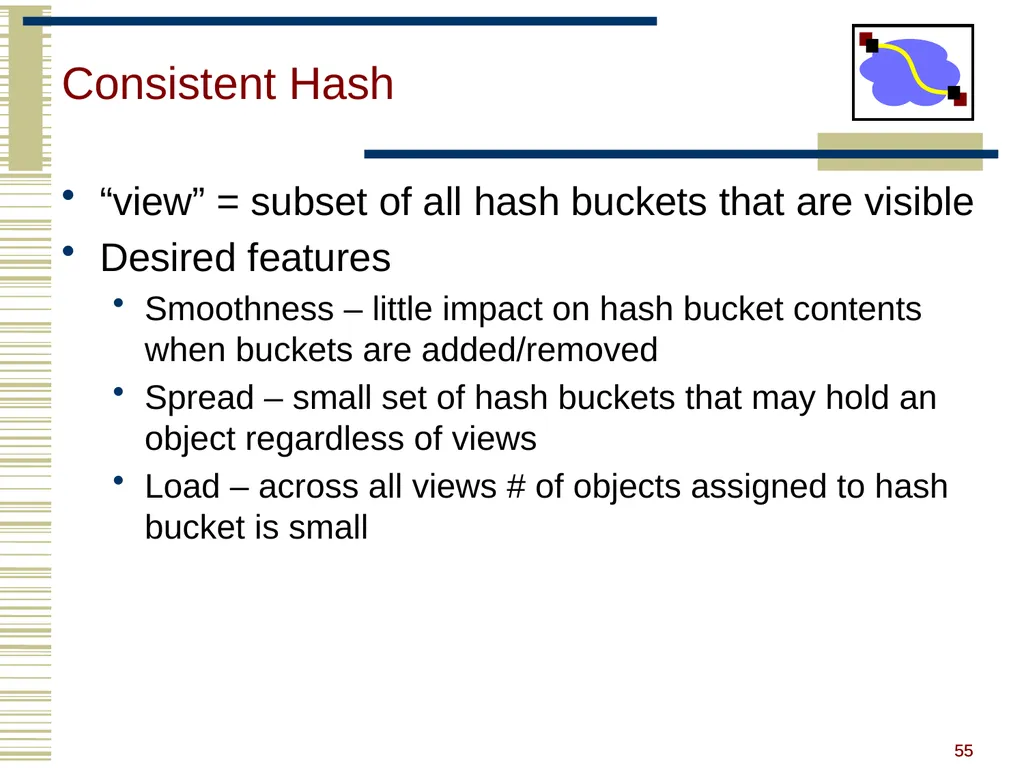
55
55 Consistent Hash “view” = subset of all hash buckets that are visible
Desired features
Smoothness – little impact on hash bucket contents when buckets are added/removed
Spread – small set of hash buckets that may hold an object regardless of views
Load – across all views # of objects assigned to hash bucket is small 55<br>
Desired features
Smoothness – little impact on hash bucket contents when buckets are added/removed
Spread – small set of hash buckets that may hold an object regardless of views
Load – across all views # of objects assigned to hash bucket is small 55<br>
56
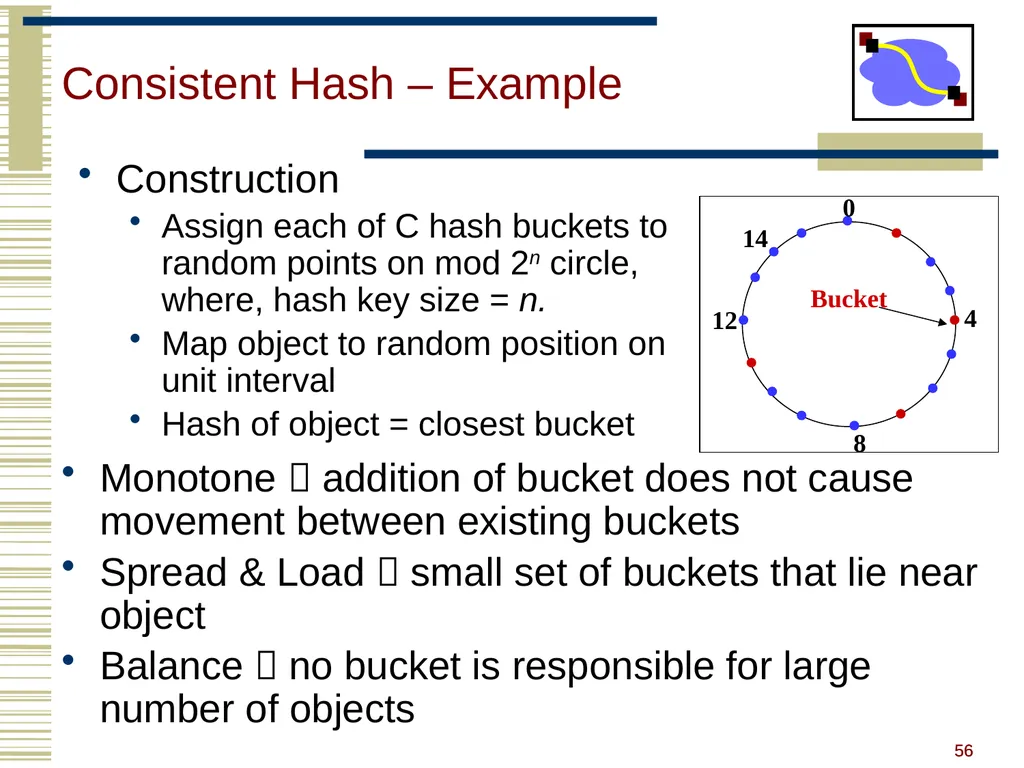
56 Consistent Hash – Example Monotone addition of bucket does not cause movement between existing buckets
Spread & Load small set of buckets that lie near object
Balance no bucket is responsible for large number of objects Construction
Assign each of C hash buckets to random points on mod 2n circle, where, hash key size = n.
Map object to random position on unit interval
Hash of object = closest bucket 0 4 8 12 Bucket 14 56<br>
Spread & Load small set of buckets that lie near object
Balance no bucket is responsible for large number of objects Construction
Assign each of C hash buckets to random points on mod 2n circle, where, hash key size = n.
Map object to random position on unit interval
Hash of object = closest bucket 0 4 8 12 Bucket 14 56<br>
57
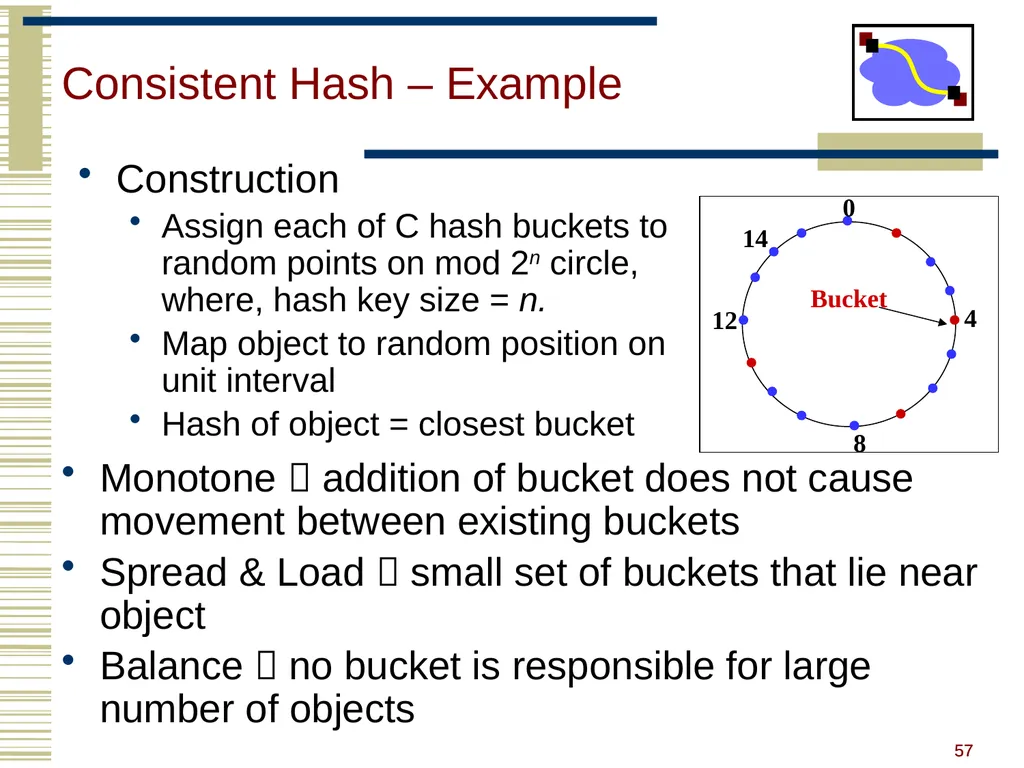
57 Consistent Hash – Example Monotone addition of bucket does not cause movement between existing buckets
Spread & Load small set of buckets that lie near object
Balance no bucket is responsible for large number of objects Construction
Assign each of C hash buckets to random points on mod 2n circle, where, hash key size = n.
Map object to random position on unit interval
Hash of object = closest bucket 0 4 8 12 Bucket 14 57<br>
Spread & Load small set of buckets that lie near object
Balance no bucket is responsible for large number of objects Construction
Assign each of C hash buckets to random points on mod 2n circle, where, hash key size = n.
Map object to random position on unit interval
Hash of object = closest bucket 0 4 8 12 Bucket 14 57<br>
58
Consistent Hashing not just for CDN Finding a nearby server for an object in a CDN uses centralized knowledge.
Consistent hashing can also be used in a distributed setting
P2P systems like BitTorrent, e.g., project 3, need a way of finding files.
Consistent Hashing to the rescue. 58 58<br>
Consistent hashing can also be used in a distributed setting
P2P systems like BitTorrent, e.g., project 3, need a way of finding files.
Consistent Hashing to the rescue. 58 58<br>
59
Summary DNS
Content Delivery Networks move data closer to user, maintain consistency, balance load
Consistent Caching maps keys AND buckets into the same space
Consistent caching can be fully distributed, useful in P2P systems using structured overlays 59 59<br>
Content Delivery Networks move data closer to user, maintain consistency, balance load
Consistent Caching maps keys AND buckets into the same space
Consistent caching can be fully distributed, useful in P2P systems using structured overlays 59 59<br>
60
A rose by any other name…. “DNS Is Sexy: Making Things Go While Making It Fun”
(http://dyn.com/dns-is-sexy/)
If you can convince yourself that something like DNS is sexy, then Dyn must be a great place to work
TheGoodThingAboutDomainNameJokesISThatAllTheGoodShortOnesHaveBeenTold.com unless you're being creati.ve 60<br>
If you can convince yourself that something like DNS is sexy, then Dyn must be a great place to work
TheGoodThingAboutDomainNameJokesISThatAllTheGoodShortOnesHaveBeenTold.com unless you're being creati.ve 60<br>
61
Tracing Hierarchy (1) Dig Program
Allows querying of DNS system
Use flags to find name server (NS)
Disable recursion so that operates one step at a time
All .edu names handled by set of servers unix> dig +norecurse @a.root-servers.net NS kittyhawk.cmcl.cs.cmu.edu
;; AUTHORITY SECTION:
edu. 172800 IN NS L3.NSTLD.COM.
edu. 172800 IN NS D3.NSTLD.COM.
edu. 172800 IN NS A3.NSTLD.COM.
edu. 172800 IN NS E3.NSTLD.COM.
edu. 172800 IN NS C3.NSTLD.COM.
edu. 172800 IN NS F3.NSTLD.COM.
edu. 172800 IN NS G3.NSTLD.COM.
edu. 172800 IN NS B3.NSTLD.COM.
edu. 172800 IN NS M3.NSTLD.COM. 61<br>
Allows querying of DNS system
Use flags to find name server (NS)
Disable recursion so that operates one step at a time
All .edu names handled by set of servers unix> dig +norecurse @a.root-servers.net NS kittyhawk.cmcl.cs.cmu.edu
;; AUTHORITY SECTION:
edu. 172800 IN NS L3.NSTLD.COM.
edu. 172800 IN NS D3.NSTLD.COM.
edu. 172800 IN NS A3.NSTLD.COM.
edu. 172800 IN NS E3.NSTLD.COM.
edu. 172800 IN NS C3.NSTLD.COM.
edu. 172800 IN NS F3.NSTLD.COM.
edu. 172800 IN NS G3.NSTLD.COM.
edu. 172800 IN NS B3.NSTLD.COM.
edu. 172800 IN NS M3.NSTLD.COM. 61<br>
62
Tracing Hierarchy (2) 3 servers handle CMU names unix> dig +norecurse @e3.nstld.com NS kittyhawk.cmcl.cs.cmu.edu
;; AUTHORITY SECTION:
cmu.edu. 172800 IN NS CUCUMBER.SRV.cs.cmu.edu.
cmu.edu. 172800 IN NS T-NS1.NET.cmu.edu.
cmu.edu. 172800 IN NS T-NS2.NET.cmu.edu. 62<br>
;; AUTHORITY SECTION:
cmu.edu. 172800 IN NS CUCUMBER.SRV.cs.cmu.edu.
cmu.edu. 172800 IN NS T-NS1.NET.cmu.edu.
cmu.edu. 172800 IN NS T-NS2.NET.cmu.edu. 62<br>
63
Tracing Hierarchy (3 & 4) 4 servers handle CMU CS names
Quasar is master NS for this zone unix> dig +norecurse @t-ns1.net.cmu.edu NS kittyhawk.cmcl.cs.cmu.edu
;; AUTHORITY SECTION:
cs.cmu.edu. 86400 IN NS MANGO.SRV.cs.cmu.edu.
cs.cmu.edu. 86400 IN NS PEACH.SRV.cs.cmu.edu.
cs.cmu.edu. 86400 IN NS BANANA.SRV.cs.cmu.edu.
cs.cmu.edu. 86400 IN NS BLUEBERRY.SRV.cs.cmu.edu. unix>dig +norecurse @blueberry.srv.cs.cmu.edu NS kittyhawk.cmcl.cs.cmu.edu
;; AUTHORITY SECTION:
cs.cmu.edu. 300 IN SOA QUASAR.FAC.cs.cmu.edu. 63<br>
Quasar is master NS for this zone unix> dig +norecurse @t-ns1.net.cmu.edu NS kittyhawk.cmcl.cs.cmu.edu
;; AUTHORITY SECTION:
cs.cmu.edu. 86400 IN NS MANGO.SRV.cs.cmu.edu.
cs.cmu.edu. 86400 IN NS PEACH.SRV.cs.cmu.edu.
cs.cmu.edu. 86400 IN NS BANANA.SRV.cs.cmu.edu.
cs.cmu.edu. 86400 IN NS BLUEBERRY.SRV.cs.cmu.edu. unix>dig +norecurse @blueberry.srv.cs.cmu.edu NS kittyhawk.cmcl.cs.cmu.edu
;; AUTHORITY SECTION:
cs.cmu.edu. 300 IN SOA QUASAR.FAC.cs.cmu.edu. 63<br>
64
64 client Proxy
server client HTTP request HTTP request HTTP response HTTP response HTTP request HTTP response origin
server origin
server Web Proxy Caches User configures browser: Web accesses via cache
Browser sends all HTTP requests to cache
Object in cache: cache returns object
Else cache requests object from origin server, then returns object to client 64<br>
server client HTTP request HTTP request HTTP response HTTP response HTTP request HTTP response origin
server origin
server Web Proxy Caches User configures browser: Web accesses via cache
Browser sends all HTTP requests to cache
Object in cache: cache returns object
Else cache requests object from origin server, then returns object to client 64<br>
65
65 No Caching Example (1) Assumptions
Average object size = 100,000 bits
Avg. request rate from institution’s browser to origin servers = 15/sec
Delay from institutional router to any origin server and back to router = 2 sec
Consequences
Utilization on LAN = 15%
Utilization on access link = 100%
Total delay = Internet delay + access delay + LAN delay
= 2 sec + minutes + milliseconds origin
servers public
Internet institutional
network 10 Mbps LAN 1.5 Mbps
access link 65<br>
Average object size = 100,000 bits
Avg. request rate from institution’s browser to origin servers = 15/sec
Delay from institutional router to any origin server and back to router = 2 sec
Consequences
Utilization on LAN = 15%
Utilization on access link = 100%
Total delay = Internet delay + access delay + LAN delay
= 2 sec + minutes + milliseconds origin
servers public
Internet institutional
network 10 Mbps LAN 1.5 Mbps
access link 65<br>
66
66 No Caching Example (2) Possible solution
Increase bandwidth of access link to, say, 10 Mbps
Often a costly upgrade
Consequences
Utilization on LAN = 15%
Utilization on access link = 15%
Total delay = Internet delay + access delay + LAN delay
= 2 sec + msecs + msecs origin
servers public
Internet institutional
network 10 Mbps LAN 10 Mbps
access link 66<br>
Increase bandwidth of access link to, say, 10 Mbps
Often a costly upgrade
Consequences
Utilization on LAN = 15%
Utilization on access link = 15%
Total delay = Internet delay + access delay + LAN delay
= 2 sec + msecs + msecs origin
servers public
Internet institutional
network 10 Mbps LAN 10 Mbps
access link 66<br>
67
67 W/Caching Example (3) Install cache
Suppose hit rate is .4
Consequence
40% requests will be satisfied almost immediately (say 10 msec)
60% requests satisfied by origin server
Utilization of access link reduced to 60%, resulting in negligible delays
Weighted average of delays
= .6*2 sec + .4*10msecs < 1.3 secs origin
servers public
Internet institutional
network 10 Mbps LAN 1.5 Mbps
access link institutional
cache 67<br>
Suppose hit rate is .4
Consequence
40% requests will be satisfied almost immediately (say 10 msec)
60% requests satisfied by origin server
Utilization of access link reduced to 60%, resulting in negligible delays
Weighted average of delays
= .6*2 sec + .4*10msecs < 1.3 secs origin
servers public
Internet institutional
network 10 Mbps LAN 1.5 Mbps
access link institutional
cache 67<br>
68
68 HTTP Caching Clients often cache documents
Challenge: update of documents
If-Modified-Since requests to check
HTTP 0.9/1.0 used just date
HTTP 1.1 has an opaque “entity tag” (could be a file signature, etc.) as well
When/how often should the original be checked for changes?
Check every time?
Check each session? Day? Etc?
Use Expires header
If no Expires, often use Last-Modified as estimate 68<br>
Challenge: update of documents
If-Modified-Since requests to check
HTTP 0.9/1.0 used just date
HTTP 1.1 has an opaque “entity tag” (could be a file signature, etc.) as well
When/how often should the original be checked for changes?
Check every time?
Check each session? Day? Etc?
Use Expires header
If no Expires, often use Last-Modified as estimate 68<br>
69
69 Example Cache Check Request GET / HTTP/1.1
Accept: */*
Accept-Language: en-us
Accept-Encoding: gzip, deflate
If-Modified-Since: Mon, 29 Jan 2001 17:54:18 GMT
If-None-Match: "7a11f-10ed-3a75ae4a"
User-Agent: Mozilla/4.0 (compatible; MSIE 5.5; Windows NT 5.0)
Host: www.intel-iris.net
Connection: Keep-Alive 69<br>
Accept: */*
Accept-Language: en-us
Accept-Encoding: gzip, deflate
If-Modified-Since: Mon, 29 Jan 2001 17:54:18 GMT
If-None-Match: "7a11f-10ed-3a75ae4a"
User-Agent: Mozilla/4.0 (compatible; MSIE 5.5; Windows NT 5.0)
Host: www.intel-iris.net
Connection: Keep-Alive 69<br>
70
70 Example Cache Check Response HTTP/1.1 304 Not Modified
Date: Tue, 27 Mar 2001 03:50:51 GMT
Server: Apache/1.3.14 (Unix) (Red-Hat/Linux) mod_ssl/2.7.1 OpenSSL/0.9.5a DAV/1.0.2 PHP/4.0.1pl2 mod_perl/1.24
Connection: Keep-Alive
Keep-Alive: timeout=15, max=100
ETag: "7a11f-10ed-3a75ae4a" 70<br>
Date: Tue, 27 Mar 2001 03:50:51 GMT
Server: Apache/1.3.14 (Unix) (Red-Hat/Linux) mod_ssl/2.7.1 OpenSSL/0.9.5a DAV/1.0.2 PHP/4.0.1pl2 mod_perl/1.24
Connection: Keep-Alive
Keep-Alive: timeout=15, max=100
ETag: "7a11f-10ed-3a75ae4a" 70<br>
71
71 Problems Over 50% of all HTTP objects are uncacheable – why?
Not easily solvable
Dynamic data stock prices, scores, web cams
CGI scripts results based on passed parameters
Obvious fixes
SSL encrypted data is not cacheable
Most web clients don’t handle mixed pages well many generic objects transferred with SSL
Cookies results may be based on passed data
Hit metering owner wants to measure # of hits for revenue, etc. 71<br>
Not easily solvable
Dynamic data stock prices, scores, web cams
CGI scripts results based on passed parameters
Obvious fixes
SSL encrypted data is not cacheable
Most web clients don’t handle mixed pages well many generic objects transferred with SSL
Cookies results may be based on passed data
Hit metering owner wants to measure # of hits for revenue, etc. 71<br>
72
72 Caching Proxies – Sources for Misses Capacity
How large a cache is necessary or equivalent to infinite
On disk vs. in memory typically on disk
Compulsory
First time access to document
Non-cacheable documents
CGI-scripts
Personalized documents (cookies, etc)
Encrypted data (SSL)
Consistency
Document has been updated/expired before reuse 72<br>
How large a cache is necessary or equivalent to infinite
On disk vs. in memory typically on disk
Compulsory
First time access to document
Non-cacheable documents
CGI-scripts
Personalized documents (cookies, etc)
Encrypted data (SSL)
Consistency
Document has been updated/expired before reuse 72<br>
73
Measurements of DNS No centralized caching per site
Each machine runs own caching local server
Why is this a problem?
How many hosts do we need to share cache? recent studies suggest 10-20 hosts
“Hit rate for DNS = 80% 1 - (#DNS/#connections)
Is this good or bad?
Most Internet traffic was Web with HTTP 1.0
What does a typical page look like? average of 4-5 imbedded objects needs 4-5 transfers
This alone accounts for 80% hit rate!
Lower TTLs for A records does not affect performance
DNS performance really relies more on NS-record caching 73<br>
Each machine runs own caching local server
Why is this a problem?
How many hosts do we need to share cache? recent studies suggest 10-20 hosts
“Hit rate for DNS = 80% 1 - (#DNS/#connections)
Is this good or bad?
Most Internet traffic was Web with HTTP 1.0
What does a typical page look like? average of 4-5 imbedded objects needs 4-5 transfers
This alone accounts for 80% hit rate!
Lower TTLs for A records does not affect performance
DNS performance really relies more on NS-record caching 73<br>
74
DNS Experience 23% of lookups with no answer
Retransmit aggressively most packets in trace for unanswered lookups!
Correct answers tend to come back quickly/with few retries
10 - 42% negative answers most = no name exists
Inverse lookups and bogus NS records
Worst 10% lookup latency got much worse
Median 8597, 90th percentile 4471176
Increasing share of low TTL records what is happening to caching? 74<br>
Retransmit aggressively most packets in trace for unanswered lookups!
Correct answers tend to come back quickly/with few retries
10 - 42% negative answers most = no name exists
Inverse lookups and bogus NS records
Worst 10% lookup latency got much worse
Median 8597, 90th percentile 4471176
Increasing share of low TTL records what is happening to caching? 74<br>
75
DNS Experience Hit rate for DNS = 80% 1-(#DNS/#connections)
Most Internet traffic is Web
What does a typical page look like? average of 4-5 imbedded objects needs 4-5 transfers accounts for 80% hit rate!
70% hit rate for NS records i.e. don’t go to root/gTLD servers
NS TTLs are much longer than A TTLs
NS record caching is much more important to scalability
Name distribution = Zipf-like = 1/xa
A records TTLs = 10 minutes similar to TTLs = infinite
10 client hit rate = 1000+ client hit rate 75<br>
Most Internet traffic is Web
What does a typical page look like? average of 4-5 imbedded objects needs 4-5 transfers accounts for 80% hit rate!
70% hit rate for NS records i.e. don’t go to root/gTLD servers
NS TTLs are much longer than A TTLs
NS record caching is much more important to scalability
Name distribution = Zipf-like = 1/xa
A records TTLs = 10 minutes similar to TTLs = infinite
10 client hit rate = 1000+ client hit rate 75<br>
76
Mail Addresses MX records point to mail exchanger for a name
E.g. mail.acm.org is MX for acm.org
Addition of MX record type proved to be a challenge
How to get mail programs to lookup MX record for mail delivery?
Needed critical mass of such mailers 76<br>
E.g. mail.acm.org is MX for acm.org
Addition of MX record type proved to be a challenge
How to get mail programs to lookup MX record for mail delivery?
Needed critical mass of such mailers 76<br>
77
Recursive DNS Name Resolution Nonlocal Lookup
Recursively from root server downward
Results passed up
Caching
Results stored in caches along each hop
Can shortcircuit lookup when cached entry present edu com cmu cs greatwhite
128.2.220.10 ics unnamed root someplace www
208.216.181.15 Root
Server .edu
Server CMU
Server CMU CS
Server Local
Server 77<br>
Recursively from root server downward
Results passed up
Caching
Results stored in caches along each hop
Can shortcircuit lookup when cached entry present edu com cmu cs greatwhite
128.2.220.10 ics unnamed root someplace www
208.216.181.15 Root
Server .edu
Server CMU
Server CMU CS
Server Local
Server 77<br>
78
Iterative DNS Name Resolution Nonlocal Lookup
At each step, server returns name of next server down
Local server directly queries each successive server
Caching
Local server builds up cache of intermediate translations
Helps in resolving names xxx.cs.cmu.edu, yy.cmu.edu, and z.edu edu com cmu cs greatwhite
128.2.220.10 ics unnamed root someplace www
208.216.181.15 Root
Server .edu
Server CMU
Server CMU CS
Server Local
Server 78<br>
At each step, server returns name of next server down
Local server directly queries each successive server
Caching
Local server builds up cache of intermediate translations
Helps in resolving names xxx.cs.cmu.edu, yy.cmu.edu, and z.edu edu com cmu cs greatwhite
128.2.220.10 ics unnamed root someplace www
208.216.181.15 Root
Server .edu
Server CMU
Server CMU CS
Server Local
Server 78<br>
79
DNS Hack #2: Blackhole Lists First: Mail Abuse Prevention System (MAPS)
Paul Vixie, 1997
Today: Spamhaus, spamcop, dnsrbl.org, etc. % dig 91.53.195.211.bl.spamcop.net
;; ANSWER SECTION:
91.53.195.211.bl.spamcop.net. 2100 IN A 127.0.0.2
;; ANSWER SECTION:
91.53.195.211.bl.spamcop.net. 1799 IN TXT "Blocked - see http://www.spamcop.net/bl.shtml?211.195.53.91" Different addresses refer to different reasons for blocking 79<br>
Paul Vixie, 1997
Today: Spamhaus, spamcop, dnsrbl.org, etc. % dig 91.53.195.211.bl.spamcop.net
;; ANSWER SECTION:
91.53.195.211.bl.spamcop.net. 2100 IN A 127.0.0.2
;; ANSWER SECTION:
91.53.195.211.bl.spamcop.net. 1799 IN TXT "Blocked - see http://www.spamcop.net/bl.shtml?211.195.53.91" Different addresses refer to different reasons for blocking 79<br>
80
80 File Size and References Distributions File sizes
Pareto distribution for tail
Lognormal for body of distribution
Number of embedded references also Pareto Pareto: kxmk/xk+1 Probability density function: Pr(X < x) = 1 - (xm/x)k Cumulative distribution function: Log-Normal Probability density function: 80<br>
Pareto distribution for tail
Lognormal for body of distribution
Number of embedded references also Pareto Pareto: kxmk/xk+1 Probability density function: Pr(X < x) = 1 - (xm/x)k Cumulative distribution function: Log-Normal Probability density function: 80<br>
81
Consistent Hashing Main idea:
map both keys and nodes to the same (metric) identifier space
find a “rule” how to assign keys to nodes Ring is one option. 81<br>
map both keys and nodes to the same (metric) identifier space
find a “rule” how to assign keys to nodes Ring is one option. 81<br>
82
Consistent Hashing The consistent hash function assigns each node and key an m-bit identifier using SHA-1 as a base hash function
Node identifier: SHA-1 hash of IP address
Key identifier: SHA-1 hash of key 82<br>
Node identifier: SHA-1 hash of IP address
Key identifier: SHA-1 hash of key 82<br>
83
m bit identifier space for both keys and nodes
Key identifier: SHA-1(key) Node identifier: SHA-1(IP address) How to map key IDs to node IDs? Identifiers 83<br>
Key identifier: SHA-1(key) Node identifier: SHA-1(IP address) How to map key IDs to node IDs? Identifiers 83<br>
84
Rule: A key is stored at its successor: node with next higher or equal ID N32 N90 N123 K20 K5 Circular 7-bit
ID space 0 IP=“198.10.10.1” K101 K60 Key=“LetItBe” Consistent Hashing Example 84<br>
ID space 0 IP=“198.10.10.1” K101 K60 Key=“LetItBe” Consistent Hashing Example 84<br>
85
Consistent Hashing Properties Load balance: all nodes receive roughly the same number of keys
For N nodes and K keys, with high probability
each node holds at most (1+)K/N keys
(provided that K is large enough compared to N) 85<br>
For N nodes and K keys, with high probability
each node holds at most (1+)K/N keys
(provided that K is large enough compared to N) 85<br>
86
Load Balance Redirector knows all CDN server Ids
Can track approximate load (or delay)
To balance load:
Wi = Hash(URL, ip of si) for all i
Sort Wi from high to low
find first server with low enough load
Benefits?
How should “load” be measured? 86 86<br>
Can track approximate load (or delay)
To balance load:
Wi = Hash(URL, ip of si) for all i
Sort Wi from high to low
find first server with low enough load
Benefits?
How should “load” be measured? 86 86<br>