
15-110: Principles of Computing Functions- Part I
LV
Published · 28 slides · 0 views
1 / 1
Description
15-110: Principles of Computing Functions- Part I Lecture 3, September 09, 2018 Mohammad Hammoud Carnegie Mellon University in Qatar Today Last Session: Basic Elements of Python Programs Todays Session: Functions- Part I: Why using
Related Topics
Share
Embed code
Download this presentation From Below
"15-110: Principles of Computing Functions- Part I" is the property of its rightful owner. Permission is granted to download and print the materials on this website for personal, non-commercial use only, and to display it on your personal computer provided you do not modify the materials and that you retain all copyright notices contained in the materials. By downloading content from our website, you accept the terms of this agreement.
Presentation Transcript
01
15-110: Principles of Computing Functions- Part I
Lecture 3, September 09, 2018
Mohammad Hammoud
Carnegie Mellon University in Qatar<br>
Lecture 3, September 09, 2018
Mohammad Hammoud
Carnegie Mellon University in Qatar<br>
02
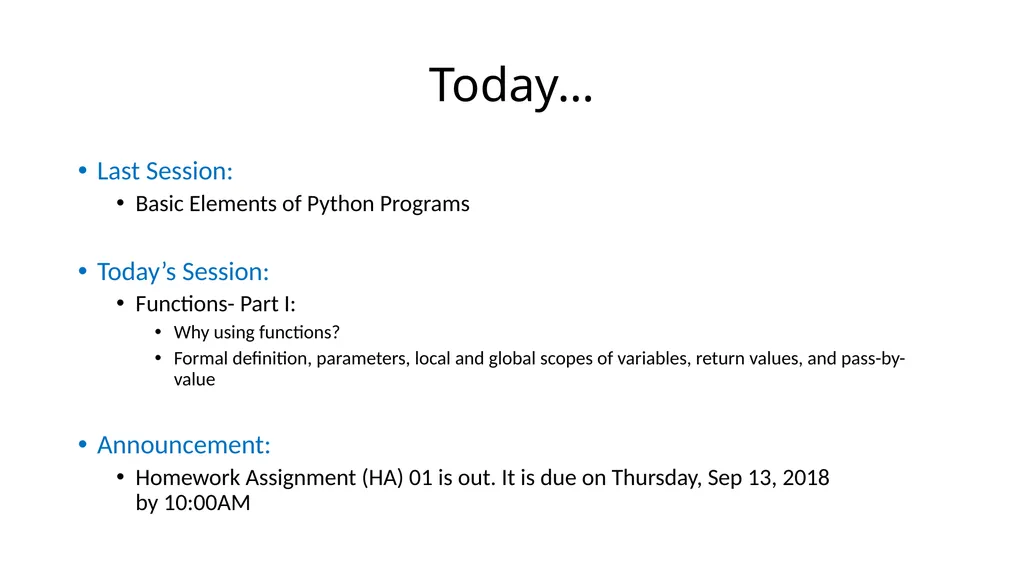
Today… Last Session:
Basic Elements of Python Programs
Today’s Session:
Functions- Part I:
Why using functions?
Formal definition, parameters, local and global scopes of variables, return values, and pass-by-value
Announcement:
Homework Assignment (HA) 01 is out. It is due on Thursday, Sep 13, 2018 by 10:00AM<br>
Basic Elements of Python Programs
Today’s Session:
Functions- Part I:
Why using functions?
Formal definition, parameters, local and global scopes of variables, return values, and pass-by-value
Announcement:
Homework Assignment (HA) 01 is out. It is due on Thursday, Sep 13, 2018 by 10:00AM<br>
03
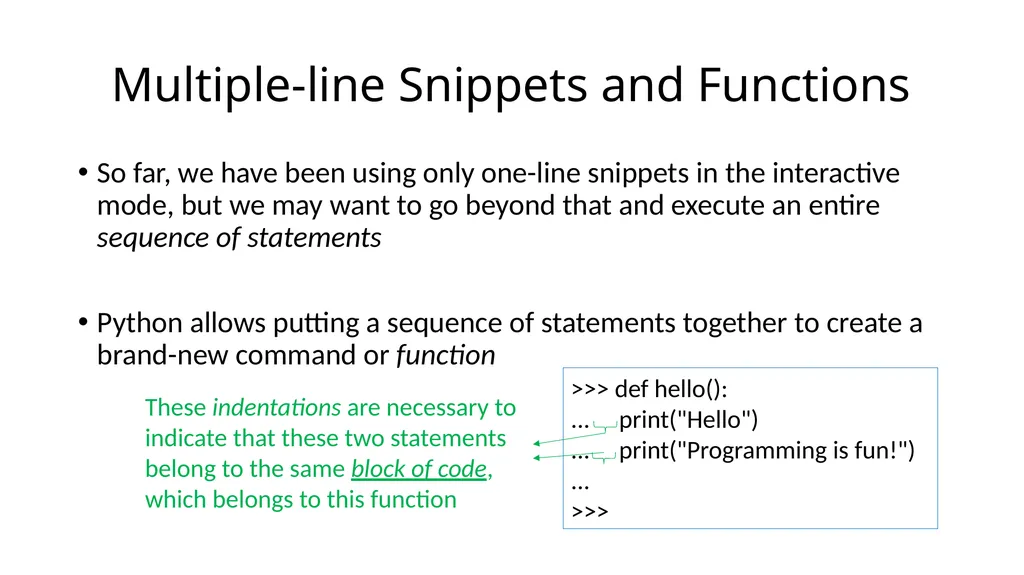
So far, we have been using only one-line snippets in the interactive mode, but we may want to go beyond that and execute an entire sequence of statements
Python allows putting a sequence of statements together to create a brand-new command or function Multiple-line Snippets and Functions >>> def hello():
... print("Hello")
... print("Programming is fun!")
...
>>> These indentations are necessary to indicate that these two statements belong to the same block of code, which belongs to this function<br>
Python allows putting a sequence of statements together to create a brand-new command or function Multiple-line Snippets and Functions >>> def hello():
... print("Hello")
... print("Programming is fun!")
...
>>> These indentations are necessary to indicate that these two statements belong to the same block of code, which belongs to this function<br>
04
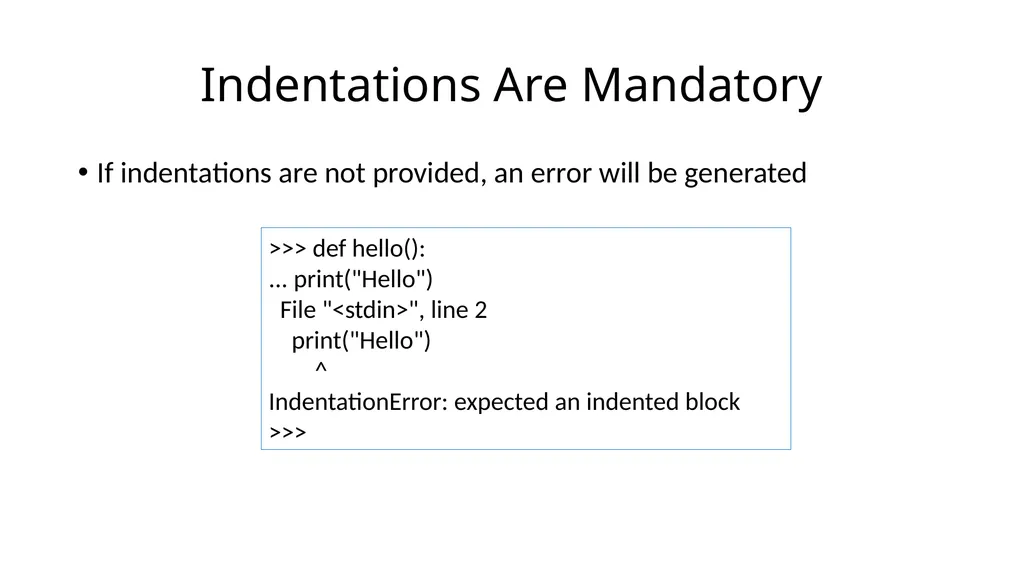
If indentations are not provided, an error will be generated Indentations Are Mandatory >>> def hello():
... print("Hello")
File "<stdin>", line 2
print("Hello")
^
IndentationError: expected an indented block
>>><br>
... print("Hello")
File "<stdin>", line 2
print("Hello")
^
IndentationError: expected an indented block
>>><br>
05
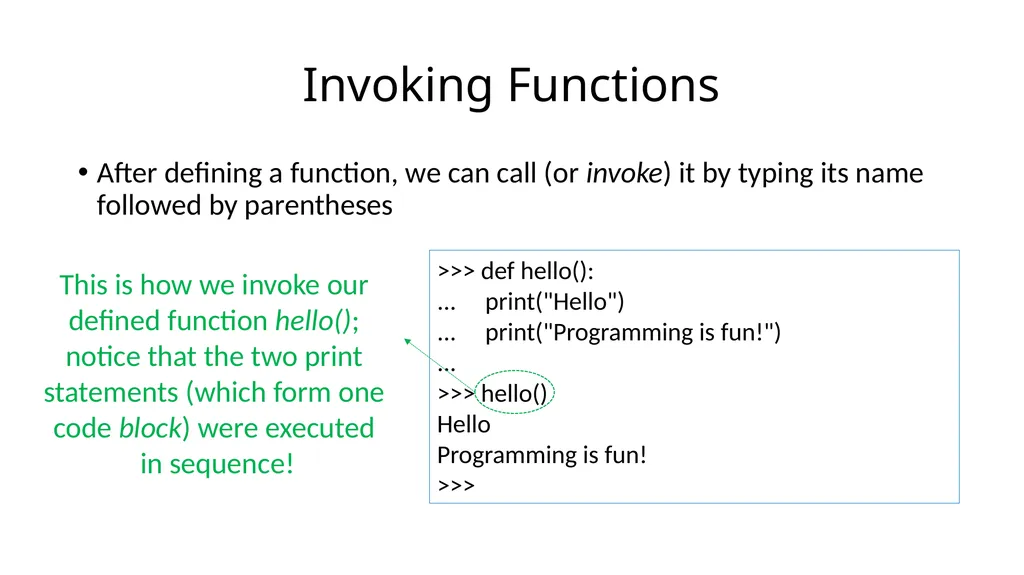
After defining a function, we can call (or invoke) it by typing its name followed by parentheses Invoking Functions >>> def hello():
... print("Hello")
... print("Programming is fun!")
...
>>> hello()
Hello
Programming is fun!
>>> This is how we invoke our defined function hello(); notice that the two print statements (which form one code block) were executed in sequence!<br>
... print("Hello")
... print("Programming is fun!")
...
>>> hello()
Hello
Programming is fun!
>>> This is how we invoke our defined function hello(); notice that the two print statements (which form one code block) were executed in sequence!<br>
06
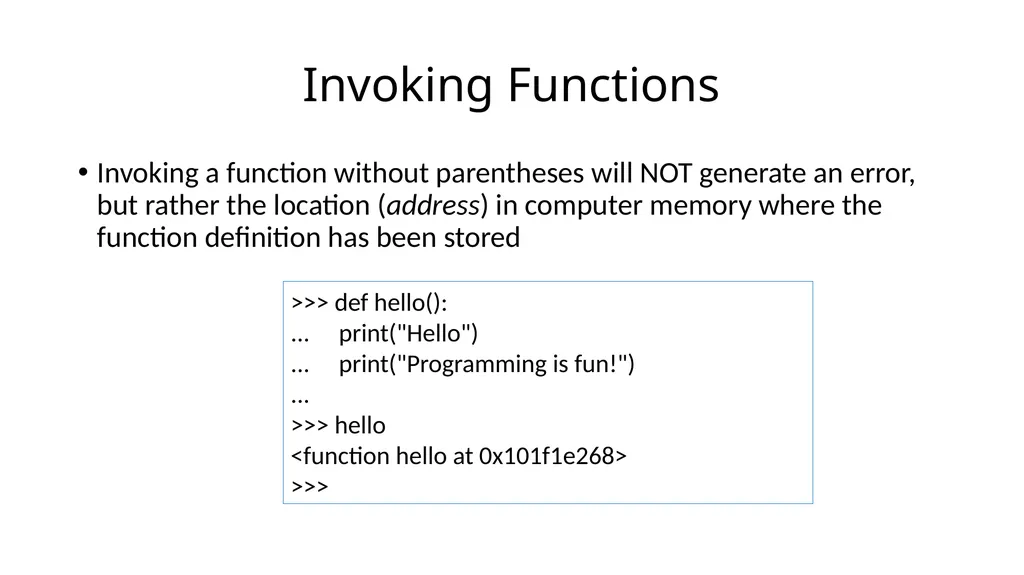
Invoking a function without parentheses will NOT generate an error, but rather the location (address) in computer memory where the function definition has been stored Invoking Functions >>> def hello():
... print("Hello")
... print("Programming is fun!")
...
>>> hello
<function hello at 0x101f1e268>
>>><br>
... print("Hello")
... print("Programming is fun!")
...
>>> hello
<function hello at 0x101f1e268>
>>><br>
07
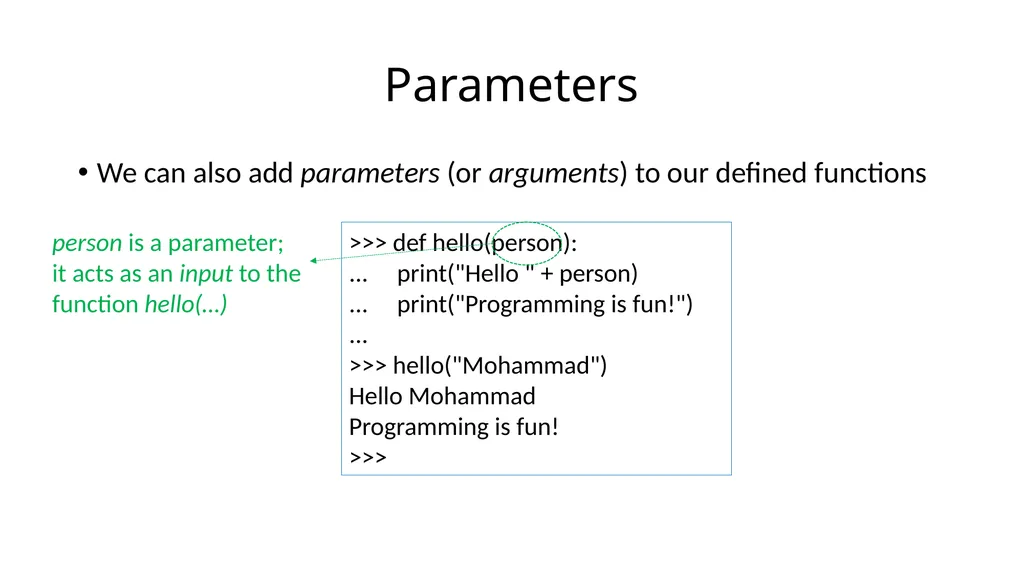
We can also add parameters (or arguments) to our defined functions Parameters >>> def hello(person):
... print("Hello " + person)
... print("Programming is fun!")
...
>>> hello("Mohammad")
Hello Mohammad
Programming is fun!
>>> person is a parameter; it acts as an input to the function hello(…)<br>
... print("Hello " + person)
... print("Programming is fun!")
...
>>> hello("Mohammad")
Hello Mohammad
Programming is fun!
>>> person is a parameter; it acts as an input to the function hello(…)<br>
08
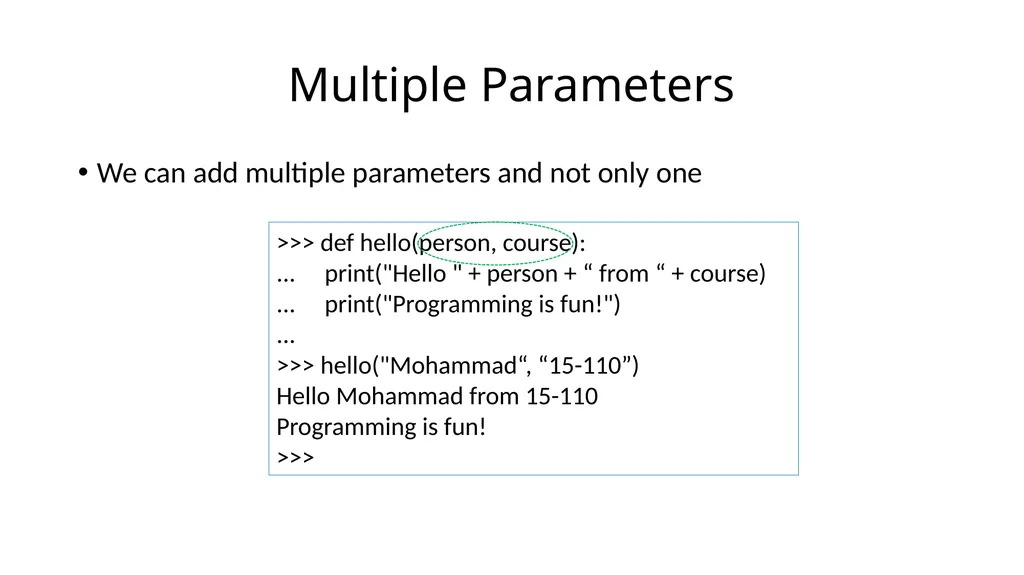
We can add multiple parameters and not only one Multiple Parameters >>> def hello(person, course):
... print("Hello " + person + “ from “ + course)
... print("Programming is fun!")
...
>>> hello("Mohammad“, “15-110”)
Hello Mohammad from 15-110
Programming is fun!
>>><br>
... print("Hello " + person + “ from “ + course)
... print("Programming is fun!")
...
>>> hello("Mohammad“, “15-110”)
Hello Mohammad from 15-110
Programming is fun!
>>><br>
09
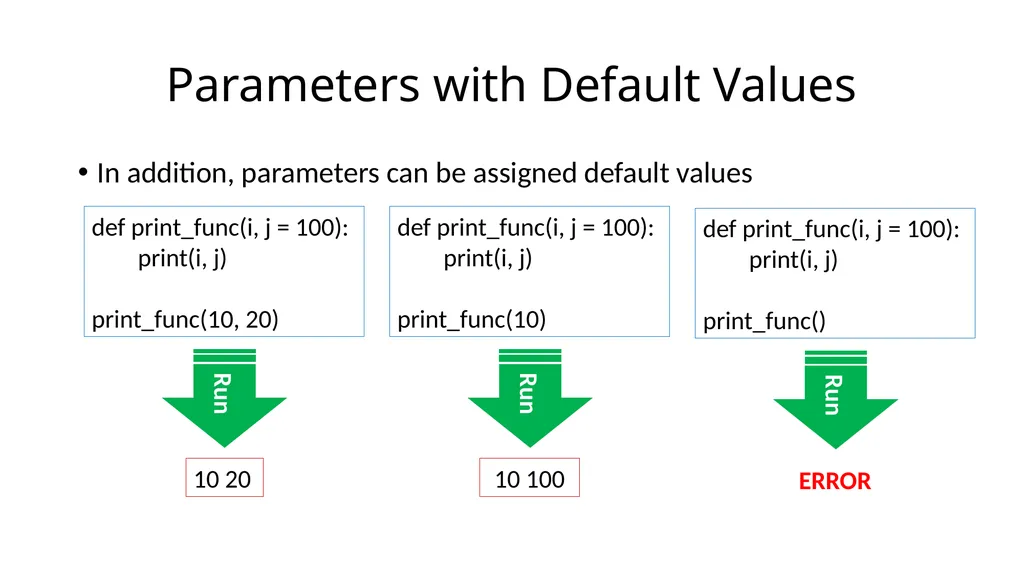
In addition, parameters can be assigned default values Parameters with Default Values def print_func(i, j = 100):
print(i, j)
print_func(10, 20) Run 10 20 def print_func(i, j = 100):
print(i, j)
print_func(10) Run 10 100 def print_func(i, j = 100):
print(i, j)
print_func() Run ERROR<br>
print(i, j)
print_func(10, 20) Run 10 20 def print_func(i, j = 100):
print(i, j)
print_func(10) Run 10 100 def print_func(i, j = 100):
print(i, j)
print_func() Run ERROR<br>
10
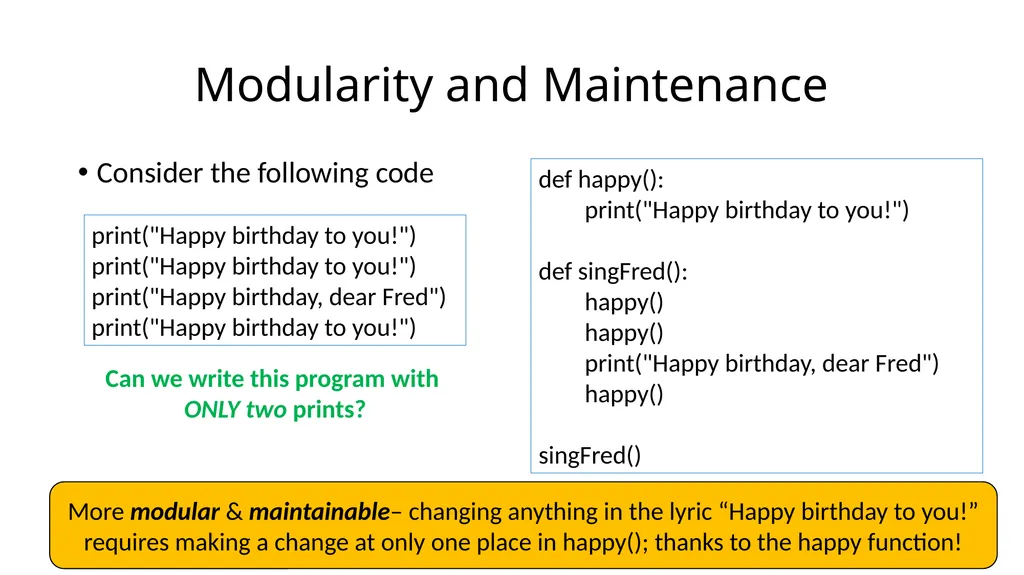
Consider the following code Modularity and Maintenance print("Happy birthday to you!")
print("Happy birthday to you!")
print("Happy birthday, dear Fred")
print("Happy birthday to you!") Can we write this program with ONLY two prints? def happy():
print("Happy birthday to you!")
def singFred():
happy()
happy()
print("Happy birthday, dear Fred")
happy()
singFred() More modular & maintainable– changing anything in the lyric “Happy birthday to you!” requires making a change at only one place in happy(); thanks to the happy function!<br>
print("Happy birthday to you!")
print("Happy birthday, dear Fred")
print("Happy birthday to you!") Can we write this program with ONLY two prints? def happy():
print("Happy birthday to you!")
def singFred():
happy()
happy()
print("Happy birthday, dear Fred")
happy()
singFred() More modular & maintainable– changing anything in the lyric “Happy birthday to you!” requires making a change at only one place in happy(); thanks to the happy function!<br>
11
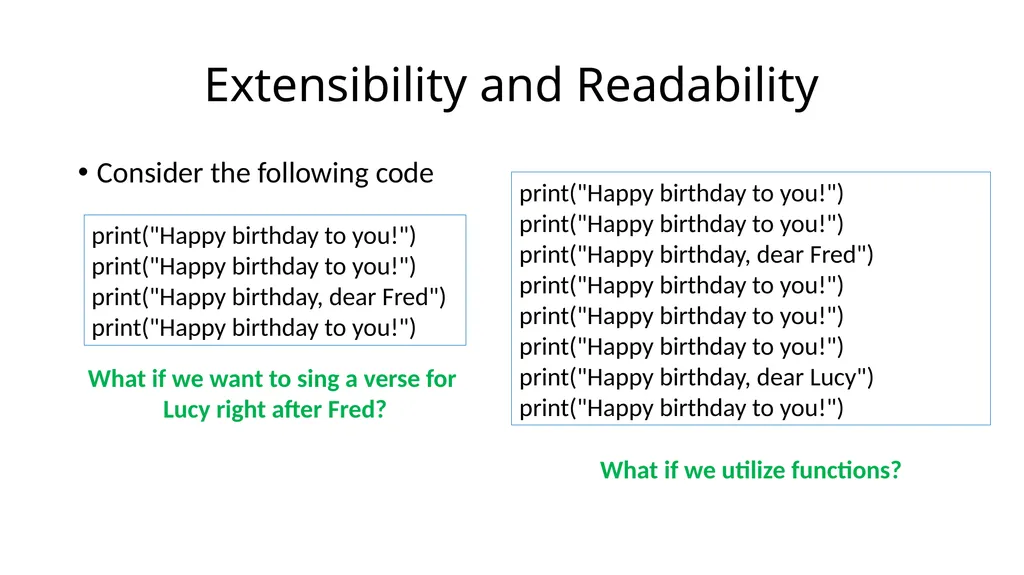
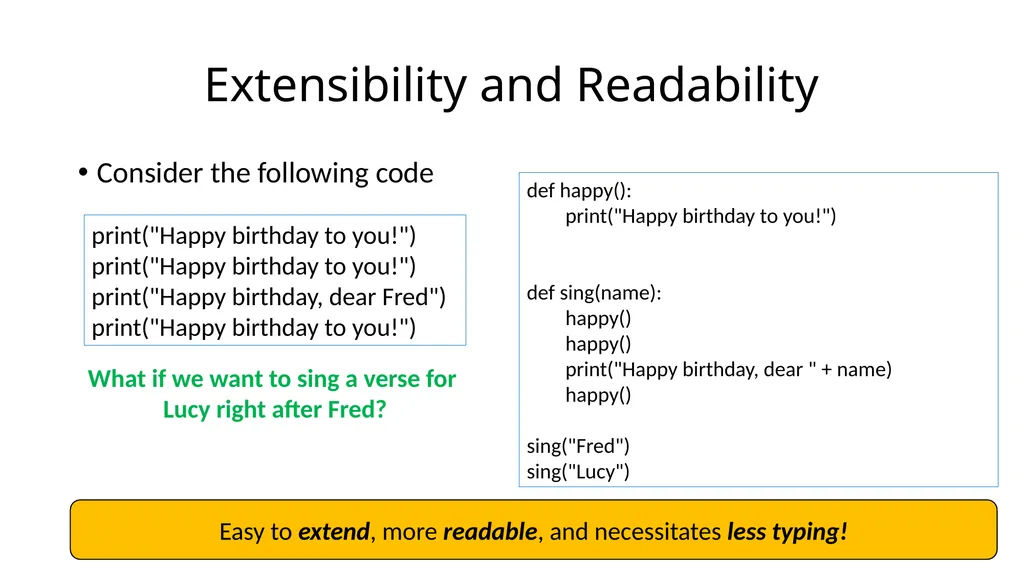
Consider the following code Extensibility and Readability print("Happy birthday to you!")
print("Happy birthday to you!")
print("Happy birthday, dear Fred")
print("Happy birthday to you!") What if we want to sing a verse for
Lucy right after Fred? print("Happy birthday to you!")
print("Happy birthday to you!")
print("Happy birthday, dear Fred")
print("Happy birthday to you!")
print("Happy birthday to you!")
print("Happy birthday to you!")
print("Happy birthday, dear Lucy")
print("Happy birthday to you!") What if we utilize functions?<br>
print("Happy birthday to you!")
print("Happy birthday, dear Fred")
print("Happy birthday to you!") What if we want to sing a verse for
Lucy right after Fred? print("Happy birthday to you!")
print("Happy birthday to you!")
print("Happy birthday, dear Fred")
print("Happy birthday to you!")
print("Happy birthday to you!")
print("Happy birthday to you!")
print("Happy birthday, dear Lucy")
print("Happy birthday to you!") What if we utilize functions?<br>
12
Consider the following code Extensibility and Readability print("Happy birthday to you!")
print("Happy birthday to you!")
print("Happy birthday, dear Fred")
print("Happy birthday to you!") def happy():
print("Happy birthday to you!")
def sing(name):
happy()
happy()
print("Happy birthday, dear " + name)
happy()
sing("Fred")
sing("Lucy") Easy to extend, more readable, and necessitates less typing! What if we want to sing a verse for
Lucy right after Fred?<br>
print("Happy birthday to you!")
print("Happy birthday, dear Fred")
print("Happy birthday to you!") def happy():
print("Happy birthday to you!")
def sing(name):
happy()
happy()
print("Happy birthday, dear " + name)
happy()
sing("Fred")
sing("Lucy") Easy to extend, more readable, and necessitates less typing! What if we want to sing a verse for
Lucy right after Fred?<br>
13
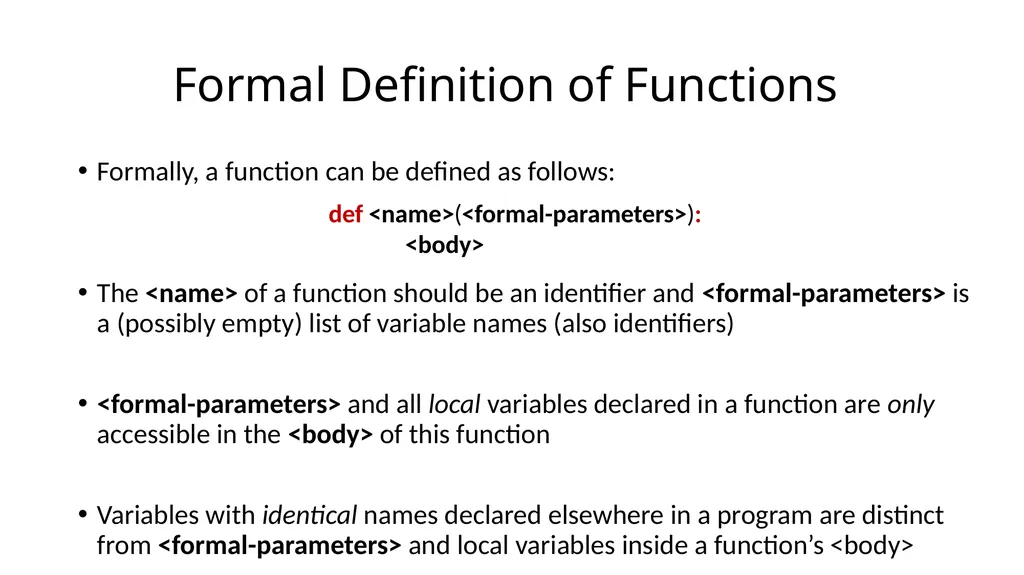
Formally, a function can be defined as follows:
The <name> of a function should be an identifier and <formal-parameters> is a (possibly empty) list of variable names (also identifiers)
<formal-parameters> and all local variables declared in a function are only accessible in the <body> of this function
Variables with identical names declared elsewhere in a program are distinct from <formal-parameters> and local variables inside a function’s <body> Formal Definition of Functions def <name>(<formal-parameters>):
<body><br>
The <name> of a function should be an identifier and <formal-parameters> is a (possibly empty) list of variable names (also identifiers)
<formal-parameters> and all local variables declared in a function are only accessible in the <body> of this function
Variables with identical names declared elsewhere in a program are distinct from <formal-parameters> and local variables inside a function’s <body> Formal Definition of Functions def <name>(<formal-parameters>):
<body><br>
14
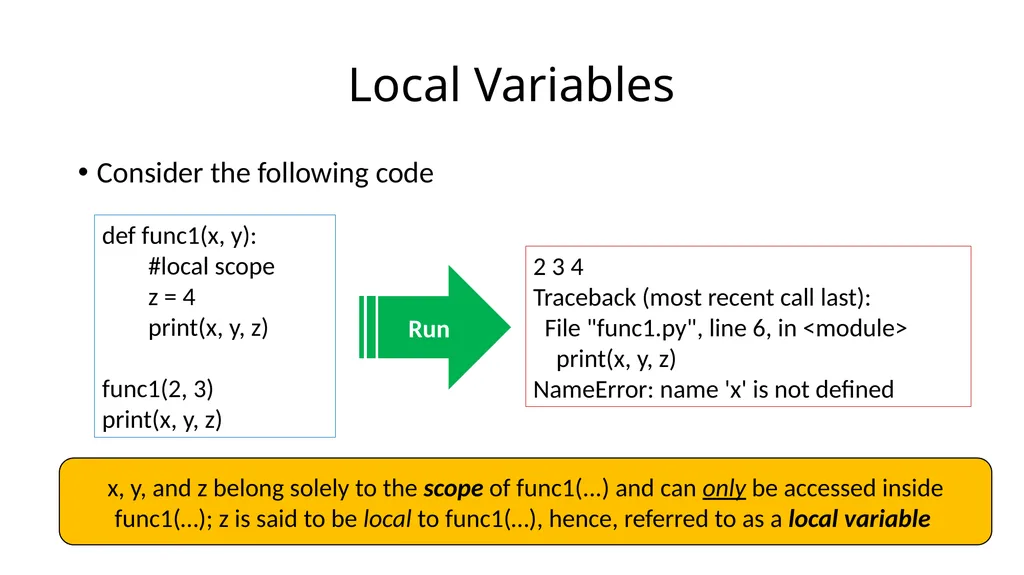
Consider the following code Local Variables def func1(x, y):
#local scope
z = 4
print(x, y, z)
func1(2, 3)
print(x, y, z) Run 2 3 4
Traceback (most recent call last):
File "func1.py", line 6, in <module>
print(x, y, z)
NameError: name 'x' is not defined x, y, and z belong solely to the scope of func1(...) and can only be accessed inside func1(…); z is said to be local to func1(…), hence, referred to as a local variable<br>
#local scope
z = 4
print(x, y, z)
func1(2, 3)
print(x, y, z) Run 2 3 4
Traceback (most recent call last):
File "func1.py", line 6, in <module>
print(x, y, z)
NameError: name 'x' is not defined x, y, and z belong solely to the scope of func1(...) and can only be accessed inside func1(…); z is said to be local to func1(…), hence, referred to as a local variable<br>
15
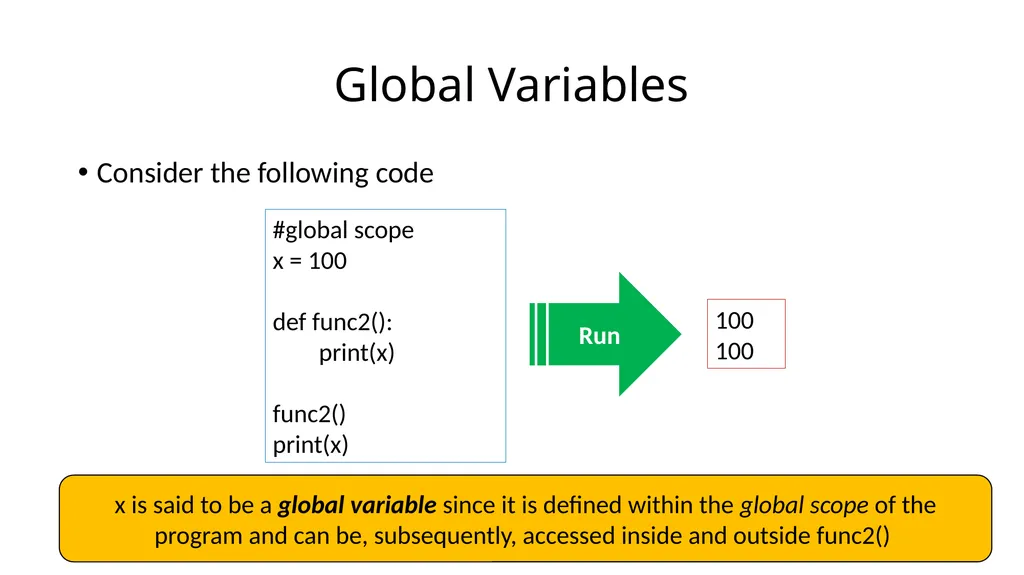
Consider the following code Global Variables #global scope
x = 100
def func2():
print(x)
func2()
print(x) Run 100
100 x is said to be a global variable since it is defined within the global scope of the program and can be, subsequently, accessed inside and outside func2()<br>
x = 100
def func2():
print(x)
func2()
print(x) Run 100
100 x is said to be a global variable since it is defined within the global scope of the program and can be, subsequently, accessed inside and outside func2()<br>
16
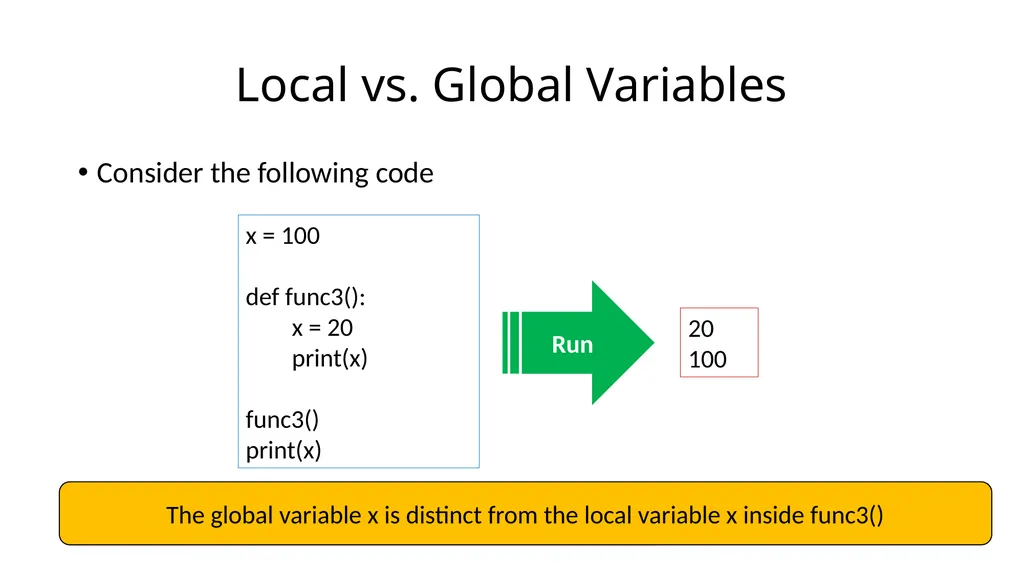
Consider the following code Local vs. Global Variables x = 100
def func3():
x = 20
print(x)
func3()
print(x) Run 20
100 The global variable x is distinct from the local variable x inside func3()<br>
def func3():
x = 20
print(x)
func3()
print(x) Run 20
100 The global variable x is distinct from the local variable x inside func3()<br>
17
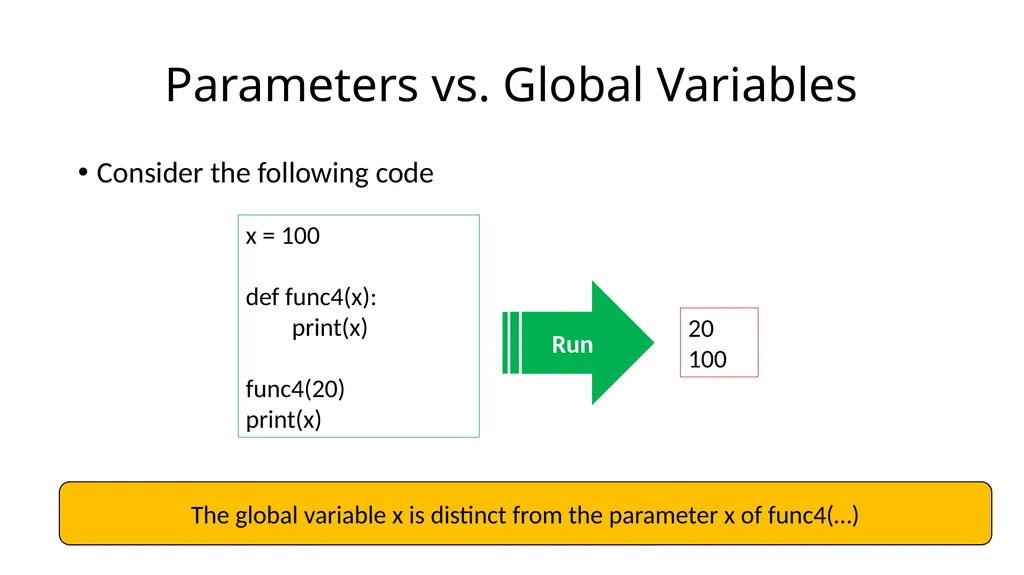
Consider the following code Parameters vs. Global Variables x = 100
def func4(x):
print(x)
func4(20)
print(x) Run 20
100 The global variable x is distinct from the parameter x of func4(…)<br>
def func4(x):
print(x)
func4(20)
print(x) Run 20
100 The global variable x is distinct from the parameter x of func4(…)<br>
18
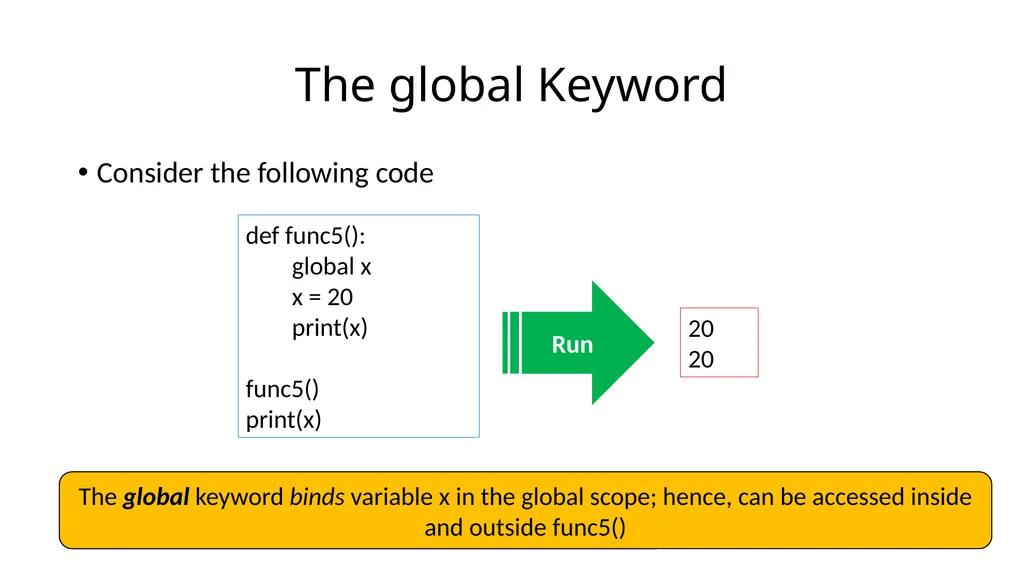
Consider the following code The global Keyword def func5():
global x
x = 20
print(x)
func5()
print(x) Run 20
20 The global keyword binds variable x in the global scope; hence, can be accessed inside and outside func5()<br>
global x
x = 20
print(x)
func5()
print(x) Run 20
20 The global keyword binds variable x in the global scope; hence, can be accessed inside and outside func5()<br>
19
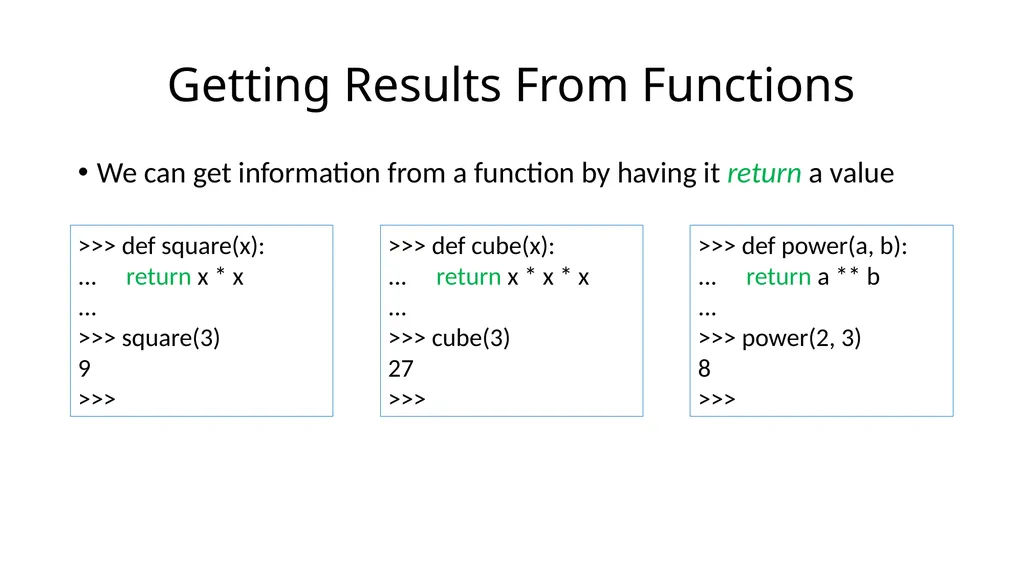
We can get information from a function by having it return a value Getting Results From Functions >>> def square(x):
... return x * x
...
>>> square(3)
9
>>> >>> def cube(x):
... return x * x * x
...
>>> cube(3)
27
>>> >>> def power(a, b):
... return a ** b
...
>>> power(2, 3)
8
>>><br>
... return x * x
...
>>> square(3)
9
>>> >>> def cube(x):
... return x * x * x
...
>>> cube(3)
27
>>> >>> def power(a, b):
... return a ** b
...
>>> power(2, 3)
8
>>><br>
20
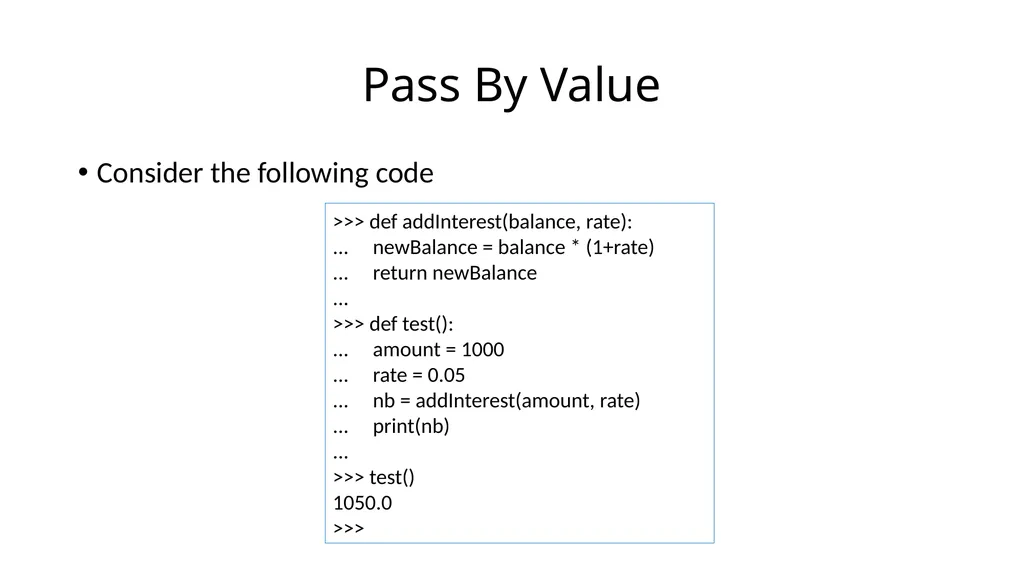
Consider the following code Pass By Value >>> def addInterest(balance, rate):
... newBalance = balance * (1+rate)
... return newBalance
...
>>> def test():
... amount = 1000
... rate = 0.05
... nb = addInterest(amount, rate)
... print(nb)
...
>>> test()
1050.0
>>><br>
... newBalance = balance * (1+rate)
... return newBalance
...
>>> def test():
... amount = 1000
... rate = 0.05
... nb = addInterest(amount, rate)
... print(nb)
...
>>> test()
1050.0
>>><br>
21
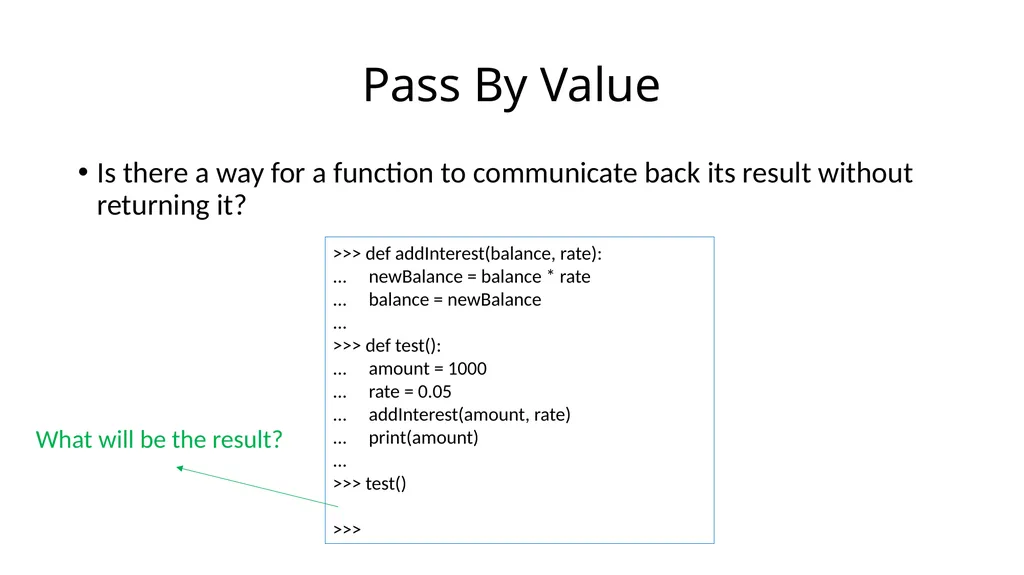
Is there a way for a function to communicate back its result without returning it? Pass By Value >>> def addInterest(balance, rate):
... newBalance = balance * rate
... balance = newBalance
...
>>> def test():
... amount = 1000
... rate = 0.05
... addInterest(amount, rate)
... print(amount)
...
>>> test()
1000
>>> What will be the result?<br>
... newBalance = balance * rate
... balance = newBalance
...
>>> def test():
... amount = 1000
... rate = 0.05
... addInterest(amount, rate)
... print(amount)
...
>>> test()
1000
>>> What will be the result?<br>
22
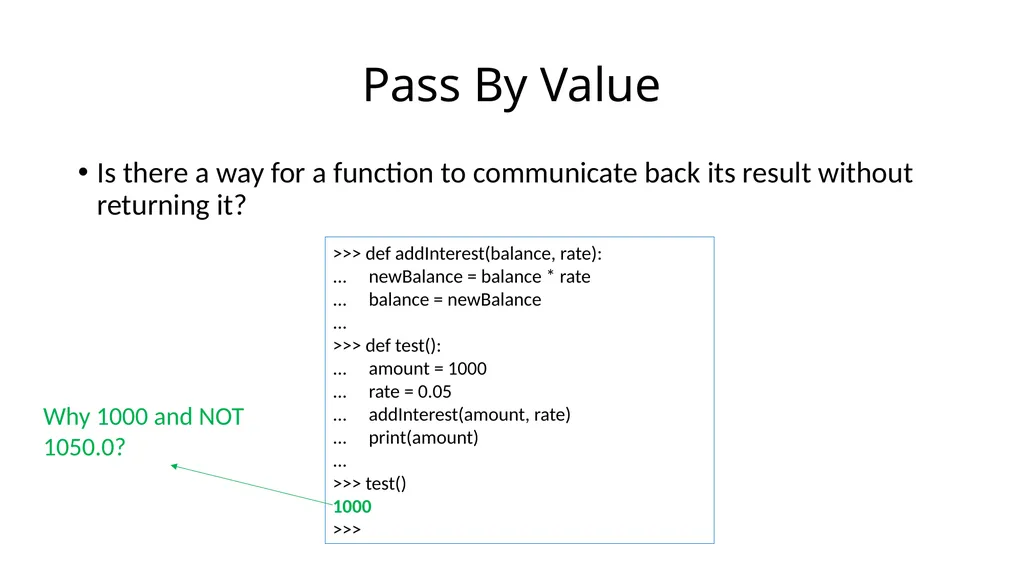
Is there a way for a function to communicate back its result without returning it? Pass By Value >>> def addInterest(balance, rate):
... newBalance = balance * rate
... balance = newBalance
...
>>> def test():
... amount = 1000
... rate = 0.05
... addInterest(amount, rate)
... print(amount)
...
>>> test()
1000
>>> Why 1000 and NOT 1050.0?<br>
... newBalance = balance * rate
... balance = newBalance
...
>>> def test():
... amount = 1000
... rate = 0.05
... addInterest(amount, rate)
... print(amount)
...
>>> test()
1000
>>> Why 1000 and NOT 1050.0?<br>
23
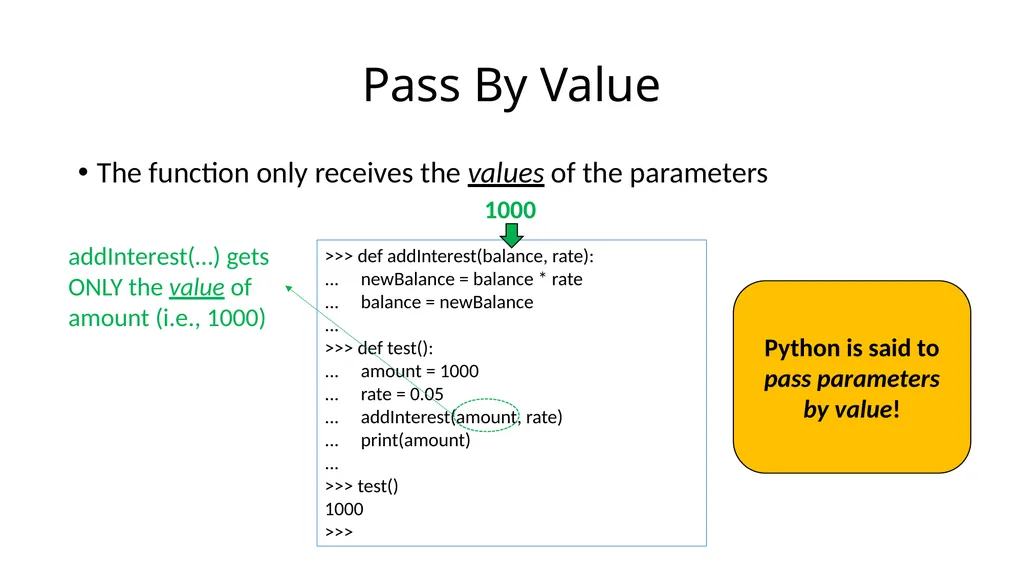
The function only receives the values of the parameters Pass By Value >>> def addInterest(balance, rate):
... newBalance = balance * rate
... balance = newBalance
...
>>> def test():
... amount = 1000
... rate = 0.05
... addInterest(amount, rate)
... print(amount)
...
>>> test()
1000
>>> addInterest(…) gets ONLY the value of amount (i.e., 1000) 1000 Python is said to pass parameters by value!<br>
... newBalance = balance * rate
... balance = newBalance
...
>>> def test():
... amount = 1000
... rate = 0.05
... addInterest(amount, rate)
... print(amount)
...
>>> test()
1000
>>> addInterest(…) gets ONLY the value of amount (i.e., 1000) 1000 Python is said to pass parameters by value!<br>
24
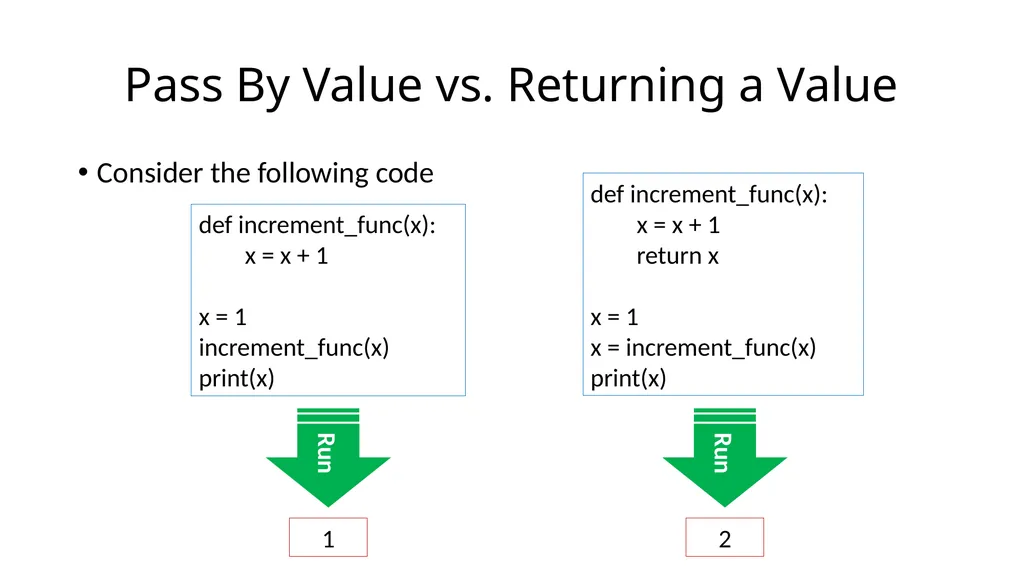
Consider the following code Pass By Value vs. Returning a Value def increment_func(x):
x = x + 1
x = 1
increment_func(x)
print(x) Run 1 def increment_func(x):
x = x + 1
return x
x = 1
x = increment_func(x)
print(x) Run 2<br>
x = x + 1
x = 1
increment_func(x)
print(x) Run 1 def increment_func(x):
x = x + 1
return x
x = 1
x = increment_func(x)
print(x) Run 2<br>
25
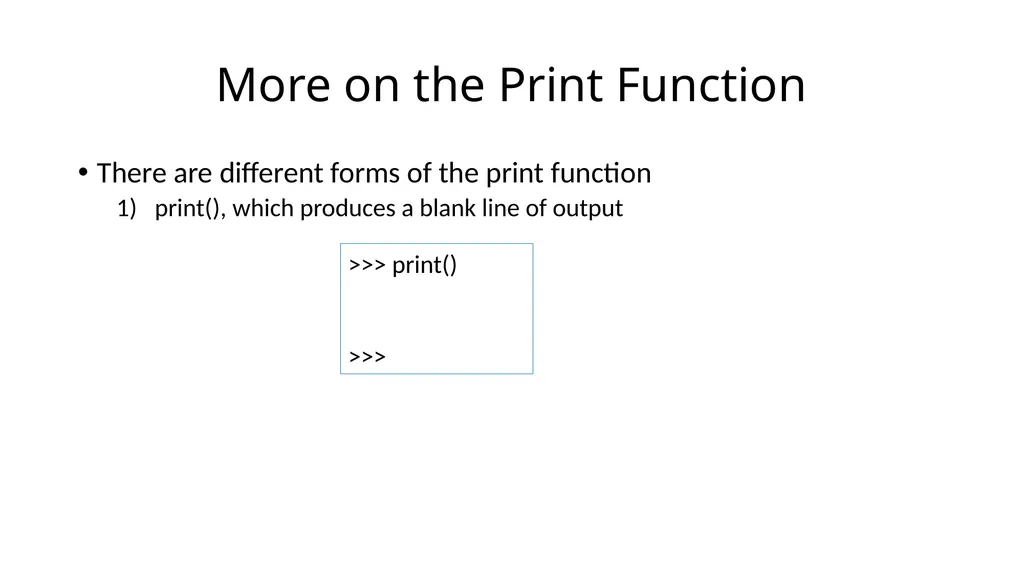
There are different forms of the print function
print(), which produces a blank line of output More on the Print Function >>> print()
>>><br>
print(), which produces a blank line of output More on the Print Function >>> print()
>>><br>
26
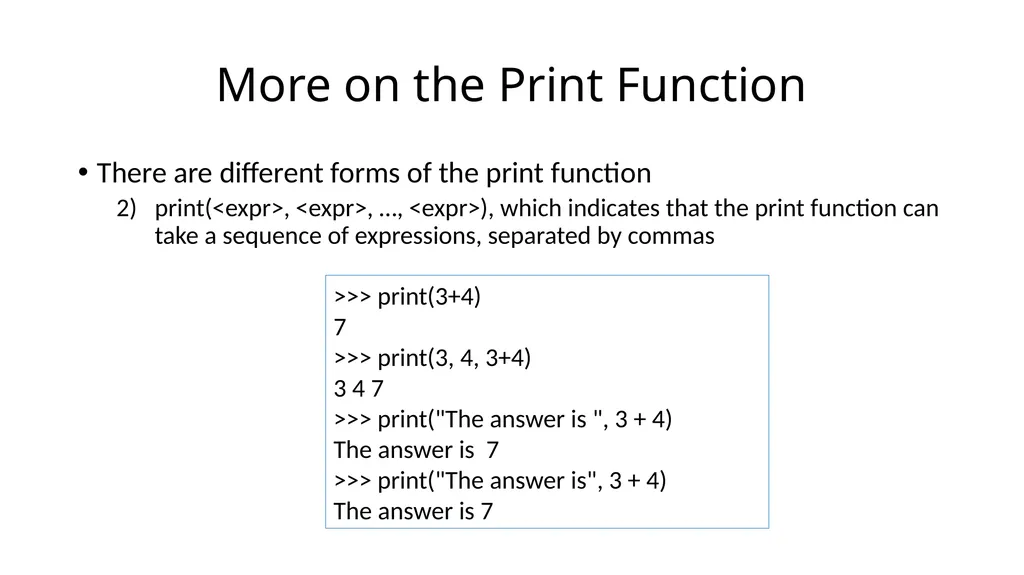
There are different forms of the print function
print(<expr>, <expr>, …, <expr>), which indicates that the print function can take a sequence of expressions, separated by commas More on the Print Function >>> print(3+4)
7
>>> print(3, 4, 3+4)
3 4 7
>>> print("The answer is ", 3 + 4)
The answer is 7
>>> print("The answer is", 3 + 4)
The answer is 7<br>
print(<expr>, <expr>, …, <expr>), which indicates that the print function can take a sequence of expressions, separated by commas More on the Print Function >>> print(3+4)
7
>>> print(3, 4, 3+4)
3 4 7
>>> print("The answer is ", 3 + 4)
The answer is 7
>>> print("The answer is", 3 + 4)
The answer is 7<br>
27
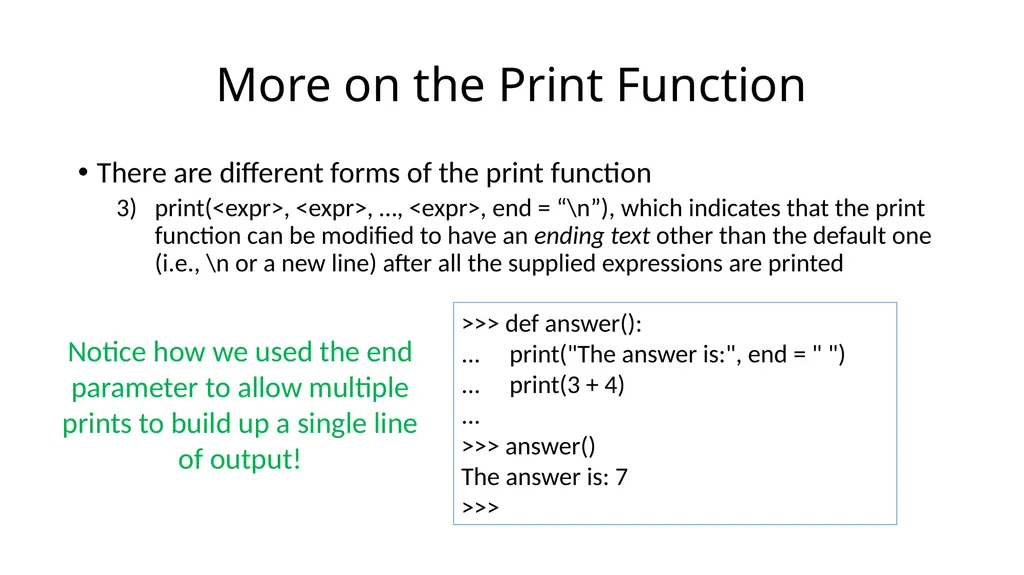
There are different forms of the print function
print(<expr>, <expr>, …, <expr>, end = “\n”), which indicates that the print function can be modified to have an ending text other than the default one (i.e., \n or a new line) after all the supplied expressions are printed More on the Print Function >>> def answer():
... print("The answer is:", end = " ")
... print(3 + 4)
...
>>> answer()
The answer is: 7
>>> Notice how we used the end parameter to allow multiple prints to build up a single line of output!<br>
print(<expr>, <expr>, …, <expr>, end = “\n”), which indicates that the print function can be modified to have an ending text other than the default one (i.e., \n or a new line) after all the supplied expressions are printed More on the Print Function >>> def answer():
... print("The answer is:", end = " ")
... print(3 + 4)
...
>>> answer()
The answer is: 7
>>> Notice how we used the end parameter to allow multiple prints to build up a single line of output!<br>
28
Functions- Part II Next Class…<br>