
76 Infantry Brigade Combat Team How to Apply for
T
Published · 22 slides · 0 views

1 / 1


Description
76 Infantry Brigade Combat Team How to Apply for Security Clearances Agenda New Security Clearance Request or Upgrade Process Identify the Need for a Security Clearance Submit an Investigation Request Complete the eQIP SF 86 Provide any
Related Topics
Share
Embed code
Download this presentation From Below
"76 Infantry Brigade Combat Team How to Apply for" is the property of its rightful owner. Permission is granted to download and print the materials on this website for personal, non-commercial use only, and to display it on your personal computer provided you do not modify the materials and that you retain all copyright notices contained in the materials. By downloading content from our website, you accept the terms of this agreement.
Presentation Transcript
01
76 Infantry Brigade Combat Team How to Apply for Security Clearances<br>
02
Agenda New Security Clearance Request or Upgrade Process
Identify the Need for a Security Clearance
Submit an Investigation Request
Complete the eQIP SF 86
Provide any Requested Supporting Documentation
Meet with the Investigator
Security Clearance Approved or Denied
Security Clearance Reinvestigation Process
Identify the Need for a Reinvestigation
Submit a Reinvestigation Request
Complete the eQIP SF 86
Provide any Requested Supporting Documentation
Enrolled in Continuous Evaluation
Security Clearance Approved or Denied<br>
Identify the Need for a Security Clearance
Submit an Investigation Request
Complete the eQIP SF 86
Provide any Requested Supporting Documentation
Meet with the Investigator
Security Clearance Approved or Denied
Security Clearance Reinvestigation Process
Identify the Need for a Reinvestigation
Submit a Reinvestigation Request
Complete the eQIP SF 86
Provide any Requested Supporting Documentation
Enrolled in Continuous Evaluation
Security Clearance Approved or Denied<br>
03
New Security Clearance Request or Upgrade<br>
04
Identify the Need for a Security Clearance All Officers, Warrant Officers, Active Guard Reserve (AGR), and E8/E9 must be able to obtain and hold a secret clearance.
Selected enlisted military occupational specialty (MOS) require a security clearance per DA PAM 611-21, Table 10-2 (enlisted), Table 6-11 (Warrant Officers), and Table 2-7 (Officers).
All full-time personnel with access to Personal Identifiable Information (PII), regardless of their PMOS, are required to possess a secret security clearance.
A specific mission during a deployment or mobilization could also create the need for a clearance for a Soldier who would normally not need a clearance.
If upgrading a security clearance from Secret to Top Secret, requirements are the same.<br>
Selected enlisted military occupational specialty (MOS) require a security clearance per DA PAM 611-21, Table 10-2 (enlisted), Table 6-11 (Warrant Officers), and Table 2-7 (Officers).
All full-time personnel with access to Personal Identifiable Information (PII), regardless of their PMOS, are required to possess a secret security clearance.
A specific mission during a deployment or mobilization could also create the need for a clearance for a Soldier who would normally not need a clearance.
If upgrading a security clearance from Secret to Top Secret, requirements are the same.<br>
05
Submit an Investigation Request PSIR-MN 1998-E
Security Clearance Initial Request Form.
Provide an email on the PSIR-MN 1998-E applicant checks everyday!! (IE. joe.snuffy@gmail.com).
INTERIM CLEARANCES
Requested on the PSIR-MN 1998-E by checking Interim Requested.
Interim should be requested if there is not sufficient time to get a final clearance. For example, if the applicant needs it for their job, or to attend a school, conference, etc.
An Interim clearance is not possible when a person has their Access Suspended, or if the previous investigation resulted in Denied, Revoked, No Determination Made, or Loss of Jurisdiction.
The Interim process can take a couple months.<br>
Security Clearance Initial Request Form.
Provide an email on the PSIR-MN 1998-E applicant checks everyday!! (IE. joe.snuffy@gmail.com).
INTERIM CLEARANCES
Requested on the PSIR-MN 1998-E by checking Interim Requested.
Interim should be requested if there is not sufficient time to get a final clearance. For example, if the applicant needs it for their job, or to attend a school, conference, etc.
An Interim clearance is not possible when a person has their Access Suspended, or if the previous investigation resulted in Denied, Revoked, No Determination Made, or Loss of Jurisdiction.
The Interim process can take a couple months.<br>
06
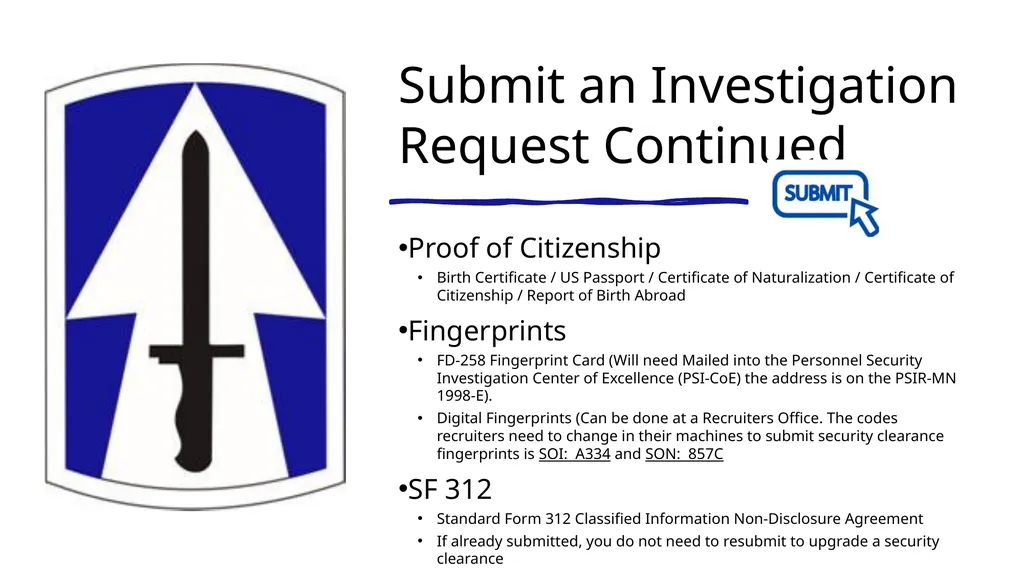
Submit an Investigation Request Continued Proof of Citizenship
Birth Certificate / US Passport / Certificate of Naturalization / Certificate of Citizenship / Report of Birth Abroad
Fingerprints
FD-258 Fingerprint Card (Will need Mailed into the Personnel Security Investigation Center of Excellence (PSI-CoE) the address is on the PSIR-MN 1998-E).
Digital Fingerprints (Can be done at a Recruiters Office. The codes recruiters need to change in their machines to submit security clearance fingerprints is SOI: A334 and SON: 857C
SF 312
Standard Form 312 Classified Information Non-Disclosure Agreement
If already submitted, you do not need to resubmit to upgrade a security clearance<br>
Birth Certificate / US Passport / Certificate of Naturalization / Certificate of Citizenship / Report of Birth Abroad
Fingerprints
FD-258 Fingerprint Card (Will need Mailed into the Personnel Security Investigation Center of Excellence (PSI-CoE) the address is on the PSIR-MN 1998-E).
Digital Fingerprints (Can be done at a Recruiters Office. The codes recruiters need to change in their machines to submit security clearance fingerprints is SOI: A334 and SON: 857C
SF 312
Standard Form 312 Classified Information Non-Disclosure Agreement
If already submitted, you do not need to resubmit to upgrade a security clearance<br>
07
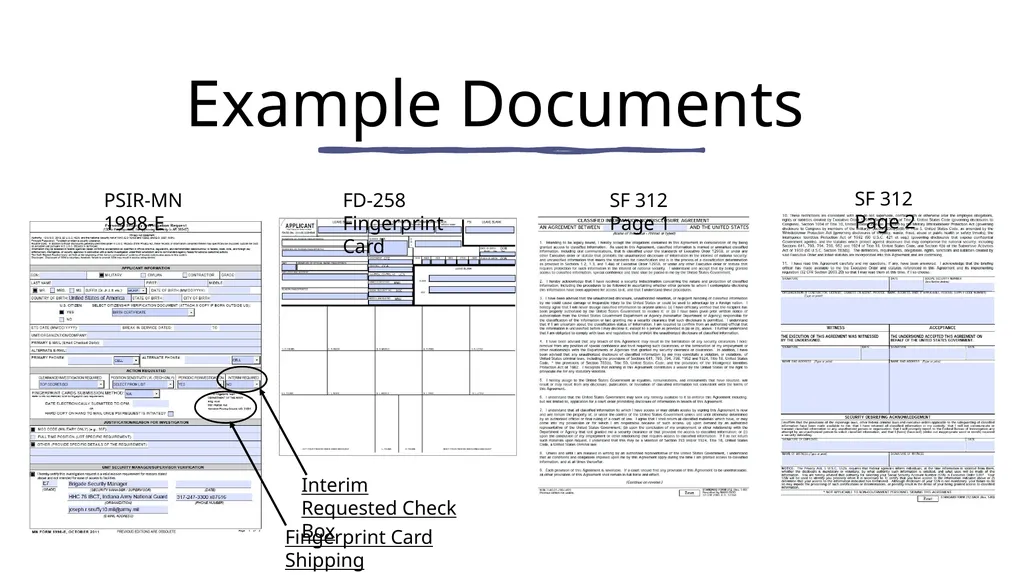
Example Documents FD-258 Fingerprint Card PSIR-MN 1998-E SF 312 Page 1 SF 312 Page 2 Interim Requested Check Box Fingerprint Card Shipping Address<br>
08
Complete the eQIP SF 86 Recommend applicant receives a paper copy of the SF 86. This will allow them to work on it and fill in the blanks prior to the digital SF 86 seven (7) day clock.
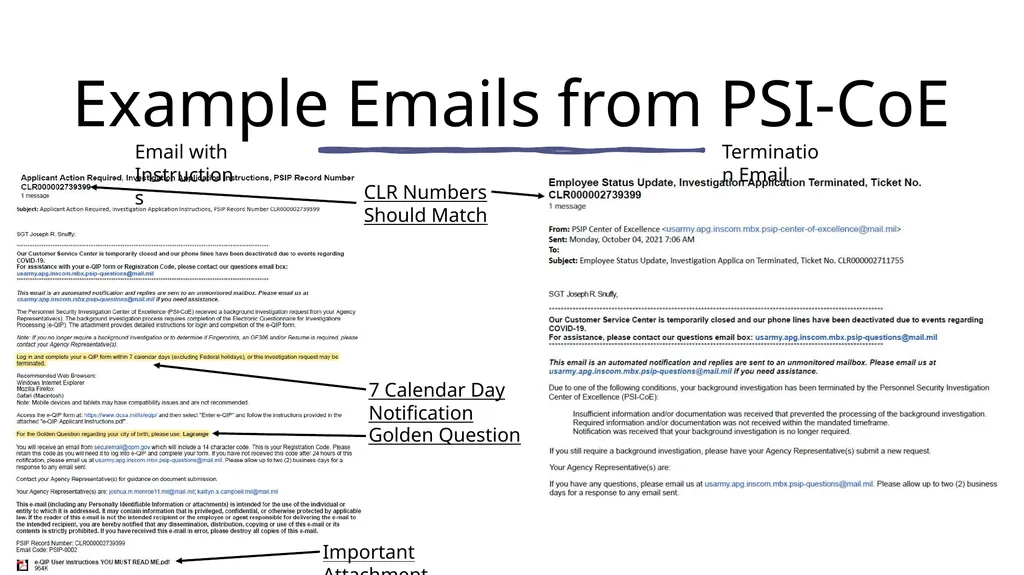
Applicant will receive an email with instructions to begin working on eQIP SF86 form; this will start the seven (7) calendar day window in which the applicant must log into their eQIP account (Email will have an Important Attachment. Must Read).
This email will contain their Golden Question (Example on next slide).
If the Applicant has not begun editing the investigation questionnaire after seven (7) days the personal security investigation (PSI) request will be terminated (Example on next slide).<br>
Applicant will receive an email with instructions to begin working on eQIP SF86 form; this will start the seven (7) calendar day window in which the applicant must log into their eQIP account (Email will have an Important Attachment. Must Read).
This email will contain their Golden Question (Example on next slide).
If the Applicant has not begun editing the investigation questionnaire after seven (7) days the personal security investigation (PSI) request will be terminated (Example on next slide).<br>
09
Example Emails from PSI-CoE Email with Instructions Important Attachment Must Read Termination Email Golden Question 7 Calendar Day Notification CLR Numbers Should Match<br>
10
Provide any Requested Supporting Documentation PSI-CoE may request corrections to submitted documents or request supporting documents.
Applicants will be given another seven (7) calendar days to complete the investigation questionnaire in eQIP if it has been rejected back for corrections or request for further documents.
If all investigation packet requirements are not met or arrangements made with the PSI-CoE then the requester, applicant, and applicant’s supervisor will be notified that the investigation is pending termination.<br>
Applicants will be given another seven (7) calendar days to complete the investigation questionnaire in eQIP if it has been rejected back for corrections or request for further documents.
If all investigation packet requirements are not met or arrangements made with the PSI-CoE then the requester, applicant, and applicant’s supervisor will be notified that the investigation is pending termination.<br>
11
Meet with the Investigator Once the investigation packet is complete and accurate, it will be released to Defense Counterintelligence and Security Agency (DCSA) to schedule the investigation.
If needed, the DCSA investigator will schedule a meeting with the applicant. It could be in person, a phone interview, or a live streaming interview (MS Teams or Zoom).
An applicant may be contacted by an investigator to include email and/or text. An investigators’ identity may be verified by calling 888-795-5673 or emailing RMFSIMSST@nbib.gov<br>
If needed, the DCSA investigator will schedule a meeting with the applicant. It could be in person, a phone interview, or a live streaming interview (MS Teams or Zoom).
An applicant may be contacted by an investigator to include email and/or text. An investigators’ identity may be verified by calling 888-795-5673 or emailing RMFSIMSST@nbib.gov<br>
12
Security Clearance Approved or Denied A final decision on an applicant's security clearance will only be given after the entire investigation process has been completed.
A final determination for the person's clearance will be made by the US Army Central Clearance Facility (CCF) or Department of Defense Consolidated Adjudications Facility (DoD CAF).
If the applicant’s security clearance is approved, they will automatically be enrolled in Continuous Evaluation (CE).
If an applicant’s final determination is Denied or No Determination Made, they must submit a memo requesting the specific details from the investigation. Then the applicant can submit documents to clear the issue from the investigation.<br>
A final determination for the person's clearance will be made by the US Army Central Clearance Facility (CCF) or Department of Defense Consolidated Adjudications Facility (DoD CAF).
If the applicant’s security clearance is approved, they will automatically be enrolled in Continuous Evaluation (CE).
If an applicant’s final determination is Denied or No Determination Made, they must submit a memo requesting the specific details from the investigation. Then the applicant can submit documents to clear the issue from the investigation.<br>
13
Security Clearance Reinvestigation<br>
14
Identify the Need for a Reinvestigation A reinvestigation is required when the applicant is within 30 days from a previously conducted investigation with no 2 year break in federal service.
If there was a 2 year break in federal service, the applicant will need to apply for a new/initial security clearance.
Secret Security Clearance is good for 10 years.
Top Secret Clearance is good for 6 years.<br>
If there was a 2 year break in federal service, the applicant will need to apply for a new/initial security clearance.
Secret Security Clearance is good for 10 years.
Top Secret Clearance is good for 6 years.<br>
15
Types of investigations SAC Investigation is showing that the fingerprints have been processed.
Tier 3 (T3) are the minimum investigations that can be adjudicated for Secret Eligibility.
Tier 5 (T5) is the minimum investigation needed to be adjudicated for Top Secret eligibility.
Tier 3 Periodic Reinvestigation (T3R), updates a Secret clearance.
Tier 5 Periodic Reinvestigation (T5R), updates a Top Secret clearance.<br>
Tier 3 (T3) are the minimum investigations that can be adjudicated for Secret Eligibility.
Tier 5 (T5) is the minimum investigation needed to be adjudicated for Top Secret eligibility.
Tier 3 Periodic Reinvestigation (T3R), updates a Secret clearance.
Tier 5 Periodic Reinvestigation (T5R), updates a Top Secret clearance.<br>
16
Submit a Reinvestigation Request PSIR-MN 1998-E
Security Clearance Initial Request Form.
Provide an email on the PSIR-MN 1998-E applicant checks everyday!! (IE. joe.snuffy@gmail.com).
An individual who has been successfully enrolled in CE will show “Enrolled in Continuous Evaluation on YYYY-MM-DD for Deferred Investigation.” No Reinvestigation request is required.
Date needs to be after August 2018. If before August 2018 a reinvestigation request must be submitted.
If the CE section reads “Enrolled in Continuous Evaluation on YYYY-MM-DD for Other” or the CE section is empty then a reinvestigation request must be submitted.<br>
Security Clearance Initial Request Form.
Provide an email on the PSIR-MN 1998-E applicant checks everyday!! (IE. joe.snuffy@gmail.com).
An individual who has been successfully enrolled in CE will show “Enrolled in Continuous Evaluation on YYYY-MM-DD for Deferred Investigation.” No Reinvestigation request is required.
Date needs to be after August 2018. If before August 2018 a reinvestigation request must be submitted.
If the CE section reads “Enrolled in Continuous Evaluation on YYYY-MM-DD for Other” or the CE section is empty then a reinvestigation request must be submitted.<br>
17
Complete the eQIP SF 86 Recommend applicant receives a paper copy of the SF 86. This will allow them to work on it and fill in the blanks prior to the digital SF 86 seven (7) day clock.
Applicant will receive an email with instructions to begin working on eQIP SF86 form; this will start the seven (7) calendar day window in which the applicant must log into their eQIP account (Email will have an Important Attachment. Must Read).
This email will contain their Golden Question (Example on next slide).
If the Applicant has not begun editing the investigation questionnaire after seven (7) days the personal security investigation (PSI) request will be terminated (Example on next slide).<br>
Applicant will receive an email with instructions to begin working on eQIP SF86 form; this will start the seven (7) calendar day window in which the applicant must log into their eQIP account (Email will have an Important Attachment. Must Read).
This email will contain their Golden Question (Example on next slide).
If the Applicant has not begun editing the investigation questionnaire after seven (7) days the personal security investigation (PSI) request will be terminated (Example on next slide).<br>
18
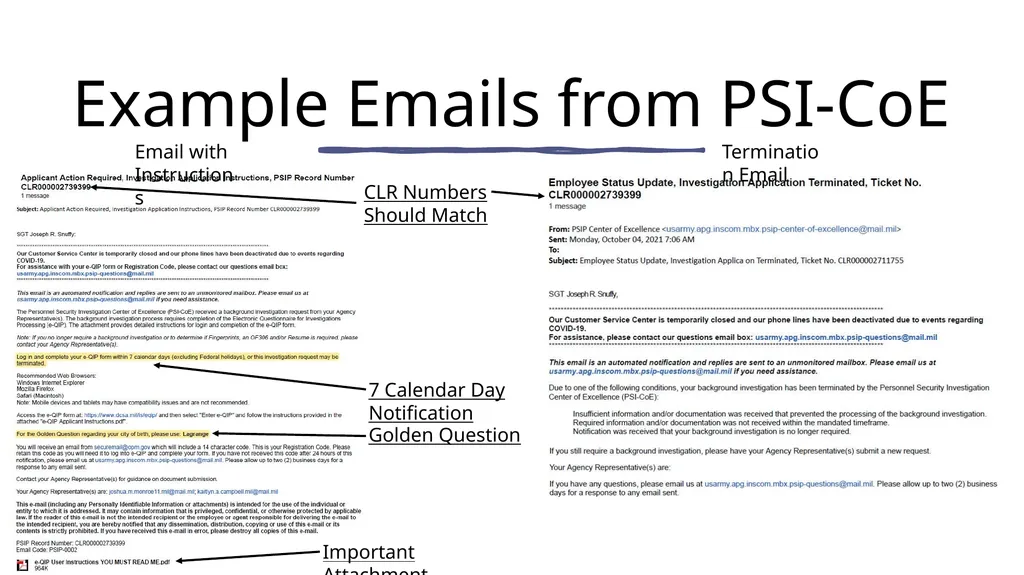
Example Emails from PSI-CoE Email with Instructions Important Attachment Must Read Termination Email Golden Question 7 Calendar Day Notification CLR Numbers Should Match<br>
19
Provide any Requested Supporting Documentation PSI-CoE may request corrections to submitted documents or request supporting documents.
Applicants will be given another seven (7) calendar days to complete the investigation questionnaire in eQIP if it has been rejected back for corrections or request for further documents.
If all investigation packet requirements are not met or arrangements made with the PSI-CoE then the requester, applicant, and applicant’s supervisor will be notified that the investigation is pending termination.<br>
Applicants will be given another seven (7) calendar days to complete the investigation questionnaire in eQIP if it has been rejected back for corrections or request for further documents.
If all investigation packet requirements are not met or arrangements made with the PSI-CoE then the requester, applicant, and applicant’s supervisor will be notified that the investigation is pending termination.<br>
20
Enrolled in Continuous Evaluation Continuous Evaluation (CE) is defined as reviewing the background of an individual who has been determined to be eligible for access to classified information or eligible to hold a sensitive position at any time during the period of eligibility to determine whether that individual continues to meet the requirements for eligibility.
When a reinvestigation request is submitted to the PSI-CoE a DoD-approved criteria is used to determine if the individual requires a full reinvestigation or if the individual will be deferred to CE. When an individual is deferred to CE allow 2 weeks for CE enrollment/deferment status to update.<br>
When a reinvestigation request is submitted to the PSI-CoE a DoD-approved criteria is used to determine if the individual requires a full reinvestigation or if the individual will be deferred to CE. When an individual is deferred to CE allow 2 weeks for CE enrollment/deferment status to update.<br>
21
Security Clearance Approved or Denied A final decision on an applicant's security clearance will only be given after the entire investigation process has been completed.
A final determination for the person's clearance will be made by the US Army Central Clearance Facility (CCF) or Department of Defense Consolidated Adjudications Facility (DoD CAF).
If the applicant’s security clearance is approved, they will automatically be enrolled in Continuous Evaluation (CE).
If an applicant’s final determination is Denied or No Determination Made, they must submit a memo requesting the specific details from the investigation. Then the applicant can submit documents to clear the issue from the investigation.<br>
A final determination for the person's clearance will be made by the US Army Central Clearance Facility (CCF) or Department of Defense Consolidated Adjudications Facility (DoD CAF).
If the applicant’s security clearance is approved, they will automatically be enrolled in Continuous Evaluation (CE).
If an applicant’s final determination is Denied or No Determination Made, they must submit a memo requesting the specific details from the investigation. Then the applicant can submit documents to clear the issue from the investigation.<br>
22
QUESTIONS? Contact the 76 IBCT Security Manager:
Office Phone: 317-247-3300 EXT 87616
Address: 9920 East 59th Street Indianapolis, IN 46216
E-Mail: ng.in.inarng.list.76ibct-s3-cuops@army.mil
References (Can be Emailed Upon Request):
AR 380-67 Personnel Security Program
PSIP Requester Guide
76 IBCT PERSEC SOP<br>
Office Phone: 317-247-3300 EXT 87616
Address: 9920 East 59th Street Indianapolis, IN 46216
E-Mail: ng.in.inarng.list.76ibct-s3-cuops@army.mil
References (Can be Emailed Upon Request):
AR 380-67 Personnel Security Program
PSIP Requester Guide
76 IBCT PERSEC SOP<br>