
Alfresco Phase One Roll-Out Test changing again
DP
Published · 17 slides · 0 views
1 / 1
Description
Alfresco Phase One Roll-Out Test changing again 10312012 Agenda Sites and Dashlets Overview Genesys Alfresco Instance UploadManage Content Aspects Working with the Calendar RolesPermissions Workflow Working with FTP Search Syntax
Related Topics
Share
Embed code
Download this presentation From Below
"Alfresco Phase One Roll-Out Test changing again" is the property of its rightful owner. Permission is granted to download and print the materials on this website for personal, non-commercial use only, and to display it on your personal computer provided you do not modify the materials and that you retain all copyright notices contained in the materials. By downloading content from our website, you accept the terms of this agreement.
Presentation Transcript
01
Alfresco Phase One Roll-Out
Test changing again 10/31/2012<br>
02
Agenda Sites and Dashlets Overview
Genesys Alfresco Instance
Upload/Manage Content
Aspects
Working with the Calendar
Roles/Permissions
Workflow
Working with FTP
Search Syntax
Additional Alfresco Concepts
Publishing
Categories vs Tags
Known Issues
For questions and bugs email: alfrescosupport@genesyslab.com
Q&A © 2012, Genesys Telecommunications Laboratories, Inc. All rights reserved.<br>
Genesys Alfresco Instance
Upload/Manage Content
Aspects
Working with the Calendar
Roles/Permissions
Workflow
Working with FTP
Search Syntax
Additional Alfresco Concepts
Publishing
Categories vs Tags
Known Issues
For questions and bugs email: alfrescosupport@genesyslab.com
Q&A © 2012, Genesys Telecommunications Laboratories, Inc. All rights reserved.<br>
03
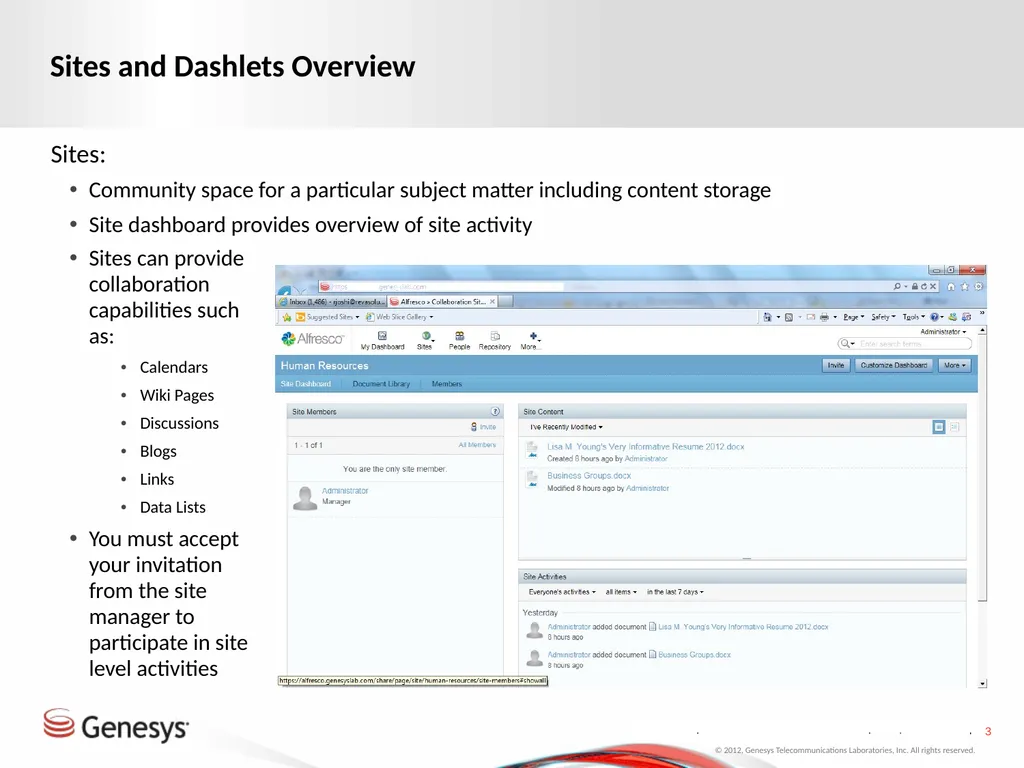
Sites and Dashlets Overview Sites:
Community space for a particular subject matter including content storage
Site dashboard provides overview of site activity © 2012, Genesys Telecommunications Laboratories, Inc. All rights reserved. Sites can provide collaboration capabilities such as:
Calendars
Wiki Pages
Discussions
Blogs
Links
Data Lists
You must accept your invitation from the site manager to participate in site level activities<br>
Community space for a particular subject matter including content storage
Site dashboard provides overview of site activity © 2012, Genesys Telecommunications Laboratories, Inc. All rights reserved. Sites can provide collaboration capabilities such as:
Calendars
Wiki Pages
Discussions
Blogs
Links
Data Lists
You must accept your invitation from the site manager to participate in site level activities<br>
04
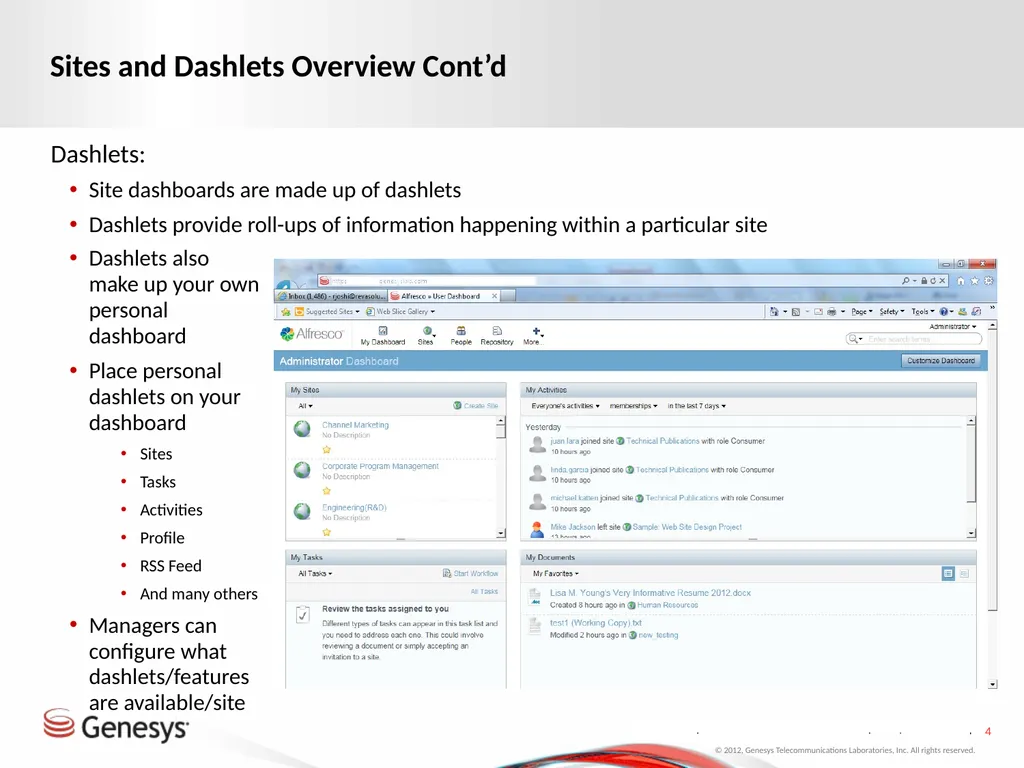
Sites and Dashlets Overview Cont’d Dashlets:
Site dashboards are made up of dashlets
Dashlets provide roll-ups of information happening within a particular site © 2012, Genesys Telecommunications Laboratories, Inc. All rights reserved. Dashlets also make up your own personal dashboard
Place personal dashlets on your dashboard
Sites
Tasks
Activities
Profile
RSS Feed
And many others
Managers can configure what dashlets/features are available/site<br>
Site dashboards are made up of dashlets
Dashlets provide roll-ups of information happening within a particular site © 2012, Genesys Telecommunications Laboratories, Inc. All rights reserved. Dashlets also make up your own personal dashboard
Place personal dashlets on your dashboard
Sites
Tasks
Activities
Profile
RSS Feed
And many others
Managers can configure what dashlets/features are available/site<br>
05
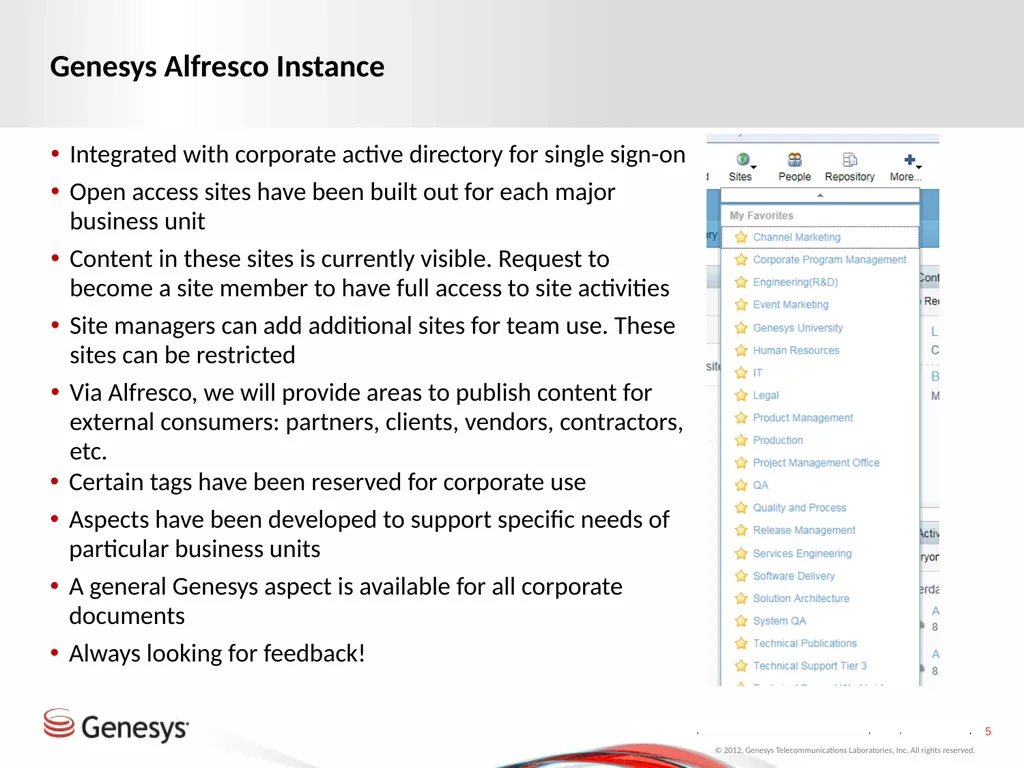
Genesys Alfresco Instance Integrated with corporate active directory for single sign-on
Open access sites have been built out for each major business unit
Content in these sites is currently visible. Request to become a site member to have full access to site activities
Site managers can add additional sites for team use. These sites can be restricted
Via Alfresco, we will provide areas to publish content for external consumers: partners, clients, vendors, contractors, etc. © 2012, Genesys Telecommunications Laboratories, Inc. All rights reserved. Certain tags have been reserved for corporate use
Aspects have been developed to support specific needs of particular business units
A general Genesys aspect is available for all corporate documents
Always looking for feedback!<br>
Open access sites have been built out for each major business unit
Content in these sites is currently visible. Request to become a site member to have full access to site activities
Site managers can add additional sites for team use. These sites can be restricted
Via Alfresco, we will provide areas to publish content for external consumers: partners, clients, vendors, contractors, etc. © 2012, Genesys Telecommunications Laboratories, Inc. All rights reserved. Certain tags have been reserved for corporate use
Aspects have been developed to support specific needs of particular business units
A general Genesys aspect is available for all corporate documents
Always looking for feedback!<br>
06
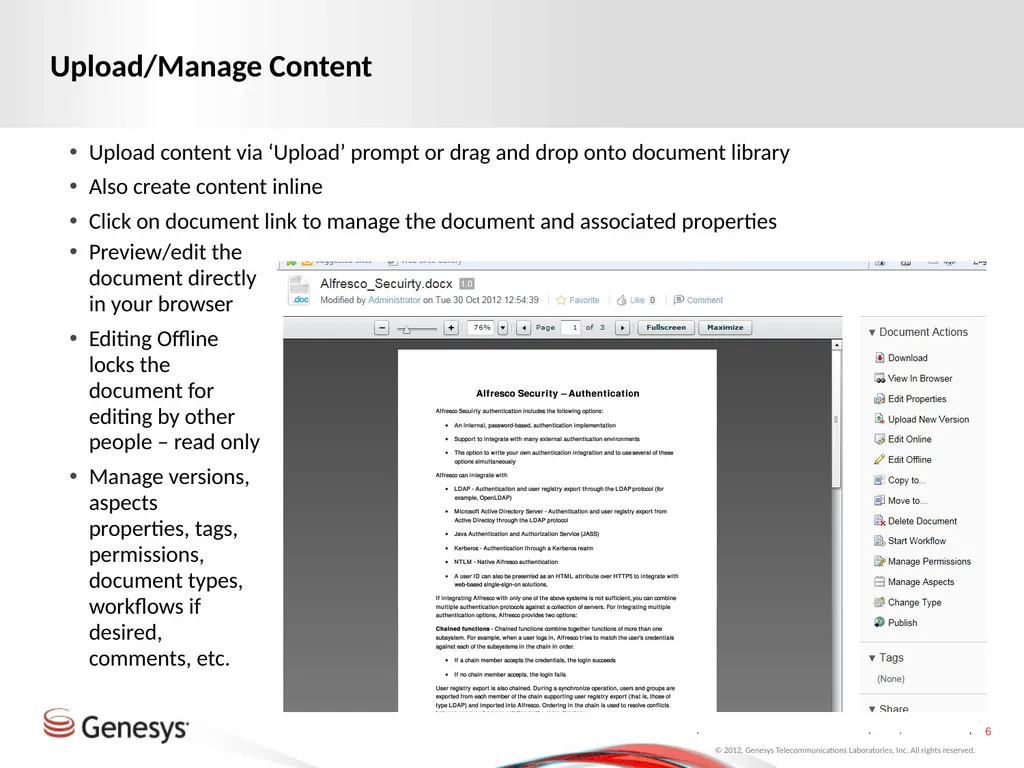
Upload/Manage Content Upload content via ‘Upload’ prompt or drag and drop onto document library
Also create content inline
Click on document link to manage the document and associated properties © 2012, Genesys Telecommunications Laboratories, Inc. All rights reserved. Preview/edit the document directly in your browser
Editing Offline locks the document for editing by other people – read only
Manage versions, aspects properties, tags, permissions, document types, workflows if desired, comments, etc.<br>
Also create content inline
Click on document link to manage the document and associated properties © 2012, Genesys Telecommunications Laboratories, Inc. All rights reserved. Preview/edit the document directly in your browser
Editing Offline locks the document for editing by other people – read only
Manage versions, aspects properties, tags, permissions, document types, workflows if desired, comments, etc.<br>
07
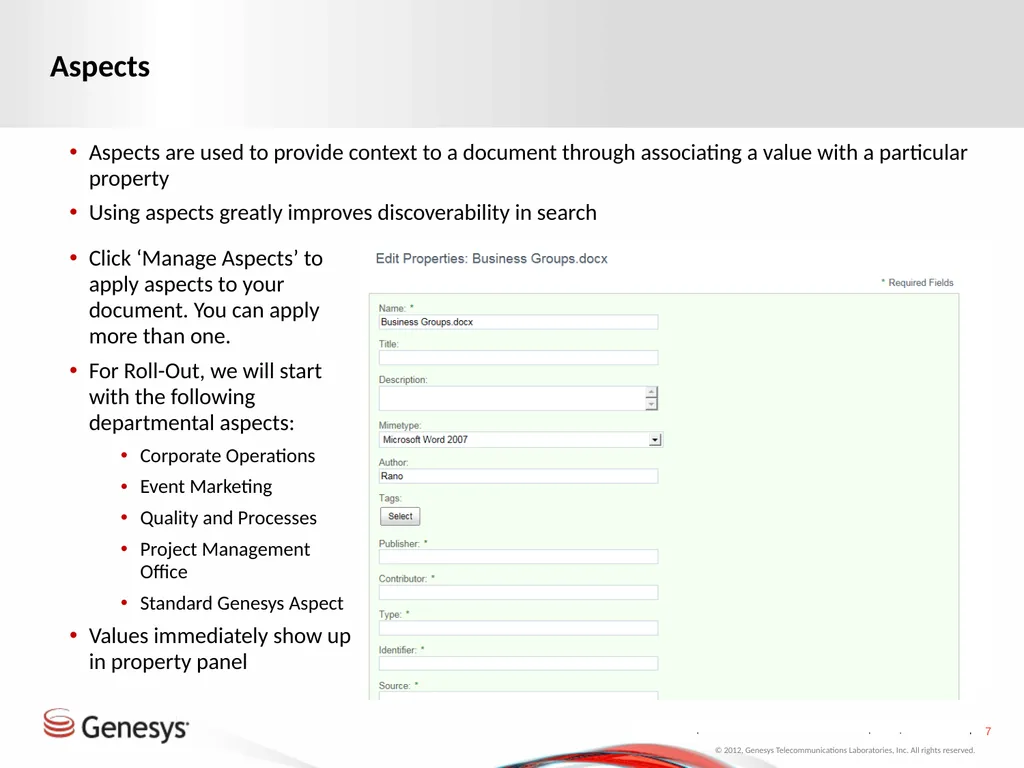
Aspects Aspects are used to provide context to a document through associating a value with a particular property
Using aspects greatly improves discoverability in search © 2012, Genesys Telecommunications Laboratories, Inc. All rights reserved. Click ‘Manage Aspects’ to apply aspects to your document. You can apply more than one.
For Roll-Out, we will start with the following departmental aspects:
Corporate Operations
Event Marketing
Quality and Processes
Project Management Office
Standard Genesys Aspect
Values immediately show up in property panel<br>
Using aspects greatly improves discoverability in search © 2012, Genesys Telecommunications Laboratories, Inc. All rights reserved. Click ‘Manage Aspects’ to apply aspects to your document. You can apply more than one.
For Roll-Out, we will start with the following departmental aspects:
Corporate Operations
Event Marketing
Quality and Processes
Project Management Office
Standard Genesys Aspect
Values immediately show up in property panel<br>
08
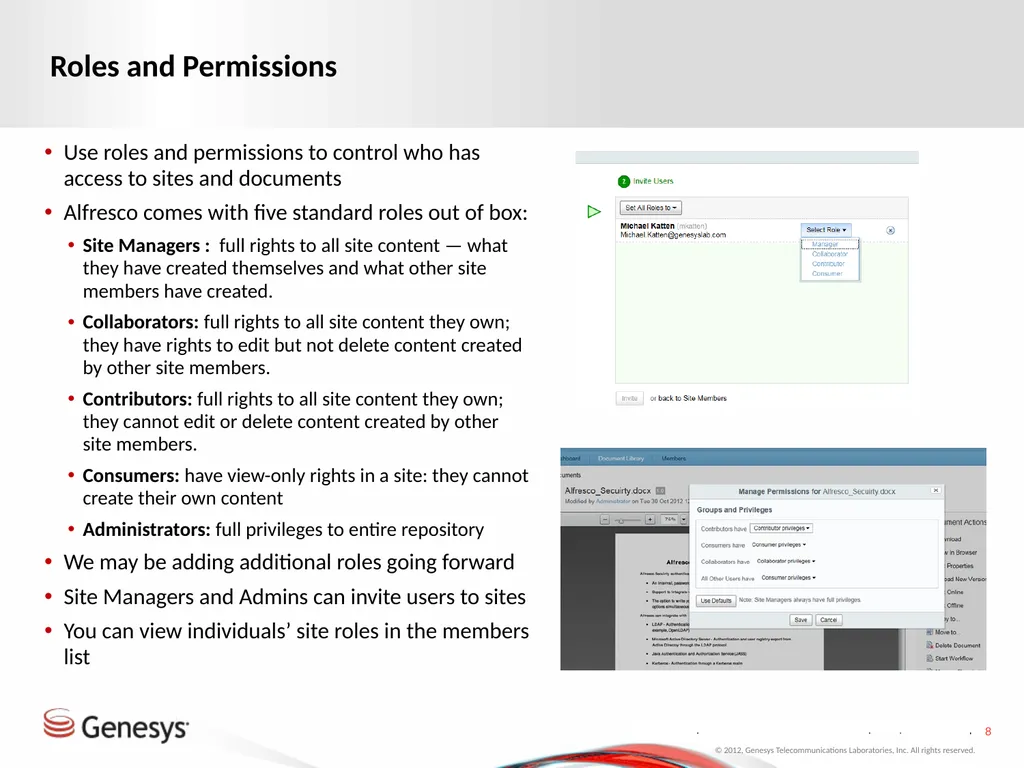
Roles and Permissions Use roles and permissions to control who has access to sites and documents
Alfresco comes with five standard roles out of box:
Site Managers : full rights to all site content — what they have created themselves and what other site members have created.
Collaborators: full rights to all site content they own; they have rights to edit but not delete content created by other site members.
Contributors: full rights to all site content they own; they cannot edit or delete content created by other site members.
Consumers: have view-only rights in a site: they cannot create their own content
Administrators: full privileges to entire repository
We may be adding additional roles going forward
Site Managers and Admins can invite users to sites
You can view individuals’ site roles in the members list © 2012, Genesys Telecommunications Laboratories, Inc. All rights reserved.<br>
Alfresco comes with five standard roles out of box:
Site Managers : full rights to all site content — what they have created themselves and what other site members have created.
Collaborators: full rights to all site content they own; they have rights to edit but not delete content created by other site members.
Contributors: full rights to all site content they own; they cannot edit or delete content created by other site members.
Consumers: have view-only rights in a site: they cannot create their own content
Administrators: full privileges to entire repository
We may be adding additional roles going forward
Site Managers and Admins can invite users to sites
You can view individuals’ site roles in the members list © 2012, Genesys Telecommunications Laboratories, Inc. All rights reserved.<br>
09
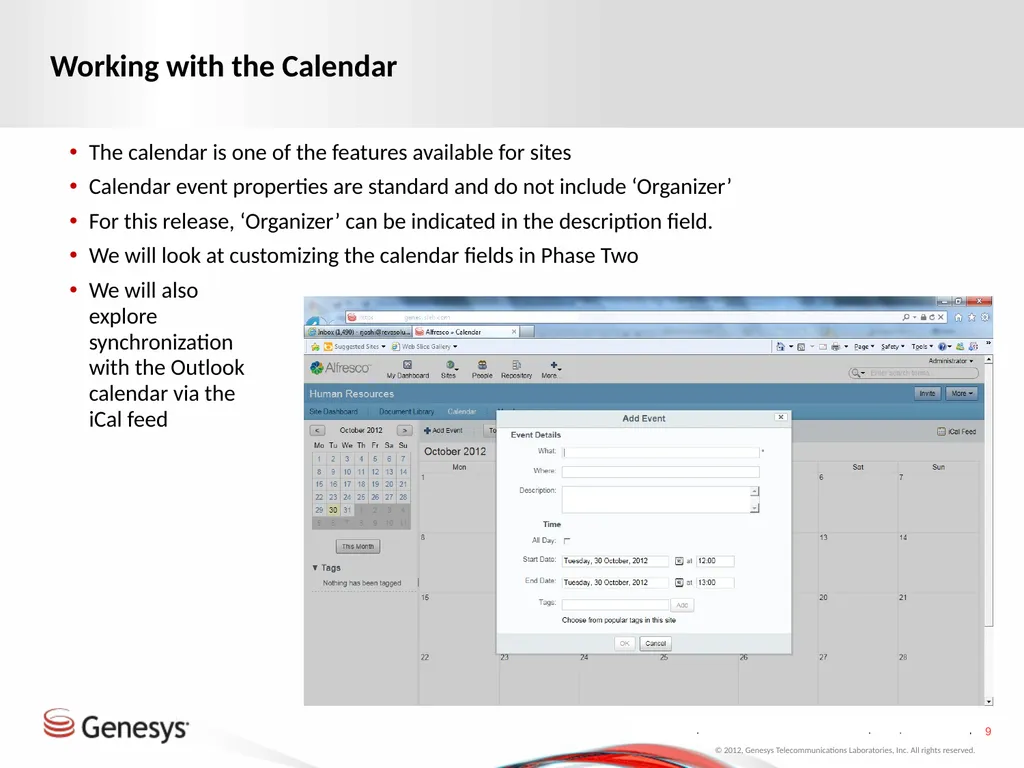
Working with the Calendar The calendar is one of the features available for sites
Calendar event properties are standard and do not include ‘Organizer’
For this release, ‘Organizer’ can be indicated in the description field.
We will look at customizing the calendar fields in Phase Two © 2012, Genesys Telecommunications Laboratories, Inc. All rights reserved. We will also explore synchronization with the Outlook calendar via the iCal feed<br>
Calendar event properties are standard and do not include ‘Organizer’
For this release, ‘Organizer’ can be indicated in the description field.
We will look at customizing the calendar fields in Phase Two © 2012, Genesys Telecommunications Laboratories, Inc. All rights reserved. We will also explore synchronization with the Outlook calendar via the iCal feed<br>
10
Demo © 2012, Genesys Telecommunications Laboratories, Inc. All rights reserved.<br>
11
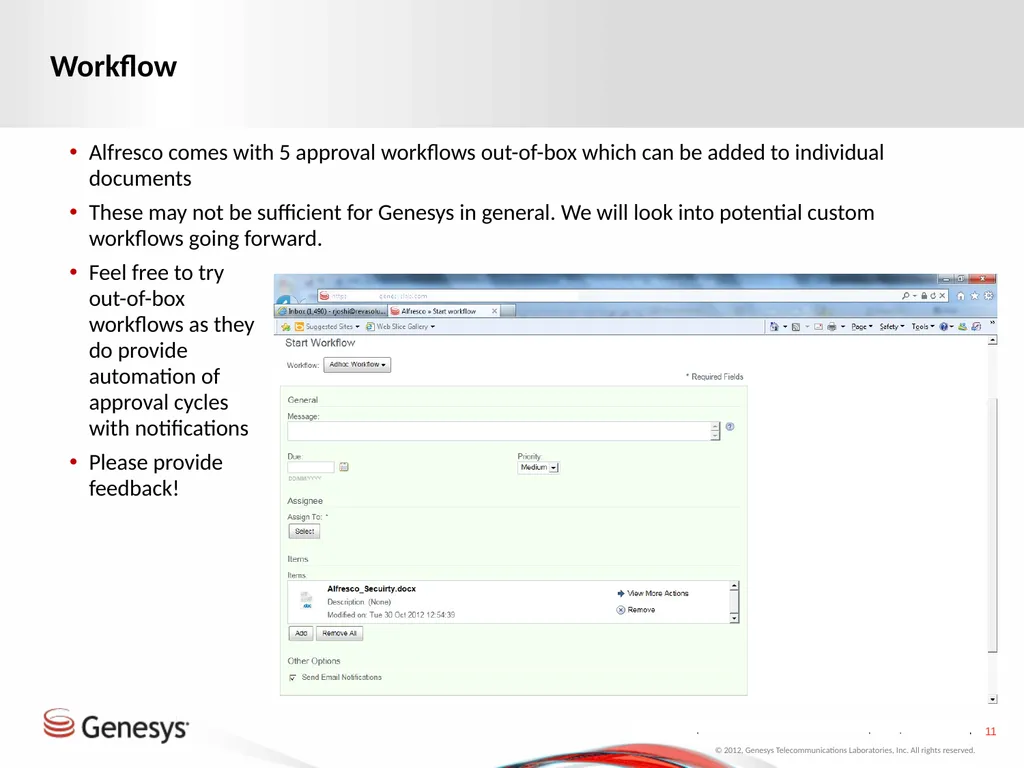
Workflow Alfresco comes with 5 approval workflows out-of-box which can be added to individual documents
These may not be sufficient for Genesys in general. We will look into potential custom workflows going forward. © 2012, Genesys Telecommunications Laboratories, Inc. All rights reserved. Feel free to try out-of-box workflows as they do provide automation of approval cycles with notifications
Please provide feedback!<br>
These may not be sufficient for Genesys in general. We will look into potential custom workflows going forward. © 2012, Genesys Telecommunications Laboratories, Inc. All rights reserved. Feel free to try out-of-box workflows as they do provide automation of approval cycles with notifications
Please provide feedback!<br>
12
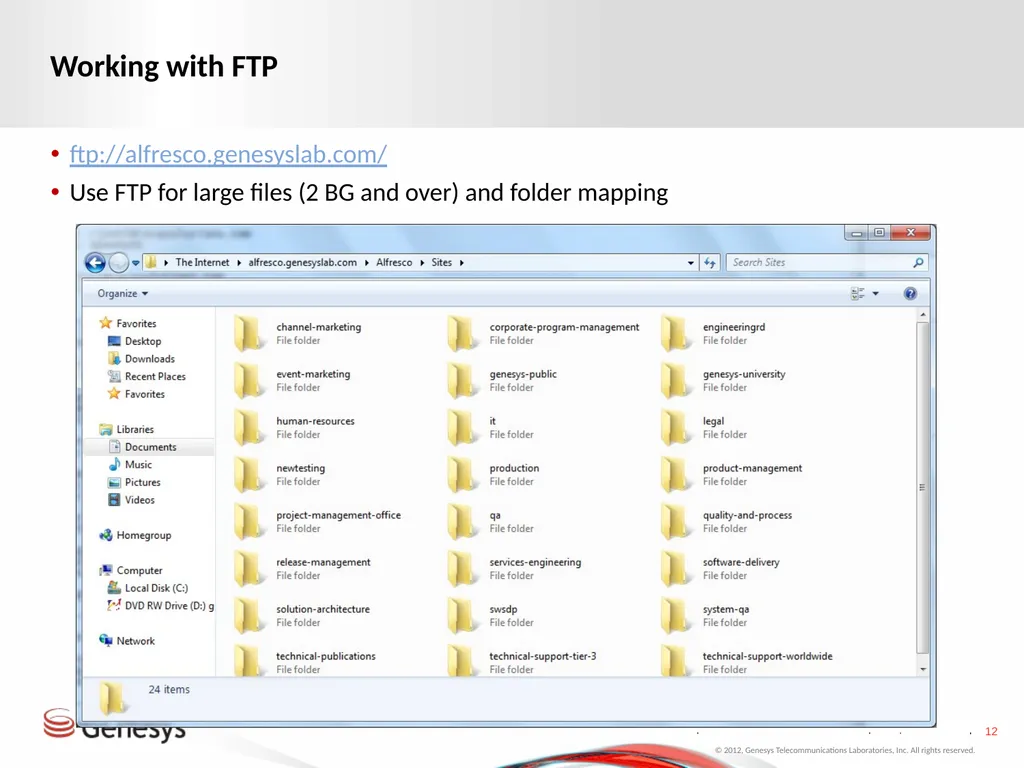
Working with FTP ftp://alfresco.genesyslab.com/
Use FTP for large files (2 BG and over) and folder mapping © 2012, Genesys Telecommunications Laboratories, Inc. All rights reserved.<br>
Use FTP for large files (2 BG and over) and folder mapping © 2012, Genesys Telecommunications Laboratories, Inc. All rights reserved.<br>
13
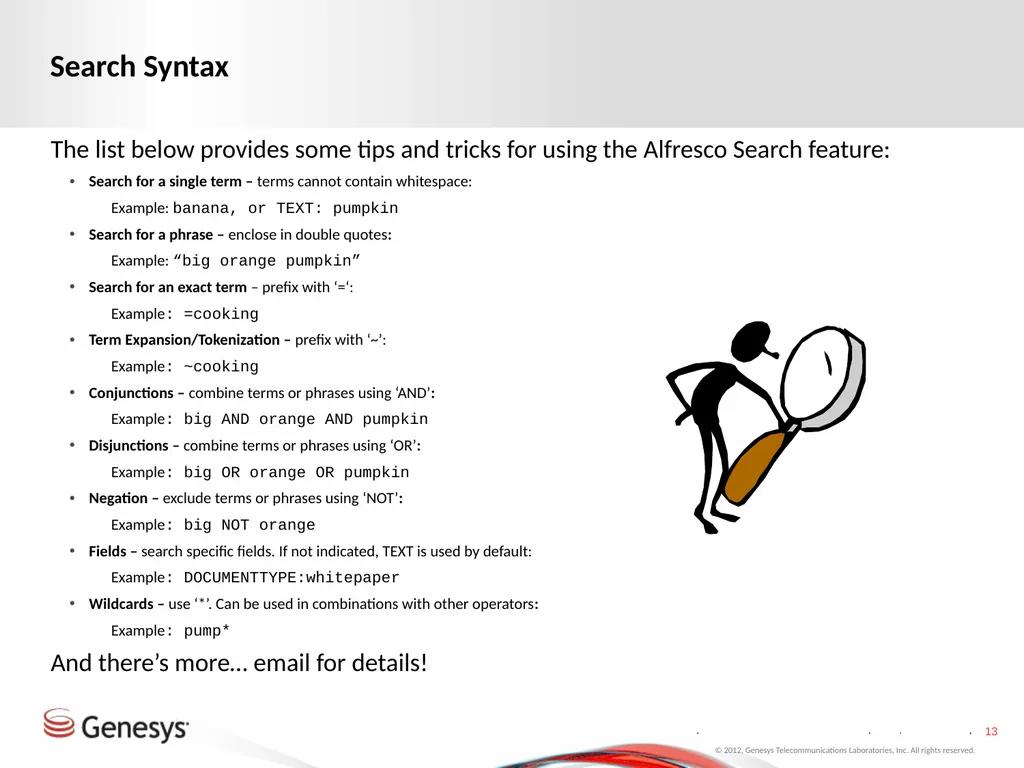
Search Syntax The list below provides some tips and tricks for using the Alfresco Search feature:
Search for a single term – terms cannot contain whitespace:
Example: banana, or TEXT: pumpkin
Search for a phrase – enclose in double quotes:
Example: “big orange pumpkin”
Search for an exact term – prefix with ‘=‘:
Example: =cooking
Term Expansion/Tokenization – prefix with ‘~’:
Example: ~cooking
Conjunctions – combine terms or phrases using ‘AND’:
Example: big AND orange AND pumpkin
Disjunctions – combine terms or phrases using ‘OR’:
Example: big OR orange OR pumpkin
Negation – exclude terms or phrases using ‘NOT’:
Example: big NOT orange
Fields – search specific fields. If not indicated, TEXT is used by default:
Example: DOCUMENTTYPE:whitepaper
Wildcards – use ‘*’. Can be used in combinations with other operators:
Example: pump*
And there’s more… email for details!
banana or TEXT: banana
Community space for a particular subject matter
Site dashboard provides overview of site activity © 2012, Genesys Telecommunications Laboratories, Inc. All rights reserved.<br>
Search for a single term – terms cannot contain whitespace:
Example: banana, or TEXT: pumpkin
Search for a phrase – enclose in double quotes:
Example: “big orange pumpkin”
Search for an exact term – prefix with ‘=‘:
Example: =cooking
Term Expansion/Tokenization – prefix with ‘~’:
Example: ~cooking
Conjunctions – combine terms or phrases using ‘AND’:
Example: big AND orange AND pumpkin
Disjunctions – combine terms or phrases using ‘OR’:
Example: big OR orange OR pumpkin
Negation – exclude terms or phrases using ‘NOT’:
Example: big NOT orange
Fields – search specific fields. If not indicated, TEXT is used by default:
Example: DOCUMENTTYPE:whitepaper
Wildcards – use ‘*’. Can be used in combinations with other operators:
Example: pump*
And there’s more… email for details!
banana or TEXT: banana
Community space for a particular subject matter
Site dashboard provides overview of site activity © 2012, Genesys Telecommunications Laboratories, Inc. All rights reserved.<br>
14
Additional Alfresco Concepts Categories vs Tags:
Use tags for adding additional context to your documents
Genesys corporate has a list of reserved tags
Tags are lower case only
Add tags which are relevant to you (including new tags)
Categories are an older Alfresco concept and we will not be using them within Genesys
Publishing:
Publishing allows you to publish content to various social media websites
We are currently not implementing any publishing channels
Use the external facing website for publishing external content © 2012, Genesys Telecommunications Laboratories, Inc. All rights reserved.<br>
Use tags for adding additional context to your documents
Genesys corporate has a list of reserved tags
Tags are lower case only
Add tags which are relevant to you (including new tags)
Categories are an older Alfresco concept and we will not be using them within Genesys
Publishing:
Publishing allows you to publish content to various social media websites
We are currently not implementing any publishing channels
Use the external facing website for publishing external content © 2012, Genesys Telecommunications Laboratories, Inc. All rights reserved.<br>
15
Things To Note Drag and Drop does not work with Internet Explorer
Use FTP for uploading/downloading files over 2 GB
We will be opening up sites for publishing external content anonymously, to customers, to partners, to vendors, etc.
We will be working on custom workflows specifically for Genesys in Phase 2. Feel free to use existing workflows and provide feedback
Integration with MediaWiki and Jive (Café G) are also part of next phase
Log in using your Genesys alias and password
Don’t forget to accept invitations to sites to participate
For reference:
How To Tutorials
http://www.alfresco.com/resources/documentation
http://wiki.alfresco.com/wiki/Main_Page © 2012, Genesys Telecommunications Laboratories, Inc. All rights reserved.<br>
Use FTP for uploading/downloading files over 2 GB
We will be opening up sites for publishing external content anonymously, to customers, to partners, to vendors, etc.
We will be working on custom workflows specifically for Genesys in Phase 2. Feel free to use existing workflows and provide feedback
Integration with MediaWiki and Jive (Café G) are also part of next phase
Log in using your Genesys alias and password
Don’t forget to accept invitations to sites to participate
For reference:
How To Tutorials
http://www.alfresco.com/resources/documentation
http://wiki.alfresco.com/wiki/Main_Page © 2012, Genesys Telecommunications Laboratories, Inc. All rights reserved.<br>
16
Next Steps Start working with Alfresco!
Currently reviewing feature requests for Phase Two, Phase Next
Includes items discussed in working sessions
Phase Two begins immediately
For questions or bugs, email alfrescosupport@genesyslab.com © 2012, Genesys Telecommunications Laboratories, Inc. All rights reserved.<br>
Currently reviewing feature requests for Phase Two, Phase Next
Includes items discussed in working sessions
Phase Two begins immediately
For questions or bugs, email alfrescosupport@genesyslab.com © 2012, Genesys Telecommunications Laboratories, Inc. All rights reserved.<br>
17
Q & A © 2012, Genesys Telecommunications Laboratories, Inc. All rights reserved.<br>