
Chapter 2 Application Layer A note on the use of
KL
Published · 125 slides · 0 views

1 / 1

Description
Chapter 2 Application Layer A note on the use of these PowerPoint slides: Were making these slides freely available to all (faculty, students, readers). Theyre in PowerPoint form so you see the animations; and can add, modify, and delete
Related Topics
Share
Embed code
Download this presentation From Below
"Chapter 2 Application Layer A note on the use of" is the property of its rightful owner. Permission is granted to download and print the materials on this website for personal, non-commercial use only, and to display it on your personal computer provided you do not modify the materials and that you retain all copyright notices contained in the materials. By downloading content from our website, you accept the terms of this agreement.
Presentation Transcript
01
Chapter 2
Application Layer A note on the use of these PowerPoint slides:
We’re making these slides freely available to all (faculty, students, readers). They’re in PowerPoint form so you see the animations; and can add, modify, and delete slides (including this one) and slide content to suit your needs. They obviously represent a lot of work on our part. In return for use, we only ask the following: If you use these slides (e.g., in a class) that you mention their source (after all, we’d like people to use our book!)
If you post any slides on a www site, that you note that they are adapted from (or perhaps identical to) our slides, and note our copyright of this material.
For a revision history, see the slide note for this page.
Thanks and enjoy! JFK/KWR
All material copyright 1996-2023
J.F Kurose and K.W. Ross, All Rights Reserved Application Layer: 2-1 Computer Networking: A Top-Down Approach 8th edition n Jim Kurose, Keith Ross Pearson, 2020<br>
We’re making these slides freely available to all (faculty, students, readers). They’re in PowerPoint form so you see the animations; and can add, modify, and delete slides (including this one) and slide content to suit your needs. They obviously represent a lot of work on our part. In return for use, we only ask the following: If you use these slides (e.g., in a class) that you mention their source (after all, we’d like people to use our book!)
If you post any slides on a www site, that you note that they are adapted from (or perhaps identical to) our slides, and note our copyright of this material.
For a revision history, see the slide note for this page.
Thanks and enjoy! JFK/KWR
All material copyright 1996-2023
J.F Kurose and K.W. Ross, All Rights Reserved Application Layer: 2-1 Computer Networking: A Top-Down Approach 8th edition n Jim Kurose, Keith Ross Pearson, 2020<br>
02
Application layer: overview Principles of network applications
Web and HTTP
E-mail, SMTP, IMAP
The Domain Name System DNS P2P applications
video streaming and content distribution networks
socket programming with UDP and TCP Application Layer: 2-2<br>
Web and HTTP
E-mail, SMTP, IMAP
The Domain Name System DNS P2P applications
video streaming and content distribution networks
socket programming with UDP and TCP Application Layer: 2-2<br>
03
Application layer: overview Our goals:
conceptual and implementation aspects of application-layer protocols
transport-layer service models
client-server paradigm
peer-to-peer paradigm learn about protocols by examining popular application-layer protocols and infrastructure
HTTP
SMTP, IMAP
DNS
video streaming systems, CDNs
programming network applications
socket API Application Layer: 2-3<br>
conceptual and implementation aspects of application-layer protocols
transport-layer service models
client-server paradigm
peer-to-peer paradigm learn about protocols by examining popular application-layer protocols and infrastructure
HTTP
SMTP, IMAP
DNS
video streaming systems, CDNs
programming network applications
socket API Application Layer: 2-3<br>
04
Some network apps social networking
Web
text messaging
e-mail
multi-user network games
streaming stored video (YouTube, Hulu, Netflix)
P2P file sharing voice over IP (e.g., Skype)
real-time video conferencing (e.g., Zoom)
Internet search
remote login
… Q: your favorites? Application Layer: 2-4<br>
Web
text messaging
multi-user network games
streaming stored video (YouTube, Hulu, Netflix)
P2P file sharing voice over IP (e.g., Skype)
real-time video conferencing (e.g., Zoom)
Internet search
remote login
… Q: your favorites? Application Layer: 2-4<br>
05
mobile network home network enterprise
network national or global ISP local or regional ISP datacenter
network content
provider
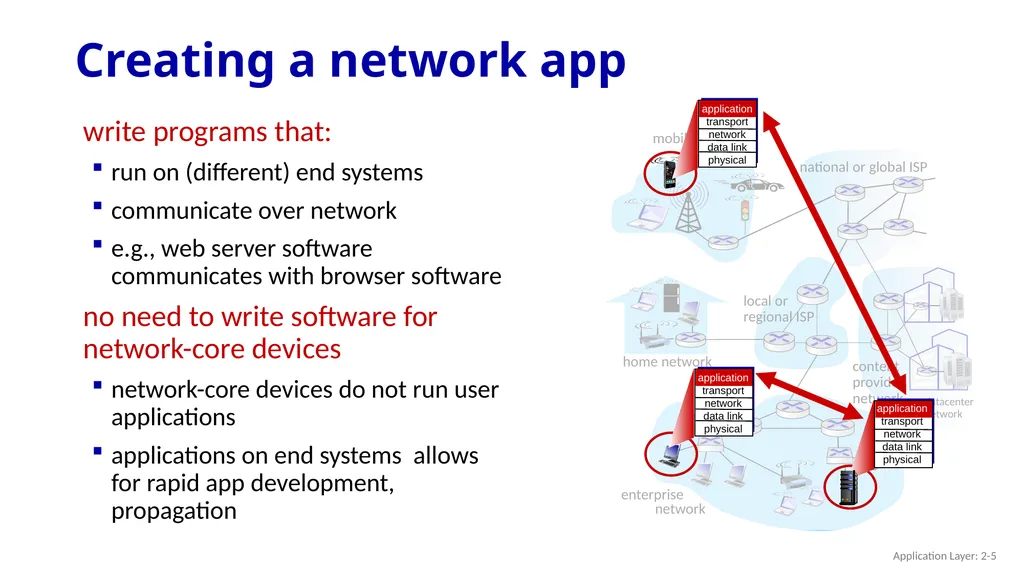
network Creating a network app write programs that:
run on (different) end systems
communicate over network
e.g., web server software communicates with browser software
no need to write software for network-core devices
network-core devices do not run user applications
applications on end systems allows for rapid app development, propagation Application Layer: 2-5<br>
network national or global ISP local or regional ISP datacenter
network content
provider
network Creating a network app write programs that:
run on (different) end systems
communicate over network
e.g., web server software communicates with browser software
no need to write software for network-core devices
network-core devices do not run user applications
applications on end systems allows for rapid app development, propagation Application Layer: 2-5<br>
06
mobile network home network enterprise
network national or global ISP local or regional ISP datacenter
network content
provider
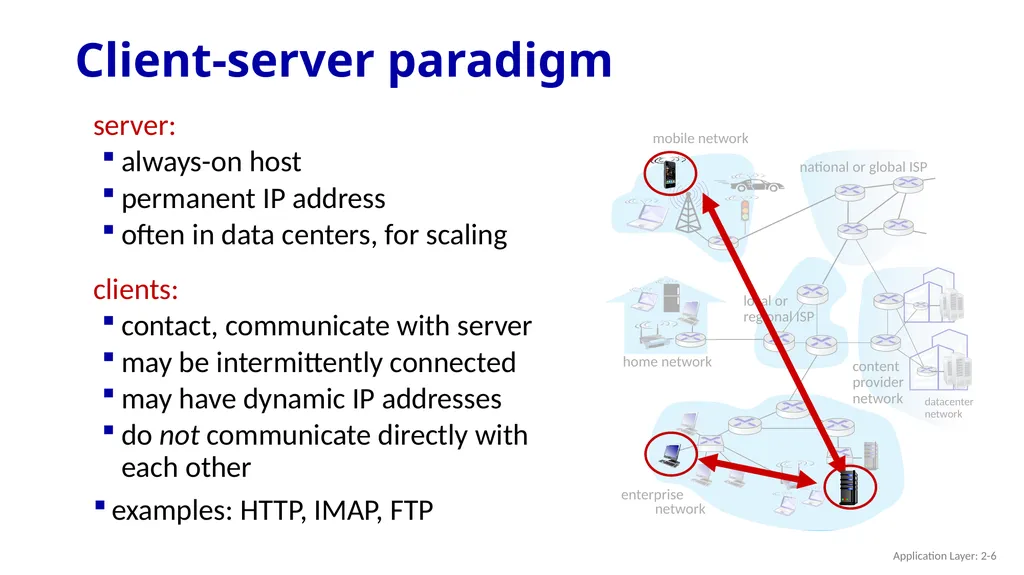
network Client-server paradigm server:
always-on host
permanent IP address
often in data centers, for scaling
clients:
contact, communicate with server
may be intermittently connected
may have dynamic IP addresses
do not communicate directly with each other
examples: HTTP, IMAP, FTP Application Layer: 2-6<br>
network national or global ISP local or regional ISP datacenter
network content
provider
network Client-server paradigm server:
always-on host
permanent IP address
often in data centers, for scaling
clients:
contact, communicate with server
may be intermittently connected
may have dynamic IP addresses
do not communicate directly with each other
examples: HTTP, IMAP, FTP Application Layer: 2-6<br>
07
mobile network home network enterprise
network national or global ISP local or regional ISP datacenter
network content
provider
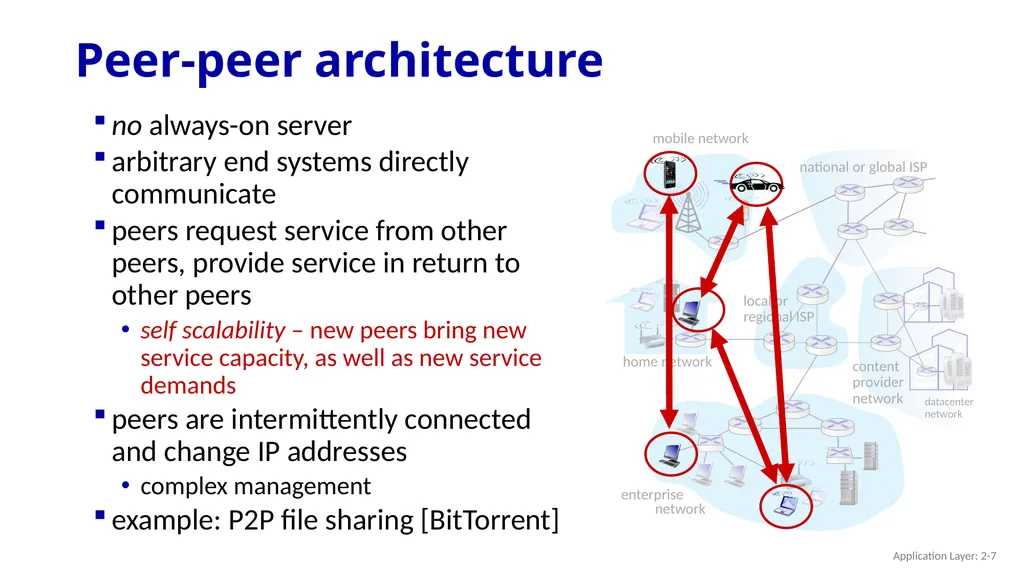
network Peer-peer architecture no always-on server
arbitrary end systems directly communicate
peers request service from other peers, provide service in return to other peers
self scalability – new peers bring new service capacity, as well as new service demands
peers are intermittently connected and change IP addresses
complex management
example: P2P file sharing [BitTorrent] Application Layer: 2-7<br>
network national or global ISP local or regional ISP datacenter
network content
provider
network Peer-peer architecture no always-on server
arbitrary end systems directly communicate
peers request service from other peers, provide service in return to other peers
self scalability – new peers bring new service capacity, as well as new service demands
peers are intermittently connected and change IP addresses
complex management
example: P2P file sharing [BitTorrent] Application Layer: 2-7<br>
08
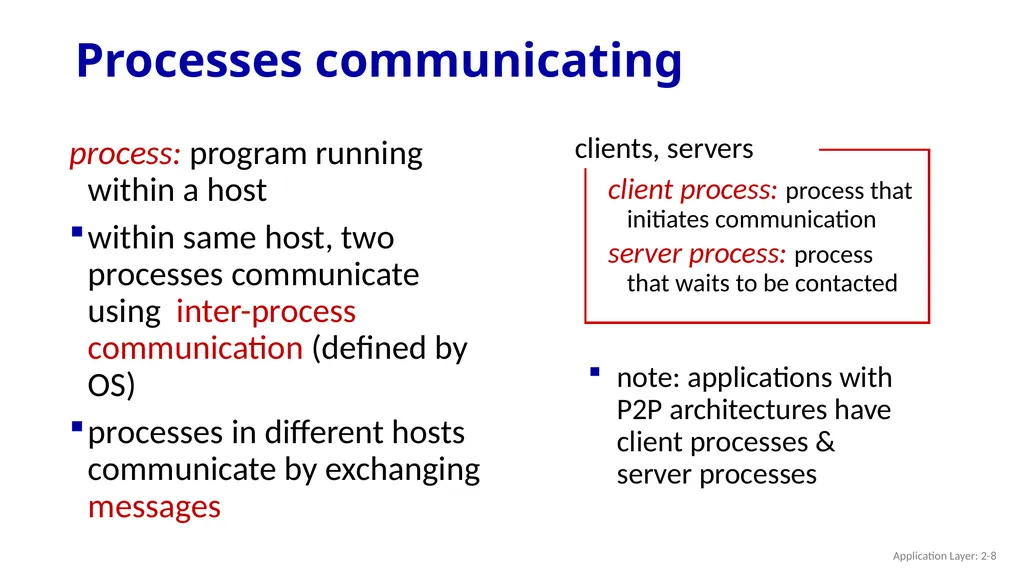
Processes communicating process: program running within a host
within same host, two processes communicate using inter-process communication (defined by OS)
processes in different hosts communicate by exchanging messages note: applications with P2P architectures have client processes & server processes Application Layer: 2-8<br>
within same host, two processes communicate using inter-process communication (defined by OS)
processes in different hosts communicate by exchanging messages note: applications with P2P architectures have client processes & server processes Application Layer: 2-8<br>
09
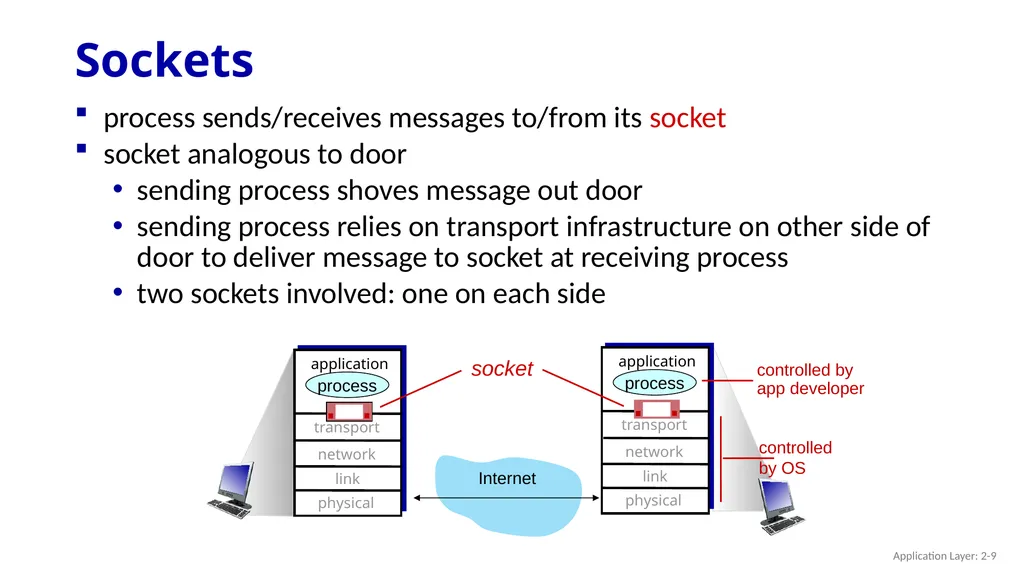
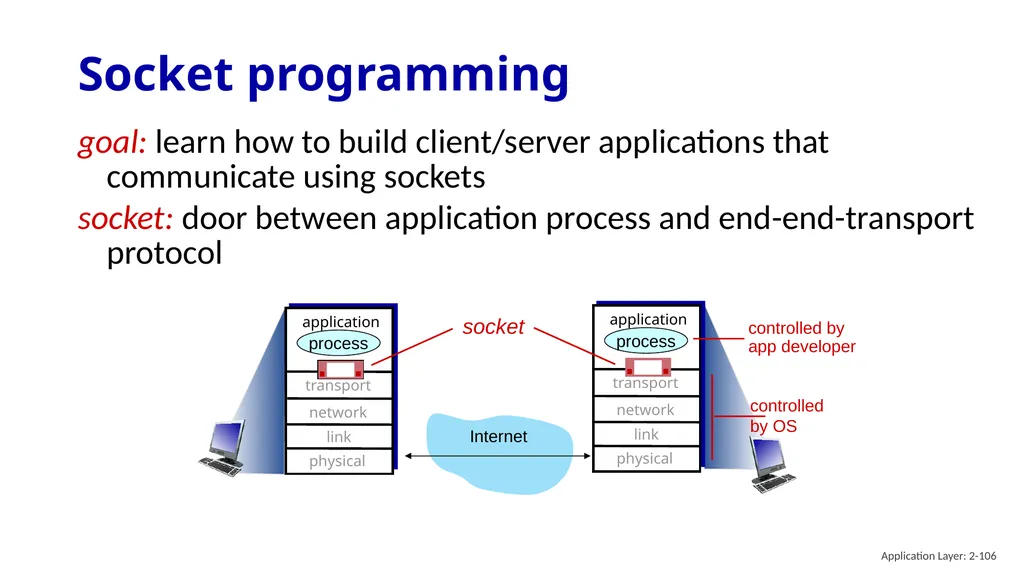
Sockets process sends/receives messages to/from its socket
socket analogous to door
sending process shoves message out door
sending process relies on transport infrastructure on other side of door to deliver message to socket at receiving process
two sockets involved: one on each side Internet controlled
by OS controlled by
app developer transport application physical link network process transport application physical link network process socket Application Layer: 2-9<br>
socket analogous to door
sending process shoves message out door
sending process relies on transport infrastructure on other side of door to deliver message to socket at receiving process
two sockets involved: one on each side Internet controlled
by OS controlled by
app developer transport application physical link network process transport application physical link network process socket Application Layer: 2-9<br>
10
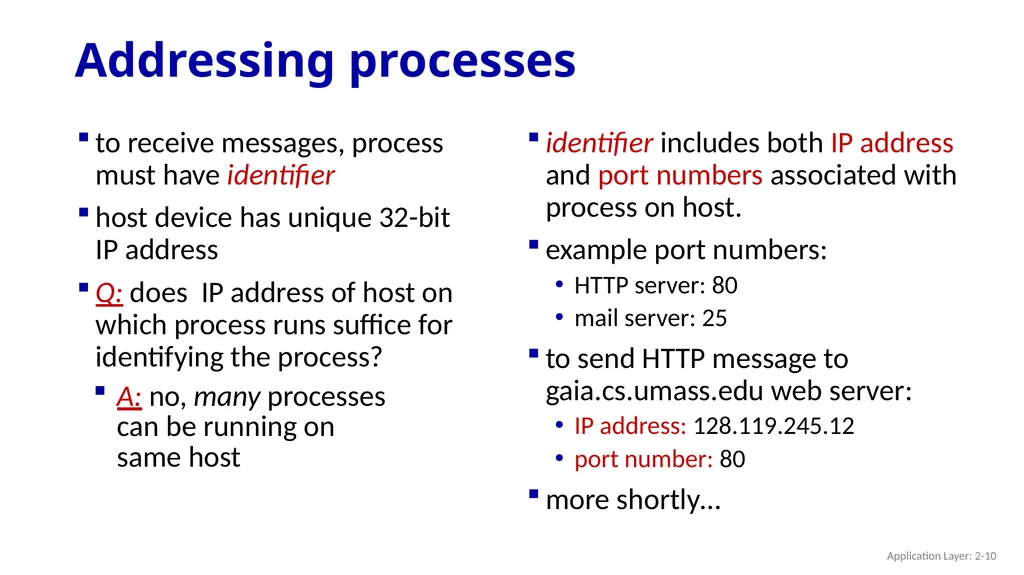
Addressing processes to receive messages, process must have identifier
host device has unique 32-bit IP address
Q: does IP address of host on which process runs suffice for identifying the process? identifier includes both IP address and port numbers associated with process on host.
example port numbers:
HTTP server: 80
mail server: 25
to send HTTP message to gaia.cs.umass.edu web server:
IP address: 128.119.245.12
port number: 80
more shortly… A: no, many processes can be running on same host Application Layer: 2-10<br>
host device has unique 32-bit IP address
Q: does IP address of host on which process runs suffice for identifying the process? identifier includes both IP address and port numbers associated with process on host.
example port numbers:
HTTP server: 80
mail server: 25
to send HTTP message to gaia.cs.umass.edu web server:
IP address: 128.119.245.12
port number: 80
more shortly… A: no, many processes can be running on same host Application Layer: 2-10<br>
11
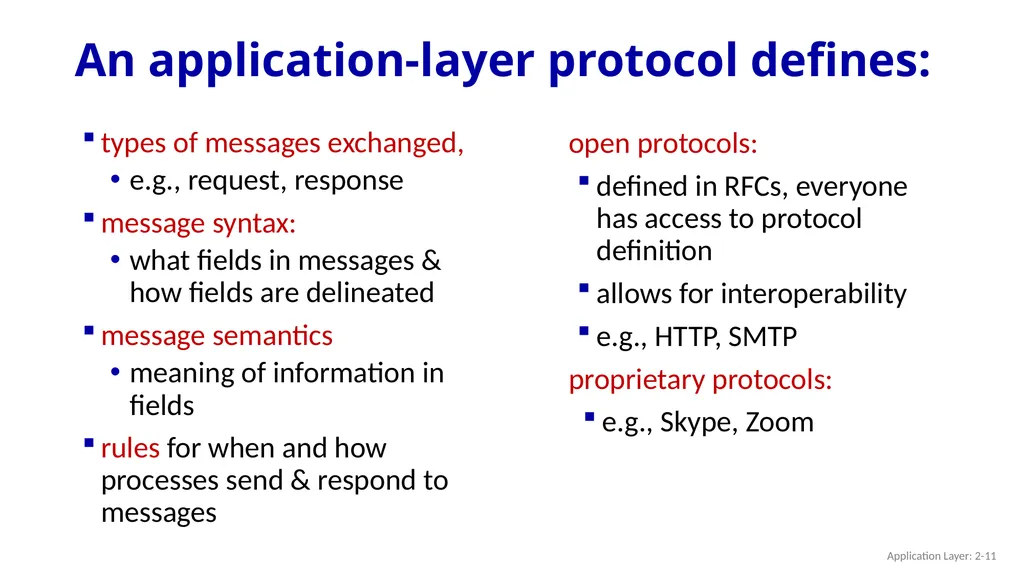
An application-layer protocol defines: types of messages exchanged,
e.g., request, response
message syntax:
what fields in messages & how fields are delineated
message semantics
meaning of information in fields
rules for when and how processes send & respond to messages open protocols:
defined in RFCs, everyone has access to protocol definition
allows for interoperability
e.g., HTTP, SMTP
proprietary protocols:
e.g., Skype, Zoom Application Layer: 2-11<br>
e.g., request, response
message syntax:
what fields in messages & how fields are delineated
message semantics
meaning of information in fields
rules for when and how processes send & respond to messages open protocols:
defined in RFCs, everyone has access to protocol definition
allows for interoperability
e.g., HTTP, SMTP
proprietary protocols:
e.g., Skype, Zoom Application Layer: 2-11<br>
12
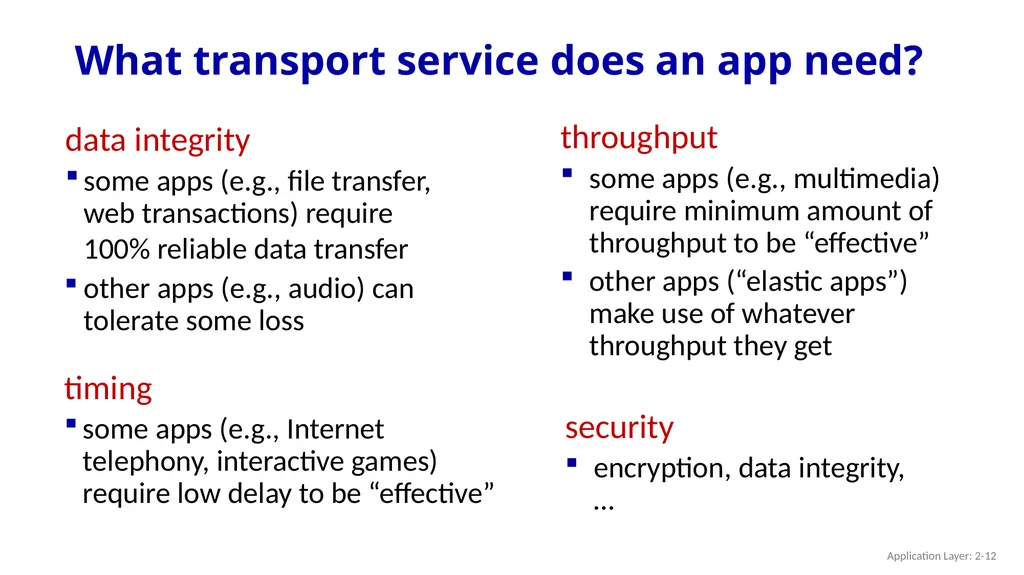
What transport service does an app need? data integrity
some apps (e.g., file transfer, web transactions) require 100% reliable data transfer
other apps (e.g., audio) can tolerate some loss timing
some apps (e.g., Internet telephony, interactive games) require low delay to be “effective” throughput
some apps (e.g., multimedia) require minimum amount of throughput to be “effective”
other apps (“elastic apps”) make use of whatever throughput they get security
encryption, data integrity, … Application Layer: 2-12<br>
some apps (e.g., file transfer, web transactions) require 100% reliable data transfer
other apps (e.g., audio) can tolerate some loss timing
some apps (e.g., Internet telephony, interactive games) require low delay to be “effective” throughput
some apps (e.g., multimedia) require minimum amount of throughput to be “effective”
other apps (“elastic apps”) make use of whatever throughput they get security
encryption, data integrity, … Application Layer: 2-12<br>
13
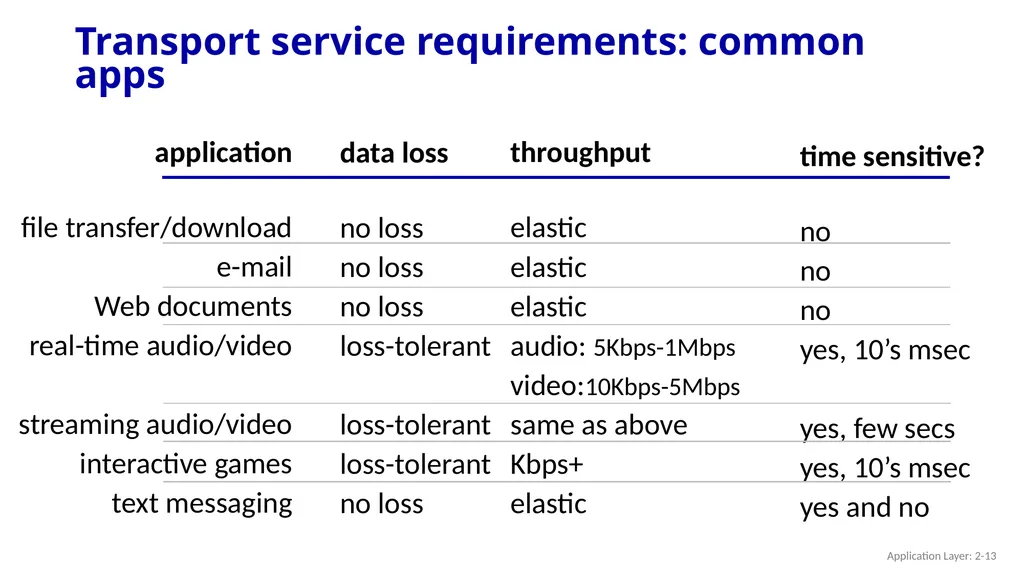
Transport service requirements: common apps application
file transfer/download
e-mail
Web documents
real-time audio/video
streaming audio/video
interactive games
text messaging data loss
no loss
no loss
no loss
loss-tolerant
loss-tolerant
loss-tolerant
no loss throughput
elastic
elastic
elastic
audio: 5Kbps-1Mbps
video:10Kbps-5Mbps
same as above
Kbps+
elastic time sensitive?
no
no
no
yes, 10’s msec
yes, few secs
yes, 10’s msec
yes and no Application Layer: 2-13<br>
file transfer/download
Web documents
real-time audio/video
streaming audio/video
interactive games
text messaging data loss
no loss
no loss
no loss
loss-tolerant
loss-tolerant
loss-tolerant
no loss throughput
elastic
elastic
elastic
audio: 5Kbps-1Mbps
video:10Kbps-5Mbps
same as above
Kbps+
elastic time sensitive?
no
no
no
yes, 10’s msec
yes, few secs
yes, 10’s msec
yes and no Application Layer: 2-13<br>
14
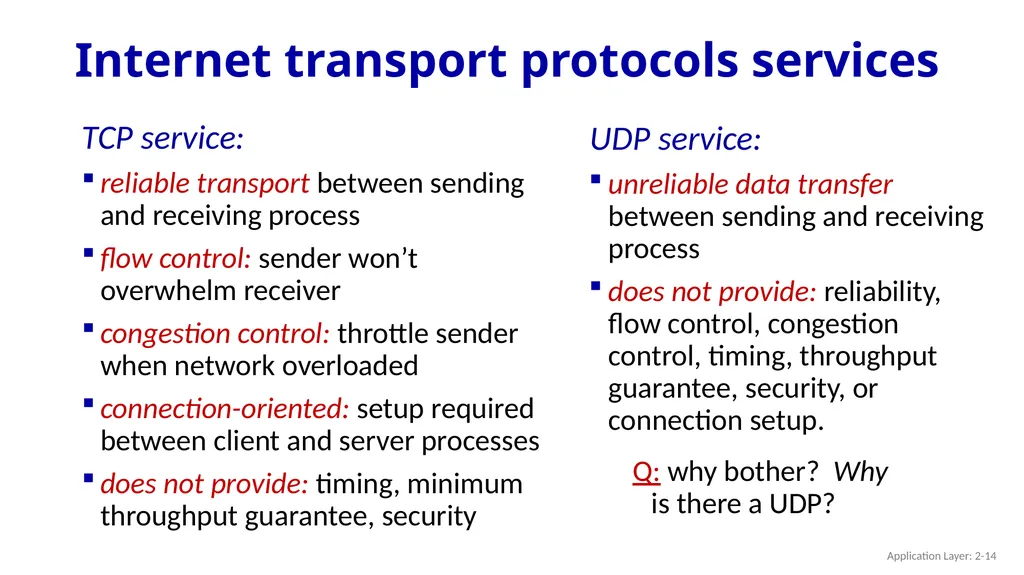
Internet transport protocols services TCP service:
reliable transport between sending and receiving process
flow control: sender won’t overwhelm receiver
congestion control: throttle sender when network overloaded
connection-oriented: setup required between client and server processes
does not provide: timing, minimum throughput guarantee, security UDP service:
unreliable data transfer between sending and receiving process
does not provide: reliability, flow control, congestion control, timing, throughput guarantee, security, or connection setup. Q: why bother? Why is there a UDP? Application Layer: 2-14<br>
reliable transport between sending and receiving process
flow control: sender won’t overwhelm receiver
congestion control: throttle sender when network overloaded
connection-oriented: setup required between client and server processes
does not provide: timing, minimum throughput guarantee, security UDP service:
unreliable data transfer between sending and receiving process
does not provide: reliability, flow control, congestion control, timing, throughput guarantee, security, or connection setup. Q: why bother? Why is there a UDP? Application Layer: 2-14<br>
15
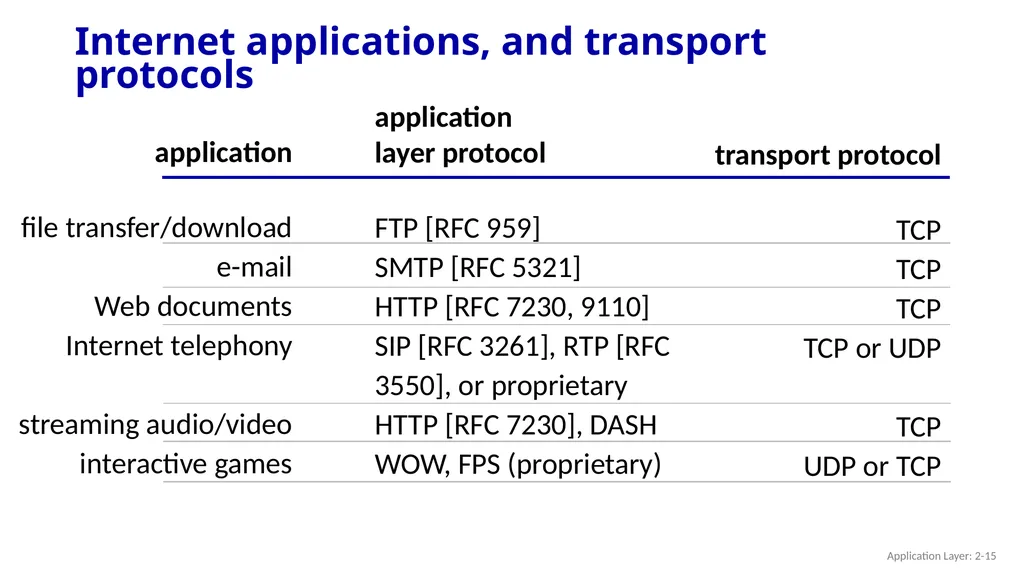
Internet applications, and transport protocols application
file transfer/download
e-mail
Web documents
Internet telephony
streaming audio/video
interactive games application
layer protocol
FTP [RFC 959]
SMTP [RFC 5321]
HTTP [RFC 7230, 9110]
SIP [RFC 3261], RTP [RFC 3550], or proprietary HTTP [RFC 7230], DASH
WOW, FPS (proprietary) transport protocol
TCP
TCP
TCP
TCP or UDP
TCP
UDP or TCP Application Layer: 2-15<br>
file transfer/download
Web documents
Internet telephony
streaming audio/video
interactive games application
layer protocol
FTP [RFC 959]
SMTP [RFC 5321]
HTTP [RFC 7230, 9110]
SIP [RFC 3261], RTP [RFC 3550], or proprietary HTTP [RFC 7230], DASH
WOW, FPS (proprietary) transport protocol
TCP
TCP
TCP
TCP or UDP
TCP
UDP or TCP Application Layer: 2-15<br>
16
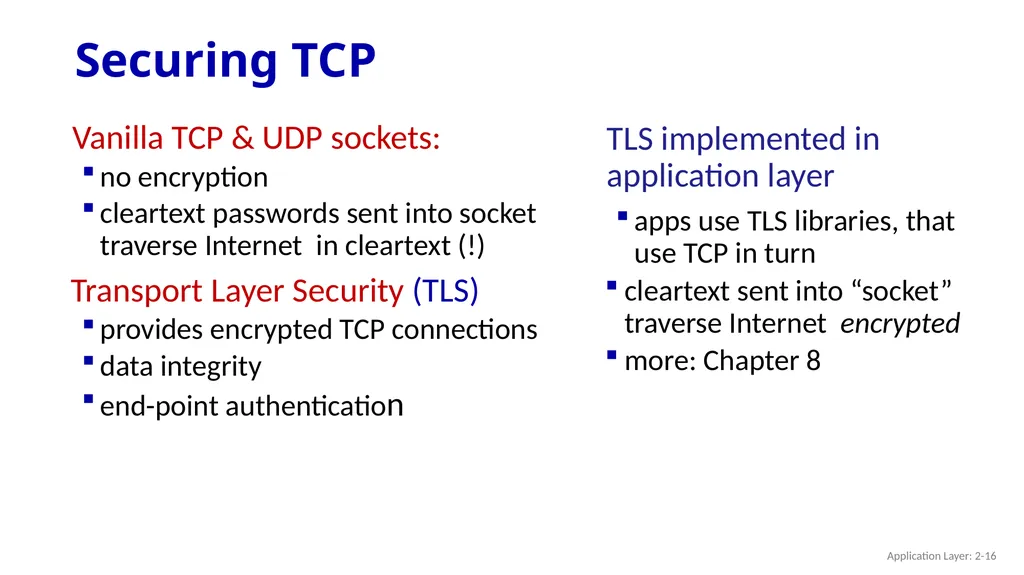
Securing TCP Vanilla TCP & UDP sockets:
no encryption
cleartext passwords sent into socket traverse Internet in cleartext (!)
Transport Layer Security (TLS)
provides encrypted TCP connections
data integrity
end-point authentication TLS implemented in application layer
apps use TLS libraries, that use TCP in turn
cleartext sent into “socket” traverse Internet encrypted
more: Chapter 8 Application Layer: 2-16<br>
no encryption
cleartext passwords sent into socket traverse Internet in cleartext (!)
Transport Layer Security (TLS)
provides encrypted TCP connections
data integrity
end-point authentication TLS implemented in application layer
apps use TLS libraries, that use TCP in turn
cleartext sent into “socket” traverse Internet encrypted
more: Chapter 8 Application Layer: 2-16<br>
17
Application layer: overview Principles of network applications
Web and HTTP
E-mail, SMTP, IMAP
The Domain Name System DNS P2P applications
video streaming and content distribution networks
socket programming with UDP and TCP Application Layer: 2-17<br>
Web and HTTP
E-mail, SMTP, IMAP
The Domain Name System DNS P2P applications
video streaming and content distribution networks
socket programming with UDP and TCP Application Layer: 2-17<br>
18
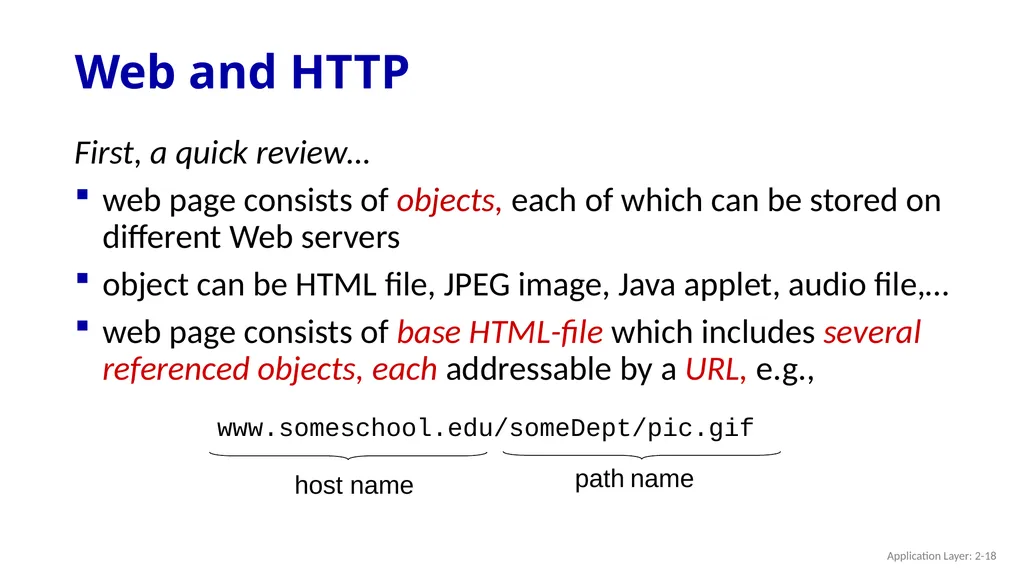
Web and HTTP First, a quick review…
web page consists of objects, each of which can be stored on different Web servers
object can be HTML file, JPEG image, Java applet, audio file,…
web page consists of base HTML-file which includes several referenced objects, each addressable by a URL, e.g., Application Layer: 2-18<br>
web page consists of objects, each of which can be stored on different Web servers
object can be HTML file, JPEG image, Java applet, audio file,…
web page consists of base HTML-file which includes several referenced objects, each addressable by a URL, e.g., Application Layer: 2-18<br>
19
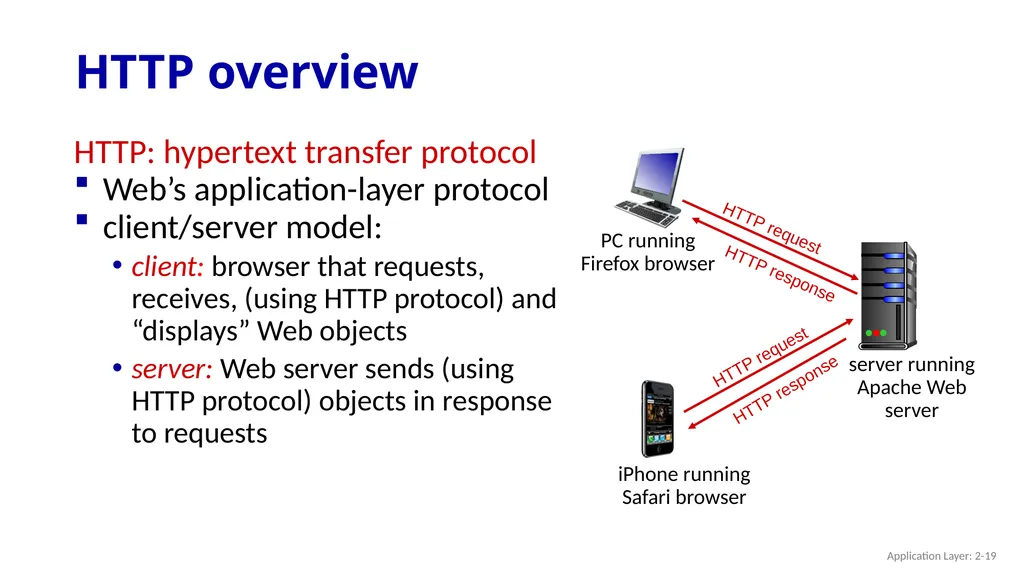
HTTP overview HTTP: hypertext transfer protocol
Web’s application-layer protocol
client/server model:
client: browser that requests, receives, (using HTTP protocol) and “displays” Web objects
server: Web server sends (using HTTP protocol) objects in response to requests Application Layer: 2-19<br>
Web’s application-layer protocol
client/server model:
client: browser that requests, receives, (using HTTP protocol) and “displays” Web objects
server: Web server sends (using HTTP protocol) objects in response to requests Application Layer: 2-19<br>
20
HTTP overview (continued) HTTP uses TCP:
client initiates TCP connection (creates socket) to server, port 80
server accepts TCP connection from client
HTTP messages (application-layer protocol messages) exchanged between browser (HTTP client) and Web server (HTTP server)
TCP connection closed HTTP is “stateless”
server maintains no information about past client requests Application Layer: 2-20<br>
client initiates TCP connection (creates socket) to server, port 80
server accepts TCP connection from client
HTTP messages (application-layer protocol messages) exchanged between browser (HTTP client) and Web server (HTTP server)
TCP connection closed HTTP is “stateless”
server maintains no information about past client requests Application Layer: 2-20<br>
21
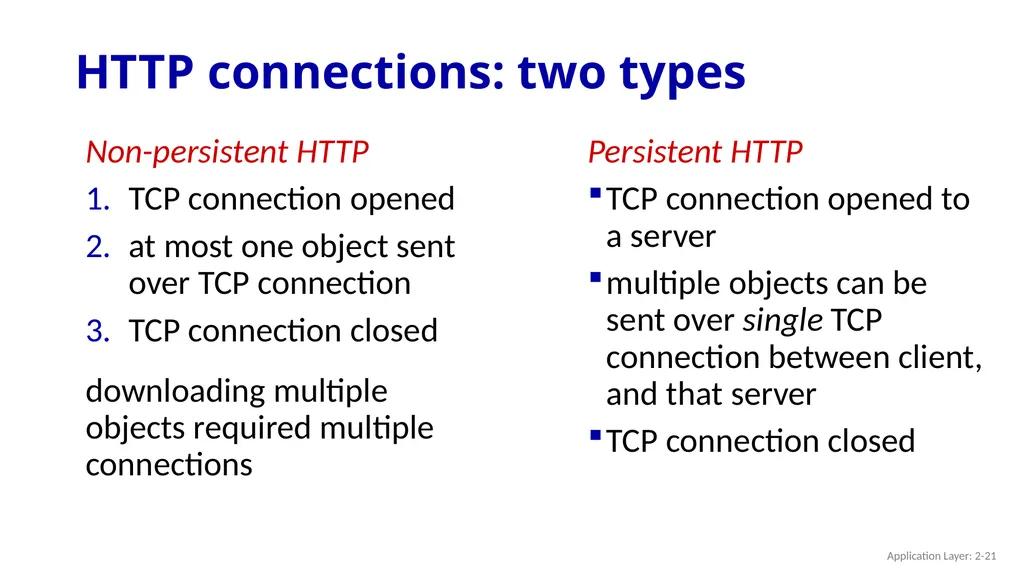
HTTP connections: two types Non-persistent HTTP
TCP connection opened
at most one object sent over TCP connection
TCP connection closed
downloading multiple objects required multiple connections Persistent HTTP
TCP connection opened to a server
multiple objects can be sent over single TCP connection between client, and that server
TCP connection closed Application Layer: 2-21<br>
TCP connection opened
at most one object sent over TCP connection
TCP connection closed
downloading multiple objects required multiple connections Persistent HTTP
TCP connection opened to a server
multiple objects can be sent over single TCP connection between client, and that server
TCP connection closed Application Layer: 2-21<br>
22
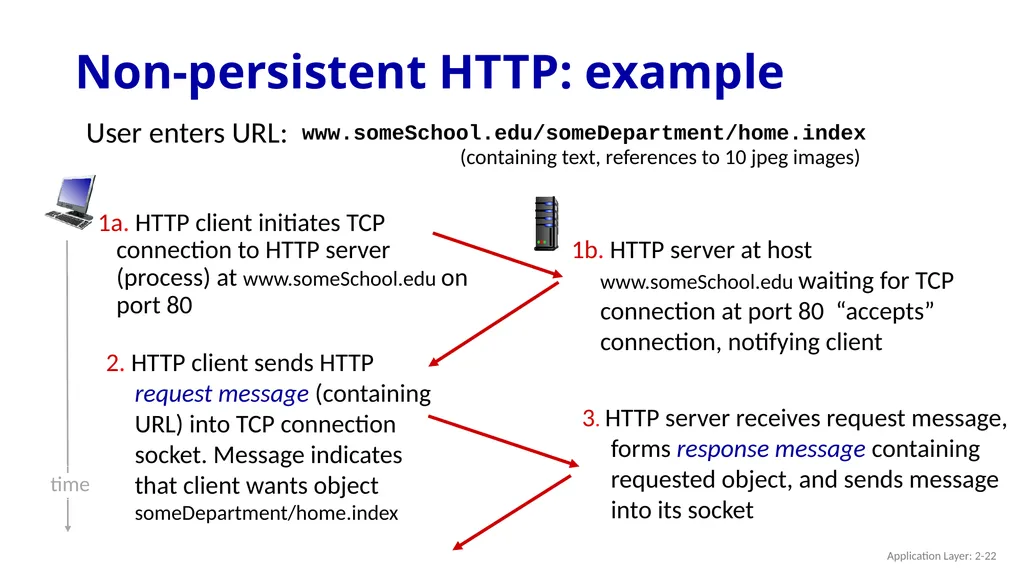
Non-persistent HTTP: example User enters URL: 1a. HTTP client initiates TCP connection to HTTP server (process) at www.someSchool.edu on port 80 2. HTTP client sends HTTP request message (containing URL) into TCP connection socket. Message indicates that client wants object someDepartment/home.index 1b. HTTP server at host www.someSchool.edu waiting for TCP connection at port 80 “accepts” connection, notifying client 3. HTTP server receives request message, forms response message containing requested object, and sends message into its socket time (containing text, references to 10 jpeg images) www.someSchool.edu/someDepartment/home.index Application Layer: 2-22<br>
23
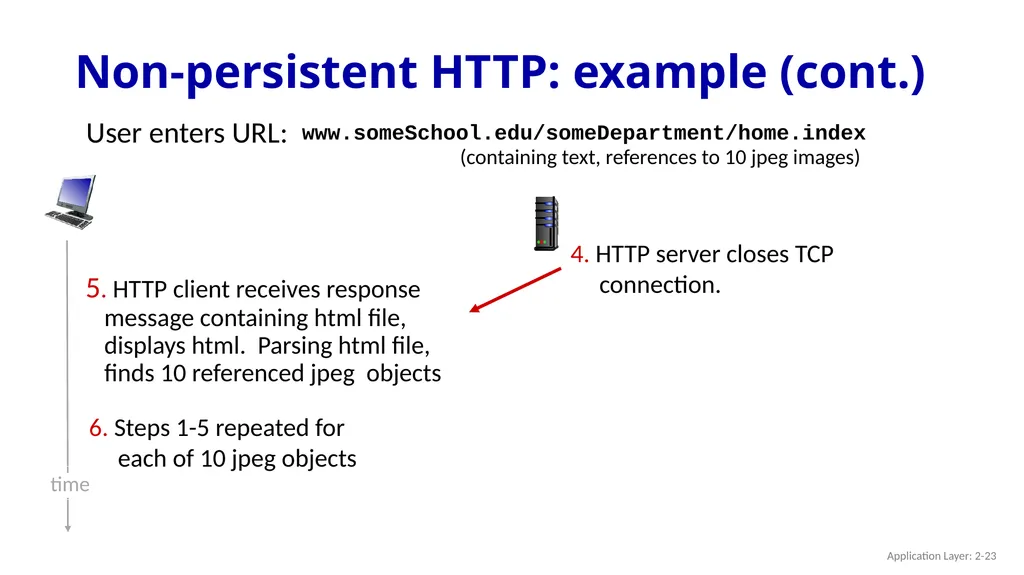
Non-persistent HTTP: example (cont.) User enters URL: (containing text, references to 10 jpeg images) www.someSchool.edu/someDepartment/home.index 5. HTTP client receives response message containing html file, displays html. Parsing html file, finds 10 referenced jpeg objects 6. Steps 1-5 repeated for each of 10 jpeg objects 4. HTTP server closes TCP connection. time Application Layer: 2-23<br>
24
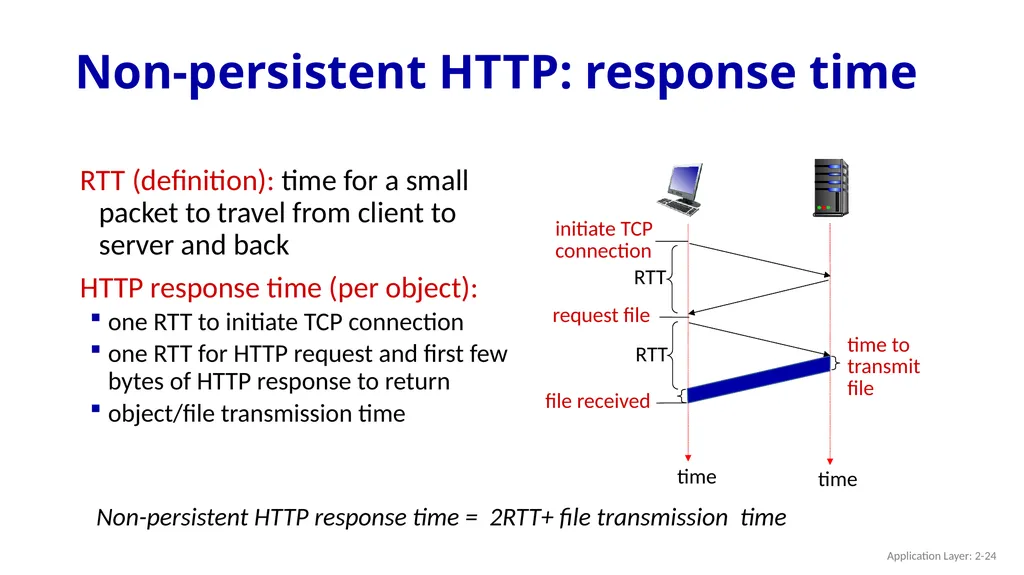
Non-persistent HTTP: response time RTT (definition): time for a small packet to travel from client to server and back
HTTP response time (per object):
one RTT to initiate TCP connection
one RTT for HTTP request and first few bytes of HTTP response to return
object/file transmission time time to
transmit
file initiate TCP
connection RTT request file RTT file received time time Non-persistent HTTP response time = 2RTT+ file transmission time Application Layer: 2-24<br>
HTTP response time (per object):
one RTT to initiate TCP connection
one RTT for HTTP request and first few bytes of HTTP response to return
object/file transmission time time to
transmit
file initiate TCP
connection RTT request file RTT file received time time Non-persistent HTTP response time = 2RTT+ file transmission time Application Layer: 2-24<br>
25
Persistent HTTP (HTTP 1.1) Non-persistent HTTP issues:
requires 2 RTTs per object
OS overhead for each TCP connection
browsers often open multiple parallel TCP connections to fetch referenced objects in parallel Persistent HTTP (HTTP1.1):
server leaves connection open after sending response
subsequent HTTP messages between same client/server sent over open connection
client sends requests as soon as it encounters a referenced object
as little as one RTT for all the referenced objects (cutting response time in half) Application Layer: 2-25<br>
requires 2 RTTs per object
OS overhead for each TCP connection
browsers often open multiple parallel TCP connections to fetch referenced objects in parallel Persistent HTTP (HTTP1.1):
server leaves connection open after sending response
subsequent HTTP messages between same client/server sent over open connection
client sends requests as soon as it encounters a referenced object
as little as one RTT for all the referenced objects (cutting response time in half) Application Layer: 2-25<br>
26
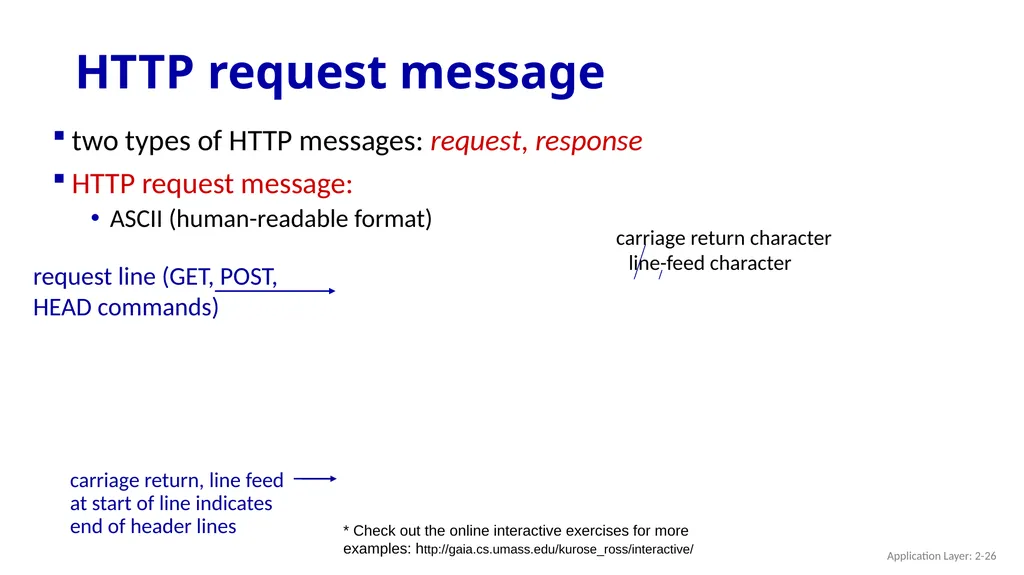
HTTP request message two types of HTTP messages: request, response
HTTP request message:
ASCII (human-readable format) header
lines GET /index.html HTTP/1.1\r\n
Host: www-net.cs.umass.edu\r\n
User-Agent: Mozilla/5.0 (Macintosh; Intel Mac OS X 10.15; rv:80.0) Gecko/20100101 Firefox/80.0 \r\n
Accept: text/html,application/xhtml+xml\r\n
Accept-Language: en-us,en;q=0.5\r\n
Accept-Encoding: gzip,deflate\r\n
Connection: keep-alive\r\n
\r\n Application Layer: 2-26<br>
HTTP request message:
ASCII (human-readable format) header
lines GET /index.html HTTP/1.1\r\n
Host: www-net.cs.umass.edu\r\n
User-Agent: Mozilla/5.0 (Macintosh; Intel Mac OS X 10.15; rv:80.0) Gecko/20100101 Firefox/80.0 \r\n
Accept: text/html,application/xhtml+xml\r\n
Accept-Language: en-us,en;q=0.5\r\n
Accept-Encoding: gzip,deflate\r\n
Connection: keep-alive\r\n
\r\n Application Layer: 2-26<br>
27
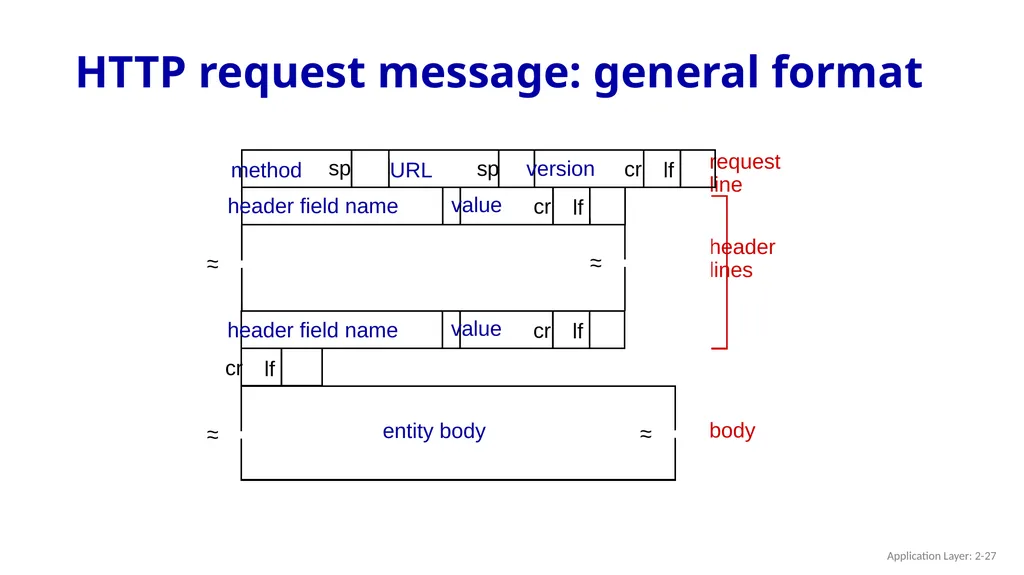
HTTP request message: general format request
line header
lines body method sp sp cr lf version URL entity body Application Layer: 2-27<br>
line header
lines body method sp sp cr lf version URL entity body Application Layer: 2-27<br>
28
Other HTTP request messages POST method:
web page often includes form input
user input sent from client to server in entity body of HTTP POST request message GET method (for sending data to server):
include user data in URL field of HTTP GET request message (following a ‘?’): www.somesite.com/animalsearch?monkeys&banana HEAD method:
requests headers (only) that would be returned if specified URL were requested with an HTTP GET method. PUT method:
uploads new file (object) to server
completely replaces file that exists at specified URL with content in entity body of POST HTTP request message Application Layer: 2-28<br>
web page often includes form input
user input sent from client to server in entity body of HTTP POST request message GET method (for sending data to server):
include user data in URL field of HTTP GET request message (following a ‘?’): www.somesite.com/animalsearch?monkeys&banana HEAD method:
requests headers (only) that would be returned if specified URL were requested with an HTTP GET method. PUT method:
uploads new file (object) to server
completely replaces file that exists at specified URL with content in entity body of POST HTTP request message Application Layer: 2-28<br>
29
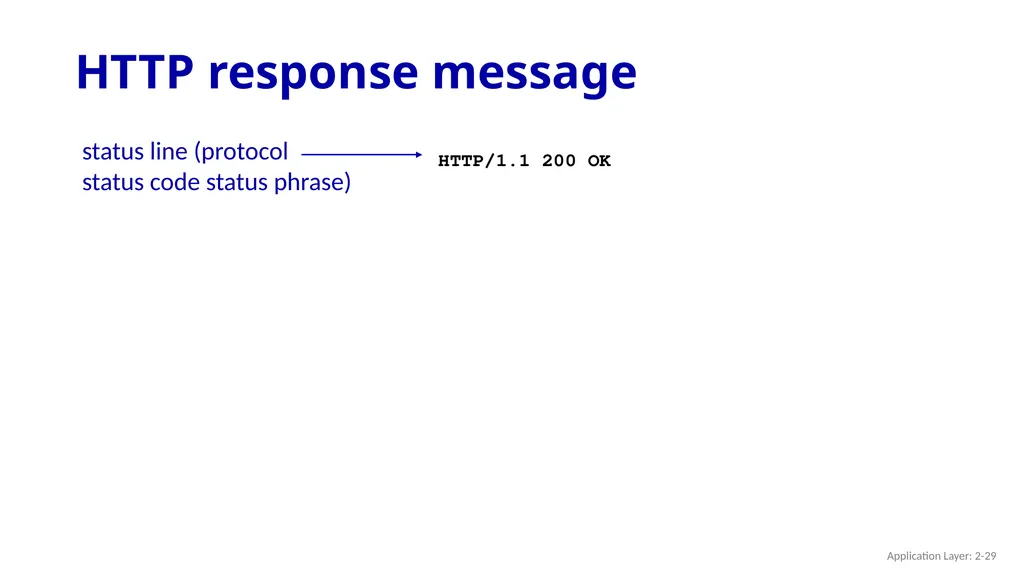
HTTP response message status line (protocol
status code status phrase) header
lines data, e.g., requested
HTML file HTTP/1.1 200 OK
Date: Tue, 08 Sep 2020 00:53:20 GMT
Server: Apache/2.4.6 (CentOS) OpenSSL/1.0.2k-fips PHP/7.4.9 mod_perl/2.0.11 Perl/v5.16.3
Last-Modified: Tue, 01 Mar 2016 18:57:50 GMT
ETag: "a5b-52d015789ee9e"
Accept-Ranges: bytes
Content-Length: 2651
Content-Type: text/html; charset=UTF-8
\r\n
data data data data data ... * Check out the online interactive exercises for more examples: http://gaia.cs.umass.edu/kurose_ross/interactive/ Application Layer: 2-29<br>
status code status phrase) header
lines data, e.g., requested
HTML file HTTP/1.1 200 OK
Date: Tue, 08 Sep 2020 00:53:20 GMT
Server: Apache/2.4.6 (CentOS) OpenSSL/1.0.2k-fips PHP/7.4.9 mod_perl/2.0.11 Perl/v5.16.3
Last-Modified: Tue, 01 Mar 2016 18:57:50 GMT
ETag: "a5b-52d015789ee9e"
Accept-Ranges: bytes
Content-Length: 2651
Content-Type: text/html; charset=UTF-8
\r\n
data data data data data ... * Check out the online interactive exercises for more examples: http://gaia.cs.umass.edu/kurose_ross/interactive/ Application Layer: 2-29<br>
30
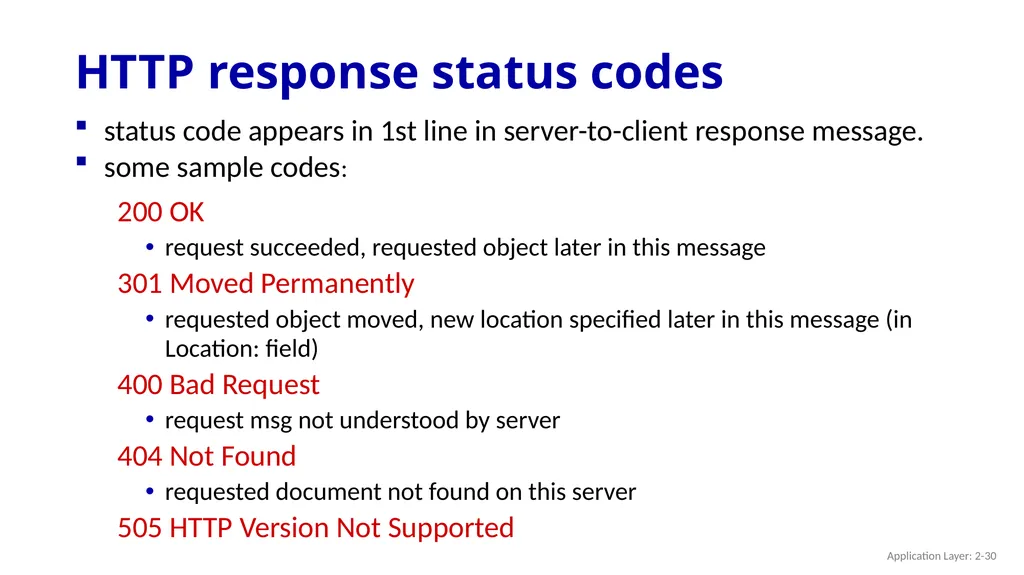
HTTP response status codes 200 OK
request succeeded, requested object later in this message
301 Moved Permanently
requested object moved, new location specified later in this message (in Location: field)
400 Bad Request
request msg not understood by server
404 Not Found
requested document not found on this server
505 HTTP Version Not Supported status code appears in 1st line in server-to-client response message.
some sample codes: Application Layer: 2-30<br>
request succeeded, requested object later in this message
301 Moved Permanently
requested object moved, new location specified later in this message (in Location: field)
400 Bad Request
request msg not understood by server
404 Not Found
requested document not found on this server
505 HTTP Version Not Supported status code appears in 1st line in server-to-client response message.
some sample codes: Application Layer: 2-30<br>
31
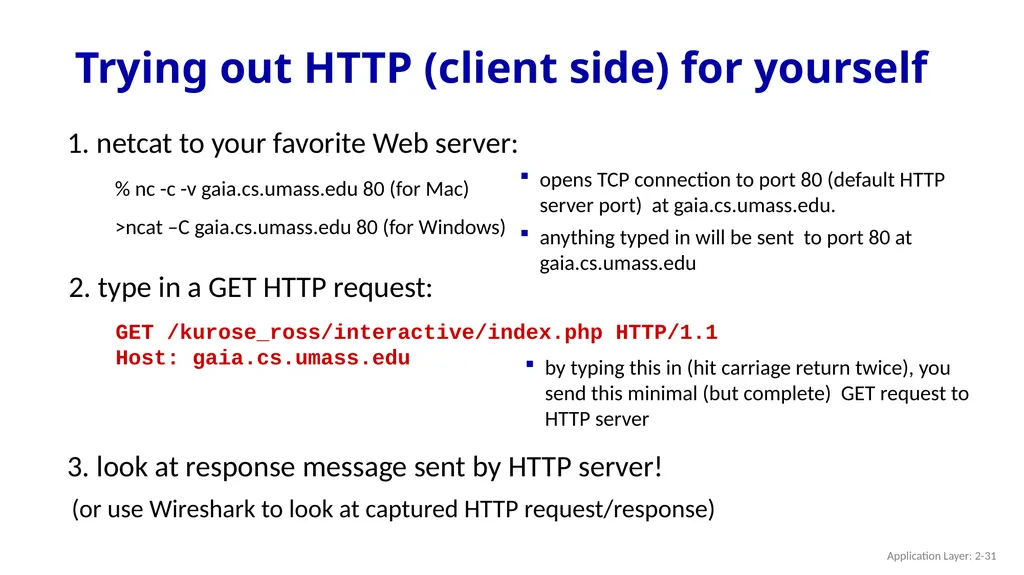
Trying out HTTP (client side) for yourself 1. netcat to your favorite Web server: opens TCP connection to port 80 (default HTTP server port) at gaia.cs.umass.edu.
anything typed in will be sent to port 80 at gaia.cs.umass.edu Application Layer: 2-31 % nc -c -v gaia.cs.umass.edu 80 (for Mac)
>ncat –C gaia.cs.umass.edu 80 (for Windows)<br>
anything typed in will be sent to port 80 at gaia.cs.umass.edu Application Layer: 2-31 % nc -c -v gaia.cs.umass.edu 80 (for Mac)
>ncat –C gaia.cs.umass.edu 80 (for Windows)<br>
32
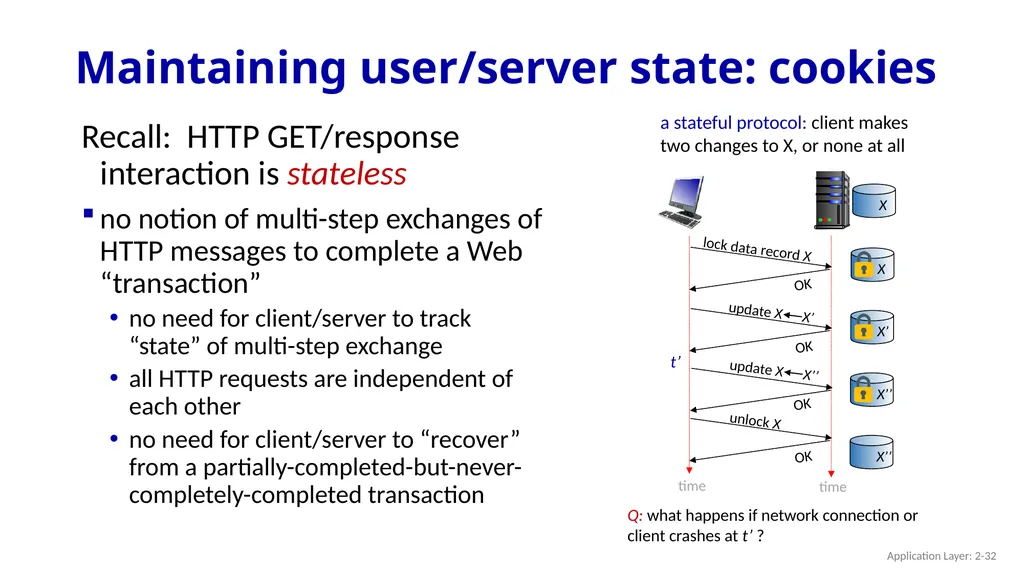
Maintaining user/server state: cookies Recall: HTTP GET/response interaction is stateless
no notion of multi-step exchanges of HTTP messages to complete a Web “transaction”
no need for client/server to track “state” of multi-step exchange
all HTTP requests are independent of each other
no need for client/server to “recover” from a partially-completed-but-never-completely-completed transaction a stateful protocol: client makes two changes to X, or none at all time time X t’ Q: what happens if network connection or client crashes at t’ ? Application Layer: 2-32<br>
no notion of multi-step exchanges of HTTP messages to complete a Web “transaction”
no need for client/server to track “state” of multi-step exchange
all HTTP requests are independent of each other
no need for client/server to “recover” from a partially-completed-but-never-completely-completed transaction a stateful protocol: client makes two changes to X, or none at all time time X t’ Q: what happens if network connection or client crashes at t’ ? Application Layer: 2-32<br>
33
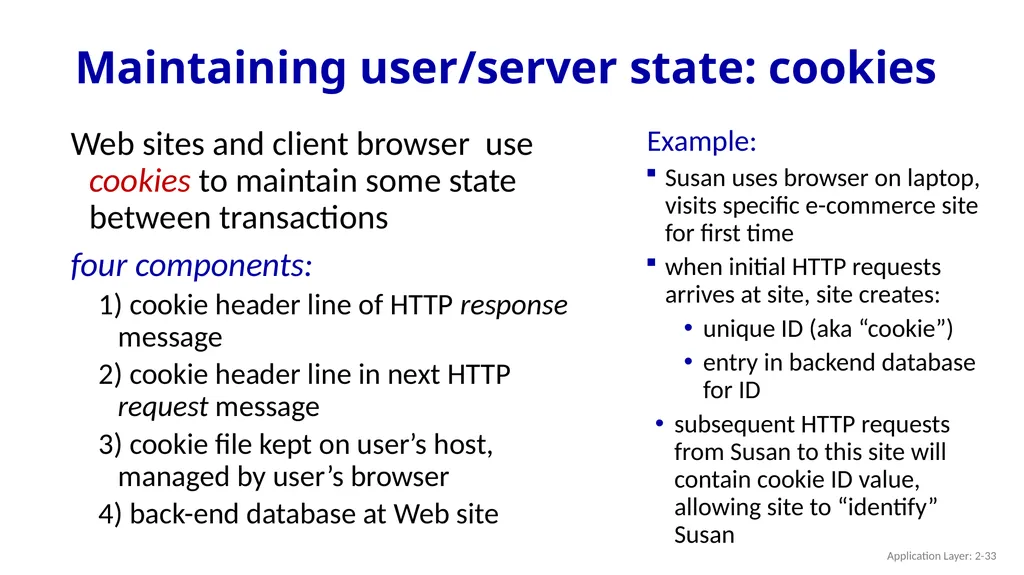
Maintaining user/server state: cookies Web sites and client browser use cookies to maintain some state between transactions
four components:
1) cookie header line of HTTP response message
2) cookie header line in next HTTP request message
3) cookie file kept on user’s host, managed by user’s browser
4) back-end database at Web site Example:
Susan uses browser on laptop, visits specific e-commerce site for first time
when initial HTTP requests arrives at site, site creates:
unique ID (aka “cookie”)
entry in backend database for ID
subsequent HTTP requests from Susan to this site will contain cookie ID value, allowing site to “identify” Susan Application Layer: 2-33<br>
four components:
1) cookie header line of HTTP response message
2) cookie header line in next HTTP request message
3) cookie file kept on user’s host, managed by user’s browser
4) back-end database at Web site Example:
Susan uses browser on laptop, visits specific e-commerce site for first time
when initial HTTP requests arrives at site, site creates:
unique ID (aka “cookie”)
entry in backend database for ID
subsequent HTTP requests from Susan to this site will contain cookie ID value, allowing site to “identify” Susan Application Layer: 2-33<br>
34
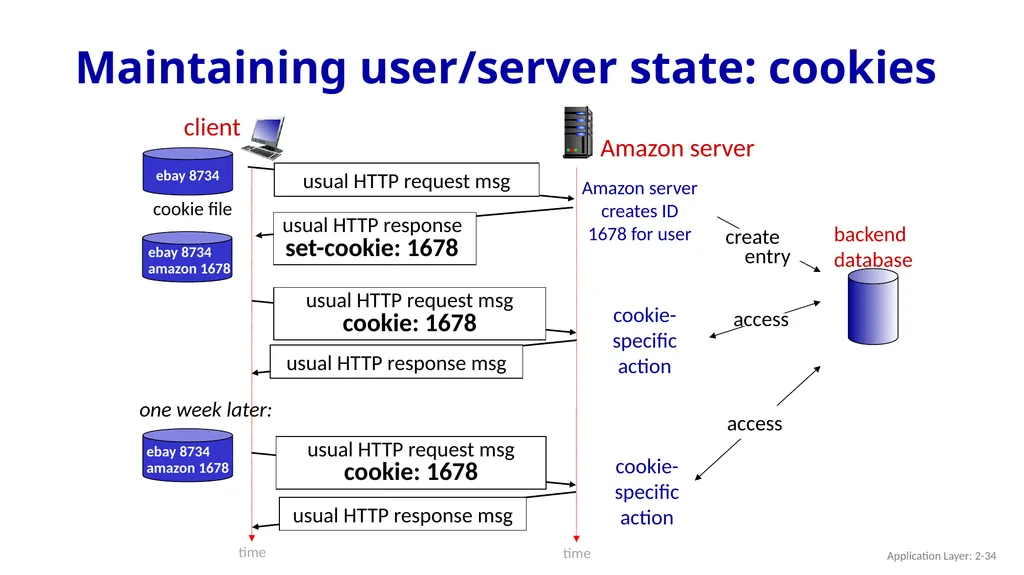
Maintaining user/server state: cookies client Amazon server cookie file one week later: backend
database time time Application Layer: 2-34<br>
database time time Application Layer: 2-34<br>
35
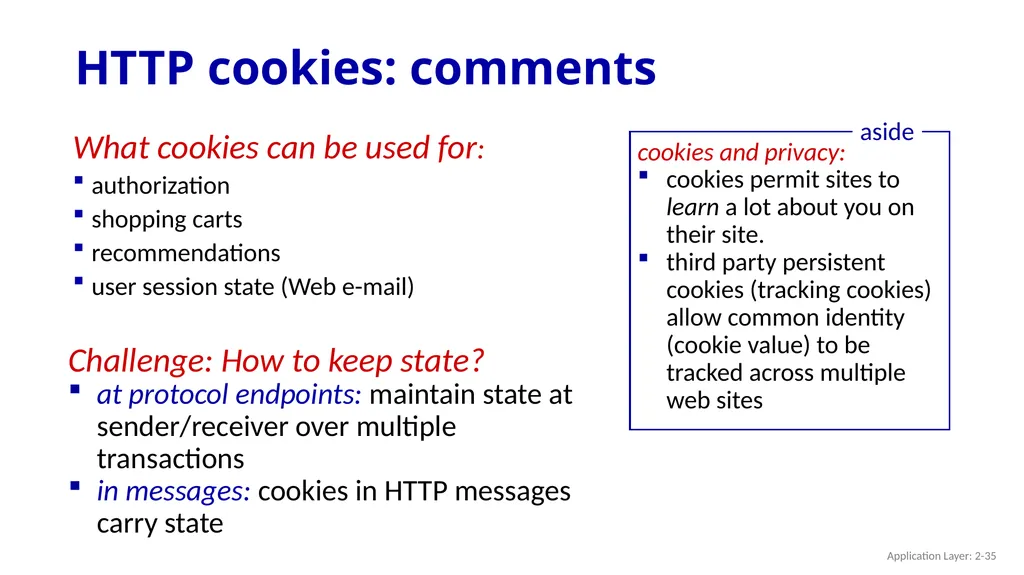
HTTP cookies: comments What cookies can be used for:
authorization
shopping carts
recommendations
user session state (Web e-mail) cookies and privacy:
cookies permit sites to learn a lot about you on their site.
third party persistent cookies (tracking cookies) allow common identity (cookie value) to be tracked across multiple web sites aside Challenge: How to keep state?
at protocol endpoints: maintain state at sender/receiver over multiple transactions
in messages: cookies in HTTP messages carry state Application Layer: 2-35<br>
authorization
shopping carts
recommendations
user session state (Web e-mail) cookies and privacy:
cookies permit sites to learn a lot about you on their site.
third party persistent cookies (tracking cookies) allow common identity (cookie value) to be tracked across multiple web sites aside Challenge: How to keep state?
at protocol endpoints: maintain state at sender/receiver over multiple transactions
in messages: cookies in HTTP messages carry state Application Layer: 2-35<br>
36
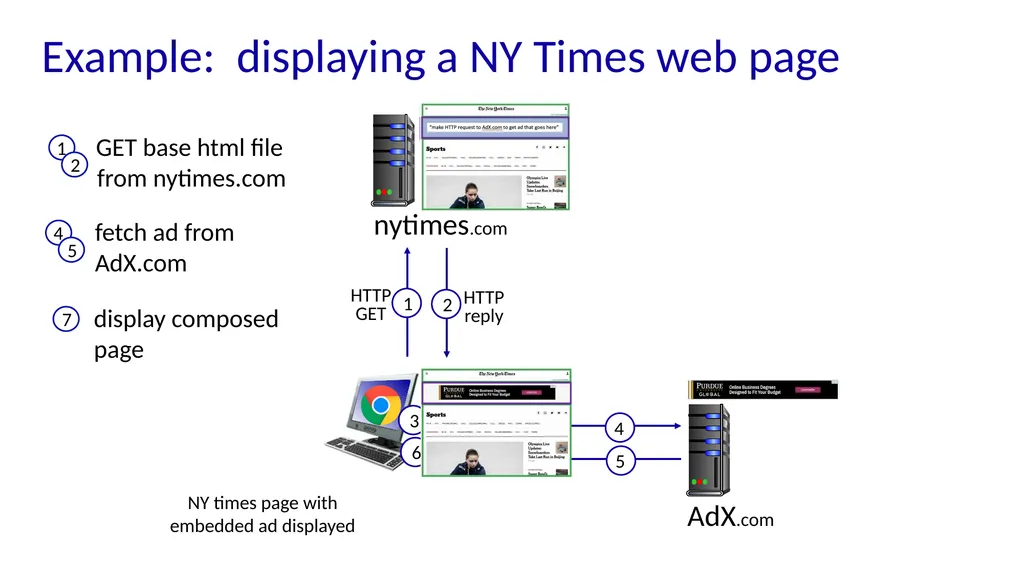
Example: displaying a NY Times web page nytimes.com AdX.com NY times page with embedded ad displayed<br>
37
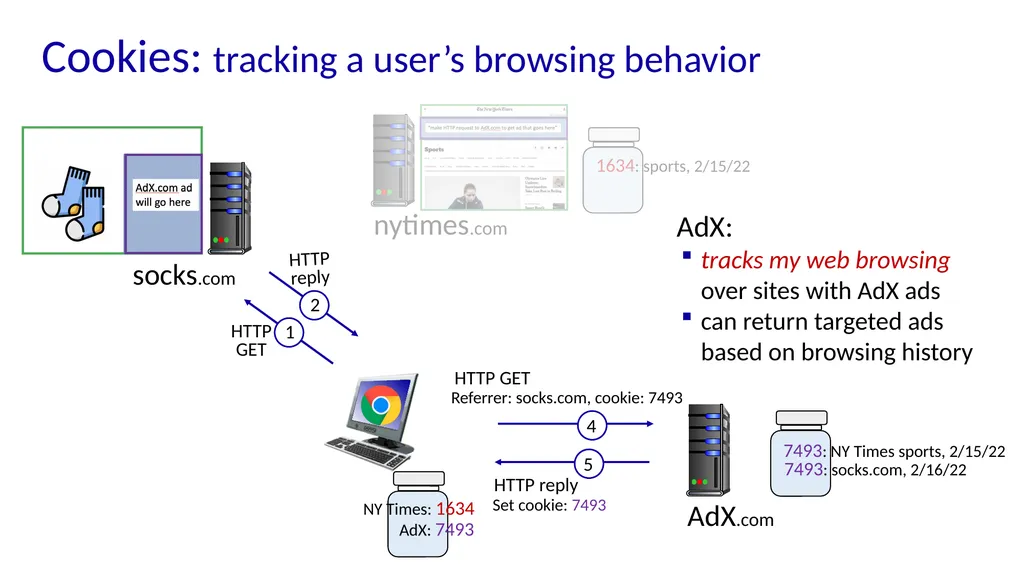
nytimes.com (sports) AdX.com 1634: sports, 2/15/22 NY Times: 1634 7493: NY Times sports, 2/15/22 AdX: 7493 Cookies: tracking a user’s browsing behavior<br>
38
Cookies: tracking a user’s browsing behavior nytimes.com AdX.com 1634: sports, 2/15/22 NY Times: 1634 7493: NY Times sports, 2/15/22 AdX: 7493 socks.com 7493: socks.com, 2/16/22 AdX:
tracks my web browsing over sites with AdX ads
can return targeted ads based on browsing history<br>
tracks my web browsing over sites with AdX ads
can return targeted ads based on browsing history<br>
39
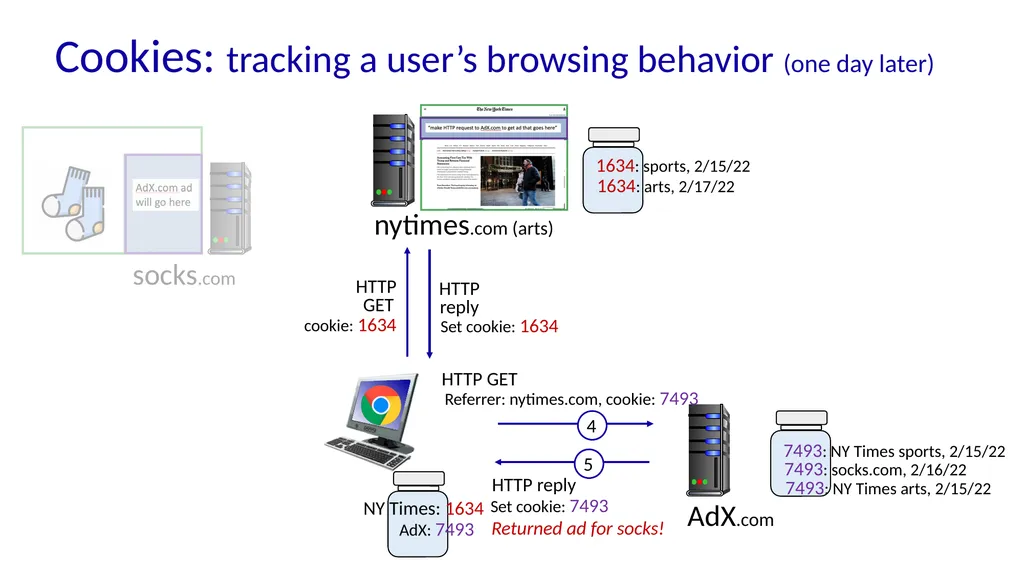
Cookies: tracking a user’s browsing behavior (one day later) nytimes.com (arts) AdX.com 1634: sports, 2/15/22 NY Times: 1634 7493: NY Times sports, 2/15/22 AdX: 7493 socks.com 7493: socks.com, 2/16/22 1634: arts, 2/17/22 7493: NY Times arts, 2/15/22 Returned ad for socks!<br>
40
Cookies: tracking a user’s browsing behavior Cookies can be used to:
track user behavior on a given website (first party cookies)
track user behavior across multiple websites (third party cookies) without user ever choosing to visit tracker site (!)
tracking may be invisible to user:
rather than displayed ad triggering HTTP GET to tracker, could be an invisible link
third party tracking via cookies:
disabled by default in Firefox, Safari browsers
to be disabled in Chrome browser in 2023<br>
track user behavior on a given website (first party cookies)
track user behavior across multiple websites (third party cookies) without user ever choosing to visit tracker site (!)
tracking may be invisible to user:
rather than displayed ad triggering HTTP GET to tracker, could be an invisible link
third party tracking via cookies:
disabled by default in Firefox, Safari browsers
to be disabled in Chrome browser in 2023<br>
41
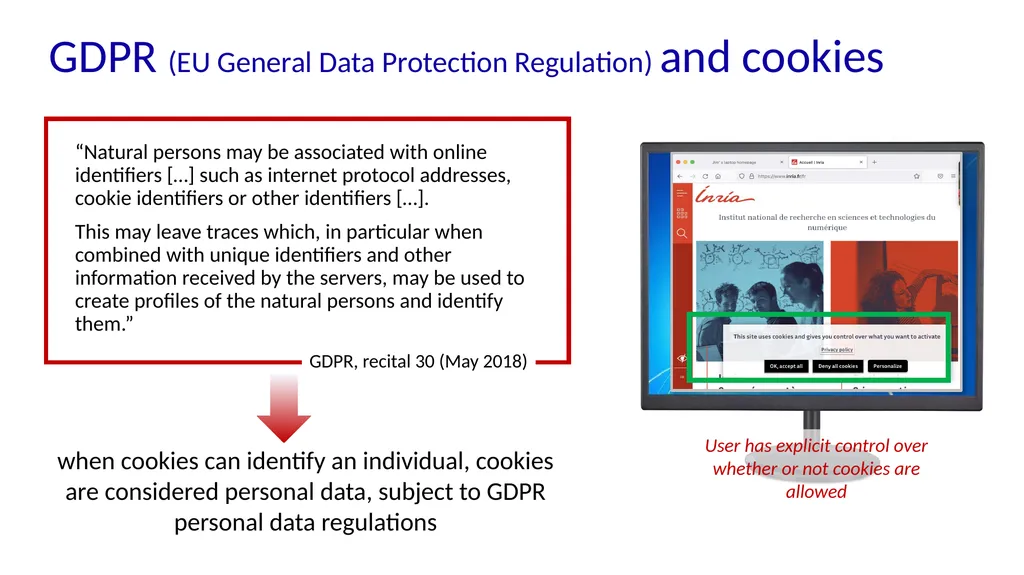
GDPR (EU General Data Protection Regulation) and cookies “Natural persons may be associated with online identifiers […] such as internet protocol addresses, cookie identifiers or other identifiers […].
This may leave traces which, in particular when combined with unique identifiers and other information received by the servers, may be used to create profiles of the natural persons and identify them.” GDPR, recital 30 (May 2018)<br>
This may leave traces which, in particular when combined with unique identifiers and other information received by the servers, may be used to create profiles of the natural persons and identify them.” GDPR, recital 30 (May 2018)<br>
42
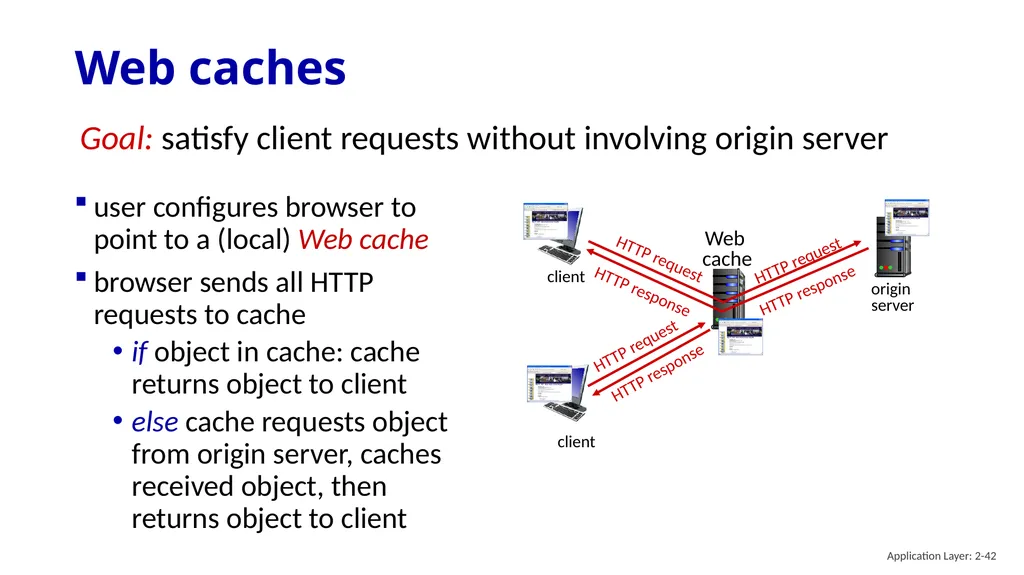
Web caches user configures browser to point to a (local) Web cache
browser sends all HTTP requests to cache
if object in cache: cache returns object to client
else cache requests object from origin server, caches received object, then returns object to client Goal: satisfy client requests without involving origin server client client origin
server Application Layer: 2-42<br>
browser sends all HTTP requests to cache
if object in cache: cache returns object to client
else cache requests object from origin server, caches received object, then returns object to client Goal: satisfy client requests without involving origin server client client origin
server Application Layer: 2-42<br>
43
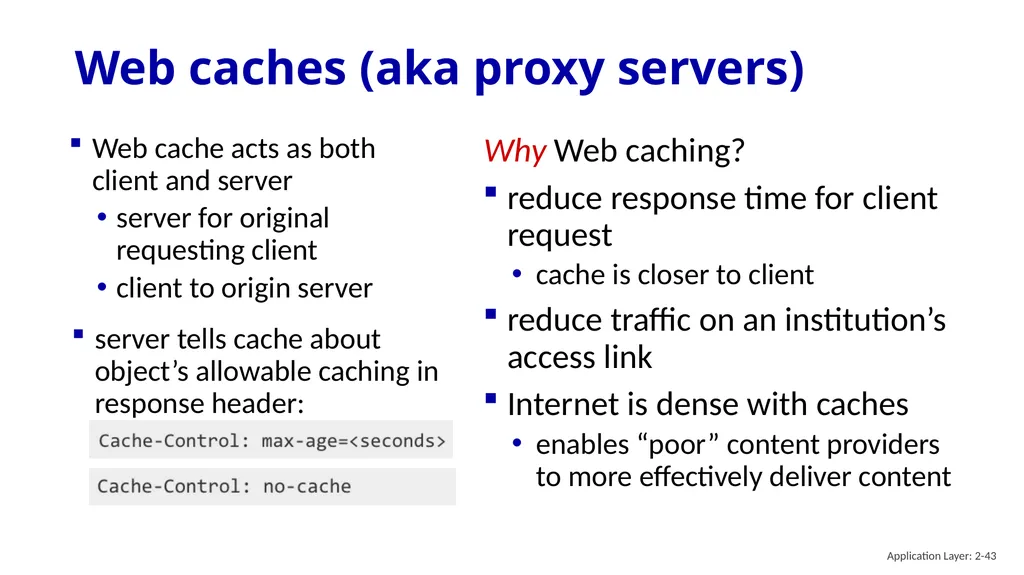
Web caches (aka proxy servers) Web cache acts as both client and server
server for original requesting client
client to origin server Why Web caching?
reduce response time for client request
cache is closer to client
reduce traffic on an institution’s access link
Internet is dense with caches
enables “poor” content providers to more effectively deliver content Application Layer: 2-43<br>
server for original requesting client
client to origin server Why Web caching?
reduce response time for client request
cache is closer to client
reduce traffic on an institution’s access link
Internet is dense with caches
enables “poor” content providers to more effectively deliver content Application Layer: 2-43<br>
44
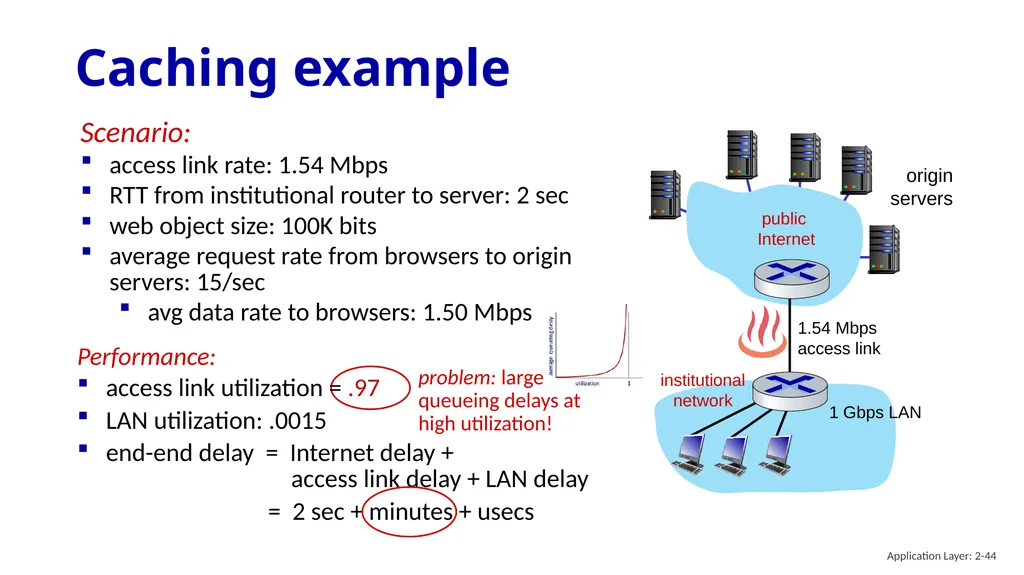
Caching example origin
servers public
Internet institutional
network 1 Gbps LAN 1.54 Mbps
access link Performance:
access link utilization = .97
LAN utilization: .0015
end-end delay = Internet delay +
access link delay + LAN delay
= 2 sec + minutes + usecs Scenario:
access link rate: 1.54 Mbps
RTT from institutional router to server: 2 sec
web object size: 100K bits
average request rate from browsers to origin servers: 15/sec
avg data rate to browsers: 1.50 Mbps problem: large queueing delays at high utilization! Application Layer: 2-44<br>
servers public
Internet institutional
network 1 Gbps LAN 1.54 Mbps
access link Performance:
access link utilization = .97
LAN utilization: .0015
end-end delay = Internet delay +
access link delay + LAN delay
= 2 sec + minutes + usecs Scenario:
access link rate: 1.54 Mbps
RTT from institutional router to server: 2 sec
web object size: 100K bits
average request rate from browsers to origin servers: 15/sec
avg data rate to browsers: 1.50 Mbps problem: large queueing delays at high utilization! Application Layer: 2-44<br>
45
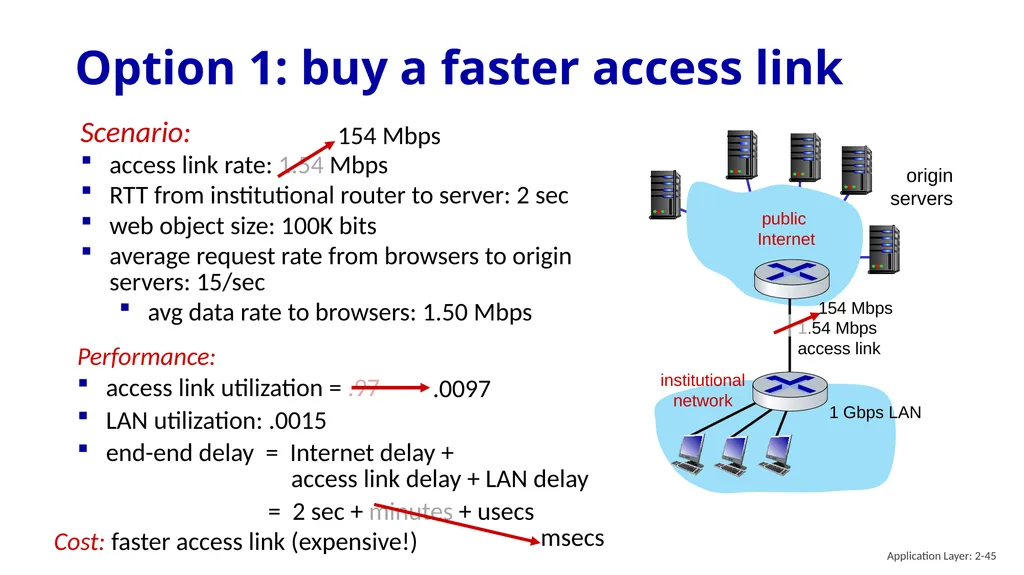
Performance:
access link utilization = .97
LAN utilization: .0015
end-end delay = Internet delay +
access link delay + LAN delay
= 2 sec + minutes + usecs Option 1: buy a faster access link origin
servers public
Internet institutional
network 1 Gbps LAN 1.54 Mbps
access link Scenario:
access link rate: 1.54 Mbps
RTT from institutional router to server: 2 sec
web object size: 100K bits
average request rate from browsers to origin servers: 15/sec
avg data rate to browsers: 1.50 Mbps Cost: faster access link (expensive!) Application Layer: 2-45<br>
access link utilization = .97
LAN utilization: .0015
end-end delay = Internet delay +
access link delay + LAN delay
= 2 sec + minutes + usecs Option 1: buy a faster access link origin
servers public
Internet institutional
network 1 Gbps LAN 1.54 Mbps
access link Scenario:
access link rate: 1.54 Mbps
RTT from institutional router to server: 2 sec
web object size: 100K bits
average request rate from browsers to origin servers: 15/sec
avg data rate to browsers: 1.50 Mbps Cost: faster access link (expensive!) Application Layer: 2-45<br>
46
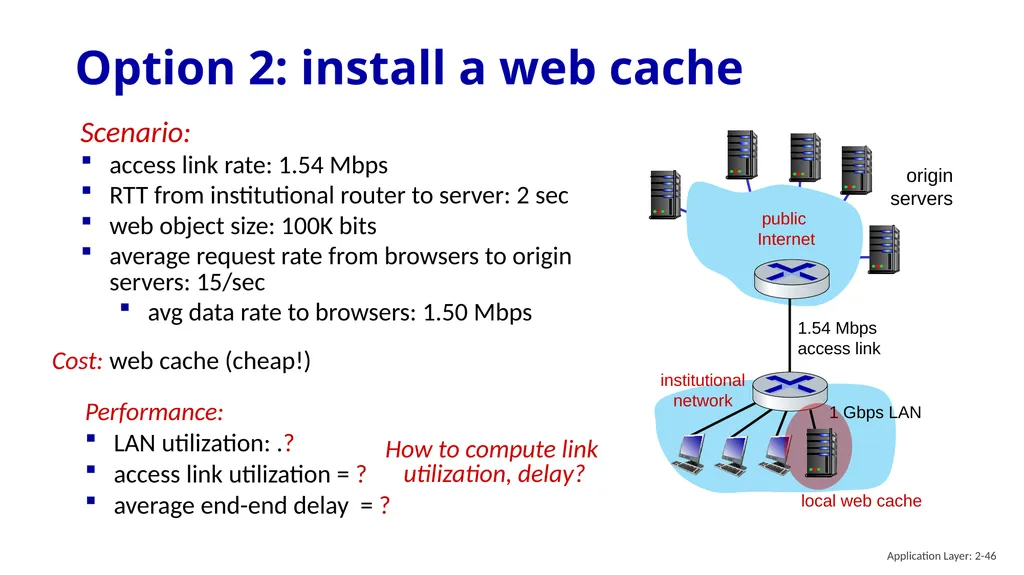
Performance:
LAN utilization: .?
access link utilization = ?
average end-end delay = ? Option 2: install a web cache origin
servers public
Internet institutional
network 1 Gbps LAN 1.54 Mbps
access link Scenario:
access link rate: 1.54 Mbps
RTT from institutional router to server: 2 sec
web object size: 100K bits
average request rate from browsers to origin servers: 15/sec
avg data rate to browsers: 1.50 Mbps How to compute link
utilization, delay? Cost: web cache (cheap!) local web cache Application Layer: 2-46<br>
LAN utilization: .?
access link utilization = ?
average end-end delay = ? Option 2: install a web cache origin
servers public
Internet institutional
network 1 Gbps LAN 1.54 Mbps
access link Scenario:
access link rate: 1.54 Mbps
RTT from institutional router to server: 2 sec
web object size: 100K bits
average request rate from browsers to origin servers: 15/sec
avg data rate to browsers: 1.50 Mbps How to compute link
utilization, delay? Cost: web cache (cheap!) local web cache Application Layer: 2-46<br>
47
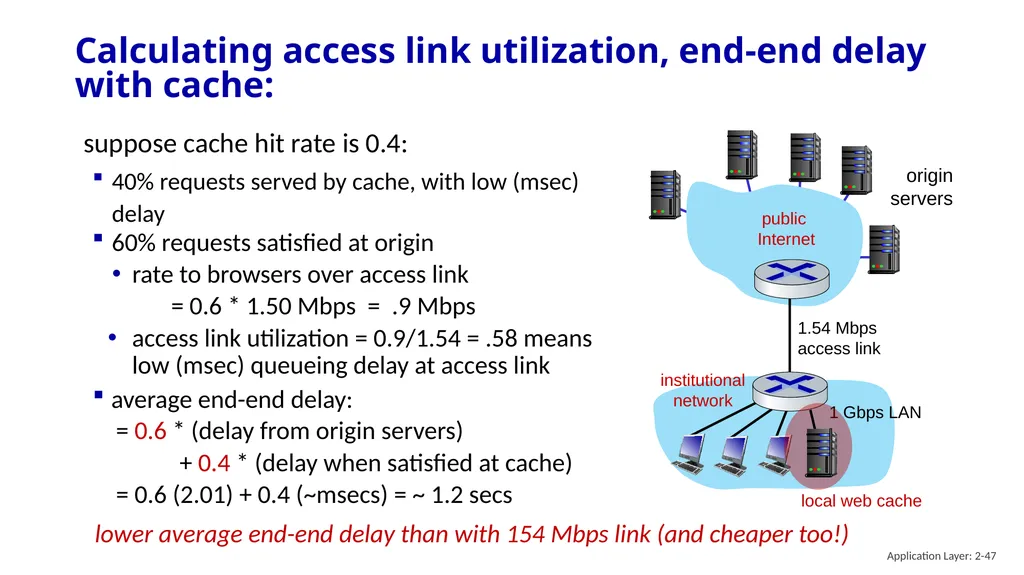
Calculating access link utilization, end-end delay with cache: origin
servers public
Internet institutional
network 1 Gbps LAN 1.54 Mbps
access link local web cache suppose cache hit rate is 0.4:
40% requests served by cache, with low (msec) delay 60% requests satisfied at origin
rate to browsers over access link
= 0.6 * 1.50 Mbps = .9 Mbps
access link utilization = 0.9/1.54 = .58 means low (msec) queueing delay at access link average end-end delay:
= 0.6 * (delay from origin servers)
+ 0.4 * (delay when satisfied at cache)
= 0.6 (2.01) + 0.4 (~msecs) = ~ 1.2 secs lower average end-end delay than with 154 Mbps link (and cheaper too!) Application Layer: 2-47<br>
servers public
Internet institutional
network 1 Gbps LAN 1.54 Mbps
access link local web cache suppose cache hit rate is 0.4:
40% requests served by cache, with low (msec) delay 60% requests satisfied at origin
rate to browsers over access link
= 0.6 * 1.50 Mbps = .9 Mbps
access link utilization = 0.9/1.54 = .58 means low (msec) queueing delay at access link average end-end delay:
= 0.6 * (delay from origin servers)
+ 0.4 * (delay when satisfied at cache)
= 0.6 (2.01) + 0.4 (~msecs) = ~ 1.2 secs lower average end-end delay than with 154 Mbps link (and cheaper too!) Application Layer: 2-47<br>
48
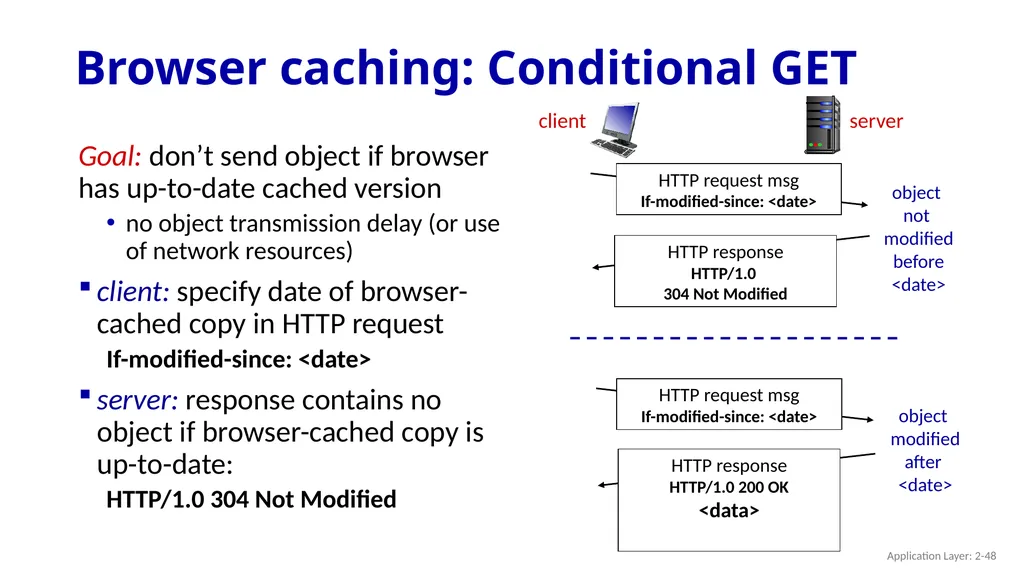
Browser caching: Conditional GET Goal: don’t send object if browser has up-to-date cached version
no object transmission delay (or use of network resources)
client: specify date of browser-cached copy in HTTP request
If-modified-since: <date>
server: response contains no object if browser-cached copy is up-to-date:
HTTP/1.0 304 Not Modified HTTP request msg
If-modified-since: <date> object
not
modified
before
<date> HTTP request msg
If-modified-since: <date> HTTP response
HTTP/1.0 200 OK
<data> object
modified
after
<date> Application Layer: 2-48<br>
no object transmission delay (or use of network resources)
client: specify date of browser-cached copy in HTTP request
If-modified-since: <date>
server: response contains no object if browser-cached copy is up-to-date:
HTTP/1.0 304 Not Modified HTTP request msg
If-modified-since: <date> object
not
modified
before
<date> HTTP request msg
If-modified-since: <date> HTTP response
HTTP/1.0 200 OK
<data> object
modified
after
<date> Application Layer: 2-48<br>
49
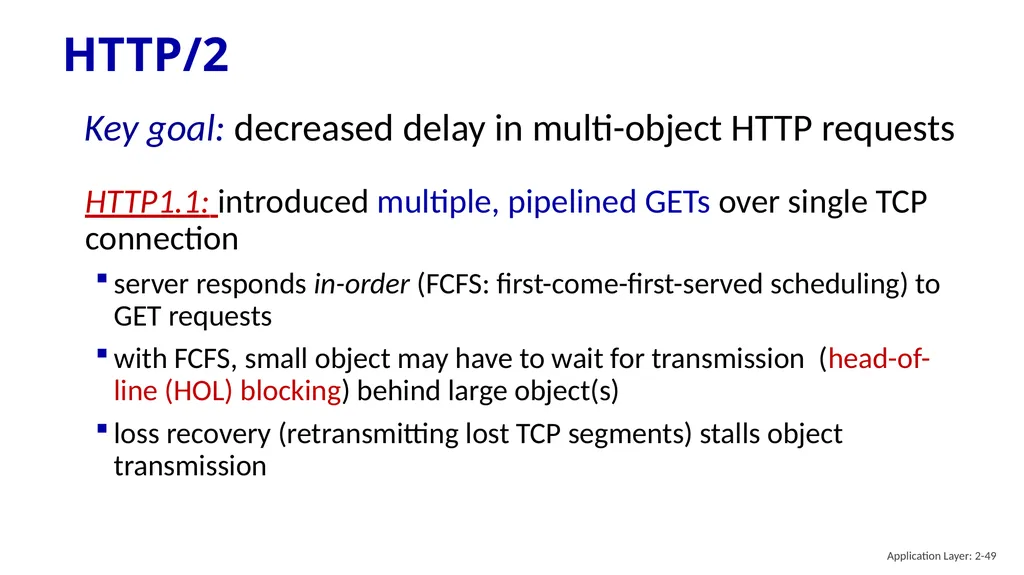
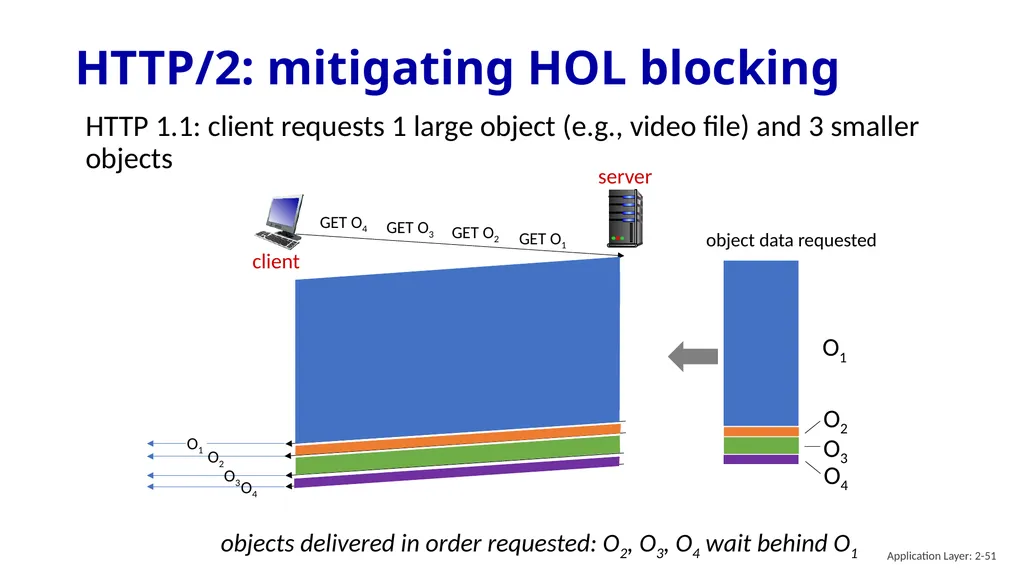
HTTP/2 Key goal: decreased delay in multi-object HTTP requests HTTP1.1: introduced multiple, pipelined GETs over single TCP connection
server responds in-order (FCFS: first-come-first-served scheduling) to GET requests
with FCFS, small object may have to wait for transmission (head-of-line (HOL) blocking) behind large object(s)
loss recovery (retransmitting lost TCP segments) stalls object transmission Application Layer: 2-49<br>
server responds in-order (FCFS: first-come-first-served scheduling) to GET requests
with FCFS, small object may have to wait for transmission (head-of-line (HOL) blocking) behind large object(s)
loss recovery (retransmitting lost TCP segments) stalls object transmission Application Layer: 2-49<br>
50
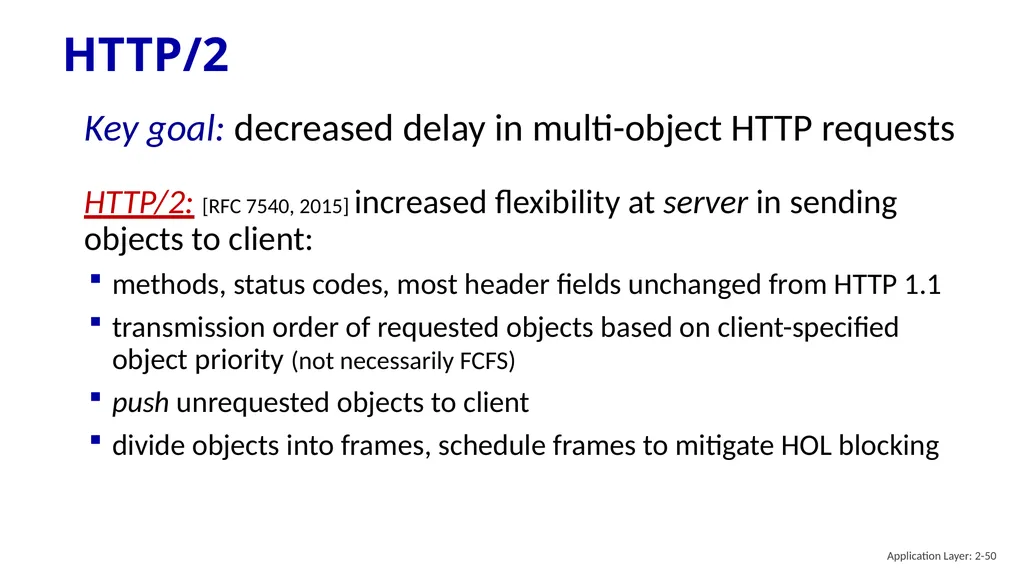
HTTP/2 HTTP/2: [RFC 7540, 2015] increased flexibility at server in sending objects to client:
methods, status codes, most header fields unchanged from HTTP 1.1
transmission order of requested objects based on client-specified object priority (not necessarily FCFS)
push unrequested objects to client
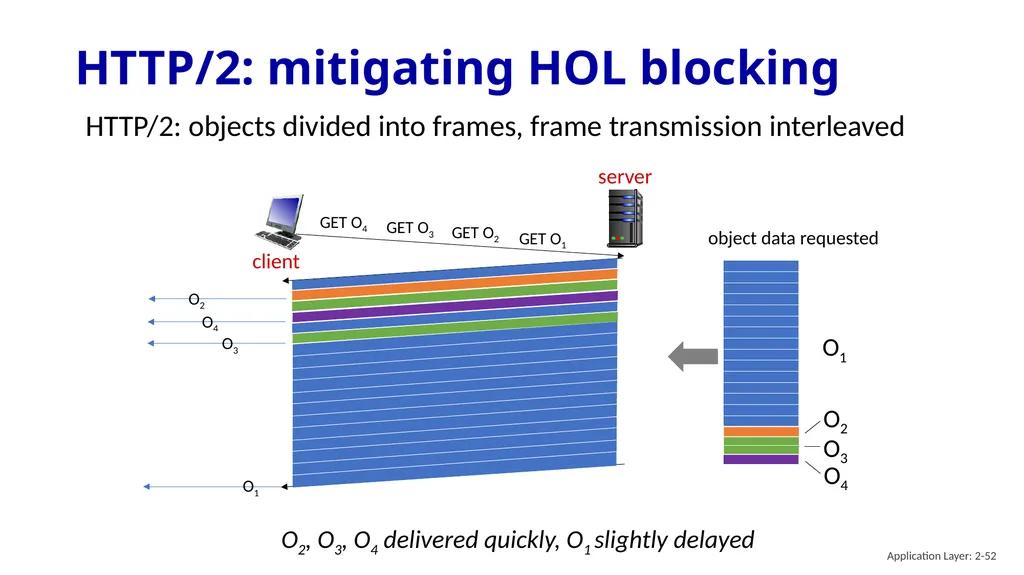
divide objects into frames, schedule frames to mitigate HOL blocking Key goal: decreased delay in multi-object HTTP requests Application Layer: 2-50<br>
methods, status codes, most header fields unchanged from HTTP 1.1
transmission order of requested objects based on client-specified object priority (not necessarily FCFS)
push unrequested objects to client
divide objects into frames, schedule frames to mitigate HOL blocking Key goal: decreased delay in multi-object HTTP requests Application Layer: 2-50<br>
51
HTTP/2: mitigating HOL blocking HTTP 1.1: client requests 1 large object (e.g., video file) and 3 smaller objects client server GET O1 GET O2 GET O3 GET O4 object data requested O1 O2 O3 O4 objects delivered in order requested: O2, O3, O4 wait behind O1 Application Layer: 2-51<br>
52
HTTP/2: mitigating HOL blocking HTTP/2: objects divided into frames, frame transmission interleaved client server GET O1 GET O2 GET O3 GET O4 object data requested O1 O2 O3 O4 O2, O3, O4 delivered quickly, O1 slightly delayed Application Layer: 2-52<br>
53
HTTP/2 to HTTP/3 HTTP/2 over single TCP connection means:
recovery from packet loss still stalls all object transmissions
as in HTTP 1.1, browsers have incentive to open multiple parallel TCP connections to reduce stalling, increase overall throughput
no security over vanilla TCP connection
HTTP/3: adds security, per object error- and congestion-control (more pipelining) over UDP
more on HTTP/3 in transport layer Application Layer: 2-53<br>
recovery from packet loss still stalls all object transmissions
as in HTTP 1.1, browsers have incentive to open multiple parallel TCP connections to reduce stalling, increase overall throughput
no security over vanilla TCP connection
HTTP/3: adds security, per object error- and congestion-control (more pipelining) over UDP
more on HTTP/3 in transport layer Application Layer: 2-53<br>
54
Application layer: overview Principles of network applications
Web and HTTP
E-mail, SMTP, IMAP
The Domain Name System DNS P2P applications
video streaming and content distribution networks
socket programming with UDP and TCP Application Layer: 2-54<br>
Web and HTTP
E-mail, SMTP, IMAP
The Domain Name System DNS P2P applications
video streaming and content distribution networks
socket programming with UDP and TCP Application Layer: 2-54<br>
55
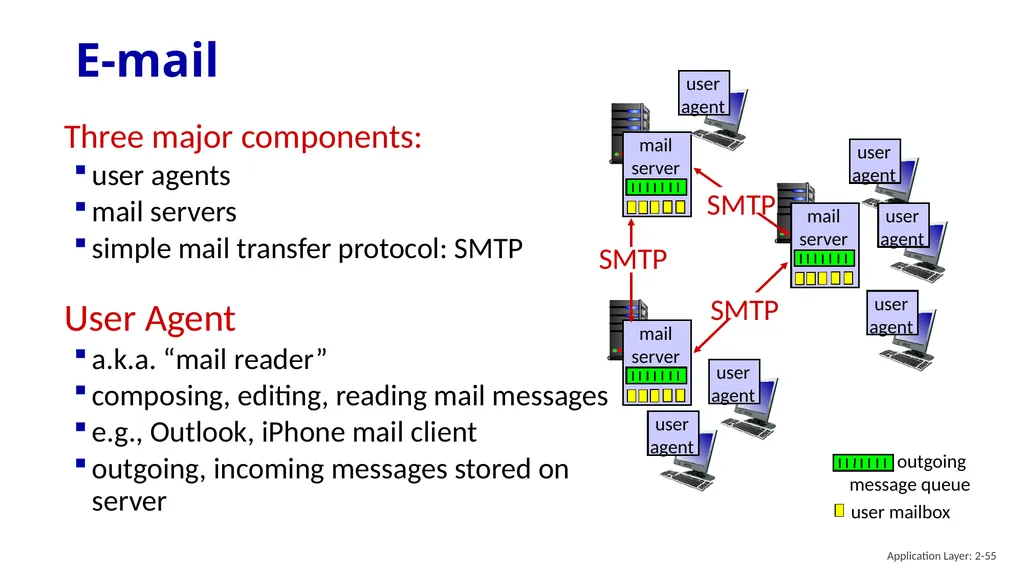
E-mail Three major components:
user agents
mail servers
simple mail transfer protocol: SMTP
User Agent
a.k.a. “mail reader”
composing, editing, reading mail messages
e.g., Outlook, iPhone mail client
outgoing, incoming messages stored on server Application Layer: 2-55<br>
user agents
mail servers
simple mail transfer protocol: SMTP
User Agent
a.k.a. “mail reader”
composing, editing, reading mail messages
e.g., Outlook, iPhone mail client
outgoing, incoming messages stored on server Application Layer: 2-55<br>
56
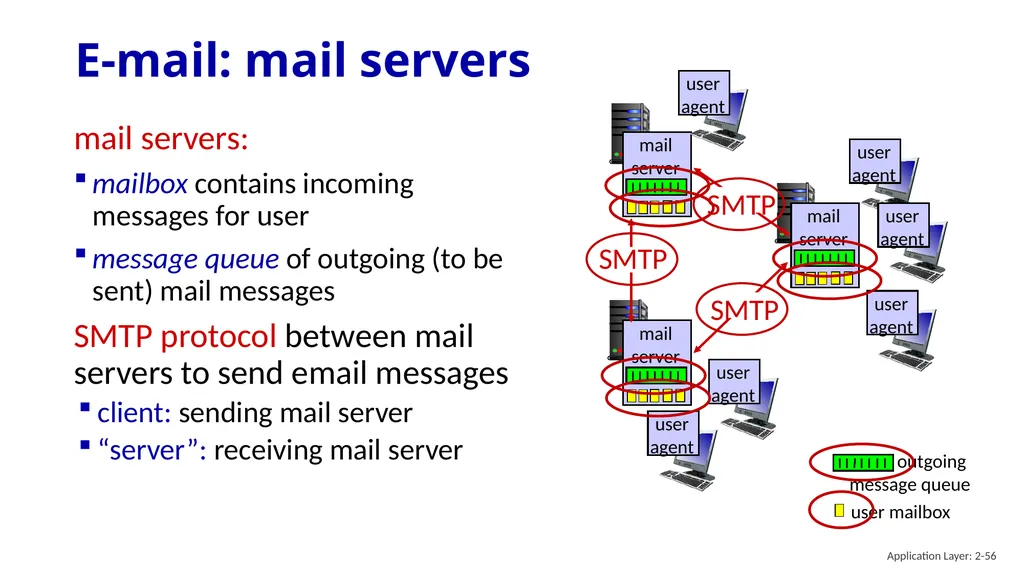
E-mail: mail servers mail servers:
mailbox contains incoming messages for user
message queue of outgoing (to be sent) mail messages
SMTP protocol between mail servers to send email messages
client: sending mail server
“server”: receiving mail server Application Layer: 2-56<br>
mailbox contains incoming messages for user
message queue of outgoing (to be sent) mail messages
SMTP protocol between mail servers to send email messages
client: sending mail server
“server”: receiving mail server Application Layer: 2-56<br>
57
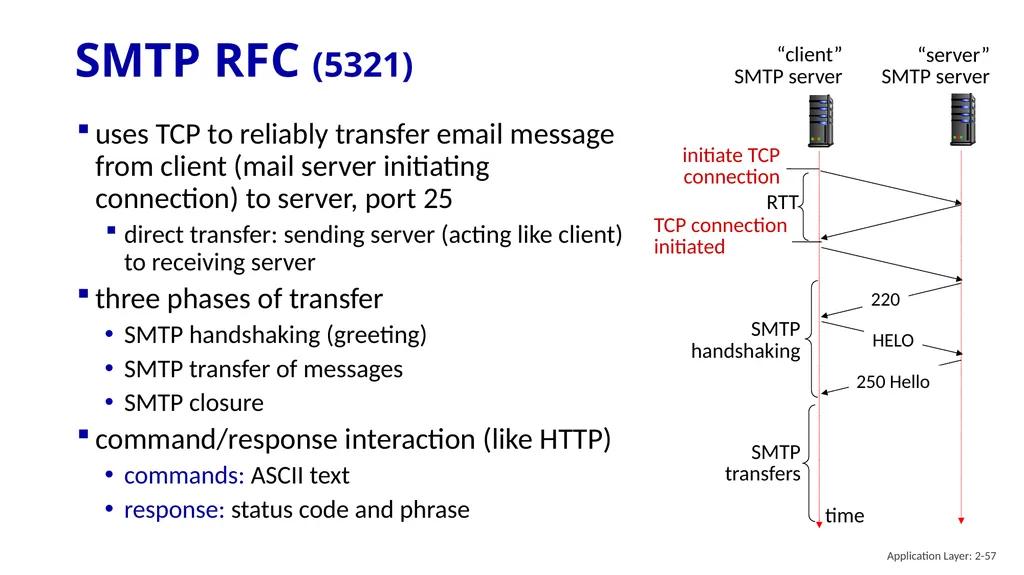
SMTP RFC (5321) uses TCP to reliably transfer email message from client (mail server initiating connection) to server, port 25
direct transfer: sending server (acting like client) to receiving server
three phases of transfer
SMTP handshaking (greeting)
SMTP transfer of messages
SMTP closure
command/response interaction (like HTTP)
commands: ASCII text
response: status code and phrase initiate TCP
connection RTT time TCP connection
initiated “client”
SMTP server “server”
SMTP server Application Layer: 2-57<br>
direct transfer: sending server (acting like client) to receiving server
three phases of transfer
SMTP handshaking (greeting)
SMTP transfer of messages
SMTP closure
command/response interaction (like HTTP)
commands: ASCII text
response: status code and phrase initiate TCP
connection RTT time TCP connection
initiated “client”
SMTP server “server”
SMTP server Application Layer: 2-57<br>
58
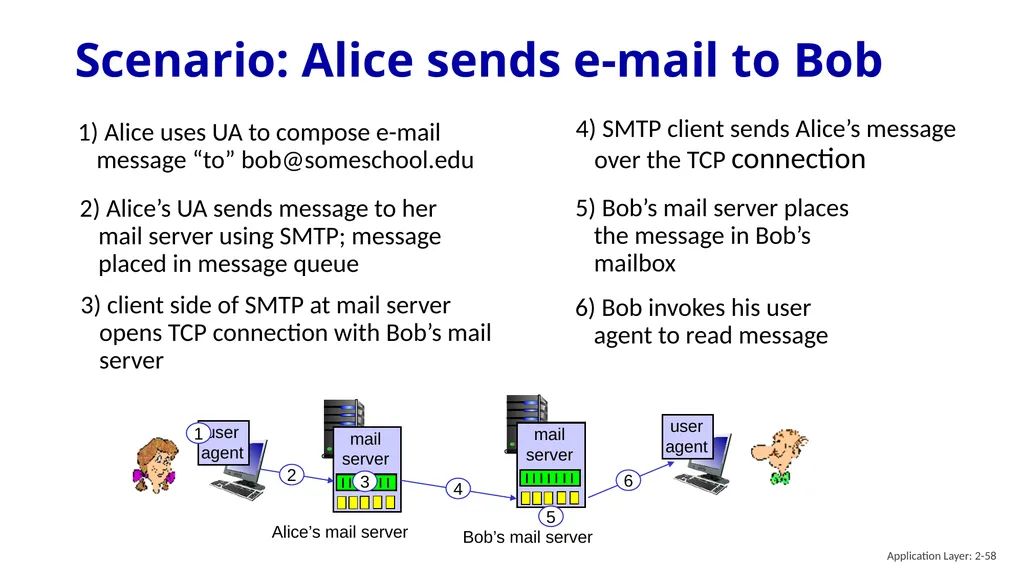
Scenario: Alice sends e-mail to Bob 1) Alice uses UA to compose e-mail message “to” bob@someschool.edu 4) SMTP client sends Alice’s message over the TCP connection 1 2 3 4 5 6 Alice’s mail server Bob’s mail server 2) Alice’s UA sends message to her mail server using SMTP; message placed in message queue 3) client side of SMTP at mail server opens TCP connection with Bob’s mail server 5) Bob’s mail server places the message in Bob’s mailbox 6) Bob invokes his user agent to read message Application Layer: 2-58<br>
59
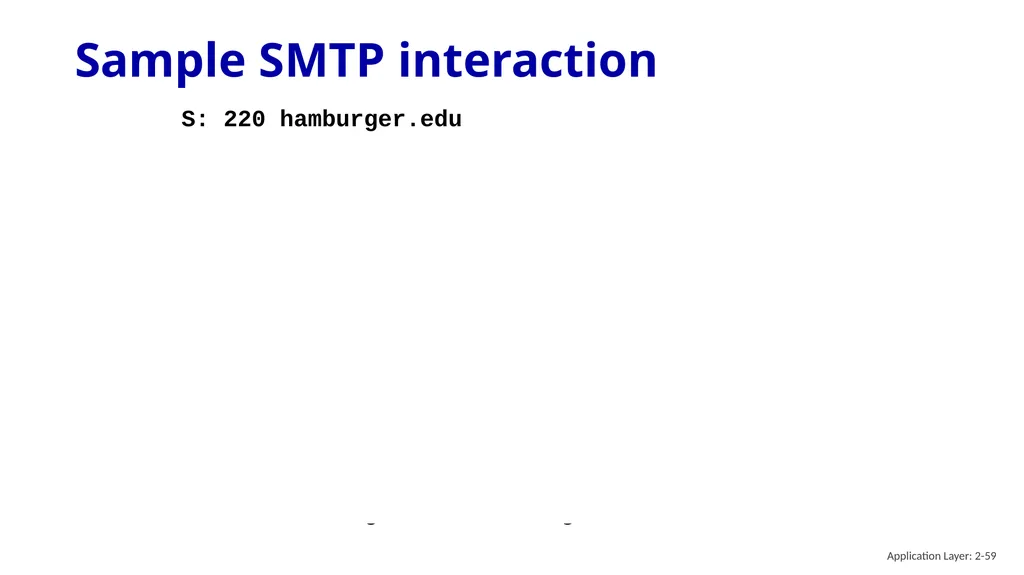
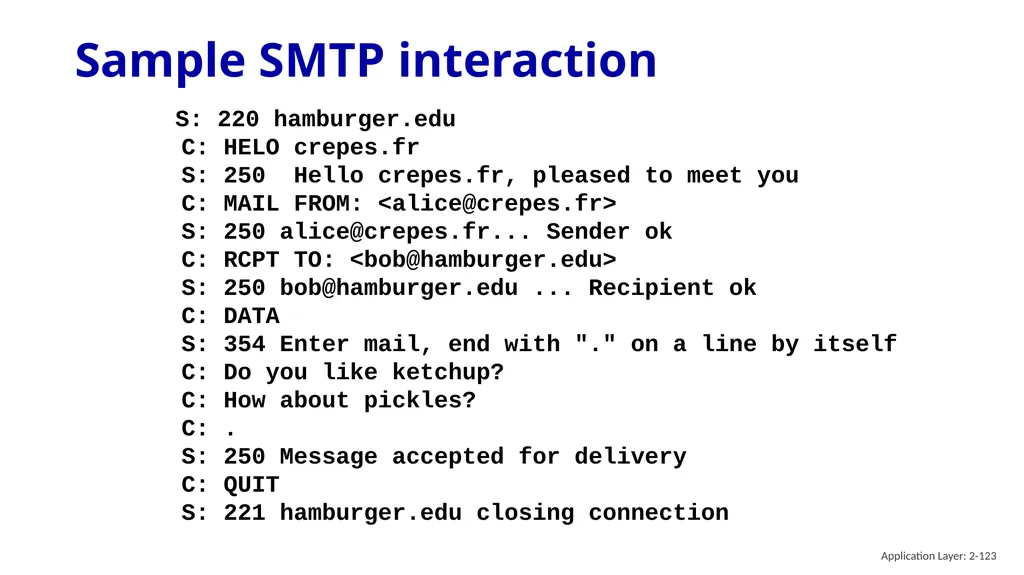
Sample SMTP interaction S: 220 hamburger.edu
C: HELO crepes.fr
S: 250 Hello crepes.fr, pleased to meet you
C: MAIL FROM: <alice@crepes.fr>
S: 250 alice@crepes.fr... Sender ok
C: RCPT TO: <bob@hamburger.edu>
S: 250 bob@hamburger.edu ... Recipient ok
C: DATA
S: 354 Enter mail, end with "." on a line by itself
C: Do you like ketchup?
C: How about pickles?
C: .
S: 250 Message accepted for delivery
C: QUIT
S: 221 hamburger.edu closing connection Application Layer: 2-59<br>
C: HELO crepes.fr
S: 250 Hello crepes.fr, pleased to meet you
C: MAIL FROM: <alice@crepes.fr>
S: 250 alice@crepes.fr... Sender ok
C: RCPT TO: <bob@hamburger.edu>
S: 250 bob@hamburger.edu ... Recipient ok
C: DATA
S: 354 Enter mail, end with "." on a line by itself
C: Do you like ketchup?
C: How about pickles?
C: .
S: 250 Message accepted for delivery
C: QUIT
S: 221 hamburger.edu closing connection Application Layer: 2-59<br>
60
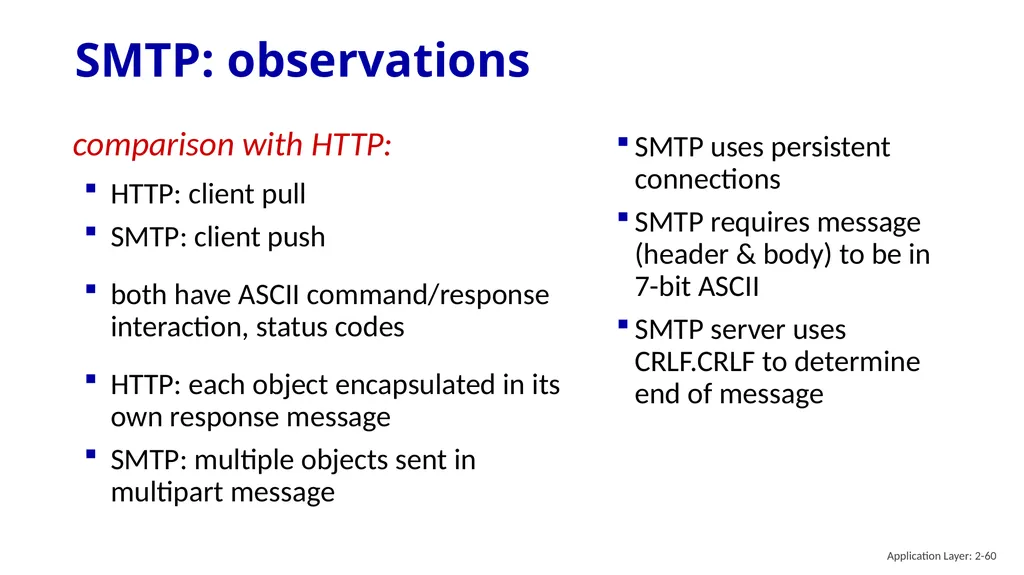
SMTP: observations SMTP uses persistent connections
SMTP requires message (header & body) to be in 7-bit ASCII
SMTP server uses CRLF.CRLF to determine end of message comparison with HTTP:
HTTP: client pull
SMTP: client push
both have ASCII command/response interaction, status codes
HTTP: each object encapsulated in its own response message
SMTP: multiple objects sent in multipart message Application Layer: 2-60<br>
SMTP requires message (header & body) to be in 7-bit ASCII
SMTP server uses CRLF.CRLF to determine end of message comparison with HTTP:
HTTP: client pull
SMTP: client push
both have ASCII command/response interaction, status codes
HTTP: each object encapsulated in its own response message
SMTP: multiple objects sent in multipart message Application Layer: 2-60<br>
61
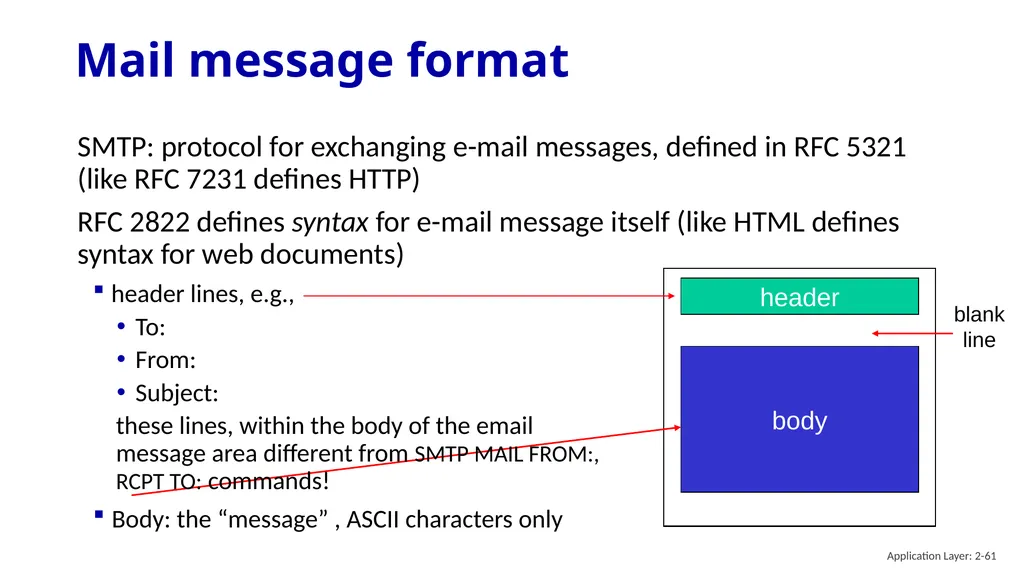
Mail message format SMTP: protocol for exchanging e-mail messages, defined in RFC 5321 (like RFC 7231 defines HTTP)
RFC 2822 defines syntax for e-mail message itself (like HTML defines syntax for web documents) header body blank
line header lines, e.g.,
To:
From:
Subject:
these lines, within the body of the email message area different from SMTP MAIL FROM:, RCPT TO: commands!
Body: the “message” , ASCII characters only Application Layer: 2-61<br>
RFC 2822 defines syntax for e-mail message itself (like HTML defines syntax for web documents) header body blank
line header lines, e.g.,
To:
From:
Subject:
these lines, within the body of the email message area different from SMTP MAIL FROM:, RCPT TO: commands!
Body: the “message” , ASCII characters only Application Layer: 2-61<br>
62
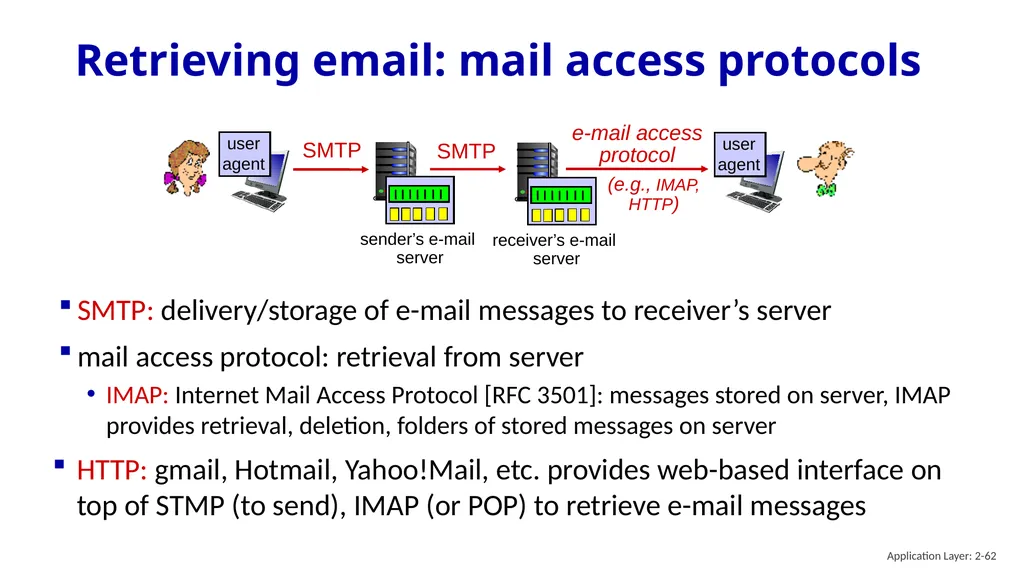
Retrieving email: mail access protocols SMTP SMTP receiver’s e-mail
server SMTP: delivery/storage of e-mail messages to receiver’s server
mail access protocol: retrieval from server
IMAP: Internet Mail Access Protocol [RFC 3501]: messages stored on server, IMAP provides retrieval, deletion, folders of stored messages on server
HTTP: gmail, Hotmail, Yahoo!Mail, etc. provides web-based interface on top of STMP (to send), IMAP (or POP) to retrieve e-mail messages Application Layer: 2-62<br>
server SMTP: delivery/storage of e-mail messages to receiver’s server
mail access protocol: retrieval from server
IMAP: Internet Mail Access Protocol [RFC 3501]: messages stored on server, IMAP provides retrieval, deletion, folders of stored messages on server
HTTP: gmail, Hotmail, Yahoo!Mail, etc. provides web-based interface on top of STMP (to send), IMAP (or POP) to retrieve e-mail messages Application Layer: 2-62<br>
63
Application Layer: Overview Principles of network applications
Web and HTTP
E-mail, SMTP, IMAP
The Domain Name System DNS P2P applications
video streaming and content distribution networks
socket programming with UDP and TCP Application Layer: 2-63<br>
Web and HTTP
E-mail, SMTP, IMAP
The Domain Name System DNS P2P applications
video streaming and content distribution networks
socket programming with UDP and TCP Application Layer: 2-63<br>
64
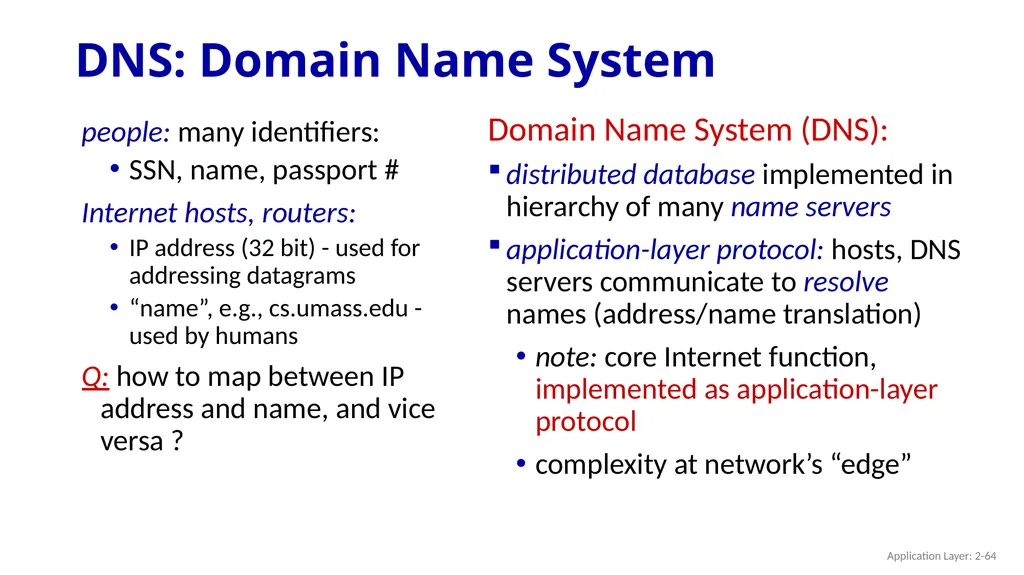
DNS: Domain Name System people: many identifiers:
SSN, name, passport #
Internet hosts, routers:
IP address (32 bit) - used for addressing datagrams
“name”, e.g., cs.umass.edu - used by humans
Q: how to map between IP address and name, and vice versa ? Domain Name System (DNS):
distributed database implemented in hierarchy of many name servers
application-layer protocol: hosts, DNS servers communicate to resolve names (address/name translation)
note: core Internet function, implemented as application-layer protocol
complexity at network’s “edge” Application Layer: 2-64<br>
SSN, name, passport #
Internet hosts, routers:
IP address (32 bit) - used for addressing datagrams
“name”, e.g., cs.umass.edu - used by humans
Q: how to map between IP address and name, and vice versa ? Domain Name System (DNS):
distributed database implemented in hierarchy of many name servers
application-layer protocol: hosts, DNS servers communicate to resolve names (address/name translation)
note: core Internet function, implemented as application-layer protocol
complexity at network’s “edge” Application Layer: 2-64<br>
65
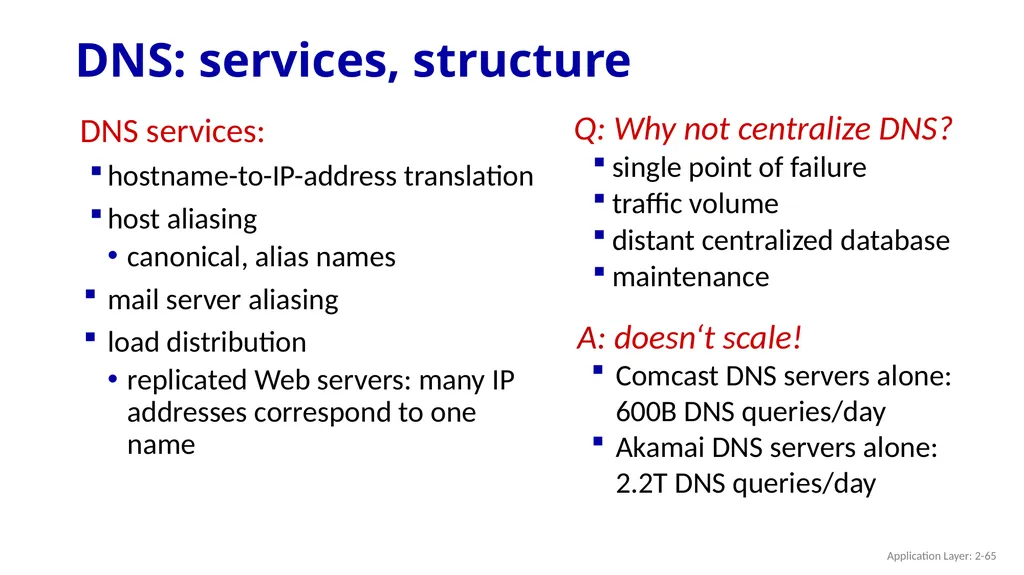
DNS: services, structure Q: Why not centralize DNS?
single point of failure
traffic volume
distant centralized database
maintenance DNS services:
hostname-to-IP-address translation
host aliasing
canonical, alias names
mail server aliasing
load distribution
replicated Web servers: many IP addresses correspond to one name A: doesn‘t scale!
Comcast DNS servers alone: 600B DNS queries/day
Akamai DNS servers alone: 2.2T DNS queries/day Application Layer: 2-65<br>
single point of failure
traffic volume
distant centralized database
maintenance DNS services:
hostname-to-IP-address translation
host aliasing
canonical, alias names
mail server aliasing
load distribution
replicated Web servers: many IP addresses correspond to one name A: doesn‘t scale!
Comcast DNS servers alone: 600B DNS queries/day
Akamai DNS servers alone: 2.2T DNS queries/day Application Layer: 2-65<br>
66
Thinking about the DNS humongous distributed database:
~ billion records, each simple handles many trillions of queries/day:
many more reads than writes
performance matters: almost every Internet transaction interacts with DNS - msecs count! organizationally, physically decentralized:
millions of different organizations responsible for their records “bulletproof”: reliability, security Application Layer: 2-66<br>
~ billion records, each simple handles many trillions of queries/day:
many more reads than writes
performance matters: almost every Internet transaction interacts with DNS - msecs count! organizationally, physically decentralized:
millions of different organizations responsible for their records “bulletproof”: reliability, security Application Layer: 2-66<br>
67
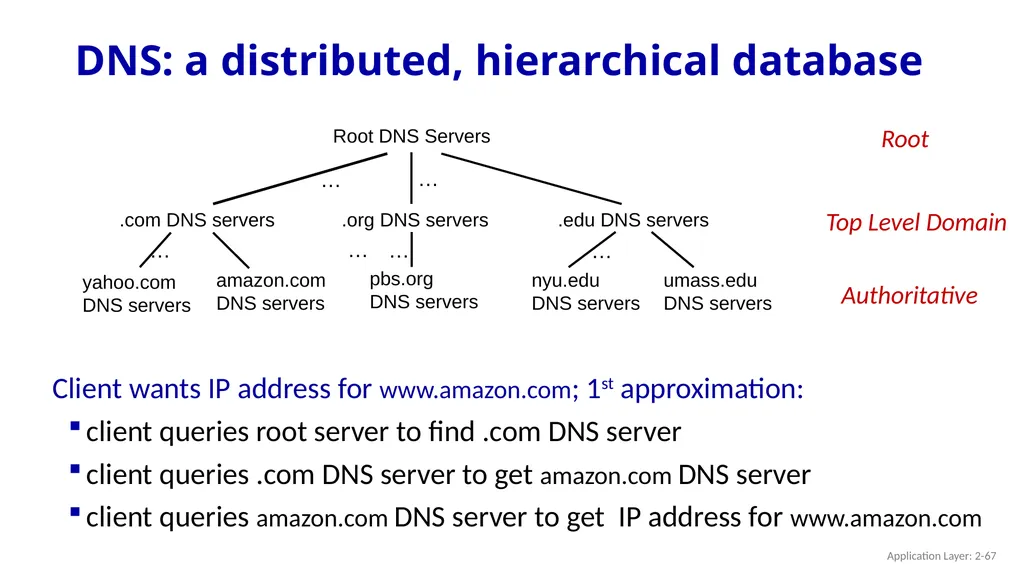
DNS: a distributed, hierarchical database Client wants IP address for www.amazon.com; 1st approximation:
client queries root server to find .com DNS server
client queries .com DNS server to get amazon.com DNS server
client queries amazon.com DNS server to get IP address for www.amazon.com Application Layer: 2-67<br>
client queries root server to find .com DNS server
client queries .com DNS server to get amazon.com DNS server
client queries amazon.com DNS server to get IP address for www.amazon.com Application Layer: 2-67<br>
68
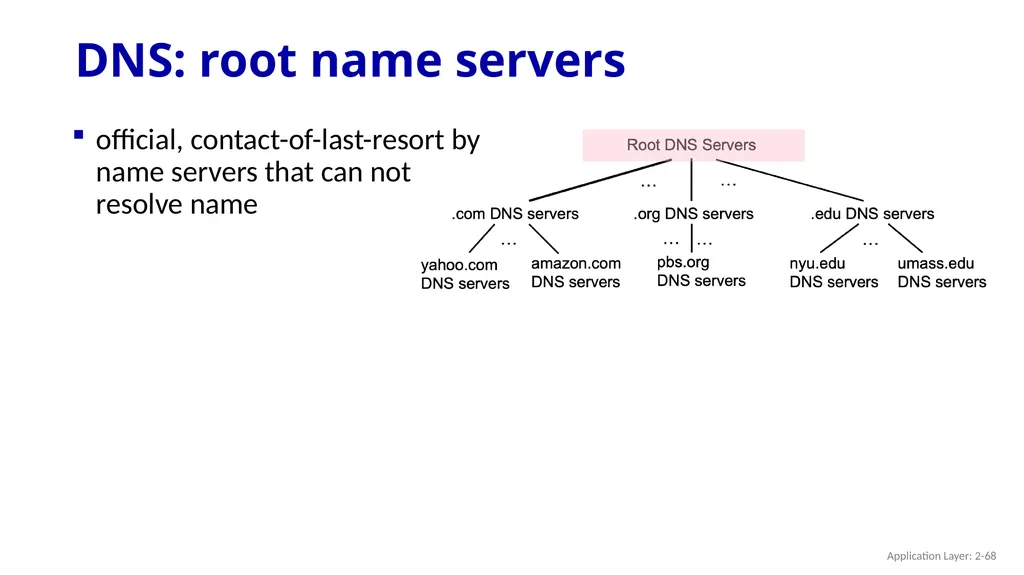
DNS: root name servers official, contact-of-last-resort by name servers that can not resolve name Application Layer: 2-68<br>
69
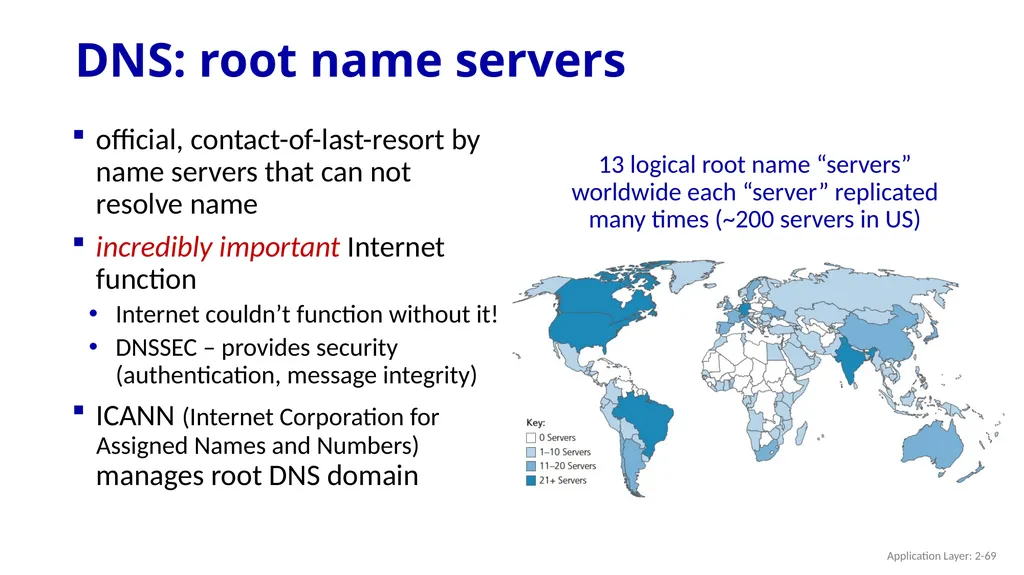
DNS: root name servers official, contact-of-last-resort by name servers that can not resolve name
incredibly important Internet function
Internet couldn’t function without it!
DNSSEC – provides security (authentication, message integrity)
ICANN (Internet Corporation for Assigned Names and Numbers) manages root DNS domain 13 logical root name “servers” worldwide each “server” replicated many times (~200 servers in US) Application Layer: 2-69<br>
incredibly important Internet function
Internet couldn’t function without it!
DNSSEC – provides security (authentication, message integrity)
ICANN (Internet Corporation for Assigned Names and Numbers) manages root DNS domain 13 logical root name “servers” worldwide each “server” replicated many times (~200 servers in US) Application Layer: 2-69<br>
70
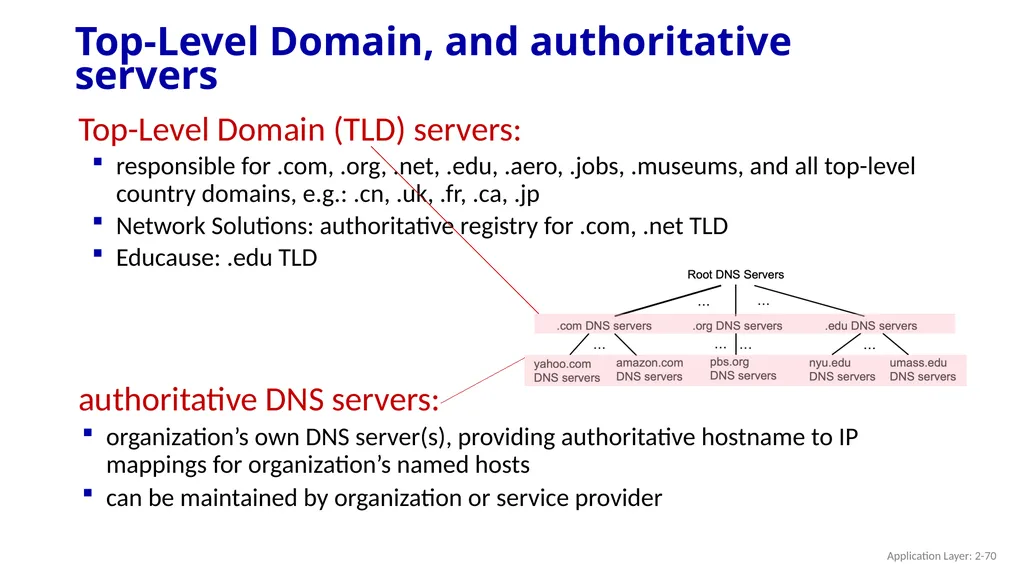
Top-Level Domain, and authoritative servers Top-Level Domain (TLD) servers:
responsible for .com, .org, .net, .edu, .aero, .jobs, .museums, and all top-level country domains, e.g.: .cn, .uk, .fr, .ca, .jp
Network Solutions: authoritative registry for .com, .net TLD
Educause: .edu TLD authoritative DNS servers:
organization’s own DNS server(s), providing authoritative hostname to IP mappings for organization’s named hosts
can be maintained by organization or service provider Application Layer: 2-70<br>
responsible for .com, .org, .net, .edu, .aero, .jobs, .museums, and all top-level country domains, e.g.: .cn, .uk, .fr, .ca, .jp
Network Solutions: authoritative registry for .com, .net TLD
Educause: .edu TLD authoritative DNS servers:
organization’s own DNS server(s), providing authoritative hostname to IP mappings for organization’s named hosts
can be maintained by organization or service provider Application Layer: 2-70<br>
71
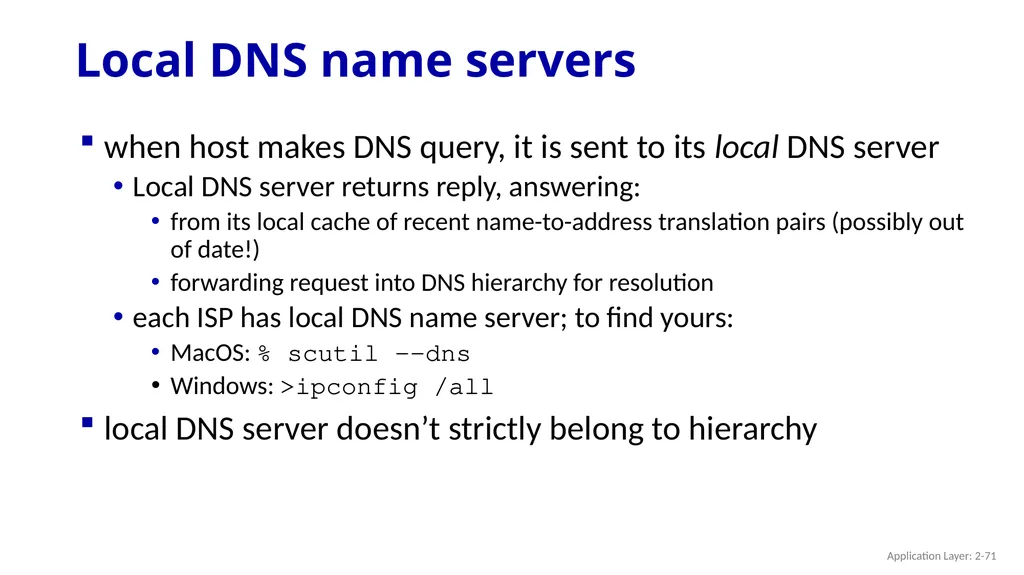
Local DNS name servers when host makes DNS query, it is sent to its local DNS server
Local DNS server returns reply, answering:
from its local cache of recent name-to-address translation pairs (possibly out of date!)
forwarding request into DNS hierarchy for resolution
each ISP has local DNS name server; to find yours:
MacOS: % scutil --dns
Windows: >ipconfig /all
local DNS server doesn’t strictly belong to hierarchy Application Layer: 2-71<br>
Local DNS server returns reply, answering:
from its local cache of recent name-to-address translation pairs (possibly out of date!)
forwarding request into DNS hierarchy for resolution
each ISP has local DNS name server; to find yours:
MacOS: % scutil --dns
Windows: >ipconfig /all
local DNS server doesn’t strictly belong to hierarchy Application Layer: 2-71<br>
72
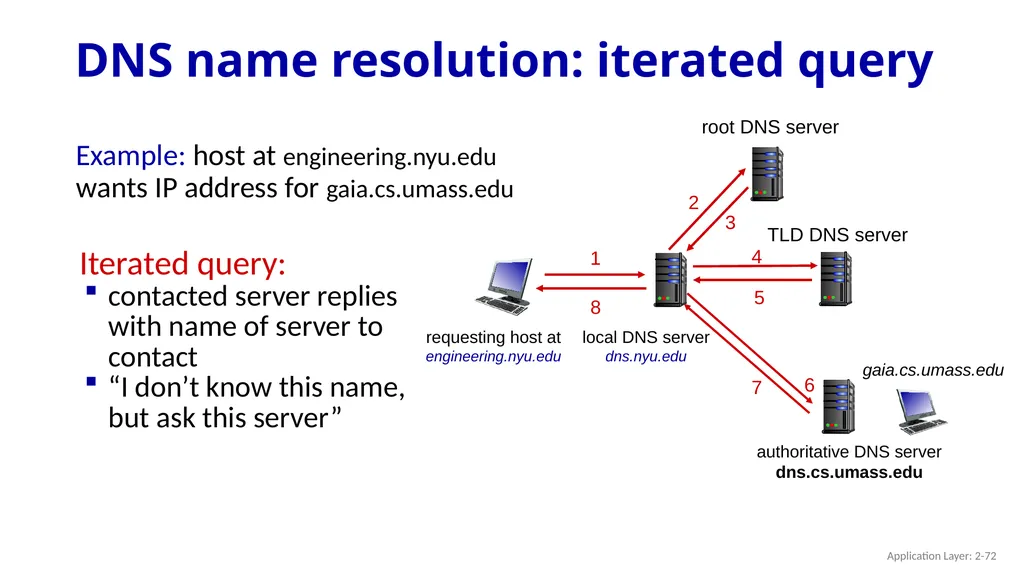
DNS name resolution: iterated query Example: host at engineering.nyu.edu wants IP address for gaia.cs.umass.edu Iterated query:
contacted server replies with name of server to contact
“I don’t know this name, but ask this server” requesting host at
engineering.nyu.edu gaia.cs.umass.edu root DNS server 1 2 3 4 5 6 authoritative DNS server
dns.cs.umass.edu 7 8 TLD DNS server Application Layer: 2-72<br>
contacted server replies with name of server to contact
“I don’t know this name, but ask this server” requesting host at
engineering.nyu.edu gaia.cs.umass.edu root DNS server 1 2 3 4 5 6 authoritative DNS server
dns.cs.umass.edu 7 8 TLD DNS server Application Layer: 2-72<br>
73
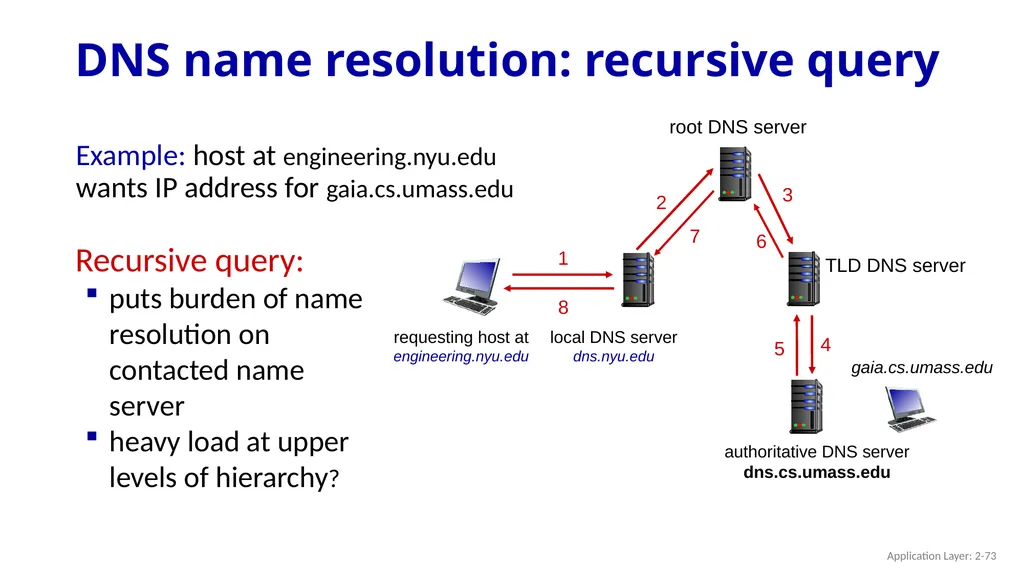
DNS name resolution: recursive query requesting host at
engineering.nyu.edu gaia.cs.umass.edu root DNS server 1 2 3 4 5 6 authoritative DNS server
dns.cs.umass.edu 7 8 TLD DNS server Recursive query:
puts burden of name resolution on contacted name server
heavy load at upper levels of hierarchy? Example: host at engineering.nyu.edu wants IP address for gaia.cs.umass.edu Application Layer: 2-73<br>
engineering.nyu.edu gaia.cs.umass.edu root DNS server 1 2 3 4 5 6 authoritative DNS server
dns.cs.umass.edu 7 8 TLD DNS server Recursive query:
puts burden of name resolution on contacted name server
heavy load at upper levels of hierarchy? Example: host at engineering.nyu.edu wants IP address for gaia.cs.umass.edu Application Layer: 2-73<br>
74
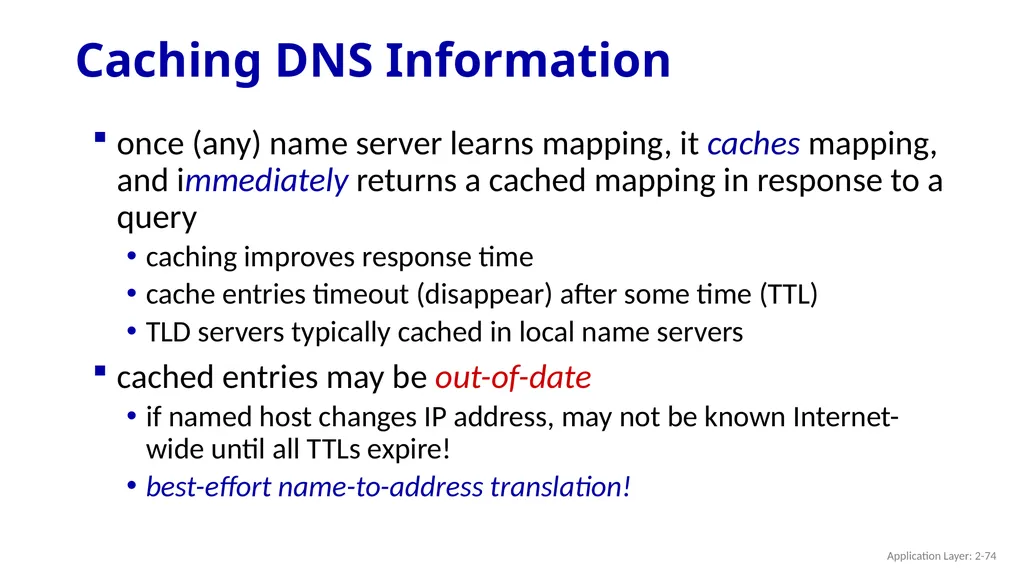
Caching DNS Information once (any) name server learns mapping, it caches mapping, and immediately returns a cached mapping in response to a query
caching improves response time
cache entries timeout (disappear) after some time (TTL)
TLD servers typically cached in local name servers
cached entries may be out-of-date
if named host changes IP address, may not be known Internet-wide until all TTLs expire!
best-effort name-to-address translation! Application Layer: 2-74<br>
caching improves response time
cache entries timeout (disappear) after some time (TTL)
TLD servers typically cached in local name servers
cached entries may be out-of-date
if named host changes IP address, may not be known Internet-wide until all TTLs expire!
best-effort name-to-address translation! Application Layer: 2-74<br>
75
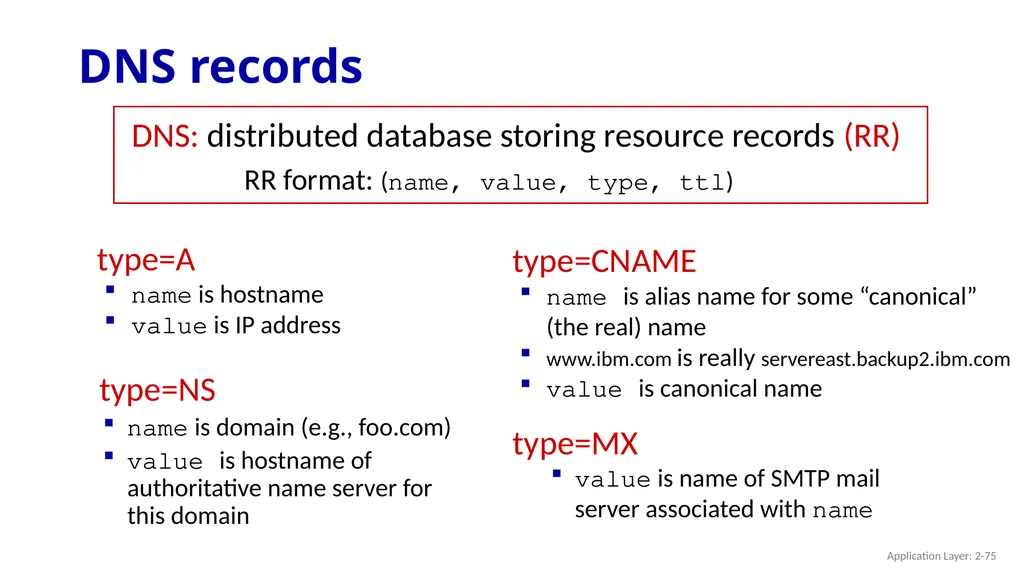
DNS records DNS: distributed database storing resource records (RR) type=NS
name is domain (e.g., foo.com)
value is hostname of authoritative name server for this domain RR format: (name, value, type, ttl) type=A
name is hostname
value is IP address type=CNAME
name is alias name for some “canonical” (the real) name
www.ibm.com is really servereast.backup2.ibm.com
value is canonical name type=MX
value is name of SMTP mail server associated with name Application Layer: 2-75<br>
name is domain (e.g., foo.com)
value is hostname of authoritative name server for this domain RR format: (name, value, type, ttl) type=A
name is hostname
value is IP address type=CNAME
name is alias name for some “canonical” (the real) name
www.ibm.com is really servereast.backup2.ibm.com
value is canonical name type=MX
value is name of SMTP mail server associated with name Application Layer: 2-75<br>
76
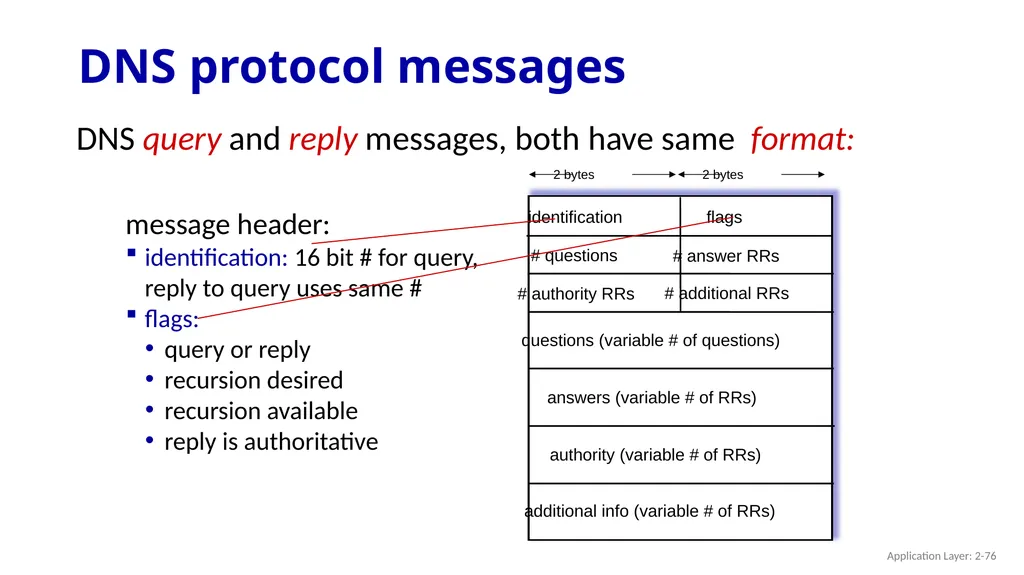
DNS protocol messages DNS query and reply messages, both have same format: message header:
identification: 16 bit # for query, reply to query uses same #
flags:
query or reply
recursion desired
recursion available
reply is authoritative Application Layer: 2-76<br>
identification: 16 bit # for query, reply to query uses same #
flags:
query or reply
recursion desired
recursion available
reply is authoritative Application Layer: 2-76<br>
77
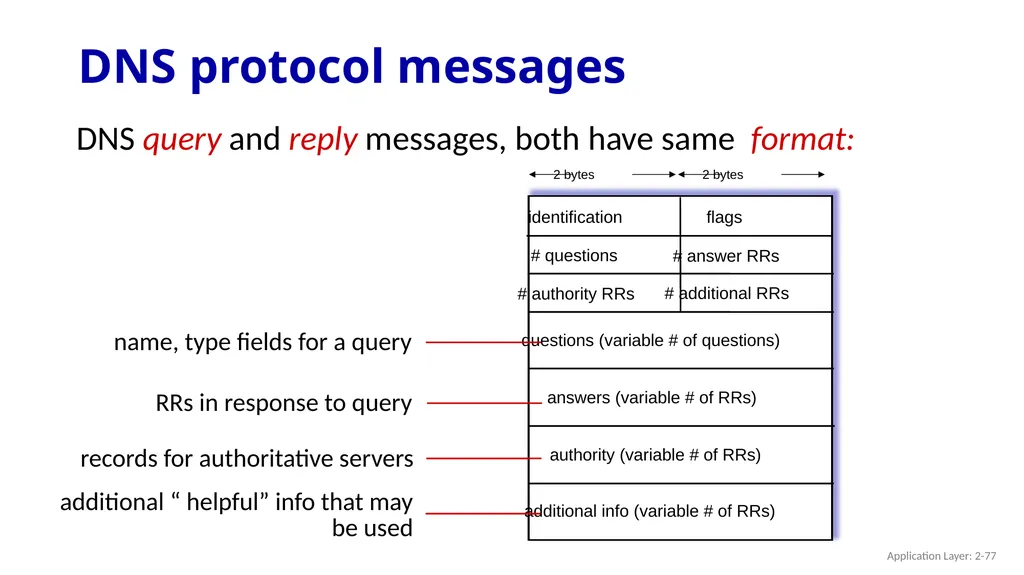
DNS query and reply messages, both have same format: name, type fields for a query RRs in response to query records for authoritative servers additional “ helpful” info that may be used DNS protocol messages Application Layer: 2-77<br>
78
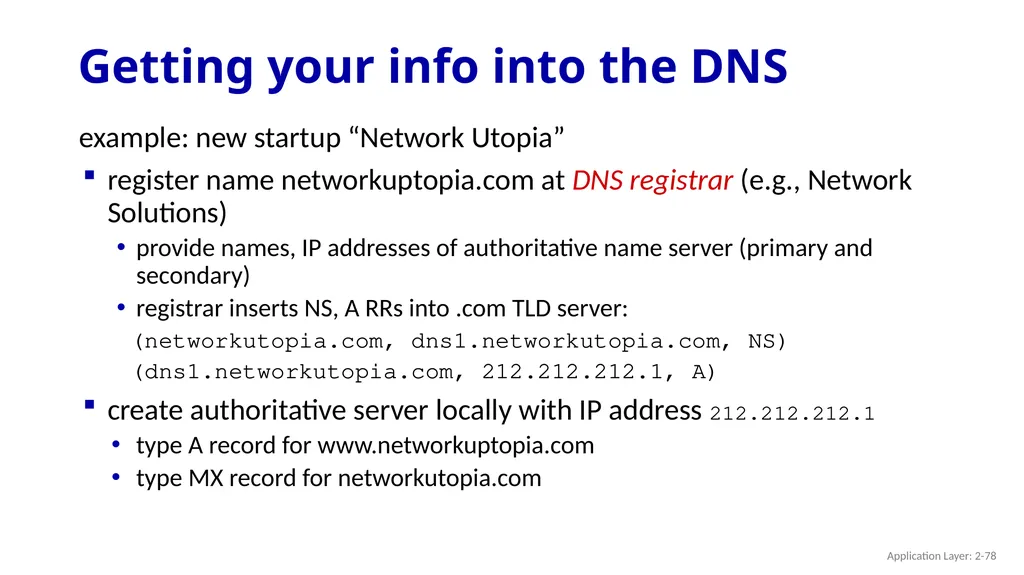
Getting your info into the DNS example: new startup “Network Utopia”
register name networkuptopia.com at DNS registrar (e.g., Network Solutions)
provide names, IP addresses of authoritative name server (primary and secondary)
registrar inserts NS, A RRs into .com TLD server:
(networkutopia.com, dns1.networkutopia.com, NS)
(dns1.networkutopia.com, 212.212.212.1, A)
create authoritative server locally with IP address 212.212.212.1
type A record for www.networkuptopia.com
type MX record for networkutopia.com Application Layer: 2-78<br>
register name networkuptopia.com at DNS registrar (e.g., Network Solutions)
provide names, IP addresses of authoritative name server (primary and secondary)
registrar inserts NS, A RRs into .com TLD server:
(networkutopia.com, dns1.networkutopia.com, NS)
(dns1.networkutopia.com, 212.212.212.1, A)
create authoritative server locally with IP address 212.212.212.1
type A record for www.networkuptopia.com
type MX record for networkutopia.com Application Layer: 2-78<br>
79
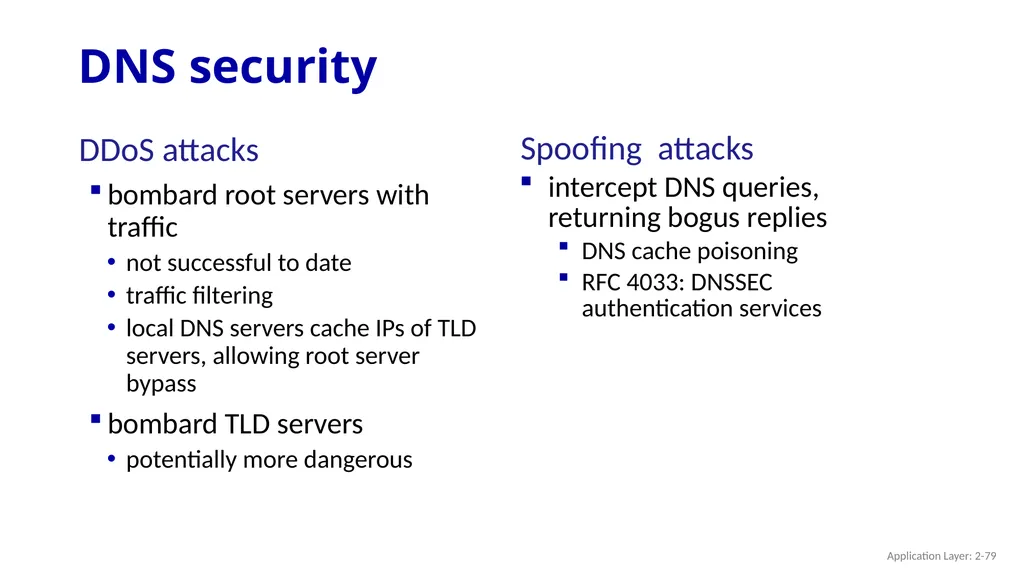
DNS security DDoS attacks
bombard root servers with traffic
not successful to date
traffic filtering
local DNS servers cache IPs of TLD servers, allowing root server bypass
bombard TLD servers
potentially more dangerous Spoofing attacks
intercept DNS queries, returning bogus replies
DNS cache poisoning
RFC 4033: DNSSEC authentication services Application Layer: 2-79<br>
bombard root servers with traffic
not successful to date
traffic filtering
local DNS servers cache IPs of TLD servers, allowing root server bypass
bombard TLD servers
potentially more dangerous Spoofing attacks
intercept DNS queries, returning bogus replies
DNS cache poisoning
RFC 4033: DNSSEC authentication services Application Layer: 2-79<br>
80
Application Layer: Overview Principles of network applications
Web and HTTP
E-mail, SMTP, IMAP
The Domain Name System DNS P2P applications
video streaming and content distribution networks
socket programming with UDP and TCP Application Layer: 2-80<br>
Web and HTTP
E-mail, SMTP, IMAP
The Domain Name System DNS P2P applications
video streaming and content distribution networks
socket programming with UDP and TCP Application Layer: 2-80<br>
81
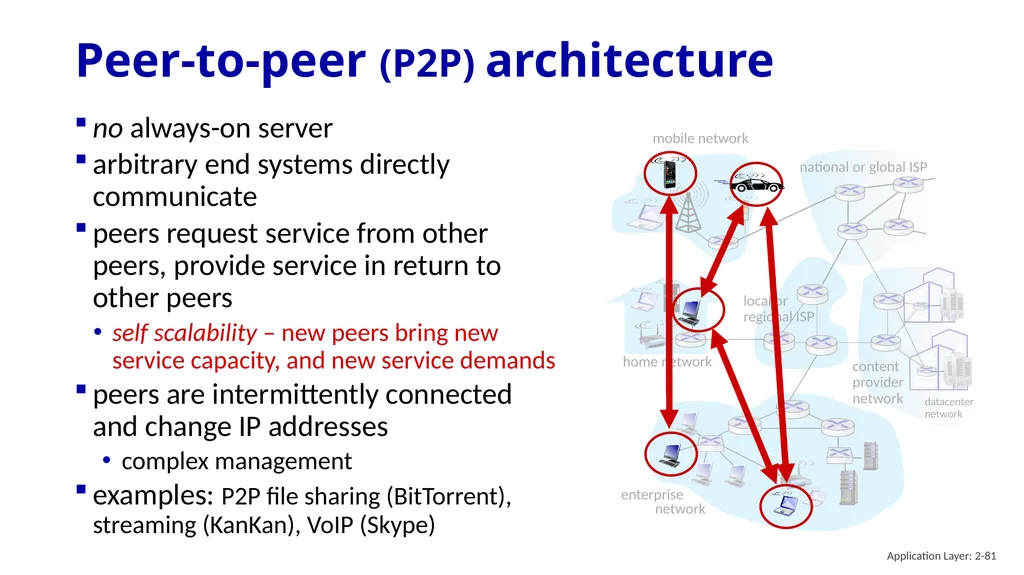
mobile network home network enterprise
network national or global ISP local or regional ISP datacenter
network content
provider
network Peer-to-peer (P2P) architecture no always-on server
arbitrary end systems directly communicate
peers request service from other peers, provide service in return to other peers
self scalability – new peers bring new service capacity, and new service demands
peers are intermittently connected and change IP addresses
complex management
examples: P2P file sharing (BitTorrent), streaming (KanKan), VoIP (Skype) Application Layer: 2-81<br>
network national or global ISP local or regional ISP datacenter
network content
provider
network Peer-to-peer (P2P) architecture no always-on server
arbitrary end systems directly communicate
peers request service from other peers, provide service in return to other peers
self scalability – new peers bring new service capacity, and new service demands
peers are intermittently connected and change IP addresses
complex management
examples: P2P file sharing (BitTorrent), streaming (KanKan), VoIP (Skype) Application Layer: 2-81<br>
82
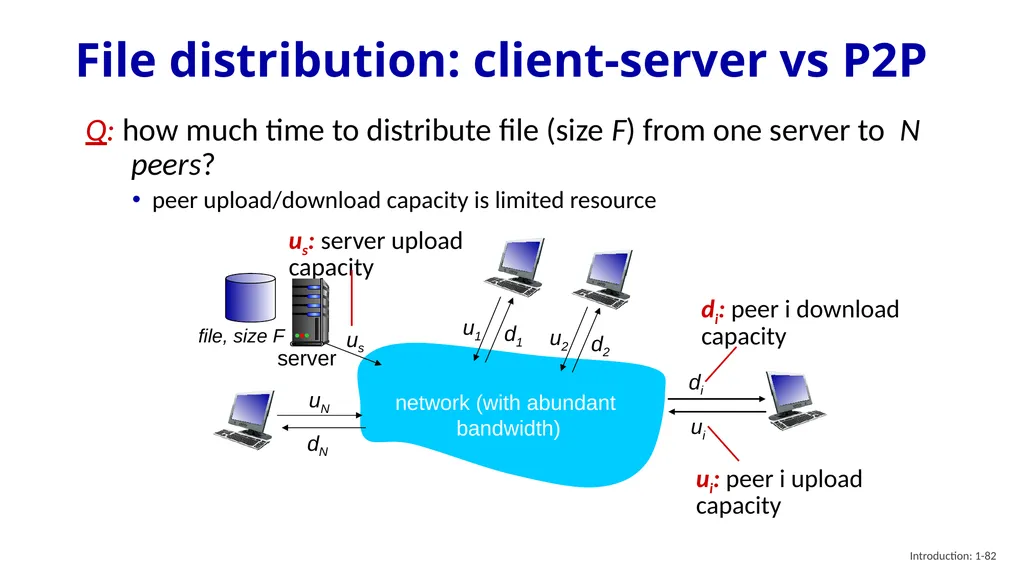
Introduction: 1-82 File distribution: client-server vs P2P Q: how much time to distribute file (size F) from one server to N peers?
peer upload/download capacity is limited resource us uN dN server network (with abundant
bandwidth) file, size F us: server upload capacity ui: peer i upload capacity di: peer i download capacity di ui<br>
peer upload/download capacity is limited resource us uN dN server network (with abundant
bandwidth) file, size F us: server upload capacity ui: peer i upload capacity di: peer i download capacity di ui<br>
83
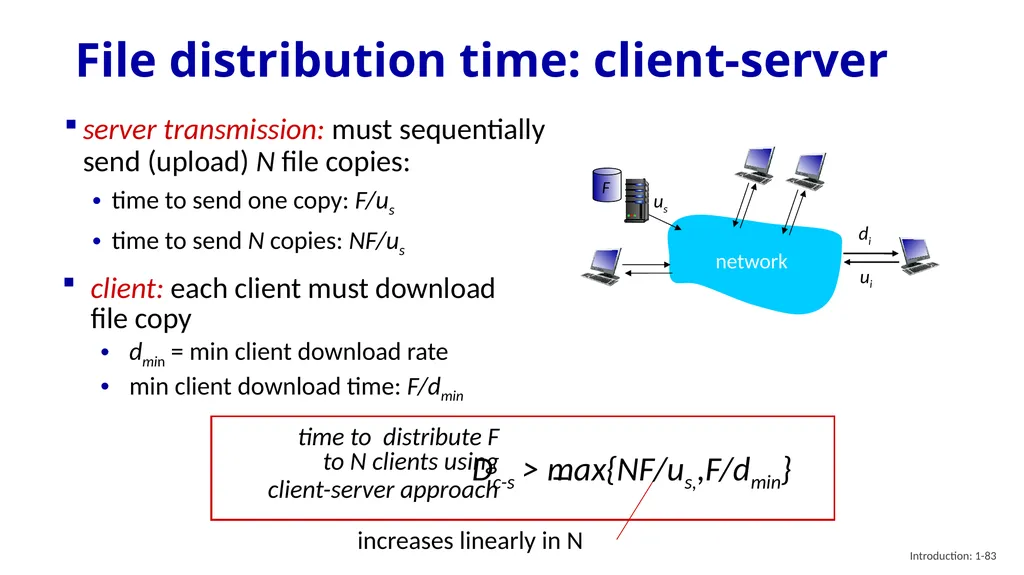
Introduction: 1-83 File distribution time: client-server server transmission: must sequentially send (upload) N file copies:
time to send one copy: F/us
time to send N copies: NF/us client: each client must download file copy
dmin = min client download rate
min client download time: F/dmin increases linearly in N time to distribute F
to N clients using
client-server approach Dc-s > max{NF/us,,F/dmin}<br>
time to send one copy: F/us
time to send N copies: NF/us client: each client must download file copy
dmin = min client download rate
min client download time: F/dmin increases linearly in N time to distribute F
to N clients using
client-server approach Dc-s > max{NF/us,,F/dmin}<br>
84
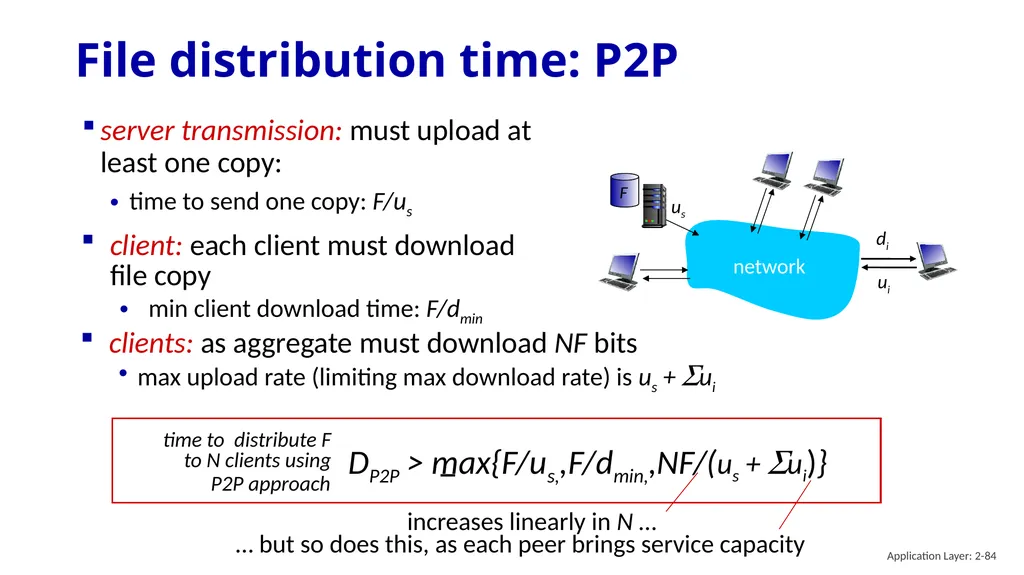
File distribution time: P2P server transmission: must upload at least one copy:
time to send one copy: F/us client: each client must download file copy
min client download time: F/dmin clients: as aggregate must download NF bits
max upload rate (limiting max download rate) is us + Sui time to distribute F
to N clients using
P2P approach DP2P > max{F/us,,F/dmin,,NF/(us + Sui)} Application Layer: 2-84<br>
time to send one copy: F/us client: each client must download file copy
min client download time: F/dmin clients: as aggregate must download NF bits
max upload rate (limiting max download rate) is us + Sui time to distribute F
to N clients using
P2P approach DP2P > max{F/us,,F/dmin,,NF/(us + Sui)} Application Layer: 2-84<br>
85
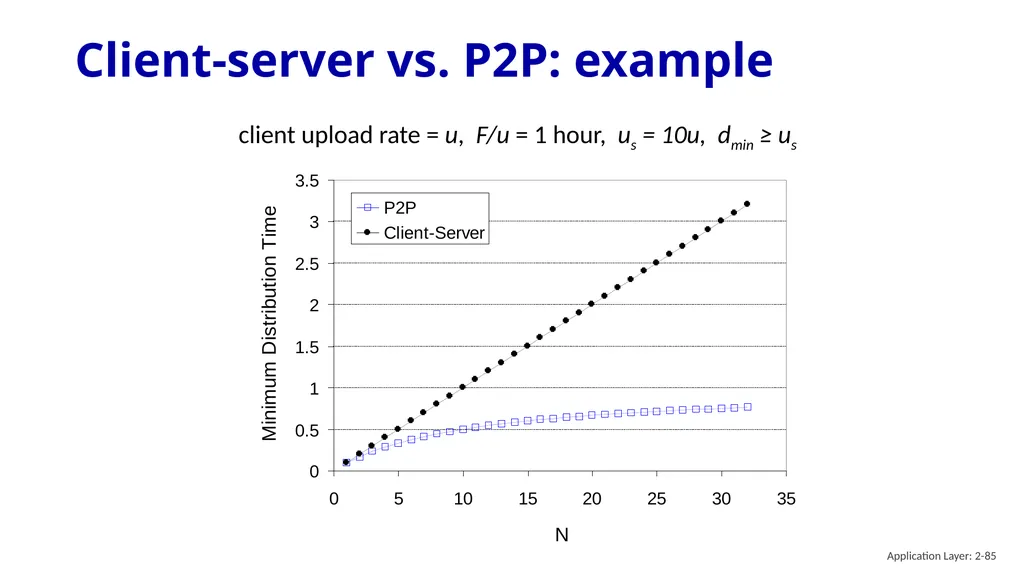
Client-server vs. P2P: example client upload rate = u, F/u = 1 hour, us = 10u, dmin ≥ us Application Layer: 2-85<br>
86
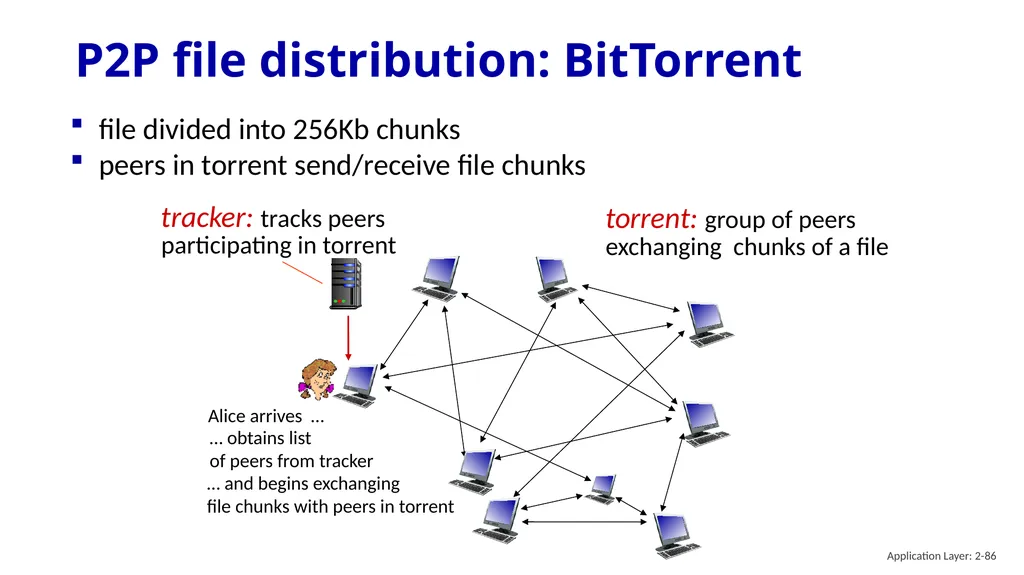
P2P file distribution: BitTorrent file divided into 256Kb chunks
peers in torrent send/receive file chunks tracker: tracks peers
participating in torrent torrent: group of peers exchanging chunks of a file Alice arrives … … obtains list
of peers from tracker … and begins exchanging
file chunks with peers in torrent Application Layer: 2-86<br>
peers in torrent send/receive file chunks tracker: tracks peers
participating in torrent torrent: group of peers exchanging chunks of a file Alice arrives … … obtains list
of peers from tracker … and begins exchanging
file chunks with peers in torrent Application Layer: 2-86<br>
87
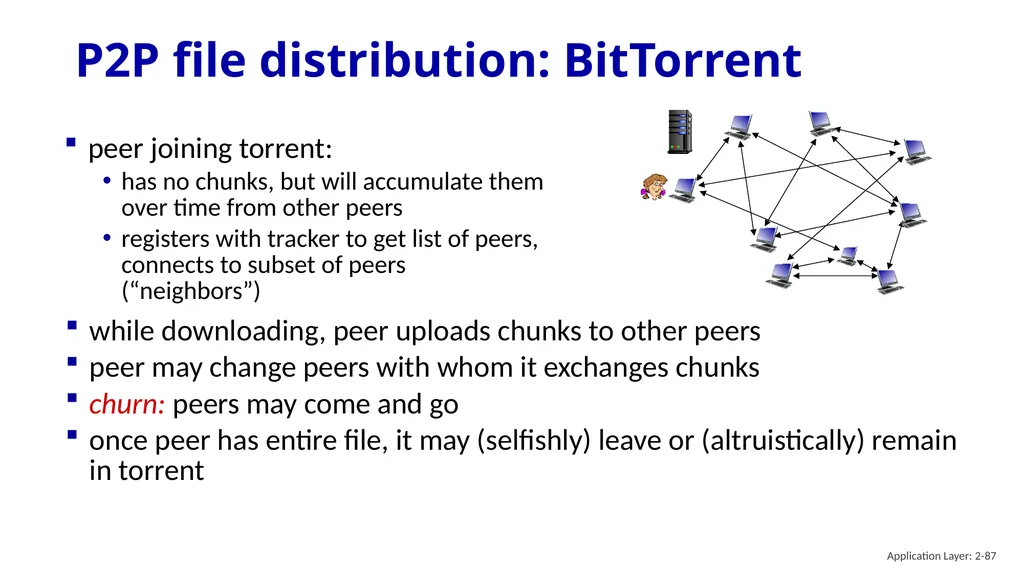
P2P file distribution: BitTorrent peer joining torrent:
has no chunks, but will accumulate them over time from other peers
registers with tracker to get list of peers, connects to subset of peers (“neighbors”) while downloading, peer uploads chunks to other peers
peer may change peers with whom it exchanges chunks
churn: peers may come and go
once peer has entire file, it may (selfishly) leave or (altruistically) remain in torrent Application Layer: 2-87<br>
has no chunks, but will accumulate them over time from other peers
registers with tracker to get list of peers, connects to subset of peers (“neighbors”) while downloading, peer uploads chunks to other peers
peer may change peers with whom it exchanges chunks
churn: peers may come and go
once peer has entire file, it may (selfishly) leave or (altruistically) remain in torrent Application Layer: 2-87<br>
88
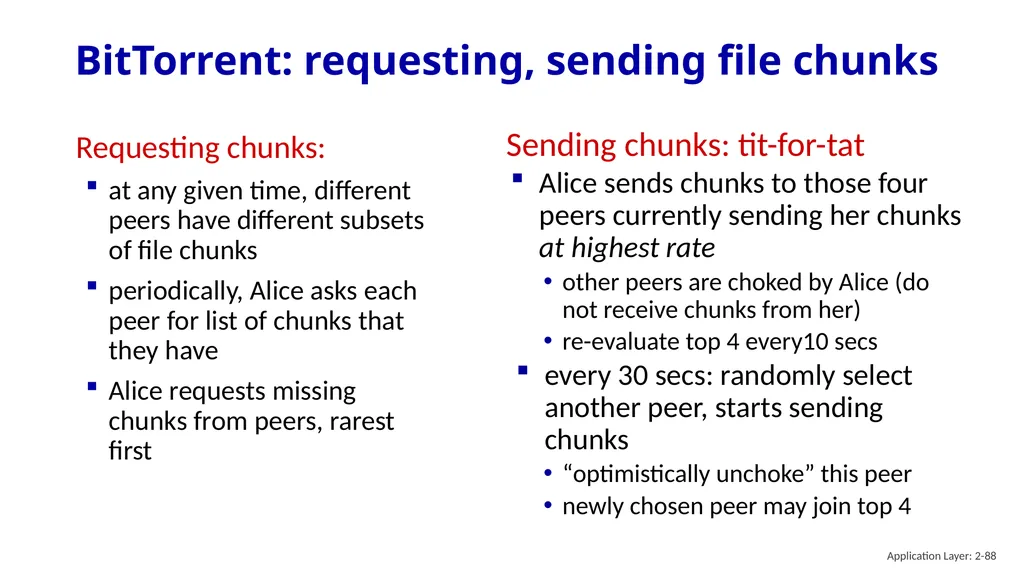
BitTorrent: requesting, sending file chunks Requesting chunks:
at any given time, different peers have different subsets of file chunks
periodically, Alice asks each peer for list of chunks that they have
Alice requests missing chunks from peers, rarest first Sending chunks: tit-for-tat
Alice sends chunks to those four peers currently sending her chunks at highest rate
other peers are choked by Alice (do not receive chunks from her)
re-evaluate top 4 every10 secs
every 30 secs: randomly select another peer, starts sending chunks
“optimistically unchoke” this peer
newly chosen peer may join top 4 Application Layer: 2-88<br>
at any given time, different peers have different subsets of file chunks
periodically, Alice asks each peer for list of chunks that they have
Alice requests missing chunks from peers, rarest first Sending chunks: tit-for-tat
Alice sends chunks to those four peers currently sending her chunks at highest rate
other peers are choked by Alice (do not receive chunks from her)
re-evaluate top 4 every10 secs
every 30 secs: randomly select another peer, starts sending chunks
“optimistically unchoke” this peer
newly chosen peer may join top 4 Application Layer: 2-88<br>
89
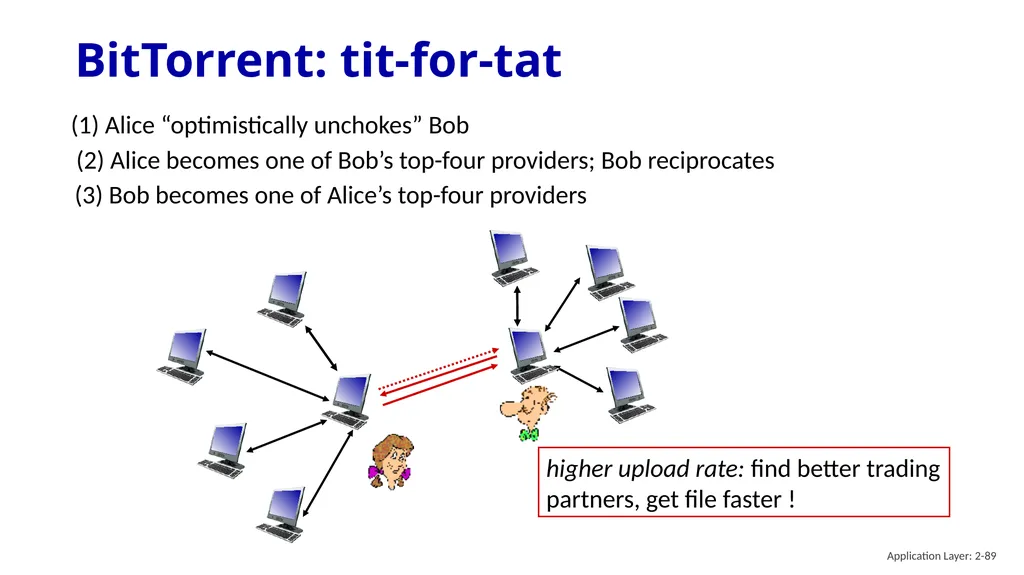
BitTorrent: tit-for-tat (1) Alice “optimistically unchokes” Bob (2) Alice becomes one of Bob’s top-four providers; Bob reciprocates (3) Bob becomes one of Alice’s top-four providers higher upload rate: find better trading partners, get file faster ! Application Layer: 2-89<br>
90
Application layer: overview Principles of network applications
Web and HTTP
E-mail, SMTP, IMAP
The Domain Name System DNS P2P applications
video streaming and content distribution networks
socket programming with UDP and TCP Application Layer: 2-90<br>
Web and HTTP
E-mail, SMTP, IMAP
The Domain Name System DNS P2P applications
video streaming and content distribution networks
socket programming with UDP and TCP Application Layer: 2-90<br>
91
Video Streaming and CDNs: context stream video traffic: major consumer of Internet bandwidth
Netflix, YouTube, Amazon Prime: 80% of residential ISP traffic (2020)
challenge: scale - how to reach ~1B users? challenge: heterogeneity
different users have different capabilities (e.g., wired versus mobile; bandwidth rich versus bandwidth poor)
solution: distributed, application-level infrastructure Application Layer: 2-91<br>
Netflix, YouTube, Amazon Prime: 80% of residential ISP traffic (2020)
challenge: scale - how to reach ~1B users? challenge: heterogeneity
different users have different capabilities (e.g., wired versus mobile; bandwidth rich versus bandwidth poor)
solution: distributed, application-level infrastructure Application Layer: 2-91<br>
92
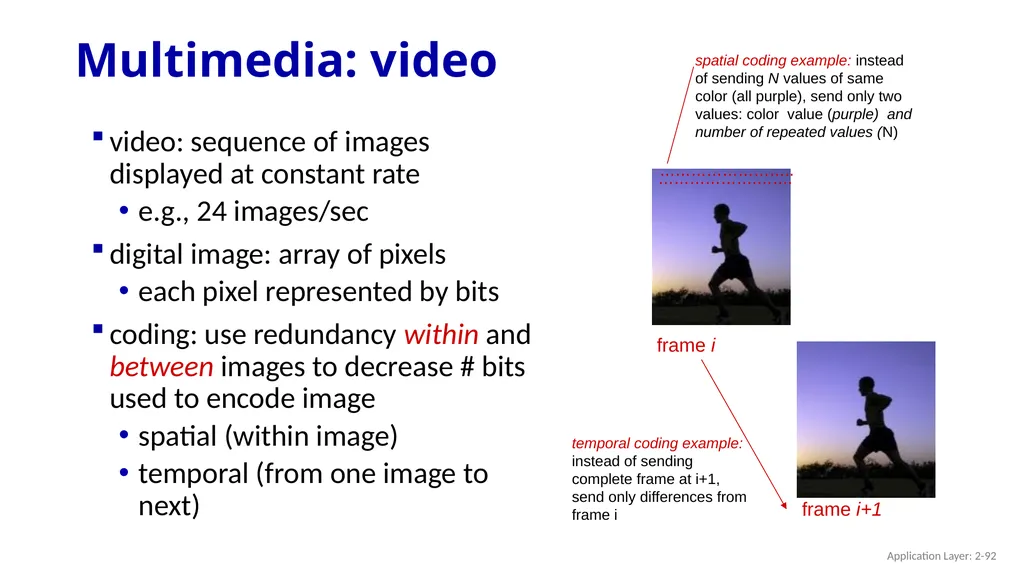
Multimedia: video video: sequence of images displayed at constant rate
e.g., 24 images/sec
digital image: array of pixels
each pixel represented by bits
coding: use redundancy within and between images to decrease # bits used to encode image
spatial (within image)
temporal (from one image to next) frame i frame i+1 Application Layer: 2-92<br>
e.g., 24 images/sec
digital image: array of pixels
each pixel represented by bits
coding: use redundancy within and between images to decrease # bits used to encode image
spatial (within image)
temporal (from one image to next) frame i frame i+1 Application Layer: 2-92<br>
93
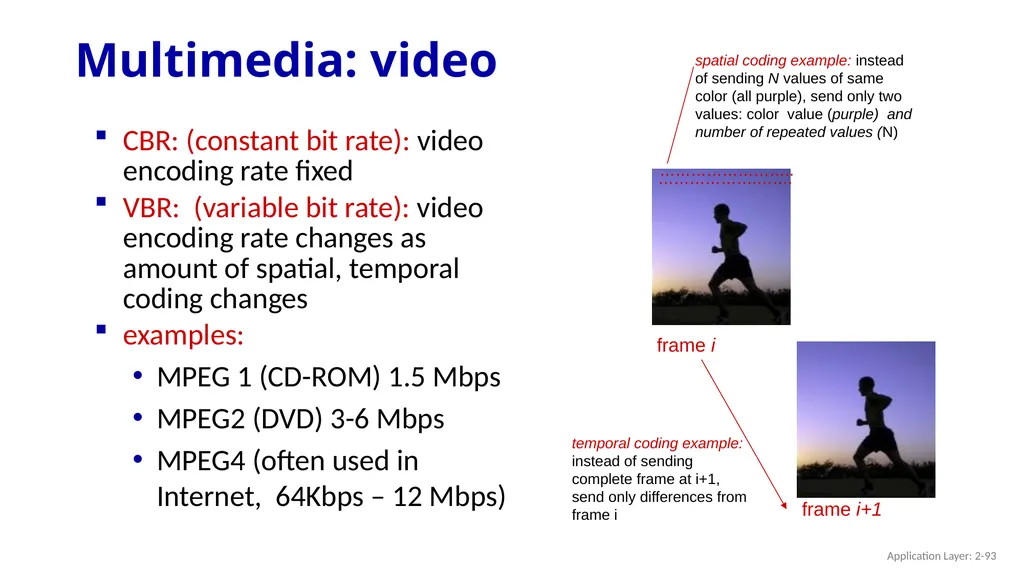
Multimedia: video CBR: (constant bit rate): video encoding rate fixed
VBR: (variable bit rate): video encoding rate changes as amount of spatial, temporal coding changes
examples:
MPEG 1 (CD-ROM) 1.5 Mbps
MPEG2 (DVD) 3-6 Mbps
MPEG4 (often used in Internet, 64Kbps – 12 Mbps) Application Layer: 2-93<br>
VBR: (variable bit rate): video encoding rate changes as amount of spatial, temporal coding changes
examples:
MPEG 1 (CD-ROM) 1.5 Mbps
MPEG2 (DVD) 3-6 Mbps
MPEG4 (often used in Internet, 64Kbps – 12 Mbps) Application Layer: 2-93<br>
94
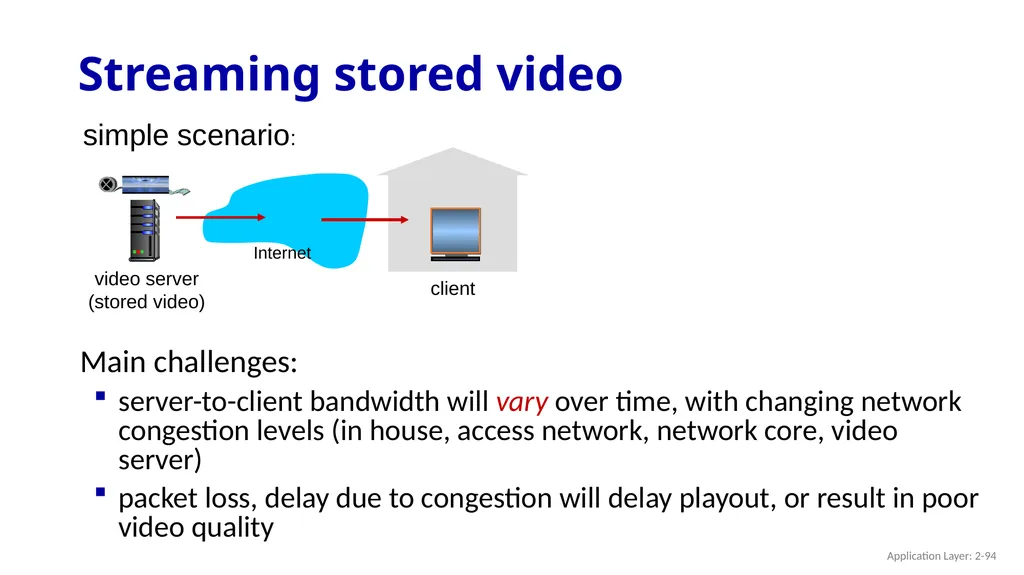
Main challenges:
server-to-client bandwidth will vary over time, with changing network congestion levels (in house, access network, network core, video server)
packet loss, delay due to congestion will delay playout, or result in poor video quality Streaming stored video simple scenario: video server
(stored video) client Internet Application Layer: 2-94<br>
server-to-client bandwidth will vary over time, with changing network congestion levels (in house, access network, network core, video server)
packet loss, delay due to congestion will delay playout, or result in poor video quality Streaming stored video simple scenario: video server
(stored video) client Internet Application Layer: 2-94<br>
95
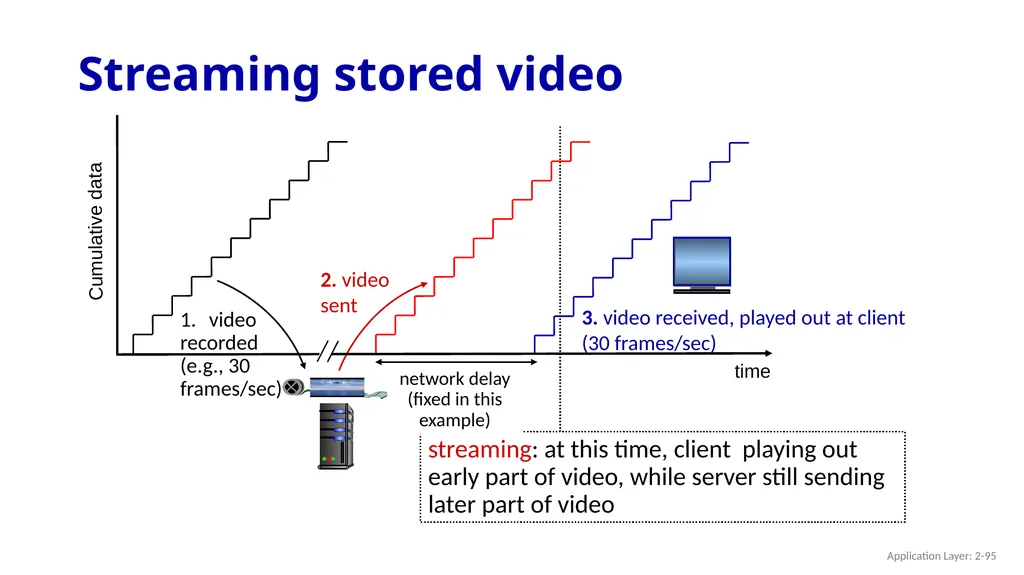
Streaming stored video Cumulative data time Application Layer: 2-95<br>
96
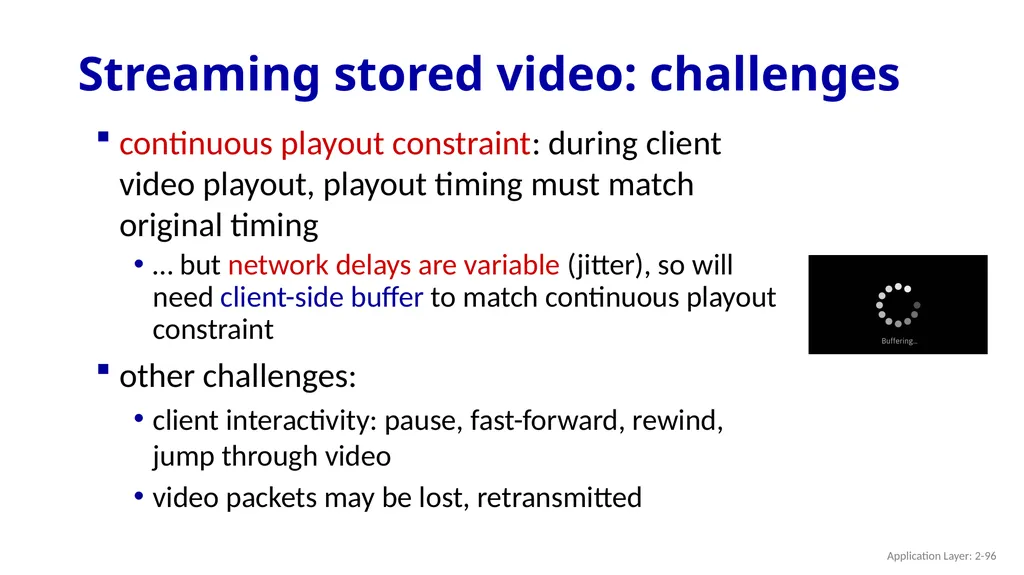
Streaming stored video: challenges continuous playout constraint: during client video playout, playout timing must match original timing
… but network delays are variable (jitter), so will need client-side buffer to match continuous playout constraint other challenges:
client interactivity: pause, fast-forward, rewind, jump through video
video packets may be lost, retransmitted Application Layer: 2-96<br>
… but network delays are variable (jitter), so will need client-side buffer to match continuous playout constraint other challenges:
client interactivity: pause, fast-forward, rewind, jump through video
video packets may be lost, retransmitted Application Layer: 2-96<br>
97
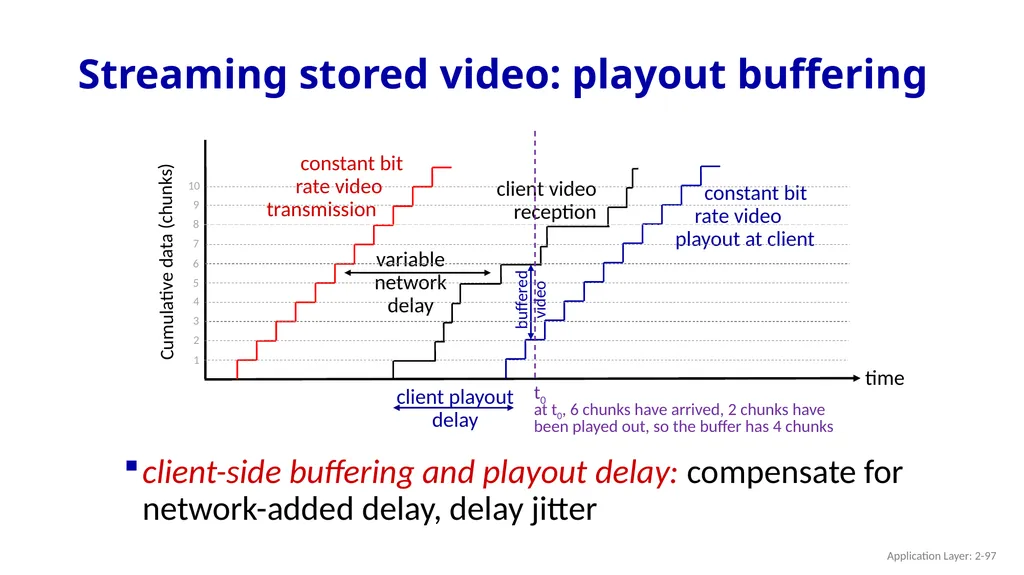
Streaming stored video: playout buffering constant bit
rate video
transmission Cumulative data (chunks) time client-side buffering and playout delay: compensate for network-added delay, delay jitter Application Layer: 2-97<br>
rate video
transmission Cumulative data (chunks) time client-side buffering and playout delay: compensate for network-added delay, delay jitter Application Layer: 2-97<br>
98
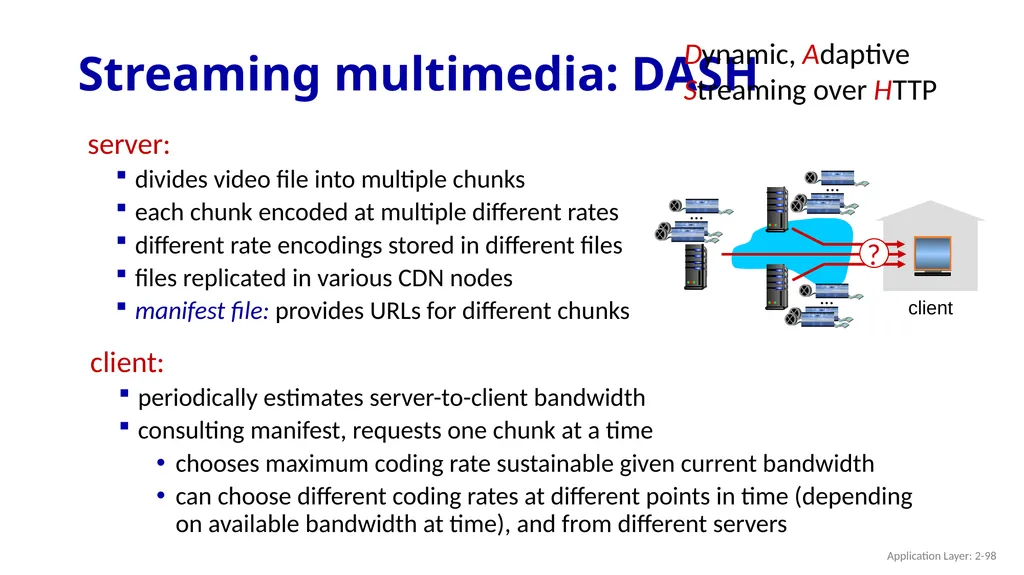
Streaming multimedia: DASH server:
divides video file into multiple chunks
each chunk encoded at multiple different rates
different rate encodings stored in different files
files replicated in various CDN nodes
manifest file: provides URLs for different chunks client client:
periodically estimates server-to-client bandwidth
consulting manifest, requests one chunk at a time
chooses maximum coding rate sustainable given current bandwidth
can choose different coding rates at different points in time (depending on available bandwidth at time), and from different servers Dynamic, Adaptive Streaming over HTTP Application Layer: 2-98<br>
divides video file into multiple chunks
each chunk encoded at multiple different rates
different rate encodings stored in different files
files replicated in various CDN nodes
manifest file: provides URLs for different chunks client client:
periodically estimates server-to-client bandwidth
consulting manifest, requests one chunk at a time
chooses maximum coding rate sustainable given current bandwidth
can choose different coding rates at different points in time (depending on available bandwidth at time), and from different servers Dynamic, Adaptive Streaming over HTTP Application Layer: 2-98<br>
99
Streaming multimedia: DASH “intelligence” at client: client determines
when to request chunk (so that buffer starvation, or overflow does not occur)
what encoding rate to request (higher quality when more bandwidth available) where to request chunk (can request from URL server that is “close” to client or has high available bandwidth) Streaming video = encoding + DASH + playout buffering client Application Layer: 2-99<br>
when to request chunk (so that buffer starvation, or overflow does not occur)
what encoding rate to request (higher quality when more bandwidth available) where to request chunk (can request from URL server that is “close” to client or has high available bandwidth) Streaming video = encoding + DASH + playout buffering client Application Layer: 2-99<br>
100
Content distribution networks (CDNs) challenge: how to stream content (selected from millions of videos) to hundreds of thousands of simultaneous users? option 1: single, large “mega-server”
single point of failure
point of network congestion
long (and possibly congested) path to distant clients ….quite simply: this solution doesn’t scale Application Layer: 2-100<br>
single point of failure
point of network congestion
long (and possibly congested) path to distant clients ….quite simply: this solution doesn’t scale Application Layer: 2-100<br>
101
Content distribution networks (CDNs) challenge: how to stream content (selected from millions of videos) to hundreds of thousands of simultaneous users? enter deep: push CDN servers deep into many access networks
close to users
Akamai: 240,000 servers deployed
in > 120 countries (2015) option 2: store/serve multiple copies of videos at multiple geographically distributed sites (CDN) bring home: smaller number (10’s) of larger clusters in POPs near access nets
used by Limelight Application Layer: 2-101<br>
close to users
Akamai: 240,000 servers deployed
in > 120 countries (2015) option 2: store/serve multiple copies of videos at multiple geographically distributed sites (CDN) bring home: smaller number (10’s) of larger clusters in POPs near access nets
used by Limelight Application Layer: 2-101<br>
102
Akamai today: Transport Layer: 3-102 Source: https://networkingchannel.eu/living-on-the-edge-for-a-quarter-century-an-akamai-retrospective-downloads/<br>
103
subscriber requests content, service provider returns manifest How does Netflix work? Netflix: stores copies of content (e.g., MADMEN) at its (worldwide) OpenConnect CDN nodes using manifest, client retrieves content at highest supportable rate may choose different rate or copy if network path congested Application Layer: 2-103<br>
104
OTT challenges: coping with a congested Internet from the “edge”
what content to place in which CDN node?
from which CDN node to retrieve content? At which rate? OTT: “over the top” Content distribution networks (CDNs) Application Layer: 2-104<br>
what content to place in which CDN node?
from which CDN node to retrieve content? At which rate? OTT: “over the top” Content distribution networks (CDNs) Application Layer: 2-104<br>
105
Application Layer: Overview Principles of network applications
Web and HTTP
E-mail, SMTP, IMAP
The Domain Name System DNS P2P applications
video streaming and content distribution networks
socket programming with UDP and TCP Application Layer: 2-105<br>
Web and HTTP
E-mail, SMTP, IMAP
The Domain Name System DNS P2P applications
video streaming and content distribution networks
socket programming with UDP and TCP Application Layer: 2-105<br>
106
Socket programming goal: learn how to build client/server applications that communicate using sockets
socket: door between application process and end-end-transport protocol Internet controlled
by OS controlled by
app developer transport application physical link network process transport application physical link network process Application Layer: 2-106<br>
socket: door between application process and end-end-transport protocol Internet controlled
by OS controlled by
app developer transport application physical link network process transport application physical link network process Application Layer: 2-106<br>
107
Socket programming Two socket types for two transport services:
UDP: unreliable datagram
TCP: reliable, byte stream-oriented Application Example:
client reads a line of characters (data) from its keyboard and sends data to server
server receives the data and converts characters to uppercase
server sends modified data to client
client receives modified data and displays line on its screen Application Layer: 2-107<br>
UDP: unreliable datagram
TCP: reliable, byte stream-oriented Application Example:
client reads a line of characters (data) from its keyboard and sends data to server
server receives the data and converts characters to uppercase
server sends modified data to client
client receives modified data and displays line on its screen Application Layer: 2-107<br>
108
Socket programming with UDP UDP: no “connection” between client and server:
no handshaking before sending data
sender explicitly attaches IP destination address and port # to each packet
receiver extracts sender IP address and port# from received packet UDP: transmitted data may be lost or received out-of-order
Application viewpoint:
UDP provides unreliable transfer of groups of bytes (“datagrams”) between client and server processes Application Layer: 2-108<br>
no handshaking before sending data
sender explicitly attaches IP destination address and port # to each packet
receiver extracts sender IP address and port# from received packet UDP: transmitted data may be lost or received out-of-order
Application viewpoint:
UDP provides unreliable transfer of groups of bytes (“datagrams”) between client and server processes Application Layer: 2-108<br>
109
Client/server socket interaction: UDP create socket, port= x: serverSocket =
socket(AF_INET,SOCK_DGRAM) server (running on serverIP) client Application Layer: 2-109<br>
socket(AF_INET,SOCK_DGRAM) server (running on serverIP) client Application Layer: 2-109<br>
110
Example app: UDP client from socket import *
serverName = 'hostname'
serverPort = 12000
clientSocket = socket(AF_INET,
SOCK_DGRAM)
message = input('Input lowercase sentence:')
clientSocket.sendto(message.encode(),
(serverName, serverPort))
modifiedMessage, serverAddress =
clientSocket.recvfrom(2048)
print(modifiedMessage.decode())
clientSocket.close() Python UDPClient Application Layer: 2-110 Note: this code update (2023) to Python 3<br>
serverName = 'hostname'
serverPort = 12000
clientSocket = socket(AF_INET,
SOCK_DGRAM)
message = input('Input lowercase sentence:')
clientSocket.sendto(message.encode(),
(serverName, serverPort))
modifiedMessage, serverAddress =
clientSocket.recvfrom(2048)
print(modifiedMessage.decode())
clientSocket.close() Python UDPClient Application Layer: 2-110 Note: this code update (2023) to Python 3<br>
111
Example app: UDP server Python UDPServer from socket import *
serverPort = 12000
serverSocket = socket(AF_INET, SOCK_DGRAM)
serverSocket.bind(('', serverPort))
print('The server is ready to receive')
while True:
message, clientAddress = serverSocket.recvfrom(2048)
modifiedMessage = message.decode().upper()
serverSocket.sendto(modifiedMessage.encode(),
clientAddress) Application Layer: 2-111 Note: this code update (2023) to Python 3<br>
serverPort = 12000
serverSocket = socket(AF_INET, SOCK_DGRAM)
serverSocket.bind(('', serverPort))
print('The server is ready to receive')
while True:
message, clientAddress = serverSocket.recvfrom(2048)
modifiedMessage = message.decode().upper()
serverSocket.sendto(modifiedMessage.encode(),
clientAddress) Application Layer: 2-111 Note: this code update (2023) to Python 3<br>
112
Socket programming with TCP Client must contact server
server process must first be running
server must have created socket (door) that welcomes client’s contact
Client contacts server by:
Creating TCP socket, specifying IP address, port number of server process
when client creates socket: client TCP establishes connection to server TCP when contacted by client, server TCP creates new socket for server process to communicate with that particular client
allows server to talk with multiple clients
client source port # and IP address used to distinguish clients (more in Chap 3) Application Layer: 2-112<br>
server process must first be running
server must have created socket (door) that welcomes client’s contact
Client contacts server by:
Creating TCP socket, specifying IP address, port number of server process
when client creates socket: client TCP establishes connection to server TCP when contacted by client, server TCP creates new socket for server process to communicate with that particular client
allows server to talk with multiple clients
client source port # and IP address used to distinguish clients (more in Chap 3) Application Layer: 2-112<br>
113
Client/server socket interaction: TCP server (running on hostid) client Application Layer: 2-113<br>
114
Example app: TCP client from socket import *
serverName = 'servername'
serverPort = 12000
clientSocket = socket(AF_INET, SOCK_STREAM)
clientSocket.connect((serverName,serverPort))
sentence = input('Input lowercase sentence:')
clientSocket.send(sentence.encode())
modifiedSentence = clientSocket.recv(1024)
print ('From Server:', modifiedSentence.decode())
clientSocket.close() Python TCPClient Application Layer: 2-114 Note: this code update (2023) to Python 3<br>
serverName = 'servername'
serverPort = 12000
clientSocket = socket(AF_INET, SOCK_STREAM)
clientSocket.connect((serverName,serverPort))
sentence = input('Input lowercase sentence:')
clientSocket.send(sentence.encode())
modifiedSentence = clientSocket.recv(1024)
print ('From Server:', modifiedSentence.decode())
clientSocket.close() Python TCPClient Application Layer: 2-114 Note: this code update (2023) to Python 3<br>
115
Example app: TCP server from socket import *
serverPort = 12000
serverSocket = socket(AF_INET,SOCK_STREAM)
serverSocket.bind(('',serverPort))
serverSocket.listen(1)
print('The server is ready to receive')
while True:
connectionSocket, addr = serverSocket.accept()
sentence = connectionSocket.recv(1024).decode()
capitalizedSentence = sentence.upper()
connectionSocket.send(capitalizedSentence.
encode())
connectionSocket.close() Python TCPServer Application Layer: 2-115 Note: this code update (2023) to Python 3<br>
serverPort = 12000
serverSocket = socket(AF_INET,SOCK_STREAM)
serverSocket.bind(('',serverPort))
serverSocket.listen(1)
print('The server is ready to receive')
while True:
connectionSocket, addr = serverSocket.accept()
sentence = connectionSocket.recv(1024).decode()
capitalizedSentence = sentence.upper()
connectionSocket.send(capitalizedSentence.
encode())
connectionSocket.close() Python TCPServer Application Layer: 2-115 Note: this code update (2023) to Python 3<br>
116
Chapter 2: Summary application architectures
client-server
P2P
application service requirements:
reliability, bandwidth, delay
Internet transport service model
connection-oriented, reliable: TCP
unreliable, datagrams: UDP our study of network application layer is now complete! specific protocols:
HTTP
SMTP, IMAP
DNS
P2P: BitTorrent
video streaming, CDNs
socket programming:
TCP, UDP sockets Application Layer: 2-116<br>
client-server
P2P
application service requirements:
reliability, bandwidth, delay
Internet transport service model
connection-oriented, reliable: TCP
unreliable, datagrams: UDP our study of network application layer is now complete! specific protocols:
HTTP
SMTP, IMAP
DNS
P2P: BitTorrent
video streaming, CDNs
socket programming:
TCP, UDP sockets Application Layer: 2-116<br>
117
Chapter 2: Summary Most importantly: learned about protocols! typical request/reply message exchange:
client requests info or service
server responds with data, status code
message formats:
headers: fields giving info about data
data: info(payload) being communicated important themes:
centralized vs. decentralized
stateless vs. stateful
scalability
reliable vs. unreliable message transfer
“complexity at network edge” Application Layer: 2-117<br>
client requests info or service
server responds with data, status code
message formats:
headers: fields giving info about data
data: info(payload) being communicated important themes:
centralized vs. decentralized
stateless vs. stateful
scalability
reliable vs. unreliable message transfer
“complexity at network edge” Application Layer: 2-117<br>
118
Application Layer: 2-118 Additional Chapter 2 slides JFK note: the timeout slides are important IMHO if one is doing a programming assignment (especially an RDT programming assignment in Chapter 3), since students will need to use timers in their code, and the TRY/EXCEPT is really the easiest way to do this. I introduce this here in Chapter 2 with the socket programming assignment since it teaches something (how to handle exceptions/timeouts), and lets students learn/practice that before doing the RDT programming assignment, which is harder<br>
119
Socket programming: waiting for multiple events Application Layer: 2-119 sometimes a program must wait for one of several events to happen, e.g.,:
wait for either (i) a reply from another end of the socket, or (ii) timeout: timer
wait for replies from several different open sockets: select(), multithreading
timeouts are used extensively in networking
using timeouts with Python socket: socket() throw exception Show example: connect wordle client to random port, it will freeze. handle exception<br>
wait for either (i) a reply from another end of the socket, or (ii) timeout: timer
wait for replies from several different open sockets: select(), multithreading
timeouts are used extensively in networking
using timeouts with Python socket: socket() throw exception Show example: connect wordle client to random port, it will freeze. handle exception<br>
120
Application Layer: 2-120 s.settimeout(30) Set a timeout on all future socket operations of that specific socket! How Python socket.settimeout() works?<br>
121
Execute a block of code, and handle “exceptions” that may occur when executing that block of code Python try-except block try:
<do something>
except <exception>:
<handle the exception> Executing this try code block may cause exception(s) to catch. If an exception is raised, execution jumps from jumps directly into except code block this except code block is only executed if an <exception> occurred in the try code block (note: except block is required with a try block)<br>
122
Socket programming: socket timeouts Application Layer: 2-122<br>
123
Sample SMTP interaction Application Layer: 2-123 S: 220 hamburger.edu
C: HELO crepes.fr
S: 250 Hello crepes.fr, pleased to meet you
C: MAIL FROM: <alice@crepes.fr>
S: 250 alice@crepes.fr... Sender ok
C: RCPT TO: <bob@hamburger.edu>
S: 250 bob@hamburger.edu ... Recipient ok
C: DATA
S: 354 Enter mail, end with "." on a line by itself
C: Do you like ketchup?
C: How about pickles?
C: .
S: 250 Message accepted for delivery
C: QUIT
S: 221 hamburger.edu closing connection<br>
C: HELO crepes.fr
S: 250 Hello crepes.fr, pleased to meet you
C: MAIL FROM: <alice@crepes.fr>
S: 250 alice@crepes.fr... Sender ok
C: RCPT TO: <bob@hamburger.edu>
S: 250 bob@hamburger.edu ... Recipient ok
C: DATA
S: 354 Enter mail, end with "." on a line by itself
C: Do you like ketchup?
C: How about pickles?
C: .
S: 250 Message accepted for delivery
C: QUIT
S: 221 hamburger.edu closing connection<br>
124
CDN content access: a closer look netcinema.com KingCDN.com 1. Bob gets URL for video http://netcinema.com/6Y7B23V
from netcinema.com web page 2. resolve http://netcinema.com/6Y7B23V
via Bob’s local DNS netcinema’s
authoratative DNS 3. netcinema’s DNS returns CNAME for
http://KingCDN.com/NetC6y&B23V 6. request video from
KINGCDN server,
streamed via HTTP KingCDN
authoritative DNS Bob’s
local DNS
server Bob (client) requests video http://netcinema.com/6Y7B23V
video stored in CDN at http://KingCDN.com/NetC6y&B23V Application Layer: 2-124<br>
from netcinema.com web page 2. resolve http://netcinema.com/6Y7B23V
via Bob’s local DNS netcinema’s
authoratative DNS 3. netcinema’s DNS returns CNAME for
http://KingCDN.com/NetC6y&B23V 6. request video from
KINGCDN server,
streamed via HTTP KingCDN
authoritative DNS Bob’s
local DNS
server Bob (client) requests video http://netcinema.com/6Y7B23V
video stored in CDN at http://KingCDN.com/NetC6y&B23V Application Layer: 2-124<br>
125
Case study: Netflix Bob manages Netflix account Netflix registration,
accounting servers Amazon cloud Bob browses
Netflix video Manifest file, requested
returned for
specific video DASH server selected, contacted, streaming begins upload copies of multiple versions of video to CDN servers Application Layer: 2-125<br>
accounting servers Amazon cloud Bob browses
Netflix video Manifest file, requested
returned for
specific video DASH server selected, contacted, streaming begins upload copies of multiple versions of video to CDN servers Application Layer: 2-125<br>