
CS/SE 157B Database Management Systems II April 5
PT
Published · 35 slides · 0 views

1 / 1

Description
CSSE 157B Database Management Systems II April 5 Class Meeting Department of Computer Science San Jose State University Spring 2018 Instructor: Ron Mak www.cs.sjsu.edumak 1 Assignment 6: MongoDB Create a MongoDB database and use its
Related Topics
Share
Embed code
Download this presentation From Below
"CS/SE 157B Database Management Systems II April 5" is the property of its rightful owner. Permission is granted to download and print the materials on this website for personal, non-commercial use only, and to display it on your personal computer provided you do not modify the materials and that you retain all copyright notices contained in the materials. By downloading content from our website, you accept the terms of this agreement.
Presentation Transcript
01
CS/SE 157B
Database Management Systems II
April 5 Class Meeting Department of Computer Science
San Jose State University
Spring 2018
Instructor: Ron Mak
www.cs.sjsu.edu/~mak 1<br>
www.cs.sjsu.edu/~mak 1<br>
02
Assignment #6: MongoDB Create a MongoDB database and use its JavaScript API to perform CRUD operations.
At least 4 different create operations.
Create (insert) documents into collections.
Note that the first time you insert a document into a collection, that operation also creates the collection.
At least 8 different read (find) operations.
Output with “pretty” format.
At least 4 different update operations.
At least 4 different delete operations.
Due Friday, April 12
Official write-up coming soon. 2<br>
At least 4 different create operations.
Create (insert) documents into collections.
Note that the first time you insert a document into a collection, that operation also creates the collection.
At least 8 different read (find) operations.
Output with “pretty” format.
At least 4 different update operations.
At least 4 different delete operations.
Due Friday, April 12
Official write-up coming soon. 2<br>
03
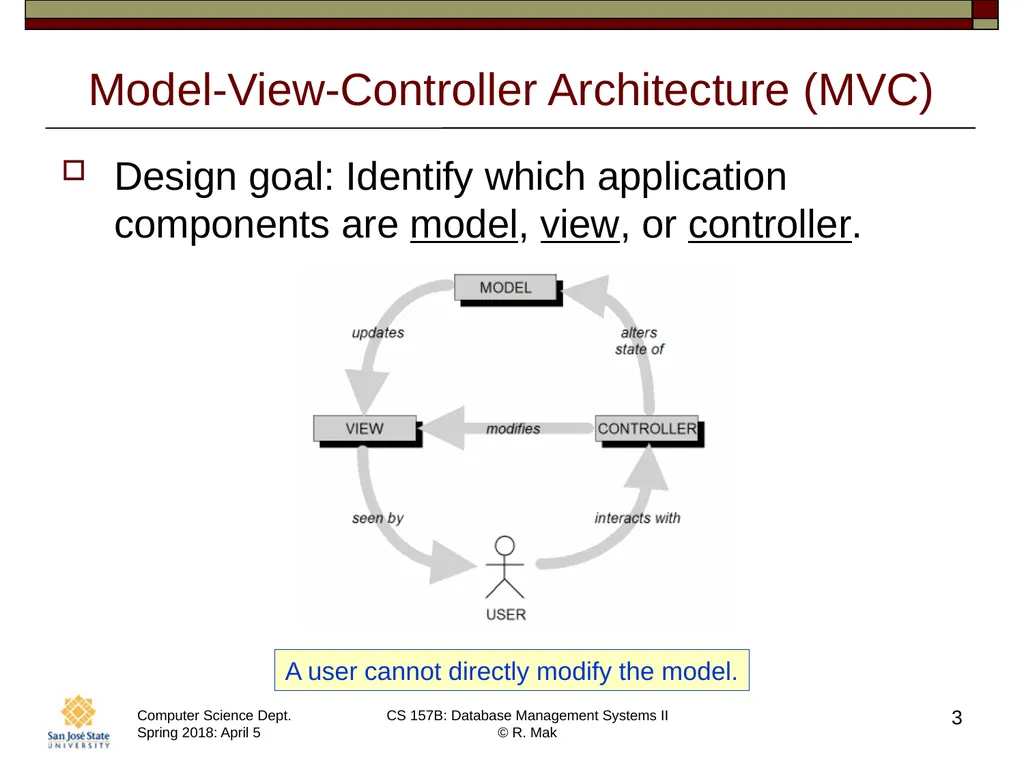
Model-View-Controller Architecture (MVC) Design goal: Identify which application components are model, view, or controller. 3 A user cannot directly modify the model.<br>
04
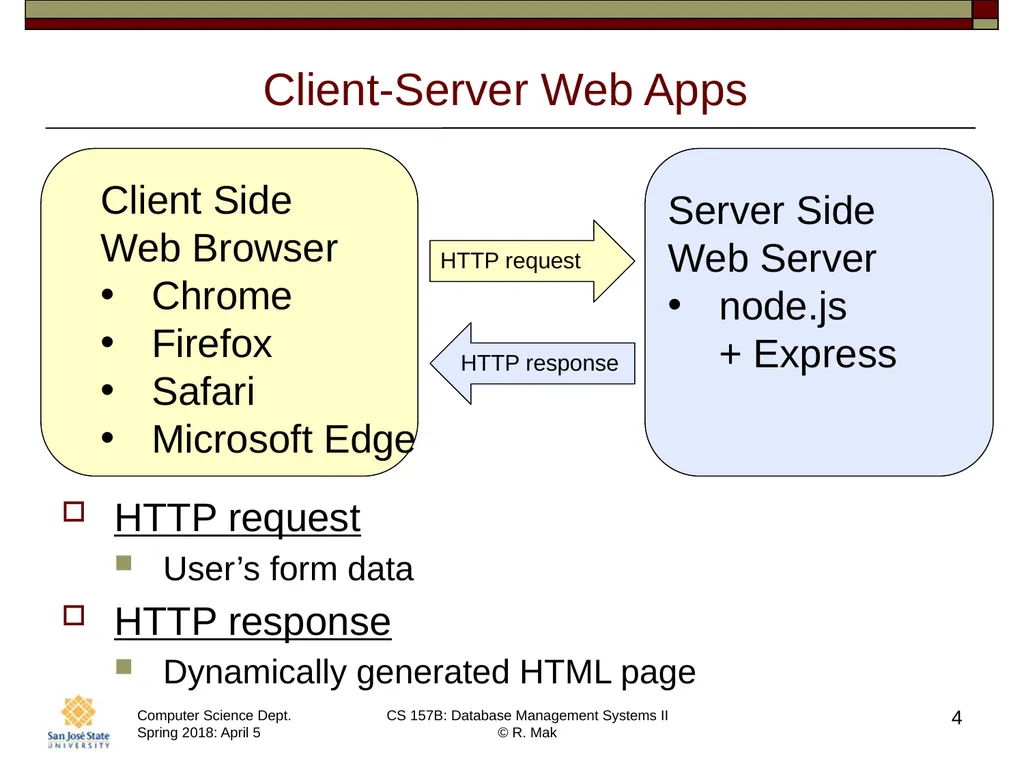
Client-Server Web Apps 4 HTTP request HTTP response HTTP request
User’s form data
HTTP response
Dynamically generated HTML page<br>
User’s form data
HTTP response
Dynamically generated HTML page<br>
05
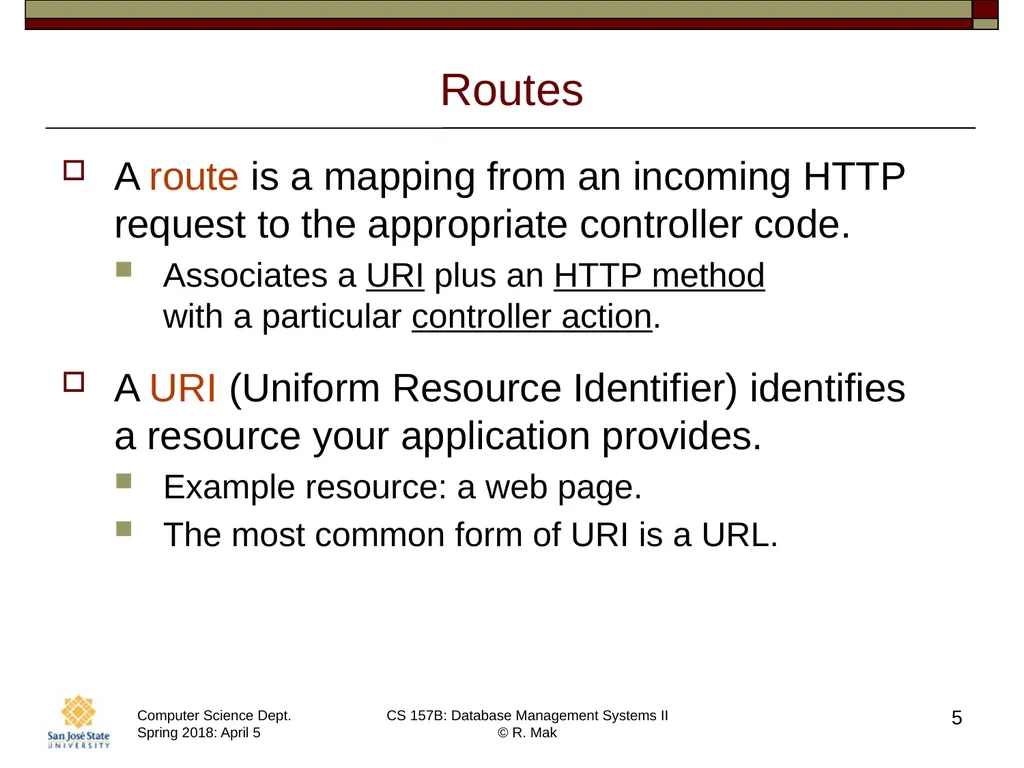
Routes A route is a mapping from an incoming HTTP request to the appropriate controller code.
Associates a URI plus an HTTP method with a particular controller action.
A URI (Uniform Resource Identifier) identifies a resource your application provides.
Example resource: a web page.
The most common form of URI is a URL. 5<br>
Associates a URI plus an HTTP method with a particular controller action.
A URI (Uniform Resource Identifier) identifies a resource your application provides.
Example resource: a web page.
The most common form of URI is a URL. 5<br>
06
HTTP Methods A route is a mapping from an incoming HTTP request to the appropriate controller code.
Associates a URI plus an HTTP method with a particular controller action.
An HTTP method is also called an HTTP verb.
Most widely used HTTP methods in web apps are GET, POST, PUT, and DELETE.
Defined by the HTTP standard. 6<br>
Associates a URI plus an HTTP method with a particular controller action.
An HTTP method is also called an HTTP verb.
Most widely used HTTP methods in web apps are GET, POST, PUT, and DELETE.
Defined by the HTTP standard. 6<br>
07
Serving Web Pages A web server serves web pages.
Displayed on the client side by web browsers.
Web pages can be static or dynamic.
Static web pages: .html
HTML files that the web server reads from disk.
A static page always displays the same content.
Dynamic web pages: .js
Generated by JavaScript code on the server.
Contains dynamic content. 7<br>
Displayed on the client side by web browsers.
Web pages can be static or dynamic.
Static web pages: .html
HTML files that the web server reads from disk.
A static page always displays the same content.
Dynamic web pages: .js
Generated by JavaScript code on the server.
Contains dynamic content. 7<br>
08
node.js The Apache web server is very popular.
It’s the A in LAMP (Linux, Apache, MySQL, PHP).
Programmed with PHP.
Now we will switch to the node.js web server.
A lean and fast web server.
Created in 2009 as an alternative to the Apache web server.
Programmed with JavaScript.
Traditionally, JavaScript is a client-side language for programming web browsers.
Created by NetScape in 1995. 8<br>
It’s the A in LAMP (Linux, Apache, MySQL, PHP).
Programmed with PHP.
Now we will switch to the node.js web server.
A lean and fast web server.
Created in 2009 as an alternative to the Apache web server.
Programmed with JavaScript.
Traditionally, JavaScript is a client-side language for programming web browsers.
Created by NetScape in 1995. 8<br>
09
node.js, cont’d Uses the open-source Google Chrome V8 JavaScript engine.
Just-in-time compilation, automatic inlining, dynamic code optimization, etc.
Single-threaded event loop handles connections.
Each connection invokes a JavaScript callback function.
Handle non-blocking I/O.
Spawn threads from a thread pool. 9<br>
Just-in-time compilation, automatic inlining, dynamic code optimization, etc.
Single-threaded event loop handles connections.
Each connection invokes a JavaScript callback function.
Handle non-blocking I/O.
Spawn threads from a thread pool. 9<br>
10
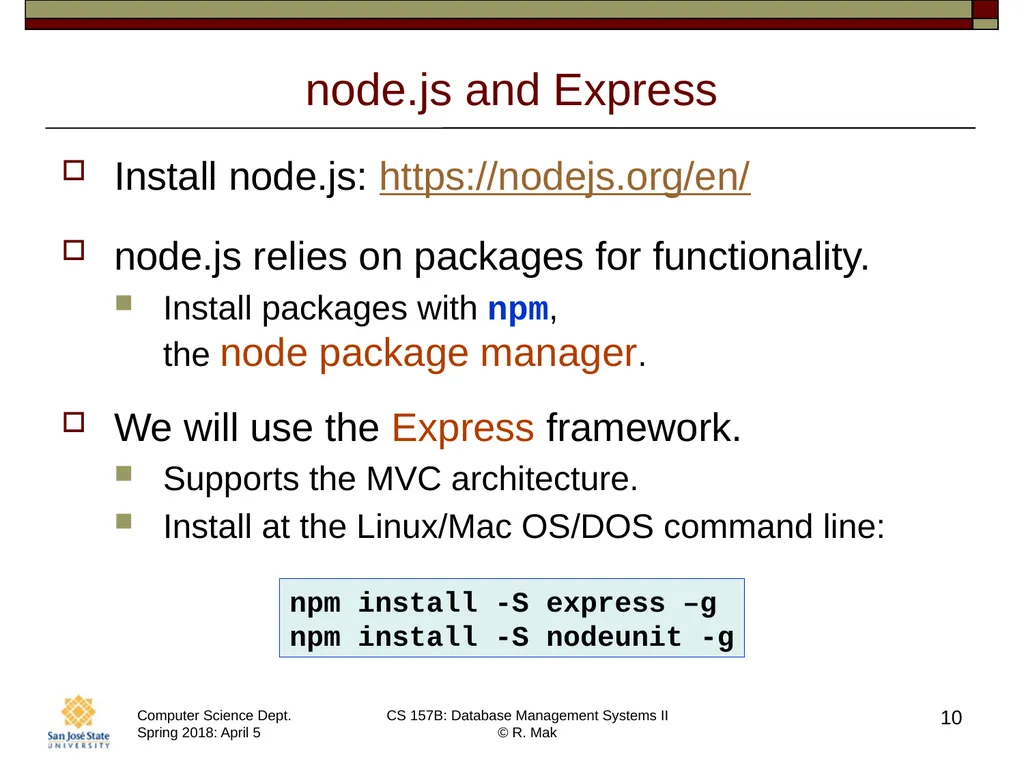
node.js and Express Install node.js: https://nodejs.org/en/
node.js relies on packages for functionality.
Install packages with npm, the node package manager.
We will use the Express framework.
Supports the MVC architecture.
Install at the Linux/Mac OS/DOS command line: 10 npm install -S express –g
npm install -S nodeunit -g<br>
node.js relies on packages for functionality.
Install packages with npm, the node package manager.
We will use the Express framework.
Supports the MVC architecture.
Install at the Linux/Mac OS/DOS command line: 10 npm install -S express –g
npm install -S nodeunit -g<br>
11
Form Data A user can input data into an HTML form displayed on a client-side web browser.
When the user presses a Submit button, the browser sends to form data to a specified JavaScript program running on the web server.
The JavaScript program can use the data to
Query the back-end database.
Generate a new HTML page to send to the user’s client-side web browser. 11<br>
When the user presses a Submit button, the browser sends to form data to a specified JavaScript program running on the web server.
The JavaScript program can use the data to
Query the back-end database.
Generate a new HTML page to send to the user’s client-side web browser. 11<br>
12
Ways to Send Form Data A browser sends form data to a JavaScript program on the web server when the user presses the Submit button.
The action attribute of the <FORM> tag indicates where to send the form data.
Two HTTP methods to send form data: GET and POST. 12<br>
The action attribute of the <FORM> tag indicates where to send the form data.
Two HTTP methods to send form data: GET and POST. 12<br>
13
Suggested Ways to Use GET and POST Use GET to request a form
from the web server.
The web server responds by sending the web page containing the form.
Use POST to send form data to the web server.
The web server processes the data and responds with a dynamically generated web page. 13<br>
The web server responds by sending the web page containing the form.
Use POST to send form data to the web server.
The web server processes the data and responds with a dynamically generated web page. 13<br>
14
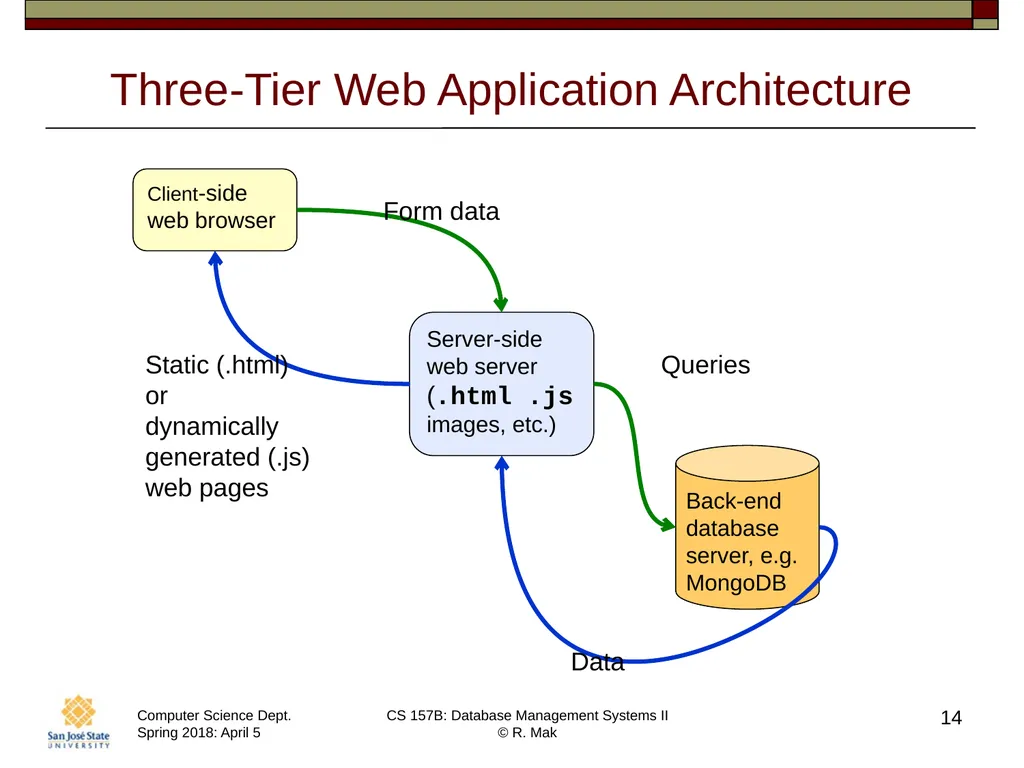
Three-Tier Web Application Architecture 14 Client-side web browser Server-side web server
(.html .js
images, etc.) Form data Static (.html)
or
dynamically
generated (.js)
web pages<br>
(.html .js
images, etc.) Form data Static (.html)
or
dynamically
generated (.js)
web pages<br>
15
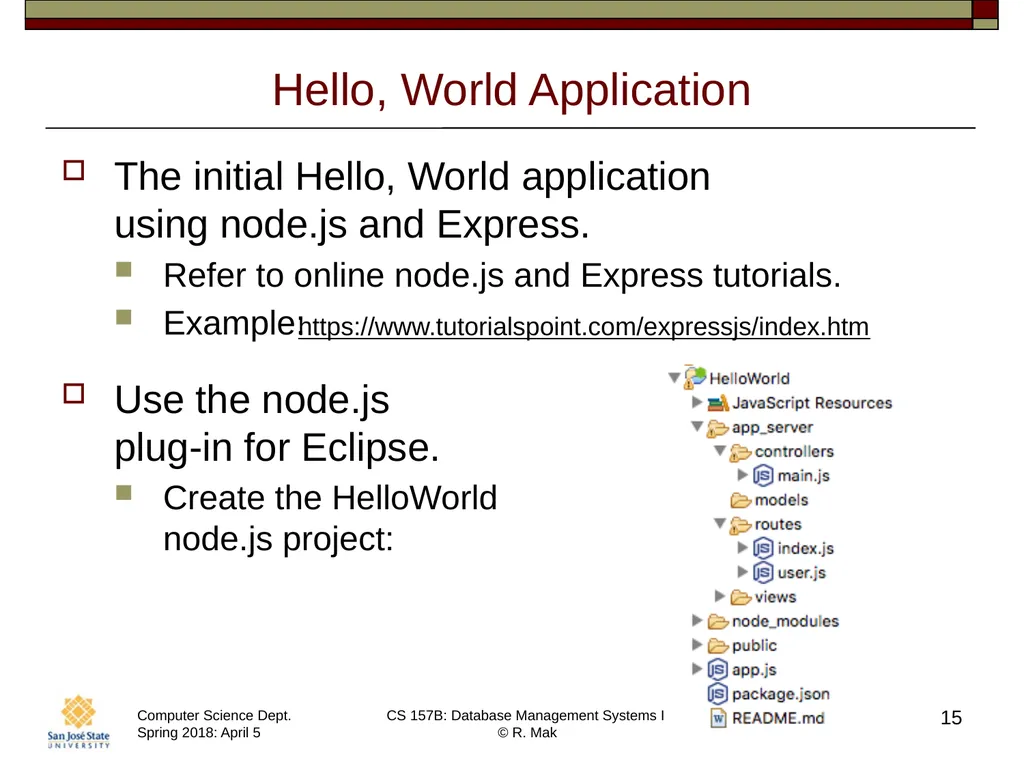
Hello, World Application The initial Hello, World application
using node.js and Express.
Refer to online node.js and Express tutorials.
Example:
Use the node.js plug-in for Eclipse.
Create the HelloWorld node.js project: 15 https://www.tutorialspoint.com/expressjs/index.htm<br>
Refer to online node.js and Express tutorials.
Example:
Use the node.js plug-in for Eclipse.
Create the HelloWorld node.js project: 15 https://www.tutorialspoint.com/expressjs/index.htm<br>
16
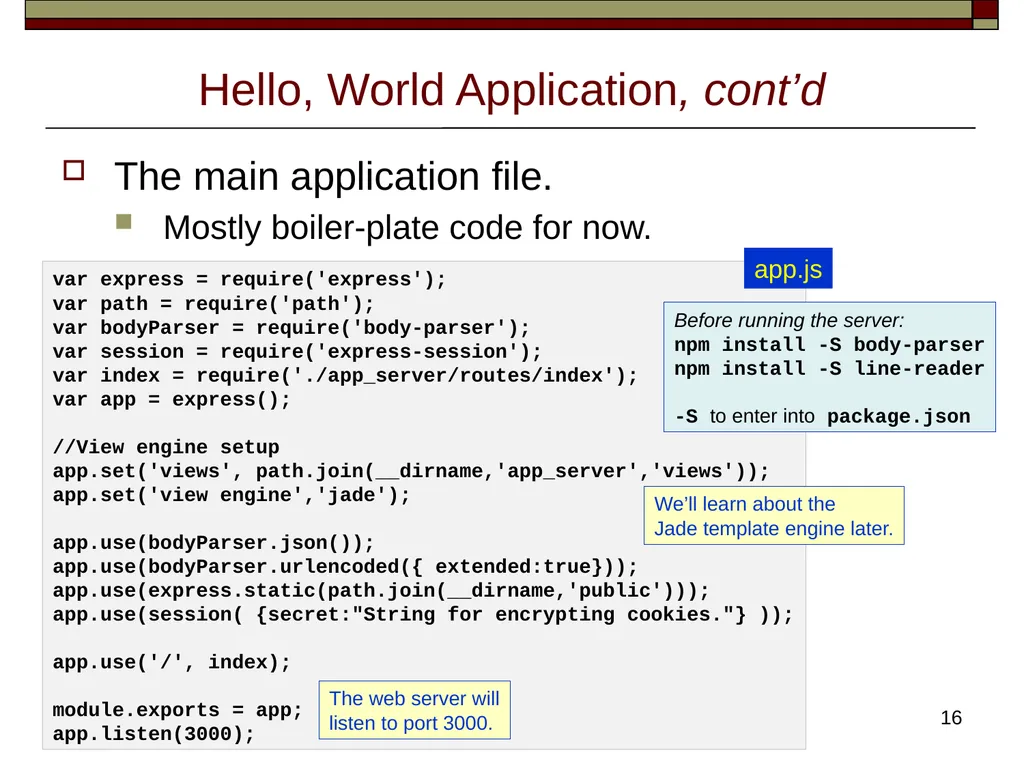
Hello, World Application, cont’d The main application file.
Mostly boiler-plate code for now. 16 var express = require('express');
var path = require('path');
var bodyParser = require('body-parser');
var session = require('express-session');
var index = require('./app_server/routes/index');
var app = express();
//View engine setup
app.set('views', path.join(__dirname,'app_server','views'));
app.set('view engine','jade');
app.use(bodyParser.json());
app.use(bodyParser.urlencoded({ extended:true}));
app.use(express.static(path.join(__dirname,'public')));
app.use(session( {secret:"String for encrypting cookies."} ));
app.use('/', index);
module.exports = app;
app.listen(3000); We’ll learn about the
Jade template engine later. The web server will
listen to port 3000. app.js Before running the server:
npm install -S body-parser
npm install -S line-reader
-S to enter into package.json<br>
Mostly boiler-plate code for now. 16 var express = require('express');
var path = require('path');
var bodyParser = require('body-parser');
var session = require('express-session');
var index = require('./app_server/routes/index');
var app = express();
//View engine setup
app.set('views', path.join(__dirname,'app_server','views'));
app.set('view engine','jade');
app.use(bodyParser.json());
app.use(bodyParser.urlencoded({ extended:true}));
app.use(express.static(path.join(__dirname,'public')));
app.use(session( {secret:"String for encrypting cookies."} ));
app.use('/', index);
module.exports = app;
app.listen(3000); We’ll learn about the
Jade template engine later. The web server will
listen to port 3000. app.js Before running the server:
npm install -S body-parser
npm install -S line-reader
-S to enter into package.json<br>
17
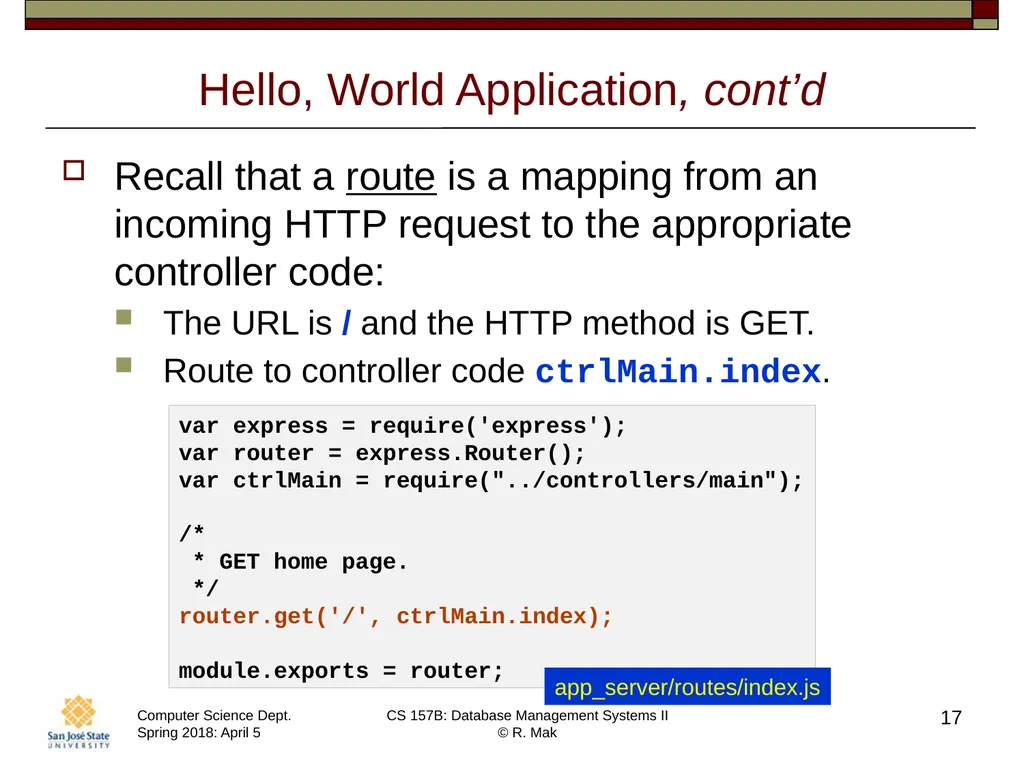
Hello, World Application, cont’d Recall that a route is a mapping from an incoming HTTP request to the appropriate controller code:
The URL is / and the HTTP method is GET.
Route to controller code ctrlMain.index. 17 var express = require('express');
var router = express.Router();
var ctrlMain = require("../controllers/main");
/*
* GET home page.
*/
router.get('/', ctrlMain.index);
module.exports = router; app_server/routes/index.js<br>
The URL is / and the HTTP method is GET.
Route to controller code ctrlMain.index. 17 var express = require('express');
var router = express.Router();
var ctrlMain = require("../controllers/main");
/*
* GET home page.
*/
router.get('/', ctrlMain.index);
module.exports = router; app_server/routes/index.js<br>
18
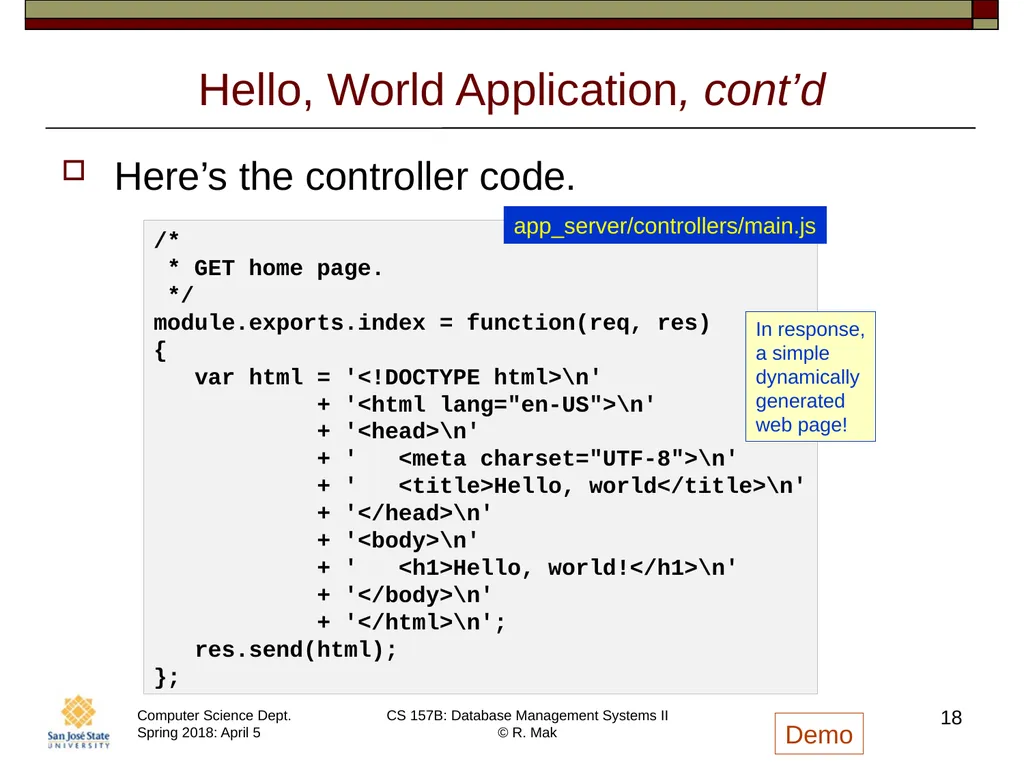
Hello, World Application, cont’d Here’s the controller code. 18 /*
* GET home page.
*/
module.exports.index = function(req, res)
{
var html = '<!DOCTYPE html>\n'
+ '<html lang="en-US">\n'
+ '<head>\n'
+ ' <meta charset="UTF-8">\n'
+ ' <title>Hello, world</title>\n'
+ '</head>\n'
+ '<body>\n'
+ ' <h1>Hello, world!</h1>\n'
+ '</body>\n'
+ '</html>\n';
res.send(html);
}; app_server/controllers/main.js In response,
a simple
dynamically
generated
web page! Demo<br>
* GET home page.
*/
module.exports.index = function(req, res)
{
var html = '<!DOCTYPE html>\n'
+ '<html lang="en-US">\n'
+ '<head>\n'
+ ' <meta charset="UTF-8">\n'
+ ' <title>Hello, world</title>\n'
+ '</head>\n'
+ '<body>\n'
+ ' <h1>Hello, world!</h1>\n'
+ '</body>\n'
+ '</html>\n';
res.send(html);
}; app_server/controllers/main.js In response,
a simple
dynamically
generated
web page! Demo<br>
19
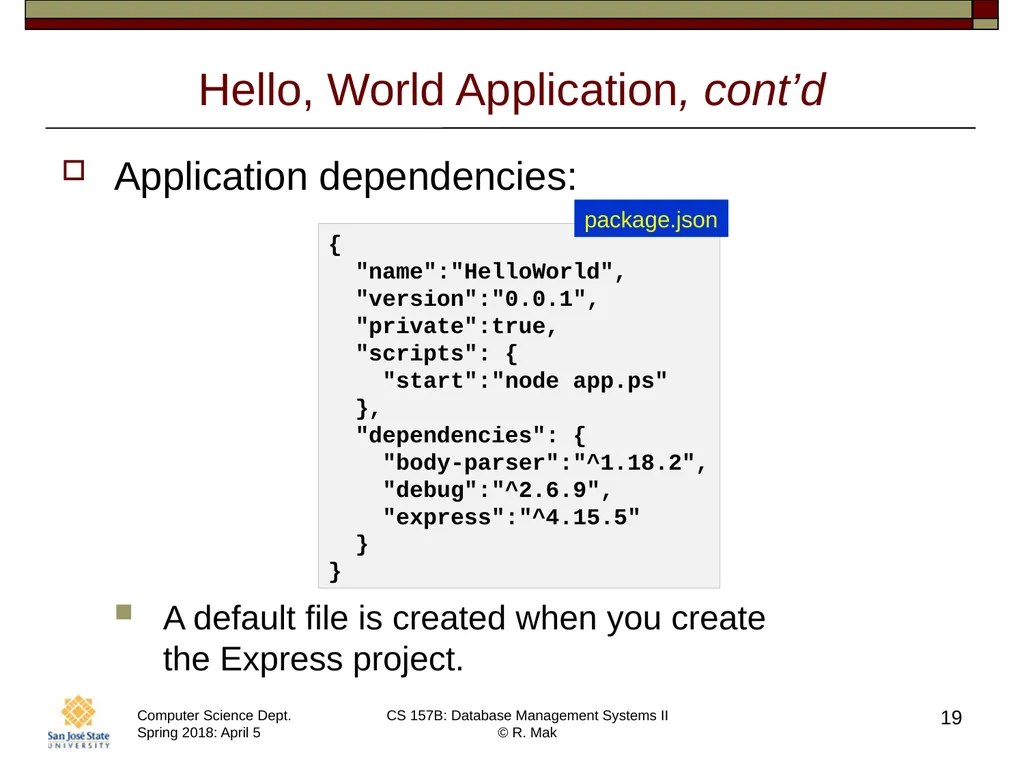
Hello, World Application, cont’d Application dependencies:
A default file is created when you create the Express project. 19 {
"name":"HelloWorld",
"version":"0.0.1",
"private":true,
"scripts": {
"start":"node app.ps"
},
"dependencies": {
"body-parser":"^1.18.2",
"debug":"^2.6.9",
"express":"^4.15.5"
}
} package.json<br>
A default file is created when you create the Express project. 19 {
"name":"HelloWorld",
"version":"0.0.1",
"private":true,
"scripts": {
"start":"node app.ps"
},
"dependencies": {
"body-parser":"^1.18.2",
"debug":"^2.6.9",
"express":"^4.15.5"
}
} package.json<br>
20
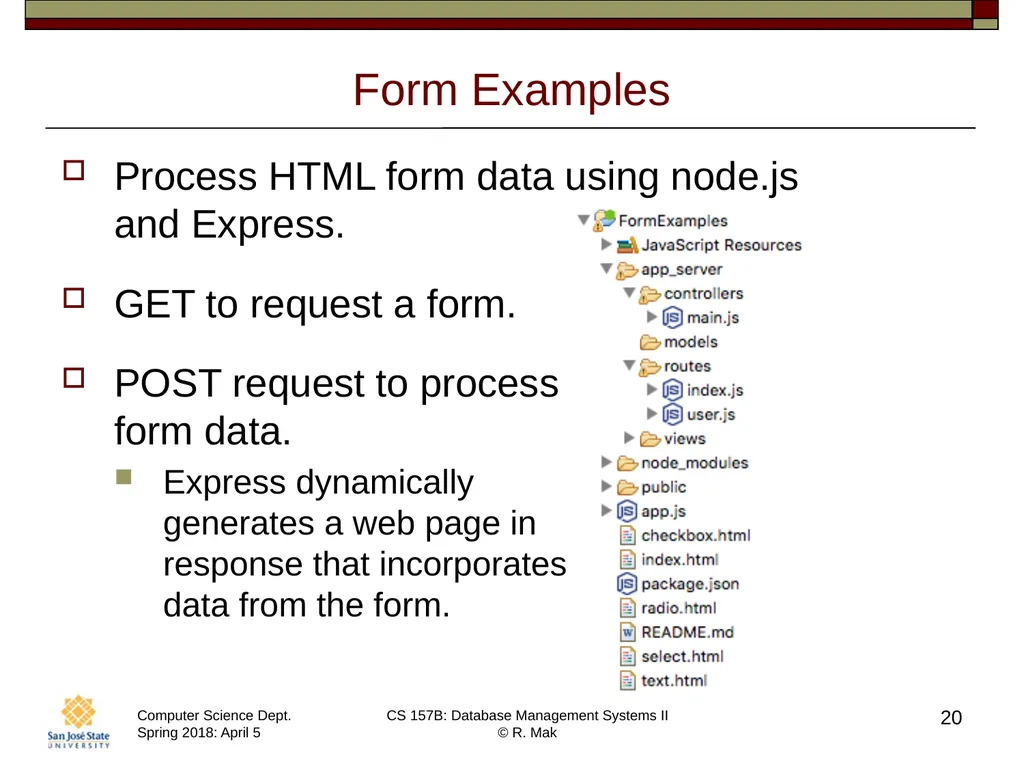
Form Examples Process HTML form data using node.js
and Express.
GET to request a form.
POST request to process form data.
Express dynamically generates a web page in response that incorporates data from the form. 20<br>
GET to request a form.
POST request to process form data.
Express dynamically generates a web page in response that incorporates data from the form. 20<br>
21
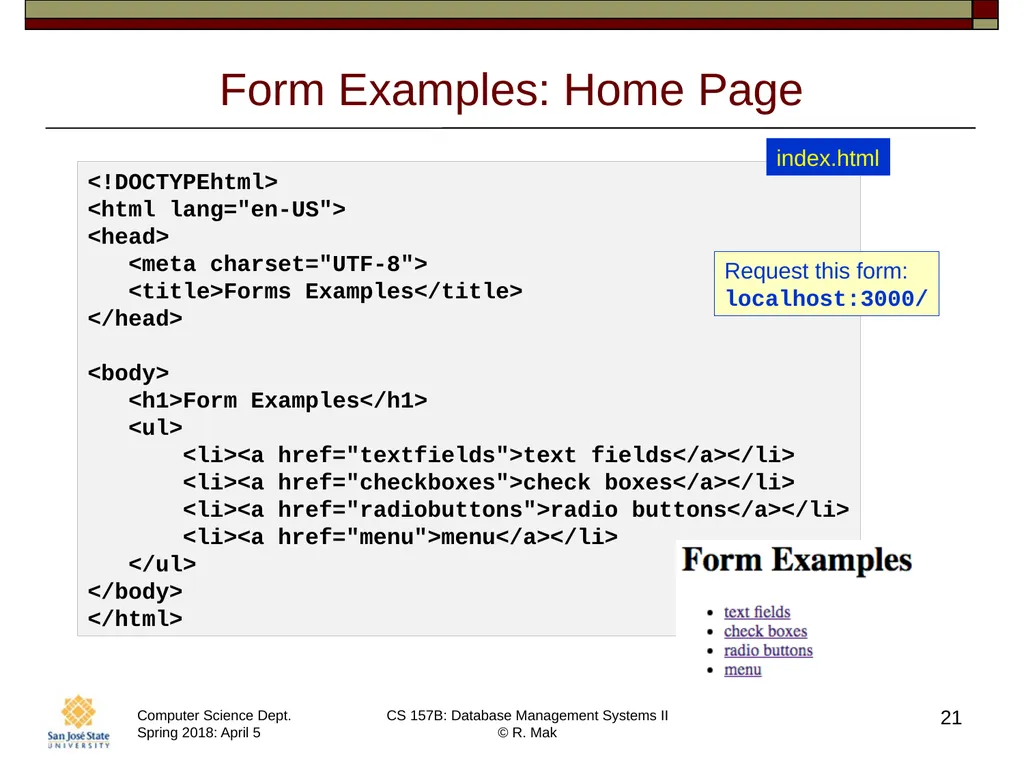
Form Examples: Home Page 21 <!DOCTYPEhtml>
<html lang="en-US">
<head>
<meta charset="UTF-8">
<title>Forms Examples</title>
</head>
<body>
<h1>Form Examples</h1>
<ul>
<li><a href="textfields">text fields</a></li>
<li><a href="checkboxes">check boxes</a></li>
<li><a href="radiobuttons">radio buttons</a></li>
<li><a href="menu">menu</a></li>
</ul>
</body>
</html> index.html Request this form:
localhost:3000/<br>
<html lang="en-US">
<head>
<meta charset="UTF-8">
<title>Forms Examples</title>
</head>
<body>
<h1>Form Examples</h1>
<ul>
<li><a href="textfields">text fields</a></li>
<li><a href="checkboxes">check boxes</a></li>
<li><a href="radiobuttons">radio buttons</a></li>
<li><a href="menu">menu</a></li>
</ul>
</body>
</html> index.html Request this form:
localhost:3000/<br>
22
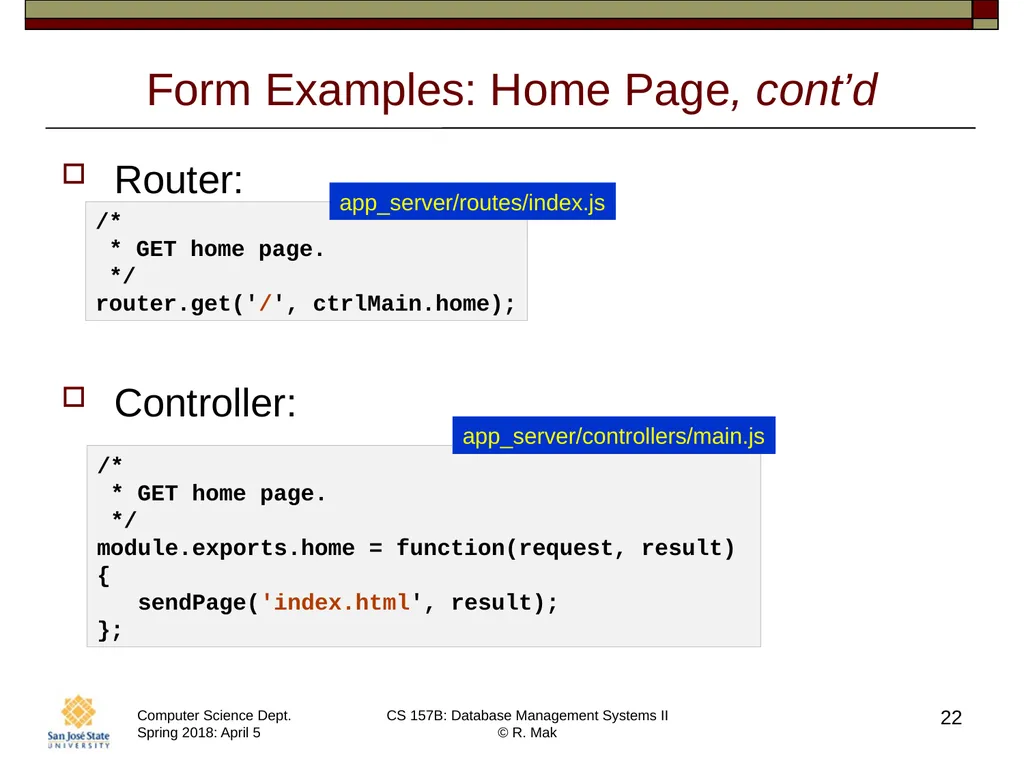
Form Examples: Home Page, cont’d Router:
Controller: 22 /*
* GET home page.
*/
router.get('/', ctrlMain.home); app_server/routes/index.js /*
* GET home page.
*/
module.exports.home = function(request, result)
{
sendPage('index.html', result);
}; app_server/controllers/main.js<br>
Controller: 22 /*
* GET home page.
*/
router.get('/', ctrlMain.home); app_server/routes/index.js /*
* GET home page.
*/
module.exports.home = function(request, result)
{
sendPage('index.html', result);
}; app_server/controllers/main.js<br>
23
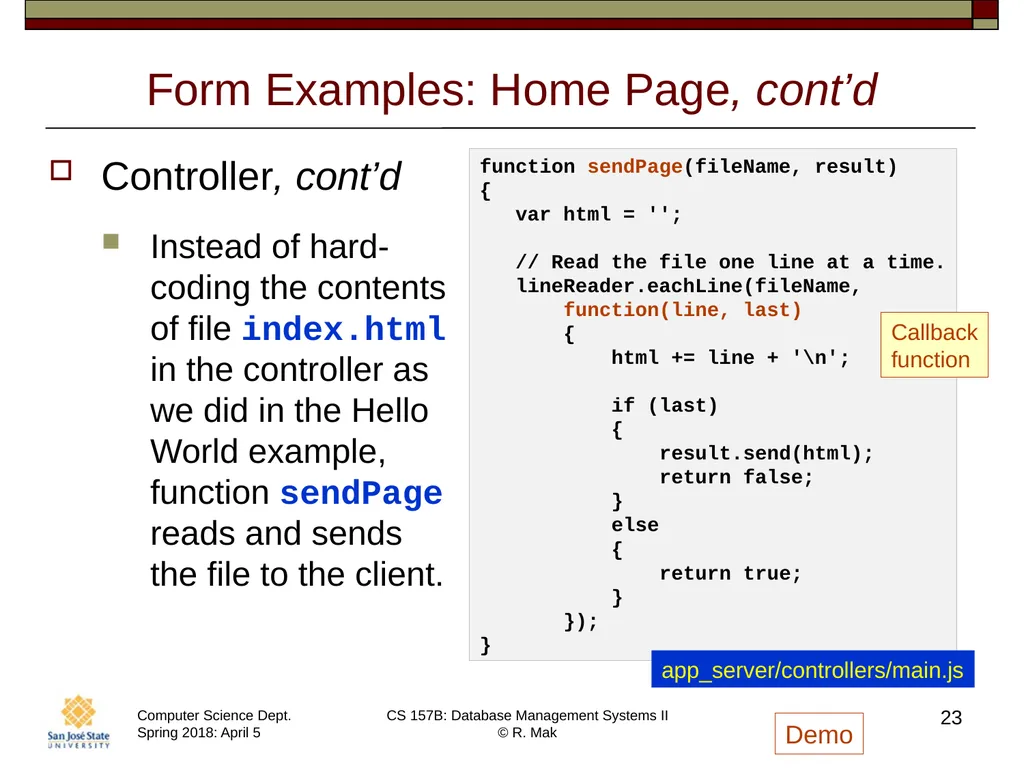
Form Examples: Home Page, cont’d Controller, cont’d
Instead of hard-coding the contents of file index.html in the controller as we did in the Hello World example, function sendPage reads and sends the file to the client. 23 function sendPage(fileName, result)
{
var html = '';
// Read the file one line at a time.
lineReader.eachLine(fileName,
function(line, last)
{
html += line + '\n';
if (last)
{
result.send(html);
return false;
}
else
{
return true;
}
});
} Callback
function app_server/controllers/main.js Demo<br>
Instead of hard-coding the contents of file index.html in the controller as we did in the Hello World example, function sendPage reads and sends the file to the client. 23 function sendPage(fileName, result)
{
var html = '';
// Read the file one line at a time.
lineReader.eachLine(fileName,
function(line, last)
{
html += line + '\n';
if (last)
{
result.send(html);
return false;
}
else
{
return true;
}
});
} Callback
function app_server/controllers/main.js Demo<br>
24
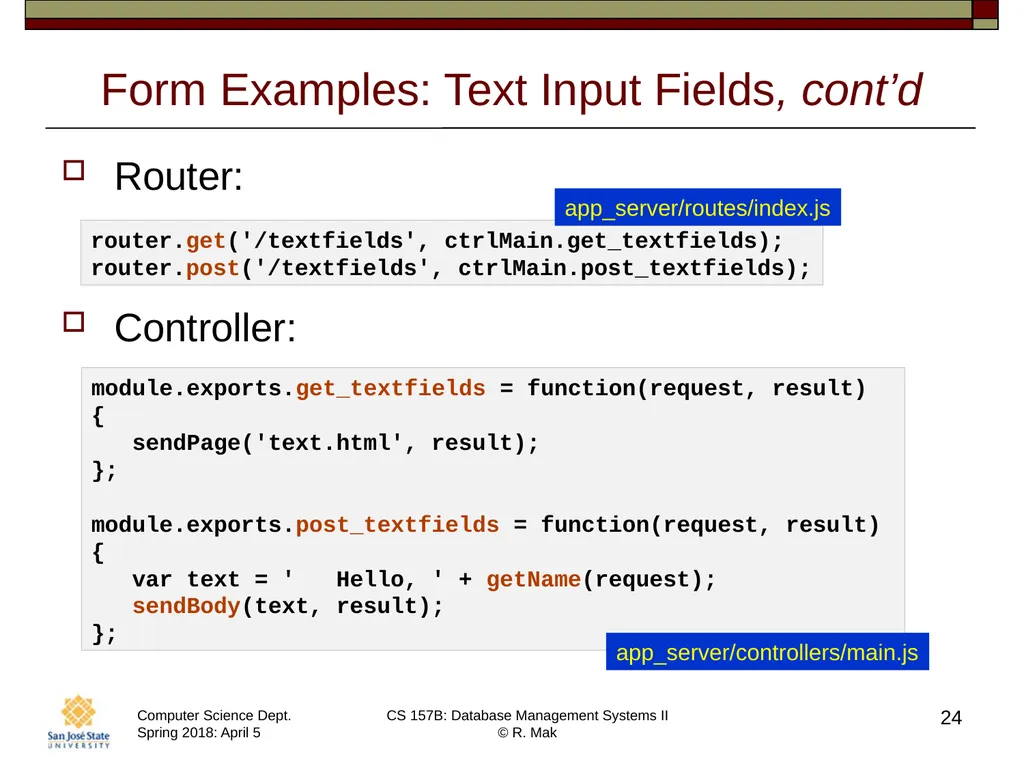
Form Examples: Text Input Fields, cont’d Router:
Controller: 24 router.get('/textfields', ctrlMain.get_textfields); router.post('/textfields', ctrlMain.post_textfields); module.exports.get_textfields = function(request, result)
{
sendPage('text.html', result);
};
module.exports.post_textfields = function(request, result)
{
var text = ' Hello, ' + getName(request);
sendBody(text, result);
}; app_server/controllers/main.js app_server/routes/index.js<br>
Controller: 24 router.get('/textfields', ctrlMain.get_textfields); router.post('/textfields', ctrlMain.post_textfields); module.exports.get_textfields = function(request, result)
{
sendPage('text.html', result);
};
module.exports.post_textfields = function(request, result)
{
var text = ' Hello, ' + getName(request);
sendBody(text, result);
}; app_server/controllers/main.js app_server/routes/index.js<br>
25
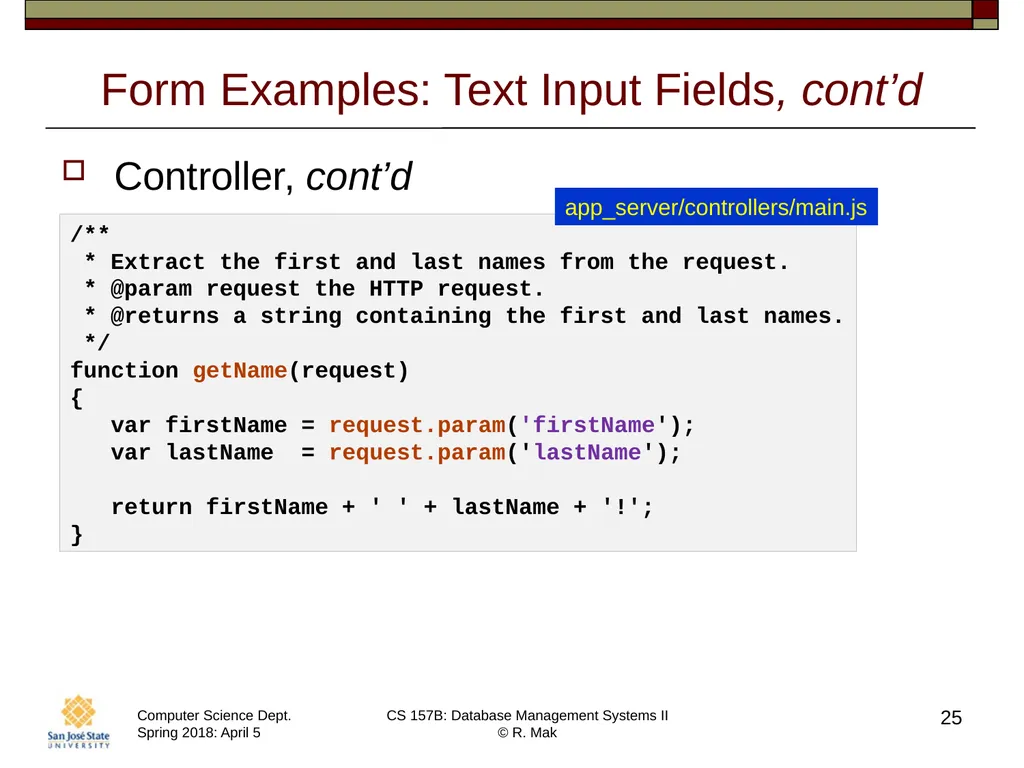
Form Examples: Text Input Fields, cont’d Controller, cont’d 25 /**
* Extract the first and last names from the request.
* @param request the HTTP request.
* @returns a string containing the first and last names.
*/
function getName(request)
{
var firstName = request.param('firstName');
var lastName = request.param('lastName');
return firstName + ' ' + lastName + '!';
} app_server/controllers/main.js<br>
* Extract the first and last names from the request.
* @param request the HTTP request.
* @returns a string containing the first and last names.
*/
function getName(request)
{
var firstName = request.param('firstName');
var lastName = request.param('lastName');
return firstName + ' ' + lastName + '!';
} app_server/controllers/main.js<br>
26
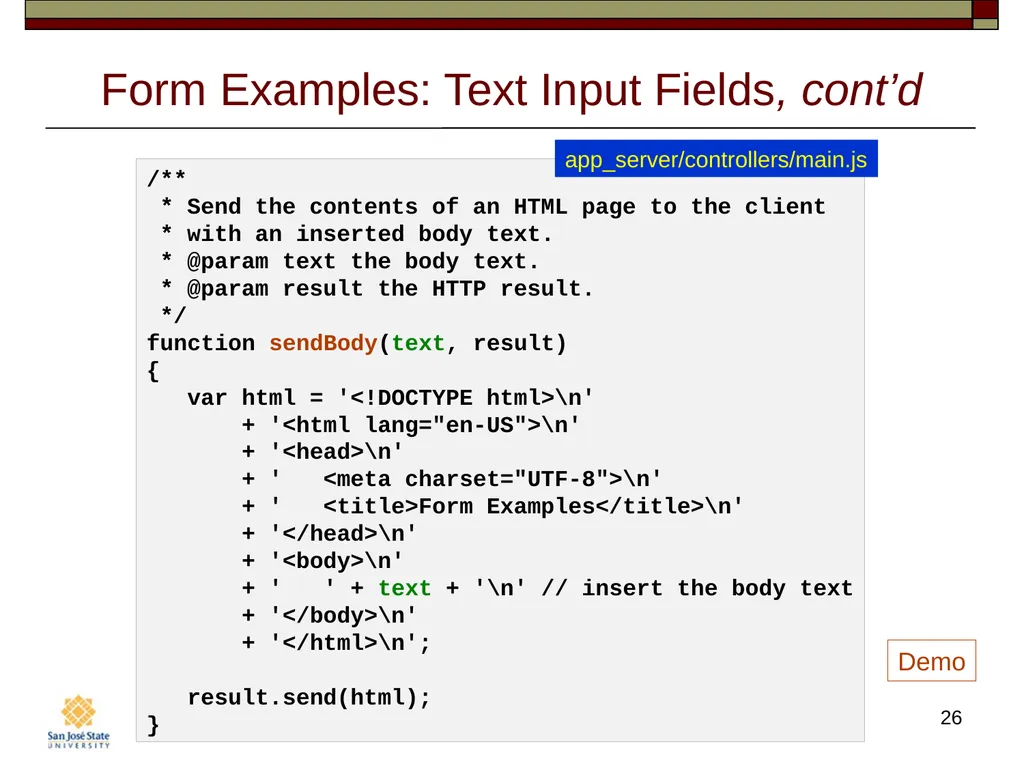
Form Examples: Text Input Fields, cont’d 26 /**
* Send the contents of an HTML page to the client
* with an inserted body text.
* @param text the body text.
* @param result the HTTP result.
*/
function sendBody(text, result)
{
var html = '<!DOCTYPE html>\n'
+ '<html lang="en-US">\n'
+ '<head>\n'
+ ' <meta charset="UTF-8">\n'
+ ' <title>Form Examples</title>\n'
+ '</head>\n'
+ '<body>\n'
+ ' ' + text + '\n' // insert the body text
+ '</body>\n'
+ '</html>\n';
result.send(html);
} app_server/controllers/main.js Demo<br>
* Send the contents of an HTML page to the client
* with an inserted body text.
* @param text the body text.
* @param result the HTTP result.
*/
function sendBody(text, result)
{
var html = '<!DOCTYPE html>\n'
+ '<html lang="en-US">\n'
+ '<head>\n'
+ ' <meta charset="UTF-8">\n'
+ ' <title>Form Examples</title>\n'
+ '</head>\n'
+ '<body>\n'
+ ' ' + text + '\n' // insert the body text
+ '</body>\n'
+ '</html>\n';
result.send(html);
} app_server/controllers/main.js Demo<br>
27
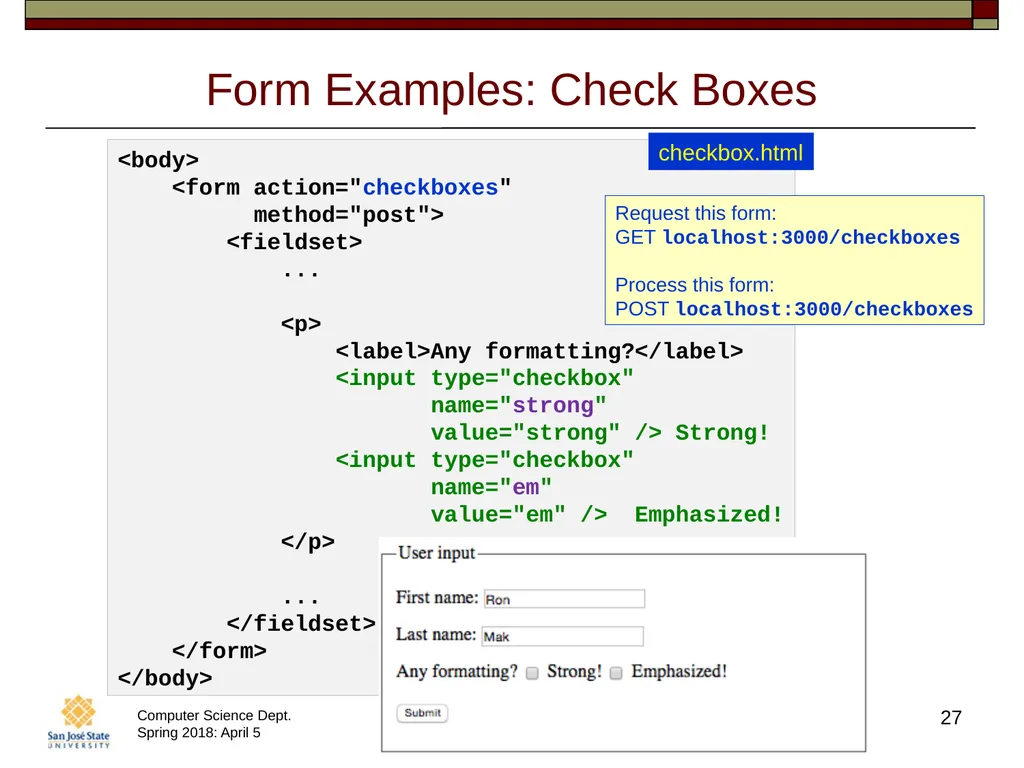
Form Examples: Check Boxes 27 <body>
<form action="checkboxes"
method="post">
<fieldset>
...
<p>
<label>Any formatting?</label>
<input type="checkbox"
name="strong"
value="strong" /> Strong!
<input type="checkbox"
name="em"
value="em" /> Emphasized!
</p>
...
</fieldset>
</form>
</body> checkbox.html Request this form:
GET localhost:3000/checkboxes
Process this form:
POST localhost:3000/checkboxes<br>
<form action="checkboxes"
method="post">
<fieldset>
...
<p>
<label>Any formatting?</label>
<input type="checkbox"
name="strong"
value="strong" /> Strong!
<input type="checkbox"
name="em"
value="em" /> Emphasized!
</p>
...
</fieldset>
</form>
</body> checkbox.html Request this form:
GET localhost:3000/checkboxes
Process this form:
POST localhost:3000/checkboxes<br>
28
Form Examples: Check Boxes, cont’d Router:
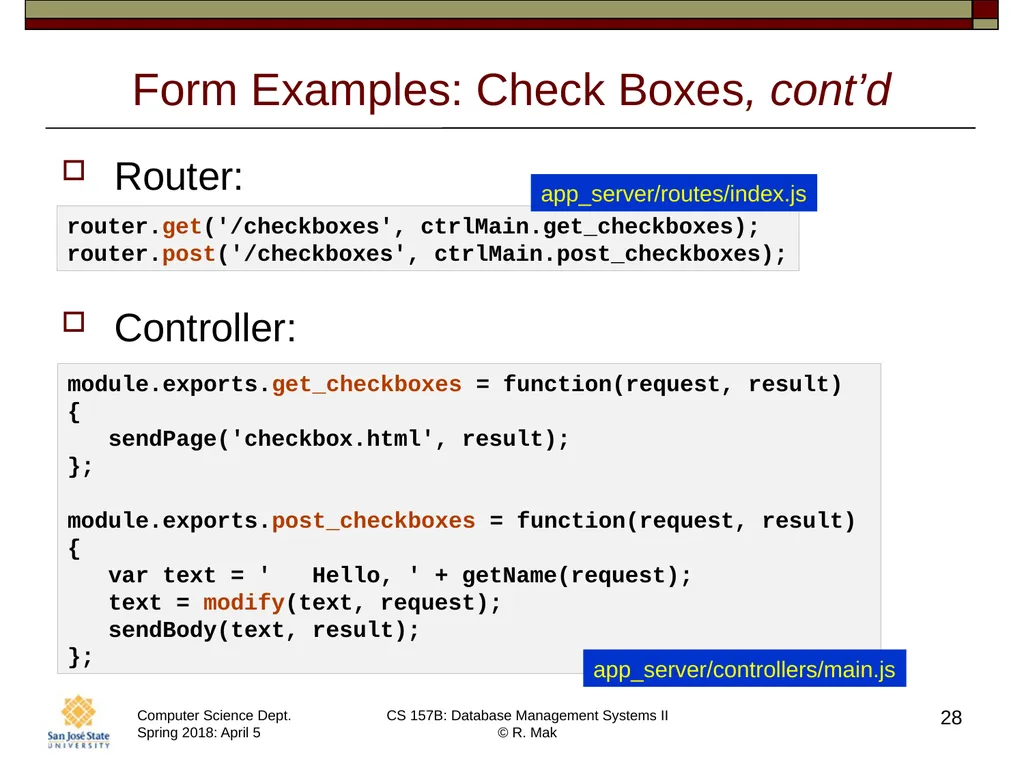
Controller: 28 router.get('/checkboxes', ctrlMain.get_checkboxes);
router.post('/checkboxes', ctrlMain.post_checkboxes); module.exports.get_checkboxes = function(request, result)
{
sendPage('checkbox.html', result);
};
module.exports.post_checkboxes = function(request, result)
{
var text = ' Hello, ' + getName(request);
text = modify(text, request);
sendBody(text, result);
}; app_server/controllers/main.js app_server/routes/index.js<br>
Controller: 28 router.get('/checkboxes', ctrlMain.get_checkboxes);
router.post('/checkboxes', ctrlMain.post_checkboxes); module.exports.get_checkboxes = function(request, result)
{
sendPage('checkbox.html', result);
};
module.exports.post_checkboxes = function(request, result)
{
var text = ' Hello, ' + getName(request);
text = modify(text, request);
sendBody(text, result);
}; app_server/controllers/main.js app_server/routes/index.js<br>
29
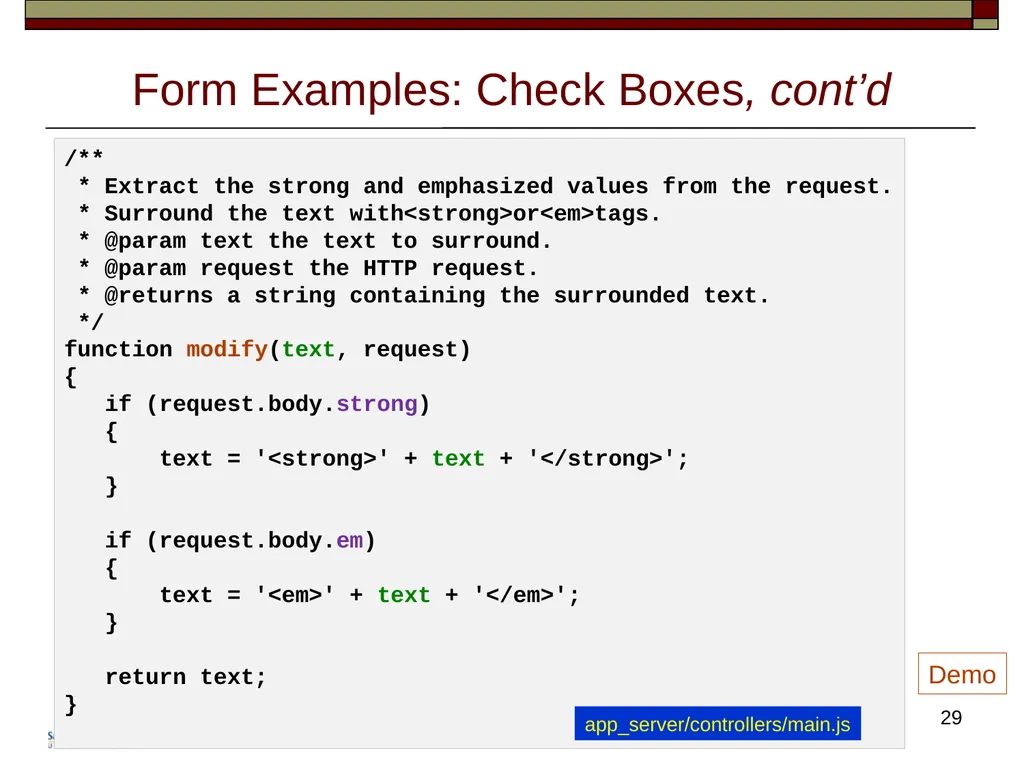
Form Examples: Check Boxes, cont’d 29 /**
* Extract the strong and emphasized values from the request.
* Surround the text with<strong>or<em>tags.
* @param text the text to surround.
* @param request the HTTP request.
* @returns a string containing the surrounded text.
*/
function modify(text, request)
{
if (request.body.strong)
{
text = '<strong>' + text + '</strong>';
}
if (request.body.em)
{
text = '<em>' + text + '</em>';
}
return text;
} Demo app_server/controllers/main.js<br>
* Extract the strong and emphasized values from the request.
* Surround the text with<strong>or<em>tags.
* @param text the text to surround.
* @param request the HTTP request.
* @returns a string containing the surrounded text.
*/
function modify(text, request)
{
if (request.body.strong)
{
text = '<strong>' + text + '</strong>';
}
if (request.body.em)
{
text = '<em>' + text + '</em>';
}
return text;
} Demo app_server/controllers/main.js<br>
30
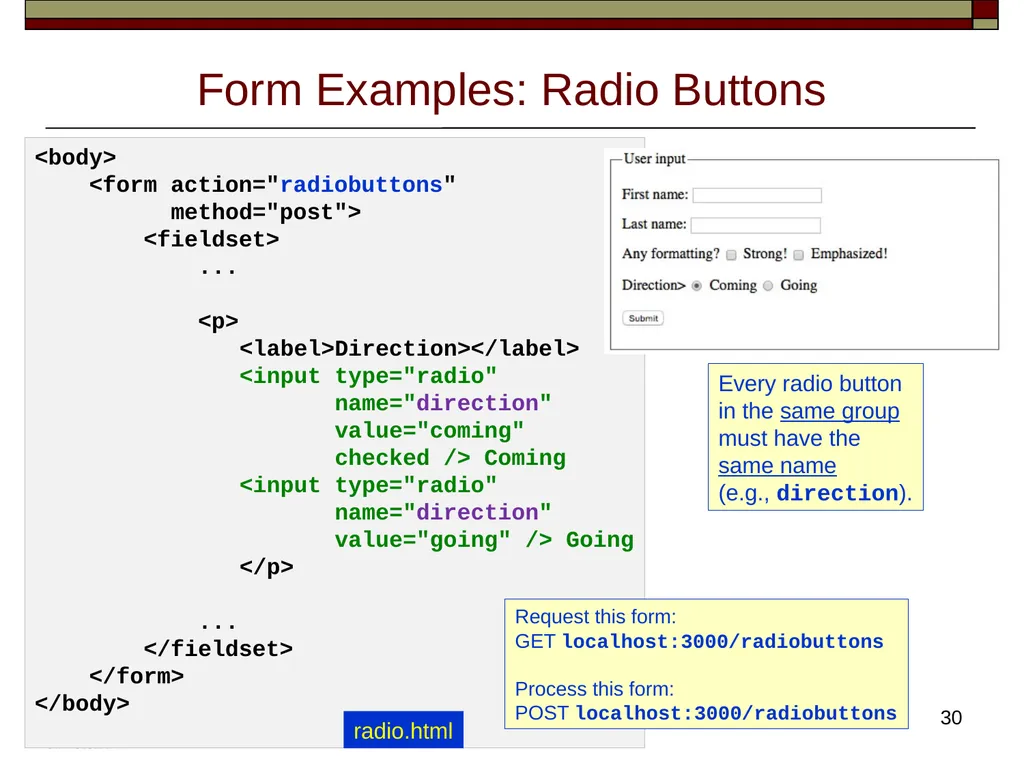
Form Examples: Radio Buttons 30 <body>
<form action="radiobuttons"
method="post">
<fieldset>
...
<p>
<label>Direction></label>
<input type="radio"
name="direction"
value="coming"
checked /> Coming
<input type="radio"
name="direction"
value="going" /> Going
</p>
...
</fieldset>
</form>
</body> Every radio button
in the same group
must have the
same name
(e.g., direction). radio.html Request this form:
GET localhost:3000/radiobuttons
Process this form:
POST localhost:3000/radiobuttons<br>
<form action="radiobuttons"
method="post">
<fieldset>
...
<p>
<label>Direction></label>
<input type="radio"
name="direction"
value="coming"
checked /> Coming
<input type="radio"
name="direction"
value="going" /> Going
</p>
...
</fieldset>
</form>
</body> Every radio button
in the same group
must have the
same name
(e.g., direction). radio.html Request this form:
GET localhost:3000/radiobuttons
Process this form:
POST localhost:3000/radiobuttons<br>
31
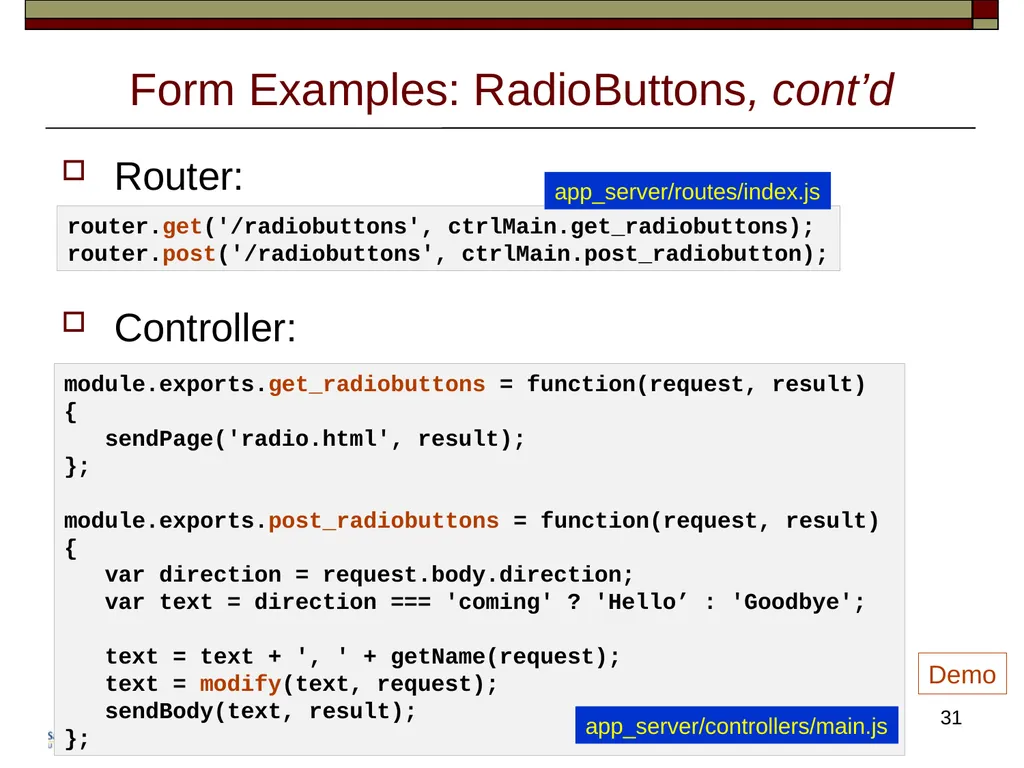
Form Examples: RadioButtons, cont’d Router:
Controller: 31 router.get('/radiobuttons', ctrlMain.get_radiobuttons);
router.post('/radiobuttons', ctrlMain.post_radiobutton); module.exports.get_radiobuttons = function(request, result)
{
sendPage('radio.html', result);
};
module.exports.post_radiobuttons = function(request, result)
{
var direction = request.body.direction;
var text = direction === 'coming' ? 'Hello’ : 'Goodbye';
text = text + ', ' + getName(request);
text = modify(text, request);
sendBody(text, result);
}; app_server/controllers/main.js Demo app_server/routes/index.js<br>
Controller: 31 router.get('/radiobuttons', ctrlMain.get_radiobuttons);
router.post('/radiobuttons', ctrlMain.post_radiobutton); module.exports.get_radiobuttons = function(request, result)
{
sendPage('radio.html', result);
};
module.exports.post_radiobuttons = function(request, result)
{
var direction = request.body.direction;
var text = direction === 'coming' ? 'Hello’ : 'Goodbye';
text = text + ', ' + getName(request);
text = modify(text, request);
sendBody(text, result);
}; app_server/controllers/main.js Demo app_server/routes/index.js<br>
32
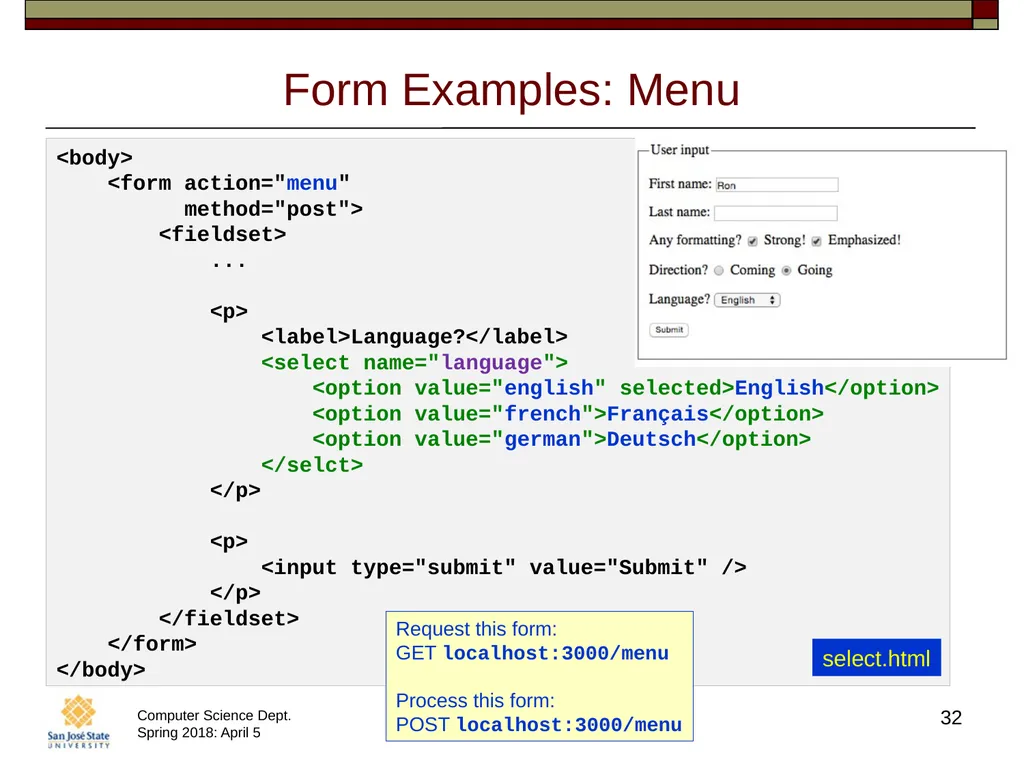
Form Examples: Menu 32 <body>
<form action="menu"
method="post">
<fieldset>
...
<p>
<label>Language?</label>
<select name="language">
<option value="english" selected>English</option>
<option value="french">Français</option>
<option value="german">Deutsch</option>
</selct>
</p>
<p>
<input type="submit" value="Submit" />
</p>
</fieldset>
</form>
</body> select.html Request this form:
GET localhost:3000/menu
Process this form:
POST localhost:3000/menu<br>
<form action="menu"
method="post">
<fieldset>
...
<p>
<label>Language?</label>
<select name="language">
<option value="english" selected>English</option>
<option value="french">Français</option>
<option value="german">Deutsch</option>
</selct>
</p>
<p>
<input type="submit" value="Submit" />
</p>
</fieldset>
</form>
</body> select.html Request this form:
GET localhost:3000/menu
Process this form:
POST localhost:3000/menu<br>
33
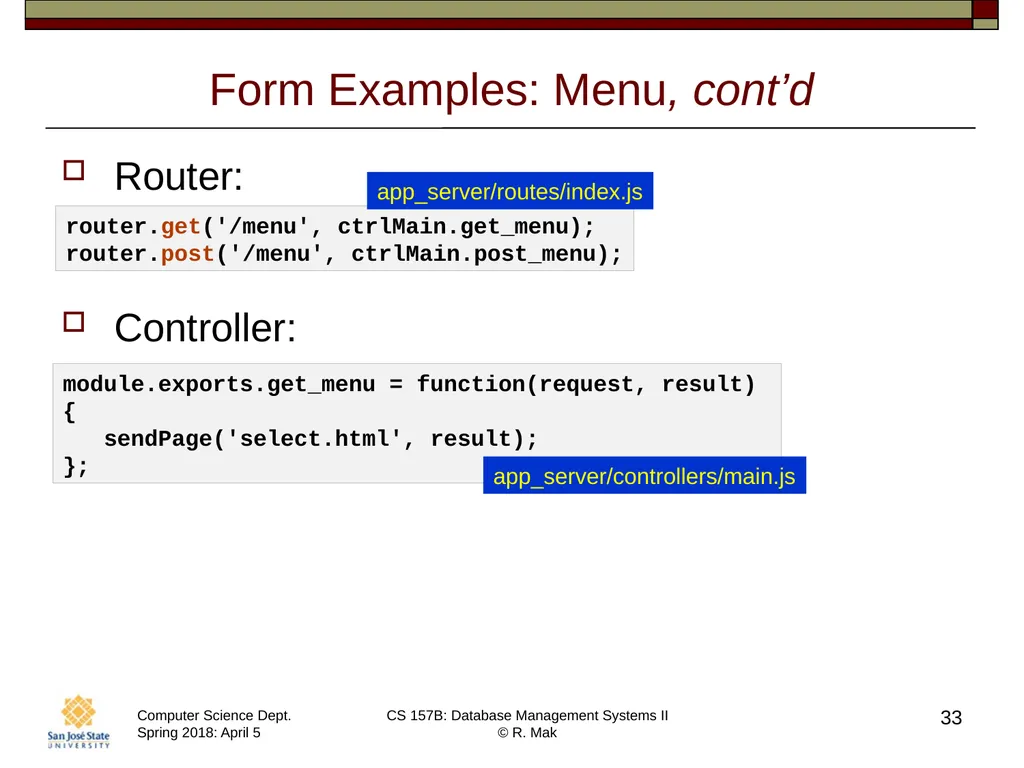
Form Examples: Menu, cont’d Router:
Controller: 33 router.get('/menu', ctrlMain.get_menu);
router.post('/menu', ctrlMain.post_menu); module.exports.get_menu = function(request, result)
{
sendPage('select.html', result);
}; app_server/controllers/main.js app_server/routes/index.js<br>
Controller: 33 router.get('/menu', ctrlMain.get_menu);
router.post('/menu', ctrlMain.post_menu); module.exports.get_menu = function(request, result)
{
sendPage('select.html', result);
}; app_server/controllers/main.js app_server/routes/index.js<br>
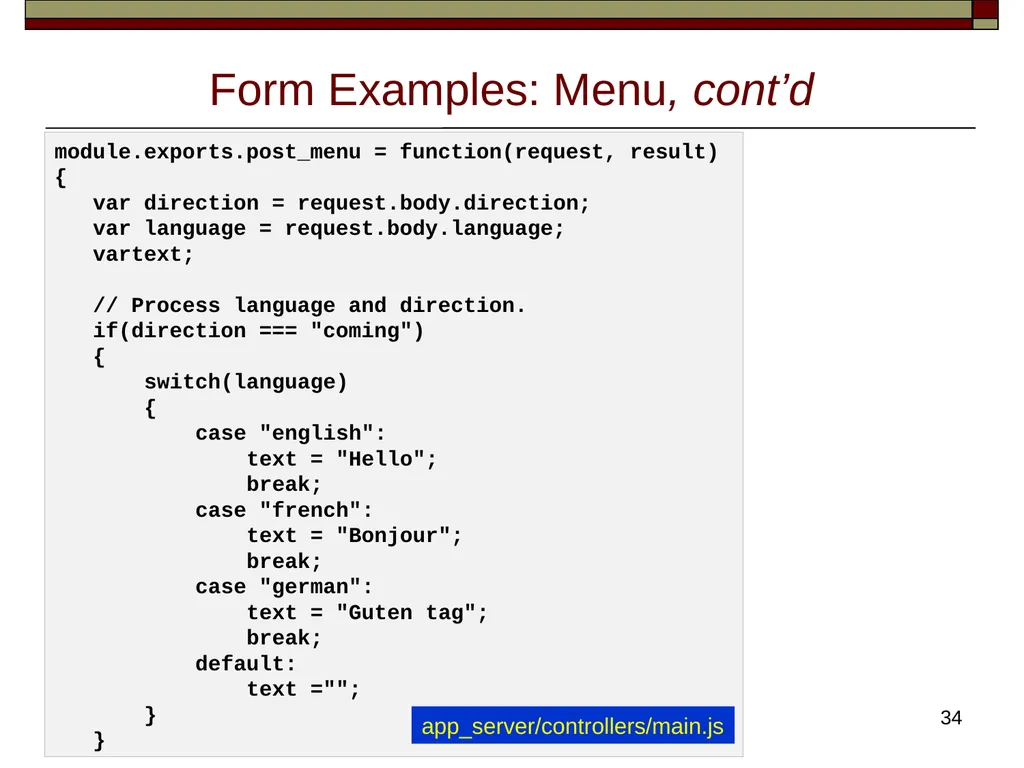
34
Form Examples: Menu, cont’d 34 module.exports.post_menu = function(request, result)
{
var direction = request.body.direction;
var language = request.body.language;
vartext;
// Process language and direction.
if(direction === "coming")
{
switch(language)
{
case "english":
text = "Hello";
break;
case "french":
text = "Bonjour";
break;
case "german":
text = "Guten tag";
break;
default:
text ="";
}
} app_server/controllers/main.js<br>
{
var direction = request.body.direction;
var language = request.body.language;
vartext;
// Process language and direction.
if(direction === "coming")
{
switch(language)
{
case "english":
text = "Hello";
break;
case "french":
text = "Bonjour";
break;
case "german":
text = "Guten tag";
break;
default:
text ="";
}
} app_server/controllers/main.js<br>
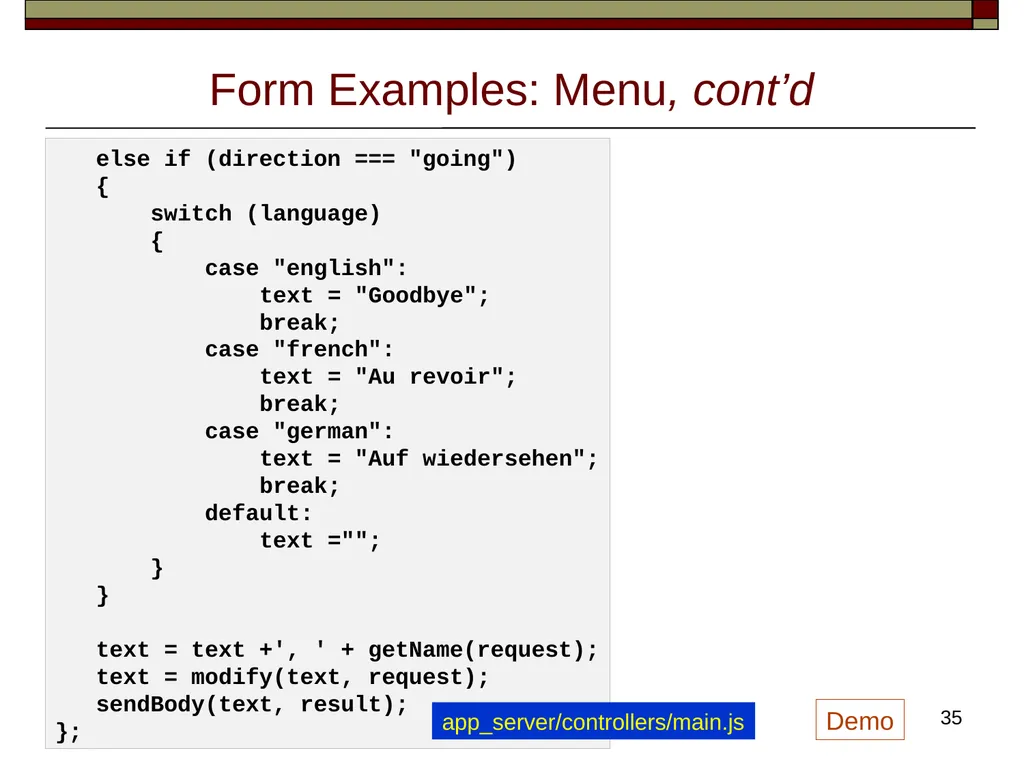
35
Form Examples: Menu, cont’d 35 else if (direction === "going")
{
switch (language)
{
case "english":
text = "Goodbye";
break;
case "french":
text = "Au revoir";
break;
case "german":
text = "Auf wiedersehen";
break;
default:
text ="";
}
}
text = text +', ' + getName(request);
text = modify(text, request);
sendBody(text, result);
}; app_server/controllers/main.js Demo<br>
{
switch (language)
{
case "english":
text = "Goodbye";
break;
case "french":
text = "Au revoir";
break;
case "german":
text = "Auf wiedersehen";
break;
default:
text ="";
}
}
text = text +', ' + getName(request);
text = modify(text, request);
sendBody(text, result);
}; app_server/controllers/main.js Demo<br>