
CS194-24 Advanced Operating Systems Structures and
PC
Published · 47 slides · 0 views
1 / 1

Description
CS194-24 Advanced Operating Systems Structures and Implementation Lecture 22 Queueing Theory (continued) Networks April 23rd, 2014 Prof. John Kubiatowicz http:inst.eecs.berkeley.educs194-24 Goals for Today Queueing Theory (Cont)
Related Topics
Share
Embed code
Download this presentation From Below
"CS194-24 Advanced Operating Systems Structures and" is the property of its rightful owner. Permission is granted to download and print the materials on this website for personal, non-commercial use only, and to display it on your personal computer provided you do not modify the materials and that you retain all copyright notices contained in the materials. By downloading content from our website, you accept the terms of this agreement.
Presentation Transcript
01
CS194-24
Advanced Operating Systems Structures and Implementation
Lecture 22
Queueing Theory (continued)
Networks April 23rd, 2014
Prof. John Kubiatowicz
http://inst.eecs.berkeley.edu/~cs194-24<br>
Prof. John Kubiatowicz
http://inst.eecs.berkeley.edu/~cs194-24<br>
02
Goals for Today Queueing Theory (Con’t)
Network Drivers
Interactive is important!
Ask Questions! Note: Some slides and/or pictures in the following are
adapted from slides ©2013<br>
Network Drivers
Interactive is important!
Ask Questions! Note: Some slides and/or pictures in the following are
adapted from slides ©2013<br>
03
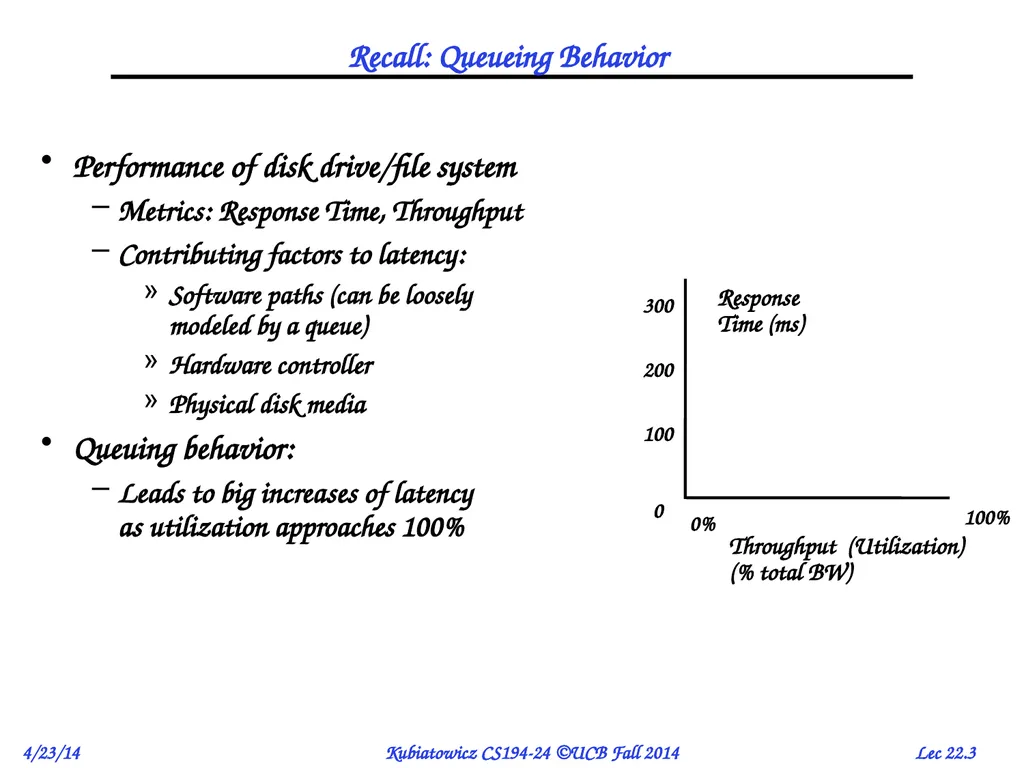
Recall: Queueing Behavior Performance of disk drive/file system
Metrics: Response Time, Throughput
Contributing factors to latency:
Software paths (can be loosely modeled by a queue)
Hardware controller
Physical disk media
Queuing behavior:
Leads to big increases of latency as utilization approaches 100%<br>
Metrics: Response Time, Throughput
Contributing factors to latency:
Software paths (can be loosely modeled by a queue)
Hardware controller
Physical disk media
Queuing behavior:
Leads to big increases of latency as utilization approaches 100%<br>
04
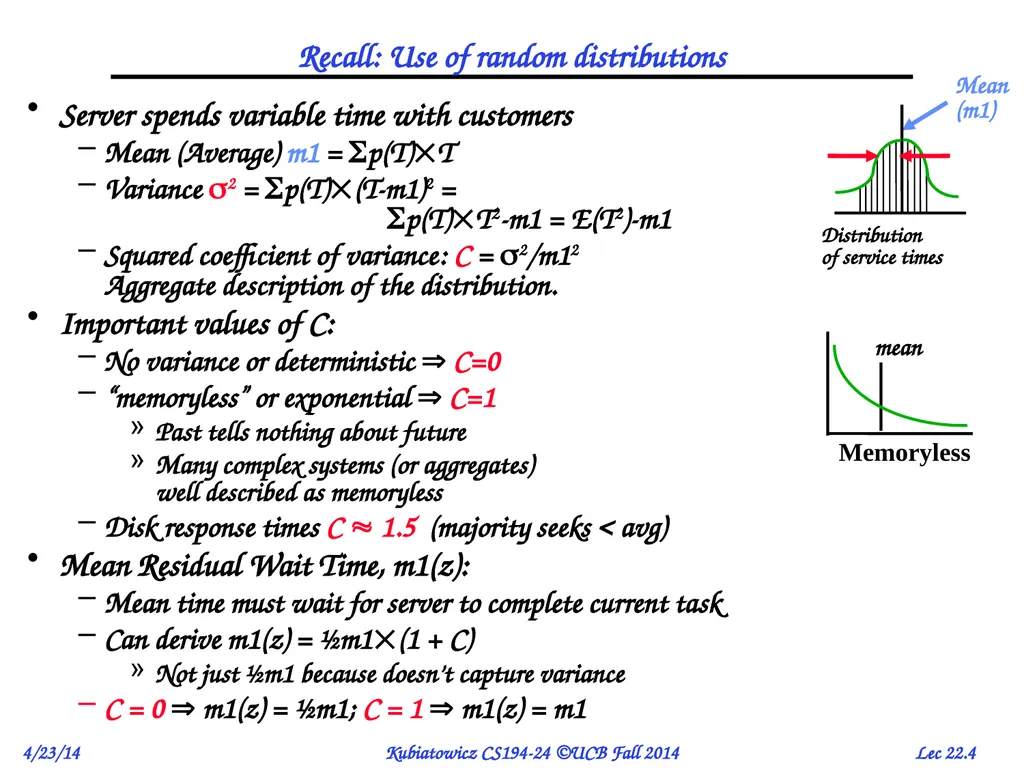
Recall: Use of random distributions Server spends variable time with customers
Mean (Average) m1 = p(T)T
Variance 2 = p(T)(T-m1)2 = p(T)T2-m1 = E(T2)-m1
Squared coefficient of variance: C = 2/m12 Aggregate description of the distribution.
Important values of C:
No variance or deterministic C=0
“memoryless” or exponential C=1
Past tells nothing about future
Many complex systems (or aggregates) well described as memoryless
Disk response times C 1.5 (majority seeks < avg)
Mean Residual Wait Time, m1(z):
Mean time must wait for server to complete current task
Can derive m1(z) = ½m1(1 + C)
Not just ½m1 because doesn’t capture variance
C = 0 m1(z) = ½m1; C = 1 m1(z) = m1<br>
Mean (Average) m1 = p(T)T
Variance 2 = p(T)(T-m1)2 = p(T)T2-m1 = E(T2)-m1
Squared coefficient of variance: C = 2/m12 Aggregate description of the distribution.
Important values of C:
No variance or deterministic C=0
“memoryless” or exponential C=1
Past tells nothing about future
Many complex systems (or aggregates) well described as memoryless
Disk response times C 1.5 (majority seeks < avg)
Mean Residual Wait Time, m1(z):
Mean time must wait for server to complete current task
Can derive m1(z) = ½m1(1 + C)
Not just ½m1 because doesn’t capture variance
C = 0 m1(z) = ½m1; C = 1 m1(z) = m1<br>
05
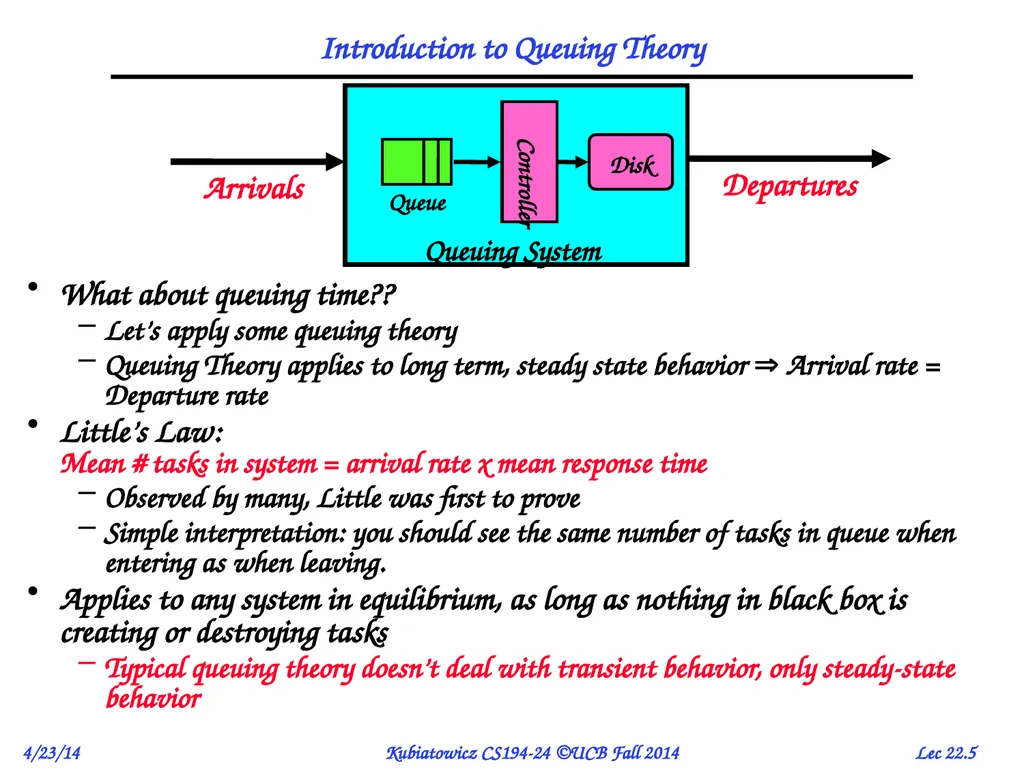
Introduction to Queuing Theory What about queuing time??
Let’s apply some queuing theory
Queuing Theory applies to long term, steady state behavior Arrival rate = Departure rate
Little’s Law: Mean # tasks in system = arrival rate x mean response time
Observed by many, Little was first to prove
Simple interpretation: you should see the same number of tasks in queue when entering as when leaving.
Applies to any system in equilibrium, as long as nothing in black box is creating or destroying tasks
Typical queuing theory doesn’t deal with transient behavior, only steady-state behavior<br>
Let’s apply some queuing theory
Queuing Theory applies to long term, steady state behavior Arrival rate = Departure rate
Little’s Law: Mean # tasks in system = arrival rate x mean response time
Observed by many, Little was first to prove
Simple interpretation: you should see the same number of tasks in queue when entering as when leaving.
Applies to any system in equilibrium, as long as nothing in black box is creating or destroying tasks
Typical queuing theory doesn’t deal with transient behavior, only steady-state behavior<br>
06
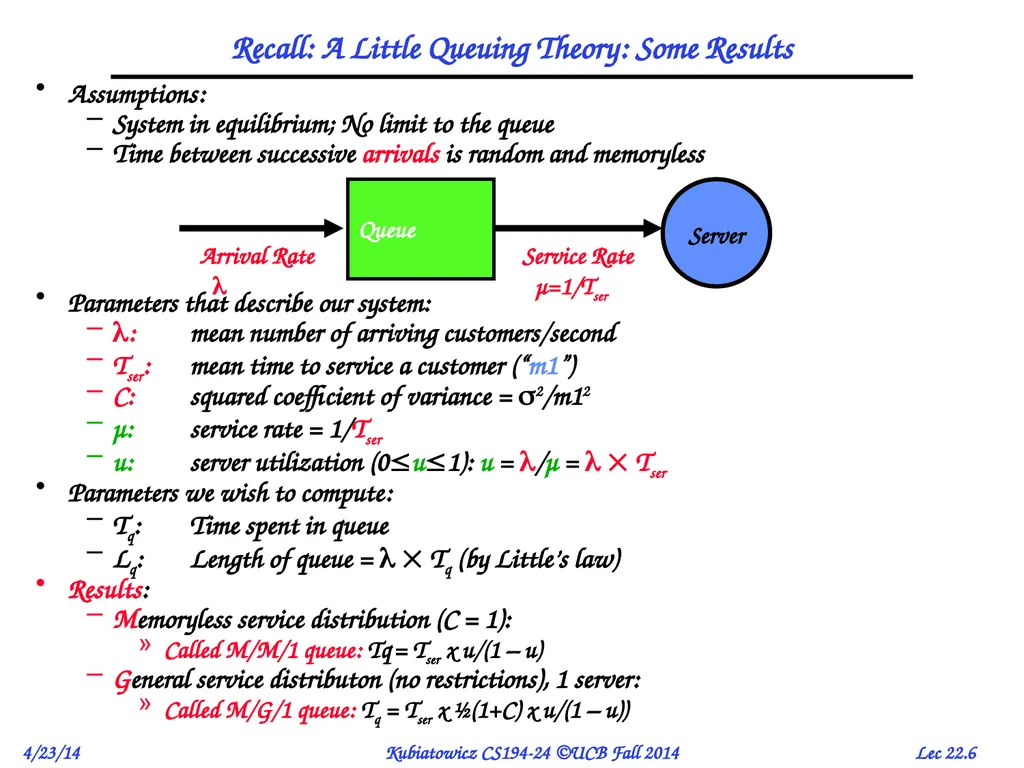
Recall: A Little Queuing Theory: Some Results Assumptions:
System in equilibrium; No limit to the queue
Time between successive arrivals is random and memoryless
Parameters that describe our system:
: mean number of arriving customers/second
Tser: mean time to service a customer (“m1”)
C: squared coefficient of variance = 2/m12
μ: service rate = 1/Tser
u: server utilization (0u1): u = /μ = Tser
Parameters we wish to compute:
Tq: Time spent in queue
Lq: Length of queue = Tq (by Little’s law)
Results:
Memoryless service distribution (C = 1):
Called M/M/1 queue: Tq = Tser x u/(1 – u)
General service distributon (no restrictions), 1 server:
Called M/G/1 queue: Tq = Tser x ½(1+C) x u/(1 – u))<br>
System in equilibrium; No limit to the queue
Time between successive arrivals is random and memoryless
Parameters that describe our system:
: mean number of arriving customers/second
Tser: mean time to service a customer (“m1”)
C: squared coefficient of variance = 2/m12
μ: service rate = 1/Tser
u: server utilization (0u1): u = /μ = Tser
Parameters we wish to compute:
Tq: Time spent in queue
Lq: Length of queue = Tq (by Little’s law)
Results:
Memoryless service distribution (C = 1):
Called M/M/1 queue: Tq = Tser x u/(1 – u)
General service distributon (no restrictions), 1 server:
Called M/G/1 queue: Tq = Tser x ½(1+C) x u/(1 – u))<br>
07
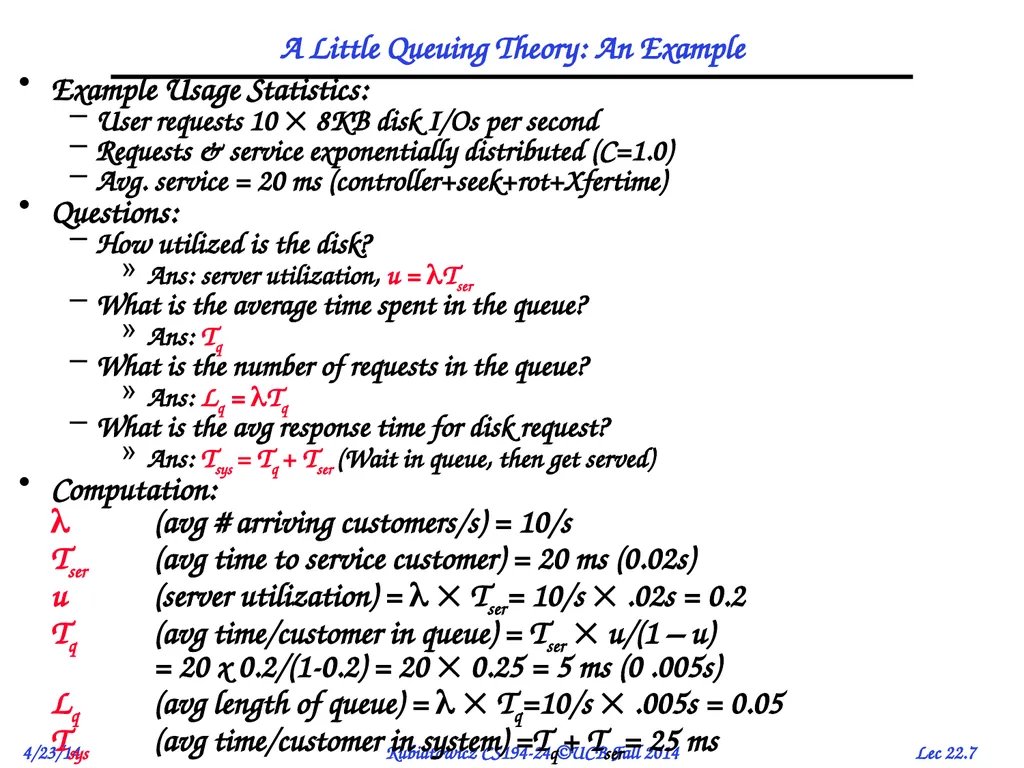
A Little Queuing Theory: An Example Example Usage Statistics:
User requests 10 8KB disk I/Os per second
Requests & service exponentially distributed (C=1.0)
Avg. service = 20 ms (controller+seek+rot+Xfertime)
Questions:
How utilized is the disk?
Ans: server utilization, u = Tser
What is the average time spent in the queue?
Ans: Tq
What is the number of requests in the queue?
Ans: Lq = Tq
What is the avg response time for disk request?
Ans: Tsys = Tq + Tser (Wait in queue, then get served)
Computation:
(avg # arriving customers/s) = 10/s
Tser (avg time to service customer) = 20 ms (0.02s)
u (server utilization) = Tser= 10/s .02s = 0.2
Tq (avg time/customer in queue) = Tser u/(1 – u) = 20 x 0.2/(1-0.2) = 20 0.25 = 5 ms (0 .005s)
Lq (avg length of queue) = Tq=10/s .005s = 0.05
Tsys (avg time/customer in system) =Tq + Tser= 25 ms<br>
User requests 10 8KB disk I/Os per second
Requests & service exponentially distributed (C=1.0)
Avg. service = 20 ms (controller+seek+rot+Xfertime)
Questions:
How utilized is the disk?
Ans: server utilization, u = Tser
What is the average time spent in the queue?
Ans: Tq
What is the number of requests in the queue?
Ans: Lq = Tq
What is the avg response time for disk request?
Ans: Tsys = Tq + Tser (Wait in queue, then get served)
Computation:
(avg # arriving customers/s) = 10/s
Tser (avg time to service customer) = 20 ms (0.02s)
u (server utilization) = Tser= 10/s .02s = 0.2
Tq (avg time/customer in queue) = Tser u/(1 – u) = 20 x 0.2/(1-0.2) = 20 0.25 = 5 ms (0 .005s)
Lq (avg length of queue) = Tq=10/s .005s = 0.05
Tsys (avg time/customer in system) =Tq + Tser= 25 ms<br>
08
Administrivia Getting close to the end!
Only two official classes left
Optional extra lecture on May 5th
Let me know which topics you might want to hear
Final: Tuesday May 13th
310 Soda Hall
11:30—2:30
Bring calculator, 2 pages of hand-written notes<br>
Only two official classes left
Optional extra lecture on May 5th
Let me know which topics you might want to hear
Final: Tuesday May 13th
310 Soda Hall
11:30—2:30
Bring calculator, 2 pages of hand-written notes<br>
09
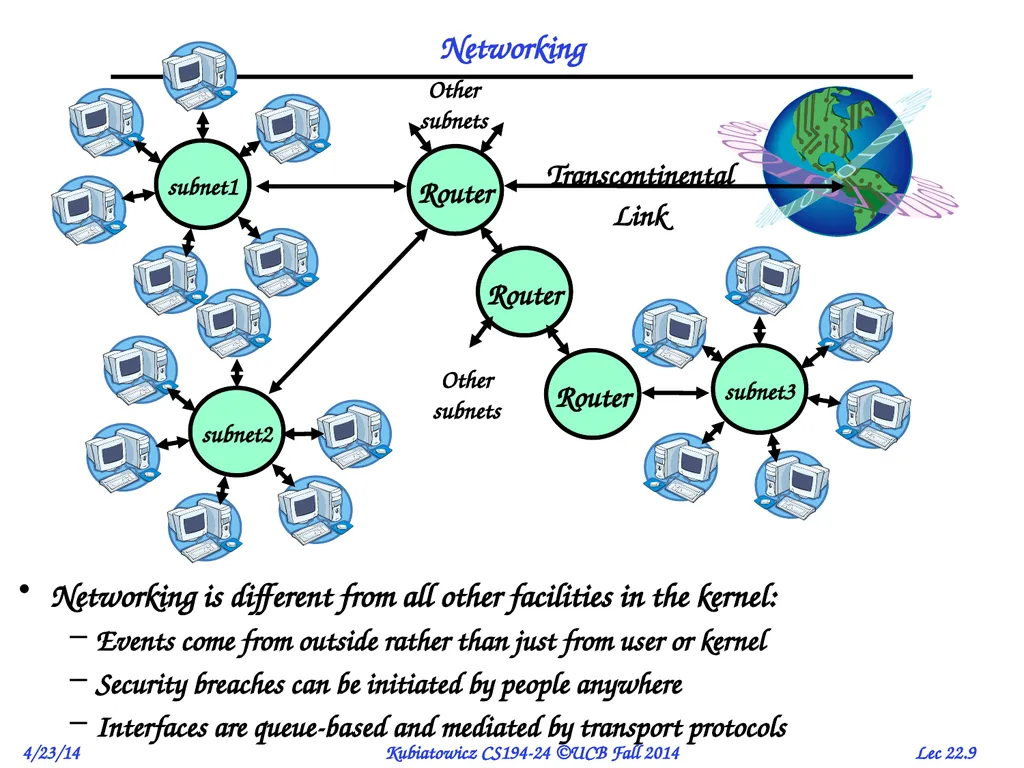
Networking Networking is different from all other facilities in the kernel:
Events come from outside rather than just from user or kernel
Security breaches can be initiated by people anywhere
Interfaces are queue-based and mediated by transport protocols<br>
Events come from outside rather than just from user or kernel
Security breaches can be initiated by people anywhere
Interfaces are queue-based and mediated by transport protocols<br>
10
The Internet Protocol: “IP” The Internet is a large network of computers spread across the globe
According to the Internet Systems Consortium, there were over 681 million computers as of July 2009
In principle, every host can speak with every other one under the right circumstances
IP Packet: a network packet on the internet
IP Address: a 32-bit integer used as the destination of an IP packet
Often written as four dot-separated integers, with each integer from 0—255 (thus representing 8x4=32 bits)
Example CS file server is: 169.229.60.83 0xA9E53C53
Internet Host: a computer connected to the Internet
Host has one or more IP addresses used for routing
Some of these may be private and unavailable for routing
Not every computer has a unique IP address
Groups of machines may share a single IP address
In this case, machines have private addresses behind a “Network Address Translation” (NAT) gateway<br>
According to the Internet Systems Consortium, there were over 681 million computers as of July 2009
In principle, every host can speak with every other one under the right circumstances
IP Packet: a network packet on the internet
IP Address: a 32-bit integer used as the destination of an IP packet
Often written as four dot-separated integers, with each integer from 0—255 (thus representing 8x4=32 bits)
Example CS file server is: 169.229.60.83 0xA9E53C53
Internet Host: a computer connected to the Internet
Host has one or more IP addresses used for routing
Some of these may be private and unavailable for routing
Not every computer has a unique IP address
Groups of machines may share a single IP address
In this case, machines have private addresses behind a “Network Address Translation” (NAT) gateway<br>
11
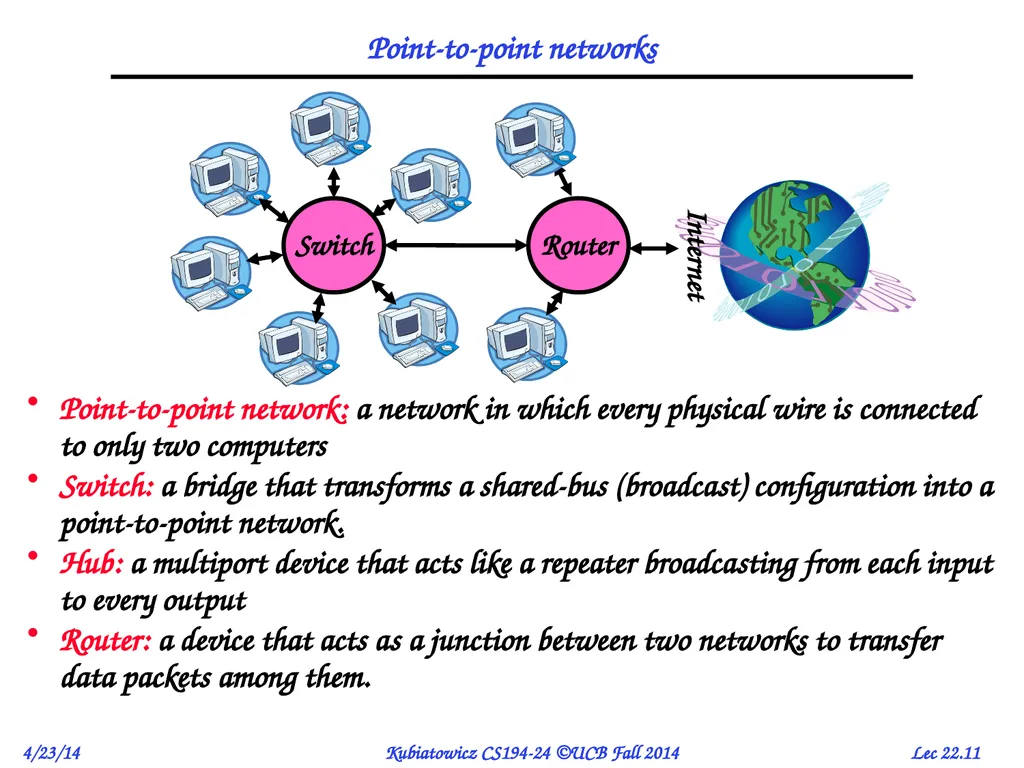
Point-to-point networks Point-to-point network: a network in which every physical wire is connected to only two computers
Switch: a bridge that transforms a shared-bus (broadcast) configuration into a point-to-point network.
Hub: a multiport device that acts like a repeater broadcasting from each input to every output
Router: a device that acts as a junction between two networks to transfer data packets among them.<br>
Switch: a bridge that transforms a shared-bus (broadcast) configuration into a point-to-point network.
Hub: a multiport device that acts like a repeater broadcasting from each input to every output
Router: a device that acts as a junction between two networks to transfer data packets among them.<br>
12
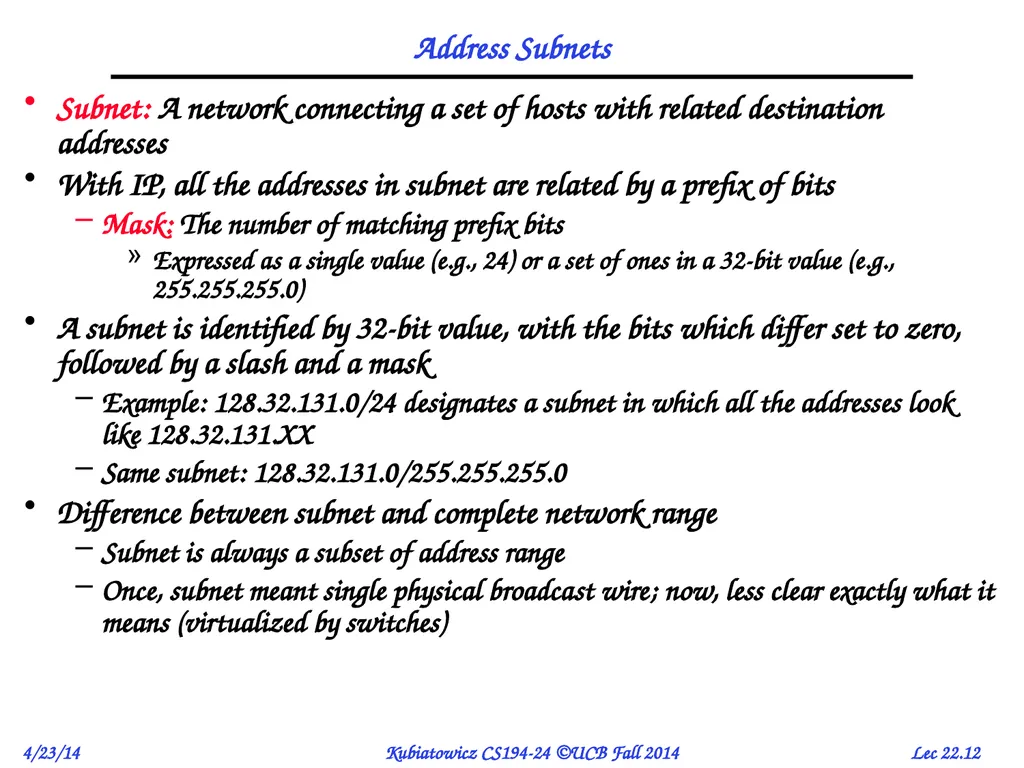
Address Subnets Subnet: A network connecting a set of hosts with related destination addresses
With IP, all the addresses in subnet are related by a prefix of bits
Mask: The number of matching prefix bits
Expressed as a single value (e.g., 24) or a set of ones in a 32-bit value (e.g., 255.255.255.0)
A subnet is identified by 32-bit value, with the bits which differ set to zero, followed by a slash and a mask
Example: 128.32.131.0/24 designates a subnet in which all the addresses look like 128.32.131.XX
Same subnet: 128.32.131.0/255.255.255.0
Difference between subnet and complete network range
Subnet is always a subset of address range
Once, subnet meant single physical broadcast wire; now, less clear exactly what it means (virtualized by switches)<br>
With IP, all the addresses in subnet are related by a prefix of bits
Mask: The number of matching prefix bits
Expressed as a single value (e.g., 24) or a set of ones in a 32-bit value (e.g., 255.255.255.0)
A subnet is identified by 32-bit value, with the bits which differ set to zero, followed by a slash and a mask
Example: 128.32.131.0/24 designates a subnet in which all the addresses look like 128.32.131.XX
Same subnet: 128.32.131.0/255.255.255.0
Difference between subnet and complete network range
Subnet is always a subset of address range
Once, subnet meant single physical broadcast wire; now, less clear exactly what it means (virtualized by switches)<br>
13
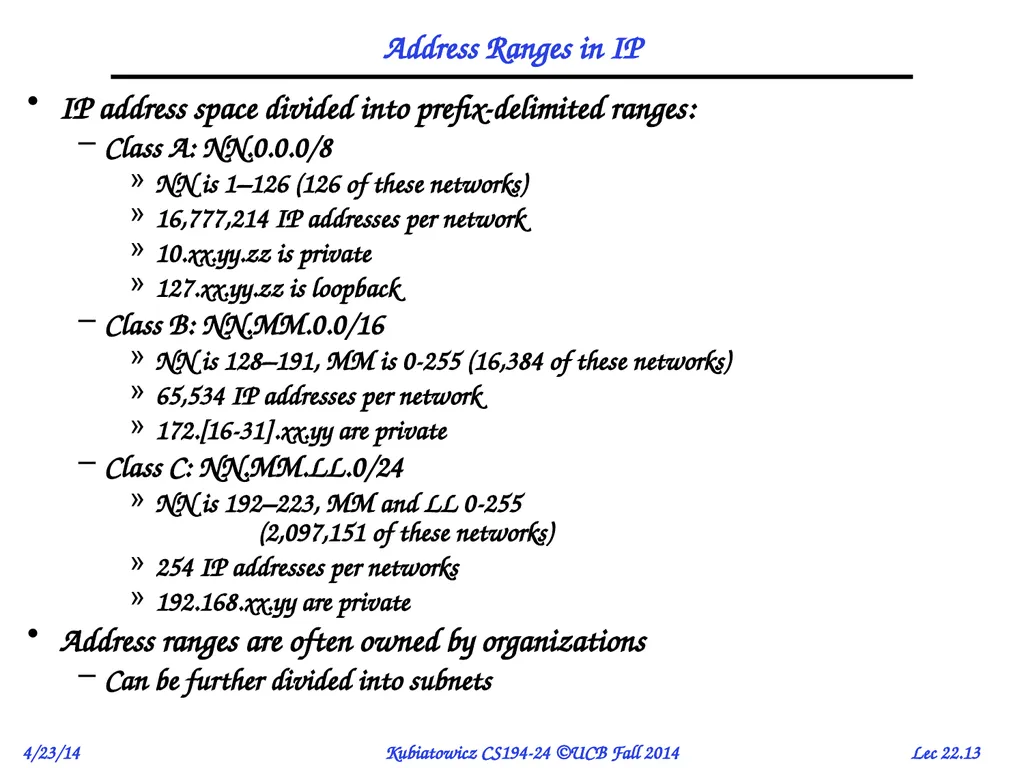
Address Ranges in IP IP address space divided into prefix-delimited ranges:
Class A: NN.0.0.0/8
NN is 1–126 (126 of these networks)
16,777,214 IP addresses per network
10.xx.yy.zz is private
127.xx.yy.zz is loopback
Class B: NN.MM.0.0/16
NN is 128–191, MM is 0-255 (16,384 of these networks)
65,534 IP addresses per network
172.[16-31].xx.yy are private
Class C: NN.MM.LL.0/24
NN is 192–223, MM and LL 0-255 (2,097,151 of these networks)
254 IP addresses per networks
192.168.xx.yy are private
Address ranges are often owned by organizations
Can be further divided into subnets<br>
Class A: NN.0.0.0/8
NN is 1–126 (126 of these networks)
16,777,214 IP addresses per network
10.xx.yy.zz is private
127.xx.yy.zz is loopback
Class B: NN.MM.0.0/16
NN is 128–191, MM is 0-255 (16,384 of these networks)
65,534 IP addresses per network
172.[16-31].xx.yy are private
Class C: NN.MM.LL.0/24
NN is 192–223, MM and LL 0-255 (2,097,151 of these networks)
254 IP addresses per networks
192.168.xx.yy are private
Address ranges are often owned by organizations
Can be further divided into subnets<br>
14
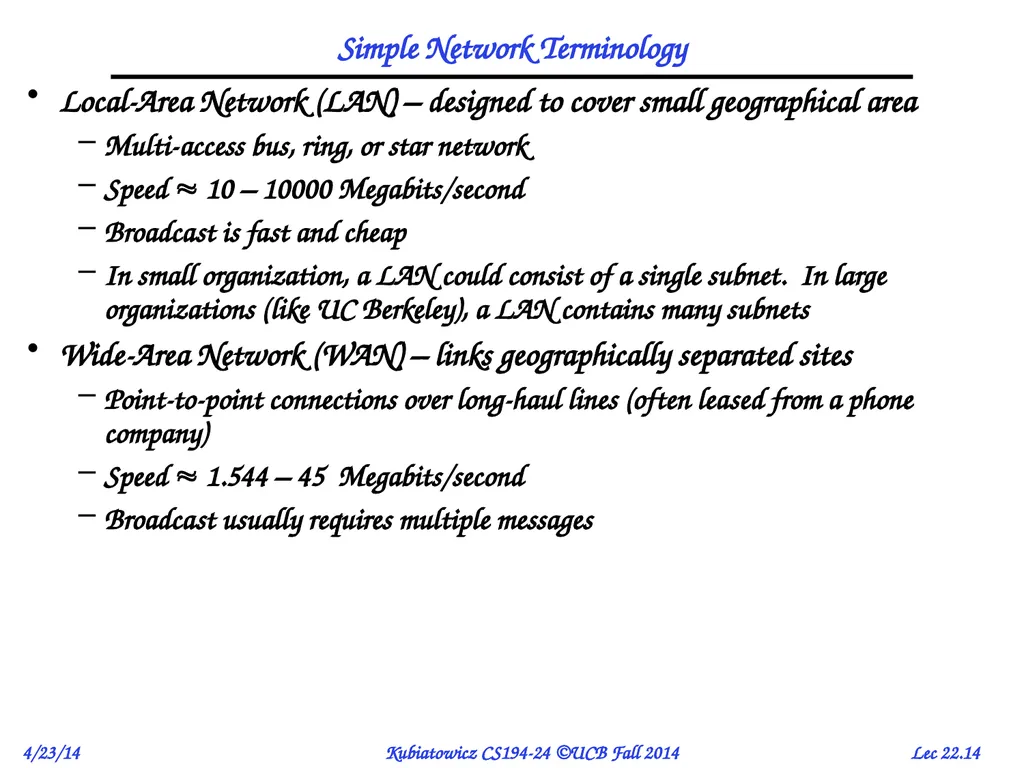
Simple Network Terminology Local-Area Network (LAN) – designed to cover small geographical area
Multi-access bus, ring, or star network
Speed 10 – 10000 Megabits/second
Broadcast is fast and cheap
In small organization, a LAN could consist of a single subnet. In large organizations (like UC Berkeley), a LAN contains many subnets
Wide-Area Network (WAN) – links geographically separated sites
Point-to-point connections over long-haul lines (often leased from a phone company)
Speed 1.544 – 45 Megabits/second
Broadcast usually requires multiple messages<br>
Multi-access bus, ring, or star network
Speed 10 – 10000 Megabits/second
Broadcast is fast and cheap
In small organization, a LAN could consist of a single subnet. In large organizations (like UC Berkeley), a LAN contains many subnets
Wide-Area Network (WAN) – links geographically separated sites
Point-to-point connections over long-haul lines (often leased from a phone company)
Speed 1.544 – 45 Megabits/second
Broadcast usually requires multiple messages<br>
15
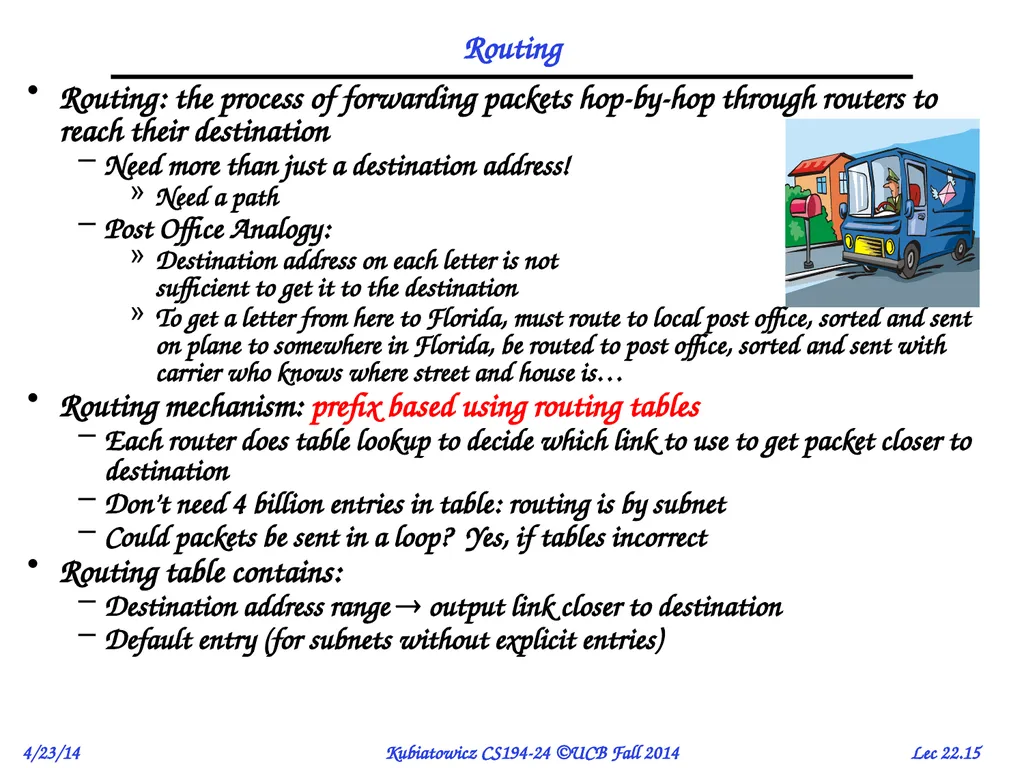
Routing Routing: the process of forwarding packets hop-by-hop through routers to reach their destination
Need more than just a destination address!
Need a path
Post Office Analogy:
Destination address on each letter is not sufficient to get it to the destination
To get a letter from here to Florida, must route to local post office, sorted and sent on plane to somewhere in Florida, be routed to post office, sorted and sent with carrier who knows where street and house is…
Routing mechanism: prefix based using routing tables
Each router does table lookup to decide which link to use to get packet closer to destination
Don’t need 4 billion entries in table: routing is by subnet
Could packets be sent in a loop? Yes, if tables incorrect
Routing table contains:
Destination address range output link closer to destination
Default entry (for subnets without explicit entries)<br>
Need more than just a destination address!
Need a path
Post Office Analogy:
Destination address on each letter is not sufficient to get it to the destination
To get a letter from here to Florida, must route to local post office, sorted and sent on plane to somewhere in Florida, be routed to post office, sorted and sent with carrier who knows where street and house is…
Routing mechanism: prefix based using routing tables
Each router does table lookup to decide which link to use to get packet closer to destination
Don’t need 4 billion entries in table: routing is by subnet
Could packets be sent in a loop? Yes, if tables incorrect
Routing table contains:
Destination address range output link closer to destination
Default entry (for subnets without explicit entries)<br>
16
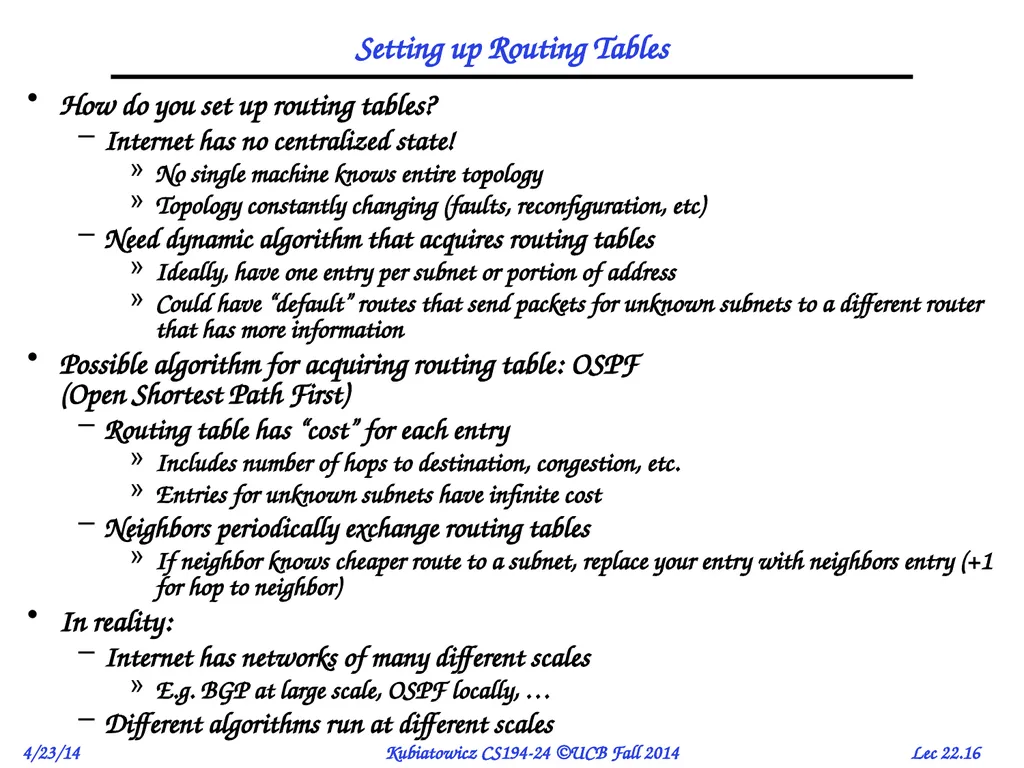
Setting up Routing Tables How do you set up routing tables?
Internet has no centralized state!
No single machine knows entire topology
Topology constantly changing (faults, reconfiguration, etc)
Need dynamic algorithm that acquires routing tables
Ideally, have one entry per subnet or portion of address
Could have “default” routes that send packets for unknown subnets to a different router that has more information
Possible algorithm for acquiring routing table: OSPF (Open Shortest Path First)
Routing table has “cost” for each entry
Includes number of hops to destination, congestion, etc.
Entries for unknown subnets have infinite cost
Neighbors periodically exchange routing tables
If neighbor knows cheaper route to a subnet, replace your entry with neighbors entry (+1 for hop to neighbor)
In reality:
Internet has networks of many different scales
E.g. BGP at large scale, OSPF locally, …
Different algorithms run at different scales<br>
Internet has no centralized state!
No single machine knows entire topology
Topology constantly changing (faults, reconfiguration, etc)
Need dynamic algorithm that acquires routing tables
Ideally, have one entry per subnet or portion of address
Could have “default” routes that send packets for unknown subnets to a different router that has more information
Possible algorithm for acquiring routing table: OSPF (Open Shortest Path First)
Routing table has “cost” for each entry
Includes number of hops to destination, congestion, etc.
Entries for unknown subnets have infinite cost
Neighbors periodically exchange routing tables
If neighbor knows cheaper route to a subnet, replace your entry with neighbors entry (+1 for hop to neighbor)
In reality:
Internet has networks of many different scales
E.g. BGP at large scale, OSPF locally, …
Different algorithms run at different scales<br>
17
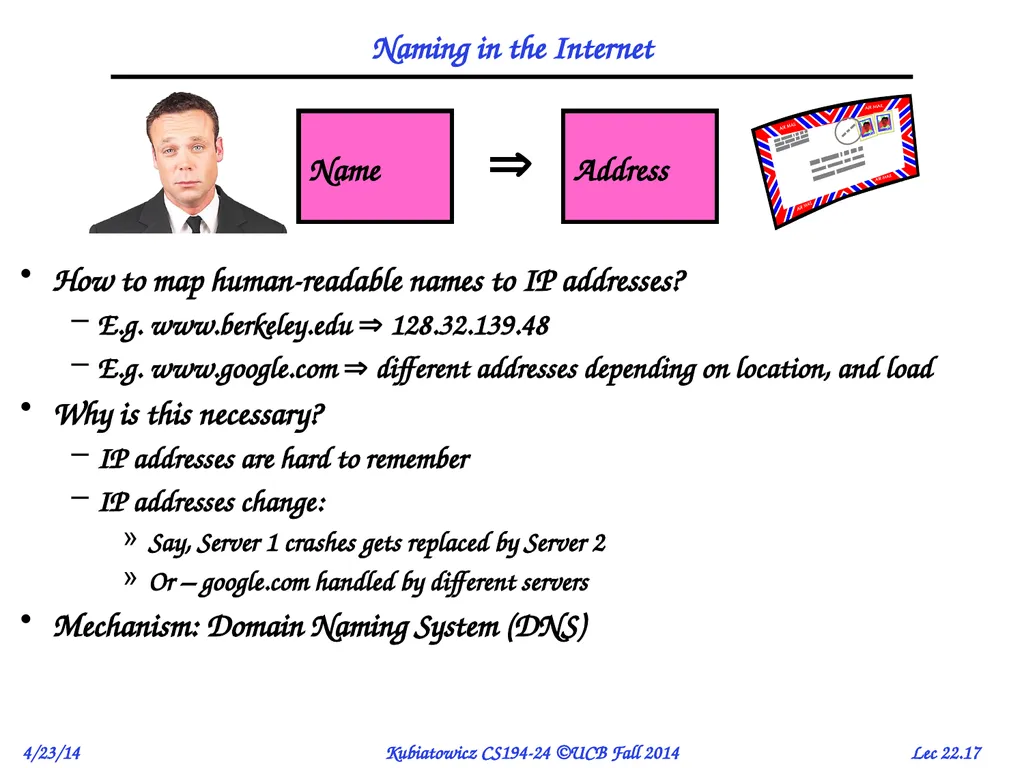
Naming in the Internet How to map human-readable names to IP addresses?
E.g. www.berkeley.edu 128.32.139.48
E.g. www.google.com different addresses depending on location, and load
Why is this necessary?
IP addresses are hard to remember
IP addresses change:
Say, Server 1 crashes gets replaced by Server 2
Or – google.com handled by different servers
Mechanism: Domain Naming System (DNS)<br>
E.g. www.berkeley.edu 128.32.139.48
E.g. www.google.com different addresses depending on location, and load
Why is this necessary?
IP addresses are hard to remember
IP addresses change:
Say, Server 1 crashes gets replaced by Server 2
Or – google.com handled by different servers
Mechanism: Domain Naming System (DNS)<br>
18
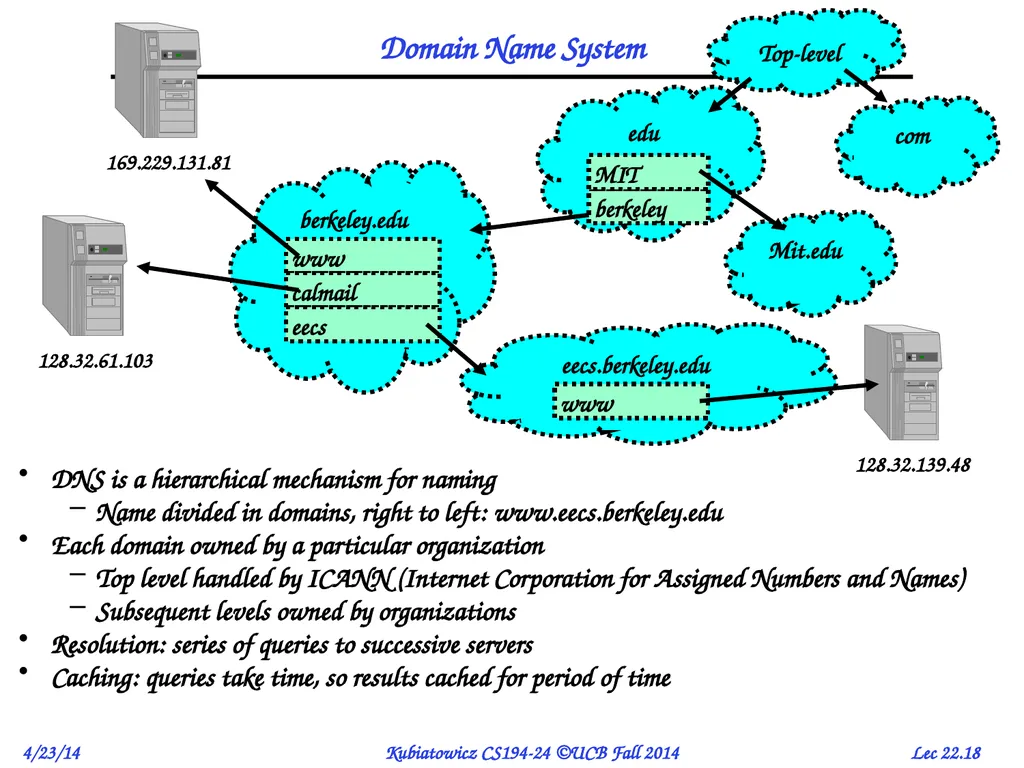
Domain Name System DNS is a hierarchical mechanism for naming
Name divided in domains, right to left: www.eecs.berkeley.edu
Each domain owned by a particular organization
Top level handled by ICANN (Internet Corporation for Assigned Numbers and Names)
Subsequent levels owned by organizations
Resolution: series of queries to successive servers
Caching: queries take time, so results cached for period of time Top-level com edu Mit.edu berkeley.edu www calmail eecs berkeley MIT<br>
Name divided in domains, right to left: www.eecs.berkeley.edu
Each domain owned by a particular organization
Top level handled by ICANN (Internet Corporation for Assigned Numbers and Names)
Subsequent levels owned by organizations
Resolution: series of queries to successive servers
Caching: queries take time, so results cached for period of time Top-level com edu Mit.edu berkeley.edu www calmail eecs berkeley MIT<br>
19
How Important is Correct Resolution? If attacker manages to give incorrect mapping:
Can get someone to route to server, thinking that they are routing to a different server
Get them to log into “bank” – give up username and password
Is DNS Secure?
Definitely a weak link
What if “response” returned from different server than original query?
Get person to use incorrect IP address!
Attempt to avoid substitution attacks:
Query includes random number which must be returned
In July 2008, hole in DNS security located!
Dan Kaminsky (security researcher) discovered an attack that broke DNS globally
One person in an ISP convinced to load particular web page, then all users of that ISP end up pointing at wrong address
High profile, highly advertised need for patching DNS
Big press release, lots of mystery
Security researchers told no speculation until patches applied<br>
Can get someone to route to server, thinking that they are routing to a different server
Get them to log into “bank” – give up username and password
Is DNS Secure?
Definitely a weak link
What if “response” returned from different server than original query?
Get person to use incorrect IP address!
Attempt to avoid substitution attacks:
Query includes random number which must be returned
In July 2008, hole in DNS security located!
Dan Kaminsky (security researcher) discovered an attack that broke DNS globally
One person in an ISP convinced to load particular web page, then all users of that ISP end up pointing at wrong address
High profile, highly advertised need for patching DNS
Big press release, lots of mystery
Security researchers told no speculation until patches applied<br>
20
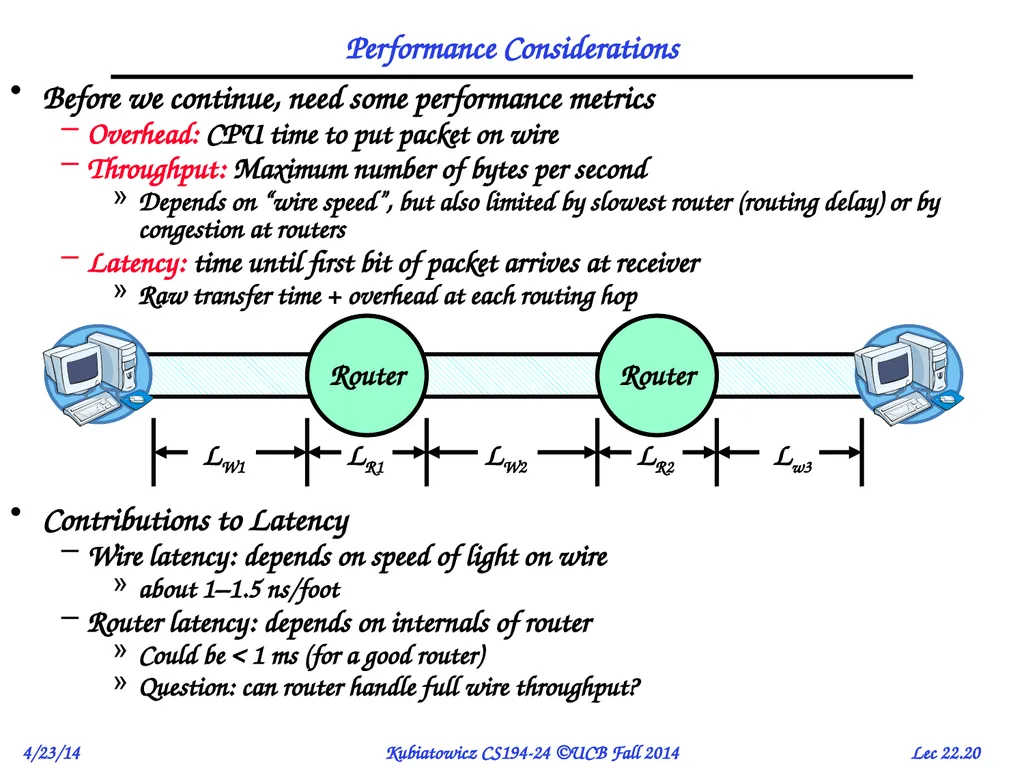
Performance Considerations Before we continue, need some performance metrics
Overhead: CPU time to put packet on wire
Throughput: Maximum number of bytes per second
Depends on “wire speed”, but also limited by slowest router (routing delay) or by congestion at routers
Latency: time until first bit of packet arrives at receiver
Raw transfer time + overhead at each routing hop
Contributions to Latency
Wire latency: depends on speed of light on wire
about 1–1.5 ns/foot
Router latency: depends on internals of router
Could be < 1 ms (for a good router)
Question: can router handle full wire throughput?<br>
Overhead: CPU time to put packet on wire
Throughput: Maximum number of bytes per second
Depends on “wire speed”, but also limited by slowest router (routing delay) or by congestion at routers
Latency: time until first bit of packet arrives at receiver
Raw transfer time + overhead at each routing hop
Contributions to Latency
Wire latency: depends on speed of light on wire
about 1–1.5 ns/foot
Router latency: depends on internals of router
Could be < 1 ms (for a good router)
Question: can router handle full wire throughput?<br>
21
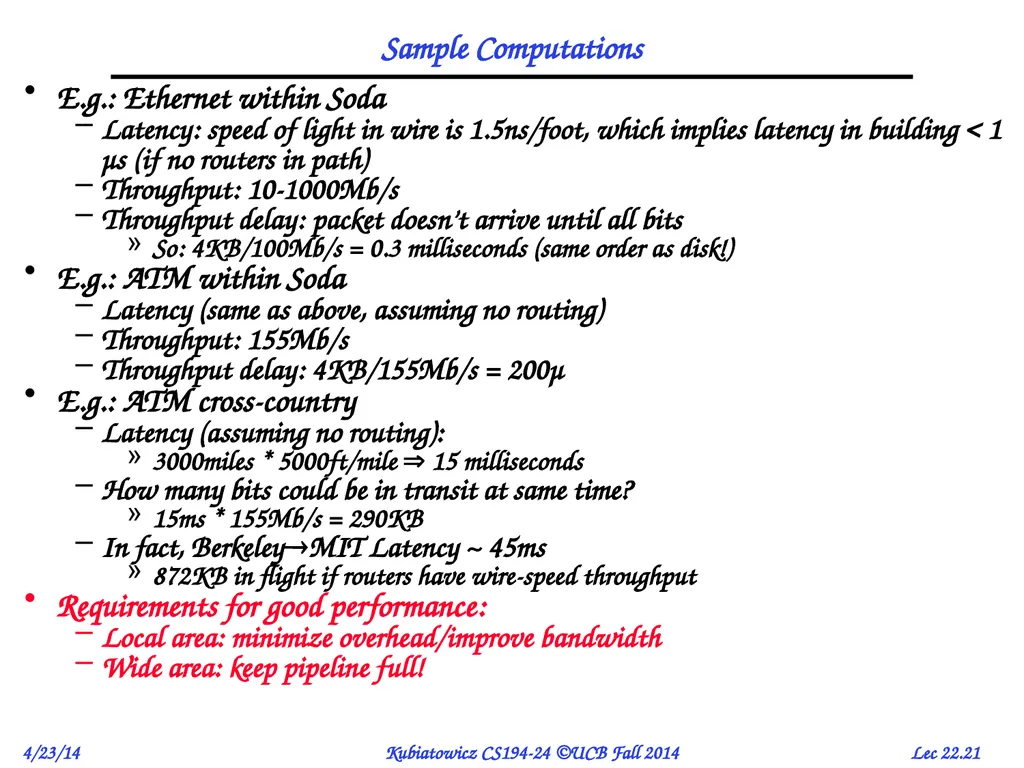
Sample Computations E.g.: Ethernet within Soda
Latency: speed of light in wire is 1.5ns/foot, which implies latency in building < 1 μs (if no routers in path)
Throughput: 10-1000Mb/s
Throughput delay: packet doesn’t arrive until all bits
So: 4KB/100Mb/s = 0.3 milliseconds (same order as disk!)
E.g.: ATM within Soda
Latency (same as above, assuming no routing)
Throughput: 155Mb/s
Throughput delay: 4KB/155Mb/s = 200μ
E.g.: ATM cross-country
Latency (assuming no routing):
3000miles * 5000ft/mile 15 milliseconds
How many bits could be in transit at same time?
15ms * 155Mb/s = 290KB
In fact, BerkeleyMIT Latency ~ 45ms
872KB in flight if routers have wire-speed throughput
Requirements for good performance:
Local area: minimize overhead/improve bandwidth
Wide area: keep pipeline full!<br>
Latency: speed of light in wire is 1.5ns/foot, which implies latency in building < 1 μs (if no routers in path)
Throughput: 10-1000Mb/s
Throughput delay: packet doesn’t arrive until all bits
So: 4KB/100Mb/s = 0.3 milliseconds (same order as disk!)
E.g.: ATM within Soda
Latency (same as above, assuming no routing)
Throughput: 155Mb/s
Throughput delay: 4KB/155Mb/s = 200μ
E.g.: ATM cross-country
Latency (assuming no routing):
3000miles * 5000ft/mile 15 milliseconds
How many bits could be in transit at same time?
15ms * 155Mb/s = 290KB
In fact, BerkeleyMIT Latency ~ 45ms
872KB in flight if routers have wire-speed throughput
Requirements for good performance:
Local area: minimize overhead/improve bandwidth
Wide area: keep pipeline full!<br>
22
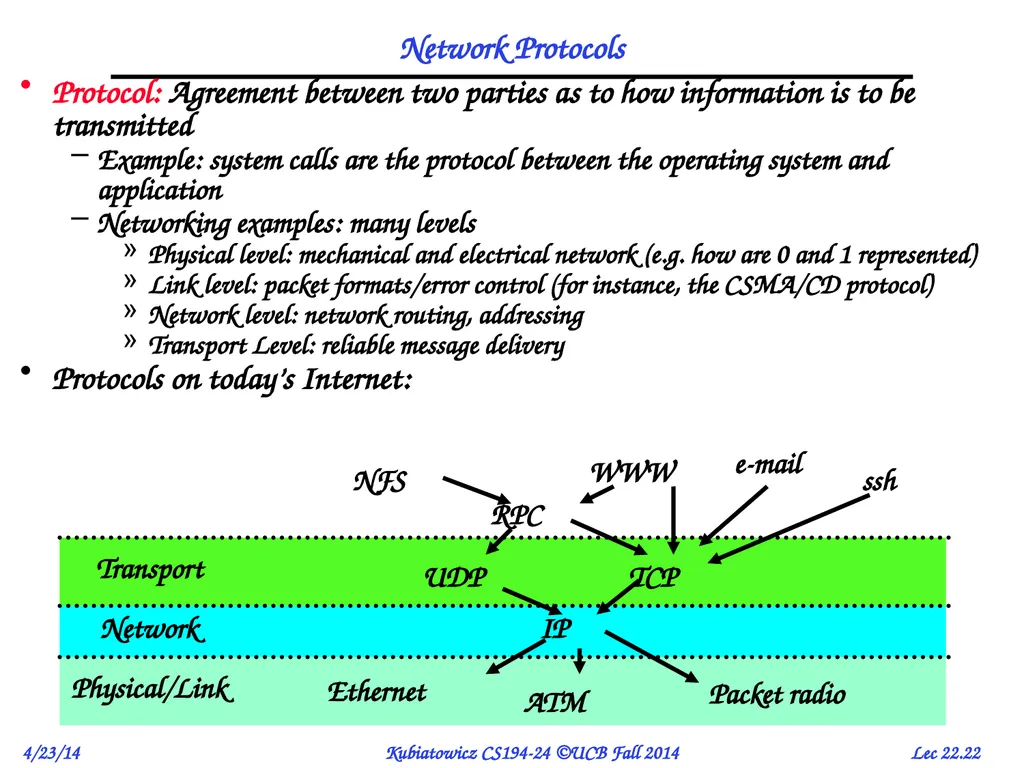
Network Protocols Protocol: Agreement between two parties as to how information is to be transmitted
Example: system calls are the protocol between the operating system and application
Networking examples: many levels
Physical level: mechanical and electrical network (e.g. how are 0 and 1 represented)
Link level: packet formats/error control (for instance, the CSMA/CD protocol)
Network level: network routing, addressing
Transport Level: reliable message delivery
Protocols on today’s Internet:<br>
Example: system calls are the protocol between the operating system and application
Networking examples: many levels
Physical level: mechanical and electrical network (e.g. how are 0 and 1 represented)
Link level: packet formats/error control (for instance, the CSMA/CD protocol)
Network level: network routing, addressing
Transport Level: reliable message delivery
Protocols on today’s Internet:<br>
23
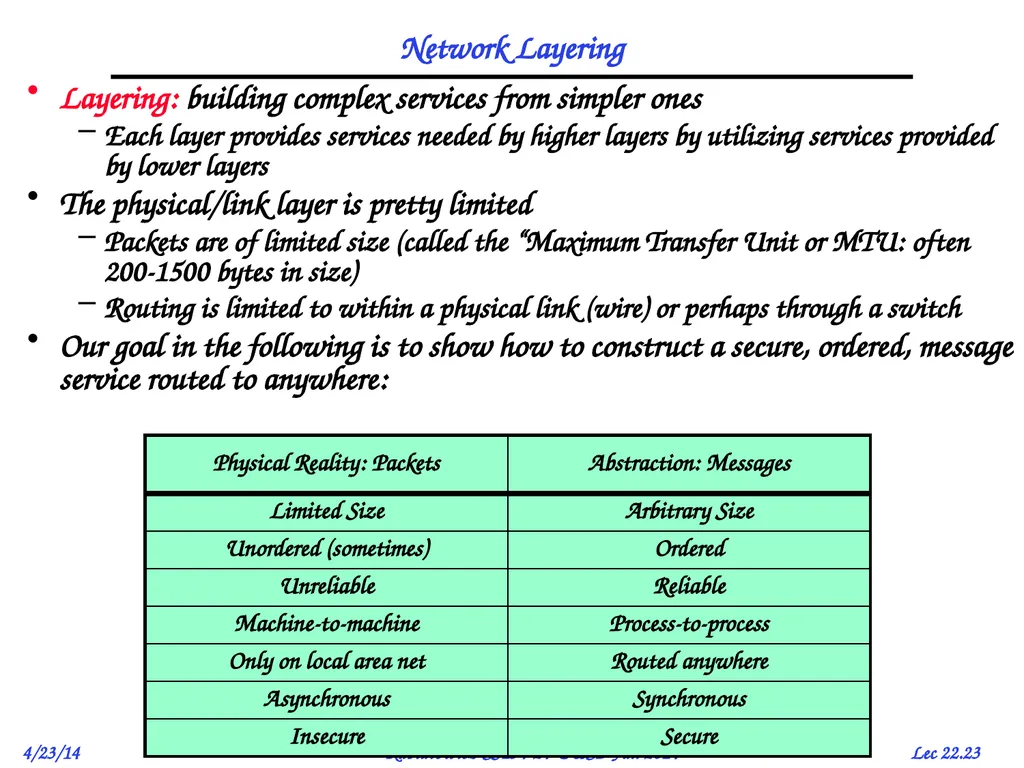
Network Layering Layering: building complex services from simpler ones
Each layer provides services needed by higher layers by utilizing services provided by lower layers
The physical/link layer is pretty limited
Packets are of limited size (called the “Maximum Transfer Unit or MTU: often 200-1500 bytes in size)
Routing is limited to within a physical link (wire) or perhaps through a switch
Our goal in the following is to show how to construct a secure, ordered, message service routed to anywhere:<br>
Each layer provides services needed by higher layers by utilizing services provided by lower layers
The physical/link layer is pretty limited
Packets are of limited size (called the “Maximum Transfer Unit or MTU: often 200-1500 bytes in size)
Routing is limited to within a physical link (wire) or perhaps through a switch
Our goal in the following is to show how to construct a secure, ordered, message service routed to anywhere:<br>
24
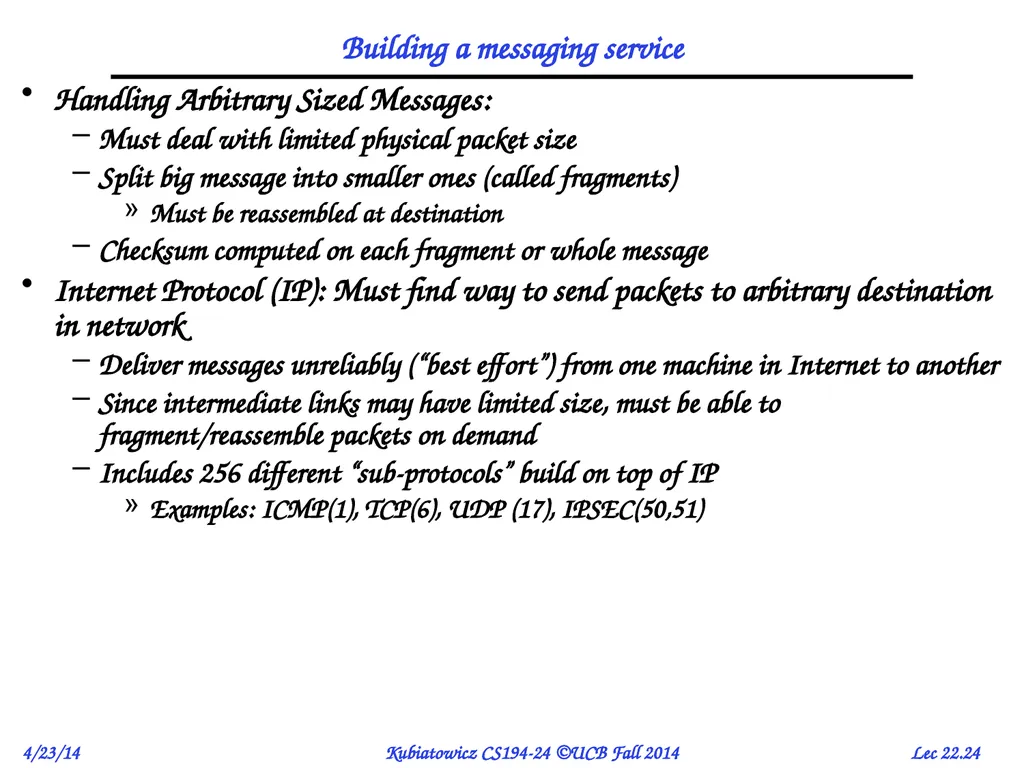
Building a messaging service Handling Arbitrary Sized Messages:
Must deal with limited physical packet size
Split big message into smaller ones (called fragments)
Must be reassembled at destination
Checksum computed on each fragment or whole message
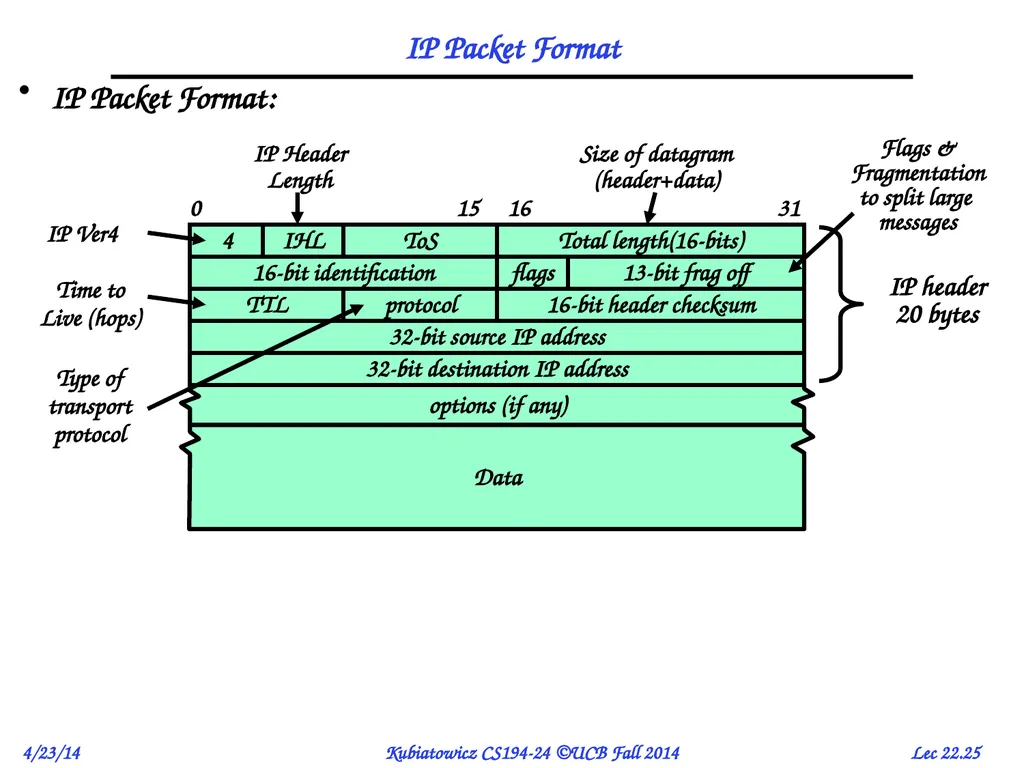
Internet Protocol (IP): Must find way to send packets to arbitrary destination in network
Deliver messages unreliably (“best effort”) from one machine in Internet to another
Since intermediate links may have limited size, must be able to fragment/reassemble packets on demand
Includes 256 different “sub-protocols” build on top of IP
Examples: ICMP(1), TCP(6), UDP (17), IPSEC(50,51)<br>
Must deal with limited physical packet size
Split big message into smaller ones (called fragments)
Must be reassembled at destination
Checksum computed on each fragment or whole message
Internet Protocol (IP): Must find way to send packets to arbitrary destination in network
Deliver messages unreliably (“best effort”) from one machine in Internet to another
Since intermediate links may have limited size, must be able to fragment/reassemble packets on demand
Includes 256 different “sub-protocols” build on top of IP
Examples: ICMP(1), TCP(6), UDP (17), IPSEC(50,51)<br>
25
IP Packet Format IP Packet Format:<br>
26
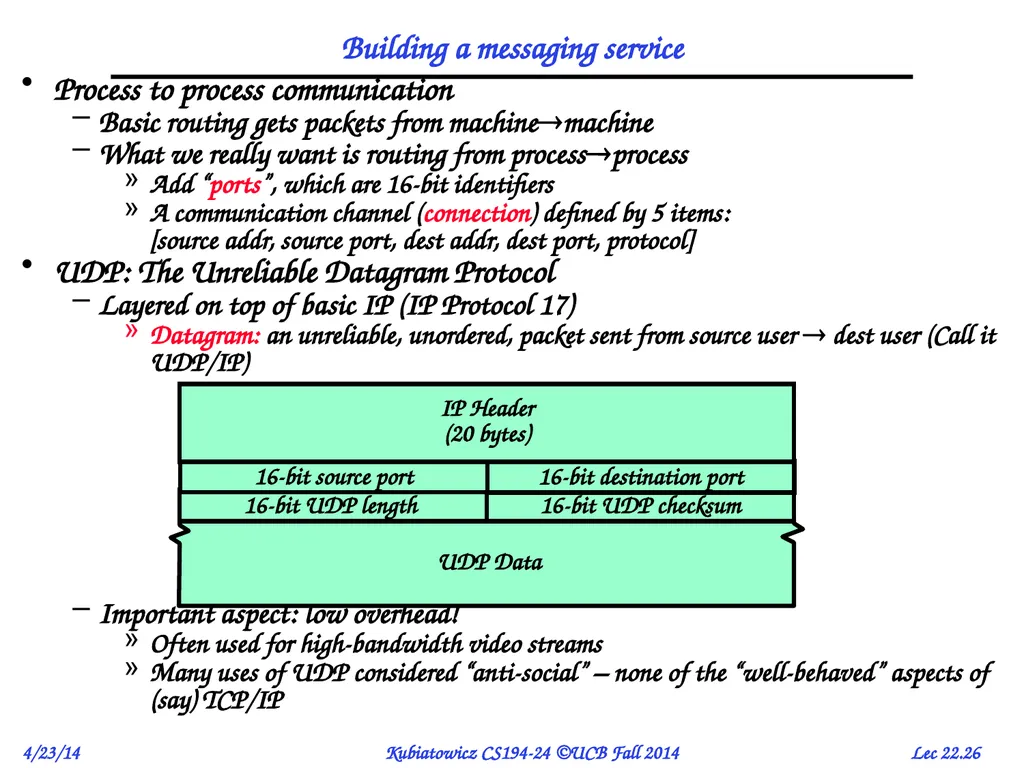
Building a messaging service Process to process communication
Basic routing gets packets from machinemachine
What we really want is routing from processprocess
Add “ports”, which are 16-bit identifiers
A communication channel (connection) defined by 5 items: [source addr, source port, dest addr, dest port, protocol]
UDP: The Unreliable Datagram Protocol
Layered on top of basic IP (IP Protocol 17)
Datagram: an unreliable, unordered, packet sent from source user dest user (Call it UDP/IP)
Important aspect: low overhead!
Often used for high-bandwidth video streams
Many uses of UDP considered “anti-social” – none of the “well-behaved” aspects of (say) TCP/IP<br>
Basic routing gets packets from machinemachine
What we really want is routing from processprocess
Add “ports”, which are 16-bit identifiers
A communication channel (connection) defined by 5 items: [source addr, source port, dest addr, dest port, protocol]
UDP: The Unreliable Datagram Protocol
Layered on top of basic IP (IP Protocol 17)
Datagram: an unreliable, unordered, packet sent from source user dest user (Call it UDP/IP)
Important aspect: low overhead!
Often used for high-bandwidth video streams
Many uses of UDP considered “anti-social” – none of the “well-behaved” aspects of (say) TCP/IP<br>
27
Ordered Messages Ordered Messages
Several network services are best constructed by ordered messaging
Ask remote machine to first do x, then do y, etc.
Unfortunately, underlying network is packet based:
Packets are routed one at a time through the network
Can take different paths or be delayed individually
IP can reorder packets! P0,P1 might arrive as P1,P0
Solution requires queuing at destination
Need to hold onto packets to undo misordering
Total degree of reordering impacts queue size
Ordered messages on top of unordered ones:
Assign sequence numbers to packets
0,1,2,3,4…..
If packets arrive out of order, reorder before delivering to user application
For instance, hold onto #3 until #2 arrives, etc.
Sequence numbers are specific to particular connection
Reordering among connections normally doesn’t matter
If restart connection, need to make sure use different range of sequence numbers than previously…<br>
Several network services are best constructed by ordered messaging
Ask remote machine to first do x, then do y, etc.
Unfortunately, underlying network is packet based:
Packets are routed one at a time through the network
Can take different paths or be delayed individually
IP can reorder packets! P0,P1 might arrive as P1,P0
Solution requires queuing at destination
Need to hold onto packets to undo misordering
Total degree of reordering impacts queue size
Ordered messages on top of unordered ones:
Assign sequence numbers to packets
0,1,2,3,4…..
If packets arrive out of order, reorder before delivering to user application
For instance, hold onto #3 until #2 arrives, etc.
Sequence numbers are specific to particular connection
Reordering among connections normally doesn’t matter
If restart connection, need to make sure use different range of sequence numbers than previously…<br>
28
Reliable Message Delivery: the Problem All physical networks can garble and/or drop packets
Physical media: packet not transmitted/received
If transmit close to maximum rate, get more throughput – even if some packets get lost
If transmit at lowest voltage such that error correction just starts correcting errors, get best power/bit
Congestion: no place to put incoming packet
Point-to-point network: insufficient queue at switch/router
Broadcast link: two host try to use same link
In any network: insufficient buffer space at destination
Rate mismatch: what if sender send faster than receiver can process?
Reliable Message Delivery on top of Unreliable Packets
Need some way to make sure that packets actually make it to receiver
Every packet received at least once
Every packet received at most once
Can combine with ordering: every packet received by process at destination exactly once and in order<br>
Physical media: packet not transmitted/received
If transmit close to maximum rate, get more throughput – even if some packets get lost
If transmit at lowest voltage such that error correction just starts correcting errors, get best power/bit
Congestion: no place to put incoming packet
Point-to-point network: insufficient queue at switch/router
Broadcast link: two host try to use same link
In any network: insufficient buffer space at destination
Rate mismatch: what if sender send faster than receiver can process?
Reliable Message Delivery on top of Unreliable Packets
Need some way to make sure that packets actually make it to receiver
Every packet received at least once
Every packet received at most once
Can combine with ordering: every packet received by process at destination exactly once and in order<br>
29
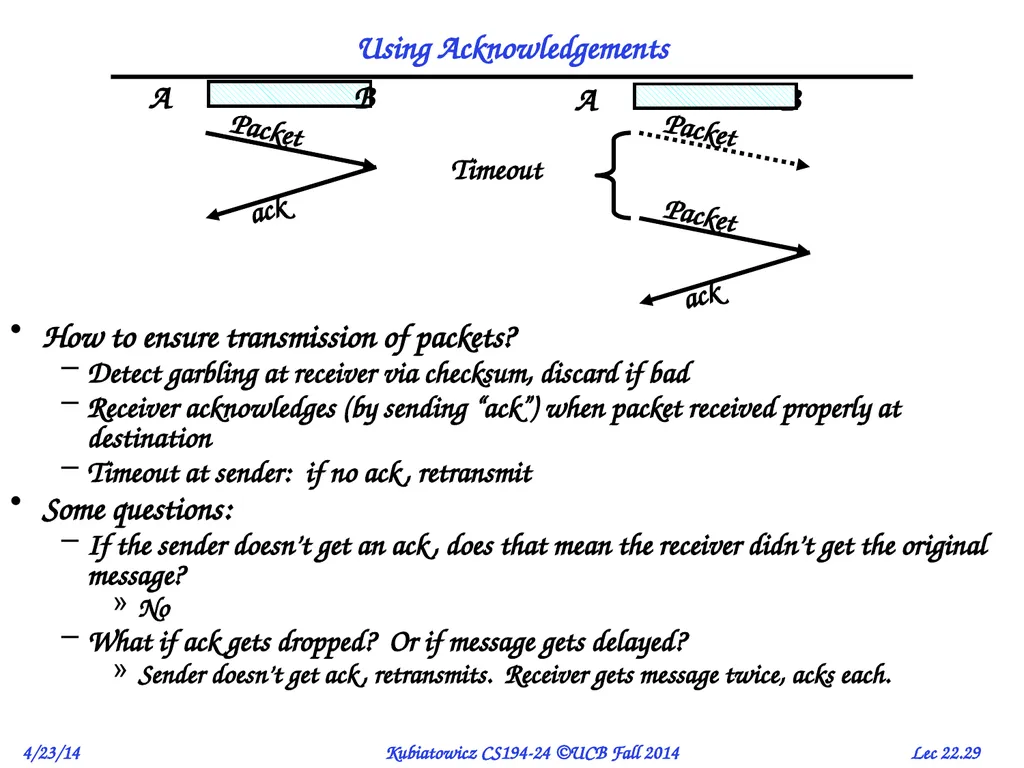
Using Acknowledgements How to ensure transmission of packets?
Detect garbling at receiver via checksum, discard if bad
Receiver acknowledges (by sending “ack”) when packet received properly at destination
Timeout at sender: if no ack, retransmit
Some questions:
If the sender doesn’t get an ack, does that mean the receiver didn’t get the original message?
No
What if ack gets dropped? Or if message gets delayed?
Sender doesn’t get ack, retransmits. Receiver gets message twice, acks each.<br>
Detect garbling at receiver via checksum, discard if bad
Receiver acknowledges (by sending “ack”) when packet received properly at destination
Timeout at sender: if no ack, retransmit
Some questions:
If the sender doesn’t get an ack, does that mean the receiver didn’t get the original message?
No
What if ack gets dropped? Or if message gets delayed?
Sender doesn’t get ack, retransmits. Receiver gets message twice, acks each.<br>
30
How to deal with message duplication Solution: put sequence number in message to identify re-transmitted packets
Receiver checks for duplicate #’s; Discard if detected
Requirements:
Sender keeps copy of unack’ed messages
Easy: only need to buffer messages
Receiver tracks possible duplicate messages
Hard: when ok to forget about received message?
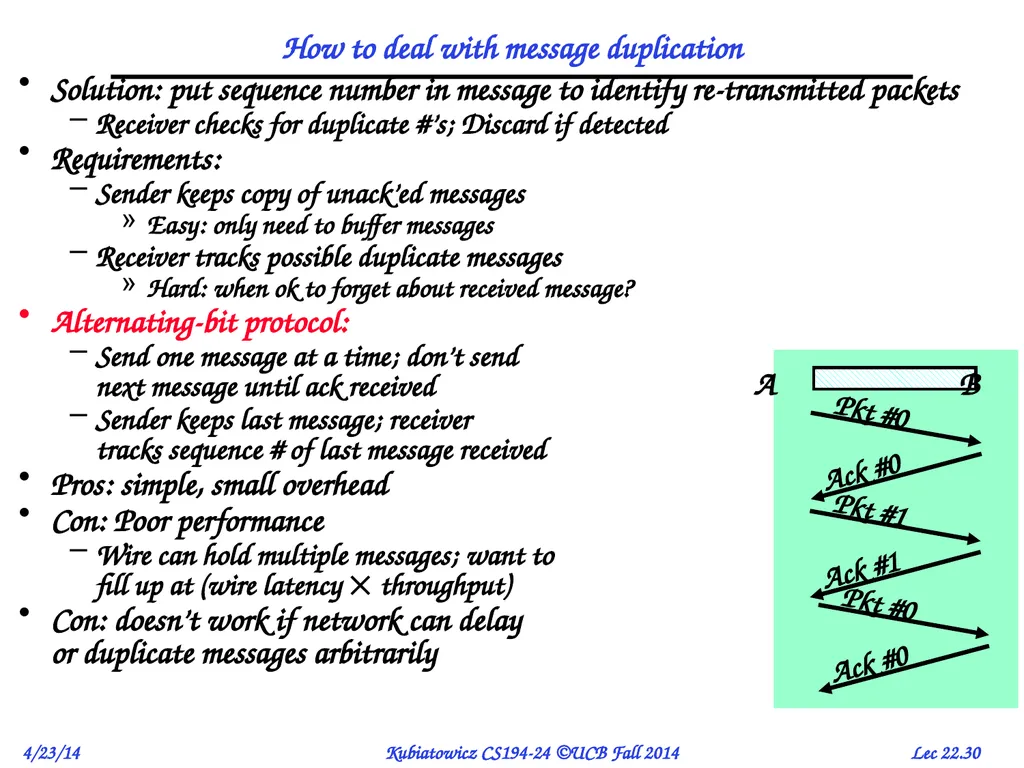
Alternating-bit protocol:
Send one message at a time; don’t send next message until ack received
Sender keeps last message; receiver tracks sequence # of last message received
Pros: simple, small overhead
Con: Poor performance
Wire can hold multiple messages; want to fill up at (wire latency throughput)
Con: doesn’t work if network can delay or duplicate messages arbitrarily<br>
Receiver checks for duplicate #’s; Discard if detected
Requirements:
Sender keeps copy of unack’ed messages
Easy: only need to buffer messages
Receiver tracks possible duplicate messages
Hard: when ok to forget about received message?
Alternating-bit protocol:
Send one message at a time; don’t send next message until ack received
Sender keeps last message; receiver tracks sequence # of last message received
Pros: simple, small overhead
Con: Poor performance
Wire can hold multiple messages; want to fill up at (wire latency throughput)
Con: doesn’t work if network can delay or duplicate messages arbitrarily<br>
31
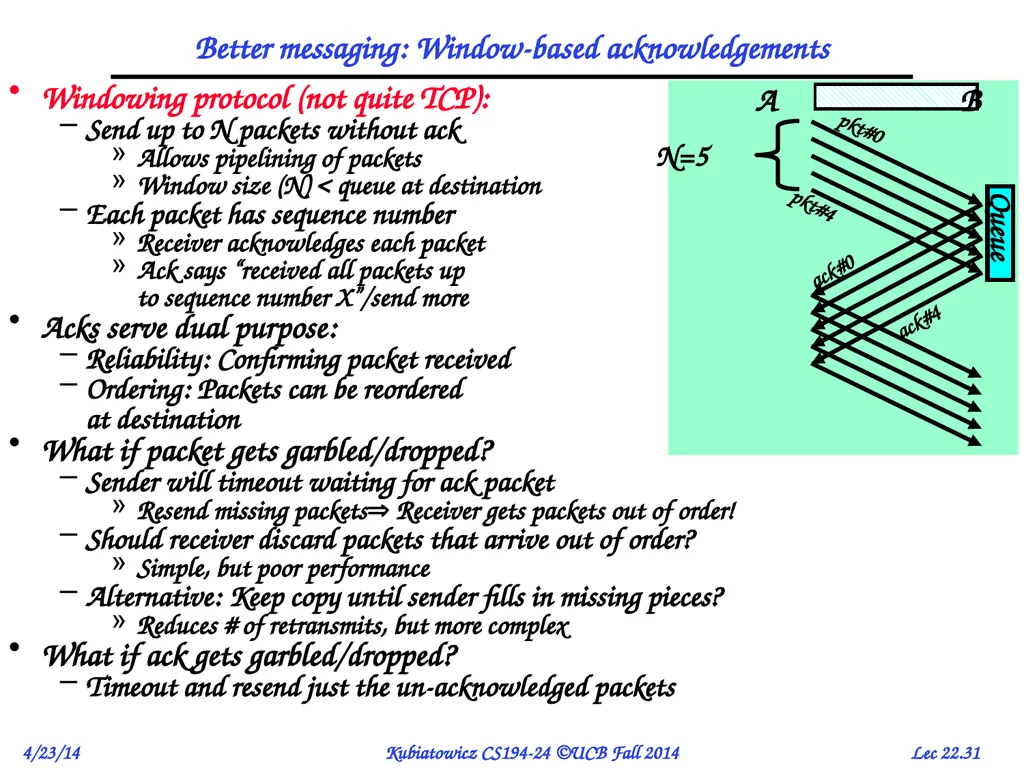
Better messaging: Window-based acknowledgements Queue Windowing protocol (not quite TCP):
Send up to N packets without ack
Allows pipelining of packets
Window size (N) < queue at destination
Each packet has sequence number
Receiver acknowledges each packet
Ack says “received all packets up to sequence number X”/send more
Acks serve dual purpose:
Reliability: Confirming packet received
Ordering: Packets can be reordered at destination
What if packet gets garbled/dropped?
Sender will timeout waiting for ack packet
Resend missing packets Receiver gets packets out of order!
Should receiver discard packets that arrive out of order?
Simple, but poor performance
Alternative: Keep copy until sender fills in missing pieces?
Reduces # of retransmits, but more complex
What if ack gets garbled/dropped?
Timeout and resend just the un-acknowledged packets<br>
Send up to N packets without ack
Allows pipelining of packets
Window size (N) < queue at destination
Each packet has sequence number
Receiver acknowledges each packet
Ack says “received all packets up to sequence number X”/send more
Acks serve dual purpose:
Reliability: Confirming packet received
Ordering: Packets can be reordered at destination
What if packet gets garbled/dropped?
Sender will timeout waiting for ack packet
Resend missing packets Receiver gets packets out of order!
Should receiver discard packets that arrive out of order?
Simple, but poor performance
Alternative: Keep copy until sender fills in missing pieces?
Reduces # of retransmits, but more complex
What if ack gets garbled/dropped?
Timeout and resend just the un-acknowledged packets<br>
32
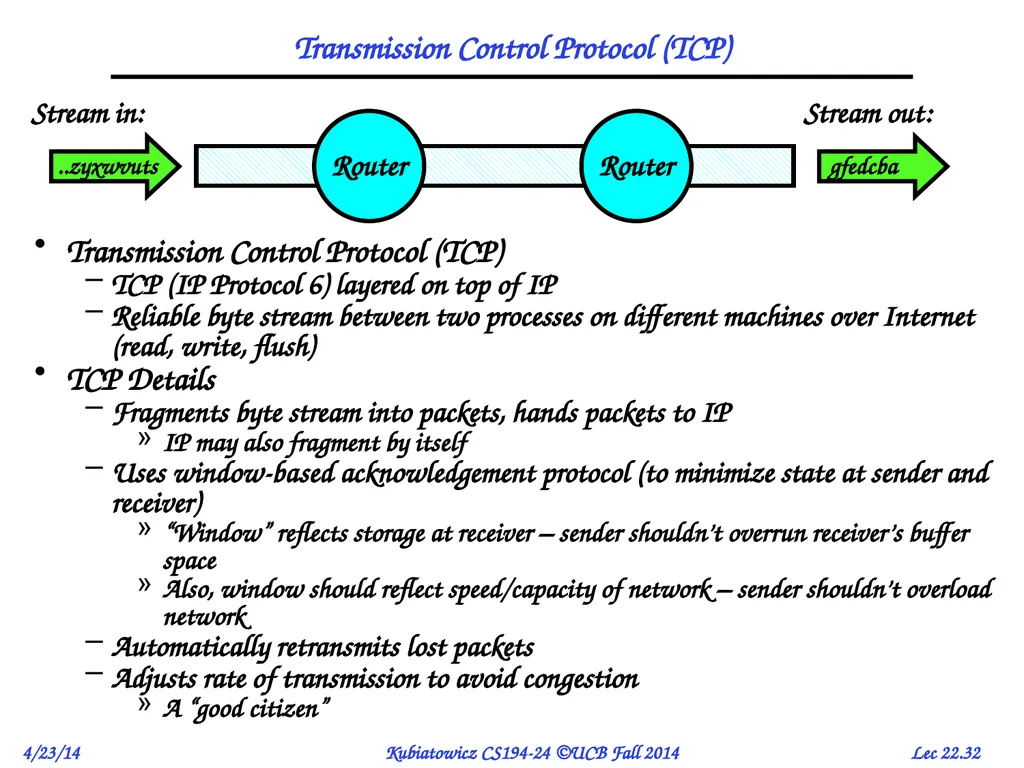
Transmission Control Protocol (TCP) Transmission Control Protocol (TCP)
TCP (IP Protocol 6) layered on top of IP
Reliable byte stream between two processes on different machines over Internet (read, write, flush)
TCP Details
Fragments byte stream into packets, hands packets to IP
IP may also fragment by itself
Uses window-based acknowledgement protocol (to minimize state at sender and receiver)
“Window” reflects storage at receiver – sender shouldn’t overrun receiver’s buffer space
Also, window should reflect speed/capacity of network – sender shouldn’t overload network
Automatically retransmits lost packets
Adjusts rate of transmission to avoid congestion
A “good citizen” Stream in: Stream out: ..zyxwvuts gfedcba<br>
TCP (IP Protocol 6) layered on top of IP
Reliable byte stream between two processes on different machines over Internet (read, write, flush)
TCP Details
Fragments byte stream into packets, hands packets to IP
IP may also fragment by itself
Uses window-based acknowledgement protocol (to minimize state at sender and receiver)
“Window” reflects storage at receiver – sender shouldn’t overrun receiver’s buffer space
Also, window should reflect speed/capacity of network – sender shouldn’t overload network
Automatically retransmits lost packets
Adjusts rate of transmission to avoid congestion
A “good citizen” Stream in: Stream out: ..zyxwvuts gfedcba<br>
33
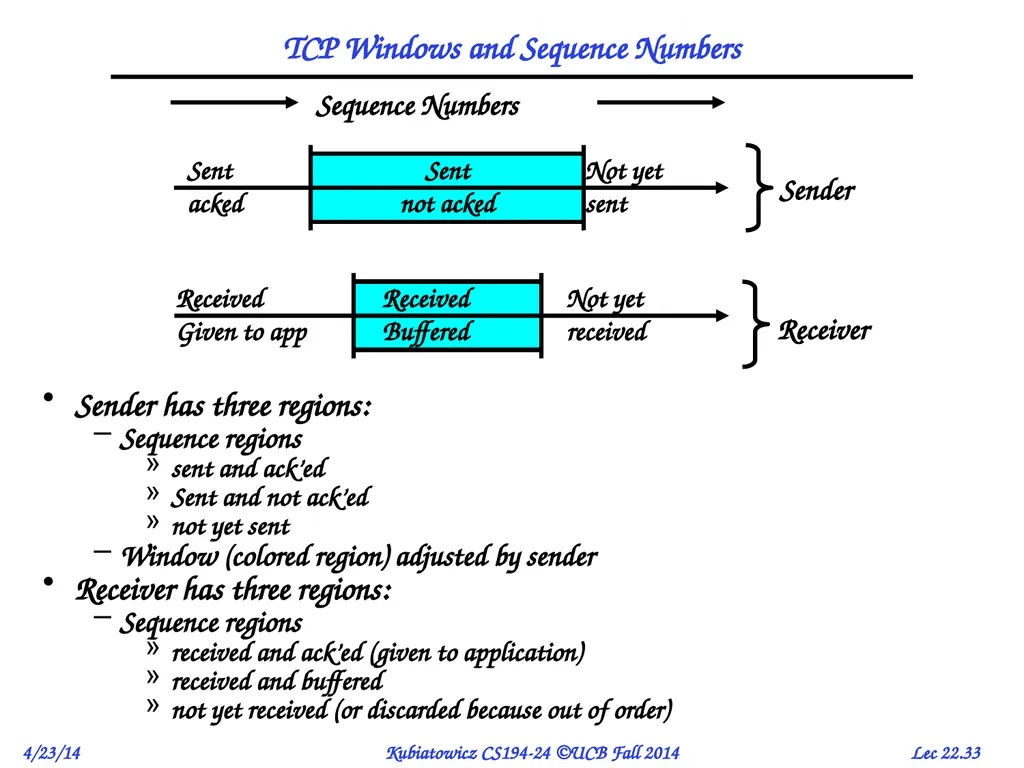
TCP Windows and Sequence Numbers Sender has three regions:
Sequence regions
sent and ack’ed
Sent and not ack’ed
not yet sent
Window (colored region) adjusted by sender
Receiver has three regions:
Sequence regions
received and ack’ed (given to application)
received and buffered
not yet received (or discarded because out of order)<br>
Sequence regions
sent and ack’ed
Sent and not ack’ed
not yet sent
Window (colored region) adjusted by sender
Receiver has three regions:
Sequence regions
received and ack’ed (given to application)
received and buffered
not yet received (or discarded because out of order)<br>
34
Seq:190
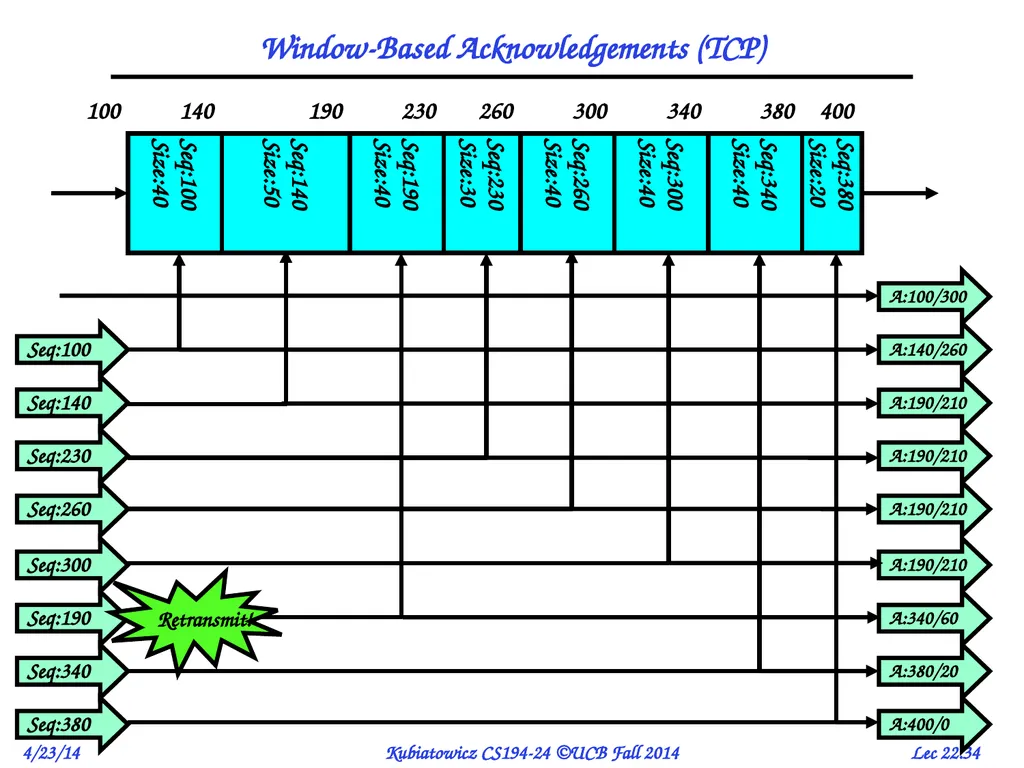
Size:40 Window-Based Acknowledgements (TCP) Seq:230 A:190/210 Seq:260 A:190/210 Seq:300 A:190/210 Seq:190 A:340/60 Seq:340 A:380/20 Seq:380 A:400/0 A:100/300 Seq:100 A:140/260 Seq:140 A:190/210 100 Retransmit!<br>
Size:40 Window-Based Acknowledgements (TCP) Seq:230 A:190/210 Seq:260 A:190/210 Seq:300 A:190/210 Seq:190 A:340/60 Seq:340 A:380/20 Seq:380 A:400/0 A:100/300 Seq:100 A:140/260 Seq:140 A:190/210 100 Retransmit!<br>
35
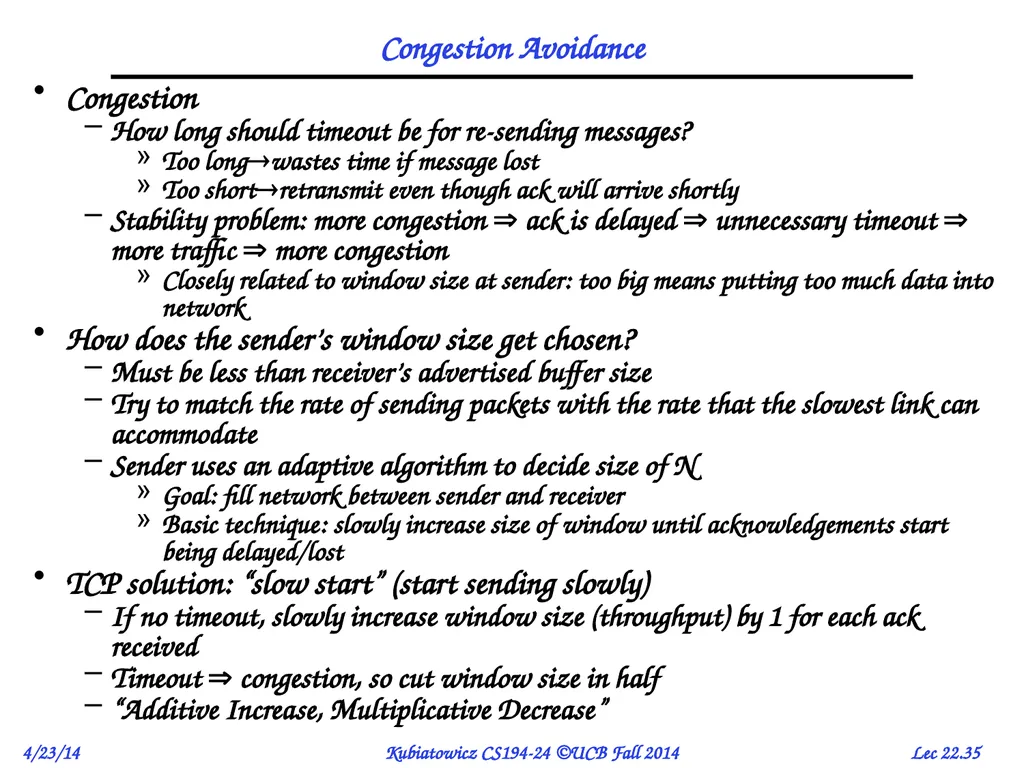
Congestion Avoidance Congestion
How long should timeout be for re-sending messages?
Too longwastes time if message lost
Too shortretransmit even though ack will arrive shortly
Stability problem: more congestion ack is delayed unnecessary timeout more traffic more congestion
Closely related to window size at sender: too big means putting too much data into network
How does the sender’s window size get chosen?
Must be less than receiver’s advertised buffer size
Try to match the rate of sending packets with the rate that the slowest link can accommodate
Sender uses an adaptive algorithm to decide size of N
Goal: fill network between sender and receiver
Basic technique: slowly increase size of window until acknowledgements start being delayed/lost
TCP solution: “slow start” (start sending slowly)
If no timeout, slowly increase window size (throughput) by 1 for each ack received
Timeout congestion, so cut window size in half
“Additive Increase, Multiplicative Decrease”<br>
How long should timeout be for re-sending messages?
Too longwastes time if message lost
Too shortretransmit even though ack will arrive shortly
Stability problem: more congestion ack is delayed unnecessary timeout more traffic more congestion
Closely related to window size at sender: too big means putting too much data into network
How does the sender’s window size get chosen?
Must be less than receiver’s advertised buffer size
Try to match the rate of sending packets with the rate that the slowest link can accommodate
Sender uses an adaptive algorithm to decide size of N
Goal: fill network between sender and receiver
Basic technique: slowly increase size of window until acknowledgements start being delayed/lost
TCP solution: “slow start” (start sending slowly)
If no timeout, slowly increase window size (throughput) by 1 for each ack received
Timeout congestion, so cut window size in half
“Additive Increase, Multiplicative Decrease”<br>
36
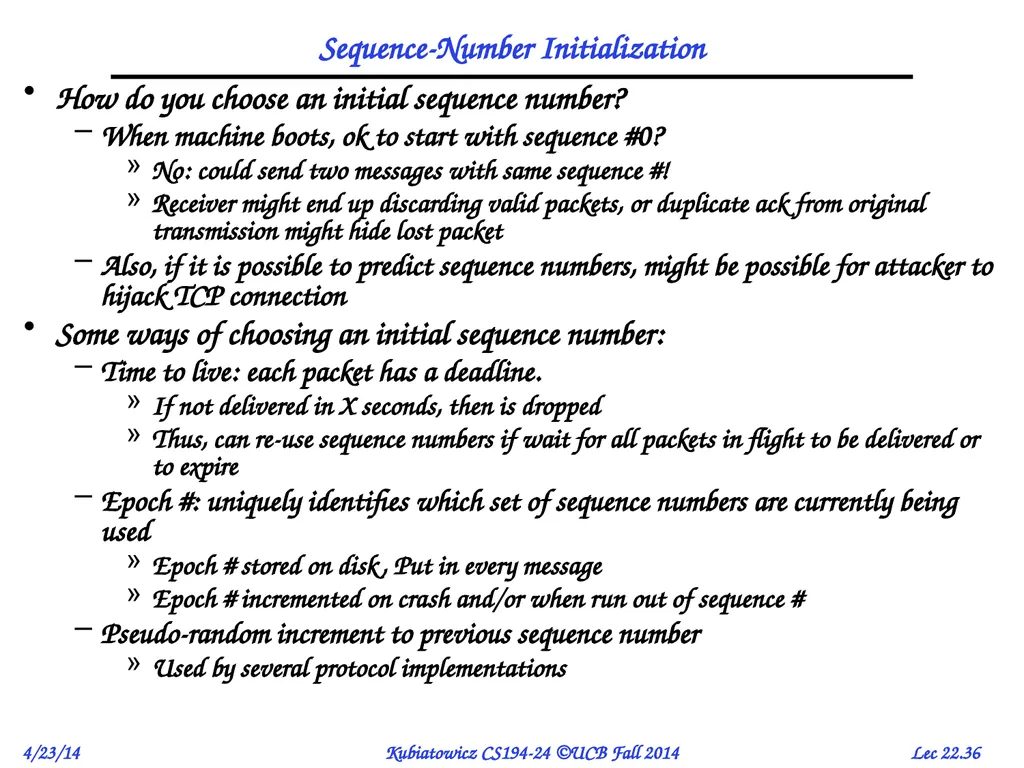
Sequence-Number Initialization How do you choose an initial sequence number?
When machine boots, ok to start with sequence #0?
No: could send two messages with same sequence #!
Receiver might end up discarding valid packets, or duplicate ack from original transmission might hide lost packet
Also, if it is possible to predict sequence numbers, might be possible for attacker to hijack TCP connection
Some ways of choosing an initial sequence number:
Time to live: each packet has a deadline.
If not delivered in X seconds, then is dropped
Thus, can re-use sequence numbers if wait for all packets in flight to be delivered or to expire
Epoch #: uniquely identifies which set of sequence numbers are currently being used
Epoch # stored on disk, Put in every message
Epoch # incremented on crash and/or when run out of sequence #
Pseudo-random increment to previous sequence number
Used by several protocol implementations<br>
When machine boots, ok to start with sequence #0?
No: could send two messages with same sequence #!
Receiver might end up discarding valid packets, or duplicate ack from original transmission might hide lost packet
Also, if it is possible to predict sequence numbers, might be possible for attacker to hijack TCP connection
Some ways of choosing an initial sequence number:
Time to live: each packet has a deadline.
If not delivered in X seconds, then is dropped
Thus, can re-use sequence numbers if wait for all packets in flight to be delivered or to expire
Epoch #: uniquely identifies which set of sequence numbers are currently being used
Epoch # stored on disk, Put in every message
Epoch # incremented on crash and/or when run out of sequence #
Pseudo-random increment to previous sequence number
Used by several protocol implementations<br>
37
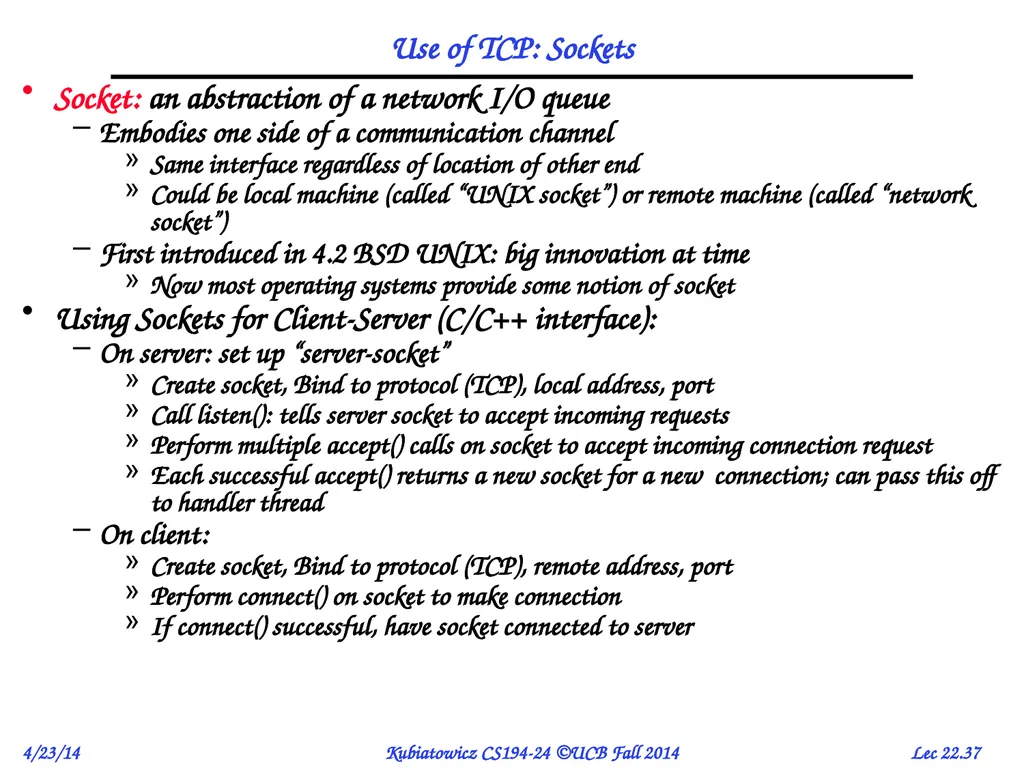
Use of TCP: Sockets Socket: an abstraction of a network I/O queue
Embodies one side of a communication channel
Same interface regardless of location of other end
Could be local machine (called “UNIX socket”) or remote machine (called “network socket”)
First introduced in 4.2 BSD UNIX: big innovation at time
Now most operating systems provide some notion of socket
Using Sockets for Client-Server (C/C++ interface):
On server: set up “server-socket”
Create socket, Bind to protocol (TCP), local address, port
Call listen(): tells server socket to accept incoming requests
Perform multiple accept() calls on socket to accept incoming connection request
Each successful accept() returns a new socket for a new connection; can pass this off to handler thread
On client:
Create socket, Bind to protocol (TCP), remote address, port
Perform connect() on socket to make connection
If connect() successful, have socket connected to server<br>
Embodies one side of a communication channel
Same interface regardless of location of other end
Could be local machine (called “UNIX socket”) or remote machine (called “network socket”)
First introduced in 4.2 BSD UNIX: big innovation at time
Now most operating systems provide some notion of socket
Using Sockets for Client-Server (C/C++ interface):
On server: set up “server-socket”
Create socket, Bind to protocol (TCP), local address, port
Call listen(): tells server socket to accept incoming requests
Perform multiple accept() calls on socket to accept incoming connection request
Each successful accept() returns a new socket for a new connection; can pass this off to handler thread
On client:
Create socket, Bind to protocol (TCP), remote address, port
Perform connect() on socket to make connection
If connect() successful, have socket connected to server<br>
38
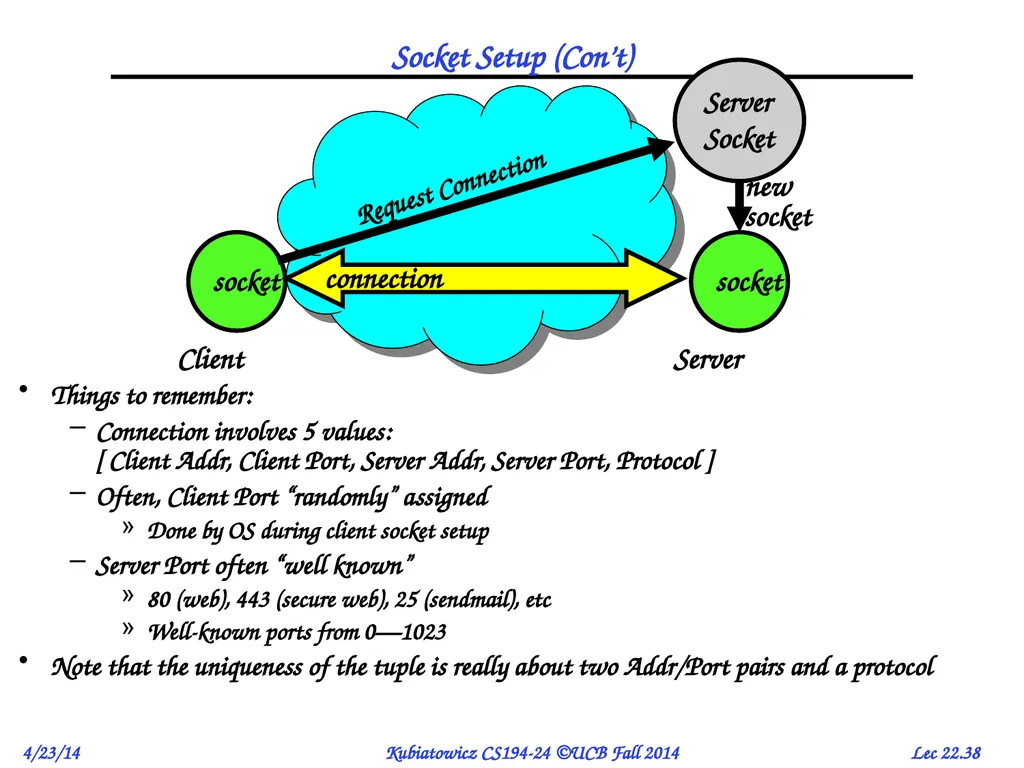
Socket Setup (Con’t) Things to remember:
Connection involves 5 values: [ Client Addr, Client Port, Server Addr, Server Port, Protocol ]
Often, Client Port “randomly” assigned
Done by OS during client socket setup
Server Port often “well known”
80 (web), 443 (secure web), 25 (sendmail), etc
Well-known ports from 0—1023
Note that the uniqueness of the tuple is really about two Addr/Port pairs and a protocol<br>
Connection involves 5 values: [ Client Addr, Client Port, Server Addr, Server Port, Protocol ]
Often, Client Port “randomly” assigned
Done by OS during client socket setup
Server Port often “well known”
80 (web), 443 (secure web), 25 (sendmail), etc
Well-known ports from 0—1023
Note that the uniqueness of the tuple is really about two Addr/Port pairs and a protocol<br>
39
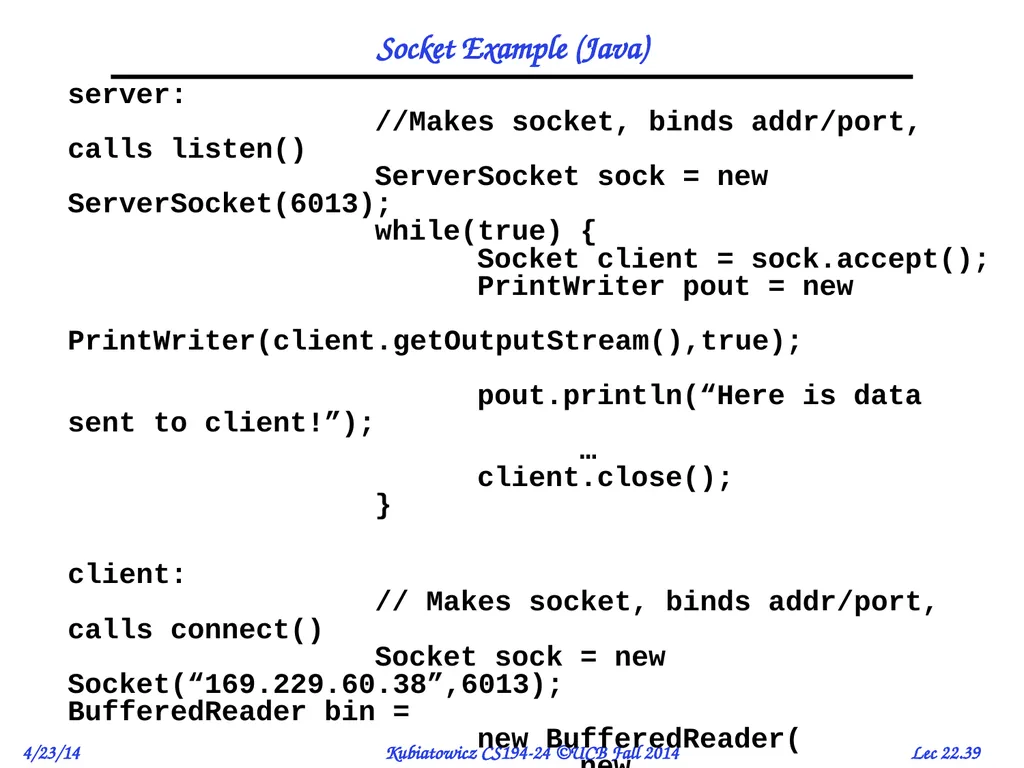
Socket Example (Java) server:
//Makes socket, binds addr/port, calls listen()
ServerSocket sock = new ServerSocket(6013);
while(true) {
Socket client = sock.accept();
PrintWriter pout = new
PrintWriter(client.getOutputStream(),true);
pout.println(“Here is data sent to client!”);
…
client.close();
}
client: // Makes socket, binds addr/port, calls connect() Socket sock = new Socket(“169.229.60.38”,6013); BufferedReader bin = new BufferedReader( new InputStreamReader(sock.getInputStream)); String line; while ((line = bin.readLine())!=null) System.out.println(line); sock.close();<br>
client: // Makes socket, binds addr/port, calls connect() Socket sock = new Socket(“169.229.60.38”,6013); BufferedReader bin = new BufferedReader( new InputStreamReader(sock.getInputStream)); String line; while ((line = bin.readLine())!=null) System.out.println(line); sock.close();<br>
40
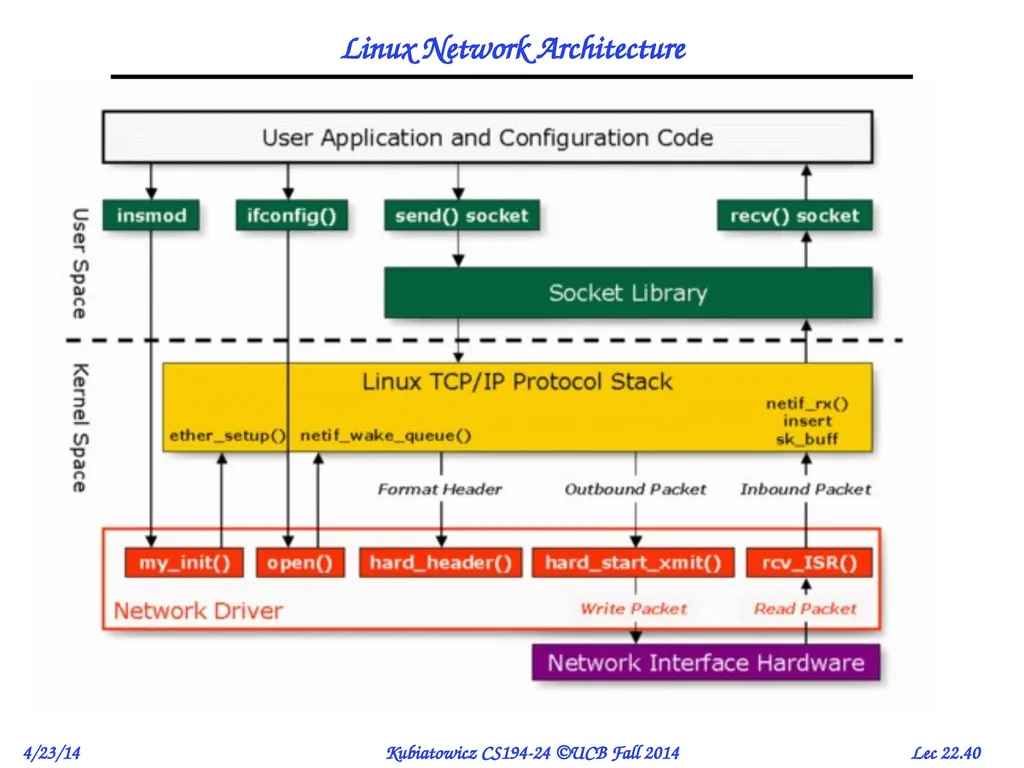
Linux Network Architecture<br>
41
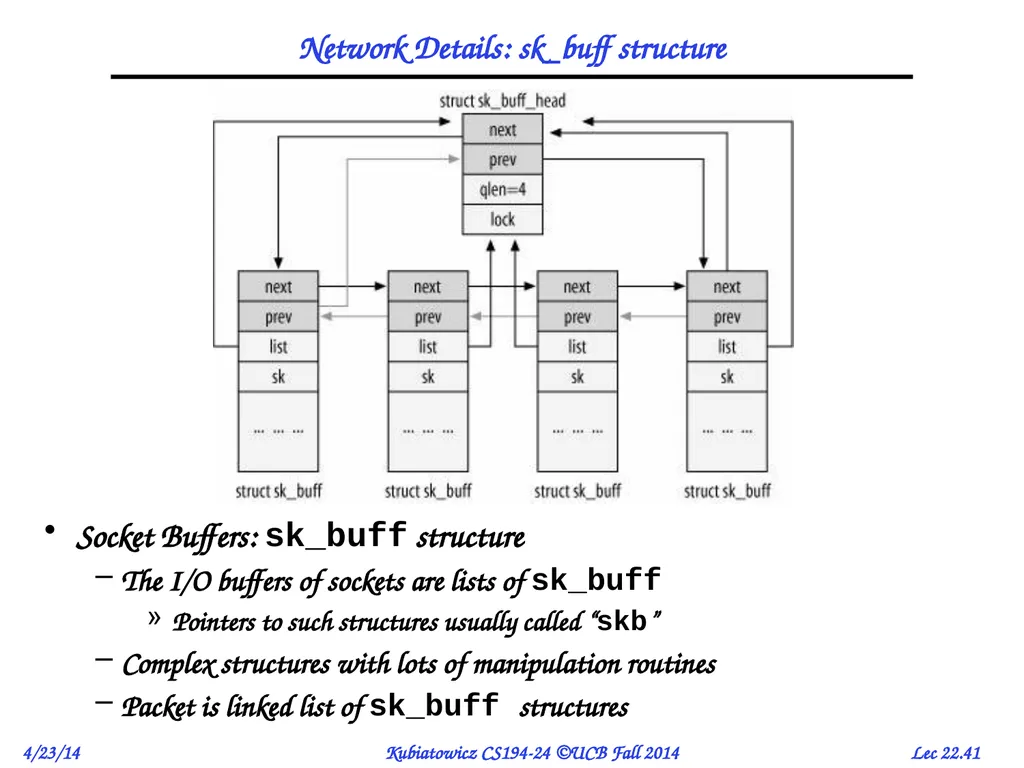
Network Details: sk_buff structure Socket Buffers: sk_buff structure
The I/O buffers of sockets are lists of sk_buff
Pointers to such structures usually called “skb”
Complex structures with lots of manipulation routines
Packet is linked list of sk_buff structures<br>
The I/O buffers of sockets are lists of sk_buff
Pointers to such structures usually called “skb”
Complex structures with lots of manipulation routines
Packet is linked list of sk_buff structures<br>
42
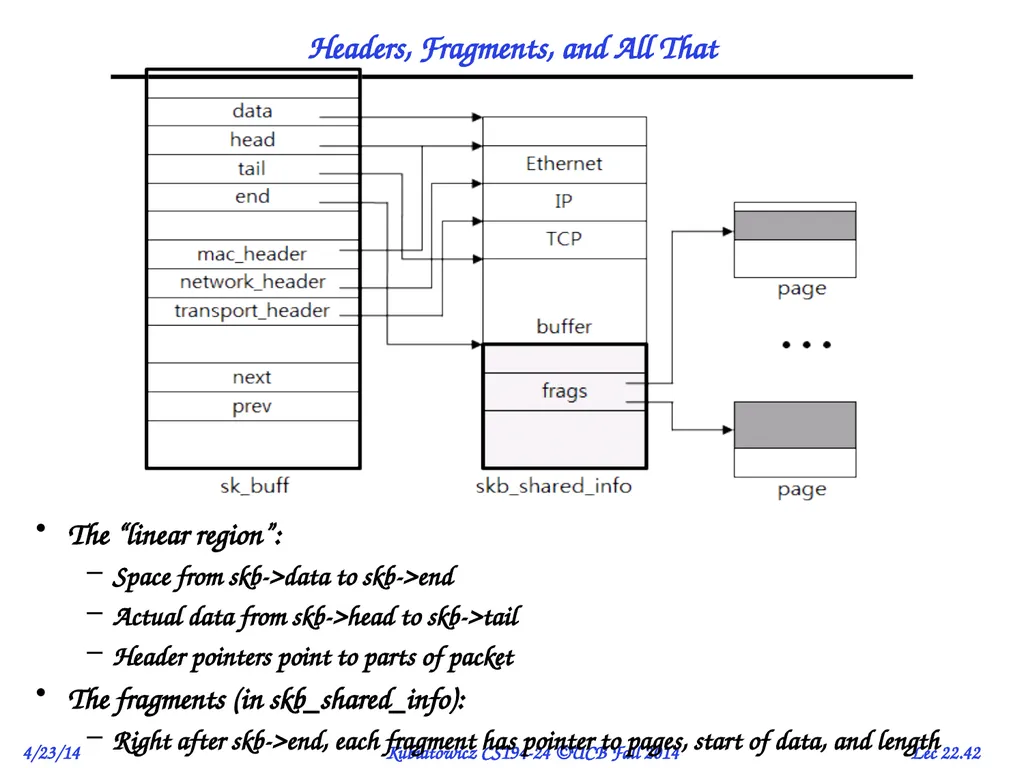
Headers, Fragments, and All That The “linear region”:
Space from skb->data to skb->end
Actual data from skb->head to skb->tail
Header pointers point to parts of packet
The fragments (in skb_shared_info):
Right after skb->end, each fragment has pointer to pages, start of data, and length<br>
Space from skb->data to skb->end
Actual data from skb->head to skb->tail
Header pointers point to parts of packet
The fragments (in skb_shared_info):
Right after skb->end, each fragment has pointer to pages, start of data, and length<br>
43
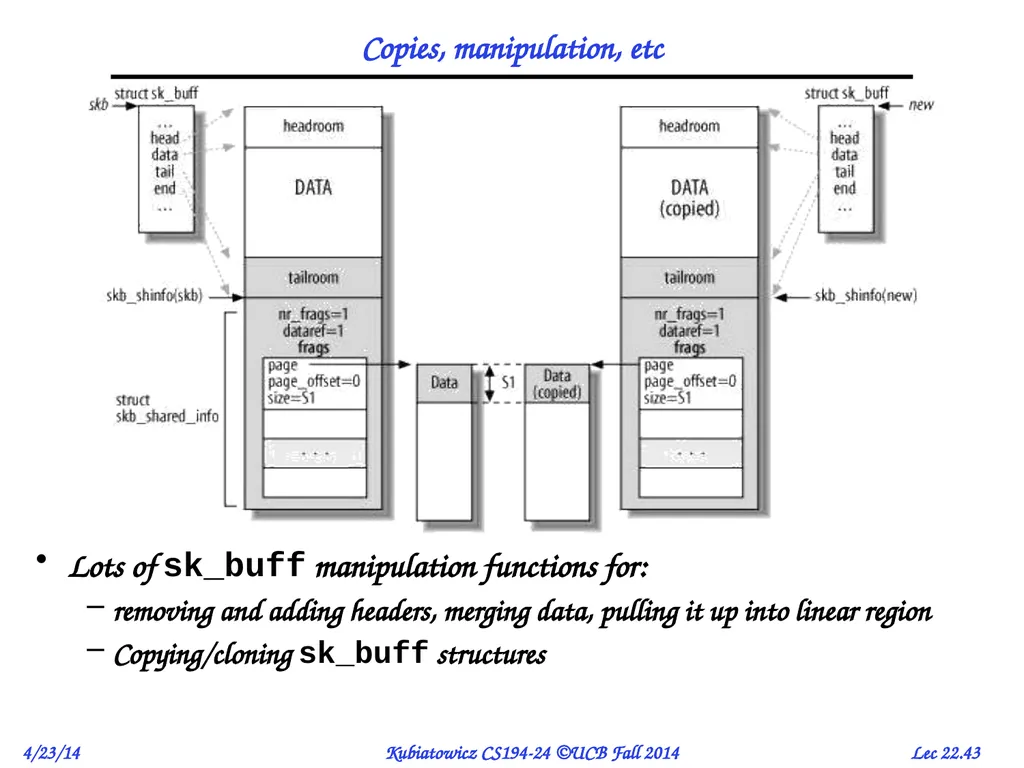
Copies, manipulation, etc Lots of sk_buff manipulation functions for:
removing and adding headers, merging data, pulling it up into linear region
Copying/cloning sk_buff structures<br>
removing and adding headers, merging data, pulling it up into linear region
Copying/cloning sk_buff structures<br>
44
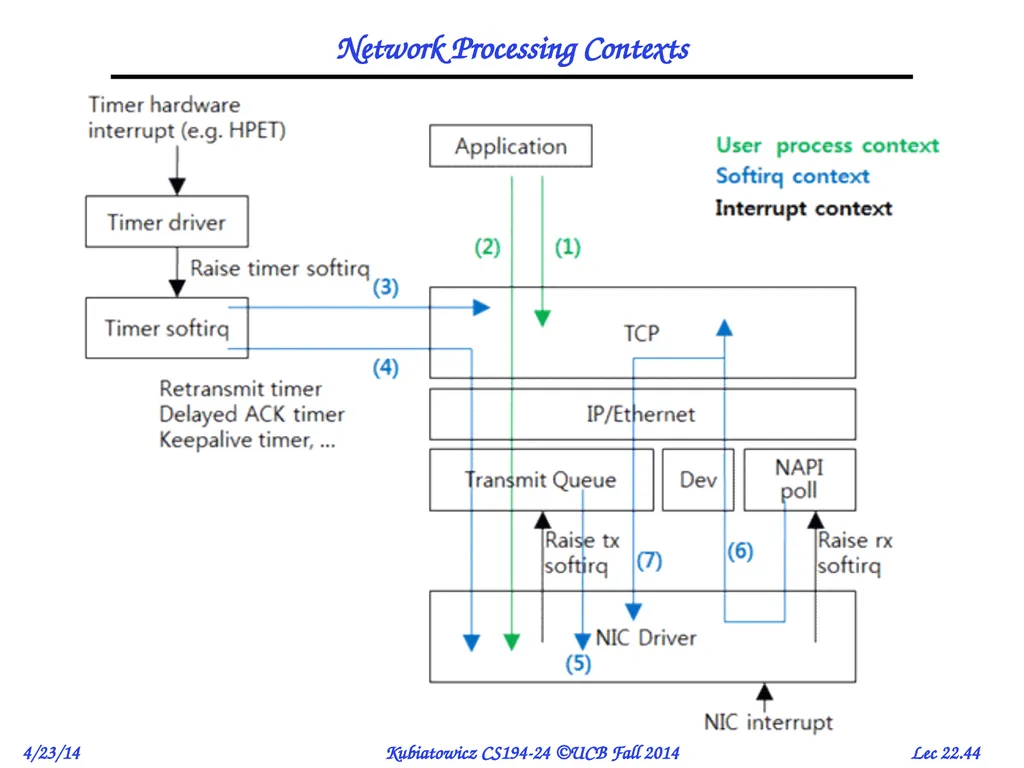
Network Processing Contexts<br>
45
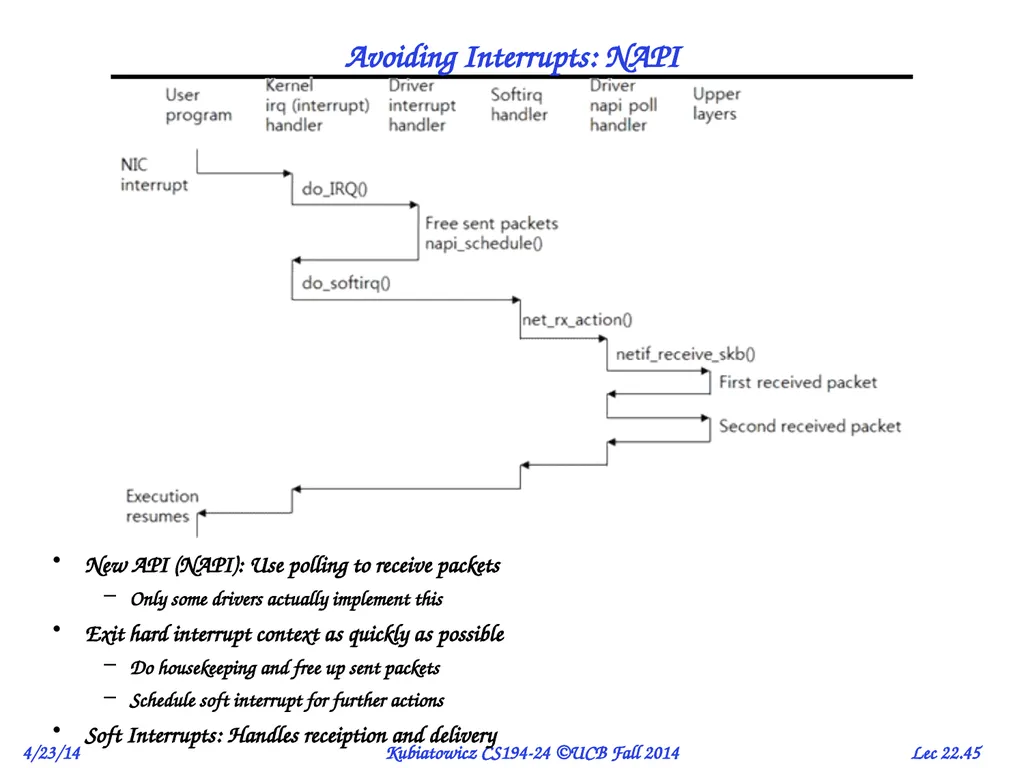
Avoiding Interrupts: NAPI New API (NAPI): Use polling to receive packets
Only some drivers actually implement this
Exit hard interrupt context as quickly as possible
Do housekeeping and free up sent packets
Schedule soft interrupt for further actions
Soft Interrupts: Handles receiption and delivery<br>
Only some drivers actually implement this
Exit hard interrupt context as quickly as possible
Do housekeeping and free up sent packets
Schedule soft interrupt for further actions
Soft Interrupts: Handles receiption and delivery<br>
46
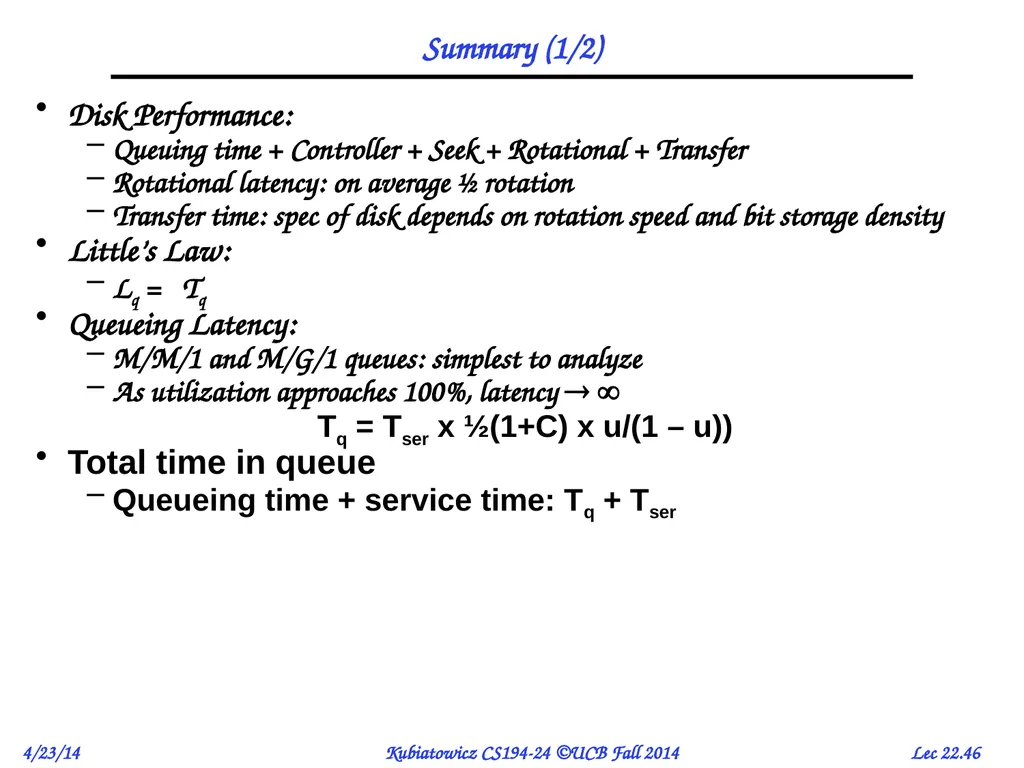
Summary (1/2) Disk Performance:
Queuing time + Controller + Seek + Rotational + Transfer
Rotational latency: on average ½ rotation
Transfer time: spec of disk depends on rotation speed and bit storage density
Little’s Law:
Lq = Tq
Queueing Latency:
M/M/1 and M/G/1 queues: simplest to analyze
As utilization approaches 100%, latency
Tq = Tser x ½(1+C) x u/(1 – u))
Total time in queue
Queueing time + service time: Tq + Tser<br>
Queuing time + Controller + Seek + Rotational + Transfer
Rotational latency: on average ½ rotation
Transfer time: spec of disk depends on rotation speed and bit storage density
Little’s Law:
Lq = Tq
Queueing Latency:
M/M/1 and M/G/1 queues: simplest to analyze
As utilization approaches 100%, latency
Tq = Tser x ½(1+C) x u/(1 – u))
Total time in queue
Queueing time + service time: Tq + Tser<br>
47
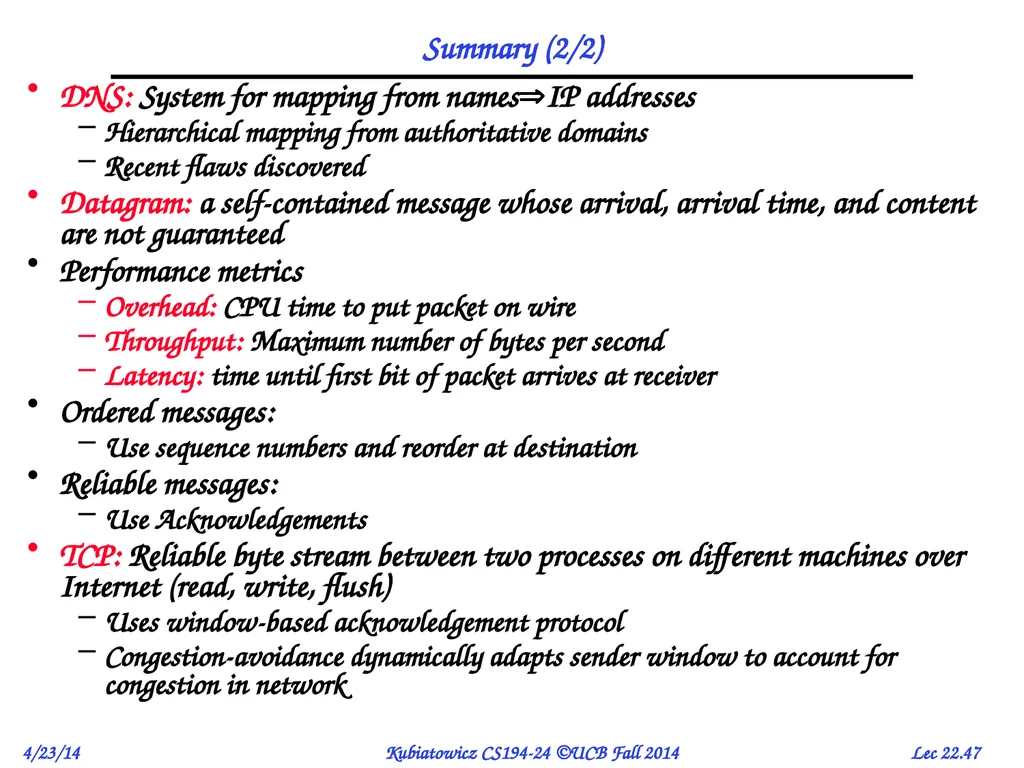
Summary (2/2) DNS: System for mapping from namesIP addresses
Hierarchical mapping from authoritative domains
Recent flaws discovered
Datagram: a self-contained message whose arrival, arrival time, and content are not guaranteed
Performance metrics
Overhead: CPU time to put packet on wire
Throughput: Maximum number of bytes per second
Latency: time until first bit of packet arrives at receiver
Ordered messages:
Use sequence numbers and reorder at destination
Reliable messages:
Use Acknowledgements
TCP: Reliable byte stream between two processes on different machines over Internet (read, write, flush)
Uses window-based acknowledgement protocol
Congestion-avoidance dynamically adapts sender window to account for congestion in network<br>
Hierarchical mapping from authoritative domains
Recent flaws discovered
Datagram: a self-contained message whose arrival, arrival time, and content are not guaranteed
Performance metrics
Overhead: CPU time to put packet on wire
Throughput: Maximum number of bytes per second
Latency: time until first bit of packet arrives at receiver
Ordered messages:
Use sequence numbers and reorder at destination
Reliable messages:
Use Acknowledgements
TCP: Reliable byte stream between two processes on different machines over Internet (read, write, flush)
Uses window-based acknowledgement protocol
Congestion-avoidance dynamically adapts sender window to account for congestion in network<br>