
Essentials of Management Information Systems


Description: Essentials of Management Information Systems Thirteenth Edition Chapter 5 I T Infrastructure: Hardware and Software Copyright 2019 Pearson Education Ltd. Slides in this presentation contain hyperlinks. JAWS users should be able to get a
Related Topics
Download Presentation
"Essentials of Management Information Systems" is the property of its rightful owner. Permission is granted to download and print the materials on this website for personal, non-commercial use only, and to display it on your personal computer provided you do not modify the materials and that you retain all copyright notices contained in the materials. By downloading content from our website, you accept the terms of this agreement.
Presentation Transcript
slide1. Essentials of Management Information Systems Thirteenth Edition Chapter 5 I T Infrastructure: Hardware and Software Copyright © 2019 Pearson Education Ltd. Slides in this presentation contain hyperlinks. JAWS users should be able to get a list of links by using INSERT+F7<br>
slide2. Learning Objectives 5.1 What are the components of I T infrastructure?
5.2 What are the major computer hardware, data storage, input, and output technologies used in business and the major hardware trends?
5.3 What are the major types of computer software used in business and the major software trends?
5.4 What are the principal issues in managing hardware and software technology?
5.5 How will M I S help my career?<br>
slide3. Video Cases Case 1– Rockwell Automation Fuels the Oil and Gas Industry with the Internet of Things (I o T)
Case 2– E S P N.com: The Future of Sports Coverage in the Cloud
Case 3– Netflix: Building a Business in the Cloud<br>
slide4. Grab Leverages Information Technology to Enhance Its Services Problem
providing customers with timely service and drivers with enough fares
matching demand with resources in an unpredictable sector
Solutions
Managed cloud infrastructure
On-demand, scalable services
Illustrates use of cloud computing to improve effectiveness and control costs<br>
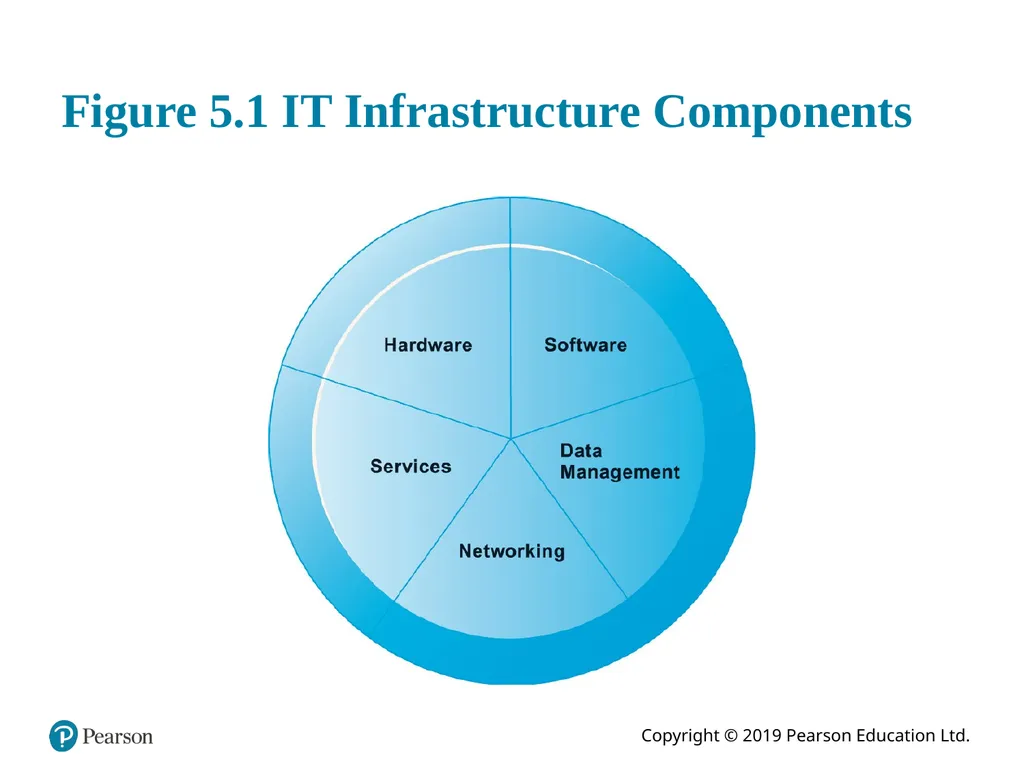
slide5. Infrastructure Components I T infrastructure
Platform for supporting all information systems in the business
Computer hardware
Computer software
Data management technology
Networking and telecommunications technology
Technology services<br>
slide6. Figure 5.1 I T Infrastructure Components<br>
slide7. Types of Computers Personal computers and mobile devices
Workstations
Servers
Mainframes
Supercomputers
Grid computing<br>
slide8. Client/Server Computing Form of distributed computing
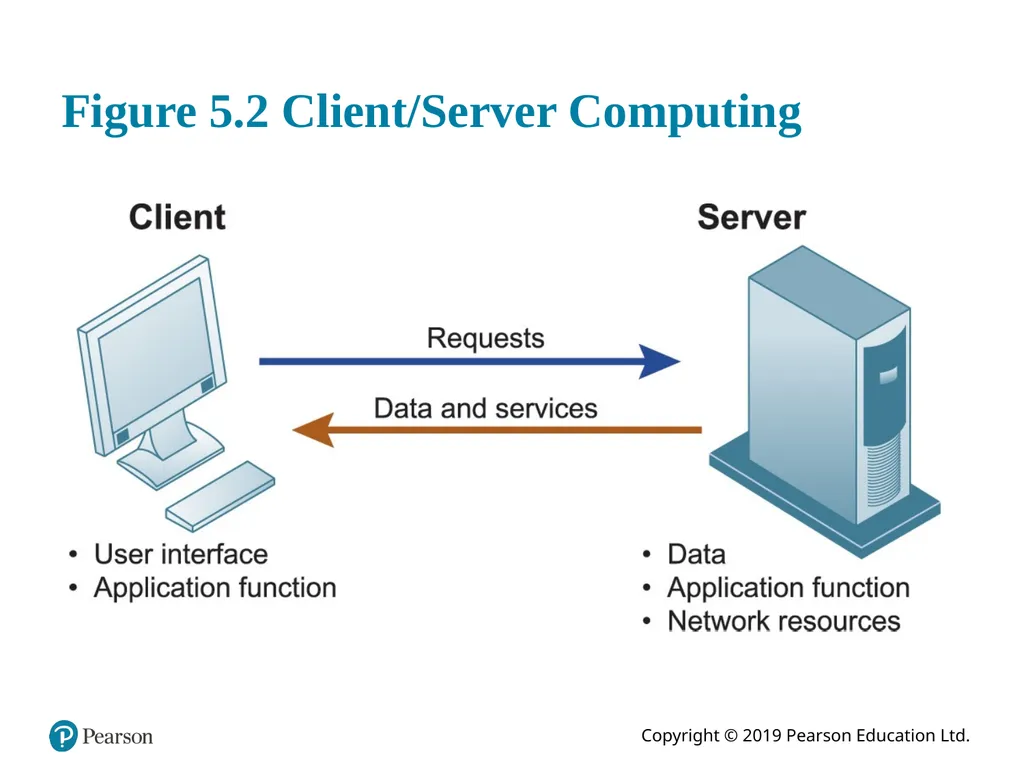
Splits processing between “clients” and “servers”
Two-tiered client/server architecture
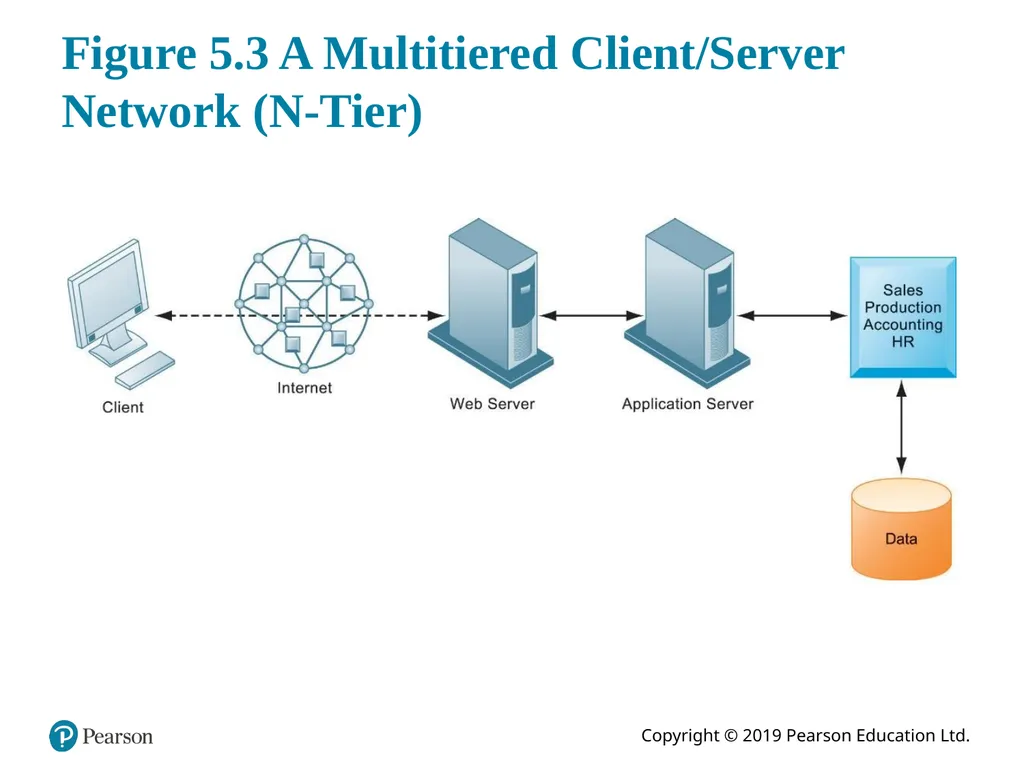
Multi-tiered client/server architecture (N-tier)
Web servers
Application servers<br>
slide9. Figure 5.2 Client/Server Computing<br>
slide10. Figure 5.3 A Multitiered Client/Server Network (N-Tier)<br>
slide11. Storage, Input, and Output Technology Primary secondary storage technologies
Magnetic disk
S S Ds
Optical disks
Magnetic tape
Storage networking: S A Ns
Input devices
E.g. keyboard
Output devices
E.g. monitor<br>
slide12. Contemporary Hardware Trends (1 of 3) The mobile digital platform
Tablet computers
Netbooks
Consumerization of I T and B Y O D
Nanotechnology and quantum computing
Virtualization
Software-defined storage (S D S)<br>
slide13. Interactive Session – Technology: Wearable Computers Change How We Work Class discussion
Wearables have the potential to change the way organizations and workers conduct business. Discuss the implications of this statement.
How would a business process such as ordering a product for a customer in the field be changed if the salesperson was wearing a smartwatch equipped with Salesforce software?
What people, organization, and technology issues would have to be addressed if a company was thinking of equipping its workers with a wearable computing device?
What kinds of businesses are most likely to benefit from wearable computers? Select a business and describe how a wearable computing device could help that business improve operations or decision making.<br>
slide14. Examples of Nanotubes © forance/123R F<br>
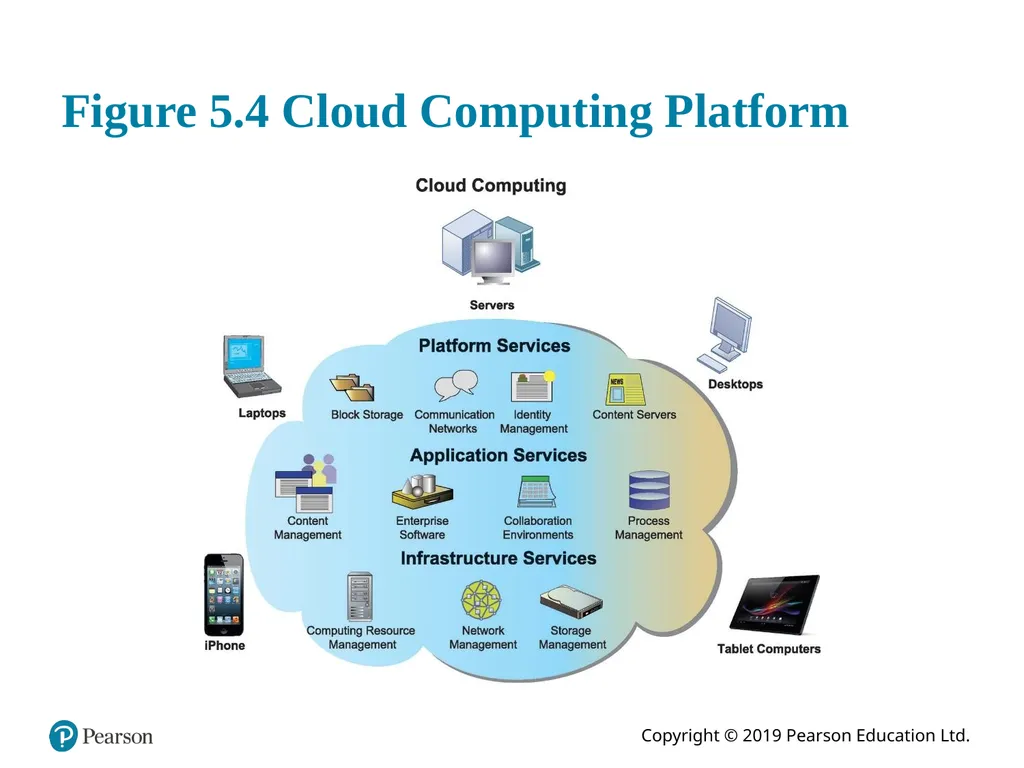
slide15. Figure 5.4 Cloud Computing Platform<br>
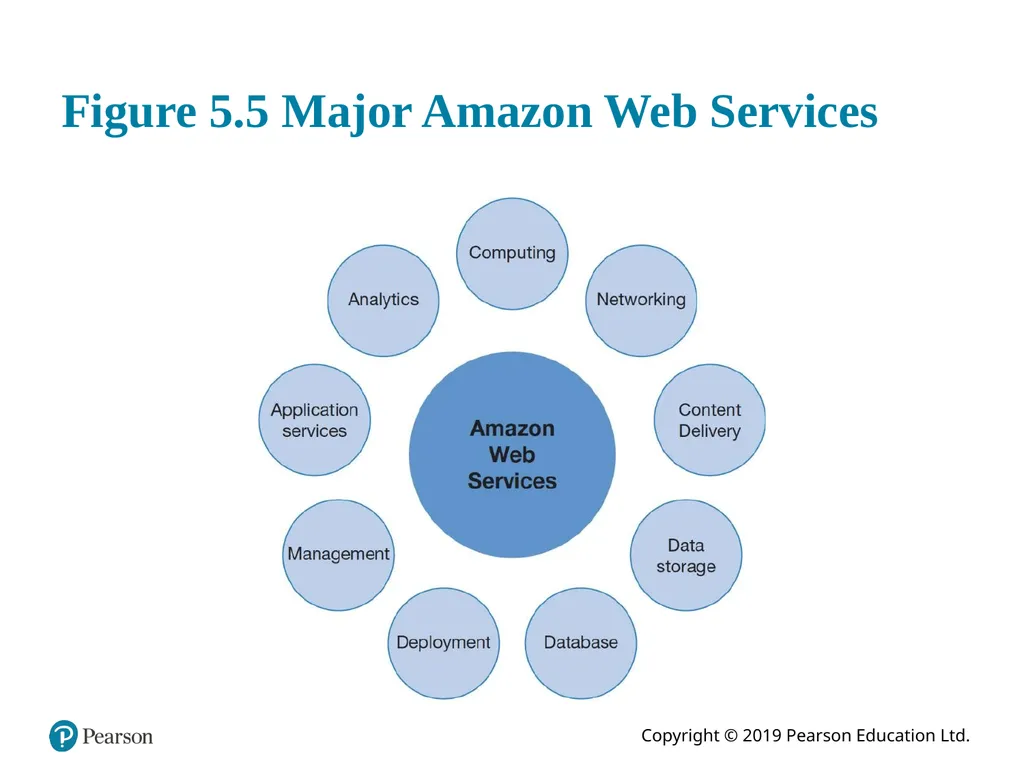
slide16. Figure 5.5 Major Amazon Web Services<br>
slide17. Contemporary Hardware Trends (2 of 3) Cloud computing:
Computing resources obtained over the Internet
Infrastructure as a service (I a a S)
Software as a service (S a a S)
Platform as a service (P a a S)
Public versus. private clouds
Utility computing, on-demand computing
Hybrid cloud
Data storage security is in hands of provider<br>
slide18. Contemporary Hardware Trends (3 of 3) Green computing
Green I T
Practices and technologies for minimizing impact on environment
High-performance and power-saving processors
Multicore processors
Reduced power consumption<br>
slide19. Interactive Session – Organizations: Glory Finds Solutions in the Cloud Class discussion
Why did Glory choose a cloud solution as opposed to modernizing the systems it had?
Why was it necessary to hire a systems integrator firm?
What were the main organizational change requirements for implementing the new cloud platform?
Why did management choose a regional rollout strategy? Why in the UK?<br>
slide20. Figure 5.6 The Major Types of Software<br>
slide21. Operating System Software Software that controls computer activities
G U I s
Multitouch
P C operating systems
Windows, Mac
UNIX
Linux (open source)
Mobile operating systems
Chrome, Android, i O S<br>
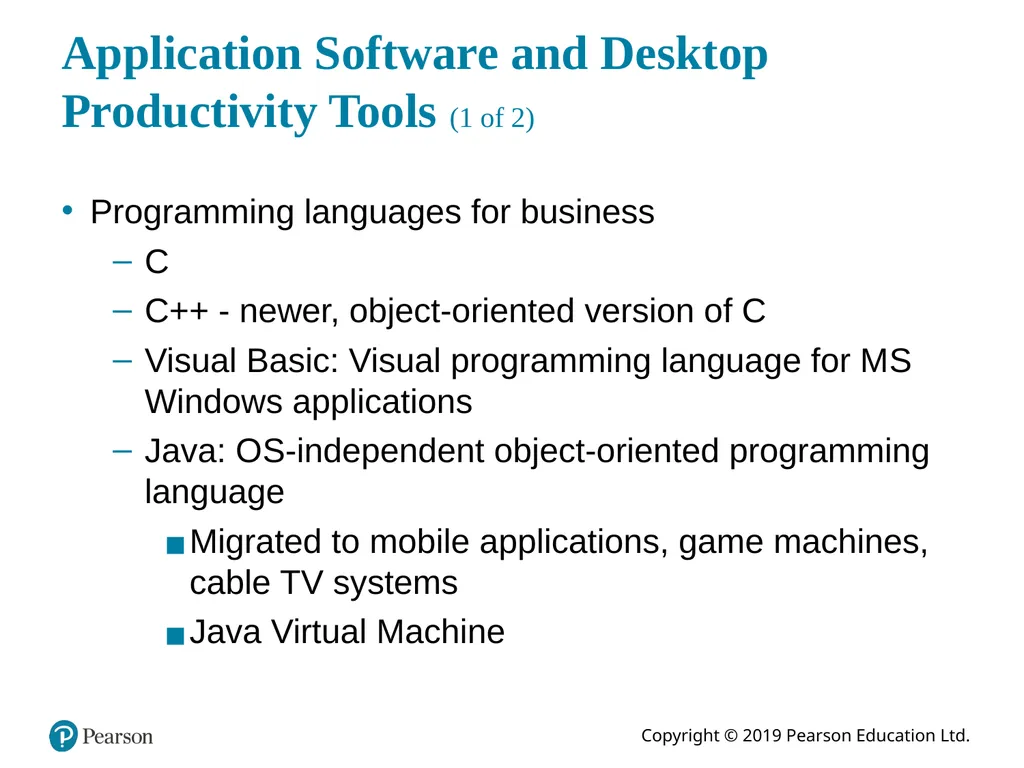
slide22. Application Software and Desktop Productivity Tools (1 of 2) Programming languages for business
C
C++ - newer, object-oriented version of C
Visual Basic: Visual programming language for M S Windows applications
Java: O S-independent object-oriented programming language
Migrated to mobile applications, game machines, cable T V systems
Java Virtual Machine<br>
slide23. Application Software and Desktop Productivity Tools (2 of 2) Software packages and desktop productivity tools
Word processing software
Spreadsheet software
Data management software
Presentation graphics
Software suites
Web browsers<br>
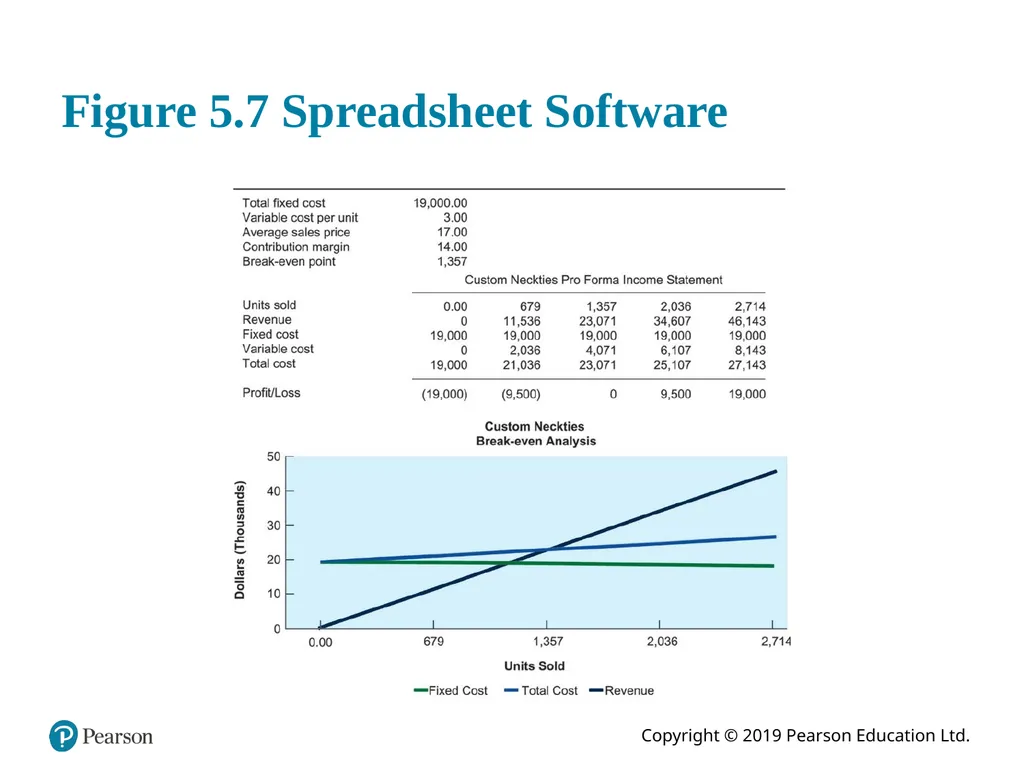
slide24. Figure 5.7 Spreadsheet Software<br>
slide25. H T M L and H T M L 5 Hypertext markup language (H T M L):
Page description language for specifying how elements are placed on a web page and for creating links to other pages and objects
H T M L 5
Next evolution of H T M L
Enables multimedia embedding without 3rd party plugins like Flash<br>
slide26. Web Services Software components that exchange information with one another using universal web communication standards and languages
X M L (eXtensible Markup Language)
Foundation of web services
Service oriented architecture (S O A)
Collection of services used to build an organization’s software systems<br>
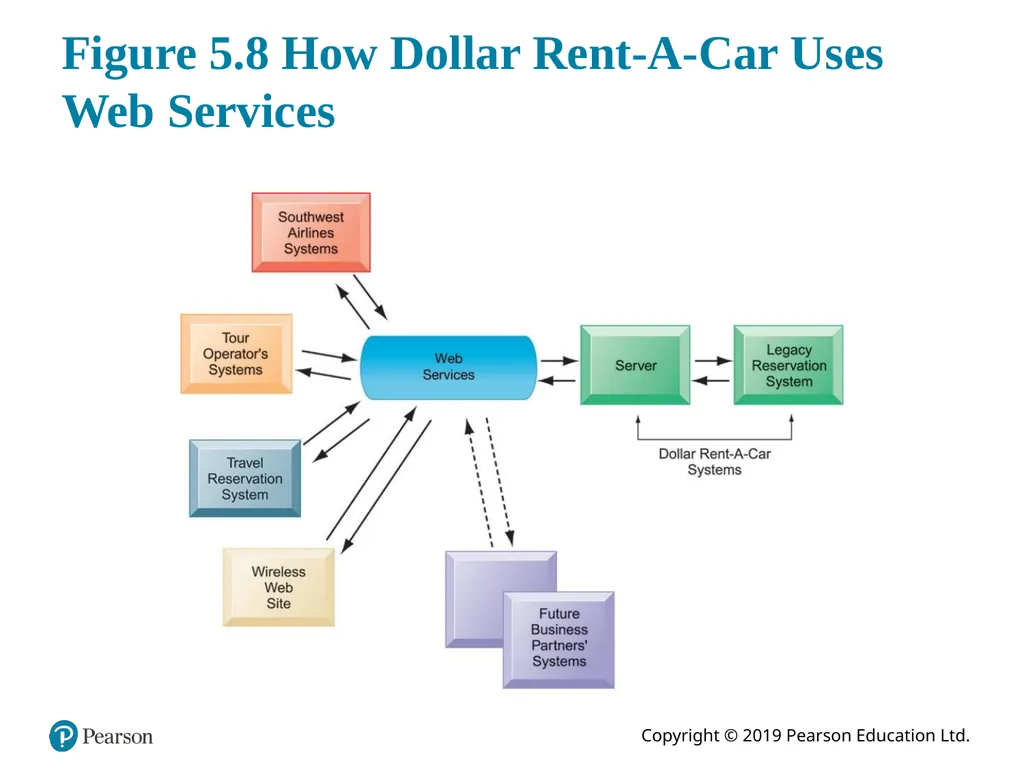
slide27. Figure 5.8 How Dollar Rent-A-Car Uses Web Services<br>
slide28. Software Trends Open source software
Linux, Apache
Cloud-based software and tools
S a a S (software as a service)
Google Docs
Mashups
Zip Realty uses Google Maps and Zillow.com
Apps
Mobile apps<br>
slide29. Capacity Planning and Scalability Capacity planning
Predicting when hardware system becomes saturated
Ensuring computing power for current and future needs
Factors include:
Maximum number of users
Impact of current, future software
Performance measures
Scalability
Ability of system to expand to serve large number of users without breaking down<br>
slide30. Total Cost of Ownership (T C O) model Analyzing direct and indirect costs to determine the actual cost of owning a specific technology
Direct costs: hardware, software purchase costs
Indirect costs: ongoing administration costs, upgrades, maintenance, etc.
Hidden costs: support staff, downtime, etc.
T C O can be reduced through increased centralization, standardization of hardware and software resources.<br>
slide31. Using Technology Service Providers Outsourcing
Using external provider to run computer center and networks
Web hosting service
Offshore software outsourcing
Service level agreements (S L A s)
Using cloud services
Appealing to businesses with smaller I T budgets
Pricing is per hour, per-use
Switching costs<br>
slide32. Managing Mobile Platforms Mobile devices provide productivity gains
Expenses of equipping employees with devices
Network configuration
Software
Device security
Stolen or compromised devices
Mobile device management (M D M) software<br>
slide33. Managing Software Localization for Global Business Software localization
Local language interfaces
Complex software interfaces
Differences in local cultures
Differences in business processes
These factors add to T C O of using technology service providers<br>
slide34. How Will M I S Help My Career? The Business: A1 Tech I T Consulting
Position Description
Job Requirements
Interview Questions<br>
slide2. Learning Objectives 5.1 What are the components of I T infrastructure?
5.2 What are the major computer hardware, data storage, input, and output technologies used in business and the major hardware trends?
5.3 What are the major types of computer software used in business and the major software trends?
5.4 What are the principal issues in managing hardware and software technology?
5.5 How will M I S help my career?<br>
slide3. Video Cases Case 1– Rockwell Automation Fuels the Oil and Gas Industry with the Internet of Things (I o T)
Case 2– E S P N.com: The Future of Sports Coverage in the Cloud
Case 3– Netflix: Building a Business in the Cloud<br>
slide4. Grab Leverages Information Technology to Enhance Its Services Problem
providing customers with timely service and drivers with enough fares
matching demand with resources in an unpredictable sector
Solutions
Managed cloud infrastructure
On-demand, scalable services
Illustrates use of cloud computing to improve effectiveness and control costs<br>
slide5. Infrastructure Components I T infrastructure
Platform for supporting all information systems in the business
Computer hardware
Computer software
Data management technology
Networking and telecommunications technology
Technology services<br>
slide6. Figure 5.1 I T Infrastructure Components<br>
slide7. Types of Computers Personal computers and mobile devices
Workstations
Servers
Mainframes
Supercomputers
Grid computing<br>
slide8. Client/Server Computing Form of distributed computing
Splits processing between “clients” and “servers”
Two-tiered client/server architecture
Multi-tiered client/server architecture (N-tier)
Web servers
Application servers<br>
slide9. Figure 5.2 Client/Server Computing<br>
slide10. Figure 5.3 A Multitiered Client/Server Network (N-Tier)<br>
slide11. Storage, Input, and Output Technology Primary secondary storage technologies
Magnetic disk
S S Ds
Optical disks
Magnetic tape
Storage networking: S A Ns
Input devices
E.g. keyboard
Output devices
E.g. monitor<br>
slide12. Contemporary Hardware Trends (1 of 3) The mobile digital platform
Tablet computers
Netbooks
Consumerization of I T and B Y O D
Nanotechnology and quantum computing
Virtualization
Software-defined storage (S D S)<br>
slide13. Interactive Session – Technology: Wearable Computers Change How We Work Class discussion
Wearables have the potential to change the way organizations and workers conduct business. Discuss the implications of this statement.
How would a business process such as ordering a product for a customer in the field be changed if the salesperson was wearing a smartwatch equipped with Salesforce software?
What people, organization, and technology issues would have to be addressed if a company was thinking of equipping its workers with a wearable computing device?
What kinds of businesses are most likely to benefit from wearable computers? Select a business and describe how a wearable computing device could help that business improve operations or decision making.<br>
slide14. Examples of Nanotubes © forance/123R F<br>
slide15. Figure 5.4 Cloud Computing Platform<br>
slide16. Figure 5.5 Major Amazon Web Services<br>
slide17. Contemporary Hardware Trends (2 of 3) Cloud computing:
Computing resources obtained over the Internet
Infrastructure as a service (I a a S)
Software as a service (S a a S)
Platform as a service (P a a S)
Public versus. private clouds
Utility computing, on-demand computing
Hybrid cloud
Data storage security is in hands of provider<br>
slide18. Contemporary Hardware Trends (3 of 3) Green computing
Green I T
Practices and technologies for minimizing impact on environment
High-performance and power-saving processors
Multicore processors
Reduced power consumption<br>
slide19. Interactive Session – Organizations: Glory Finds Solutions in the Cloud Class discussion
Why did Glory choose a cloud solution as opposed to modernizing the systems it had?
Why was it necessary to hire a systems integrator firm?
What were the main organizational change requirements for implementing the new cloud platform?
Why did management choose a regional rollout strategy? Why in the UK?<br>
slide20. Figure 5.6 The Major Types of Software<br>
slide21. Operating System Software Software that controls computer activities
G U I s
Multitouch
P C operating systems
Windows, Mac
UNIX
Linux (open source)
Mobile operating systems
Chrome, Android, i O S<br>
slide22. Application Software and Desktop Productivity Tools (1 of 2) Programming languages for business
C
C++ - newer, object-oriented version of C
Visual Basic: Visual programming language for M S Windows applications
Java: O S-independent object-oriented programming language
Migrated to mobile applications, game machines, cable T V systems
Java Virtual Machine<br>
slide23. Application Software and Desktop Productivity Tools (2 of 2) Software packages and desktop productivity tools
Word processing software
Spreadsheet software
Data management software
Presentation graphics
Software suites
Web browsers<br>
slide24. Figure 5.7 Spreadsheet Software<br>
slide25. H T M L and H T M L 5 Hypertext markup language (H T M L):
Page description language for specifying how elements are placed on a web page and for creating links to other pages and objects
H T M L 5
Next evolution of H T M L
Enables multimedia embedding without 3rd party plugins like Flash<br>
slide26. Web Services Software components that exchange information with one another using universal web communication standards and languages
X M L (eXtensible Markup Language)
Foundation of web services
Service oriented architecture (S O A)
Collection of services used to build an organization’s software systems<br>
slide27. Figure 5.8 How Dollar Rent-A-Car Uses Web Services<br>
slide28. Software Trends Open source software
Linux, Apache
Cloud-based software and tools
S a a S (software as a service)
Google Docs
Mashups
Zip Realty uses Google Maps and Zillow.com
Apps
Mobile apps<br>
slide29. Capacity Planning and Scalability Capacity planning
Predicting when hardware system becomes saturated
Ensuring computing power for current and future needs
Factors include:
Maximum number of users
Impact of current, future software
Performance measures
Scalability
Ability of system to expand to serve large number of users without breaking down<br>
slide30. Total Cost of Ownership (T C O) model Analyzing direct and indirect costs to determine the actual cost of owning a specific technology
Direct costs: hardware, software purchase costs
Indirect costs: ongoing administration costs, upgrades, maintenance, etc.
Hidden costs: support staff, downtime, etc.
T C O can be reduced through increased centralization, standardization of hardware and software resources.<br>
slide31. Using Technology Service Providers Outsourcing
Using external provider to run computer center and networks
Web hosting service
Offshore software outsourcing
Service level agreements (S L A s)
Using cloud services
Appealing to businesses with smaller I T budgets
Pricing is per hour, per-use
Switching costs<br>
slide32. Managing Mobile Platforms Mobile devices provide productivity gains
Expenses of equipping employees with devices
Network configuration
Software
Device security
Stolen or compromised devices
Mobile device management (M D M) software<br>
slide33. Managing Software Localization for Global Business Software localization
Local language interfaces
Complex software interfaces
Differences in local cultures
Differences in business processes
These factors add to T C O of using technology service providers<br>
slide34. How Will M I S Help My Career? The Business: A1 Tech I T Consulting
Position Description
Job Requirements
Interview Questions<br>