
Finding Code to Reuse Kerry Chang Human-Computer
JO
Published · 37 slides · 0 views
1 / 1




Description
Finding Code to Reuse Kerry Chang Human-Computer Interaction Institute Carnegie Mellon University 05-899D: Human Aspects of Software Development (HASD) Spring 2011 Lecture 15 What can be reused? Programmers nowadays rely heavily on
Related Topics
Share
Embed code
Download this presentation From Below
"Finding Code to Reuse Kerry Chang Human-Computer" is the property of its rightful owner. Permission is granted to download and print the materials on this website for personal, non-commercial use only, and to display it on your personal computer provided you do not modify the materials and that you retain all copyright notices contained in the materials. By downloading content from our website, you accept the terms of this agreement.
Presentation Transcript
01
Finding Code to Reuse Kerry Chang
Human-Computer Interaction Institute Carnegie Mellon University
05-899D: Human Aspects of Software Development (HASD)
Spring 2011 – Lecture 15<br>
Human-Computer Interaction Institute Carnegie Mellon University
05-899D: Human Aspects of Software Development (HASD)
Spring 2011 – Lecture 15<br>
02
What can be reused? Programmers nowadays rely heavily on frameworks and libraries, such as C++ libraries and JAVA packages, to build their own applications. (Freeman, 1987; Basili et al., 1996)
These libraries provide many code examples in theirs documentations to demonstrate different usages of the APIs.
More examples can be found in unofficial tutorials, blogs and forums on the Internet in a more natural language. (Stylos et al., 2006; Brandt et al., 2009) 2<br>
These libraries provide many code examples in theirs documentations to demonstrate different usages of the APIs.
More examples can be found in unofficial tutorials, blogs and forums on the Internet in a more natural language. (Stylos et al., 2006; Brandt et al., 2009) 2<br>
03
Why reusing code? Save time
Less error-prone if calling APIs
Learning
Using examples to do unfamiliar tasks
Reusing software resources allows programmers to create high-quality, full-feature applications on time (Sahavechaphan et al., 2006). 3<br>
Less error-prone if calling APIs
Learning
Using examples to do unfamiliar tasks
Reusing software resources allows programmers to create high-quality, full-feature applications on time (Sahavechaphan et al., 2006). 3<br>
04
Why is it hard to reuse code? Code repository itself might not be that reusable
Quality of the code (Biggerstaff et al., 1987; Meyer. 1987)
Often too large for programmers to quickly identify useful code.
Information might be separated and stored in different places (Hoffmann et al., 2007). 4<br>
Quality of the code (Biggerstaff et al., 1987; Meyer. 1987)
Often too large for programmers to quickly identify useful code.
Information might be separated and stored in different places (Hoffmann et al., 2007). 4<br>
05
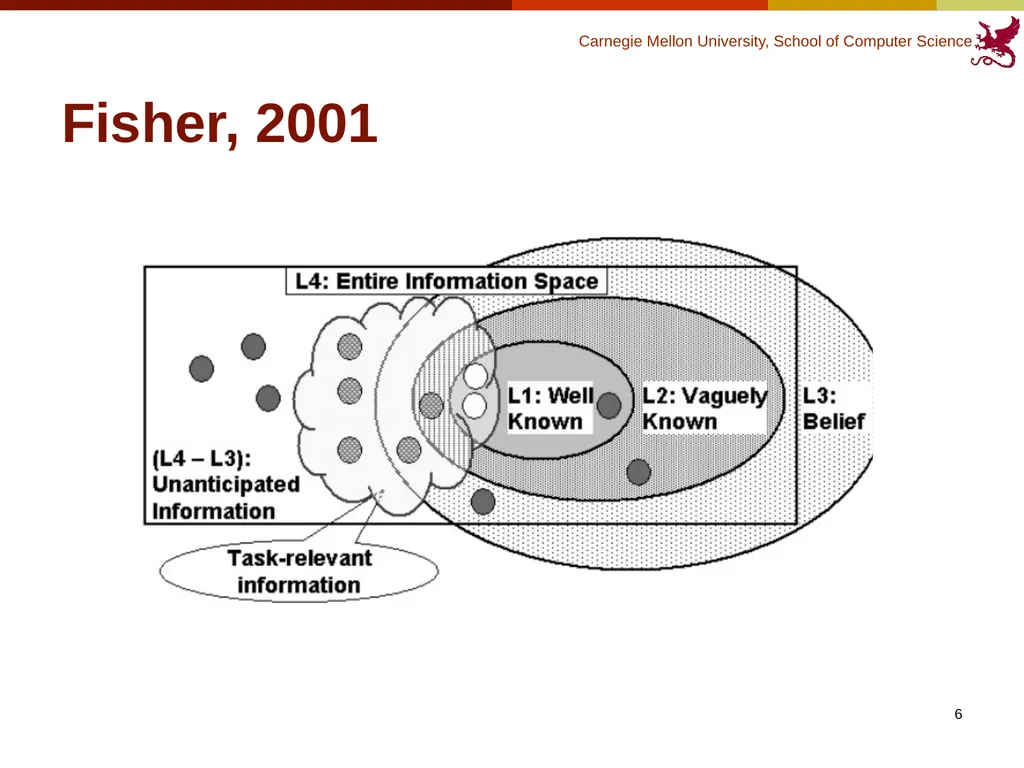
Why is it hard to reuse code? Programmers don’t know exactly what they are looking for and where to look for.
(Mandelin et al., 2005; Thummalapenta et al., 2007; Fisher, 2001)
Only know the general idea of the problem encountered instead of the right technical term or the actual name of the API needed.
Unable to form a complete query.
False understandings of the repository 5<br>
Only know the general idea of the problem encountered instead of the right technical term or the actual name of the API needed.
Unable to form a complete query.
False understandings of the repository 5<br>
06
Fisher, 2001 6<br>
07
Outline Introduction
Behavior Studies
Tools 7<br>
Behavior Studies
Tools 7<br>
08
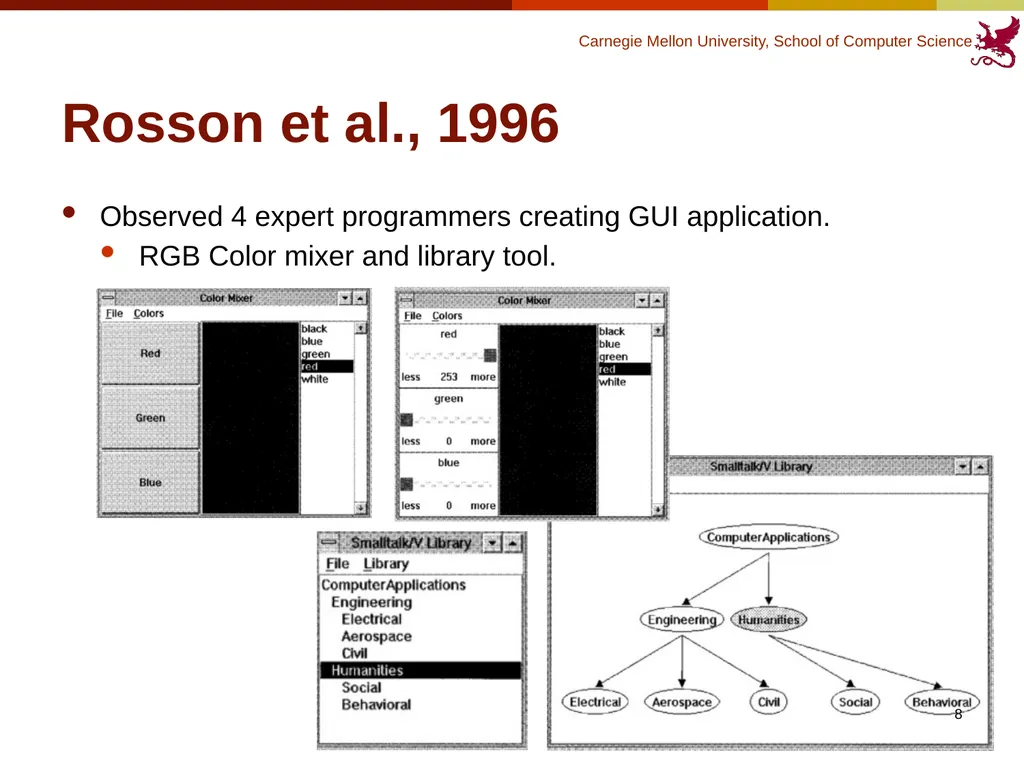
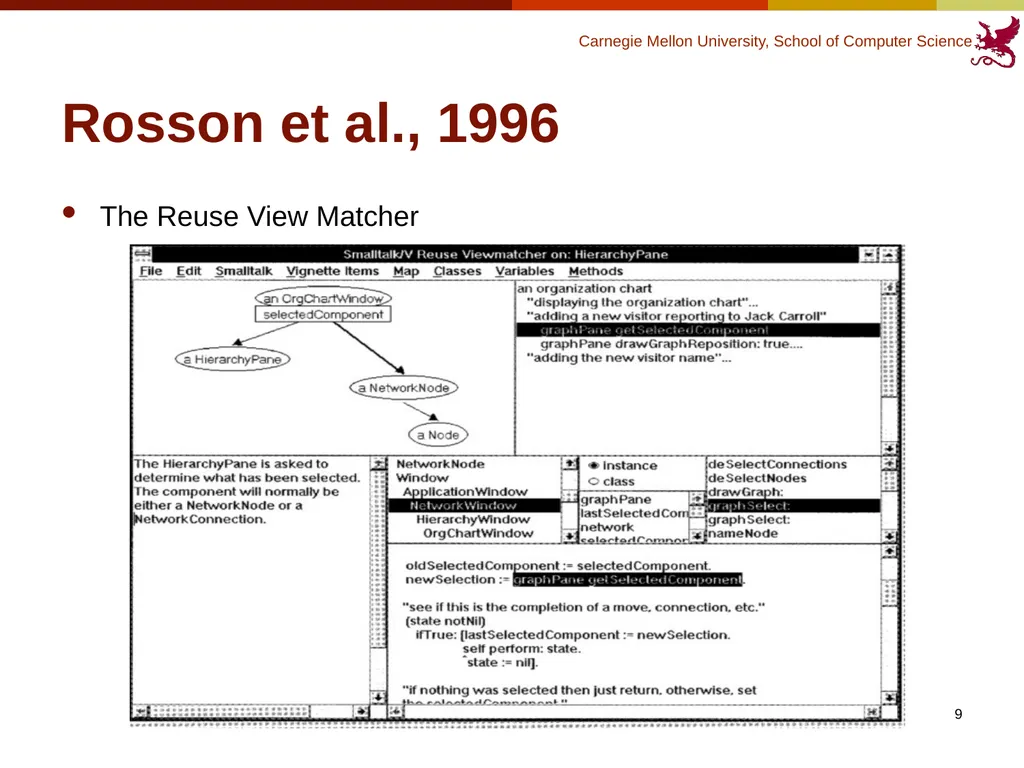
Rosson et al., 1996 Observed 4 expert programmers creating GUI application.
RGB Color mixer and library tool. 8<br>
RGB Color mixer and library tool. 8<br>
09
Rosson et al., 1996 The Reuse View Matcher 9<br>
10
Rosson et al., 1996 Extensive “Reuse of uses”
Programmers relied heavily on code in example applications that provided an implicit specification for reuse of the target class.
“Usage context” 10<br>
Programmers relied heavily on code in example applications that provided an implicit specification for reuse of the target class.
“Usage context” 10<br>
11
Rosson et al., 1996 Programming behavior was highly opportunistic.
Interleaved between analysis and implementation, and frequently driven by testing and debugging.
Only wish to understand the example if it’s necessary.
Implication: the examples should be as simple and as generic as possible (ex. using several simple examples rather than one comprehensive but more complex example to demo the usage.) 11<br>
Interleaved between analysis and implementation, and frequently driven by testing and debugging.
Only wish to understand the example if it’s necessary.
Implication: the examples should be as simple and as generic as possible (ex. using several simple examples rather than one comprehensive but more complex example to demo the usage.) 11<br>
12
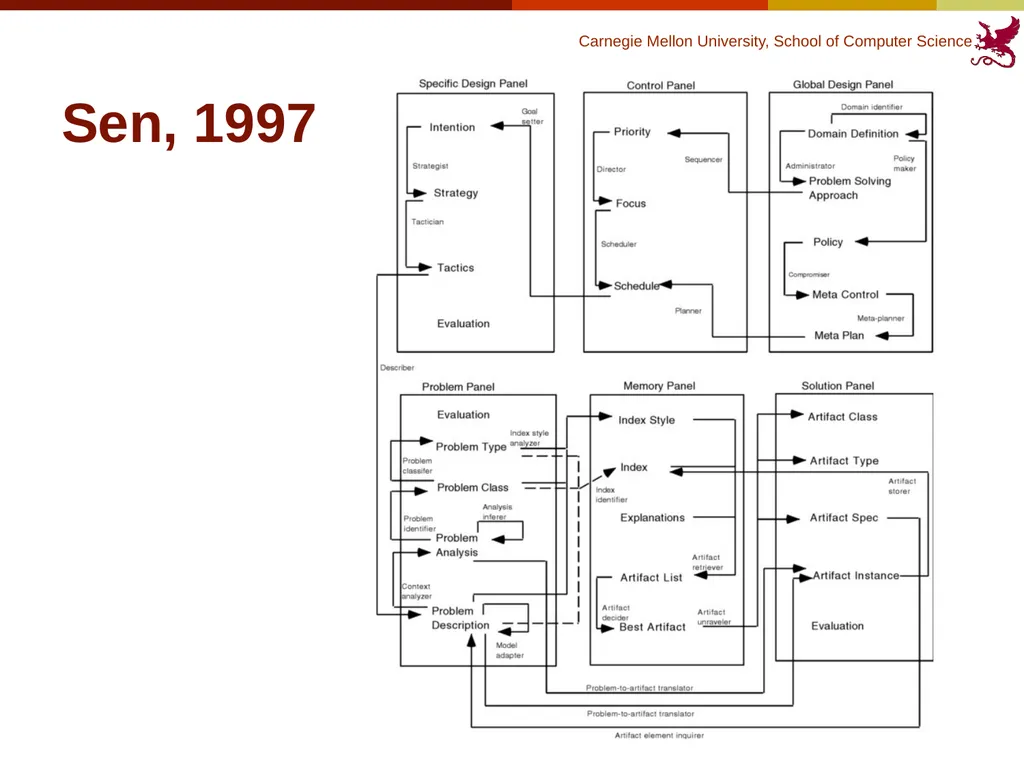
Sen, 1997 Interested in study how people reuse design artifacts in the software development process.
Before, many people believed that the ruse tasks were preformed in a sequence and followed a predetermined path beginning with searching and retrieving reusable objects.
Proposed a cognitive model on the reuse behavior based on opportunism. 12<br>
Before, many people believed that the ruse tasks were preformed in a sequence and followed a predetermined path beginning with searching and retrieving reusable objects.
Proposed a cognitive model on the reuse behavior based on opportunism. 12<br>
13
Sen, 1997 13<br>
14
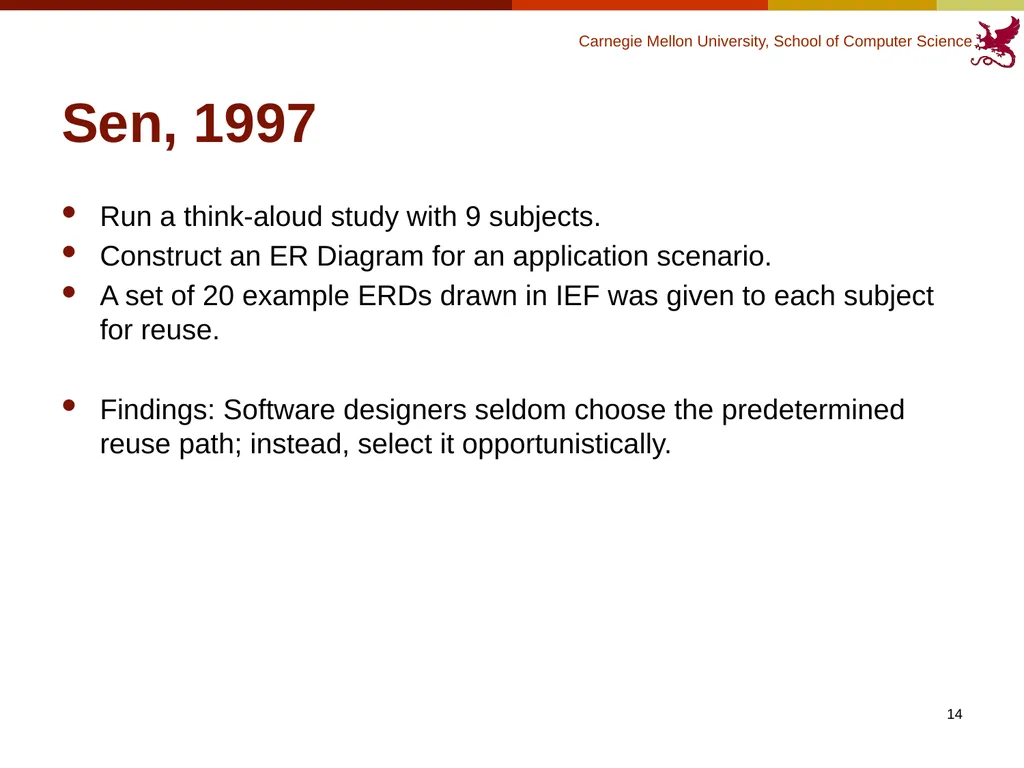
Sen, 1997 Run a think-aloud study with 9 subjects.
Construct an ER Diagram for an application scenario.
A set of 20 example ERDs drawn in IEF was given to each subject for reuse.
Findings: Software designers seldom choose the predetermined reuse path; instead, select it opportunistically. 14<br>
Construct an ER Diagram for an application scenario.
A set of 20 example ERDs drawn in IEF was given to each subject for reuse.
Findings: Software designers seldom choose the predetermined reuse path; instead, select it opportunistically. 14<br>
15
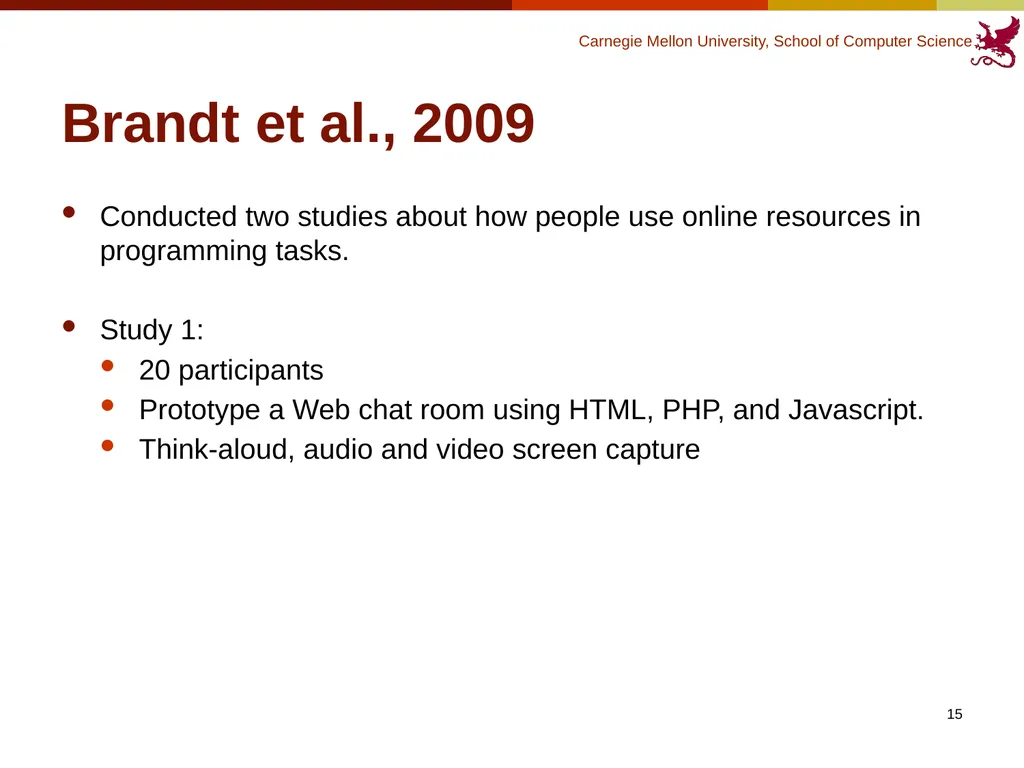
Brandt et al., 2009 Conducted two studies about how people use online resources in programming tasks.
Study 1:
20 participants
Prototype a Web chat room using HTML, PHP, and Javascript.
Think-aloud, audio and video screen capture 15<br>
Study 1:
20 participants
Prototype a Web chat room using HTML, PHP, and Javascript.
Think-aloud, audio and video screen capture 15<br>
16
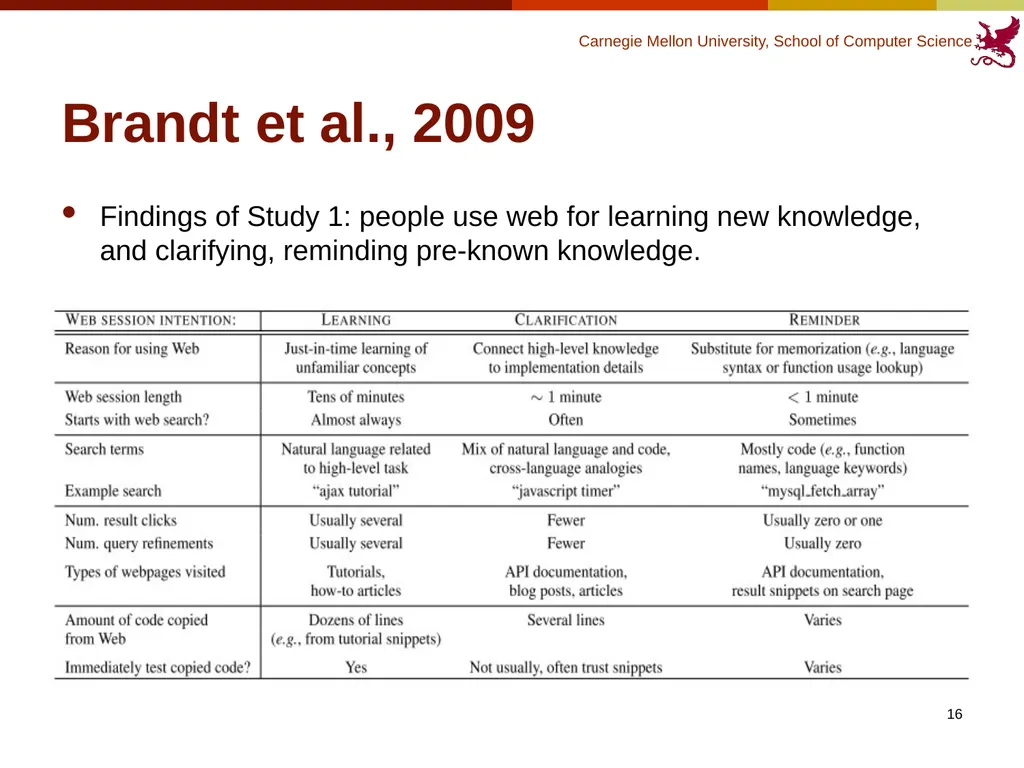
Brandt et al., 2009 Findings of Study 1: people use web for learning new knowledge, and clarifying, reminding pre-known knowledge. 16<br>
17
Brandt et al., 2009 Study 2:
Web search log analysis
Community Search portal on Adobe’s Developer Network Web site
Adobe Flex Web Application development framework
Hand coded queries into 4 sessions: learning, reminding, unsure, and misgrouped.
Query terms, content of the page visited, weather the person is an expert (determined by the person’s whole search history) 17<br>
Web search log analysis
Community Search portal on Adobe’s Developer Network Web site
Adobe Flex Web Application development framework
Hand coded queries into 4 sessions: learning, reminding, unsure, and misgrouped.
Query terms, content of the page visited, weather the person is an expert (determined by the person’s whole search history) 17<br>
18
Brandt et al., 2009 Findings of Study 2:
Query type predicts types of pages visited
The first query was exclusively natural language in half of learning sessions, versus one third in reminding sessions
Programmers were more likely to visit official API documentation in reminding sessions than in learning sessions
Code-only queries accounted for 51% of all reminding queries. 18<br>
Query type predicts types of pages visited
The first query was exclusively natural language in half of learning sessions, versus one third in reminding sessions
Programmers were more likely to visit official API documentation in reminding sessions than in learning sessions
Code-only queries accounted for 51% of all reminding queries. 18<br>
19
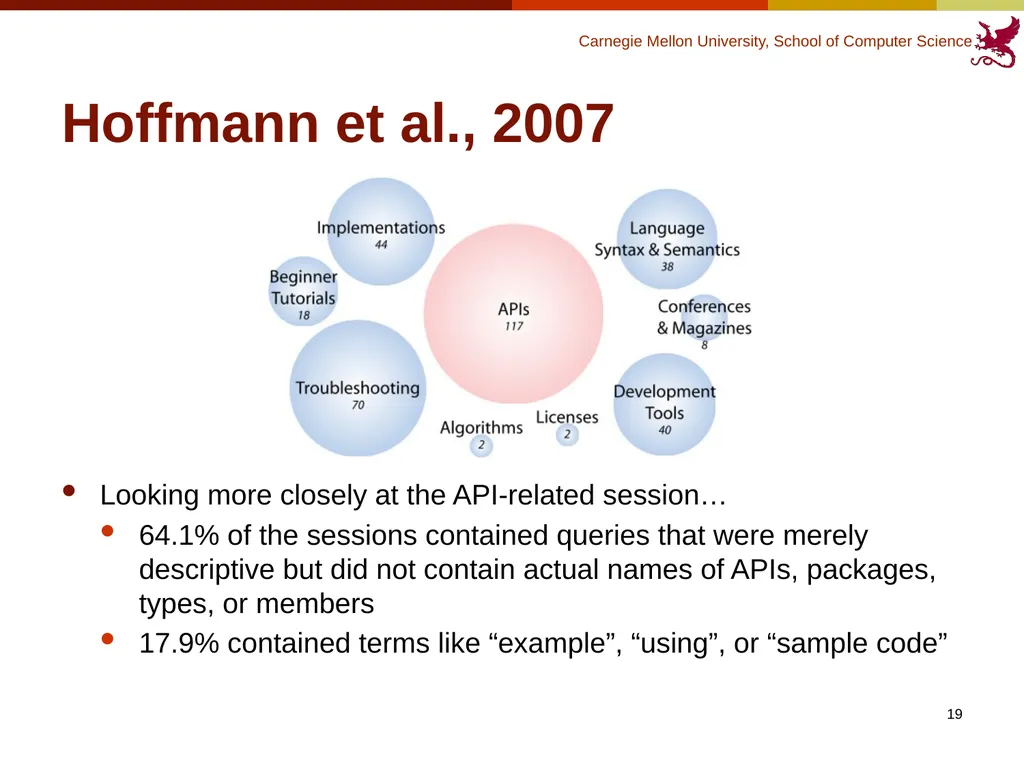
Hoffmann et al., 2007 Looking more closely at the API-related session…
64.1% of the sessions contained queries that were merely descriptive but did not contain actual names of APIs, packages, types, or members
17.9% contained terms like “example”, “using”, or “sample code” 19<br>
64.1% of the sessions contained queries that were merely descriptive but did not contain actual names of APIs, packages, types, or members
17.9% contained terms like “example”, “using”, or “sample code” 19<br>
20
Summary – Behavior Stuides Programmers sometimes don’t know how to make a right query, because of lack of understanding to their task-at-hand and also to the repository itself.
The reuse behavior is highly opportunistic, often interleaves activities such as searching, analyzing, learning, testing and writing code.
Programmers mostly look for API-related information
The search query can be in very different forms, ranging from being very specific, asking the actually name of the API, to merely descriptive, explaining problems the programmer encounters.
Programmers like to learn the usage of the code through examples. 20<br>
The reuse behavior is highly opportunistic, often interleaves activities such as searching, analyzing, learning, testing and writing code.
Programmers mostly look for API-related information
The search query can be in very different forms, ranging from being very specific, asking the actually name of the API, to merely descriptive, explaining problems the programmer encounters.
Programmers like to learn the usage of the code through examples. 20<br>
21
Outline Introduction
Behavior Studies
Tools 21<br>
Behavior Studies
Tools 21<br>
22
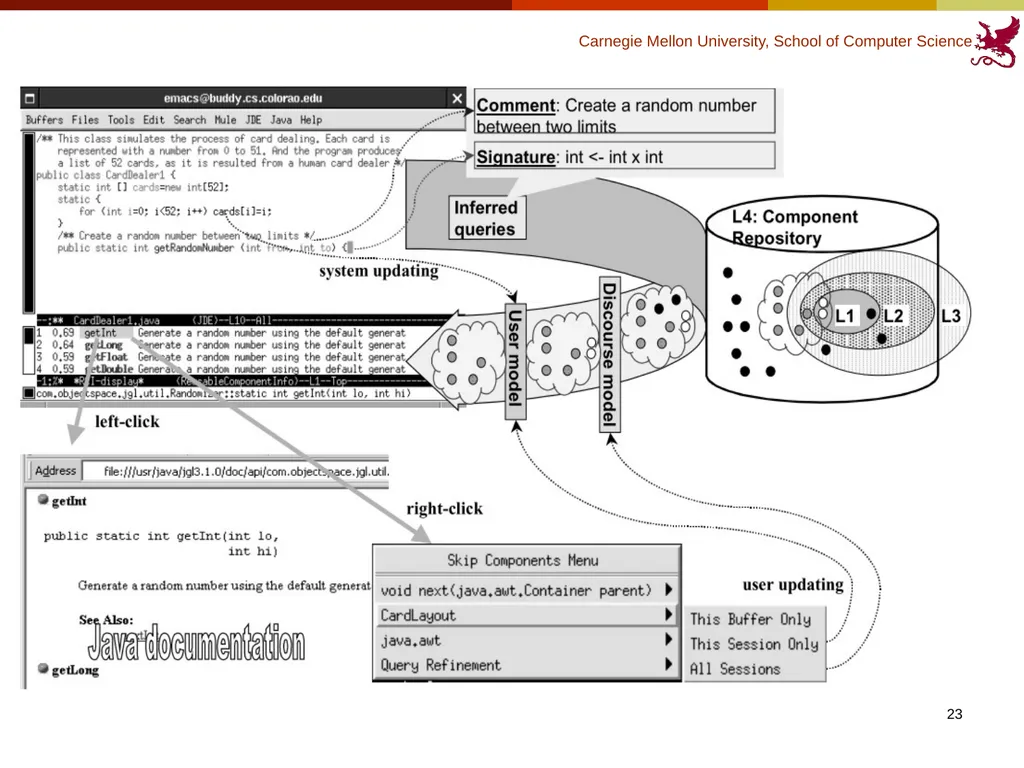
CodeBroker (Ye et al., 2002) Programmers cannot make good queries because of the lack of understanding of the reuse repository.
Information delivery: automatically locates and presents programmers with task-relevant and personalized components.
CodeBroker: an IDE plug-in that delivers components relevant to the task-at-hand and personalized to the background knowledge of an individual developer. 22<br>
Information delivery: automatically locates and presents programmers with task-relevant and personalized components.
CodeBroker: an IDE plug-in that delivers components relevant to the task-at-hand and personalized to the background knowledge of an individual developer. 22<br>
23
CodeBroker (Ye et al., 2002) 23<br>
24
CodeBroker (Ye et al., 2002) Delivers components whenever a doc comment or a signature definition is entered.
Results are sorted by relevance value.
Personalize the delivered components:
Discourse model: Filter out the component from this current development session.
User model: Filter out the component forever!
Subjects gave high ratings in terms of CodeBroker’s usefulness. 24<br>
Results are sorted by relevance value.
Personalize the delivered components:
Discourse model: Filter out the component from this current development session.
User model: Filter out the component forever!
Subjects gave high ratings in terms of CodeBroker’s usefulness. 24<br>
25
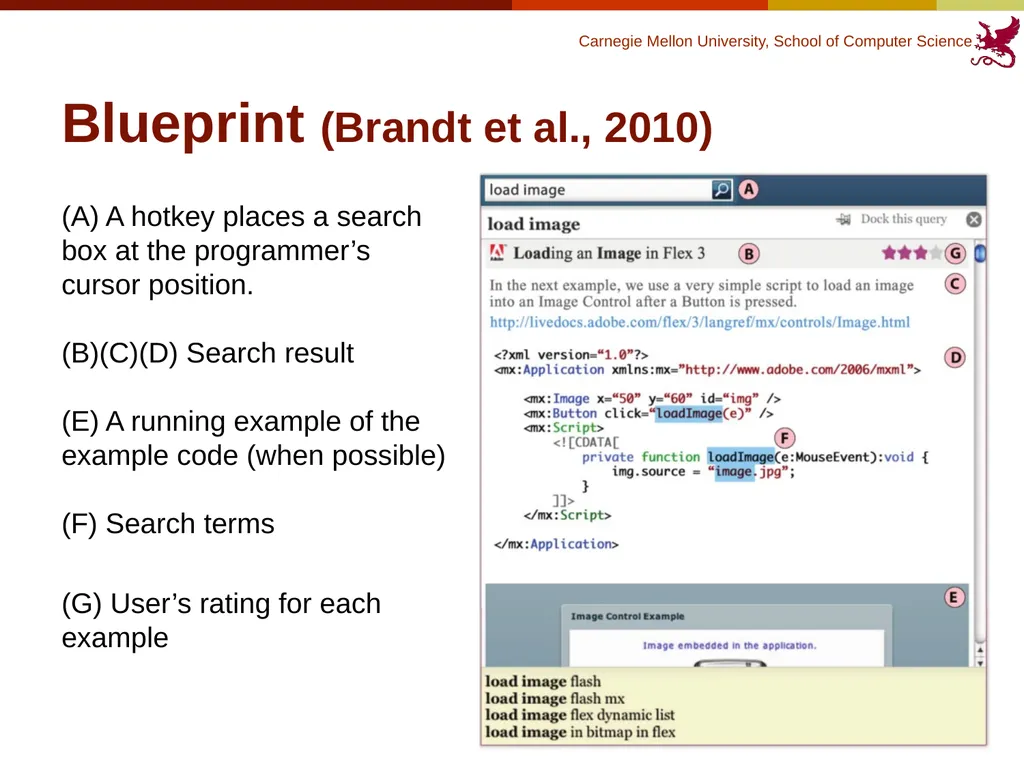
Blueprint (Brandt et al., 2010) Programmers often borrow code snippet from the Internet to use in their own code.
Blueprint: a web search interface integrated into IDE that helps user locate sample code.
Two advantages:
Embedding search into IDE allows the search engine to leverage the users’ context.
Better queries.
Extracting code examples from Web pages and composing them in a consistent, code- centric search results view reduces the need to click through to Web pages to find example code.
Easier to view and select a good result. 25<br>
Blueprint: a web search interface integrated into IDE that helps user locate sample code.
Two advantages:
Embedding search into IDE allows the search engine to leverage the users’ context.
Better queries.
Extracting code examples from Web pages and composing them in a consistent, code- centric search results view reduces the need to click through to Web pages to find example code.
Easier to view and select a good result. 25<br>
26
Blueprint (Brandt et al., 2010) (A) A hotkey places a search
box at the programmer’s
cursor position.
(B)(C)(D) Search result
(E) A running example of the
example code (when possible)
(F) Search terms
(G) User’s rating for each example 26<br>
(G) User’s rating for each example 26<br>
27
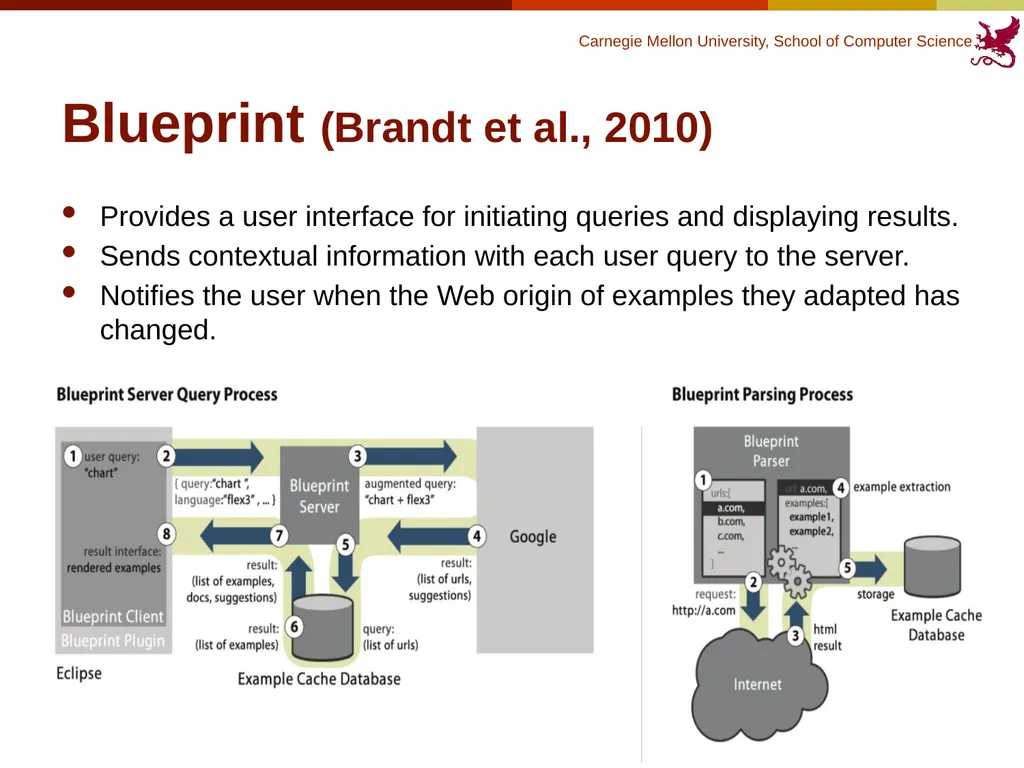
Blueprint (Brandt et al., 2010) Provides a user interface for initiating queries and displaying results.
Sends contextual information with each user query to the server.
Notifies the user when the Web origin of examples they adapted has changed. 27<br>
Sends contextual information with each user query to the server.
Notifies the user when the Web origin of examples they adapted has changed. 27<br>
28
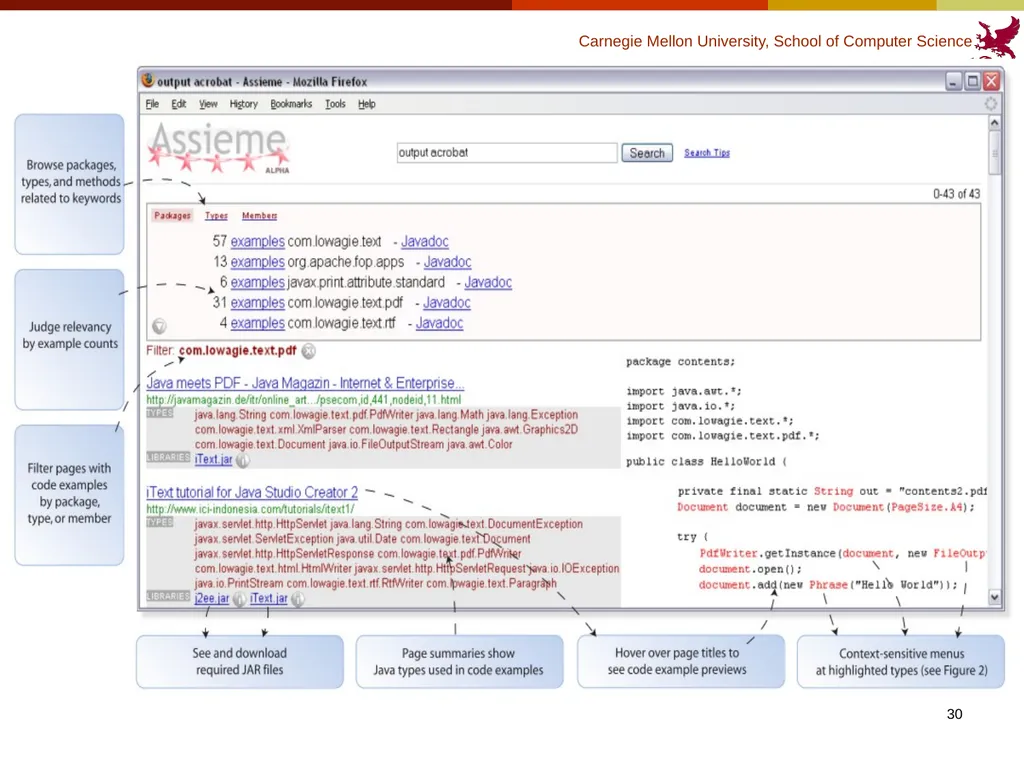
Assieme (Hoffmann et al., 2007) On the Web, the information the programmer needs often distributed on different pages.
Identifying the correct API to use, seeking information about how to use it and sample code.
Assieme: a Web search engine that supports programming search tasks by combining information from different web resources.
JAR files, API documentation, explanatory text and sample code. 28<br>
Identifying the correct API to use, seeking information about how to use it and sample code.
Assieme: a Web search engine that supports programming search tasks by combining information from different web resources.
JAR files, API documentation, explanatory text and sample code. 28<br>
29
Assieme (Hoffmann et al., 2007) Main challenge: resolve “implicit references”.
Many of the code examples online are stripped of import information and therefore will not compile. Ex. Phrase is actually com.lowagie.text.Phrase
Can’t link separated resources correctly without knowing the full name.
Approach:
First compared with libraries to match package, type, method and field name.
Determining a set of libraries that might be referenced.
See if it can be compiled. 29<br>
Many of the code examples online are stripped of import information and therefore will not compile. Ex. Phrase is actually com.lowagie.text.Phrase
Can’t link separated resources correctly without knowing the full name.
Approach:
First compared with libraries to match package, type, method and field name.
Determining a set of libraries that might be referenced.
See if it can be compiled. 29<br>
30
Assieme (Hoffmann et al., 2007) 30<br>
31
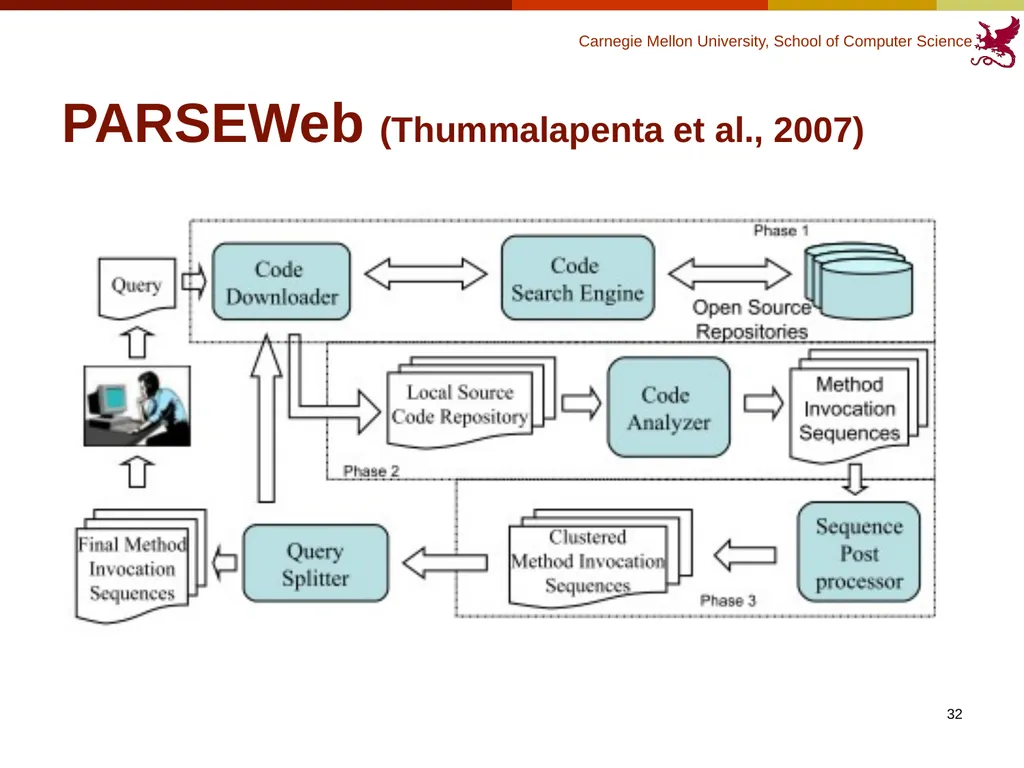
PARSEWeb (Thummalapenta et al., 2007) Programmers often know what type of object they need, but don’t know how to get that object with a specific method sequence.
(Really?)
PARSEWeb: a tool that takes queries of the form “Source object type -> Destination object type” and returns suggested method sequences that can make the transformation happen. 31<br>
(Really?)
PARSEWeb: a tool that takes queries of the form “Source object type -> Destination object type” and returns suggested method sequences that can make the transformation happen. 31<br>
32
32 PARSEWeb (Thummalapenta et al., 2007)<br>
33
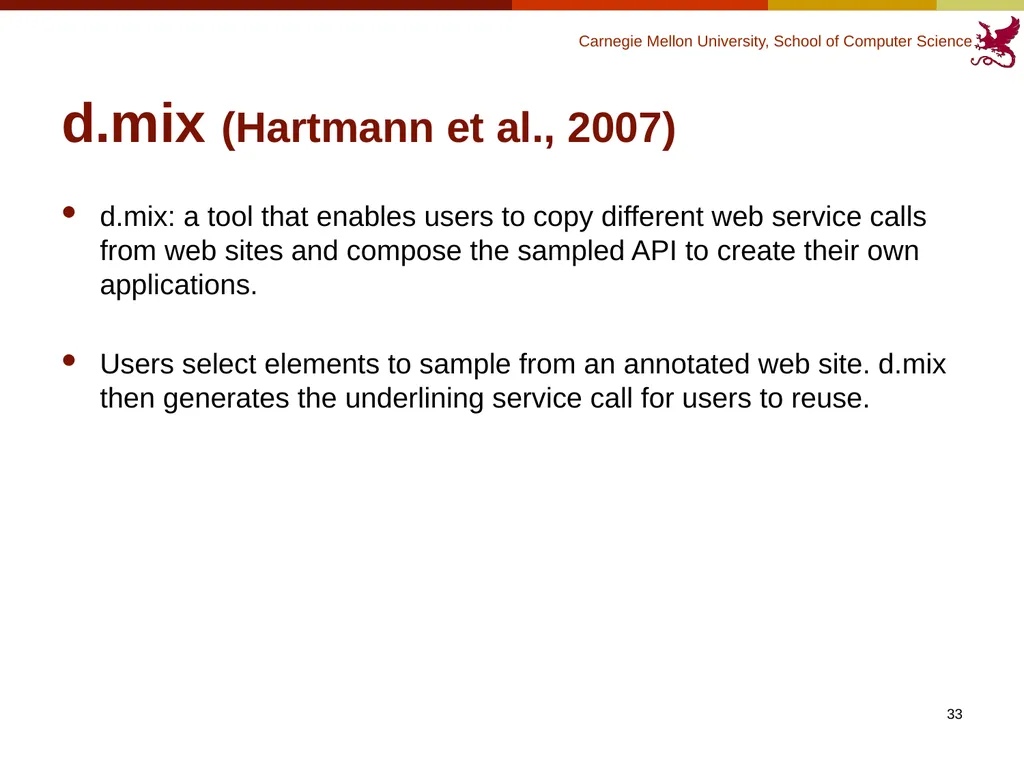
d.mix (Hartmann et al., 2007) d.mix: a tool that enables users to copy different web service calls from web sites and compose the sampled API to create their own applications.
Users select elements to sample from an annotated web site. d.mix then generates the underlining service call for users to reuse. 33<br>
Users select elements to sample from an annotated web site. d.mix then generates the underlining service call for users to reuse. 33<br>
34
d.mix (Hartmann et al., 2007) video 34<br>
35
Summary - Tools Help developers quickly get the information they need.
Actively delivering the information according to programmer’s current task
Integrating web search with IDE
Collecting information from different places
Allowing special query format
Programming by examples 35<br>
Actively delivering the information according to programmer’s current task
Integrating web search with IDE
Collecting information from different places
Allowing special query format
Programming by examples 35<br>
36
Summary - Tools Make the code repository more reusable?
Quality of the code?
How can programmers contribute to the code repository? 36<br>
Quality of the code?
How can programmers contribute to the code repository? 36<br>
37
37 Thanks!<br>