
Fiscal Year-End & Running Finance Cognos Reports
TD
Published · 31 slides · 0 views

1 / 1


Description
Fiscal Year-End Running Finance Cognos Reports May 18, 2022 Housekeeping Items Please mute yourself. Please type questions in the chat and we will go through them at designated breaks in the presentation. If you have any department
Related Topics
Share
Embed code
Download this presentation From Below
"Fiscal Year-End & Running Finance Cognos Reports" is the property of its rightful owner. Permission is granted to download and print the materials on this website for personal, non-commercial use only, and to display it on your personal computer provided you do not modify the materials and that you retain all copyright notices contained in the materials. By downloading content from our website, you accept the terms of this agreement.
Presentation Transcript
01
Fiscal Year-End & Running Finance Cognos Reports May 18, 2022<br>
02
Housekeeping Items Please mute yourself.
Please type questions in the chat and we will go through them at designated breaks in the presentation.
If you have any department specific questions, we can get in touch after the presentation.
This session is being recorded and we will try to post it on our website.
Slides will be posted as well—check the BAS Team for further info.<br>
Please type questions in the chat and we will go through them at designated breaks in the presentation.
If you have any department specific questions, we can get in touch after the presentation.
This session is being recorded and we will try to post it on our website.
Slides will be posted as well—check the BAS Team for further info.<br>
03
Special Announcement Banner is being upgraded this weekend.
There is a known defect with FGAJVCQ—some of you may use this screen to key IDC/COR entries—that will disable this screen indefinitely.
We are working with Ellucian to fix it.
In the meantime, the workaround is to use screen FGAJVCM or FGAJVCD to key these entries. There is a quick guide on the Controller’s Office Website.
On the Controller’s site click ResourcesBanner Training Aids and the guide is under the “Popular Financial Accounting, Accounts Payable and Procurement Forms” heading.<br>
There is a known defect with FGAJVCQ—some of you may use this screen to key IDC/COR entries—that will disable this screen indefinitely.
We are working with Ellucian to fix it.
In the meantime, the workaround is to use screen FGAJVCM or FGAJVCD to key these entries. There is a quick guide on the Controller’s Office Website.
On the Controller’s site click ResourcesBanner Training Aids and the guide is under the “Popular Financial Accounting, Accounts Payable and Procurement Forms” heading.<br>
04
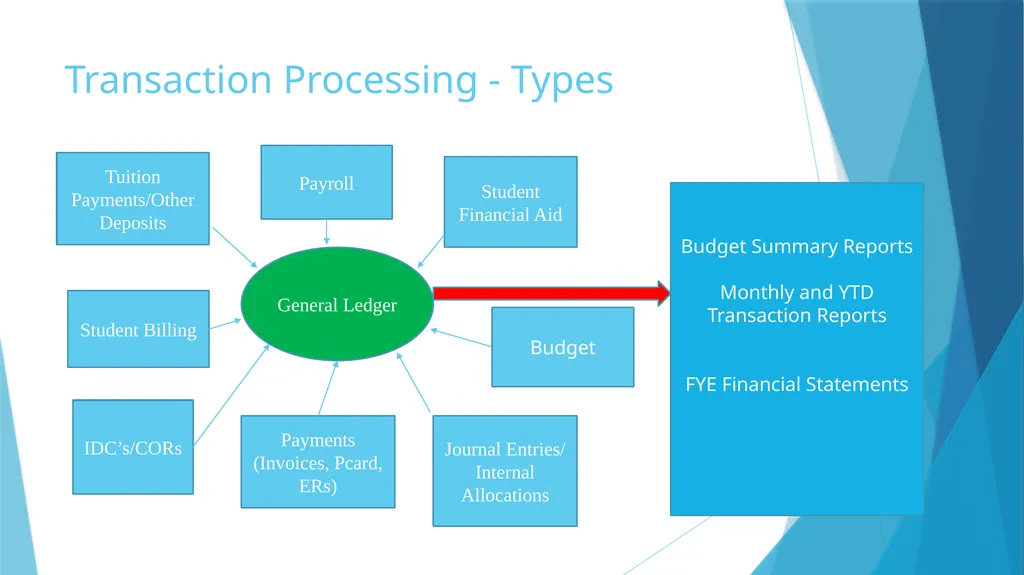
Transaction Processing - Types General Ledger Tuition Payments/Other Deposits Payroll Student Financial Aid Student Billing Journal Entries/
Internal Allocations IDC’s/CORs Payments (Invoices, Pcard, ERs) Budget Budget Summary Reports
Monthly and YTD Transaction Reports
FYE Financial Statements<br>
Internal Allocations IDC’s/CORs Payments (Invoices, Pcard, ERs) Budget Budget Summary Reports
Monthly and YTD Transaction Reports
FYE Financial Statements<br>
05
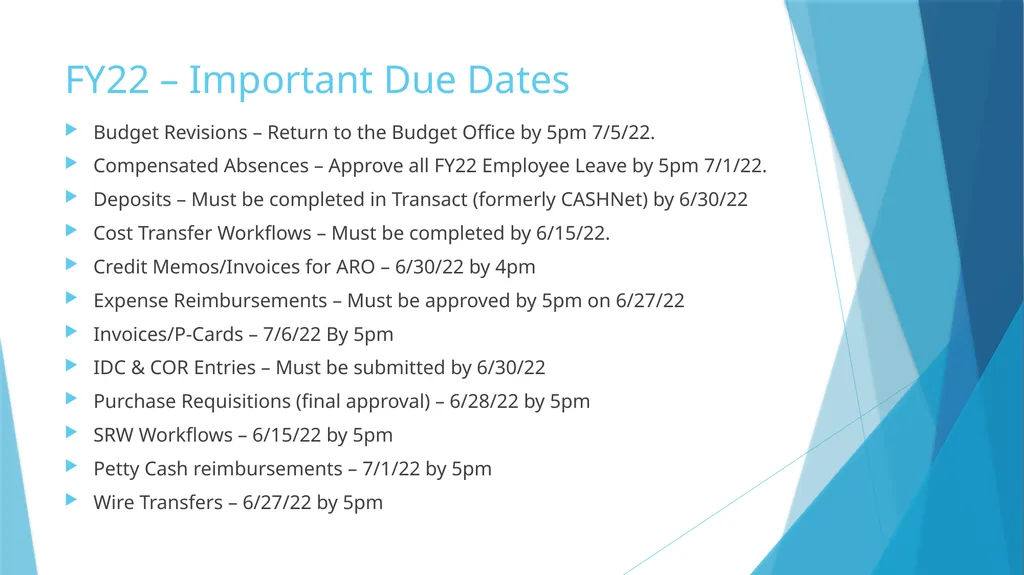
FY22 – Important Due Dates Budget Revisions – Return to the Budget Office by 5pm 7/5/22.
Compensated Absences – Approve all FY22 Employee Leave by 5pm 7/1/22.
Deposits – Must be completed in Transact (formerly CASHNet) by 6/30/22
Cost Transfer Workflows – Must be completed by 6/15/22.
Credit Memos/Invoices for ARO – 6/30/22 by 4pm
Expense Reimbursements – Must be approved by 5pm on 6/27/22
Invoices/P-Cards – 7/6/22 By 5pm
IDC & COR Entries – Must be submitted by 6/30/22
Purchase Requisitions (final approval) – 6/28/22 by 5pm
SRW Workflows – 6/15/22 by 5pm
Petty Cash reimbursements – 7/1/22 by 5pm
Wire Transfers – 6/27/22 by 5pm<br>
Compensated Absences – Approve all FY22 Employee Leave by 5pm 7/1/22.
Deposits – Must be completed in Transact (formerly CASHNet) by 6/30/22
Cost Transfer Workflows – Must be completed by 6/15/22.
Credit Memos/Invoices for ARO – 6/30/22 by 4pm
Expense Reimbursements – Must be approved by 5pm on 6/27/22
Invoices/P-Cards – 7/6/22 By 5pm
IDC & COR Entries – Must be submitted by 6/30/22
Purchase Requisitions (final approval) – 6/28/22 by 5pm
SRW Workflows – 6/15/22 by 5pm
Petty Cash reimbursements – 7/1/22 by 5pm
Wire Transfers – 6/27/22 by 5pm<br>
06
Accounts Payable Note FY22 business – goods received or services rendered on or before June 30
FY23 business - goods received and services rendered on or after July 1
This is tested during the audit!<br>
FY23 business - goods received and services rendered on or after July 1
This is tested during the audit!<br>
07
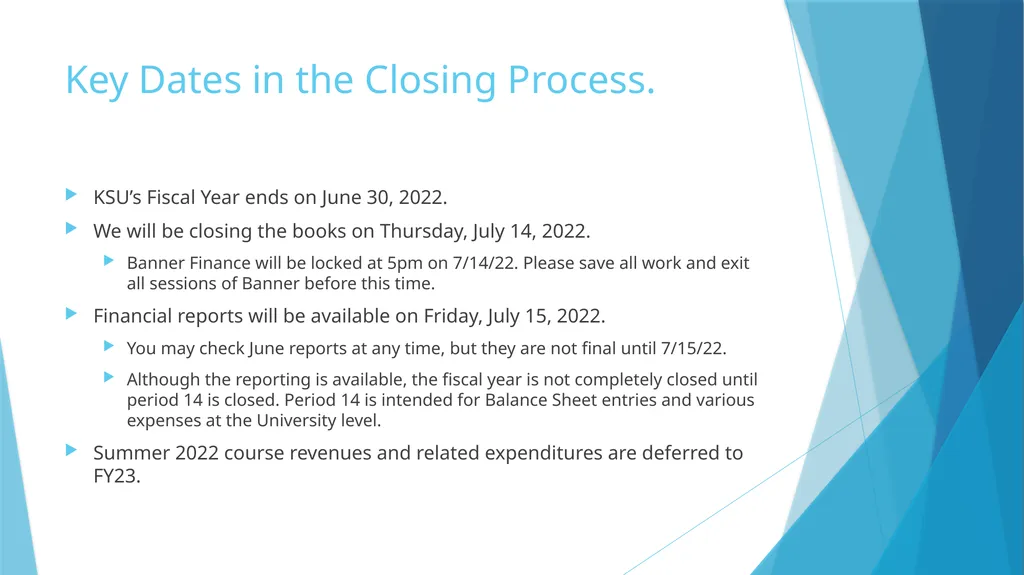
Key Dates in the Closing Process. KSU’s Fiscal Year ends on June 30, 2022.
We will be closing the books on Thursday, July 14, 2022.
Banner Finance will be locked at 5pm on 7/14/22. Please save all work and exit all sessions of Banner before this time.
Financial reports will be available on Friday, July 15, 2022.
You may check June reports at any time, but they are not final until 7/15/22.
Although the reporting is available, the fiscal year is not completely closed until period 14 is closed. Period 14 is intended for Balance Sheet entries and various expenses at the University level.
Summer 2022 course revenues and related expenditures are deferred to FY23.<br>
We will be closing the books on Thursday, July 14, 2022.
Banner Finance will be locked at 5pm on 7/14/22. Please save all work and exit all sessions of Banner before this time.
Financial reports will be available on Friday, July 15, 2022.
You may check June reports at any time, but they are not final until 7/15/22.
Although the reporting is available, the fiscal year is not completely closed until period 14 is closed. Period 14 is intended for Balance Sheet entries and various expenses at the University level.
Summer 2022 course revenues and related expenditures are deferred to FY23.<br>
08
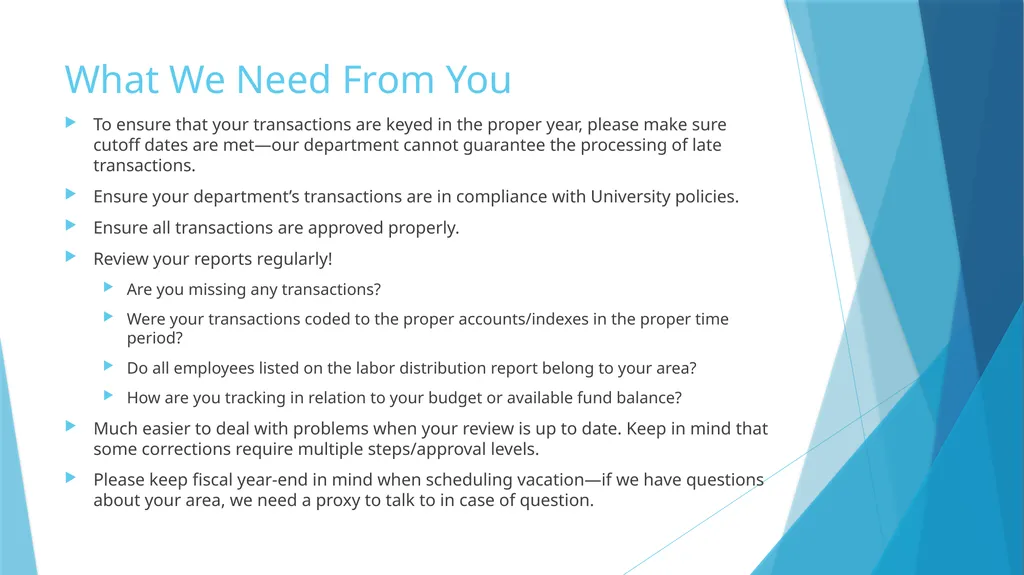
What We Need From You To ensure that your transactions are keyed in the proper year, please make sure cutoff dates are met—our department cannot guarantee the processing of late transactions.
Ensure your department’s transactions are in compliance with University policies.
Ensure all transactions are approved properly.
Review your reports regularly!
Are you missing any transactions?
Were your transactions coded to the proper accounts/indexes in the proper time period?
Do all employees listed on the labor distribution report belong to your area?
How are you tracking in relation to your budget or available fund balance?
Much easier to deal with problems when your review is up to date. Keep in mind that some corrections require multiple steps/approval levels.
Please keep fiscal year-end in mind when scheduling vacation—if we have questions about your area, we need a proxy to talk to in case of question.<br>
Ensure your department’s transactions are in compliance with University policies.
Ensure all transactions are approved properly.
Review your reports regularly!
Are you missing any transactions?
Were your transactions coded to the proper accounts/indexes in the proper time period?
Do all employees listed on the labor distribution report belong to your area?
How are you tracking in relation to your budget or available fund balance?
Much easier to deal with problems when your review is up to date. Keep in mind that some corrections require multiple steps/approval levels.
Please keep fiscal year-end in mind when scheduling vacation—if we have questions about your area, we need a proxy to talk to in case of question.<br>
09
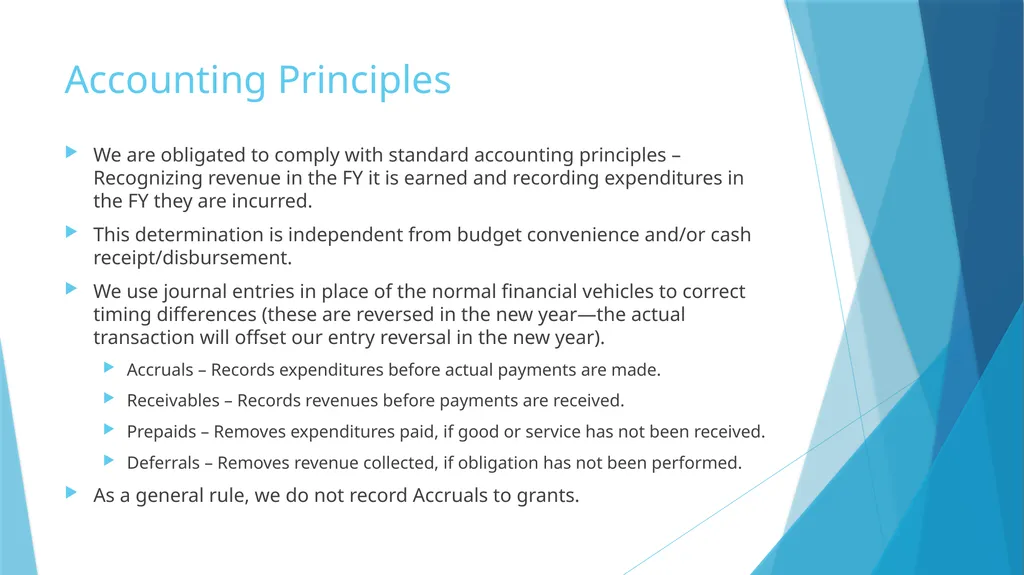
Accounting Principles We are obligated to comply with standard accounting principles – Recognizing revenue in the FY it is earned and recording expenditures in the FY they are incurred.
This determination is independent from budget convenience and/or cash receipt/disbursement.
We use journal entries in place of the normal financial vehicles to correct timing differences (these are reversed in the new year—the actual transaction will offset our entry reversal in the new year).
Accruals – Records expenditures before actual payments are made.
Receivables – Records revenues before payments are received.
Prepaids – Removes expenditures paid, if good or service has not been received.
Deferrals – Removes revenue collected, if obligation has not been performed.
As a general rule, we do not record Accruals to grants.<br>
This determination is independent from budget convenience and/or cash receipt/disbursement.
We use journal entries in place of the normal financial vehicles to correct timing differences (these are reversed in the new year—the actual transaction will offset our entry reversal in the new year).
Accruals – Records expenditures before actual payments are made.
Receivables – Records revenues before payments are received.
Prepaids – Removes expenditures paid, if good or service has not been received.
Deferrals – Removes revenue collected, if obligation has not been performed.
As a general rule, we do not record Accruals to grants.<br>
10
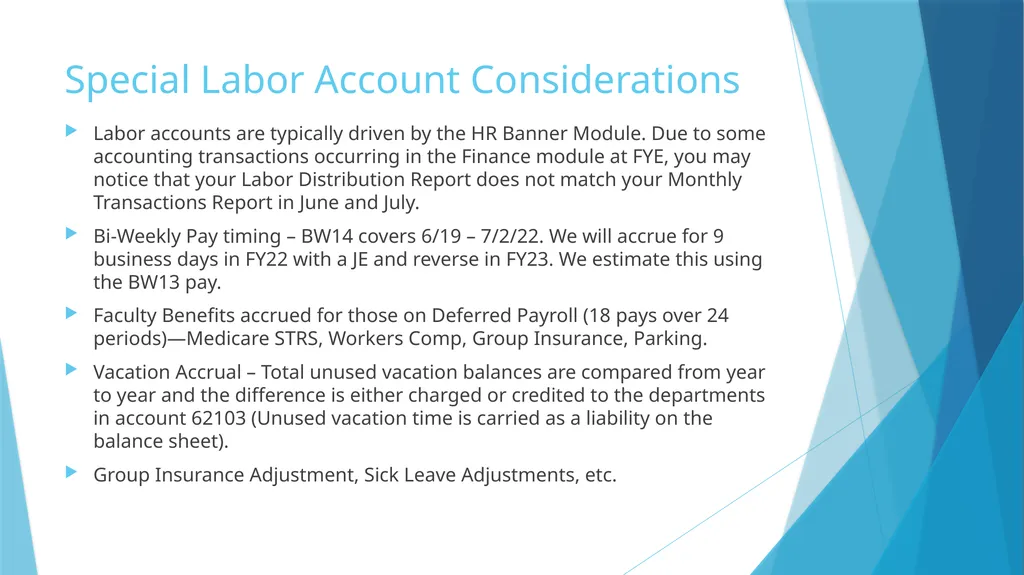
Special Labor Account Considerations Labor accounts are typically driven by the HR Banner Module. Due to some accounting transactions occurring in the Finance module at FYE, you may notice that your Labor Distribution Report does not match your Monthly Transactions Report in June and July.
Bi-Weekly Pay timing – BW14 covers 6/19 – 7/2/22. We will accrue for 9 business days in FY22 with a JE and reverse in FY23. We estimate this using the BW13 pay.
Faculty Benefits accrued for those on Deferred Payroll (18 pays over 24 periods)—Medicare STRS, Workers Comp, Group Insurance, Parking.
Vacation Accrual – Total unused vacation balances are compared from year to year and the difference is either charged or credited to the departments in account 62103 (Unused vacation time is carried as a liability on the balance sheet).
Group Insurance Adjustment, Sick Leave Adjustments, etc.<br>
Bi-Weekly Pay timing – BW14 covers 6/19 – 7/2/22. We will accrue for 9 business days in FY22 with a JE and reverse in FY23. We estimate this using the BW13 pay.
Faculty Benefits accrued for those on Deferred Payroll (18 pays over 24 periods)—Medicare STRS, Workers Comp, Group Insurance, Parking.
Vacation Accrual – Total unused vacation balances are compared from year to year and the difference is either charged or credited to the departments in account 62103 (Unused vacation time is carried as a liability on the balance sheet).
Group Insurance Adjustment, Sick Leave Adjustments, etc.<br>
11
Special Fund Balance Considerations For non-E&G funds, you can check your fund balance on Banner Screen FGITBSR. There is a quick guide on the Controller’s website for this screen.
The Controller’s Office will be checking for deficits (debit balance) in Designated Funds, Agency Funds, Renewal & Replacement Funds, and Unexpended Plant Indexes.
By fiscal year-end, we need the deficits funded, a plan for funding the deficits, or the home department (typically determined by the organization code) will be funding this deficit from the E&G index.
Quarterly notifications are sent to the senior budget officers for divisions.
Start checking your fund balances now to avoid negative surprises at FYE.<br>
The Controller’s Office will be checking for deficits (debit balance) in Designated Funds, Agency Funds, Renewal & Replacement Funds, and Unexpended Plant Indexes.
By fiscal year-end, we need the deficits funded, a plan for funding the deficits, or the home department (typically determined by the organization code) will be funding this deficit from the E&G index.
Quarterly notifications are sent to the senior budget officers for divisions.
Start checking your fund balances now to avoid negative surprises at FYE.<br>
12
Misc. Considerations Please return disposal forms for any tagged equipment disposed of before 6/30/22, so that we can get it off the books and stop depreciating it.
At 5pm on July 14, 2022 we will be running the FYE Banner jobs:
1. Balance Forward – Rolling fund balances into the new FY and open the accrual period. Documents produced with this job will start with “BALF.”
2. Roll Encumbrances – Rolls open encumbrances into the new fiscal year. Documents produced with this job will start with “RENC” and have a journal type of E090.
3. Roll Labor Encumbrances – Closes Payroll Encumbrances for the current year. These documents will start with “PREN.”
Accrual Period 14 is opened.<br>
At 5pm on July 14, 2022 we will be running the FYE Banner jobs:
1. Balance Forward – Rolling fund balances into the new FY and open the accrual period. Documents produced with this job will start with “BALF.”
2. Roll Encumbrances – Rolls open encumbrances into the new fiscal year. Documents produced with this job will start with “RENC” and have a journal type of E090.
3. Roll Labor Encumbrances – Closes Payroll Encumbrances for the current year. These documents will start with “PREN.”
Accrual Period 14 is opened.<br>
13
Things to Look for in July FY23 Your FY22 Accruals, Prepaids, Receivables, and Deferrals should reverse. The actual transactions in FY23 should offset these reversals in the new year.
We manually record “budget” for designated, agency, and Renewal & Replacement indexes by making a BD02 entry with their FY22 ending fund balance. The budget for these indexes is the fund balance.
Any existing Internal Leases will be recorded.<br>
We manually record “budget” for designated, agency, and Renewal & Replacement indexes by making a BD02 entry with their FY22 ending fund balance. The budget for these indexes is the fund balance.
Any existing Internal Leases will be recorded.<br>
14
Questions about FYE?<br>
15
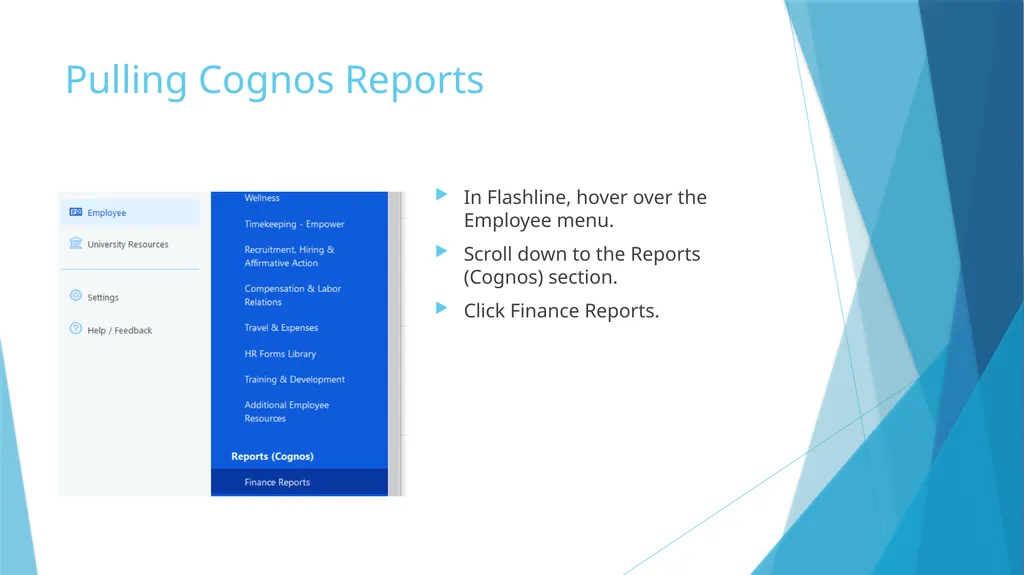
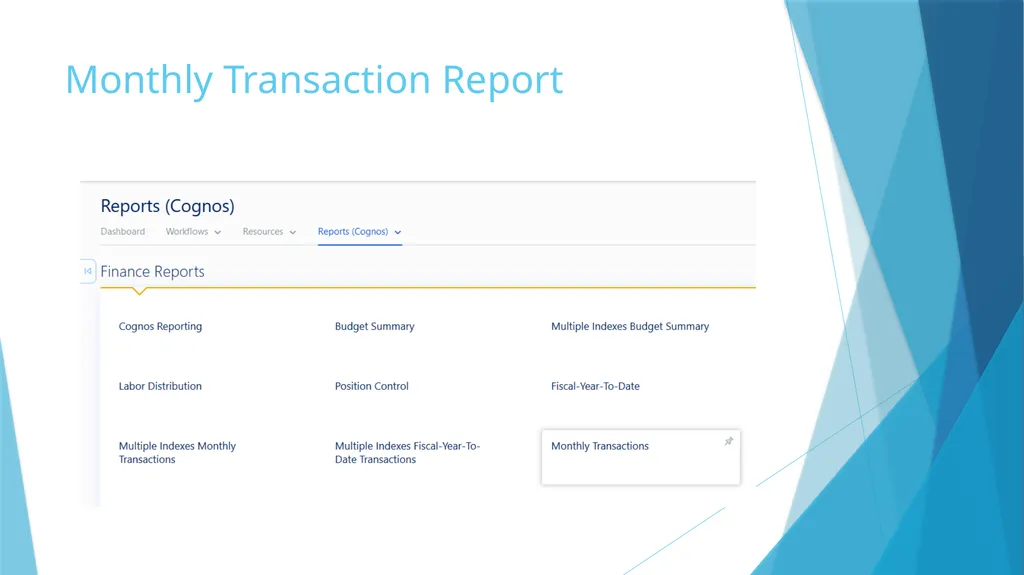
Pulling Cognos Reports In Flashline, hover over the Employee menu.
Scroll down to the Reports (Cognos) section.
Click Finance Reports.<br>
Scroll down to the Reports (Cognos) section.
Click Finance Reports.<br>
16
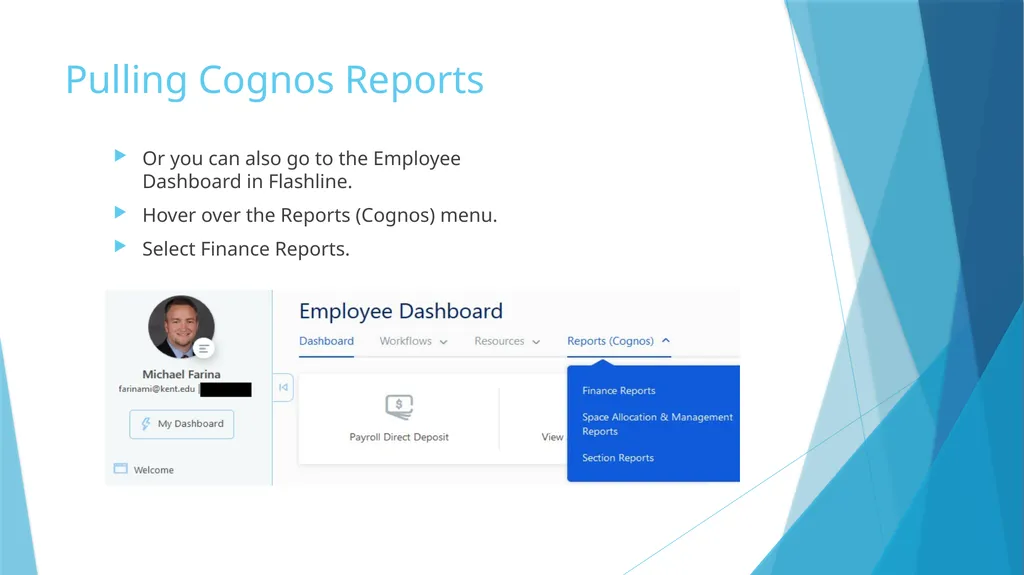
Pulling Cognos Reports Or you can also go to the Employee Dashboard in Flashline.
Hover over the Reports (Cognos) menu.
Select Finance Reports.<br>
Hover over the Reports (Cognos) menu.
Select Finance Reports.<br>
17
Monthly Transaction Report<br>
18
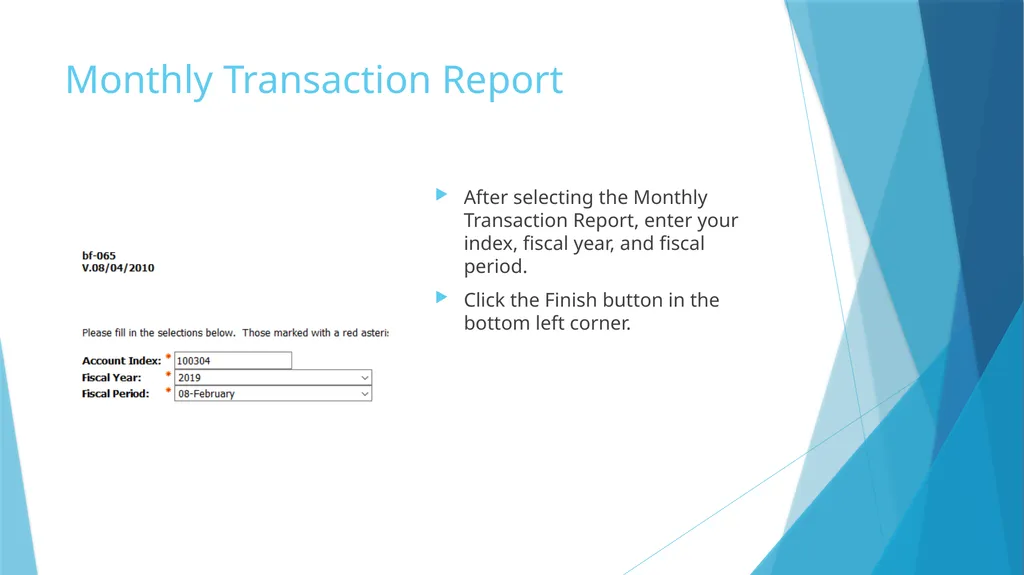
Monthly Transaction Report After selecting the Monthly Transaction Report, enter your index, fiscal year, and fiscal period.
Click the Finish button in the bottom left corner.<br>
Click the Finish button in the bottom left corner.<br>
19
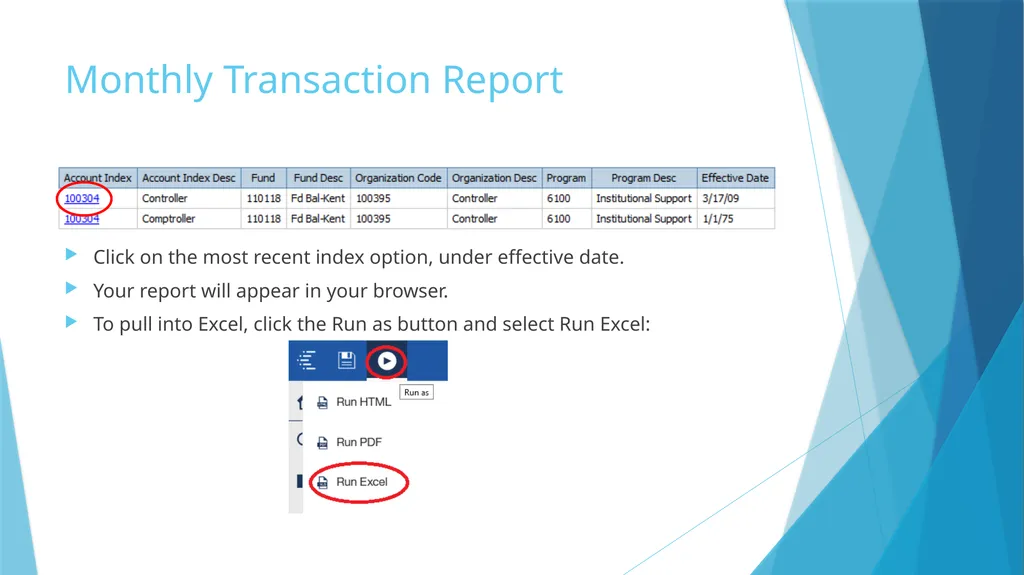
Monthly Transaction Report Click on the most recent index option, under effective date.
Your report will appear in your browser.
To pull into Excel, click the Run as button and select Run Excel:<br>
Your report will appear in your browser.
To pull into Excel, click the Run as button and select Run Excel:<br>
20
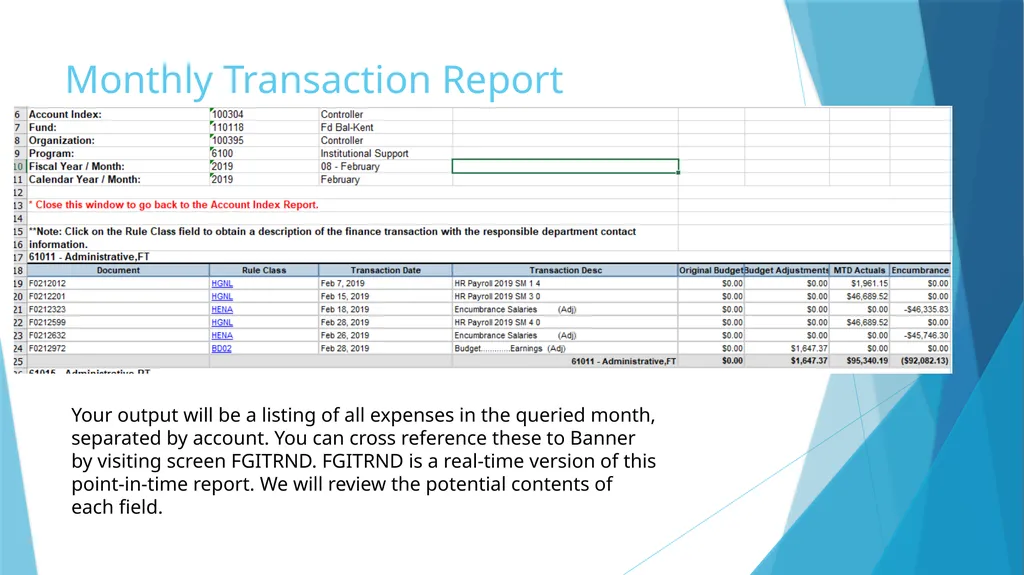
Monthly Transaction Report Your output will be a listing of all expenses in the queried month, separated by account. You can cross reference these to Banner by visiting screen FGITRND. FGITRND is a real-time version of this point-in-time report. We will review the potential contents of each field.<br>
21
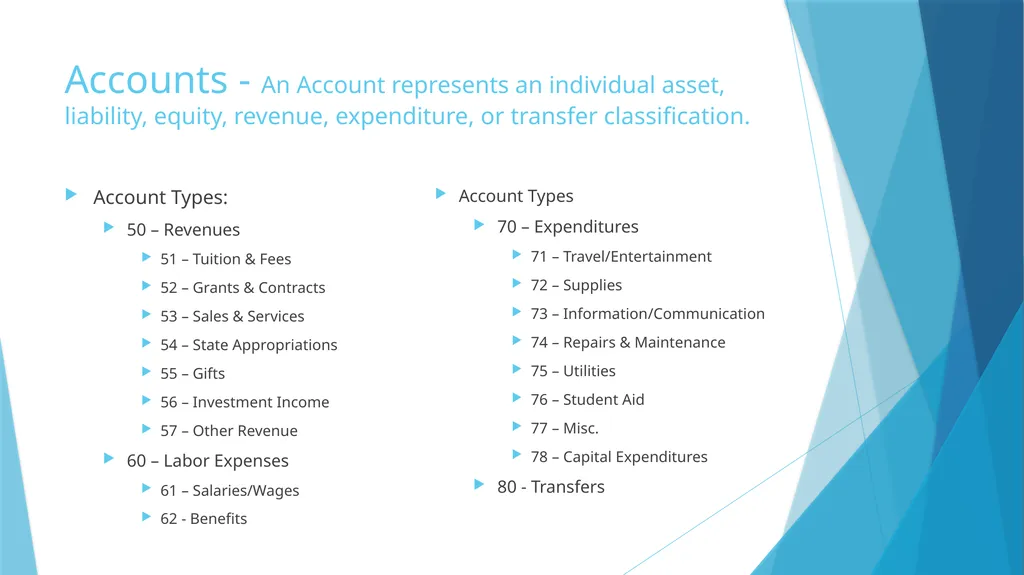
Accounts - An Account represents an individual asset, liability, equity, revenue, expenditure, or transfer classification. Account Types:
50 – Revenues
51 – Tuition & Fees
52 – Grants & Contracts
53 – Sales & Services
54 – State Appropriations
55 – Gifts
56 – Investment Income
57 – Other Revenue
60 – Labor Expenses
61 – Salaries/Wages
62 - Benefits Account Types
70 – Expenditures
71 – Travel/Entertainment
72 – Supplies
73 – Information/Communication
74 – Repairs & Maintenance
75 – Utilities
76 – Student Aid
77 – Misc.
78 – Capital Expenditures
80 - Transfers<br>
50 – Revenues
51 – Tuition & Fees
52 – Grants & Contracts
53 – Sales & Services
54 – State Appropriations
55 – Gifts
56 – Investment Income
57 – Other Revenue
60 – Labor Expenses
61 – Salaries/Wages
62 - Benefits Account Types
70 – Expenditures
71 – Travel/Entertainment
72 – Supplies
73 – Information/Communication
74 – Repairs & Maintenance
75 – Utilities
76 – Student Aid
77 – Misc.
78 – Capital Expenditures
80 - Transfers<br>
22
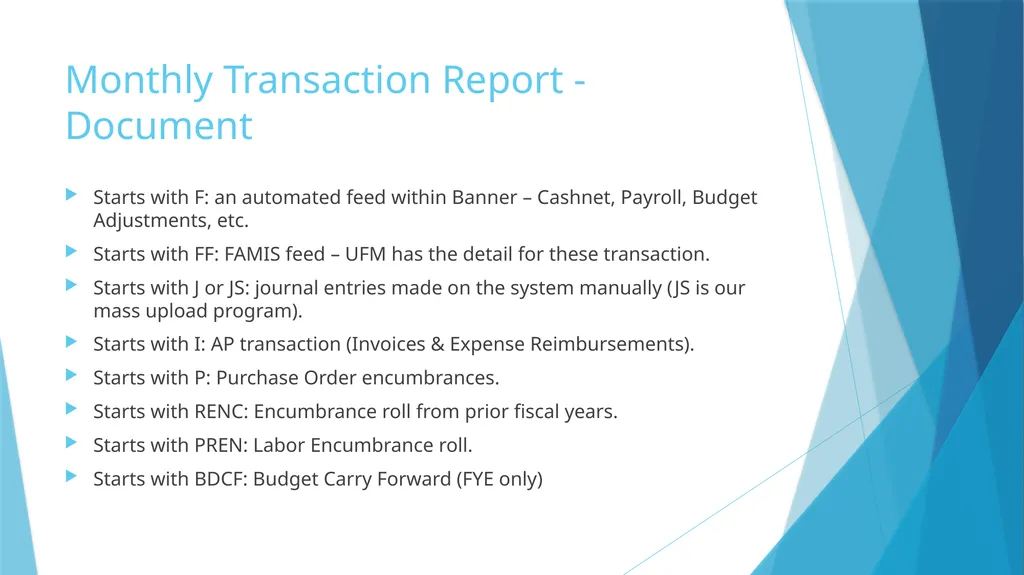
Monthly Transaction Report - Document Starts with F: an automated feed within Banner – Cashnet, Payroll, Budget Adjustments, etc.
Starts with FF: FAMIS feed – UFM has the detail for these transaction.
Starts with J or JS: journal entries made on the system manually (JS is our mass upload program).
Starts with I: AP transaction (Invoices & Expense Reimbursements).
Starts with P: Purchase Order encumbrances.
Starts with RENC: Encumbrance roll from prior fiscal years.
Starts with PREN: Labor Encumbrance roll.
Starts with BDCF: Budget Carry Forward (FYE only)<br>
Starts with FF: FAMIS feed – UFM has the detail for these transaction.
Starts with J or JS: journal entries made on the system manually (JS is our mass upload program).
Starts with I: AP transaction (Invoices & Expense Reimbursements).
Starts with P: Purchase Order encumbrances.
Starts with RENC: Encumbrance roll from prior fiscal years.
Starts with PREN: Labor Encumbrance roll.
Starts with BDCF: Budget Carry Forward (FYE only)<br>
23
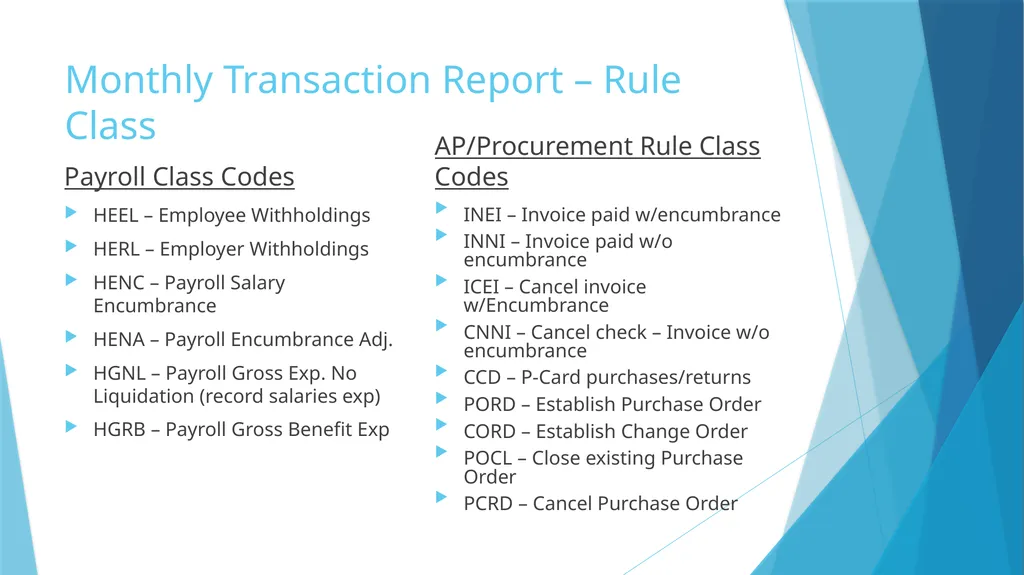
Monthly Transaction Report – Rule Class Payroll Class Codes HEEL – Employee Withholdings
HERL – Employer Withholdings
HENC – Payroll Salary Encumbrance
HENA – Payroll Encumbrance Adj.
HGNL – Payroll Gross Exp. No Liquidation (record salaries exp)
HGRB – Payroll Gross Benefit Exp AP/Procurement Rule Class Codes INEI – Invoice paid w/encumbrance
INNI – Invoice paid w/o encumbrance
ICEI – Cancel invoice w/Encumbrance
CNNI – Cancel check – Invoice w/o encumbrance
CCD – P-Card purchases/returns
PORD – Establish Purchase Order
CORD – Establish Change Order
POCL – Close existing Purchase Order
PCRD – Cancel Purchase Order<br>
HERL – Employer Withholdings
HENC – Payroll Salary Encumbrance
HENA – Payroll Encumbrance Adj.
HGNL – Payroll Gross Exp. No Liquidation (record salaries exp)
HGRB – Payroll Gross Benefit Exp AP/Procurement Rule Class Codes INEI – Invoice paid w/encumbrance
INNI – Invoice paid w/o encumbrance
ICEI – Cancel invoice w/Encumbrance
CNNI – Cancel check – Invoice w/o encumbrance
CCD – P-Card purchases/returns
PORD – Establish Purchase Order
CORD – Establish Change Order
POCL – Close existing Purchase Order
PCRD – Cancel Purchase Order<br>
24
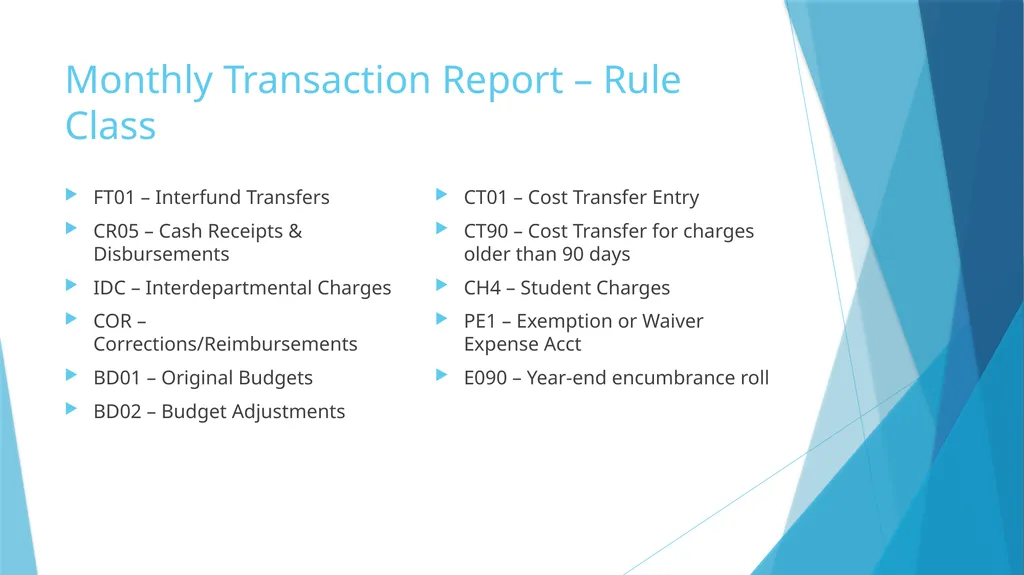
Monthly Transaction Report – Rule Class FT01 – Interfund Transfers
CR05 – Cash Receipts & Disbursements
IDC – Interdepartmental Charges
COR – Corrections/Reimbursements
BD01 – Original Budgets
BD02 – Budget Adjustments CT01 – Cost Transfer Entry
CT90 – Cost Transfer for charges older than 90 days
CH4 – Student Charges
PE1 – Exemption or Waiver Expense Acct
E090 – Year-end encumbrance roll<br>
CR05 – Cash Receipts & Disbursements
IDC – Interdepartmental Charges
COR – Corrections/Reimbursements
BD01 – Original Budgets
BD02 – Budget Adjustments CT01 – Cost Transfer Entry
CT90 – Cost Transfer for charges older than 90 days
CH4 – Student Charges
PE1 – Exemption or Waiver Expense Acct
E090 – Year-end encumbrance roll<br>
25
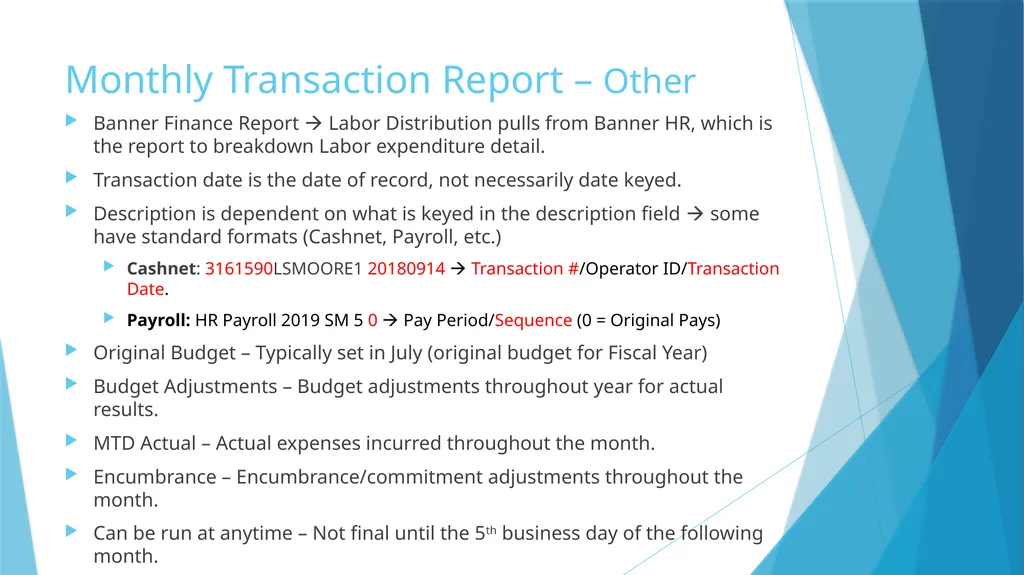
Monthly Transaction Report – Other Banner Finance Report Labor Distribution pulls from Banner HR, which is the report to breakdown Labor expenditure detail.
Transaction date is the date of record, not necessarily date keyed.
Description is dependent on what is keyed in the description field some have standard formats (Cashnet, Payroll, etc.)
Cashnet: 3161590LSMOORE1 20180914 Transaction #/Operator ID/Transaction Date.
Payroll: HR Payroll 2019 SM 5 0 Pay Period/Sequence (0 = Original Pays)
Original Budget – Typically set in July (original budget for Fiscal Year)
Budget Adjustments – Budget adjustments throughout year for actual results.
MTD Actual – Actual expenses incurred throughout the month.
Encumbrance – Encumbrance/commitment adjustments throughout the month.
Can be run at anytime – Not final until the 5th business day of the following month.<br>
Transaction date is the date of record, not necessarily date keyed.
Description is dependent on what is keyed in the description field some have standard formats (Cashnet, Payroll, etc.)
Cashnet: 3161590LSMOORE1 20180914 Transaction #/Operator ID/Transaction Date.
Payroll: HR Payroll 2019 SM 5 0 Pay Period/Sequence (0 = Original Pays)
Original Budget – Typically set in July (original budget for Fiscal Year)
Budget Adjustments – Budget adjustments throughout year for actual results.
MTD Actual – Actual expenses incurred throughout the month.
Encumbrance – Encumbrance/commitment adjustments throughout the month.
Can be run at anytime – Not final until the 5th business day of the following month.<br>
26
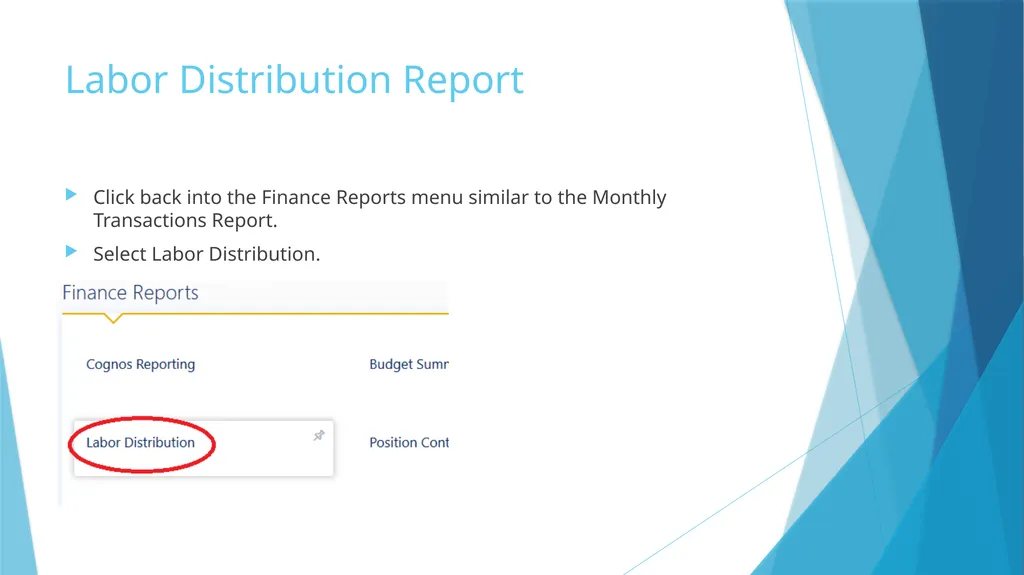
Labor Distribution Report Click back into the Finance Reports menu similar to the Monthly Transactions Report.
Select Labor Distribution.<br>
Select Labor Distribution.<br>
27
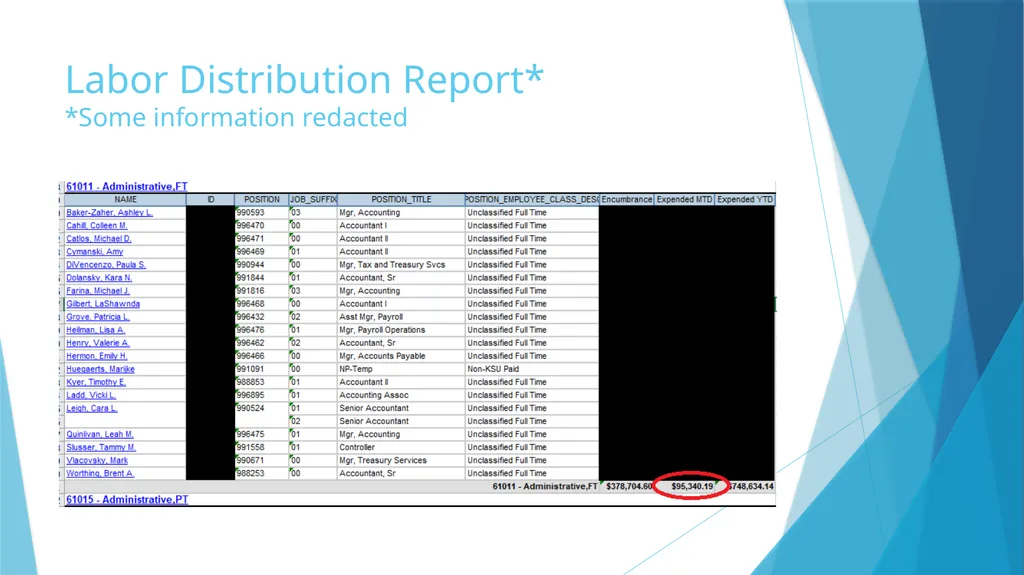
Labor Distribution Report*
*Some information redacted<br>
28
Labor Distribution Report Breaks down each Salary & Benefit account by employee
Pulled from Banner-HR Module – should tie to Finance (non-HR system entries can create differences—common in June & July).
Should be reviewed monthly to make sure no employees are charged to your area that should be charged elsewhere.
Labor can only be moved via Salary Redistribution Workflow – IDC/COR not allowed on labor accounts.<br>
Pulled from Banner-HR Module – should tie to Finance (non-HR system entries can create differences—common in June & July).
Should be reviewed monthly to make sure no employees are charged to your area that should be charged elsewhere.
Labor can only be moved via Salary Redistribution Workflow – IDC/COR not allowed on labor accounts.<br>
29
Questions?<br>