FTP - File Transfer Protocol TFTP – Trivial FTP
Description: FTP - File Transfer Protocol TFTP Trivial FTP CISC 856 Fall 2008 Shriram Ganesh University of Delaware (somemost slides courtesy of Brian Lucas, Umakanth Puppala, William Boyer Vikram Rajan, Michael Haggerty, and Prof Amer)
Related Topics
Download Presentation
"FTP - File Transfer Protocol TFTP – Trivial FTP" is the property of its rightful owner. Permission is granted to download and print the materials on this website for personal, non-commercial use only, and to display it on your personal computer provided you do not modify the materials and that you retain all copyright notices contained in the materials. By downloading content from our website, you accept the terms of this agreement.
Presentation Transcript
slide1. FTP - File Transfer ProtocolTFTP – Trivial FTPCISC 856 – Fall 2008 Shriram Ganesh
University of Delaware
(some/most slides courtesy of Brian Lucas,
Umakanth Puppala, William Boyer
Vikram Rajan, Michael Haggerty, and Prof Amer) ganesh@cis.udel.edu<br>
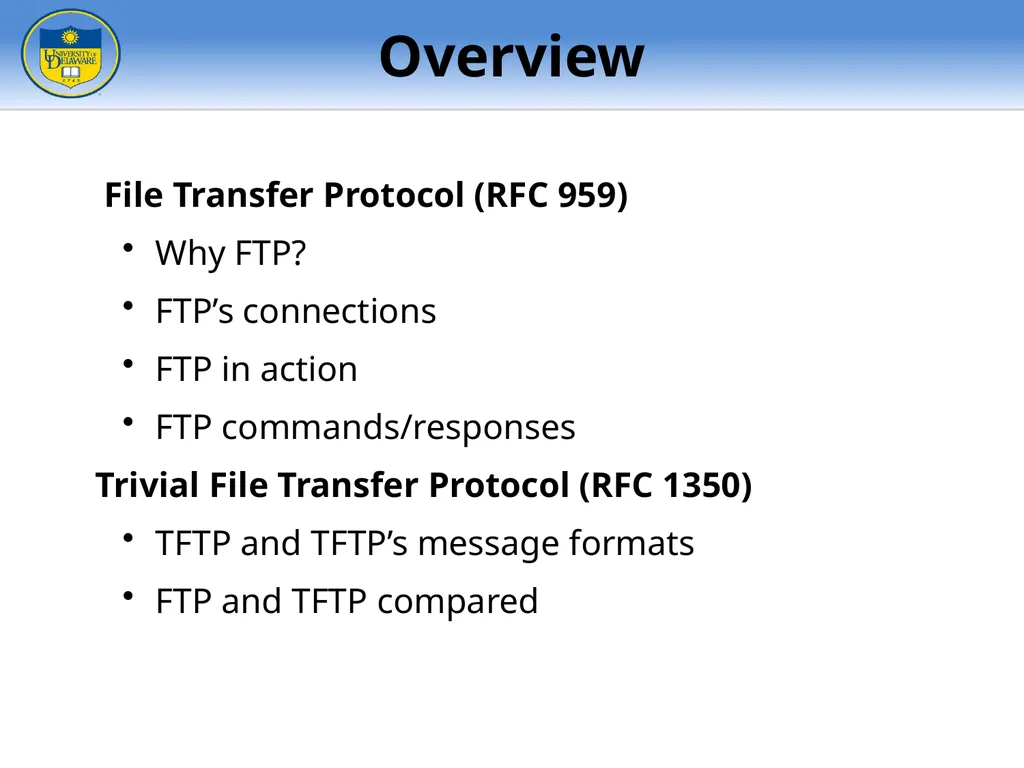
slide2. File Transfer Protocol (RFC 959)
Why FTP?
FTP’s connections
FTP in action
FTP commands/responses
Trivial File Transfer Protocol (RFC 1350)
TFTP and TFTP’s message formats
FTP and TFTP compared Overview<br>
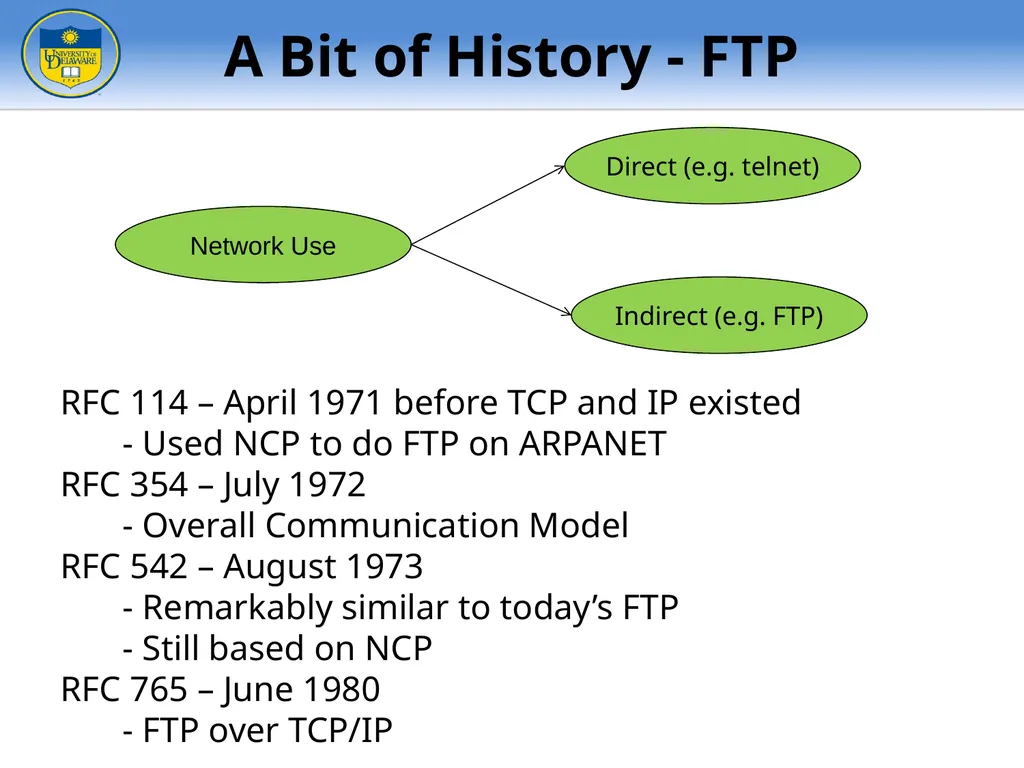
slide3. Network Use Direct (e.g. telnet) Indirect (e.g. FTP) RFC 114 – April 1971 before TCP and IP existed - Used NCP to do FTP on ARPANET
RFC 354 – July 1972
- Overall Communication Model
RFC 542 – August 1973
- Remarkably similar to today’s FTP
- Still based on NCP
RFC 765 – June 1980
- FTP over TCP/IP A Bit of History - FTP<br>
slide4. Purpose: To Transfer files between two computers
Goals of FTP Service
Promote sharing of files (programs and/or data)
Encourage indirect/implicit use of remote computers
Shield users from variations in file storage among hosts
Transfer data reliably and efficiently Why do we need a FTP service?<br>
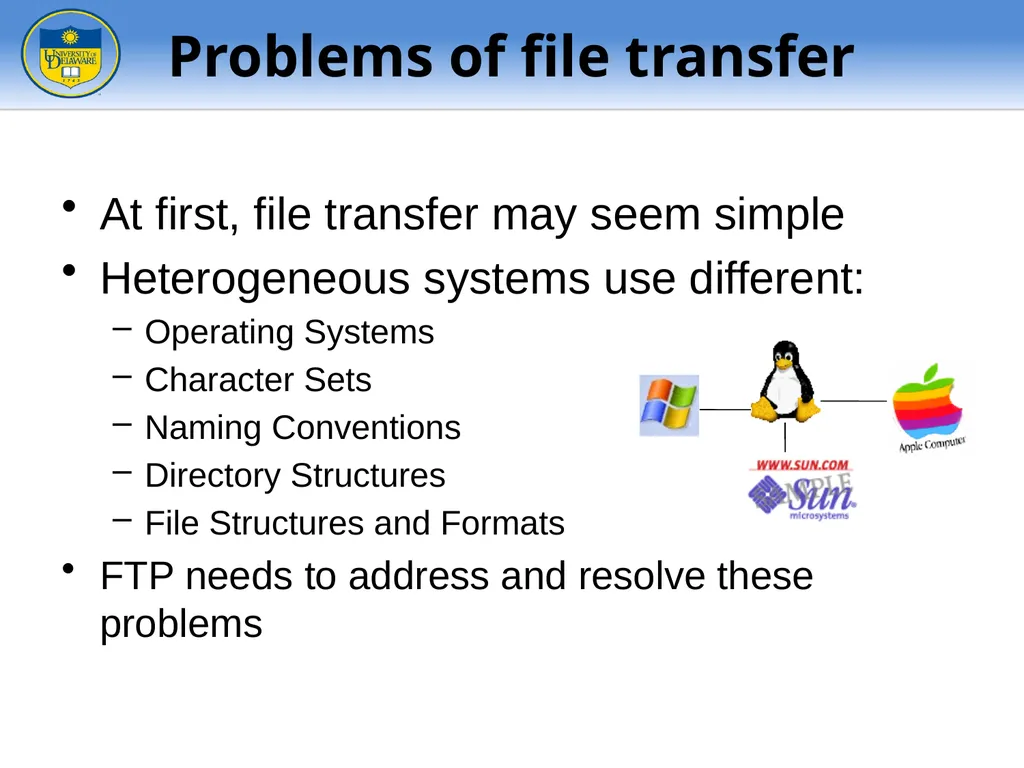
slide5. At first, file transfer may seem simple
Heterogeneous systems use different:
Operating Systems
Character Sets
Naming Conventions
Directory Structures
File Structures and Formats
FTP needs to address and resolve these problems Problems of file transfer<br>
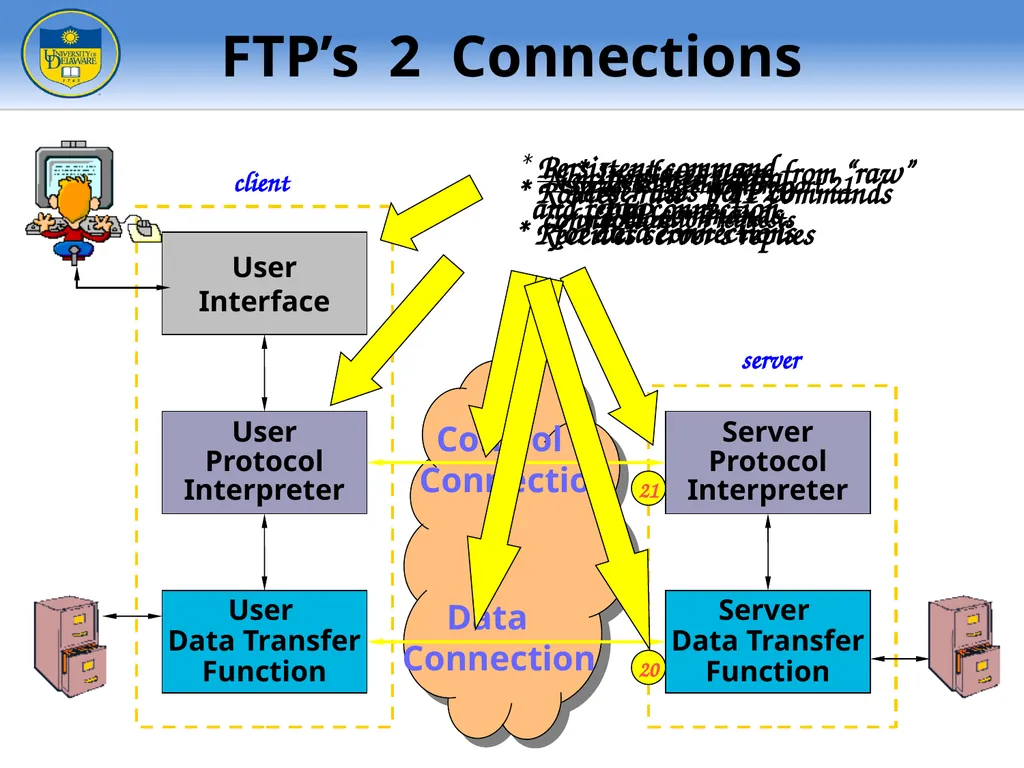
slide6. User
Interface User
Data Transfer
Function User
Protocol
Interpreter Server
Protocol
Interpreter Server
Data Transfer
Function client server Control
Connection Data
Connection 2 21 20 FTP’s 2 Connections<br>
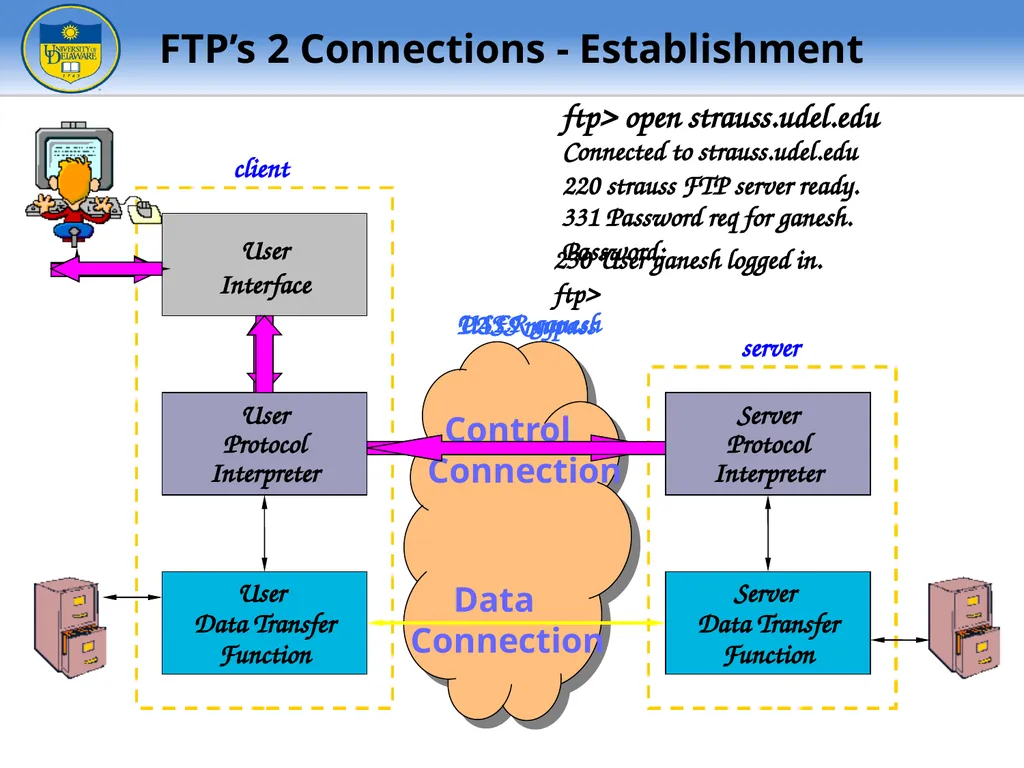
slide7. User
Interface User
Data Transfer
Function User
Protocol
Interpreter Server
Protocol
Interpreter Server
Data Transfer
Function client server Control
Connection Data
Connection ftp> open strauss.udel.edu Connected to strauss.udel.edu
220 strauss FTP server ready. USER ganesh 331 Password req for ganesh.
Password: PASS mypass 230 User ganesh logged in.
ftp> FTP’s 2 Connections - Establishment<br>
slide8. 128.4.40.17 (19×256)+137 128.4.40.17:5001 User
Data Transfer
Function Server
Data Transfer
Function User
Interface User
Protocol
Interpreter Server
Protocol
Interpreter client server Control
Connection Data
Connection ls client.txt Passive open on
Port 5001 PORT 128,4,40,17,19,137 200 Port Command Sucessful LIST client.txt 150 Data Connection will be open shortly 226 Closing Data Connection -rw-r--r-- lucasb client.txt Establish Data Connection User
Protocol
Interpreter Server
Protocol
Interpreter 128.4.40.17 19,137 FTP’s 2 Connections – Data Transfer<br>
slide9. User
Interface User
Protocol
Interpreter Server
Protocol
Interpreter client server Control
Connection Data
Connection User
Data Transfer
Function Server
Data Transfer
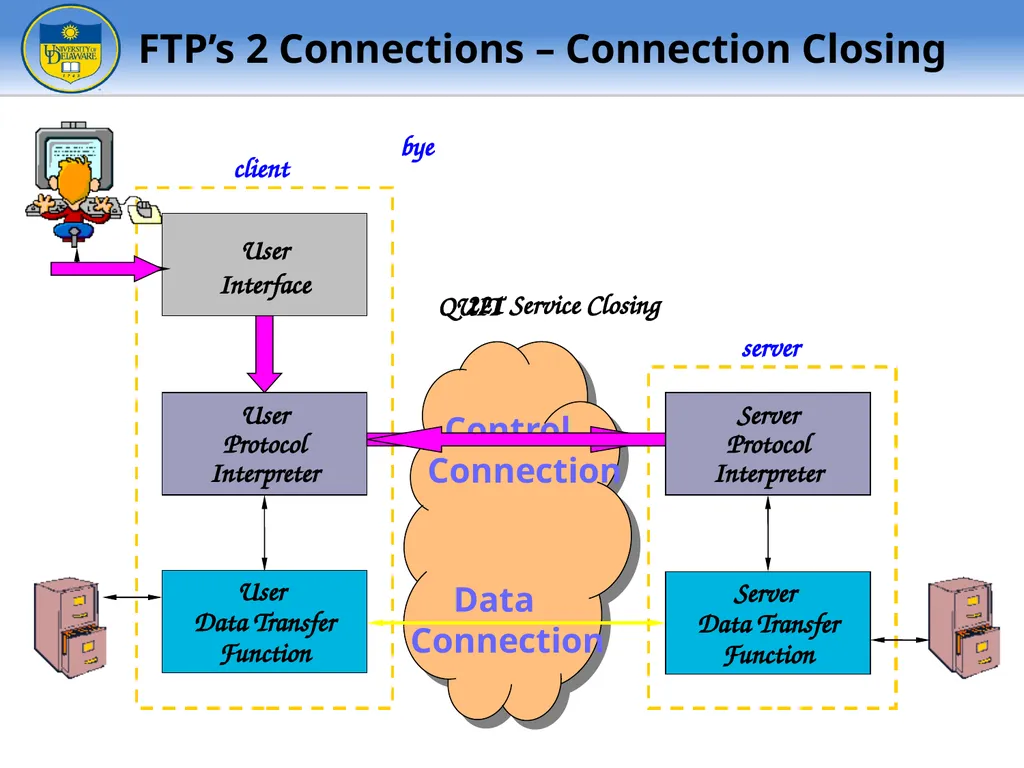
Function bye QUIT 221 Service Closing FTP’s 2 Connections – Connection Closing<br>
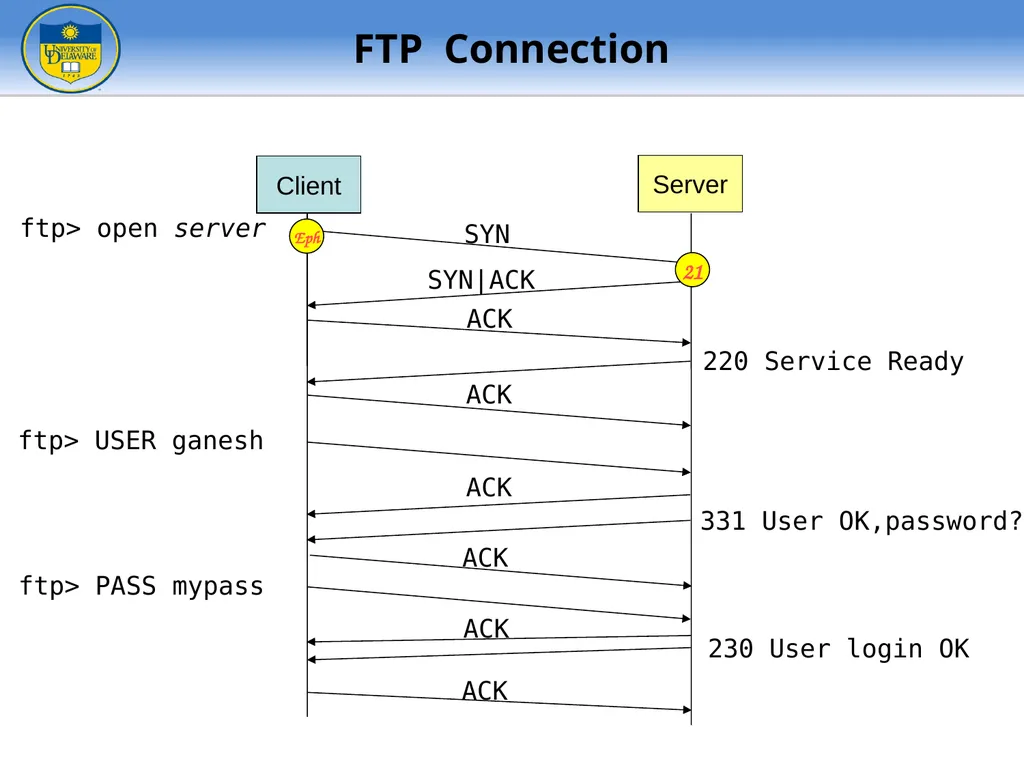
slide10. ftp> open server SYN SYN|ACK ACK 220 Service Ready ftp> USER ganesh ACK ACK 331 User OK,password? ACK ftp> PASS mypass ACK 230 User login OK ACK Client Server 21 Eph FTP Connection<br>
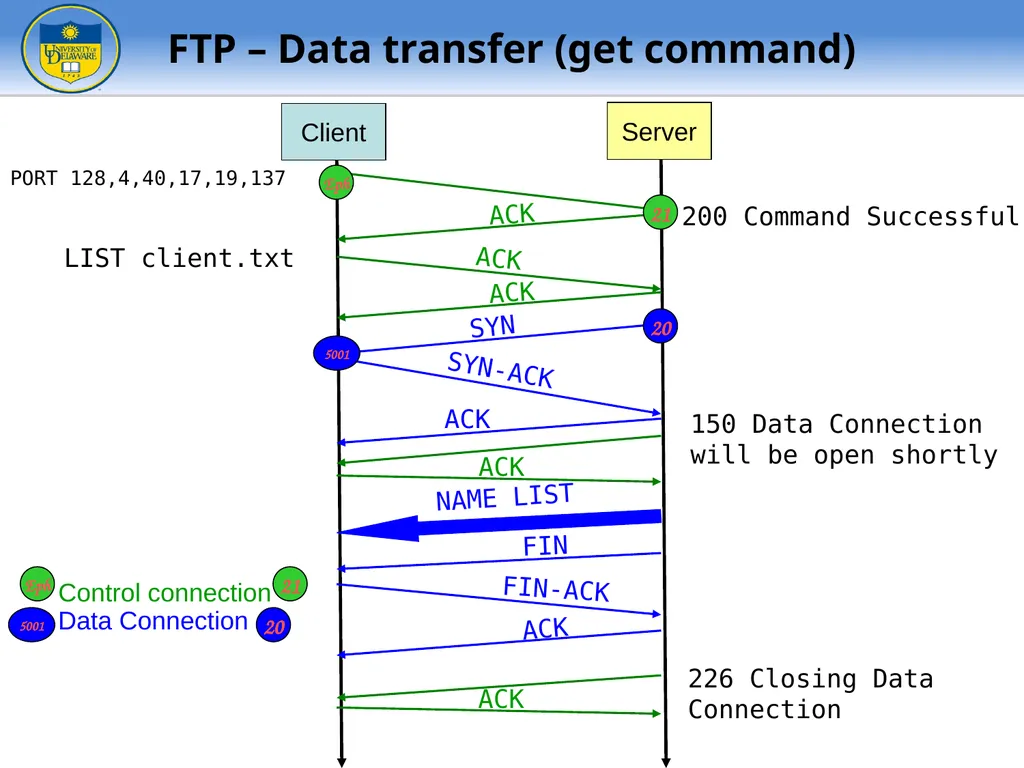
slide11. PORT 128,4,40,17,19,137 200 Command Successful SYN LIST client.txt SYN-ACK ACK 150 Data Connection will be open shortly NAME LIST FIN FIN-ACK 226 Closing Data Connection ACK ACK ACK ACK ACK Control connection Data Connection Client Server ACK Eph Eph 21 21 5001 20 5001 20 FTP – Data transfer (get command)<br>
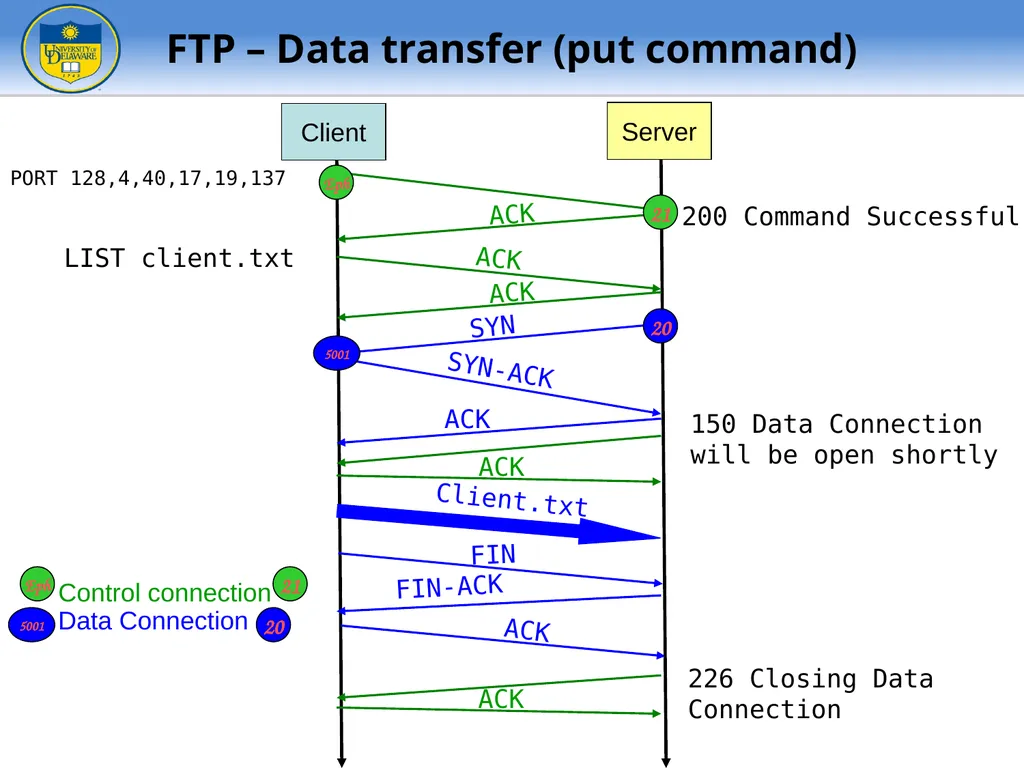
slide12. PORT 128,4,40,17,19,137 200 Command Successful SYN LIST client.txt SYN-ACK ACK 150 Data Connection will be open shortly Client.txt FIN FIN-ACK 226 Closing Data Connection ACK ACK ACK ACK ACK Control connection Data Connection Client Server ACK Eph Eph 21 21 5001 20 5001 20 FTP – Data transfer (put command)<br>
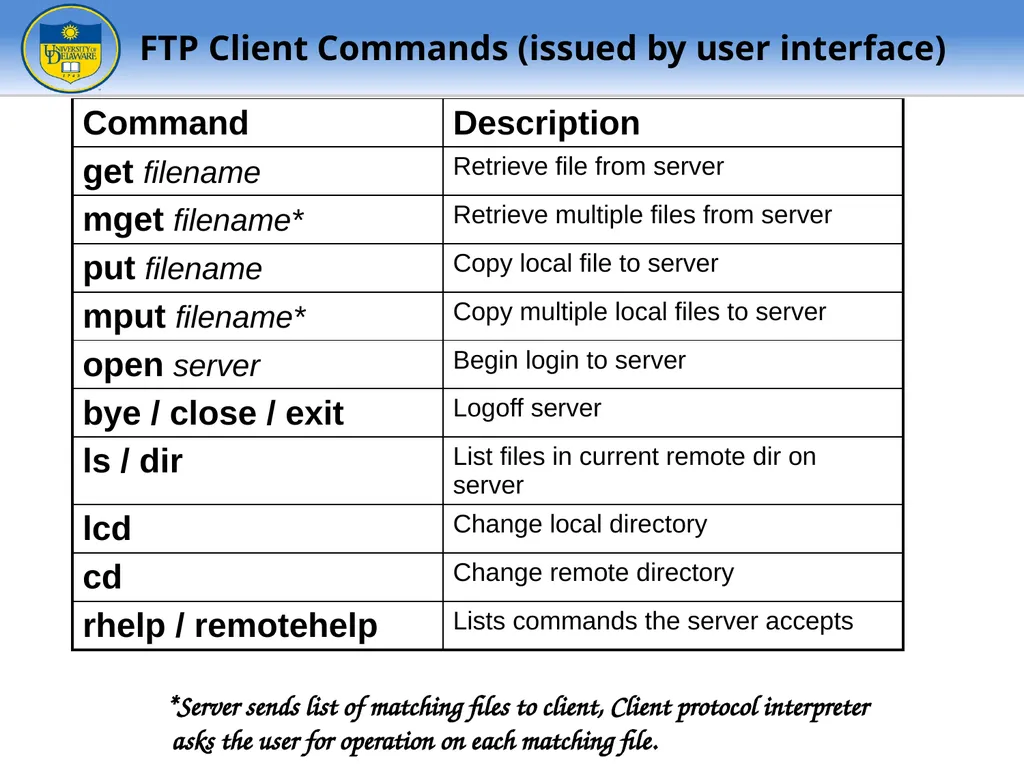
slide13. FTP Client Commands (issued by user interface) *Server sends list of matching files to client, Client protocol interpreter asks the user for operation on each matching file.<br>
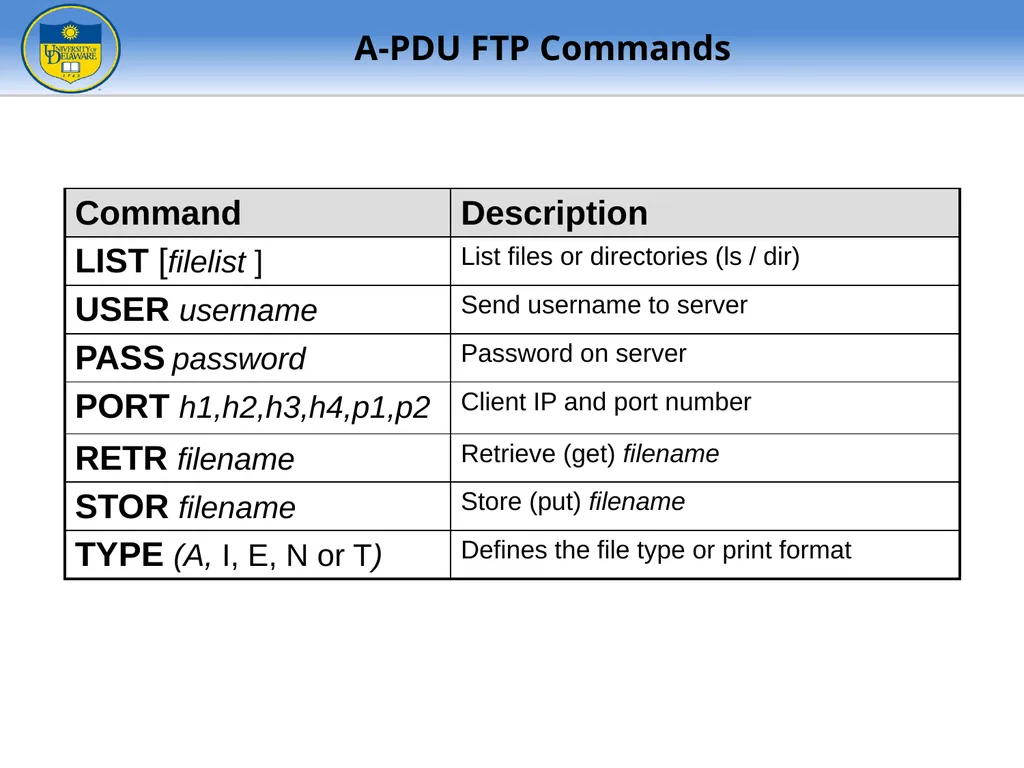
slide14. A-PDU FTP Commands<br>
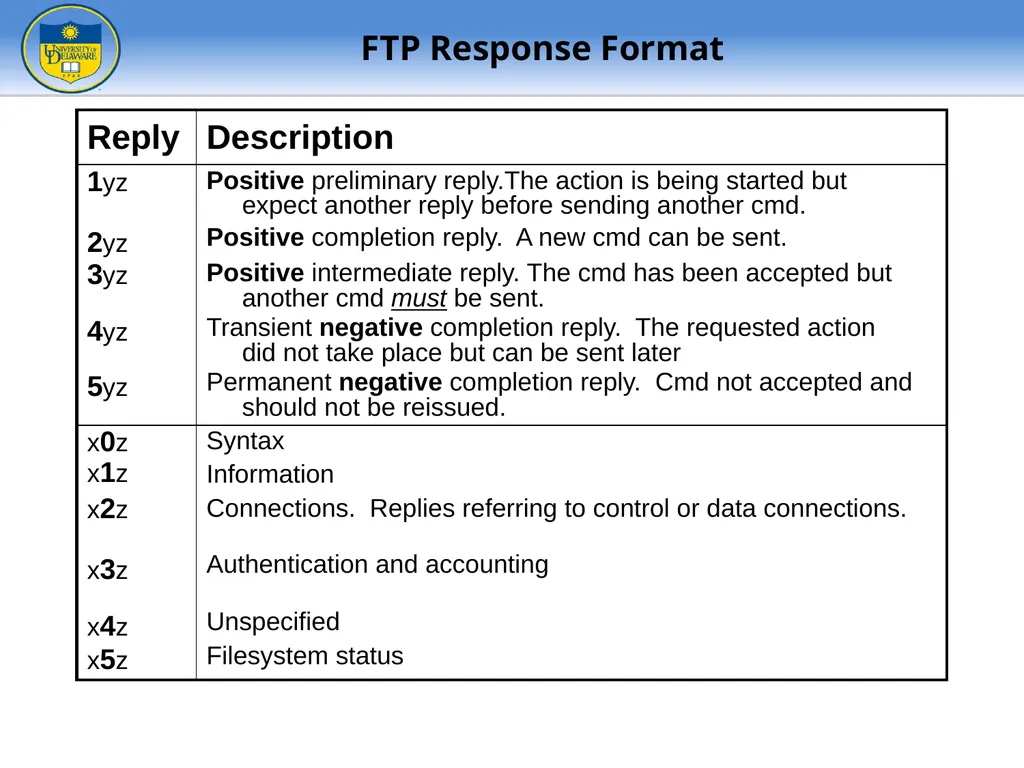
slide15. FTP Response Format<br>
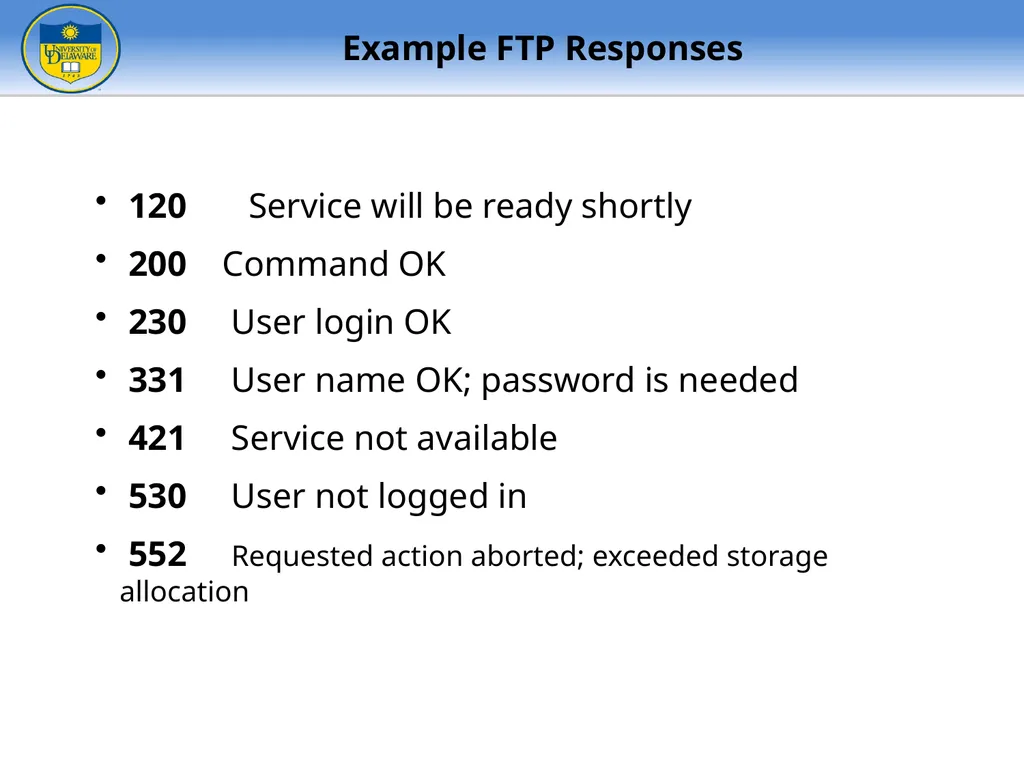
slide16. 120 Service will be ready shortly
200 Command OK
230 User login OK
331 User name OK; password is needed
421 Service not available
530 User not logged in
552 Requested action aborted; exceeded storage allocation Example FTP Responses<br>
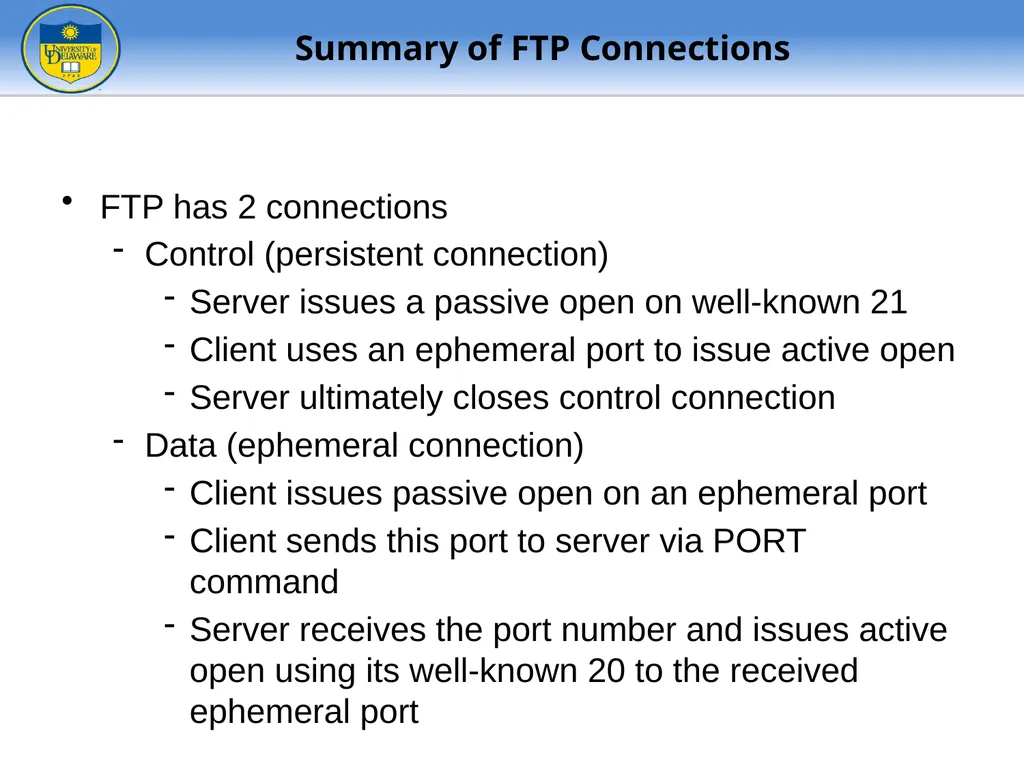
slide17. FTP has 2 connections
Control (persistent connection)
Server issues a passive open on well-known 21
Client uses an ephemeral port to issue active open
Server ultimately closes control connection
Data (ephemeral connection)
Client issues passive open on an ephemeral port
Client sends this port to server via PORT command
Server receives the port number and issues active open using its well-known 20 to the received ephemeral port Summary of FTP Connections<br>
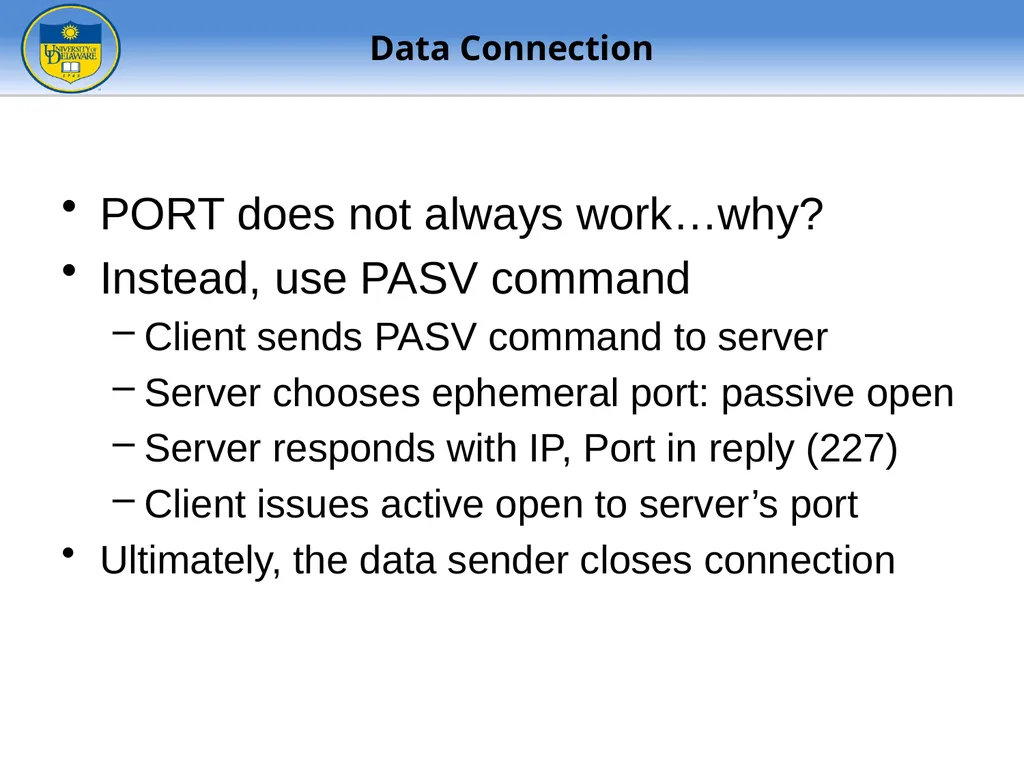
slide18. PORT does not always work…why?
Instead, use PASV command
Client sends PASV command to server
Server chooses ephemeral port: passive open
Server responds with IP, Port in reply (227)
Client issues active open to server’s port
Ultimately, the data sender closes connection Data Connection<br>
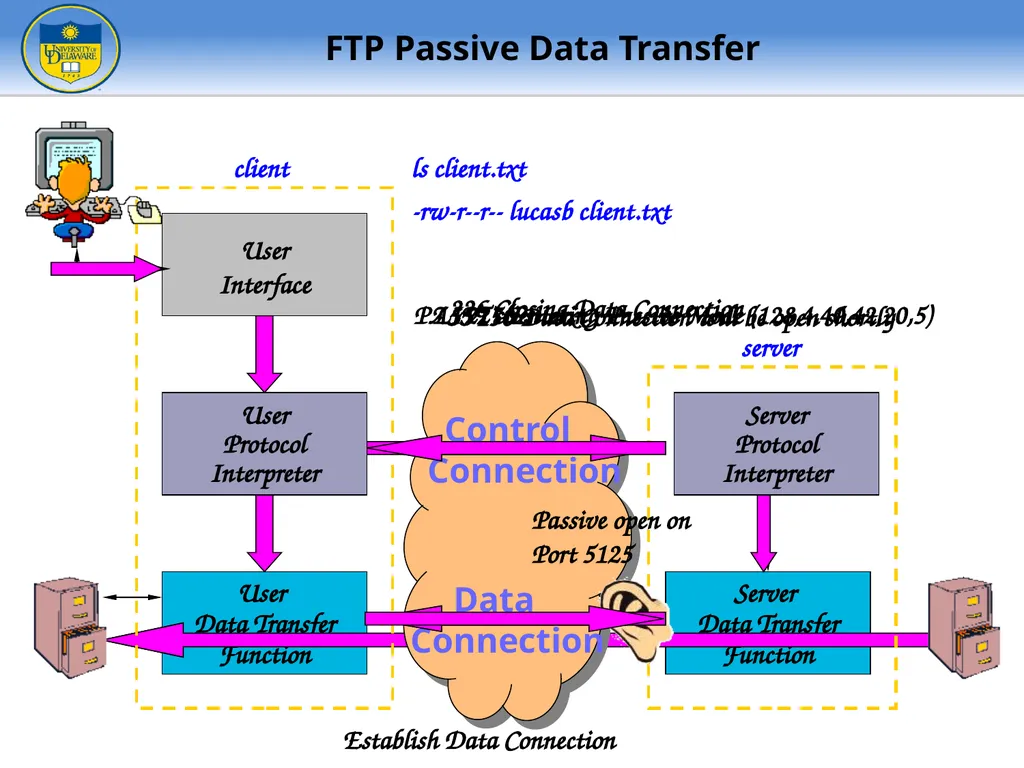
slide19. User
Data Transfer
Function Server
Data Transfer
Function User
Interface User
Protocol
Interpreter Server
Protocol
Interpreter client server Control
Connection Data
Connection ls client.txt Passive open on
Port 5125 PASV 227 Entering Passive Mode (128,4,40,42,20,5) LIST client.txt 150 Data Connection will be open shortly 226 Closing Data Connection -rw-r--r-- lucasb client.txt Establish Data Connection User
Protocol
Interpreter Server
Protocol
Interpreter FTP Passive Data Transfer<br>
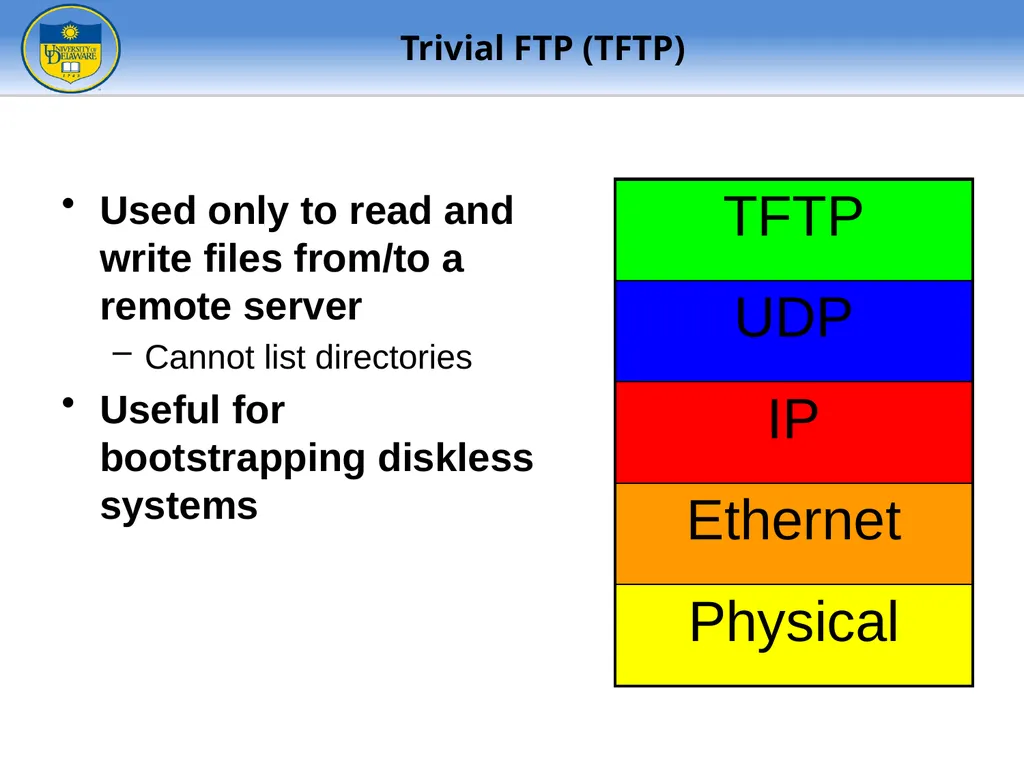
slide20. Used only to read and write files from/to a remote server
Cannot list directories
Useful for bootstrapping diskless systems Trivial FTP (TFTP)<br>
slide21. Diagrams from McGraw-Hill TFTP Message Formats<br>
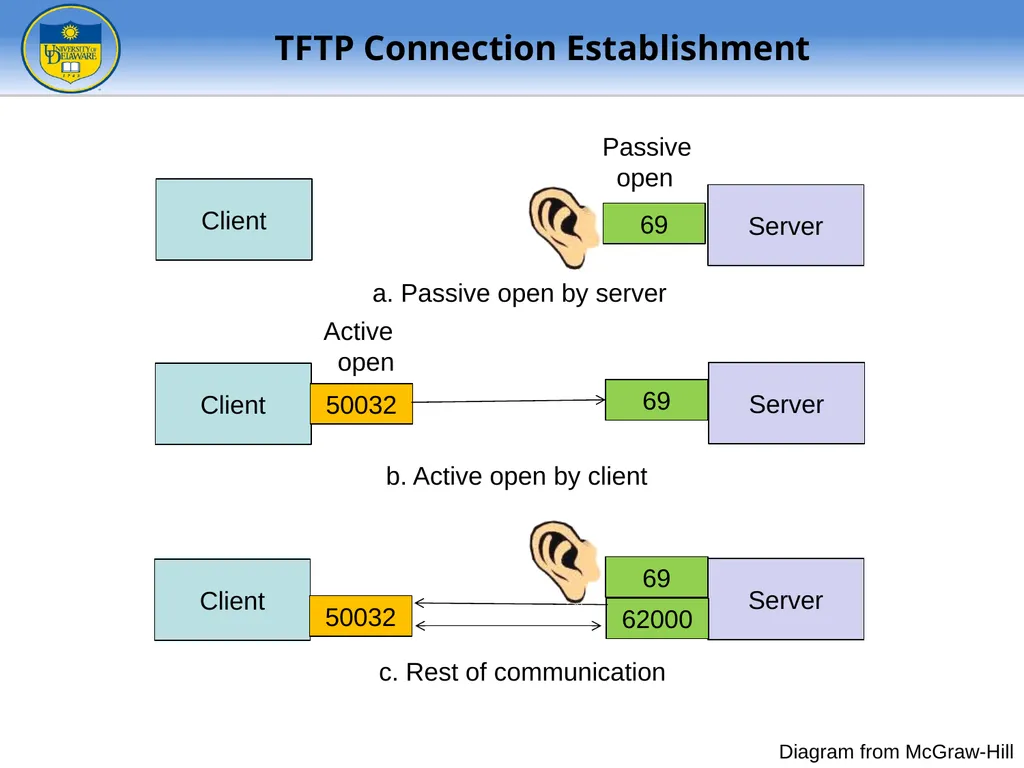
slide22. Diagram from McGraw-Hill TFTP Connection Establishment Client Server 69 Passive open a. Passive open by server Client Server 69 b. Active open by client Active open 50032 Client Server 62000 c. Rest of communication 50032 69<br>
slide23. Diagram from McGraw-Hill TFTP Data Transfer<br>
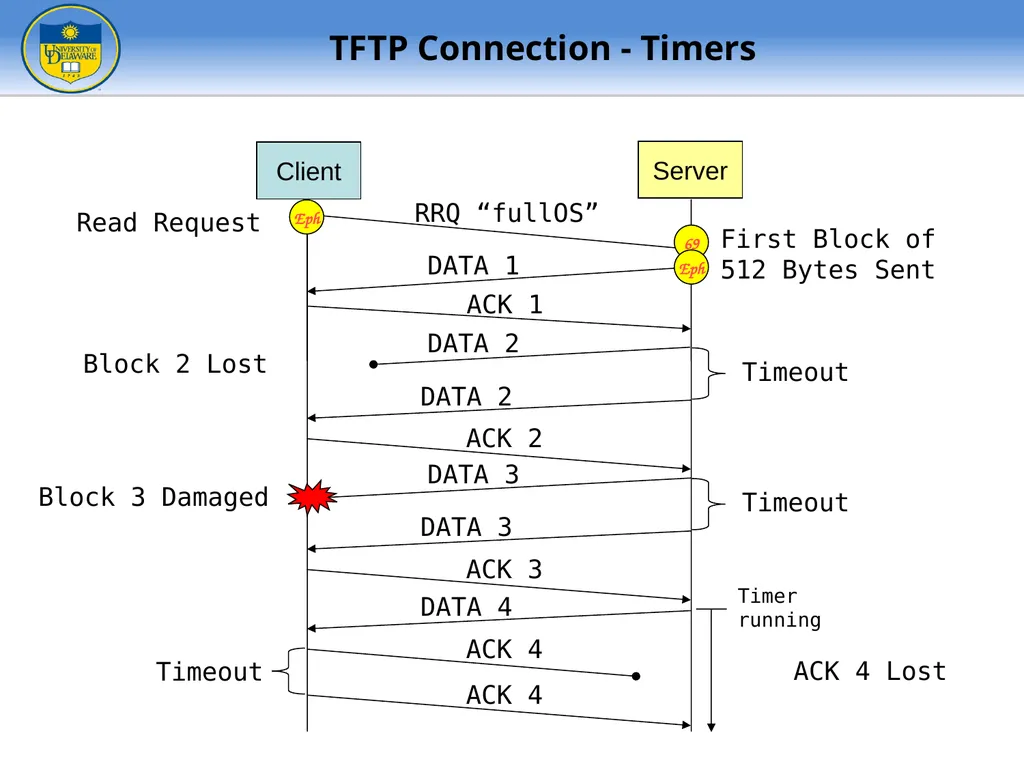
slide24. Read Request RRQ “fullOS” DATA 1 ACK 1 Timeout ACK 2 Client Server DATA 2 DATA 2 Timeout ACK 3 DATA 3 DATA 3 First Block of
512 Bytes Sent Block 2 Lost Block 3 Damaged ACK 4 DATA 4 Timeout ACK 4 ACK 4 Lost Eph 69 Eph Timer
running TFTP Connection - Timers<br>
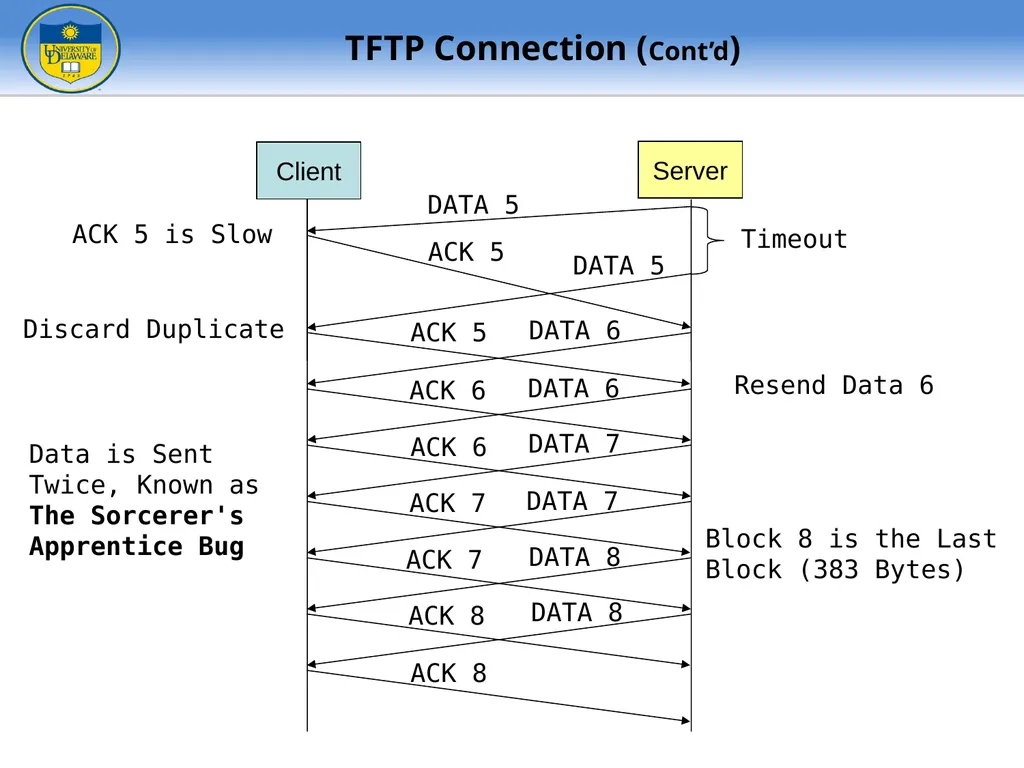
slide25. DATA 5 ACK 5 Timeout Client Server DATA 5 ACK 5 DATA 6 ACK 6 DATA 6 ACK 6 DATA 7 ACK 7 DATA 7 ACK 7 DATA 8 ACK 8 DATA 8 ACK 8 Block 8 is the Last
Block (383 Bytes) ACK 5 is Slow Discard Duplicate Resend Data 6 Data is Sent
Twice, Known as
The Sorcerer's
Apprentice Bug TFTP Connection (Cont’d)<br>
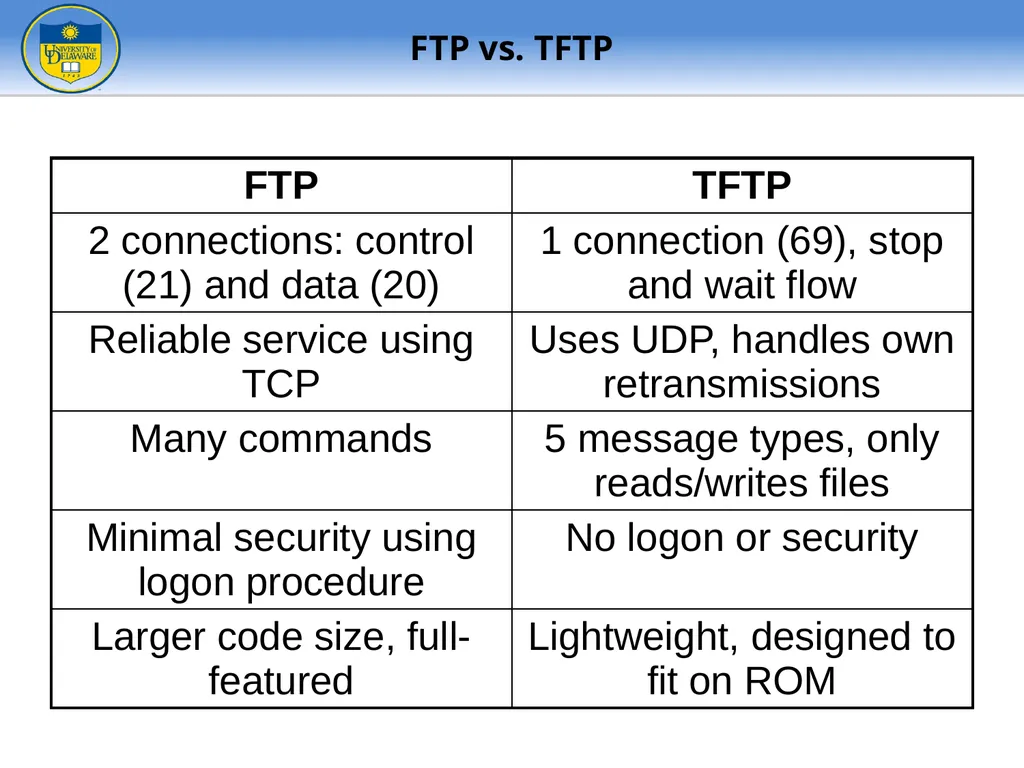
slide26. FTP vs. TFTP<br>
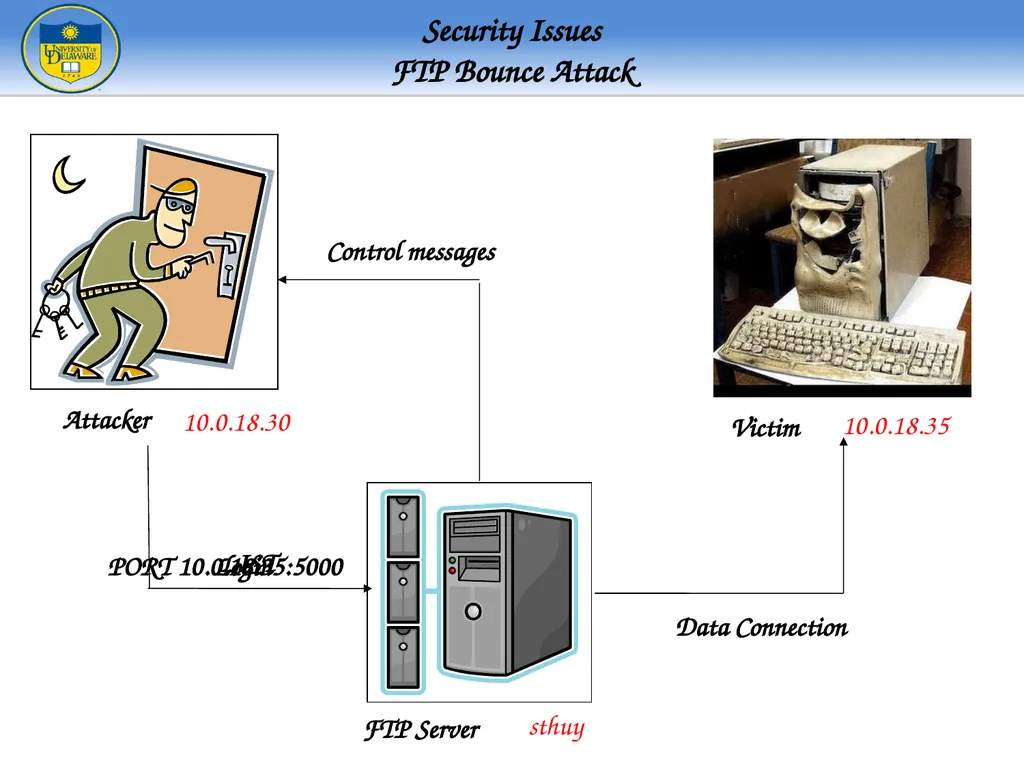
slide27. Security IssuesFTP Bounce Attack FTP Server Attacker Victim 10.0.18.30 10.0.18.35 sthuy Login PORT 10.0.18.35:5000 LIST Data Connection Control messages<br>
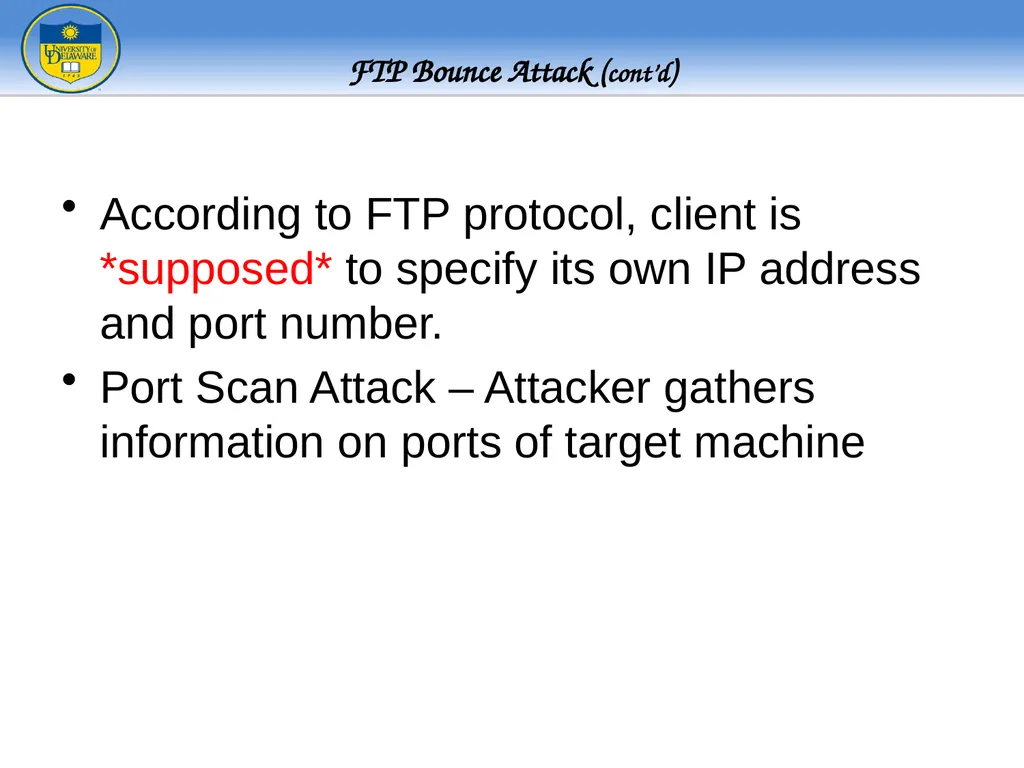
slide28. According to FTP protocol, client is *supposed* to specify its own IP address and port number.
Port Scan Attack – Attacker gathers information on ports of target machine FTP Bounce Attack (cont’d)<br>
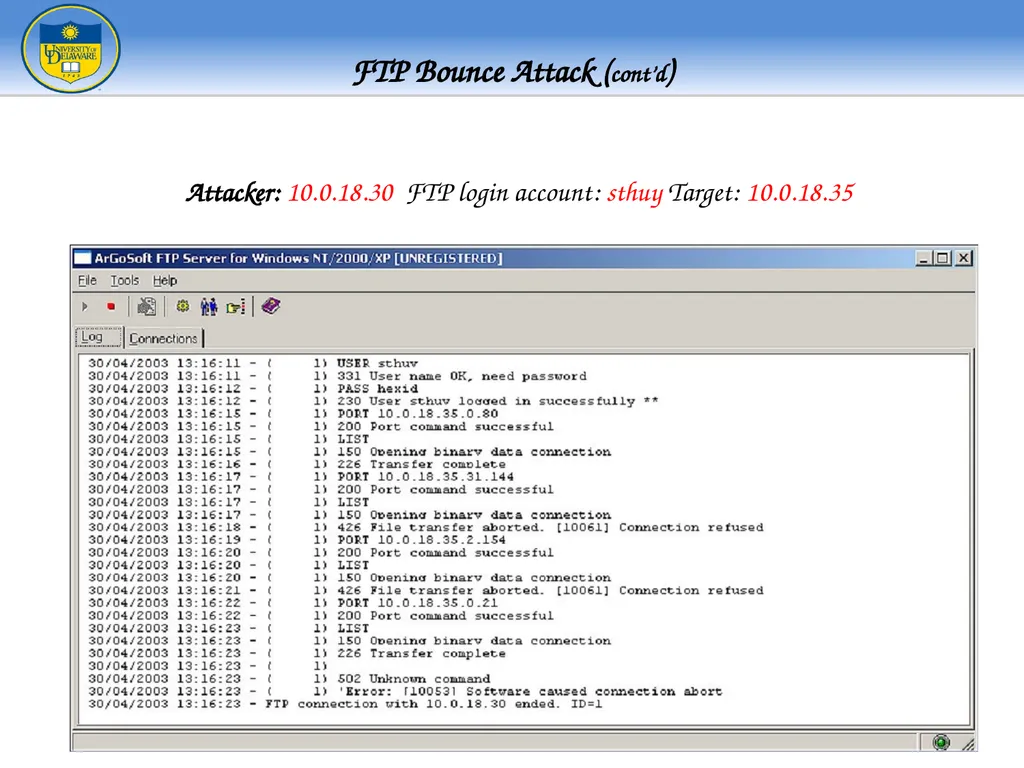
slide29. Attacker: 10.0.18.30 FTP login account: sthuy Target: 10.0.18.35 FTP Bounce Attack (cont’d)<br>
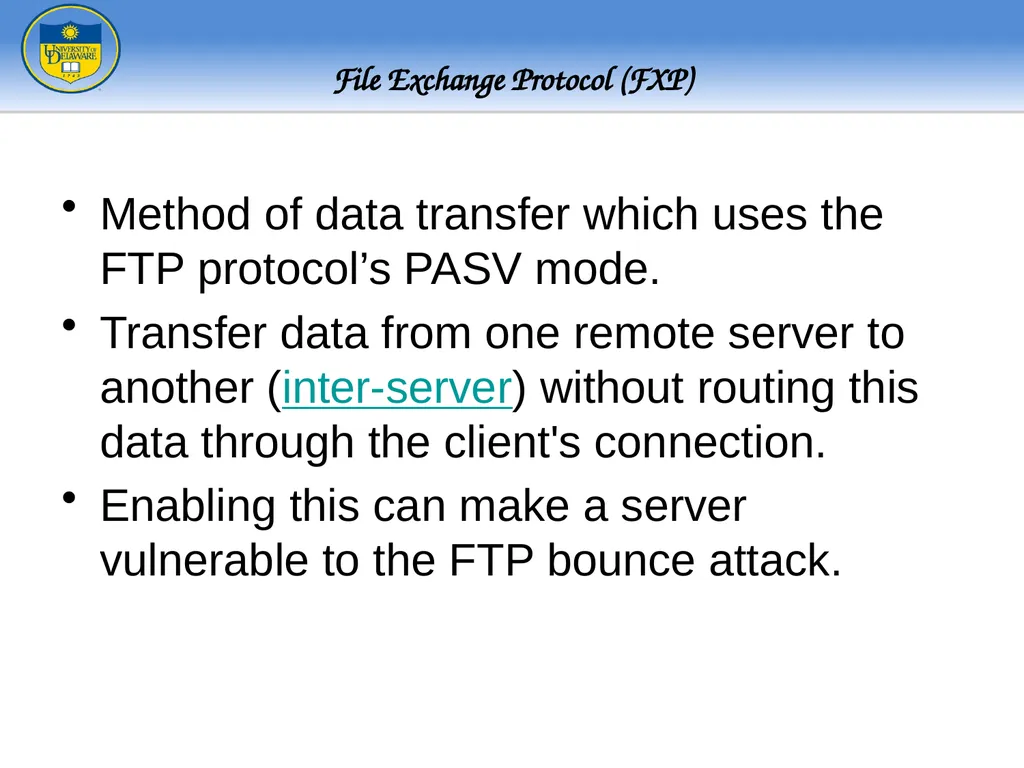
slide30. Method of data transfer which uses the FTP protocol’s PASV mode.
Transfer data from one remote server to another (inter-server) without routing this data through the client's connection.
Enabling this can make a server vulnerable to the FTP bounce attack. File Exchange Protocol (FXP)<br>

University of Delaware
(some/most slides courtesy of Brian Lucas,
Umakanth Puppala, William Boyer
Vikram Rajan, Michael Haggerty, and Prof Amer) ganesh@cis.udel.edu<br>
slide2. File Transfer Protocol (RFC 959)
Why FTP?
FTP’s connections
FTP in action
FTP commands/responses
Trivial File Transfer Protocol (RFC 1350)
TFTP and TFTP’s message formats
FTP and TFTP compared Overview<br>
slide3. Network Use Direct (e.g. telnet) Indirect (e.g. FTP) RFC 114 – April 1971 before TCP and IP existed - Used NCP to do FTP on ARPANET
RFC 354 – July 1972
- Overall Communication Model
RFC 542 – August 1973
- Remarkably similar to today’s FTP
- Still based on NCP
RFC 765 – June 1980
- FTP over TCP/IP A Bit of History - FTP<br>
slide4. Purpose: To Transfer files between two computers
Goals of FTP Service
Promote sharing of files (programs and/or data)
Encourage indirect/implicit use of remote computers
Shield users from variations in file storage among hosts
Transfer data reliably and efficiently Why do we need a FTP service?<br>
slide5. At first, file transfer may seem simple
Heterogeneous systems use different:
Operating Systems
Character Sets
Naming Conventions
Directory Structures
File Structures and Formats
FTP needs to address and resolve these problems Problems of file transfer<br>
slide6. User
Interface User
Data Transfer
Function User
Protocol
Interpreter Server
Protocol
Interpreter Server
Data Transfer
Function client server Control
Connection Data
Connection 2 21 20 FTP’s 2 Connections<br>
slide7. User
Interface User
Data Transfer
Function User
Protocol
Interpreter Server
Protocol
Interpreter Server
Data Transfer
Function client server Control
Connection Data
Connection ftp> open strauss.udel.edu Connected to strauss.udel.edu
220 strauss FTP server ready. USER ganesh 331 Password req for ganesh.
Password: PASS mypass 230 User ganesh logged in.
ftp> FTP’s 2 Connections - Establishment<br>
slide8. 128.4.40.17 (19×256)+137 128.4.40.17:5001 User
Data Transfer
Function Server
Data Transfer
Function User
Interface User
Protocol
Interpreter Server
Protocol
Interpreter client server Control
Connection Data
Connection ls client.txt Passive open on
Port 5001 PORT 128,4,40,17,19,137 200 Port Command Sucessful LIST client.txt 150 Data Connection will be open shortly 226 Closing Data Connection -rw-r--r-- lucasb client.txt Establish Data Connection User
Protocol
Interpreter Server
Protocol
Interpreter 128.4.40.17 19,137 FTP’s 2 Connections – Data Transfer<br>
slide9. User
Interface User
Protocol
Interpreter Server
Protocol
Interpreter client server Control
Connection Data
Connection User
Data Transfer
Function Server
Data Transfer
Function bye QUIT 221 Service Closing FTP’s 2 Connections – Connection Closing<br>
slide10. ftp> open server SYN SYN|ACK ACK 220 Service Ready ftp> USER ganesh ACK ACK 331 User OK,password? ACK ftp> PASS mypass ACK 230 User login OK ACK Client Server 21 Eph FTP Connection<br>
slide11. PORT 128,4,40,17,19,137 200 Command Successful SYN LIST client.txt SYN-ACK ACK 150 Data Connection will be open shortly NAME LIST FIN FIN-ACK 226 Closing Data Connection ACK ACK ACK ACK ACK Control connection Data Connection Client Server ACK Eph Eph 21 21 5001 20 5001 20 FTP – Data transfer (get command)<br>
slide12. PORT 128,4,40,17,19,137 200 Command Successful SYN LIST client.txt SYN-ACK ACK 150 Data Connection will be open shortly Client.txt FIN FIN-ACK 226 Closing Data Connection ACK ACK ACK ACK ACK Control connection Data Connection Client Server ACK Eph Eph 21 21 5001 20 5001 20 FTP – Data transfer (put command)<br>
slide13. FTP Client Commands (issued by user interface) *Server sends list of matching files to client, Client protocol interpreter asks the user for operation on each matching file.<br>
slide14. A-PDU FTP Commands<br>
slide15. FTP Response Format<br>
slide16. 120 Service will be ready shortly
200 Command OK
230 User login OK
331 User name OK; password is needed
421 Service not available
530 User not logged in
552 Requested action aborted; exceeded storage allocation Example FTP Responses<br>
slide17. FTP has 2 connections
Control (persistent connection)
Server issues a passive open on well-known 21
Client uses an ephemeral port to issue active open
Server ultimately closes control connection
Data (ephemeral connection)
Client issues passive open on an ephemeral port
Client sends this port to server via PORT command
Server receives the port number and issues active open using its well-known 20 to the received ephemeral port Summary of FTP Connections<br>
slide18. PORT does not always work…why?
Instead, use PASV command
Client sends PASV command to server
Server chooses ephemeral port: passive open
Server responds with IP, Port in reply (227)
Client issues active open to server’s port
Ultimately, the data sender closes connection Data Connection<br>
slide19. User
Data Transfer
Function Server
Data Transfer
Function User
Interface User
Protocol
Interpreter Server
Protocol
Interpreter client server Control
Connection Data
Connection ls client.txt Passive open on
Port 5125 PASV 227 Entering Passive Mode (128,4,40,42,20,5) LIST client.txt 150 Data Connection will be open shortly 226 Closing Data Connection -rw-r--r-- lucasb client.txt Establish Data Connection User
Protocol
Interpreter Server
Protocol
Interpreter FTP Passive Data Transfer<br>
slide20. Used only to read and write files from/to a remote server
Cannot list directories
Useful for bootstrapping diskless systems Trivial FTP (TFTP)<br>
slide21. Diagrams from McGraw-Hill TFTP Message Formats<br>
slide22. Diagram from McGraw-Hill TFTP Connection Establishment Client Server 69 Passive open a. Passive open by server Client Server 69 b. Active open by client Active open 50032 Client Server 62000 c. Rest of communication 50032 69<br>
slide23. Diagram from McGraw-Hill TFTP Data Transfer<br>
slide24. Read Request RRQ “fullOS” DATA 1 ACK 1 Timeout ACK 2 Client Server DATA 2 DATA 2 Timeout ACK 3 DATA 3 DATA 3 First Block of
512 Bytes Sent Block 2 Lost Block 3 Damaged ACK 4 DATA 4 Timeout ACK 4 ACK 4 Lost Eph 69 Eph Timer
running TFTP Connection - Timers<br>
slide25. DATA 5 ACK 5 Timeout Client Server DATA 5 ACK 5 DATA 6 ACK 6 DATA 6 ACK 6 DATA 7 ACK 7 DATA 7 ACK 7 DATA 8 ACK 8 DATA 8 ACK 8 Block 8 is the Last
Block (383 Bytes) ACK 5 is Slow Discard Duplicate Resend Data 6 Data is Sent
Twice, Known as
The Sorcerer's
Apprentice Bug TFTP Connection (Cont’d)<br>
slide26. FTP vs. TFTP<br>
slide27. Security IssuesFTP Bounce Attack FTP Server Attacker Victim 10.0.18.30 10.0.18.35 sthuy Login PORT 10.0.18.35:5000 LIST Data Connection Control messages<br>
slide28. According to FTP protocol, client is *supposed* to specify its own IP address and port number.
Port Scan Attack – Attacker gathers information on ports of target machine FTP Bounce Attack (cont’d)<br>
slide29. Attacker: 10.0.18.30 FTP login account: sthuy Target: 10.0.18.35 FTP Bounce Attack (cont’d)<br>
slide30. Method of data transfer which uses the FTP protocol’s PASV mode.
Transfer data from one remote server to another (inter-server) without routing this data through the client's connection.
Enabling this can make a server vulnerable to the FTP bounce attack. File Exchange Protocol (FXP)<br>