
INFS 211: Introduction to Information Technology
EM
Published · 36 slides · 0 views
1 / 1
Description
INFS 211: Introduction to Information Technology Session 10 Mobile Computing Lecturer: Dr. Ebenezer Ankrah, Dept. of Information Studies Contact Information: eankrahug.edu.gh Session Overview Just 30 years ago, the idea of a powerful
Related Topics
Share
Embed code
Download this presentation From Below
"INFS 211: Introduction to Information Technology" is the property of its rightful owner. Permission is granted to download and print the materials on this website for personal, non-commercial use only, and to display it on your personal computer provided you do not modify the materials and that you retain all copyright notices contained in the materials. By downloading content from our website, you accept the terms of this agreement.
Presentation Transcript
01
INFS 211:
Introduction to Information Technology Session 10 – Mobile Computing Lecturer: Dr. Ebenezer Ankrah, Dept. of Information Studies
Contact Information: eankrah@ug.edu.gh<br>
Contact Information: eankrah@ug.edu.gh<br>
02
Session Overview Just 30 years ago, the idea of a powerful personal computer that could fit on a desktop was a dream. Today, you can carry computers around in your backpack; fit them in your pocket and even incorporate them into your clothes.
Mobile computing devices – portable electronic tools such as cell phones, PDA/Smart phones, portable media players and notebooks are dramatically changing our day to day lives, allowing us to communicate with others, remain productive and access a wide array of information no matter where we are. This section will cover the advantages and limitations of mobile computing and the various types of mobile computing devices. Slide 2<br>
Mobile computing devices – portable electronic tools such as cell phones, PDA/Smart phones, portable media players and notebooks are dramatically changing our day to day lives, allowing us to communicate with others, remain productive and access a wide array of information no matter where we are. This section will cover the advantages and limitations of mobile computing and the various types of mobile computing devices. Slide 2<br>
03
Session Overview At the end of the session, the student will
Understand the advantages and limitations of mobile computing
Be able to distinguished between the various mobile computing devices
Understand how cell phone components resemble a traditional computer and how they work Slide 3<br>
Understand the advantages and limitations of mobile computing
Be able to distinguished between the various mobile computing devices
Understand how cell phone components resemble a traditional computer and how they work Slide 3<br>
04
Session Outline The key topics to be covered in the session are as follows:
Mobile Computing
Types of Mobile Computing Devices
Applications of Mobile Computing
Limitations of Mobile Computing Slide 4<br>
Mobile Computing
Types of Mobile Computing Devices
Applications of Mobile Computing
Limitations of Mobile Computing Slide 4<br>
05
Reading List http://www.encyclopedia.com/topic/Mobile_Computing.aspx
http://www.doc.ic.ac.uk/~nd/surprise_96/journal/vol4/vk5/report.html
http://www.wisegeek.com/how-has-the-source-of-computing-power-changed-over-time.htm
Alan, E., Kendall, M., & Poatsy, M. A. (2015). Technology In Action Complete (12th ed.). Upper Saddle River: New Jersy. Prentice Hall. (Chapter 8) Slide 5<br>
http://www.doc.ic.ac.uk/~nd/surprise_96/journal/vol4/vk5/report.html
http://www.wisegeek.com/how-has-the-source-of-computing-power-changed-over-time.htm
Alan, E., Kendall, M., & Poatsy, M. A. (2015). Technology In Action Complete (12th ed.). Upper Saddle River: New Jersy. Prentice Hall. (Chapter 8) Slide 5<br>
06
What is mobile computing? Topic One Slide 6<br>
07
Mobile Computing Mobile computing refers to the use of small and portable computing devices in wireless enabled networks that provide wireless connections.
Mobile Computing is a technology that allows transmission of data, voice and video via a computer or any other wireless enabled device without having to be connected to a fixed physical link. The main concept involves Mobile communication, Mobile hardware and Mobile software. Slide 7<br>
Mobile Computing is a technology that allows transmission of data, voice and video via a computer or any other wireless enabled device without having to be connected to a fixed physical link. The main concept involves Mobile communication, Mobile hardware and Mobile software. Slide 7<br>
08
Mobile Computing As the internet becomes increasingly popular, a new paradigm is being developed in networked computing known as nomadic computing or mobile computing.
Mobile computing aims to provide a network infrastructure and corresponding terminal capability to perform all desktop-like computing functions seamlessly at any place or time, even while the terminal is moving. Slide 8<br>
Mobile computing aims to provide a network infrastructure and corresponding terminal capability to perform all desktop-like computing functions seamlessly at any place or time, even while the terminal is moving. Slide 8<br>
09
Mobile Computing This means that anytime and anywhere, a user would be able to browse the web, check e-mail, play digital music, and perform all other computing activities without having to be behind a desktop at home or work.
At its best, mobile computing would allow a user to have access to a consistent working environment. Slide 9<br>
At its best, mobile computing would allow a user to have access to a consistent working environment. Slide 9<br>
10
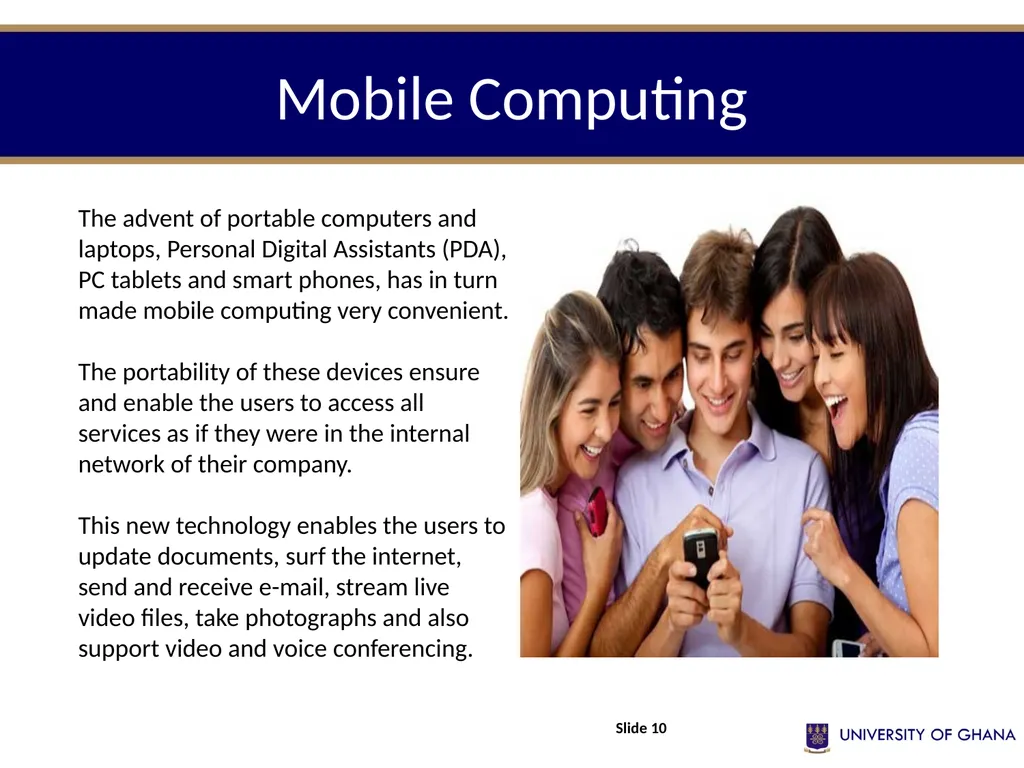
Mobile Computing Slide 10 The advent of portable computers and laptops, Personal Digital Assistants (PDA), PC tablets and smart phones, has in turn made mobile computing very convenient.
The portability of these devices ensure and enable the users to access all services as if they were in the internal network of their company.
This new technology enables the users to update documents, surf the internet, send and receive e-mail, stream live video files, take photographs and also support video and voice conferencing.<br>
The portability of these devices ensure and enable the users to access all services as if they were in the internal network of their company.
This new technology enables the users to update documents, surf the internet, send and receive e-mail, stream live video files, take photographs and also support video and voice conferencing.<br>
11
Types of mobile devices Topic Two Slide 11<br>
12
Types of Mobile Devices Mobile hardware includes mobile devices or device components that receive or access the service of mobility. They would range from portable laptops, smart phones, tablet Pc's, Personal Digital Assistants, etc.
These devices will have a receptor medium that is capable of sending and receiving signals. These devices are configured to operate in full- duplex, whereby they are capable of sending and receiving signals at the same time.
They don't have to wait until one device has finished communicating for the other device to initiate communications. Slide 12<br>
These devices will have a receptor medium that is capable of sending and receiving signals. These devices are configured to operate in full- duplex, whereby they are capable of sending and receiving signals at the same time.
They don't have to wait until one device has finished communicating for the other device to initiate communications. Slide 12<br>
13
Types of Mobile Devices Mobile computing is not only limited to mobile phones, but there are various gadgets available in the market that are built on a platform to support mobile computing. They are usually classified in the following categories :
Portable Laptops
Smart phones
Tablet Pc's
Personal Digital Assistants Slide 13<br>
Portable Laptops
Smart phones
Tablet Pc's
Personal Digital Assistants Slide 13<br>
14
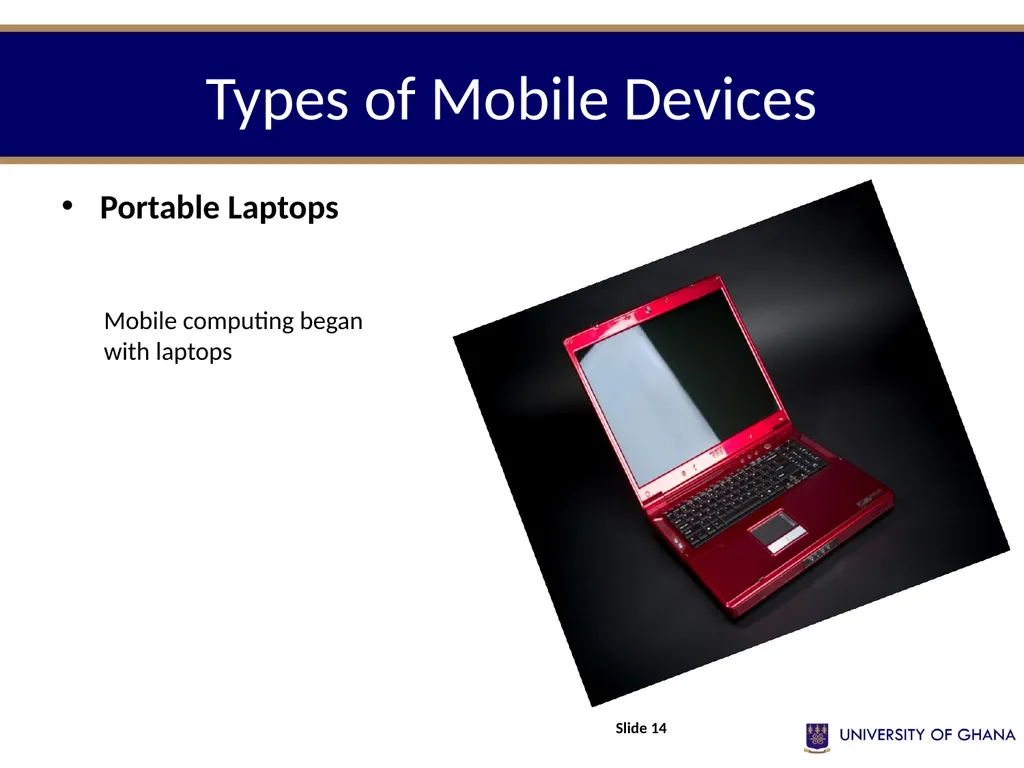
Types of Mobile Devices Portable Laptops Slide 14 Mobile computing began with laptops<br>
15
Types of Mobile Devices Smart phones
This kind of phone combines the features of a PDA with that of a mobile phone or camera phone. It has a superior edge over other kinds of mobile phones.
Smart phones have the capability to run multiple programs concurrently. These phones include high-resolution touch screens, web browsers that can access and properly display standard web pages rather than just mobile-optimized sites, and high-speed data access via Wi-Fi and high speed cellular broadband. Slide 15<br>
This kind of phone combines the features of a PDA with that of a mobile phone or camera phone. It has a superior edge over other kinds of mobile phones.
Smart phones have the capability to run multiple programs concurrently. These phones include high-resolution touch screens, web browsers that can access and properly display standard web pages rather than just mobile-optimized sites, and high-speed data access via Wi-Fi and high speed cellular broadband. Slide 15<br>
16
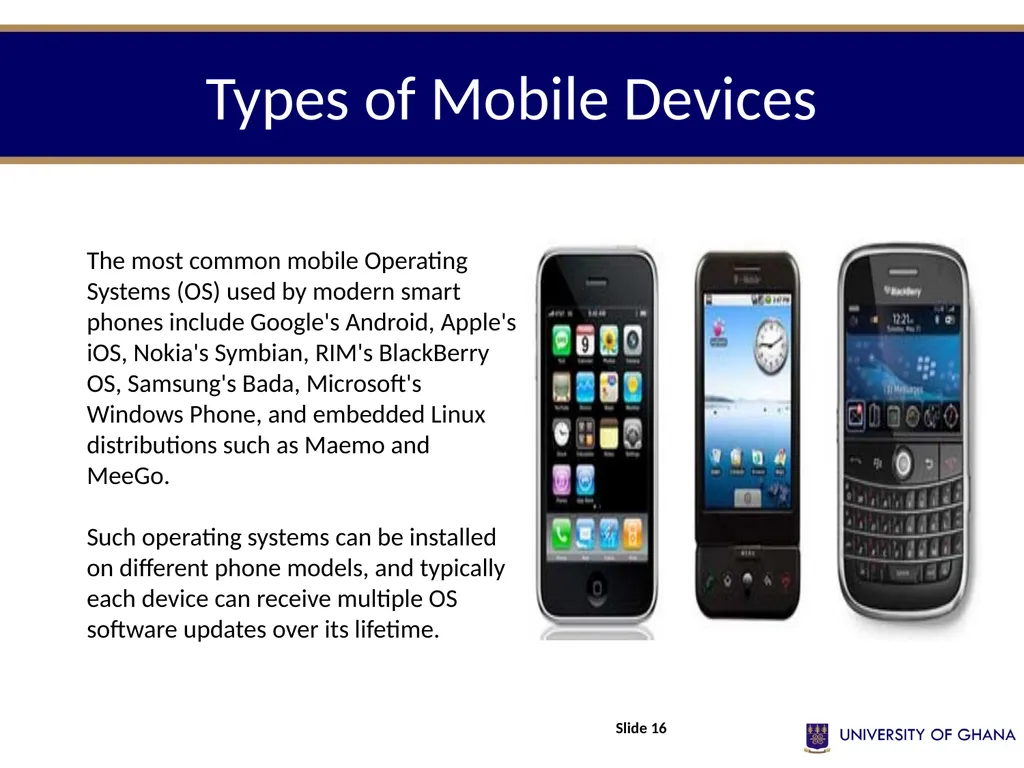
Types of Mobile Devices Slide 16 The most common mobile Operating Systems (OS) used by modern smart phones include Google's Android, Apple's iOS, Nokia's Symbian, RIM's BlackBerry OS, Samsung's Bada, Microsoft's Windows Phone, and embedded Linux distributions such as Maemo and MeeGo.
Such operating systems can be installed on different phone models, and typically each device can receive multiple OS software updates over its lifetime.<br>
Such operating systems can be installed on different phone models, and typically each device can receive multiple OS software updates over its lifetime.<br>
17
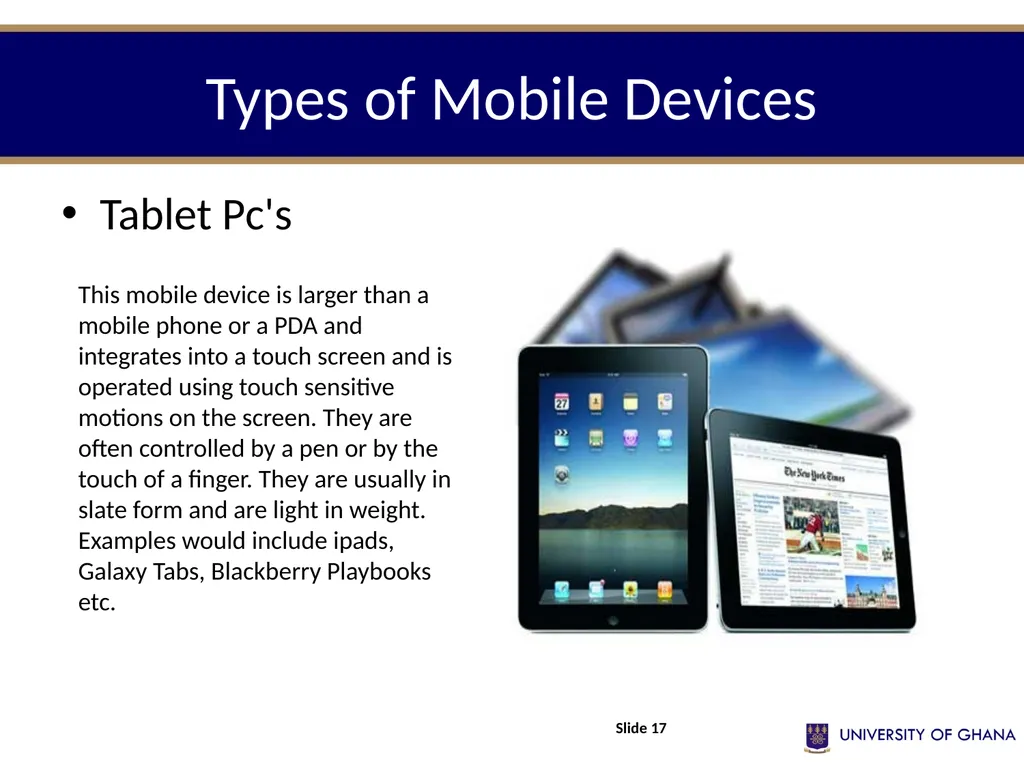
Types of Mobile Devices Tablet Pc's Slide 17 This mobile device is larger than a mobile phone or a PDA and integrates into a touch screen and is operated using touch sensitive motions on the screen. They are often controlled by a pen or by the touch of a finger. They are usually in slate form and are light in weight. Examples would include ipads, Galaxy Tabs, Blackberry Playbooks etc.<br>
18
Types of Mobile Devices Personal Digital Assistants
The main purpose of this device is to act as an electronic organizer or day planner that is portable, easy to use and capable of sharing information with your computer systems.
PDA is an extension of the PC, not a replacement. These systems are capable of sharing information with a computer system through a process or service known as synchronization. Both devices will access each other to check for changes or updates in the individual devices. The use of infrared and Bluetooth connections enables these devices to always be synchronized. Slide 18<br>
The main purpose of this device is to act as an electronic organizer or day planner that is portable, easy to use and capable of sharing information with your computer systems.
PDA is an extension of the PC, not a replacement. These systems are capable of sharing information with a computer system through a process or service known as synchronization. Both devices will access each other to check for changes or updates in the individual devices. The use of infrared and Bluetooth connections enables these devices to always be synchronized. Slide 18<br>
19
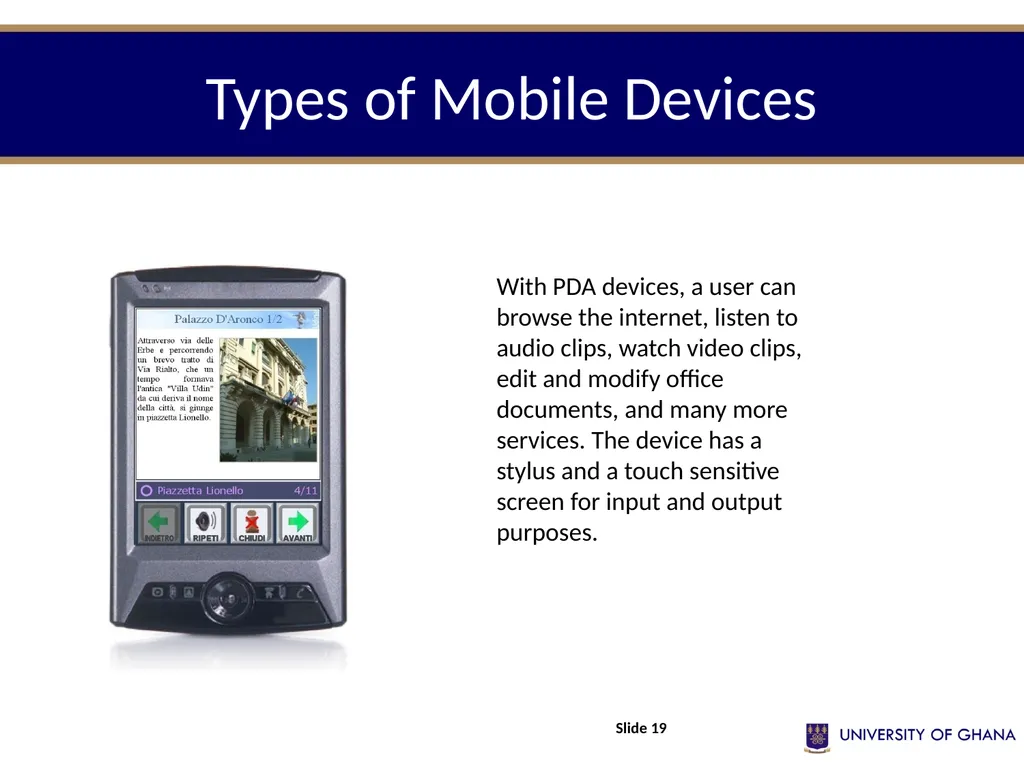
Types of Mobile Devices Slide 19 With PDA devices, a user can browse the internet, listen to audio clips, watch video clips, edit and modify office documents, and many more services. The device has a stylus and a touch sensitive screen for input and output purposes.<br>
20
Mobile computing terminology Topic Three Slide 20<br>
21
Mobile Computing Terminology Mobile Cloud Computing
Mobile cloud computing is the use of cloud computing technology on a mobile device. Many applications, or apps, that run on a mobile device use data that is stored on a server or cluster of servers in the cloud.
In fact, many mobile device users may not realize that several of their applications are not actually programs stored on the device itself but connections to programs running on remote servers. The mobile device merely receives the data and information that is calculated and sent from the remote server. Slide 21<br>
Mobile cloud computing is the use of cloud computing technology on a mobile device. Many applications, or apps, that run on a mobile device use data that is stored on a server or cluster of servers in the cloud.
In fact, many mobile device users may not realize that several of their applications are not actually programs stored on the device itself but connections to programs running on remote servers. The mobile device merely receives the data and information that is calculated and sent from the remote server. Slide 21<br>
22
Mobile Computing Terminology Several industries have benefited from the evolution of mobile devices and even more from mobile cloud computing. Some of these businesses include real estate, insurance, and surveying.
Any company with employees who need to conduct business from off-site locations can benefit from mobile cloud computing, and compared to other methods of remote connection, mobile cloud computing removes many problems that would require an employee to work from a single location.
E-mail is an excellent example of how mobile cloud computing allows greater mobility and flexibility. When a person can view, manage, and respond to e-mail without accessing an office network from a desktop or laptop computer at a main office or home computer, the company can experience significant gains in employee productivity. Slide 22<br>
Any company with employees who need to conduct business from off-site locations can benefit from mobile cloud computing, and compared to other methods of remote connection, mobile cloud computing removes many problems that would require an employee to work from a single location.
E-mail is an excellent example of how mobile cloud computing allows greater mobility and flexibility. When a person can view, manage, and respond to e-mail without accessing an office network from a desktop or laptop computer at a main office or home computer, the company can experience significant gains in employee productivity. Slide 22<br>
23
Mobile Computing Terminology Mobile Website
A mobile website is page on the Internet that has been adapted for use on mobile devices, such as smart phones. The increasing popularity of mobile devices has lead to a demand for mobile web development, in which typical computer activities, such as browsing websites, are accomplished on a device that fits within an individual's hand.
Many websites have redesigned their pages into a separate, mobile website to facilitate browsing on a smart phone. Opening a website on a mobile device may either prompt the mobile device user to select which layout option he or she prefers or may automatically redirect the user to the alternative site. Slide 23<br>
A mobile website is page on the Internet that has been adapted for use on mobile devices, such as smart phones. The increasing popularity of mobile devices has lead to a demand for mobile web development, in which typical computer activities, such as browsing websites, are accomplished on a device that fits within an individual's hand.
Many websites have redesigned their pages into a separate, mobile website to facilitate browsing on a smart phone. Opening a website on a mobile device may either prompt the mobile device user to select which layout option he or she prefers or may automatically redirect the user to the alternative site. Slide 23<br>
24
Mobile Computing Terminology Mobile websites are also created with the degree of user interaction in mind. Some sites require extensive user input, ranging from logging into a user account to uploading large blocks of text and numerous images.
Such websites will often offer the option of mobile viewing through an application, which is downloaded separately to a smart phone or other mobile device for instant access. Adapting a mobile website into a mobile application is especially common for social networking sites. These websites provide three options for viewing, an external application, a limited content webpage, and a complete webpage. Slide 24<br>
Such websites will often offer the option of mobile viewing through an application, which is downloaded separately to a smart phone or other mobile device for instant access. Adapting a mobile website into a mobile application is especially common for social networking sites. These websites provide three options for viewing, an external application, a limited content webpage, and a complete webpage. Slide 24<br>
25
Mobile Computing Terminology Pen Computing
Pen computing refers to computers that use a light pen or stylus instead of a keyboard and mouse for primary input. Common pen computers include personal digital assistants (PDAs), mobile devices such as cell phones, wireless tablet PCs and GPS receivers and other touch screen devices.
The touch screen uses either gesture recognition or handwriting recognition to relay the item clicked or the information written on the screen to the computer. Slide 25<br>
Pen computing refers to computers that use a light pen or stylus instead of a keyboard and mouse for primary input. Common pen computers include personal digital assistants (PDAs), mobile devices such as cell phones, wireless tablet PCs and GPS receivers and other touch screen devices.
The touch screen uses either gesture recognition or handwriting recognition to relay the item clicked or the information written on the screen to the computer. Slide 25<br>
26
Mobile Computing Terminology While pen computing commonly refers to the movement of a stylus or pen directly on a computer’s touch screen, computers can also receive pen computing data from pen scanners and graphics tablets.
A pen scanner is used by sliding a pen across printed text. The text is scanned into the computer and converted to usable text using optical character recognition (OCR) software. Another common pen-based system is a graphics tablet, typically used by graphic designers. In this configuration, the user draws with the pen on a tablet, or digitizer pad, and the input is converted to a digital drawing using graphics software. Slide 26<br>
A pen scanner is used by sliding a pen across printed text. The text is scanned into the computer and converted to usable text using optical character recognition (OCR) software. Another common pen-based system is a graphics tablet, typically used by graphic designers. In this configuration, the user draws with the pen on a tablet, or digitizer pad, and the input is converted to a digital drawing using graphics software. Slide 26<br>
27
Applications of mobile computing Topic Four Slide 27<br>
28
Applications of Mobile Computing The importance of Mobile Computers has been highlighted in many fields of which a few are described below:
For Estate Agents
Estate agents can work either at home or out in the field. With mobile computers they can be more productive. They can obtain current real estate information by accessing multiple listing services, which they can do from home, office or car when out with clients. They can provide clients with immediate feedback regarding specific homes or neighborhoods, and with faster loan approvals, since applications can be submitted on the spot. Therefore, mobile computers allow them to devote more time to clients. Slide 28<br>
For Estate Agents
Estate agents can work either at home or out in the field. With mobile computers they can be more productive. They can obtain current real estate information by accessing multiple listing services, which they can do from home, office or car when out with clients. They can provide clients with immediate feedback regarding specific homes or neighborhoods, and with faster loan approvals, since applications can be submitted on the spot. Therefore, mobile computers allow them to devote more time to clients. Slide 28<br>
29
Applications of Mobile Computing Emergency Services
Ability to receive information on the move is vital where the emergency services are involved. Information regarding the address, type and other details of an incident can be dispatched quickly, via a Cellular Digital Packet Data (CDPD) system using mobile computers, to one or several appropriate mobile units which are in the vicinity of the incident.
Here the reliability and security implemented in the CDPD system would be of great advantage. Slide 29<br>
Ability to receive information on the move is vital where the emergency services are involved. Information regarding the address, type and other details of an incident can be dispatched quickly, via a Cellular Digital Packet Data (CDPD) system using mobile computers, to one or several appropriate mobile units which are in the vicinity of the incident.
Here the reliability and security implemented in the CDPD system would be of great advantage. Slide 29<br>
30
Applications of Mobile Computing In courts
Defense counsels can take mobile computers in court. When the opposing counsel references a case which they are not familiar, they can use the computer to get direct, real-time access to on-line legal database services, where they can gather information on the case and related precedents.
Therefore mobile computers allow immediate access to a wealth of information, making people better informed and prepared. Slide 30<br>
Defense counsels can take mobile computers in court. When the opposing counsel references a case which they are not familiar, they can use the computer to get direct, real-time access to on-line legal database services, where they can gather information on the case and related precedents.
Therefore mobile computers allow immediate access to a wealth of information, making people better informed and prepared. Slide 30<br>
31
Applications of Mobile Computing In companies
Managers can use mobile computers in, say, critical presentations to major customers. They can access the latest market share information. At a small recess, they can revise the presentation to take advantage of this information.
They can communicate with the office about possible new offers and call meetings for discussing responds to the new proposals. Therefore, mobile computers can leverage competitive advantages. Slide 31<br>
Managers can use mobile computers in, say, critical presentations to major customers. They can access the latest market share information. At a small recess, they can revise the presentation to take advantage of this information.
They can communicate with the office about possible new offers and call meetings for discussing responds to the new proposals. Therefore, mobile computers can leverage competitive advantages. Slide 31<br>
32
Applications of Mobile Computing Stock Information Collation/Control
In environments where access to stock is very limited i.e factory warehouses. The use of small portable electronic databases accessed via a mobile computer would be ideal.
Data collated could be directly written to a central database, via a CDPD network, which holds all stock information hence the need for transfer of data to the central computer at a later date is not necessary. This ensures that from the time that a stock count is completed, there is no inconsistency between the data input on the portable computers and the central database. Slide 32<br>
In environments where access to stock is very limited i.e factory warehouses. The use of small portable electronic databases accessed via a mobile computer would be ideal.
Data collated could be directly written to a central database, via a CDPD network, which holds all stock information hence the need for transfer of data to the central computer at a later date is not necessary. This ensures that from the time that a stock count is completed, there is no inconsistency between the data input on the portable computers and the central database. Slide 32<br>
33
Applications of Mobile Computing Credit Card Verification
At Point of Sale (POS) terminals in shops and supermarkets, when customers use credit cards for transactions, the intercommunication required between the bank central computer and the POS terminal, in order to effect verification of the card usage, can take place quickly and securely over cellular channels using a mobile computer unit.
This can speed up the transaction process and relieve congestion at the POS terminals. Slide 33<br>
At Point of Sale (POS) terminals in shops and supermarkets, when customers use credit cards for transactions, the intercommunication required between the bank central computer and the POS terminal, in order to effect verification of the card usage, can take place quickly and securely over cellular channels using a mobile computer unit.
This can speed up the transaction process and relieve congestion at the POS terminals. Slide 33<br>
34
Applications of Mobile Computing Taxi/Truck Dispatch
Using the idea of a centrally controlled dispatcher with several mobile units (taxis), mobile computing allows the taxis to be given full details of the dispatched job as well as allowing the taxis to communicate information about their whereabouts back to the central dispatch office. This system is also extremely useful in secure deliveries i.e Securicor.
This allows a central computer to be able to track and receive status information from all of its mobile secure delivery vans. Again, the security and reliability properties of the CDPD system shine through. Slide 34<br>
Using the idea of a centrally controlled dispatcher with several mobile units (taxis), mobile computing allows the taxis to be given full details of the dispatched job as well as allowing the taxis to communicate information about their whereabouts back to the central dispatch office. This system is also extremely useful in secure deliveries i.e Securicor.
This allows a central computer to be able to track and receive status information from all of its mobile secure delivery vans. Again, the security and reliability properties of the CDPD system shine through. Slide 34<br>
35
Applications of Mobile Computing Electronic Mail/Paging
Usage of a mobile unit to send and read emails is a very useful asset for any business individual, as it allows him/her to keep in touch with any colleagues as well as any urgent developments that may affect their work. Access to the Internet, using mobile computing technology, allows the individual to have vast arrays of knowledge at his/her fingertips.
Paging is also achievable here, giving even more intercommunication capability between individuals, using a single mobile computer device. Slide 35<br>
Usage of a mobile unit to send and read emails is a very useful asset for any business individual, as it allows him/her to keep in touch with any colleagues as well as any urgent developments that may affect their work. Access to the Internet, using mobile computing technology, allows the individual to have vast arrays of knowledge at his/her fingertips.
Paging is also achievable here, giving even more intercommunication capability between individuals, using a single mobile computer device. Slide 35<br>
36
References French, C. S. (2001). Data processing and information technology (10th ed.). London, Continuum: Sage Publications Ltd.
Hutchinson, S. E., & Sawyer, S. C. (2000). Computers, communication and information: A user’s introduction (7th ed.). Boston: Irwin McGraw-Hill.
O’Leary, T. J. (2004). Computing today. Boston: McGraw Hill.
O’Leary, T. J., & O’Leary, L. I. (2005). Computing Essentials. Boston: McGraw Hill.
Thompson, R. L., & Cats-Bail, W. L. (2003). Information technology and management (2nd ed.). Boston: Irwin McGraw-Hill.
Williams, et al., (2003). Using information technology: a practical introduction of computers and communications. Boston: McGraw-Hill. Slide 36<br>
Hutchinson, S. E., & Sawyer, S. C. (2000). Computers, communication and information: A user’s introduction (7th ed.). Boston: Irwin McGraw-Hill.
O’Leary, T. J. (2004). Computing today. Boston: McGraw Hill.
O’Leary, T. J., & O’Leary, L. I. (2005). Computing Essentials. Boston: McGraw Hill.
Thompson, R. L., & Cats-Bail, W. L. (2003). Information technology and management (2nd ed.). Boston: Irwin McGraw-Hill.
Williams, et al., (2003). Using information technology: a practical introduction of computers and communications. Boston: McGraw-Hill. Slide 36<br>