04
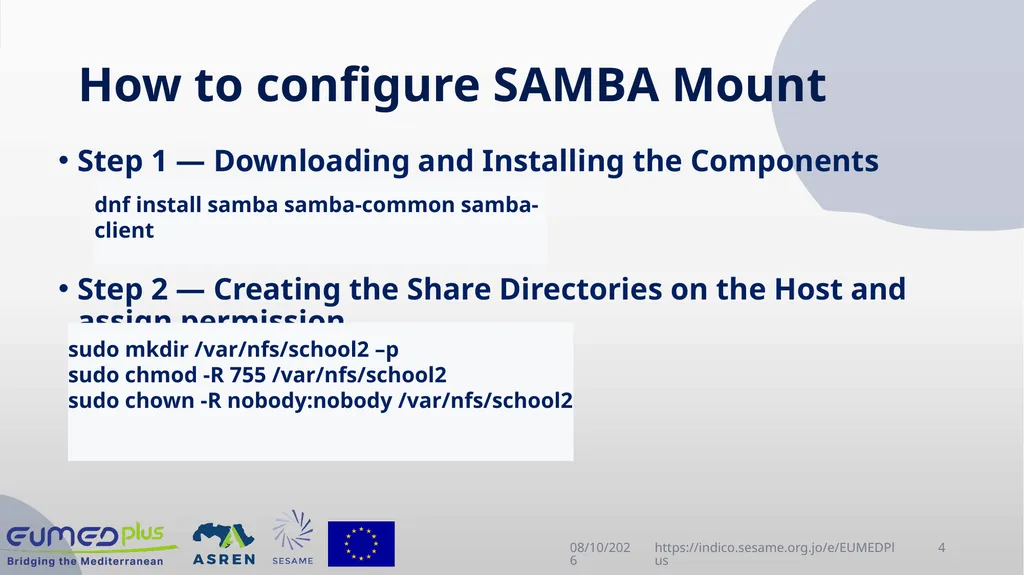
How to configure SAMBA Mount Step 1 — Downloading and Installing the Components
Step 2 — Creating the Share Directories on the Host and assign permission 4/22/2025 https://indico.sesame.org.jo/e/EUMEDPlus 4 dnf install samba samba-common samba-client sudo mkdir /var/nfs/school2 –p
sudo chmod -R 755 /var/nfs/school2
sudo chown -R nobody:nobody /var/nfs/school2<br>
05
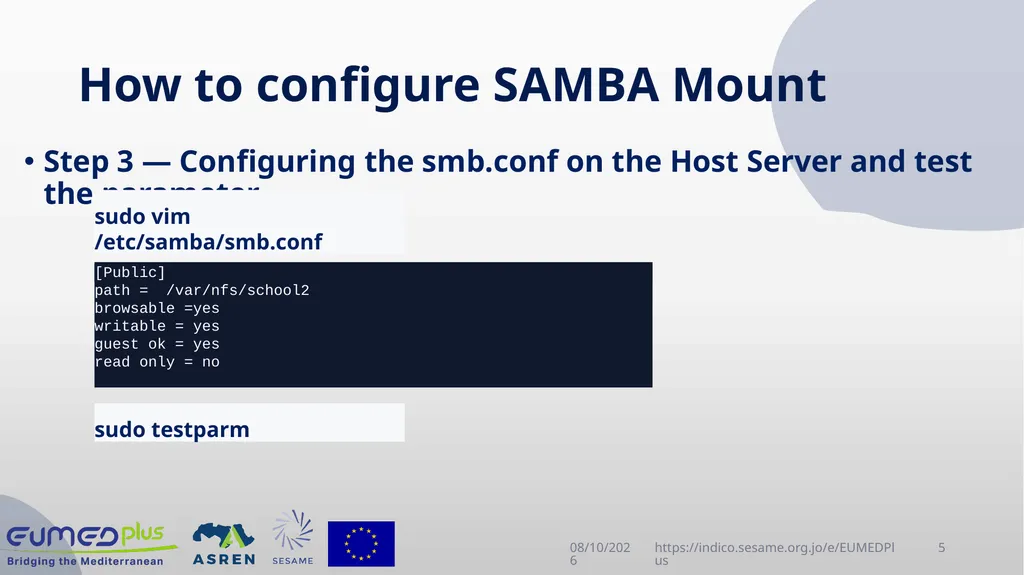
How to configure SAMBA Mount Step 3 — Configuring the smb.conf on the Host Server and test the parameter 4/22/2025 https://indico.sesame.org.jo/e/EUMEDPlus 5 sudo vim /etc/samba/smb.conf sudo testparm directory_to_share client(share_option1,...,share_optionN) [Public]
path = /var/nfs/school2
browsable =yes
writable = yes
guest ok = yes
read only = no<br>
06
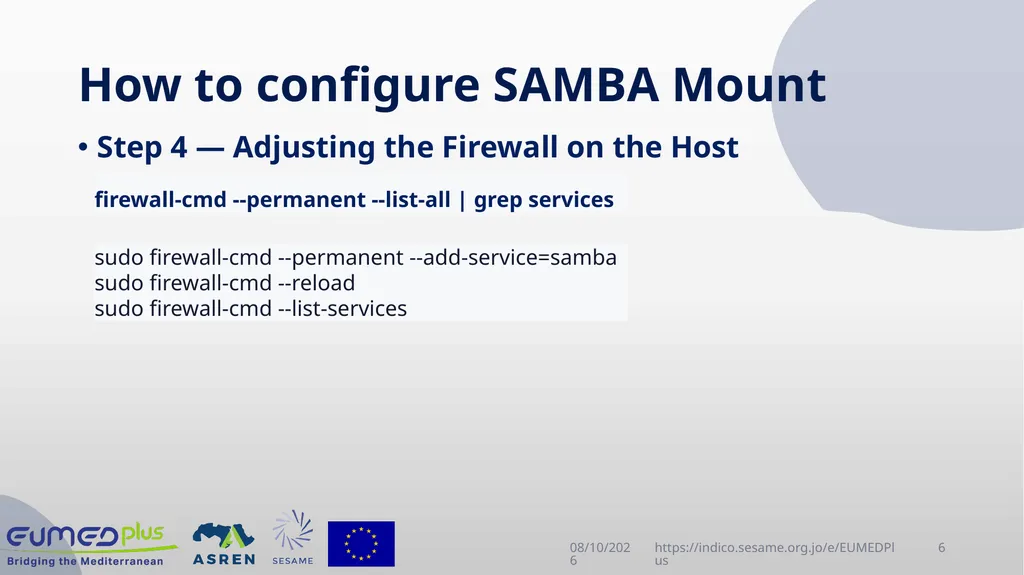
How to configure SAMBA Mount Step 4 — Adjusting the Firewall on the Host 4/22/2025 https://indico.sesame.org.jo/e/EUMEDPlus 6 firewall-cmd --permanent --list-all | grep services sudo firewall-cmd --permanent --add-service=samba
sudo firewall-cmd --reload
sudo firewall-cmd --list-services<br>
07
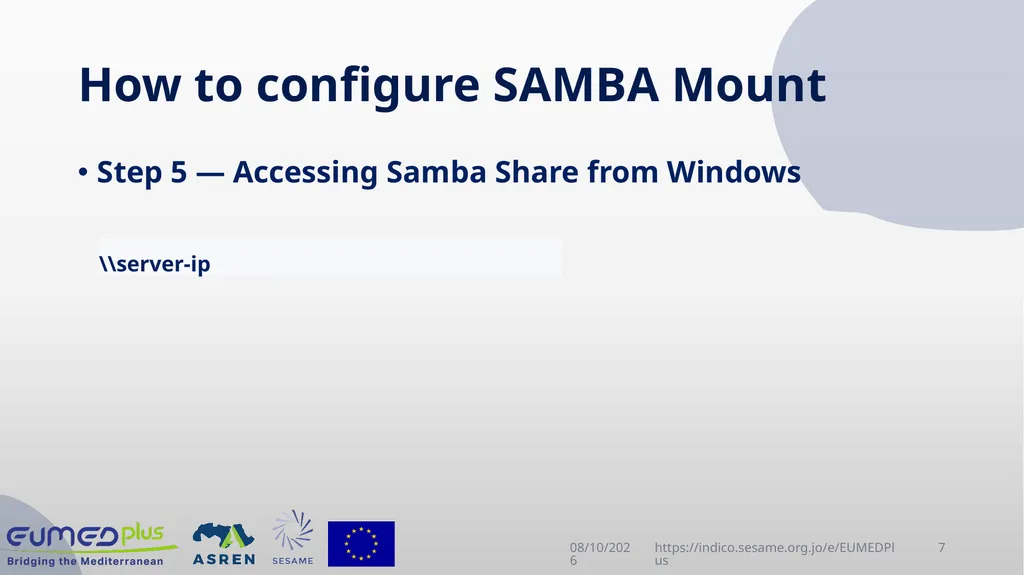
How to configure SAMBA Mount Step 5 — Accessing Samba Share from Windows 4/22/2025 https://indico.sesame.org.jo/e/EUMEDPlus 7 \\server-ip<br>
08
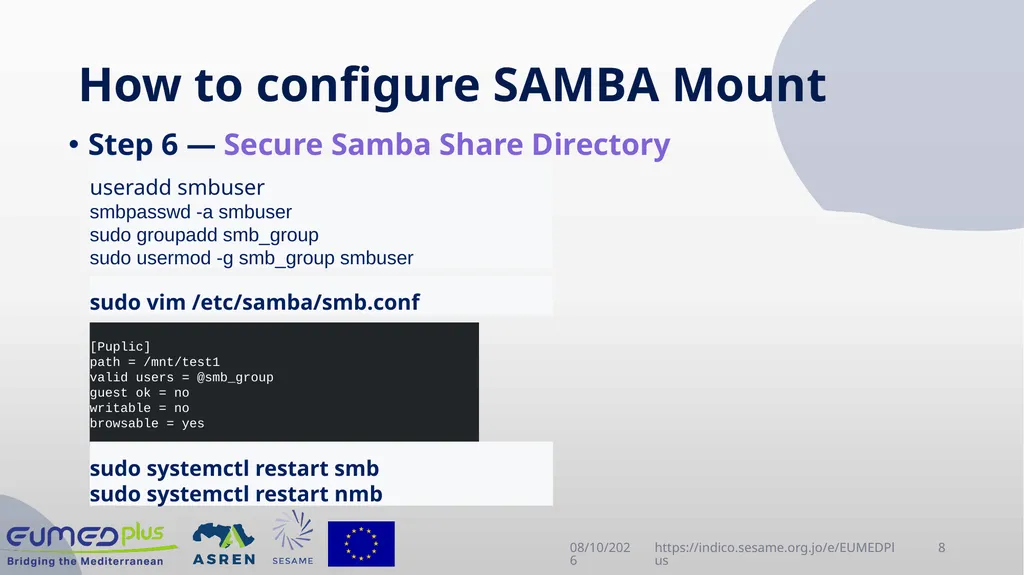
How to configure SAMBA Mount Step 6 — Secure Samba Share Directory 4/22/2025 https://indico.sesame.org.jo/e/EUMEDPlus 8 useradd smbuser
smbpasswd -a smbuser
sudo groupadd smb_group
sudo usermod -g smb_group smbuser sudo vim /etc/samba/smb.conf [Puplic]
path = /mnt/test1
valid users = @smb_group
guest ok = no
writable = no
browsable = yes sudo systemctl restart smb
sudo systemctl restart nmb<br>
09
Processes management 4/22/2025 https://indico.sesame.org.jo/e/EUMEDPlus 9 What is the Process ?
Processes carry out tasks within the operating system. A program is a set of machine code instructions and data stored in an executable image on disk and is, as such, a passive entity; a process can be thought of as a computer program in action.<br>
10
Processes management 4/22/2025 https://indico.sesame.org.jo/e/EUMEDPlus 10 Types of processes
The user process:
- is started from a terminal associated with a user
- accesses resources via requests or daemon
The system process (daemon):
- is started by the system
- is not associated with any terminal and is owned by a system user (often root)
- is loaded at boot time, resides in memory, and is waiting for a call
-is usually identified by the letter d associated with the process name<br>
11
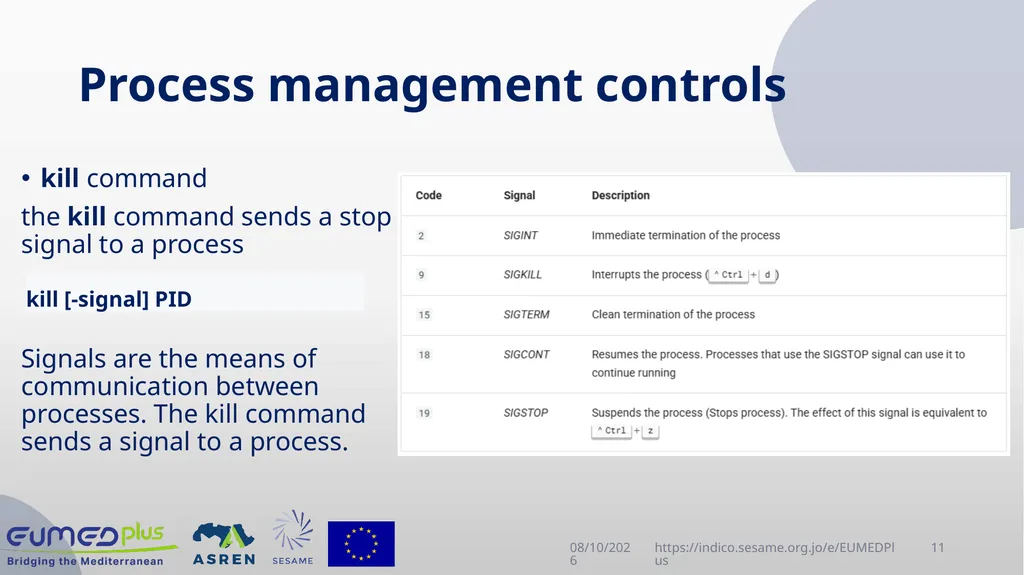
Process management controls 4/22/2025 https://indico.sesame.org.jo/e/EUMEDPlus 11 kill command
the kill command sends a stop signal to a process
Signals are the means of communication between processes. The kill command sends a signal to a process. kill [-signal] PID<br>
12
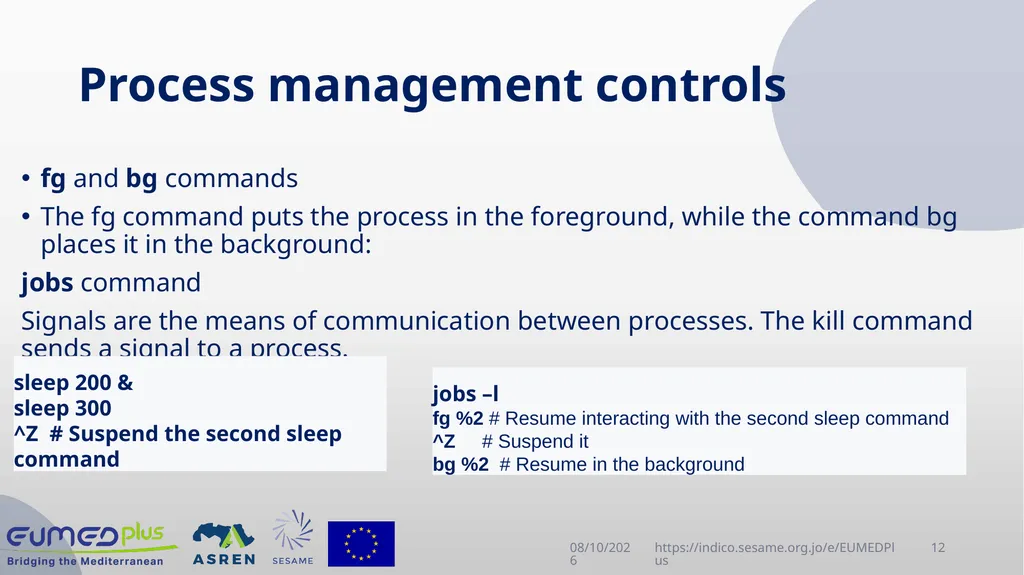
Process management controls 4/22/2025 https://indico.sesame.org.jo/e/EUMEDPlus 12 fg and bg commands
The fg command puts the process in the foreground, while the command bg places it in the background:
jobs command
Signals are the means of communication between processes. The kill command sends a signal to a process. sleep 200 &
sleep 300
^Z # Suspend the second sleep command jobs –l
fg %2 # Resume interacting with the second sleep command
^Z # Suspend it
bg %2 # Resume in the background<br>
13
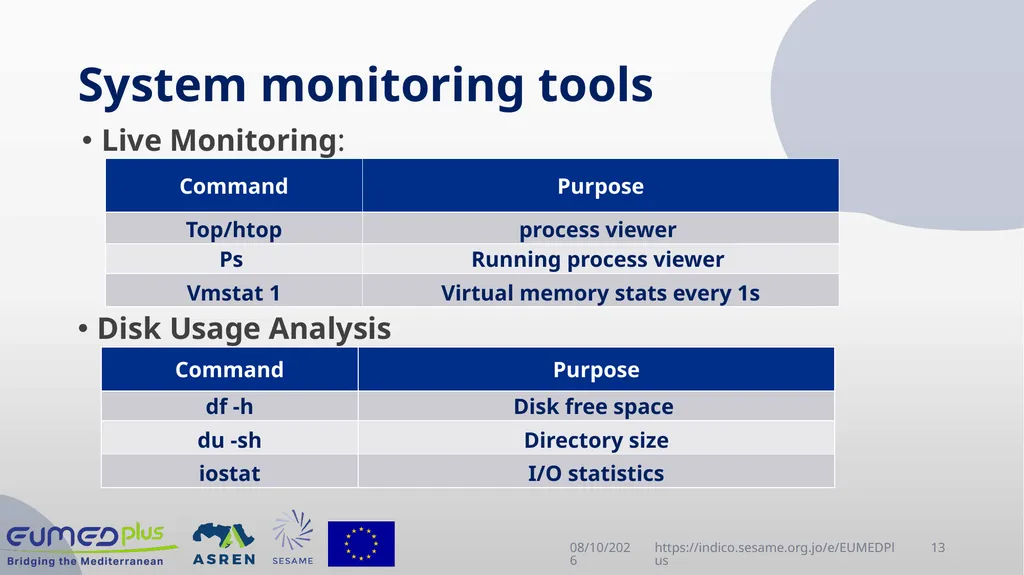
System monitoring tools 4/22/2025 https://indico.sesame.org.jo/e/EUMEDPlus 13 Live Monitoring: Disk Usage Analysis<br>
14
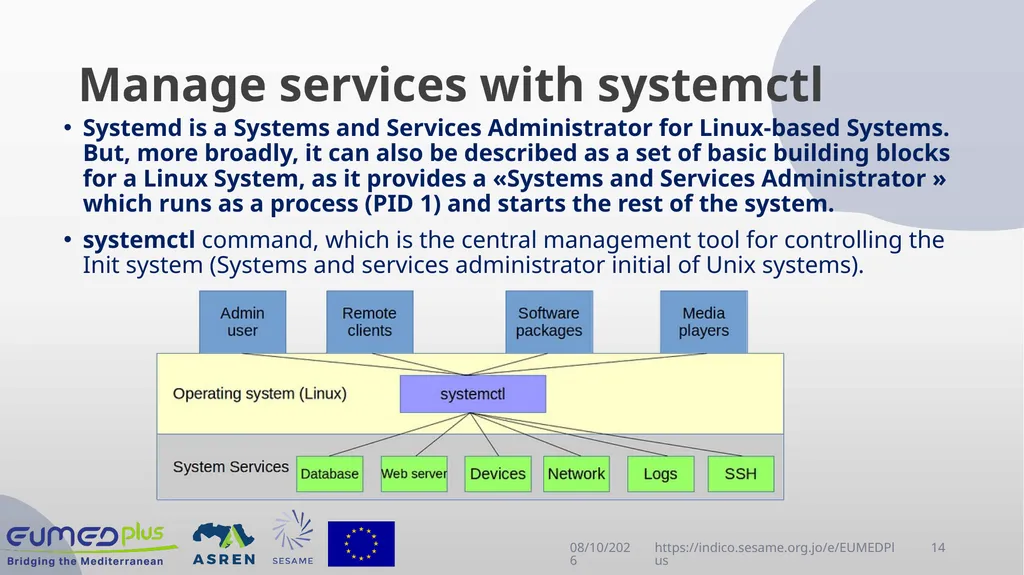
Manage services with systemctl 4/22/2025 https://indico.sesame.org.jo/e/EUMEDPlus 14 Systemd is a Systems and Services Administrator for Linux-based Systems. But, more broadly, it can also be described as a set of basic building blocks for a Linux System, as it provides a «Systems and Services Administrator » which runs as a process (PID 1) and starts the rest of the system.
systemctl command, which is the central management tool for controlling the Init system (Systems and services administrator initial of Unix systems).<br>
15
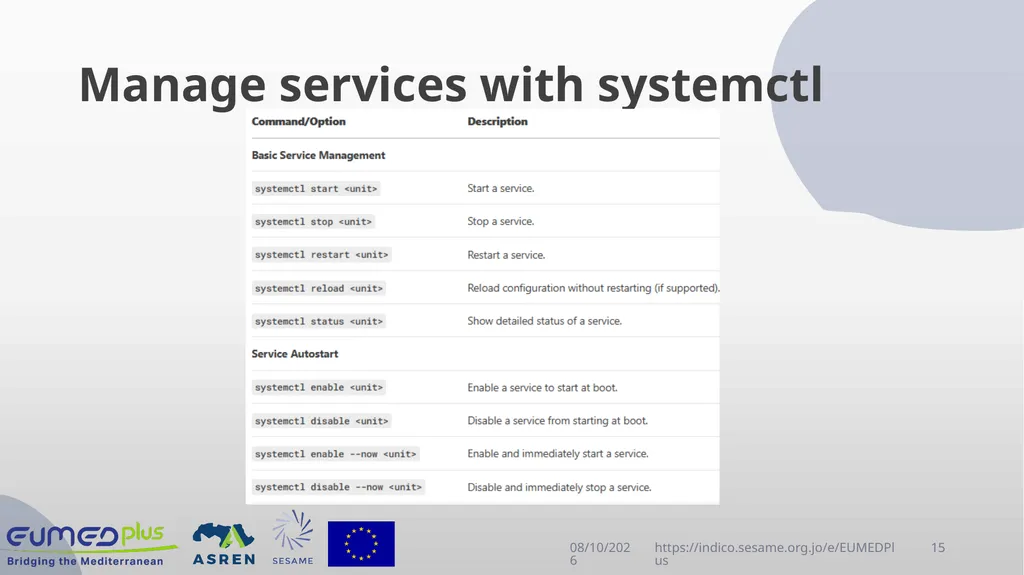
Manage services with systemctl 4/22/2025 https://indico.sesame.org.jo/e/EUMEDPlus 15<br>
16
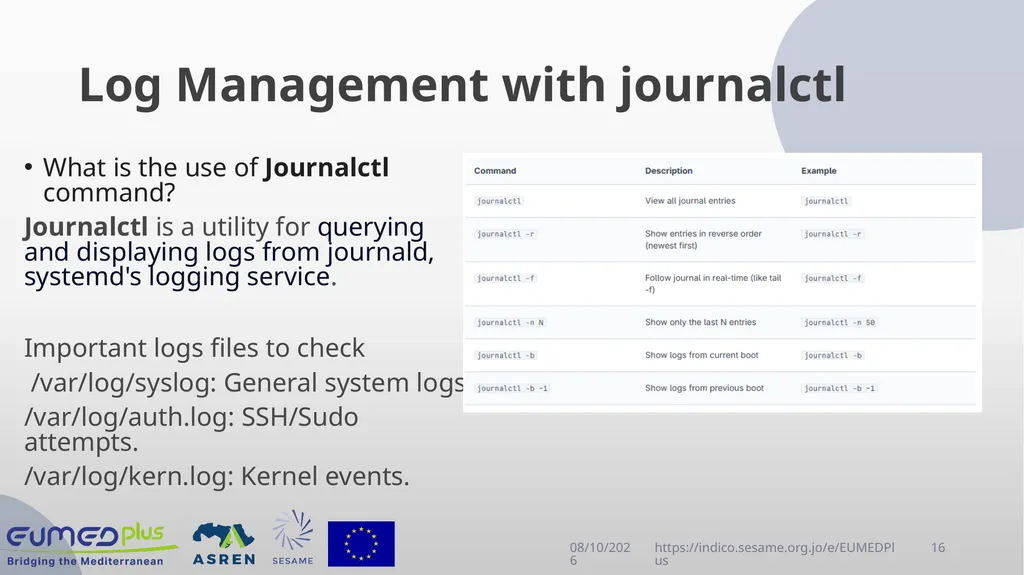
Log Management with journalctl 4/22/2025 https://indico.sesame.org.jo/e/EUMEDPlus 16 What is the use of Journalctl command?
Journalctl is a utility for querying and displaying logs from journald, systemd's logging service.
Important logs files to check
/var/log/syslog: General system logs.
/var/log/auth.log: SSH/Sudo attempts.
/var/log/kern.log: Kernel events.<br>
17
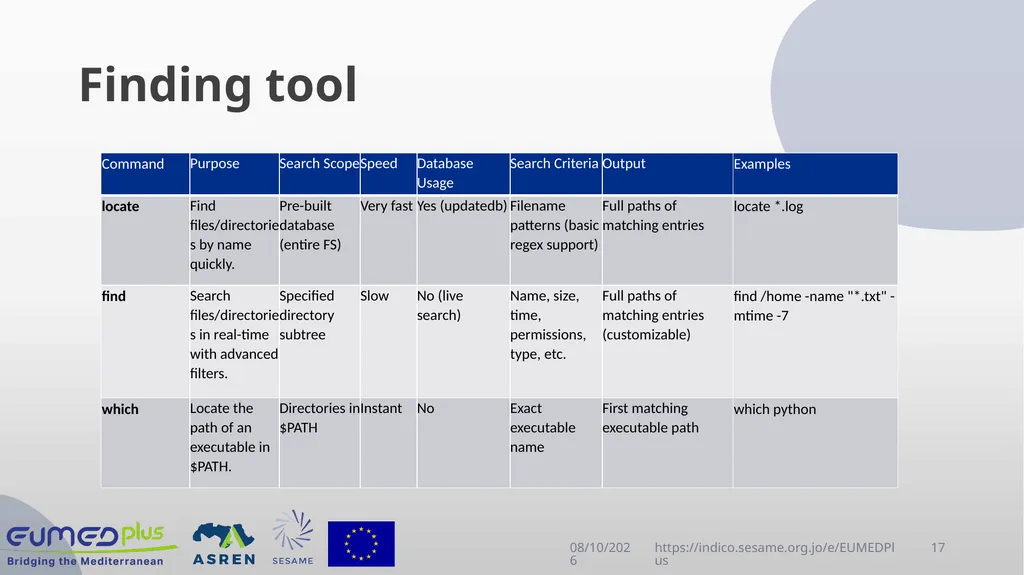
Finding tool 4/23/2025 https://indico.sesame.org.jo/e/EUMEDPlus 17<br>
18
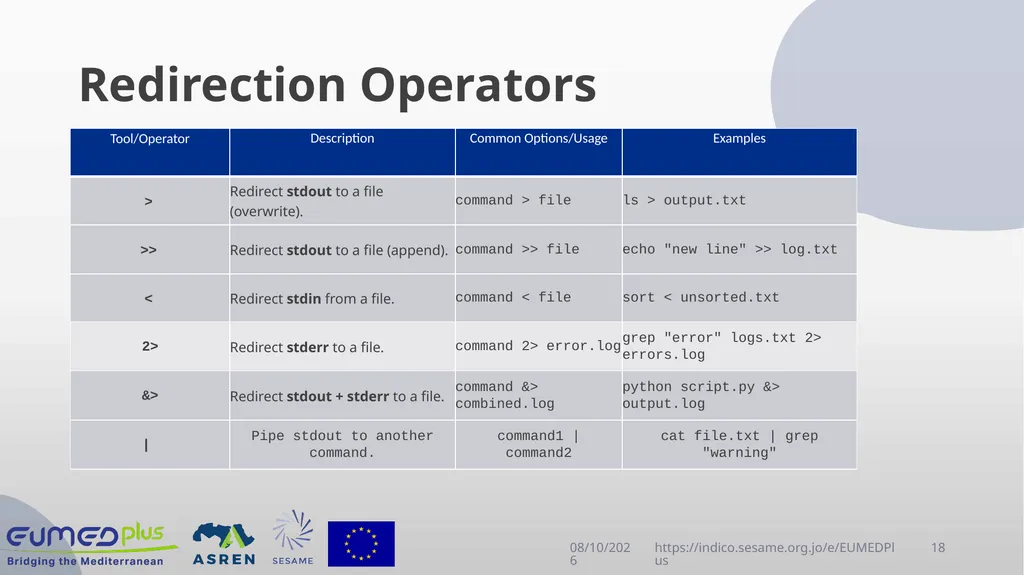
Redirection Operators 4/23/2025 https://indico.sesame.org.jo/e/EUMEDPlus 18<br>
19
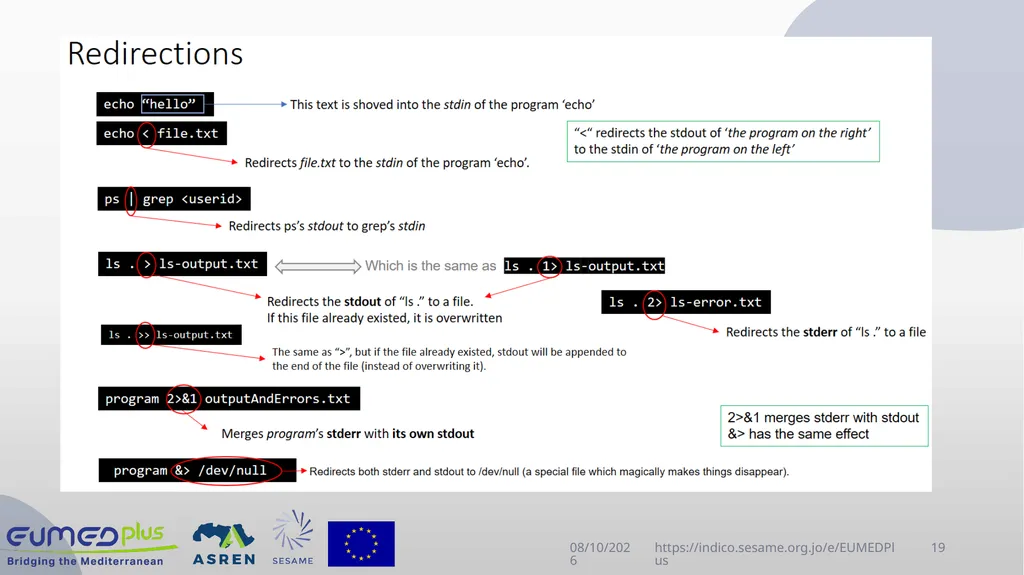
4/23/2025 https://indico.sesame.org.jo/e/EUMEDPlus 19<br>
20
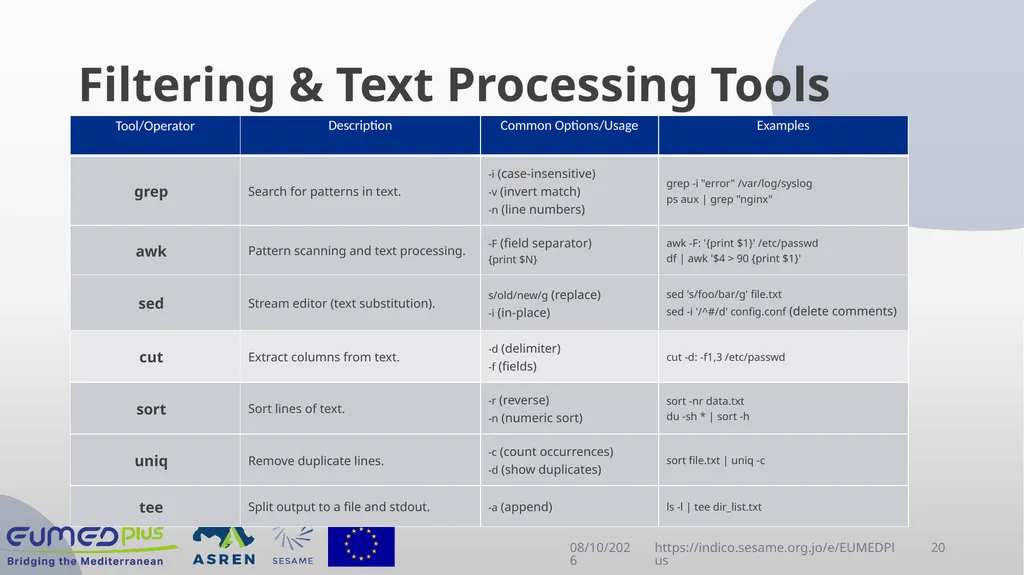
Filtering & Text Processing Tools 4/23/2025 https://indico.sesame.org.jo/e/EUMEDPlus 20<br>
21
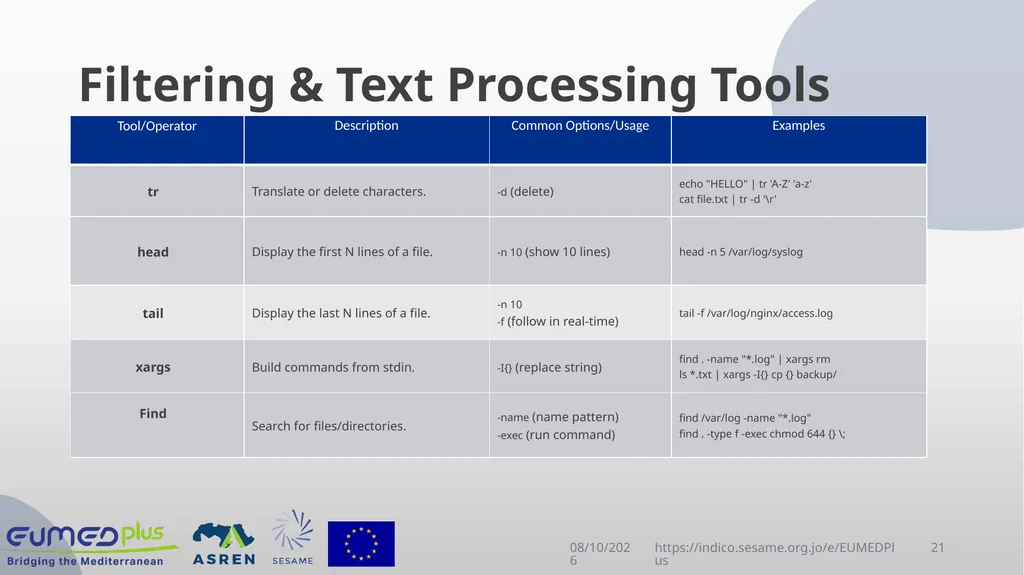
Filtering & Text Processing Tools 4/23/2025 https://indico.sesame.org.jo/e/EUMEDPlus 21<br>
22
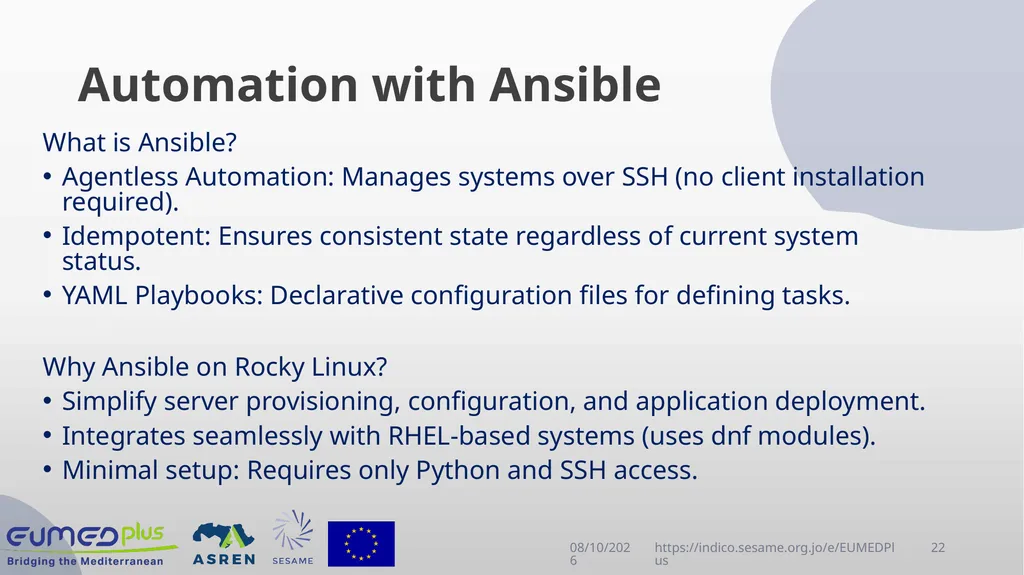
Automation with Ansible What is Ansible?
Agentless Automation: Manages systems over SSH (no client installation required).
Idempotent: Ensures consistent state regardless of current system status.
YAML Playbooks: Declarative configuration files for defining tasks.
Why Ansible on Rocky Linux?
Simplify server provisioning, configuration, and application deployment.
Integrates seamlessly with RHEL-based systems (uses dnf modules).
Minimal setup: Requires only Python and SSH access. 4/23/2025 https://indico.sesame.org.jo/e/EUMEDPlus 22<br>
23
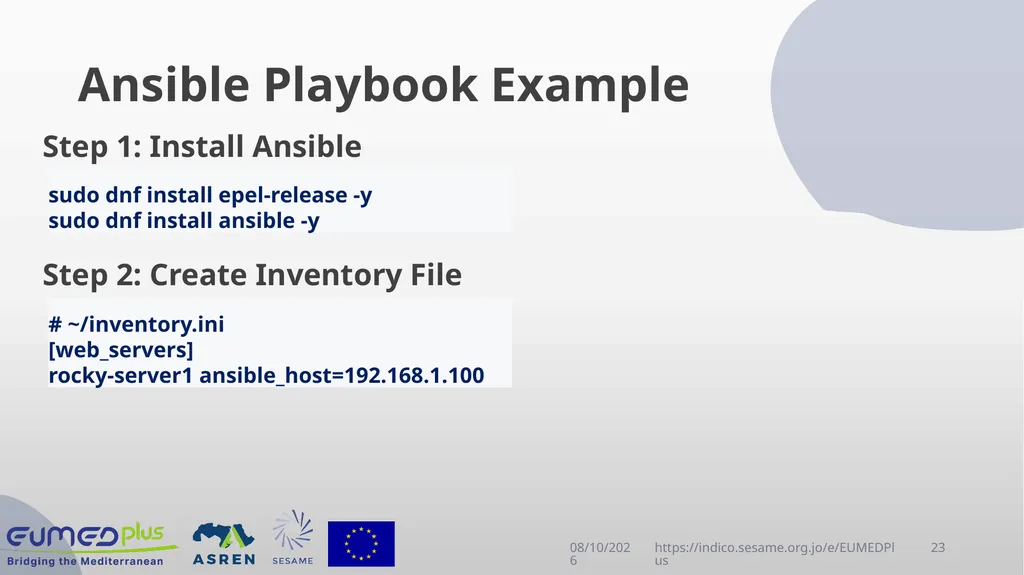
Ansible Playbook Example Step 1: Install Ansible
Step 2: Create Inventory File 4/23/2025 https://indico.sesame.org.jo/e/EUMEDPlus 23 sudo dnf install epel-release -y
sudo dnf install ansible -y # ~/inventory.ini
[web_servers]
rocky-server1 ansible_host=192.168.1.100<br>
24
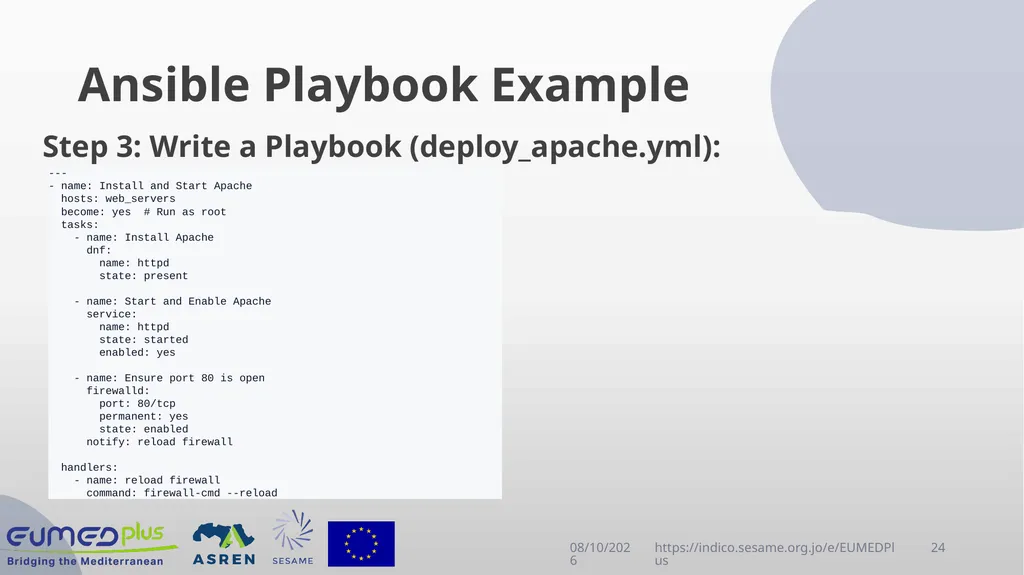
Ansible Playbook Example Step 3: Write a Playbook (deploy_apache.yml): 4/23/2025 https://indico.sesame.org.jo/e/EUMEDPlus 24 ---
- name: Install and Start Apache
hosts: web_servers
become: yes # Run as root
tasks:
- name: Install Apache
dnf:
name: httpd
state: present
- name: Start and Enable Apache
service:
name: httpd
state: started
enabled: yes
- name: Ensure port 80 is open
firewalld:
port: 80/tcp
permanent: yes
state: enabled
notify: reload firewall
handlers:
- name: reload firewall
command: firewall-cmd --reload<br>
25
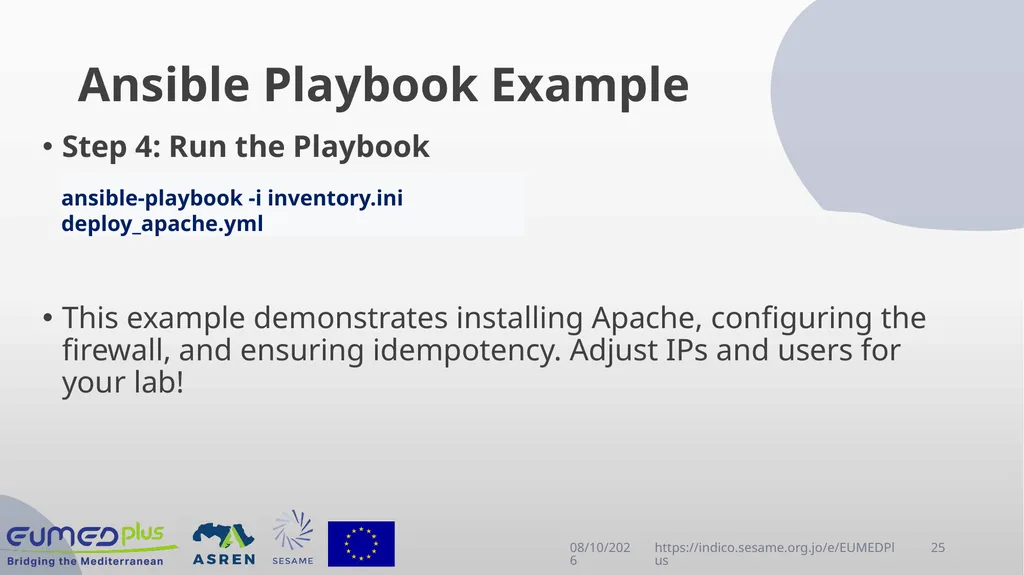
Ansible Playbook Example Step 4: Run the Playbook
This example demonstrates installing Apache, configuring the firewall, and ensuring idempotency. Adjust IPs and users for your lab! 4/23/2025 https://indico.sesame.org.jo/e/EUMEDPlus 25 ansible-playbook -i inventory.ini deploy_apache.yml<br>
26
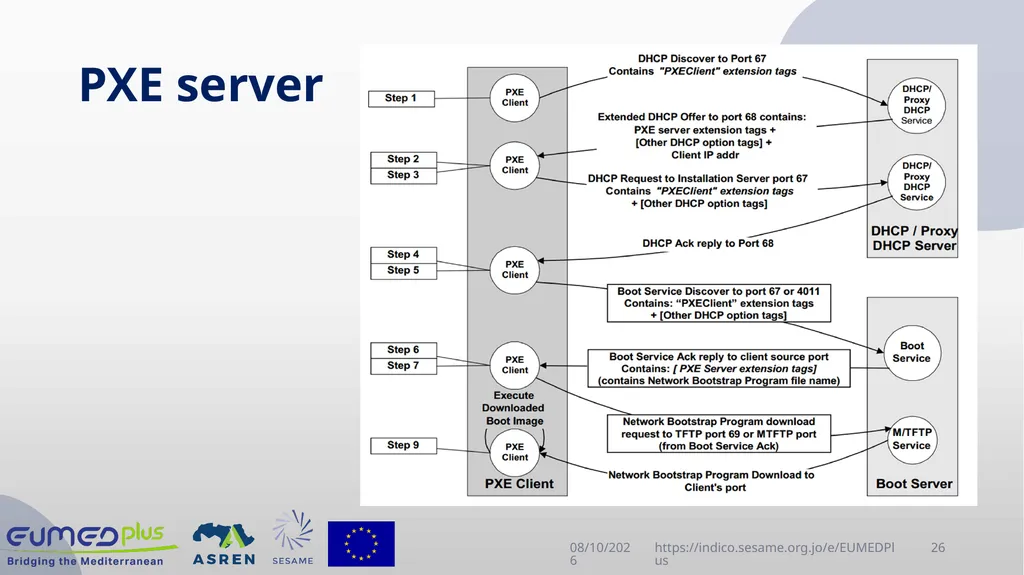
PXE server 4/23/2025 https://indico.sesame.org.jo/e/EUMEDPlus 26<br>
27
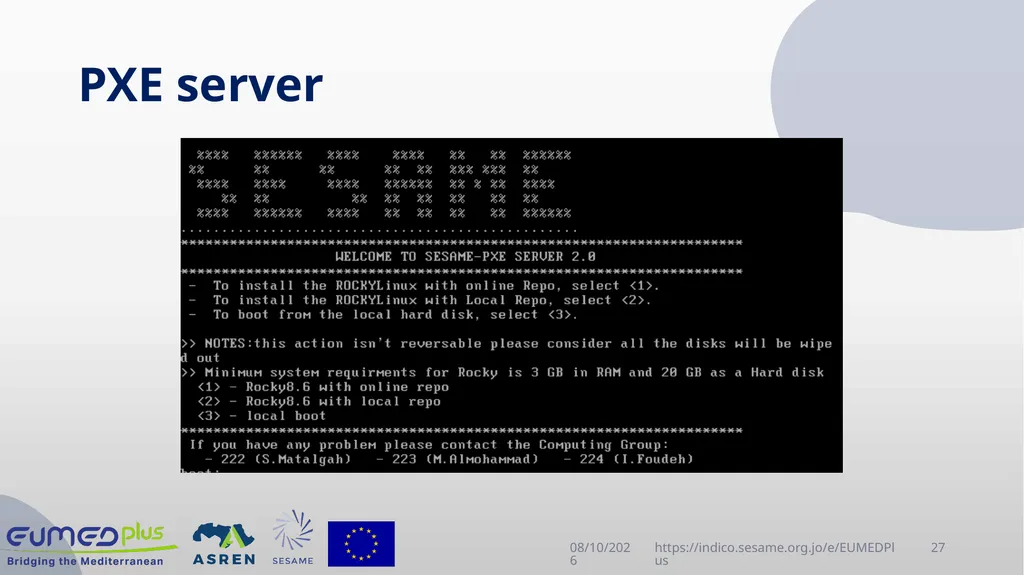
PXE server 4/23/2025 https://indico.sesame.org.jo/e/EUMEDPlus 27<br>
28
Questions? 4/22/2025 https://indico.sesame.org.jo/e/EUMEDPlus 28<br>
29
Thank You 4/22/2025 https://indico.sesame.org.jo/e/EUMEDPlus 29<br>