
Medicare Part A Cost Report e-Filing Updates
OM
Published · 89 slides · 0 views
1 / 1





Description
Medicare Part A Cost Report e-Filing Updates Wednesday, April 22, 2026 Presenters: Owen Osaghae, CMS Jolene Nguyen, CGI Federal Acronyms in this Presentation BSO - Backup Security Official CCN - CMS Certification Number CMHC - Community
Related Topics
Share
Embed code
Download this presentation From Below
"Medicare Part A Cost Report e-Filing Updates" is the property of its rightful owner. Permission is granted to download and print the materials on this website for personal, non-commercial use only, and to display it on your personal computer provided you do not modify the materials and that you retain all copyright notices contained in the materials. By downloading content from our website, you accept the terms of this agreement.
Presentation Transcript
01
Medicare Part A Cost Report e-Filing Updates Wednesday, April 22, 2026 Presenters:
Owen Osaghae, CMS
Jolene Nguyen, CGI Federal<br>
Owen Osaghae, CMS
Jolene Nguyen, CGI Federal<br>
02
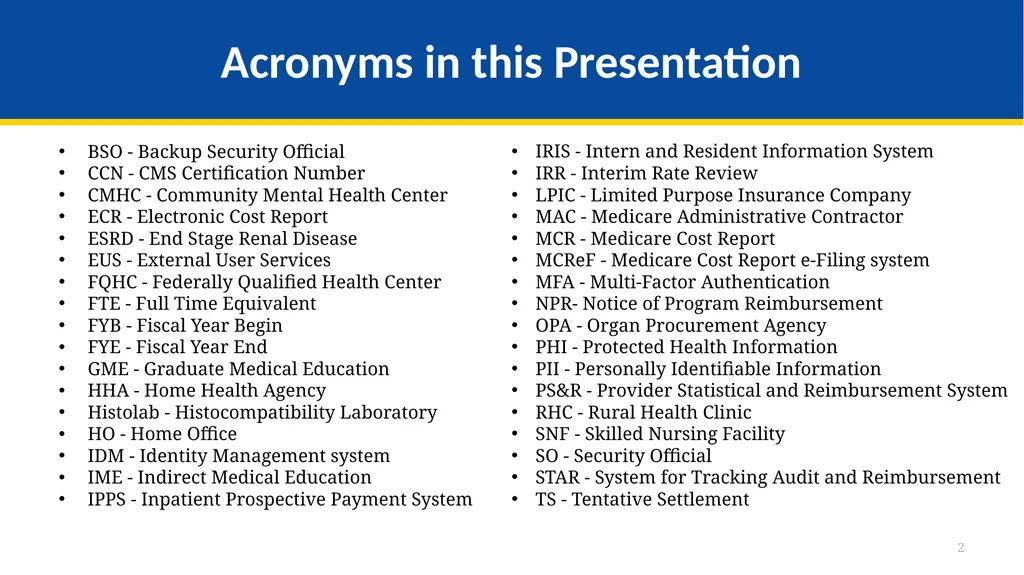
Acronyms in this Presentation BSO - Backup Security Official
CCN - CMS Certification Number
CMHC - Community Mental Health Center
ECR - Electronic Cost Report
ESRD - End Stage Renal Disease
EUS - External User Services
FQHC - Federally Qualified Health Center
FTE - Full Time Equivalent
FYB - Fiscal Year Begin
FYE - Fiscal Year End
GME - Graduate Medical Education
HHA - Home Health Agency
Histolab - Histocompatibility Laboratory
HO - Home Office
IDM - Identity Management system
IME - Indirect Medical Education
IPPS - Inpatient Prospective Payment System IRIS - Intern and Resident Information System
IRR - Interim Rate Review
LPIC - Limited Purpose Insurance Company
MAC - Medicare Administrative Contractor
MCR - Medicare Cost Report
MCReF - Medicare Cost Report e-Filing system
MFA - Multi-Factor Authentication
NPR- Notice of Program Reimbursement
OPA - Organ Procurement Agency
PHI - Protected Health Information
PII - Personally Identifiable Information
PS&R - Provider Statistical and Reimbursement System
RHC - Rural Health Clinic
SNF - Skilled Nursing Facility
SO - Security Official
STAR - System for Tracking Audit and Reimbursement
TS - Tentative Settlement 2<br>
CCN - CMS Certification Number
CMHC - Community Mental Health Center
ECR - Electronic Cost Report
ESRD - End Stage Renal Disease
EUS - External User Services
FQHC - Federally Qualified Health Center
FTE - Full Time Equivalent
FYB - Fiscal Year Begin
FYE - Fiscal Year End
GME - Graduate Medical Education
HHA - Home Health Agency
Histolab - Histocompatibility Laboratory
HO - Home Office
IDM - Identity Management system
IME - Indirect Medical Education
IPPS - Inpatient Prospective Payment System IRIS - Intern and Resident Information System
IRR - Interim Rate Review
LPIC - Limited Purpose Insurance Company
MAC - Medicare Administrative Contractor
MCR - Medicare Cost Report
MCReF - Medicare Cost Report e-Filing system
MFA - Multi-Factor Authentication
NPR- Notice of Program Reimbursement
OPA - Organ Procurement Agency
PHI - Protected Health Information
PII - Personally Identifiable Information
PS&R - Provider Statistical and Reimbursement System
RHC - Rural Health Clinic
SNF - Skilled Nursing Facility
SO - Security Official
STAR - System for Tracking Audit and Reimbursement
TS - Tentative Settlement 2<br>
03
Clarification of Terms When we say “Provider”, we mean Medicare Part A Providers and Home Offices
When we say “Cost Report”, we mean Medicare Part A Cost Reports and Home Office Cost Statements 3<br>
When we say “Cost Report”, we mean Medicare Part A Cost Reports and Home Office Cost Statements 3<br>
04
Agenda Introductions
Background and Overview
Discuss Updates and Latest Features in MCReF
e-Filing Refresher
Q&A 4<br>
Background and Overview
Discuss Updates and Latest Features in MCReF
e-Filing Refresher
Q&A 4<br>
05
Business Overview The Medicare Cost Report (MCR) is used to determine Part A providers’ annual Medicare reimbursable cost.
Providers use a variety of sources (including Provider Statistical and Reimbursement system (PS&R) claim reimbursement data) to create their MCR.
There are about 57,000 MCRs submitted each year that account for over $250 Billion of Medicare reimbursement.
Regulation specifies deadline for submitting an acceptable cost report
Medicare Administrative Contractors (MACs) have requirements for receiving, accepting, reviewing, auditing, and finalizing cost reports. 5<br>
Providers use a variety of sources (including Provider Statistical and Reimbursement system (PS&R) claim reimbursement data) to create their MCR.
There are about 57,000 MCRs submitted each year that account for over $250 Billion of Medicare reimbursement.
Regulation specifies deadline for submitting an acceptable cost report
Medicare Administrative Contractors (MACs) have requirements for receiving, accepting, reviewing, auditing, and finalizing cost reports. 5<br>
06
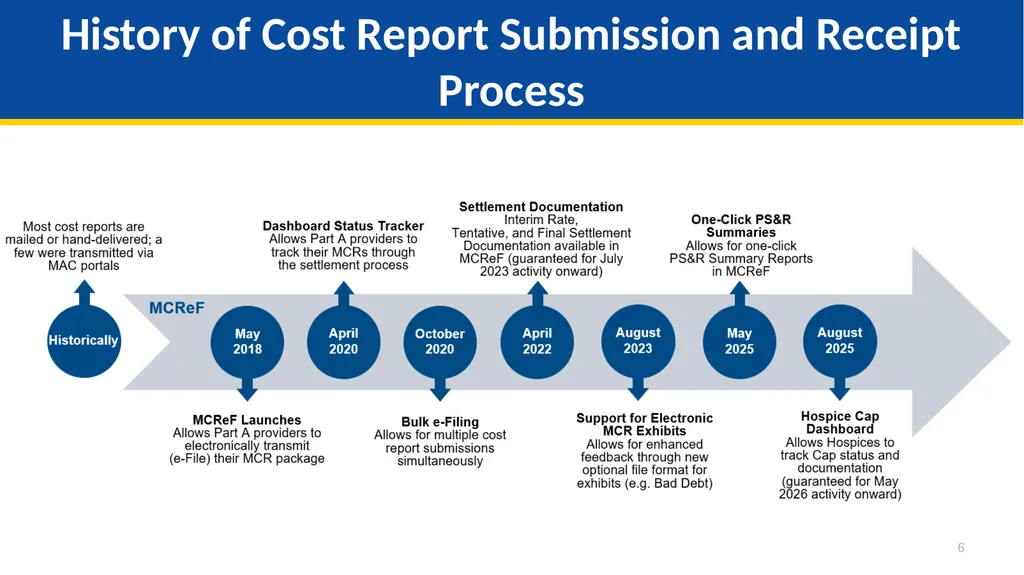
History of Cost Report Submission and Receipt Process 6<br>
07
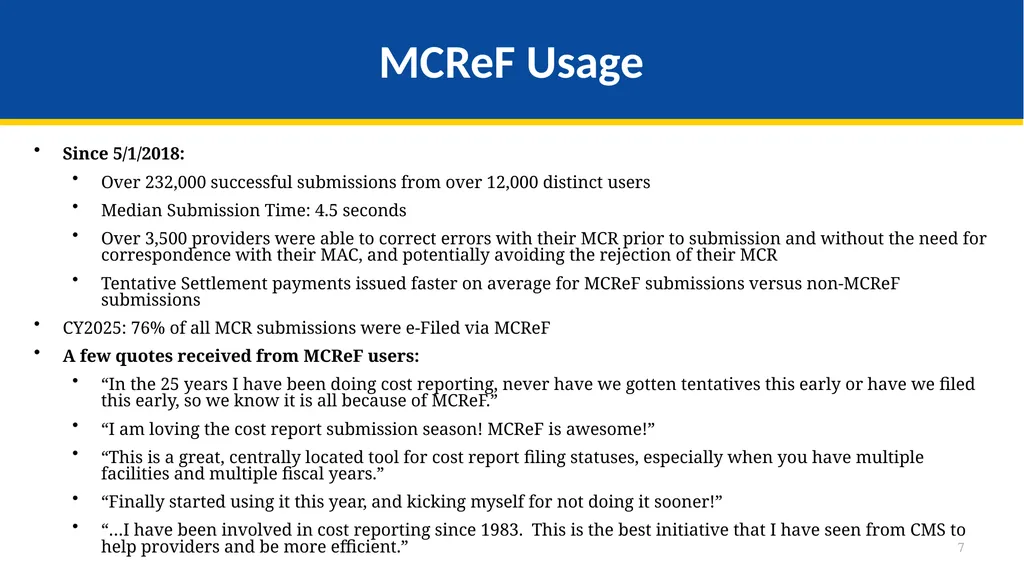
MCReF Usage Since 5/1/2018:
Over 232,000 successful submissions from over 12,000 distinct users
Median Submission Time: 4.5 seconds
Over 3,500 providers were able to correct errors with their MCR prior to submission and without the need for correspondence with their MAC, and potentially avoiding the rejection of their MCR
Tentative Settlement payments issued faster on average for MCReF submissions versus non-MCReF submissions
CY2025: 76% of all MCR submissions were e-Filed via MCReF
A few quotes received from MCReF users:
“In the 25 years I have been doing cost reporting, never have we gotten tentatives this early or have we filed this early, so we know it is all because of MCReF.”
“I am loving the cost report submission season! MCReF is awesome!”
“This is a great, centrally located tool for cost report filing statuses, especially when you have multiple facilities and multiple fiscal years.”
“Finally started using it this year, and kicking myself for not doing it sooner!”
“…I have been involved in cost reporting since 1983. This is the best initiative that I have seen from CMS to help providers and be more efficient.” 7<br>
Over 232,000 successful submissions from over 12,000 distinct users
Median Submission Time: 4.5 seconds
Over 3,500 providers were able to correct errors with their MCR prior to submission and without the need for correspondence with their MAC, and potentially avoiding the rejection of their MCR
Tentative Settlement payments issued faster on average for MCReF submissions versus non-MCReF submissions
CY2025: 76% of all MCR submissions were e-Filed via MCReF
A few quotes received from MCReF users:
“In the 25 years I have been doing cost reporting, never have we gotten tentatives this early or have we filed this early, so we know it is all because of MCReF.”
“I am loving the cost report submission season! MCReF is awesome!”
“This is a great, centrally located tool for cost report filing statuses, especially when you have multiple facilities and multiple fiscal years.”
“Finally started using it this year, and kicking myself for not doing it sooner!”
“…I have been involved in cost reporting since 1983. This is the best initiative that I have seen from CMS to help providers and be more efficient.” 7<br>
08
CMS Goal Enhance the Medicare provider experience
Continuously improve the cost report filing experience
Increase transparency to providers through cost report tracking 8<br>
Continuously improve the cost report filing experience
Increase transparency to providers through cost report tracking 8<br>
09
Advantages of MCReF for Providers One process for all providers via one submission portal
Available to all Part A providers regardless of MAC
Beneficial to chain organizations which have providers at multiple MACs, and any time you change MACs
Reduces confusion, delays, and time you spend on administrative processes
Direct feedback on the receivability of your MCR submission, and potential for instant acceptance
Tentative Settlement payments issued faster on average for MCReF submissions
Live updates on cost report status from submission through desk review and final settlement, including access to Interim Rate, Tentative, and Final Settlement documentation for activity since July 2023 9<br>
Available to all Part A providers regardless of MAC
Beneficial to chain organizations which have providers at multiple MACs, and any time you change MACs
Reduces confusion, delays, and time you spend on administrative processes
Direct feedback on the receivability of your MCR submission, and potential for instant acceptance
Tentative Settlement payments issued faster on average for MCReF submissions
Live updates on cost report status from submission through desk review and final settlement, including access to Interim Rate, Tentative, and Final Settlement documentation for activity since July 2023 9<br>
10
MCReF – High Level System Changes One-Click PS&R Summaries: Ready-made PS&R Summary Reports for instant download on the MCReF home page
Hospice Cap Dashboard: Dashboard for tracking Hospice Cap status, detailed view of Cap review dates, and access to Documentation for Cap Determinations 10<br>
Hospice Cap Dashboard: Dashboard for tracking Hospice Cap status, detailed view of Cap review dates, and access to Documentation for Cap Determinations 10<br>
11
One-Click PS&R Summary Report Download<br>
12
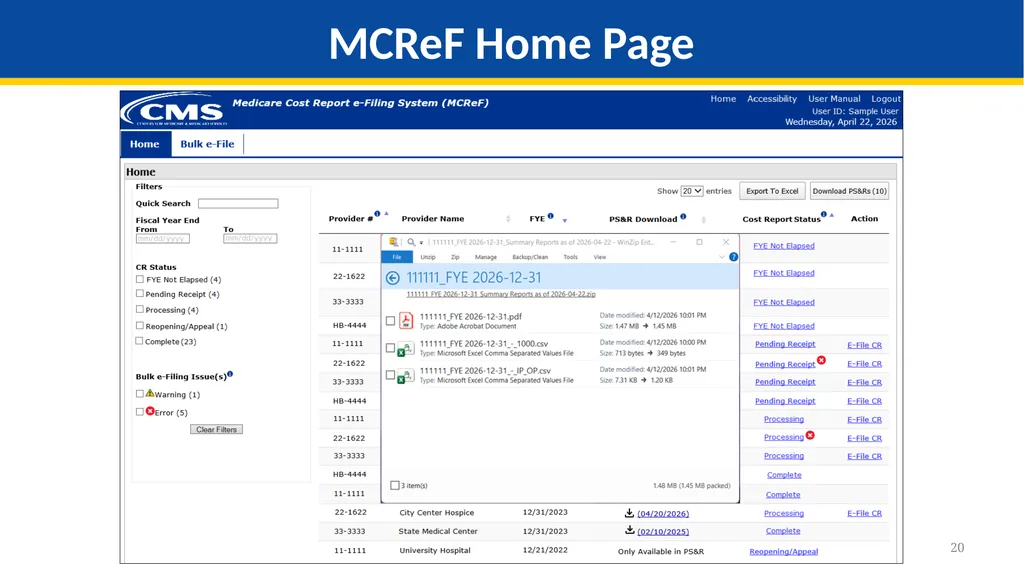
12 PS&R Summary Reports tailored for cost report creation are directly accessible via a one-click download within the Medicare Cost Report e-Filing system (MCReF)
The goal of this is to make acquiring PS&R Summary Reports:
Easier (one-click, rather than current multi-screen flow for custom requests)
Faster (immediate download, no queue/inbox)
Vendor-ready (format and dates coordinated with cost report vendors for plug’n’play simplicity) One-Click PS&R Summary Report Download<br>
The goal of this is to make acquiring PS&R Summary Reports:
Easier (one-click, rather than current multi-screen flow for custom requests)
Faster (immediate download, no queue/inbox)
Vendor-ready (format and dates coordinated with cost report vendors for plug’n’play simplicity) One-Click PS&R Summary Report Download<br>
13
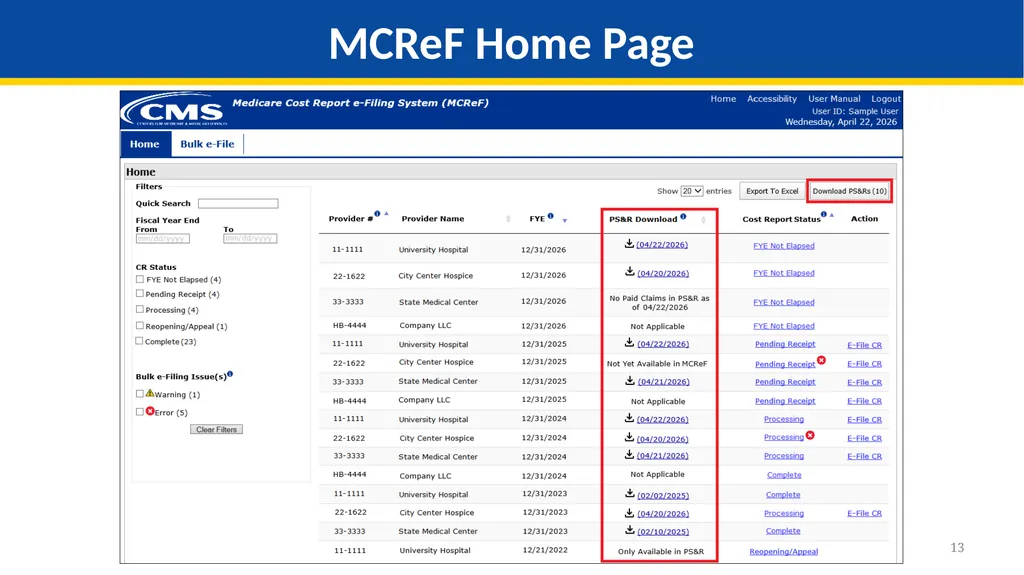
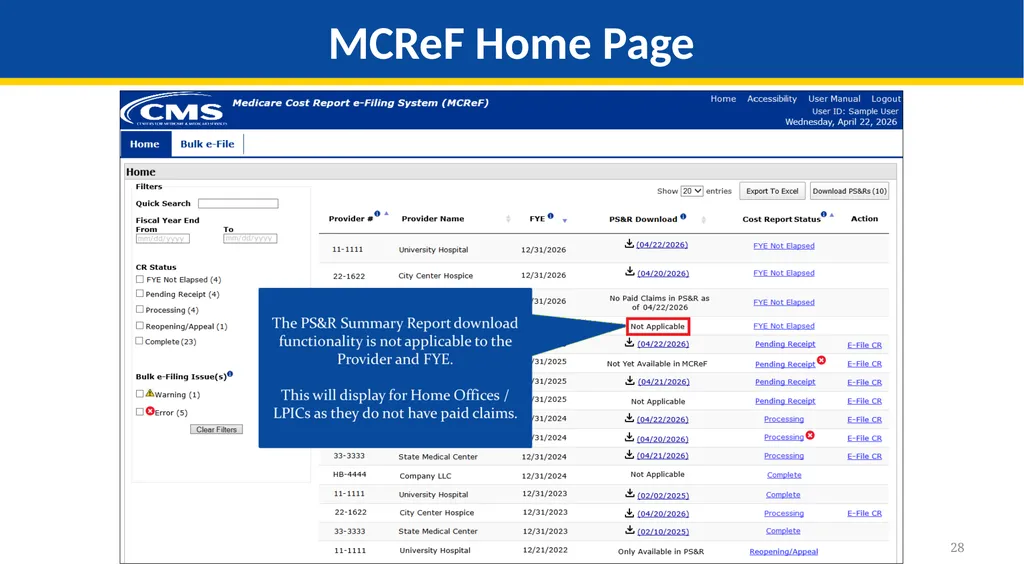
13 MCReF Home Page<br>
14
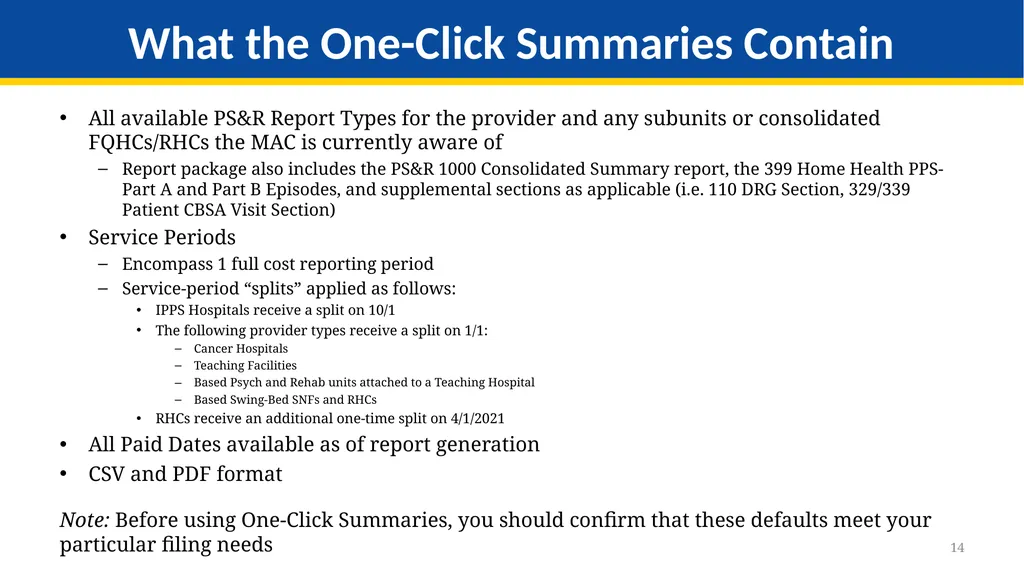
14 All available PS&R Report Types for the provider and any subunits or consolidated FQHCs/RHCs the MAC is currently aware of
Report package also includes the PS&R 1000 Consolidated Summary report, the 399 Home Health PPS-Part A and Part B Episodes, and supplemental sections as applicable (i.e. 110 DRG Section, 329/339 Patient CBSA Visit Section)
Service Periods
Encompass 1 full cost reporting period
Service-period “splits” applied as follows:
IPPS Hospitals receive a split on 10/1
The following provider types receive a split on 1/1:
Cancer Hospitals
Teaching Facilities
Based Psych and Rehab units attached to a Teaching Hospital
Based Swing-Bed SNFs and RHCs
RHCs receive an additional one-time split on 4/1/2021
All Paid Dates available as of report generation
CSV and PDF format
Note: Before using One-Click Summaries, you should confirm that these defaults meet your particular filing needs What the One-Click Summaries Contain<br>
Report package also includes the PS&R 1000 Consolidated Summary report, the 399 Home Health PPS-Part A and Part B Episodes, and supplemental sections as applicable (i.e. 110 DRG Section, 329/339 Patient CBSA Visit Section)
Service Periods
Encompass 1 full cost reporting period
Service-period “splits” applied as follows:
IPPS Hospitals receive a split on 10/1
The following provider types receive a split on 1/1:
Cancer Hospitals
Teaching Facilities
Based Psych and Rehab units attached to a Teaching Hospital
Based Swing-Bed SNFs and RHCs
RHCs receive an additional one-time split on 4/1/2021
All Paid Dates available as of report generation
CSV and PDF format
Note: Before using One-Click Summaries, you should confirm that these defaults meet your particular filing needs What the One-Click Summaries Contain<br>
15
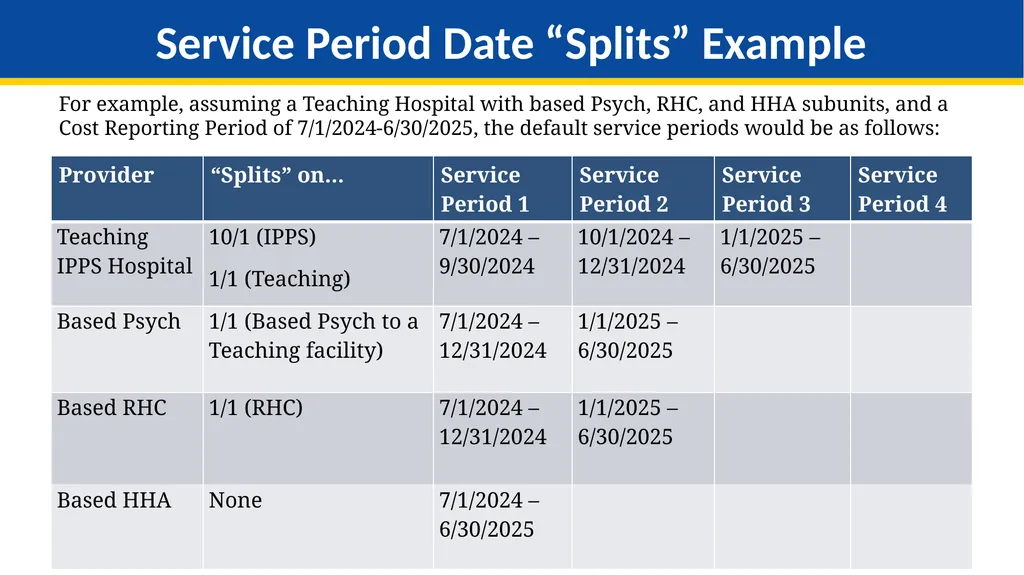
15 For example, assuming a Teaching Hospital with based Psych, RHC, and HHA subunits, and a Cost Reporting Period of 7/1/2024-6/30/2025, the default service periods would be as follows: Service Period Date “Splits” Example<br>
16
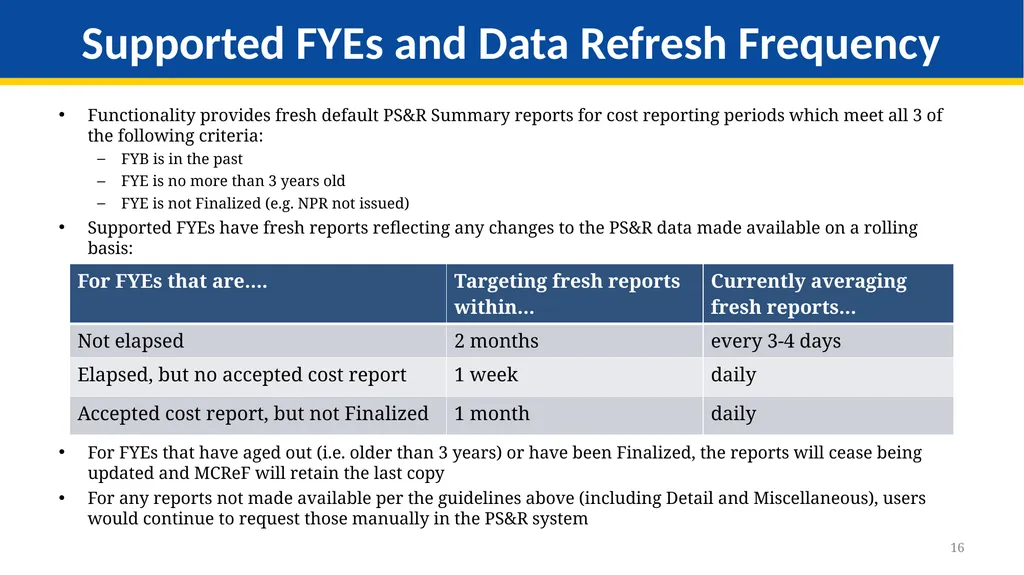
16 Functionality provides fresh default PS&R Summary reports for cost reporting periods which meet all 3 of the following criteria:
FYB is in the past
FYE is no more than 3 years old
FYE is not Finalized (e.g. NPR not issued)
Supported FYEs have fresh reports reflecting any changes to the PS&R data made available on a rolling basis:
For FYEs that have aged out (i.e. older than 3 years) or have been Finalized, the reports will cease being updated and MCReF will retain the last copy
For any reports not made available per the guidelines above (including Detail and Miscellaneous), users would continue to request those manually in the PS&R system Supported FYEs and Data Refresh Frequency<br>
FYB is in the past
FYE is no more than 3 years old
FYE is not Finalized (e.g. NPR not issued)
Supported FYEs have fresh reports reflecting any changes to the PS&R data made available on a rolling basis:
For FYEs that have aged out (i.e. older than 3 years) or have been Finalized, the reports will cease being updated and MCReF will retain the last copy
For any reports not made available per the guidelines above (including Detail and Miscellaneous), users would continue to request those manually in the PS&R system Supported FYEs and Data Refresh Frequency<br>
17
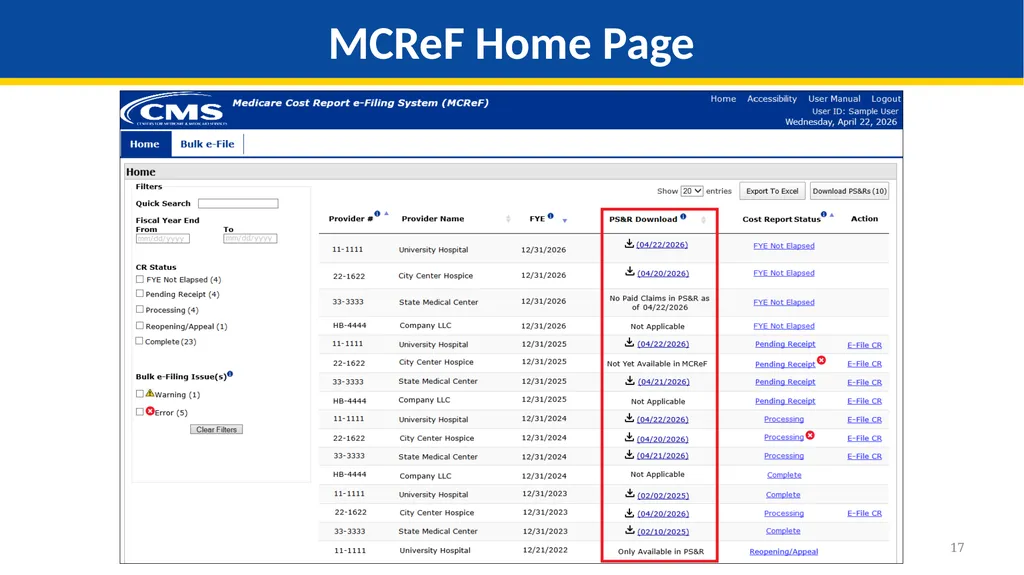
17 MCReF Home Page<br>
18
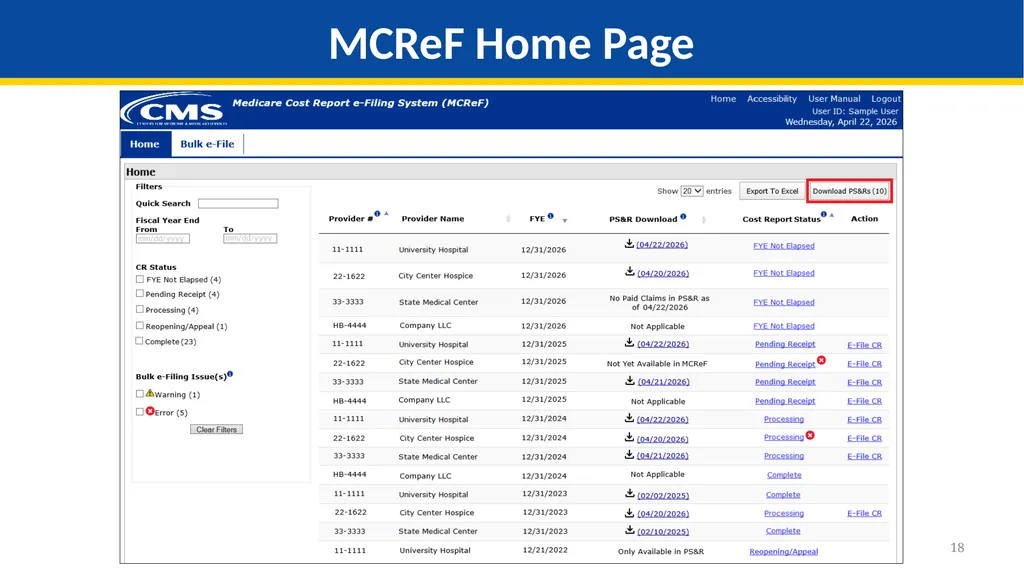
18 MCReF Home Page<br>
19
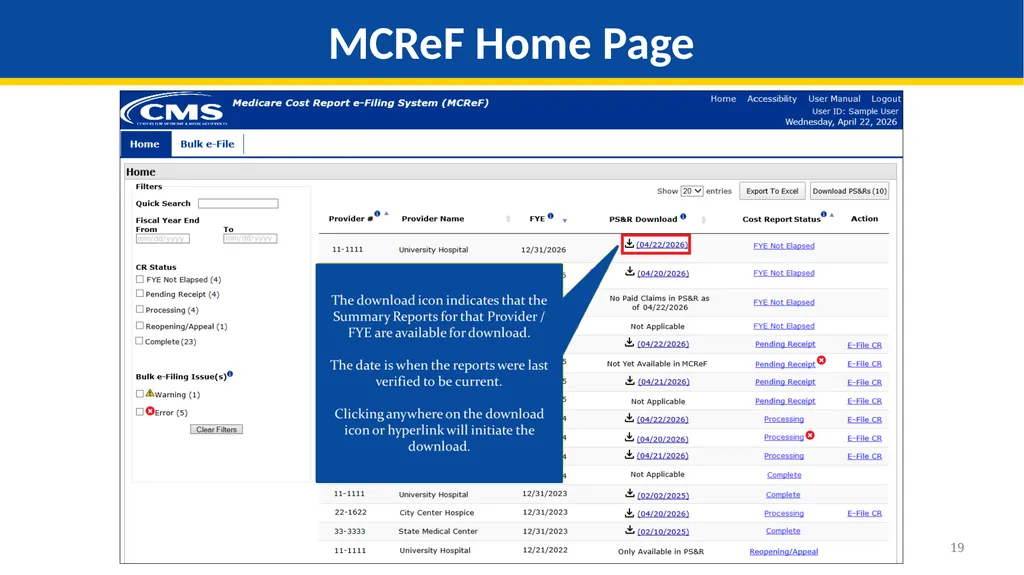
19 MCReF Home Page<br>
20
20 MCReF Home Page<br>
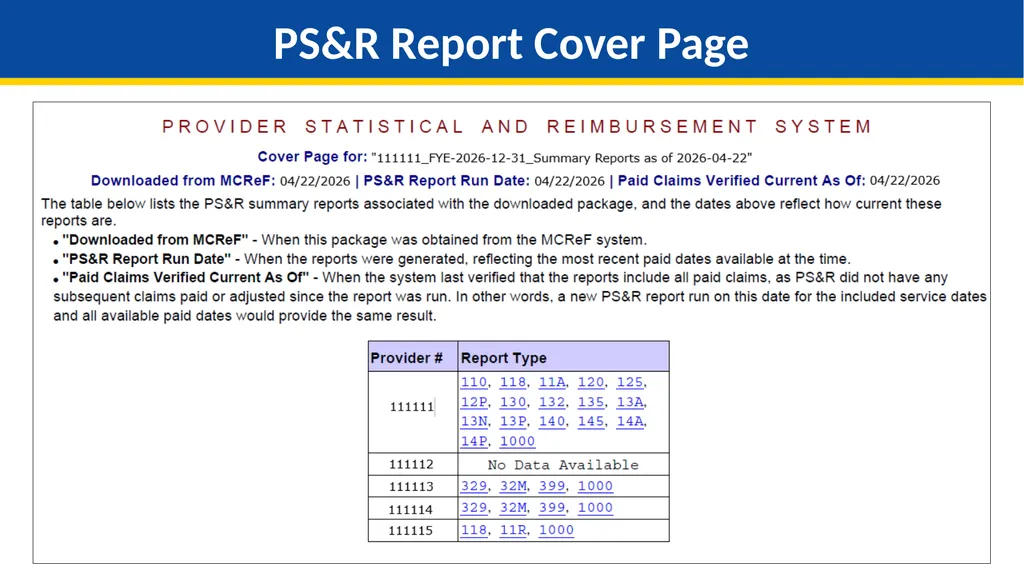
21
21 PS&R Report Cover Page<br>
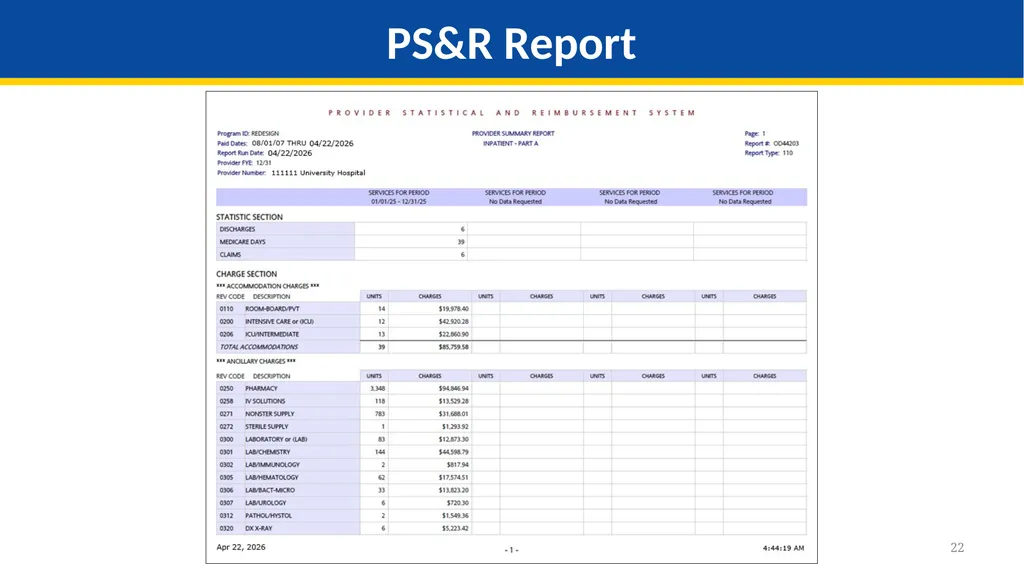
22
22 PS&R Report<br>
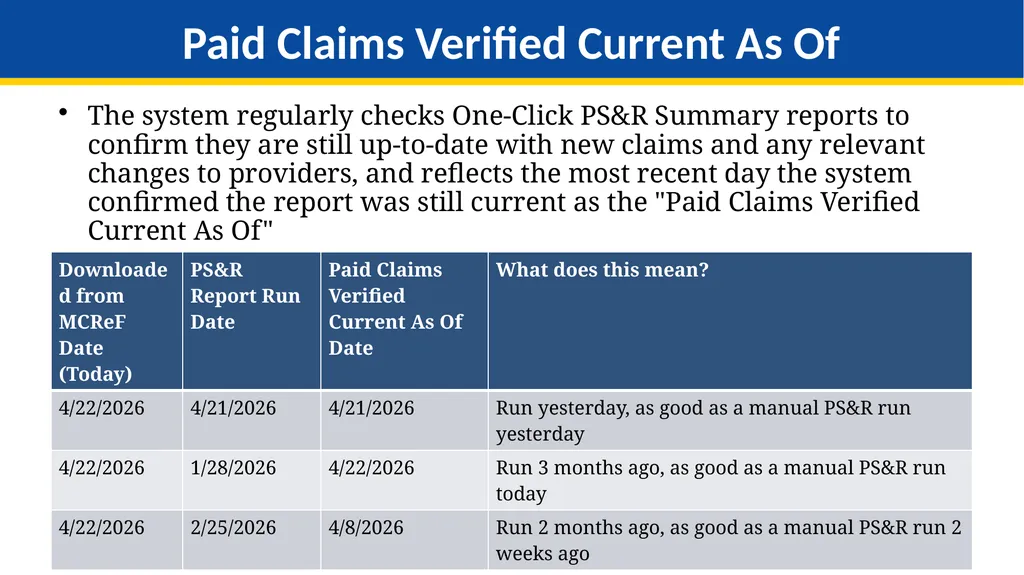
23
23 The system regularly checks One-Click PS&R Summary reports to confirm they are still up-to-date with new claims and any relevant changes to providers, and reflects the most recent day the system confirmed the report was still current as the "Paid Claims Verified Current As Of"
Bottom-line: The Paid Claims Verified Current As Of always means that the report provided is as current as a PS&R report run on that date. Paid Claims Verified Current As Of<br>
Bottom-line: The Paid Claims Verified Current As Of always means that the report provided is as current as a PS&R report run on that date. Paid Claims Verified Current As Of<br>
24
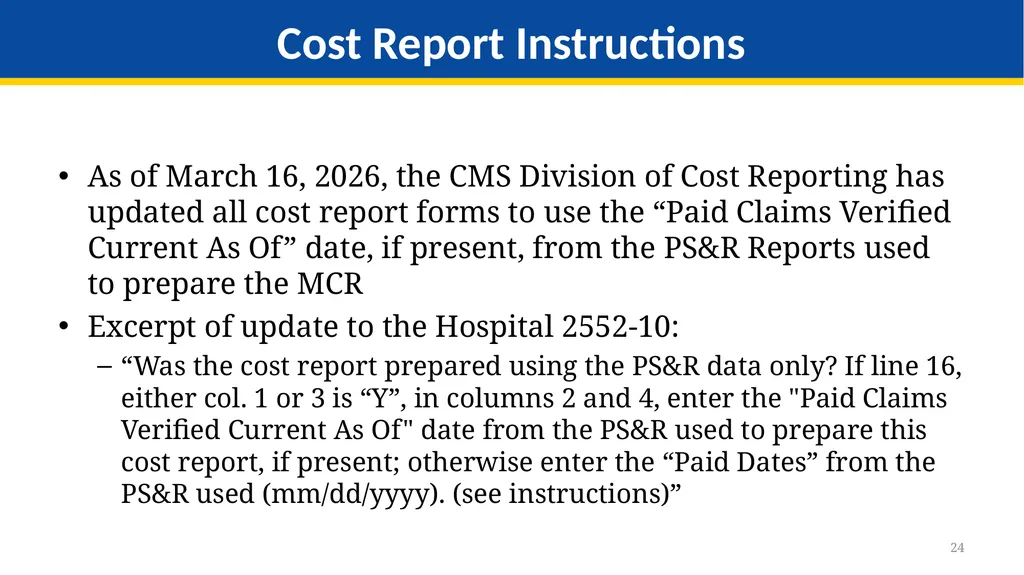
24 As of March 16, 2026, the CMS Division of Cost Reporting has updated all cost report forms to use the “Paid Claims Verified Current As Of” date, if present, from the PS&R Reports used to prepare the MCR
Excerpt of update to the Hospital 2552-10:
“Was the cost report prepared using the PS&R data only? If line 16, either col. 1 or 3 is “Y”, in columns 2 and 4, enter the "Paid Claims Verified Current As Of" date from the PS&R used to prepare this cost report, if present; otherwise enter the “Paid Dates” from the PS&R used (mm/dd/yyyy). (see instructions)” Cost Report Instructions<br>
Excerpt of update to the Hospital 2552-10:
“Was the cost report prepared using the PS&R data only? If line 16, either col. 1 or 3 is “Y”, in columns 2 and 4, enter the "Paid Claims Verified Current As Of" date from the PS&R used to prepare this cost report, if present; otherwise enter the “Paid Dates” from the PS&R used (mm/dd/yyyy). (see instructions)” Cost Report Instructions<br>
25
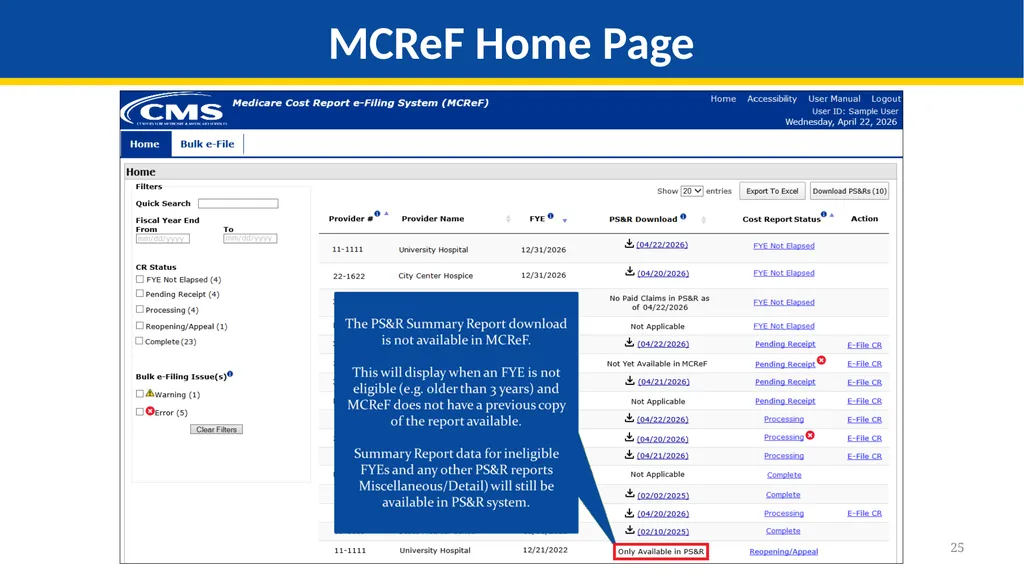
25 MCReF Home Page<br>
26
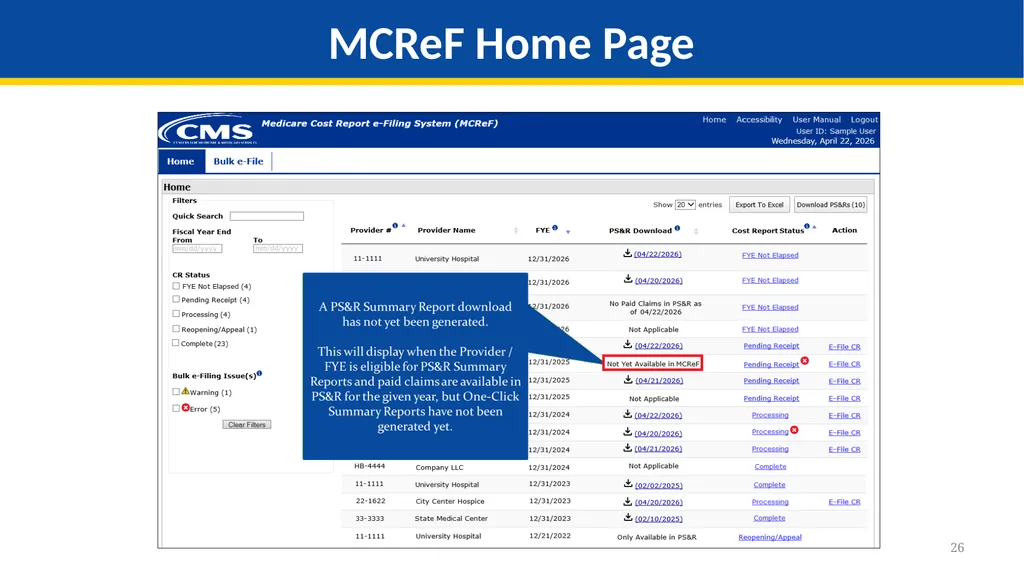
26 MCReF Home Page<br>
27
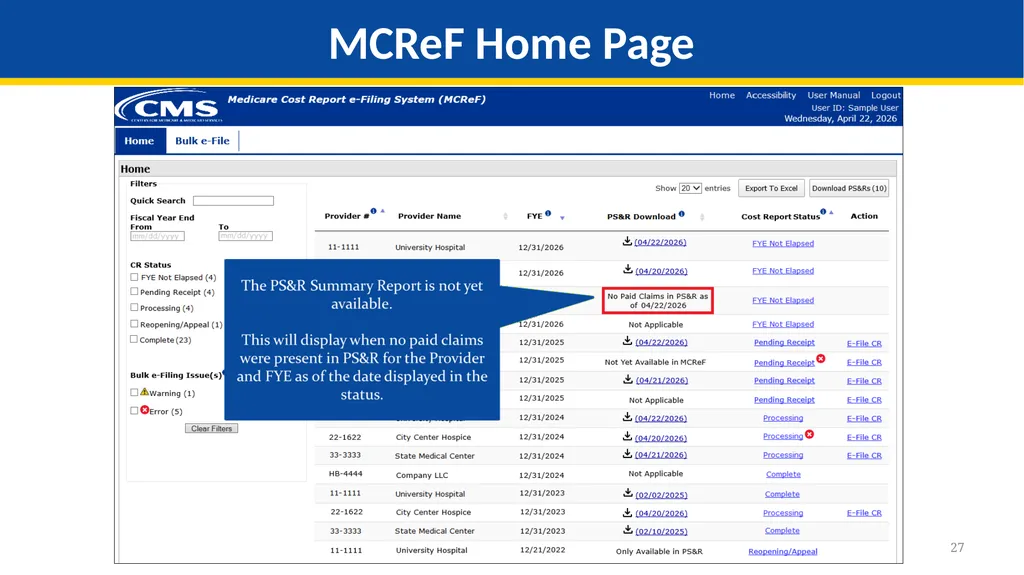
27 MCReF Home Page<br>
28
28 MCReF Home Page<br>
29
29 Available now!
Easy, fast, fresh, and ready for your cost report One-Click PS&R Summary Report Download<br>
Easy, fast, fresh, and ready for your cost report One-Click PS&R Summary Report Download<br>
30
Hospice Cap Dashboard<br>
31
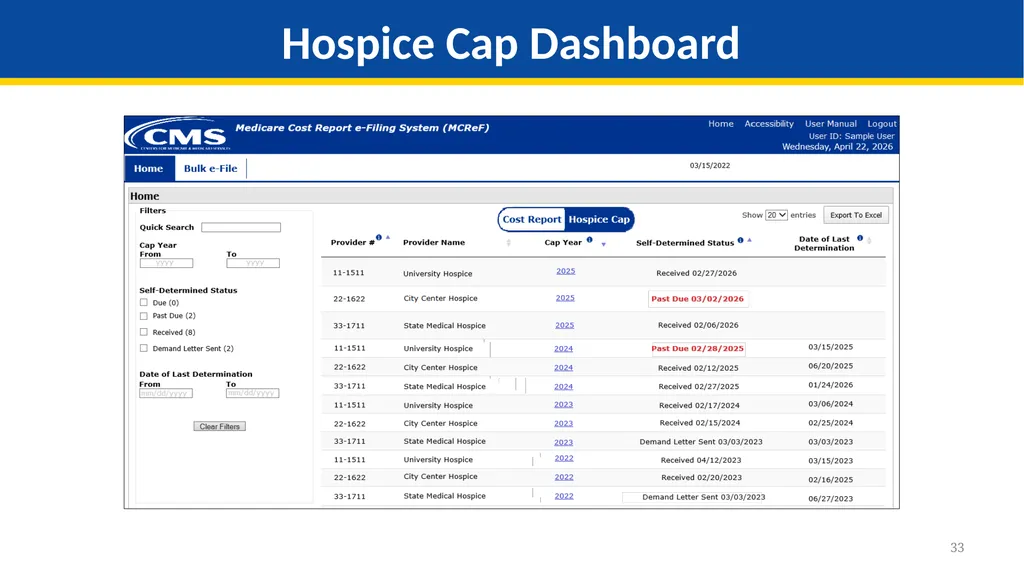
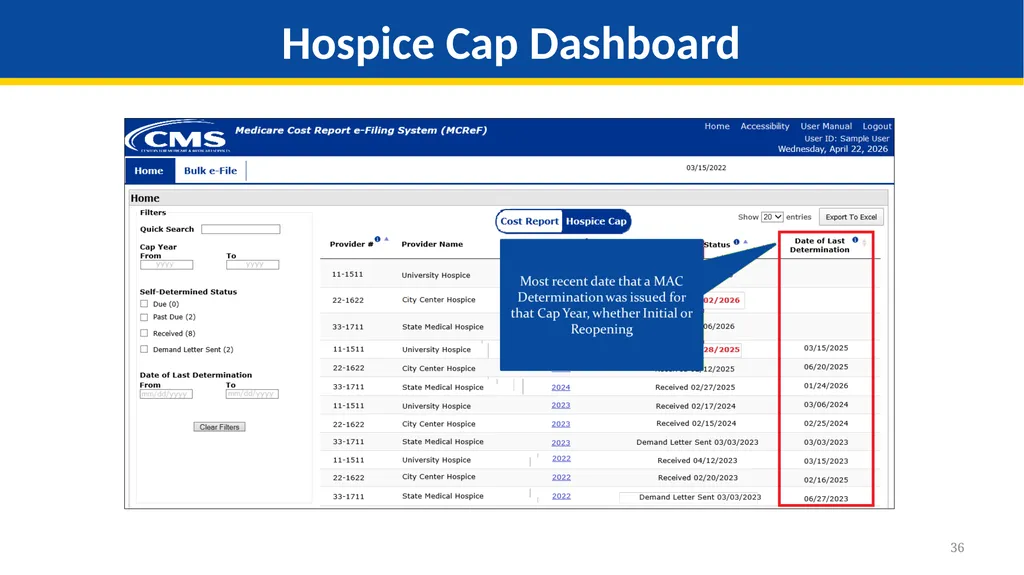
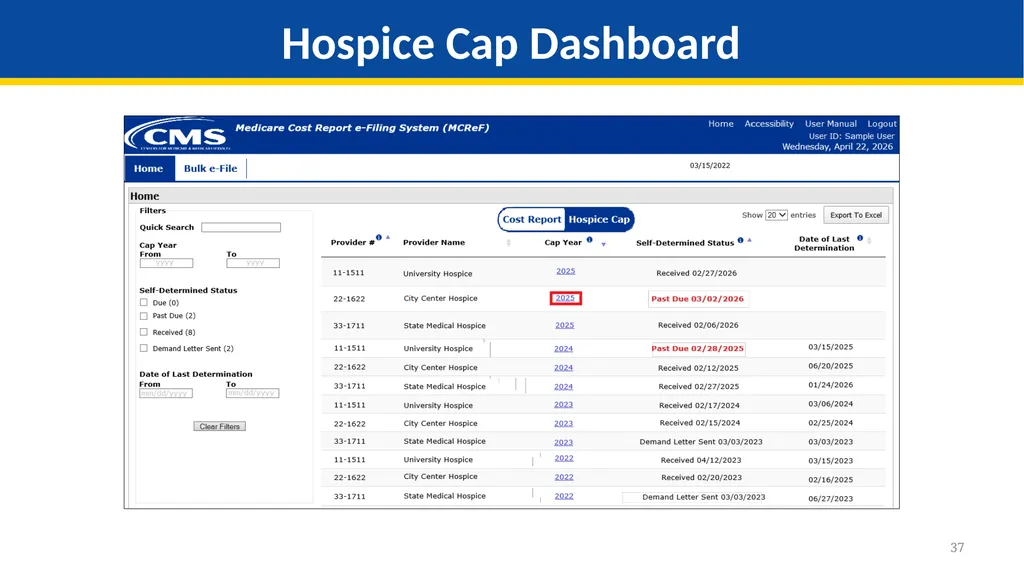
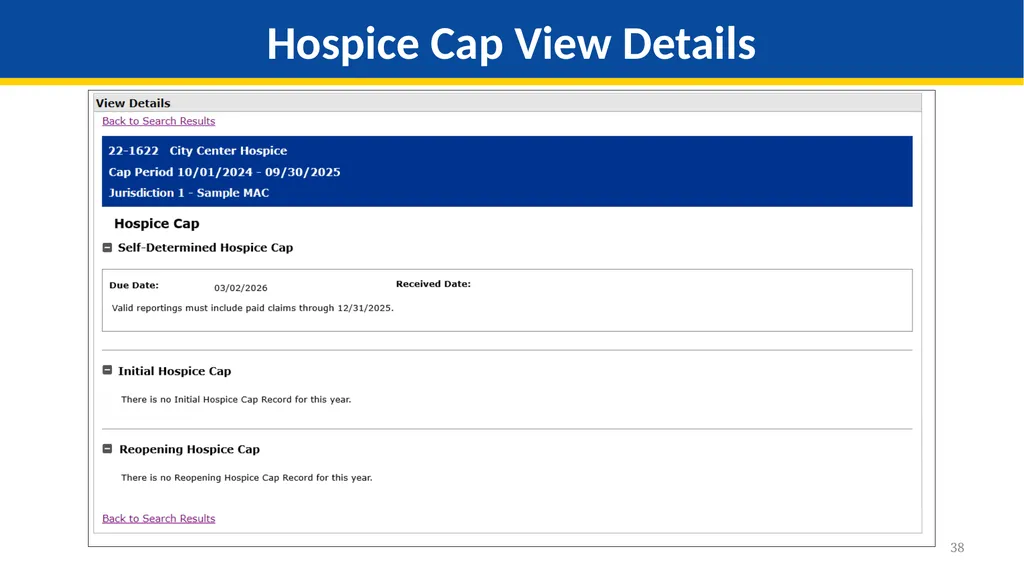
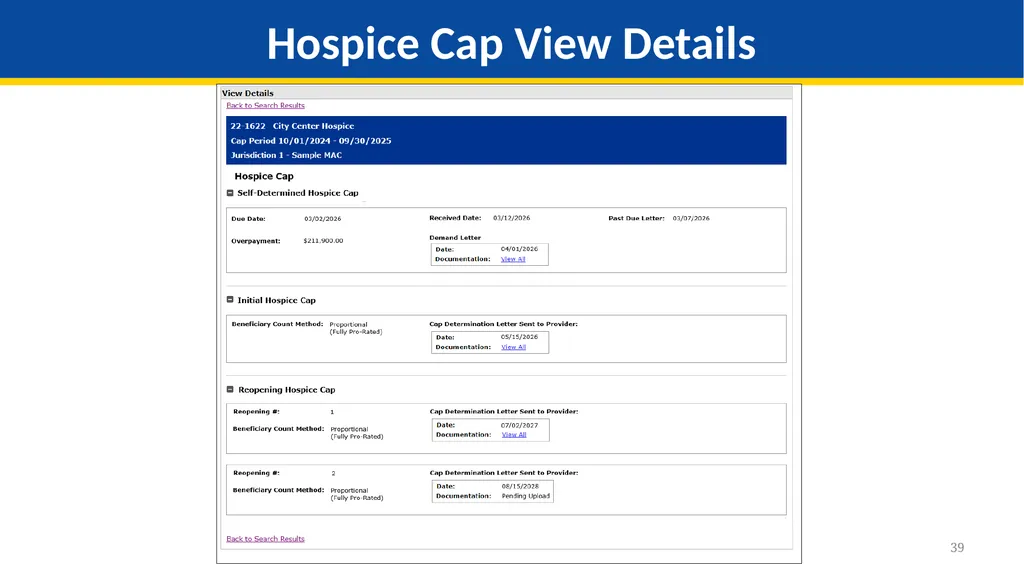
31 Goal: Expand MCReF functionality for users with access to Hospice Providers
The Hospice Cap dashboard allow Hospice Providers to track Hospice Cap status, have a detailed view of Cap review dates, and access/download documentation for Hospice Cap Determinations. Hospice Cap Dashboard<br>
The Hospice Cap dashboard allow Hospice Providers to track Hospice Cap status, have a detailed view of Cap review dates, and access/download documentation for Hospice Cap Determinations. Hospice Cap Dashboard<br>
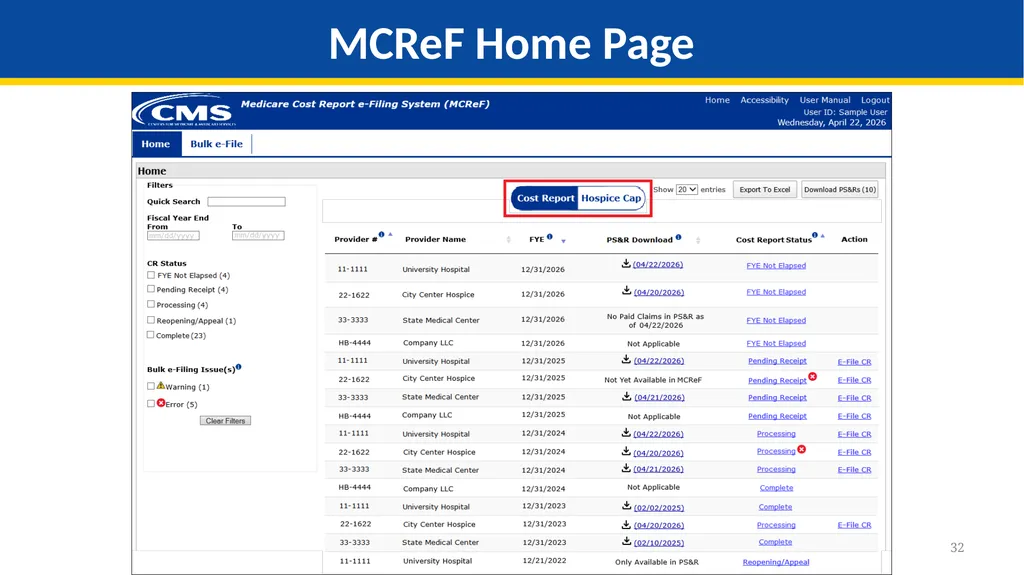
32
32 MCReF Home Page<br>
33
33 Hospice Cap Dashboard<br>
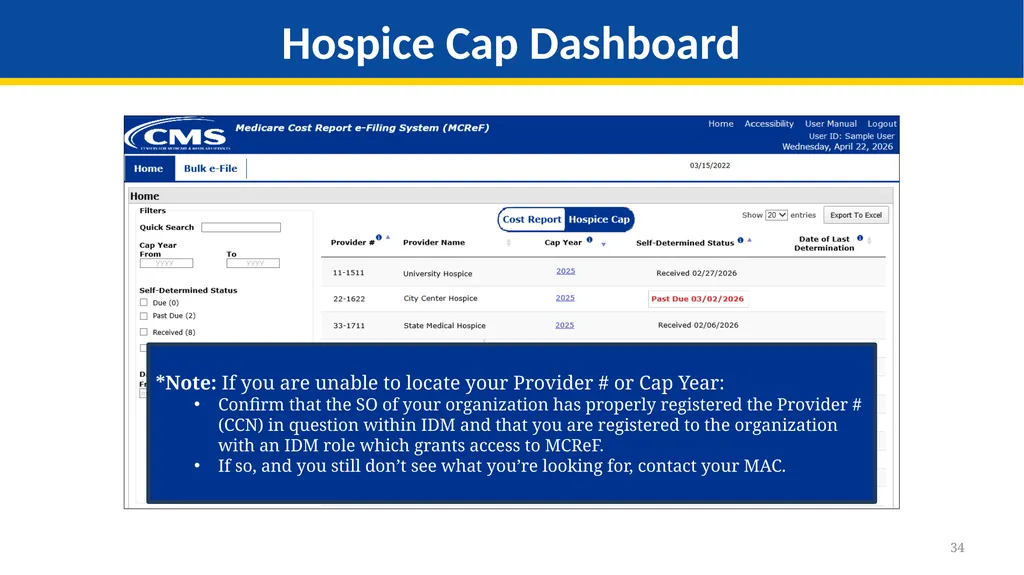
34
34 Hospice Cap Dashboard *Note: If you are unable to locate your Provider # or Cap Year:
Confirm that the SO of your organization has properly registered the Provider # (CCN) in question within IDM and that you are registered to the organization with an IDM role which grants access to MCReF.
If so, and you still don’t see what you’re looking for, contact your MAC.<br>
Confirm that the SO of your organization has properly registered the Provider # (CCN) in question within IDM and that you are registered to the organization with an IDM role which grants access to MCReF.
If so, and you still don’t see what you’re looking for, contact your MAC.<br>
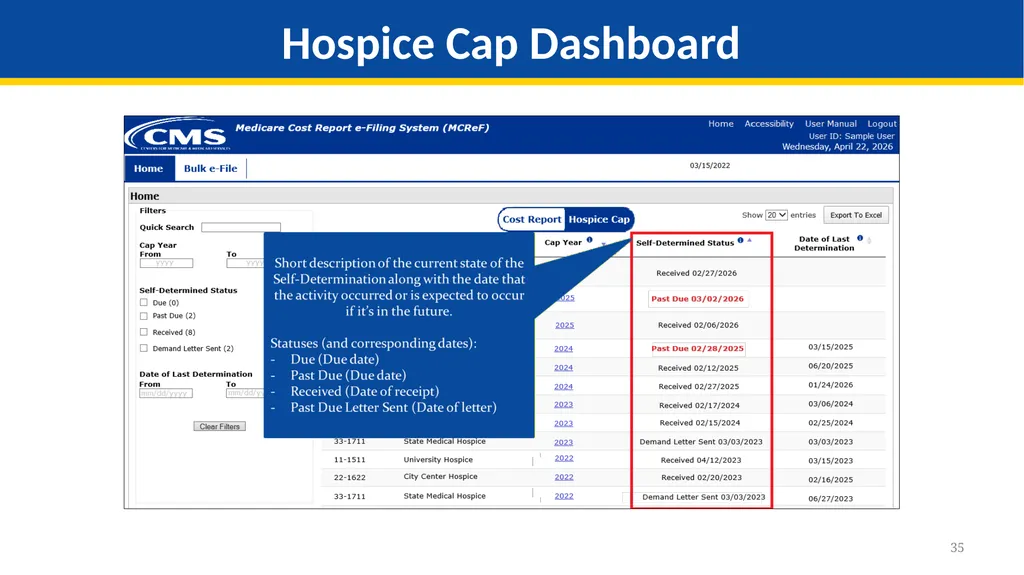
35
35 Hospice Cap Dashboard<br>
36
36 Hospice Cap Dashboard<br>
37
37 Hospice Cap Dashboard<br>
38
38 Hospice Cap View Details<br>
39
39 Hospice Cap View Details<br>
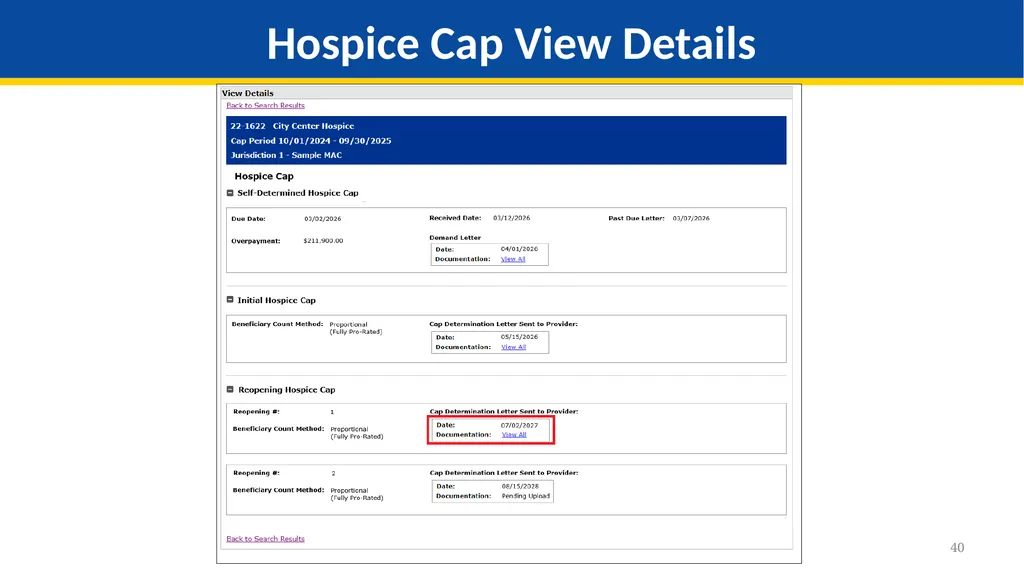
40
40 Hospice Cap View Details<br>
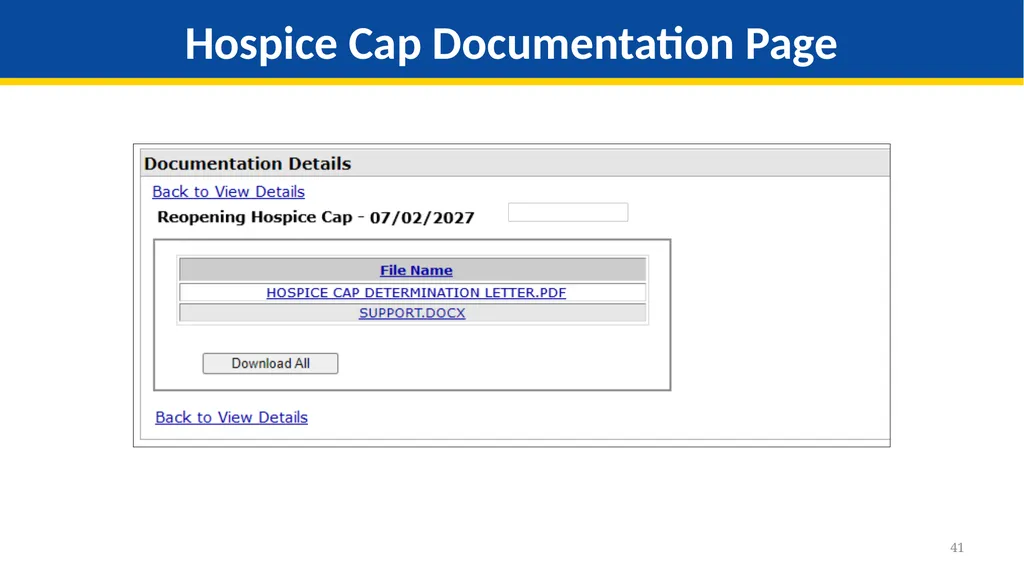
41
41 Hospice Cap Documentation Page<br>
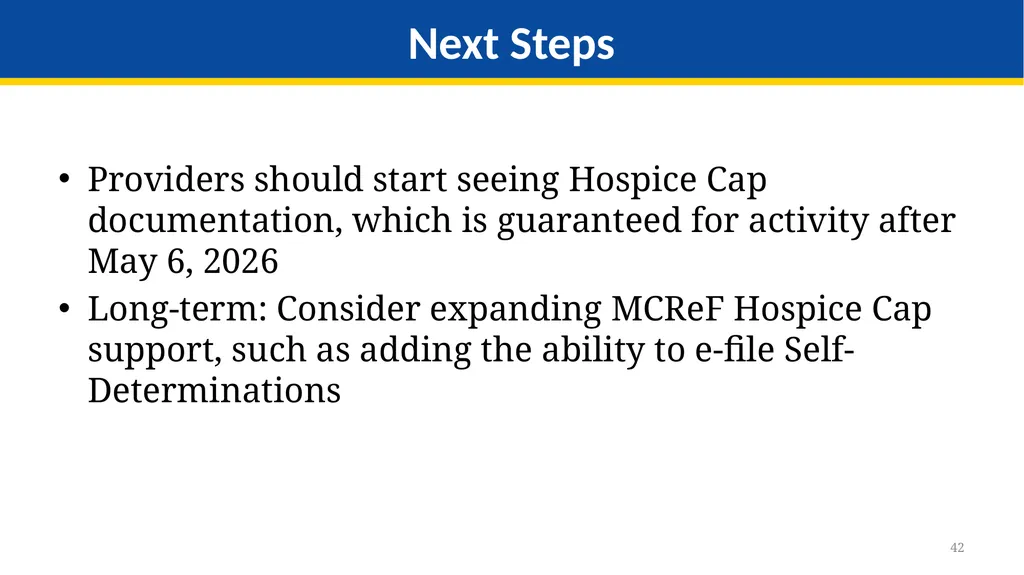
42
42 Providers should start seeing Hospice Cap documentation, which is guaranteed for activity after May 6, 2026
Long-term: Consider expanding MCReF Hospice Cap support, such as adding the ability to e-file Self-Determinations Next Steps<br>
Long-term: Consider expanding MCReF Hospice Cap support, such as adding the ability to e-file Self-Determinations Next Steps<br>
43
MCReF Individual E-File Walkthrough<br>
44
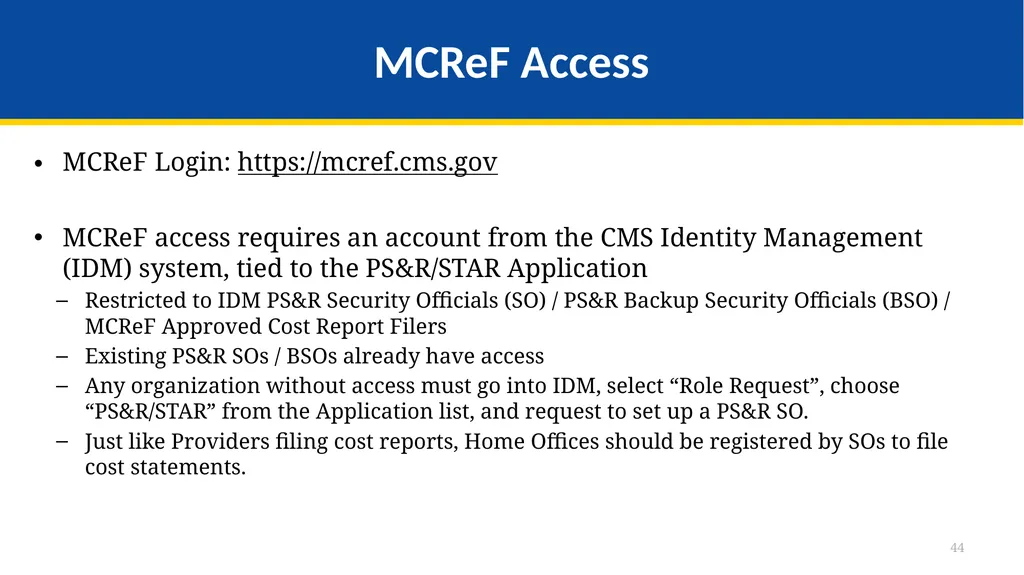
MCReF Access MCReF Login: https://mcref.cms.gov
MCReF access requires an account from the CMS Identity Management (IDM) system, tied to the PS&R/STAR Application
Restricted to IDM PS&R Security Officials (SO) / PS&R Backup Security Officials (BSO) / MCReF Approved Cost Report Filers
Existing PS&R SOs / BSOs already have access
Any organization without access must go into IDM, select “Role Request”, choose “PS&R/STAR” from the Application list, and request to set up a PS&R SO.
Just like Providers filing cost reports, Home Offices should be registered by SOs to file cost statements. 44<br>
MCReF access requires an account from the CMS Identity Management (IDM) system, tied to the PS&R/STAR Application
Restricted to IDM PS&R Security Officials (SO) / PS&R Backup Security Officials (BSO) / MCReF Approved Cost Report Filers
Existing PS&R SOs / BSOs already have access
Any organization without access must go into IDM, select “Role Request”, choose “PS&R/STAR” from the Application list, and request to set up a PS&R SO.
Just like Providers filing cost reports, Home Offices should be registered by SOs to file cost statements. 44<br>
45
IDM Tips and Updates To use MCReF, keep your IDM account in good-standing.
Includes password updates or signing into your account every 60 days to keep it active.
Timely replacement of SOs and setting up (or requesting to be) a Backup Security Official to simplify transitions.
If you are an SO, make sure to recertify your users annually to ensure they keep their access.
IDM credential issues are not a valid reason for late MCR filing.
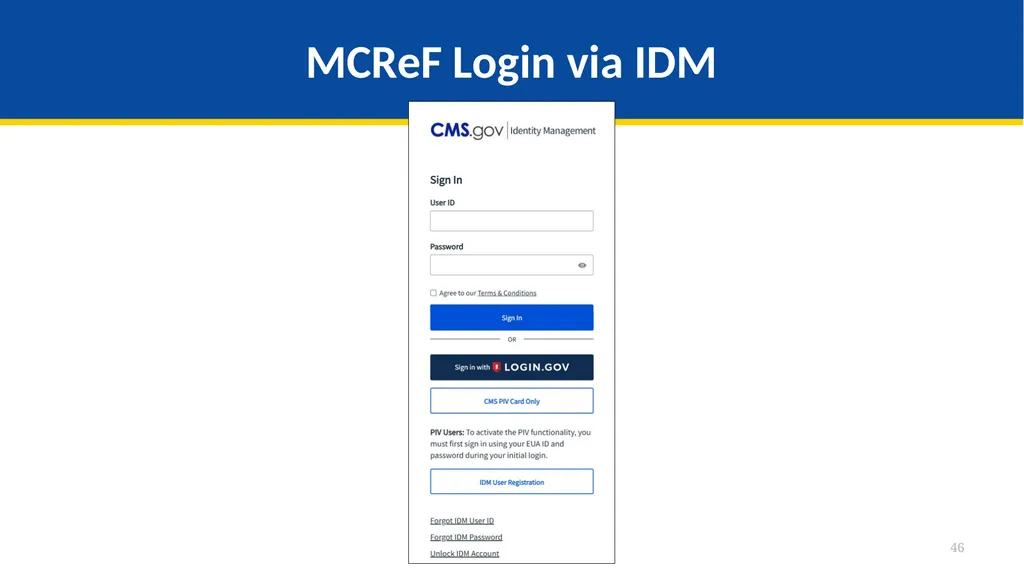
As of December 2025, IDM now supports Login.gov accounts
If you’re signing up for the first time, you can choose to use a pre-existing Login.gov account or set one up rather than creating a new IDM account
Note: With a Login.gov account established, the same IDM processes are still used to obtain roles and approvals, but you may find it easier to maintain and keep track of your Login.gov account
If you already have both an IDM and a Login.gov account, you’ll eventually be able to merge them and just maintain your Login.gov credentials going forward
For help with any IDM/account issues, contact the PS&R/MCReF IDM support desk:
If you need assistance identifying the SO of your organization, reach out to the support desk and have the organization’s TIN (Tax Identification Number) handy 45<br>
Includes password updates or signing into your account every 60 days to keep it active.
Timely replacement of SOs and setting up (or requesting to be) a Backup Security Official to simplify transitions.
If you are an SO, make sure to recertify your users annually to ensure they keep their access.
IDM credential issues are not a valid reason for late MCR filing.
As of December 2025, IDM now supports Login.gov accounts
If you’re signing up for the first time, you can choose to use a pre-existing Login.gov account or set one up rather than creating a new IDM account
Note: With a Login.gov account established, the same IDM processes are still used to obtain roles and approvals, but you may find it easier to maintain and keep track of your Login.gov account
If you already have both an IDM and a Login.gov account, you’ll eventually be able to merge them and just maintain your Login.gov credentials going forward
For help with any IDM/account issues, contact the PS&R/MCReF IDM support desk:
If you need assistance identifying the SO of your organization, reach out to the support desk and have the organization’s TIN (Tax Identification Number) handy 45<br>
46
MCReF Login via IDM 46<br>
47
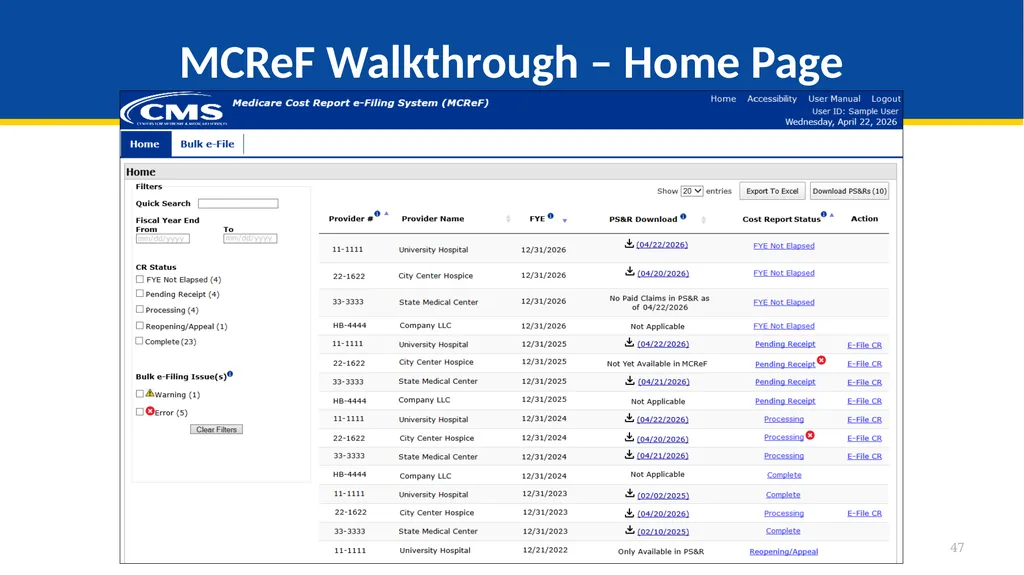
MCReF Walkthrough – Home Page 47<br>
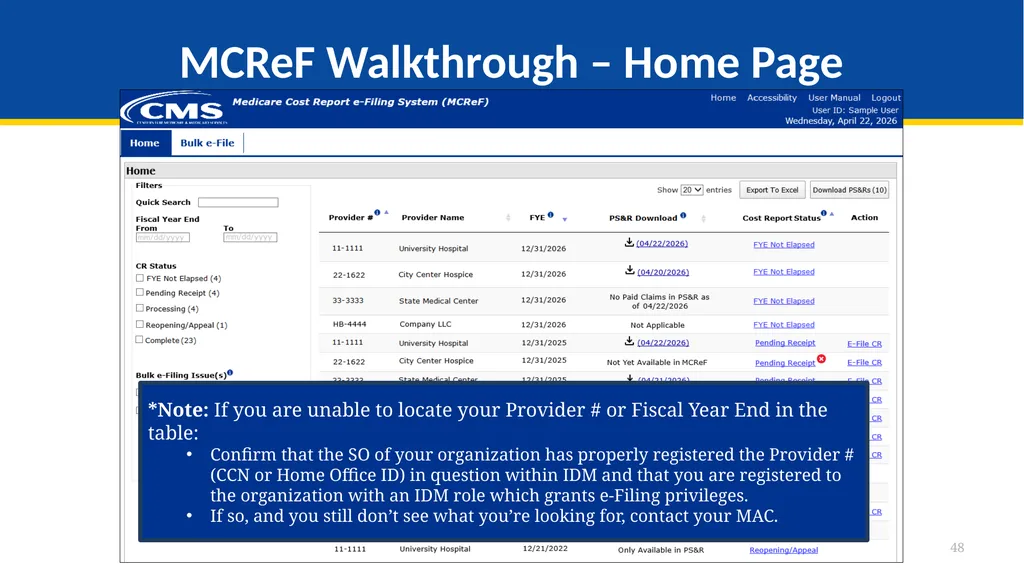
48
MCReF Walkthrough – Home Page 48 *Note: If you are unable to locate your Provider # or Fiscal Year End in the table:
Confirm that the SO of your organization has properly registered the Provider # (CCN or Home Office ID) in question within IDM and that you are registered to the organization with an IDM role which grants e-Filing privileges.
If so, and you still don’t see what you’re looking for, contact your MAC.<br>
Confirm that the SO of your organization has properly registered the Provider # (CCN or Home Office ID) in question within IDM and that you are registered to the organization with an IDM role which grants e-Filing privileges.
If so, and you still don’t see what you’re looking for, contact your MAC.<br>
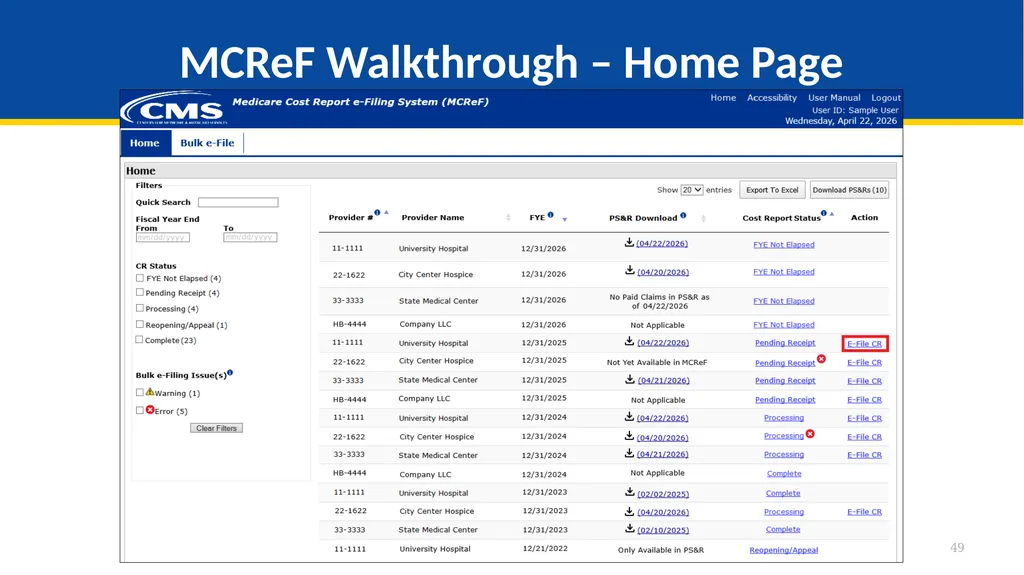
49
MCReF Walkthrough – Home Page 49<br>
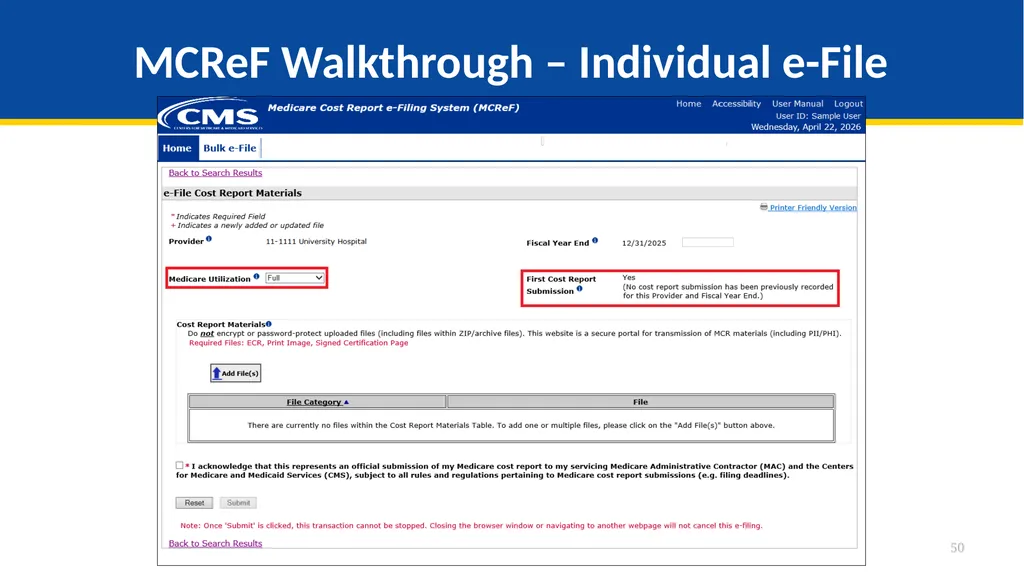
50
MCReF Walkthrough – Individual e-File 50<br>
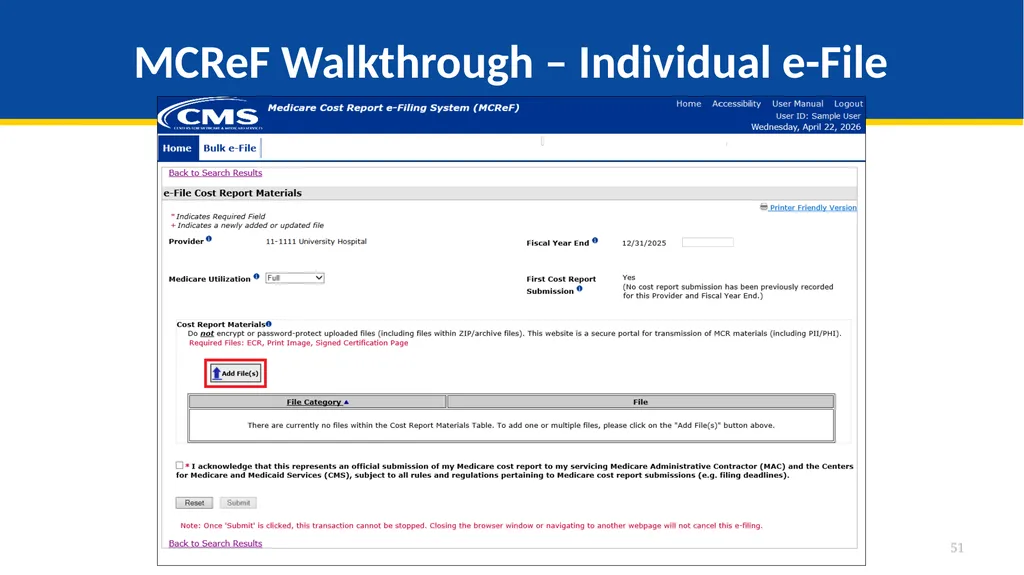
51
MCReF Walkthrough – Individual e-File 51<br>
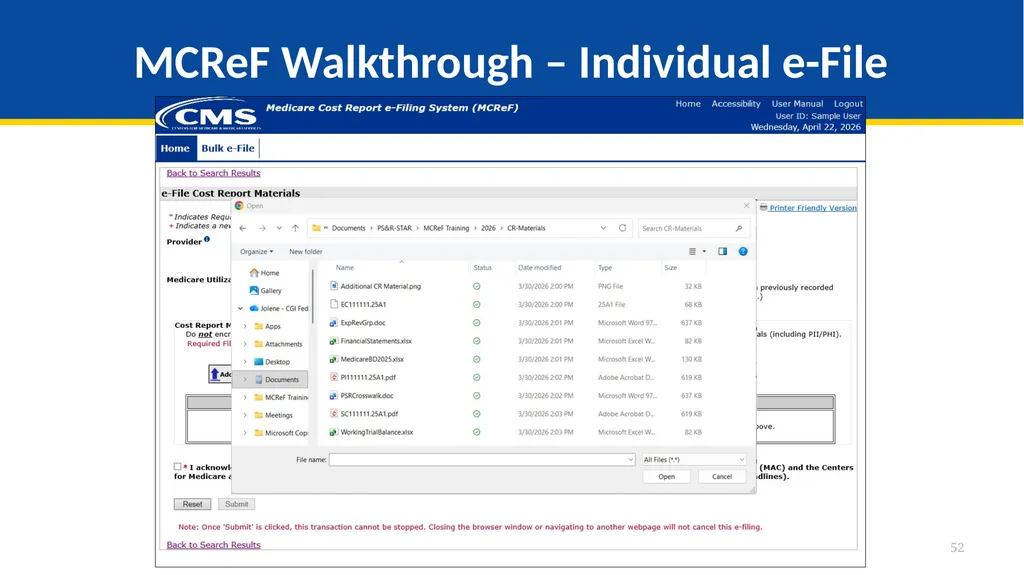
52
MCReF Walkthrough – Individual e-File 52<br>
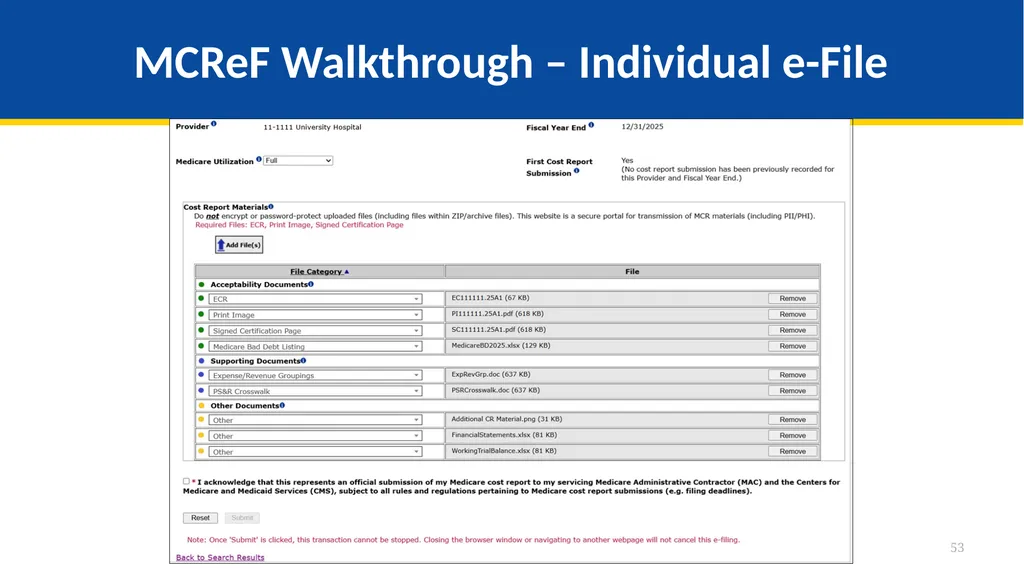
53
MCReF Walkthrough – Individual e-File 53<br>
54
Support for Electronic
Medicare Cost Report Exhibits CMS has completed their initiative to create standardized, electronic versions of the Medicare Bad Debt Listing, Medicaid Eligible Days, Charity Care Charges, and Total Bad Debt exhibits, they are now fully available for use, and MCReF is setup to receive and process them
The aim of this initiative is to accelerate cost report settlement
Adoption of these electronic versions is optional
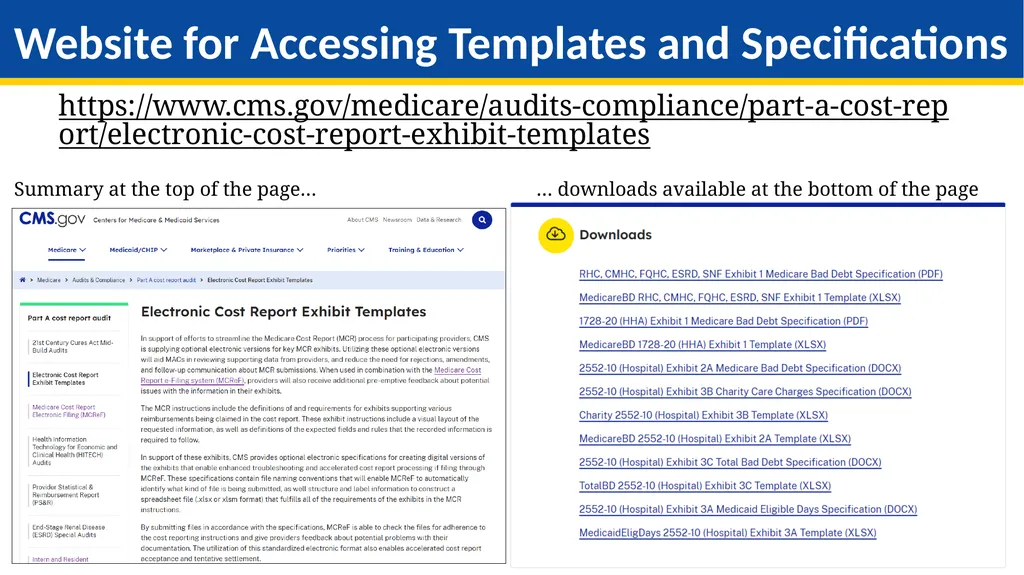
The specifications for how to create the electronic exhibits and pre-made templates have been posted online (see URL on next slide)
If you use a vendor, consultant, or internal IT system for creating your exhibit listings, ask them about accelerating your cost report acceptance via the new electronic exhibits 54<br>
The aim of this initiative is to accelerate cost report settlement
Adoption of these electronic versions is optional
The specifications for how to create the electronic exhibits and pre-made templates have been posted online (see URL on next slide)
If you use a vendor, consultant, or internal IT system for creating your exhibit listings, ask them about accelerating your cost report acceptance via the new electronic exhibits 54<br>
55
55 https://www.cms.gov/medicare/audits-compliance/part-a-cost-report/electronic-cost-report-exhibit-templates Website for Accessing Templates and Specifications Summary at the top of the page… … downloads available at the bottom of the page<br>
56
Support for Electronic
Medicare Cost Report Exhibits Benefits of following electronic specifications:
Upfront, live notice of potential issues with your exhibits if filing through MCReF (which, if addressed, minimizes back-and-forth with your MAC)
Accelerated cost report acceptance and tentative settlement
With potential for instant acceptance if filing through MCReF 56<br>
Upfront, live notice of potential issues with your exhibits if filing through MCReF (which, if addressed, minimizes back-and-forth with your MAC)
Accelerated cost report acceptance and tentative settlement
With potential for instant acceptance if filing through MCReF 56<br>
57
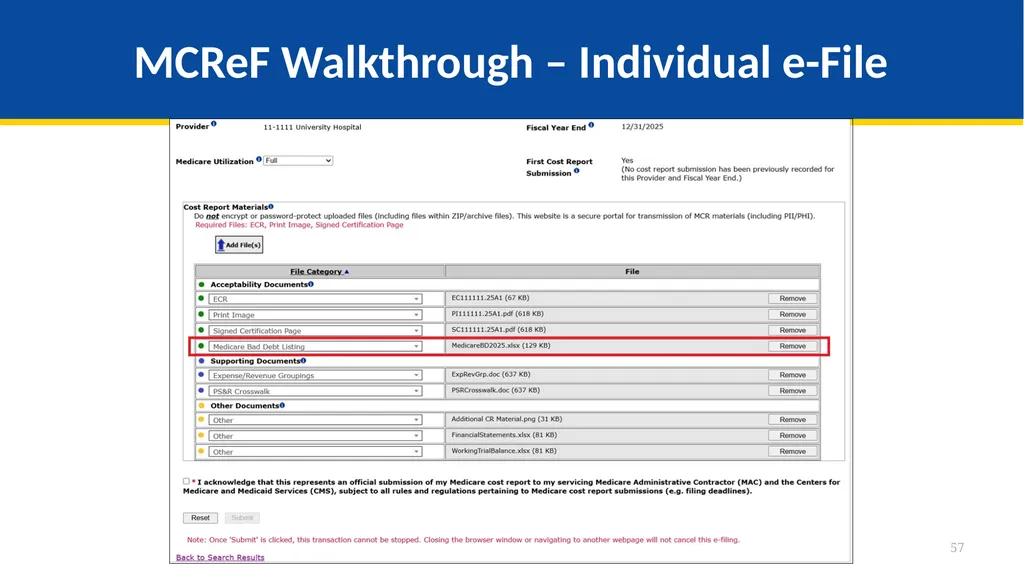
MCReF Walkthrough – Individual e-File 57<br>
58
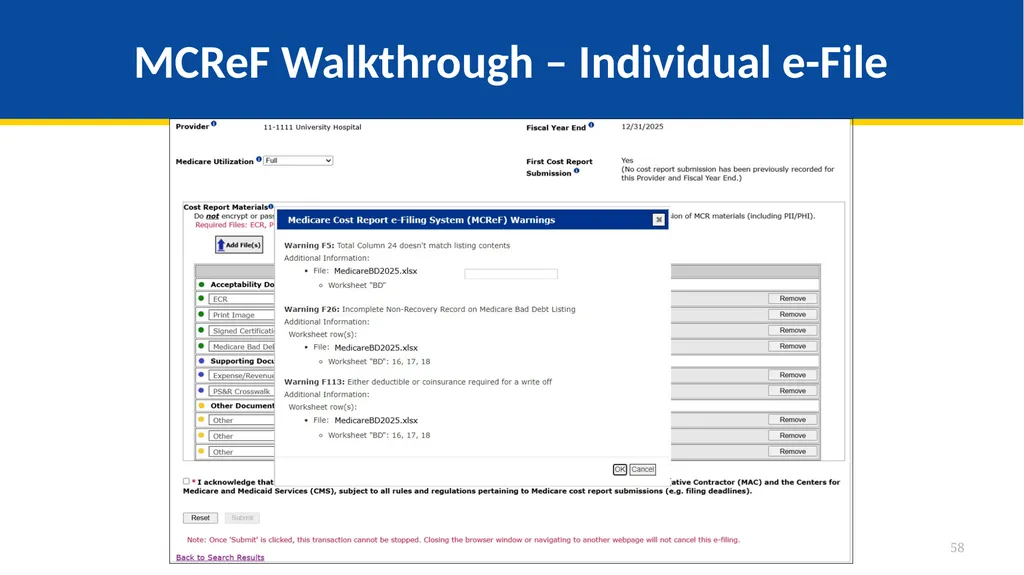
MCReF Walkthrough – Individual e-File 58<br>
59
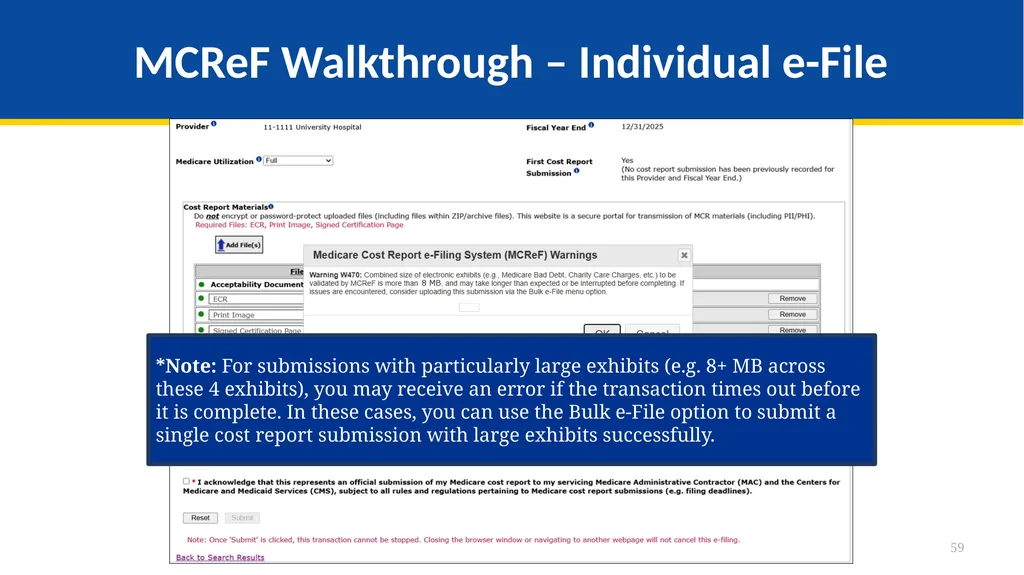
MCReF Walkthrough – Individual e-File 59 *Note: For submissions with particularly large exhibits (e.g. 8+ MB across these 4 exhibits), you may receive an error if the transaction times out before it is complete. In these cases, you can use the Bulk e-File option to submit a single cost report submission with large exhibits successfully.<br>
60
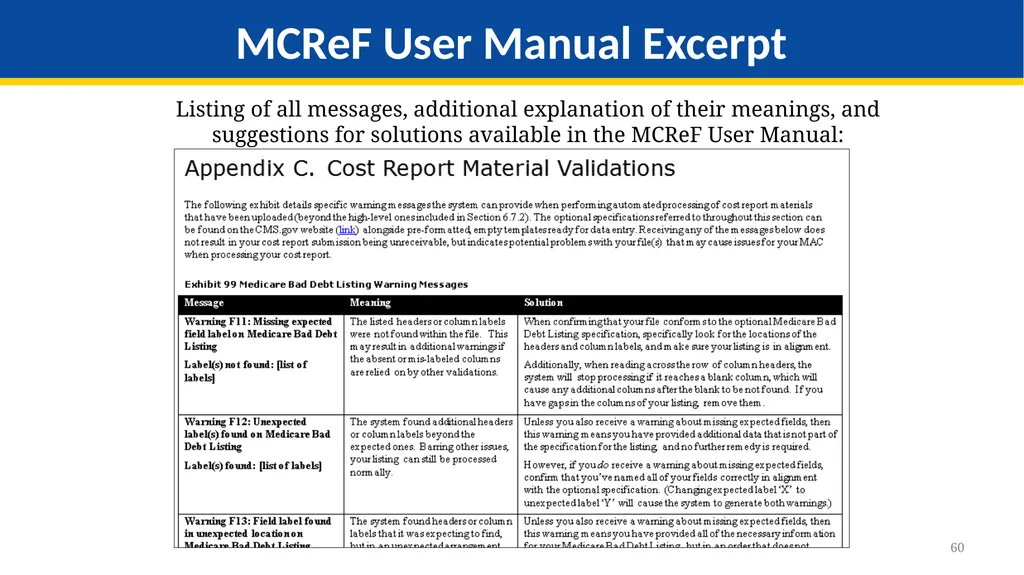
60 Listing of all messages, additional explanation of their meanings, and suggestions for solutions available in the MCReF User Manual: MCReF User Manual Excerpt<br>
61
MCReF Bulk E-File Walkthrough<br>
62
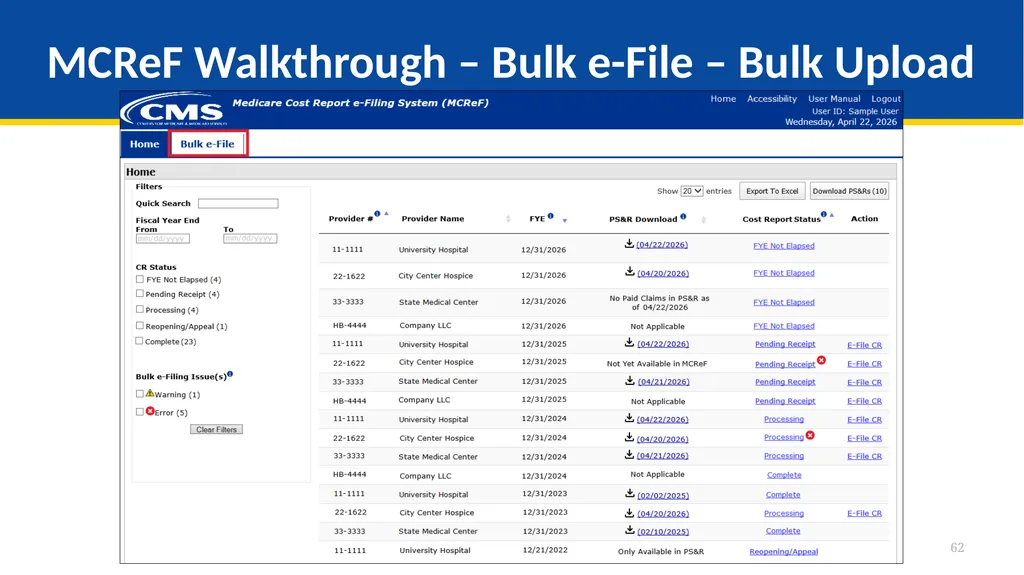
MCReF Walkthrough – Bulk e-File – Bulk Upload 62<br>
63
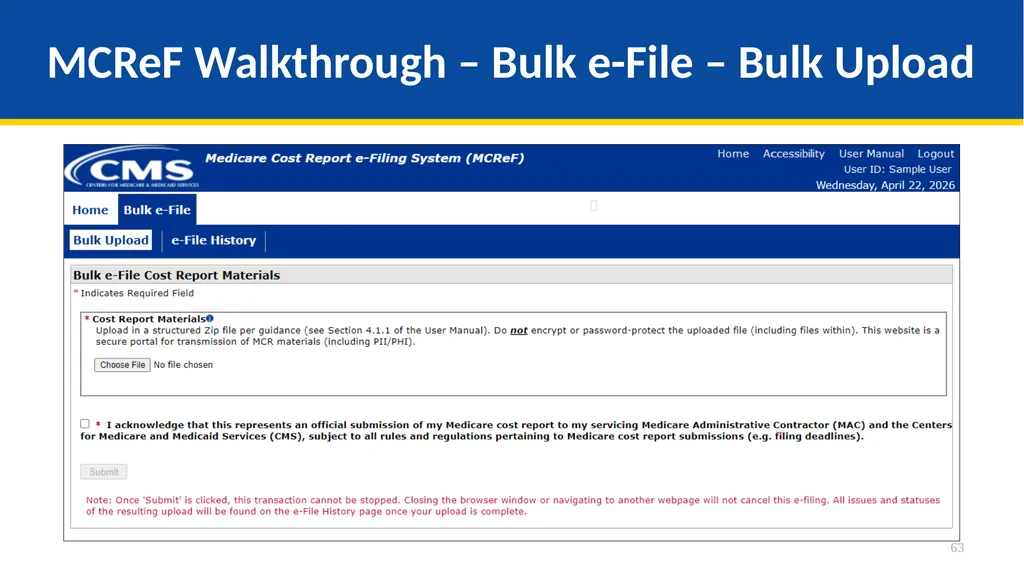
MCReF Walkthrough – Bulk e-File – Bulk Upload 63<br>
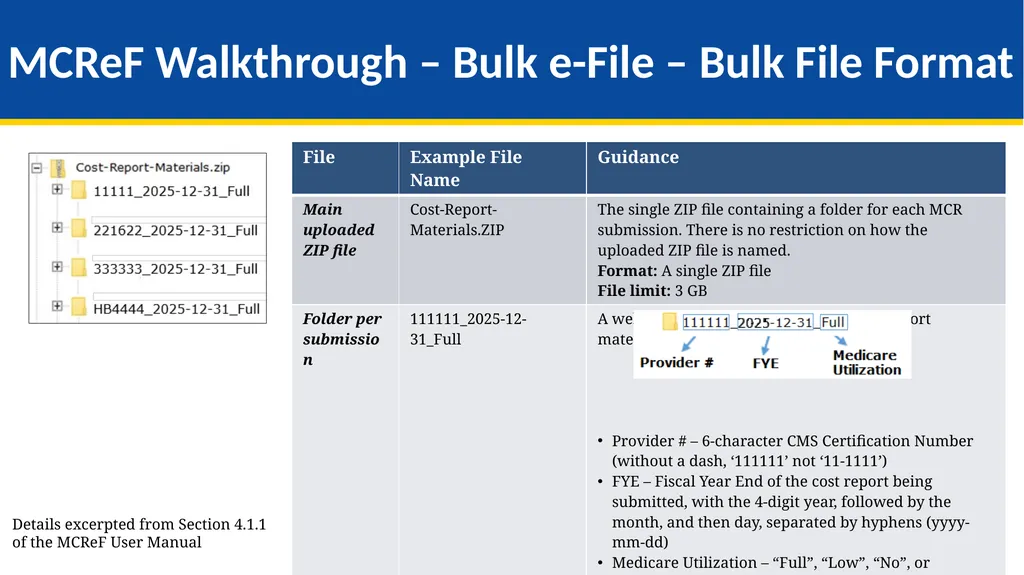
64
MCReF Walkthrough – Bulk e-File – Bulk File Format 64 Details excerpted from Section 4.1.1 of the MCReF User Manual<br>
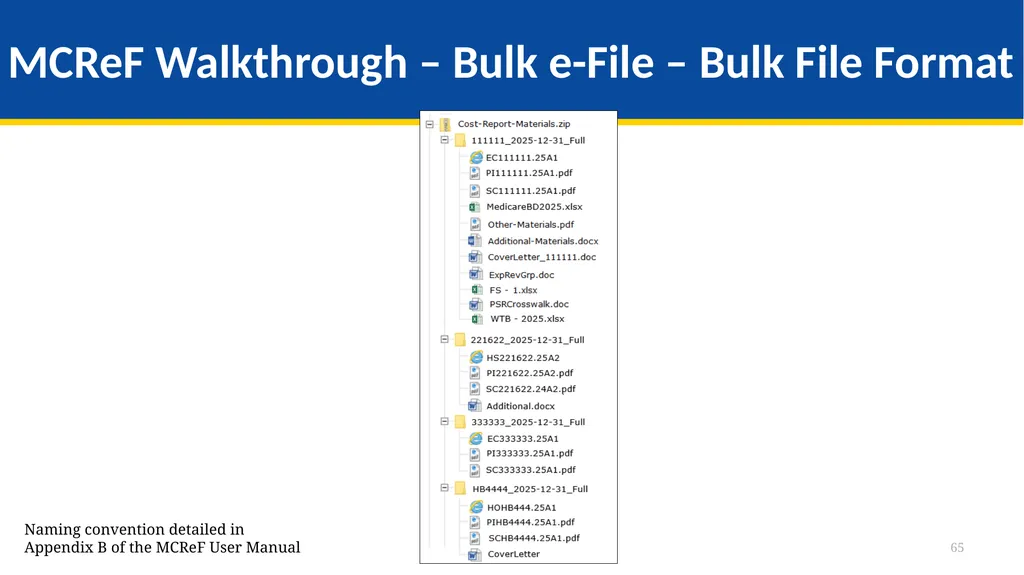
65
MCReF Walkthrough – Bulk e-File – Bulk File Format 65 Naming convention detailed in Appendix B of the MCReF User Manual<br>
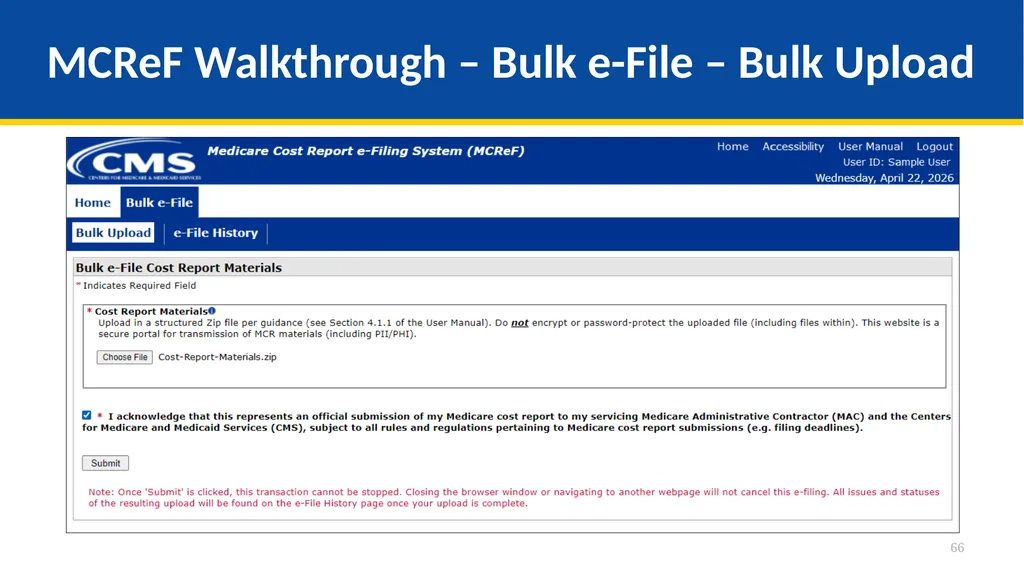
66
MCReF Walkthrough – Bulk e-File – Bulk Upload 66<br>
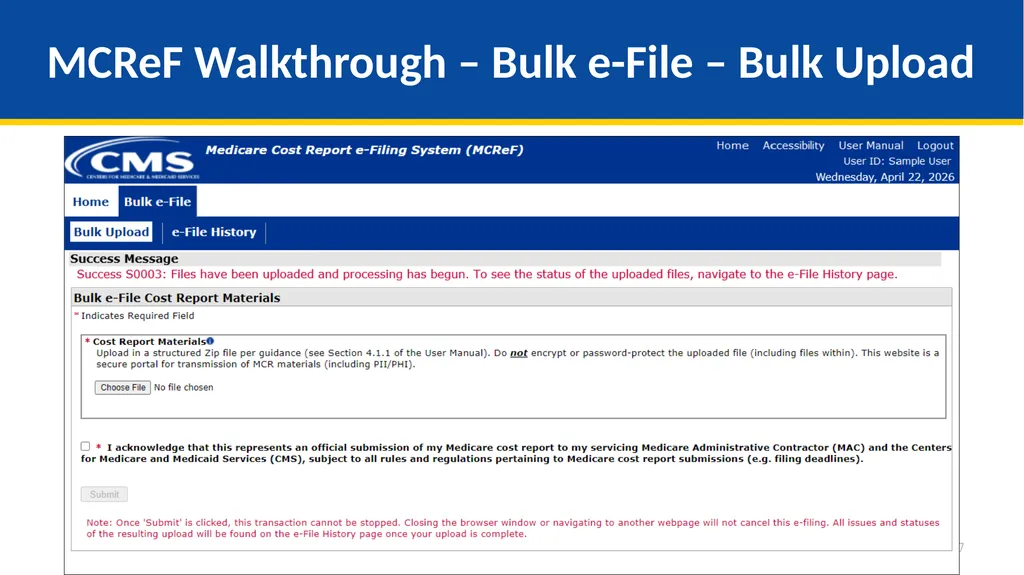
67
MCReF Walkthrough – Bulk e-File – Bulk Upload 67<br>
68
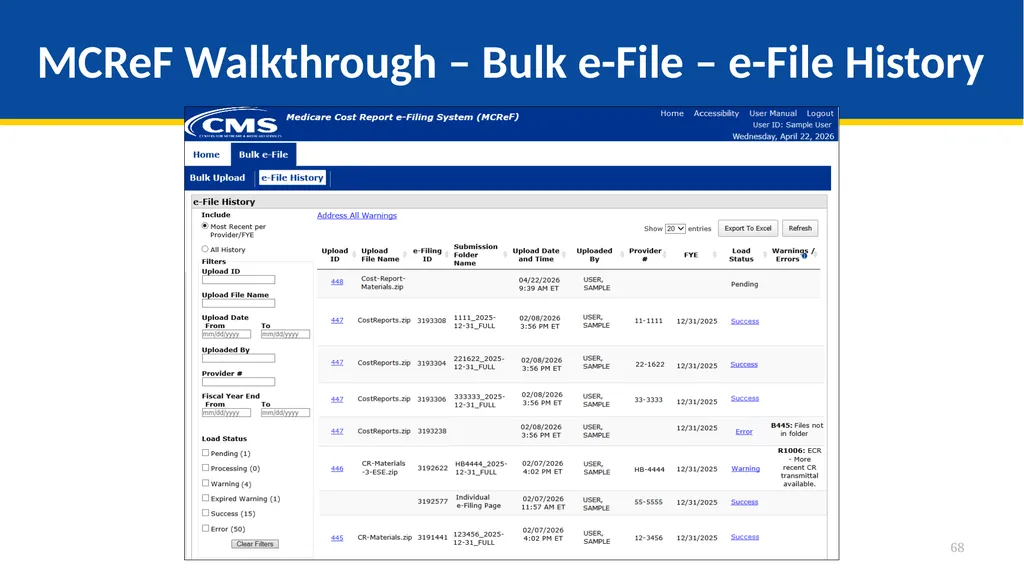
MCReF Walkthrough – Bulk e-File – e-File History 68<br>
69
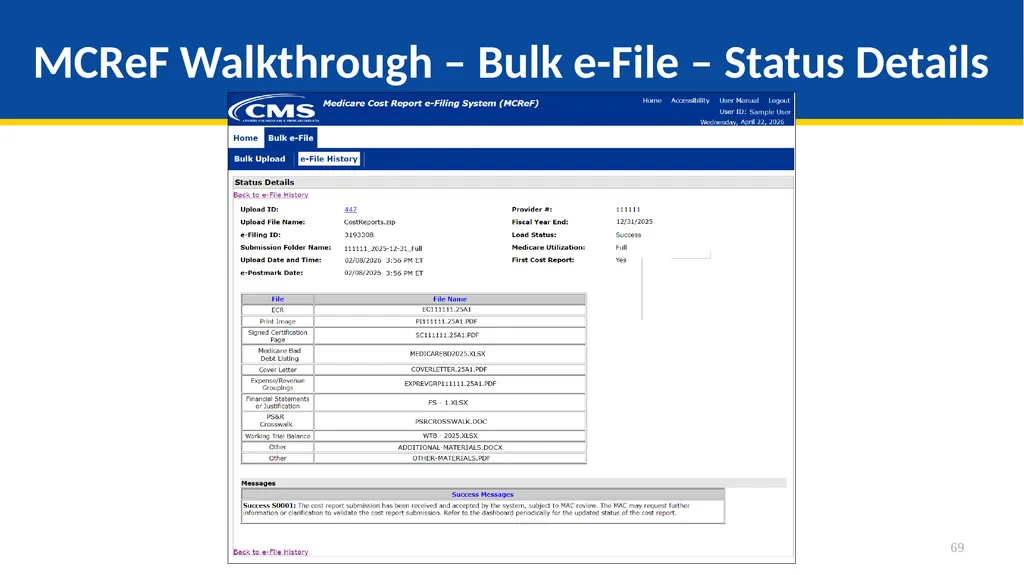
MCReF Walkthrough – Bulk e-File – Status Details 69<br>
70
Updates and General Reminders<br>
71
E-Filing Updates With the introduction of the 287-22 Cost Statement, Home Office e-filings for FYBs on or after 10/01/2022 have an electronic format which supports e-signature and can be fully e-filed in MCReF (no need to mail in anything if e-filed and e-signed)
The ‘HO’ electronic cost statement file would be placed in the ECR file slot, just like a cost report ECR file
Size limit increases as a result of user feedback:
The IRIS file size limit increased to 50MB
The general size limit increased for single cost report submissions to 1GB and for bulk submissions to 3GB 71<br>
The ‘HO’ electronic cost statement file would be placed in the ECR file slot, just like a cost report ECR file
Size limit increases as a result of user feedback:
The IRIS file size limit increased to 50MB
The general size limit increased for single cost report submissions to 1GB and for bulk submissions to 3GB 71<br>
72
MCReF General Reminders You will receive errors if your submission contains fundamental problems that prevent the system from processing it
Providers will not receive an extension for system issues preventing e-Filing
These must be resolved for the submission to be received by the MAC
You will be warned if:
MCR submission is late
You try to upload an MCR generated with outdated software
There are any potentially missing documents in CR materials
There are any potential issues with the electronic exhibits
Rare – If you receive a browser “time out” error:
If your attachments are stored on a shared or network drive, try downloading them first, and then uploading to MCReF
If you are doing an Individual e-Filing, try the Bulk e-File option instead 72<br>
Providers will not receive an extension for system issues preventing e-Filing
These must be resolved for the submission to be received by the MAC
You will be warned if:
MCR submission is late
You try to upload an MCR generated with outdated software
There are any potentially missing documents in CR materials
There are any potential issues with the electronic exhibits
Rare – If you receive a browser “time out” error:
If your attachments are stored on a shared or network drive, try downloading them first, and then uploading to MCReF
If you are doing an Individual e-Filing, try the Bulk e-File option instead 72<br>
73
MCReF General Reminders Timely receipt of the cost report will be measured based on 11:59 PM ET for the provider’s cost report due date
Files uploaded are not to be encrypted or password protected. MCReF is a secure portal for transmission of MCR materials (including PII/PHI)
Duplicate submissions will be rejected by the MAC; only the first MCR received by the MAC will be processed. 73<br>
Files uploaded are not to be encrypted or password protected. MCReF is a secure portal for transmission of MCR materials (including PII/PHI)
Duplicate submissions will be rejected by the MAC; only the first MCR received by the MAC will be processed. 73<br>
74
Electronic Signatures<br>
75
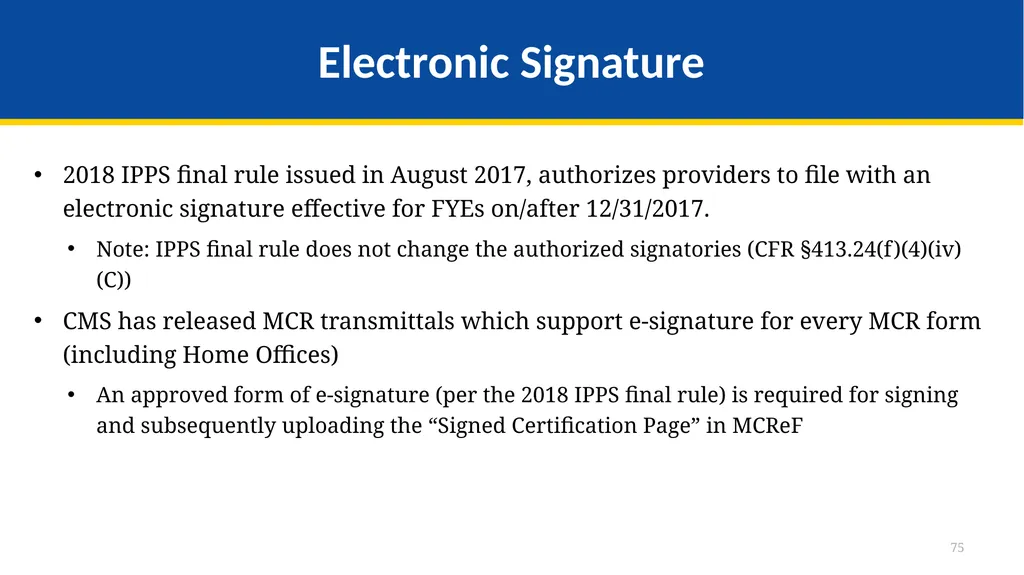
Electronic Signature 2018 IPPS final rule issued in August 2017, authorizes providers to file with an electronic signature effective for FYEs on/after 12/31/2017.
Note: IPPS final rule does not change the authorized signatories (CFR §413.24(f)(4)(iv)(C))
CMS has released MCR transmittals which support e-signature for every MCR form (including Home Offices)
An approved form of e-signature (per the 2018 IPPS final rule) is required for signing and subsequently uploading the “Signed Certification Page” in MCReF 75<br>
Note: IPPS final rule does not change the authorized signatories (CFR §413.24(f)(4)(iv)(C))
CMS has released MCR transmittals which support e-signature for every MCR form (including Home Offices)
An approved form of e-signature (per the 2018 IPPS final rule) is required for signing and subsequently uploading the “Signed Certification Page” in MCReF 75<br>
76
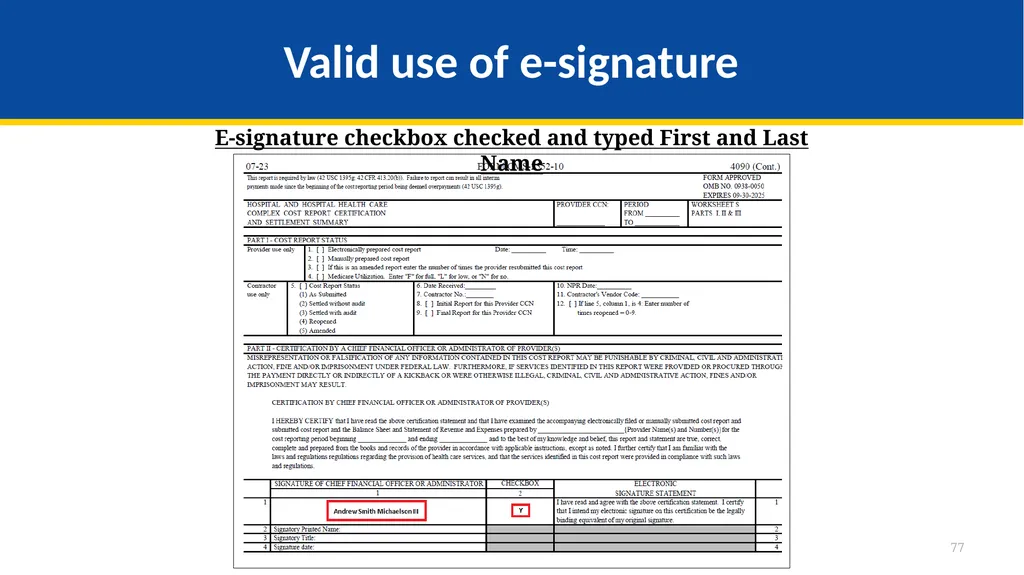
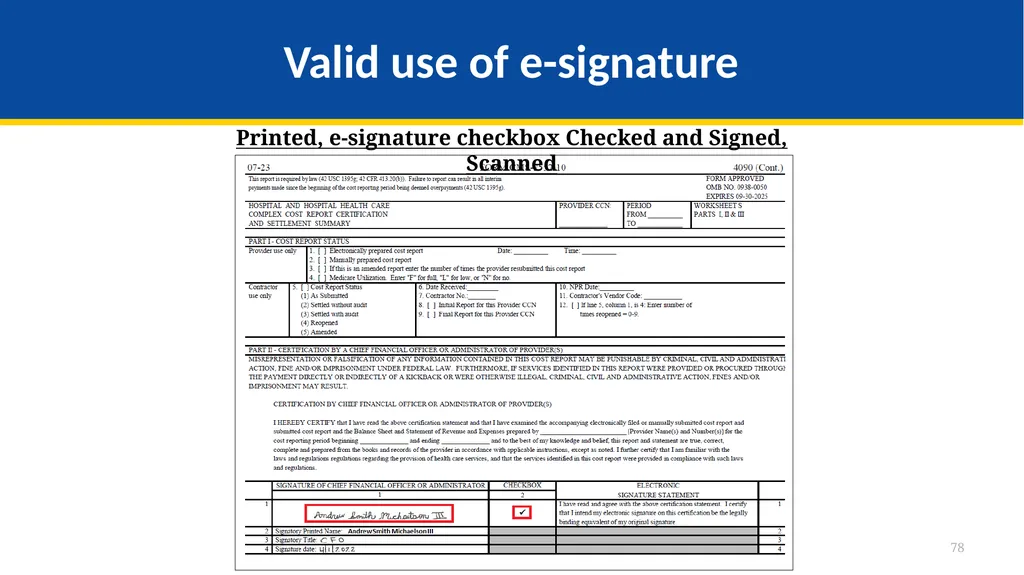
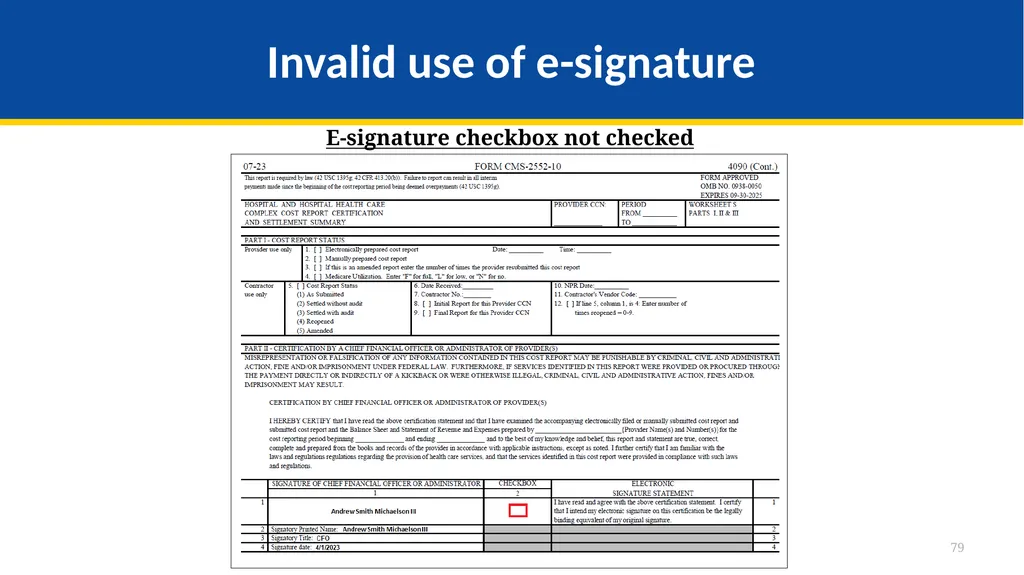
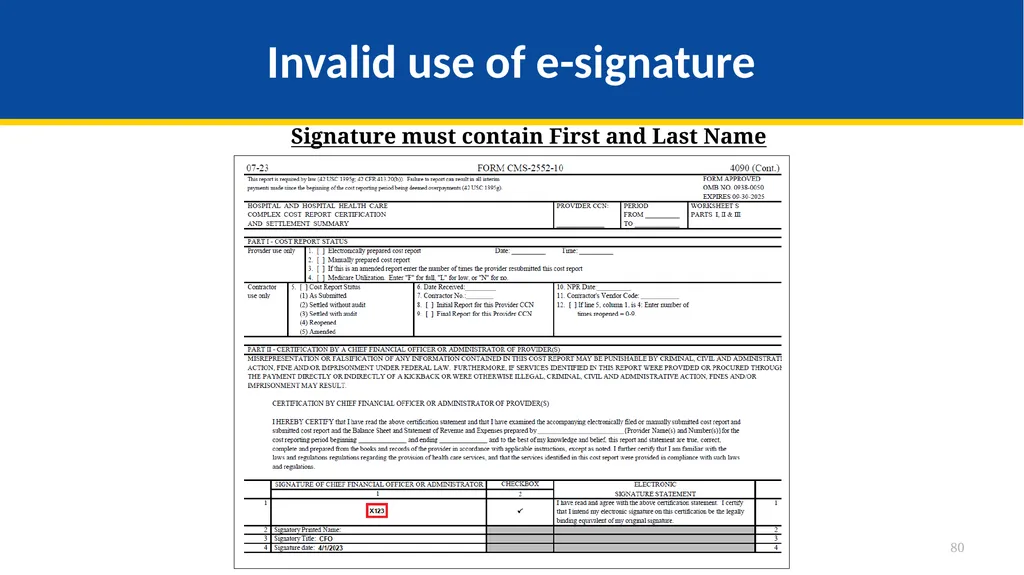
Electronic Signature The next few slides provide examples of valid and invalid uses of e-signature
These examples are not the exhaustive list of all possible valid and invalid uses of e-signature
Refer to the 2018 IPPS final rule for e-signature guidance 76<br>
These examples are not the exhaustive list of all possible valid and invalid uses of e-signature
Refer to the 2018 IPPS final rule for e-signature guidance 76<br>
77
Valid use of e-signature E-signature checkbox checked and typed First and Last Name 77<br>
78
Valid use of e-signature Printed, e-signature checkbox Checked and Signed, Scanned 78<br>
79
Invalid use of e-signature E-signature checkbox not checked 79<br>
80
Invalid use of e-signature Signature must contain First and Last Name 80<br>
81
Tips for Accelerating Cost Report Processing<br>
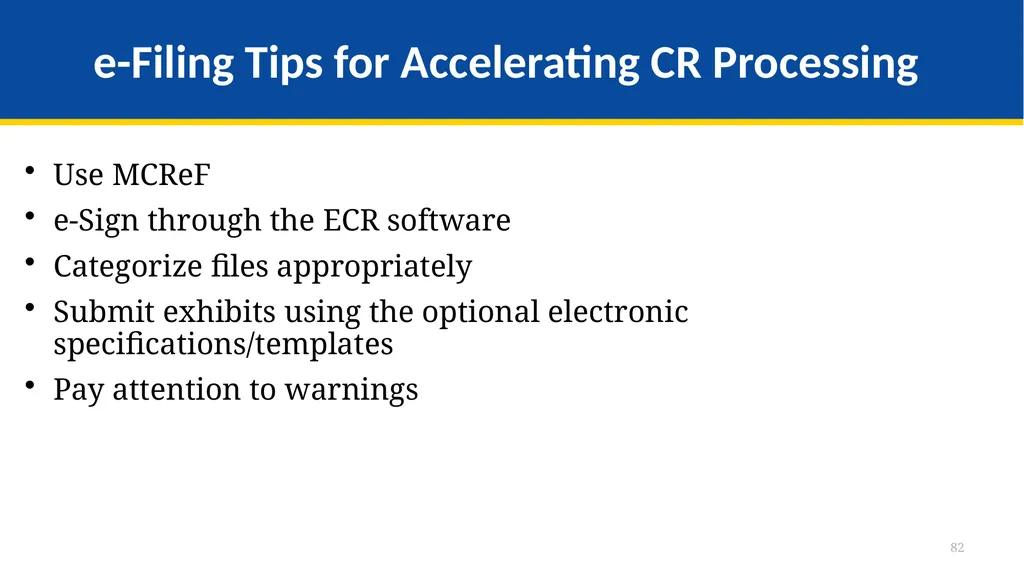
82
e-Filing Tips for Accelerating CR Processing Use MCReF
e-Sign through the ECR software
Categorize files appropriately
Submit exhibits using the optional electronic specifications/templates
Pay attention to warnings 82<br>
e-Sign through the ECR software
Categorize files appropriately
Submit exhibits using the optional electronic specifications/templates
Pay attention to warnings 82<br>
83
Future MCReF Enhancements<br>
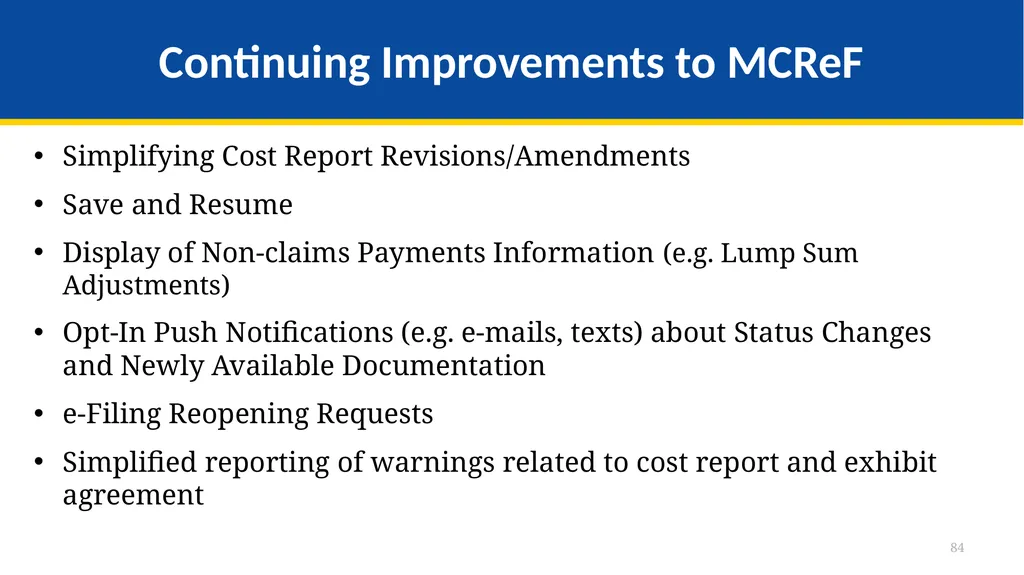
84
Continuing Improvements to MCReF Simplifying Cost Report Revisions/Amendments
Save and Resume
Display of Non-claims Payments Information (e.g. Lump Sum Adjustments)
Opt-In Push Notifications (e.g. e-mails, texts) about Status Changes and Newly Available Documentation
e-Filing Reopening Requests
Simplified reporting of warnings related to cost report and exhibit agreement 84<br>
Save and Resume
Display of Non-claims Payments Information (e.g. Lump Sum Adjustments)
Opt-In Push Notifications (e.g. e-mails, texts) about Status Changes and Newly Available Documentation
e-Filing Reopening Requests
Simplified reporting of warnings related to cost report and exhibit agreement 84<br>
85
MCReF Feedback and Suggestion Poll Q&A Up Next!<br>
86
Question & Answer Session<br>
87
Resources E-mail questions or ideas for improvements relating to MCReF to:
OFMDPAOQUESTIONS@CMS.HHS.GOV
For any questions relating to your IDM account (role requests, passwords, annual certifications, login, etc…) contact PS&R/MCReF IDM support desk:
Website: https://eus.cms.gov/home
e-mail: EUS_Support@cms.hhs.gov
Phone: 1-866-484-8049 (TTY/TDD: 866-523-4759) 87<br>
OFMDPAOQUESTIONS@CMS.HHS.GOV
For any questions relating to your IDM account (role requests, passwords, annual certifications, login, etc…) contact PS&R/MCReF IDM support desk:
Website: https://eus.cms.gov/home
e-mail: EUS_Support@cms.hhs.gov
Phone: 1-866-484-8049 (TTY/TDD: 866-523-4759) 87<br>
88
Thank You – Please Evaluate Your Experience Share your thoughts to help us improve – complete in-webinar poll
Visit:
Medicare Learning Network homepage for other free educational materials for health care professionals
The Medicare Learning Network® is a registered
trademark of the U.S. Department of Health and Human Services (HHS). 88<br>
Visit:
Medicare Learning Network homepage for other free educational materials for health care professionals
The Medicare Learning Network® is a registered
trademark of the U.S. Department of Health and Human Services (HHS). 88<br>
89
Disclaimer This presentation was current at the time it was published or uploaded onto the web. Medicare policy changes frequently so links to the source documents have been provided within the document for your reference.
This presentation was prepared as a service to the public and is not intended to grant rights or impose obligations. This presentation may contain references or links to statutes, regulations, or other policy materials. The information provided is only intended to be a general summary. It is not intended to take the place of either the written law or regulations. We encourage readers to review the specific statutes, regulations, and other interpretive materials for a full and accurate statement of their contents. 89<br>
This presentation was prepared as a service to the public and is not intended to grant rights or impose obligations. This presentation may contain references or links to statutes, regulations, or other policy materials. The information provided is only intended to be a general summary. It is not intended to take the place of either the written law or regulations. We encourage readers to review the specific statutes, regulations, and other interpretive materials for a full and accurate statement of their contents. 89<br>