
Microsoft Scenario Library Discover industry and
GB
Published · 34 slides · 0 views

1 / 1


Description
Microsoft Scenario Library Discover industry and role-based use cases Top 10 to Try First with Microsoft 365 Copilot Foundational skills for new users For more prompts, visit Prompt Gallery at: aka.msprompts AI value journey Org Value
Related Topics
Share
Embed code
Download this presentation From Below
"Microsoft Scenario Library Discover industry and" is the property of its rightful owner. Permission is granted to download and print the materials on this website for personal, non-commercial use only, and to display it on your personal computer provided you do not modify the materials and that you retain all copyright notices contained in the materials. By downloading content from our website, you accept the terms of this agreement.
Presentation Transcript
01
Microsoft Scenario Library Discover industry and role-based use cases<br>
02
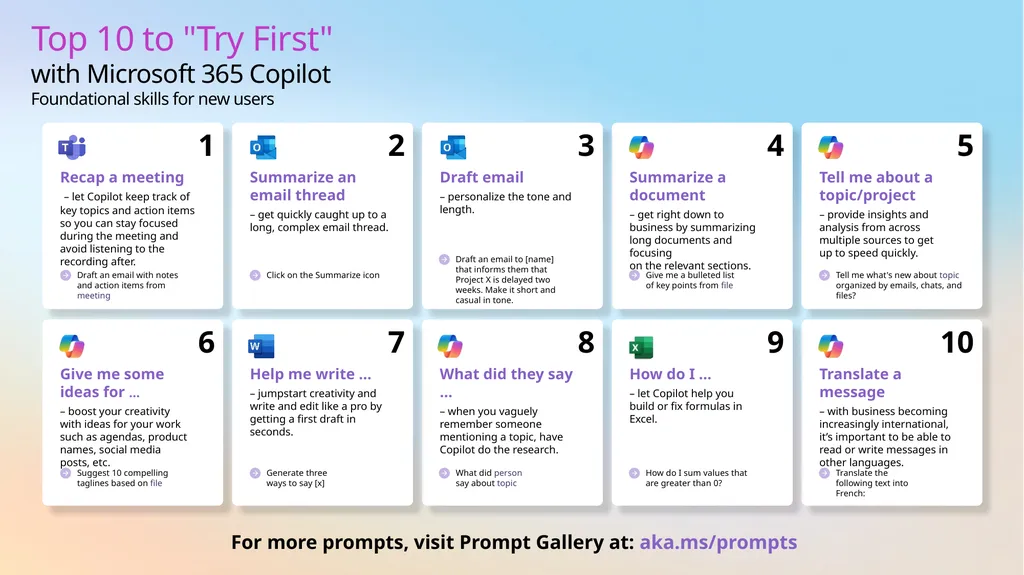
Top 10 to "Try First" with Microsoft 365 Copilot
Foundational skills for new users For more prompts, visit Prompt Gallery at: aka.ms/prompts<br>
03
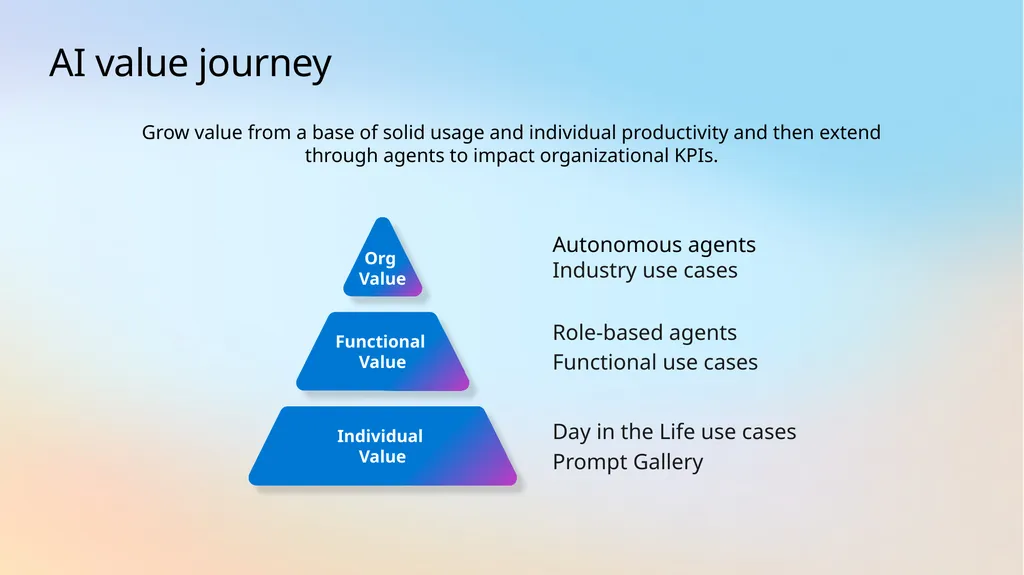
AI value journey Org
Value Functional
Value Autonomous agents
Industry use cases Role-based agents
Functional use cases Individual Value Day in the Life use cases
Prompt Gallery Grow value from a base of solid usage and individual productivity and then extend through agents to impact organizational KPIs.<br>
Industry use cases Role-based agents
Functional use cases Individual Value Day in the Life use cases
Prompt Gallery Grow value from a base of solid usage and individual productivity and then extend through agents to impact organizational KPIs.<br>
04
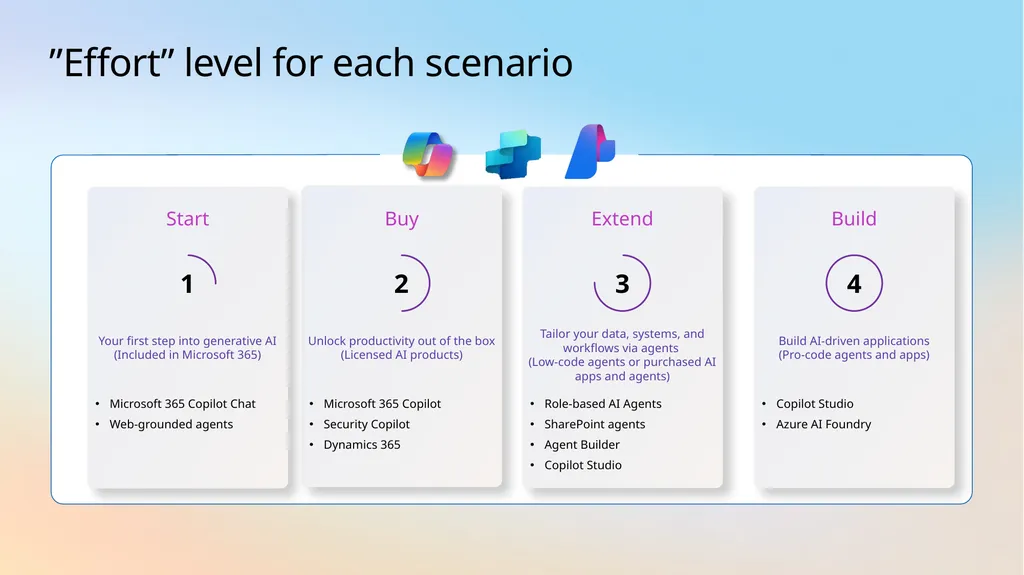
”Effort” level for each scenario Buy Microsoft 365 Copilot
Security Copilot
Dynamics 365 Unlock productivity out of the box (Licensed AI products) 2 Extend Role-based AI Agents
SharePoint agents
Agent Builder
Copilot Studio Tailor your data, systems, and workflows via agents
(Low-code agents or purchased AI apps and agents) 3 Start Microsoft 365 Copilot Chat
Web-grounded agents Your first step into generative AI (Included in Microsoft 365) 1 Build Copilot Studio
Azure AI Foundry Build AI-driven applications
(Pro-code agents and apps) 4<br>
Security Copilot
Dynamics 365 Unlock productivity out of the box (Licensed AI products) 2 Extend Role-based AI Agents
SharePoint agents
Agent Builder
Copilot Studio Tailor your data, systems, and workflows via agents
(Low-code agents or purchased AI apps and agents) 3 Start Microsoft 365 Copilot Chat
Web-grounded agents Your first step into generative AI (Included in Microsoft 365) 1 Build Copilot Studio
Azure AI Foundry Build AI-driven applications
(Pro-code agents and apps) 4<br>
05
AI use cases for
Retail<br>
06
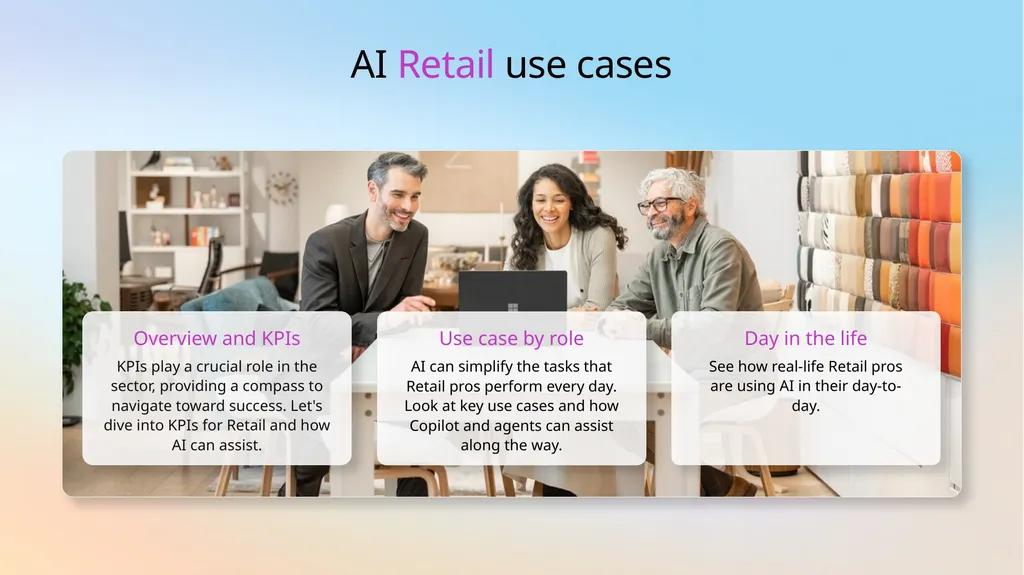
AI Retail use cases Overview and KPIs KPIs play a crucial role in the sector, providing a compass to navigate toward success. Let's dive into KPIs for Retail and how AI can assist. Use case by role AI can simplify the tasks that Retail pros perform every day. Look at key use cases and how Copilot and agents can assist along the way. Day in the life See how real-life Retail pros are using AI in their day-to-day.<br>
07
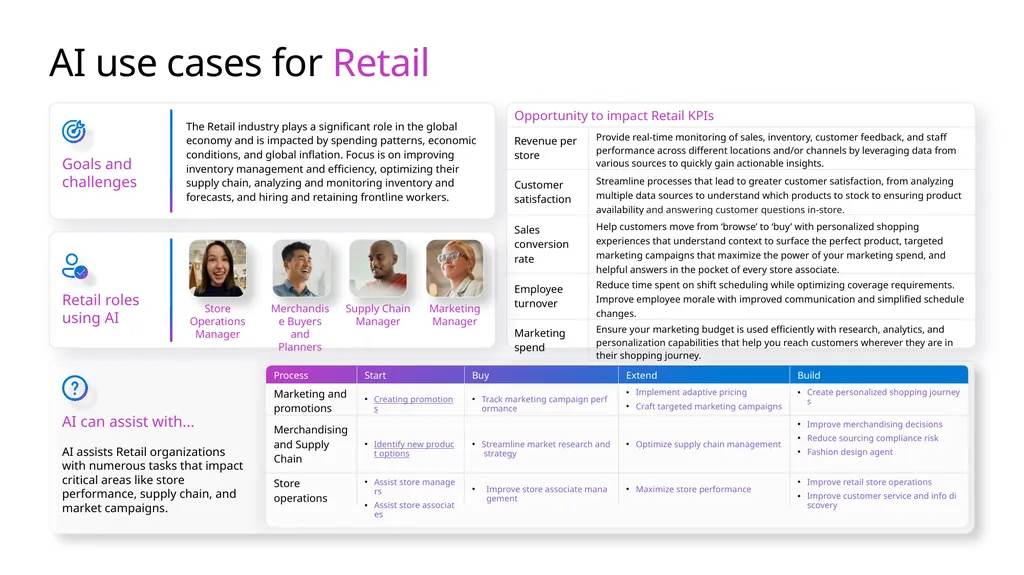
AI use cases for Retail Goals and challenges The Retail industry plays a significant role in the global economy and is impacted by spending patterns, economic conditions, and global inflation. Focus is on improving inventory management and efficiency, optimizing their supply chain, analyzing and monitoring inventory and forecasts, and hiring and retaining frontline workers. AI can assist with... AI assists Retail organizations with numerous tasks that impact critical areas like store performance, supply chain, and market campaigns. Retail roles using AI Merchandise Buyers and Planners Store Operations Manager Supply Chain Manager Marketing Manager<br>
08
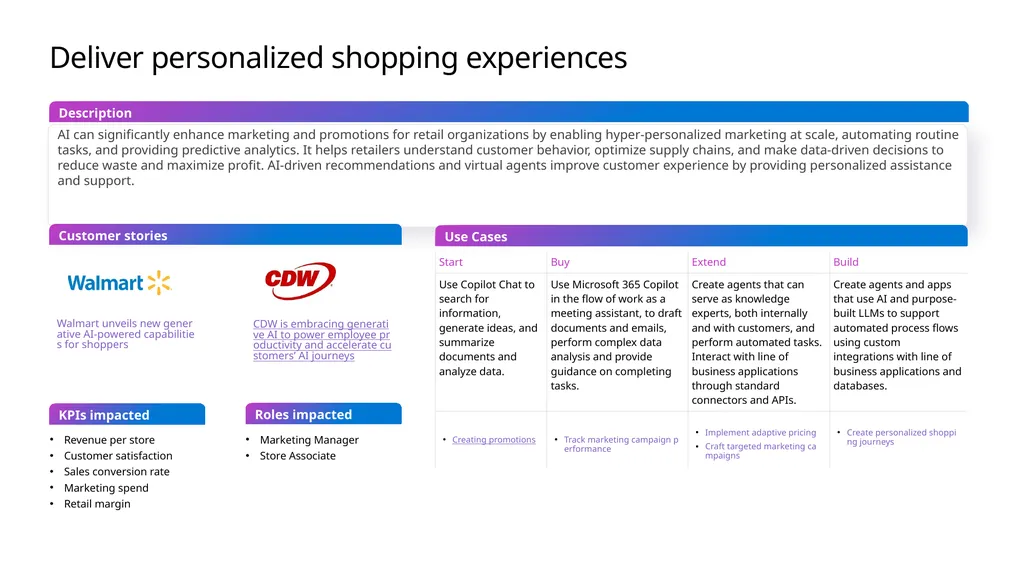
Deliver personalized shopping experiences AI can significantly enhance marketing and promotions for retail organizations by enabling hyper-personalized marketing at scale, automating routine tasks, and providing predictive analytics. It helps retailers understand customer behavior, optimize supply chains, and make data-driven decisions to reduce waste and maximize profit. AI-driven recommendations and virtual agents improve customer experience by providing personalized assistance and support. Use Cases Customer stories Description KPIs impacted Revenue per store
Customer satisfaction
Sales conversion rate
Marketing spend
Retail margin Marketing Manager
Store Associate Roles impacted Walmart unveils new generative AI-powered capabilities for shoppers CDW is embracing generative AI to power employee productivity and accelerate customers’ AI journeys<br>
Customer satisfaction
Sales conversion rate
Marketing spend
Retail margin Marketing Manager
Store Associate Roles impacted Walmart unveils new generative AI-powered capabilities for shoppers CDW is embracing generative AI to power employee productivity and accelerate customers’ AI journeys<br>
09
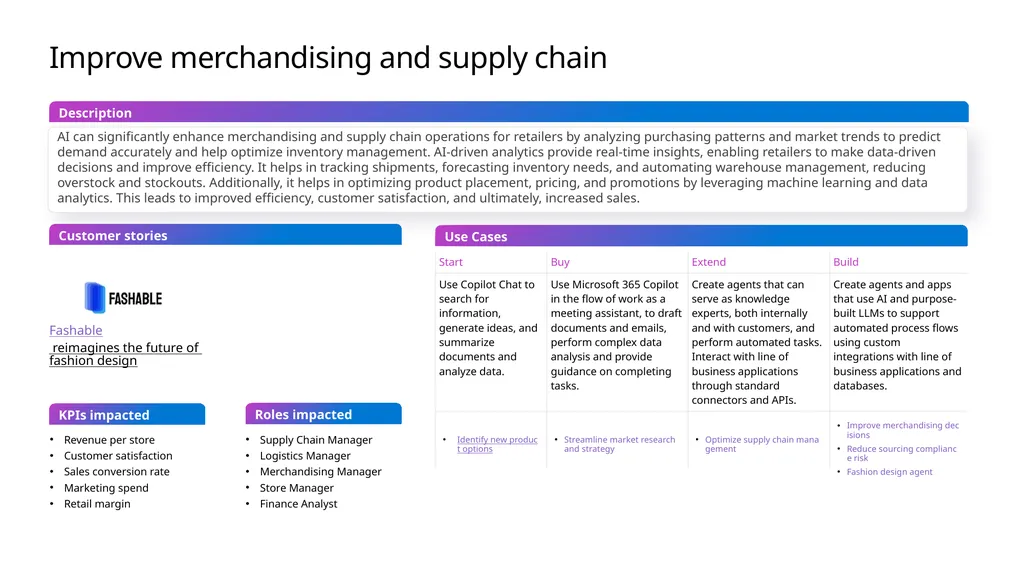
Improve merchandising and supply chain AI can significantly enhance merchandising and supply chain operations for retailers by analyzing purchasing patterns and market trends to predict demand accurately and help optimize inventory management. AI-driven analytics provide real-time insights, enabling retailers to make data-driven decisions and improve efficiency. It helps in tracking shipments, forecasting inventory needs, and automating warehouse management, reducing overstock and stockouts. Additionally, it helps in optimizing product placement, pricing, and promotions by leveraging machine learning and data analytics. This leads to improved efficiency, customer satisfaction, and ultimately, increased sales. Use Cases Customer stories Description KPIs impacted Revenue per store
Customer satisfaction
Sales conversion rate
Marketing spend
Retail margin Supply Chain Manager
Logistics Manager
Merchandising Manager
Store Manager
Finance Analyst Roles impacted Fashable reimagines the future of fashion design<br>
Customer satisfaction
Sales conversion rate
Marketing spend
Retail margin Supply Chain Manager
Logistics Manager
Merchandising Manager
Store Manager
Finance Analyst Roles impacted Fashable reimagines the future of fashion design<br>
10
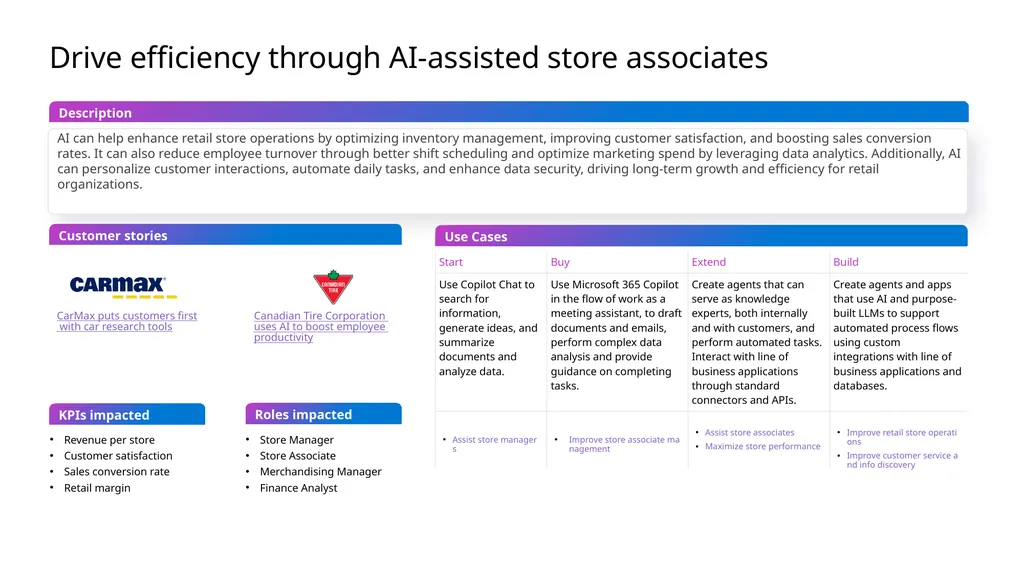
Drive efficiency through AI-assisted store associates AI can help enhance retail store operations by optimizing inventory management, improving customer satisfaction, and boosting sales conversion rates. It can also reduce employee turnover through better shift scheduling and optimize marketing spend by leveraging data analytics. Additionally, AI can personalize customer interactions, automate daily tasks, and enhance data security, driving long-term growth and efficiency for retail organizations. Use Cases Customer stories Description KPIs impacted Revenue per store
Customer satisfaction
Sales conversion rate
Retail margin Store Manager
Store Associate
Merchandising Manager
Finance Analyst Roles impacted CarMax puts customers first with car research tools Canadian Tire Corporation uses AI to boost employee productivity<br>
Customer satisfaction
Sales conversion rate
Retail margin Store Manager
Store Associate
Merchandising Manager
Finance Analyst Roles impacted CarMax puts customers first with car research tools Canadian Tire Corporation uses AI to boost employee productivity<br>
11
KPI – Revenue per store How AI can help increase revenue per store Improve targeting Improve quality of marketing materials Revenue per store (or revenue per square foot) is a crucial metric that Retailers use to evaluate the financial performance of their stores. By measuring the amount of revenue generated per unit of selling space, retailers can assess the effectiveness of their store layout, product assortment, and overall business strategy. Analyze current product mix and cross sell success Improve marketing content with clear value propositions Value Calculation Determine the revenue generated: Use revenue for a specific time period like day, month, or year.
Divide the revenue by the unit: Use store, square feet, square meters, etc.
Using a measure of revenue per unit area can help to compare across different sizes of stores.<br>
Divide the revenue by the unit: Use store, square feet, square meters, etc.
Using a measure of revenue per unit area can help to compare across different sizes of stores.<br>
12
KPI – Customer satisfaction How AI can help improve customer satisfaction Provide great experiences Enhance customer loyalty Customer satisfaction is crucial for retaining customers, encouraging repeat business, and fostering positive word-of-mouth. Retailers that prioritize customer satisfaction often see increased loyalty and long-term success. Rapidly analyze customer feedback
Provide personalized experiences
Simplify returns and inquiries
Improve consistency Better understand customers
Resolve issues on the first call
Improve product selection and quality
Avoid stockouts Value Calculation There are many ways to measure customer satisfaction, but it is most common to use some type of survey or feedback mechanism. Then the results can be turned into a CSAT or NPS value.
CSAT would be adding up all of the scores and dividing by the total possible
Example
You ask 10 people to rate your service on a scale of 1-10. Four people respond with 8 and 6 people respond with 7. You can add all of the scores – 8+8+8+8+7+7+7+7+7+7 = 74. The total possible was 100. So you receive 74 out of 100 or 74%
NPS is based on how likely someone is to recommend your service. You could still ask for a response from 1-10 and then assume that some level is prompter – say 8 and up and some level is detractors – say 6 and down.
NPS is the % of promoters - % of detractors.
To measure a financial value, you’d need to see how customer satisfaction was reflected in other metrics like customer retention or number of new customers.<br>
Provide personalized experiences
Simplify returns and inquiries
Improve consistency Better understand customers
Resolve issues on the first call
Improve product selection and quality
Avoid stockouts Value Calculation There are many ways to measure customer satisfaction, but it is most common to use some type of survey or feedback mechanism. Then the results can be turned into a CSAT or NPS value.
CSAT would be adding up all of the scores and dividing by the total possible
Example
You ask 10 people to rate your service on a scale of 1-10. Four people respond with 8 and 6 people respond with 7. You can add all of the scores – 8+8+8+8+7+7+7+7+7+7 = 74. The total possible was 100. So you receive 74 out of 100 or 74%
NPS is based on how likely someone is to recommend your service. You could still ask for a response from 1-10 and then assume that some level is prompter – say 8 and up and some level is detractors – say 6 and down.
NPS is the % of promoters - % of detractors.
To measure a financial value, you’d need to see how customer satisfaction was reflected in other metrics like customer retention or number of new customers.<br>
13
KPI – Sales conversion rate How AI can help increase conversion rates Improve pricing and promotions Improve quality of marketing materials The conversion rate helps retailers understand how effectively they are turning visitors into customers. A higher conversion rate indicates better performance in attracting and convincing customers to make purchases. Use Copilot to research market conditions
Use Copilot to compare sales across regions or other variables Improve marketing content with clear value propositions Value Calculation Count the Number of Sales: Determine the total number of transactions or sales made during a specific period.
Count the Total Number of Visitors: Track the total number of people who visited your store during the same period.
Divide the number of sales by the total number of visitors and multiply by 100 to get the percentage
Example
Let's say your store had 75 sales on a day when 500 people visited. The conversion rate would be:
Conversion Rate=(75/500)×100=15%<br>
Use Copilot to compare sales across regions or other variables Improve marketing content with clear value propositions Value Calculation Count the Number of Sales: Determine the total number of transactions or sales made during a specific period.
Count the Total Number of Visitors: Track the total number of people who visited your store during the same period.
Divide the number of sales by the total number of visitors and multiply by 100 to get the percentage
Example
Let's say your store had 75 sales on a day when 500 people visited. The conversion rate would be:
Conversion Rate=(75/500)×100=15%<br>
14
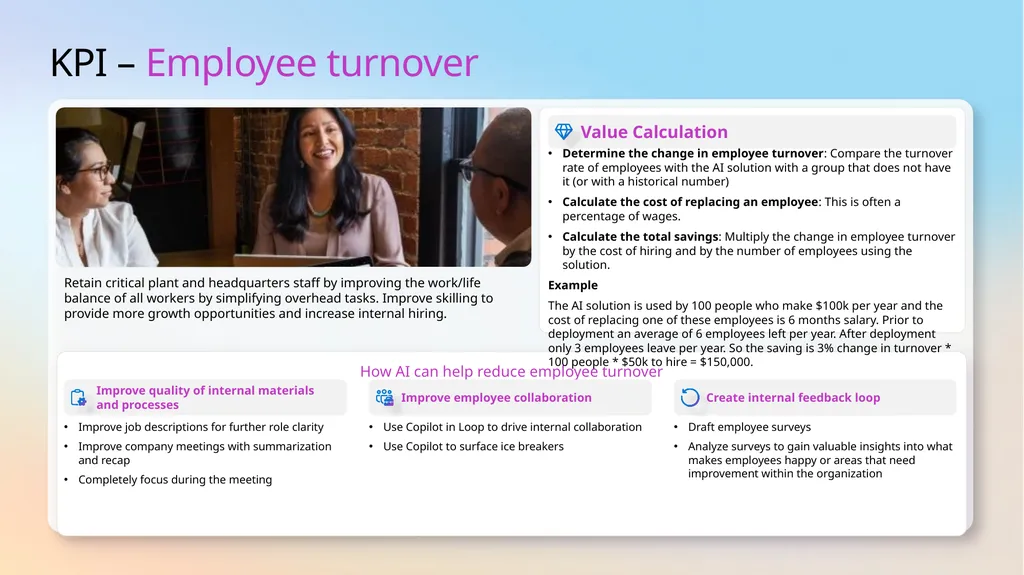
KPI – Employee turnover How AI can help reduce employee turnover Improve quality of internal materials
and processes Improve employee collaboration Retain critical plant and headquarters staff by improving the work/life balance of all workers by simplifying overhead tasks. Improve skilling to provide more growth opportunities and increase internal hiring. Improve job descriptions for further role clarity
Improve company meetings with summarization and recap
Completely focus during the meeting Use Copilot in Loop to drive internal collaboration
Use Copilot to surface ice breakers Value Calculation Determine the change in employee turnover: Compare the turnover rate of employees with the AI solution with a group that does not have it (or with a historical number)
Calculate the cost of replacing an employee: This is often a percentage of wages.
Calculate the total savings: Multiply the change in employee turnover by the cost of hiring and by the number of employees using the solution.
Example
The AI solution is used by 100 people who make $100k per year and the cost of replacing one of these employees is 6 months salary. Prior to deployment an average of 6 employees left per year. After deployment only 3 employees leave per year. So the saving is 3% change in turnover * 100 people * $50k to hire = $150,000. Create internal feedback loop Draft employee surveys
Analyze surveys to gain valuable insights into what makes employees happy or areas that need improvement within the organization<br>
Improve company meetings with summarization and recap
Completely focus during the meeting Use Copilot in Loop to drive internal collaboration
Use Copilot to surface ice breakers Value Calculation Determine the change in employee turnover: Compare the turnover rate of employees with the AI solution with a group that does not have it (or with a historical number)
Calculate the cost of replacing an employee: This is often a percentage of wages.
Calculate the total savings: Multiply the change in employee turnover by the cost of hiring and by the number of employees using the solution.
Example
The AI solution is used by 100 people who make $100k per year and the cost of replacing one of these employees is 6 months salary. Prior to deployment an average of 6 employees left per year. After deployment only 3 employees leave per year. So the saving is 3% change in turnover * 100 people * $50k to hire = $150,000. Create internal feedback loop Draft employee surveys
Analyze surveys to gain valuable insights into what makes employees happy or areas that need improvement within the organization<br>
15
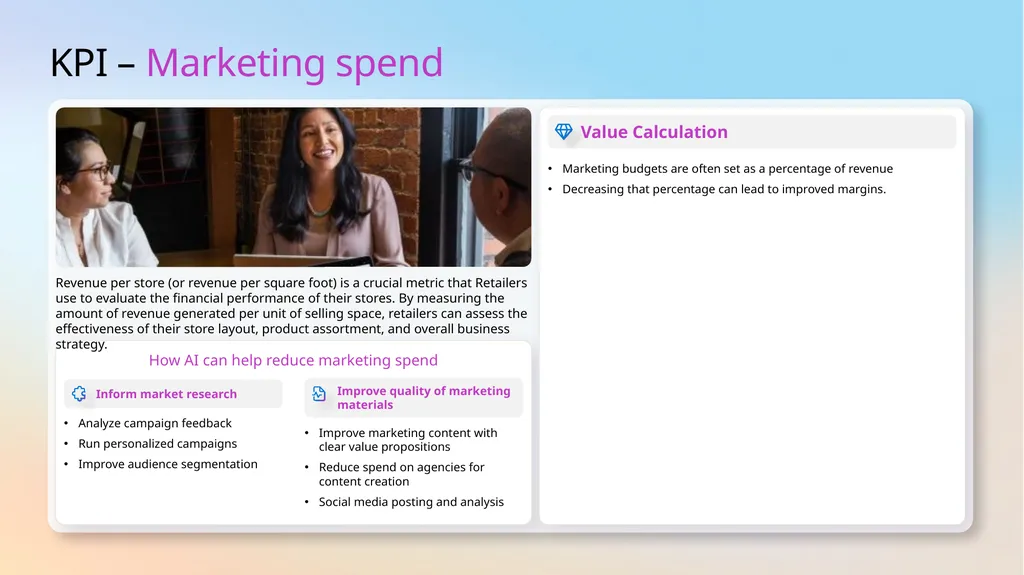
KPI – Marketing spend How AI can help reduce marketing spend Inform market research Improve quality of marketing materials Revenue per store (or revenue per square foot) is a crucial metric that Retailers use to evaluate the financial performance of their stores. By measuring the amount of revenue generated per unit of selling space, retailers can assess the effectiveness of their store layout, product assortment, and overall business strategy. Analyze campaign feedback
Run personalized campaigns
Improve audience segmentation Improve marketing content with clear value propositions
Reduce spend on agencies for content creation
Social media posting and analysis Value Calculation Marketing budgets are often set as a percentage of revenue
Decreasing that percentage can lead to improved margins.<br>
Run personalized campaigns
Improve audience segmentation Improve marketing content with clear value propositions
Reduce spend on agencies for content creation
Social media posting and analysis Value Calculation Marketing budgets are often set as a percentage of revenue
Decreasing that percentage can lead to improved margins.<br>
16
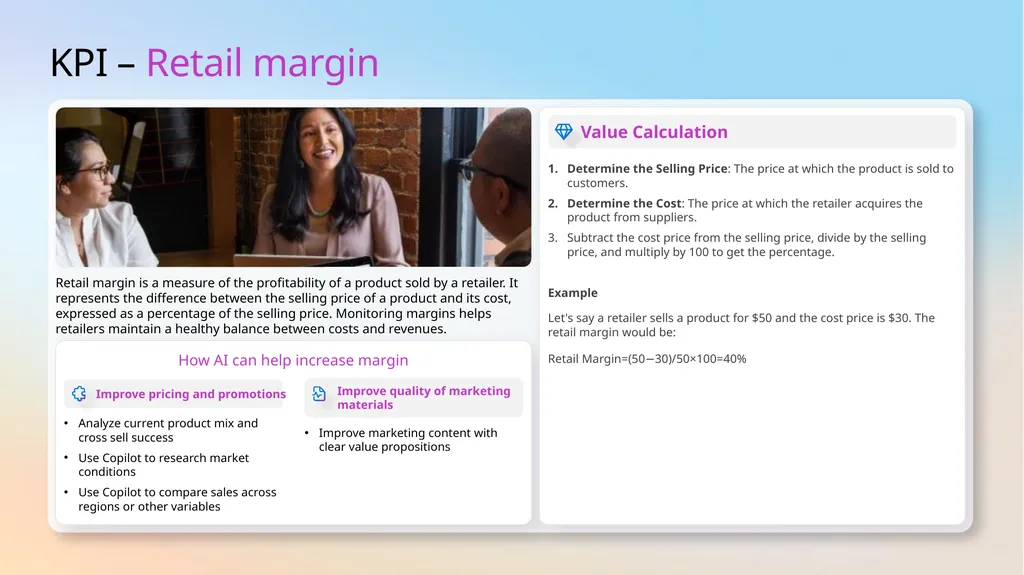
KPI – Retail margin How AI can help increase margin Improve pricing and promotions Improve quality of marketing materials Retail margin is a measure of the profitability of a product sold by a retailer. It represents the difference between the selling price of a product and its cost, expressed as a percentage of the selling price. Monitoring margins helps retailers maintain a healthy balance between costs and revenues. Analyze current product mix and cross sell success
Use Copilot to research market conditions
Use Copilot to compare sales across regions or other variables Improve marketing content with clear value propositions Value Calculation Determine the Selling Price: The price at which the product is sold to customers.
Determine the Cost: The price at which the retailer acquires the product from suppliers.
Subtract the cost price from the selling price, divide by the selling price, and multiply by 100 to get the percentage.
Example
Let's say a retailer sells a product for $50 and the cost price is $30. The retail margin would be:
Retail Margin=(50−30)/50×100=40%<br>
Use Copilot to research market conditions
Use Copilot to compare sales across regions or other variables Improve marketing content with clear value propositions Value Calculation Determine the Selling Price: The price at which the product is sold to customers.
Determine the Cost: The price at which the retailer acquires the product from suppliers.
Subtract the cost price from the selling price, divide by the selling price, and multiply by 100 to get the percentage.
Example
Let's say a retailer sells a product for $50 and the cost price is $30. The retail margin would be:
Retail Margin=(50−30)/50×100=40%<br>
17
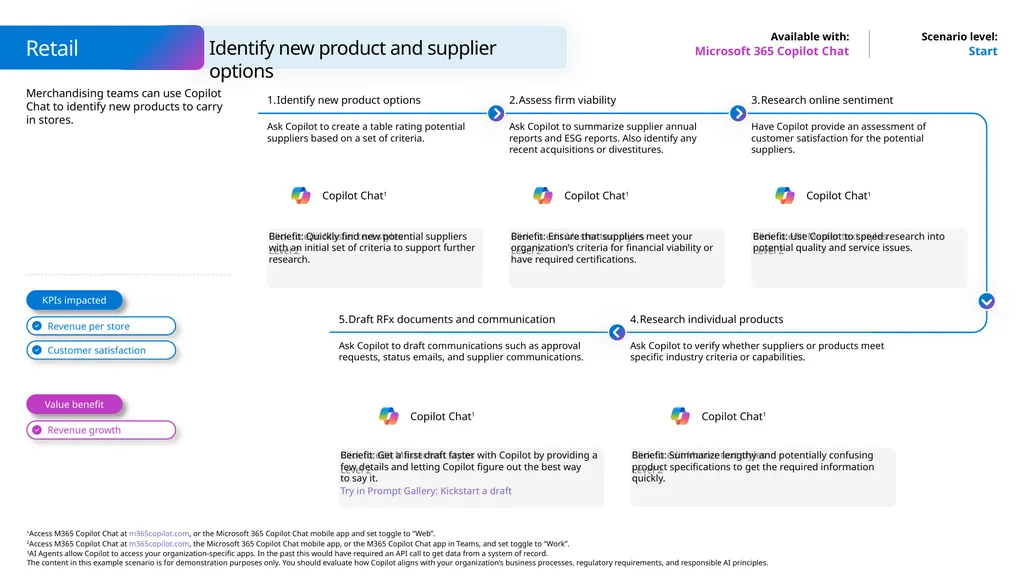
Identify new product and supplier options Retail Microsoft 365 Copilot Chat Start Merchandising teams can use Copilot Chat to identify new products to carry in stores. KPIs impacted Value benefit Identify new product options Ask Copilot to create a table rating potential suppliers based on a set of criteria. Benefit: Quickly find new potential suppliers with an initial set of criteria to support further research. Assess firm viability Ask Copilot to summarize supplier annual reports and ESG reports. Also identify any recent acquisitions or divestitures. Benefit: Ensure that suppliers meet your organization’s criteria for financial viability or have required certifications. Research online sentiment Have Copilot provide an assessment of customer satisfaction for the potential suppliers. Benefit: Use Copilot to speed research into potential quality and service issues. Research individual products Ask Copilot to verify whether suppliers or products meet specific industry criteria or capabilities. Benefit: Summarize lengthy and potentially confusing product specifications to get the required information quickly. Draft RFx documents and communication Ask Copilot to draft communications such as approval requests, status emails, and supplier communications. Benefit: Get a first draft faster with Copilot by providing a few details and letting Copilot figure out the best way
to say it.
Try in Prompt Gallery: Kickstart a draft Copilot Chat1 Copilot Chat1 Copilot Chat1 Copilot Chat1 Copilot Chat1<br>
Try in Prompt Gallery: Kickstart a draft Copilot Chat1 Copilot Chat1 Copilot Chat1 Copilot Chat1 Copilot Chat1<br>
18
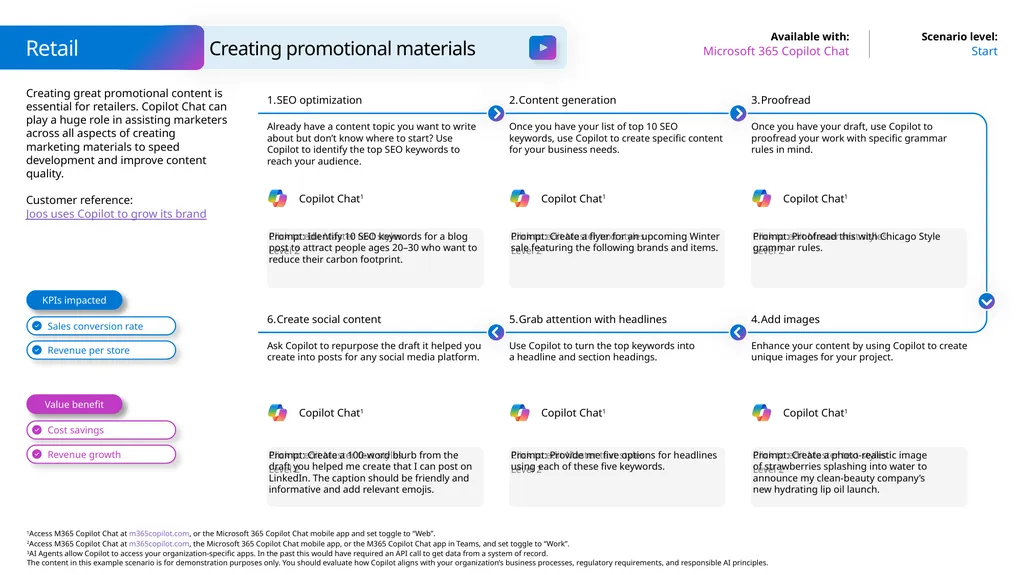
Creating great promotional content is essential for retailers. Copilot Chat can play a huge role in assisting marketers across all aspects of creating marketing materials to speed development and improve content quality.
Customer reference: Joos uses Copilot to grow its brand Retail Start Microsoft 365 Copilot Chat Creating promotional materials Prompt: Identify 10 SEO keywords for a blog post to attract people ages 20–30 who want to reduce their carbon footprint. SEO optimization Already have a content topic you want to write about but don’t know where to start? Use Copilot to identify the top SEO keywords to reach your audience. Content generation Once you have your list of top 10 SEO keywords, use Copilot to create specific content for your business needs. Prompt: Proofread this with Chicago Style grammar rules. Proofread Once you have your draft, use Copilot to proofread your work with specific grammar rules in mind. Prompt: Create a flyer for an upcoming Winter sale featuring the following brands and items. Prompt: Create a 100-word blurb from the draft you helped me create that I can post on LinkedIn. The caption should be friendly and informative and add relevant emojis. Create social content Ask Copilot to repurpose the draft it helped you create into posts for any social media platform. Grab attention with headlines Use Copilot to turn the top keywords into a headline and section headings. Prompt: Create a photo-realistic image of strawberries splashing into water to announce my clean-beauty company’s new hydrating lip oil launch. Add images Enhance your content by using Copilot to create unique images for your project. Prompt: Provide me five options for headlines using each of these five keywords. Value benefit KPIs impacted Copilot Chat1 Copilot Chat1 Copilot Chat1 Copilot Chat1 Copilot Chat1 Copilot Chat1<br>
Customer reference: Joos uses Copilot to grow its brand Retail Start Microsoft 365 Copilot Chat Creating promotional materials Prompt: Identify 10 SEO keywords for a blog post to attract people ages 20–30 who want to reduce their carbon footprint. SEO optimization Already have a content topic you want to write about but don’t know where to start? Use Copilot to identify the top SEO keywords to reach your audience. Content generation Once you have your list of top 10 SEO keywords, use Copilot to create specific content for your business needs. Prompt: Proofread this with Chicago Style grammar rules. Proofread Once you have your draft, use Copilot to proofread your work with specific grammar rules in mind. Prompt: Create a flyer for an upcoming Winter sale featuring the following brands and items. Prompt: Create a 100-word blurb from the draft you helped me create that I can post on LinkedIn. The caption should be friendly and informative and add relevant emojis. Create social content Ask Copilot to repurpose the draft it helped you create into posts for any social media platform. Grab attention with headlines Use Copilot to turn the top keywords into a headline and section headings. Prompt: Create a photo-realistic image of strawberries splashing into water to announce my clean-beauty company’s new hydrating lip oil launch. Add images Enhance your content by using Copilot to create unique images for your project. Prompt: Provide me five options for headlines using each of these five keywords. Value benefit KPIs impacted Copilot Chat1 Copilot Chat1 Copilot Chat1 Copilot Chat1 Copilot Chat1 Copilot Chat1<br>
19
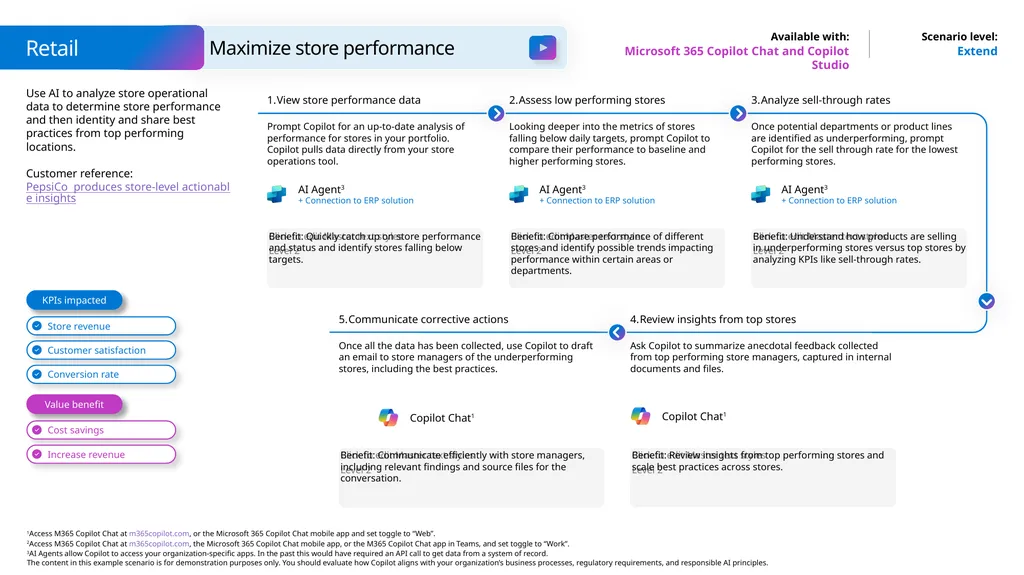
Use AI to analyze store operational data to determine store performance and then identity and share best practices from top performing locations.
Customer reference: PepsiCo produces store-level actionable insights Extend Microsoft 365 Copilot Chat and Copilot Studio Benefit: Quickly catch up on store performance and status and identify stores falling below targets. View store performance data Prompt Copilot for an up-to-date analysis of performance for stores in your portfolio. Copilot pulls data directly from your store operations tool. Assess low performing stores Looking deeper into the metrics of stores falling below daily targets, prompt Copilot to compare their performance to baseline and higher performing stores. Benefit: Understand how products are selling in underperforming stores versus top stores by analyzing KPIs like sell-through rates. Analyze sell-through rates Once potential departments or product lines are identified as underperforming, prompt Copilot for the sell through rate for the lowest performing stores. Benefit: Compare performance of different stores and identify possible trends impacting performance within certain areas or departments. Communicate corrective actions Once all the data has been collected, use Copilot to draft an email to store managers of the underperforming stores, including the best practices. Benefit: Review insights from top performing stores and scale best practices across stores. Review insights from top stores Ask Copilot to summarize anecdotal feedback collected from top performing store managers, captured in internal documents and files. Benefit: Communicate efficiently with store managers, including relevant findings and source files for the conversation. Value benefit KPIs impacted Retail Maximize store performance AI Agent3
+ Connection to ERP solution AI Agent3
+ Connection to ERP solution AI Agent3
+ Connection to ERP solution Copilot Chat1 Copilot Chat1<br>
Customer reference: PepsiCo produces store-level actionable insights Extend Microsoft 365 Copilot Chat and Copilot Studio Benefit: Quickly catch up on store performance and status and identify stores falling below targets. View store performance data Prompt Copilot for an up-to-date analysis of performance for stores in your portfolio. Copilot pulls data directly from your store operations tool. Assess low performing stores Looking deeper into the metrics of stores falling below daily targets, prompt Copilot to compare their performance to baseline and higher performing stores. Benefit: Understand how products are selling in underperforming stores versus top stores by analyzing KPIs like sell-through rates. Analyze sell-through rates Once potential departments or product lines are identified as underperforming, prompt Copilot for the sell through rate for the lowest performing stores. Benefit: Compare performance of different stores and identify possible trends impacting performance within certain areas or departments. Communicate corrective actions Once all the data has been collected, use Copilot to draft an email to store managers of the underperforming stores, including the best practices. Benefit: Review insights from top performing stores and scale best practices across stores. Review insights from top stores Ask Copilot to summarize anecdotal feedback collected from top performing store managers, captured in internal documents and files. Benefit: Communicate efficiently with store managers, including relevant findings and source files for the conversation. Value benefit KPIs impacted Retail Maximize store performance AI Agent3
+ Connection to ERP solution AI Agent3
+ Connection to ERP solution AI Agent3
+ Connection to ERP solution Copilot Chat1 Copilot Chat1<br>
20
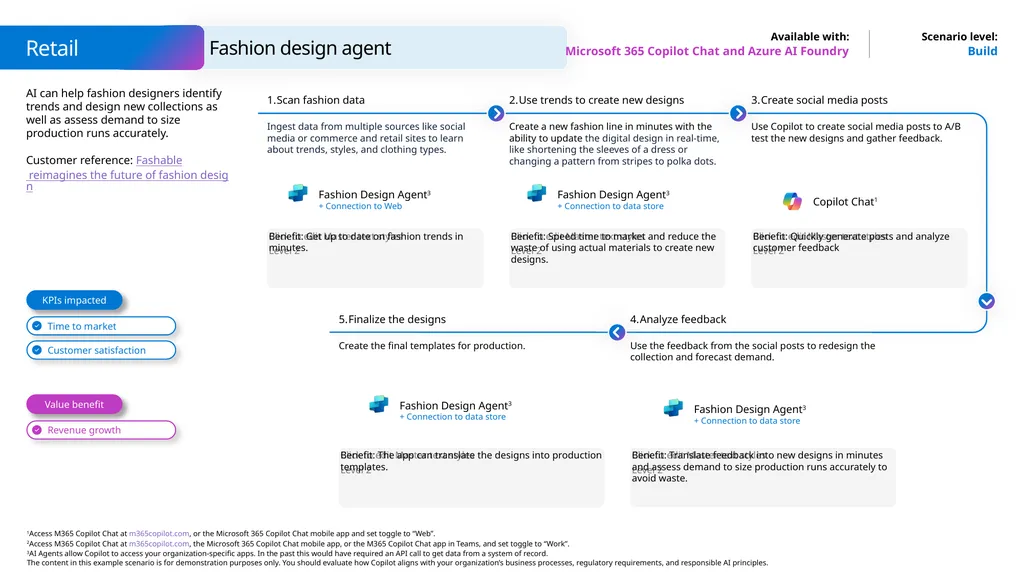
Fashion design agent Retail Microsoft 365 Copilot Chat and Azure AI Foundry Build AI can help fashion designers identify trends and design new collections as well as assess demand to size production runs accurately.
Customer reference: Fashable reimagines the future of fashion design KPIs impacted Value benefit Scan fashion data Ingest data from multiple sources like social media or commerce and retail sites to learn about trends, styles, and clothing types. Benefit: Get up to date on fashion trends in minutes. Use trends to create new designs Create a new fashion line in minutes with the ability to update the digital design in real-time, like shortening the sleeves of a dress or changing a pattern from stripes to polka dots. Benefit: Speed time to market and reduce the waste of using actual materials to create new designs. Create social media posts Use Copilot to create social media posts to A/B test the new designs and gather feedback. Benefit: Quickly generate posts and analyze customer feedback Analyze feedback Use the feedback from the social posts to redesign the collection and forecast demand. Benefit: Translate feedback into new designs in minutes and assess demand to size production runs accurately to avoid waste. Finalize the designs Create the final templates for production. Benefit: The app can translate the designs into production templates. Copilot Chat1<br>
Customer reference: Fashable reimagines the future of fashion design KPIs impacted Value benefit Scan fashion data Ingest data from multiple sources like social media or commerce and retail sites to learn about trends, styles, and clothing types. Benefit: Get up to date on fashion trends in minutes. Use trends to create new designs Create a new fashion line in minutes with the ability to update the digital design in real-time, like shortening the sleeves of a dress or changing a pattern from stripes to polka dots. Benefit: Speed time to market and reduce the waste of using actual materials to create new designs. Create social media posts Use Copilot to create social media posts to A/B test the new designs and gather feedback. Benefit: Quickly generate posts and analyze customer feedback Analyze feedback Use the feedback from the social posts to redesign the collection and forecast demand. Benefit: Translate feedback into new designs in minutes and assess demand to size production runs accurately to avoid waste. Finalize the designs Create the final templates for production. Benefit: The app can translate the designs into production templates. Copilot Chat1<br>
21
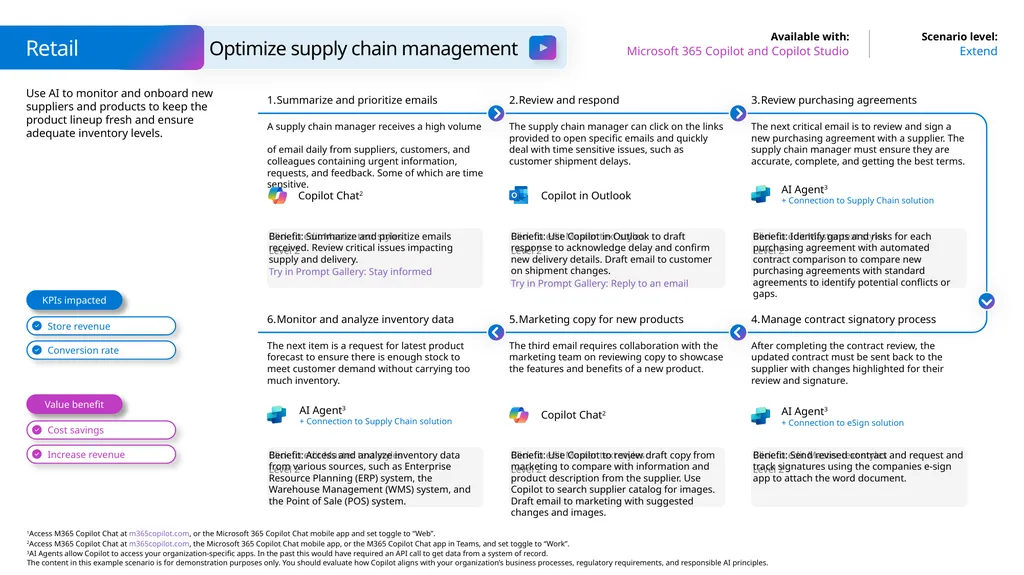
Use AI to monitor and onboard new suppliers and products to keep the product lineup fresh and ensure adequate inventory levels. Retail Extend Microsoft 365 Copilot and Copilot Studio Optimize supply chain management Benefit: Summarize and prioritize emails received. Review critical issues impacting supply and delivery.
Try in Prompt Gallery: Stay informed Summarize and prioritize emails A supply chain manager receives a high volume of email daily from suppliers, customers, and colleagues containing urgent information, requests, and feedback. Some of which are time sensitive. Review and respond The supply chain manager can click on the links provided to open specific emails and quickly deal with time sensitive issues, such as customer shipment delays. Benefit: Identify gaps and risks for each purchasing agreement with automated contract comparison to compare new purchasing agreements with standard agreements to identify potential conflicts or gaps. Review purchasing agreements The next critical email is to review and sign a new purchasing agreement with a supplier. The supply chain manager must ensure they are accurate, complete, and getting the best terms. Benefit: Use Copilot in Outlook to draft response to acknowledge delay and confirm new delivery details. Draft email to customer on shipment changes.
Try in Prompt Gallery: Reply to an email Benefit: Access and analyze inventory data from various sources, such as Enterprise Resource Planning (ERP) system, the Warehouse Management (WMS) system, and the Point of Sale (POS) system. Monitor and analyze inventory data The next item is a request for latest product forecast to ensure there is enough stock to meet customer demand without carrying too much inventory. Marketing copy for new products The third email requires collaboration with the marketing team on reviewing copy to showcase the features and benefits of a new product. Benefit: Send revised contract and request and track signatures using the companies e-sign app to attach the word document. Manage contract signatory process After completing the contract review, the updated contract must be sent back to the supplier with changes highlighted for their review and signature. Benefit: Use Copilot to review draft copy from marketing to compare with information and product description from the supplier. Use Copilot to search supplier catalog for images. Draft email to marketing with suggested changes and images. Value benefit KPIs impacted AI Agent3
+ Connection to eSign solution Copilot Chat2 AI Agent3
+ Connection to Supply Chain solution Copilot in Outlook AI Agent3
+ Connection to Supply Chain solution Copilot Chat2<br>
Try in Prompt Gallery: Stay informed Summarize and prioritize emails A supply chain manager receives a high volume of email daily from suppliers, customers, and colleagues containing urgent information, requests, and feedback. Some of which are time sensitive. Review and respond The supply chain manager can click on the links provided to open specific emails and quickly deal with time sensitive issues, such as customer shipment delays. Benefit: Identify gaps and risks for each purchasing agreement with automated contract comparison to compare new purchasing agreements with standard agreements to identify potential conflicts or gaps. Review purchasing agreements The next critical email is to review and sign a new purchasing agreement with a supplier. The supply chain manager must ensure they are accurate, complete, and getting the best terms. Benefit: Use Copilot in Outlook to draft response to acknowledge delay and confirm new delivery details. Draft email to customer on shipment changes.
Try in Prompt Gallery: Reply to an email Benefit: Access and analyze inventory data from various sources, such as Enterprise Resource Planning (ERP) system, the Warehouse Management (WMS) system, and the Point of Sale (POS) system. Monitor and analyze inventory data The next item is a request for latest product forecast to ensure there is enough stock to meet customer demand without carrying too much inventory. Marketing copy for new products The third email requires collaboration with the marketing team on reviewing copy to showcase the features and benefits of a new product. Benefit: Send revised contract and request and track signatures using the companies e-sign app to attach the word document. Manage contract signatory process After completing the contract review, the updated contract must be sent back to the supplier with changes highlighted for their review and signature. Benefit: Use Copilot to review draft copy from marketing to compare with information and product description from the supplier. Use Copilot to search supplier catalog for images. Draft email to marketing with suggested changes and images. Value benefit KPIs impacted AI Agent3
+ Connection to eSign solution Copilot Chat2 AI Agent3
+ Connection to Supply Chain solution Copilot in Outlook AI Agent3
+ Connection to Supply Chain solution Copilot Chat2<br>
22
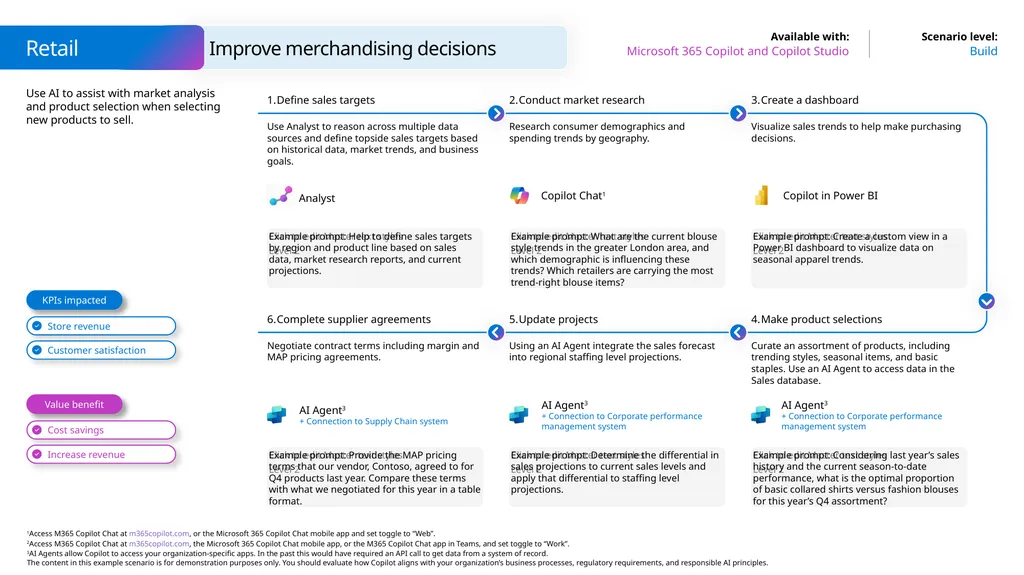
Use AI to assist with market analysis and product selection when selecting new products to sell. Retail Build Microsoft 365 Copilot and Copilot Studio Improve merchandising decisions Example prompt: Help to define sales targets by region and product line based on sales data, market research reports, and current projections. Define sales targets Use Analyst to reason across multiple data sources and define topside sales targets based on historical data, market trends, and business goals. Conduct market research Research consumer demographics and spending trends by geography. Example prompt: Create a custom view in a Power BI dashboard to visualize data on seasonal apparel trends. Create a dashboard Visualize sales trends to help make purchasing decisions. Example prompt: What are the current blouse style trends in the greater London area, and which demographic is influencing these trends? Which retailers are carrying the most trend-right blouse items? Example prompt: Provide the MAP pricing terms that our vendor, Contoso, agreed to for Q4 products last year. Compare these terms with what we negotiated for this year in a table format. Complete supplier agreements Negotiate contract terms including margin and MAP pricing agreements. Update projects Using an AI Agent integrate the sales forecast into regional staffing level projections. Example prompt: Considering last year’s sales history and the current season-to-date performance, what is the optimal proportion of basic collared shirts versus fashion blouses for this year’s Q4 assortment? Make product selections Curate an assortment of products, including trending styles, seasonal items, and basic staples. Use an AI Agent to access data in the Sales database. Example prompt: Determine the differential in sales projections to current sales levels and apply that differential to staffing level projections. Value benefit KPIs impacted AI Agent3
+ Connection to Supply Chain system AI Agent3
+ Connection to Corporate performance management system AI Agent3
+ Connection to Corporate performance management system Copilot in Power BI Copilot Chat1 Analyst<br>
+ Connection to Supply Chain system AI Agent3
+ Connection to Corporate performance management system AI Agent3
+ Connection to Corporate performance management system Copilot in Power BI Copilot Chat1 Analyst<br>
23
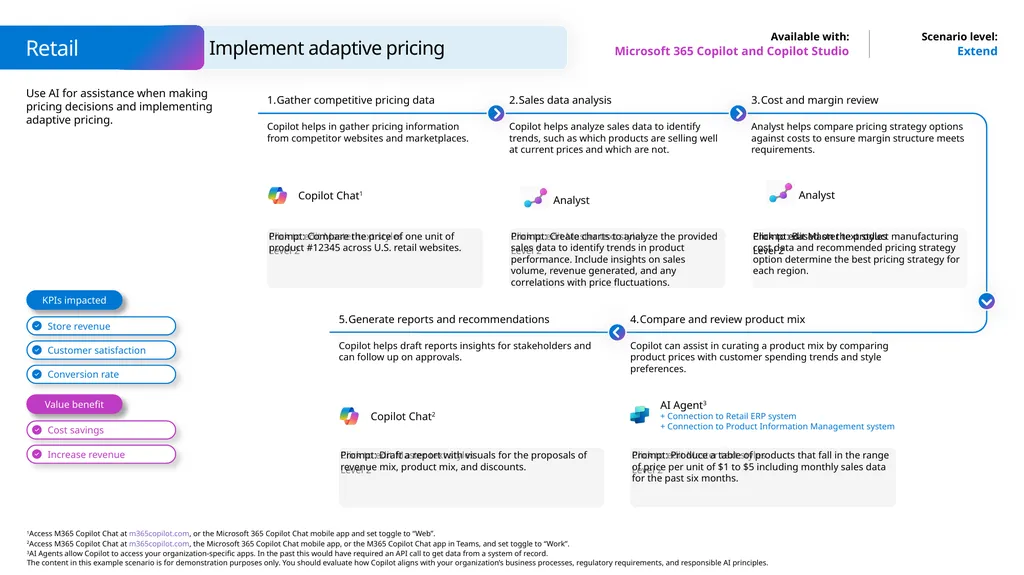
Use AI for assistance when making pricing decisions and implementing adaptive pricing. Extend Microsoft 365 Copilot and Copilot Studio Prompt: Compare the price of one unit of product #12345 across U.S. retail websites. Gather competitive pricing data Copilot helps in gather pricing information from competitor websites and marketplaces. Sales data analysis Copilot helps analyze sales data to identify trends, such as which products are selling well at current prices and which are not. Prompt: Based on the product manufacturing cost data and recommended pricing strategy option determine the best pricing strategy for each region. Cost and margin review Analyst helps compare pricing strategy options against costs to ensure margin structure meets requirements. Prompt: Create charts to analyze the provided sales data to identify trends in product performance. Include insights on sales volume, revenue generated, and any correlations with price fluctuations. Generate reports and recommendations Copilot helps draft reports insights for stakeholders and can follow up on approvals. Prompt: Produce a table of products that fall in the range of price per unit of $1 to $5 including monthly sales data for the past six months. Compare and review product mix Copilot can assist in curating a product mix by comparing product prices with customer spending trends and style preferences. Prompt: Draft a report with visuals for the proposals of revenue mix, product mix, and discounts. Value benefit KPIs impacted Retail Implement adaptive pricing Copilot Chat1 AI Agent3
+ Connection to Retail ERP system
+ Connection to Product Information Management system Copilot Chat2 Analyst Analyst<br>
+ Connection to Retail ERP system
+ Connection to Product Information Management system Copilot Chat2 Analyst Analyst<br>
24
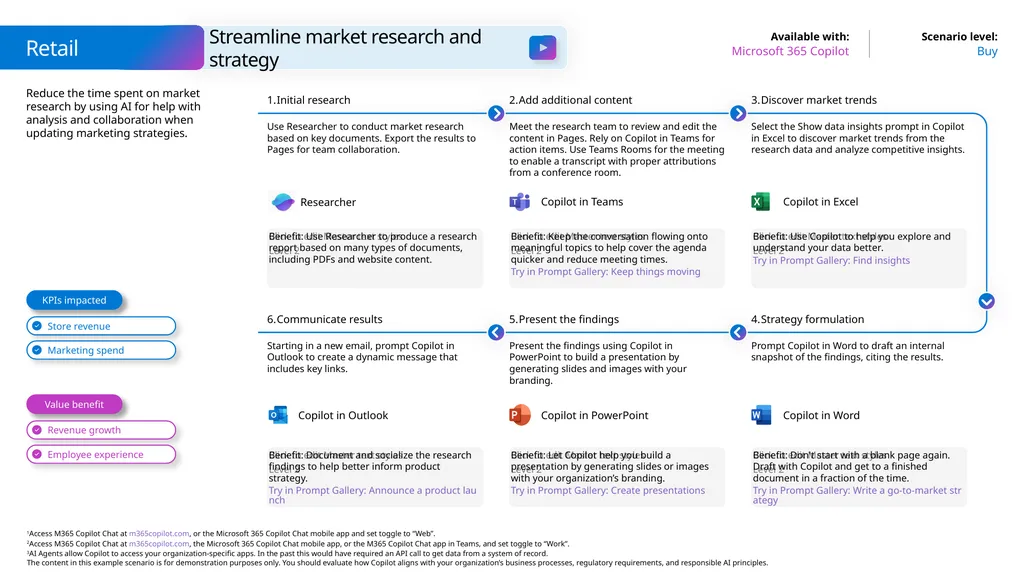
Reduce the time spent on market research by using AI for help with analysis and collaboration when updating marketing strategies. Retail Buy Microsoft 365 Copilot Streamline market research and strategy Benefit: Use Researcher to produce a research report based on many types of documents, including PDFs and website content. Initial research Use Researcher to conduct market research based on key documents. Export the results to Pages for team collaboration. Add additional content Meet the research team to review and edit the content in Pages. Rely on Copilot in Teams for action items. Use Teams Rooms for the meeting to enable a transcript with proper attributions from a conference room. Benefit: Use Copilot to help you explore and understand your data better.
Try in Prompt Gallery: Find insights Discover market trends Select the Show data insights prompt in Copilot in Excel to discover market trends from the research data and analyze competitive insights. Benefit: Keep the conversation flowing onto meaningful topics to help cover the agenda quicker and reduce meeting times.
Try in Prompt Gallery: Keep things moving Benefit: Document and socialize the research findings to help better inform product strategy.
Try in Prompt Gallery: Announce a product launch Communicate results Starting in a new email, prompt Copilot in Outlook to create a dynamic message that includes key links. Present the findings Present the findings using Copilot in PowerPoint to build a presentation by generating slides and images with your branding. Benefit: Don't start with a blank page again. Draft with Copilot and get to a finished document in a fraction of the time.
Try in Prompt Gallery: Write a go-to-market strategy Strategy formulation Prompt Copilot in Word to draft an internal snapshot of the findings, citing the results. Benefit: Let Copilot help you build a presentation by generating slides or images with your organization’s branding.
Try in Prompt Gallery: Create presentations Value benefit KPIs impacted Copilot in Outlook Copilot in Teams Copilot in Excel Copilot in PowerPoint Copilot in Word Researcher<br>
Try in Prompt Gallery: Find insights Discover market trends Select the Show data insights prompt in Copilot in Excel to discover market trends from the research data and analyze competitive insights. Benefit: Keep the conversation flowing onto meaningful topics to help cover the agenda quicker and reduce meeting times.
Try in Prompt Gallery: Keep things moving Benefit: Document and socialize the research findings to help better inform product strategy.
Try in Prompt Gallery: Announce a product launch Communicate results Starting in a new email, prompt Copilot in Outlook to create a dynamic message that includes key links. Present the findings Present the findings using Copilot in PowerPoint to build a presentation by generating slides and images with your branding. Benefit: Don't start with a blank page again. Draft with Copilot and get to a finished document in a fraction of the time.
Try in Prompt Gallery: Write a go-to-market strategy Strategy formulation Prompt Copilot in Word to draft an internal snapshot of the findings, citing the results. Benefit: Let Copilot help you build a presentation by generating slides or images with your organization’s branding.
Try in Prompt Gallery: Create presentations Value benefit KPIs impacted Copilot in Outlook Copilot in Teams Copilot in Excel Copilot in PowerPoint Copilot in Word Researcher<br>
25
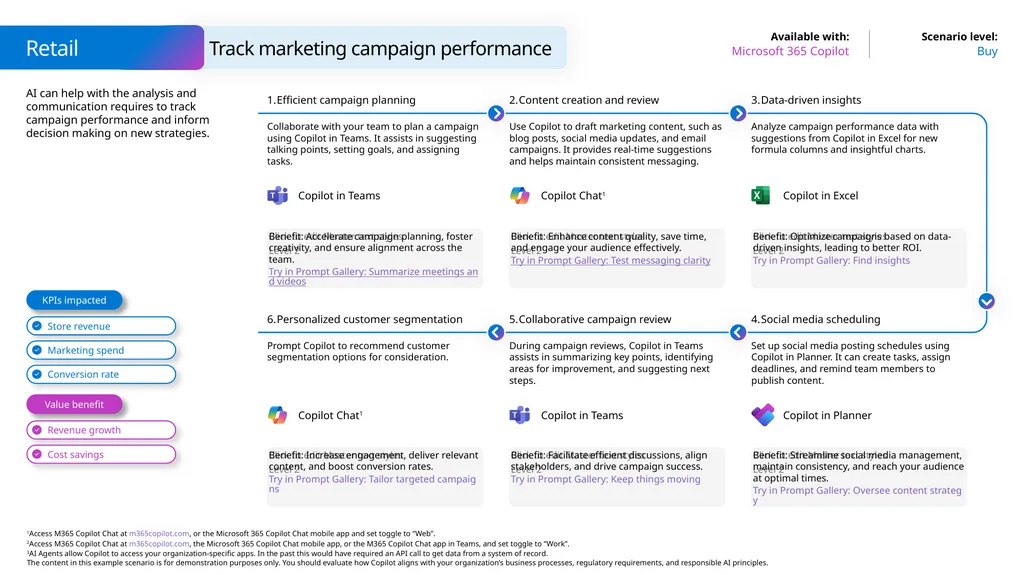
Copilot Chat1 AI can help with the analysis and communication requires to track campaign performance and inform decision making on new strategies. Retail Buy Microsoft 365 Copilot Track marketing campaign performance Benefit: Accelerate campaign planning, foster creativity, and ensure alignment across the team.
Try in Prompt Gallery: Summarize meetings and videos Efficient campaign planning Collaborate with your team to plan a campaign using Copilot in Teams. It assists in suggesting talking points, setting goals, and assigning tasks. Content creation and review Use Copilot to draft marketing content, such as blog posts, social media updates, and email campaigns. It provides real-time suggestions and helps maintain consistent messaging. Benefit: Optimize campaigns based on data-driven insights, leading to better ROI.
Try in Prompt Gallery: Find insights Data-driven insights Analyze campaign performance data with suggestions from Copilot in Excel for new formula columns and insightful charts. Benefit: Enhance content quality, save time, and engage your audience effectively.
Try in Prompt Gallery: Test messaging clarity Benefit: Increase engagement, deliver relevant content, and boost conversion rates.
Try in Prompt Gallery: Tailor targeted campaigns Personalized customer segmentation Prompt Copilot to recommend customer segmentation options for consideration. Collaborative campaign review During campaign reviews, Copilot in Teams assists in summarizing key points, identifying areas for improvement, and suggesting next steps. Benefit: Streamline social media management, maintain consistency, and reach your audience at optimal times.
Try in Prompt Gallery: Oversee content strategy Social media scheduling Set up social media posting schedules using Copilot in Planner. It can create tasks, assign deadlines, and remind team members to publish content. Benefit: Facilitate efficient discussions, align stakeholders, and drive campaign success.
Try in Prompt Gallery: Keep things moving Value benefit KPIs impacted Copilot in Teams Copilot in Excel Copilot Chat1 Copilot in Teams Copilot in Planner<br>
Try in Prompt Gallery: Summarize meetings and videos Efficient campaign planning Collaborate with your team to plan a campaign using Copilot in Teams. It assists in suggesting talking points, setting goals, and assigning tasks. Content creation and review Use Copilot to draft marketing content, such as blog posts, social media updates, and email campaigns. It provides real-time suggestions and helps maintain consistent messaging. Benefit: Optimize campaigns based on data-driven insights, leading to better ROI.
Try in Prompt Gallery: Find insights Data-driven insights Analyze campaign performance data with suggestions from Copilot in Excel for new formula columns and insightful charts. Benefit: Enhance content quality, save time, and engage your audience effectively.
Try in Prompt Gallery: Test messaging clarity Benefit: Increase engagement, deliver relevant content, and boost conversion rates.
Try in Prompt Gallery: Tailor targeted campaigns Personalized customer segmentation Prompt Copilot to recommend customer segmentation options for consideration. Collaborative campaign review During campaign reviews, Copilot in Teams assists in summarizing key points, identifying areas for improvement, and suggesting next steps. Benefit: Streamline social media management, maintain consistency, and reach your audience at optimal times.
Try in Prompt Gallery: Oversee content strategy Social media scheduling Set up social media posting schedules using Copilot in Planner. It can create tasks, assign deadlines, and remind team members to publish content. Benefit: Facilitate efficient discussions, align stakeholders, and drive campaign success.
Try in Prompt Gallery: Keep things moving Value benefit KPIs impacted Copilot in Teams Copilot in Excel Copilot Chat1 Copilot in Teams Copilot in Planner<br>
26
AI can assist across the entire marketing campaign process from determining the audience, creating content, and analyzing performance.
Customer reference: Joos uses Copilot to grow its brand Extend Microsoft 365 Copilot and Copilot Studio Benefit: Refine your audience targeting to ensure that campaign messages are reaching the most receptive groups. Audience segmentation Prompt Copilot to recommend customer segmentation options for consideration based on specific campaign objectives and revenue goals. Strategic campaign briefs Collaborate with your marketing team using Copilot in Teams. It assists in brainstorming campaign ideas, setting goals, and assigning tasks. Benefit: Enhance content quality, save time, and engage your audience effectively. Content creation and refinement Use Copilot to draft marketing content, such as blog posts, social media updates, and email campaigns. It provides real-time suggestions and helps maintain consistent messaging. Benefit: Accelerate campaign planning, align stakeholders, and ensure a cohesive approach. Collaborative campaign review During campaign reviews, Copilot in Teams can assist in summarizing key points, identifying areas for improvement, and suggesting next steps. Benefit: Optimize campaigns based on data-driven insights, leading to better ROI. Data-driven insights Use Copilot Studio to build a custom agent based on your sales database. Ask questions such as ‘What was the ROI on this campaign?’ to help inform campaign optimization. Benefit: Facilitate efficient discussions, align stakeholders, and drive campaign success. Value benefit KPIs impacted Retail Craft targeted marketing campaigns Copilot in Teams Copilot Chat1 Copilot Chat1 Copilot in Teams AI Agent3
+ Connection to Retail ERP system<br>
Customer reference: Joos uses Copilot to grow its brand Extend Microsoft 365 Copilot and Copilot Studio Benefit: Refine your audience targeting to ensure that campaign messages are reaching the most receptive groups. Audience segmentation Prompt Copilot to recommend customer segmentation options for consideration based on specific campaign objectives and revenue goals. Strategic campaign briefs Collaborate with your marketing team using Copilot in Teams. It assists in brainstorming campaign ideas, setting goals, and assigning tasks. Benefit: Enhance content quality, save time, and engage your audience effectively. Content creation and refinement Use Copilot to draft marketing content, such as blog posts, social media updates, and email campaigns. It provides real-time suggestions and helps maintain consistent messaging. Benefit: Accelerate campaign planning, align stakeholders, and ensure a cohesive approach. Collaborative campaign review During campaign reviews, Copilot in Teams can assist in summarizing key points, identifying areas for improvement, and suggesting next steps. Benefit: Optimize campaigns based on data-driven insights, leading to better ROI. Data-driven insights Use Copilot Studio to build a custom agent based on your sales database. Ask questions such as ‘What was the ROI on this campaign?’ to help inform campaign optimization. Benefit: Facilitate efficient discussions, align stakeholders, and drive campaign success. Value benefit KPIs impacted Retail Craft targeted marketing campaigns Copilot in Teams Copilot Chat1 Copilot Chat1 Copilot in Teams AI Agent3
+ Connection to Retail ERP system<br>
27
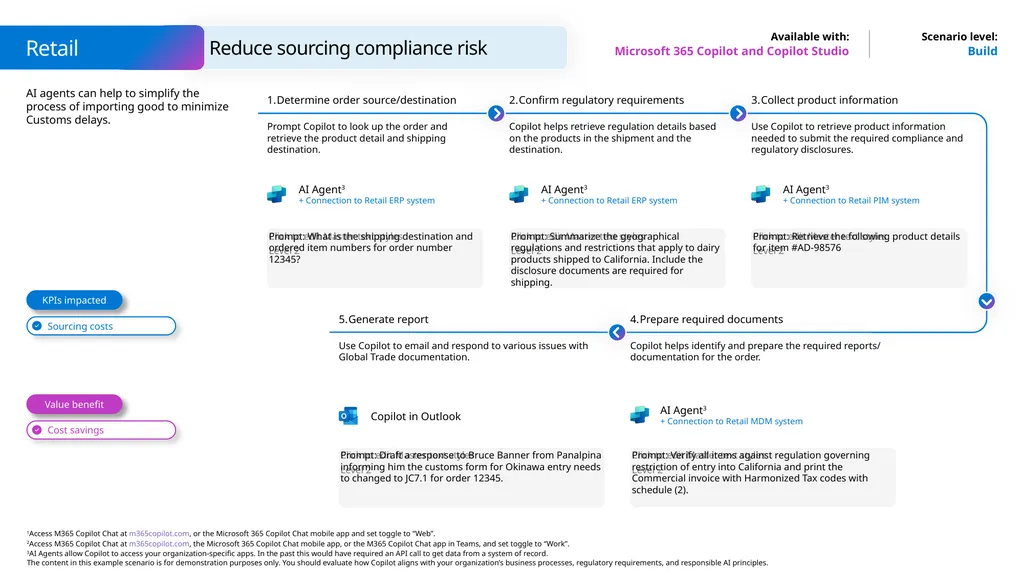
AI agents can help to simplify the process of importing good to minimize Customs delays. Build Microsoft 365 Copilot and Copilot Studio Prompt: What is the shipping destination and ordered item numbers for order number 12345? Determine order source/destination Prompt Copilot to look up the order and retrieve the product detail and shipping destination. Confirm regulatory requirements Copilot helps retrieve regulation details based on the products in the shipment and the destination. Prompt: Retrieve the following product details for item #AD-98576 Collect product information Use Copilot to retrieve product information needed to submit the required compliance and regulatory disclosures. Prompt: Summarize the geographical regulations and restrictions that apply to dairy products shipped to California. Include the disclosure documents are required for shipping. Generate report Use Copilot to email and respond to various issues with Global Trade documentation. Prompt: Verify all items against regulation governing restriction of entry into California and print the Commercial invoice with Harmonized Tax codes with schedule (2). Prepare required documents Copilot helps identify and prepare the required reports/ documentation for the order. Prompt: Draft a response to Bruce Banner from Panalpina informing him the customs form for Okinawa entry needs to changed to JC7.1 for order 12345. Value benefit KPIs impacted Retail Reduce sourcing compliance risk AI Agent3
+ Connection to Retail PIM system AI Agent3
+ Connection to Retail ERP system AI Agent3
+ Connection to Retail ERP system AI Agent3
+ Connection to Retail MDM system Copilot in Outlook<br>
+ Connection to Retail PIM system AI Agent3
+ Connection to Retail ERP system AI Agent3
+ Connection to Retail ERP system AI Agent3
+ Connection to Retail MDM system Copilot in Outlook<br>
28
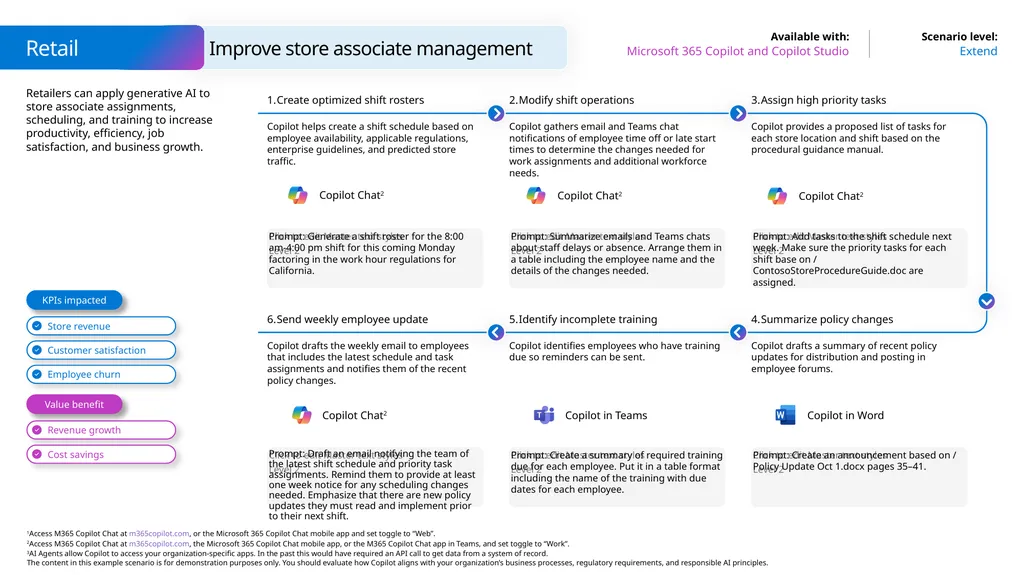
Retailers can apply generative AI to store associate assignments, scheduling, and training to increase productivity, efficiency, job satisfaction, and business growth. Retail Extend Microsoft 365 Copilot and Copilot Studio Improve store associate management Prompt: Generate a shift roster for the 8:00 am-4:00 pm shift for this coming Monday factoring in the work hour regulations for California. Create optimized shift rosters Copilot helps create a shift schedule based on employee availability, applicable regulations, enterprise guidelines, and predicted store traffic. Modify shift operations Copilot gathers email and Teams chat notifications of employee time off or late start times to determine the changes needed for work assignments and additional workforce needs. Prompt: Add tasks to the shift schedule next week. Make sure the priority tasks for each shift base on / ContosoStoreProcedureGuide.doc are assigned. Assign high priority tasks Copilot provides a proposed list of tasks for each store location and shift based on the procedural guidance manual. Prompt: Summarize emails and Teams chats about staff delays or absence. Arrange them in a table including the employee name and the details of the changes needed. Prompt: Draft an email notifying the team of the latest shift schedule and priority task assignments. Remind them to provide at least one week notice for any scheduling changes needed. Emphasize that there are new policy updates they must read and implement prior to their next shift. Send weekly employee update Copilot drafts the weekly email to employees that includes the latest schedule and task assignments and notifies them of the recent policy changes. Identify incomplete training Copilot identifies employees who have training due so reminders can be sent. Prompt: Create an announcement based on / Policy Update Oct 1.docx pages 35–41. Summarize policy changes Copilot drafts a summary of recent policy updates for distribution and posting in employee forums. Prompt: Create a summary of required training due for each employee. Put it in a table format including the name of the training with due dates for each employee. Value benefit KPIs impacted Copilot Chat2 Copilot Chat2 Copilot in Teams Copilot in Word Copilot Chat2 Copilot Chat2<br>
29
Use AI to deliver information to store associated to improve customer service and store operations.
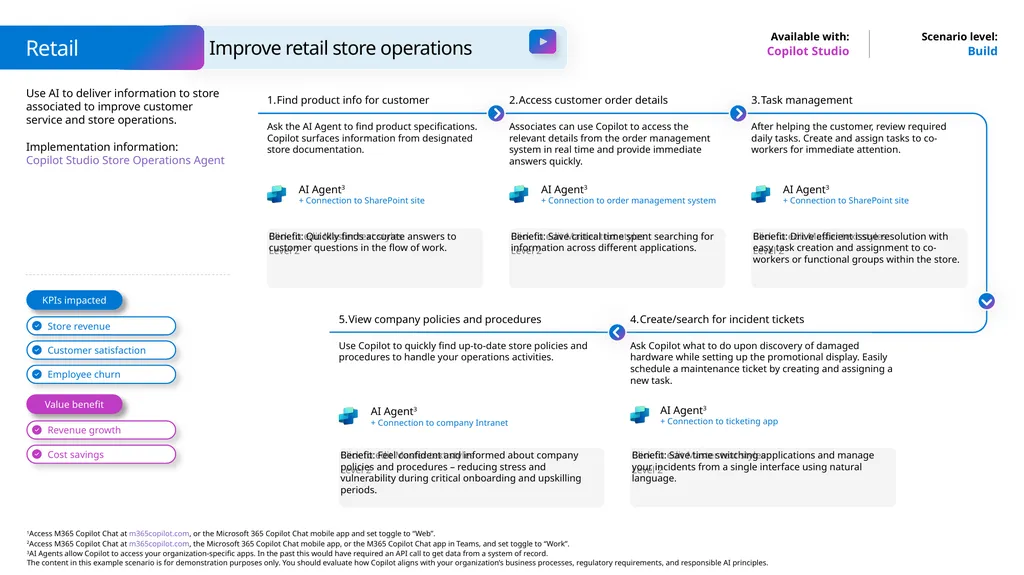
Implementation information: Copilot Studio Store Operations Agent Build Copilot Studio Benefit: Quickly finds accurate answers to customer questions in the flow of work. Find product info for customer Ask the AI Agent to find product specifications. Copilot surfaces information from designated store documentation. Access customer order details Associates can use Copilot to access the relevant details from the order management system in real time and provide immediate answers quickly. Benefit: Drive efficient issue resolution with easy task creation and assignment to co-workers or functional groups within the store. Task management After helping the customer, review required daily tasks. Create and assign tasks to co-workers for immediate attention. Benefit: Save critical time spent searching for information across different applications. View company policies and procedures Use Copilot to quickly find up-to-date store policies and procedures to handle your operations activities. Benefit: Save time switching applications and manage your incidents from a single interface using natural language. Create/search for incident tickets Ask Copilot what to do upon discovery of damaged hardware while setting up the promotional display. Easily schedule a maintenance ticket by creating and assigning a new task. Benefit: Feel confident and informed about company policies and procedures – reducing stress and vulnerability during critical onboarding and upskilling periods. Value benefit KPIs impacted Retail Improve retail store operations AI Agent3
+ Connection to SharePoint site AI Agent3
+ Connection to order management system AI Agent3
+ Connection to SharePoint site AI Agent3
+ Connection to ticketing app AI Agent3
+ Connection to company Intranet<br>
Implementation information: Copilot Studio Store Operations Agent Build Copilot Studio Benefit: Quickly finds accurate answers to customer questions in the flow of work. Find product info for customer Ask the AI Agent to find product specifications. Copilot surfaces information from designated store documentation. Access customer order details Associates can use Copilot to access the relevant details from the order management system in real time and provide immediate answers quickly. Benefit: Drive efficient issue resolution with easy task creation and assignment to co-workers or functional groups within the store. Task management After helping the customer, review required daily tasks. Create and assign tasks to co-workers for immediate attention. Benefit: Save critical time spent searching for information across different applications. View company policies and procedures Use Copilot to quickly find up-to-date store policies and procedures to handle your operations activities. Benefit: Save time switching applications and manage your incidents from a single interface using natural language. Create/search for incident tickets Ask Copilot what to do upon discovery of damaged hardware while setting up the promotional display. Easily schedule a maintenance ticket by creating and assigning a new task. Benefit: Feel confident and informed about company policies and procedures – reducing stress and vulnerability during critical onboarding and upskilling periods. Value benefit KPIs impacted Retail Improve retail store operations AI Agent3
+ Connection to SharePoint site AI Agent3
+ Connection to order management system AI Agent3
+ Connection to SharePoint site AI Agent3
+ Connection to ticketing app AI Agent3
+ Connection to company Intranet<br>
30
Retailers can apply AI to store associate activities to increase efficiency, job satisfaction, and business growth.
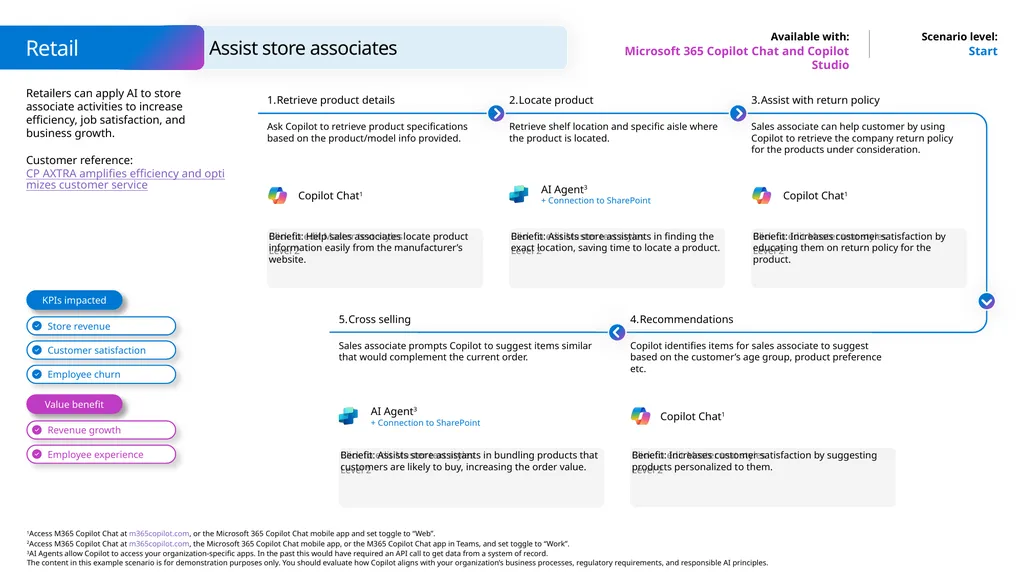
Customer reference: CP AXTRA amplifies efficiency and optimizes customer service Start Microsoft 365 Copilot Chat and Copilot Studio Benefit: Help sales associates locate product information easily from the manufacturer’s website. Retrieve product details Ask Copilot to retrieve product specifications based on the product/model info provided. Locate product Retrieve shelf location and specific aisle where the product is located. Benefit: Increases customer satisfaction by educating them on return policy for the product. Assist with return policy Sales associate can help customer by using Copilot to retrieve the company return policy for the products under consideration. Benefit: Assists store assistants in finding the exact location, saving time to locate a product. Cross selling Sales associate prompts Copilot to suggest items similar that would complement the current order. Benefit: Increases customer satisfaction by suggesting products personalized to them. Recommendations Copilot identifies items for sales associate to suggest based on the customer’s age group, product preference etc. Benefit: Assists store assistants in bundling products that customers are likely to buy, increasing the order value. Value benefit KPIs impacted Retail Assist store associates AI Agent3
+ Connection to SharePoint AI Agent3
+ Connection to SharePoint Copilot Chat1 Copilot Chat1 Copilot Chat1<br>
Customer reference: CP AXTRA amplifies efficiency and optimizes customer service Start Microsoft 365 Copilot Chat and Copilot Studio Benefit: Help sales associates locate product information easily from the manufacturer’s website. Retrieve product details Ask Copilot to retrieve product specifications based on the product/model info provided. Locate product Retrieve shelf location and specific aisle where the product is located. Benefit: Increases customer satisfaction by educating them on return policy for the product. Assist with return policy Sales associate can help customer by using Copilot to retrieve the company return policy for the products under consideration. Benefit: Assists store assistants in finding the exact location, saving time to locate a product. Cross selling Sales associate prompts Copilot to suggest items similar that would complement the current order. Benefit: Increases customer satisfaction by suggesting products personalized to them. Recommendations Copilot identifies items for sales associate to suggest based on the customer’s age group, product preference etc. Benefit: Assists store assistants in bundling products that customers are likely to buy, increasing the order value. Value benefit KPIs impacted Retail Assist store associates AI Agent3
+ Connection to SharePoint AI Agent3
+ Connection to SharePoint Copilot Chat1 Copilot Chat1 Copilot Chat1<br>
31
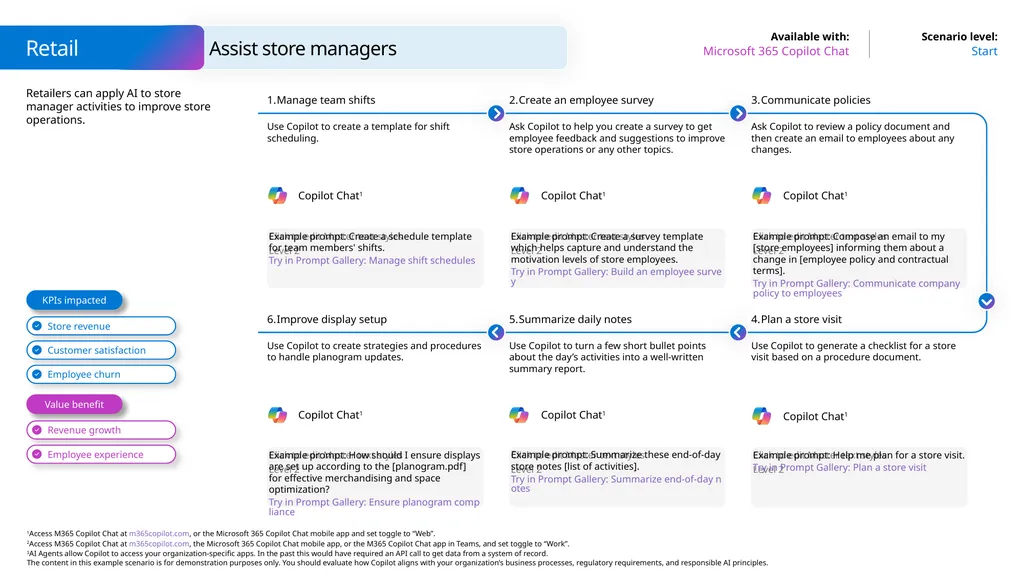
Retailers can apply AI to store manager activities to improve store operations. Retail Start Microsoft 365 Copilot Chat Assist store managers Example prompt: Create a schedule template for team members' shifts.
Try in Prompt Gallery: Manage shift schedules Manage team shifts Use Copilot to create a template for shift scheduling. Create an employee survey Ask Copilot to help you create a survey to get employee feedback and suggestions to improve store operations or any other topics. Example prompt: Compose an email to my [store employees] informing them about a change in [employee policy and contractual terms].
Try in Prompt Gallery: Communicate company policy to employees Communicate policies Ask Copilot to review a policy document and then create an email to employees about any changes. Example prompt: Create a survey template which helps capture and understand the motivation levels of store employees.
Try in Prompt Gallery: Build an employee survey Example prompt: How should I ensure displays are set up according to the [planogram.pdf] for effective merchandising and space optimization?
Try in Prompt Gallery: Ensure planogram compliance Improve display setup Use Copilot to create strategies and procedures to handle planogram updates. Summarize daily notes Use Copilot to turn a few short bullet points about the day’s activities into a well-written summary report. Example prompt: Help me plan for a store visit.
Try in Prompt Gallery: Plan a store visit Plan a store visit Use Copilot to generate a checklist for a store visit based on a procedure document. Example prompt: Summarize these end-of-day store notes [list of activities].
Try in Prompt Gallery: Summarize end-of-day notes Value benefit KPIs impacted Copilot Chat1 Copilot Chat1 Copilot Chat1 Copilot Chat1 Copilot Chat1 Copilot Chat1<br>
Try in Prompt Gallery: Manage shift schedules Manage team shifts Use Copilot to create a template for shift scheduling. Create an employee survey Ask Copilot to help you create a survey to get employee feedback and suggestions to improve store operations or any other topics. Example prompt: Compose an email to my [store employees] informing them about a change in [employee policy and contractual terms].
Try in Prompt Gallery: Communicate company policy to employees Communicate policies Ask Copilot to review a policy document and then create an email to employees about any changes. Example prompt: Create a survey template which helps capture and understand the motivation levels of store employees.
Try in Prompt Gallery: Build an employee survey Example prompt: How should I ensure displays are set up according to the [planogram.pdf] for effective merchandising and space optimization?
Try in Prompt Gallery: Ensure planogram compliance Improve display setup Use Copilot to create strategies and procedures to handle planogram updates. Summarize daily notes Use Copilot to turn a few short bullet points about the day’s activities into a well-written summary report. Example prompt: Help me plan for a store visit.
Try in Prompt Gallery: Plan a store visit Plan a store visit Use Copilot to generate a checklist for a store visit based on a procedure document. Example prompt: Summarize these end-of-day store notes [list of activities].
Try in Prompt Gallery: Summarize end-of-day notes Value benefit KPIs impacted Copilot Chat1 Copilot Chat1 Copilot Chat1 Copilot Chat1 Copilot Chat1 Copilot Chat1<br>
32
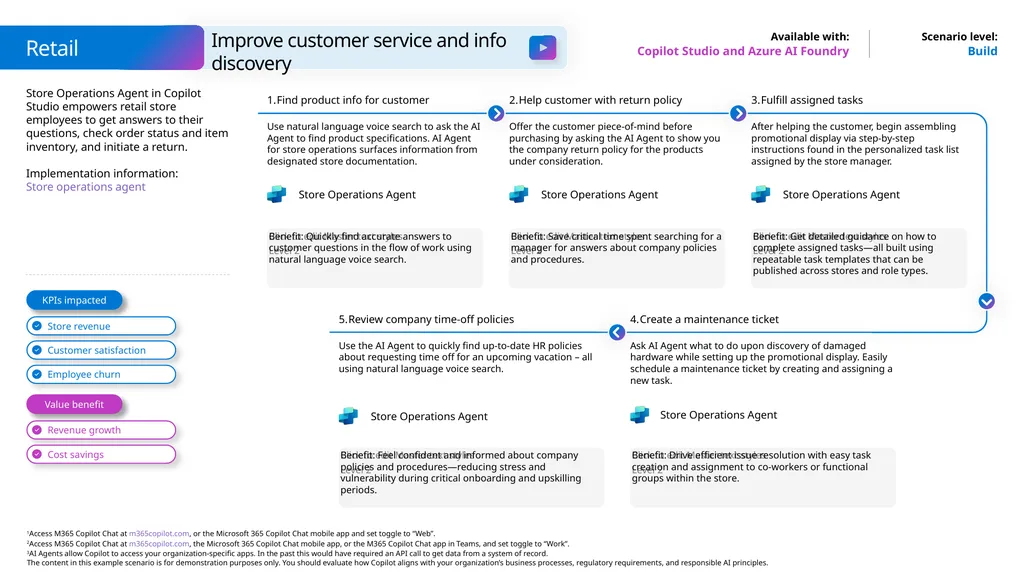
Store Operations Agent in Copilot Studio empowers retail store employees to get answers to their questions, check order status and item inventory, and initiate a return.
Implementation information: Store operations agent Build Copilot Studio and Azure AI Foundry Benefit: Quickly find accurate answers to customer questions in the flow of work using natural language voice search. Find product info for customer Use natural language voice search to ask the AI Agent to find product specifications. AI Agent for store operations surfaces information from designated store documentation. Help customer with return policy Offer the customer piece-of-mind before purchasing by asking the AI Agent to show you the company return policy for the products under consideration. Benefit: Get detailed guidance on how to complete assigned tasks—all built using repeatable task templates that can be published across stores and role types. Fulfill assigned tasks After helping the customer, begin assembling promotional display via step-by-step instructions found in the personalized task list assigned by the store manager. Benefit: Save critical time spent searching for a manager for answers about company policies and procedures. Review company time-off policies Use the AI Agent to quickly find up-to-date HR policies about requesting time off for an upcoming vacation – all using natural language voice search. Benefit: Drive efficient issue resolution with easy task creation and assignment to co-workers or functional groups within the store. Create a maintenance ticket Ask AI Agent what to do upon discovery of damaged hardware while setting up the promotional display. Easily schedule a maintenance ticket by creating and assigning a new task. Benefit: Feel confident and informed about company policies and procedures—reducing stress and vulnerability during critical onboarding and upskilling periods. Value benefit KPIs impacted Retail Improve customer service and info discovery Store Operations Agent Store Operations Agent Store Operations Agent Store Operations Agent Store Operations Agent<br>
Implementation information: Store operations agent Build Copilot Studio and Azure AI Foundry Benefit: Quickly find accurate answers to customer questions in the flow of work using natural language voice search. Find product info for customer Use natural language voice search to ask the AI Agent to find product specifications. AI Agent for store operations surfaces information from designated store documentation. Help customer with return policy Offer the customer piece-of-mind before purchasing by asking the AI Agent to show you the company return policy for the products under consideration. Benefit: Get detailed guidance on how to complete assigned tasks—all built using repeatable task templates that can be published across stores and role types. Fulfill assigned tasks After helping the customer, begin assembling promotional display via step-by-step instructions found in the personalized task list assigned by the store manager. Benefit: Save critical time spent searching for a manager for answers about company policies and procedures. Review company time-off policies Use the AI Agent to quickly find up-to-date HR policies about requesting time off for an upcoming vacation – all using natural language voice search. Benefit: Drive efficient issue resolution with easy task creation and assignment to co-workers or functional groups within the store. Create a maintenance ticket Ask AI Agent what to do upon discovery of damaged hardware while setting up the promotional display. Easily schedule a maintenance ticket by creating and assigning a new task. Benefit: Feel confident and informed about company policies and procedures—reducing stress and vulnerability during critical onboarding and upskilling periods. Value benefit KPIs impacted Retail Improve customer service and info discovery Store Operations Agent Store Operations Agent Store Operations Agent Store Operations Agent Store Operations Agent<br>
33
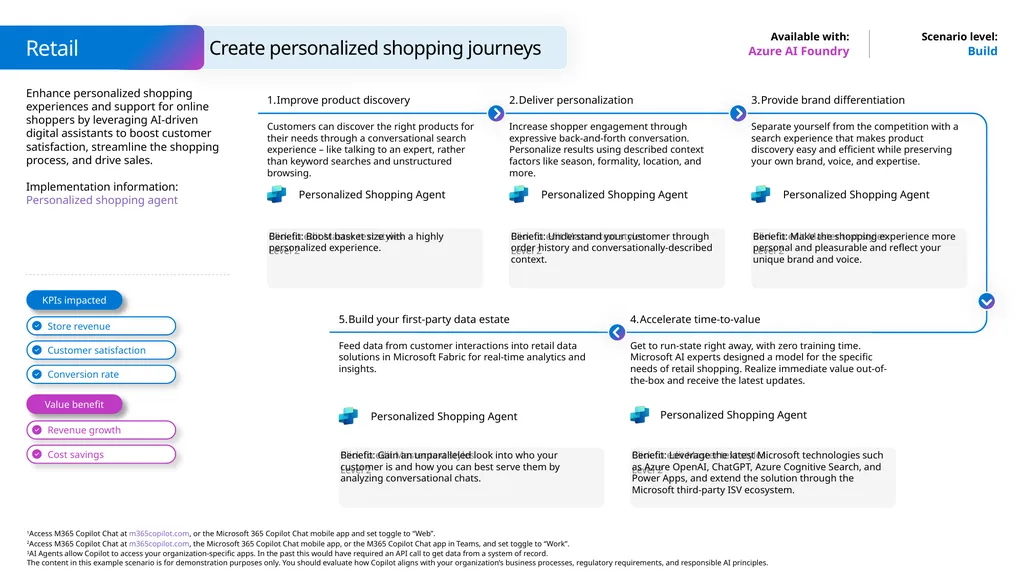
Enhance personalized shopping experiences and support for online shoppers by leveraging AI-driven digital assistants to boost customer satisfaction, streamline the shopping process, and drive sales.
Implementation information: Personalized shopping agent Build Azure AI Foundry Benefit: Boost basket size with a highly personalized experience. Improve product discovery Customers can discover the right products for their needs through a conversational search experience – like talking to an expert, rather than keyword searches and unstructured browsing. Deliver personalization Increase shopper engagement through expressive back-and-forth conversation. Personalize results using described context factors like season, formality, location, and more. Benefit: Make the shopping experience more personal and pleasurable and reflect your unique brand and voice. Provide brand differentiation Separate yourself from the competition with a search experience that makes product discovery easy and efficient while preserving your own brand, voice, and expertise. Benefit: Understand your customer through order history and conversationally-described context. Build your first-party data estate Feed data from customer interactions into retail data solutions in Microsoft Fabric for real-time analytics and insights. Benefit: Leverage the latest Microsoft technologies such as Azure OpenAI, ChatGPT, Azure Cognitive Search, and Power Apps, and extend the solution through the Microsoft third-party ISV ecosystem. Accelerate time-to-value Get to run-state right away, with zero training time. Microsoft AI experts designed a model for the specific needs of retail shopping. Realize immediate value out-of-the-box and receive the latest updates. Benefit: Gain an unparalleled look into who your customer is and how you can best serve them by analyzing conversational chats. Value benefit KPIs impacted Retail Create personalized shopping journeys Personalized Shopping Agent Personalized Shopping Agent Personalized Shopping Agent Personalized Shopping Agent Personalized Shopping Agent<br>
Implementation information: Personalized shopping agent Build Azure AI Foundry Benefit: Boost basket size with a highly personalized experience. Improve product discovery Customers can discover the right products for their needs through a conversational search experience – like talking to an expert, rather than keyword searches and unstructured browsing. Deliver personalization Increase shopper engagement through expressive back-and-forth conversation. Personalize results using described context factors like season, formality, location, and more. Benefit: Make the shopping experience more personal and pleasurable and reflect your unique brand and voice. Provide brand differentiation Separate yourself from the competition with a search experience that makes product discovery easy and efficient while preserving your own brand, voice, and expertise. Benefit: Understand your customer through order history and conversationally-described context. Build your first-party data estate Feed data from customer interactions into retail data solutions in Microsoft Fabric for real-time analytics and insights. Benefit: Leverage the latest Microsoft technologies such as Azure OpenAI, ChatGPT, Azure Cognitive Search, and Power Apps, and extend the solution through the Microsoft third-party ISV ecosystem. Accelerate time-to-value Get to run-state right away, with zero training time. Microsoft AI experts designed a model for the specific needs of retail shopping. Realize immediate value out-of-the-box and receive the latest updates. Benefit: Gain an unparalleled look into who your customer is and how you can best serve them by analyzing conversational chats. Value benefit KPIs impacted Retail Create personalized shopping journeys Personalized Shopping Agent Personalized Shopping Agent Personalized Shopping Agent Personalized Shopping Agent Personalized Shopping Agent<br>
34
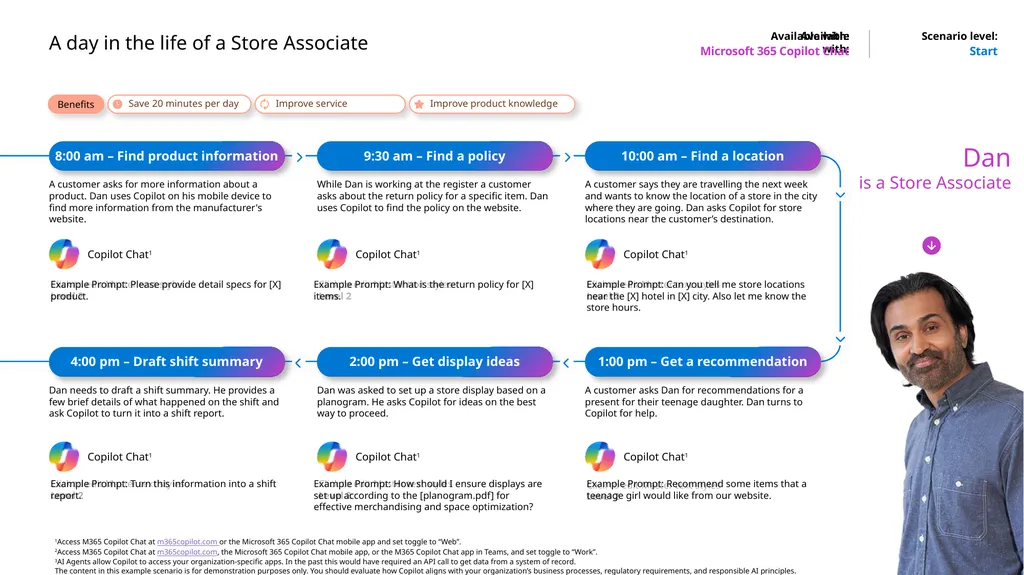
Available with: A day in the life of a Store Associate Microsoft 365 Copilot Chat Start Benefits Save 20 minutes per day Improve service Improve product knowledge Dan
is a Store Associate 8:00 am – Find product information A customer asks for more information about a product. Dan uses Copilot on his mobile device to find more information from the manufacturer's website. Example Prompt: Please provide detail specs for [X] product. 9:30 am – Find a policy While Dan is working at the register a customer asks about the return policy for a specific item. Dan uses Copilot to find the policy on the website. Example Prompt: What is the return policy for [X] items. 10:00 am – Find a location A customer says they are travelling the next week and wants to know the location of a store in the city where they are going. Dan asks Copilot for store locations near the customer’s destination. Example Prompt: Can you tell me store locations near the [X] hotel in [X] city. Also let me know the store hours. 1:00 pm – Get a recommendation A customer asks Dan for recommendations for a present for their teenage daughter. Dan turns to Copilot for help. Example Prompt: Recommend some items that a teenage girl would like from our website. 2:00 pm – Get display ideas Dan was asked to set up a store display based on a planogram. He asks Copilot for ideas on the best way to proceed. Example Prompt: How should I ensure displays are set up according to the [planogram.pdf] for effective merchandising and space optimization? 4:00 pm – Draft shift summary Dan needs to draft a shift summary. He provides a few brief details of what happened on the shift and ask Copilot to turn it into a shift report. Example Prompt: Turn this information into a shift report.<br>
is a Store Associate 8:00 am – Find product information A customer asks for more information about a product. Dan uses Copilot on his mobile device to find more information from the manufacturer's website. Example Prompt: Please provide detail specs for [X] product. 9:30 am – Find a policy While Dan is working at the register a customer asks about the return policy for a specific item. Dan uses Copilot to find the policy on the website. Example Prompt: What is the return policy for [X] items. 10:00 am – Find a location A customer says they are travelling the next week and wants to know the location of a store in the city where they are going. Dan asks Copilot for store locations near the customer’s destination. Example Prompt: Can you tell me store locations near the [X] hotel in [X] city. Also let me know the store hours. 1:00 pm – Get a recommendation A customer asks Dan for recommendations for a present for their teenage daughter. Dan turns to Copilot for help. Example Prompt: Recommend some items that a teenage girl would like from our website. 2:00 pm – Get display ideas Dan was asked to set up a store display based on a planogram. He asks Copilot for ideas on the best way to proceed. Example Prompt: How should I ensure displays are set up according to the [planogram.pdf] for effective merchandising and space optimization? 4:00 pm – Draft shift summary Dan needs to draft a shift summary. He provides a few brief details of what happened on the shift and ask Copilot to turn it into a shift report. Example Prompt: Turn this information into a shift report.<br>