
Scenario/Processes Service and Repair Scenario
MS
Published · 29 slides · 0 views

1 / 1
Description
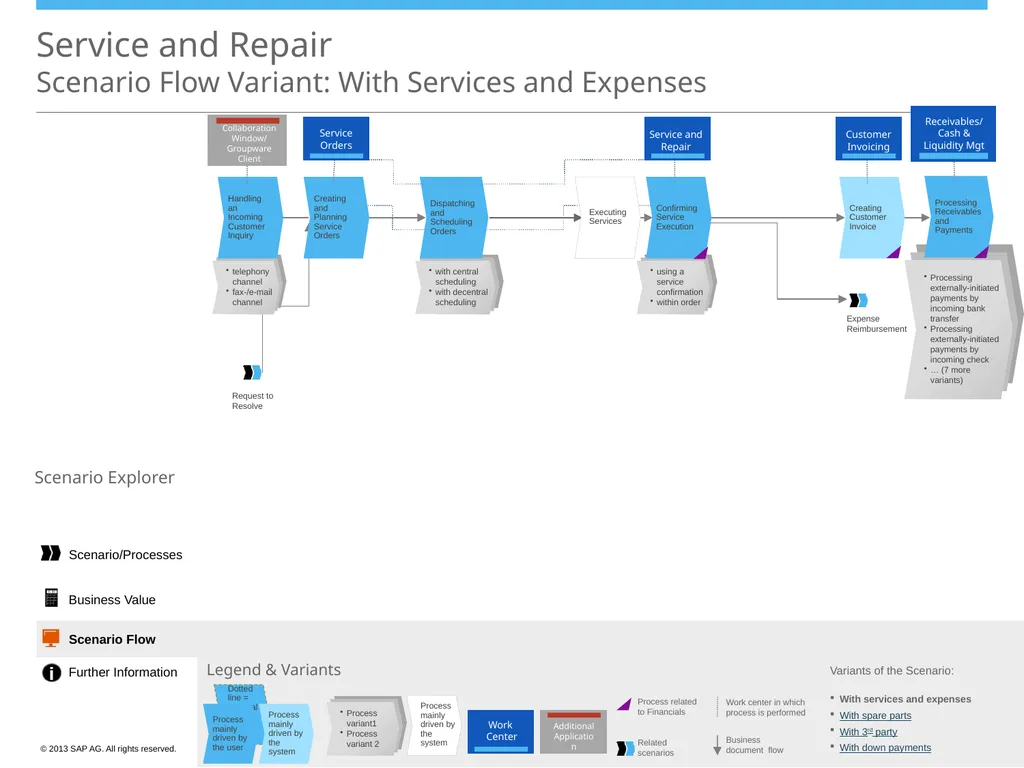
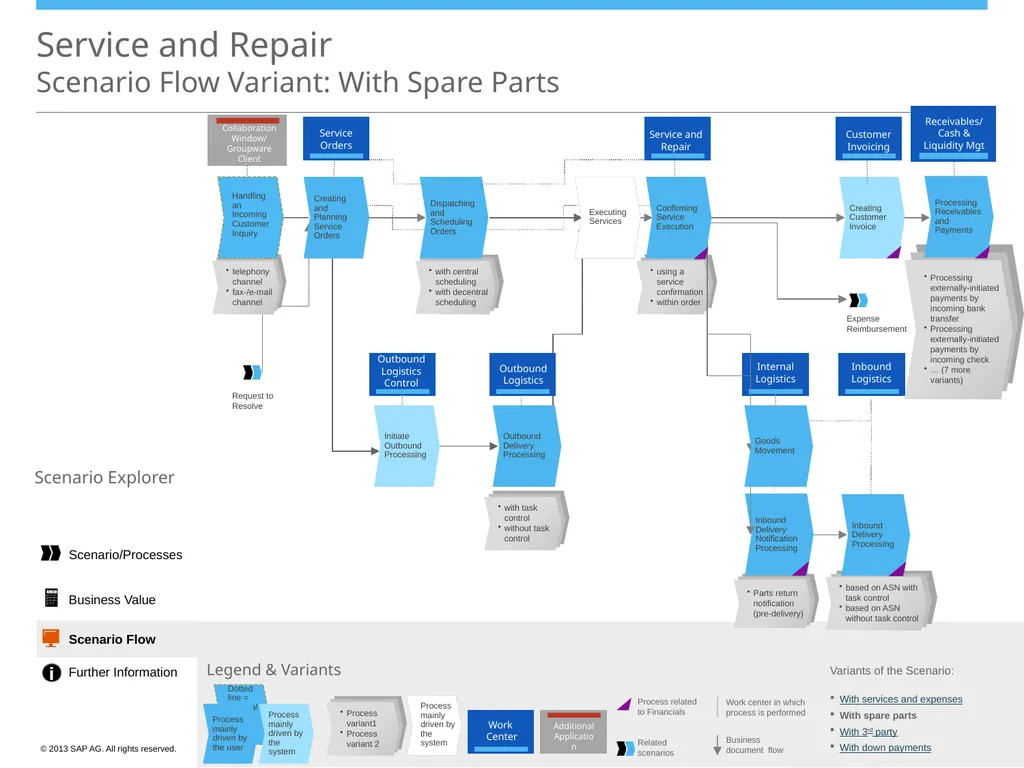
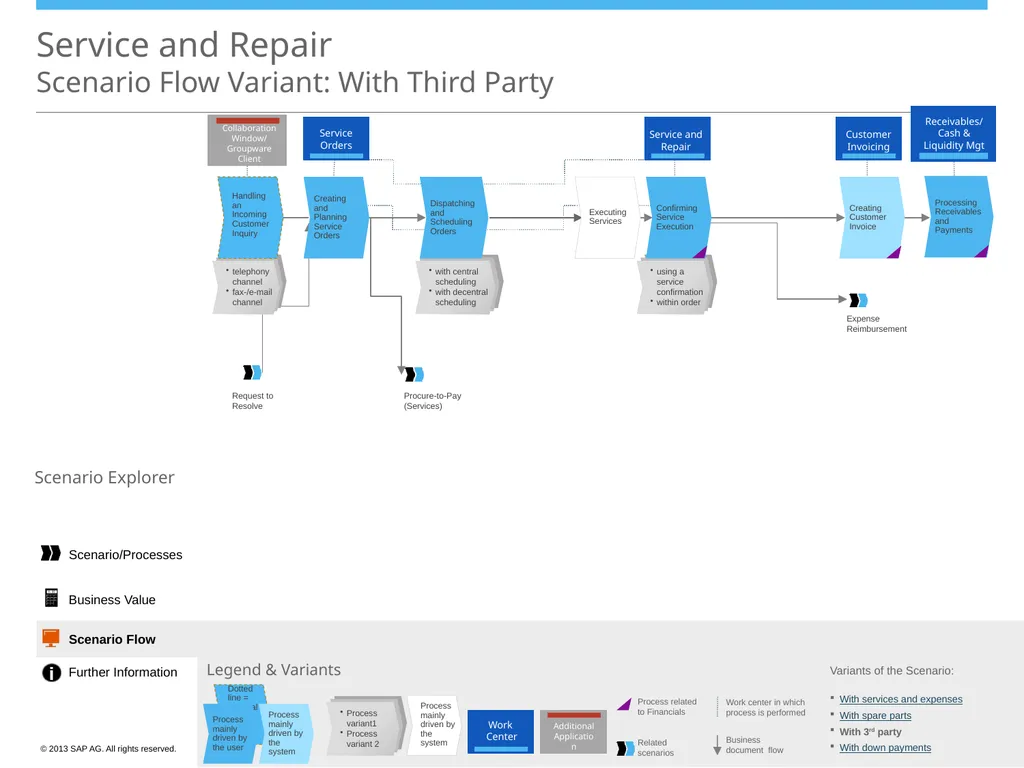
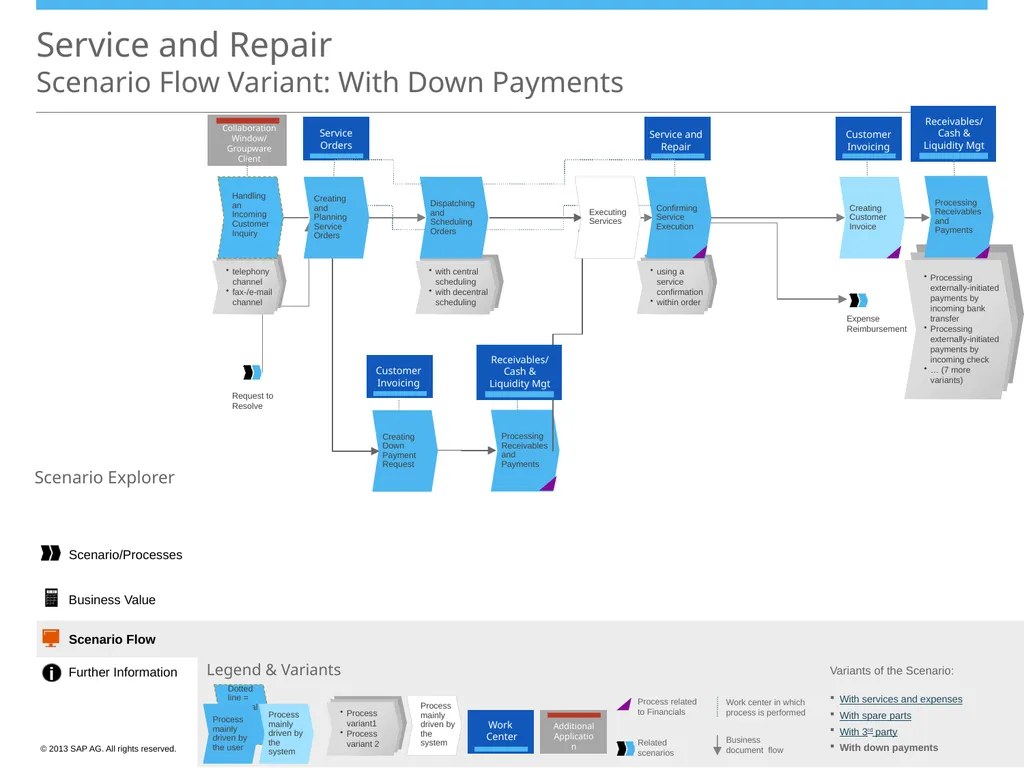
ScenarioProcesses Service and Repair Scenario Overview Handling an Incoming Customer Inquiry Executing Services Creating and Planning Service Orders Creating Down Payment Request - Customer Confirming Service Execution Scenario Explorer
Related Topics
Share
Embed code
Download this presentation From Below
"Scenario/Processes Service and Repair Scenario" is the property of its rightful owner. Permission is granted to download and print the materials on this website for personal, non-commercial use only, and to display it on your personal computer provided you do not modify the materials and that you retain all copyright notices contained in the materials. By downloading content from our website, you accept the terms of this agreement.
Presentation Transcript
01
Scenario/Processes Service and Repair
Scenario Overview Handling an Incoming Customer Inquiry Executing Services Creating and Planning Service Orders Creating Down Payment Request - Customer Confirming Service Execution Scenario
Explorer Open Legend Sales/Customer Service Representative Scenario Description The following business roles are involved in this scenario: Service Planner/
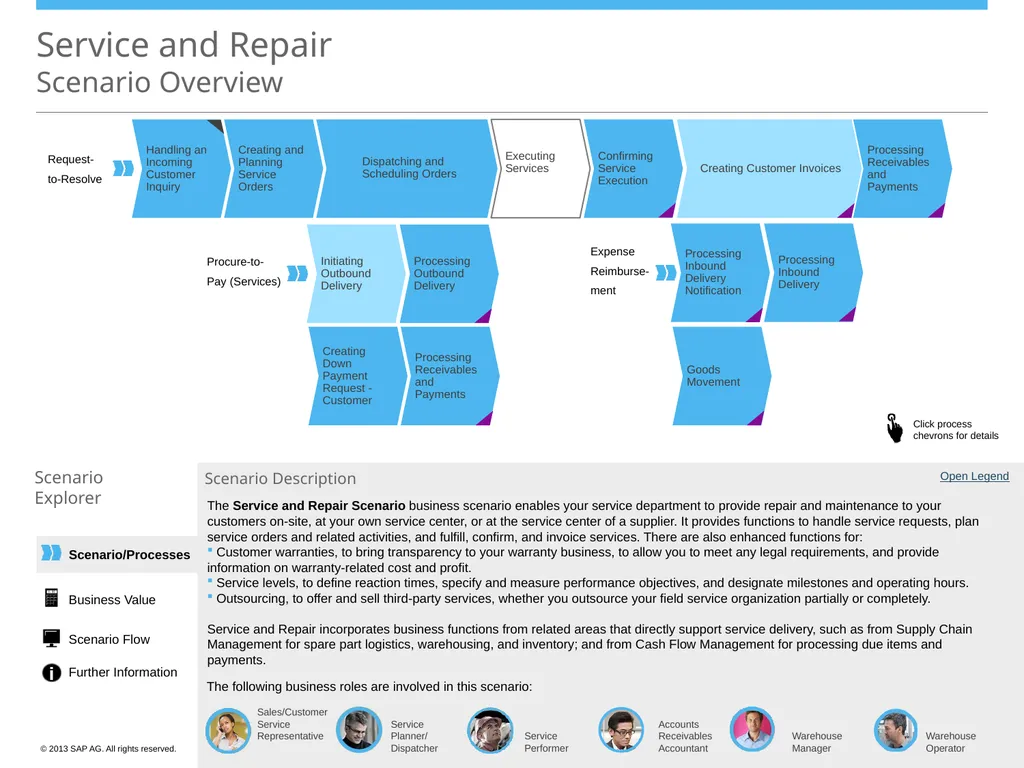
Dispatcher Service Performer Accounts Receivables Accountant Warehouse Manager Warehouse Operator The Service and Repair Scenario business scenario enables your service department to provide repair and maintenance to your customers on-site, at your own service center, or at the service center of a supplier. It provides functions to handle service requests, plan service orders and related activities, and fulfill, confirm, and invoice services. There are also enhanced functions for:
Customer warranties, to bring transparency to your warranty business, to allow you to meet any legal requirements, and provide information on warranty-related cost and profit.
Service levels, to define reaction times, specify and measure performance objectives, and designate milestones and operating hours.
Outsourcing, to offer and sell third-party services, whether you outsource your field service organization partially or completely.
Service and Repair incorporates business functions from related areas that directly support service delivery, such as from Supply Chain Management for spare part logistics, warehousing, and inventory; and from Cash Flow Management for processing due items and payments. Processing Receivables and Payments Initiating Outbound Delivery Processing Outbound Delivery Processing Receivables and Payments Processing Inbound Delivery Processing Inbound Delivery Notification Goods Movement Request-
to-Resolve Procure-to-
Pay (Services) Expense
Reimburse-
ment Dispatching and
Scheduling Orders Creating Customer Invoices Business Value Scenario Flow Further Information<br>
Explorer Open Legend Sales/Customer Service Representative Scenario Description The following business roles are involved in this scenario: Service Planner/
Dispatcher Service Performer Accounts Receivables Accountant Warehouse Manager Warehouse Operator The Service and Repair Scenario business scenario enables your service department to provide repair and maintenance to your customers on-site, at your own service center, or at the service center of a supplier. It provides functions to handle service requests, plan service orders and related activities, and fulfill, confirm, and invoice services. There are also enhanced functions for:
Customer warranties, to bring transparency to your warranty business, to allow you to meet any legal requirements, and provide information on warranty-related cost and profit.
Service levels, to define reaction times, specify and measure performance objectives, and designate milestones and operating hours.
Outsourcing, to offer and sell third-party services, whether you outsource your field service organization partially or completely.
Service and Repair incorporates business functions from related areas that directly support service delivery, such as from Supply Chain Management for spare part logistics, warehousing, and inventory; and from Cash Flow Management for processing due items and payments. Processing Receivables and Payments Initiating Outbound Delivery Processing Outbound Delivery Processing Receivables and Payments Processing Inbound Delivery Processing Inbound Delivery Notification Goods Movement Request-
to-Resolve Procure-to-
Pay (Services) Expense
Reimburse-
ment Dispatching and
Scheduling Orders Creating Customer Invoices Business Value Scenario Flow Further Information<br>
02
Scenario/Processes Service and Repair
Scenario Overview Handling an Incoming Customer Inquiry Executing Services Creating and Planning Service Orders Creating Down Payment Request - Customer Confirming Service Execution Scenario
Explorer Sales/Customer Service Representative Scenario Description The following business roles are involved in this scenario: Service Planner/
Dispatcher Service Performer Accounts Receivables Accountant The Service and Repair Scenario business scenario enables your service department to provide repair and maintenance to your customers on-site, at your own service center, or at the service center of a supplier. It provides functions to handle service requests, plan service orders and related activities, and fulfill, confirm, and invoice services. There are also enhanced functions for:
Customer warranties, to bring transparency to your warranty business, to allow you to meet any legal requirements, and provide information on warranty-related cost and profit.
Service levels, to define reaction times, specify and measure performance objectives, and designate milestones and operating hours.
Outsourcing, to offer and sell third-party services, whether you outsource your field service organization partially or completely.
Service and Repair incorporates business functions from related areas that directly support service delivery, such as from Supply Chain Management for spare part logistics, warehousing, and inventory; and from Cash Flow Management for processing due items and payments. Processing Receivables and Payments Initiating Outbound Delivery Processing Outbound Delivery Processing Receivables and Payments Processing Inbound Delivery Processing Inbound Delivery Notification Goods Movement Request-
to-Resolve Procure-to-
Pay (Services) Expense
Reimburse-
ment Dispatching and
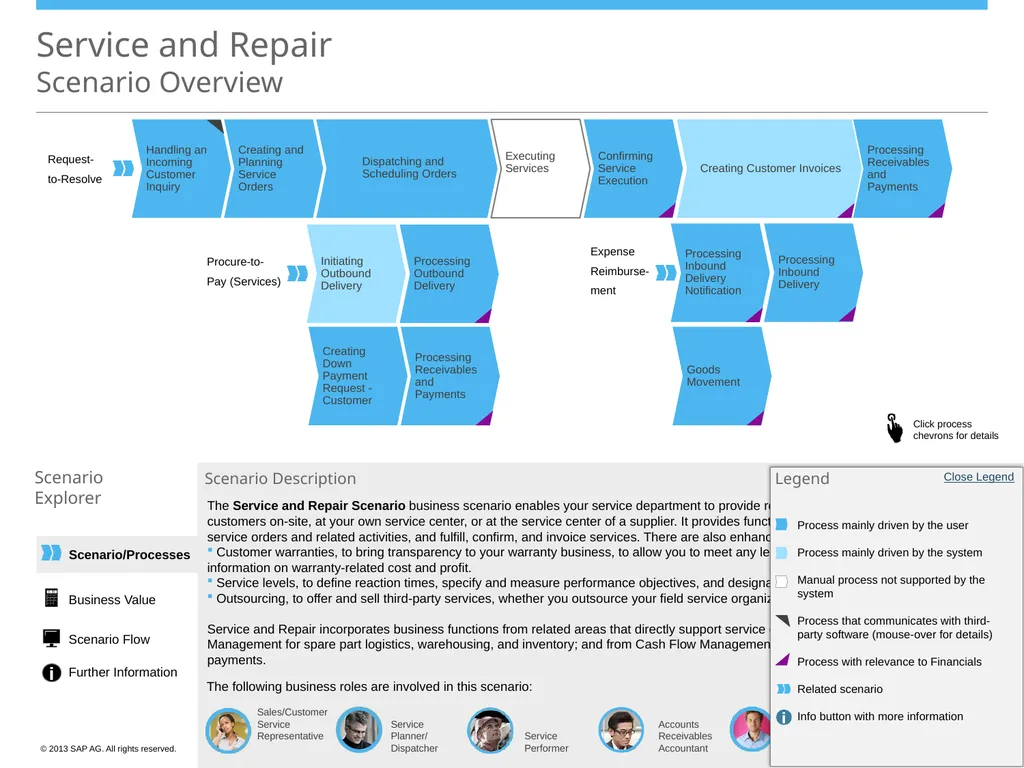
Scheduling Orders Creating Customer Invoices Open Legend Accounts Receivables Accountant Warehouse Manager Warehouse Operator Open Legend Warehouse Manager Warehouse Operator <Role Name> <Role Name> <Role Name> Legend Process mainly driven by the user
Process mainly driven by the system
Manual process not supported by the system
Process that communicates with third-party software (mouse-over for details)
Process with relevance to Financials
Related scenario
Info button with more information Close Legend Business Value Scenario Flow Further Information<br>
Explorer Sales/Customer Service Representative Scenario Description The following business roles are involved in this scenario: Service Planner/
Dispatcher Service Performer Accounts Receivables Accountant The Service and Repair Scenario business scenario enables your service department to provide repair and maintenance to your customers on-site, at your own service center, or at the service center of a supplier. It provides functions to handle service requests, plan service orders and related activities, and fulfill, confirm, and invoice services. There are also enhanced functions for:
Customer warranties, to bring transparency to your warranty business, to allow you to meet any legal requirements, and provide information on warranty-related cost and profit.
Service levels, to define reaction times, specify and measure performance objectives, and designate milestones and operating hours.
Outsourcing, to offer and sell third-party services, whether you outsource your field service organization partially or completely.
Service and Repair incorporates business functions from related areas that directly support service delivery, such as from Supply Chain Management for spare part logistics, warehousing, and inventory; and from Cash Flow Management for processing due items and payments. Processing Receivables and Payments Initiating Outbound Delivery Processing Outbound Delivery Processing Receivables and Payments Processing Inbound Delivery Processing Inbound Delivery Notification Goods Movement Request-
to-Resolve Procure-to-
Pay (Services) Expense
Reimburse-
ment Dispatching and
Scheduling Orders Creating Customer Invoices Open Legend Accounts Receivables Accountant Warehouse Manager Warehouse Operator Open Legend Warehouse Manager Warehouse Operator <Role Name> <Role Name> <Role Name> Legend Process mainly driven by the user
Process mainly driven by the system
Manual process not supported by the system
Process that communicates with third-party software (mouse-over for details)
Process with relevance to Financials
Related scenario
Info button with more information Close Legend Business Value Scenario Flow Further Information<br>
03
Scenario/Processes Service and Repair
Process Details: Handling an Incoming Customer Inquiry Scenario
Explorer Process Description Performed by
Sales/Customer Service Representative In the Work Centers
Account Management Groupware (Outlook)
Collaboration Window Further Information Executing Services Creating and Planning Service Orders Creating Down Payment Request - Customer Confirming Service Execution Processing Receivables and Payments Initiating Outbound Delivery Processing Outbound Delivery Processing Receivables and Payments Processing Inbound Delivery Processing Inbound Delivery Notification Goods Movement Request-
to-Resolve Procure-to-
Pay (Services) Expense
Reimburse-
ment Dispatching and
Scheduling Orders Creating Customer Invoices Handling an Incoming Customer Inquiry via Telephony Channel Receive an incoming call and log an inquiry X i Click here to display
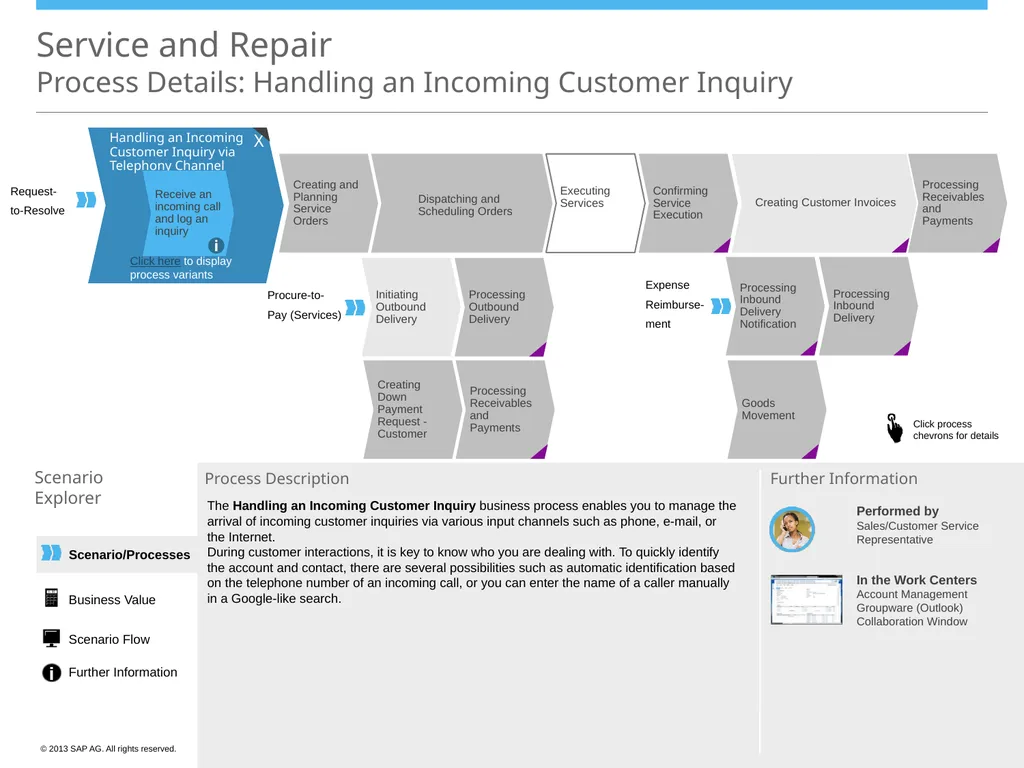
process variants The Handling an Incoming Customer Inquiry business process enables you to manage the arrival of incoming customer inquiries via various input channels such as phone, e-mail, or the Internet.
During customer interactions, it is key to know who you are dealing with. To quickly identify the account and contact, there are several possibilities such as automatic identification based on the telephone number of an incoming call, or you can enter the name of a caller manually in a Google-like search. Business Value Scenario Flow Further Information<br>
Explorer Process Description Performed by
Sales/Customer Service Representative In the Work Centers
Account Management Groupware (Outlook)
Collaboration Window Further Information Executing Services Creating and Planning Service Orders Creating Down Payment Request - Customer Confirming Service Execution Processing Receivables and Payments Initiating Outbound Delivery Processing Outbound Delivery Processing Receivables and Payments Processing Inbound Delivery Processing Inbound Delivery Notification Goods Movement Request-
to-Resolve Procure-to-
Pay (Services) Expense
Reimburse-
ment Dispatching and
Scheduling Orders Creating Customer Invoices Handling an Incoming Customer Inquiry via Telephony Channel Receive an incoming call and log an inquiry X i Click here to display
process variants The Handling an Incoming Customer Inquiry business process enables you to manage the arrival of incoming customer inquiries via various input channels such as phone, e-mail, or the Internet.
During customer interactions, it is key to know who you are dealing with. To quickly identify the account and contact, there are several possibilities such as automatic identification based on the telephone number of an incoming call, or you can enter the name of a caller manually in a Google-like search. Business Value Scenario Flow Further Information<br>
04
Scenario/Processes Service and Repair
Process Details: Handling an Incoming Customer Inquiry Scenario
Explorer Process Description Performed by
Sales/Customer Service Representative In the Work Centers
Account Management Groupware (Outlook)
Collaboration Window Further Information Request-
to-Resolve Handling an Incoming Customer Inquiry via Telephony Channel Receive an incoming call and log an inquiry i Click here to hide
process variants Handling an Incoming
Customer Inquiry via Fax
or E-Mail Channel
Handling an Incoming
Inquiry Manually via
Activities i i Executing Services Creating and Planning Service Orders Creating Down Payment Request - Customer Confirming Service Execution Processing Receivables and Payments Initiating Outbound Delivery Processing Outbound Delivery Processing Receivables and Payments Processing Inbound Delivery Processing Inbound Delivery Notification Goods Movement Procure-to-
Pay (Services) Expense
Reimburse-
ment Dispatching and
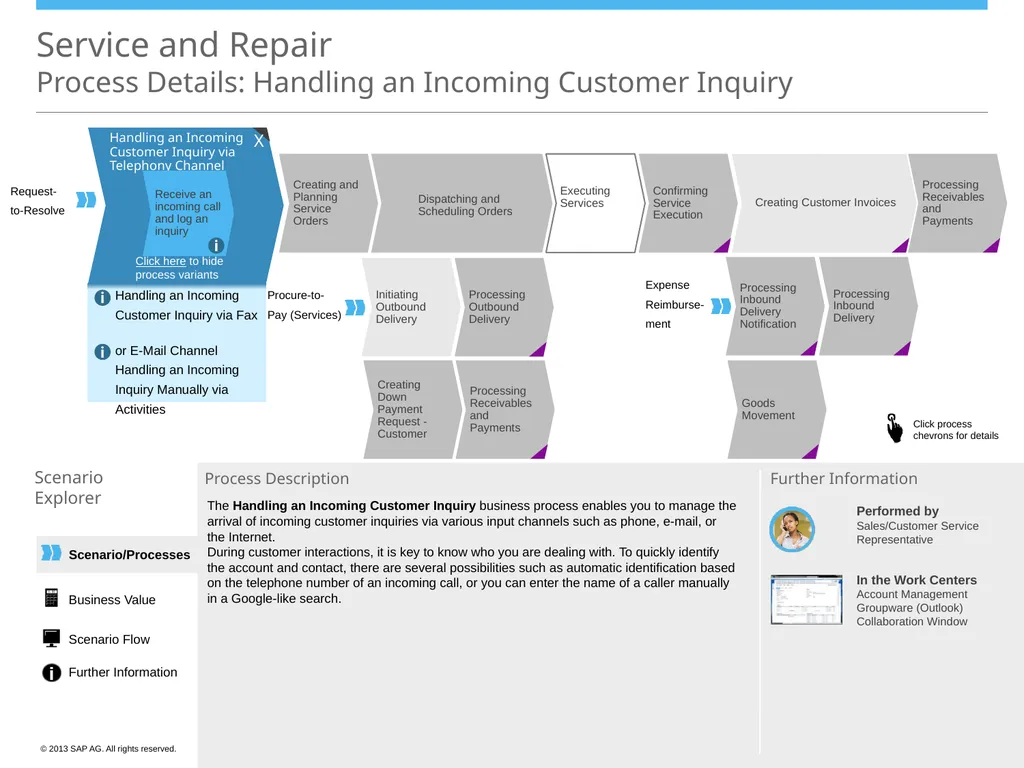
Scheduling Orders Creating Customer Invoices The Handling an Incoming Customer Inquiry business process enables you to manage the arrival of incoming customer inquiries via various input channels such as phone, e-mail, or the Internet.
During customer interactions, it is key to know who you are dealing with. To quickly identify the account and contact, there are several possibilities such as automatic identification based on the telephone number of an incoming call, or you can enter the name of a caller manually in a Google-like search. Business Value Scenario Flow Further Information X<br>
Explorer Process Description Performed by
Sales/Customer Service Representative In the Work Centers
Account Management Groupware (Outlook)
Collaboration Window Further Information Request-
to-Resolve Handling an Incoming Customer Inquiry via Telephony Channel Receive an incoming call and log an inquiry i Click here to hide
process variants Handling an Incoming
Customer Inquiry via Fax
or E-Mail Channel
Handling an Incoming
Inquiry Manually via
Activities i i Executing Services Creating and Planning Service Orders Creating Down Payment Request - Customer Confirming Service Execution Processing Receivables and Payments Initiating Outbound Delivery Processing Outbound Delivery Processing Receivables and Payments Processing Inbound Delivery Processing Inbound Delivery Notification Goods Movement Procure-to-
Pay (Services) Expense
Reimburse-
ment Dispatching and
Scheduling Orders Creating Customer Invoices The Handling an Incoming Customer Inquiry business process enables you to manage the arrival of incoming customer inquiries via various input channels such as phone, e-mail, or the Internet.
During customer interactions, it is key to know who you are dealing with. To quickly identify the account and contact, there are several possibilities such as automatic identification based on the telephone number of an incoming call, or you can enter the name of a caller manually in a Google-like search. Business Value Scenario Flow Further Information X<br>
05
Scenario/Processes Service and Repair
Process Details: Creating and Planning Service Orders Scenario
Explorer Process Description Performed by
Service Planner/
Dispatcher In the Work Center
Service Orders Further Information Handling an Incoming Customer Inquiry Executing Services Creating Down Payment Request - Customer Confirming Service Execution Processing Receivables and Payments Initiating Outbound Delivery Processing Outbound Delivery Processing Receivables and Payments Processing Inbound Delivery Processing Inbound Delivery Notification Goods Movement Request-
to-Resolve Procure-to-
Pay (Services) Expense
Reimburse-
ment Dispatching and
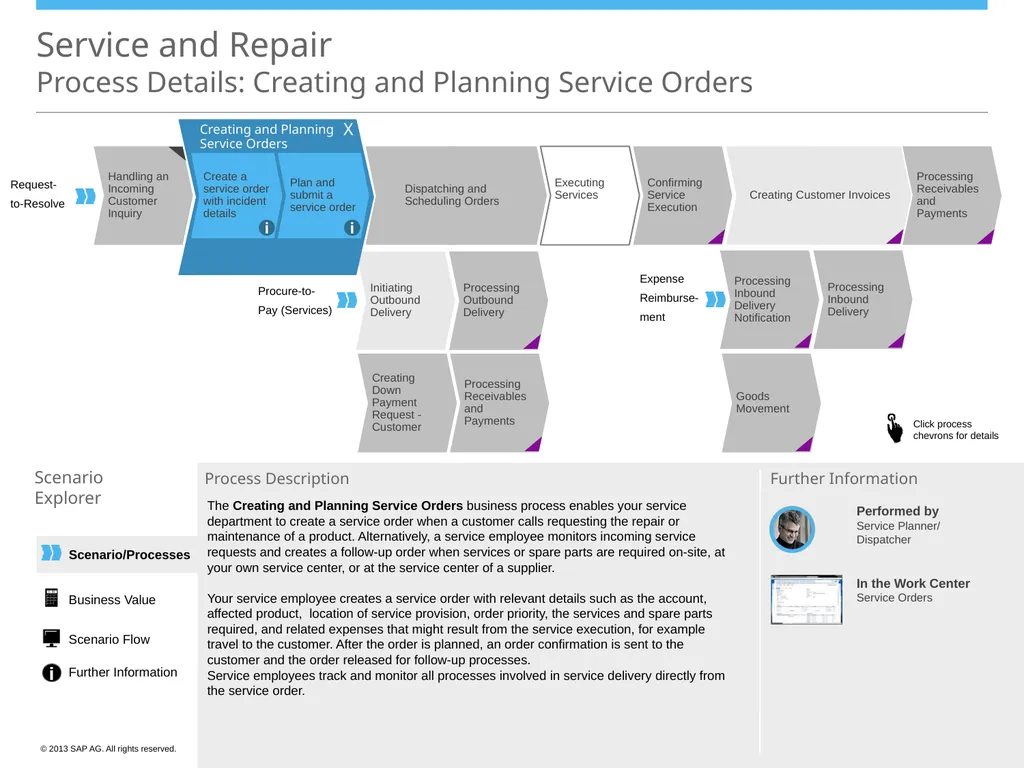
Scheduling Orders Creating Customer Invoices Creating and Planning Service Orders Create a service order with incident details Plan and submit a service order i i The Creating and Planning Service Orders business process enables your service department to create a service order when a customer calls requesting the repair or maintenance of a product. Alternatively, a service employee monitors incoming service requests and creates a follow-up order when services or spare parts are required on-site, at your own service center, or at the service center of a supplier.
Your service employee creates a service order with relevant details such as the account, affected product, location of service provision, order priority, the services and spare parts required, and related expenses that might result from the service execution, for example travel to the customer. After the order is planned, an order confirmation is sent to the customer and the order released for follow-up processes.
Service employees track and monitor all processes involved in service delivery directly from the service order. X Business Value Scenario Flow Further Information<br>
Explorer Process Description Performed by
Service Planner/
Dispatcher In the Work Center
Service Orders Further Information Handling an Incoming Customer Inquiry Executing Services Creating Down Payment Request - Customer Confirming Service Execution Processing Receivables and Payments Initiating Outbound Delivery Processing Outbound Delivery Processing Receivables and Payments Processing Inbound Delivery Processing Inbound Delivery Notification Goods Movement Request-
to-Resolve Procure-to-
Pay (Services) Expense
Reimburse-
ment Dispatching and
Scheduling Orders Creating Customer Invoices Creating and Planning Service Orders Create a service order with incident details Plan and submit a service order i i The Creating and Planning Service Orders business process enables your service department to create a service order when a customer calls requesting the repair or maintenance of a product. Alternatively, a service employee monitors incoming service requests and creates a follow-up order when services or spare parts are required on-site, at your own service center, or at the service center of a supplier.
Your service employee creates a service order with relevant details such as the account, affected product, location of service provision, order priority, the services and spare parts required, and related expenses that might result from the service execution, for example travel to the customer. After the order is planned, an order confirmation is sent to the customer and the order released for follow-up processes.
Service employees track and monitor all processes involved in service delivery directly from the service order. X Business Value Scenario Flow Further Information<br>
06
Service and Repair
Process Details: Dispatching and Scheduling Orders Scenario
Explorer Process Description Performed by
Service Planner/Dispatcher
Service Performer In the Work Centers
Sales Orders Service and Repair Further Information Handling an Incoming Customer Inquiry Executing Services Creating and Planning Service Orders Creating Down Payment Request - Customer Initiating Outbound Delivery Processing Outbound Delivery Processing Receivables and Payments Request-
to-Resolve Procure-to-
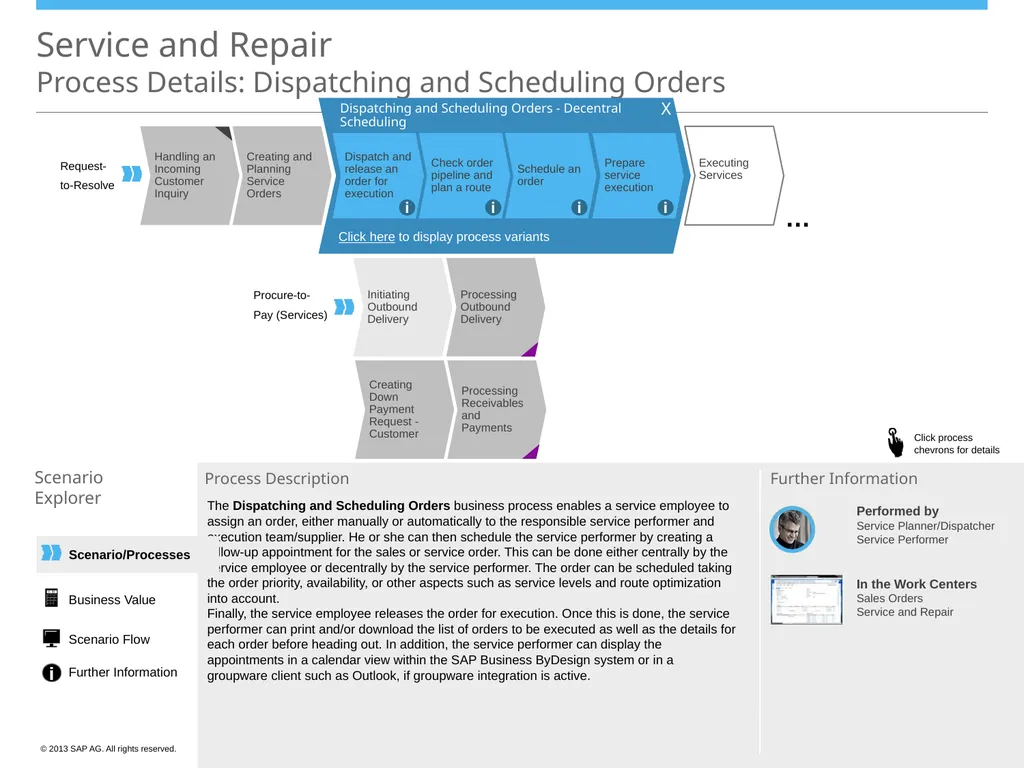
Pay (Services) Dispatching and Scheduling Orders - Decentral Scheduling … Prepare service execution Schedule an order Check order pipeline and plan a route Dispatch and release an order for execution i i i i Click here to display process variants The Dispatching and Scheduling Orders business process enables a service employee to assign an order, either manually or automatically to the responsible service performer and execution team/supplier. He or she can then schedule the service performer by creating a follow-up appointment for the sales or service order. This can be done either centrally by the service employee or decentrally by the service performer. The order can be scheduled taking the order priority, availability, or other aspects such as service levels and route optimization into account. Finally, the service employee releases the order for execution. Once this is done, the service performer can print and/or download the list of orders to be executed as well as the details for each order before heading out. In addition, the service performer can display the appointments in a calendar view within the SAP Business ByDesign system or in a groupware client such as Outlook, if groupware integration is active. X Scenario/Processes Business Value Scenario Flow Further Information<br>
Explorer Process Description Performed by
Service Planner/Dispatcher
Service Performer In the Work Centers
Sales Orders Service and Repair Further Information Handling an Incoming Customer Inquiry Executing Services Creating and Planning Service Orders Creating Down Payment Request - Customer Initiating Outbound Delivery Processing Outbound Delivery Processing Receivables and Payments Request-
to-Resolve Procure-to-
Pay (Services) Dispatching and Scheduling Orders - Decentral Scheduling … Prepare service execution Schedule an order Check order pipeline and plan a route Dispatch and release an order for execution i i i i Click here to display process variants The Dispatching and Scheduling Orders business process enables a service employee to assign an order, either manually or automatically to the responsible service performer and execution team/supplier. He or she can then schedule the service performer by creating a follow-up appointment for the sales or service order. This can be done either centrally by the service employee or decentrally by the service performer. The order can be scheduled taking the order priority, availability, or other aspects such as service levels and route optimization into account. Finally, the service employee releases the order for execution. Once this is done, the service performer can print and/or download the list of orders to be executed as well as the details for each order before heading out. In addition, the service performer can display the appointments in a calendar view within the SAP Business ByDesign system or in a groupware client such as Outlook, if groupware integration is active. X Scenario/Processes Business Value Scenario Flow Further Information<br>
07
Scenario/Processes Handling an Incoming Customer Inquiry Executing Services Creating and Planning Service Orders Creating Down Payment Request - Customer Initiating Outbound Delivery Processing Outbound Delivery Processing Receivables and Payments Service and Repair
Process Details: Dispatching and Scheduling Orders Scenario
Explorer Process Description Performed by
Service Planner/Dispatcher
Service Performer In the Work Centers
Sales Orders Service and Repair Further Information Request-
to-Resolve Procure-to-
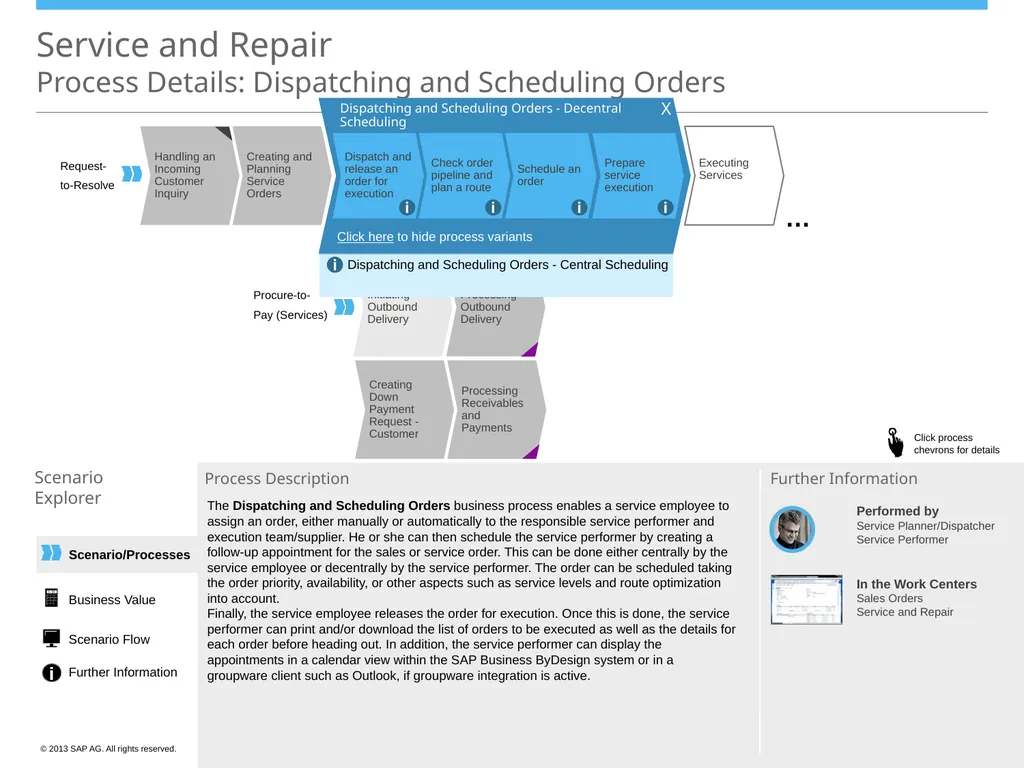
Pay (Services) Dispatching and Scheduling Orders - Decentral Scheduling … Dispatching and Scheduling Orders - Central Scheduling i Click here to hide process variants Prepare service execution Schedule an order Check order pipeline and plan a route Dispatch and release an order for execution i i i i The Dispatching and Scheduling Orders business process enables a service employee to assign an order, either manually or automatically to the responsible service performer and execution team/supplier. He or she can then schedule the service performer by creating a follow-up appointment for the sales or service order. This can be done either centrally by the service employee or decentrally by the service performer. The order can be scheduled taking the order priority, availability, or other aspects such as service levels and route optimization into account. Finally, the service employee releases the order for execution. Once this is done, the service performer can print and/or download the list of orders to be executed as well as the details for each order before heading out. In addition, the service performer can display the appointments in a calendar view within the SAP Business ByDesign system or in a groupware client such as Outlook, if groupware integration is active. Business Value Scenario Flow Further Information X<br>
Explorer Process Description Performed by
Service Planner/Dispatcher
Service Performer In the Work Centers
Sales Orders Service and Repair Further Information Request-
to-Resolve Procure-to-
Pay (Services) Dispatching and Scheduling Orders - Decentral Scheduling … Dispatching and Scheduling Orders - Central Scheduling i Click here to hide process variants Prepare service execution Schedule an order Check order pipeline and plan a route Dispatch and release an order for execution i i i i The Dispatching and Scheduling Orders business process enables a service employee to assign an order, either manually or automatically to the responsible service performer and execution team/supplier. He or she can then schedule the service performer by creating a follow-up appointment for the sales or service order. This can be done either centrally by the service employee or decentrally by the service performer. The order can be scheduled taking the order priority, availability, or other aspects such as service levels and route optimization into account. Finally, the service employee releases the order for execution. Once this is done, the service performer can print and/or download the list of orders to be executed as well as the details for each order before heading out. In addition, the service performer can display the appointments in a calendar view within the SAP Business ByDesign system or in a groupware client such as Outlook, if groupware integration is active. Business Value Scenario Flow Further Information X<br>
08
Scenario/Processes Service and Repair
Process Details: Initiating Outbound Delivery Scenario
Explorer Process Description Performed by
Warehouse Manager In the Work Center(s)
Outbound Logistics Control Further Information Handling an Incoming Customer Inquiry Executing Services Creating and Planning Service Orders Creating Down Payment Request - Customer Confirming Service Execution Processing Receivables and Payments Processing Outbound Delivery Processing Receivables and Payments Processing Inbound Delivery Processing Inbound Delivery Notification Goods Movement Request-
to-Resolve Procure-to-
Pay (Services) Expense
Reimburse-
ment Dispatching and
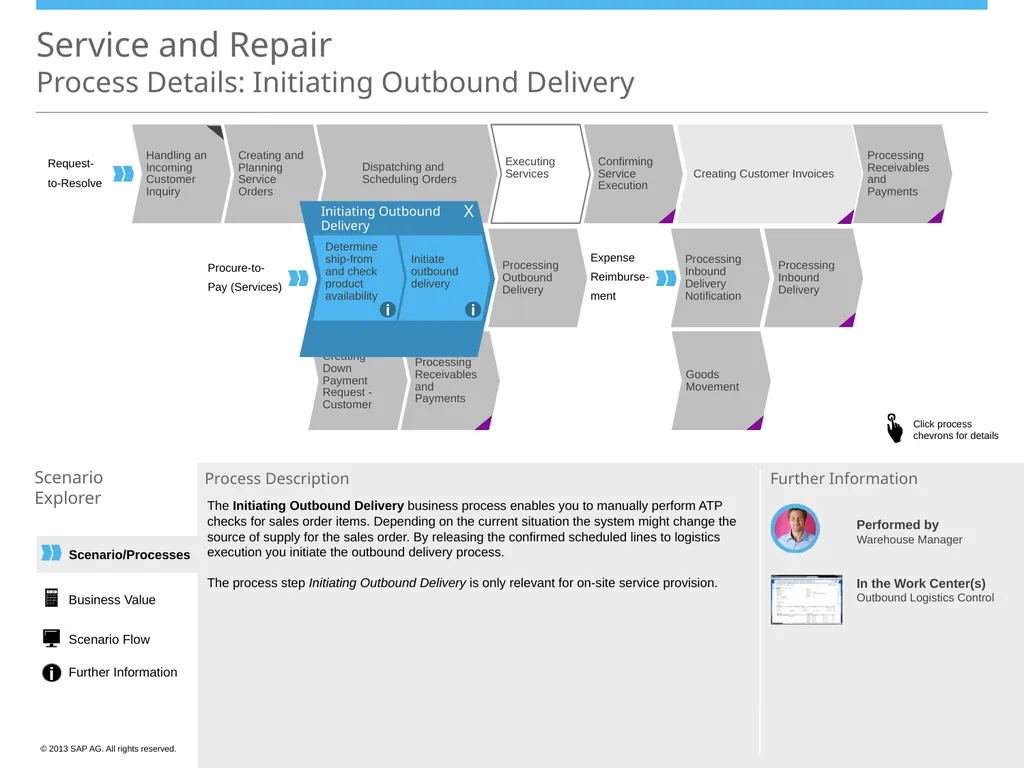
Scheduling Orders Creating Customer Invoices Initiating Outbound Delivery Initiate outbound delivery Determine ship-from and check product availability i i The Initiating Outbound Delivery business process enables you to manually perform ATP checks for sales order items. Depending on the current situation the system might change the source of supply for the sales order. By releasing the confirmed scheduled lines to logistics execution you initiate the outbound delivery process.
The process step Initiating Outbound Delivery is only relevant for on-site service provision. X Business Value Scenario Flow Further Information<br>
Explorer Process Description Performed by
Warehouse Manager In the Work Center(s)
Outbound Logistics Control Further Information Handling an Incoming Customer Inquiry Executing Services Creating and Planning Service Orders Creating Down Payment Request - Customer Confirming Service Execution Processing Receivables and Payments Processing Outbound Delivery Processing Receivables and Payments Processing Inbound Delivery Processing Inbound Delivery Notification Goods Movement Request-
to-Resolve Procure-to-
Pay (Services) Expense
Reimburse-
ment Dispatching and
Scheduling Orders Creating Customer Invoices Initiating Outbound Delivery Initiate outbound delivery Determine ship-from and check product availability i i The Initiating Outbound Delivery business process enables you to manually perform ATP checks for sales order items. Depending on the current situation the system might change the source of supply for the sales order. By releasing the confirmed scheduled lines to logistics execution you initiate the outbound delivery process.
The process step Initiating Outbound Delivery is only relevant for on-site service provision. X Business Value Scenario Flow Further Information<br>
09
Scenario/Processes Service and Repair
Process Details: Processing Outbound Delivery Scenario
Explorer Process Description Performed by
Warehouse Operator In the Work Center
Outbound Logistics Further Information Handling an Incoming Customer Inquiry Executing Services Creating and Planning Service Orders Creating Down Payment Request - Customer Confirming Service Execution Processing Receivables and Payments Initiating Outbound Delivery Processing Receivables and Payments Goods Movement Request-
to-Resolve Procure-to-
Pay (Services) Dispatching and
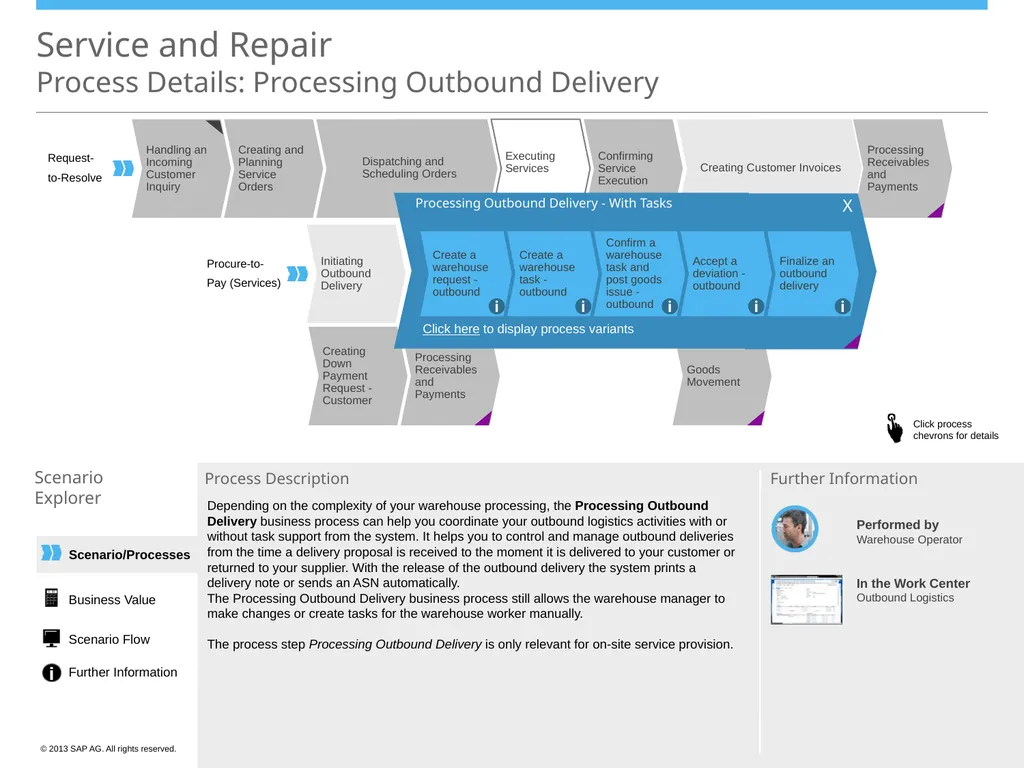
Scheduling Orders Creating Customer Invoices Processing Outbound Delivery - With Tasks Create a warehouse task - outbound Create a warehouse request - outbound Confirm a warehouse task and post goods issue - outbound Finalize an outbound delivery Accept a deviation - outbound i i i i i Click here to display process variants Depending on the complexity of your warehouse processing, the Processing Outbound Delivery business process can help you coordinate your outbound logistics activities with or without task support from the system. It helps you to control and manage outbound deliveries from the time a delivery proposal is received to the moment it is delivered to your customer or returned to your supplier. With the release of the outbound delivery the system prints a delivery note or sends an ASN automatically.
The Processing Outbound Delivery business process still allows the warehouse manager to make changes or create tasks for the warehouse worker manually.
The process step Processing Outbound Delivery is only relevant for on-site service provision. X Business Value Scenario Flow Further Information<br>
Explorer Process Description Performed by
Warehouse Operator In the Work Center
Outbound Logistics Further Information Handling an Incoming Customer Inquiry Executing Services Creating and Planning Service Orders Creating Down Payment Request - Customer Confirming Service Execution Processing Receivables and Payments Initiating Outbound Delivery Processing Receivables and Payments Goods Movement Request-
to-Resolve Procure-to-
Pay (Services) Dispatching and
Scheduling Orders Creating Customer Invoices Processing Outbound Delivery - With Tasks Create a warehouse task - outbound Create a warehouse request - outbound Confirm a warehouse task and post goods issue - outbound Finalize an outbound delivery Accept a deviation - outbound i i i i i Click here to display process variants Depending on the complexity of your warehouse processing, the Processing Outbound Delivery business process can help you coordinate your outbound logistics activities with or without task support from the system. It helps you to control and manage outbound deliveries from the time a delivery proposal is received to the moment it is delivered to your customer or returned to your supplier. With the release of the outbound delivery the system prints a delivery note or sends an ASN automatically.
The Processing Outbound Delivery business process still allows the warehouse manager to make changes or create tasks for the warehouse worker manually.
The process step Processing Outbound Delivery is only relevant for on-site service provision. X Business Value Scenario Flow Further Information<br>
10
Scenario/Processes Handling an Incoming Customer Inquiry Executing Services Creating and Planning Service Orders Creating Down Payment Request - Customer Confirming Service Execution Processing Receivables and Payments Initiating Outbound Delivery Processing Receivables and Payments Goods Movement Service and Repair
Process Details: Processing Outbound Delivery Scenario
Explorer Process Description Performed by
Warehouse Operator In the Work Center
Outbound Logistics Further Information Request-
to-Resolve Procure-to-
Pay (Services) Dispatching and
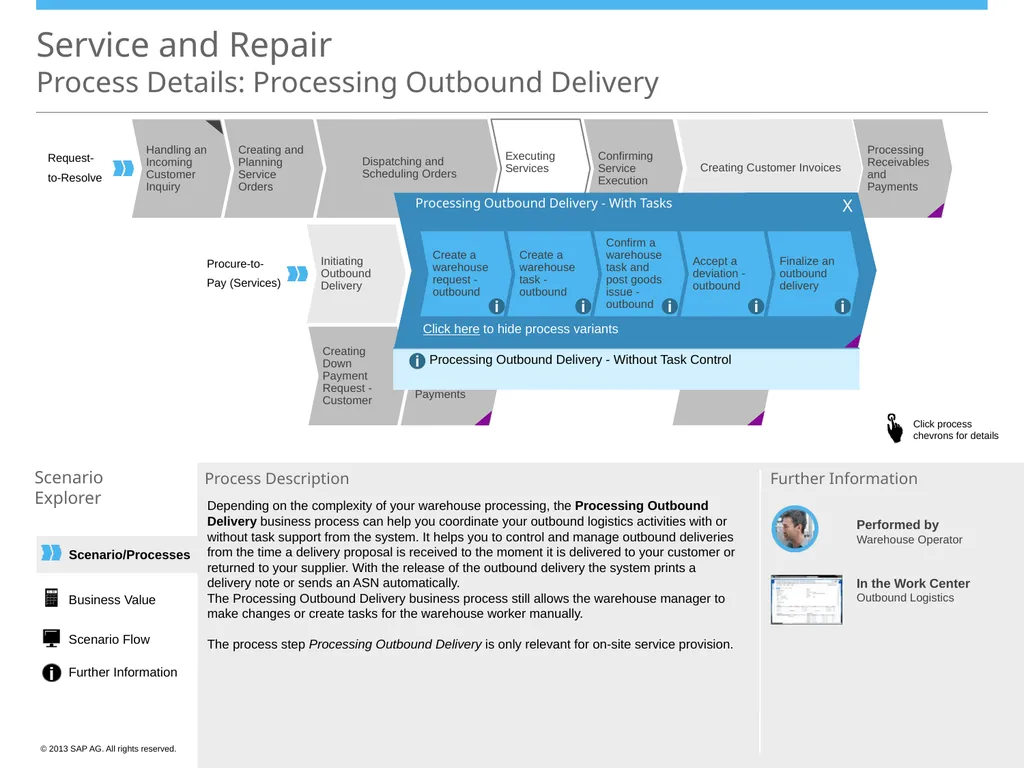
Scheduling Orders Creating Customer Invoices Processing Outbound Delivery - With Tasks Create a warehouse task - outbound Create a warehouse request - outbound Confirm a warehouse task and post goods issue - outbound Finalize an outbound delivery Accept a deviation - outbound i i i i i Processing Outbound Delivery - Without Task Control i Click here to hide process variants Depending on the complexity of your warehouse processing, the Processing Outbound Delivery business process can help you coordinate your outbound logistics activities with or without task support from the system. It helps you to control and manage outbound deliveries from the time a delivery proposal is received to the moment it is delivered to your customer or returned to your supplier. With the release of the outbound delivery the system prints a delivery note or sends an ASN automatically.
The Processing Outbound Delivery business process still allows the warehouse manager to make changes or create tasks for the warehouse worker manually.
The process step Processing Outbound Delivery is only relevant for on-site service provision. Business Value Scenario Flow Further Information X<br>
Explorer Process Description Performed by
Warehouse Operator In the Work Center
Outbound Logistics Further Information Request-
to-Resolve Procure-to-
Pay (Services) Dispatching and
Scheduling Orders Creating Customer Invoices Processing Outbound Delivery - With Tasks Create a warehouse task - outbound Create a warehouse request - outbound Confirm a warehouse task and post goods issue - outbound Finalize an outbound delivery Accept a deviation - outbound i i i i i Processing Outbound Delivery - Without Task Control i Click here to hide process variants Depending on the complexity of your warehouse processing, the Processing Outbound Delivery business process can help you coordinate your outbound logistics activities with or without task support from the system. It helps you to control and manage outbound deliveries from the time a delivery proposal is received to the moment it is delivered to your customer or returned to your supplier. With the release of the outbound delivery the system prints a delivery note or sends an ASN automatically.
The Processing Outbound Delivery business process still allows the warehouse manager to make changes or create tasks for the warehouse worker manually.
The process step Processing Outbound Delivery is only relevant for on-site service provision. Business Value Scenario Flow Further Information X<br>
11
Scenario/Processes Handling an Incoming Customer Inquiry Executing Services Creating and Planning Service Orders Creating Down Payment Request - Customer Confirming Service Execution Processing Receivables and Payments Initiating Outbound Delivery Processing Receivables and Payments Goods Movement Service and Repair
Process Details: Creating Down Payment Request - Customer Scenario
Explorer Process Description Performed by
Sales/Customer Service Representative In the Work Center
Customer Invoicing Further Information Processing Outbound Delivery Processing Inbound Delivery Processing Inbound Delivery Notification Request-
to-Resolve Procure-to-
Pay (Services) Expense
Reimburse-
ment Dispatching and
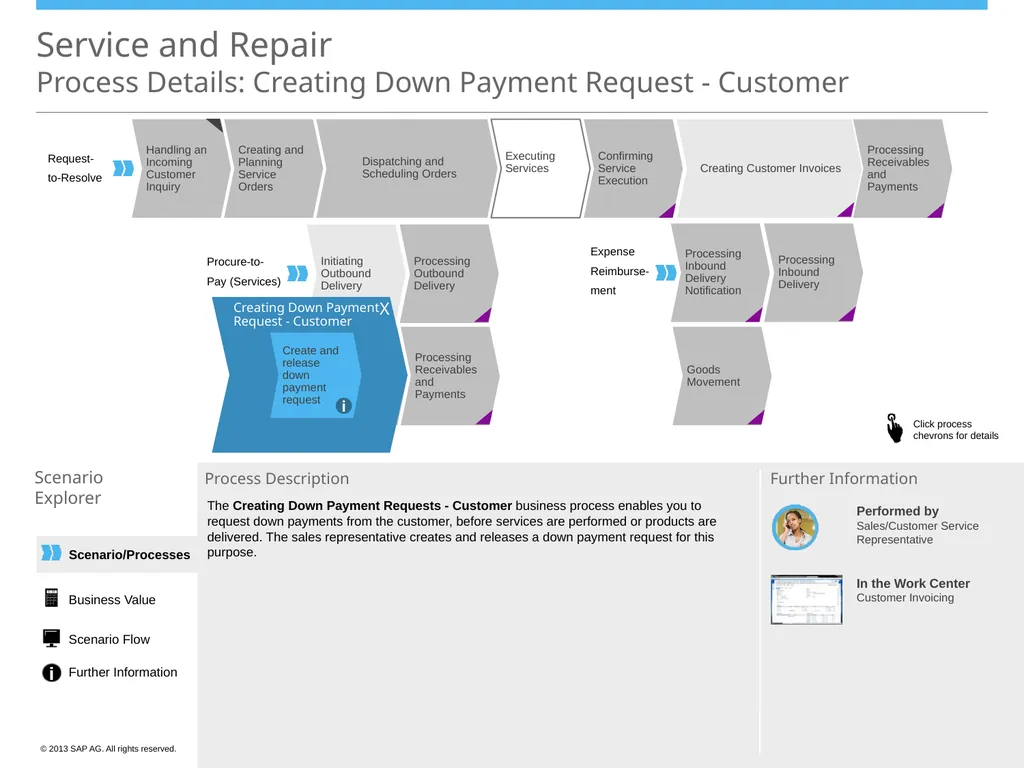
Scheduling Orders Creating Customer Invoices Creating Down Payment Request - Customer Create and release down payment request i The Creating Down Payment Requests - Customer business process enables you to request down payments from the customer, before services are performed or products are delivered. The sales representative creates and releases a down payment request for this purpose. X Business Value Scenario Flow Further Information<br>
Explorer Process Description Performed by
Sales/Customer Service Representative In the Work Center
Customer Invoicing Further Information Processing Outbound Delivery Processing Inbound Delivery Processing Inbound Delivery Notification Request-
to-Resolve Procure-to-
Pay (Services) Expense
Reimburse-
ment Dispatching and
Scheduling Orders Creating Customer Invoices Creating Down Payment Request - Customer Create and release down payment request i The Creating Down Payment Requests - Customer business process enables you to request down payments from the customer, before services are performed or products are delivered. The sales representative creates and releases a down payment request for this purpose. X Business Value Scenario Flow Further Information<br>
12
Scenario/Processes Handling an Incoming Customer Inquiry Executing Services Creating and Planning Service Orders Confirming Service Execution Processing Receivables and Payments Initiating Outbound Delivery Processing Outbound Delivery Processing Inbound Delivery Processing Inbound Delivery Notification Processing Receivables and Payments Goods Movement Service and Repair
Process Details: Processing Receivables and Payments Scenario
Explorer Process Description Performed by
Accounts Receivables
Accountant In the Work Centers
Receivables
Payment Management
Liquidity Management Further Information Request-
to-Resolve Procure-to-
Pay (Services) Expense
Reimburse-
ment Dispatching and
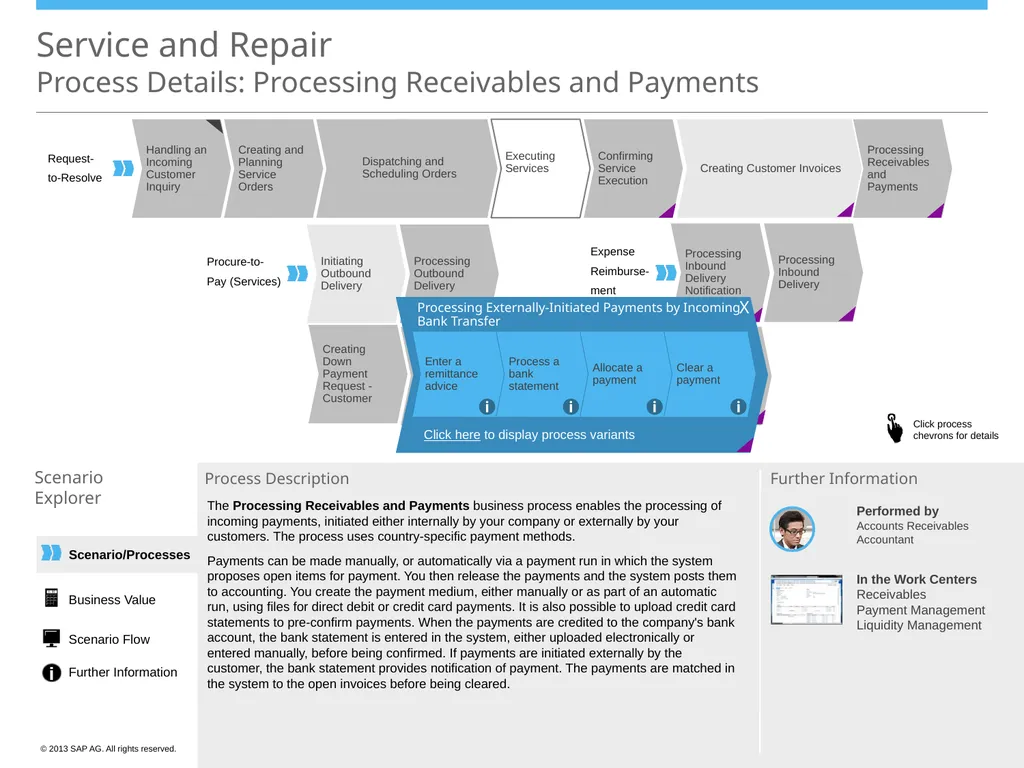
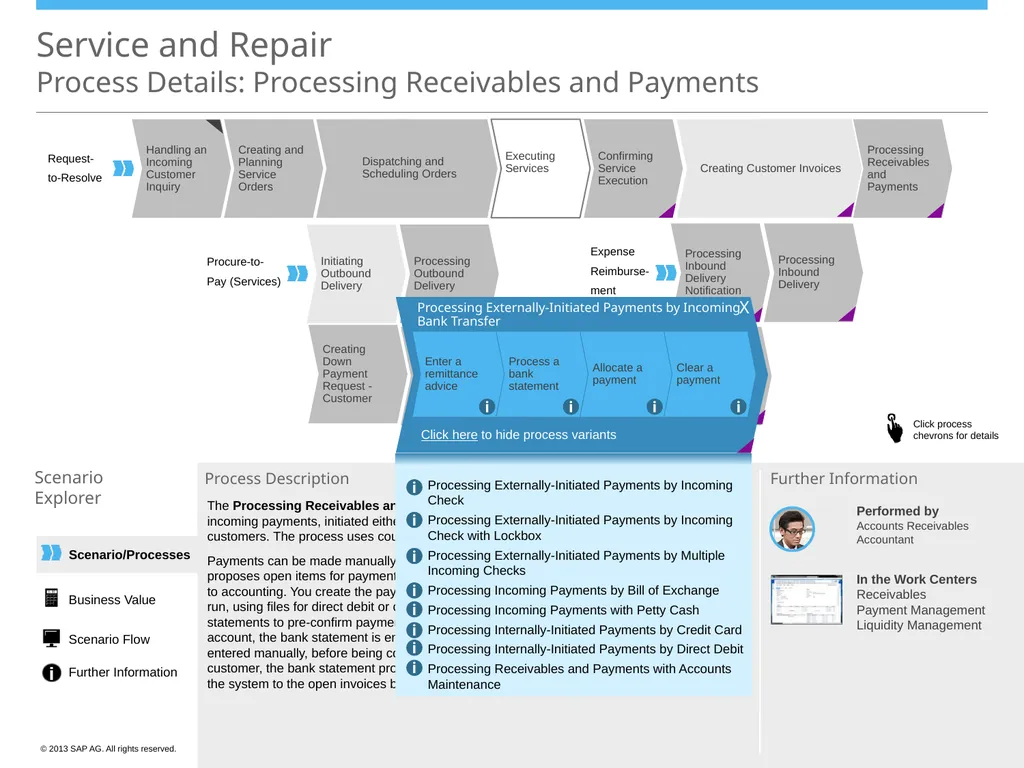
Scheduling Orders Creating Customer Invoices Processing Externally-Initiated Payments by Incoming Bank Transfer Clear a payment Allocate a payment Process a bank statement Enter a remittance advice i i i i Click here to display process variants The Processing Receivables and Payments business process enables the processing of incoming payments, initiated either internally by your company or externally by your customers. The process uses country-specific payment methods.
Payments can be made manually, or automatically via a payment run in which the system proposes open items for payment. You then release the payments and the system posts them to accounting. You create the payment medium, either manually or as part of an automatic run, using files for direct debit or credit card payments. It is also possible to upload credit card statements to pre-confirm payments. When the payments are credited to the company's bank account, the bank statement is entered in the system, either uploaded electronically or entered manually, before being confirmed. If payments are initiated externally by the customer, the bank statement provides notification of payment. The payments are matched in the system to the open invoices before being cleared. X Creating Down Payment Request - Customer Business Value Scenario Flow Further Information<br>
Explorer Process Description Performed by
Accounts Receivables
Accountant In the Work Centers
Receivables
Payment Management
Liquidity Management Further Information Request-
to-Resolve Procure-to-
Pay (Services) Expense
Reimburse-
ment Dispatching and
Scheduling Orders Creating Customer Invoices Processing Externally-Initiated Payments by Incoming Bank Transfer Clear a payment Allocate a payment Process a bank statement Enter a remittance advice i i i i Click here to display process variants The Processing Receivables and Payments business process enables the processing of incoming payments, initiated either internally by your company or externally by your customers. The process uses country-specific payment methods.
Payments can be made manually, or automatically via a payment run in which the system proposes open items for payment. You then release the payments and the system posts them to accounting. You create the payment medium, either manually or as part of an automatic run, using files for direct debit or credit card payments. It is also possible to upload credit card statements to pre-confirm payments. When the payments are credited to the company's bank account, the bank statement is entered in the system, either uploaded electronically or entered manually, before being confirmed. If payments are initiated externally by the customer, the bank statement provides notification of payment. The payments are matched in the system to the open invoices before being cleared. X Creating Down Payment Request - Customer Business Value Scenario Flow Further Information<br>
13
Scenario/Processes Handling an Incoming Customer Inquiry Executing Services Creating and Planning Service Orders Confirming Service Execution Processing Receivables and Payments Initiating Outbound Delivery Processing Outbound Delivery Processing Inbound Delivery Processing Inbound Delivery Notification Creating Down Payment Request - Customer Processing Receivables and Payments Goods Movement Service and Repair
Process Details: Processing Receivables and Payments Scenario
Explorer Process Description Request-
to-Resolve Procure-to-
Pay (Services) Expense
Reimburse-
ment Dispatching and
Scheduling Orders Creating Customer Invoices Processing Externally-Initiated Payments by Incoming Bank Transfer Clear a payment Allocate a payment Process a bank statement Enter a remittance advice i i i i The Processing Receivables and Payments business process enables the processing of incoming payments, initiated either internally by your company or externally by your customers. The process uses country-specific payment methods.
Payments can be made manually, or automatically via a payment run in which the system proposes open items for payment. You then release the payments and the system posts them to accounting. You create the payment medium, either manually or as part of an automatic run, using files for direct debit or credit card payments. It is also possible to upload credit card statements to pre-confirm payments. When the payments are credited to the company's bank account, the bank statement is entered in the system, either uploaded electronically or entered manually, before being confirmed. If payments are initiated externally by the customer, the bank statement provides notification of payment. The payments are matched in the system to the open invoices before being cleared. Click here to hide process variants Processing Externally-Initiated Payments by Incoming Check
Processing Externally-Initiated Payments by Incoming Check with Lockbox
Processing Externally-Initiated Payments by Multiple Incoming Checks
Processing Incoming Payments by Bill of Exchange
Processing Incoming Payments with Petty Cash
Processing Internally-Initiated Payments by Credit Card
Processing Internally-Initiated Payments by Direct Debit
Processing Receivables and Payments with Accounts Maintenance i i i i i i i i Performed by
Accounts Receivables
Accountant In the Work Centers
Receivables
Payment Management
Liquidity Management Further Information Business Value Scenario Flow Further Information X<br>
Explorer Process Description Request-
to-Resolve Procure-to-
Pay (Services) Expense
Reimburse-
ment Dispatching and
Scheduling Orders Creating Customer Invoices Processing Externally-Initiated Payments by Incoming Bank Transfer Clear a payment Allocate a payment Process a bank statement Enter a remittance advice i i i i The Processing Receivables and Payments business process enables the processing of incoming payments, initiated either internally by your company or externally by your customers. The process uses country-specific payment methods.
Payments can be made manually, or automatically via a payment run in which the system proposes open items for payment. You then release the payments and the system posts them to accounting. You create the payment medium, either manually or as part of an automatic run, using files for direct debit or credit card payments. It is also possible to upload credit card statements to pre-confirm payments. When the payments are credited to the company's bank account, the bank statement is entered in the system, either uploaded electronically or entered manually, before being confirmed. If payments are initiated externally by the customer, the bank statement provides notification of payment. The payments are matched in the system to the open invoices before being cleared. Click here to hide process variants Processing Externally-Initiated Payments by Incoming Check
Processing Externally-Initiated Payments by Incoming Check with Lockbox
Processing Externally-Initiated Payments by Multiple Incoming Checks
Processing Incoming Payments by Bill of Exchange
Processing Incoming Payments with Petty Cash
Processing Internally-Initiated Payments by Credit Card
Processing Internally-Initiated Payments by Direct Debit
Processing Receivables and Payments with Accounts Maintenance i i i i i i i i Performed by
Accounts Receivables
Accountant In the Work Centers
Receivables
Payment Management
Liquidity Management Further Information Business Value Scenario Flow Further Information X<br>
14
Scenario/Processes Service and Repair
Process Details: Executing Services Scenario
Explorer Process Description Performed by
Service
Performer Further Information Handling an Incoming Customer Inquiry Creating and Planning Service Orders Creating Down Payment Request - Customer Confirming Service Execution Processing Receivables and Payments Initiating Outbound Delivery Processing Outbound Delivery Processing Receivables and Payments Processing Inbound Delivery Processing Inbound Delivery Notification Goods Movement Request-
to-Resolve Procure-to-
Pay (Services) Expense
Reimburse-
ment Dispatching and
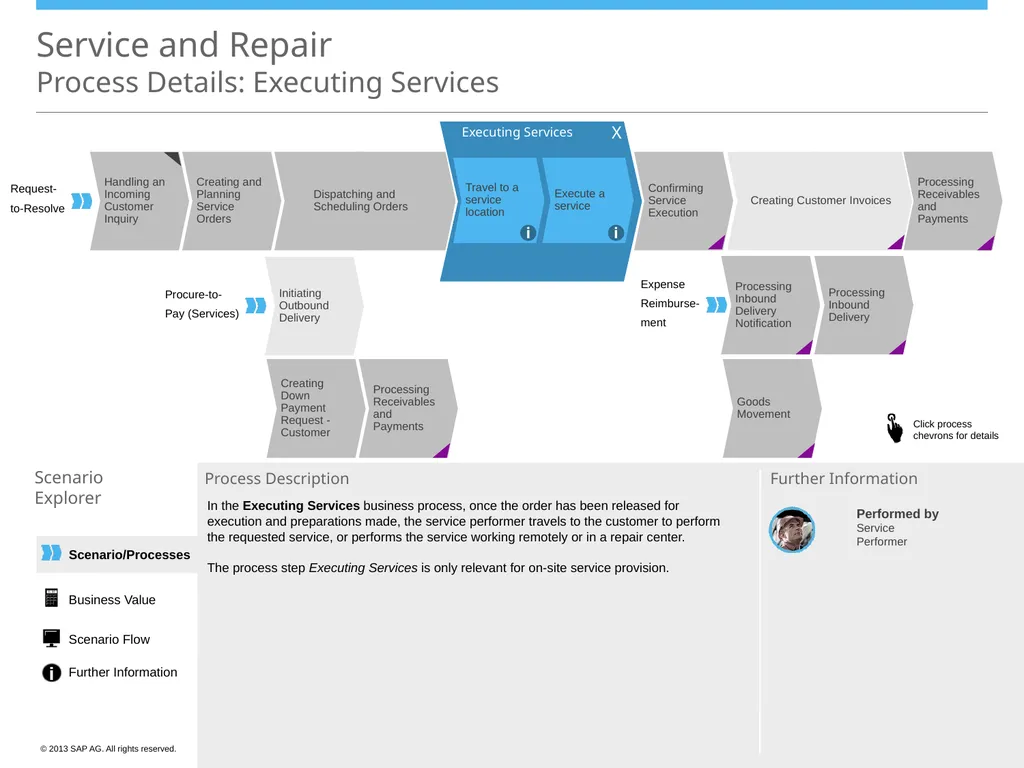
Scheduling Orders Creating Customer Invoices Executing Services Execute a service Travel to a service location i i In the Executing Services business process, once the order has been released for execution and preparations made, the service performer travels to the customer to perform the requested service, or performs the service working remotely or in a repair center.
The process step Executing Services is only relevant for on-site service provision. X Business Value Scenario Flow Further Information<br>
Explorer Process Description Performed by
Service
Performer Further Information Handling an Incoming Customer Inquiry Creating and Planning Service Orders Creating Down Payment Request - Customer Confirming Service Execution Processing Receivables and Payments Initiating Outbound Delivery Processing Outbound Delivery Processing Receivables and Payments Processing Inbound Delivery Processing Inbound Delivery Notification Goods Movement Request-
to-Resolve Procure-to-
Pay (Services) Expense
Reimburse-
ment Dispatching and
Scheduling Orders Creating Customer Invoices Executing Services Execute a service Travel to a service location i i In the Executing Services business process, once the order has been released for execution and preparations made, the service performer travels to the customer to perform the requested service, or performs the service working remotely or in a repair center.
The process step Executing Services is only relevant for on-site service provision. X Business Value Scenario Flow Further Information<br>
15
Scenario/Processes Service and Repair
Process Details: Confirming Service Execution Scenario
Explorer Process Description Performed by
Service
Performer In the Work Center
Service and Repair Further Information Handling an Incoming Customer Inquiry Executing Services Creating and Planning Service Orders Creating Down Payment Request - Customer Processing Receivables and Payments Initiating Outbound Delivery Processing Outbound Delivery Processing Receivables and Payments Processing Inbound Delivery Processing Inbound Delivery Notification Goods Movement Request-
to-Resolve Procure-to-
Pay (Services) Expense
Reimburse-
ment Dispatching and
Scheduling Orders Creating Customer Invoices Confirming Service
Execution - With a Service Confirmation Click here to display
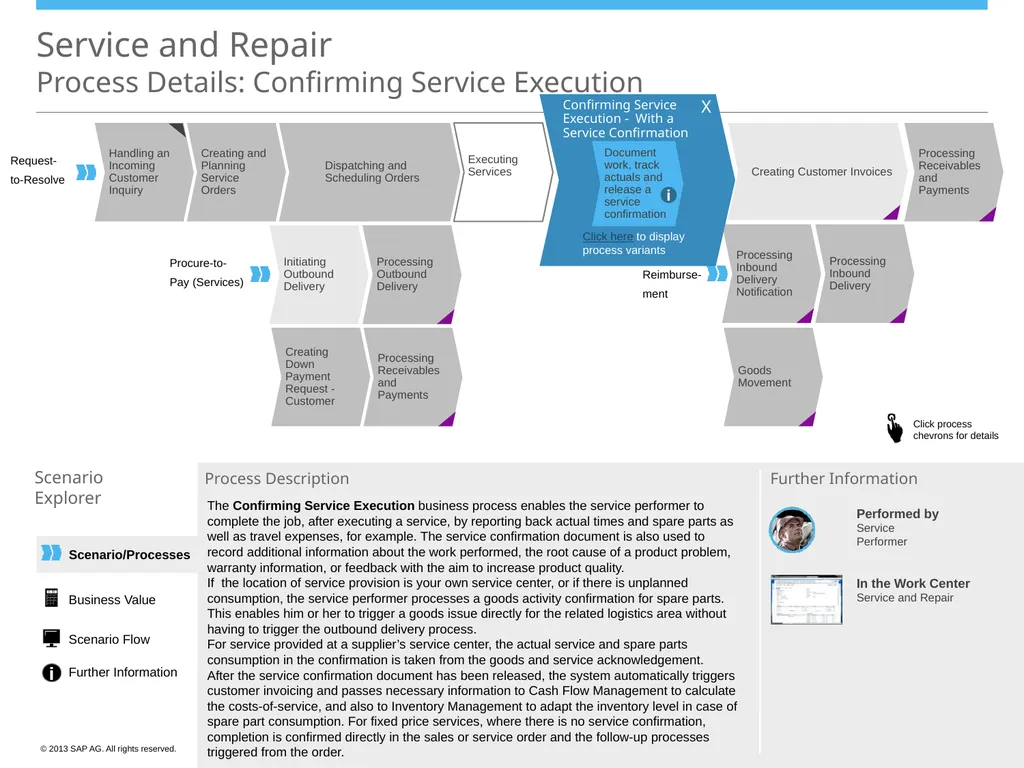
process variants Document work, track actuals and release a service confirmation i The Confirming Service Execution business process enables the service performer to complete the job, after executing a service, by reporting back actual times and spare parts as well as travel expenses, for example. The service confirmation document is also used to record additional information about the work performed, the root cause of a product problem, warranty information, or feedback with the aim to increase product quality.
If the location of service provision is your own service center, or if there is unplanned consumption, the service performer processes a goods activity confirmation for spare parts. This enables him or her to trigger a goods issue directly for the related logistics area without having to trigger the outbound delivery process.
For service provided at a supplier’s service center, the actual service and spare parts consumption in the confirmation is taken from the goods and service acknowledgement.
After the service confirmation document has been released, the system automatically triggers customer invoicing and passes necessary information to Cash Flow Management to calculate the costs-of-service, and also to Inventory Management to adapt the inventory level in case of spare part consumption. For fixed price services, where there is no service confirmation, completion is confirmed directly in the sales or service order and the follow-up processes triggered from the order. Business Value Scenario Flow Further Information X<br>
Explorer Process Description Performed by
Service
Performer In the Work Center
Service and Repair Further Information Handling an Incoming Customer Inquiry Executing Services Creating and Planning Service Orders Creating Down Payment Request - Customer Processing Receivables and Payments Initiating Outbound Delivery Processing Outbound Delivery Processing Receivables and Payments Processing Inbound Delivery Processing Inbound Delivery Notification Goods Movement Request-
to-Resolve Procure-to-
Pay (Services) Expense
Reimburse-
ment Dispatching and
Scheduling Orders Creating Customer Invoices Confirming Service
Execution - With a Service Confirmation Click here to display
process variants Document work, track actuals and release a service confirmation i The Confirming Service Execution business process enables the service performer to complete the job, after executing a service, by reporting back actual times and spare parts as well as travel expenses, for example. The service confirmation document is also used to record additional information about the work performed, the root cause of a product problem, warranty information, or feedback with the aim to increase product quality.
If the location of service provision is your own service center, or if there is unplanned consumption, the service performer processes a goods activity confirmation for spare parts. This enables him or her to trigger a goods issue directly for the related logistics area without having to trigger the outbound delivery process.
For service provided at a supplier’s service center, the actual service and spare parts consumption in the confirmation is taken from the goods and service acknowledgement.
After the service confirmation document has been released, the system automatically triggers customer invoicing and passes necessary information to Cash Flow Management to calculate the costs-of-service, and also to Inventory Management to adapt the inventory level in case of spare part consumption. For fixed price services, where there is no service confirmation, completion is confirmed directly in the sales or service order and the follow-up processes triggered from the order. Business Value Scenario Flow Further Information X<br>
16
Scenario/Processes Handling an Incoming Customer Inquiry Executing Services Creating and Planning Service Orders Creating Down Payment Request - Customer Processing Receivables and Payments Initiating Outbound Delivery Processing Outbound Delivery Processing Receivables and Payments Processing Inbound Delivery Processing Inbound Delivery Notification Goods Movement Service and Repair
Process Details: Confirming Service Execution Scenario
Explorer Process Description Performed by
Service
Performer In the Work Center
Service and Repair Further Information Request-
to-Resolve Procure-to-
Pay (Services) Expense
Reimburse-
ment Dispatching and
Scheduling Orders Creating Customer Invoices Confirming Service
Execution - With a Service Confirmation Document work, track actuals and release a service confirmation i Confirming Service Execution - With an Order i Click here to hide
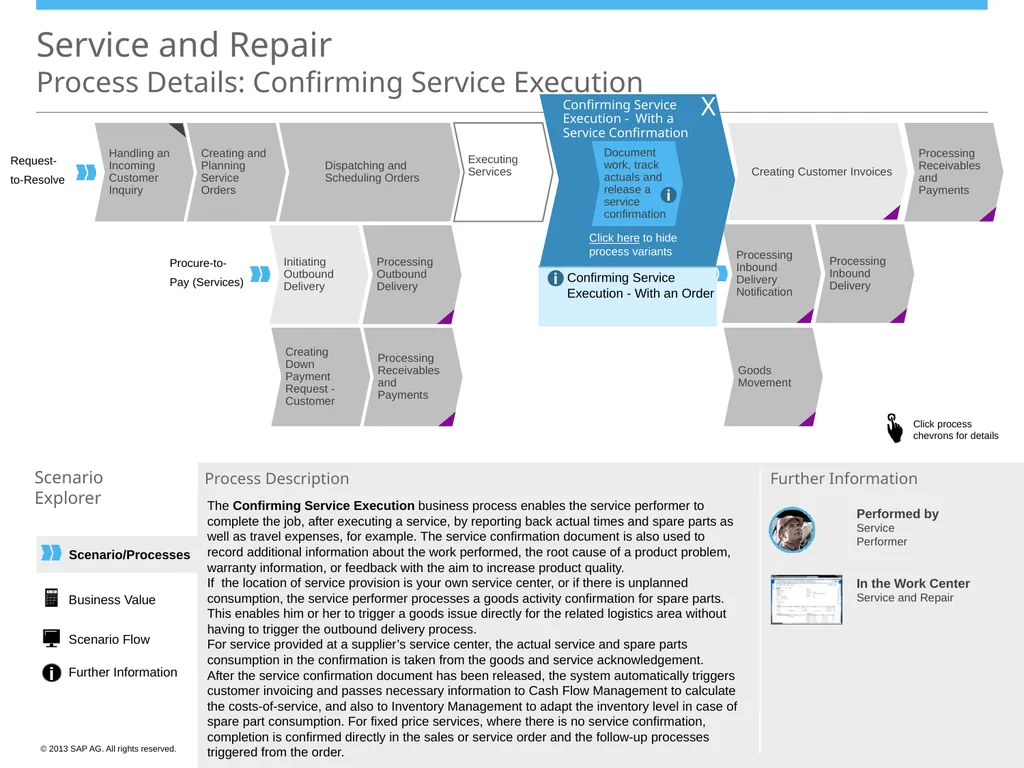
process variants The Confirming Service Execution business process enables the service performer to complete the job, after executing a service, by reporting back actual times and spare parts as well as travel expenses, for example. The service confirmation document is also used to record additional information about the work performed, the root cause of a product problem, warranty information, or feedback with the aim to increase product quality.
If the location of service provision is your own service center, or if there is unplanned consumption, the service performer processes a goods activity confirmation for spare parts. This enables him or her to trigger a goods issue directly for the related logistics area without having to trigger the outbound delivery process.
For service provided at a supplier’s service center, the actual service and spare parts consumption in the confirmation is taken from the goods and service acknowledgement.
After the service confirmation document has been released, the system automatically triggers customer invoicing and passes necessary information to Cash Flow Management to calculate the costs-of-service, and also to Inventory Management to adapt the inventory level in case of spare part consumption. For fixed price services, where there is no service confirmation, completion is confirmed directly in the sales or service order and the follow-up processes triggered from the order. X Business Value Scenario Flow Further Information<br>
Explorer Process Description Performed by
Service
Performer In the Work Center
Service and Repair Further Information Request-
to-Resolve Procure-to-
Pay (Services) Expense
Reimburse-
ment Dispatching and
Scheduling Orders Creating Customer Invoices Confirming Service
Execution - With a Service Confirmation Document work, track actuals and release a service confirmation i Confirming Service Execution - With an Order i Click here to hide
process variants The Confirming Service Execution business process enables the service performer to complete the job, after executing a service, by reporting back actual times and spare parts as well as travel expenses, for example. The service confirmation document is also used to record additional information about the work performed, the root cause of a product problem, warranty information, or feedback with the aim to increase product quality.
If the location of service provision is your own service center, or if there is unplanned consumption, the service performer processes a goods activity confirmation for spare parts. This enables him or her to trigger a goods issue directly for the related logistics area without having to trigger the outbound delivery process.
For service provided at a supplier’s service center, the actual service and spare parts consumption in the confirmation is taken from the goods and service acknowledgement.
After the service confirmation document has been released, the system automatically triggers customer invoicing and passes necessary information to Cash Flow Management to calculate the costs-of-service, and also to Inventory Management to adapt the inventory level in case of spare part consumption. For fixed price services, where there is no service confirmation, completion is confirmed directly in the sales or service order and the follow-up processes triggered from the order. X Business Value Scenario Flow Further Information<br>
17
Processing Receivables and Payments Handling an Incoming Customer Inquiry Executing Services Creating and Planning Service Orders Confirming Service Execution Processing Receivables and Payments Initiating Outbound Delivery Processing Outbound Delivery Processing Inbound Delivery Processing Inbound Delivery Notification Goods Movement Service and Repair
Process Details: Creating Customer Invoices Scenario
Explorer Process Description Performed by
Accounts Receivables
Accountant In the Work Center(s)
Customer Invoicing Further Information Request-
to-Resolve Procure-to-
Pay (Services) Expense
Reimburse-
ment Dispatching and
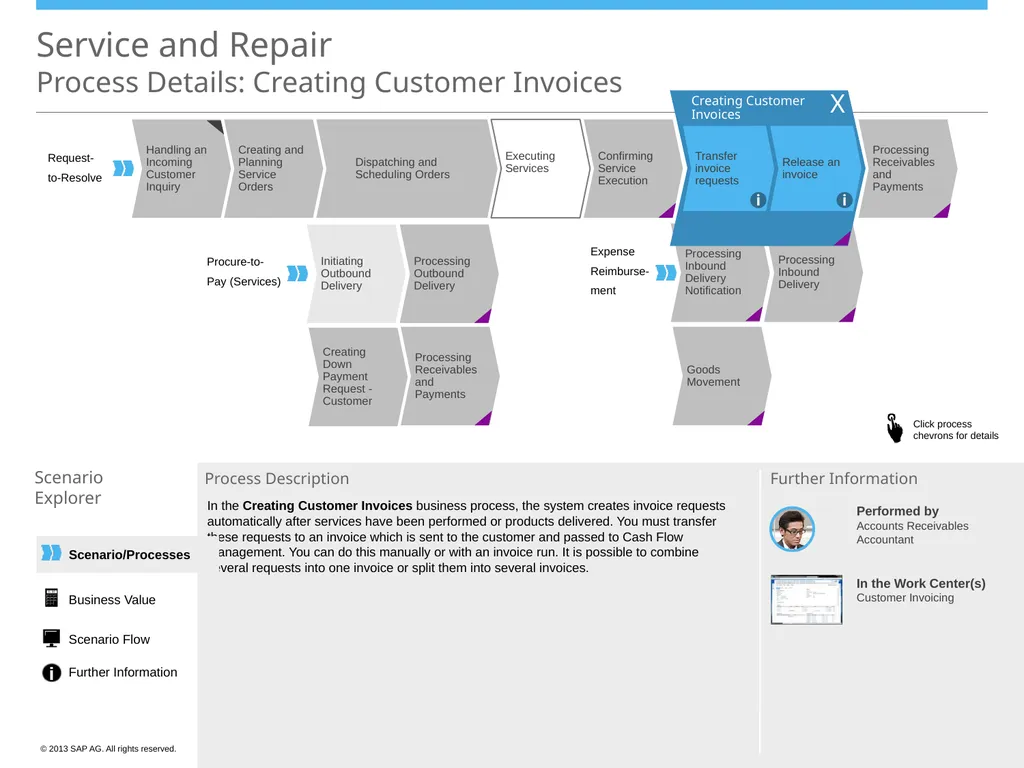
Scheduling Orders Creating Customer Invoices Release an invoice Transfer invoice requests i i Creating Down Payment Request - Customer In the Creating Customer Invoices business process, the system creates invoice requests automatically after services have been performed or products delivered. You must transfer these requests to an invoice which is sent to the customer and passed to Cash Flow Management. You can do this manually or with an invoice run. It is possible to combine several requests into one invoice or split them into several invoices. X Scenario/Processes Business Value Scenario Flow Further Information<br>
Explorer Process Description Performed by
Accounts Receivables
Accountant In the Work Center(s)
Customer Invoicing Further Information Request-
to-Resolve Procure-to-
Pay (Services) Expense
Reimburse-
ment Dispatching and
Scheduling Orders Creating Customer Invoices Release an invoice Transfer invoice requests i i Creating Down Payment Request - Customer In the Creating Customer Invoices business process, the system creates invoice requests automatically after services have been performed or products delivered. You must transfer these requests to an invoice which is sent to the customer and passed to Cash Flow Management. You can do this manually or with an invoice run. It is possible to combine several requests into one invoice or split them into several invoices. X Scenario/Processes Business Value Scenario Flow Further Information<br>
18
Scenario/Processes Processing Receivables and Payments Handling an Incoming Customer Inquiry Executing Services Creating and Planning Service Orders Confirming Service Execution Processing Receivables and Payments Initiating Outbound Delivery Processing Outbound Delivery Processing Inbound Delivery Goods Movement Creating Down Payment Request - Customer Service and Repair
Process Details: Processing Inbound Delivery Notification Scenario
Explorer Process Description Performed by
Warehouse Operator In the Work Center
Inbound Logistics Further Information Request-
to-Resolve Procure-to-
Pay (Services) Expense
Reimburse-
ment Dispatching and
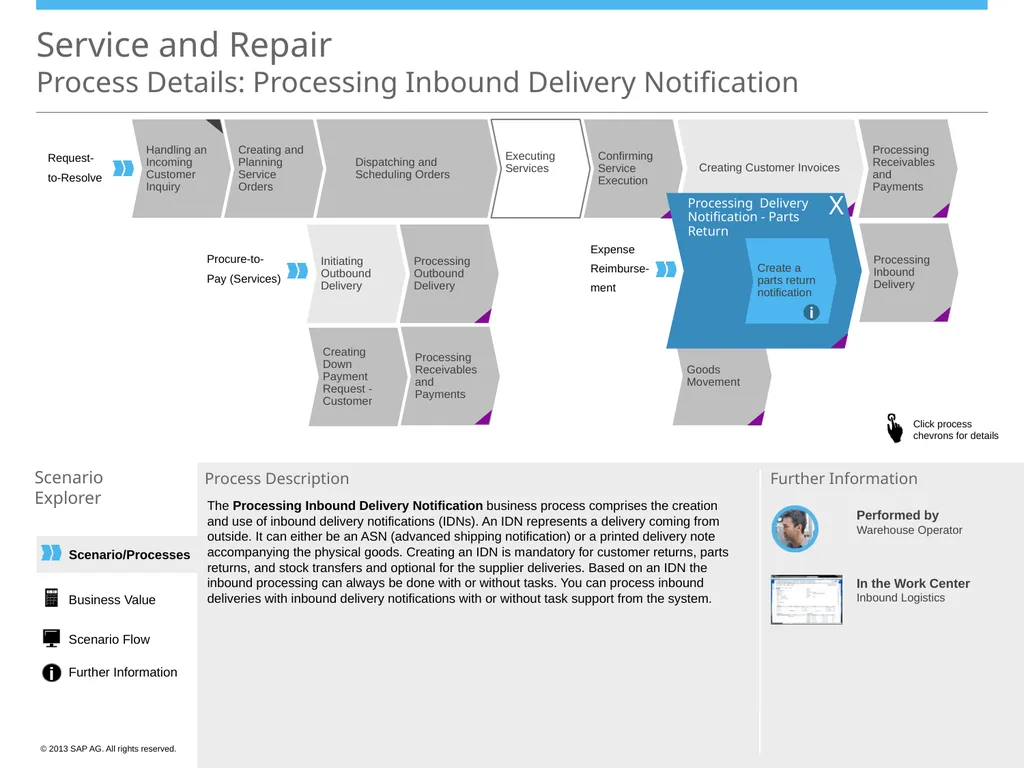
Scheduling Orders Creating Customer Invoices Processing Delivery Notification - Parts Return Create a parts return notification i Creating Customer Invoices The Processing Inbound Delivery Notification business process comprises the creation and use of inbound delivery notifications (IDNs). An IDN represents a delivery coming from outside. It can either be an ASN (advanced shipping notification) or a printed delivery note accompanying the physical goods. Creating an IDN is mandatory for customer returns, parts returns, and stock transfers and optional for the supplier deliveries. Based on an IDN the inbound processing can always be done with or without tasks. You can process inbound deliveries with inbound delivery notifications with or without task support from the system. X Business Value Scenario Flow Further Information<br>
Explorer Process Description Performed by
Warehouse Operator In the Work Center
Inbound Logistics Further Information Request-
to-Resolve Procure-to-
Pay (Services) Expense
Reimburse-
ment Dispatching and
Scheduling Orders Creating Customer Invoices Processing Delivery Notification - Parts Return Create a parts return notification i Creating Customer Invoices The Processing Inbound Delivery Notification business process comprises the creation and use of inbound delivery notifications (IDNs). An IDN represents a delivery coming from outside. It can either be an ASN (advanced shipping notification) or a printed delivery note accompanying the physical goods. Creating an IDN is mandatory for customer returns, parts returns, and stock transfers and optional for the supplier deliveries. Based on an IDN the inbound processing can always be done with or without tasks. You can process inbound deliveries with inbound delivery notifications with or without task support from the system. X Business Value Scenario Flow Further Information<br>
19
Scenario/Processes Service and Repair
Process Details: Processing Inbound Delivery Scenario
Explorer Process Description … Performed by
Warehouse Operator In the Work Center
Inbound Logistics Further Information Executing Services Creating Down Payment Request - Customer Confirming Service Execution Processing Receivables and Payments Initiating Outbound Delivery Processing Outbound Delivery Processing Receivables and Payments Processing Inbound Delivery Notification Goods Movement Expense
Reimburse-
ment Dispatching and
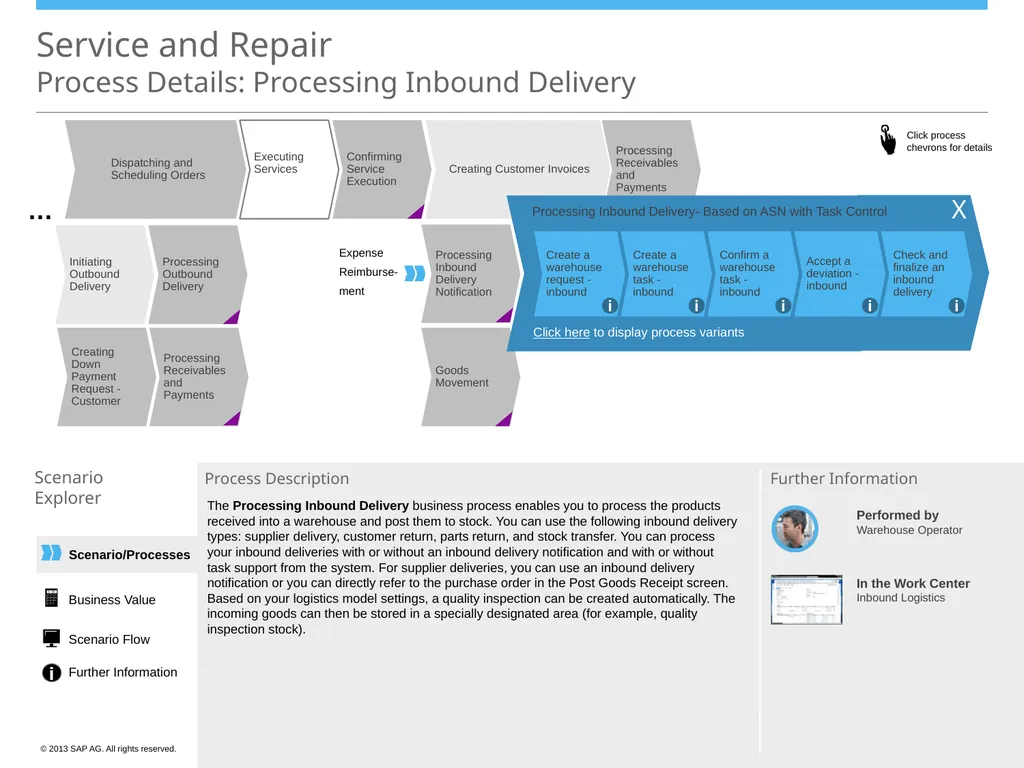
Scheduling Orders Creating Customer Invoices Processing Inbound Delivery- Based on ASN with Task Control Check and finalize an inbound delivery Accept a deviation - inbound Confirm a warehouse task - inbound Create a warehouse task - inbound Create a warehouse request - inbound i i i i i Click here to display process variants The Processing Inbound Delivery business process enables you to process the products received into a warehouse and post them to stock. You can use the following inbound delivery types: supplier delivery, customer return, parts return, and stock transfer. You can process your inbound deliveries with or without an inbound delivery notification and with or without task support from the system. For supplier deliveries, you can use an inbound delivery notification or you can directly refer to the purchase order in the Post Goods Receipt screen.
Based on your logistics model settings, a quality inspection can be created automatically. The incoming goods can then be stored in a specially designated area (for example, quality inspection stock). X Business Value Scenario Flow Further Information<br>
Explorer Process Description … Performed by
Warehouse Operator In the Work Center
Inbound Logistics Further Information Executing Services Creating Down Payment Request - Customer Confirming Service Execution Processing Receivables and Payments Initiating Outbound Delivery Processing Outbound Delivery Processing Receivables and Payments Processing Inbound Delivery Notification Goods Movement Expense
Reimburse-
ment Dispatching and
Scheduling Orders Creating Customer Invoices Processing Inbound Delivery- Based on ASN with Task Control Check and finalize an inbound delivery Accept a deviation - inbound Confirm a warehouse task - inbound Create a warehouse task - inbound Create a warehouse request - inbound i i i i i Click here to display process variants The Processing Inbound Delivery business process enables you to process the products received into a warehouse and post them to stock. You can use the following inbound delivery types: supplier delivery, customer return, parts return, and stock transfer. You can process your inbound deliveries with or without an inbound delivery notification and with or without task support from the system. For supplier deliveries, you can use an inbound delivery notification or you can directly refer to the purchase order in the Post Goods Receipt screen.
Based on your logistics model settings, a quality inspection can be created automatically. The incoming goods can then be stored in a specially designated area (for example, quality inspection stock). X Business Value Scenario Flow Further Information<br>
20
Scenario/Processes Executing Services Creating Down Payment Request - Customer Confirming Service Execution Processing Receivables and Payments Initiating Outbound Delivery Processing Outbound Delivery Processing Receivables and Payments Processing Inbound Delivery Notification Goods Movement Service and Repair
Process Details: Processing Inbound Delivery Scenario
Explorer Process Description … Performed by
Warehouse Operator In the Work Center
Inbound Logistics Further Information Expense
Reimburse-
ment Dispatching and
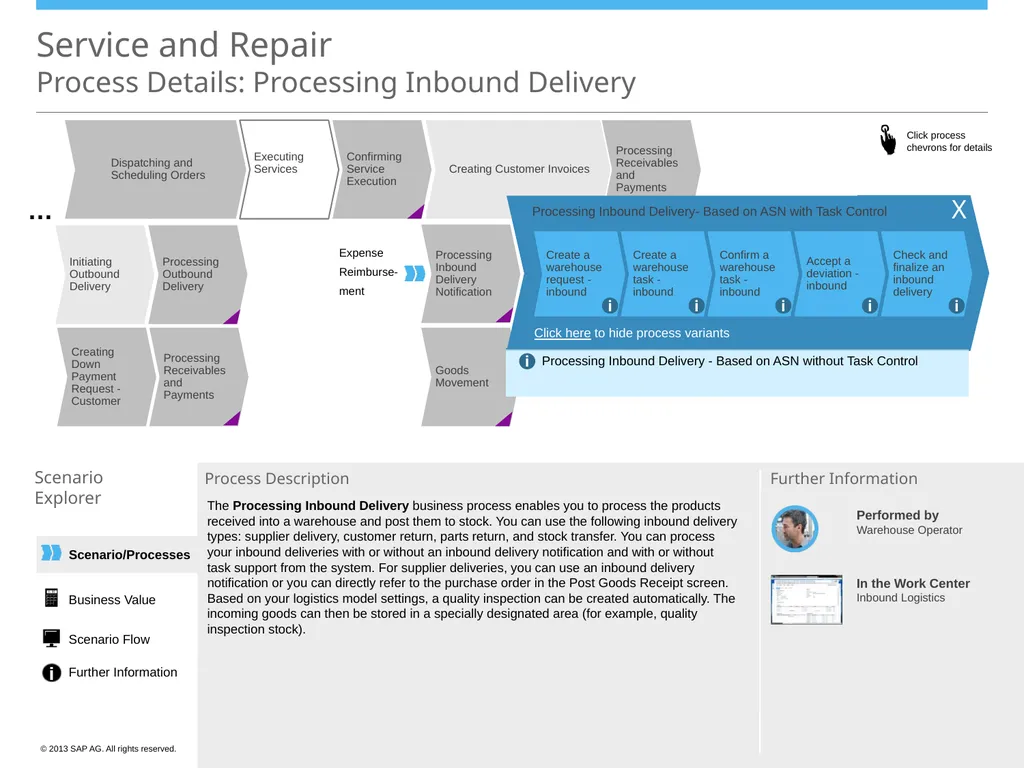
Scheduling Orders Creating Customer Invoices Processing Inbound Delivery- Based on ASN with Task Control Check and finalize an inbound delivery Accept a deviation - inbound Confirm a warehouse task - inbound Create a warehouse task - inbound Create a warehouse request - inbound i i i i i Processing Inbound Delivery - Based on ASN without Task Control i Click here to hide process variants The Processing Inbound Delivery business process enables you to process the products received into a warehouse and post them to stock. You can use the following inbound delivery types: supplier delivery, customer return, parts return, and stock transfer. You can process your inbound deliveries with or without an inbound delivery notification and with or without task support from the system. For supplier deliveries, you can use an inbound delivery notification or you can directly refer to the purchase order in the Post Goods Receipt screen.
Based on your logistics model settings, a quality inspection can be created automatically. The incoming goods can then be stored in a specially designated area (for example, quality inspection stock). X Business Value Scenario Flow Further Information<br>
Explorer Process Description … Performed by
Warehouse Operator In the Work Center
Inbound Logistics Further Information Expense
Reimburse-
ment Dispatching and
Scheduling Orders Creating Customer Invoices Processing Inbound Delivery- Based on ASN with Task Control Check and finalize an inbound delivery Accept a deviation - inbound Confirm a warehouse task - inbound Create a warehouse task - inbound Create a warehouse request - inbound i i i i i Processing Inbound Delivery - Based on ASN without Task Control i Click here to hide process variants The Processing Inbound Delivery business process enables you to process the products received into a warehouse and post them to stock. You can use the following inbound delivery types: supplier delivery, customer return, parts return, and stock transfer. You can process your inbound deliveries with or without an inbound delivery notification and with or without task support from the system. For supplier deliveries, you can use an inbound delivery notification or you can directly refer to the purchase order in the Post Goods Receipt screen.
Based on your logistics model settings, a quality inspection can be created automatically. The incoming goods can then be stored in a specially designated area (for example, quality inspection stock). X Business Value Scenario Flow Further Information<br>
21
Scenario/Processes Processing Receivables and Payments Handling an Incoming Customer Inquiry Executing Services Creating and Planning Service Orders Confirming Service Execution Processing Receivables and Payments Initiating Outbound Delivery Processing Outbound Delivery Processing Inbound Delivery Processing Inbound Delivery Notification Creating Down Payment Request - Customer Service and Repair
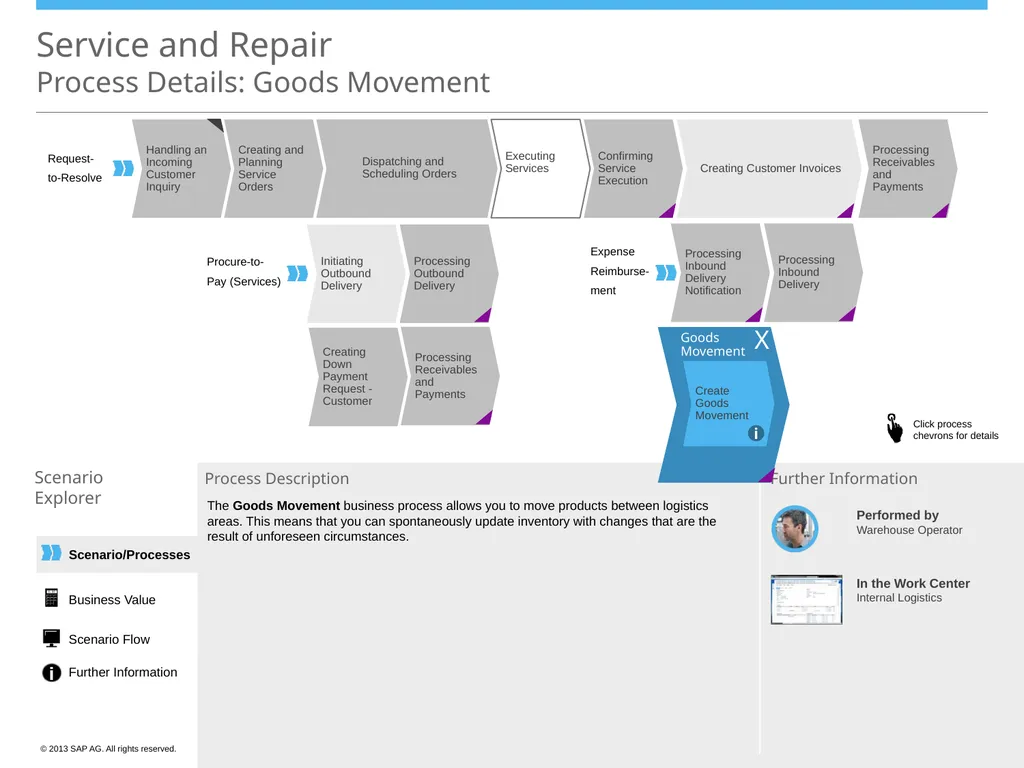
Process Details: Goods Movement Scenario
Explorer Process Description Performed by
Warehouse Operator In the Work Center
Internal Logistics Further Information Request-
to-Resolve Procure-to-
Pay (Services) Expense
Reimburse-
ment Dispatching and
Scheduling Orders Creating Customer Invoices Goods Movement Create Goods Movement i The Goods Movement business process allows you to move products between logistics areas. This means that you can spontaneously update inventory with changes that are the result of unforeseen circumstances. X Business Value Scenario Flow Further Information<br>
Explorer Process Description Performed by
Warehouse Operator In the Work Center
Internal Logistics Further Information Request-
to-Resolve Procure-to-
Pay (Services) Expense
Reimburse-
ment Dispatching and
Scheduling Orders Creating Customer Invoices Goods Movement Create Goods Movement i The Goods Movement business process allows you to move products between logistics areas. This means that you can spontaneously update inventory with changes that are the result of unforeseen circumstances. X Business Value Scenario Flow Further Information<br>
22
Scenario/Processes Service and Repair
Process Details: Processing Receivables and Payments Scenario
Explorer Process Description Performed by
Accounts Receivables
Accountant In the Work Centers
Receivables
Payment Management
Liquidity Management Further Information Executing Services Confirming Service Execution Processing Inbound Delivery Processing Inbound Delivery Notification Goods Movement Expense
Reimburse-
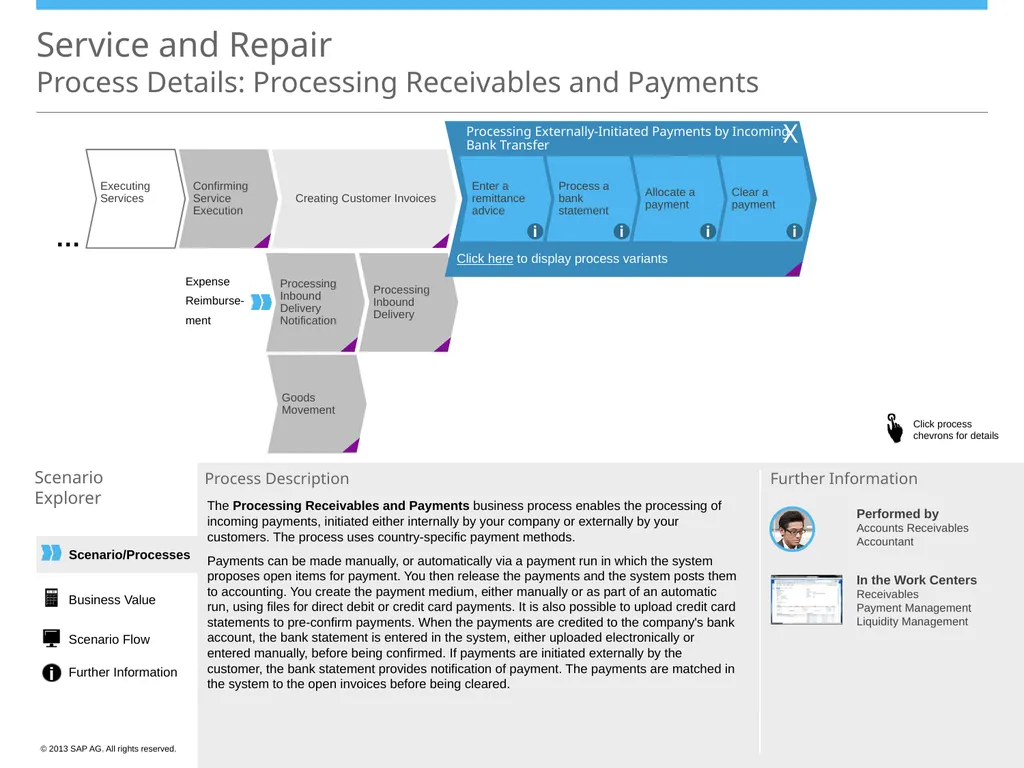
ment Creating Customer Invoices … Processing Externally-Initiated Payments by Incoming Bank Transfer Clear a payment Allocate a payment Process a bank statement Enter a remittance advice i i i i Click here to display process variants The Processing Receivables and Payments business process enables the processing of incoming payments, initiated either internally by your company or externally by your customers. The process uses country-specific payment methods.
Payments can be made manually, or automatically via a payment run in which the system proposes open items for payment. You then release the payments and the system posts them to accounting. You create the payment medium, either manually or as part of an automatic run, using files for direct debit or credit card payments. It is also possible to upload credit card statements to pre-confirm payments. When the payments are credited to the company's bank account, the bank statement is entered in the system, either uploaded electronically or entered manually, before being confirmed. If payments are initiated externally by the customer, the bank statement provides notification of payment. The payments are matched in the system to the open invoices before being cleared. X Business Value Scenario Flow Further Information<br>
Explorer Process Description Performed by
Accounts Receivables
Accountant In the Work Centers
Receivables
Payment Management
Liquidity Management Further Information Executing Services Confirming Service Execution Processing Inbound Delivery Processing Inbound Delivery Notification Goods Movement Expense
Reimburse-
ment Creating Customer Invoices … Processing Externally-Initiated Payments by Incoming Bank Transfer Clear a payment Allocate a payment Process a bank statement Enter a remittance advice i i i i Click here to display process variants The Processing Receivables and Payments business process enables the processing of incoming payments, initiated either internally by your company or externally by your customers. The process uses country-specific payment methods.
Payments can be made manually, or automatically via a payment run in which the system proposes open items for payment. You then release the payments and the system posts them to accounting. You create the payment medium, either manually or as part of an automatic run, using files for direct debit or credit card payments. It is also possible to upload credit card statements to pre-confirm payments. When the payments are credited to the company's bank account, the bank statement is entered in the system, either uploaded electronically or entered manually, before being confirmed. If payments are initiated externally by the customer, the bank statement provides notification of payment. The payments are matched in the system to the open invoices before being cleared. X Business Value Scenario Flow Further Information<br>
23
Scenario/Processes Executing Services Confirming Service Execution Processing Inbound Delivery Processing Inbound Delivery Notification Goods Movement Service and Repair
Process Details: Processing Receivables and Payments Scenario
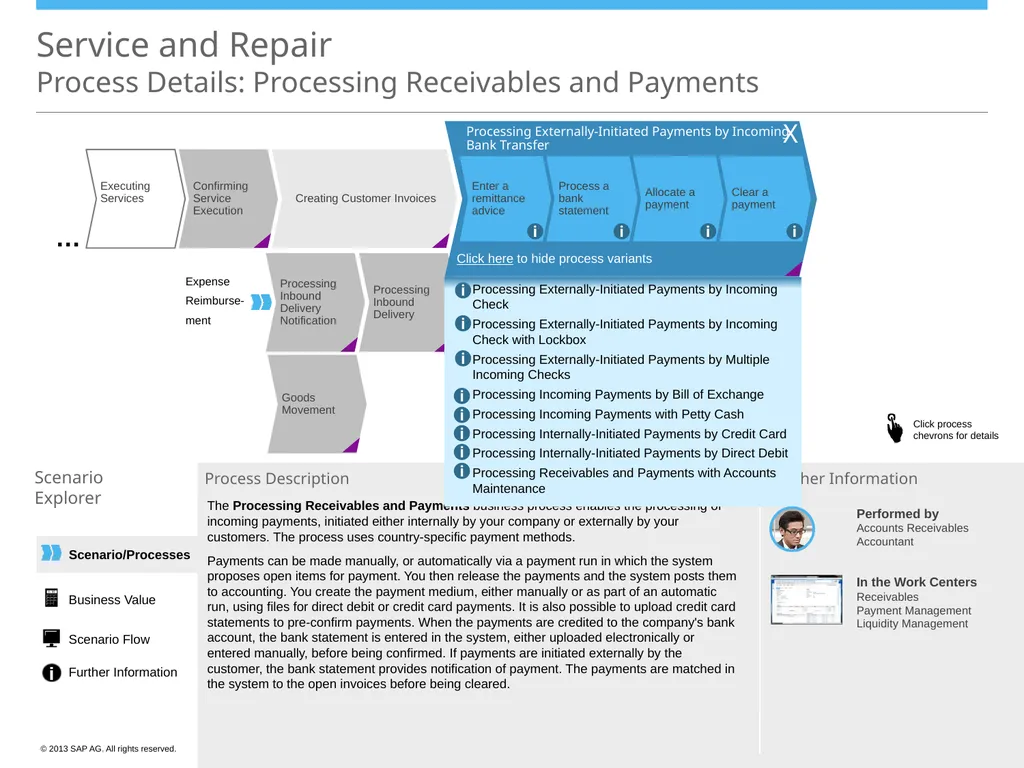
Explorer Process Description The Processing Receivables and Payments business process enables the processing of incoming payments, initiated either internally by your company or externally by your customers. The process uses country-specific payment methods.
Payments can be made manually, or automatically via a payment run in which the system proposes open items for payment. You then release the payments and the system posts them to accounting. You create the payment medium, either manually or as part of an automatic run, using files for direct debit or credit card payments. It is also possible to upload credit card statements to pre-confirm payments. When the payments are credited to the company's bank account, the bank statement is entered in the system, either uploaded electronically or entered manually, before being confirmed. If payments are initiated externally by the customer, the bank statement provides notification of payment. The payments are matched in the system to the open invoices before being cleared. Performed by
Accounts Receivables
Accountant In the Work Centers
Receivables
Payment Management
Liquidity Management Further Information Expense
Reimburse-
ment Creating Customer Invoices … X Processing Externally-Initiated Payments by Incoming Check
Processing Externally-Initiated Payments by Incoming Check with Lockbox
Processing Externally-Initiated Payments by Multiple Incoming Checks
Processing Incoming Payments by Bill of Exchange
Processing Incoming Payments with Petty Cash
Processing Internally-Initiated Payments by Credit Card
Processing Internally-Initiated Payments by Direct Debit
Processing Receivables and Payments with Accounts Maintenance i i i i i i i i Processing Externally-Initiated Payments by Incoming Bank Transfer Clear a payment Allocate a payment Process a bank statement Enter a remittance advice i i i i Click here to hide process variants X Business Value Scenario Flow Further Information<br>
Explorer Process Description The Processing Receivables and Payments business process enables the processing of incoming payments, initiated either internally by your company or externally by your customers. The process uses country-specific payment methods.
Payments can be made manually, or automatically via a payment run in which the system proposes open items for payment. You then release the payments and the system posts them to accounting. You create the payment medium, either manually or as part of an automatic run, using files for direct debit or credit card payments. It is also possible to upload credit card statements to pre-confirm payments. When the payments are credited to the company's bank account, the bank statement is entered in the system, either uploaded electronically or entered manually, before being confirmed. If payments are initiated externally by the customer, the bank statement provides notification of payment. The payments are matched in the system to the open invoices before being cleared. Performed by
Accounts Receivables
Accountant In the Work Centers
Receivables
Payment Management
Liquidity Management Further Information Expense
Reimburse-
ment Creating Customer Invoices … X Processing Externally-Initiated Payments by Incoming Check
Processing Externally-Initiated Payments by Incoming Check with Lockbox
Processing Externally-Initiated Payments by Multiple Incoming Checks
Processing Incoming Payments by Bill of Exchange
Processing Incoming Payments with Petty Cash
Processing Internally-Initiated Payments by Credit Card
Processing Internally-Initiated Payments by Direct Debit
Processing Receivables and Payments with Accounts Maintenance i i i i i i i i Processing Externally-Initiated Payments by Incoming Bank Transfer Clear a payment Allocate a payment Process a bank statement Enter a remittance advice i i i i Click here to hide process variants X Business Value Scenario Flow Further Information<br>
24
Service and Repair
Business Value Scenario
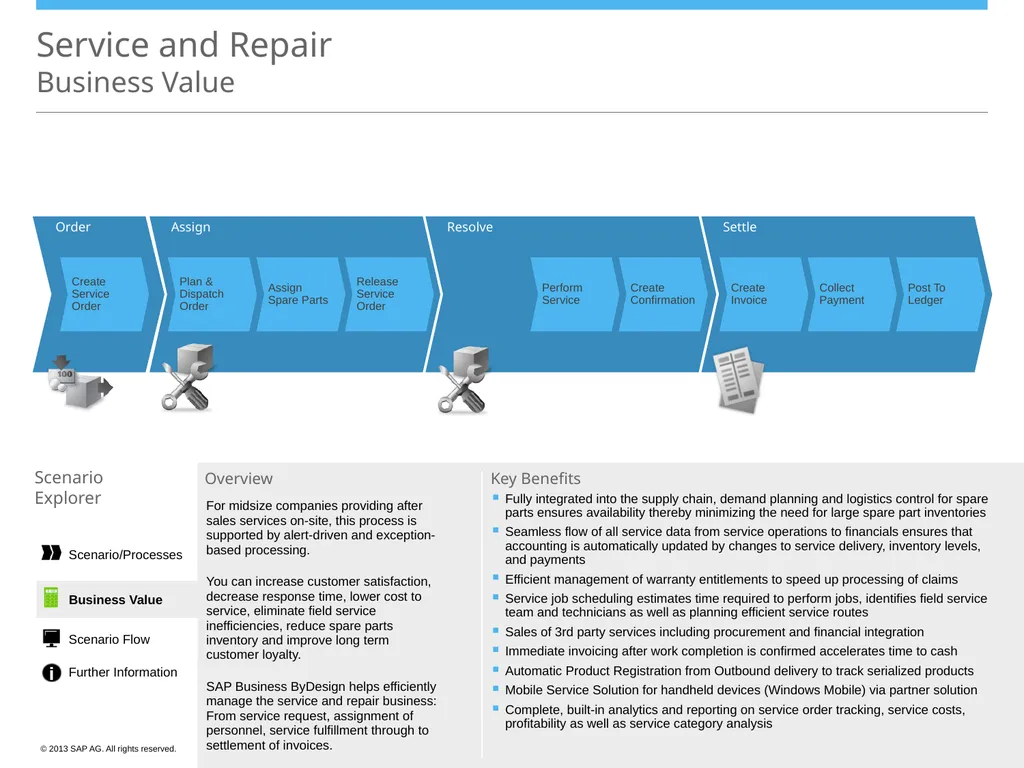
Explorer Overview For midsize companies providing after sales services on-site, this process is supported by alert-driven and exception-based processing.
You can increase customer satisfaction, decrease response time, lower cost to service, eliminate field service inefficiencies, reduce spare parts inventory and improve long term customer loyalty.
SAP Business ByDesign helps efficiently manage the service and repair business: From service request, assignment of personnel, service fulfillment through to settlement of invoices. Fully integrated into the supply chain, demand planning and logistics control for spare parts ensures availability thereby minimizing the need for large spare part inventories
Seamless flow of all service data from service operations to financials ensures that accounting is automatically updated by changes to service delivery, inventory levels, and payments
Efficient management of warranty entitlements to speed up processing of claims
Service job scheduling estimates time required to perform jobs, identifies field service team and technicians as well as planning efficient service routes
Sales of 3rd party services including procurement and financial integration
Immediate invoicing after work completion is confirmed accelerates time to cash
Automatic Product Registration from Outbound delivery to track serialized products
Mobile Service Solution for handheld devices (Windows Mobile) via partner solution
Complete, built-in analytics and reporting on service order tracking, service costs, profitability as well as service category analysis Key Benefits Order Assign Resolve Settle Create Service Order Plan & Dispatch Order Assign Spare Parts Release Service Order Perform Service Create Confirmation Create Invoice Collect Payment Post To Ledger Business Value Scenario/Processes Scenario Flow Further Information<br>
Explorer Overview For midsize companies providing after sales services on-site, this process is supported by alert-driven and exception-based processing.
You can increase customer satisfaction, decrease response time, lower cost to service, eliminate field service inefficiencies, reduce spare parts inventory and improve long term customer loyalty.
SAP Business ByDesign helps efficiently manage the service and repair business: From service request, assignment of personnel, service fulfillment through to settlement of invoices. Fully integrated into the supply chain, demand planning and logistics control for spare parts ensures availability thereby minimizing the need for large spare part inventories
Seamless flow of all service data from service operations to financials ensures that accounting is automatically updated by changes to service delivery, inventory levels, and payments
Efficient management of warranty entitlements to speed up processing of claims
Service job scheduling estimates time required to perform jobs, identifies field service team and technicians as well as planning efficient service routes
Sales of 3rd party services including procurement and financial integration
Immediate invoicing after work completion is confirmed accelerates time to cash
Automatic Product Registration from Outbound delivery to track serialized products
Mobile Service Solution for handheld devices (Windows Mobile) via partner solution
Complete, built-in analytics and reporting on service order tracking, service costs, profitability as well as service category analysis Key Benefits Order Assign Resolve Settle Create Service Order Plan & Dispatch Order Assign Spare Parts Release Service Order Perform Service Create Confirmation Create Invoice Collect Payment Post To Ledger Business Value Scenario/Processes Scenario Flow Further Information<br>
25
Service and Repair
Scenario Flow Variant: With Services and Expenses Legend & Variants Work center in which process is performed Business
document flow Process related to Financials Related scenarios Variants of the Scenario: With services and expenses
With spare parts
With 3rd party
With down payments Dotted line = optional Process mainly driven by the system Process mainly driven by the user Process mainly driven by the system Scenario Explorer Request to Resolve Expense Reimbursement Executing Services Dispatching and Scheduling Orders Creating and Planning Service Orders Confirming Service Execution Creating Customer Invoice Processing Receivables and Payments Handling an Incoming Customer Inquiry Business Value Scenario/Processes Scenario Flow Further Information Collaboration
Window/
Groupware
Client Service Orders Service and Repair Customer Invoicing Receivables/
Cash & Liquidity Mgt Work
Center Additional Application<br>
document flow Process related to Financials Related scenarios Variants of the Scenario: With services and expenses
With spare parts
With 3rd party
With down payments Dotted line = optional Process mainly driven by the system Process mainly driven by the user Process mainly driven by the system Scenario Explorer Request to Resolve Expense Reimbursement Executing Services Dispatching and Scheduling Orders Creating and Planning Service Orders Confirming Service Execution Creating Customer Invoice Processing Receivables and Payments Handling an Incoming Customer Inquiry Business Value Scenario/Processes Scenario Flow Further Information Collaboration
Window/
Groupware
Client Service Orders Service and Repair Customer Invoicing Receivables/
Cash & Liquidity Mgt Work
Center Additional Application<br>
26
Service and Repair
Scenario Flow Variant: With Spare Parts Legend & Variants Work center in which process is performed Business
document flow Process related to Financials Related scenarios Variants of the Scenario: Dotted line = optional Process mainly driven by the system Process mainly driven by the user Process mainly driven by the system Scenario Explorer Request to Resolve Expense Reimbursement Outbound Logistics Internal Logistics Inbound Logistics Inbound Delivery Processing Inbound Delivery Notification Processing With services and expenses
With spare parts
With 3rd party
With down payments Outbound Logistics Control Outbound Logistics Outbound Delivery Processing Initiate Outbound Processing Goods Movement Executing Services Dispatching and Scheduling Orders Creating and Planning Service Orders Confirming Service Execution Creating Customer Invoice Processing Receivables and Payments Handling an Incoming Customer Inquiry Business Value Scenario/Processes Scenario Flow Further Information Collaboration
Window/
Groupware
Client Service Orders Service and Repair Customer Invoicing Receivables/
Cash & Liquidity Mgt Work
Center Additional Application<br>
document flow Process related to Financials Related scenarios Variants of the Scenario: Dotted line = optional Process mainly driven by the system Process mainly driven by the user Process mainly driven by the system Scenario Explorer Request to Resolve Expense Reimbursement Outbound Logistics Internal Logistics Inbound Logistics Inbound Delivery Processing Inbound Delivery Notification Processing With services and expenses
With spare parts
With 3rd party
With down payments Outbound Logistics Control Outbound Logistics Outbound Delivery Processing Initiate Outbound Processing Goods Movement Executing Services Dispatching and Scheduling Orders Creating and Planning Service Orders Confirming Service Execution Creating Customer Invoice Processing Receivables and Payments Handling an Incoming Customer Inquiry Business Value Scenario/Processes Scenario Flow Further Information Collaboration
Window/
Groupware
Client Service Orders Service and Repair Customer Invoicing Receivables/
Cash & Liquidity Mgt Work
Center Additional Application<br>
27
Service and Repair
Scenario Flow Variant: With Third Party Legend & Variants Work center in which process is performed Business
document flow Process related to Financials Related scenarios Variants of the Scenario: With services and expenses
With spare parts
With 3rd party
With down payments Dotted line = optional Process mainly driven by the system Process mainly driven by the user Process mainly driven by the system Scenario Explorer Procure-to-Pay (Services) Request to Resolve Expense Reimbursement Executing Services Dispatching and Scheduling Orders Creating and Planning Service Orders Confirming Service Execution Creating Customer Invoice Processing Receivables and Payments Handling an Incoming Customer Inquiry Business Value Scenario/Processes Scenario Flow Further Information Collaboration
Window/
Groupware
Client Service Orders Service and Repair Customer Invoicing Receivables/
Cash & Liquidity Mgt Work
Center Additional Application<br>
document flow Process related to Financials Related scenarios Variants of the Scenario: With services and expenses
With spare parts
With 3rd party
With down payments Dotted line = optional Process mainly driven by the system Process mainly driven by the user Process mainly driven by the system Scenario Explorer Procure-to-Pay (Services) Request to Resolve Expense Reimbursement Executing Services Dispatching and Scheduling Orders Creating and Planning Service Orders Confirming Service Execution Creating Customer Invoice Processing Receivables and Payments Handling an Incoming Customer Inquiry Business Value Scenario/Processes Scenario Flow Further Information Collaboration
Window/
Groupware
Client Service Orders Service and Repair Customer Invoicing Receivables/
Cash & Liquidity Mgt Work
Center Additional Application<br>
28
Service and Repair
Scenario Flow Variant: With Down Payments Legend & Variants Work center in which process is performed Business
document flow Process related to Financials Related scenarios Variants of the Scenario: With services and expenses
With spare parts
With 3rd party
With down payments Dotted line = optional Process mainly driven by the system Process mainly driven by the user Process mainly driven by the system Scenario Explorer Work
Center Additional Application Customer Invoicing Creating Down Payment Request Processing Receivables and Payments Request to Resolve Expense Reimbursement Collaboration
Window/
Groupware
Client Service Orders Service and Repair Customer Invoicing Receivables/
Cash & Liquidity Mgt Executing Services Executing Services Dispatching and Scheduling Orders Creating and Planning Service Orders Confirming Service Execution Creating Customer Invoice Processing Receivables and Payments Handling an Incoming Customer Inquiry Business Value Scenario/Processes Scenario Flow Further Information Receivables/
Cash & Liquidity Mgt<br>
document flow Process related to Financials Related scenarios Variants of the Scenario: With services and expenses
With spare parts
With 3rd party
With down payments Dotted line = optional Process mainly driven by the system Process mainly driven by the user Process mainly driven by the system Scenario Explorer Work
Center Additional Application Customer Invoicing Creating Down Payment Request Processing Receivables and Payments Request to Resolve Expense Reimbursement Collaboration
Window/
Groupware
Client Service Orders Service and Repair Customer Invoicing Receivables/
Cash & Liquidity Mgt Executing Services Executing Services Dispatching and Scheduling Orders Creating and Planning Service Orders Confirming Service Execution Creating Customer Invoice Processing Receivables and Payments Handling an Incoming Customer Inquiry Business Value Scenario/Processes Scenario Flow Further Information Receivables/
Cash & Liquidity Mgt<br>
29
Service and Repair
Further Information Scenario
Explorer Forum
Get in touch with experts to discuss your specific requirements. To enter the community, click here.* More Details SAP provides a complete product documentation, covering all aspects of the business scenario. For more details, click here. Self-Enablement Systems
If you want to try out the business scenario, click here.* WIKI
In addition to the product documentation, SAP provides Wikis that describe additional aspects of SAP Business ByDesign.
To access the WIKI, click here.* Do you want to try it out? Do you need more information? Do you want to discuss with others? * Note that to access the links above you need to have a user in SAP Business Center. If you cannot access the page directly and if you are using Microsoft Internet Explorer®, please check http://support.microsoft.com/kb/890474. Further Information Business Value Scenario/Processes Scenario Flow<br>
Explorer Forum
Get in touch with experts to discuss your specific requirements. To enter the community, click here.* More Details SAP provides a complete product documentation, covering all aspects of the business scenario. For more details, click here. Self-Enablement Systems
If you want to try out the business scenario, click here.* WIKI
In addition to the product documentation, SAP provides Wikis that describe additional aspects of SAP Business ByDesign.
To access the WIKI, click here.* Do you want to try it out? Do you need more information? Do you want to discuss with others? * Note that to access the links above you need to have a user in SAP Business Center. If you cannot access the page directly and if you are using Microsoft Internet Explorer®, please check http://support.microsoft.com/kb/890474. Further Information Business Value Scenario/Processes Scenario Flow<br>