
SDC3IT09 - Basic Networking Concepts MODULE-1
JO
Published · 35 slides · 0 views
1 / 1

Description
SDC3IT09 - Basic Networking Concepts MODULE-1 INTRODUCTION TO COMPUTER NETWORKS Computer Network means interconnected collection of autonomous computers. Data communication exchange of data between 2 devices via some form of transmission
Related Topics
Share
Embed code
Download this presentation From Below
"SDC3IT09 - Basic Networking Concepts MODULE-1" is the property of its rightful owner. Permission is granted to download and print the materials on this website for personal, non-commercial use only, and to display it on your personal computer provided you do not modify the materials and that you retain all copyright notices contained in the materials. By downloading content from our website, you accept the terms of this agreement.
Presentation Transcript
01
SDC3IT09 - Basic Networking Concepts MODULE-1<br>
02
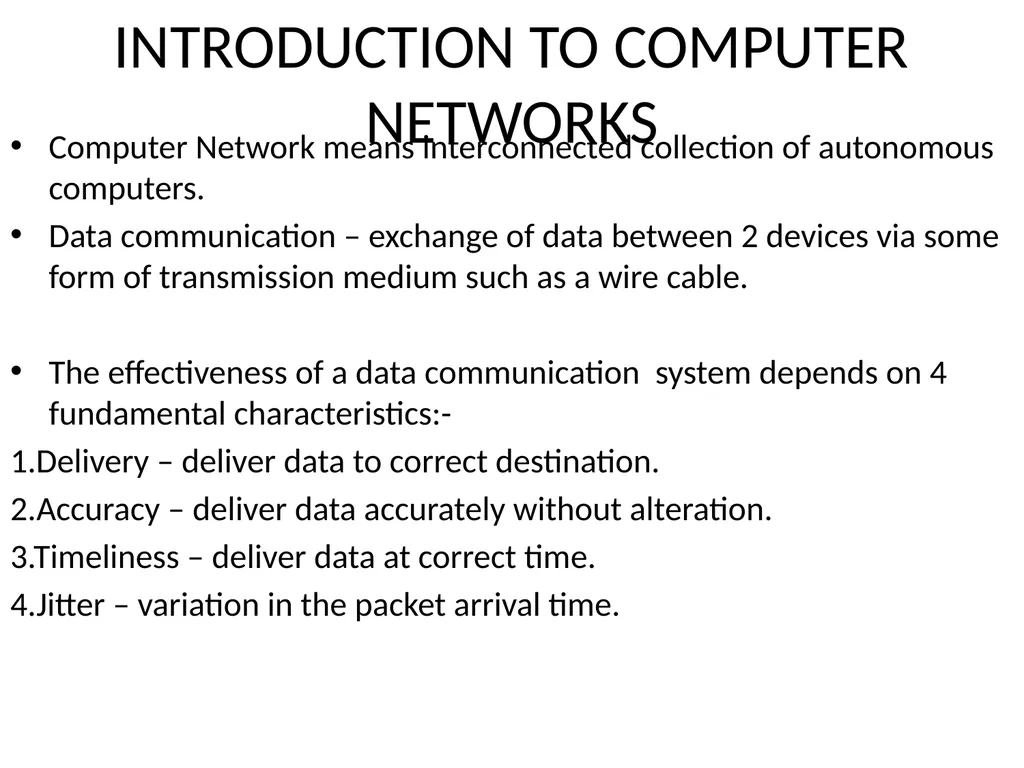
INTRODUCTION TO COMPUTER NETWORKS Computer Network means interconnected collection of autonomous computers.
Data communication – exchange of data between 2 devices via some form of transmission medium such as a wire cable.
The effectiveness of a data communication system depends on 4 fundamental characteristics:-
1.Delivery – deliver data to correct destination.
2.Accuracy – deliver data accurately without alteration.
3.Timeliness – deliver data at correct time.
4.Jitter – variation in the packet arrival time.<br>
Data communication – exchange of data between 2 devices via some form of transmission medium such as a wire cable.
The effectiveness of a data communication system depends on 4 fundamental characteristics:-
1.Delivery – deliver data to correct destination.
2.Accuracy – deliver data accurately without alteration.
3.Timeliness – deliver data at correct time.
4.Jitter – variation in the packet arrival time.<br>
03
Computer Network Features
https://beginnersbook.com/2019/03/computer-network-features/<br>
https://beginnersbook.com/2019/03/computer-network-features/<br>
04
Components
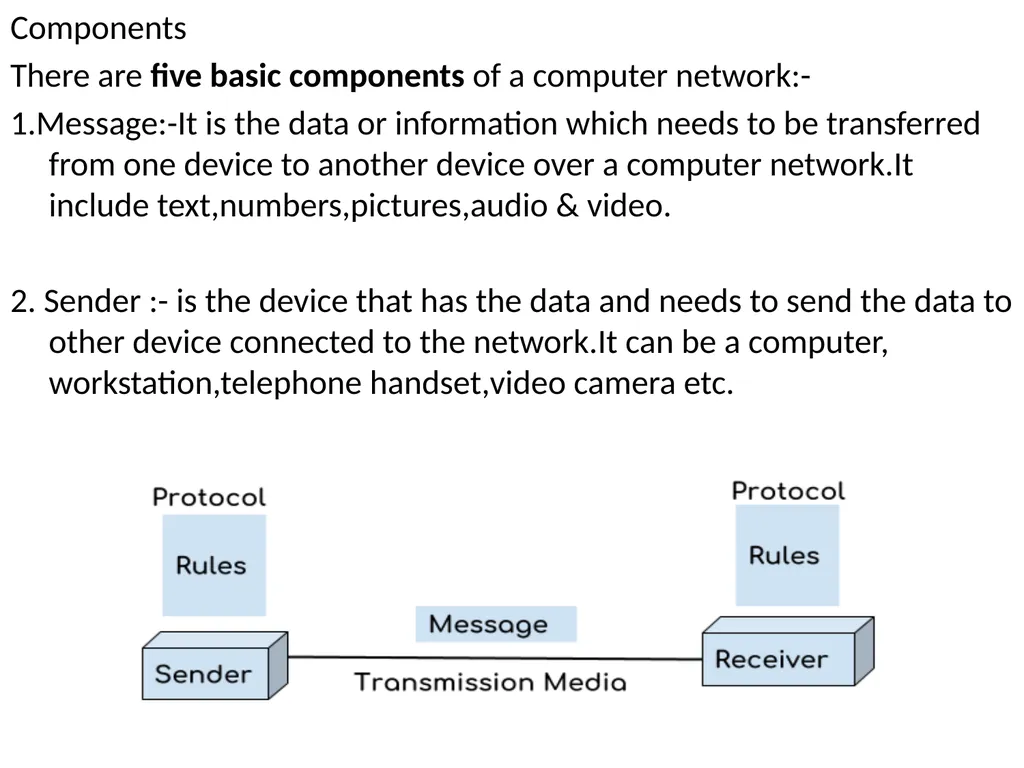
There are five basic components of a computer network:-
1.Message:-It is the data or information which needs to be transferred from one device to another device over a computer network.It include text,numbers,pictures,audio & video.
2. Sender :- is the device that has the data and needs to send the data to other device connected to the network.It can be a computer, workstation,telephone handset,video camera etc.<br>
There are five basic components of a computer network:-
1.Message:-It is the data or information which needs to be transferred from one device to another device over a computer network.It include text,numbers,pictures,audio & video.
2. Sender :- is the device that has the data and needs to send the data to other device connected to the network.It can be a computer, workstation,telephone handset,video camera etc.<br>
05
3. Receiver: A receiver is the device which is expecting the data from other device on the network.
4. Transmission media: In order to transfer data from one device to another device we need a transmission media such as wires, cables, radio waves etc.
5. Protocol: A protocol is a set of rules that are agreed by both sender and receiver, without a protocol two devices can be connected to each other but they cannot communicate. In order to establish a reliable communication or data sharing between two different devices we need set of rules that are called protocol. For example, http and https are the two protocols used by web browsers to get and post the data to internet, similarly smtp protocol is used by email services connected to the internet.<br>
4. Transmission media: In order to transfer data from one device to another device we need a transmission media such as wires, cables, radio waves etc.
5. Protocol: A protocol is a set of rules that are agreed by both sender and receiver, without a protocol two devices can be connected to each other but they cannot communicate. In order to establish a reliable communication or data sharing between two different devices we need set of rules that are called protocol. For example, http and https are the two protocols used by web browsers to get and post the data to internet, similarly smtp protocol is used by email services connected to the internet.<br>
06
Computer Network Architecture
https://beginnersbook.com/2019/03/computer-network-architecture/<br>
https://beginnersbook.com/2019/03/computer-network-architecture/<br>
07
Computer Network Components
https://beginnersbook.com/2019/03/computer-network-components/
Difference between hub and switch<br>
https://beginnersbook.com/2019/03/computer-network-components/
Difference between hub and switch<br>
08
Data Representation
1.Text –represented as bit pattern.
Coding systems
Unicode – 32 bits to represent symbol or character used in any language.
ASCII-American standard code for information interchange
First 127 characters in Unicode and is also referred to as Basic latin.
2.Numbers
3.Images
4.Audio
5.Video
Data Flow -Simplex,Half-duplex and full-duplex.<br>
1.Text –represented as bit pattern.
Coding systems
Unicode – 32 bits to represent symbol or character used in any language.
ASCII-American standard code for information interchange
First 127 characters in Unicode and is also referred to as Basic latin.
2.Numbers
3.Images
4.Audio
5.Video
Data Flow -Simplex,Half-duplex and full-duplex.<br>
09
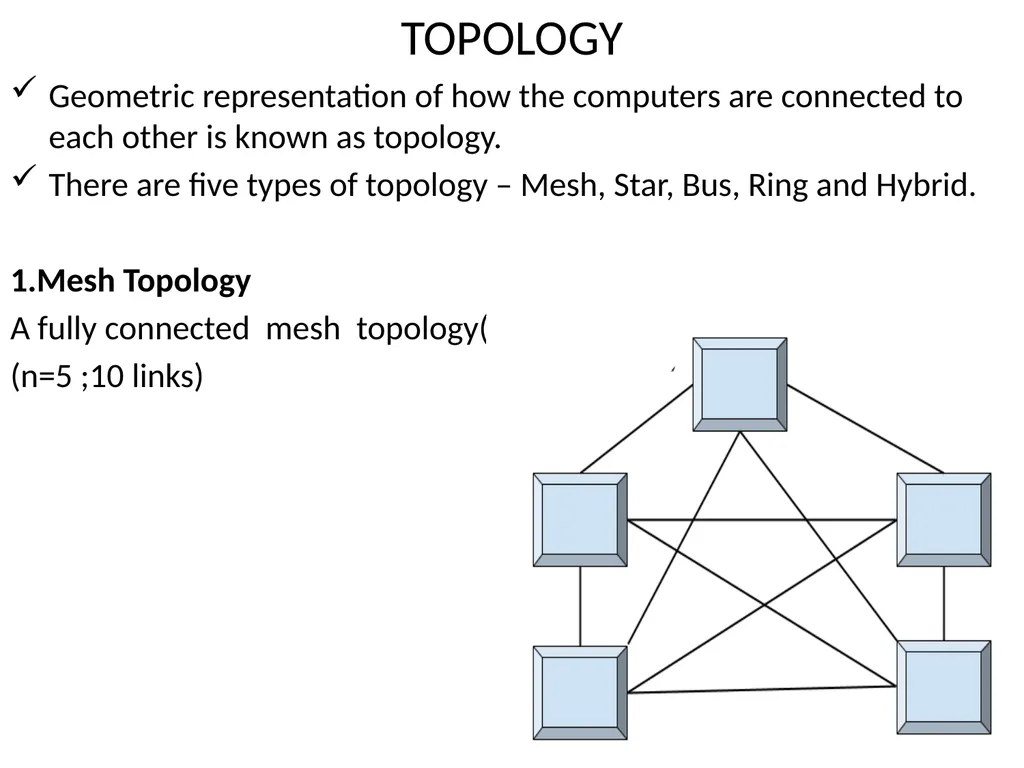
TOPOLOGY Geometric representation of how the computers are connected to each other is known as topology.
There are five types of topology – Mesh, Star, Bus, Ring and Hybrid.
1.Mesh Topology
A fully connected mesh topology(
(n=5 ;10 links)<br>
There are five types of topology – Mesh, Star, Bus, Ring and Hybrid.
1.Mesh Topology
A fully connected mesh topology(
(n=5 ;10 links)<br>
10
In mesh topology each device is connected to every other device on the network through a dedicated point-to-point link.
When we say dedicated it means that the link only carries data for the two connected devices only.
We have n devices in the network then each device must be connected with (n-1) devices of the network.
Number of links in a mesh topology of n devices would be n(n-1)/2[FOR DUPLEX].
n(n-1) for one direction.
Advantages of Mesh topology
1. No data traffic issues as there is a dedicated link between two devices which means the link is only available for those two devices. 2. Mesh topology is reliable and robust as failure of one link doesn’t affect other links and the communication between other devices on the network. 3. Mesh topology is secure because there is a point to point link thus unauthorized access is not possible. 4. Fault detection is easy.<br>
When we say dedicated it means that the link only carries data for the two connected devices only.
We have n devices in the network then each device must be connected with (n-1) devices of the network.
Number of links in a mesh topology of n devices would be n(n-1)/2[FOR DUPLEX].
n(n-1) for one direction.
Advantages of Mesh topology
1. No data traffic issues as there is a dedicated link between two devices which means the link is only available for those two devices. 2. Mesh topology is reliable and robust as failure of one link doesn’t affect other links and the communication between other devices on the network. 3. Mesh topology is secure because there is a point to point link thus unauthorized access is not possible. 4. Fault detection is easy.<br>
11
Disadvantages of Mesh topology
1. Amount of wires required to connected each system is tedious and headache. 2. Since each device needs to be connected with other devices, number of I/O ports required must be huge[must have n-1 I/O Ports. 3. Scalability issues because a device cannot be connected with large number of devices with a dedicated point to point link.
Practical Example:-
Connection of telephone regional offices in which each regional office needs to be connected to every other regional office.<br>
1. Amount of wires required to connected each system is tedious and headache. 2. Since each device needs to be connected with other devices, number of I/O ports required must be huge[must have n-1 I/O Ports. 3. Scalability issues because a device cannot be connected with large number of devices with a dedicated point to point link.
Practical Example:-
Connection of telephone regional offices in which each regional office needs to be connected to every other regional office.<br>
12
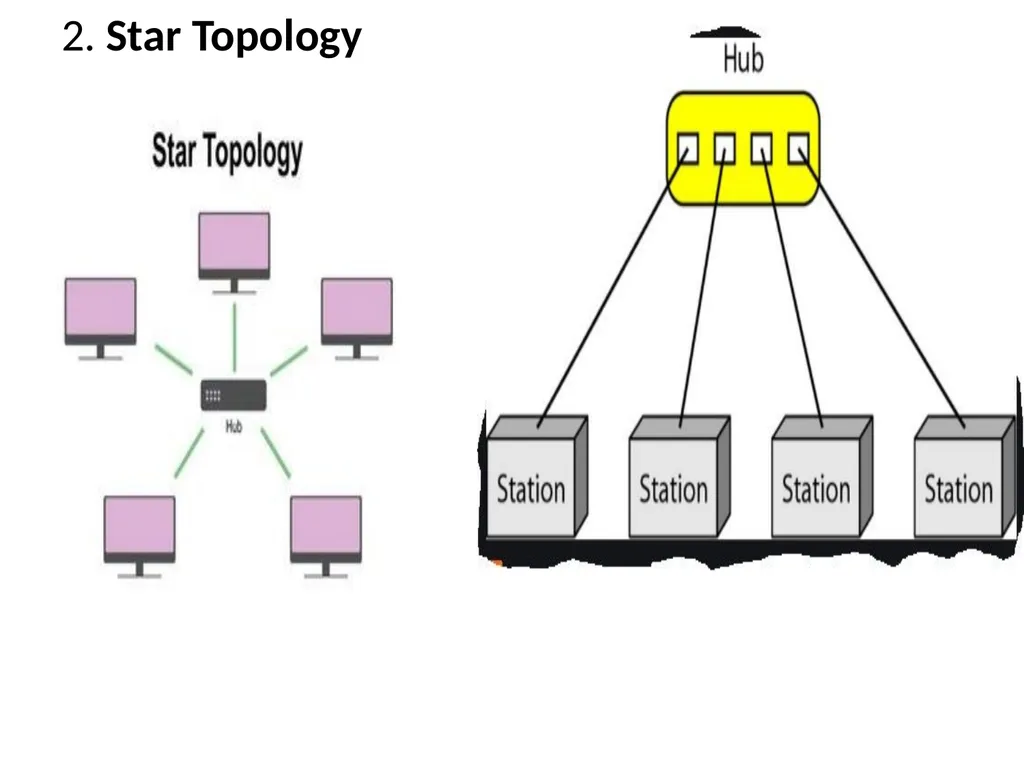
2. Star Topology<br>
13
In star topology each device in the network is connected to a central device called hub.
Unlike Mesh topology, star topology doesn’t allow direct communication between devices, a device must have to communicate through hub.
If one device wants to send data to other device, it has to first send the data to hub and then the hub transmit that data to the designated device.
Advantages of Star topology
Less expensive because each device only need one I/O port and needs to be connected with hub with one link.
Easier to install
Less amount of cables required because each device needs to be connected with the hub only.
Robust, if one link fails, other links will work just fine.
Easy fault detection because the link can be easily identified.<br>
Unlike Mesh topology, star topology doesn’t allow direct communication between devices, a device must have to communicate through hub.
If one device wants to send data to other device, it has to first send the data to hub and then the hub transmit that data to the designated device.
Advantages of Star topology
Less expensive because each device only need one I/O port and needs to be connected with hub with one link.
Easier to install
Less amount of cables required because each device needs to be connected with the hub only.
Robust, if one link fails, other links will work just fine.
Easy fault detection because the link can be easily identified.<br>
14
Disadvantages of Star topology
If hub goes down everything goes down, none of the devices can work without hub.
Hub requires more resources and regular maintenance because it is the central system of star topology.
High speed LAN’s use a star topology with central hub.
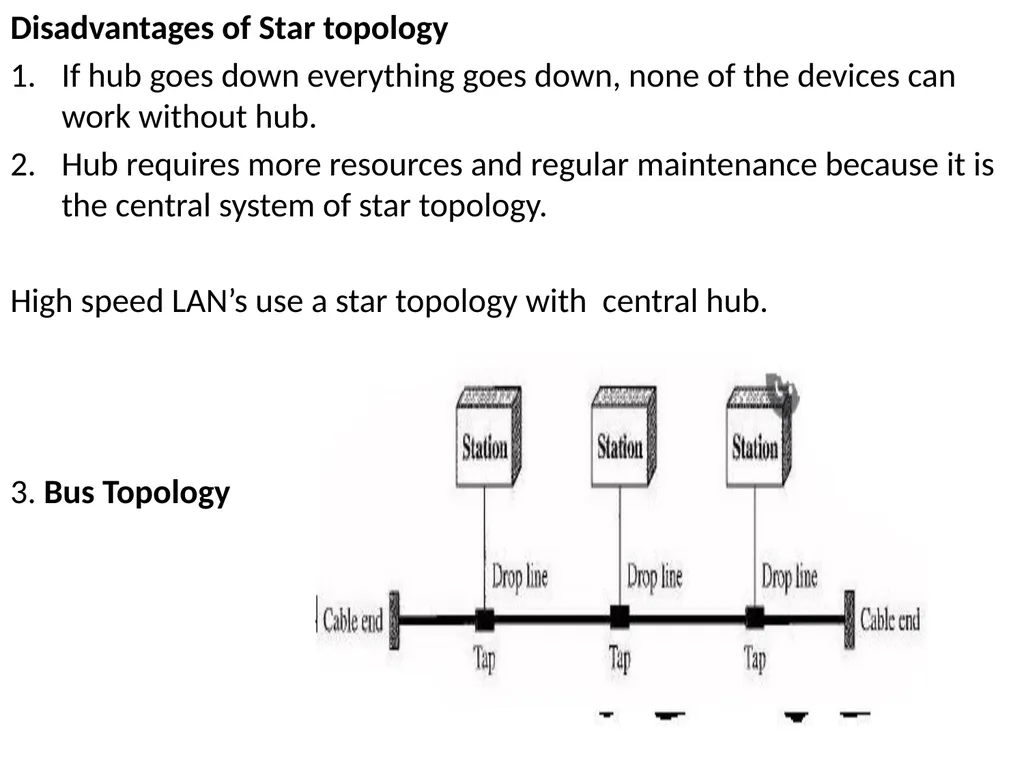
3. Bus Topology<br>
If hub goes down everything goes down, none of the devices can work without hub.
Hub requires more resources and regular maintenance because it is the central system of star topology.
High speed LAN’s use a star topology with central hub.
3. Bus Topology<br>
15
In bus topology there is a main cable and all the devices are connected to this main cable through drop lines.
There is a device called tap that connects the drop line to the main cable.
Since all the data is transmitted over the main cable, there is a limit of drop lines and the distance a main cable can have.
As the signal travels along backbone ,some of its energy transformed into heat.So it becomes weaker & weaker ,as it travels farther & farther.
So there is a limit on the number of taps a bus can support & on the distance between those taps.
Advantages of bus topology
Easy installation, each cable needs to be connected with backbone cable.
Less cables required than Mesh and star topology.
Disadvantages of bus topology
Difficultly in fault detection.
2. Not scalable as there is a limit of how many nodes you can connect with backbone cable.<br>
There is a device called tap that connects the drop line to the main cable.
Since all the data is transmitted over the main cable, there is a limit of drop lines and the distance a main cable can have.
As the signal travels along backbone ,some of its energy transformed into heat.So it becomes weaker & weaker ,as it travels farther & farther.
So there is a limit on the number of taps a bus can support & on the distance between those taps.
Advantages of bus topology
Easy installation, each cable needs to be connected with backbone cable.
Less cables required than Mesh and star topology.
Disadvantages of bus topology
Difficultly in fault detection.
2. Not scalable as there is a limit of how many nodes you can connect with backbone cable.<br>
16
Traditional Ethernet LAN’s use this technology.
4. Ring Topology
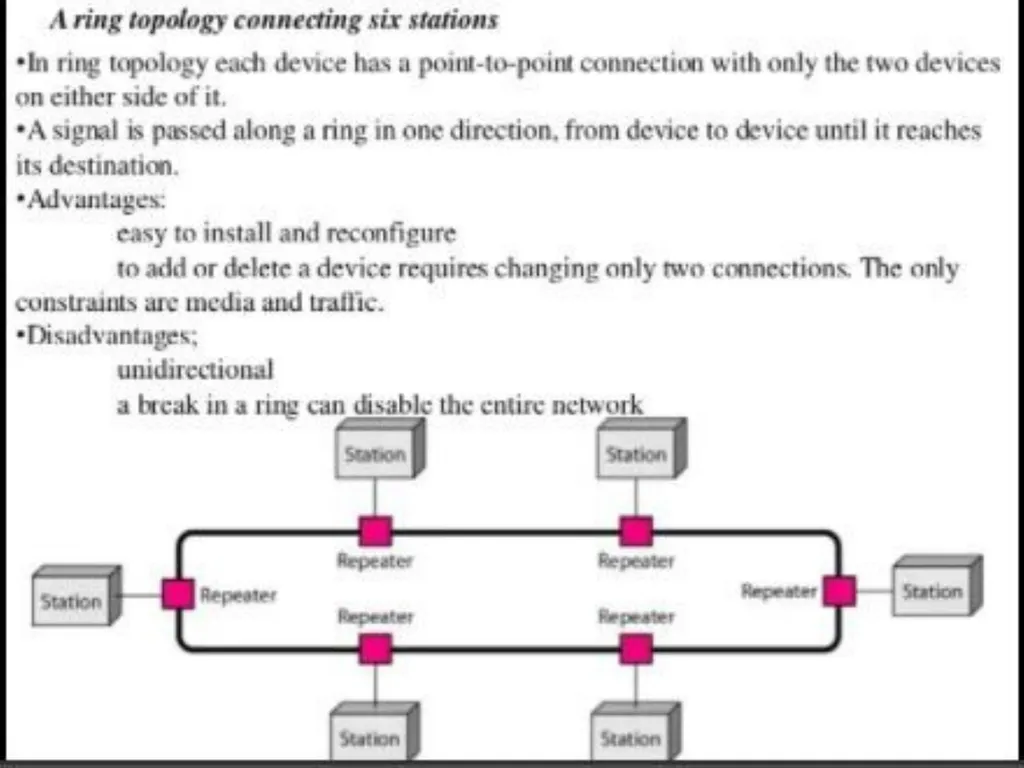
Each device in a ring incorporates a repeater.
When a device receives a signal intended for another device,its repeater regenerates the bits & passes them along .
Ring toplolgy was prevalent when IBM introduced its LAN-Token Ring.
Need of high speed LAN make this technology less popular.<br>
4. Ring Topology
Each device in a ring incorporates a repeater.
When a device receives a signal intended for another device,its repeater regenerates the bits & passes them along .
Ring toplolgy was prevalent when IBM introduced its LAN-Token Ring.
Need of high speed LAN make this technology less popular.<br>
17
5. Hybrid topology
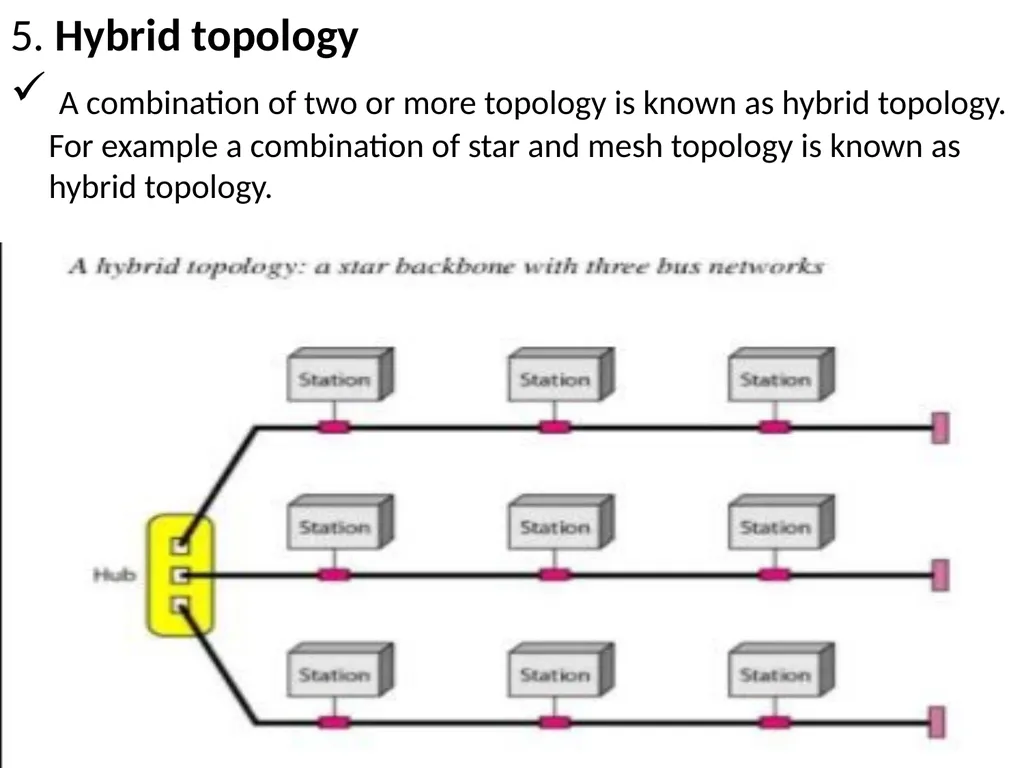
A combination of two or more topology is known as hybrid topology. For example a combination of star and mesh topology is known as hybrid topology.<br>
A combination of two or more topology is known as hybrid topology. For example a combination of star and mesh topology is known as hybrid topology.<br>
18
Advantages of Hybrid topology
We can choose the topology based on the requirement for example, scalability is our concern then we can use star topology instead of bus technology.
Scalable as we can further connect other computer networks with the existing networks with different topologies.
Disadvantages of Hybrid topology
1. Fault detection is difficult. 2. Installation is difficult. 3. Design is complex so maintenance is high thus expensive.<br>
We can choose the topology based on the requirement for example, scalability is our concern then we can use star topology instead of bus technology.
Scalable as we can further connect other computer networks with the existing networks with different topologies.
Disadvantages of Hybrid topology
1. Fault detection is difficult. 2. Installation is difficult. 3. Design is complex so maintenance is high thus expensive.<br>
19
FULL MODULE https://www.slideshare.net/pavankumar815/unit-1-introduction-to-computer-networks<br>
20
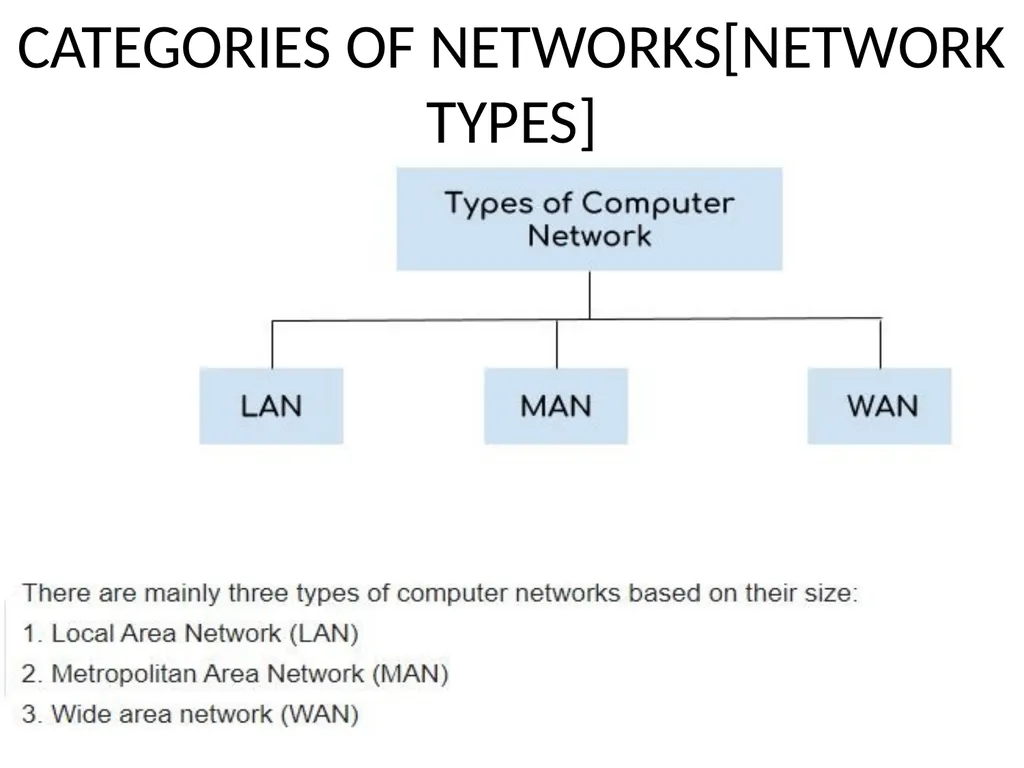
CATEGORIES OF NETWORKS[NETWORK TYPES]<br>
21
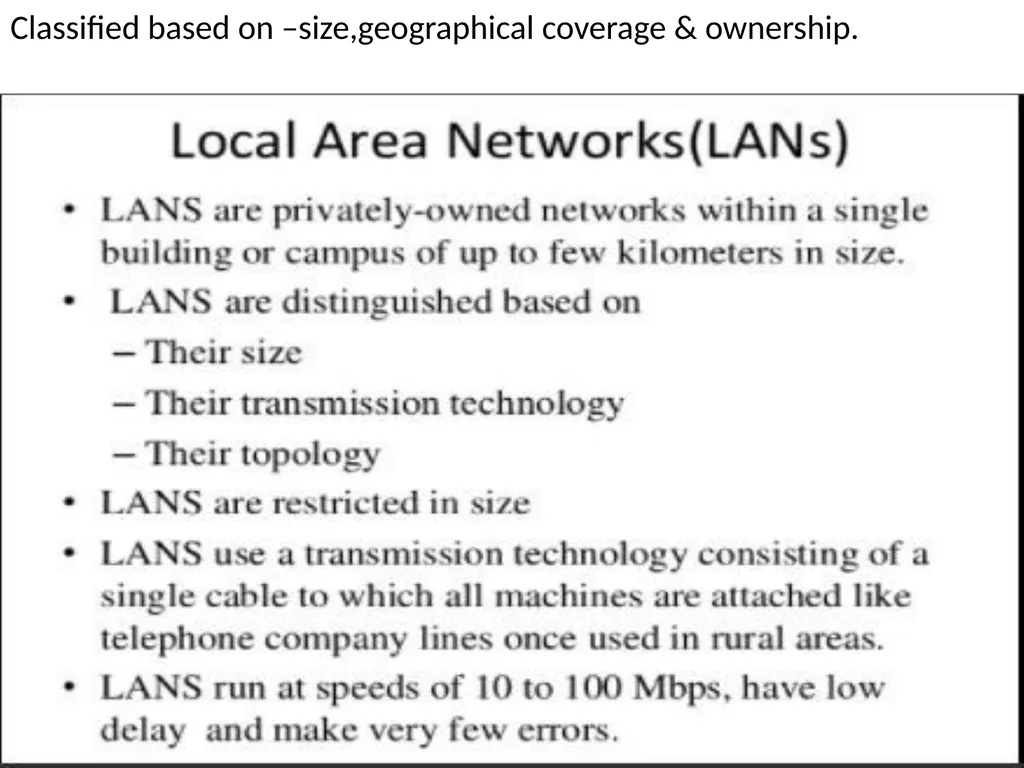
Classified based on –size,geographical coverage & ownership.<br>
22
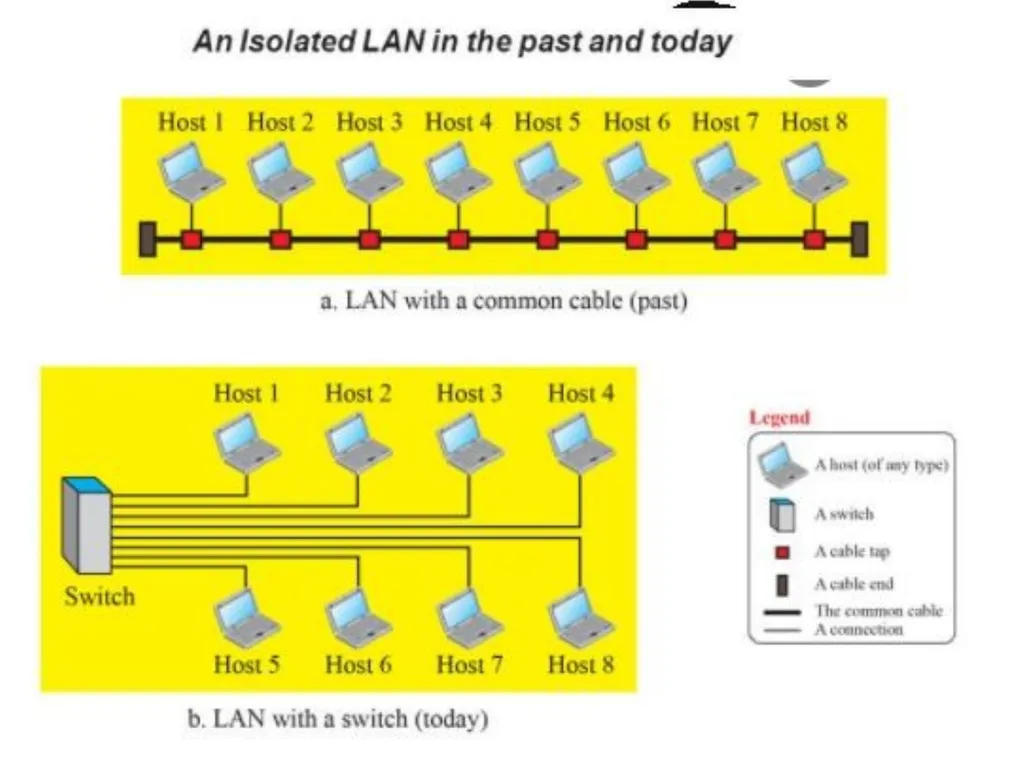
a.All hosts connected through a common cable,so every packet send from one host to another was received by all hosts.
b.Today ,use smart connecting switch,which is able to recognize the destination address of the packet and guide to its destination without sending it to all other hosts.
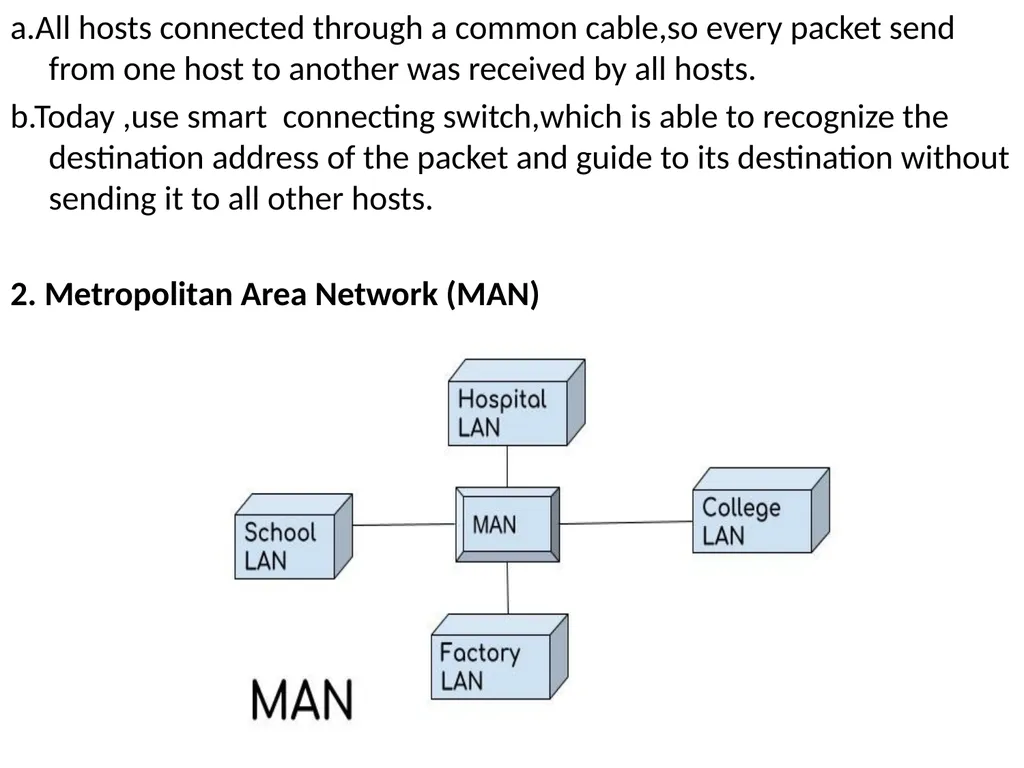
2. Metropolitan Area Network (MAN)<br>
b.Today ,use smart connecting switch,which is able to recognize the destination address of the packet and guide to its destination without sending it to all other hosts.
2. Metropolitan Area Network (MAN)<br>
23
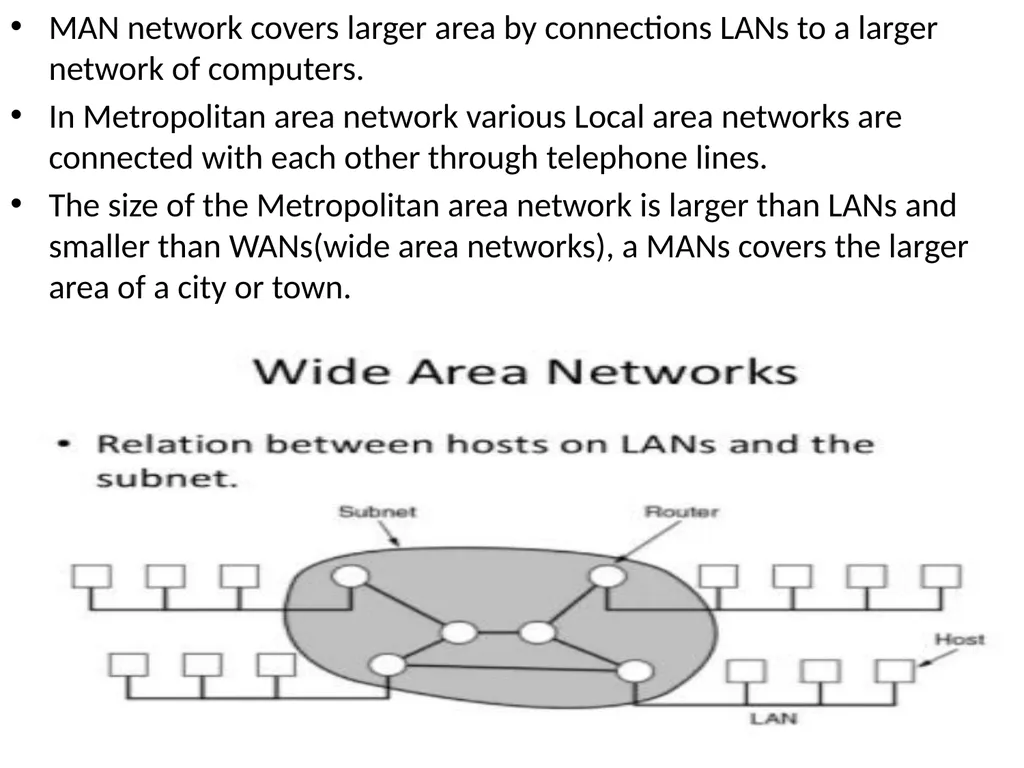
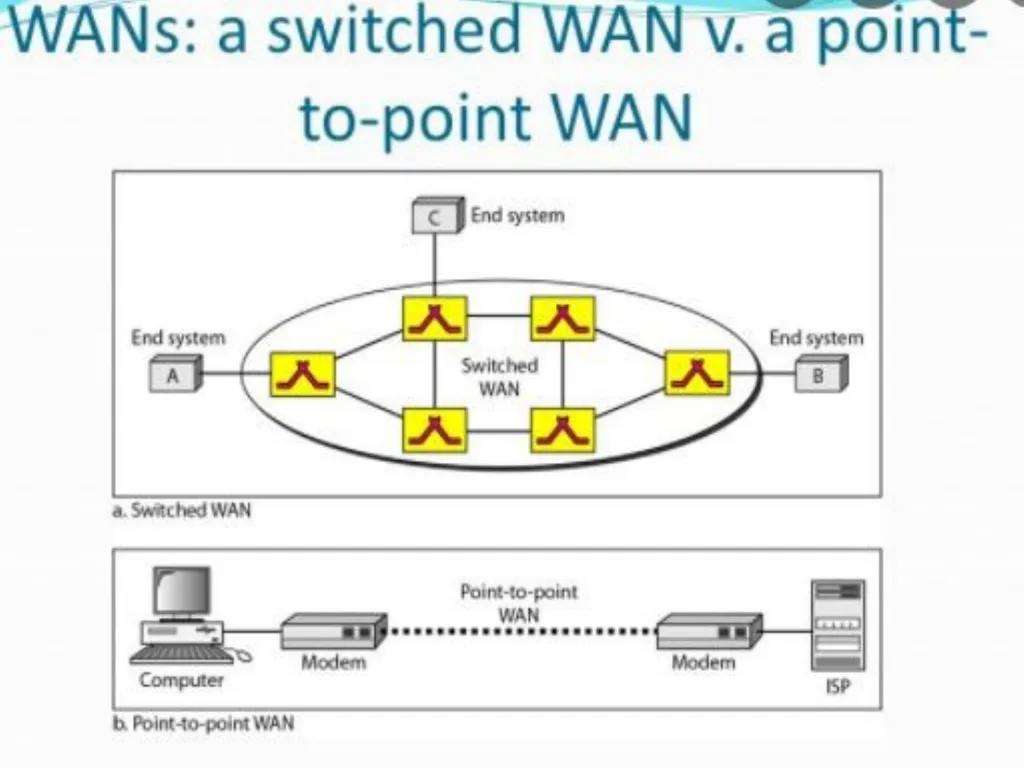
MAN network covers larger area by connections LANs to a larger network of computers.
In Metropolitan area network various Local area networks are connected with each other through telephone lines.
The size of the Metropolitan area network is larger than LANs and smaller than WANs(wide area networks), a MANs covers the larger area of a city or town.<br>
In Metropolitan area network various Local area networks are connected with each other through telephone lines.
The size of the Metropolitan area network is larger than LANs and smaller than WANs(wide area networks), a MANs covers the larger area of a city or town.<br>
24
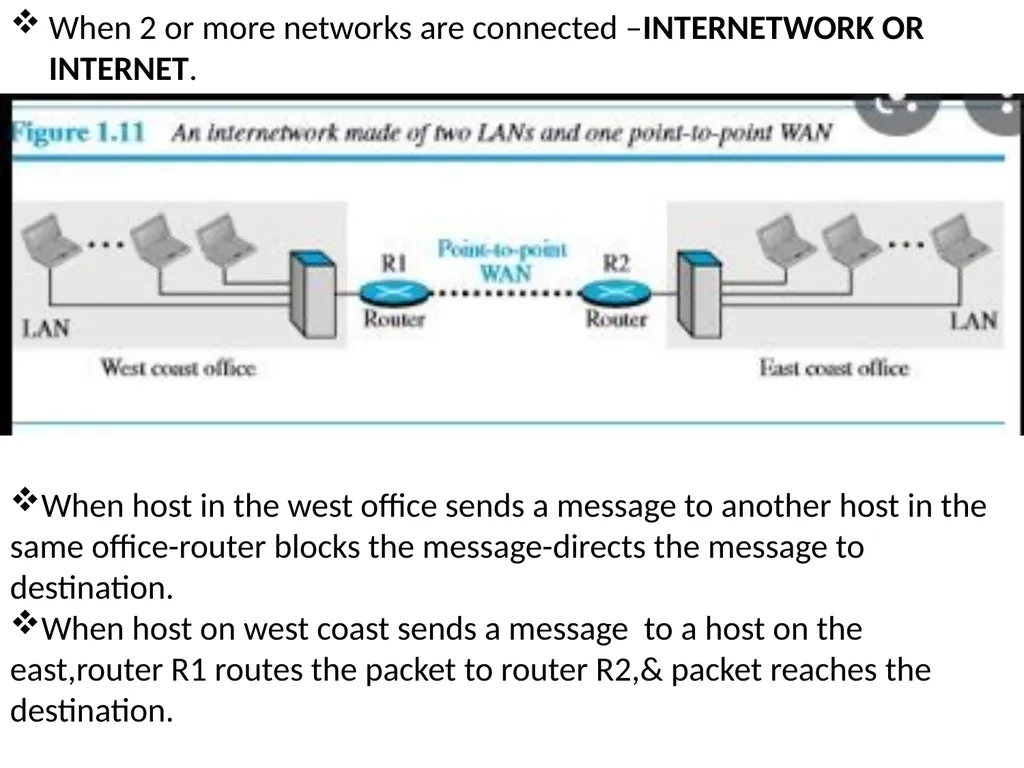
When 2 or more networks are connected –INTERNETWORK OR INTERNET. When host in the west office sends a message to another host in the same office-router blocks the message-directs the message to destination.
When host on west coast sends a message to a host on the east,router R1 routes the packet to router R2,& packet reaches the destination.<br>
When host on west coast sends a message to a host on the east,router R1 routes the packet to router R2,& packet reaches the destination.<br>
25
INTERNET Several backbones,provider networks and customer networks.
At top level,the backbones are large networks owned by some communication companies such as Sprint,Verizon,AT & T etc.
The backbone networks are connected through some complex switching systems called peering points.
At second level,there are smaller networks ,called provider networks,that uses the services of the backbone for a fee.
The customer networks are networks at the edge of the internet that actually use the services provided by the internet(pay fees to provider network for receiving services).
Backbones and provider networks are also called Internet Service Providers(ISPs).
The backbones are often referred as international ISP’s;the provider networks are often referred to as national or regional ISP’s.<br>
At top level,the backbones are large networks owned by some communication companies such as Sprint,Verizon,AT & T etc.
The backbone networks are connected through some complex switching systems called peering points.
At second level,there are smaller networks ,called provider networks,that uses the services of the backbone for a fee.
The customer networks are networks at the edge of the internet that actually use the services provided by the internet(pay fees to provider network for receiving services).
Backbones and provider networks are also called Internet Service Providers(ISPs).
The backbones are often referred as international ISP’s;the provider networks are often referred to as national or regional ISP’s.<br>
26
Accessing the Internet
1.Using telephone networks
a.Dial-up service-Add telephone line a modem that converts data to voice.
The software installed on the computer dials the ISP & imitates making a telephone connection.
It is very slow.
Cannot be used for telephone connection,when the line is used for internet connection.
Useful for small residences.
b.DSL Service
Upgraded telephone lines to provide higher speed internet services to residences or small businesses.
Allows the line to be used simultaneously for voice and data communication.<br>
1.Using telephone networks
a.Dial-up service-Add telephone line a modem that converts data to voice.
The software installed on the computer dials the ISP & imitates making a telephone connection.
It is very slow.
Cannot be used for telephone connection,when the line is used for internet connection.
Useful for small residences.
b.DSL Service
Upgraded telephone lines to provide higher speed internet services to residences or small businesses.
Allows the line to be used simultaneously for voice and data communication.<br>
27
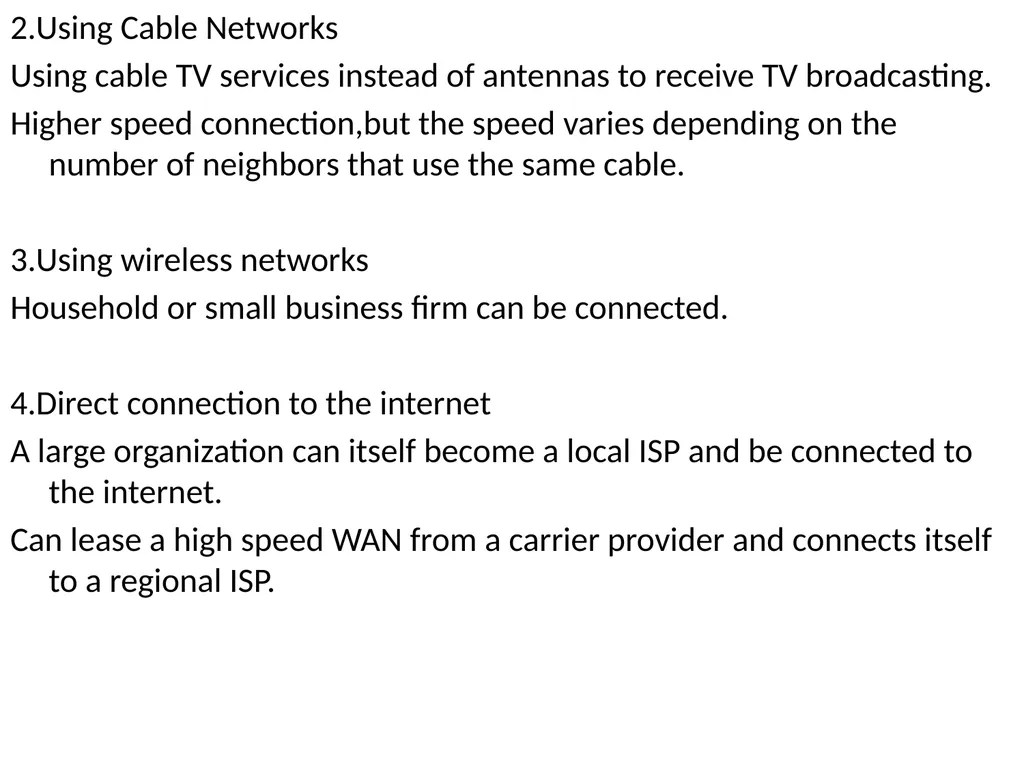
2.Using Cable Networks
Using cable TV services instead of antennas to receive TV broadcasting.
Higher speed connection,but the speed varies depending on the number of neighbors that use the same cable.
3.Using wireless networks
Household or small business firm can be connected.
4.Direct connection to the internet
A large organization can itself become a local ISP and be connected to the internet.
Can lease a high speed WAN from a carrier provider and connects itself to a regional ISP.<br>
Using cable TV services instead of antennas to receive TV broadcasting.
Higher speed connection,but the speed varies depending on the number of neighbors that use the same cable.
3.Using wireless networks
Household or small business firm can be connected.
4.Direct connection to the internet
A large organization can itself become a local ISP and be connected to the internet.
Can lease a high speed WAN from a carrier provider and connects itself to a regional ISP.<br>
28
Full module https://www.slideshare.net/pavankumar815/unit-1-introduction-to-computer-networks<br>
29
https://beginnersbook.com/2019/03/computer-network-topology-mesh-star-bus-ring-and-hybrid/<br>