04
Digital experience insights survey: findings from learner/student survey conducted 2021-2022 at Aberystwyth University��Prepared by Kate Wright, Lauren Harvey, and Joseph Wiggins<br>
05
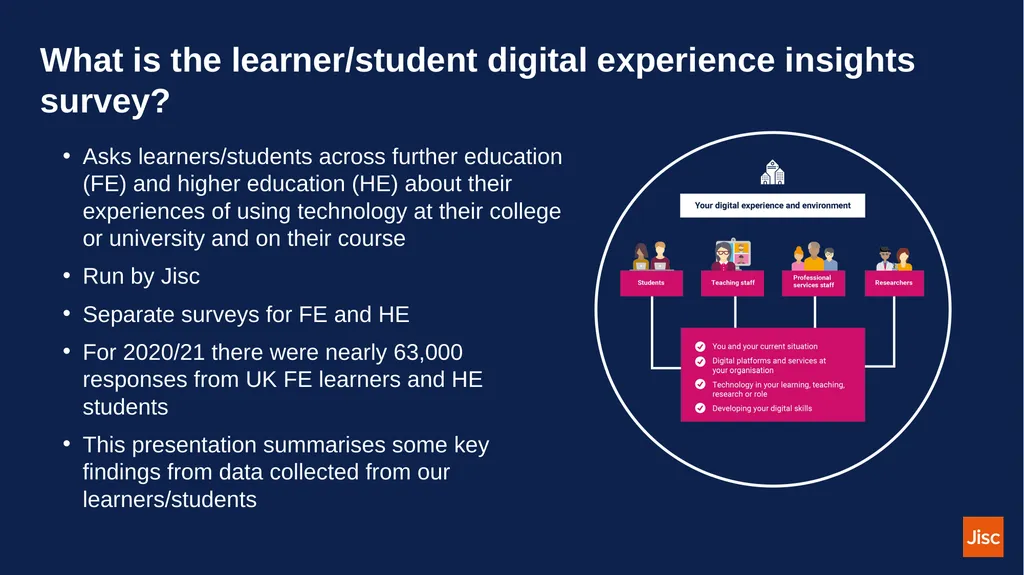
What is the learner/student digital experience insights survey? Asks learners/students across further education (FE) and higher education (HE) about their experiences of using technology at their college or university and on their course
Run by Jisc
Separate surveys for FE and HE
For 2020/21 there were nearly 63,000 responses from UK FE learners and HE students
This presentation summarises some key findings from data collected from our learners/students<br>
06
Summary of key metrics Technology at your organisation
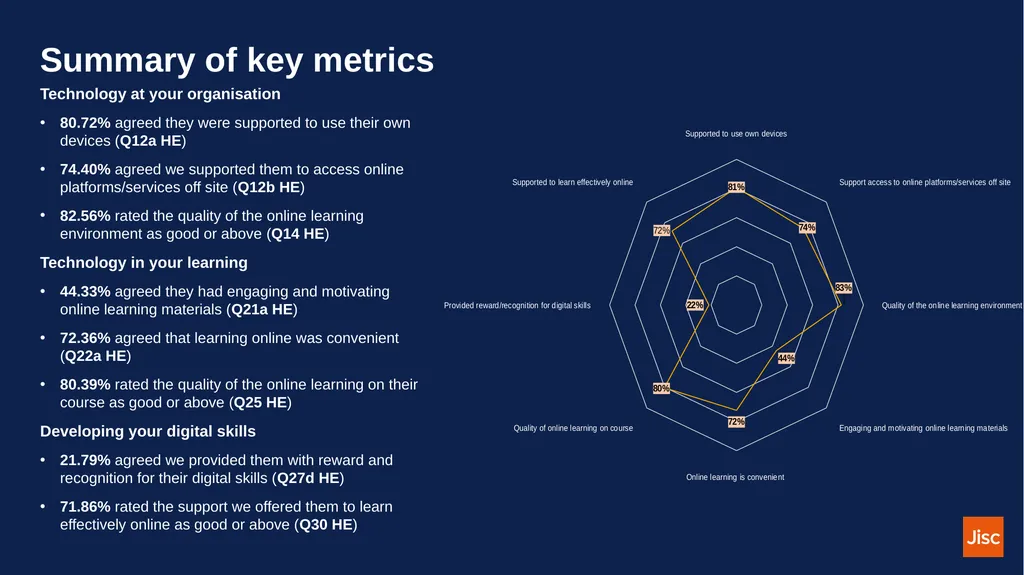
80.72% agreed they were supported to use their own devices (Q12a HE)
74.40% agreed we supported them to access online platforms/services off site (Q12b HE)
82.56% rated the quality of the online learning environment as good or above (Q14 HE)
Technology in your learning
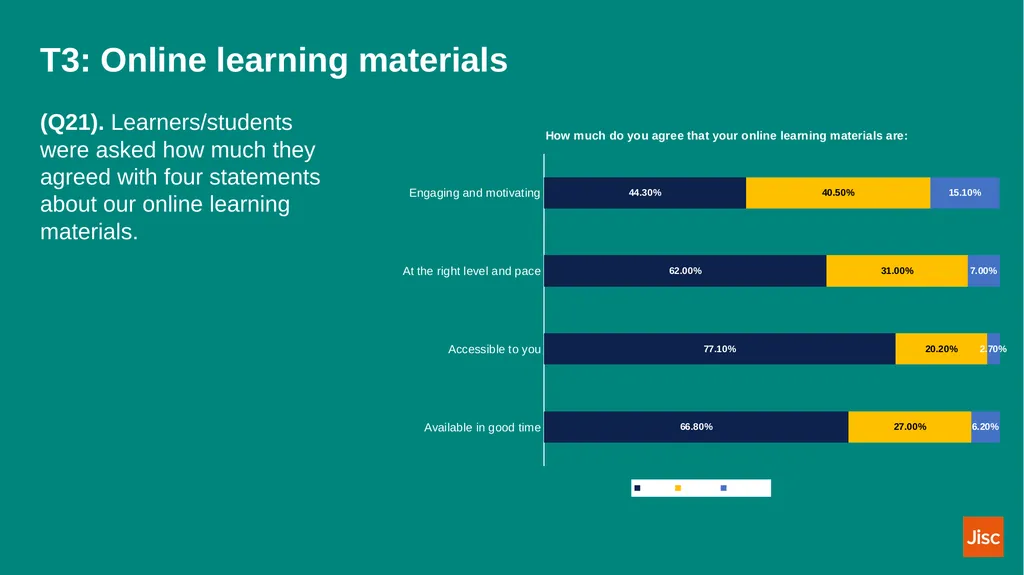
44.33% agreed they had engaging and motivating online learning materials (Q21a HE)
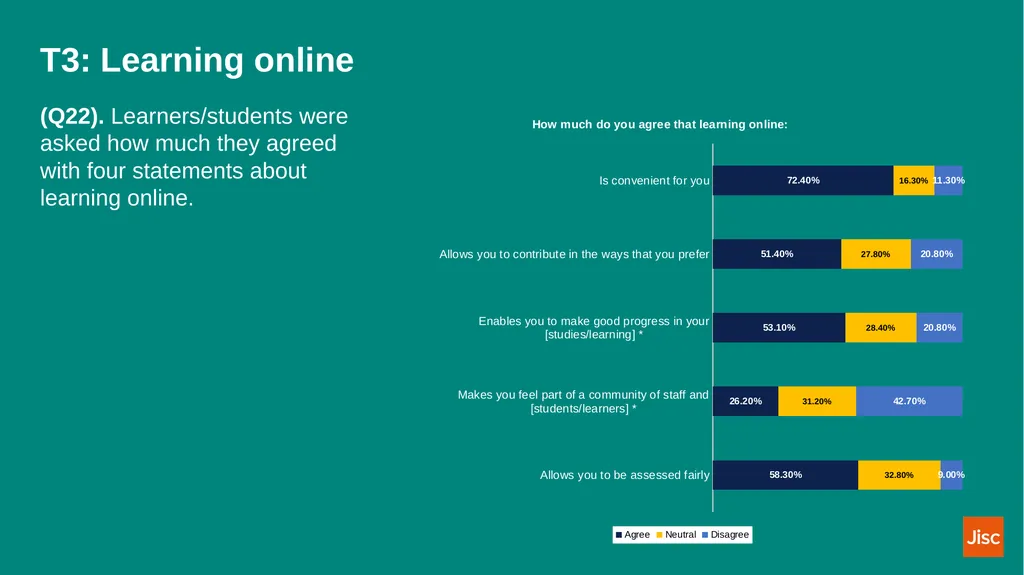
72.36% agreed that learning online was convenient (Q22a HE)
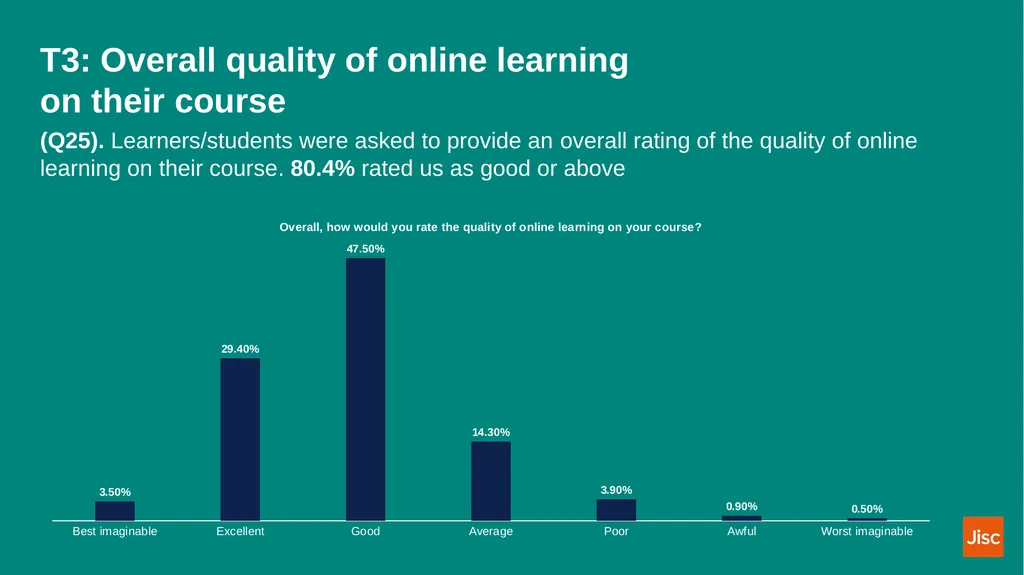
80.39% rated the quality of the online learning on their course as good or above (Q25 HE)
Developing your digital skills
21.79% agreed we provided them with reward and recognition for their digital skills (Q27d HE)
71.86% rated the support we offered them to learn effectively online as good or above (Q30 HE)<br>
07
Benchmarking with other UK organisations<br>
08
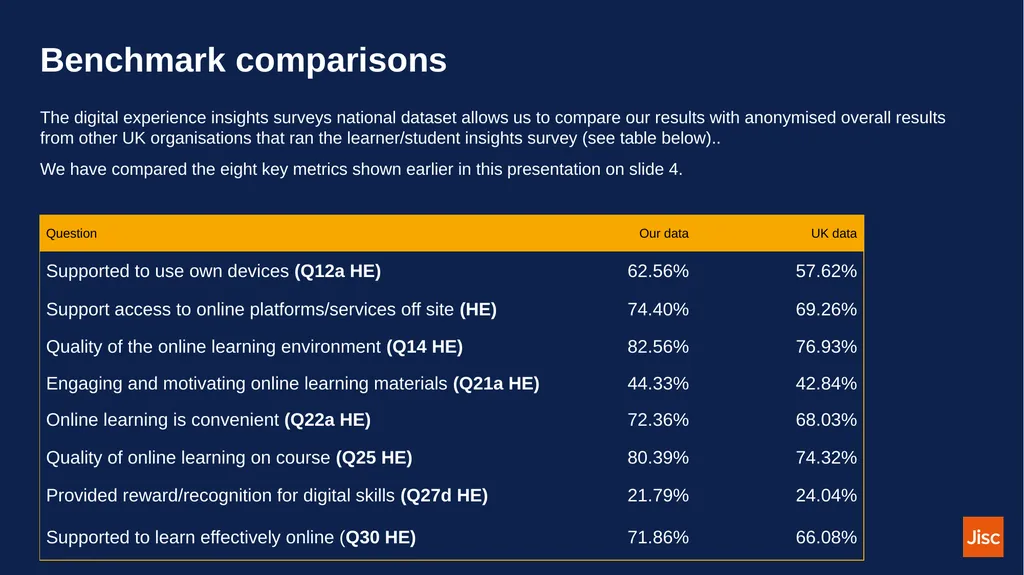
Benchmark comparisons The digital experience insights surveys national dataset allows us to compare our results with anonymised overall results from other UK organisations that ran the learner/student insights survey (see table below)..
We have compared the eight key metrics shown earlier in this presentation on slide 4.<br>
10
Theme one (T1) You and your technology<br>
11
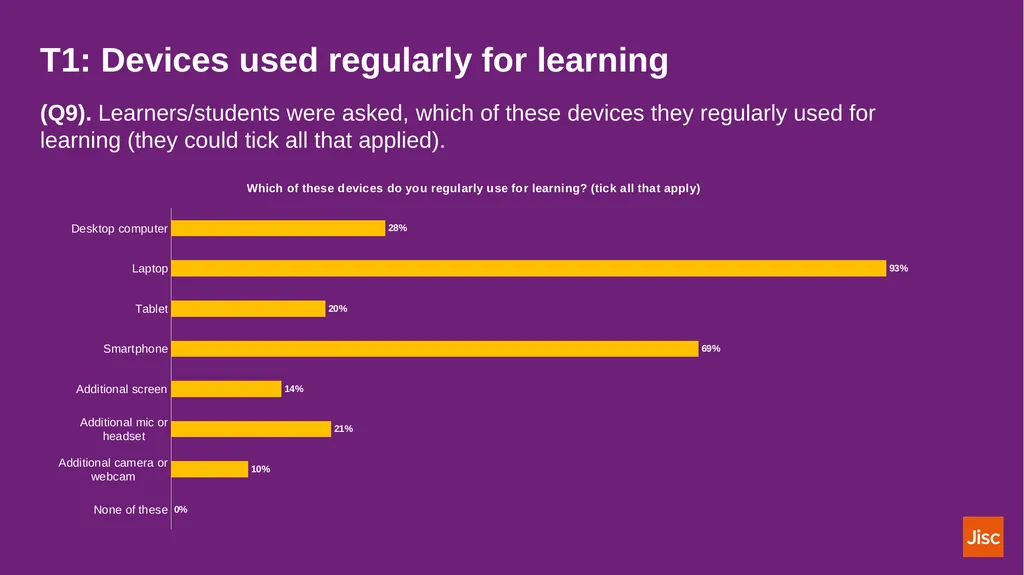
T1: Devices used regularly for learning (Q9). Learners/students were asked, which of these devices they regularly used for learning (they could tick all that applied).<br>
12
Theme two (T2) Technology at your organisation<br>
13
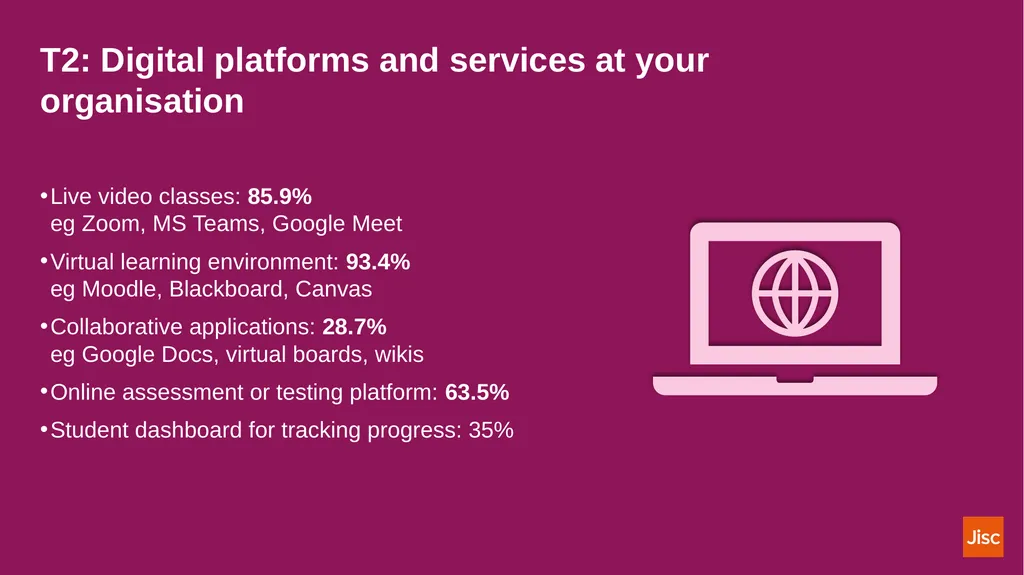
T2: Digital platforms and services at your organisation Live video classes: 85.9%�eg Zoom, MS Teams, Google Meet
Virtual learning environment: 93.4%�eg Moodle, Blackboard, Canvas
Collaborative applications: 28.7%�eg Google Docs, virtual boards, wikis
Online assessment or testing platform: 63.5%
Student dashboard for tracking progress: 35%<br>
14
T2: Digital platforms and services at your organisation (Q12a). 62.56% agreed we supported them to use their own devices
(Q12b). 74.40 % agreed we supported them to access online platforms and services off site
(Q12c). 66.67% agreed we communicated effectively online, eg messaging, notifications
(Q12d). 36.14% agreed we gave them the chance to be involved in decisions about learning platforms<br>
15
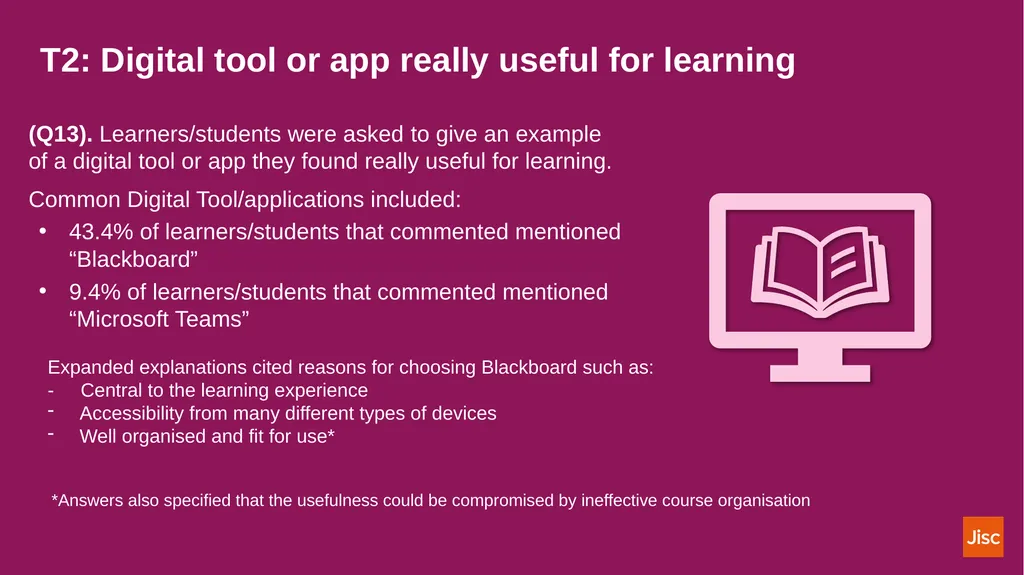
T2: Digital tool or app really useful for learning (Q13). Learners/students were asked to give an example of a digital tool or app they found really useful for learning.
Common Digital Tool/applications included:
43.4% of learners/students that commented mentioned “Blackboard”
9.4% of learners/students that commented mentioned “Microsoft Teams” Expanded explanations cited reasons for choosing Blackboard such as:
- Central to the learning experience
Accessibility from many different types of devices
Well organised and fit for use* *Answers also specified that the usefulness could be compromised by ineffective course organisation<br>
16
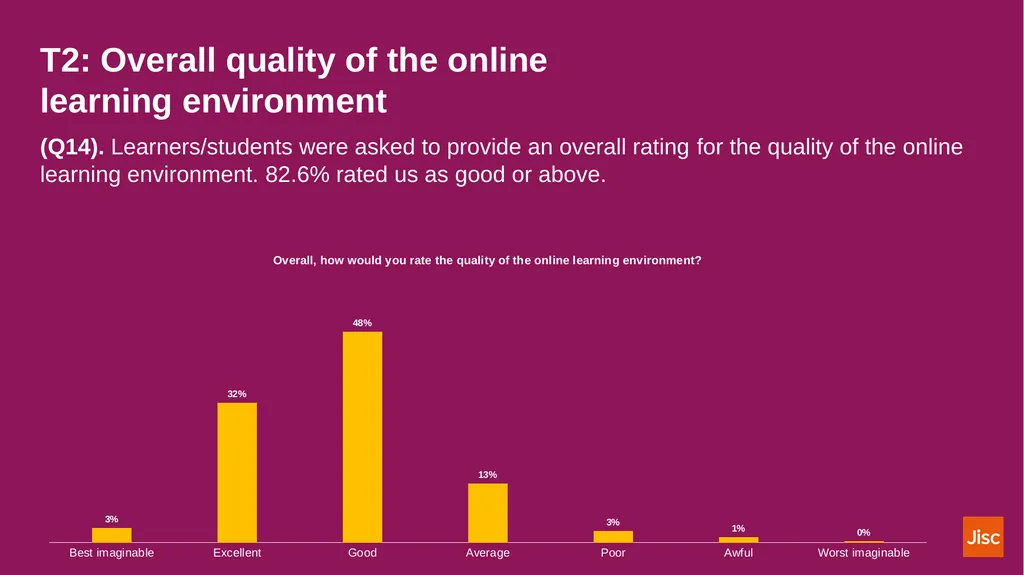
T2: Overall quality of the online learning environment (Q14). Learners/students were asked to provide an overall rating for the quality of the online learning environment. 82.6% rated us as good or above.<br>
17
T2: Prefer us to invest in (Q15 HE). Learners/students were asked what they would prefer us to invest in?<br>
18
Theme three (T3) Technology in your learning<br>
19
T3: Difficulties when learning online (Q18 HE). Learners/students were asked if any of these made it difficult for them to learn online (they could tick all that applied).<br>
20
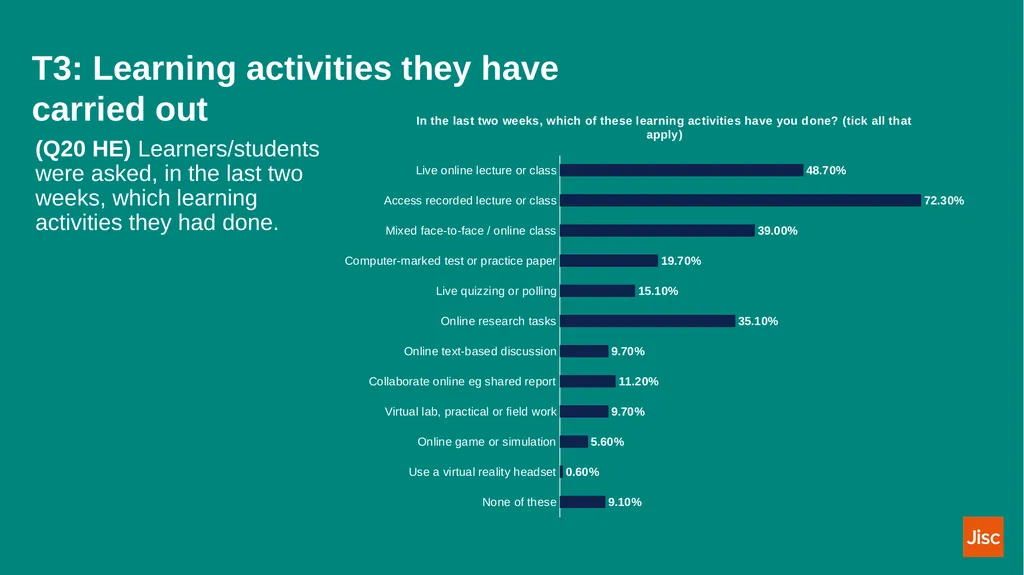
T3: Learning activities they have carried out (Q20 HE) Learners/students were asked, in the last two weeks, which learning activities they had done.<br>
21
T3: Online learning materials (Q21). Learners/students were asked how much they agreed with four statements about our online learning materials.<br>
22
T3: Learning online (Q22). Learners/students were asked how much they agreed with four statements about learning online.<br>
23
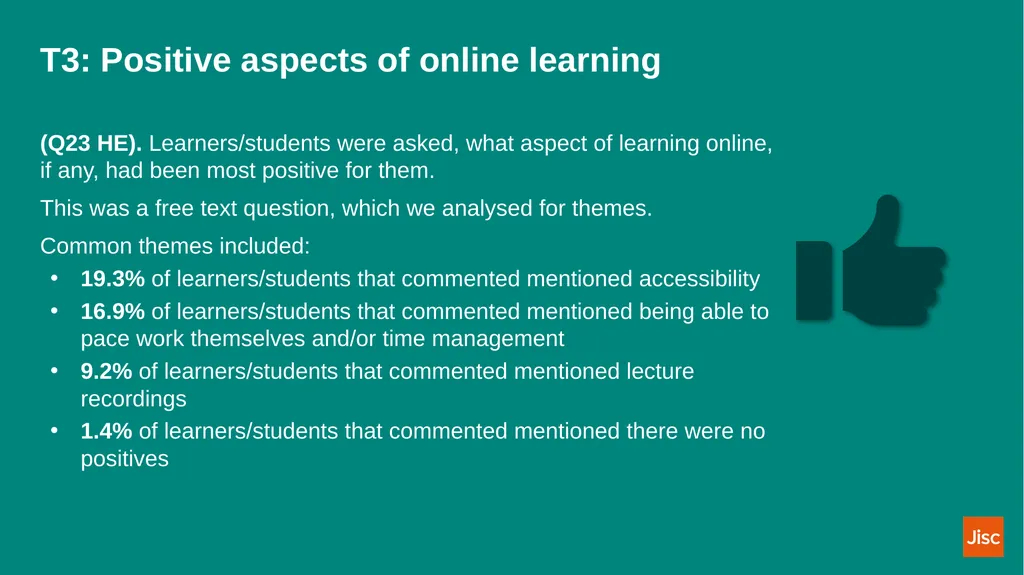
T3: Positive aspects of online learning (Q23 HE). Learners/students were asked, what aspect of learning online, if any, had been most positive for them.
This was a free text question, which we analysed for themes.
Common themes included:
19.3% of learners/students that commented mentioned accessibility
16.9% of learners/students that commented mentioned being able to pace work themselves and/or time management
9.2% of learners/students that commented mentioned lecture recordings
1.4% of learners/students that commented mentioned there were no positives<br>
24
T3: Negative aspects of online learning (Q24). Learners/students were asked, what aspect of learning online, if any, had been most negative for them.
This was a free text question, which we analysed for themes.
Common themes included:
20.6% of learners/students that commented mentioned lack and/or difficulty of motivation and distractions
9.8% of learners/students that commented mentioned lack of contact with staff
2.6% of learners/students that commented mentioned Blackboard as negative “Online learning in itself is taxing. Online learning doesn’t have the same feeling.
It is something which isn't marked with attendance, isn't easily promoted and
pushed. which make it difficult for students like myself either with low
energy or executive dysfunctions to find the will power that structured
lessons provide”<br>
25
T3: Overall quality of online learning on their course (Q25). Learners/students were asked to provide an overall rating of the quality of online learning on their course. 80.4% rated us as good or above<br>
26
Resources LTEU Blog
JISC Student digital experience insights survey 2021/22: higher education findings (pdf) Find out more<br>
28
Discussion: Digital Insights Data Whole group discussion:
What surprised you about the data and summary?<br>
29
Discussion: Developing plans You’ll be split into pairs:
What digital and technological changes would you like to see developed at the University?<br>
30
Discussion: Changes Off the back of the discussion today,
What will you change in your teaching practice?<br>