Sizzle引擎研究 By zhangpeng12@baidu.com 什么是sizzle A
Description: Sizzle引擎研究 By zhangpeng12baidu.com 什么是sizzle A pure-JavaScript CSS selector engine (power jQuery) Standalone(no dependencies) Competitive performance Only 4kB with gzipped Easy to use Css3 support Bla bla 为什么需要sizzle Bugs 1. Id
Related Topics
Download Presentation
"Sizzle引擎研究 By zhangpeng12@baidu.com 什么是sizzle A" is the property of its rightful owner. Permission is granted to download and print the materials on this website for personal, non-commercial use only, and to display it on your personal computer provided you do not modify the materials and that you retain all copyright notices contained in the materials. By downloading content from our website, you accept the terms of this agreement.
Presentation Transcript
slide1. Sizzle引擎研究 By zhangpeng12@baidu.com<br>
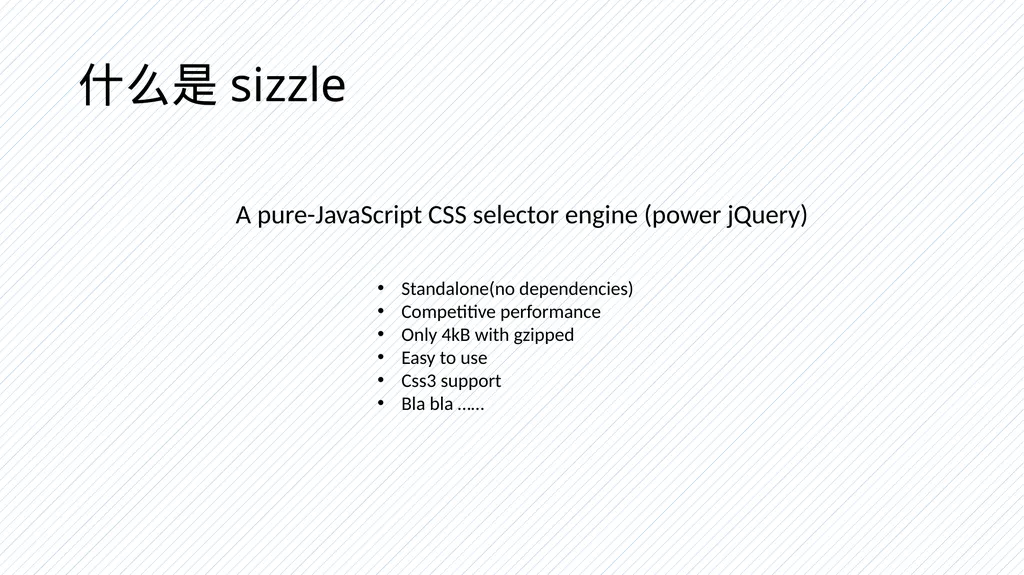
slide2. 什么是sizzle A pure-JavaScript CSS selector engine (power jQuery) Standalone(no dependencies)
Competitive performance
Only 4kB with gzipped
Easy to use
Css3 support
Bla bla ……<br>
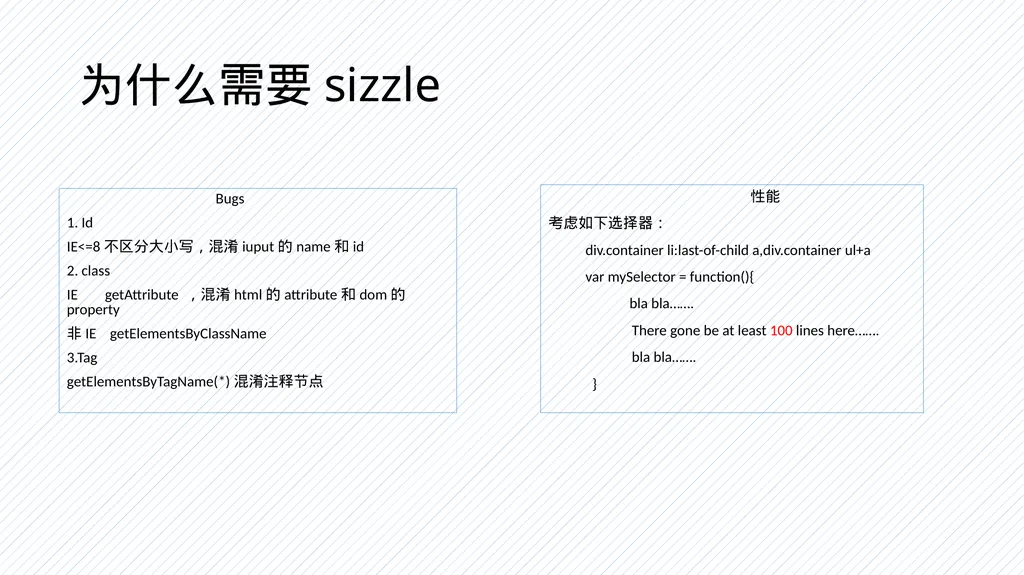
slide3. 为什么需要sizzle Bugs
1. Id
IE<=8不区分大小写,混淆iuput的name和id
2. class
IE getAttribute ,混淆html的attribute和dom的property
非IE getElementsByClassName
3.Tag
getElementsByTagName(*)混淆注释节点 性能
考虑如下选择器:
div.container li:last-of-child a,div.container ul+a
var mySelector = function(){
bla bla…….
There gone be at least 100 lines here…….
bla bla…….
}<br>

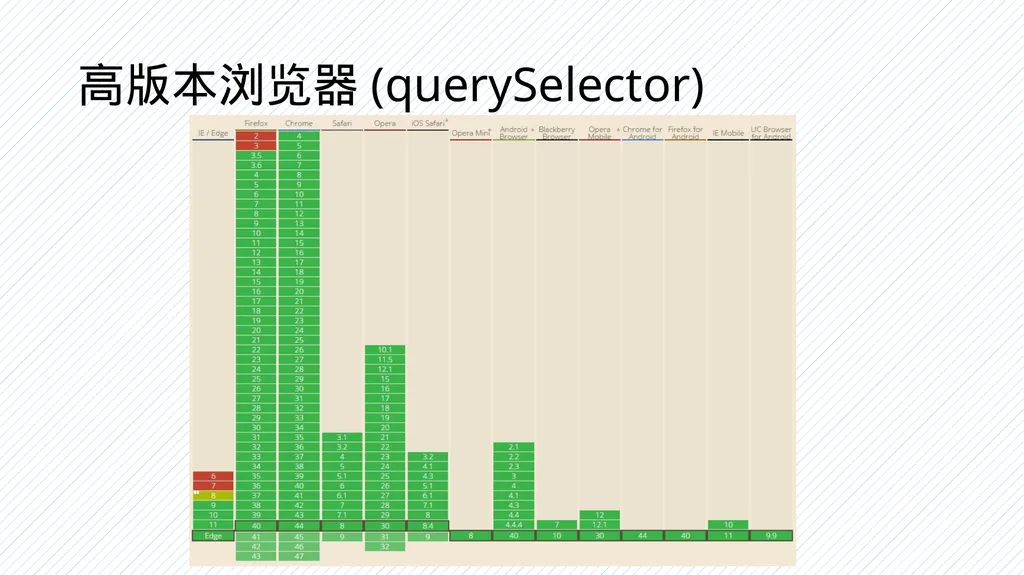
slide4. 高版本浏览器(querySelector)<br>
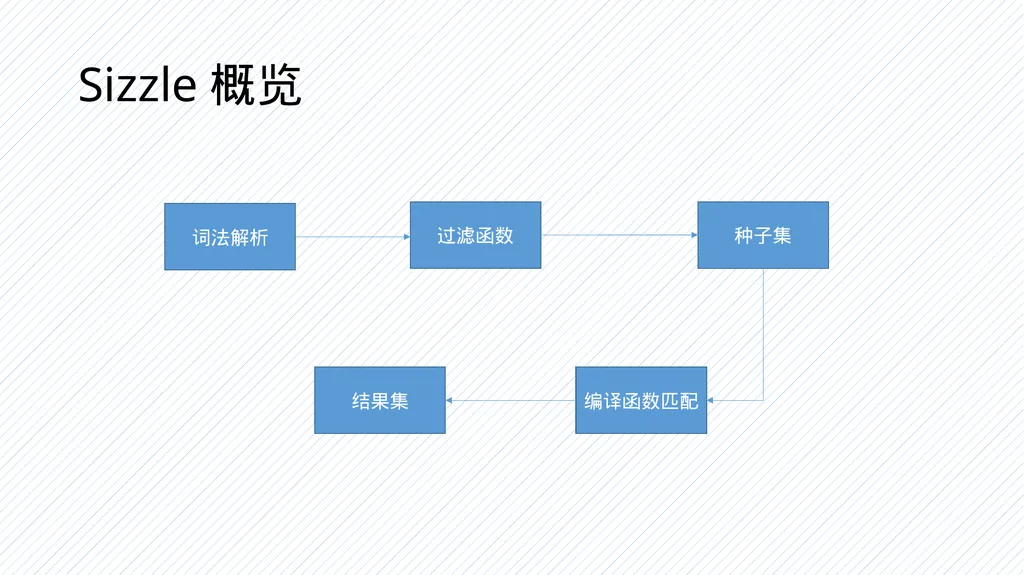
slide5. Sizzle概览 词法解析 过滤函数 种子集 编译函数匹配 结果集<br>
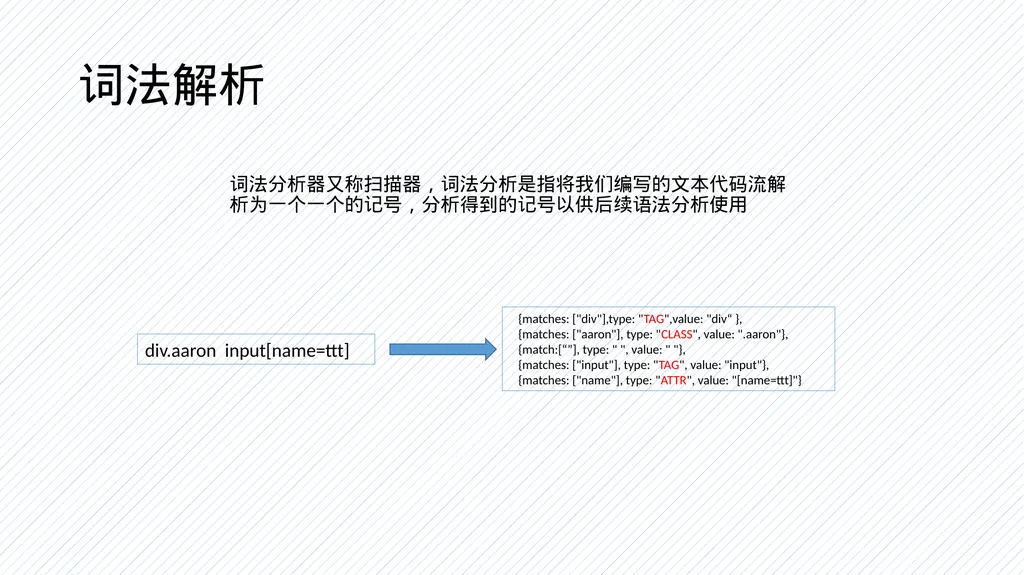
slide6. 词法解析 词法分析器又称扫描器,词法分析是指将我们编写的文本代码流解析为一个一个的记号,分析得到的记号以供后续语法分析使用 div.aaron input[name=ttt] {matches: ["div"],type: "TAG",value: "div“ },
{matches: ["aaron"], type: "CLASS", value: ".aaron"},
{match:[“”], type: " ", value: " "},
{matches: ["input"], type: "TAG", value: "input"},
{matches: ["name"], type: "ATTR", value: "[name=ttt]"}<br>
slide7. 词法解析(模式)<br>
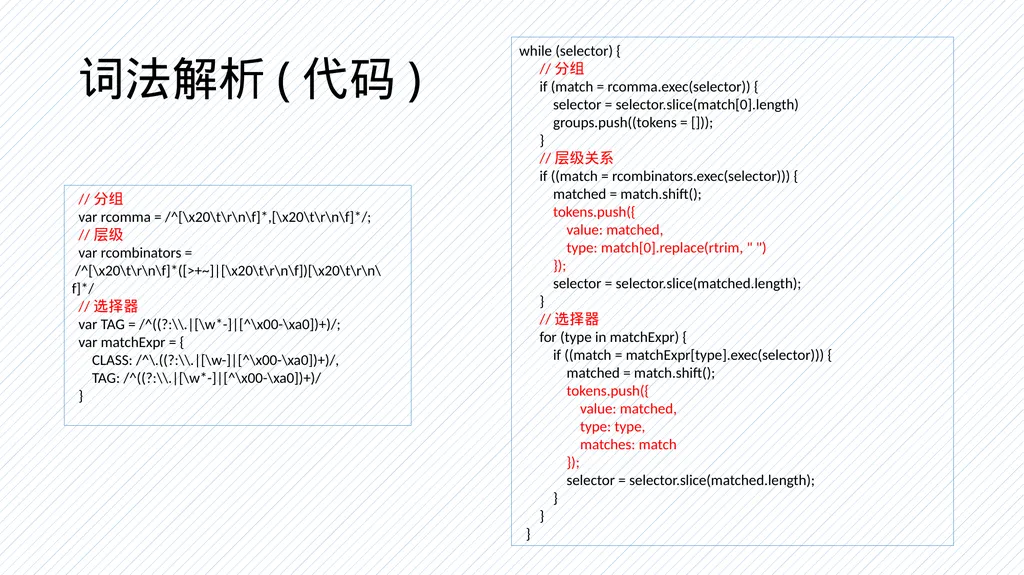
slide8. 词法解析(代码) //分组
var rcomma = /^[\x20\t\r\n\f]*,[\x20\t\r\n\f]*/;
//层级
var rcombinators =
/^[\x20\t\r\n\f]*([>+~]|[\x20\t\r\n\f])[\x20\t\r\n\f]*/
//选择器
var TAG = /^((?:\\.|[\w*-]|[^\x00-\xa0])+)/;
var matchExpr = {
CLASS: /^\.((?:\\.|[\w-]|[^\x00-\xa0])+)/,
TAG: /^((?:\\.|[\w*-]|[^\x00-\xa0])+)/
} while (selector) {
//分组
if (match = rcomma.exec(selector)) {
selector = selector.slice(match[0].length)
groups.push((tokens = []));
}
//层级关系
if ((match = rcombinators.exec(selector))) {
matched = match.shift();
tokens.push({
value: matched,
type: match[0].replace(rtrim, " ")
});
selector = selector.slice(matched.length);
}
//选择器
for (type in matchExpr) {
if ((match = matchExpr[type].exec(selector))) {
matched = match.shift();
tokens.push({
value: matched,
type: type,
matches: match
});
selector = selector.slice(matched.length);
}
}
}<br>
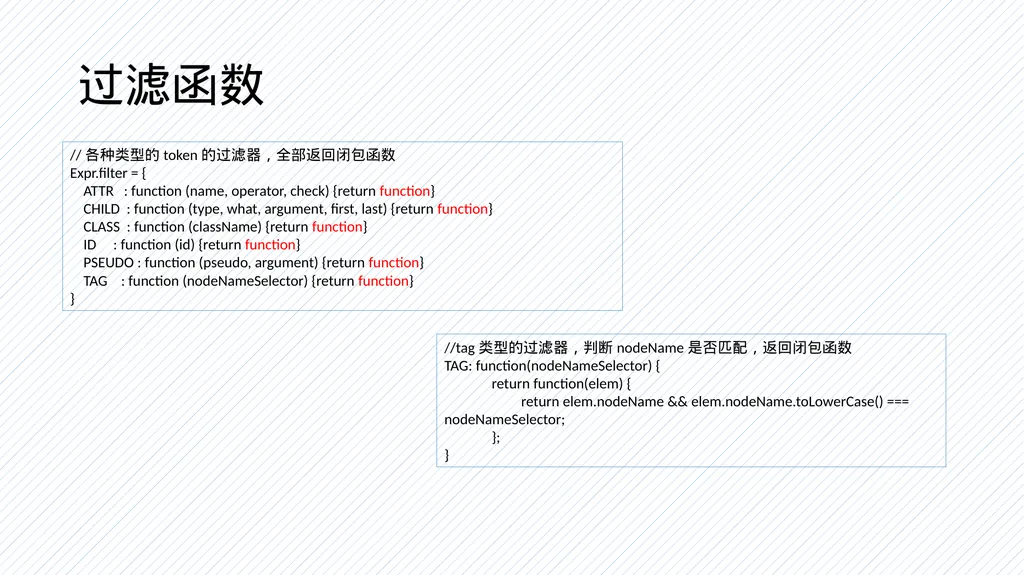
slide9. 过滤函数 //各种类型的token的过滤器,全部返回闭包函数
Expr.filter = {
ATTR : function (name, operator, check) {return function}
CHILD : function (type, what, argument, first, last) {return function}
CLASS : function (className) {return function}
ID : function (id) {return function}
PSEUDO : function (pseudo, argument) {return function}
TAG : function (nodeNameSelector) {return function}
} //tag类型的过滤器,判断nodeName是否匹配,返回闭包函数
TAG: function(nodeNameSelector) {
return function(elem) {
return elem.nodeName && elem.nodeName.toLowerCase() === nodeNameSelector;
};
}<br>
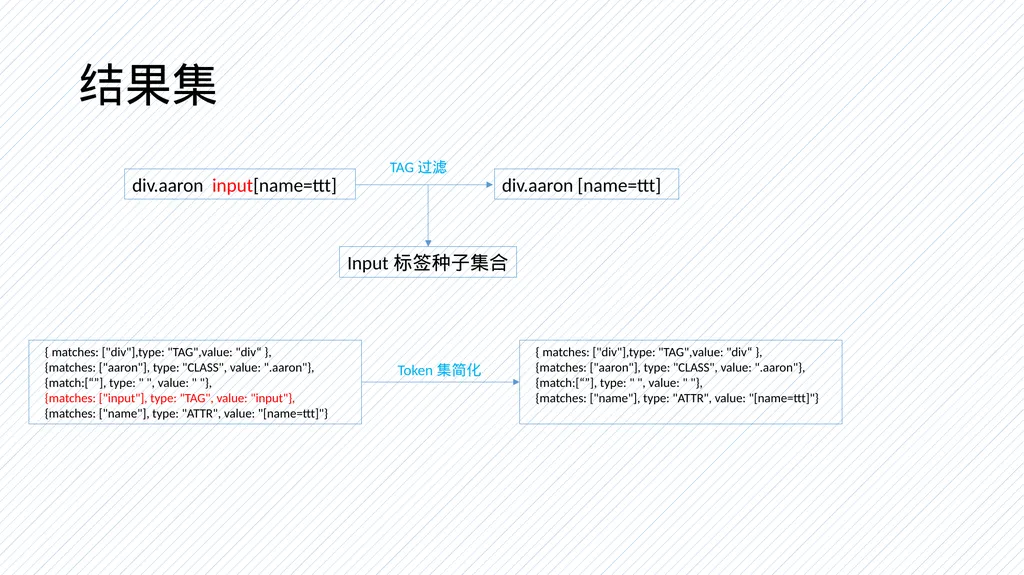
slide10. 结果集 div.aaron input[name=ttt] div.aaron [name=ttt] TAG过滤 Input标签种子集合 { matches: ["div"],type: "TAG",value: "div“ },
{matches: ["aaron"], type: "CLASS", value: ".aaron"},
{match:[“”], type: " ", value: " "},
{matches: ["input"], type: "TAG", value: "input"},
{matches: ["name"], type: "ATTR", value: "[name=ttt]"} { matches: ["div"],type: "TAG",value: "div“ },
{matches: ["aaron"], type: "CLASS", value: ".aaron"},
{match:[“”], type: " ", value: " "},
{matches: ["name"], type: "ATTR", value: "[name=ttt]"} Token集简化<br>
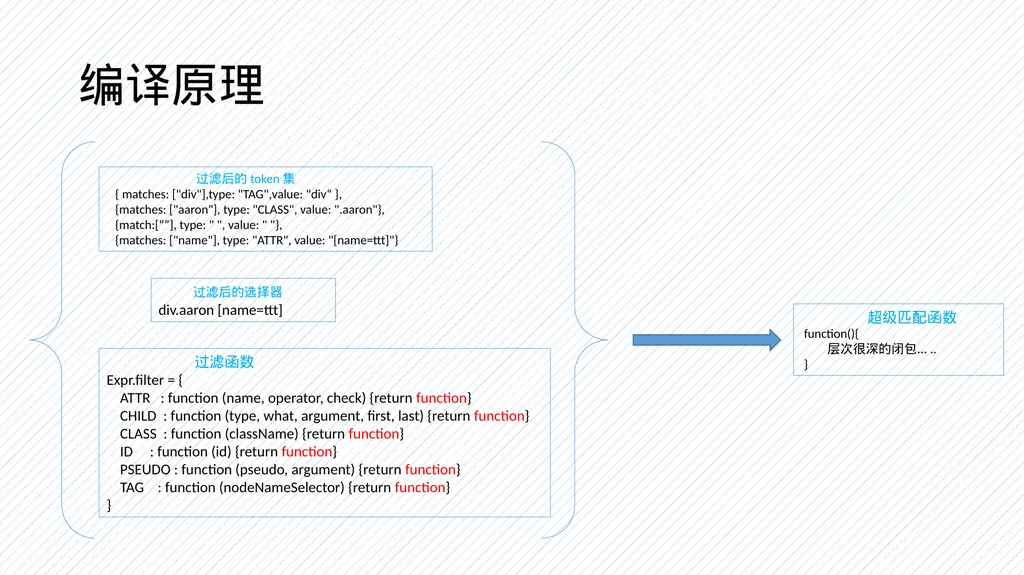
slide11. 编译原理 过滤后的token集
{ matches: ["div"],type: "TAG",value: "div“ },
{matches: ["aaron"], type: "CLASS", value: ".aaron"},
{match:[“”], type: " ", value: " "},
{matches: ["name"], type: "ATTR", value: "[name=ttt]"} 过滤后的选择器
div.aaron [name=ttt] 过滤函数
Expr.filter = {
ATTR : function (name, operator, check) {return function}
CHILD : function (type, what, argument, first, last) {return function}
CLASS : function (className) {return function}
ID : function (id) {return function}
PSEUDO : function (pseudo, argument) {return function}
TAG : function (nodeNameSelector) {return function}
} 超级匹配函数
function(){
层次很深的闭包…..
}<br>
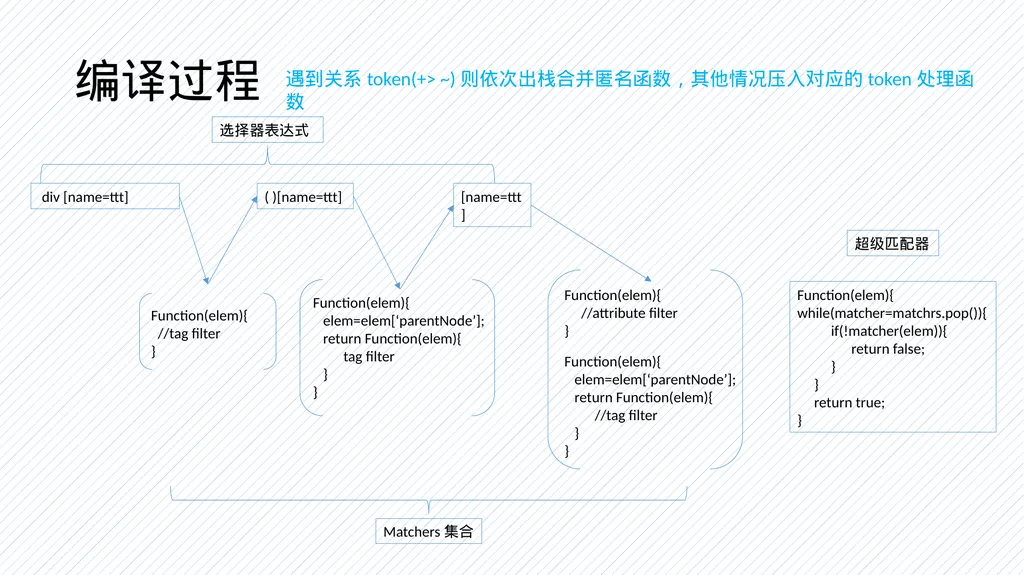
slide12. 编译过程 div [name=ttt] Function(elem){
//tag filter
} ( )[name=ttt] 遇到关系token(+> ~)则依次出栈合并匿名函数,其他情况压入对应的token处理函数 Function(elem){
elem=elem[‘parentNode’];
return Function(elem){
tag filter
}
} Matchers集合 [name=ttt] Function(elem){
elem=elem[‘parentNode’];
return Function(elem){
//tag filter
}
} Function(elem){
//attribute filter
} Function(elem){
while(matcher=matchrs.pop()){
if(!matcher(elem)){
return false;
}
}
return true;
} 超级匹配器 选择器表达式<br>
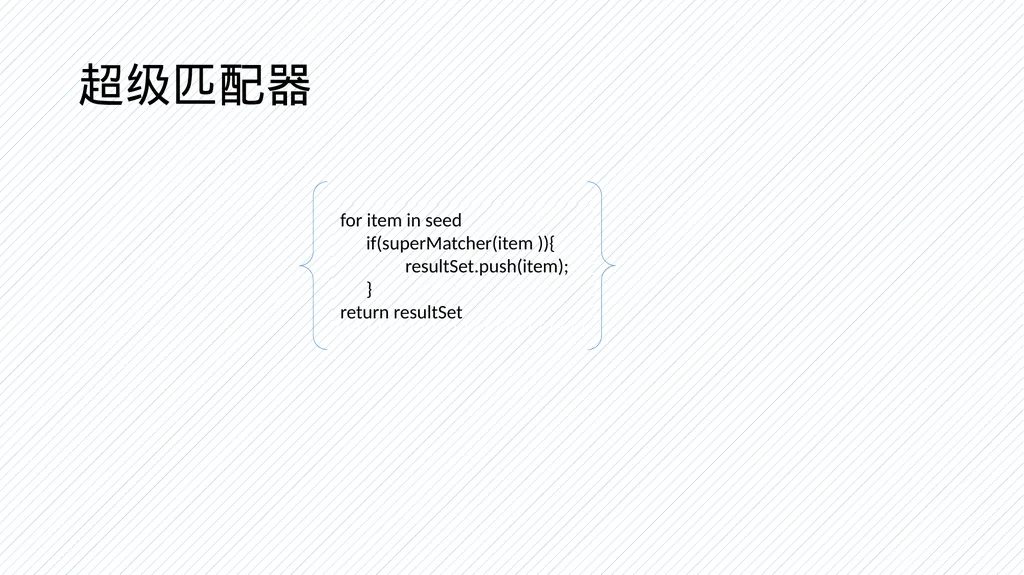
slide13. 超级匹配器 for item in seed
if(superMatcher(item )){
resultSet.push(item);
}
return resultSet<br>
slide14. Thanks & Regards<br>
slide2. 什么是sizzle A pure-JavaScript CSS selector engine (power jQuery) Standalone(no dependencies)
Competitive performance
Only 4kB with gzipped
Easy to use
Css3 support
Bla bla ……<br>
slide3. 为什么需要sizzle Bugs
1. Id
IE<=8不区分大小写,混淆iuput的name和id
2. class
IE getAttribute ,混淆html的attribute和dom的property
非IE getElementsByClassName
3.Tag
getElementsByTagName(*)混淆注释节点 性能
考虑如下选择器:
div.container li:last-of-child a,div.container ul+a
var mySelector = function(){
bla bla…….
There gone be at least 100 lines here…….
bla bla…….
}<br>
slide4. 高版本浏览器(querySelector)<br>
slide5. Sizzle概览 词法解析 过滤函数 种子集 编译函数匹配 结果集<br>
slide6. 词法解析 词法分析器又称扫描器,词法分析是指将我们编写的文本代码流解析为一个一个的记号,分析得到的记号以供后续语法分析使用 div.aaron input[name=ttt] {matches: ["div"],type: "TAG",value: "div“ },
{matches: ["aaron"], type: "CLASS", value: ".aaron"},
{match:[“”], type: " ", value: " "},
{matches: ["input"], type: "TAG", value: "input"},
{matches: ["name"], type: "ATTR", value: "[name=ttt]"}<br>
slide7. 词法解析(模式)<br>
slide8. 词法解析(代码) //分组
var rcomma = /^[\x20\t\r\n\f]*,[\x20\t\r\n\f]*/;
//层级
var rcombinators =
/^[\x20\t\r\n\f]*([>+~]|[\x20\t\r\n\f])[\x20\t\r\n\f]*/
//选择器
var TAG = /^((?:\\.|[\w*-]|[^\x00-\xa0])+)/;
var matchExpr = {
CLASS: /^\.((?:\\.|[\w-]|[^\x00-\xa0])+)/,
TAG: /^((?:\\.|[\w*-]|[^\x00-\xa0])+)/
} while (selector) {
//分组
if (match = rcomma.exec(selector)) {
selector = selector.slice(match[0].length)
groups.push((tokens = []));
}
//层级关系
if ((match = rcombinators.exec(selector))) {
matched = match.shift();
tokens.push({
value: matched,
type: match[0].replace(rtrim, " ")
});
selector = selector.slice(matched.length);
}
//选择器
for (type in matchExpr) {
if ((match = matchExpr[type].exec(selector))) {
matched = match.shift();
tokens.push({
value: matched,
type: type,
matches: match
});
selector = selector.slice(matched.length);
}
}
}<br>
slide9. 过滤函数 //各种类型的token的过滤器,全部返回闭包函数
Expr.filter = {
ATTR : function (name, operator, check) {return function}
CHILD : function (type, what, argument, first, last) {return function}
CLASS : function (className) {return function}
ID : function (id) {return function}
PSEUDO : function (pseudo, argument) {return function}
TAG : function (nodeNameSelector) {return function}
} //tag类型的过滤器,判断nodeName是否匹配,返回闭包函数
TAG: function(nodeNameSelector) {
return function(elem) {
return elem.nodeName && elem.nodeName.toLowerCase() === nodeNameSelector;
};
}<br>
slide10. 结果集 div.aaron input[name=ttt] div.aaron [name=ttt] TAG过滤 Input标签种子集合 { matches: ["div"],type: "TAG",value: "div“ },
{matches: ["aaron"], type: "CLASS", value: ".aaron"},
{match:[“”], type: " ", value: " "},
{matches: ["input"], type: "TAG", value: "input"},
{matches: ["name"], type: "ATTR", value: "[name=ttt]"} { matches: ["div"],type: "TAG",value: "div“ },
{matches: ["aaron"], type: "CLASS", value: ".aaron"},
{match:[“”], type: " ", value: " "},
{matches: ["name"], type: "ATTR", value: "[name=ttt]"} Token集简化<br>
slide11. 编译原理 过滤后的token集
{ matches: ["div"],type: "TAG",value: "div“ },
{matches: ["aaron"], type: "CLASS", value: ".aaron"},
{match:[“”], type: " ", value: " "},
{matches: ["name"], type: "ATTR", value: "[name=ttt]"} 过滤后的选择器
div.aaron [name=ttt] 过滤函数
Expr.filter = {
ATTR : function (name, operator, check) {return function}
CHILD : function (type, what, argument, first, last) {return function}
CLASS : function (className) {return function}
ID : function (id) {return function}
PSEUDO : function (pseudo, argument) {return function}
TAG : function (nodeNameSelector) {return function}
} 超级匹配函数
function(){
层次很深的闭包…..
}<br>
slide12. 编译过程 div [name=ttt] Function(elem){
//tag filter
} ( )[name=ttt] 遇到关系token(+> ~)则依次出栈合并匿名函数,其他情况压入对应的token处理函数 Function(elem){
elem=elem[‘parentNode’];
return Function(elem){
tag filter
}
} Matchers集合 [name=ttt] Function(elem){
elem=elem[‘parentNode’];
return Function(elem){
//tag filter
}
} Function(elem){
//attribute filter
} Function(elem){
while(matcher=matchrs.pop()){
if(!matcher(elem)){
return false;
}
}
return true;
} 超级匹配器 选择器表达式<br>
slide13. 超级匹配器 for item in seed
if(superMatcher(item )){
resultSet.push(item);
}
return resultSet<br>
slide14. Thanks & Regards<br>