
UW System Administration Budget Basics and
LD
Published · 35 slides · 0 views
1 / 1

Description
UW System Administration Budget Basics and Monitoring 1 Agenda Introductions Aimee Arnold, Director Budget Planning aarnolduwsa.edu Carol Edquist, Budget Director Office of Academic Student Affairs cedquistuwsa.edu Chrissy Klappa,
Related Topics
Share
Embed code
Download this presentation From Below
"UW System Administration Budget Basics and" is the property of its rightful owner. Permission is granted to download and print the materials on this website for personal, non-commercial use only, and to display it on your personal computer provided you do not modify the materials and that you retain all copyright notices contained in the materials. By downloading content from our website, you accept the terms of this agreement.
Presentation Transcript
01
UW System Administration
Budget Basics and Monitoring 1<br>
02
Agenda Introductions
Aimee Arnold, Director Budget & Planning aarnold@uwsa.edu
Carol Edquist, Budget Director Office of Academic & Student Affairs cedquist@uwsa.edu
Chrissy Klappa, Budget Planner cklappa@uwsa.edu
Gillean Kitchen, Interim Special Assistant to the Vice President gkitchen@uwsa.edu
Ginger Hintz, Assistant Vice President & Controller ghintz@uwsa.edu
Jessica Laeseke, Senior Budget Accountant jlaeseke@uwsa.edu
Finance Functions
Budget Overview
Questions and Closing 2<br>
Aimee Arnold, Director Budget & Planning aarnold@uwsa.edu
Carol Edquist, Budget Director Office of Academic & Student Affairs cedquist@uwsa.edu
Chrissy Klappa, Budget Planner cklappa@uwsa.edu
Gillean Kitchen, Interim Special Assistant to the Vice President gkitchen@uwsa.edu
Ginger Hintz, Assistant Vice President & Controller ghintz@uwsa.edu
Jessica Laeseke, Senior Budget Accountant jlaeseke@uwsa.edu
Finance Functions
Budget Overview
Questions and Closing 2<br>
03
Goals Become familiar with:
University of Wisconsin accounting terminology
The UW’s accounting system
Annual budget process and timeline
Develop basic knowledge to:
Submit budget transfer requests
Reconcile departmental budgets on a monthly basis 3<br>
University of Wisconsin accounting terminology
The UW’s accounting system
Annual budget process and timeline
Develop basic knowledge to:
Submit budget transfer requests
Reconcile departmental budgets on a monthly basis 3<br>
04
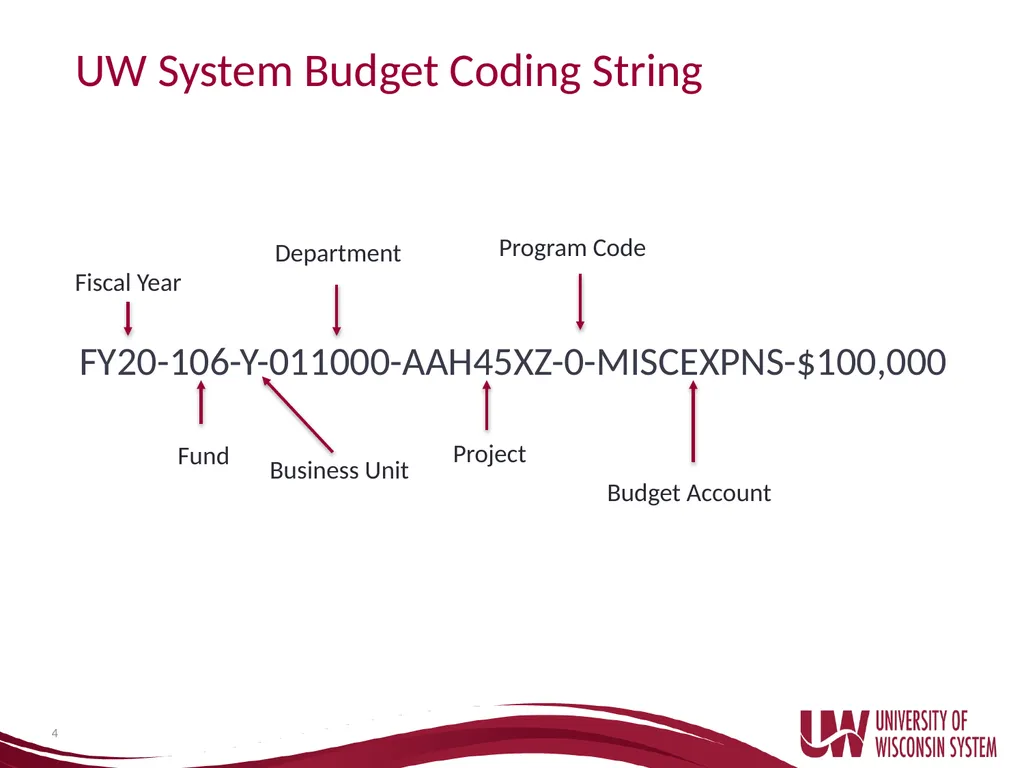
UW System Budget Coding String FY20-106-Y-011000-AAH45XZ-0-MISCEXPNS-$100,000 4 Fiscal Year Department Project Program Code Fund Budget Account Business Unit<br>
05
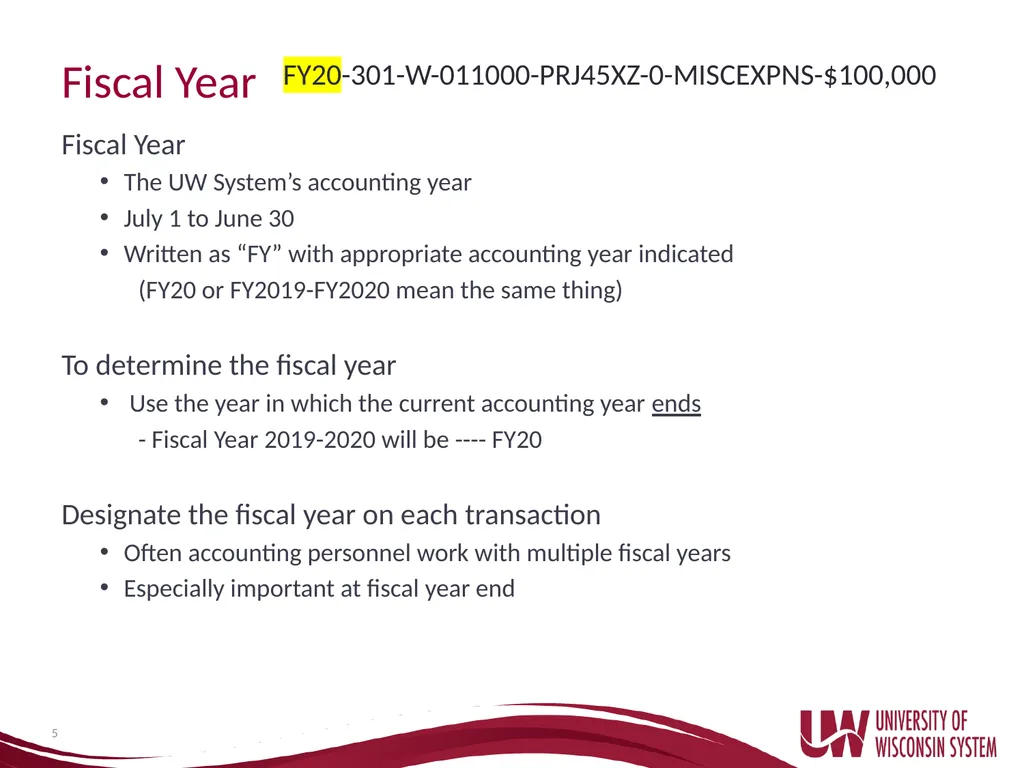
Fiscal Year Fiscal Year
The UW System’s accounting year
July 1 to June 30
Written as “FY” with appropriate accounting year indicated
(FY20 or FY2019-FY2020 mean the same thing)
To determine the fiscal year
Use the year in which the current accounting year ends
- Fiscal Year 2019-2020 will be ---- FY20
Designate the fiscal year on each transaction
Often accounting personnel work with multiple fiscal years
Especially important at fiscal year end 5 FY20-301-W-011000-PRJ45XZ-0-MISCEXPNS-$100,000<br>
The UW System’s accounting year
July 1 to June 30
Written as “FY” with appropriate accounting year indicated
(FY20 or FY2019-FY2020 mean the same thing)
To determine the fiscal year
Use the year in which the current accounting year ends
- Fiscal Year 2019-2020 will be ---- FY20
Designate the fiscal year on each transaction
Often accounting personnel work with multiple fiscal years
Especially important at fiscal year end 5 FY20-301-W-011000-PRJ45XZ-0-MISCEXPNS-$100,000<br>
06
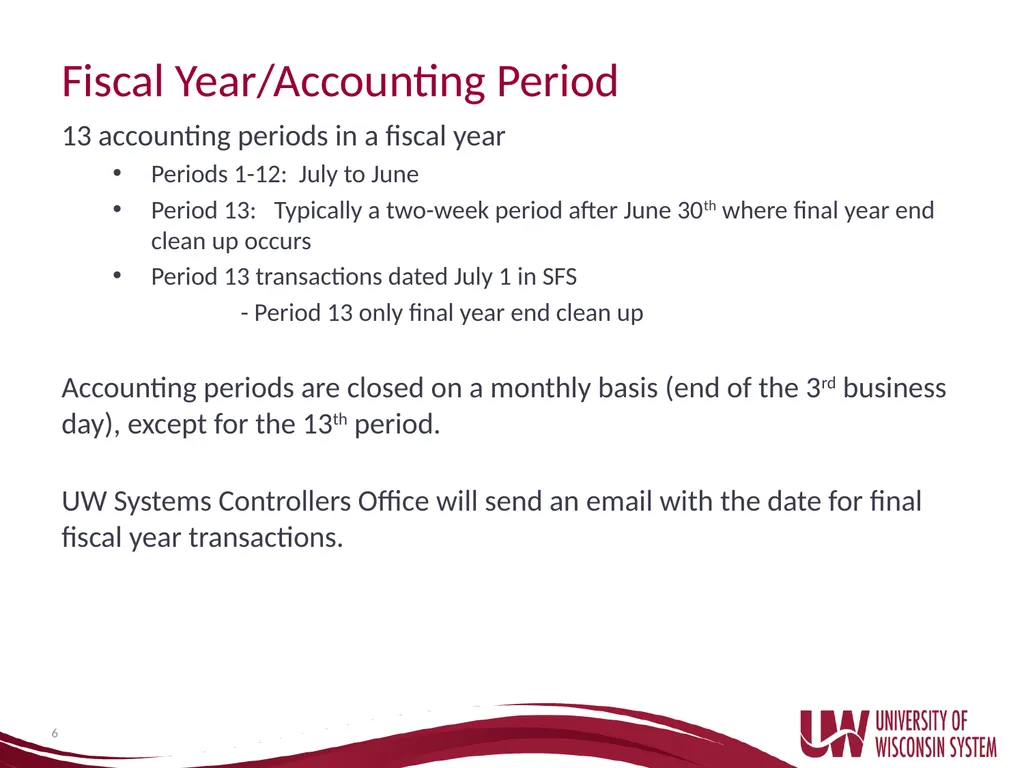
Fiscal Year/Accounting Period 13 accounting periods in a fiscal year
Periods 1-12: July to June
Period 13: Typically a two-week period after June 30th where final year end clean up occurs
Period 13 transactions dated July 1 in SFS
- Period 13 only final year end clean up
Accounting periods are closed on a monthly basis (end of the 3rd business day), except for the 13th period.
UW Systems Controllers Office will send an email with the date for final fiscal year transactions. 6<br>
Periods 1-12: July to June
Period 13: Typically a two-week period after June 30th where final year end clean up occurs
Period 13 transactions dated July 1 in SFS
- Period 13 only final year end clean up
Accounting periods are closed on a monthly basis (end of the 3rd business day), except for the 13th period.
UW Systems Controllers Office will send an email with the date for final fiscal year transactions. 6<br>
07
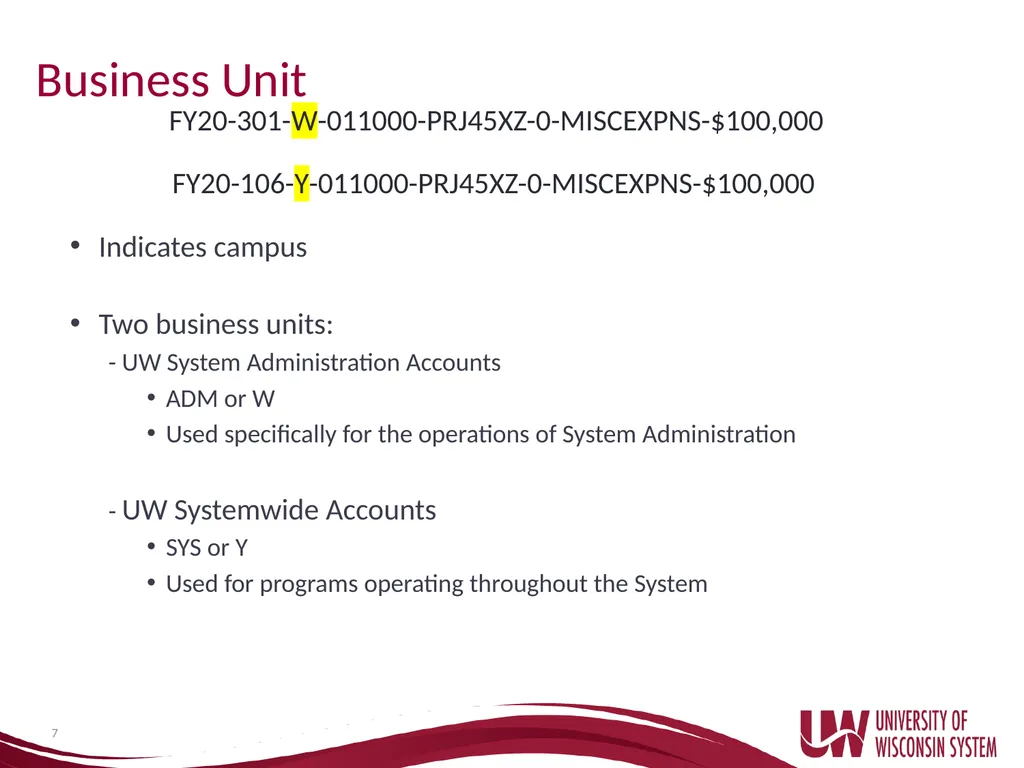
Business Unit Indicates campus
Two business units:
- UW System Administration Accounts
ADM or W
Used specifically for the operations of System Administration
- UW Systemwide Accounts
SYS or Y
Used for programs operating throughout the System 7 FY20-106-Y-011000-PRJ45XZ-0-MISCEXPNS-$100,000 FY20-301-W-011000-PRJ45XZ-0-MISCEXPNS-$100,000<br>
Two business units:
- UW System Administration Accounts
ADM or W
Used specifically for the operations of System Administration
- UW Systemwide Accounts
SYS or Y
Used for programs operating throughout the System 7 FY20-106-Y-011000-PRJ45XZ-0-MISCEXPNS-$100,000 FY20-301-W-011000-PRJ45XZ-0-MISCEXPNS-$100,000<br>
08
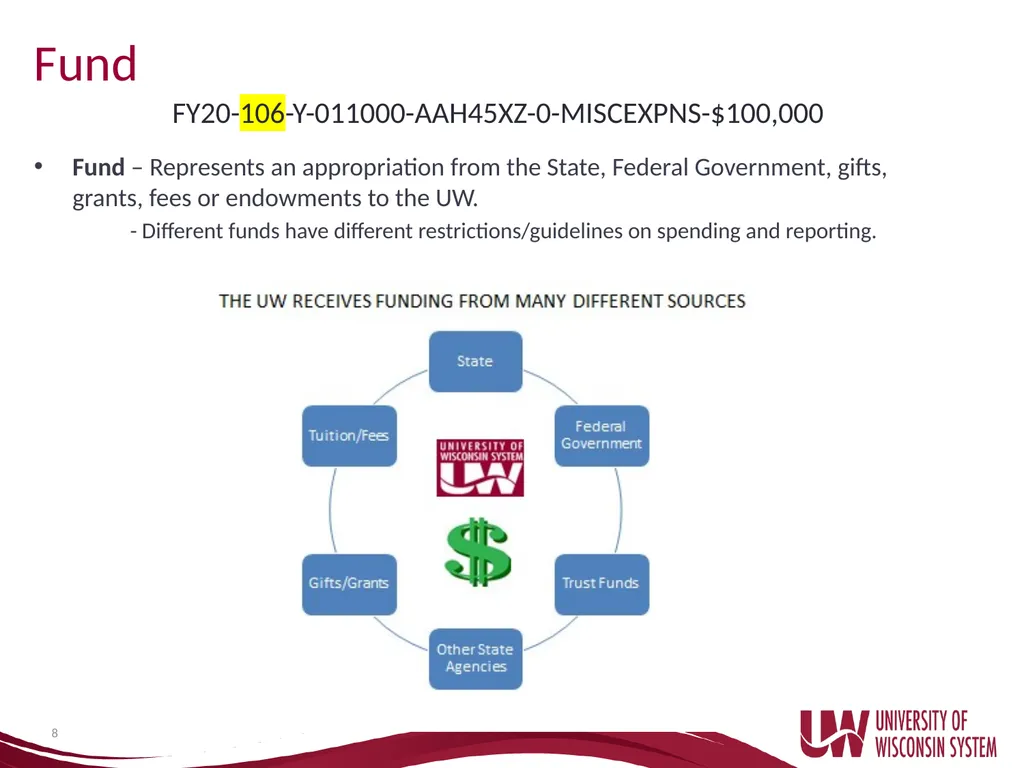
Fund 8 Fund – Represents an appropriation from the State, Federal Government, gifts, grants, fees or endowments to the UW.
- Different funds have different restrictions/guidelines on spending and reporting. FY20-106-Y-011000-AAH45XZ-0-MISCEXPNS-$100,000<br>
- Different funds have different restrictions/guidelines on spending and reporting. FY20-106-Y-011000-AAH45XZ-0-MISCEXPNS-$100,000<br>
09
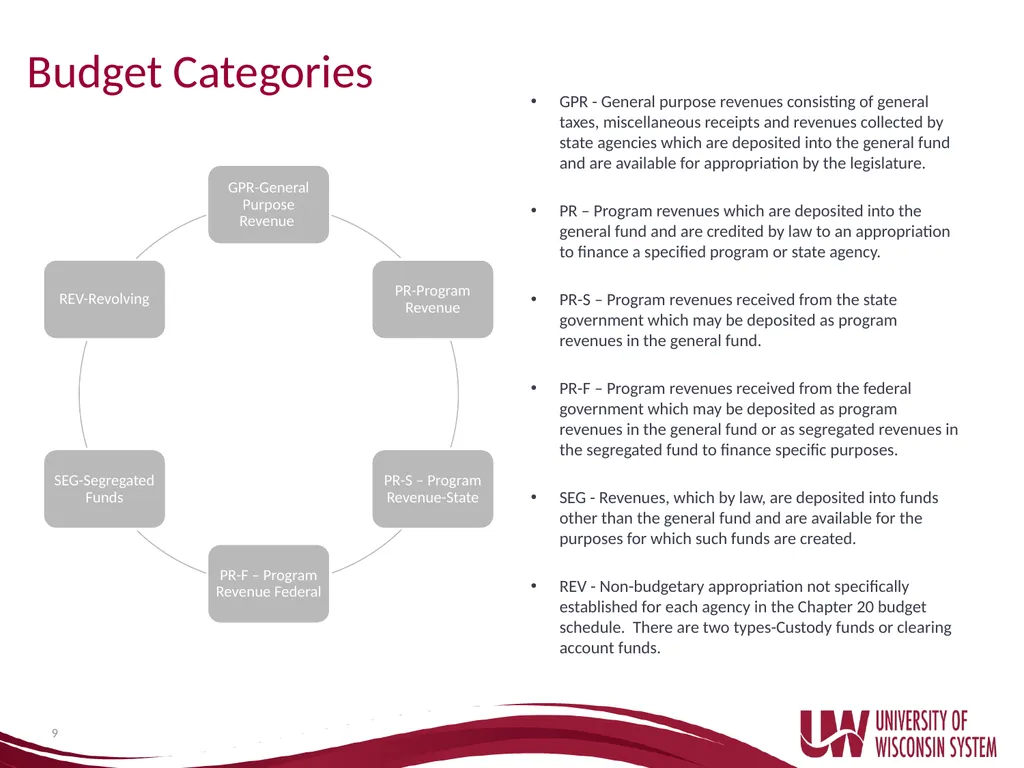
Budget Categories GPR - General purpose revenues consisting of general taxes, miscellaneous receipts and revenues collected by state agencies which are deposited into the general fund and are available for appropriation by the legislature.
PR – Program revenues which are deposited into the general fund and are credited by law to an appropriation to finance a specified program or state agency.
PR-S – Program revenues received from the state government which may be deposited as program revenues in the general fund.
PR-F – Program revenues received from the federal government which may be deposited as program revenues in the general fund or as segregated revenues in the segregated fund to finance specific purposes.
SEG - Revenues, which by law, are deposited into funds other than the general fund and are available for the purposes for which such funds are created.
REV - Non-budgetary appropriation not specifically established for each agency in the Chapter 20 budget schedule. There are two types-Custody funds or clearing account funds. 9<br>
PR – Program revenues which are deposited into the general fund and are credited by law to an appropriation to finance a specified program or state agency.
PR-S – Program revenues received from the state government which may be deposited as program revenues in the general fund.
PR-F – Program revenues received from the federal government which may be deposited as program revenues in the general fund or as segregated revenues in the segregated fund to finance specific purposes.
SEG - Revenues, which by law, are deposited into funds other than the general fund and are available for the purposes for which such funds are created.
REV - Non-budgetary appropriation not specifically established for each agency in the Chapter 20 budget schedule. There are two types-Custody funds or clearing account funds. 9<br>
10
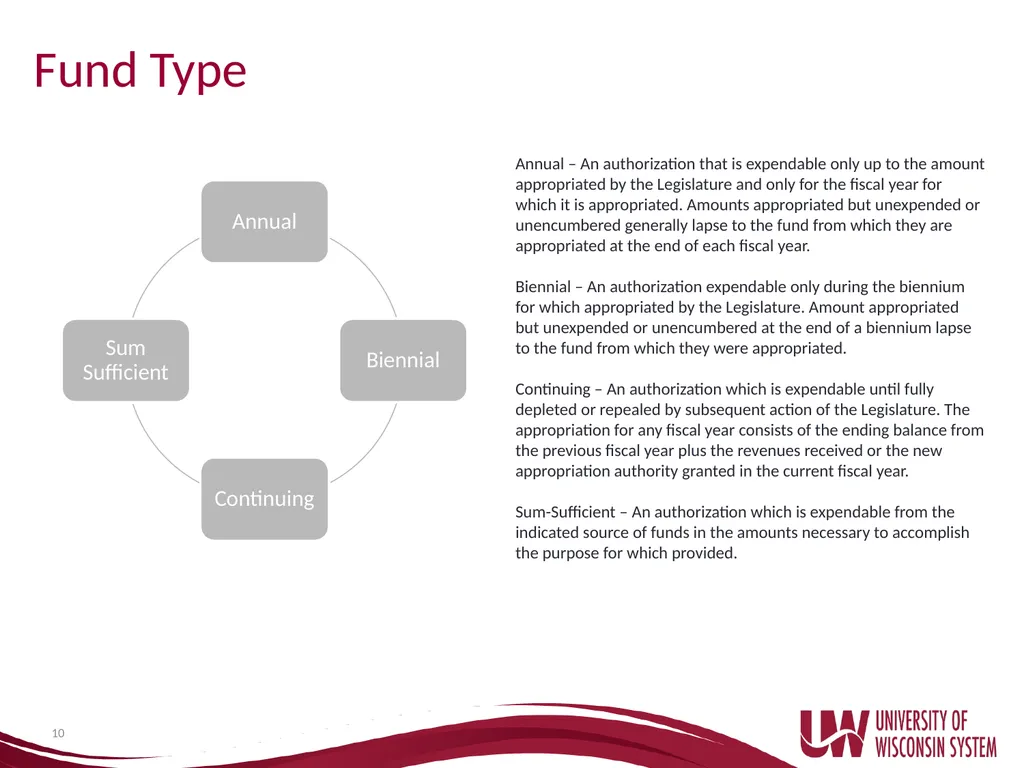
Fund Type 10 Annual – An authorization that is expendable only up to the amount appropriated by the Legislature and only for the fiscal year for which it is appropriated. Amounts appropriated but unexpended or unencumbered generally lapse to the fund from which they are appropriated at the end of each fiscal year.
Biennial – An authorization expendable only during the biennium for which appropriated by the Legislature. Amount appropriated but unexpended or unencumbered at the end of a biennium lapse to the fund from which they were appropriated.
Continuing – An authorization which is expendable until fully depleted or repealed by subsequent action of the Legislature. The appropriation for any fiscal year consists of the ending balance from the previous fiscal year plus the revenues received or the new appropriation authority granted in the current fiscal year.
Sum-Sufficient – An authorization which is expendable from the indicated source of funds in the amounts necessary to accomplish the purpose for which provided.<br>
Biennial – An authorization expendable only during the biennium for which appropriated by the Legislature. Amount appropriated but unexpended or unencumbered at the end of a biennium lapse to the fund from which they were appropriated.
Continuing – An authorization which is expendable until fully depleted or repealed by subsequent action of the Legislature. The appropriation for any fiscal year consists of the ending balance from the previous fiscal year plus the revenues received or the new appropriation authority granted in the current fiscal year.
Sum-Sufficient – An authorization which is expendable from the indicated source of funds in the amounts necessary to accomplish the purpose for which provided.<br>
11
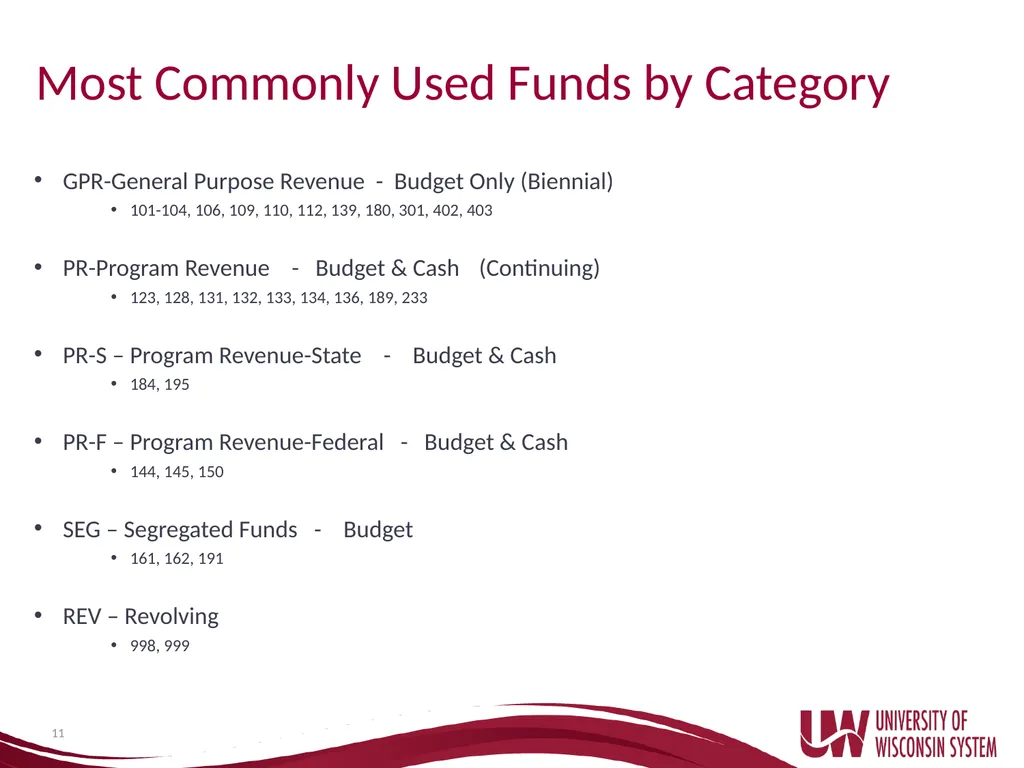
Most Commonly Used Funds by Category GPR-General Purpose Revenue - Budget Only (Biennial)
101-104, 106, 109, 110, 112, 139, 180, 301, 402, 403
PR-Program Revenue - Budget & Cash (Continuing)
123, 128, 131, 132, 133, 134, 136, 189, 233
PR-S – Program Revenue-State - Budget & Cash
184, 195
PR-F – Program Revenue-Federal - Budget & Cash
144, 145, 150
SEG – Segregated Funds - Budget
161, 162, 191
REV – Revolving
998, 999 11<br>
101-104, 106, 109, 110, 112, 139, 180, 301, 402, 403
PR-Program Revenue - Budget & Cash (Continuing)
123, 128, 131, 132, 133, 134, 136, 189, 233
PR-S – Program Revenue-State - Budget & Cash
184, 195
PR-F – Program Revenue-Federal - Budget & Cash
144, 145, 150
SEG – Segregated Funds - Budget
161, 162, 191
REV – Revolving
998, 999 11<br>
12
Appropriation Structure Listing of funds available throughout the whole UW System
Updated annually
Shows budget category and type of fund
Block Grant added as of FY12
Appropriation Structures https://www.wisconsin.edu/financial-administration/accounting-and-budget-control/chart-of-accounts/ 12<br>
Updated annually
Shows budget category and type of fund
Block Grant added as of FY12
Appropriation Structures https://www.wisconsin.edu/financial-administration/accounting-and-budget-control/chart-of-accounts/ 12<br>
13
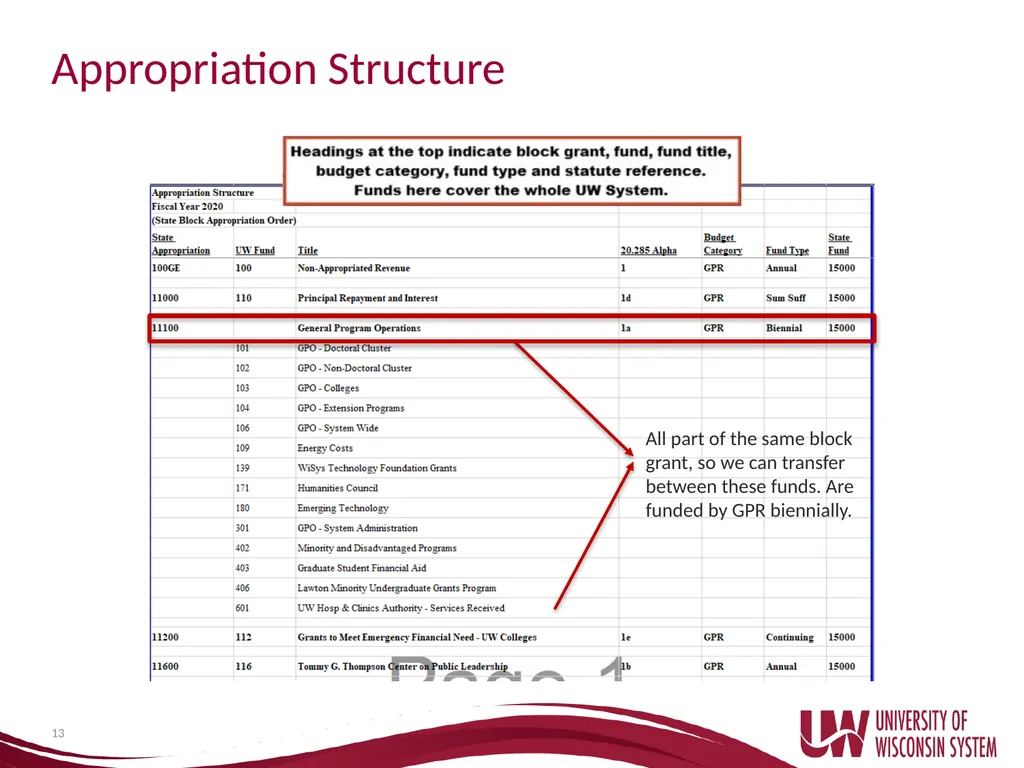
13 Appropriation Structure All part of the same block grant, so we can transfer between these funds. Are funded by GPR biennially.<br>
14
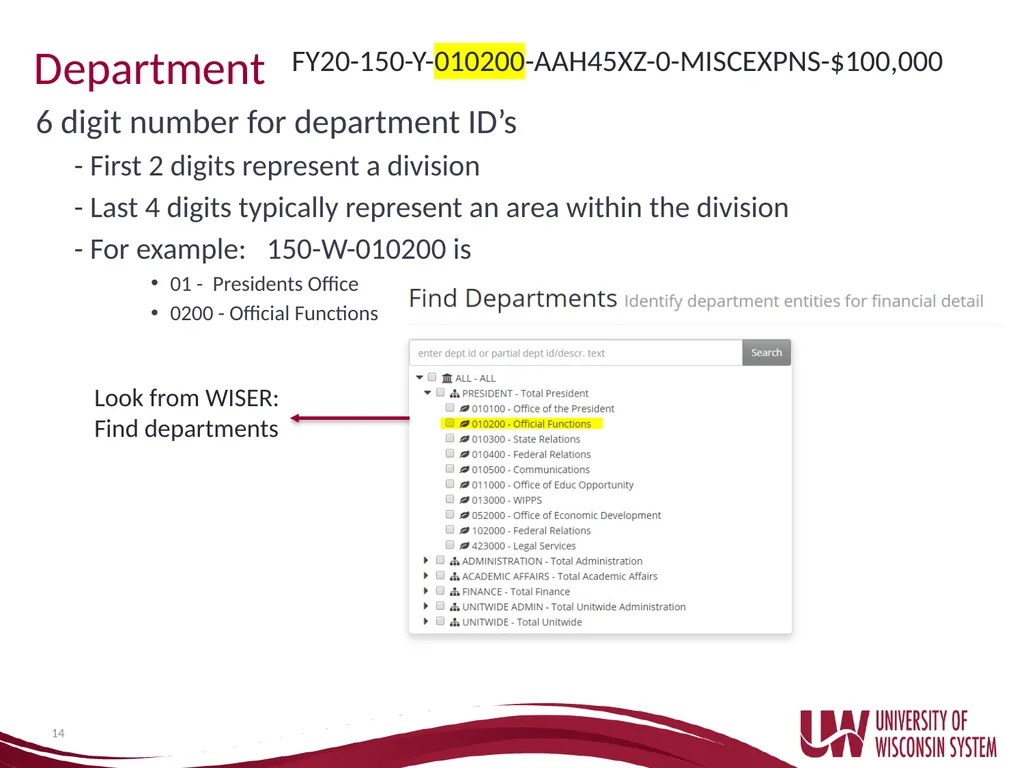
Department 6 digit number for department ID’s
- First 2 digits represent a division
- Last 4 digits typically represent an area within the division
- For example: 150-W-010200 is
01 - Presidents Office
0200 - Official Functions 14 Look from WISER: Find departments FY20-150-Y-010200-AAH45XZ-0-MISCEXPNS-$100,000<br>
- First 2 digits represent a division
- Last 4 digits typically represent an area within the division
- For example: 150-W-010200 is
01 - Presidents Office
0200 - Official Functions 14 Look from WISER: Find departments FY20-150-Y-010200-AAH45XZ-0-MISCEXPNS-$100,000<br>
15
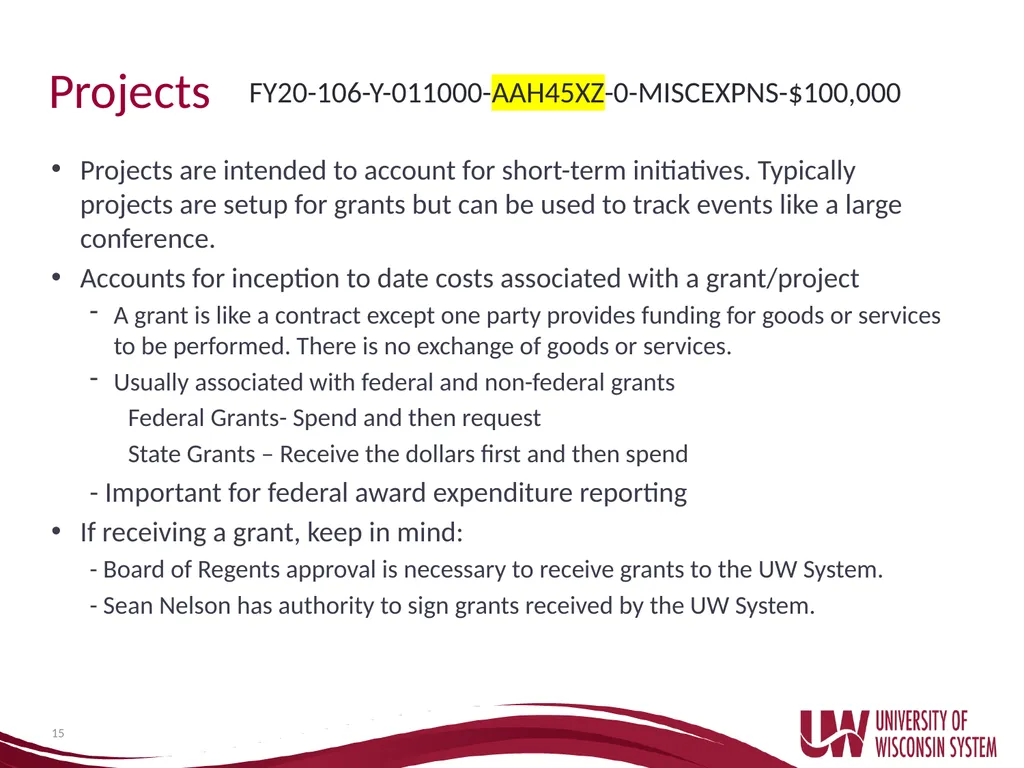
Projects Projects are intended to account for short-term initiatives. Typically projects are setup for grants but can be used to track events like a large conference.
Accounts for inception to date costs associated with a grant/project
A grant is like a contract except one party provides funding for goods or services to be performed. There is no exchange of goods or services.
Usually associated with federal and non-federal grants
Federal Grants- Spend and then request
State Grants – Receive the dollars first and then spend
- Important for federal award expenditure reporting
If receiving a grant, keep in mind:
- Board of Regents approval is necessary to receive grants to the UW System.
- Sean Nelson has authority to sign grants received by the UW System. 15 FY20-106-Y-011000-AAH45XZ-0-MISCEXPNS-$100,000<br>
Accounts for inception to date costs associated with a grant/project
A grant is like a contract except one party provides funding for goods or services to be performed. There is no exchange of goods or services.
Usually associated with federal and non-federal grants
Federal Grants- Spend and then request
State Grants – Receive the dollars first and then spend
- Important for federal award expenditure reporting
If receiving a grant, keep in mind:
- Board of Regents approval is necessary to receive grants to the UW System.
- Sean Nelson has authority to sign grants received by the UW System. 15 FY20-106-Y-011000-AAH45XZ-0-MISCEXPNS-$100,000<br>
16
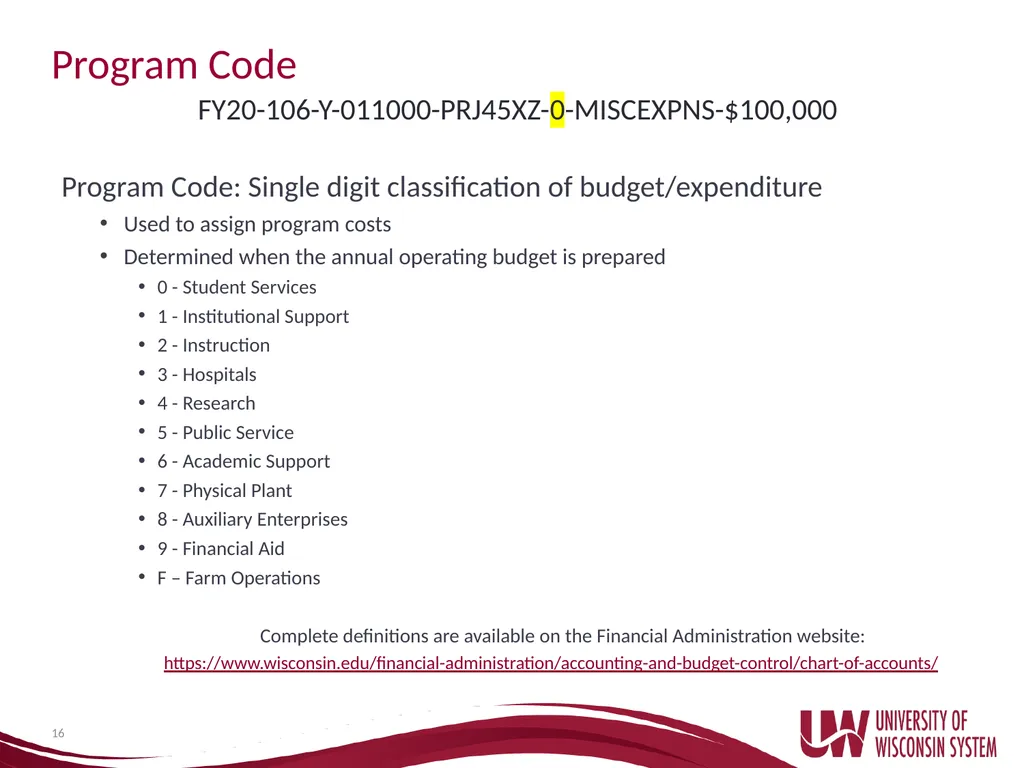
Program Code Program Code: Single digit classification of budget/expenditure
Used to assign program costs
Determined when the annual operating budget is prepared
0 - Student Services
1 - Institutional Support
2 - Instruction
3 - Hospitals
4 - Research
5 - Public Service
6 - Academic Support
7 - Physical Plant
8 - Auxiliary Enterprises
9 - Financial Aid
F – Farm Operations
Complete definitions are available on the Financial Administration website:
https://www.wisconsin.edu/financial-administration/accounting-and-budget-control/chart-of-accounts/ 16 FY20-106-Y-011000-PRJ45XZ-0-MISCEXPNS-$100,000<br>
Used to assign program costs
Determined when the annual operating budget is prepared
0 - Student Services
1 - Institutional Support
2 - Instruction
3 - Hospitals
4 - Research
5 - Public Service
6 - Academic Support
7 - Physical Plant
8 - Auxiliary Enterprises
9 - Financial Aid
F – Farm Operations
Complete definitions are available on the Financial Administration website:
https://www.wisconsin.edu/financial-administration/accounting-and-budget-control/chart-of-accounts/ 16 FY20-106-Y-011000-PRJ45XZ-0-MISCEXPNS-$100,000<br>
17
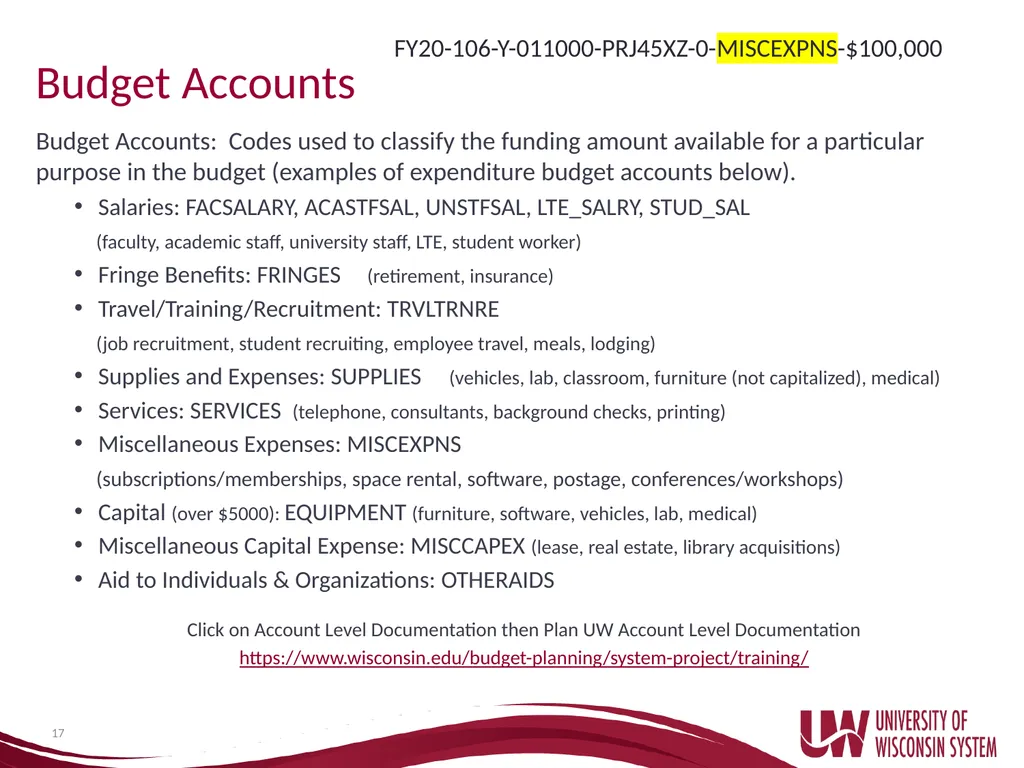
Budget Accounts Budget Accounts: Codes used to classify the funding amount available for a particular purpose in the budget (examples of expenditure budget accounts below).
Salaries: FACSALARY, ACASTFSAL, UNSTFSAL, LTE_SALRY, STUD_SAL
(faculty, academic staff, university staff, LTE, student worker)
Fringe Benefits: FRINGES (retirement, insurance)
Travel/Training/Recruitment: TRVLTRNRE
(job recruitment, student recruiting, employee travel, meals, lodging)
Supplies and Expenses: SUPPLIES (vehicles, lab, classroom, furniture (not capitalized), medical)
Services: SERVICES (telephone, consultants, background checks, printing)
Miscellaneous Expenses: MISCEXPNS
(subscriptions/memberships, space rental, software, postage, conferences/workshops)
Capital (over $5000): EQUIPMENT (furniture, software, vehicles, lab, medical)
Miscellaneous Capital Expense: MISCCAPEX (lease, real estate, library acquisitions)
Aid to Individuals & Organizations: OTHERAIDS
Click on Account Level Documentation then Plan UW Account Level Documentation
https://www.wisconsin.edu/budget-planning/system-project/training/ 17 FY20-106-Y-011000-PRJ45XZ-0-MISCEXPNS-$100,000<br>
Salaries: FACSALARY, ACASTFSAL, UNSTFSAL, LTE_SALRY, STUD_SAL
(faculty, academic staff, university staff, LTE, student worker)
Fringe Benefits: FRINGES (retirement, insurance)
Travel/Training/Recruitment: TRVLTRNRE
(job recruitment, student recruiting, employee travel, meals, lodging)
Supplies and Expenses: SUPPLIES (vehicles, lab, classroom, furniture (not capitalized), medical)
Services: SERVICES (telephone, consultants, background checks, printing)
Miscellaneous Expenses: MISCEXPNS
(subscriptions/memberships, space rental, software, postage, conferences/workshops)
Capital (over $5000): EQUIPMENT (furniture, software, vehicles, lab, medical)
Miscellaneous Capital Expense: MISCCAPEX (lease, real estate, library acquisitions)
Aid to Individuals & Organizations: OTHERAIDS
Click on Account Level Documentation then Plan UW Account Level Documentation
https://www.wisconsin.edu/budget-planning/system-project/training/ 17 FY20-106-Y-011000-PRJ45XZ-0-MISCEXPNS-$100,000<br>
18
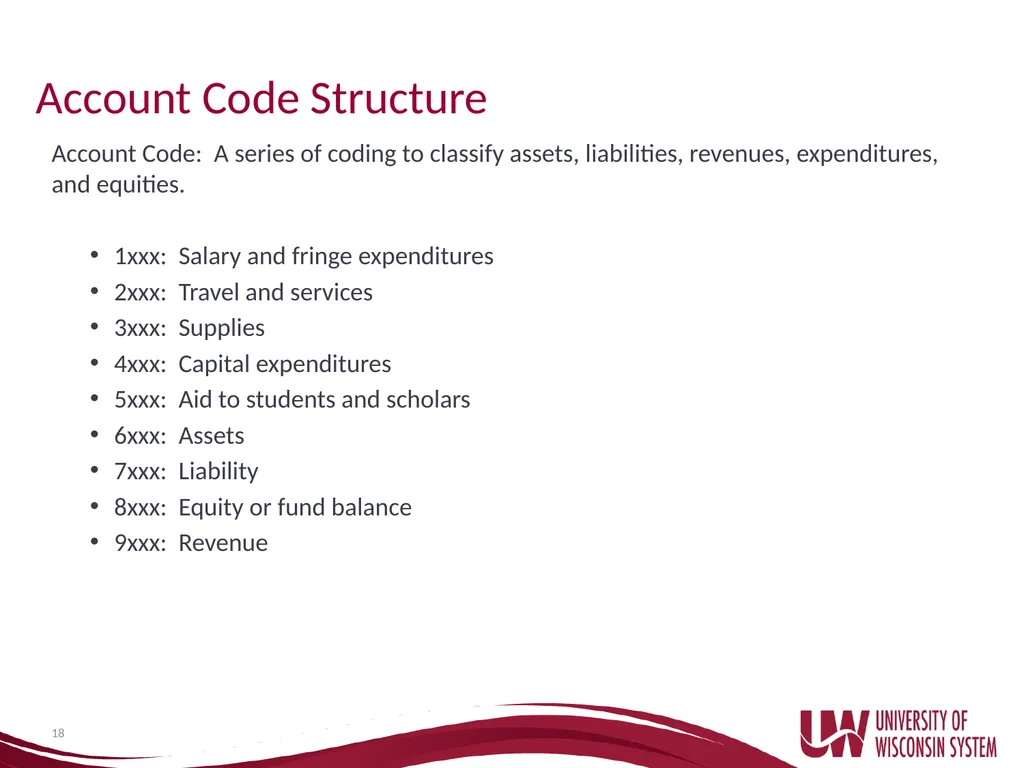
Account Code Structure Account Code: A series of coding to classify assets, liabilities, revenues, expenditures, and equities.
1xxx: Salary and fringe expenditures
2xxx: Travel and services
3xxx: Supplies
4xxx: Capital expenditures
5xxx: Aid to students and scholars
6xxx: Assets
7xxx: Liability
8xxx: Equity or fund balance
9xxx: Revenue 18<br>
1xxx: Salary and fringe expenditures
2xxx: Travel and services
3xxx: Supplies
4xxx: Capital expenditures
5xxx: Aid to students and scholars
6xxx: Assets
7xxx: Liability
8xxx: Equity or fund balance
9xxx: Revenue 18<br>
19
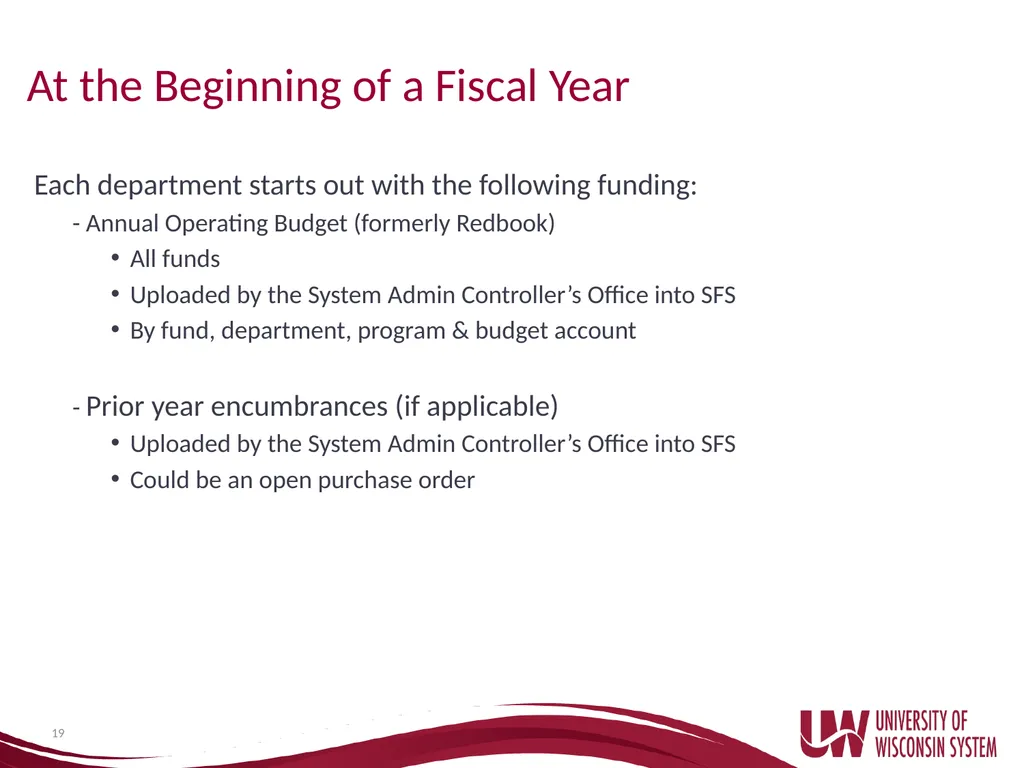
At the Beginning of a Fiscal Year Each department starts out with the following funding:
- Annual Operating Budget (formerly Redbook)
All funds
Uploaded by the System Admin Controller’s Office into SFS
By fund, department, program & budget account
- Prior year encumbrances (if applicable)
Uploaded by the System Admin Controller’s Office into SFS
Could be an open purchase order 19<br>
- Annual Operating Budget (formerly Redbook)
All funds
Uploaded by the System Admin Controller’s Office into SFS
By fund, department, program & budget account
- Prior year encumbrances (if applicable)
Uploaded by the System Admin Controller’s Office into SFS
Could be an open purchase order 19<br>
20
During the Fiscal Year Account balance level changes due to:
Budget Transfers
To and From
- Systemwide Transfer Accounts (Y01-Y09)
Primarily for budget transfers only
- Systemwide Operating Accounts (Y10-Y98)
For budget transfers and expenditures
- System Administration Operating Accounts (W01-W98)
For budget transfers and expenditures 20 Revenues/Deposits
Encumbered Items (expenses still owed: salaries, purchase orders)
Expenditure Payments/Inner Unit Journals (IUJs)
Refunds
Departments identify balance changes by reviewing on a monthly basis in WISER
- Reconcile for expected/unexpected budget transfers, encumbrances, payments, etc…<br>
Budget Transfers
To and From
- Systemwide Transfer Accounts (Y01-Y09)
Primarily for budget transfers only
- Systemwide Operating Accounts (Y10-Y98)
For budget transfers and expenditures
- System Administration Operating Accounts (W01-W98)
For budget transfers and expenditures 20 Revenues/Deposits
Encumbered Items (expenses still owed: salaries, purchase orders)
Expenditure Payments/Inner Unit Journals (IUJs)
Refunds
Departments identify balance changes by reviewing on a monthly basis in WISER
- Reconcile for expected/unexpected budget transfers, encumbrances, payments, etc…<br>
21
Monthly Reconciling Responsibility to reconcile departmental budgets on a monthly basis for budget transfers, encumbrances, expenditures, revenues, etc…
Why?
- Verify payments have been made appropriately
- Transactions were made to the correct department/funding
- Correct problems as soon as possible
- Ensure reported amounts are correct
How?
- Keep an internal schedule/file of all departmental requests
- Use the detailed transactions reports in WISER for verification
- Compare the two and check on the differences
Budgets will be monitored on a monthly basis by the UW System Controller’s Office. Including all requested transfers.
Budget transfers out of any of the Systemwide transfer accounts (Y01-Y09) will not be authorized if there is not enough budget balance to cover the funding shift. 21<br>
Why?
- Verify payments have been made appropriately
- Transactions were made to the correct department/funding
- Correct problems as soon as possible
- Ensure reported amounts are correct
How?
- Keep an internal schedule/file of all departmental requests
- Use the detailed transactions reports in WISER for verification
- Compare the two and check on the differences
Budgets will be monitored on a monthly basis by the UW System Controller’s Office. Including all requested transfers.
Budget transfers out of any of the Systemwide transfer accounts (Y01-Y09) will not be authorized if there is not enough budget balance to cover the funding shift. 21<br>
22
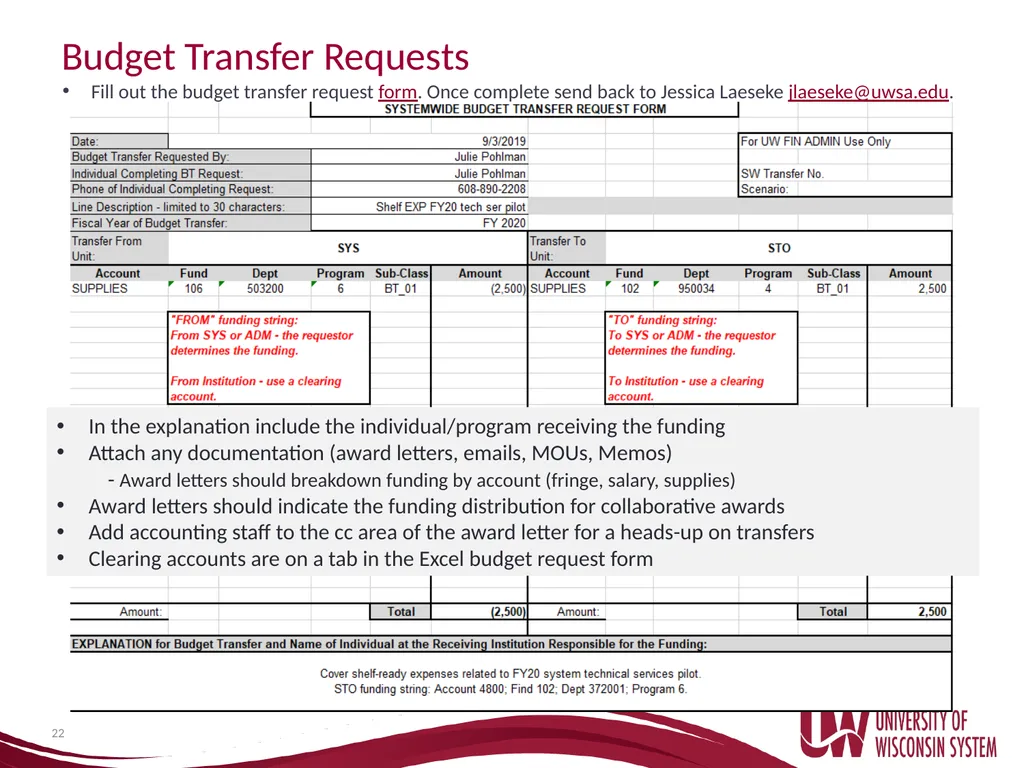
Budget Transfer Requests Fill out the budget transfer request form. Once complete send back to Jessica Laeseke jlaeseke@uwsa.edu. 22 In the explanation include the individual/program receiving the funding
Attach any documentation (award letters, emails, MOUs, Memos)
- Award letters should breakdown funding by account (fringe, salary, supplies)
Award letters should indicate the funding distribution for collaborative awards
Add accounting staff to the cc area of the award letter for a heads-up on transfers
Clearing accounts are on a tab in the Excel budget request form<br>
Attach any documentation (award letters, emails, MOUs, Memos)
- Award letters should breakdown funding by account (fringe, salary, supplies)
Award letters should indicate the funding distribution for collaborative awards
Add accounting staff to the cc area of the award letter for a heads-up on transfers
Clearing accounts are on a tab in the Excel budget request form<br>
23
SFS/WISER SFS (Shared Financial System)
Official accounting record of the University of Wisconsin System
Information on all institutions
Full production software
WISER
Data warehouse https://wiser.wisc.edu/
SFS info comes in daily
One day behind SFS
New Users are granted access by their campus
For UWSYS or UWADM contact Ginger Hintz via email ghintz@uwsa.edu
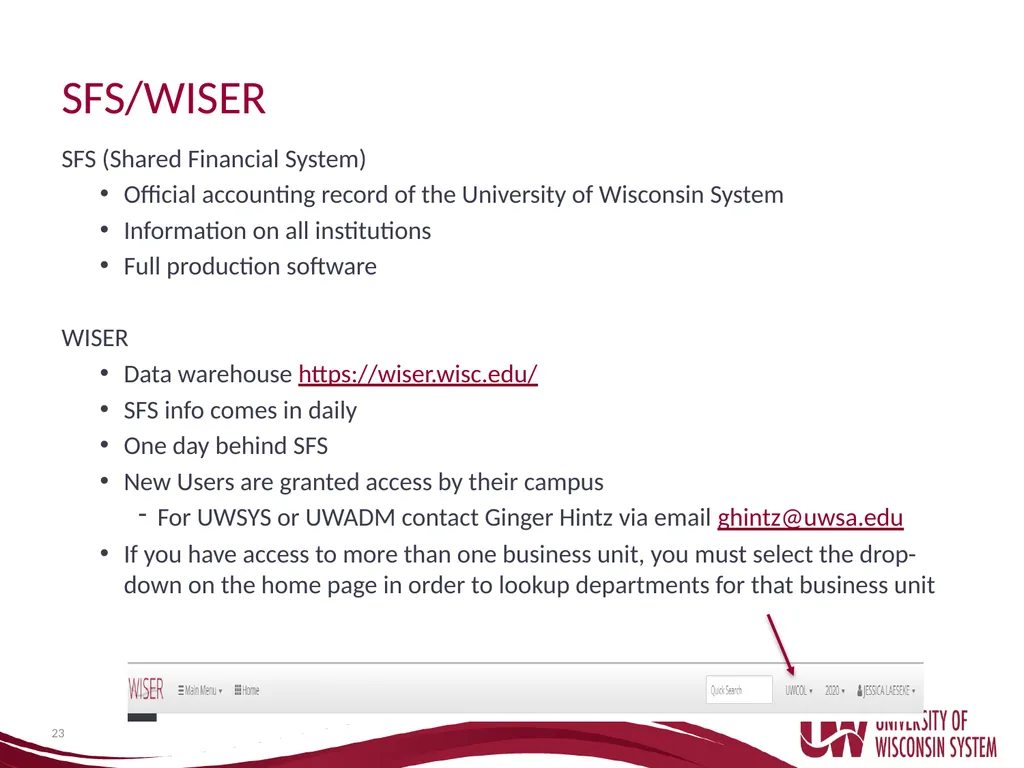
If you have access to more than one business unit, you must select the drop-down on the home page in order to lookup departments for that business unit 23<br>
Official accounting record of the University of Wisconsin System
Information on all institutions
Full production software
WISER
Data warehouse https://wiser.wisc.edu/
SFS info comes in daily
One day behind SFS
New Users are granted access by their campus
For UWSYS or UWADM contact Ginger Hintz via email ghintz@uwsa.edu
If you have access to more than one business unit, you must select the drop-down on the home page in order to lookup departments for that business unit 23<br>
24
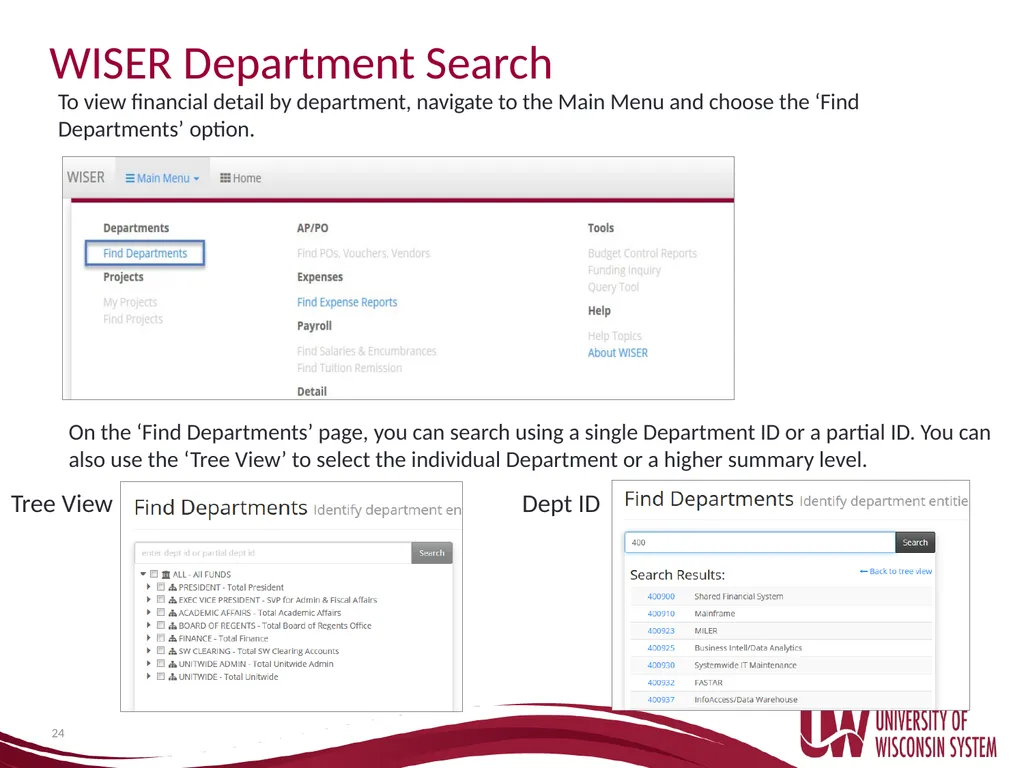
WISER Department Search 24 To view financial detail by department, navigate to the Main Menu and choose the ‘Find Departments’ option. On the ‘Find Departments’ page, you can search using a single Department ID or a partial ID. You can also use the ‘Tree View’ to select the individual Department or a higher summary level. Tree View Dept ID<br>
25
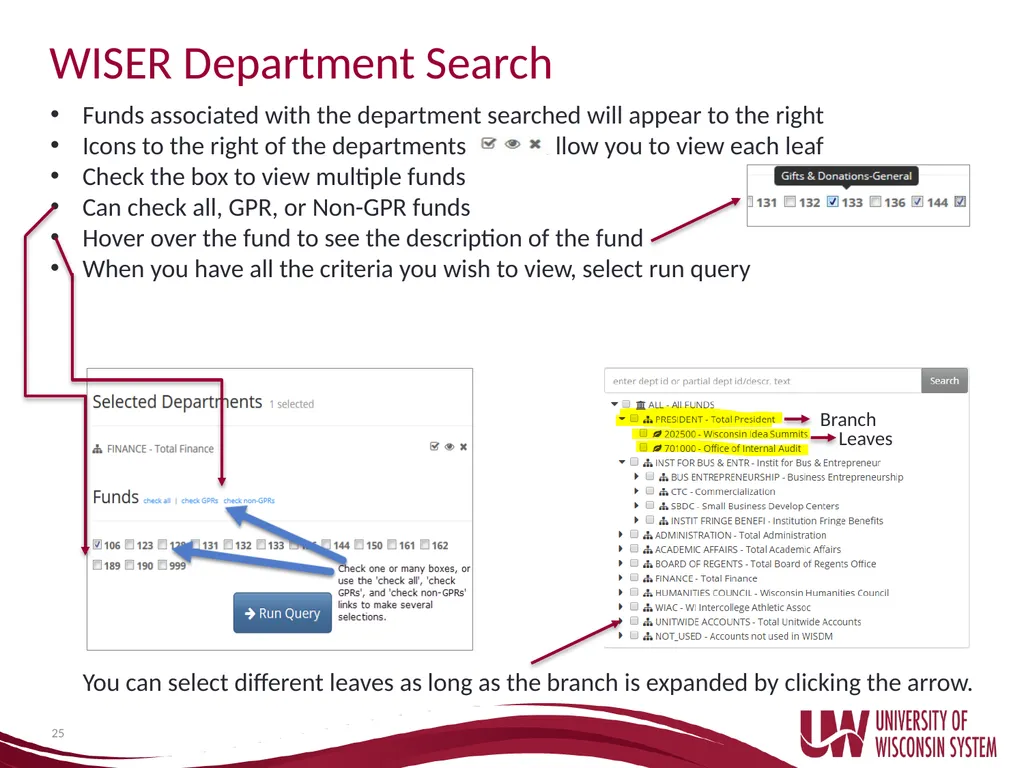
25 WISER Department Search Funds associated with the department searched will appear to the right
Icons to the right of the departments allow you to view each leaf
Check the box to view multiple funds
Can check all, GPR, or Non-GPR funds
Hover over the fund to see the description of the fund
When you have all the criteria you wish to view, select run query Branch Leaves You can select different leaves as long as the branch is expanded by clicking the arrow.<br>
Icons to the right of the departments allow you to view each leaf
Check the box to view multiple funds
Can check all, GPR, or Non-GPR funds
Hover over the fund to see the description of the fund
When you have all the criteria you wish to view, select run query Branch Leaves You can select different leaves as long as the branch is expanded by clicking the arrow.<br>
26
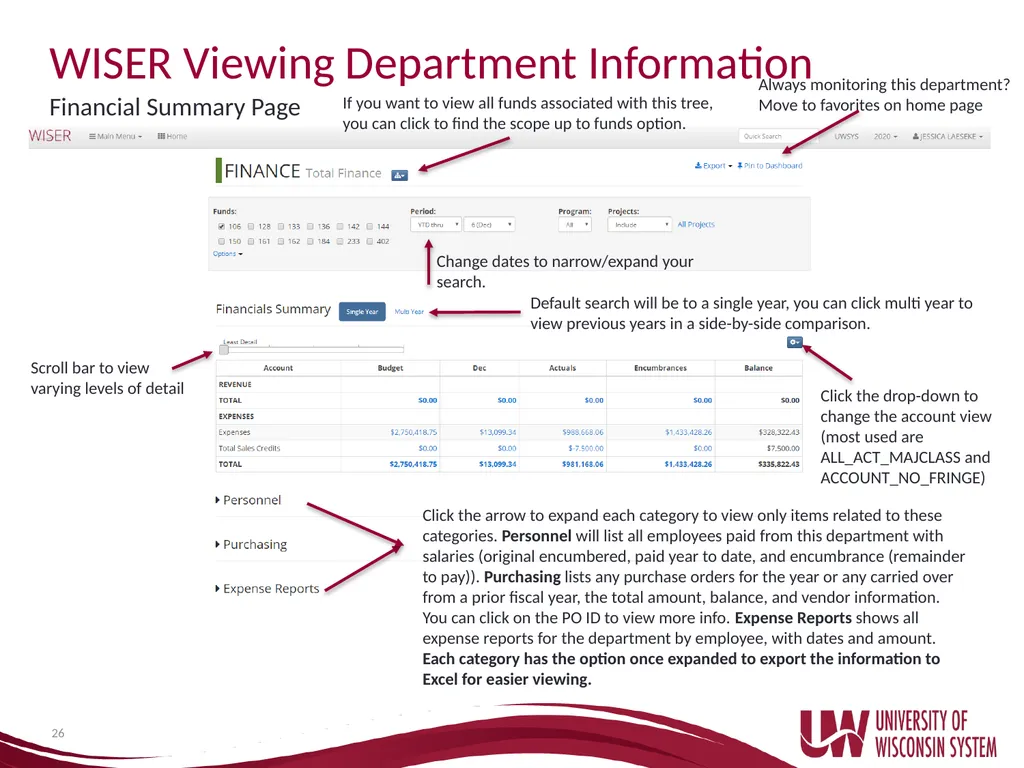
26 WISER Viewing Department Information Financial Summary Page If you want to view all funds associated with this tree, you can click to find the scope up to funds option. Change dates to narrow/expand your search. Always monitoring this department? Move to favorites on home page Default search will be to a single year, you can click multi year to view previous years in a side-by-side comparison. Scroll bar to view varying levels of detail Click the drop-down to change the account view (most used are ALL_ACT_MAJCLASS and ACCOUNT_NO_FRINGE) Click the arrow to expand each category to view only items related to these categories. Personnel will list all employees paid from this department with salaries (original encumbered, paid year to date, and encumbrance (remainder to pay)). Purchasing lists any purchase orders for the year or any carried over from a prior fiscal year, the total amount, balance, and vendor information. You can click on the PO ID to view more info. Expense Reports shows all expense reports for the department by employee, with dates and amount. Each category has the option once expanded to export the information to Excel for easier viewing.<br>
27
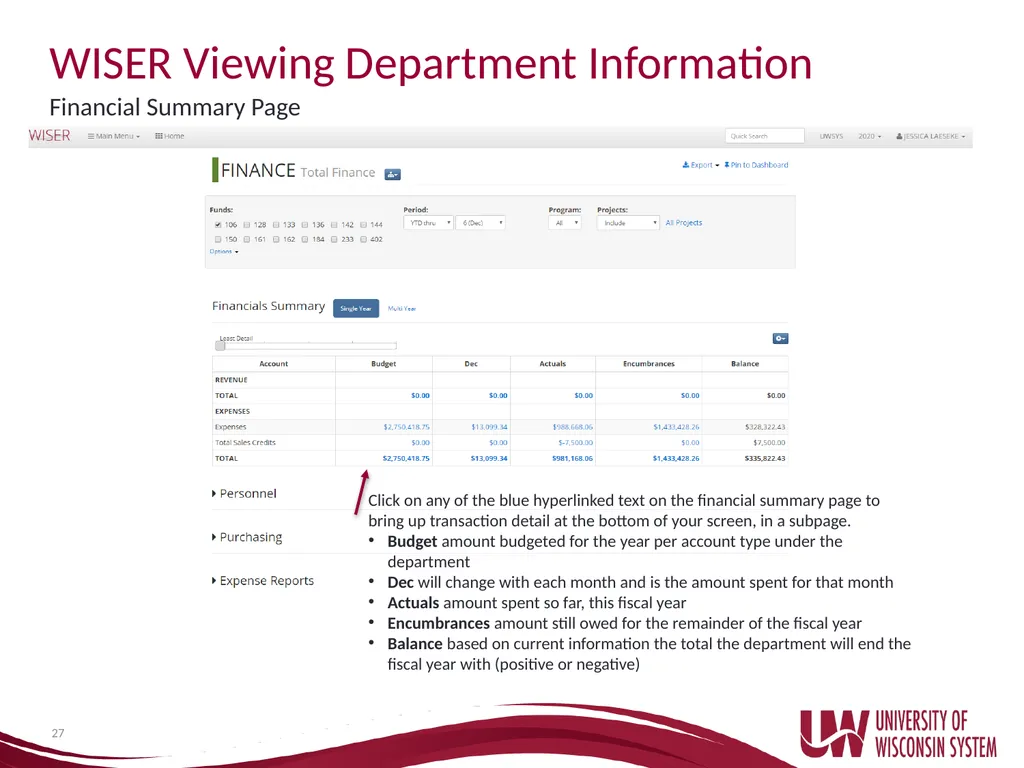
27 WISER Viewing Department Information Financial Summary Page Click on any of the blue hyperlinked text on the financial summary page to bring up transaction detail at the bottom of your screen, in a subpage.
Budget amount budgeted for the year per account type under the department
Dec will change with each month and is the amount spent for that month
Actuals amount spent so far, this fiscal year
Encumbrances amount still owed for the remainder of the fiscal year
Balance based on current information the total the department will end the fiscal year with (positive or negative)<br>
Budget amount budgeted for the year per account type under the department
Dec will change with each month and is the amount spent for that month
Actuals amount spent so far, this fiscal year
Encumbrances amount still owed for the remainder of the fiscal year
Balance based on current information the total the department will end the fiscal year with (positive or negative)<br>
28
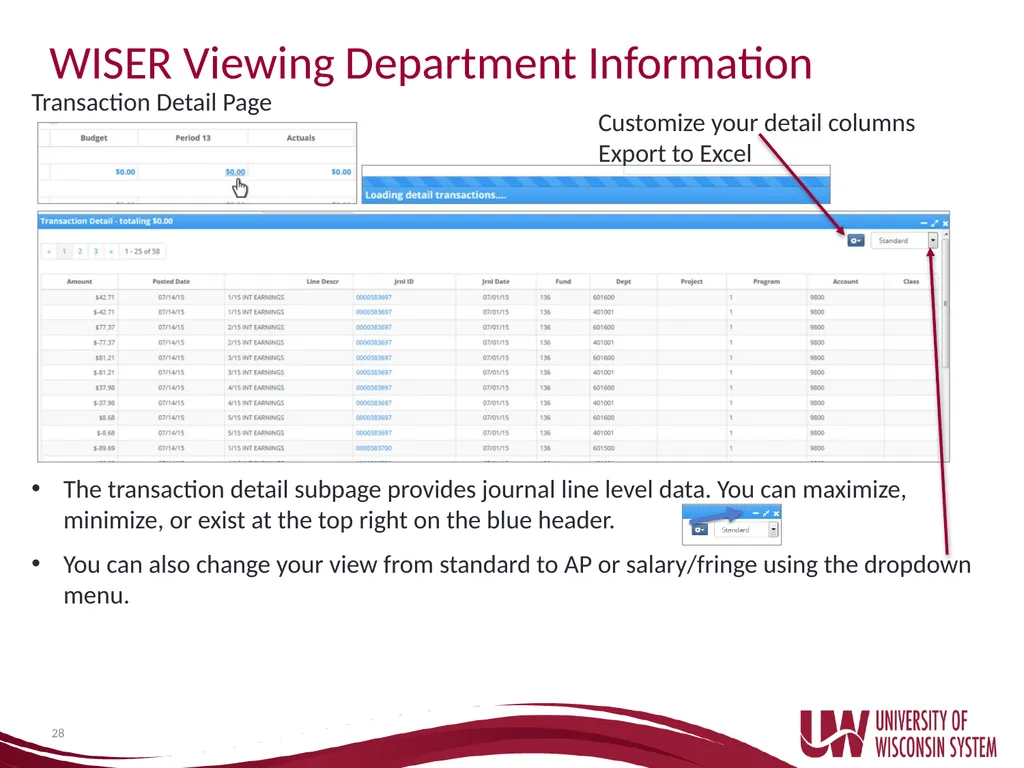
28 WISER Viewing Department Information Transaction Detail Page The transaction detail subpage provides journal line level data. You can maximize, minimize, or exist at the top right on the blue header.
You can also change your view from standard to AP or salary/fringe using the dropdown menu. Customize your detail columns
Export to Excel<br>
You can also change your view from standard to AP or salary/fringe using the dropdown menu. Customize your detail columns
Export to Excel<br>
29
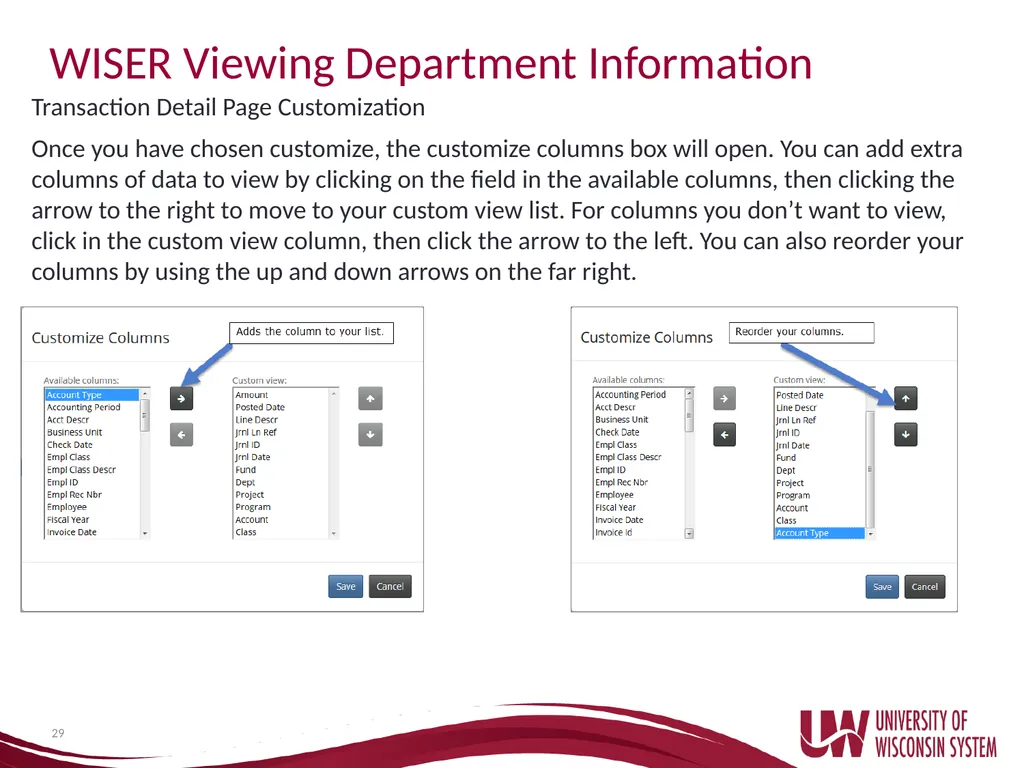
29 WISER Viewing Department Information Transaction Detail Page Customization Once you have chosen customize, the customize columns box will open. You can add extra columns of data to view by clicking on the field in the available columns, then clicking the arrow to the right to move to your custom view list. For columns you don’t want to view, click in the custom view column, then click the arrow to the left. You can also reorder your columns by using the up and down arrows on the far right.<br>
30
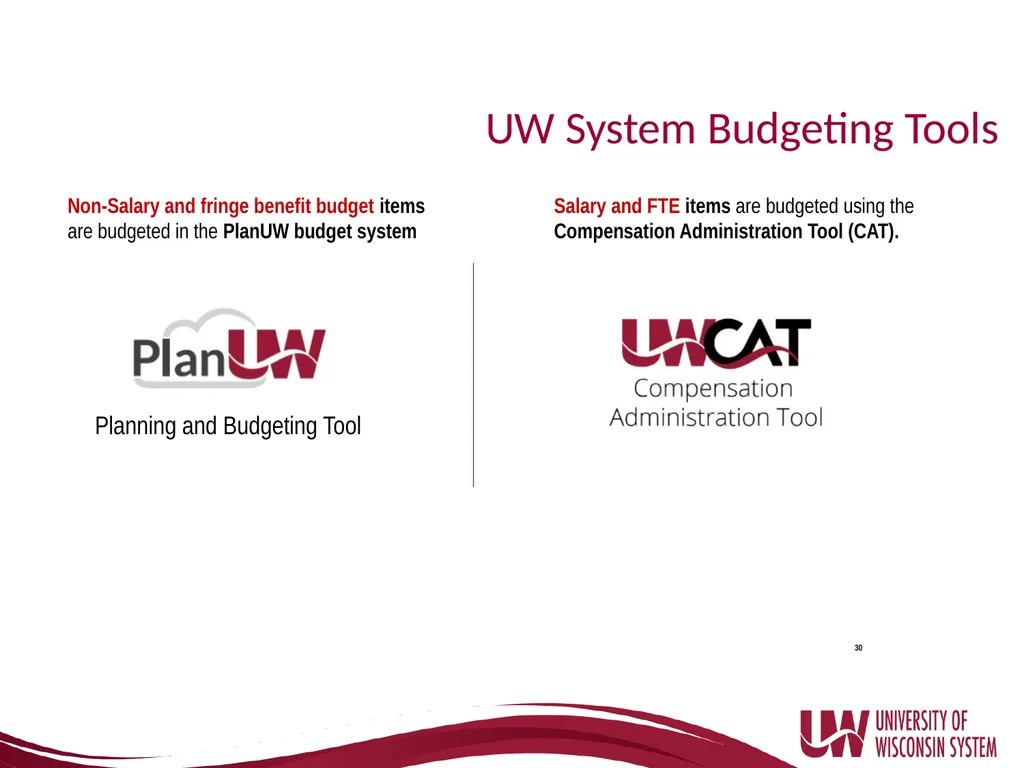
30 UW System Budgeting Tools Non-Salary and fringe benefit budget items are budgeted in the PlanUW budget system Salary and FTE items are budgeted using the Compensation Administration Tool (CAT). Planning and Budgeting Tool<br>
31
UW System Budgeting Tools PlanUW
Cloud based budget and planning system
Replaced 3270 mainframe system
First used for FY20 budget
Compensation Administration Tool (CAT)
Bolt on to HRS
Budgeting by person
Pay plan distribution 31<br>
Cloud based budget and planning system
Replaced 3270 mainframe system
First used for FY20 budget
Compensation Administration Tool (CAT)
Bolt on to HRS
Budgeting by person
Pay plan distribution 31<br>
32
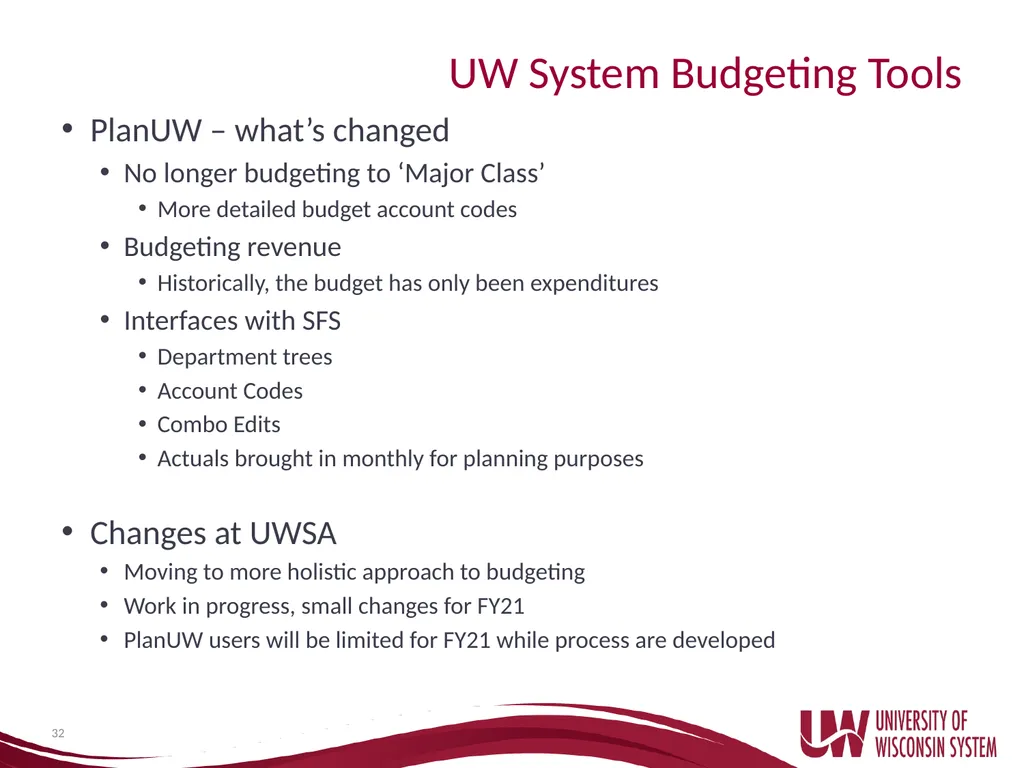
UW System Budgeting Tools PlanUW – what’s changed
No longer budgeting to ‘Major Class’
More detailed budget account codes
Budgeting revenue
Historically, the budget has only been expenditures
Interfaces with SFS
Department trees
Account Codes
Combo Edits
Actuals brought in monthly for planning purposes
Changes at UWSA
Moving to more holistic approach to budgeting
Work in progress, small changes for FY21
PlanUW users will be limited for FY21 while process are developed 32<br>
No longer budgeting to ‘Major Class’
More detailed budget account codes
Budgeting revenue
Historically, the budget has only been expenditures
Interfaces with SFS
Department trees
Account Codes
Combo Edits
Actuals brought in monthly for planning purposes
Changes at UWSA
Moving to more holistic approach to budgeting
Work in progress, small changes for FY21
PlanUW users will be limited for FY21 while process are developed 32<br>
33
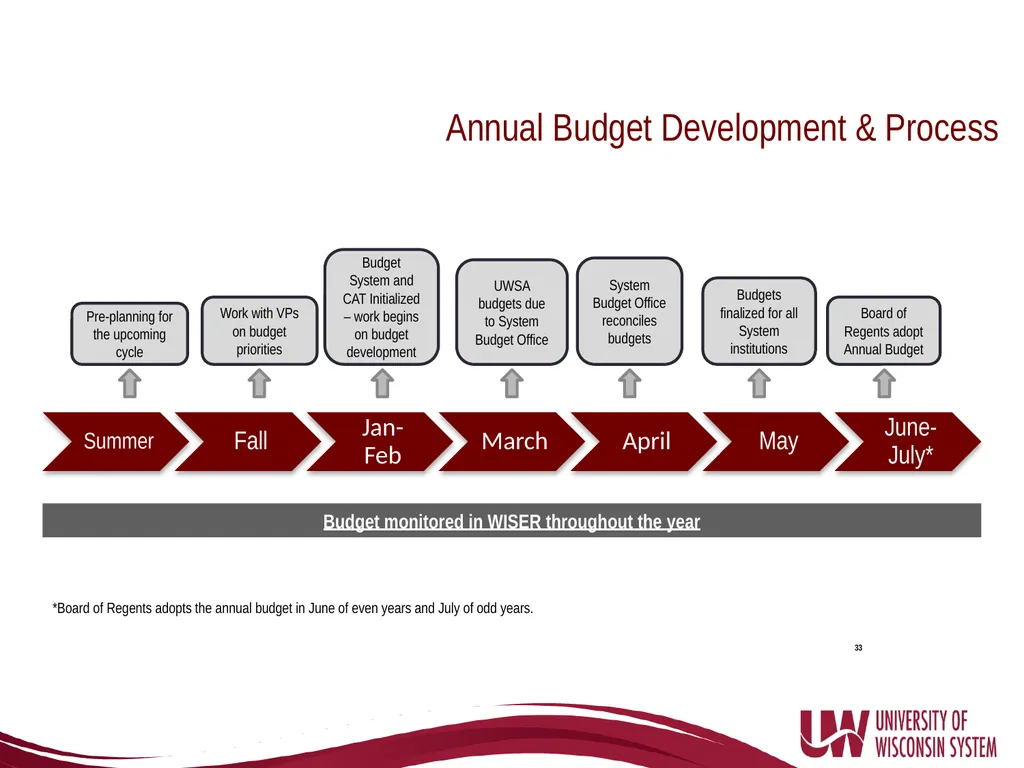
33 Pre-planning for the upcoming cycle Work with VPs on budget priorities Budget System and CAT Initialized – work begins on budget development UWSA budgets due to System Budget Office System Budget Office reconciles budgets Budgets finalized for all System institutions Board of Regents adopt Annual Budget Annual Budget Development & Process *Board of Regents adopts the annual budget in June of even years and July of odd years. Budget monitored in WISER throughout the year<br>
34
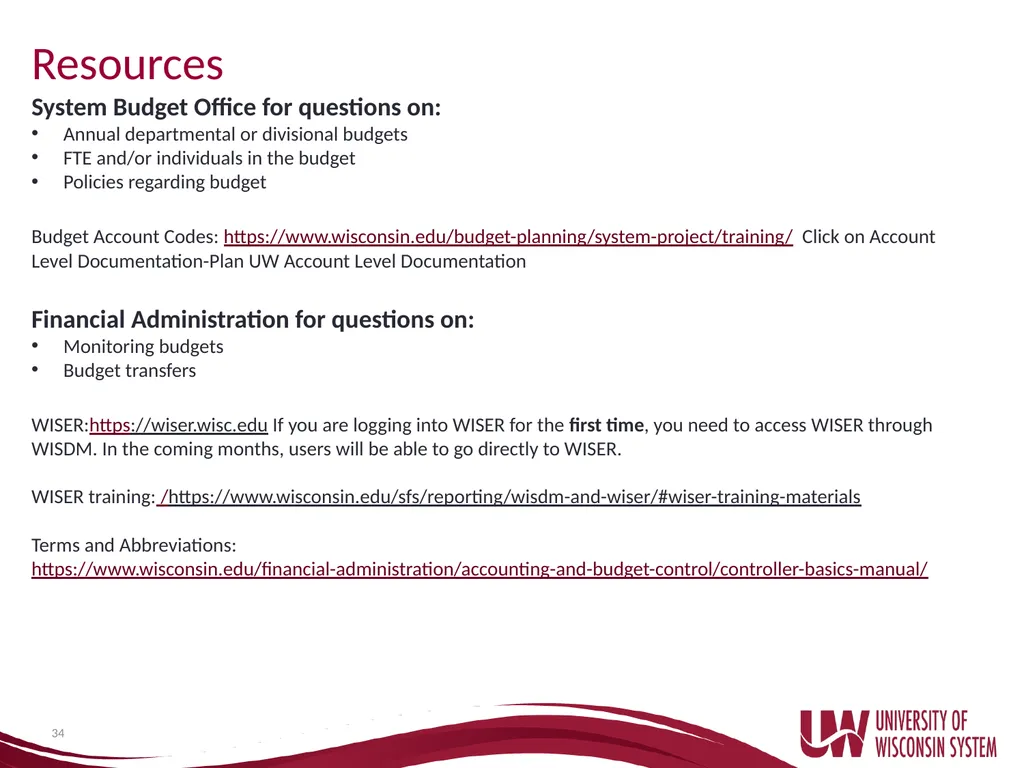
34 Resources System Budget Office for questions on:
Annual departmental or divisional budgets
FTE and/or individuals in the budget
Policies regarding budget
Budget Account Codes: https://www.wisconsin.edu/budget-planning/system-project/training/ Click on Account Level Documentation-Plan UW Account Level Documentation
Financial Administration for questions on:
Monitoring budgets
Budget transfers
WISER:https://wiser.wisc.edu If you are logging into WISER for the first time, you need to access WISER through WISDM. In the coming months, users will be able to go directly to WISER.
WISER training: /https://www.wisconsin.edu/sfs/reporting/wisdm-and-wiser/#wiser-training-materials
Terms and Abbreviations: https://www.wisconsin.edu/financial-administration/accounting-and-budget-control/controller-basics-manual/<br>
Annual departmental or divisional budgets
FTE and/or individuals in the budget
Policies regarding budget
Budget Account Codes: https://www.wisconsin.edu/budget-planning/system-project/training/ Click on Account Level Documentation-Plan UW Account Level Documentation
Financial Administration for questions on:
Monitoring budgets
Budget transfers
WISER:https://wiser.wisc.edu If you are logging into WISER for the first time, you need to access WISER through WISDM. In the coming months, users will be able to go directly to WISER.
WISER training: /https://www.wisconsin.edu/sfs/reporting/wisdm-and-wiser/#wiser-training-materials
Terms and Abbreviations: https://www.wisconsin.edu/financial-administration/accounting-and-budget-control/controller-basics-manual/<br>
35
Questions? 35<br>