Virtualization and Cloud Computing Definition Virtualization is the ability to run multiple operating systems on a single physical system and share the underlying hardware resources It is the process by which one computer hosts the
"Virtualization and Cloud Computing Definition" is the property of its rightful owner. Permission is granted to
download and print the materials on this website for personal, non-commercial use only, and to display it
on your personal computer provided you do not modify the materials and that you retain all copyright
notices contained in the materials. By downloading content from our website, you accept the terms of this
agreement.
Presentation Transcript
01
Virtualization and Cloud Computing<br>
02
Definition Virtualization is the ability to run multiple operating systems on a single physical system and share the underlying hardware resources*
It is the process by which one computer hosts the appearance of many computers.
Virtualization is used to improve IT throughput and costs by using physical resources as a pool from which virtual resources can be allocated.
*VMWare white paper, Virtualization Overview<br>
03
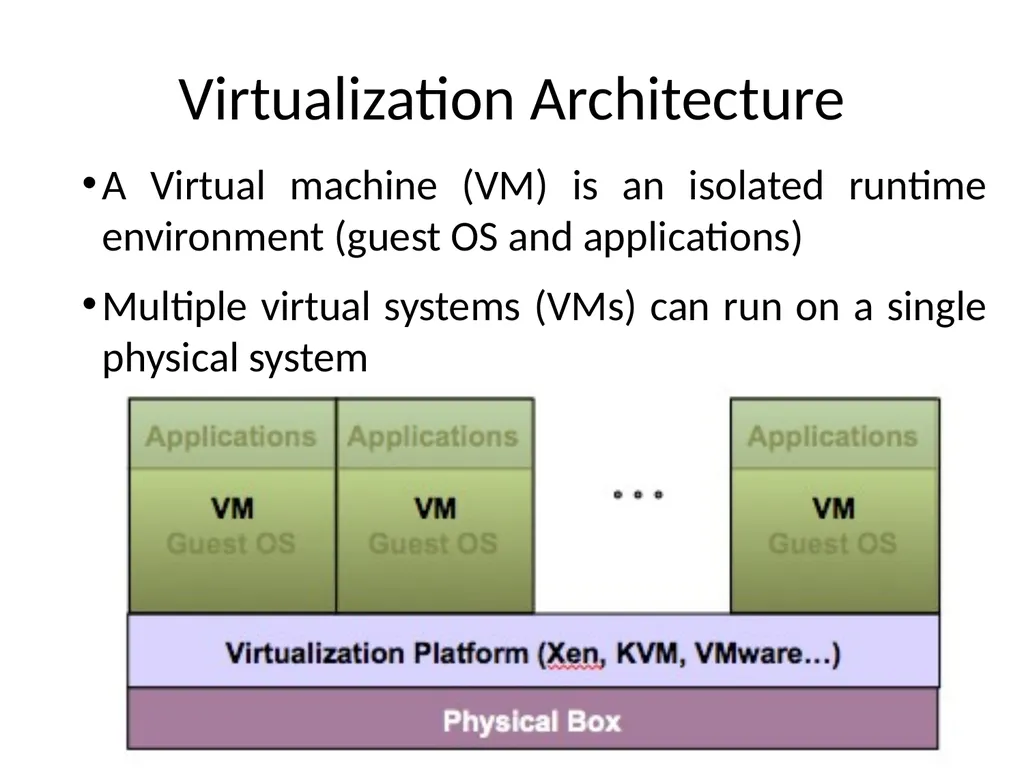
Virtualization Architecture A Virtual machine (VM) is an isolated runtime environment (guest OS and applications)
Multiple virtual systems (VMs) can run on a single physical system<br>
04
Hypervisor A hypervisor, a.k.a. a virtual machine manager/monitor (VMM), or virtualization manager, is a program that allows multiple operating systems to share a single hardware host.
Each guest operating system appears to have the host's processor, memory, and other resources all to itself. However, the hypervisor is actually controlling the host processor and resources, allocating what is needed to each operating system in turn and making sure that the guest operating systems (called virtual machines) cannot disrupt each other.<br>
05
Benefits of Virtualization Sharing of resources helps cost reduction
Isolation: Virtual machines are isolated from each other as if they are physically separated
Encapsulation: Virtual machines encapsulate a complete computing environment
Hardware Independence: Virtual machines run independently of underlying hardware
Portability: Virtual machines can be migrated between different hosts.<br>
06
Virtualization in Cloud Computing Cloud computing takes virtualization one step further:
You don’t need to own the hardware
Resources are rented as needed from a cloud
Various providers allow creating virtual servers:
Choose the OS and software each instance will have
The chosen OS will run on a large server farm
Can instantiate more virtual servers or shut down existing ones within minutes
You get billed only for what you used<br>
07
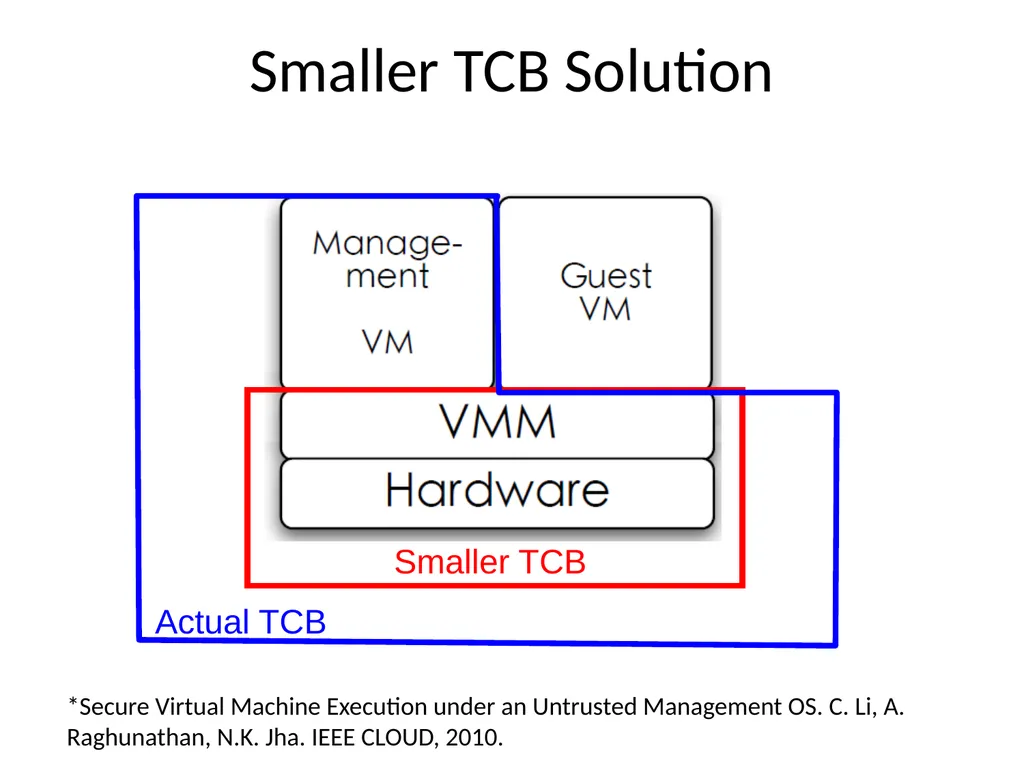
Virtualization Security Challenges The trusted computing base (TCB) of a virtual machine is too large.
TCB: A small amount of software and hardware that security depends on and that we distinguish from a much larger amount that can misbehave without affecting security*
Smaller TCB more security
*Lampson et al., “Authentication in distributed systems: Theory and practice,” ACM TCS 1992<br>
08
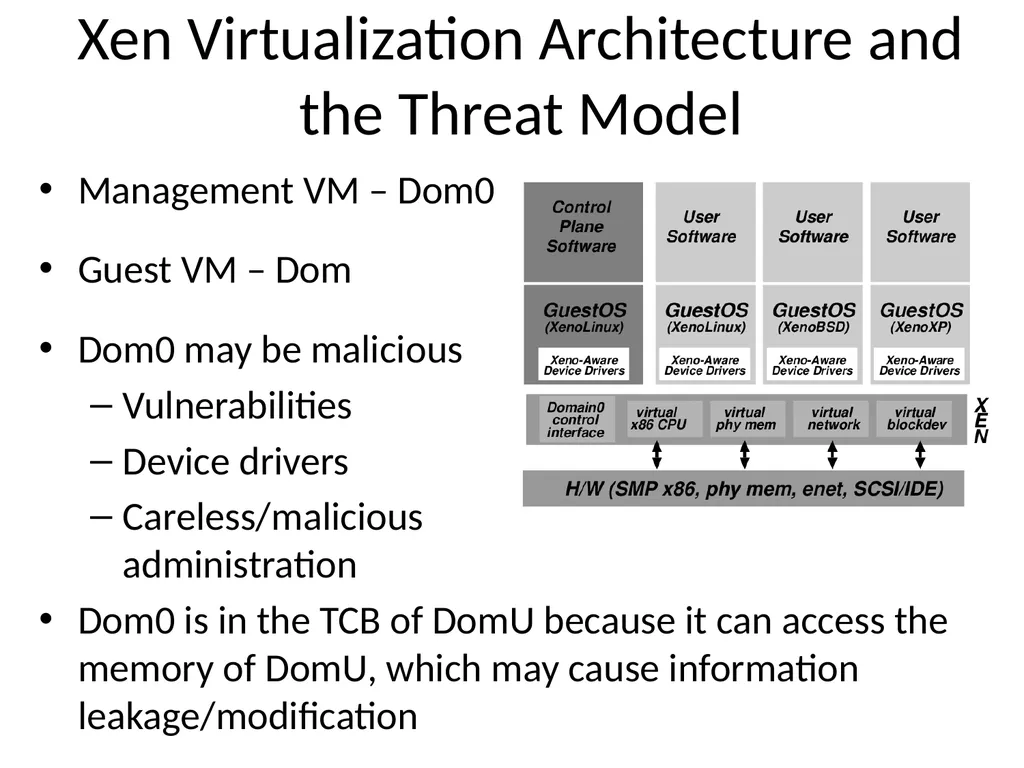
Xen Virtualization Architecture and the Threat Model Management VM – Dom0
Guest VM – Dom
Dom0 may be malicious
Vulnerabilities
Device drivers
Careless/malicious administration
Dom0 is in the TCB of DomU because it can access the memory of DomU, which may cause information leakage/modification<br>
09
Virtualization Security Requirements Scenario: A client uses the service of a cloud computing company to build a remote VM
A secure network interface
A secure secondary storage
A secure run-time environment
Build, save, restore, destroy<br>
10
Virtualization Security Requirements A secure run-time environment is the most fundamental
The first two problems already have solutions:
Network interface: Transport layer security (TLS)
Secondary storage: Network file system (NFS)
The security mechanism in the first two rely on a secure run-time environment
All the cryptographic algorithms and security protocols reside in the run-time environment<br>
11
Smaller TCB Solution Smaller TCB Actual TCB *Secure Virtual Machine Execution under an Untrusted Management OS. C. Li, A. Raghunathan, N.K. Jha. IEEE CLOUD, 2010.<br>
12
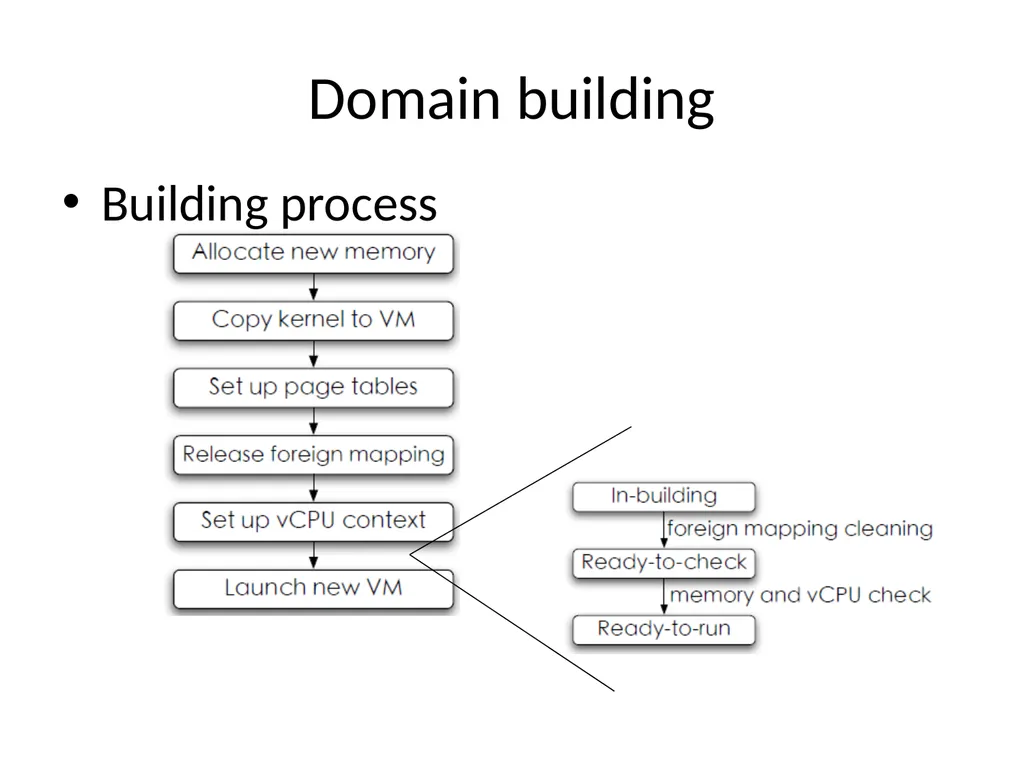
Domain building Building process<br>
13
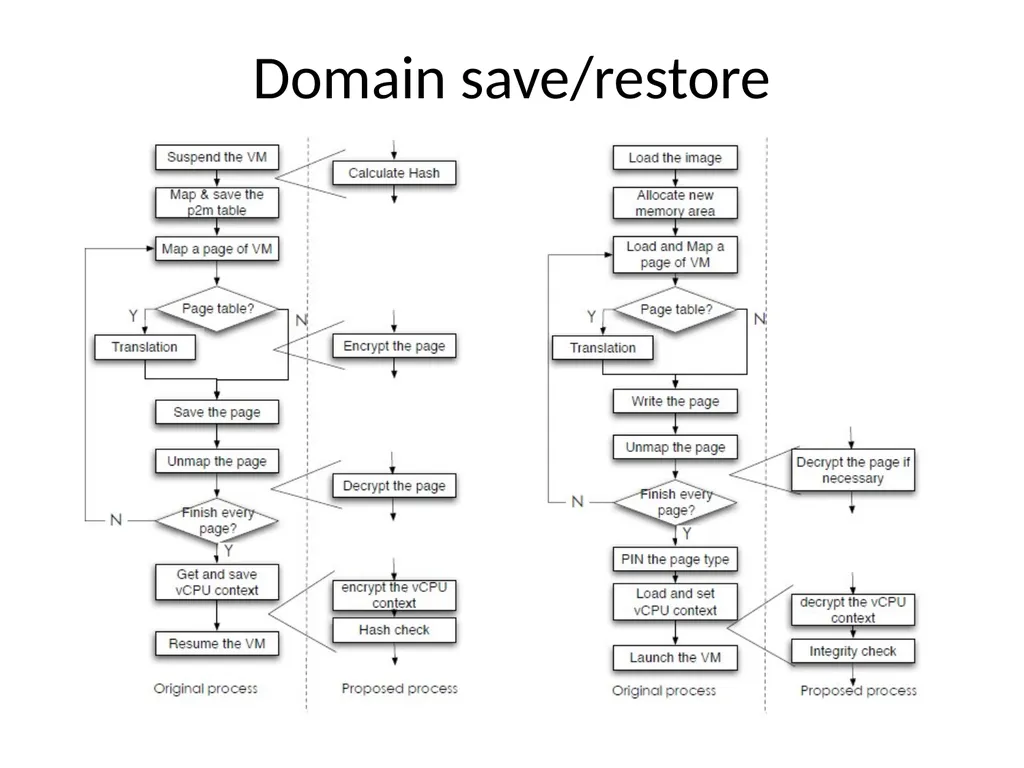
Domain save/restore<br>
14
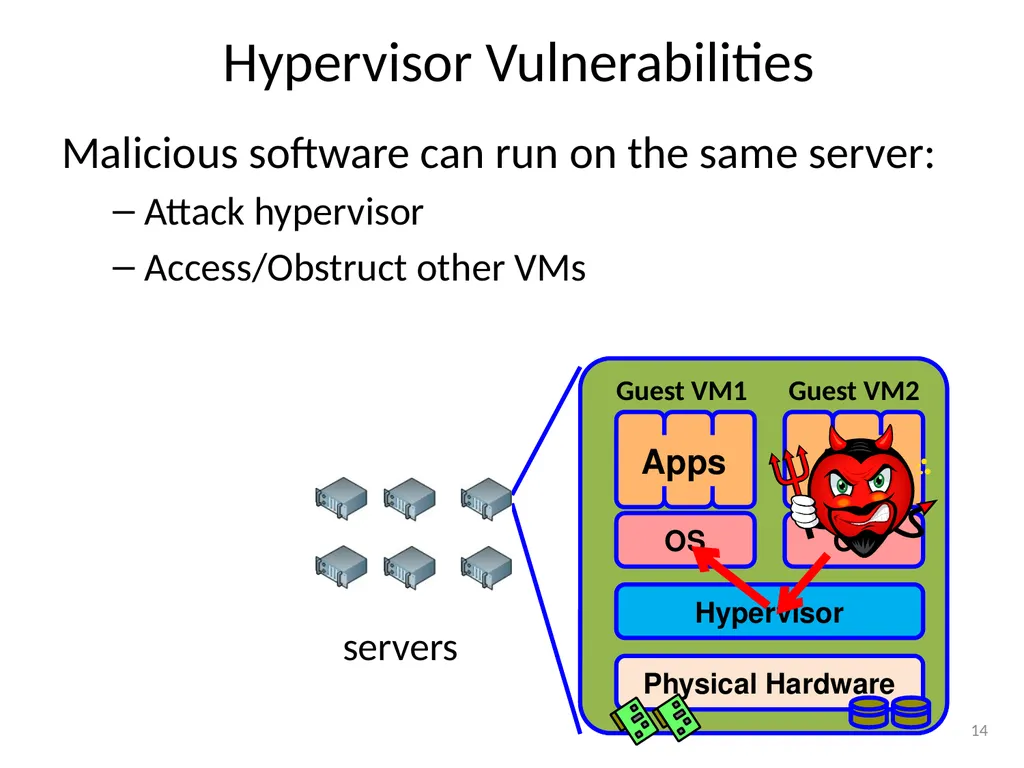
Hypervisor Vulnerabilities Malicious software can run on the same server:
Attack hypervisor
Access/Obstruct other VMs 14 Physical Hardware Hypervisor OS OS Apps Apps Guest VM1 Guest VM2 servers<br>
15
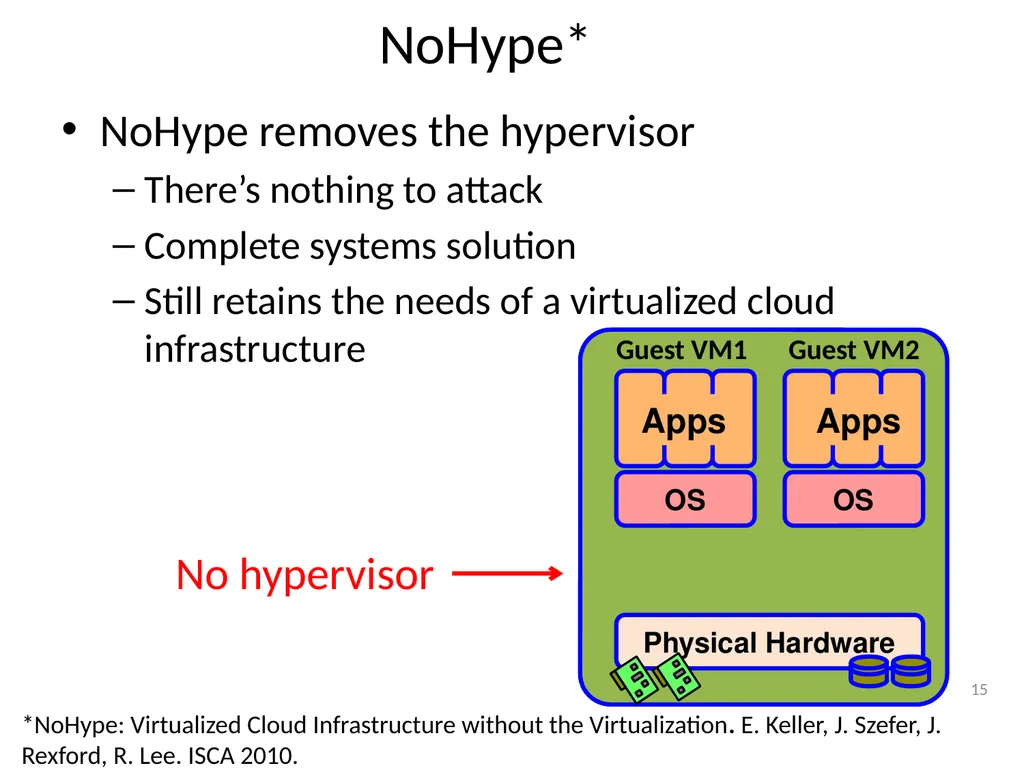
NoHype* NoHype removes the hypervisor
There’s nothing to attack
Complete systems solution
Still retains the needs of a virtualized cloud infrastructure 15 Physical Hardware OS OS Apps Apps Guest VM1 Guest VM2 No hypervisor *NoHype: Virtualized Cloud Infrastructure without the Virtualization. E. Keller, J. Szefer, J. Rexford, R. Lee. ISCA 2010.<br>
16
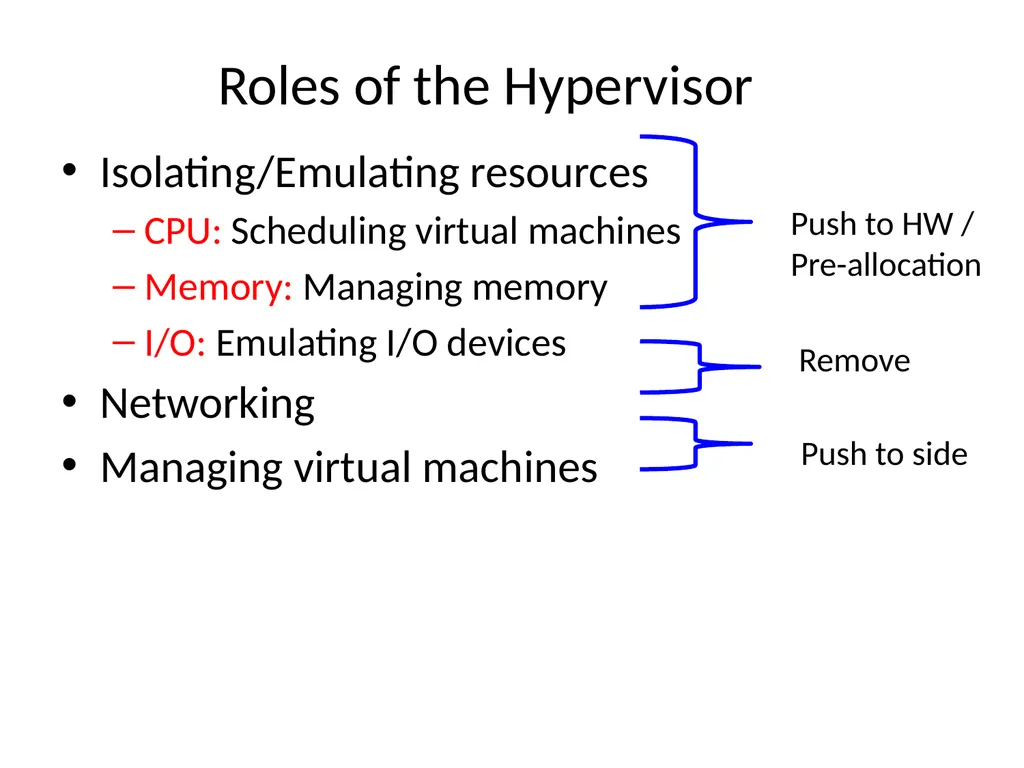
Roles of the Hypervisor Isolating/Emulating resources
CPU: Scheduling virtual machines
Memory: Managing memory
I/O: Emulating I/O devices
Networking
Managing virtual machines Push to HW /
Pre-allocation Remove Push to side<br>
17
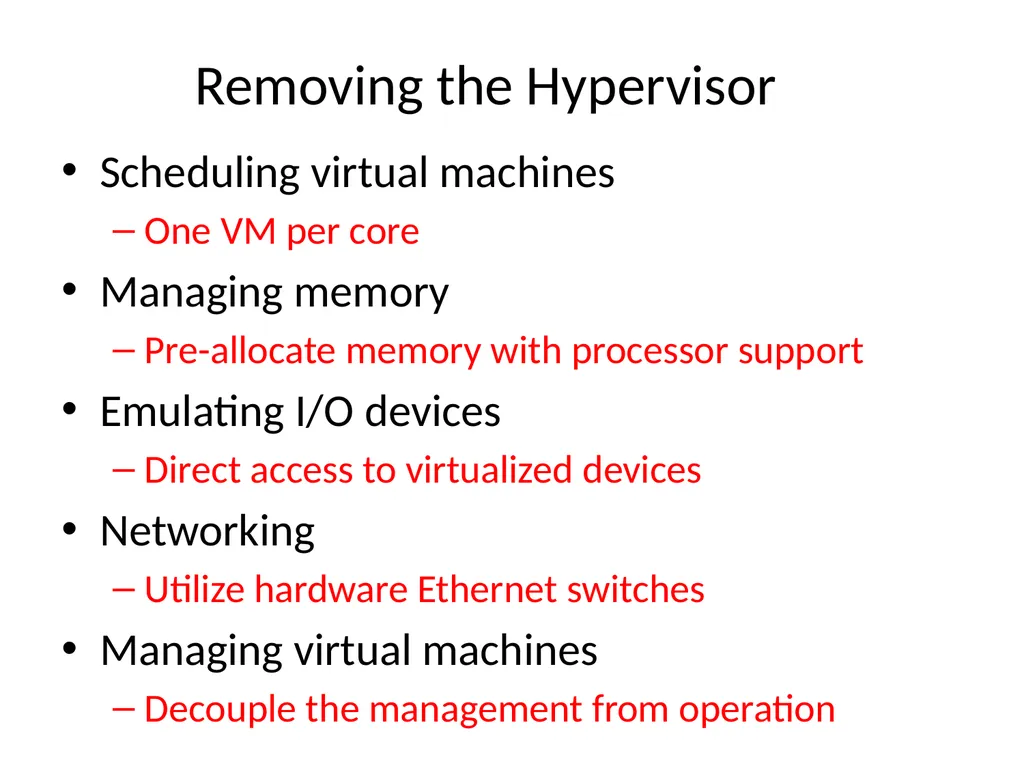
Removing the Hypervisor Scheduling virtual machines
One VM per core
Managing memory
Pre-allocate memory with processor support
Emulating I/O devices
Direct access to virtualized devices
Networking
Utilize hardware Ethernet switches
Managing virtual machines
Decouple the management from operation<br>
18
References http://www.vmware.com/pdf/virtualization.pdf
NoHype: Virtualized Cloud Infrastructure without the Virtualization. E. Keller, J. Szefer, J. Rexford, R. Lee. ISCA 2010.
Secure Virtual Machine Execution under an Untrusted Management OS. C. Li, A. Raghunathan, N.K. Jha. IEEE CLOUD, 2010.
An Introduction to Virtualization and Cloud Technologies to Support Grid Computing. I.M. Lorente. EGEE08.<br>