
Windows Azure Storage – A Highly Available Cloud
OM
Published · 34 slides · 0 views
1 / 1

Description
Windows Azure Storage A Highly Available Cloud Storage Service with Strong Consistency Brad Calder, Ju Wang, Aaron Ogus, Niranjan Nilakantan, Arild Skjolsvold, Sam McKelvie, Yikang Xu, Shashwat Srivastav, Jiesheng Wu, Huseyin Simitci,
Related Topics
Share
Embed code
Download this presentation From Below
"Windows Azure Storage – A Highly Available Cloud" is the property of its rightful owner. Permission is granted to download and print the materials on this website for personal, non-commercial use only, and to display it on your personal computer provided you do not modify the materials and that you retain all copyright notices contained in the materials. By downloading content from our website, you accept the terms of this agreement.
Presentation Transcript
01
Windows Azure Storage –
A Highly Available Cloud Storage Service with Strong Consistency Brad Calder, Ju Wang, Aaron Ogus, Niranjan Nilakantan, Arild Skjolsvold, Sam McKelvie, Yikang Xu, Shashwat Srivastav, Jiesheng Wu, Huseyin Simitci, Jaidev Haridas, Chakravarthy Uddaraju, Hemal Khatri, Andrew Edwards, Vaman Bedekar, Shane Mainali, Rafay Abbasi, Arpit Agarwal, Mian Fahim ul Haq, Muhammad Ikram ul Haq, Deepali Bhardwaj, Sowmya Dayanand, Anitha Adusumilli, Marvin McNett, Sriram Sankaran, Kavitha Manivannan, Leonidas Rigas
Microsoft Corporation<br>
Microsoft Corporation<br>
02
Windows Azure Storage – Agenda What it is and Data Abstractions
Architecture and How it Works
Storage Stamp
Partition Layer
Stream Layer
Design Choices and Lessons Learned<br>
Architecture and How it Works
Storage Stamp
Partition Layer
Stream Layer
Design Choices and Lessons Learned<br>
03
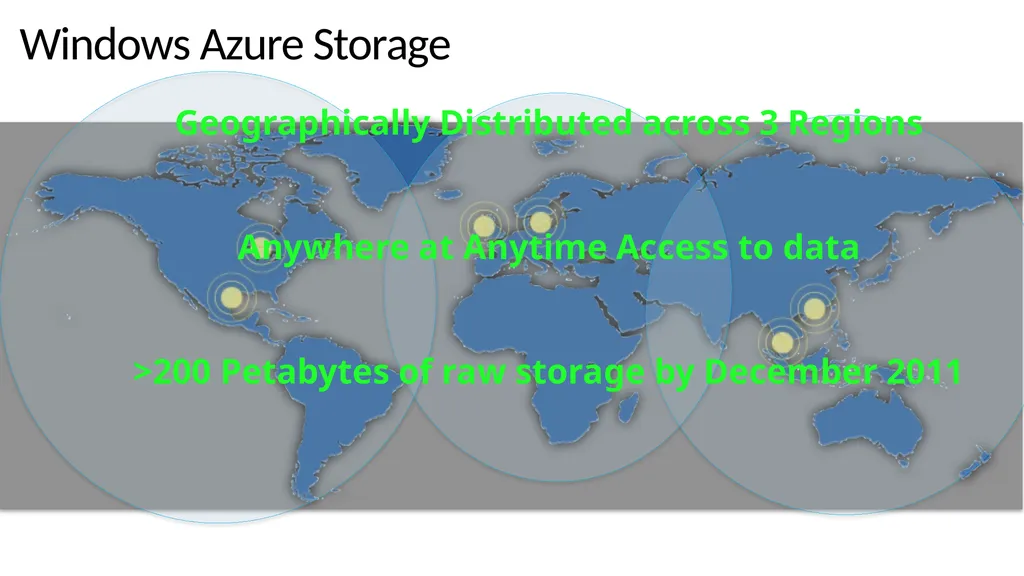
Windows Azure Storage Geographically Distributed across 3 Regions
Anywhere at Anytime Access to data
>200 Petabytes of raw storage by December 2011<br>
Anywhere at Anytime Access to data
>200 Petabytes of raw storage by December 2011<br>
04
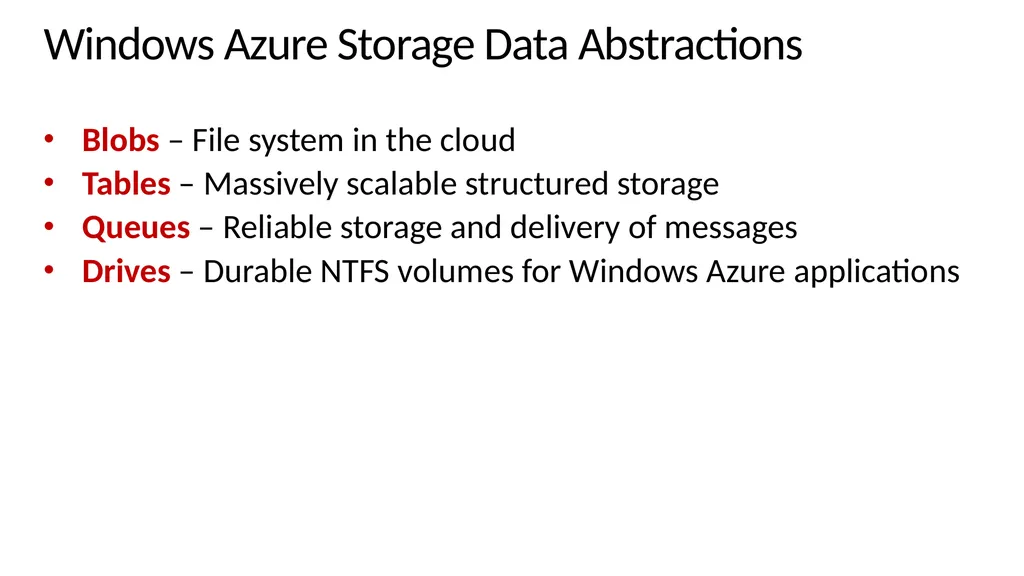
Windows Azure Storage Data Abstractions Blobs – File system in the cloud
Tables – Massively scalable structured storage
Queues – Reliable storage and delivery of messages
Drives – Durable NTFS volumes for Windows Azure applications<br>
Tables – Massively scalable structured storage
Queues – Reliable storage and delivery of messages
Drives – Durable NTFS volumes for Windows Azure applications<br>
05
Windows Azure Storage High Level Architecture<br>
06
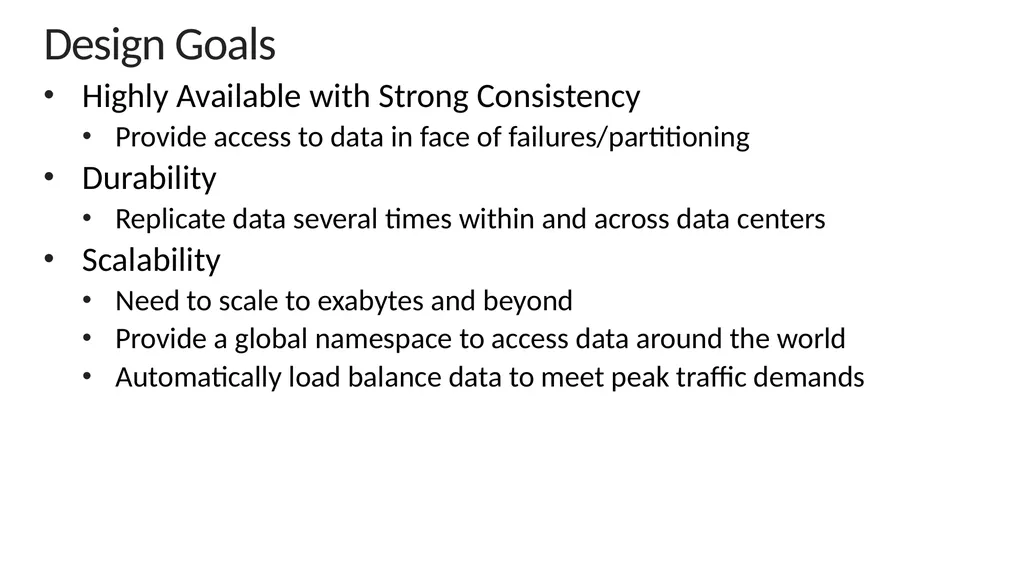
Design Goals Highly Available with Strong Consistency
Provide access to data in face of failures/partitioning
Durability
Replicate data several times within and across data centers
Scalability
Need to scale to exabytes and beyond
Provide a global namespace to access data around the world
Automatically load balance data to meet peak traffic demands<br>
Provide access to data in face of failures/partitioning
Durability
Replicate data several times within and across data centers
Scalability
Need to scale to exabytes and beyond
Provide a global namespace to access data around the world
Automatically load balance data to meet peak traffic demands<br>
07
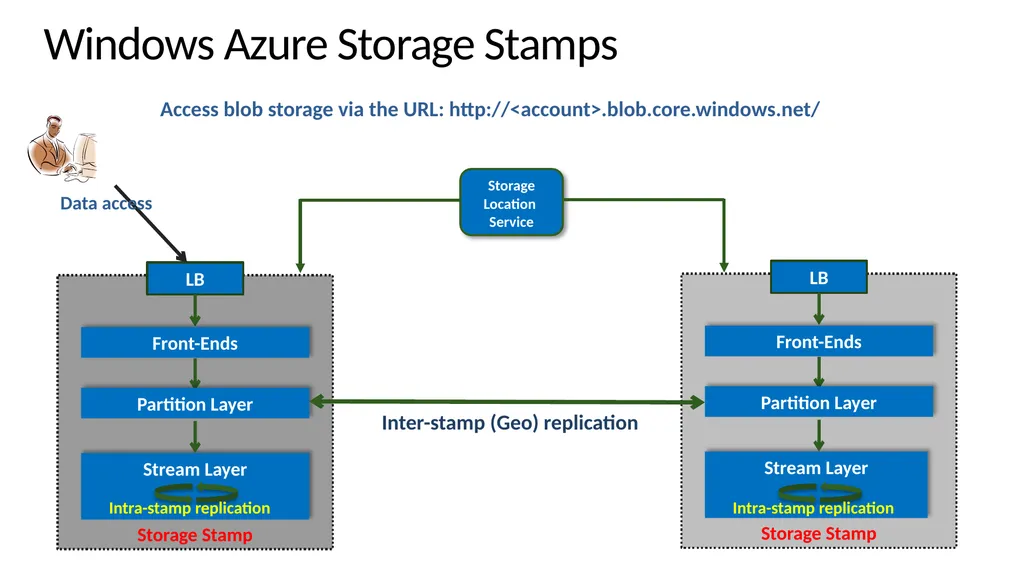
Windows Azure Storage Stamps Storage Stamp LB Storage
Location
Service Access blob storage via the URL: http://<account>.blob.core.windows.net/ Partition Layer Front-Ends Stream Layer<br>
Location
Service Access blob storage via the URL: http://<account>.blob.core.windows.net/ Partition Layer Front-Ends Stream Layer<br>
08
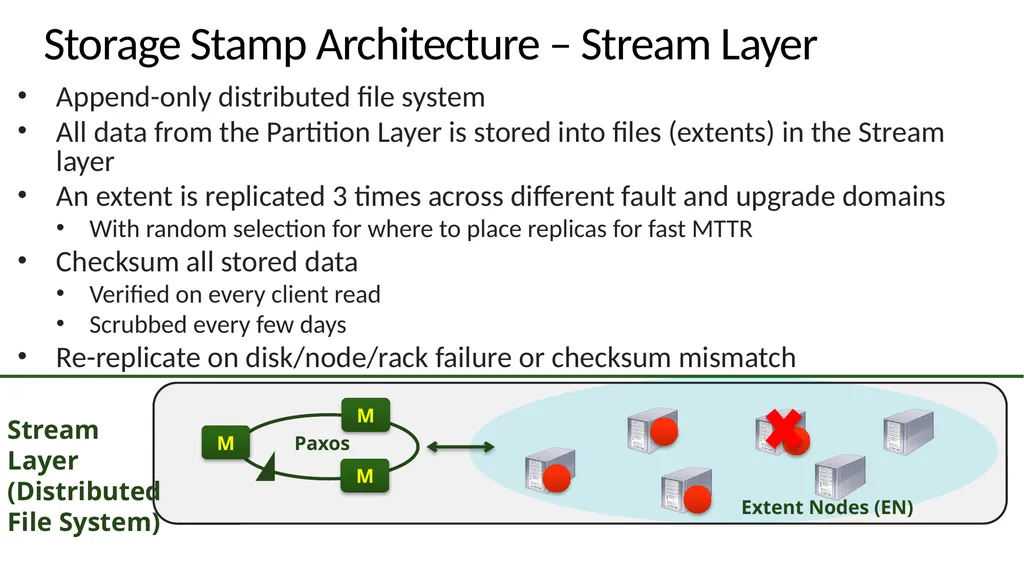
Storage Stamp Architecture – Stream Layer Append-only distributed file system
All data from the Partition Layer is stored into files (extents) in the Stream layer
An extent is replicated 3 times across different fault and upgrade domains
With random selection for where to place replicas for fast MTTR
Checksum all stored data
Verified on every client read
Scrubbed every few days
Re-replicate on disk/node/rack failure or checksum mismatch M Extent Nodes (EN) Paxos M M Stream Layer
(Distributed
File System)<br>
All data from the Partition Layer is stored into files (extents) in the Stream layer
An extent is replicated 3 times across different fault and upgrade domains
With random selection for where to place replicas for fast MTTR
Checksum all stored data
Verified on every client read
Scrubbed every few days
Re-replicate on disk/node/rack failure or checksum mismatch M Extent Nodes (EN) Paxos M M Stream Layer
(Distributed
File System)<br>
09
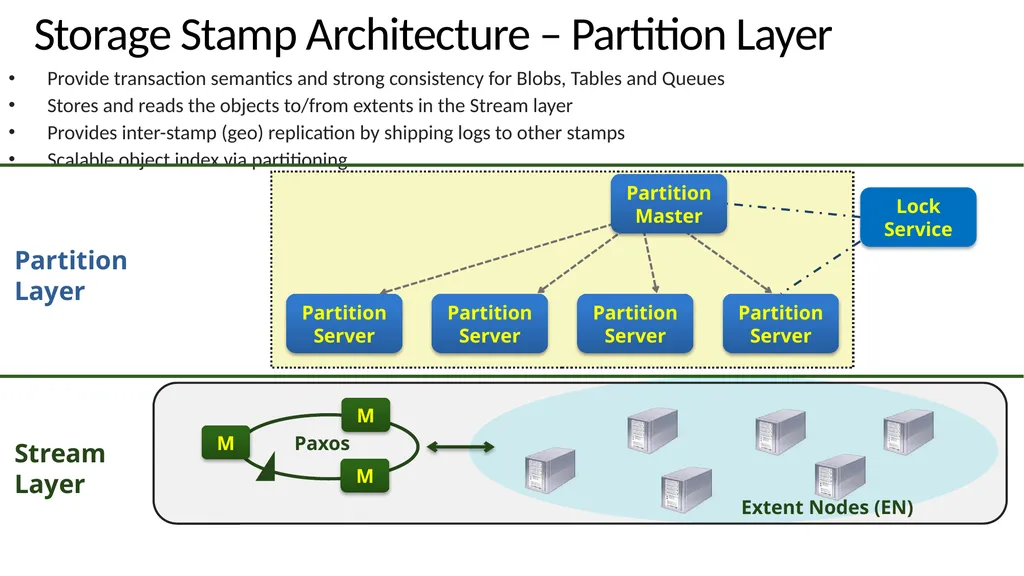
Storage Stamp Architecture – Partition Layer Provide transaction semantics and strong consistency for Blobs, Tables and Queues
Stores and reads the objects to/from extents in the Stream layer
Provides inter-stamp (geo) replication by shipping logs to other stamps
Scalable object index via partitioning M Extent Nodes (EN) Paxos M M Partition
Server Partition
Server Partition
Server Partition
Server Partition
Master Lock Service Partition Layer Stream
Layer<br>
Stores and reads the objects to/from extents in the Stream layer
Provides inter-stamp (geo) replication by shipping logs to other stamps
Scalable object index via partitioning M Extent Nodes (EN) Paxos M M Partition
Server Partition
Server Partition
Server Partition
Server Partition
Master Lock Service Partition Layer Stream
Layer<br>
10
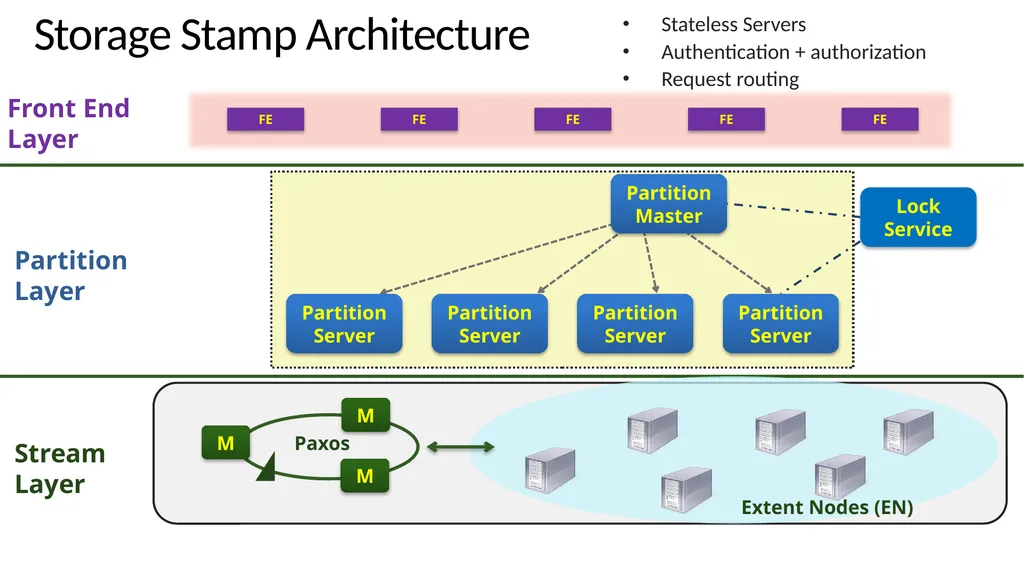
Storage Stamp Architecture Stateless Servers
Authentication + authorization
Request routing M Extent Nodes (EN) Paxos Front End Layer FE M M Partition
Server Partition
Server Partition
Server Partition
Server Partition
Master FE FE FE FE Lock Service Partition Layer Stream
Layer<br>
Authentication + authorization
Request routing M Extent Nodes (EN) Paxos Front End Layer FE M M Partition
Server Partition
Server Partition
Server Partition
Server Partition
Master FE FE FE FE Lock Service Partition Layer Stream
Layer<br>
11
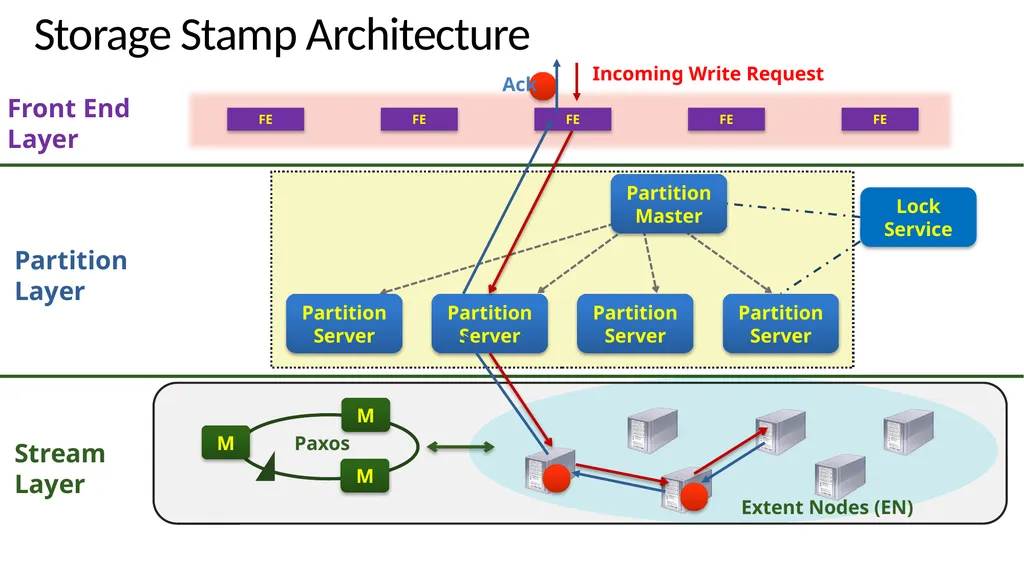
Storage Stamp Architecture M Extent Nodes (EN) Paxos Front End Layer FE Incoming Write Request M M Partition
Server Partition
Server Partition
Server Partition
Server Partition
Master FE FE FE FE Lock Service Ack Partition Layer Stream
Layer<br>
Server Partition
Server Partition
Server Partition
Server Partition
Master FE FE FE FE Lock Service Ack Partition Layer Stream
Layer<br>
12
Partition Layer<br>
13
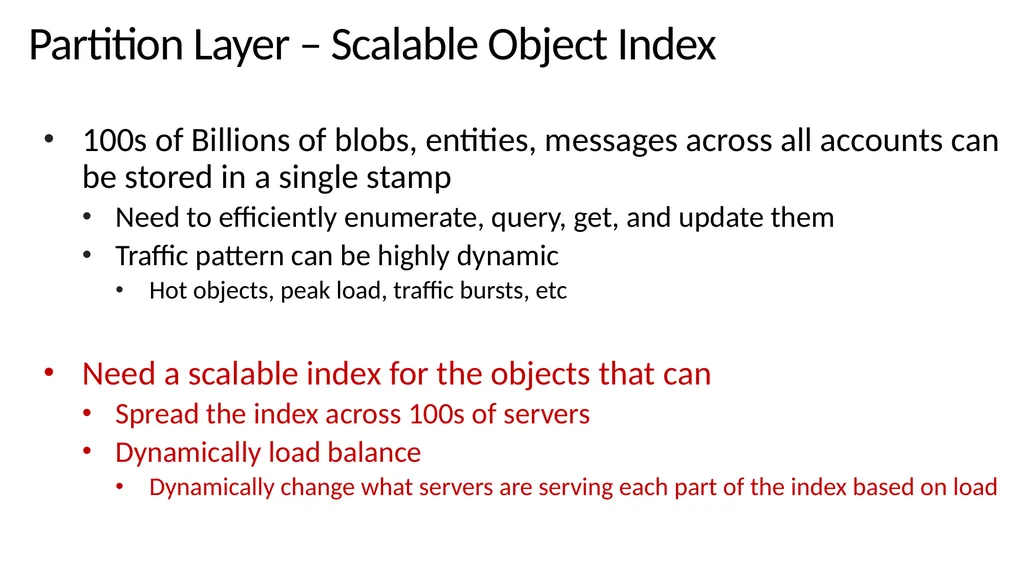
Partition Layer – Scalable Object Index 100s of Billions of blobs, entities, messages across all accounts can be stored in a single stamp
Need to efficiently enumerate, query, get, and update them
Traffic pattern can be highly dynamic
Hot objects, peak load, traffic bursts, etc
Need a scalable index for the objects that can
Spread the index across 100s of servers
Dynamically load balance
Dynamically change what servers are serving each part of the index based on load<br>
Need to efficiently enumerate, query, get, and update them
Traffic pattern can be highly dynamic
Hot objects, peak load, traffic bursts, etc
Need a scalable index for the objects that can
Spread the index across 100s of servers
Dynamically load balance
Dynamically change what servers are serving each part of the index based on load<br>
14
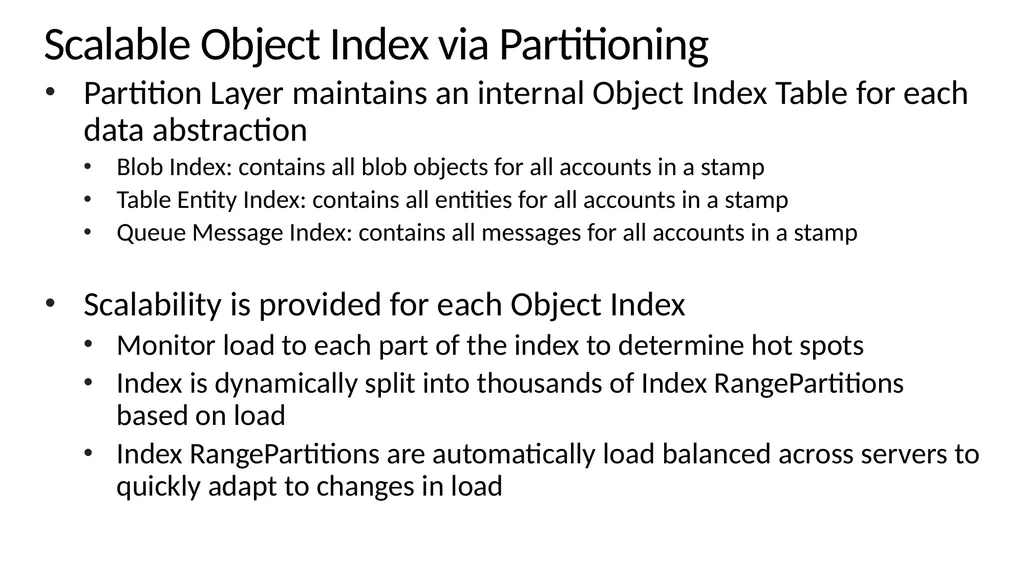
Scalable Object Index via Partitioning Partition Layer maintains an internal Object Index Table for each data abstraction
Blob Index: contains all blob objects for all accounts in a stamp
Table Entity Index: contains all entities for all accounts in a stamp
Queue Message Index: contains all messages for all accounts in a stamp
Scalability is provided for each Object Index
Monitor load to each part of the index to determine hot spots
Index is dynamically split into thousands of Index RangePartitions based on load
Index RangePartitions are automatically load balanced across servers to quickly adapt to changes in load<br>
Blob Index: contains all blob objects for all accounts in a stamp
Table Entity Index: contains all entities for all accounts in a stamp
Queue Message Index: contains all messages for all accounts in a stamp
Scalability is provided for each Object Index
Monitor load to each part of the index to determine hot spots
Index is dynamically split into thousands of Index RangePartitions based on load
Index RangePartitions are automatically load balanced across servers to quickly adapt to changes in load<br>
15
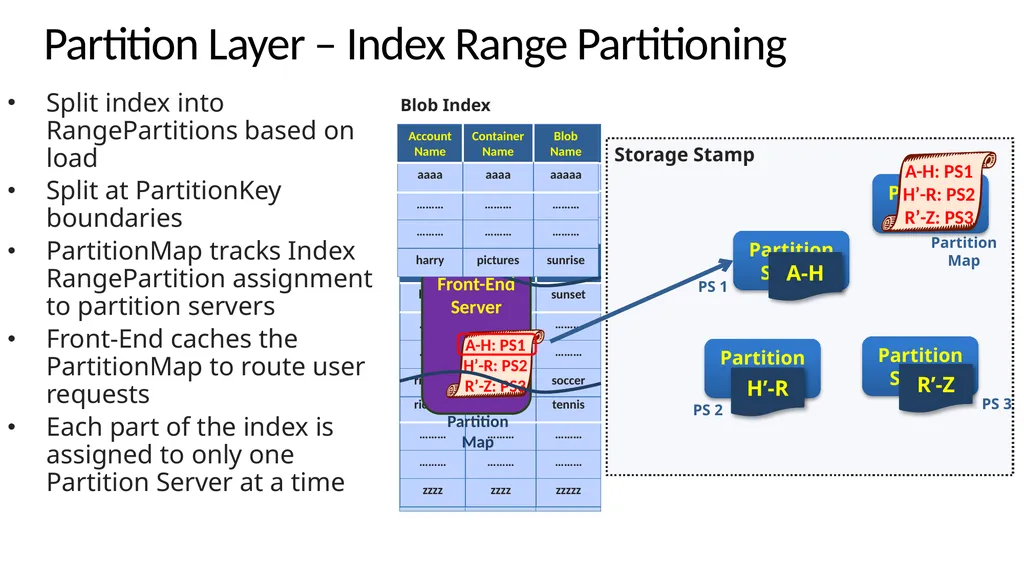
Split index into RangePartitions based on load
Split at PartitionKey boundaries
PartitionMap tracks Index RangePartition assignment to partition servers
Front-End caches the PartitionMap to route user requests
Each part of the index is assigned to only one Partition Server at a time Storage Stamp Partition
Server Partition
Server Partition
Server Partition Master Partition Layer – Index Range Partitioning Front-End
Server PS 2 PS 3 PS 1 Partition
Map Blob Index Partition Map A-H R’-Z H’-R<br>
Split at PartitionKey boundaries
PartitionMap tracks Index RangePartition assignment to partition servers
Front-End caches the PartitionMap to route user requests
Each part of the index is assigned to only one Partition Server at a time Storage Stamp Partition
Server Partition
Server Partition
Server Partition Master Partition Layer – Index Range Partitioning Front-End
Server PS 2 PS 3 PS 1 Partition
Map Blob Index Partition Map A-H R’-Z H’-R<br>
16
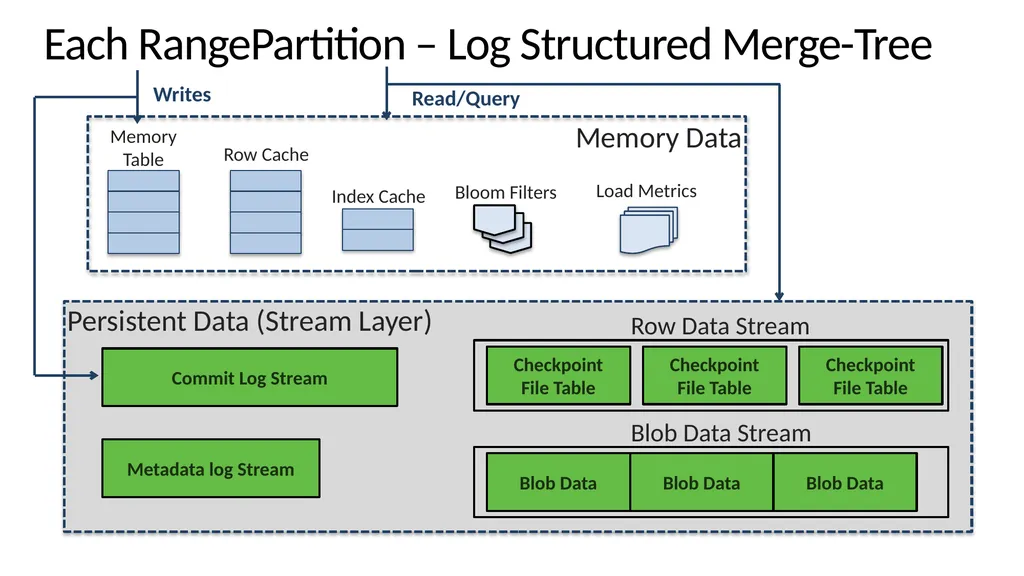
Each RangePartition – Log Structured Merge-Tree Commit Log Stream Metadata log Stream Persistent Data (Stream Layer)<br>
17
Stream Layer<br>
18
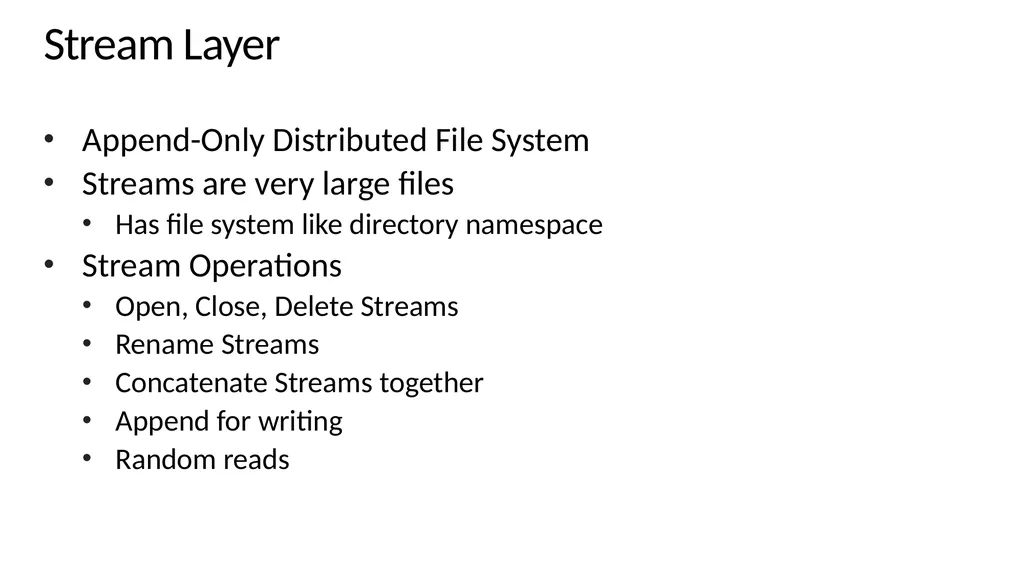
Stream Layer Append-Only Distributed File System
Streams are very large files
Has file system like directory namespace
Stream Operations
Open, Close, Delete Streams
Rename Streams
Concatenate Streams together
Append for writing
Random reads<br>
Streams are very large files
Has file system like directory namespace
Stream Operations
Open, Close, Delete Streams
Rename Streams
Concatenate Streams together
Append for writing
Random reads<br>
19
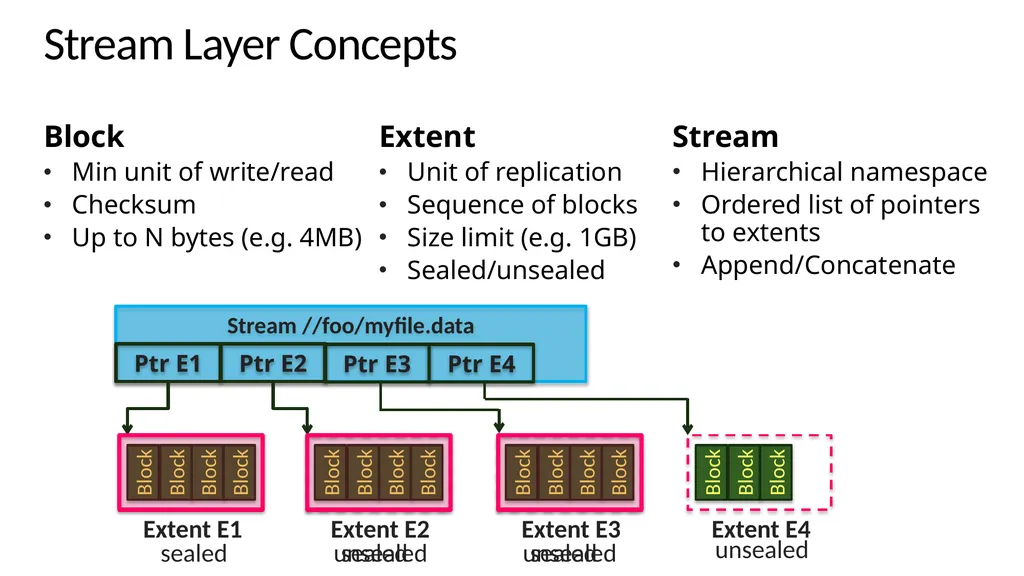
Block Block Block Block Block Block Block Block Stream Layer Concepts Block
Min unit of write/read
Checksum
Up to N bytes (e.g. 4MB) Extent
Unit of replication
Sequence of blocks
Size limit (e.g. 1GB)
Sealed/unsealed Stream
Hierarchical namespace
Ordered list of pointers to extents
Append/Concatenate Block Block Block Block Block Block Block Ptr E3 Ptr E4 sealed unsealed sealed unsealed sealed unsealed<br>
Min unit of write/read
Checksum
Up to N bytes (e.g. 4MB) Extent
Unit of replication
Sequence of blocks
Size limit (e.g. 1GB)
Sealed/unsealed Stream
Hierarchical namespace
Ordered list of pointers to extents
Append/Concatenate Block Block Block Block Block Block Block Ptr E3 Ptr E4 sealed unsealed sealed unsealed sealed unsealed<br>
20
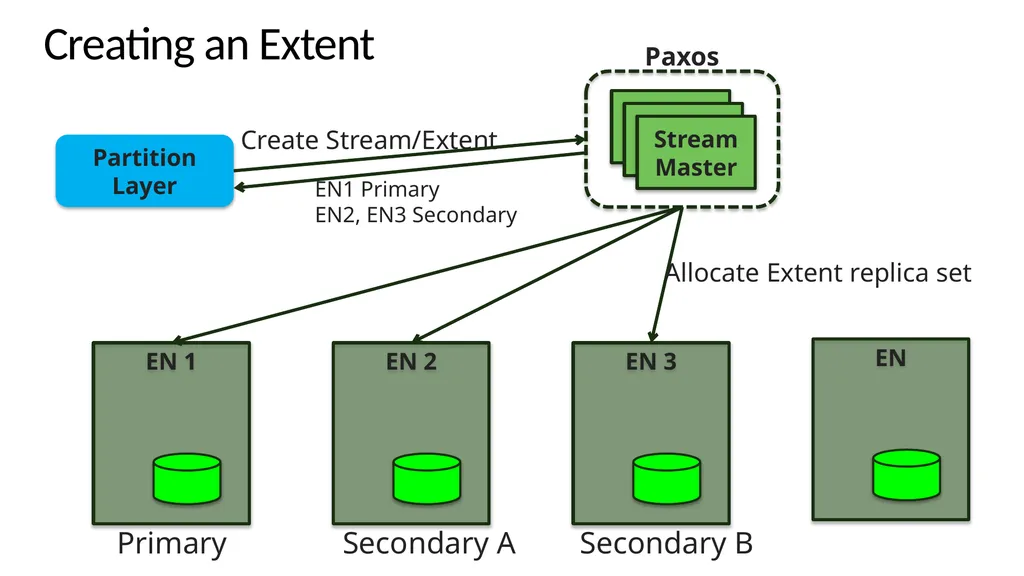
Creating an Extent Partition Layer EN1 Primary
EN2, EN3 Secondary<br>
21
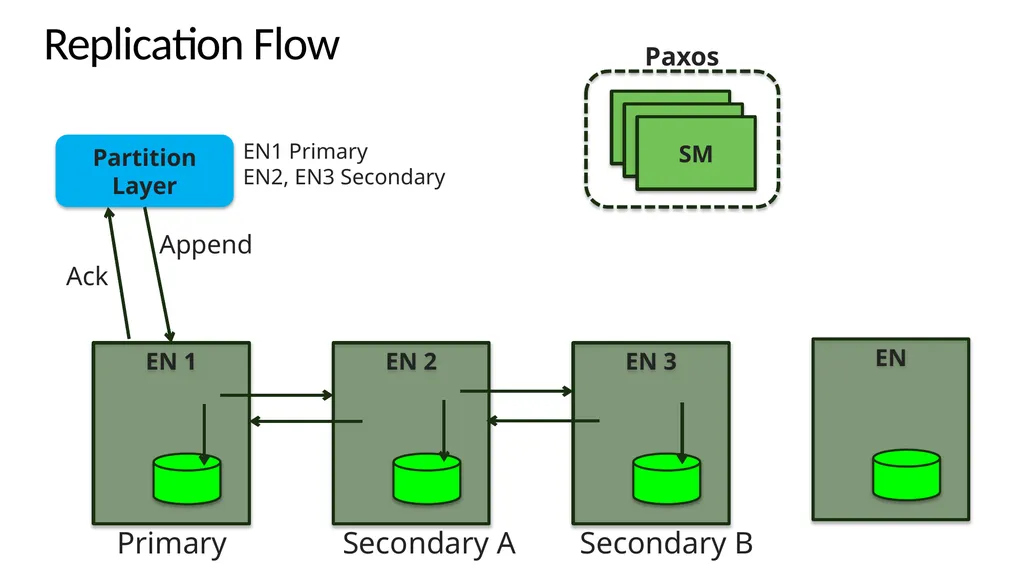
Replication Flow Partition Layer Append Ack EN1 Primary
EN2, EN3 Secondary<br>
22
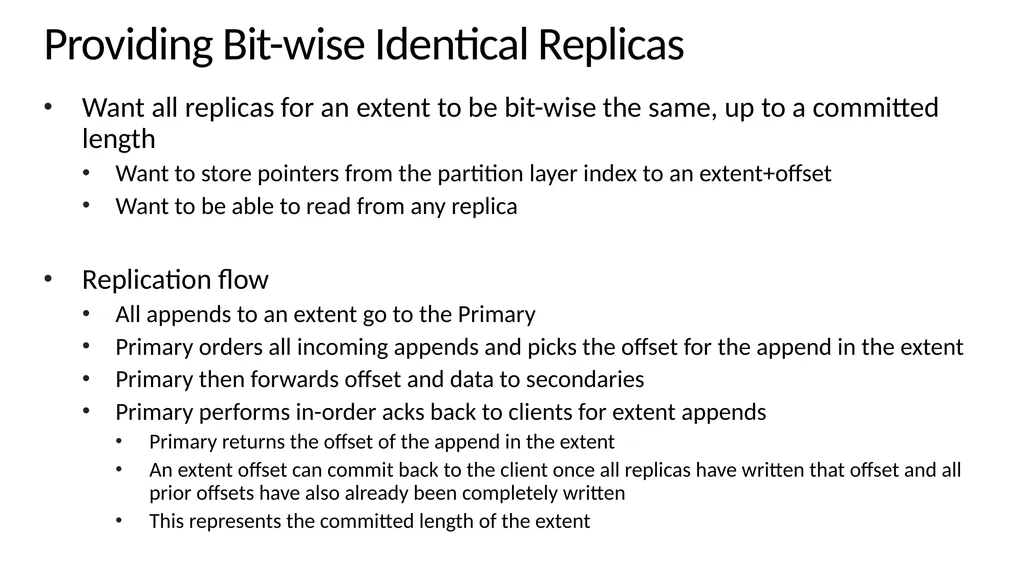
Providing Bit-wise Identical Replicas Want all replicas for an extent to be bit-wise the same, up to a committed length
Want to store pointers from the partition layer index to an extent+offset
Want to be able to read from any replica
Replication flow
All appends to an extent go to the Primary
Primary orders all incoming appends and picks the offset for the append in the extent
Primary then forwards offset and data to secondaries
Primary performs in-order acks back to clients for extent appends
Primary returns the offset of the append in the extent
An extent offset can commit back to the client once all replicas have written that offset and all prior offsets have also already been completely written
This represents the committed length of the extent<br>
Want to store pointers from the partition layer index to an extent+offset
Want to be able to read from any replica
Replication flow
All appends to an extent go to the Primary
Primary orders all incoming appends and picks the offset for the append in the extent
Primary then forwards offset and data to secondaries
Primary performs in-order acks back to clients for extent appends
Primary returns the offset of the append in the extent
An extent offset can commit back to the client once all replicas have written that offset and all prior offsets have also already been completely written
This represents the committed length of the extent<br>
23
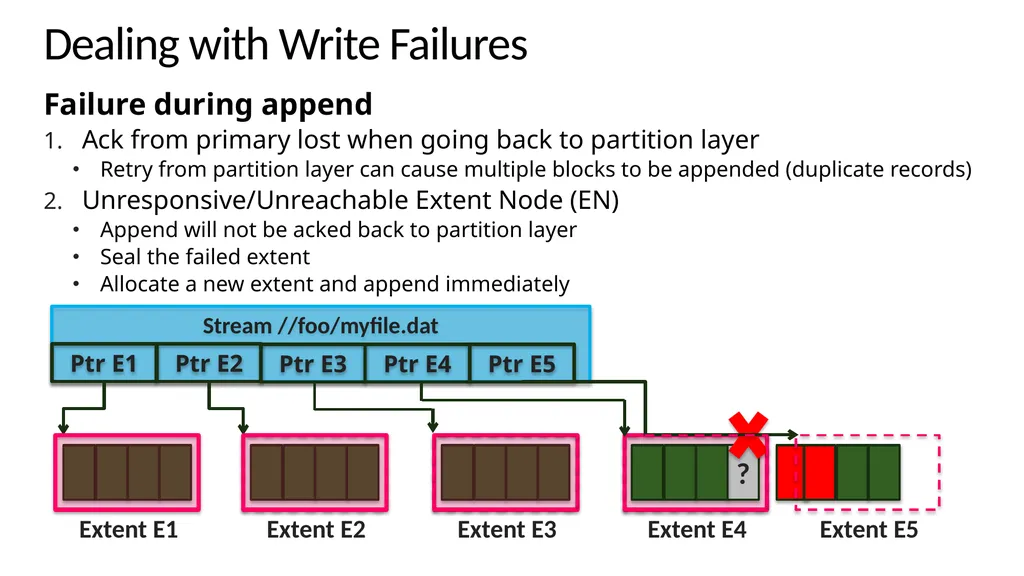
? Dealing with Write Failures Failure during append
Ack from primary lost when going back to partition layer
Retry from partition layer can cause multiple blocks to be appended (duplicate records)
Unresponsive/Unreachable Extent Node (EN)
Append will not be acked back to partition layer
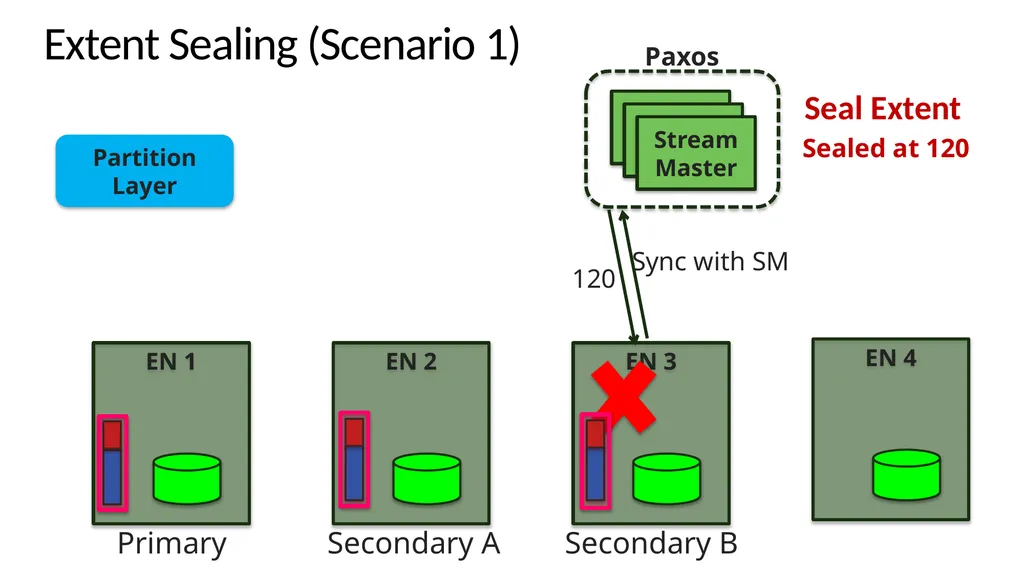
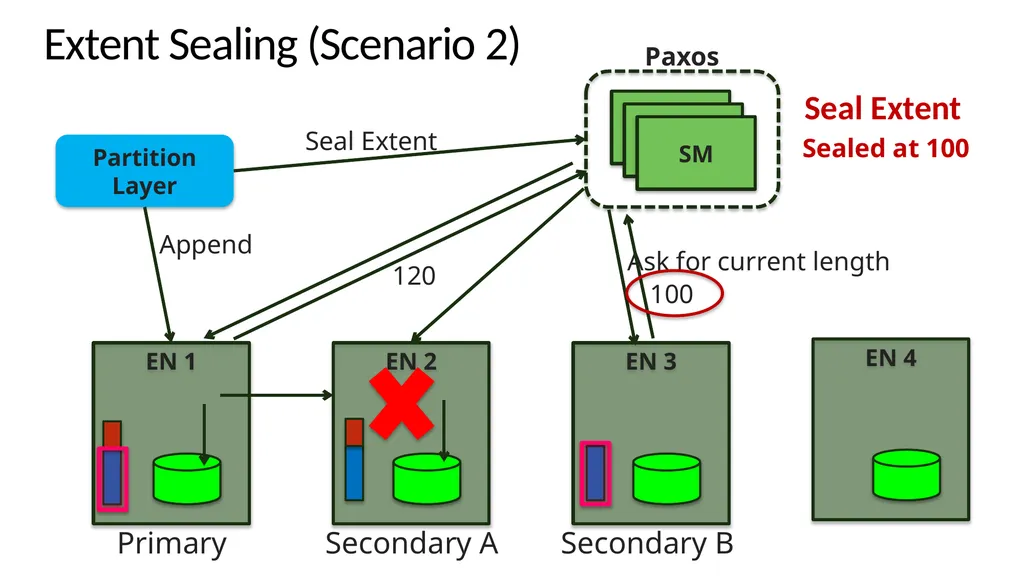
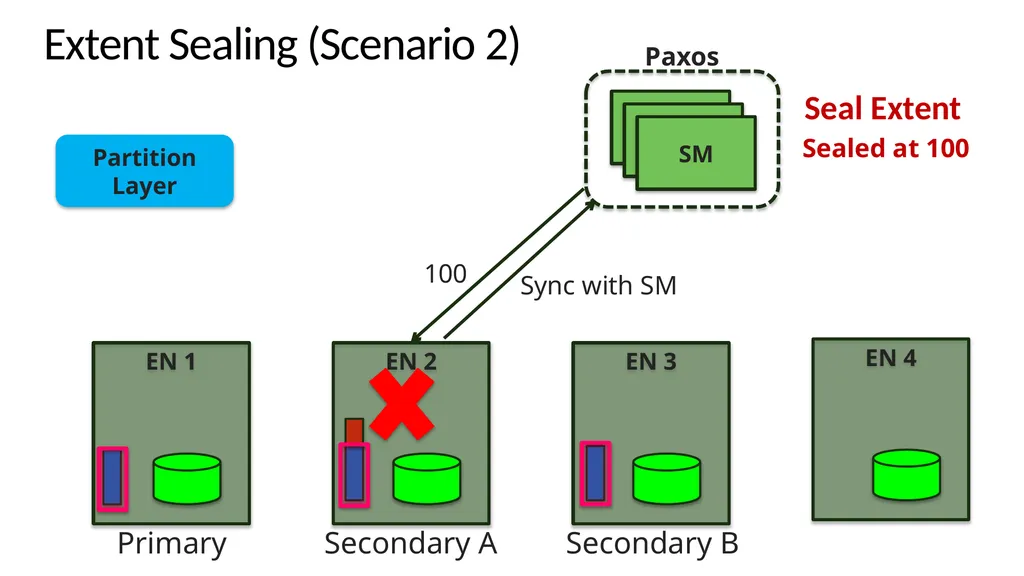
Seal the failed extent
Allocate a new extent and append immediately Ptr E5<br>
Ack from primary lost when going back to partition layer
Retry from partition layer can cause multiple blocks to be appended (duplicate records)
Unresponsive/Unreachable Extent Node (EN)
Append will not be acked back to partition layer
Seal the failed extent
Allocate a new extent and append immediately Ptr E5<br>
24
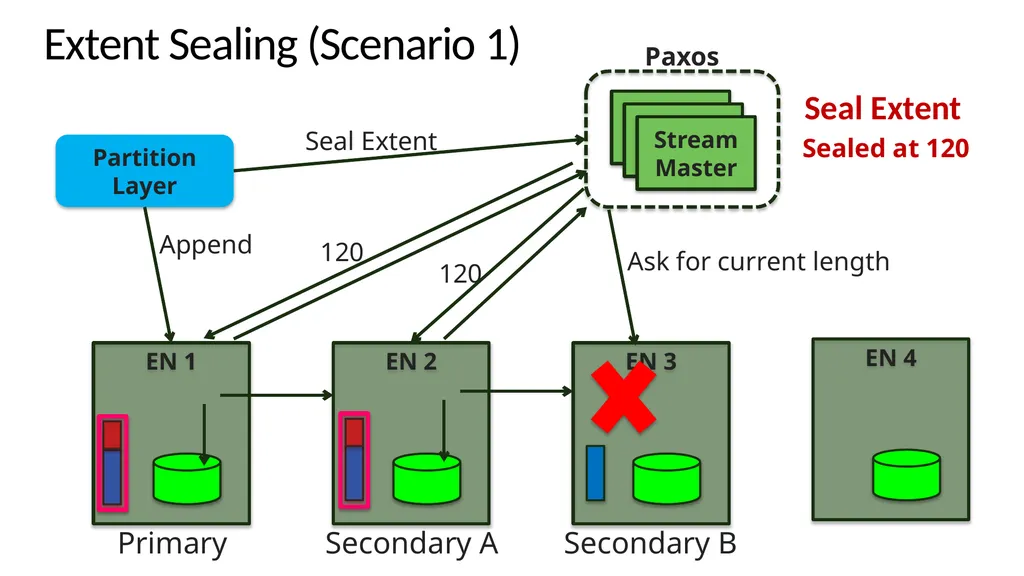
Extent Sealing (Scenario 1) Partition Layer Append Ask for current length 120 120 Sealed at 120 Seal Extent<br>
25
Extent Sealing (Scenario 1) Partition Layer Sync with SM 120 Sealed at 120 Seal Extent<br>
26
Extent Sealing (Scenario 2) Partition Layer Append Ask for current length 120 Sealed at 100 Seal Extent 100<br>
27
Extent Sealing (Scenario 2) Partition Layer Sync with SM Sealed at 100 Seal Extent 100<br>
28
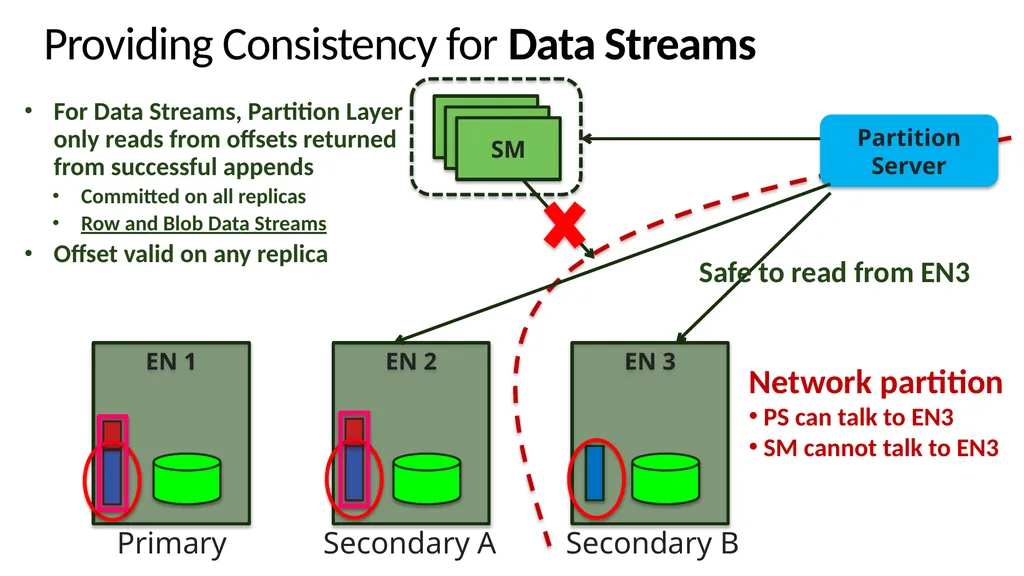
Providing Consistency for Data Streams Partition Server Network partition
PS can talk to EN3
SM cannot talk to EN3 For Data Streams, Partition Layer only reads from offsets returned from successful appends
Committed on all replicas
Row and Blob Data Streams
Offset valid on any replica Safe to read from EN3<br>
PS can talk to EN3
SM cannot talk to EN3 For Data Streams, Partition Layer only reads from offsets returned from successful appends
Committed on all replicas
Row and Blob Data Streams
Offset valid on any replica Safe to read from EN3<br>
29
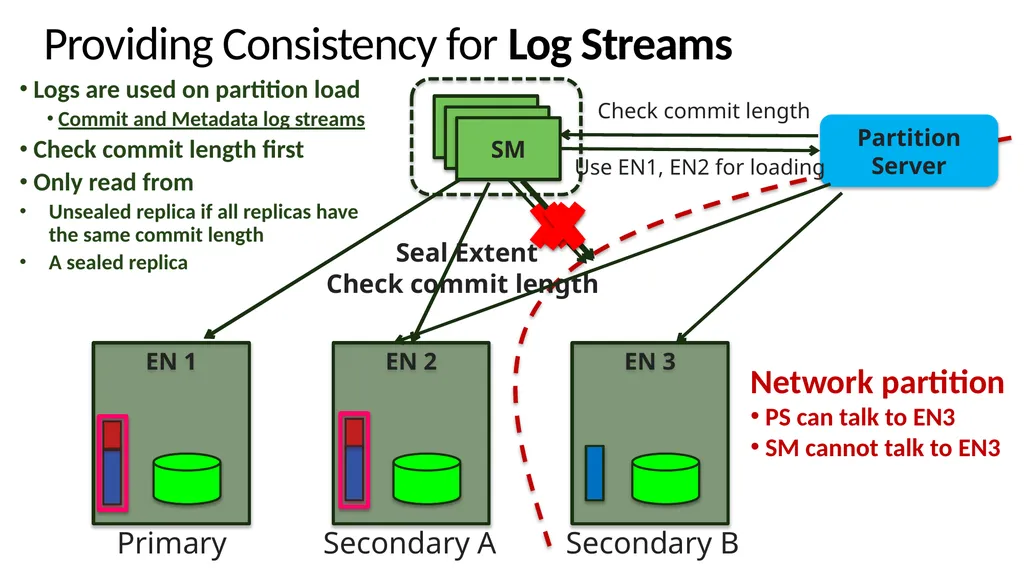
Providing Consistency for Log Streams Partition Server Check commit length Logs are used on partition load
Commit and Metadata log streams
Check commit length first
Only read from
Unsealed replica if all replicas have the same commit length
A sealed replica Check commit length Seal Extent Use EN1, EN2 for loading Network partition
PS can talk to EN3
SM cannot talk to EN3<br>
Commit and Metadata log streams
Check commit length first
Only read from
Unsealed replica if all replicas have the same commit length
A sealed replica Check commit length Seal Extent Use EN1, EN2 for loading Network partition
PS can talk to EN3
SM cannot talk to EN3<br>
30
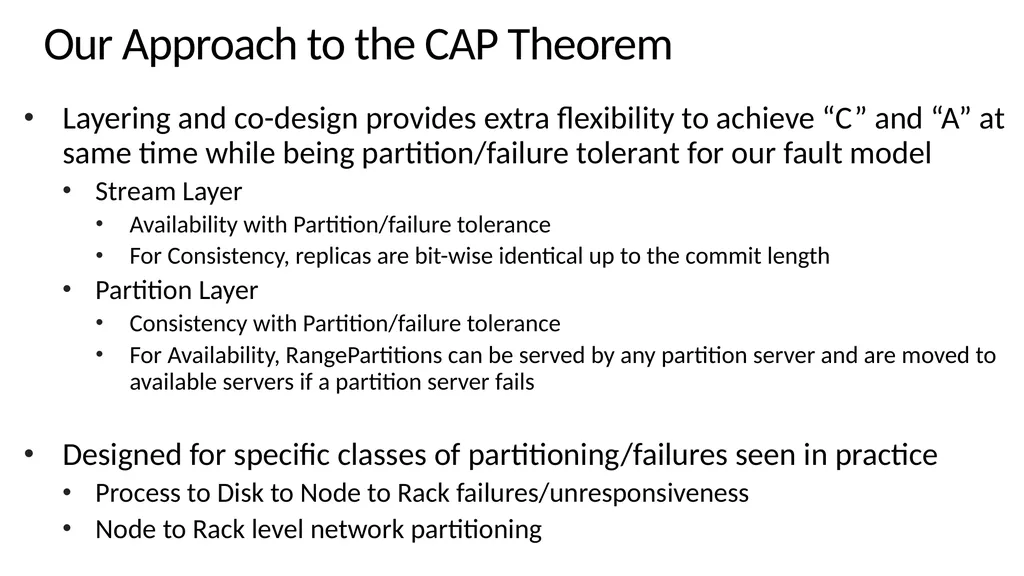
Our Approach to the CAP Theorem Layering and co-design provides extra flexibility to achieve “C” and “A” at same time while being partition/failure tolerant for our fault model
Stream Layer
Availability with Partition/failure tolerance
For Consistency, replicas are bit-wise identical up to the commit length
Partition Layer
Consistency with Partition/failure tolerance
For Availability, RangePartitions can be served by any partition server and are moved to available servers if a partition server fails
Designed for specific classes of partitioning/failures seen in practice
Process to Disk to Node to Rack failures/unresponsiveness
Node to Rack level network partitioning<br>
Stream Layer
Availability with Partition/failure tolerance
For Consistency, replicas are bit-wise identical up to the commit length
Partition Layer
Consistency with Partition/failure tolerance
For Availability, RangePartitions can be served by any partition server and are moved to available servers if a partition server fails
Designed for specific classes of partitioning/failures seen in practice
Process to Disk to Node to Rack failures/unresponsiveness
Node to Rack level network partitioning<br>
31
Design Choices and Lessons Learned<br>
32
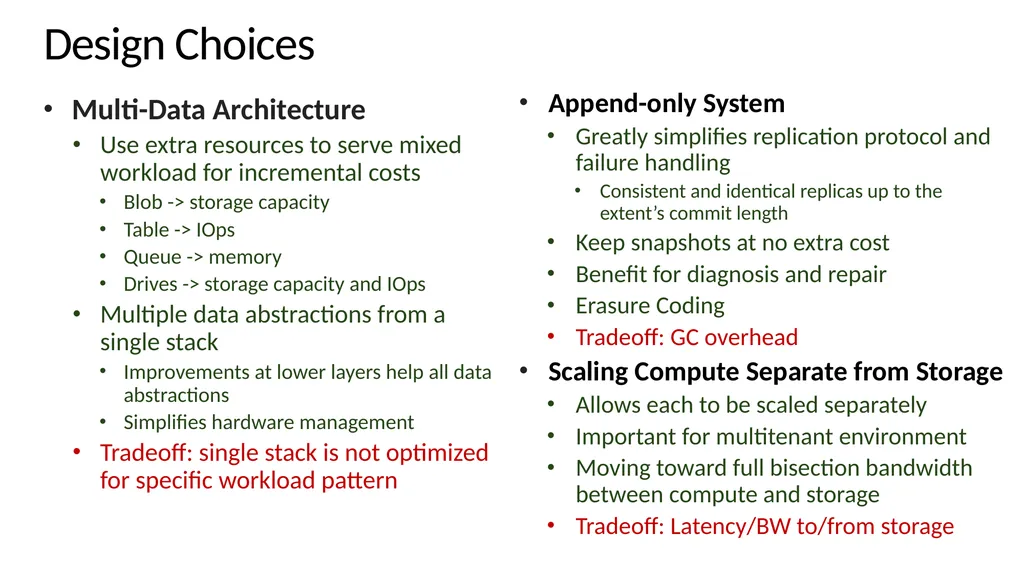
Design Choices Multi-Data Architecture
Use extra resources to serve mixed workload for incremental costs
Blob -> storage capacity
Table -> IOps
Queue -> memory
Drives -> storage capacity and IOps
Multiple data abstractions from a single stack
Improvements at lower layers help all data abstractions
Simplifies hardware management
Tradeoff: single stack is not optimized for specific workload pattern Append-only System
Greatly simplifies replication protocol and failure handling
Consistent and identical replicas up to the extent’s commit length
Keep snapshots at no extra cost
Benefit for diagnosis and repair
Erasure Coding
Tradeoff: GC overhead
Scaling Compute Separate from Storage
Allows each to be scaled separately
Important for multitenant environment
Moving toward full bisection bandwidth between compute and storage
Tradeoff: Latency/BW to/from storage<br>
Use extra resources to serve mixed workload for incremental costs
Blob -> storage capacity
Table -> IOps
Queue -> memory
Drives -> storage capacity and IOps
Multiple data abstractions from a single stack
Improvements at lower layers help all data abstractions
Simplifies hardware management
Tradeoff: single stack is not optimized for specific workload pattern Append-only System
Greatly simplifies replication protocol and failure handling
Consistent and identical replicas up to the extent’s commit length
Keep snapshots at no extra cost
Benefit for diagnosis and repair
Erasure Coding
Tradeoff: GC overhead
Scaling Compute Separate from Storage
Allows each to be scaled separately
Important for multitenant environment
Moving toward full bisection bandwidth between compute and storage
Tradeoff: Latency/BW to/from storage<br>
33
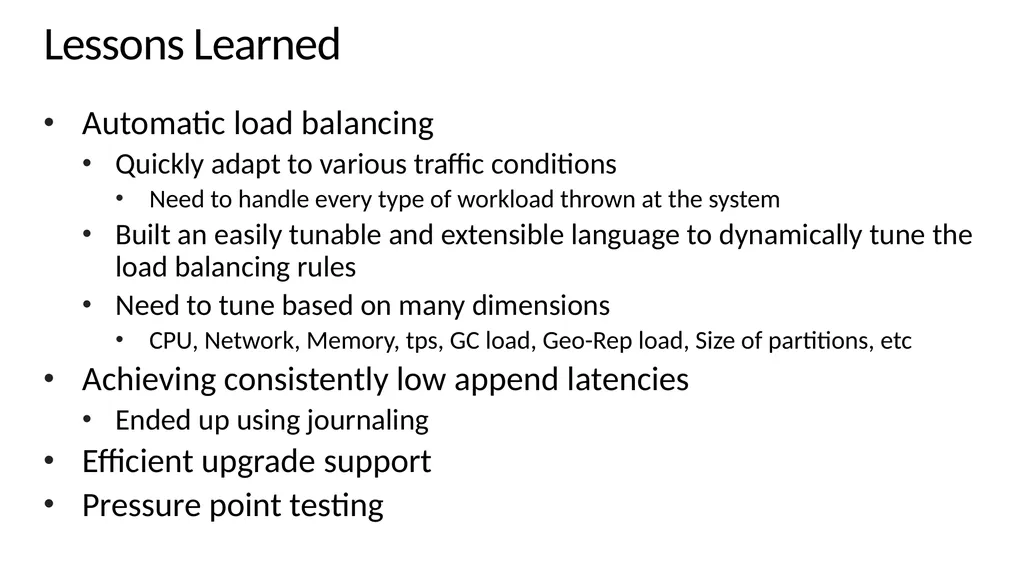
Lessons Learned Automatic load balancing
Quickly adapt to various traffic conditions
Need to handle every type of workload thrown at the system
Built an easily tunable and extensible language to dynamically tune the load balancing rules
Need to tune based on many dimensions
CPU, Network, Memory, tps, GC load, Geo-Rep load, Size of partitions, etc
Achieving consistently low append latencies
Ended up using journaling
Efficient upgrade support
Pressure point testing<br>
Quickly adapt to various traffic conditions
Need to handle every type of workload thrown at the system
Built an easily tunable and extensible language to dynamically tune the load balancing rules
Need to tune based on many dimensions
CPU, Network, Memory, tps, GC load, Geo-Rep load, Size of partitions, etc
Achieving consistently low append latencies
Ended up using journaling
Efficient upgrade support
Pressure point testing<br>
34
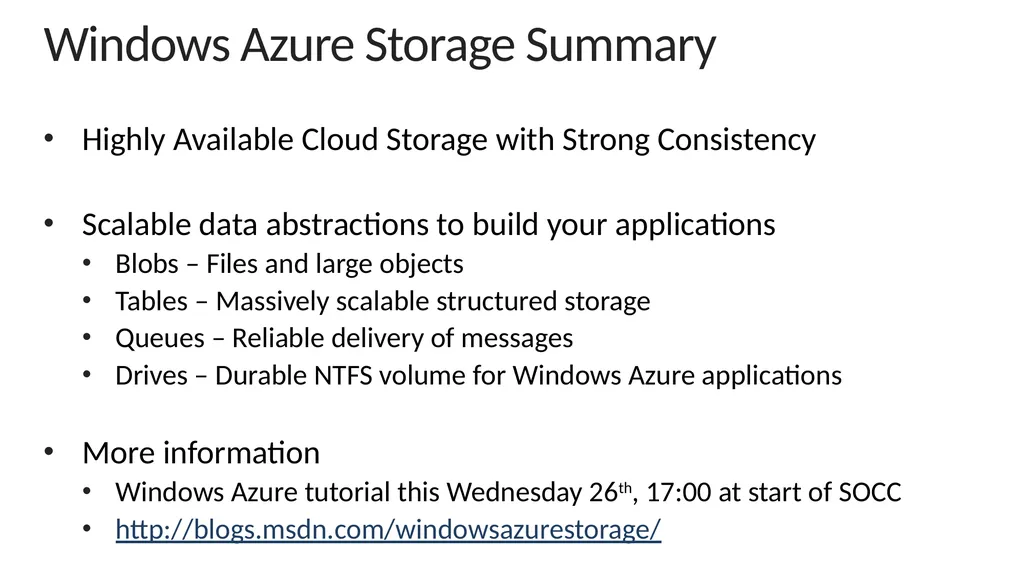
Windows Azure Storage Summary Highly Available Cloud Storage with Strong Consistency
Scalable data abstractions to build your applications
Blobs – Files and large objects
Tables – Massively scalable structured storage
Queues – Reliable delivery of messages
Drives – Durable NTFS volume for Windows Azure applications
More information
Windows Azure tutorial this Wednesday 26th, 17:00 at start of SOCC
http://blogs.msdn.com/windowsazurestorage/<br>
Scalable data abstractions to build your applications
Blobs – Files and large objects
Tables – Massively scalable structured storage
Queues – Reliable delivery of messages
Drives – Durable NTFS volume for Windows Azure applications
More information
Windows Azure tutorial this Wednesday 26th, 17:00 at start of SOCC
http://blogs.msdn.com/windowsazurestorage/<br>