1 Getting access to the Ethernet Diagnostics and Fault journeys on Business Zone BT Wholesale Online V3 LEGAL NOTICE: The information contained in this briefing is confidential information as per your terms and conditions with BT. Please do
"1 Getting access to the Ethernet Diagnostics and" is the property of its rightful owner. Permission is granted to
download and print the materials on this website for personal, non-commercial use only, and to display it
on your personal computer provided you do not modify the materials and that you retain all copyright
notices contained in the materials. By downloading content from our website, you accept the terms of this
agreement.
Share
Embed code
Presentation Transcript
01
1 Getting access to the Ethernet Diagnostics and Fault journeys on Business Zone BT Wholesale Online
V3 LEGAL NOTICE: The information contained in this briefing is confidential information as per your terms and conditions with BT. Please do not forward, republish or permit unauthorised access. The content is accurate at the time of writing and is subject to change.<br>
02
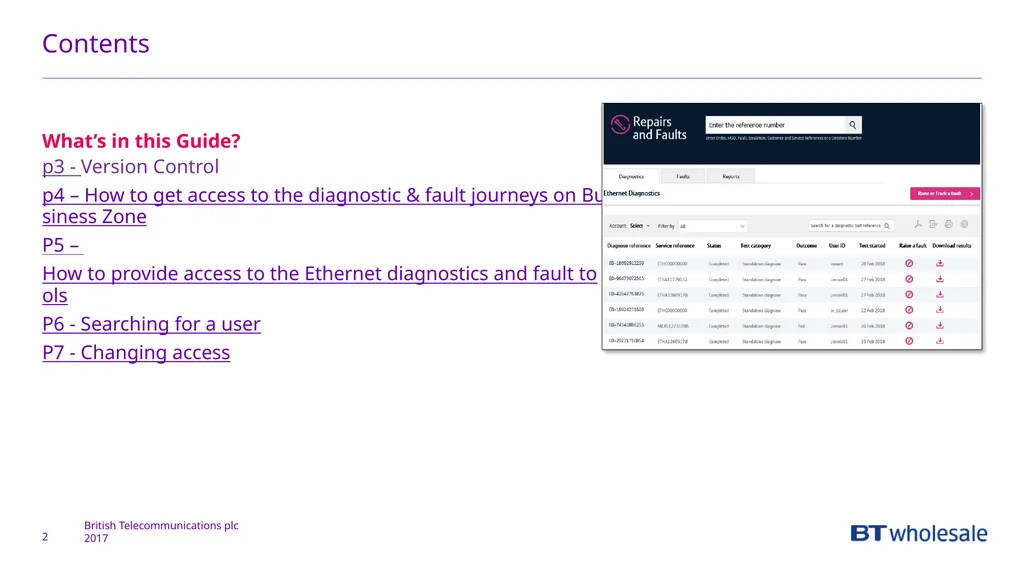
Contents What’s in this Guide?
p3 - Version Control
p4 – How to get access to the diagnostic & fault journeys on Business Zone
P5 – How to provide access to the Ethernet diagnostics and fault tools
P6 - Searching for a user
P7 - Changing access 2<br>
03
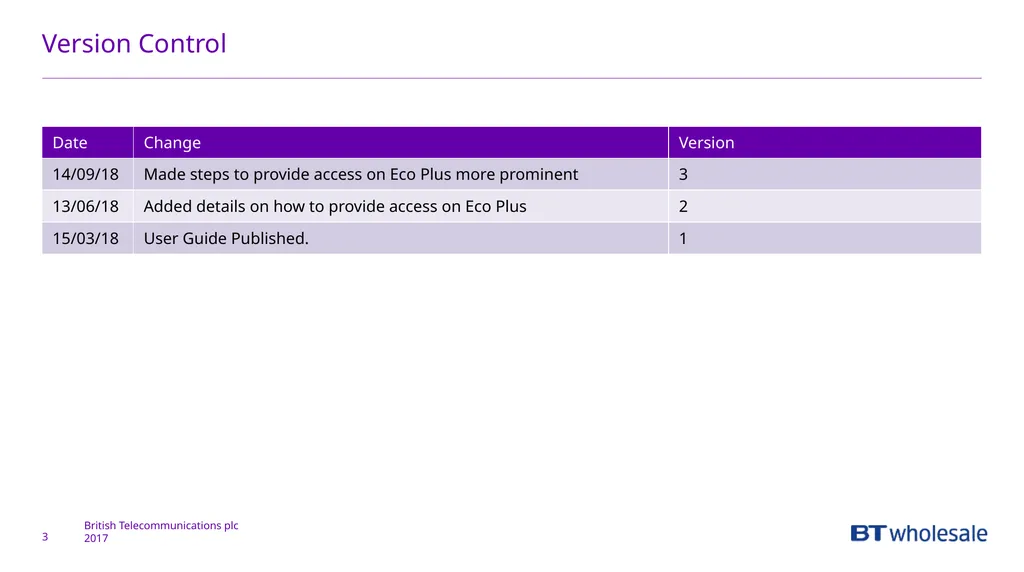
Version Control 3<br>
04
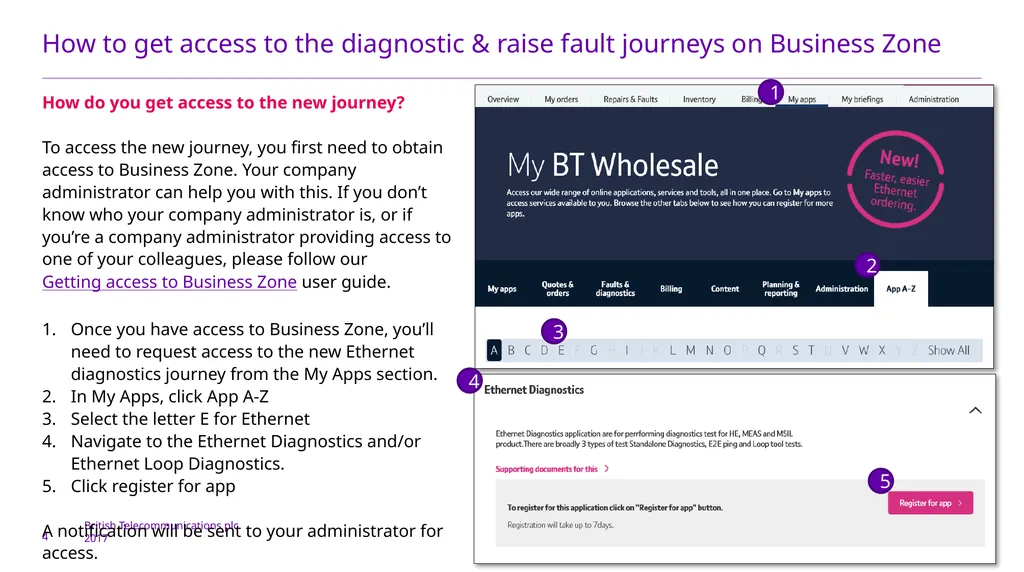
How to get access to the diagnostic & raise fault journeys on Business Zone 4 How do you get access to the new journey?
To access the new journey, you first need to obtain access to Business Zone. Your company administrator can help you with this. If you don’t know who your company administrator is, or if you’re a company administrator providing access to one of your colleagues, please follow our Getting access to Business Zone user guide.
Once you have access to Business Zone, you’ll need to request access to the new Ethernet diagnostics journey from the My Apps section.
In My Apps, click App A-Z
Select the letter E for Ethernet
Navigate to the Ethernet Diagnostics and/or Ethernet Loop Diagnostics.
Click register for app
A notification will be sent to your administrator for access. 1 2 3 4 5<br>
05
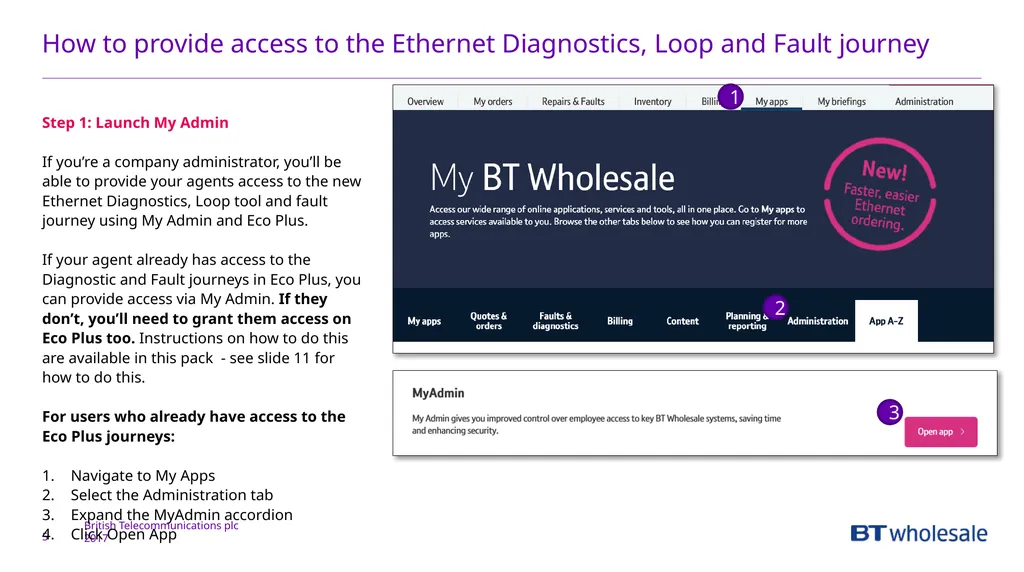
How to provide access to the Ethernet Diagnostics, Loop and Fault journey 5 Step 1: Launch My Admin
If you’re a company administrator, you’ll be able to provide your agents access to the new Ethernet Diagnostics, Loop tool and fault journey using My Admin and Eco Plus.
If your agent already has access to the Diagnostic and Fault journeys in Eco Plus, you can provide access via My Admin. If they don’t, you’ll need to grant them access on Eco Plus too. Instructions on how to do this are available in this pack - see slide 11 for how to do this.
For users who already have access to the Eco Plus journeys:
Navigate to My Apps
Select the Administration tab
Expand the MyAdmin accordion
Click Open App 1 3 2<br>
06
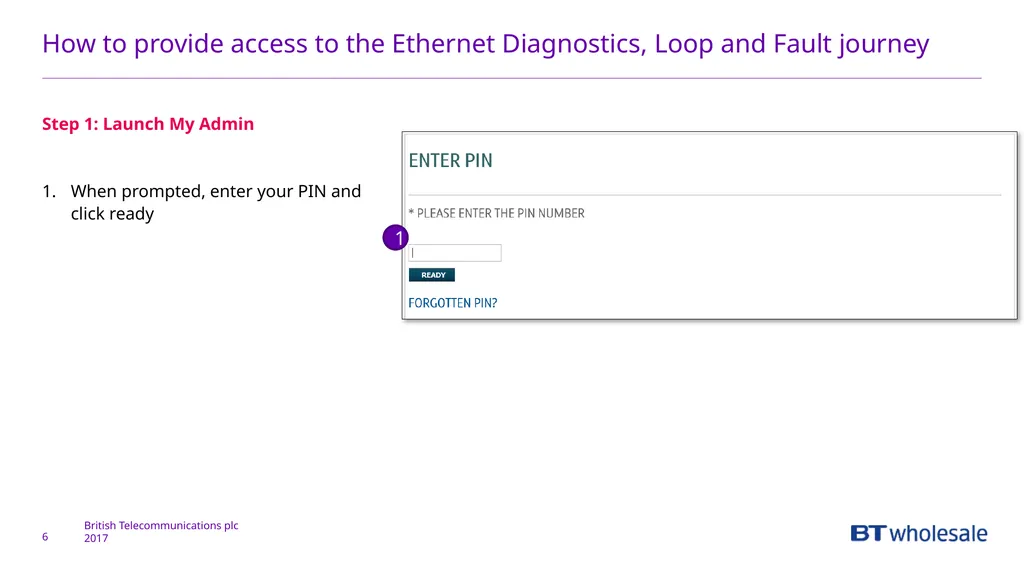
How to provide access to the Ethernet Diagnostics, Loop and Fault journey 6 Step 1: Launch My Admin
When prompted, enter your PIN and click ready 1<br>
07
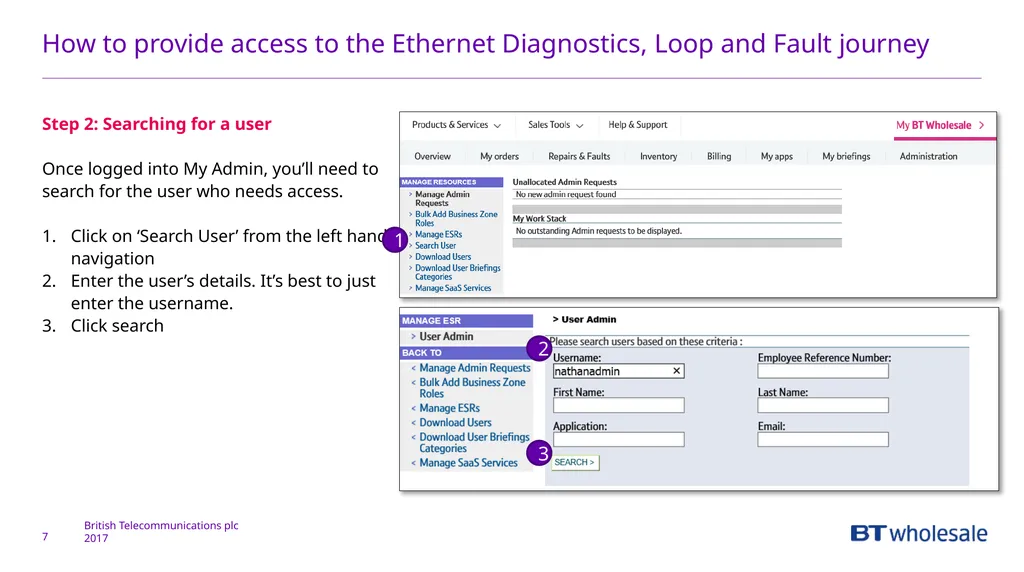
How to provide access to the Ethernet Diagnostics, Loop and Fault journey 7 Step 2: Searching for a user
Once logged into My Admin, you’ll need to search for the user who needs access.
Click on ‘Search User’ from the left hand navigation
Enter the user’s details. It’s best to just enter the username.
Click search 1 2 3<br>
08
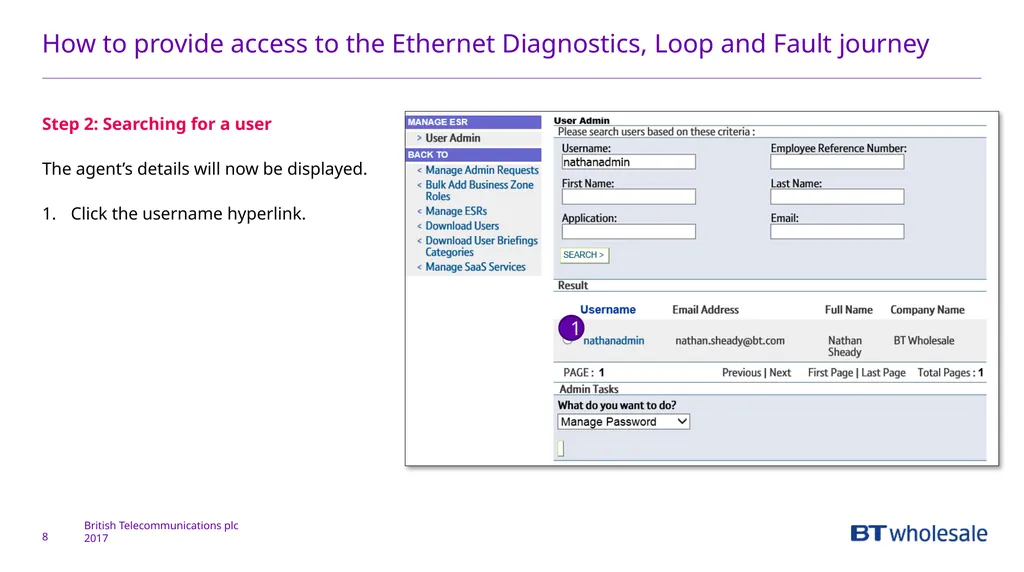
How to provide access to the Ethernet Diagnostics, Loop and Fault journey 8 Step 2: Searching for a user
The agent’s details will now be displayed.
Click the username hyperlink. 1<br>
09
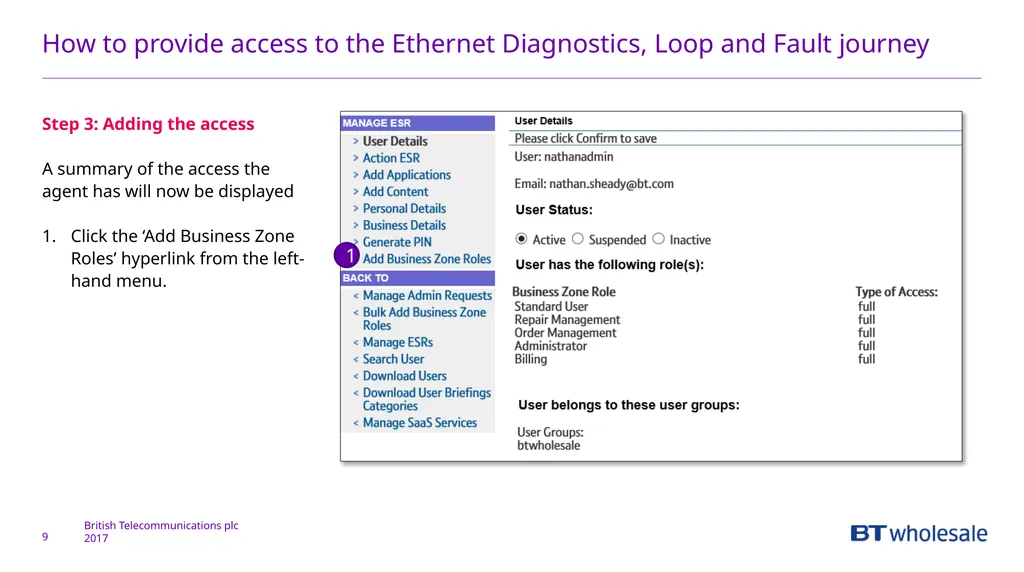
How to provide access to the Ethernet Diagnostics, Loop and Fault journey 9 Step 3: Adding the access
A summary of the access the agent has will now be displayed
Click the ‘Add Business Zone Roles’ hyperlink from the left-hand menu. 1<br>
10
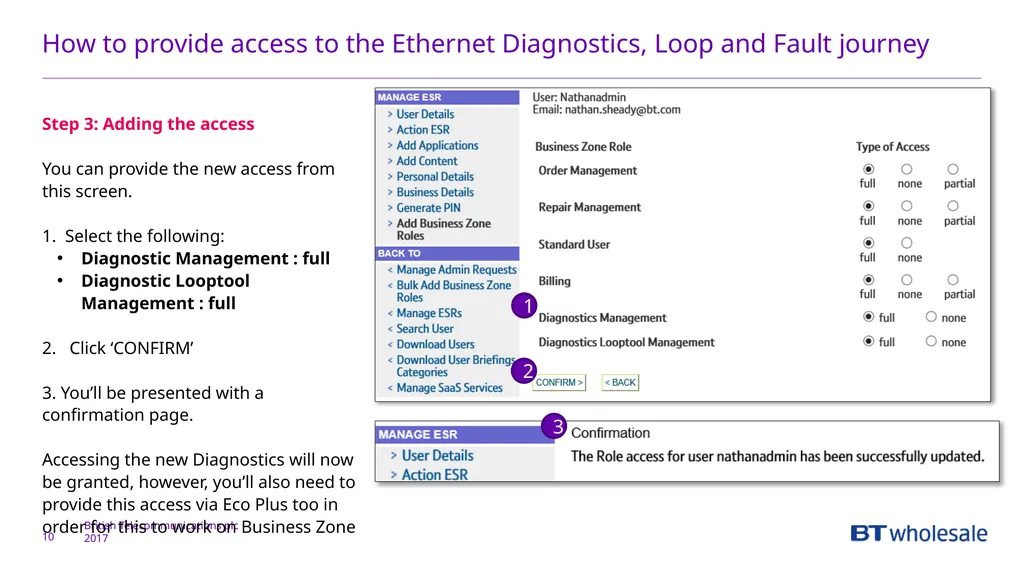
How to provide access to the Ethernet Diagnostics, Loop and Fault journey 10 Step 3: Adding the access
You can provide the new access from this screen.
1. Select the following:
Diagnostic Management : full
Diagnostic Looptool Management : full
2. Click ‘CONFIRM’
3. You’ll be presented with a confirmation page.
Accessing the new Diagnostics will now be granted, however, you’ll also need to provide this access via Eco Plus too in order for this to work on Business Zone 1 2 3<br>
11
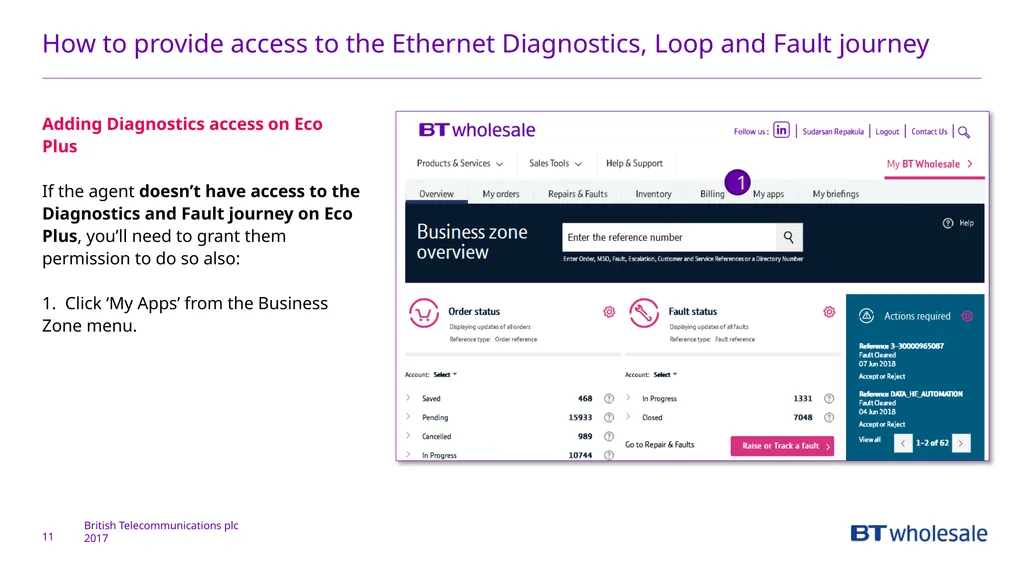
How to provide access to the Ethernet Diagnostics, Loop and Fault journey 11 Adding Diagnostics access on Eco Plus
If the agent doesn’t have access to the Diagnostics and Fault journey on Eco Plus, you’ll need to grant them permission to do so also:
1. Click ‘My Apps’ from the Business Zone menu. 1<br>
12
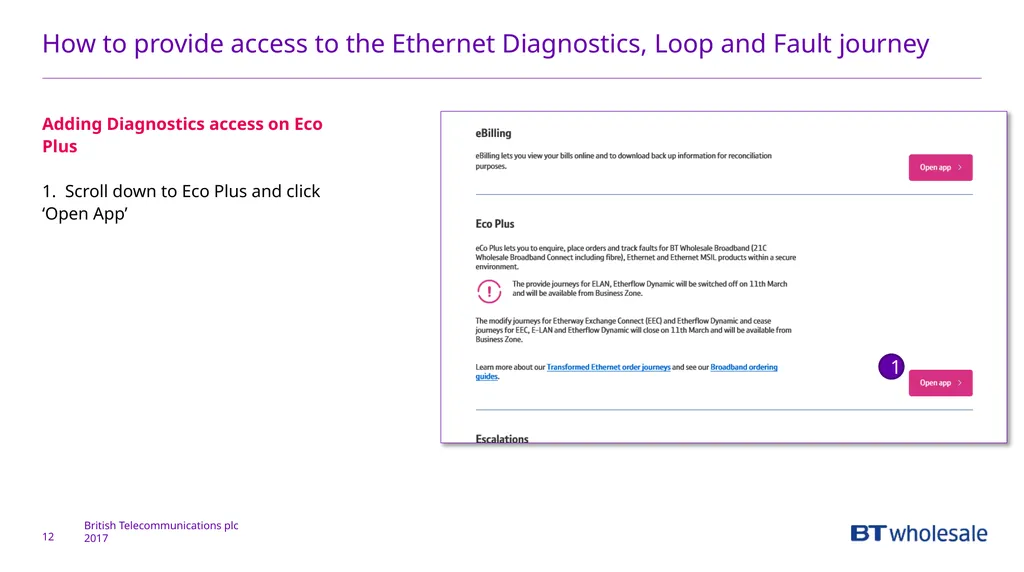
How to provide access to the Ethernet Diagnostics, Loop and Fault journey 12 Adding Diagnostics access on Eco Plus
1. Scroll down to Eco Plus and click ‘Open App’ 1<br>
13
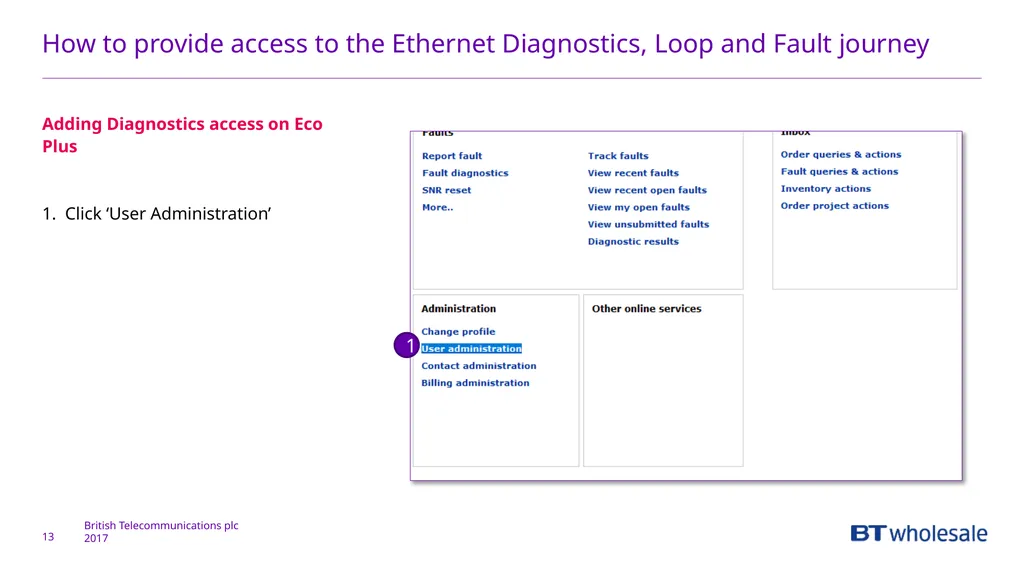
How to provide access to the Ethernet Diagnostics, Loop and Fault journey 13 Adding Diagnostics access on Eco Plus
1. Click ‘User Administration’ 1<br>
14
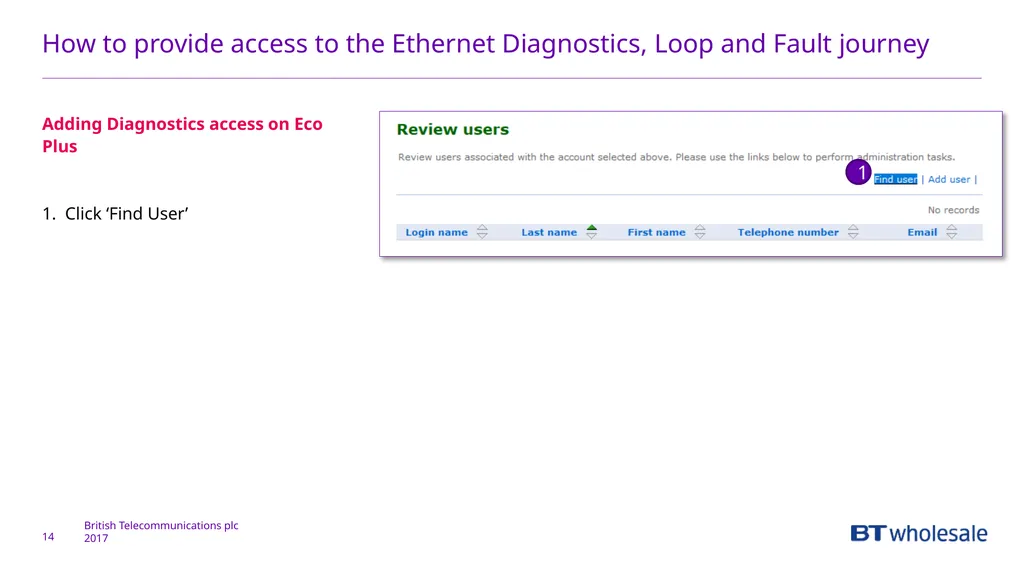
How to provide access to the Ethernet Diagnostics, Loop and Fault journey 14 Adding Diagnostics access on Eco Plus
1. Click ‘Find User’ 1<br>
15
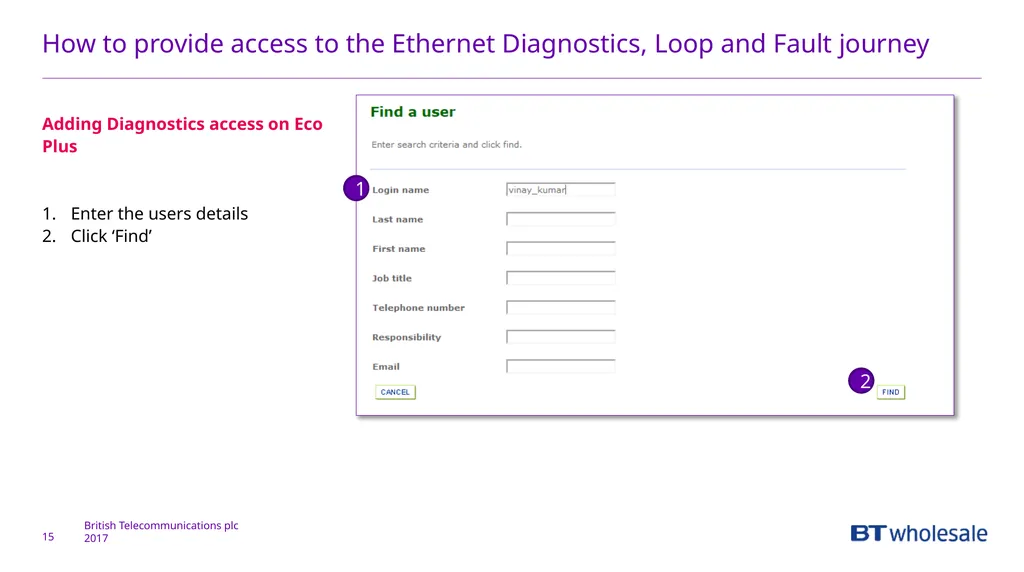
How to provide access to the Ethernet Diagnostics, Loop and Fault journey 15 Adding Diagnostics access on Eco Plus
Enter the users details
Click ‘Find’ 1 2<br>
16
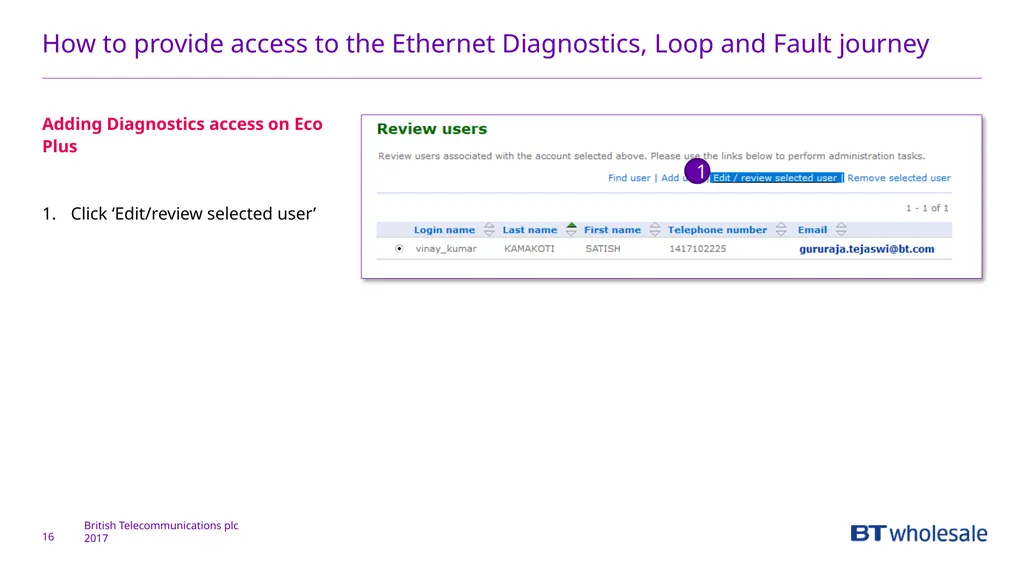
How to provide access to the Ethernet Diagnostics, Loop and Fault journey 16 Adding Diagnostics access on Eco Plus
Click ‘Edit/review selected user’ 1<br>
17
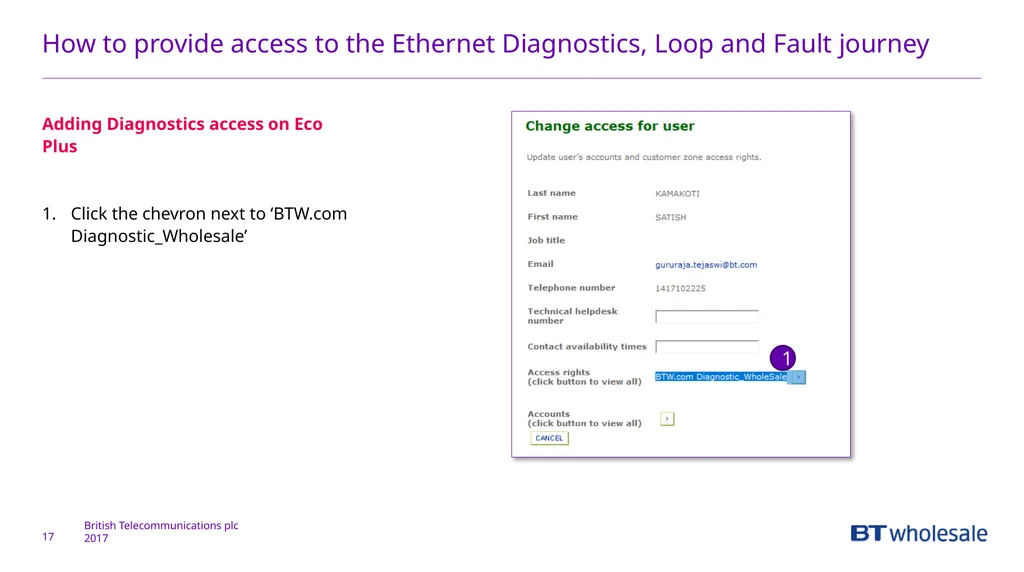
How to provide access to the Ethernet Diagnostics, Loop and Fault journey 17 Adding Diagnostics access on Eco Plus
Click the chevron next to ‘BTW.com Diagnostic_Wholesale’ 1<br>
18
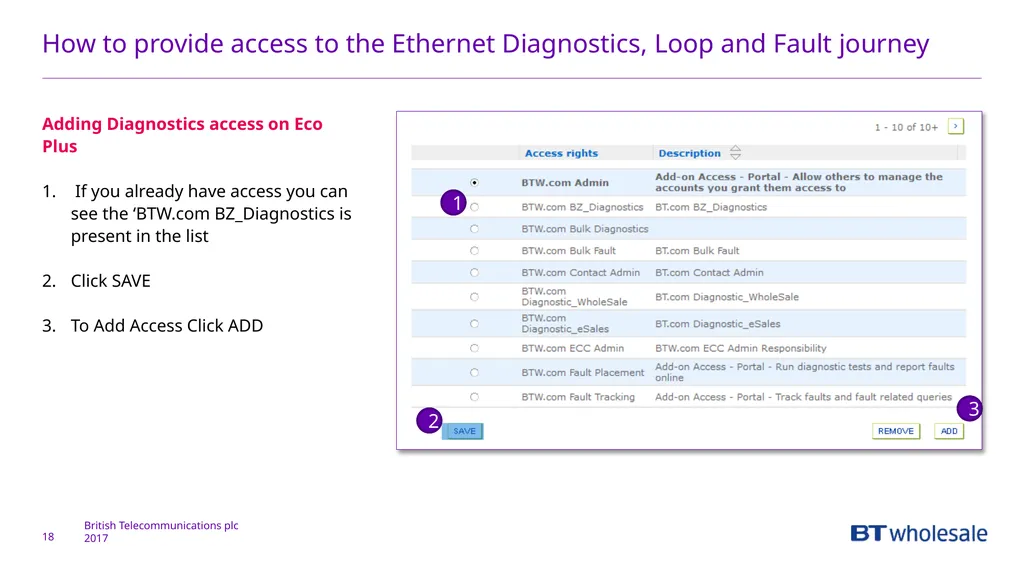
How to provide access to the Ethernet Diagnostics, Loop and Fault journey 18 Adding Diagnostics access on Eco Plus
If you already have access you can see the ‘BTW.com BZ_Diagnostics is present in the list
Click SAVE
To Add Access Click ADD 1 3 2<br>
19
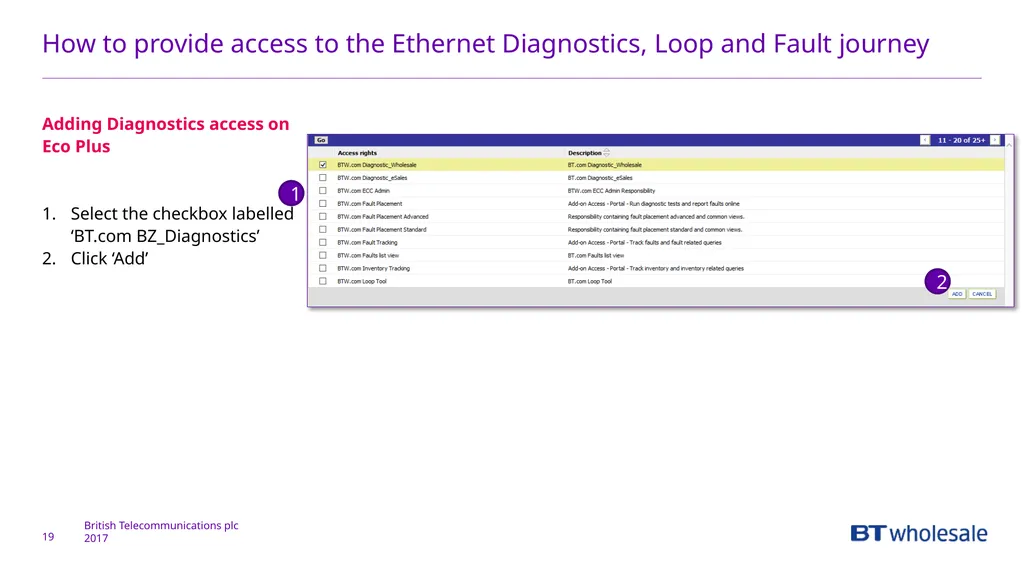
How to provide access to the Ethernet Diagnostics, Loop and Fault journey 19 Adding Diagnostics access on Eco Plus
Select the checkbox labelled ‘BT.com BZ_Diagnostics’
Click ‘Add’ 1 2<br>
20
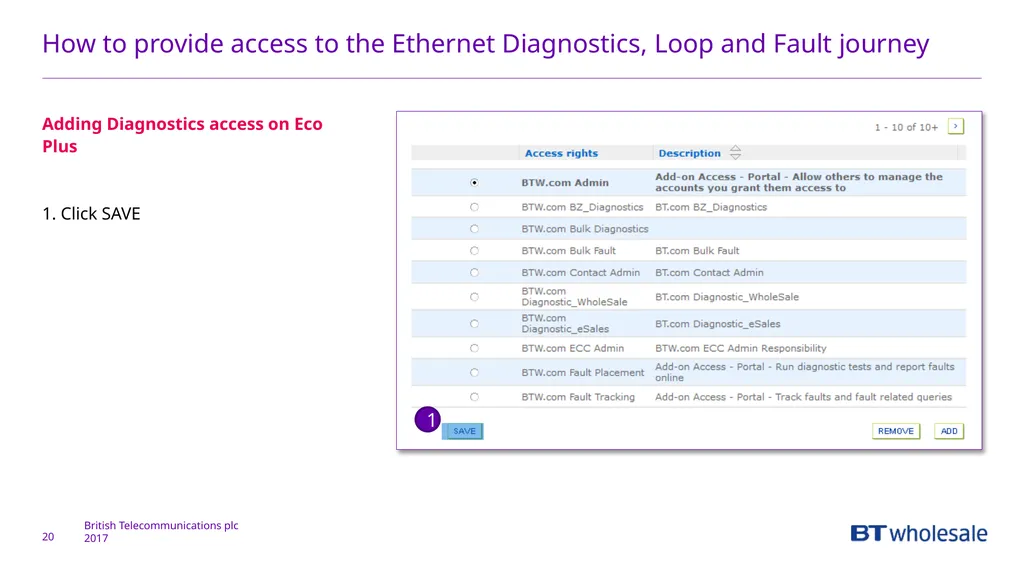
How to provide access to the Ethernet Diagnostics, Loop and Fault journey 20 Adding Diagnostics access on Eco Plus
1. Click SAVE 1<br>
21
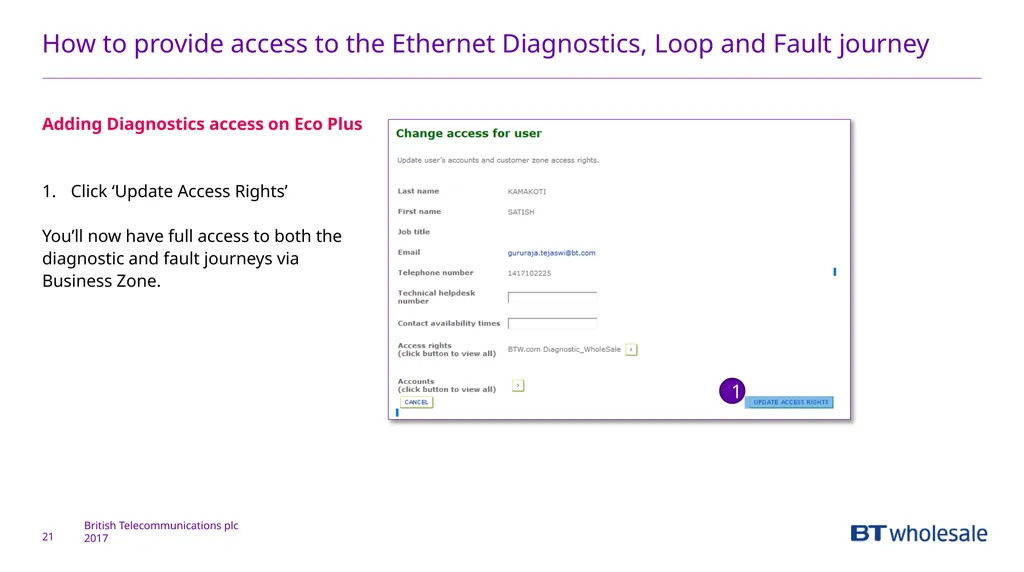
How to provide access to the Ethernet Diagnostics, Loop and Fault journey 21 Adding Diagnostics access on Eco Plus
Click ‘Update Access Rights’
You’ll now have full access to both the diagnostic and fault journeys via Business Zone. 1<br>