
ADVANCED COMPUTER VISION Vision–Language Models
LO
Published · 81 slides · 0 views
1 / 1
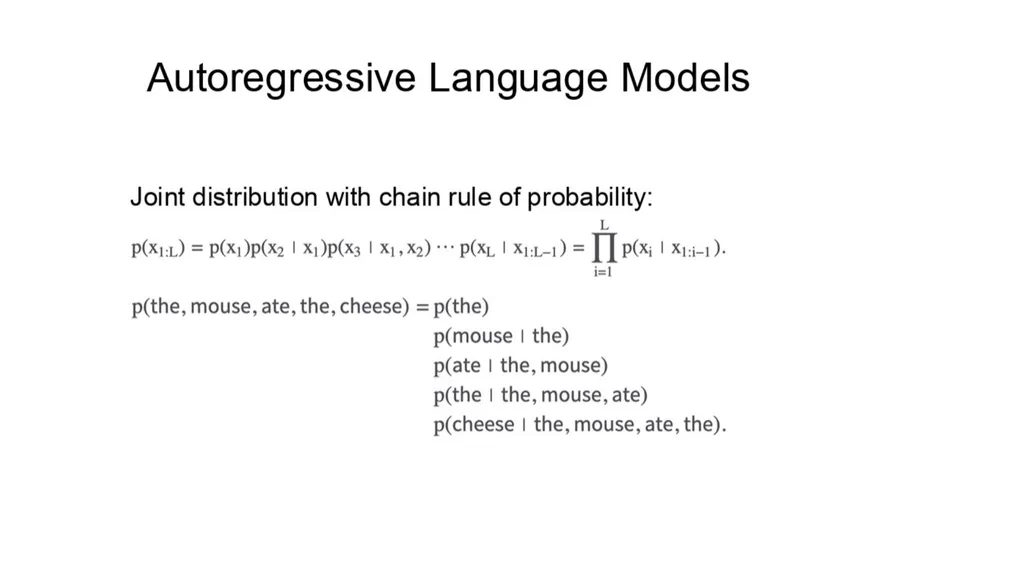
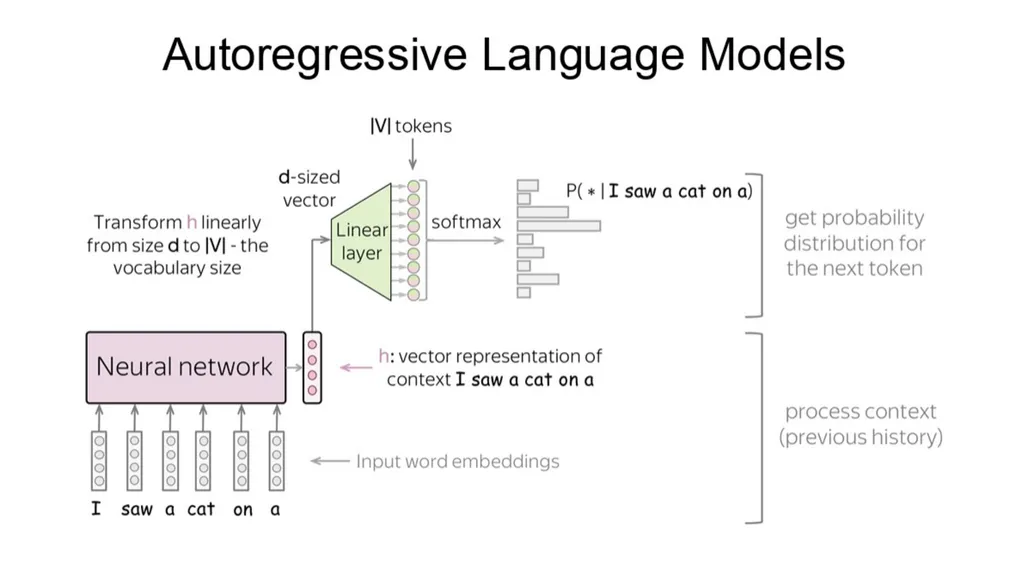
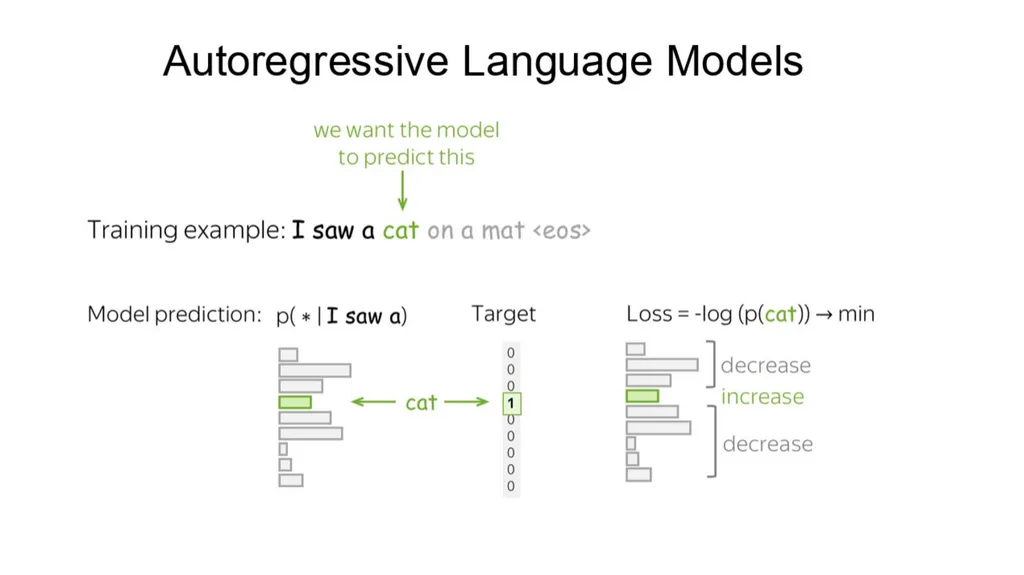
Description
ADVANCED COMPUTER VISION VisionLanguage Models with an adapter From ViT features to LLM tokens LLaVA, RoPE, and QwenVL Longin Jan Latecki, lateckitemple.edu ADAPTER-STYLE VLMS By the end, you can trace an image through a VLM 02 Locate
Related Topics
Share
Embed code
Download this presentation From Below
"ADVANCED COMPUTER VISION Vision–Language Models" is the property of its rightful owner. Permission is granted to download and print the materials on this website for personal, non-commercial use only, and to display it on your personal computer provided you do not modify the materials and that you retain all copyright notices contained in the materials. By downloading content from our website, you accept the terms of this agreement.
Presentation Transcript
01
ADVANCED COMPUTER VISION Vision–Language Models
with an adapter From ViT features to LLM tokens • LLaVA, RoPE, and Qwen‑VL Longin Jan Latecki, latecki@temple.edu<br>
with an adapter From ViT features to LLM tokens • LLaVA, RoPE, and Qwen‑VL Longin Jan Latecki, latecki@temple.edu<br>
02
ADAPTER-STYLE VLMS By the end, you can trace an image through a VLM 02 Locate the adapter between a familiar ViT and a decoder-only LLM Explain why visual features must become language-space tokens Derive RoPE’s relative-position effect inside attention Follow Qwen‑VL’s 1024 → 256 visual-token compression Read the tensor operations behind Qwen attention<br>
03
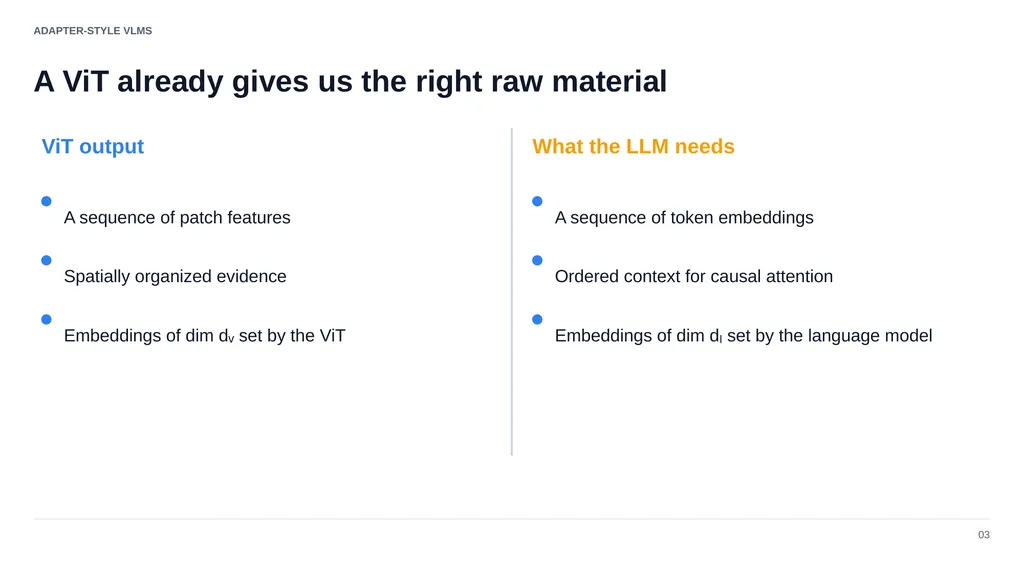
ADAPTER-STYLE VLMS A ViT already gives us the right raw material 03 ViT output What the LLM needs A sequence of patch features Spatially organized evidence Embeddings of dim dᵥ set by the ViT A sequence of token embeddings Ordered context for causal attention Embeddings of dim dₗ set by the language model<br>
04
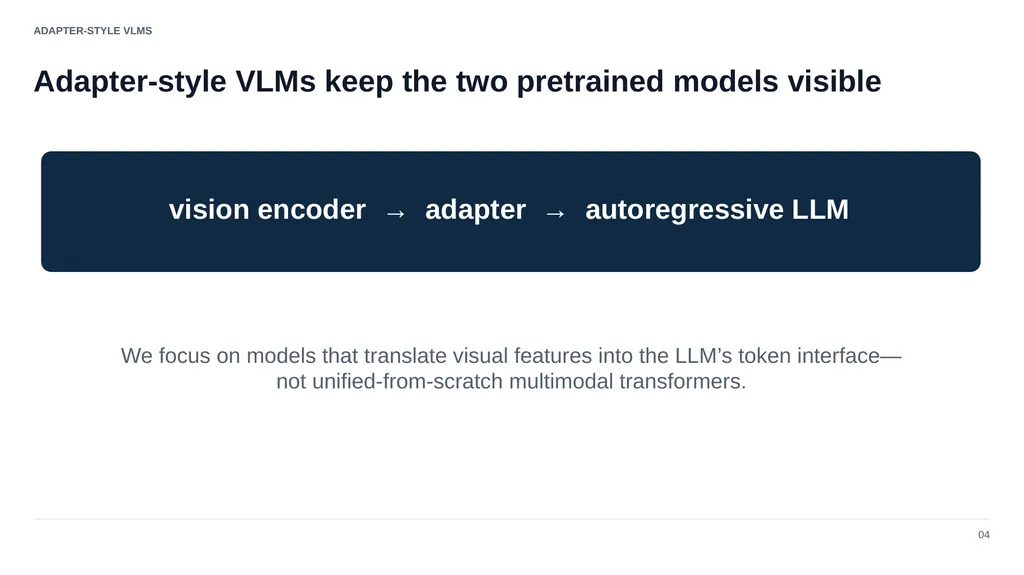
ADAPTER-STYLE VLMS Adapter-style VLMs keep the two pretrained models visible 04 vision encoder → adapter → autoregressive LLM We focus on models that translate visual features into the LLM’s token interface—not unified-from-scratch multimodal transformers.<br>
05
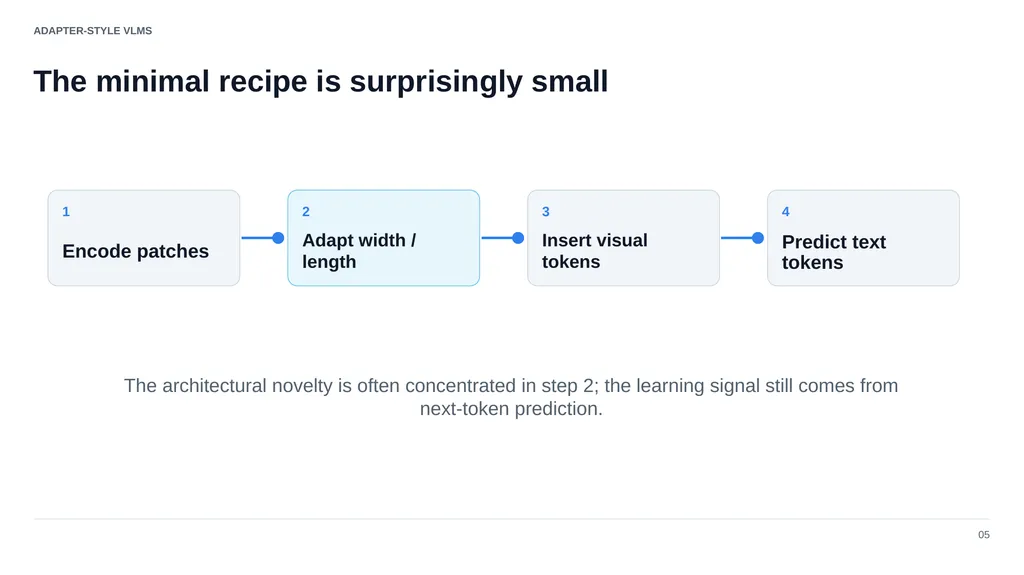
ADAPTER-STYLE VLMS The minimal recipe is surprisingly small 05 1 Encode patches 2 Adapt width / length 3 Insert visual tokens 4 Predict text tokens The architectural novelty is often concentrated in step 2; the learning signal still comes from next-token prediction.<br>
06
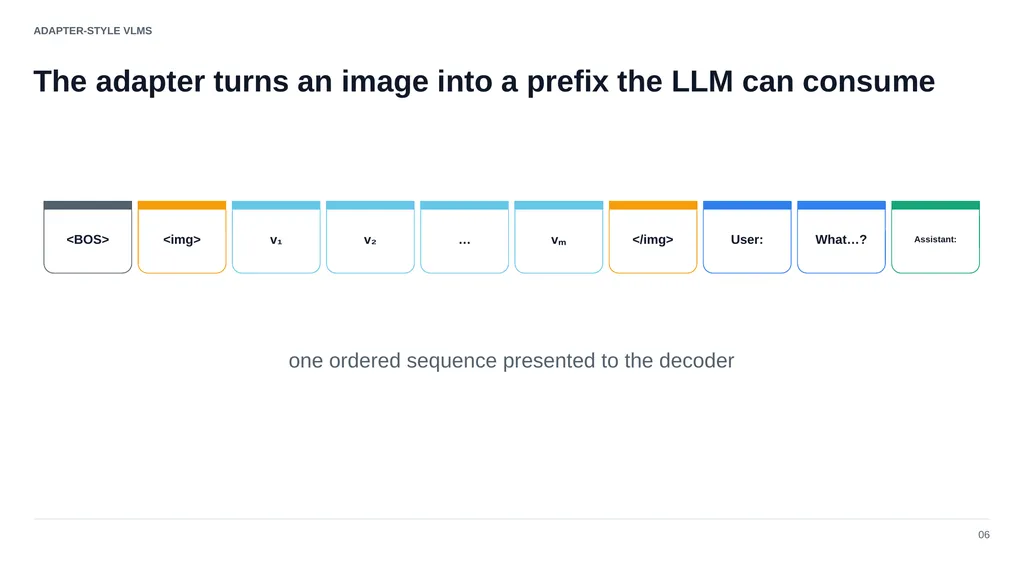
ADAPTER-STYLE VLMS The adapter turns an image into a prefix the LLM can consume 06 <BOS> <img> v₁ v₂ … vₘ </img> User: What…? Assistant: one ordered sequence presented to the decoder<br>
07
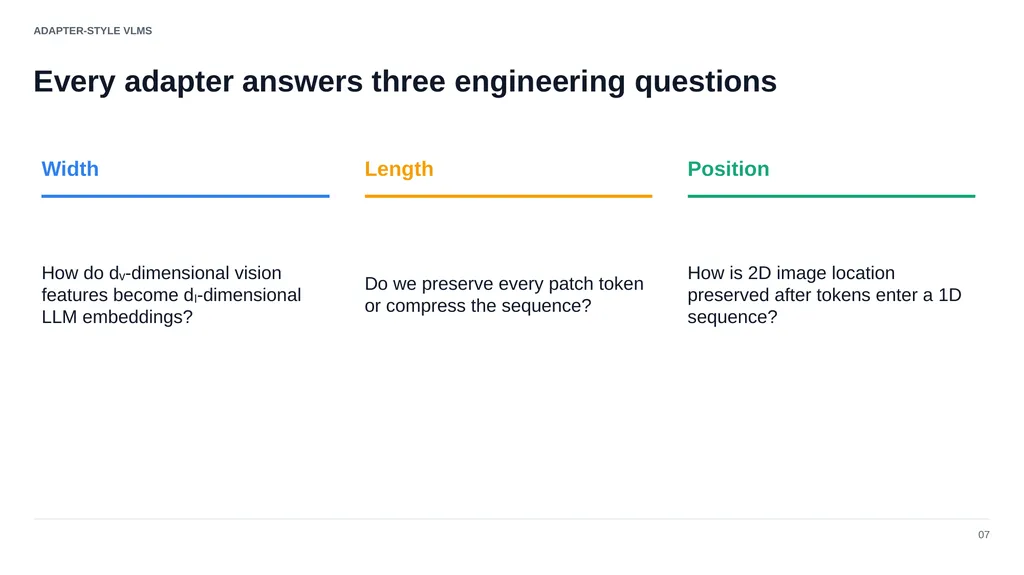
ADAPTER-STYLE VLMS Every adapter answers three engineering questions 07 Width How do dᵥ-dimensional vision features become dₗ-dimensional LLM embeddings? Length Do we preserve every patch token or compress the sequence? Position How is 2D image location preserved after tokens enter a 1D sequence?<br>
08
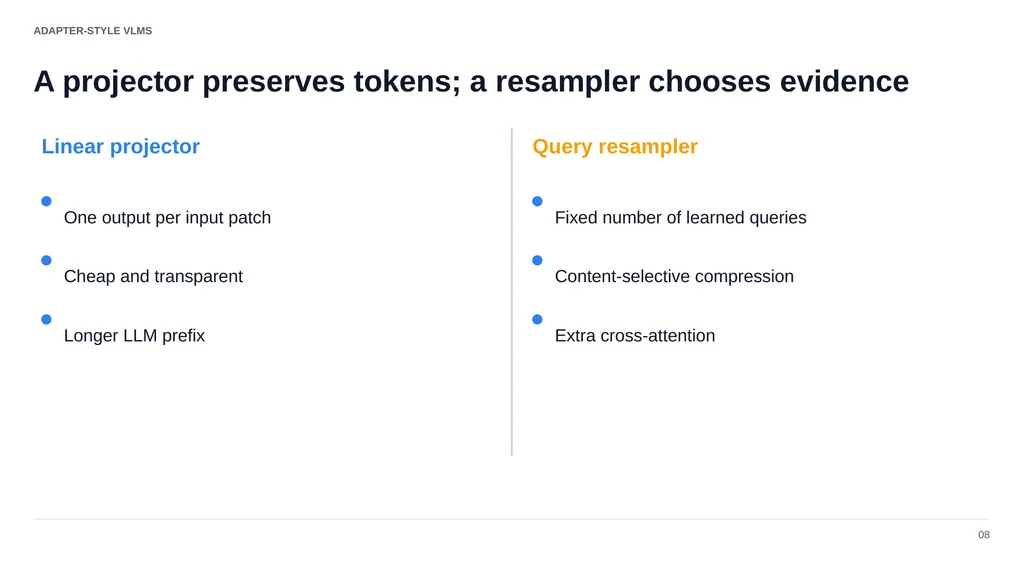
ADAPTER-STYLE VLMS A projector preserves tokens; a resampler chooses evidence 08 Linear projector Query resampler One output per input patch Cheap and transparent Longer LLM prefix Fixed number of learned queries Content-selective compression Extra cross-attention<br>
09
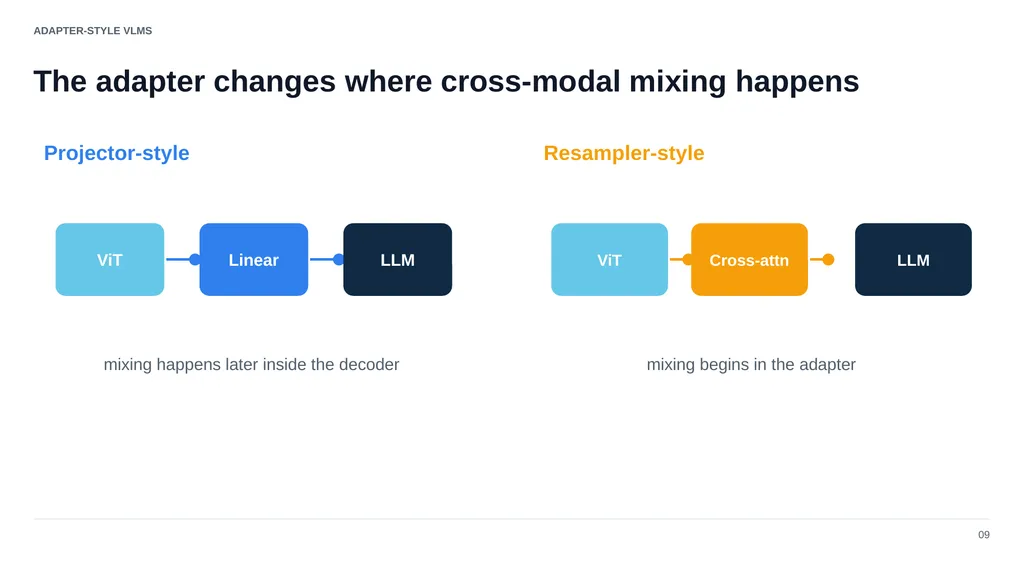
ADAPTER-STYLE VLMS The adapter changes where cross-modal mixing happens 09 Projector-style Resampler-style ViT Linear LLM ViT Cross-attn LLM mixing happens later inside the decoder mixing begins in the adapter<br>
10
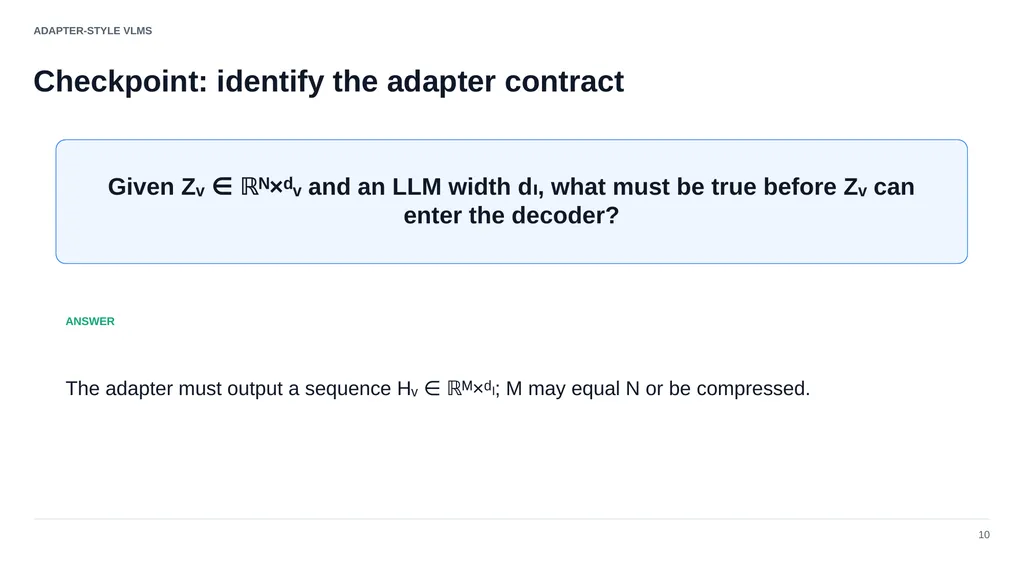
ADAPTER-STYLE VLMS Checkpoint: identify the adapter contract 10 Given Zᵥ ∈ ℝᴺ×ᵈᵥ and an LLM width dₗ, what must be true before Zᵥ can enter the decoder? ANSWER The adapter must output a sequence Hᵥ ∈ ℝᴹ×ᵈₗ; M may equal N or be compressed.<br>
11
01 LLaVA The adapter as a learned linear translation 11<br>
12
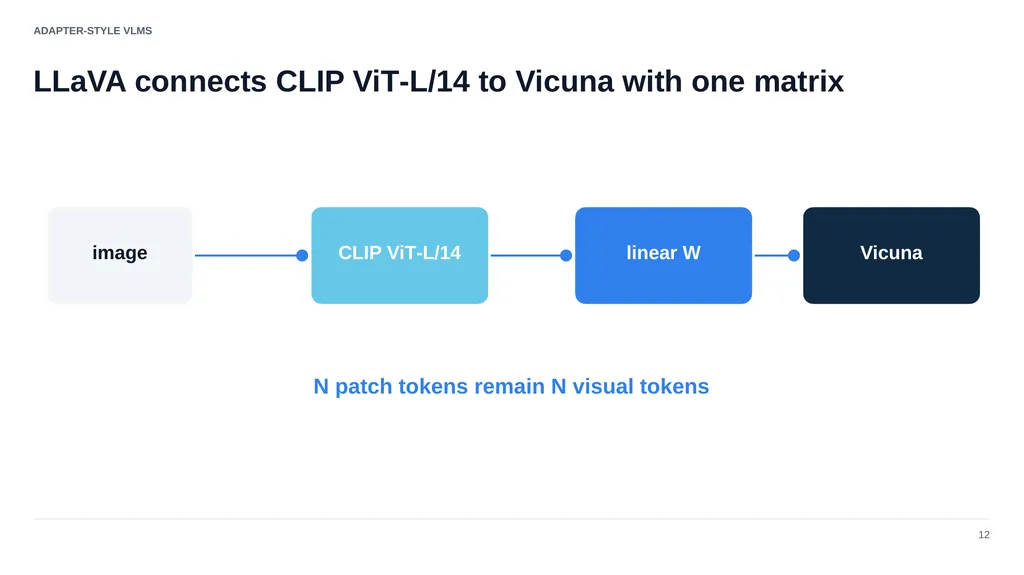
ADAPTER-STYLE VLMS LLaVA connects CLIP ViT‑L/14 to Vicuna with one matrix 12 image CLIP ViT‑L/14 linear W Vicuna N patch tokens remain N visual tokens<br>
13
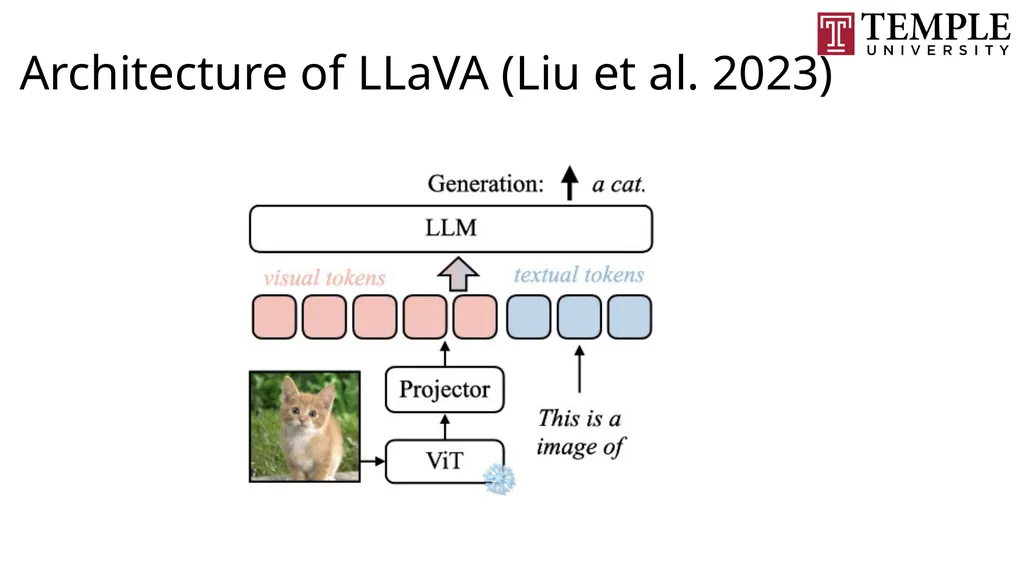
Architecture of LLaVA (Liu et al. 2023)<br>
14
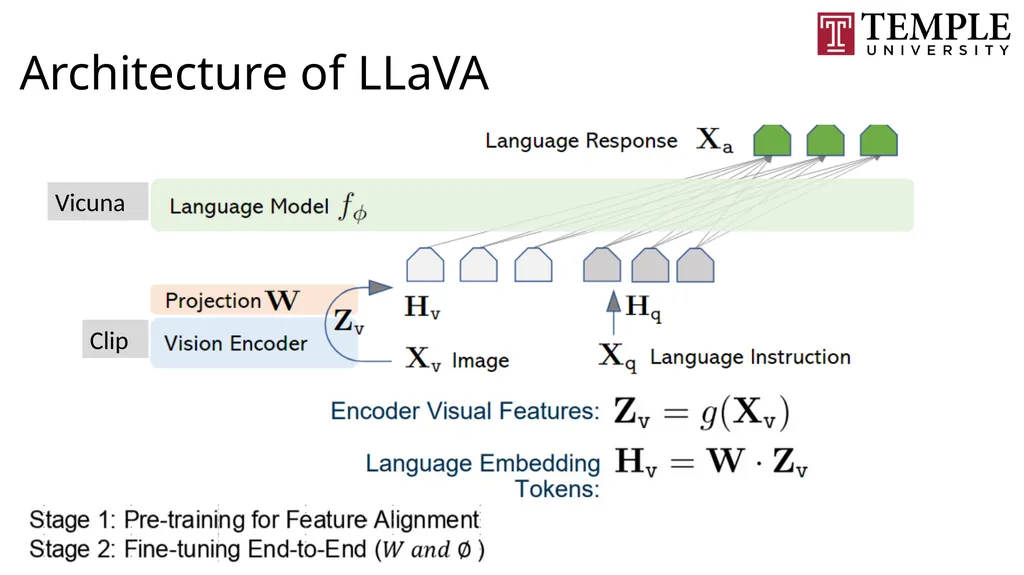
Architecture of LLaVA Vicuna Clip<br>
15
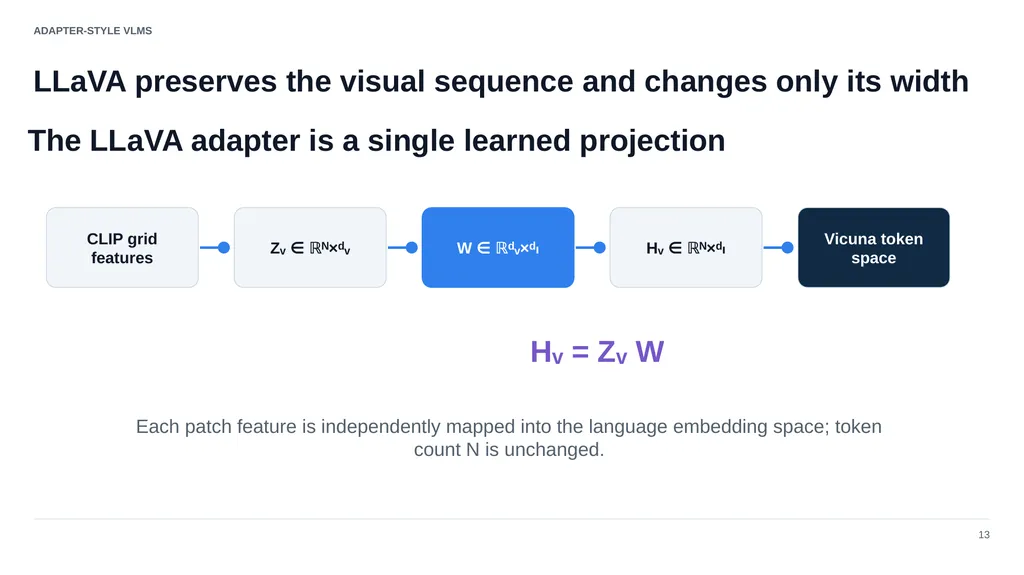
ADAPTER-STYLE VLMS LLaVA preserves the visual sequence and changes only its width 13 CLIP grid features Zᵥ ∈ ℝᴺ×ᵈᵥ W ∈ ℝᵈᵥ×ᵈₗ Hᵥ ∈ ℝᴺ×ᵈₗ Vicuna token space Hᵥ = Zᵥ W Each patch feature is independently mapped into the language embedding space; token count N is unchanged. The LLaVA adapter is a single learned projection<br>
16
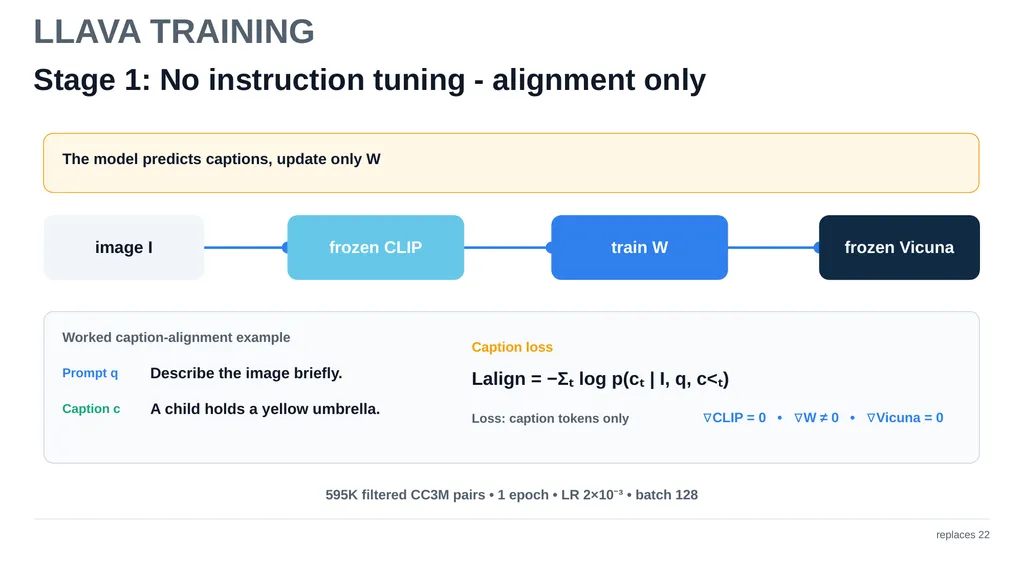
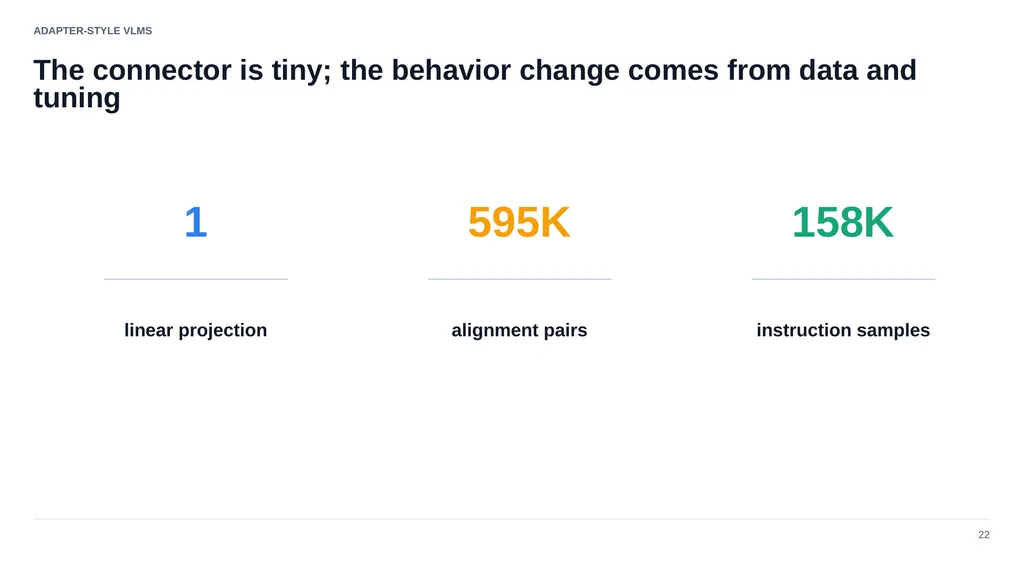
LLAVA TRAINING Stage 1: No instruction tuning - alignment only replaces 22 The model predicts captions, update only W image I frozen CLIP train W frozen Vicuna Worked caption-alignment example Prompt q Describe the image briefly. Caption c A child holds a yellow umbrella. Caption loss Lalign = −Σₜ log p(cₜ | I, q, c<ₜ) Loss: caption tokens only ∇CLIP = 0 • ∇W ≠ 0 • ∇Vicuna = 0 595K filtered CC3M pairs • 1 epoch • LR 2×10⁻³ • batch 128<br>
17
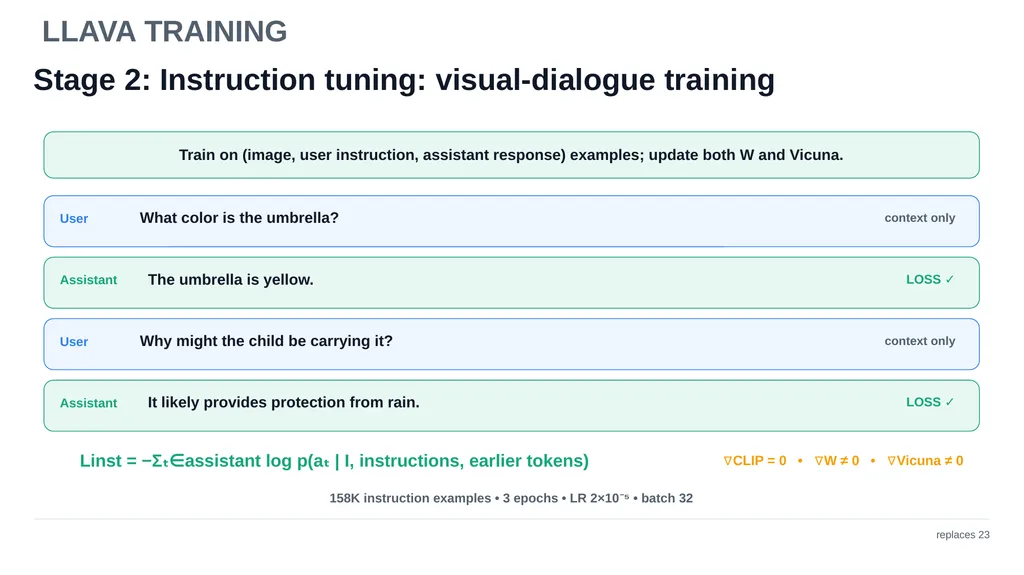
LLAVA TRAINING Stage 2: Instruction tuning: visual-dialogue training replaces 23 Train on (image, user instruction, assistant response) examples; update both W and Vicuna. User What color is the umbrella? context only Assistant The umbrella is yellow. LOSS ✓ User Why might the child be carrying it? context only Assistant It likely provides protection from rain. LOSS ✓ Linst = −Σₜ∈assistant log p(aₜ | I, instructions, earlier tokens) ∇CLIP = 0 • ∇W ≠ 0 • ∇Vicuna ≠ 0 158K instruction examples • 3 epochs • LR 2×10⁻⁵ • batch 32<br>
18
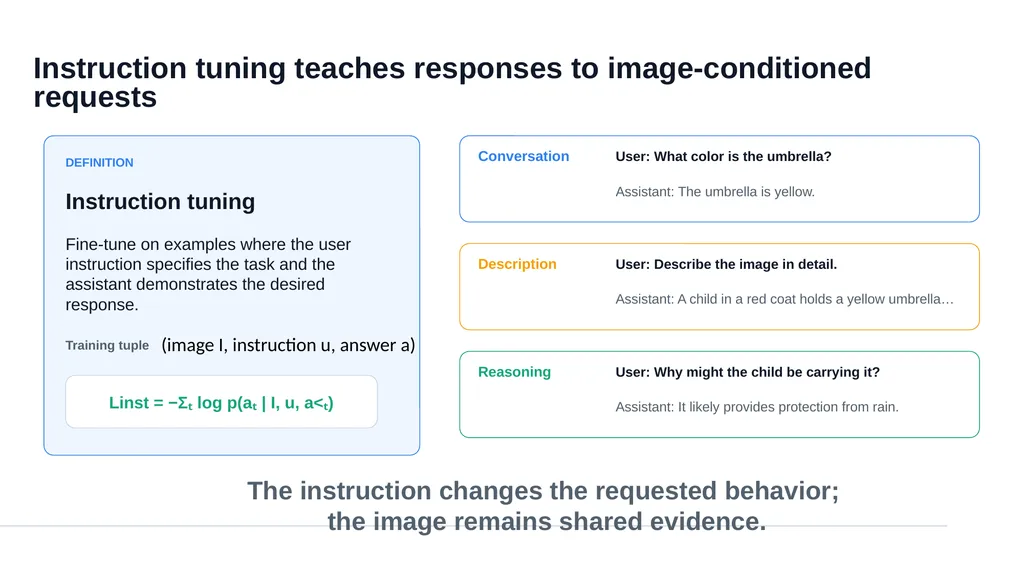
Instruction tuning teaches responses to image-conditioned requests DEFINITION Instruction tuning Fine-tune on examples where the user instruction specifies the task and the assistant demonstrates the desired response. Training tuple Linst = −Σₜ log p(aₜ | I, u, a<ₜ) Conversation User: What color is the umbrella? Assistant: The umbrella is yellow. Description User: Describe the image in detail. Assistant: A child in a red coat holds a yellow umbrella… Reasoning User: Why might the child be carrying it? Assistant: It likely provides protection from rain. The instruction changes the requested behavior;
the image remains shared evidence. (image I, instruction u, answer a)<br>
the image remains shared evidence. (image I, instruction u, answer a)<br>
19
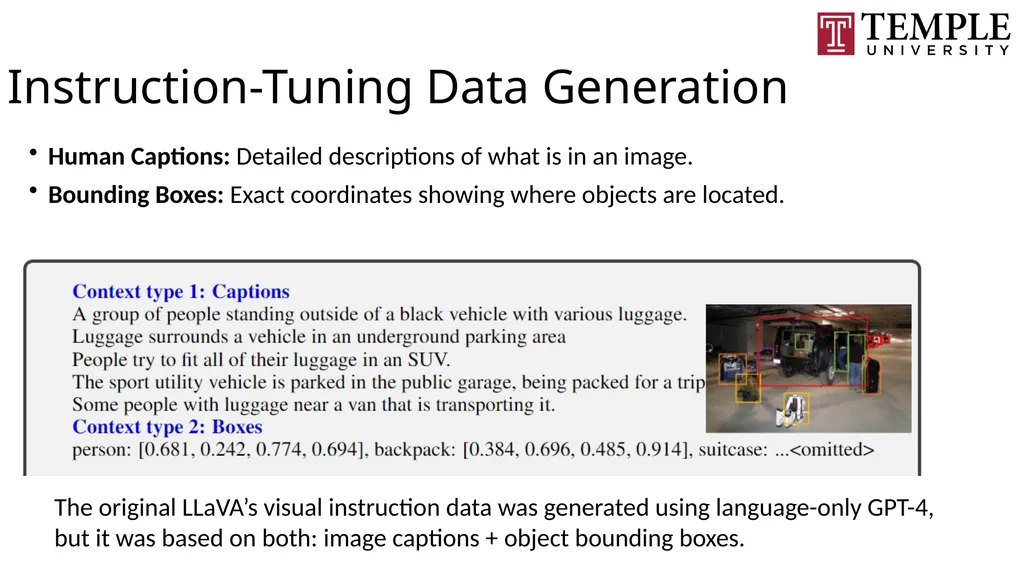
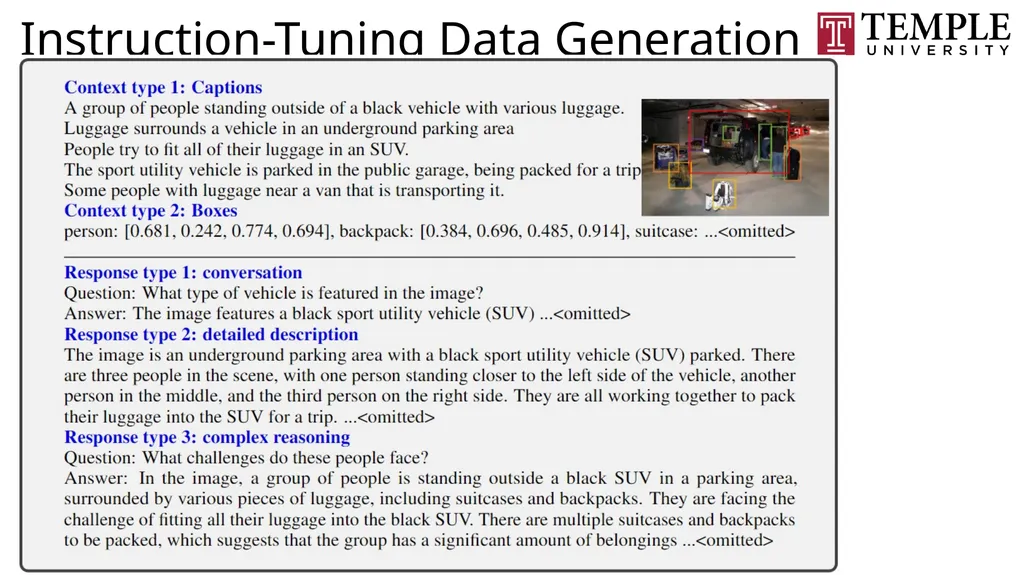
Instruction-Tuning Data Generation Human Captions: Detailed descriptions of what is in an image.
Bounding Boxes: Exact coordinates showing where objects are located. The original LLaVA’s visual instruction data was generated using language-only GPT-4, but it was based on both: image captions + object bounding boxes.<br>
Bounding Boxes: Exact coordinates showing where objects are located. The original LLaVA’s visual instruction data was generated using language-only GPT-4, but it was based on both: image captions + object bounding boxes.<br>
20
Instruction-Tuning Data Generation<br>
21
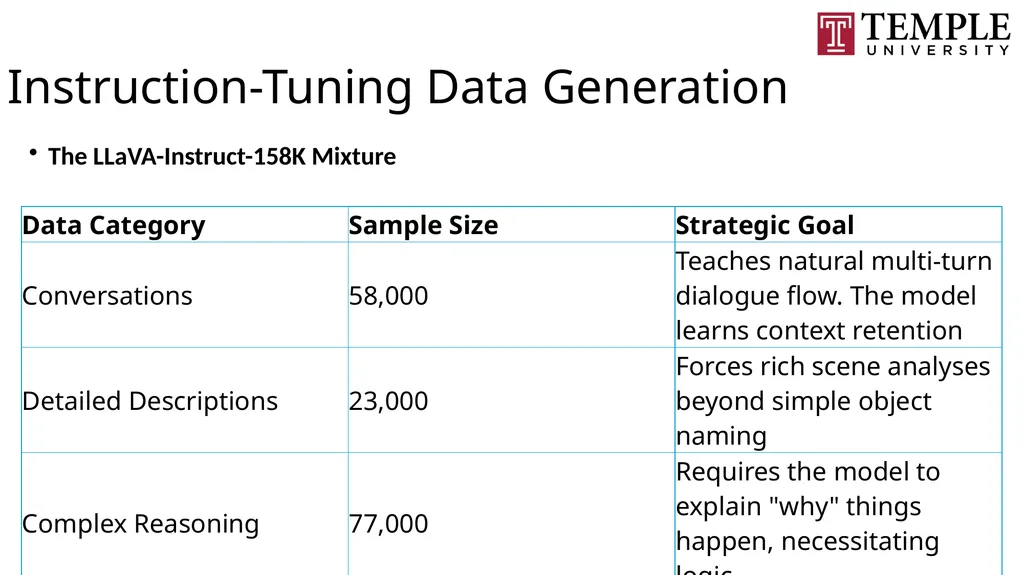
Instruction-Tuning Data Generation The LLaVA-Instruct-158K Mixture<br>
22
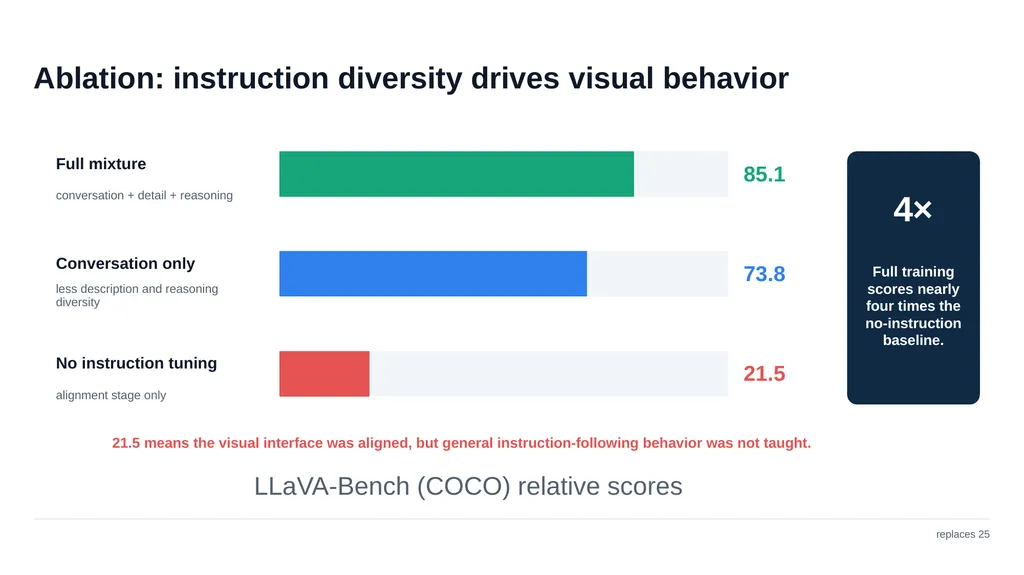
Ablation: instruction diversity drives visual behavior replaces 25 Full mixture conversation + detail + reasoning 85.1 Conversation only less description and reasoning diversity 73.8 No instruction tuning alignment stage only 21.5 LLaVA-Bench (COCO) relative scores 4× Full training scores nearly four times the no-instruction baseline. 21.5 means the visual interface was aligned, but general instruction-following behavior was not taught.<br>
23
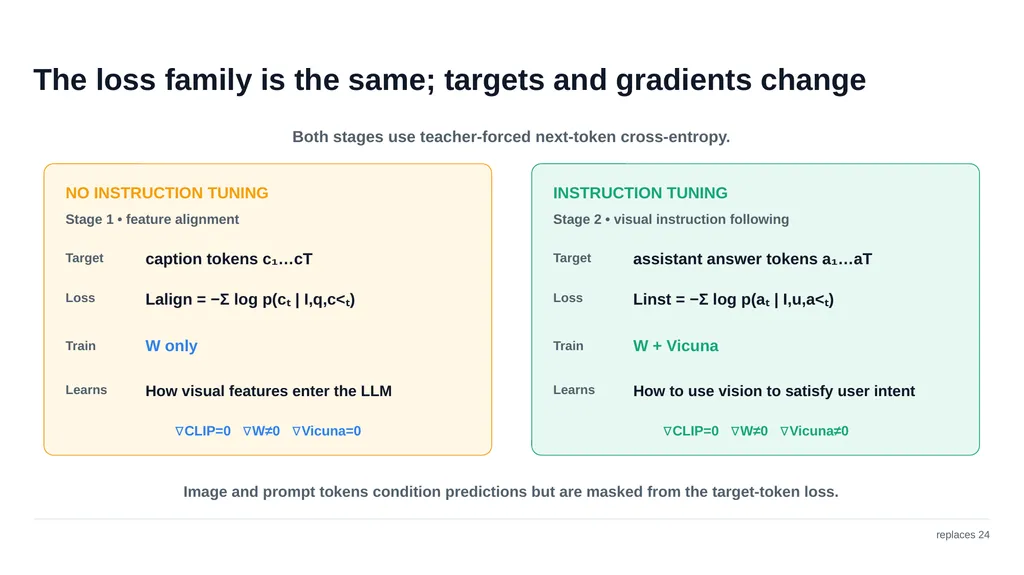
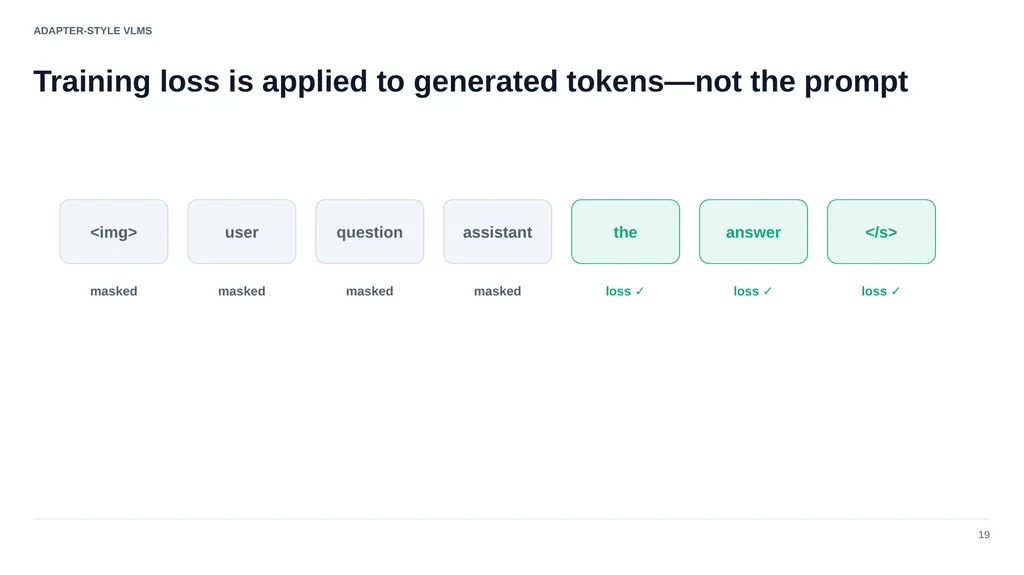
The loss family is the same; targets and gradients change replaces 24 Both stages use teacher-forced next-token cross-entropy. NO INSTRUCTION TUNING Stage 1 • feature alignment Target caption tokens c₁…cT Loss Lalign = −Σ log p(cₜ | I,q,c<ₜ) Train W only Learns How visual features enter the LLM ∇CLIP=0 ∇W≠0 ∇Vicuna=0 INSTRUCTION TUNING Stage 2 • visual instruction following Target assistant answer tokens a₁…aT Loss Linst = −Σ log p(aₜ | I,u,a<ₜ) Train W + Vicuna Learns How to use vision to satisfy user intent ∇CLIP=0 ∇W≠0 ∇Vicuna≠0 Image and prompt tokens condition predictions but are masked from the target-token loss.<br>
24
ADAPTER-STYLE VLMS Training loss is applied to generated tokens—not the prompt 19 <img> masked user masked question masked assistant masked the loss ✓ answer loss ✓ </s> loss ✓<br>
25
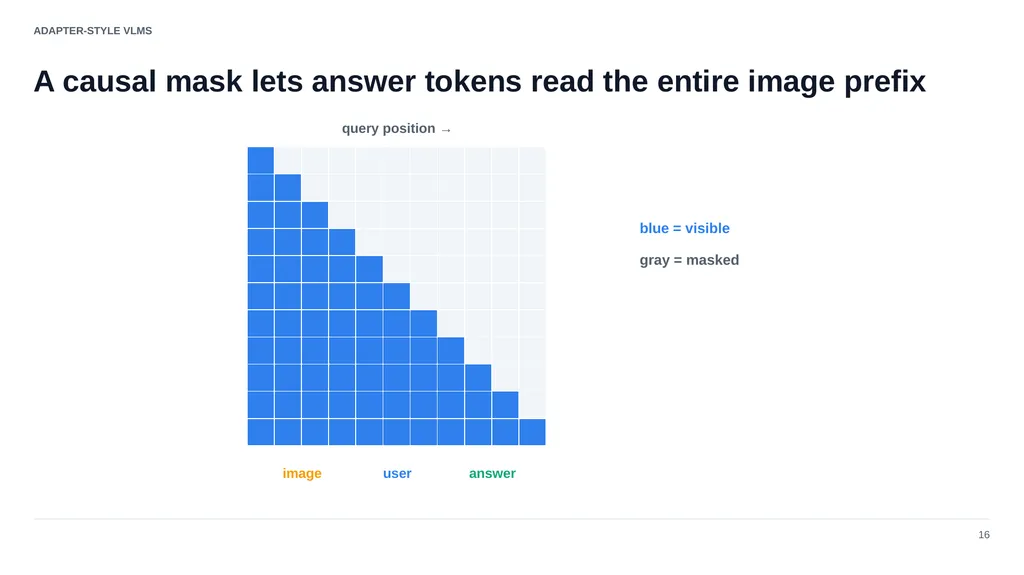
ADAPTER-STYLE VLMS A causal mask lets answer tokens read the entire image prefix 16 image user answer query position → blue = visible gray = masked<br>
26
ADAPTER-STYLE VLMS The connector is tiny; the behavior change comes from data and tuning 22 1 linear projection 595K alignment pairs 158K instruction samples<br>
27
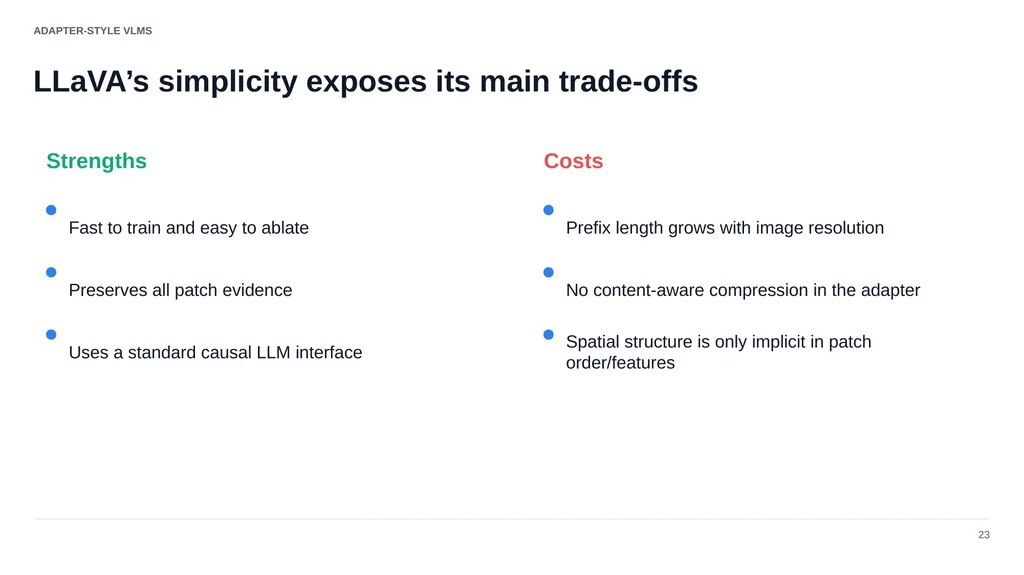
ADAPTER-STYLE VLMS LLaVA’s simplicity exposes its main trade-offs 23 Strengths Costs Fast to train and easy to ablate Preserves all patch evidence Uses a standard causal LLM interface Prefix length grows with image resolution No content-aware compression in the adapter Spatial structure is only implicit in patch order/features<br>
28
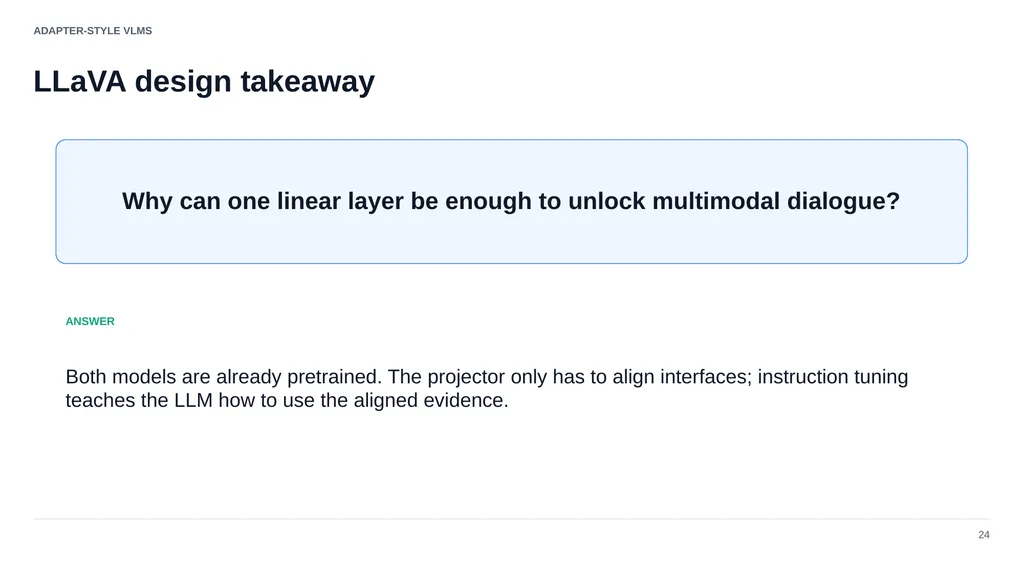
ADAPTER-STYLE VLMS LLaVA design takeaway 24 Why can one linear layer be enough to unlock multimodal dialogue? ANSWER Both models are already pretrained. The projector only has to align interfaces; instruction tuning teaches the LLM how to use the aligned evidence.<br>
29
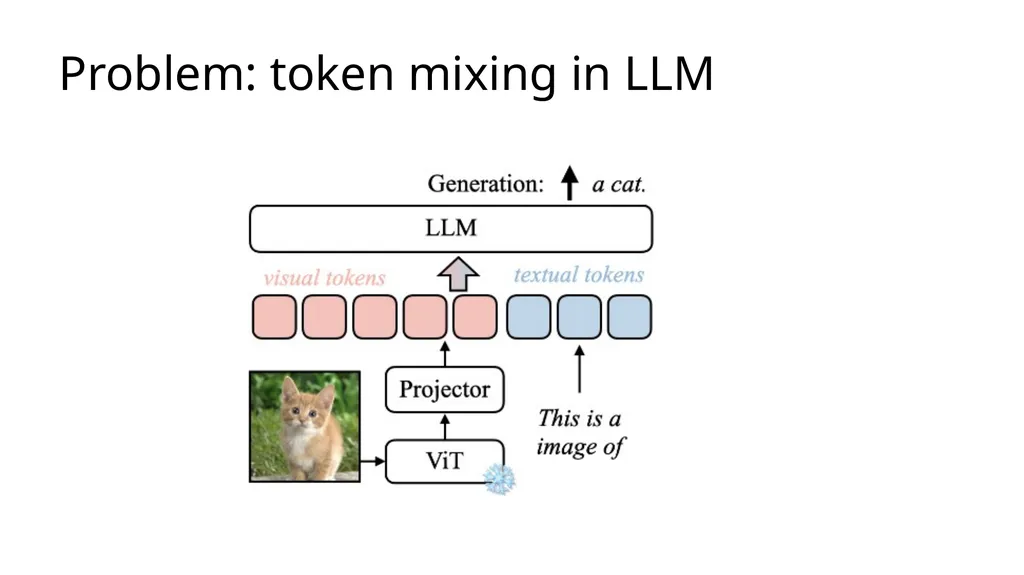
Problem: token mixing in LLM<br>
30
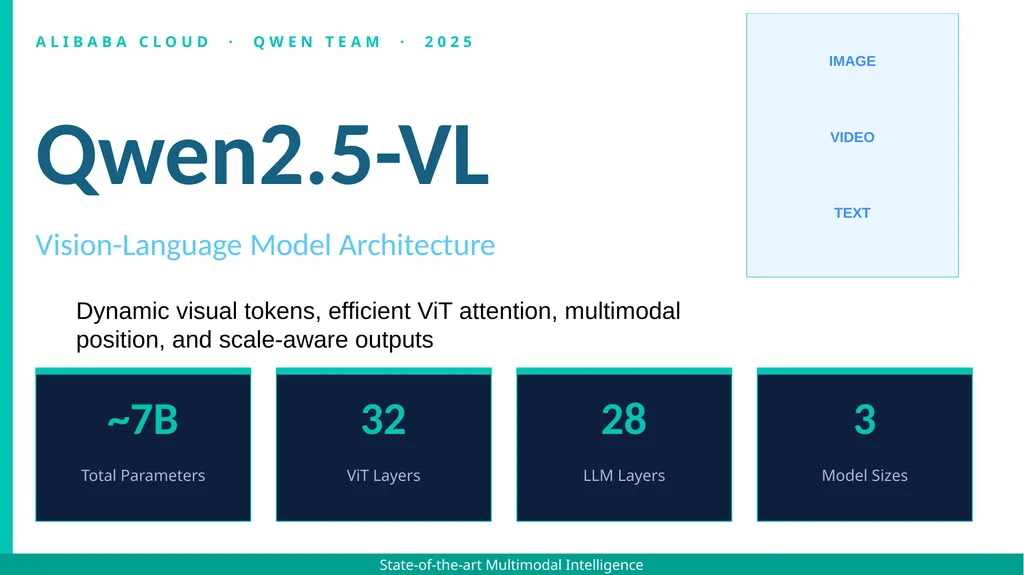
ALIBABA CLOUD · QWEN TEAM · 2025 Qwen2.5-VL Vision-Language Model Architecture ~7B Total Parameters 32 ViT Layers 28 LLM Layers 3 Model Sizes State-of-the-art Multimodal Intelligence Dynamic visual tokens, efficient ViT attention, multimodal position, and scale-aware outputs IMAGE VIDEO TEXT<br>
31
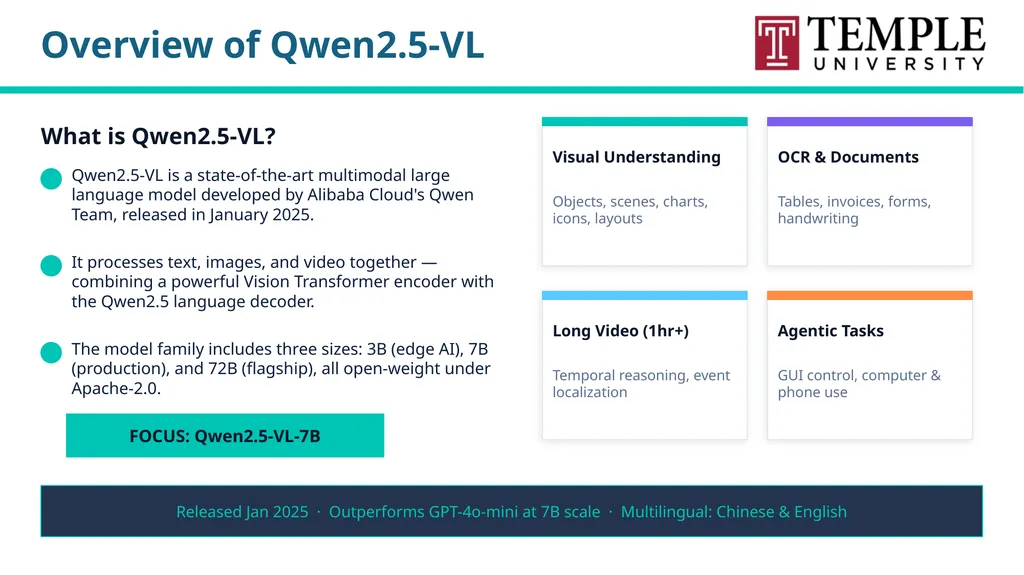
Overview of Qwen2.5-VL What is Qwen2.5-VL? Qwen2.5-VL is a state-of-the-art multimodal large language model developed by Alibaba Cloud's Qwen Team, released in January 2025. It processes text, images, and video together — combining a powerful Vision Transformer encoder with the Qwen2.5 language decoder. The model family includes three sizes: 3B (edge AI), 7B (production), and 72B (flagship), all open-weight under Apache-2.0. Visual Understanding Objects, scenes, charts, icons, layouts OCR & Documents Tables, invoices, forms, handwriting Long Video (1hr+) Temporal reasoning, event localization Agentic Tasks GUI control, computer & phone use Released Jan 2025 · Outperforms GPT-4o-mini at 7B scale · Multilingual: Chinese & English FOCUS: Qwen2.5-VL-7B<br>
32
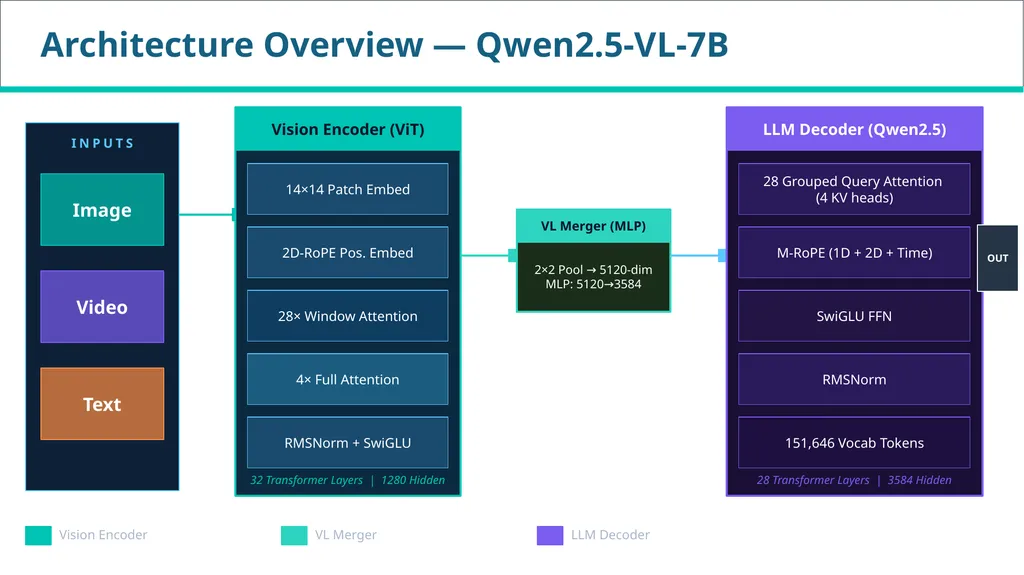
Architecture Overview — Qwen2.5-VL-7B INPUTS Image Video Text Vision Encoder (ViT) 14×14 Patch Embed 2D-RoPE Pos. Embed 28× Window Attention 4× Full Attention RMSNorm + SwiGLU 32 Transformer Layers | 1280 Hidden VL Merger (MLP) 2×2 Pool → 5120-dim
MLP: 5120→3584 LLM Decoder (Qwen2.5) 28 Grouped Query Attention
(4 KV heads) M-RoPE (1D + 2D + Time) SwiGLU FFN RMSNorm 151,646 Vocab Tokens 28 Transformer Layers | 3584 Hidden OUT Vision Encoder VL Merger LLM Decoder<br>
MLP: 5120→3584 LLM Decoder (Qwen2.5) 28 Grouped Query Attention
(4 KV heads) M-RoPE (1D + 2D + Time) SwiGLU FFN RMSNorm 151,646 Vocab Tokens 28 Transformer Layers | 3584 Hidden OUT Vision Encoder VL Merger LLM Decoder<br>
33
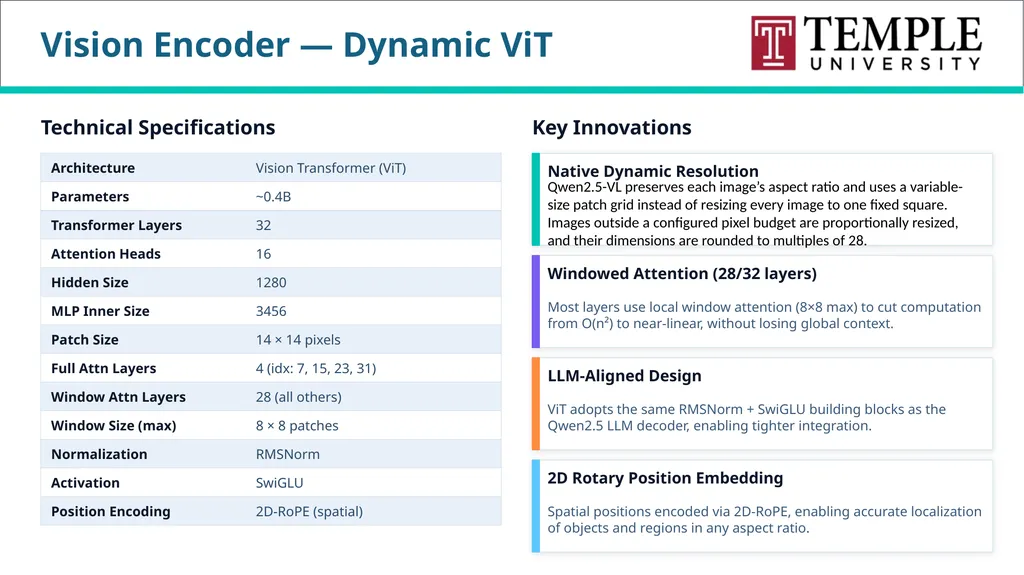
Vision Encoder — Dynamic ViT Technical Specifications Architecture Vision Transformer (ViT) Parameters ~0.4B Transformer Layers 32 Attention Heads 16 Hidden Size 1280 MLP Inner Size 3456 Patch Size 14 × 14 pixels Full Attn Layers 4 (idx: 7, 15, 23, 31) Window Attn Layers 28 (all others) Window Size (max) 8 × 8 patches Normalization RMSNorm Activation SwiGLU Position Encoding 2D-RoPE (spatial) Key Innovations Native Dynamic Resolution Qwen2.5-VL preserves each image’s aspect ratio and uses a variable-size patch grid instead of resizing every image to one fixed square. Images outside a configured pixel budget are proportionally resized, and their dimensions are rounded to multiples of 28. Windowed Attention (28/32 layers) Most layers use local window attention (8×8 max) to cut computation from O(n²) to near-linear, without losing global context. LLM-Aligned Design ViT adopts the same RMSNorm + SwiGLU building blocks as the Qwen2.5 LLM decoder, enabling tighter integration. 2D Rotary Position Embedding Spatial positions encoded via 2D-RoPE, enabling accurate localization of objects and regions in any aspect ratio.<br>
34
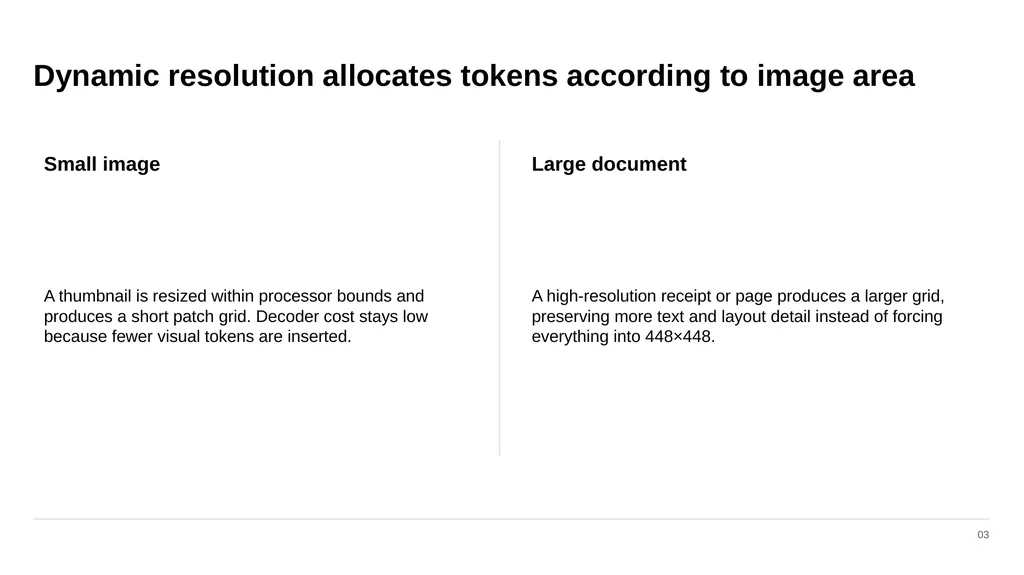
Dynamic resolution allocates tokens according to image area 03 Small image A thumbnail is resized within processor bounds and produces a short patch grid. Decoder cost stays low because fewer visual tokens are inserted. Large document A high-resolution receipt or page produces a larger grid, preserving more text and layout detail instead of forcing everything into 448×448.<br>
35
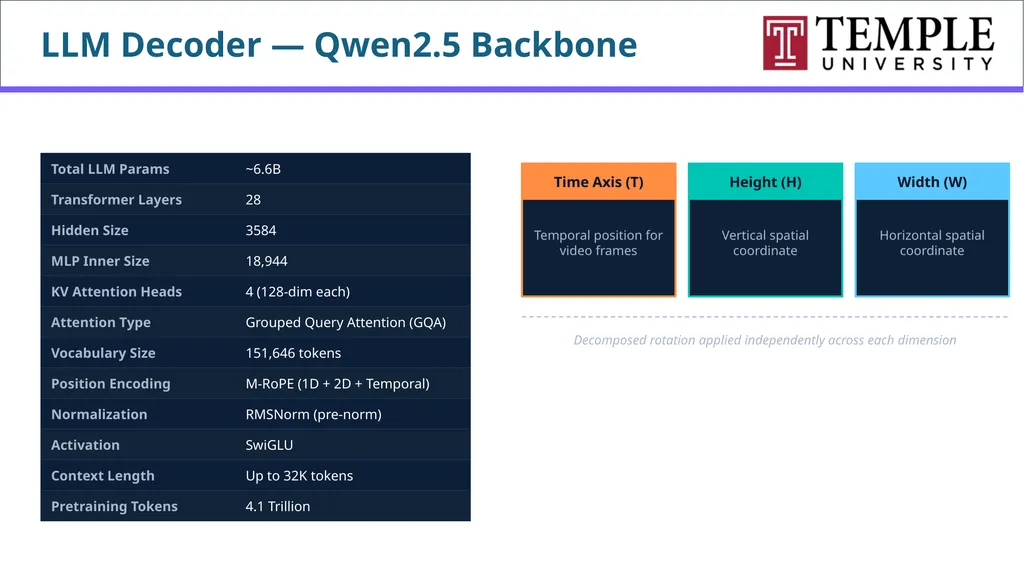
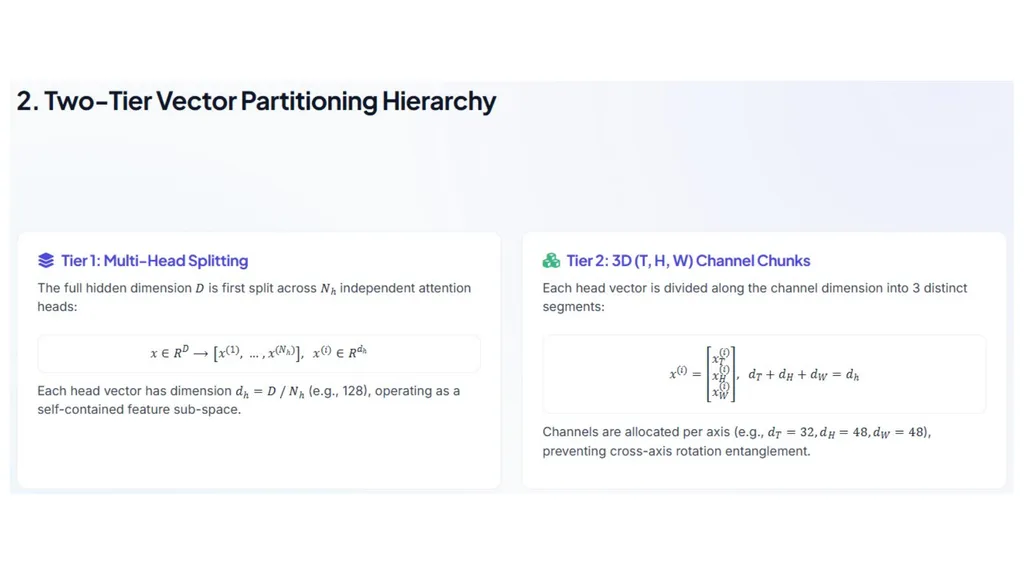
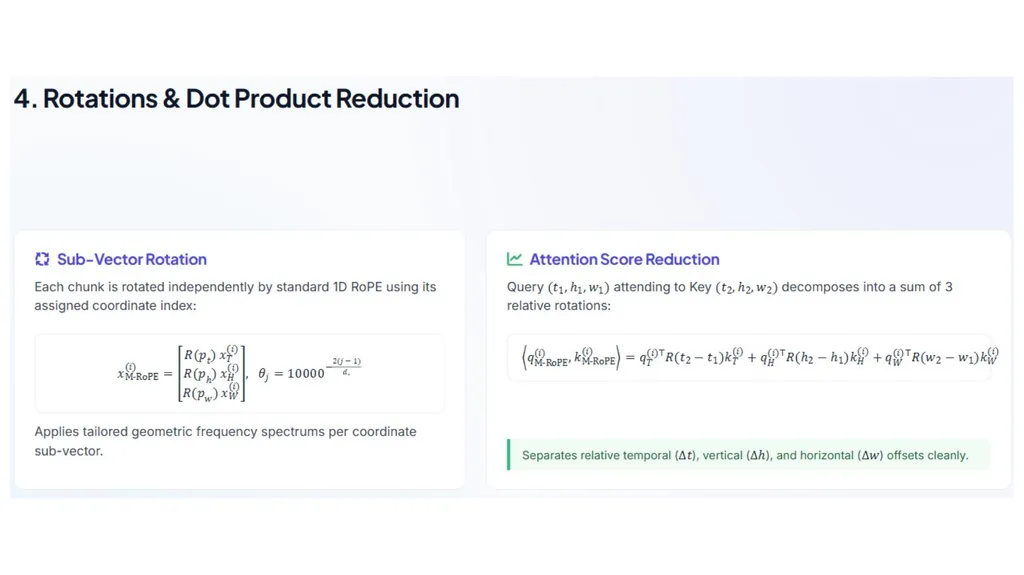
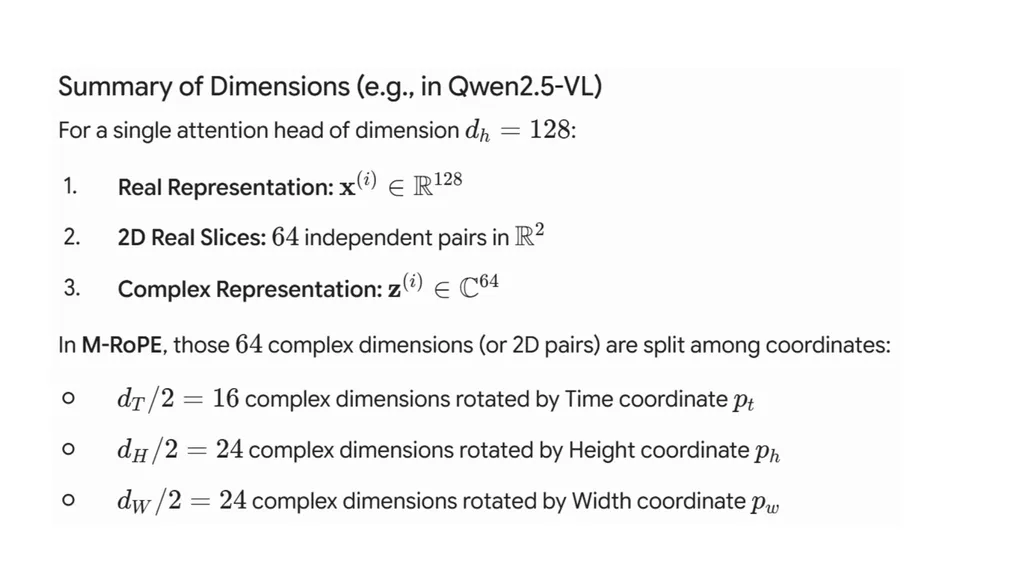
LLM Decoder — Qwen2.5 Backbone LLM Specifications Total LLM Params ~6.6B Transformer Layers 28 Hidden Size 3584 MLP Inner Size 18,944 KV Attention Heads 4 (128-dim each) Attention Type Grouped Query Attention (GQA) Vocabulary Size 151,646 tokens Position Encoding M-RoPE (1D + 2D + Temporal) Normalization RMSNorm (pre-norm) Activation SwiGLU Context Length Up to 32K tokens Pretraining Tokens 4.1 Trillion M-RoPE: Multimodal Position Encoding Time Axis (T) Temporal position for video frames Height (H) Vertical spatial coordinate Width (W) Horizontal spatial coordinate Decomposed rotation applied independently across each dimension<br>
36
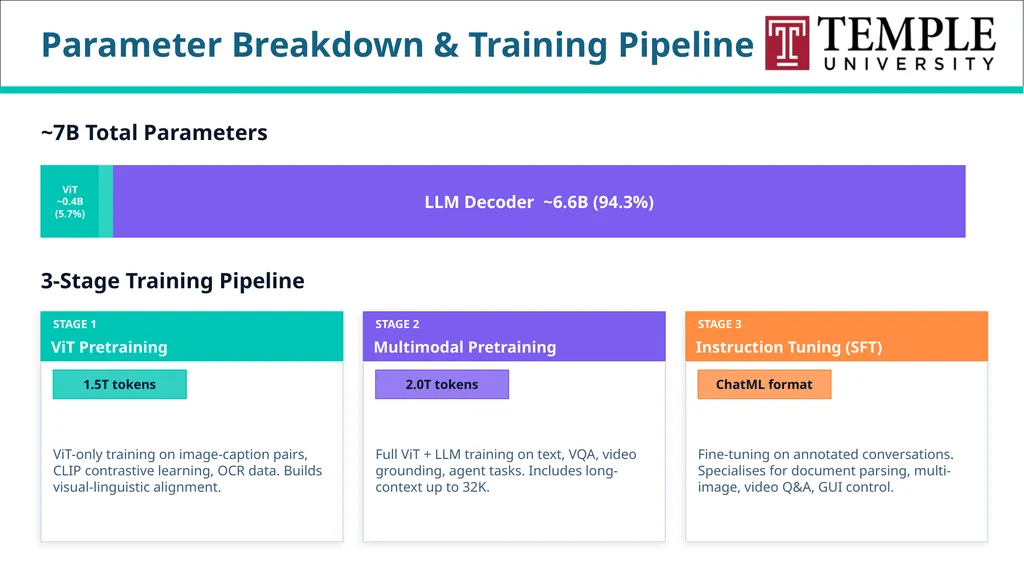
Parameter Breakdown & Training Pipeline ~7B Total Parameters ViT
~0.4B
(5.7%) LLM Decoder ~6.6B (94.3%) 3-Stage Training Pipeline STAGE 1 ViT Pretraining 1.5T tokens ViT-only training on image-caption pairs, CLIP contrastive learning, OCR data. Builds visual-linguistic alignment. STAGE 2 Multimodal Pretraining 2.0T tokens Full ViT + LLM training on text, VQA, video grounding, agent tasks. Includes long-context up to 32K. STAGE 3 Instruction Tuning (SFT) ChatML format Fine-tuning on annotated conversations. Specialises for document parsing, multi-image, video Q&A, GUI control.<br>
~0.4B
(5.7%) LLM Decoder ~6.6B (94.3%) 3-Stage Training Pipeline STAGE 1 ViT Pretraining 1.5T tokens ViT-only training on image-caption pairs, CLIP contrastive learning, OCR data. Builds visual-linguistic alignment. STAGE 2 Multimodal Pretraining 2.0T tokens Full ViT + LLM training on text, VQA, video grounding, agent tasks. Includes long-context up to 32K. STAGE 3 Instruction Tuning (SFT) ChatML format Fine-tuning on annotated conversations. Specialises for document parsing, multi-image, video Q&A, GUI control.<br>
37
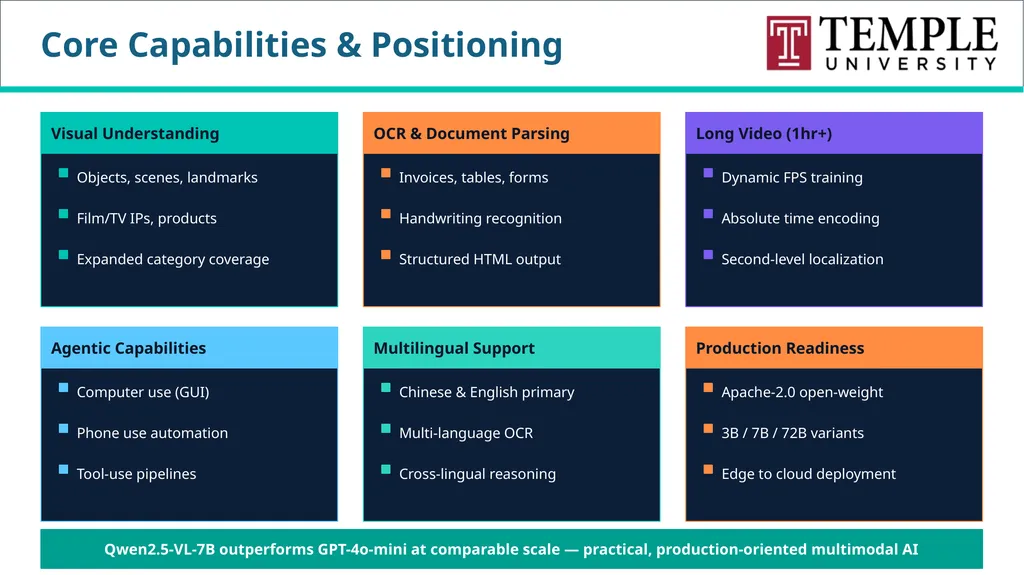
Core Capabilities & Positioning Visual Understanding Objects, scenes, landmarks Film/TV IPs, products Expanded category coverage OCR & Document Parsing Invoices, tables, forms Handwriting recognition Structured HTML output Long Video (1hr+) Dynamic FPS training Absolute time encoding Second-level localization Agentic Capabilities Computer use (GUI) Phone use automation Tool-use pipelines Multilingual Support Chinese & English primary Multi-language OCR Cross-lingual reasoning Production Readiness Apache-2.0 open-weight 3B / 7B / 72B variants Edge to cloud deployment Qwen2.5-VL-7B outperforms GPT-4o-mini at comparable scale — practical, production-oriented multimodal AI<br>
38
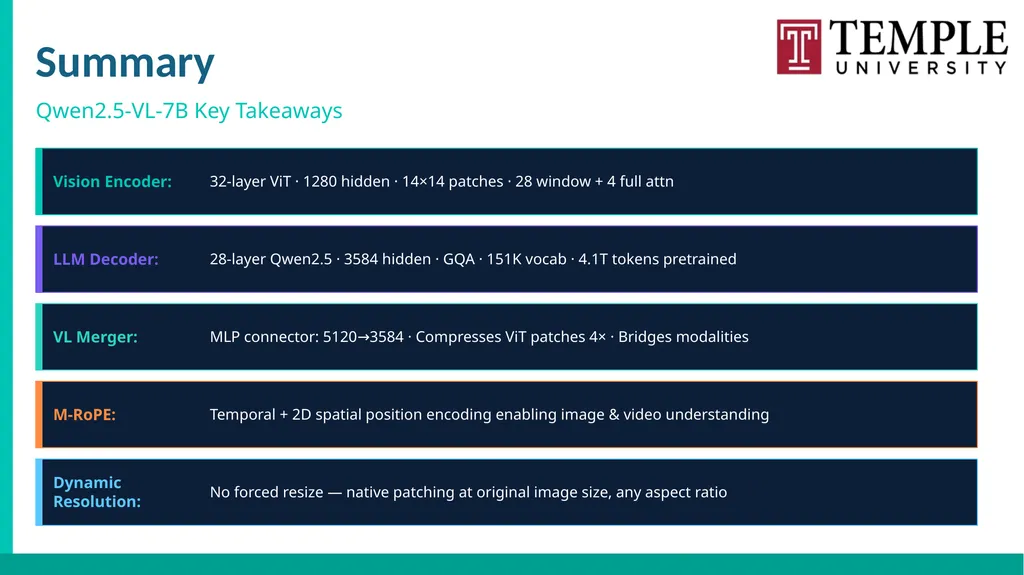
Summary Qwen2.5-VL-7B Key Takeaways Vision Encoder: 32-layer ViT · 1280 hidden · 14×14 patches · 28 window + 4 full attn LLM Decoder: 28-layer Qwen2.5 · 3584 hidden · GQA · 151K vocab · 4.1T tokens pretrained VL Merger: MLP connector: 5120→3584 · Compresses ViT patches 4× · Bridges modalities M-RoPE: Temporal + 2D spatial position encoding enabling image & video understanding Dynamic Resolution: No forced resize — native patching at original image size, any aspect ratio<br>
39
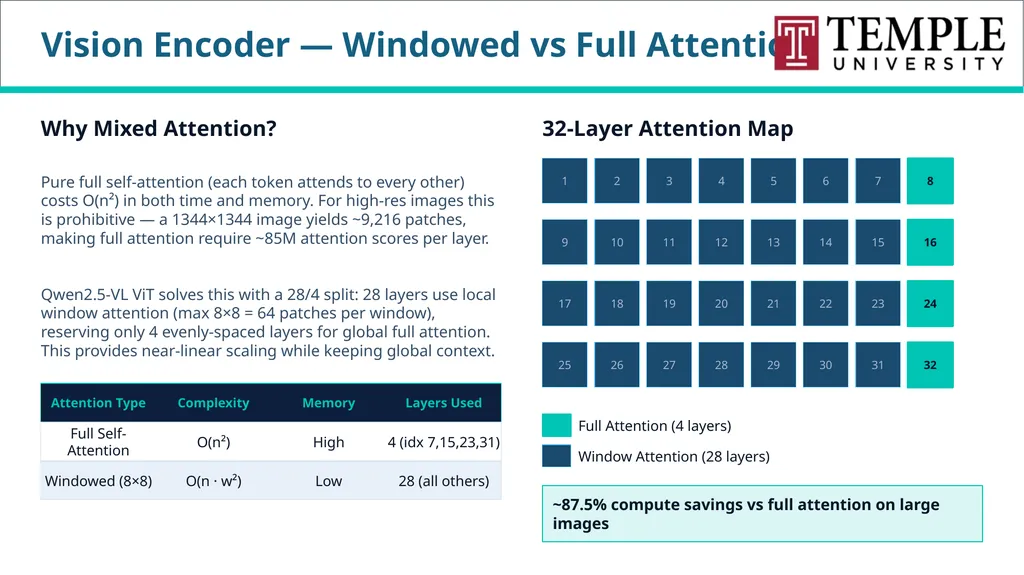
Vision Encoder — Windowed vs Full Attention Why Mixed Attention? Pure full self-attention (each token attends to every other) costs O(n²) in both time and memory. For high-res images this is prohibitive — a 1344×1344 image yields ~9,216 patches, making full attention require ~85M attention scores per layer. Qwen2.5-VL ViT solves this with a 28/4 split: 28 layers use local window attention (max 8×8 = 64 patches per window), reserving only 4 evenly-spaced layers for global full attention. This provides near-linear scaling while keeping global context. Attention Type Complexity Memory Layers Used Full Self-Attention O(n²) High 4 (idx 7,15,23,31) Windowed (8×8) O(n · w²) Low 28 (all others) 32-Layer Attention Map 1 2 3 4 5 6 7 8 9 10 11 12 13 14 15 16 17 18 19 20 21 22 23 24 25 26 27 28 29 30 31 32 Full Attention (4 layers) Window Attention (28 layers) ~87.5% compute savings vs full attention on large images<br>
40
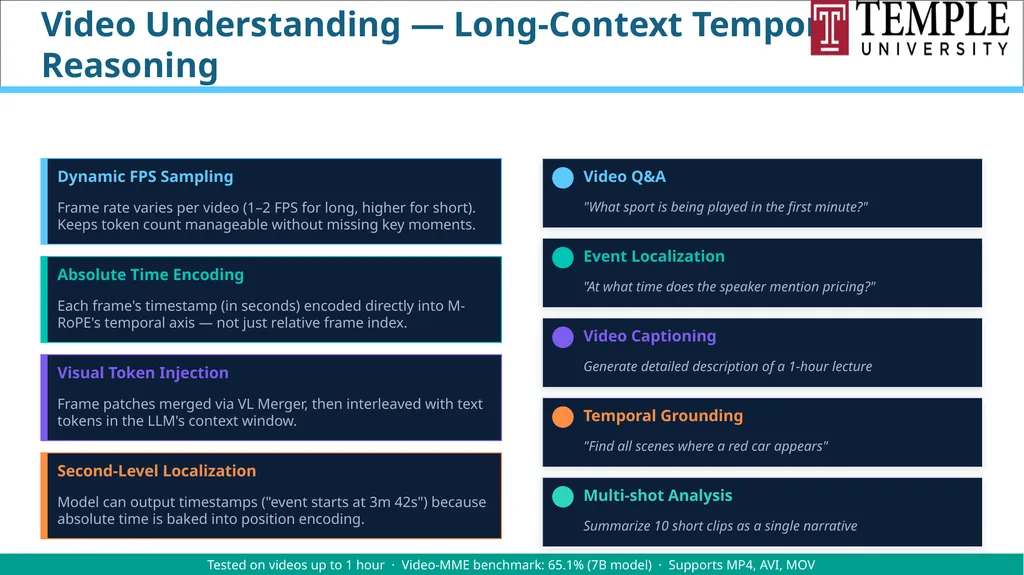
Video Understanding — Long-Context Temporal Reasoning How Qwen2.5-VL Processes Video Dynamic FPS Sampling Frame rate varies per video (1–2 FPS for long, higher for short). Keeps token count manageable without missing key moments. Absolute Time Encoding Each frame's timestamp (in seconds) encoded directly into M-RoPE's temporal axis — not just relative frame index. Visual Token Injection Frame patches merged via VL Merger, then interleaved with text tokens in the LLM's context window. Second-Level Localization Model can output timestamps ("event starts at 3m 42s") because absolute time is baked into position encoding. Supported Video Tasks Video Q&A "What sport is being played in the first minute?" Event Localization "At what time does the speaker mention pricing?" Video Captioning Generate detailed description of a 1-hour lecture Temporal Grounding "Find all scenes where a red car appears" Multi-shot Analysis Summarize 10 short clips as a single narrative Tested on videos up to 1 hour · Video-MME benchmark: 65.1% (7B model) · Supports MP4, AVI, MOV<br>
41
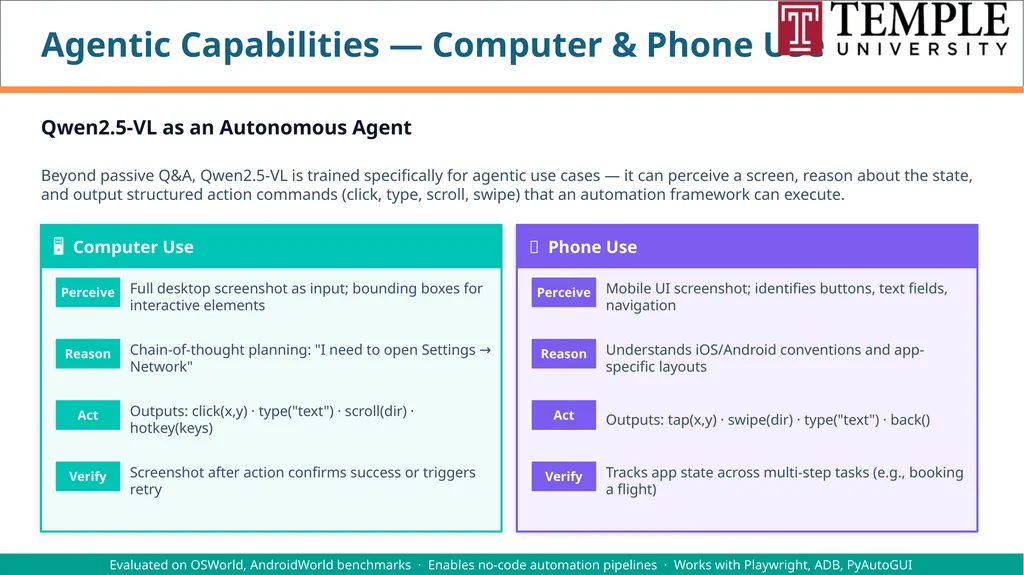
Agentic Capabilities — Computer & Phone Use Qwen2.5-VL as an Autonomous Agent Beyond passive Q&A, Qwen2.5-VL is trained specifically for agentic use cases — it can perceive a screen, reason about the state, and output structured action commands (click, type, scroll, swipe) that an automation framework can execute. 🖥 Computer Use Perceive Full desktop screenshot as input; bounding boxes for interactive elements Reason Chain-of-thought planning: "I need to open Settings → Network" Act Outputs: click(x,y) · type("text") · scroll(dir) · hotkey(keys) Verify Screenshot after action confirms success or triggers retry 📱 Phone Use Perceive Mobile UI screenshot; identifies buttons, text fields, navigation Reason Understands iOS/Android conventions and app-specific layouts Act Outputs: tap(x,y) · swipe(dir) · type("text") · back() Verify Tracks app state across multi-step tasks (e.g., booking a flight) Evaluated on OSWorld, AndroidWorld benchmarks · Enables no-code automation pipelines · Works with Playwright, ADB, PyAutoGUI<br>
42
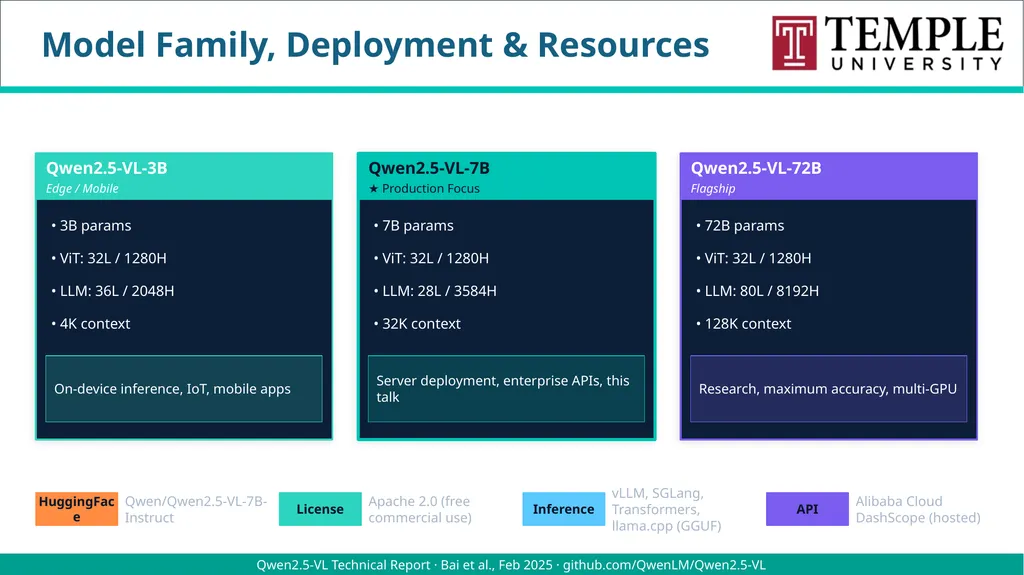
Model Family, Deployment & Resources Qwen2.5-VL Model Family Qwen2.5-VL-3B Edge / Mobile • 3B params • ViT: 32L / 1280H • LLM: 36L / 2048H • 4K context On-device inference, IoT, mobile apps Qwen2.5-VL-7B ★ Production Focus • 7B params • ViT: 32L / 1280H • LLM: 28L / 3584H • 32K context Server deployment, enterprise APIs, this talk Qwen2.5-VL-72B Flagship • 72B params • ViT: 32L / 1280H • LLM: 80L / 8192H • 128K context Research, maximum accuracy, multi-GPU Deployment & Access HuggingFace Qwen/Qwen2.5-VL-7B-Instruct License Apache 2.0 (free commercial use) Inference vLLM, SGLang, Transformers, llama.cpp (GGUF) API Alibaba Cloud DashScope (hosted) Qwen2.5-VL Technical Report · Bai et al., Feb 2025 · github.com/QwenLM/Qwen2.5-VL<br>
43
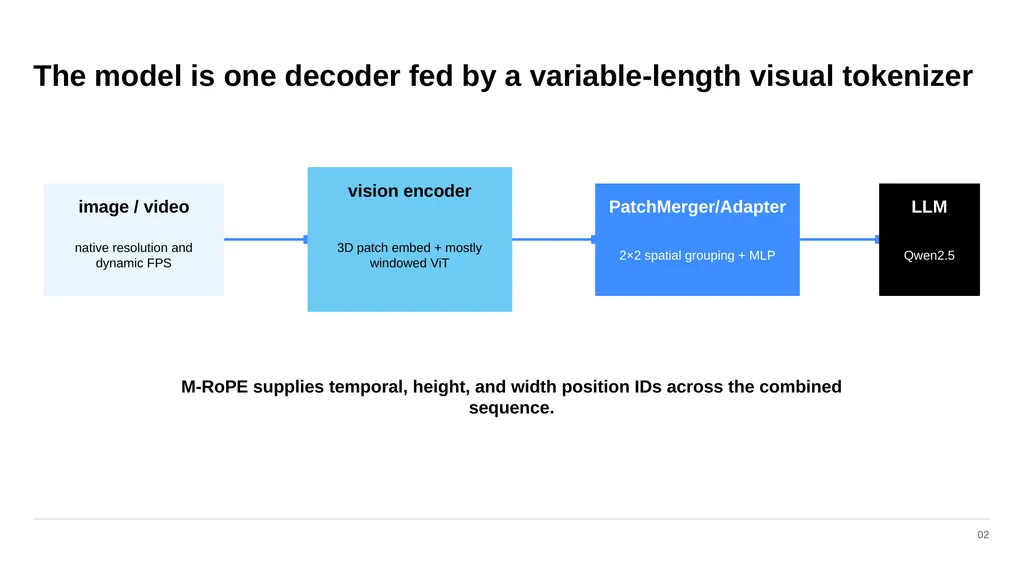
The model is one decoder fed by a variable-length visual tokenizer 02 image / video native resolution and dynamic FPS vision encoder 3D patch embed + mostly windowed ViT PatchMerger/Adapter 2×2 spatial grouping + MLP LLM Qwen2.5 M‑RoPE supplies temporal, height, and width position IDs across the combined sequence.<br>
44
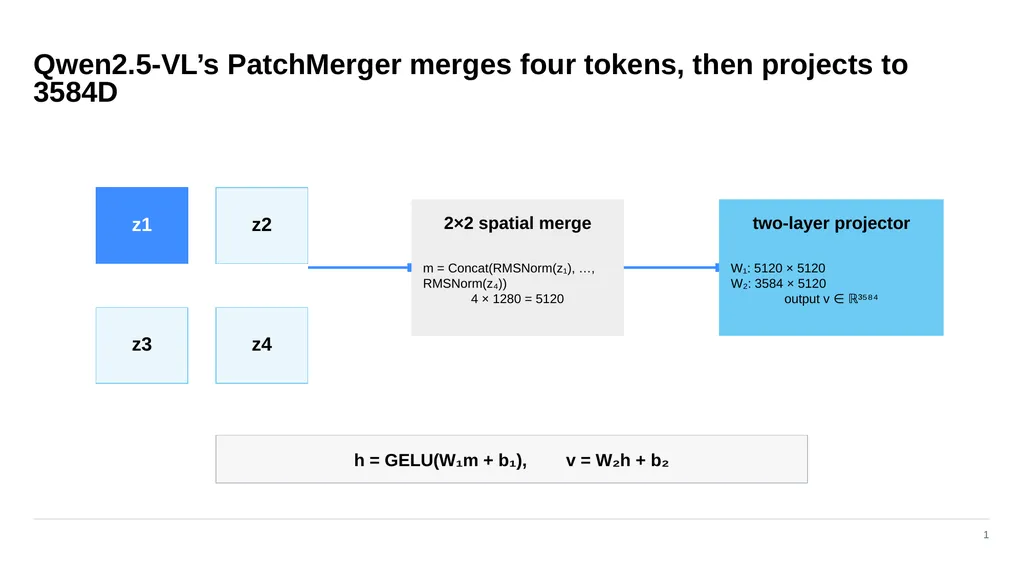
Qwen2.5-VL’s PatchMerger merges four tokens, then projects to 3584D 1 z1 z2 z3 z4 2×2 spatial merge m = Concat(RMSNorm(z₁), …, RMSNorm(z₄))
4 × 1280 = 5120 two-layer projector W₁: 5120 × 5120
W₂: 3584 × 5120
output v ∈ ℝ³⁵⁸⁴ h = GELU(W₁m + b₁), v = W₂h + b₂<br>
4 × 1280 = 5120 two-layer projector W₁: 5120 × 5120
W₂: 3584 × 5120
output v ∈ ℝ³⁵⁸⁴ h = GELU(W₁m + b₁), v = W₂h + b₂<br>
45
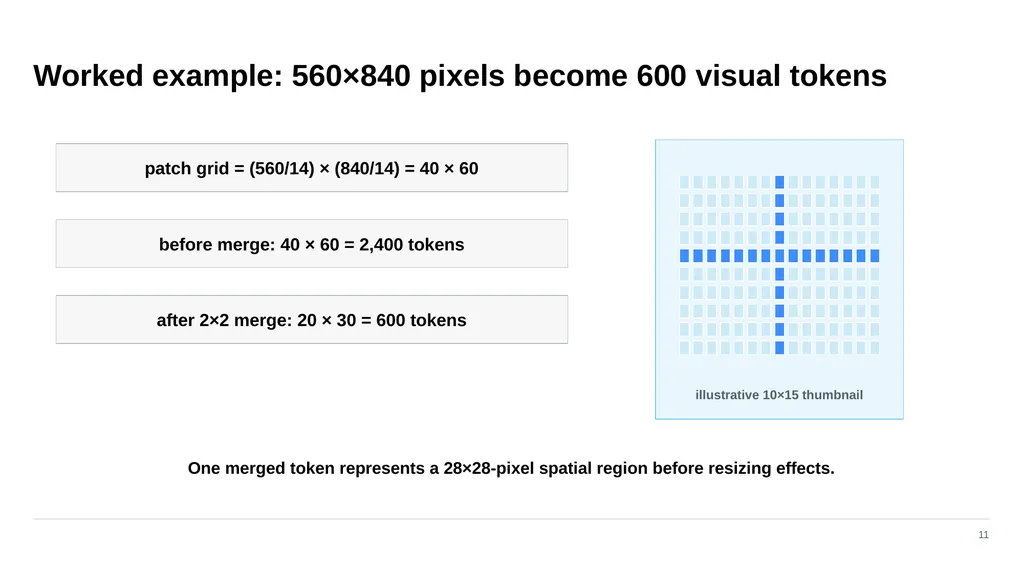
Worked example: 560×840 pixels become 600 visual tokens 11 patch grid = (560/14) × (840/14) = 40 × 60 before merge: 40 × 60 = 2,400 tokens after 2×2 merge: 20 × 30 = 600 tokens illustrative 10×15 thumbnail One merged token represents a 28×28-pixel spatial region before resizing effects.<br>
46
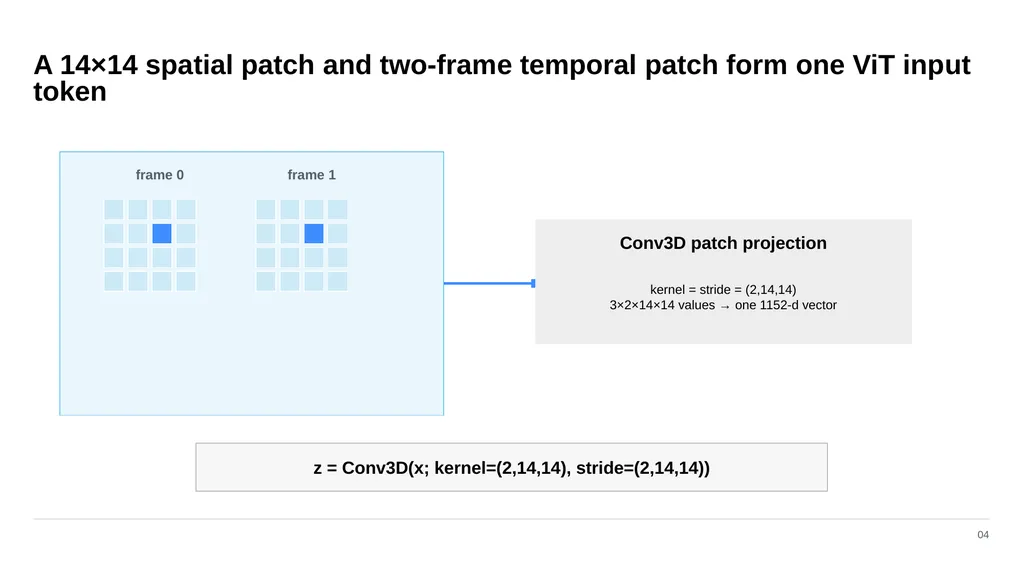
A 14×14 spatial patch and two-frame temporal patch form one ViT input token 04 frame 0 frame 1 Conv3D patch projection kernel = stride = (2,14,14)
3×2×14×14 values → one 1152-d vector z = Conv3D(x; kernel=(2,14,14), stride=(2,14,14))<br>
3×2×14×14 values → one 1152-d vector z = Conv3D(x; kernel=(2,14,14), stride=(2,14,14))<br>
47
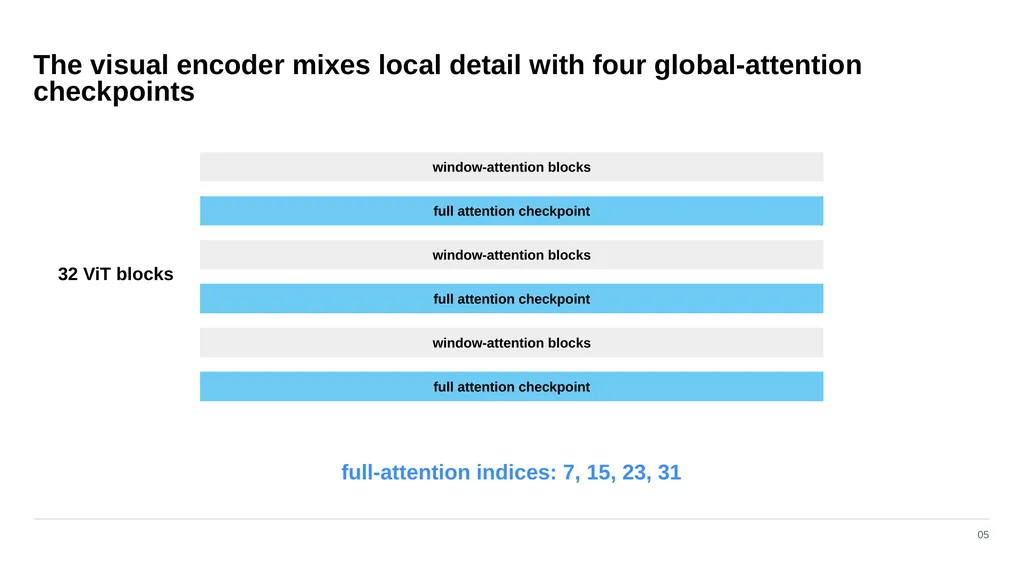
The visual encoder mixes local detail with four global-attention checkpoints 05 window-attention blocks full attention checkpoint window-attention blocks full attention checkpoint window-attention blocks full attention checkpoint 32 ViT blocks full-attention indices: 7, 15, 23, 31<br>
48
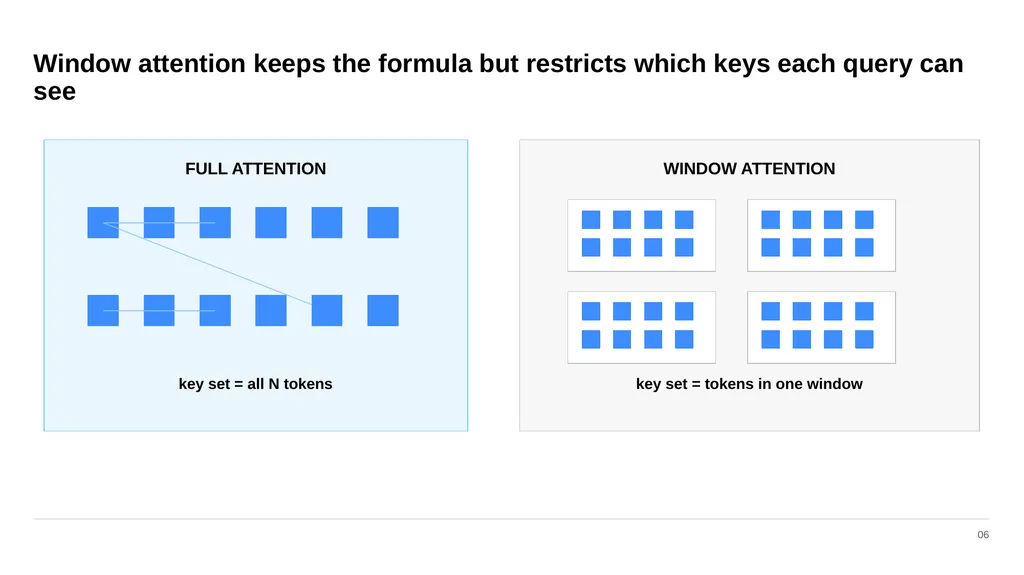
Window attention keeps the formula but restricts which keys each query can see 06 FULL ATTENTION key set = all N tokens WINDOW ATTENTION key set = tokens in one window<br>
49
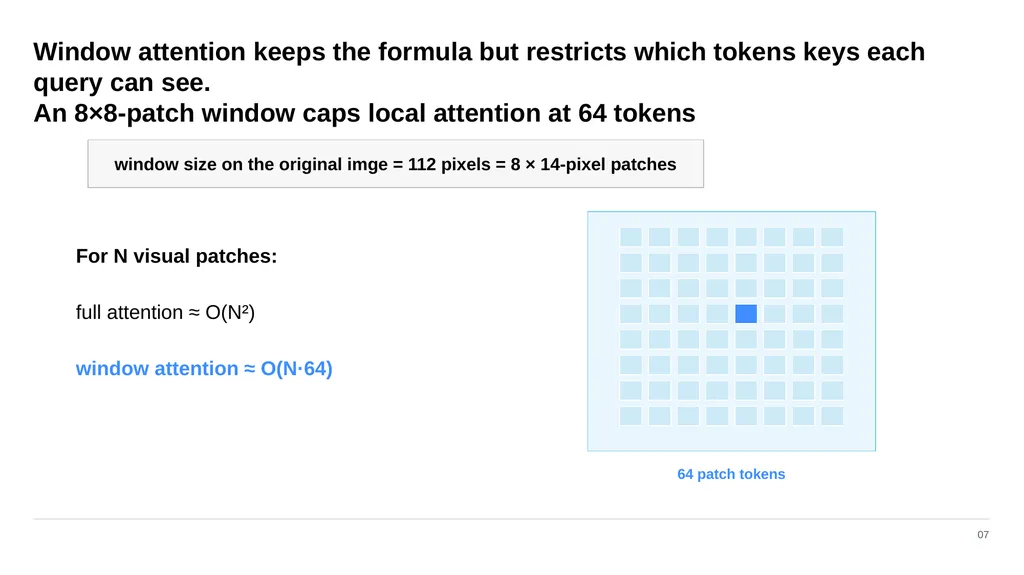
Window attention keeps the formula but restricts which tokens keys each query can see.
An 8×8-patch window caps local attention at 64 tokens 07 window size on the original imge = 112 pixels = 8 × 14-pixel patches 64 patch tokens For N visual patches: full attention ≈ O(N²) window attention ≈ O(N·64)<br>
An 8×8-patch window caps local attention at 64 tokens 07 window size on the original imge = 112 pixels = 8 × 14-pixel patches 64 patch tokens For N visual patches: full attention ≈ O(N²) window attention ≈ O(N·64)<br>
50
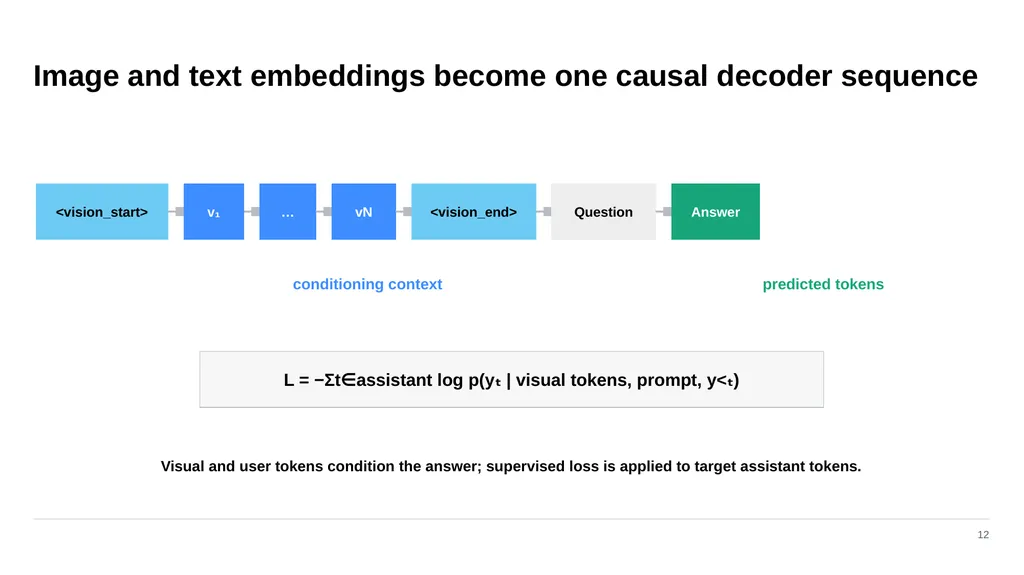
Image and text embeddings become one causal decoder sequence 12 <vision_start> v₁ … vN <vision_end> Question Answer conditioning context predicted tokens L = −Σt∈assistant log p(yₜ | visual tokens, prompt, y<ₜ) Visual and user tokens condition the answer; supervised loss is applied to target assistant tokens.<br>
51
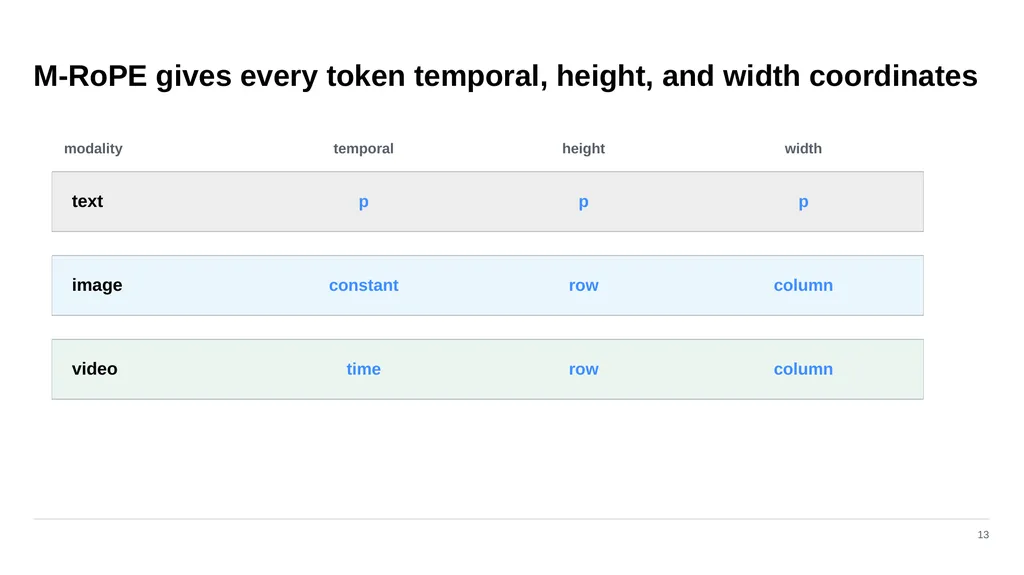
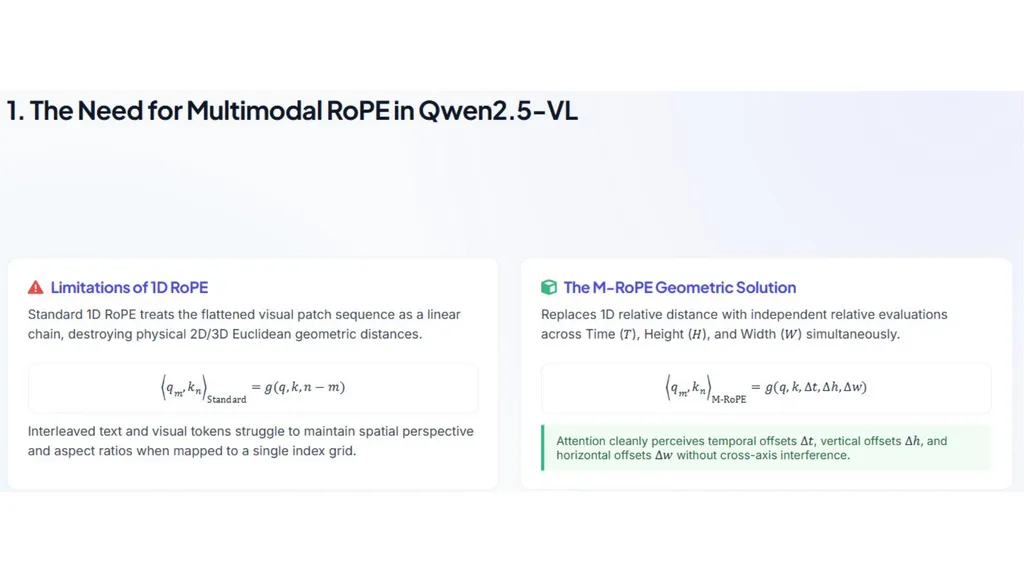
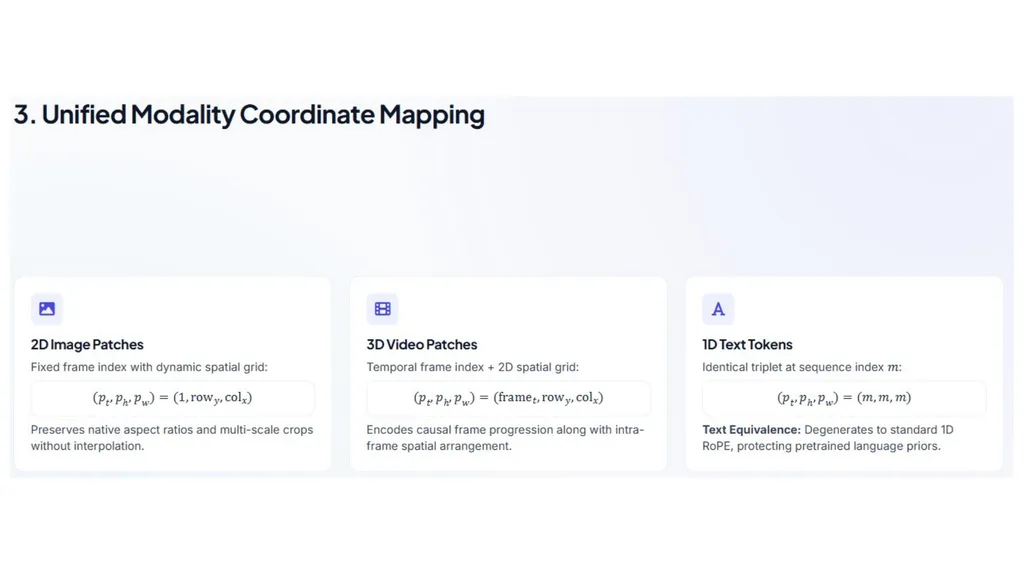
M‑RoPE gives every token temporal, height, and width coordinates 13 modality temporal height width text p p p image constant row column video time row column<br>
52
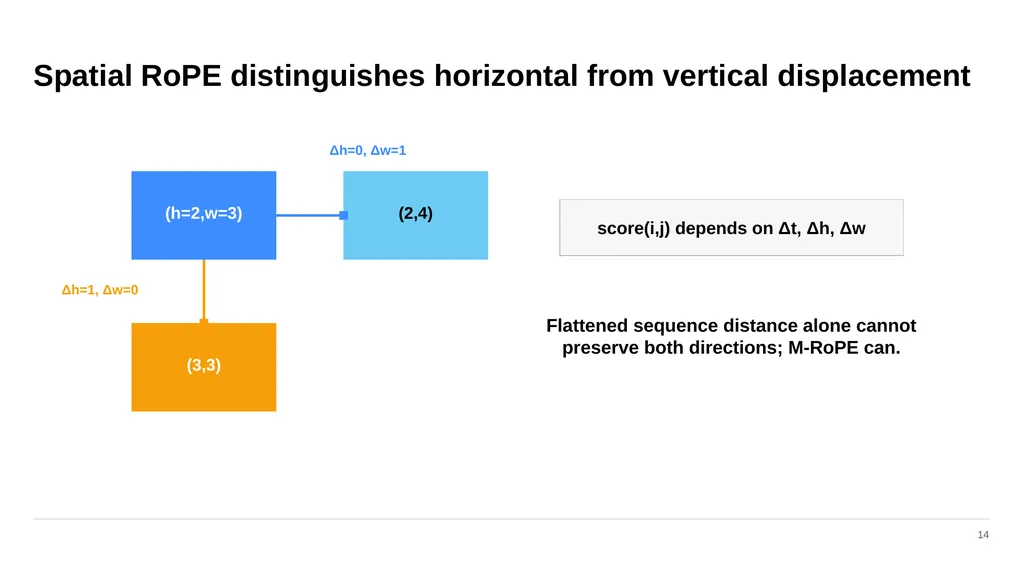
Spatial RoPE distinguishes horizontal from vertical displacement 14 (h=2,w=3) (2,4) (3,3) Δh=0, Δw=1 Δh=1, Δw=0 score(i,j) depends on Δt, Δh, Δw Flattened sequence distance alone cannot preserve both directions; M‑RoPE can.<br>
53
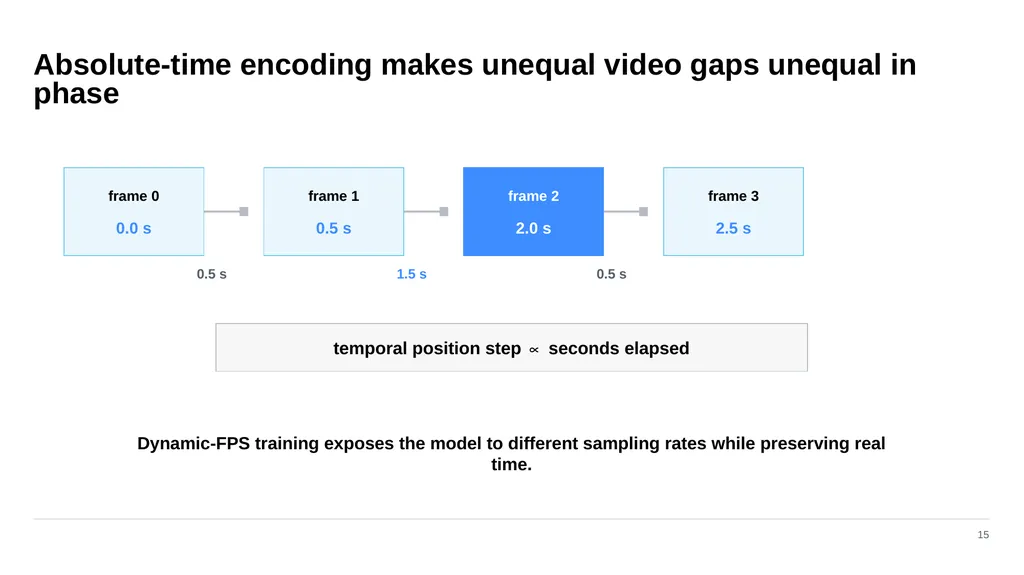
Absolute-time encoding makes unequal video gaps unequal in phase 15 frame 0 0.0 s frame 1 0.5 s frame 2 2.0 s frame 3 2.5 s temporal position step ∝ seconds elapsed 0.5 s 1.5 s 0.5 s Dynamic-FPS training exposes the model to different sampling rates while preserving real time.<br>
54
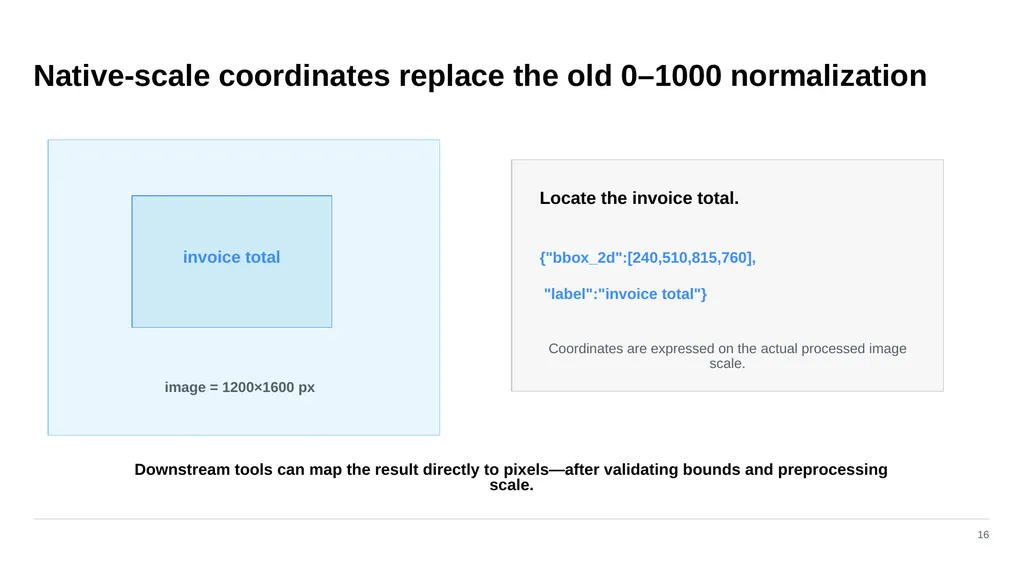
Native-scale coordinates replace the old 0–1000 normalization 16 invoice total image = 1200×1600 px Locate the invoice total. {"bbox_2d":[240,510,815,760], "label":"invoice total"} Coordinates are expressed on the actual processed image scale. Downstream tools can map the result directly to pixels—after validating bounds and preprocessing scale.<br>
55
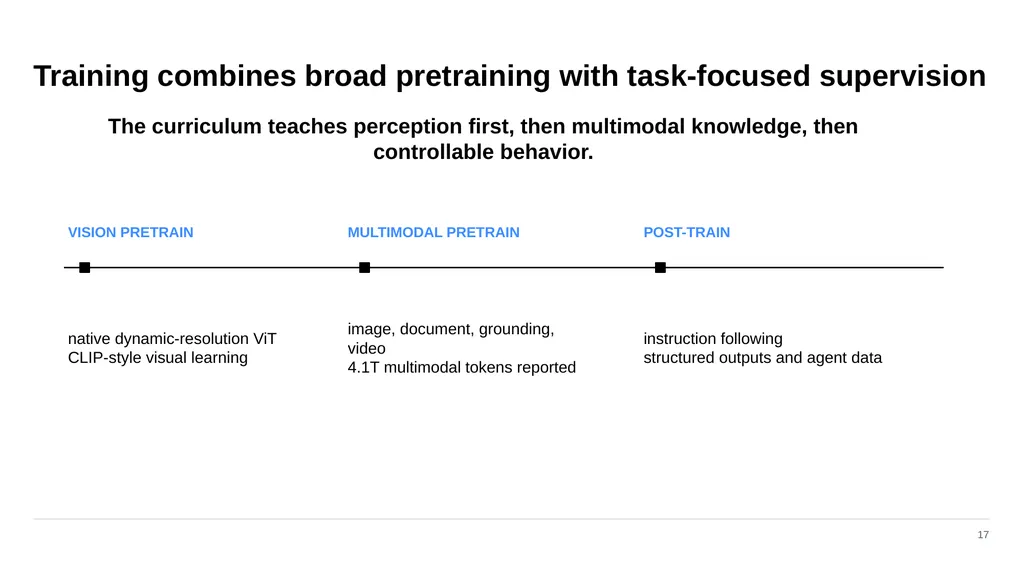
Training combines broad pretraining with task-focused supervision 17 VISION PRETRAIN native dynamic-resolution ViT
CLIP-style visual learning MULTIMODAL PRETRAIN image, document, grounding, video
4.1T multimodal tokens reported POST-TRAIN instruction following
structured outputs and agent data The curriculum teaches perception first, then multimodal knowledge, then controllable behavior.<br>
CLIP-style visual learning MULTIMODAL PRETRAIN image, document, grounding, video
4.1T multimodal tokens reported POST-TRAIN instruction following
structured outputs and agent data The curriculum teaches perception first, then multimodal knowledge, then controllable behavior.<br>
56
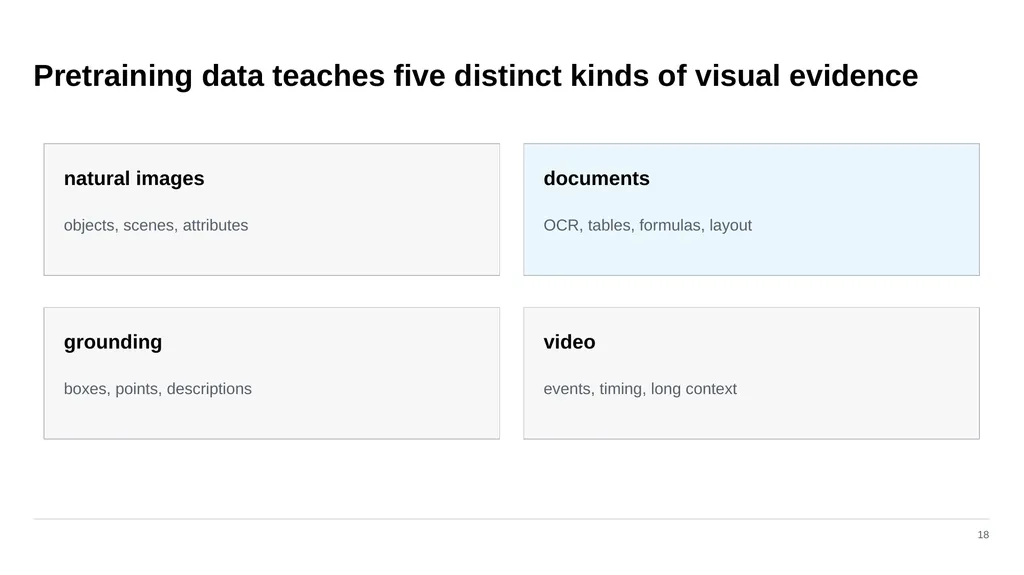
Pretraining data teaches five distinct kinds of visual evidence 18 natural images objects, scenes, attributes documents OCR, tables, formulas, layout grounding boxes, points, descriptions video events, timing, long context<br>
57
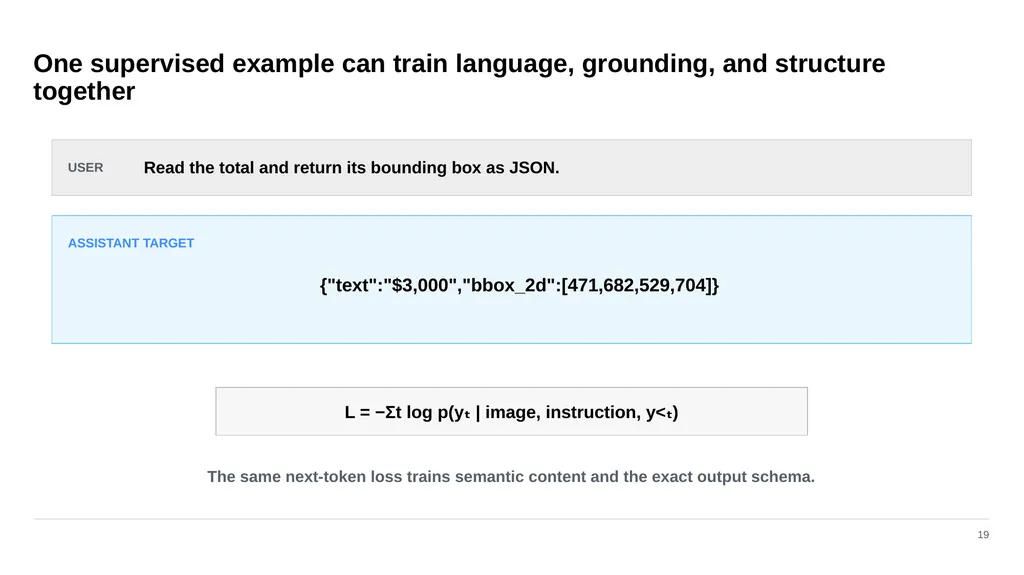
One supervised example can train language, grounding, and structure together 19 USER Read the total and return its bounding box as JSON. ASSISTANT TARGET {"text":"$3,000","bbox_2d":[471,682,529,704]} L = −Σt log p(yₜ | image, instruction, y<ₜ) The same next-token loss trains semantic content and the exact output schema.<br>
58
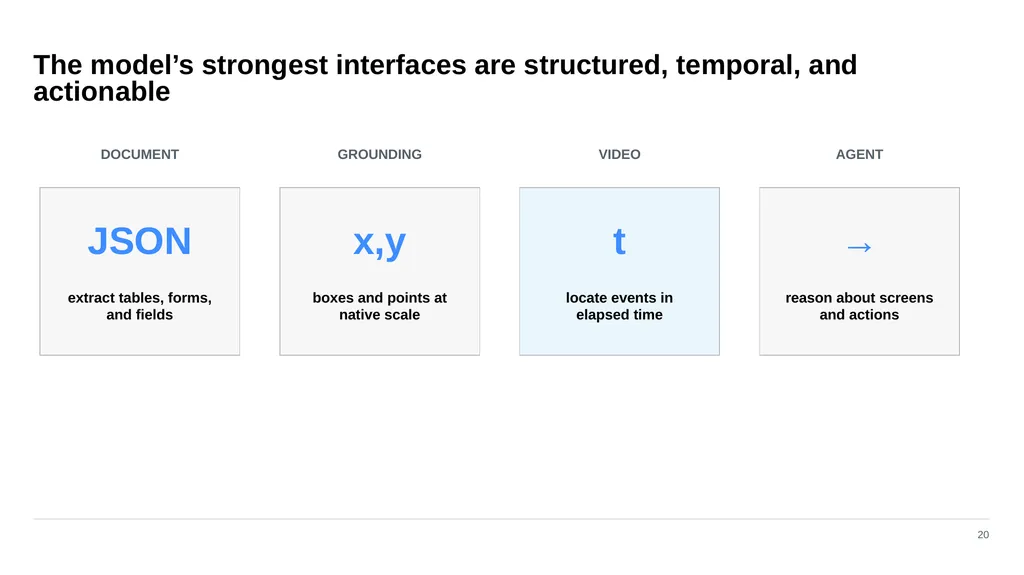
The model’s strongest interfaces are structured, temporal, and actionable 20 DOCUMENT JSON extract tables, forms, and fields GROUNDING x,y boxes and points at native scale VIDEO t locate events in elapsed time AGENT → reason about screens and actions<br>
59
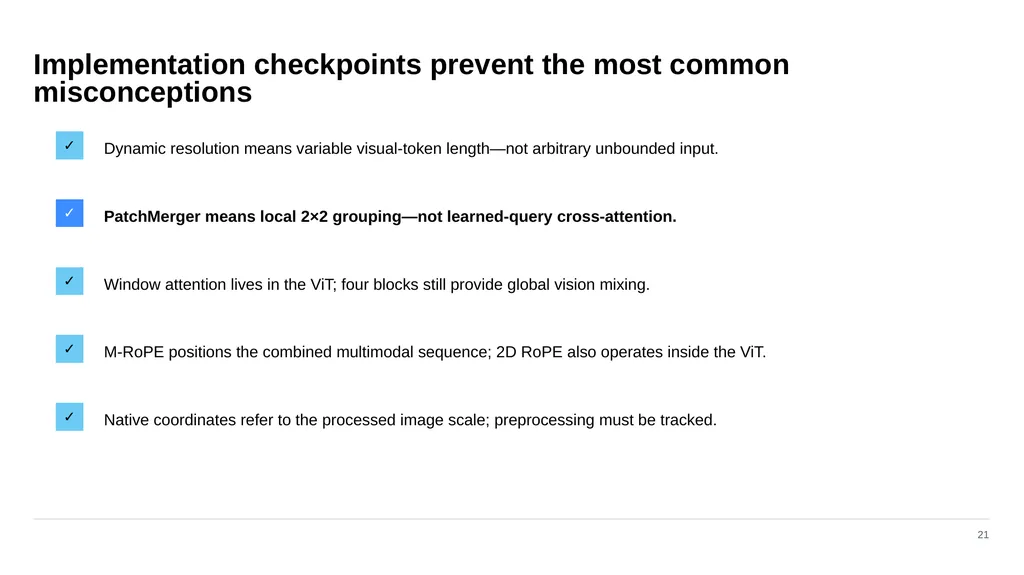
Implementation checkpoints prevent the most common misconceptions 21 ✓ Dynamic resolution means variable visual-token length—not arbitrary unbounded input. ✓ PatchMerger means local 2×2 grouping—not learned-query cross-attention. ✓ Window attention lives in the ViT; four blocks still provide global vision mixing. ✓ M‑RoPE positions the combined multimodal sequence; 2D RoPE also operates inside the ViT. ✓ Native coordinates refer to the processed image scale; preprocessing must be tracked.<br>
60
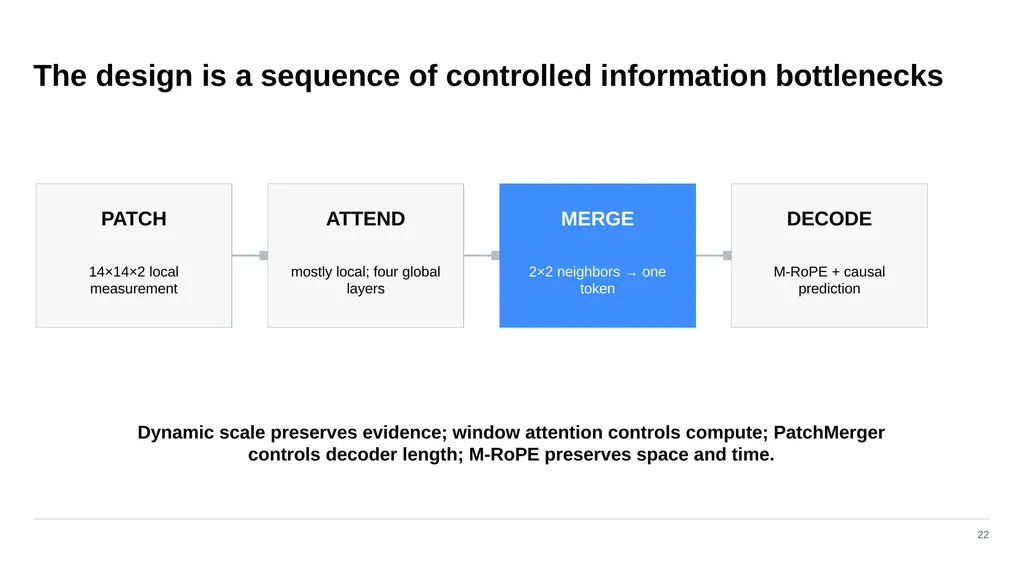
The design is a sequence of controlled information bottlenecks 22 PATCH 14×14×2 local measurement ATTEND mostly local; four global layers MERGE 2×2 neighbors → one token DECODE M‑RoPE + causal prediction Dynamic scale preserves evidence; window attention controls compute; PatchMerger controls decoder length; M‑RoPE preserves space and time.<br>
61
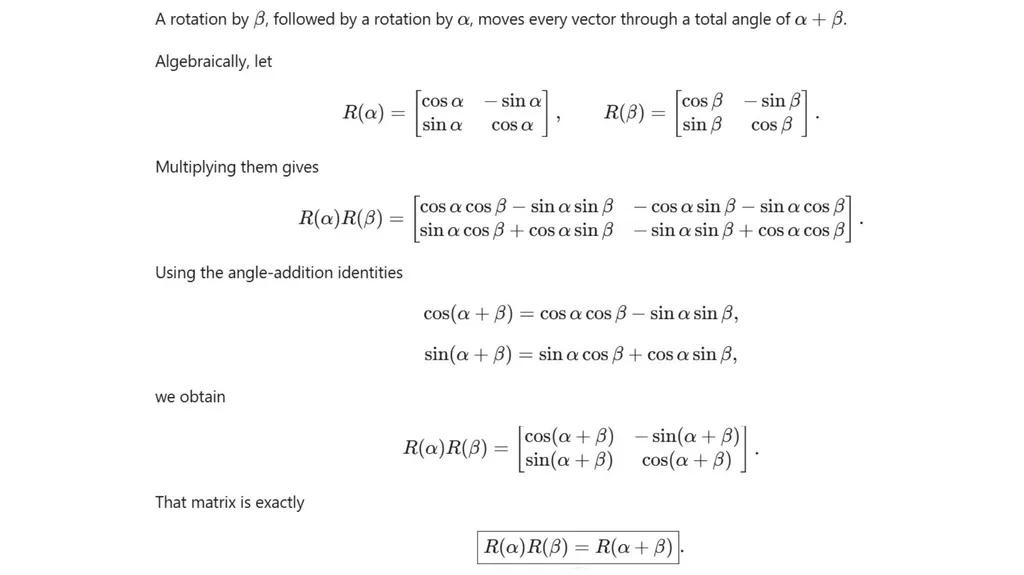
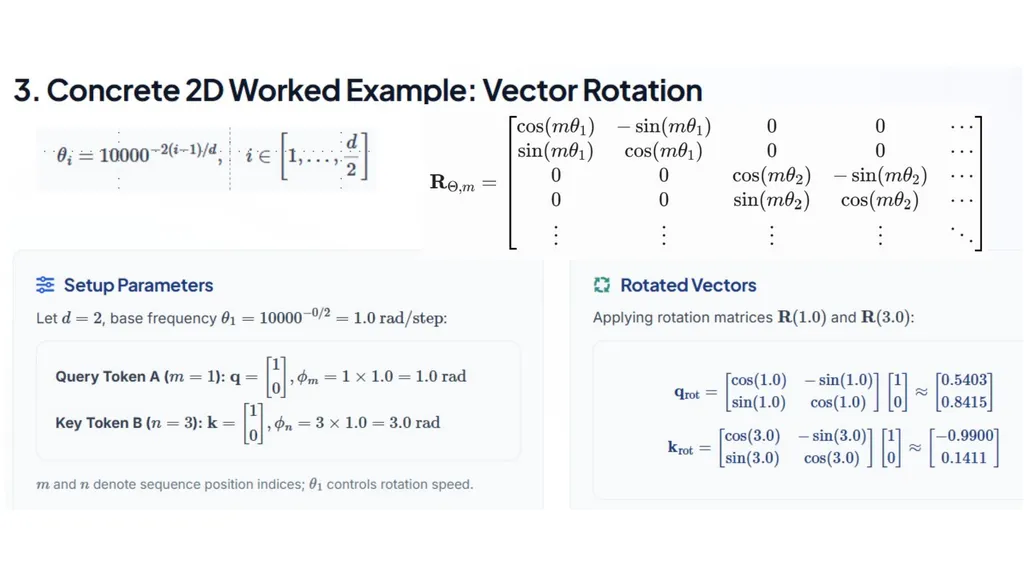
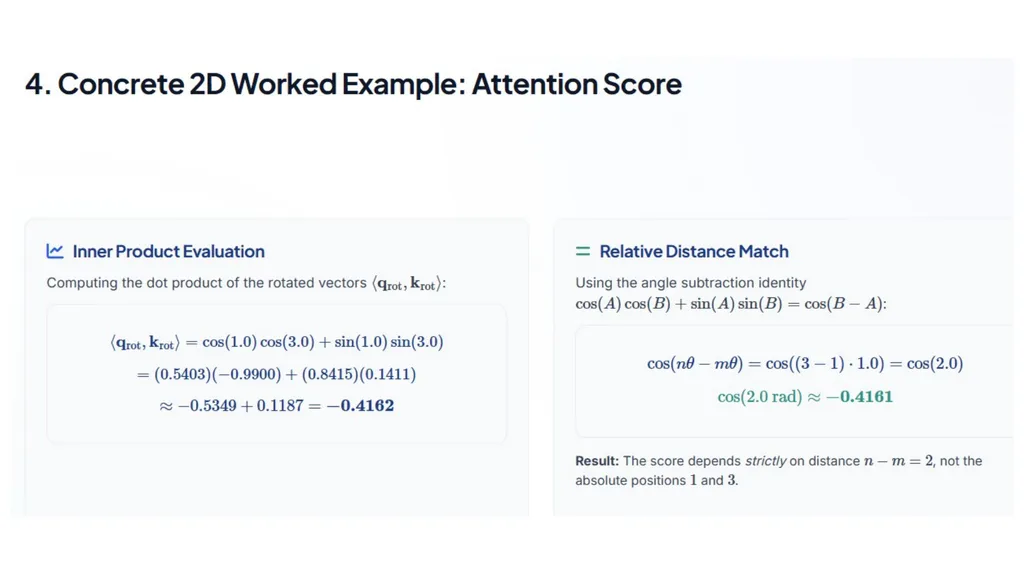
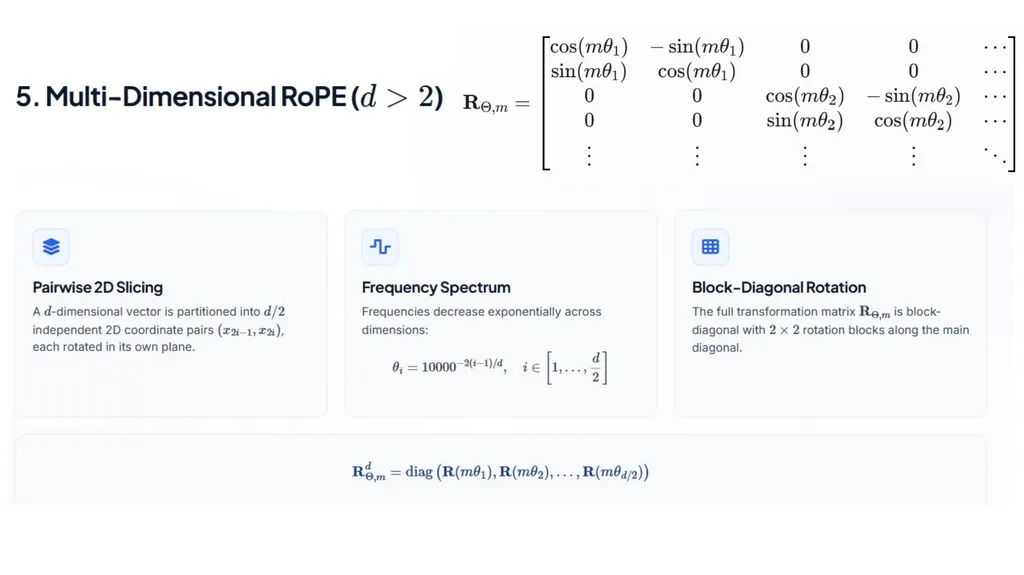
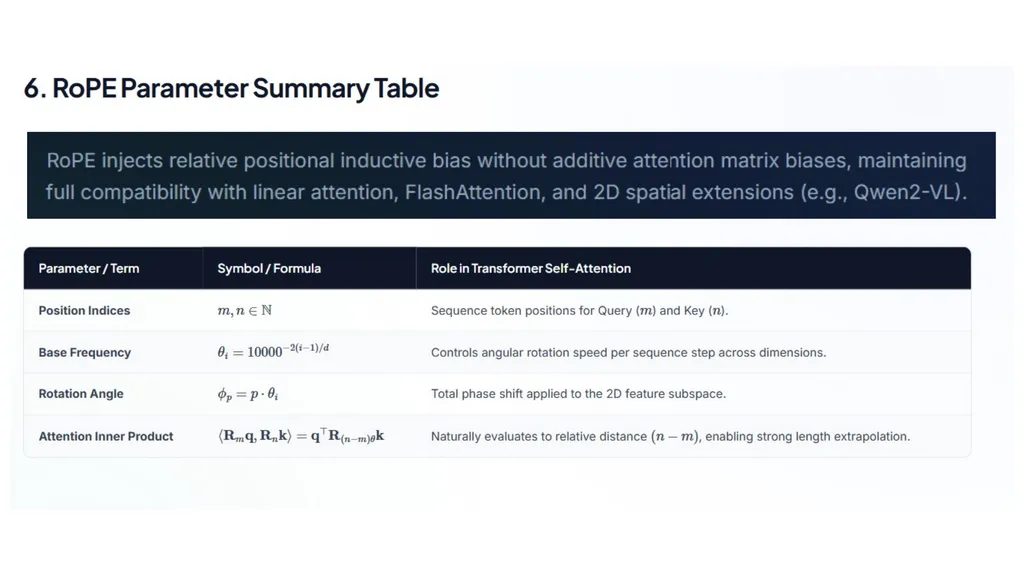
03 Rotary position embedding Position enters attention by rotating Q and K 25<br>
62
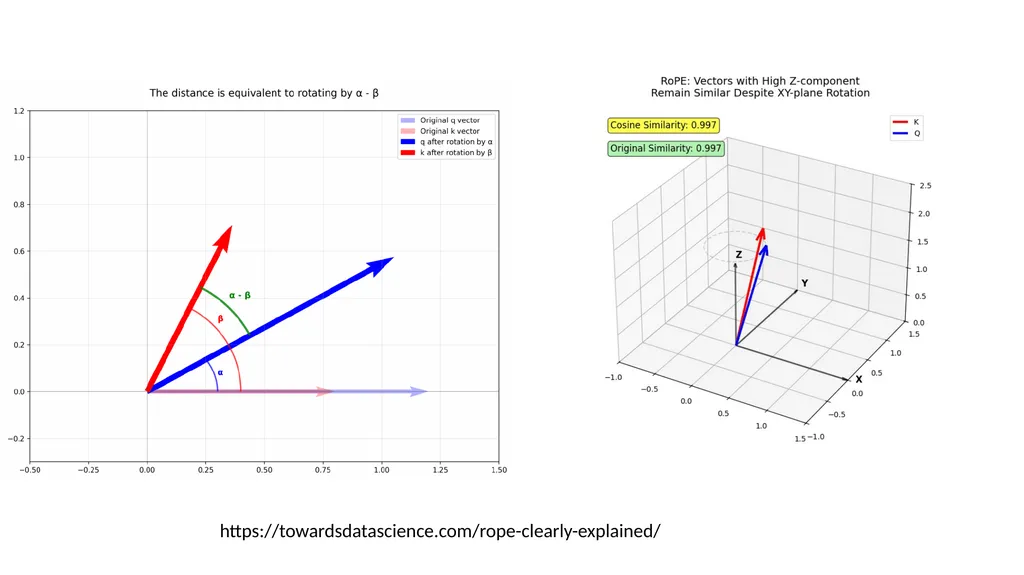
https://towardsdatascience.com/rope-clearly-explained/<br>
63
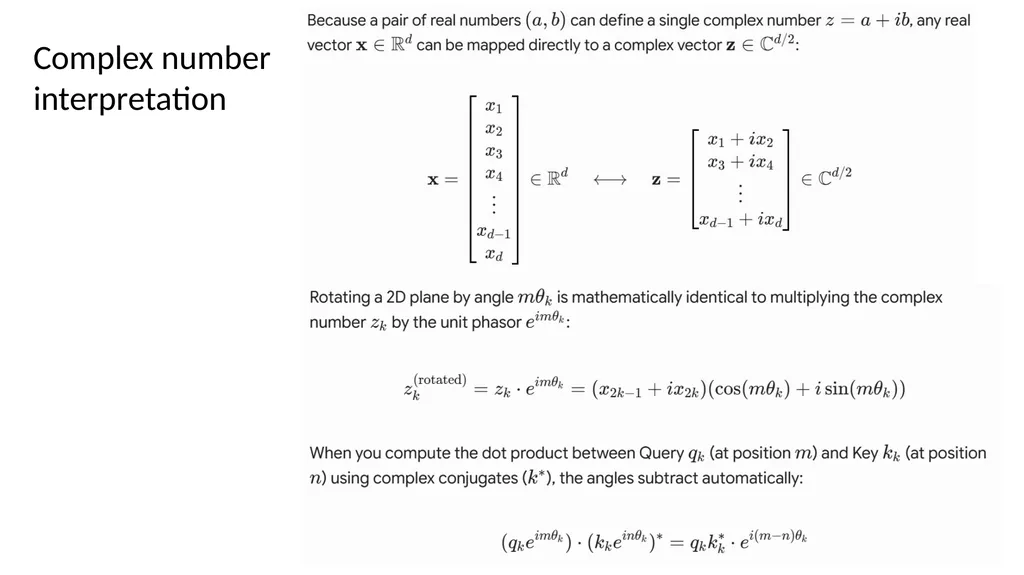
Complex number
interpretation<br>
interpretation<br>