
Analytics for Target (A4T) – Office Hours
LO
Published · 33 slides · 0 views

1 / 1









Description
Analytics for Target (A4T) Office Hours Analytics for Target (A4T) Office Hours What you will learn Analytics for Target Overview Prerequisites Moving to a Regional Data Collection How to determine an Analytics Tracking Server Verify if
Related Topics
Share
Embed code
Download this presentation From Below
"Analytics for Target (A4T) – Office Hours" is the property of its rightful owner. Permission is granted to download and print the materials on this website for personal, non-commercial use only, and to display it on your personal computer provided you do not modify the materials and that you retain all copyright notices contained in the materials. By downloading content from our website, you accept the terms of this agreement.
Presentation Transcript
01
Analytics for Target (A4T) – Office Hours<br>
02
Analytics for Target (A4T) Office Hours – What you will learn Analytics for Target Overview
Prerequisites
Moving to a Regional Data Collection
How to determine an Analytics Tracking Server
Verify if your enabled for Regional Data Collection<br>
Prerequisites
Moving to a Regional Data Collection
How to determine an Analytics Tracking Server
Verify if your enabled for Regional Data Collection<br>
03
Analytics for Target (A4T) Office Hours – What you will learn User Permissions
Creating an A4T Activity
Validating the Implementation
A4T and Partial Data
A4T and Redirect Offers<br>
Creating an A4T Activity
Validating the Implementation
A4T and Partial Data
A4T and Redirect Offers<br>
04
Analytics for Target (A4T) Overview<br>
05
What is Analytics for Target (A4T)? Summary
"Analytics for Target" (A4T) is a cross-solution integration that lets you create target activities based on Analytics conversion metrics and audience segments.
This integration lets you use Analytics reports to examine your results to drive the analysis of your optimization program.
If you use Analytics as the reporting source for an activity, all reporting and segmentation for that activity is based on Analytics data collection.<br>
"Analytics for Target" (A4T) is a cross-solution integration that lets you create target activities based on Analytics conversion metrics and audience segments.
This integration lets you use Analytics reports to examine your results to drive the analysis of your optimization program.
If you use Analytics as the reporting source for an activity, all reporting and segmentation for that activity is based on Analytics data collection.<br>
06
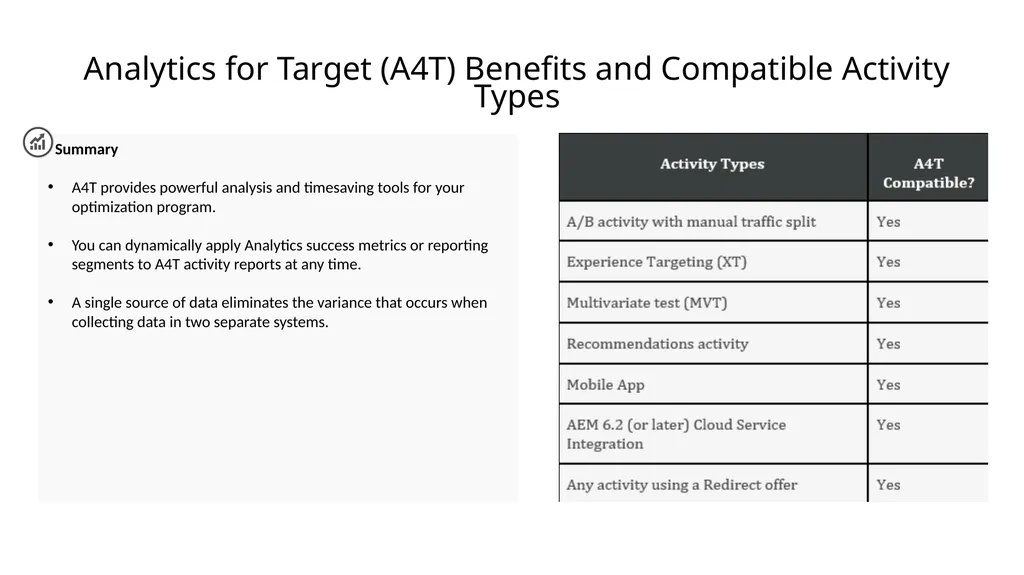
Analytics for Target (A4T) Benefits and Compatible Activity Types Summary
A4T provides powerful analysis and timesaving tools for your optimization program.
You can dynamically apply Analytics success metrics or reporting segments to A4T activity reports at any time.
A single source of data eliminates the variance that occurs when collecting data in two separate systems.<br>
A4T provides powerful analysis and timesaving tools for your optimization program.
You can dynamically apply Analytics success metrics or reporting segments to A4T activity reports at any time.
A single source of data eliminates the variance that occurs when collecting data in two separate systems.<br>
07
Prerequisites for Analytics for Target (A4T)<br>
08
Prerequisites for Analytics for Target (A4T) Summary
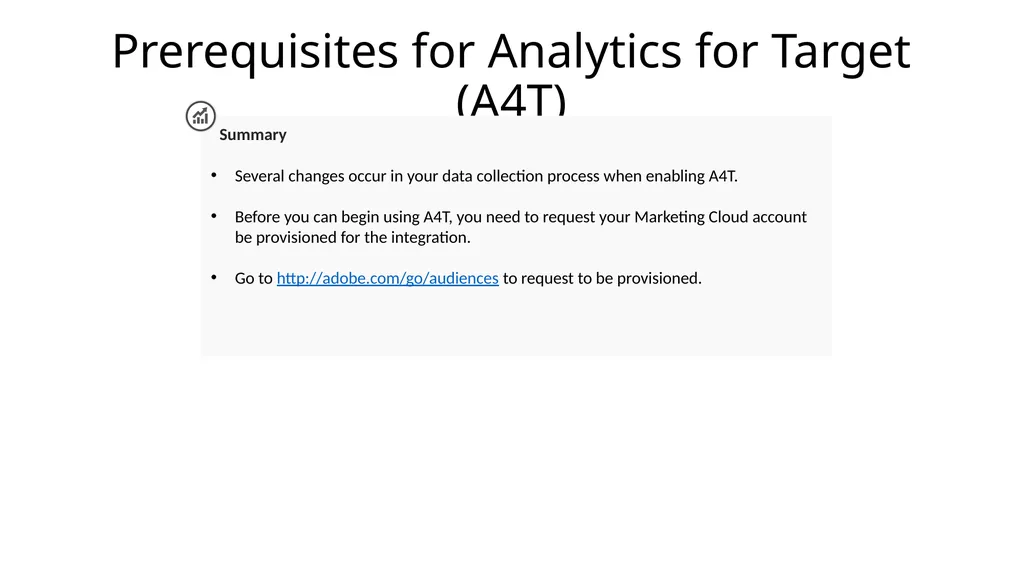
Several changes occur in your data collection process when enabling A4T.
Before you can begin using A4T, you need to request your Marketing Cloud account be provisioned for the integration.
Go to http://adobe.com/go/audiences to request to be provisioned.<br>
Several changes occur in your data collection process when enabling A4T.
Before you can begin using A4T, you need to request your Marketing Cloud account be provisioned for the integration.
Go to http://adobe.com/go/audiences to request to be provisioned.<br>
09
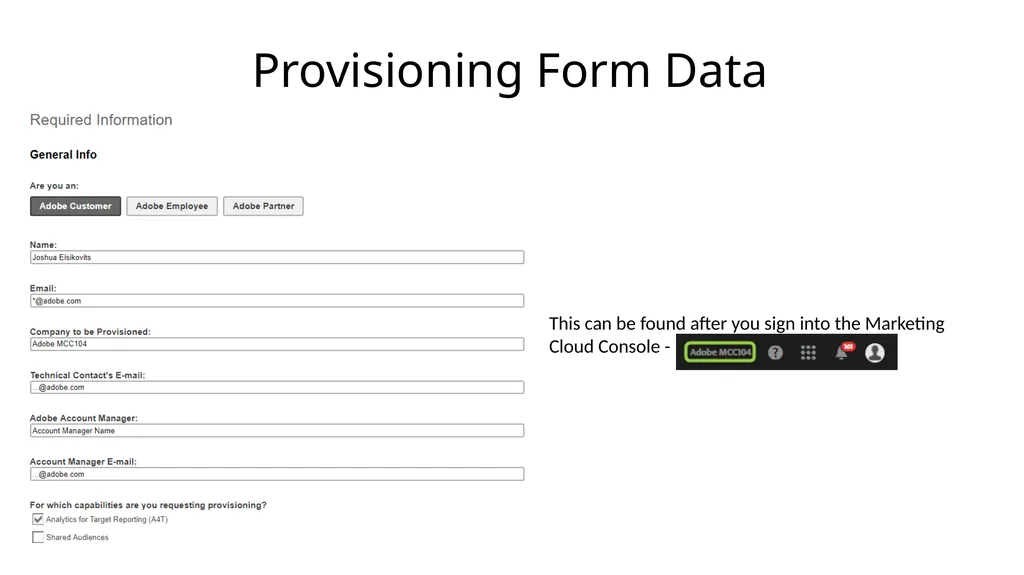
Provisioning Form Data This can be found after you sign into the Marketing Cloud Console -<br>
10
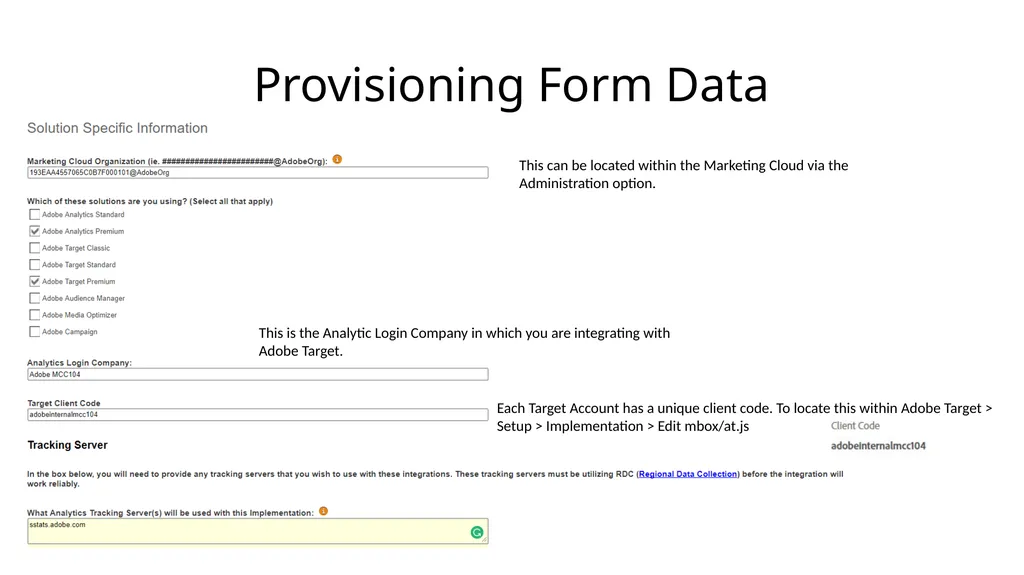
Provisioning Form Data This can be located within the Marketing Cloud via the Administration option. This is the Analytic Login Company in which you are integrating with Adobe Target. Each Target Account has a unique client code. To locate this within Adobe Target > Setup > Implementation > Edit mbox/at.js<br>
11
Prerequisites for A4T JavaScript Libraries Required for A4T:
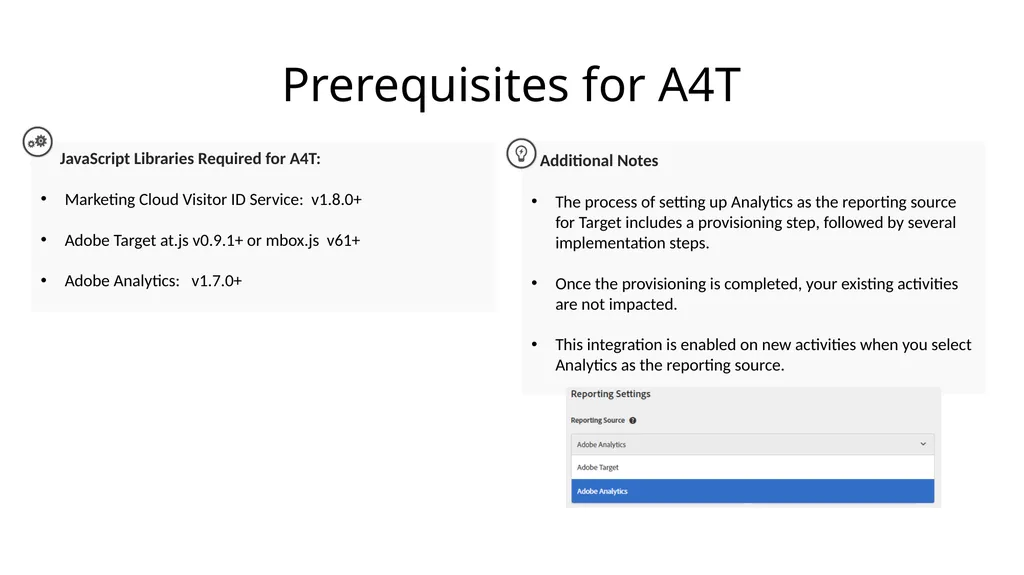
Marketing Cloud Visitor ID Service: v1.8.0+
Adobe Target at.js v0.9.1+ or mbox.js v61+
Adobe Analytics: v1.7.0+ Additional Notes
The process of setting up Analytics as the reporting source for Target includes a provisioning step, followed by several implementation steps.
Once the provisioning is completed, your existing activities are not impacted.
This integration is enabled on new activities when you select Analytics as the reporting source.<br>
Marketing Cloud Visitor ID Service: v1.8.0+
Adobe Target at.js v0.9.1+ or mbox.js v61+
Adobe Analytics: v1.7.0+ Additional Notes
The process of setting up Analytics as the reporting source for Target includes a provisioning step, followed by several implementation steps.
Once the provisioning is completed, your existing activities are not impacted.
This integration is enabled on new activities when you select Analytics as the reporting source.<br>
12
Moving To a Regional Data Collection<br>
13
Moving To Regional Data Collection (RDC) Summary
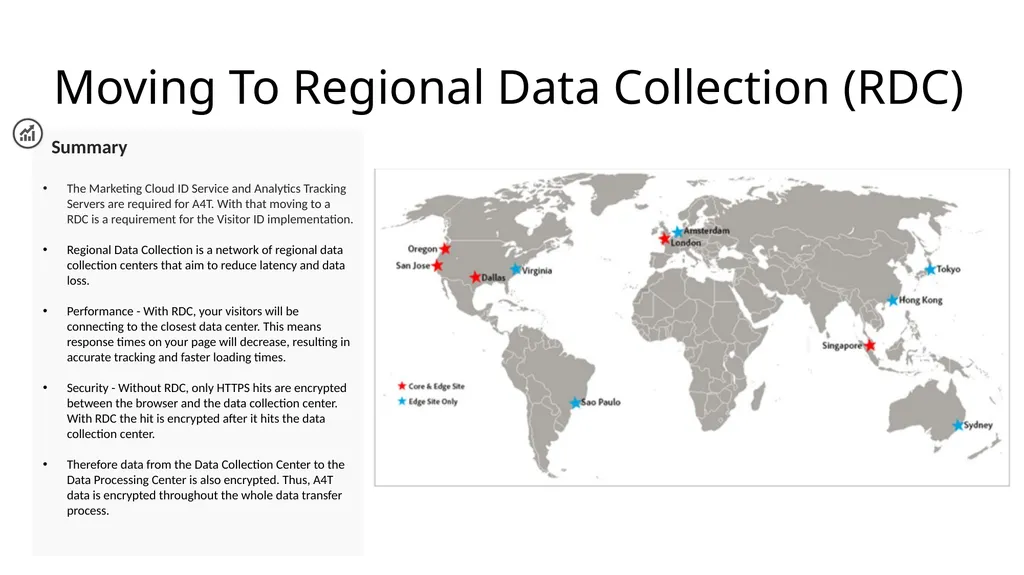
The Marketing Cloud ID Service and Analytics Tracking Servers are required for A4T. With that moving to a RDC is a requirement for the Visitor ID implementation.
Regional Data Collection is a network of regional data collection centers that aim to reduce latency and data loss.
Performance - With RDC, your visitors will be connecting to the closest data center. This means response times on your page will decrease, resulting in accurate tracking and faster loading times.
Security - Without RDC, only HTTPS hits are encrypted between the browser and the data collection center. With RDC the hit is encrypted after it hits the data collection center.
Therefore data from the Data Collection Center to the Data Processing Center is also encrypted. Thus, A4T data is encrypted throughout the whole data transfer process.<br>
The Marketing Cloud ID Service and Analytics Tracking Servers are required for A4T. With that moving to a RDC is a requirement for the Visitor ID implementation.
Regional Data Collection is a network of regional data collection centers that aim to reduce latency and data loss.
Performance - With RDC, your visitors will be connecting to the closest data center. This means response times on your page will decrease, resulting in accurate tracking and faster loading times.
Security - Without RDC, only HTTPS hits are encrypted between the browser and the data collection center. With RDC the hit is encrypted after it hits the data collection center.
Therefore data from the Data Collection Center to the Data Processing Center is also encrypted. Thus, A4T data is encrypted throughout the whole data transfer process.<br>
14
How to determine an Analytics Tracking Server Summary
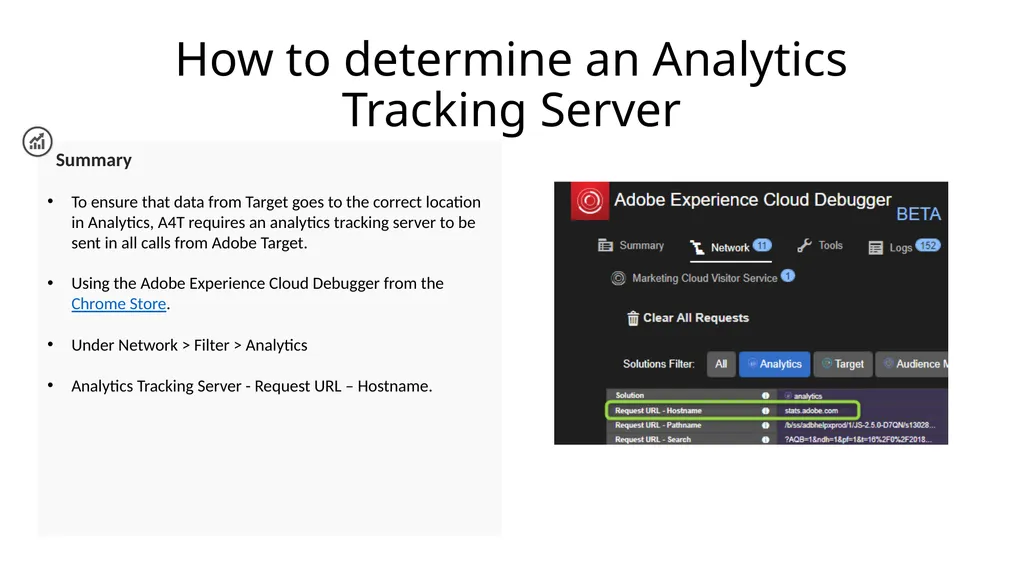
To ensure that data from Target goes to the correct location in Analytics, A4T requires an analytics tracking server to be sent in all calls from Adobe Target.
Using the Adobe Experience Cloud Debugger from the Chrome Store.
Under Network > Filter > Analytics
Analytics Tracking Server - Request URL – Hostname.<br>
To ensure that data from Target goes to the correct location in Analytics, A4T requires an analytics tracking server to be sent in all calls from Adobe Target.
Using the Adobe Experience Cloud Debugger from the Chrome Store.
Under Network > Filter > Analytics
Analytics Tracking Server - Request URL – Hostname.<br>
15
Verify if your site is Enabled for Regional Data Collection Summary
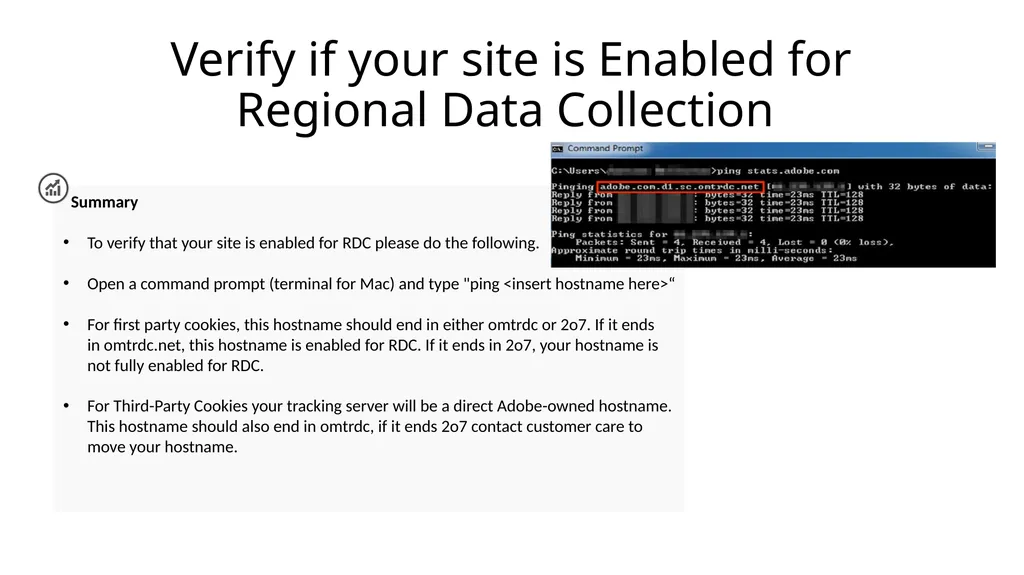
To verify that your site is enabled for RDC please do the following.
Open a command prompt (terminal for Mac) and type "ping <insert hostname here>“
For first party cookies, this hostname should end in either omtrdc or 2o7. If it ends in omtrdc.net, this hostname is enabled for RDC. If it ends in 2o7, your hostname is not fully enabled for RDC.
For Third-Party Cookies your tracking server will be a direct Adobe-owned hostname. This hostname should also end in omtrdc, if it ends 2o7 contact customer care to move your hostname.<br>
To verify that your site is enabled for RDC please do the following.
Open a command prompt (terminal for Mac) and type "ping <insert hostname here>“
For first party cookies, this hostname should end in either omtrdc or 2o7. If it ends in omtrdc.net, this hostname is enabled for RDC. If it ends in 2o7, your hostname is not fully enabled for RDC.
For Third-Party Cookies your tracking server will be a direct Adobe-owned hostname. This hostname should also end in omtrdc, if it ends 2o7 contact customer care to move your hostname.<br>
16
User Permissions for A4T<br>
17
User Permissions Requirements for Target Summary
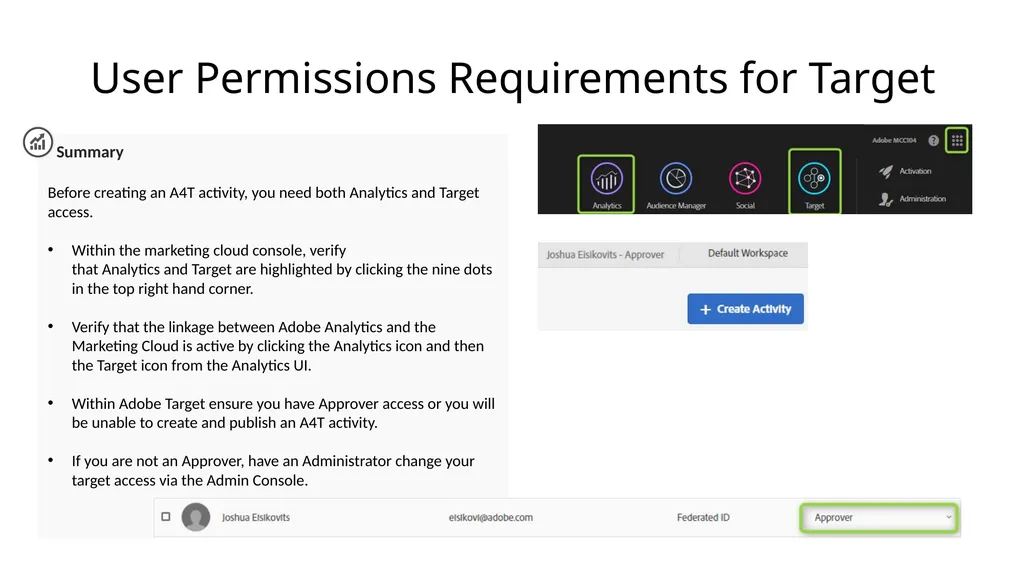
Before creating an A4T activity, you need both Analytics and Target access.
Within the marketing cloud console, verify that Analytics and Target are highlighted by clicking the nine dots in the top right hand corner.
Verify that the linkage between Adobe Analytics and the Marketing Cloud is active by clicking the Analytics icon and then the Target icon from the Analytics UI.
Within Adobe Target ensure you have Approver access or you will be unable to create and publish an A4T activity.
If you are not an Approver, have an Administrator change your target access via the Admin Console.<br>
Before creating an A4T activity, you need both Analytics and Target access.
Within the marketing cloud console, verify that Analytics and Target are highlighted by clicking the nine dots in the top right hand corner.
Verify that the linkage between Adobe Analytics and the Marketing Cloud is active by clicking the Analytics icon and then the Target icon from the Analytics UI.
Within Adobe Target ensure you have Approver access or you will be unable to create and publish an A4T activity.
If you are not an Approver, have an Administrator change your target access via the Admin Console.<br>
18
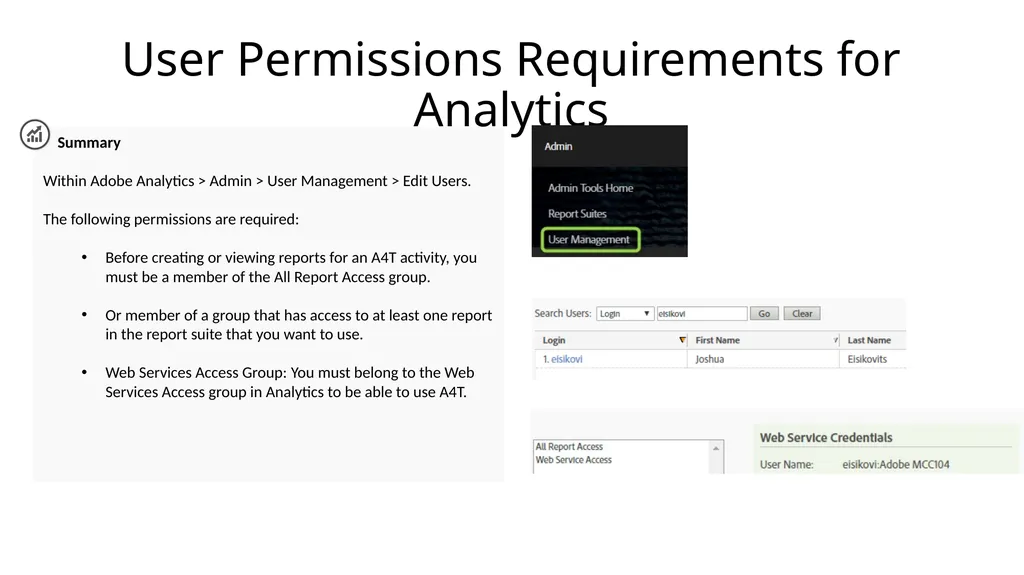
User Permissions Requirements for Analytics Summary
Within Adobe Analytics > Admin > User Management > Edit Users.
The following permissions are required:
Before creating or viewing reports for an A4T activity, you must be a member of the All Report Access group.
Or member of a group that has access to at least one report in the report suite that you want to use.
Web Services Access Group: You must belong to the Web Services Access group in Analytics to be able to use A4T.<br>
Within Adobe Analytics > Admin > User Management > Edit Users.
The following permissions are required:
Before creating or viewing reports for an A4T activity, you must be a member of the All Report Access group.
Or member of a group that has access to at least one report in the report suite that you want to use.
Web Services Access Group: You must belong to the Web Services Access group in Analytics to be able to use A4T.<br>
19
Creating an A4T Activity<br>
20
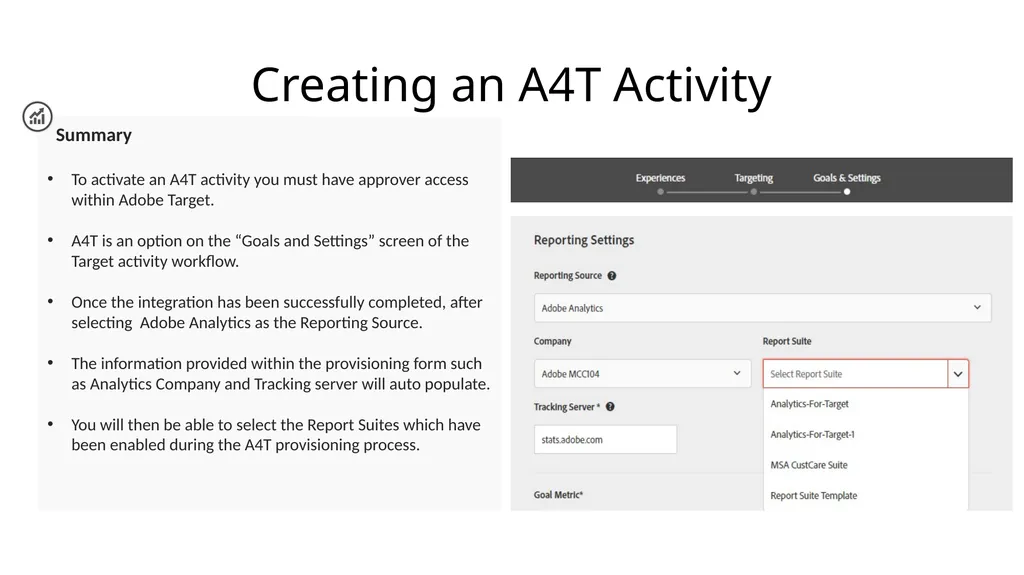
Creating an A4T Activity Summary
To activate an A4T activity you must have approver access within Adobe Target.
A4T is an option on the “Goals and Settings” screen of the Target activity workflow.
Once the integration has been successfully completed, after selecting Adobe Analytics as the Reporting Source.
The information provided within the provisioning form such as Analytics Company and Tracking server will auto populate.
You will then be able to select the Report Suites which have been enabled during the A4T provisioning process.<br>
To activate an A4T activity you must have approver access within Adobe Target.
A4T is an option on the “Goals and Settings” screen of the Target activity workflow.
Once the integration has been successfully completed, after selecting Adobe Analytics as the Reporting Source.
The information provided within the provisioning form such as Analytics Company and Tracking server will auto populate.
You will then be able to select the Report Suites which have been enabled during the A4T provisioning process.<br>
21
Validating the A4T Implementation<br>
22
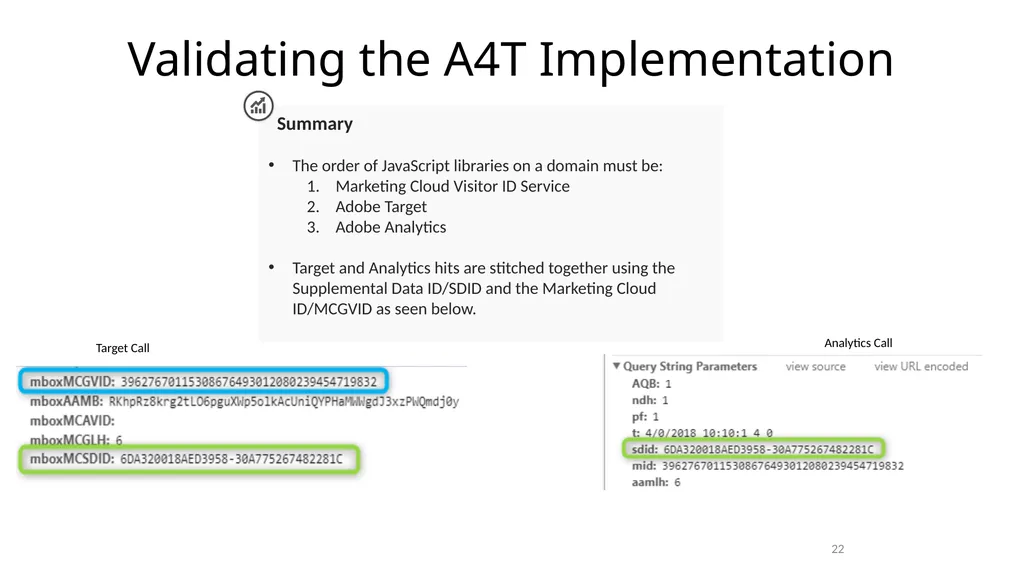
Validating the A4T Implementation 22 Summary
The order of JavaScript libraries on a domain must be:
Marketing Cloud Visitor ID Service
Adobe Target
Adobe Analytics
Target and Analytics hits are stitched together using the Supplemental Data ID/SDID and the Marketing Cloud ID/MCGVID as seen below. Target Call Analytics Call<br>
The order of JavaScript libraries on a domain must be:
Marketing Cloud Visitor ID Service
Adobe Target
Adobe Analytics
Target and Analytics hits are stitched together using the Supplemental Data ID/SDID and the Marketing Cloud ID/MCGVID as seen below. Target Call Analytics Call<br>
23
Validating the A4T Implementation Implementation Checks
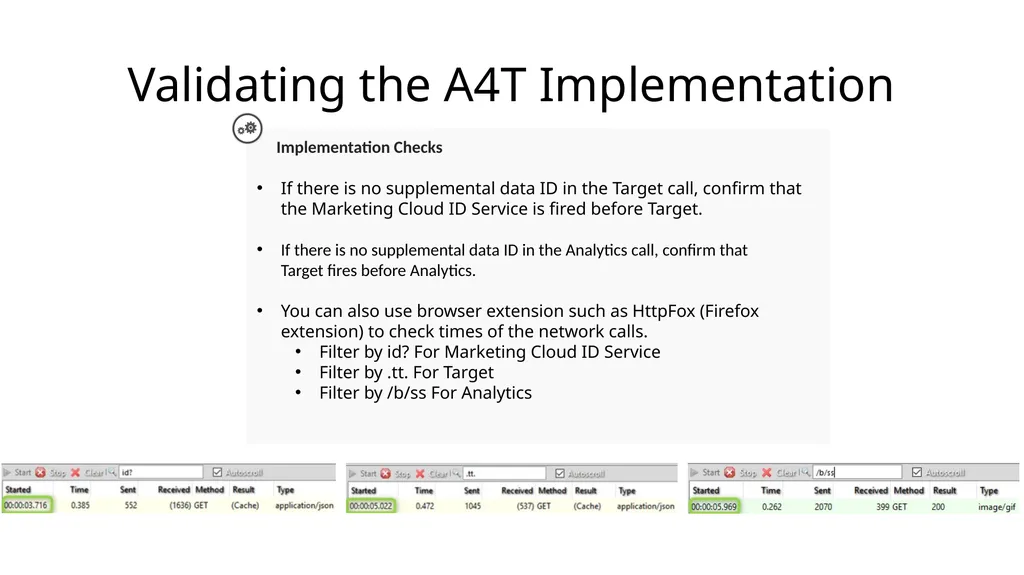
If there is no supplemental data ID in the Target call, confirm that the Marketing Cloud ID Service is fired before Target.
If there is no supplemental data ID in the Analytics call, confirm that Target fires before Analytics.
You can also use browser extension such as HttpFox (Firefox extension) to check times of the network calls.
Filter by id? For Marketing Cloud ID Service
Filter by .tt. For Target
Filter by /b/ss For Analytics<br>
If there is no supplemental data ID in the Target call, confirm that the Marketing Cloud ID Service is fired before Target.
If there is no supplemental data ID in the Analytics call, confirm that Target fires before Analytics.
You can also use browser extension such as HttpFox (Firefox extension) to check times of the network calls.
Filter by id? For Marketing Cloud ID Service
Filter by .tt. For Target
Filter by /b/ss For Analytics<br>
24
Validating the A4T Implementation My Implementation is in order, the Target and Analytics hits are stitched where are the reports?
Reports powered by Target (no A4T) have a latency of four minutes.
The classification can take 24 hours after the activity is initially saved before the report data can be broken down by experiences.
When A4T is enabled this adds an additional 7-10 minutes of latency to all reporting.<br>
Reports powered by Target (no A4T) have a latency of four minutes.
The classification can take 24 hours after the activity is initially saved before the report data can be broken down by experiences.
When A4T is enabled this adds an additional 7-10 minutes of latency to all reporting.<br>
25
Analytics for Target (A4T) Partial Data<br>
26
What is Partial Data? Summary
When the Target tag fires but Analytics does not, we are recording Partial Data (unstitched hits). The data would not be captured by Analytics when an A4T activity is running.
This is because the Target fires at the top of the page, but Analytics typically fires its data collection calls at page bottom.
What changed?
Up until November 2016, we included this additional data whenever a Target activity was active.
After November 2016, we only include this additional data when both the Target and Analytics tags have fired. https://marketing.adobe.com/resources/help/en_US/target/a4t/minimizing-inflated-visit-and-visitor-counts-a4t.html<br>
When the Target tag fires but Analytics does not, we are recording Partial Data (unstitched hits). The data would not be captured by Analytics when an A4T activity is running.
This is because the Target fires at the top of the page, but Analytics typically fires its data collection calls at page bottom.
What changed?
Up until November 2016, we included this additional data whenever a Target activity was active.
After November 2016, we only include this additional data when both the Target and Analytics tags have fired. https://marketing.adobe.com/resources/help/en_US/target/a4t/minimizing-inflated-visit-and-visitor-counts-a4t.html<br>
27
What Contributes To Partial Data? Summary
To recap since November 2016, we only include this additional data when both the Target and Analytics tags have fired.
In some cases there have been high number of partial data. This can result from improper implementation such as:
Misaligned Report Suite IDs: The report suite specified during activity setup does not match the report suite on the page where the test is delivered.
Slow Pages: Target calls are at the top of the page and Analytics calls are at the bottom of the page, if the page loads slowly, it increases the likelihood of a visitor leaving the page after the Target call fires, but before the Analytics call.
Page Errors: If there are JavaScript errors or other scenarios where each of the touchpoints do not fire (Marketing Cloud ID service, Target, and Analytics), this can lead to partial data.<br>
To recap since November 2016, we only include this additional data when both the Target and Analytics tags have fired.
In some cases there have been high number of partial data. This can result from improper implementation such as:
Misaligned Report Suite IDs: The report suite specified during activity setup does not match the report suite on the page where the test is delivered.
Slow Pages: Target calls are at the top of the page and Analytics calls are at the bottom of the page, if the page loads slowly, it increases the likelihood of a visitor leaving the page after the Target call fires, but before the Analytics call.
Page Errors: If there are JavaScript errors or other scenarios where each of the touchpoints do not fire (Marketing Cloud ID service, Target, and Analytics), this can lead to partial data.<br>
28
A4T and Redirect Offers<br>
29
Analytics for Target (A4T) And Redirect Offers What is a redirect offer?
The Redirect Offer causes a browser to redirect to a new page. Use this option when you want to send the visitor to a different page rather than showing content on the same page.
Does A4T Support Redirect Offers?
Yes providing that your implementation meets the following requirements
Marketing Cloud Visitor ID Service: v2.3+
Adobe Target: at.js v0.9.6+. (mbox.js is not supported with A4T Redirect offers)
Adobe Analytics: v 2.1+.
The three libraries must be included on both the page with the redirect offer and the page in which the visitor is redirected too.
Is the Visual Experience Composer/Form Based Composer supported for A4T Redirect Offers?
Yes both composers are supported as long as you use the built in-redirect offers.<br>
The Redirect Offer causes a browser to redirect to a new page. Use this option when you want to send the visitor to a different page rather than showing content on the same page.
Does A4T Support Redirect Offers?
Yes providing that your implementation meets the following requirements
Marketing Cloud Visitor ID Service: v2.3+
Adobe Target: at.js v0.9.6+. (mbox.js is not supported with A4T Redirect offers)
Adobe Analytics: v 2.1+.
The three libraries must be included on both the page with the redirect offer and the page in which the visitor is redirected too.
Is the Visual Experience Composer/Form Based Composer supported for A4T Redirect Offers?
Yes both composers are supported as long as you use the built in-redirect offers.<br>
30
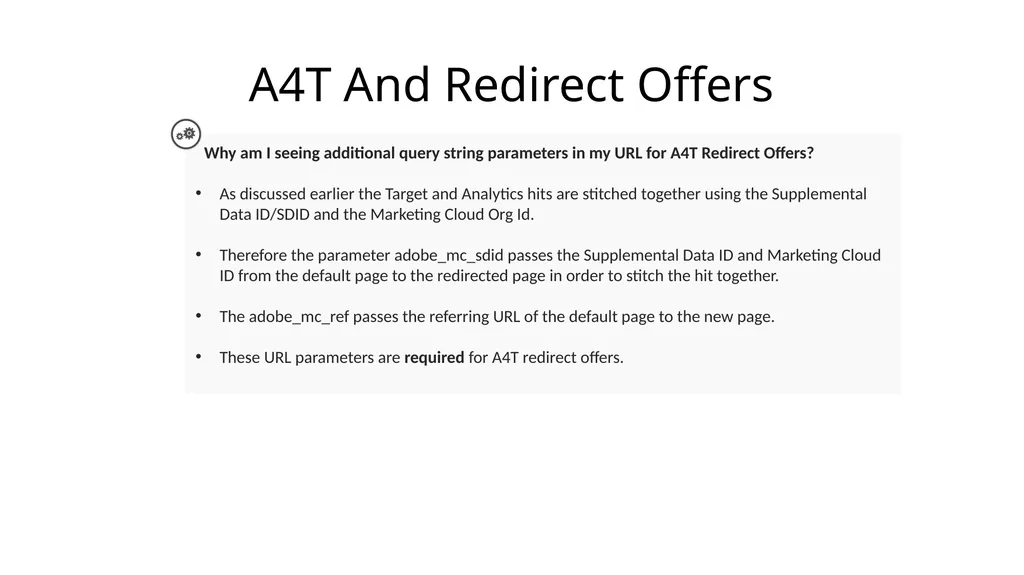
A4T And Redirect Offers Why am I seeing additional query string parameters in my URL for A4T Redirect Offers?
As discussed earlier the Target and Analytics hits are stitched together using the Supplemental Data ID/SDID and the Marketing Cloud Org Id.
Therefore the parameter adobe_mc_sdid passes the Supplemental Data ID and Marketing Cloud ID from the default page to the redirected page in order to stitch the hit together.
The adobe_mc_ref passes the referring URL of the default page to the new page.
These URL parameters are required for A4T redirect offers.<br>
As discussed earlier the Target and Analytics hits are stitched together using the Supplemental Data ID/SDID and the Marketing Cloud Org Id.
Therefore the parameter adobe_mc_sdid passes the Supplemental Data ID and Marketing Cloud ID from the default page to the redirected page in order to stitch the hit together.
The adobe_mc_ref passes the referring URL of the default page to the new page.
These URL parameters are required for A4T redirect offers.<br>
31
References Analytics for Target Overview
Prerequisites
Moving to a Regional Data Collection
How to determine an Analytics Tracking Server
Verify if your site is enabled for Regional Data Collection<br>
Prerequisites
Moving to a Regional Data Collection
How to determine an Analytics Tracking Server
Verify if your site is enabled for Regional Data Collection<br>
32
References User Permissions
Creating an A4T Activity
Validating the A4T Implementation
A4T and Partial Data
A4T and Redirect Offers
Adobe Experience Cloud Debugger<br>
Creating an A4T Activity
Validating the A4T Implementation
A4T and Partial Data
A4T and Redirect Offers
Adobe Experience Cloud Debugger<br>
33
Contact Adobe Adobe Target
Support delegates can get assisted support via:
Phone: 1-800-497-0335 (U.S. & Canada). Get phone numbers for other regions.
Email:
Include your case details to open a ticket.
Send your case to: customercare@adobe.com
Adobe Target Forums<br>
Support delegates can get assisted support via:
Phone: 1-800-497-0335 (U.S. & Canada). Get phone numbers for other regions.
Email:
Include your case details to open a ticket.
Send your case to: customercare@adobe.com
Adobe Target Forums<br>