
Assessment Tool for Digital Pandemic Preparedness




Description: Assessment Tool for Digital Pandemic Preparedness (DPP): Procedure October 2022 01092021 GIZ DPPA Toolkit: Procedure v2 Seite 2 INTRODUCTION With this Digital Pandemic Preparedness (DPP) Assessment Tool the GIZ Global Health Program aims
Related Topics
Download Presentation
"Assessment Tool for Digital Pandemic Preparedness" is the property of its rightful owner. Permission is granted to download and print the materials on this website for personal, non-commercial use only, and to display it on your personal computer provided you do not modify the materials and that you retain all copyright notices contained in the materials. By downloading content from our website, you accept the terms of this agreement.
Presentation Transcript
slide1. Assessment Tool for Digital Pandemic Preparedness (DPP): Procedure October 2022<br>
slide2. 01/09/2021 GIZ DPPA Toolkit: Procedure v2 Seite 2 INTRODUCTION<br>
slide3. With this Digital Pandemic Preparedness (DPP) Assessment Tool the GIZ Global Health Program aims to provide a systematic methodology to identify needs for digital tools that integrate with the partner countries‘ existing digital ecosystem, while modernizing their overall pandemic preparedness.
The application of this tool should deliver valuable insights not only on gaps and opportunities; rather, it should delineate partner countries‘ needs and their ecosystems‘ viability to adopt an additional function or tool.
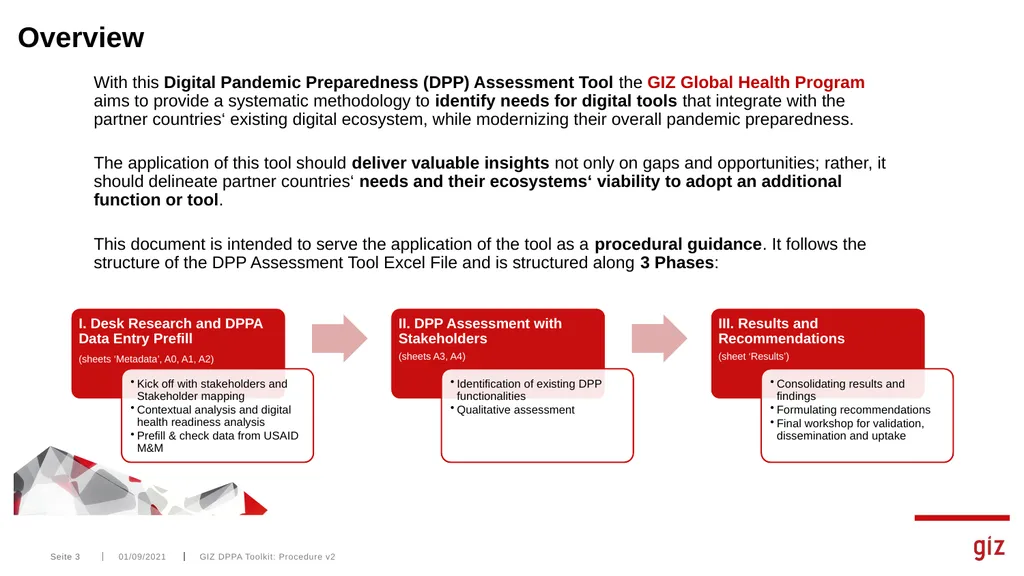
This document is intended to serve the application of the tool as a procedural guidance. It follows the structure of the DPP Assessment Tool Excel File and is structured along 3 Phases: GIZ DPPA Toolkit: Procedure v2 Seite 3 01/09/2021 Overview<br>
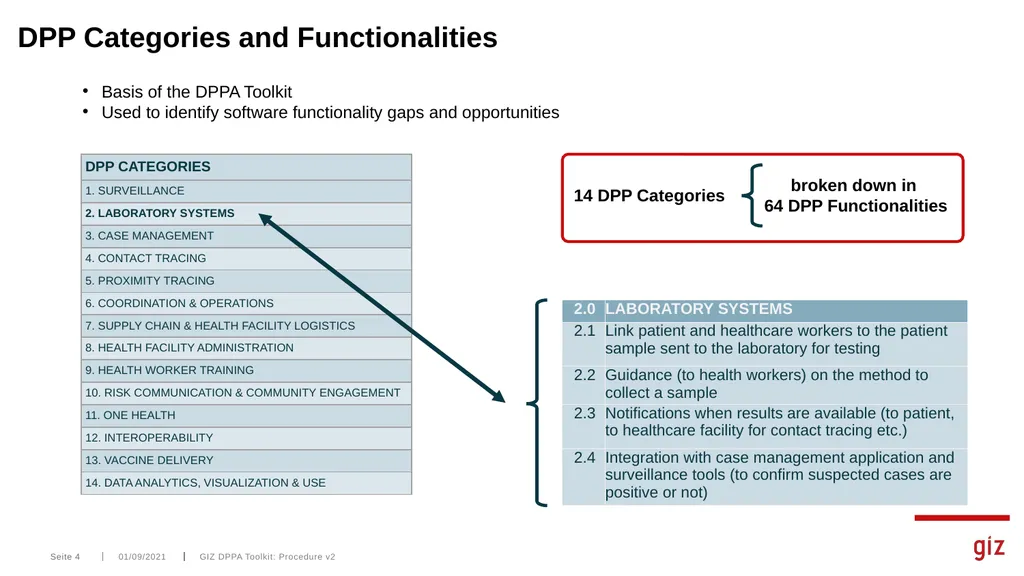
slide4. 01/09/2021 GIZ DPPA Toolkit: Procedure v2 Seite 4 DPP Categories and Functionalities Basis of the DPPA Toolkit
Used to identify software functionality gaps and opportunities<br>
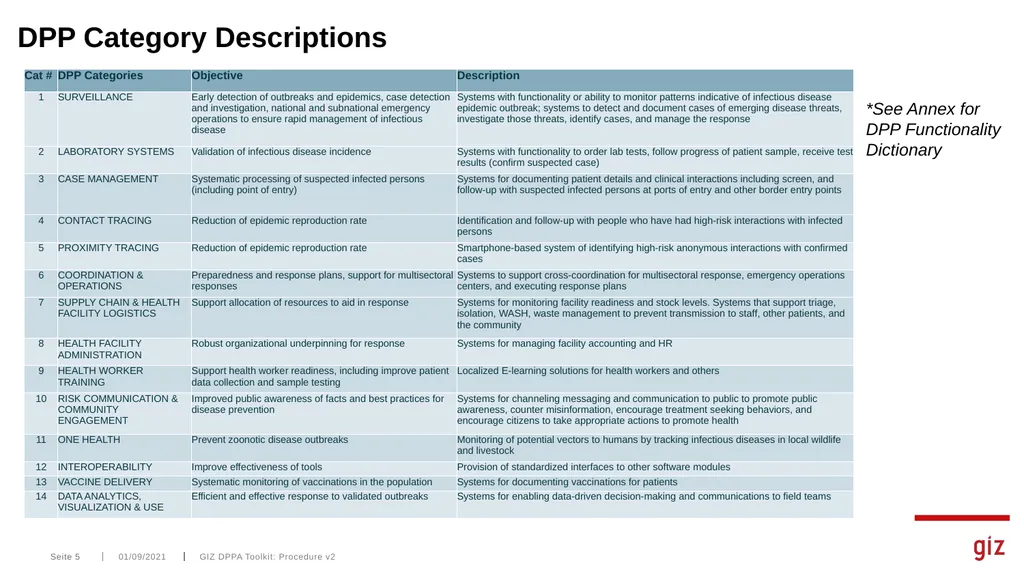
slide5. 01/09/2021 GIZ DPPA Toolkit: Procedure v2 Seite 5 DPP Category Descriptions *See Annex for DPP Functionality Dictionary<br>
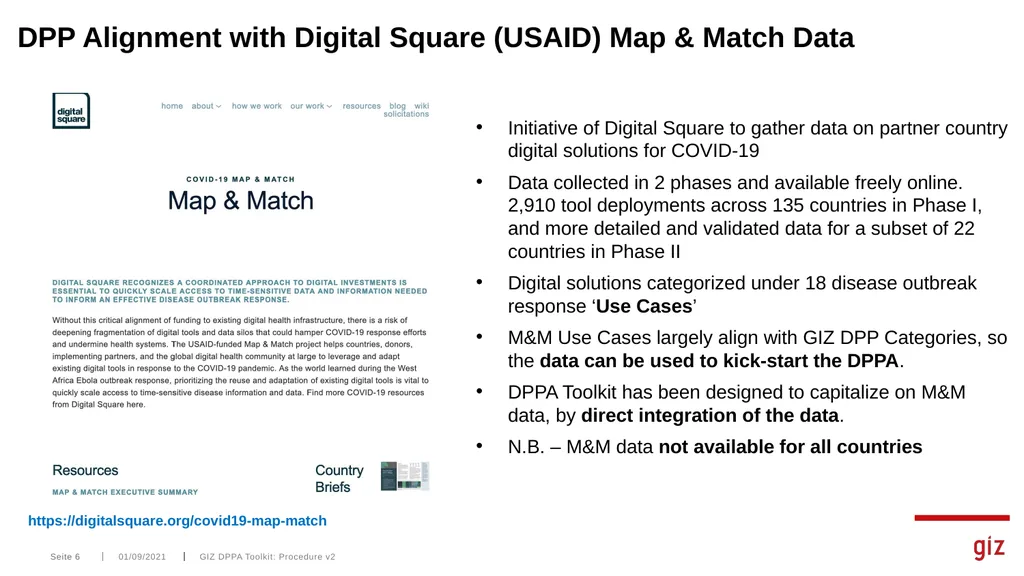
slide6. 01/09/2021 GIZ DPPA Toolkit: Procedure v2 Seite 6 DPP Alignment with Digital Square (USAID) Map & Match Data https://digitalsquare.org/covid19-map-match Initiative of Digital Square to gather data on partner country digital solutions for COVID-19
Data collected in 2 phases and available freely online. 2,910 tool deployments across 135 countries in Phase I, and more detailed and validated data for a subset of 22 countries in Phase II
Digital solutions categorized under 18 disease outbreak response ‘Use Cases’
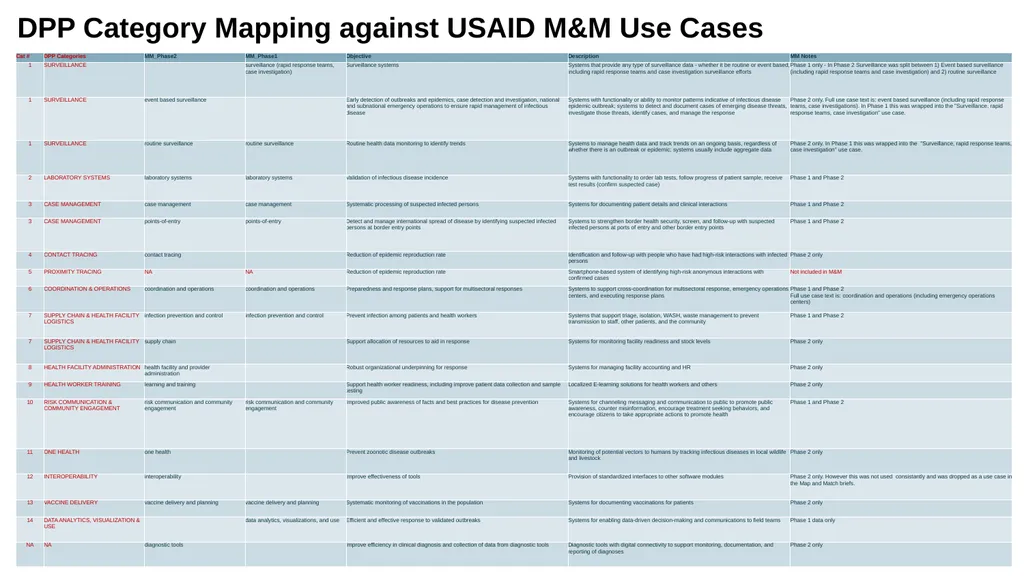
M&M Use Cases largely align with GIZ DPP Categories, so the data can be used to kick-start the DPPA.
DPPA Toolkit has been designed to capitalize on M&M data, by direct integration of the data.
N.B. – M&M data not available for all countries<br>
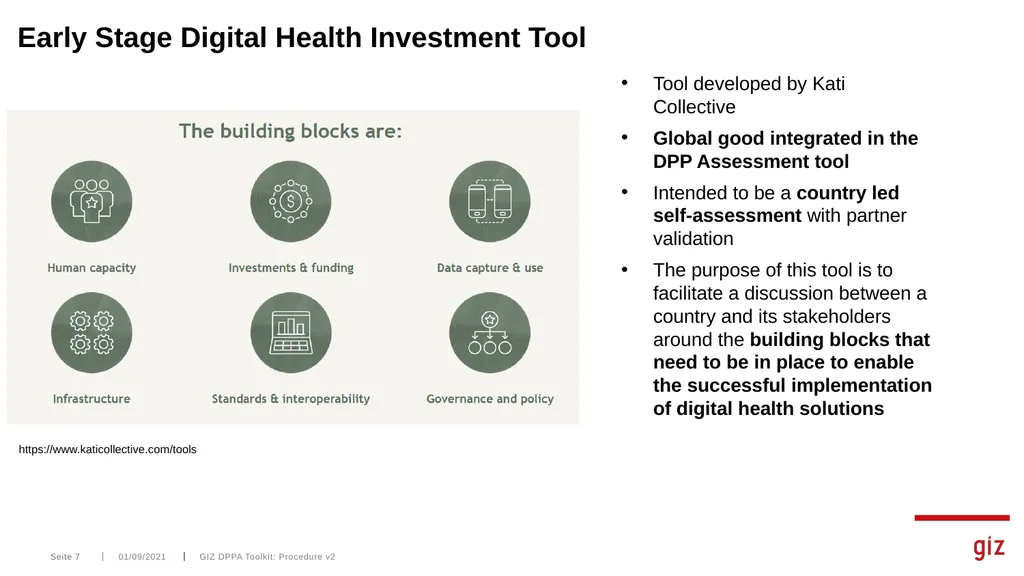
slide7. 01/09/2021 GIZ DPPA Toolkit: Procedure v2 Seite 7 Early Stage Digital Health Investment Tool Tool developed by Kati Collective
Global good integrated in the DPP Assessment tool
Intended to be a country led self-assessment with partner validation
The purpose of this tool is to facilitate a discussion between a country and its stakeholders around the building blocks that need to be in place to enable the successful implementation of digital health solutions https://www.katicollective.com/tools<br>
slide8. DPPA Key Activities
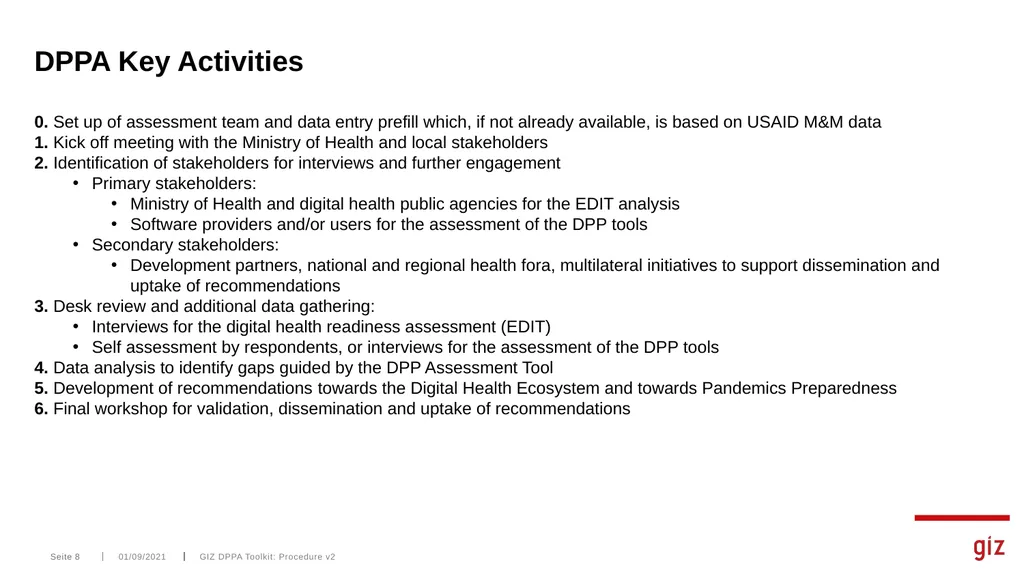
0. Set up of assessment team and data entry prefill which, if not already available, is based on USAID M&M data
1. Kick off meeting with the Ministry of Health and local stakeholders
2. Identification of stakeholders for interviews and further engagement
Primary stakeholders:
Ministry of Health and digital health public agencies for the EDIT analysis
Software providers and/or users for the assessment of the DPP tools
Secondary stakeholders:
Development partners, national and regional health fora, multilateral initiatives to support dissemination and uptake of recommendations
3. Desk review and additional data gathering:
Interviews for the digital health readiness assessment (EDIT)
Self assessment by respondents, or interviews for the assessment of the DPP tools
4. Data analysis to identify gaps guided by the DPP Assessment Tool
5. Development of recommendations towards the Digital Health Ecosystem and towards Pandemics Preparedness
6. Final workshop for validation, dissemination and uptake of recommendations 01/09/2021 GIZ DPPA Toolkit: Procedure v2 Seite 8<br>
slide9. 01/09/2021 GIZ DPPA Toolkit: Procedure v2 Seite 9 PROCEDURE<br>
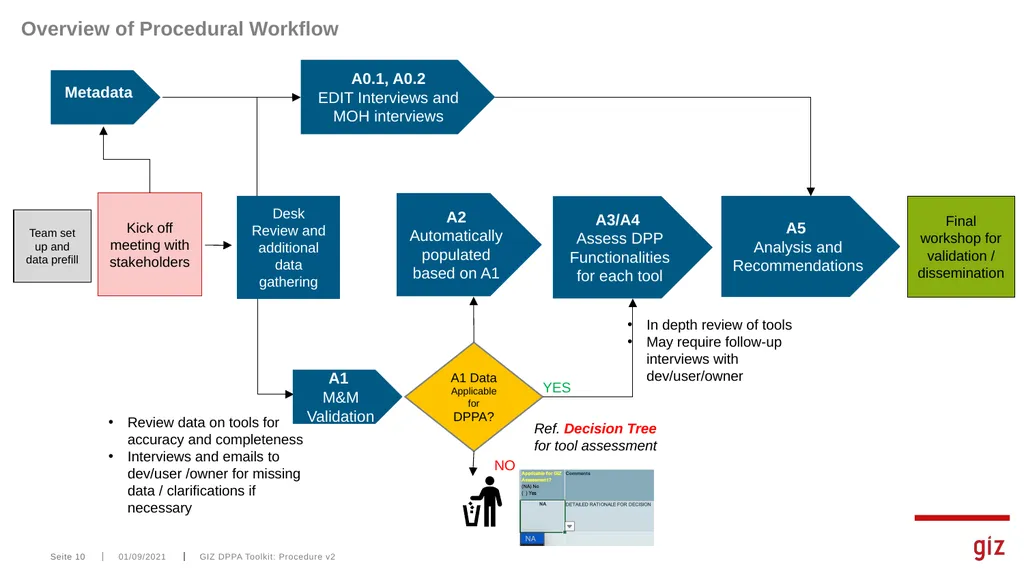
slide10. GIZ DPPA Toolkit: Procedure v2 Overview of Procedural Workflow Seite 10 01/09/2021 A1 Data Applicable for DPPA? Review data on tools for accuracy and completeness
Interviews and emails to dev/user /owner for missing data / clarifications if necessary Desk Review and additional data gathering A1
M&M Validation A0.1, A0.2
EDIT Interviews and MOH interviews A3/A4
Assess DPP Functionalities for each tool A5
Analysis and Recommendations YES NO In depth review of tools
May require follow-up interviews with dev/user/owner Final workshop for validation / dissemination Ref. Decision Tree for tool assessment Team set up and data prefill Kick off meeting with stakeholders Metadata A2
Automatically populated based on A1<br>
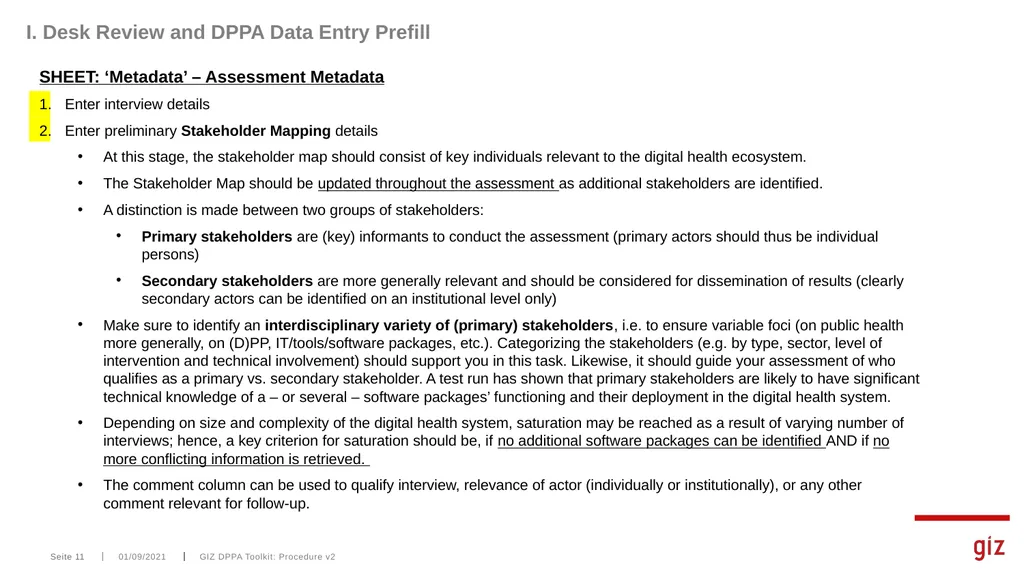
slide11. GIZ DPPA Toolkit: Procedure v2 I. Desk Review and DPPA Data Entry Prefill SHEET: ‘Metadata’ – Assessment Metadata
Enter interview details
Enter preliminary Stakeholder Mapping details
At this stage, the stakeholder map should consist of key individuals relevant to the digital health ecosystem.
The Stakeholder Map should be updated throughout the assessment as additional stakeholders are identified.
A distinction is made between two groups of stakeholders:
Primary stakeholders are (key) informants to conduct the assessment (primary actors should thus be individual persons)
Secondary stakeholders are more generally relevant and should be considered for dissemination of results (clearly secondary actors can be identified on an institutional level only)
Make sure to identify an interdisciplinary variety of (primary) stakeholders, i.e. to ensure variable foci (on public health more generally, on (D)PP, IT/tools/software packages, etc.). Categorizing the stakeholders (e.g. by type, sector, level of intervention and technical involvement) should support you in this task. Likewise, it should guide your assessment of who qualifies as a primary vs. secondary stakeholder. A test run has shown that primary stakeholders are likely to have significant technical knowledge of a – or several – software packages’ functioning and their deployment in the digital health system.
Depending on size and complexity of the digital health system, saturation may be reached as a result of varying number of interviews; hence, a key criterion for saturation should be, if no additional software packages can be identified AND if no more conflicting information is retrieved.
The comment column can be used to qualify interview, relevance of actor (individually or institutionally), or any other comment relevant for follow-up. Seite 11 01/09/2021<br>
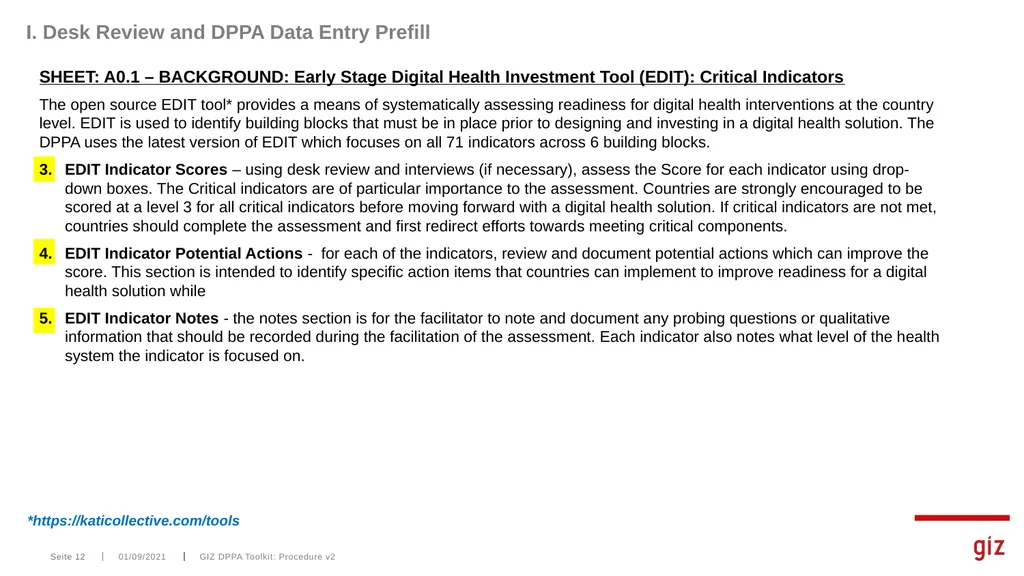
slide12. SHEET: A0.1 – BACKGROUND: Early Stage Digital Health Investment Tool (EDIT): Critical Indicators
The open source EDIT tool* provides a means of systematically assessing readiness for digital health interventions at the country level. EDIT is used to identify building blocks that must be in place prior to designing and investing in a digital health solution. The DPPA uses the latest version of EDIT which focuses on all 71 indicators across 6 building blocks.
EDIT Indicator Scores – using desk review and interviews (if necessary), assess the Score for each indicator using drop-down boxes. The Critical indicators are of particular importance to the assessment. Countries are strongly encouraged to be scored at a level 3 for all critical indicators before moving forward with a digital health solution. If critical indicators are not met, countries should complete the assessment and first redirect efforts towards meeting critical components.
EDIT Indicator Potential Actions - for each of the indicators, review and document potential actions which can improve the score. This section is intended to identify specific action items that countries can implement to improve readiness for a digital health solution while
EDIT Indicator Notes - the notes section is for the facilitator to note and document any probing questions or qualitative information that should be recorded during the facilitation of the assessment. Each indicator also notes what level of the health system the indicator is focused on. GIZ DPPA Toolkit: Procedure v2 I. Desk Review and DPPA Data Entry Prefill Seite 12 01/09/2021 *https://katicollective.com/tools<br>
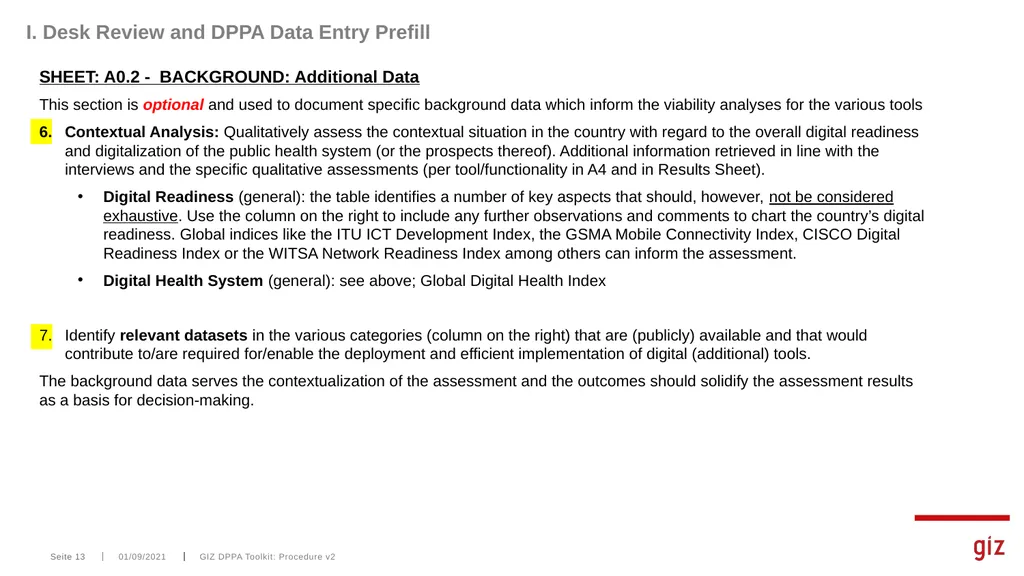
slide13. SHEET: A0.2 - BACKGROUND: Additional Data
This section is optional and used to document specific background data which inform the viability analyses for the various tools
Contextual Analysis: Qualitatively assess the contextual situation in the country with regard to the overall digital readiness and digitalization of the public health system (or the prospects thereof). Additional information retrieved in line with the interviews and the specific qualitative assessments (per tool/functionality in A4 and in Results Sheet).
Digital Readiness (general): the table identifies a number of key aspects that should, however, not be considered exhaustive. Use the column on the right to include any further observations and comments to chart the country’s digital readiness. Global indices like the ITU ICT Development Index, the GSMA Mobile Connectivity Index, CISCO Digital Readiness Index or the WITSA Network Readiness Index among others can inform the assessment.
Digital Health System (general): see above; Global Digital Health Index
Identify relevant datasets in the various categories (column on the right) that are (publicly) available and that would contribute to/are required for/enable the deployment and efficient implementation of digital (additional) tools.
The background data serves the contextualization of the assessment and the outcomes should solidify the assessment results as a basis for decision-making. GIZ DPPA Toolkit: Procedure v2 I. Desk Review and DPPA Data Entry Prefill Seite 13 01/09/2021<br>
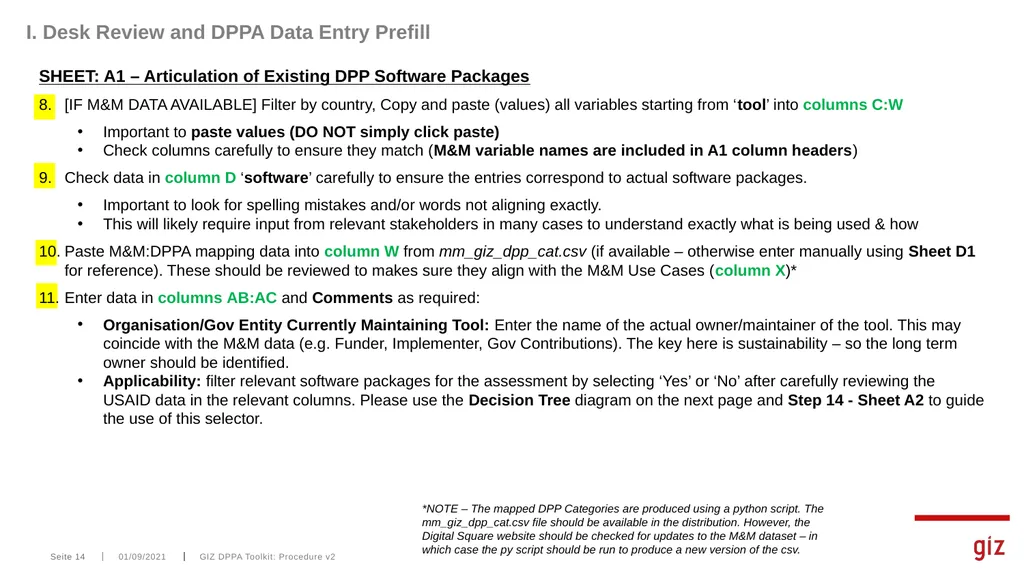
slide14. SHEET: A1 – Articulation of Existing DPP Software Packages
[IF M&M DATA AVAILABLE] Filter by country, Copy and paste (values) all variables starting from ‘tool’ into columns C:W
Important to paste values (DO NOT simply click paste)
Check columns carefully to ensure they match (M&M variable names are included in A1 column headers)
Check data in column D ‘software’ carefully to ensure the entries correspond to actual software packages.
Important to look for spelling mistakes and/or words not aligning exactly.
This will likely require input from relevant stakeholders in many cases to understand exactly what is being used & how
Paste M&M:DPPA mapping data into column W from mm_giz_dpp_cat.csv (if available – otherwise enter manually using Sheet D1 for reference). These should be reviewed to makes sure they align with the M&M Use Cases (column X)*
Enter data in columns AB:AC and Comments as required:
Organisation/Gov Entity Currently Maintaining Tool: Enter the name of the actual owner/maintainer of the tool. This may coincide with the M&M data (e.g. Funder, Implementer, Gov Contributions). The key here is sustainability – so the long term owner should be identified.
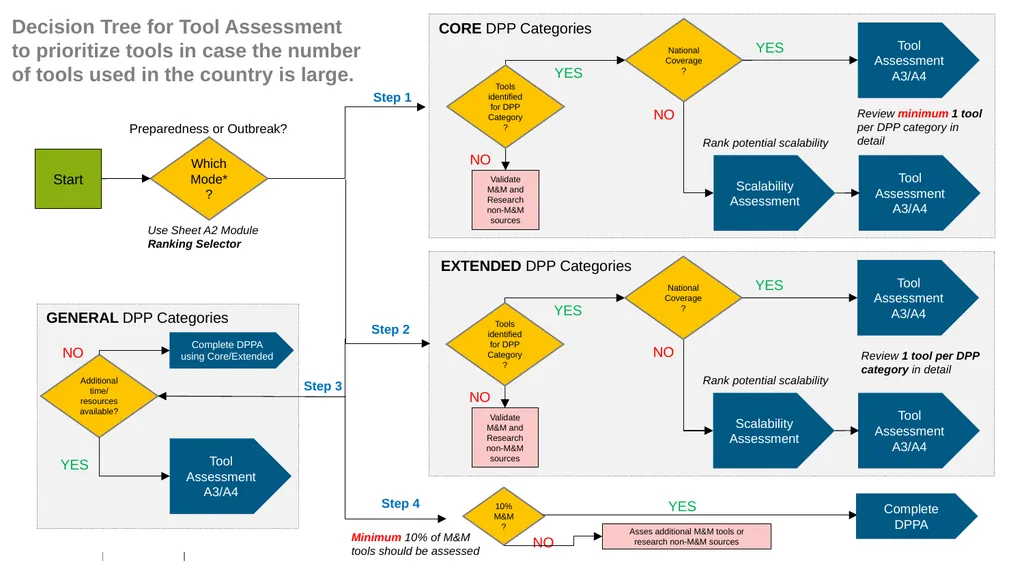
Applicability: filter relevant software packages for the assessment by selecting ‘Yes’ or ‘No’ after carefully reviewing the USAID data in the relevant columns. Please use the Decision Tree diagram on the next page and Step 14 - Sheet A2 to guide the use of this selector. GIZ DPPA Toolkit: Procedure v2 I. Desk Review and DPPA Data Entry Prefill Seite 14 01/09/2021 *NOTE – The mapped DPP Categories are produced using a python script. The mm_giz_dpp_cat.csv file should be available in the distribution. However, the Digital Square website should be checked for updates to the M&M dataset – in which case the py script should be run to produce a new version of the csv.<br>
slide15. Decision Tree for Tool Assessment to prioritize tools in case the number of tools used in the country is large. Which Mode*? Start YES NO Use Sheet A2 Module Ranking Selector Preparedness or Outbreak? CORE DPP Categories Tools identified for DPP Category? Tool Assessment A3/A4 Step 1 Review minimum 1 tool per DPP category in detail Scalability Assessment National Coverage? YES NO Tool Assessment A3/A4 Validate M&M and Research non-M&M sources YES NO EXTENDED DPP Categories Tools identified for DPP Category? Tool Assessment A3/A4 Review 1 tool per DPP category in detail Scalability Assessment National Coverage? YES NO Tool Assessment A3/A4 Validate M&M and Research non-M&M sources Step 2 Additional time/ resources available? Step 3 YES NO Tool Assessment A3/A4 GENERAL DPP Categories Rank potential scalability Rank potential scalability 10% M&M? Step 4 Complete DPPA using Core/Extended Complete DPPA YES NO Asses additional M&M tools or research non-M&M sources Minimum 10% of M&M tools should be assessed<br>
slide16. I. Desk Review and DPPA Data Entry Prefill SHEET: A2 – DPP Overview
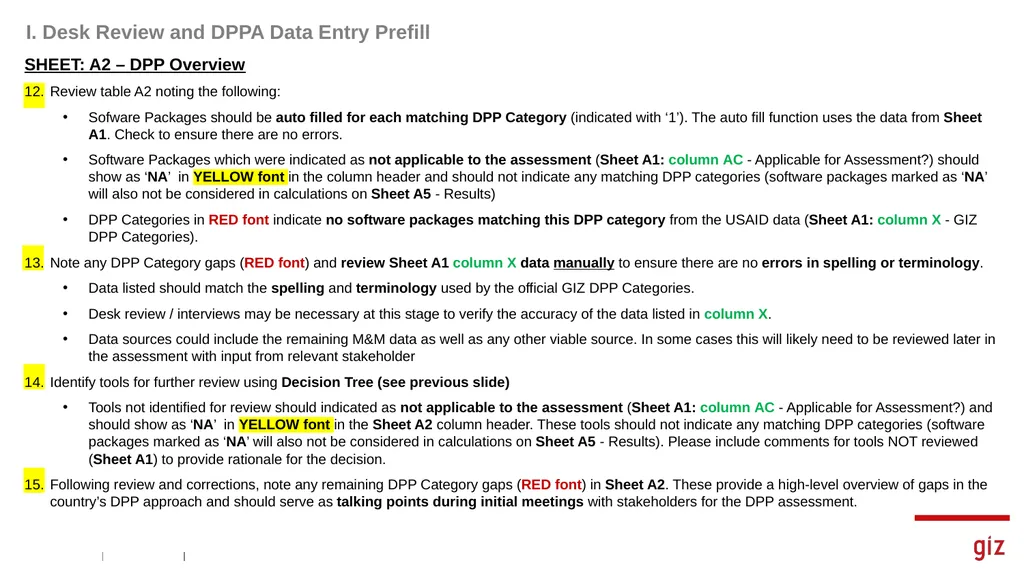
Review table A2 noting the following:
Sofware Packages should be auto filled for each matching DPP Category (indicated with ‘1’). The auto fill function uses the data from Sheet A1. Check to ensure there are no errors.
Software Packages which were indicated as not applicable to the assessment (Sheet A1: column AC - Applicable for Assessment?) should show as ‘NA’ in YELLOW font in the column header and should not indicate any matching DPP categories (software packages marked as ‘NA’ will also not be considered in calculations on Sheet A5 - Results)
DPP Categories in RED font indicate no software packages matching this DPP category from the USAID data (Sheet A1: column X - GIZ DPP Categories).
Note any DPP Category gaps (RED font) and review Sheet A1 column X data manually to ensure there are no errors in spelling or terminology.
Data listed should match the spelling and terminology used by the official GIZ DPP Categories.
Desk review / interviews may be necessary at this stage to verify the accuracy of the data listed in column X.
Data sources could include the remaining M&M data as well as any other viable source. In some cases this will likely need to be reviewed later in the assessment with input from relevant stakeholder
Identify tools for further review using Decision Tree (see previous slide)
Tools not identified for review should indicated as not applicable to the assessment (Sheet A1: column AC - Applicable for Assessment?) and should show as ‘NA’ in YELLOW font in the Sheet A2 column header. These tools should not indicate any matching DPP categories (software packages marked as ‘NA’ will also not be considered in calculations on Sheet A5 - Results). Please include comments for tools NOT reviewed (Sheet A1) to provide rationale for the decision.
Following review and corrections, note any remaining DPP Category gaps (RED font) in Sheet A2. These provide a high-level overview of gaps in the country’s DPP approach and should serve as talking points during initial meetings with stakeholders for the DPP assessment.<br>
slide17. GIZ DPPA Toolkit: Procedure v2 II. DPP Assessment with Stakeholders SHEET: A3 – Identification of Existing Functionalities
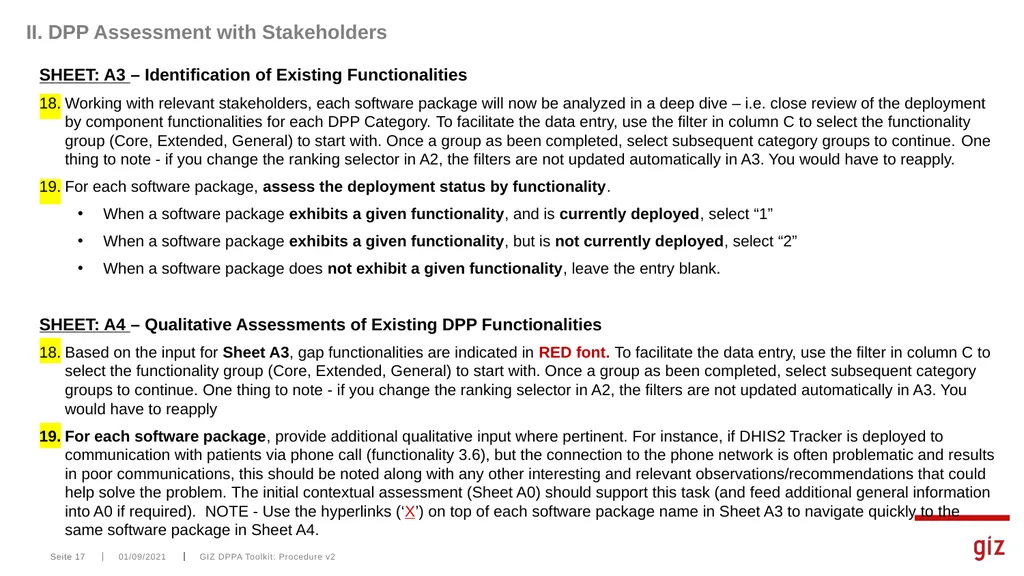
Working with relevant stakeholders, each software package will now be analyzed in a deep dive – i.e. close review of the deployment by component functionalities for each DPP Category. To facilitate the data entry, use the filter in column C to select the functionality group (Core, Extended, General) to start with. Once a group as been completed, select subsequent category groups to continue. One thing to note - if you change the ranking selector in A2, the filters are not updated automatically in A3. You would have to reapply.
For each software package, assess the deployment status by functionality.
When a software package exhibits a given functionality, and is currently deployed, select “1”
When a software package exhibits a given functionality, but is not currently deployed, select “2”
When a software package does not exhibit a given functionality, leave the entry blank.
SHEET: A4 – Qualitative Assessments of Existing DPP Functionalities
Based on the input for Sheet A3, gap functionalities are indicated in RED font. To facilitate the data entry, use the filter in column C to select the functionality group (Core, Extended, General) to start with. Once a group as been completed, select subsequent category groups to continue. One thing to note - if you change the ranking selector in A2, the filters are not updated automatically in A3. You would have to reapply
For each software package, provide additional qualitative input where pertinent. For instance, if DHIS2 Tracker is deployed to communication with patients via phone call (functionality 3.6), but the connection to the phone network is often problematic and results in poor communications, this should be noted along with any other interesting and relevant observations/recommendations that could help solve the problem. The initial contextual assessment (Sheet A0) should support this task (and feed additional general information into A0 if required). NOTE - Use the hyperlinks (‘X’) on top of each software package name in Sheet A3 to navigate quickly to the same software package in Sheet A4. Seite 17 01/09/2021<br>
slide18. GIZ DPPA Toolkit: Procedure v2 III. DPP Assessment Results SHEET: A5 - Results
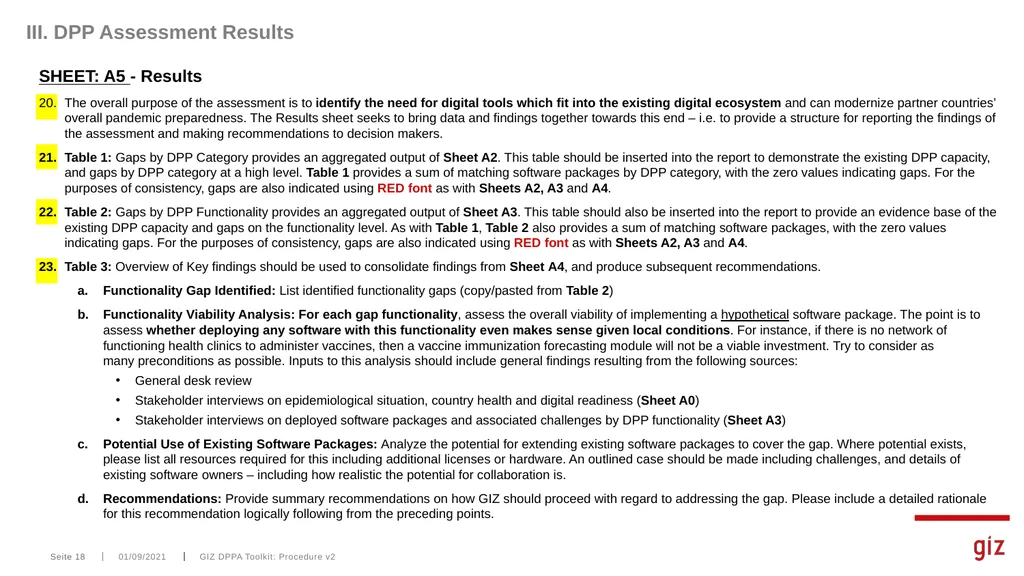
The overall purpose of the assessment is to identify the need for digital tools which fit into the existing digital ecosystem and can modernize partner countries’ overall pandemic preparedness. The Results sheet seeks to bring data and findings together towards this end – i.e. to provide a structure for reporting the findings of the assessment and making recommendations to decision makers.
Table 1: Gaps by DPP Category provides an aggregated output of Sheet A2. This table should be inserted into the report to demonstrate the existing DPP capacity, and gaps by DPP category at a high level. Table 1 provides a sum of matching software packages by DPP category, with the zero values indicating gaps. For the purposes of consistency, gaps are also indicated using RED font as with Sheets A2, A3 and A4.
Table 2: Gaps by DPP Functionality provides an aggregated output of Sheet A3. This table should also be inserted into the report to provide an evidence base of the existing DPP capacity and gaps on the functionality level. As with Table 1, Table 2 also provides a sum of matching software packages, with the zero values indicating gaps. For the purposes of consistency, gaps are also indicated using RED font as with Sheets A2, A3 and A4.
Table 3: Overview of Key findings should be used to consolidate findings from Sheet A4, and produce subsequent recommendations.
Functionality Gap Identified: List identified functionality gaps (copy/pasted from Table 2)
Functionality Viability Analysis: For each gap functionality, assess the overall viability of implementing a hypothetical software package. The point is to assess whether deploying any software with this functionality even makes sense given local conditions. For instance, if there is no network of functioning health clinics to administer vaccines, then a vaccine immunization forecasting module will not be a viable investment. Try to consider as many preconditions as possible. Inputs to this analysis should include general findings resulting from the following sources:
General desk review
Stakeholder interviews on epidemiological situation, country health and digital readiness (Sheet A0)
Stakeholder interviews on deployed software packages and associated challenges by DPP functionality (Sheet A3)
Potential Use of Existing Software Packages: Analyze the potential for extending existing software packages to cover the gap. Where potential exists, please list all resources required for this including additional licenses or hardware. An outlined case should be made including challenges, and details of existing software owners – including how realistic the potential for collaboration is.
Recommendations: Provide summary recommendations on how GIZ should proceed with regard to addressing the gap. Please include a detailed rationale for this recommendation logically following from the preceding points. Seite 18 01/09/2021<br>
slide19. 01/09/2021 GIZ DPPA Toolkit: Procedure v2 Seite 19 ANNEX A: DPP Functionalities Dictionary<br>
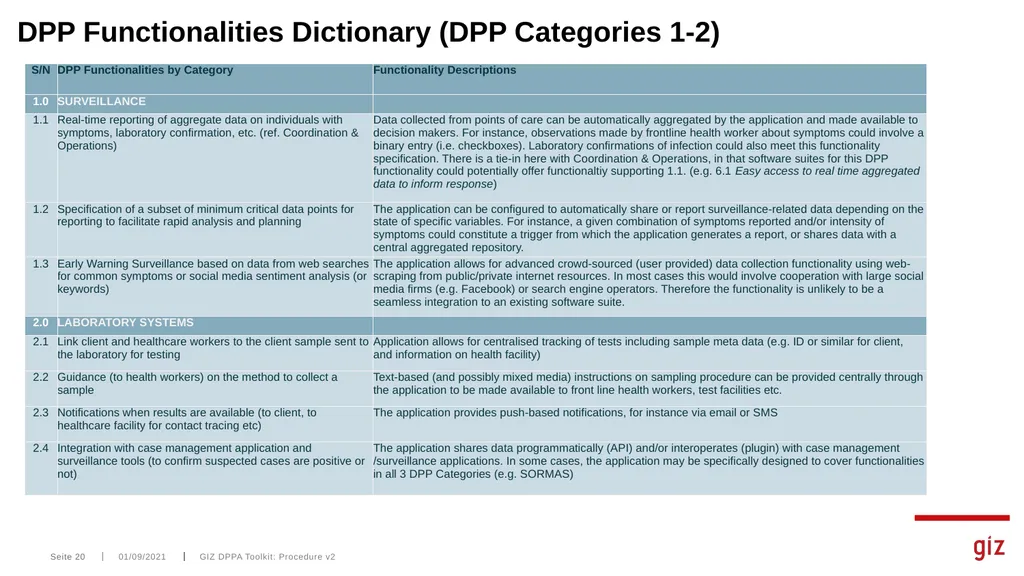
slide20. 01/09/2021 GIZ DPPA Toolkit: Procedure v2 Seite 20 DPP Functionalities Dictionary (DPP Categories 1-2)<br>
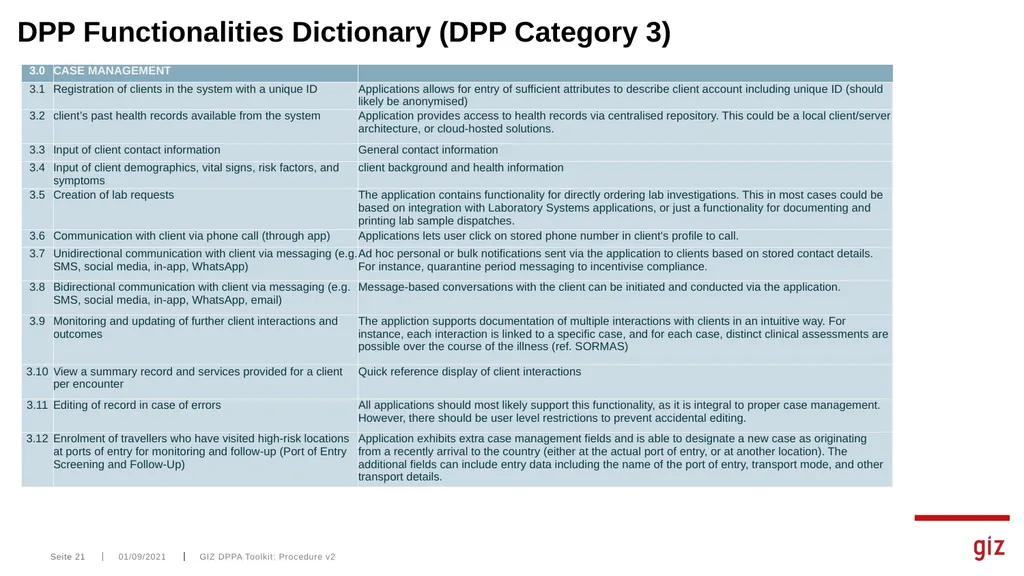
slide21. 01/09/2021 GIZ DPPA Toolkit: Procedure v2 Seite 21 DPP Functionalities Dictionary (DPP Category 3)<br>
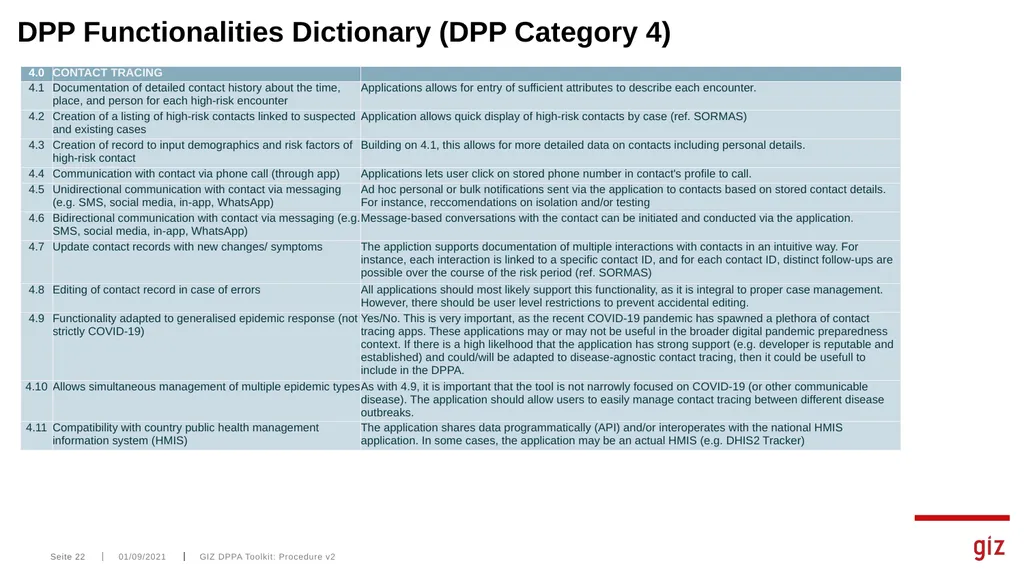
slide22. 01/09/2021 GIZ DPPA Toolkit: Procedure v2 Seite 22 DPP Functionalities Dictionary (DPP Category 4)<br>
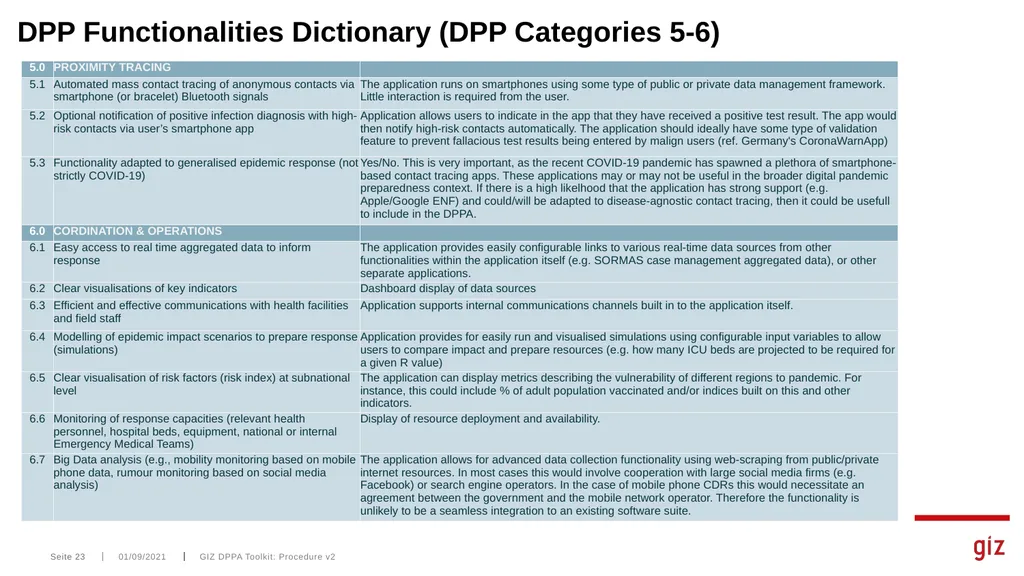
slide23. 01/09/2021 GIZ DPPA Toolkit: Procedure v2 Seite 23 DPP Functionalities Dictionary (DPP Categories 5-6)<br>
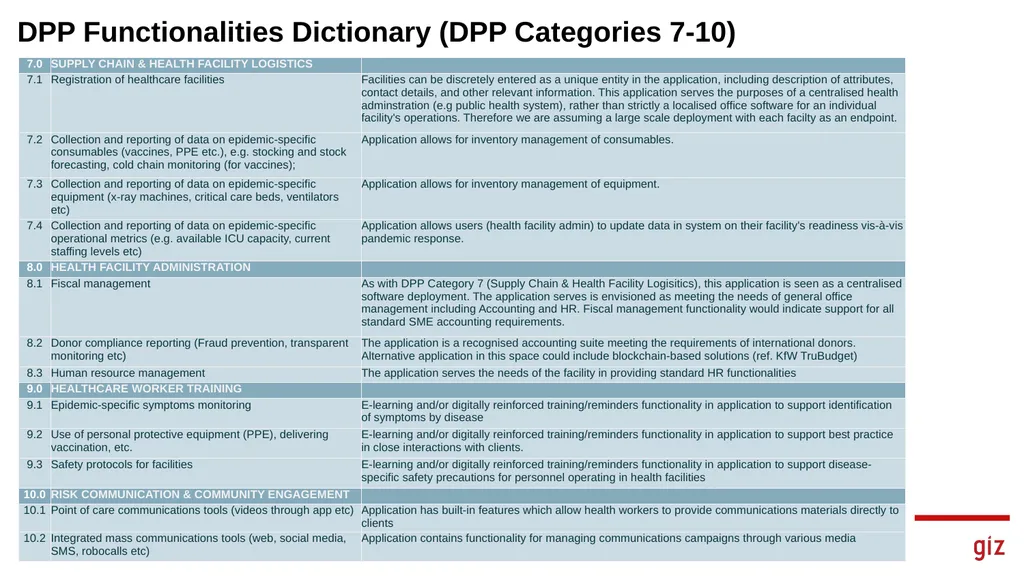
slide24. 01/09/2021 GIZ DPPA Toolkit: Procedure v2 Seite 24 DPP Functionalities Dictionary (DPP Categories 7-10)<br>
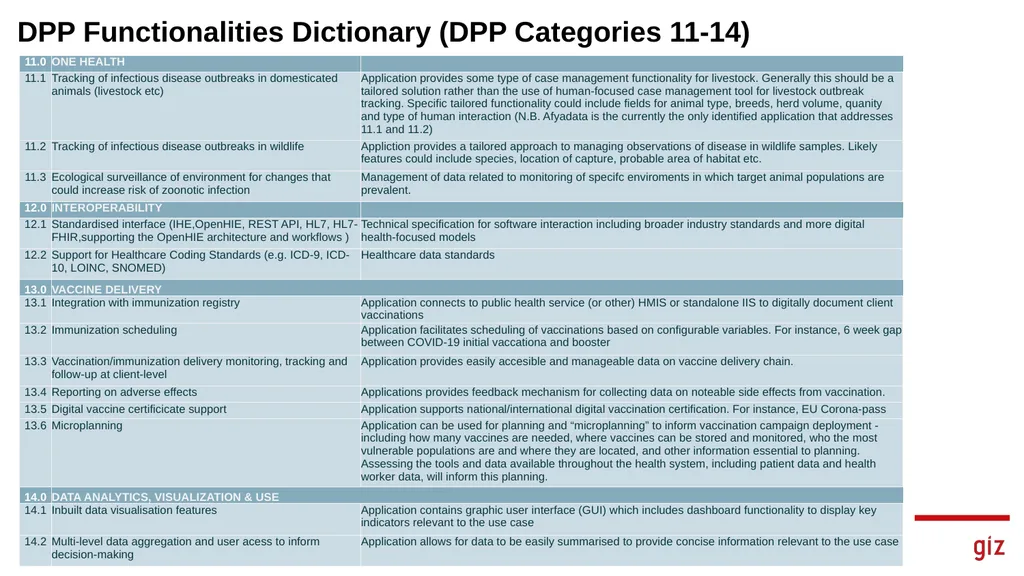
slide25. 01/09/2021 GIZ DPPA Toolkit: Procedure v2 Seite 25 DPP Functionalities Dictionary (DPP Categories 11-14)<br>
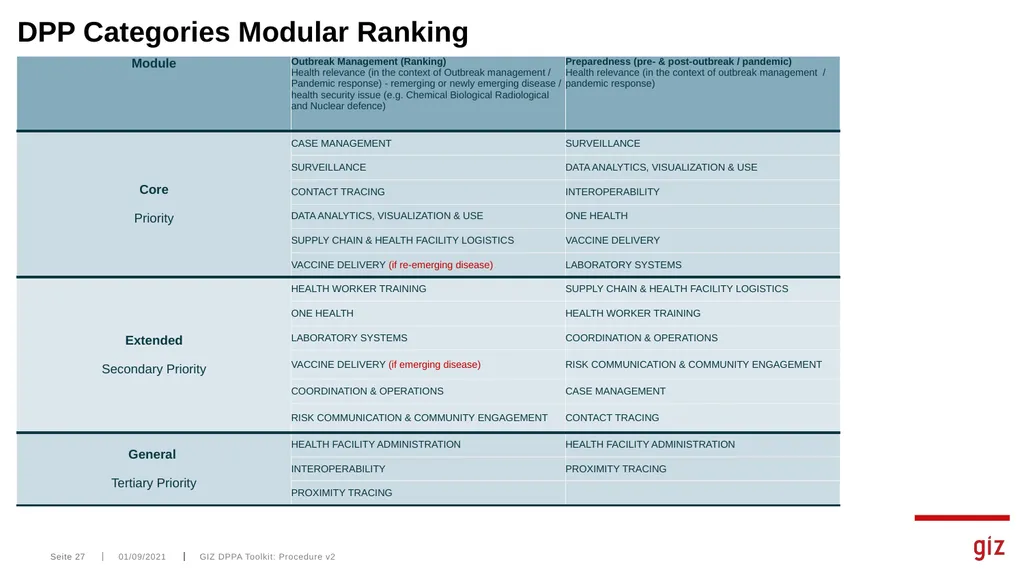
slide26. 01/09/2021 GIZ DPPA Toolkit: Procedure v2 Seite 26 ANNEX B: DPP Categories Modular Ranking<br>
slide27. 01/09/2021 GIZ DPPA Toolkit: Procedure v2 Seite 27 DPP Categories Modular Ranking<br>
slide28. 01/09/2021 GIZ DPPA Toolkit: Procedure v2 Seite 28 ANNEX C: DPP Category Mapping against USAID M&M Use Cases<br>
slide29. 01/09/2021 GIZ DPPA Toolkit: Procedure v2 Seite 29 DPP Category Mapping against USAID M&M Use Cases<br>
slide30. GIZ DPPA Toolkit: Procedure v2 Contact: Seite 30 01/09/2021<br>
slide2. 01/09/2021 GIZ DPPA Toolkit: Procedure v2 Seite 2 INTRODUCTION<br>
slide3. With this Digital Pandemic Preparedness (DPP) Assessment Tool the GIZ Global Health Program aims to provide a systematic methodology to identify needs for digital tools that integrate with the partner countries‘ existing digital ecosystem, while modernizing their overall pandemic preparedness.
The application of this tool should deliver valuable insights not only on gaps and opportunities; rather, it should delineate partner countries‘ needs and their ecosystems‘ viability to adopt an additional function or tool.
This document is intended to serve the application of the tool as a procedural guidance. It follows the structure of the DPP Assessment Tool Excel File and is structured along 3 Phases: GIZ DPPA Toolkit: Procedure v2 Seite 3 01/09/2021 Overview<br>
slide4. 01/09/2021 GIZ DPPA Toolkit: Procedure v2 Seite 4 DPP Categories and Functionalities Basis of the DPPA Toolkit
Used to identify software functionality gaps and opportunities<br>
slide5. 01/09/2021 GIZ DPPA Toolkit: Procedure v2 Seite 5 DPP Category Descriptions *See Annex for DPP Functionality Dictionary<br>
slide6. 01/09/2021 GIZ DPPA Toolkit: Procedure v2 Seite 6 DPP Alignment with Digital Square (USAID) Map & Match Data https://digitalsquare.org/covid19-map-match Initiative of Digital Square to gather data on partner country digital solutions for COVID-19
Data collected in 2 phases and available freely online. 2,910 tool deployments across 135 countries in Phase I, and more detailed and validated data for a subset of 22 countries in Phase II
Digital solutions categorized under 18 disease outbreak response ‘Use Cases’
M&M Use Cases largely align with GIZ DPP Categories, so the data can be used to kick-start the DPPA.
DPPA Toolkit has been designed to capitalize on M&M data, by direct integration of the data.
N.B. – M&M data not available for all countries<br>
slide7. 01/09/2021 GIZ DPPA Toolkit: Procedure v2 Seite 7 Early Stage Digital Health Investment Tool Tool developed by Kati Collective
Global good integrated in the DPP Assessment tool
Intended to be a country led self-assessment with partner validation
The purpose of this tool is to facilitate a discussion between a country and its stakeholders around the building blocks that need to be in place to enable the successful implementation of digital health solutions https://www.katicollective.com/tools<br>
slide8. DPPA Key Activities
0. Set up of assessment team and data entry prefill which, if not already available, is based on USAID M&M data
1. Kick off meeting with the Ministry of Health and local stakeholders
2. Identification of stakeholders for interviews and further engagement
Primary stakeholders:
Ministry of Health and digital health public agencies for the EDIT analysis
Software providers and/or users for the assessment of the DPP tools
Secondary stakeholders:
Development partners, national and regional health fora, multilateral initiatives to support dissemination and uptake of recommendations
3. Desk review and additional data gathering:
Interviews for the digital health readiness assessment (EDIT)
Self assessment by respondents, or interviews for the assessment of the DPP tools
4. Data analysis to identify gaps guided by the DPP Assessment Tool
5. Development of recommendations towards the Digital Health Ecosystem and towards Pandemics Preparedness
6. Final workshop for validation, dissemination and uptake of recommendations 01/09/2021 GIZ DPPA Toolkit: Procedure v2 Seite 8<br>
slide9. 01/09/2021 GIZ DPPA Toolkit: Procedure v2 Seite 9 PROCEDURE<br>
slide10. GIZ DPPA Toolkit: Procedure v2 Overview of Procedural Workflow Seite 10 01/09/2021 A1 Data Applicable for DPPA? Review data on tools for accuracy and completeness
Interviews and emails to dev/user /owner for missing data / clarifications if necessary Desk Review and additional data gathering A1
M&M Validation A0.1, A0.2
EDIT Interviews and MOH interviews A3/A4
Assess DPP Functionalities for each tool A5
Analysis and Recommendations YES NO In depth review of tools
May require follow-up interviews with dev/user/owner Final workshop for validation / dissemination Ref. Decision Tree for tool assessment Team set up and data prefill Kick off meeting with stakeholders Metadata A2
Automatically populated based on A1<br>
slide11. GIZ DPPA Toolkit: Procedure v2 I. Desk Review and DPPA Data Entry Prefill SHEET: ‘Metadata’ – Assessment Metadata
Enter interview details
Enter preliminary Stakeholder Mapping details
At this stage, the stakeholder map should consist of key individuals relevant to the digital health ecosystem.
The Stakeholder Map should be updated throughout the assessment as additional stakeholders are identified.
A distinction is made between two groups of stakeholders:
Primary stakeholders are (key) informants to conduct the assessment (primary actors should thus be individual persons)
Secondary stakeholders are more generally relevant and should be considered for dissemination of results (clearly secondary actors can be identified on an institutional level only)
Make sure to identify an interdisciplinary variety of (primary) stakeholders, i.e. to ensure variable foci (on public health more generally, on (D)PP, IT/tools/software packages, etc.). Categorizing the stakeholders (e.g. by type, sector, level of intervention and technical involvement) should support you in this task. Likewise, it should guide your assessment of who qualifies as a primary vs. secondary stakeholder. A test run has shown that primary stakeholders are likely to have significant technical knowledge of a – or several – software packages’ functioning and their deployment in the digital health system.
Depending on size and complexity of the digital health system, saturation may be reached as a result of varying number of interviews; hence, a key criterion for saturation should be, if no additional software packages can be identified AND if no more conflicting information is retrieved.
The comment column can be used to qualify interview, relevance of actor (individually or institutionally), or any other comment relevant for follow-up. Seite 11 01/09/2021<br>
slide12. SHEET: A0.1 – BACKGROUND: Early Stage Digital Health Investment Tool (EDIT): Critical Indicators
The open source EDIT tool* provides a means of systematically assessing readiness for digital health interventions at the country level. EDIT is used to identify building blocks that must be in place prior to designing and investing in a digital health solution. The DPPA uses the latest version of EDIT which focuses on all 71 indicators across 6 building blocks.
EDIT Indicator Scores – using desk review and interviews (if necessary), assess the Score for each indicator using drop-down boxes. The Critical indicators are of particular importance to the assessment. Countries are strongly encouraged to be scored at a level 3 for all critical indicators before moving forward with a digital health solution. If critical indicators are not met, countries should complete the assessment and first redirect efforts towards meeting critical components.
EDIT Indicator Potential Actions - for each of the indicators, review and document potential actions which can improve the score. This section is intended to identify specific action items that countries can implement to improve readiness for a digital health solution while
EDIT Indicator Notes - the notes section is for the facilitator to note and document any probing questions or qualitative information that should be recorded during the facilitation of the assessment. Each indicator also notes what level of the health system the indicator is focused on. GIZ DPPA Toolkit: Procedure v2 I. Desk Review and DPPA Data Entry Prefill Seite 12 01/09/2021 *https://katicollective.com/tools<br>
slide13. SHEET: A0.2 - BACKGROUND: Additional Data
This section is optional and used to document specific background data which inform the viability analyses for the various tools
Contextual Analysis: Qualitatively assess the contextual situation in the country with regard to the overall digital readiness and digitalization of the public health system (or the prospects thereof). Additional information retrieved in line with the interviews and the specific qualitative assessments (per tool/functionality in A4 and in Results Sheet).
Digital Readiness (general): the table identifies a number of key aspects that should, however, not be considered exhaustive. Use the column on the right to include any further observations and comments to chart the country’s digital readiness. Global indices like the ITU ICT Development Index, the GSMA Mobile Connectivity Index, CISCO Digital Readiness Index or the WITSA Network Readiness Index among others can inform the assessment.
Digital Health System (general): see above; Global Digital Health Index
Identify relevant datasets in the various categories (column on the right) that are (publicly) available and that would contribute to/are required for/enable the deployment and efficient implementation of digital (additional) tools.
The background data serves the contextualization of the assessment and the outcomes should solidify the assessment results as a basis for decision-making. GIZ DPPA Toolkit: Procedure v2 I. Desk Review and DPPA Data Entry Prefill Seite 13 01/09/2021<br>
slide14. SHEET: A1 – Articulation of Existing DPP Software Packages
[IF M&M DATA AVAILABLE] Filter by country, Copy and paste (values) all variables starting from ‘tool’ into columns C:W
Important to paste values (DO NOT simply click paste)
Check columns carefully to ensure they match (M&M variable names are included in A1 column headers)
Check data in column D ‘software’ carefully to ensure the entries correspond to actual software packages.
Important to look for spelling mistakes and/or words not aligning exactly.
This will likely require input from relevant stakeholders in many cases to understand exactly what is being used & how
Paste M&M:DPPA mapping data into column W from mm_giz_dpp_cat.csv (if available – otherwise enter manually using Sheet D1 for reference). These should be reviewed to makes sure they align with the M&M Use Cases (column X)*
Enter data in columns AB:AC and Comments as required:
Organisation/Gov Entity Currently Maintaining Tool: Enter the name of the actual owner/maintainer of the tool. This may coincide with the M&M data (e.g. Funder, Implementer, Gov Contributions). The key here is sustainability – so the long term owner should be identified.
Applicability: filter relevant software packages for the assessment by selecting ‘Yes’ or ‘No’ after carefully reviewing the USAID data in the relevant columns. Please use the Decision Tree diagram on the next page and Step 14 - Sheet A2 to guide the use of this selector. GIZ DPPA Toolkit: Procedure v2 I. Desk Review and DPPA Data Entry Prefill Seite 14 01/09/2021 *NOTE – The mapped DPP Categories are produced using a python script. The mm_giz_dpp_cat.csv file should be available in the distribution. However, the Digital Square website should be checked for updates to the M&M dataset – in which case the py script should be run to produce a new version of the csv.<br>
slide15. Decision Tree for Tool Assessment to prioritize tools in case the number of tools used in the country is large. Which Mode*? Start YES NO Use Sheet A2 Module Ranking Selector Preparedness or Outbreak? CORE DPP Categories Tools identified for DPP Category? Tool Assessment A3/A4 Step 1 Review minimum 1 tool per DPP category in detail Scalability Assessment National Coverage? YES NO Tool Assessment A3/A4 Validate M&M and Research non-M&M sources YES NO EXTENDED DPP Categories Tools identified for DPP Category? Tool Assessment A3/A4 Review 1 tool per DPP category in detail Scalability Assessment National Coverage? YES NO Tool Assessment A3/A4 Validate M&M and Research non-M&M sources Step 2 Additional time/ resources available? Step 3 YES NO Tool Assessment A3/A4 GENERAL DPP Categories Rank potential scalability Rank potential scalability 10% M&M? Step 4 Complete DPPA using Core/Extended Complete DPPA YES NO Asses additional M&M tools or research non-M&M sources Minimum 10% of M&M tools should be assessed<br>
slide16. I. Desk Review and DPPA Data Entry Prefill SHEET: A2 – DPP Overview
Review table A2 noting the following:
Sofware Packages should be auto filled for each matching DPP Category (indicated with ‘1’). The auto fill function uses the data from Sheet A1. Check to ensure there are no errors.
Software Packages which were indicated as not applicable to the assessment (Sheet A1: column AC - Applicable for Assessment?) should show as ‘NA’ in YELLOW font in the column header and should not indicate any matching DPP categories (software packages marked as ‘NA’ will also not be considered in calculations on Sheet A5 - Results)
DPP Categories in RED font indicate no software packages matching this DPP category from the USAID data (Sheet A1: column X - GIZ DPP Categories).
Note any DPP Category gaps (RED font) and review Sheet A1 column X data manually to ensure there are no errors in spelling or terminology.
Data listed should match the spelling and terminology used by the official GIZ DPP Categories.
Desk review / interviews may be necessary at this stage to verify the accuracy of the data listed in column X.
Data sources could include the remaining M&M data as well as any other viable source. In some cases this will likely need to be reviewed later in the assessment with input from relevant stakeholder
Identify tools for further review using Decision Tree (see previous slide)
Tools not identified for review should indicated as not applicable to the assessment (Sheet A1: column AC - Applicable for Assessment?) and should show as ‘NA’ in YELLOW font in the Sheet A2 column header. These tools should not indicate any matching DPP categories (software packages marked as ‘NA’ will also not be considered in calculations on Sheet A5 - Results). Please include comments for tools NOT reviewed (Sheet A1) to provide rationale for the decision.
Following review and corrections, note any remaining DPP Category gaps (RED font) in Sheet A2. These provide a high-level overview of gaps in the country’s DPP approach and should serve as talking points during initial meetings with stakeholders for the DPP assessment.<br>
slide17. GIZ DPPA Toolkit: Procedure v2 II. DPP Assessment with Stakeholders SHEET: A3 – Identification of Existing Functionalities
Working with relevant stakeholders, each software package will now be analyzed in a deep dive – i.e. close review of the deployment by component functionalities for each DPP Category. To facilitate the data entry, use the filter in column C to select the functionality group (Core, Extended, General) to start with. Once a group as been completed, select subsequent category groups to continue. One thing to note - if you change the ranking selector in A2, the filters are not updated automatically in A3. You would have to reapply.
For each software package, assess the deployment status by functionality.
When a software package exhibits a given functionality, and is currently deployed, select “1”
When a software package exhibits a given functionality, but is not currently deployed, select “2”
When a software package does not exhibit a given functionality, leave the entry blank.
SHEET: A4 – Qualitative Assessments of Existing DPP Functionalities
Based on the input for Sheet A3, gap functionalities are indicated in RED font. To facilitate the data entry, use the filter in column C to select the functionality group (Core, Extended, General) to start with. Once a group as been completed, select subsequent category groups to continue. One thing to note - if you change the ranking selector in A2, the filters are not updated automatically in A3. You would have to reapply
For each software package, provide additional qualitative input where pertinent. For instance, if DHIS2 Tracker is deployed to communication with patients via phone call (functionality 3.6), but the connection to the phone network is often problematic and results in poor communications, this should be noted along with any other interesting and relevant observations/recommendations that could help solve the problem. The initial contextual assessment (Sheet A0) should support this task (and feed additional general information into A0 if required). NOTE - Use the hyperlinks (‘X’) on top of each software package name in Sheet A3 to navigate quickly to the same software package in Sheet A4. Seite 17 01/09/2021<br>
slide18. GIZ DPPA Toolkit: Procedure v2 III. DPP Assessment Results SHEET: A5 - Results
The overall purpose of the assessment is to identify the need for digital tools which fit into the existing digital ecosystem and can modernize partner countries’ overall pandemic preparedness. The Results sheet seeks to bring data and findings together towards this end – i.e. to provide a structure for reporting the findings of the assessment and making recommendations to decision makers.
Table 1: Gaps by DPP Category provides an aggregated output of Sheet A2. This table should be inserted into the report to demonstrate the existing DPP capacity, and gaps by DPP category at a high level. Table 1 provides a sum of matching software packages by DPP category, with the zero values indicating gaps. For the purposes of consistency, gaps are also indicated using RED font as with Sheets A2, A3 and A4.
Table 2: Gaps by DPP Functionality provides an aggregated output of Sheet A3. This table should also be inserted into the report to provide an evidence base of the existing DPP capacity and gaps on the functionality level. As with Table 1, Table 2 also provides a sum of matching software packages, with the zero values indicating gaps. For the purposes of consistency, gaps are also indicated using RED font as with Sheets A2, A3 and A4.
Table 3: Overview of Key findings should be used to consolidate findings from Sheet A4, and produce subsequent recommendations.
Functionality Gap Identified: List identified functionality gaps (copy/pasted from Table 2)
Functionality Viability Analysis: For each gap functionality, assess the overall viability of implementing a hypothetical software package. The point is to assess whether deploying any software with this functionality even makes sense given local conditions. For instance, if there is no network of functioning health clinics to administer vaccines, then a vaccine immunization forecasting module will not be a viable investment. Try to consider as many preconditions as possible. Inputs to this analysis should include general findings resulting from the following sources:
General desk review
Stakeholder interviews on epidemiological situation, country health and digital readiness (Sheet A0)
Stakeholder interviews on deployed software packages and associated challenges by DPP functionality (Sheet A3)
Potential Use of Existing Software Packages: Analyze the potential for extending existing software packages to cover the gap. Where potential exists, please list all resources required for this including additional licenses or hardware. An outlined case should be made including challenges, and details of existing software owners – including how realistic the potential for collaboration is.
Recommendations: Provide summary recommendations on how GIZ should proceed with regard to addressing the gap. Please include a detailed rationale for this recommendation logically following from the preceding points. Seite 18 01/09/2021<br>
slide19. 01/09/2021 GIZ DPPA Toolkit: Procedure v2 Seite 19 ANNEX A: DPP Functionalities Dictionary<br>
slide20. 01/09/2021 GIZ DPPA Toolkit: Procedure v2 Seite 20 DPP Functionalities Dictionary (DPP Categories 1-2)<br>
slide21. 01/09/2021 GIZ DPPA Toolkit: Procedure v2 Seite 21 DPP Functionalities Dictionary (DPP Category 3)<br>
slide22. 01/09/2021 GIZ DPPA Toolkit: Procedure v2 Seite 22 DPP Functionalities Dictionary (DPP Category 4)<br>
slide23. 01/09/2021 GIZ DPPA Toolkit: Procedure v2 Seite 23 DPP Functionalities Dictionary (DPP Categories 5-6)<br>
slide24. 01/09/2021 GIZ DPPA Toolkit: Procedure v2 Seite 24 DPP Functionalities Dictionary (DPP Categories 7-10)<br>
slide25. 01/09/2021 GIZ DPPA Toolkit: Procedure v2 Seite 25 DPP Functionalities Dictionary (DPP Categories 11-14)<br>
slide26. 01/09/2021 GIZ DPPA Toolkit: Procedure v2 Seite 26 ANNEX B: DPP Categories Modular Ranking<br>
slide27. 01/09/2021 GIZ DPPA Toolkit: Procedure v2 Seite 27 DPP Categories Modular Ranking<br>
slide28. 01/09/2021 GIZ DPPA Toolkit: Procedure v2 Seite 28 ANNEX C: DPP Category Mapping against USAID M&M Use Cases<br>
slide29. 01/09/2021 GIZ DPPA Toolkit: Procedure v2 Seite 29 DPP Category Mapping against USAID M&M Use Cases<br>
slide30. GIZ DPPA Toolkit: Procedure v2 Contact: Seite 30 01/09/2021<br>