Building Successful Stores Using WordPress by
Description: Building Successful Stores Using WordPress by Catherine Mayokun Egwali You Can Make More Money, Attract Higher Paying Clients, And Impact More Lives When You Build A Successful Store Using WordPress I help entrepreneurs achieve their
Related Topics
Download Presentation
"Building Successful Stores Using WordPress by" is the property of its rightful owner. Permission is granted to download and print the materials on this website for personal, non-commercial use only, and to display it on your personal computer provided you do not modify the materials and that you retain all copyright notices contained in the materials. By downloading content from our website, you accept the terms of this agreement.
Presentation Transcript
slide1. Building Successful Stores Using WordPressby Catherine Mayokun Egwali<br>
slide2. You Can Make More Money, Attract Higher Paying Clients, And Impact More Lives When You Build A Successful Store Using WordPress…<br>
slide3. I help entrepreneurs achieve their business goals by building secure and successful WordPress websites that gets them the results they desire.<br>
slide4. I’m here to talk to you about how to build successful websites using WordPress. During this presentation you can tweet @switemtech @catherineegwali and use #WCJAX to share interesting ideas learnt or your AHA moments. Thanks.<br>
slide5. I’ll be speaking ON how to<br>
slide6. Integrate a shopping cart system by using WooCommerce<br>
slide7. Use Frequently Asked Questions (FAQs) To Improve Customer Service Delivery<br>
slide8. Use Cross-sells and Upsells<br>
slide9. Utilise abandoned cart recovery system<br>
slide10. Use Facebook ads to drive traffic to your site and sell<br>
slide11. Who is this training for?The Business Owner Looking To Make More Money & Attract Higher Paying Clients<br>
slide12. The Entrepreneur Who Want ToImpact More Lives<br>
slide13. The Marketer Who Desires To Sell More<br>
slide14. The Designer/Developer WhoWants To Get Higher Conversions For His/Her Clients<br>
slide15. What Does Having A Successful Store Mean To You?<br>
slide16. What’s The PROBLEM?
1. You have a great product or service but most of your target audience do not know about it<br>
slide17. 2. Those who do know about what you offer are not willing to pay you enough for the solutions you are providing<br>
slide18. 3. Your client is not selling as much as he/she would have loved to<br>
slide19. 4. You are not able to attend to most of your clients/customers during your office hours<br>
slide20. The 3 Opportunities To Make More Revenue, Attract Higher Paying Clients, And Impact More Lives<br>
slide21. Building Successful Stores Using WordPress: Opportunity # 1Impact More Lives When you own an online store, people who need your products will be able to find you via the internet and order for the solutions that will transform their lives.<br>
slide22. Building Successful Stores Using WordPress: Opportunity # 2
Attract Higher Paying Clients
By taking your business online, you make your business accessible to people around the world; thereby opening it up to those who really need your solution and are willing to pay for it.<br>
slide23. Building Successful Stores Using WordPress: Opportunity # 3Increase Revenue
If you can sell to more people within the same or higher period of time, you will make more money.<br>
slide24. STEPS To Building Successful Stores Using WordPress<br>
slide26. Step # 1
Identify Your Business Objective:What does success mean to you?Automation?More Sales?More Revenue?Improved Customer Service Delivery?<br>
slide27. Step # 2 Look for the themes, plugins, tools and resources to help achieve your goals:Automation – Self Service via your Shopping Cart System, accept online paymentsMore Sales – Cross-sells and UpsellsMore Revenue – Accept online payments, Abandoned Cart RecoveryImproved Customer Service Delivery – Add FAQ, Support Ticket System<br>
slide28. Step # 3
Obtain a domain name and hosting plan:Register a domain name that represents your brand. Obtain a hosting plan from a good service provider.<br>
slide29. Step # 4
Obtain And Install SSL Certificate:An SSL certificate helps to encrypt the communication on your website, increase trust by website visitors and helps to improve your website’s rankings on search engine result pages.<br>
slide30. Step 5: Install WordPress
You can install WordPress manually or by using an auto-installer if it is available on your hosting platform.<br>
slide31. Step 6: Install and activate a WooCommerce compatible theme
This helps to make your site’s sales page look nice without much effort.<br>
slide32. Step 7: Install and Activate Other Recommended Tools<br>
slide33. Security WordFence
It is a security plugin that keeps your website safe and secure
It alerts you of security vulnerabilities so you can deal with them on time
If your site gets hacked, your account might get suspended by your hosting provider thus leading to downtime and loss of sales
You can download the free plugin from WordPress Repository<br>
slide34. Shopping Cart System WooCommerce
It is a shopping cart plugin that enables you to sell digital and physical products easily.
You can accept online (credit and debit cards) or offline payments ( bank deposits)
You can download the free plugin from WordPress repository<br>
slide35. Frequently Asked Questions (FAQs) By providing Frequently Asked Questions section on your site, you can proactively address customer’s objections and needs.
This can help:
Reduce customer support requests
Increase sales conversions<br>
slide36. Live Chat By providing Live chat functionality on your site, you can quickly respond to customer enquiries thus enabling them make buying decisions on time.<br>
slide37. Live Chat Benefits include:
Reduces shopping cart abandonment
Improves customer service experience for the customer
Increase conversion rates
Increases the ability to proactively close a sale
Examples of Live Chat plugins you can integrate include Drift, Tawk.to, HappyFoxChat<br>
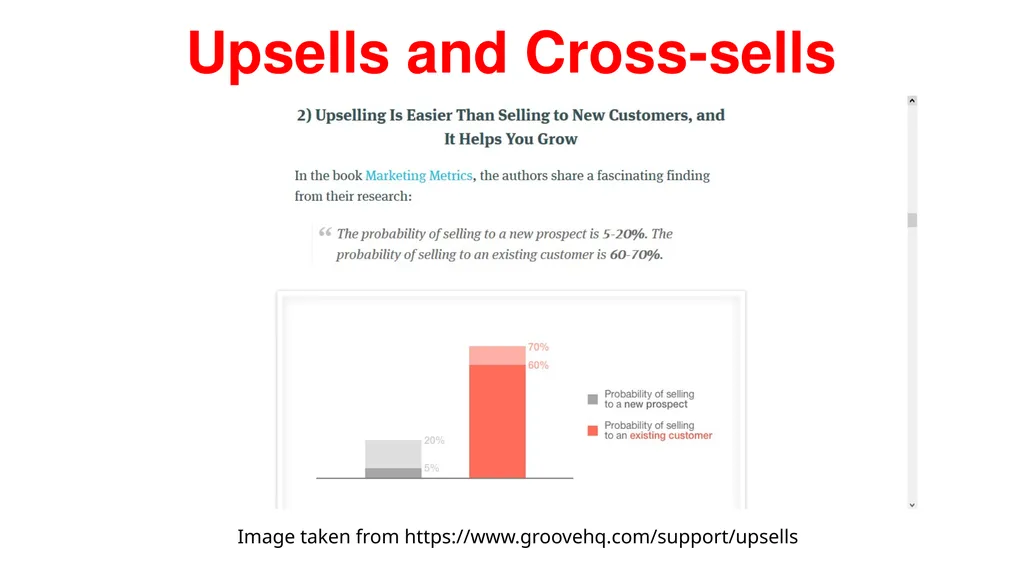
slide38. Upsells and Cross-sells An Upsell occurs when you suggest other products or features that will make the customer’s product/order more enjoyable and expensive e.g.
Extra toppings on your ice-cream
More leg room space for your flight,
More bandwidth for your hosting plan etc<br>
slide39. Image taken from https://www.groovehq.com/support/upsells Upsells and Cross-sells<br>
slide40. Upsells and Cross-sells An cross-sell occurs when you suggest complementary or related products to what the customer has chosen e.g.
“Often bought together” suggestions,
“Other books by the author”,
“Other customers also bought” suggestions.
Another example is when you are shown a pair of shoes to match the purse you just bought.<br>
slide41. Upsells and Cross-sells One-click upsells by WooCurve
Smart Offers by StoreApp<br>
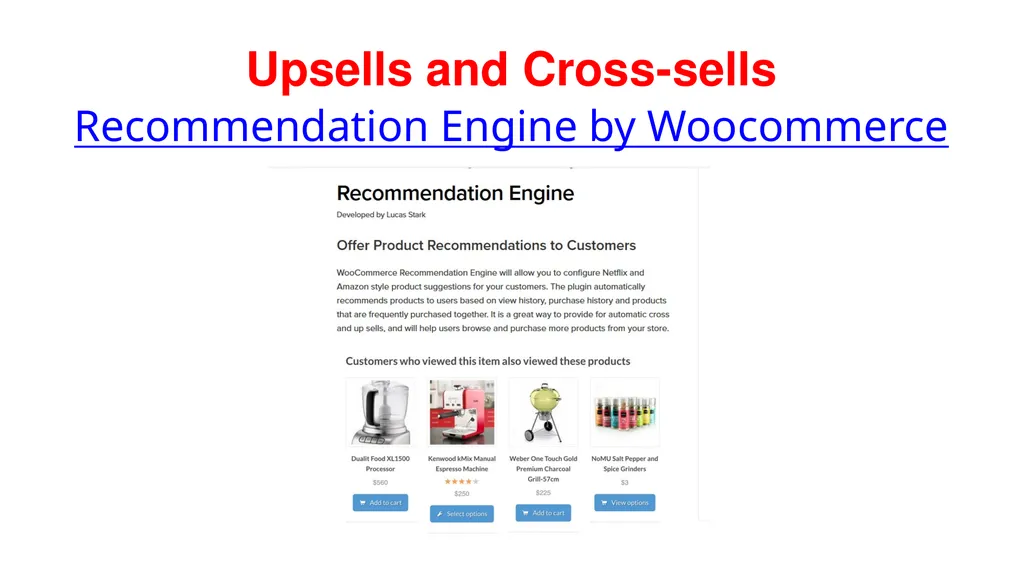
slide42. Upsells and Cross-sells Recommendation Engine by Woocommerce<br>
slide43. Abandoned Cart Recovery System It is a system that helps you to automatically contact people who left items in their carts and did not finish through with the buying process.
You can offer them a coupon to get a lower price or simply ask for feedback to know if they encountered problems during the shopping process<br>
slide44. Abandoned Cart Recovery System YITH WooCommerce Recovered Abandoned Cart
Abandoned Cart Lite For WooCommerce
Advanced Cart Recovery<br>
slide45. Promotions, Gift Certificates and Coupons Do promotions regularly
Take advantage of holidays to give discounts
Offer free shipping for orders above a specific amount
Offer discounts for orders above a specific amount<br>
slide46. Promotions, Gift Certificates and Coupons Inbuilt WooCommerce Coupons system
WooCommerce Smart Coupons
WooCommerce Gift Certificates Pro by IgniteWoo<br>
slide47. Using Facebook Ads to Drive Traffic & Increase Sales Have a Facebook account
Create a Pixel
Install and configure the pixel on your website using plugins like PixelYourSite, Pixel Caffeine, Insert Headers and Footers etc
Create your ad<br>
slide48. Closing Note We have identified that you can:
Impact more lives
Make more money
Improve sales conversions
Improve customer service delivery
Attract higher paying clients and
Sell more
by taking your business online and enabling people to easily buy from you.<br>
slide49. Closing Note When you:
Encourage website users’ trust by using an SSL Certificate
Provide a means for people to buy from the comfort of their location (i.e. your store is online)
Provide an FAQ section and Live chat option for instant feedback
Recommend better or complementary products during checkout
Automatically remind users about items still in their cart and offer to make the shopping experience easier
Entice customers by giving discounts and promotions
Drive traffic to your store by using Facebook ads
You will not only achieve your business objectives but will also help more people gain access to the solutions you offers.<br>
slide50. BONUS FOR PARTICIPANTS
Download a free copy of the ebook:Essential tools to skyrocket ecommerce conversion rates and saleshttp://bit.ly/switemecommercebook<br>
slide51. CONNECT WITH ME Thank you so much for taking the time to read this book. If you would like to get in touch with me, feel free to contact me at https://catherineegwali.com/ . Alternatively, you can reach me at Switem Technology Solutions for ICT related solutions. You can also connect with me on:LinkedIn: https://www.linkedin.com/in/catherinemegwali/ Facebook: https://web.facebook.com/catherineegwali/ Facebook Group: https://web.facebook.com/groups/ICTSavvyEntrepreneur/ Facebook Messenger Bot: https://m.me/catherinegwali/ Twitter: https://twitter.com/catherineegwali/ Instagram: https://www.instagram.com/catherineegwali/<br>

slide2. You Can Make More Money, Attract Higher Paying Clients, And Impact More Lives When You Build A Successful Store Using WordPress…<br>
slide3. I help entrepreneurs achieve their business goals by building secure and successful WordPress websites that gets them the results they desire.<br>
slide4. I’m here to talk to you about how to build successful websites using WordPress. During this presentation you can tweet @switemtech @catherineegwali and use #WCJAX to share interesting ideas learnt or your AHA moments. Thanks.<br>
slide5. I’ll be speaking ON how to<br>
slide6. Integrate a shopping cart system by using WooCommerce<br>
slide7. Use Frequently Asked Questions (FAQs) To Improve Customer Service Delivery<br>
slide8. Use Cross-sells and Upsells<br>
slide9. Utilise abandoned cart recovery system<br>
slide10. Use Facebook ads to drive traffic to your site and sell<br>
slide11. Who is this training for?The Business Owner Looking To Make More Money & Attract Higher Paying Clients<br>
slide12. The Entrepreneur Who Want ToImpact More Lives<br>
slide13. The Marketer Who Desires To Sell More<br>
slide14. The Designer/Developer WhoWants To Get Higher Conversions For His/Her Clients<br>
slide15. What Does Having A Successful Store Mean To You?<br>
slide16. What’s The PROBLEM?
1. You have a great product or service but most of your target audience do not know about it<br>
slide17. 2. Those who do know about what you offer are not willing to pay you enough for the solutions you are providing<br>
slide18. 3. Your client is not selling as much as he/she would have loved to<br>
slide19. 4. You are not able to attend to most of your clients/customers during your office hours<br>
slide20. The 3 Opportunities To Make More Revenue, Attract Higher Paying Clients, And Impact More Lives<br>
slide21. Building Successful Stores Using WordPress: Opportunity # 1Impact More Lives When you own an online store, people who need your products will be able to find you via the internet and order for the solutions that will transform their lives.<br>
slide22. Building Successful Stores Using WordPress: Opportunity # 2
Attract Higher Paying Clients
By taking your business online, you make your business accessible to people around the world; thereby opening it up to those who really need your solution and are willing to pay for it.<br>
slide23. Building Successful Stores Using WordPress: Opportunity # 3Increase Revenue
If you can sell to more people within the same or higher period of time, you will make more money.<br>
slide24. STEPS To Building Successful Stores Using WordPress<br>
slide26. Step # 1
Identify Your Business Objective:What does success mean to you?Automation?More Sales?More Revenue?Improved Customer Service Delivery?<br>
slide27. Step # 2 Look for the themes, plugins, tools and resources to help achieve your goals:Automation – Self Service via your Shopping Cart System, accept online paymentsMore Sales – Cross-sells and UpsellsMore Revenue – Accept online payments, Abandoned Cart RecoveryImproved Customer Service Delivery – Add FAQ, Support Ticket System<br>
slide28. Step # 3
Obtain a domain name and hosting plan:Register a domain name that represents your brand. Obtain a hosting plan from a good service provider.<br>
slide29. Step # 4
Obtain And Install SSL Certificate:An SSL certificate helps to encrypt the communication on your website, increase trust by website visitors and helps to improve your website’s rankings on search engine result pages.<br>
slide30. Step 5: Install WordPress
You can install WordPress manually or by using an auto-installer if it is available on your hosting platform.<br>
slide31. Step 6: Install and activate a WooCommerce compatible theme
This helps to make your site’s sales page look nice without much effort.<br>
slide32. Step 7: Install and Activate Other Recommended Tools<br>
slide33. Security WordFence
It is a security plugin that keeps your website safe and secure
It alerts you of security vulnerabilities so you can deal with them on time
If your site gets hacked, your account might get suspended by your hosting provider thus leading to downtime and loss of sales
You can download the free plugin from WordPress Repository<br>
slide34. Shopping Cart System WooCommerce
It is a shopping cart plugin that enables you to sell digital and physical products easily.
You can accept online (credit and debit cards) or offline payments ( bank deposits)
You can download the free plugin from WordPress repository<br>
slide35. Frequently Asked Questions (FAQs) By providing Frequently Asked Questions section on your site, you can proactively address customer’s objections and needs.
This can help:
Reduce customer support requests
Increase sales conversions<br>
slide36. Live Chat By providing Live chat functionality on your site, you can quickly respond to customer enquiries thus enabling them make buying decisions on time.<br>
slide37. Live Chat Benefits include:
Reduces shopping cart abandonment
Improves customer service experience for the customer
Increase conversion rates
Increases the ability to proactively close a sale
Examples of Live Chat plugins you can integrate include Drift, Tawk.to, HappyFoxChat<br>
slide38. Upsells and Cross-sells An Upsell occurs when you suggest other products or features that will make the customer’s product/order more enjoyable and expensive e.g.
Extra toppings on your ice-cream
More leg room space for your flight,
More bandwidth for your hosting plan etc<br>
slide39. Image taken from https://www.groovehq.com/support/upsells Upsells and Cross-sells<br>
slide40. Upsells and Cross-sells An cross-sell occurs when you suggest complementary or related products to what the customer has chosen e.g.
“Often bought together” suggestions,
“Other books by the author”,
“Other customers also bought” suggestions.
Another example is when you are shown a pair of shoes to match the purse you just bought.<br>
slide41. Upsells and Cross-sells One-click upsells by WooCurve
Smart Offers by StoreApp<br>
slide42. Upsells and Cross-sells Recommendation Engine by Woocommerce<br>
slide43. Abandoned Cart Recovery System It is a system that helps you to automatically contact people who left items in their carts and did not finish through with the buying process.
You can offer them a coupon to get a lower price or simply ask for feedback to know if they encountered problems during the shopping process<br>
slide44. Abandoned Cart Recovery System YITH WooCommerce Recovered Abandoned Cart
Abandoned Cart Lite For WooCommerce
Advanced Cart Recovery<br>
slide45. Promotions, Gift Certificates and Coupons Do promotions regularly
Take advantage of holidays to give discounts
Offer free shipping for orders above a specific amount
Offer discounts for orders above a specific amount<br>
slide46. Promotions, Gift Certificates and Coupons Inbuilt WooCommerce Coupons system
WooCommerce Smart Coupons
WooCommerce Gift Certificates Pro by IgniteWoo<br>
slide47. Using Facebook Ads to Drive Traffic & Increase Sales Have a Facebook account
Create a Pixel
Install and configure the pixel on your website using plugins like PixelYourSite, Pixel Caffeine, Insert Headers and Footers etc
Create your ad<br>
slide48. Closing Note We have identified that you can:
Impact more lives
Make more money
Improve sales conversions
Improve customer service delivery
Attract higher paying clients and
Sell more
by taking your business online and enabling people to easily buy from you.<br>
slide49. Closing Note When you:
Encourage website users’ trust by using an SSL Certificate
Provide a means for people to buy from the comfort of their location (i.e. your store is online)
Provide an FAQ section and Live chat option for instant feedback
Recommend better or complementary products during checkout
Automatically remind users about items still in their cart and offer to make the shopping experience easier
Entice customers by giving discounts and promotions
Drive traffic to your store by using Facebook ads
You will not only achieve your business objectives but will also help more people gain access to the solutions you offers.<br>
slide50. BONUS FOR PARTICIPANTS
Download a free copy of the ebook:Essential tools to skyrocket ecommerce conversion rates and saleshttp://bit.ly/switemecommercebook<br>
slide51. CONNECT WITH ME Thank you so much for taking the time to read this book. If you would like to get in touch with me, feel free to contact me at https://catherineegwali.com/ . Alternatively, you can reach me at Switem Technology Solutions for ICT related solutions. You can also connect with me on:LinkedIn: https://www.linkedin.com/in/catherinemegwali/ Facebook: https://web.facebook.com/catherineegwali/ Facebook Group: https://web.facebook.com/groups/ICTSavvyEntrepreneur/ Facebook Messenger Bot: https://m.me/catherinegwali/ Twitter: https://twitter.com/catherineegwali/ Instagram: https://www.instagram.com/catherineegwali/<br>