
cea A suite of commands for trial-based













Description: cea A suite of commands for trial-based cost-effectiveness analysis in Stata Rebecca A. Raciborski July 31, 2025 Stata Conference, Nashville, TN Required disclaimers I am employed by the Center for Mental Healthcare and Outcomes Research
Related Topics
Download Presentation
"cea A suite of commands for trial-based" is the property of its rightful owner. Permission is granted to download and print the materials on this website for personal, non-commercial use only, and to display it on your personal computer provided you do not modify the materials and that you retain all copyright notices contained in the materials. By downloading content from our website, you accept the terms of this agreement.
Presentation Transcript
slide1. cea A suite of commands for trial-based
cost-effectiveness analysis in Stata Rebecca A. Raciborski
July 31, 2025
Stata Conference, Nashville, TN<br>
slide2. Required disclaimers I am employed by the Center for Mental Healthcare and Outcomes Research located at the Central Arkansas Veterans Health System.
The presented slides and my attendance at this conference are the result of support from the United States Department of Veterans Affairs.
The cea command was not developed with VA time or computing resources. No U.S. government warranty or liability is expressed or implied.
The contents of this presentation do not represent the views of the U.S. Department of Veterans Affairs or the United States Government.
References within this presentation to products does not imply an endorsement by the U.S. Department of Veterans Affairs or the United States Government.<br>
slide3. Acknowledgements Rafal Raciborski coauthored cea with me
My research collaborators from economic analysis workgroup of the PRecision Medicine In MEntal Health Care (PRIME Care) study:
Jacob Painter
Jeffrey Pyne
Chenghui Li
Silas Williams
The PRIME Care study was funded by U.S. Department of Veterans Affairs Health Services Research and Development Grant (#1P1 HX002375-01/ SDR 16-348), David Oslin, PI<br>
slide4. Overview An quick introduction to cost-effectiveness analysis
Using the cea command
Notes about development (time permitting)
Questions<br>
slide5. A bit of background…<br>
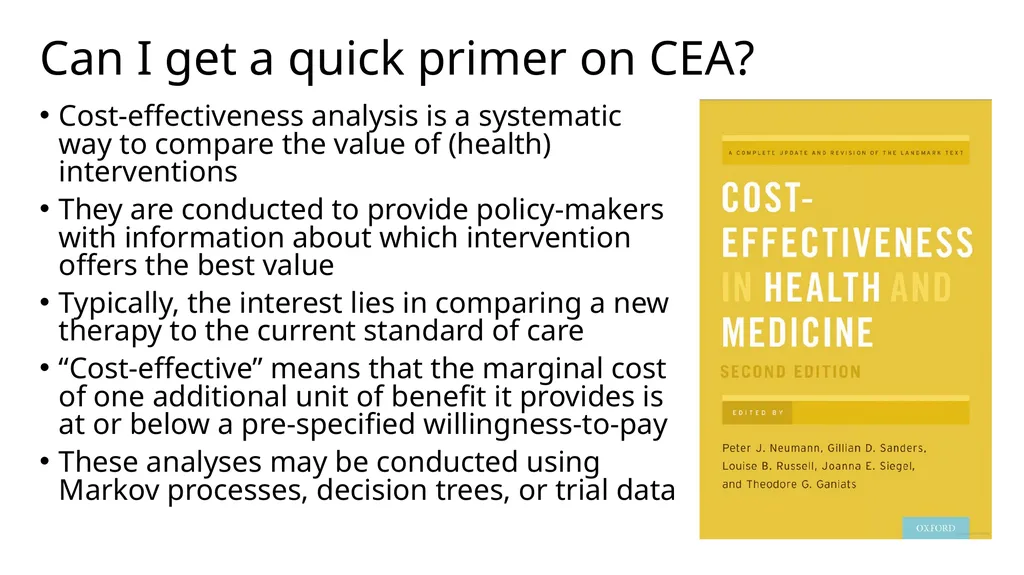
slide6. Can I get a quick primer on CEA? Cost-effectiveness analysis is a systematic way to compare the value of (health) interventions
They are conducted to provide policy-makers with information about which intervention offers the best value
Typically, the interest lies in comparing a new therapy to the current standard of care
“Cost-effective” means that the marginal cost of one additional unit of benefit it provides is at or below a pre-specified willingness-to-pay
These analyses may be conducted using Markov processes, decision trees, or trial data<br>
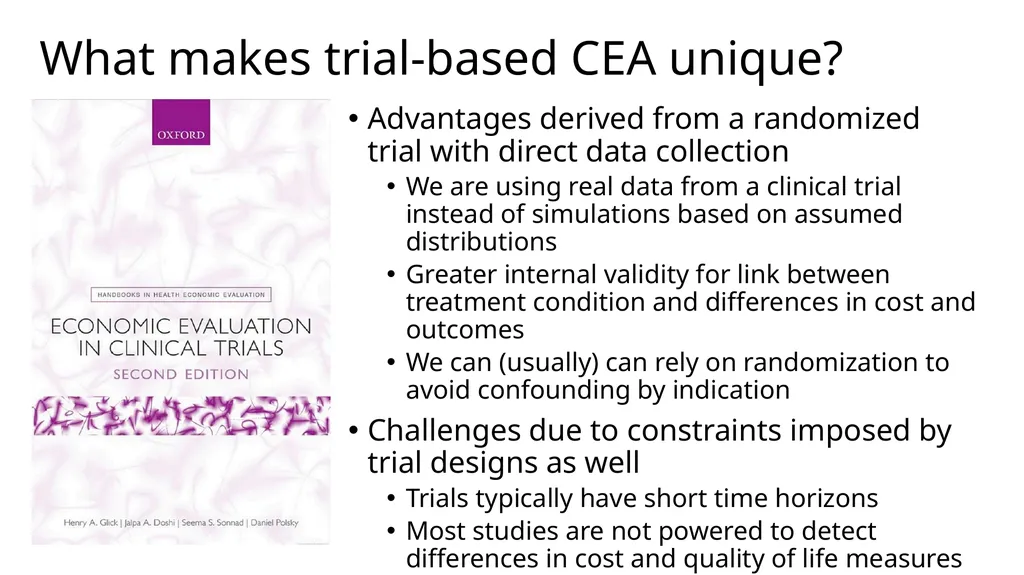
slide7. What makes trial-based CEA unique? Advantages derived from a randomized trial with direct data collection
We are using real data from a clinical trial instead of simulations based on assumed distributions
Greater internal validity for link between treatment condition and differences in cost and outcomes
We can (usually) can rely on randomization to avoid confounding by indication
Challenges due to constraints imposed by trial designs as well
Trials typically have short time horizons
Most studies are not powered to detect differences in cost and quality of life measures<br>
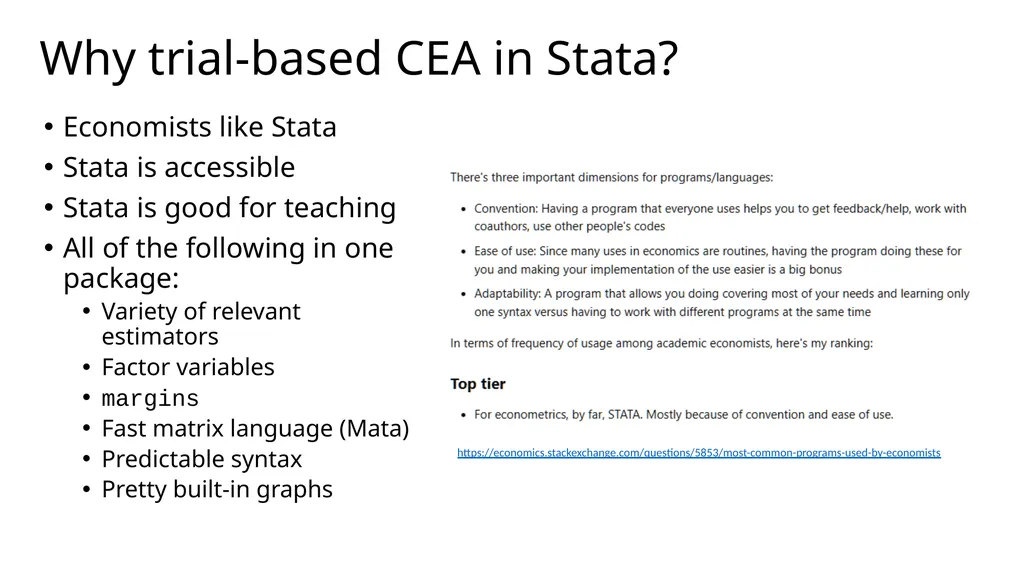
slide8. Why trial-based CEA in Stata? Economists like Stata
Stata is accessible
Stata is good for teaching
All of the following in one package:
Variety of relevant estimators
Factor variables
margins
Fast matrix language (Mata)
Predictable syntax
Pretty built-in graphs https://economics.stackexchange.com/questions/5853/most-common-programs-used-by-economists<br>
slide9. Introducing cea<br>
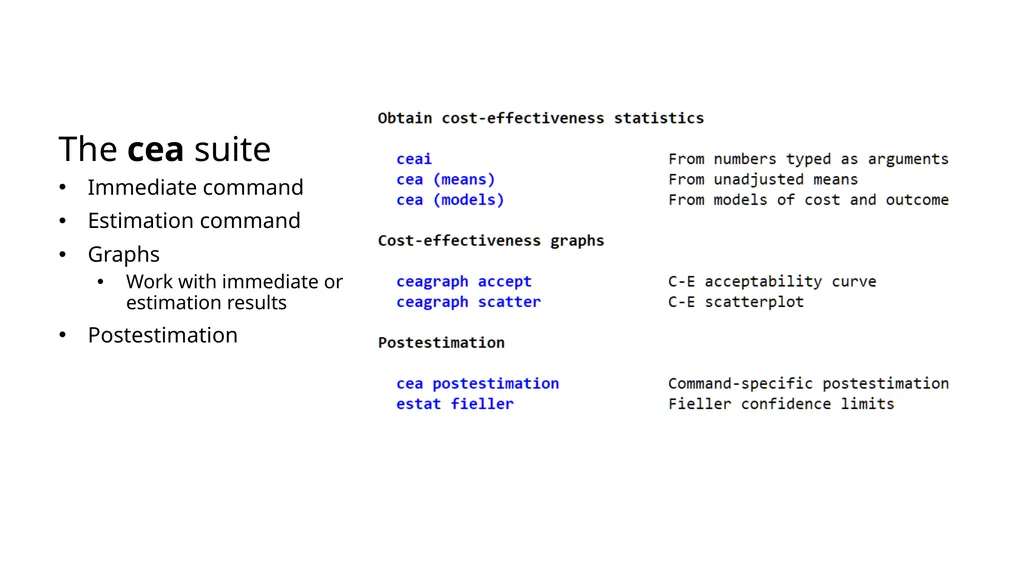
slide10. The cea suite Immediate command
Estimation command
Graphs
Work with immediate or estimation results
Postestimation<br>
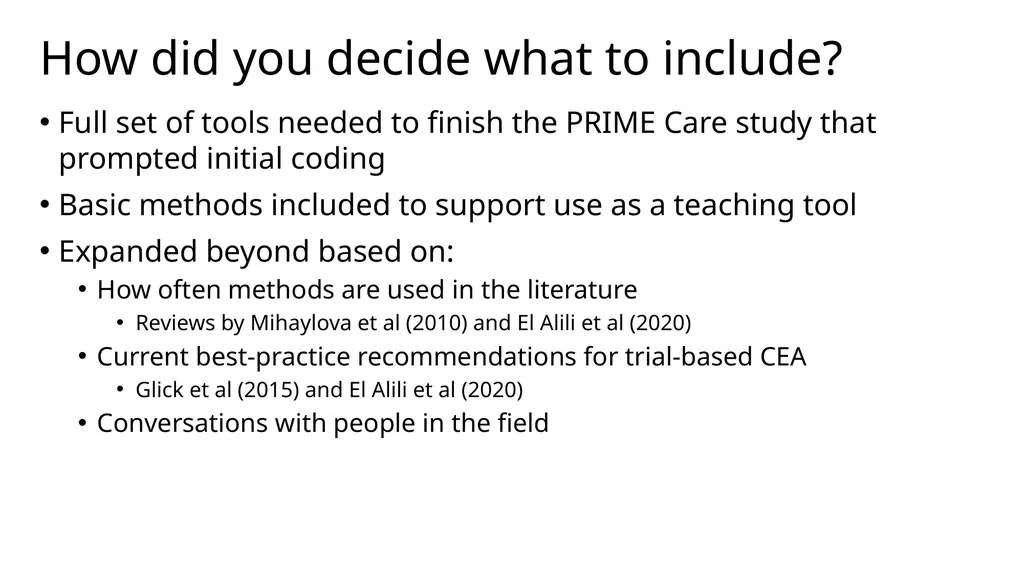
slide11. How did you decide what to include? Full set of tools needed to finish the PRIME Care study that prompted initial coding
Basic methods included to support use as a teaching tool
Expanded beyond based on:
How often methods are used in the literature
Reviews by Mihaylova et al (2010) and El Alili et al (2020)
Current best-practice recommendations for trial-based CEA
Glick et al (2015) and El Alili et al (2020)
Conversations with people in the field<br>
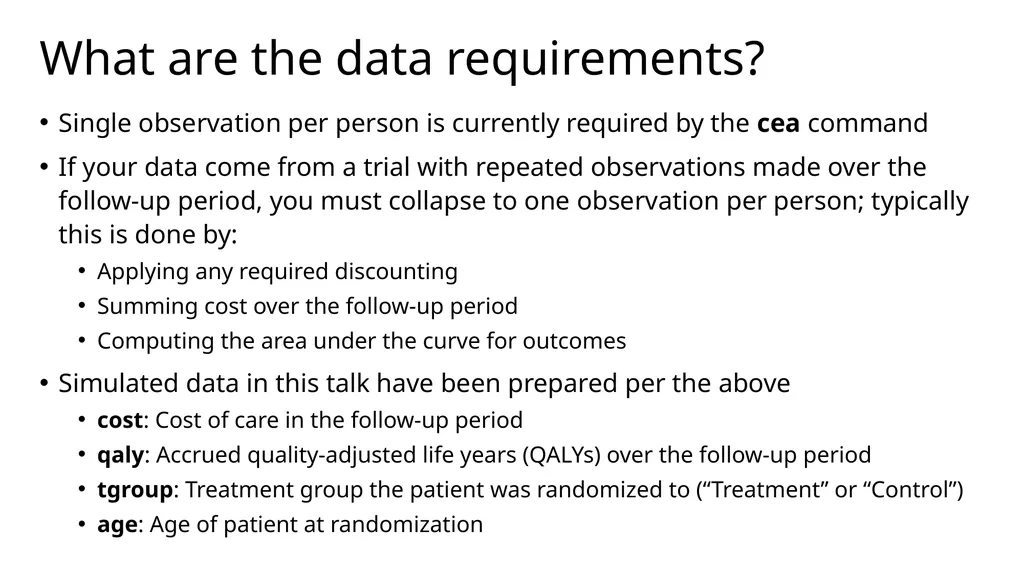
slide12. What are the data requirements? Single observation per person is currently required by the cea command
If your data come from a trial with repeated observations made over the follow-up period, you must collapse to one observation per person; typically this is done by:
Applying any required discounting
Summing cost over the follow-up period
Computing the area under the curve for outcomes
Simulated data in this talk have been prepared per the above
cost: Cost of care in the follow-up period
qaly: Accrued quality-adjusted life years (QALYs) over the follow-up period
tgroup: Treatment group the patient was randomized to (“Treatment” or “Control”)
age: Age of patient at randomization<br>
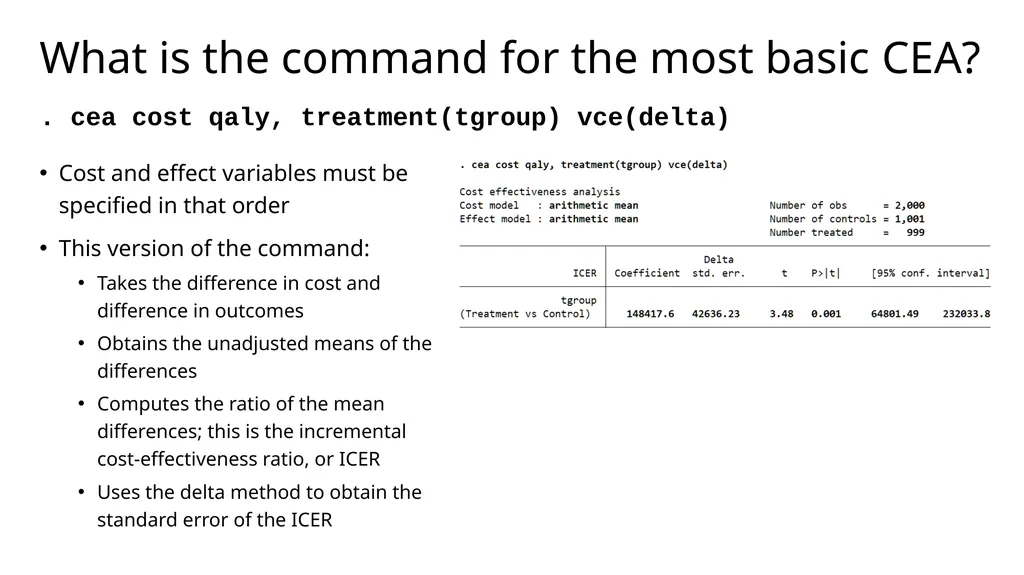
slide13. What is the command for the most basic CEA? . cea cost qaly, treatment(tgroup) vce(delta) Cost and effect variables must be specified in that order
This version of the command:
Takes the difference in cost and difference in outcomes
Obtains the unadjusted means of the differences
Computes the ratio of the mean differences; this is the incremental cost-effectiveness ratio, or ICER
Uses the delta method to obtain the standard error of the ICER<br>
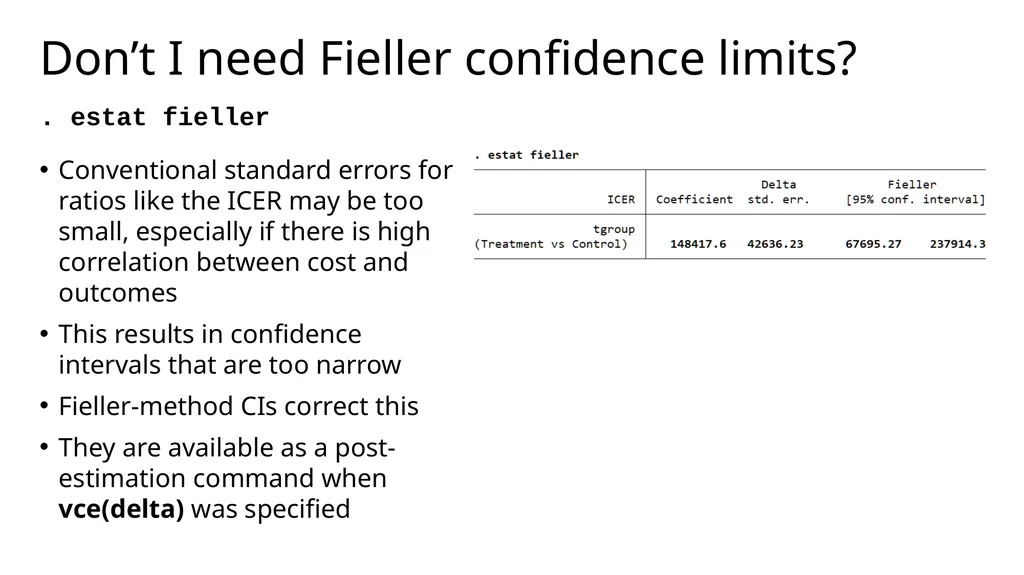
slide14. Don’t I need Fieller confidence limits? . estat fieller Conventional standard errors for ratios like the ICER may be too small, especially if there is high correlation between cost and outcomes
This results in confidence intervals that are too narrow
Fieller-method CIs correct this
They are available as a post-estimation command when vce(delta) was specified<br>
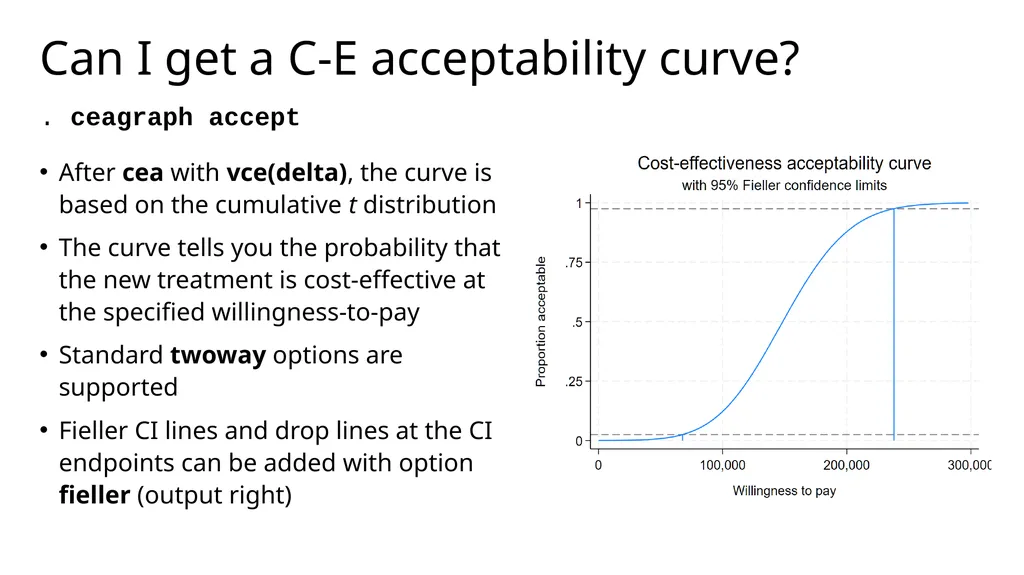
slide15. Can I get a C-E acceptability curve? . ceagraph accept After cea with vce(delta), the curve is based on the cumulative t distribution
The curve tells you the probability that the new treatment is cost-effective at the specified willingness-to-pay
Standard twoway options are supported
Fieller CI lines and drop lines at the CI endpoints can be added with option fieller (output right)<br>
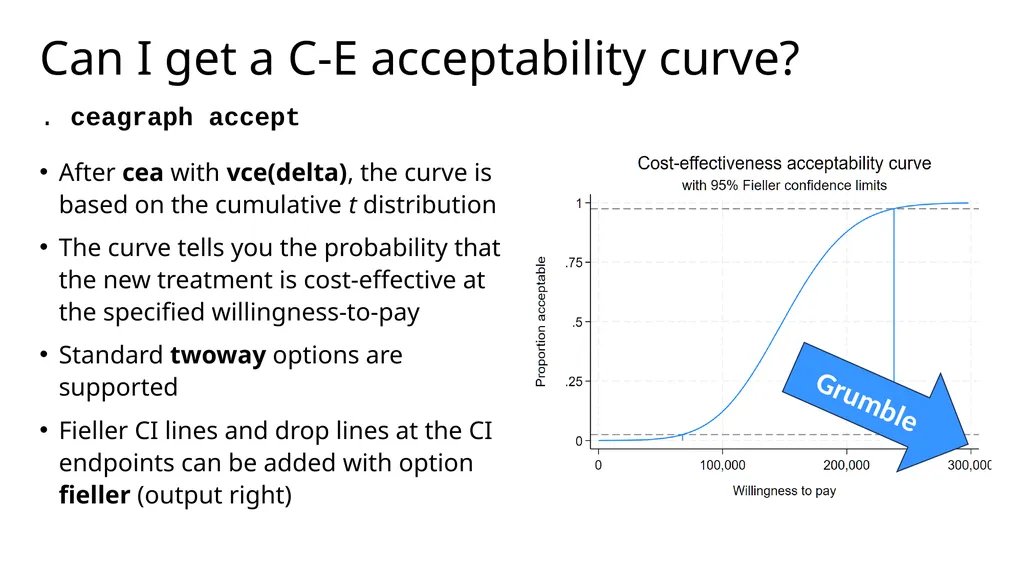
slide16. Can I get a C-E acceptability curve? . ceagraph accept After cea with vce(delta), the curve is based on the cumulative t distribution
The curve tells you the probability that the new treatment is cost-effective at the specified willingness-to-pay
Standard twoway options are supported
Fieller CI lines and drop lines at the CI endpoints can be added with option fieller (output right) Grumble<br>
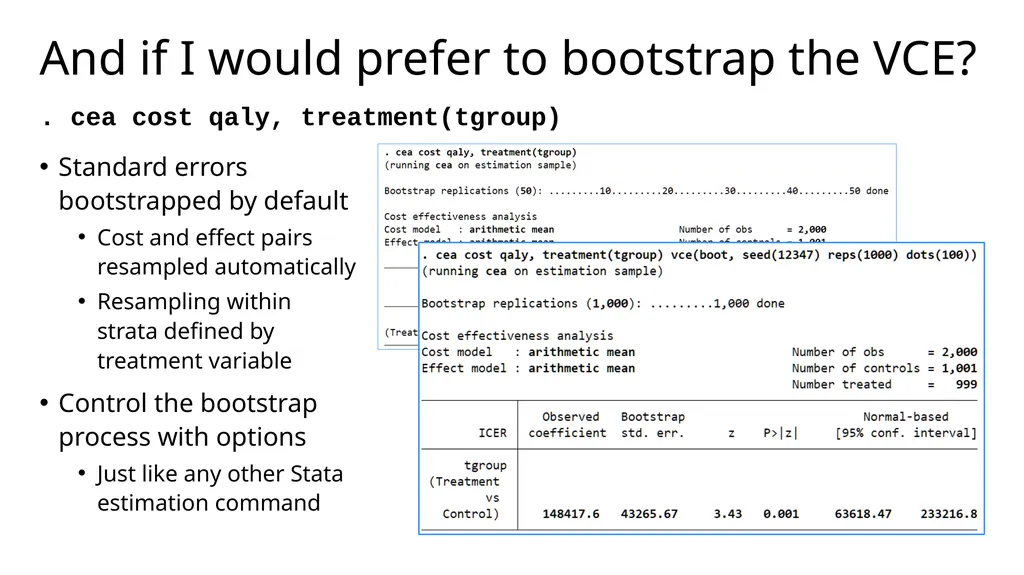
slide17. And if I would prefer to bootstrap the VCE? . cea cost qaly, treatment(tgroup) Standard errors bootstrapped by default
Cost and effect pairs resampled automatically
Resampling within strata defined by treatment variable
Control the bootstrap process with options
Just like any other Stata estimation command<br>
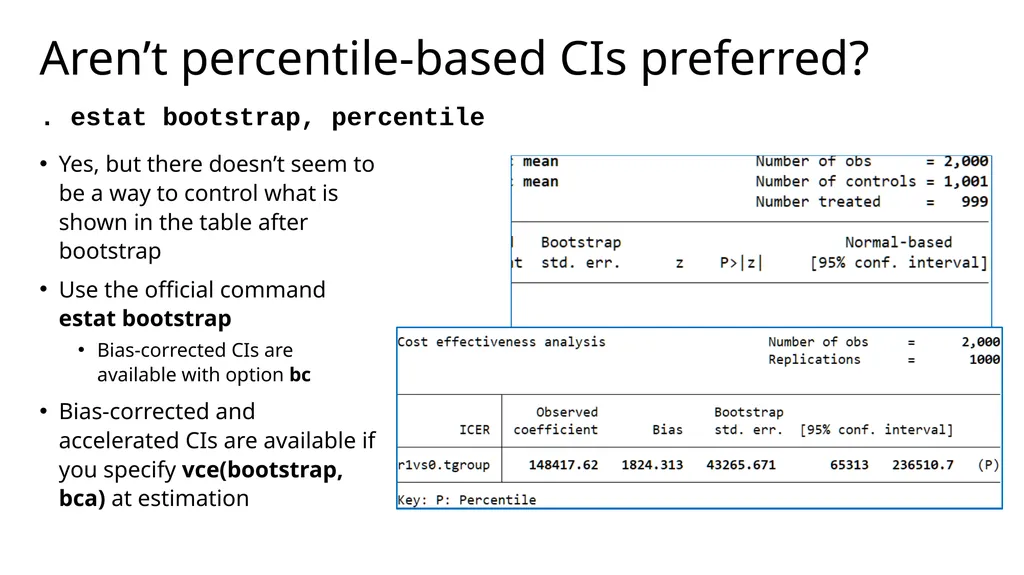
slide18. Aren’t percentile-based CIs preferred? . estat bootstrap, percentile Yes, but there doesn’t seem to be a way to control what is shown in the table after bootstrap
Use the official command estat bootstrap
Bias-corrected CIs are available with option bc
Bias-corrected and accelerated CIs are available if you specify vce(bootstrap, bca) at estimation<br>
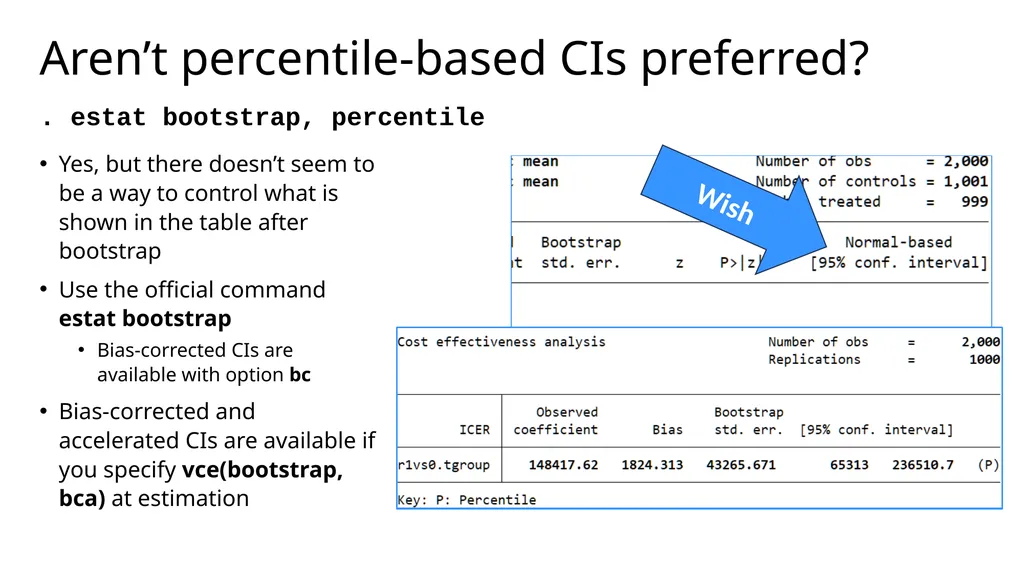
slide19. Aren’t percentile-based CIs preferred? . estat bootstrap, percentile Yes, but there doesn’t seem to be a way to control what is shown in the table after bootstrap
Use the official command estat bootstrap
Bias-corrected CIs are available with option bc
Bias-corrected and accelerated CIs are available if you specify vce(bootstrap, bca) at estimation Wish<br>
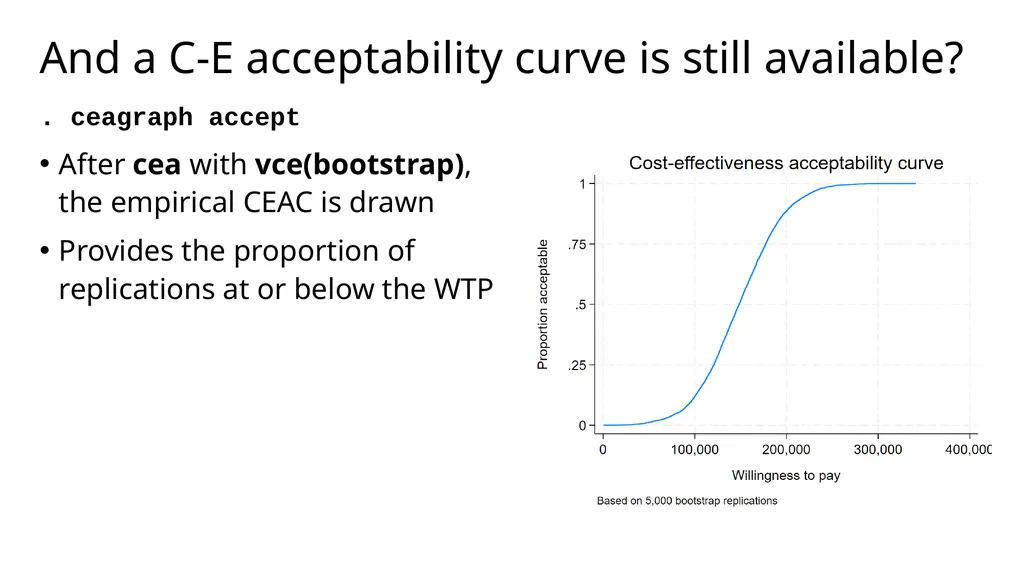
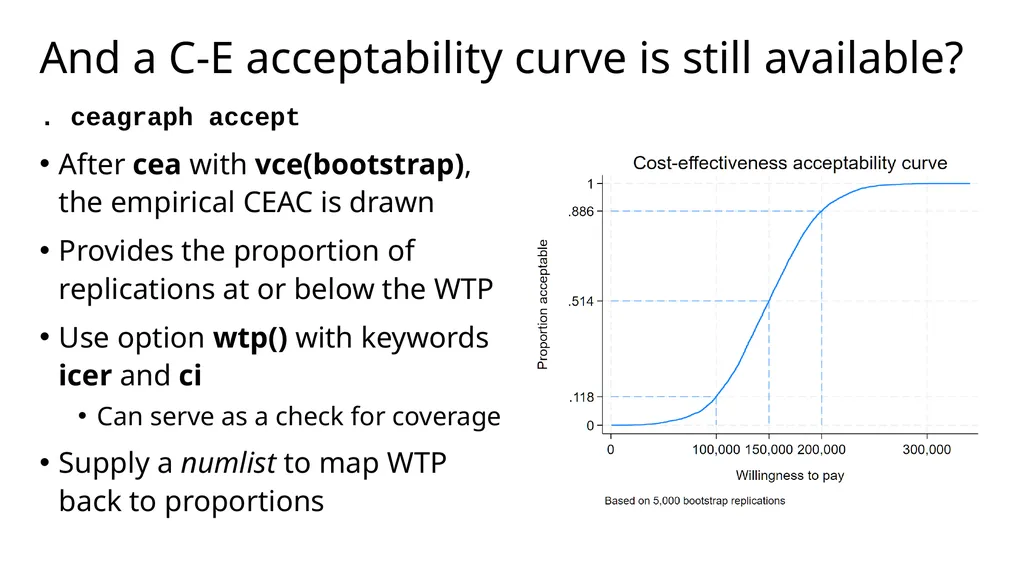
slide20. And a C-E acceptability curve is still available? . ceagraph accept After cea with vce(bootstrap), the empirical CEAC is drawn
Provides the proportion of replications at or below the WTP
Use option wtp() with keywords icer and ci
Can serve as a check for coverage
Supply a numlist to map WTP back to proportion<br>
slide21. And a C-E acceptability curve is still available? . ceagraph accept After cea with vce(bootstrap), the empirical CEAC is drawn
Provides the proportion of replications at or below the WTP
Use option wtp() with keywords icer and ci
Can serve as a check for coverage
Supply a numlist to map WTP back to proportion<br>
slide22. And a C-E acceptability curve is still available? . ceagraph accept After cea with vce(bootstrap), the empirical CEAC is drawn
Provides the proportion of replications at or below the WTP
Use option wtp() with keywords icer and ci
Can serve as a check for coverage
Supply a numlist to map WTP back to proportions<br>
slide23. What if I want to make a C-E scatterplot? . ceagraph scatter This plot shows the location of each cost-effect pair for the bootstrapped ICER
By default, the ICER value is shown in the legend and we customize its location using the twoway option legend()
Confidence ellipses can be added with ellipse
And the look of the scatter points can be controlled with the usual twoway marker options<br>
slide24. What if I want to make a C-E scatterplot? . ceagraph scatter, legend() This plot shows the location of each cost-effect pair for the bootstrapped ICER
By default, the ICER value is shown in the legend and we customize its location using the twoway option legend()
Confidence ellipses can be added with ellipse
And the look of the scatter points can be controlled with the usual twoway marker options Grumble<br>
slide25. What if I want to make a C-E scatterplot? . ceagraph scatter, ellipse This plot shows the location of each cost-effect pair for the bootstrapped ICER
By default, the ICER value is shown in the legend and we customize its location using the twoway option legend()
Confidence ellipses can be added with ellipse
And the look of the scatter points can be controlled with the usual twoway marker options<br>
slide26. What if I want to make a C-E scatterplot? . ceagraph scatter, ellipse msymbol() mcolor() This plot shows the location of each cost-effect pair for the bootstrapped ICER
By default, the ICER value is shown in the legend and we customize its location using the twoway option legend()
Confidence ellipses can be added with ellipse
And the look of the scatter points can be controlled with the usual twoway marker options<br>
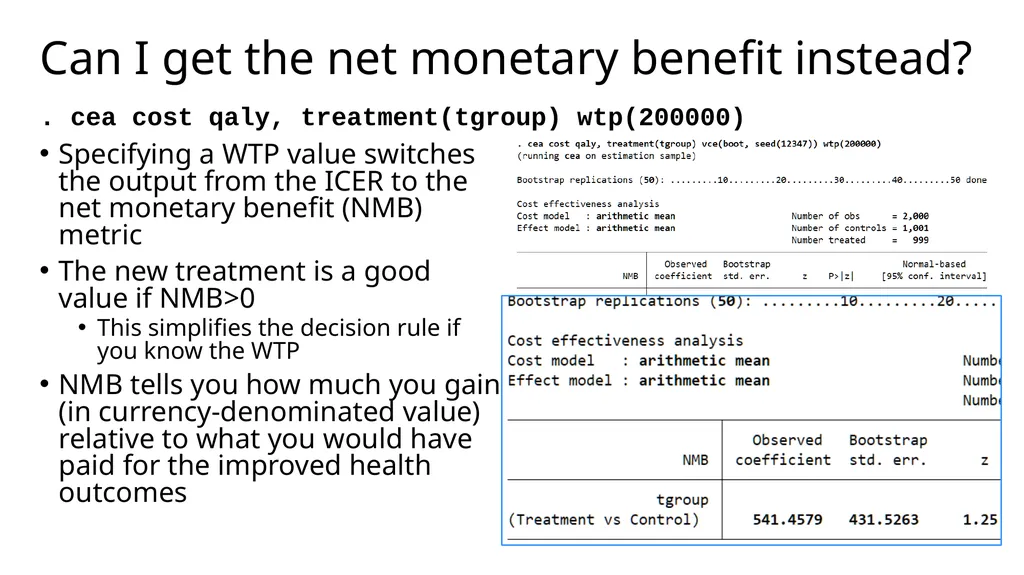
slide27. Can I get the net monetary benefit instead? . cea cost qaly, treatment(tgroup) wtp(200000) Specifying a WTP value switches the output from the ICER to the net monetary benefit (NMB) metric
The new treatment is a good value if NMB>0
This simplifies the decision rule if you know the WTP
NMB tells you how much you gain (in currency-denominated value) relative to what you would have paid for the improved health outcomes<br>
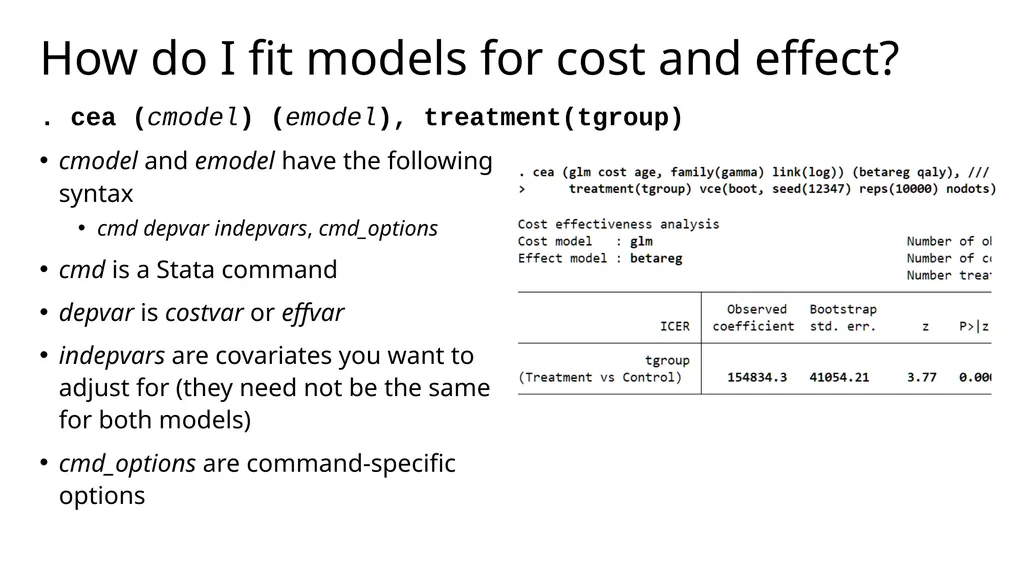
slide28. How do I fit models for cost and effect? . cea (cmodel) (emodel), treatment(tgroup) cmodel and emodel have the following syntax
cmd depvar indepvars, cmd_options
cmd is a Stata command
depvar is costvar or effvar
indepvars are covariates you want to adjust for (they need not be the same for both models)
cmd_options are command-specific options<br>
slide29. Which commands? We’ve tested and confirmed the following Stata estimation commands work:
regress
glm
glm, family(gamma) link(log) is often recommended for skewed cost data
betareg
The beta distribution is sometimes recommended for QALY data that are constrained to (0,1)
Other variants on linear regression (areg, cnsreg, hetregress [mle only])
Commands that are implementations of GLM (e.g., nbreg, binreg)
Certain estimators for truncated or censored outcomes (tobit, cpoisson, tpoisson)<br>
slide30. What else? View differences in means for mean-only specification
View parameters from models with model specification
CEAC available after ceai, the immediate form of cea
Fully customize the look of your graphs
Add confidence rays instead of ellipses to scatterplots
Ability to use user-written commands
We do not enforce a check on the estimator
As long as the command meets the following criteria, you can use it:
Single equation (in the Stata syntax sense, not the mathematical sense)
Does not include a subcommand
Supports factor variables, vce(bootstrap), and margins<br>
slide31. Where we plan to go from here? Net benefit regression
More graphs!
Net (monetary) benefit
Value of information
Incremental net benefit
Support for
Analyses of censored data
Missing data, including multiple imputation
Bayesian estimation
cea: A suite of commands for trial-based cost-effectiveness analysis<br>
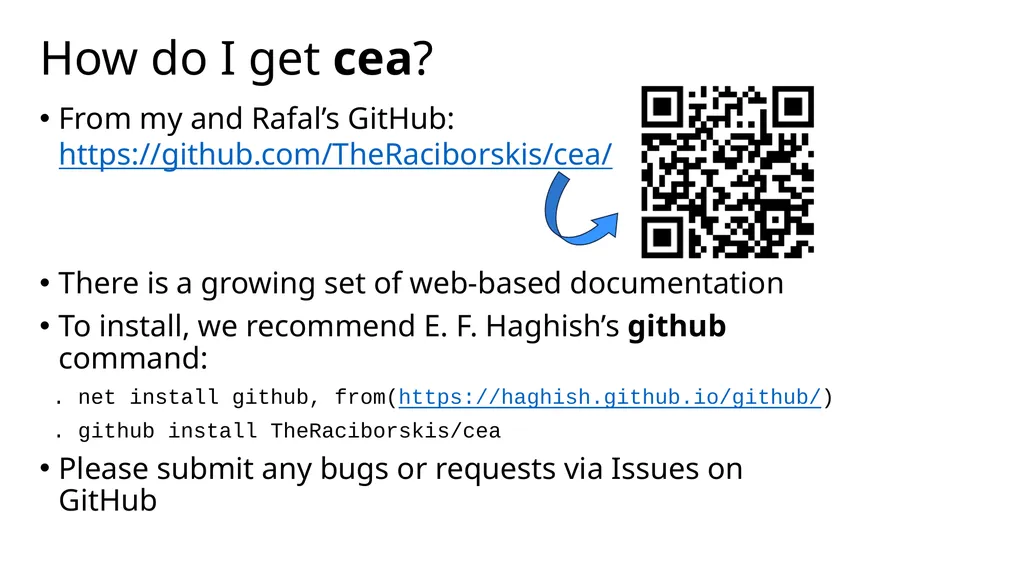
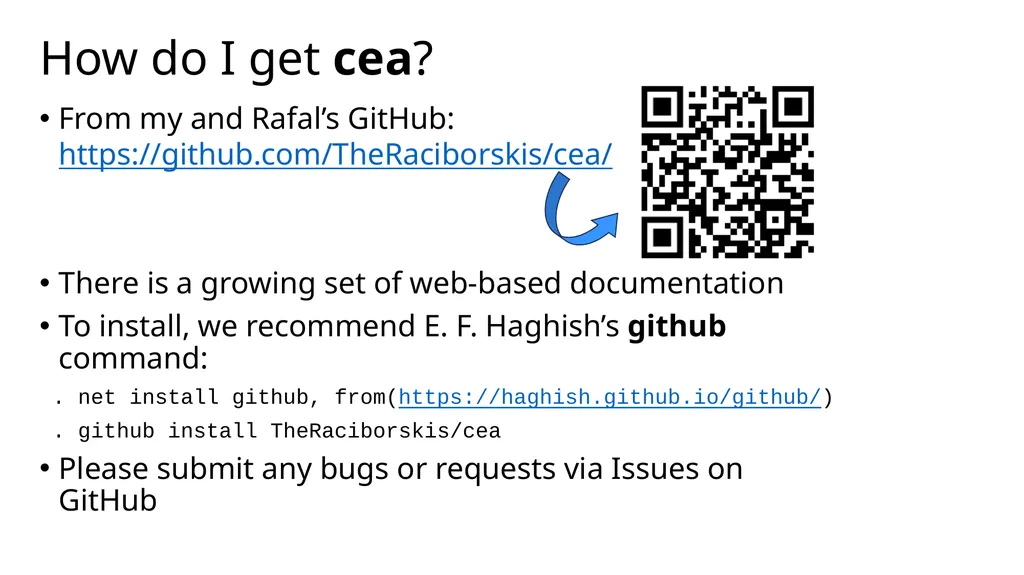
slide32. How do I get cea? From my and Rafal’s GitHub: https://github.com/TheRaciborskis/cea/
There is a growing set of web-based documentation
To install, we recommend E. F. Haghish’s github command:
. net install github, from(https://haghish.github.io/github/)
. github install TheRaciborskis/cea
Please submit any bugs or requests via Issues on GitHub<br>
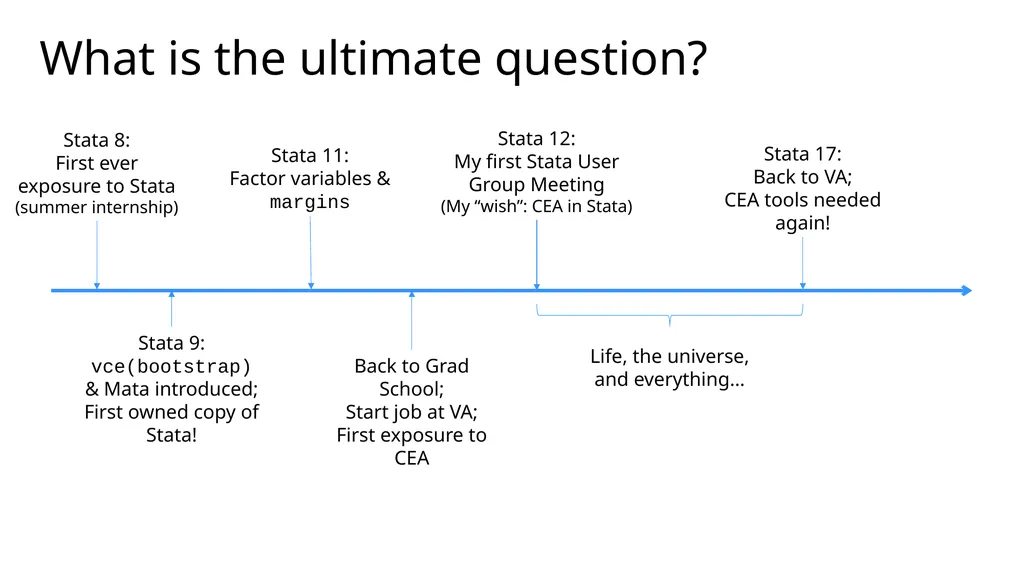
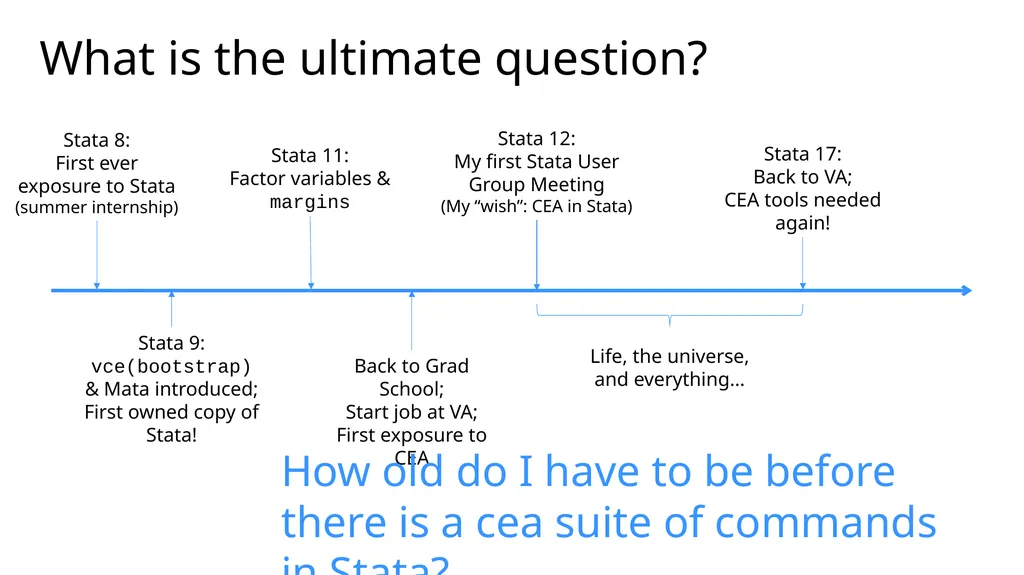
slide33. What is the ultimate question? Stata 8:
First ever exposure to Stata
(summer internship) Stata 9:
vce(bootstrap) & Mata introduced;
First owned copy of Stata! Stata 11:
Factor variables &
margins Stata 12:
My first Stata User Group Meeting
(My “wish”: CEA in Stata) Back to Grad School;
Start job at VA;
First exposure to CEA Stata 17:
Back to VA;
CEA tools needed again! Life, the universe, and everything…<br>
slide34. What is the ultimate question? Stata 8:
First ever exposure to Stata
(summer internship) Stata 9:
vce(bootstrap) & Mata introduced;
First owned copy of Stata! Stata 11:
Factor variables &
margins Stata 12:
My first Stata User Group Meeting
(My “wish”: CEA in Stata) Back to Grad School;
Start job at VA;
First exposure to CEA Stata 17:
Back to VA;
CEA tools needed again! Life, the universe, and everything… How old do I have to be before there is a cea suite of commands in Stata?<br>
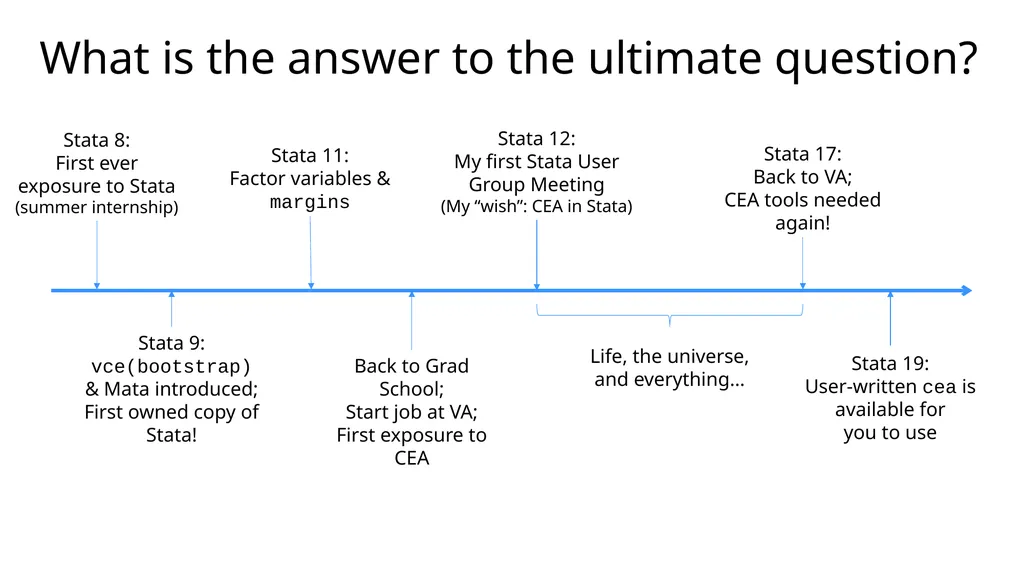
slide35. What is the answer to the ultimate question? Stata 8:
First ever exposure to Stata
(summer internship) Stata 9:
vce(bootstrap) & Mata introduced;
First owned copy of Stata! Stata 11:
Factor variables &
margins Stata 12:
My first Stata User Group Meeting
(My “wish”: CEA in Stata) Back to Grad School;
Start job at VA;
First exposure to CEA Stata 17:
Back to VA;
CEA tools needed again! Life, the universe, and everything… Stata 19:
User-written cea is available for
you to use<br>
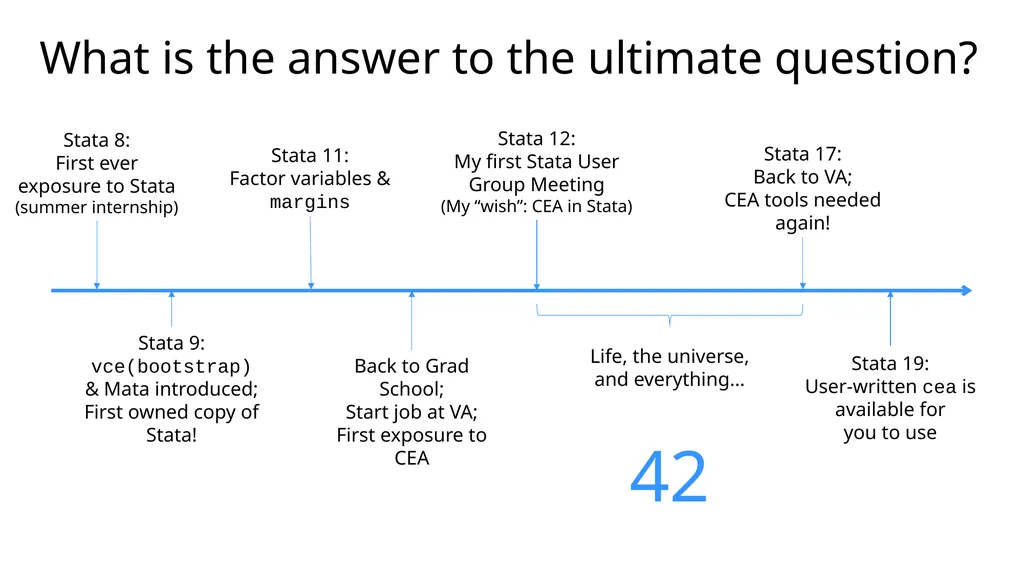
slide36. What is the answer to the ultimate question? Stata 8:
First ever exposure to Stata
(summer internship) Stata 9:
vce(bootstrap) & Mata introduced;
First owned copy of Stata! Stata 11:
Factor variables &
margins Stata 12:
My first Stata User Group Meeting
(My “wish”: CEA in Stata) Back to Grad School;
Start job at VA;
First exposure to CEA Stata 17:
Back to VA;
CEA tools needed again! Life, the universe, and everything… Stata 19:
User-written cea is available for
you to use 42<br>
slide37. Notes on development…<br>
slide38. Roughly, what goes into building a suite of commands? Select priorities
Design system for commands
Design syntax
Write initial code
Validate against theory and external sources
Draft documentation
Revise syntax for usability
Revise code
Test
Find bugs
Revise code
Update documentation
…
Stop making changes
Certification (cscript)<br>
slide39. Roughly, what goes into building a suite of commands? Select priorities
Design system for commands
Design syntax
Write initial code
Validate against theory and external sources
Draft documentation
Revise syntax for usability
Revise code
Test
Find bugs
Revise code
Update documentation
…
Stop making changes
Certification (cscript)<br>
slide40. Questions?<br>
slide41. How do I get cea? From my and Rafal’s GitHub: https://github.com/TheRaciborskis/cea/
There is a growing set of web-based documentation
To install, we recommend E. F. Haghish’s github command:
. net install github, from(https://haghish.github.io/github/)
. github install TheRaciborskis/cea
Please submit any bugs or requests via Issues on GitHub<br>
slide42. References Efron, B., & Tibshirani, R. J. (1994). An introduction to the bootstrap. Chapman and Hall/CRC.
El Alili, M., van Dongen, J. M., Esser, J. L., Heymans, M. W., van Tulder, M. W., & Bosmans, J. E. (2022). A scoping review of statistical methods for trial‐based economic evaluations: The current state of play. Health Economics, 31(12), 2680-2699.
Glick, H. A., Doshi, J. A., Sonnad, S. S., & Polsky, D. (2014). Economic evaluation in clinical trials. OUP Oxford.
Mihaylova, B., Briggs, A., O'Hagan, A., & Thompson, S. G. (2011). Review of statistical methods for analysing healthcare resources and costs. Health economics, 20(8), 897-916.
Neumann, P. J., Sanders, G. D., Russell, L. B., Siegel, J. E., & Ganiats, T. G. (Eds.). (2016). Cost-effectiveness in health and medicine. Oxford University Press.<br>
slide43. Roughly, what goes into building a suite of commands? Select priorities
Design system for commands
Design syntax
Write initial code
Validate against theory and external sources
Draft documentation
Revise syntax for usability
Revise code
Test
Find bugs
Revise code
Update documentation
…
Stop making changes
Certification (cscript)<br>
slide44. Wait, you shouldn’t give nice names to user-written commands, right? What if StataCorp squashes the cea name?
That’s OK!
I just outlined a lot of volunteer work left to do.
If StataCorp want to finally add cea to official Stata, no one will be more thrilled than me.<br>
cost-effectiveness analysis in Stata Rebecca A. Raciborski
July 31, 2025
Stata Conference, Nashville, TN<br>
slide2. Required disclaimers I am employed by the Center for Mental Healthcare and Outcomes Research located at the Central Arkansas Veterans Health System.
The presented slides and my attendance at this conference are the result of support from the United States Department of Veterans Affairs.
The cea command was not developed with VA time or computing resources. No U.S. government warranty or liability is expressed or implied.
The contents of this presentation do not represent the views of the U.S. Department of Veterans Affairs or the United States Government.
References within this presentation to products does not imply an endorsement by the U.S. Department of Veterans Affairs or the United States Government.<br>
slide3. Acknowledgements Rafal Raciborski coauthored cea with me
My research collaborators from economic analysis workgroup of the PRecision Medicine In MEntal Health Care (PRIME Care) study:
Jacob Painter
Jeffrey Pyne
Chenghui Li
Silas Williams
The PRIME Care study was funded by U.S. Department of Veterans Affairs Health Services Research and Development Grant (#1P1 HX002375-01/ SDR 16-348), David Oslin, PI<br>
slide4. Overview An quick introduction to cost-effectiveness analysis
Using the cea command
Notes about development (time permitting)
Questions<br>
slide5. A bit of background…<br>
slide6. Can I get a quick primer on CEA? Cost-effectiveness analysis is a systematic way to compare the value of (health) interventions
They are conducted to provide policy-makers with information about which intervention offers the best value
Typically, the interest lies in comparing a new therapy to the current standard of care
“Cost-effective” means that the marginal cost of one additional unit of benefit it provides is at or below a pre-specified willingness-to-pay
These analyses may be conducted using Markov processes, decision trees, or trial data<br>
slide7. What makes trial-based CEA unique? Advantages derived from a randomized trial with direct data collection
We are using real data from a clinical trial instead of simulations based on assumed distributions
Greater internal validity for link between treatment condition and differences in cost and outcomes
We can (usually) can rely on randomization to avoid confounding by indication
Challenges due to constraints imposed by trial designs as well
Trials typically have short time horizons
Most studies are not powered to detect differences in cost and quality of life measures<br>
slide8. Why trial-based CEA in Stata? Economists like Stata
Stata is accessible
Stata is good for teaching
All of the following in one package:
Variety of relevant estimators
Factor variables
margins
Fast matrix language (Mata)
Predictable syntax
Pretty built-in graphs https://economics.stackexchange.com/questions/5853/most-common-programs-used-by-economists<br>
slide9. Introducing cea<br>
slide10. The cea suite Immediate command
Estimation command
Graphs
Work with immediate or estimation results
Postestimation<br>
slide11. How did you decide what to include? Full set of tools needed to finish the PRIME Care study that prompted initial coding
Basic methods included to support use as a teaching tool
Expanded beyond based on:
How often methods are used in the literature
Reviews by Mihaylova et al (2010) and El Alili et al (2020)
Current best-practice recommendations for trial-based CEA
Glick et al (2015) and El Alili et al (2020)
Conversations with people in the field<br>
slide12. What are the data requirements? Single observation per person is currently required by the cea command
If your data come from a trial with repeated observations made over the follow-up period, you must collapse to one observation per person; typically this is done by:
Applying any required discounting
Summing cost over the follow-up period
Computing the area under the curve for outcomes
Simulated data in this talk have been prepared per the above
cost: Cost of care in the follow-up period
qaly: Accrued quality-adjusted life years (QALYs) over the follow-up period
tgroup: Treatment group the patient was randomized to (“Treatment” or “Control”)
age: Age of patient at randomization<br>
slide13. What is the command for the most basic CEA? . cea cost qaly, treatment(tgroup) vce(delta) Cost and effect variables must be specified in that order
This version of the command:
Takes the difference in cost and difference in outcomes
Obtains the unadjusted means of the differences
Computes the ratio of the mean differences; this is the incremental cost-effectiveness ratio, or ICER
Uses the delta method to obtain the standard error of the ICER<br>
slide14. Don’t I need Fieller confidence limits? . estat fieller Conventional standard errors for ratios like the ICER may be too small, especially if there is high correlation between cost and outcomes
This results in confidence intervals that are too narrow
Fieller-method CIs correct this
They are available as a post-estimation command when vce(delta) was specified<br>
slide15. Can I get a C-E acceptability curve? . ceagraph accept After cea with vce(delta), the curve is based on the cumulative t distribution
The curve tells you the probability that the new treatment is cost-effective at the specified willingness-to-pay
Standard twoway options are supported
Fieller CI lines and drop lines at the CI endpoints can be added with option fieller (output right)<br>
slide16. Can I get a C-E acceptability curve? . ceagraph accept After cea with vce(delta), the curve is based on the cumulative t distribution
The curve tells you the probability that the new treatment is cost-effective at the specified willingness-to-pay
Standard twoway options are supported
Fieller CI lines and drop lines at the CI endpoints can be added with option fieller (output right) Grumble<br>
slide17. And if I would prefer to bootstrap the VCE? . cea cost qaly, treatment(tgroup) Standard errors bootstrapped by default
Cost and effect pairs resampled automatically
Resampling within strata defined by treatment variable
Control the bootstrap process with options
Just like any other Stata estimation command<br>
slide18. Aren’t percentile-based CIs preferred? . estat bootstrap, percentile Yes, but there doesn’t seem to be a way to control what is shown in the table after bootstrap
Use the official command estat bootstrap
Bias-corrected CIs are available with option bc
Bias-corrected and accelerated CIs are available if you specify vce(bootstrap, bca) at estimation<br>
slide19. Aren’t percentile-based CIs preferred? . estat bootstrap, percentile Yes, but there doesn’t seem to be a way to control what is shown in the table after bootstrap
Use the official command estat bootstrap
Bias-corrected CIs are available with option bc
Bias-corrected and accelerated CIs are available if you specify vce(bootstrap, bca) at estimation Wish<br>
slide20. And a C-E acceptability curve is still available? . ceagraph accept After cea with vce(bootstrap), the empirical CEAC is drawn
Provides the proportion of replications at or below the WTP
Use option wtp() with keywords icer and ci
Can serve as a check for coverage
Supply a numlist to map WTP back to proportion<br>
slide21. And a C-E acceptability curve is still available? . ceagraph accept After cea with vce(bootstrap), the empirical CEAC is drawn
Provides the proportion of replications at or below the WTP
Use option wtp() with keywords icer and ci
Can serve as a check for coverage
Supply a numlist to map WTP back to proportion<br>
slide22. And a C-E acceptability curve is still available? . ceagraph accept After cea with vce(bootstrap), the empirical CEAC is drawn
Provides the proportion of replications at or below the WTP
Use option wtp() with keywords icer and ci
Can serve as a check for coverage
Supply a numlist to map WTP back to proportions<br>
slide23. What if I want to make a C-E scatterplot? . ceagraph scatter This plot shows the location of each cost-effect pair for the bootstrapped ICER
By default, the ICER value is shown in the legend and we customize its location using the twoway option legend()
Confidence ellipses can be added with ellipse
And the look of the scatter points can be controlled with the usual twoway marker options<br>
slide24. What if I want to make a C-E scatterplot? . ceagraph scatter, legend() This plot shows the location of each cost-effect pair for the bootstrapped ICER
By default, the ICER value is shown in the legend and we customize its location using the twoway option legend()
Confidence ellipses can be added with ellipse
And the look of the scatter points can be controlled with the usual twoway marker options Grumble<br>
slide25. What if I want to make a C-E scatterplot? . ceagraph scatter, ellipse This plot shows the location of each cost-effect pair for the bootstrapped ICER
By default, the ICER value is shown in the legend and we customize its location using the twoway option legend()
Confidence ellipses can be added with ellipse
And the look of the scatter points can be controlled with the usual twoway marker options<br>
slide26. What if I want to make a C-E scatterplot? . ceagraph scatter, ellipse msymbol() mcolor() This plot shows the location of each cost-effect pair for the bootstrapped ICER
By default, the ICER value is shown in the legend and we customize its location using the twoway option legend()
Confidence ellipses can be added with ellipse
And the look of the scatter points can be controlled with the usual twoway marker options<br>
slide27. Can I get the net monetary benefit instead? . cea cost qaly, treatment(tgroup) wtp(200000) Specifying a WTP value switches the output from the ICER to the net monetary benefit (NMB) metric
The new treatment is a good value if NMB>0
This simplifies the decision rule if you know the WTP
NMB tells you how much you gain (in currency-denominated value) relative to what you would have paid for the improved health outcomes<br>
slide28. How do I fit models for cost and effect? . cea (cmodel) (emodel), treatment(tgroup) cmodel and emodel have the following syntax
cmd depvar indepvars, cmd_options
cmd is a Stata command
depvar is costvar or effvar
indepvars are covariates you want to adjust for (they need not be the same for both models)
cmd_options are command-specific options<br>
slide29. Which commands? We’ve tested and confirmed the following Stata estimation commands work:
regress
glm
glm, family(gamma) link(log) is often recommended for skewed cost data
betareg
The beta distribution is sometimes recommended for QALY data that are constrained to (0,1)
Other variants on linear regression (areg, cnsreg, hetregress [mle only])
Commands that are implementations of GLM (e.g., nbreg, binreg)
Certain estimators for truncated or censored outcomes (tobit, cpoisson, tpoisson)<br>
slide30. What else? View differences in means for mean-only specification
View parameters from models with model specification
CEAC available after ceai, the immediate form of cea
Fully customize the look of your graphs
Add confidence rays instead of ellipses to scatterplots
Ability to use user-written commands
We do not enforce a check on the estimator
As long as the command meets the following criteria, you can use it:
Single equation (in the Stata syntax sense, not the mathematical sense)
Does not include a subcommand
Supports factor variables, vce(bootstrap), and margins<br>
slide31. Where we plan to go from here? Net benefit regression
More graphs!
Net (monetary) benefit
Value of information
Incremental net benefit
Support for
Analyses of censored data
Missing data, including multiple imputation
Bayesian estimation
cea: A suite of commands for trial-based cost-effectiveness analysis<br>
slide32. How do I get cea? From my and Rafal’s GitHub: https://github.com/TheRaciborskis/cea/
There is a growing set of web-based documentation
To install, we recommend E. F. Haghish’s github command:
. net install github, from(https://haghish.github.io/github/)
. github install TheRaciborskis/cea
Please submit any bugs or requests via Issues on GitHub<br>
slide33. What is the ultimate question? Stata 8:
First ever exposure to Stata
(summer internship) Stata 9:
vce(bootstrap) & Mata introduced;
First owned copy of Stata! Stata 11:
Factor variables &
margins Stata 12:
My first Stata User Group Meeting
(My “wish”: CEA in Stata) Back to Grad School;
Start job at VA;
First exposure to CEA Stata 17:
Back to VA;
CEA tools needed again! Life, the universe, and everything…<br>
slide34. What is the ultimate question? Stata 8:
First ever exposure to Stata
(summer internship) Stata 9:
vce(bootstrap) & Mata introduced;
First owned copy of Stata! Stata 11:
Factor variables &
margins Stata 12:
My first Stata User Group Meeting
(My “wish”: CEA in Stata) Back to Grad School;
Start job at VA;
First exposure to CEA Stata 17:
Back to VA;
CEA tools needed again! Life, the universe, and everything… How old do I have to be before there is a cea suite of commands in Stata?<br>
slide35. What is the answer to the ultimate question? Stata 8:
First ever exposure to Stata
(summer internship) Stata 9:
vce(bootstrap) & Mata introduced;
First owned copy of Stata! Stata 11:
Factor variables &
margins Stata 12:
My first Stata User Group Meeting
(My “wish”: CEA in Stata) Back to Grad School;
Start job at VA;
First exposure to CEA Stata 17:
Back to VA;
CEA tools needed again! Life, the universe, and everything… Stata 19:
User-written cea is available for
you to use<br>
slide36. What is the answer to the ultimate question? Stata 8:
First ever exposure to Stata
(summer internship) Stata 9:
vce(bootstrap) & Mata introduced;
First owned copy of Stata! Stata 11:
Factor variables &
margins Stata 12:
My first Stata User Group Meeting
(My “wish”: CEA in Stata) Back to Grad School;
Start job at VA;
First exposure to CEA Stata 17:
Back to VA;
CEA tools needed again! Life, the universe, and everything… Stata 19:
User-written cea is available for
you to use 42<br>
slide37. Notes on development…<br>
slide38. Roughly, what goes into building a suite of commands? Select priorities
Design system for commands
Design syntax
Write initial code
Validate against theory and external sources
Draft documentation
Revise syntax for usability
Revise code
Test
Find bugs
Revise code
Update documentation
…
Stop making changes
Certification (cscript)<br>
slide39. Roughly, what goes into building a suite of commands? Select priorities
Design system for commands
Design syntax
Write initial code
Validate against theory and external sources
Draft documentation
Revise syntax for usability
Revise code
Test
Find bugs
Revise code
Update documentation
…
Stop making changes
Certification (cscript)<br>
slide40. Questions?<br>
slide41. How do I get cea? From my and Rafal’s GitHub: https://github.com/TheRaciborskis/cea/
There is a growing set of web-based documentation
To install, we recommend E. F. Haghish’s github command:
. net install github, from(https://haghish.github.io/github/)
. github install TheRaciborskis/cea
Please submit any bugs or requests via Issues on GitHub<br>
slide42. References Efron, B., & Tibshirani, R. J. (1994). An introduction to the bootstrap. Chapman and Hall/CRC.
El Alili, M., van Dongen, J. M., Esser, J. L., Heymans, M. W., van Tulder, M. W., & Bosmans, J. E. (2022). A scoping review of statistical methods for trial‐based economic evaluations: The current state of play. Health Economics, 31(12), 2680-2699.
Glick, H. A., Doshi, J. A., Sonnad, S. S., & Polsky, D. (2014). Economic evaluation in clinical trials. OUP Oxford.
Mihaylova, B., Briggs, A., O'Hagan, A., & Thompson, S. G. (2011). Review of statistical methods for analysing healthcare resources and costs. Health economics, 20(8), 897-916.
Neumann, P. J., Sanders, G. D., Russell, L. B., Siegel, J. E., & Ganiats, T. G. (Eds.). (2016). Cost-effectiveness in health and medicine. Oxford University Press.<br>
slide43. Roughly, what goes into building a suite of commands? Select priorities
Design system for commands
Design syntax
Write initial code
Validate against theory and external sources
Draft documentation
Revise syntax for usability
Revise code
Test
Find bugs
Revise code
Update documentation
…
Stop making changes
Certification (cscript)<br>
slide44. Wait, you shouldn’t give nice names to user-written commands, right? What if StataCorp squashes the cea name?
That’s OK!
I just outlined a lot of volunteer work left to do.
If StataCorp want to finally add cea to official Stata, no one will be more thrilled than me.<br>