
Chapter 24 - Quality Management Lecture 1 1
SB
Published · 97 slides · 0 views
1 / 1

Description
Chapter 24 - Quality Management Lecture 1 1 Chapter 24 Quality management Topics covered Software quality Software standards Reviews and inspections Software measurement and metrics 2 Chapter 24 Quality management Software quality
Related Topics
Share
Embed code
Download this presentation From Below
"Chapter 24 - Quality Management Lecture 1 1" is the property of its rightful owner. Permission is granted to download and print the materials on this website for personal, non-commercial use only, and to display it on your personal computer provided you do not modify the materials and that you retain all copyright notices contained in the materials. By downloading content from our website, you accept the terms of this agreement.
Presentation Transcript
01
Chapter 24 - Quality Management Lecture 1 1 Chapter 24 Quality management<br>
02
Topics covered Software quality
Software standards
Reviews and inspections
Software measurement and metrics 2 Chapter 24 Quality management<br>
Software standards
Reviews and inspections
Software measurement and metrics 2 Chapter 24 Quality management<br>
03
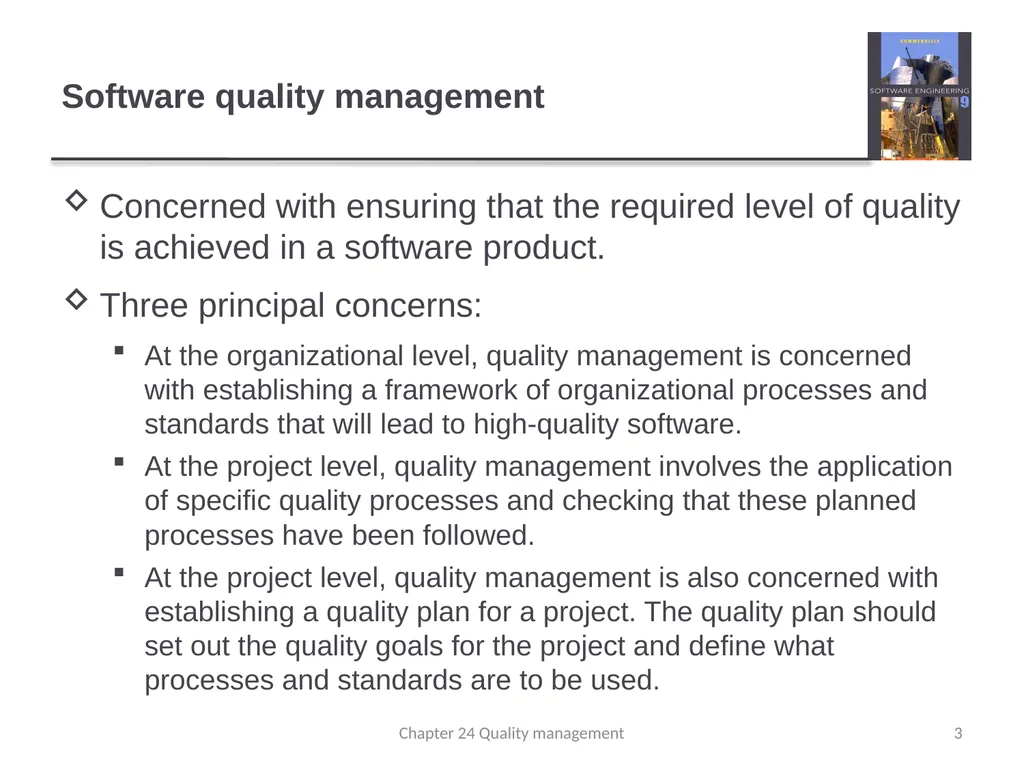
Software quality management Concerned with ensuring that the required level of quality is achieved in a software product.
Three principal concerns:
At the organizational level, quality management is concerned with establishing a framework of organizational processes and standards that will lead to high-quality software.
At the project level, quality management involves the application of specific quality processes and checking that these planned processes have been followed.
At the project level, quality management is also concerned with establishing a quality plan for a project. The quality plan should set out the quality goals for the project and define what processes and standards are to be used. 3 Chapter 24 Quality management<br>
Three principal concerns:
At the organizational level, quality management is concerned with establishing a framework of organizational processes and standards that will lead to high-quality software.
At the project level, quality management involves the application of specific quality processes and checking that these planned processes have been followed.
At the project level, quality management is also concerned with establishing a quality plan for a project. The quality plan should set out the quality goals for the project and define what processes and standards are to be used. 3 Chapter 24 Quality management<br>
04
Quality management activities Quality management provides an independent check on the software development process.
The quality management process checks the project deliverables to ensure that they are consistent with organizational standards and goals
The quality team should be independent from the development team so that they can take an objective view of the software. This allows them to report on software quality without being influenced by software development issues. 4 Chapter 24 Quality management<br>
The quality management process checks the project deliverables to ensure that they are consistent with organizational standards and goals
The quality team should be independent from the development team so that they can take an objective view of the software. This allows them to report on software quality without being influenced by software development issues. 4 Chapter 24 Quality management<br>
05
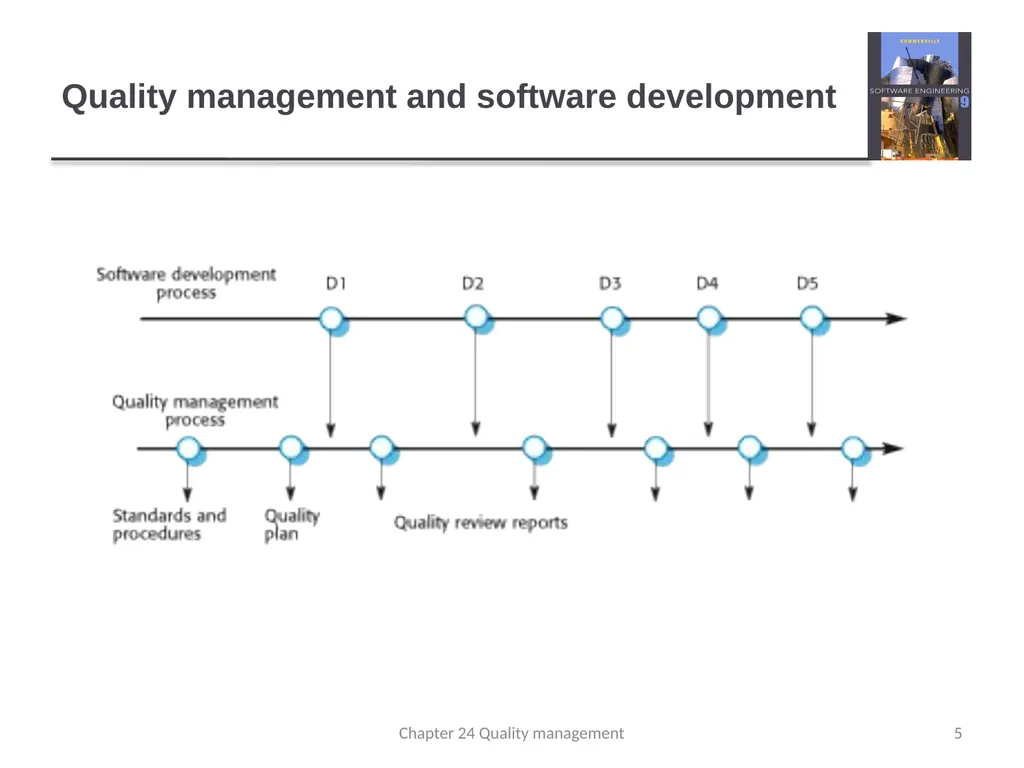
Quality management and software development 5 Chapter 24 Quality management<br>
06
Quality planning A quality plan sets out the desired product qualities and how these are assessed and defines the most significant quality attributes.
The quality plan should define the quality assessment process.
It should set out which organisational standards should be applied and, where necessary, define new standards to be used. 6 Chapter 24 Quality management<br>
The quality plan should define the quality assessment process.
It should set out which organisational standards should be applied and, where necessary, define new standards to be used. 6 Chapter 24 Quality management<br>
07
Quality plans Quality plan structure
Product introduction;
Product plans;
Process descriptions;
Quality goals;
Risks and risk management.
Quality plans should be short, succinct documents
If they are too long, no-one will read them. 7 Chapter 24 Quality management<br>
Product introduction;
Product plans;
Process descriptions;
Quality goals;
Risks and risk management.
Quality plans should be short, succinct documents
If they are too long, no-one will read them. 7 Chapter 24 Quality management<br>
08
Scope of quality management Quality management is particularly important for large, complex systems. The quality documentation is a record of progress and supports continuity of development as the development team changes.
For smaller systems, quality management needs less documentation and should focus on establishing a quality culture. 8 Chapter 24 Quality management<br>
For smaller systems, quality management needs less documentation and should focus on establishing a quality culture. 8 Chapter 24 Quality management<br>
09
Software quality Quality, simplistically, means that a product should meet its specification.
This is problematical for software systems
There is a tension between customer quality requirements (efficiency, reliability, etc.) and developer quality requirements (maintainability, reusability, etc.);
Some quality requirements are difficult to specify in an unambiguous way;
Software specifications are usually incomplete and often inconsistent.
The focus may be ‘fitness for purpose’ rather than specification conformance. 9 Chapter 24 Quality management<br>
This is problematical for software systems
There is a tension between customer quality requirements (efficiency, reliability, etc.) and developer quality requirements (maintainability, reusability, etc.);
Some quality requirements are difficult to specify in an unambiguous way;
Software specifications are usually incomplete and often inconsistent.
The focus may be ‘fitness for purpose’ rather than specification conformance. 9 Chapter 24 Quality management<br>
10
Software fitness for purpose Have programming and documentation standards been followed in the development process?
Has the software been properly tested?
Is the software sufficiently dependable to be put into use?
Is the performance of the software acceptable for normal use?
Is the software usable?
Is the software well-structured and understandable? 10 Chapter 24 Quality management<br>
Has the software been properly tested?
Is the software sufficiently dependable to be put into use?
Is the performance of the software acceptable for normal use?
Is the software usable?
Is the software well-structured and understandable? 10 Chapter 24 Quality management<br>
11
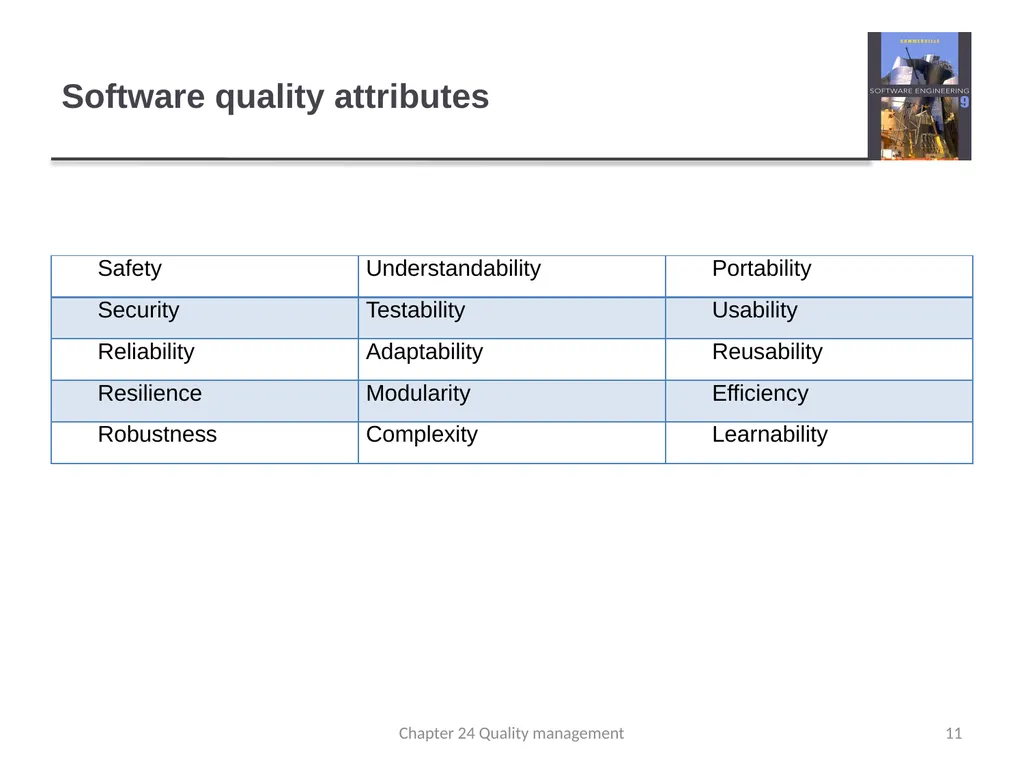
Software quality attributes 11 Chapter 24 Quality management<br>
12
Quality conflicts It is not possible for any system to be optimized for all of these attributes – for example, improving robustness may lead to loss of performance.
The quality plan should therefore define the most important quality attributes for the software that is being developed.
The plan should also include a definition of the quality assessment process, an agreed way of assessing whether some quality, such as maintainability or robustness, is present in the product. 12 Chapter 24 Quality management<br>
The quality plan should therefore define the most important quality attributes for the software that is being developed.
The plan should also include a definition of the quality assessment process, an agreed way of assessing whether some quality, such as maintainability or robustness, is present in the product. 12 Chapter 24 Quality management<br>
13
Process and product quality The quality of a developed product is influenced by the quality of the production process.
This is important in software development as some product quality attributes are hard to assess.
However, there is a very complex and poorly understood relationship between software processes and product quality.
The application of individual skills and experience is particularly important in software development;
External factors such as the novelty of an application or the need for an accelerated development schedule may impair product quality. 13 Chapter 24 Quality management<br>
This is important in software development as some product quality attributes are hard to assess.
However, there is a very complex and poorly understood relationship between software processes and product quality.
The application of individual skills and experience is particularly important in software development;
External factors such as the novelty of an application or the need for an accelerated development schedule may impair product quality. 13 Chapter 24 Quality management<br>
14
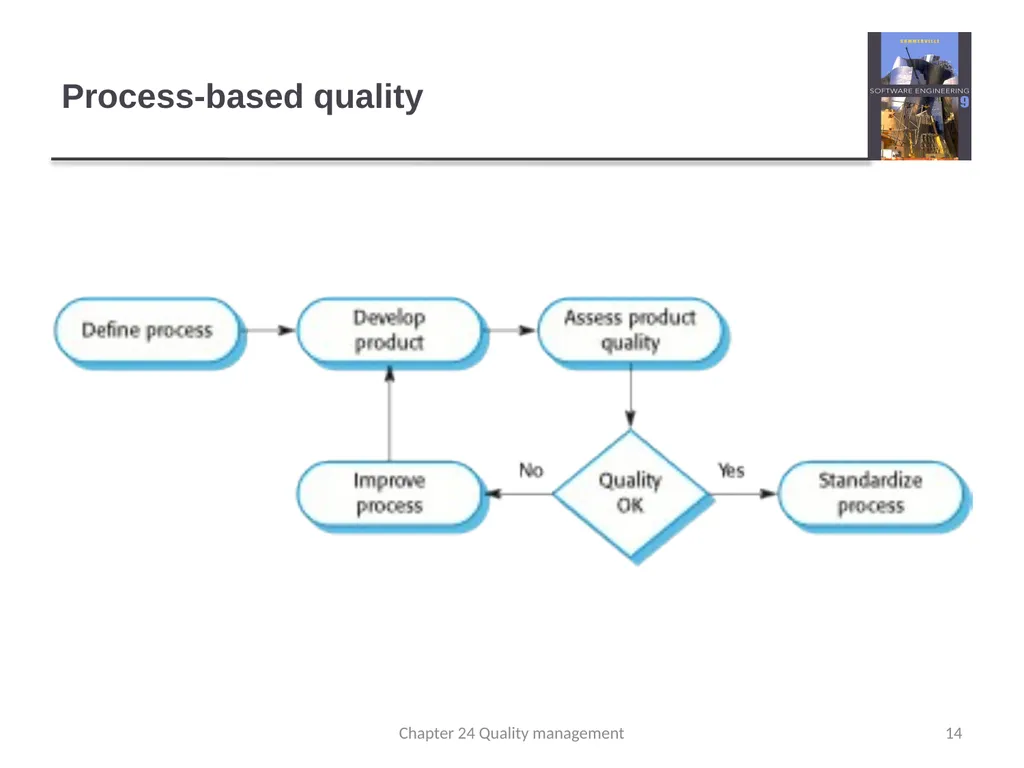
Process-based quality 14 Chapter 24 Quality management<br>
15
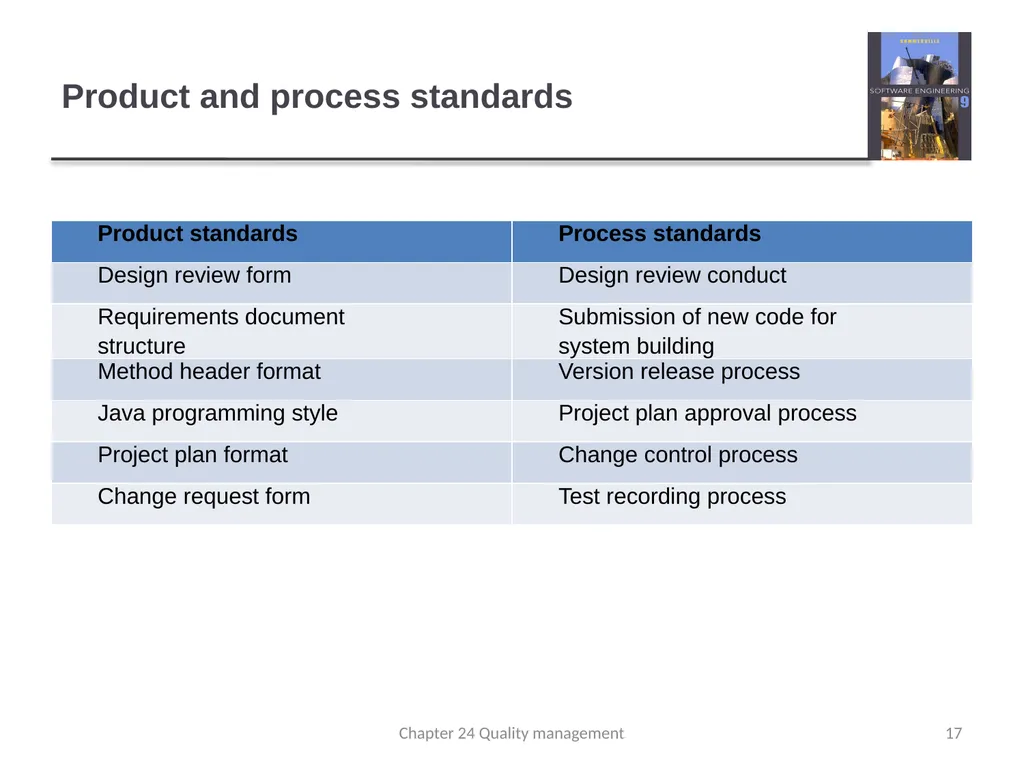
Software standards Standards define the required attributes of a product or process. They play an important role in quality management.
Standards may be international, national, organizational or project standards.
Product standards define characteristics that all software components should exhibit e.g. a common programming style.
Process standards define how the software process should be enacted. 15 Chapter 24 Quality management<br>
Standards may be international, national, organizational or project standards.
Product standards define characteristics that all software components should exhibit e.g. a common programming style.
Process standards define how the software process should be enacted. 15 Chapter 24 Quality management<br>
16
Importance of standards Encapsulation of best practice- avoids repetition of past mistakes.
They are a framework for defining what quality means in a particular setting i.e. that organization’s view of quality.
They provide continuity - new staff can understand the organisation by understanding the standards that are used. 16 Chapter 24 Quality management<br>
They are a framework for defining what quality means in a particular setting i.e. that organization’s view of quality.
They provide continuity - new staff can understand the organisation by understanding the standards that are used. 16 Chapter 24 Quality management<br>
17
Product and process standards 17 Chapter 24 Quality management<br>
18
Problems with standards They may not be seen as relevant and up-to-date by software engineers.
They often involve too much bureaucratic form filling.
If they are unsupported by software tools, tedious form filling work is often involved to maintain the documentation associated with the standards. 18 Chapter 24 Quality management<br>
They often involve too much bureaucratic form filling.
If they are unsupported by software tools, tedious form filling work is often involved to maintain the documentation associated with the standards. 18 Chapter 24 Quality management<br>
19
Standards development Involve practitioners in development. Engineers should understand the rationale underlying a standard.
Review standards and their usage regularly. Standards can quickly become outdated and this reduces their credibility amongst practitioners.
Detailed standards should have specialized tool support. Excessive clerical work is the most significant complaint against standards.
Web-based forms are not good enough. 19 Chapter 24 Quality management<br>
Review standards and their usage regularly. Standards can quickly become outdated and this reduces their credibility amongst practitioners.
Detailed standards should have specialized tool support. Excessive clerical work is the most significant complaint against standards.
Web-based forms are not good enough. 19 Chapter 24 Quality management<br>
20
ISO 9001 standards framework An international set of standards that can be used as a basis for developing quality management systems.
ISO 9001, the most general of these standards, applies to organizations that design, develop and maintain products, including software.
The ISO 9001 standard is a framework for developing software standards.
It sets out general quality principles, describes quality processes in general and lays out the organizational standards and procedures that should be defined. These should be documented in an organizational quality manual. 20 Chapter 24 Quality management<br>
ISO 9001, the most general of these standards, applies to organizations that design, develop and maintain products, including software.
The ISO 9001 standard is a framework for developing software standards.
It sets out general quality principles, describes quality processes in general and lays out the organizational standards and procedures that should be defined. These should be documented in an organizational quality manual. 20 Chapter 24 Quality management<br>
21
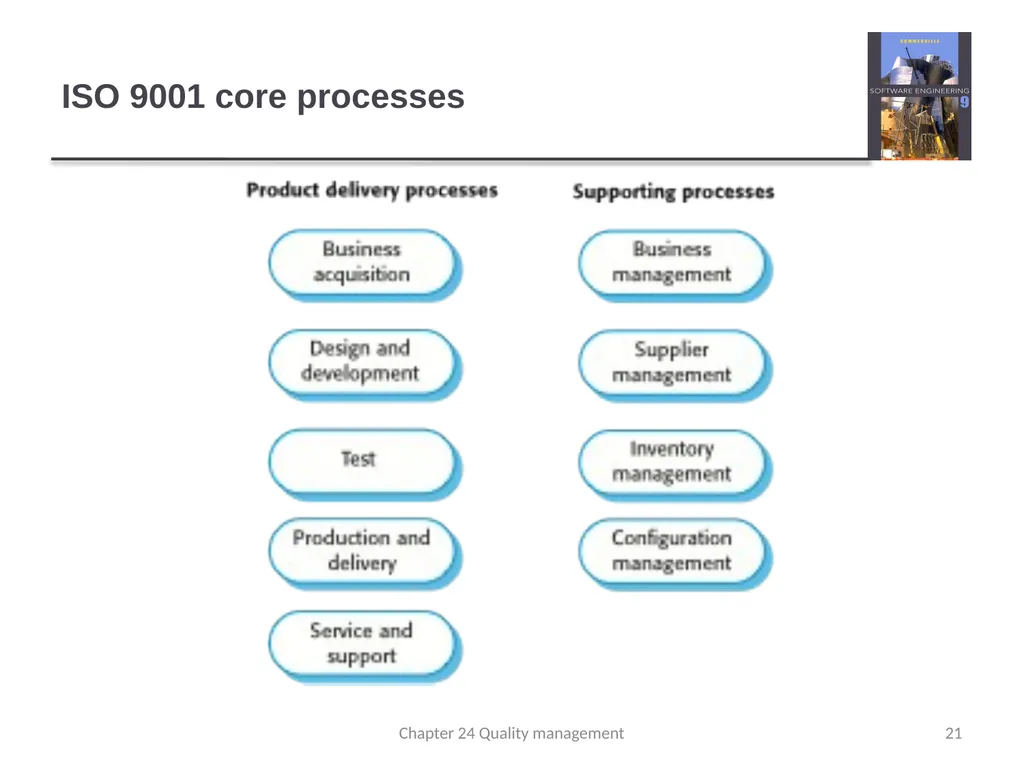
ISO 9001 core processes 21 Chapter 24 Quality management<br>
22
ISO 9001 and quality management 22 Chapter 24 Quality management<br>
23
ISO 9001 certification Quality standards and procedures should be documented in an organisational quality manual.
An external body may certify that an organisation’s quality manual conforms to ISO 9000 standards.
Some customers require suppliers to be ISO 9000 certified although the need for flexibility here is increasingly recognised. 23 Chapter 24 Quality management<br>
An external body may certify that an organisation’s quality manual conforms to ISO 9000 standards.
Some customers require suppliers to be ISO 9000 certified although the need for flexibility here is increasingly recognised. 23 Chapter 24 Quality management<br>
24
Key points Software quality management is concerned with ensuring that software has a low number of defects and that it reaches the required standards of maintainability, reliability, portability and so on.
SQM includes defining standards for processes and products and establishing processes to check that these standards have been followed.
Software standards are important for quality assurance as they represent an identification of ‘best practice’.
Quality management procedures may be documented in an organizational quality manual, based on the generic model for a quality manual suggested in the ISO 9001 standard. 24 Chapter 24 Quality management<br>
SQM includes defining standards for processes and products and establishing processes to check that these standards have been followed.
Software standards are important for quality assurance as they represent an identification of ‘best practice’.
Quality management procedures may be documented in an organizational quality manual, based on the generic model for a quality manual suggested in the ISO 9001 standard. 24 Chapter 24 Quality management<br>
25
Chapter 24 - Quality Management Lecture 2 25 Chapter 24 Quality management<br>
26
Reviews and inspections A group examines part or all of a process or system and its documentation to find potential problems.
Software or documents may be 'signed off' at a review which signifies that progress to the next development stage has been approved by management.
There are different types of review with different objectives
Inspections for defect removal (product);
Reviews for progress assessment (product and process);
Quality reviews (product and standards). 26 Chapter 24 Quality management<br>
Software or documents may be 'signed off' at a review which signifies that progress to the next development stage has been approved by management.
There are different types of review with different objectives
Inspections for defect removal (product);
Reviews for progress assessment (product and process);
Quality reviews (product and standards). 26 Chapter 24 Quality management<br>
27
Quality reviews A group of people carefully examine part or all
of a software system and its associated
documentation.
Code, designs, specifications, test plans, standards, etc. can all be reviewed.
Software or documents may be 'signed off' at a review which signifies that progress to the next development stage has been approved by management. 27 Chapter 24 Quality management<br>
Code, designs, specifications, test plans, standards, etc. can all be reviewed.
Software or documents may be 'signed off' at a review which signifies that progress to the next development stage has been approved by management. 27 Chapter 24 Quality management<br>
28
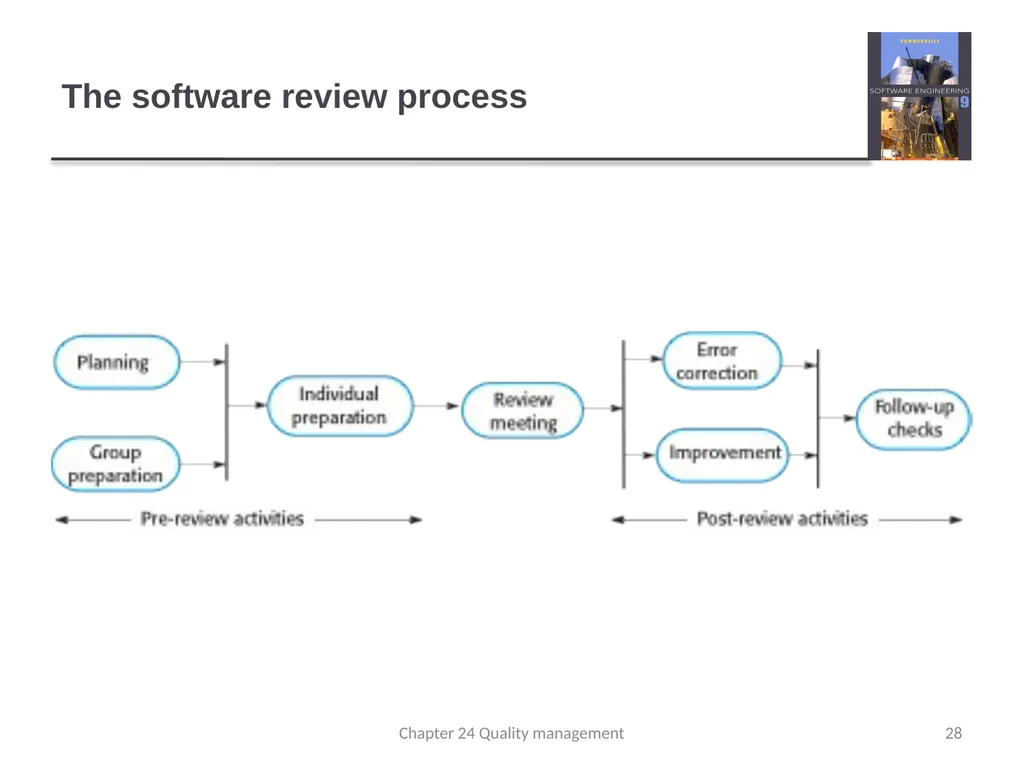
The software review process 28 Chapter 24 Quality management<br>
29
Reviews and agile methods The review process in agile software development is usually informal.
In Scrum, for example, there is a review meeting after each iteration of the software has been completed (a sprint review), where quality issues and problems may be discussed.
In extreme programming, pair programming ensures that code is constantly being examined and reviewed by another team member.
XP relies on individuals taking the initiative to improve and refactor code. Agile approaches are not usually standards-driven, so issues of standards compliance are not usually considered. 29 Chapter 24 Quality management<br>
In Scrum, for example, there is a review meeting after each iteration of the software has been completed (a sprint review), where quality issues and problems may be discussed.
In extreme programming, pair programming ensures that code is constantly being examined and reviewed by another team member.
XP relies on individuals taking the initiative to improve and refactor code. Agile approaches are not usually standards-driven, so issues of standards compliance are not usually considered. 29 Chapter 24 Quality management<br>
30
Program inspections These are peer reviews where engineers examine the source of a system with the aim of discovering anomalies and defects.
Inspections do not require execution of a system so may be used before implementation.
They may be applied to any representation of the system (requirements, design,configuration data, test data, etc.).
They have been shown to be an effective technique for discovering program errors. 30 Chapter 24 Quality management<br>
Inspections do not require execution of a system so may be used before implementation.
They may be applied to any representation of the system (requirements, design,configuration data, test data, etc.).
They have been shown to be an effective technique for discovering program errors. 30 Chapter 24 Quality management<br>
31
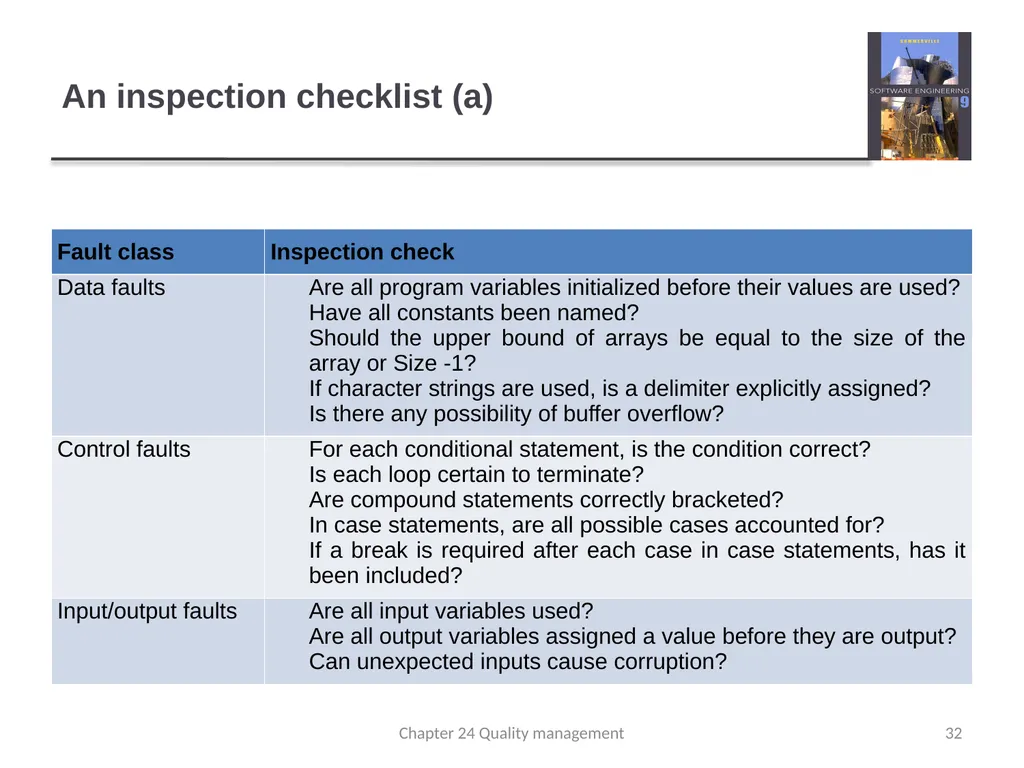
Inspection checklists Checklist of common errors should be used to
drive the inspection.
Error checklists are programming language dependent and reflect the characteristic errors that are likely to arise in the language.
In general, the 'weaker' the type checking, the larger the checklist.
Examples: Initialisation, Constant naming, loop termination, array bounds, etc. 31 Chapter 24 Quality management<br>
Error checklists are programming language dependent and reflect the characteristic errors that are likely to arise in the language.
In general, the 'weaker' the type checking, the larger the checklist.
Examples: Initialisation, Constant naming, loop termination, array bounds, etc. 31 Chapter 24 Quality management<br>
32
An inspection checklist (a) 32 Chapter 24 Quality management<br>
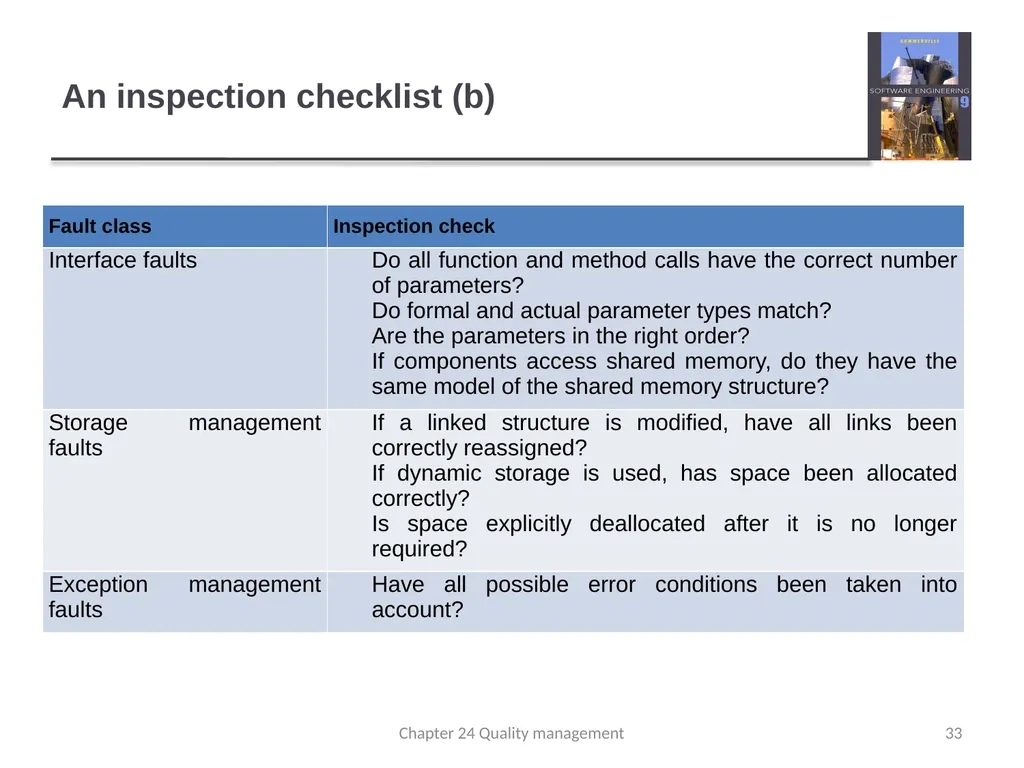
33
An inspection checklist (b) 33 Chapter 24 Quality management<br>
34
Agile methods and inspections Agile processes rarely use formal inspection or peer review processes.
Rather, they rely on team members cooperating to check each other’s code, and informal guidelines, such as ‘check before check-in’, which suggest that programmers should check their own code.
Extreme programming practitioners argue that pair programming is an effective substitute for inspection as this is, in effect, a continual inspection process.
Two people look at every line of code and check it before it is accepted. 34 Chapter 24 Quality management<br>
Rather, they rely on team members cooperating to check each other’s code, and informal guidelines, such as ‘check before check-in’, which suggest that programmers should check their own code.
Extreme programming practitioners argue that pair programming is an effective substitute for inspection as this is, in effect, a continual inspection process.
Two people look at every line of code and check it before it is accepted. 34 Chapter 24 Quality management<br>
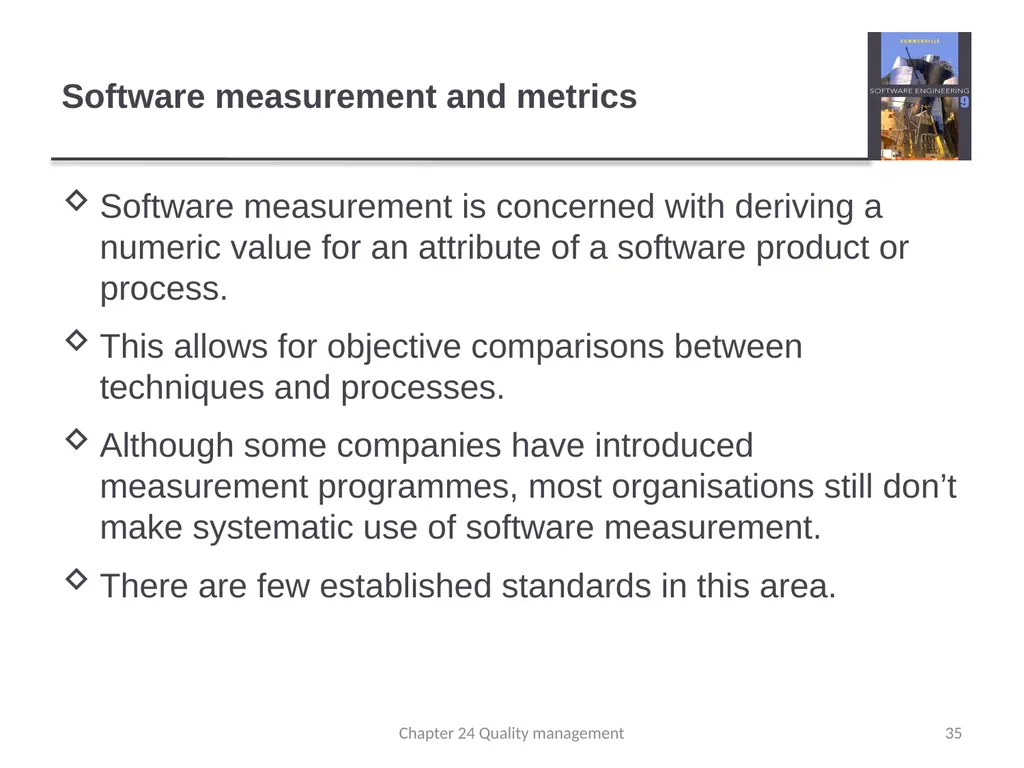
35
Software measurement and metrics Software measurement is concerned with deriving a numeric value for an attribute of a software product or process.
This allows for objective comparisons between techniques and processes.
Although some companies have introduced measurement programmes, most organisations still don’t make systematic use of software measurement.
There are few established standards in this area. 35 Chapter 24 Quality management<br>
This allows for objective comparisons between techniques and processes.
Although some companies have introduced measurement programmes, most organisations still don’t make systematic use of software measurement.
There are few established standards in this area. 35 Chapter 24 Quality management<br>
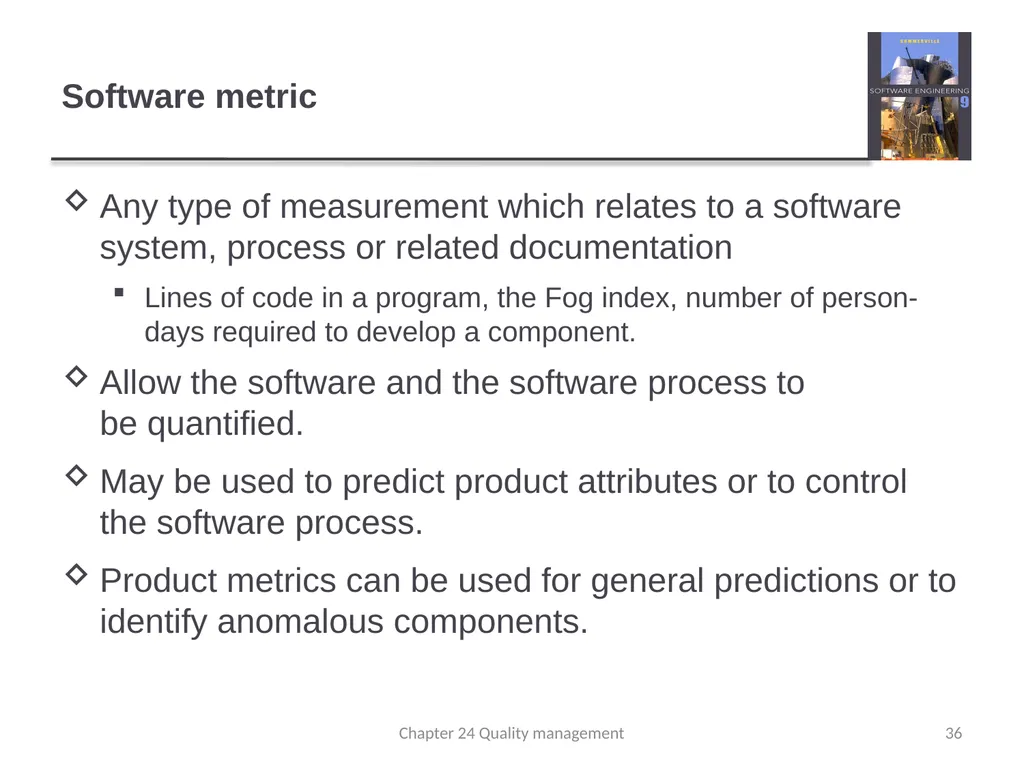
36
Software metric Any type of measurement which relates to a software system, process or related documentation
Lines of code in a program, the Fog index, number of person-days required to develop a component.
Allow the software and the software process to be quantified.
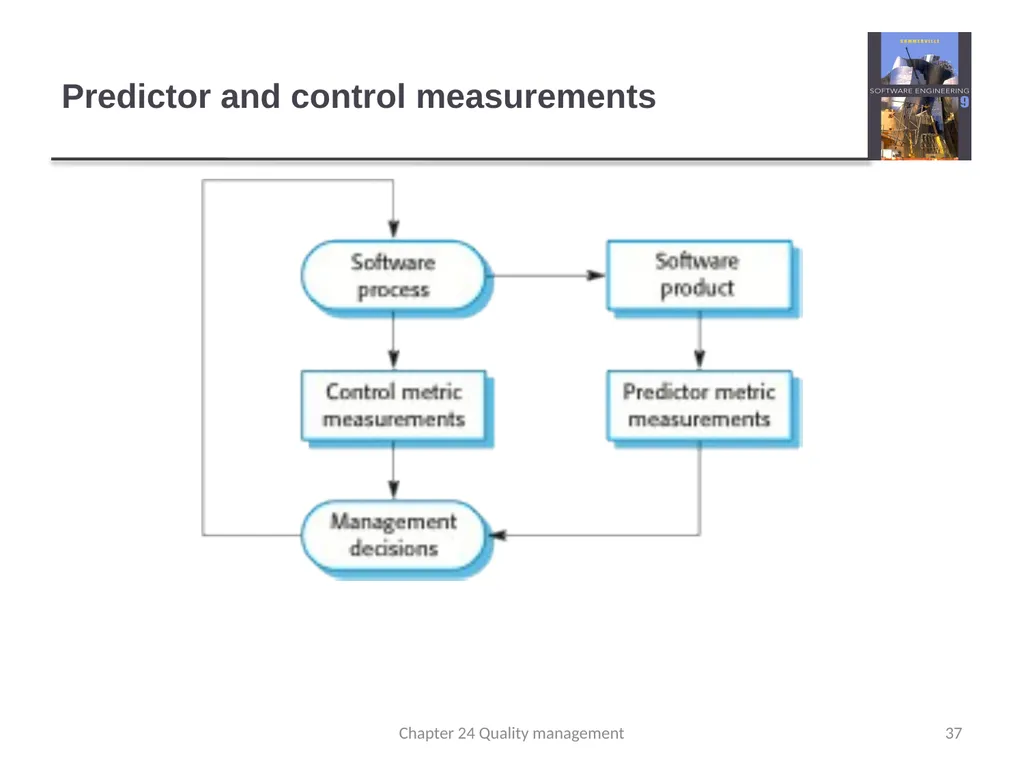
May be used to predict product attributes or to control the software process.
Product metrics can be used for general predictions or to identify anomalous components. 36 Chapter 24 Quality management<br>
Lines of code in a program, the Fog index, number of person-days required to develop a component.
Allow the software and the software process to be quantified.
May be used to predict product attributes or to control the software process.
Product metrics can be used for general predictions or to identify anomalous components. 36 Chapter 24 Quality management<br>
37
Predictor and control measurements 37 Chapter 24 Quality management<br>
38
Use of measurements To assign a value to system quality attributes
By measuring the characteristics of system components, such as their cyclomatic complexity, and then aggregating these measurements, you can assess system quality attributes, such as maintainability.
To identify the system components whose quality is sub-standard
Measurements can identify individual components with characteristics that deviate from the norm. For example, you can measure components to discover those with the highest complexity. These are most likely to contain bugs because the complexity makes them harder to understand. 38 Chapter 24 Quality management<br>
By measuring the characteristics of system components, such as their cyclomatic complexity, and then aggregating these measurements, you can assess system quality attributes, such as maintainability.
To identify the system components whose quality is sub-standard
Measurements can identify individual components with characteristics that deviate from the norm. For example, you can measure components to discover those with the highest complexity. These are most likely to contain bugs because the complexity makes them harder to understand. 38 Chapter 24 Quality management<br>
39
Metrics assumptions A software property can be measured.
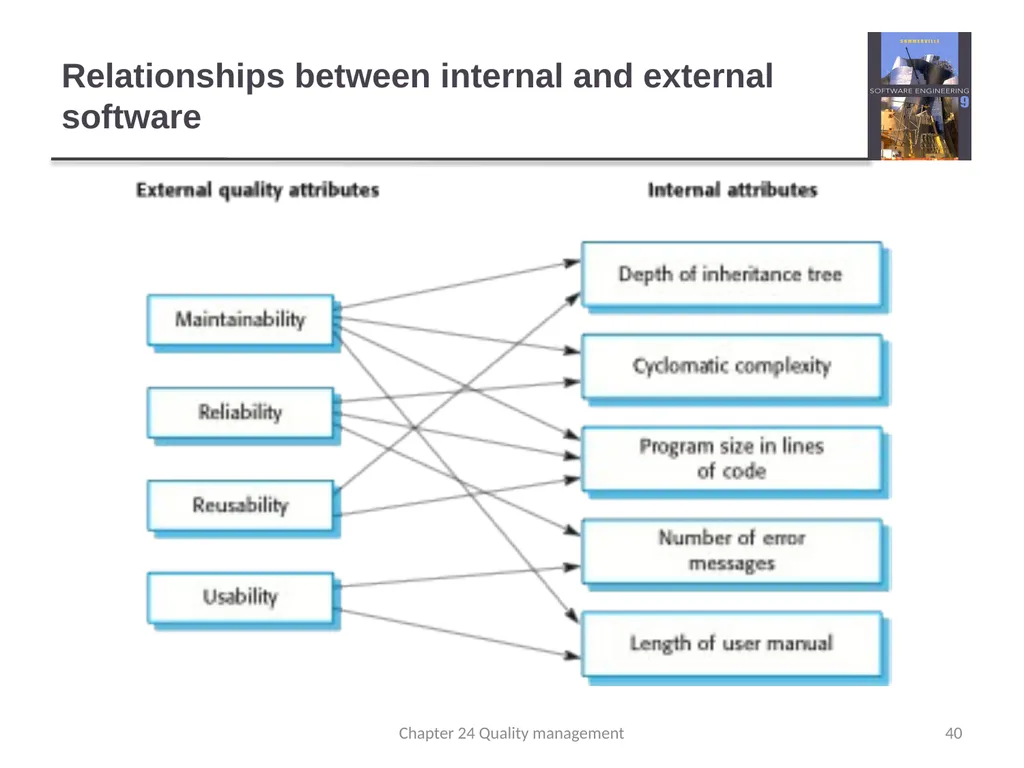
The relationship exists between what we can measure and what we want to know. We can only measure internal attributes but are often more interested in external software attributes.
This relationship has been formalised and validated.
It may be difficult to relate what can be measured to desirable external quality attributes. 39 Chapter 24 Quality management<br>
The relationship exists between what we can measure and what we want to know. We can only measure internal attributes but are often more interested in external software attributes.
This relationship has been formalised and validated.
It may be difficult to relate what can be measured to desirable external quality attributes. 39 Chapter 24 Quality management<br>
40
Relationships between internal and external software 40 Chapter 24 Quality management<br>
41
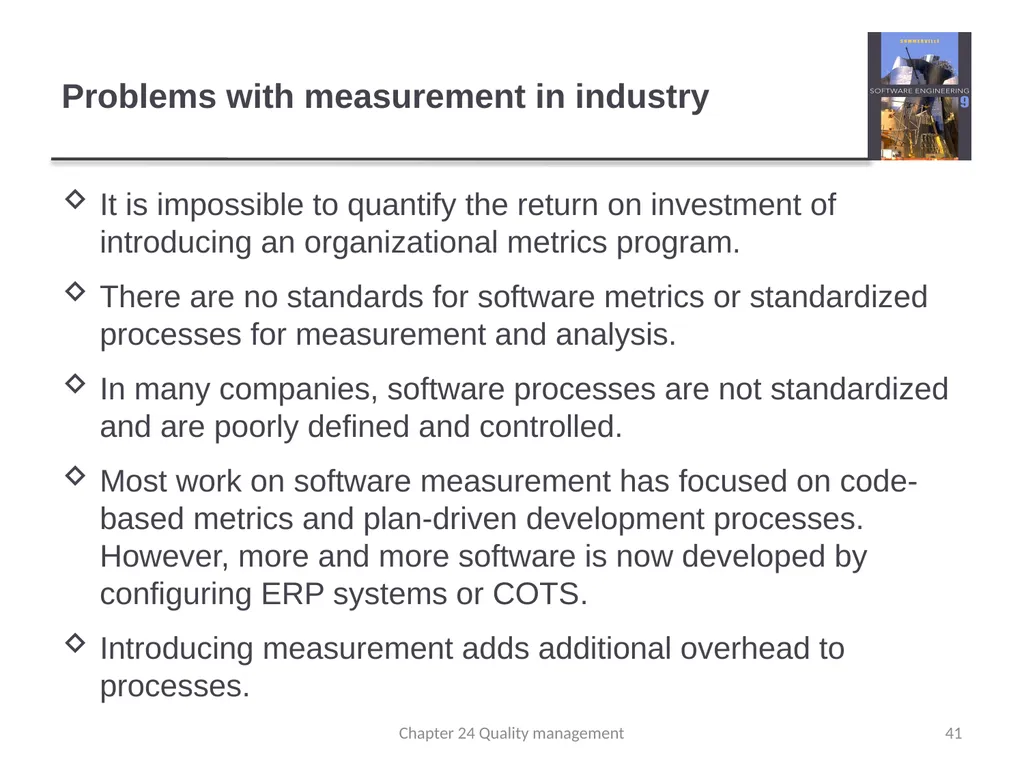
Problems with measurement in industry It is impossible to quantify the return on investment of introducing an organizational metrics program.
There are no standards for software metrics or standardized processes for measurement and analysis.
In many companies, software processes are not standardized and are poorly defined and controlled.
Most work on software measurement has focused on code-based metrics and plan-driven development processes. However, more and more software is now developed by configuring ERP systems or COTS.
Introducing measurement adds additional overhead to processes. 41 Chapter 24 Quality management<br>
There are no standards for software metrics or standardized processes for measurement and analysis.
In many companies, software processes are not standardized and are poorly defined and controlled.
Most work on software measurement has focused on code-based metrics and plan-driven development processes. However, more and more software is now developed by configuring ERP systems or COTS.
Introducing measurement adds additional overhead to processes. 41 Chapter 24 Quality management<br>
42
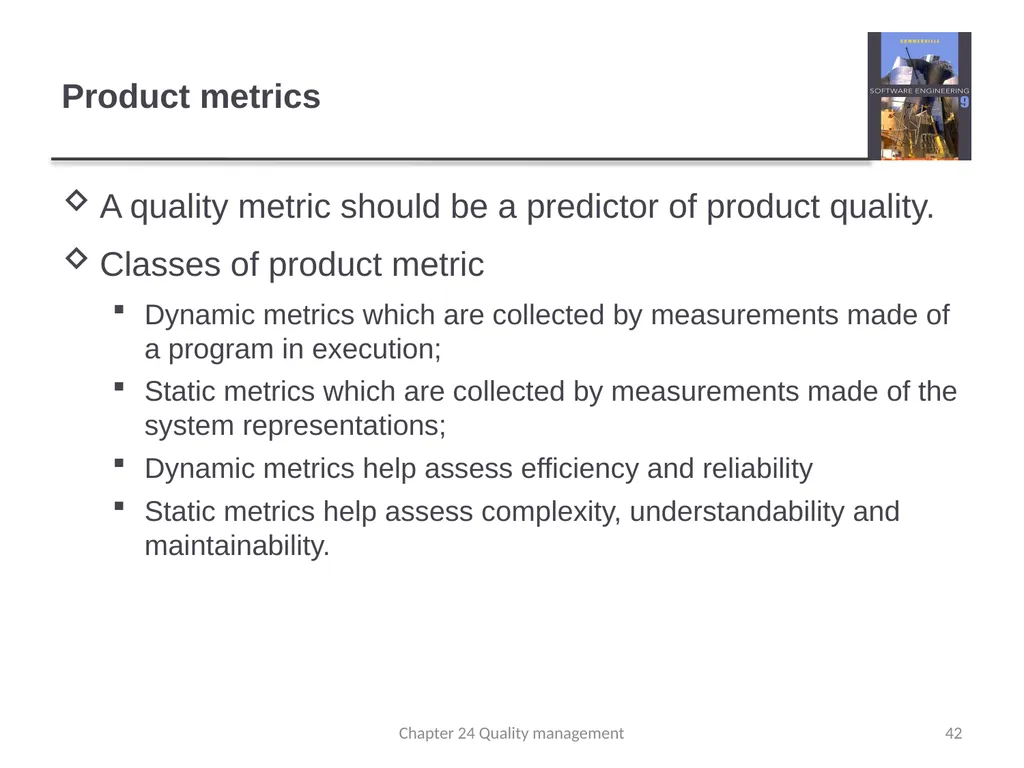
Product metrics A quality metric should be a predictor of product quality.
Classes of product metric
Dynamic metrics which are collected by measurements made of a program in execution;
Static metrics which are collected by measurements made of the system representations;
Dynamic metrics help assess efficiency and reliability
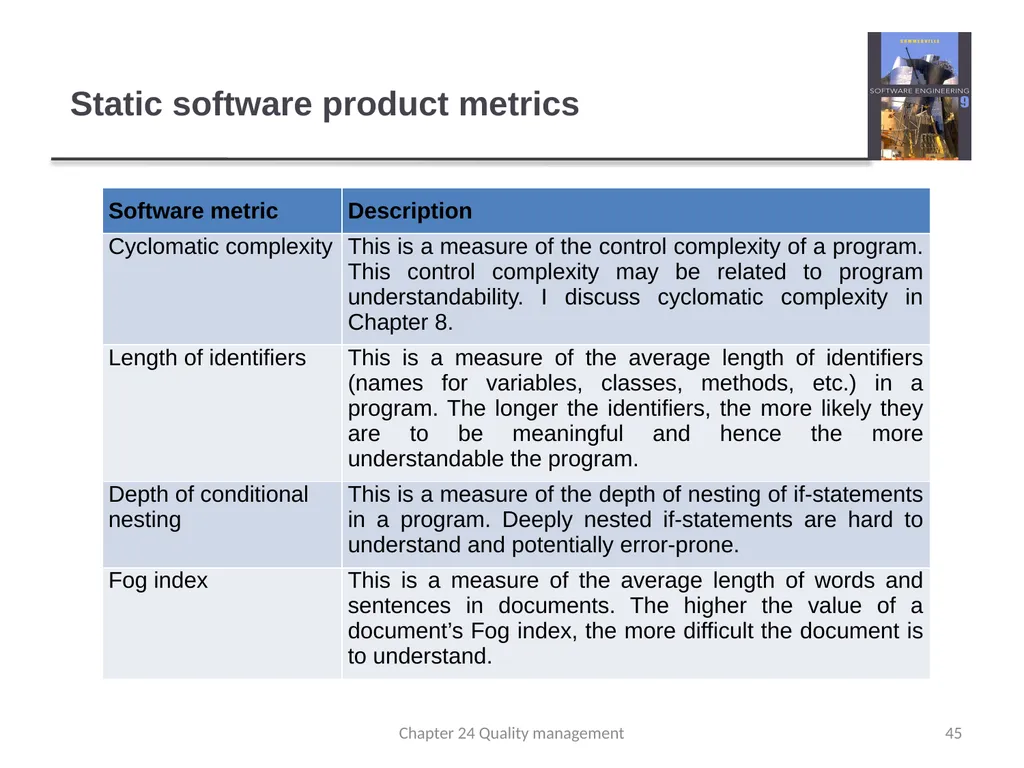
Static metrics help assess complexity, understandability and maintainability. 42 Chapter 24 Quality management<br>
Classes of product metric
Dynamic metrics which are collected by measurements made of a program in execution;
Static metrics which are collected by measurements made of the system representations;
Dynamic metrics help assess efficiency and reliability
Static metrics help assess complexity, understandability and maintainability. 42 Chapter 24 Quality management<br>
43
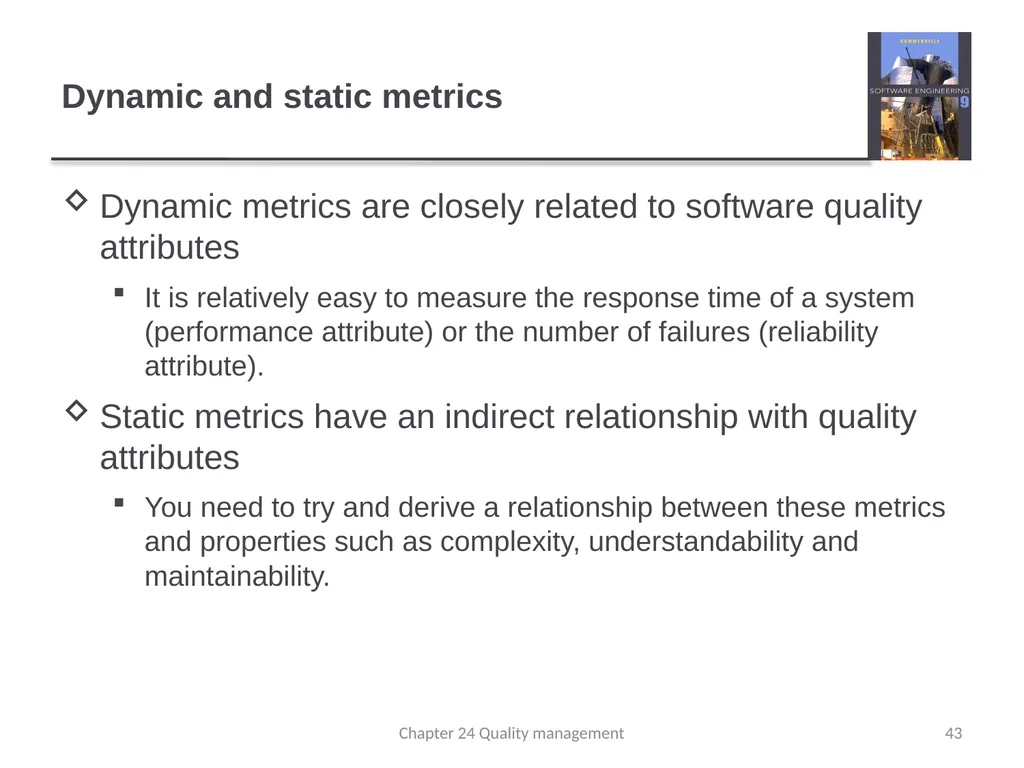
Dynamic and static metrics Dynamic metrics are closely related to software quality attributes
It is relatively easy to measure the response time of a system (performance attribute) or the number of failures (reliability attribute).
Static metrics have an indirect relationship with quality attributes
You need to try and derive a relationship between these metrics and properties such as complexity, understandability and maintainability. 43 Chapter 24 Quality management<br>
It is relatively easy to measure the response time of a system (performance attribute) or the number of failures (reliability attribute).
Static metrics have an indirect relationship with quality attributes
You need to try and derive a relationship between these metrics and properties such as complexity, understandability and maintainability. 43 Chapter 24 Quality management<br>
44
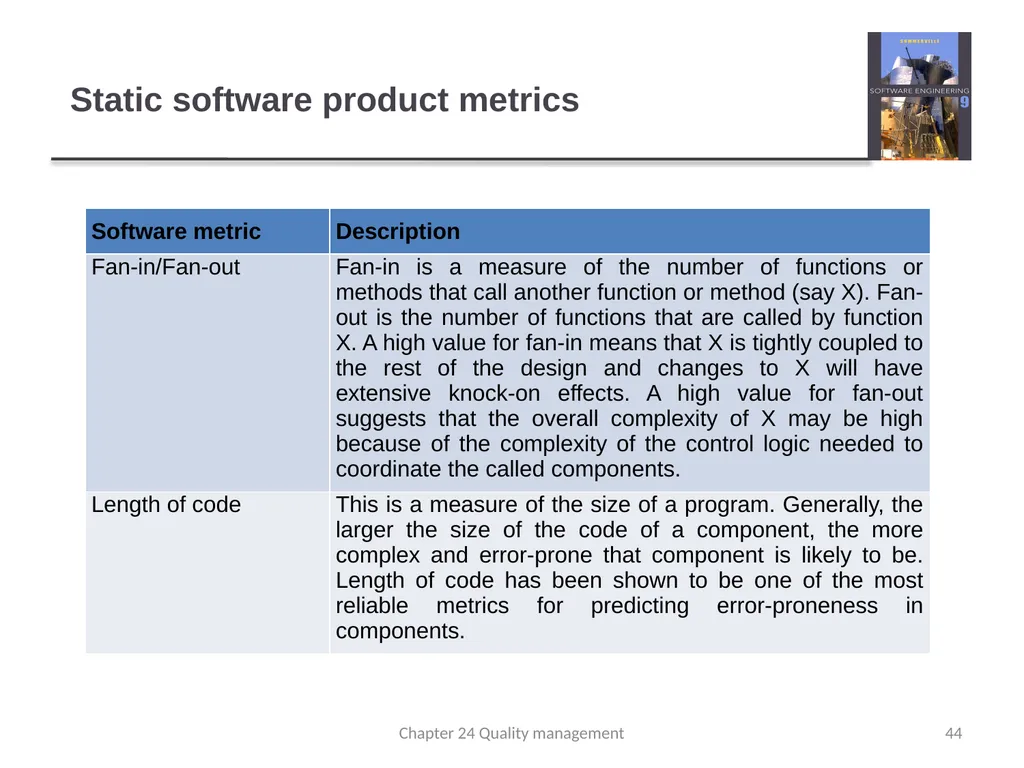
Static software product metrics 44 Chapter 24 Quality management<br>
45
Static software product metrics 45 Chapter 24 Quality management<br>
46
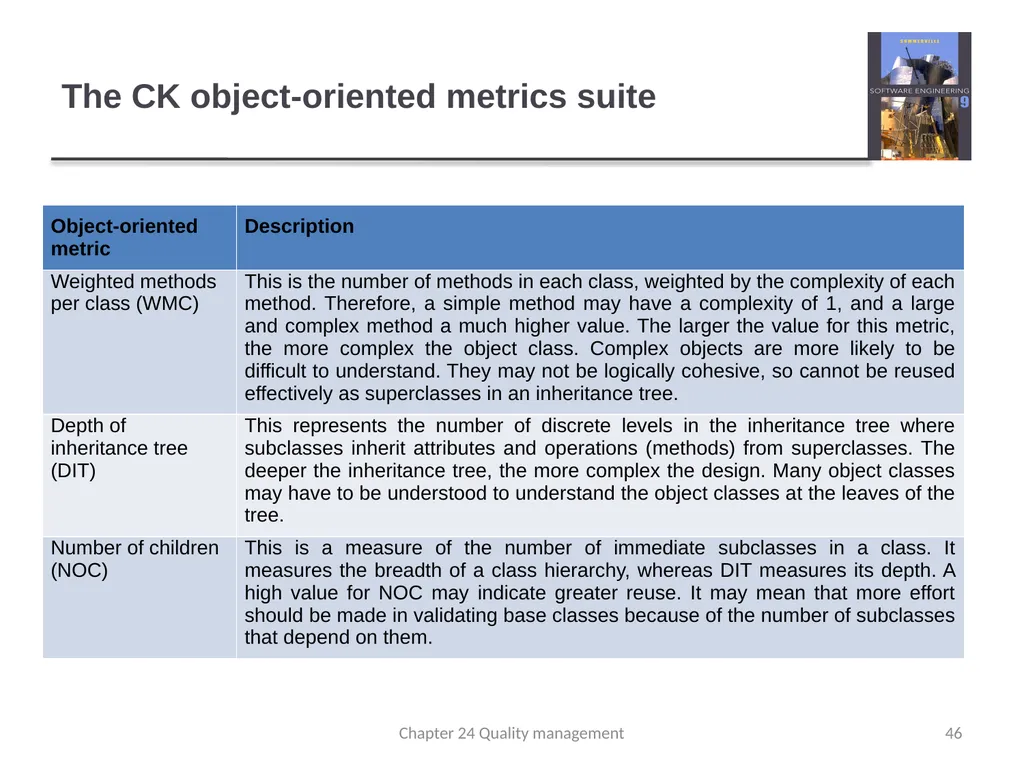
The CK object-oriented metrics suite 46 Chapter 24 Quality management<br>
47
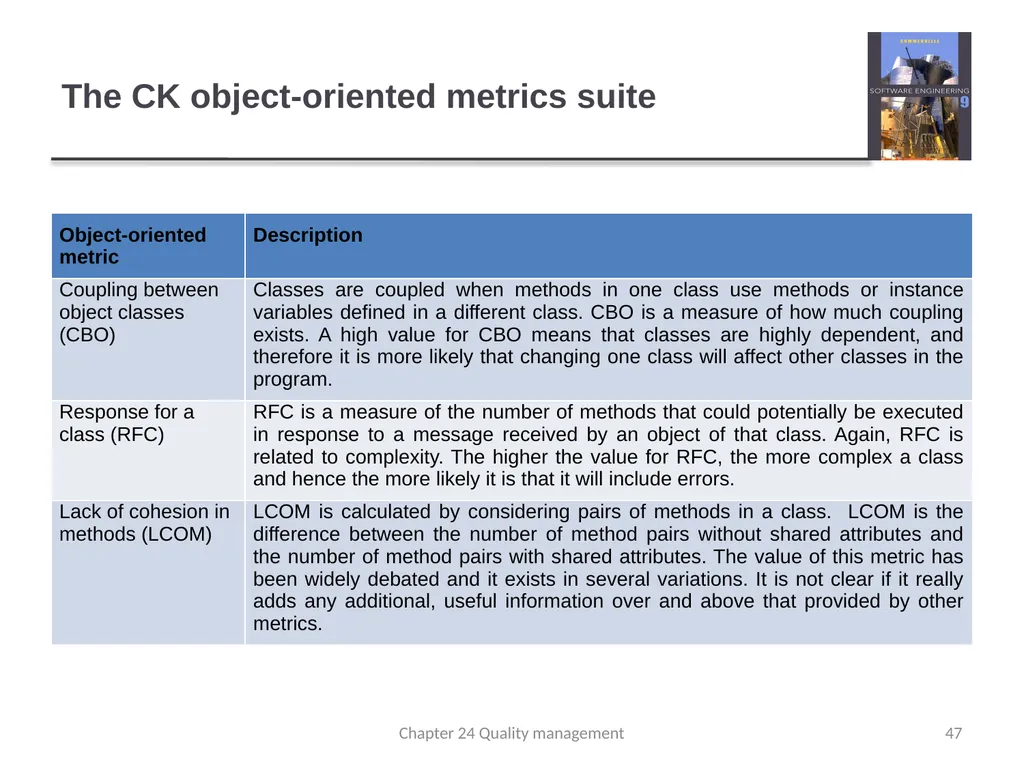
The CK object-oriented metrics suite 47 Chapter 24 Quality management<br>
48
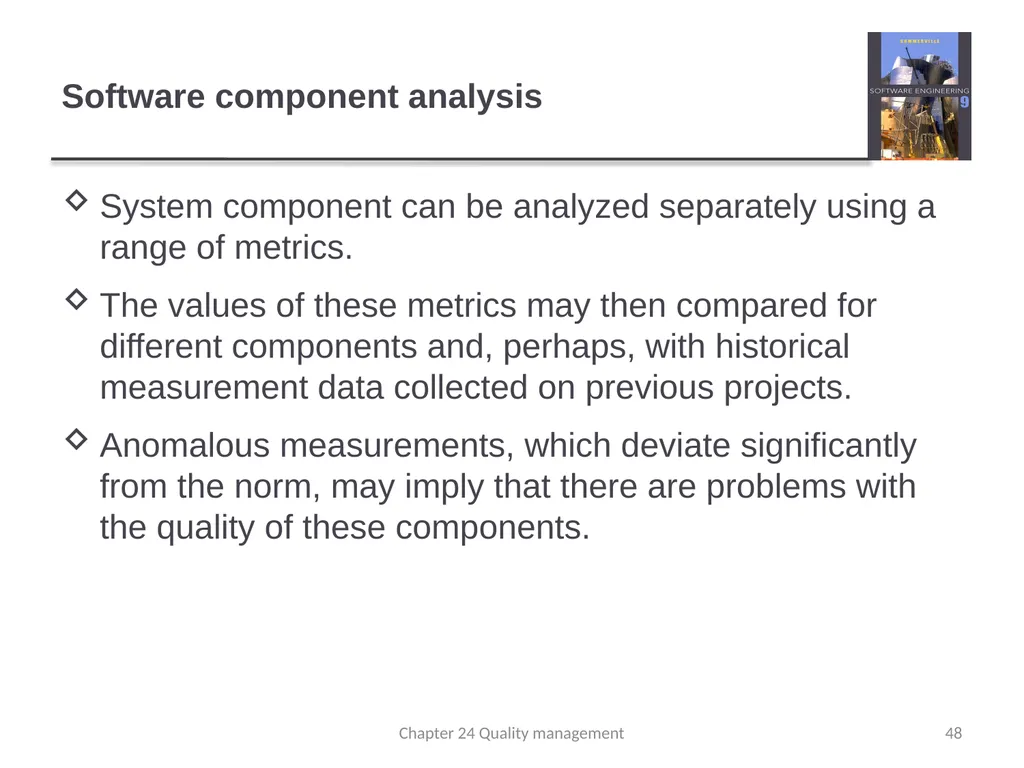
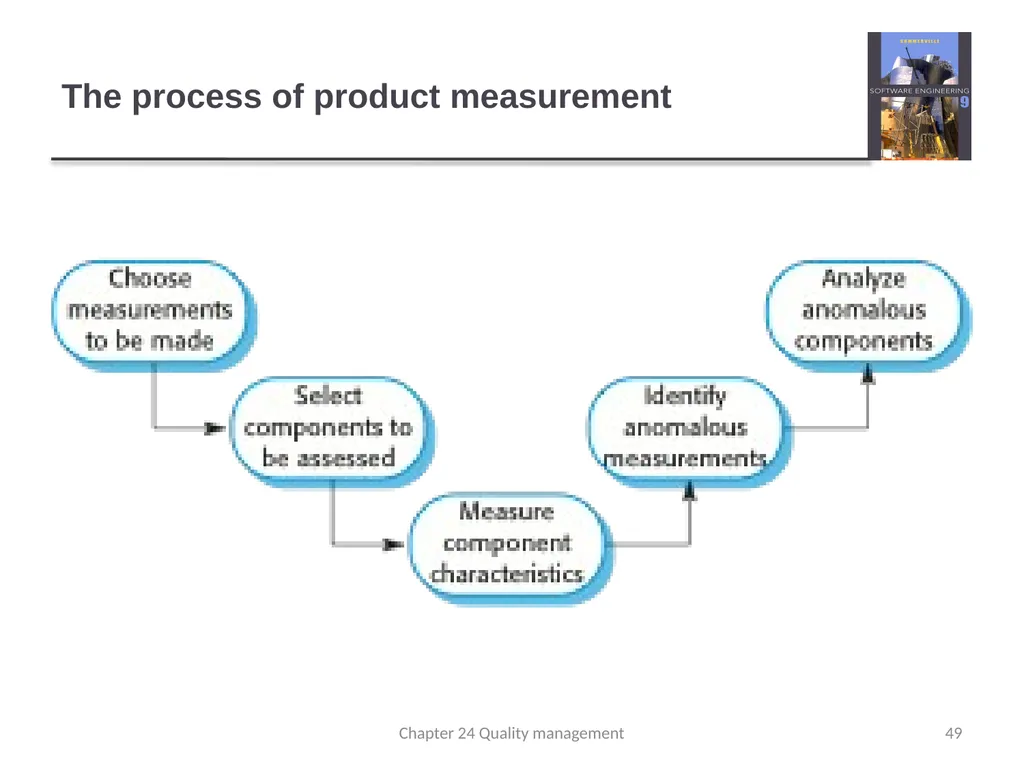
Software component analysis System component can be analyzed separately using a range of metrics.
The values of these metrics may then compared for different components and, perhaps, with historical measurement data collected on previous projects.
Anomalous measurements, which deviate significantly from the norm, may imply that there are problems with the quality of these components. 48 Chapter 24 Quality management<br>
The values of these metrics may then compared for different components and, perhaps, with historical measurement data collected on previous projects.
Anomalous measurements, which deviate significantly from the norm, may imply that there are problems with the quality of these components. 48 Chapter 24 Quality management<br>
49
The process of product measurement 49 Chapter 24 Quality management<br>
50
Measurement surprises Reducing the number of faults in a program leads to an increased number of help desk calls
The program is now thought of as more reliable and so has a wider more diverse market. The percentage of users who call the help desk may have decreased but the total may increase;
A more reliable system is used in a different way from a system where users work around the faults. This leads to more help desk calls. 50 Chapter 24 Quality management<br>
The program is now thought of as more reliable and so has a wider more diverse market. The percentage of users who call the help desk may have decreased but the total may increase;
A more reliable system is used in a different way from a system where users work around the faults. This leads to more help desk calls. 50 Chapter 24 Quality management<br>
51
Key points Reviews of the software process deliverables involve a team of people who check that quality standards are being followed.
In a program inspection or peer review, a small team systematically checks the code. They read the code in detail and look for possible errors and omissions
Software measurement can be used to gather data about software and software processes.
Product quality metrics are particularly useful for highlighting anomalous components that may have quality problems. 51 Chapter 24 Quality management<br>
In a program inspection or peer review, a small team systematically checks the code. They read the code in detail and look for possible errors and omissions
Software measurement can be used to gather data about software and software processes.
Product quality metrics are particularly useful for highlighting anomalous components that may have quality problems. 51 Chapter 24 Quality management<br>
52
Chapter 25 – Configuration Management Lecture 1 52 Chapter 25 Configuration management<br>
53
Topics covered Change management
Version management
System building
Release management 53 Chapter 25 Configuration management<br>
Version management
System building
Release management 53 Chapter 25 Configuration management<br>
54
Configuration management Because software changes frequently, systems, can be thought of as a set of versions, each of which has to be maintained and managed.
Versions implement proposals for change, corrections of faults, and adaptations for different hardware and operating systems.
Configuration management (CM) is concerned with the policies, processes and tools for managing changing software systems. You need CM because it is easy to lose track of what changes and component versions have been incorporated into each system version. 54 Chapter 25 Configuration management<br>
Versions implement proposals for change, corrections of faults, and adaptations for different hardware and operating systems.
Configuration management (CM) is concerned with the policies, processes and tools for managing changing software systems. You need CM because it is easy to lose track of what changes and component versions have been incorporated into each system version. 54 Chapter 25 Configuration management<br>
55
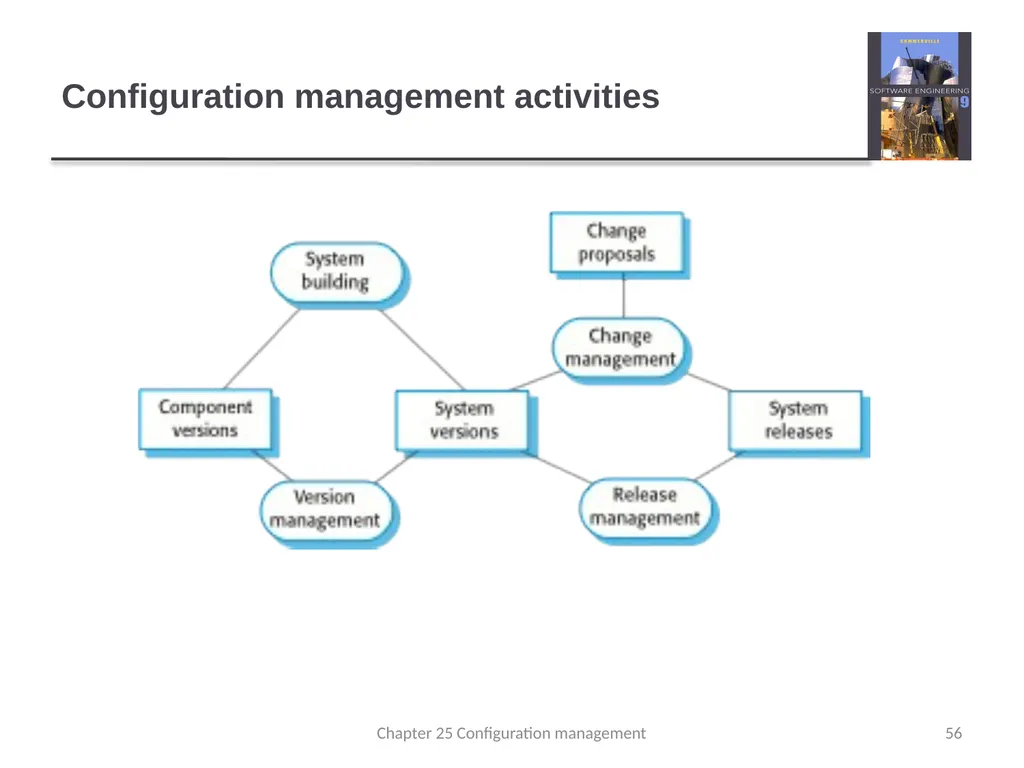
CM activities Change management
Keeping track of requests for changes to the software from customers and developers, working out the costs and impact of changes, and deciding the changes should be implemented.
Version management
Keeping track of the multiple versions of system components and ensuring that changes made to components by different developers do not interfere with each other.
System building
The process of assembling program components, data and libraries, then compiling these to create an executable system.
Release management
Preparing software for external release and keeping track of the system versions that have been released for customer use. 55 Chapter 25 Configuration management<br>
Keeping track of requests for changes to the software from customers and developers, working out the costs and impact of changes, and deciding the changes should be implemented.
Version management
Keeping track of the multiple versions of system components and ensuring that changes made to components by different developers do not interfere with each other.
System building
The process of assembling program components, data and libraries, then compiling these to create an executable system.
Release management
Preparing software for external release and keeping track of the system versions that have been released for customer use. 55 Chapter 25 Configuration management<br>
56
Configuration management activities 56 Chapter 25 Configuration management<br>
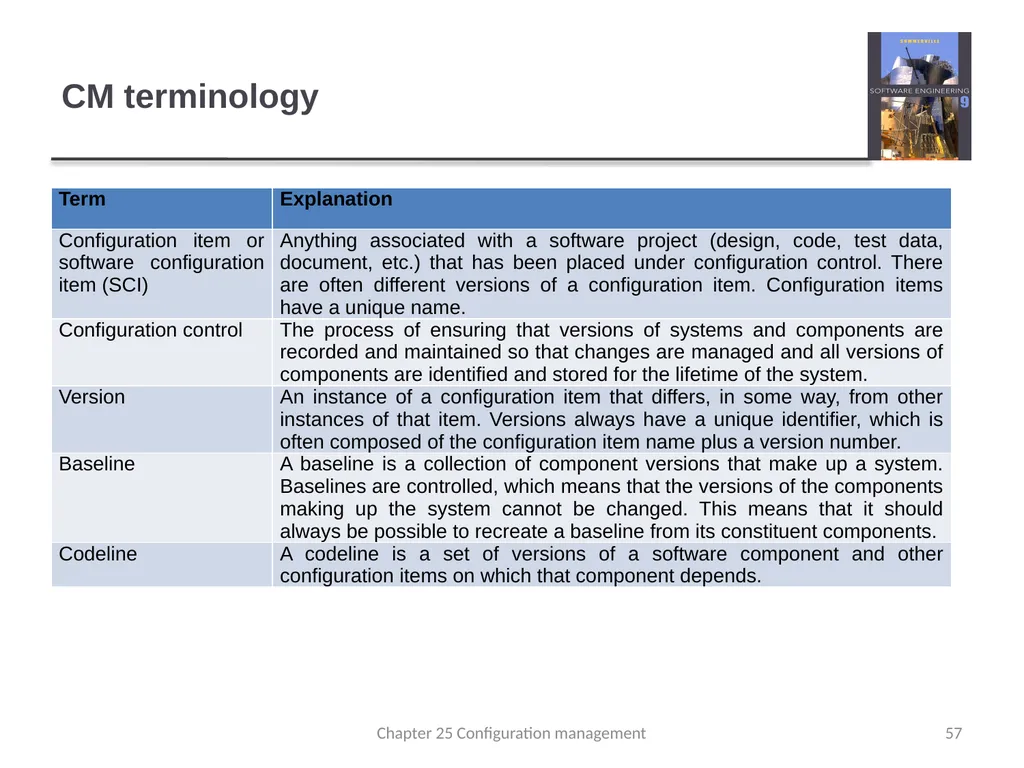
57
CM terminology 57 Chapter 25 Configuration management<br>
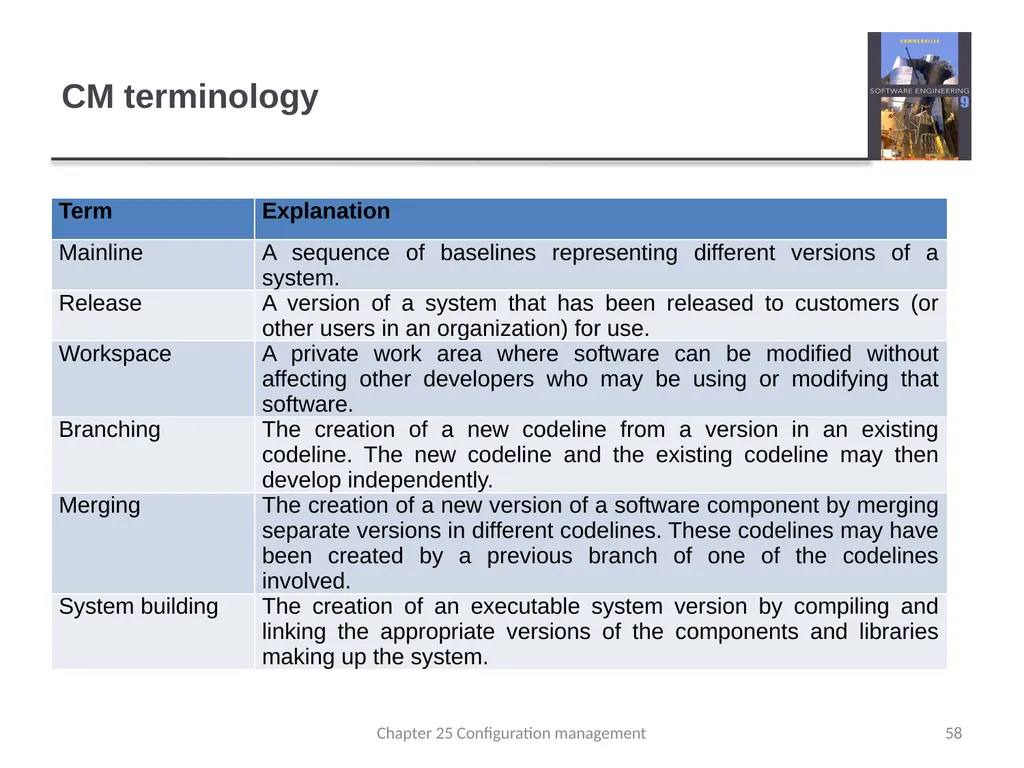
58
CM terminology 58 Chapter 25 Configuration management<br>
59
Change management Organizational needs and requirements change during the lifetime of a system, bugs have to be repaired and systems have to adapt to changes in their environment.
Change management is intended to ensure that system evolution is a managed process and that priority is given to the most urgent and cost-effective changes.
The change management process is concerned with analyzing the costs and benefits of proposed changes, approving those changes that are worthwhile and tracking which components in the system have been changed. 59 Chapter 25 Configuration management<br>
Change management is intended to ensure that system evolution is a managed process and that priority is given to the most urgent and cost-effective changes.
The change management process is concerned with analyzing the costs and benefits of proposed changes, approving those changes that are worthwhile and tracking which components in the system have been changed. 59 Chapter 25 Configuration management<br>
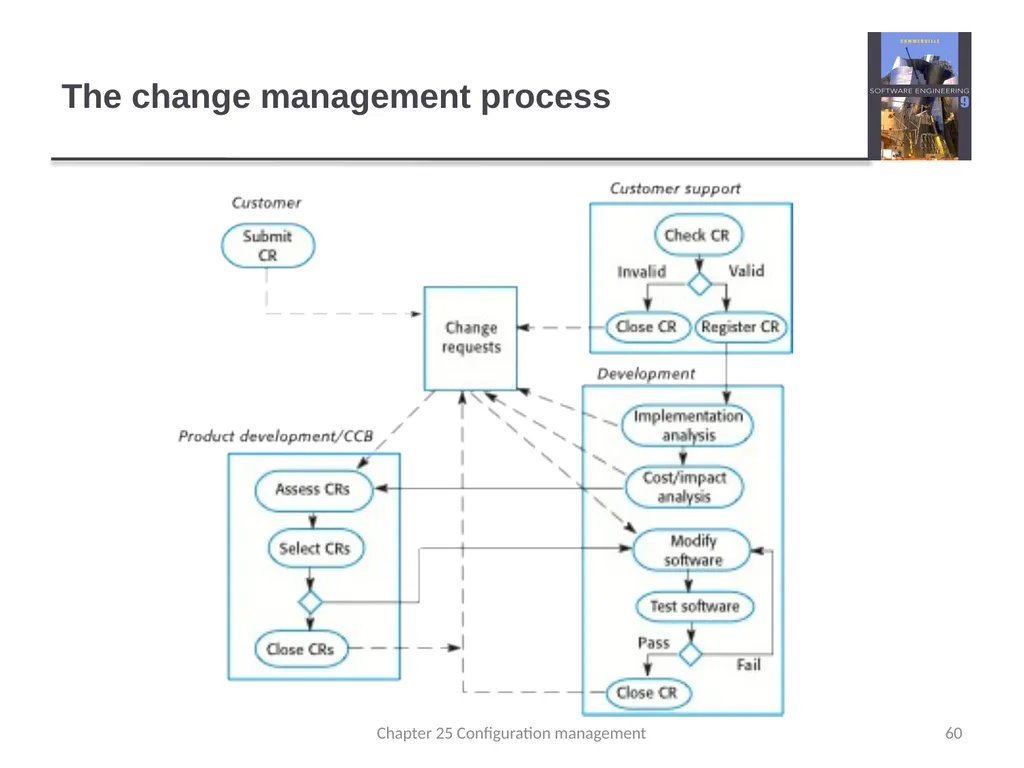
60
The change management process 60 Chapter 25 Configuration management<br>
61
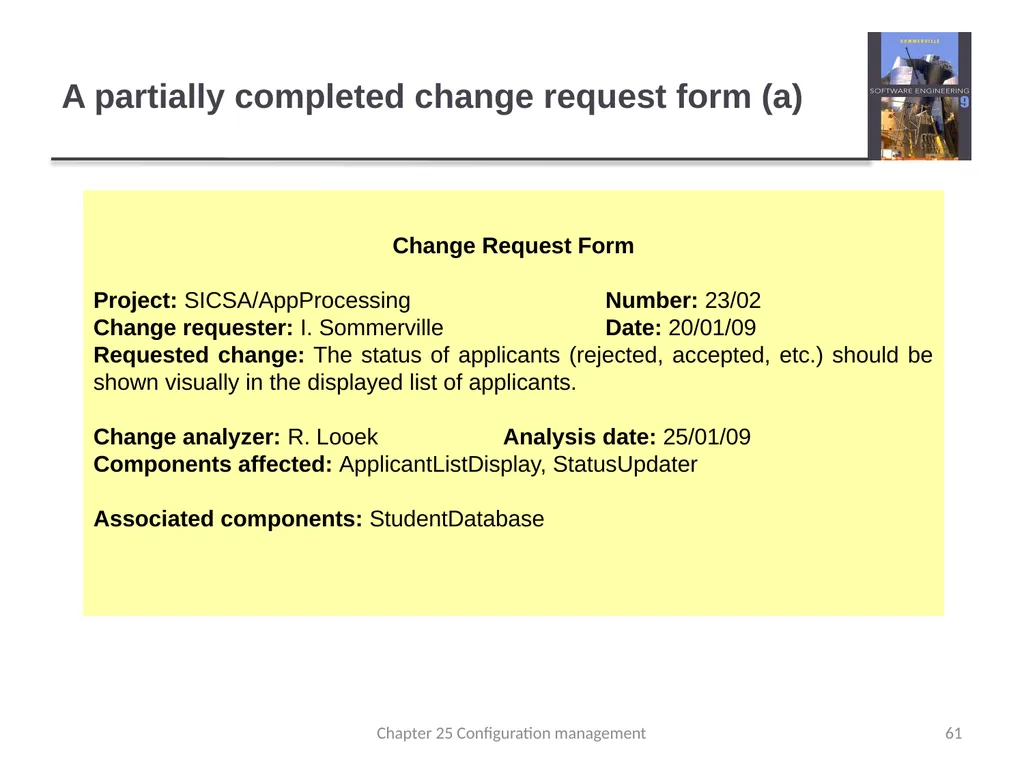
A partially completed change request form (a) Change Request Form
Project: SICSA/AppProcessing Number: 23/02
Change requester: I. Sommerville Date: 20/01/09
Requested change: The status of applicants (rejected, accepted, etc.) should be shown visually in the displayed list of applicants.
Change analyzer: R. Looek Analysis date: 25/01/09
Components affected: ApplicantListDisplay, StatusUpdater
Associated components: StudentDatabase 61 Chapter 25 Configuration management<br>
Project: SICSA/AppProcessing Number: 23/02
Change requester: I. Sommerville Date: 20/01/09
Requested change: The status of applicants (rejected, accepted, etc.) should be shown visually in the displayed list of applicants.
Change analyzer: R. Looek Analysis date: 25/01/09
Components affected: ApplicantListDisplay, StatusUpdater
Associated components: StudentDatabase 61 Chapter 25 Configuration management<br>
62
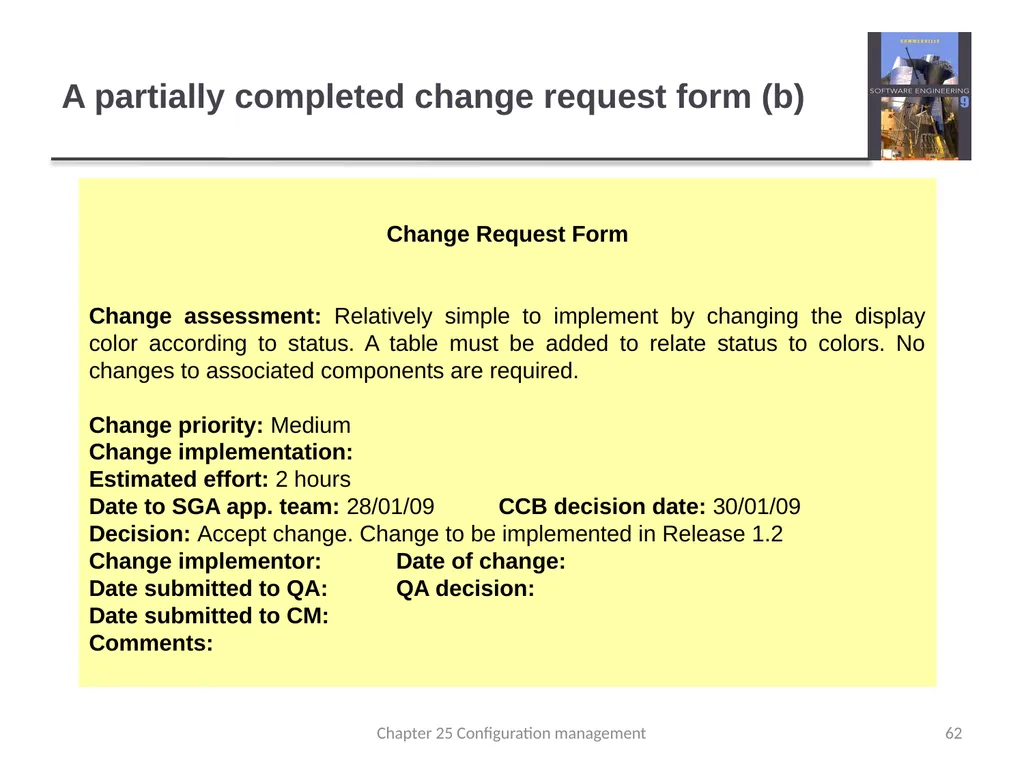
A partially completed change request form (b) Change Request Form
Change assessment: Relatively simple to implement by changing the display color according to status. A table must be added to relate status to colors. No changes to associated components are required.
Change priority: Medium
Change implementation:
Estimated effort: 2 hours
Date to SGA app. team: 28/01/09 CCB decision date: 30/01/09
Decision: Accept change. Change to be implemented in Release 1.2
Change implementor: Date of change:
Date submitted to QA: QA decision:
Date submitted to CM:
Comments: 62 Chapter 25 Configuration management<br>
Change assessment: Relatively simple to implement by changing the display color according to status. A table must be added to relate status to colors. No changes to associated components are required.
Change priority: Medium
Change implementation:
Estimated effort: 2 hours
Date to SGA app. team: 28/01/09 CCB decision date: 30/01/09
Decision: Accept change. Change to be implemented in Release 1.2
Change implementor: Date of change:
Date submitted to QA: QA decision:
Date submitted to CM:
Comments: 62 Chapter 25 Configuration management<br>
63
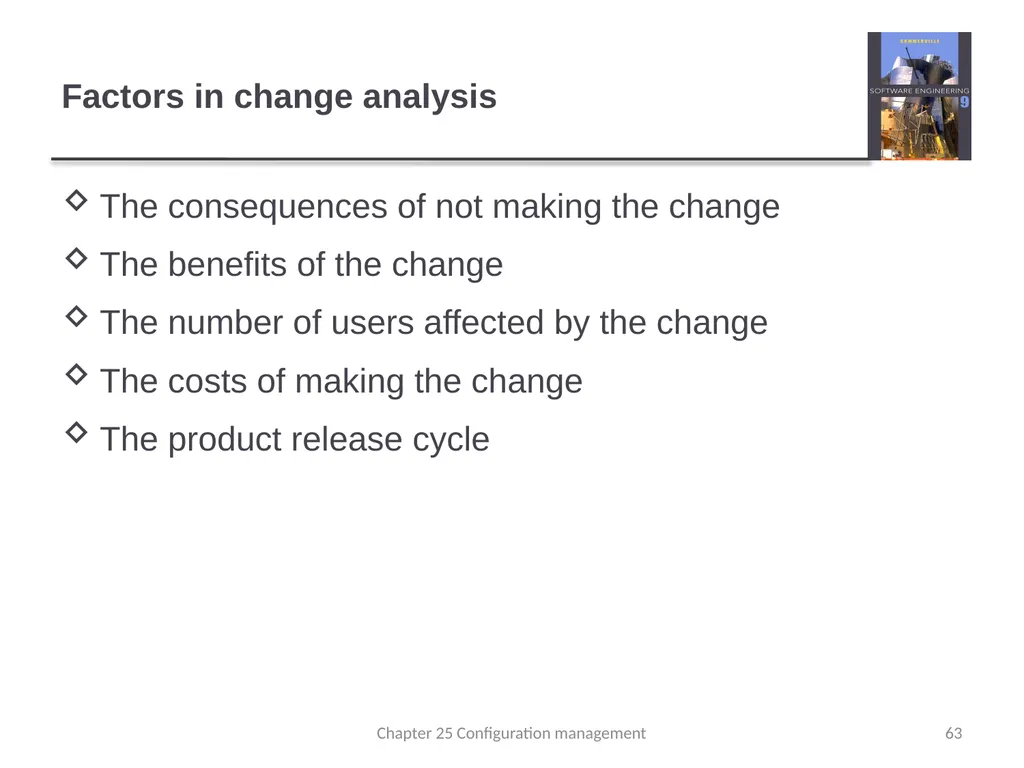
Factors in change analysis The consequences of not making the change
The benefits of the change
The number of users affected by the change
The costs of making the change
The product release cycle 63 Chapter 25 Configuration management<br>
The benefits of the change
The number of users affected by the change
The costs of making the change
The product release cycle 63 Chapter 25 Configuration management<br>
64
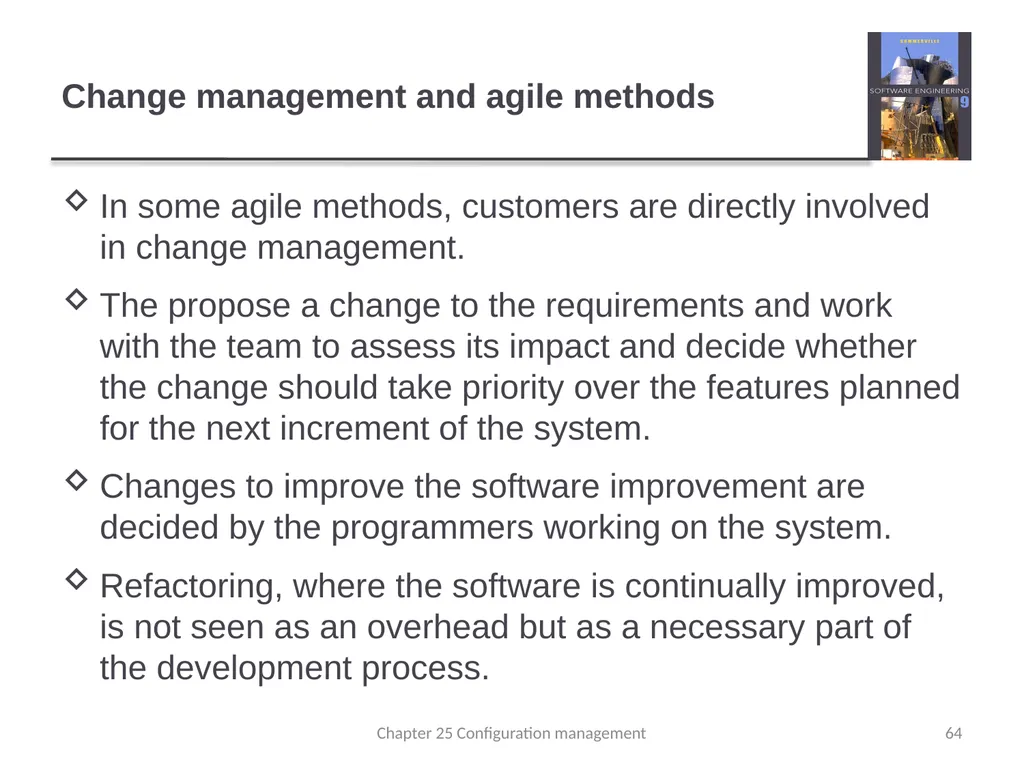
Change management and agile methods In some agile methods, customers are directly involved in change management.
The propose a change to the requirements and work with the team to assess its impact and decide whether the change should take priority over the features planned for the next increment of the system.
Changes to improve the software improvement are decided by the programmers working on the system.
Refactoring, where the software is continually improved, is not seen as an overhead but as a necessary part of the development process. Chapter 25 Configuration management 64<br>
The propose a change to the requirements and work with the team to assess its impact and decide whether the change should take priority over the features planned for the next increment of the system.
Changes to improve the software improvement are decided by the programmers working on the system.
Refactoring, where the software is continually improved, is not seen as an overhead but as a necessary part of the development process. Chapter 25 Configuration management 64<br>
65
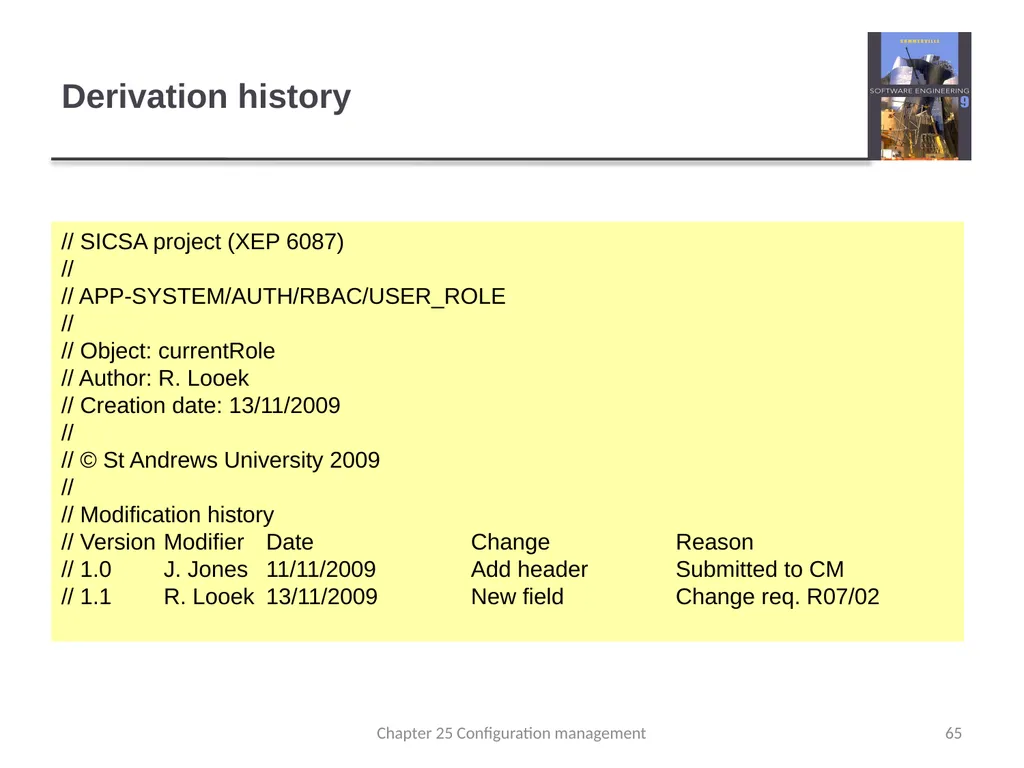
Derivation history // SICSA project (XEP 6087)
//
// APP-SYSTEM/AUTH/RBAC/USER_ROLE
//
// Object: currentRole
// Author: R. Looek
// Creation date: 13/11/2009
//
// © St Andrews University 2009
//
// Modification history
// Version Modifier Date Change Reason
// 1.0 J. Jones 11/11/2009 Add header Submitted to CM
// 1.1 R. Looek 13/11/2009 New field Change req. R07/02 65 Chapter 25 Configuration management<br>
//
// APP-SYSTEM/AUTH/RBAC/USER_ROLE
//
// Object: currentRole
// Author: R. Looek
// Creation date: 13/11/2009
//
// © St Andrews University 2009
//
// Modification history
// Version Modifier Date Change Reason
// 1.0 J. Jones 11/11/2009 Add header Submitted to CM
// 1.1 R. Looek 13/11/2009 New field Change req. R07/02 65 Chapter 25 Configuration management<br>
66
Version management Version management (VM) is the process of keeping track of different versions of software components or configuration items and the systems in which these components are used.
It also involves ensuring that changes made by different developers to these versions do not interfere with each other.
Therefore version management can be thought of as the process of managing codelines and baselines. 66 Chapter 25 Configuration management<br>
It also involves ensuring that changes made by different developers to these versions do not interfere with each other.
Therefore version management can be thought of as the process of managing codelines and baselines. 66 Chapter 25 Configuration management<br>
67
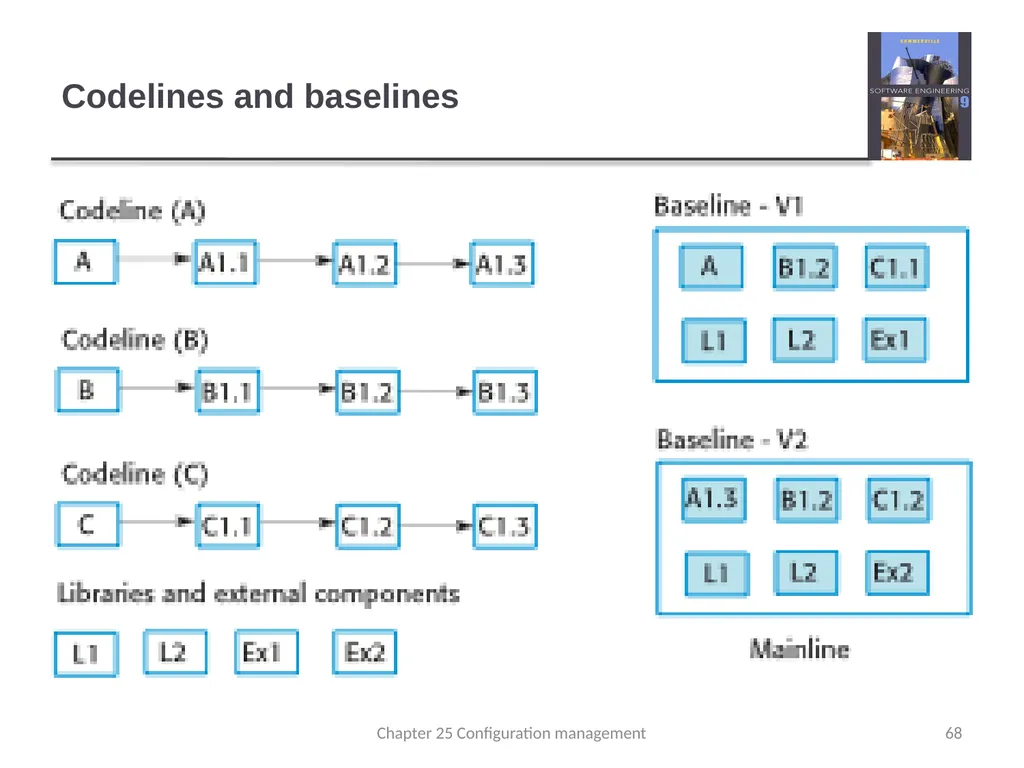
Codelines and baselines A codeline is a sequence of versions of source code with later versions in the sequence derived from earlier versions.
Codelines normally apply to components of systems so that there are different versions of each component.
A baseline is a definition of a specific system.
The baseline therefore specifies the component versions that are included in the system plus a specification of the libraries used, configuration files, etc. 67 Chapter 25 Configuration management<br>
Codelines normally apply to components of systems so that there are different versions of each component.
A baseline is a definition of a specific system.
The baseline therefore specifies the component versions that are included in the system plus a specification of the libraries used, configuration files, etc. 67 Chapter 25 Configuration management<br>
68
Codelines and baselines 68 Chapter 25 Configuration management<br>
69
Baselines Baselines may be specified using a configuration language, which allows you to define what components are included in a version of a particular system.
Baselines are important because you often have to recreate a specific version of a complete system.
For example, a product line may be instantiated so that there are individual system versions for different customers. You may have to recreate the version delivered to a specific customer if, for example, that customer reports bugs in their system that have to be repaired. 69 Chapter 25 Configuration management<br>
Baselines are important because you often have to recreate a specific version of a complete system.
For example, a product line may be instantiated so that there are individual system versions for different customers. You may have to recreate the version delivered to a specific customer if, for example, that customer reports bugs in their system that have to be repaired. 69 Chapter 25 Configuration management<br>
70
Version management systems Version and release identification
Managed versions are assigned identifiers when they are submitted to the system.
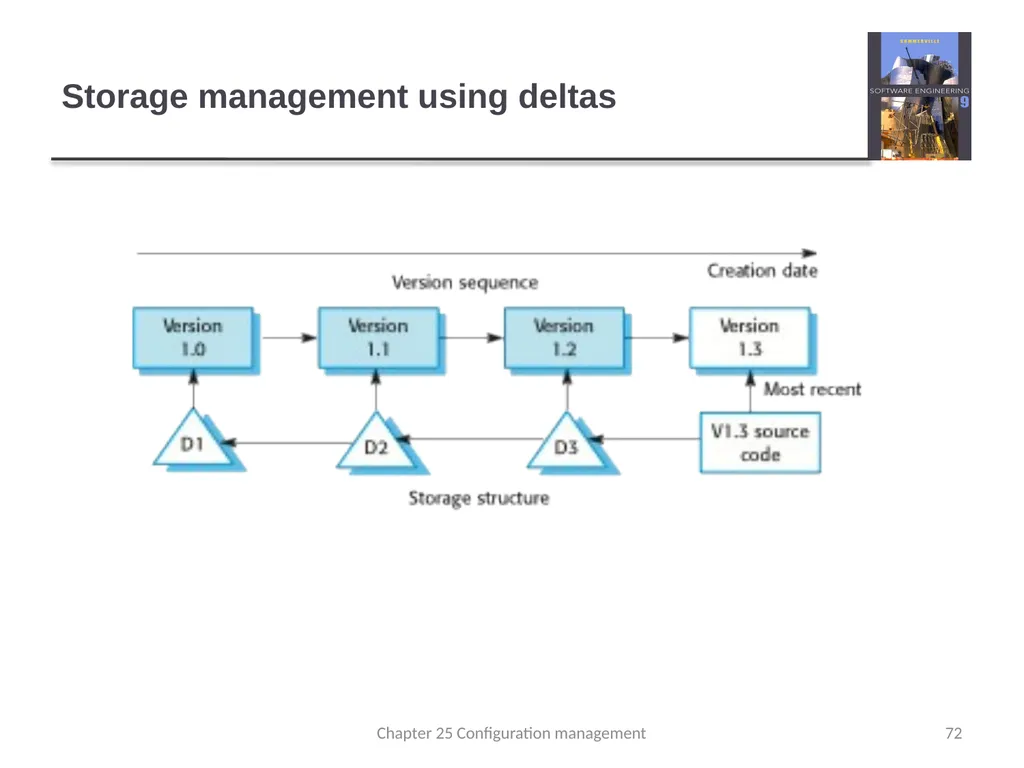
Storage management
To reduce the storage space required by multiple versions of components that differ only slightly, version management systems usually provide storage management facilities.
Change history recording
All of the changes made to the code of a system or component are recorded and listed. 70 Chapter 25 Configuration management<br>
Managed versions are assigned identifiers when they are submitted to the system.
Storage management
To reduce the storage space required by multiple versions of components that differ only slightly, version management systems usually provide storage management facilities.
Change history recording
All of the changes made to the code of a system or component are recorded and listed. 70 Chapter 25 Configuration management<br>
71
Version management systems Independent development
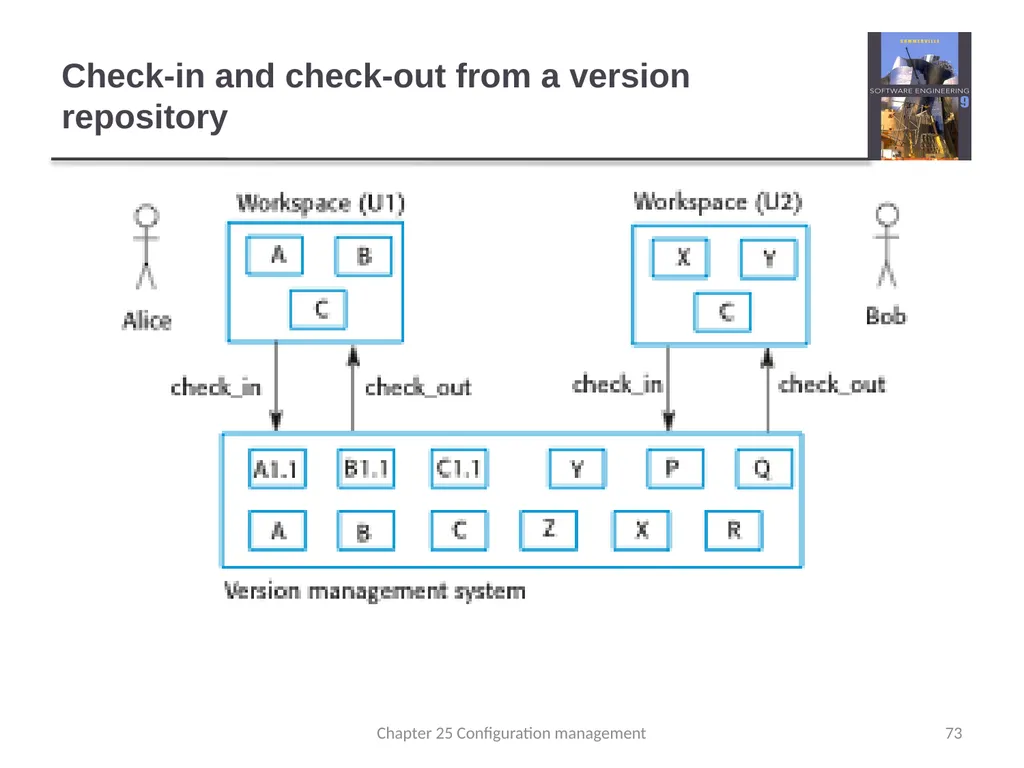
The version management system keeps track of components that have been checked out for editing and ensures that changes made to a component by different developers do not interfere.
Project support
A version management system may support the development of several projects, which share components. 71 Chapter 25 Configuration management<br>
The version management system keeps track of components that have been checked out for editing and ensures that changes made to a component by different developers do not interfere.
Project support
A version management system may support the development of several projects, which share components. 71 Chapter 25 Configuration management<br>
72
Storage management using deltas 72 Chapter 25 Configuration management<br>
73
Check-in and check-out from a version repository 73 Chapter 25 Configuration management<br>
74
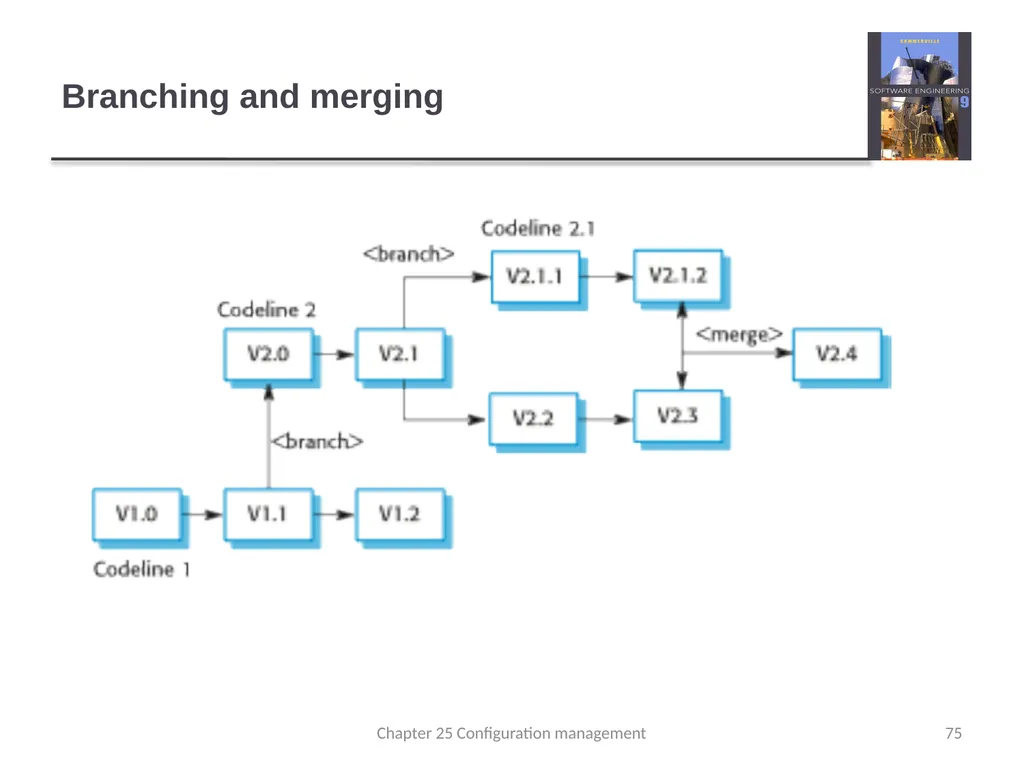
Codeline branches Rather than a linear sequence of versions that reflect changes to the component over time, there may be several independent sequences.
This is normal in system development, where different developers work independently on different versions of the source code and so change it in different ways.
At some stage, it may be necessary to merge codeline branches to create a new version of a component that includes all changes that have been made.
If the changes made involve different parts of the code, the component versions may be merged automatically by combining the deltas that apply to the code. 74 Chapter 25 Configuration management<br>
This is normal in system development, where different developers work independently on different versions of the source code and so change it in different ways.
At some stage, it may be necessary to merge codeline branches to create a new version of a component that includes all changes that have been made.
If the changes made involve different parts of the code, the component versions may be merged automatically by combining the deltas that apply to the code. 74 Chapter 25 Configuration management<br>
75
Branching and merging 75 Chapter 25 Configuration management<br>
76
Key points Configuration management is the management of an evolving software system. When maintaining a system, a CM team is put in place to ensure that changes are incorporated into the system in a controlled way and that records are maintained with details of the changes that have been implemented.
The main configuration management processes are change management, version management, system building and release management.
Change management involves assessing proposals for changes from system customers and other stakeholders and deciding if it is cost-effective to implement these in a new version of a system.
Version management involves keeping track of the different versions of software components as changes are made to them. Chapter 25 Configuration management 76<br>
The main configuration management processes are change management, version management, system building and release management.
Change management involves assessing proposals for changes from system customers and other stakeholders and deciding if it is cost-effective to implement these in a new version of a system.
Version management involves keeping track of the different versions of software components as changes are made to them. Chapter 25 Configuration management 76<br>
77
Chapter 25 – Configuration Management Lecture 2 77 Chapter 25 Configuration management<br>
78
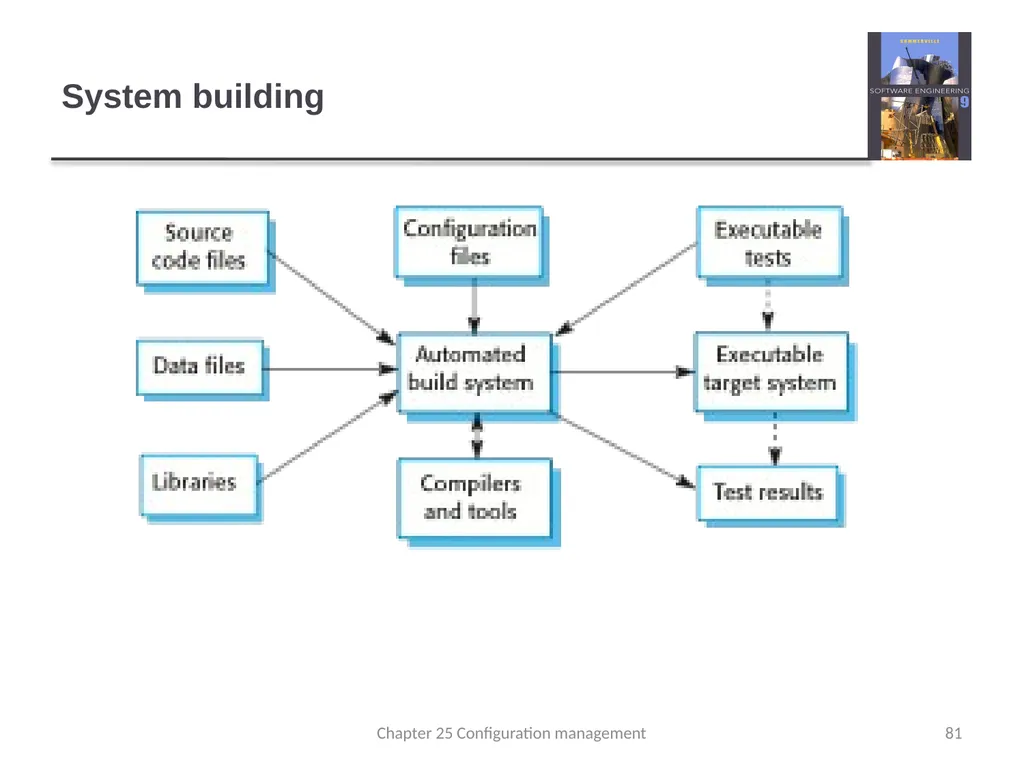
System building System building is the process of creating a complete, executable system by compiling and linking the system components, external libraries, configuration files, etc.
System building tools and version management tools must communicate as the build process involves checking out component versions from the repository managed by the version management system.
The configuration description used to identify a baseline is also used by the system building tool. 78 Chapter 25 Configuration management<br>
System building tools and version management tools must communicate as the build process involves checking out component versions from the repository managed by the version management system.
The configuration description used to identify a baseline is also used by the system building tool. 78 Chapter 25 Configuration management<br>
79
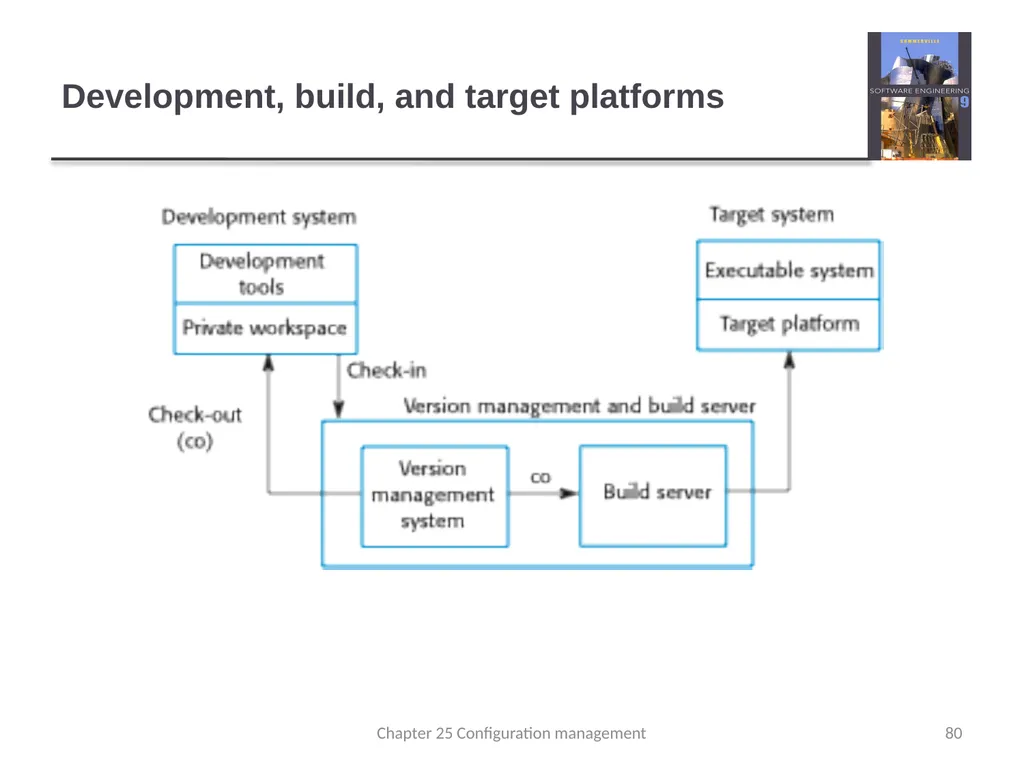
Build platforms The development system, which includes development tools such as compilers, source code editors, etc.
Developers check out code from the version management system into a private workspace before making changes to the system.
The build server, which is used to build definitive, executable versions of the system.
Developers check-in code to the version management system before it is built. The system build may rely on external libraries that are not included in the version management system.
The target environment, which is the platform on which the system executes. 79 Chapter 25 Configuration management<br>
Developers check out code from the version management system into a private workspace before making changes to the system.
The build server, which is used to build definitive, executable versions of the system.
Developers check-in code to the version management system before it is built. The system build may rely on external libraries that are not included in the version management system.
The target environment, which is the platform on which the system executes. 79 Chapter 25 Configuration management<br>
80
Development, build, and target platforms 80 Chapter 25 Configuration management<br>
81
System building 81 Chapter 25 Configuration management<br>
82
Build system functionality Build script generation
Version management system integration
Minimal re-compilation
Executable system creation
Test automation
Reporting
Documentation generation 82 Chapter 25 Configuration management<br>
Version management system integration
Minimal re-compilation
Executable system creation
Test automation
Reporting
Documentation generation 82 Chapter 25 Configuration management<br>
83
Minimizing recompilation Tools to support system building are usually designed to minimize the amount of compilation that is required.
They do this by checking if a compiled version of a component is available. If so, there is no need to recompile that component.
A unique signature identifies each source and object code version and is changed when the source code is edited.
By comparing the signatures on the source and object code files, it is possible to decide if the source code was used to generate the object code component. Chapter 25 Configuration management 83<br>
They do this by checking if a compiled version of a component is available. If so, there is no need to recompile that component.
A unique signature identifies each source and object code version and is changed when the source code is edited.
By comparing the signatures on the source and object code files, it is possible to decide if the source code was used to generate the object code component. Chapter 25 Configuration management 83<br>
84
File identification Modification timestamps
The signature on the source code file is the time and date when that file was modified. If the source code file of a component has been modified after the related object code file, then the system assumes that recompilation to create a new object code file is necessary.
Source code checksums
The signature on the source code file is a checksum calculated from data in the file. A checksum function calculates a unique number using the source text as input. If you change the source code (even by 1 character), this will generate a different checksum. You can therefore be confident that source code files with different checksums are actually different. Chapter 25 Configuration management 84<br>
The signature on the source code file is the time and date when that file was modified. If the source code file of a component has been modified after the related object code file, then the system assumes that recompilation to create a new object code file is necessary.
Source code checksums
The signature on the source code file is a checksum calculated from data in the file. A checksum function calculates a unique number using the source text as input. If you change the source code (even by 1 character), this will generate a different checksum. You can therefore be confident that source code files with different checksums are actually different. Chapter 25 Configuration management 84<br>
85
Timestamps vs checksums Timestamps
Because source and object files are linked by name rather than an explicit source file signature, it is not usually possible to build different versions of a source code component into the same directory at the same time, as these would generate object files with the same name.
Checksums
When you recompile a component, it does not overwrite the object code, as would normally be the case when the timestamp is used. Rather, it generates a new object code file and tags it with the source code signature. Parallel compilation is possible and different versions of a component may be compiled at the same time. Chapter 25 Configuration management 85<br>
Because source and object files are linked by name rather than an explicit source file signature, it is not usually possible to build different versions of a source code component into the same directory at the same time, as these would generate object files with the same name.
Checksums
When you recompile a component, it does not overwrite the object code, as would normally be the case when the timestamp is used. Rather, it generates a new object code file and tags it with the source code signature. Parallel compilation is possible and different versions of a component may be compiled at the same time. Chapter 25 Configuration management 85<br>
86
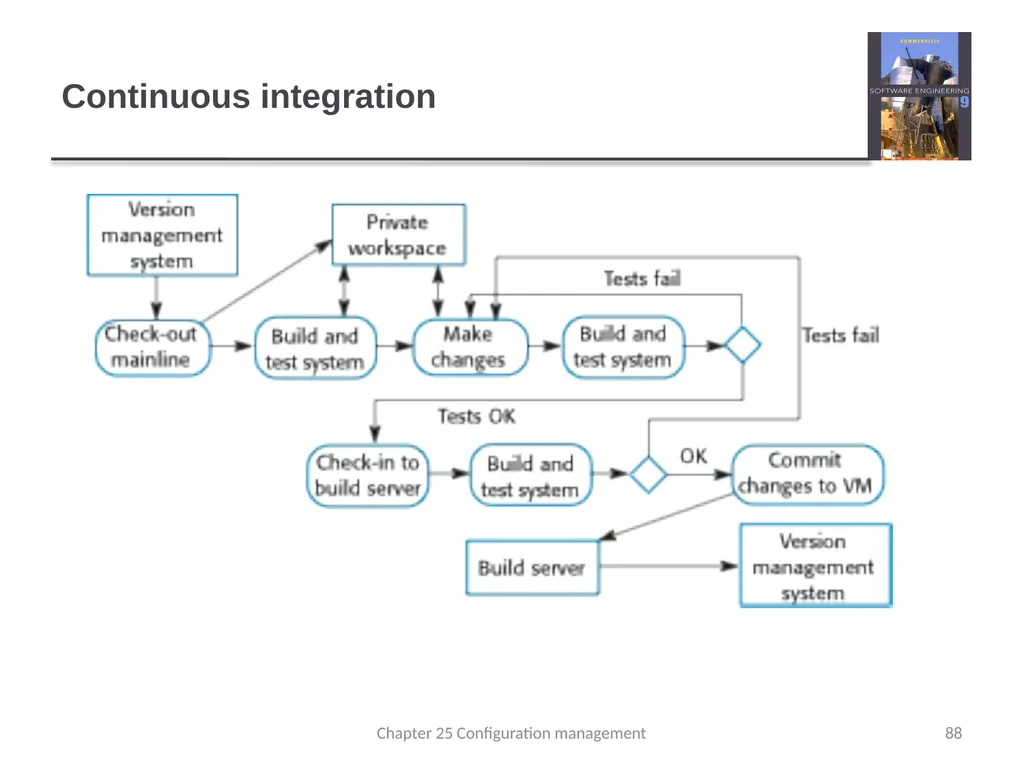
Agile building Check out the mainline system from the version management system into the developer’s private workspace.
Build the system and run automated tests to ensure that the built system passes all tests. If not, the build is broken and you should inform whoever checked in the last baseline system. They are responsible for repairing the problem.
Make the changes to the system components.
Build the system in the private workspace and rerun system tests. If the tests fail, continue editing. Chapter 25 Configuration management 86<br>
Build the system and run automated tests to ensure that the built system passes all tests. If not, the build is broken and you should inform whoever checked in the last baseline system. They are responsible for repairing the problem.
Make the changes to the system components.
Build the system in the private workspace and rerun system tests. If the tests fail, continue editing. Chapter 25 Configuration management 86<br>
87
Agile building Once the system has passed its tests, check it into the build system but do not commit it as a new system baseline.
Build the system on the build server and run the tests. You need to do this in case others have modified components since you checked out the system. If this is the case, check out the components that have failed and edit these so that tests pass on your private workspace.
If the system passes its tests on the build system, then commit the changes you have made as a new baseline in the system mainline. Chapter 25 Configuration management 87<br>
Build the system on the build server and run the tests. You need to do this in case others have modified components since you checked out the system. If this is the case, check out the components that have failed and edit these so that tests pass on your private workspace.
If the system passes its tests on the build system, then commit the changes you have made as a new baseline in the system mainline. Chapter 25 Configuration management 87<br>
88
Continuous integration 88 Chapter 25 Configuration management<br>
89
Daily building The development organization sets a delivery time (say 2 p.m.) for system components.
If developers have new versions of the components that they are writing, they must deliver them by that time.
A new version of the system is built from these components by compiling and linking them to form a complete system.
This system is then delivered to the testing team, which carries out a set of predefined system tests
Faults that are discovered during system testing are documented and returned to the system developers. They repair these faults in a subsequent version of the component. 89 Chapter 25 Configuration management<br>
If developers have new versions of the components that they are writing, they must deliver them by that time.
A new version of the system is built from these components by compiling and linking them to form a complete system.
This system is then delivered to the testing team, which carries out a set of predefined system tests
Faults that are discovered during system testing are documented and returned to the system developers. They repair these faults in a subsequent version of the component. 89 Chapter 25 Configuration management<br>
90
Release management A system release is a version of a software system that is distributed to customers.
For mass market software, it is usually possible to identify two types of release: major releases which deliver significant new functionality, and minor releases, which repair bugs and fix customer problems that have been reported.
For custom software or software product lines, releases of the system may have to be produced for each customer and individual customers may be running several different releases of the system at the same time. 90 Chapter 25 Configuration management<br>
For mass market software, it is usually possible to identify two types of release: major releases which deliver significant new functionality, and minor releases, which repair bugs and fix customer problems that have been reported.
For custom software or software product lines, releases of the system may have to be produced for each customer and individual customers may be running several different releases of the system at the same time. 90 Chapter 25 Configuration management<br>
91
Release tracking In the event of a problem, it may be necessary to reproduce exactly the software that has been delivered to a particular customer.
When a system release is produced, it must be documented to ensure that it can be re-created exactly in the future.
This is particularly important for customized, long-lifetime embedded systems, such as those that control complex machines.
Customers may use a single release of these systems for many years and may require specific changes to a particular software system long after its original release date. Chapter 25 Configuration management 91<br>
When a system release is produced, it must be documented to ensure that it can be re-created exactly in the future.
This is particularly important for customized, long-lifetime embedded systems, such as those that control complex machines.
Customers may use a single release of these systems for many years and may require specific changes to a particular software system long after its original release date. Chapter 25 Configuration management 91<br>
92
Release reproduction To document a release, you have to record the specific versions of the source code components that were used to create the executable code.
You must keep copies of the source code files, corresponding executables and all data and configuration files.
You should also record the versions of the operating system, libraries, compilers and other tools used to build the software. Chapter 25 Configuration management 92<br>
You must keep copies of the source code files, corresponding executables and all data and configuration files.
You should also record the versions of the operating system, libraries, compilers and other tools used to build the software. Chapter 25 Configuration management 92<br>
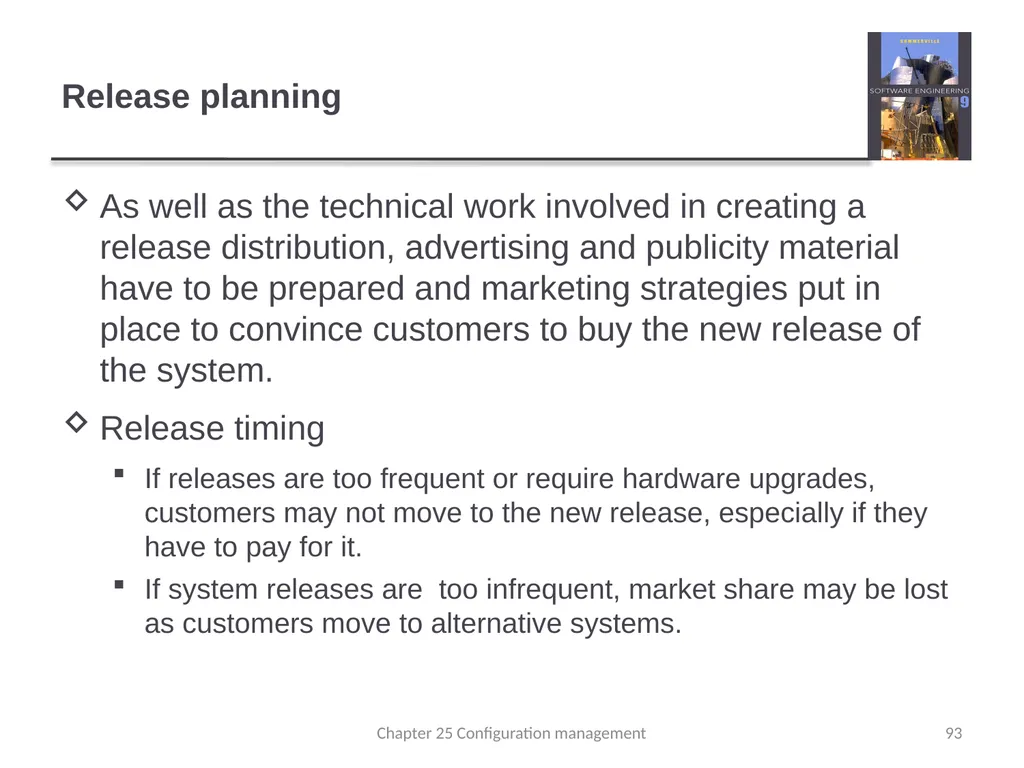
93
Release planning As well as the technical work involved in creating a release distribution, advertising and publicity material have to be prepared and marketing strategies put in place to convince customers to buy the new release of the system.
Release timing
If releases are too frequent or require hardware upgrades, customers may not move to the new release, especially if they have to pay for it.
If system releases are too infrequent, market share may be lost as customers move to alternative systems. Chapter 25 Configuration management 93<br>
Release timing
If releases are too frequent or require hardware upgrades, customers may not move to the new release, especially if they have to pay for it.
If system releases are too infrequent, market share may be lost as customers move to alternative systems. Chapter 25 Configuration management 93<br>
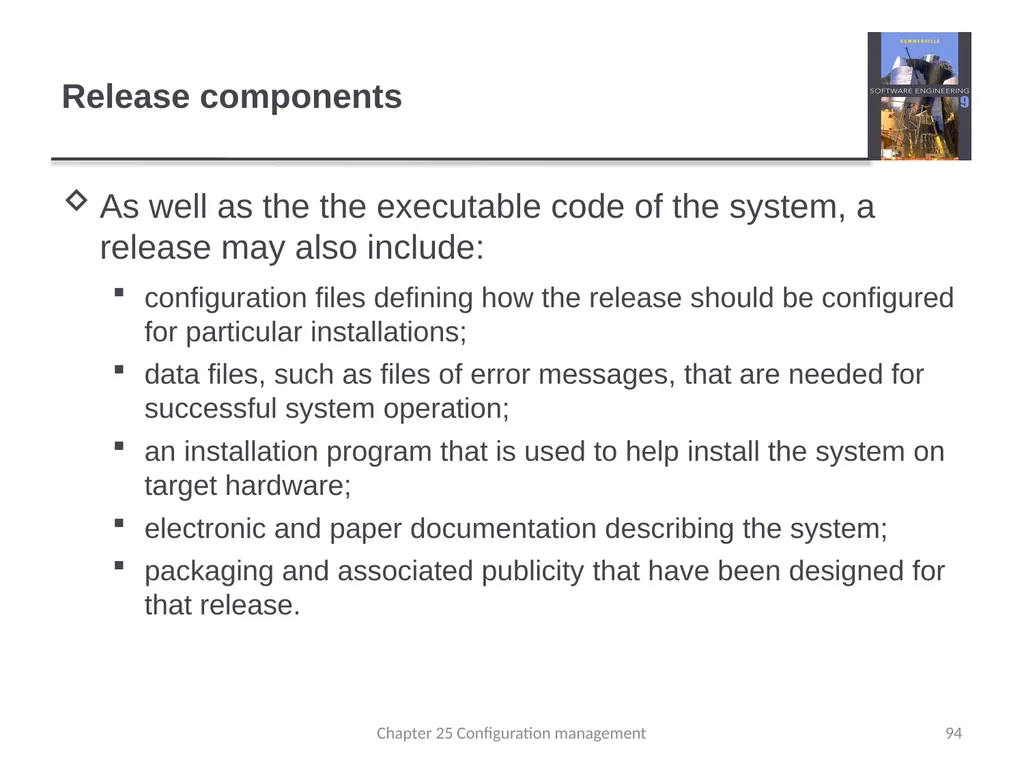
94
Release components As well as the the executable code of the system, a release may also include:
configuration files defining how the release should be configured for particular installations;
data files, such as files of error messages, that are needed for successful system operation;
an installation program that is used to help install the system on target hardware;
electronic and paper documentation describing the system;
packaging and associated publicity that have been designed for that release. Chapter 25 Configuration management 94<br>
configuration files defining how the release should be configured for particular installations;
data files, such as files of error messages, that are needed for successful system operation;
an installation program that is used to help install the system on target hardware;
electronic and paper documentation describing the system;
packaging and associated publicity that have been designed for that release. Chapter 25 Configuration management 94<br>
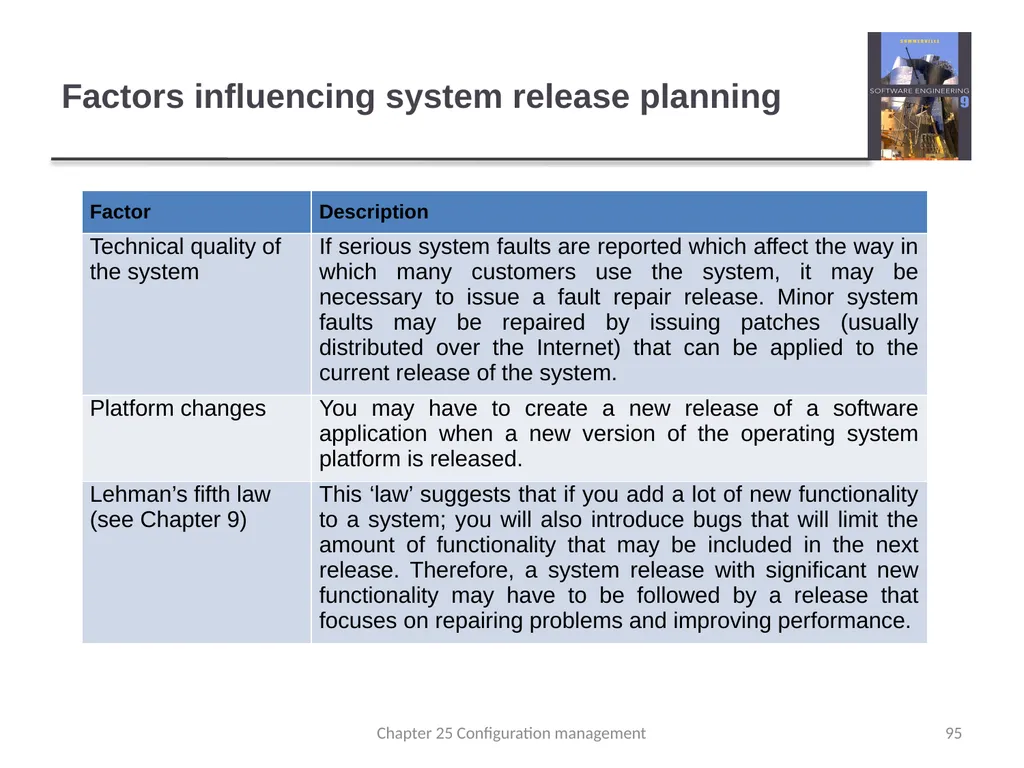
95
Factors influencing system release planning 95 Chapter 25 Configuration management<br>
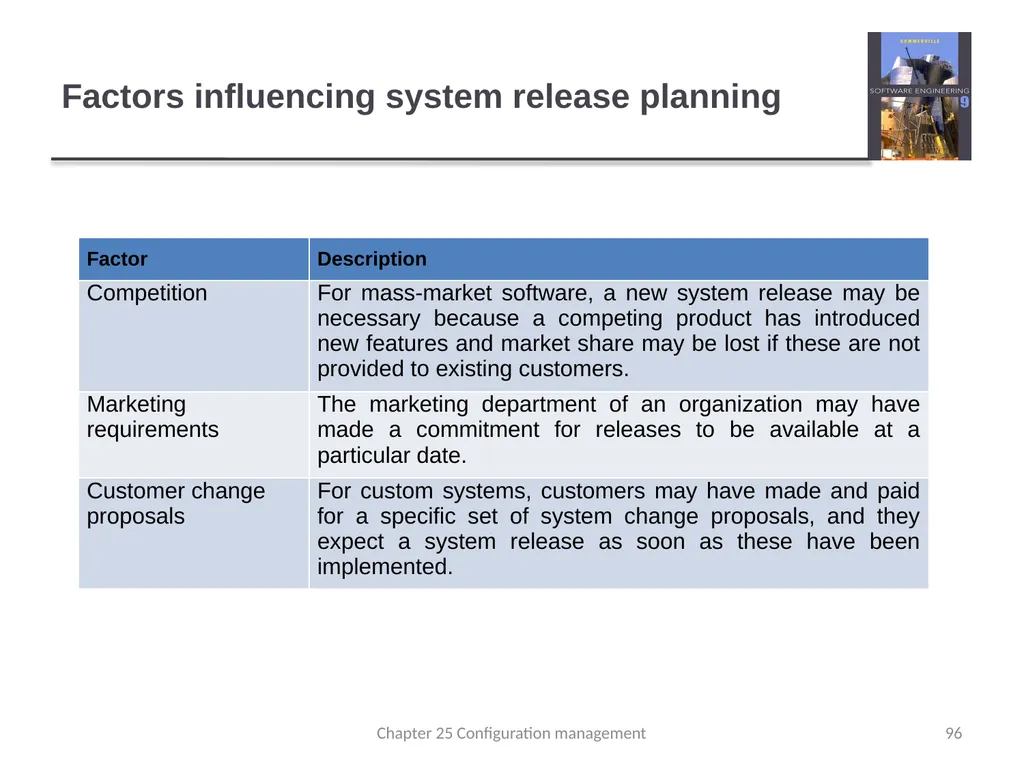
96
Factors influencing system release planning 96 Chapter 25 Configuration management<br>
97
Key points System building is the process of assembling system components into an executable program to run on a target computer system.
Software should be frequently rebuilt and tested immediately after a new version has been built. This makes it easier to detect bugs and problems that have been introduced since the last build.
System releases include executable code, data files, configuration files and documentation. Release management involves making decisions on system release dates, preparing all information for distribution and documenting each system release. Chapter 25 Configuration management 97<br>
Software should be frequently rebuilt and tested immediately after a new version has been built. This makes it easier to detect bugs and problems that have been introduced since the last build.
System releases include executable code, data files, configuration files and documentation. Release management involves making decisions on system release dates, preparing all information for distribution and documenting each system release. Chapter 25 Configuration management 97<br>