
Computer Science Curriculum:KS3 YEAR 7-13
LO
Published · 24 slides · 0 views
1 / 1
Description
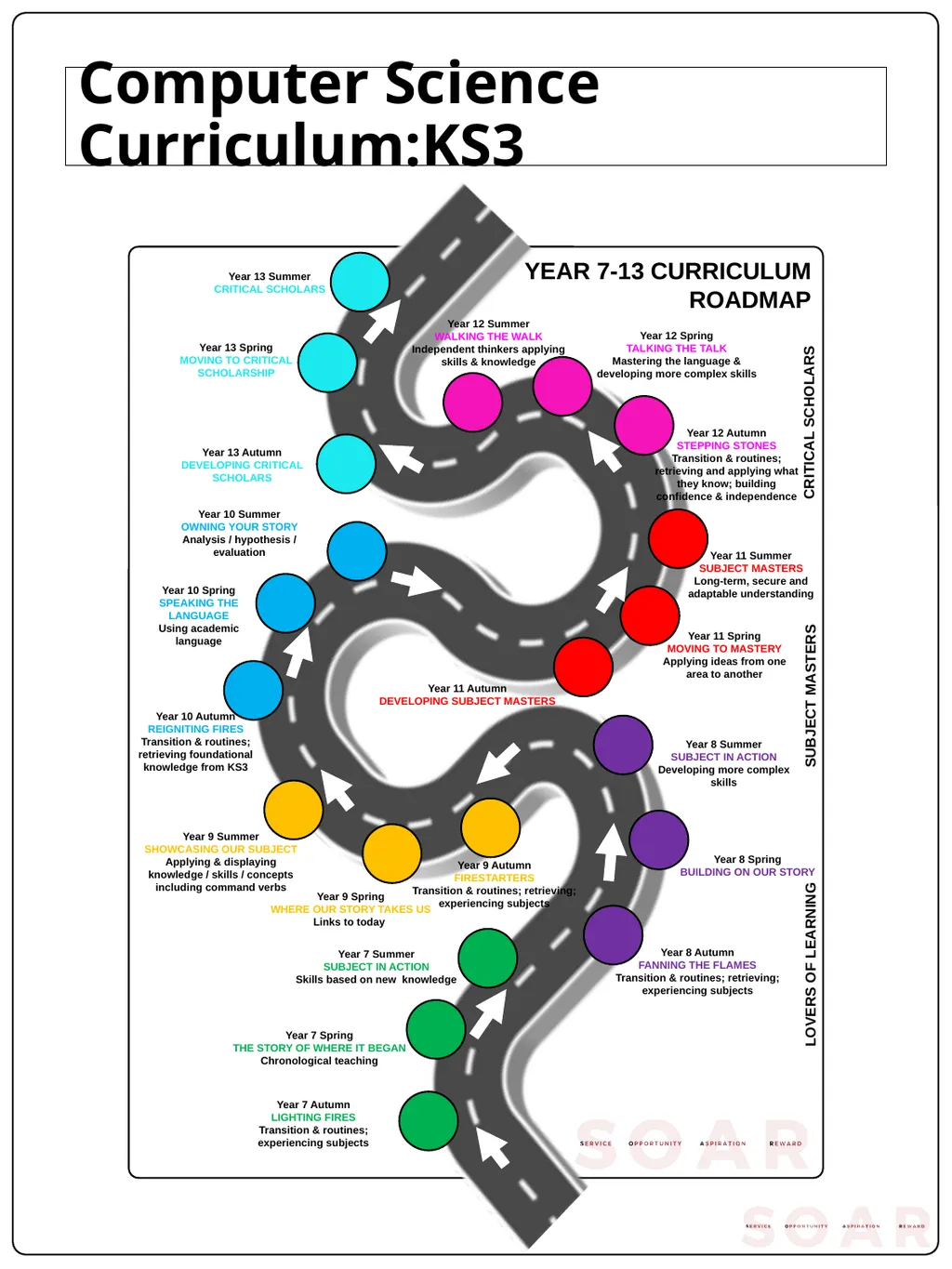
Computer Science Curriculum:KS3 YEAR 7-13 CURRICULUM ROADMAP Year 7 Autumn LIGHTING FIRES Transition routines; experiencing subjects Year 8 Summer SUBJECT IN ACTION Developing more complex skills Year 7 Summer SUBJECT IN ACTION Skills
Related Topics
Share
Embed code
Download this presentation From Below
"Computer Science Curriculum:KS3 YEAR 7-13" is the property of its rightful owner. Permission is granted to download and print the materials on this website for personal, non-commercial use only, and to display it on your personal computer provided you do not modify the materials and that you retain all copyright notices contained in the materials. By downloading content from our website, you accept the terms of this agreement.
Presentation Transcript
01
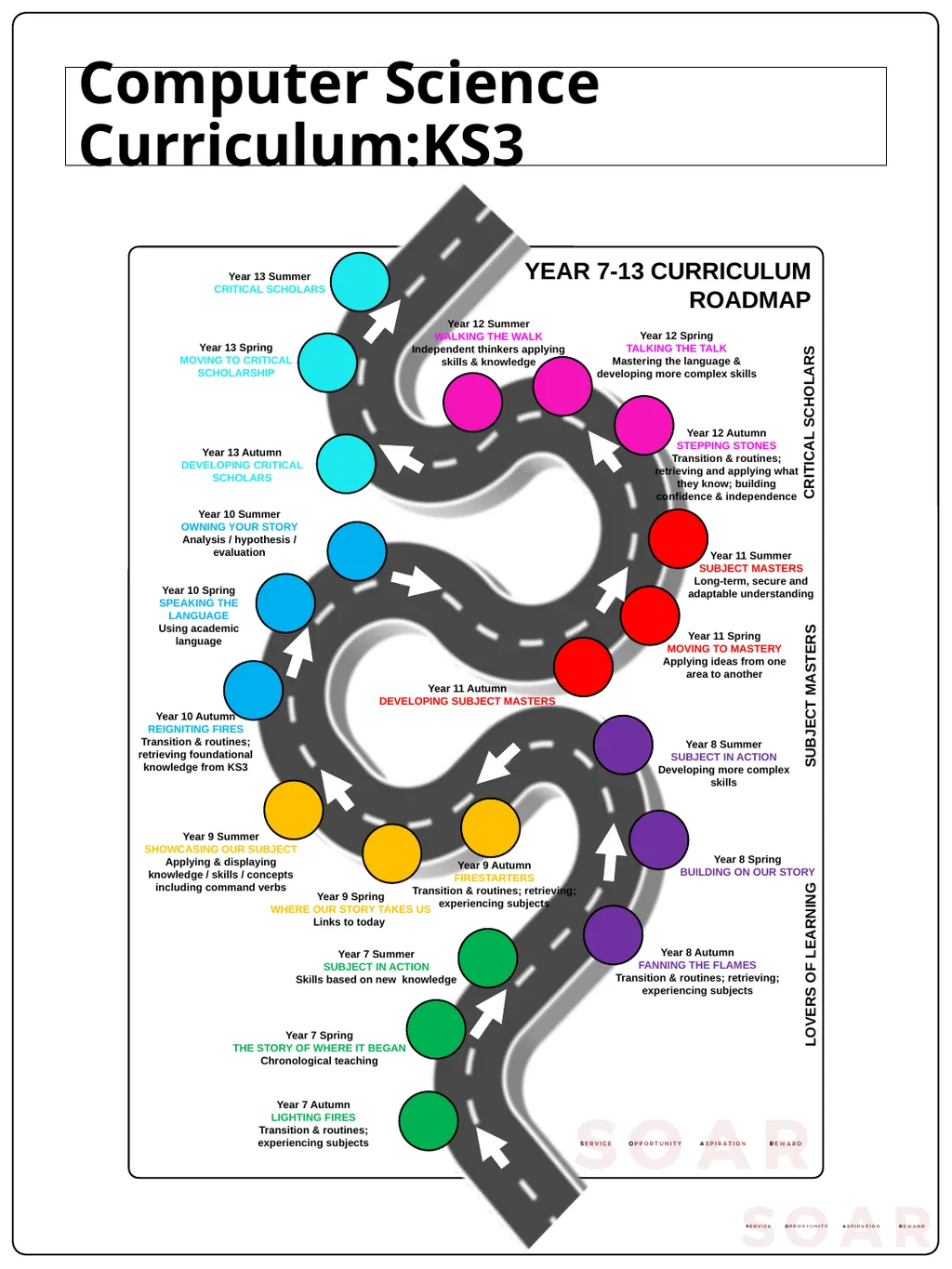
Computer Science Curriculum:KS3 YEAR 7-13 CURRICULUM ROADMAP Year 7 Autumn
LIGHTING FIRES
Transition & routines; experiencing subjects Year 8 Summer
SUBJECT IN ACTION
Developing more complex skills Year 7 Summer
SUBJECT IN ACTION
Skills based on new knowledge Year 8 Autumn
FANNING THE FLAMES
Transition & routines; retrieving; experiencing subjects Year 8 Spring
BUILDING ON OUR STORY Year 7 Spring
THE STORY OF WHERE IT BEGAN
Chronological teaching Year 9 Autumn
FIRESTARTERS
Transition & routines; retrieving; experiencing subjects Year 9 Spring
WHERE OUR STORY TAKES US
Links to today Year 9 Summer
SHOWCASING OUR SUBJECT
Applying & displaying knowledge / skills / concepts including command verbs Year 10 Autumn
REIGNITING FIRES
Transition & routines; retrieving foundational knowledge from KS3 Year 10 Spring
SPEAKING THE LANGUAGE
Using academic language Year 10 Summer
OWNING YOUR STORY
Analysis / hypothesis / evaluation Year 11 Autumn
DEVELOPING SUBJECT MASTERS Year 11 Spring
MOVING TO MASTERY
Applying ideas from one area to another Year 11 Summer
SUBJECT MASTERS
Long-term, secure and adaptable understanding Year 12 Autumn
STEPPING STONES
Transition & routines; retrieving and applying what they know; building confidence & independence Year 12 Spring
TALKING THE TALK
Mastering the language & developing more complex skills Year 12 Summer
WALKING THE WALK
Independent thinkers applying skills & knowledge Year 13 Autumn
DEVELOPING CRITICAL SCHOLARS Year 13 Spring
MOVING TO CRITICAL SCHOLARSHIP Year 13 Summer
CRITICAL SCHOLARS LOVERS OF LEARNING SUBJECT MASTERS CRITICAL SCHOLARS<br>
LIGHTING FIRES
Transition & routines; experiencing subjects Year 8 Summer
SUBJECT IN ACTION
Developing more complex skills Year 7 Summer
SUBJECT IN ACTION
Skills based on new knowledge Year 8 Autumn
FANNING THE FLAMES
Transition & routines; retrieving; experiencing subjects Year 8 Spring
BUILDING ON OUR STORY Year 7 Spring
THE STORY OF WHERE IT BEGAN
Chronological teaching Year 9 Autumn
FIRESTARTERS
Transition & routines; retrieving; experiencing subjects Year 9 Spring
WHERE OUR STORY TAKES US
Links to today Year 9 Summer
SHOWCASING OUR SUBJECT
Applying & displaying knowledge / skills / concepts including command verbs Year 10 Autumn
REIGNITING FIRES
Transition & routines; retrieving foundational knowledge from KS3 Year 10 Spring
SPEAKING THE LANGUAGE
Using academic language Year 10 Summer
OWNING YOUR STORY
Analysis / hypothesis / evaluation Year 11 Autumn
DEVELOPING SUBJECT MASTERS Year 11 Spring
MOVING TO MASTERY
Applying ideas from one area to another Year 11 Summer
SUBJECT MASTERS
Long-term, secure and adaptable understanding Year 12 Autumn
STEPPING STONES
Transition & routines; retrieving and applying what they know; building confidence & independence Year 12 Spring
TALKING THE TALK
Mastering the language & developing more complex skills Year 12 Summer
WALKING THE WALK
Independent thinkers applying skills & knowledge Year 13 Autumn
DEVELOPING CRITICAL SCHOLARS Year 13 Spring
MOVING TO CRITICAL SCHOLARSHIP Year 13 Summer
CRITICAL SCHOLARS LOVERS OF LEARNING SUBJECT MASTERS CRITICAL SCHOLARS<br>
02
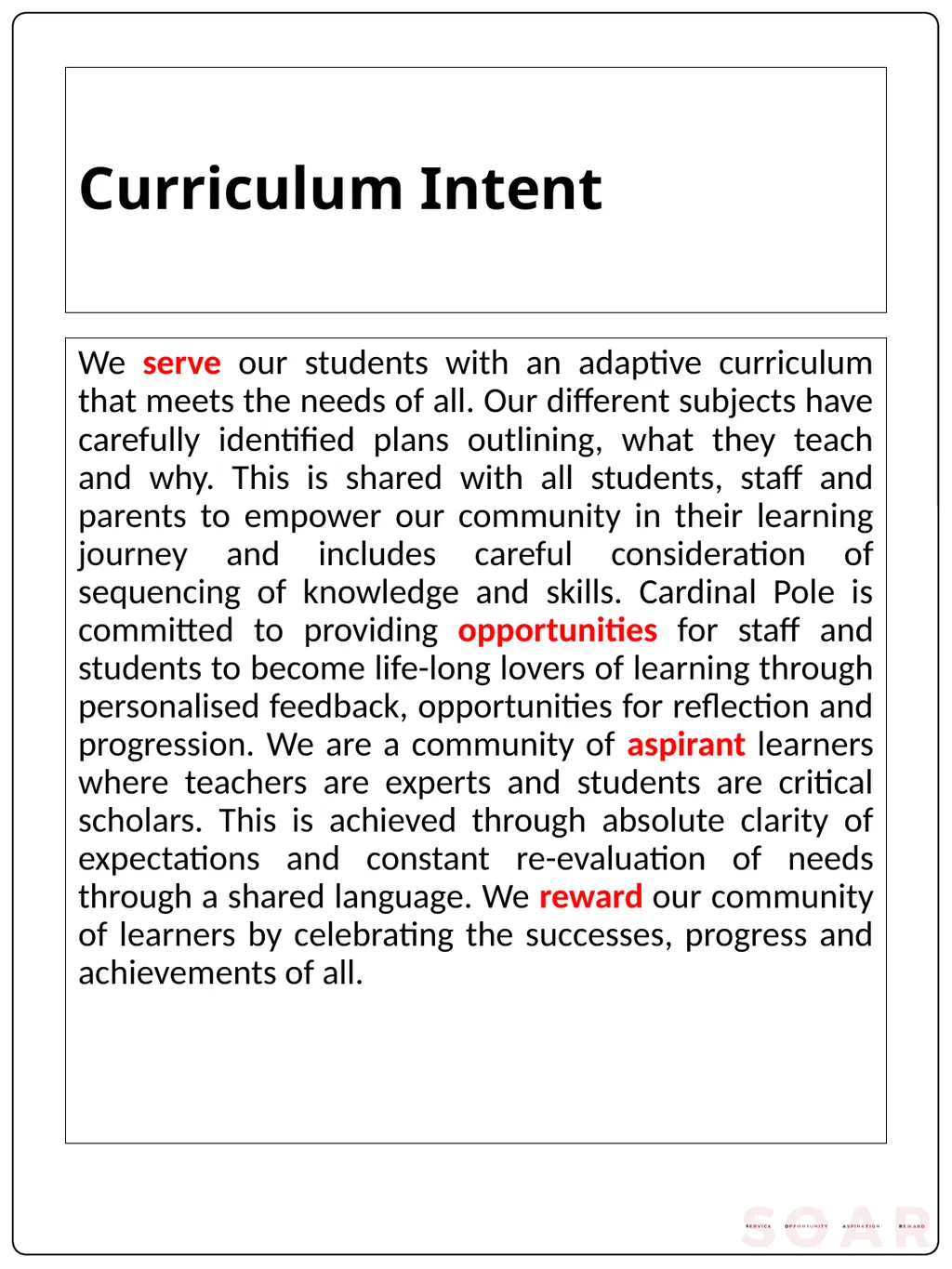
Curriculum Intent We serve our students with an adaptive curriculum that meets the needs of all. Our different subjects have carefully identified plans outlining, what they teach and why. This is shared with all students, staff and parents to empower our community in their learning journey and includes careful consideration of sequencing of knowledge and skills. Cardinal Pole is committed to providing opportunities for staff and students to become life-long lovers of learning through personalised feedback, opportunities for reflection and progression. We are a community of aspirant learners where teachers are experts and students are critical scholars. This is achieved through absolute clarity of expectations and constant re-evaluation of needs through a shared language. We reward our community of learners by celebrating the successes, progress and achievements of all.<br>
03
How do all Computer Science lessons start?
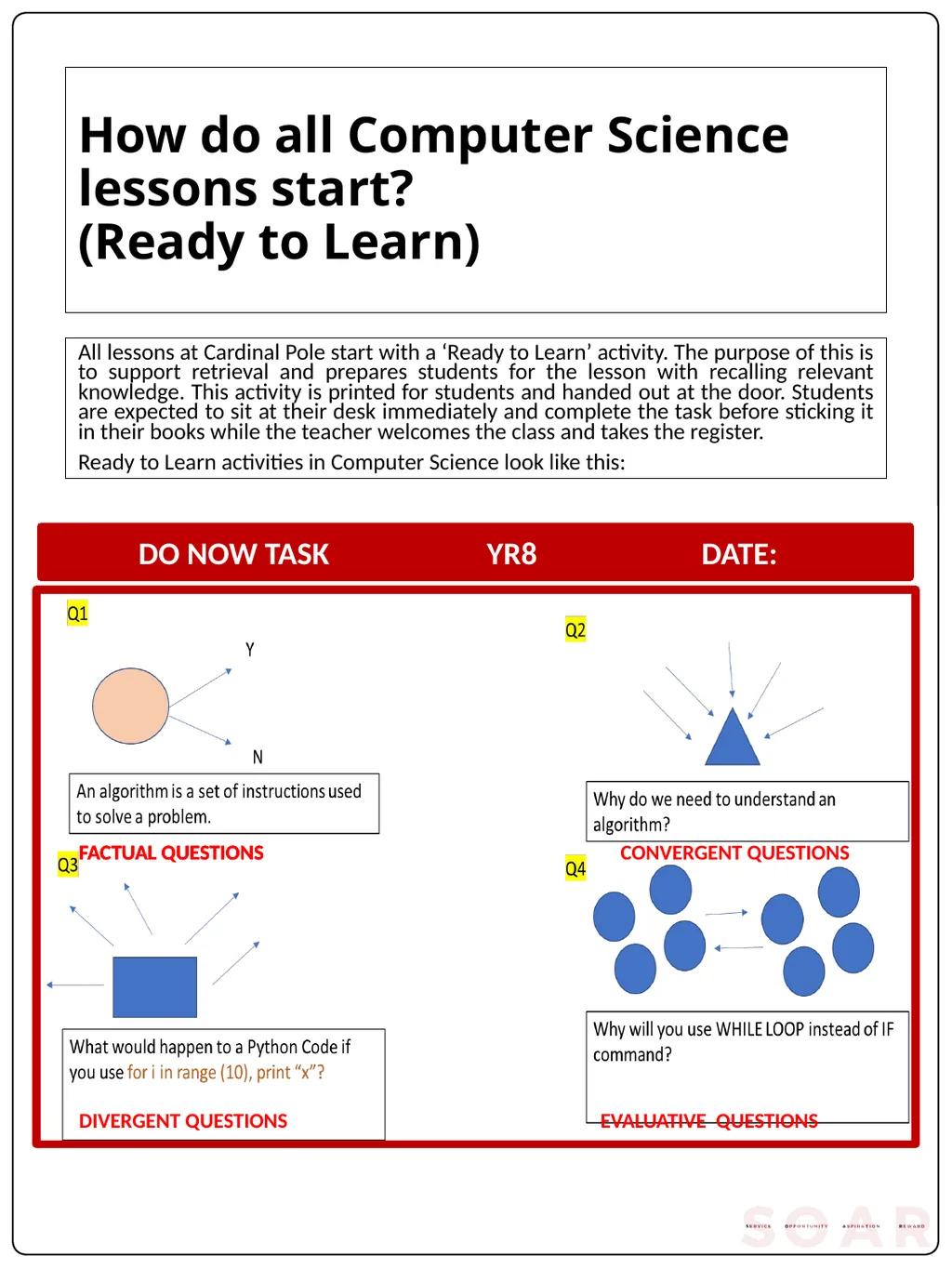
(Ready to Learn) All lessons at Cardinal Pole start with a ‘Ready to Learn’ activity. The purpose of this is to support retrieval and prepares students for the lesson with recalling relevant knowledge. This activity is printed for students and handed out at the door. Students are expected to sit at their desk immediately and complete the task before sticking it in their books while the teacher welcomes the class and takes the register.
Ready to Learn activities in Computer Science look like this: FACTUAL QUESTIONS FACTUAL QUESTIONS FACTUAL QUESTIONS CONVERGENT QUESTIONS DIVERGENT QUESTIONS EVALUATIVE QUESTIONS<br>
Ready to Learn activities in Computer Science look like this: FACTUAL QUESTIONS FACTUAL QUESTIONS FACTUAL QUESTIONS CONVERGENT QUESTIONS DIVERGENT QUESTIONS EVALUATIVE QUESTIONS<br>
04
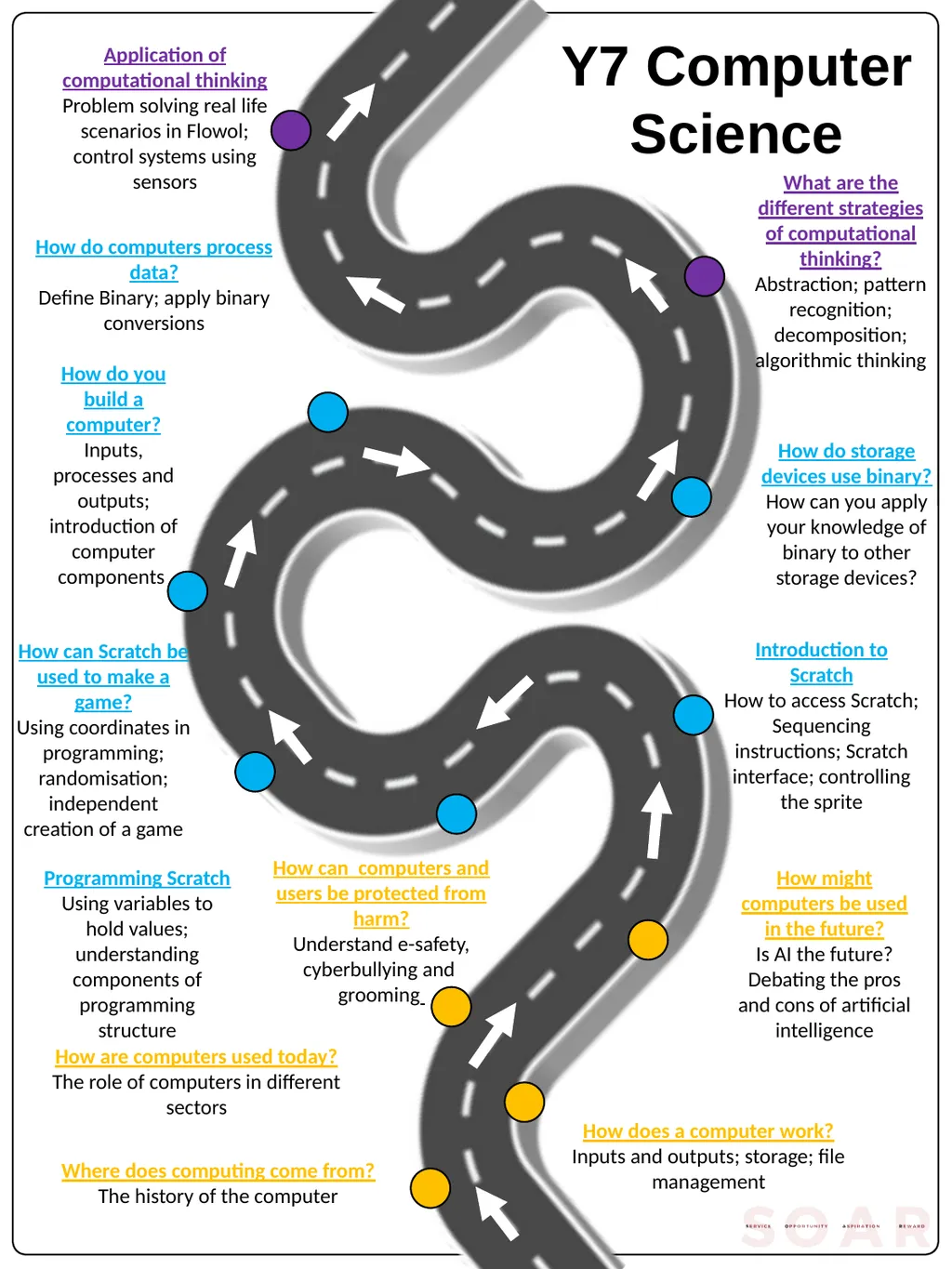
Y7 Computer Science How does a computer work?
Inputs and outputs; storage; file management Where does computing come from?
The history of the computer How might computers be used in the future?
Is AI the future? Debating the pros and cons of artificial intelligence Programming Scratch
Using variables to hold values; understanding components of programming structure How can Scratch be used to make a game?
Using coordinates in programming; randomisation; independent creation of a game How do you build a computer?
Inputs, processes and outputs; introduction of computer components What are the different strategies of computational thinking?
Abstraction; pattern recognition; decomposition; algorithmic thinking How are computers used today?
The role of computers in different sectors Introduction to Scratch
How to access Scratch; Sequencing instructions; Scratch interface; controlling the sprite How do computers process data?
Define Binary; apply binary conversions How do storage devices use binary?
How can you apply your knowledge of binary to other storage devices? Application of computational thinking
Problem solving real life scenarios in Flowol; control systems using sensors How can computers and users be protected from harm?
Understand e-safety, cyberbullying and grooming<br>
Inputs and outputs; storage; file management Where does computing come from?
The history of the computer How might computers be used in the future?
Is AI the future? Debating the pros and cons of artificial intelligence Programming Scratch
Using variables to hold values; understanding components of programming structure How can Scratch be used to make a game?
Using coordinates in programming; randomisation; independent creation of a game How do you build a computer?
Inputs, processes and outputs; introduction of computer components What are the different strategies of computational thinking?
Abstraction; pattern recognition; decomposition; algorithmic thinking How are computers used today?
The role of computers in different sectors Introduction to Scratch
How to access Scratch; Sequencing instructions; Scratch interface; controlling the sprite How do computers process data?
Define Binary; apply binary conversions How do storage devices use binary?
How can you apply your knowledge of binary to other storage devices? Application of computational thinking
Problem solving real life scenarios in Flowol; control systems using sensors How can computers and users be protected from harm?
Understand e-safety, cyberbullying and grooming<br>
05
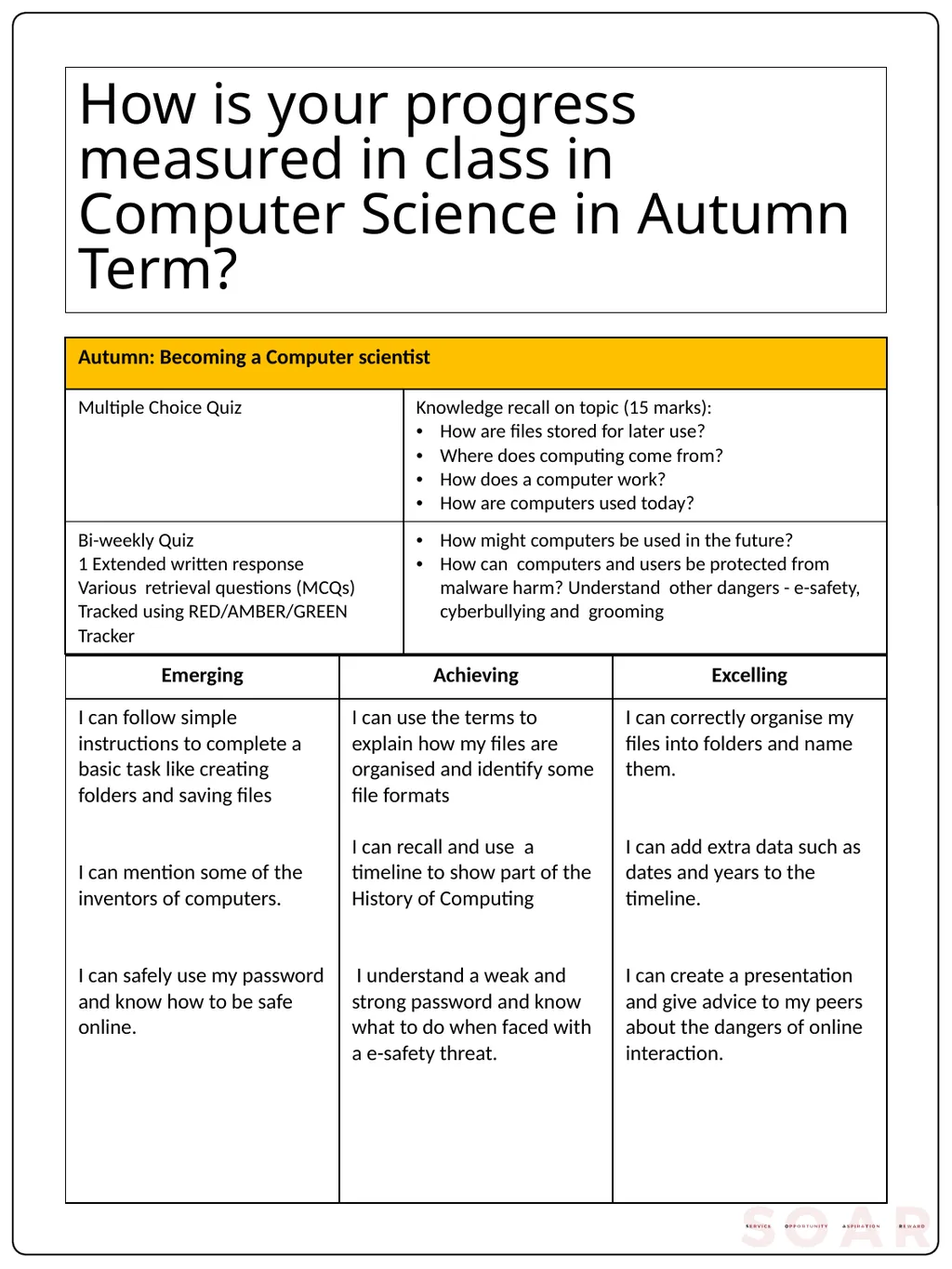
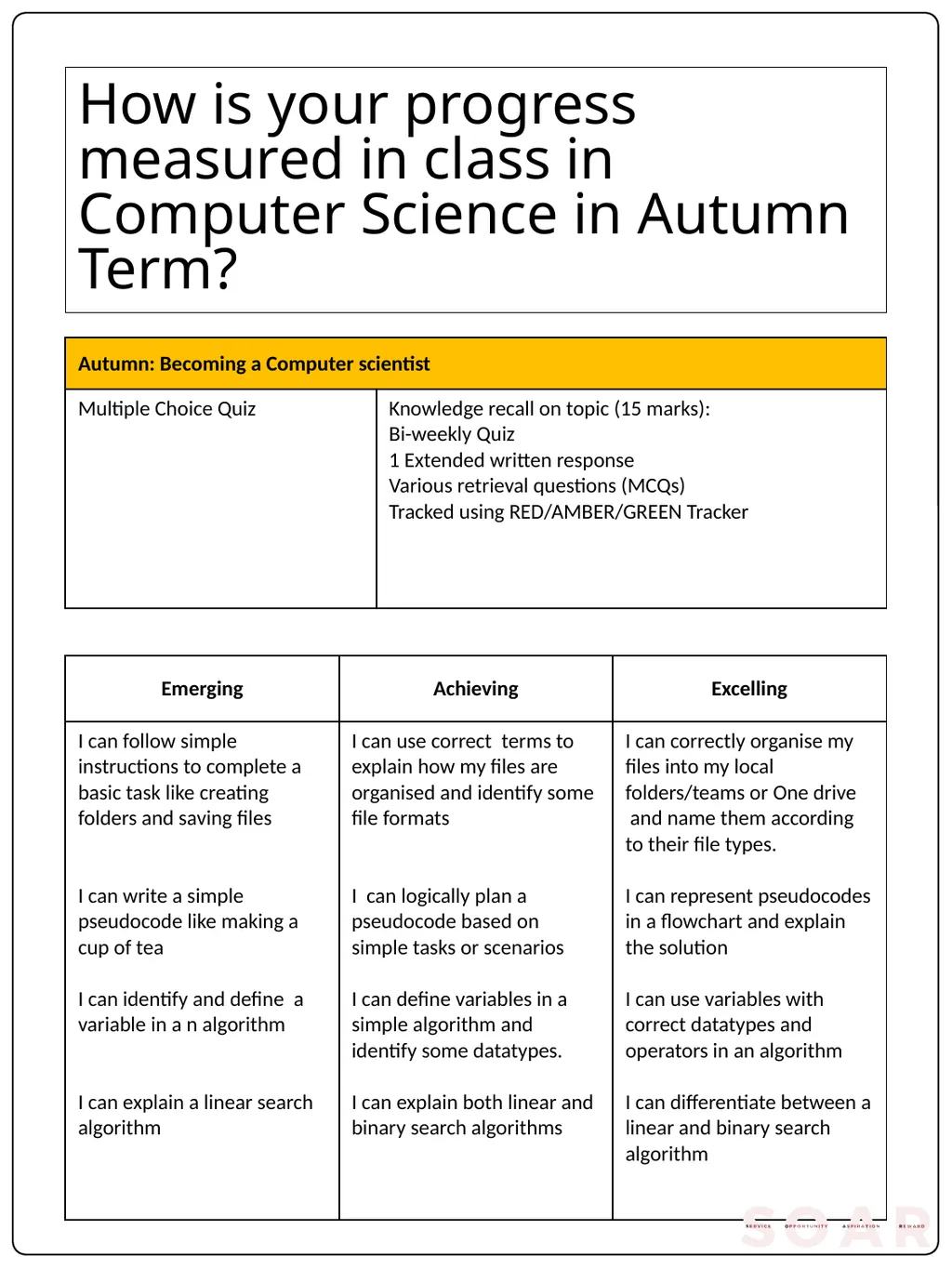
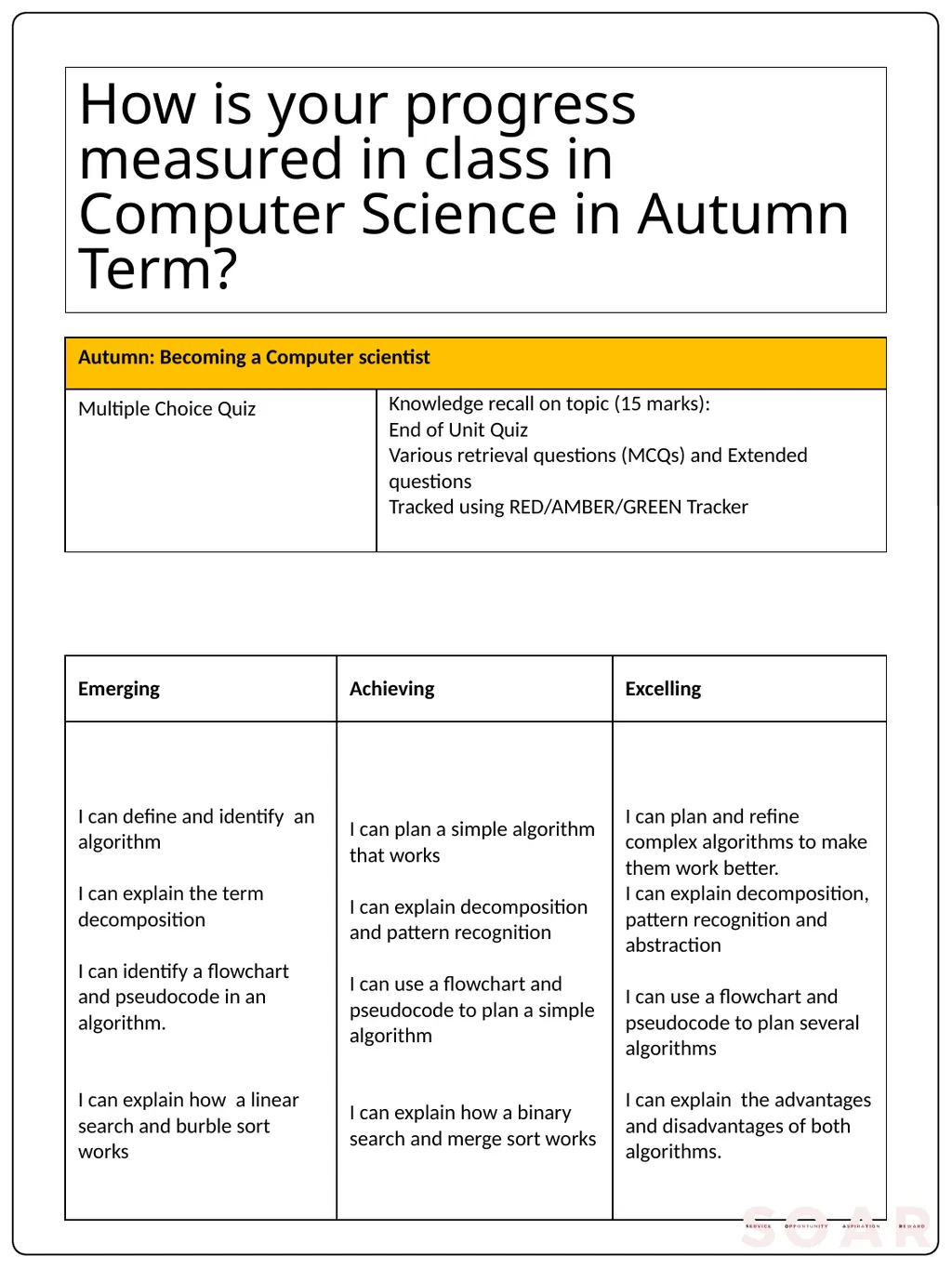
How is your progress measured in class in Computer Science in Autumn Term?<br>
06
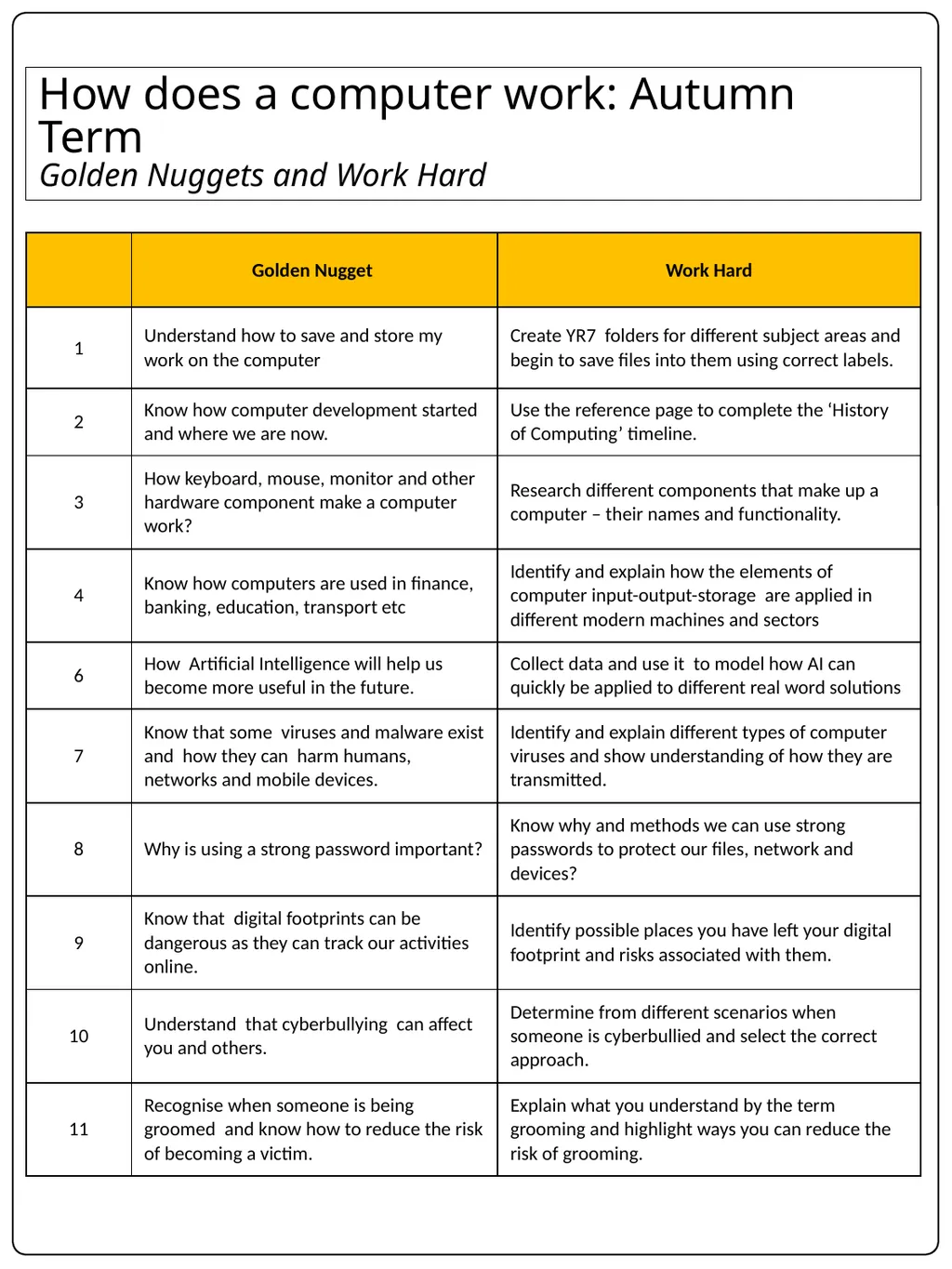
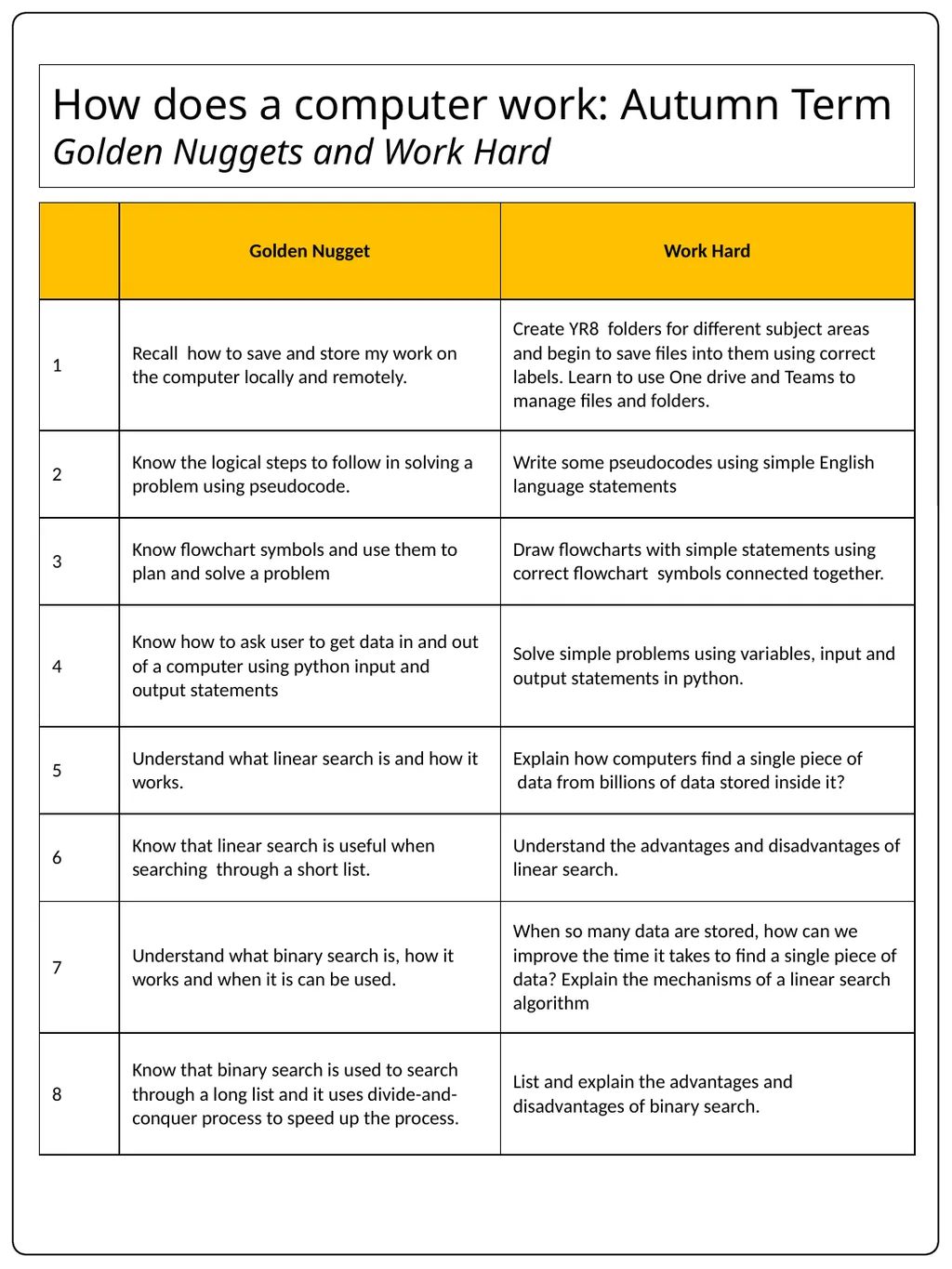
How does a computer work: Autumn Term
Golden Nuggets and Work Hard<br>
07
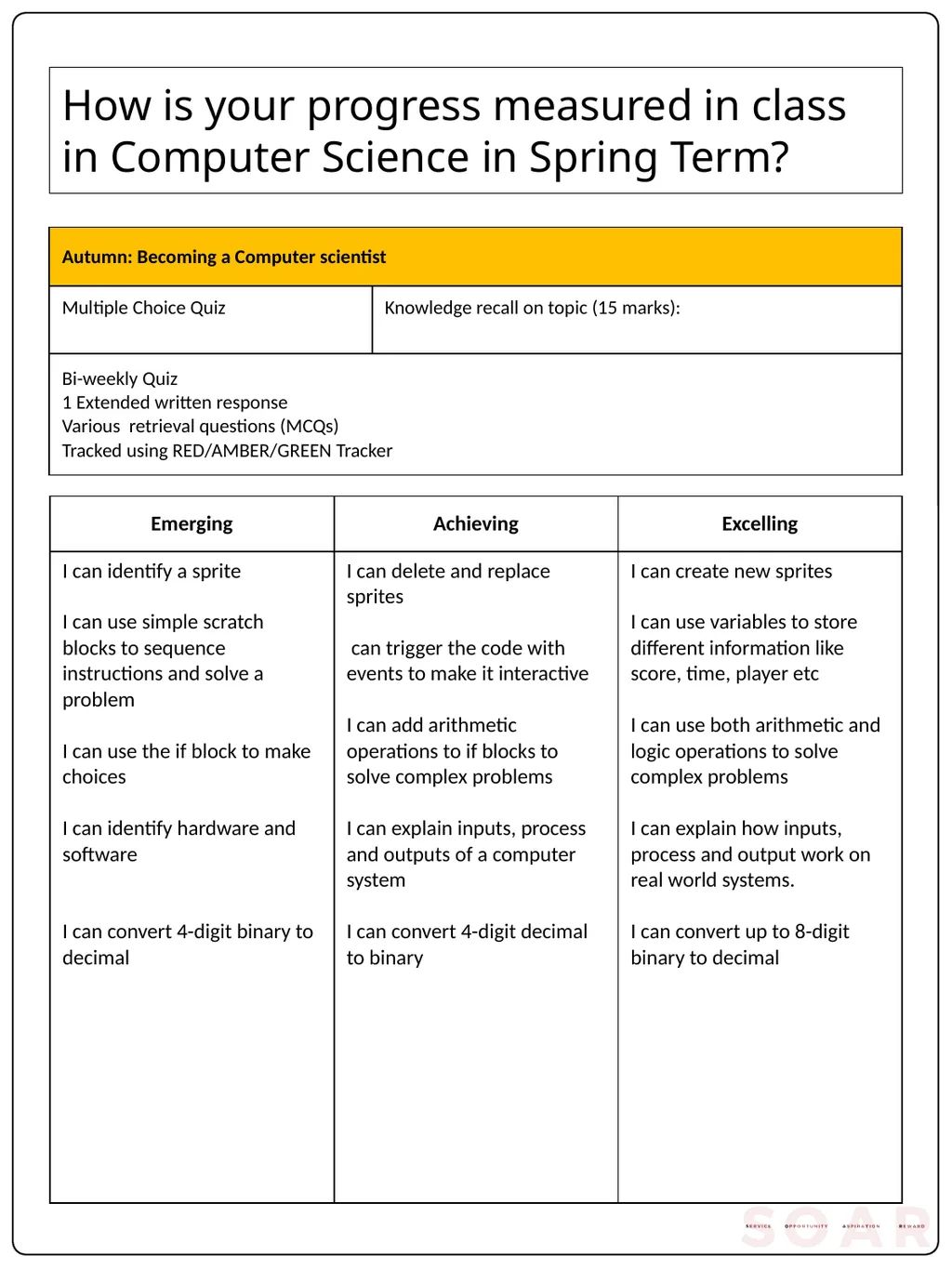
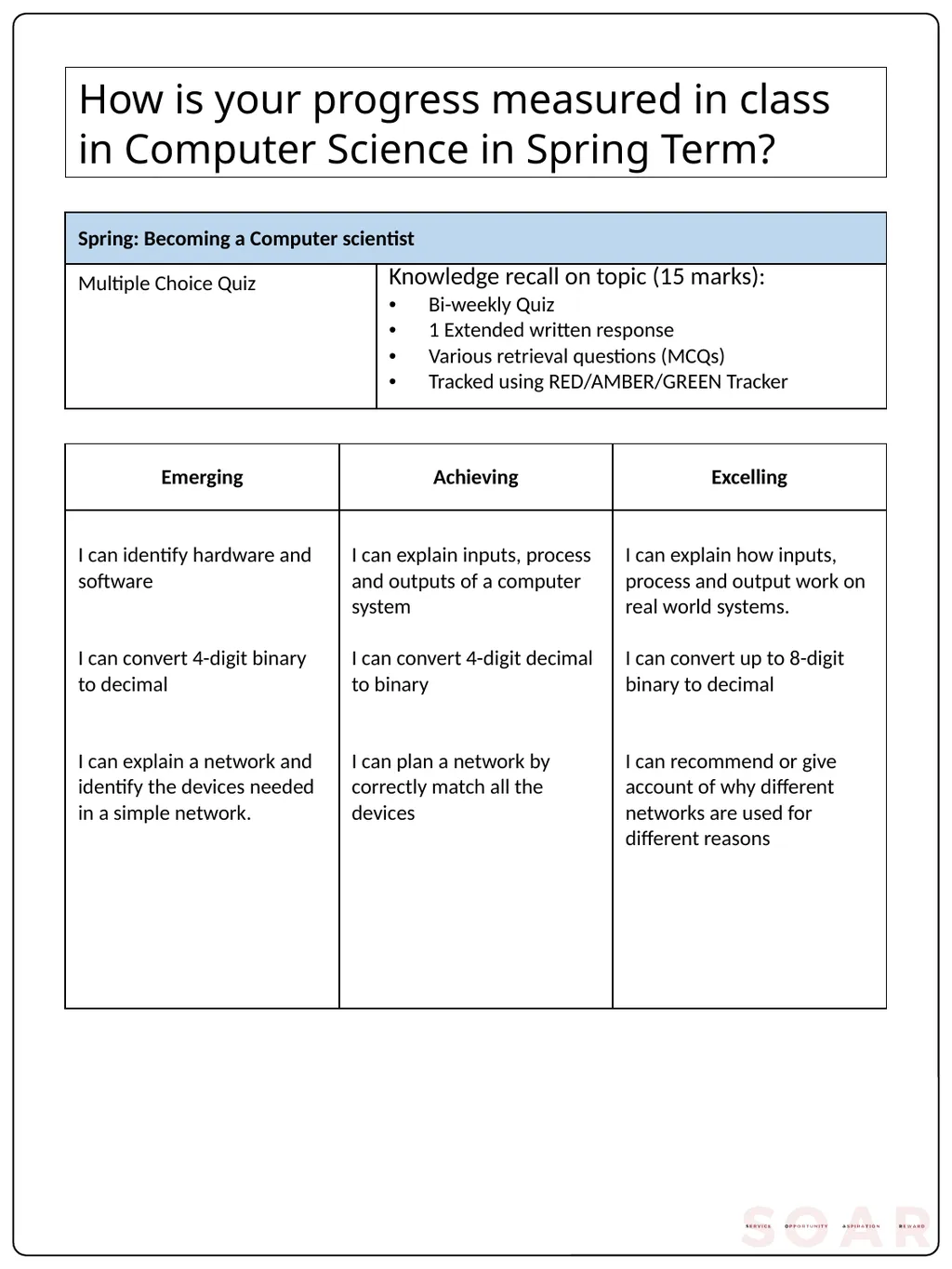
How is your progress measured in class in Computer Science in Spring Term?<br>
08
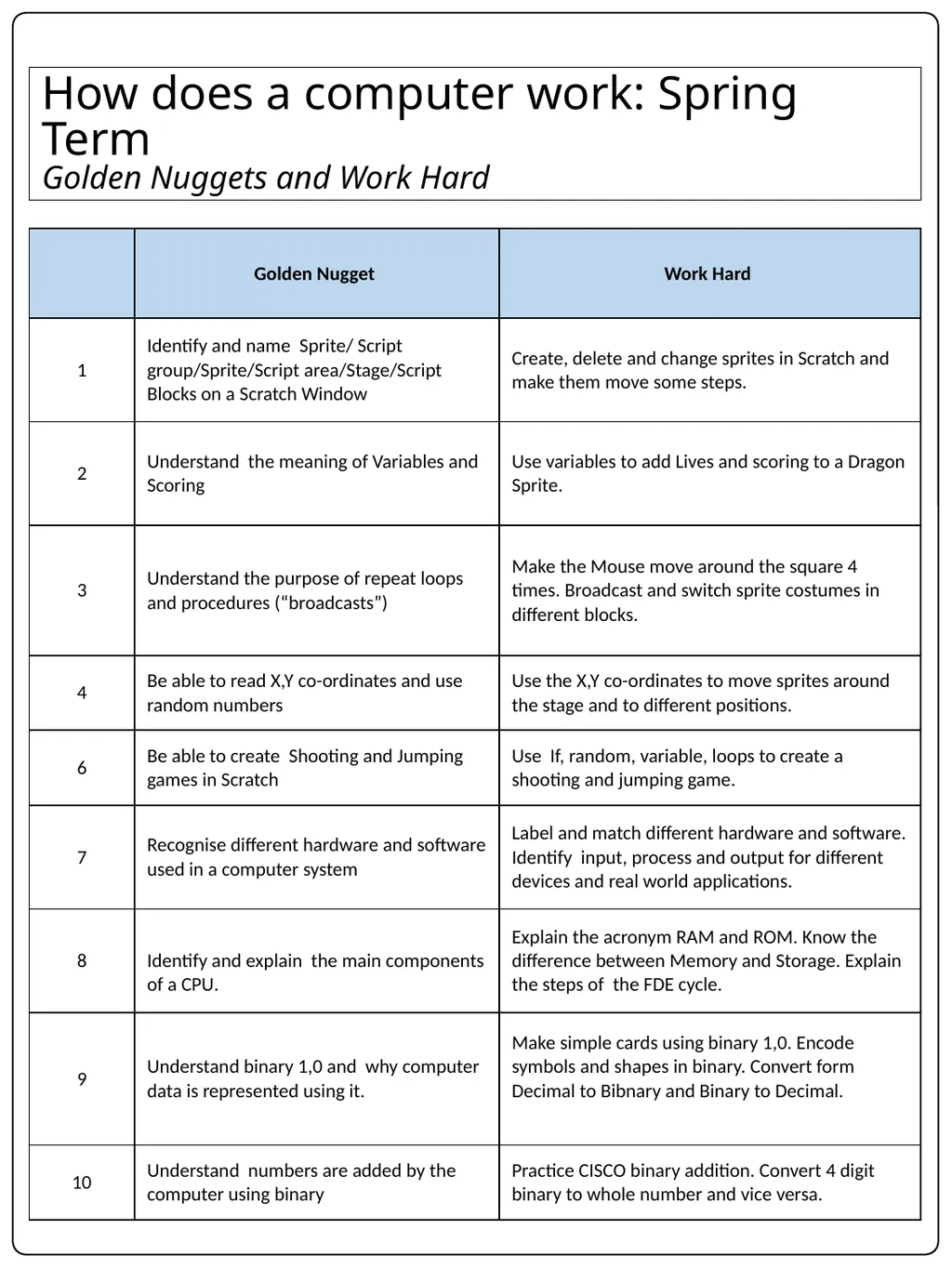
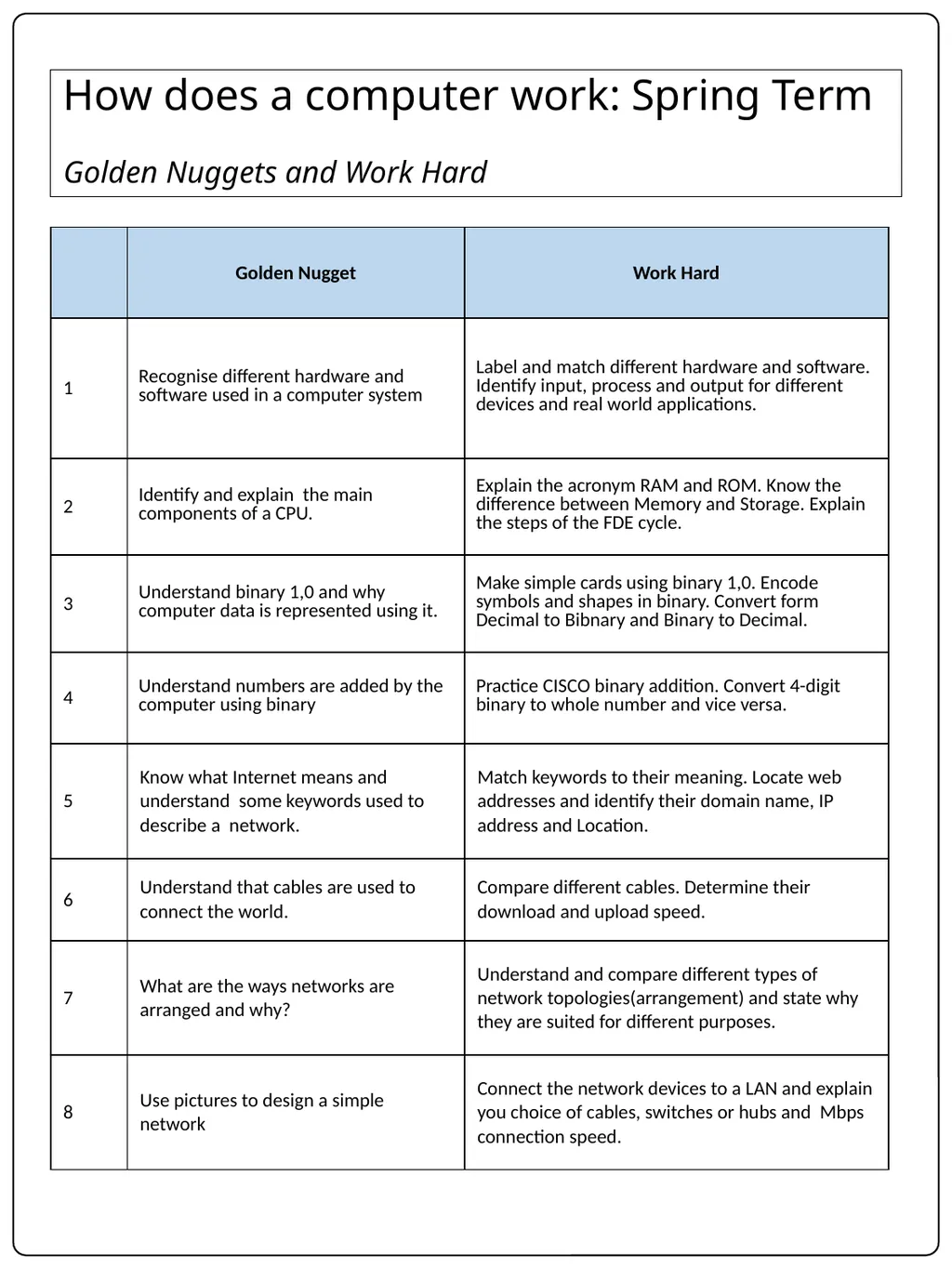
How does a computer work: Spring Term
Golden Nuggets and Work Hard<br>
09
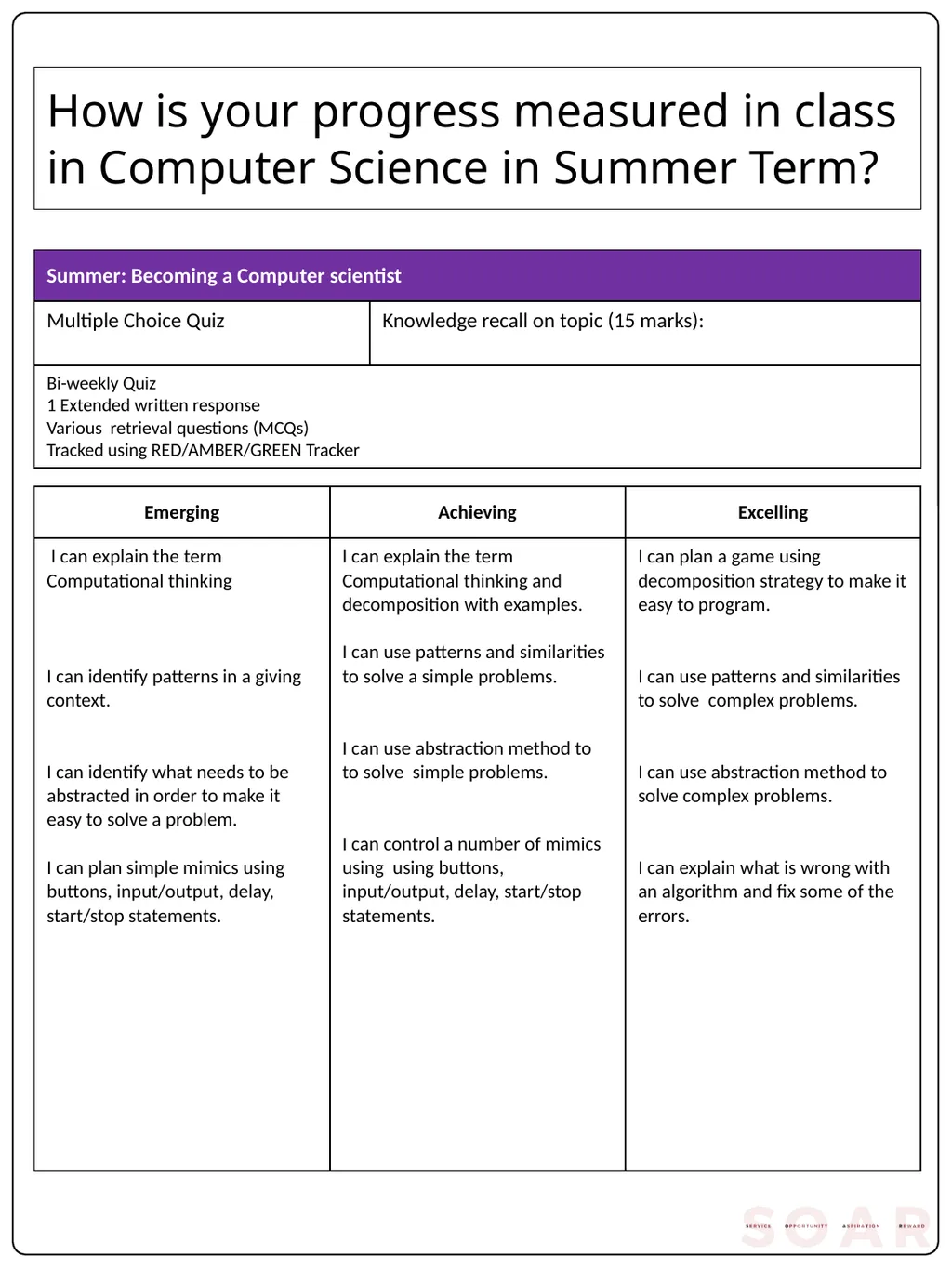
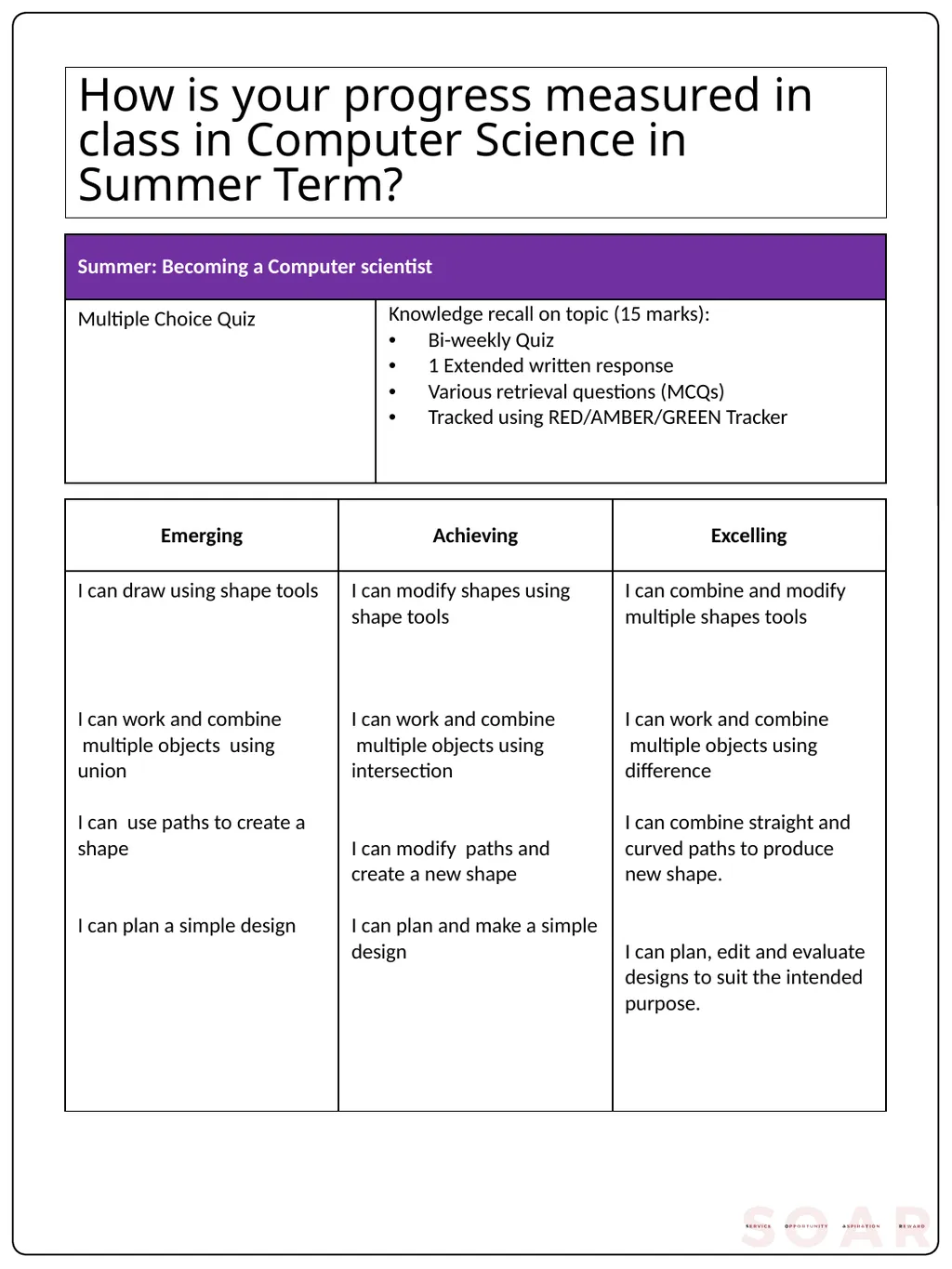
How is your progress measured in class in Computer Science in Summer Term?<br>
10
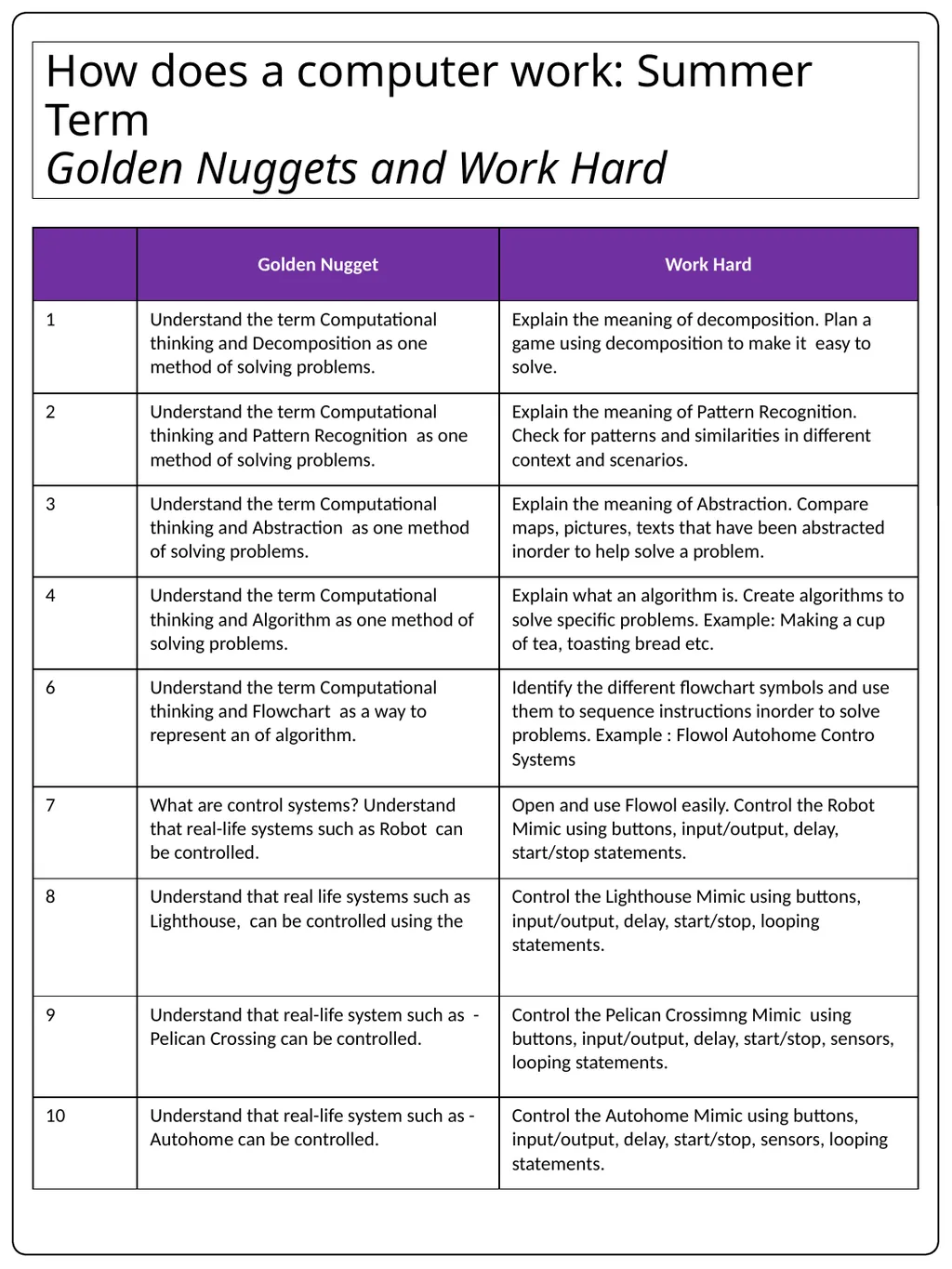
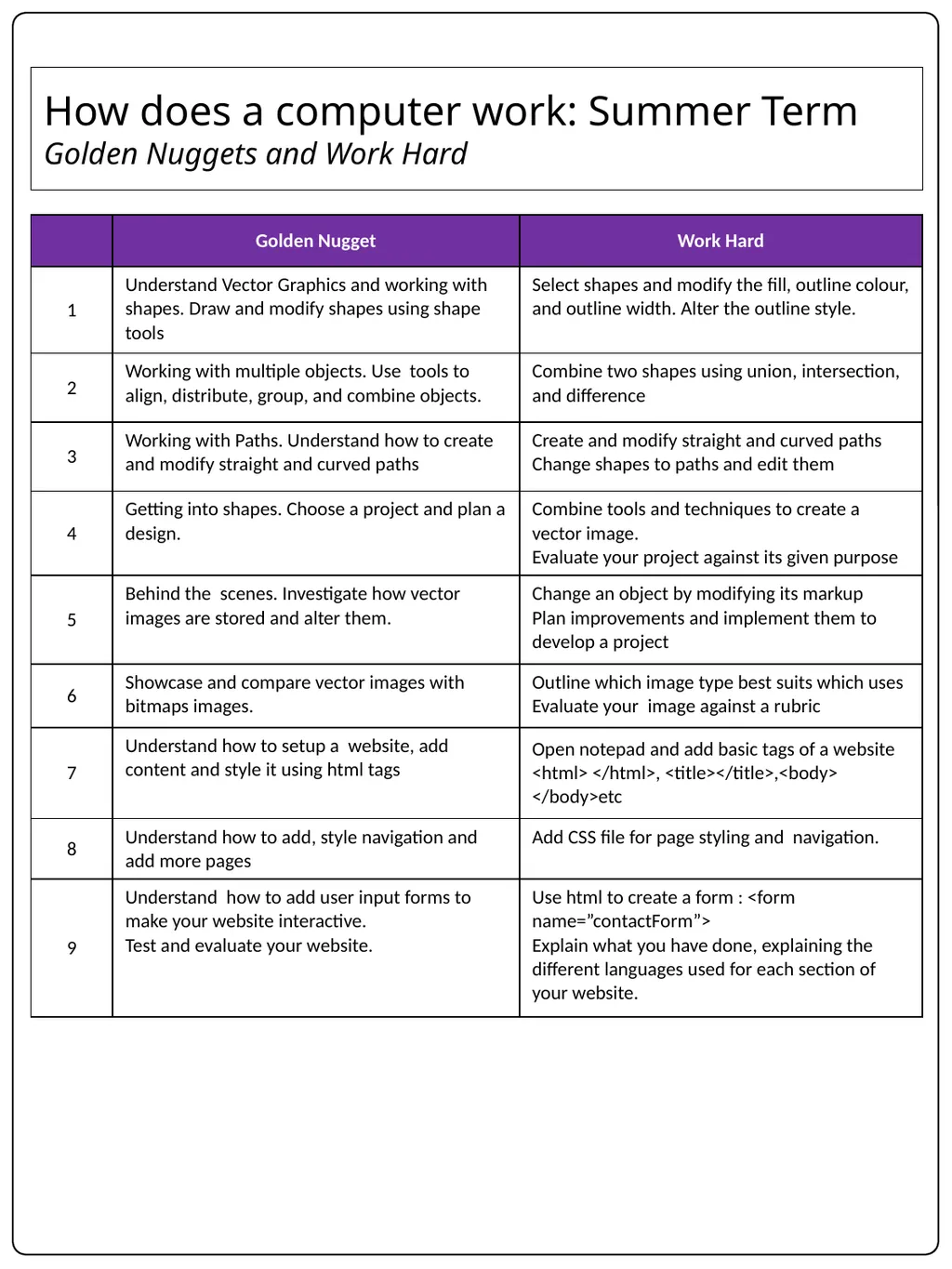
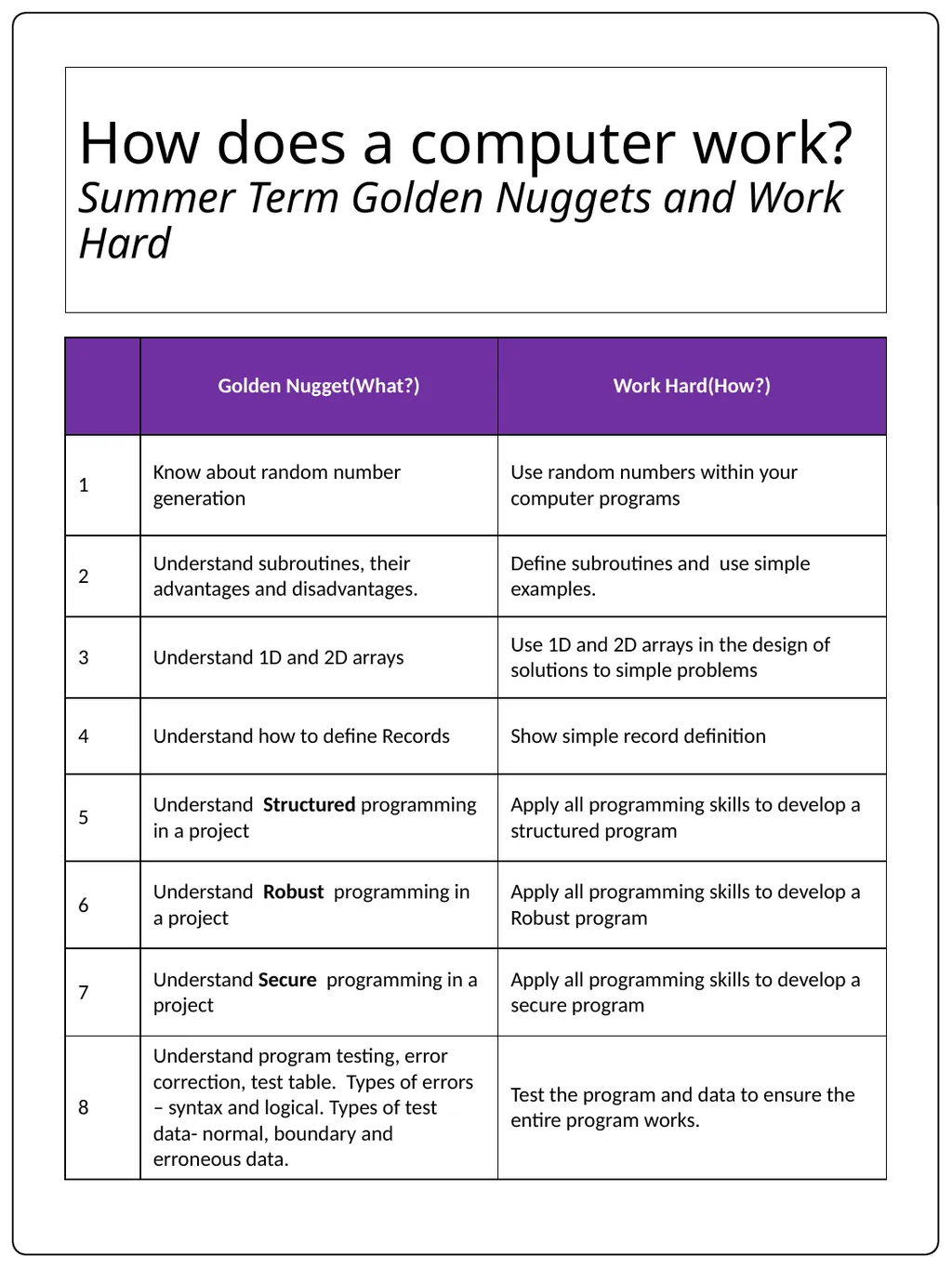
How does a computer work: Summer Term
Golden Nuggets and Work Hard<br>
11
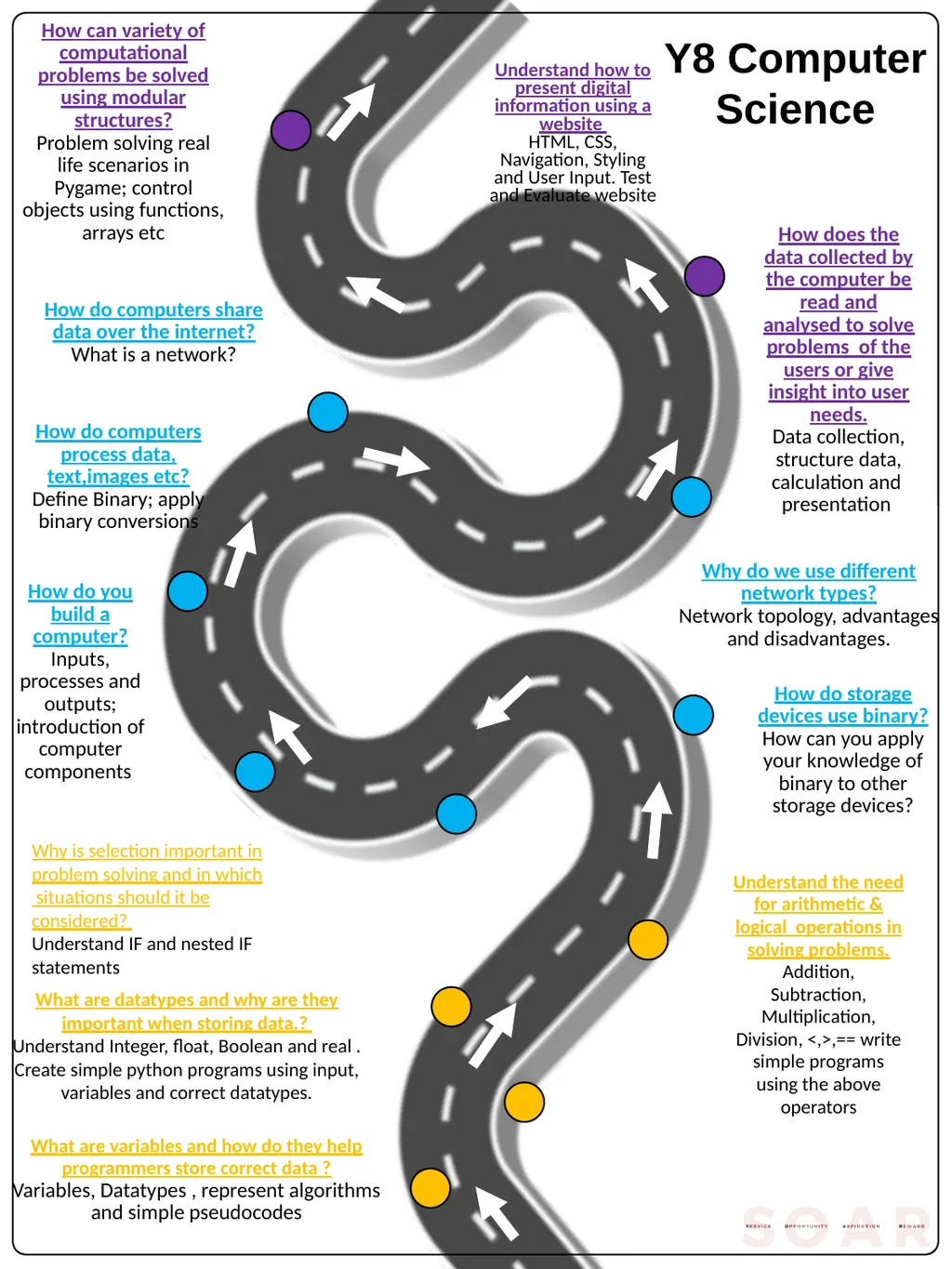
Y8 Computer Science How can variety of computational problems be solved using modular structures?
Problem solving real life scenarios in Pygame; control objects using functions, arrays etc What are variables and how do they help programmers store correct data ?
Variables, Datatypes , represent algorithms
and simple pseudocodes What are datatypes and why are they important when storing data.?
Understand Integer, float, Boolean and real . Create simple python programs using input, variables and correct datatypes. Understand the need for arithmetic & logical operations in solving problems.
Addition, Subtraction, Multiplication, Division, <,>,== write simple programs using the above operators Why is selection important in problem solving and in which situations should it be considered?
Understand IF and nested IF statements How do you build a computer?
Inputs, processes and outputs; introduction of computer components How do storage devices use binary?
How can you apply your knowledge of binary to other storage devices? How do computers process data, text,images etc?
Define Binary; apply binary conversions How does the data collected by the computer be read and analysed to solve problems of the users or give insight into user needs.
Data collection, structure data, calculation and presentation How do computers share data over the internet?
What is a network? Why do we use different network types?
Network topology, advantages and disadvantages. Understand how to present digital information using a website
HTML, CSS, Navigation, Styling and User Input. Test and Evaluate website<br>
Problem solving real life scenarios in Pygame; control objects using functions, arrays etc What are variables and how do they help programmers store correct data ?
Variables, Datatypes , represent algorithms
and simple pseudocodes What are datatypes and why are they important when storing data.?
Understand Integer, float, Boolean and real . Create simple python programs using input, variables and correct datatypes. Understand the need for arithmetic & logical operations in solving problems.
Addition, Subtraction, Multiplication, Division, <,>,== write simple programs using the above operators Why is selection important in problem solving and in which situations should it be considered?
Understand IF and nested IF statements How do you build a computer?
Inputs, processes and outputs; introduction of computer components How do storage devices use binary?
How can you apply your knowledge of binary to other storage devices? How do computers process data, text,images etc?
Define Binary; apply binary conversions How does the data collected by the computer be read and analysed to solve problems of the users or give insight into user needs.
Data collection, structure data, calculation and presentation How do computers share data over the internet?
What is a network? Why do we use different network types?
Network topology, advantages and disadvantages. Understand how to present digital information using a website
HTML, CSS, Navigation, Styling and User Input. Test and Evaluate website<br>
12
How is your progress measured in class in Computer Science in Autumn Term?<br>
13
How does a computer work: Autumn Term
Golden Nuggets and Work Hard<br>
14
How is your progress measured in class in Computer Science in Spring Term?<br>
15
How does a computer work: Spring Term
Golden Nuggets and Work Hard<br>
16
How is your progress measured in class in Computer Science in Summer Term?<br>
17
How does a computer work: Summer Term
Golden Nuggets and Work Hard<br>
18
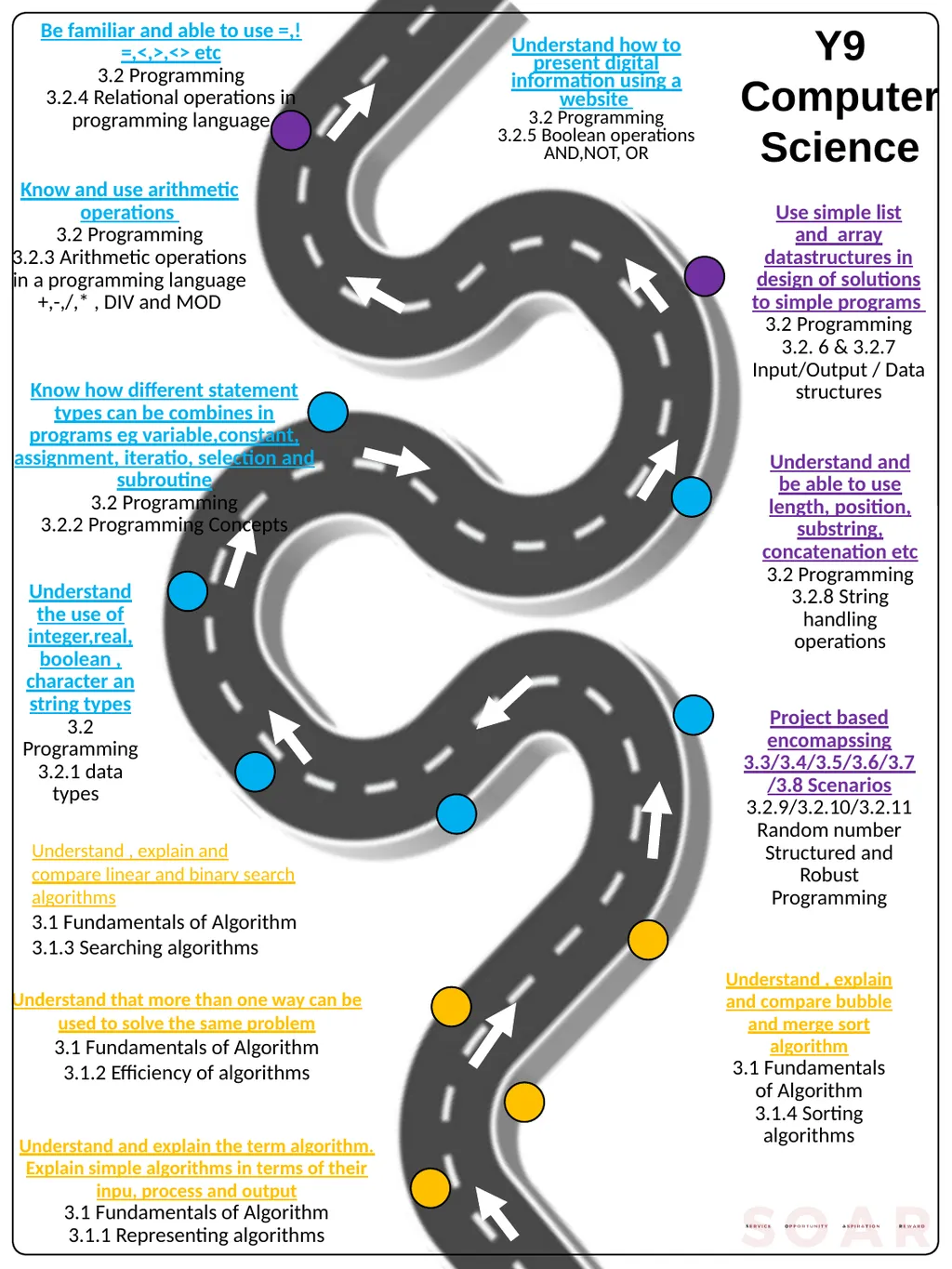
Y9 Computer Science Be familiar and able to use =,!=,<,>,<> etc
3.2 Programming
3.2.4 Relational operations in programming language Understand and explain the term algorithm. Explain simple algorithms in terms of their inpu, process and output
3.1 Fundamentals of Algorithm
3.1.1 Representing algorithms Understand that more than one way can be used to solve the same problem
3.1 Fundamentals of Algorithm
3.1.2 Efficiency of algorithms Understand , explain and compare bubble and merge sort algorithm
3.1 Fundamentals of Algorithm
3.1.4 Sorting algorithms Understand , explain and compare linear and binary search algorithms
3.1 Fundamentals of Algorithm
3.1.3 Searching algorithms Understand the use of integer,real, boolean , character an string types
3.2 Programming
3.2.1 data types Project based encomapssing 3.3/3.4/3.5/3.6/3.7/3.8 Scenarios
3.2.9/3.2.10/3.2.11
Random number
Structured and Robust Programming Know how different statement types can be combines in programs eg variable,constant, assignment, iteratio, selection and subroutine
3.2 Programming
3.2.2 Programming Concepts Use simple list and array datastructures in design of solutions to simple programs
3.2 Programming
3.2. 6 & 3.2.7 Input/Output / Data structures Know and use arithmetic operations
3.2 Programming
3.2.3 Arithmetic operations in a programming language
+,-,/,* , DIV and MOD Understand and be able to use length, position, substring, concatenation etc
3.2 Programming
3.2.8 String handling operations Understand how to present digital information using a website
3.2 Programming
3.2.5 Boolean operations AND,NOT, OR<br>
3.2 Programming
3.2.4 Relational operations in programming language Understand and explain the term algorithm. Explain simple algorithms in terms of their inpu, process and output
3.1 Fundamentals of Algorithm
3.1.1 Representing algorithms Understand that more than one way can be used to solve the same problem
3.1 Fundamentals of Algorithm
3.1.2 Efficiency of algorithms Understand , explain and compare bubble and merge sort algorithm
3.1 Fundamentals of Algorithm
3.1.4 Sorting algorithms Understand , explain and compare linear and binary search algorithms
3.1 Fundamentals of Algorithm
3.1.3 Searching algorithms Understand the use of integer,real, boolean , character an string types
3.2 Programming
3.2.1 data types Project based encomapssing 3.3/3.4/3.5/3.6/3.7/3.8 Scenarios
3.2.9/3.2.10/3.2.11
Random number
Structured and Robust Programming Know how different statement types can be combines in programs eg variable,constant, assignment, iteratio, selection and subroutine
3.2 Programming
3.2.2 Programming Concepts Use simple list and array datastructures in design of solutions to simple programs
3.2 Programming
3.2. 6 & 3.2.7 Input/Output / Data structures Know and use arithmetic operations
3.2 Programming
3.2.3 Arithmetic operations in a programming language
+,-,/,* , DIV and MOD Understand and be able to use length, position, substring, concatenation etc
3.2 Programming
3.2.8 String handling operations Understand how to present digital information using a website
3.2 Programming
3.2.5 Boolean operations AND,NOT, OR<br>
19
How is your progress measured in class in Computer Science in Autumn Term?<br>
20
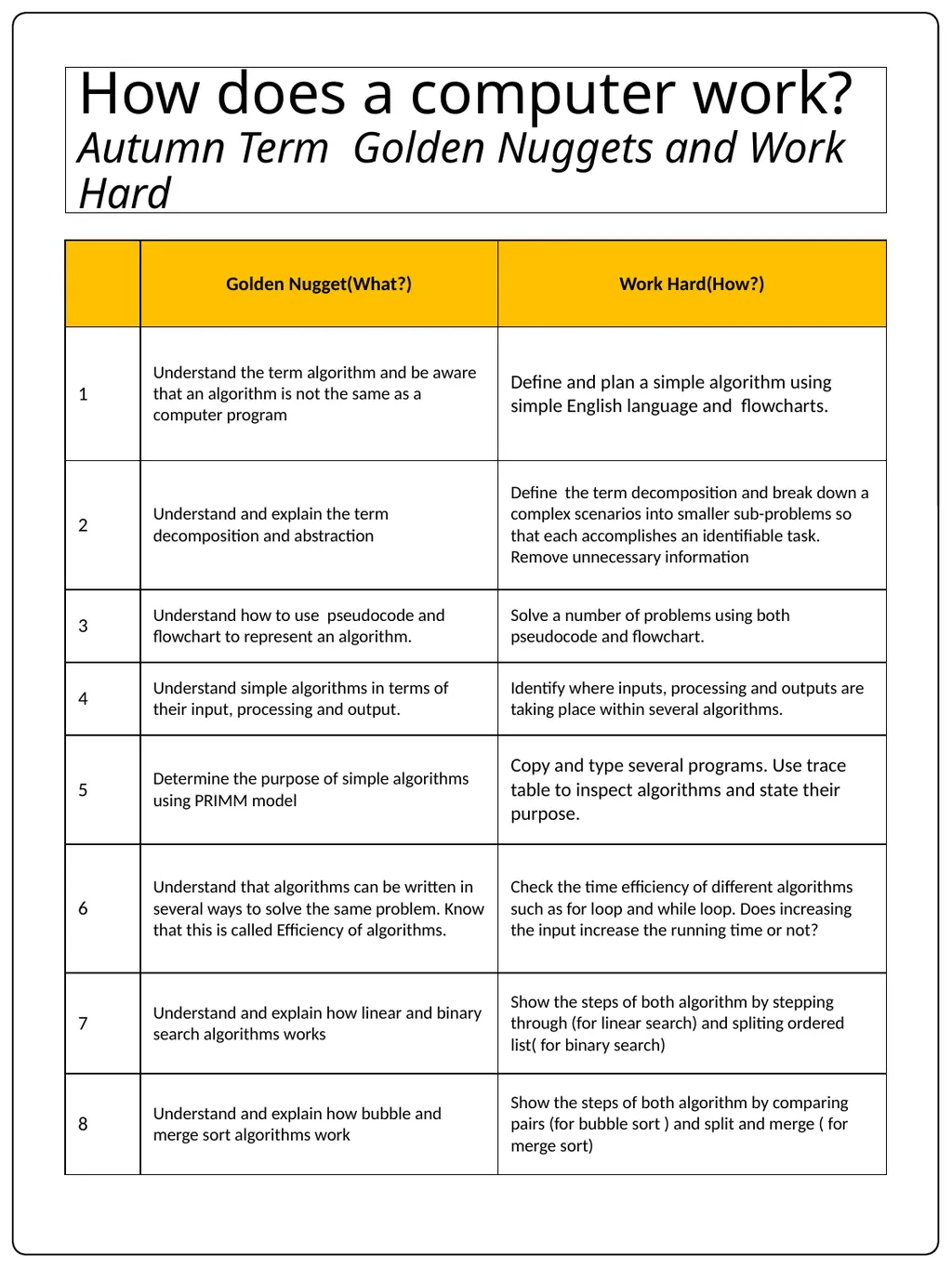
How does a computer work? Autumn Term Golden Nuggets and Work Hard<br>
21
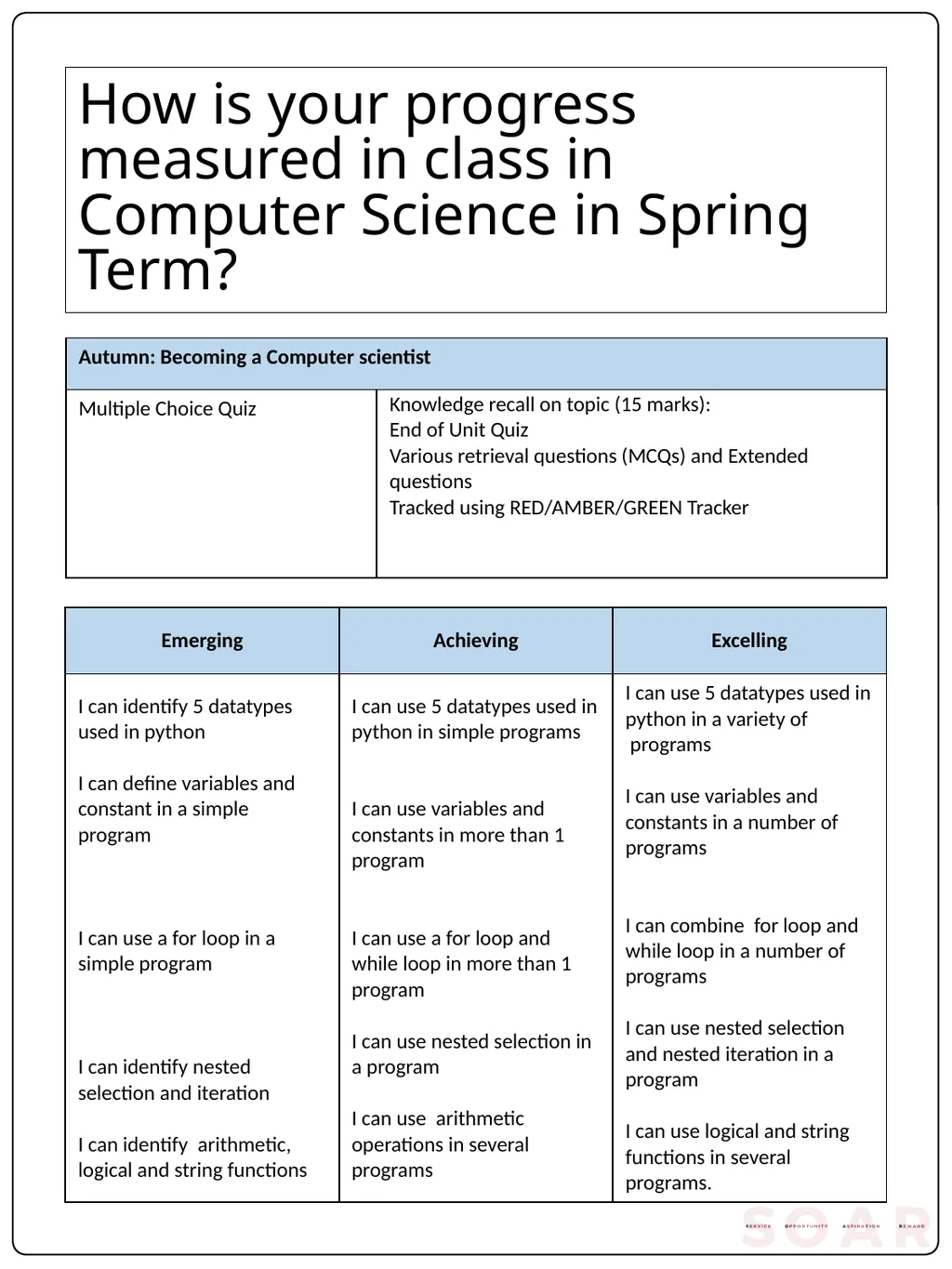
How is your progress measured in class in Computer Science in Spring Term?<br>
22
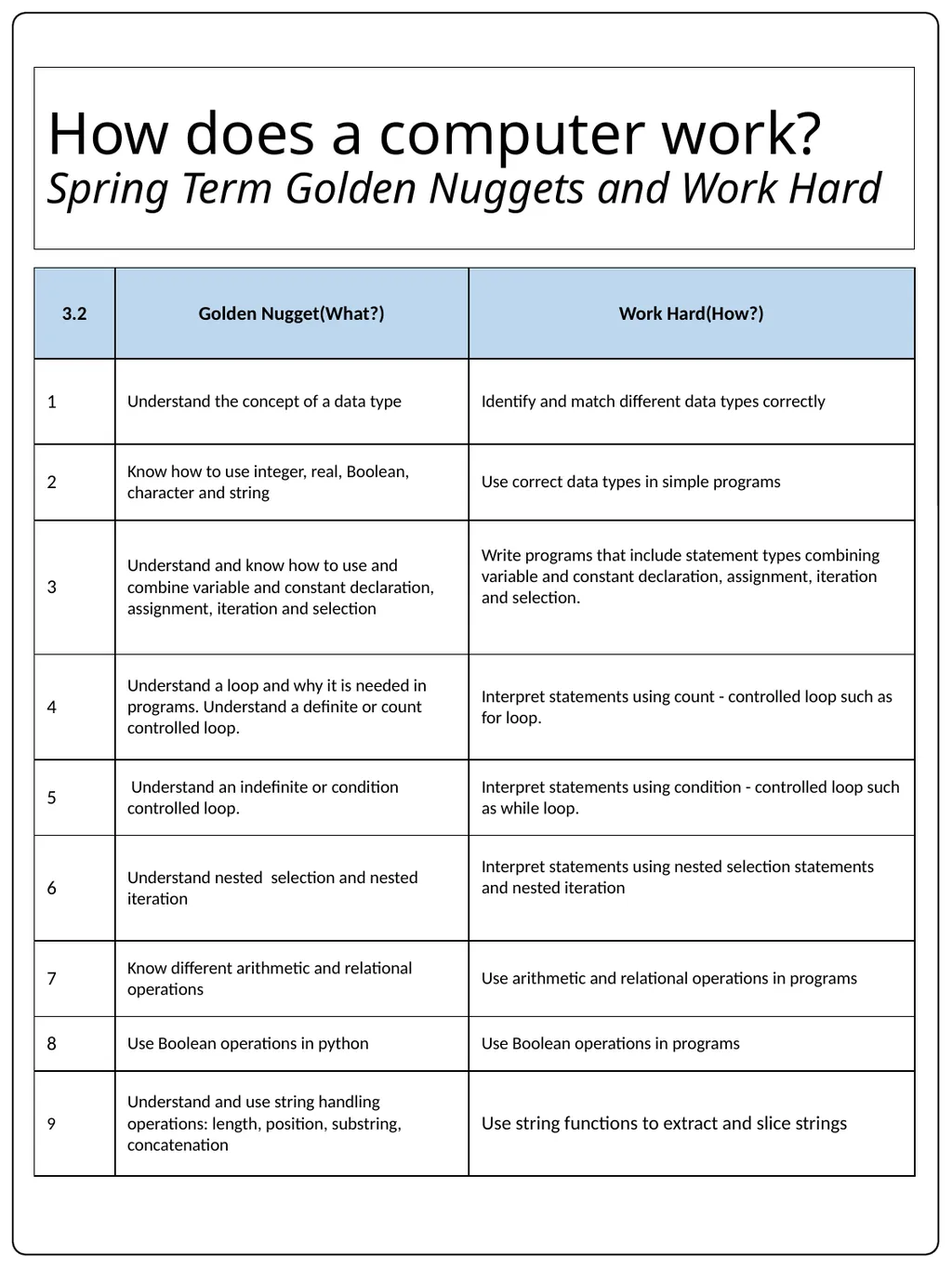
How does a computer work?
Spring Term Golden Nuggets and Work Hard<br>
23
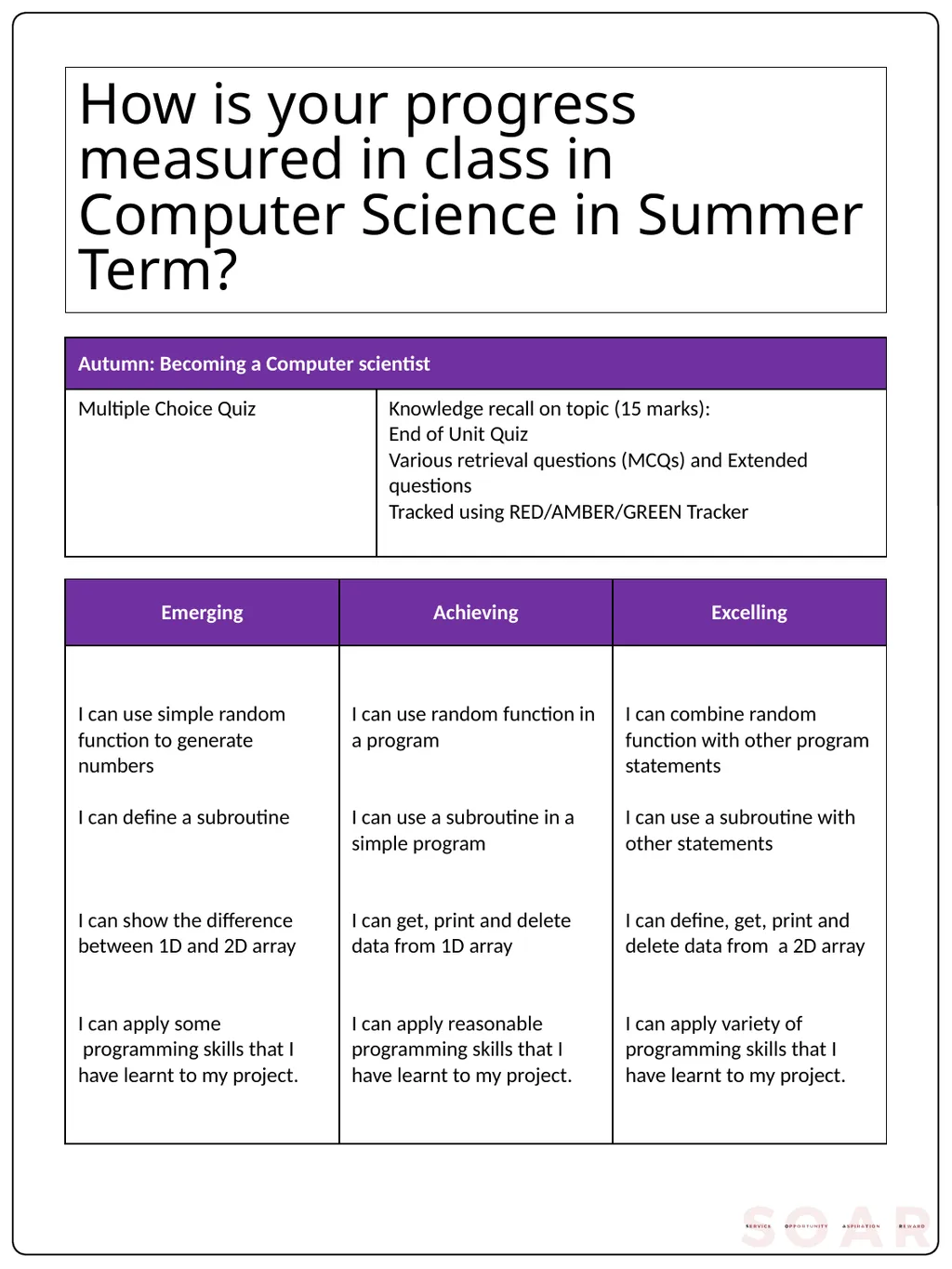
How is your progress measured in class in Computer Science in Summer Term?<br>
24
How does a computer work? Summer Term Golden Nuggets and Work Hard<br>