Conditional Execution Chapter 3 Python for
Description: Conditional Execution Chapter 3 Python for Everybody www.py4e.com Conditional Steps Output: Smaller Finis Program: x 5 if x 10: print(Smaller) if x 20: print(Bigger) print(Finis) x 5 x 10 ? print(Smaller) x 20 ?
Related Topics
Download Presentation
"Conditional Execution Chapter 3 Python for" is the property of its rightful owner. Permission is granted to download and print the materials on this website for personal, non-commercial use only, and to display it on your personal computer provided you do not modify the materials and that you retain all copyright notices contained in the materials. By downloading content from our website, you accept the terms of this agreement.
Presentation Transcript
slide1. Conditional Execution Chapter 3 Python for Everybody
www.py4e.com<br>
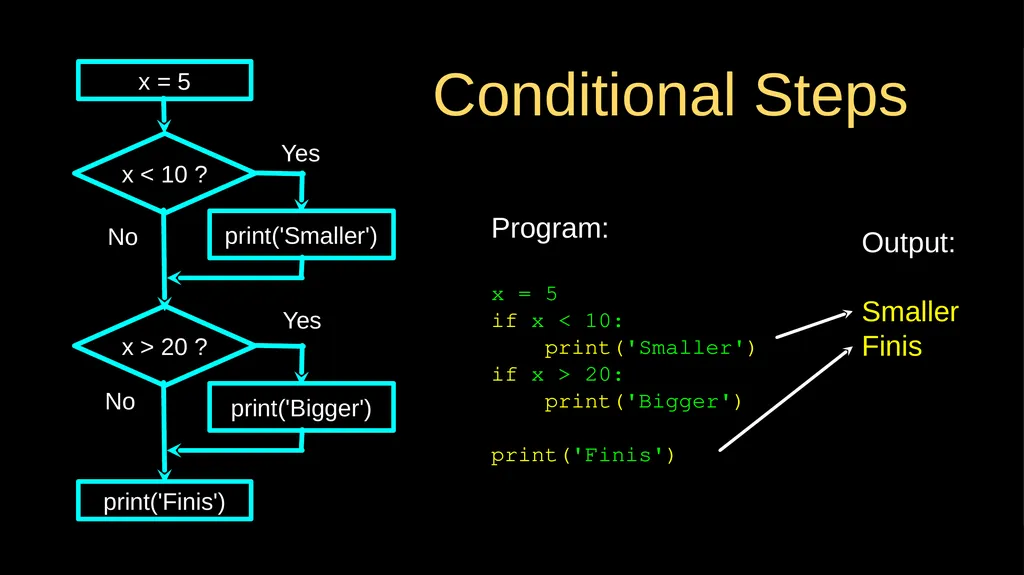
slide2. Conditional Steps Output:
Smaller
Finis Program:
x = 5
if x < 10:
print('Smaller')
if x > 20:
print('Bigger')
print('Finis') x = 5 x < 10 ? print('Smaller') x > 20 ? print('Bigger') print('Finis') Yes No Yes No<br>
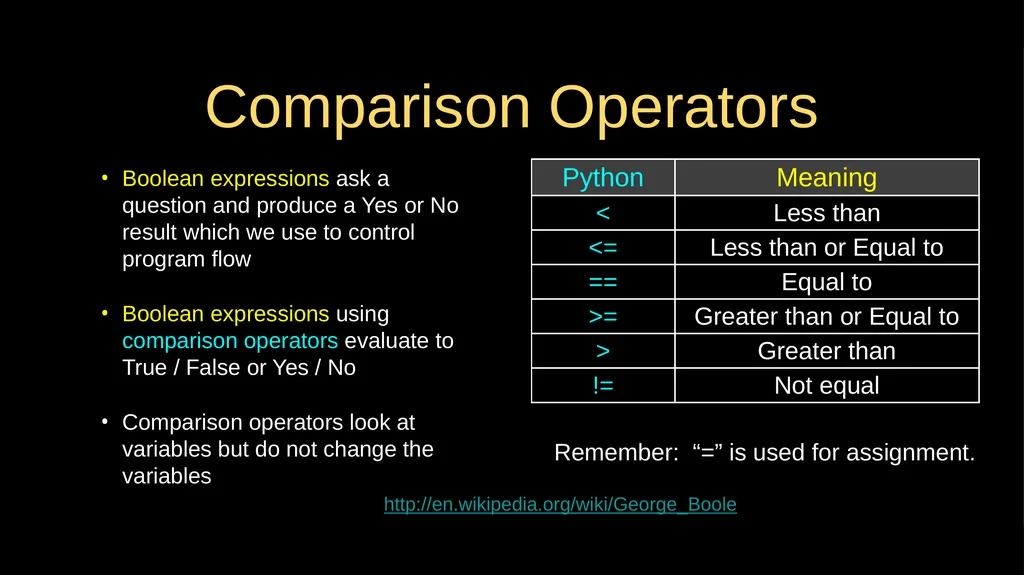
slide3. Comparison Operators Boolean expressions ask a question and produce a Yes or No result which we use to control program flow
Boolean expressions using comparison operators evaluate to True / False or Yes / No
Comparison operators look at variables but do not change the variables http://en.wikipedia.org/wiki/George_Boole Remember: “=” is used for assignment.<br>
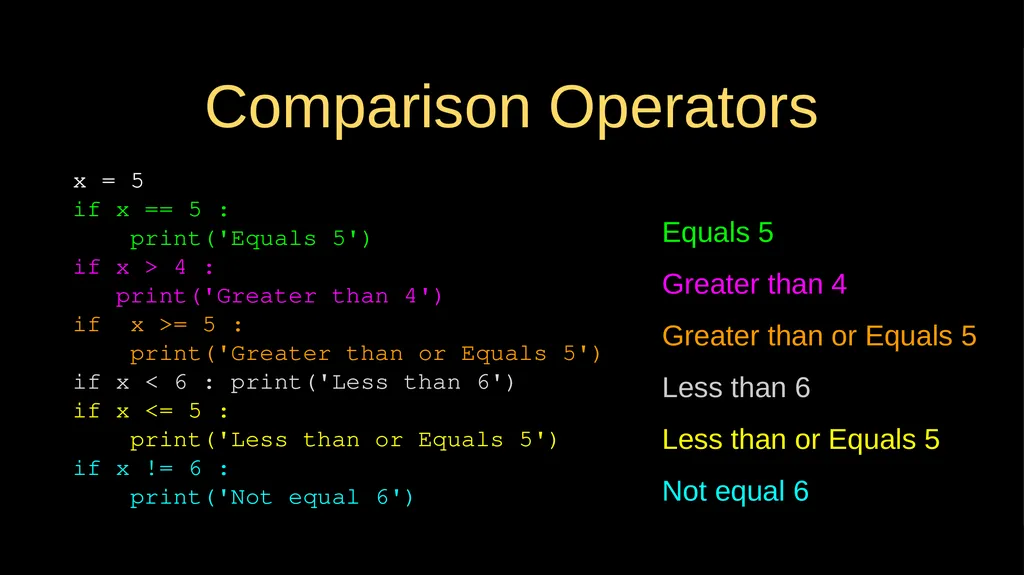
slide4. Comparison Operators x = 5
if x == 5 :
print('Equals 5')
if x > 4 :
print('Greater than 4')
if x >= 5 :
print('Greater than or Equals 5')
if x < 6 : print('Less than 6')
if x <= 5 :
print('Less than or Equals 5')
if x != 6 :
print('Not equal 6') Equals 5
Greater than 4
Greater than or Equals 5
Less than 6
Less than or Equals 5
Not equal 6<br>
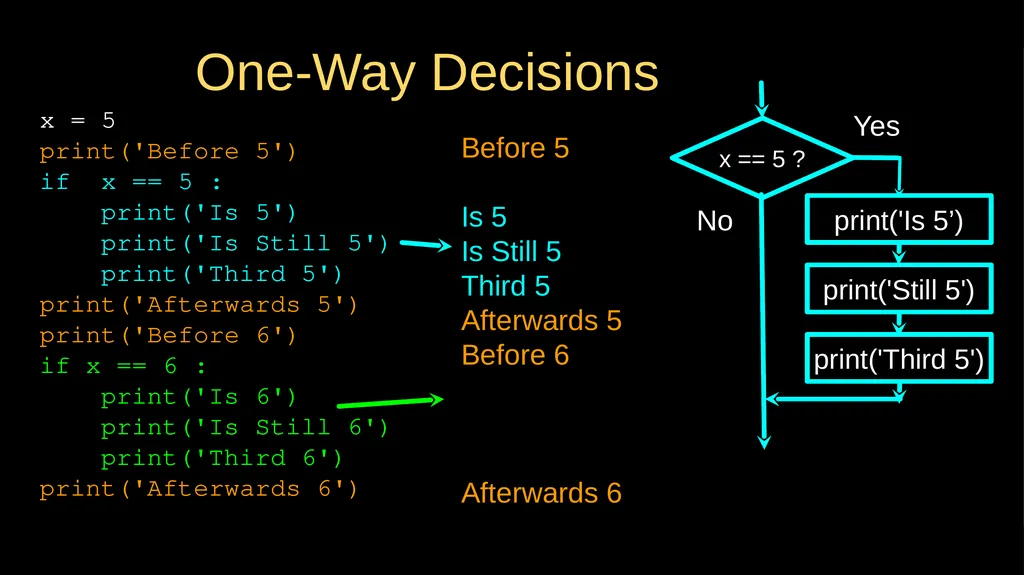
slide5. One-Way Decisions x = 5
print('Before 5')
if x == 5 :
print('Is 5')
print('Is Still 5')
print('Third 5')
print('Afterwards 5')
print('Before 6')
if x == 6 :
print('Is 6')
print('Is Still 6')
print('Third 6')
print('Afterwards 6') Before 5
Is 5
Is Still 5
Third 5
Afterwards 5
Before 6
Afterwards 6 x == 5 ? Yes print('Still 5') print('Third 5') No print('Is 5’)<br>
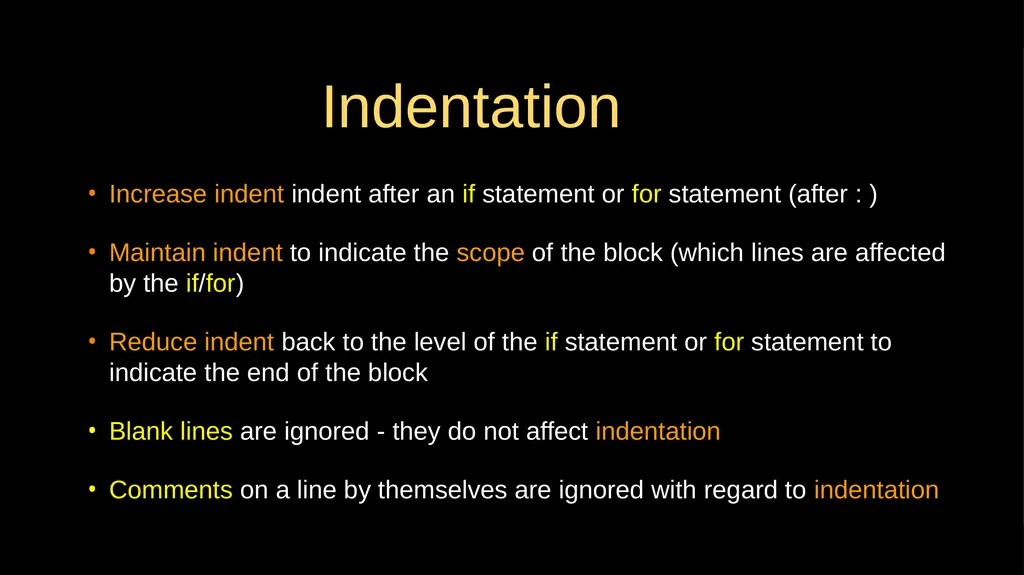
slide6. Indentation Increase indent indent after an if statement or for statement (after : )
Maintain indent to indicate the scope of the block (which lines are affected by the if/for)
Reduce indent back to the level of the if statement or for statement to indicate the end of the block
Blank lines are ignored - they do not affect indentation
Comments on a line by themselves are ignored with regard to indentation<br>
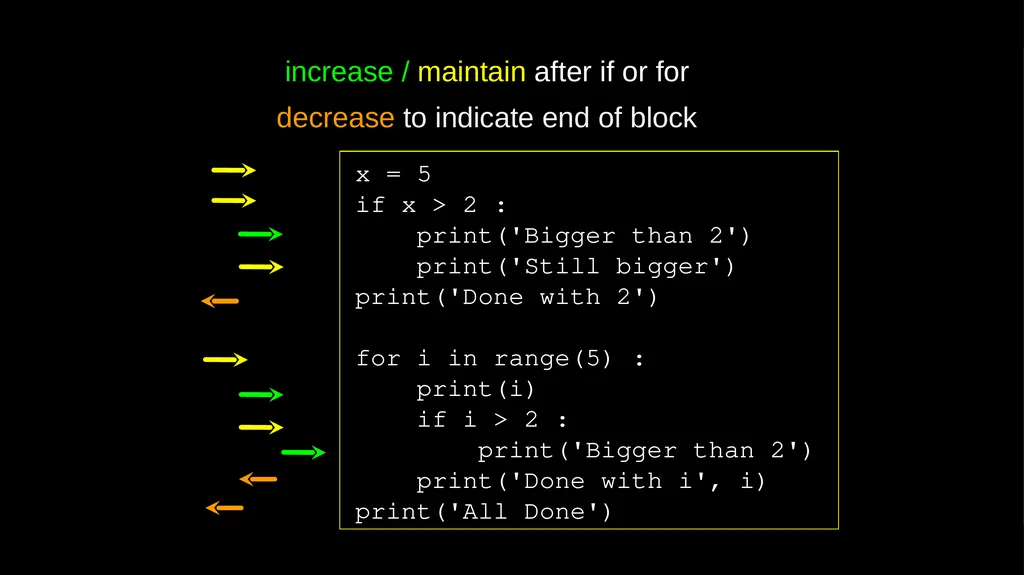
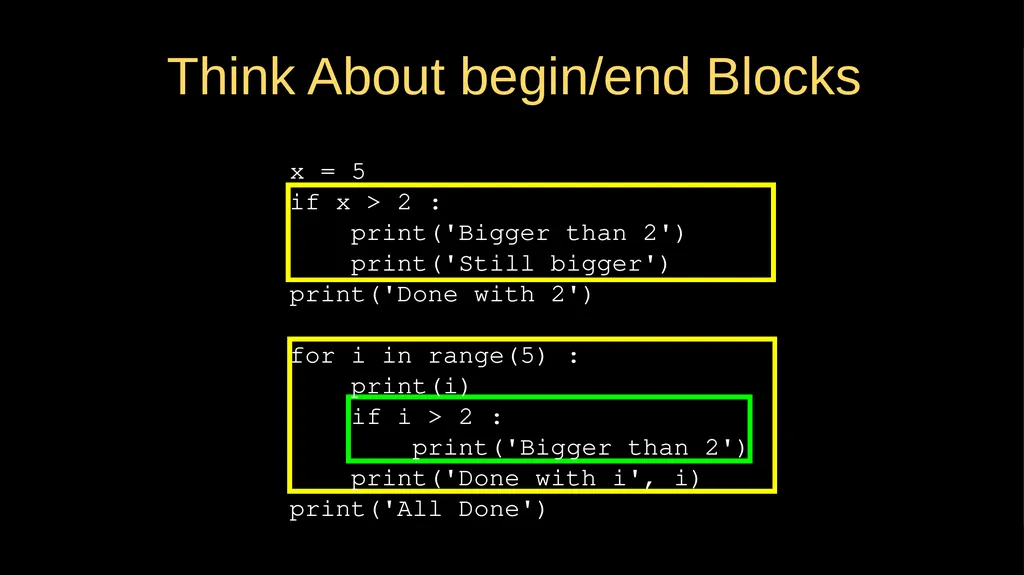
slide7. x = 5
if x > 2 :
print('Bigger than 2')
print('Still bigger')
print('Done with 2')
for i in range(5) :
print(i)
if i > 2 :
print('Bigger than 2')
print('Done with i', i)
print('All Done') increase / maintain after if or for
decrease to indicate end of block<br>
slide8. x = 5
if x > 2 :
print('Bigger than 2')
print('Still bigger')
print('Done with 2')
for i in range(5) :
print(i)
if i > 2 :
print('Bigger than 2')
print('Done with i', i)
print('All Done') Think About begin/end Blocks<br>
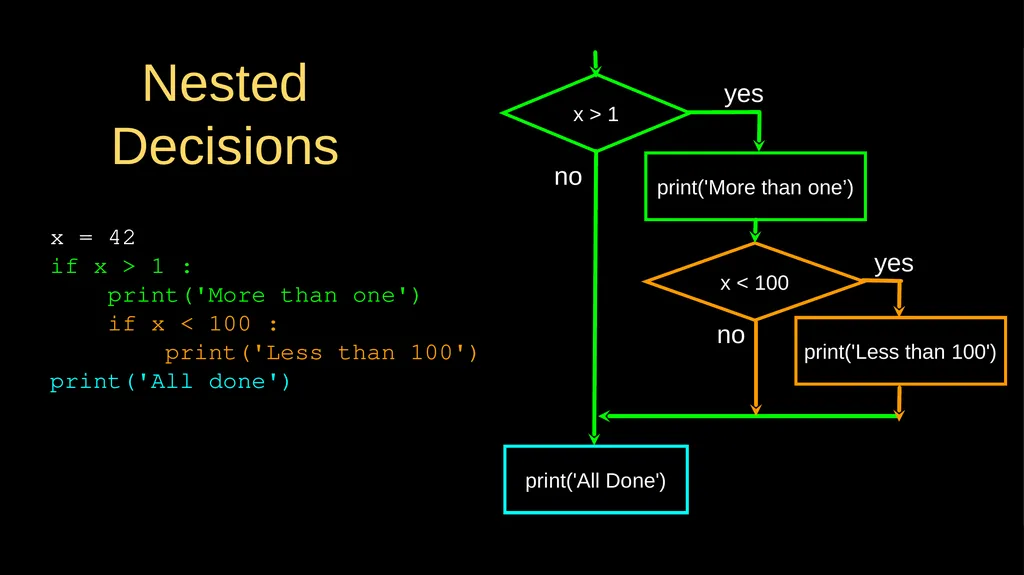
slide9. x = 42
if x > 1 :
print('More than one')
if x < 100 :
print('Less than 100')
print('All done') Nested Decisions x > 1 print('More than one’) x < 100 print('Less than 100') print('All Done') yes yes no no<br>
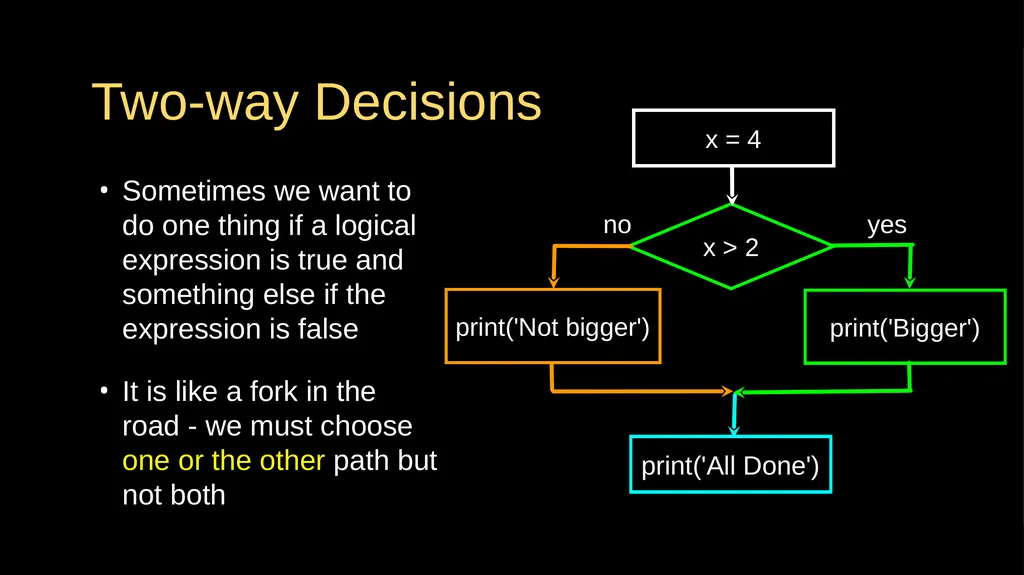
slide10. Two-way Decisions Sometimes we want to do one thing if a logical expression is true and something else if the expression is false
It is like a fork in the road - we must choose one or the other path but not both x > 2 print('Bigger') yes no x = 4 print('Not bigger') print('All Done')<br>
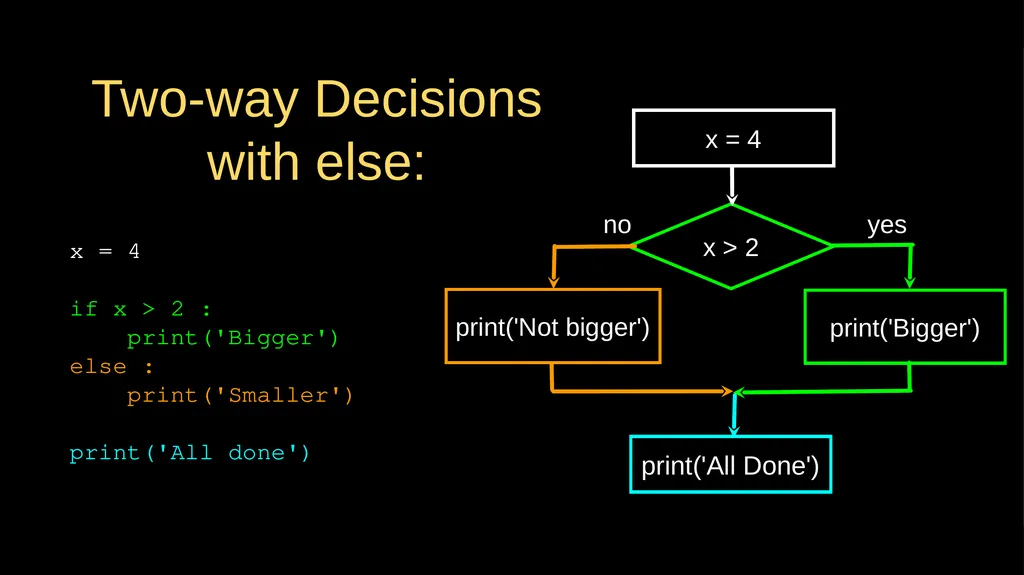
slide11. Two-way Decisions with else: x > 2 print('Bigger') yes no x = 4 print('All Done') x = 4
if x > 2 :
print('Bigger')
else :
print('Smaller')
print('All done') print('Not bigger')<br>
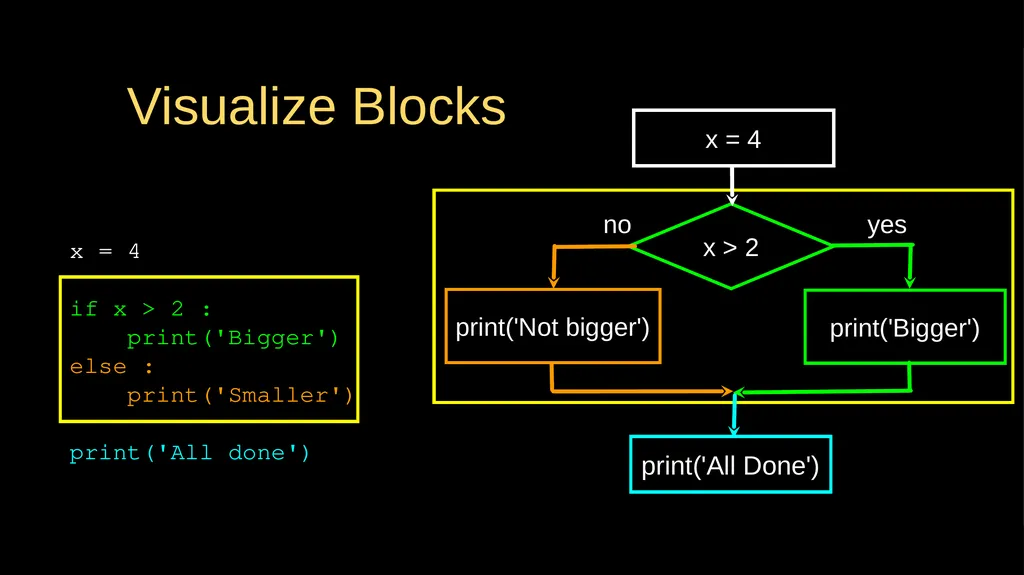
slide12. Visualize Blocks x = 4
if x > 2 :
print('Bigger')
else :
print('Smaller')
print('All done') x > 2 print('Bigger') yes no x = 4 print('All Done') print('Not bigger')<br>
slide13. More Conditional Structures…<br>
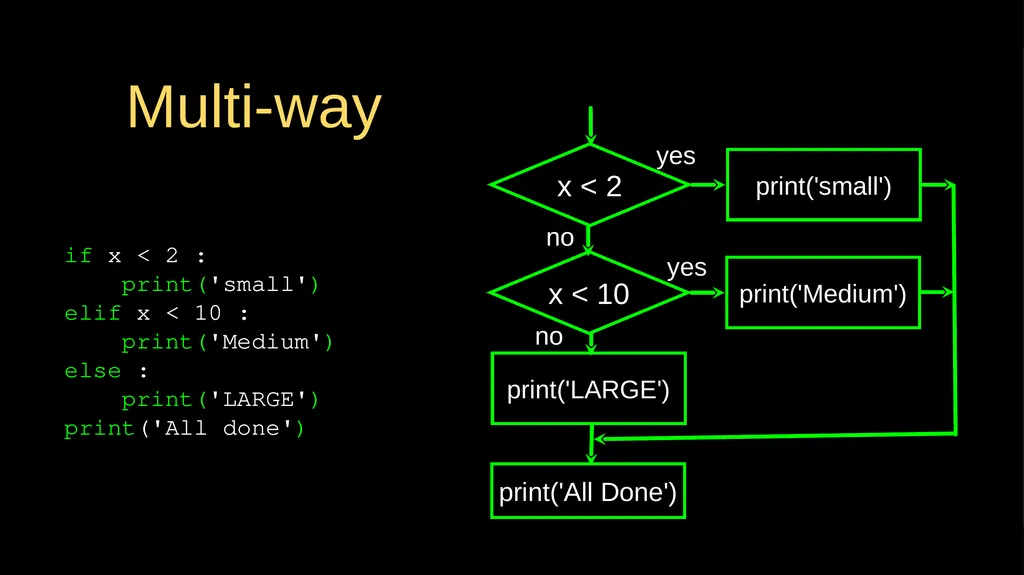
slide14. Multi-way if x < 2 :
print('small')
elif x < 10 :
print('Medium')
else :
print('LARGE')
print('All done') x < 2 print('small') yes no print('All Done') x < 10 print('Medium') yes print('LARGE') no<br>
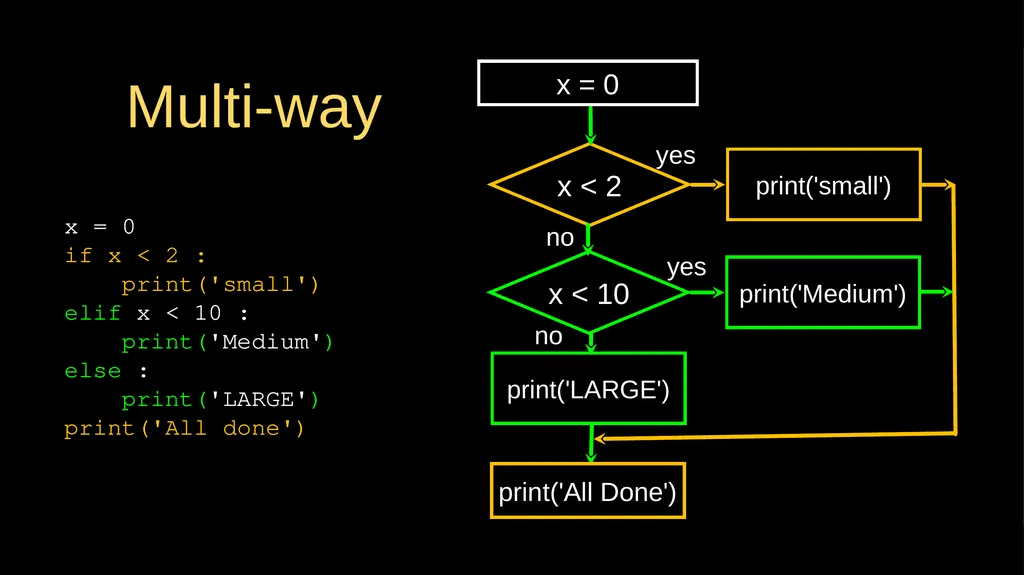
slide15. Multi-way x = 0
if x < 2 :
print('small')
elif x < 10 :
print('Medium')
else :
print('LARGE')
print('All done') x < 2 print('small') yes no print('All Done') x < 10 print('Medium') yes print('LARGE') no x = 0<br>
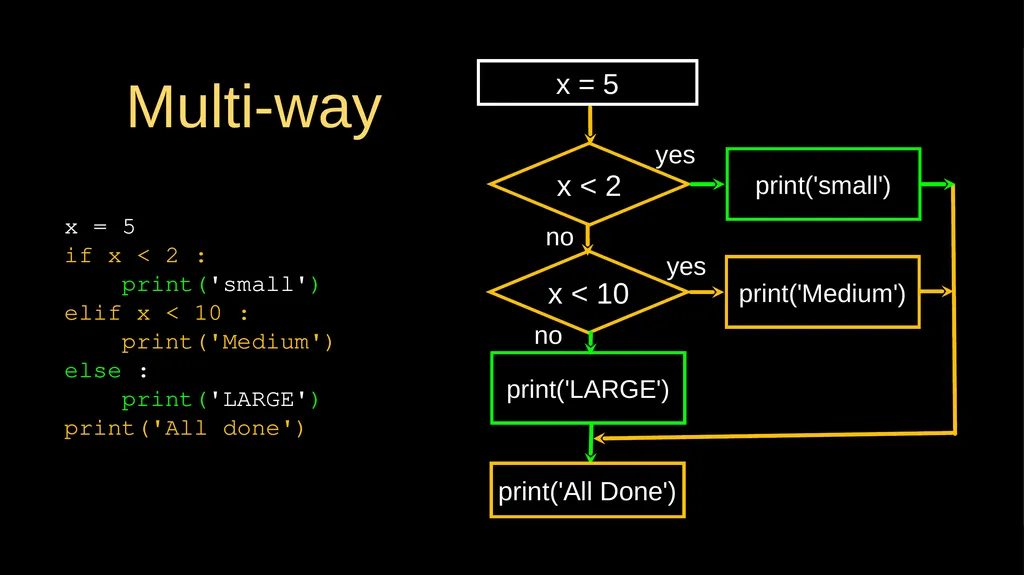
slide16. Multi-way x = 5
if x < 2 :
print('small')
elif x < 10 :
print('Medium')
else :
print('LARGE')
print('All done') x < 2 print('small') yes no print('All Done') x < 10 print('Medium') yes print('LARGE') no x = 5<br>
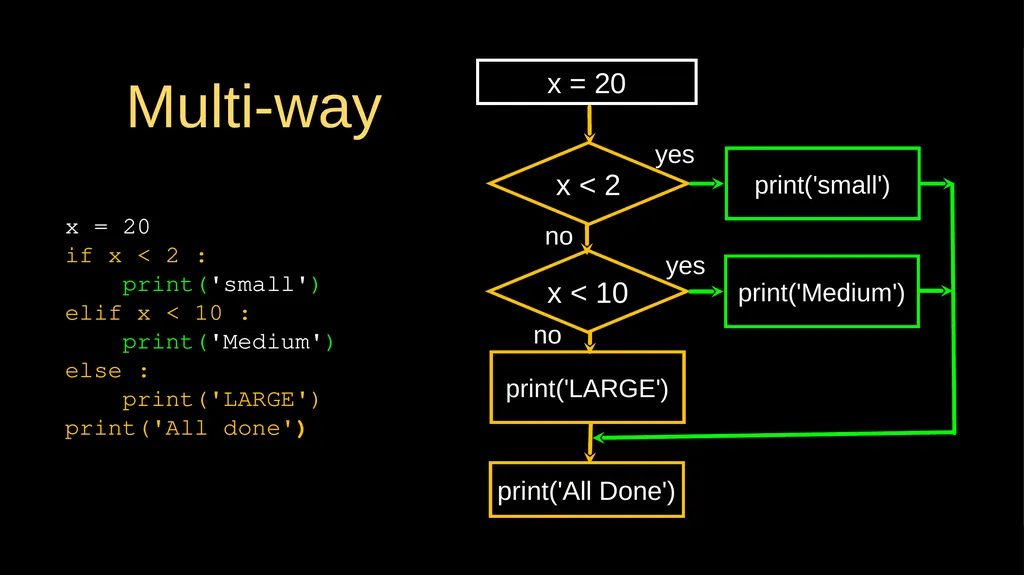
slide17. Multi-way x = 20
if x < 2 :
print('small')
elif x < 10 :
print('Medium')
else :
print('LARGE')
print('All done') x < 2 print('small') yes no print('All Done') x < 10 print('Medium') yes print('LARGE') no x = 20<br>
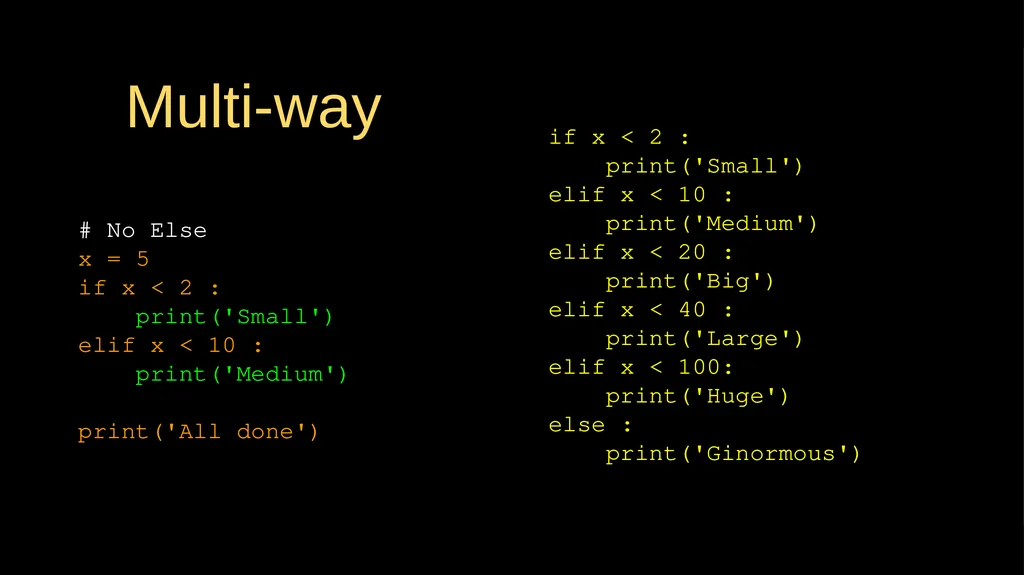
slide18. Multi-way # No Else
x = 5
if x < 2 :
print('Small')
elif x < 10 :
print('Medium')
print('All done') if x < 2 :
print('Small')
elif x < 10 :
print('Medium')
elif x < 20 :
print('Big')
elif x < 40 :
print('Large')
elif x < 100:
print('Huge')
else :
print('Ginormous')<br>
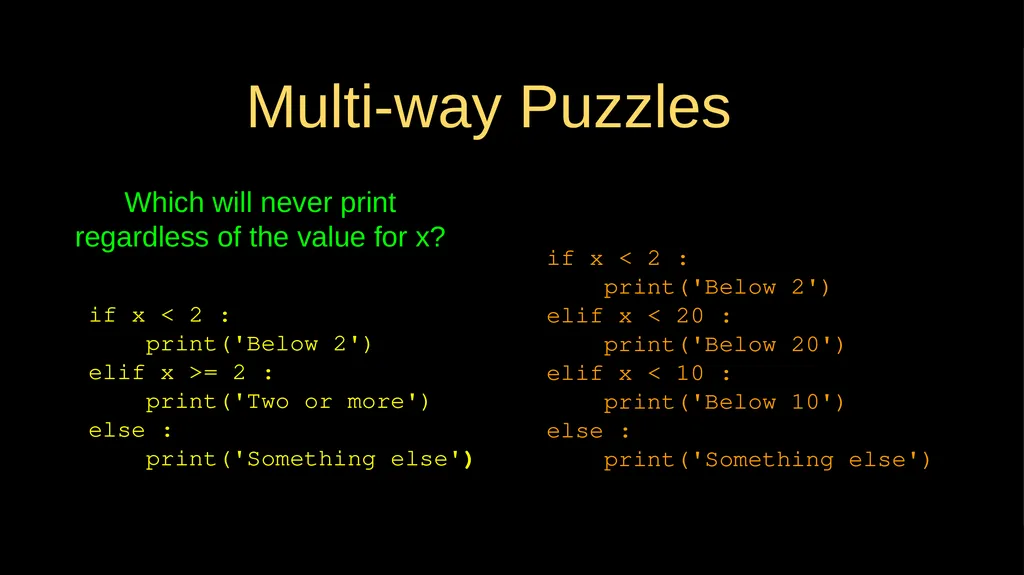
slide19. Multi-way Puzzles if x < 2 :
print('Below 2')
elif x < 20 :
print('Below 20')
elif x < 10 :
print('Below 10')
else :
print('Something else') if x < 2 :
print('Below 2')
elif x >= 2 :
print('Two or more')
else :
print('Something else') Which will never print regardless of the value for x?<br>
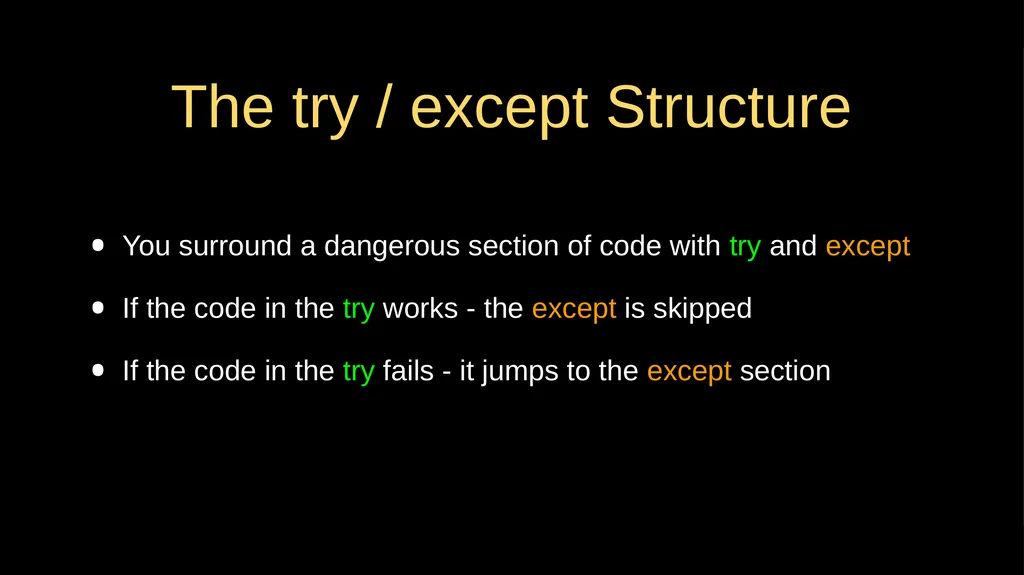
slide20. The try / except Structure You surround a dangerous section of code with try and except
If the code in the try works - the except is skipped
If the code in the try fails - it jumps to the except section<br>
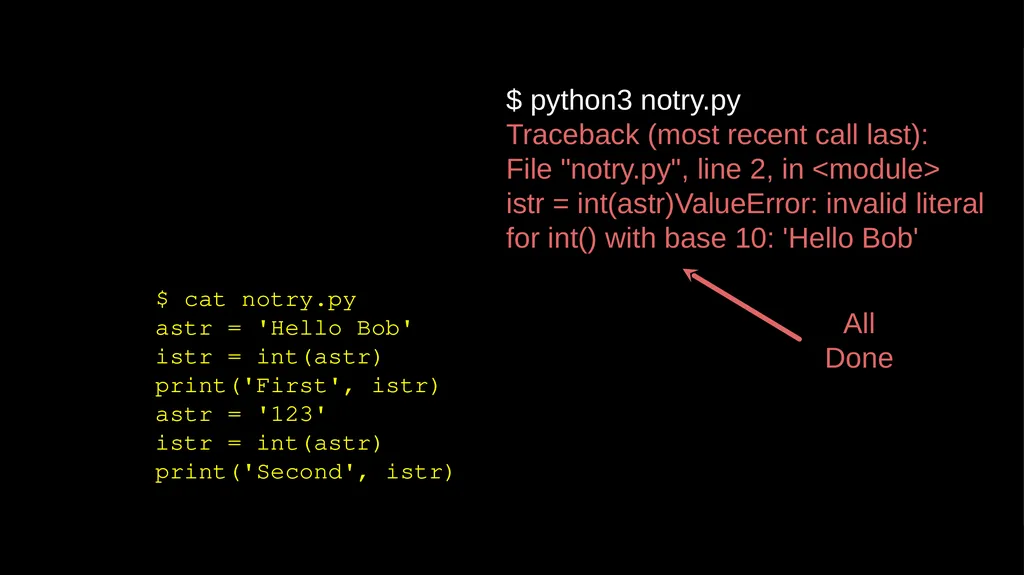
slide21. $ cat notry.py
astr = 'Hello Bob'
istr = int(astr)
print('First', istr)
astr = '123'
istr = int(astr)
print('Second', istr) $ python3 notry.py
Traceback (most recent call last): File "notry.py", line 2, in <module> istr = int(astr)ValueError: invalid literal for int() with base 10: 'Hello Bob' All
Done<br>
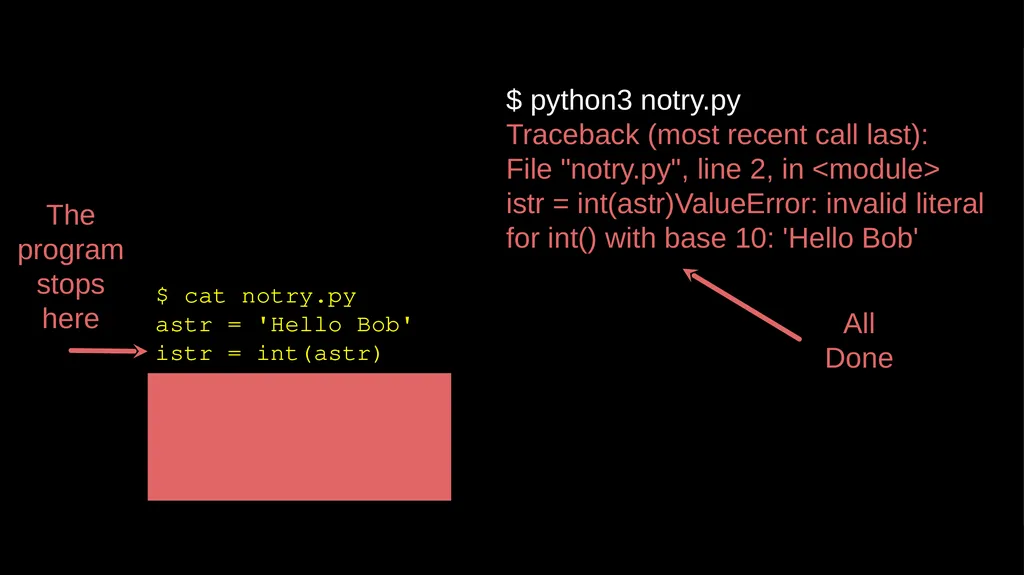
slide22. $ cat notry.py
astr = 'Hello Bob'
istr = int(astr)
print('First', istr)
astr = '123'
istr = int(astr)
print('Second', istr) $ python3 notry.py
Traceback (most recent call last): File "notry.py", line 2, in <module> istr = int(astr)ValueError: invalid literal for int() with base 10: 'Hello Bob' All
Done The program stops here<br>
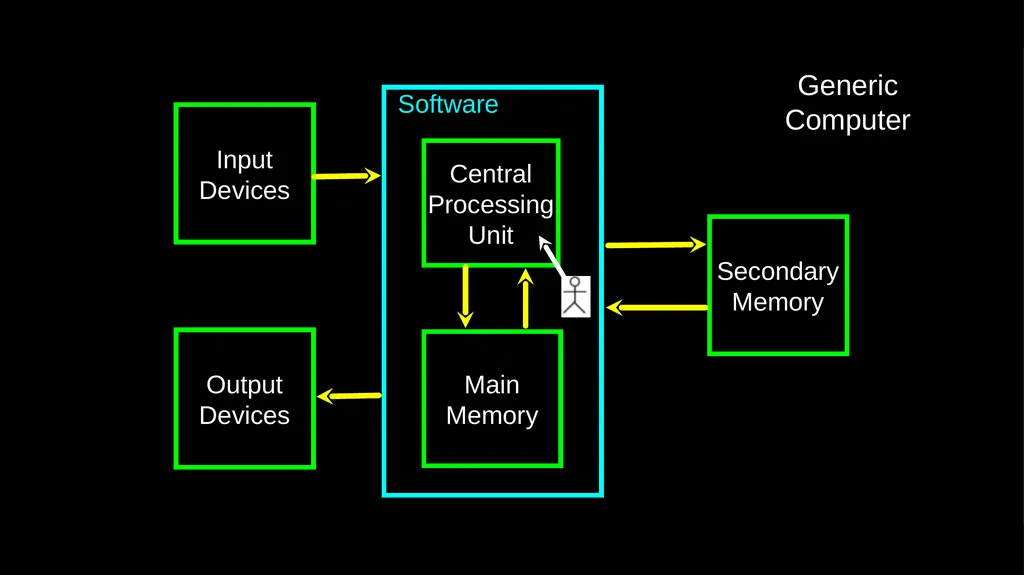
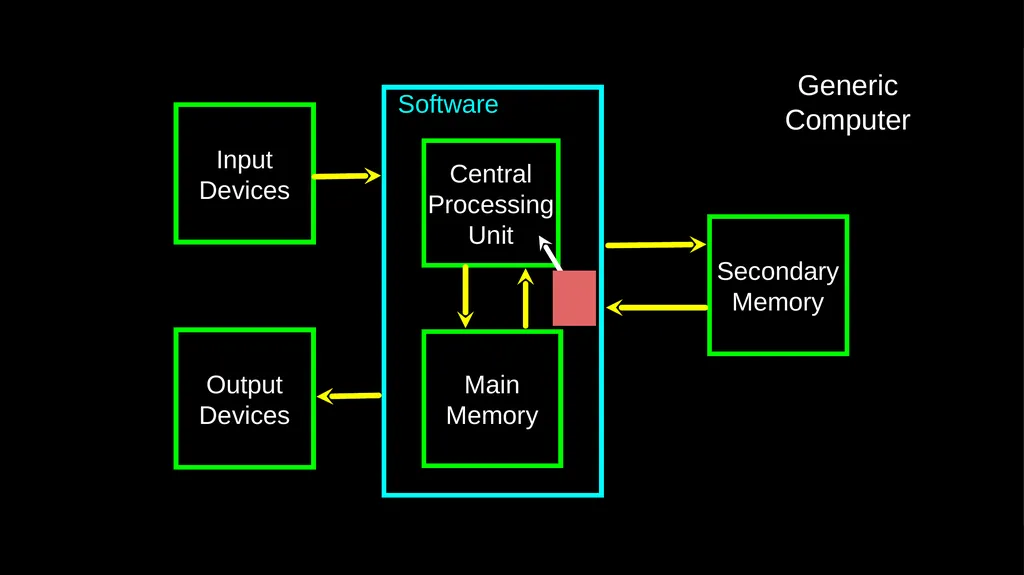
slide23. Software Input
Devices Central
Processing
Unit Main
Memory Output
Devices Secondary
Memory Generic
Computer<br>
slide24. Software Input
Devices Central
Processing
Unit Main
Memory Output
Devices Secondary
Memory Generic
Computer<br>
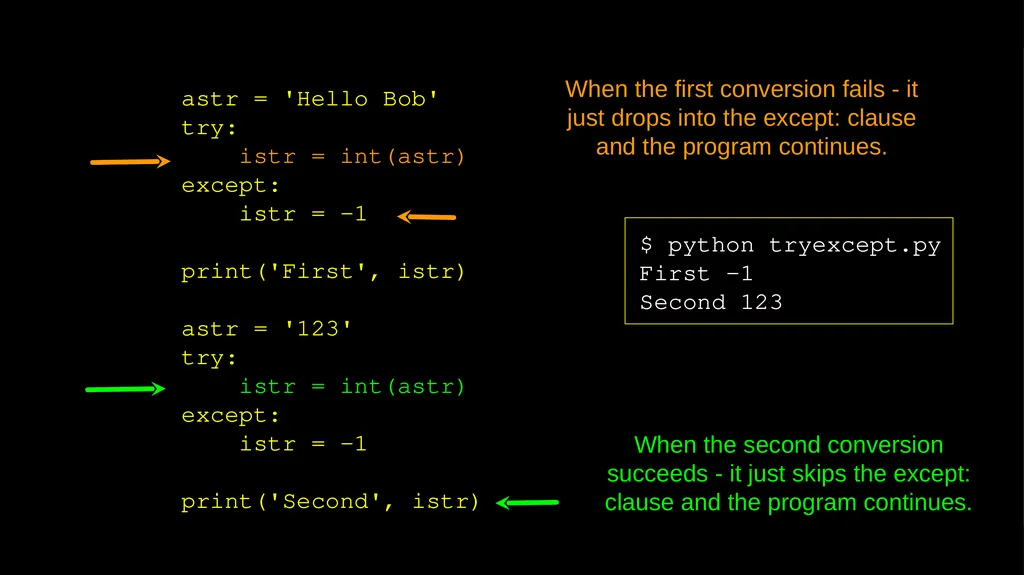
slide25. astr = 'Hello Bob'
try:
istr = int(astr)
except:
istr = -1
print('First', istr)
astr = '123'
try:
istr = int(astr)
except:
istr = -1
print('Second', istr) $ python tryexcept.py
First -1
Second 123 When the first conversion fails - it just drops into the except: clause and the program continues. When the second conversion succeeds - it just skips the except: clause and the program continues.<br>
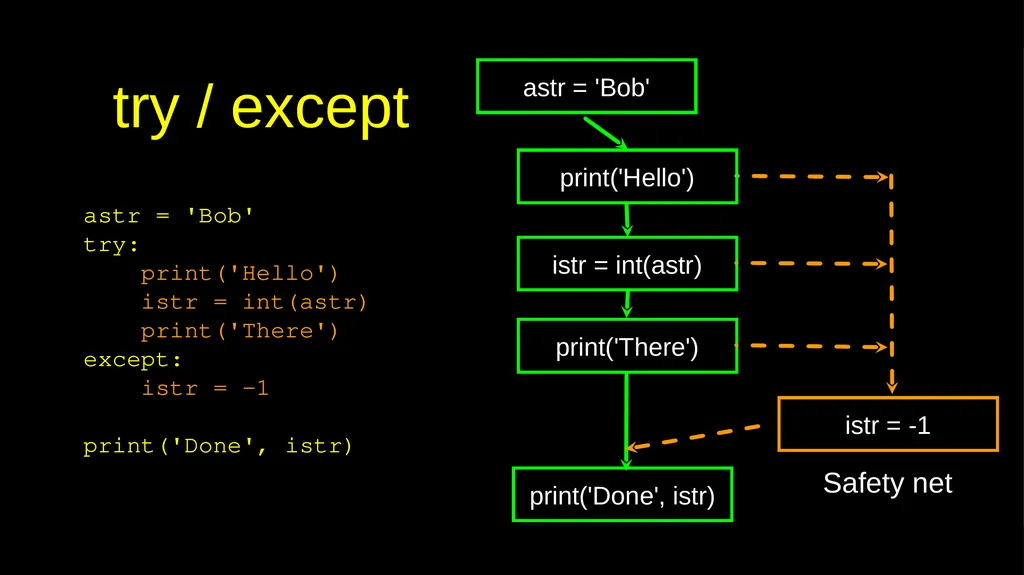
slide26. try / except astr = 'Bob' astr = 'Bob'
try:
print('Hello')
istr = int(astr)
print('There')
except:
istr = -1
print('Done', istr) print('Hello') print('There') istr = int(astr) print('Done', istr) istr = -1 Safety net<br>
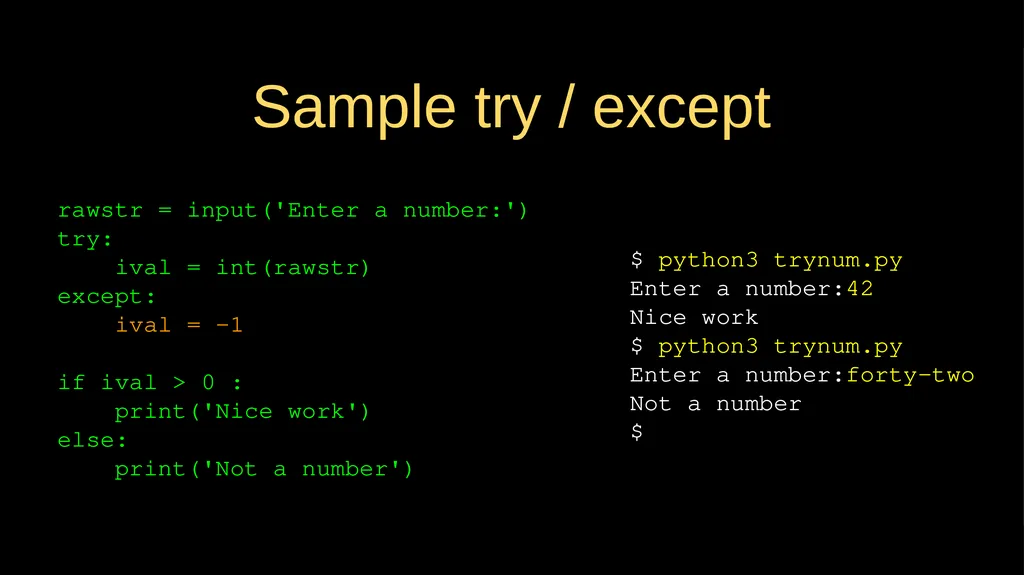
slide27. Sample try / except $ python3 trynum.py
Enter a number:42
Nice work
$ python3 trynum.py
Enter a number:forty-two
Not a number
$ rawstr = input('Enter a number:')
try:
ival = int(rawstr)
except:
ival = -1
if ival > 0 :
print('Nice work')
else:
print('Not a number')<br>
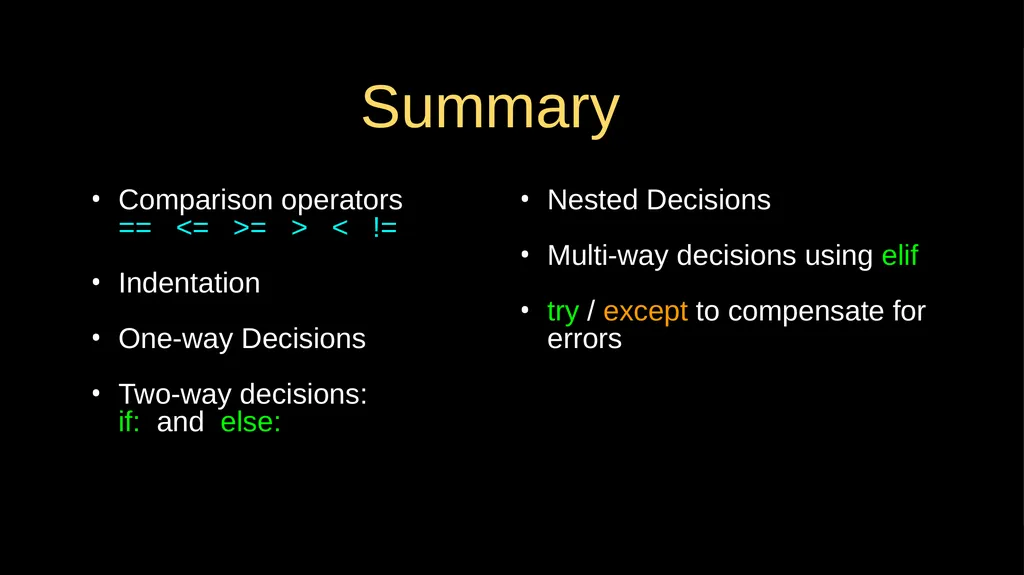
slide28. Summary Comparison operators == <= >= > < !=
Indentation
One-way Decisions
Two-way decisions:if: and else: Nested Decisions
Multi-way decisions using elif
try / except to compensate for errors<br>
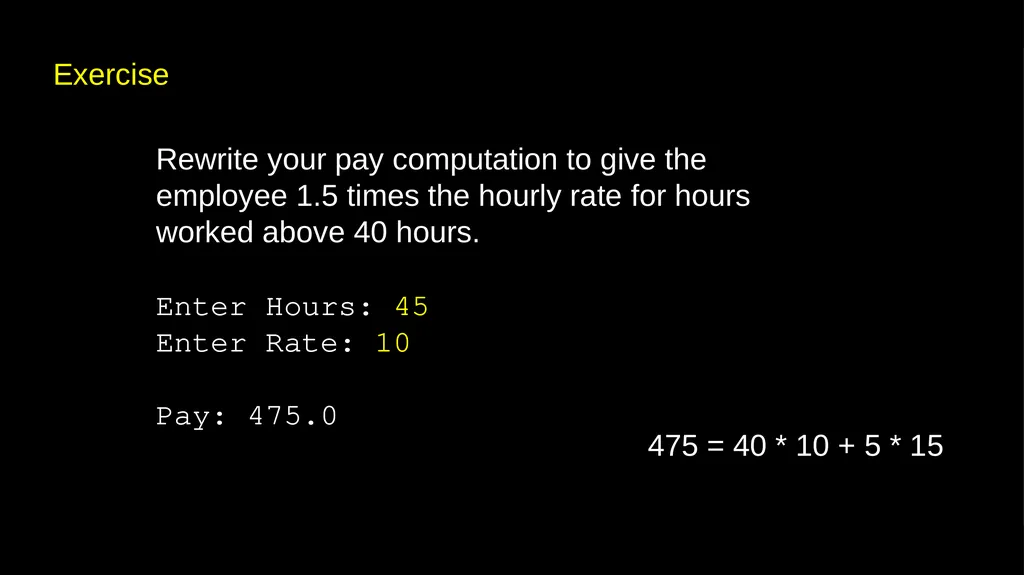
slide29. Exercise Rewrite your pay computation to give the employee 1.5 times the hourly rate for hours worked above 40 hours.
Enter Hours: 45
Enter Rate: 10
Pay: 475.0 475 = 40 * 10 + 5 * 15<br>
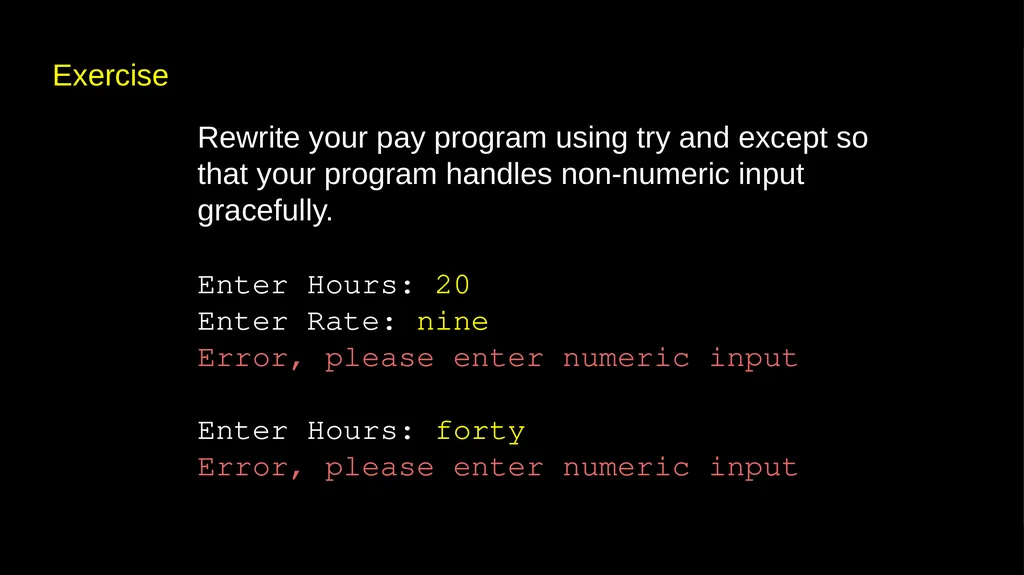
slide30. Exercise Rewrite your pay program using try and except so that your program handles non-numeric input gracefully.
Enter Hours: 20
Enter Rate: nine
Error, please enter numeric input
Enter Hours: forty
Error, please enter numeric input<br>
slide31. Acknowledgements / Contributions These slides are Copyright 2010- Charles R. Severance (www.dr-chuck.com) of the University of Michigan School of Information and made available under a Creative Commons Attribution 4.0 License. Please maintain this last slide in all copies of the document to comply with the attribution requirements of the license. If you make a change, feel free to add your name and organization to the list of contributors on this page as you republish the materials.
Initial Development: Charles Severance, University of Michigan School of Information
… Insert new Contributors and Translators here ...<br>

www.py4e.com<br>
slide2. Conditional Steps Output:
Smaller
Finis Program:
x = 5
if x < 10:
print('Smaller')
if x > 20:
print('Bigger')
print('Finis') x = 5 x < 10 ? print('Smaller') x > 20 ? print('Bigger') print('Finis') Yes No Yes No<br>
slide3. Comparison Operators Boolean expressions ask a question and produce a Yes or No result which we use to control program flow
Boolean expressions using comparison operators evaluate to True / False or Yes / No
Comparison operators look at variables but do not change the variables http://en.wikipedia.org/wiki/George_Boole Remember: “=” is used for assignment.<br>
slide4. Comparison Operators x = 5
if x == 5 :
print('Equals 5')
if x > 4 :
print('Greater than 4')
if x >= 5 :
print('Greater than or Equals 5')
if x < 6 : print('Less than 6')
if x <= 5 :
print('Less than or Equals 5')
if x != 6 :
print('Not equal 6') Equals 5
Greater than 4
Greater than or Equals 5
Less than 6
Less than or Equals 5
Not equal 6<br>
slide5. One-Way Decisions x = 5
print('Before 5')
if x == 5 :
print('Is 5')
print('Is Still 5')
print('Third 5')
print('Afterwards 5')
print('Before 6')
if x == 6 :
print('Is 6')
print('Is Still 6')
print('Third 6')
print('Afterwards 6') Before 5
Is 5
Is Still 5
Third 5
Afterwards 5
Before 6
Afterwards 6 x == 5 ? Yes print('Still 5') print('Third 5') No print('Is 5’)<br>
slide6. Indentation Increase indent indent after an if statement or for statement (after : )
Maintain indent to indicate the scope of the block (which lines are affected by the if/for)
Reduce indent back to the level of the if statement or for statement to indicate the end of the block
Blank lines are ignored - they do not affect indentation
Comments on a line by themselves are ignored with regard to indentation<br>
slide7. x = 5
if x > 2 :
print('Bigger than 2')
print('Still bigger')
print('Done with 2')
for i in range(5) :
print(i)
if i > 2 :
print('Bigger than 2')
print('Done with i', i)
print('All Done') increase / maintain after if or for
decrease to indicate end of block<br>
slide8. x = 5
if x > 2 :
print('Bigger than 2')
print('Still bigger')
print('Done with 2')
for i in range(5) :
print(i)
if i > 2 :
print('Bigger than 2')
print('Done with i', i)
print('All Done') Think About begin/end Blocks<br>
slide9. x = 42
if x > 1 :
print('More than one')
if x < 100 :
print('Less than 100')
print('All done') Nested Decisions x > 1 print('More than one’) x < 100 print('Less than 100') print('All Done') yes yes no no<br>
slide10. Two-way Decisions Sometimes we want to do one thing if a logical expression is true and something else if the expression is false
It is like a fork in the road - we must choose one or the other path but not both x > 2 print('Bigger') yes no x = 4 print('Not bigger') print('All Done')<br>
slide11. Two-way Decisions with else: x > 2 print('Bigger') yes no x = 4 print('All Done') x = 4
if x > 2 :
print('Bigger')
else :
print('Smaller')
print('All done') print('Not bigger')<br>
slide12. Visualize Blocks x = 4
if x > 2 :
print('Bigger')
else :
print('Smaller')
print('All done') x > 2 print('Bigger') yes no x = 4 print('All Done') print('Not bigger')<br>
slide13. More Conditional Structures…<br>
slide14. Multi-way if x < 2 :
print('small')
elif x < 10 :
print('Medium')
else :
print('LARGE')
print('All done') x < 2 print('small') yes no print('All Done') x < 10 print('Medium') yes print('LARGE') no<br>
slide15. Multi-way x = 0
if x < 2 :
print('small')
elif x < 10 :
print('Medium')
else :
print('LARGE')
print('All done') x < 2 print('small') yes no print('All Done') x < 10 print('Medium') yes print('LARGE') no x = 0<br>
slide16. Multi-way x = 5
if x < 2 :
print('small')
elif x < 10 :
print('Medium')
else :
print('LARGE')
print('All done') x < 2 print('small') yes no print('All Done') x < 10 print('Medium') yes print('LARGE') no x = 5<br>
slide17. Multi-way x = 20
if x < 2 :
print('small')
elif x < 10 :
print('Medium')
else :
print('LARGE')
print('All done') x < 2 print('small') yes no print('All Done') x < 10 print('Medium') yes print('LARGE') no x = 20<br>
slide18. Multi-way # No Else
x = 5
if x < 2 :
print('Small')
elif x < 10 :
print('Medium')
print('All done') if x < 2 :
print('Small')
elif x < 10 :
print('Medium')
elif x < 20 :
print('Big')
elif x < 40 :
print('Large')
elif x < 100:
print('Huge')
else :
print('Ginormous')<br>
slide19. Multi-way Puzzles if x < 2 :
print('Below 2')
elif x < 20 :
print('Below 20')
elif x < 10 :
print('Below 10')
else :
print('Something else') if x < 2 :
print('Below 2')
elif x >= 2 :
print('Two or more')
else :
print('Something else') Which will never print regardless of the value for x?<br>
slide20. The try / except Structure You surround a dangerous section of code with try and except
If the code in the try works - the except is skipped
If the code in the try fails - it jumps to the except section<br>
slide21. $ cat notry.py
astr = 'Hello Bob'
istr = int(astr)
print('First', istr)
astr = '123'
istr = int(astr)
print('Second', istr) $ python3 notry.py
Traceback (most recent call last): File "notry.py", line 2, in <module> istr = int(astr)ValueError: invalid literal for int() with base 10: 'Hello Bob' All
Done<br>
slide22. $ cat notry.py
astr = 'Hello Bob'
istr = int(astr)
print('First', istr)
astr = '123'
istr = int(astr)
print('Second', istr) $ python3 notry.py
Traceback (most recent call last): File "notry.py", line 2, in <module> istr = int(astr)ValueError: invalid literal for int() with base 10: 'Hello Bob' All
Done The program stops here<br>
slide23. Software Input
Devices Central
Processing
Unit Main
Memory Output
Devices Secondary
Memory Generic
Computer<br>
slide24. Software Input
Devices Central
Processing
Unit Main
Memory Output
Devices Secondary
Memory Generic
Computer<br>
slide25. astr = 'Hello Bob'
try:
istr = int(astr)
except:
istr = -1
print('First', istr)
astr = '123'
try:
istr = int(astr)
except:
istr = -1
print('Second', istr) $ python tryexcept.py
First -1
Second 123 When the first conversion fails - it just drops into the except: clause and the program continues. When the second conversion succeeds - it just skips the except: clause and the program continues.<br>
slide26. try / except astr = 'Bob' astr = 'Bob'
try:
print('Hello')
istr = int(astr)
print('There')
except:
istr = -1
print('Done', istr) print('Hello') print('There') istr = int(astr) print('Done', istr) istr = -1 Safety net<br>
slide27. Sample try / except $ python3 trynum.py
Enter a number:42
Nice work
$ python3 trynum.py
Enter a number:forty-two
Not a number
$ rawstr = input('Enter a number:')
try:
ival = int(rawstr)
except:
ival = -1
if ival > 0 :
print('Nice work')
else:
print('Not a number')<br>
slide28. Summary Comparison operators == <= >= > < !=
Indentation
One-way Decisions
Two-way decisions:if: and else: Nested Decisions
Multi-way decisions using elif
try / except to compensate for errors<br>
slide29. Exercise Rewrite your pay computation to give the employee 1.5 times the hourly rate for hours worked above 40 hours.
Enter Hours: 45
Enter Rate: 10
Pay: 475.0 475 = 40 * 10 + 5 * 15<br>
slide30. Exercise Rewrite your pay program using try and except so that your program handles non-numeric input gracefully.
Enter Hours: 20
Enter Rate: nine
Error, please enter numeric input
Enter Hours: forty
Error, please enter numeric input<br>
slide31. Acknowledgements / Contributions These slides are Copyright 2010- Charles R. Severance (www.dr-chuck.com) of the University of Michigan School of Information and made available under a Creative Commons Attribution 4.0 License. Please maintain this last slide in all copies of the document to comply with the attribution requirements of the license. If you make a change, feel free to add your name and organization to the list of contributors on this page as you republish the materials.
Initial Development: Charles Severance, University of Michigan School of Information
… Insert new Contributors and Translators here ...<br>