
Connecting to Your Best Stuff Elevating Resources
CM
Published · 58 slides · 0 views
1 / 1




Description
Connecting to Your Best Stuff Elevating Resources in Primo VE CARLI Discovery Primo VE Committee June 11, 2024 11 am - 12 pm Overview Use Primo VE functionality to help Library users connect to the good stuff in your catalog Resource
Related Topics
Share
Embed code
Download this presentation From Below
"Connecting to Your Best Stuff Elevating Resources" is the property of its rightful owner. Permission is granted to download and print the materials on this website for personal, non-commercial use only, and to display it on your personal computer provided you do not modify the materials and that you retain all copyright notices contained in the materials. By downloading content from our website, you accept the terms of this agreement.
Presentation Transcript
01
Connecting to Your Best Stuff
Elevating Resources in Primo VE CARLI Discovery Primo VE Committee
June 11, 2024 | 11 am - 12 pm<br>
Elevating Resources in Primo VE CARLI Discovery Primo VE Committee
June 11, 2024 | 11 am - 12 pm<br>
02
Overview<br>
03
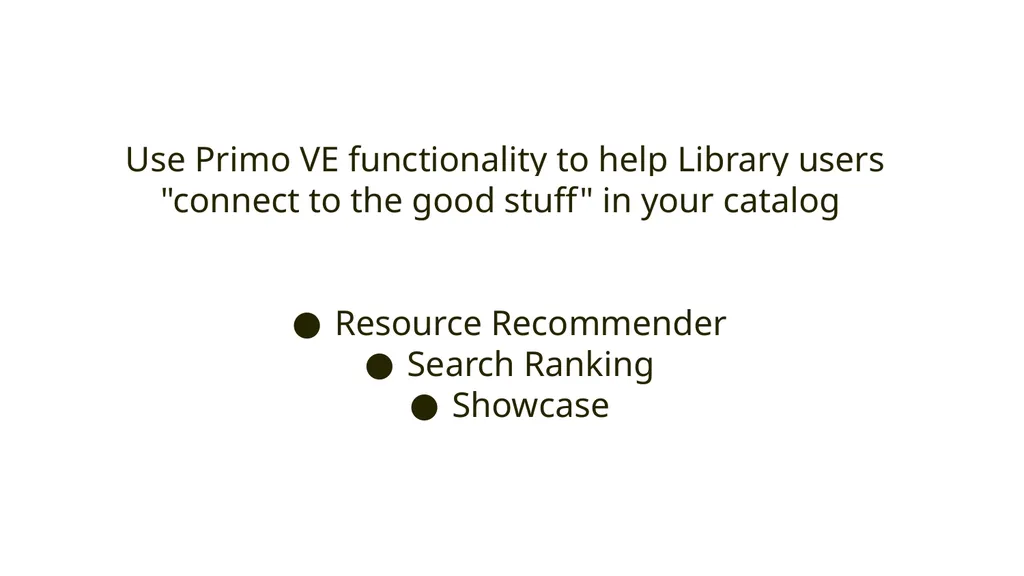
Use Primo VE functionality to help Library users "connect to the good stuff" in your catalog
Resource Recommender
Search Ranking
Showcase<br>
Resource Recommender
Search Ranking
Showcase<br>
04
Specific, individual items
Specific, sets of items<br>
Specific, sets of items<br>
05
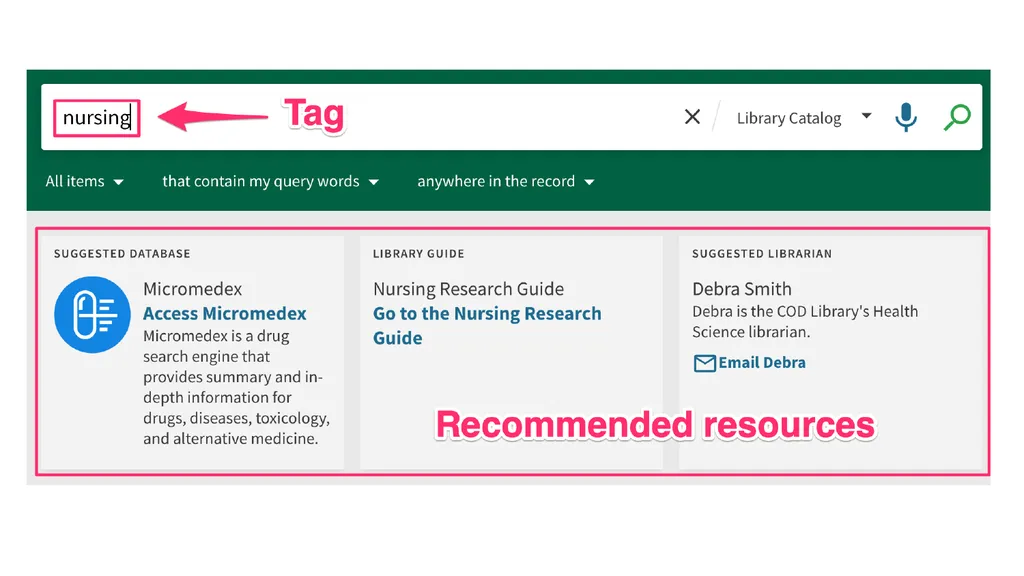
Resource Recommender<br>
06
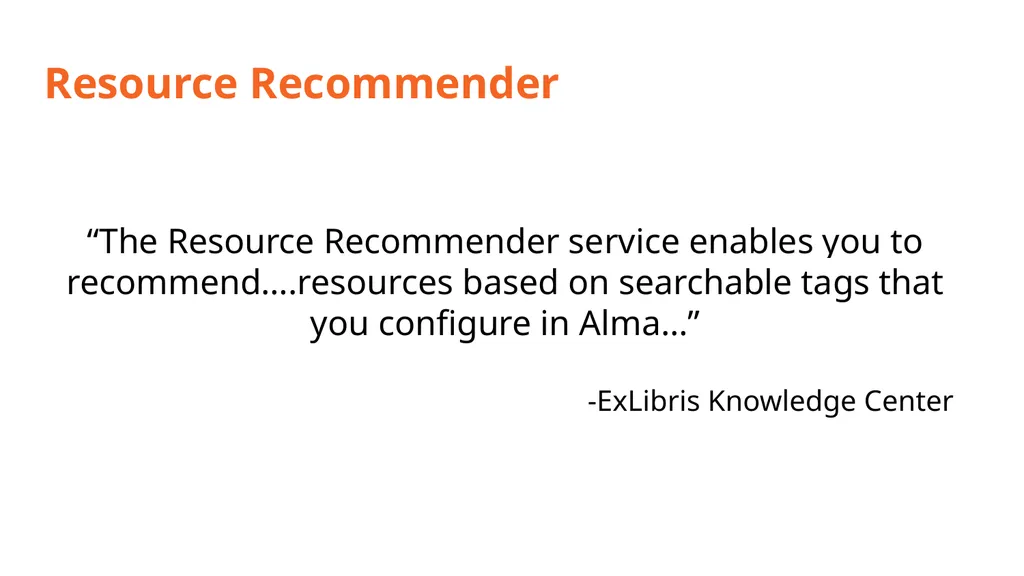
Resource Recommender “The Resource Recommender service enables you to recommend….resources based on searchable tags that you configure in Alma…”
-ExLibris Knowledge Center<br>
-ExLibris Knowledge Center<br>
07
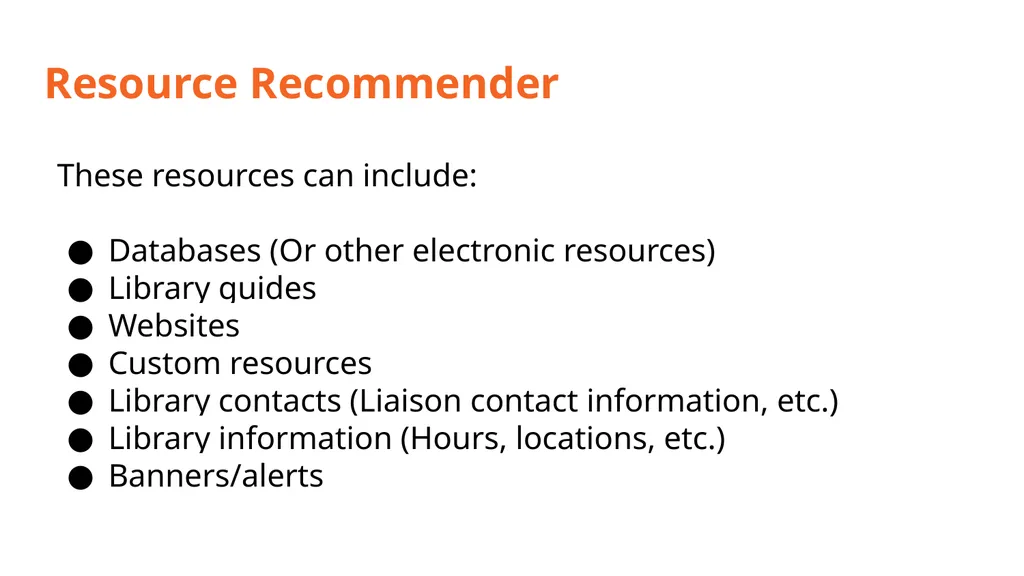
Resource Recommender These resources can include:
Databases (Or other electronic resources)
Library guides
Websites
Custom resources
Library contacts (Liaison contact information, etc.)
Library information (Hours, locations, etc.)
Banners/alerts<br>
Databases (Or other electronic resources)
Library guides
Websites
Custom resources
Library contacts (Liaison contact information, etc.)
Library information (Hours, locations, etc.)
Banners/alerts<br>
08
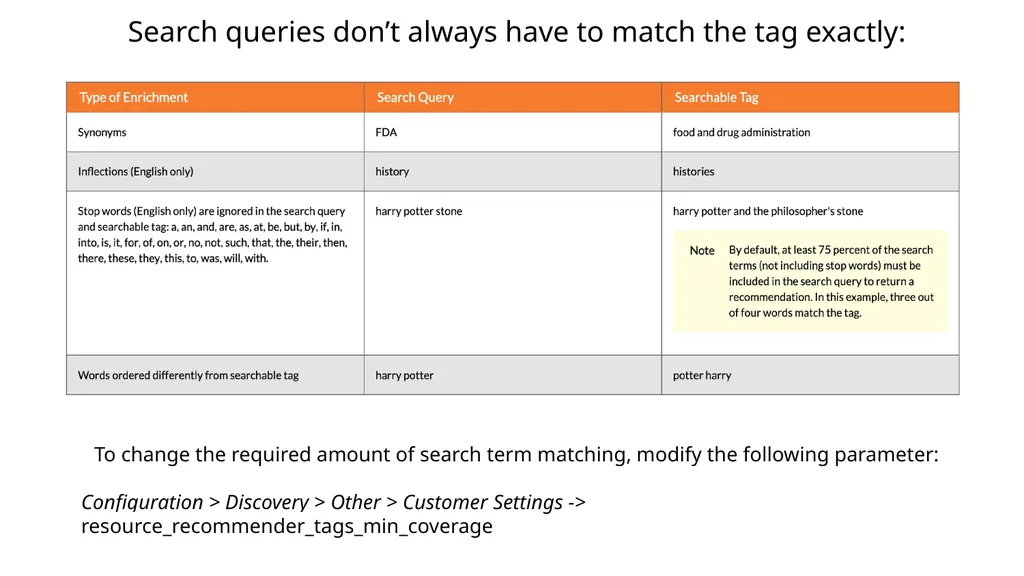
Search queries don’t always have to match the tag exactly: To change the required amount of search term matching, modify the following parameter:
Configuration > Discovery > Other > Customer Settings -> resource_recommender_tags_min_coverage<br>
Configuration > Discovery > Other > Customer Settings -> resource_recommender_tags_min_coverage<br>
09
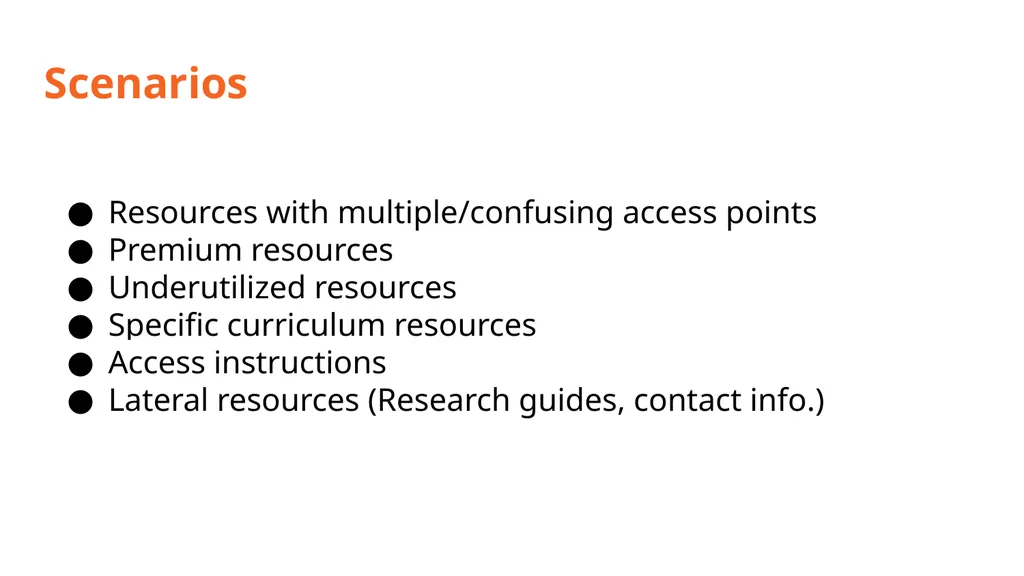
Scenarios Resources with multiple/confusing access points
Premium resources
Underutilized resources
Specific curriculum resources
Access instructions
Lateral resources (Research guides, contact info.)<br>
Premium resources
Underutilized resources
Specific curriculum resources
Access instructions
Lateral resources (Research guides, contact info.)<br>
10
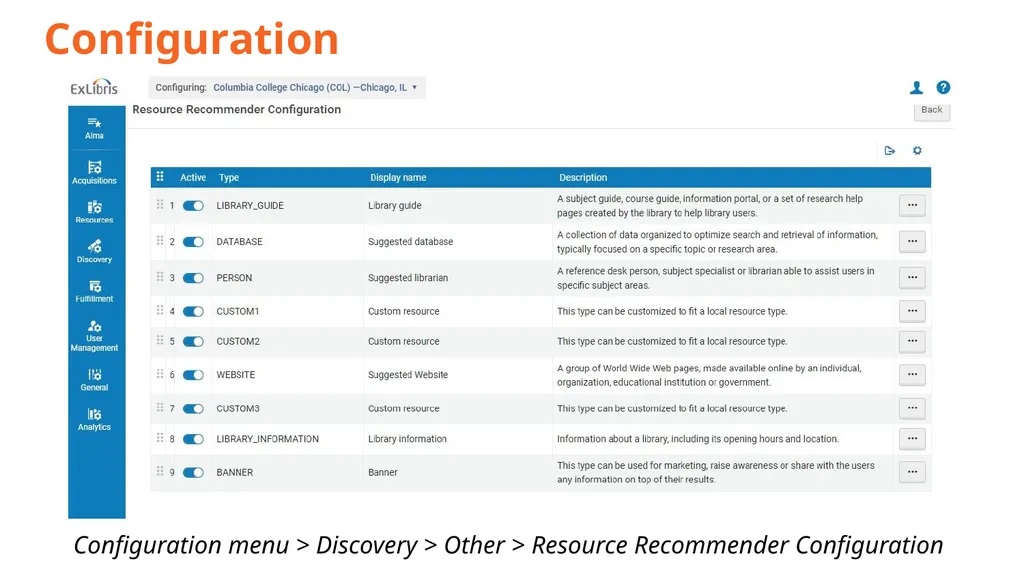
Configuration Configuration menu > Discovery > Other > Resource Recommender Configuration<br>
11
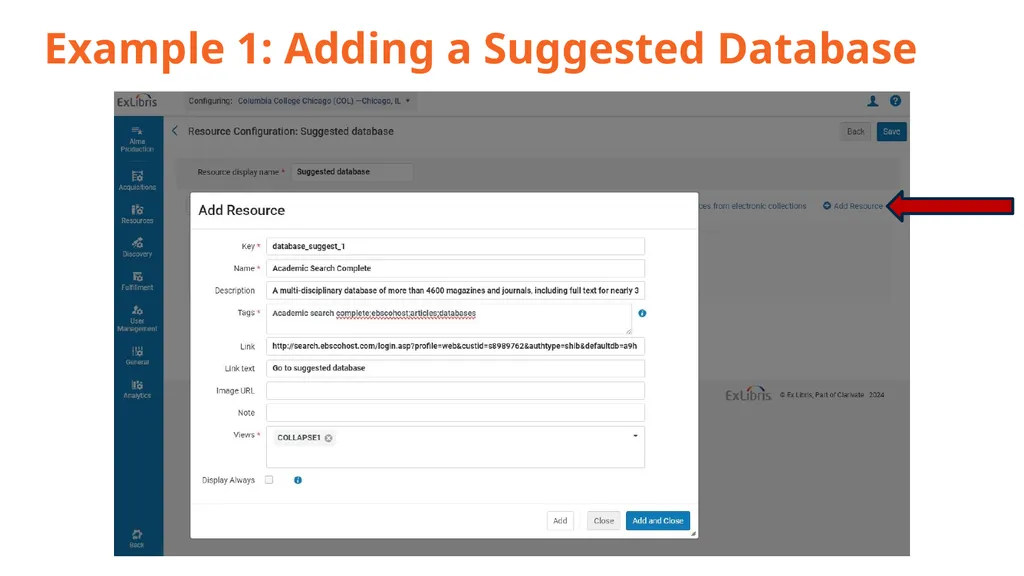
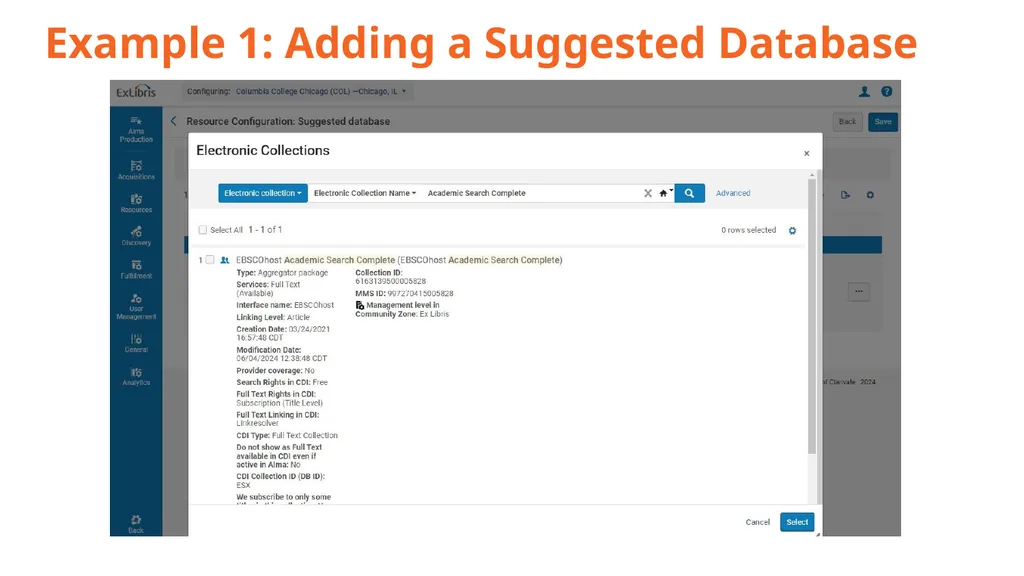
Example 1: Adding a Suggested Database<br>
12
Example 1: Adding a Suggested Database<br>
13
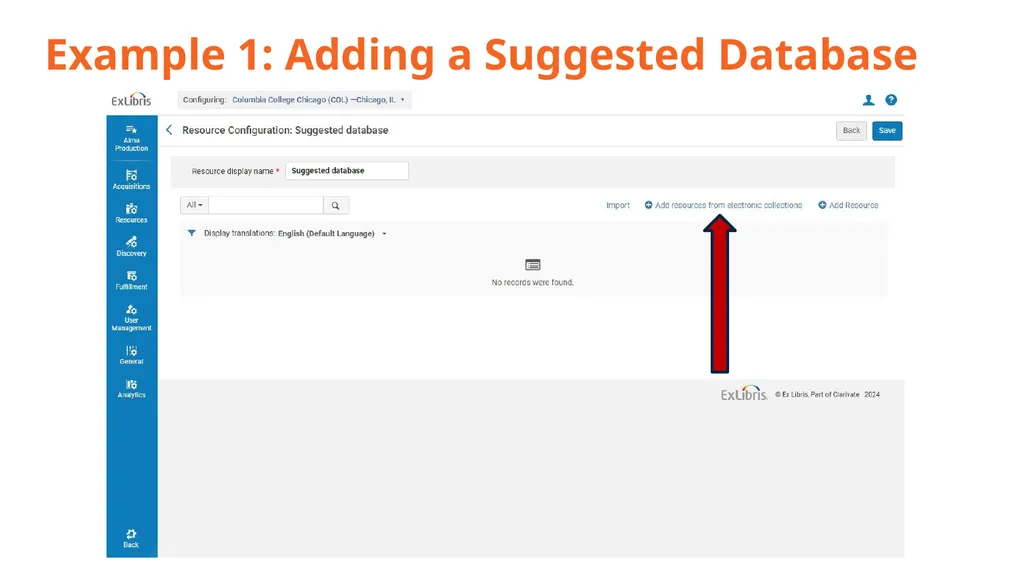
Example 1: Adding a Suggested Database<br>
14
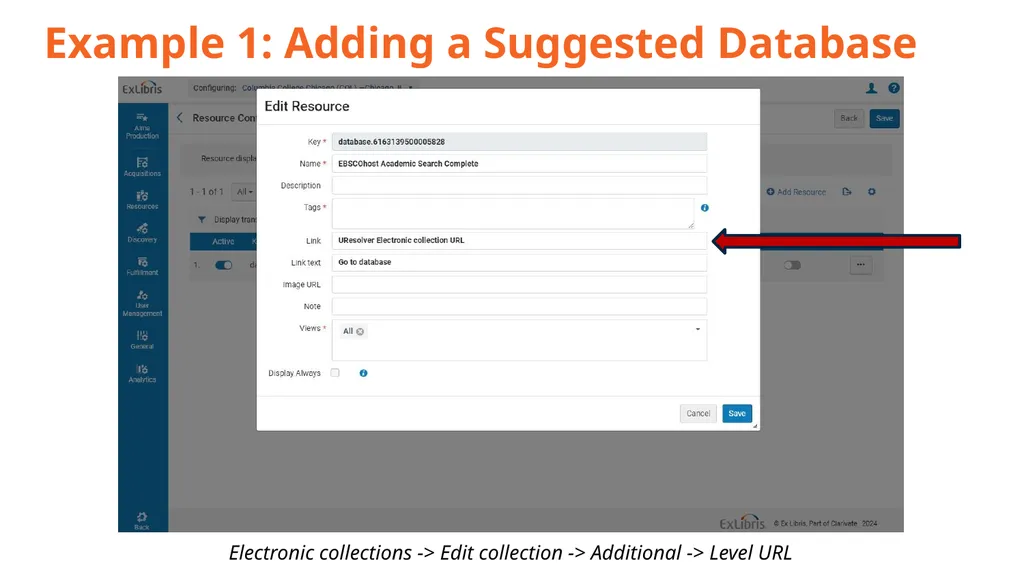
Example 1: Adding a Suggested Database Electronic collections -> Edit collection -> Additional -> Level URL<br>
15
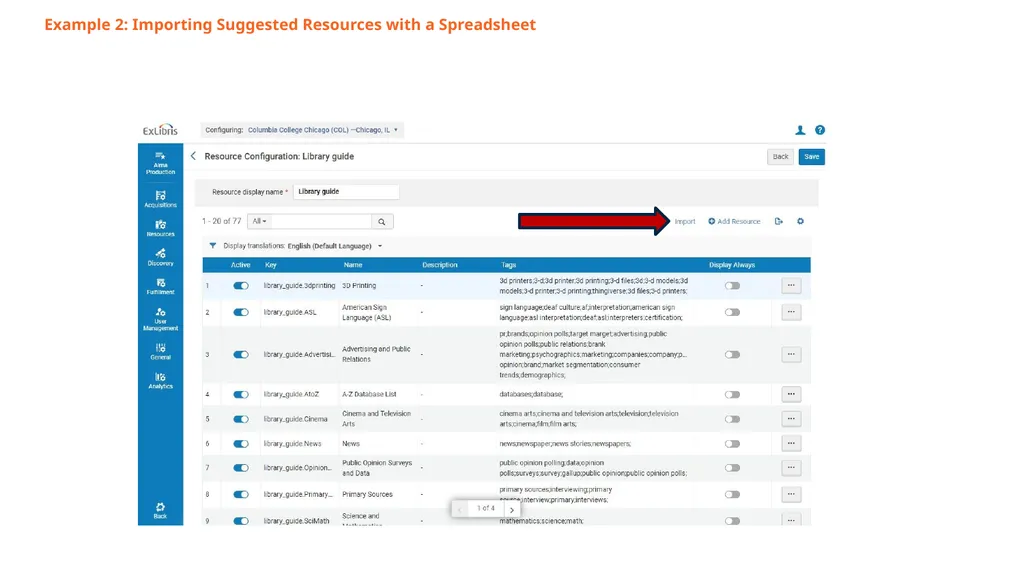
Example 2: Importing Suggested Resources with a Spreadsheet Spreadsheet example available here: https://knowledge.exlibrisgroup.com/@api/deki/files/68837/Database_List.xlsx?revision=3<br>
16
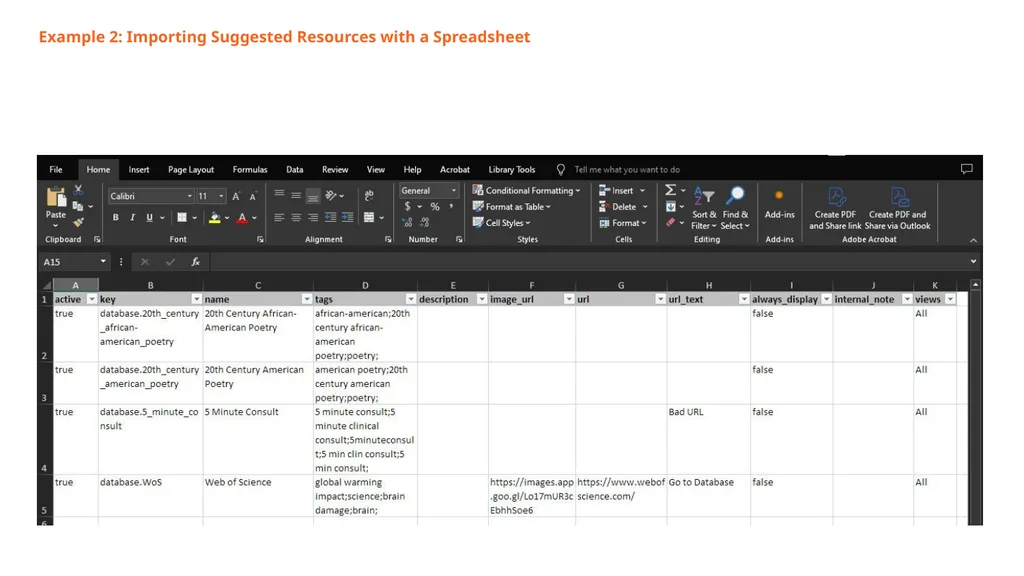
Example 2: Importing Suggested Resources with a Spreadsheet<br>
17
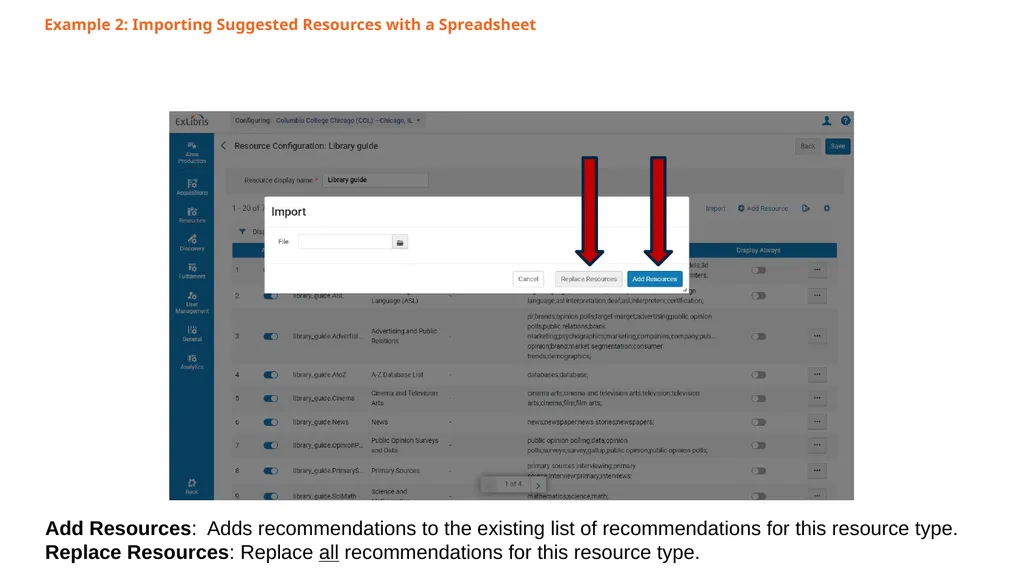
Example 2: Importing Suggested Resources with a Spreadsheet<br>
18
Example 2: Importing Suggested Resources with a Spreadsheet Add Resources: Adds recommendations to the existing list of recommendations for this resource type.
Replace Resources: Replace all recommendations for this resource type.<br>
Replace Resources: Replace all recommendations for this resource type.<br>
19
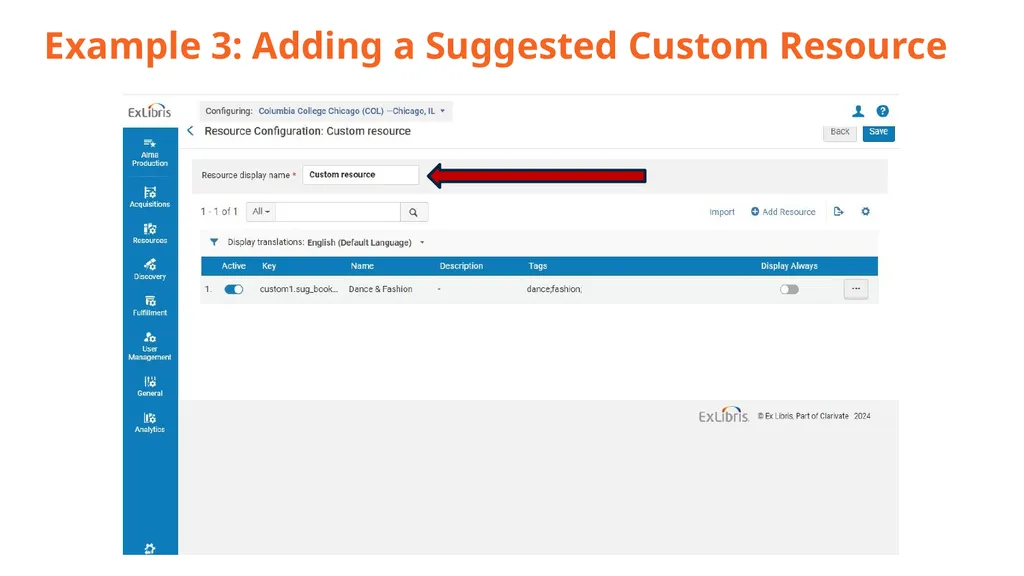
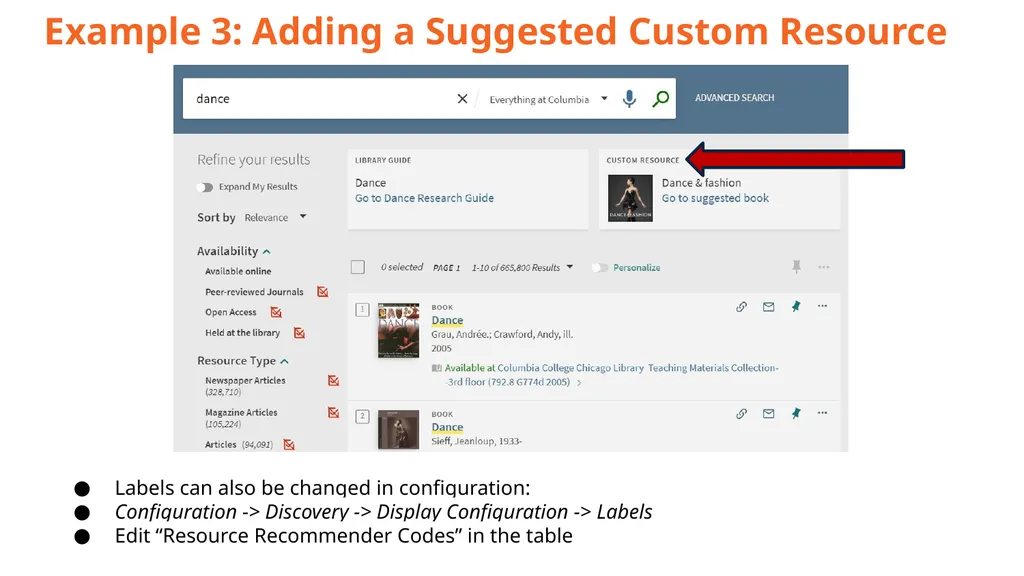
Example 3: Adding a Suggested Custom Resource<br>
20
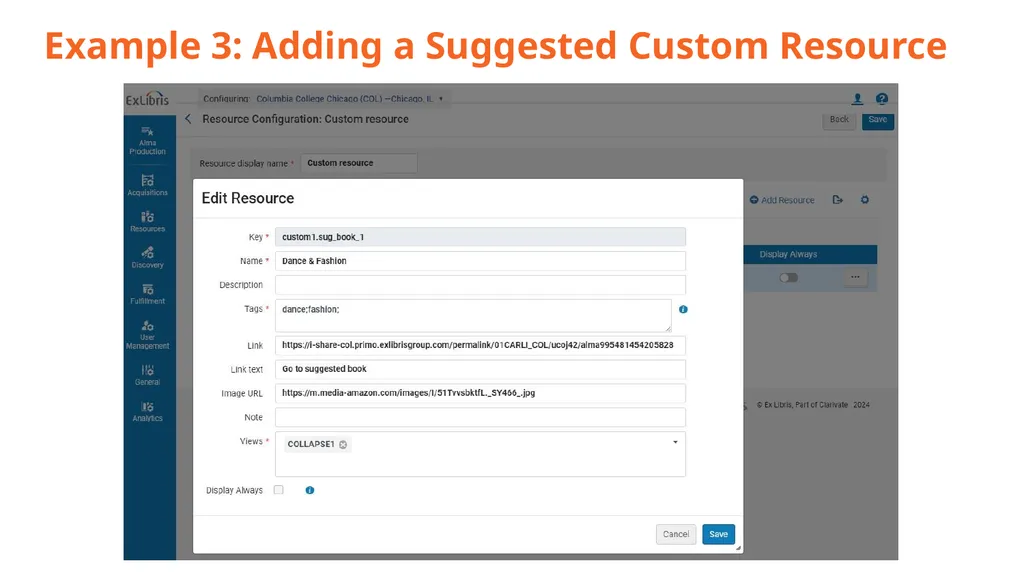
Example 3: Adding a Suggested Custom Resource<br>
21
Example 3: Adding a Suggested Custom Resource Labels can also be changed in configuration:
Configuration -> Discovery -> Display Configuration -> Labels
Edit “Resource Recommender Codes” in the table<br>
Configuration -> Discovery -> Display Configuration -> Labels
Edit “Resource Recommender Codes” in the table<br>
22
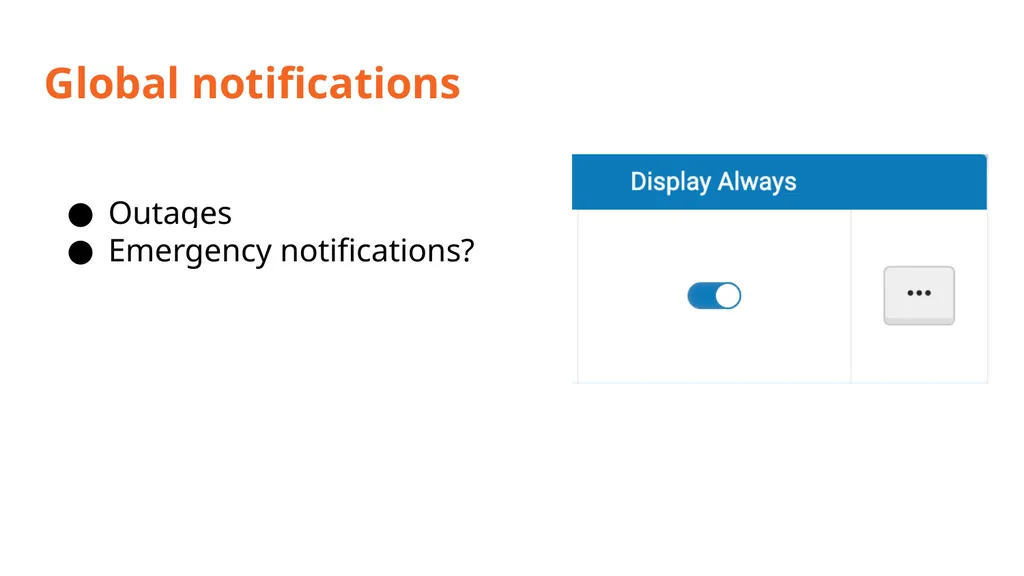
Global notifications Outages
Emergency notifications?<br>
Emergency notifications?<br>
23
Considerations Information overload
Too many resources for a single tag
Overly wordy descriptions
Use thumbnails
Manageability/sustainability
Faculty/staff input
Suggested resources
Tag review<br>
Too many resources for a single tag
Overly wordy descriptions
Use thumbnails
Manageability/sustainability
Faculty/staff input
Suggested resources
Tag review<br>
24
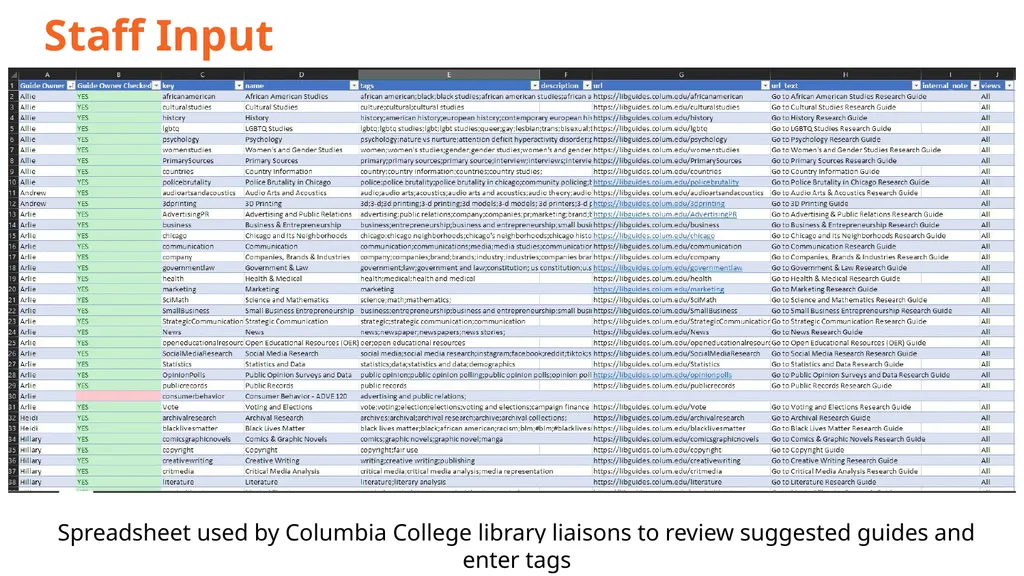
Staff Input Spreadsheet used by Columbia College library liaisons to review suggested guides and enter tags<br>
25
Resources Resource Recommender (ExLibris documentation)
https://t.ly/IKvmU
Resource Recommender (CARLI/SIU Presentation)
https://www.carli.illinois.edu/sites/files/files/20220512_Resource_Recommender_Thompson.pdf<br>
https://t.ly/IKvmU
Resource Recommender (CARLI/SIU Presentation)
https://www.carli.illinois.edu/sites/files/files/20220512_Resource_Recommender_Thompson.pdf<br>
26
Ranking Configuration<br>
27
Getting Started Identify local goals
Collect examples from colleagues
Your use cases and goals will look different!
Overview of how we went about the changes<br>
Collect examples from colleagues
Your use cases and goals will look different!
Overview of how we went about the changes<br>
28
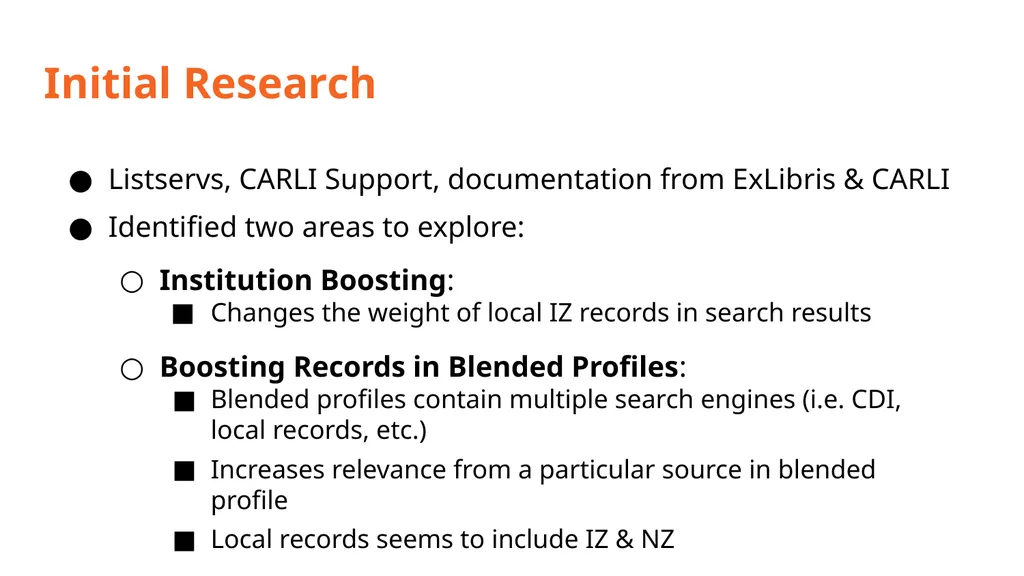
Initial Research Listservs, CARLI Support, documentation from ExLibris & CARLI
Identified two areas to explore:
Institution Boosting:
Changes the weight of local IZ records in search results
Boosting Records in Blended Profiles:
Blended profiles contain multiple search engines (i.e. CDI, local records, etc.)
Increases relevance from a particular source in blended profile
Local records seems to include IZ & NZ<br>
Identified two areas to explore:
Institution Boosting:
Changes the weight of local IZ records in search results
Boosting Records in Blended Profiles:
Blended profiles contain multiple search engines (i.e. CDI, local records, etc.)
Increases relevance from a particular source in blended profile
Local records seems to include IZ & NZ<br>
29
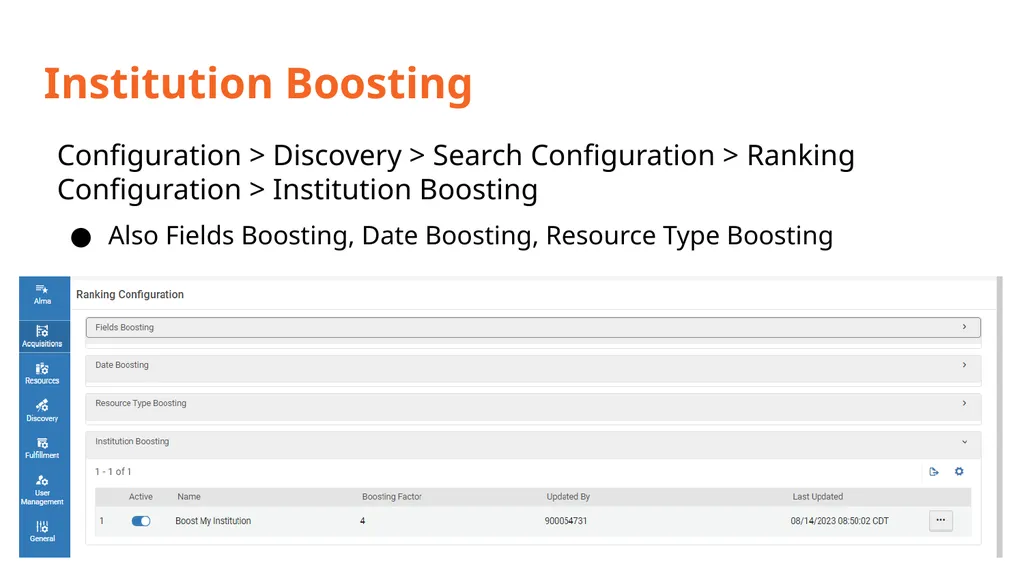
Institution Boosting Configuration > Discovery > Search Configuration > Ranking Configuration > Institution Boosting
Also Fields Boosting, Date Boosting, Resource Type Boosting<br>
Also Fields Boosting, Date Boosting, Resource Type Boosting<br>
30
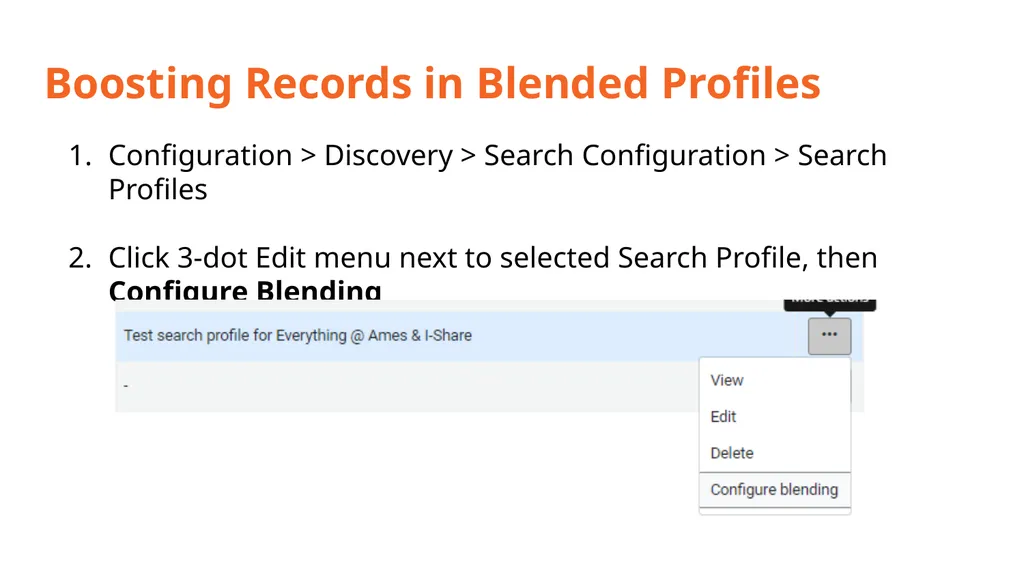
Boosting Records in Blended Profiles Configuration > Discovery > Search Configuration > Search Profiles
Click 3-dot Edit menu next to selected Search Profile, then Configure Blending<br>
Click 3-dot Edit menu next to selected Search Profile, then Configure Blending<br>
31
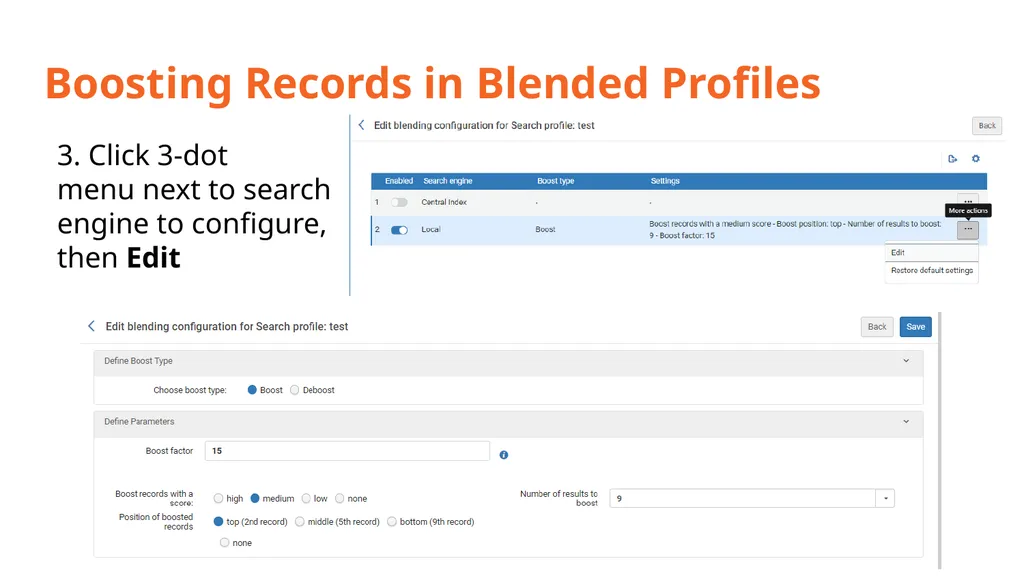
Boosting Records in Blended Profiles 3. Click 3-dot
menu next to search
engine to configure,
then Edit<br>
32
Testing Used sandbox for Institution Boosting tests
No changes to production environment
Can’t test exact use cases
Sought sandbox institution with similar FRBR settings
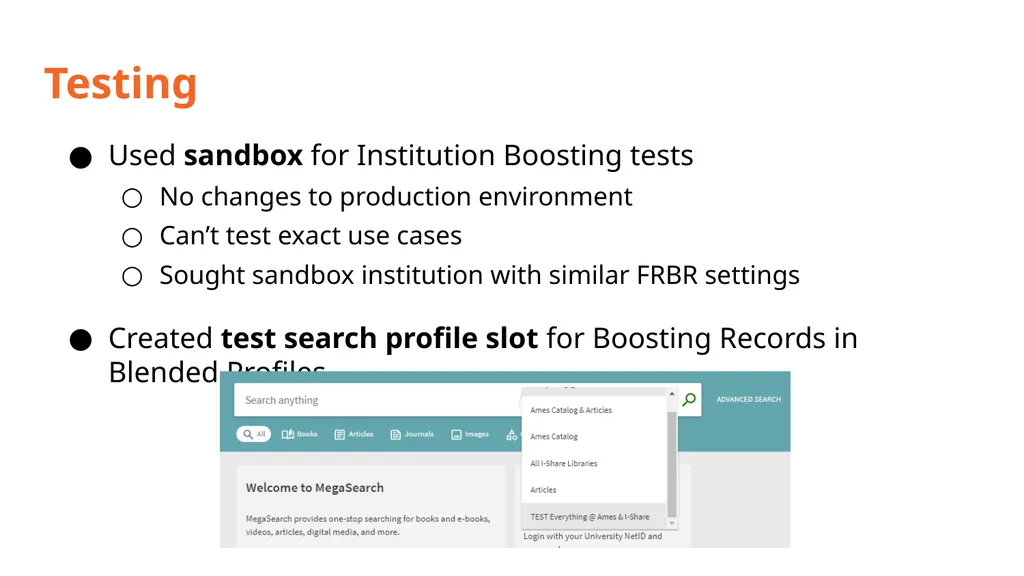
Created test search profile slot for Boosting Records in Blended Profiles<br>
No changes to production environment
Can’t test exact use cases
Sought sandbox institution with similar FRBR settings
Created test search profile slot for Boosting Records in Blended Profiles<br>
33
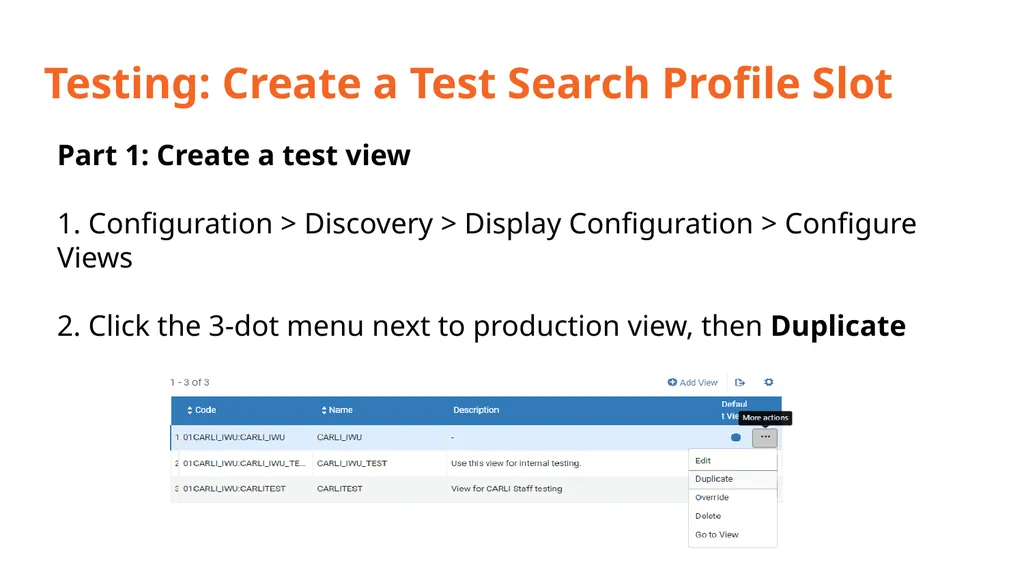
Testing: Create a Test Search Profile Slot Part 1: Create a test view
1. Configuration > Discovery > Display Configuration > Configure Views
2. Click the 3-dot menu next to production view, then Duplicate<br>
1. Configuration > Discovery > Display Configuration > Configure Views
2. Click the 3-dot menu next to production view, then Duplicate<br>
34
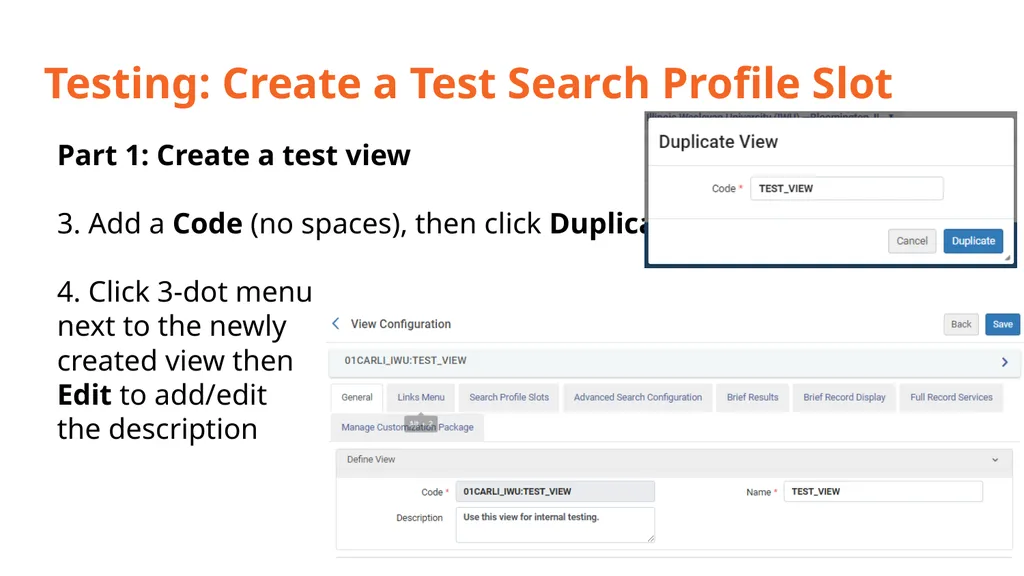
Testing: Create a Test Search Profile Slot Part 1: Create a test view
3. Add a Code (no spaces), then click Duplicate
4. Click 3-dot menu next to the newly created view then Edit to add/edit the description<br>
3. Add a Code (no spaces), then click Duplicate
4. Click 3-dot menu next to the newly created view then Edit to add/edit the description<br>
35
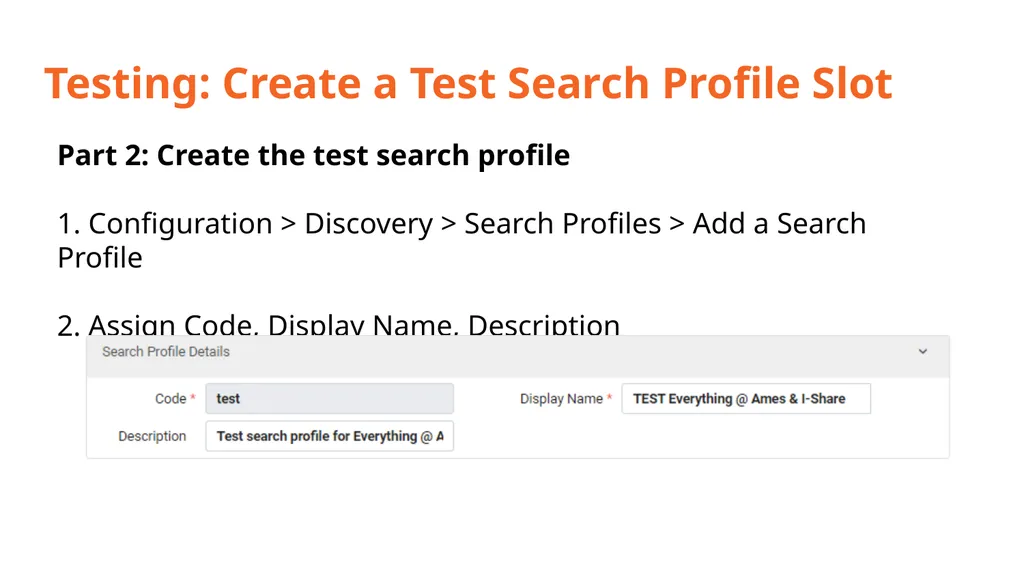
Testing: Create a Test Search Profile Slot Part 2: Create the test search profile
1. Configuration > Discovery > Search Profiles > Add a Search Profile
2. Assign Code, Display Name, Description<br>
2. Assign Code, Display Name, Description<br>
36
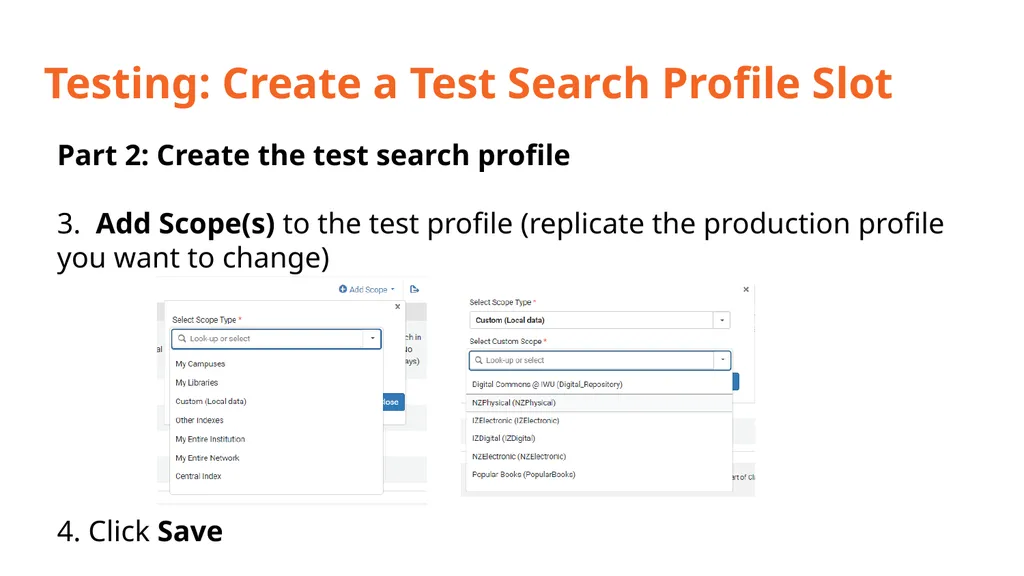
Testing: Create a Test Search Profile Slot Part 2: Create the test search profile
3. Add Scope(s) to the test profile (replicate the production profile you want to change)
4. Click Save<br>
4. Click Save<br>
37
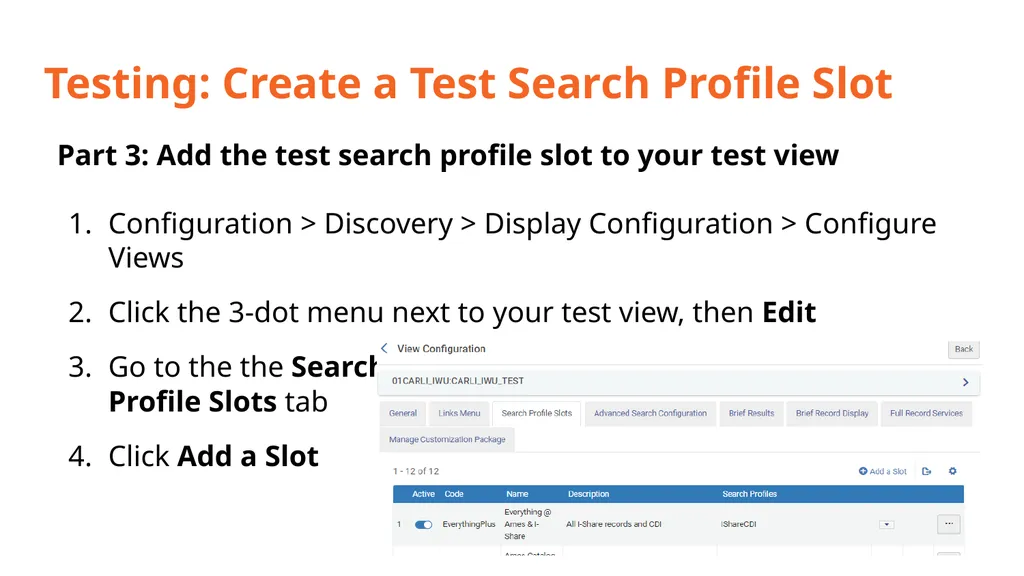
Testing: Create a Test Search Profile Slot Part 3: Add the test search profile slot to your test view
Configuration > Discovery > Display Configuration > Configure Views
Click the 3-dot menu next to your test view, then Edit
Go to the the Search Profile Slots tab
Click Add a Slot<br>
Configuration > Discovery > Display Configuration > Configure Views
Click the 3-dot menu next to your test view, then Edit
Go to the the Search Profile Slots tab
Click Add a Slot<br>
38
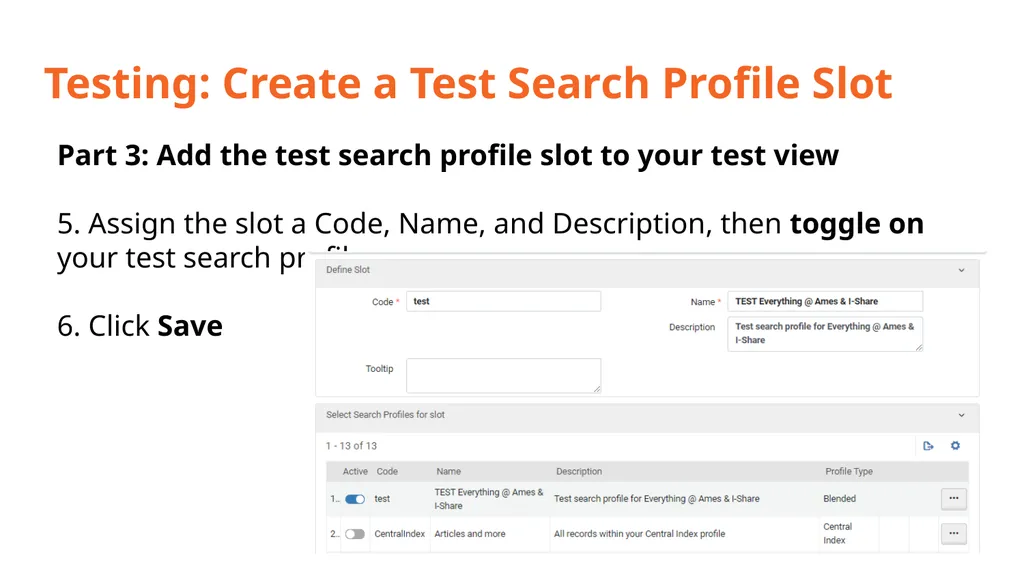
Testing: Create a Test Search Profile Slot Part 3: Add the test search profile slot to your test view
5. Assign the slot a Code, Name, and Description, then toggle on your test search profile
6. Click Save<br>
5. Assign the slot a Code, Name, and Description, then toggle on your test search profile
6. Click Save<br>
39
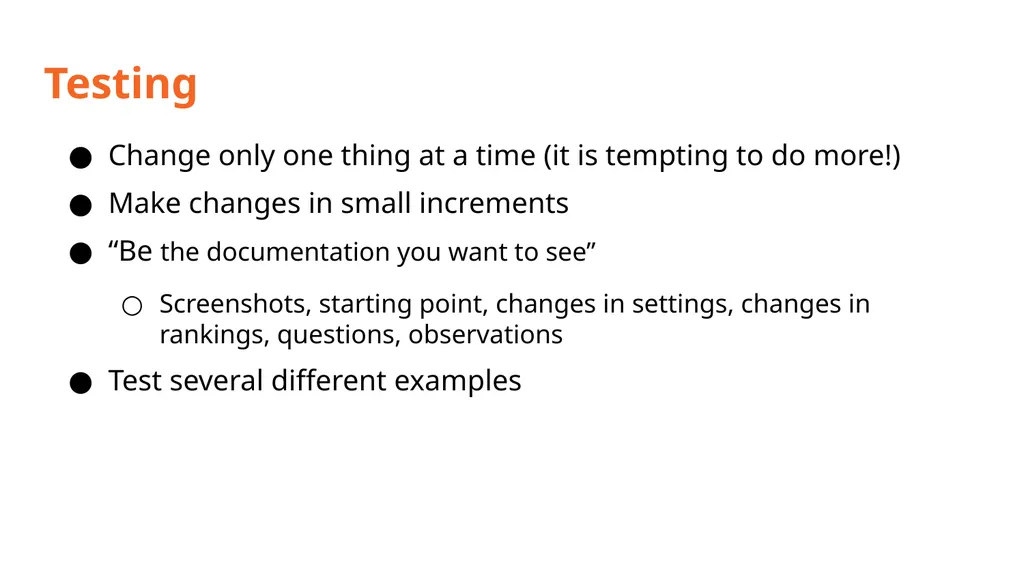
Testing Change only one thing at a time (it is tempting to do more!)
Make changes in small increments
“Be the documentation you want to see”
Screenshots, starting point, changes in settings, changes in rankings, questions, observations
Test several different examples<br>
Make changes in small increments
“Be the documentation you want to see”
Screenshots, starting point, changes in settings, changes in rankings, questions, observations
Test several different examples<br>
40
Other Tips Collect a variety of examples/test cases before testing
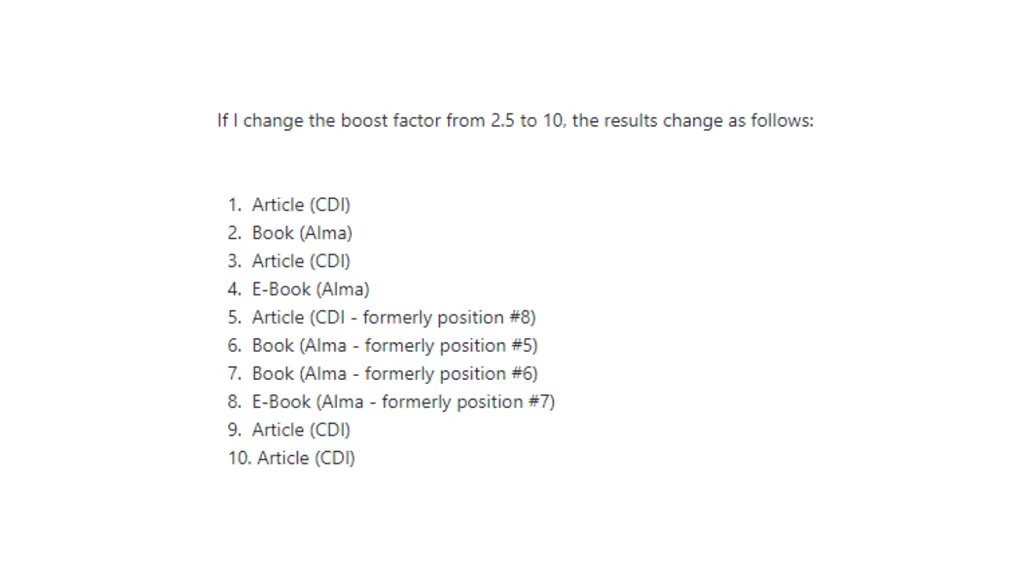
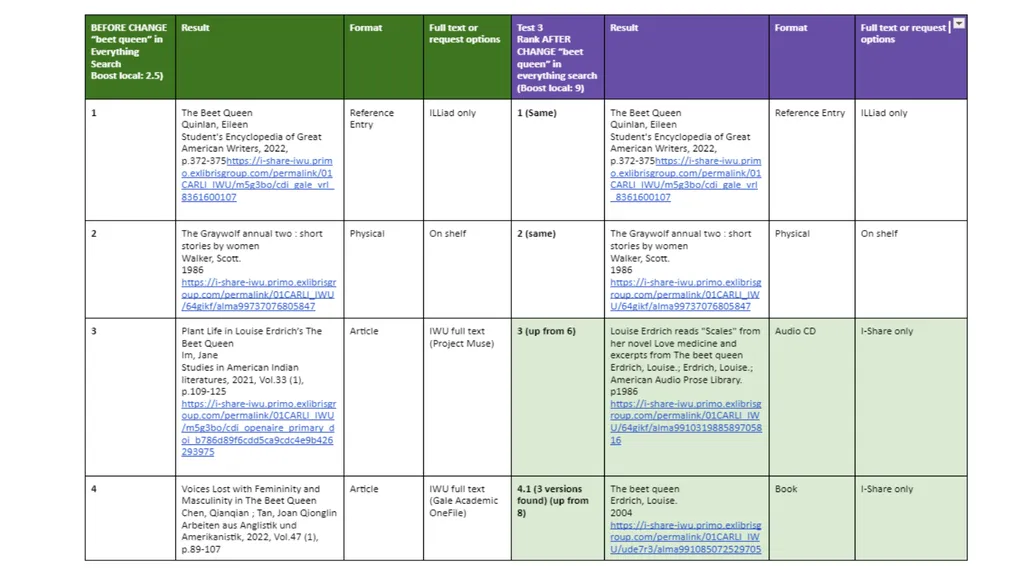
No magic numbers for boosting
Listserv tip: Change a capital letter in search terms so the search will be recalculated
Collect feedback from colleagues after making changes in production
Contact me at lspradli@iwu.edu if you want to learn more about our particular testing and changes!<br>
No magic numbers for boosting
Listserv tip: Change a capital letter in search terms so the search will be recalculated
Collect feedback from colleagues after making changes in production
Contact me at lspradli@iwu.edu if you want to learn more about our particular testing and changes!<br>
41
Resources CARLI Primo VE Search Ranking Configuration
https://www.carli.illinois.edu/products-services/i-share/discovery-interface/ranking_configuration
Configuring the Ranking of Search Results in Primo VE
https://t.ly/pMjUb
CARLI Primo VE Boosting Records in Blended Search Profiles https://www.carli.illinois.edu/products-services/i-share/discovery-interface/blended_search_profiles
ExLibris Boosting Records in Blended Search Profiles https://knowledge.exlibrisgroup.com/Primo/Product_Documentation/020Primo_VE/Primo_VE_(English)/040Search_Configurations/010Configuring_Search_Profiles_for_Primo_VE#Boosting_Records_in_Blended_Search_Profiles<br>
https://www.carli.illinois.edu/products-services/i-share/discovery-interface/ranking_configuration
Configuring the Ranking of Search Results in Primo VE
https://t.ly/pMjUb
CARLI Primo VE Boosting Records in Blended Search Profiles https://www.carli.illinois.edu/products-services/i-share/discovery-interface/blended_search_profiles
ExLibris Boosting Records in Blended Search Profiles https://knowledge.exlibrisgroup.com/Primo/Product_Documentation/020Primo_VE/Primo_VE_(English)/040Search_Configurations/010Configuring_Search_Profiles_for_Primo_VE#Boosting_Records_in_Blended_Search_Profiles<br>
42
Resources ExLibris Adding a Search Profile
https://knowledge.exlibrisgroup.com/Primo/Product_Documentation/020Primo_VE/Primo_VE_(English)/040Search_Configurations/010Configuring_Search_Profiles_for_Primo_VE#Adding_a_Search_Profile
CARLI Email Lists https://www.carli.illinois.edu/email-lists
ExLibris Listservs https://exlibrisusers.org/postorius/lists/<br>
CARLI Email Lists https://www.carli.illinois.edu/email-lists
ExLibris Listservs https://exlibrisusers.org/postorius/lists/<br>
43
Primo Showcase<br>
44
Showcase Allows you to create a visual representation of a set of any Primo VE search results
This visual representation is in the form of a browsable carousel of cover images
This representation can be embedded in any webpage<br>
This visual representation is in the form of a browsable carousel of cover images
This representation can be embedded in any webpage<br>
45
Showcase Example 1
Example 2<br>
Example 2<br>
46
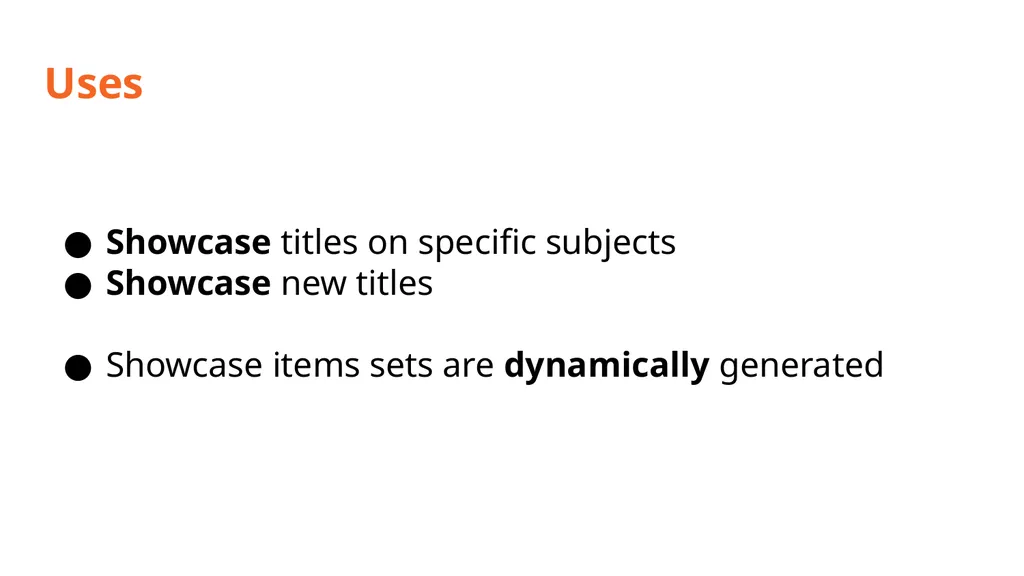
Uses Showcase titles on specific subjects
Showcase new titles
Showcase items sets are dynamically generated<br>
Showcase new titles
Showcase items sets are dynamically generated<br>
47
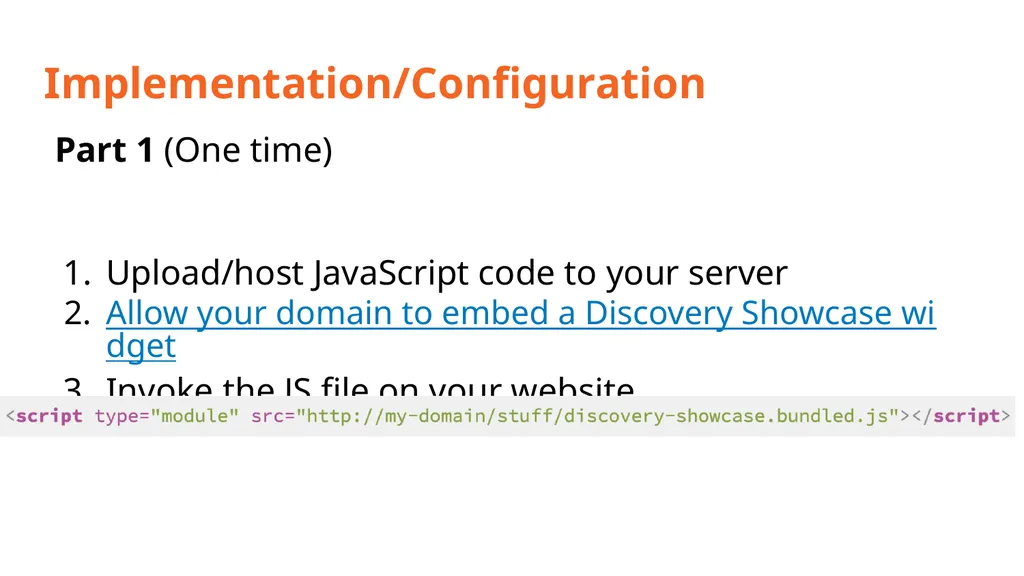
Implementation/Configuration Part 1 (One time)
Upload/host JavaScript code to your server
Allow your domain to embed a Discovery Showcase widget
Invoke the JS file on your website<br>
Upload/host JavaScript code to your server
Allow your domain to embed a Discovery Showcase widget
Invoke the JS file on your website<br>
48
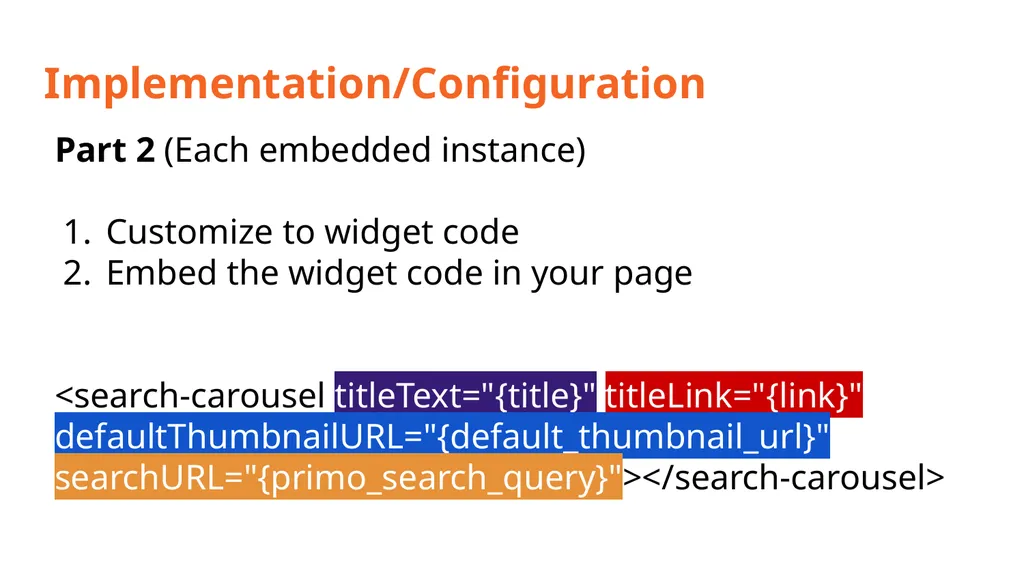
Implementation/Configuration Part 2 (Each embedded instance)
Customize to widget code
Embed the widget code in your page
<search-carousel titleText="{title}" titleLink="{link}" defaultThumbnailURL="{default_thumbnail_url}" searchURL="{primo_search_query}"></search-carousel><br>
Customize to widget code
Embed the widget code in your page
<search-carousel titleText="{title}" titleLink="{link}" defaultThumbnailURL="{default_thumbnail_url}" searchURL="{primo_search_query}"></search-carousel><br>
49
Implementation/Configuration Part 2 (Each embedded instance)
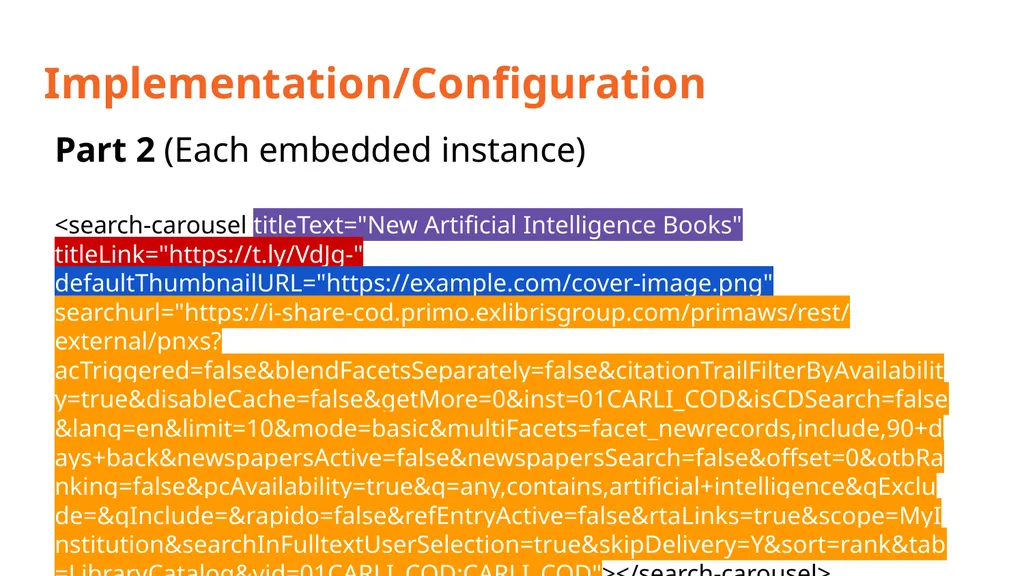
<search-carousel titleText="New Artificial Intelligence Books" titleLink="https://t.ly/VdJg-" defaultThumbnailURL="https://example.com/cover-image.png" searchurl="https://i-share-cod.primo.exlibrisgroup.com/primaws/rest/external/pnxs?acTriggered=false&blendFacetsSeparately=false&citationTrailFilterByAvailability=true&disableCache=false&getMore=0&inst=01CARLI_COD&isCDSearch=false&lang=en&limit=10&mode=basic&multiFacets=facet_newrecords,include,90+days+back&newspapersActive=false&newspapersSearch=false&offset=0&otbRanking=false&pcAvailability=true&q=any,contains,artificial+intelligence&qExclude=&qInclude=&rapido=false&refEntryActive=false&rtaLinks=true&scope=MyInstitution&searchInFulltextUserSelection=true&skipDelivery=Y&sort=rank&tab=LibraryCatalog&vid=01CARLI_COD:CARLI_COD"></search-carousel><br>
<search-carousel titleText="New Artificial Intelligence Books" titleLink="https://t.ly/VdJg-" defaultThumbnailURL="https://example.com/cover-image.png" searchurl="https://i-share-cod.primo.exlibrisgroup.com/primaws/rest/external/pnxs?acTriggered=false&blendFacetsSeparately=false&citationTrailFilterByAvailability=true&disableCache=false&getMore=0&inst=01CARLI_COD&isCDSearch=false&lang=en&limit=10&mode=basic&multiFacets=facet_newrecords,include,90+days+back&newspapersActive=false&newspapersSearch=false&offset=0&otbRanking=false&pcAvailability=true&q=any,contains,artificial+intelligence&qExclude=&qInclude=&rapido=false&refEntryActive=false&rtaLinks=true&scope=MyInstitution&searchInFulltextUserSelection=true&skipDelivery=Y&sort=rank&tab=LibraryCatalog&vid=01CARLI_COD:CARLI_COD"></search-carousel><br>
50
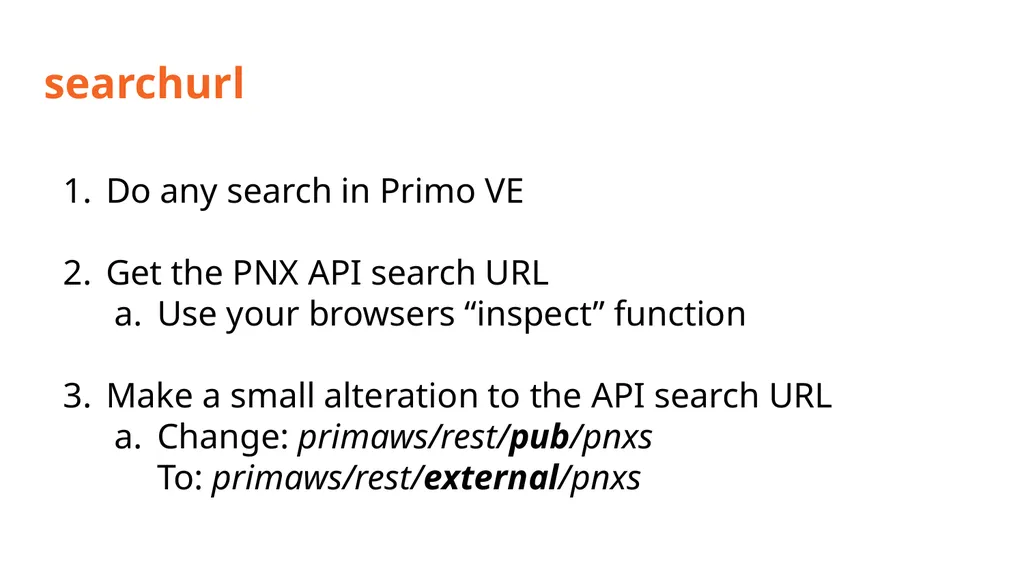
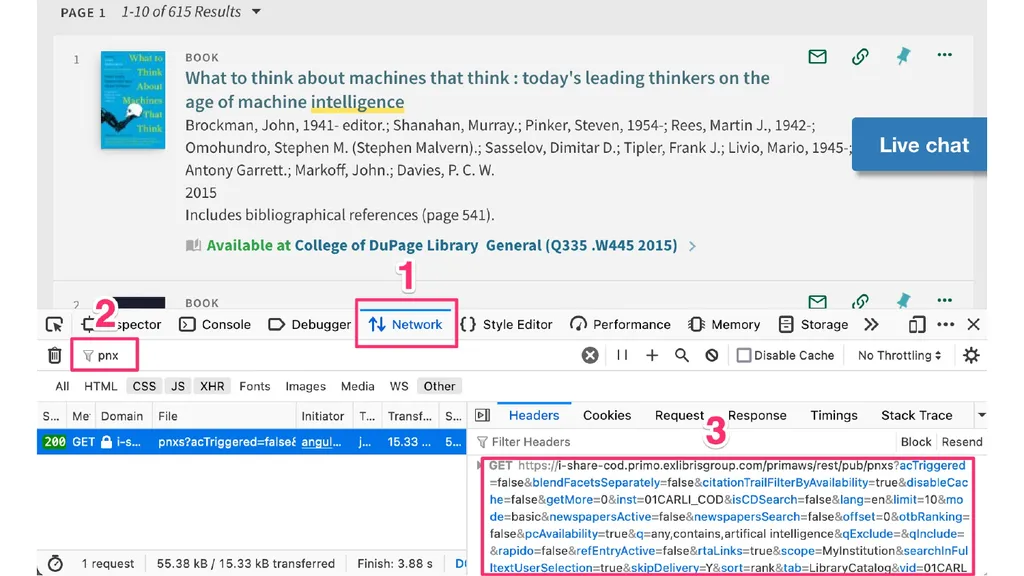
searchurl Do any search in Primo VE
Get the PNX API search URL
Use your browsers “inspect” function
Make a small alteration to the API search URL
Change: primaws/rest/pub/pnxs
To: primaws/rest/external/pnxs<br>
Get the PNX API search URL
Use your browsers “inspect” function
Make a small alteration to the API search URL
Change: primaws/rest/pub/pnxs
To: primaws/rest/external/pnxs<br>
51
searchurl<br>
52
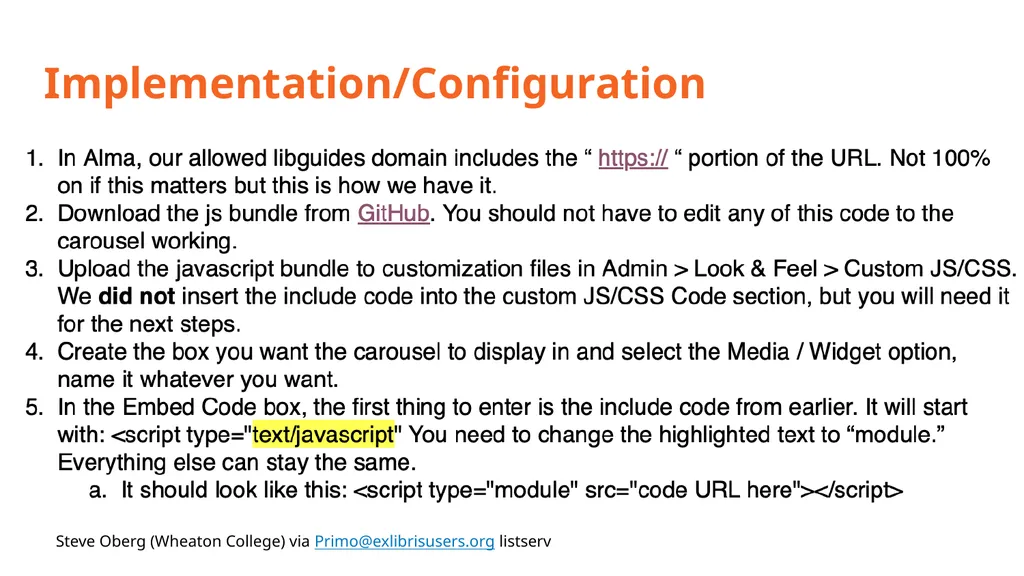
Implementation/Configuration Gffg dkjfg Steve Oberg (Wheaton College) via Primo@exlibrisusers.org listserv<br>
53
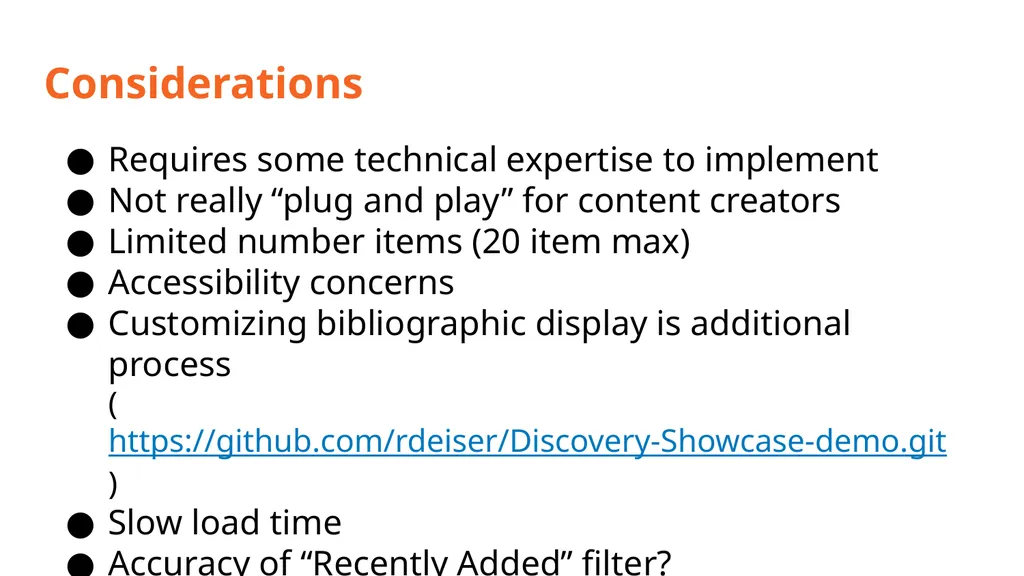
Considerations Requires some technical expertise to implement
Not really “plug and play” for content creators
Limited number items (20 item max)
Accessibility concerns
Customizing bibliographic display is additional process
(https://github.com/rdeiser/Discovery-Showcase-demo.git)
Slow load time
Accuracy of “Recently Added” filter?
More convenient alternatives (LibGuide galleries?)<br>
Not really “plug and play” for content creators
Limited number items (20 item max)
Accessibility concerns
Customizing bibliographic display is additional process
(https://github.com/rdeiser/Discovery-Showcase-demo.git)
Slow load time
Accuracy of “Recently Added” filter?
More convenient alternatives (LibGuide galleries?)<br>
54
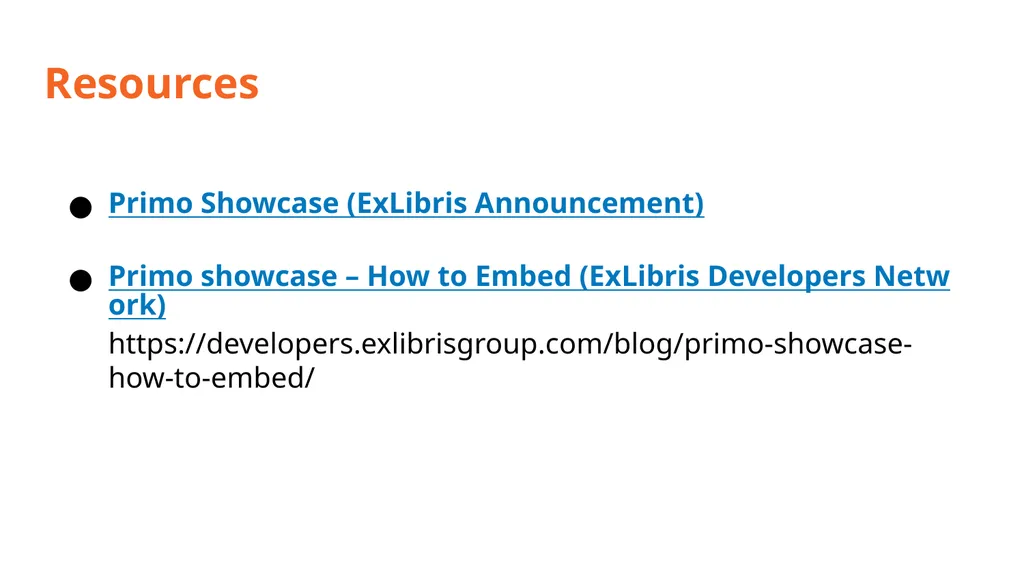
Resources Primo Showcase (ExLibris Announcement)
Primo showcase – How to Embed (ExLibris Developers Network)
https://developers.exlibrisgroup.com/blog/primo-showcase-how-to-embed/<br>
Primo showcase – How to Embed (ExLibris Developers Network)
https://developers.exlibrisgroup.com/blog/primo-showcase-how-to-embed/<br>
55
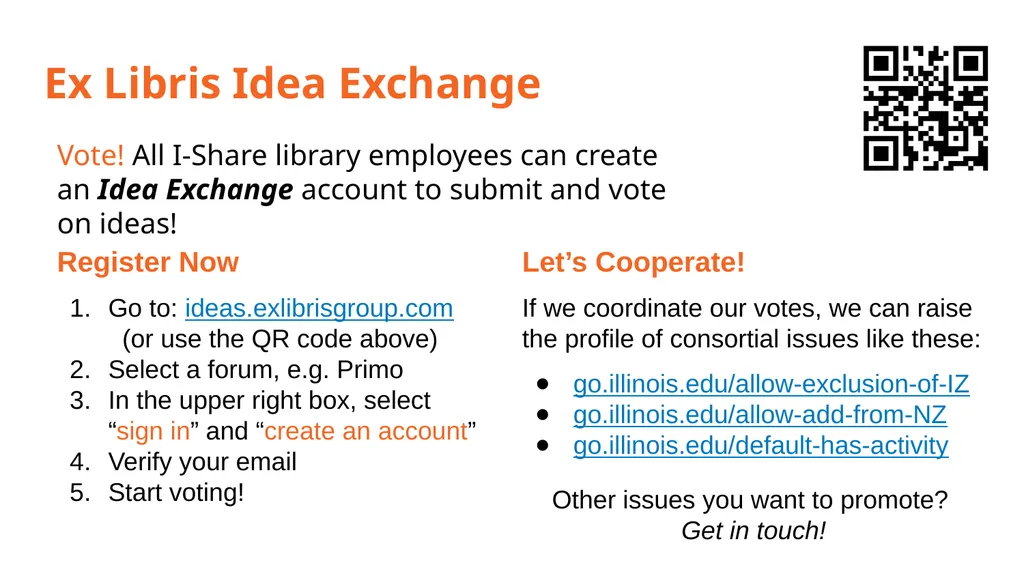
Ex Libris Idea Exchange Vote! All I-Share library employees can create an Idea Exchange account to submit and vote on ideas! Register Now
Go to: ideas.exlibrisgroup.com (or use the QR code above)
Select a forum, e.g. Primo
In the upper right box, select “sign in” and “create an account”
Verify your email
Start voting! Let’s Cooperate!
If we coordinate our votes, we can raise the profile of consortial issues like these:
go.illinois.edu/allow-exclusion-of-IZ
go.illinois.edu/allow-add-from-NZ
go.illinois.edu/default-has-activity
Other issues you want to promote? Get in touch!<br>
Go to: ideas.exlibrisgroup.com (or use the QR code above)
Select a forum, e.g. Primo
In the upper right box, select “sign in” and “create an account”
Verify your email
Start voting! Let’s Cooperate!
If we coordinate our votes, we can raise the profile of consortial issues like these:
go.illinois.edu/allow-exclusion-of-IZ
go.illinois.edu/allow-add-from-NZ
go.illinois.edu/default-has-activity
Other issues you want to promote? Get in touch!<br>