
CS 4530: Fundamentals of Software Engineering
MY
Published · 36 slides · 0 views
1 / 1
Description
CS 4530: Fundamentals of Software Engineering Module 3.7: React Hook Patterns Adeel Bhutta and Mitch Wand Khoury College of Computer Sciences 1 2023-24 Released under the CC BY-SA license Learning Objectives for this Module By the end of
Related Topics
Share
Embed code
Download this presentation From Below
"CS 4530: Fundamentals of Software Engineering" is the property of its rightful owner. Permission is granted to download and print the materials on this website for personal, non-commercial use only, and to display it on your personal computer provided you do not modify the materials and that you retain all copyright notices contained in the materials. By downloading content from our website, you accept the terms of this agreement.
Presentation Transcript
01
CS 4530: Fundamentals of Software Engineering
Module 3.7: React Hook Patterns Adeel Bhutta and Mitch Wand
Khoury College of Computer Sciences 1 © 2023-24 Released under the CC BY-SA license<br>
Khoury College of Computer Sciences 1 © 2023-24 Released under the CC BY-SA license<br>
02
Learning Objectives for this Module By the end of this module, you should be able to:
Explain the basic use cases for useEffect
Explain when a useEffect is executed, and when its return value is executed
Construct simple custom hooks and explain why they are useful.
Be able to explain the three core steps of a test (assemble, act, assess) can map to UI component testing 2<br>
Explain the basic use cases for useEffect
Explain when a useEffect is executed, and when its return value is executed
Construct simple custom hooks and explain why they are useful.
Be able to explain the three core steps of a test (assemble, act, assess) can map to UI component testing 2<br>
03
Lesson 9.1 useEffect 3<br>
04
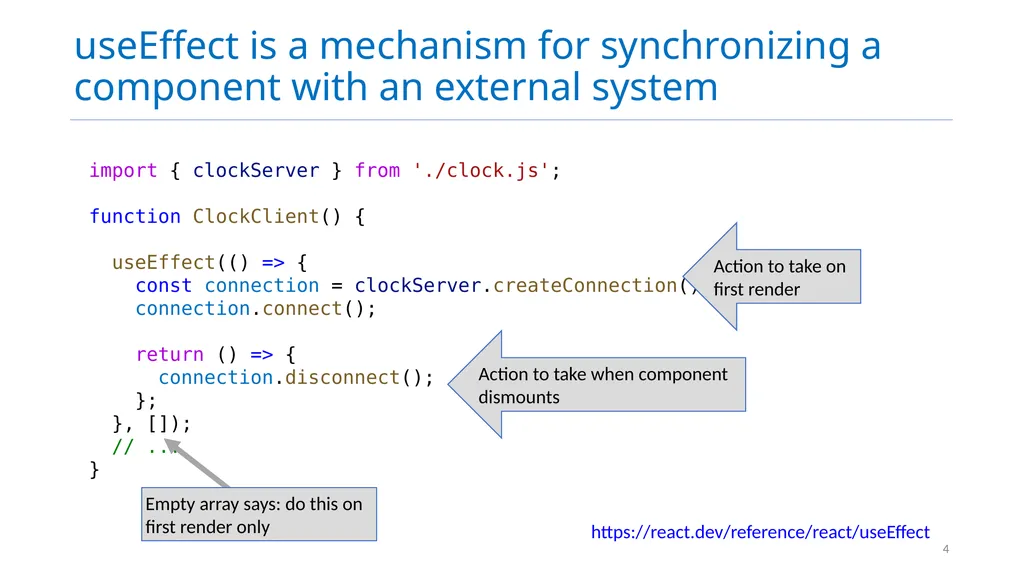
import { clockServer } from './clock.js';
function ClockClient() {
useEffect(() => {
const connection = clockServer.createConnection()
connection.connect();
return () => {
connection.disconnect();
};
}, []);
// ...
} useEffect is a mechanism for synchronizing a component with an external system https://react.dev/reference/react/useEffect 4 Action to take on first render Action to take when component dismounts<br>
function ClockClient() {
useEffect(() => {
const connection = clockServer.createConnection()
connection.connect();
return () => {
connection.disconnect();
};
}, []);
// ...
} useEffect is a mechanism for synchronizing a component with an external system https://react.dev/reference/react/useEffect 4 Action to take on first render Action to take when component dismounts<br>
05
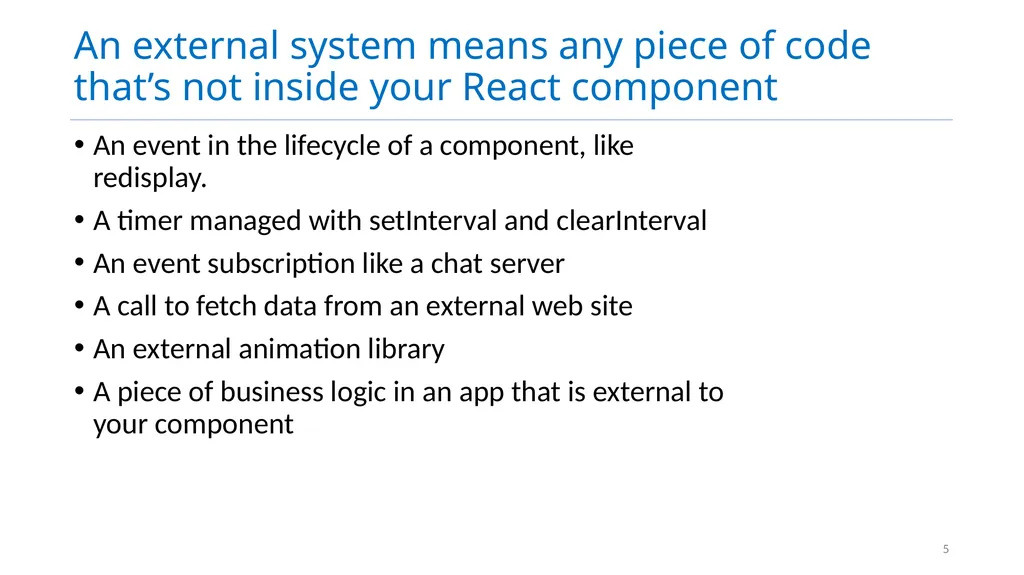
An external system means any piece of code that’s not inside your React component An event in the lifecycle of a component, like redisplay.
A timer managed with setInterval and clearInterval
An event subscription like a chat server
A call to fetch data from an external web site
An external animation library
A piece of business logic in an app that is external to your component 5<br>
A timer managed with setInterval and clearInterval
An event subscription like a chat server
A call to fetch data from an external web site
An external animation library
A piece of business logic in an app that is external to your component 5<br>
06
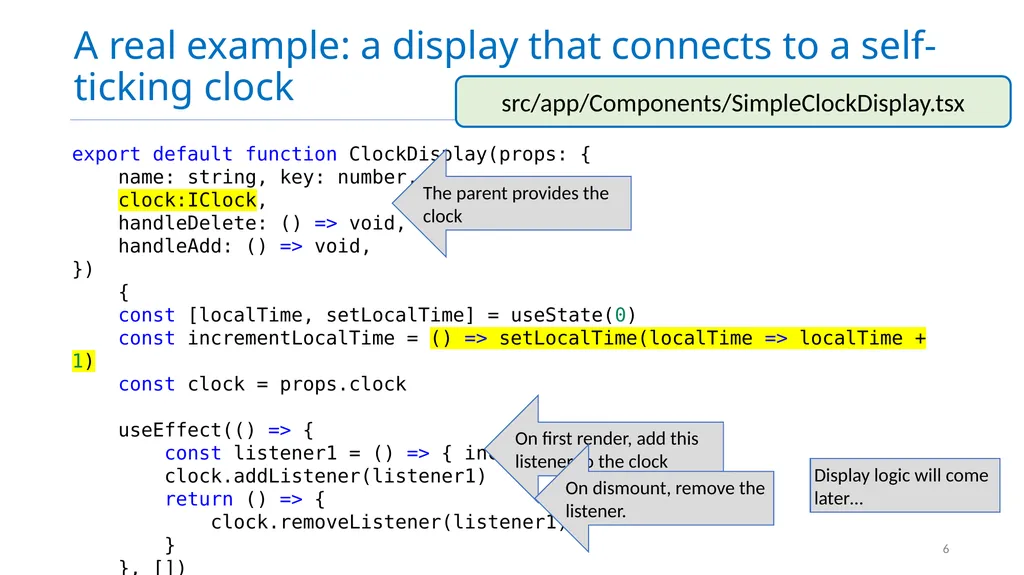
A real example: a display that connects to a self-ticking clock 6 export default function ClockDisplay(props: {
name: string, key: number,
clock:IClock,
handleDelete: () => void,
handleAdd: () => void,
})
{
const [localTime, setLocalTime] = useState(0)
const incrementLocalTime = () => setLocalTime(localTime => localTime + 1)
const clock = props.clock
useEffect(() => {
const listener1 = () => { incrementLocalTime() }
clock.addListener(listener1)
return () => {
clock.removeListener(listener1)
}
}, []) On first render, add this listener to the clock On dismount, remove the listener. src/app/Components/SimpleClockDisplay.tsx The parent provides the clock Display logic will come later…<br>
name: string, key: number,
clock:IClock,
handleDelete: () => void,
handleAdd: () => void,
})
{
const [localTime, setLocalTime] = useState(0)
const incrementLocalTime = () => setLocalTime(localTime => localTime + 1)
const clock = props.clock
useEffect(() => {
const listener1 = () => { incrementLocalTime() }
clock.addListener(listener1)
return () => {
clock.removeListener(listener1)
}
}, []) On first render, add this listener to the clock On dismount, remove the listener. src/app/Components/SimpleClockDisplay.tsx The parent provides the clock Display logic will come later…<br>
07
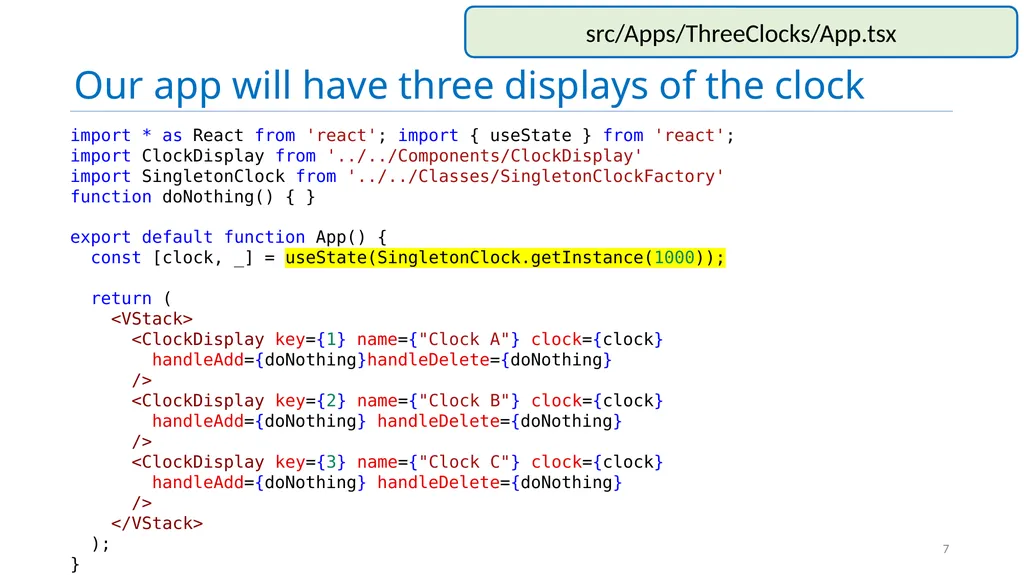
Our app will have three displays of the clock 7 import * as React from 'react'; import { useState } from 'react';
import ClockDisplay from '../../Components/ClockDisplay'
import SingletonClock from '../../Classes/SingletonClockFactory' function doNothing() { }
export default function App() { const [clock, _] = useState(SingletonClock.getInstance(1000));
return (
<VStack>
<ClockDisplay key={1} name={"Clock A"} clock={clock}
handleAdd={doNothing}handleDelete={doNothing}
/>
<ClockDisplay key={2} name={"Clock B"} clock={clock}
handleAdd={doNothing} handleDelete={doNothing}
/>
<ClockDisplay key={3} name={"Clock C"} clock={clock}
handleAdd={doNothing} handleDelete={doNothing}
/>
</VStack>
);
} src/Apps/ThreeClocks/App.tsx<br>
import SingletonClock from '../../Classes/SingletonClockFactory' function doNothing() { }
export default function App() { const [clock, _] = useState(SingletonClock.getInstance(1000));
return (
<VStack>
<ClockDisplay key={1} name={"Clock A"} clock={clock}
handleAdd={doNothing}handleDelete={doNothing}
/>
<ClockDisplay key={2} name={"Clock B"} clock={clock}
handleAdd={doNothing} handleDelete={doNothing}
/>
<ClockDisplay key={3} name={"Clock C"} clock={clock}
handleAdd={doNothing} handleDelete={doNothing}
/>
</VStack>
);
} src/Apps/ThreeClocks/App.tsx<br>
08
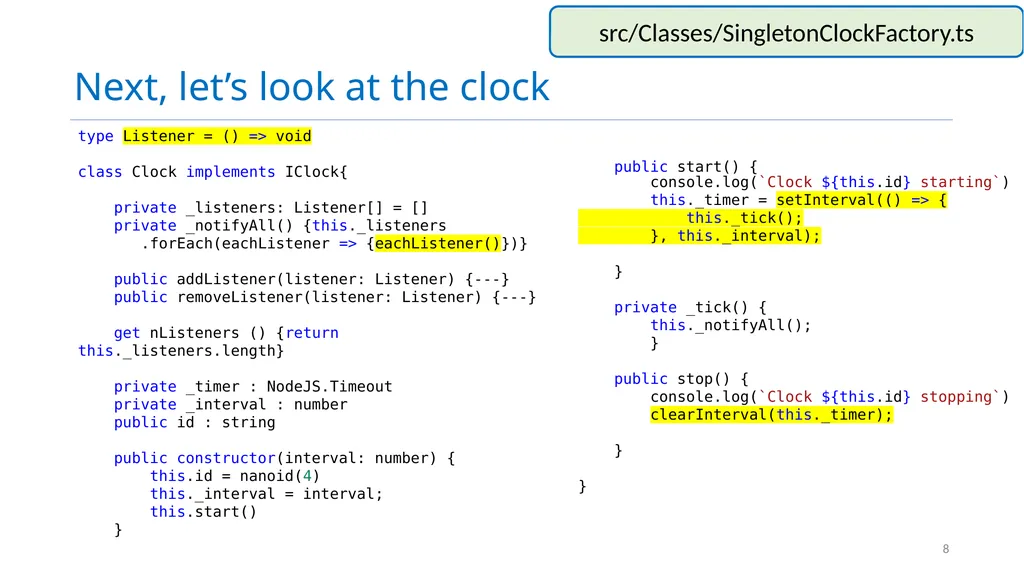
Next, let’s look at the clock type Listener = () => void
class Clock implements IClock{
private _listeners: Listener[] = []
private _notifyAll() {this._listeners
.forEach(eachListener => {eachListener()})}
public addListener(listener: Listener) {---}
public removeListener(listener: Listener) {---}
get nListeners () {return this._listeners.length}
private _timer : NodeJS.Timeout
private _interval : number
public id : string
public constructor(interval: number) {
this.id = nanoid(4)
this._interval = interval;
this.start()
} src/Classes/SingletonClockFactory.ts 8 public start() {
console.log(`Clock ${this.id} starting`)
this._timer = setInterval(() => {
this._tick();
}, this._interval);
}
private _tick() {
this._notifyAll();
}
public stop() {
console.log(`Clock ${this.id} stopping`)
clearInterval(this._timer);
}
}<br>
class Clock implements IClock{
private _listeners: Listener[] = []
private _notifyAll() {this._listeners
.forEach(eachListener => {eachListener()})}
public addListener(listener: Listener) {---}
public removeListener(listener: Listener) {---}
get nListeners () {return this._listeners.length}
private _timer : NodeJS.Timeout
private _interval : number
public id : string
public constructor(interval: number) {
this.id = nanoid(4)
this._interval = interval;
this.start()
} src/Classes/SingletonClockFactory.ts 8 public start() {
console.log(`Clock ${this.id} starting`)
this._timer = setInterval(() => {
this._tick();
}, this._interval);
}
private _tick() {
this._notifyAll();
}
public stop() {
console.log(`Clock ${this.id} stopping`)
clearInterval(this._timer);
}
}<br>
09
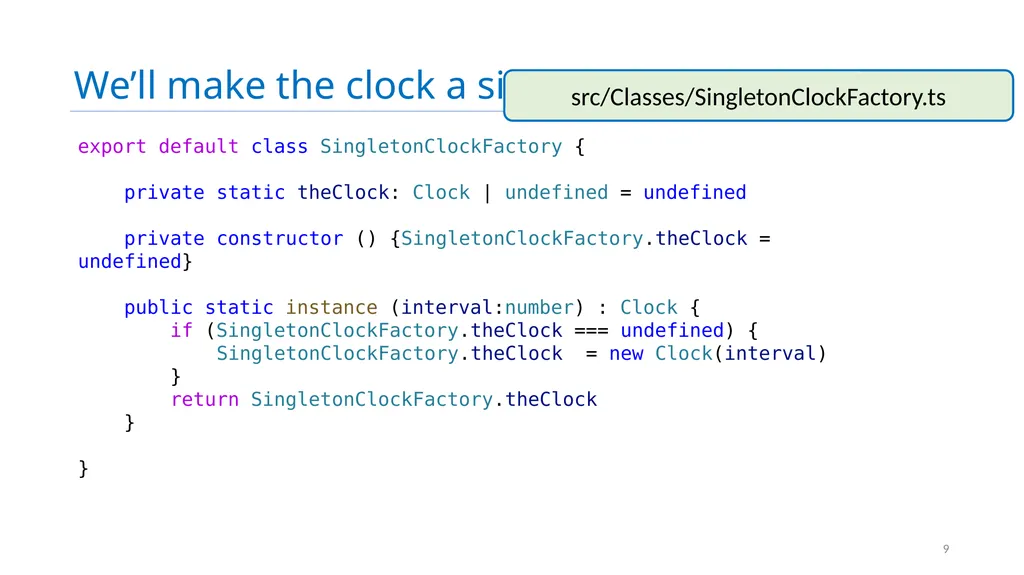
We’ll make the clock a singleton in the usual way export default class SingletonClockFactory {
private static theClock: Clock | undefined = undefined
private constructor () {SingletonClockFactory.theClock = undefined}
public static instance (interval:number) : Clock {
if (SingletonClockFactory.theClock === undefined) {
SingletonClockFactory.theClock = new Clock(interval)
}
return SingletonClockFactory.theClock
}
} src/Classes/SingletonClockFactory.ts 9<br>
private static theClock: Clock | undefined = undefined
private constructor () {SingletonClockFactory.theClock = undefined}
public static instance (interval:number) : Clock {
if (SingletonClockFactory.theClock === undefined) {
SingletonClockFactory.theClock = new Clock(interval)
}
return SingletonClockFactory.theClock
}
} src/Classes/SingletonClockFactory.ts 9<br>
10
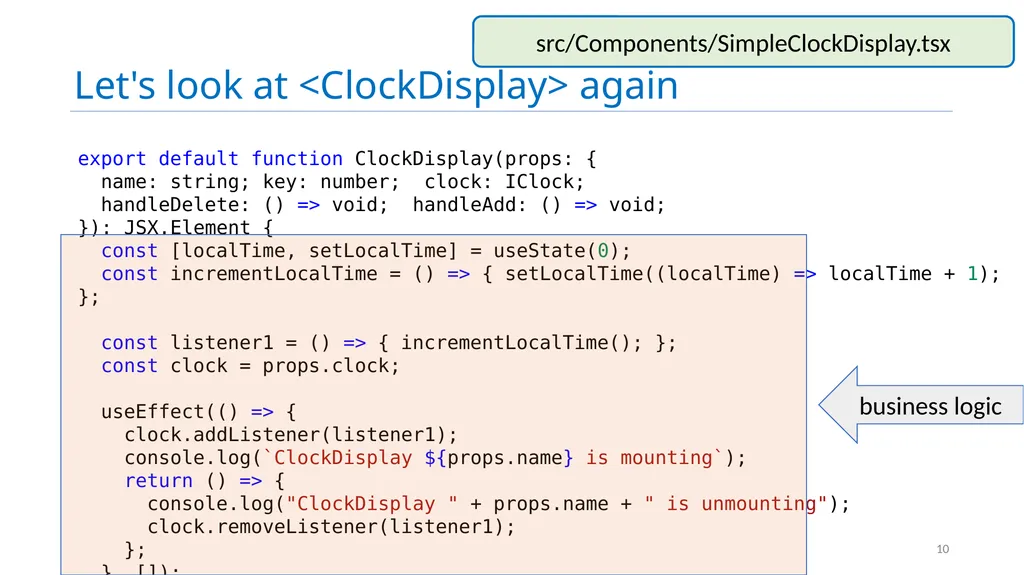
Let's look at <ClockDisplay> again src/Components/SimpleClockDisplay.tsx 10 export default function ClockDisplay(props: {
name: string; key: number; clock: IClock;
handleDelete: () => void; handleAdd: () => void;
}): JSX.Element {
const [localTime, setLocalTime] = useState(0);
const incrementLocalTime = () => { setLocalTime((localTime) => localTime + 1); };
const listener1 = () => { incrementLocalTime(); };
const clock = props.clock;
useEffect(() => {
clock.addListener(listener1);
console.log(`ClockDisplay ${props.name} is mounting`);
return () => {
console.log("ClockDisplay " + props.name + " is unmounting");
clock.removeListener(listener1);
};
}, []); business logic<br>
name: string; key: number; clock: IClock;
handleDelete: () => void; handleAdd: () => void;
}): JSX.Element {
const [localTime, setLocalTime] = useState(0);
const incrementLocalTime = () => { setLocalTime((localTime) => localTime + 1); };
const listener1 = () => { incrementLocalTime(); };
const clock = props.clock;
useEffect(() => {
clock.addListener(listener1);
console.log(`ClockDisplay ${props.name} is mounting`);
return () => {
console.log("ClockDisplay " + props.name + " is unmounting");
clock.removeListener(listener1);
};
}, []); business logic<br>
11
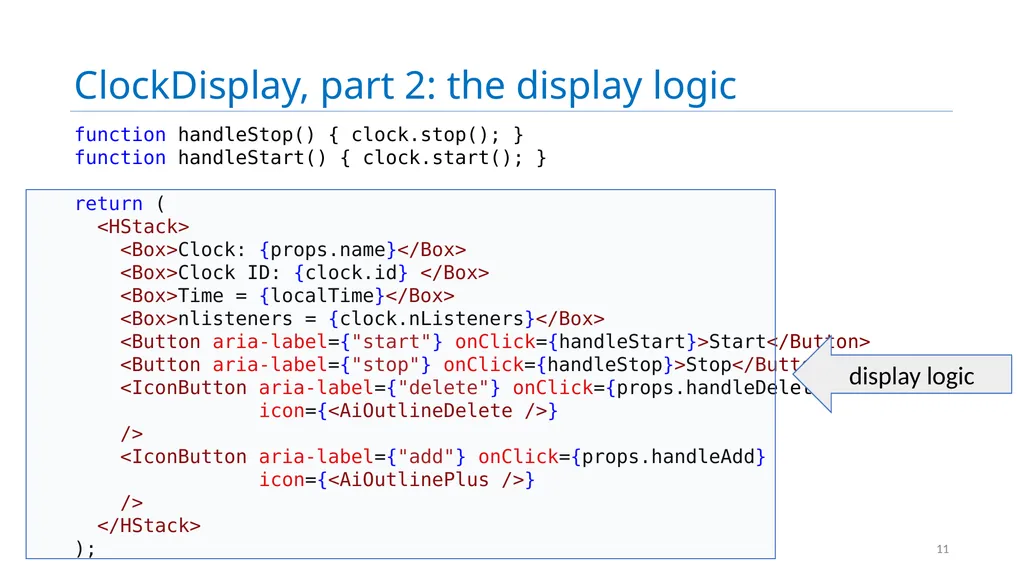
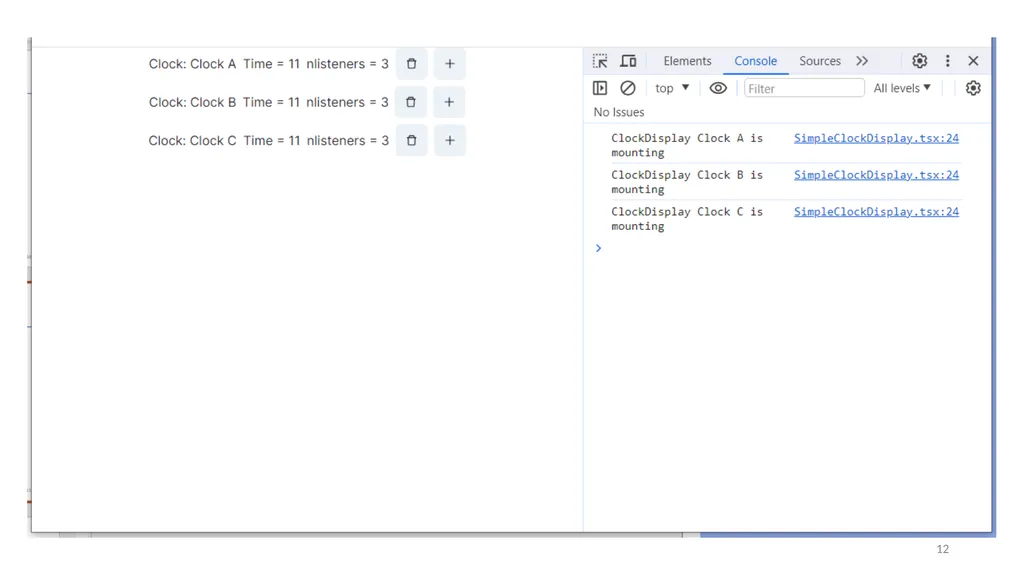
ClockDisplay, part 2: the display logic 11 function handleStop() { clock.stop(); }
function handleStart() { clock.start(); }
return (
<HStack>
<Box>Clock: {props.name}</Box>
<Box>Clock ID: {clock.id} </Box>
<Box>Time = {localTime}</Box>
<Box>nlisteners = {clock.nListeners}</Box>
<Button aria-label={"start"} onClick={handleStart}>Start</Button>
<Button aria-label={"stop"} onClick={handleStop}>Stop</Button>
<IconButton aria-label={"delete"} onClick={props.handleDelete}
icon={<AiOutlineDelete />}
/>
<IconButton aria-label={"add"} onClick={props.handleAdd}
icon={<AiOutlinePlus />}
/>
</HStack>
); display logic<br>
return (
<HStack>
<Box>Clock: {props.name}</Box>
<Box>Clock ID: {clock.id} </Box>
<Box>Time = {localTime}</Box>
<Box>nlisteners = {clock.nListeners}</Box>
<Button aria-label={"start"} onClick={handleStart}>Start</Button>
<Button aria-label={"stop"} onClick={handleStop}>Stop</Button>
<IconButton aria-label={"delete"} onClick={props.handleDelete}
icon={<AiOutlineDelete />}
/>
<IconButton aria-label={"add"} onClick={props.handleAdd}
icon={<AiOutlinePlus />}
/>
</HStack>
); display logic<br>
12
running SimpleClockDisplayApp 12<br>
13
useEffect’s Dependencies Control Its Execution useEffect takes an optional array of dependencies
The effect is only executed if one or more of the values in the dependency change (e.g. by a setter)
Special Cases:
[] means run only on first render
No argument means run on every render 13<br>
The effect is only executed if one or more of the values in the dependency change (e.g. by a setter)
Special Cases:
[] means run only on first render
No argument means run on every render 13<br>
14
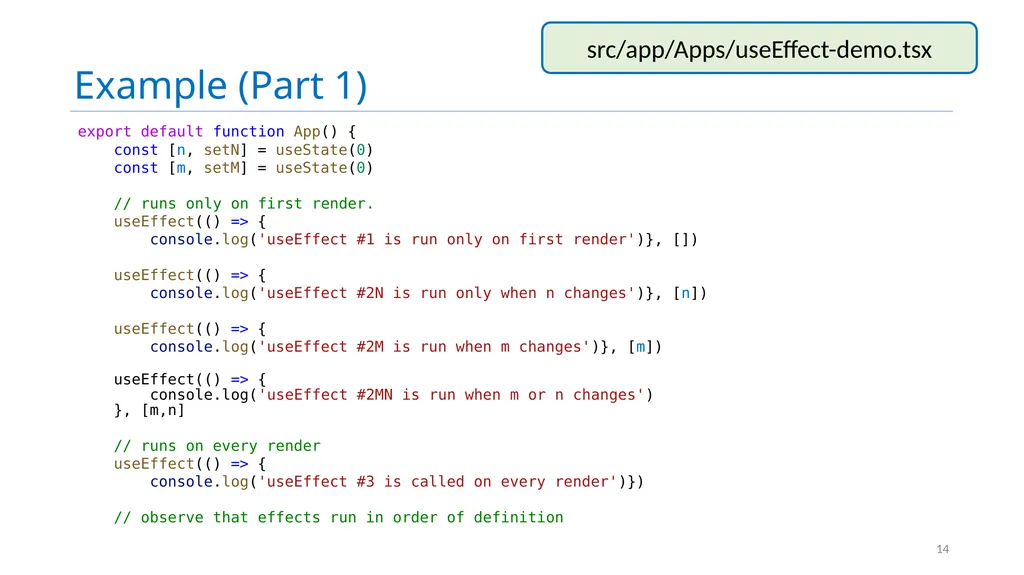
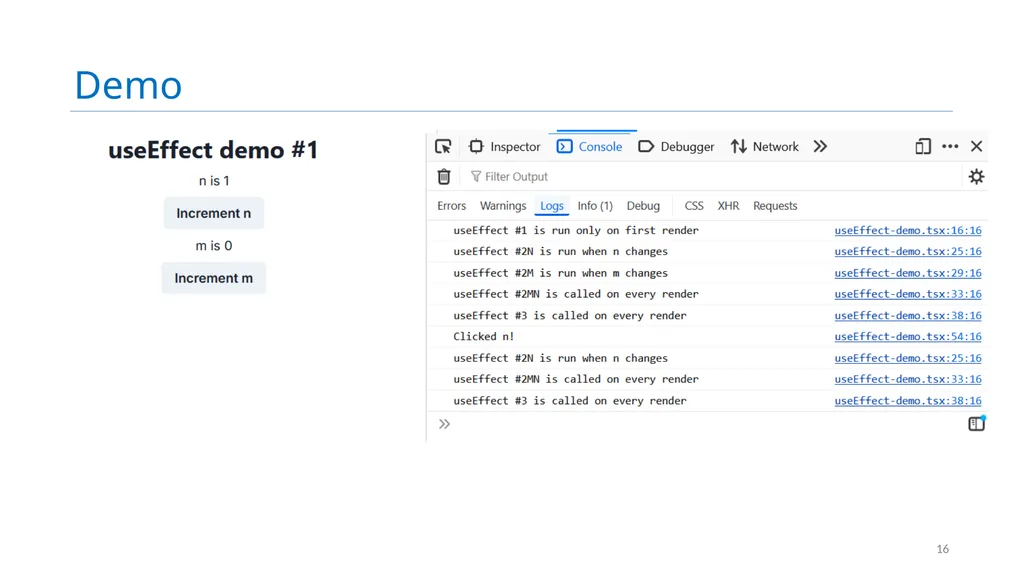
Example (Part 1) export default function App() {
const [n, setN] = useState(0)
const [m, setM] = useState(0)
// runs only on first render.
useEffect(() => {
console.log('useEffect #1 is run only on first render')}, [])
useEffect(() => {
console.log('useEffect #2N is run only when n changes')}, [n])
useEffect(() => {
console.log('useEffect #2M is run when m changes')}, [m])
useEffect(() => {
console.log('useEffect #2MN is run when m or n changes')
}, [m,n]
// runs on every render
useEffect(() => {
console.log('useEffect #3 is called on every render')})
// observe that effects run in order of definition src/app/Apps/useEffect-demo.tsx 14<br>
const [n, setN] = useState(0)
const [m, setM] = useState(0)
// runs only on first render.
useEffect(() => {
console.log('useEffect #1 is run only on first render')}, [])
useEffect(() => {
console.log('useEffect #2N is run only when n changes')}, [n])
useEffect(() => {
console.log('useEffect #2M is run when m changes')}, [m])
useEffect(() => {
console.log('useEffect #2MN is run when m or n changes')
}, [m,n]
// runs on every render
useEffect(() => {
console.log('useEffect #3 is called on every render')})
// observe that effects run in order of definition src/app/Apps/useEffect-demo.tsx 14<br>
15
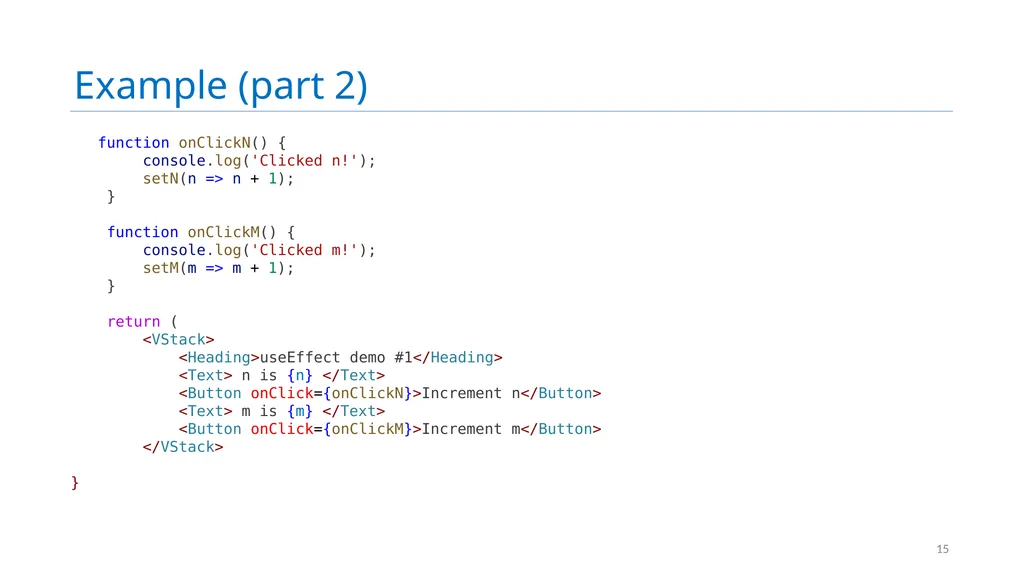
Example (part 2) function onClickN() {
console.log('Clicked n!');
setN(n => n + 1);
}
function onClickM() {
console.log('Clicked m!');
setM(m => m + 1);
}
return (
<VStack>
<Heading>useEffect demo #1</Heading>
<Text> n is {n} </Text>
<Button onClick={onClickN}>Increment n</Button>
<Text> m is {m} </Text>
<Button onClick={onClickM}>Increment m</Button>
</VStack>
} 15<br>
console.log('Clicked n!');
setN(n => n + 1);
}
function onClickM() {
console.log('Clicked m!');
setM(m => m + 1);
}
return (
<VStack>
<Heading>useEffect demo #1</Heading>
<Text> n is {n} </Text>
<Button onClick={onClickN}>Increment n</Button>
<Text> m is {m} </Text>
<Button onClick={onClickM}>Increment m</Button>
</VStack>
} 15<br>
16
Demo 16<br>
17
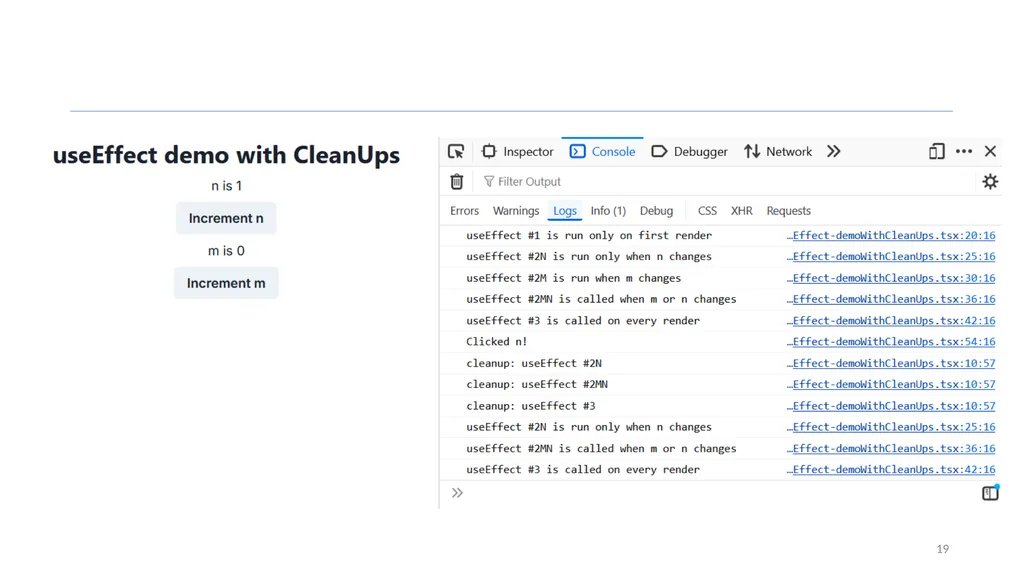
When is the cleanup function executed? In general, the cleanup function is executed sometime before the next time the hook is run.
For the first-time-only case, this means when the component is dismounted.
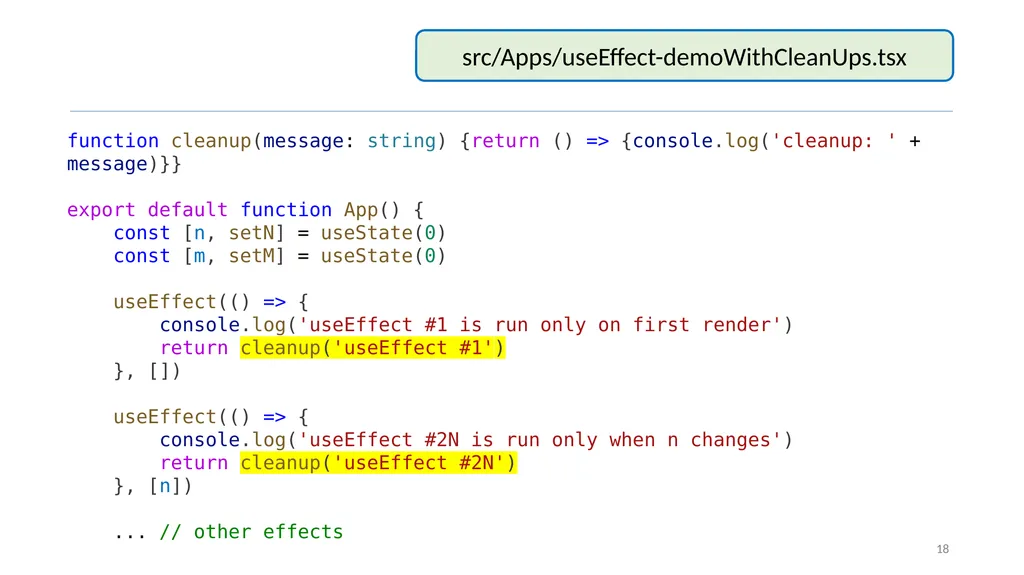
Let's look at useEffect demo again, this time with noisy cleanups. 17<br>
For the first-time-only case, this means when the component is dismounted.
Let's look at useEffect demo again, this time with noisy cleanups. 17<br>
18
18 function cleanup(message: string) {return () => {console.log('cleanup: ' + message)}}
export default function App() {
const [n, setN] = useState(0)
const [m, setM] = useState(0)
useEffect(() => {
console.log('useEffect #1 is run only on first render')
return cleanup('useEffect #1')
}, [])
useEffect(() => {
console.log('useEffect #2N is run only when n changes')
return cleanup('useEffect #2N')
}, [n])
... // other effects src/Apps/useEffect-demoWithCleanUps.tsx<br>
export default function App() {
const [n, setN] = useState(0)
const [m, setM] = useState(0)
useEffect(() => {
console.log('useEffect #1 is run only on first render')
return cleanup('useEffect #1')
}, [])
useEffect(() => {
console.log('useEffect #2N is run only when n changes')
return cleanup('useEffect #2N')
}, [n])
... // other effects src/Apps/useEffect-demoWithCleanUps.tsx<br>
19
19<br>
20
Lesson 9.2 Custom Hooks 20<br>
21
Custom Hooks REACT lets us combine useState and useEffect to build custom hooks.
Custom Hooks let us separate business logic from display logic 21<br>
Custom Hooks let us separate business logic from display logic 21<br>
22
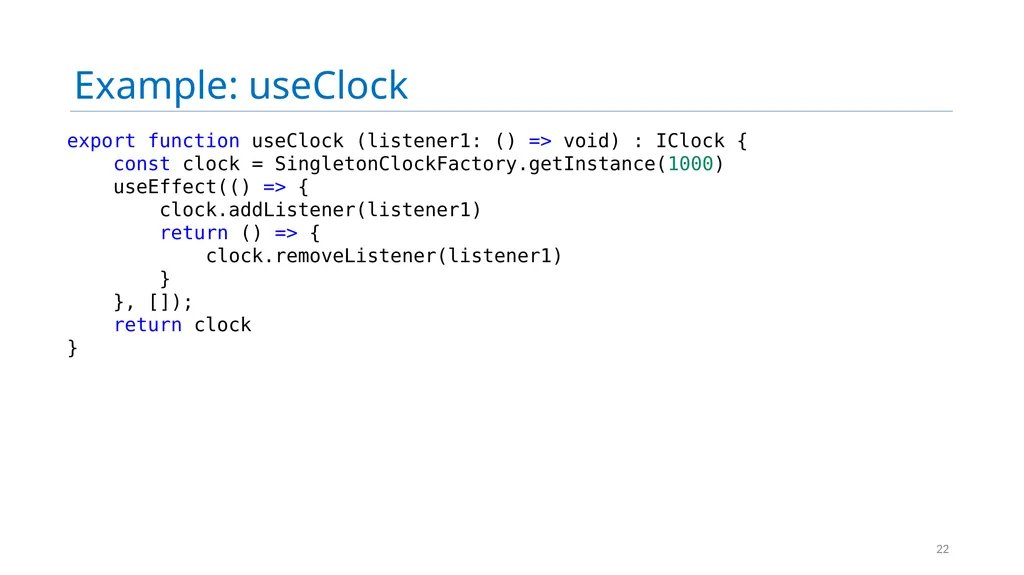
Example: useClock 22 export function useClock (listener1: () => void) : IClock {
const clock = SingletonClockFactory.getInstance(1000)
useEffect(() => {
clock.addListener(listener1)
return () => {
clock.removeListener(listener1)
}
}, []);
return clock
}<br>
const clock = SingletonClockFactory.getInstance(1000)
useEffect(() => {
clock.addListener(listener1)
return () => {
clock.removeListener(listener1)
}
}, []);
return clock
}<br>
23
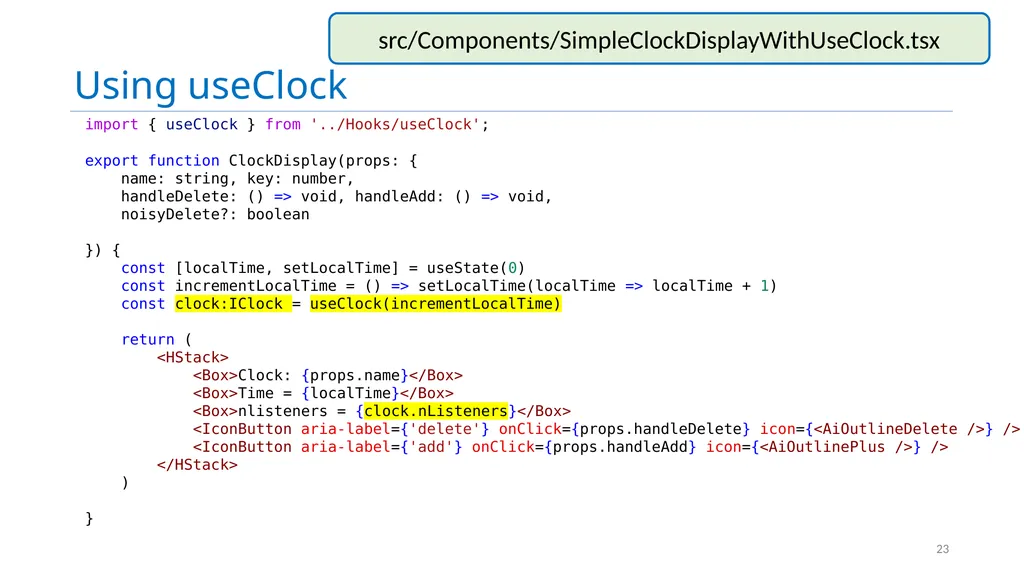
Using useClock import { useClock } from '../Hooks/useClock';
export function ClockDisplay(props: {
name: string, key: number,
handleDelete: () => void, handleAdd: () => void,
noisyDelete?: boolean
}) {
const [localTime, setLocalTime] = useState(0)
const incrementLocalTime = () => setLocalTime(localTime => localTime + 1)
const clock:IClock = useClock(incrementLocalTime)
return (
<HStack>
<Box>Clock: {props.name}</Box>
<Box>Time = {localTime}</Box>
<Box>nlisteners = {clock.nListeners}</Box>
<IconButton aria-label={'delete'} onClick={props.handleDelete} icon={<AiOutlineDelete />} />
<IconButton aria-label={'add'} onClick={props.handleAdd} icon={<AiOutlinePlus />} />
</HStack>
)
} 23 src/Components/SimpleClockDisplayWithUseClock.tsx<br>
export function ClockDisplay(props: {
name: string, key: number,
handleDelete: () => void, handleAdd: () => void,
noisyDelete?: boolean
}) {
const [localTime, setLocalTime] = useState(0)
const incrementLocalTime = () => setLocalTime(localTime => localTime + 1)
const clock:IClock = useClock(incrementLocalTime)
return (
<HStack>
<Box>Clock: {props.name}</Box>
<Box>Time = {localTime}</Box>
<Box>nlisteners = {clock.nListeners}</Box>
<IconButton aria-label={'delete'} onClick={props.handleDelete} icon={<AiOutlineDelete />} />
<IconButton aria-label={'add'} onClick={props.handleAdd} icon={<AiOutlinePlus />} />
</HStack>
)
} 23 src/Components/SimpleClockDisplayWithUseClock.tsx<br>
24
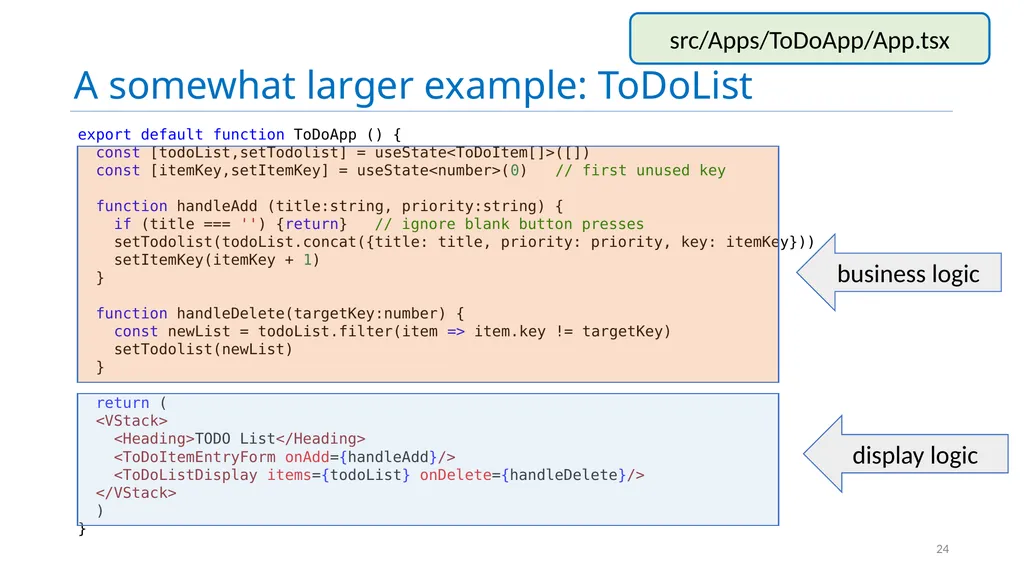
A somewhat larger example: ToDoList 24 export default function ToDoApp () {
const [todoList,setTodolist] = useState<ToDoItem[]>([])
const [itemKey,setItemKey] = useState<number>(0) // first unused key
function handleAdd (title:string, priority:string) {
if (title === '') {return} // ignore blank button presses
setTodolist(todoList.concat({title: title, priority: priority, key: itemKey}))
setItemKey(itemKey + 1)
}
function handleDelete(targetKey:number) {
const newList = todoList.filter(item => item.key != targetKey)
setTodolist(newList)
}
return (
<VStack>
<Heading>TODO List</Heading>
<ToDoItemEntryForm onAdd={handleAdd}/>
<ToDoListDisplay items={todoList} onDelete={handleDelete}/>
</VStack>
)
} business logic display logic src/Apps/ToDoApp/App.tsx<br>
const [todoList,setTodolist] = useState<ToDoItem[]>([])
const [itemKey,setItemKey] = useState<number>(0) // first unused key
function handleAdd (title:string, priority:string) {
if (title === '') {return} // ignore blank button presses
setTodolist(todoList.concat({title: title, priority: priority, key: itemKey}))
setItemKey(itemKey + 1)
}
function handleDelete(targetKey:number) {
const newList = todoList.filter(item => item.key != targetKey)
setTodolist(newList)
}
return (
<VStack>
<Heading>TODO List</Heading>
<ToDoItemEntryForm onAdd={handleAdd}/>
<ToDoListDisplay items={todoList} onDelete={handleDelete}/>
</VStack>
)
} business logic display logic src/Apps/ToDoApp/App.tsx<br>
25
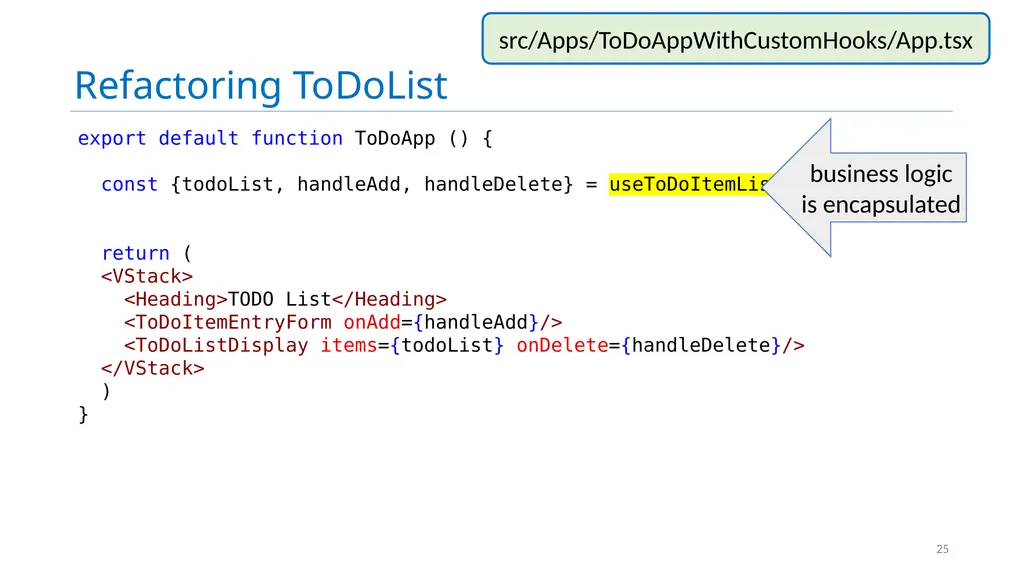
Refactoring ToDoList 25 export default function ToDoApp () {
const {todoList, handleAdd, handleDelete} = useToDoItemList()
return (
<VStack>
<Heading>TODO List</Heading>
<ToDoItemEntryForm onAdd={handleAdd}/>
<ToDoListDisplay items={todoList} onDelete={handleDelete}/>
</VStack>
)
} business logic is encapsulated src/Apps/ToDoAppWithCustomHooks/App.tsx<br>
const {todoList, handleAdd, handleDelete} = useToDoItemList()
return (
<VStack>
<Heading>TODO List</Heading>
<ToDoItemEntryForm onAdd={handleAdd}/>
<ToDoListDisplay items={todoList} onDelete={handleDelete}/>
</VStack>
)
} business logic is encapsulated src/Apps/ToDoAppWithCustomHooks/App.tsx<br>
26
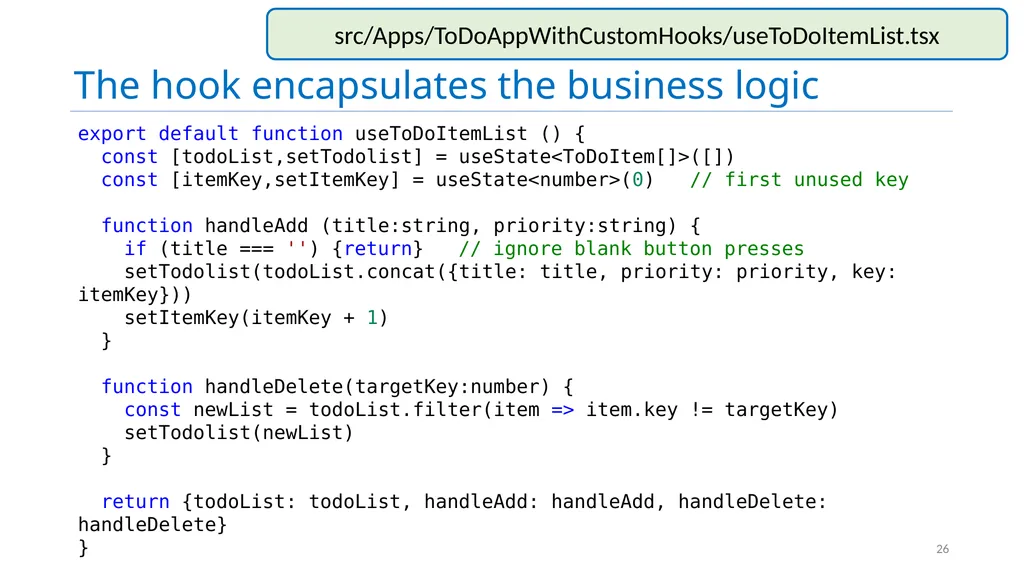
The hook encapsulates the business logic 26 export default function useToDoItemList () {
const [todoList,setTodolist] = useState<ToDoItem[]>([])
const [itemKey,setItemKey] = useState<number>(0) // first unused key
function handleAdd (title:string, priority:string) {
if (title === '') {return} // ignore blank button presses
setTodolist(todoList.concat({title: title, priority: priority, key: itemKey}))
setItemKey(itemKey + 1)
}
function handleDelete(targetKey:number) {
const newList = todoList.filter(item => item.key != targetKey)
setTodolist(newList)
}
return {todoList: todoList, handleAdd: handleAdd, handleDelete: handleDelete}
} src/Apps/ToDoAppWithCustomHooks/useToDoItemList.tsx<br>
const [todoList,setTodolist] = useState<ToDoItem[]>([])
const [itemKey,setItemKey] = useState<number>(0) // first unused key
function handleAdd (title:string, priority:string) {
if (title === '') {return} // ignore blank button presses
setTodolist(todoList.concat({title: title, priority: priority, key: itemKey}))
setItemKey(itemKey + 1)
}
function handleDelete(targetKey:number) {
const newList = todoList.filter(item => item.key != targetKey)
setTodolist(newList)
}
return {todoList: todoList, handleAdd: handleAdd, handleDelete: handleDelete}
} src/Apps/ToDoAppWithCustomHooks/useToDoItemList.tsx<br>
27
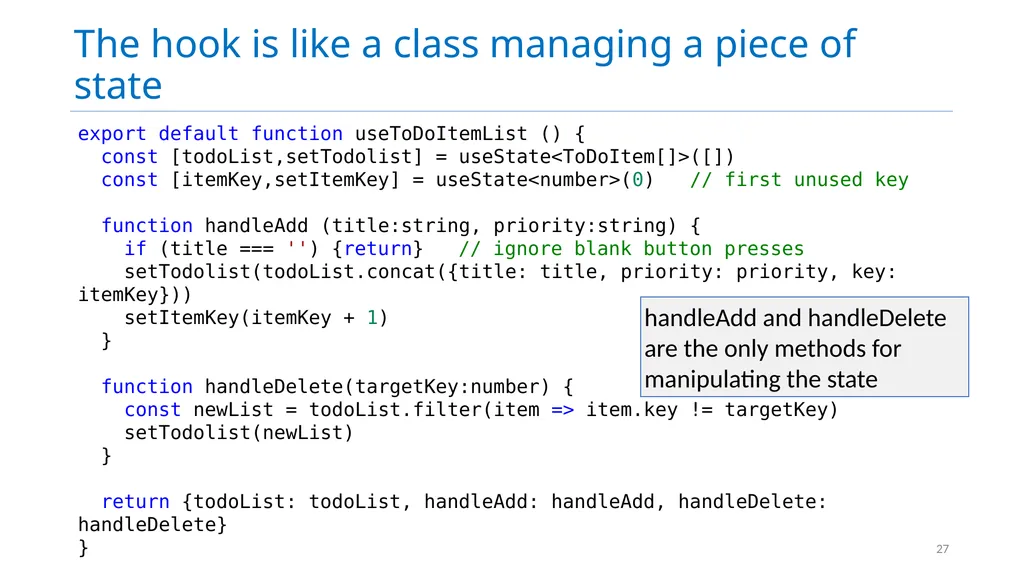
The hook is like a class managing a piece of state 27 export default function useToDoItemList () {
const [todoList,setTodolist] = useState<ToDoItem[]>([])
const [itemKey,setItemKey] = useState<number>(0) // first unused key
function handleAdd (title:string, priority:string) {
if (title === '') {return} // ignore blank button presses
setTodolist(todoList.concat({title: title, priority: priority, key: itemKey}))
setItemKey(itemKey + 1)
}
function handleDelete(targetKey:number) {
const newList = todoList.filter(item => item.key != targetKey)
setTodolist(newList)
}
return {todoList: todoList, handleAdd: handleAdd, handleDelete: handleDelete}
} handleAdd and handleDelete are the only methods for manipulating the state<br>
const [todoList,setTodolist] = useState<ToDoItem[]>([])
const [itemKey,setItemKey] = useState<number>(0) // first unused key
function handleAdd (title:string, priority:string) {
if (title === '') {return} // ignore blank button presses
setTodolist(todoList.concat({title: title, priority: priority, key: itemKey}))
setItemKey(itemKey + 1)
}
function handleDelete(targetKey:number) {
const newList = todoList.filter(item => item.key != targetKey)
setTodolist(newList)
}
return {todoList: todoList, handleAdd: handleAdd, handleDelete: handleDelete}
} handleAdd and handleDelete are the only methods for manipulating the state<br>
28
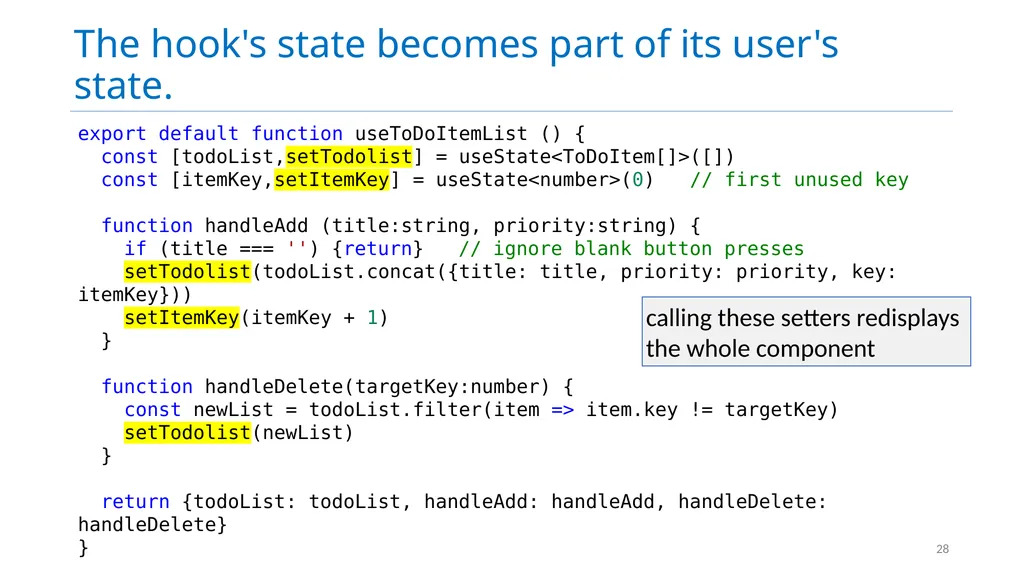
The hook's state becomes part of its user's state. 28 export default function useToDoItemList () {
const [todoList,setTodolist] = useState<ToDoItem[]>([])
const [itemKey,setItemKey] = useState<number>(0) // first unused key
function handleAdd (title:string, priority:string) {
if (title === '') {return} // ignore blank button presses
setTodolist(todoList.concat({title: title, priority: priority, key: itemKey}))
setItemKey(itemKey + 1)
}
function handleDelete(targetKey:number) {
const newList = todoList.filter(item => item.key != targetKey)
setTodolist(newList)
}
return {todoList: todoList, handleAdd: handleAdd, handleDelete: handleDelete}
} calling these setters redisplays the whole component<br>
const [todoList,setTodolist] = useState<ToDoItem[]>([])
const [itemKey,setItemKey] = useState<number>(0) // first unused key
function handleAdd (title:string, priority:string) {
if (title === '') {return} // ignore blank button presses
setTodolist(todoList.concat({title: title, priority: priority, key: itemKey}))
setItemKey(itemKey + 1)
}
function handleDelete(targetKey:number) {
const newList = todoList.filter(item => item.key != targetKey)
setTodolist(newList)
}
return {todoList: todoList, handleAdd: handleAdd, handleDelete: handleDelete}
} calling these setters redisplays the whole component<br>
29
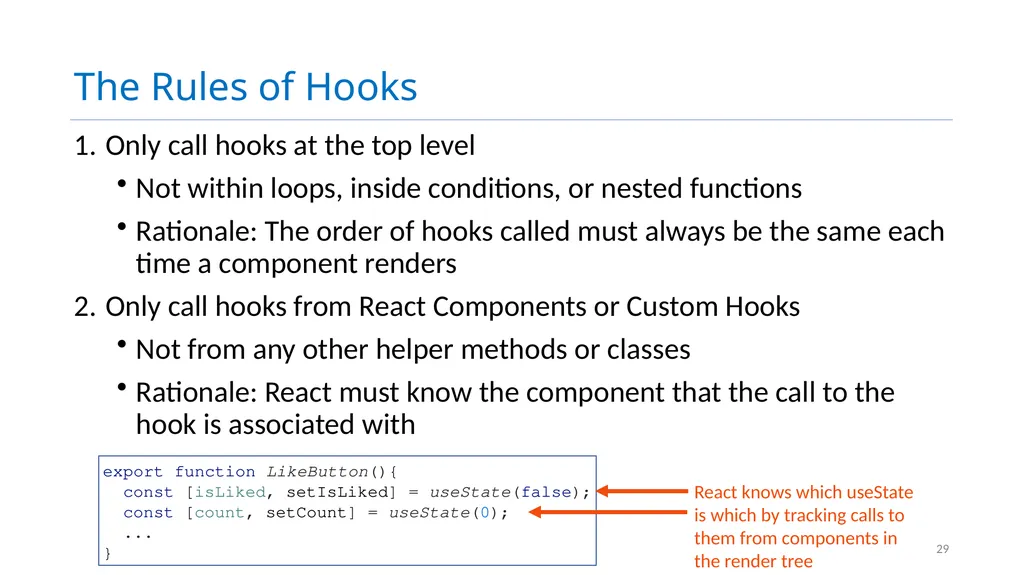
The Rules of Hooks Only call hooks at the top level
Not within loops, inside conditions, or nested functions
Rationale: The order of hooks called must always be the same each time a component renders
Only call hooks from React Components or Custom Hooks
Not from any other helper methods or classes
Rationale: React must know the component that the call to the hook is associated with 29 export function LikeButton(){
const [isLiked, setIsLiked] = useState(false);
const [count, setCount] = useState(0);
...
}<br>
Not within loops, inside conditions, or nested functions
Rationale: The order of hooks called must always be the same each time a component renders
Only call hooks from React Components or Custom Hooks
Not from any other helper methods or classes
Rationale: React must know the component that the call to the hook is associated with 29 export function LikeButton(){
const [isLiked, setIsLiked] = useState(false);
const [count, setCount] = useState(0);
...
}<br>
30
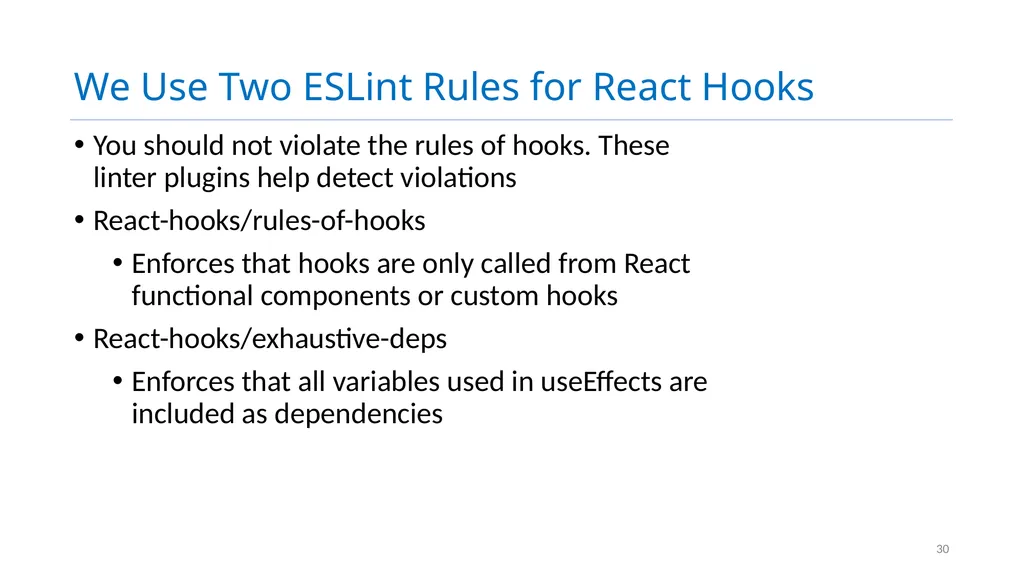
We Use Two ESLint Rules for React Hooks You should not violate the rules of hooks. These linter plugins help detect violations
React-hooks/rules-of-hooks
Enforces that hooks are only called from React functional components or custom hooks
React-hooks/exhaustive-deps
Enforces that all variables used in useEffects are included as dependencies 30<br>
React-hooks/rules-of-hooks
Enforces that hooks are only called from React functional components or custom hooks
React-hooks/exhaustive-deps
Enforces that all variables used in useEffects are included as dependencies 30<br>
31
Lesson 9.3 Testing your REACT components 31<br>
32
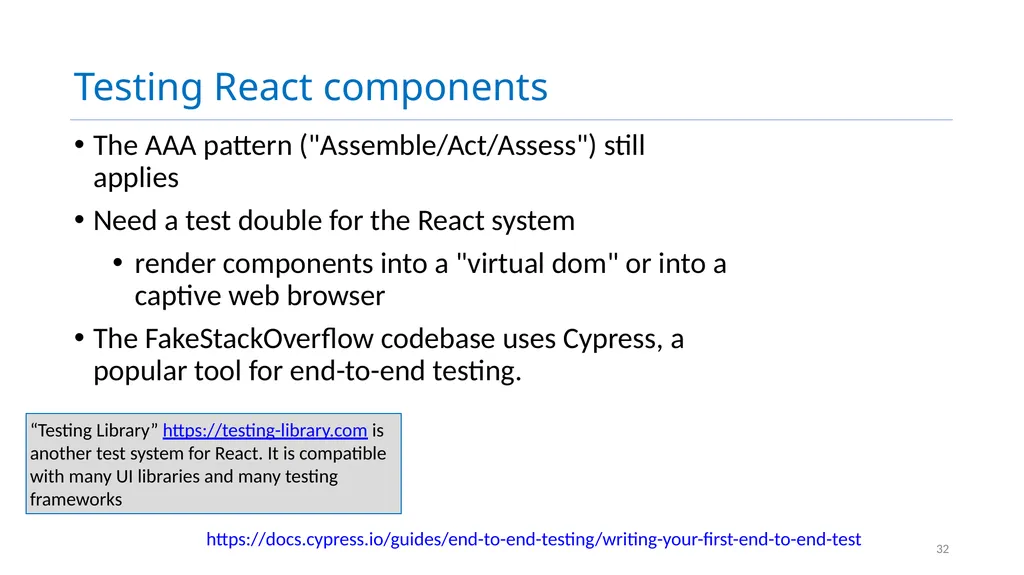
Testing React components The AAA pattern ("Assemble/Act/Assess") still applies
Need a test double for the React system
render components into a "virtual dom" or into a captive web browser
The FakeStackOverflow codebase uses Cypress, a popular tool for end-to-end testing. 32 “Testing Library” https://testing-library.com is another test system for React. It is compatible with many UI libraries and many testing frameworks https://docs.cypress.io/guides/end-to-end-testing/writing-your-first-end-to-end-test<br>
Need a test double for the React system
render components into a "virtual dom" or into a captive web browser
The FakeStackOverflow codebase uses Cypress, a popular tool for end-to-end testing. 32 “Testing Library” https://testing-library.com is another test system for React. It is compatible with many UI libraries and many testing frameworks https://docs.cypress.io/guides/end-to-end-testing/writing-your-first-end-to-end-test<br>
33
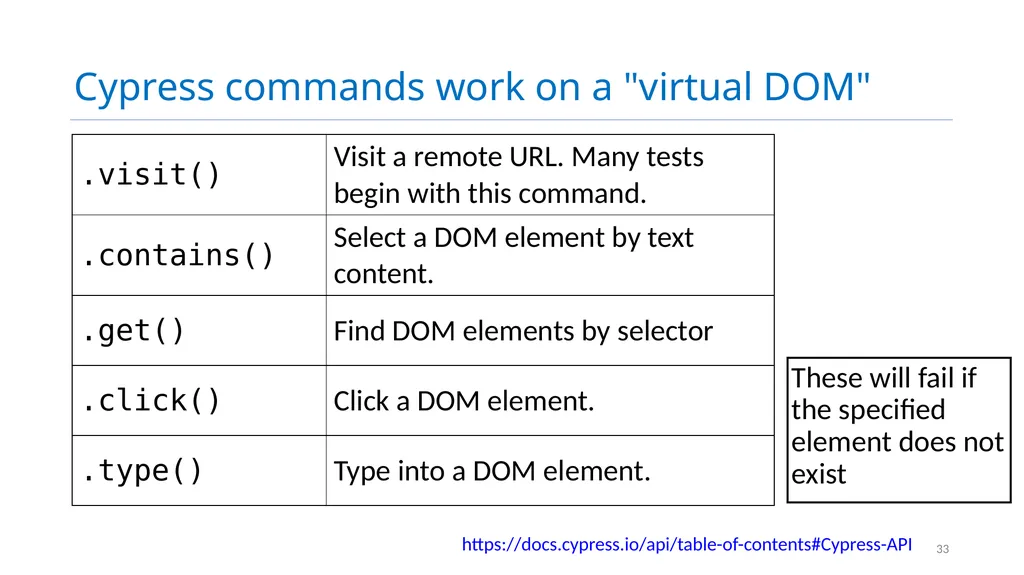
Cypress commands work on a "virtual DOM" These will fail if the specified element does not exist 33 https://docs.cypress.io/api/table-of-contents#Cypress-API<br>
34
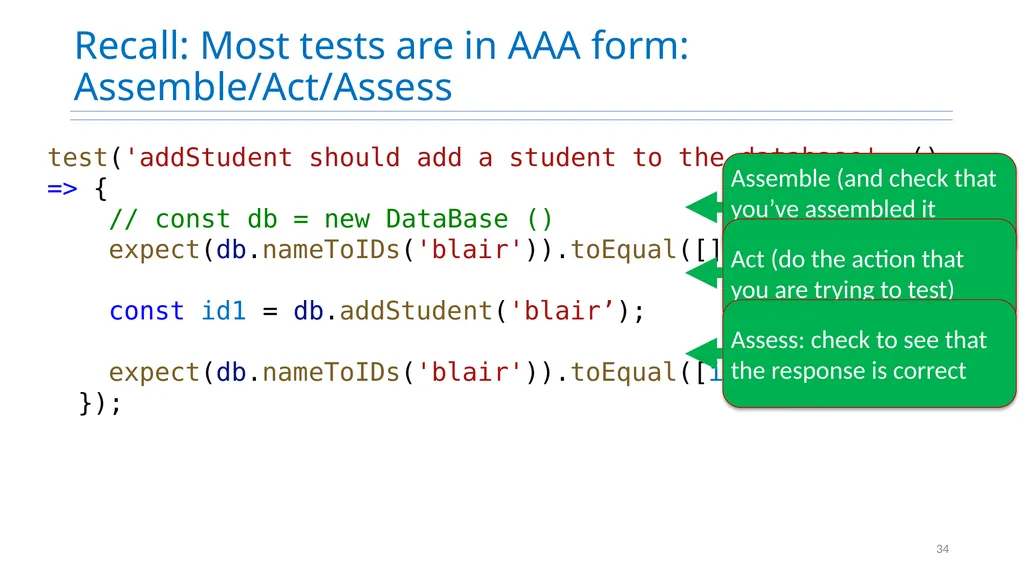
Recall: Most tests are in AAA form: Assemble/Act/Assess 34 test('addStudent should add a student to the database', () => {
// const db = new DataBase ()
expect(db.nameToIDs('blair')).toEqual([])
const id1 = db.addStudent('blair’);
expect(db.nameToIDs('blair')).toEqual([id1])
});<br>
// const db = new DataBase ()
expect(db.nameToIDs('blair')).toEqual([])
const id1 = db.addStudent('blair’);
expect(db.nameToIDs('blair')).toEqual([id1])
});<br>
35
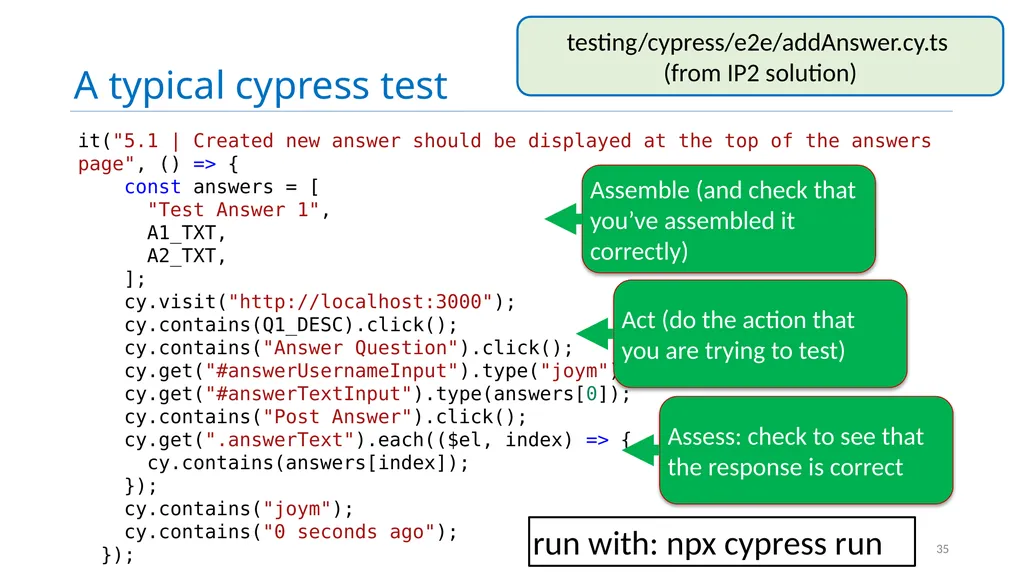
A typical cypress test 35 it("5.1 | Created new answer should be displayed at the top of the answers page", () => {
const answers = [
"Test Answer 1",
A1_TXT,
A2_TXT,
];
cy.visit("http://localhost:3000");
cy.contains(Q1_DESC).click();
cy.contains("Answer Question").click();
cy.get("#answerUsernameInput").type("joym");
cy.get("#answerTextInput").type(answers[0]);
cy.contains("Post Answer").click();
cy.get(".answerText").each(($el, index) => {
cy.contains(answers[index]);
});
cy.contains("joym");
cy.contains("0 seconds ago");
}); testing/cypress/e2e/addAnswer.cy.ts
(from IP2 solution) run with: npx cypress run<br>
const answers = [
"Test Answer 1",
A1_TXT,
A2_TXT,
];
cy.visit("http://localhost:3000");
cy.contains(Q1_DESC).click();
cy.contains("Answer Question").click();
cy.get("#answerUsernameInput").type("joym");
cy.get("#answerTextInput").type(answers[0]);
cy.contains("Post Answer").click();
cy.get(".answerText").each(($el, index) => {
cy.contains(answers[index]);
});
cy.contains("joym");
cy.contains("0 seconds ago");
}); testing/cypress/e2e/addAnswer.cy.ts
(from IP2 solution) run with: npx cypress run<br>
36
Learning Objectives for this Lesson By the end of this lesson, you should be able to:
Explain the basic use cases for useEffect
Explain when a useEffect is executed, and when its return value is executed
Construct simple custom hooks and explain why they are useful.
Be able to explain the three core steps of a test (assemble, act, assess) can map to UI component testing 36<br>
Explain the basic use cases for useEffect
Explain when a useEffect is executed, and when its return value is executed
Construct simple custom hooks and explain why they are useful.
Be able to explain the three core steps of a test (assemble, act, assess) can map to UI component testing 36<br>