ctcLink Project Update Washington State Student
Description: ctcLink Project Update Washington State Student Services Commission October 11, 2019 Christy Campbell SBCTC ctcLink Project Director governance Complete description of ctcLink Governance Framework 2 3 ctcLink Governance Responsibilities
Related Topics
Download Presentation
"ctcLink Project Update Washington State Student" is the property of its rightful owner. Permission is granted to download and print the materials on this website for personal, non-commercial use only, and to display it on your personal computer provided you do not modify the materials and that you retain all copyright notices contained in the materials. By downloading content from our website, you accept the terms of this agreement.
Presentation Transcript
slide1. ctcLink Project UpdateWashington State Student Services Commission October 11, 2019
Christy Campbell – SBCTC ctcLink Project Director<br>
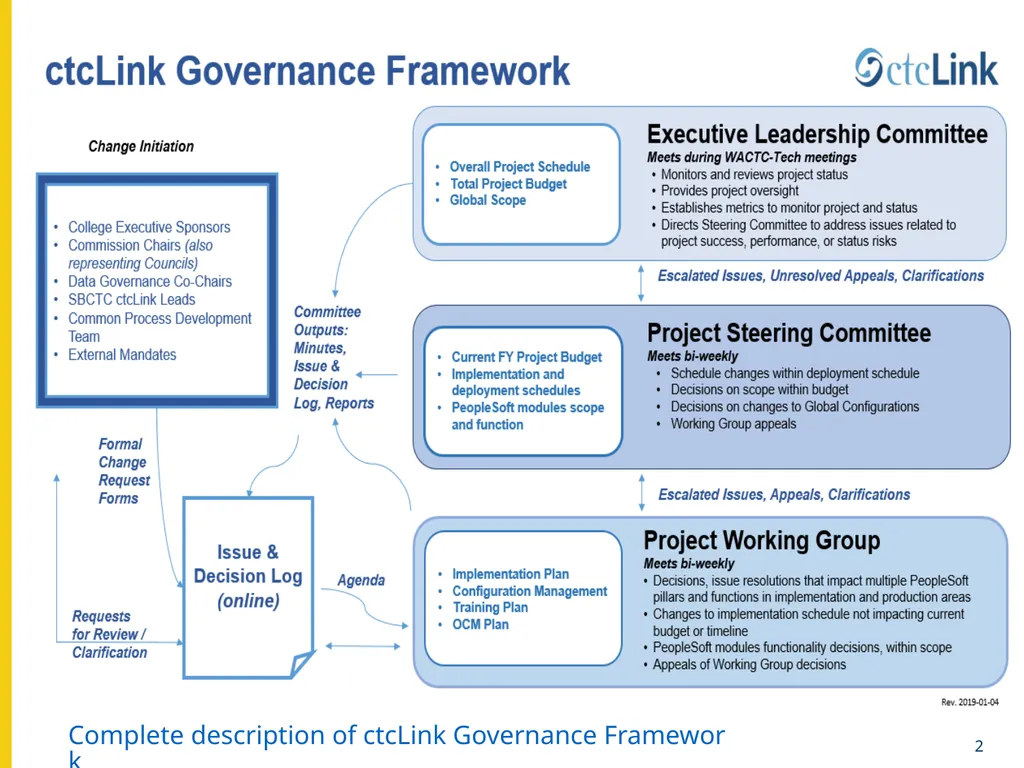
slide2. governance Complete description of ctcLink Governance Framework 2<br>
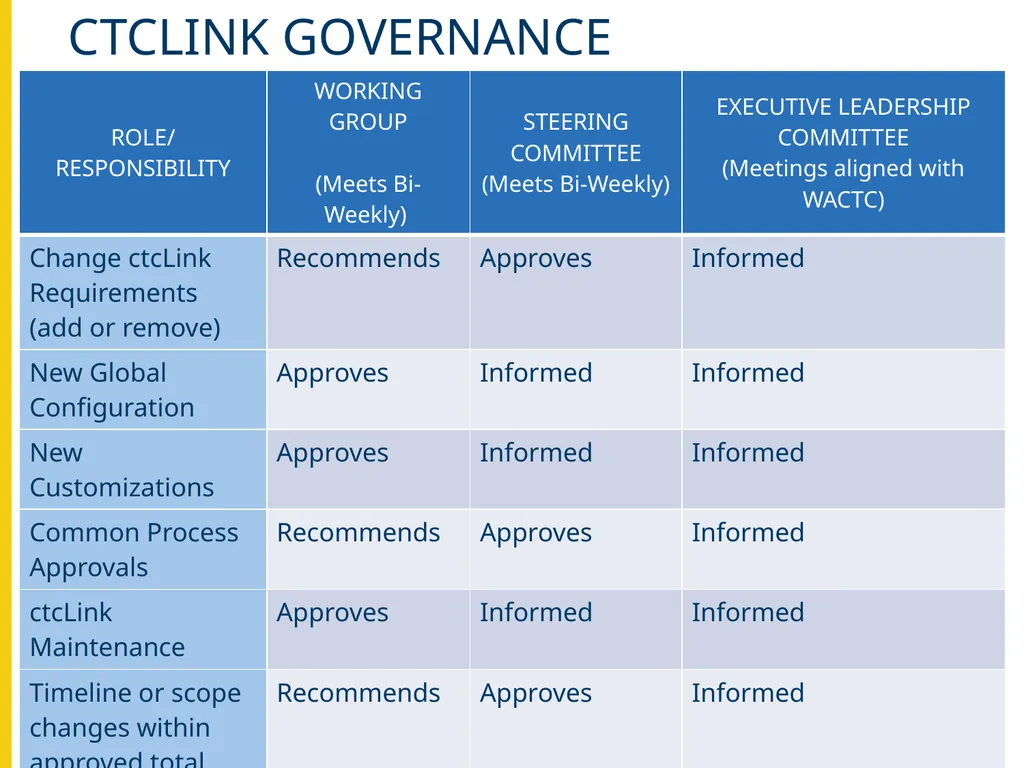
slide3. 3 ctcLink Governance Responsibilities<br>
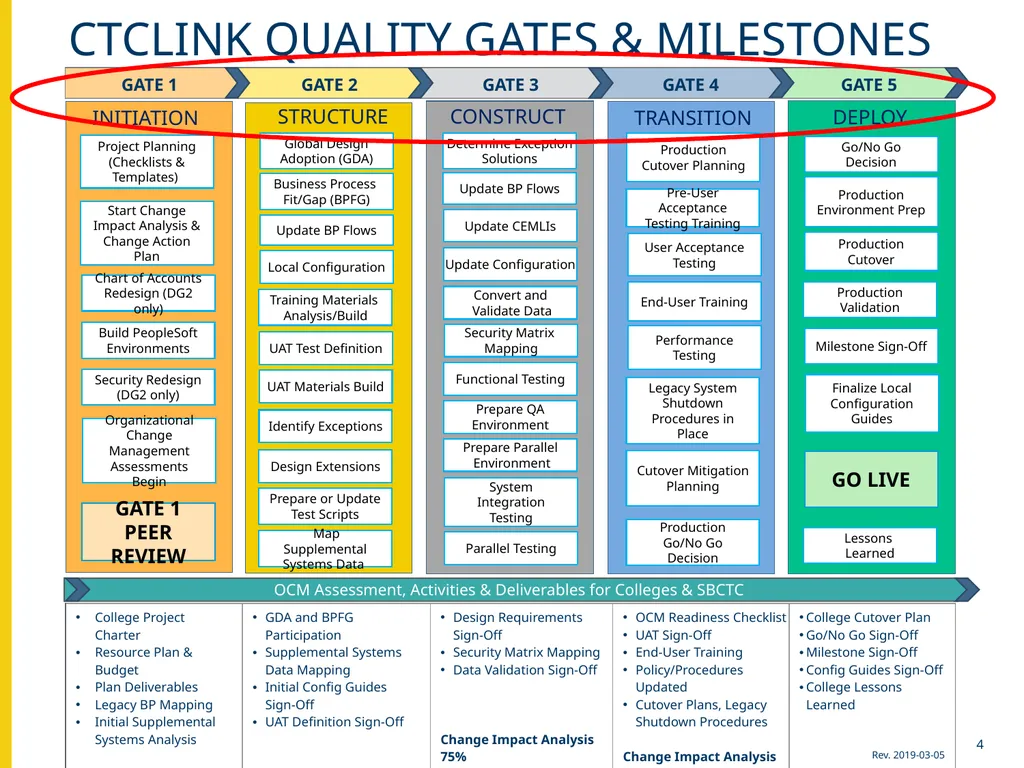
slide4. Ctclink quality gates & milestones Ctclink quality gates & milestones DEPLOY Lessons
Learned TRANSITION End-User Training User Acceptance Testing ProductionGo/No Go Decision Cutover Mitigation Planning Determine Exception
Solutions Update BP Flows Update CEMLIs Update Configuration Functional Testing Prepare QA
Environment Prepare Parallel
Environment CONSTRUCT Parallel Testing System Integration Testing Convert and
Validate Data Production Cutover Planning Production Cutover Security Matrix
Mapping Production Environment Prep STRUCTURE Global DesignAdoption (GDA) Business Process Fit/Gap (BPFG) Update BP Flows Local Configuration UAT Test Definition UAT Materials Build Identify Exceptions Design Extensions Prepare or Update
Test Scripts Training Materials
Analysis/Build Map Supplemental Systems Data Go/No Go Decision Milestone Sign-Off GO LIVE Finalize Local Configuration Guides Project Planning (Checklists & Templates) Security Redesign (DG2 only) Build PeopleSoft Environments Chart of Accounts Redesign (DG2 only) Performance Testing Organizational Change Management Assessments Begin OCM Assessment, Activities & Deliverables for Colleges & SBCTC Legacy System Shutdown Procedures in Place INITIATION Pre-User Acceptance Testing Training Production Validation GATE 1 PEER REVIEW Start Change Impact Analysis & Change Action Plan 4<br>
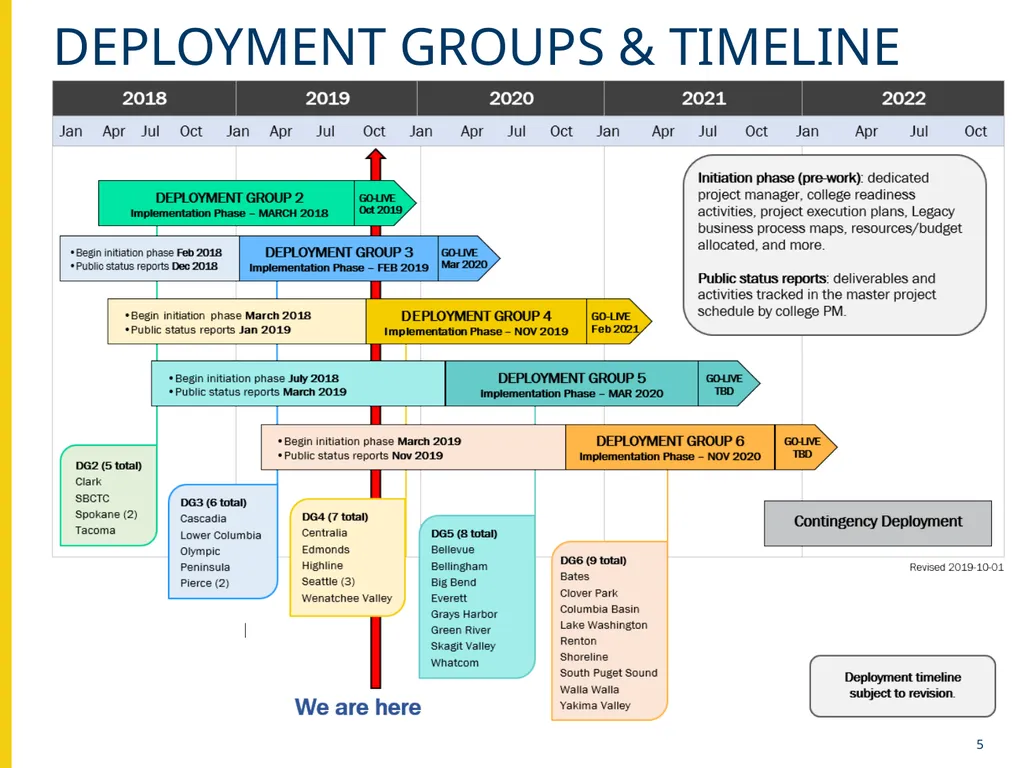
slide5. Deployment groups & timeline 5<br>
slide6. Ctclink Remediation status 6<br>
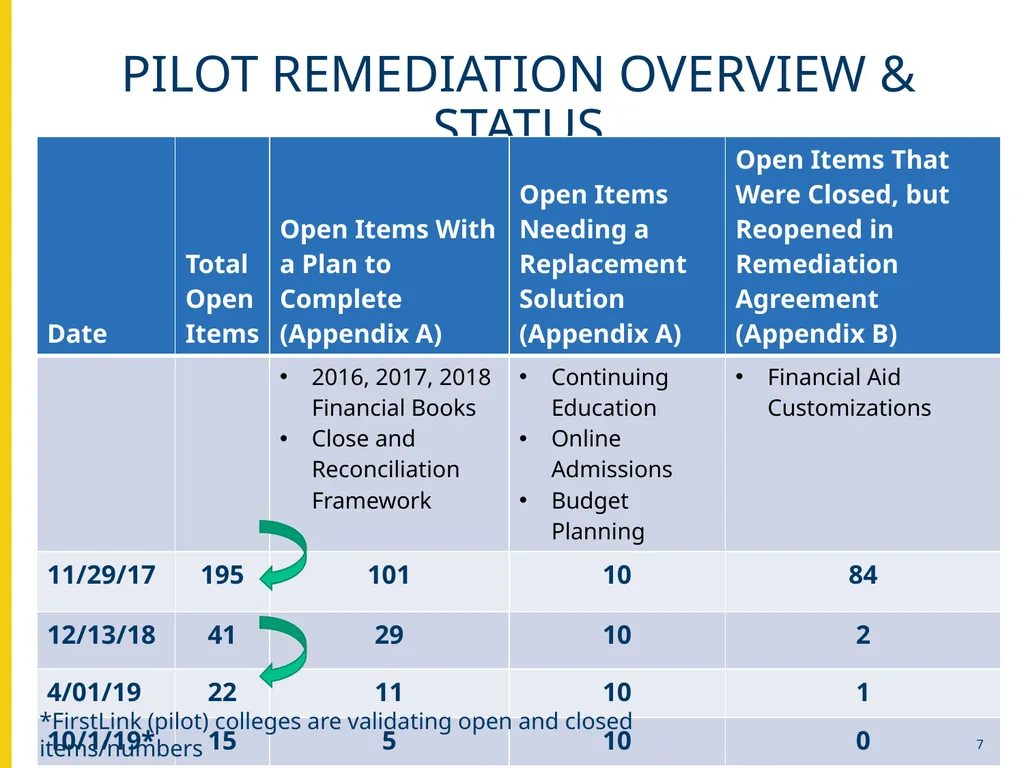
slide7. Pilot remediation overview & status *FirstLink (pilot) colleges are validating open and closed items/numbers 7<br>
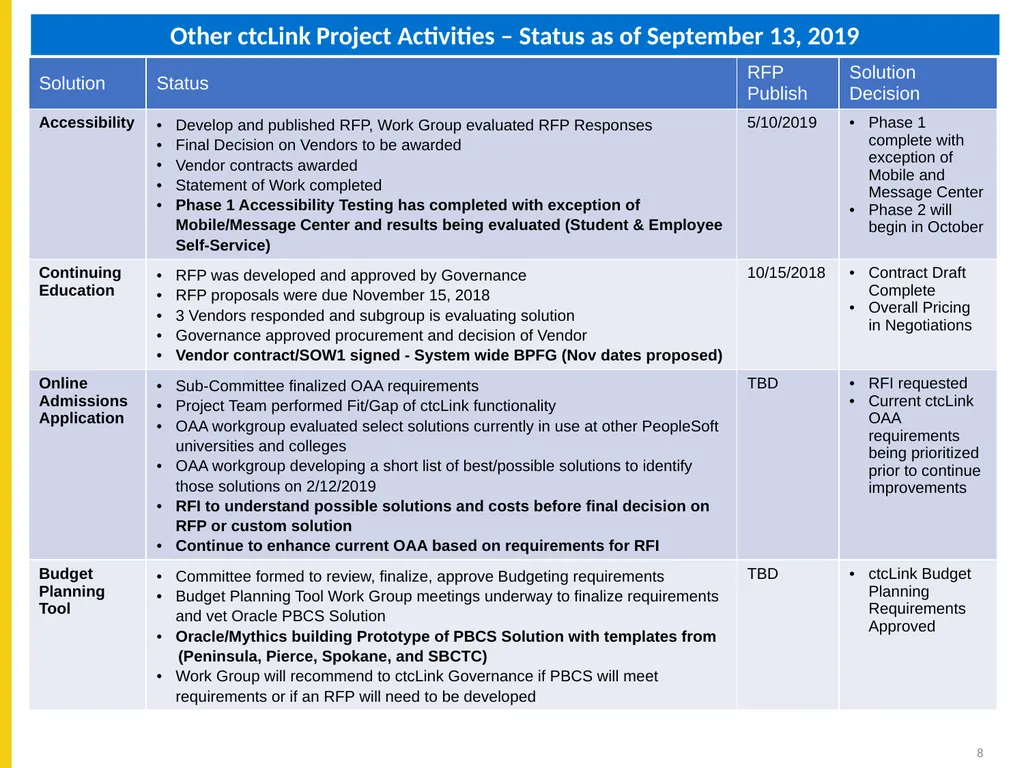
slide8. Other ctcLink Project Activities – Status as of September 13, 2019 8<br>
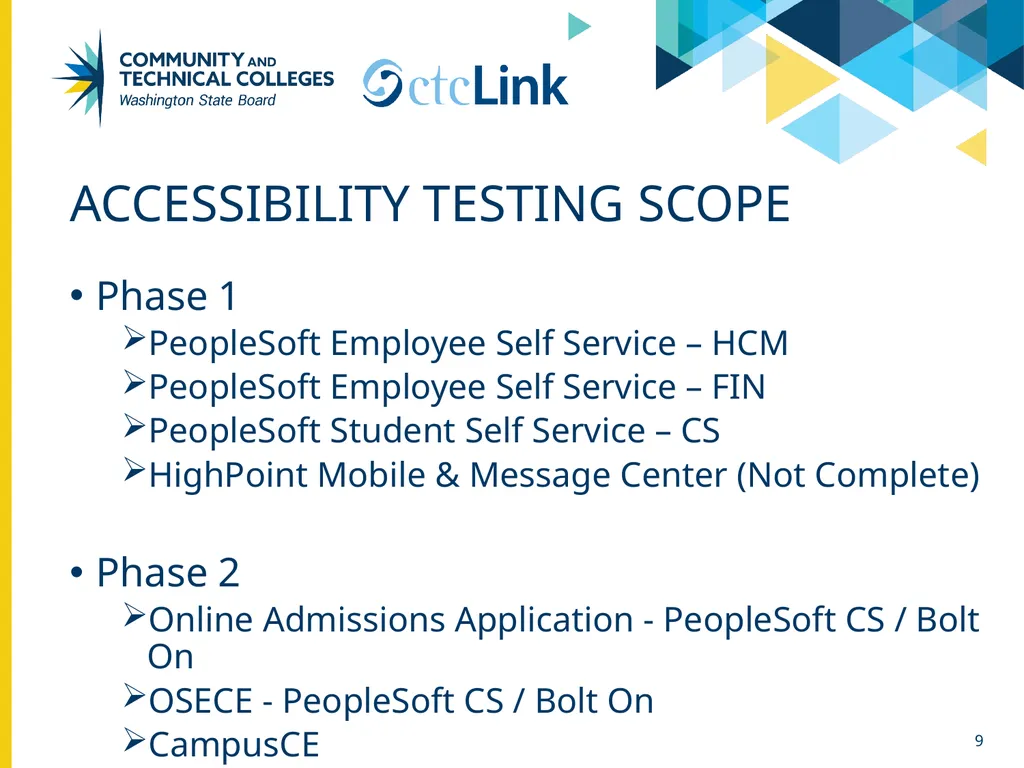
slide9. Accessibility Testing Scope Phase 1
PeopleSoft Employee Self Service – HCM
PeopleSoft Employee Self Service – FIN
PeopleSoft Student Self Service – CS
HighPoint Mobile & Message Center (Not Complete)
Phase 2
Online Admissions Application - PeopleSoft CS / Bolt On
OSECE - PeopleSoft CS / Bolt On
CampusCE 9<br>
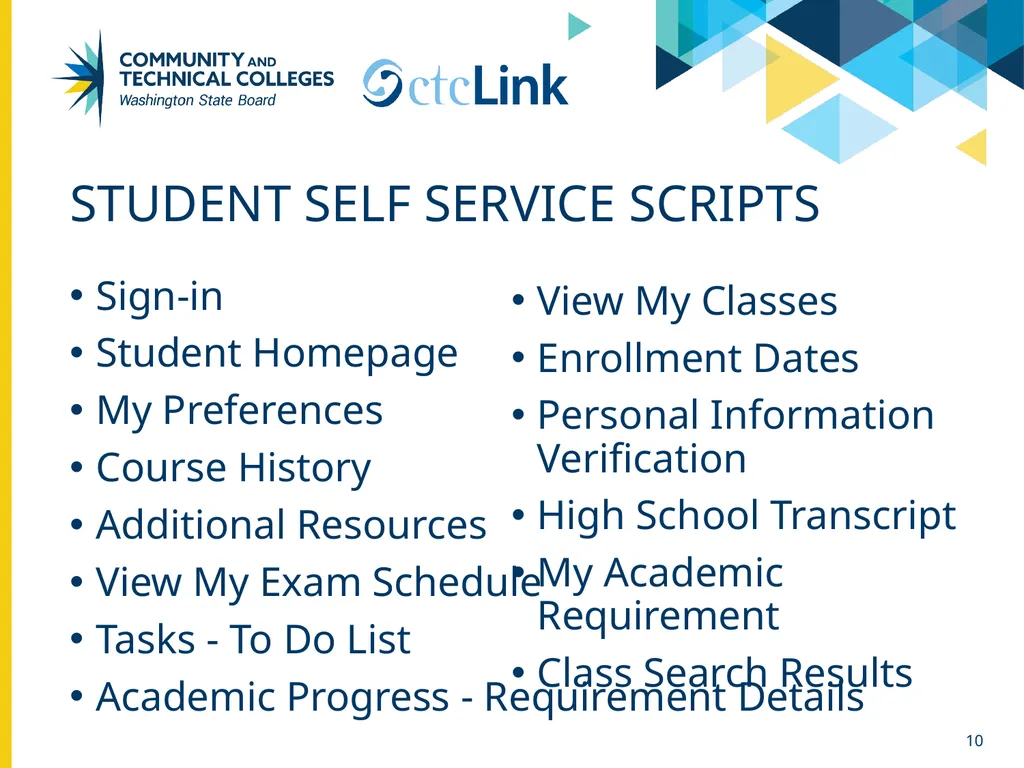
slide10. Student Self Service Scripts Sign-in
Student Homepage
My Preferences
Course History
Additional Resources
View My Exam Schedule
Tasks - To Do List
Academic Progress - Requirement Details 10 View My Classes
Enrollment Dates
Personal Information Verification
High School Transcript
My Academic Requirement
Class Search Results<br>
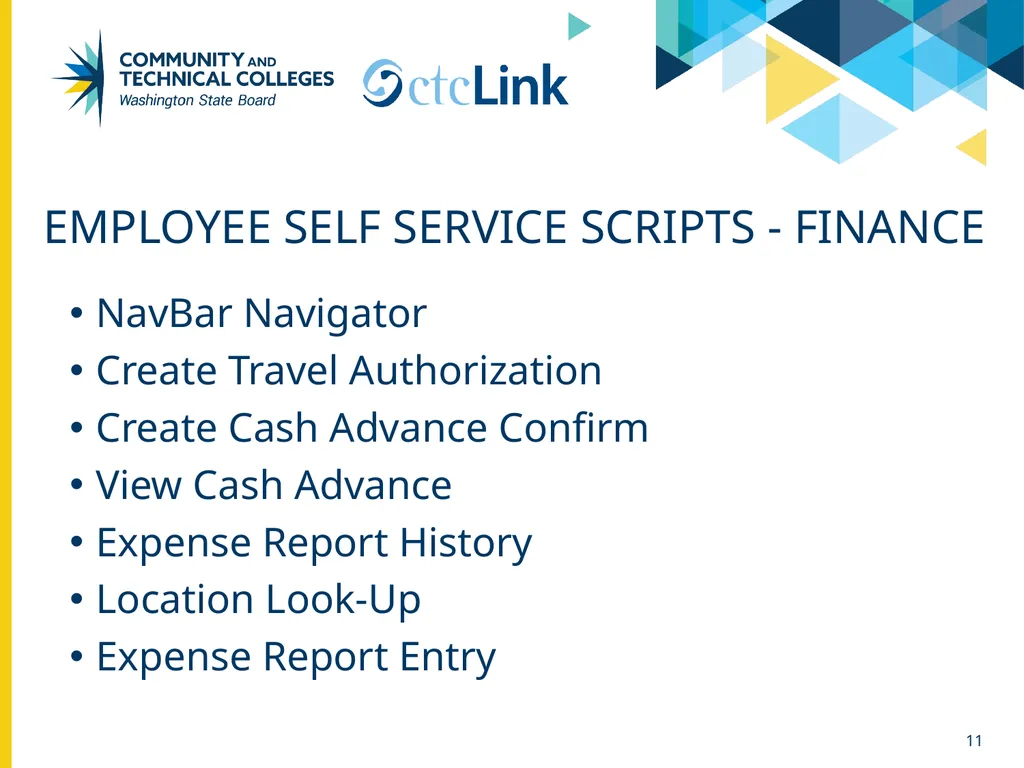
slide11. Employee Self Service Scripts - Finance NavBar Navigator
Create Travel Authorization
Create Cash Advance Confirm
View Cash Advance
Expense Report History
Location Look-Up
Expense Report Entry 11<br>
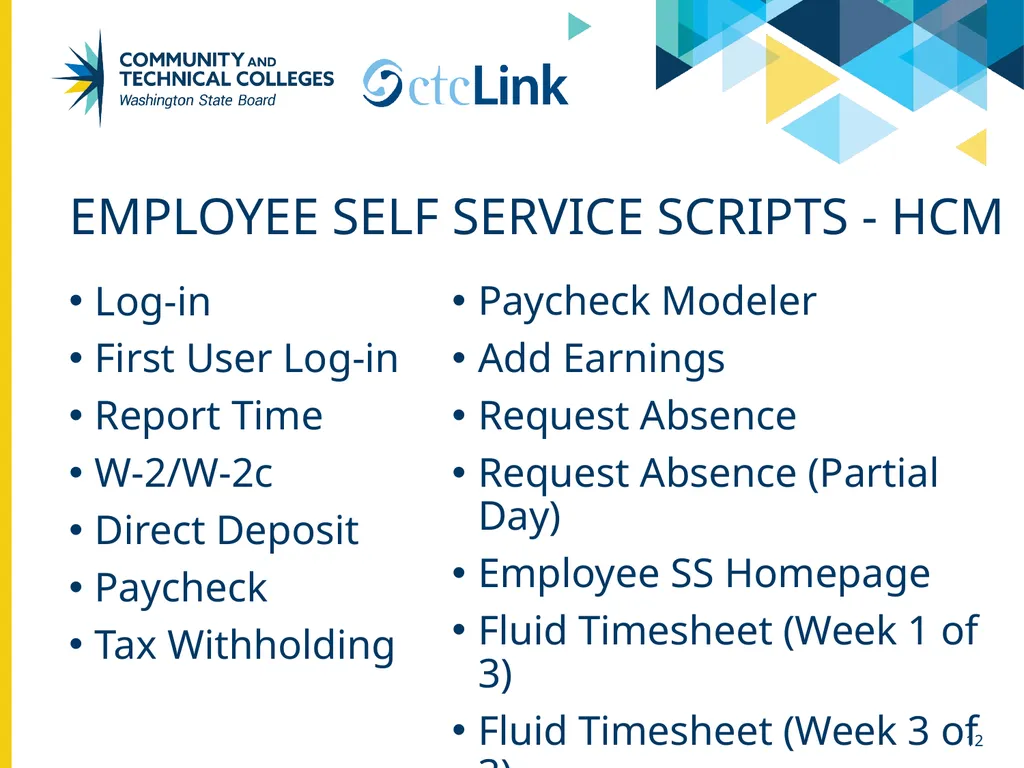
slide12. Employee Self Service Scripts - HCM Log-in
First User Log-in
Report Time
W-2/W-2c
Direct Deposit
Paycheck
Tax Withholding 12 Paycheck Modeler
Add Earnings
Request Absence
Request Absence (Partial Day)
Employee SS Homepage
Fluid Timesheet (Week 1 of 3)
Fluid Timesheet (Week 3 of 3)<br>
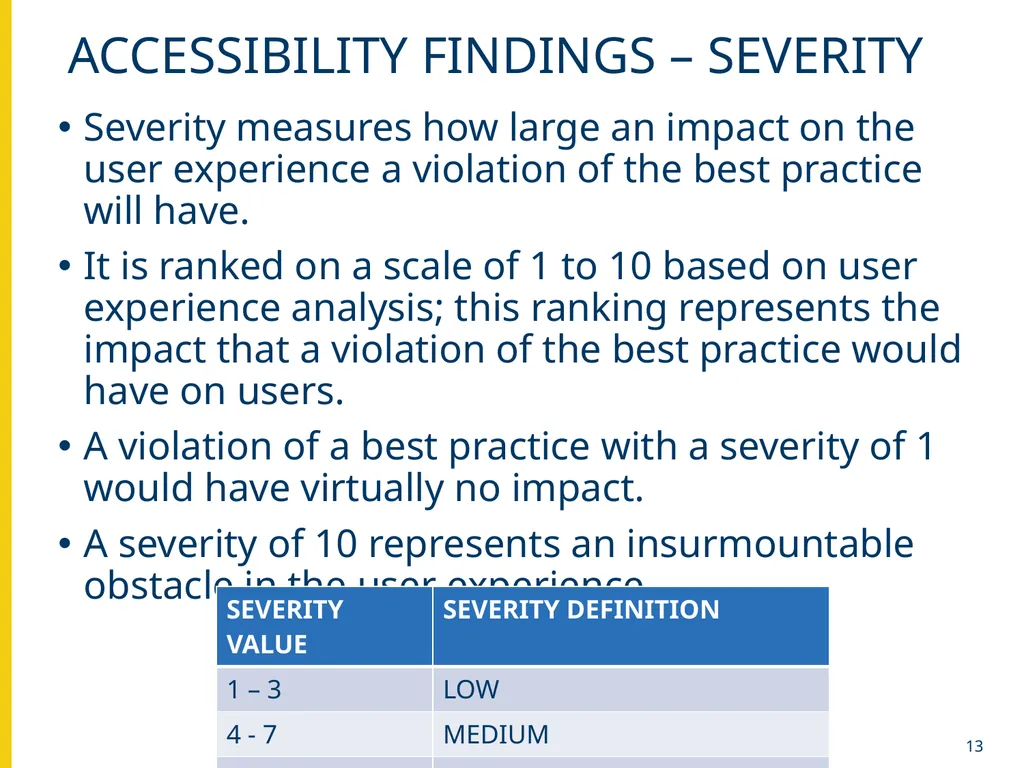
slide13. 13 Accessibility findings – severity Severity measures how large an impact on the user experience a violation of the best practice will have.
It is ranked on a scale of 1 to 10 based on user experience analysis; this ranking represents the impact that a violation of the best practice would have on users.
A violation of a best practice with a severity of 1 would have virtually no impact.
A severity of 10 represents an insurmountable obstacle in the user experience.<br>
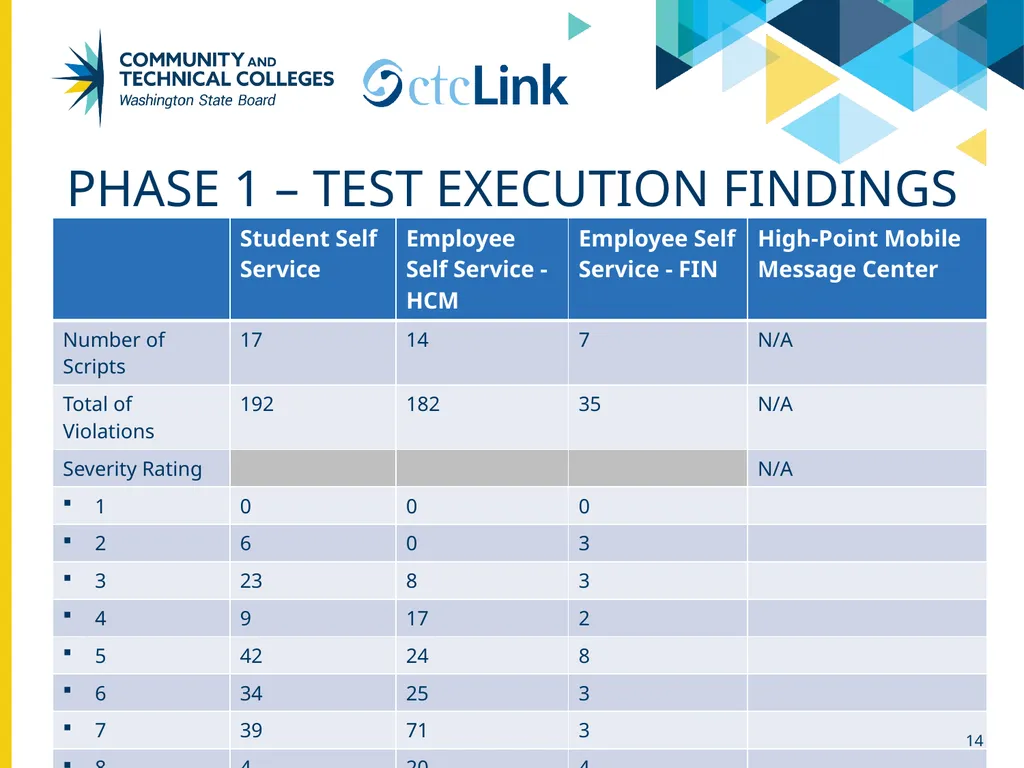
slide14. Phase 1 – Test Execution Findings 14<br>
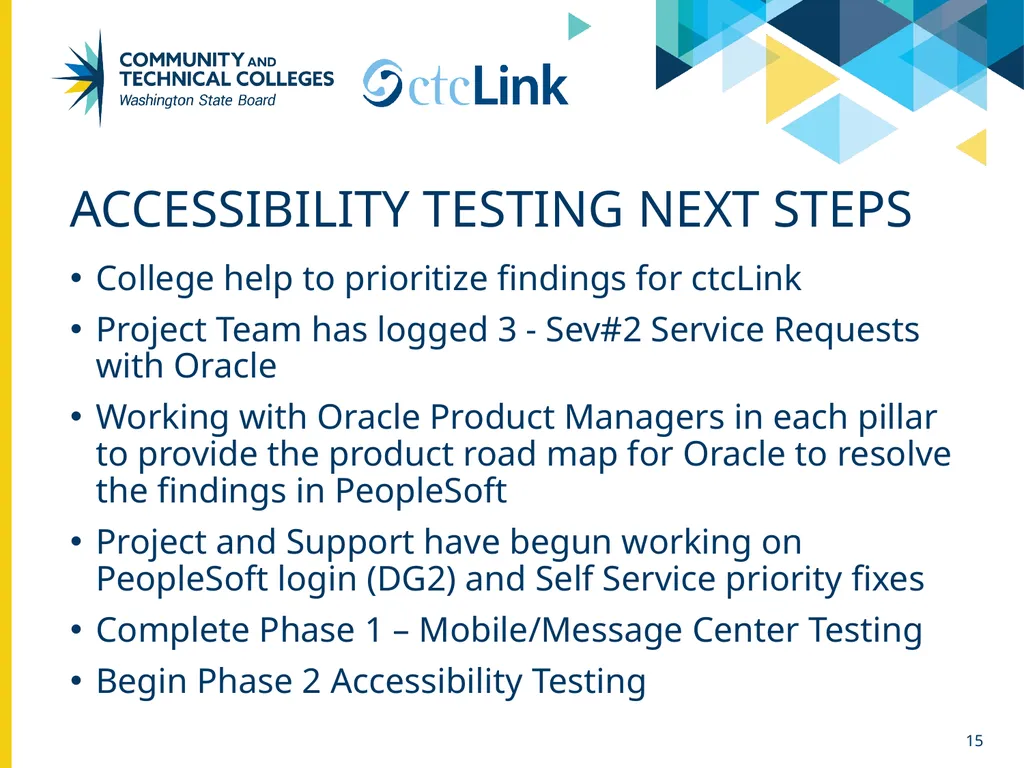
slide15. Accessibility Testing Next Steps College help to prioritize findings for ctcLink
Project Team has logged 3 - Sev#2 Service Requests with Oracle
Working with Oracle Product Managers in each pillar to provide the product road map for Oracle to resolve the findings in PeopleSoft
Project and Support have begun working on PeopleSoft login (DG2) and Self Service priority fixes
Complete Phase 1 – Mobile/Message Center Testing
Begin Phase 2 Accessibility Testing 15<br>
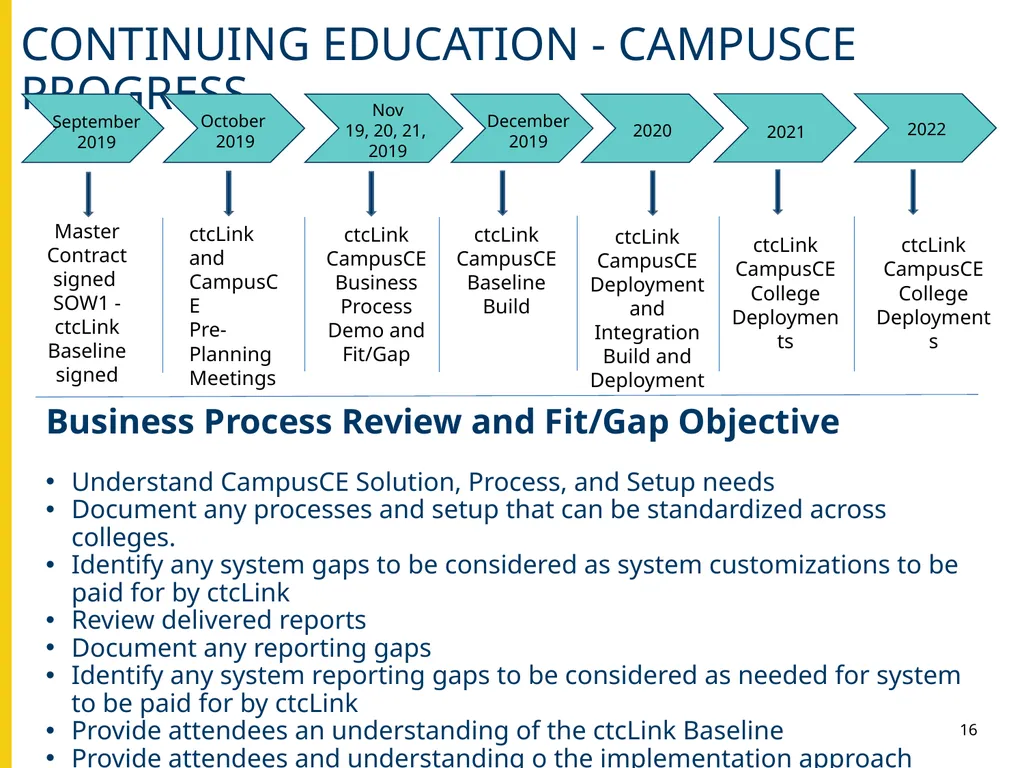
slide16. 16 Continuing Education - CampusCE Progress Business Process Review and Fit/Gap Objective
Understand CampusCE Solution, Process, and Setup needs
Document any processes and setup that can be standardized across colleges.
Identify any system gaps to be considered as system customizations to be paid for by ctcLink
Review delivered reports
Document any reporting gaps
Identify any system reporting gaps to be considered as needed for system to be paid for by ctcLink
Provide attendees an understanding of the ctcLink Baseline
Provide attendees and understanding o the implementation approach September 2019 October
2019 Nov
19, 20, 21, 2019 December
2019 2020 Master Contract signed
SOW1 - ctcLink Baseline signed ctcLink and CampusCE
Pre-Planning
Meetings ctcLink CampusCE
Business Process Demo and Fit/Gap ctcLink CampusCE
Baseline
Build ctcLink CampusCE
Deployment and Integration Build and Deployment ctcLink CampusCE
College Deployments 2021 2022 ctcLink CampusCE
College Deployments<br>
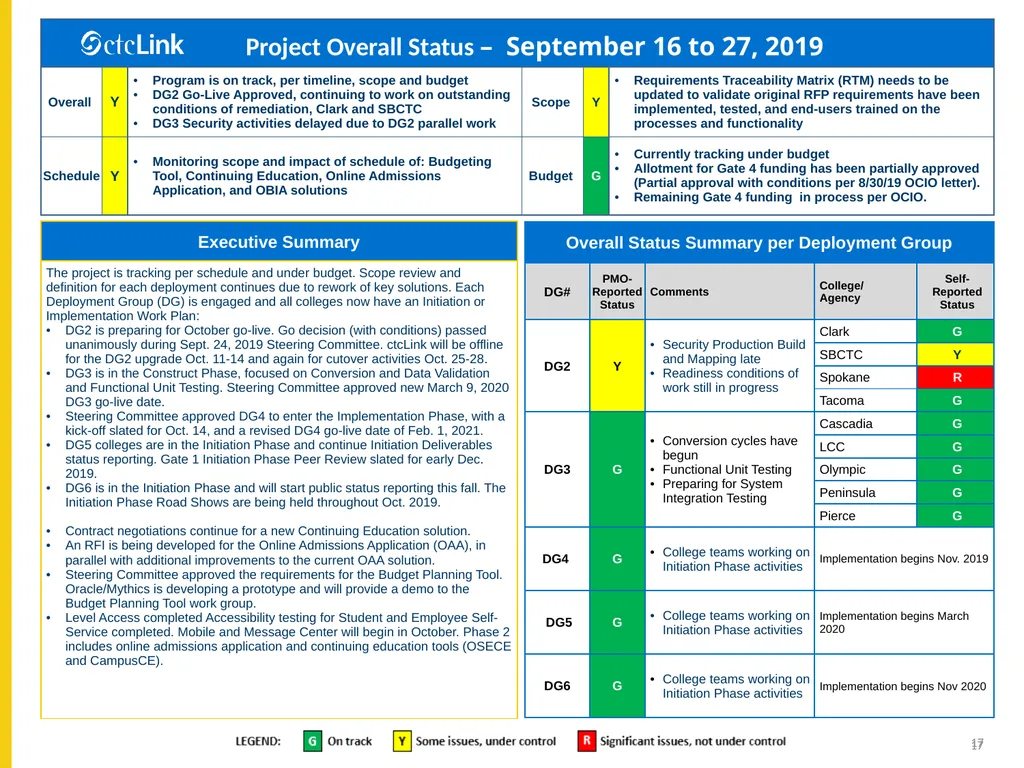
slide17. 17 17<br>
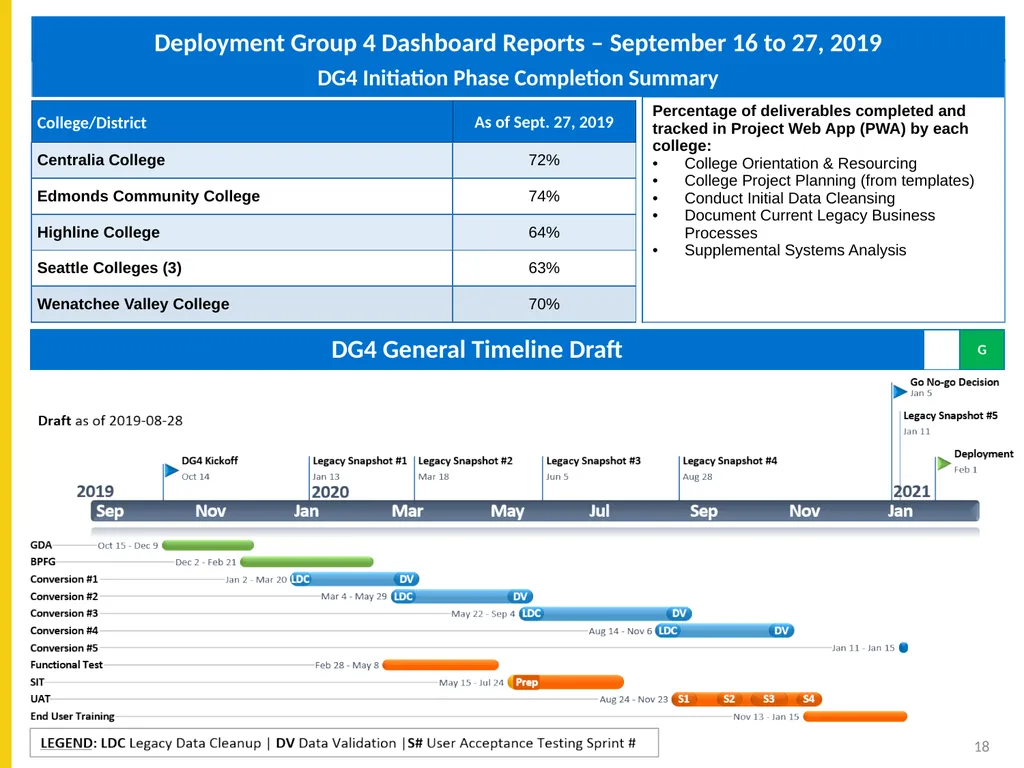
slide18. Deployment Group 4 Dashboard Reports – September 16 to 27, 2019 18<br>
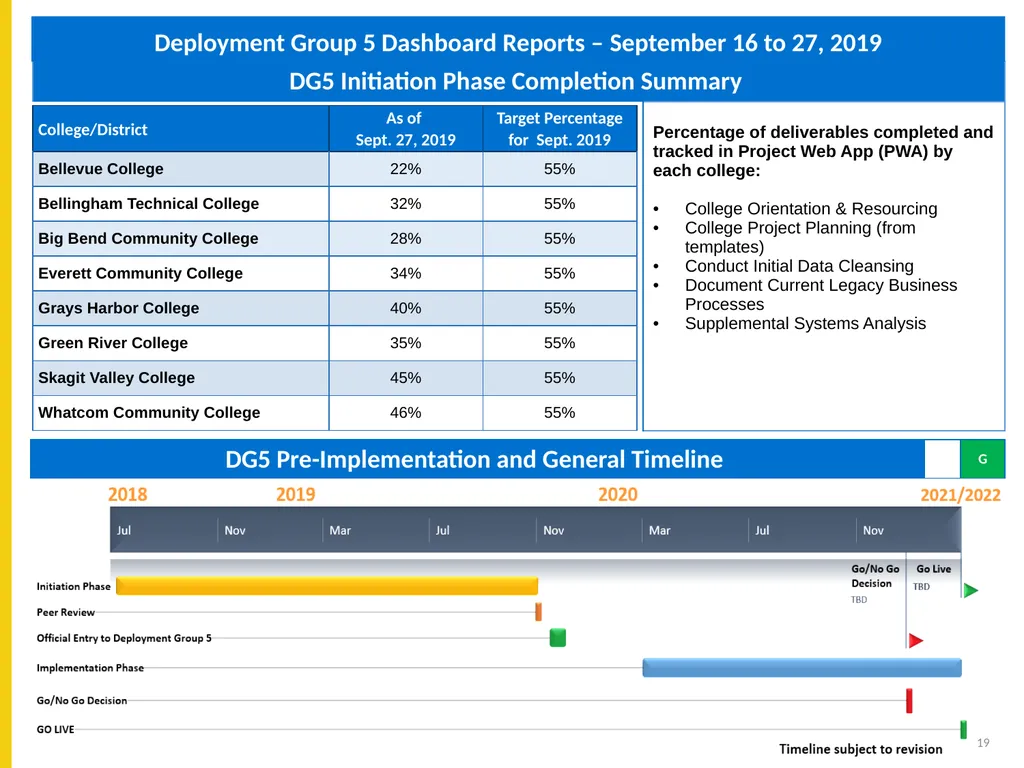
slide19. Deployment Group 5 Dashboard Reports – September 16 to 27, 2019 19<br>
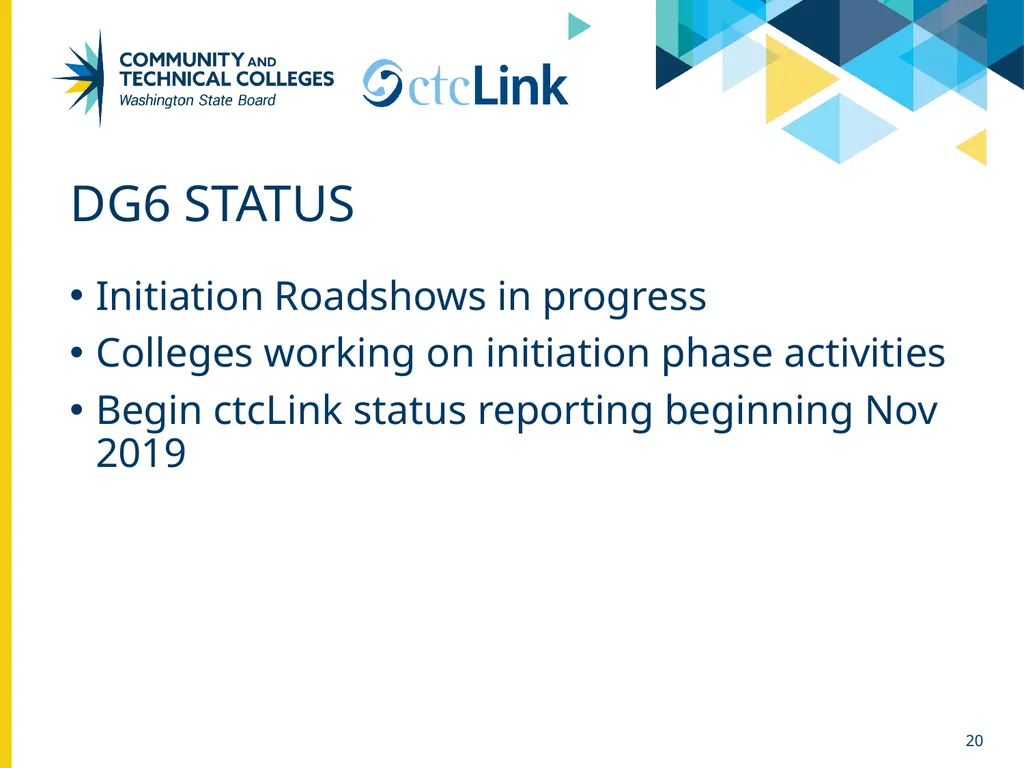
slide20. Dg6 Status Initiation Roadshows in progress
Colleges working on initiation phase activities
Begin ctcLink status reporting beginning Nov 2019 20<br>

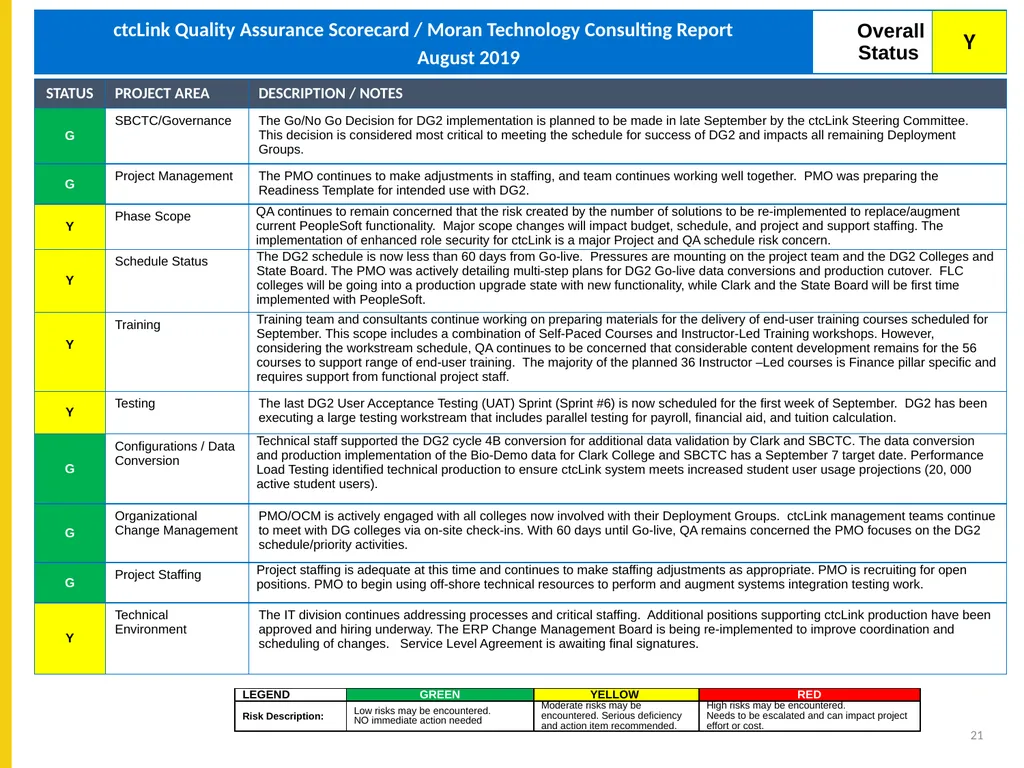
slide21. ctcLink Quality Assurance Scorecard - Moran Technology Consulting , November 2018 21<br>
slide22. Questions & WRAP-UP<br>
Christy Campbell – SBCTC ctcLink Project Director<br>
slide2. governance Complete description of ctcLink Governance Framework 2<br>
slide3. 3 ctcLink Governance Responsibilities<br>
slide4. Ctclink quality gates & milestones Ctclink quality gates & milestones DEPLOY Lessons
Learned TRANSITION End-User Training User Acceptance Testing ProductionGo/No Go Decision Cutover Mitigation Planning Determine Exception
Solutions Update BP Flows Update CEMLIs Update Configuration Functional Testing Prepare QA
Environment Prepare Parallel
Environment CONSTRUCT Parallel Testing System Integration Testing Convert and
Validate Data Production Cutover Planning Production Cutover Security Matrix
Mapping Production Environment Prep STRUCTURE Global DesignAdoption (GDA) Business Process Fit/Gap (BPFG) Update BP Flows Local Configuration UAT Test Definition UAT Materials Build Identify Exceptions Design Extensions Prepare or Update
Test Scripts Training Materials
Analysis/Build Map Supplemental Systems Data Go/No Go Decision Milestone Sign-Off GO LIVE Finalize Local Configuration Guides Project Planning (Checklists & Templates) Security Redesign (DG2 only) Build PeopleSoft Environments Chart of Accounts Redesign (DG2 only) Performance Testing Organizational Change Management Assessments Begin OCM Assessment, Activities & Deliverables for Colleges & SBCTC Legacy System Shutdown Procedures in Place INITIATION Pre-User Acceptance Testing Training Production Validation GATE 1 PEER REVIEW Start Change Impact Analysis & Change Action Plan 4<br>
slide5. Deployment groups & timeline 5<br>
slide6. Ctclink Remediation status 6<br>
slide7. Pilot remediation overview & status *FirstLink (pilot) colleges are validating open and closed items/numbers 7<br>
slide8. Other ctcLink Project Activities – Status as of September 13, 2019 8<br>
slide9. Accessibility Testing Scope Phase 1
PeopleSoft Employee Self Service – HCM
PeopleSoft Employee Self Service – FIN
PeopleSoft Student Self Service – CS
HighPoint Mobile & Message Center (Not Complete)
Phase 2
Online Admissions Application - PeopleSoft CS / Bolt On
OSECE - PeopleSoft CS / Bolt On
CampusCE 9<br>
slide10. Student Self Service Scripts Sign-in
Student Homepage
My Preferences
Course History
Additional Resources
View My Exam Schedule
Tasks - To Do List
Academic Progress - Requirement Details 10 View My Classes
Enrollment Dates
Personal Information Verification
High School Transcript
My Academic Requirement
Class Search Results<br>
slide11. Employee Self Service Scripts - Finance NavBar Navigator
Create Travel Authorization
Create Cash Advance Confirm
View Cash Advance
Expense Report History
Location Look-Up
Expense Report Entry 11<br>
slide12. Employee Self Service Scripts - HCM Log-in
First User Log-in
Report Time
W-2/W-2c
Direct Deposit
Paycheck
Tax Withholding 12 Paycheck Modeler
Add Earnings
Request Absence
Request Absence (Partial Day)
Employee SS Homepage
Fluid Timesheet (Week 1 of 3)
Fluid Timesheet (Week 3 of 3)<br>
slide13. 13 Accessibility findings – severity Severity measures how large an impact on the user experience a violation of the best practice will have.
It is ranked on a scale of 1 to 10 based on user experience analysis; this ranking represents the impact that a violation of the best practice would have on users.
A violation of a best practice with a severity of 1 would have virtually no impact.
A severity of 10 represents an insurmountable obstacle in the user experience.<br>
slide14. Phase 1 – Test Execution Findings 14<br>
slide15. Accessibility Testing Next Steps College help to prioritize findings for ctcLink
Project Team has logged 3 - Sev#2 Service Requests with Oracle
Working with Oracle Product Managers in each pillar to provide the product road map for Oracle to resolve the findings in PeopleSoft
Project and Support have begun working on PeopleSoft login (DG2) and Self Service priority fixes
Complete Phase 1 – Mobile/Message Center Testing
Begin Phase 2 Accessibility Testing 15<br>
slide16. 16 Continuing Education - CampusCE Progress Business Process Review and Fit/Gap Objective
Understand CampusCE Solution, Process, and Setup needs
Document any processes and setup that can be standardized across colleges.
Identify any system gaps to be considered as system customizations to be paid for by ctcLink
Review delivered reports
Document any reporting gaps
Identify any system reporting gaps to be considered as needed for system to be paid for by ctcLink
Provide attendees an understanding of the ctcLink Baseline
Provide attendees and understanding o the implementation approach September 2019 October
2019 Nov
19, 20, 21, 2019 December
2019 2020 Master Contract signed
SOW1 - ctcLink Baseline signed ctcLink and CampusCE
Pre-Planning
Meetings ctcLink CampusCE
Business Process Demo and Fit/Gap ctcLink CampusCE
Baseline
Build ctcLink CampusCE
Deployment and Integration Build and Deployment ctcLink CampusCE
College Deployments 2021 2022 ctcLink CampusCE
College Deployments<br>
slide17. 17 17<br>
slide18. Deployment Group 4 Dashboard Reports – September 16 to 27, 2019 18<br>
slide19. Deployment Group 5 Dashboard Reports – September 16 to 27, 2019 19<br>
slide20. Dg6 Status Initiation Roadshows in progress
Colleges working on initiation phase activities
Begin ctcLink status reporting beginning Nov 2019 20<br>
slide21. ctcLink Quality Assurance Scorecard - Moran Technology Consulting , November 2018 21<br>
slide22. Questions & WRAP-UP<br>