
Cybersecurity Awareness Workshop Indian Institute
MS
Published · 41 slides · 0 views

1 / 1




Description
Cybersecurity Awareness Workshop Indian Institute of Technology Kharagpur Uses and Importance of password for Government Employees Accessing Government Resources Protecting Citizen Data Managing Technological Resources Securing
Related Topics
Share
Embed code
Download this presentation From Below
"Cybersecurity Awareness Workshop Indian Institute" is the property of its rightful owner. Permission is granted to download and print the materials on this website for personal, non-commercial use only, and to display it on your personal computer provided you do not modify the materials and that you retain all copyright notices contained in the materials. By downloading content from our website, you accept the terms of this agreement.
Presentation Transcript
01
Cybersecurity Awareness Workshop
Indian Institute of Technology Kharagpur<br>
02
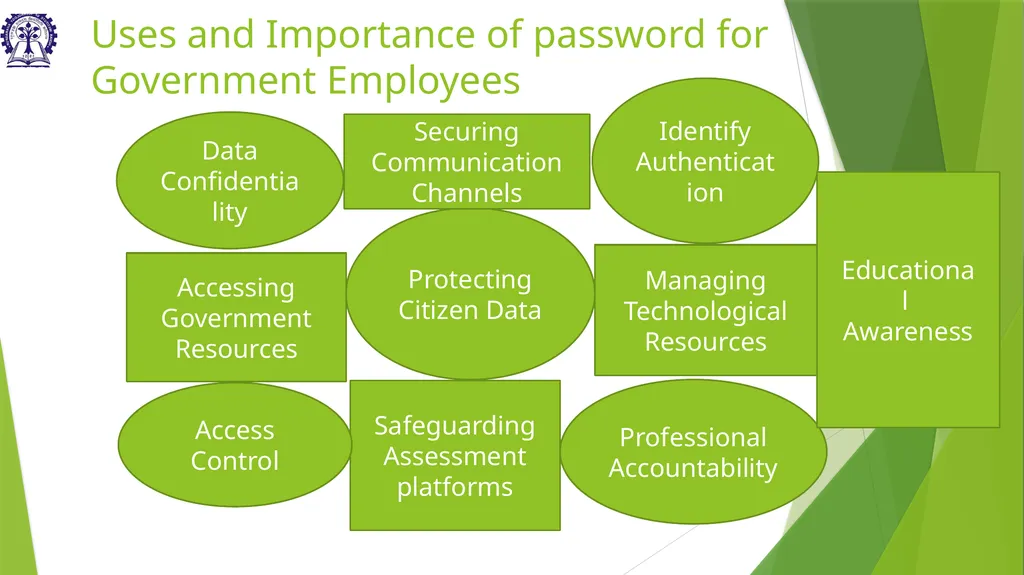
Uses and Importance of password for Government Employees Accessing Government Resources Protecting Citizen Data Managing Technological Resources Securing Communication Channels Safeguarding Assessment platforms Data Confidentiality Access Control Identify
Authentication Professional Accountability Educational Awareness<br>
Authentication Professional Accountability Educational Awareness<br>
03
Password Threats Brute Force Attacks Phishing Social Engineering Password Reuse Keylogging Dictionary Attacks Insider Threats Credential Stuffing Weak Password Policies Unsecured Networks<br>
04
Uses and Importance of password for Government Employees Accessing Government Resources: Passwords safeguard access to online platforms where government employees retrieve critical documents, reports, and administrative materials.
Protecting Citizen Data: Passwords ensure the security of citizen records, financial data, and sensitive information stored within government databases or online systems.
Managing Technology Resources: Passwords control access to government computers, networks, and software applications, limiting usage to authorized personnel only.
Securing Communication Channels: Passwords protect government email accounts and messaging platforms, maintaining confidentiality in communication with constituents, colleagues, and stakeholders.
Safeguarding Assessment Platforms: Passwords secure online assessment tools used for government evaluations and tests, preventing unauthorized entry and preserving assessment integrity.
Data Confidentiality: Passwords safeguard classified government information, ensuring compliance with privacy regulations and preserving confidentiality.
Access Control: They serve as the primary barrier against unauthorized entry, protecting governmental resources and upholding system integrity.
Identity Authentication: Strong passwords verify the identity of government personnel online, thwarting impersonation attempts and preventing identity theft or fraudulent activity.
Professional Accountability: By securing their accounts, government employees maintain their professional integrity and trust within the organization, fostering credibility and reliability in digital interactions. vice failure.
Educational Awareness: Teaches about online safety and responsible digital behavior.<br>
Protecting Citizen Data: Passwords ensure the security of citizen records, financial data, and sensitive information stored within government databases or online systems.
Managing Technology Resources: Passwords control access to government computers, networks, and software applications, limiting usage to authorized personnel only.
Securing Communication Channels: Passwords protect government email accounts and messaging platforms, maintaining confidentiality in communication with constituents, colleagues, and stakeholders.
Safeguarding Assessment Platforms: Passwords secure online assessment tools used for government evaluations and tests, preventing unauthorized entry and preserving assessment integrity.
Data Confidentiality: Passwords safeguard classified government information, ensuring compliance with privacy regulations and preserving confidentiality.
Access Control: They serve as the primary barrier against unauthorized entry, protecting governmental resources and upholding system integrity.
Identity Authentication: Strong passwords verify the identity of government personnel online, thwarting impersonation attempts and preventing identity theft or fraudulent activity.
Professional Accountability: By securing their accounts, government employees maintain their professional integrity and trust within the organization, fostering credibility and reliability in digital interactions. vice failure.
Educational Awareness: Teaches about online safety and responsible digital behavior.<br>
05
Password Threats Brute Force Attacks: Automated tools repeatedly guess passwords until the correct one is found, targeting weak or easily guessable passwords.
Phishing: Attackers trick individuals into revealing passwords through deceptive emails or messages mimicking legitimate entities.
Social Engineering: Manipulative tactics, like posing as trusted sources, are used to extract passwords from unsuspecting employees.
Password Reuse: Using the same password across multiple accounts poses a risk; a breach in one account compromises others.
Keylogging: Malicious software captures keystrokes, including passwords, potentially exposing sensitive login credentials.
Dictionary Attacks: Lists of common passwords or words are employed to guess passwords, particularly those lacking complexity.
Insider Threats: Malicious insiders or disgruntled employees may exploit their access to gain unauthorized entry to systems using passwords.
Credential Stuffing: Stolen passwords from one breach are used to gain unauthorized access to other accounts.
Weak Password Policies: Lack of enforcement or adherence to strong password policies increases vulnerability to attacks.
Unsecured Networks: Accessing sensitive accounts or information over unsecured networks exposes passwords to interception by attackers.<br>
Phishing: Attackers trick individuals into revealing passwords through deceptive emails or messages mimicking legitimate entities.
Social Engineering: Manipulative tactics, like posing as trusted sources, are used to extract passwords from unsuspecting employees.
Password Reuse: Using the same password across multiple accounts poses a risk; a breach in one account compromises others.
Keylogging: Malicious software captures keystrokes, including passwords, potentially exposing sensitive login credentials.
Dictionary Attacks: Lists of common passwords or words are employed to guess passwords, particularly those lacking complexity.
Insider Threats: Malicious insiders or disgruntled employees may exploit their access to gain unauthorized entry to systems using passwords.
Credential Stuffing: Stolen passwords from one breach are used to gain unauthorized access to other accounts.
Weak Password Policies: Lack of enforcement or adherence to strong password policies increases vulnerability to attacks.
Unsecured Networks: Accessing sensitive accounts or information over unsecured networks exposes passwords to interception by attackers.<br>
06
Password Security—Best Practices Using a long and complex password that is difficult to guess or crack. This typically means using a mix of upper- and lower-case letters, numbers, and special characters
Avoiding using easily guessed information, such as your name, address, or phone number, in your password.
Using different passwords for different accounts, so that a compromise of one password does not give an attacker access to multiple accounts.
Updating passwords regularly, especially if there is any suspicion that a password may have been compromised.
Use different passwords for different social media accounts and emails.
Enabling Two-factor authentication (2FA) can be another great step to secure the password. This adds extra verification to make sure that the person logging in is you by asking a second method of verification such as a code sent to your phone or an app that generates a code.
Exercise caution with emails, messages, or calls requesting passwords or personal information, as legitimate organizations will not ask for this via email or message.<br>
Avoiding using easily guessed information, such as your name, address, or phone number, in your password.
Using different passwords for different accounts, so that a compromise of one password does not give an attacker access to multiple accounts.
Updating passwords regularly, especially if there is any suspicion that a password may have been compromised.
Use different passwords for different social media accounts and emails.
Enabling Two-factor authentication (2FA) can be another great step to secure the password. This adds extra verification to make sure that the person logging in is you by asking a second method of verification such as a code sent to your phone or an app that generates a code.
Exercise caution with emails, messages, or calls requesting passwords or personal information, as legitimate organizations will not ask for this via email or message.<br>
07
Malware Protection Malware is a term used to describe any software that is designed to harm a computer system or its users. Malware can take many forms, including viruses, worms, Trojan horses, ransomware, and spyware.
Viruses are self-replicating programs that can spread from one computer to another. They can damage files, steal data, or even take control of a computer.
Worms are similar to viruses, but they can spread without the need for human interaction. They can also be used to spread viruses.
Trojan horses are malicious programs that are disguised as something else, such as a legitimate file or a website. When a user opens or runs a Trojan horse, it can install malware on the computer.
Ransomware is a type of malware that encrypts a victim's files and demands a ransom payment in order to decrypt them.
Spyware is a type of malware that is designed to collect information about a user's computer activity. This information can then be used to track the user's online habits or even steal their personal information.<br>
Viruses are self-replicating programs that can spread from one computer to another. They can damage files, steal data, or even take control of a computer.
Worms are similar to viruses, but they can spread without the need for human interaction. They can also be used to spread viruses.
Trojan horses are malicious programs that are disguised as something else, such as a legitimate file or a website. When a user opens or runs a Trojan horse, it can install malware on the computer.
Ransomware is a type of malware that encrypts a victim's files and demands a ransom payment in order to decrypt them.
Spyware is a type of malware that is designed to collect information about a user's computer activity. This information can then be used to track the user's online habits or even steal their personal information.<br>
08
Impact of Malware Data theft: Malware can be used to steal personal information, such as credit card numbers, passwords, and Social Security numbers. This information can then be used to commit identity theft or other crimes.
Financial loss: Malware can be used to infect computers with ransomware, which encrypts files and demands a ransom payment in order to decrypt them. Victims who do not pay the ransom may lose access to their files permanently.
System damage: Malware can damage computer systems by deleting files, corrupting data, or disrupting operations. This can lead to downtime, lost productivity, and even data loss.
Cyberbullying: Malware can be used to spread cyberbullying messages or images. This can have a devastating impact on the victim's mental and emotional health.
State-sponsored attacks: Malware can be used by state-sponsored actors to launch cyberattacks against governments, businesses, or other organizations. These attacks can have a significant impact on national security and economic stability
Monitor your online activity: Malware can be used to track your browsing history, search terms, and other online activity. This information can then be used to target you with advertising or to steal your personal information.
Take control of your computer: Malware can be used to give an attacker full control of your computer. This means that they could access your files, install other malware, or even use your computer to launch attacks on other systems.
Spread to other computers: Malware can spread from one computer to another through a variety of ways, such as email attachments, infected websites, and USB drives. This means that if your computer is infected with malware, it could infect other computers on your network or even computers that you connect to.<br>
Financial loss: Malware can be used to infect computers with ransomware, which encrypts files and demands a ransom payment in order to decrypt them. Victims who do not pay the ransom may lose access to their files permanently.
System damage: Malware can damage computer systems by deleting files, corrupting data, or disrupting operations. This can lead to downtime, lost productivity, and even data loss.
Cyberbullying: Malware can be used to spread cyberbullying messages or images. This can have a devastating impact on the victim's mental and emotional health.
State-sponsored attacks: Malware can be used by state-sponsored actors to launch cyberattacks against governments, businesses, or other organizations. These attacks can have a significant impact on national security and economic stability
Monitor your online activity: Malware can be used to track your browsing history, search terms, and other online activity. This information can then be used to target you with advertising or to steal your personal information.
Take control of your computer: Malware can be used to give an attacker full control of your computer. This means that they could access your files, install other malware, or even use your computer to launch attacks on other systems.
Spread to other computers: Malware can spread from one computer to another through a variety of ways, such as email attachments, infected websites, and USB drives. This means that if your computer is infected with malware, it could infect other computers on your network or even computers that you connect to.<br>
09
Impact of Malware Data Theft Financial Loss System Damage State Sponsored attacks Monitor your online activities Cyberbullying Take control of your computer Spread to other Computers<br>
10
Warning Signs Your computer starts to run slowly: Malware can slow down your computer by using up system resources.
Your computer crashes or freezes frequently: Malware can cause your computer to crash or freeze because it is interfering with the operating system.
Your browser starts to open new tabs or windows unexpectedly: Malware can hijack your browser and open new tabs or windows without your permission.
You see pop-up ads that you didn't click on: Malware can display pop-up ads on your computer without your permission.
Your homepage changes without your permission: Malware can change your homepage to a malicious website.
You receive emails from addresses you don't recognize: Malware can send emails from your computer to your contacts.
Your files are deleted or damaged: Malware can delete or damage your files.
Your computer is locked and you're asked to pay a ransom: This is a sign of ransomware, a type of malware that encrypts your files and demands a ransom payment in order to decrypt them.
If you see any of these warning signs, it's important to scan your computer for malware immediately. You can use an antivirus program to scan your computer.<br>
Your computer crashes or freezes frequently: Malware can cause your computer to crash or freeze because it is interfering with the operating system.
Your browser starts to open new tabs or windows unexpectedly: Malware can hijack your browser and open new tabs or windows without your permission.
You see pop-up ads that you didn't click on: Malware can display pop-up ads on your computer without your permission.
Your homepage changes without your permission: Malware can change your homepage to a malicious website.
You receive emails from addresses you don't recognize: Malware can send emails from your computer to your contacts.
Your files are deleted or damaged: Malware can delete or damage your files.
Your computer is locked and you're asked to pay a ransom: This is a sign of ransomware, a type of malware that encrypts your files and demands a ransom payment in order to decrypt them.
If you see any of these warning signs, it's important to scan your computer for malware immediately. You can use an antivirus program to scan your computer.<br>
11
Warning Signs Your Computer starts to run slowly Your Computer crashes or freezes frequently Your browser starts to open new tabs or windows unexpectedly You see pop-up ads that you didn't click on You receive emails from addresses you don't recognize Your files are deleted or damaged Your homepage changes without your permission Your computer is locked and you're asked to pay a ransom<br>
12
Precautions to be taken Genuine and updated Operation System must be used in computers
Antivirus and Antimalware program must be installed in each computer, regularly updated and Antivirus reports should be checked regularly.
Being careful about what one open or run on their computer. One should not open email attachments or click on links in emails from senders you do not know or trust. These emails may contain malware that can infect your computer when you open them or click on the links.
Auto Run/AutoPlay features should be disabled as these may install malicious programs automatically when a flash drive is inserted.
Use of USB Storage devices/Pen drives should be restricted.
Potentially unwanted applications should be removed from the computers. Software piracy is absolutely not permitted by the IT Security Policy of the Institute. (Reference clause no. 1 of Software licensing and usage policy)
Backing up your files regularly: This is important in case your computer is infected with malware and your files are damaged or deleted. You can back up your files to another safe location.
Browse only from secured and authentic websites.
Use Pop-up or Ad-blocker or Pop-up blocker to block malicious advertisements appearing on the websites.
One should not use any application through links received on chats or social media reports.
Systems and equipment which are obsolete/unsupported/unpatched operating systems, to be removed from the network.
Systems infected with the malware must be removed from the network, it must be cleaned /sanitized before connecting back to the network.<br>
Antivirus and Antimalware program must be installed in each computer, regularly updated and Antivirus reports should be checked regularly.
Being careful about what one open or run on their computer. One should not open email attachments or click on links in emails from senders you do not know or trust. These emails may contain malware that can infect your computer when you open them or click on the links.
Auto Run/AutoPlay features should be disabled as these may install malicious programs automatically when a flash drive is inserted.
Use of USB Storage devices/Pen drives should be restricted.
Potentially unwanted applications should be removed from the computers. Software piracy is absolutely not permitted by the IT Security Policy of the Institute. (Reference clause no. 1 of Software licensing and usage policy)
Backing up your files regularly: This is important in case your computer is infected with malware and your files are damaged or deleted. You can back up your files to another safe location.
Browse only from secured and authentic websites.
Use Pop-up or Ad-blocker or Pop-up blocker to block malicious advertisements appearing on the websites.
One should not use any application through links received on chats or social media reports.
Systems and equipment which are obsolete/unsupported/unpatched operating systems, to be removed from the network.
Systems infected with the malware must be removed from the network, it must be cleaned /sanitized before connecting back to the network.<br>
13
Phishing Phishing is a form of social engineering attack to gain access to information through misrepresentation. In Phishing attack fraudsters create e-mails that look as though it is from a legitimate organization (e.g. bank, reputed institution, company etc.,) which contains link to fake web site that replicates the real one or may have malicious attachments. Most of these phishing emails are created to trick the target into divulging sensitive information and doing what the fraudster wants.
Phishing Links:
Spoofed links of fake sites/offers/gifts etc., shared by the fraudsters through SMS/ social media / email / Instant Messenger, etc.
The links are masked through authentic looking names of websites, but in reality, the customer gets redirected to a phishing website. ( can skip this step if not necessary)
Upon clicking the links the users are diverted to fake sites which ask for user credentials and personal sensitive information
Once the user enters these details or sensitive personal/financial information, it is captured by fraudsters and misused for committing financial frauds.<br>
Phishing Links:
Spoofed links of fake sites/offers/gifts etc., shared by the fraudsters through SMS/ social media / email / Instant Messenger, etc.
The links are masked through authentic looking names of websites, but in reality, the customer gets redirected to a phishing website. ( can skip this step if not necessary)
Upon clicking the links the users are diverted to fake sites which ask for user credentials and personal sensitive information
Once the user enters these details or sensitive personal/financial information, it is captured by fraudsters and misused for committing financial frauds.<br>
14
Dangers of Phishing<br>
15
Precautions for Phishing Don't respond to spam mails without verification of the e-mail origin.
Don't deposit money unless the candidate is interviewed personally by the company.
Don't try to get job through back door methods by paying money which promises to provide employment, which will cheat users.
Check with original company website for any job offers before proceeding.
Talk over phone with the company to ascertain, before depositing the money in their account, whether there is change of previous a/c details and name of the company.
Maintain two step verification code to sign into account (Mobile alert).
Whenever the fraud is noticed immediately inform the original company.
Don’t respond to spam e-mails without verification of the e-mail origin (Header)<br>
Don't deposit money unless the candidate is interviewed personally by the company.
Don't try to get job through back door methods by paying money which promises to provide employment, which will cheat users.
Check with original company website for any job offers before proceeding.
Talk over phone with the company to ascertain, before depositing the money in their account, whether there is change of previous a/c details and name of the company.
Maintain two step verification code to sign into account (Mobile alert).
Whenever the fraud is noticed immediately inform the original company.
Don’t respond to spam e-mails without verification of the e-mail origin (Header)<br>
16
Best Practices Web browsers have free add-ons (or "plug-ins") that can help detect phishing sites. Install those plugins to protect from fake websites.
Exercise caution if a message sounds or a website looks suspicious, is out of the ordinary or unexpected, or contains an offer that is too good to be true.
Don’t use email to send personal or financial information, and delete any emails that ask to confirm or divulge personal or financial information.
Do not access account or use Credit card or Debit card from computers in public places.
Avoid giving out personal information in random websites or survey forms if do not really know the purpose of sharing.
Consider using Safe Browsing tools, filtering tools (antivirus and content-based filtering) in antivirus, firewall, and filtering services. Update spam filters with latest spam mail contents.
Always send confidential information in encrypted format using techniques such as Pretty Good Encryption (PGP) etc., wherein only sender and receiver can see the information.
Any unusual activity or attack should be reported immediately at incident@certin.org.in with the relevant logs, email headers for the analysis of the attacks and taking appropriate actions further.
To check the integrity of e-mail, Log on to http://www.cyberforensics.in and click on e-mail Tracer.<br>
Exercise caution if a message sounds or a website looks suspicious, is out of the ordinary or unexpected, or contains an offer that is too good to be true.
Don’t use email to send personal or financial information, and delete any emails that ask to confirm or divulge personal or financial information.
Do not access account or use Credit card or Debit card from computers in public places.
Avoid giving out personal information in random websites or survey forms if do not really know the purpose of sharing.
Consider using Safe Browsing tools, filtering tools (antivirus and content-based filtering) in antivirus, firewall, and filtering services. Update spam filters with latest spam mail contents.
Always send confidential information in encrypted format using techniques such as Pretty Good Encryption (PGP) etc., wherein only sender and receiver can see the information.
Any unusual activity or attack should be reported immediately at incident@certin.org.in with the relevant logs, email headers for the analysis of the attacks and taking appropriate actions further.
To check the integrity of e-mail, Log on to http://www.cyberforensics.in and click on e-mail Tracer.<br>
17
Social Engineering Social engineering is an approach to gain access to sensitive information through misrepresentation. It is the conscious manipulation of people to obtain information. The technique basically relies on human weakness like greed/curiosity/anxiety and other such tendencies, rather then technical vulnerabilities.
Techniques:
Phishing: This is the practice of sending emails, text messages, or social media messages that appear to be from a legitimate source, such as a bank or government agency, but are actually designed to trick people into giving away personal or financial information.
Pretexting: This involves creating a false pretext or scenario to convince someone to provide sensitive information or take a specific action. For example, a fraudster might pretend to be a colleague or customer service representative and ask for personal information or login credentials.
Baiting: Baiting involves offering something of value, such as a free gift or discount, in exchange for personal information or a specific action. For example, a fraudster might offer a free gift card in exchange for completing a survey that asks for personal information.
Spear phishing: This is a targeted form of phishing that involves sending emails or messages specifically tailored to a particular individual or group. The messages often contain personal details that make them seem more credible.
Impersonation: This involves pretending to be someone else, such as a bank employee, police officer, or IT technician, in order to gain access to sensitive information or convince someone to take a specific action
Reverse social engineering: This is the practice of using information gathered from social media and other sources to build a relationship of trust with someone and then using that relationship to gain access to sensitive information or convince the person to take a specific action<br>
Techniques:
Phishing: This is the practice of sending emails, text messages, or social media messages that appear to be from a legitimate source, such as a bank or government agency, but are actually designed to trick people into giving away personal or financial information.
Pretexting: This involves creating a false pretext or scenario to convince someone to provide sensitive information or take a specific action. For example, a fraudster might pretend to be a colleague or customer service representative and ask for personal information or login credentials.
Baiting: Baiting involves offering something of value, such as a free gift or discount, in exchange for personal information or a specific action. For example, a fraudster might offer a free gift card in exchange for completing a survey that asks for personal information.
Spear phishing: This is a targeted form of phishing that involves sending emails or messages specifically tailored to a particular individual or group. The messages often contain personal details that make them seem more credible.
Impersonation: This involves pretending to be someone else, such as a bank employee, police officer, or IT technician, in order to gain access to sensitive information or convince someone to take a specific action
Reverse social engineering: This is the practice of using information gathered from social media and other sources to build a relationship of trust with someone and then using that relationship to gain access to sensitive information or convince the person to take a specific action<br>
18
Social Engineering Techniques (continued) Public places: Casual sharing of personal information by users in public places like cafes, movies, pubs etc., which is noted and misutilised by fraudster.
Gossips: Talking about some gossip with colleague may give some information to other people who might be a social engineer.
Personal pride and confidence: Sharing sensitive information of your family or organization to boast your achievements, pride, and confidence to unknown persons.
Persuasion: Influencing individuals to give you confidential information by repeatedly convincing them. Ex.: a hacker posing as a company's IT team.,
Hoaxing: An attempt to trap people into believing that something false as real. Aimed at a single victim it is done for illicit financial or material gain a hoax is often perpetrated as a practical joke, to cause embarrassment. Ex: false virus alerts, false tax alerts, false tech support etc.,
Vishing: Using the telephone system, most often using features facilitated by Voice over IP (VoIP), to gain access to private personal and financial information from the people for the financial gains. The term is a combination of "voice" and phishing.
Dumpster diving: Collecting personal information of individuals from improperly discarded documents. Ex. Air tickets, electricity bills, discarded credit/debit/pan cards etc.
Social engineering fraudsters rely on human psychology and the willingness of people to trust and help others. By using these techniques, they are able to exploit vulnerabilities and deceive people into providing sensitive information or taking actions that benefit the fraudster. It's important to be vigilant and skeptical of requests for information or actions that seem suspicious or out of the ordinary.<br>
Gossips: Talking about some gossip with colleague may give some information to other people who might be a social engineer.
Personal pride and confidence: Sharing sensitive information of your family or organization to boast your achievements, pride, and confidence to unknown persons.
Persuasion: Influencing individuals to give you confidential information by repeatedly convincing them. Ex.: a hacker posing as a company's IT team.,
Hoaxing: An attempt to trap people into believing that something false as real. Aimed at a single victim it is done for illicit financial or material gain a hoax is often perpetrated as a practical joke, to cause embarrassment. Ex: false virus alerts, false tax alerts, false tech support etc.,
Vishing: Using the telephone system, most often using features facilitated by Voice over IP (VoIP), to gain access to private personal and financial information from the people for the financial gains. The term is a combination of "voice" and phishing.
Dumpster diving: Collecting personal information of individuals from improperly discarded documents. Ex. Air tickets, electricity bills, discarded credit/debit/pan cards etc.
Social engineering fraudsters rely on human psychology and the willingness of people to trust and help others. By using these techniques, they are able to exploit vulnerabilities and deceive people into providing sensitive information or taking actions that benefit the fraudster. It's important to be vigilant and skeptical of requests for information or actions that seem suspicious or out of the ordinary.<br>
19
Social Engineering Techniques Pretexting Baiting Spear phishing Impersonation Reverse social engineering Gossips Personal pride and confidence Hoaxing Vishing Dumpster diving Phishing Gossips Persuasion<br>
20
Common Social Engineering frauds Spear Phishing Emails: Scammers send emails that appear to come from trusted government agencies or colleagues, requesting urgent actions like updating login credentials or reviewing documents.
Tactics: Government employees are tricked into clicking on malicious links or attachments, leading to the compromise of sensitive information or unauthorized access to government systems.
Impersonation of Senior Officials: Scammers impersonate senior government officials, instructing employees to transfer funds, share confidential data, or provide system access under the guise of an urgent government project.
Tactics: Employees, feeling pressured by the authority of the supposed senior official, comply with requests without proper verification, resulting in unauthorized data exposure or financial loss.
Watering Hole Attacks: Scammers target websites frequently visited by government employees, compromising these sites with malware.
Tactics: When employees visit these infected websites, malware is silently installed on their devices, granting attackers access to sensitive government networks or systems.
Fake Training Programs or Surveys: Scammers create fake professional development programs, workshops, or surveys tailored to government employees, often advertised through emails or social media.
Tactics: Employees are asked to register using their work credentials or provide personal information, which is then used to compromise their accounts or steal data.
Pretexting for Access to Classified Information: Scammers pose as legitimate authorities or external contractors, requesting government employees to share classified information under false pretenses, such as conducting an audit or investigation.
Tactics: Employees, believing the request is legitimate, provide access to sensitive government data, compromising national security or internal operations.<br>
Tactics: Government employees are tricked into clicking on malicious links or attachments, leading to the compromise of sensitive information or unauthorized access to government systems.
Impersonation of Senior Officials: Scammers impersonate senior government officials, instructing employees to transfer funds, share confidential data, or provide system access under the guise of an urgent government project.
Tactics: Employees, feeling pressured by the authority of the supposed senior official, comply with requests without proper verification, resulting in unauthorized data exposure or financial loss.
Watering Hole Attacks: Scammers target websites frequently visited by government employees, compromising these sites with malware.
Tactics: When employees visit these infected websites, malware is silently installed on their devices, granting attackers access to sensitive government networks or systems.
Fake Training Programs or Surveys: Scammers create fake professional development programs, workshops, or surveys tailored to government employees, often advertised through emails or social media.
Tactics: Employees are asked to register using their work credentials or provide personal information, which is then used to compromise their accounts or steal data.
Pretexting for Access to Classified Information: Scammers pose as legitimate authorities or external contractors, requesting government employees to share classified information under false pretenses, such as conducting an audit or investigation.
Tactics: Employees, believing the request is legitimate, provide access to sensitive government data, compromising national security or internal operations.<br>
21
Common Social Engineering frauds Common frauds Impersonation of Senior Officials Pretexting for Access to Classified Information Spear Phishing Emails Watering Hole Attacks Fake Training Programs or Surveys<br>
22
Threats of Social Engineering Data theft: Social engineering attacks can be used to steal sensitive data, such as login credentials, financial information, or personal data, which can be used for identity theft or other malicious purposes.
Malware delivery: Social engineering attacks can be used to deliver malware, such as viruses or ransomware, which can cause damage to systems and data.
Business email compromise: Social engineering attacks can be used to impersonate company executives or other trusted figures, tricking employees into divulging sensitive information or transferring funds to fraudulent accounts.
Physical security breaches: Social engineering attacks can be used to gain access to restricted areas or systems by impersonating an employee or other trusted figure.
Reputation damage: Social engineering attacks can damage an individual or organization's reputation by exposing sensitive data or engaging in fraudulent activities using their name.<br>
Malware delivery: Social engineering attacks can be used to deliver malware, such as viruses or ransomware, which can cause damage to systems and data.
Business email compromise: Social engineering attacks can be used to impersonate company executives or other trusted figures, tricking employees into divulging sensitive information or transferring funds to fraudulent accounts.
Physical security breaches: Social engineering attacks can be used to gain access to restricted areas or systems by impersonating an employee or other trusted figure.
Reputation damage: Social engineering attacks can damage an individual or organization's reputation by exposing sensitive data or engaging in fraudulent activities using their name.<br>
23
Threats of Social Engineering Threats Business email compromise Physical security breaches Data theft Malware delivery Reputation damage<br>
24
Dangers of Social Engineering The individuals critical financial or personal information like OTPs, Credit/Debit card details, bank details, passwords, login ids etc., are captured by the fraudster and is misused causing -
Financial loss
Malware attacks
Data theft
Account hacking
Black mailing
Online harassment
Misrepresentation
Fake profile creating
unauthorized access to systems network intrusion<br>
Financial loss
Malware attacks
Data theft
Account hacking
Black mailing
Online harassment
Misrepresentation
Fake profile creating
unauthorized access to systems network intrusion<br>
25
Dangers of Social Engineering Financial loss Malware attacks Data theft Account hacking Black mailing Online harassment Misrepresentation Fake profile creating Unauthorized access to systems & network intrusion<br>
26
Best practices against social engineering Awareness, alertness and commitment to hygienic digital practices is necessary for every citizen to safeguard themselves in the digital space. Mentioned below are few practices that can help the users stay safe from social engineering attempts.
Be suspicious of unsolicited phone calls, visits, or email messages from individuals asking about employees or other internal information. If an unknown individual claims to be from a legitimate organization, try to verify his or her identity directly with the company.
Do not provide personal information or information about your organization, including its structure or networks, unless you are certain of a person's authority to have the information
Do not reveal personal or financial information in email, and do not respond to email solicitations for this information. This includes following links sent in email.
Don't send sensitive information over the Internet before checking a website's security. Pay attention to the URL of a website. Malicious websites may look identical to a legitimate site, but the URL may use a variation in spelling or a different domain (e.g.,.com vs.. net).
If you are unsure whether an email request is legitimate, try to verify it by contacting the company directly. Do not use contact information provided on a website connected to the request; instead, check previous statements for contact information. Information about known phishing attacks is also available online from groups such as the Anti-Phishing Working Group
Install and maintain anti-virus software, firewalls, and email filters to reduce some of this traffic.
Take advantage of any anti-phishing features offered by your email client and web browser<br>
Be suspicious of unsolicited phone calls, visits, or email messages from individuals asking about employees or other internal information. If an unknown individual claims to be from a legitimate organization, try to verify his or her identity directly with the company.
Do not provide personal information or information about your organization, including its structure or networks, unless you are certain of a person's authority to have the information
Do not reveal personal or financial information in email, and do not respond to email solicitations for this information. This includes following links sent in email.
Don't send sensitive information over the Internet before checking a website's security. Pay attention to the URL of a website. Malicious websites may look identical to a legitimate site, but the URL may use a variation in spelling or a different domain (e.g.,.com vs.. net).
If you are unsure whether an email request is legitimate, try to verify it by contacting the company directly. Do not use contact information provided on a website connected to the request; instead, check previous statements for contact information. Information about known phishing attacks is also available online from groups such as the Anti-Phishing Working Group
Install and maintain anti-virus software, firewalls, and email filters to reduce some of this traffic.
Take advantage of any anti-phishing features offered by your email client and web browser<br>
27
Digital Arrest Digital arrest scams involve fraudsters impersonating law enforcement officials and threatening victims with false arrest warrants or legal actions unless they make immediate payments or share sensitive personal information. These scams are typically executed through phone calls, emails, or text messages, creating fear and urgency to manipulate victims.
In recent years, India has witnessed a surge in the “digital arrest” scam. The cyber fraudsters target victims with phone calls, alleging involvement in suspicious activities – often centered around parcels containing illegal items. The scammers use scare tactics, claiming the victim is under “digital arrest”.
The scammers don't stop at mere accusations. They employ intimidation tactics, threatening legal repercussions and even “digital arrest.” This fabricated concept creates panic, isolating victims and making them more susceptible to manipulation. In some cases, scammers keep victims on video calls for extended periods, further amplifying the sense of confinement and urgency<br>
In recent years, India has witnessed a surge in the “digital arrest” scam. The cyber fraudsters target victims with phone calls, alleging involvement in suspicious activities – often centered around parcels containing illegal items. The scammers use scare tactics, claiming the victim is under “digital arrest”.
The scammers don't stop at mere accusations. They employ intimidation tactics, threatening legal repercussions and even “digital arrest.” This fabricated concept creates panic, isolating victims and making them more susceptible to manipulation. In some cases, scammers keep victims on video calls for extended periods, further amplifying the sense of confinement and urgency<br>
28
Dangers-Digital Arrest The consequences of this scam are severe. Many victims, succumbing to pressure, end up transferring significant sums of money to the scammers. These financial losses can be devastating, impacting individuals and families.
Dangers of digital arrest scam include:
Financial loss: Scammers often demand immediate payment, leading to significant financial loss. Victims may be tricked into making payments through methods that are hard to trace or recover.
Identity theft :In some cases, scammers ask for personal information, such as Social Security numbers, bank account details, or passwords. This can result in identity theft, with long-term consequences like fraudulent transactions or new accounts being opened in the victim's name.
Emotional distress:
The fear of being arrested, even for a fabricated crime, can cause extreme emotional stress. Victims may experience anxiety, panic attacks, or a sense of helplessness.
Scammers might ask victims to click on malicious links or download files that contain malware. This could lead to further issues, like hackers gaining access to the victim’s device, personal data, or online accounts.
Reputational damage:In some cases, especially when scammers obtain personal or professional information, they may threaten to leak sensitive data or make false public accusations. This can harm a victim’s reputation, both personally and professionally.
Vulnerability to future scams:Once a person has fallen victim to a digital arrest scam, they may be added to a "sucker list," making them a target for future scams. Scammers may sell or share this information with other criminals.<br>
Dangers of digital arrest scam include:
Financial loss: Scammers often demand immediate payment, leading to significant financial loss. Victims may be tricked into making payments through methods that are hard to trace or recover.
Identity theft :In some cases, scammers ask for personal information, such as Social Security numbers, bank account details, or passwords. This can result in identity theft, with long-term consequences like fraudulent transactions or new accounts being opened in the victim's name.
Emotional distress:
The fear of being arrested, even for a fabricated crime, can cause extreme emotional stress. Victims may experience anxiety, panic attacks, or a sense of helplessness.
Scammers might ask victims to click on malicious links or download files that contain malware. This could lead to further issues, like hackers gaining access to the victim’s device, personal data, or online accounts.
Reputational damage:In some cases, especially when scammers obtain personal or professional information, they may threaten to leak sensitive data or make false public accusations. This can harm a victim’s reputation, both personally and professionally.
Vulnerability to future scams:Once a person has fallen victim to a digital arrest scam, they may be added to a "sucker list," making them a target for future scams. Scammers may sell or share this information with other criminals.<br>
29
Dangers-Digital Arrest Dangers Emotional distress Vulnerability to future scams Financial loss Identity theft Reputation damage<br>
30
Safety and Security Measures It is essential to stay informed and proactive to protect yourself from such scams in digital world. Mentioned below are a few key safety measures that can help you safeguard against digital scams.
Stay calm: Remember that legitimate law enforcement agencies will never contact you regarding a case over the phone or request immediate payment. Take a moment to breathe and assess the situation.
Do not engage with the scammer: Feel empowered to end any suspicious call immediately. If you receive a text or email that seems dubious, delete it without responding. Avoid clicking on any links or replying to messages.
Verify the caller’s identity: If you have concerns about a potential legal matter, contact the relevant agency directly using their official phone number, which can be found on their official websites. Do not use any number provided by the caller.
Report the incident: Inform local authorities about the scam attempt. You can report it to your local police station or file a complaint online through the National Cyber Crime Reporting Portal (https://cybercrime.gov.in/)
Be cautious with Personal Information: Never share sensitive information, such as bank account details or passwords, over the phone or via email. Protect your personal data vigilantly.
Educate yourself and others: Stay informed about common scams and share this knowledge with friends and family to help them recognize and avoid similar threats.
Use Security Software: Install and maintain reputable antivirus and anti-malware software on your devices to protect against malicious attacks.
Monitor Financial Accounts: Regularly check your bank and credit card statements for any unauthorized transactions. Report suspicious activity immediately.
By following these safety measures and staying vigilant, you can significantly reduce your risk of falling victim to digital arrest scams. Awareness and quick action are crucial in protecting yourself and your information from cybercriminals.<br>
Stay calm: Remember that legitimate law enforcement agencies will never contact you regarding a case over the phone or request immediate payment. Take a moment to breathe and assess the situation.
Do not engage with the scammer: Feel empowered to end any suspicious call immediately. If you receive a text or email that seems dubious, delete it without responding. Avoid clicking on any links or replying to messages.
Verify the caller’s identity: If you have concerns about a potential legal matter, contact the relevant agency directly using their official phone number, which can be found on their official websites. Do not use any number provided by the caller.
Report the incident: Inform local authorities about the scam attempt. You can report it to your local police station or file a complaint online through the National Cyber Crime Reporting Portal (https://cybercrime.gov.in/)
Be cautious with Personal Information: Never share sensitive information, such as bank account details or passwords, over the phone or via email. Protect your personal data vigilantly.
Educate yourself and others: Stay informed about common scams and share this knowledge with friends and family to help them recognize and avoid similar threats.
Use Security Software: Install and maintain reputable antivirus and anti-malware software on your devices to protect against malicious attacks.
Monitor Financial Accounts: Regularly check your bank and credit card statements for any unauthorized transactions. Report suspicious activity immediately.
By following these safety measures and staying vigilant, you can significantly reduce your risk of falling victim to digital arrest scams. Awareness and quick action are crucial in protecting yourself and your information from cybercriminals.<br>
31
Safety and Security Measures Stay calm Do not engage with the scammer Verify the caller’s identity Report the incident Be cautious with Personal Information Educate yourself and others Use Security Software Monitor Financial Accounts<br>
32
Some of the Common Scams Voice Cloning Scam Stock Trade Scam QR Code Scams AePS Scams Courier Scams Romance Scams Loan Scams Social Media Frauds –
fake survey/ quiz/ offers Pension Frauds KYC frauds Lottery Frauds Heavy Discount Scams Investment Scams Passport frauds<br>
fake survey/ quiz/ offers Pension Frauds KYC frauds Lottery Frauds Heavy Discount Scams Investment Scams Passport frauds<br>
33
Some Important Information IT Security Policy of Institute(Under policies tab of cic.iitkgp.ac.in)
ISEA portal for Cyber Security Awareness(https://isea.gov.in)
CERT-In -The national nodal agency for responding to computer security incidents as and when they occur. In the Information Technology Amendment Act 2008,CERT ...
National Cybercrime reporting Portal (https://cybercrime.gov.in/) helpline 1930
Cyber Crisis Management Group(CCMG) of the Institute
Time to Time Cyber Security information sent by CISO to Institute Community
Specific Alert shared by Deputy CISO to the concerned individuals or Groups.<br>
ISEA portal for Cyber Security Awareness(https://isea.gov.in)
CERT-In -The national nodal agency for responding to computer security incidents as and when they occur. In the Information Technology Amendment Act 2008,CERT ...
National Cybercrime reporting Portal (https://cybercrime.gov.in/) helpline 1930
Cyber Crisis Management Group(CCMG) of the Institute
Time to Time Cyber Security information sent by CISO to Institute Community
Specific Alert shared by Deputy CISO to the concerned individuals or Groups.<br>
34
Thank You Cybersecurity is a collective responsibility, requiring everyone, from individuals to organizations and governments, to take proactive measures to protect digital assets and data.<br>