
D365FO Security & Licensing Overview Denver,

Description: D365FO Security Licensing Overview Denver, Colorado Dynamics User Group 1182023 Alex Meyer Alex Meyer Senior Manager Business Application Solutions Contact Info: Email: alex.itguyoutlook.com Blog: http:d365foblog.com Security
Related Topics
Download Presentation
"D365FO Security & Licensing Overview Denver," is the property of its rightful owner. Permission is granted to download and print the materials on this website for personal, non-commercial use only, and to display it on your personal computer provided you do not modify the materials and that you retain all copyright notices contained in the materials. By downloading content from our website, you accept the terms of this agreement.
Presentation Transcript
slide1. D365FO Security & Licensing Overview Denver, Colorado – Dynamics User Group – 11/8/2023<br>
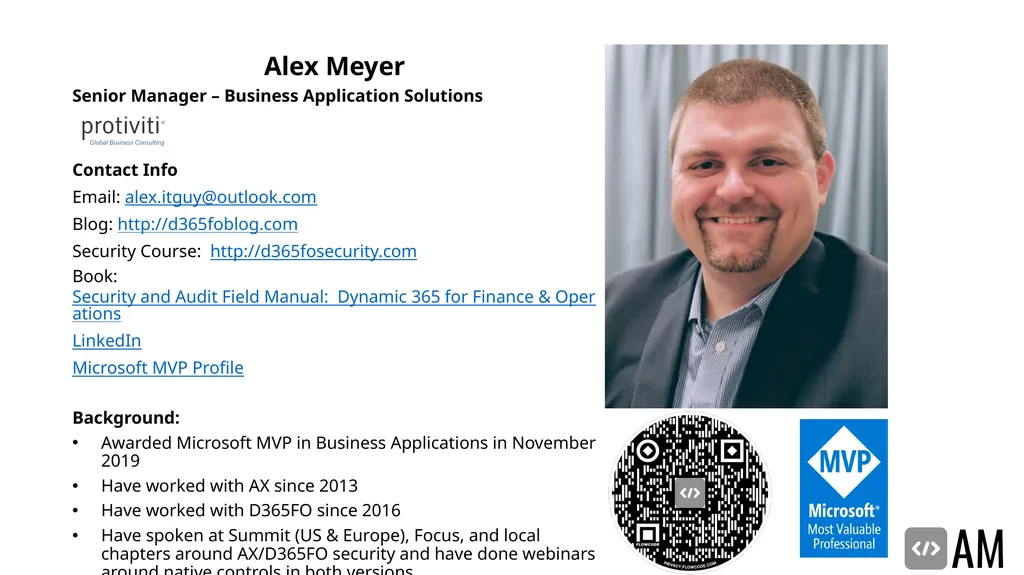
slide2. Alex Meyer Alex Meyer
Senior Manager – Business Application Solutions
Contact Info:
Email: alex.itguy@outlook.com
Blog: http://d365foblog.com
Security Course: http://d365fosecurity.com
Book: Security and Audit Field Manual: Dynamic 365 for Finance & Operations
LinkedIn
Microsoft MVP Profile
Background:
Awarded Microsoft MVP in Business Applications in November 2019
Have worked with AX since 2013
Have worked with D365FO since 2016
Have spoken at Summit (US & Europe), Focus, and local chapters around AX/D365FO security and have done webinars around native controls in both versions<br>
slide3. Agenda Role Based Security
Security Layers
Securable Objects
Security Layer Hierarchy
Security Setup in UI & AOT
User Role Assignment & Setup
User Licensing<br>
slide4. Security model overview<br>
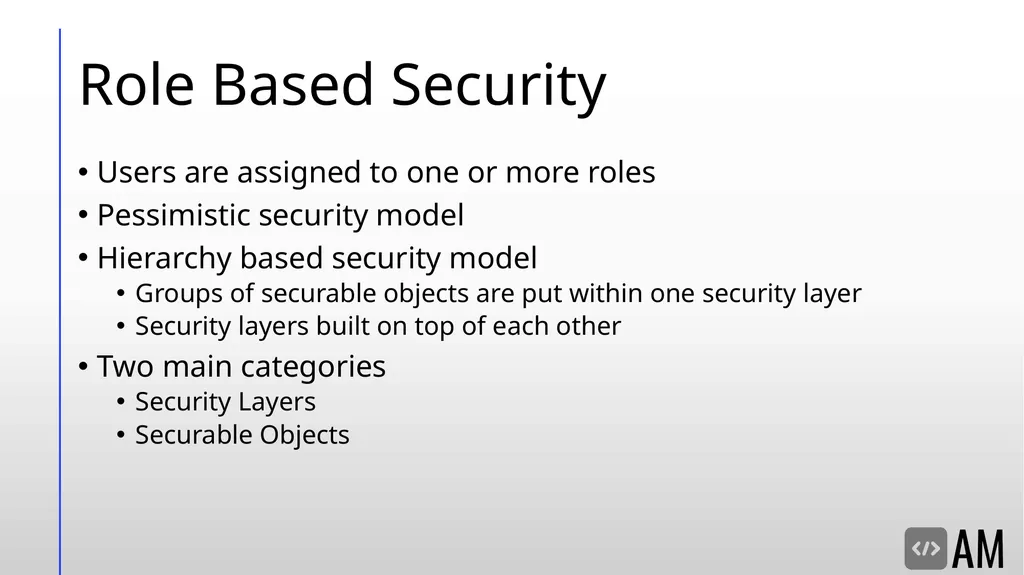
slide5. Role Based Security Users are assigned to one or more roles
Pessimistic security model
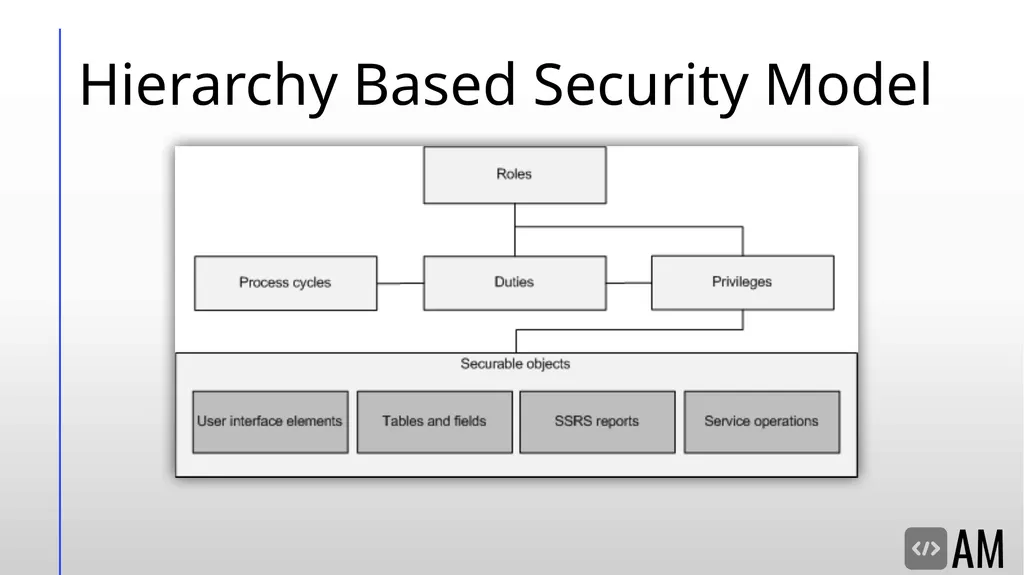
Hierarchy based security model
Groups of securable objects are put within one security layer
Security layers built on top of each other
Two main categories
Security Layers
Securable Objects<br>
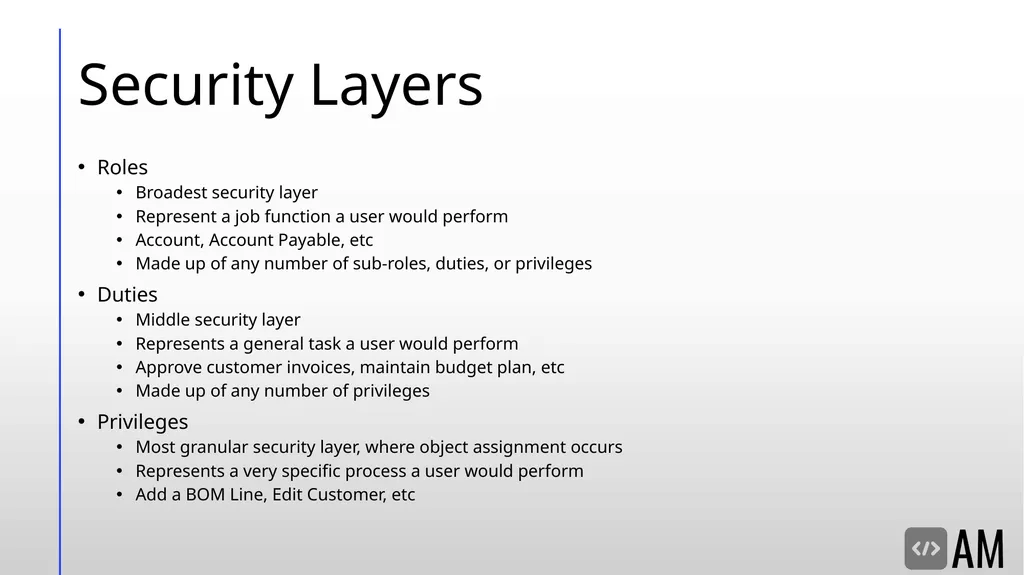
slide6. Security Layers Roles
Broadest security layer
Represent a job function a user would perform
Account, Account Payable, etc
Made up of any number of sub-roles, duties, or privileges
Duties
Middle security layer
Represents a general task a user would perform
Approve customer invoices, maintain budget plan, etc
Made up of any number of privileges
Privileges
Most granular security layer, where object assignment occurs
Represents a very specific process a user would perform
Add a BOM Line, Edit Customer, etc<br>
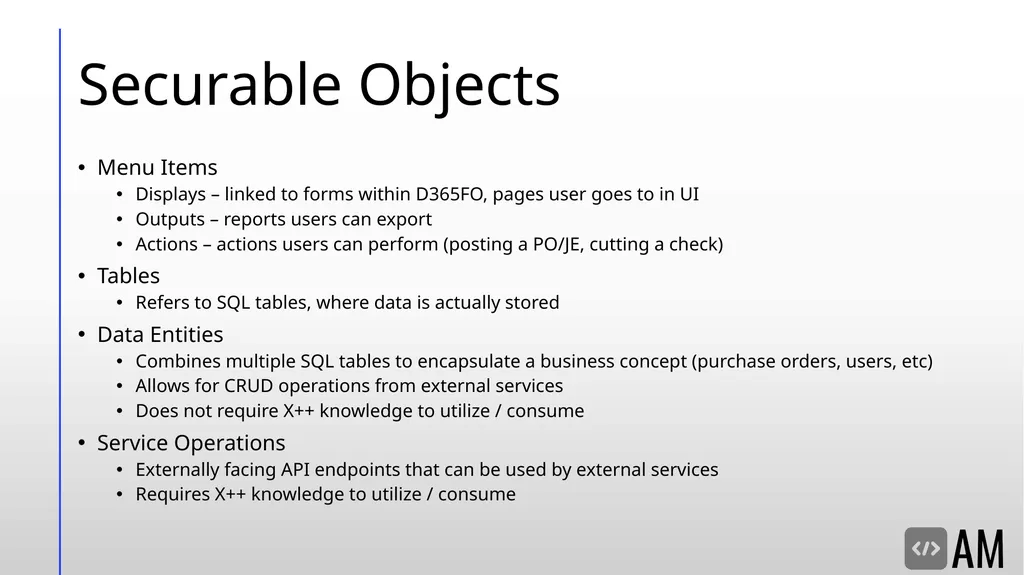
slide7. Securable Objects Menu Items
Displays – linked to forms within D365FO, pages user goes to in UI
Outputs – reports users can export
Actions – actions users can perform (posting a PO/JE, cutting a check)
Tables
Refers to SQL tables, where data is actually stored
Data Entities
Combines multiple SQL tables to encapsulate a business concept (purchase orders, users, etc)
Allows for CRUD operations from external services
Does not require X++ knowledge to utilize / consume
Service Operations
Externally facing API endpoints that can be used by external services
Requires X++ knowledge to utilize / consume<br>
slide8. Hierarchy Based Security Model<br>
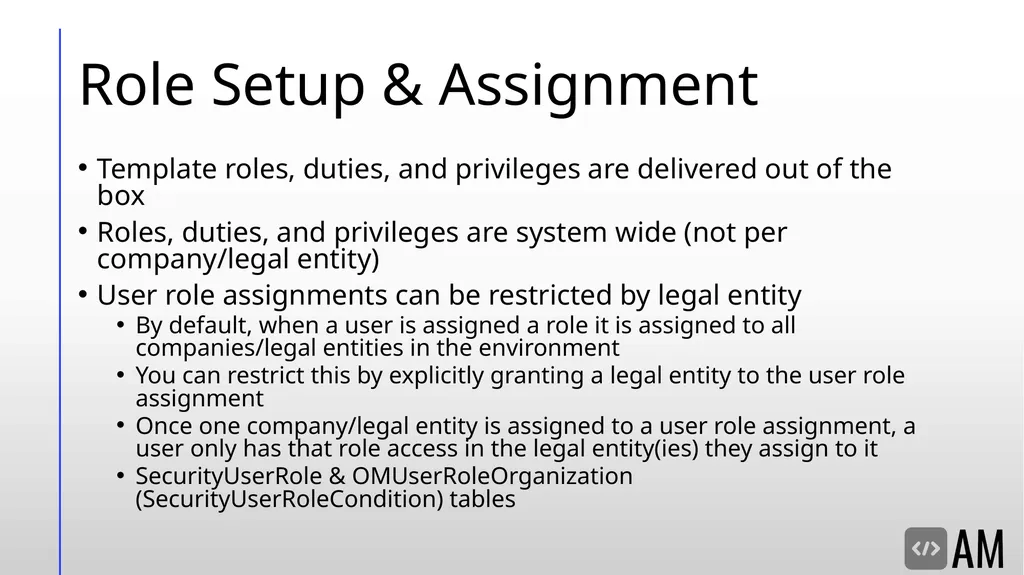
slide9. Role Setup & Assignment Template roles, duties, and privileges are delivered out of the box
Roles, duties, and privileges are system wide (not per company/legal entity)
User role assignments can be restricted by legal entity
By default, when a user is assigned a role it is assigned to all companies/legal entities in the environment
You can restrict this by explicitly granting a legal entity to the user role assignment
Once one company/legal entity is assigned to a user role assignment, a user only has that role access in the legal entity(ies) they assign to it
SecurityUserRole & OMUserRoleOrganization (SecurityUserRoleCondition) tables<br>
slide10. Setting Up Security from User Interface<br>
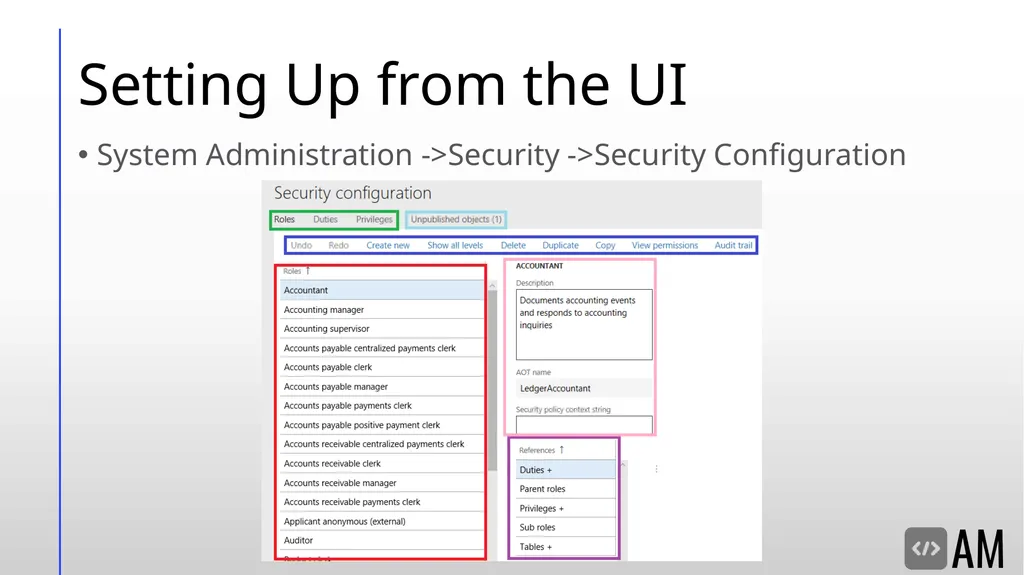
slide11. Setting Up from the UI System Administration ->Security ->Security Configuration<br>
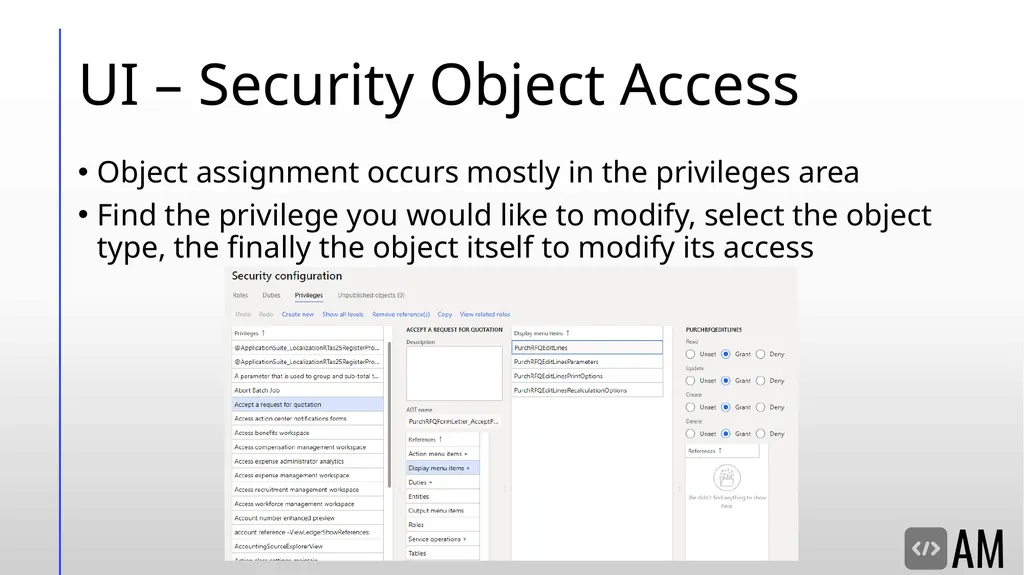
slide12. UI – Security Object Access Object assignment occurs mostly in the privileges area
Find the privilege you would like to modify, select the object type, the finally the object itself to modify its access<br>
slide13. UI – What’s the Deal with ‘Unpublished Objects’? When making a security change, is not immediately active
Goes to an ‘Unpublished Objects’ area for review before publishing<br>
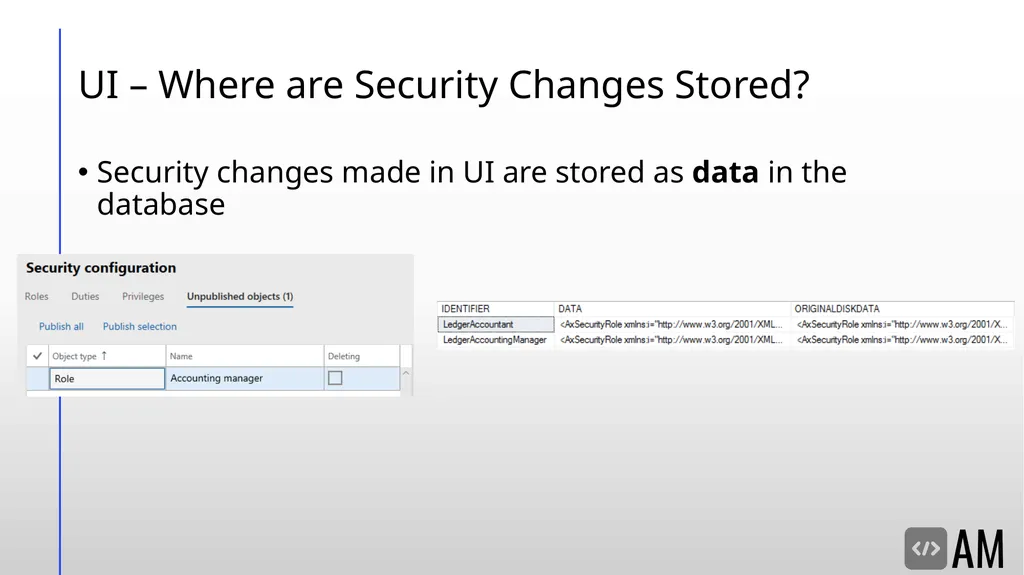
slide14. UI – Where are Security Changes Stored? Security changes made in UI are stored as data in the database<br>
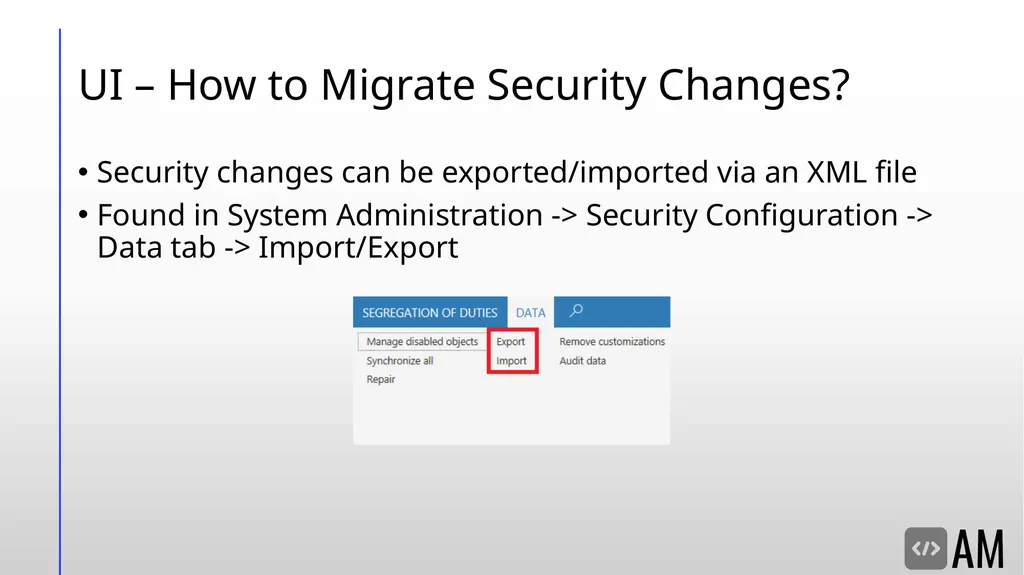
slide15. UI – How to Migrate Security Changes? Security changes can be exported/imported via an XML file
Found in System Administration -> Security Configuration -> Data tab -> Import/Export<br>
slide16. Setting Up Security from AOT<br>
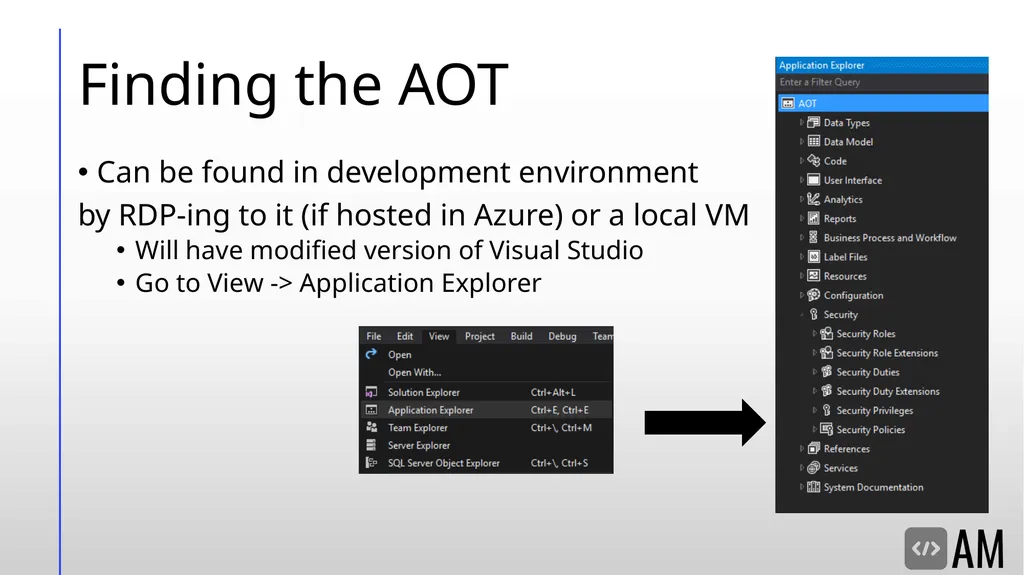
slide17. Finding the AOT Can be found in development environment
by RDP-ing to it (if hosted in Azure) or a local VM
Will have modified version of Visual Studio
Go to View -> Application Explorer<br>
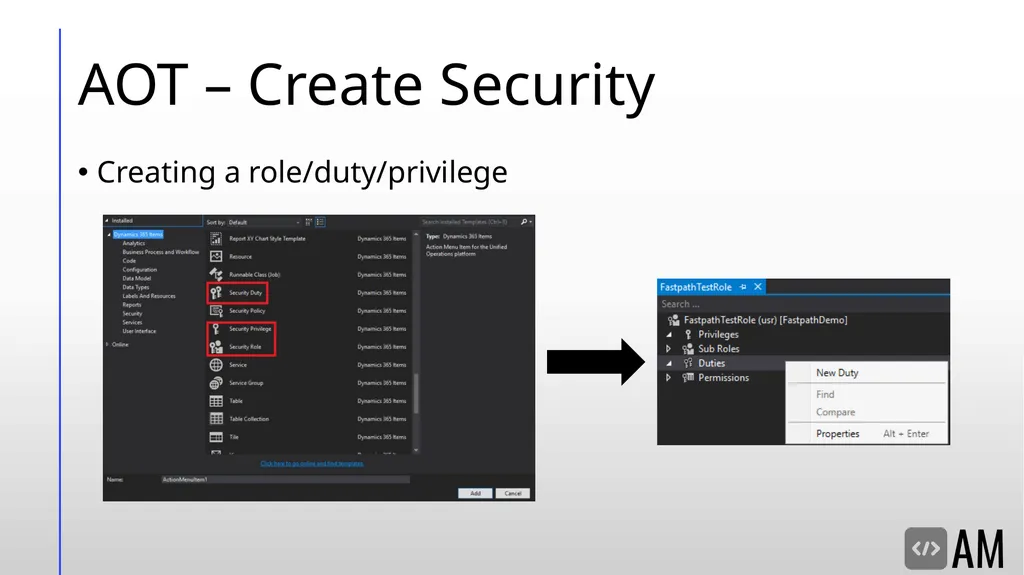
slide18. AOT – Create Security Creating a role/duty/privilege<br>
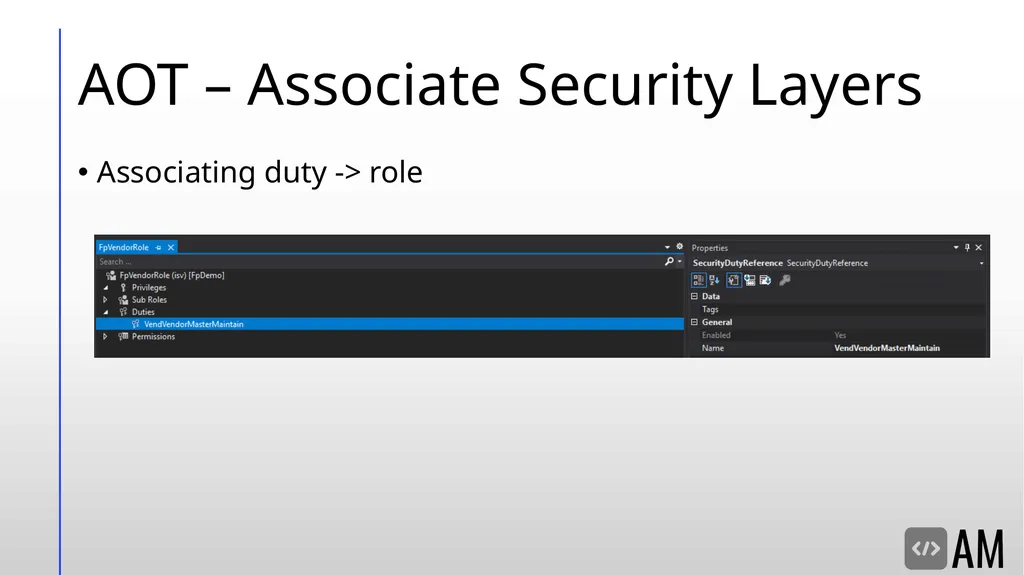
slide19. AOT – Associate Security Layers Associating duty -> role<br>
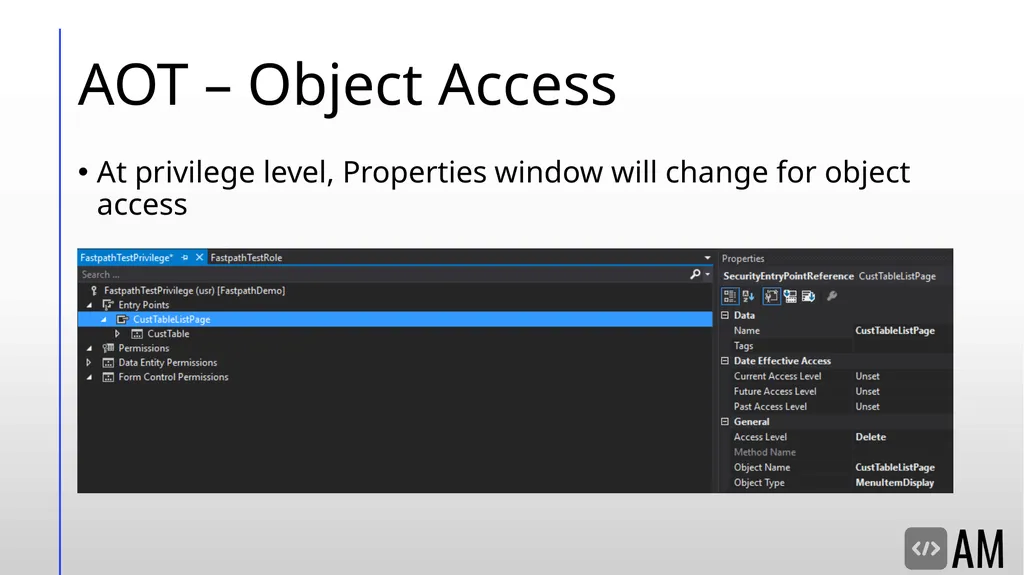
slide20. AOT – Object Access At privilege level, Properties window will change for object access<br>
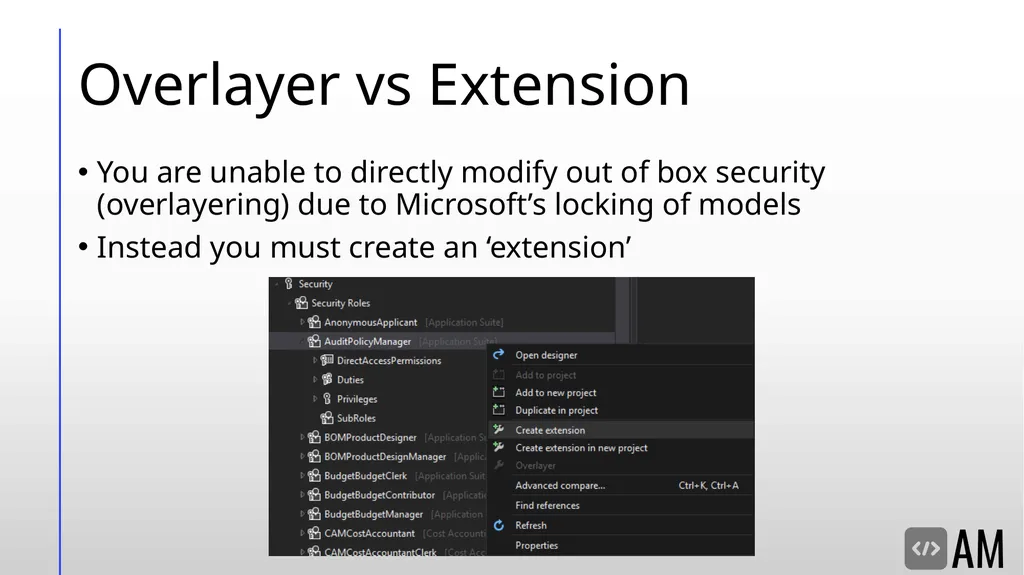
slide21. Overlayer vs Extension You are unable to directly modify out of box security (overlayering) due to Microsoft’s locking of models
Instead you must create an ‘extension’<br>
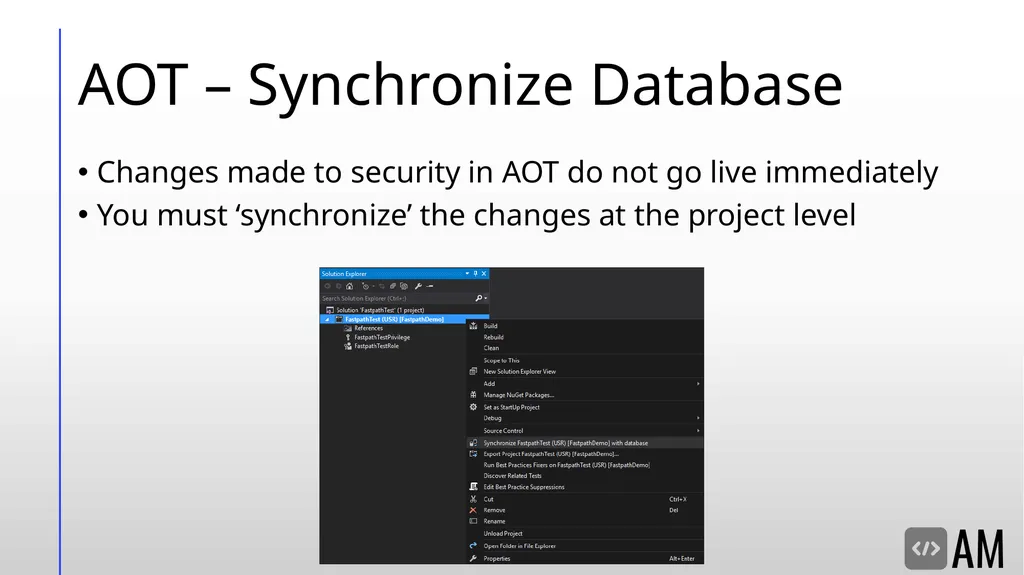
slide22. AOT – Synchronize Database Changes made to security in AOT do not go live immediately
You must ‘synchronize’ the changes at the project level<br>
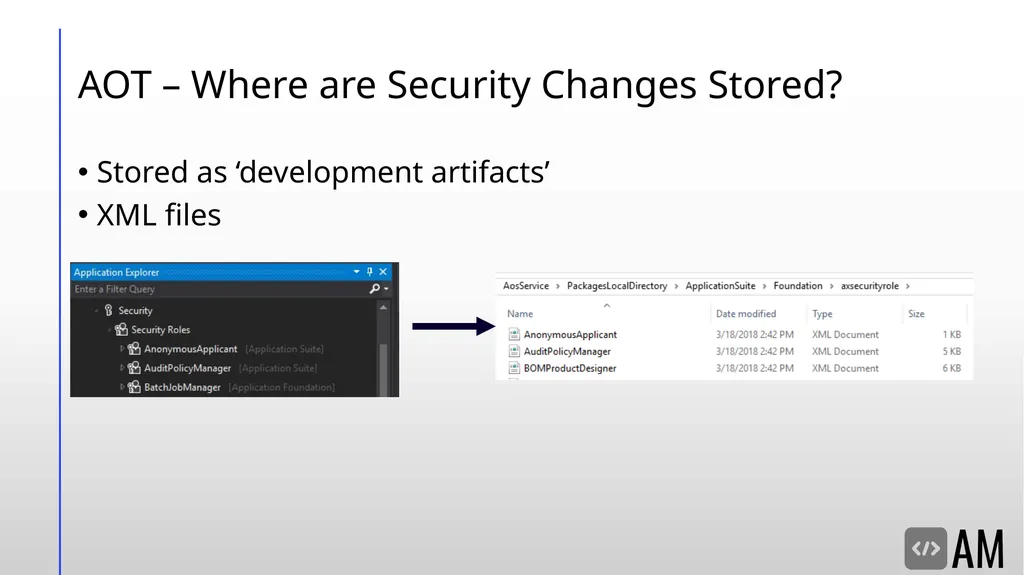
slide23. AOT – Where are Security Changes Stored? Stored as ‘development artifacts’
XML files<br>
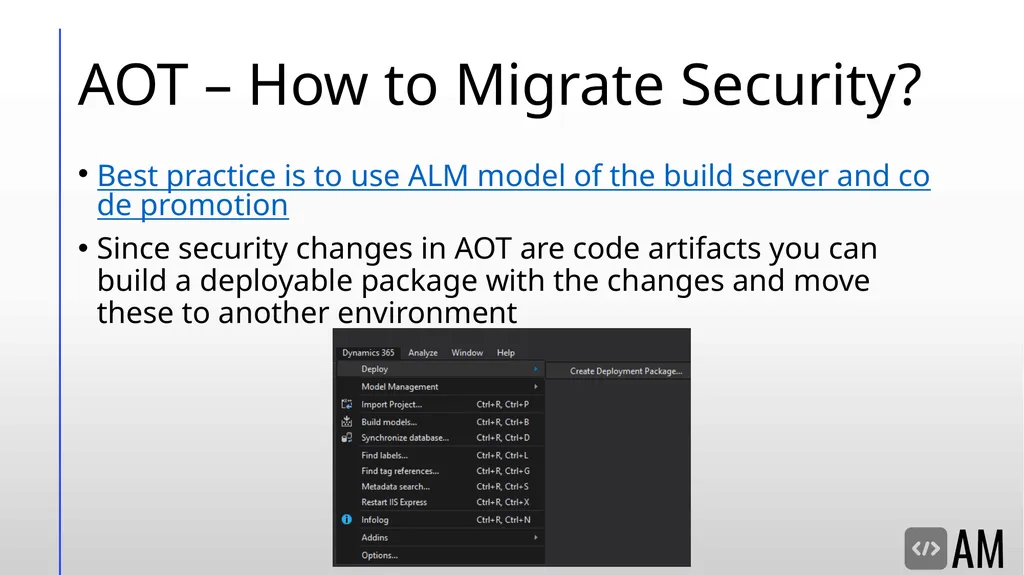
slide24. AOT – How to Migrate Security? Best practice is to use ALM model of the build server and code promotion
Since security changes in AOT are code artifacts you can build a deployable package with the changes and move these to another environment<br>
slide25. D365FO User licensing<br>
slide26. Security Licensing<br>
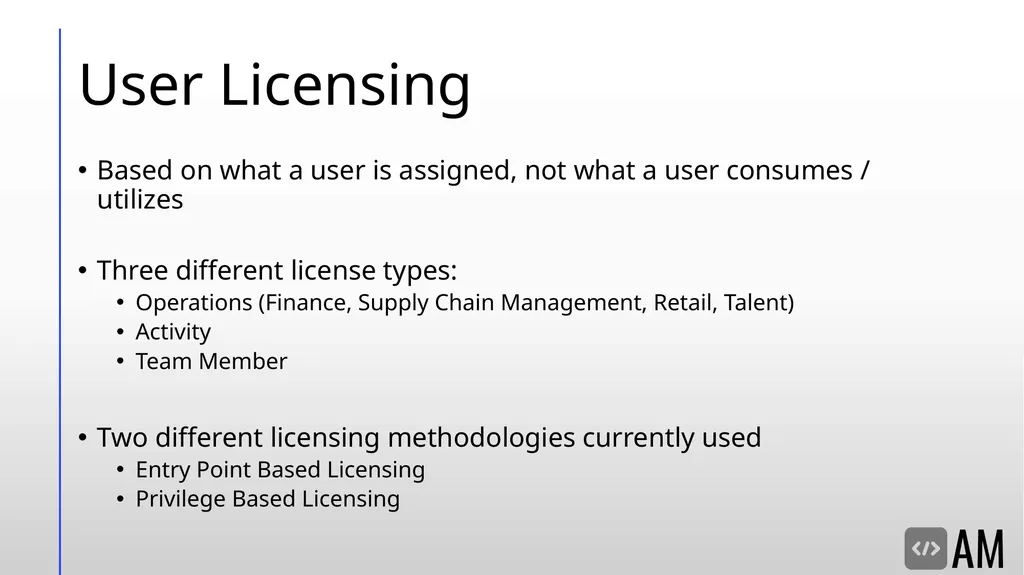
slide27. User Licensing Based on what a user is assigned, not what a user consumes / utilizes
Three different license types:
Operations (Finance, Supply Chain Management, Retail, Talent)
Activity
Team Member
Two different licensing methodologies currently used
Entry Point Based Licensing
Privilege Based Licensing<br>
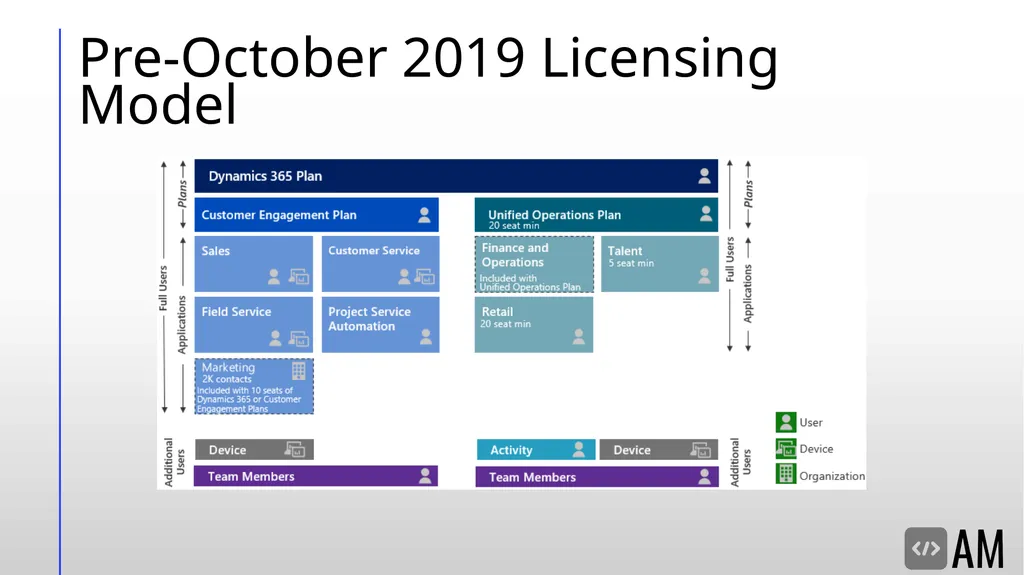
slide28. Pre-October 2019 Licensing Model<br>
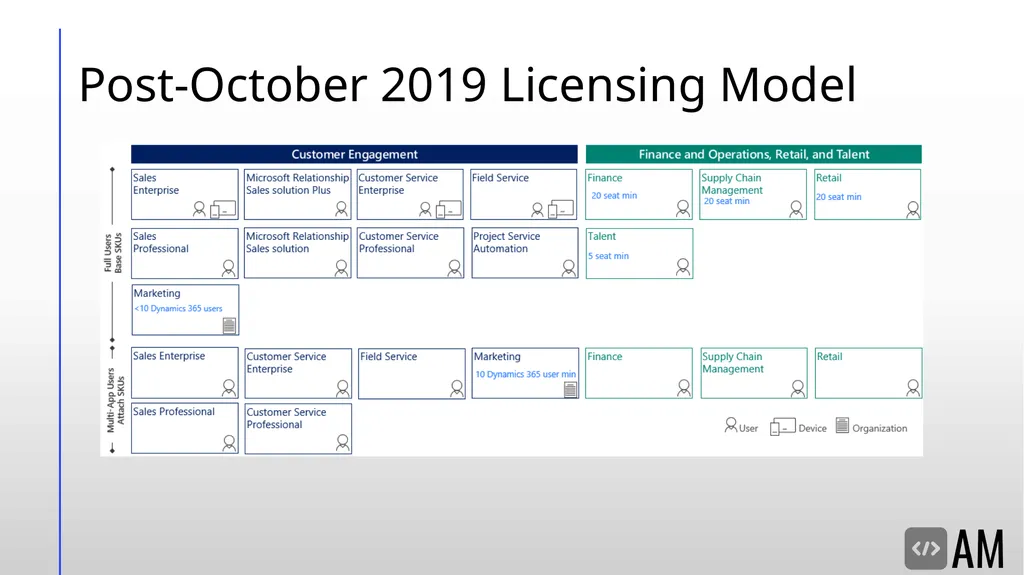
slide29. Post-October 2019 Licensing Model<br>
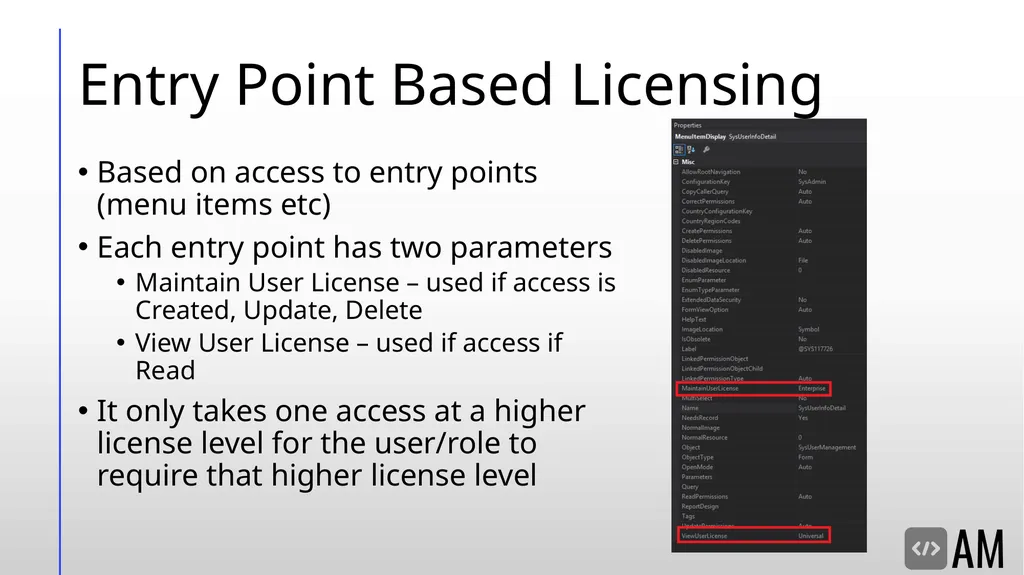
slide30. Entry Point Based Licensing Based on access to entry points (menu items etc)
Each entry point has two parameters
Maintain User License – used if access is Created, Update, Delete
View User License – used if access if Read
It only takes one access at a higher license level for the user/role to require that higher license level<br>
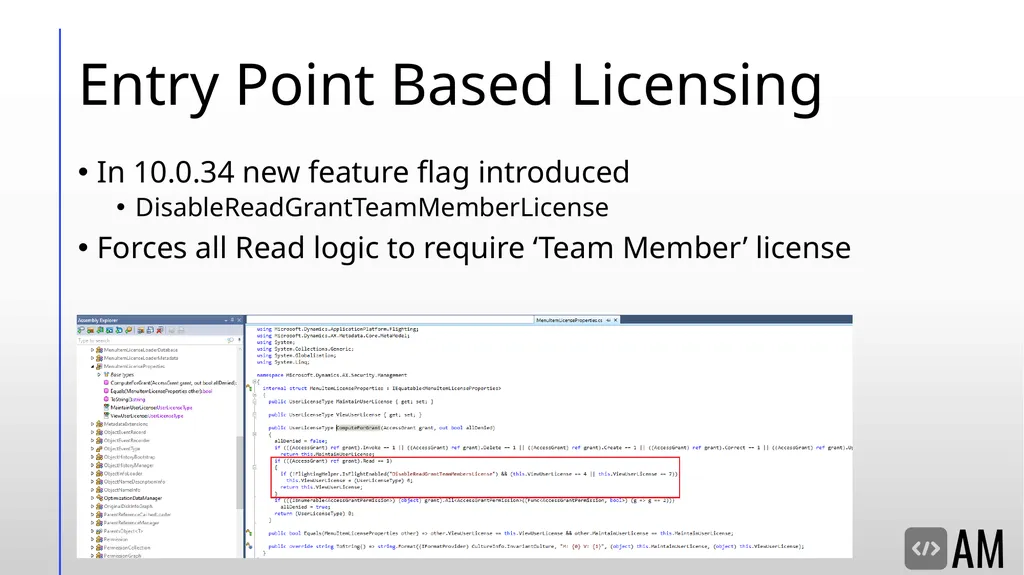
slide31. Entry Point Based Licensing In 10.0.34 new feature flag introduced
DisableReadGrantTeamMemberLicense
Forces all Read logic to require ‘Team Member’ license<br>
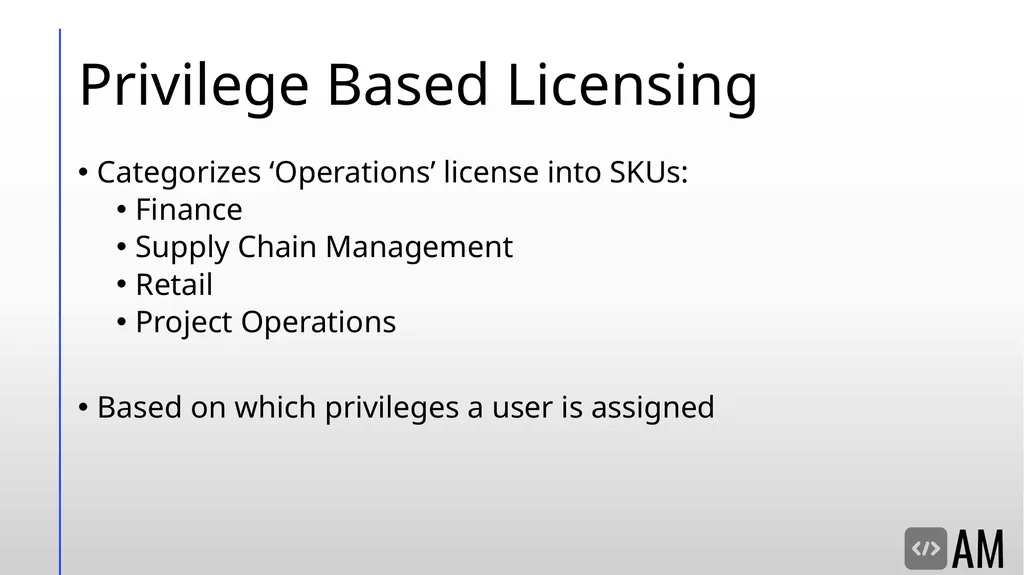
slide32. Privilege Based Licensing Categorizes ‘Operations’ license into SKUs:
Finance
Supply Chain Management
Retail
Project Operations
Based on which privileges a user is assigned<br>
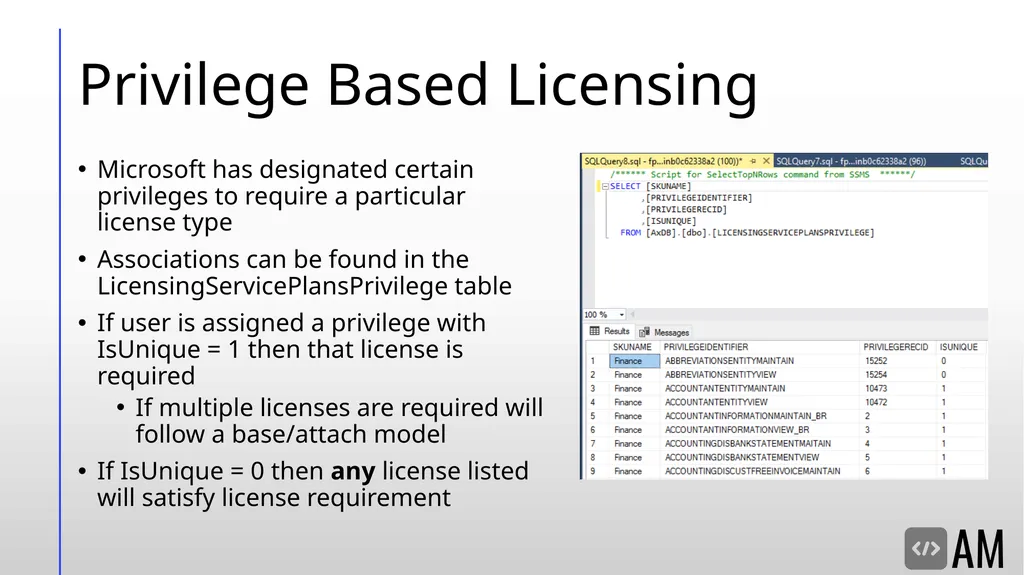
slide33. Privilege Based Licensing Microsoft has designated certain privileges to require a particular license type
Associations can be found in the LicensingServicePlansPrivilege table
If user is assigned a privilege with IsUnique = 1 then that license is required
If multiple licenses are required will follow a base/attach model
If IsUnique = 0 then any license listed will satisfy license requirement<br>
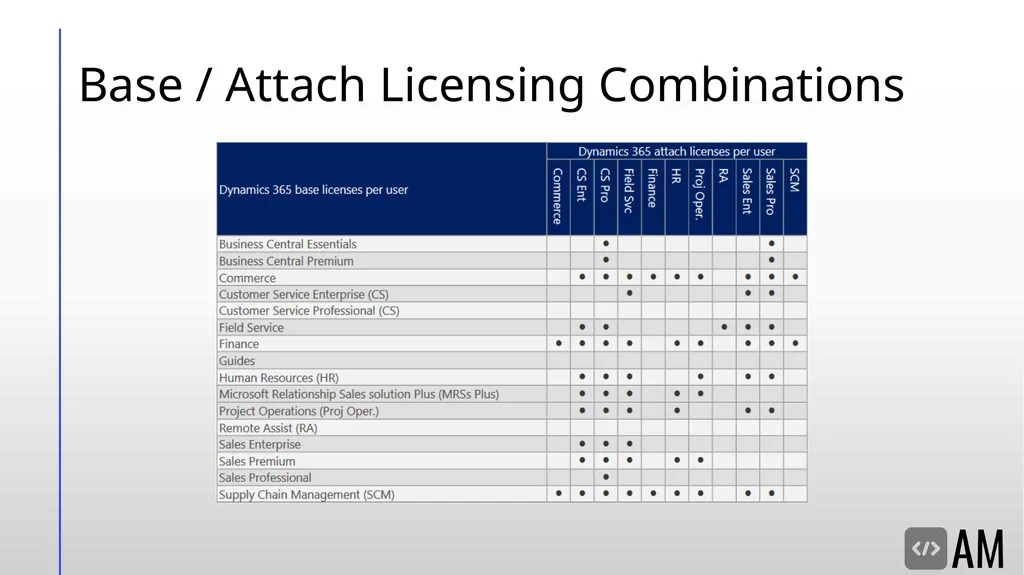
slide34. Base / Attach Licensing Combinations<br>
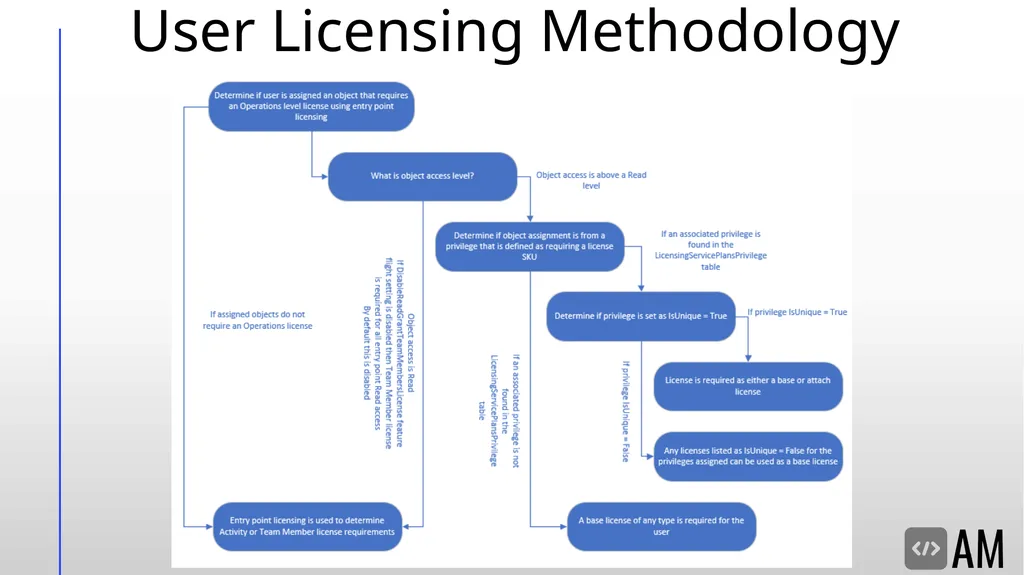
slide35. User Licensing Methodology<br>
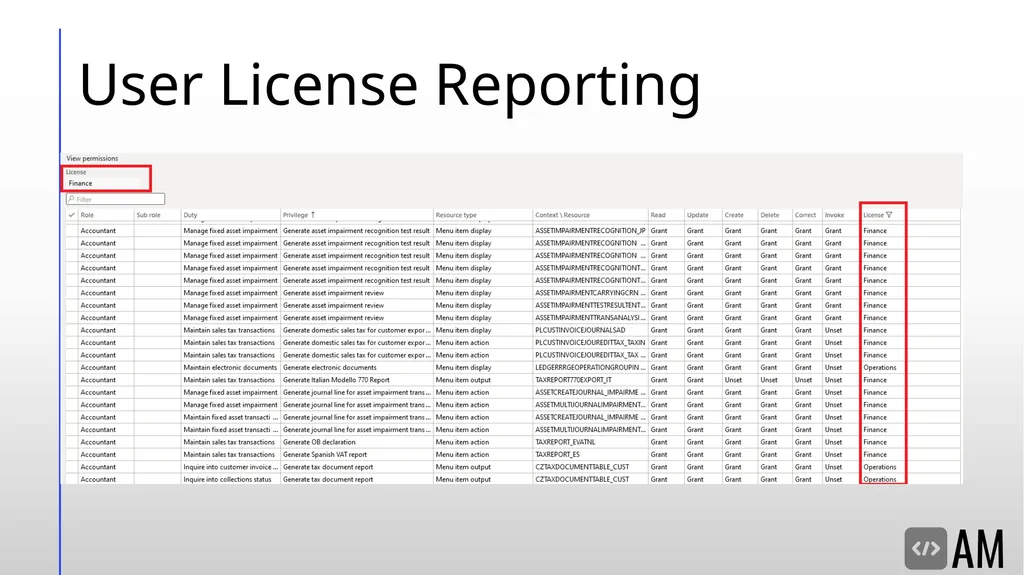
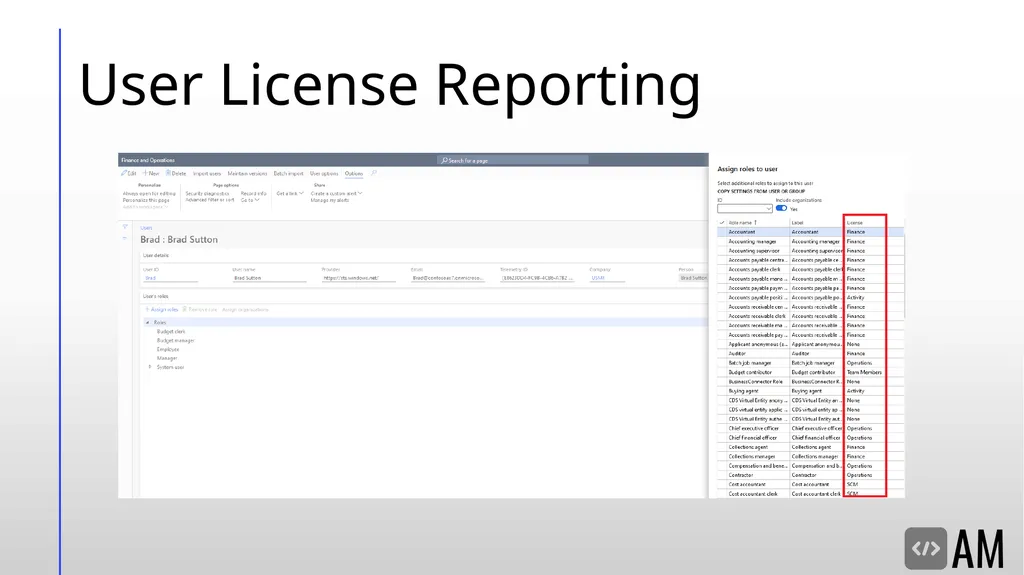
slide36. User License Reporting<br>
slide37. User License Reporting<br>
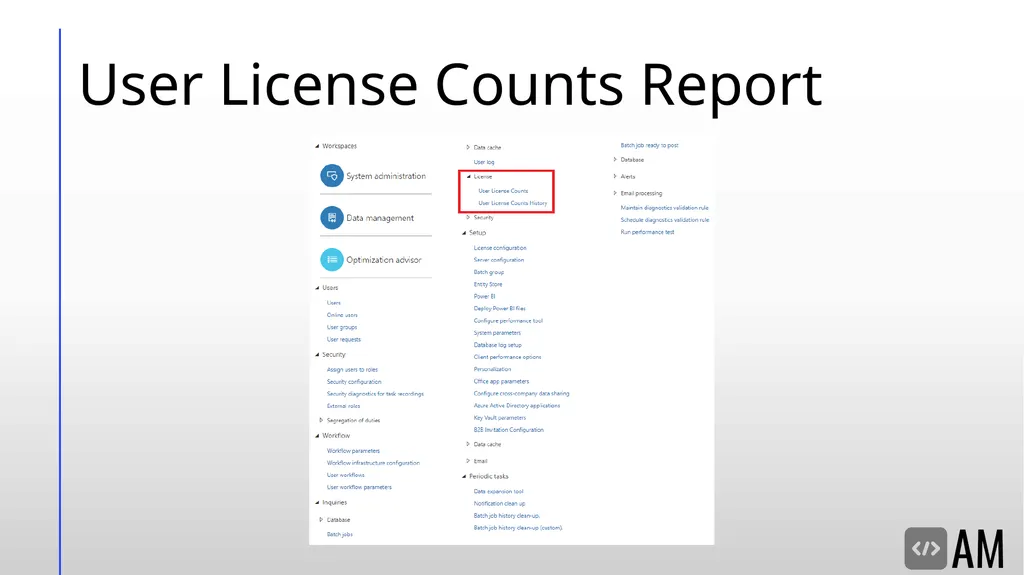
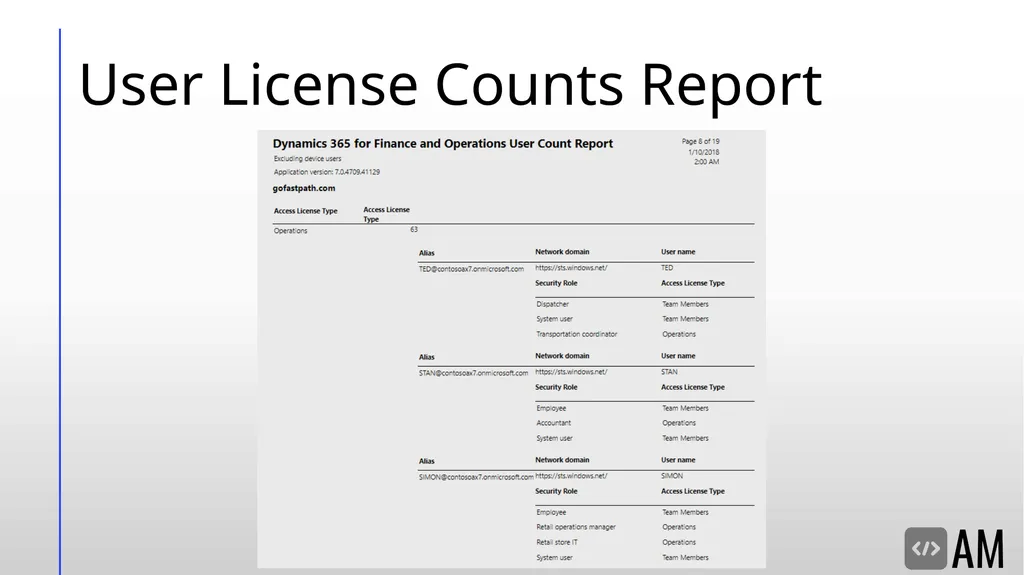
slide38. User License Counts Report<br>
slide39. User License Counts Report<br>
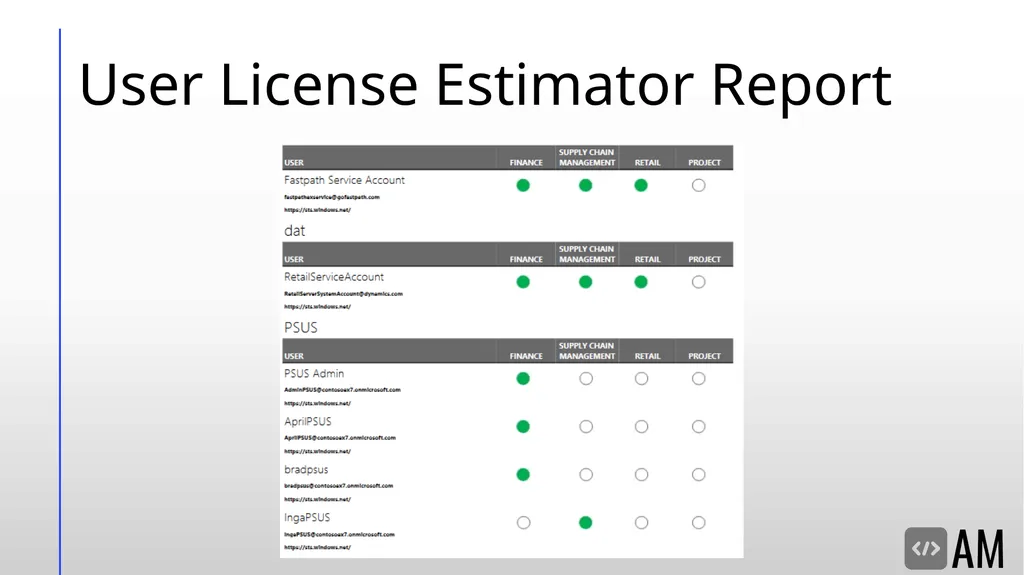
slide40. User License Estimator Report<br>
slide41. Looking for Help??? D365FO Template Roles
Microsoft Consulting Solutions
Security Risk Analysis
Security Implementations / Redesigns
User License Analysis
D365FO Implementation Help<br>
slide42. Resources D365FO Role-based Security
Introduction to Microsoft Dynamics 365 licensing
Security Roles & Licensing Whitepaper
Determining User Licenses in D365FO
Privilege License Excel File
Blog Posts:
Current State of D365FO User License December 2020
Current State of D365FO User Licensing October 2020
Current State of D365FO User Licensing August 2020
Current State of D365FO User Licensing July 2020
Current State of D365FO User Licensing May 2020
October 2019 User License Update to D365FO
Current State of User Licensing in D365FO PU31
Hidden Feature Flag Changing How User Licensing is Performed in D365FO<br>
slide43. Resources Setting Up Security in Dynamics 365 for Finance and Operations – Part I – From the User Interface
Setting Up Security in Dynamics 365 for Finance and Operations – Part II – From the AOT<br>
slide44. Resources Setting Up Security in Dynamics 365 for Finance and Operations – Part I – From the User Interface
Setting Up Security in Dynamics 365 for Finance and Operations – Part II – From the AOT<br>
slide45. Questions Contact Info:
Email: alex.itguy@outlook.com
Blog: http://d365foblog.com
Security Course: http://d365fosecurity.com
Book: Security and Audit Field Manual: Dynamic 365 for Finance & Operations
LinkedIn
Microsoft MVP Profile<br>
slide2. Alex Meyer Alex Meyer
Senior Manager – Business Application Solutions
Contact Info:
Email: alex.itguy@outlook.com
Blog: http://d365foblog.com
Security Course: http://d365fosecurity.com
Book: Security and Audit Field Manual: Dynamic 365 for Finance & Operations
Microsoft MVP Profile
Background:
Awarded Microsoft MVP in Business Applications in November 2019
Have worked with AX since 2013
Have worked with D365FO since 2016
Have spoken at Summit (US & Europe), Focus, and local chapters around AX/D365FO security and have done webinars around native controls in both versions<br>
slide3. Agenda Role Based Security
Security Layers
Securable Objects
Security Layer Hierarchy
Security Setup in UI & AOT
User Role Assignment & Setup
User Licensing<br>
slide4. Security model overview<br>
slide5. Role Based Security Users are assigned to one or more roles
Pessimistic security model
Hierarchy based security model
Groups of securable objects are put within one security layer
Security layers built on top of each other
Two main categories
Security Layers
Securable Objects<br>
slide6. Security Layers Roles
Broadest security layer
Represent a job function a user would perform
Account, Account Payable, etc
Made up of any number of sub-roles, duties, or privileges
Duties
Middle security layer
Represents a general task a user would perform
Approve customer invoices, maintain budget plan, etc
Made up of any number of privileges
Privileges
Most granular security layer, where object assignment occurs
Represents a very specific process a user would perform
Add a BOM Line, Edit Customer, etc<br>
slide7. Securable Objects Menu Items
Displays – linked to forms within D365FO, pages user goes to in UI
Outputs – reports users can export
Actions – actions users can perform (posting a PO/JE, cutting a check)
Tables
Refers to SQL tables, where data is actually stored
Data Entities
Combines multiple SQL tables to encapsulate a business concept (purchase orders, users, etc)
Allows for CRUD operations from external services
Does not require X++ knowledge to utilize / consume
Service Operations
Externally facing API endpoints that can be used by external services
Requires X++ knowledge to utilize / consume<br>
slide8. Hierarchy Based Security Model<br>
slide9. Role Setup & Assignment Template roles, duties, and privileges are delivered out of the box
Roles, duties, and privileges are system wide (not per company/legal entity)
User role assignments can be restricted by legal entity
By default, when a user is assigned a role it is assigned to all companies/legal entities in the environment
You can restrict this by explicitly granting a legal entity to the user role assignment
Once one company/legal entity is assigned to a user role assignment, a user only has that role access in the legal entity(ies) they assign to it
SecurityUserRole & OMUserRoleOrganization (SecurityUserRoleCondition) tables<br>
slide10. Setting Up Security from User Interface<br>
slide11. Setting Up from the UI System Administration ->Security ->Security Configuration<br>
slide12. UI – Security Object Access Object assignment occurs mostly in the privileges area
Find the privilege you would like to modify, select the object type, the finally the object itself to modify its access<br>
slide13. UI – What’s the Deal with ‘Unpublished Objects’? When making a security change, is not immediately active
Goes to an ‘Unpublished Objects’ area for review before publishing<br>
slide14. UI – Where are Security Changes Stored? Security changes made in UI are stored as data in the database<br>
slide15. UI – How to Migrate Security Changes? Security changes can be exported/imported via an XML file
Found in System Administration -> Security Configuration -> Data tab -> Import/Export<br>
slide16. Setting Up Security from AOT<br>
slide17. Finding the AOT Can be found in development environment
by RDP-ing to it (if hosted in Azure) or a local VM
Will have modified version of Visual Studio
Go to View -> Application Explorer<br>
slide18. AOT – Create Security Creating a role/duty/privilege<br>
slide19. AOT – Associate Security Layers Associating duty -> role<br>
slide20. AOT – Object Access At privilege level, Properties window will change for object access<br>
slide21. Overlayer vs Extension You are unable to directly modify out of box security (overlayering) due to Microsoft’s locking of models
Instead you must create an ‘extension’<br>
slide22. AOT – Synchronize Database Changes made to security in AOT do not go live immediately
You must ‘synchronize’ the changes at the project level<br>
slide23. AOT – Where are Security Changes Stored? Stored as ‘development artifacts’
XML files<br>
slide24. AOT – How to Migrate Security? Best practice is to use ALM model of the build server and code promotion
Since security changes in AOT are code artifacts you can build a deployable package with the changes and move these to another environment<br>
slide25. D365FO User licensing<br>
slide26. Security Licensing<br>
slide27. User Licensing Based on what a user is assigned, not what a user consumes / utilizes
Three different license types:
Operations (Finance, Supply Chain Management, Retail, Talent)
Activity
Team Member
Two different licensing methodologies currently used
Entry Point Based Licensing
Privilege Based Licensing<br>
slide28. Pre-October 2019 Licensing Model<br>
slide29. Post-October 2019 Licensing Model<br>
slide30. Entry Point Based Licensing Based on access to entry points (menu items etc)
Each entry point has two parameters
Maintain User License – used if access is Created, Update, Delete
View User License – used if access if Read
It only takes one access at a higher license level for the user/role to require that higher license level<br>
slide31. Entry Point Based Licensing In 10.0.34 new feature flag introduced
DisableReadGrantTeamMemberLicense
Forces all Read logic to require ‘Team Member’ license<br>
slide32. Privilege Based Licensing Categorizes ‘Operations’ license into SKUs:
Finance
Supply Chain Management
Retail
Project Operations
Based on which privileges a user is assigned<br>
slide33. Privilege Based Licensing Microsoft has designated certain privileges to require a particular license type
Associations can be found in the LicensingServicePlansPrivilege table
If user is assigned a privilege with IsUnique = 1 then that license is required
If multiple licenses are required will follow a base/attach model
If IsUnique = 0 then any license listed will satisfy license requirement<br>
slide34. Base / Attach Licensing Combinations<br>
slide35. User Licensing Methodology<br>
slide36. User License Reporting<br>
slide37. User License Reporting<br>
slide38. User License Counts Report<br>
slide39. User License Counts Report<br>
slide40. User License Estimator Report<br>
slide41. Looking for Help??? D365FO Template Roles
Microsoft Consulting Solutions
Security Risk Analysis
Security Implementations / Redesigns
User License Analysis
D365FO Implementation Help<br>
slide42. Resources D365FO Role-based Security
Introduction to Microsoft Dynamics 365 licensing
Security Roles & Licensing Whitepaper
Determining User Licenses in D365FO
Privilege License Excel File
Blog Posts:
Current State of D365FO User License December 2020
Current State of D365FO User Licensing October 2020
Current State of D365FO User Licensing August 2020
Current State of D365FO User Licensing July 2020
Current State of D365FO User Licensing May 2020
October 2019 User License Update to D365FO
Current State of User Licensing in D365FO PU31
Hidden Feature Flag Changing How User Licensing is Performed in D365FO<br>
slide43. Resources Setting Up Security in Dynamics 365 for Finance and Operations – Part I – From the User Interface
Setting Up Security in Dynamics 365 for Finance and Operations – Part II – From the AOT<br>
slide44. Resources Setting Up Security in Dynamics 365 for Finance and Operations – Part I – From the User Interface
Setting Up Security in Dynamics 365 for Finance and Operations – Part II – From the AOT<br>
slide45. Questions Contact Info:
Email: alex.itguy@outlook.com
Blog: http://d365foblog.com
Security Course: http://d365fosecurity.com
Book: Security and Audit Field Manual: Dynamic 365 for Finance & Operations
Microsoft MVP Profile<br>