Data Warehouse Student Data User Group January 13,
Description: Data Warehouse Student Data User Group January 13, 2022 Student Data User Group January 13, 2022 Remote Meetings Best Practices Turn off your video function Please go on Mute unless you are speaking Please enter your questions in the chat
Related Topics
Download Presentation
"Data Warehouse Student Data User Group January 13," is the property of its rightful owner. Permission is granted to download and print the materials on this website for personal, non-commercial use only, and to display it on your personal computer provided you do not modify the materials and that you retain all copyright notices contained in the materials. By downloading content from our website, you accept the terms of this agreement.
Presentation Transcript
slide1. Data Warehouse
Student Data User Group
January 13, 2022 Student Data User Group – January 13, 2022<br>
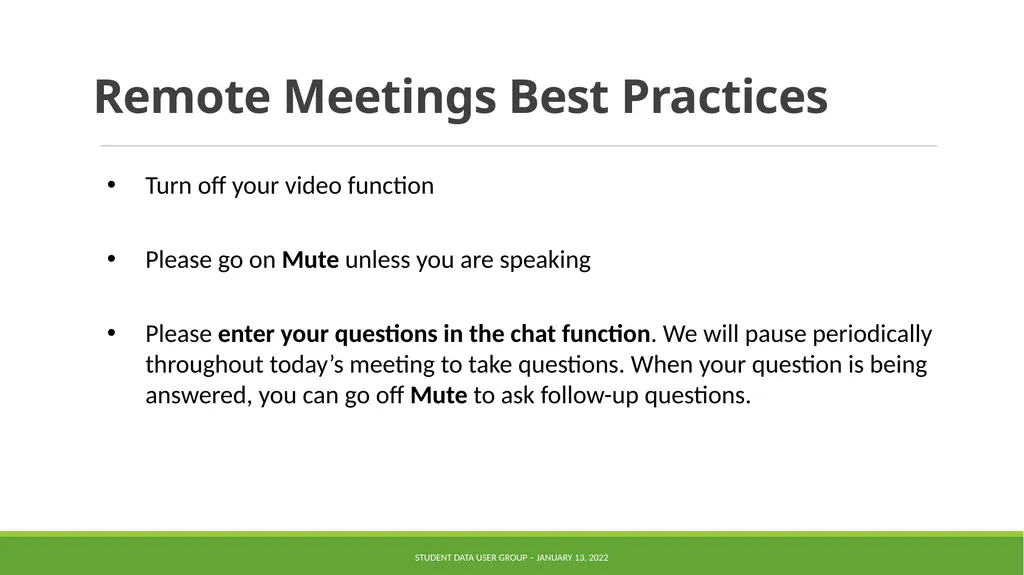
slide2. Remote Meetings Best Practices Turn off your video function
Please go on Mute unless you are speaking
Please enter your questions in the chat function. We will pause periodically throughout today’s meeting to take questions. When your question is being answered, you can go off Mute to ask follow-up questions. Student Data User Group – January 13, 2022<br>
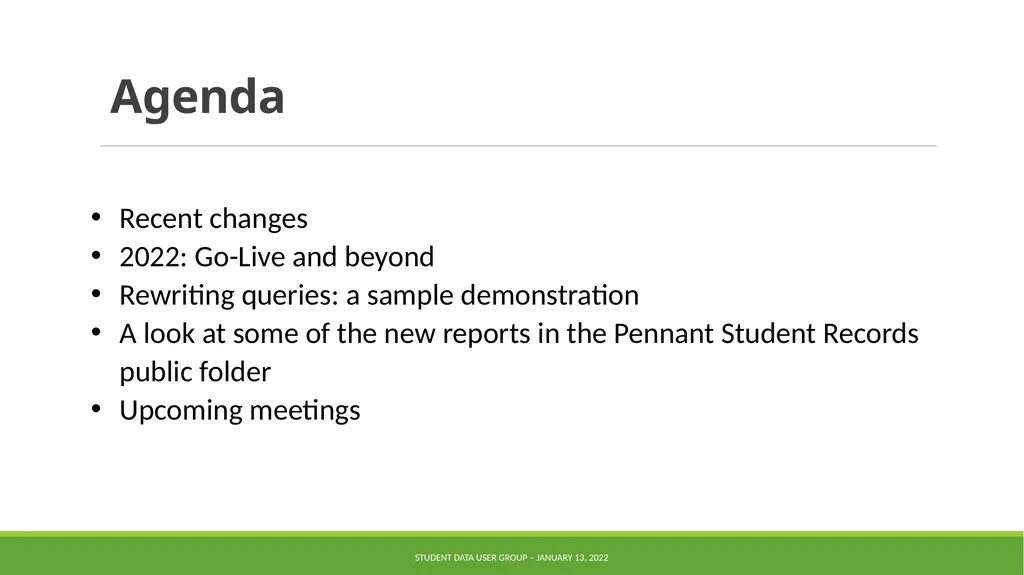
slide3. Agenda Recent changes
2022: Go-Live and beyond
Rewriting queries: a sample demonstration
A look at some of the new reports in the Pennant Student Records public folder
Upcoming meetings Student Data User Group – January 13, 2022<br>
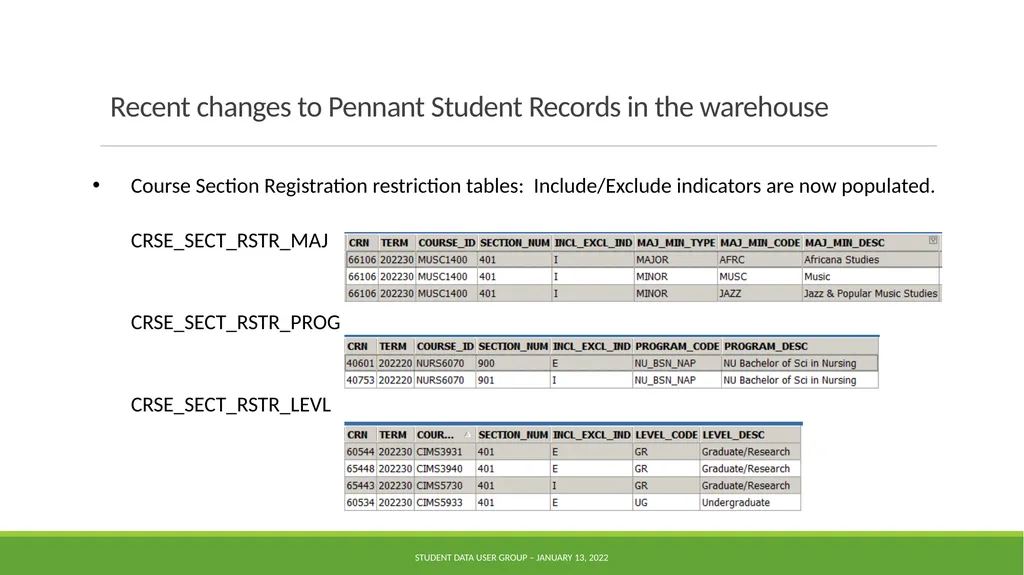
slide4. Recent changes to Pennant Student Records in the warehouse Course Section Registration restriction tables: Include/Exclude indicators are now populated.
CRSE_SECT_RSTR_MAJ
CRSE_SECT_RSTR_PROG
CRSE_SECT_RSTR_LEVL Student Data User Group – January 13, 2022<br>
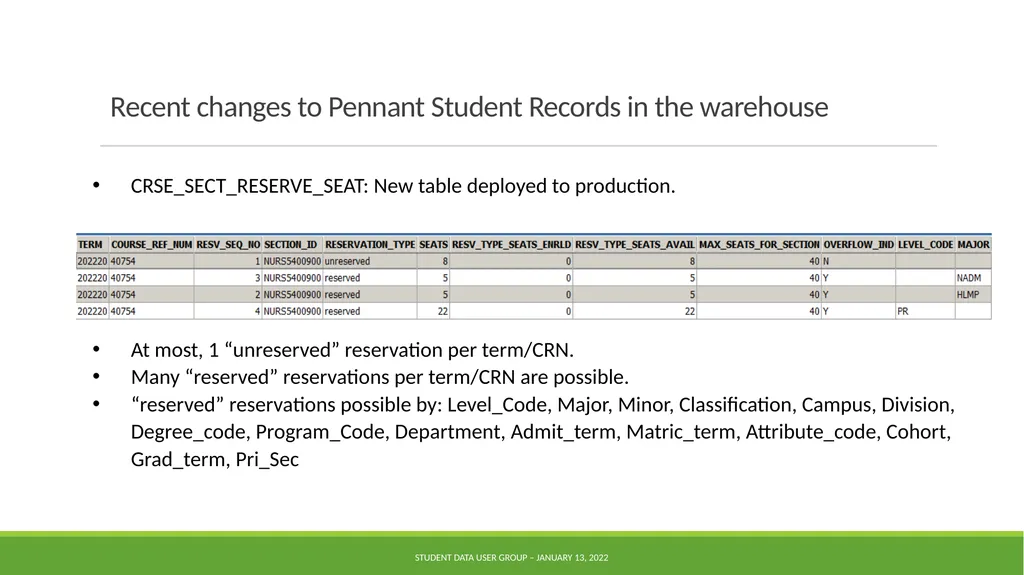
slide5. Recent changes to Pennant Student Records in the warehouse CRSE_SECT_RESERVE_SEAT: New table deployed to production.
At most, 1 “unreserved” reservation per term/CRN.
Many “reserved” reservations per term/CRN are possible.
“reserved” reservations possible by: Level_Code, Major, Minor, Classification, Campus, Division, Degree_code, Program_Code, Department, Admit_term, Matric_term, Attribute_code, Cohort, Grad_term, Pri_Sec Student Data User Group – January 13, 2022<br>
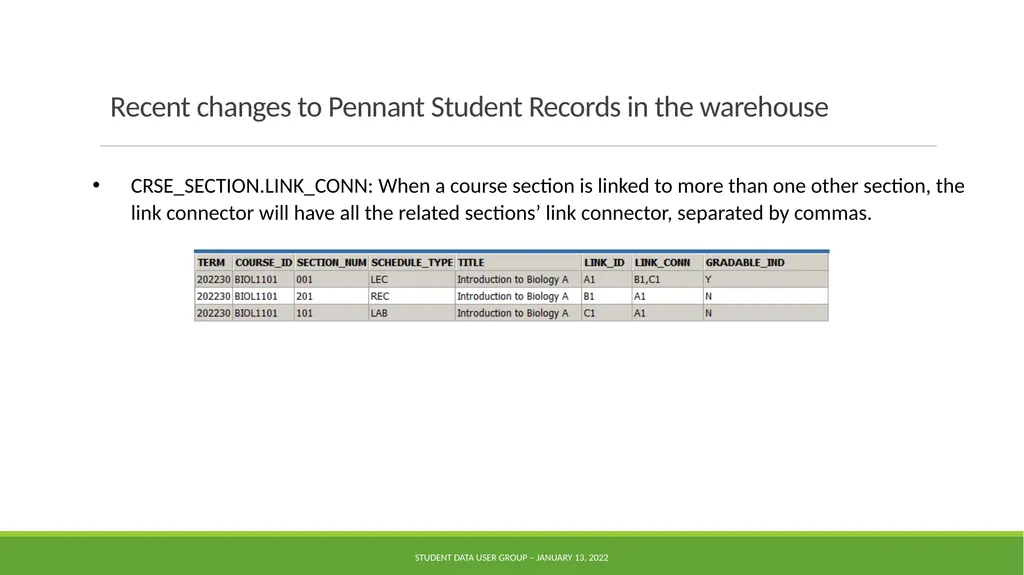
slide6. Recent changes to Pennant Student Records in the warehouse CRSE_SECTION.LINK_CONN: When a course section is linked to more than one other section, the link connector will have all the related sections’ link connector, separated by commas. Student Data User Group – January 13, 2022<br>
slide7. Recent changes to Pennant Student Records in the warehouse APPROVED_ACADEMIC_PROGRAM: name change for the STUDENT_LEVEL_CODE column, and a correction made to how we are getting the SCHOOL_CODE.
PENN_CLASSIFICATION in ST_DEGREE_TERM: corrected to show the ‘PC%’ attributes for undergraduate on the undergrad curricula only.
PENN_CLASSIFICATION was added to ST_DEGREE_PURSUAL.
ST_ENROLLMENT.GRADABLE_IND: For enrollments in terms prior to Summer 2022, this column will be null (similar to other columns in this table for terms prior to 202220). Student Data User Group – January 13, 2022<br>
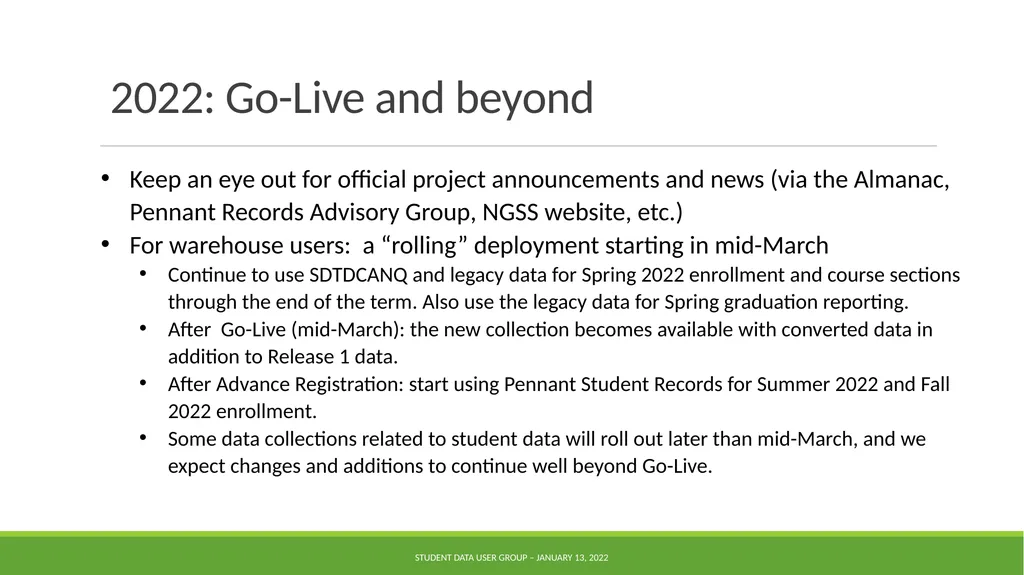
slide8. 2022: Go-Live and beyond Keep an eye out for official project announcements and news (via the Almanac, Pennant Records Advisory Group, NGSS website, etc.)
For warehouse users: a “rolling” deployment starting in mid-March
Continue to use SDTDCANQ and legacy data for Spring 2022 enrollment and course sections through the end of the term. Also use the legacy data for Spring graduation reporting.
After Go-Live (mid-March): the new collection becomes available with converted data in addition to Release 1 data.
After Advance Registration: start using Pennant Student Records for Summer 2022 and Fall 2022 enrollment.
Some data collections related to student data will roll out later than mid-March, and we expect changes and additions to continue well beyond Go-Live. Student Data User Group – January 13, 2022<br>
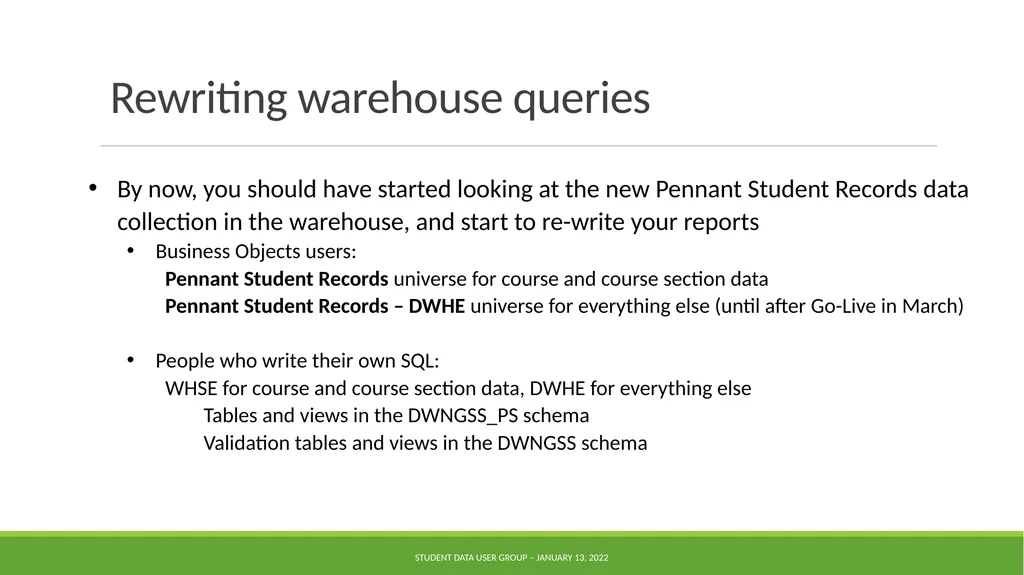
slide9. Rewriting warehouse queries By now, you should have started looking at the new Pennant Student Records data collection in the warehouse, and start to re-write your reports
Business Objects users:
Pennant Student Records universe for course and course section data
Pennant Student Records – DWHE universe for everything else (until after Go-Live in March)
People who write their own SQL:
WHSE for course and course section data, DWHE for everything else
Tables and views in the DWNGSS_PS schema
Validation tables and views in the DWNGSS schema Student Data User Group – January 13, 2022<br>
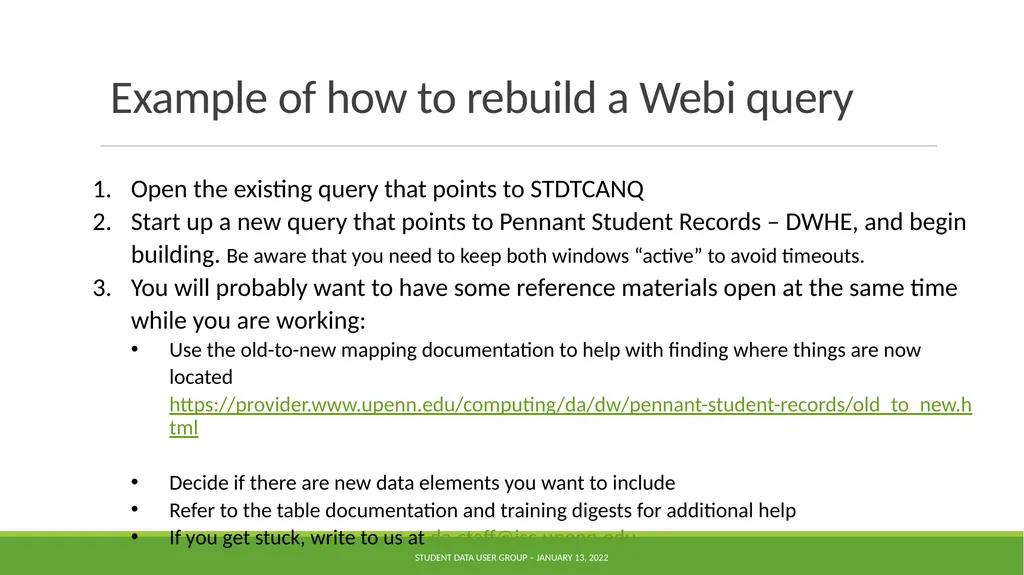
slide10. Example of how to rebuild a Webi query Open the existing query that points to STDTCANQ
Start up a new query that points to Pennant Student Records – DWHE, and begin building. Be aware that you need to keep both windows “active” to avoid timeouts.
You will probably want to have some reference materials open at the same time while you are working:
Use the old-to-new mapping documentation to help with finding where things are now located https://provider.www.upenn.edu/computing/da/dw/pennant-student-records/old_to_new.html
Decide if there are new data elements you want to include
Refer to the table documentation and training digests for additional help
If you get stuck, write to us at da-staff@isc.upenn.edu Student Data User Group – January 13, 2022<br>
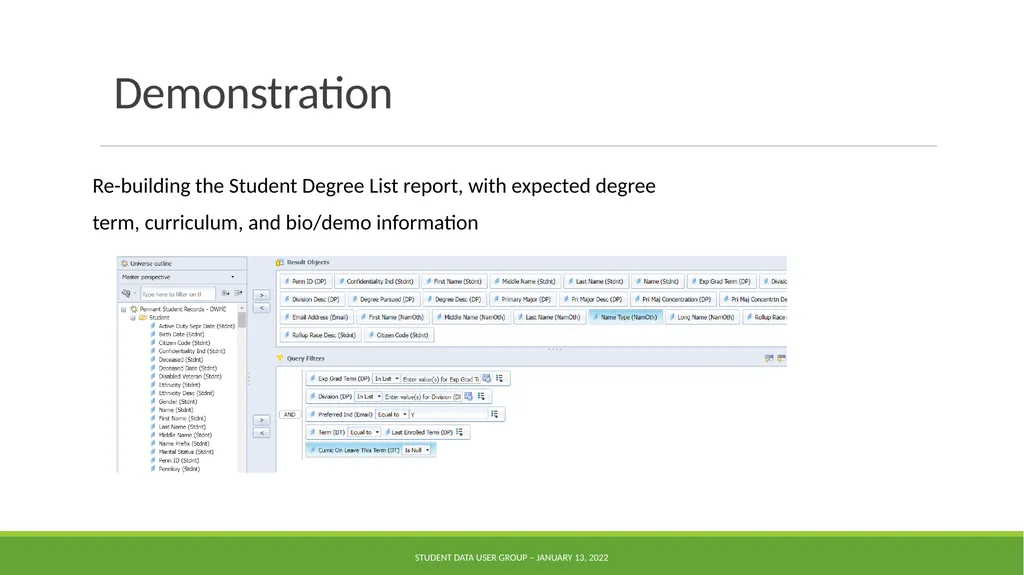
slide11. Demonstration Re-building the Student Degree List report, with expected degree term, curriculum, and bio/demo information Student Data User Group – January 13, 2022<br>
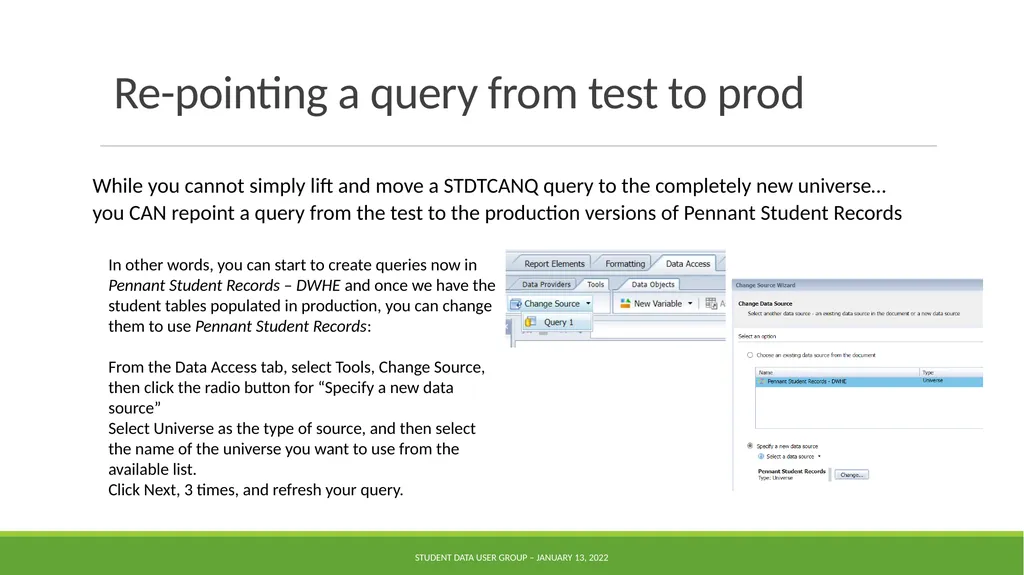
slide12. Re-pointing a query from test to prod While you cannot simply lift and move a STDTCANQ query to the completely new universe… you CAN repoint a query from the test to the production versions of Pennant Student Records Student Data User Group – January 13, 2022 In other words, you can start to create queries now in Pennant Student Records – DWHE and once we have the student tables populated in production, you can change them to use Pennant Student Records:
From the Data Access tab, select Tools, Change Source, then click the radio button for “Specify a new data source”
Select Universe as the type of source, and then select the name of the universe you want to use from the available list.
Click Next, 3 times, and refresh your query.<br>
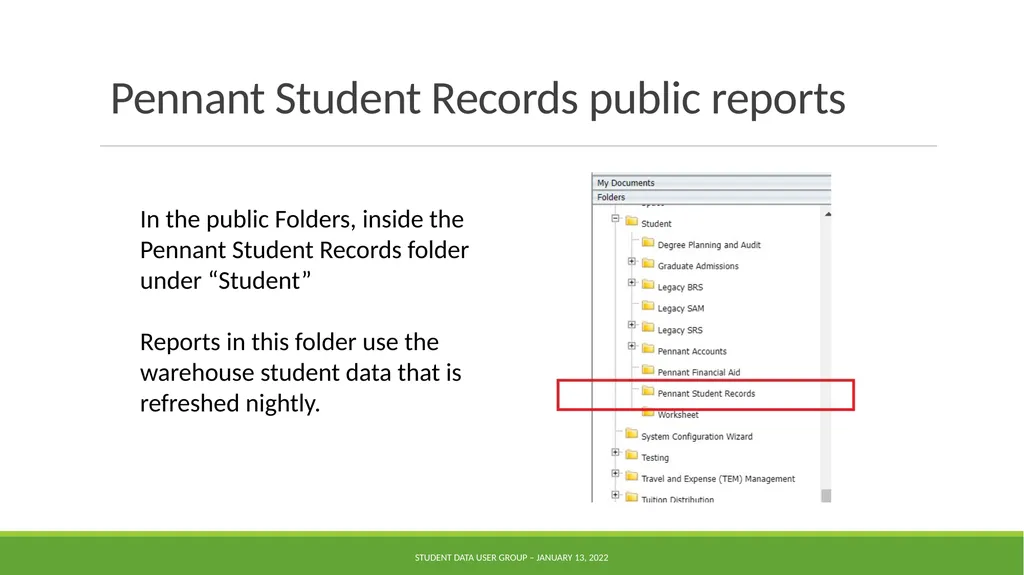
slide13. Pennant Student Records public reports Student Data User Group – January 13, 2022 In the public Folders, inside the
Pennant Student Records folder under “Student”
Reports in this folder use the warehouse student data that is refreshed nightly.<br>
slide14. Pennant Student Records public reports The library of reports in this folder will grow over time.
Please send comments and questions about the public reports to da-staff@isc.upenn.edu
For now, we are trying to keep the student-wh@lists.upenn.edu for announcements. There will be lots of announcements in the coming months!
You can still use the list to ask data questions, particularly if it is a question that might be of interest to a wider audience. This is a moderated list, so you will receive an automated reply. Once it is approved, you’ll see your message come through in an email to the whole list.
We try to keep the “noise” on this list to a minimum, so we may re-direct your question if appropriate. Student Data User Group – January 13, 2022<br>
slide15. Upcoming meetings February 10th, 11:30 am – 12:30 pm
March SDUG meeting date/time: tbd
April and beyond: meeting monthly Student Data User Group – January 13, 2022<br>
slide16. Wrap-up Questions/comments
Follow-up questions/comments: da-staff@isc.upenn.edu
Discussions about student data: student-wh@lists.upenn.edu Student Data User Group – January 13, 2022<br>

Student Data User Group
January 13, 2022 Student Data User Group – January 13, 2022<br>
slide2. Remote Meetings Best Practices Turn off your video function
Please go on Mute unless you are speaking
Please enter your questions in the chat function. We will pause periodically throughout today’s meeting to take questions. When your question is being answered, you can go off Mute to ask follow-up questions. Student Data User Group – January 13, 2022<br>
slide3. Agenda Recent changes
2022: Go-Live and beyond
Rewriting queries: a sample demonstration
A look at some of the new reports in the Pennant Student Records public folder
Upcoming meetings Student Data User Group – January 13, 2022<br>
slide4. Recent changes to Pennant Student Records in the warehouse Course Section Registration restriction tables: Include/Exclude indicators are now populated.
CRSE_SECT_RSTR_MAJ
CRSE_SECT_RSTR_PROG
CRSE_SECT_RSTR_LEVL Student Data User Group – January 13, 2022<br>
slide5. Recent changes to Pennant Student Records in the warehouse CRSE_SECT_RESERVE_SEAT: New table deployed to production.
At most, 1 “unreserved” reservation per term/CRN.
Many “reserved” reservations per term/CRN are possible.
“reserved” reservations possible by: Level_Code, Major, Minor, Classification, Campus, Division, Degree_code, Program_Code, Department, Admit_term, Matric_term, Attribute_code, Cohort, Grad_term, Pri_Sec Student Data User Group – January 13, 2022<br>
slide6. Recent changes to Pennant Student Records in the warehouse CRSE_SECTION.LINK_CONN: When a course section is linked to more than one other section, the link connector will have all the related sections’ link connector, separated by commas. Student Data User Group – January 13, 2022<br>
slide7. Recent changes to Pennant Student Records in the warehouse APPROVED_ACADEMIC_PROGRAM: name change for the STUDENT_LEVEL_CODE column, and a correction made to how we are getting the SCHOOL_CODE.
PENN_CLASSIFICATION in ST_DEGREE_TERM: corrected to show the ‘PC%’ attributes for undergraduate on the undergrad curricula only.
PENN_CLASSIFICATION was added to ST_DEGREE_PURSUAL.
ST_ENROLLMENT.GRADABLE_IND: For enrollments in terms prior to Summer 2022, this column will be null (similar to other columns in this table for terms prior to 202220). Student Data User Group – January 13, 2022<br>
slide8. 2022: Go-Live and beyond Keep an eye out for official project announcements and news (via the Almanac, Pennant Records Advisory Group, NGSS website, etc.)
For warehouse users: a “rolling” deployment starting in mid-March
Continue to use SDTDCANQ and legacy data for Spring 2022 enrollment and course sections through the end of the term. Also use the legacy data for Spring graduation reporting.
After Go-Live (mid-March): the new collection becomes available with converted data in addition to Release 1 data.
After Advance Registration: start using Pennant Student Records for Summer 2022 and Fall 2022 enrollment.
Some data collections related to student data will roll out later than mid-March, and we expect changes and additions to continue well beyond Go-Live. Student Data User Group – January 13, 2022<br>
slide9. Rewriting warehouse queries By now, you should have started looking at the new Pennant Student Records data collection in the warehouse, and start to re-write your reports
Business Objects users:
Pennant Student Records universe for course and course section data
Pennant Student Records – DWHE universe for everything else (until after Go-Live in March)
People who write their own SQL:
WHSE for course and course section data, DWHE for everything else
Tables and views in the DWNGSS_PS schema
Validation tables and views in the DWNGSS schema Student Data User Group – January 13, 2022<br>
slide10. Example of how to rebuild a Webi query Open the existing query that points to STDTCANQ
Start up a new query that points to Pennant Student Records – DWHE, and begin building. Be aware that you need to keep both windows “active” to avoid timeouts.
You will probably want to have some reference materials open at the same time while you are working:
Use the old-to-new mapping documentation to help with finding where things are now located https://provider.www.upenn.edu/computing/da/dw/pennant-student-records/old_to_new.html
Decide if there are new data elements you want to include
Refer to the table documentation and training digests for additional help
If you get stuck, write to us at da-staff@isc.upenn.edu Student Data User Group – January 13, 2022<br>
slide11. Demonstration Re-building the Student Degree List report, with expected degree term, curriculum, and bio/demo information Student Data User Group – January 13, 2022<br>
slide12. Re-pointing a query from test to prod While you cannot simply lift and move a STDTCANQ query to the completely new universe… you CAN repoint a query from the test to the production versions of Pennant Student Records Student Data User Group – January 13, 2022 In other words, you can start to create queries now in Pennant Student Records – DWHE and once we have the student tables populated in production, you can change them to use Pennant Student Records:
From the Data Access tab, select Tools, Change Source, then click the radio button for “Specify a new data source”
Select Universe as the type of source, and then select the name of the universe you want to use from the available list.
Click Next, 3 times, and refresh your query.<br>
slide13. Pennant Student Records public reports Student Data User Group – January 13, 2022 In the public Folders, inside the
Pennant Student Records folder under “Student”
Reports in this folder use the warehouse student data that is refreshed nightly.<br>
slide14. Pennant Student Records public reports The library of reports in this folder will grow over time.
Please send comments and questions about the public reports to da-staff@isc.upenn.edu
For now, we are trying to keep the student-wh@lists.upenn.edu for announcements. There will be lots of announcements in the coming months!
You can still use the list to ask data questions, particularly if it is a question that might be of interest to a wider audience. This is a moderated list, so you will receive an automated reply. Once it is approved, you’ll see your message come through in an email to the whole list.
We try to keep the “noise” on this list to a minimum, so we may re-direct your question if appropriate. Student Data User Group – January 13, 2022<br>
slide15. Upcoming meetings February 10th, 11:30 am – 12:30 pm
March SDUG meeting date/time: tbd
April and beyond: meeting monthly Student Data User Group – January 13, 2022<br>
slide16. Wrap-up Questions/comments
Follow-up questions/comments: da-staff@isc.upenn.edu
Discussions about student data: student-wh@lists.upenn.edu Student Data User Group – January 13, 2022<br>