
Enterprise Applications Enterprise Systems
Description: Enterprise Applications Enterprise Systems Enterprise Systems Also called enterprise resource planning (ERP) systems Suite of integrated software modules and a common central database Collects data from many divisions of firm for use in
Related Topics
Download Presentation
"Enterprise Applications Enterprise Systems" is the property of its rightful owner. Permission is granted to download and print the materials on this website for personal, non-commercial use only, and to display it on your personal computer provided you do not modify the materials and that you retain all copyright notices contained in the materials. By downloading content from our website, you accept the terms of this agreement.
Presentation Transcript
slide1. Enterprise Applications<br>
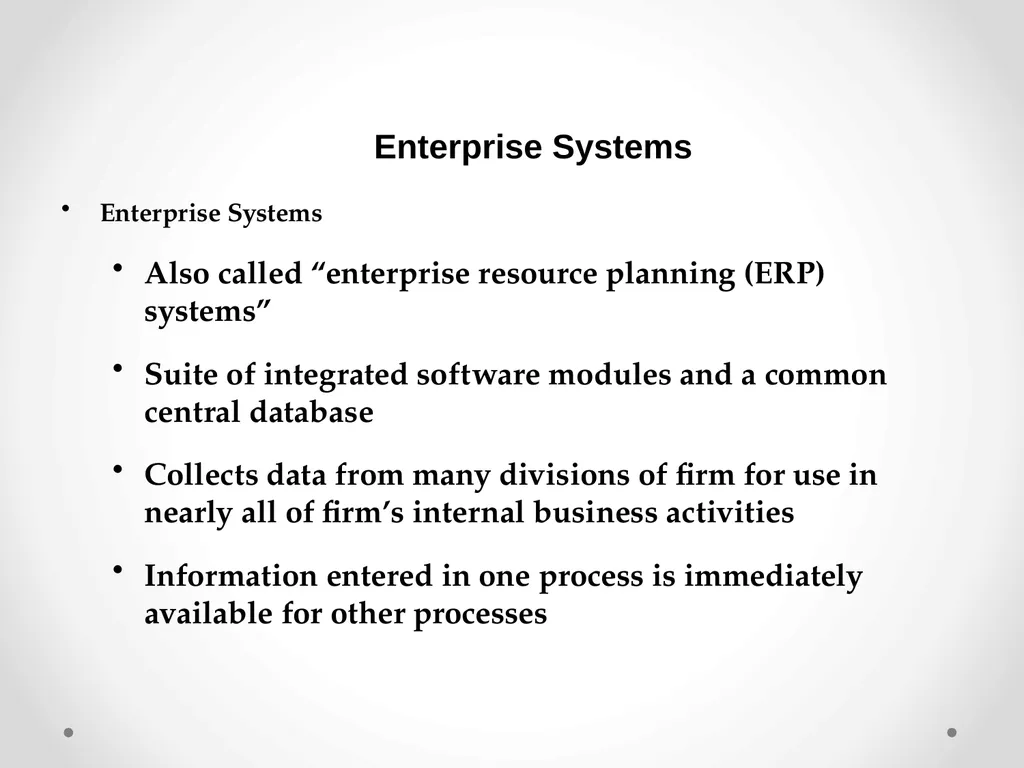
slide2. Enterprise Systems Enterprise Systems
Also called “enterprise resource planning (ERP) systems”
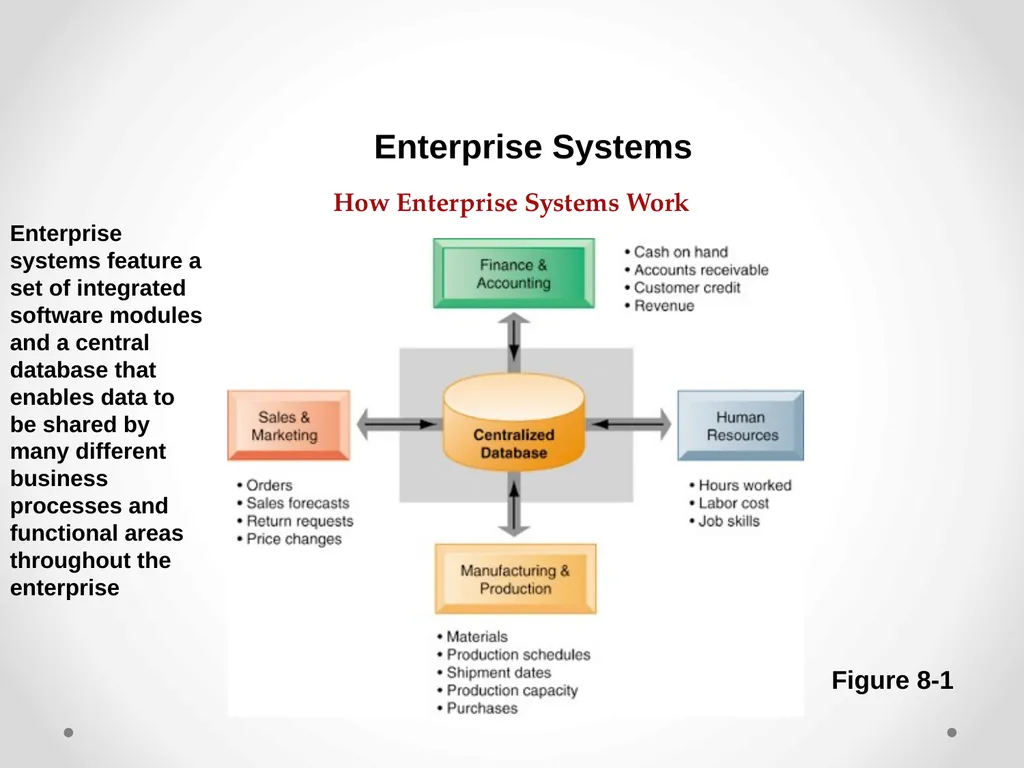
Suite of integrated software modules and a common central database
Collects data from many divisions of firm for use in nearly all of firm’s internal business activities
Information entered in one process is immediately available for other processes<br>
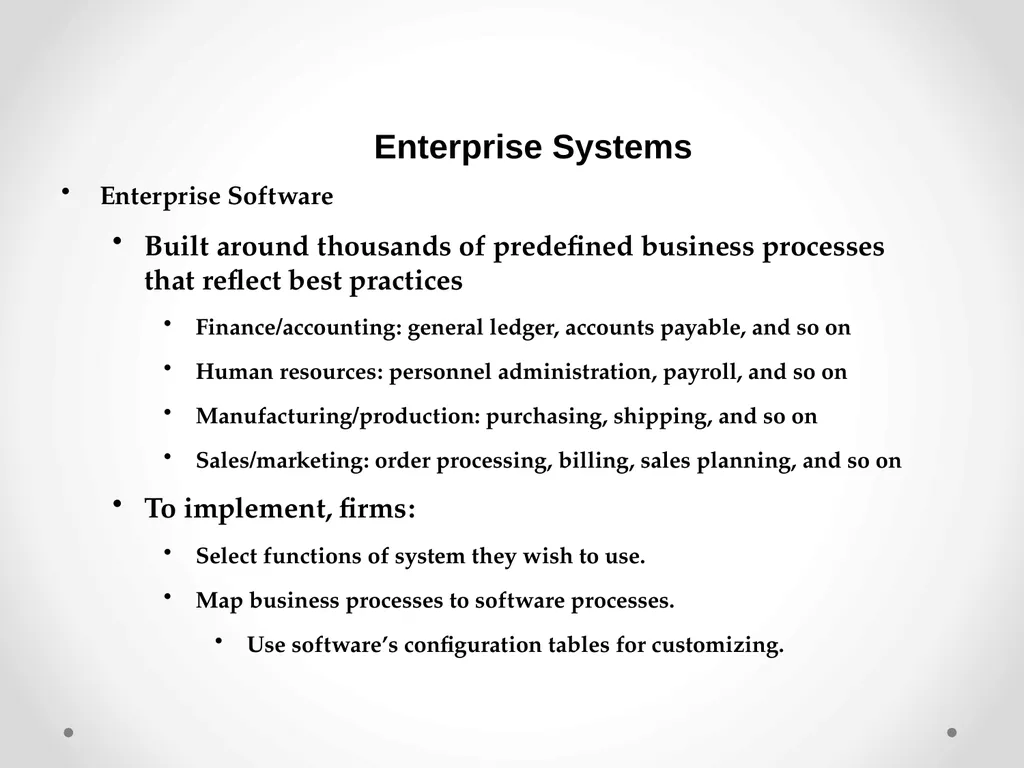
slide3. Enterprise Systems Enterprise Software
Built around thousands of predefined business processes that reflect best practices
Finance/accounting: general ledger, accounts payable, and so on
Human resources: personnel administration, payroll, and so on
Manufacturing/production: purchasing, shipping, and so on
Sales/marketing: order processing, billing, sales planning, and so on
To implement, firms:
Select functions of system they wish to use.
Map business processes to software processes.
Use software’s configuration tables for customizing.<br>
slide4. Enterprise Systems Figure 8-1 Enterprise systems feature a set of integrated software modules and a central database that enables data to be shared by many different business processes and functional areas throughout the enterprise How Enterprise Systems Work<br>
slide5. Enterprise Systems Business value of enterprise systems
Increase operational efficiency.
Provide firm wide information to support decision making.
Enable rapid responses to customer requests for information or products.
Include analytical tools to evaluate overall organizational performance.<br>
slide6. The Supply Chain Network of organizations and processes for:
Procuring raw materials
Transforming them into products
Distributing the products
Upstream supply chain:
Firm’s suppliers, suppliers’ suppliers, processes for managing relationships with them
Downstream supply chain:
Organizations and processes responsible for delivering products to customers Supply Chain Management Systems<br>
slide7. Information and Supply Chain Management Inefficiencies cut into a company’s operating costs
Can waste up to 25 percent of operating expenses
Just-in-time strategy:
Components arrive as they are needed
Finished goods shipped after leaving assembly line
Safety stock
Buffer for lack of flexibility in supply chain
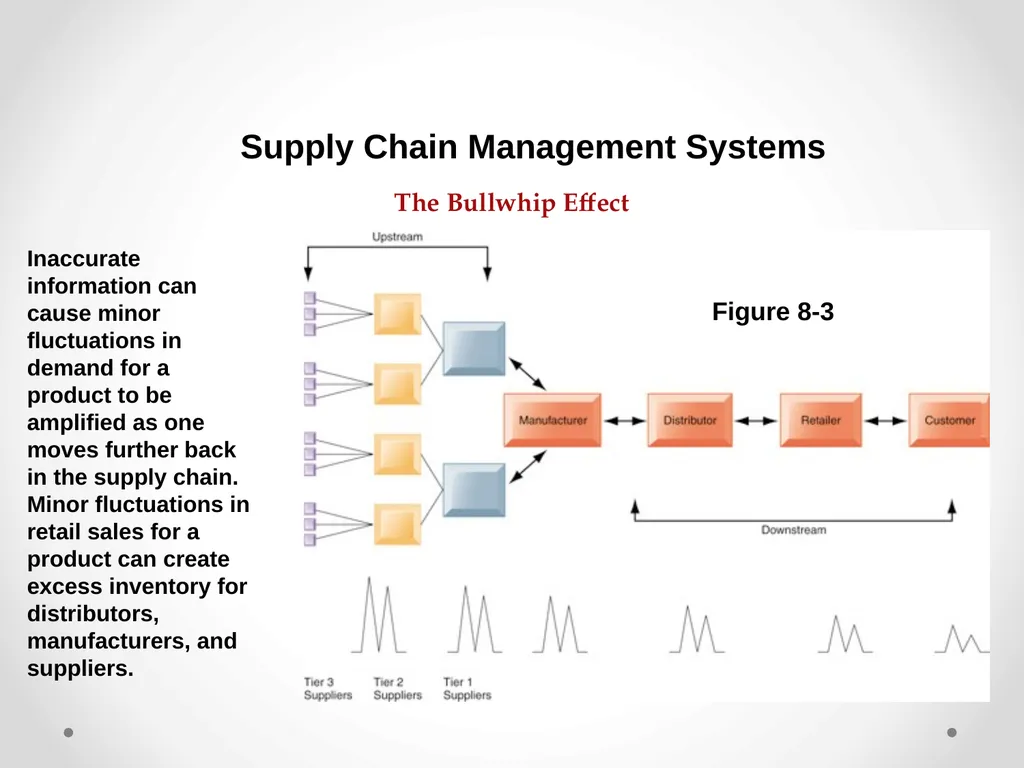
Bullwhip effect
Information about product demand gets distorted as it passes from one entity to next across supply chain Supply Chain Management Systems<br>
slide8. The Bullwhip Effect Supply Chain Management Systems Figure 8-3 Inaccurate information can cause minor fluctuations in demand for a product to be amplified as one moves further back in the supply chain. Minor fluctuations in retail sales for a product can create excess inventory for distributors, manufacturers, and suppliers.<br>
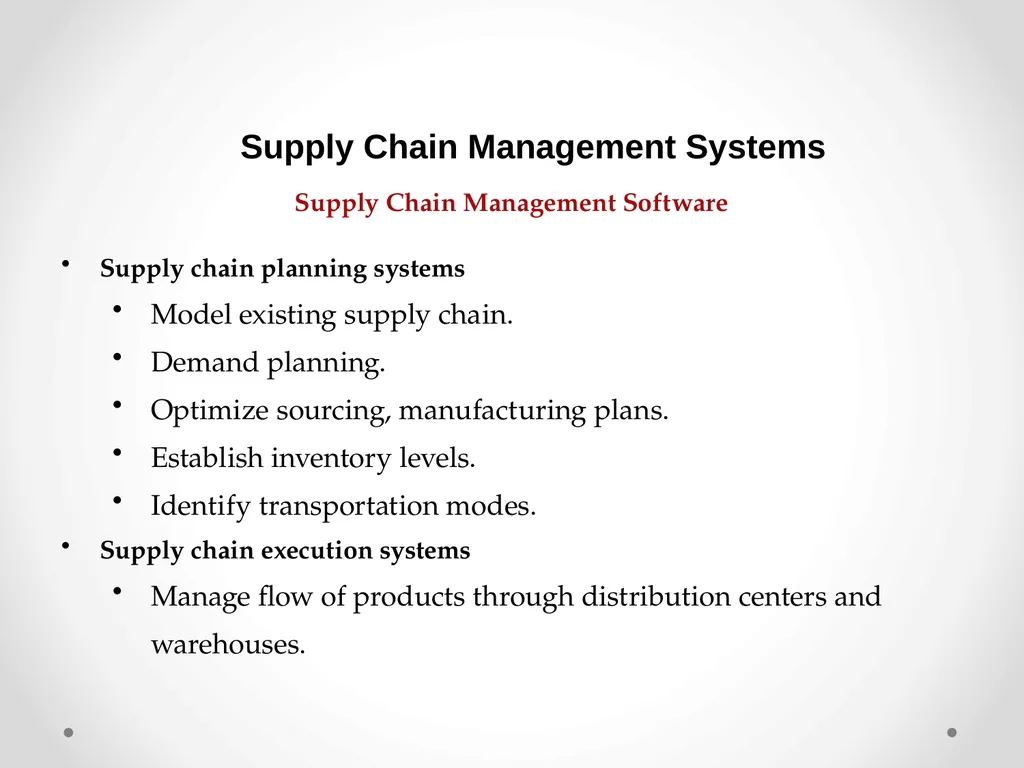
slide9. Supply Chain Management Software Supply chain planning systems
Model existing supply chain.
Demand planning.
Optimize sourcing, manufacturing plans.
Establish inventory levels.
Identify transportation modes.
Supply chain execution systems
Manage flow of products through distribution centers and warehouses. Supply Chain Management Systems<br>
slide10. Global Supply Chains and the Internet Before Internet, supply chain coordination hampered by difficulties of using disparate internal supply chain systems.
Enterprise systems supply some integration of internal supply chain processes but not designed to deal with external supply chain processes.
Intranets and Extranets
Intranets: to improve coordination among internal supply chain processes
Extranets: to coordinate supply chain processes shared with their business partners Supply Chain Management Systems<br>
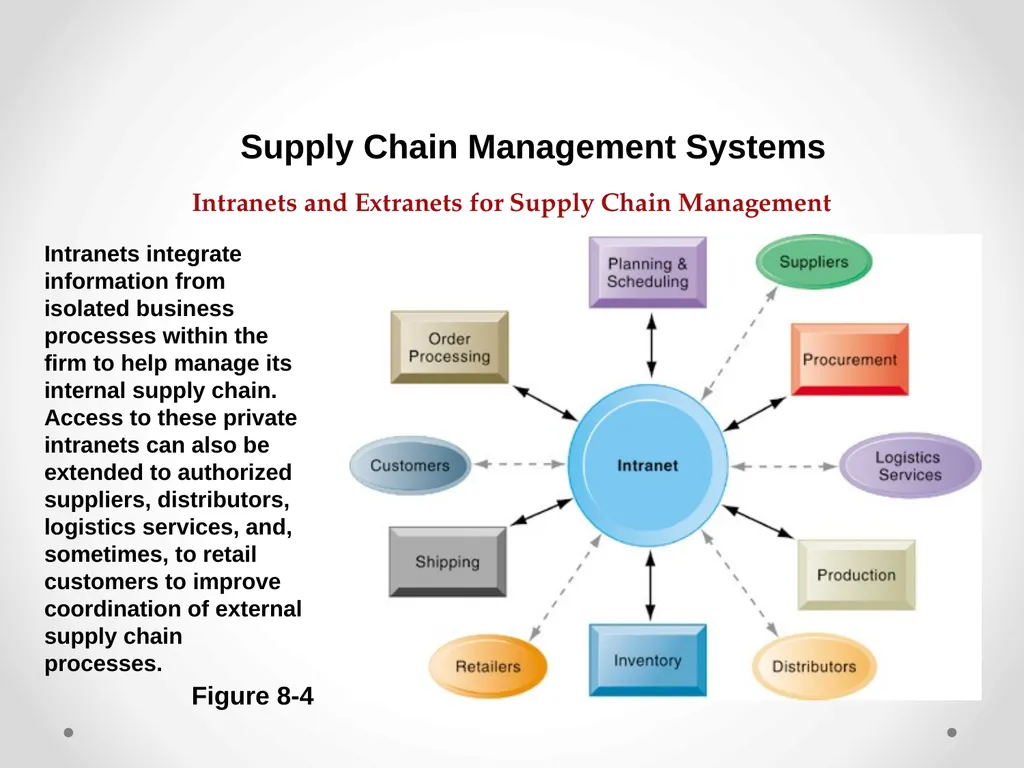
slide11. Intranets and Extranets for Supply Chain Management Supply Chain Management Systems Figure 8-4 Intranets integrate information from isolated business processes within the firm to help manage its internal supply chain. Access to these private intranets can also be extended to authorized suppliers, distributors, logistics services, and, sometimes, to retail customers to improve coordination of external supply chain processes.<br>
slide12. Global Supply Chains and the Internet Global supply chain issues:
Global supply chains typically span greater geographic distances and time differences.
More complex pricing issues (local taxes, transportation, etc.).
Foreign government regulations.
Internet helps companies manage many aspects of global supply chains.
Sourcing, transportation, communications, international finance Supply Chain Management Systems<br>
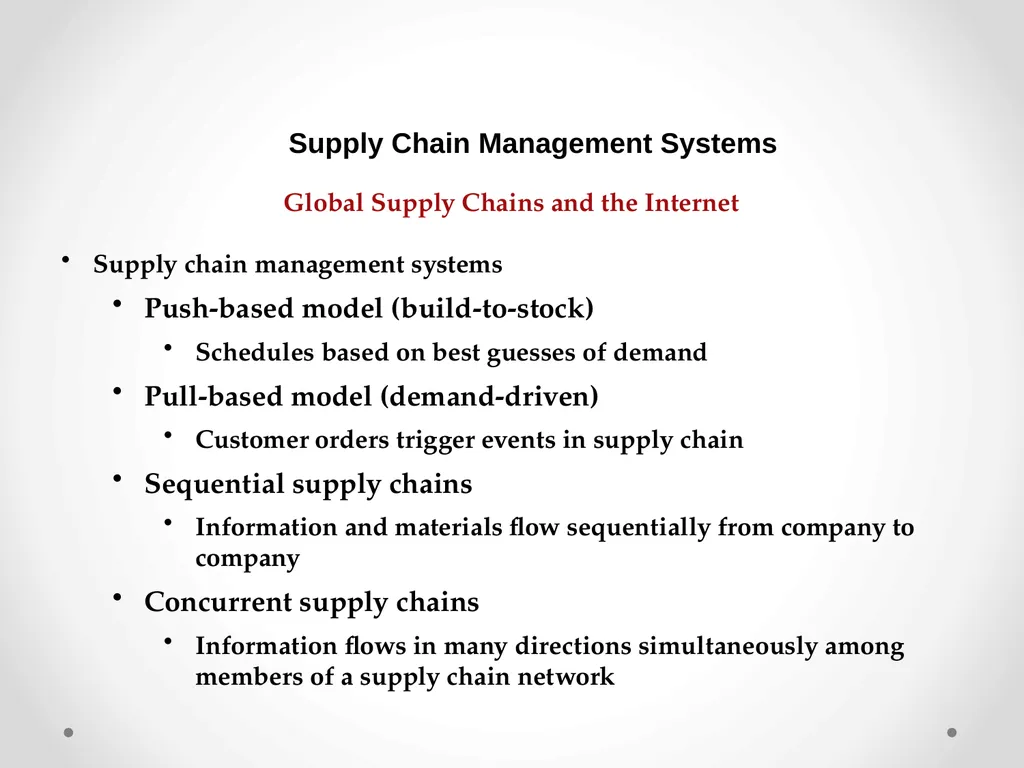
slide13. Global Supply Chains and the Internet Supply chain management systems
Push-based model (build-to-stock)
Schedules based on best guesses of demand
Pull-based model (demand-driven)
Customer orders trigger events in supply chain
Sequential supply chains
Information and materials flow sequentially from company to company
Concurrent supply chains
Information flows in many directions simultaneously among members of a supply chain network Supply Chain Management Systems<br>
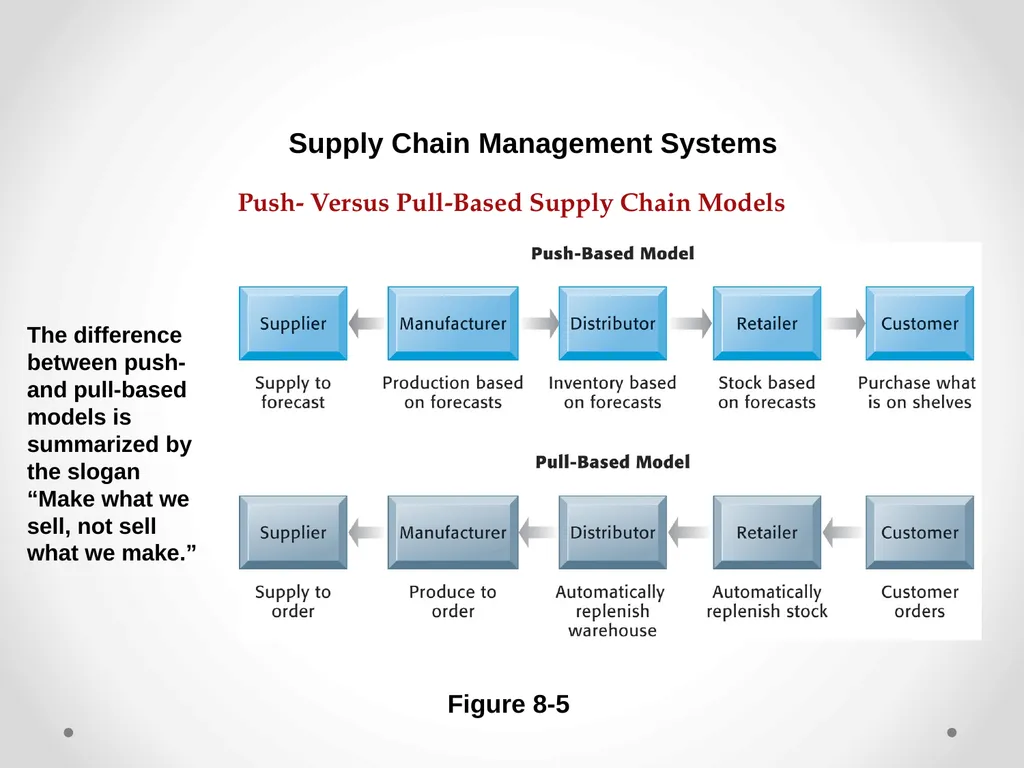
slide14. Push- Versus Pull-Based Supply Chain Models Figure 8-5 The difference between push- and pull-based models is summarized by the slogan “Make what we sell, not sell what we make.” Supply Chain Management Systems<br>
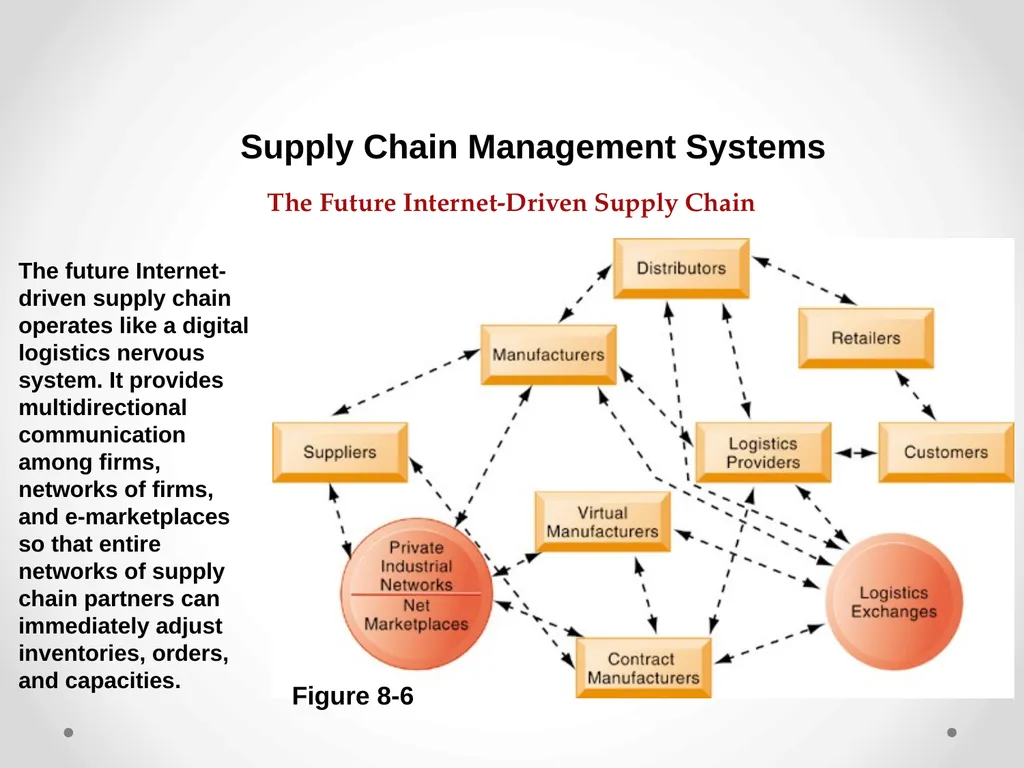
slide15. The Future Internet-Driven Supply Chain Figure 8-6 The future Internet-driven supply chain operates like a digital logistics nervous system. It provides multidirectional communication among firms, networks of firms, and e-marketplaces so that entire networks of supply chain partners can immediately adjust inventories, orders, and capacities. Supply Chain Management Systems<br>
slide16. Match supply to demand.
Reduce inventory levels.
Improve delivery service.
Speed product time to market.
Use assets more effectively.
Reduced supply chain costs lead to increased profitability.
Increase sales. Business Value of Supply Chain Management Systems Supply Chain Management Systems<br>
slide17. What Is Customer Relationship Management(CRM)? Knowing the customer
In large businesses, too many customers and too many ways customers interact with firm
Customer relationship management (CRM) systems
Capture and integrate customer data from all over the organization.
Consolidate and analyze customer data.
Distribute customer information to various systems and customer touch points across enterprise.
Provide single enterprise view of customers. Customer Relationship Management Systems<br>
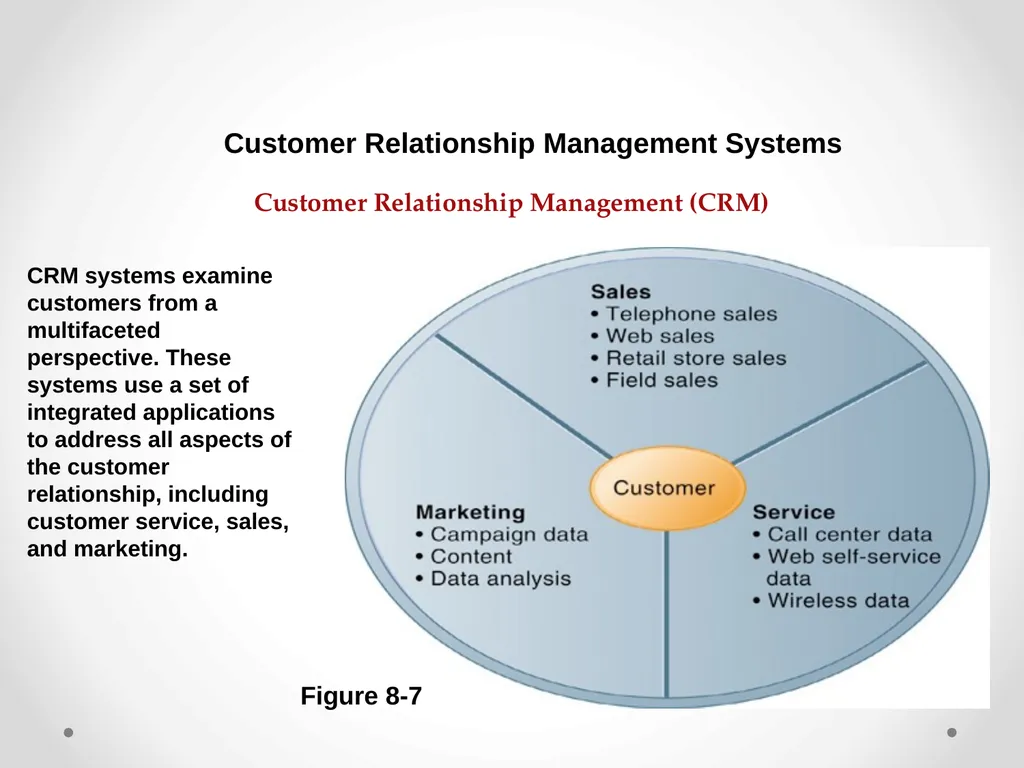
slide18. Customer Relationship Management (CRM) Figure 8-7 CRM systems examine customers from a multifaceted perspective. These systems use a set of integrated applications to address all aspects of the customer relationship, including customer service, sales, and marketing. Customer Relationship Management Systems<br>
slide19. CRM Software CRM packages range from niche tools to large-scale enterprise applications.
More comprehensive have modules for:
Partner relationship management (PRM)
Integrating lead generation, pricing, promotions, order configurations, and availability
Tools to assess partners’ performances
Employee relationship management (ERM)
E.g., setting objectives, employee performance management, performance-based compensation, employee training Customer Relationship Management Systems<br>
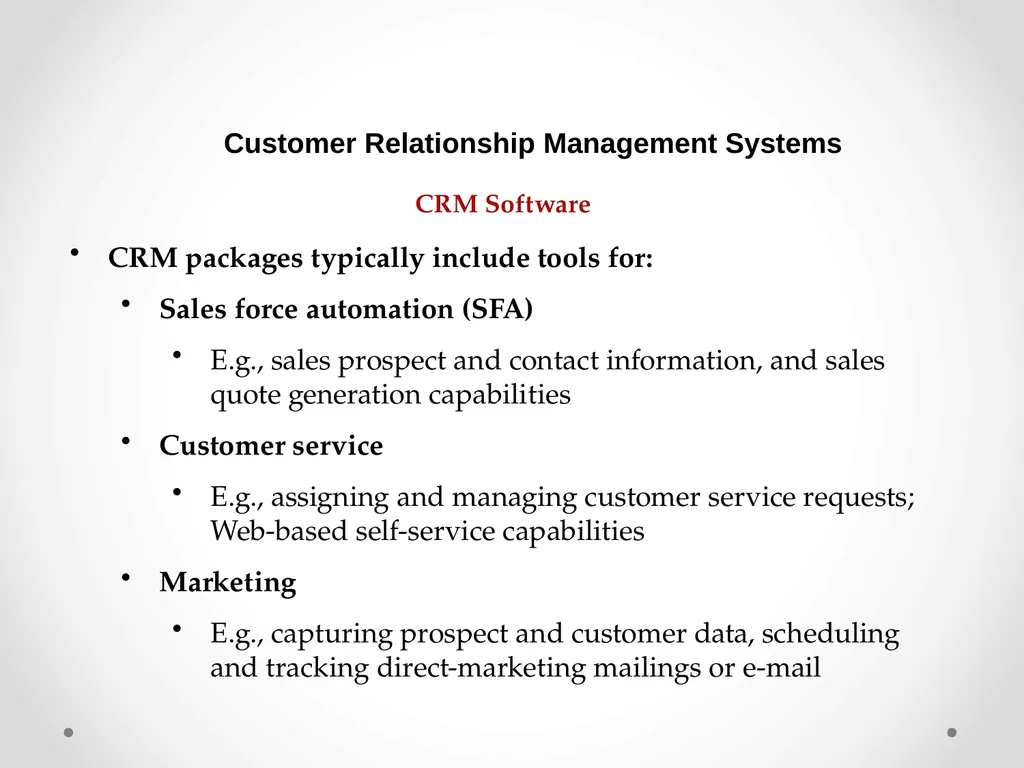
slide20. CRM Software CRM packages typically include tools for:
Sales force automation (SFA)
E.g., sales prospect and contact information, and sales quote generation capabilities
Customer service
E.g., assigning and managing customer service requests; Web-based self-service capabilities
Marketing
E.g., capturing prospect and customer data, scheduling and tracking direct-marketing mailings or e-mail Customer Relationship Management Systems<br>
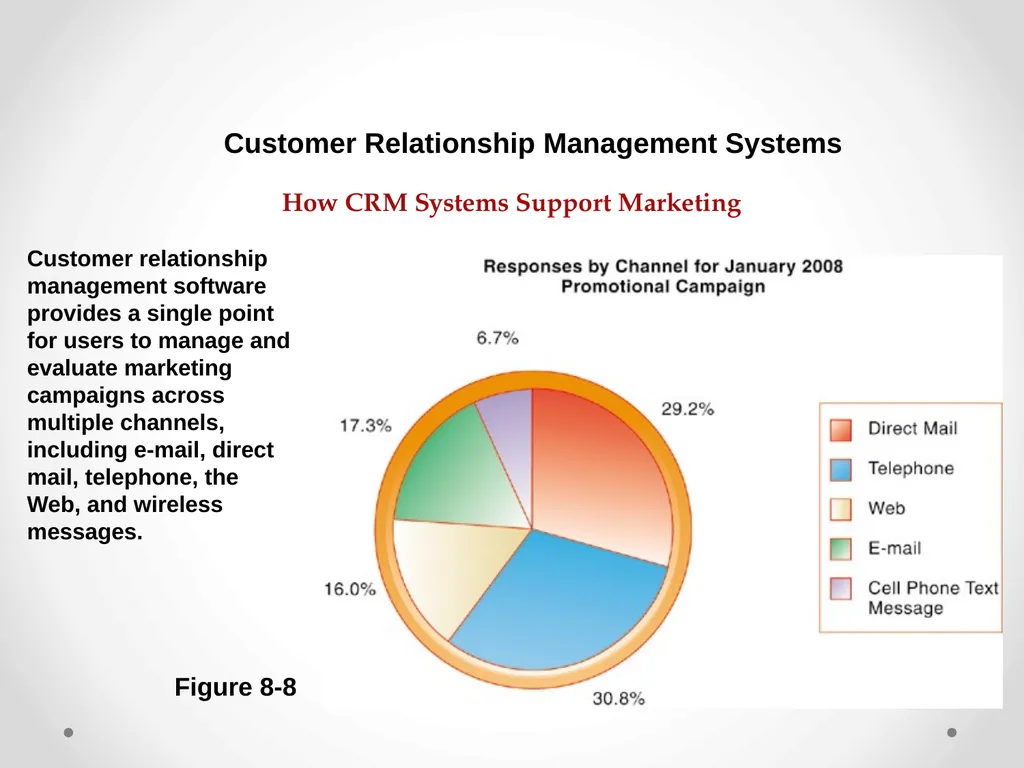
slide21. How CRM Systems Support Marketing Figure 8-8 Customer relationship management software provides a single point for users to manage and evaluate marketing campaigns across multiple channels, including e-mail, direct mail, telephone, the Web, and wireless messages. Customer Relationship Management Systems<br>
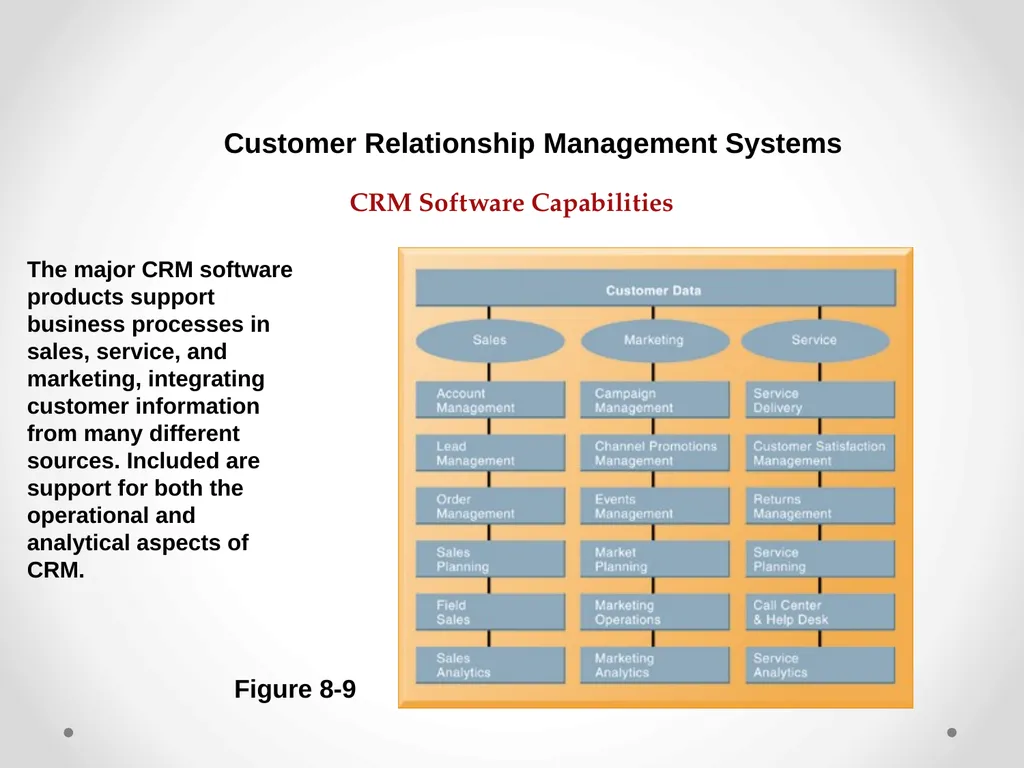
slide22. CRM Software Capabilities Figure 8-9 The major CRM software products support business processes in sales, service, and marketing, integrating customer information from many different sources. Included are support for both the operational and analytical aspects of CRM. Customer Relationship Management Systems<br>
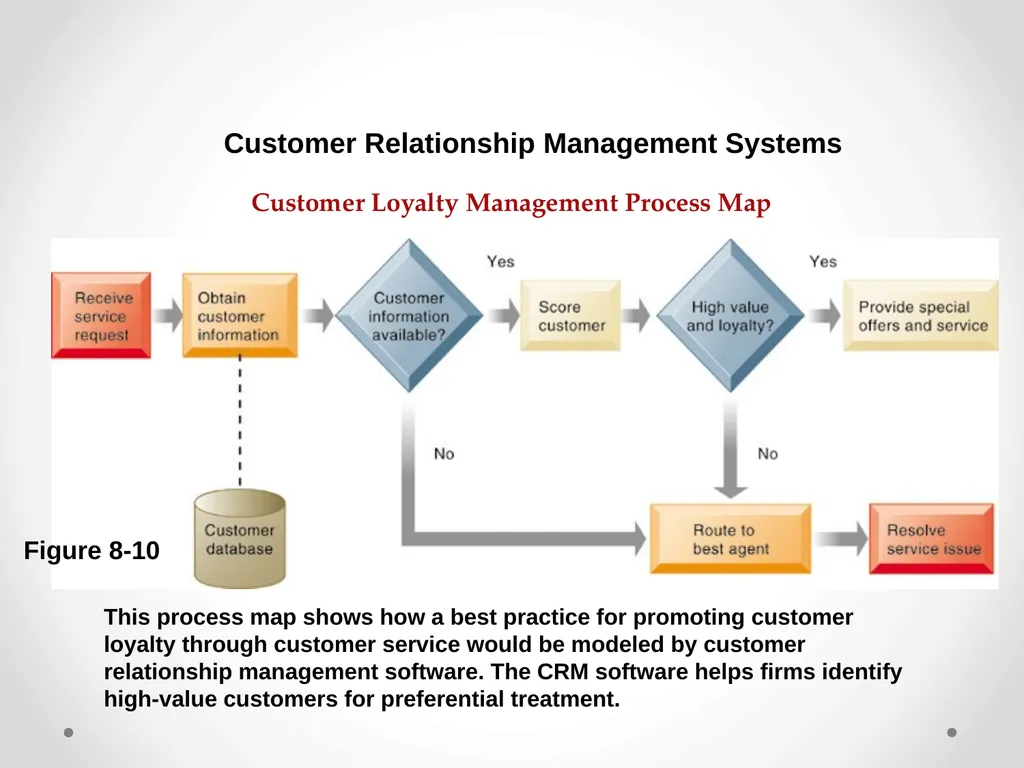
slide23. Customer Loyalty Management Process Map This process map shows how a best practice for promoting customer loyalty through customer service would be modeled by customer relationship management software. The CRM software helps firms identify high-value customers for preferential treatment. Customer Relationship Management Systems Figure 8-10<br>
slide24. Operational CRM:
Customer-facing applications such as sales force automation, call center and customer service support, and marketing automation
Analytical CRM:
Analyzes customer data output from operational CRM applications
Based on data warehouses populated by operational CRM systems and customer touch points
Customer lifetime value (CLTV) Customer Relationship Management Systems Operational and Analytical CRM<br>
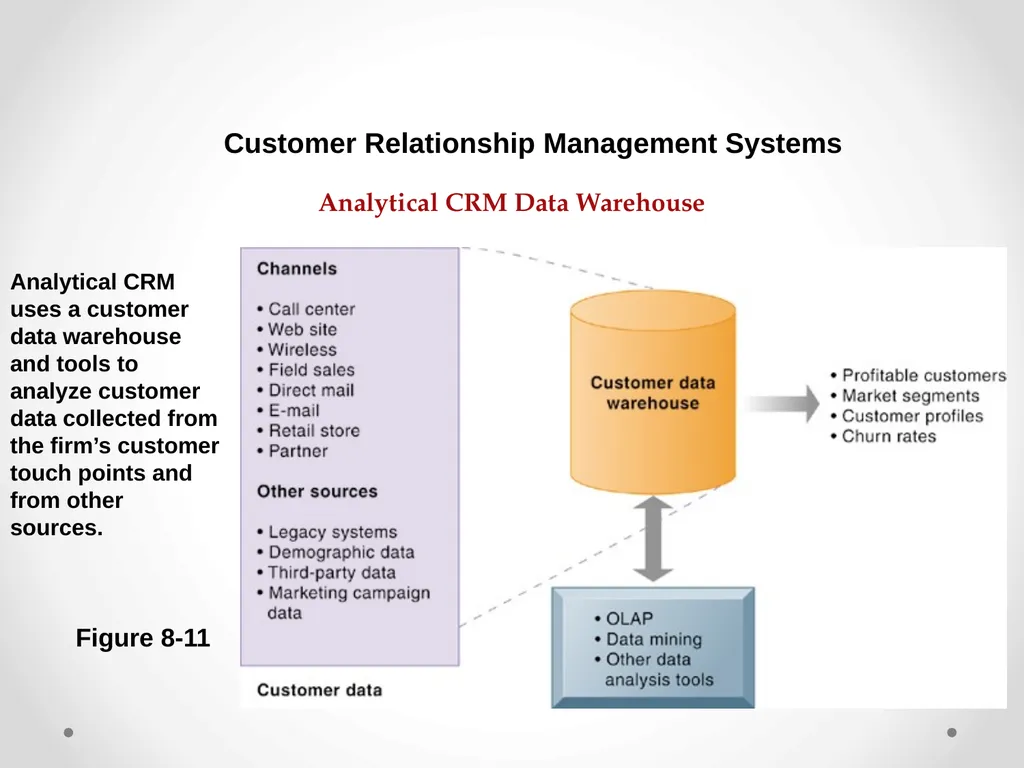
slide25. Analytical CRM Data Warehouse Figure 8-11 Analytical CRM uses a customer data warehouse and tools to analyze customer data collected from the firm’s customer touch points and from other sources. Customer Relationship Management Systems<br>
slide26. Business Value of Customer Relationship Management Business benefits:
Increased customer satisfaction
Reduced direct-marketing costs
More effective marketing
Lower costs for customer acquisition/retention
Increased sales revenue
Churn rate:
Number of customers who stop using or purchasing products or services from a company
Indicator of growth or decline of firm’s customer base Customer Relationship Management Systems<br>
slide27. Enterprise application challenges
Highly expensive to purchase and implement enterprise applications
Average “large” system—$12 million +
Average “small/midsize” system—$3.5 million
Technology changes
Business process changes
Organizational learning, changes
Switching costs, dependence on software vendors
Data standardization, management, cleansing Enterprise Applications: New Opportunities and Challenges<br>
slide28. Next-generation enterprise applications
Enterprise solutions/suites:
Make applications more flexible, Web-enabled, integrated with other systems
SOA standards
Open-source applications
On-demand solutions
Cloud-based versions
Functionality for mobile platform Enterprise Applications: New Opportunities and Challenges<br>
slide29. What types of companies are most likely to adopt cloud-based CRM software services? What companies might not be suited for this type of software?
What are the advantages and disadvantages of using cloud-based enterprise applications?
What management, organization, and technology issues should be addressed in deciding whether to use a conventional CRM system versus a cloud-based version? Customer Relationship Management Heads to the Cloud<br>
slide30. Next-generation enterprise applications (cont.)
Social CRM
Incorporating social networking technologies
Company social networks
Customer interaction via Facebook
For example: Buzzient platform integrates social media with enterprise applications
Business intelligence
Inclusion of BI with enterprise applications
Flexible reporting, ad hoc analysis, “what-if” scenarios, digital dashboards, data visualization Enterprise Applications: New Opportunities and Challenges<br>
slide2. Enterprise Systems Enterprise Systems
Also called “enterprise resource planning (ERP) systems”
Suite of integrated software modules and a common central database
Collects data from many divisions of firm for use in nearly all of firm’s internal business activities
Information entered in one process is immediately available for other processes<br>
slide3. Enterprise Systems Enterprise Software
Built around thousands of predefined business processes that reflect best practices
Finance/accounting: general ledger, accounts payable, and so on
Human resources: personnel administration, payroll, and so on
Manufacturing/production: purchasing, shipping, and so on
Sales/marketing: order processing, billing, sales planning, and so on
To implement, firms:
Select functions of system they wish to use.
Map business processes to software processes.
Use software’s configuration tables for customizing.<br>
slide4. Enterprise Systems Figure 8-1 Enterprise systems feature a set of integrated software modules and a central database that enables data to be shared by many different business processes and functional areas throughout the enterprise How Enterprise Systems Work<br>
slide5. Enterprise Systems Business value of enterprise systems
Increase operational efficiency.
Provide firm wide information to support decision making.
Enable rapid responses to customer requests for information or products.
Include analytical tools to evaluate overall organizational performance.<br>
slide6. The Supply Chain Network of organizations and processes for:
Procuring raw materials
Transforming them into products
Distributing the products
Upstream supply chain:
Firm’s suppliers, suppliers’ suppliers, processes for managing relationships with them
Downstream supply chain:
Organizations and processes responsible for delivering products to customers Supply Chain Management Systems<br>
slide7. Information and Supply Chain Management Inefficiencies cut into a company’s operating costs
Can waste up to 25 percent of operating expenses
Just-in-time strategy:
Components arrive as they are needed
Finished goods shipped after leaving assembly line
Safety stock
Buffer for lack of flexibility in supply chain
Bullwhip effect
Information about product demand gets distorted as it passes from one entity to next across supply chain Supply Chain Management Systems<br>
slide8. The Bullwhip Effect Supply Chain Management Systems Figure 8-3 Inaccurate information can cause minor fluctuations in demand for a product to be amplified as one moves further back in the supply chain. Minor fluctuations in retail sales for a product can create excess inventory for distributors, manufacturers, and suppliers.<br>
slide9. Supply Chain Management Software Supply chain planning systems
Model existing supply chain.
Demand planning.
Optimize sourcing, manufacturing plans.
Establish inventory levels.
Identify transportation modes.
Supply chain execution systems
Manage flow of products through distribution centers and warehouses. Supply Chain Management Systems<br>
slide10. Global Supply Chains and the Internet Before Internet, supply chain coordination hampered by difficulties of using disparate internal supply chain systems.
Enterprise systems supply some integration of internal supply chain processes but not designed to deal with external supply chain processes.
Intranets and Extranets
Intranets: to improve coordination among internal supply chain processes
Extranets: to coordinate supply chain processes shared with their business partners Supply Chain Management Systems<br>
slide11. Intranets and Extranets for Supply Chain Management Supply Chain Management Systems Figure 8-4 Intranets integrate information from isolated business processes within the firm to help manage its internal supply chain. Access to these private intranets can also be extended to authorized suppliers, distributors, logistics services, and, sometimes, to retail customers to improve coordination of external supply chain processes.<br>
slide12. Global Supply Chains and the Internet Global supply chain issues:
Global supply chains typically span greater geographic distances and time differences.
More complex pricing issues (local taxes, transportation, etc.).
Foreign government regulations.
Internet helps companies manage many aspects of global supply chains.
Sourcing, transportation, communications, international finance Supply Chain Management Systems<br>
slide13. Global Supply Chains and the Internet Supply chain management systems
Push-based model (build-to-stock)
Schedules based on best guesses of demand
Pull-based model (demand-driven)
Customer orders trigger events in supply chain
Sequential supply chains
Information and materials flow sequentially from company to company
Concurrent supply chains
Information flows in many directions simultaneously among members of a supply chain network Supply Chain Management Systems<br>
slide14. Push- Versus Pull-Based Supply Chain Models Figure 8-5 The difference between push- and pull-based models is summarized by the slogan “Make what we sell, not sell what we make.” Supply Chain Management Systems<br>
slide15. The Future Internet-Driven Supply Chain Figure 8-6 The future Internet-driven supply chain operates like a digital logistics nervous system. It provides multidirectional communication among firms, networks of firms, and e-marketplaces so that entire networks of supply chain partners can immediately adjust inventories, orders, and capacities. Supply Chain Management Systems<br>
slide16. Match supply to demand.
Reduce inventory levels.
Improve delivery service.
Speed product time to market.
Use assets more effectively.
Reduced supply chain costs lead to increased profitability.
Increase sales. Business Value of Supply Chain Management Systems Supply Chain Management Systems<br>
slide17. What Is Customer Relationship Management(CRM)? Knowing the customer
In large businesses, too many customers and too many ways customers interact with firm
Customer relationship management (CRM) systems
Capture and integrate customer data from all over the organization.
Consolidate and analyze customer data.
Distribute customer information to various systems and customer touch points across enterprise.
Provide single enterprise view of customers. Customer Relationship Management Systems<br>
slide18. Customer Relationship Management (CRM) Figure 8-7 CRM systems examine customers from a multifaceted perspective. These systems use a set of integrated applications to address all aspects of the customer relationship, including customer service, sales, and marketing. Customer Relationship Management Systems<br>
slide19. CRM Software CRM packages range from niche tools to large-scale enterprise applications.
More comprehensive have modules for:
Partner relationship management (PRM)
Integrating lead generation, pricing, promotions, order configurations, and availability
Tools to assess partners’ performances
Employee relationship management (ERM)
E.g., setting objectives, employee performance management, performance-based compensation, employee training Customer Relationship Management Systems<br>
slide20. CRM Software CRM packages typically include tools for:
Sales force automation (SFA)
E.g., sales prospect and contact information, and sales quote generation capabilities
Customer service
E.g., assigning and managing customer service requests; Web-based self-service capabilities
Marketing
E.g., capturing prospect and customer data, scheduling and tracking direct-marketing mailings or e-mail Customer Relationship Management Systems<br>
slide21. How CRM Systems Support Marketing Figure 8-8 Customer relationship management software provides a single point for users to manage and evaluate marketing campaigns across multiple channels, including e-mail, direct mail, telephone, the Web, and wireless messages. Customer Relationship Management Systems<br>
slide22. CRM Software Capabilities Figure 8-9 The major CRM software products support business processes in sales, service, and marketing, integrating customer information from many different sources. Included are support for both the operational and analytical aspects of CRM. Customer Relationship Management Systems<br>
slide23. Customer Loyalty Management Process Map This process map shows how a best practice for promoting customer loyalty through customer service would be modeled by customer relationship management software. The CRM software helps firms identify high-value customers for preferential treatment. Customer Relationship Management Systems Figure 8-10<br>
slide24. Operational CRM:
Customer-facing applications such as sales force automation, call center and customer service support, and marketing automation
Analytical CRM:
Analyzes customer data output from operational CRM applications
Based on data warehouses populated by operational CRM systems and customer touch points
Customer lifetime value (CLTV) Customer Relationship Management Systems Operational and Analytical CRM<br>
slide25. Analytical CRM Data Warehouse Figure 8-11 Analytical CRM uses a customer data warehouse and tools to analyze customer data collected from the firm’s customer touch points and from other sources. Customer Relationship Management Systems<br>
slide26. Business Value of Customer Relationship Management Business benefits:
Increased customer satisfaction
Reduced direct-marketing costs
More effective marketing
Lower costs for customer acquisition/retention
Increased sales revenue
Churn rate:
Number of customers who stop using or purchasing products or services from a company
Indicator of growth or decline of firm’s customer base Customer Relationship Management Systems<br>
slide27. Enterprise application challenges
Highly expensive to purchase and implement enterprise applications
Average “large” system—$12 million +
Average “small/midsize” system—$3.5 million
Technology changes
Business process changes
Organizational learning, changes
Switching costs, dependence on software vendors
Data standardization, management, cleansing Enterprise Applications: New Opportunities and Challenges<br>
slide28. Next-generation enterprise applications
Enterprise solutions/suites:
Make applications more flexible, Web-enabled, integrated with other systems
SOA standards
Open-source applications
On-demand solutions
Cloud-based versions
Functionality for mobile platform Enterprise Applications: New Opportunities and Challenges<br>
slide29. What types of companies are most likely to adopt cloud-based CRM software services? What companies might not be suited for this type of software?
What are the advantages and disadvantages of using cloud-based enterprise applications?
What management, organization, and technology issues should be addressed in deciding whether to use a conventional CRM system versus a cloud-based version? Customer Relationship Management Heads to the Cloud<br>
slide30. Next-generation enterprise applications (cont.)
Social CRM
Incorporating social networking technologies
Company social networks
Customer interaction via Facebook
For example: Buzzient platform integrates social media with enterprise applications
Business intelligence
Inclusion of BI with enterprise applications
Flexible reporting, ad hoc analysis, “what-if” scenarios, digital dashboards, data visualization Enterprise Applications: New Opportunities and Challenges<br>