
GEL HPC Advanced Jitendra Sougaijam Senior DevOps
SB
Published · 30 slides · 0 views

1 / 1



Description
GEL HPC Advanced Jitendra Sougaijam Senior DevOps Engineer Luke Hansbury Platform Lead Accessing Pegasus Log on to Inuvika https:re.extge.co.ukovd Open a Terminal session in your remote desktop SSH to Login node
Related Topics
Share
Embed code
Download this presentation From Below
"GEL HPC Advanced Jitendra Sougaijam Senior DevOps" is the property of its rightful owner. Permission is granted to download and print the materials on this website for personal, non-commercial use only, and to display it on your personal computer provided you do not modify the materials and that you retain all copyright notices contained in the materials. By downloading content from our website, you accept the terms of this agreement.
Presentation Transcript
01
GEL HPC
Advanced Jitendra Sougaijam
Senior DevOps Engineer
Luke Hansbury
Platform Lead<br>
Advanced Jitendra Sougaijam
Senior DevOps Engineer
Luke Hansbury
Platform Lead<br>
02
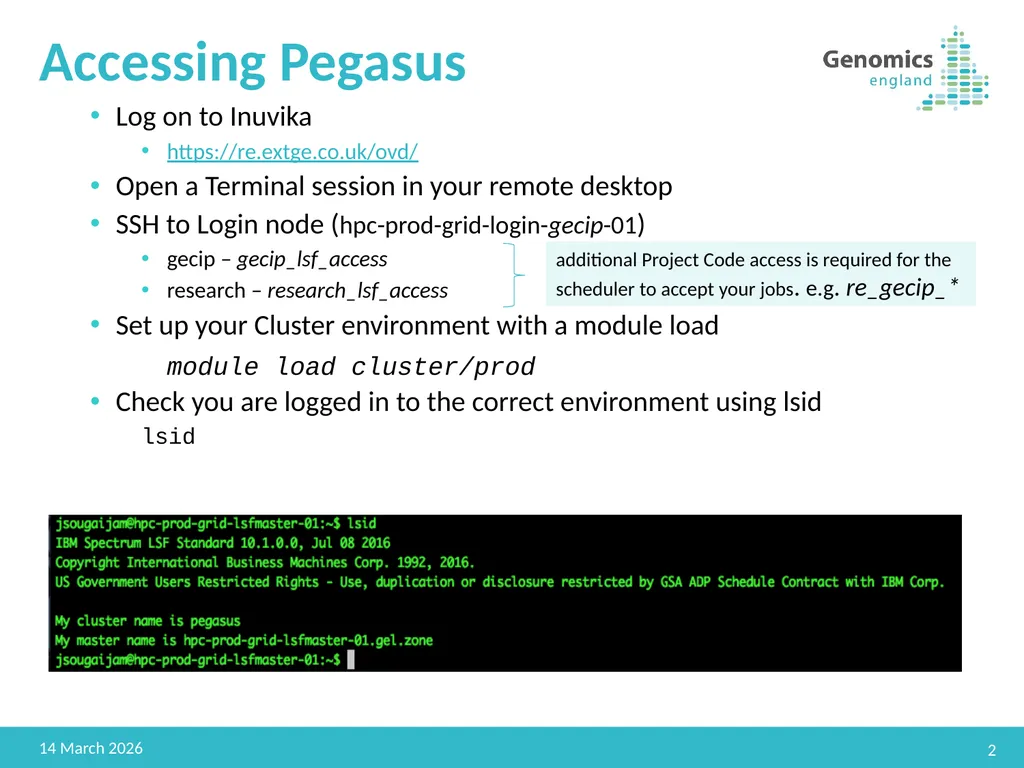
Accessing Pegasus Log on to Inuvika
https://re.extge.co.uk/ovd/
Open a Terminal session in your remote desktop
SSH to Login node (hpc-prod-grid-login-gecip-01)
gecip – gecip_lsf_access
research – research_lsf_access
Set up your Cluster environment with a module load
module load cluster/prod
Check you are logged in to the correct environment using lsid
lsid 2 22 February 2019 additional Project Code access is required for the scheduler to accept your jobs. e.g. re_gecip_*<br>
https://re.extge.co.uk/ovd/
Open a Terminal session in your remote desktop
SSH to Login node (hpc-prod-grid-login-gecip-01)
gecip – gecip_lsf_access
research – research_lsf_access
Set up your Cluster environment with a module load
module load cluster/prod
Check you are logged in to the correct environment using lsid
lsid 2 22 February 2019 additional Project Code access is required for the scheduler to accept your jobs. e.g. re_gecip_*<br>
03
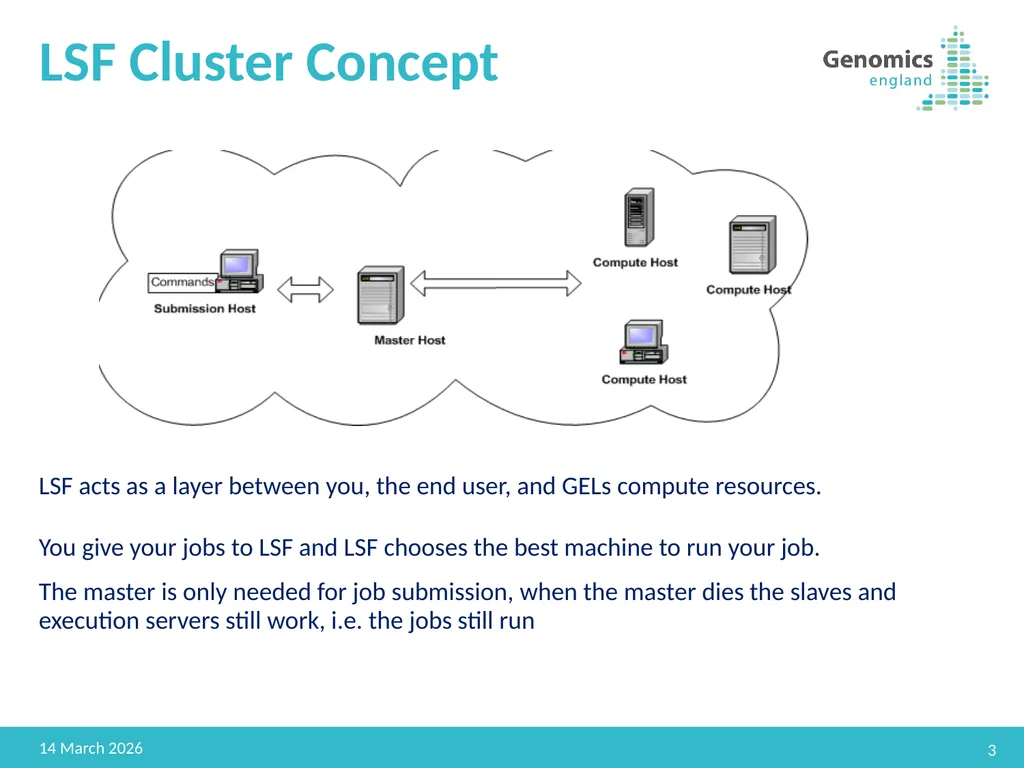
LSF Cluster Concept 3 22 February 2019 LSF acts as a layer between you, the end user, and GELs compute resources.
You give your jobs to LSF and LSF chooses the best machine to run your job.
The master is only needed for job submission, when the master dies the slaves and execution servers still work, i.e. the jobs still run<br>
You give your jobs to LSF and LSF chooses the best machine to run your job.
The master is only needed for job submission, when the master dies the slaves and execution servers still work, i.e. the jobs still run<br>
04
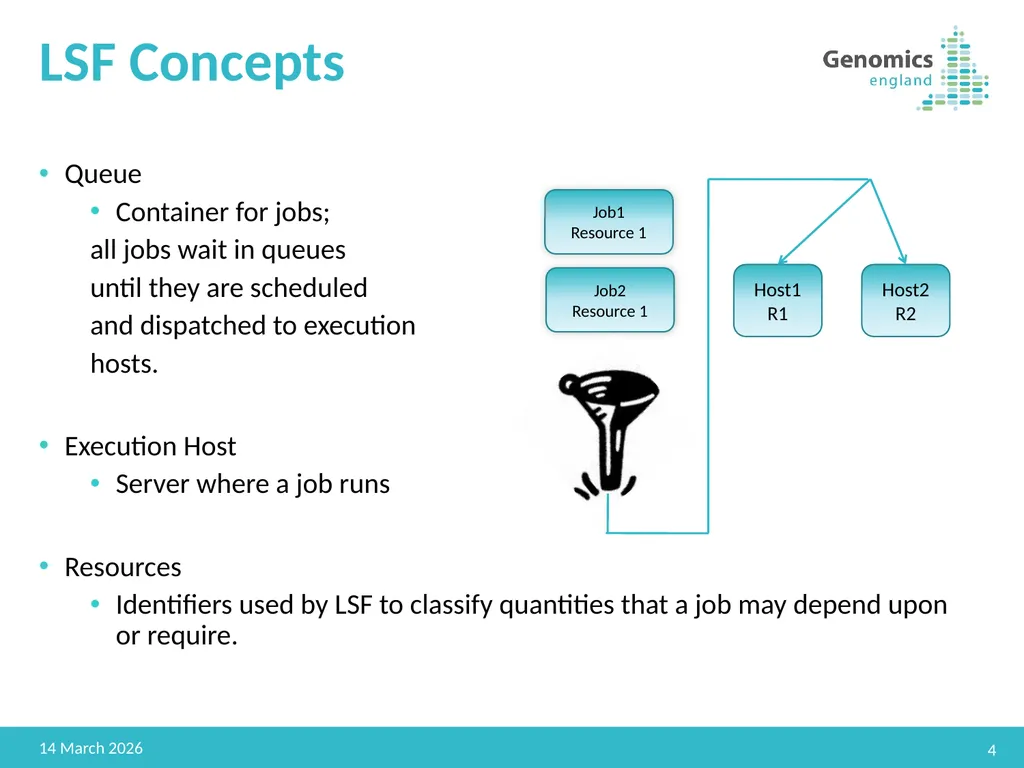
LSF Concepts Queue
Container for jobs;
all jobs wait in queues
until they are scheduled
and dispatched to execution
hosts.
Execution Host
Server where a job runs
Resources
Identifiers used by LSF to classify quantities that a job may depend upon or require. 4 22 February 2019 Job1
Resource 1 Job2
Resource 1 Host1
R1 Host2
R2<br>
Container for jobs;
all jobs wait in queues
until they are scheduled
and dispatched to execution
hosts.
Execution Host
Server where a job runs
Resources
Identifiers used by LSF to classify quantities that a job may depend upon or require. 4 22 February 2019 Job1
Resource 1 Job2
Resource 1 Host1
R1 Host2
R2<br>
05
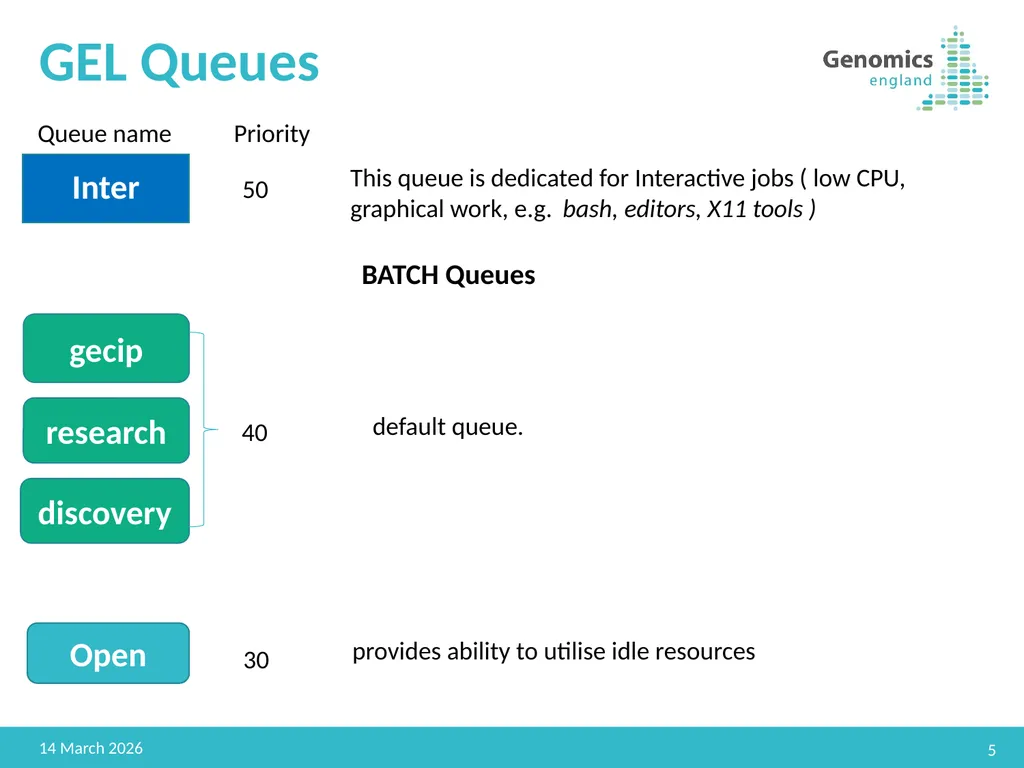
GEL Queues 5 22 February 2019 Inter gecip research discovery Queue name Priority 50 40 Open 30 This queue is dedicated for Interactive jobs ( low CPU, graphical work, e.g. bash, editors, X11 tools ) provides ability to utilise idle resources default queue. BATCH Queues<br>
06
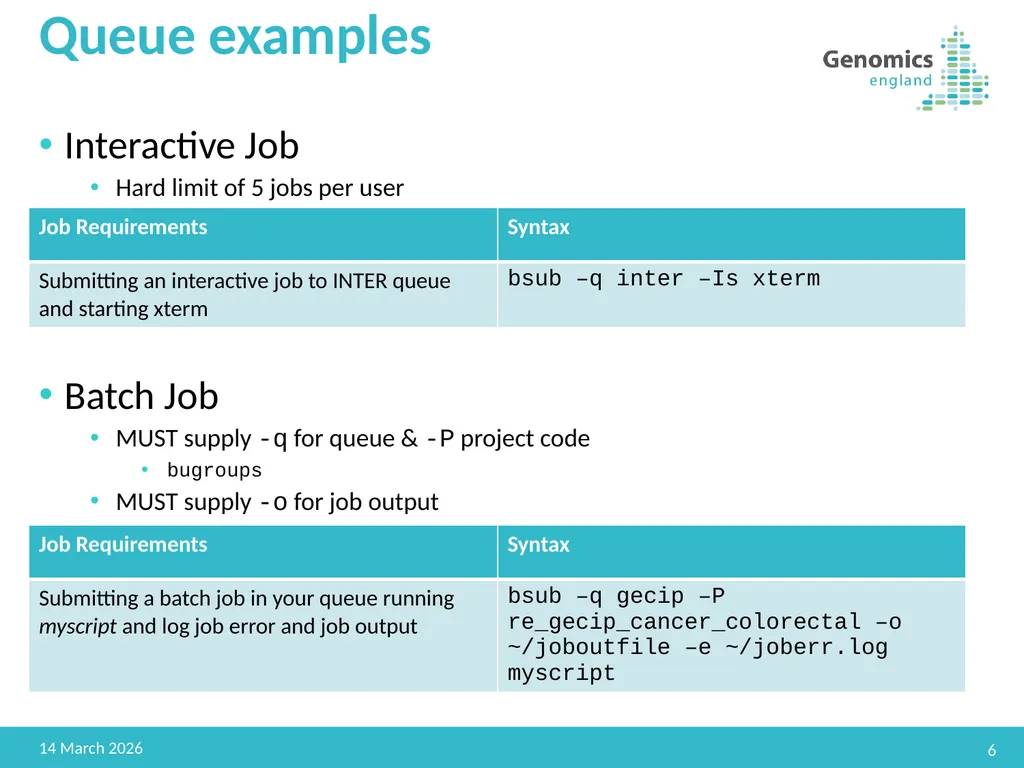
Queue examples 6 22 February 2019 Interactive Job
Hard limit of 5 jobs per user
Batch Job
MUST supply -q for queue & -P project code
bugroups
MUST supply -o for job output<br>
Hard limit of 5 jobs per user
Batch Job
MUST supply -q for queue & -P project code
bugroups
MUST supply -o for job output<br>
07
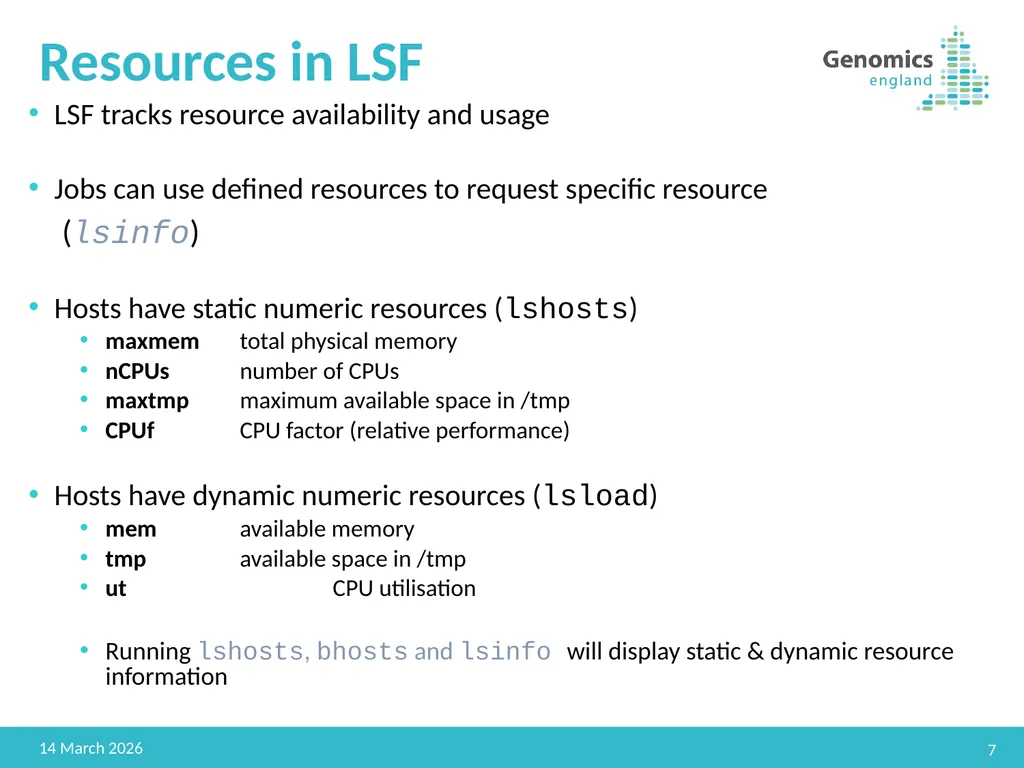
Resources in LSF LSF tracks resource availability and usage
Jobs can use defined resources to request specific resource
(lsinfo)
Hosts have static numeric resources (lshosts)
maxmem total physical memory
nCPUs number of CPUs
maxtmp maximum available space in /tmp
CPUf CPU factor (relative performance)
Hosts have dynamic numeric resources (lsload)
mem available memory
tmp available space in /tmp
ut CPU utilisation
Running lshosts, bhosts and lsinfo will display static & dynamic resource information 7 22 February 2019<br>
Jobs can use defined resources to request specific resource
(lsinfo)
Hosts have static numeric resources (lshosts)
maxmem total physical memory
nCPUs number of CPUs
maxtmp maximum available space in /tmp
CPUf CPU factor (relative performance)
Hosts have dynamic numeric resources (lsload)
mem available memory
tmp available space in /tmp
ut CPU utilisation
Running lshosts, bhosts and lsinfo will display static & dynamic resource information 7 22 February 2019<br>
08
Benefits of Resources and use cases Safeguards against rogue jobs/process
Enables tracking of availability and usage
Allows user to precisely target for the workflow needs 8 22 February 2019<br>
Enables tracking of availability and usage
Allows user to precisely target for the workflow needs 8 22 February 2019<br>
09
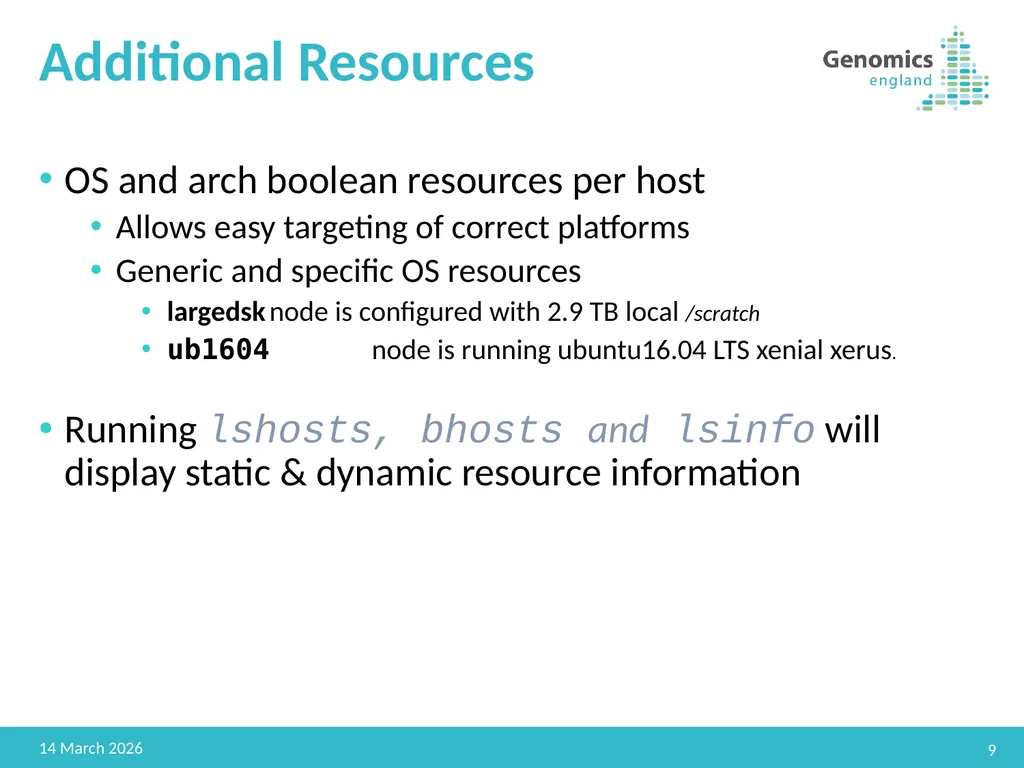
Additional Resources OS and arch boolean resources per host
Allows easy targeting of correct platforms
Generic and specific OS resources
largedsk node is configured with 2.9 TB local /scratch
ub1604 node is running ubuntu16.04 LTS xenial xerus.
Running lshosts, bhosts and lsinfo will display static & dynamic resource information 9 22 February 2019<br>
Allows easy targeting of correct platforms
Generic and specific OS resources
largedsk node is configured with 2.9 TB local /scratch
ub1604 node is running ubuntu16.04 LTS xenial xerus.
Running lshosts, bhosts and lsinfo will display static & dynamic resource information 9 22 February 2019<br>
10
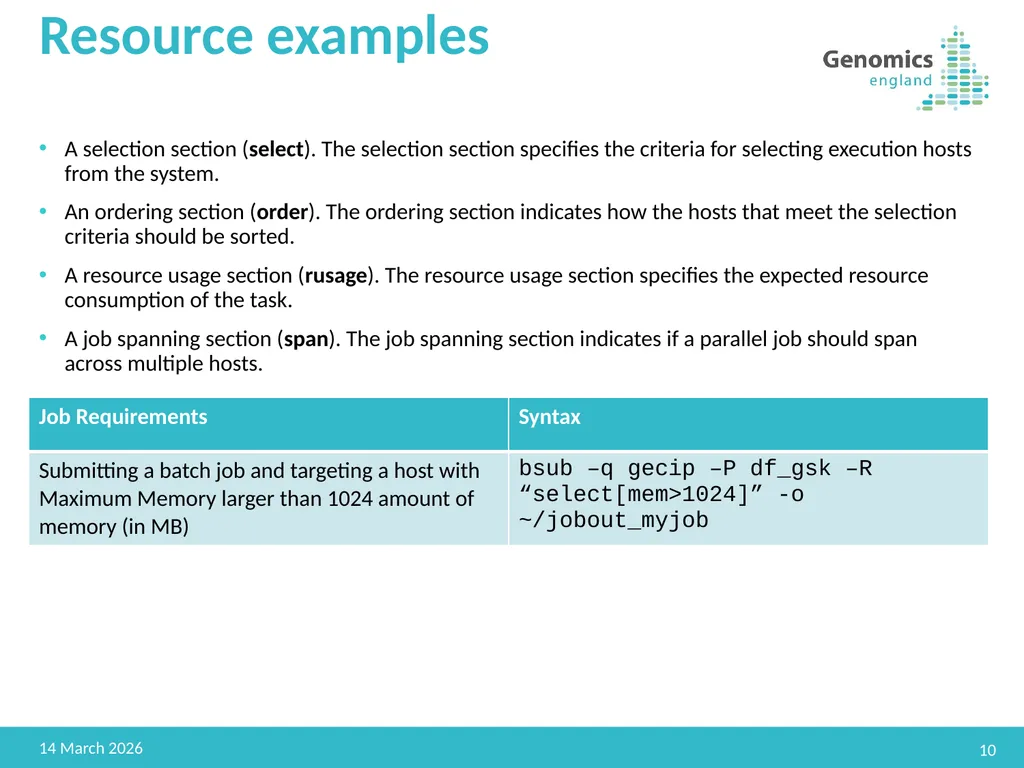
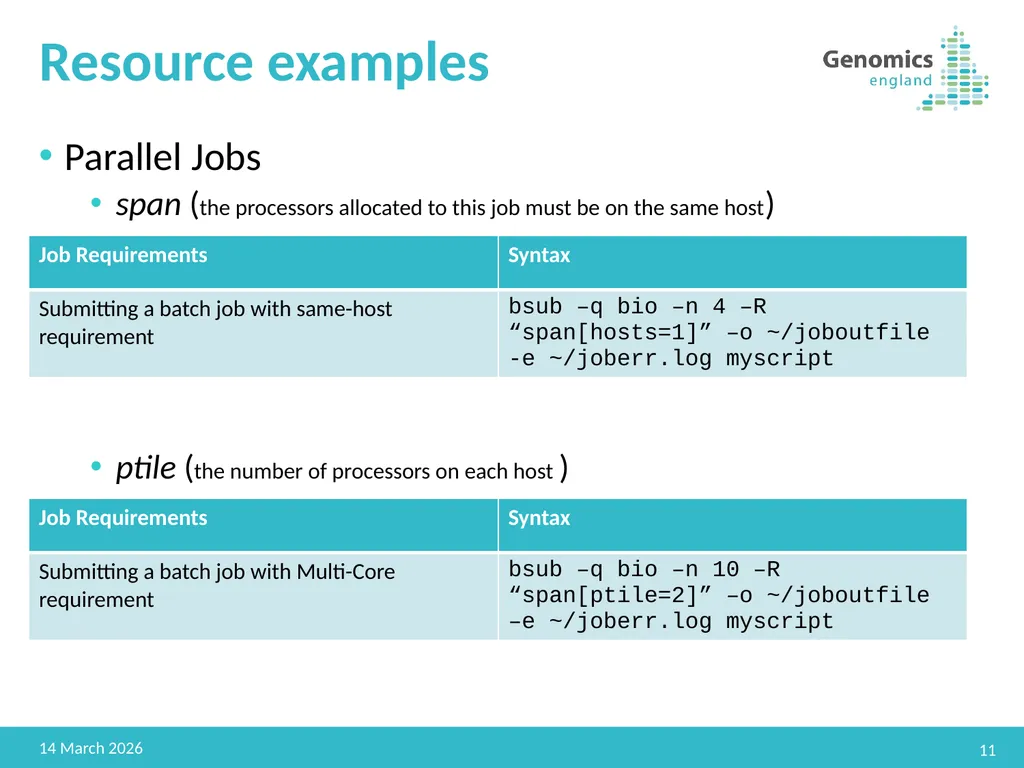
Resource examples 10 22 February 2019 A selection section (select). The selection section specifies the criteria for selecting execution hosts from the system.
An ordering section (order). The ordering section indicates how the hosts that meet the selection criteria should be sorted.
A resource usage section (rusage). The resource usage section specifies the expected resource consumption of the task.
A job spanning section (span). The job spanning section indicates if a parallel job should span across multiple hosts.<br>
An ordering section (order). The ordering section indicates how the hosts that meet the selection criteria should be sorted.
A resource usage section (rusage). The resource usage section specifies the expected resource consumption of the task.
A job spanning section (span). The job spanning section indicates if a parallel job should span across multiple hosts.<br>
11
Resource examples Parallel Jobs
span (the processors allocated to this job must be on the same host)
ptile (the number of processors on each host ) 11 22 February 2019<br>
span (the processors allocated to this job must be on the same host)
ptile (the number of processors on each host ) 11 22 February 2019<br>
12
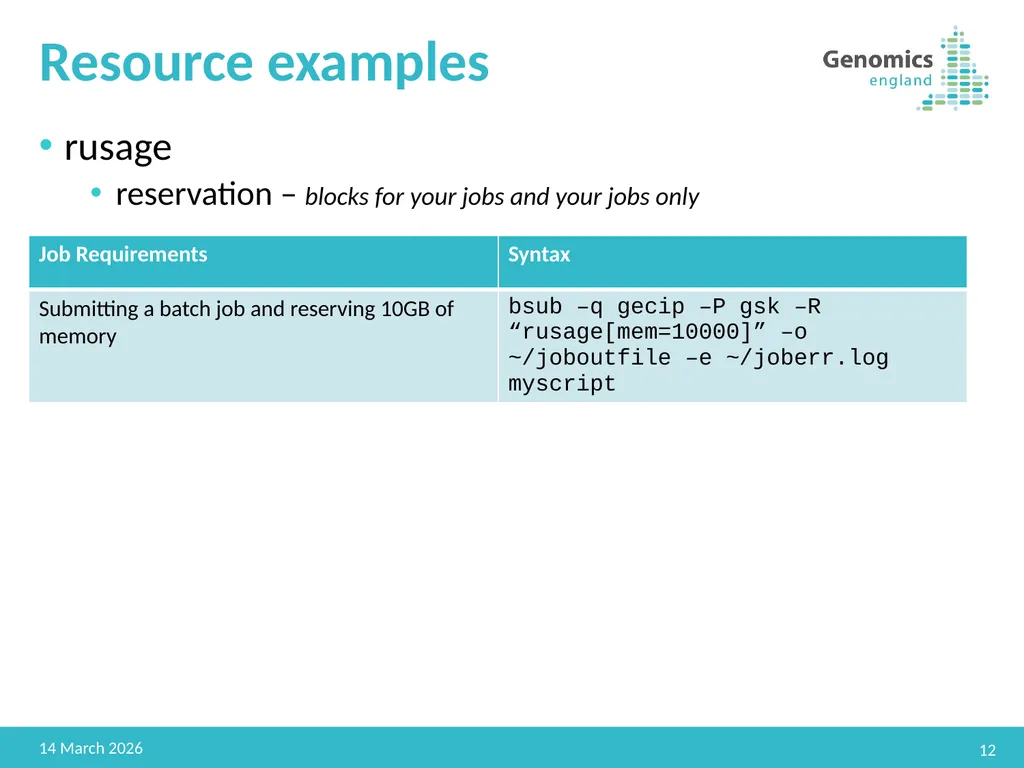
Resource examples rusage
reservation – blocks for your jobs and your jobs only 12 22 February 2019<br>
reservation – blocks for your jobs and your jobs only 12 22 February 2019<br>
13
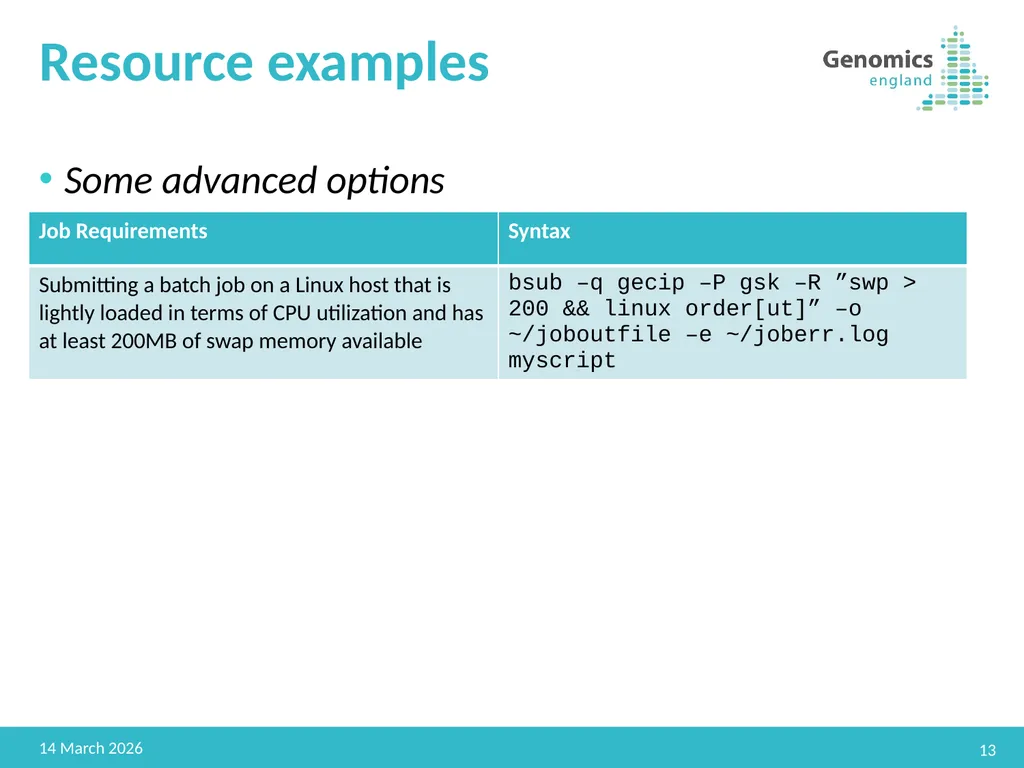
Resource examples Some advanced options 13 22 February 2019<br>
14
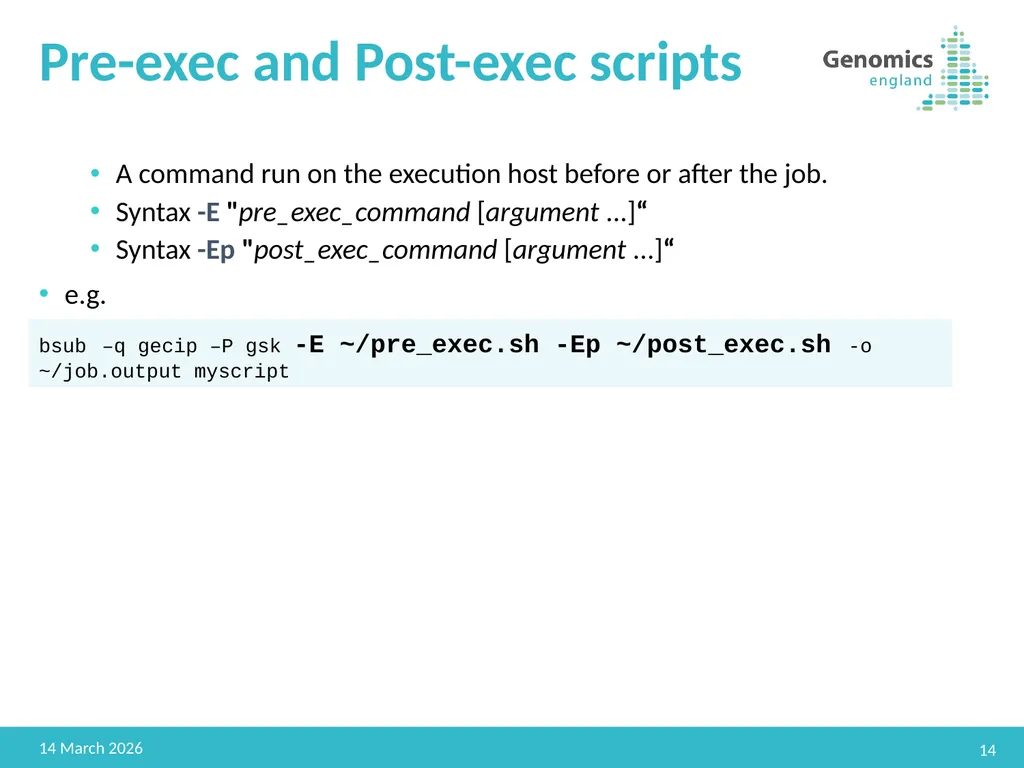
Pre-exec and Post-exec scripts A command run on the execution host before or after the job.
Syntax -E "pre_exec_command [argument ...]“
Syntax -Ep "post_exec_command [argument ...]“
e.g. 14 22 February 2019 bsub –q gecip –P gsk -E ~/pre_exec.sh -Ep ~/post_exec.sh -o ~/job.output myscript<br>
Syntax -E "pre_exec_command [argument ...]“
Syntax -Ep "post_exec_command [argument ...]“
e.g. 14 22 February 2019 bsub –q gecip –P gsk -E ~/pre_exec.sh -Ep ~/post_exec.sh -o ~/job.output myscript<br>
15
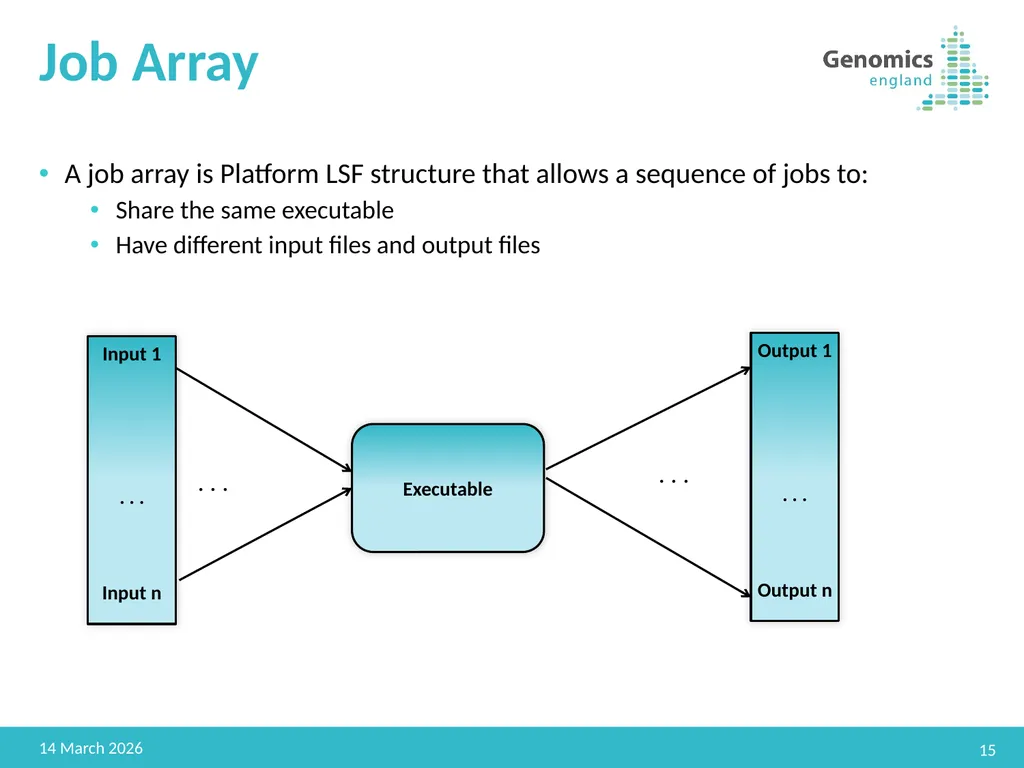
Job Array A job array is Platform LSF structure that allows a sequence of jobs to:
Share the same executable
Have different input files and output files 15 22 February 2019 Input 1
. . .
Input n . . . Executable Output 1
. . .
Output n . . .<br>
Share the same executable
Have different input files and output files 15 22 February 2019 Input 1
. . .
Input n . . . Executable Output 1
. . .
Output n . . .<br>
16
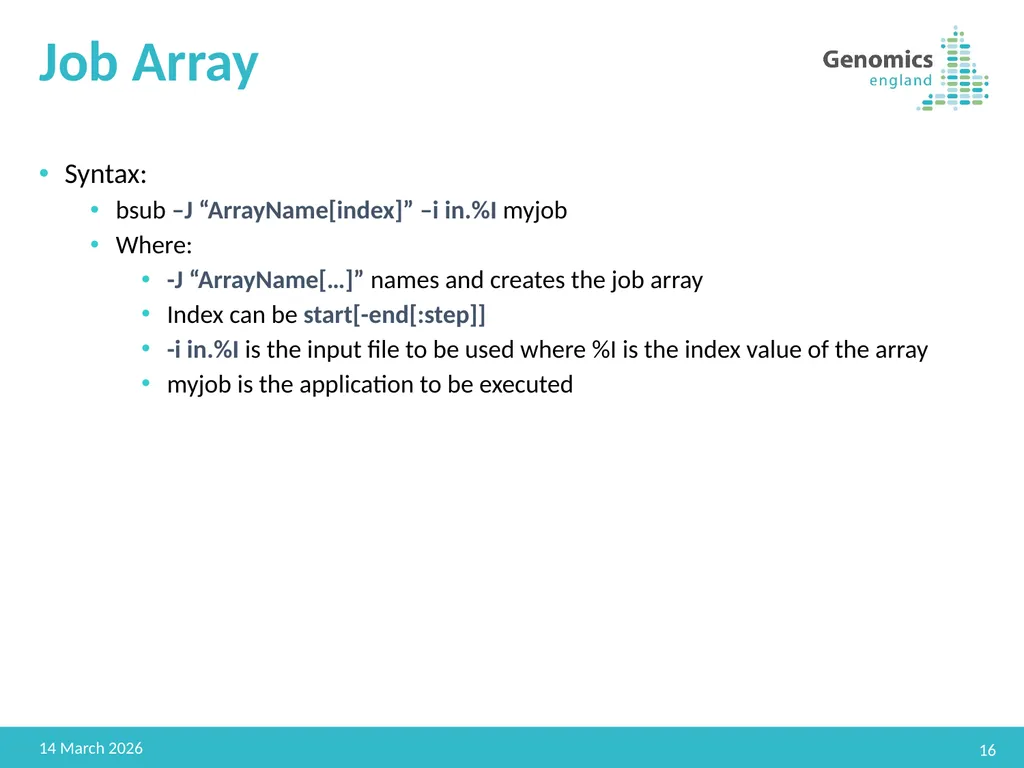
Job Array Syntax:
bsub –J “ArrayName[index]” –i in.%I myjob
Where:
-J “ArrayName[…]” names and creates the job array
Index can be start[-end[:step]]
-i in.%I is the input file to be used where %I is the index value of the array
myjob is the application to be executed 16 22 February 2019<br>
bsub –J “ArrayName[index]” –i in.%I myjob
Where:
-J “ArrayName[…]” names and creates the job array
Index can be start[-end[:step]]
-i in.%I is the input file to be used where %I is the index value of the array
myjob is the application to be executed 16 22 February 2019<br>
17
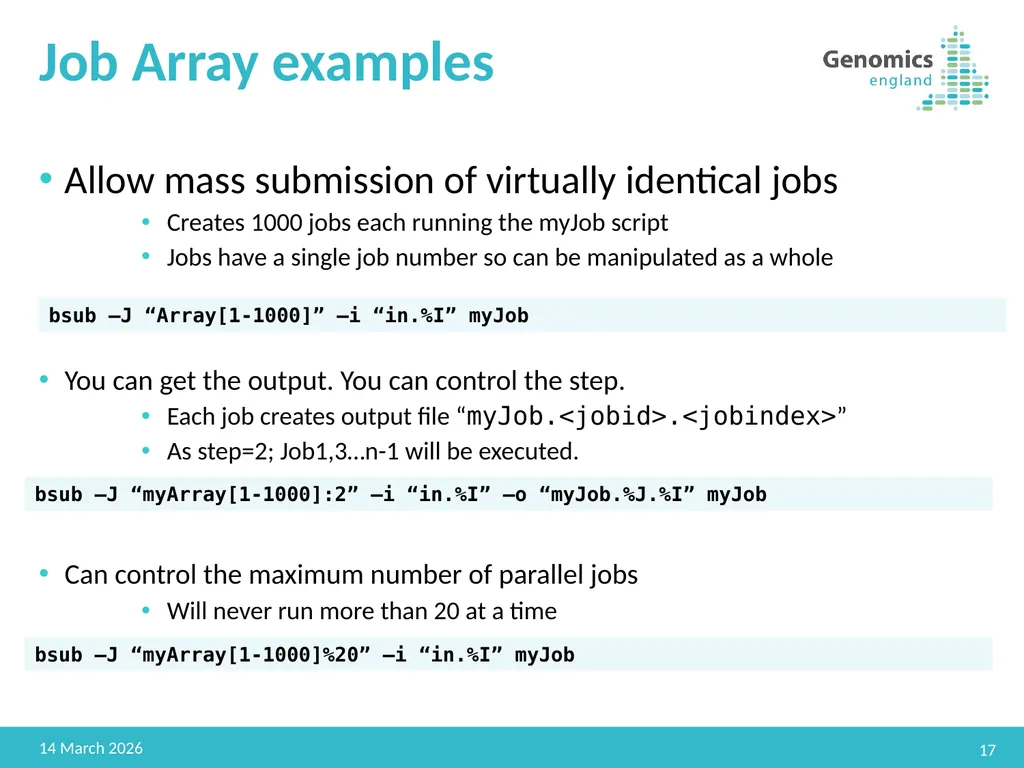
Job Array examples Allow mass submission of virtually identical jobs
Creates 1000 jobs each running the myJob script
Jobs have a single job number so can be manipulated as a whole
You can get the output. You can control the step.
Each job creates output file “myJob.<jobid>.<jobindex>”
As step=2; Job1,3…n-1 will be executed.
Can control the maximum number of parallel jobs
Will never run more than 20 at a time 17 22 February 2019 bsub –J “Array[1-1000]” –i “in.%I” myJob bsub –J “myArray[1-1000]:2” –i “in.%I” –o “myJob.%J.%I” myJob bsub –J “myArray[1-1000]%20” –i “in.%I” myJob<br>
Creates 1000 jobs each running the myJob script
Jobs have a single job number so can be manipulated as a whole
You can get the output. You can control the step.
Each job creates output file “myJob.<jobid>.<jobindex>”
As step=2; Job1,3…n-1 will be executed.
Can control the maximum number of parallel jobs
Will never run more than 20 at a time 17 22 February 2019 bsub –J “Array[1-1000]” –i “in.%I” myJob bsub –J “myArray[1-1000]:2” –i “in.%I” –o “myJob.%J.%I” myJob bsub –J “myArray[1-1000]%20” –i “in.%I” myJob<br>
18
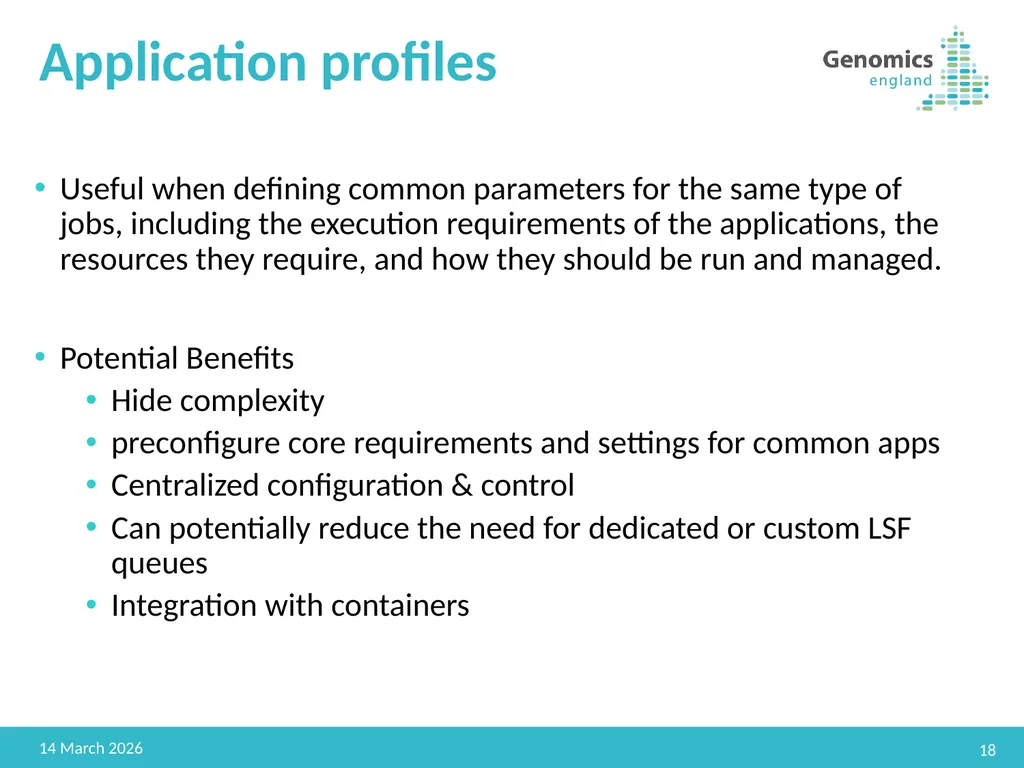
Application profiles Useful when defining common parameters for the same type of jobs, including the execution requirements of the applications, the resources they require, and how they should be run and managed.
Potential Benefits
Hide complexity
preconfigure core requirements and settings for common apps
Centralized configuration & control
Can potentially reduce the need for dedicated or custom LSF queues
Integration with containers 18 22 February 2019<br>
Potential Benefits
Hide complexity
preconfigure core requirements and settings for common apps
Centralized configuration & control
Can potentially reduce the need for dedicated or custom LSF queues
Integration with containers 18 22 February 2019<br>
19
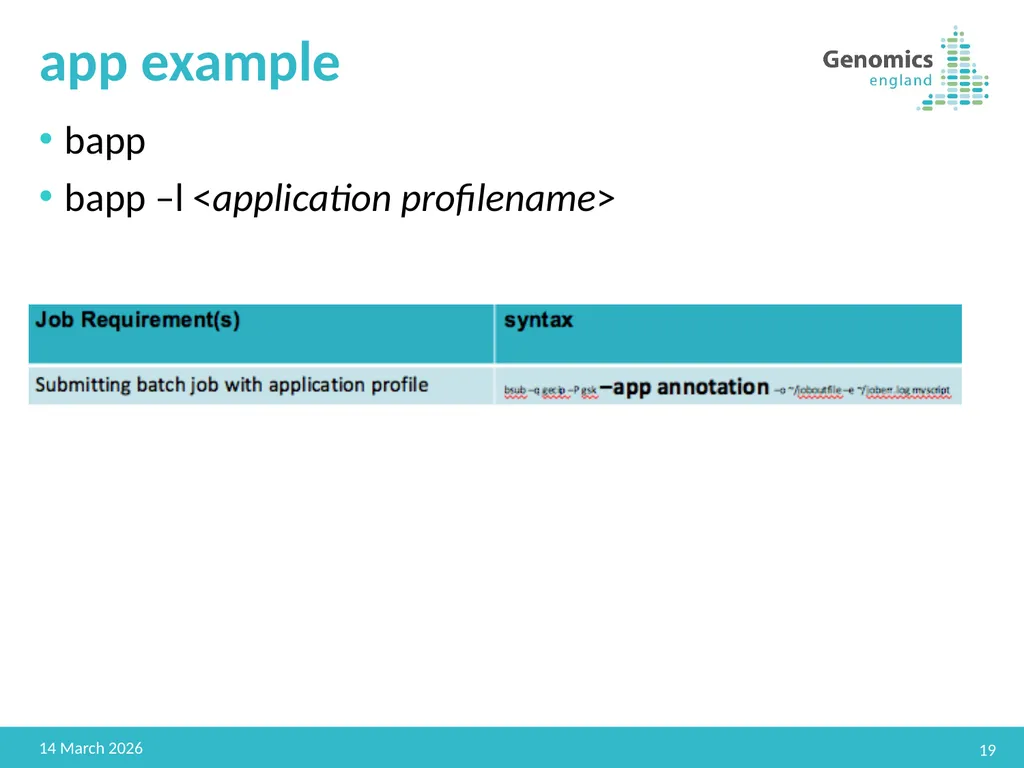
app example bapp
bapp –l <application profilename> 19 22 February 2019<br>
bapp –l <application profilename> 19 22 February 2019<br>
20
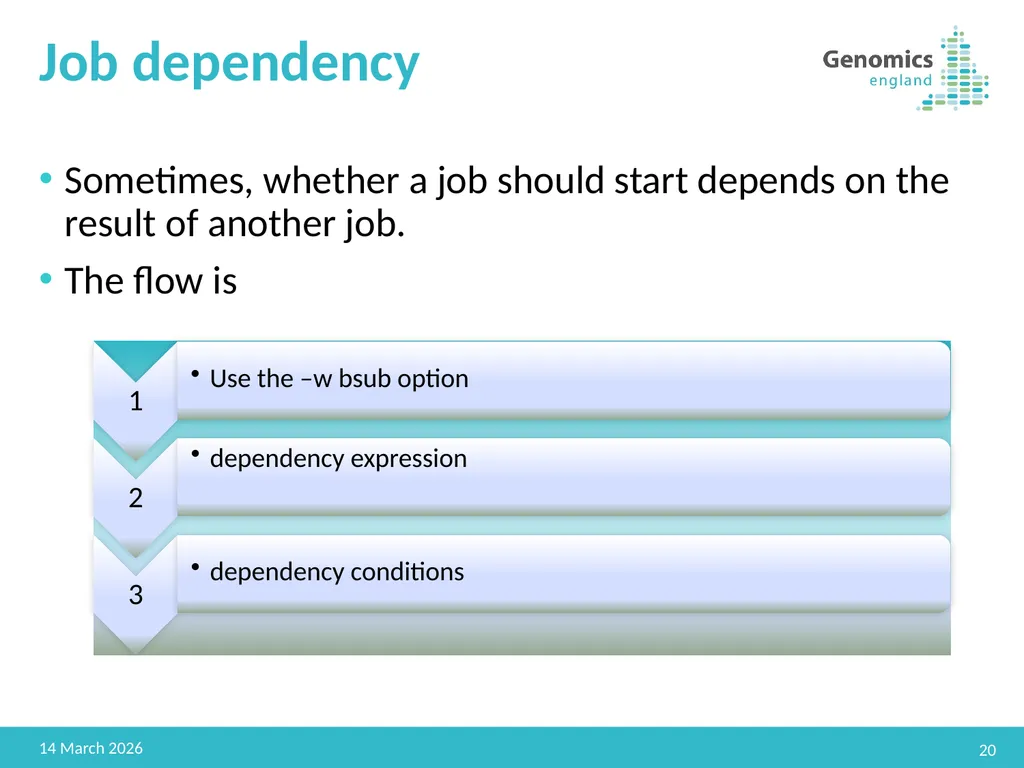
Job dependency Sometimes, whether a job should start depends on the result of another job.
The flow is 20 22 February 2019<br>
The flow is 20 22 February 2019<br>
21
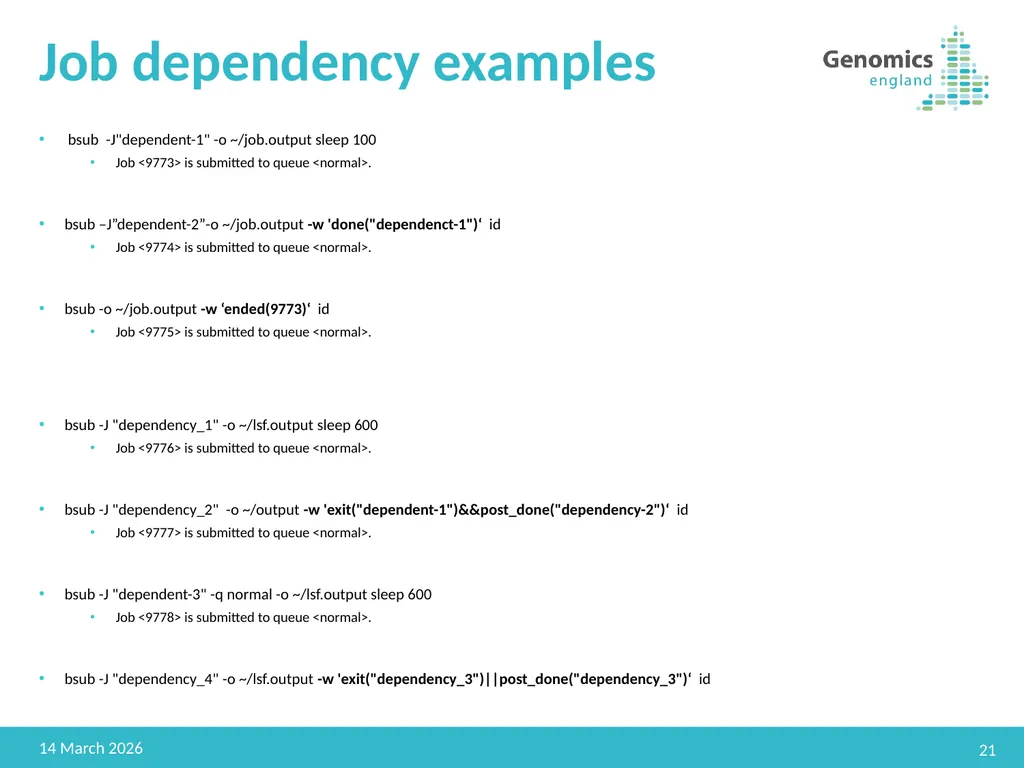
Job dependency examples bsub -J"dependent-1" -o ~/job.output sleep 100
Job <9773> is submitted to queue <normal>.
bsub –J”dependent-2”-o ~/job.output -w 'done("dependenct-1")‘ id
Job <9774> is submitted to queue <normal>.
bsub -o ~/job.output -w ‘ended(9773)‘ id
Job <9775> is submitted to queue <normal>.
bsub -J "dependency_1" -o ~/lsf.output sleep 600
Job <9776> is submitted to queue <normal>.
bsub -J "dependency_2" -o ~/output -w 'exit("dependent-1")&&post_done("dependency-2")‘ id
Job <9777> is submitted to queue <normal>.
bsub -J "dependent-3" -q normal -o ~/lsf.output sleep 600
Job <9778> is submitted to queue <normal>.
bsub -J "dependency_4" -o ~/lsf.output -w 'exit("dependency_3")||post_done("dependency_3")‘ id 21 22 February 2019<br>
Job <9773> is submitted to queue <normal>.
bsub –J”dependent-2”-o ~/job.output -w 'done("dependenct-1")‘ id
Job <9774> is submitted to queue <normal>.
bsub -o ~/job.output -w ‘ended(9773)‘ id
Job <9775> is submitted to queue <normal>.
bsub -J "dependency_1" -o ~/lsf.output sleep 600
Job <9776> is submitted to queue <normal>.
bsub -J "dependency_2" -o ~/output -w 'exit("dependent-1")&&post_done("dependency-2")‘ id
Job <9777> is submitted to queue <normal>.
bsub -J "dependent-3" -q normal -o ~/lsf.output sleep 600
Job <9778> is submitted to queue <normal>.
bsub -J "dependency_4" -o ~/lsf.output -w 'exit("dependency_3")||post_done("dependency_3")‘ id 21 22 February 2019<br>
22
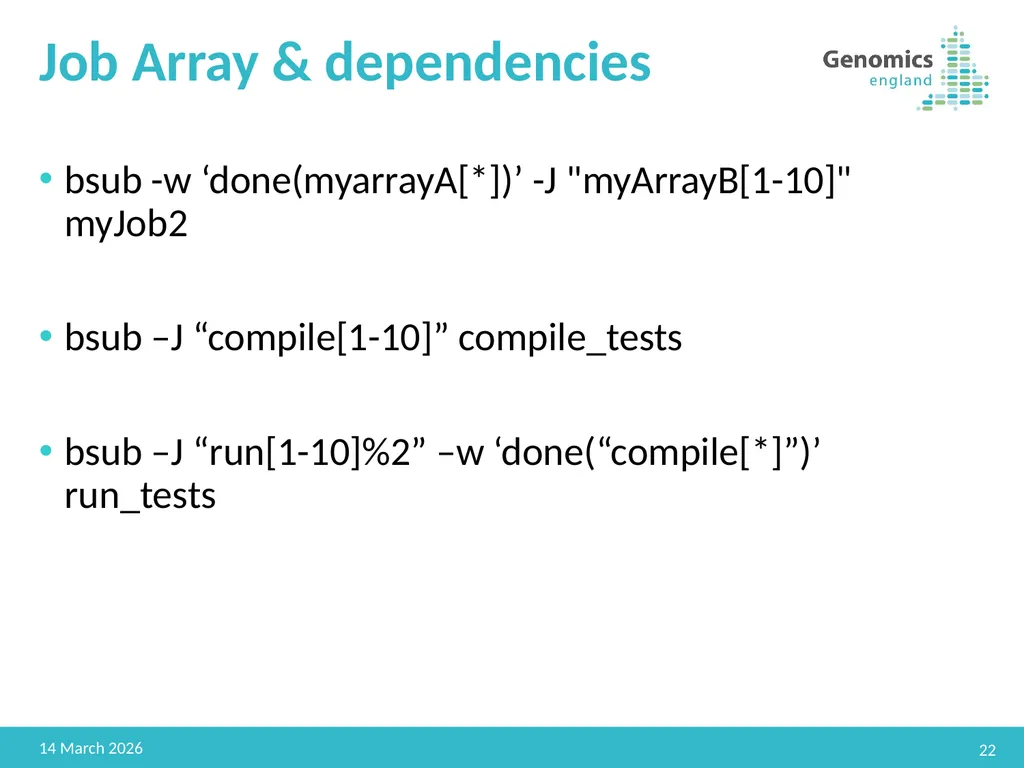
Job Array & dependencies bsub -w ‘done(myarrayA[*])’ -J "myArrayB[1-10]" myJob2
bsub –J “compile[1-10]” compile_tests
bsub –J “run[1-10]%2” –w ‘done(“compile[*]”)’ run_tests 22 22 February 2019<br>
bsub –J “compile[1-10]” compile_tests
bsub –J “run[1-10]%2” –w ‘done(“compile[*]”)’ run_tests 22 22 February 2019<br>
23
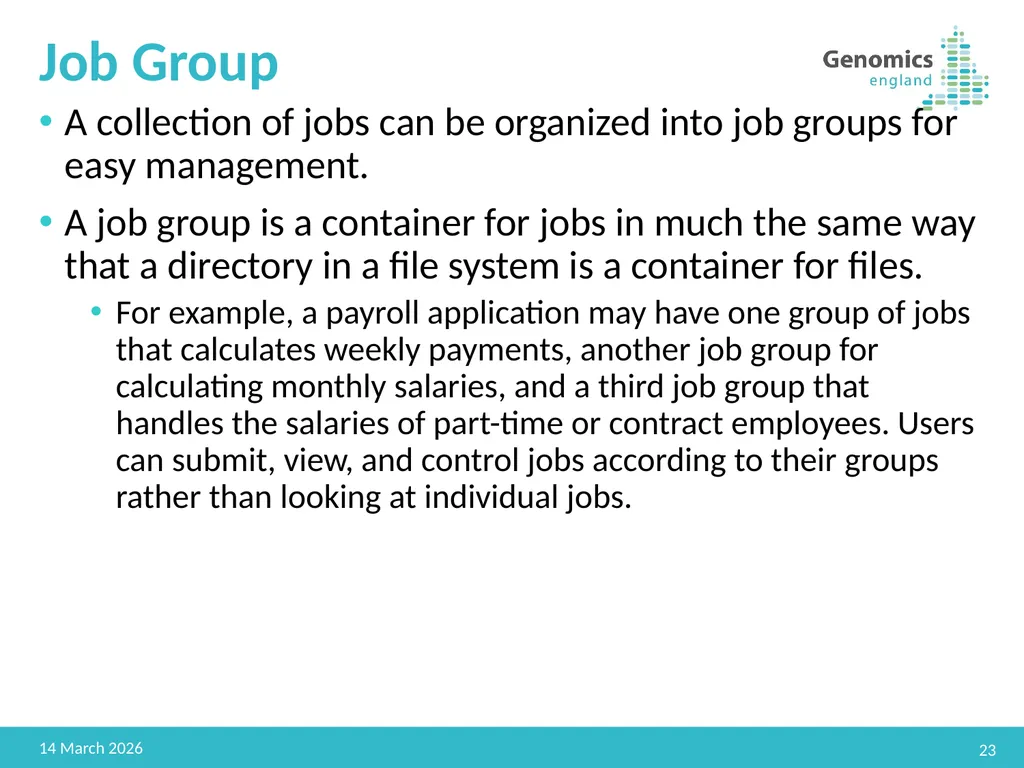
Job Group A collection of jobs can be organized into job groups for easy management.
A job group is a container for jobs in much the same way that a directory in a file system is a container for files.
For example, a payroll application may have one group of jobs that calculates weekly payments, another job group for calculating monthly salaries, and a third job group that handles the salaries of part-time or contract employees. Users can submit, view, and control jobs according to their groups rather than looking at individual jobs. 23 22 February 2019<br>
A job group is a container for jobs in much the same way that a directory in a file system is a container for files.
For example, a payroll application may have one group of jobs that calculates weekly payments, another job group for calculating monthly salaries, and a third job group that handles the salaries of part-time or contract employees. Users can submit, view, and control jobs according to their groups rather than looking at individual jobs. 23 22 February 2019<br>
24
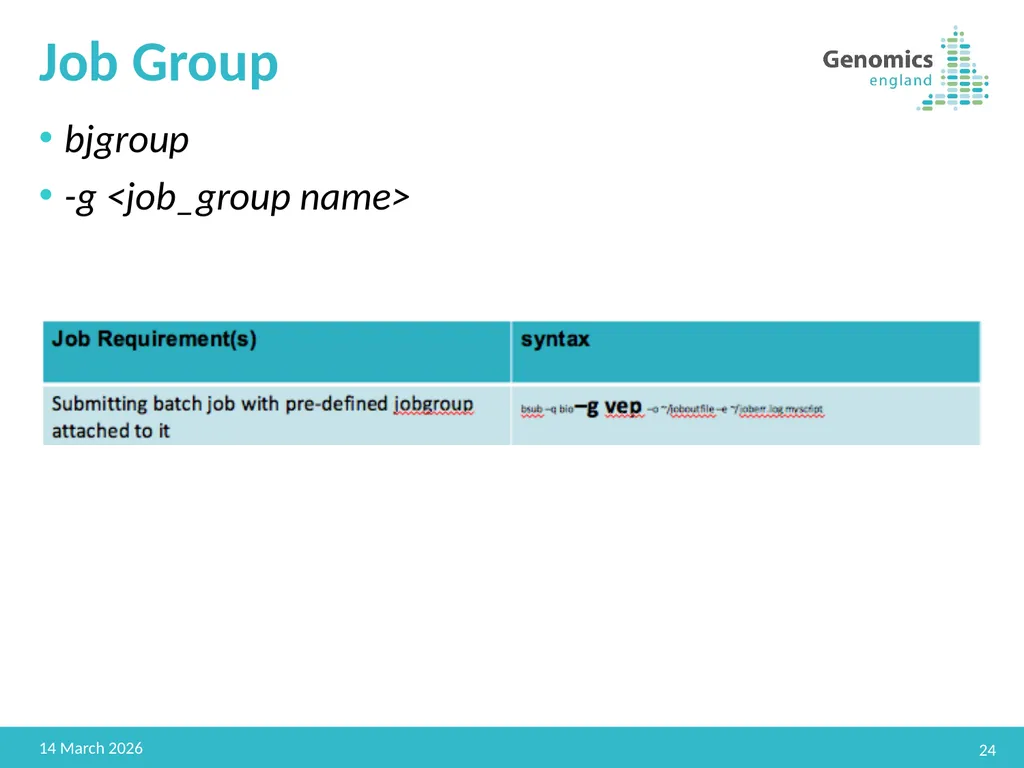
Job Group bjgroup
-g <job_group name> 24 22 February 2019<br>
-g <job_group name> 24 22 February 2019<br>
25
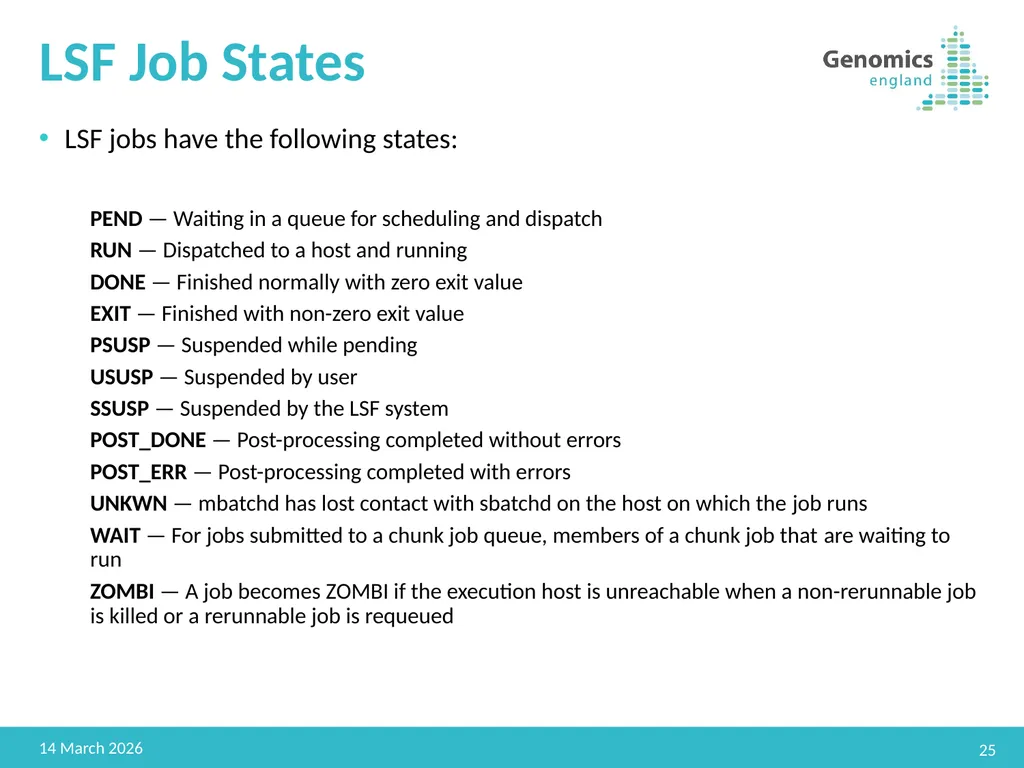
LSF Job States LSF jobs have the following states:
PEND — Waiting in a queue for scheduling and dispatch
RUN — Dispatched to a host and running
DONE — Finished normally with zero exit value
EXIT — Finished with non-zero exit value
PSUSP — Suspended while pending
USUSP — Suspended by user
SSUSP — Suspended by the LSF system
POST_DONE — Post-processing completed without errors
POST_ERR — Post-processing completed with errors
UNKWN — mbatchd has lost contact with sbatchd on the host on which the job runs
WAIT — For jobs submitted to a chunk job queue, members of a chunk job that are waiting to run
ZOMBI — A job becomes ZOMBI if the execution host is unreachable when a non-rerunnable job is killed or a rerunnable job is requeued 25 22 February 2019<br>
PEND — Waiting in a queue for scheduling and dispatch
RUN — Dispatched to a host and running
DONE — Finished normally with zero exit value
EXIT — Finished with non-zero exit value
PSUSP — Suspended while pending
USUSP — Suspended by user
SSUSP — Suspended by the LSF system
POST_DONE — Post-processing completed without errors
POST_ERR — Post-processing completed with errors
UNKWN — mbatchd has lost contact with sbatchd on the host on which the job runs
WAIT — For jobs submitted to a chunk job queue, members of a chunk job that are waiting to run
ZOMBI — A job becomes ZOMBI if the execution host is unreachable when a non-rerunnable job is killed or a rerunnable job is requeued 25 22 February 2019<br>
26
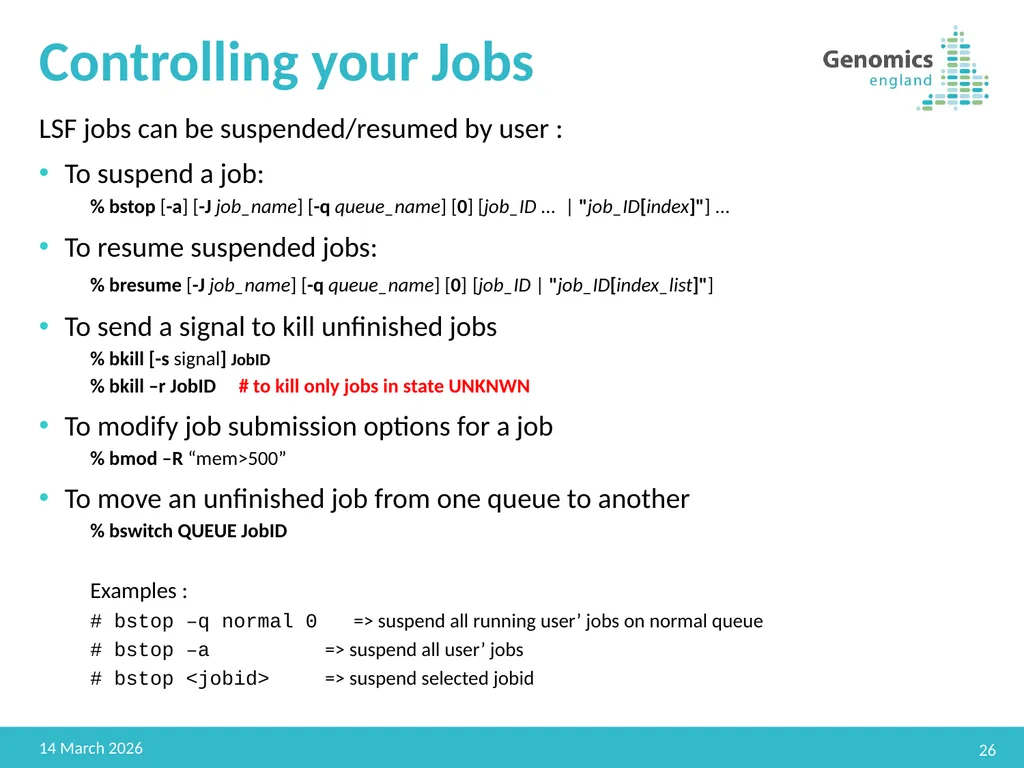
Controlling your Jobs LSF jobs can be suspended/resumed by user :
To suspend a job:
% bstop [-a] [-J job_name] [-q queue_name] [0] [job_ID ... | "job_ID[index]"] ...
To resume suspended jobs:
% bresume [-J job_name] [-q queue_name] [0] [job_ID | "job_ID[index_list]"]
To send a signal to kill unfinished jobs
% bkill [-s signal] JobID
% bkill –r JobID # to kill only jobs in state UNKNWN
To modify job submission options for a job
% bmod –R “mem>500”
To move an unfinished job from one queue to another
% bswitch QUEUE JobID
Examples :
# bstop –q normal 0 => suspend all running user’ jobs on normal queue
# bstop –a => suspend all user’ jobs
# bstop <jobid> => suspend selected jobid 26 22 February 2019<br>
To suspend a job:
% bstop [-a] [-J job_name] [-q queue_name] [0] [job_ID ... | "job_ID[index]"] ...
To resume suspended jobs:
% bresume [-J job_name] [-q queue_name] [0] [job_ID | "job_ID[index_list]"]
To send a signal to kill unfinished jobs
% bkill [-s signal] JobID
% bkill –r JobID # to kill only jobs in state UNKNWN
To modify job submission options for a job
% bmod –R “mem>500”
To move an unfinished job from one queue to another
% bswitch QUEUE JobID
Examples :
# bstop –q normal 0 => suspend all running user’ jobs on normal queue
# bstop –a => suspend all user’ jobs
# bstop <jobid> => suspend selected jobid 26 22 February 2019<br>
27
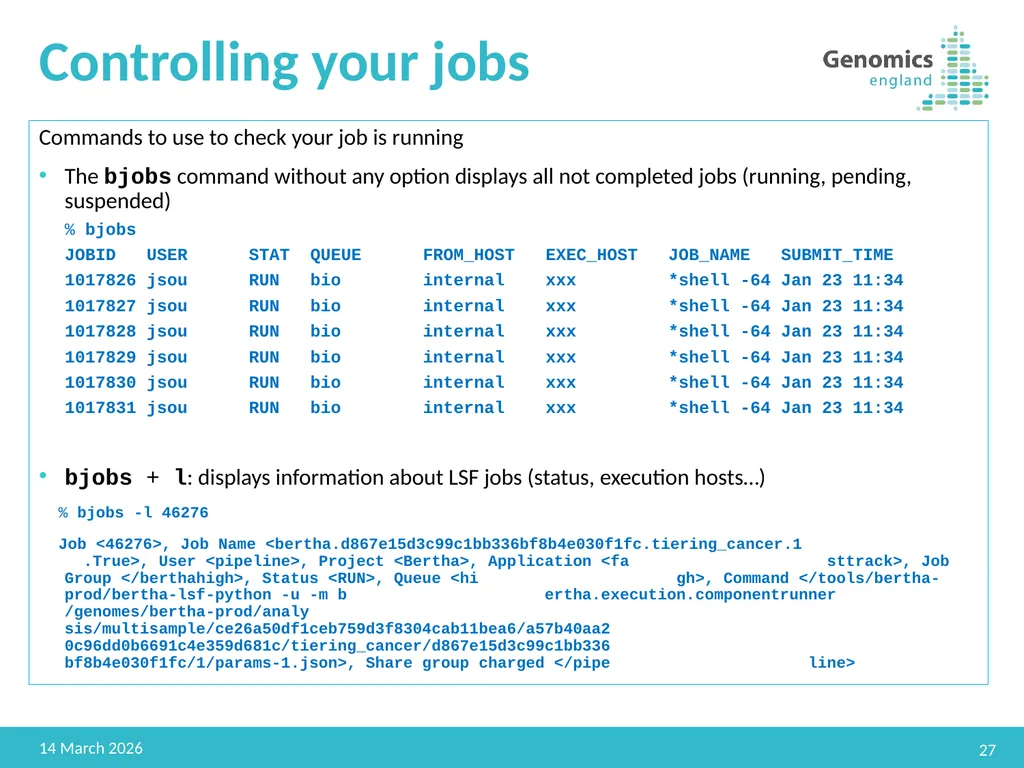
Controlling your jobs Commands to use to check your job is running
The bjobs command without any option displays all not completed jobs (running, pending, suspended)
% bjobs
JOBID USER STAT QUEUE FROM_HOST EXEC_HOST JOB_NAME SUBMIT_TIME
1017826 jsou RUN bio internal xxx *shell -64 Jan 23 11:34
1017827 jsou RUN bio internal xxx *shell -64 Jan 23 11:34
1017828 jsou RUN bio internal xxx *shell -64 Jan 23 11:34
1017829 jsou RUN bio internal xxx *shell -64 Jan 23 11:34
1017830 jsou RUN bio internal xxx *shell -64 Jan 23 11:34
1017831 jsou RUN bio internal xxx *shell -64 Jan 23 11:34
bjobs + l: displays information about LSF jobs (status, execution hosts…)
% bjobs -l 46276
Job <46276>, Job Name <bertha.d867e15d3c99c1bb336bf8b4e030f1fc.tiering_cancer.1 .True>, User <pipeline>, Project <Bertha>, Application <fa sttrack>, Job Group </berthahigh>, Status <RUN>, Queue <hi gh>, Command </tools/bertha-prod/bertha-lsf-python -u -m b ertha.execution.componentrunner /genomes/bertha-prod/analy sis/multisample/ce26a50df1ceb759d3f8304cab11bea6/a57b40aa2 0c96dd0b6691c4e359d681c/tiering_cancer/d867e15d3c99c1bb336 bf8b4e030f1fc/1/params-1.json>, Share group charged </pipe line> 27 22 February 2019<br>
The bjobs command without any option displays all not completed jobs (running, pending, suspended)
% bjobs
JOBID USER STAT QUEUE FROM_HOST EXEC_HOST JOB_NAME SUBMIT_TIME
1017826 jsou RUN bio internal xxx *shell -64 Jan 23 11:34
1017827 jsou RUN bio internal xxx *shell -64 Jan 23 11:34
1017828 jsou RUN bio internal xxx *shell -64 Jan 23 11:34
1017829 jsou RUN bio internal xxx *shell -64 Jan 23 11:34
1017830 jsou RUN bio internal xxx *shell -64 Jan 23 11:34
1017831 jsou RUN bio internal xxx *shell -64 Jan 23 11:34
bjobs + l: displays information about LSF jobs (status, execution hosts…)
% bjobs -l 46276
Job <46276>, Job Name <bertha.d867e15d3c99c1bb336bf8b4e030f1fc.tiering_cancer.1 .True>, User <pipeline>, Project <Bertha>, Application <fa sttrack>, Job Group </berthahigh>, Status <RUN>, Queue <hi gh>, Command </tools/bertha-prod/bertha-lsf-python -u -m b ertha.execution.componentrunner /genomes/bertha-prod/analy sis/multisample/ce26a50df1ceb759d3f8304cab11bea6/a57b40aa2 0c96dd0b6691c4e359d681c/tiering_cancer/d867e15d3c99c1bb336 bf8b4e030f1fc/1/params-1.json>, Share group charged </pipe line> 27 22 February 2019<br>
28
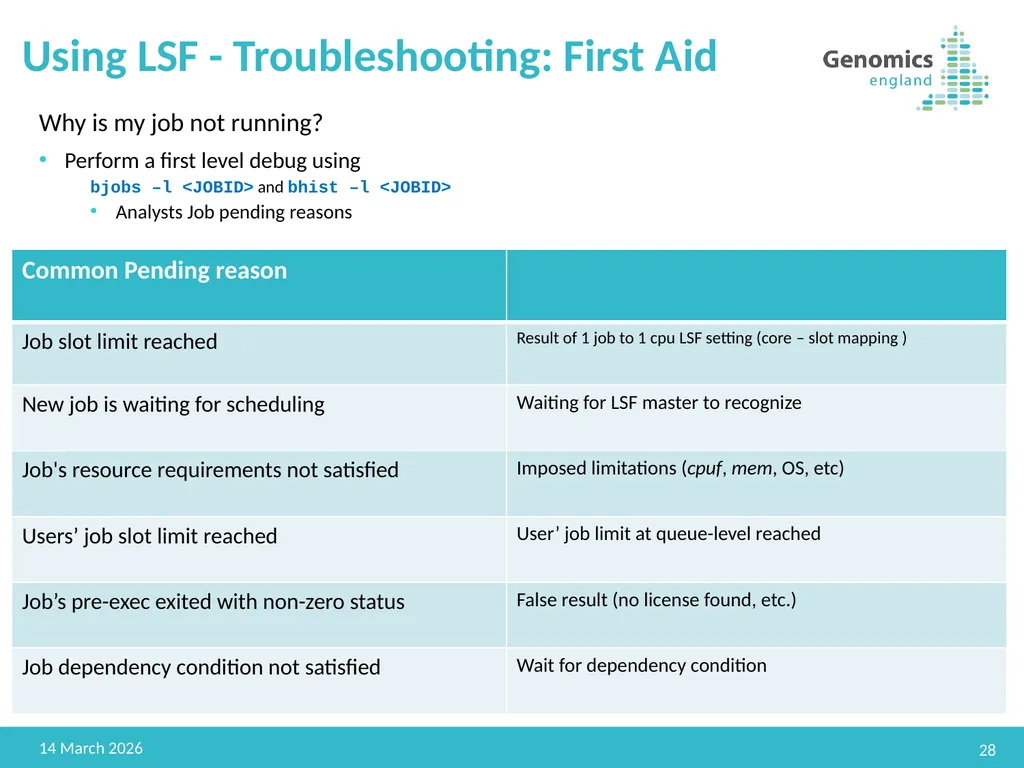
Using LSF - Troubleshooting: First Aid Why is my job not running?
Perform a first level debug using
bjobs –l <JOBID> and bhist –l <JOBID>
Analysts Job pending reasons 28 22 February 2019<br>
Perform a first level debug using
bjobs –l <JOBID> and bhist –l <JOBID>
Analysts Job pending reasons 28 22 February 2019<br>
29
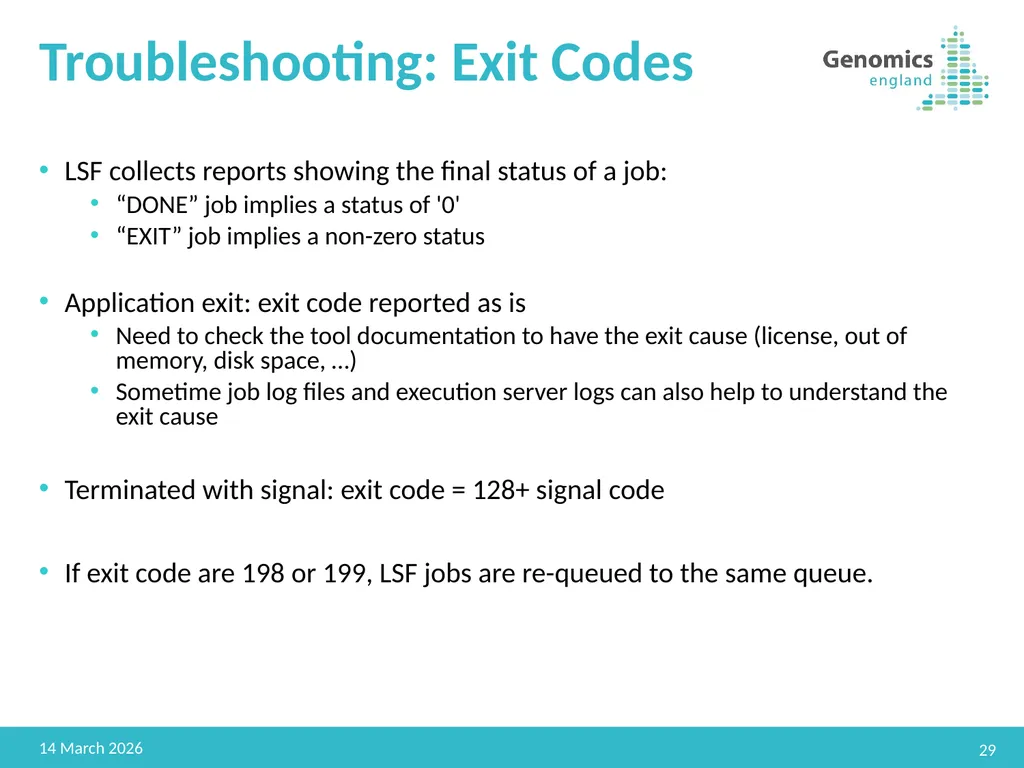
Troubleshooting: Exit Codes LSF collects reports showing the final status of a job:
“DONE” job implies a status of '0'
“EXIT” job implies a non-zero status
Application exit: exit code reported as is
Need to check the tool documentation to have the exit cause (license, out of memory, disk space, …)
Sometime job log files and execution server logs can also help to understand the exit cause
Terminated with signal: exit code = 128+ signal code
If exit code are 198 or 199, LSF jobs are re-queued to the same queue. 29 22 February 2019<br>
“DONE” job implies a status of '0'
“EXIT” job implies a non-zero status
Application exit: exit code reported as is
Need to check the tool documentation to have the exit cause (license, out of memory, disk space, …)
Sometime job log files and execution server logs can also help to understand the exit cause
Terminated with signal: exit code = 128+ signal code
If exit code are 198 or 199, LSF jobs are re-queued to the same queue. 29 22 February 2019<br>
30
Q&A 30 22 February 2019<br>