Git Branching Models and Workflows 1 Kevin Scannell, David Ferry CSCI 5030 Principles of Software Development Saint Louis University St. Louis, MO 63103 CSCI 5030 Principles of Software Development 2 A Successful Git Branching Model
"Git Branching Models and Workflows 1 Kevin" is the property of its rightful owner. Permission is granted to
download and print the materials on this website for personal, non-commercial use only, and to display it
on your personal computer provided you do not modify the materials and that you retain all copyright
notices contained in the materials. By downloading content from our website, you accept the terms of this
agreement.
Presentation Transcript
01
Git Branching Models and Workflows 1 Kevin Scannell, David Ferry CSCI 5030 – Principles of Software Development
Saint Louis University St. Louis, MO 63103<br>
02
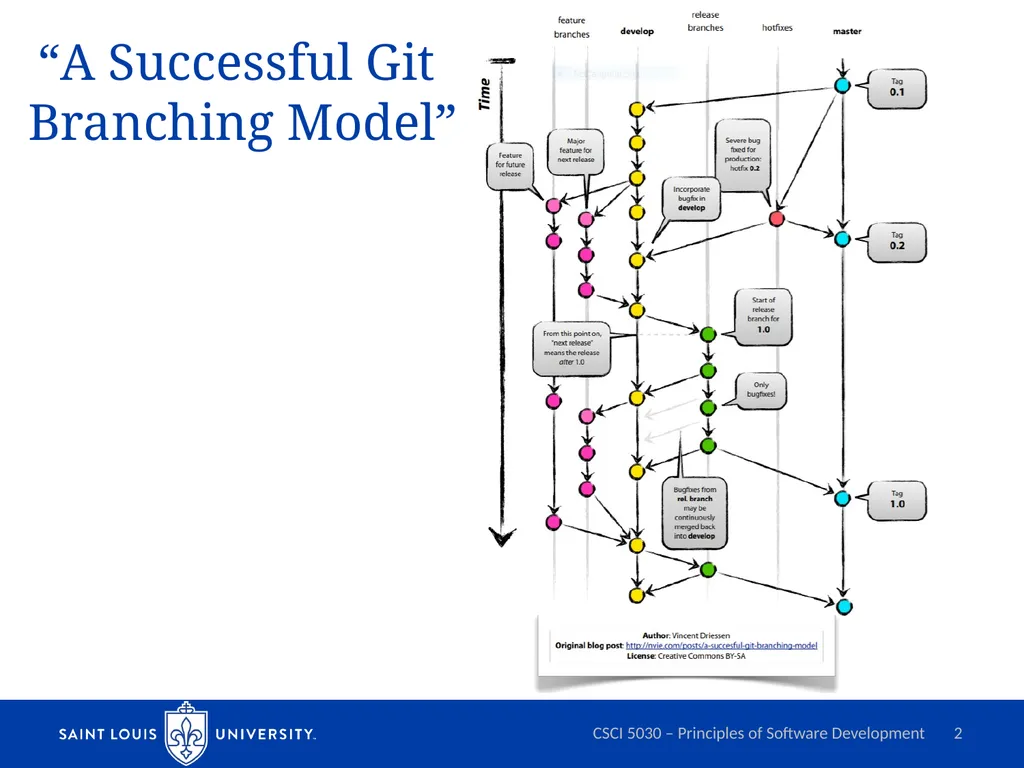
CSCI 5030 – Principles of Software Development 2 “A Successful Git Branching Model”<br>
03
“A Successful Git Branching Model” Git allows frictionless branching and merging
Notes branching is an advanced topics in centralized/SVN books
Branches that live forever: master and develop
master is stable, always production ready, pushes to master are releases by definition
develop is used to integrate completed features (where nightly builds might happen)
Other branches: features, releases, hotfixes
No other branches allowed
We never branch off of a feature branch, etc. CSCI 5030 – Principles of Software Development 3<br>
04
“A Successful Git Branching Model” Feature branches
Branch off develop and merge back to develop (or discarded)
Almost all changes, including trivial ones, or long-lived feature development
Release branches
Branch off develop and merge to both develop and master.
Created in leadup to release, no new features added once branched, just bug fixes
Hotfix branches
Branch off master and merge back to master and develop
Quick fixes of critical bugs in master branch CSCI 5030 – Principles of Software Development 4<br>
05
Why is Git Branching Different? Compare to the centralized approach
Branches are full, but lightweight copies
Implemented as a pointer to a commit
Centralized version control might be as heavyweight as full source code copy
“Workspace-oriented”
Commits are “snapshots” of the entire project
Branches are copies of the entire project
Versus revision histories of specific files
Feature branches keep prototype code separate from integration-ready code
Especially key when multiple developers are working simultaneously CSCI 5030 – Principles of Software Development 5<br>
06
“A Successful Git Branching Model” Devil’s Advocate:
Long-lived feature branches
Integration gets harder the longer you’re separate
Continuous integration should be gold standard
Shared remote branches
Two or three developers can go off on their own
Planned changes should be available on development branch as soon as possible
Make releases using new branches rather than keeping master branch special
Semantics? CSCI 5030 – Principles of Software Development 6<br>
07
“Distributed Git Distributed Workflows” Centralized Workflow
All developers push/pull to a single central repository
Integration-Manager Workflow
“Project maintainer” integrates (merges) contributions in their repository, validates them, and pushes changes to the official repo
Very common in open source projects
Common in medium-large teams
“integration manager” could be peer reviewers
Dictator and Lieutenants Workflow
Multiple project maintainers for very large projects CSCI 5030 – Principles of Software Development 7<br>
08
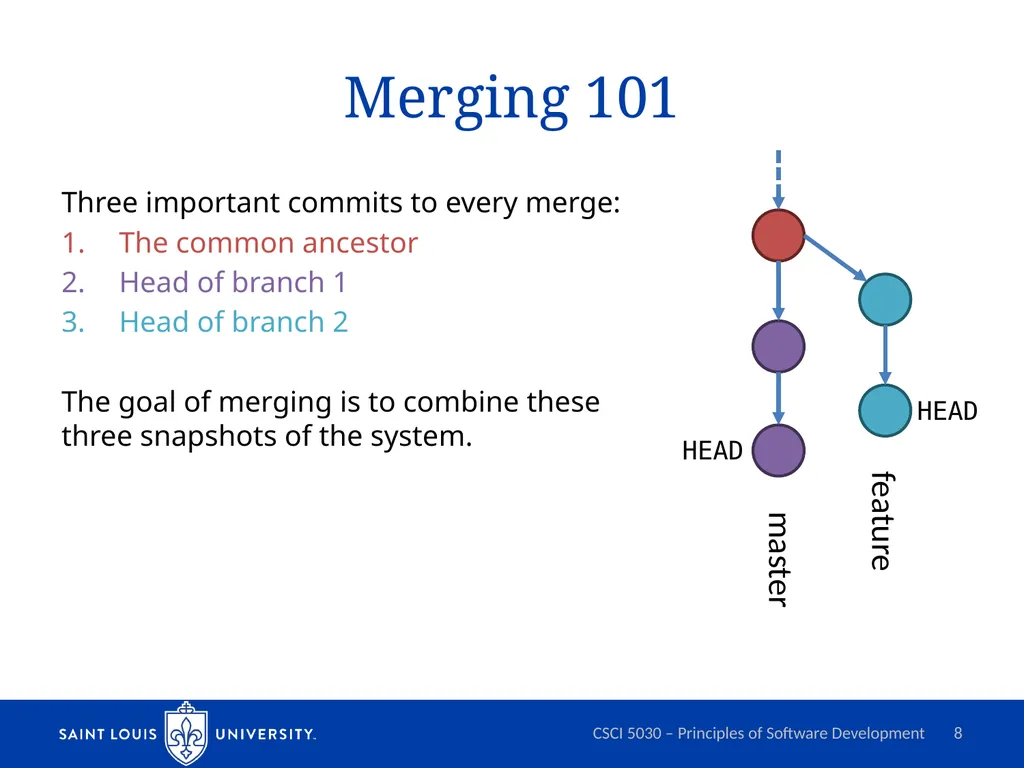
Merging 101 Three important commits to every merge:
The common ancestor
Head of branch 1
Head of branch 2
The goal of merging is to combine these three snapshots of the system. CSCI 5030 – Principles of Software Development 8 master feature HEAD HEAD<br>
09
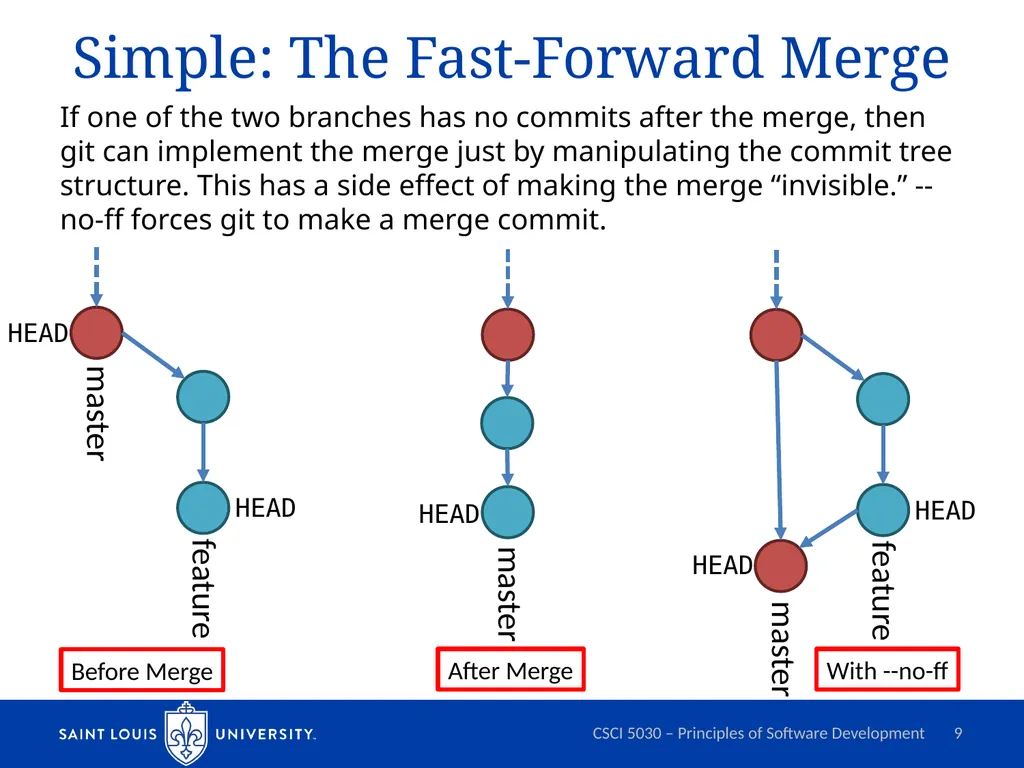
Simple: The Fast-Forward Merge If one of the two branches has no commits after the merge, then git can implement the merge just by manipulating the commit tree structure. This has a side effect of making the merge “invisible.” --no-ff forces git to make a merge commit. CSCI 5030 – Principles of Software Development 9 Before Merge After Merge With --no-ff<br>
10
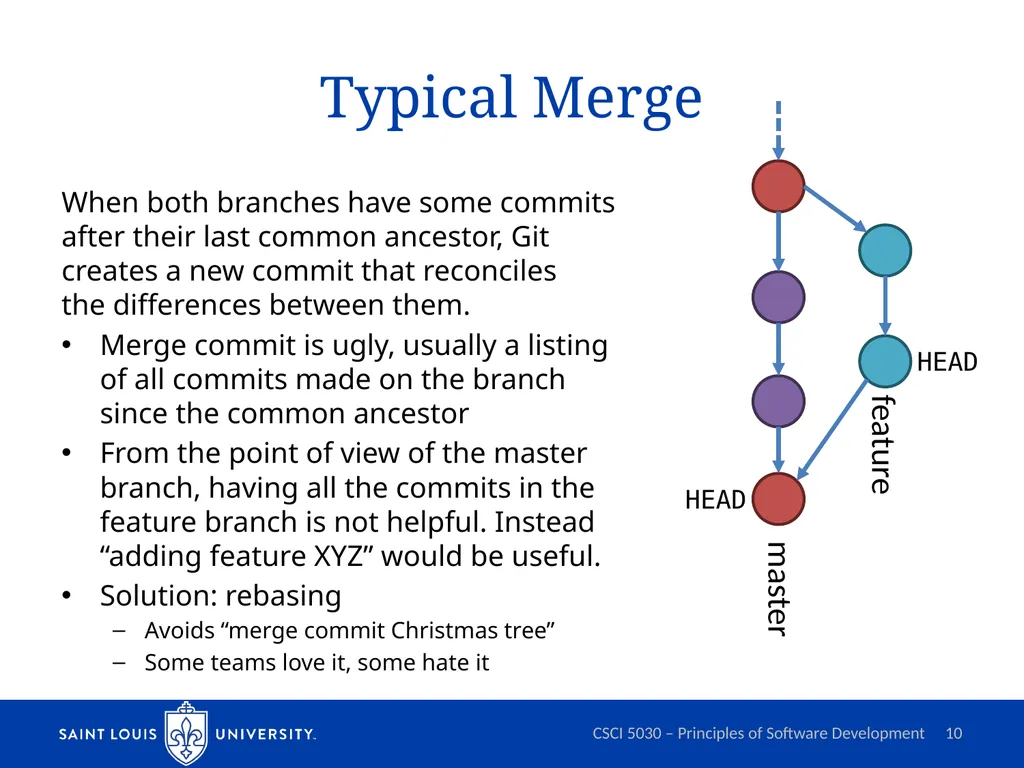
Typical Merge When both branches have some commits after their last common ancestor, Git creates a new commit that reconciles the differences between them.
Merge commit is ugly, usually a listing of all commits made on the branch since the common ancestor
From the point of view of the master branch, having all the commits in the feature branch is not helpful. Instead “adding feature XYZ” would be useful.
Solution: rebasing
Avoids “merge commit Christmas tree”
Some teams love it, some hate it CSCI 5030 – Principles of Software Development 10 master feature HEAD HEAD<br>
11
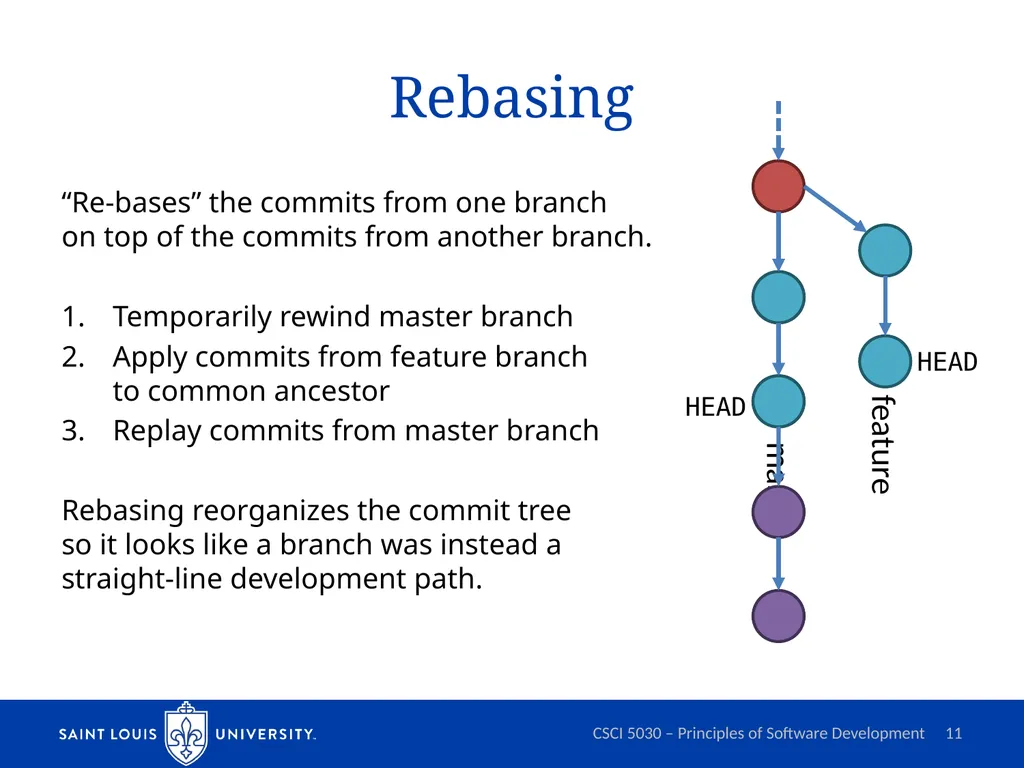
Rebasing “Re-bases” the commits from one branch on top of the commits from another branch.
Temporarily rewind master branch
Apply commits from feature branch to common ancestor
Replay commits from master branch
Rebasing reorganizes the commit tree so it looks like a branch was instead a straight-line development path. CSCI 5030 – Principles of Software Development 11 master feature HEAD HEAD<br>
12
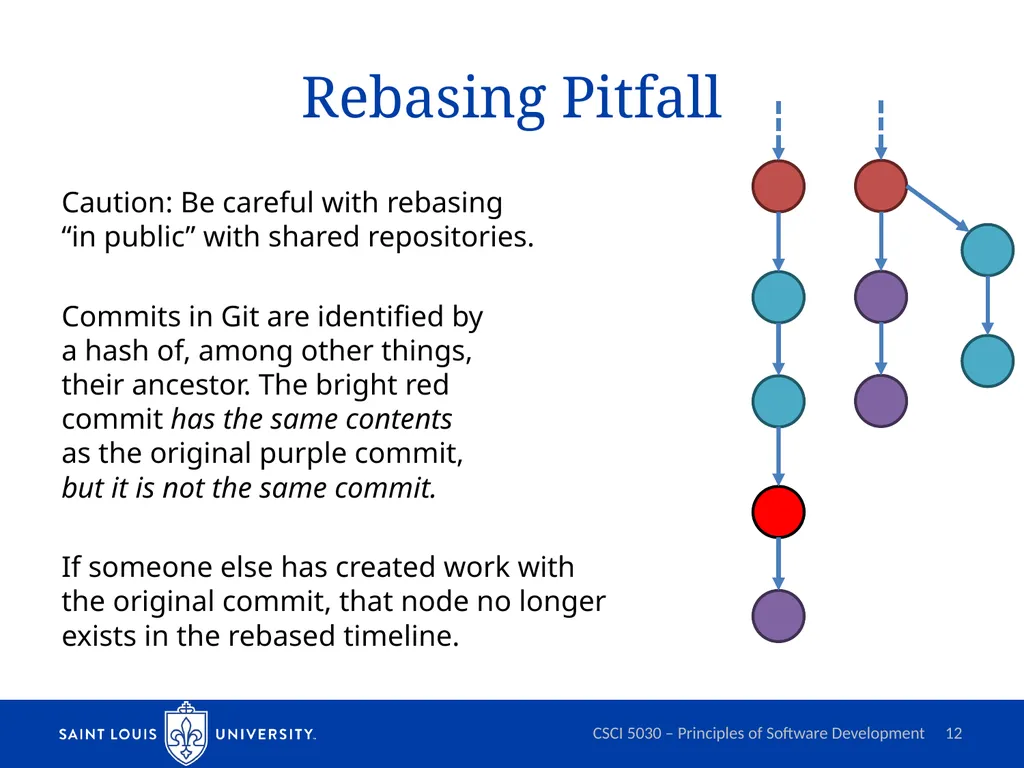
Rebasing Pitfall Caution: Be careful with rebasing “in public” with shared repositories.
Commits in Git are identified by a hash of, among other things, their ancestor. The bright red commit has the same contents as the original purple commit, but it is not the same commit.
If someone else has created work with the original commit, that node no longer exists in the rebased timeline. CSCI 5030 – Principles of Software Development 12<br>
13
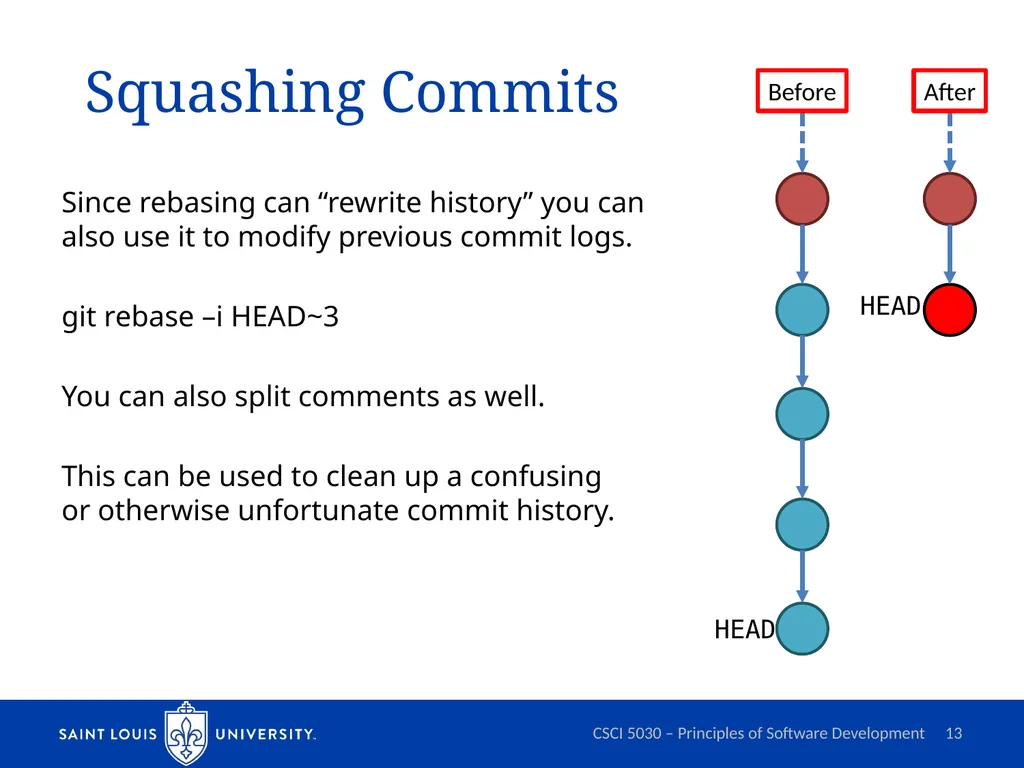
Squashing Commits Since rebasing can “rewrite history” you can also use it to modify previous commit logs.
git rebase –i HEAD~3
You can also split comments as well.
This can be used to clean up a confusing or otherwise unfortunate commit history. CSCI 5030 – Principles of Software Development 13 HEAD HEAD Before After<br>