
Hands-On Microsoft Windows Server 2016 2nd Edition
GB
Published · 51 slides · 0 views
1 / 1
Description
Hands-On Microsoft Windows Server 2016 2nd Edition Chapter 4 Introduction to Active Directory and Account Management 2018 Cengage. All Rights Reserved. May not be copied, scanned, or duplicated, in whole or in part, except for use as
Related Topics
Share
Embed code
Download this presentation From Below
"Hands-On Microsoft Windows Server 2016 2nd Edition" is the property of its rightful owner. Permission is granted to download and print the materials on this website for personal, non-commercial use only, and to display it on your personal computer provided you do not modify the materials and that you retain all copyright notices contained in the materials. By downloading content from our website, you accept the terms of this agreement.
Presentation Transcript
01
Hands-On Microsoft Windows Server 2016
2nd Edition Chapter 4
Introduction to Active Directory and Account Management © 2018 Cengage. All Rights Reserved. May not be copied, scanned, or duplicated, in whole or in part, except for use as permitted in a license distributed with a certain product or service or otherwise on a password-protected website for classroom use.<br>
Introduction to Active Directory and Account Management © 2018 Cengage. All Rights Reserved. May not be copied, scanned, or duplicated, in whole or in part, except for use as permitted in a license distributed with a certain product or service or otherwise on a password-protected website for classroom use.<br>
02
Objectives Understand Active Directory basic concepts
Install and configure Active Directory
Implement Active Directory containers
Understand Azure Active Directory
Create and manage user accounts
Configure and use security groups
Understand user profiles
Describe important additional features in Active Directory © 2018 Cengage. May not be copied, scanned, or duplicated, in whole or in part, except for use as permitted in a license distributed with a certain product or service or otherwise on a password-protected website for classroom use.<br>
Install and configure Active Directory
Implement Active Directory containers
Understand Azure Active Directory
Create and manage user accounts
Configure and use security groups
Understand user profiles
Describe important additional features in Active Directory © 2018 Cengage. May not be copied, scanned, or duplicated, in whole or in part, except for use as permitted in a license distributed with a certain product or service or otherwise on a password-protected website for classroom use.<br>
03
Active Directory Basics (1 of 4) Active Directory
Directory service that houses information about all network resources such as servers, printers, user accounts, groups of user accounts, security policies, and other information
Directory service
Responsible for providing a central listing of resources and ways to quickly find and access specific resources and for providing a way to manage network resources
Windows Server 2016 uses Active Directory to manage accounts, groups, and many more network management services © 2018 Cengage. All Rights Reserved. May not be copied, scanned, or duplicated, in whole or in part, except for use as permitted in a license distributed with a certain product or service or otherwise on a password-protected website for classroom use.<br>
Directory service that houses information about all network resources such as servers, printers, user accounts, groups of user accounts, security policies, and other information
Directory service
Responsible for providing a central listing of resources and ways to quickly find and access specific resources and for providing a way to manage network resources
Windows Server 2016 uses Active Directory to manage accounts, groups, and many more network management services © 2018 Cengage. All Rights Reserved. May not be copied, scanned, or duplicated, in whole or in part, except for use as permitted in a license distributed with a certain product or service or otherwise on a password-protected website for classroom use.<br>
04
Active Directory Basics (2 of 4) Domain controllers (DCs)
Servers that have the AD DS server role installed
Contain writable copies of information in Active Directory
Member servers
Servers on a network managed by Active Directory that do not have Active Directory installed
Domain
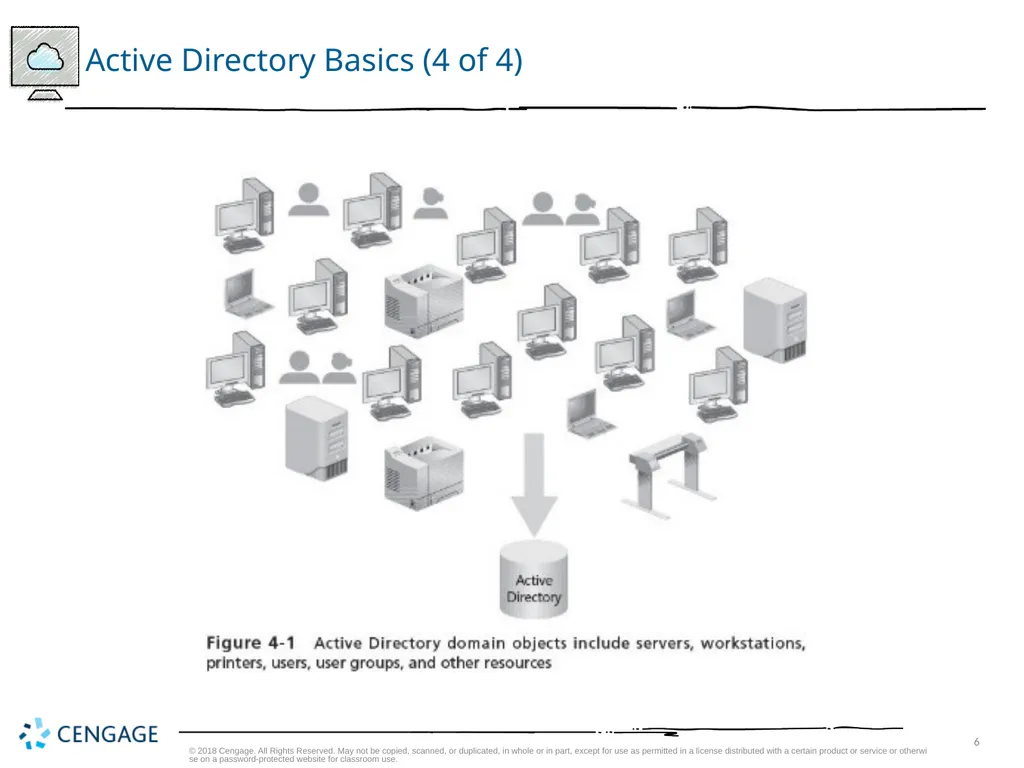
Container that holds information about all network resources that are grouped within it
Every resource is called an object © 2018 Cengage. All Rights Reserved. May not be copied, scanned, or duplicated, in whole or in part, except for use as permitted in a license distributed with a certain product or service or otherwise on a password-protected website for classroom use.<br>
Servers that have the AD DS server role installed
Contain writable copies of information in Active Directory
Member servers
Servers on a network managed by Active Directory that do not have Active Directory installed
Domain
Container that holds information about all network resources that are grouped within it
Every resource is called an object © 2018 Cengage. All Rights Reserved. May not be copied, scanned, or duplicated, in whole or in part, except for use as permitted in a license distributed with a certain product or service or otherwise on a password-protected website for classroom use.<br>
05
Active Directory Basics (3 of 4) Multimaster replication
Each DC is equal to every other DC in that it contains the full range of information that composes Active Directory
If information on one DC changes it is replicated to all other DCs
Active Directory is built to make replication efficient
Active Directory in Windows Server 2016 can:
Replicate individual properties instead of entire accounts
Replicate Active Directory on the basis of the speed of the network link
Three general concepts important for understanding Active Directory:
Schema
Global catalog
Namespace © 2018 Cengage. All Rights Reserved. May not be copied, scanned, or duplicated, in whole or in part, except for use as permitted in a license distributed with a certain product or service or otherwise on a password-protected website for classroom use.<br>
Each DC is equal to every other DC in that it contains the full range of information that composes Active Directory
If information on one DC changes it is replicated to all other DCs
Active Directory is built to make replication efficient
Active Directory in Windows Server 2016 can:
Replicate individual properties instead of entire accounts
Replicate Active Directory on the basis of the speed of the network link
Three general concepts important for understanding Active Directory:
Schema
Global catalog
Namespace © 2018 Cengage. All Rights Reserved. May not be copied, scanned, or duplicated, in whole or in part, except for use as permitted in a license distributed with a certain product or service or otherwise on a password-protected website for classroom use.<br>
06
Active Directory Basics (4 of 4) © 2018 Cengage. All Rights Reserved. May not be copied, scanned, or duplicated, in whole or in part, except for use as permitted in a license distributed with a certain product or service or otherwise on a password-protected website for classroom use.<br>
07
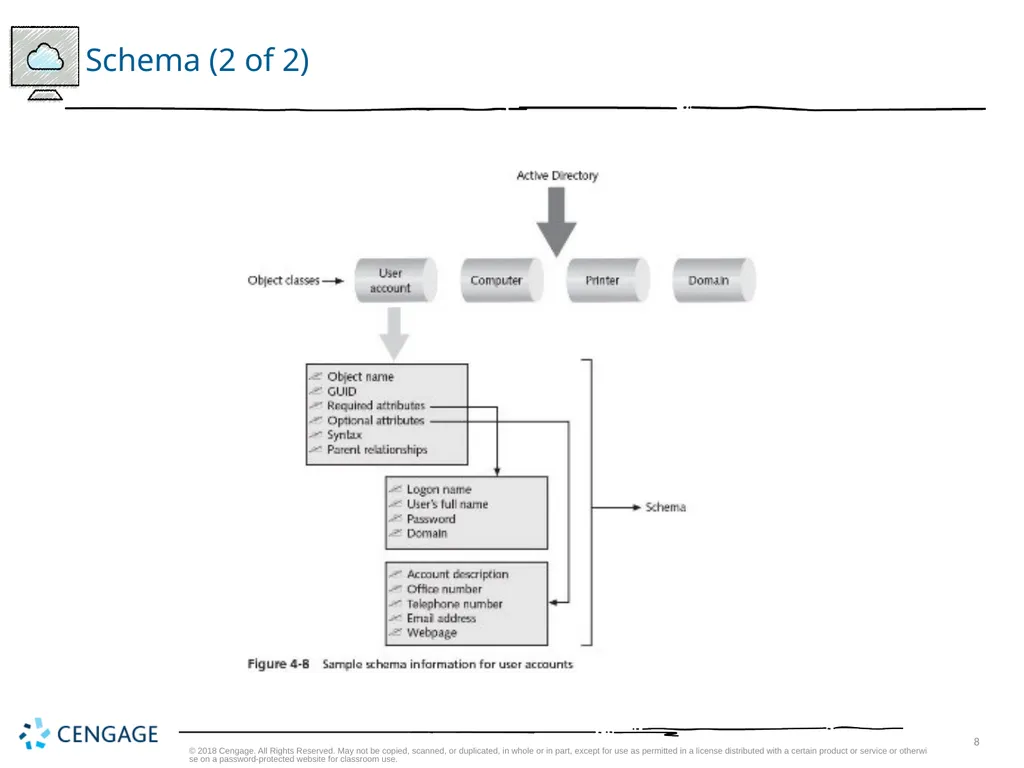
Schema (1 of 2) Active Directory schema
Defines the objects and the information pertaining to those objects that can be stored in Active Directory
Like a small database of information associated with that object
Schema information for objects in a domain is replicated on every DC
User account
One class of object in Active Directory that is defined through schema elements unique to that class © 2018 Cengage. All Rights Reserved. May not be copied, scanned, or duplicated, in whole or in part, except for use as permitted in a license distributed with a certain product or service or otherwise on a password-protected website for classroom use.<br>
Defines the objects and the information pertaining to those objects that can be stored in Active Directory
Like a small database of information associated with that object
Schema information for objects in a domain is replicated on every DC
User account
One class of object in Active Directory that is defined through schema elements unique to that class © 2018 Cengage. All Rights Reserved. May not be copied, scanned, or duplicated, in whole or in part, except for use as permitted in a license distributed with a certain product or service or otherwise on a password-protected website for classroom use.<br>
08
Schema (2 of 2) © 2018 Cengage. All Rights Reserved. May not be copied, scanned, or duplicated, in whole or in part, except for use as permitted in a license distributed with a certain product or service or otherwise on a password-protected website for classroom use.<br>
09
Global Catalog (1 of 2) Global catalog
Stores information about every object within a forest
The first DC configured in a forest becomes the global catalog server
Global catalog server
Store a full replica of every object within its own domain and a partial replica of each object within every domain in the forest
The global catalog server enables forest-wide searches of data © 2018 Cengage. All Rights Reserved. May not be copied, scanned, or duplicated, in whole or in part, except for use as permitted in a license distributed with a certain product or service or otherwise on a password-protected website for classroom use.<br>
Stores information about every object within a forest
The first DC configured in a forest becomes the global catalog server
Global catalog server
Store a full replica of every object within its own domain and a partial replica of each object within every domain in the forest
The global catalog server enables forest-wide searches of data © 2018 Cengage. All Rights Reserved. May not be copied, scanned, or duplicated, in whole or in part, except for use as permitted in a license distributed with a certain product or service or otherwise on a password-protected website for classroom use.<br>
10
Global Catalog (2 of 2) The global catalog serves the following purposes:
Serving as the central storehouse of key object information in a forest that has multiple domains
Providing lookup and access to all resources in all domains
Providing replication of key Active Directory elements
Keeping a copy of the most used attributes for each object for quick access
By default, the first DC in the forest is automatically designated as the global catalog server
You have the option of configuring another DC to be a global catalog server as well as designating multiple DCs as global catalog servers © 2018 Cengage. All Rights Reserved. May not be copied, scanned, or duplicated, in whole or in part, except for use as permitted in a license distributed with a certain product or service or otherwise on a password-protected website for classroom use.<br>
Serving as the central storehouse of key object information in a forest that has multiple domains
Providing lookup and access to all resources in all domains
Providing replication of key Active Directory elements
Keeping a copy of the most used attributes for each object for quick access
By default, the first DC in the forest is automatically designated as the global catalog server
You have the option of configuring another DC to be a global catalog server as well as designating multiple DCs as global catalog servers © 2018 Cengage. All Rights Reserved. May not be copied, scanned, or duplicated, in whole or in part, except for use as permitted in a license distributed with a certain product or service or otherwise on a password-protected website for classroom use.<br>
11
Namespace Active Directory uses Domain Name System (DNS)
There must be a DNS server on the network that Active Directory can access
DNS
A TCP/IP-based name service that converts computer and domain host names to dotted decimal addresses and vice versa, through a process called name resolution
Namespace
A logical area on a network that contains directory services and named objects
Has the ability to perform name resolution
Active Directory employs two kinds of namespaces:
Contiguous – one in which every child object contains the name of the parent object
Disjointed – when the child name does not resemble the name of its parent object © 2018 Cengage. All Rights Reserved. May not be copied, scanned, or duplicated, in whole or in part, except for use as permitted in a license distributed with a certain product or service or otherwise on a password-protected website for classroom use.<br>
There must be a DNS server on the network that Active Directory can access
DNS
A TCP/IP-based name service that converts computer and domain host names to dotted decimal addresses and vice versa, through a process called name resolution
Namespace
A logical area on a network that contains directory services and named objects
Has the ability to perform name resolution
Active Directory employs two kinds of namespaces:
Contiguous – one in which every child object contains the name of the parent object
Disjointed – when the child name does not resemble the name of its parent object © 2018 Cengage. All Rights Reserved. May not be copied, scanned, or duplicated, in whole or in part, except for use as permitted in a license distributed with a certain product or service or otherwise on a password-protected website for classroom use.<br>
12
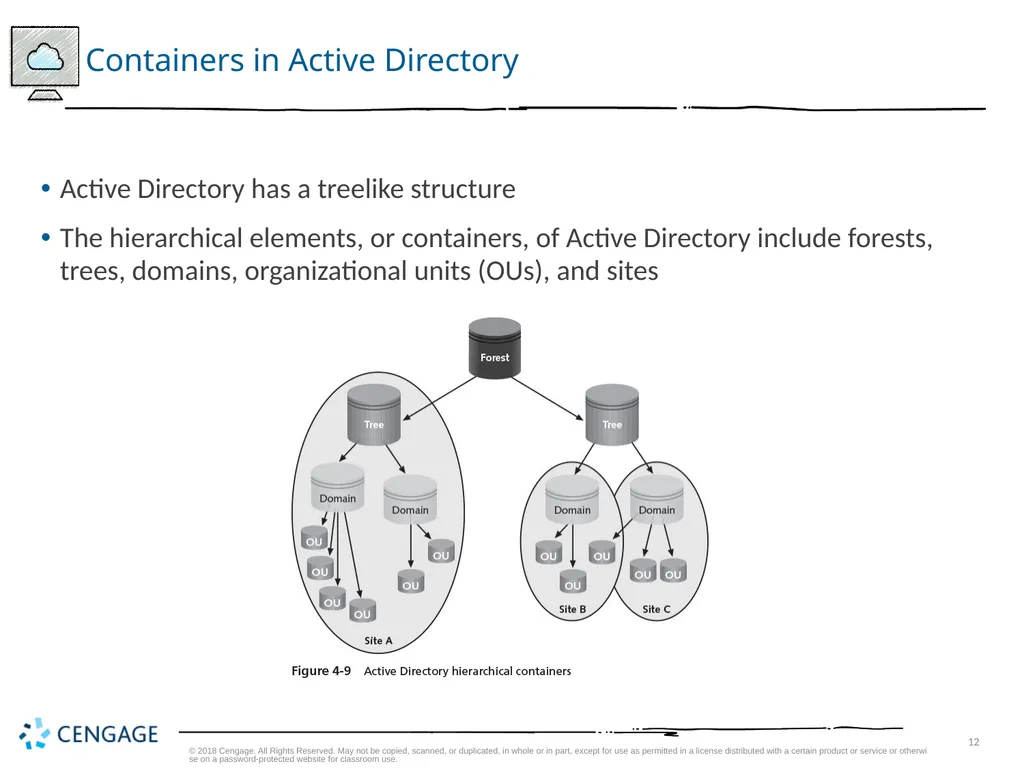
Containers in Active Directory Active Directory has a treelike structure
The hierarchical elements, or containers, of Active Directory include forests, trees, domains, organizational units (OUs), and sites © 2018 Cengage. All Rights Reserved. May not be copied, scanned, or duplicated, in whole or in part, except for use as permitted in a license distributed with a certain product or service or otherwise on a password-protected website for classroom use.<br>
The hierarchical elements, or containers, of Active Directory include forests, trees, domains, organizational units (OUs), and sites © 2018 Cengage. All Rights Reserved. May not be copied, scanned, or duplicated, in whole or in part, except for use as permitted in a license distributed with a certain product or service or otherwise on a password-protected website for classroom use.<br>
13
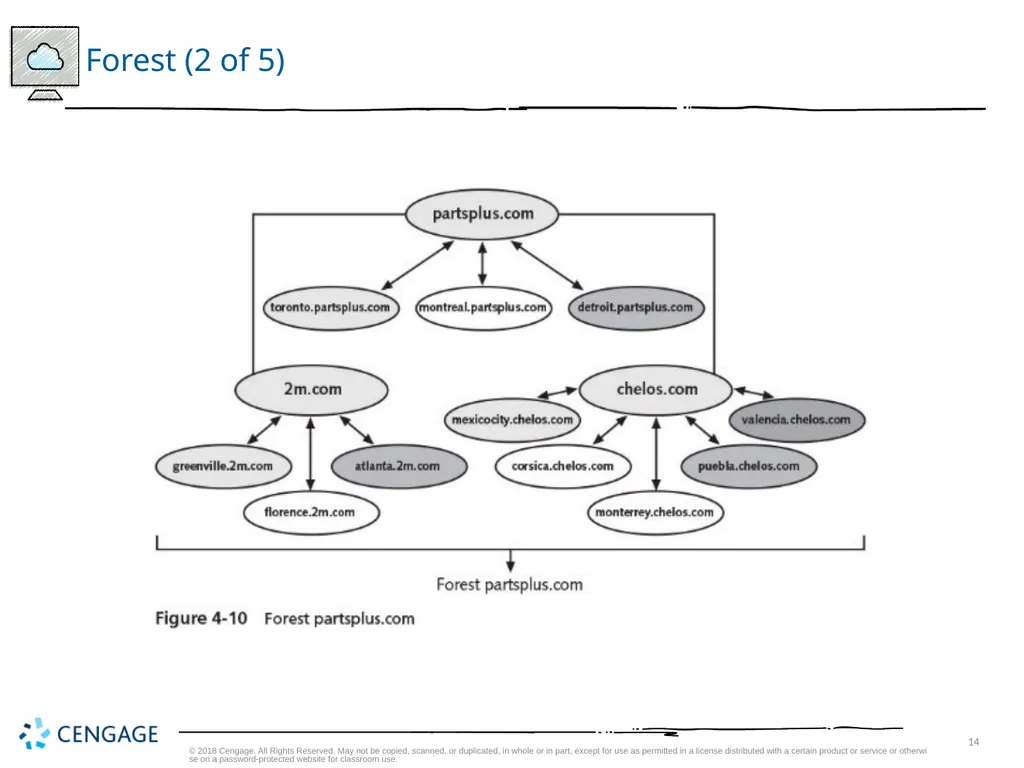
Forest (1 of 5) Forest
Consists of one or more Active Directory trees that are in a common relationship
Forests have the following characteristics:
The trees can use a disjointed namespace
All trees use the same schema
All trees use the same global catalog
Domains enable administration of commonly associated objects, such as accounts and other resources, within a forest
Two-way transitive trusts are automatically configured between domains within a single forest © 2018 Cengage. All Rights Reserved. May not be copied, scanned, or duplicated, in whole or in part, except for use as permitted in a license distributed with a certain product or service or otherwise on a password-protected website for classroom use.<br>
Consists of one or more Active Directory trees that are in a common relationship
Forests have the following characteristics:
The trees can use a disjointed namespace
All trees use the same schema
All trees use the same global catalog
Domains enable administration of commonly associated objects, such as accounts and other resources, within a forest
Two-way transitive trusts are automatically configured between domains within a single forest © 2018 Cengage. All Rights Reserved. May not be copied, scanned, or duplicated, in whole or in part, except for use as permitted in a license distributed with a certain product or service or otherwise on a password-protected website for classroom use.<br>
14
Forest (2 of 5) © 2018 Cengage. All Rights Reserved. May not be copied, scanned, or duplicated, in whole or in part, except for use as permitted in a license distributed with a certain product or service or otherwise on a password-protected website for classroom use.<br>
15
Forest (3 of 5) A forest provides a means to relate trees that use a contiguous namespace in domains within each tree
But that have disjointed namespaces in relationship to each other
The advantage of joining trees into a forest is that all domains share the same schema and global catalog
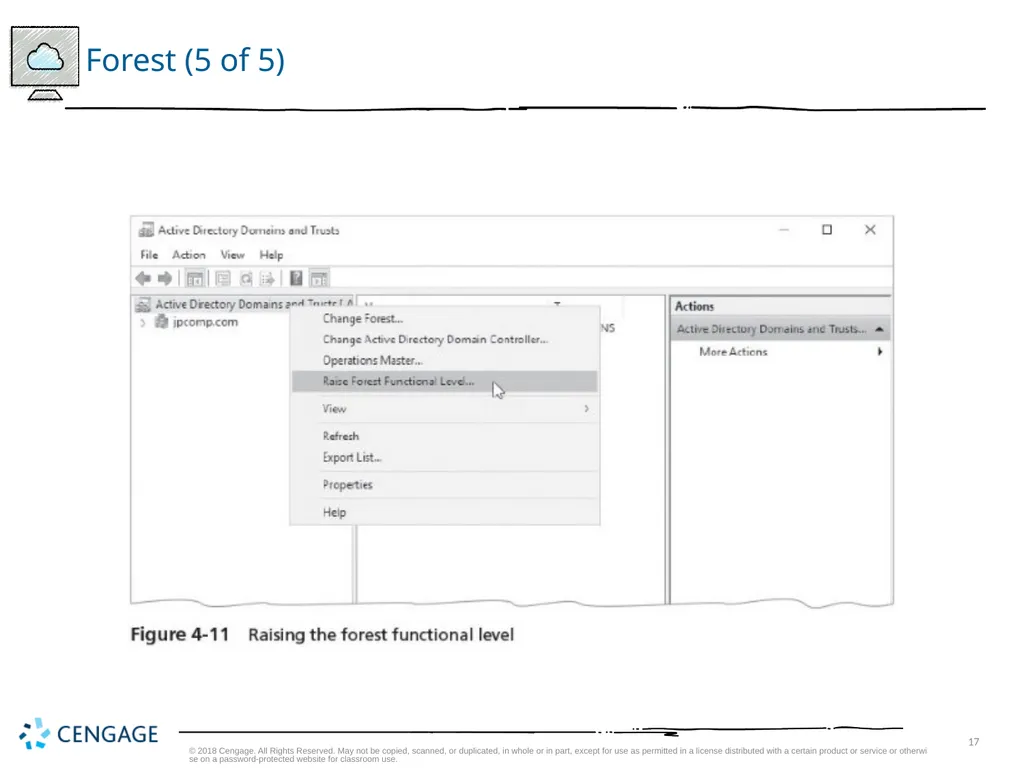
Forest functional level
Refers to the Active Directory functions supported forest-wide © 2018 Cengage. All Rights Reserved. May not be copied, scanned, or duplicated, in whole or in part, except for use as permitted in a license distributed with a certain product or service or otherwise on a password-protected website for classroom use.<br>
But that have disjointed namespaces in relationship to each other
The advantage of joining trees into a forest is that all domains share the same schema and global catalog
Forest functional level
Refers to the Active Directory functions supported forest-wide © 2018 Cengage. All Rights Reserved. May not be copied, scanned, or duplicated, in whole or in part, except for use as permitted in a license distributed with a certain product or service or otherwise on a password-protected website for classroom use.<br>
16
Forest (4 of 5) Windows Server 2016 Active Directory recognizes several types of forest functional levels:
Windows 2000 Native Forest Functional Level
Windows Server 2003 Forest Functional Level
Windows Server 2008 Forest Functional Level
Windows Server 2008 R2 Forest Functional Level
Windows Server 2012 Forest Functional Level
Windows Server R2 Forest Functional Level
Windows Server 2016 Forest Functional Level
When servers are upgraded, it might make sense to raise the forest functional level to match the server OSs in use © 2018 Cengage. All Rights Reserved. May not be copied, scanned, or duplicated, in whole or in part, except for use as permitted in a license distributed with a certain product or service or otherwise on a password-protected website for classroom use.<br>
Windows 2000 Native Forest Functional Level
Windows Server 2003 Forest Functional Level
Windows Server 2008 Forest Functional Level
Windows Server 2008 R2 Forest Functional Level
Windows Server 2012 Forest Functional Level
Windows Server R2 Forest Functional Level
Windows Server 2016 Forest Functional Level
When servers are upgraded, it might make sense to raise the forest functional level to match the server OSs in use © 2018 Cengage. All Rights Reserved. May not be copied, scanned, or duplicated, in whole or in part, except for use as permitted in a license distributed with a certain product or service or otherwise on a password-protected website for classroom use.<br>
17
Forest (5 of 5) © 2018 Cengage. All Rights Reserved. May not be copied, scanned, or duplicated, in whole or in part, except for use as permitted in a license distributed with a certain product or service or otherwise on a password-protected website for classroom use.<br>
18
Tree (1 of 2) Tree
Contains one or more domains that are in a common relationship
Tree has the following characteristics:
Domains are represented in a contiguous namespace and can be in a hierarchy
Two-way trust relationships exist between parent domains and child domains
All domains in a single tree use the same schema for all types of common objects
All domains use the same global catalog © 2018 Cengage. All Rights Reserved. May not be copied, scanned, or duplicated, in whole or in part, except for use as permitted in a license distributed with a certain product or service or otherwise on a password-protected website for classroom use.<br>
Contains one or more domains that are in a common relationship
Tree has the following characteristics:
Domains are represented in a contiguous namespace and can be in a hierarchy
Two-way trust relationships exist between parent domains and child domains
All domains in a single tree use the same schema for all types of common objects
All domains use the same global catalog © 2018 Cengage. All Rights Reserved. May not be copied, scanned, or duplicated, in whole or in part, except for use as permitted in a license distributed with a certain product or service or otherwise on a password-protected website for classroom use.<br>
19
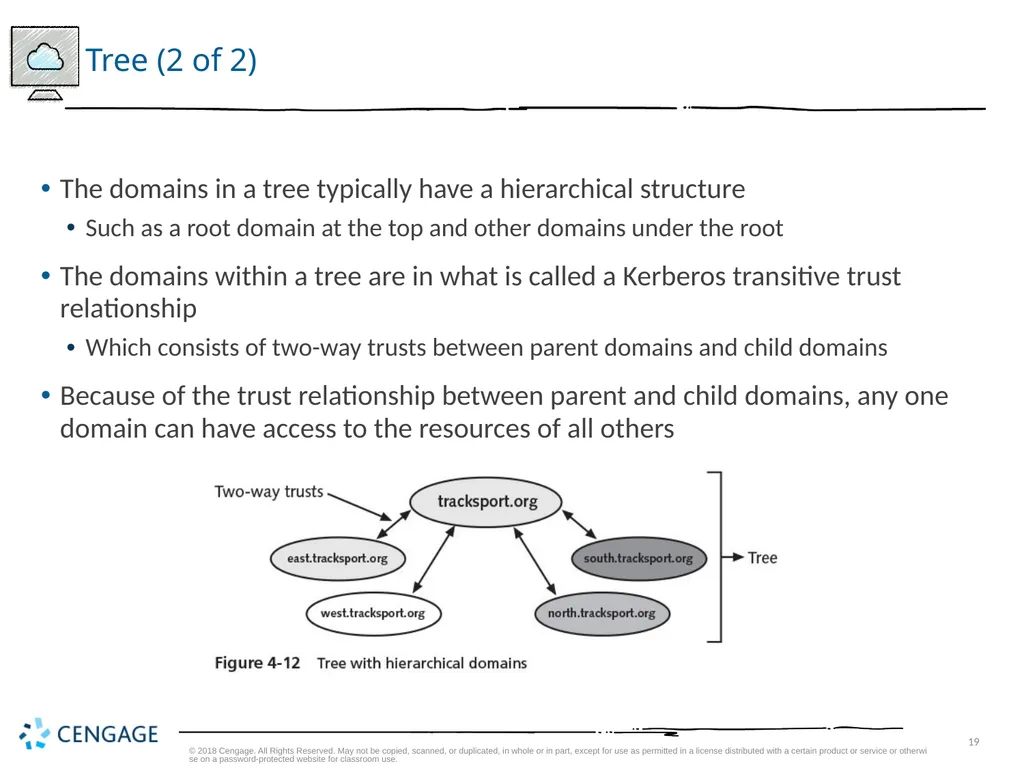
Tree (2 of 2) The domains in a tree typically have a hierarchical structure
Such as a root domain at the top and other domains under the root
The domains within a tree are in what is called a Kerberos transitive trust relationship
Which consists of two-way trusts between parent domains and child domains
Because of the trust relationship between parent and child domains, any one domain can have access to the resources of all others © 2018 Cengage. All Rights Reserved. May not be copied, scanned, or duplicated, in whole or in part, except for use as permitted in a license distributed with a certain product or service or otherwise on a password-protected website for classroom use.<br>
Such as a root domain at the top and other domains under the root
The domains within a tree are in what is called a Kerberos transitive trust relationship
Which consists of two-way trusts between parent domains and child domains
Because of the trust relationship between parent and child domains, any one domain can have access to the resources of all others © 2018 Cengage. All Rights Reserved. May not be copied, scanned, or duplicated, in whole or in part, except for use as permitted in a license distributed with a certain product or service or otherwise on a password-protected website for classroom use.<br>
20
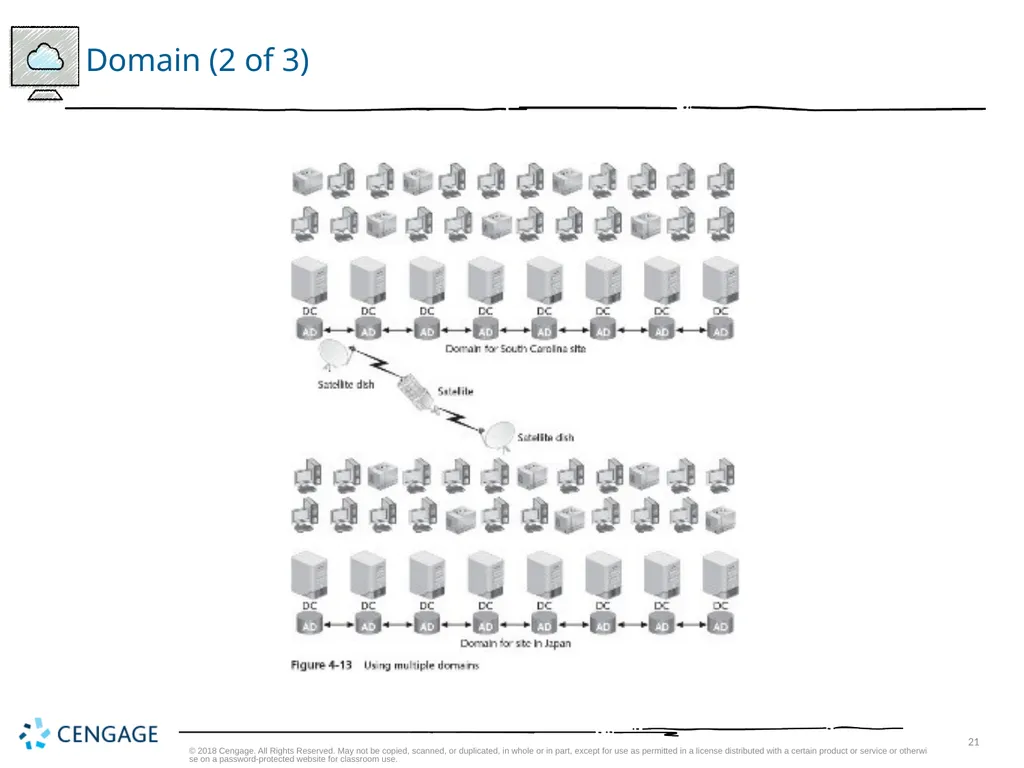
Domain (1 of 3) Microsoft views a domain as a logical partition within an Active Directory forest
A domain is a grouping of objects that typically exists as a primary container within Active Directory
The basic functions of a domain are as follows:
To provide an Active Directory ‘‘partition’’ in which to house objects that have a common relationship, particularly in terms of management and security
To establish a set of information to be replicated from one DC to another
To expedite management of a set of objects © 2018 Cengage. All Rights Reserved. May not be copied, scanned, or duplicated, in whole or in part, except for use as permitted in a license distributed with a certain product or service or otherwise on a password-protected website for classroom use.<br>
A domain is a grouping of objects that typically exists as a primary container within Active Directory
The basic functions of a domain are as follows:
To provide an Active Directory ‘‘partition’’ in which to house objects that have a common relationship, particularly in terms of management and security
To establish a set of information to be replicated from one DC to another
To expedite management of a set of objects © 2018 Cengage. All Rights Reserved. May not be copied, scanned, or duplicated, in whole or in part, except for use as permitted in a license distributed with a certain product or service or otherwise on a password-protected website for classroom use.<br>
21
Domain (2 of 3) © 2018 Cengage. All Rights Reserved. May not be copied, scanned, or duplicated, in whole or in part, except for use as permitted in a license distributed with a certain product or service or otherwise on a password-protected website for classroom use.<br>
22
Domain (3 of 3) Domain functional levels
Refers to the Windows Server operating systems on domain controllers and the domain-specific functions they support
The domain functional levels are as follows:
Windows 2000 Domain Functional Level
Windows Server 2003 Domain Functional Level
Windows Server 2008 Domain Functional Level
Windows Server 2008 R2 Domain Functional Level
Windows Server 2012 Domain Functional Level
Windows Server 2012 R2 Domain Functional Level
Windows Server 2016 Domain Functional Level © 2018 Cengage. All Rights Reserved. May not be copied, scanned, or duplicated, in whole or in part, except for use as permitted in a license distributed with a certain product or service or otherwise on a password-protected website for classroom use.<br>
Refers to the Windows Server operating systems on domain controllers and the domain-specific functions they support
The domain functional levels are as follows:
Windows 2000 Domain Functional Level
Windows Server 2003 Domain Functional Level
Windows Server 2008 Domain Functional Level
Windows Server 2008 R2 Domain Functional Level
Windows Server 2012 Domain Functional Level
Windows Server 2012 R2 Domain Functional Level
Windows Server 2016 Domain Functional Level © 2018 Cengage. All Rights Reserved. May not be copied, scanned, or duplicated, in whole or in part, except for use as permitted in a license distributed with a certain product or service or otherwise on a password-protected website for classroom use.<br>
23
Organizational Unit (1 of 2) Organizational unit (OU)
Offers a way to achieve more flexibility in managing the resources associated with a business unit, department, or division
Than is possible through domain administration alone
An OU is a grouping of related objects within a domain
OUs allow the grouping of objects so that they can be administered using the same group policies
OUs can be nested within OUs © 2018 Cengage. All Rights Reserved. May not be copied, scanned, or duplicated, in whole or in part, except for use as permitted in a license distributed with a certain product or service or otherwise on a password-protected website for classroom use.<br>
Offers a way to achieve more flexibility in managing the resources associated with a business unit, department, or division
Than is possible through domain administration alone
An OU is a grouping of related objects within a domain
OUs allow the grouping of objects so that they can be administered using the same group policies
OUs can be nested within OUs © 2018 Cengage. All Rights Reserved. May not be copied, scanned, or duplicated, in whole or in part, except for use as permitted in a license distributed with a certain product or service or otherwise on a password-protected website for classroom use.<br>
24
Organizational Unit (2 of 2) When you plan to create OUs, keep three concerns in mind:
Microsoft recommends that you limit OUs to 10 levels or fewer
Active Directory works more efficiently when OUs are set up horizontally instead of vertically
The creation of OUs involves more processing resources because each request through an OU requires CPU time © 2018 Cengage. All Rights Reserved. May not be copied, scanned, or duplicated, in whole or in part, except for use as permitted in a license distributed with a certain product or service or otherwise on a password-protected website for classroom use.<br>
Microsoft recommends that you limit OUs to 10 levels or fewer
Active Directory works more efficiently when OUs are set up horizontally instead of vertically
The creation of OUs involves more processing resources because each request through an OU requires CPU time © 2018 Cengage. All Rights Reserved. May not be copied, scanned, or duplicated, in whole or in part, except for use as permitted in a license distributed with a certain product or service or otherwise on a password-protected website for classroom use.<br>
25
Site (1 of 3) Site
A TCP/IP-based concept (container) within Active Directory that is linked to IP subnets
A site has the following functions:
Reflects one or more interconnected subnets
Reflects the physical aspect of the network
Is used for DC replication
Is used to enable a client to access the DC that is physically closest
Is composed of only two types of objects, servers and configuration objects
Sites are based on connectivity and replication functions © 2018 Cengage. All Rights Reserved. May not be copied, scanned, or duplicated, in whole or in part, except for use as permitted in a license distributed with a certain product or service or otherwise on a password-protected website for classroom use.<br>
A TCP/IP-based concept (container) within Active Directory that is linked to IP subnets
A site has the following functions:
Reflects one or more interconnected subnets
Reflects the physical aspect of the network
Is used for DC replication
Is used to enable a client to access the DC that is physically closest
Is composed of only two types of objects, servers and configuration objects
Sites are based on connectivity and replication functions © 2018 Cengage. All Rights Reserved. May not be copied, scanned, or duplicated, in whole or in part, except for use as permitted in a license distributed with a certain product or service or otherwise on a password-protected website for classroom use.<br>
26
Site (2 of 3) Reasons to define a site
Enable a client to access network servers using the most efficient physical route
DC replication is most efficient when Active Directory has information about which DCs are in which locations
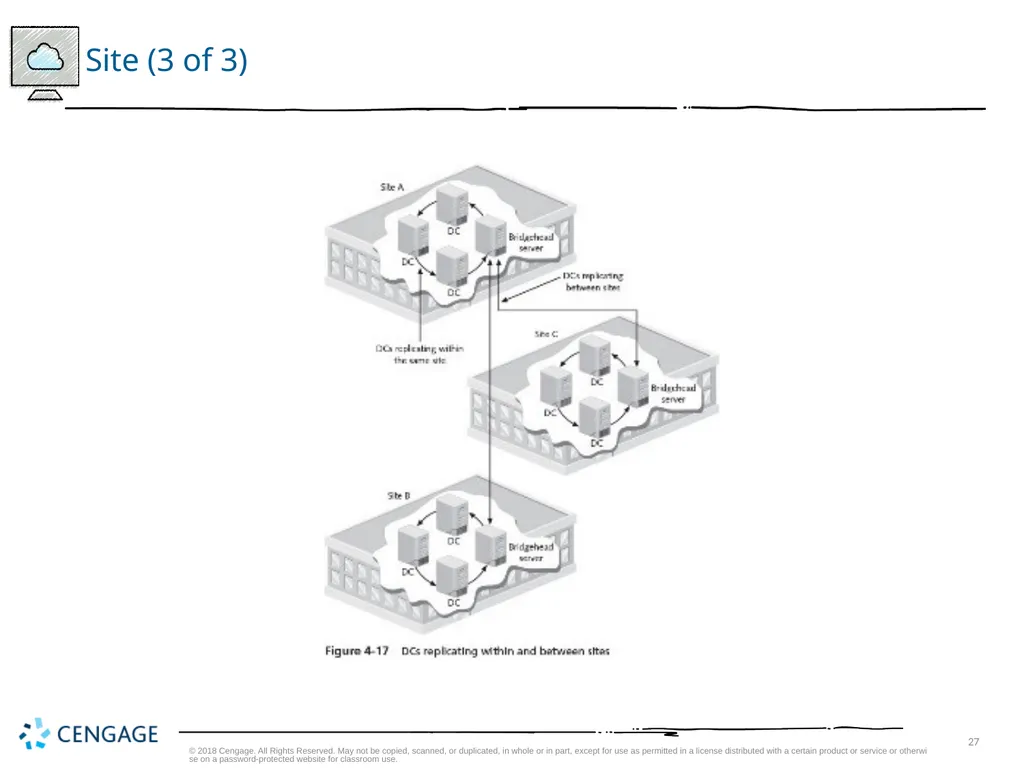
One advantage of creating a site is that it sets up redundant paths between DCs
Paths are used for replication
Bridgehead server
A DC that is designated to have the role of exchanging replication information
Only one bridgehead server is set up per site © 2018 Cengage. All Rights Reserved. May not be copied, scanned, or duplicated, in whole or in part, except for use as permitted in a license distributed with a certain product or service or otherwise on a password-protected website for classroom use.<br>
Enable a client to access network servers using the most efficient physical route
DC replication is most efficient when Active Directory has information about which DCs are in which locations
One advantage of creating a site is that it sets up redundant paths between DCs
Paths are used for replication
Bridgehead server
A DC that is designated to have the role of exchanging replication information
Only one bridgehead server is set up per site © 2018 Cengage. All Rights Reserved. May not be copied, scanned, or duplicated, in whole or in part, except for use as permitted in a license distributed with a certain product or service or otherwise on a password-protected website for classroom use.<br>
27
Site (3 of 3) © 2018 Cengage. All Rights Reserved. May not be copied, scanned, or duplicated, in whole or in part, except for use as permitted in a license distributed with a certain product or service or otherwise on a password-protected website for classroom use.<br>
28
Active Directory Guidelines (1 of 2) Above all, keep Active Directory as simple as possible
Plan its structure before you implement it
Implement the least number of domains possible
With one domain being the ideal and building from there
Implement only one domain on most small networks
Use OUs to reflect the organization’s structure
Create only the number of OUs that are absolutely necessary
Do not build an Active Directory with more than 10 levels of OUs © 2018 Cengage. All Rights Reserved. May not be copied, scanned, or duplicated, in whole or in part, except for use as permitted in a license distributed with a certain product or service or otherwise on a password-protected website for classroom use.<br>
Plan its structure before you implement it
Implement the least number of domains possible
With one domain being the ideal and building from there
Implement only one domain on most small networks
Use OUs to reflect the organization’s structure
Create only the number of OUs that are absolutely necessary
Do not build an Active Directory with more than 10 levels of OUs © 2018 Cengage. All Rights Reserved. May not be copied, scanned, or duplicated, in whole or in part, except for use as permitted in a license distributed with a certain product or service or otherwise on a password-protected website for classroom use.<br>
29
Active Directory Guidelines (2 of 2) Use domains as partitions in forests to demarcate commonly associated accounts and resources governed by group and security policies
Implement multiple trees and forests only as necessary
Use sites in situations where there are multiple IP subnets and multiple geographic locations
As a means to improve logon and DC replication performance © 2018 Cengage. All Rights Reserved. May not be copied, scanned, or duplicated, in whole or in part, except for use as permitted in a license distributed with a certain product or service or otherwise on a password-protected website for classroom use.<br>
Implement multiple trees and forests only as necessary
Use sites in situations where there are multiple IP subnets and multiple geographic locations
As a means to improve logon and DC replication performance © 2018 Cengage. All Rights Reserved. May not be copied, scanned, or duplicated, in whole or in part, except for use as permitted in a license distributed with a certain product or service or otherwise on a password-protected website for classroom use.<br>
30
User Account Management Default accounts:
Administrator and Guest
Accounts can be set up in two general environments:
Accounts that are set up through a stand-alone server that does not have Active Directory installed
Accounts that are set up in a domain when Active Directory is installed
When accounts are created in the domain through Active Directory
Those accounts can be used to access any server or resource in the domain © 2018 Cengage. All Rights Reserved. May not be copied, scanned, or duplicated, in whole or in part, except for use as permitted in a license distributed with a certain product or service or otherwise on a password-protected website for classroom use.<br>
Administrator and Guest
Accounts can be set up in two general environments:
Accounts that are set up through a stand-alone server that does not have Active Directory installed
Accounts that are set up in a domain when Active Directory is installed
When accounts are created in the domain through Active Directory
Those accounts can be used to access any server or resource in the domain © 2018 Cengage. All Rights Reserved. May not be copied, scanned, or duplicated, in whole or in part, except for use as permitted in a license distributed with a certain product or service or otherwise on a password-protected website for classroom use.<br>
31
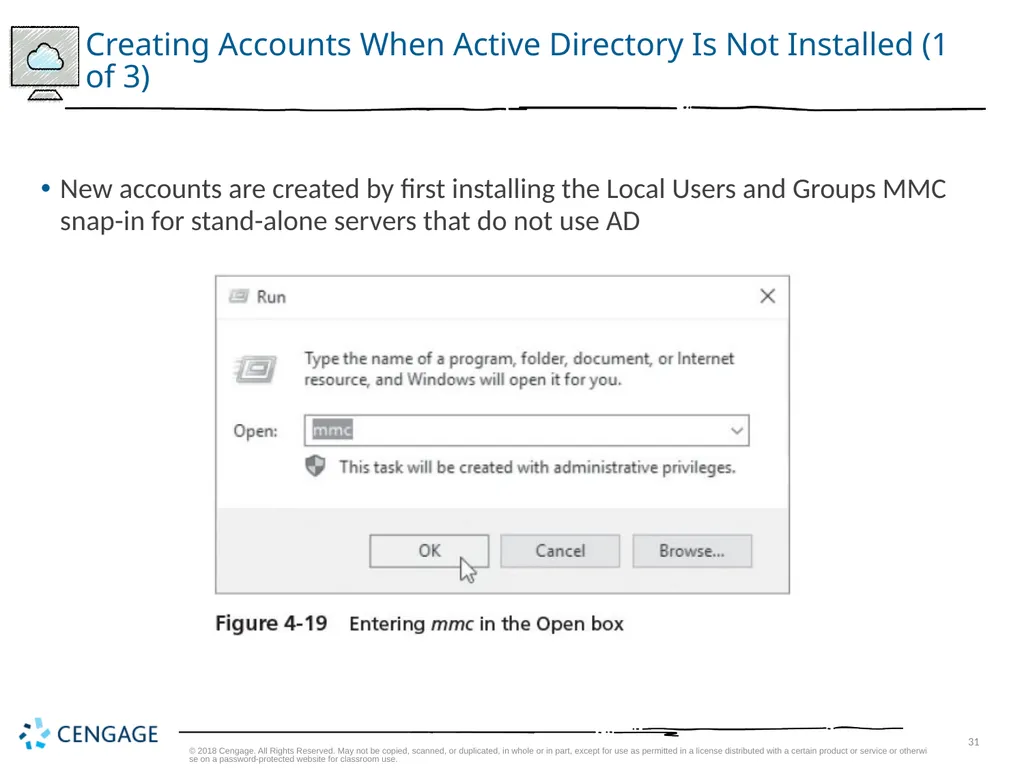
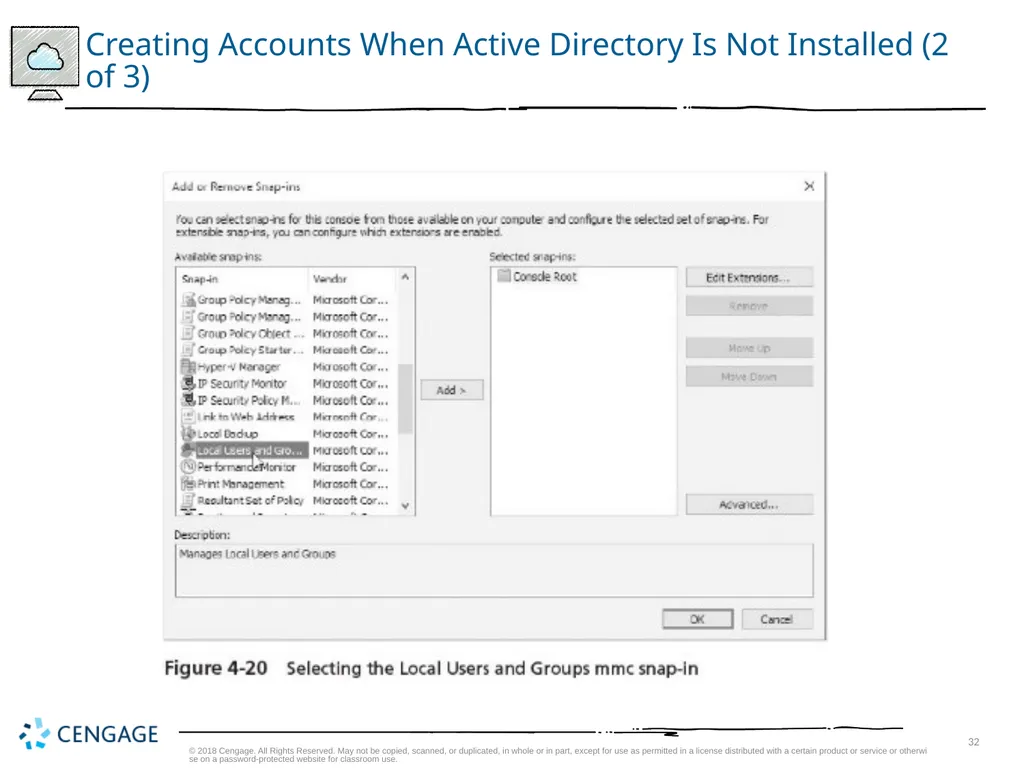
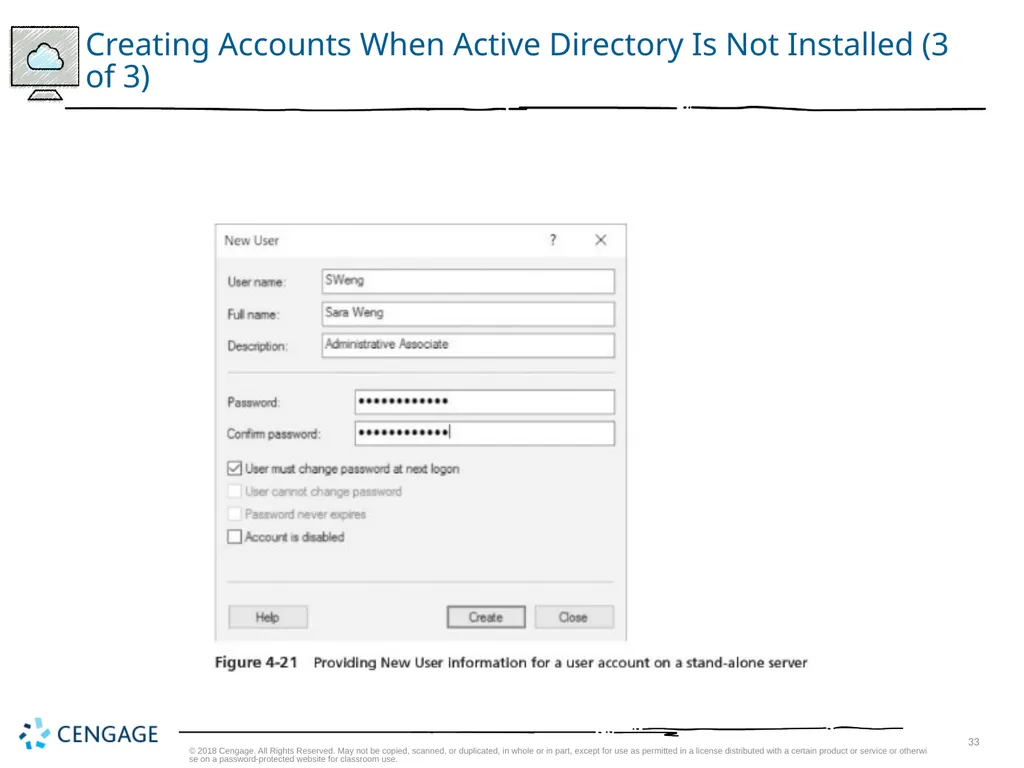
Creating Accounts When Active Directory Is Not Installed (1 of 3) New accounts are created by first installing the Local Users and Groups MMC snap-in for stand-alone servers that do not use AD © 2018 Cengage. All Rights Reserved. May not be copied, scanned, or duplicated, in whole or in part, except for use as permitted in a license distributed with a certain product or service or otherwise on a password-protected website for classroom use.<br>
32
Creating Accounts When Active Directory Is Not Installed (2 of 3) © 2018 Cengage. All Rights Reserved. May not be copied, scanned, or duplicated, in whole or in part, except for use as permitted in a license distributed with a certain product or service or otherwise on a password-protected website for classroom use.<br>
33
Creating Accounts When Active Directory Is Not Installed (3 of 3) © 2018 Cengage. All Rights Reserved. May not be copied, scanned, or duplicated, in whole or in part, except for use as permitted in a license distributed with a certain product or service or otherwise on a password-protected website for classroom use.<br>
34
Creating Accounts When Active Directory Is Installed When Active Directory is installed and the server is a DC
Use the Active Directory Users and Computers tool either from:
The Windows Administrative Tools folder
Tools in Server Manager
MMC snap-in
Activity 4-4 teaches you how to create a user account in Active Directory © 2018 Cengage. All Rights Reserved. May not be copied, scanned, or duplicated, in whole or in part, except for use as permitted in a license distributed with a certain product or service or otherwise on a password-protected website for classroom use.<br>
Use the Active Directory Users and Computers tool either from:
The Windows Administrative Tools folder
Tools in Server Manager
MMC snap-in
Activity 4-4 teaches you how to create a user account in Active Directory © 2018 Cengage. All Rights Reserved. May not be copied, scanned, or duplicated, in whole or in part, except for use as permitted in a license distributed with a certain product or service or otherwise on a password-protected website for classroom use.<br>
35
Disabling, Enabling, and Renaming Accounts When a user takes a leave of absence
You have the option to disable his or her account
Organizations might also have the practice of disabling accounts when someone leaves and enabling the account for that person’s replacement
Activity 4-5 teaches you how to disable an account, rename the account, and then enable that account © 2018 Cengage. All Rights Reserved. May not be copied, scanned, or duplicated, in whole or in part, except for use as permitted in a license distributed with a certain product or service or otherwise on a password-protected website for classroom use.<br>
You have the option to disable his or her account
Organizations might also have the practice of disabling accounts when someone leaves and enabling the account for that person’s replacement
Activity 4-5 teaches you how to disable an account, rename the account, and then enable that account © 2018 Cengage. All Rights Reserved. May not be copied, scanned, or duplicated, in whole or in part, except for use as permitted in a license distributed with a certain product or service or otherwise on a password-protected website for classroom use.<br>
36
Moving an Account When an employee moves from one department to another
You might need to move that person’s account from one container to another
Activity 4-6 shows you how to move the account you renamed in Activity 4-5 to the OU you created in Activity 4-3 © 2018 Cengage. All Rights Reserved. May not be copied, scanned, or duplicated, in whole or in part, except for use as permitted in a license distributed with a certain product or service or otherwise on a password-protected website for classroom use.<br>
You might need to move that person’s account from one container to another
Activity 4-6 shows you how to move the account you renamed in Activity 4-5 to the OU you created in Activity 4-3 © 2018 Cengage. All Rights Reserved. May not be copied, scanned, or duplicated, in whole or in part, except for use as permitted in a license distributed with a certain product or service or otherwise on a password-protected website for classroom use.<br>
37
Resetting a Password You do not have the option to look up a password
But you can reset it for users
For organizations that have accounts that manage sensitive information
It is advisable to have specific guidelines that govern the circumstances under which an account password is reset
Activity 4-7 shows you how to reset a password for a user © 2018 Cengage. All Rights Reserved. May not be copied, scanned, or duplicated, in whole or in part, except for use as permitted in a license distributed with a certain product or service or otherwise on a password-protected website for classroom use.<br>
But you can reset it for users
For organizations that have accounts that manage sensitive information
It is advisable to have specific guidelines that govern the circumstances under which an account password is reset
Activity 4-7 shows you how to reset a password for a user © 2018 Cengage. All Rights Reserved. May not be copied, scanned, or duplicated, in whole or in part, except for use as permitted in a license distributed with a certain product or service or otherwise on a password-protected website for classroom use.<br>
38
Deleting an Account It is a good practice
To delete accounts that are no longer in use
Failure to do so could expose your company to security risks
When you delete an account
Its globally unique identifier (GUID) is also deleted and will not be reused even if you create another account using the same name
Activity 4-8 shows you how to delete an account © 2018 Cengage. All Rights Reserved. May not be copied, scanned, or duplicated, in whole or in part, except for use as permitted in a license distributed with a certain product or service or otherwise on a password-protected website for classroom use.<br>
To delete accounts that are no longer in use
Failure to do so could expose your company to security risks
When you delete an account
Its globally unique identifier (GUID) is also deleted and will not be reused even if you create another account using the same name
Activity 4-8 shows you how to delete an account © 2018 Cengage. All Rights Reserved. May not be copied, scanned, or duplicated, in whole or in part, except for use as permitted in a license distributed with a certain product or service or otherwise on a password-protected website for classroom use.<br>
39
Security Group Management (1 of 2) One of the best ways to manage accounts is by grouping accounts that have similar characteristics
Scope of influence (or scope)
The reach of a group for gaining access to resources in Active Directory
Types of groups:
Local
Domain local
Global
Universal © 2018 Cengage. All Rights Reserved. May not be copied, scanned, or duplicated, in whole or in part, except for use as permitted in a license distributed with a certain product or service or otherwise on a password-protected website for classroom use.<br>
Scope of influence (or scope)
The reach of a group for gaining access to resources in Active Directory
Types of groups:
Local
Domain local
Global
Universal © 2018 Cengage. All Rights Reserved. May not be copied, scanned, or duplicated, in whole or in part, except for use as permitted in a license distributed with a certain product or service or otherwise on a password-protected website for classroom use.<br>
40
Security Group Management (2 of 2) All of these groups can be used for security or distribution groups
Security groups
Used to enable access to resources on a stand-alone server or in Active Directory
Distribution groups
Used for e-mail or telephone lists, to provide quick, mass distribution of information © 2018 Cengage. All Rights Reserved. May not be copied, scanned, or duplicated, in whole or in part, except for use as permitted in a license distributed with a certain product or service or otherwise on a password-protected website for classroom use.<br>
Security groups
Used to enable access to resources on a stand-alone server or in Active Directory
Distribution groups
Used for e-mail or telephone lists, to provide quick, mass distribution of information © 2018 Cengage. All Rights Reserved. May not be copied, scanned, or duplicated, in whole or in part, except for use as permitted in a license distributed with a certain product or service or otherwise on a password-protected website for classroom use.<br>
41
Implementing Local Groups Local security group
Used to manage resources on a stand-alone computer that is not part of a domain and on member servers in a domain
Instead of installing Active Directory, you can divide accounts into local groups
Each group would be given different security access based on the resources at the server © 2018 Cengage. All Rights Reserved. May not be copied, scanned, or duplicated, in whole or in part, except for use as permitted in a license distributed with a certain product or service or otherwise on a password-protected website for classroom use.<br>
Used to manage resources on a stand-alone computer that is not part of a domain and on member servers in a domain
Instead of installing Active Directory, you can divide accounts into local groups
Each group would be given different security access based on the resources at the server © 2018 Cengage. All Rights Reserved. May not be copied, scanned, or duplicated, in whole or in part, except for use as permitted in a license distributed with a certain product or service or otherwise on a password-protected website for classroom use.<br>
42
Implementing Domain Local Groups Domain local security group
Used when Active Directory is deployed
Typically used to manage resources in a domain and to give global groups from the same and other domains access to those resources
The scope of a domain local group is the domain in which the group exists
The typical purpose of a domain local group is to provide access to resources
You grant access to servers, folders, shared folders, and printers to a domain local group
You should put domain local groups in access control lists only
The members of domain local groups should be mainly global groups © 2018 Cengage. All Rights Reserved. May not be copied, scanned, or duplicated, in whole or in part, except for use as permitted in a license distributed with a certain product or service or otherwise on a password-protected website for classroom use.<br>
Used when Active Directory is deployed
Typically used to manage resources in a domain and to give global groups from the same and other domains access to those resources
The scope of a domain local group is the domain in which the group exists
The typical purpose of a domain local group is to provide access to resources
You grant access to servers, folders, shared folders, and printers to a domain local group
You should put domain local groups in access control lists only
The members of domain local groups should be mainly global groups © 2018 Cengage. All Rights Reserved. May not be copied, scanned, or duplicated, in whole or in part, except for use as permitted in a license distributed with a certain product or service or otherwise on a password-protected website for classroom use.<br>
43
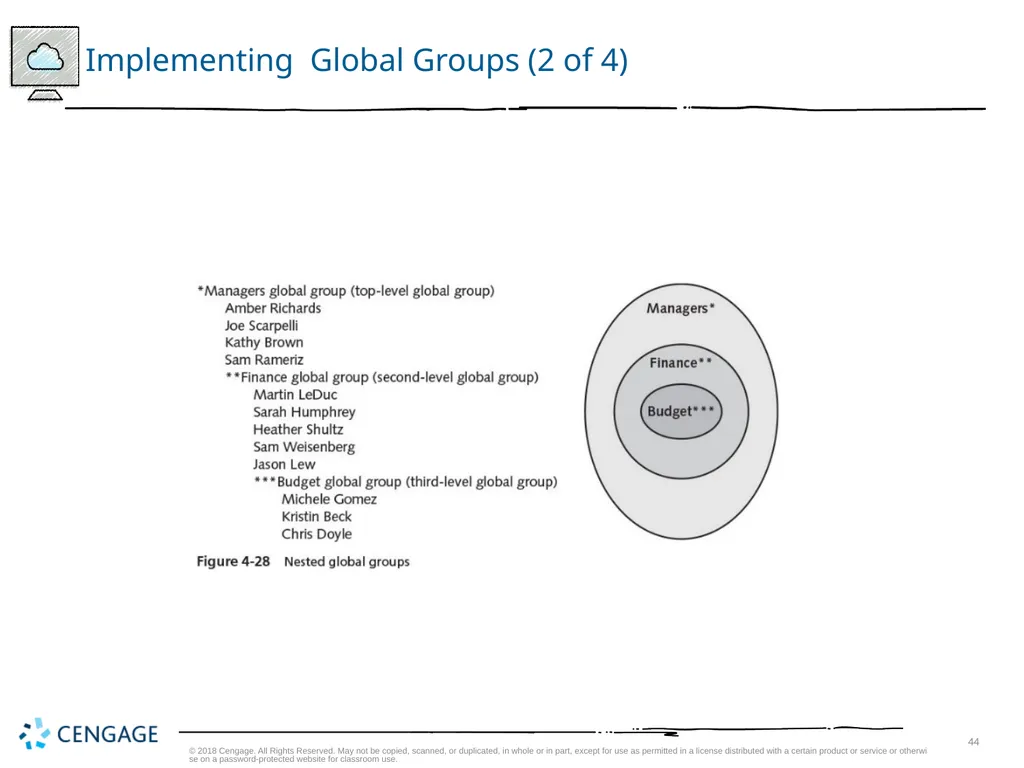
Implementing Global Groups (1 of 4) Global security group
Intended to contain user accounts from a single domain
Can also be set up as a member of a domain local group in the same or another domain
A global group can contain user accounts and other global groups from the domain in which it was created
A global group can be converted to a universal group
As long as it is not nested in another global group or in a universal group © 2018 Cengage. All Rights Reserved. May not be copied, scanned, or duplicated, in whole or in part, except for use as permitted in a license distributed with a certain product or service or otherwise on a password-protected website for classroom use.<br>
Intended to contain user accounts from a single domain
Can also be set up as a member of a domain local group in the same or another domain
A global group can contain user accounts and other global groups from the domain in which it was created
A global group can be converted to a universal group
As long as it is not nested in another global group or in a universal group © 2018 Cengage. All Rights Reserved. May not be copied, scanned, or duplicated, in whole or in part, except for use as permitted in a license distributed with a certain product or service or otherwise on a password-protected website for classroom use.<br>
44
Implementing Global Groups (2 of 4) © 2018 Cengage. All Rights Reserved. May not be copied, scanned, or duplicated, in whole or in part, except for use as permitted in a license distributed with a certain product or service or otherwise on a password-protected website for classroom use.<br>
45
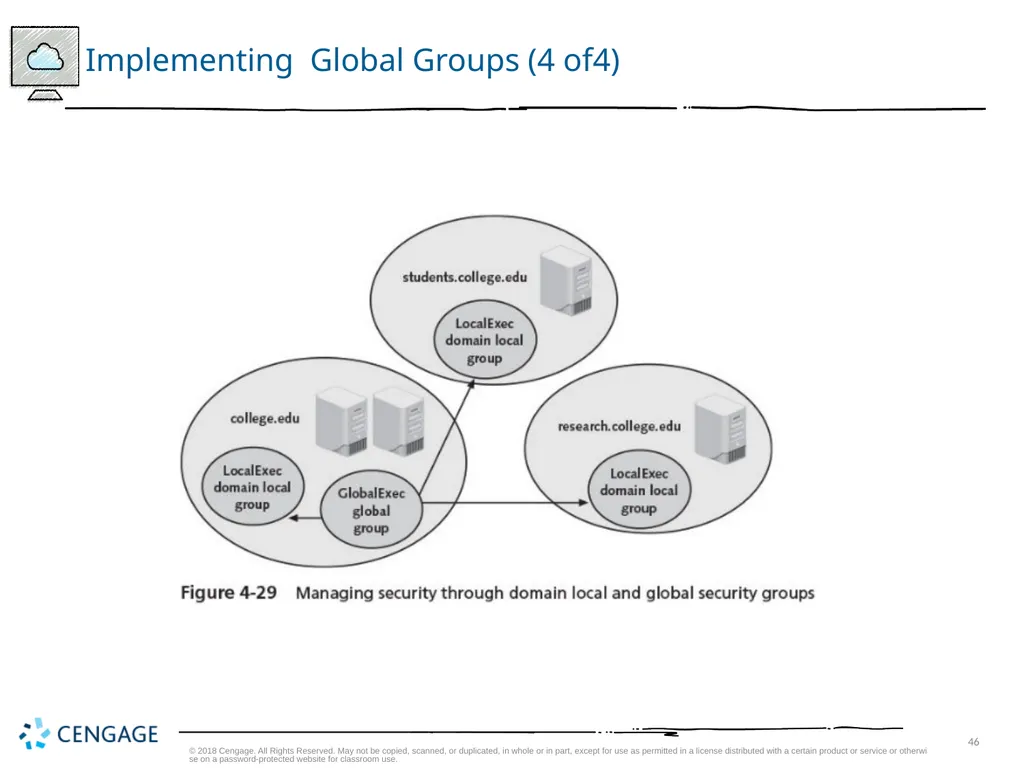
Implementing Global Groups (3 of 4) A typical use for a global group is to build it with accounts that need access to resources in the same or in another domain
And then to make the global group in one domain a member of a domain local group in the same or another domain
This model enables you to manage user accounts and their access to resources through one or more global groups
While reducing the complexity of managing accounts © 2018 Cengage. All Rights Reserved. May not be copied, scanned, or duplicated, in whole or in part, except for use as permitted in a license distributed with a certain product or service or otherwise on a password-protected website for classroom use.<br>
And then to make the global group in one domain a member of a domain local group in the same or another domain
This model enables you to manage user accounts and their access to resources through one or more global groups
While reducing the complexity of managing accounts © 2018 Cengage. All Rights Reserved. May not be copied, scanned, or duplicated, in whole or in part, except for use as permitted in a license distributed with a certain product or service or otherwise on a password-protected website for classroom use.<br>
46
Implementing Global Groups (4 of4) © 2018 Cengage. All Rights Reserved. May not be copied, scanned, or duplicated, in whole or in part, except for use as permitted in a license distributed with a certain product or service or otherwise on a password-protected website for classroom use.<br>
47
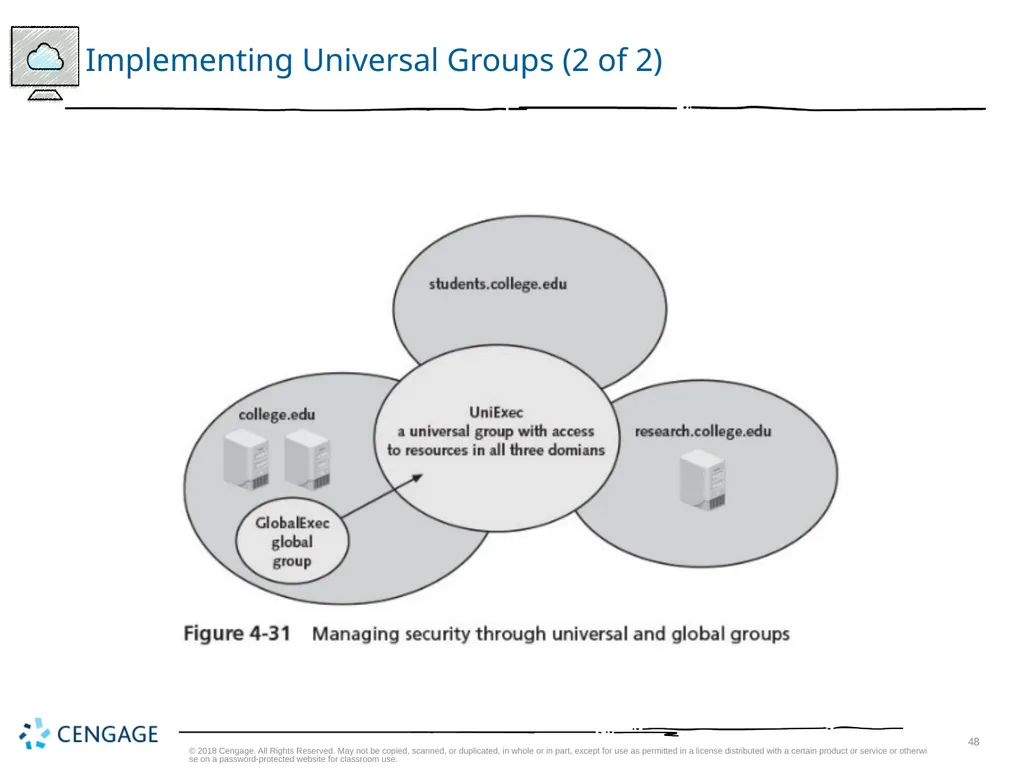
Implementing Universal Groups (1 of 2) Universal security groups
Provide a means to span domains and trees
Universal group membership can include user accounts from any domain, global groups from any domain, and other universal groups from any domain
Universal groups are offered to provide an easy means to access any resource in a tree
Or among trees in a forest
Guidelines to help simplify how you plan to use groups:
Use global groups to hold accounts as members
Use domain local groups to provide access to resources in a specific domain
Use universal groups to provide extensive access to resources © 2018 Cengage. All Rights Reserved. May not be copied, scanned, or duplicated, in whole or in part, except for use as permitted in a license distributed with a certain product or service or otherwise on a password-protected website for classroom use.<br>
Provide a means to span domains and trees
Universal group membership can include user accounts from any domain, global groups from any domain, and other universal groups from any domain
Universal groups are offered to provide an easy means to access any resource in a tree
Or among trees in a forest
Guidelines to help simplify how you plan to use groups:
Use global groups to hold accounts as members
Use domain local groups to provide access to resources in a specific domain
Use universal groups to provide extensive access to resources © 2018 Cengage. All Rights Reserved. May not be copied, scanned, or duplicated, in whole or in part, except for use as permitted in a license distributed with a certain product or service or otherwise on a password-protected website for classroom use.<br>
48
Implementing Universal Groups (2 of 2) © 2018 Cengage. All Rights Reserved. May not be copied, scanned, or duplicated, in whole or in part, except for use as permitted in a license distributed with a certain product or service or otherwise on a password-protected website for classroom use.<br>
49
Properties of Groups You can configure the properties of a specific group
By double-clicking that group in the Local Users and Groups tool for a stand-alone (nondomain) or member server
Or in the Active Directory Users and Computers tool for DC servers in a domain
Properties are configured using the following tabs:
General
Members
Member Of
Managed By © 2018 Cengage. All Rights Reserved. May not be copied, scanned, or duplicated, in whole or in part, except for use as permitted in a license distributed with a certain product or service or otherwise on a password-protected website for classroom use.<br>
By double-clicking that group in the Local Users and Groups tool for a stand-alone (nondomain) or member server
Or in the Active Directory Users and Computers tool for DC servers in a domain
Properties are configured using the following tabs:
General
Members
Member Of
Managed By © 2018 Cengage. All Rights Reserved. May not be copied, scanned, or duplicated, in whole or in part, except for use as permitted in a license distributed with a certain product or service or otherwise on a password-protected website for classroom use.<br>
50
Chapter Summary (1 of 2) Active Directory (or AD DS) is a directory service to house information about network resources
Servers housing Active Directory are called domain controllers (DCs)
The most basic component of Active Directory is an object
The global catalog stores information about every object, replicates key Active Directory elements, and is used to authenticate user accounts when they log on
A namespace consists of using the Domain Name System for resolving computer and domain names to IP addresses and vice versa
Active Directory is a hierarchy of logical containers: forests, trees, domains, and organizational units © 2018 Cengage. All Rights Reserved. May not be copied, scanned, or duplicated, in whole or in part, except for use as permitted in a license distributed with a certain product or service or otherwise on a password-protected website for classroom use.<br>
Servers housing Active Directory are called domain controllers (DCs)
The most basic component of Active Directory is an object
The global catalog stores information about every object, replicates key Active Directory elements, and is used to authenticate user accounts when they log on
A namespace consists of using the Domain Name System for resolving computer and domain names to IP addresses and vice versa
Active Directory is a hierarchy of logical containers: forests, trees, domains, and organizational units © 2018 Cengage. All Rights Reserved. May not be copied, scanned, or duplicated, in whole or in part, except for use as permitted in a license distributed with a certain product or service or otherwise on a password-protected website for classroom use.<br>
51
Chapter Summary (2 of 2) You can delegate management of many Active Directory containers to specific types of administrators
User accounts enable individual users to access specific resources
On a stand-alone or member server, you can create local security groups to help manage user accounts © 2018 Cengage. All Rights Reserved. May not be copied, scanned, or duplicated, in whole or in part, except for use as permitted in a license distributed with a certain product or service or otherwise on a password-protected website for classroom use.<br>
User accounts enable individual users to access specific resources
On a stand-alone or member server, you can create local security groups to help manage user accounts © 2018 Cengage. All Rights Reserved. May not be copied, scanned, or duplicated, in whole or in part, except for use as permitted in a license distributed with a certain product or service or otherwise on a password-protected website for classroom use.<br>