
Helping Hands Prototype Presentation Connecting
BR
Published · 36 slides · 0 views
1 / 1
Description
Helping Hands Prototype Presentation Connecting our community with the resources that help CS410 Team Green Spring 2022 Table of Contents Slide 3-4: Problem Introduction Slide 5: Problem Statement Slide 6: Problem Characteristics: Bottom
Related Topics
Share
Embed code
Download this presentation From Below
"Helping Hands Prototype Presentation Connecting" is the property of its rightful owner. Permission is granted to download and print the materials on this website for personal, non-commercial use only, and to display it on your personal computer provided you do not modify the materials and that you retain all copyright notices contained in the materials. By downloading content from our website, you accept the terms of this agreement.
Presentation Transcript
01
Helping Hands
Prototype Presentation Connecting our community with the resources that help CS410 Team Green
Spring 2022<br>
Prototype Presentation Connecting our community with the resources that help CS410 Team Green
Spring 2022<br>
02
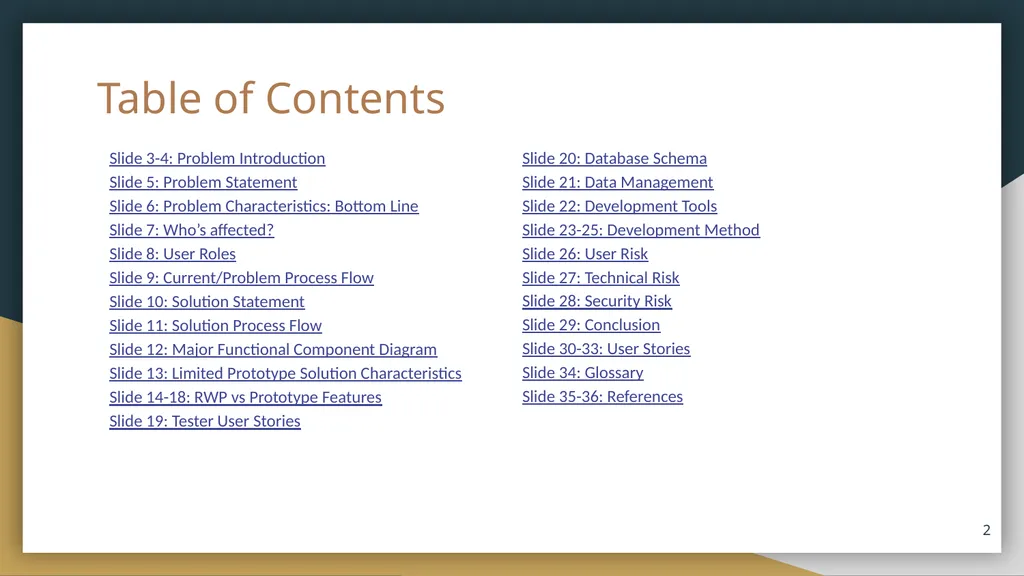
Table of Contents Slide 3-4: Problem Introduction
Slide 5: Problem Statement
Slide 6: Problem Characteristics: Bottom Line
Slide 7: Who’s affected?
Slide 8: User Roles
Slide 9: Current/Problem Process Flow
Slide 10: Solution Statement
Slide 11: Solution Process Flow
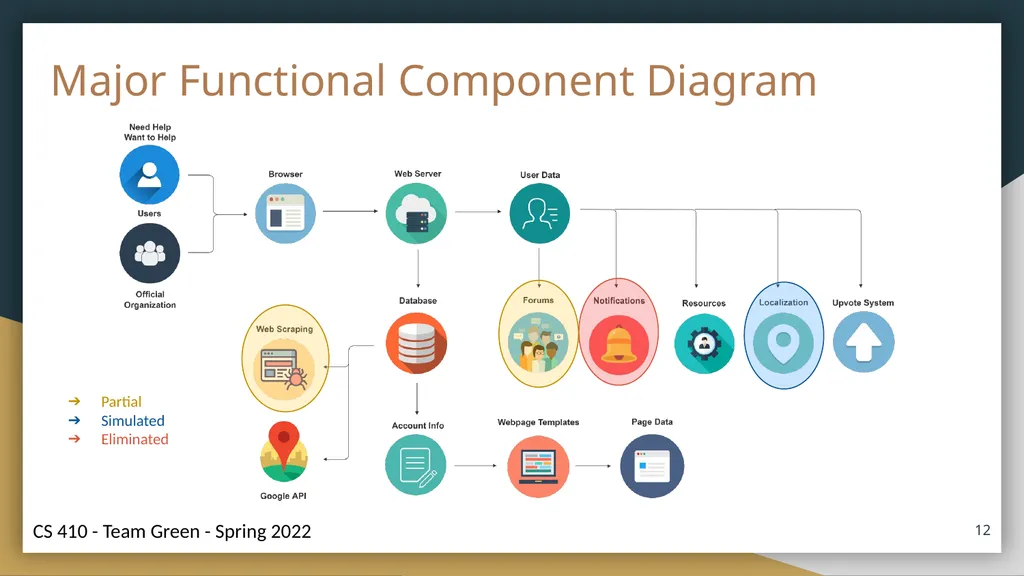
Slide 12: Major Functional Component Diagram
Slide 13: Limited Prototype Solution Characteristics
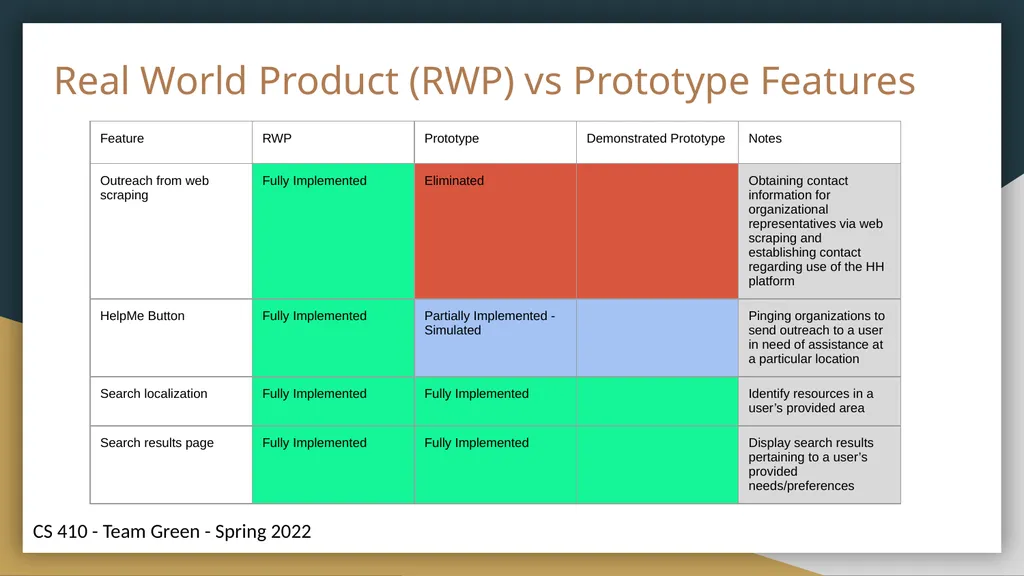
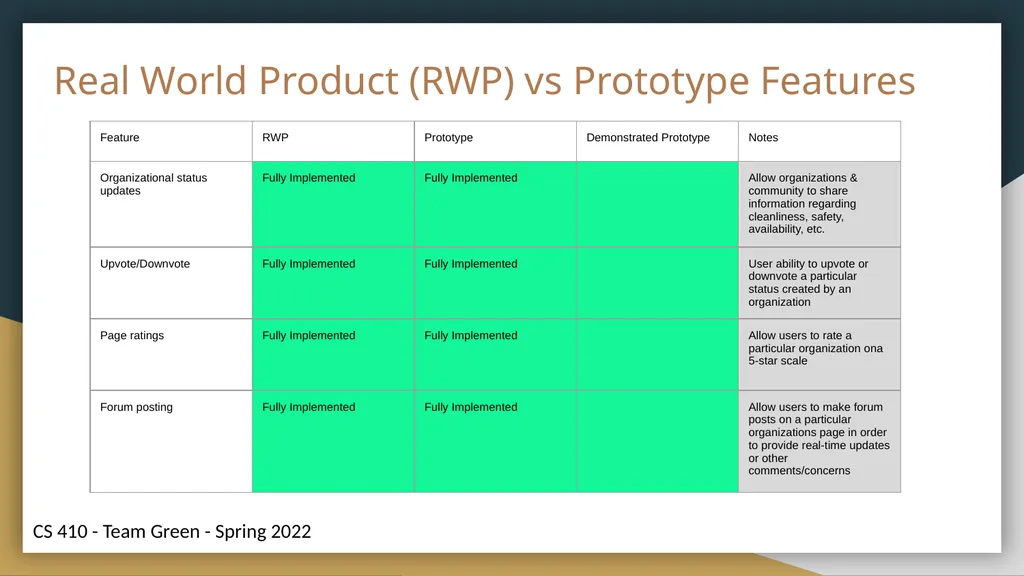
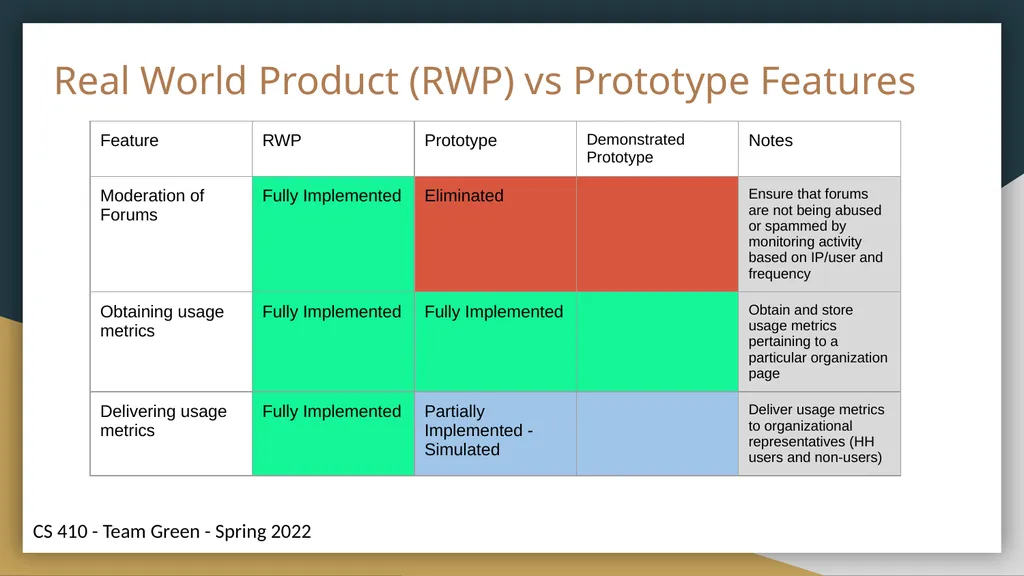
Slide 14-18: RWP vs Prototype Features
Slide 19: Tester User Stories ‹#› Slide 20: Database Schema
Slide 21: Data Management
Slide 22: Development Tools
Slide 23-25: Development Method
Slide 26: User Risk
Slide 27: Technical Risk
Slide 28: Security Risk
Slide 29: Conclusion
Slide 30-33: User Stories
Slide 34: Glossary
Slide 35-36: References<br>
Slide 5: Problem Statement
Slide 6: Problem Characteristics: Bottom Line
Slide 7: Who’s affected?
Slide 8: User Roles
Slide 9: Current/Problem Process Flow
Slide 10: Solution Statement
Slide 11: Solution Process Flow
Slide 12: Major Functional Component Diagram
Slide 13: Limited Prototype Solution Characteristics
Slide 14-18: RWP vs Prototype Features
Slide 19: Tester User Stories ‹#› Slide 20: Database Schema
Slide 21: Data Management
Slide 22: Development Tools
Slide 23-25: Development Method
Slide 26: User Risk
Slide 27: Technical Risk
Slide 28: Security Risk
Slide 29: Conclusion
Slide 30-33: User Stories
Slide 34: Glossary
Slide 35-36: References<br>
03
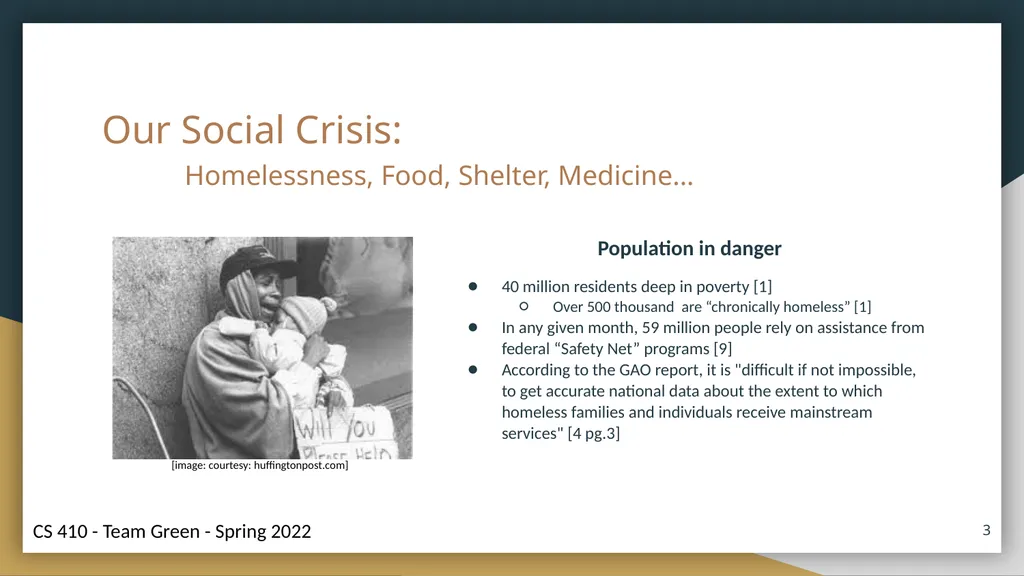
Our Social Crisis:
Homelessness, Food, Shelter, Medicine… Population in danger
40 million residents deep in poverty [1]
Over 500 thousand are “chronically homeless” [1]
In any given month, 59 million people rely on assistance from federal “Safety Net” programs [9]
According to the GAO report, it is "difficult if not impossible, to get accurate national data about the extent to which homeless families and individuals receive mainstream services" [4 pg.3] ‹#› [image: courtesy: huffingtonpost.com]<br>
Homelessness, Food, Shelter, Medicine… Population in danger
40 million residents deep in poverty [1]
Over 500 thousand are “chronically homeless” [1]
In any given month, 59 million people rely on assistance from federal “Safety Net” programs [9]
According to the GAO report, it is "difficult if not impossible, to get accurate national data about the extent to which homeless families and individuals receive mainstream services" [4 pg.3] ‹#› [image: courtesy: huffingtonpost.com]<br>
04
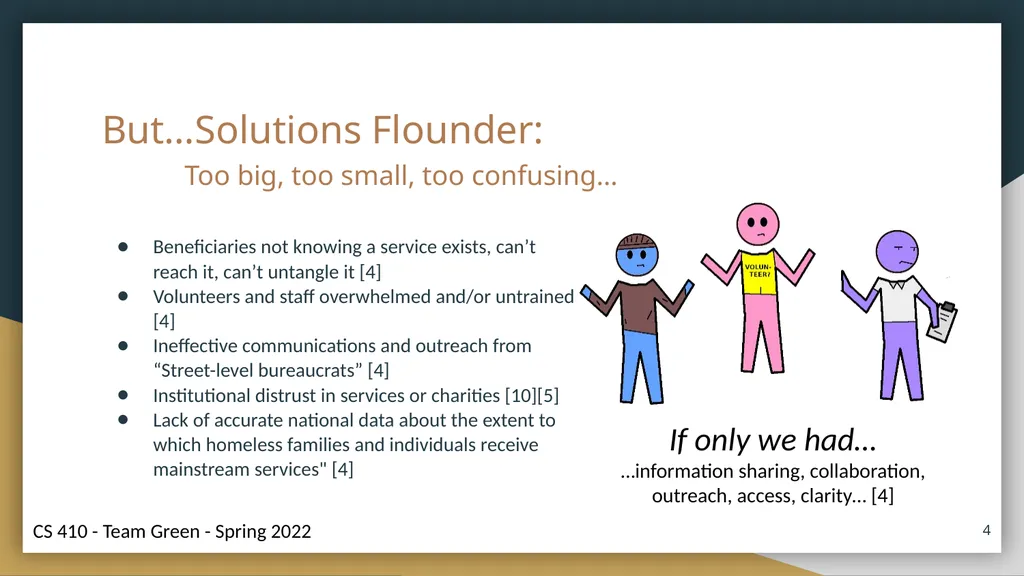
But…Solutions Flounder:
Too big, too small, too confusing… ‹#› Beneficiaries not knowing a service exists, can’t reach it, can’t untangle it [4]
Volunteers and staff overwhelmed and/or untrained [4]
Ineffective communications and outreach from “Street-level bureaucrats” [4]
Institutional distrust in services or charities [10][5]
Lack of accurate national data about the extent to which homeless families and individuals receive mainstream services" [4] If only we had…
…information sharing, collaboration, outreach, access, clarity… [4]<br>
Too big, too small, too confusing… ‹#› Beneficiaries not knowing a service exists, can’t reach it, can’t untangle it [4]
Volunteers and staff overwhelmed and/or untrained [4]
Ineffective communications and outreach from “Street-level bureaucrats” [4]
Institutional distrust in services or charities [10][5]
Lack of accurate national data about the extent to which homeless families and individuals receive mainstream services" [4] If only we had…
…information sharing, collaboration, outreach, access, clarity… [4]<br>
05
Problem Statement Government agencies and charities fall short of effectively collaborating, sharing data, conveying important information and staying current with situations that affect at-risk members of the public.
At-risk individuals give up on help when those organizations either lack clarity, lack accountability, seem confusing or remain entirely unknown. ‹#›<br>
At-risk individuals give up on help when those organizations either lack clarity, lack accountability, seem confusing or remain entirely unknown. ‹#›<br>
06
Problem Characteristics: Bottom Line Government Services and Charities do not achieve their outreach/service goals when…
people don’t know they exist or don’t know what programs are available [4]
their online presence is lacking, confusing or non-existent [4]
trust and/or transparency is lacking [4]
staff/volunteers are poorly trained and lack situational awareness [4]
changes are not communicated properly [4]
collaboration is non-existent [4] ‹#›<br>
people don’t know they exist or don’t know what programs are available [4]
their online presence is lacking, confusing or non-existent [4]
trust and/or transparency is lacking [4]
staff/volunteers are poorly trained and lack situational awareness [4]
changes are not communicated properly [4]
collaboration is non-existent [4] ‹#›<br>
07
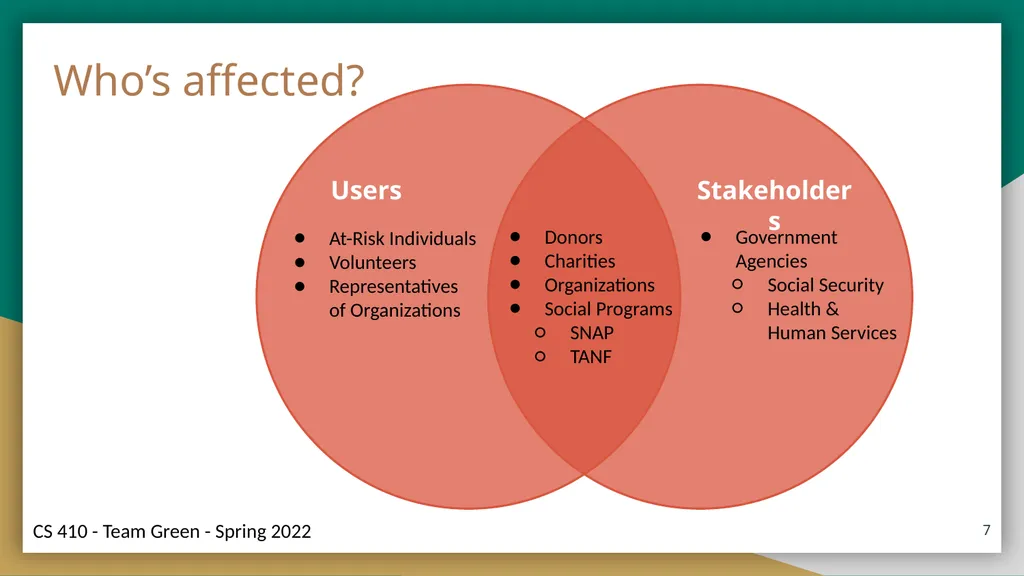
‹#› Users Stakeholders At-Risk Individuals
Volunteers
Representatives of Organizations Government Agencies
Social Security
Health & Human Services Donors
Charities
Organizations
Social Programs
SNAP
TANF Who’s affected?<br>
Volunteers
Representatives of Organizations Government Agencies
Social Security
Health & Human Services Donors
Charities
Organizations
Social Programs
SNAP
TANF Who’s affected?<br>
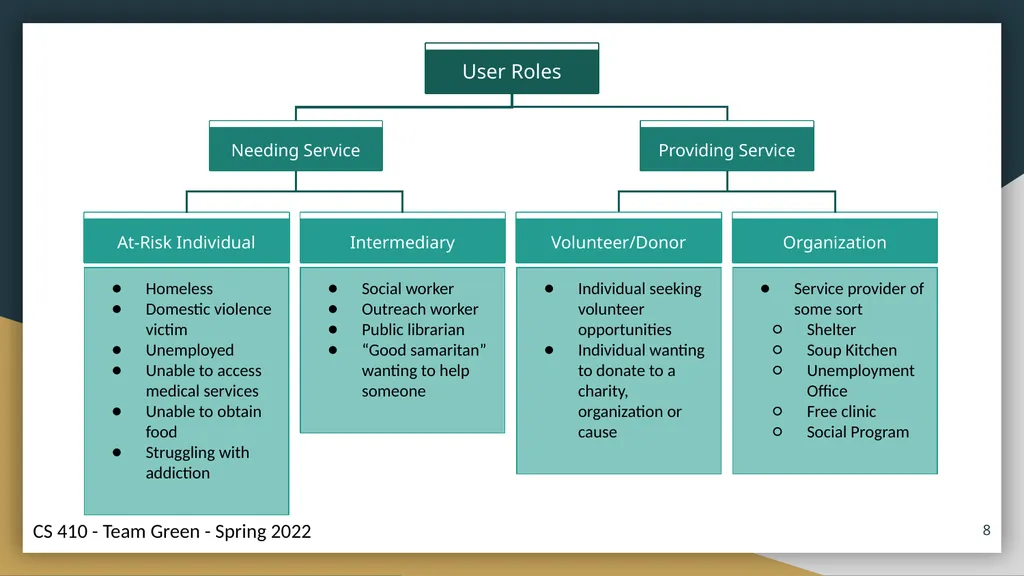
08
Homeless
Domestic violence victim
Unemployed
Unable to access medical services
Unable to obtain food
Struggling with addiction Social worker
Outreach worker
Public librarian
“Good samaritan” wanting to help someone Individual seeking volunteer opportunities
Individual wanting to donate to a charity, organization or cause Service provider of some sort
Shelter
Soup Kitchen
Unemployment Office
Free clinic
Social Program ‹#›<br>
Domestic violence victim
Unemployed
Unable to access medical services
Unable to obtain food
Struggling with addiction Social worker
Outreach worker
Public librarian
“Good samaritan” wanting to help someone Individual seeking volunteer opportunities
Individual wanting to donate to a charity, organization or cause Service provider of some sort
Shelter
Soup Kitchen
Unemployment Office
Free clinic
Social Program ‹#›<br>
09
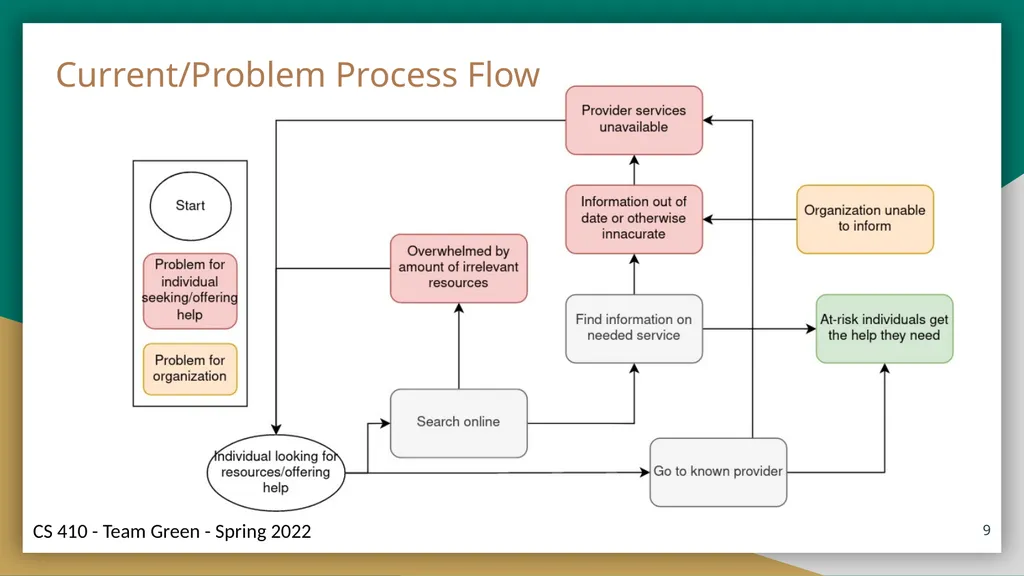
‹#› Current/Problem Process Flow<br>
10
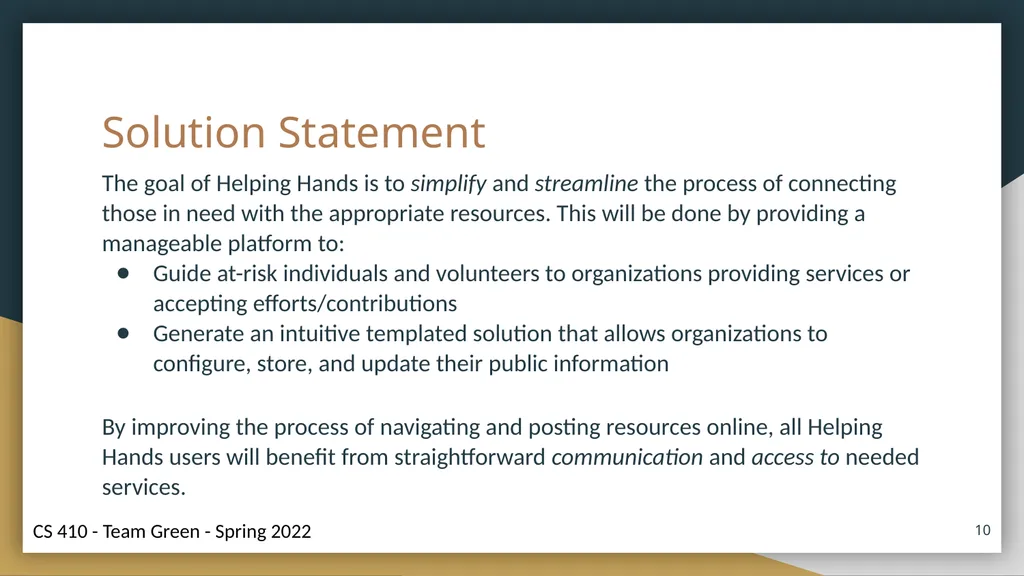
Solution Statement The goal of Helping Hands is to simplify and streamline the process of connecting those in need with the appropriate resources. This will be done by providing a manageable platform to:
Guide at-risk individuals and volunteers to organizations providing services or accepting efforts/contributions
Generate an intuitive templated solution that allows organizations to configure, store, and update their public information
By improving the process of navigating and posting resources online, all Helping Hands users will benefit from straightforward communication and access to needed services. ‹#›<br>
Guide at-risk individuals and volunteers to organizations providing services or accepting efforts/contributions
Generate an intuitive templated solution that allows organizations to configure, store, and update their public information
By improving the process of navigating and posting resources online, all Helping Hands users will benefit from straightforward communication and access to needed services. ‹#›<br>
11
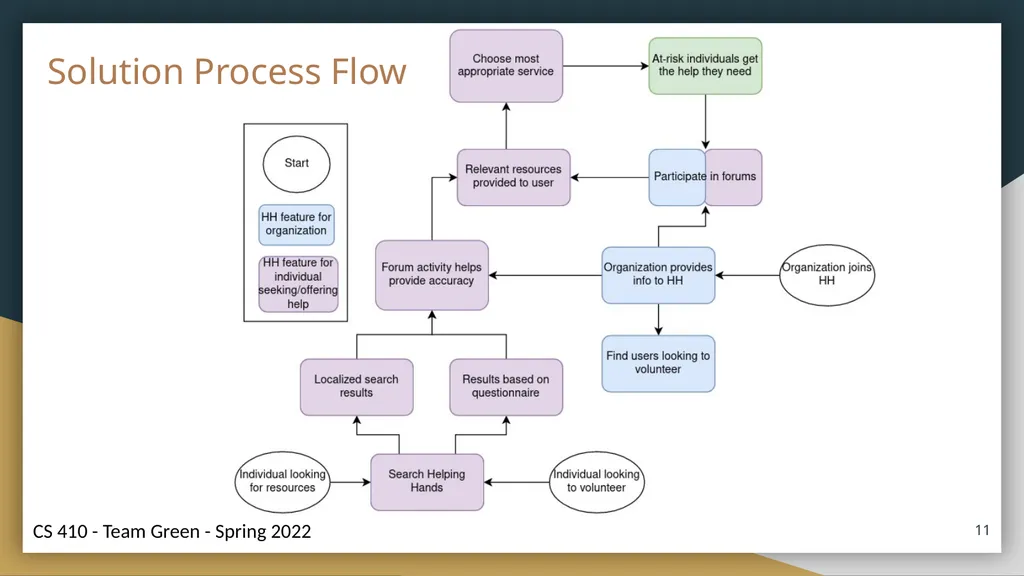
‹#› Solution Process Flow<br>
12
Major Functional Component Diagram ‹#› Partial
Simulated
Eliminated<br>
Simulated
Eliminated<br>
13
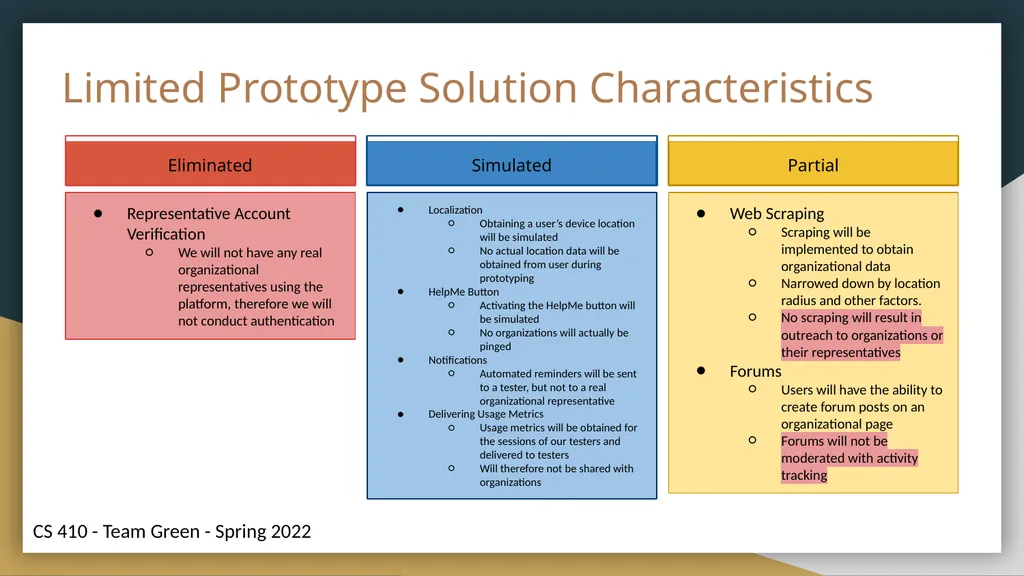
Limited Prototype Solution Characteristics Representative Account Verification
We will not have any real organizational representatives using the platform, therefore we will not conduct authentication Localization
Obtaining a user’s device location will be simulated
No actual location data will be obtained from user during prototyping
HelpMe Button
Activating the HelpMe button will be simulated
No organizations will actually be pinged
Notifications
Automated reminders will be sent to a tester, but not to a real organizational representative
Delivering Usage Metrics
Usage metrics will be obtained for the sessions of our testers and delivered to testers
Will therefore not be shared with organizations Web Scraping
Scraping will be implemented to obtain organizational data
Narrowed down by location radius and other factors.
No scraping will result in outreach to organizations or their representatives
Forums
Users will have the ability to create forum posts on an organizational page
Forums will not be moderated with activity tracking<br>
We will not have any real organizational representatives using the platform, therefore we will not conduct authentication Localization
Obtaining a user’s device location will be simulated
No actual location data will be obtained from user during prototyping
HelpMe Button
Activating the HelpMe button will be simulated
No organizations will actually be pinged
Notifications
Automated reminders will be sent to a tester, but not to a real organizational representative
Delivering Usage Metrics
Usage metrics will be obtained for the sessions of our testers and delivered to testers
Will therefore not be shared with organizations Web Scraping
Scraping will be implemented to obtain organizational data
Narrowed down by location radius and other factors.
No scraping will result in outreach to organizations or their representatives
Forums
Users will have the ability to create forum posts on an organizational page
Forums will not be moderated with activity tracking<br>
14
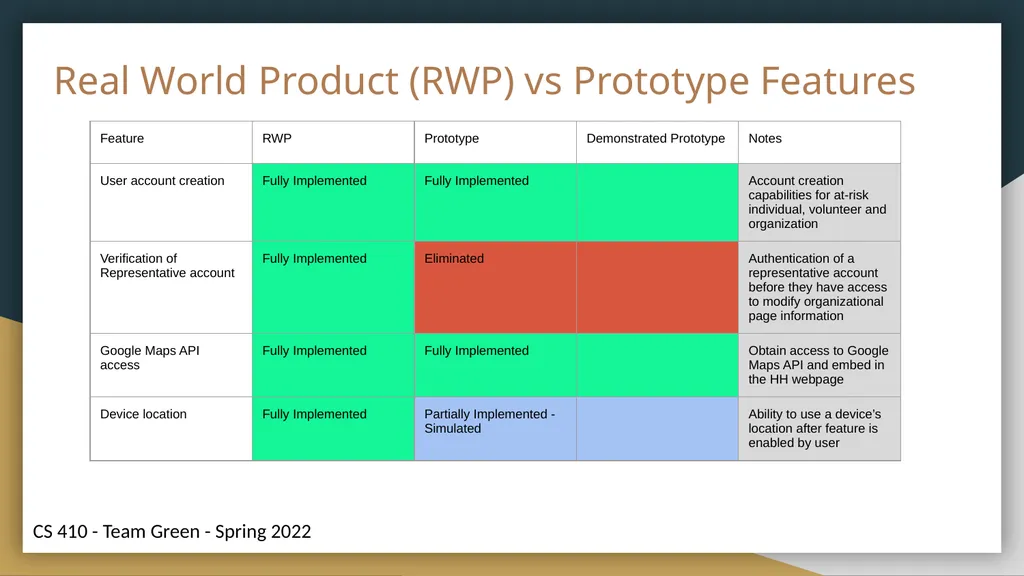
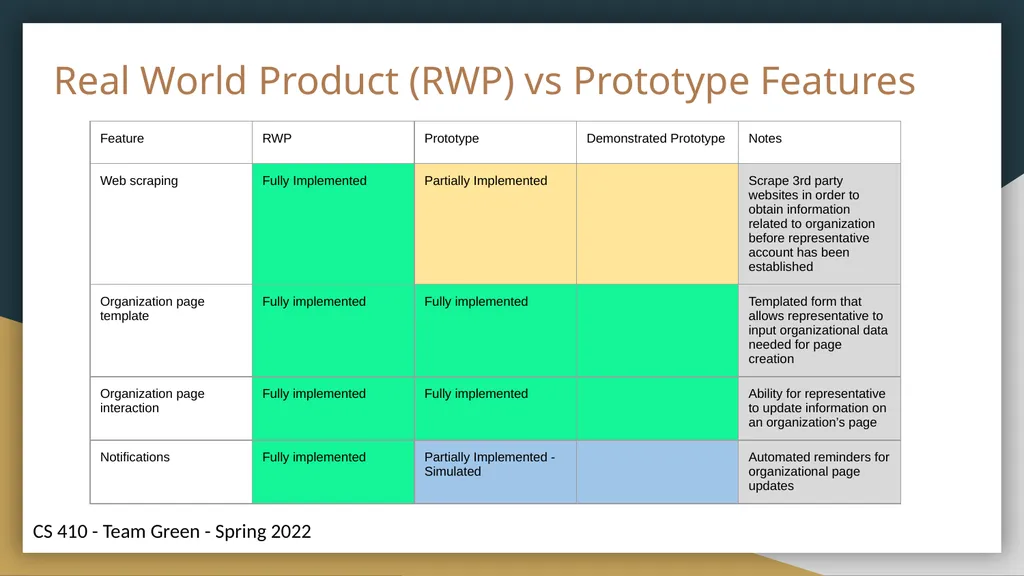
Real World Product (RWP) vs Prototype Features<br>
15
Real World Product (RWP) vs Prototype Features<br>
16
Real World Product (RWP) vs Prototype Features<br>
17
Real World Product (RWP) vs Prototype Features<br>
18
Real World Product (RWP) vs Prototype Features<br>
19
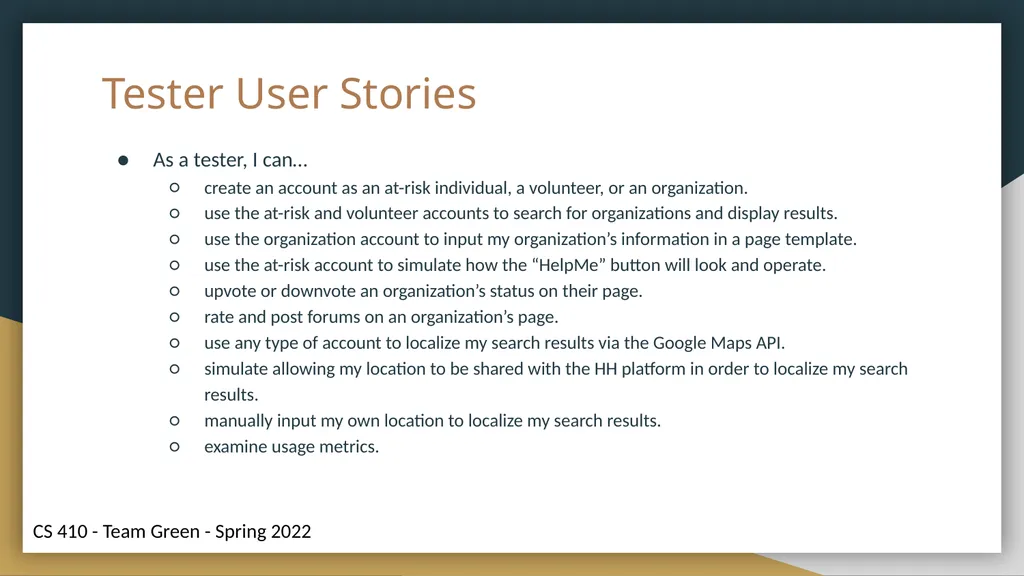
Tester User Stories As a tester, I can…
create an account as an at-risk individual, a volunteer, or an organization.
use the at-risk and volunteer accounts to search for organizations and display results.
use the organization account to input my organization’s information in a page template.
use the at-risk account to simulate how the “HelpMe” button will look and operate.
upvote or downvote an organization’s status on their page.
rate and post forums on an organization’s page.
use any type of account to localize my search results via the Google Maps API.
simulate allowing my location to be shared with the HH platform in order to localize my search results.
manually input my own location to localize my search results.
examine usage metrics.<br>
create an account as an at-risk individual, a volunteer, or an organization.
use the at-risk and volunteer accounts to search for organizations and display results.
use the organization account to input my organization’s information in a page template.
use the at-risk account to simulate how the “HelpMe” button will look and operate.
upvote or downvote an organization’s status on their page.
rate and post forums on an organization’s page.
use any type of account to localize my search results via the Google Maps API.
simulate allowing my location to be shared with the HH platform in order to localize my search results.
manually input my own location to localize my search results.
examine usage metrics.<br>
20
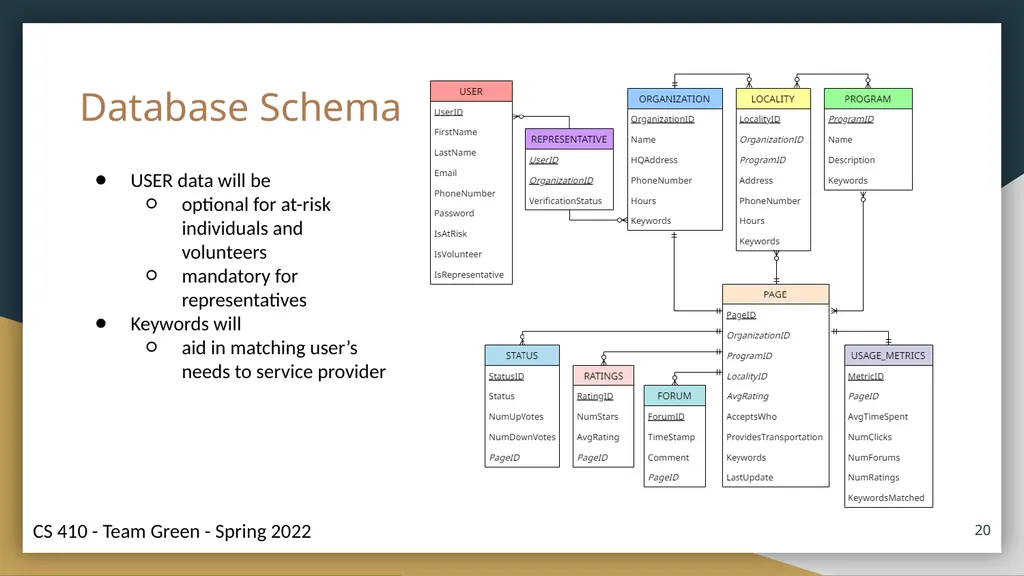
Database Schema USER data will be
optional for at-risk individuals and volunteers
mandatory for representatives
Keywords will
aid in matching user’s needs to service provider ‹#›<br>
optional for at-risk individuals and volunteers
mandatory for representatives
Keywords will
aid in matching user’s needs to service provider ‹#›<br>
21
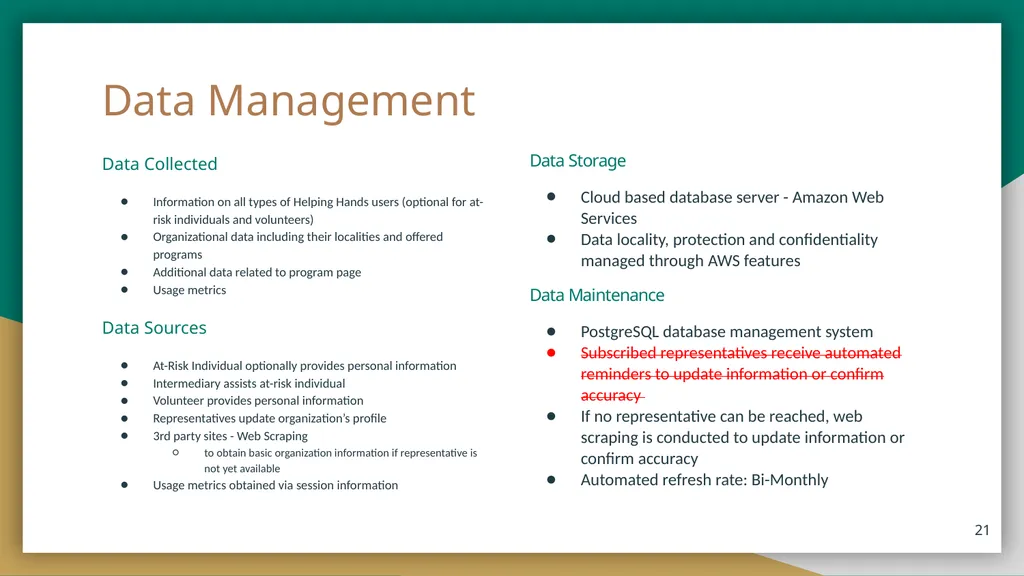
Data Management Data Collected
Information on all types of Helping Hands users (optional for at-risk individuals and volunteers)
Organizational data including their localities and offered programs
Additional data related to program page
Usage metrics
Data Sources
At-Risk Individual optionally provides personal information
Intermediary assists at-risk individual
Volunteer provides personal information
Representatives update organization’s profile
3rd party sites - Web Scraping
to obtain basic organization information if representative is not yet available
Usage metrics obtained via session information Data Storage
Cloud based database server - Amazon Web Services
Data locality, protection and confidentiality managed through AWS features
Data Maintenance
PostgreSQL database management system
Subscribed representatives receive automated reminders to update information or confirm accuracy
If no representative can be reached, web scraping is conducted to update information or confirm accuracy
Automated refresh rate: Bi-Monthly ‹#›<br>
Information on all types of Helping Hands users (optional for at-risk individuals and volunteers)
Organizational data including their localities and offered programs
Additional data related to program page
Usage metrics
Data Sources
At-Risk Individual optionally provides personal information
Intermediary assists at-risk individual
Volunteer provides personal information
Representatives update organization’s profile
3rd party sites - Web Scraping
to obtain basic organization information if representative is not yet available
Usage metrics obtained via session information Data Storage
Cloud based database server - Amazon Web Services
Data locality, protection and confidentiality managed through AWS features
Data Maintenance
PostgreSQL database management system
Subscribed representatives receive automated reminders to update information or confirm accuracy
If no representative can be reached, web scraping is conducted to update information or confirm accuracy
Automated refresh rate: Bi-Monthly ‹#›<br>
22
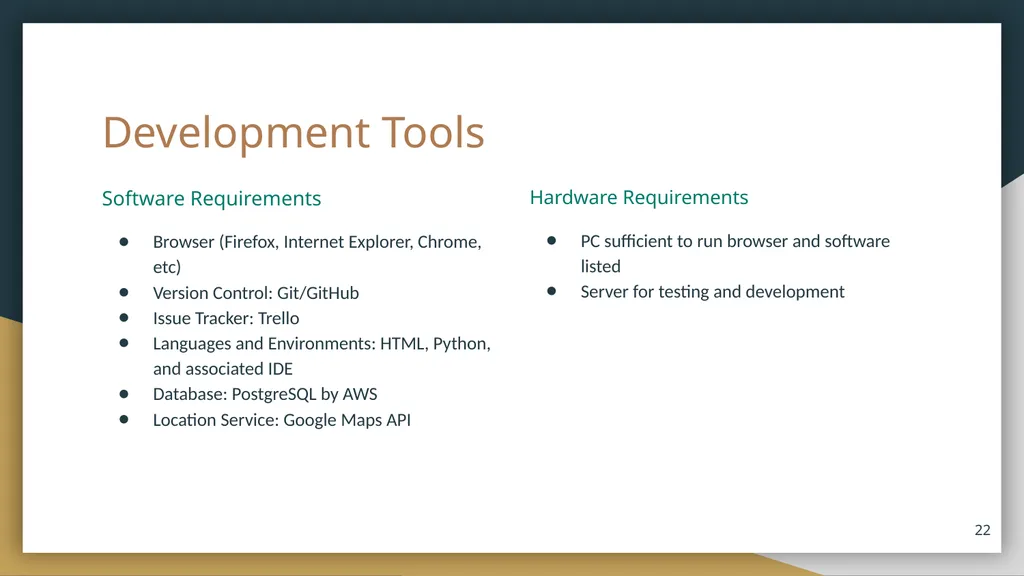
Development Tools Software Requirements
Browser (Firefox, Internet Explorer, Chrome, etc)
Version Control: Git/GitHub
Issue Tracker: Trello
Languages and Environments: HTML, Python, and associated IDE
Database: PostgreSQL by AWS
Location Service: Google Maps API ‹#› Hardware Requirements
PC sufficient to run browser and software listed
Server for testing and development<br>
Browser (Firefox, Internet Explorer, Chrome, etc)
Version Control: Git/GitHub
Issue Tracker: Trello
Languages and Environments: HTML, Python, and associated IDE
Database: PostgreSQL by AWS
Location Service: Google Maps API ‹#› Hardware Requirements
PC sufficient to run browser and software listed
Server for testing and development<br>
23
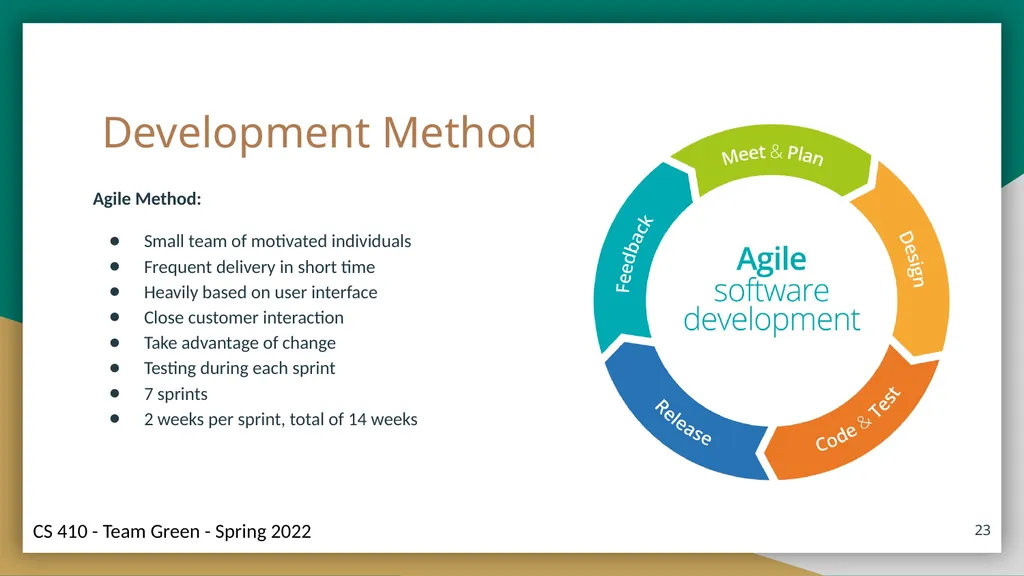
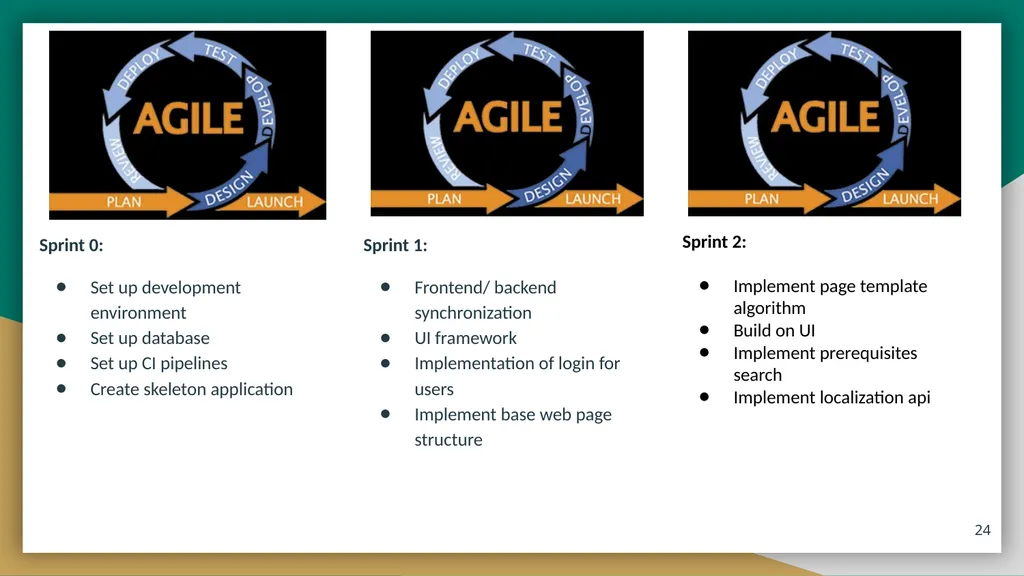
Development Method Agile Method:
Small team of motivated individuals
Frequent delivery in short time
Heavily based on user interface
Close customer interaction
Take advantage of change
Testing during each sprint
7 sprints
2 weeks per sprint, total of 14 weeks ‹#›<br>
Small team of motivated individuals
Frequent delivery in short time
Heavily based on user interface
Close customer interaction
Take advantage of change
Testing during each sprint
7 sprints
2 weeks per sprint, total of 14 weeks ‹#›<br>
24
Sprint 0:
Set up development environment
Set up database
Set up CI pipelines
Create skeleton application ‹#› Sprint 1:
Frontend/ backend synchronization
UI framework
Implementation of login for users
Implement base web page structure Sprint 2:
Implement page template algorithm
Build on UI
Implement prerequisites search
Implement localization api<br>
Set up development environment
Set up database
Set up CI pipelines
Create skeleton application ‹#› Sprint 1:
Frontend/ backend synchronization
UI framework
Implementation of login for users
Implement base web page structure Sprint 2:
Implement page template algorithm
Build on UI
Implement prerequisites search
Implement localization api<br>
25
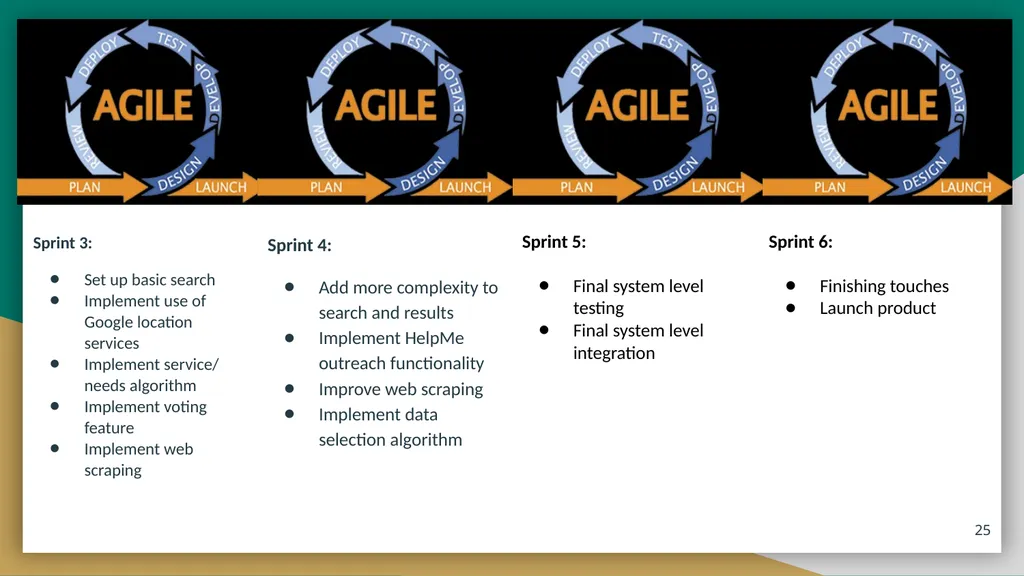
Sprint 3:
Set up basic search
Implement use of Google location services
Implement service/ needs algorithm
Implement voting feature
Implement web scraping ‹#› Sprint 4:
Add more complexity to search and results
Implement HelpMe outreach functionality
Improve web scraping
Implement data selection algorithm Sprint 5:
Final system level testing
Final system level integration Sprint 6:
Finishing touches
Launch product<br>
Set up basic search
Implement use of Google location services
Implement service/ needs algorithm
Implement voting feature
Implement web scraping ‹#› Sprint 4:
Add more complexity to search and results
Implement HelpMe outreach functionality
Improve web scraping
Implement data selection algorithm Sprint 5:
Final system level testing
Final system level integration Sprint 6:
Finishing touches
Launch product<br>
26
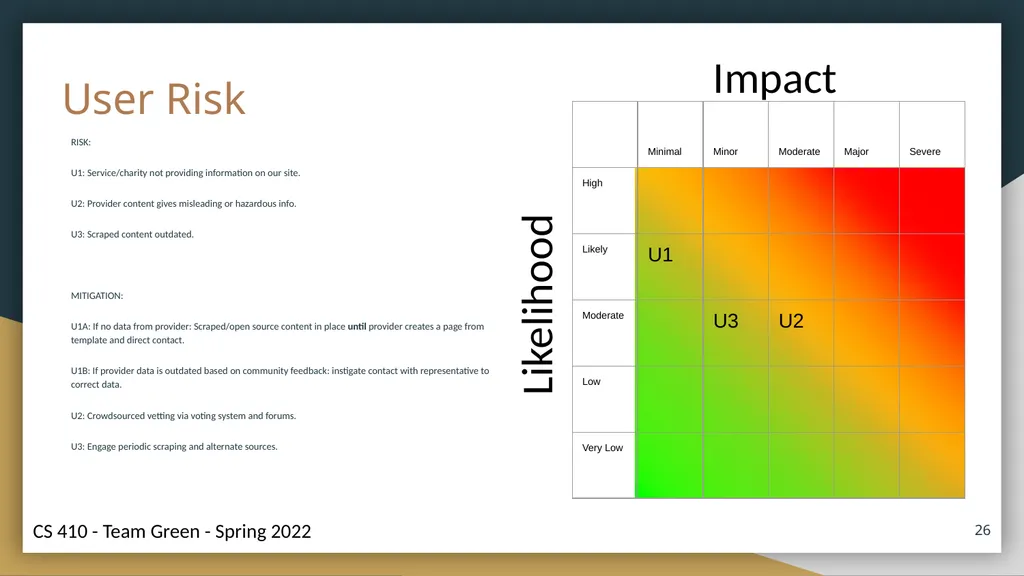
User Risk RISK:
U1: Service/charity not providing information on our site.
U2: Provider content gives misleading or hazardous info.
U3: Scraped content outdated.
MITIGATION:
U1A: If no data from provider: Scraped/open source content in place until provider creates a page from template and direct contact.
U1B: If provider data is outdated based on community feedback: instigate contact with representative to correct data.
U2: Crowdsourced vetting via voting system and forums.
U3: Engage periodic scraping and alternate sources. ‹#› Impact Likelihood<br>
U1: Service/charity not providing information on our site.
U2: Provider content gives misleading or hazardous info.
U3: Scraped content outdated.
MITIGATION:
U1A: If no data from provider: Scraped/open source content in place until provider creates a page from template and direct contact.
U1B: If provider data is outdated based on community feedback: instigate contact with representative to correct data.
U2: Crowdsourced vetting via voting system and forums.
U3: Engage periodic scraping and alternate sources. ‹#› Impact Likelihood<br>
27
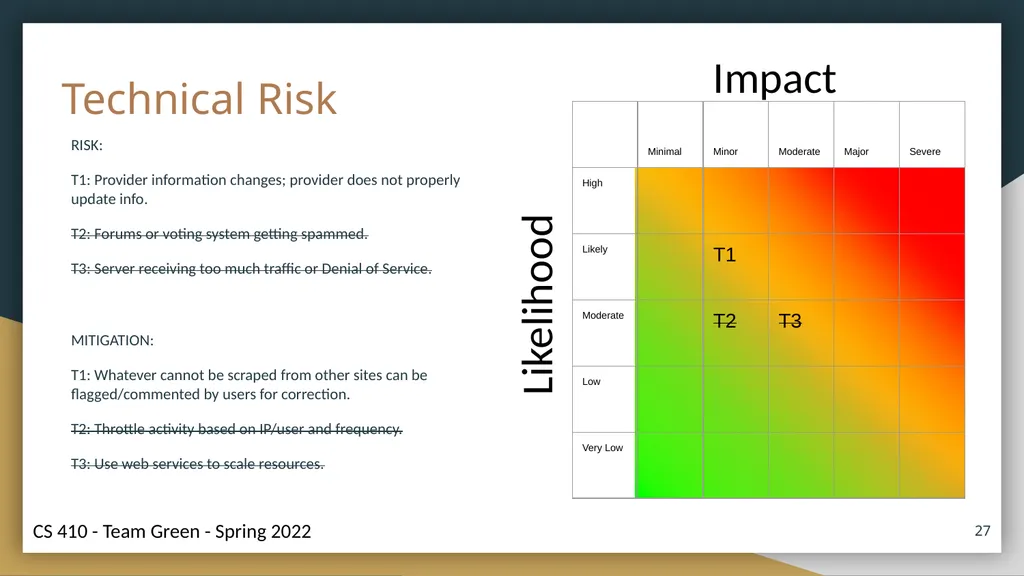
Technical Risk RISK:
T1: Provider information changes; provider does not properly update info.
T2: Forums or voting system getting spammed.
T3: Server receiving too much traffic or Denial of Service.
MITIGATION:
T1: Whatever cannot be scraped from other sites can be flagged/commented by users for correction.
T2: Throttle activity based on IP/user and frequency.
T3: Use web services to scale resources. Impact Likelihood ‹#›<br>
T1: Provider information changes; provider does not properly update info.
T2: Forums or voting system getting spammed.
T3: Server receiving too much traffic or Denial of Service.
MITIGATION:
T1: Whatever cannot be scraped from other sites can be flagged/commented by users for correction.
T2: Throttle activity based on IP/user and frequency.
T3: Use web services to scale resources. Impact Likelihood ‹#›<br>
28
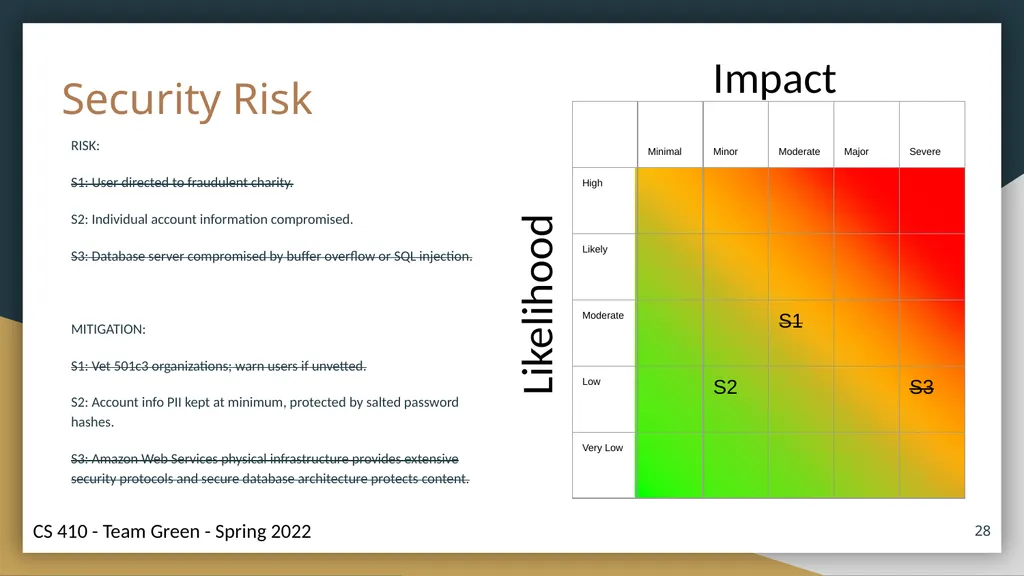
Security Risk RISK:
S1: User directed to fraudulent charity.
S2: Individual account information compromised.
S3: Database server compromised by buffer overflow or SQL injection.
MITIGATION:
S1: Vet 501c3 organizations; warn users if unvetted.
S2: Account info PII kept at minimum, protected by salted password hashes.
S3: Amazon Web Services physical infrastructure provides extensive security protocols and secure database architecture protects content. Impact Likelihood ‹#›<br>
S1: User directed to fraudulent charity.
S2: Individual account information compromised.
S3: Database server compromised by buffer overflow or SQL injection.
MITIGATION:
S1: Vet 501c3 organizations; warn users if unvetted.
S2: Account info PII kept at minimum, protected by salted password hashes.
S3: Amazon Web Services physical infrastructure provides extensive security protocols and secure database architecture protects content. Impact Likelihood ‹#›<br>
29
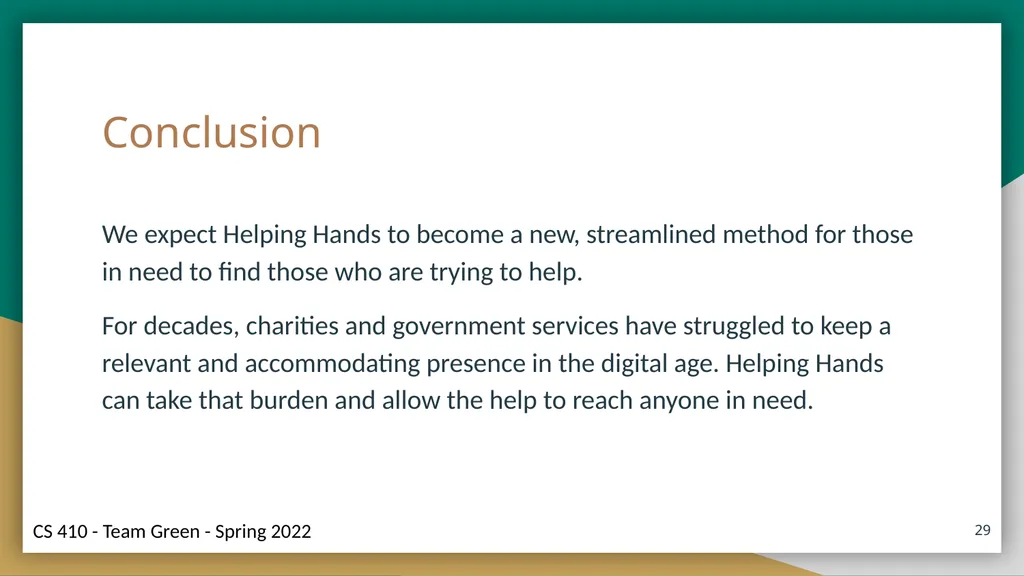
Conclusion We expect Helping Hands to become a new, streamlined method for those in need to find those who are trying to help.
For decades, charities and government services have struggled to keep a relevant and accommodating presence in the digital age. Helping Hands can take that burden and allow the help to reach anyone in need. ‹#›<br>
For decades, charities and government services have struggled to keep a relevant and accommodating presence in the digital age. Helping Hands can take that burden and allow the help to reach anyone in need. ‹#›<br>
30
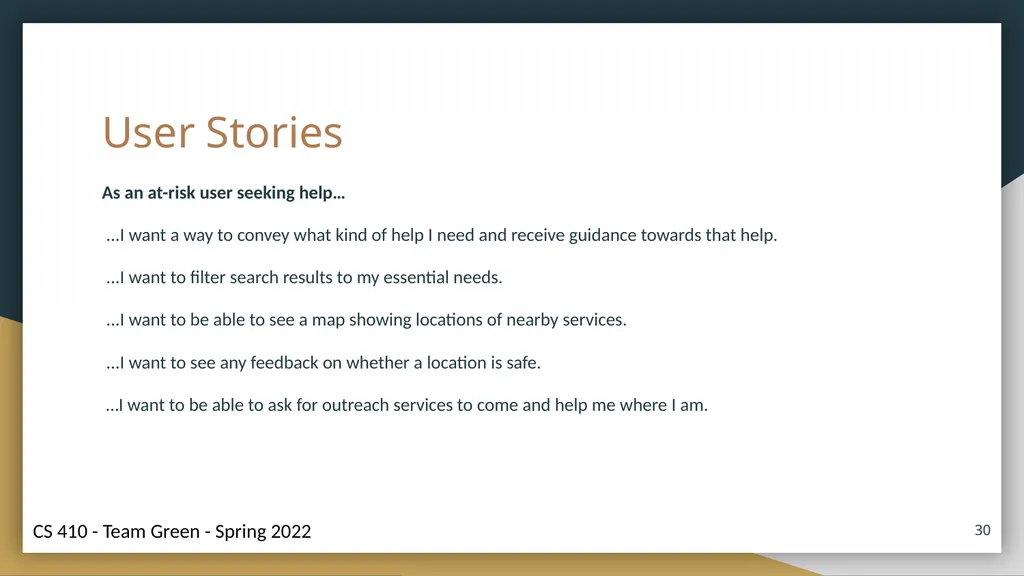
User Stories As an at-risk user seeking help…
...I want a way to convey what kind of help I need and receive guidance towards that help.
...I want to filter search results to my essential needs.
...I want to be able to see a map showing locations of nearby services.
...I want to see any feedback on whether a location is safe.
…I want to be able to ask for outreach services to come and help me where I am. ‹#›<br>
...I want a way to convey what kind of help I need and receive guidance towards that help.
...I want to filter search results to my essential needs.
...I want to be able to see a map showing locations of nearby services.
...I want to see any feedback on whether a location is safe.
…I want to be able to ask for outreach services to come and help me where I am. ‹#›<br>
31
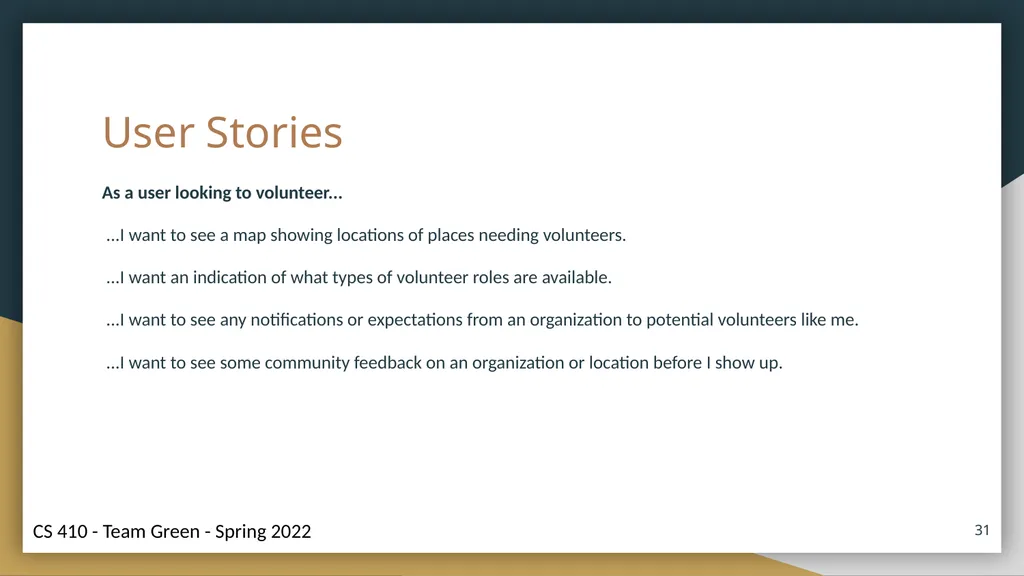
User Stories As a user looking to volunteer...
...I want to see a map showing locations of places needing volunteers.
...I want an indication of what types of volunteer roles are available.
...I want to see any notifications or expectations from an organization to potential volunteers like me.
...I want to see some community feedback on an organization or location before I show up. ‹#›<br>
...I want to see a map showing locations of places needing volunteers.
...I want an indication of what types of volunteer roles are available.
...I want to see any notifications or expectations from an organization to potential volunteers like me.
...I want to see some community feedback on an organization or location before I show up. ‹#›<br>
32
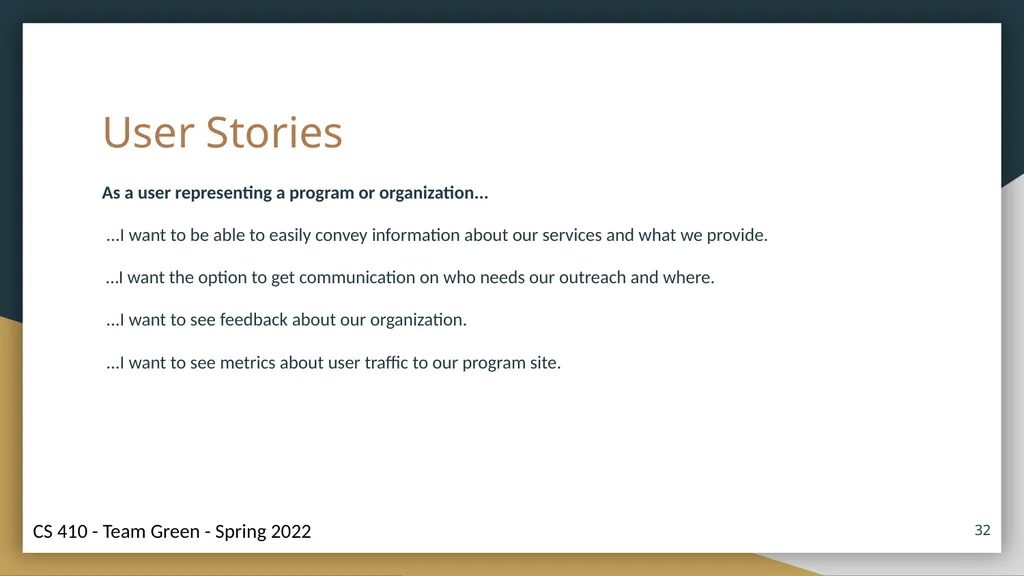
User Stories As a user representing a program or organization...
...I want to be able to easily convey information about our services and what we provide.
…I want the option to get communication on who needs our outreach and where.
...I want to see feedback about our organization.
...I want to see metrics about user traffic to our program site. ‹#›<br>
...I want to be able to easily convey information about our services and what we provide.
…I want the option to get communication on who needs our outreach and where.
...I want to see feedback about our organization.
...I want to see metrics about user traffic to our program site. ‹#›<br>
33
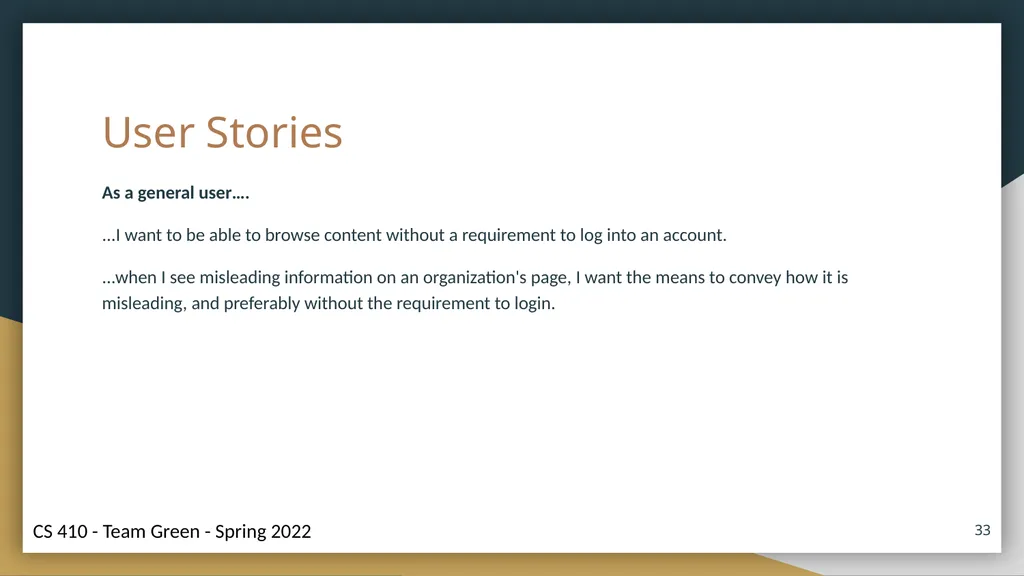
User Stories As a general user….
...I want to be able to browse content without a requirement to log into an account.
...when I see misleading information on an organization's page, I want the means to convey how it is misleading, and preferably without the requirement to login. ‹#›<br>
...I want to be able to browse content without a requirement to log into an account.
...when I see misleading information on an organization's page, I want the means to convey how it is misleading, and preferably without the requirement to login. ‹#›<br>
34
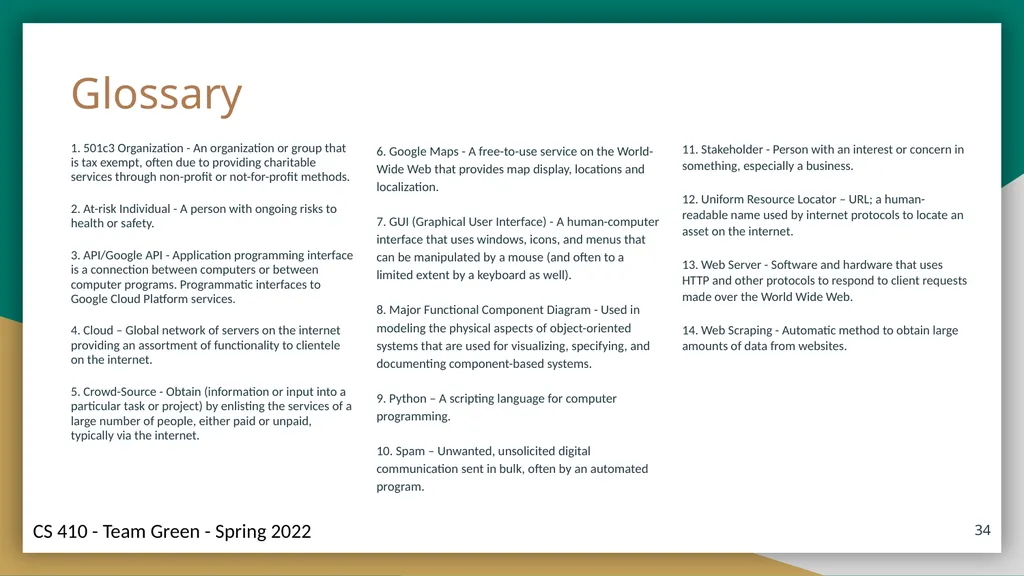
1. 501c3 Organization - An organization or group that is tax exempt, often due to providing charitable services through non-profit or not-for-profit methods.
2. At-risk Individual - A person with ongoing risks to health or safety.
3. API/Google API - Application programming interface is a connection between computers or between computer programs. Programmatic interfaces to Google Cloud Platform services.
4. Cloud – Global network of servers on the internet providing an assortment of functionality to clientele on the internet.
5. Crowd-Source - Obtain (information or input into a particular task or project) by enlisting the services of a large number of people, either paid or unpaid, typically via the internet. ‹#› 6. Google Maps - A free-to-use service on the World-Wide Web that provides map display, locations and localization.
7. GUI (Graphical User Interface) - A human-computer interface that uses windows, icons, and menus that can be manipulated by a mouse (and often to a limited extent by a keyboard as well).
8. Major Functional Component Diagram - Used in modeling the physical aspects of object-oriented systems that are used for visualizing, specifying, and documenting component-based systems.
9. Python – A scripting language for computer programming.
10. Spam – Unwanted, unsolicited digital communication sent in bulk, often by an automated program. 11. Stakeholder - Person with an interest or concern in something, especially a business.
12. Uniform Resource Locator – URL; a human-readable name used by internet protocols to locate an asset on the internet.
13. Web Server - Software and hardware that uses HTTP and other protocols to respond to client requests made over the World Wide Web.
14. Web Scraping - Automatic method to obtain large amounts of data from websites. Glossary<br>
2. At-risk Individual - A person with ongoing risks to health or safety.
3. API/Google API - Application programming interface is a connection between computers or between computer programs. Programmatic interfaces to Google Cloud Platform services.
4. Cloud – Global network of servers on the internet providing an assortment of functionality to clientele on the internet.
5. Crowd-Source - Obtain (information or input into a particular task or project) by enlisting the services of a large number of people, either paid or unpaid, typically via the internet. ‹#› 6. Google Maps - A free-to-use service on the World-Wide Web that provides map display, locations and localization.
7. GUI (Graphical User Interface) - A human-computer interface that uses windows, icons, and menus that can be manipulated by a mouse (and often to a limited extent by a keyboard as well).
8. Major Functional Component Diagram - Used in modeling the physical aspects of object-oriented systems that are used for visualizing, specifying, and documenting component-based systems.
9. Python – A scripting language for computer programming.
10. Spam – Unwanted, unsolicited digital communication sent in bulk, often by an automated program. 11. Stakeholder - Person with an interest or concern in something, especially a business.
12. Uniform Resource Locator – URL; a human-readable name used by internet protocols to locate an asset on the internet.
13. Web Server - Software and hardware that uses HTTP and other protocols to respond to client requests made over the World Wide Web.
14. Web Scraping - Automatic method to obtain large amounts of data from websites. Glossary<br>
35
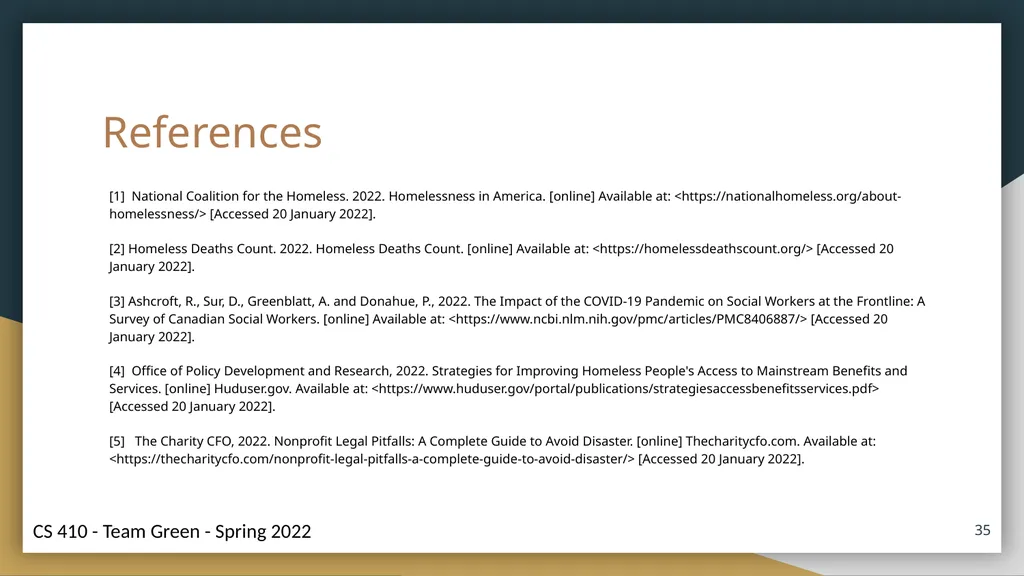
References [1] National Coalition for the Homeless. 2022. Homelessness in America. [online] Available at: <https://nationalhomeless.org/about-homelessness/> [Accessed 20 January 2022].
[2] Homeless Deaths Count. 2022. Homeless Deaths Count. [online] Available at: <https://homelessdeathscount.org/> [Accessed 20 January 2022].
[3] Ashcroft, R., Sur, D., Greenblatt, A. and Donahue, P., 2022. The Impact of the COVID-19 Pandemic on Social Workers at the Frontline: A Survey of Canadian Social Workers. [online] Available at: <https://www.ncbi.nlm.nih.gov/pmc/articles/PMC8406887/> [Accessed 20 January 2022].
[4] Office of Policy Development and Research, 2022. Strategies for Improving Homeless People's Access to Mainstream Benefits and Services. [online] Huduser.gov. Available at: <https://www.huduser.gov/portal/publications/strategiesaccessbenefitsservices.pdf> [Accessed 20 January 2022].
[5] The Charity CFO, 2022. Nonprofit Legal Pitfalls: A Complete Guide to Avoid Disaster. [online] Thecharitycfo.com. Available at: <https://thecharitycfo.com/nonprofit-legal-pitfalls-a-complete-guide-to-avoid-disaster/> [Accessed 20 January 2022]. ‹#›<br>
[2] Homeless Deaths Count. 2022. Homeless Deaths Count. [online] Available at: <https://homelessdeathscount.org/> [Accessed 20 January 2022].
[3] Ashcroft, R., Sur, D., Greenblatt, A. and Donahue, P., 2022. The Impact of the COVID-19 Pandemic on Social Workers at the Frontline: A Survey of Canadian Social Workers. [online] Available at: <https://www.ncbi.nlm.nih.gov/pmc/articles/PMC8406887/> [Accessed 20 January 2022].
[4] Office of Policy Development and Research, 2022. Strategies for Improving Homeless People's Access to Mainstream Benefits and Services. [online] Huduser.gov. Available at: <https://www.huduser.gov/portal/publications/strategiesaccessbenefitsservices.pdf> [Accessed 20 January 2022].
[5] The Charity CFO, 2022. Nonprofit Legal Pitfalls: A Complete Guide to Avoid Disaster. [online] Thecharitycfo.com. Available at: <https://thecharitycfo.com/nonprofit-legal-pitfalls-a-complete-guide-to-avoid-disaster/> [Accessed 20 January 2022]. ‹#›<br>
36
References (continued) [6] Rhoades, H., Wenzel, S., Rice, E., Winetrobe, H. and Henwood, B., 2022. No digital divide? Technology use among homeless adults. [online] Socialinnovation.usc.edu. Available at: <https://socialinnovation.usc.edu/wp-content/uploads/2018/02/Rhoades-et-al-2017-final.pdf> [Accessed 20 January 2022].
[7] David, 2020. The Top Ten Digital Challenges Facing the Charity Sector. [online] medium.com. Available at <https://medium.com/wethecatalysts/the-top-ten-digital-challenges-facing-the-charity-sector-2144789aec14> [Accessed 20 January 2022]
[8]https://www.usich.gov/homelessness-statistics/va/
[9] Minton, S. and Giannarelli, L., 2019. Five Things You May Not Know About the US Social Safety Net. [online] urban.org. Available at: <https://www.urban.org/sites/default/files/publication/99674/five_things_you_may_not_know_about_the_us_social_safety_net_1.pdf>
[10] https://www.edelman.com/trust/2020-trust-barometer ‹#›<br>
[7] David, 2020. The Top Ten Digital Challenges Facing the Charity Sector. [online] medium.com. Available at <https://medium.com/wethecatalysts/the-top-ten-digital-challenges-facing-the-charity-sector-2144789aec14> [Accessed 20 January 2022]
[8]https://www.usich.gov/homelessness-statistics/va/
[9] Minton, S. and Giannarelli, L., 2019. Five Things You May Not Know About the US Social Safety Net. [online] urban.org. Available at: <https://www.urban.org/sites/default/files/publication/99674/five_things_you_may_not_know_about_the_us_social_safety_net_1.pdf>
[10] https://www.edelman.com/trust/2020-trust-barometer ‹#›<br>