
internal Global ERP domain SAP Incident Management
CS
Published · 17 slides · 0 views

1 / 1
Description
internal Global ERP domain SAP Incident Management Andrea Naef, Global ERP Center of Expertise Doc. Ref. 9AAD135023 Rev J SAP Incident Management January 13, 2022 Slide 2 SAP Support Process SAP Support Offerings Customer Incident Process
Related Topics
Share
Embed code
Download this presentation From Below
"internal Global ERP domain SAP Incident Management" is the property of its rightful owner. Permission is granted to download and print the materials on this website for personal, non-commercial use only, and to display it on your personal computer provided you do not modify the materials and that you retain all copyright notices contained in the materials. By downloading content from our website, you accept the terms of this agreement.
Presentation Transcript
01
internal Global ERP domain SAP Incident Management Andrea Naef, Global ERP Center of Expertise Doc. Ref. 9AAD135023 Rev J<br>
02
SAP Incident Management January 13, 2022 Slide 2 SAP Support Process
SAP Support Offerings
Customer Incident Process
Message Escalation Process Overview<br>
SAP Support Offerings
Customer Incident Process
Message Escalation Process Overview<br>
03
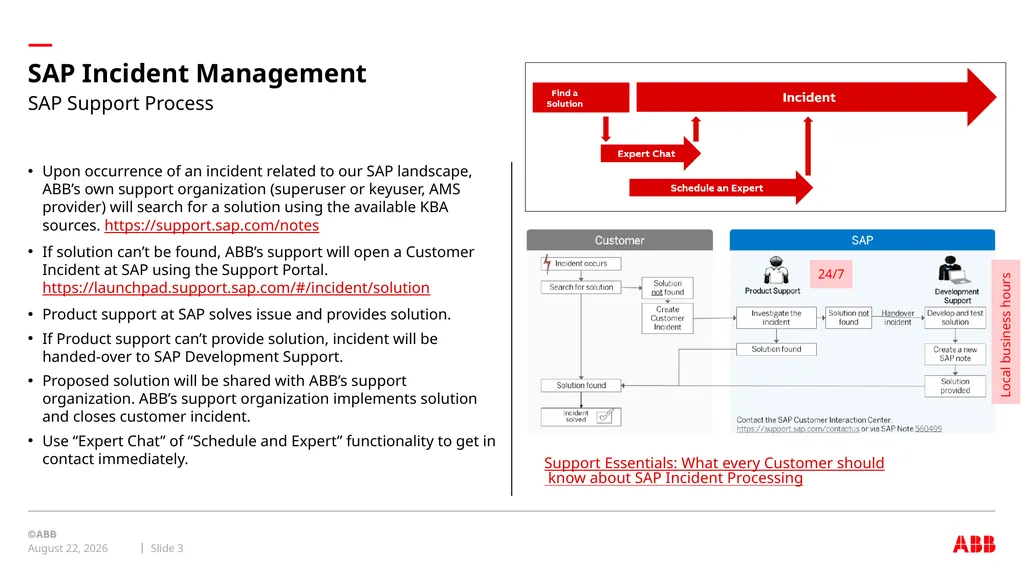
SAP Incident Management January 13, 2022 Slide 3 Upon occurrence of an incident related to our SAP landscape, ABB’s own support organization (superuser or keyuser, AMS provider) will search for a solution using the available KBA sources. https://support.sap.com/notes
If solution can’t be found, ABB’s support will open a Customer Incident at SAP using the Support Portal. https://launchpad.support.sap.com/#/incident/solution
Product support at SAP solves issue and provides solution.
If Product support can’t provide solution, incident will be handed-over to SAP Development Support.
Proposed solution will be shared with ABB’s support organization. ABB’s support organization implements solution and closes customer incident.
Use “Expert Chat” of “Schedule and Expert” functionality to get in contact immediately. SAP Support Process Support Essentials: What every Customer should know about SAP Incident Processing 24/7 Local business hours<br>
If solution can’t be found, ABB’s support will open a Customer Incident at SAP using the Support Portal. https://launchpad.support.sap.com/#/incident/solution
Product support at SAP solves issue and provides solution.
If Product support can’t provide solution, incident will be handed-over to SAP Development Support.
Proposed solution will be shared with ABB’s support organization. ABB’s support organization implements solution and closes customer incident.
Use “Expert Chat” of “Schedule and Expert” functionality to get in contact immediately. SAP Support Process Support Essentials: What every Customer should know about SAP Incident Processing 24/7 Local business hours<br>
04
SAP Incident Management January 13, 2022 Slide 4 The customer service ticket (problem message) is in English, and
The customer has a suitably skilled English-speaking employee at hand so that the customer and SAP can communicate if SAP assigns the customer service ticket to an SAP support center in another country .
Otherwise, SAP begins to work on customer service tickets as follows:
Where the fault prevents operation: If a customer service ticket is entered in the system before 12 noon in the Local Business Time, work on it begins not later than the next working day; where a customer service ticket is entered after 12 noon in the Local Business Time, work on it begins not later than the day after the next working day .
Where the fault significantly impedes operations, work begins on the customer service ticket reasonably soon – in the light of the severity of the impairment – after the customer service ticket is entered in the system.
Other faults are corrected in the next release of the SAP Software. 1 .3 .3 Global Message Handling (Troubleshooting)
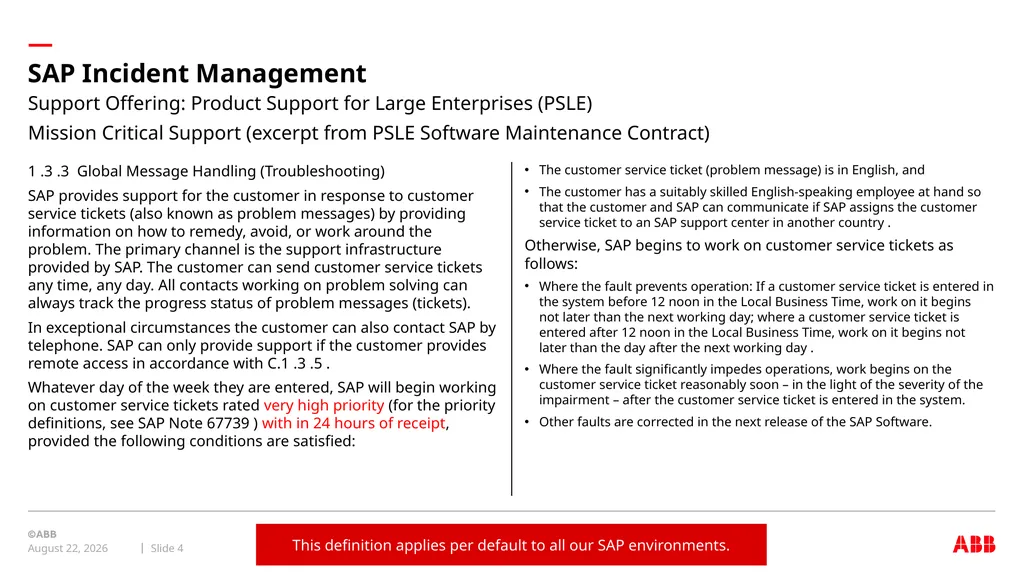
SAP provides support for the customer in response to customer service tickets (also known as problem messages) by providing information on how to remedy, avoid, or work around the problem. The primary channel is the support infrastructure provided by SAP. The customer can send customer service tickets any time, any day. All contacts working on problem solving can always track the progress status of problem messages (tickets).
In exceptional circumstances the customer can also contact SAP by telephone. SAP can only provide support if the customer provides remote access in accordance with C.1 .3 .5 .
Whatever day of the week they are entered, SAP will begin working on customer service tickets rated very high priority (for the priority definitions, see SAP Note 67739 ) with in 24 hours of receipt, provided the following conditions are satisfied: Support Offering: Product Support for Large Enterprises (PSLE)
Mission Critical Support (excerpt from PSLE Software Maintenance Contract) This definition applies per default to all our SAP environments.<br>
The customer has a suitably skilled English-speaking employee at hand so that the customer and SAP can communicate if SAP assigns the customer service ticket to an SAP support center in another country .
Otherwise, SAP begins to work on customer service tickets as follows:
Where the fault prevents operation: If a customer service ticket is entered in the system before 12 noon in the Local Business Time, work on it begins not later than the next working day; where a customer service ticket is entered after 12 noon in the Local Business Time, work on it begins not later than the day after the next working day .
Where the fault significantly impedes operations, work begins on the customer service ticket reasonably soon – in the light of the severity of the impairment – after the customer service ticket is entered in the system.
Other faults are corrected in the next release of the SAP Software. 1 .3 .3 Global Message Handling (Troubleshooting)
SAP provides support for the customer in response to customer service tickets (also known as problem messages) by providing information on how to remedy, avoid, or work around the problem. The primary channel is the support infrastructure provided by SAP. The customer can send customer service tickets any time, any day. All contacts working on problem solving can always track the progress status of problem messages (tickets).
In exceptional circumstances the customer can also contact SAP by telephone. SAP can only provide support if the customer provides remote access in accordance with C.1 .3 .5 .
Whatever day of the week they are entered, SAP will begin working on customer service tickets rated very high priority (for the priority definitions, see SAP Note 67739 ) with in 24 hours of receipt, provided the following conditions are satisfied: Support Offering: Product Support for Large Enterprises (PSLE)
Mission Critical Support (excerpt from PSLE Software Maintenance Contract) This definition applies per default to all our SAP environments.<br>
05
SAP Incident Management January 13, 2022 Slide 5 4.5 SAP Service level
4.5.1 Service Level Agreement (SLA)
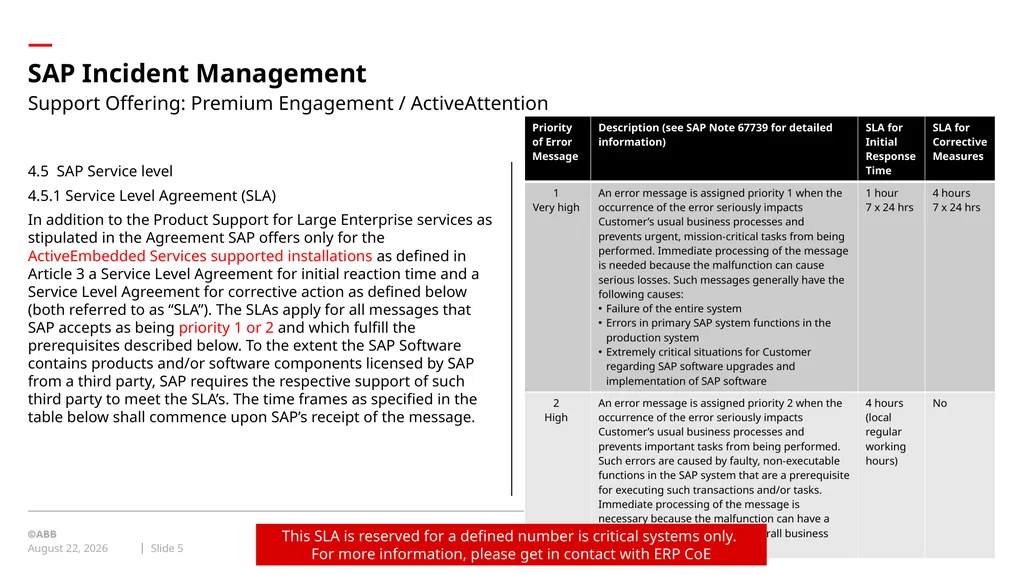
In addition to the Product Support for Large Enterprise services as stipulated in the Agreement SAP offers only for the ActiveEmbedded Services supported installations as defined in Article 3 a Service Level Agreement for initial reaction time and a Service Level Agreement for corrective action as defined below (both referred to as “SLA”). The SLAs apply for all messages that SAP accepts as being priority 1 or 2 and which fulfill the prerequisites described below. To the extent the SAP Software contains products and/or software components licensed by SAP from a third party, SAP requires the respective support of such third party to meet the SLA’s. The time frames as specified in the table below shall commence upon SAP’s receipt of the message. Support Offering: Premium Engagement / ActiveAttention This SLA is reserved for a defined number is critical systems only. For more information, please get in contact with ERP CoE<br>
4.5.1 Service Level Agreement (SLA)
In addition to the Product Support for Large Enterprise services as stipulated in the Agreement SAP offers only for the ActiveEmbedded Services supported installations as defined in Article 3 a Service Level Agreement for initial reaction time and a Service Level Agreement for corrective action as defined below (both referred to as “SLA”). The SLAs apply for all messages that SAP accepts as being priority 1 or 2 and which fulfill the prerequisites described below. To the extent the SAP Software contains products and/or software components licensed by SAP from a third party, SAP requires the respective support of such third party to meet the SLA’s. The time frames as specified in the table below shall commence upon SAP’s receipt of the message. Support Offering: Premium Engagement / ActiveAttention This SLA is reserved for a defined number is critical systems only. For more information, please get in contact with ERP CoE<br>
06
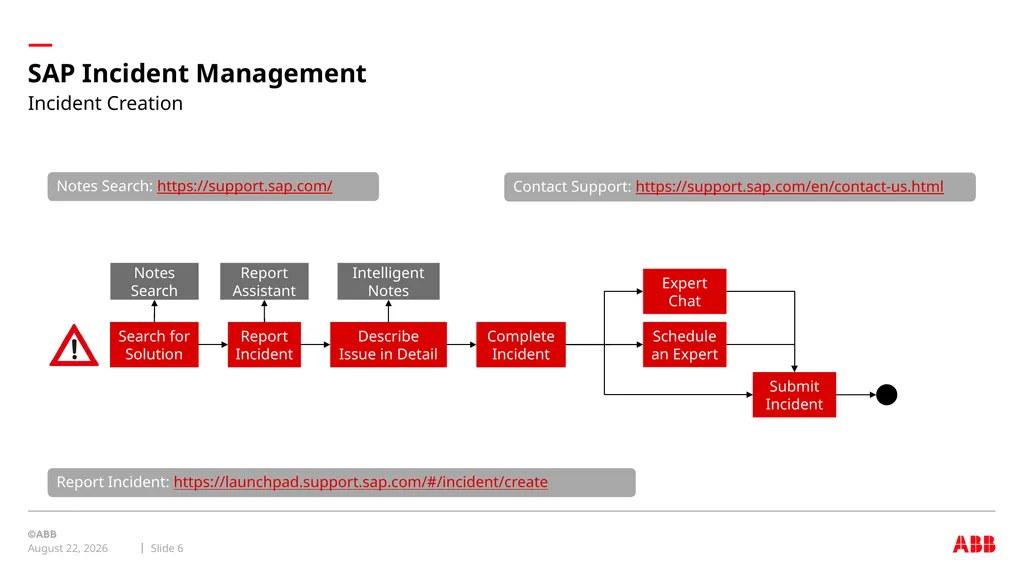
SAP Incident Management January 13, 2022 Slide 6 Incident Creation Search for Solution Report Incident Describe Issue in Detail Report Assistant Intelligent Notes Complete Incident Expert Chat Schedule an Expert Submit Incident Report Incident: https://launchpad.support.sap.com/#/incident/create Notes Search Notes Search: https://support.sap.com/ Contact Support: https://support.sap.com/en/contact-us.html<br>
07
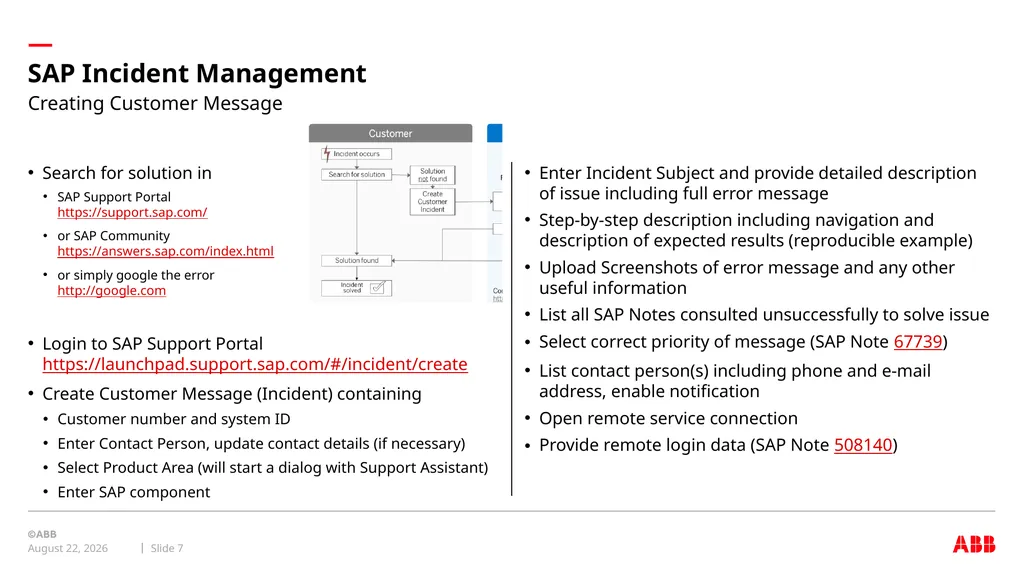
SAP Incident Management January 13, 2022 Slide 7 Enter Incident Subject and provide detailed description of issue including full error message
Step-by-step description including navigation and description of expected results (reproducible example)
Upload Screenshots of error message and any other useful information
List all SAP Notes consulted unsuccessfully to solve issue
Select correct priority of message (SAP Note 67739)
List contact person(s) including phone and e-mail address, enable notification
Open remote service connection
Provide remote login data (SAP Note 508140) Search for solution in
SAP Support Portal https://support.sap.com/
or SAP Community https://answers.sap.com/index.html
or simply google the error http://google.com
Login to SAP Support Portal https://launchpad.support.sap.com/#/incident/create
Create Customer Message (Incident) containing
Customer number and system ID
Enter Contact Person, update contact details (if necessary)
Select Product Area (will start a dialog with Support Assistant)
Enter SAP component Creating Customer Message<br>
Step-by-step description including navigation and description of expected results (reproducible example)
Upload Screenshots of error message and any other useful information
List all SAP Notes consulted unsuccessfully to solve issue
Select correct priority of message (SAP Note 67739)
List contact person(s) including phone and e-mail address, enable notification
Open remote service connection
Provide remote login data (SAP Note 508140) Search for solution in
SAP Support Portal https://support.sap.com/
or SAP Community https://answers.sap.com/index.html
or simply google the error http://google.com
Login to SAP Support Portal https://launchpad.support.sap.com/#/incident/create
Create Customer Message (Incident) containing
Customer number and system ID
Enter Contact Person, update contact details (if necessary)
Select Product Area (will start a dialog with Support Assistant)
Enter SAP component Creating Customer Message<br>
08
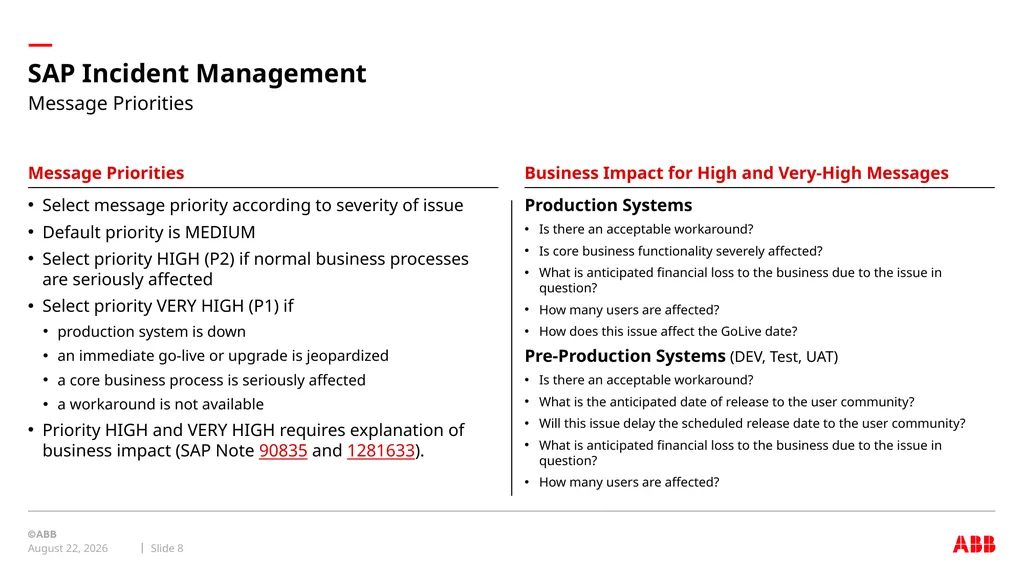
SAP Incident Management January 13, 2022 Slide 8 Message Priorities Business Impact for High and Very-High Messages Production Systems
Is there an acceptable workaround?
Is core business functionality severely affected?
What is anticipated financial loss to the business due to the issue in question?
How many users are affected?
How does this issue affect the GoLive date?
Pre-Production Systems (DEV, Test, UAT)
Is there an acceptable workaround?
What is the anticipated date of release to the user community?
Will this issue delay the scheduled release date to the user community?
What is anticipated financial loss to the business due to the issue in question?
How many users are affected? Select message priority according to severity of issue
Default priority is MEDIUM
Select priority HIGH (P2) if normal business processes are seriously affected
Select priority VERY HIGH (P1) if
production system is down
an immediate go-live or upgrade is jeopardized
a core business process is seriously affected
a workaround is not available
Priority HIGH and VERY HIGH requires explanation of business impact (SAP Note 90835 and 1281633). Message Priorities<br>
Is there an acceptable workaround?
Is core business functionality severely affected?
What is anticipated financial loss to the business due to the issue in question?
How many users are affected?
How does this issue affect the GoLive date?
Pre-Production Systems (DEV, Test, UAT)
Is there an acceptable workaround?
What is the anticipated date of release to the user community?
Will this issue delay the scheduled release date to the user community?
What is anticipated financial loss to the business due to the issue in question?
How many users are affected? Select message priority according to severity of issue
Default priority is MEDIUM
Select priority HIGH (P2) if normal business processes are seriously affected
Select priority VERY HIGH (P1) if
production system is down
an immediate go-live or upgrade is jeopardized
a core business process is seriously affected
a workaround is not available
Priority HIGH and VERY HIGH requires explanation of business impact (SAP Note 90835 and 1281633). Message Priorities<br>
09
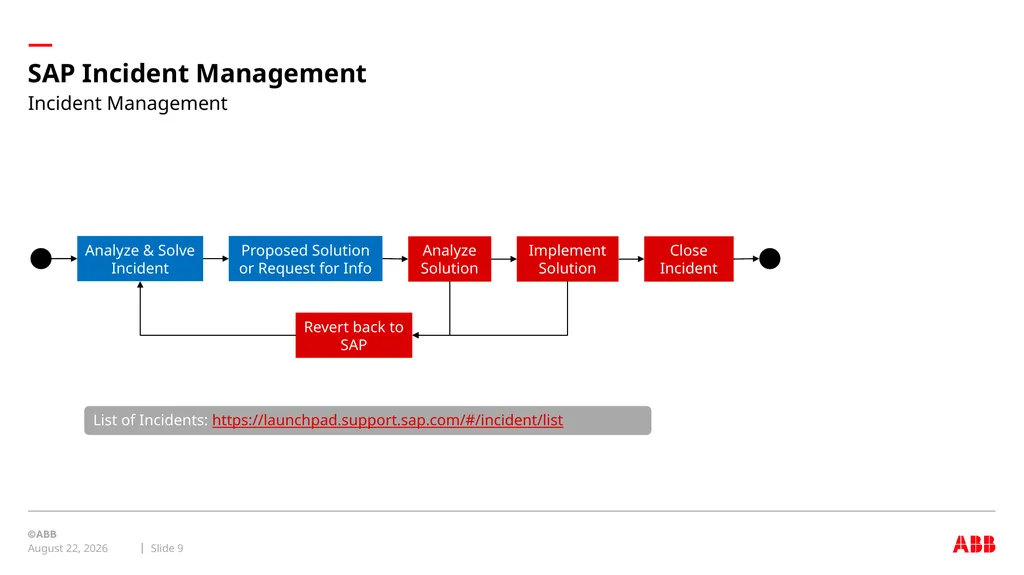
SAP Incident Management January 13, 2022 Slide 9 Incident Management Proposed Solution or Request for Info Analyze Solution Analyze & Solve Incident Implement Solution Revert back to SAP List of Incidents: https://launchpad.support.sap.com/#/incident/list Close Incident<br>
10
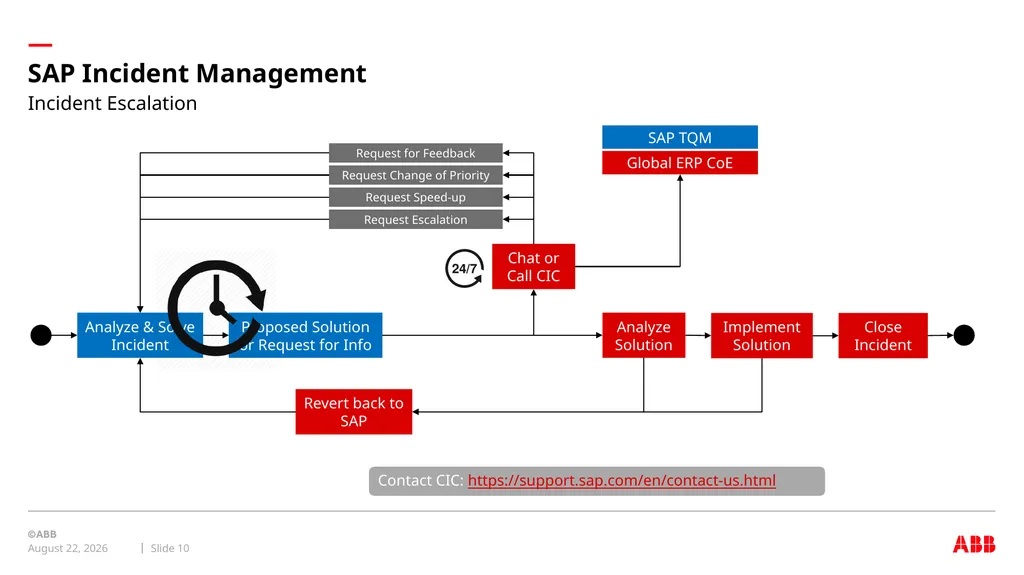
SAP Incident Management January 13, 2022 Slide 10 Incident Escalation Proposed Solution or Request for Info Analyze Solution Analyze & Solve Incident Implement Solution Revert back to SAP Close Incident Chat or Call CIC Request for Feedback Request Change of Priority Request Speed-up Request Escalation Global ERP CoE SAP TQM Contact CIC: https://support.sap.com/en/contact-us.html<br>
11
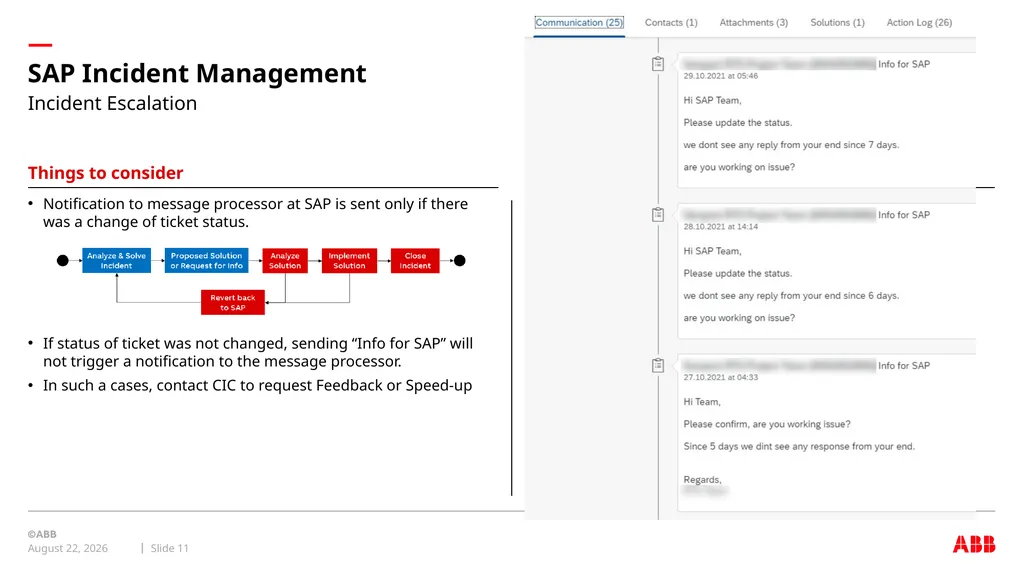
SAP Incident Management January 13, 2022 Slide 11 Things to consider Notification to message processor at SAP is sent only if there was a change of ticket status.
If status of ticket was not changed, sending “Info for SAP” will not trigger a notification to the message processor.
In such a cases, contact CIC to request Feedback or Speed-up Incident Escalation<br>
If status of ticket was not changed, sending “Info for SAP” will not trigger a notification to the message processor.
In such a cases, contact CIC to request Feedback or Speed-up Incident Escalation<br>
12
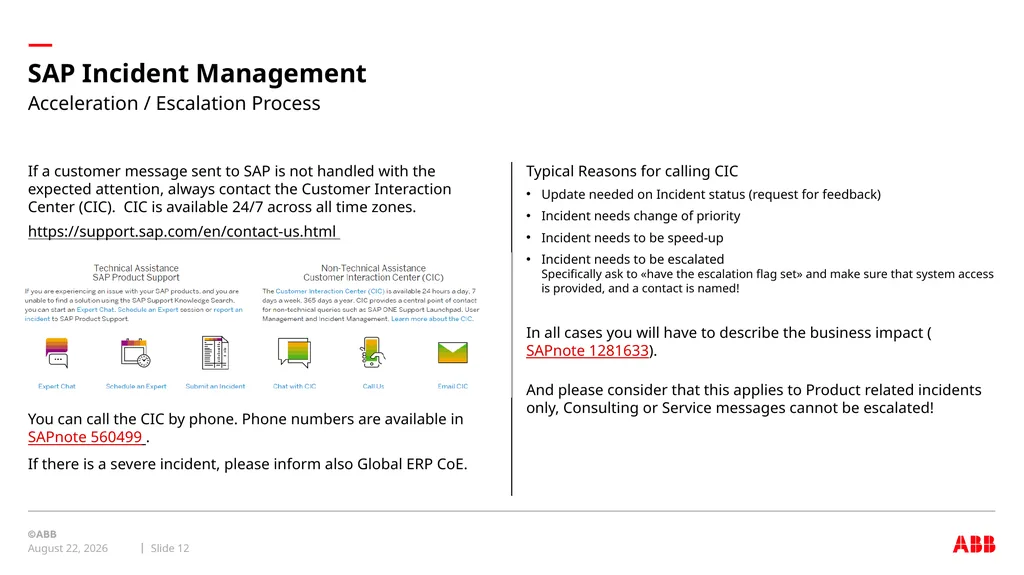
SAP Incident Management January 13, 2022 Slide 12 Typical Reasons for calling CIC
Update needed on Incident status (request for feedback)
Incident needs change of priority
Incident needs to be speed-up
Incident needs to be escalated Specifically ask to «have the escalation flag set» and make sure that system access is provided, and a contact is named!
In all cases you will have to describe the business impact (SAPnote 1281633).
And please consider that this applies to Product related incidents only, Consulting or Service messages cannot be escalated! If a customer message sent to SAP is not handled with the expected attention, always contact the Customer Interaction Center (CIC). CIC is available 24/7 across all time zones.
https://support.sap.com/en/contact-us.html
This service is available 24/7 for all countries.
You can call the CIC by phone. Phone numbers are available in SAPnote 560499 .
If there is a severe incident, please inform also Global ERP CoE. Acceleration / Escalation Process<br>
Update needed on Incident status (request for feedback)
Incident needs change of priority
Incident needs to be speed-up
Incident needs to be escalated Specifically ask to «have the escalation flag set» and make sure that system access is provided, and a contact is named!
In all cases you will have to describe the business impact (SAPnote 1281633).
And please consider that this applies to Product related incidents only, Consulting or Service messages cannot be escalated! If a customer message sent to SAP is not handled with the expected attention, always contact the Customer Interaction Center (CIC). CIC is available 24/7 across all time zones.
https://support.sap.com/en/contact-us.html
This service is available 24/7 for all countries.
You can call the CIC by phone. Phone numbers are available in SAPnote 560499 .
If there is a severe incident, please inform also Global ERP CoE. Acceleration / Escalation Process<br>
13
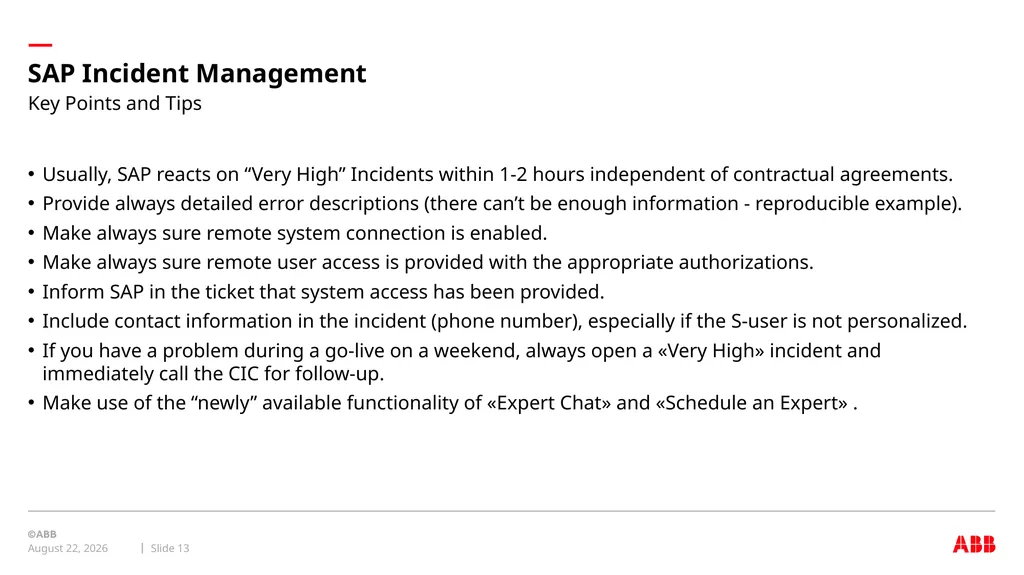
Usually, SAP reacts on “Very High” Incidents within 1-2 hours independent of contractual agreements.
Provide always detailed error descriptions (there can’t be enough information - reproducible example).
Make always sure remote system connection is enabled.
Make always sure remote user access is provided with the appropriate authorizations.
Inform SAP in the ticket that system access has been provided.
Include contact information in the incident (phone number), especially if the S-user is not personalized.
If you have a problem during a go-live on a weekend, always open a «Very High» incident and immediately call the CIC for follow-up.
Make use of the “newly” available functionality of «Expert Chat» and «Schedule an Expert» . SAP Incident Management January 13, 2022 Slide 13 Key Points and Tips<br>
Provide always detailed error descriptions (there can’t be enough information - reproducible example).
Make always sure remote system connection is enabled.
Make always sure remote user access is provided with the appropriate authorizations.
Inform SAP in the ticket that system access has been provided.
Include contact information in the incident (phone number), especially if the S-user is not personalized.
If you have a problem during a go-live on a weekend, always open a «Very High» incident and immediately call the CIC for follow-up.
Make use of the “newly” available functionality of «Expert Chat» and «Schedule an Expert» . SAP Incident Management January 13, 2022 Slide 13 Key Points and Tips<br>
14
SAP Incident Management January 13, 2022 Slide 14 Issue is becoming more critical
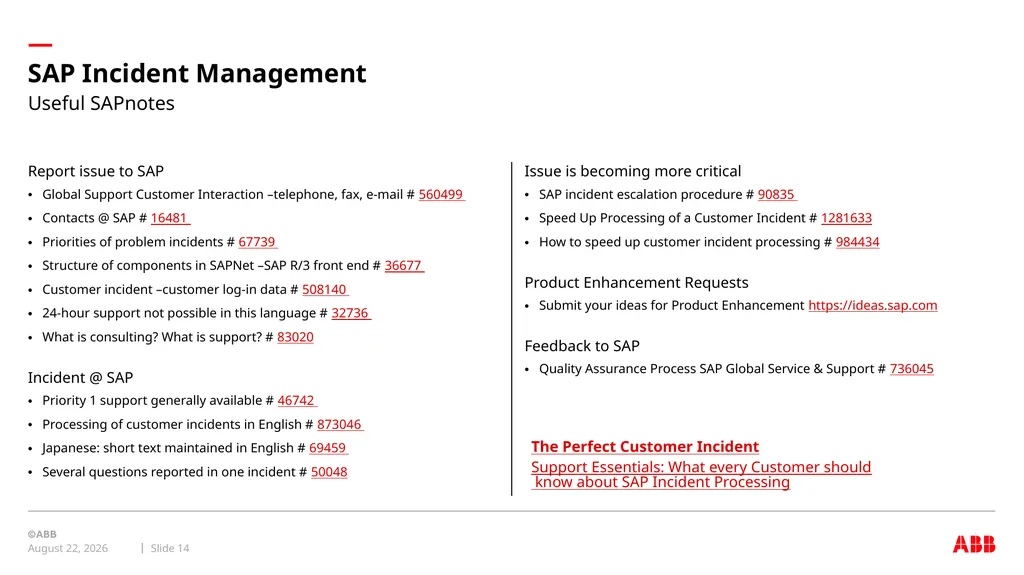
SAP incident escalation procedure # 90835
Speed Up Processing of a Customer Incident # 1281633
How to speed up customer incident processing # 984434
Product Enhancement Requests
Submit your ideas for Product Enhancement https://ideas.sap.com
Feedback to SAP
Quality Assurance Process SAP Global Service & Support # 736045 Report issue to SAP
Global Support Customer Interaction –telephone, fax, e-mail # 560499
Contacts @ SAP # 16481
Priorities of problem incidents # 67739
Structure of components in SAPNet –SAP R/3 front end # 36677
Customer incident –customer log-in data # 508140
24-hour support not possible in this language # 32736
What is consulting? What is support? # 83020
Incident @ SAP
Priority 1 support generally available # 46742
Processing of customer incidents in English # 873046
Japanese: short text maintained in English # 69459
Several questions reported in one incident # 50048 Useful SAPnotes The Perfect Customer Incident Support Essentials: What every Customer should know about SAP Incident Processing<br>
SAP incident escalation procedure # 90835
Speed Up Processing of a Customer Incident # 1281633
How to speed up customer incident processing # 984434
Product Enhancement Requests
Submit your ideas for Product Enhancement https://ideas.sap.com
Feedback to SAP
Quality Assurance Process SAP Global Service & Support # 736045 Report issue to SAP
Global Support Customer Interaction –telephone, fax, e-mail # 560499
Contacts @ SAP # 16481
Priorities of problem incidents # 67739
Structure of components in SAPNet –SAP R/3 front end # 36677
Customer incident –customer log-in data # 508140
24-hour support not possible in this language # 32736
What is consulting? What is support? # 83020
Incident @ SAP
Priority 1 support generally available # 46742
Processing of customer incidents in English # 873046
Japanese: short text maintained in English # 69459
Several questions reported in one incident # 50048 Useful SAPnotes The Perfect Customer Incident Support Essentials: What every Customer should know about SAP Incident Processing<br>
15
January 13, 2022 Slide 15<br>
16
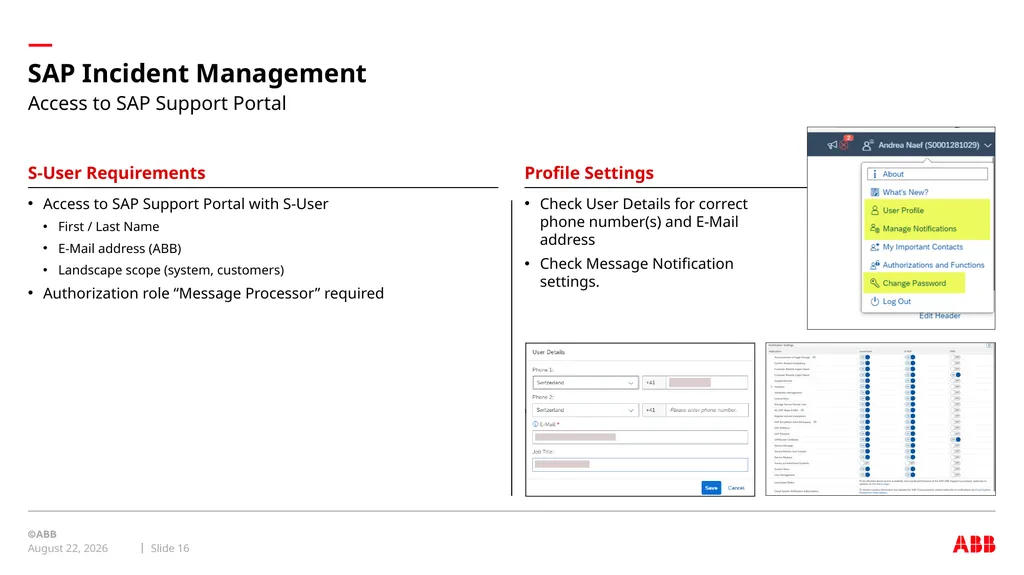
SAP Incident Management January 13, 2022 Slide 16 S-User Requirements Profile Settings Check User Details for correct phone number(s) and E-Mail address
Check Message Notification settings. Access to SAP Support Portal with S-User
First / Last Name
E-Mail address (ABB)
Landscape scope (system, customers)
Authorization role “Message Processor” required Access to SAP Support Portal<br>
Check Message Notification settings. Access to SAP Support Portal with S-User
First / Last Name
E-Mail address (ABB)
Landscape scope (system, customers)
Authorization role “Message Processor” required Access to SAP Support Portal<br>
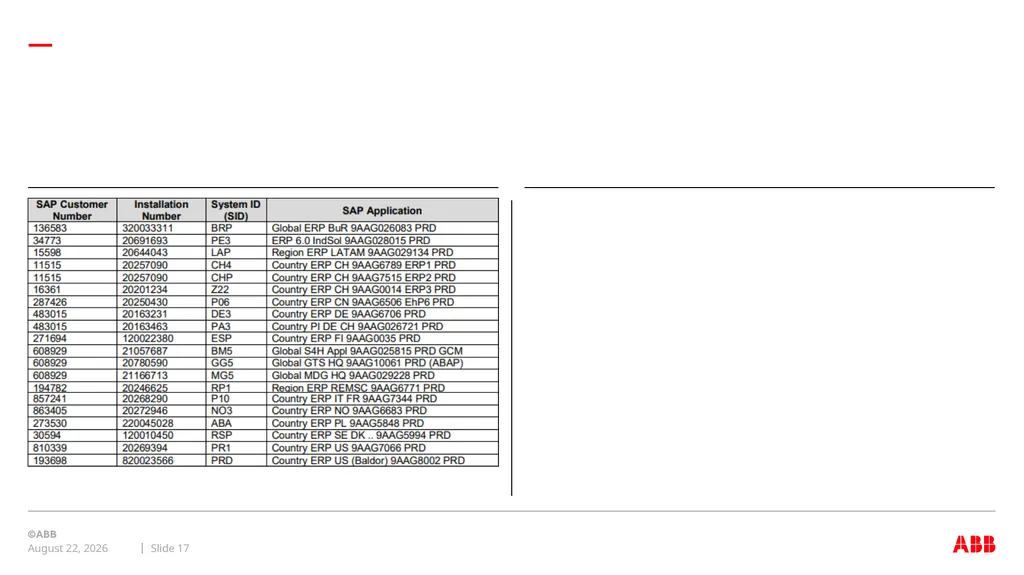
17
January 13, 2022 Slide 17<br>