
INTERNATIONAL ORGANISATION FOR STANDARDISATION
SB
Published · 48 slides · 0 views
1 / 1





Description
INTERNATIONAL ORGANISATION FOR STANDARDISATION ORGANISATION INTERNATIONALE DE NORMALISATION ISOIEC JTC1SC29WG11 CODING OF MOVING PICTURES AND AUDIO ISOIEC JTC1SC29WG11 MPEG2018N18093 October 2018, Macau, China An Overview of the ISO
Related Topics
Share
Embed code
Download this presentation From Below
"INTERNATIONAL ORGANISATION FOR STANDARDISATION" is the property of its rightful owner. Permission is granted to download and print the materials on this website for personal, non-commercial use only, and to display it on your personal computer provided you do not modify the materials and that you retain all copyright notices contained in the materials. By downloading content from our website, you accept the terms of this agreement.
Presentation Transcript
01
INTERNATIONAL ORGANISATION FOR STANDARDISATION
ORGANISATION INTERNATIONALE DE NORMALISATION
ISO/IEC JTC1/SC29/WG11
CODING OF MOVING PICTURES AND AUDIO
ISO/IEC JTC1/SC29/WG11 MPEG2018/N18093
October 2018, Macau, China<br>
ORGANISATION INTERNATIONALE DE NORMALISATION
ISO/IEC JTC1/SC29/WG11
CODING OF MOVING PICTURES AND AUDIO
ISO/IEC JTC1/SC29/WG11 MPEG2018/N18093
October 2018, Macau, China<br>
02
An Overview of the ISO Base Media File Format … more then just a collection of Boxes
Reflecting the status in August 2018<br>
Reflecting the status in August 2018<br>
03
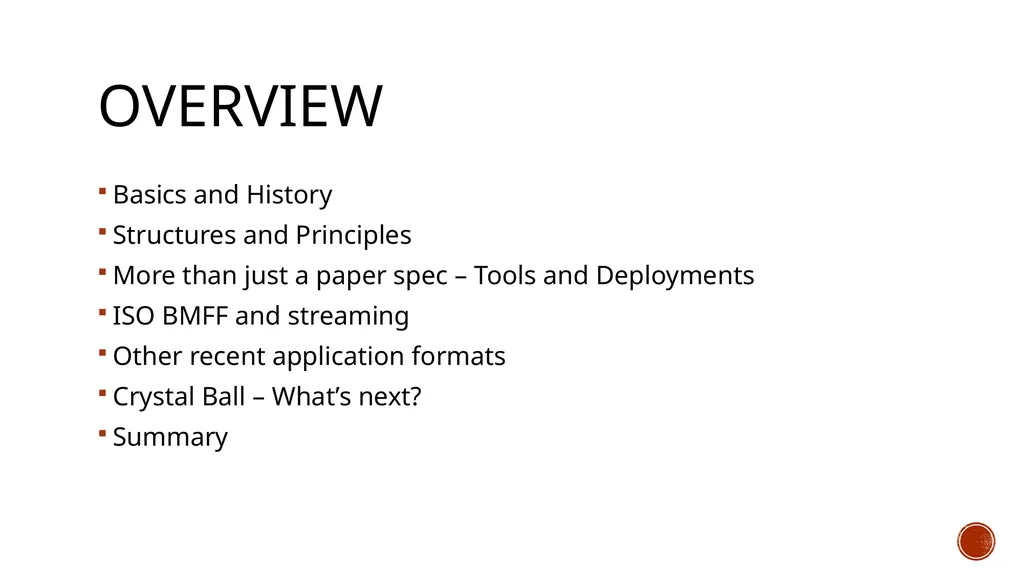
Overview Basics and History
Structures and Principles
More than just a paper spec – Tools and Deployments
ISO BMFF and streaming
Other recent application formats
Crystal Ball – What’s next?
Summary<br>
Structures and Principles
More than just a paper spec – Tools and Deployments
ISO BMFF and streaming
Other recent application formats
Crystal Ball – What’s next?
Summary<br>
04
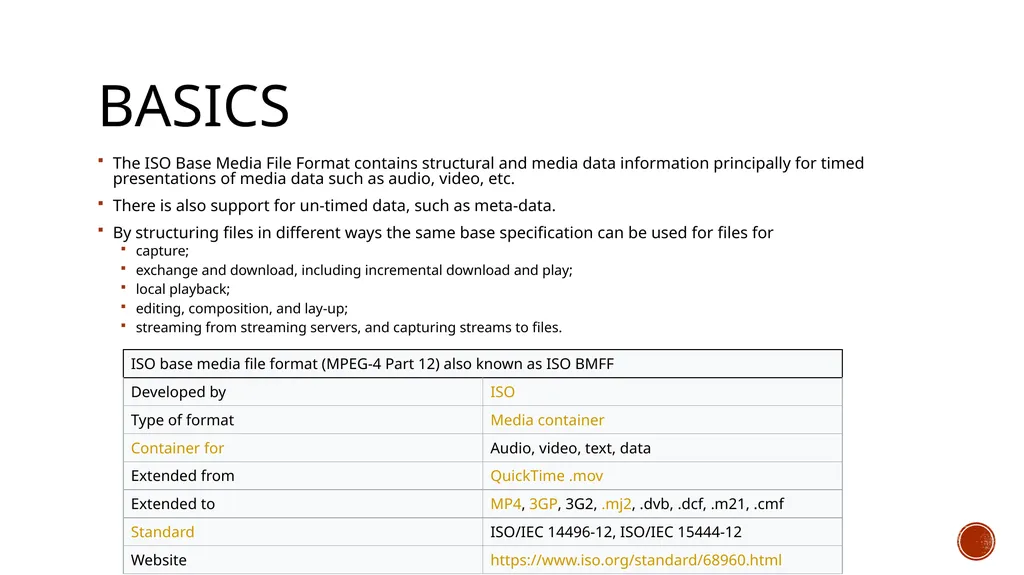
Basics The ISO Base Media File Format contains structural and media data information principally for timed presentations of media data such as audio, video, etc.
There is also support for un-timed data, such as meta-data.
By structuring files in different ways the same base specification can be used for files for
capture;
exchange and download, including incremental download and play;
local playback;
editing, composition, and lay-up;
streaming from streaming servers, and capturing streams to files.<br>
There is also support for un-timed data, such as meta-data.
By structuring files in different ways the same base specification can be used for files for
capture;
exchange and download, including incremental download and play;
local playback;
editing, composition, and lay-up;
streaming from streaming servers, and capturing streams to files.<br>
05
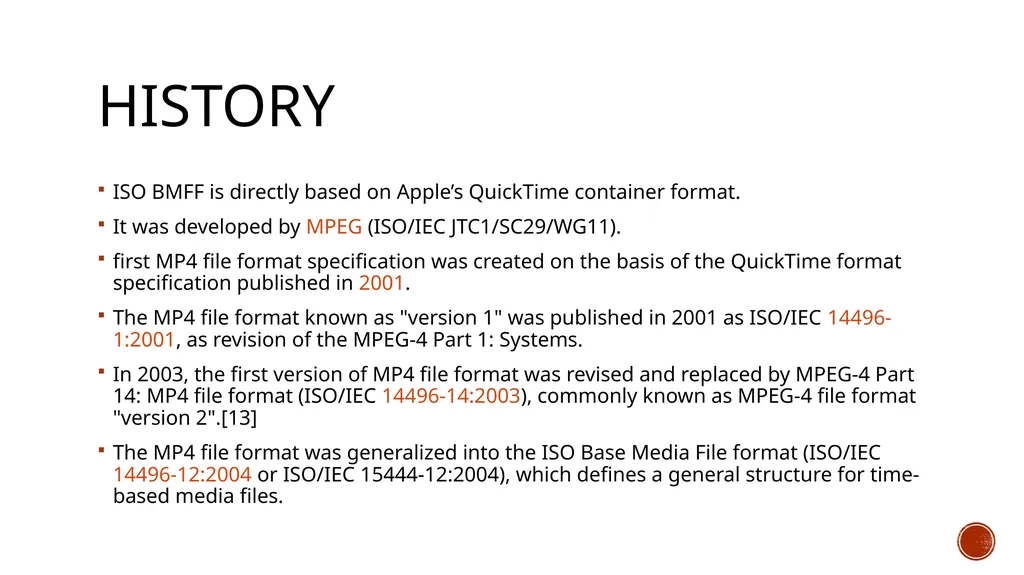
History ISO BMFF is directly based on Apple’s QuickTime container format.
It was developed by MPEG (ISO/IEC JTC1/SC29/WG11).
first MP4 file format specification was created on the basis of the QuickTime format specification published in 2001.
The MP4 file format known as "version 1" was published in 2001 as ISO/IEC 14496-1:2001, as revision of the MPEG-4 Part 1: Systems.
In 2003, the first version of MP4 file format was revised and replaced by MPEG-4 Part 14: MP4 file format (ISO/IEC 14496-14:2003), commonly known as MPEG-4 file format "version 2".[13]
The MP4 file format was generalized into the ISO Base Media File format (ISO/IEC 14496-12:2004 or ISO/IEC 15444-12:2004), which defines a general structure for time-based media files.<br>
It was developed by MPEG (ISO/IEC JTC1/SC29/WG11).
first MP4 file format specification was created on the basis of the QuickTime format specification published in 2001.
The MP4 file format known as "version 1" was published in 2001 as ISO/IEC 14496-1:2001, as revision of the MPEG-4 Part 1: Systems.
In 2003, the first version of MP4 file format was revised and replaced by MPEG-4 Part 14: MP4 file format (ISO/IEC 14496-14:2003), commonly known as MPEG-4 file format "version 2".[13]
The MP4 file format was generalized into the ISO Base Media File format (ISO/IEC 14496-12:2004 or ISO/IEC 15444-12:2004), which defines a general structure for time-based media files.<br>
06
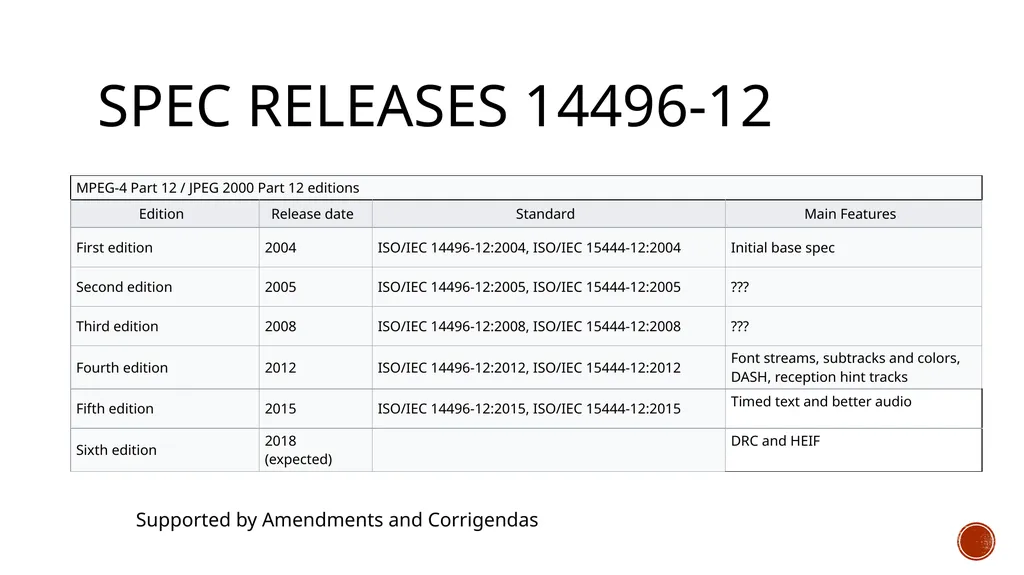
Spec Releases 14496-12 Supported by Amendments and Corrigendas<br>
07
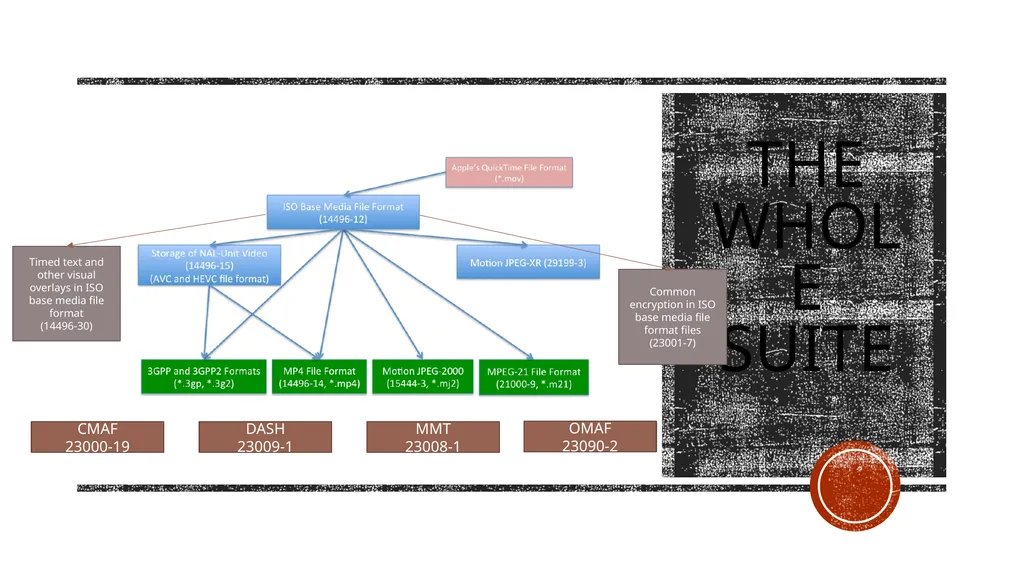
The Whole Suite Timed text and other visual overlays in ISO base media file format
(14496-30) CMAF
23000-19 DASH
23009-1 MMT
23008-1 OMAF
23090-2 Common encryption in ISO base media file format files
(23001-7)<br>
(14496-30) CMAF
23000-19 DASH
23009-1 MMT
23008-1 OMAF
23090-2 Common encryption in ISO base media file format files
(23001-7)<br>
08
Structures And PrincIples Logical, Timing and Physical Structures<br>
09
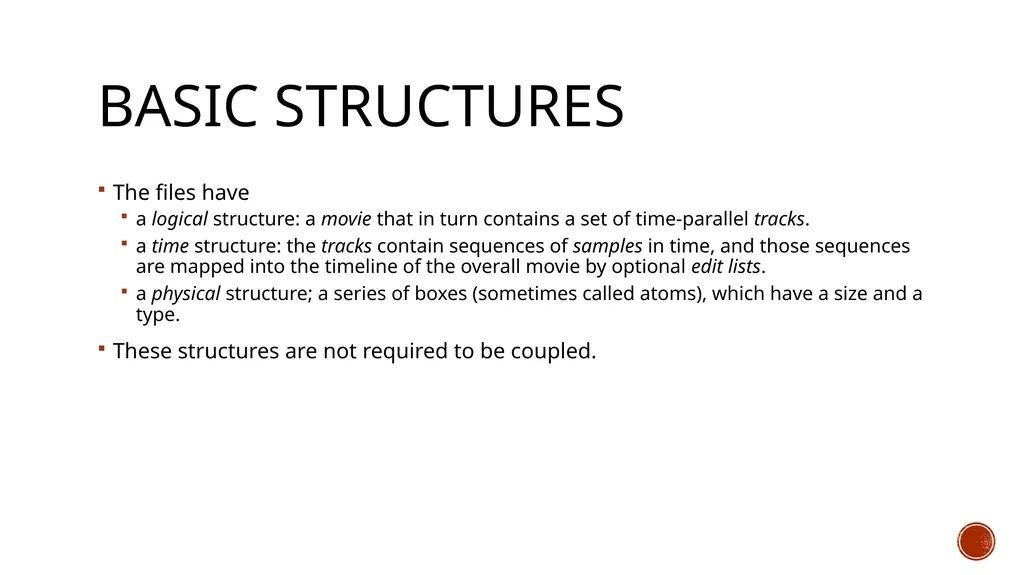
Basic Structures The files have
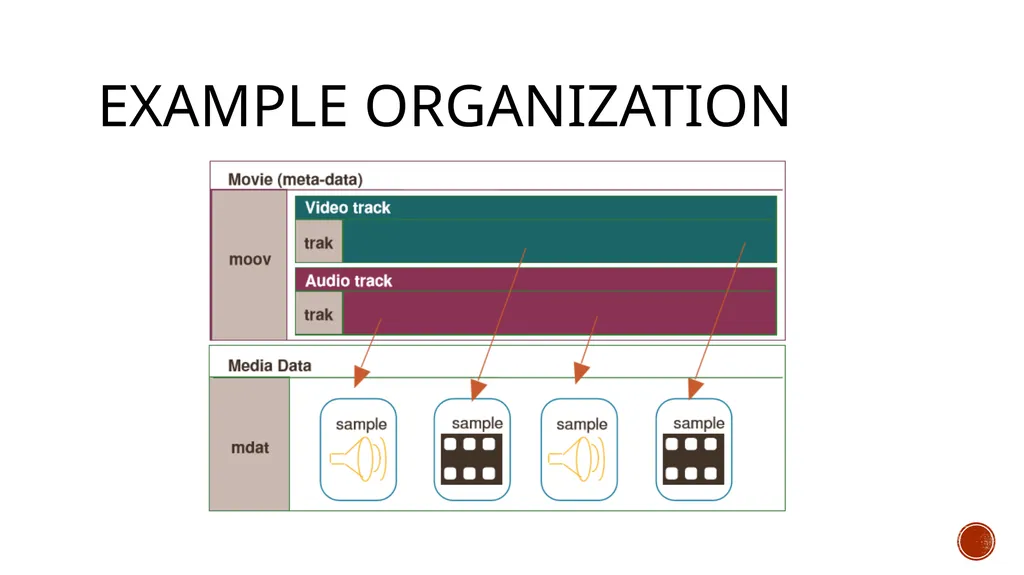
a logical structure: a movie that in turn contains a set of time-parallel tracks.
a time structure: the tracks contain sequences of samples in time, and those sequences are mapped into the timeline of the overall movie by optional edit lists.
a physical structure; a series of boxes (sometimes called atoms), which have a size and a type.
These structures are not required to be coupled.<br>
a logical structure: a movie that in turn contains a set of time-parallel tracks.
a time structure: the tracks contain sequences of samples in time, and those sequences are mapped into the timeline of the overall movie by optional edit lists.
a physical structure; a series of boxes (sometimes called atoms), which have a size and a type.
These structures are not required to be coupled.<br>
10
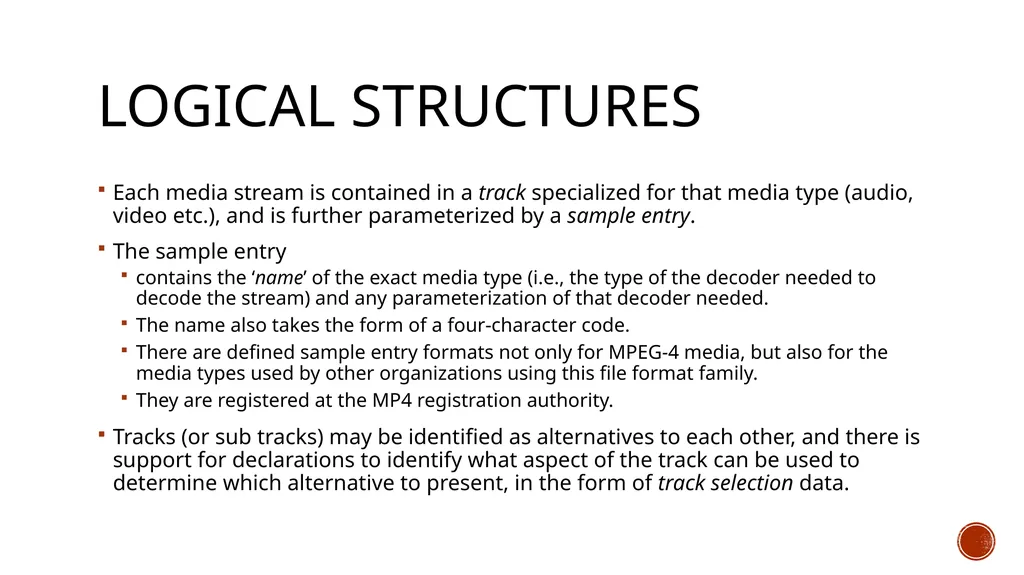
Logical Structures Each media stream is contained in a track specialized for that media type (audio, video etc.), and is further parameterized by a sample entry.
The sample entry
contains the ‘name’ of the exact media type (i.e., the type of the decoder needed to decode the stream) and any parameterization of that decoder needed.
The name also takes the form of a four-character code.
There are defined sample entry formats not only for MPEG-4 media, but also for the media types used by other organizations using this file format family.
They are registered at the MP4 registration authority.
Tracks (or sub tracks) may be identified as alternatives to each other, and there is support for declarations to identify what aspect of the track can be used to determine which alternative to present, in the form of track selection data.<br>
The sample entry
contains the ‘name’ of the exact media type (i.e., the type of the decoder needed to decode the stream) and any parameterization of that decoder needed.
The name also takes the form of a four-character code.
There are defined sample entry formats not only for MPEG-4 media, but also for the media types used by other organizations using this file format family.
They are registered at the MP4 registration authority.
Tracks (or sub tracks) may be identified as alternatives to each other, and there is support for declarations to identify what aspect of the track can be used to determine which alternative to present, in the form of track selection data.<br>
11
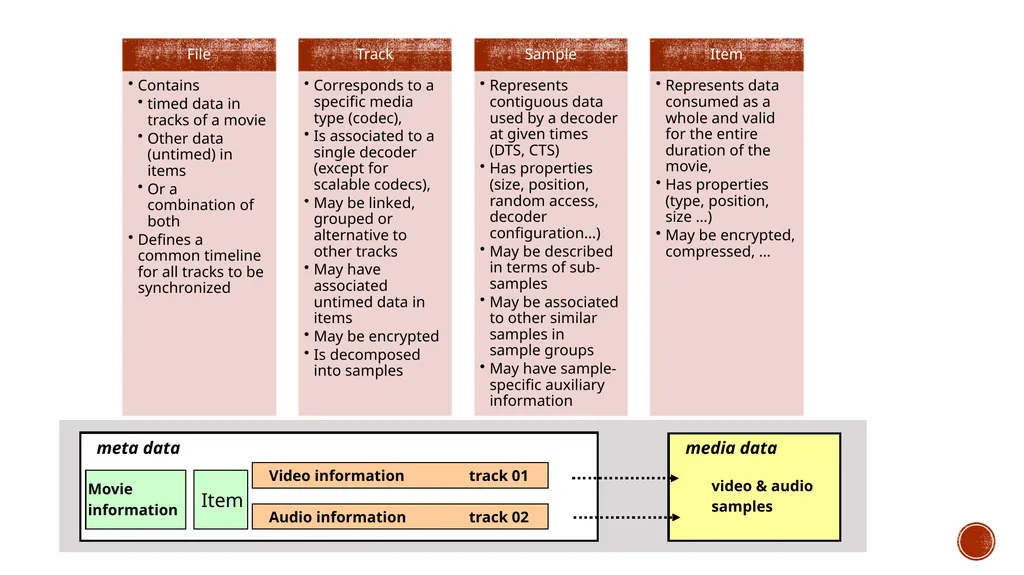
meta data Video information track 01 media data video & audio
samples Movie
information Audio information track 02 Item<br>
samples Movie
information Audio information track 02 Item<br>
12
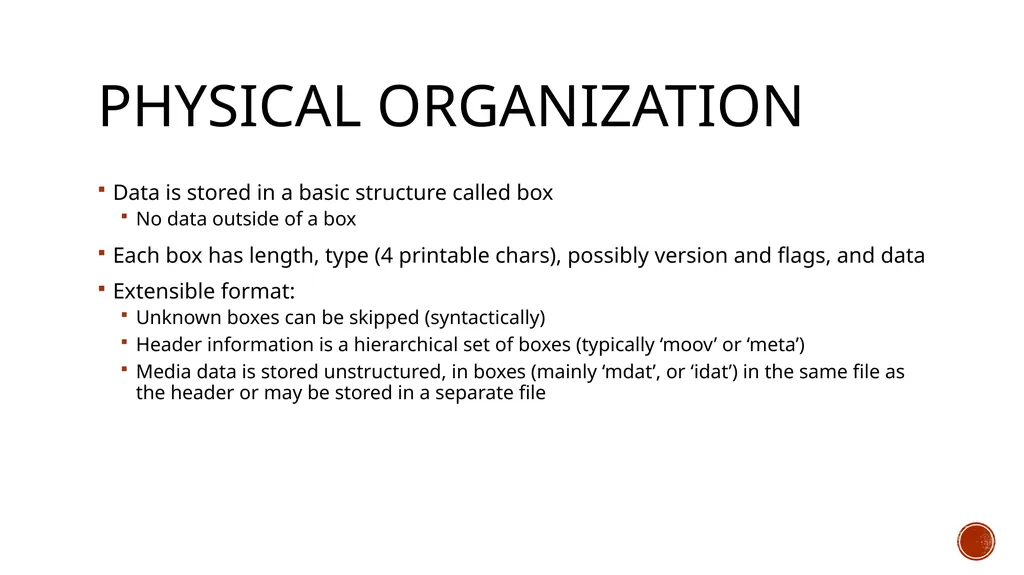
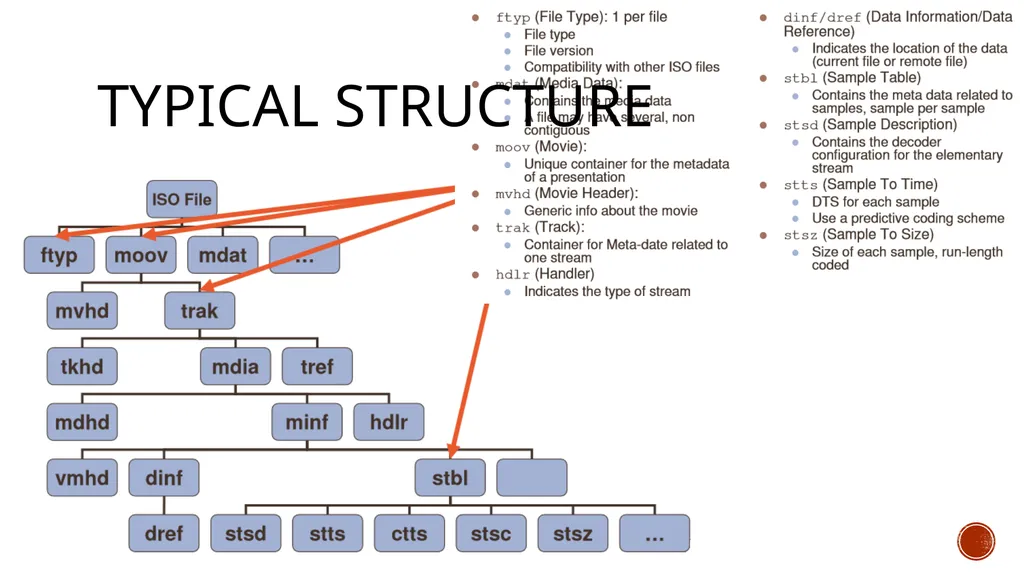
Physical Organization Data is stored in a basic structure called box
No data outside of a box
Each box has length, type (4 printable chars), possibly version and flags, and data
Extensible format:
Unknown boxes can be skipped (syntactically)
Header information is a hierarchical set of boxes (typically ‘moov’ or ‘meta’)
Media data is stored unstructured, in boxes (mainly ‘mdat’, or ‘idat’) in the same file as the header or may be stored in a separate file<br>
No data outside of a box
Each box has length, type (4 printable chars), possibly version and flags, and data
Extensible format:
Unknown boxes can be skipped (syntactically)
Header information is a hierarchical set of boxes (typically ‘moov’ or ‘meta’)
Media data is stored unstructured, in boxes (mainly ‘mdat’, or ‘idat’) in the same file as the header or may be stored in a separate file<br>
13
TyPical Structure<br>
14
Example organization<br>
15
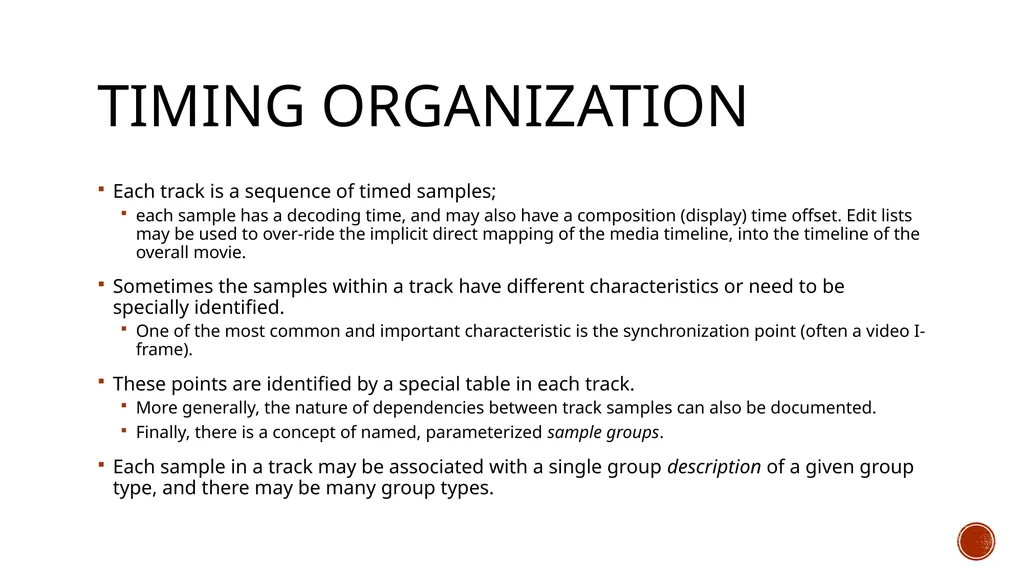
Timing Organization Each track is a sequence of timed samples;
each sample has a decoding time, and may also have a composition (display) time offset. Edit lists may be used to over-ride the implicit direct mapping of the media timeline, into the timeline of the overall movie.
Sometimes the samples within a track have different characteristics or need to be specially identified.
One of the most common and important characteristic is the synchronization point (often a video I-frame).
These points are identified by a special table in each track.
More generally, the nature of dependencies between track samples can also be documented.
Finally, there is a concept of named, parameterized sample groups.
Each sample in a track may be associated with a single group description of a given group type, and there may be many group types.<br>
each sample has a decoding time, and may also have a composition (display) time offset. Edit lists may be used to over-ride the implicit direct mapping of the media timeline, into the timeline of the overall movie.
Sometimes the samples within a track have different characteristics or need to be specially identified.
One of the most common and important characteristic is the synchronization point (often a video I-frame).
These points are identified by a special table in each track.
More generally, the nature of dependencies between track samples can also be documented.
Finally, there is a concept of named, parameterized sample groups.
Each sample in a track may be associated with a single group description of a given group type, and there may be many group types.<br>
16
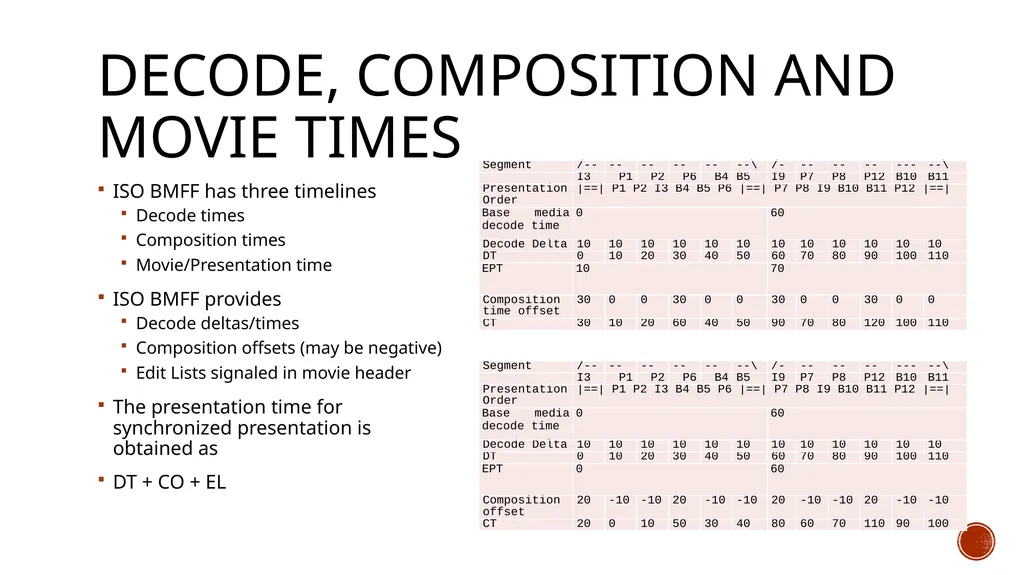
Decode, Composition and Movie Times ISO BMFF has three timelines
Decode times
Composition times
Movie/Presentation time
ISO BMFF provides
Decode deltas/times
Composition offsets (may be negative)
Edit Lists signaled in movie header
The presentation time for synchronized presentation is obtained as
DT + CO + EL<br>
Decode times
Composition times
Movie/Presentation time
ISO BMFF provides
Decode deltas/times
Composition offsets (may be negative)
Edit Lists signaled in movie header
The presentation time for synchronized presentation is obtained as
DT + CO + EL<br>
17
Metadata – TWO FORMS First, timed meta-data may be stored in an appropriate track, synchronized as desired with the media data it is describing.
See for example for 23001-10 for timed metadata, e.g. Region of interest, location, etc.
support for non-timed collections of metadata items attached to the movie or to an individual track.
The actual data of these items may be in the metadata box, elsewhere in the same file, in another file, or constructed from other items.
these resources may be named, stored in extents, and may be protected.
These metadata containers are used in the support for file-delivery streaming, to store both the ‘files’ that are to be streamed, and also support information such as reservoirs of pre-calculated forward error-correcting (FEC) codes (e.g. hint tracks)
The generalized meta-data structures may also be used at the file level,
above or parallel with or in the absence of the movie box.
In this case, the meta-data box is the primary entry into the presentation.<br>
See for example for 23001-10 for timed metadata, e.g. Region of interest, location, etc.
support for non-timed collections of metadata items attached to the movie or to an individual track.
The actual data of these items may be in the metadata box, elsewhere in the same file, in another file, or constructed from other items.
these resources may be named, stored in extents, and may be protected.
These metadata containers are used in the support for file-delivery streaming, to store both the ‘files’ that are to be streamed, and also support information such as reservoirs of pre-calculated forward error-correcting (FEC) codes (e.g. hint tracks)
The generalized meta-data structures may also be used at the file level,
above or parallel with or in the absence of the movie box.
In this case, the meta-data box is the primary entry into the presentation.<br>
18
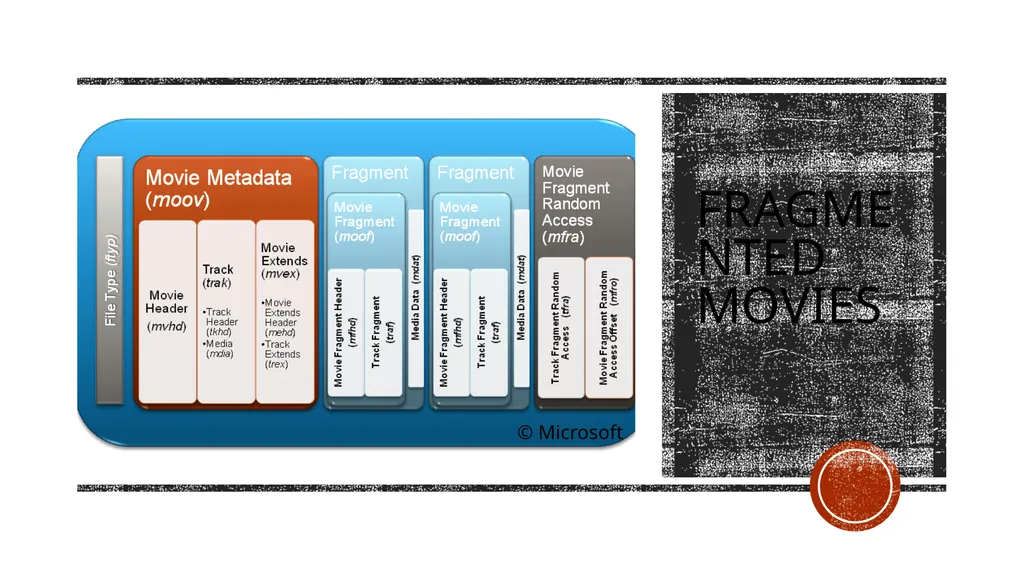
Fragmented movies © Microsoft<br>
19
Extensibility Simple extensions:
New codec for temporal data for which you own the sample format (e.g. AV1 in MP4)
New sample groups for (codec-specific) annotation of samples (e.g. HEVC CRA/BLA)
New sample auxiliary data , for (codec-specific) per-sample data (e.g. init vector, …)
New untimed data format (e.g. EXIF, XMPP …)
New user-, vendor-specific data (use ‘meta’, ‘udta’, ‘free’, ‘skip’, or ‘uuid’ boxes)
Harder extensions
Beware of backwards compatibility !
Only if all other options have been exhausted
Extending existing boxes: Use versioning and/or flags
New boxes (almost always the wrong option!)
Check for name clashes (www.mp4ra.org)
Define box syntax and semantics
Choose box location and cardinality
Timed/Untimed information
File level, segment level, movie level, track level, sample level, …
Define new brand if it implies behavior changes/incompatibilities<br>
New codec for temporal data for which you own the sample format (e.g. AV1 in MP4)
New sample groups for (codec-specific) annotation of samples (e.g. HEVC CRA/BLA)
New sample auxiliary data , for (codec-specific) per-sample data (e.g. init vector, …)
New untimed data format (e.g. EXIF, XMPP …)
New user-, vendor-specific data (use ‘meta’, ‘udta’, ‘free’, ‘skip’, or ‘uuid’ boxes)
Harder extensions
Beware of backwards compatibility !
Only if all other options have been exhausted
Extending existing boxes: Use versioning and/or flags
New boxes (almost always the wrong option!)
Check for name clashes (www.mp4ra.org)
Define box syntax and semantics
Choose box location and cardinality
Timed/Untimed information
File level, segment level, movie level, track level, sample level, …
Define new brand if it implies behavior changes/incompatibilities<br>
20
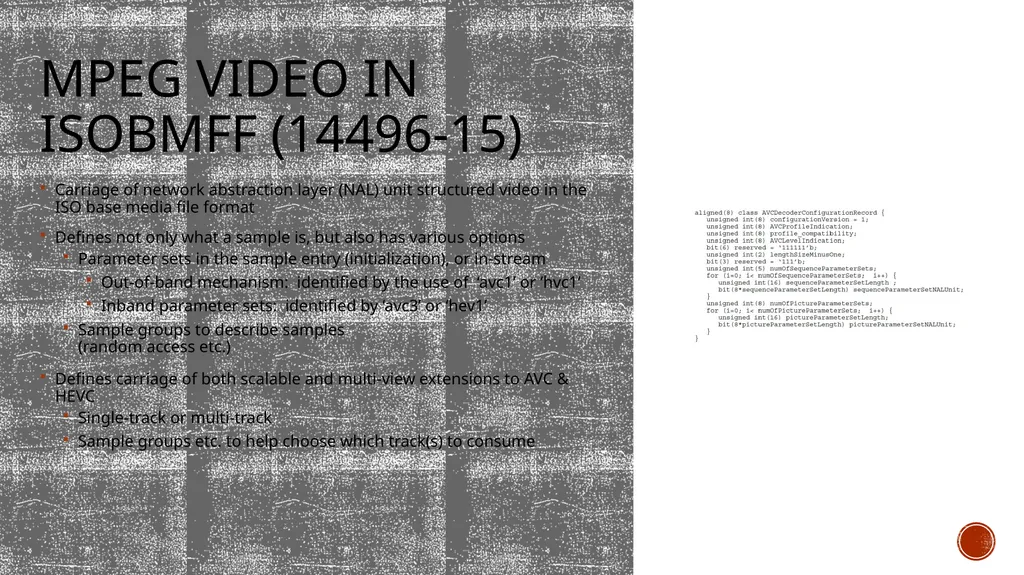
MPEG Video in Isobmff (14496-15) Carriage of network abstraction layer (NAL) unit structured video in the ISO base media file format
Defines not only what a sample is, but also has various options
Parameter sets in the sample entry (initialization), or in-stream
Out-of-band mechanism: identified by the use of ‘avc1’ or ‘hvc1’
Inband parameter sets: identified by ‘avc3’ or ‘hev1’
Sample groups to describe samples (random access etc.)
Defines carriage of both scalable and multi-view extensions to AVC & HEVC
Single-track or multi-track
Sample groups etc. to help choose which track(s) to consume<br>
Defines not only what a sample is, but also has various options
Parameter sets in the sample entry (initialization), or in-stream
Out-of-band mechanism: identified by the use of ‘avc1’ or ‘hvc1’
Inband parameter sets: identified by ‘avc3’ or ‘hev1’
Sample groups to describe samples (random access etc.)
Defines carriage of both scalable and multi-view extensions to AVC & HEVC
Single-track or multi-track
Sample groups etc. to help choose which track(s) to consume<br>
21
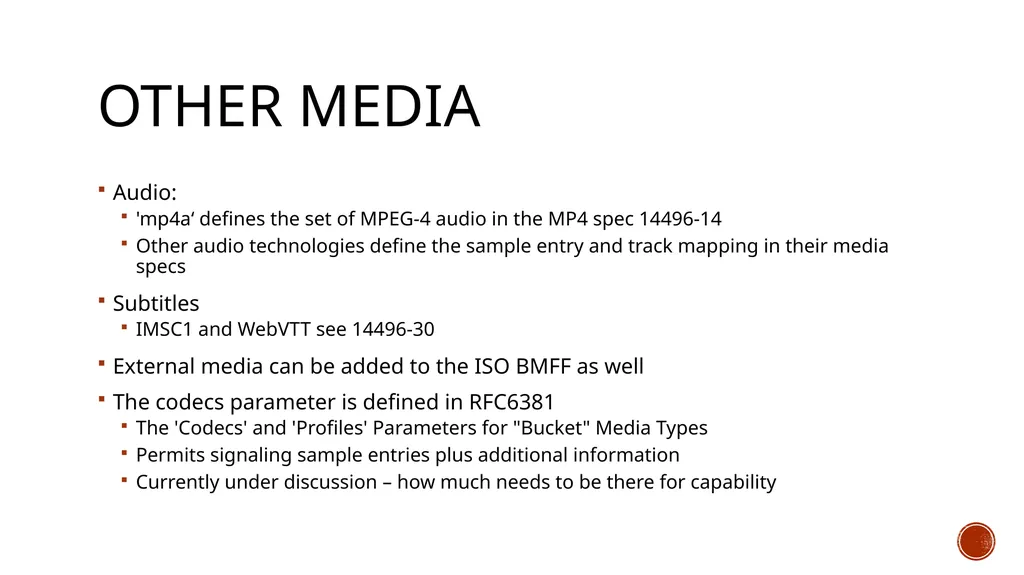
Other Media Audio:
'mp4a‘ defines the set of MPEG-4 audio in the MP4 spec 14496-14
Other audio technologies define the sample entry and track mapping in their media specs
Subtitles
IMSC1 and WebVTT see 14496-30
External media can be added to the ISO BMFF as well
The codecs parameter is defined in RFC6381
The 'Codecs' and 'Profiles' Parameters for "Bucket" Media Types
Permits signaling sample entries plus additional information
Currently under discussion – how much needs to be there for capability<br>
'mp4a‘ defines the set of MPEG-4 audio in the MP4 spec 14496-14
Other audio technologies define the sample entry and track mapping in their media specs
Subtitles
IMSC1 and WebVTT see 14496-30
External media can be added to the ISO BMFF as well
The codecs parameter is defined in RFC6381
The 'Codecs' and 'Profiles' Parameters for "Bucket" Media Types
Permits signaling sample entries plus additional information
Currently under discussion – how much needs to be there for capability<br>
22
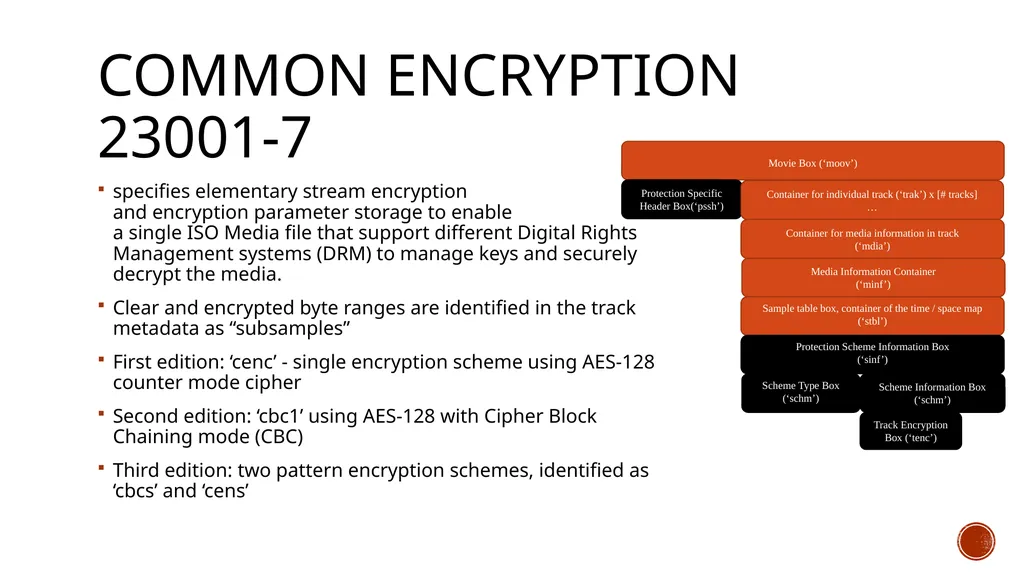
Common Encryption 23001-7 specifies elementary stream encryption
and encryption parameter storage to enable
a single ISO Media file that support different Digital Rights Management systems (DRM) to manage keys and securely decrypt the media.
Clear and encrypted byte ranges are identified in the track metadata as “subsamples”
First edition: ‘cenc’ - single encryption scheme using AES-128 counter mode cipher
Second edition: ‘cbc1’ using AES-128 with Cipher Block Chaining mode (CBC)
Third edition: two pattern encryption schemes, identified as ‘cbcs’ and ‘cens’<br>
Clear and encrypted byte ranges are identified in the track metadata as “subsamples”
First edition: ‘cenc’ - single encryption scheme using AES-128 counter mode cipher
Second edition: ‘cbc1’ using AES-128 with Cipher Block Chaining mode (CBC)
Third edition: two pattern encryption schemes, identified as ‘cbcs’ and ‘cens’<br>
23
More than Just A Paper Spec Tools and Software<br>
24
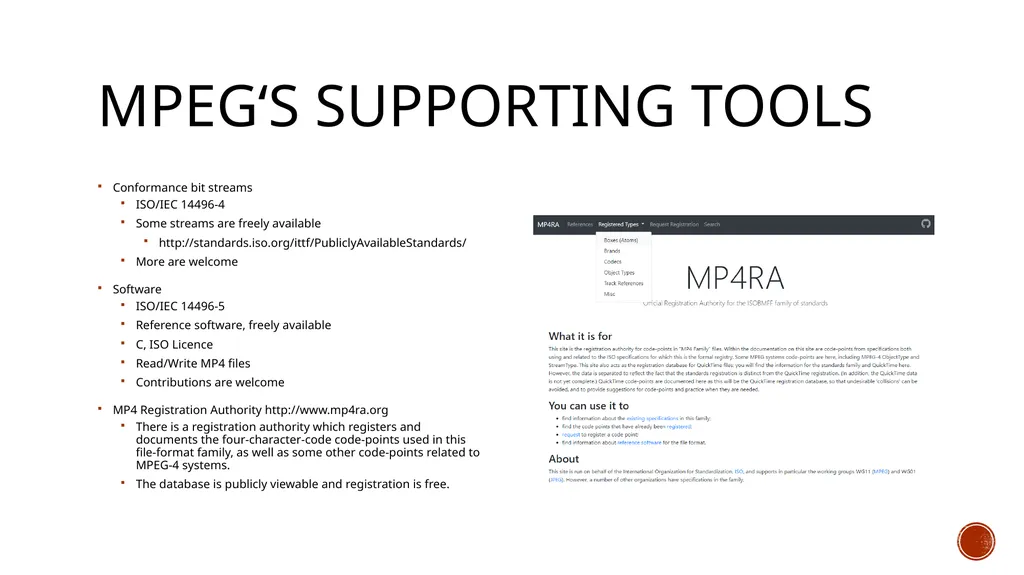
MPEG‘s SupportING Tools Conformance bit streams
ISO/IEC 14496-4
Some streams are freely available
http://standards.iso.org/ittf/PubliclyAvailableStandards/
More are welcome
Software
ISO/IEC 14496-5
Reference software, freely available
C, ISO Licence
Read/Write MP4 files
Contributions are welcome
MP4 Registration Authority http://www.mp4ra.org
There is a registration authority which registers and documents the four-character-code code-points used in this file-format family, as well as some other code-points related to MPEG-4 systems.
The database is publicly viewable and registration is free.<br>
ISO/IEC 14496-4
Some streams are freely available
http://standards.iso.org/ittf/PubliclyAvailableStandards/
More are welcome
Software
ISO/IEC 14496-5
Reference software, freely available
C, ISO Licence
Read/Write MP4 files
Contributions are welcome
MP4 Registration Authority http://www.mp4ra.org
There is a registration authority which registers and documents the four-character-code code-points used in this file-format family, as well as some other code-points related to MPEG-4 systems.
The database is publicly viewable and registration is free.<br>
25
Open Source and Commercial Services Open Source
Widely implemented in open source, e.g. FFMpeg, MP4Box
Nokia Labs even has a Javascript implementation
Usage in Commercial Services
tbd
Check here: http://mp4ra.org/#/brands<br>
Widely implemented in open source, e.g. FFMpeg, MP4Box
Nokia Labs even has a Javascript implementation
Usage in Commercial Services
tbd
Check here: http://mp4ra.org/#/brands<br>
26
ISOBMFF and Streaming DASH and CMAF<br>
27
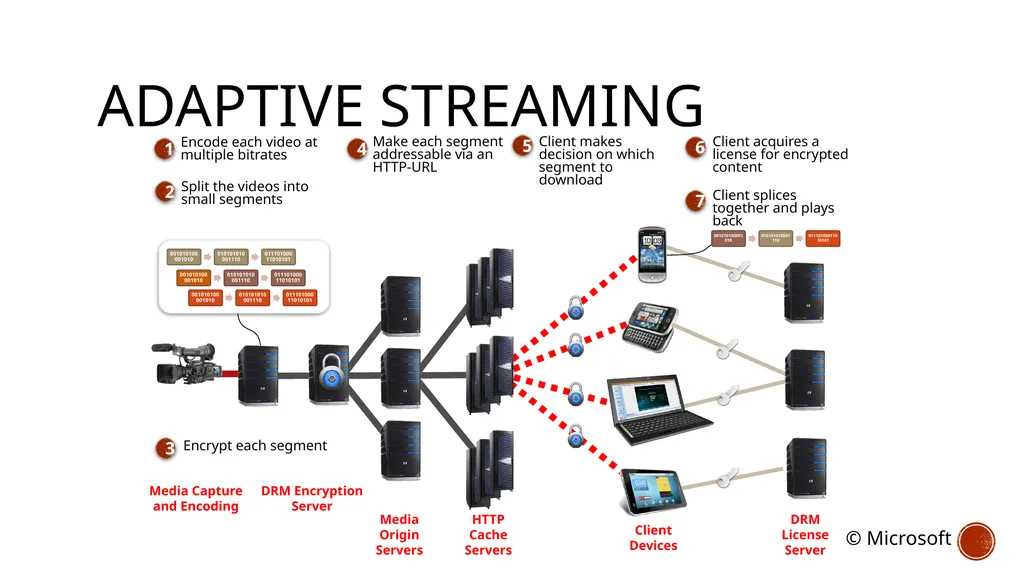
Adaptive Streaming Media Capture
and Encoding Media
Origin
Servers HTTP
Cache
Servers Client
Devices Split the videos into small segments 2 Encode each video at multiple bitrates 1 Make each segment addressable via an
HTTP-URL 4 Client makes decision on which segment to download Client splices together and plays back 5 Encrypt each segment 3 DRM
License
Server 7 Client acquires a license for encrypted content 6 DRM Encryption
Server © Microsoft<br>
and Encoding Media
Origin
Servers HTTP
Cache
Servers Client
Devices Split the videos into small segments 2 Encode each video at multiple bitrates 1 Make each segment addressable via an
HTTP-URL 4 Client makes decision on which segment to download Client splices together and plays back 5 Encrypt each segment 3 DRM
License
Server 7 Client acquires a license for encrypted content 6 DRM Encryption
Server © Microsoft<br>
28
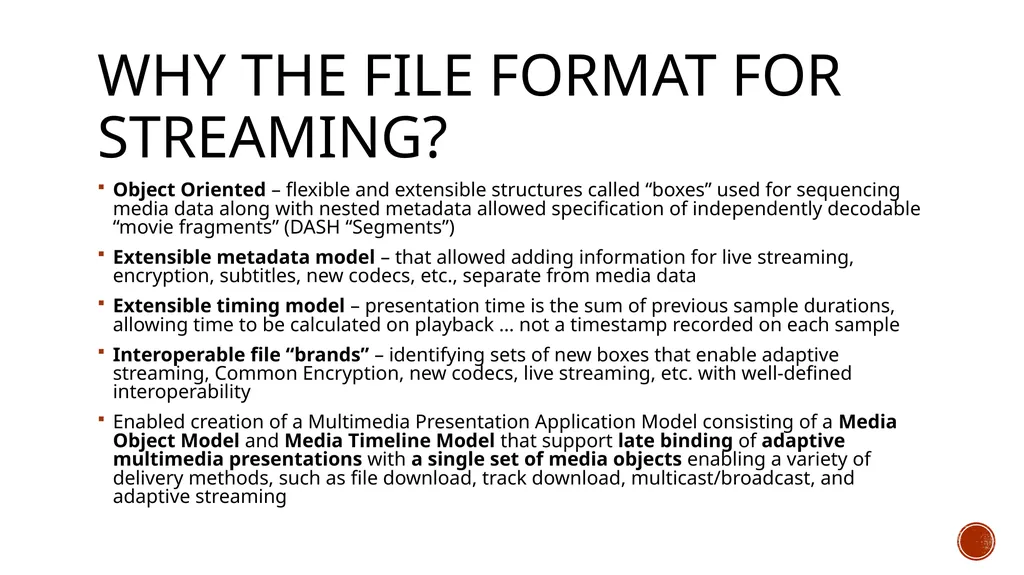
Why the File Format for Streaming? Object Oriented – flexible and extensible structures called “boxes” used for sequencing media data along with nested metadata allowed specification of independently decodable “movie fragments” (DASH “Segments”)
Extensible metadata model – that allowed adding information for live streaming, encryption, subtitles, new codecs, etc., separate from media data
Extensible timing model – presentation time is the sum of previous sample durations, allowing time to be calculated on playback … not a timestamp recorded on each sample
Interoperable file “brands” – identifying sets of new boxes that enable adaptive streaming, Common Encryption, new codecs, live streaming, etc. with well-defined interoperability
Enabled creation of a Multimedia Presentation Application Model consisting of a Media Object Model and Media Timeline Model that support late binding of adaptive multimedia presentations with a single set of media objects enabling a variety of delivery methods, such as file download, track download, multicast/broadcast, and adaptive streaming<br>
Extensible metadata model – that allowed adding information for live streaming, encryption, subtitles, new codecs, etc., separate from media data
Extensible timing model – presentation time is the sum of previous sample durations, allowing time to be calculated on playback … not a timestamp recorded on each sample
Interoperable file “brands” – identifying sets of new boxes that enable adaptive streaming, Common Encryption, new codecs, live streaming, etc. with well-defined interoperability
Enabled creation of a Multimedia Presentation Application Model consisting of a Media Object Model and Media Timeline Model that support late binding of adaptive multimedia presentations with a single set of media objects enabling a variety of delivery methods, such as file download, track download, multicast/broadcast, and adaptive streaming<br>
29
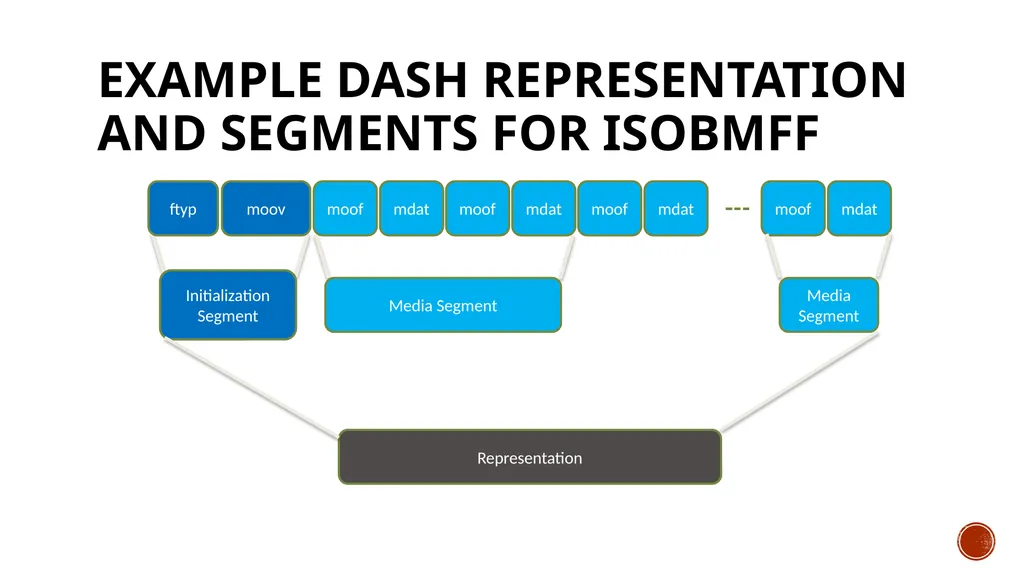
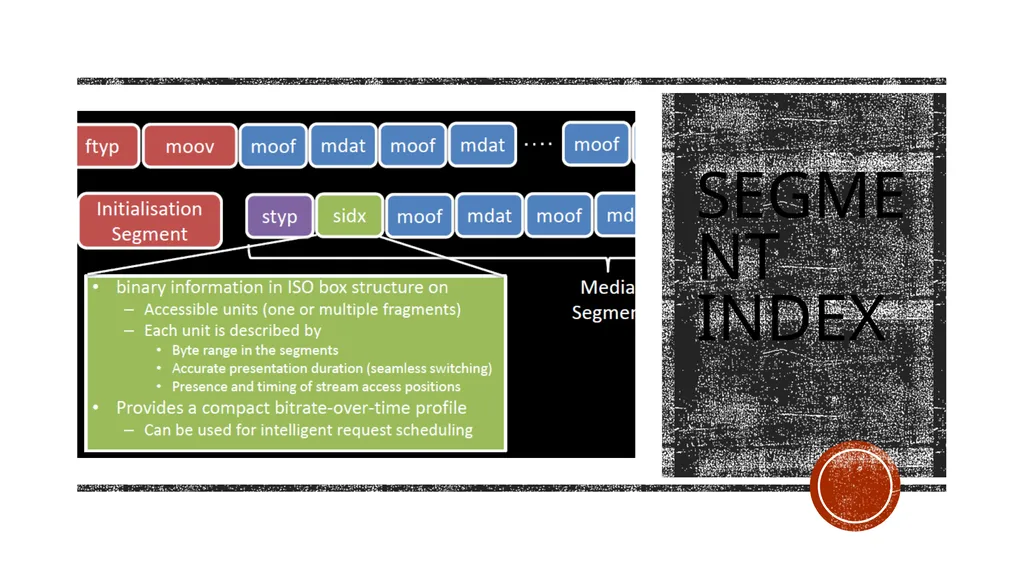
Example DASH Representation and Segments for ISOBMFF moov moof mdat moof mdat moof mdat Initialization
Segment ftyp Media Segment moof mdat Representation Media Segment<br>
30
Segment Index<br>
31
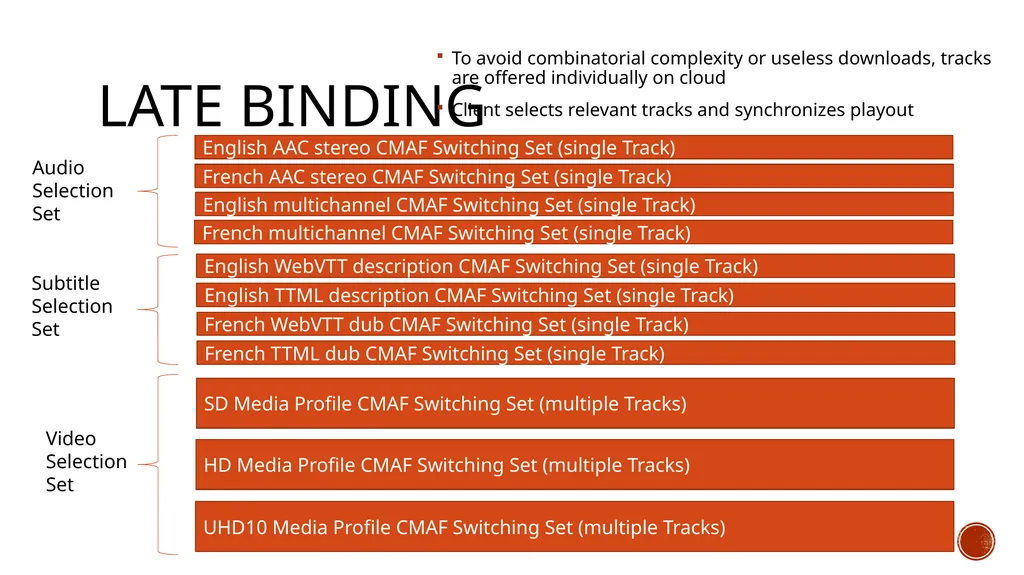
Late Binding Audio Selection Set Subtitle Selection Set Video Selection Set English AAC stereo CMAF Switching Set (single Track) French AAC stereo CMAF Switching Set (single Track) English multichannel CMAF Switching Set (single Track) French multichannel CMAF Switching Set (single Track) English WebVTT description CMAF Switching Set (single Track) English TTML description CMAF Switching Set (single Track) French WebVTT dub CMAF Switching Set (single Track) French TTML dub CMAF Switching Set (single Track) SD Media Profile CMAF Switching Set (multiple Tracks) HD Media Profile CMAF Switching Set (multiple Tracks) UHD10 Media Profile CMAF Switching Set (multiple Tracks) To avoid combinatorial complexity or useless downloads, tracks are offered individually on cloud
Client selects relevant tracks and synchronizes playout<br>
Client selects relevant tracks and synchronizes playout<br>
32
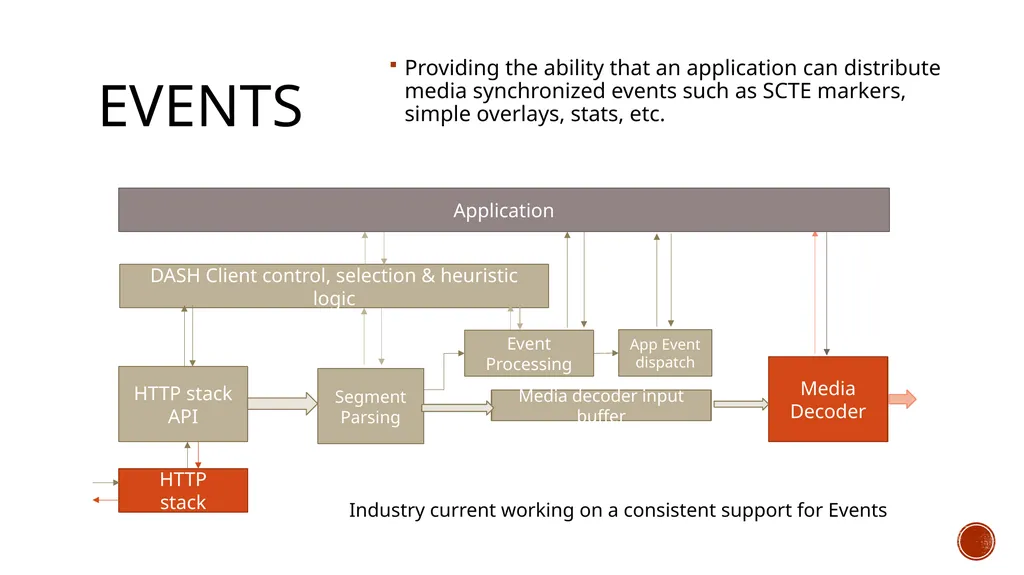
Events Providing the ability that an application can distribute media synchronized events such as SCTE markers, simple overlays, stats, etc. DASH Client control, selection & heuristic logic HTTP stack
API Media Decoder Media decoder input buffer Segment Parsing Event Processing App Event
dispatch HTTP
stack Application Industry current working on a consistent support for Events<br>
API Media Decoder Media decoder input buffer Segment Parsing Event Processing App Event
dispatch HTTP
stack Application Industry current working on a consistent support for Events<br>
33
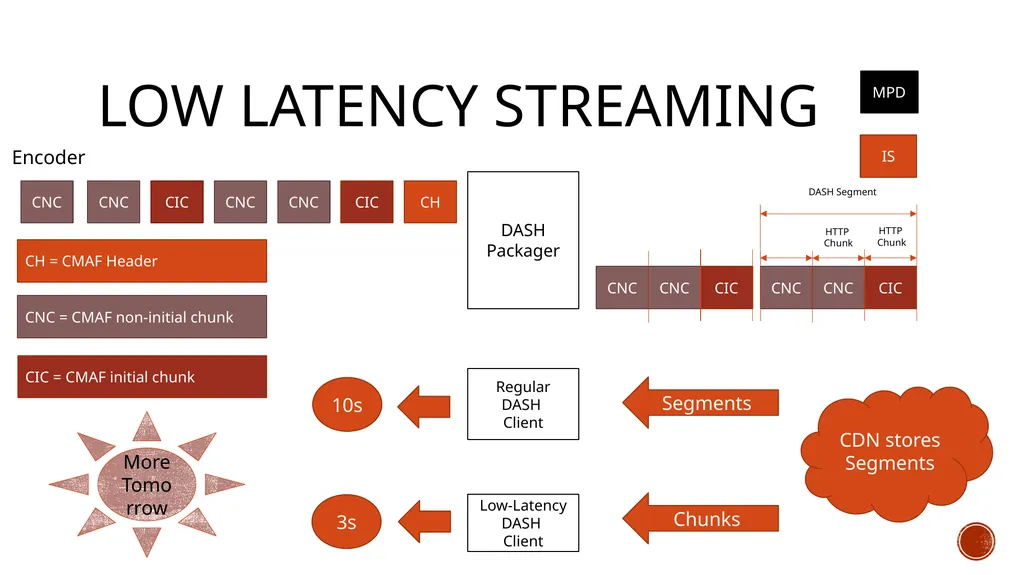
Low latency Streaming DASH Packager CH CIC CNC CNC CIC CNC IS CNC CNC CIC CNC CNC CNC CIC HTTP
Chunk HTTP
Chunk DASH Segment MPD CNC = CMAF non-initial chunk CIC = CMAF initial chunk CH = CMAF Header Low-Latency
DASH Client CDN stores Segments Regular
DASH Client Segments Chunks 10s 3s More Tomorrow Encoder<br>
DASH Client CDN stores Segments Regular
DASH Client Segments Chunks 10s 3s More Tomorrow Encoder<br>
34
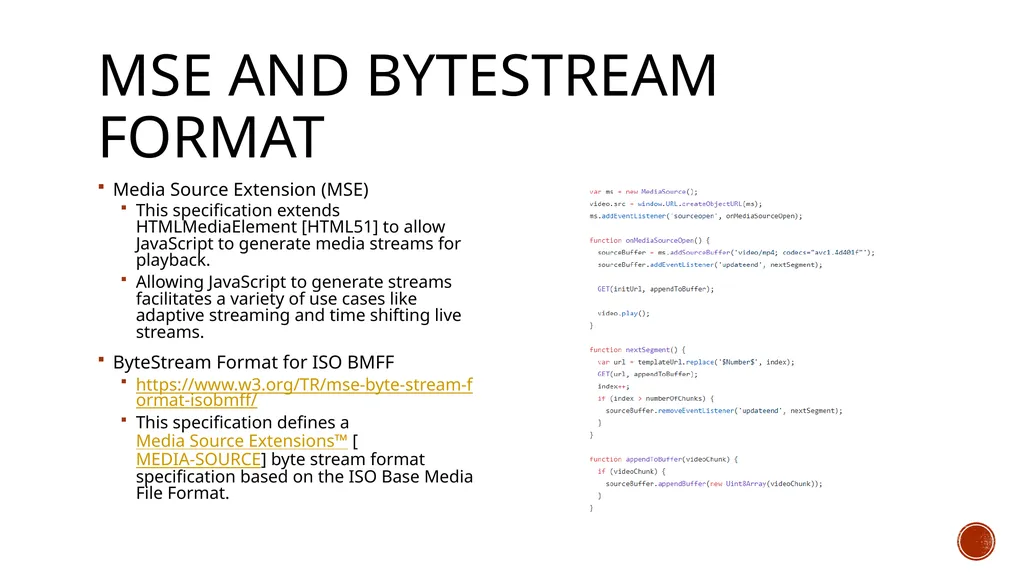
MSE and bytestream Format Media Source Extension (MSE)
This specification extends HTMLMediaElement [HTML51] to allow JavaScript to generate media streams for playback.
Allowing JavaScript to generate streams facilitates a variety of use cases like adaptive streaming and time shifting live streams.
ByteStream Format for ISO BMFF
https://www.w3.org/TR/mse-byte-stream-format-isobmff/
This specification defines a Media Source Extensions™ [MEDIA-SOURCE] byte stream format specification based on the ISO Base Media File Format.<br>
This specification extends HTMLMediaElement [HTML51] to allow JavaScript to generate media streams for playback.
Allowing JavaScript to generate streams facilitates a variety of use cases like adaptive streaming and time shifting live streams.
ByteStream Format for ISO BMFF
https://www.w3.org/TR/mse-byte-stream-format-isobmff/
This specification defines a Media Source Extensions™ [MEDIA-SOURCE] byte stream format specification based on the ISO Base Media File Format.<br>
35
Other APplications<br>
36
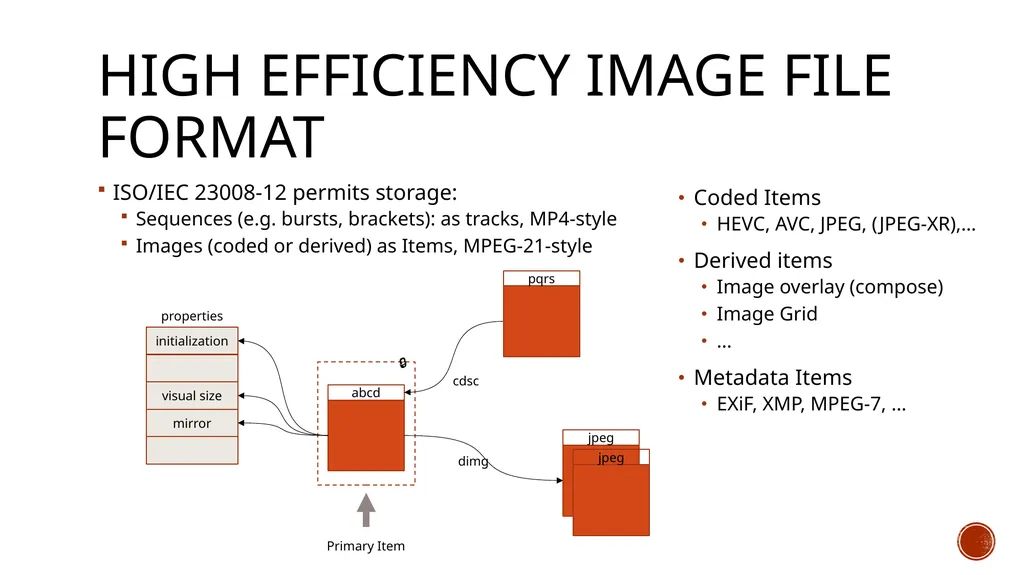
High Efficiency Image File Format ISO/IEC 23008-12 permits storage:
Sequences (e.g. bursts, brackets): as tracks, MP4-style
Images (coded or derived) as Items, MPEG-21-style Coded Items
HEVC, AVC, JPEG, (JPEG-XR),…
Derived items
Image overlay (compose)
Image Grid
…
Metadata Items
EXiF, XMP, MPEG-7, …<br>
Sequences (e.g. bursts, brackets): as tracks, MP4-style
Images (coded or derived) as Items, MPEG-21-style Coded Items
HEVC, AVC, JPEG, (JPEG-XR),…
Derived items
Image overlay (compose)
Image Grid
…
Metadata Items
EXiF, XMP, MPEG-7, …<br>
37
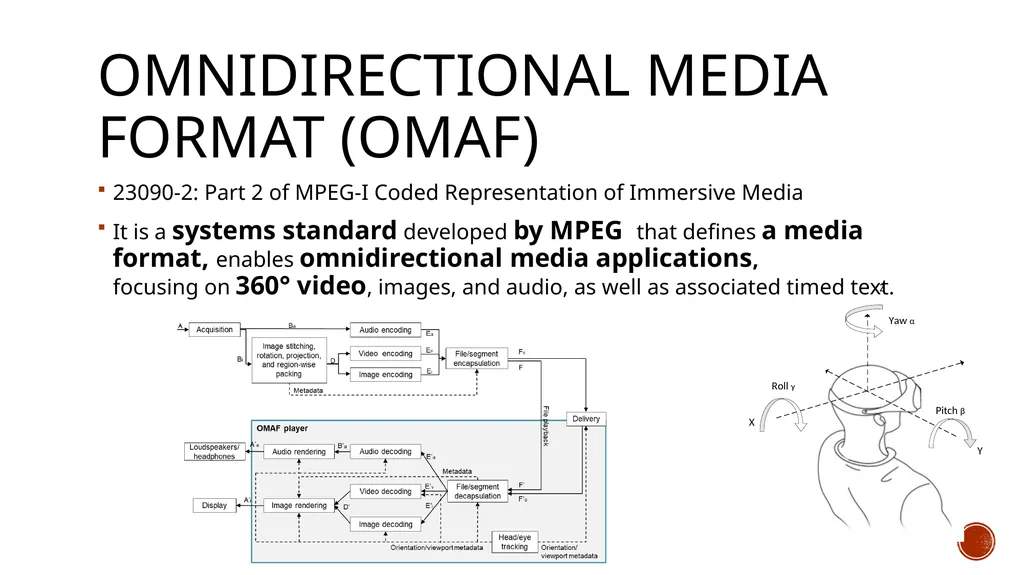
Omnidirectional Media Format (OMAF) 23090-2: Part 2 of MPEG-I Coded Representation of Immersive Media
It is a systems standard developed by MPEG that defines a media format, enables omnidirectional media applications, focusing on 360° video, images, and audio, as well as associated timed text.<br>
It is a systems standard developed by MPEG that defines a media format, enables omnidirectional media applications, focusing on 360° video, images, and audio, as well as associated timed text.<br>
38
OMAF Signaling in ISO BMFF General rules for signalling of important information
Overall omnidirectional video indication
Signalling of projection format
Signalling of region-wise packing and guard bands
Signalling of rotation
Signalling of frame packing
Signalling of content coverage
Region-wise quality ranking
Signalling of fisheye video parameters
Storage and signalling of omnidirectional images
Storage and signalling of timed text
OMAF timed metadata<br>
Overall omnidirectional video indication
Signalling of projection format
Signalling of region-wise packing and guard bands
Signalling of rotation
Signalling of frame packing
Signalling of content coverage
Region-wise quality ranking
Signalling of fisheye video parameters
Storage and signalling of omnidirectional images
Storage and signalling of timed text
OMAF timed metadata<br>
39
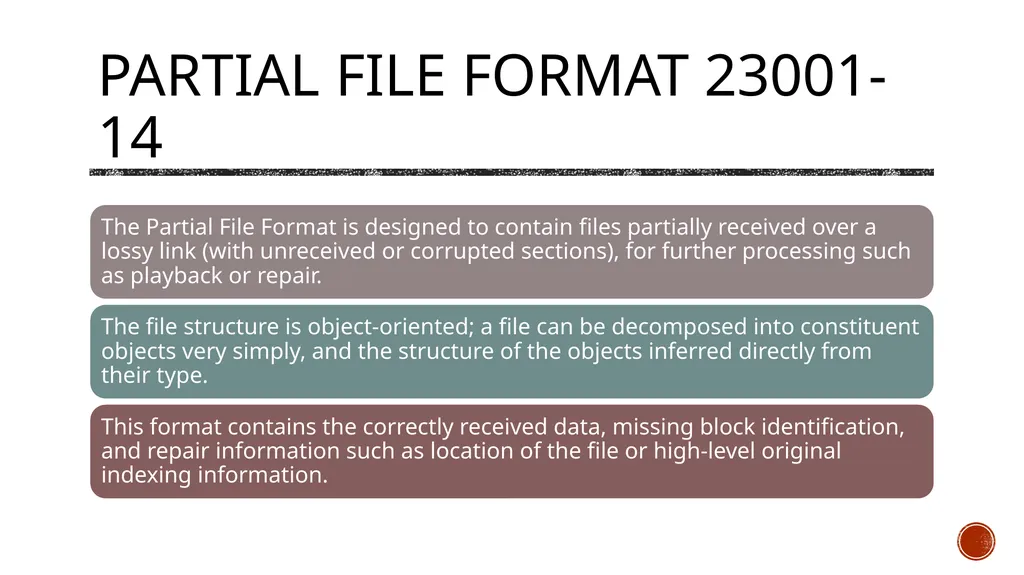
Partial file Format 23001-14<br>
40
Crystal Ball Some MPEG Activities<br>
41
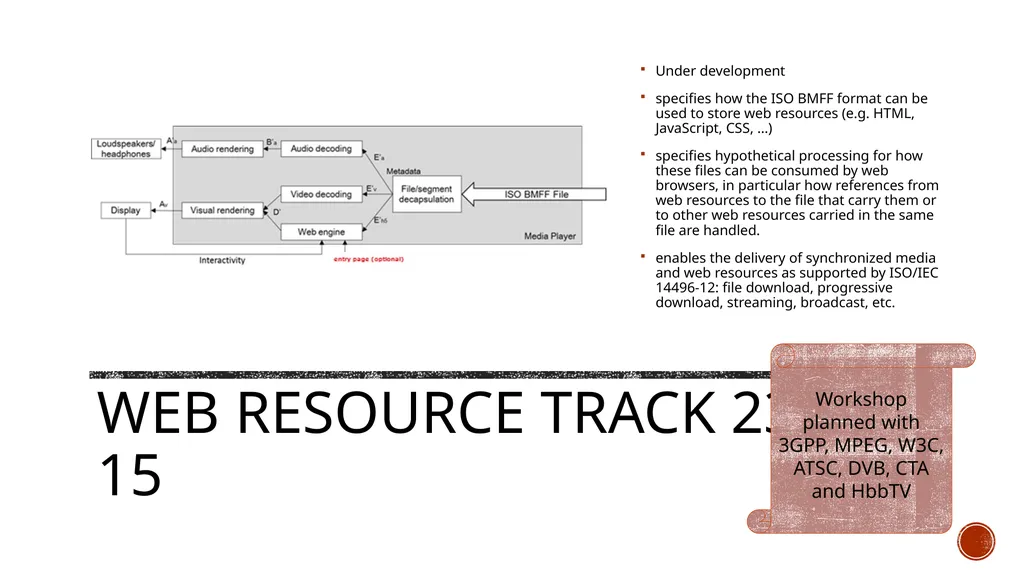
Web resource Track 23001-15 Under development
specifies how the ISO BMFF format can be used to store web resources (e.g. HTML, JavaScript, CSS, …)
specifies hypothetical processing for how these files can be consumed by web browsers, in particular how references from web resources to the file that carry them or to other web resources carried in the same file are handled.
enables the delivery of synchronized media and web resources as supported by ISO/IEC 14496-12: file download, progressive download, streaming, broadcast, etc. Workshop planned with 3GPP, MPEG, W3C, ATSC, DVB, CTA and HbbTV<br>
specifies how the ISO BMFF format can be used to store web resources (e.g. HTML, JavaScript, CSS, …)
specifies hypothetical processing for how these files can be consumed by web browsers, in particular how references from web resources to the file that carry them or to other web resources carried in the same file are handled.
enables the delivery of synchronized media and web resources as supported by ISO/IEC 14496-12: file download, progressive download, streaming, broadcast, etc. Workshop planned with 3GPP, MPEG, W3C, ATSC, DVB, CTA and HbbTV<br>
42
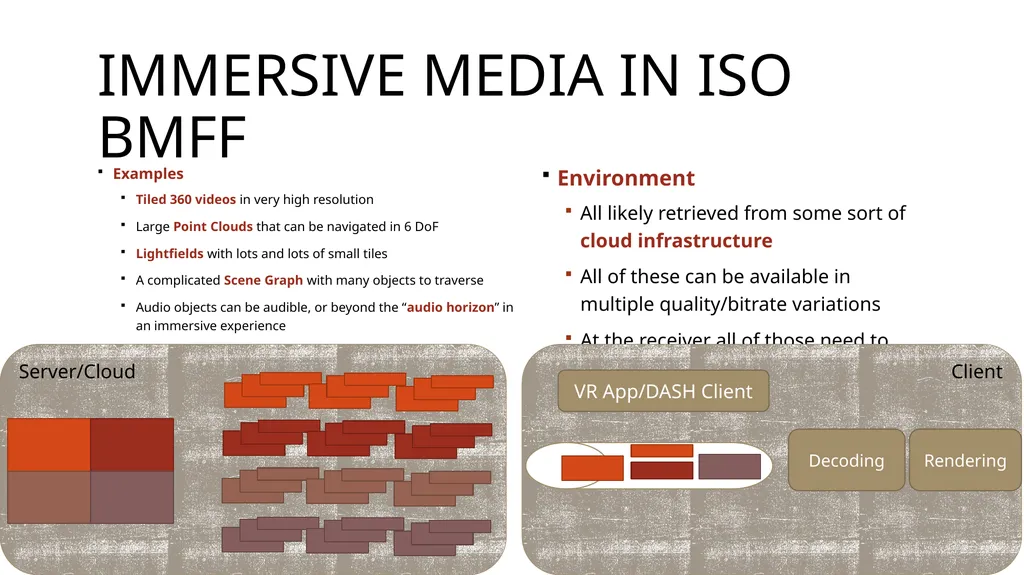
Immersive Media in ISO BMFF Examples
Tiled 360 videos in very high resolution
Large Point Clouds that can be navigated in 6 DoF
Lightfields with lots and lots of small tiles
A complicated Scene Graph with many objects to traverse
Audio objects can be audible, or beyond the “audio horizon” in an immersive experience Environment
All likely retrieved from some sort of cloud infrastructure
All of these can be available in multiple quality/bitrate variations
At the receiver all of those need to decoded and decrypted with constrained devices Client Server/Cloud Decoding VR App/DASH Client Rendering<br>
Tiled 360 videos in very high resolution
Large Point Clouds that can be navigated in 6 DoF
Lightfields with lots and lots of small tiles
A complicated Scene Graph with many objects to traverse
Audio objects can be audible, or beyond the “audio horizon” in an immersive experience Environment
All likely retrieved from some sort of cloud infrastructure
All of these can be available in multiple quality/bitrate variations
At the receiver all of those need to decoded and decrypted with constrained devices Client Server/Cloud Decoding VR App/DASH Client Rendering<br>
43
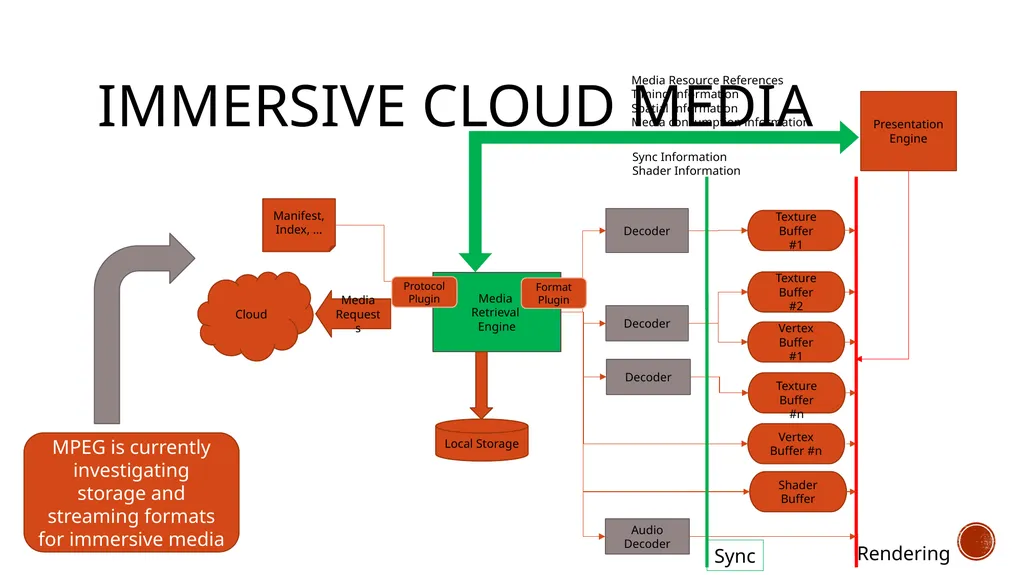
Immersive Cloud Media MPEG is currently investigating storage and streaming formats for immersive media<br>
44
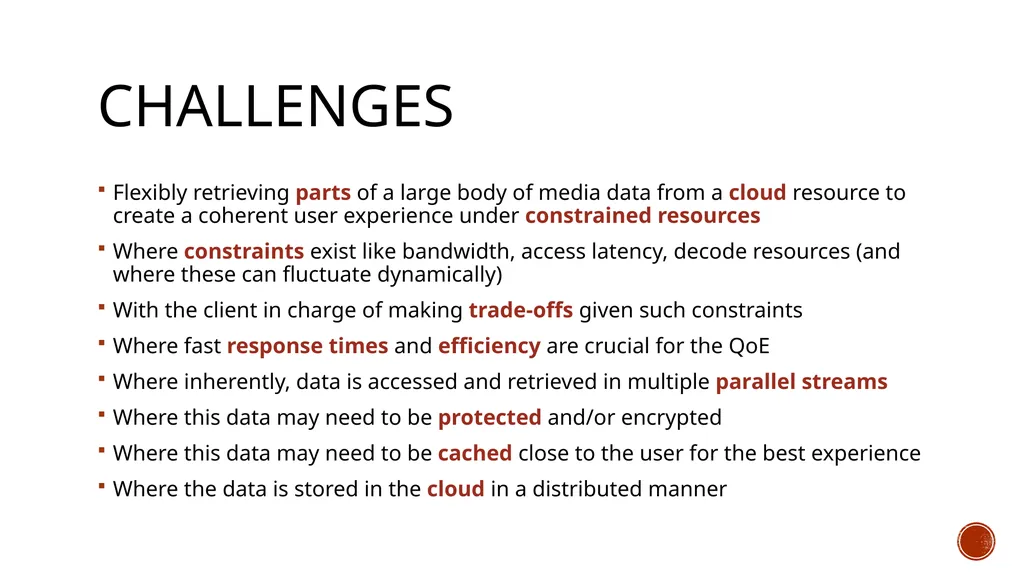
Challenges Flexibly retrieving parts of a large body of media data from a cloud resource to create a coherent user experience under constrained resources
Where constraints exist like bandwidth, access latency, decode resources (and where these can fluctuate dynamically)
With the client in charge of making trade-offs given such constraints
Where fast response times and efficiency are crucial for the QoE
Where inherently, data is accessed and retrieved in multiple parallel streams
Where this data may need to be protected and/or encrypted
Where this data may need to be cached close to the user for the best experience
Where the data is stored in the cloud in a distributed manner<br>
Where constraints exist like bandwidth, access latency, decode resources (and where these can fluctuate dynamically)
With the client in charge of making trade-offs given such constraints
Where fast response times and efficiency are crucial for the QoE
Where inherently, data is accessed and retrieved in multiple parallel streams
Where this data may need to be protected and/or encrypted
Where this data may need to be cached close to the user for the best experience
Where the data is stored in the cloud in a distributed manner<br>
45
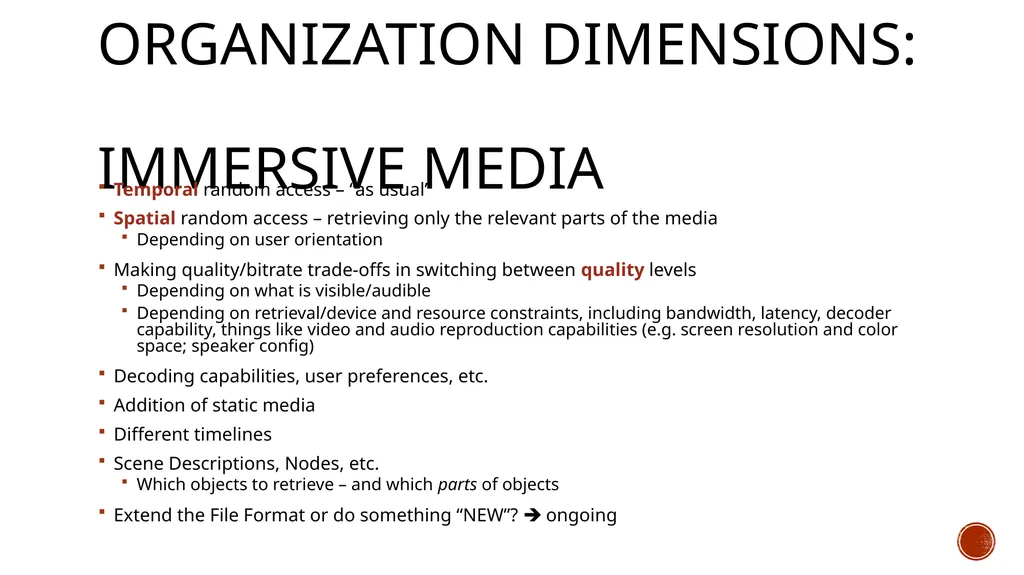
Organization Dimensions:
Immersive Media Temporal random access – “as usual”
Spatial random access – retrieving only the relevant parts of the media
Depending on user orientation
Making quality/bitrate trade-offs in switching between quality levels
Depending on what is visible/audible
Depending on retrieval/device and resource constraints, including bandwidth, latency, decoder capability, things like video and audio reproduction capabilities (e.g. screen resolution and color space; speaker config)
Decoding capabilities, user preferences, etc.
Addition of static media
Different timelines
Scene Descriptions, Nodes, etc.
Which objects to retrieve – and which parts of objects
Extend the File Format or do something “NEW”? ongoing<br>
Spatial random access – retrieving only the relevant parts of the media
Depending on user orientation
Making quality/bitrate trade-offs in switching between quality levels
Depending on what is visible/audible
Depending on retrieval/device and resource constraints, including bandwidth, latency, decoder capability, things like video and audio reproduction capabilities (e.g. screen resolution and color space; speaker config)
Decoding capabilities, user preferences, etc.
Addition of static media
Different timelines
Scene Descriptions, Nodes, etc.
Which objects to retrieve – and which parts of objects
Extend the File Format or do something “NEW”? ongoing<br>
46
Summary<br>
47
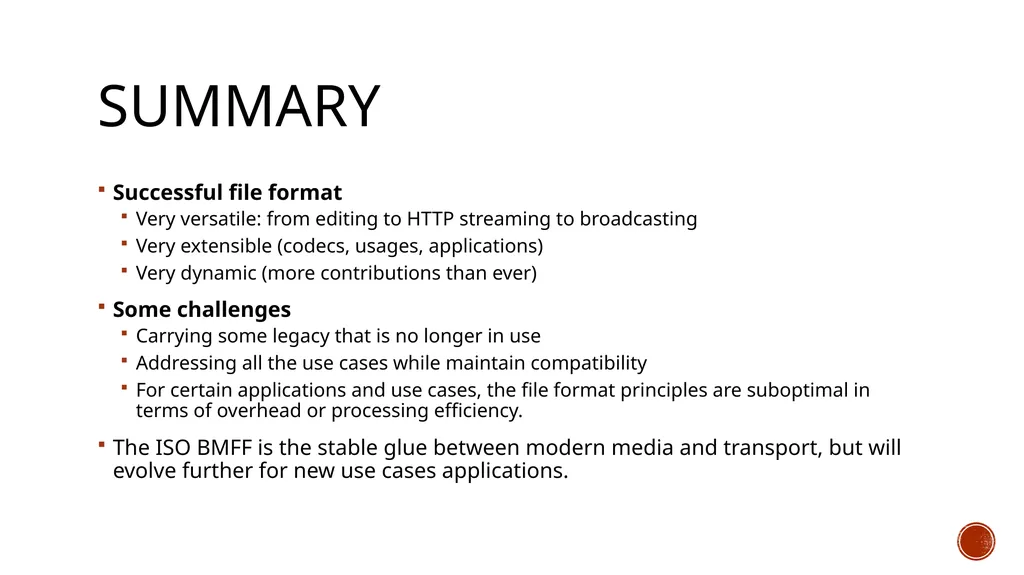
Summary Successful file format
Very versatile: from editing to HTTP streaming to broadcasting
Very extensible (codecs, usages, applications)
Very dynamic (more contributions than ever)
Some challenges
Carrying some legacy that is no longer in use
Addressing all the use cases while maintain compatibility
For certain applications and use cases, the file format principles are suboptimal in terms of overhead or processing efficiency.
The ISO BMFF is the stable glue between modern media and transport, but will evolve further for new use cases applications.<br>
Very versatile: from editing to HTTP streaming to broadcasting
Very extensible (codecs, usages, applications)
Very dynamic (more contributions than ever)
Some challenges
Carrying some legacy that is no longer in use
Addressing all the use cases while maintain compatibility
For certain applications and use cases, the file format principles are suboptimal in terms of overhead or processing efficiency.
The ISO BMFF is the stable glue between modern media and transport, but will evolve further for new use cases applications.<br>
48
Thank You Thanks to Dave Singer, Kilroy Hughes, Per Fröjdh, Cyril Concolato, Ye-Kui Wang, Iraj Sodagar, Jean Le Feuvre and other contributors to the presentation<br>