
Introduction to Business Intelligence Prepared By
AS
Published · 13 slides · 0 views

1 / 1

Description
Introduction to Business Intelligence Prepared By Naman Saini School of Engineering and Technology Shobhit University Gangoh p Introduction to Business Intelligence: Business View of IT Applications INTRODUCTION Information technology is an
Related Topics
Share
Embed code
Download this presentation From Below
"Introduction to Business Intelligence Prepared By" is the property of its rightful owner. Permission is granted to download and print the materials on this website for personal, non-commercial use only, and to display it on your personal computer provided you do not modify the materials and that you retain all copyright notices contained in the materials. By downloading content from our website, you accept the terms of this agreement.
Presentation Transcript
01
Introduction to Business Intelligence
Prepared By
Naman Saini
School of Engineering and Technology
Shobhit University Gangoh
p<br>
Prepared By
Naman Saini
School of Engineering and Technology
Shobhit University Gangoh
p<br>
02
Introduction to Business Intelligence:
Business View of IT Applications
INTRODUCTION
Information technology is an essential partner in management of your business, regardless of the kind of enterprise you operate. Whether you need computers for storage, transfer, retrieval or transmission of information, you can manage your business with greater accuracy and efficiency with the assistance of information technology and computer applications.
Storage
You may already use a computer for data storage for your business. Inventory, sales, receivables and payables stored in Excel, Open Office or a similar program keeps these figures at your fingertips. Accounting software stores your payroll information, tax records and specialized data for your business.
Marketing
Large and small businesses are on a level playing field on the Internet. You can have a Web presence, take orders, buy merchandise, sell excess or even operate some businesses entirely online. A marketing tool that uses information technology is the Quick Response or QR Code that looks like a bar code but is square. A scan advertises your website address and includes any text you choose. You can use your business management skills to direct employees or contractors to do your Internet marketing, or you can choose to learn a new set of skills in information technology.<br>
Business View of IT Applications
INTRODUCTION
Information technology is an essential partner in management of your business, regardless of the kind of enterprise you operate. Whether you need computers for storage, transfer, retrieval or transmission of information, you can manage your business with greater accuracy and efficiency with the assistance of information technology and computer applications.
Storage
You may already use a computer for data storage for your business. Inventory, sales, receivables and payables stored in Excel, Open Office or a similar program keeps these figures at your fingertips. Accounting software stores your payroll information, tax records and specialized data for your business.
Marketing
Large and small businesses are on a level playing field on the Internet. You can have a Web presence, take orders, buy merchandise, sell excess or even operate some businesses entirely online. A marketing tool that uses information technology is the Quick Response or QR Code that looks like a bar code but is square. A scan advertises your website address and includes any text you choose. You can use your business management skills to direct employees or contractors to do your Internet marketing, or you can choose to learn a new set of skills in information technology.<br>
03
Information
Whether you learned business management by the book or by practical experience, youll need updates all of your life. The Internet is a wealth of information to keep you current with trends, techniques, software and human resources. You can draw on online databases and websites to locate potential employees, compare insurance proposals, tackle employee issues or check out the competition. Managing your business with information gleaned from the Internet keeps you knowledgeable and on the cutting edge.
Communication
Communication by email is faster and costs less than sending a paper letter in the mail. You can transform your business to the 21st century with the use of email for communication with clients or customers. Information technology allows you to organize email file folders by client or by type of communication, such as orders or billing. You can drag and drop your email files to closed folders as your company completes projects. Your communication files become closed files, placed in storage on CD or on a hard drive with a duplicate copy or backup automated by a program or service.<br>
Whether you learned business management by the book or by practical experience, youll need updates all of your life. The Internet is a wealth of information to keep you current with trends, techniques, software and human resources. You can draw on online databases and websites to locate potential employees, compare insurance proposals, tackle employee issues or check out the competition. Managing your business with information gleaned from the Internet keeps you knowledgeable and on the cutting edge.
Communication
Communication by email is faster and costs less than sending a paper letter in the mail. You can transform your business to the 21st century with the use of email for communication with clients or customers. Information technology allows you to organize email file folders by client or by type of communication, such as orders or billing. You can drag and drop your email files to closed folders as your company completes projects. Your communication files become closed files, placed in storage on CD or on a hard drive with a duplicate copy or backup automated by a program or service.<br>
04
• Support large number of users of different interests and abilities
• Provides display on multiple devices and formats
• Deployed on large secure servers through license management software
• Support single sign-on and support special authentication & authorization
requirements
• Ability to run on any operating system
• Ability to use/connect to any RDBMS for data storage
• Could be implemented in multiple programming languages or combinations as well
• Leverages enterprise storage capabilities and back-up systems
• Supports extensive connectivity to different types of networks and Internet services<br>
• Provides display on multiple devices and formats
• Deployed on large secure servers through license management software
• Support single sign-on and support special authentication & authorization
requirements
• Ability to run on any operating system
• Ability to use/connect to any RDBMS for data storage
• Could be implemented in multiple programming languages or combinations as well
• Leverages enterprise storage capabilities and back-up systems
• Supports extensive connectivity to different types of networks and Internet services<br>
05
Digital Data :-
Digital data, in information theory and information systems, is information represented as a string of discrete symbols, each of which can take on one of only a finite number of values from some alphabet, such as letters or digits. An example is a text document, which consists of a string of alphanumeric characters. The most common form of digital data in modern information systems is binary data, which is represented by a string of binary digits (bits) each of which can have one of two values, either 0 or 1.
Digital data can be contrasted with analog data, which is represented by a value from a continuous range of real numbers. Analog data is transmitted by an analog signal, which not only takes on continuous values but can vary continuously with time, a continuous real-valued function of time. An example is the air pressure variation in a sound wave.
Type of Digital Data :-
Structured Data
Unstructured Data
SEMI-STRUCTURED DATA<br>
Digital data, in information theory and information systems, is information represented as a string of discrete symbols, each of which can take on one of only a finite number of values from some alphabet, such as letters or digits. An example is a text document, which consists of a string of alphanumeric characters. The most common form of digital data in modern information systems is binary data, which is represented by a string of binary digits (bits) each of which can have one of two values, either 0 or 1.
Digital data can be contrasted with analog data, which is represented by a value from a continuous range of real numbers. Analog data is transmitted by an analog signal, which not only takes on continuous values but can vary continuously with time, a continuous real-valued function of time. An example is the air pressure variation in a sound wave.
Type of Digital Data :-
Structured Data
Unstructured Data
SEMI-STRUCTURED DATA<br>
06
Structured Data
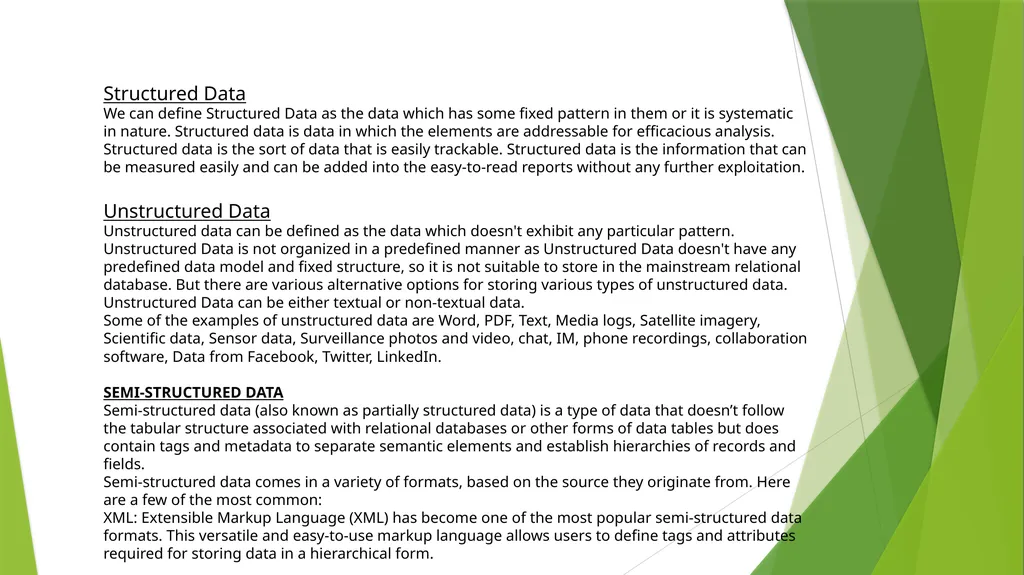
We can define Structured Data as the data which has some fixed pattern in them or it is systematic in nature. Structured data is data in which the elements are addressable for efficacious analysis. Structured data is the sort of data that is easily trackable. Structured data is the information that can be measured easily and can be added into the easy-to-read reports without any further exploitation.
Unstructured Data
Unstructured data can be defined as the data which doesn't exhibit any particular pattern. Unstructured Data is not organized in a predefined manner as Unstructured Data doesn't have any predefined data model and fixed structure, so it is not suitable to store in the mainstream relational database. But there are various alternative options for storing various types of unstructured data. Unstructured Data can be either textual or non-textual data.
Some of the examples of unstructured data are Word, PDF, Text, Media logs, Satellite imagery, Scientific data, Sensor data, Surveillance photos and video, chat, IM, phone recordings, collaboration software, Data from Facebook, Twitter, LinkedIn.
SEMI-STRUCTURED DATA
Semi-structured data (also known as partially structured data) is a type of data that doesn’t follow the tabular structure associated with relational databases or other forms of data tables but does contain tags and metadata to separate semantic elements and establish hierarchies of records and fields.
Semi-structured data comes in a variety of formats, based on the source they originate from. Here are a few of the most common:
XML: Extensible Markup Language (XML) has become one of the most popular semi-structured data formats. This versatile and easy-to-use markup language allows users to define tags and attributes required for storing data in a hierarchical form.<br>
We can define Structured Data as the data which has some fixed pattern in them or it is systematic in nature. Structured data is data in which the elements are addressable for efficacious analysis. Structured data is the sort of data that is easily trackable. Structured data is the information that can be measured easily and can be added into the easy-to-read reports without any further exploitation.
Unstructured Data
Unstructured data can be defined as the data which doesn't exhibit any particular pattern. Unstructured Data is not organized in a predefined manner as Unstructured Data doesn't have any predefined data model and fixed structure, so it is not suitable to store in the mainstream relational database. But there are various alternative options for storing various types of unstructured data. Unstructured Data can be either textual or non-textual data.
Some of the examples of unstructured data are Word, PDF, Text, Media logs, Satellite imagery, Scientific data, Sensor data, Surveillance photos and video, chat, IM, phone recordings, collaboration software, Data from Facebook, Twitter, LinkedIn.
SEMI-STRUCTURED DATA
Semi-structured data (also known as partially structured data) is a type of data that doesn’t follow the tabular structure associated with relational databases or other forms of data tables but does contain tags and metadata to separate semantic elements and establish hierarchies of records and fields.
Semi-structured data comes in a variety of formats, based on the source they originate from. Here are a few of the most common:
XML: Extensible Markup Language (XML) has become one of the most popular semi-structured data formats. This versatile and easy-to-use markup language allows users to define tags and attributes required for storing data in a hierarchical form.<br>
07
Online Analytical Processing (OLAP)
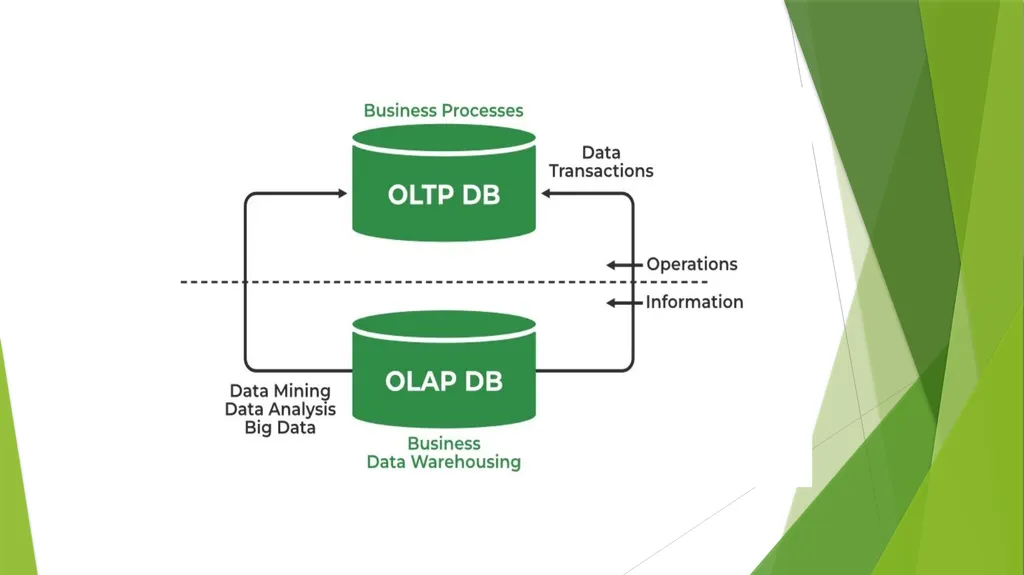
Online Analytical Processing (OLAP) consists of a type of software tool that is used for data analysis for business decisions. OLAP provides an environment to get insights from the database retrieved from multiple database systems at one time.
OLAP Examples
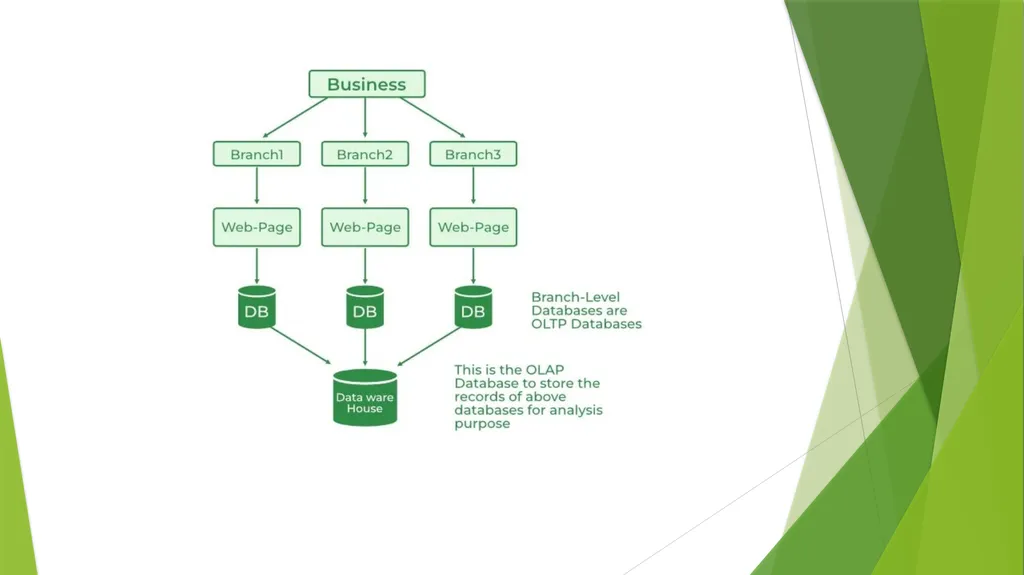
Any type of Data Warehouse System is an OLAP system. The uses of the OLAP System are described below.
Spotify analyzed songs by users to come up with a personalized homepage of their songs and playlist.
Netflix movie recommendation system.<br>
Online Analytical Processing (OLAP) consists of a type of software tool that is used for data analysis for business decisions. OLAP provides an environment to get insights from the database retrieved from multiple database systems at one time.
OLAP Examples
Any type of Data Warehouse System is an OLAP system. The uses of the OLAP System are described below.
Spotify analyzed songs by users to come up with a personalized homepage of their songs and playlist.
Netflix movie recommendation system.<br>
08
Benefits of OLAP Services
OLAP services help in keeping consistency and calculation.
We can store planning, analysis, and budgeting for business analytics within one platform.
OLAP services help in handling large volumes of data, which helps in enterprise-level business applications.
OLAP services help in applying security restrictions for data protection.
OLAP services provide a multidimensional view of data, which helps in applying operations on data in various ways.
Drawbacks of OLAP Services
OLAP Services requires professionals to handle the data because of its complex modeling procedure.
OLAP services are expensive to implement and maintain in cases when datasets are large.
We can perform an analysis of data only after extraction and transformation of data in the case of OLAP which delays the system.
OLAP services are not efficient for decision-making, as it is updated on a periodic basis.<br>
OLAP services help in keeping consistency and calculation.
We can store planning, analysis, and budgeting for business analytics within one platform.
OLAP services help in handling large volumes of data, which helps in enterprise-level business applications.
OLAP services help in applying security restrictions for data protection.
OLAP services provide a multidimensional view of data, which helps in applying operations on data in various ways.
Drawbacks of OLAP Services
OLAP Services requires professionals to handle the data because of its complex modeling procedure.
OLAP services are expensive to implement and maintain in cases when datasets are large.
We can perform an analysis of data only after extraction and transformation of data in the case of OLAP which delays the system.
OLAP services are not efficient for decision-making, as it is updated on a periodic basis.<br>
09
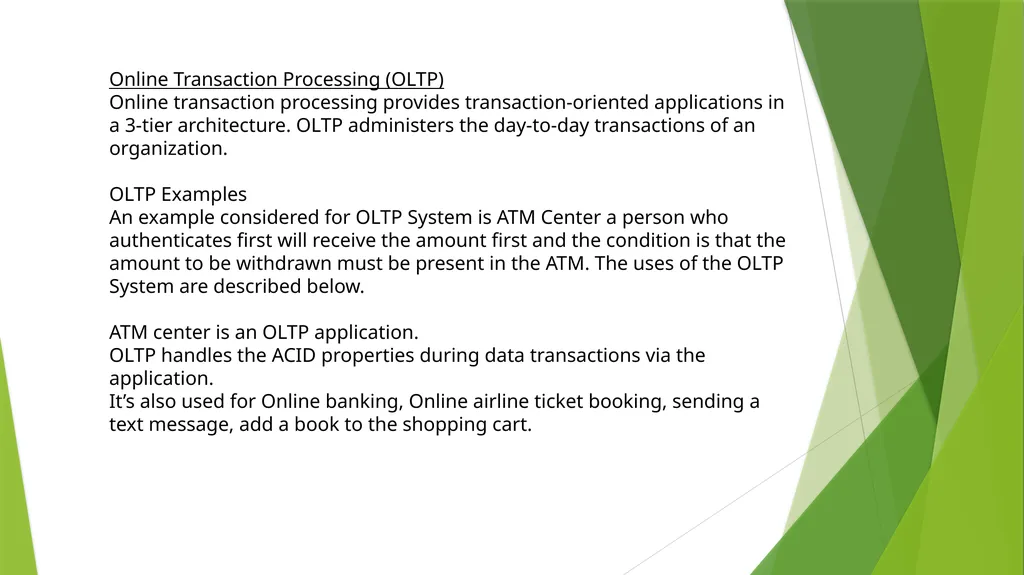
Online Transaction Processing (OLTP)
Online transaction processing provides transaction-oriented applications in a 3-tier architecture. OLTP administers the day-to-day transactions of an organization.
OLTP Examples
An example considered for OLTP System is ATM Center a person who authenticates first will receive the amount first and the condition is that the amount to be withdrawn must be present in the ATM. The uses of the OLTP System are described below.
ATM center is an OLTP application.
OLTP handles the ACID properties during data transactions via the application.
It’s also used for Online banking, Online airline ticket booking, sending a text message, add a book to the shopping cart.<br>
Online transaction processing provides transaction-oriented applications in a 3-tier architecture. OLTP administers the day-to-day transactions of an organization.
OLTP Examples
An example considered for OLTP System is ATM Center a person who authenticates first will receive the amount first and the condition is that the amount to be withdrawn must be present in the ATM. The uses of the OLTP System are described below.
ATM center is an OLTP application.
OLTP handles the ACID properties during data transactions via the application.
It’s also used for Online banking, Online airline ticket booking, sending a text message, add a book to the shopping cart.<br>
10
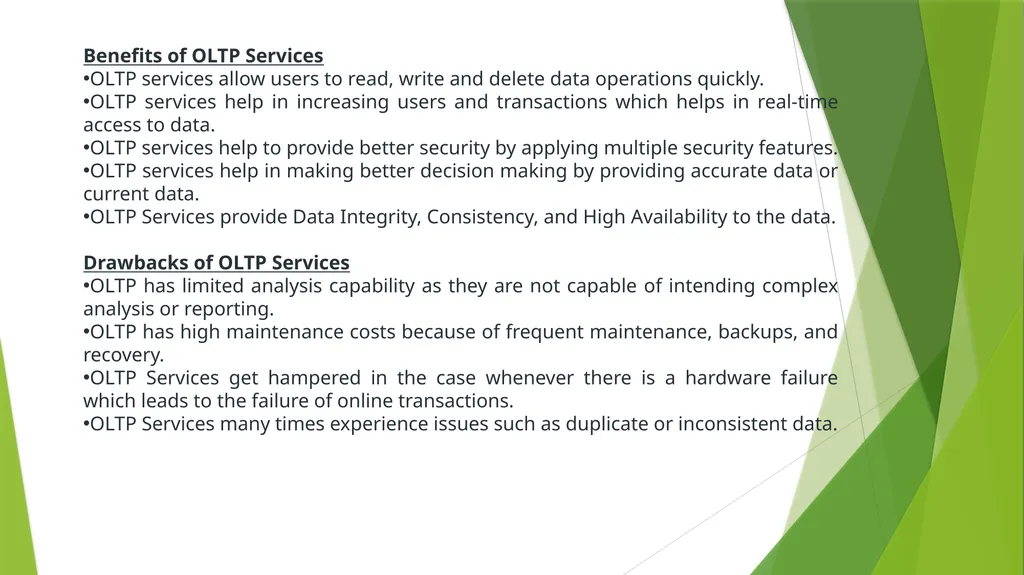
Benefits of OLTP Services
OLTP services allow users to read, write and delete data operations quickly.
OLTP services help in increasing users and transactions which helps in real-time access to data.
OLTP services help to provide better security by applying multiple security features.
OLTP services help in making better decision making by providing accurate data or current data.
OLTP Services provide Data Integrity, Consistency, and High Availability to the data.
Drawbacks of OLTP Services
OLTP has limited analysis capability as they are not capable of intending complex analysis or reporting.
OLTP has high maintenance costs because of frequent maintenance, backups, and recovery.
OLTP Services get hampered in the case whenever there is a hardware failure which leads to the failure of online transactions.
OLTP Services many times experience issues such as duplicate or inconsistent data.<br>
OLTP services allow users to read, write and delete data operations quickly.
OLTP services help in increasing users and transactions which helps in real-time access to data.
OLTP services help to provide better security by applying multiple security features.
OLTP services help in making better decision making by providing accurate data or current data.
OLTP Services provide Data Integrity, Consistency, and High Availability to the data.
Drawbacks of OLTP Services
OLTP has limited analysis capability as they are not capable of intending complex analysis or reporting.
OLTP has high maintenance costs because of frequent maintenance, backups, and recovery.
OLTP Services get hampered in the case whenever there is a hardware failure which leads to the failure of online transactions.
OLTP Services many times experience issues such as duplicate or inconsistent data.<br>
11
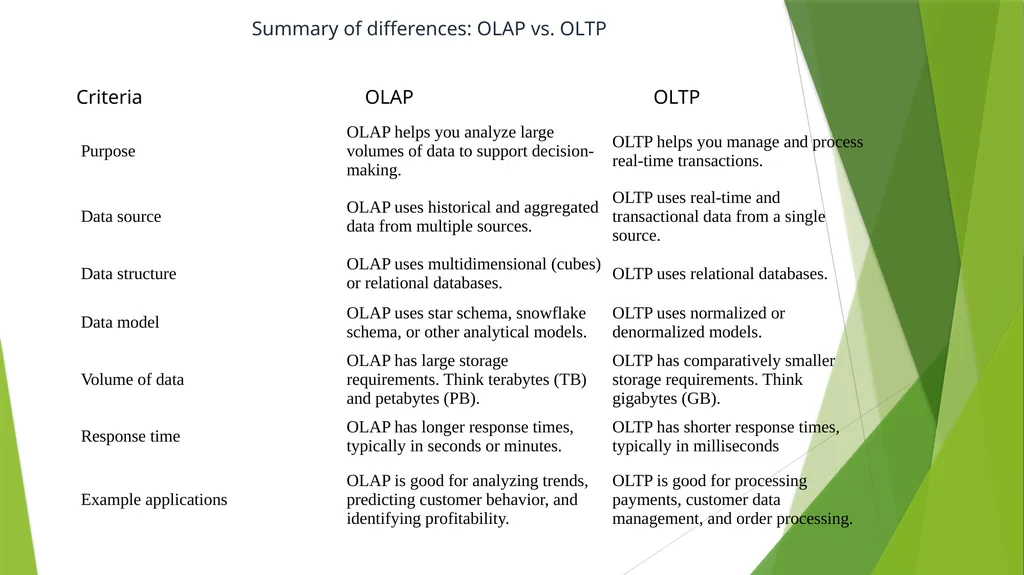
Summary of differences: OLAP vs. OLTP<br>