
Introduction to Software Engineering 8. User
Description: Introduction to Software Engineering 8. User Interface Design Oscar Nierstrasz ESE User Interface Design ESE 8.2 Roadmap Interface design models Design principles GUI characteristics Usability Testing Oscar Nierstrasz ESE User
Related Topics
Download Presentation
"Introduction to Software Engineering 8. User" is the property of its rightful owner. Permission is granted to download and print the materials on this website for personal, non-commercial use only, and to display it on your personal computer provided you do not modify the materials and that you retain all copyright notices contained in the materials. By downloading content from our website, you accept the terms of this agreement.
Presentation Transcript
slide1. Introduction to Software Engineering 8. User Interface Design<br>
slide2. © Oscar Nierstrasz ESE — User Interface Design ESE 8.2 Roadmap Interface design models
Design principles
GUI characteristics
Usability Testing<br>
slide3. © Oscar Nierstrasz ESE — User Interface Design ESE 8.3 Literature Sources
Software Engineering, I. Sommerville, 7th Edn., 2004.
Software Engineering — A Practitioner’s Approach, R. Pressman, Mc-Graw Hill, 5th Edn., 2001.
Recommended reading
Mary Beth Rosson, John M. Carroll, Usability Engineering, 2002
Jakob Nielsen, Usability Engineering, Morgan Kaufmann, 1999.
Alan Cooper, About Face — The Essentials of User Interface Design, Hungry Minds, 1995.
Alan Cooper, The Inmates are running the Asylum, SAMS, 1999.
Jef Raskin, The Humane Interface, Addison Wesley, 2000.
Jeff Johnson, GUI Bloopers, Morgan Kaufmann, 2000.
The Interface Hall of Shame, http://homepage.mac.com/bradster/iarchitect/shame.htm<br>
slide4. © Oscar Nierstrasz ESE — User Interface Design ESE 8.4 Roadmap Interface design models
Design principles
GUI characteristics
Usability Testing<br>
slide5. © Oscar Nierstrasz ESE — User Interface Design ESE 8.5 The UI design process UI design is an iterative process involving close liaisons between users and designers.
The 3 core activities in this process are:
User analysis. Understand what the users will do with the system;
System prototyping. Develop a series of prototypes for experiment;
Interface evaluation. Experiment with these prototypes with users.<br>
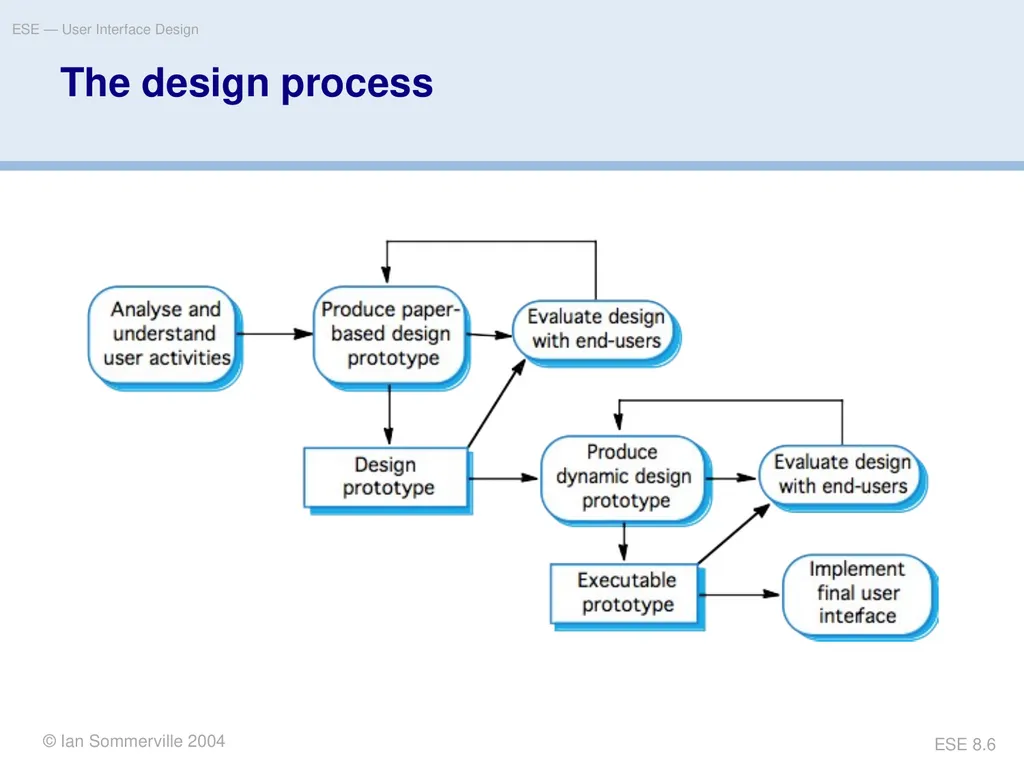
slide6. © Oscar Nierstrasz ESE — User Interface Design ESE 8.6 The design process © Ian Sommerville 2004<br>
slide7. © Oscar Nierstrasz ESE — User Interface Design ESE 8.7 Interface Design Models Four different models occur in HCI design:
The design model expresses the software design.
The user model describes the profile of the end users. (i.e., novices vs. experts, cultural background, etc.)
The user’s model is the end users’ perception of the system.
The system image is the external manifestation of the system (look and feel + documentation etc.)<br>
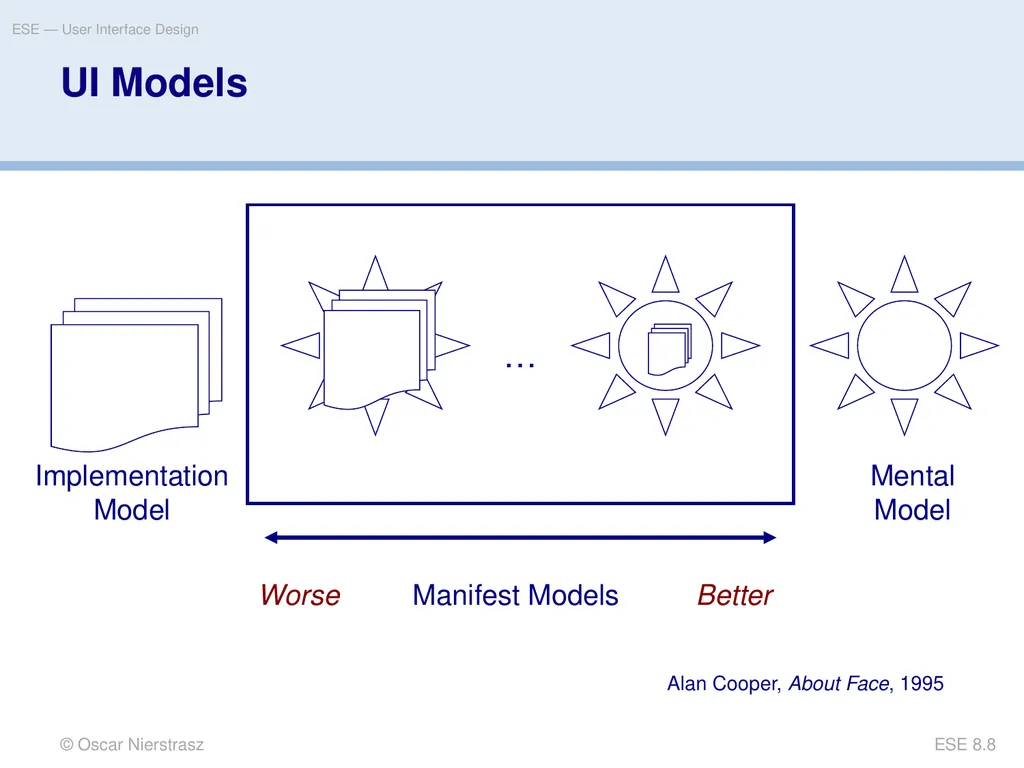
slide8. © Oscar Nierstrasz ESE — User Interface Design ESE 8.8 … UI Models Implementation Model Mental Model Manifest Models Better Worse Alan Cooper, About Face, 1995<br>
slide9. © Oscar Nierstrasz ESE — User Interface Design ESE 8.9 Roadmap Interface design models
Design principles
GUI characteristics
Usability Testing<br>
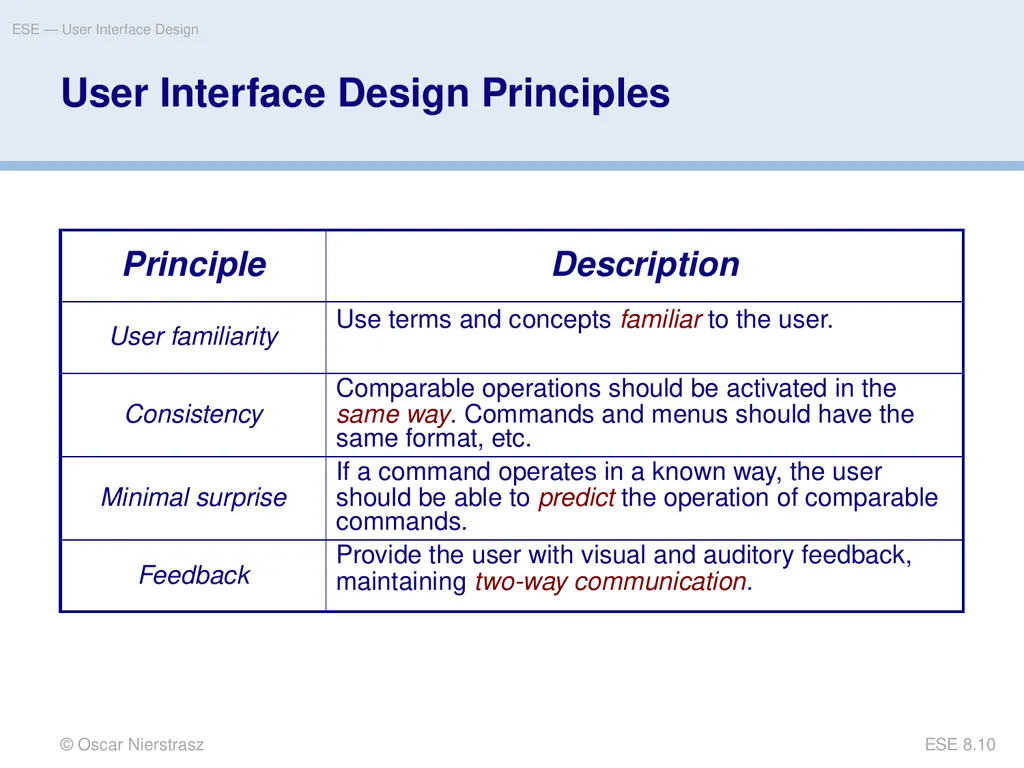
slide10. © Oscar Nierstrasz ESE — User Interface Design ESE 8.10 User Interface Design Principles<br>
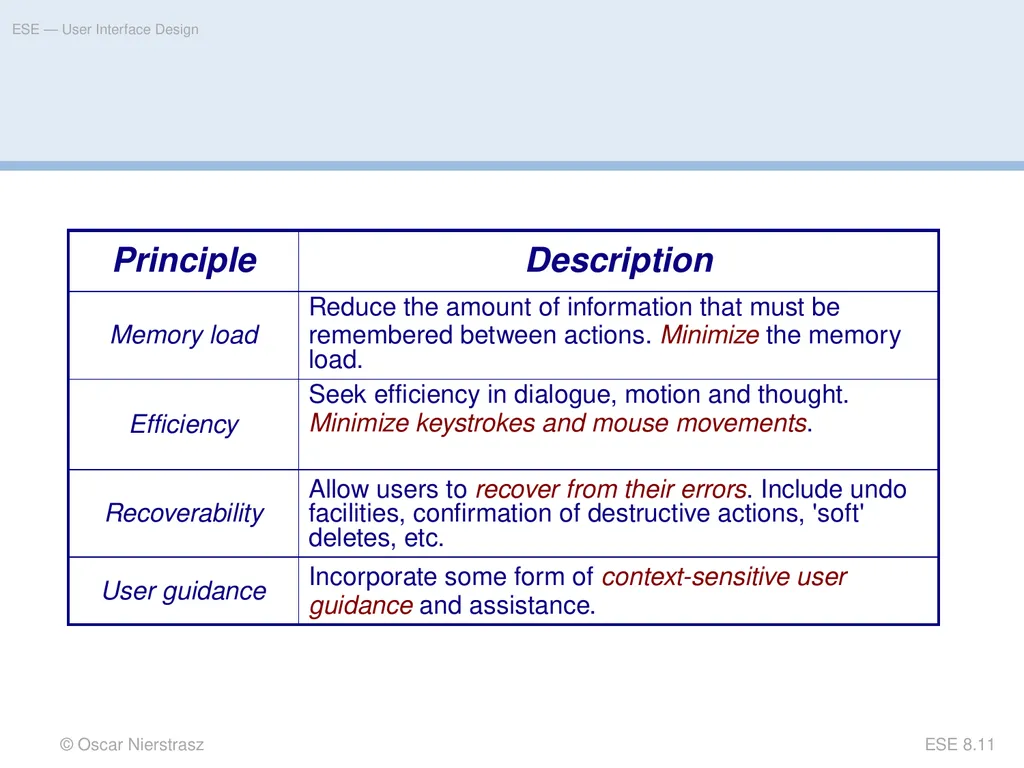
slide11. © Oscar Nierstrasz ESE — User Interface Design ESE 8.11<br>
slide12. © Oscar Nierstrasz ESE — User Interface Design ESE 8.12 Roadmap Interface design models
Design principles
GUI characteristics
Usability Testing<br>
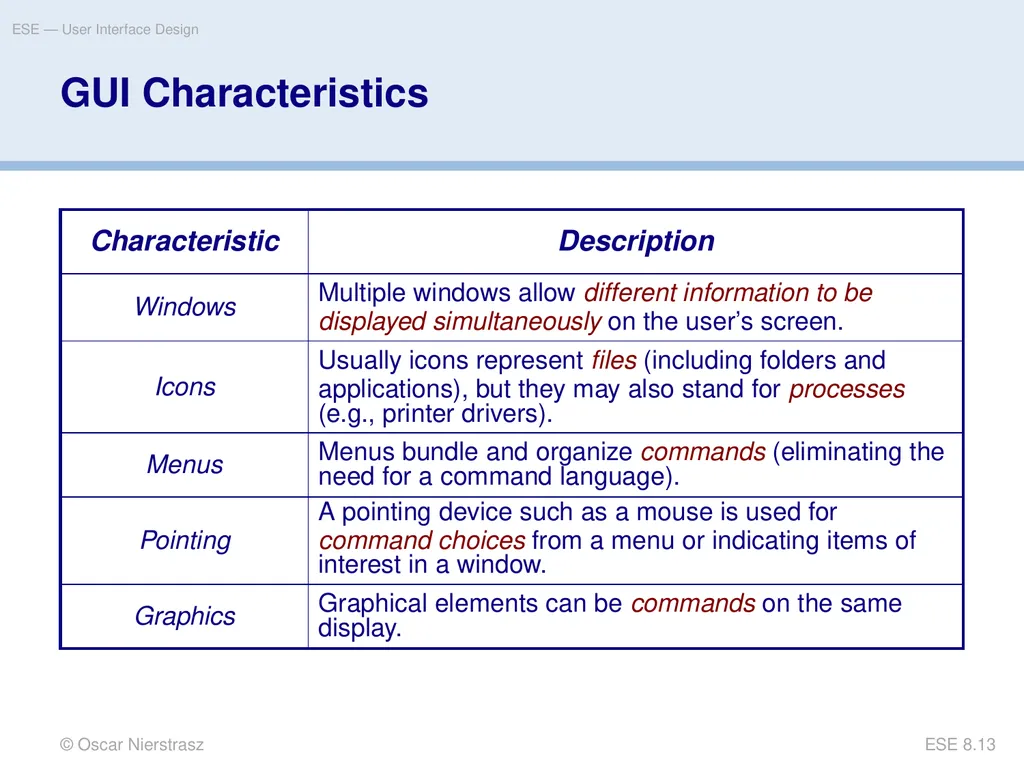
slide13. © Oscar Nierstrasz ESE — User Interface Design ESE 8.13 GUI Characteristics<br>
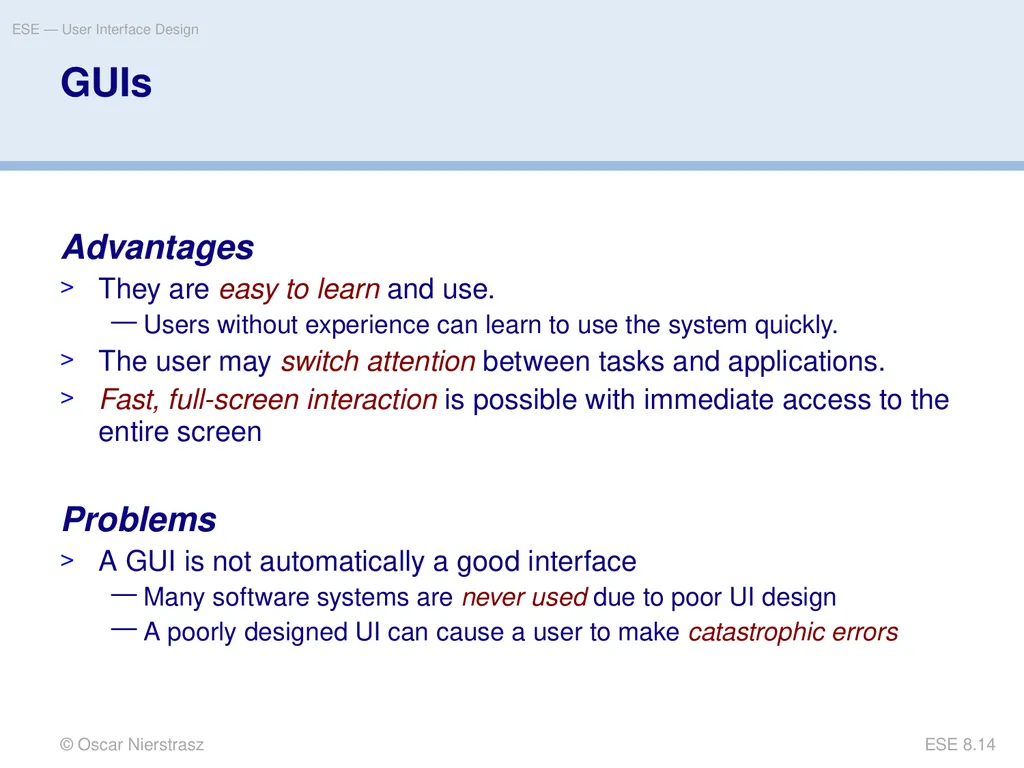
slide14. © Oscar Nierstrasz ESE — User Interface Design ESE 8.14 GUIs Advantages
They are easy to learn and use.
Users without experience can learn to use the system quickly.
The user may switch attention between tasks and applications.
Fast, full-screen interaction is possible with immediate access to the entire screen
Problems
A GUI is not automatically a good interface
Many software systems are never used due to poor UI design
A poorly designed UI can cause a user to make catastrophic errors<br>
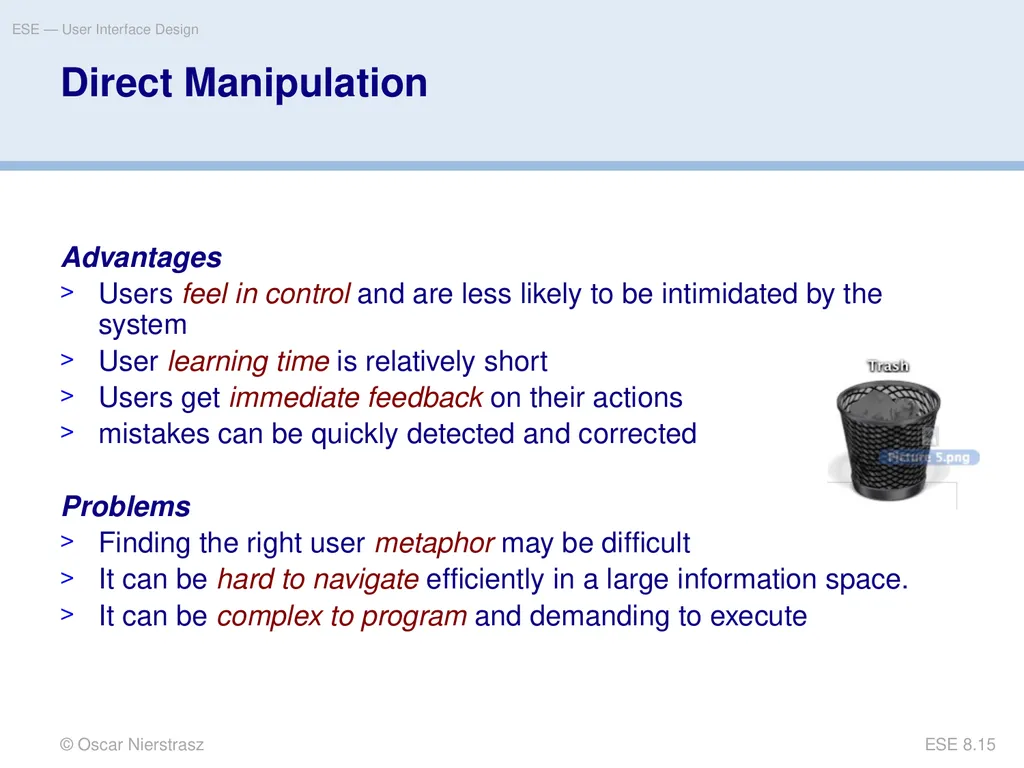
slide15. © Oscar Nierstrasz ESE — User Interface Design ESE 8.15 Direct Manipulation Advantages
Users feel in control and are less likely to be intimidated by the system
User learning time is relatively short
Users get immediate feedback on their actions
mistakes can be quickly detected and corrected
Problems
Finding the right user metaphor may be difficult
It can be hard to navigate efficiently in a large information space.
It can be complex to program and demanding to execute<br>
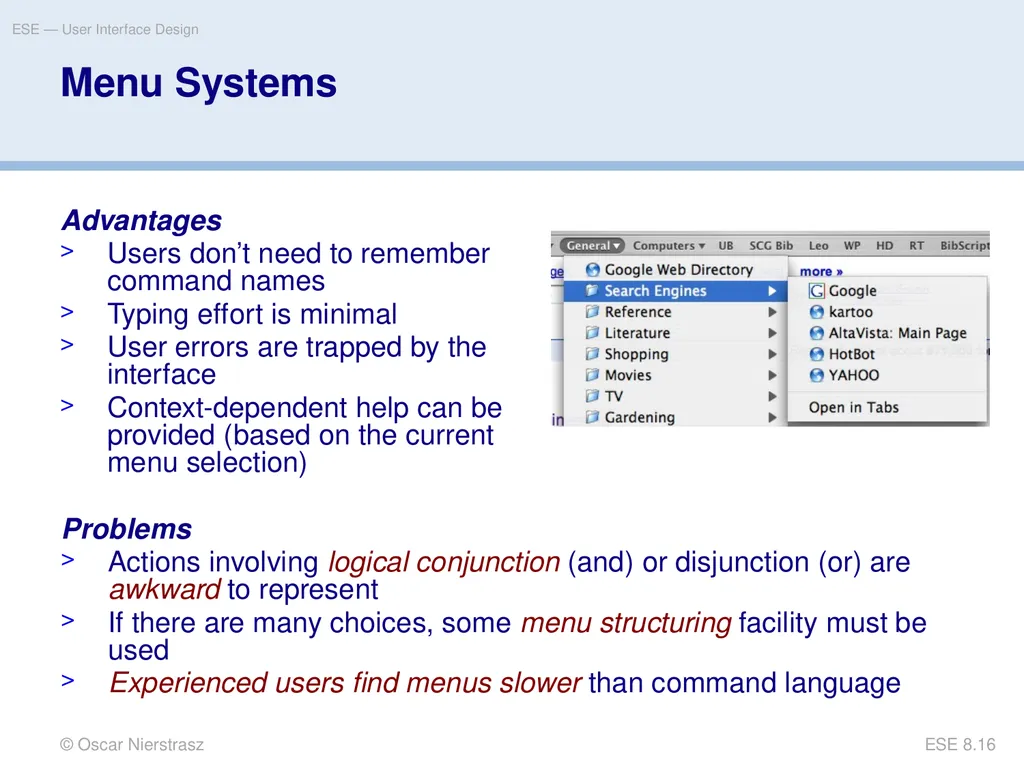
slide16. © Oscar Nierstrasz ESE — User Interface Design ESE 8.16 Menu Systems Advantages
Users don’t need to remember command names
Typing effort is minimal
User errors are trapped by the interface
Context-dependent help can be provided (based on the current menu selection) Problems
Actions involving logical conjunction (and) or disjunction (or) are awkward to represent
If there are many choices, some menu structuring facility must be used
Experienced users find menus slower than command language<br>
slide17. © Oscar Nierstrasz ESE — User Interface Design ESE 8.17 Menu Structuring Scrolling menus
The menu can be scrolled to reveal additional choices
Not practical if there is a very large number of choices
Hierarchical menus
Selecting a menu item causes the menu to be replaced by a sub-menu
Walking menus
A menu selection causes another menu to be revealed
Associated control panels
When a menu item is selected, a control panel pops-up with further options<br>
slide18. © Oscar Nierstrasz ESE — User Interface Design ESE 8.18 Command Interfaces With a command language, the user types commands to give instructions to the system
May be implemented using cheap terminals
Easy to process using compiler techniques
Commands of arbitrary complexity can be created by command combination
Concise interfaces requiring minimal typing can be created<br>
slide19. © Oscar Nierstrasz ESE — User Interface Design ESE 8.19 Command Interfaces Advantages
Allow experienced users to interact quickly with the system
Commands can be scripted (!)
Problems
Users have to learn and remember a command language
Not suitable for occasional or inexperienced users
An error detection and recovery system is required
Typing ability is required (!)<br>
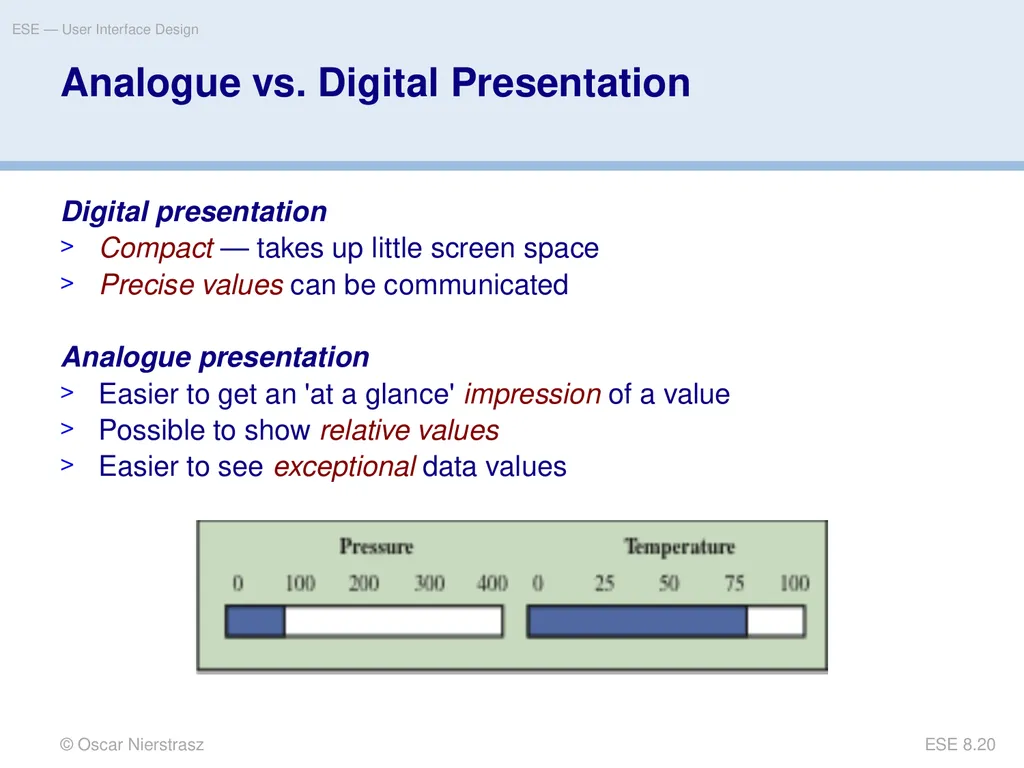
slide20. © Oscar Nierstrasz ESE — User Interface Design ESE 8.20 Analogue vs. Digital Presentation Digital presentation
Compact — takes up little screen space
Precise values can be communicated
Analogue presentation
Easier to get an 'at a glance' impression of a value
Possible to show relative values
Easier to see exceptional data values<br>
slide21. © Oscar Nierstrasz ESE — User Interface Design ESE 8.21 Colour Use Guidelines Colour can help the user understand complex information structures.
Don’t use (only) colour to communicate meaning!
Open to misinterpretation (colour-blindness, cultural differences ...)
Design for monochrome then add colour
Use colour coding to support user tasks
highlight exceptional events
allow users to control colour coding
Use colour change to show status change
Don't use too many colours
Avoid colour pairings which clash
Use colour coding consistently which clash<br>
slide22. © Oscar Nierstrasz ESE — User Interface Design ESE 8.22 Roadmap Interface design models
Design principles
GUI characteristics
Usability Testing<br>
slide23. © Oscar Nierstrasz ESE — User Interface Design ESE 8.23 Usability Testing Observe a group of test subjects performing a pre-defined scenario
Which test subjects?
How many test subjects?
Which scenarios?
What to observe? Jakob Nielsen, Usability Engineering<br>
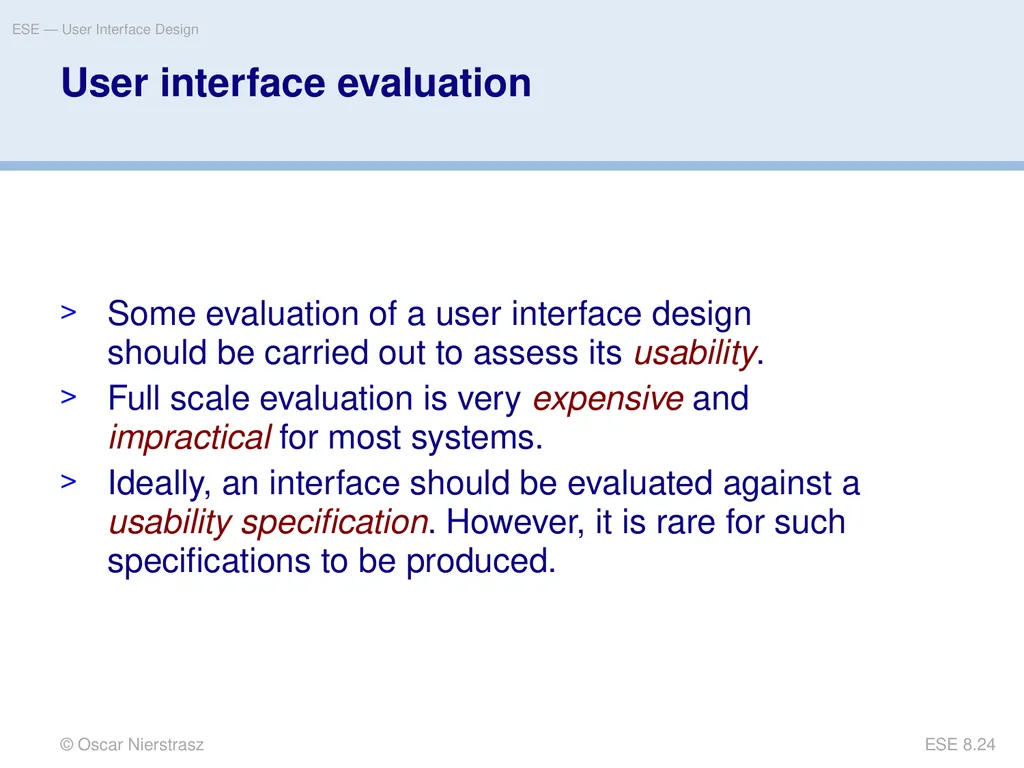
slide24. © Oscar Nierstrasz ESE — User Interface Design ESE 8.24 User interface evaluation Some evaluation of a user interface design should be carried out to assess its usability.
Full scale evaluation is very expensive and impractical for most systems.
Ideally, an interface should be evaluated against a usability specification. However, it is rare for such specifications to be produced.<br>
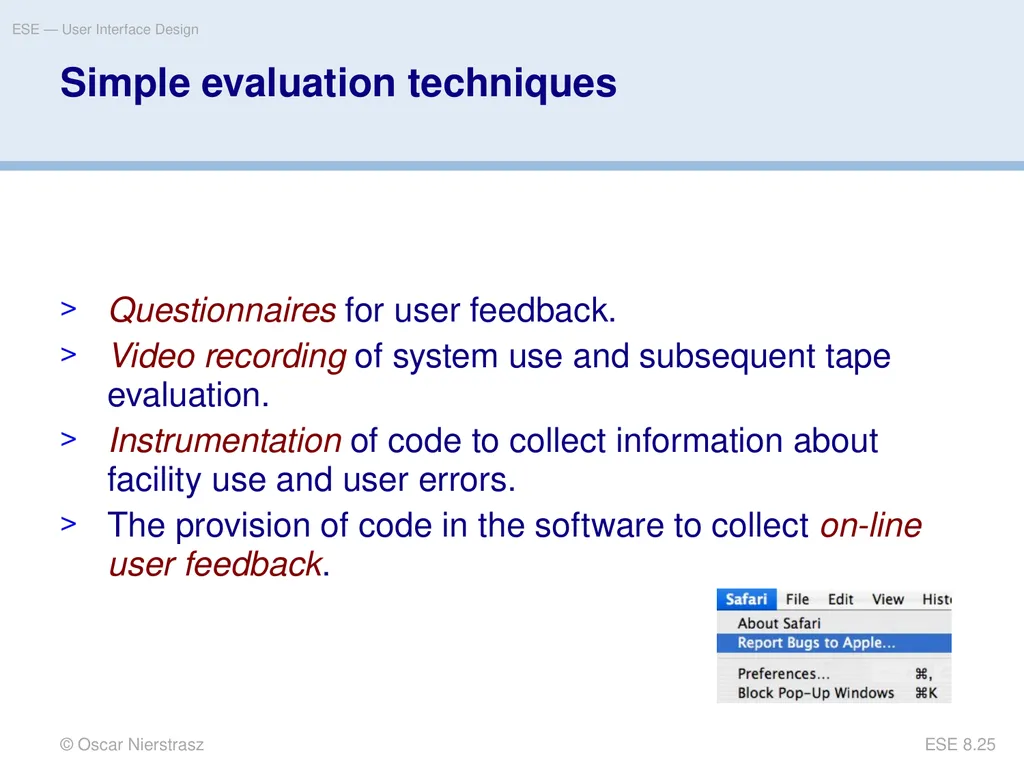
slide25. © Oscar Nierstrasz ESE — User Interface Design ESE 8.25 Simple evaluation techniques Questionnaires for user feedback.
Video recording of system use and subsequent tape evaluation.
Instrumentation of code to collect information about facility use and user errors.
The provision of code in the software to collect on-line user feedback.<br>
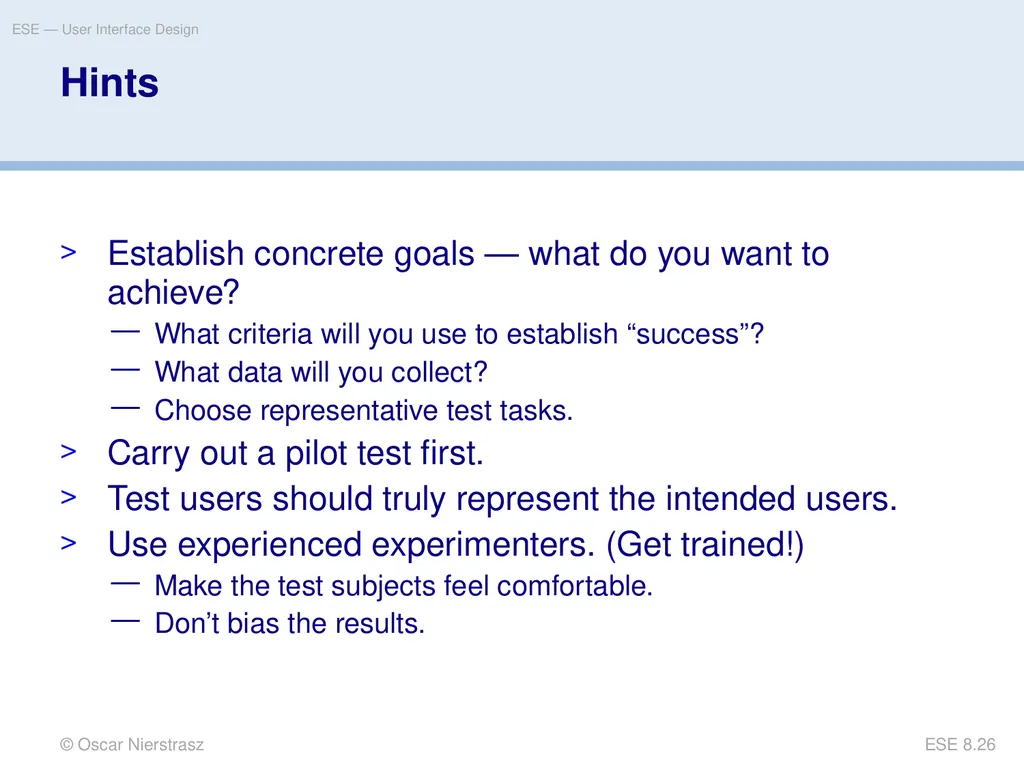
slide26. © Oscar Nierstrasz ESE — User Interface Design ESE 8.26 Hints Establish concrete goals — what do you want to achieve?
What criteria will you use to establish “success”?
What data will you collect?
Choose representative test tasks.
Carry out a pilot test first.
Test users should truly represent the intended users.
Use experienced experimenters. (Get trained!)
Make the test subjects feel comfortable.
Don’t bias the results.<br>
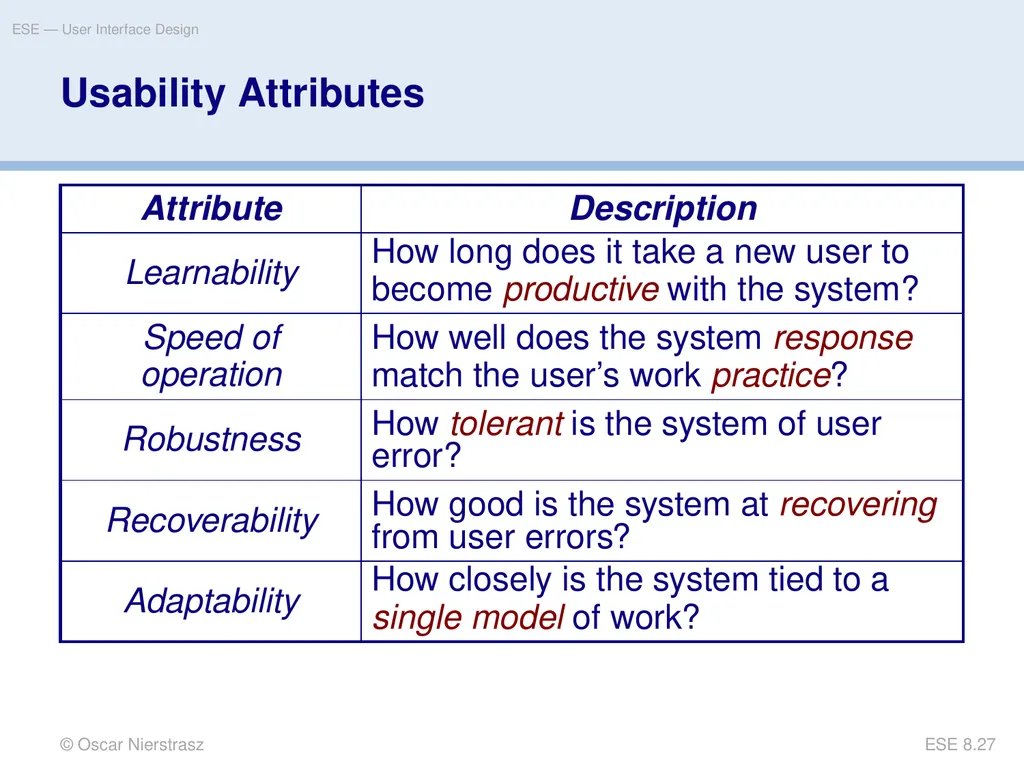
slide27. © Oscar Nierstrasz ESE — User Interface Design ESE 8.27 Usability Attributes<br>
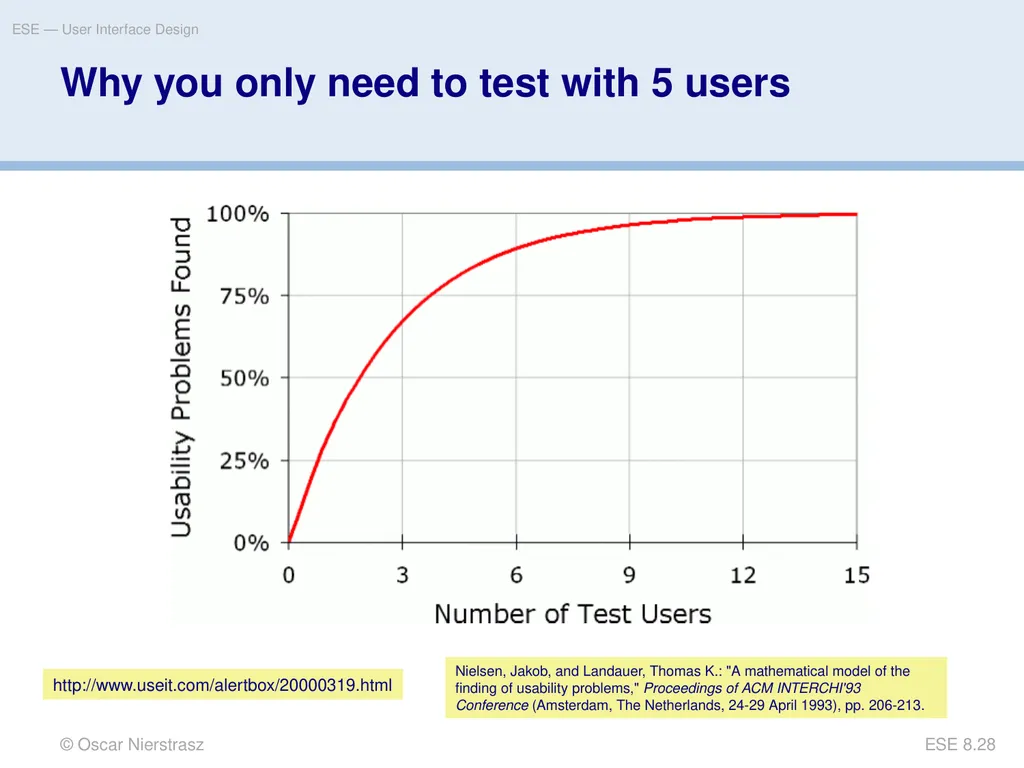
slide28. © Oscar Nierstrasz ESE — User Interface Design ESE 8.28 Why you only need to test with 5 users http://www.useit.com/alertbox/20000319.html Nielsen, Jakob, and Landauer, Thomas K.: "A mathematical model of the finding of usability problems," Proceedings of ACM INTERCHI'93 Conference (Amsterdam, The Netherlands, 24-29 April 1993), pp. 206-213.<br>
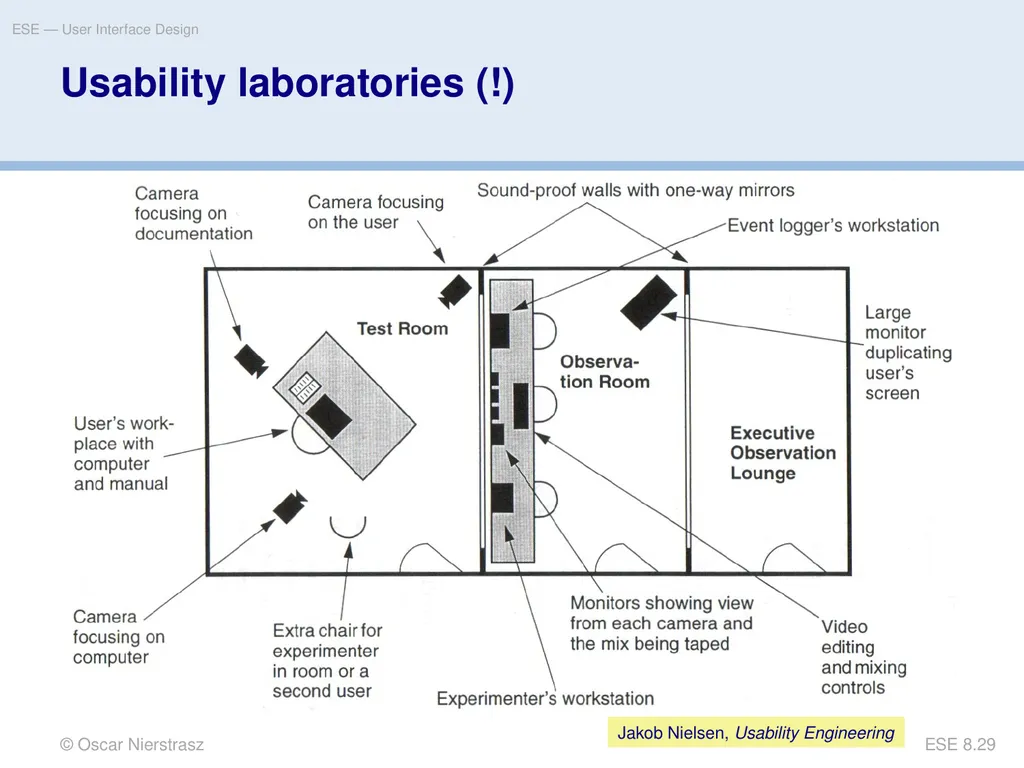
slide29. © Oscar Nierstrasz ESE — User Interface Design ESE 8.29 Usability laboratories (!) Jakob Nielsen, Usability Engineering<br>
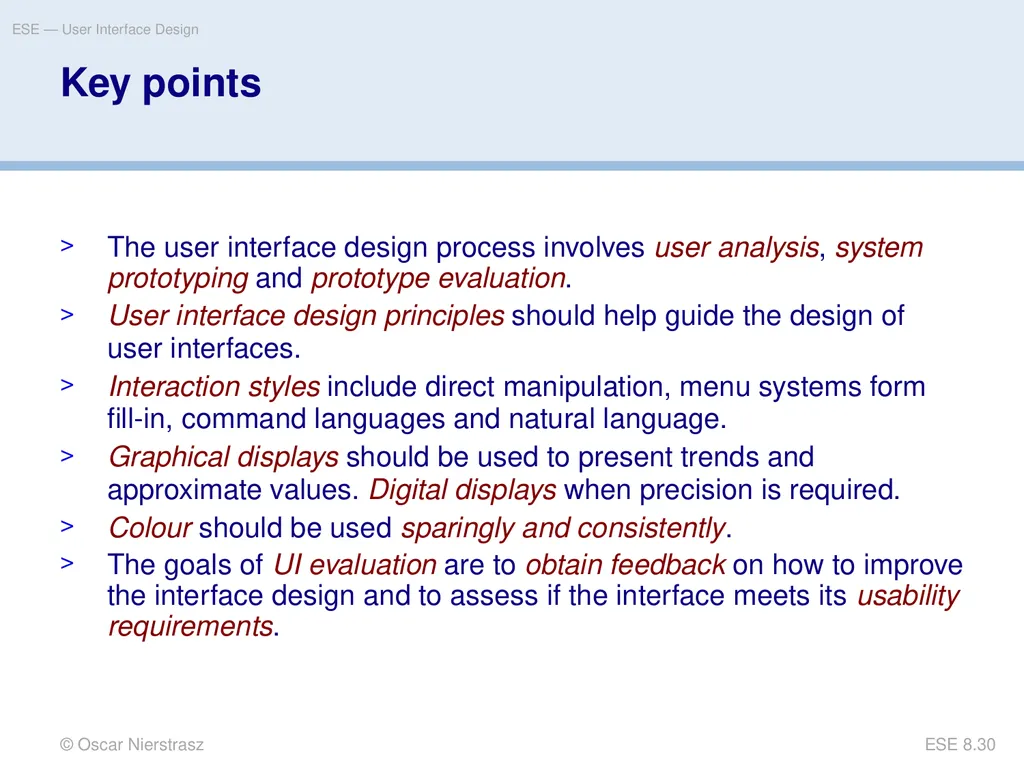
slide30. © Oscar Nierstrasz ESE — User Interface Design ESE 8.30 Key points The user interface design process involves user analysis, system prototyping and prototype evaluation.
User interface design principles should help guide the design of user interfaces.
Interaction styles include direct manipulation, menu systems form fill-in, command languages and natural language.
Graphical displays should be used to present trends and approximate values. Digital displays when precision is required.
Colour should be used sparingly and consistently.
The goals of UI evaluation are to obtain feedback on how to improve the interface design and to assess if the interface meets its usability requirements.<br>
slide31. © Oscar Nierstrasz ESE — User Interface Design ESE 8.31 What you should know! What models are important to keep in mind in UI design?
What is the principle of minimal surprise?
What problems arise in designing a good direct manipulation interface?
What are the trade-offs between menu systems and command languages?
How can you use colour to improve a UI?
In what way can a help system be context sensitive?<br>
slide32. © Oscar Nierstrasz ESE — User Interface Design ESE 8.32 Can you answer the following questions? Why is it important to offer “keyboard short-cuts” for equivalent mouse actions?
How would you present the current load on the system? Over time?
What is the worst UI you every used? Which design principles did it violate?
What’s the worst web site you’ve used recently? How would you fix it?
What’s good or bad about the MS-Word help system?<br>
slide33. License © Oscar Nierstrasz ESE — Introduction http://creativecommons.org/licenses/by-sa/3.0/<br>
slide2. © Oscar Nierstrasz ESE — User Interface Design ESE 8.2 Roadmap Interface design models
Design principles
GUI characteristics
Usability Testing<br>
slide3. © Oscar Nierstrasz ESE — User Interface Design ESE 8.3 Literature Sources
Software Engineering, I. Sommerville, 7th Edn., 2004.
Software Engineering — A Practitioner’s Approach, R. Pressman, Mc-Graw Hill, 5th Edn., 2001.
Recommended reading
Mary Beth Rosson, John M. Carroll, Usability Engineering, 2002
Jakob Nielsen, Usability Engineering, Morgan Kaufmann, 1999.
Alan Cooper, About Face — The Essentials of User Interface Design, Hungry Minds, 1995.
Alan Cooper, The Inmates are running the Asylum, SAMS, 1999.
Jef Raskin, The Humane Interface, Addison Wesley, 2000.
Jeff Johnson, GUI Bloopers, Morgan Kaufmann, 2000.
The Interface Hall of Shame, http://homepage.mac.com/bradster/iarchitect/shame.htm<br>
slide4. © Oscar Nierstrasz ESE — User Interface Design ESE 8.4 Roadmap Interface design models
Design principles
GUI characteristics
Usability Testing<br>
slide5. © Oscar Nierstrasz ESE — User Interface Design ESE 8.5 The UI design process UI design is an iterative process involving close liaisons between users and designers.
The 3 core activities in this process are:
User analysis. Understand what the users will do with the system;
System prototyping. Develop a series of prototypes for experiment;
Interface evaluation. Experiment with these prototypes with users.<br>
slide6. © Oscar Nierstrasz ESE — User Interface Design ESE 8.6 The design process © Ian Sommerville 2004<br>
slide7. © Oscar Nierstrasz ESE — User Interface Design ESE 8.7 Interface Design Models Four different models occur in HCI design:
The design model expresses the software design.
The user model describes the profile of the end users. (i.e., novices vs. experts, cultural background, etc.)
The user’s model is the end users’ perception of the system.
The system image is the external manifestation of the system (look and feel + documentation etc.)<br>
slide8. © Oscar Nierstrasz ESE — User Interface Design ESE 8.8 … UI Models Implementation Model Mental Model Manifest Models Better Worse Alan Cooper, About Face, 1995<br>
slide9. © Oscar Nierstrasz ESE — User Interface Design ESE 8.9 Roadmap Interface design models
Design principles
GUI characteristics
Usability Testing<br>
slide10. © Oscar Nierstrasz ESE — User Interface Design ESE 8.10 User Interface Design Principles<br>
slide11. © Oscar Nierstrasz ESE — User Interface Design ESE 8.11<br>
slide12. © Oscar Nierstrasz ESE — User Interface Design ESE 8.12 Roadmap Interface design models
Design principles
GUI characteristics
Usability Testing<br>
slide13. © Oscar Nierstrasz ESE — User Interface Design ESE 8.13 GUI Characteristics<br>
slide14. © Oscar Nierstrasz ESE — User Interface Design ESE 8.14 GUIs Advantages
They are easy to learn and use.
Users without experience can learn to use the system quickly.
The user may switch attention between tasks and applications.
Fast, full-screen interaction is possible with immediate access to the entire screen
Problems
A GUI is not automatically a good interface
Many software systems are never used due to poor UI design
A poorly designed UI can cause a user to make catastrophic errors<br>
slide15. © Oscar Nierstrasz ESE — User Interface Design ESE 8.15 Direct Manipulation Advantages
Users feel in control and are less likely to be intimidated by the system
User learning time is relatively short
Users get immediate feedback on their actions
mistakes can be quickly detected and corrected
Problems
Finding the right user metaphor may be difficult
It can be hard to navigate efficiently in a large information space.
It can be complex to program and demanding to execute<br>
slide16. © Oscar Nierstrasz ESE — User Interface Design ESE 8.16 Menu Systems Advantages
Users don’t need to remember command names
Typing effort is minimal
User errors are trapped by the interface
Context-dependent help can be provided (based on the current menu selection) Problems
Actions involving logical conjunction (and) or disjunction (or) are awkward to represent
If there are many choices, some menu structuring facility must be used
Experienced users find menus slower than command language<br>
slide17. © Oscar Nierstrasz ESE — User Interface Design ESE 8.17 Menu Structuring Scrolling menus
The menu can be scrolled to reveal additional choices
Not practical if there is a very large number of choices
Hierarchical menus
Selecting a menu item causes the menu to be replaced by a sub-menu
Walking menus
A menu selection causes another menu to be revealed
Associated control panels
When a menu item is selected, a control panel pops-up with further options<br>
slide18. © Oscar Nierstrasz ESE — User Interface Design ESE 8.18 Command Interfaces With a command language, the user types commands to give instructions to the system
May be implemented using cheap terminals
Easy to process using compiler techniques
Commands of arbitrary complexity can be created by command combination
Concise interfaces requiring minimal typing can be created<br>
slide19. © Oscar Nierstrasz ESE — User Interface Design ESE 8.19 Command Interfaces Advantages
Allow experienced users to interact quickly with the system
Commands can be scripted (!)
Problems
Users have to learn and remember a command language
Not suitable for occasional or inexperienced users
An error detection and recovery system is required
Typing ability is required (!)<br>
slide20. © Oscar Nierstrasz ESE — User Interface Design ESE 8.20 Analogue vs. Digital Presentation Digital presentation
Compact — takes up little screen space
Precise values can be communicated
Analogue presentation
Easier to get an 'at a glance' impression of a value
Possible to show relative values
Easier to see exceptional data values<br>
slide21. © Oscar Nierstrasz ESE — User Interface Design ESE 8.21 Colour Use Guidelines Colour can help the user understand complex information structures.
Don’t use (only) colour to communicate meaning!
Open to misinterpretation (colour-blindness, cultural differences ...)
Design for monochrome then add colour
Use colour coding to support user tasks
highlight exceptional events
allow users to control colour coding
Use colour change to show status change
Don't use too many colours
Avoid colour pairings which clash
Use colour coding consistently which clash<br>
slide22. © Oscar Nierstrasz ESE — User Interface Design ESE 8.22 Roadmap Interface design models
Design principles
GUI characteristics
Usability Testing<br>
slide23. © Oscar Nierstrasz ESE — User Interface Design ESE 8.23 Usability Testing Observe a group of test subjects performing a pre-defined scenario
Which test subjects?
How many test subjects?
Which scenarios?
What to observe? Jakob Nielsen, Usability Engineering<br>
slide24. © Oscar Nierstrasz ESE — User Interface Design ESE 8.24 User interface evaluation Some evaluation of a user interface design should be carried out to assess its usability.
Full scale evaluation is very expensive and impractical for most systems.
Ideally, an interface should be evaluated against a usability specification. However, it is rare for such specifications to be produced.<br>
slide25. © Oscar Nierstrasz ESE — User Interface Design ESE 8.25 Simple evaluation techniques Questionnaires for user feedback.
Video recording of system use and subsequent tape evaluation.
Instrumentation of code to collect information about facility use and user errors.
The provision of code in the software to collect on-line user feedback.<br>
slide26. © Oscar Nierstrasz ESE — User Interface Design ESE 8.26 Hints Establish concrete goals — what do you want to achieve?
What criteria will you use to establish “success”?
What data will you collect?
Choose representative test tasks.
Carry out a pilot test first.
Test users should truly represent the intended users.
Use experienced experimenters. (Get trained!)
Make the test subjects feel comfortable.
Don’t bias the results.<br>
slide27. © Oscar Nierstrasz ESE — User Interface Design ESE 8.27 Usability Attributes<br>
slide28. © Oscar Nierstrasz ESE — User Interface Design ESE 8.28 Why you only need to test with 5 users http://www.useit.com/alertbox/20000319.html Nielsen, Jakob, and Landauer, Thomas K.: "A mathematical model of the finding of usability problems," Proceedings of ACM INTERCHI'93 Conference (Amsterdam, The Netherlands, 24-29 April 1993), pp. 206-213.<br>
slide29. © Oscar Nierstrasz ESE — User Interface Design ESE 8.29 Usability laboratories (!) Jakob Nielsen, Usability Engineering<br>
slide30. © Oscar Nierstrasz ESE — User Interface Design ESE 8.30 Key points The user interface design process involves user analysis, system prototyping and prototype evaluation.
User interface design principles should help guide the design of user interfaces.
Interaction styles include direct manipulation, menu systems form fill-in, command languages and natural language.
Graphical displays should be used to present trends and approximate values. Digital displays when precision is required.
Colour should be used sparingly and consistently.
The goals of UI evaluation are to obtain feedback on how to improve the interface design and to assess if the interface meets its usability requirements.<br>
slide31. © Oscar Nierstrasz ESE — User Interface Design ESE 8.31 What you should know! What models are important to keep in mind in UI design?
What is the principle of minimal surprise?
What problems arise in designing a good direct manipulation interface?
What are the trade-offs between menu systems and command languages?
How can you use colour to improve a UI?
In what way can a help system be context sensitive?<br>
slide32. © Oscar Nierstrasz ESE — User Interface Design ESE 8.32 Can you answer the following questions? Why is it important to offer “keyboard short-cuts” for equivalent mouse actions?
How would you present the current load on the system? Over time?
What is the worst UI you every used? Which design principles did it violate?
What’s the worst web site you’ve used recently? How would you fix it?
What’s good or bad about the MS-Word help system?<br>
slide33. License © Oscar Nierstrasz ESE — Introduction http://creativecommons.org/licenses/by-sa/3.0/<br>