
Lab 2 – Operating Systems CSCI 6303 – Principles
EM
Published · 56 slides · 0 views
1 / 1


Description
Lab 2 Operating Systems CSCI 6303 Principles of I.T. Fall 2012 Lab 2 assignment Students will perform the installation of Windows OS and then of a Linux OS. Making sure they are dual booting successfully. You must fully understand how
Related Topics
Share
Embed code
Download this presentation From Below
"Lab 2 – Operating Systems CSCI 6303 – Principles" is the property of its rightful owner. Permission is granted to download and print the materials on this website for personal, non-commercial use only, and to display it on your personal computer provided you do not modify the materials and that you retain all copyright notices contained in the materials. By downloading content from our website, you accept the terms of this agreement.
Presentation Transcript
01
Lab 2 – Operating Systems CSCI 6303 – Principles of I.T.
Fall 2012<br>
Fall 2012<br>
02
Lab 2 assignment Students will perform the installation of Windows OS and then of a Linux OS. Making sure they are dual booting successfully. You must fully understand how to install an operating system and it’s requirements. Please include screen shots of your progress.
Discuss the steps taken in order to install Windows. (in detail)
Discuss the steps taken in order to install Linux as a dual boot. (in detail)
(extra credit) What will happen if Linux is installed first instead of Windows? Will it function correctly? If not how can it be fixed.
Each student needs to turn in their own work. This is not a group assignment.<br>
Discuss the steps taken in order to install Windows. (in detail)
Discuss the steps taken in order to install Linux as a dual boot. (in detail)
(extra credit) What will happen if Linux is installed first instead of Windows? Will it function correctly? If not how can it be fixed.
Each student needs to turn in their own work. This is not a group assignment.<br>
03
Installing Windows A Windows 7 clean install simply means an installation of Windows 7 on an unused partition on your hard drive.
The most important thing to realize before performing a clean install of Windows 7 is that all of the information on the drive that your current operating system is installed on (probably your C: drive) will be destroyed during this process. That means that if there's anything you want to keep you should back it up to a disc or another drive prior to beginning this process.<br>
The most important thing to realize before performing a clean install of Windows 7 is that all of the information on the drive that your current operating system is installed on (probably your C: drive) will be destroyed during this process. That means that if there's anything you want to keep you should back it up to a disc or another drive prior to beginning this process.<br>
04
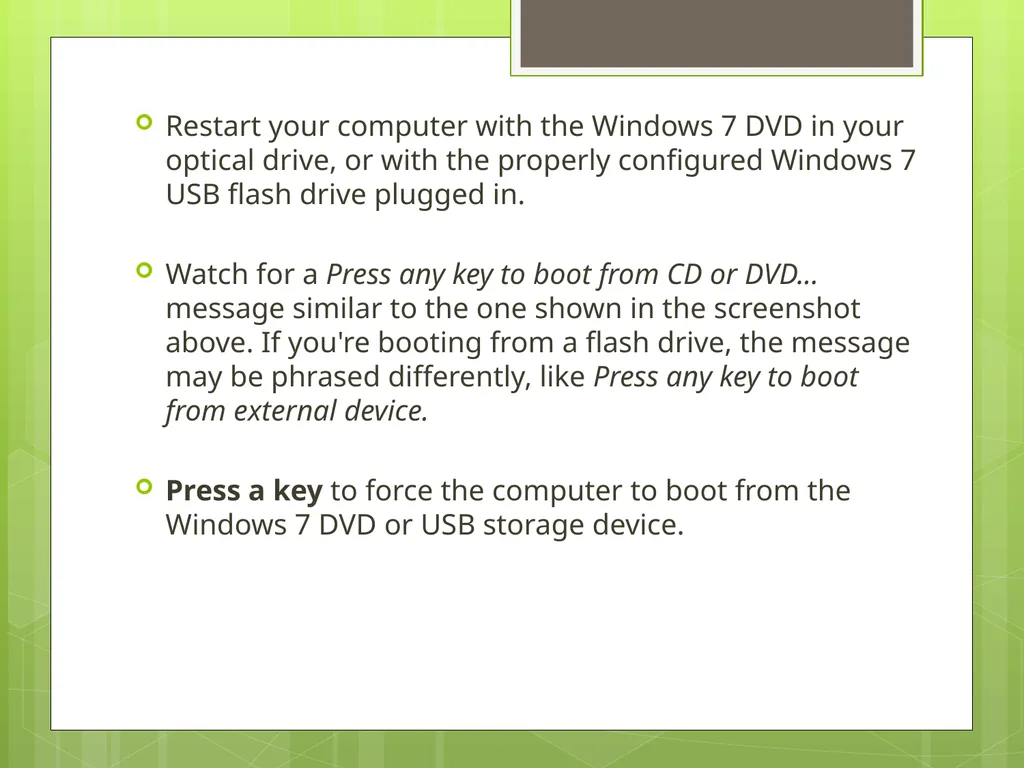
Restart your computer with the Windows 7 DVD in your optical drive, or with the properly configured Windows 7 USB flash drive plugged in.
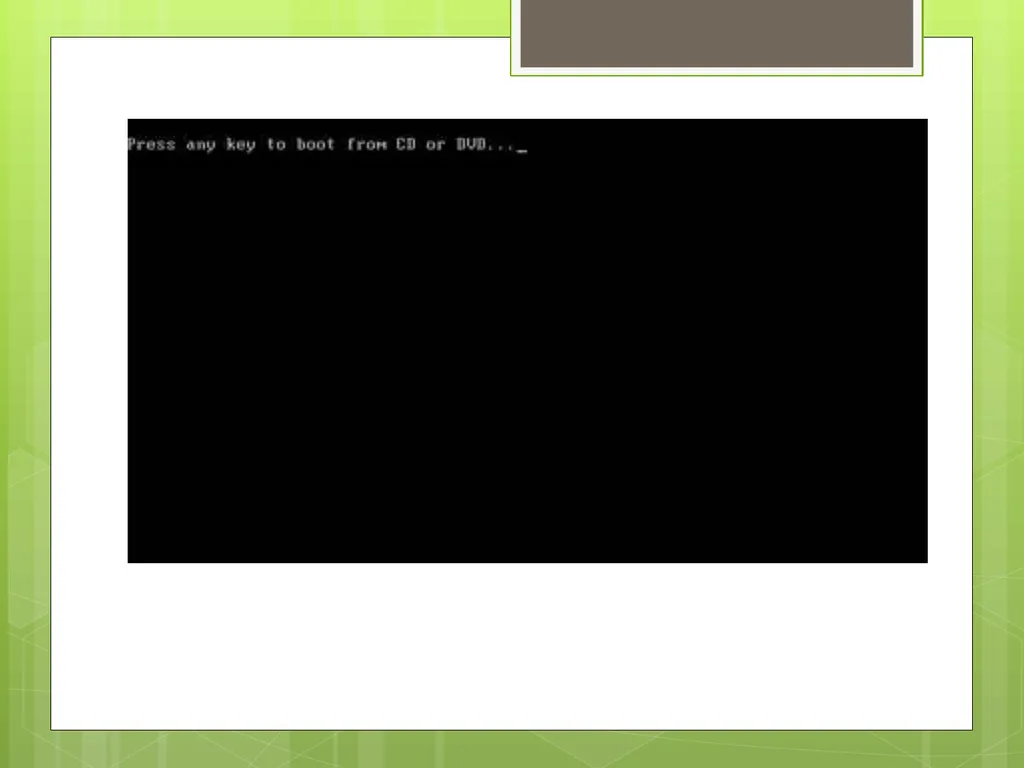
Watch for a Press any key to boot from CD or DVD... message similar to the one shown in the screenshot above. If you're booting from a flash drive, the message may be phrased differently, like Press any key to boot from external device.
Press a key to force the computer to boot from the Windows 7 DVD or USB storage device.<br>
Watch for a Press any key to boot from CD or DVD... message similar to the one shown in the screenshot above. If you're booting from a flash drive, the message may be phrased differently, like Press any key to boot from external device.
Press a key to force the computer to boot from the Windows 7 DVD or USB storage device.<br>
05
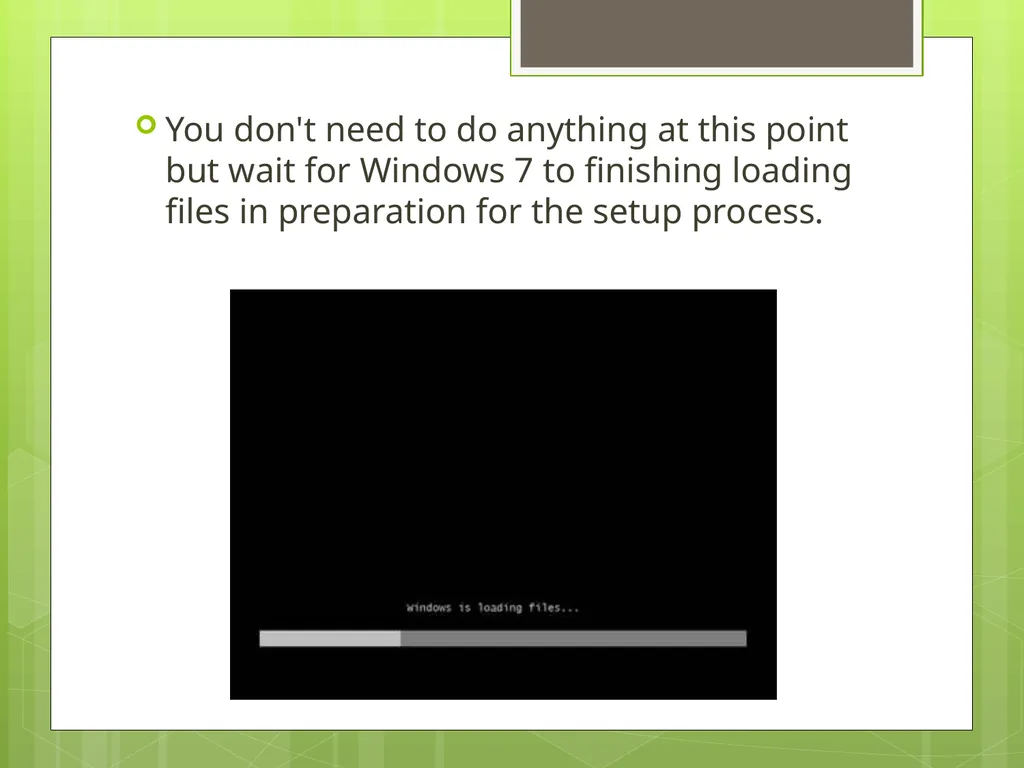
You don't need to do anything at this point but wait for Windows 7 to finishing loading files in preparation for the setup process.<br>
06
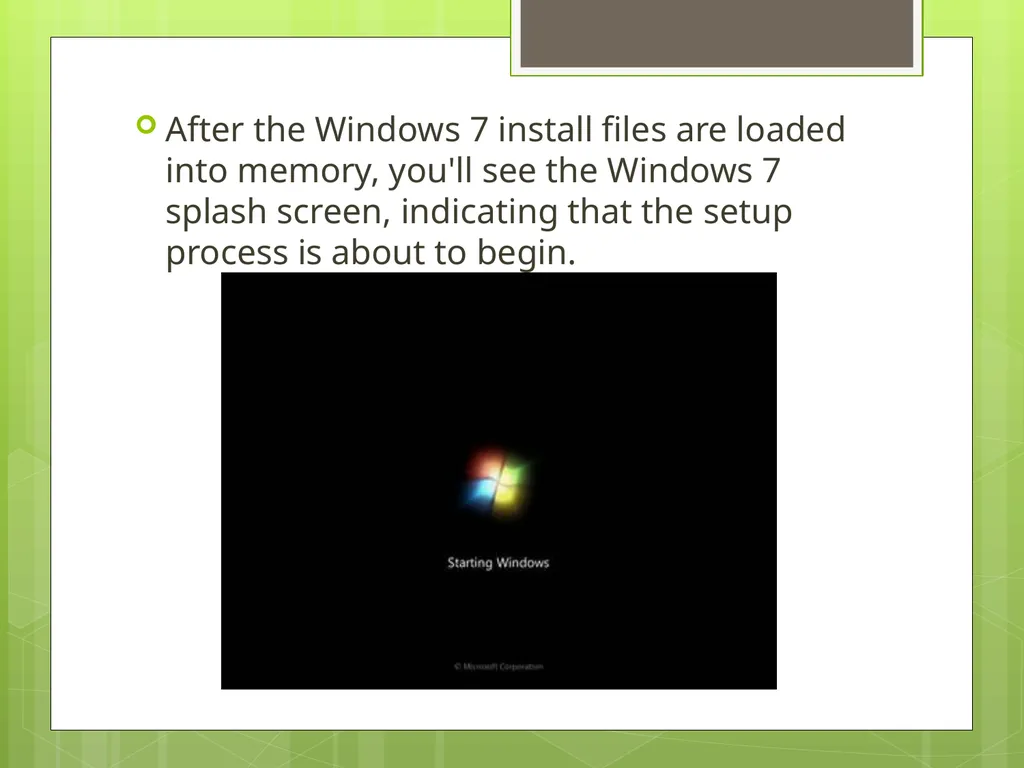
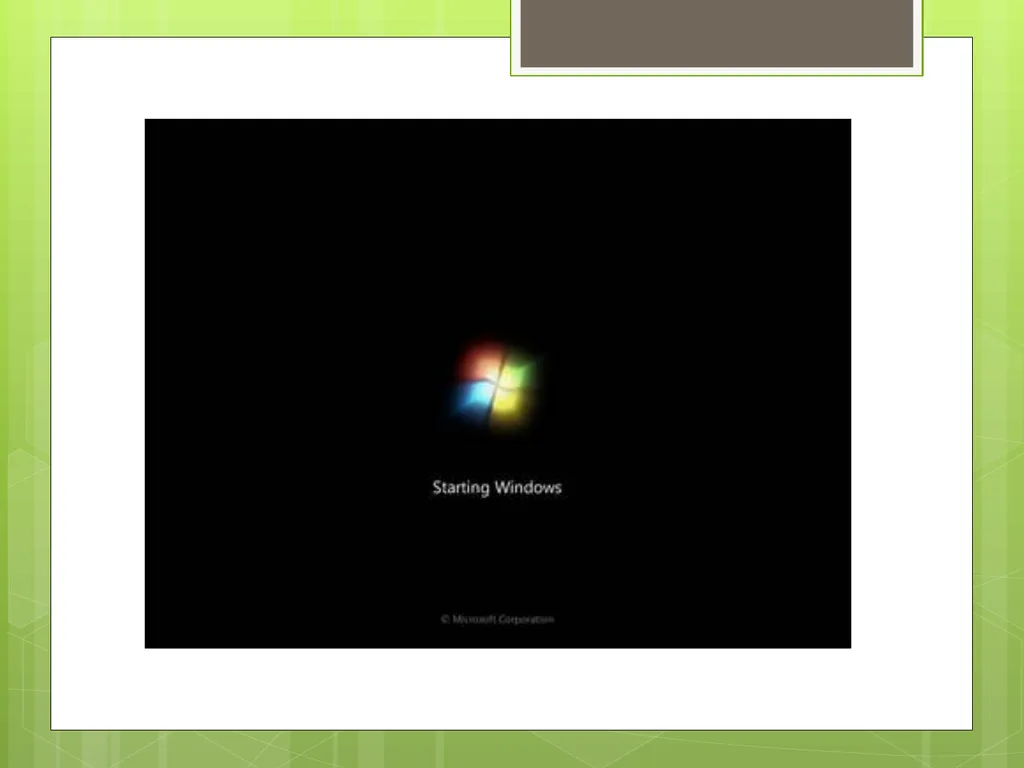
After the Windows 7 install files are loaded into memory, you'll see the Windows 7 splash screen, indicating that the setup process is about to begin.<br>
07
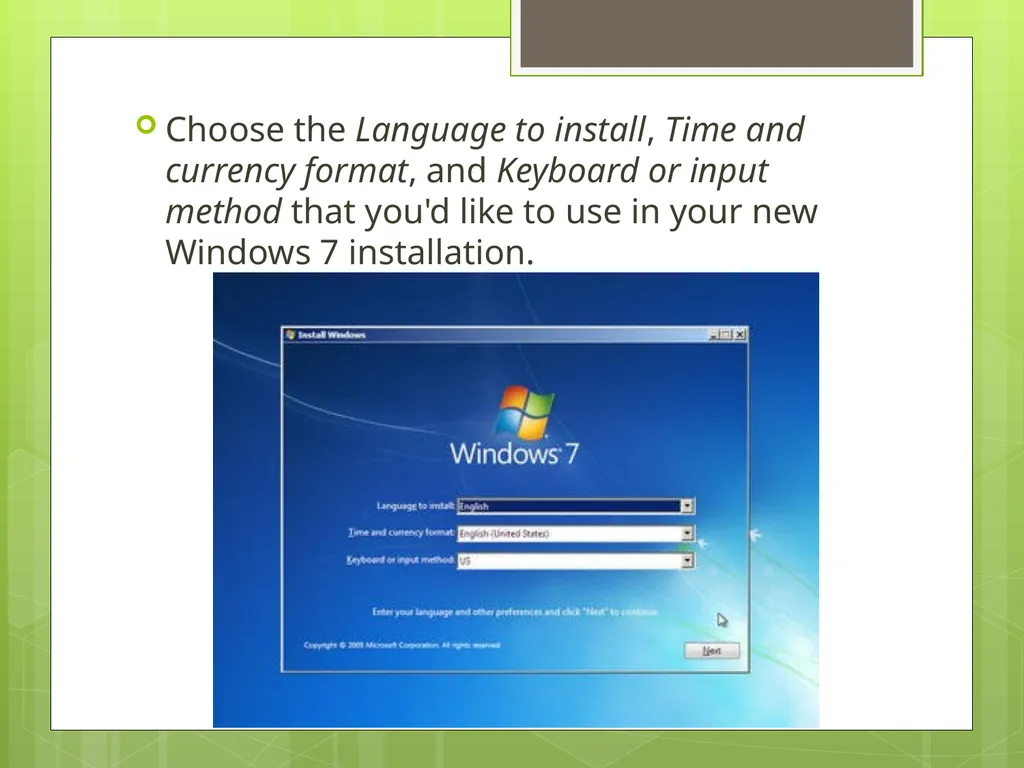
Choose the Language to install, Time and currency format, and Keyboard or input method that you'd like to use in your new Windows 7 installation.<br>
08
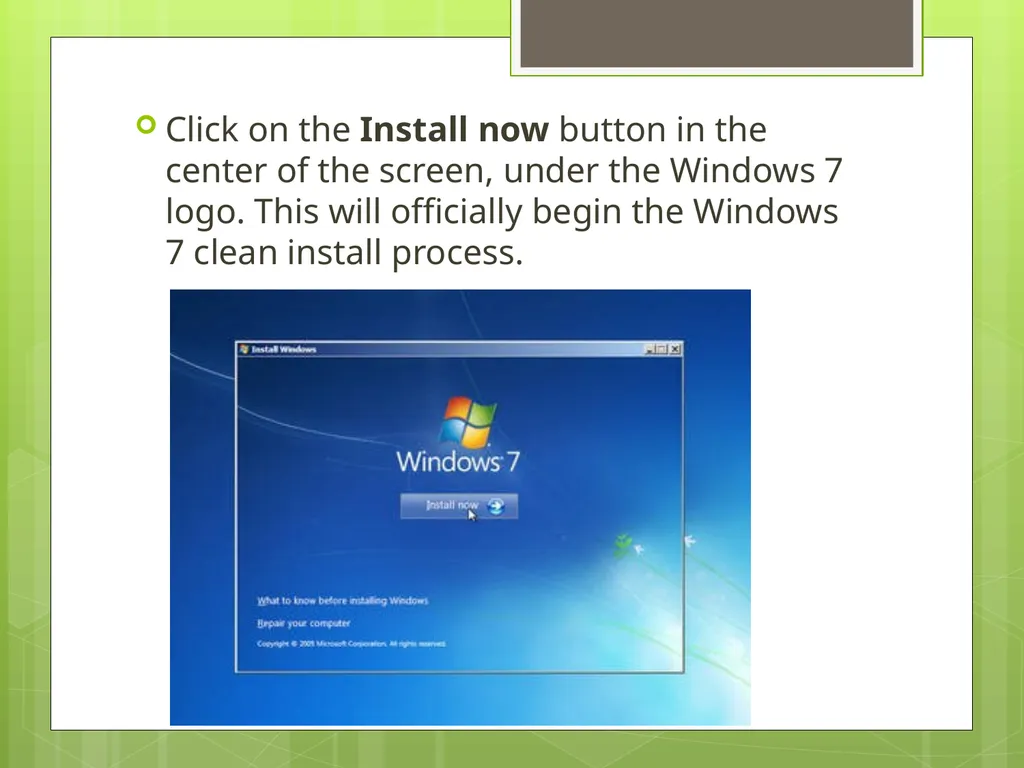
Click on the Install now button in the center of the screen, under the Windows 7 logo. This will officially begin the Windows 7 clean install process.<br>
09
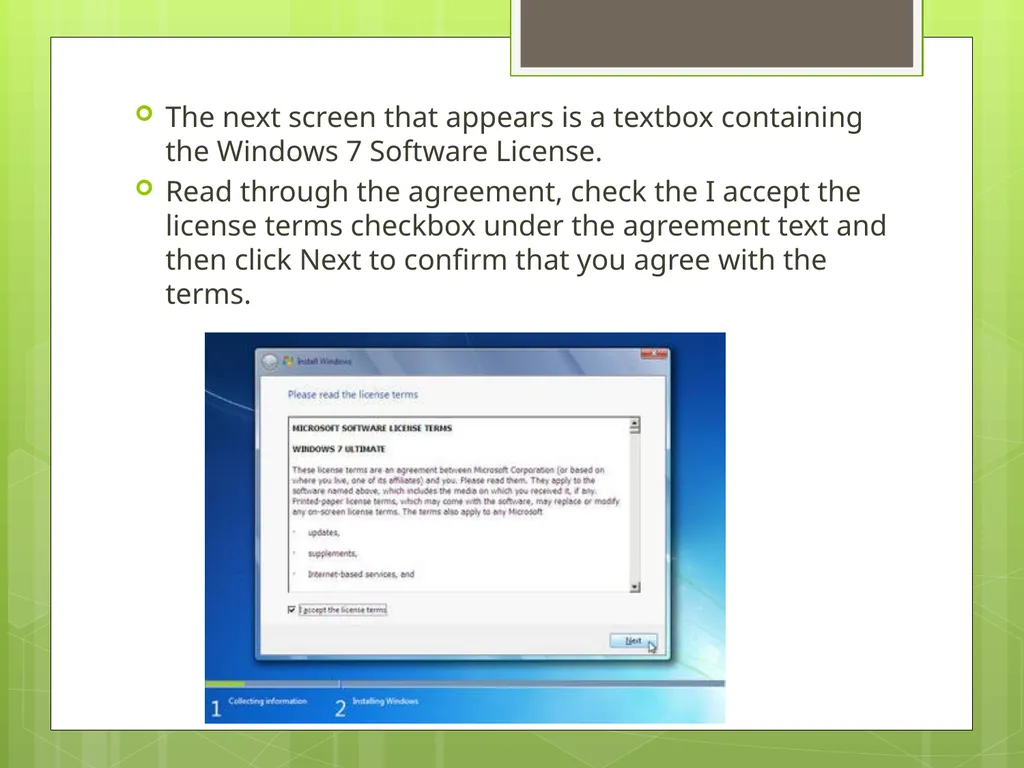
The next screen that appears is a textbox containing the Windows 7 Software License.
Read through the agreement, check the I accept the license terms checkbox under the agreement text and then click Next to confirm that you agree with the terms.<br>
Read through the agreement, check the I accept the license terms checkbox under the agreement text and then click Next to confirm that you agree with the terms.<br>
10
In the Which type of installation do you want? window that appears next, you're offered the choice of Upgrade and Custom (advanced).
Click on the Custom (advanced) button.<br>
Click on the Custom (advanced) button.<br>
11
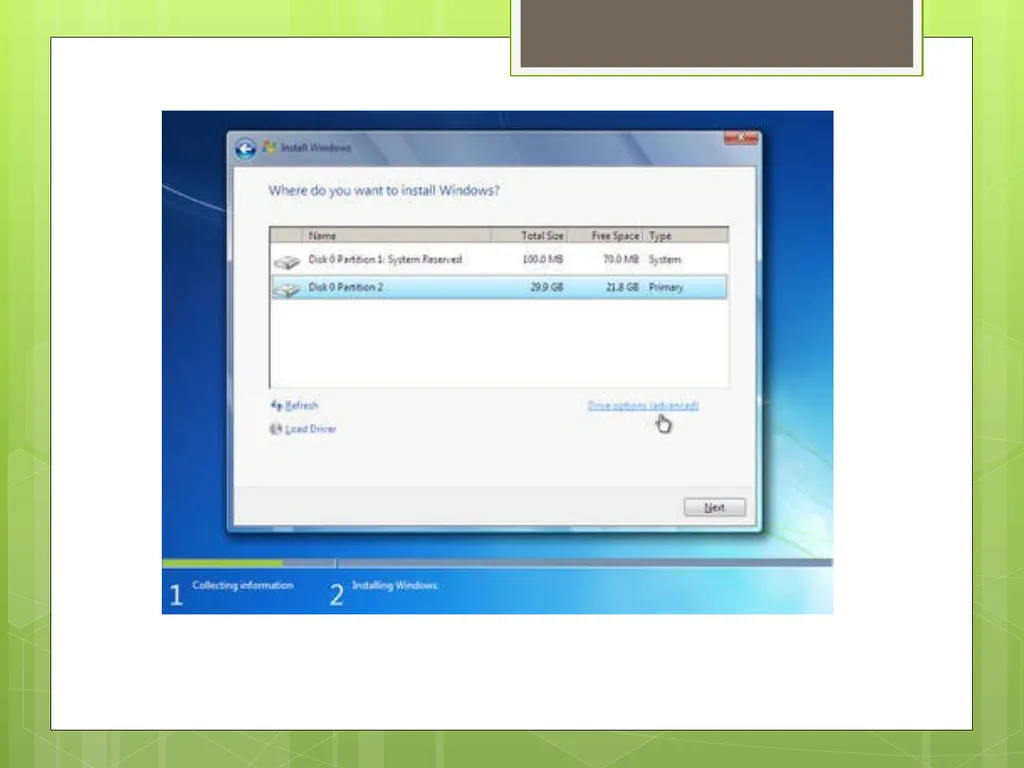
In this next screen, you'll see each partition that Windows 7 recognizes.
The main difference in a Windows 7 clean install verses other kinds of Windows 7 installation methods is that a clean install involves the removal of all operating system related partitions.
Windows 7 setup considers partition management as an advanced task so you'll need to click the Drive options (advanced) link to make those options available.
In the next few steps you'll delete the partitions containing the operating system you're replacing with Windows 7, be it Windows Vista, Windows XP, a previous installation of Windows 7, etc.<br>
The main difference in a Windows 7 clean install verses other kinds of Windows 7 installation methods is that a clean install involves the removal of all operating system related partitions.
Windows 7 setup considers partition management as an advanced task so you'll need to click the Drive options (advanced) link to make those options available.
In the next few steps you'll delete the partitions containing the operating system you're replacing with Windows 7, be it Windows Vista, Windows XP, a previous installation of Windows 7, etc.<br>
12
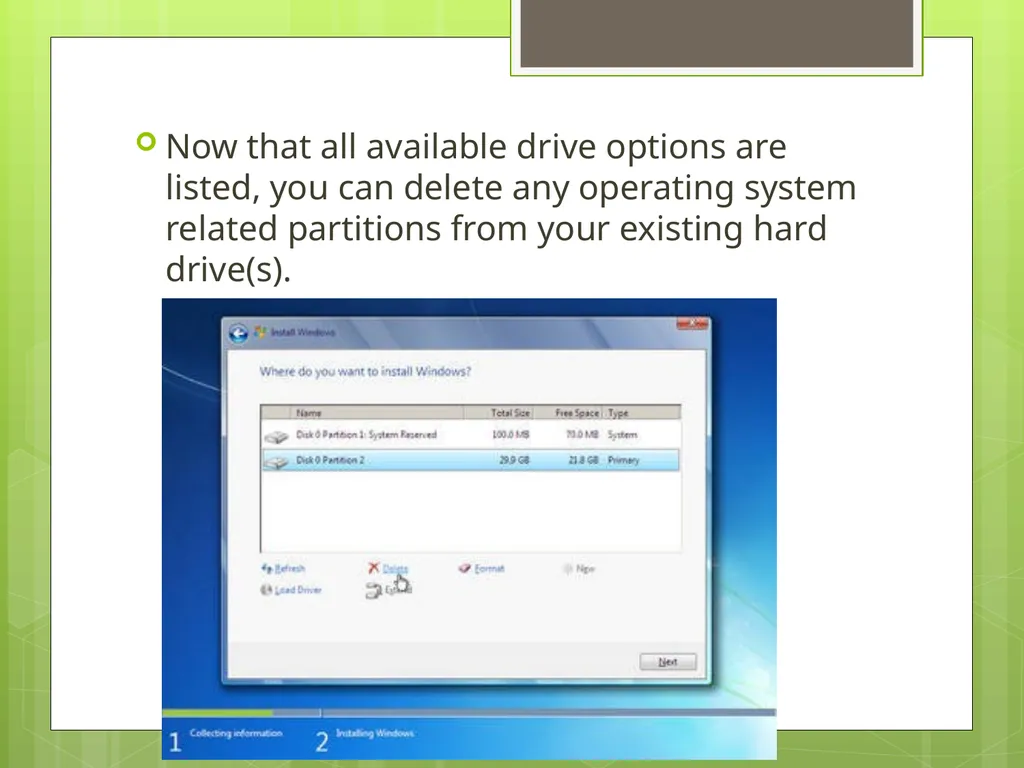
Now that all available drive options are listed, you can delete any operating system related partitions from your existing hard drive(s).<br>
13
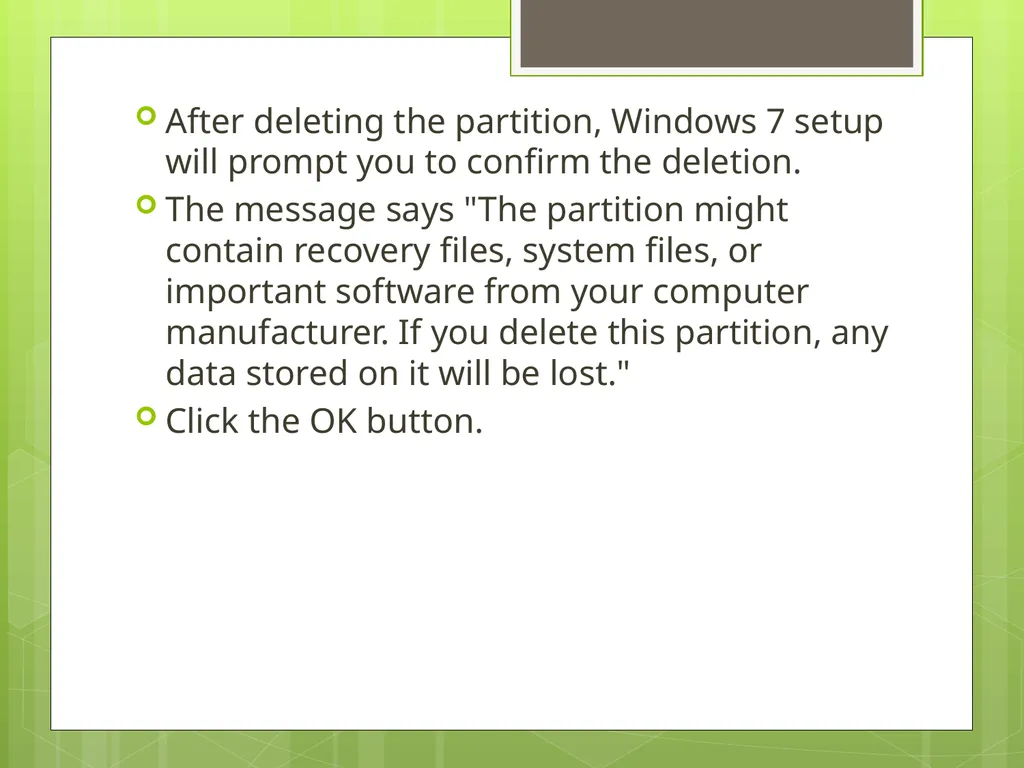
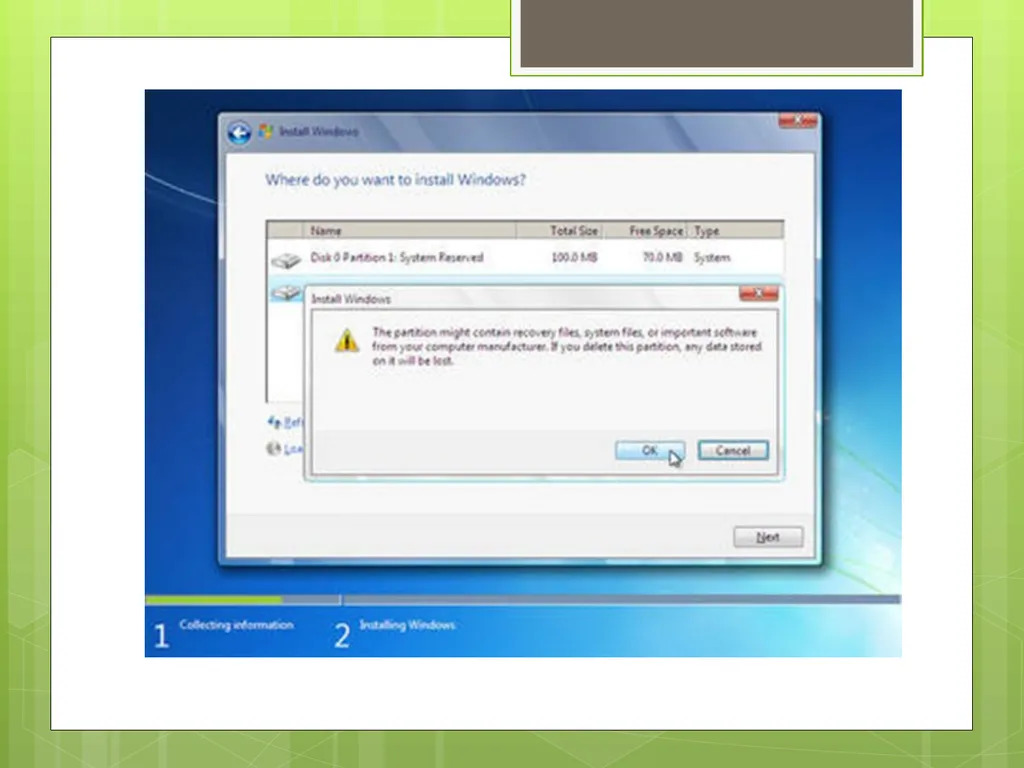
After deleting the partition, Windows 7 setup will prompt you to confirm the deletion.
The message says "The partition might contain recovery files, system files, or important software from your computer manufacturer. If you delete this partition, any data stored on it will be lost."
Click the OK button.<br>
The message says "The partition might contain recovery files, system files, or important software from your computer manufacturer. If you delete this partition, any data stored on it will be lost."
Click the OK button.<br>
14
As you can now see, all the space on the installed hard drive is unallocated. No partitions exist on this computer.<br>
15
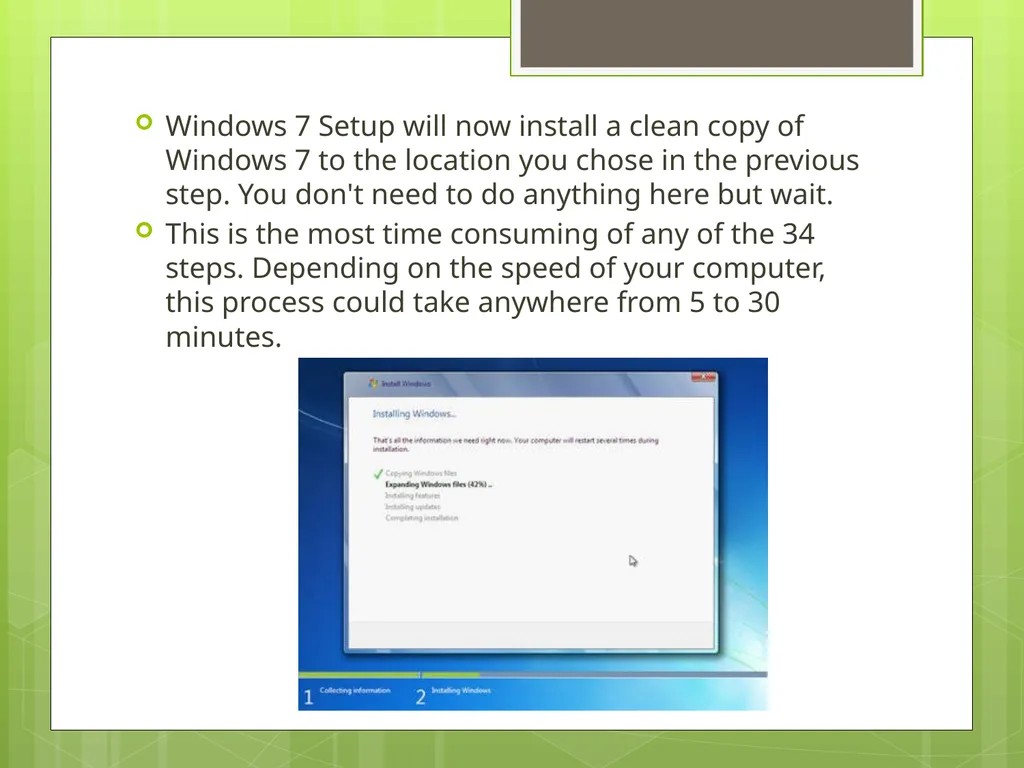
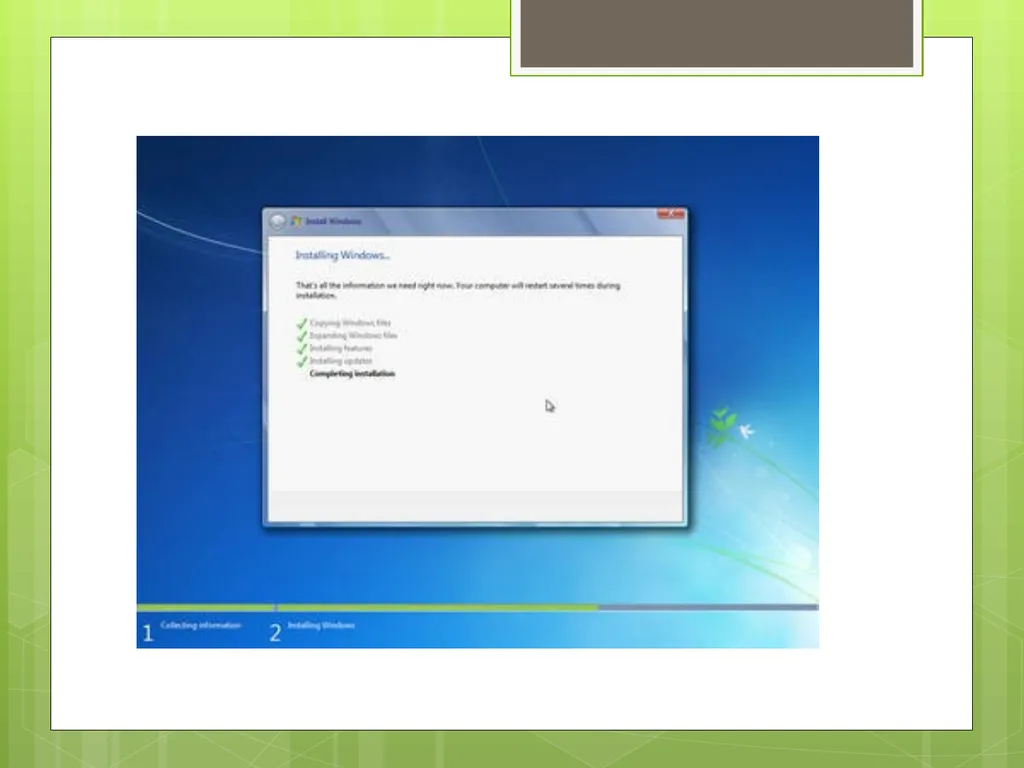
Windows 7 Setup will now install a clean copy of Windows 7 to the location you chose in the previous step. You don't need to do anything here but wait.
This is the most time consuming of any of the 34 steps. Depending on the speed of your computer, this process could take anywhere from 5 to 30 minutes.<br>
This is the most time consuming of any of the 34 steps. Depending on the speed of your computer, this process could take anywhere from 5 to 30 minutes.<br>
16
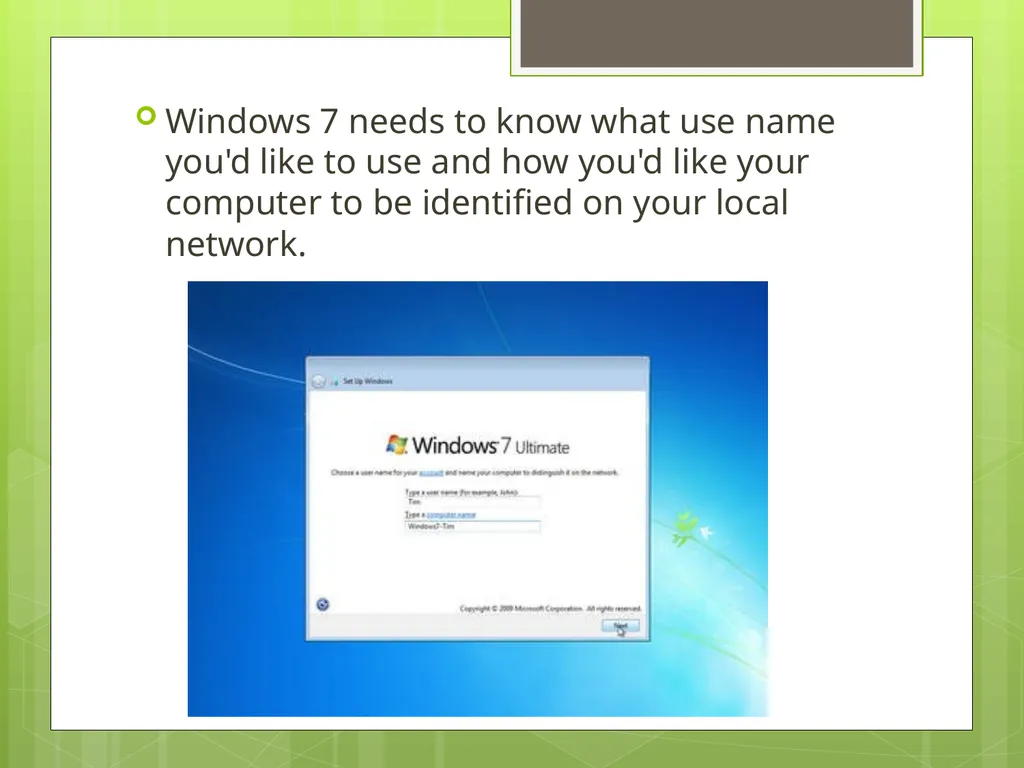
Windows 7 needs to know what use name you'd like to use and how you'd like your computer to be identified on your local network.<br>
17
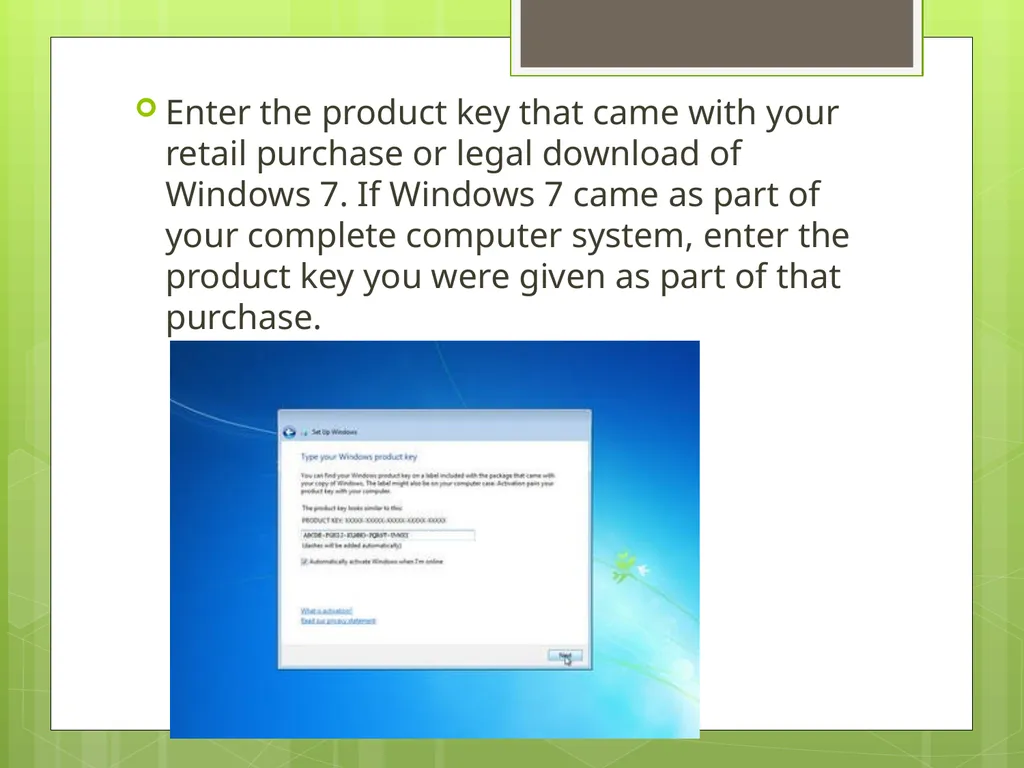
Enter the product key that came with your retail purchase or legal download of Windows 7. If Windows 7 came as part of your complete computer system, enter the product key you were given as part of that purchase.<br>
18
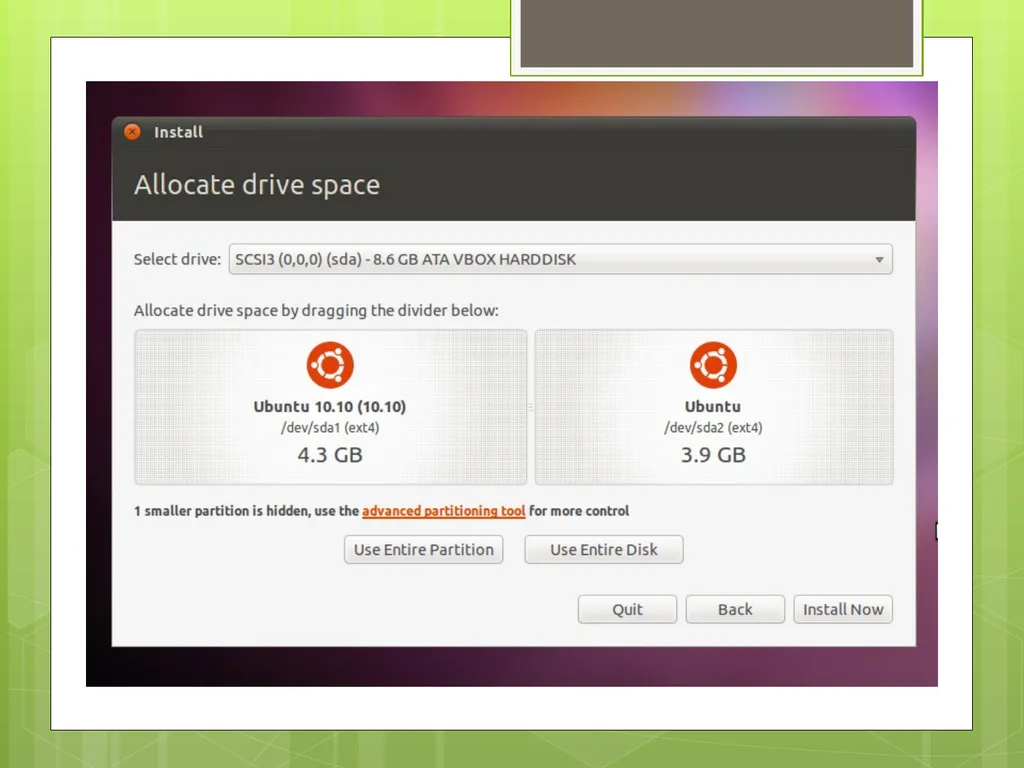
Ubuntu installation The installation process will be slightly different for every distro, but in general setup should guide you through the necessary steps pretty easily.
When installing Ubuntu it will give you prompts as to what you would like to do. The same way that the Windows installation prompted.<br>
When installing Ubuntu it will give you prompts as to what you would like to do. The same way that the Windows installation prompted.<br>
19
What is an Operating System? An operating system is the most important software that runs on a computer.
It manages the computer's memory, processes, and all of its software and hardware.
It also allows you to communicate with the computer without knowing how to speak the computer's "language.“
Without an operating system, a computer is useless.<br>
It manages the computer's memory, processes, and all of its software and hardware.
It also allows you to communicate with the computer without knowing how to speak the computer's "language.“
Without an operating system, a computer is useless.<br>
20
Operating System’s Job O.S. Booting - It runs tests to make sure everything is working correctly.
It checks for new hardware.
It then starts up the operating system
Manages all of the software and hardware on the computer.
Most of the time, there are many different programs running at the same time, and they all need to access your computer's Central Processing Unit (CPU), memory, and storage.
The operating system coordinates all of this to make sure that each program gets what it needs.
Without the operating system, the software wouldn't even be able to talk to the hardware.<br>
It checks for new hardware.
It then starts up the operating system
Manages all of the software and hardware on the computer.
Most of the time, there are many different programs running at the same time, and they all need to access your computer's Central Processing Unit (CPU), memory, and storage.
The operating system coordinates all of this to make sure that each program gets what it needs.
Without the operating system, the software wouldn't even be able to talk to the hardware.<br>
21
Brief History The 1940's - First Generations
The earliest electronic digital computers had no operating systems.
Machines of the time were so primitive that programs were often entered one bit at time on rows of mechanical switches (plug boards).
Programming languages were unknown (not even assembly languages).
Operating systems were unheard of .
These machines were enormous, filling up entire rooms with tens of thousands of vacuum tubes, but they were still millions of times slower than even the cheapest personal computers available today.<br>
The earliest electronic digital computers had no operating systems.
Machines of the time were so primitive that programs were often entered one bit at time on rows of mechanical switches (plug boards).
Programming languages were unknown (not even assembly languages).
Operating systems were unheard of .
These machines were enormous, filling up entire rooms with tens of thousands of vacuum tubes, but they were still millions of times slower than even the cheapest personal computers available today.<br>
22
The 1950's - Second Generation
now called mainframes
The introduction of the transistor in the mid-1950s
Computers became reliable enough that they could be manufactured and sold to paying customers
These machines were locked away in specially air conditioned computer rooms, with staffs of professional operators to run them.
Only big corporations or major government agencies or universities could afford the multimillion dollar price tag
programmer would first write the program on paper (in FORTRAN or assembler), then punch it on cards.
When the computer finished whatever job it was currently running, an operator would go over to the printer and tear off the output and carry it over to the output room<br>
now called mainframes
The introduction of the transistor in the mid-1950s
Computers became reliable enough that they could be manufactured and sold to paying customers
These machines were locked away in specially air conditioned computer rooms, with staffs of professional operators to run them.
Only big corporations or major government agencies or universities could afford the multimillion dollar price tag
programmer would first write the program on paper (in FORTRAN or assembler), then punch it on cards.
When the computer finished whatever job it was currently running, an operator would go over to the printer and tear off the output and carry it over to the output room<br>
23
The 1960's - Third Generation
The systems of the 1960's were also batch processing systems, but they were able to take better advantage of the computer's resources by running several jobs at once.
multiprogramming in which several jobs are in main memory at once; a processor is switched from job to job as needed to keep several jobs advancing while keeping the peripheral devices in use.
If one job was waiting for I/O another job could use the CPU and not let the CPU sit idle.<br>
The systems of the 1960's were also batch processing systems, but they were able to take better advantage of the computer's resources by running several jobs at once.
multiprogramming in which several jobs are in main memory at once; a processor is switched from job to job as needed to keep several jobs advancing while keeping the peripheral devices in use.
If one job was waiting for I/O another job could use the CPU and not let the CPU sit idle.<br>
24
IBM & Microsoft History In 1980, IBM first approached Bill Gates of Microsoft, to discuss the state of home computers and what Microsoft products could do for IBM
They name their new operating system "MS‑DOS.“
IBM PC running MS‑DOS in 1981.
new language<br>
They name their new operating system "MS‑DOS.“
IBM PC running MS‑DOS in 1981.
new language<br>
25
1982–1985: Introducing Windows 1.0
rather than typing MS‑DOS commands, you just move a mouse to point and click your way through screens, or “windows.
1987–1992: Windows 2.0–2.11
December 9, 1987 Microsoft releases Windows 2.0 with desktop icons and expanded memory. With improved graphics support, you can now overlap windows, control the screen layout, and use keyboard shortcuts to speed up your work. Some software developers write their first Windows–based programs for this release.
Control Panel makes its first appearance in Windows 2.0.<br>
rather than typing MS‑DOS commands, you just move a mouse to point and click your way through screens, or “windows.
1987–1992: Windows 2.0–2.11
December 9, 1987 Microsoft releases Windows 2.0 with desktop icons and expanded memory. With improved graphics support, you can now overlap windows, control the screen layout, and use keyboard shortcuts to speed up your work. Some software developers write their first Windows–based programs for this release.
Control Panel makes its first appearance in Windows 2.0.<br>
26
1990–1994: Windows 3.0–Windows NT
Windows now has significantly better performance, advanced graphics with 16 colors, and improved icons.
Program Manager, File Manager, and Print Manager arrive in Windows 3.0.
Windows software is installed with floppy discs bought in large boxes with heavy instruction manuals
Windows NT
Windows NT 3.1 is a 32-bit operating system, which makes it a strategic business platform that supports high-end engineering and scientific programs.<br>
Windows now has significantly better performance, advanced graphics with 16 colors, and improved icons.
Program Manager, File Manager, and Print Manager arrive in Windows 3.0.
Windows software is installed with floppy discs bought in large boxes with heavy instruction manuals
Windows NT
Windows NT 3.1 is a 32-bit operating system, which makes it a strategic business platform that supports high-end engineering and scientific programs.<br>
27
1995–2001: Windows 95
sells a record-setting 7 million copies in the first five weeks.
Windows 95 has built-in Internet support, dial-up networking, and new Plug and Play capabilities that make it easy to install hardware and software. The 32-bit operating system also offers enhanced multimedia capabilities, more powerful features for mobile computing, and integrated networking.
In the summer of 1995, the first version of Internet Explorer is released. The browser joins those already vying for space on the World Wide Web.<br>
sells a record-setting 7 million copies in the first five weeks.
Windows 95 has built-in Internet support, dial-up networking, and new Plug and Play capabilities that make it easy to install hardware and software. The 32-bit operating system also offers enhanced multimedia capabilities, more powerful features for mobile computing, and integrated networking.
In the summer of 1995, the first version of Internet Explorer is released. The browser joins those already vying for space on the World Wide Web.<br>
28
1998–2000: Windows 98, Windows 2000, Windows Me
Windows 98 is the first version of Windows designed specifically for consumers. PCs are common at work and home, and Internet cafes where you can get online are popping up. Windows 98 is described as an operating system that “Works Better, Plays Better.”
improvements include the ability to open and close programs more quickly
support for reading DVD discs and universal serial bus (USB) devices.<br>
Windows 98 is the first version of Windows designed specifically for consumers. PCs are common at work and home, and Internet cafes where you can get online are popping up. Windows 98 is described as an operating system that “Works Better, Plays Better.”
improvements include the ability to open and close programs more quickly
support for reading DVD discs and universal serial bus (USB) devices.<br>
29
Windows Me
Designed for home computer use, Windows Me offers numerous music, video, and home networking enhancements and reliability improvements compared to previous versions.
First appearances: System Restore, a feature that can roll back your PC software configuration to a date or time before a problem occurred. Windows Movie Maker provides users with the tools to digitally edit, save, and share home videos. And with Microsoft Windows Media Player 7 technologies, you can find, organize, and play digital media.
Windows Me was the last Microsoft operating system to be based on the Windows 95 code base.<br>
Designed for home computer use, Windows Me offers numerous music, video, and home networking enhancements and reliability improvements compared to previous versions.
First appearances: System Restore, a feature that can roll back your PC software configuration to a date or time before a problem occurred. Windows Movie Maker provides users with the tools to digitally edit, save, and share home videos. And with Microsoft Windows Media Player 7 technologies, you can find, organize, and play digital media.
Windows Me was the last Microsoft operating system to be based on the Windows 95 code base.<br>
30
Windows 2000 Professional
More than just the upgrade to Windows NT Workstation 4.0, Windows 2000 Professional is designed to replace Windows 95, Windows 98, and Windows NT Workstation 4.0 on all business desktops and laptops.
Windows 2000 Professional simplifies hardware installation by adding support for a wide variety of new Plug and Play hardware, including advanced networking and wireless products, USB devices, IEEE 1394 devices, and infrared devices.<br>
More than just the upgrade to Windows NT Workstation 4.0, Windows 2000 Professional is designed to replace Windows 95, Windows 98, and Windows NT Workstation 4.0 on all business desktops and laptops.
Windows 2000 Professional simplifies hardware installation by adding support for a wide variety of new Plug and Play hardware, including advanced networking and wireless products, USB devices, IEEE 1394 devices, and infrared devices.<br>
31
2001–2005: Windows XP
Windows XP is released with a redesigned look and feel that's centered on usability and a unified Help and Support services center.
It’s both fast and stable. Navigating the Start menu, taskbar, and Control Panel are more intuitive. Awareness of computer viruses and hackers increases, but fears are to a certain extent calmed by the online delivery of security updates.
Windows XP Home Edition - Designed for home use, Windows XP offers such enhancements as the Network Setup Wizard, Windows Media Player, Windows Movie Maker, and enhanced digital photo capabilities.
Windows XP Professional brings the solid foundation of Windows 2000 to the PC desktop, enhancing reliability, security, and performance. With a fresh visual design<br>
Windows XP is released with a redesigned look and feel that's centered on usability and a unified Help and Support services center.
It’s both fast and stable. Navigating the Start menu, taskbar, and Control Panel are more intuitive. Awareness of computer viruses and hackers increases, but fears are to a certain extent calmed by the online delivery of security updates.
Windows XP Home Edition - Designed for home use, Windows XP offers such enhancements as the Network Setup Wizard, Windows Media Player, Windows Movie Maker, and enhanced digital photo capabilities.
Windows XP Professional brings the solid foundation of Windows 2000 to the PC desktop, enhancing reliability, security, and performance. With a fresh visual design<br>
32
Windows XP continued Windows XP 64-bit Edition (2001) is the first Microsoft operating system for 64-bit processors designed for working with large amounts of memory and projects such as movie special effects, 3D animations, engineering, and scientific programs.
Windows XP Media Center Edition (2002) is made for home computing and entertainment. You can browse the Internet, watch live television, enjoy digital music and video collections, and watch DVDs.
Windows XP Tablet PC Edition (2002) realizes the vision of pen-based computing. Tablet PCs include a digital pen for handwriting recognition and you can use the mouse or keyboard, too.<br>
Windows XP Media Center Edition (2002) is made for home computing and entertainment. You can browse the Internet, watch live television, enjoy digital music and video collections, and watch DVDs.
Windows XP Tablet PC Edition (2002) realizes the vision of pen-based computing. Tablet PCs include a digital pen for handwriting recognition and you can use the mouse or keyboard, too.<br>
33
The minimum hardware requirements for Windows XP Home Edition are:
Pentium 233-megahertz (MHz) processor or faster (300 MHz is recommended)
At least 64 megabytes (MB) of RAM (128 MB is recommended)
At least 1.5 gigabytes (GB) of available space on the hard disk
CD-ROM or DVD-ROM drive
Keyboard and a Microsoft Mouse or some other compatible pointing device
Video adapter and monitor with Super VGA (800 x 600)or higher resolution
Sound card
Speakers or headphones<br>
Pentium 233-megahertz (MHz) processor or faster (300 MHz is recommended)
At least 64 megabytes (MB) of RAM (128 MB is recommended)
At least 1.5 gigabytes (GB) of available space on the hard disk
CD-ROM or DVD-ROM drive
Keyboard and a Microsoft Mouse or some other compatible pointing device
Video adapter and monitor with Super VGA (800 x 600)or higher resolution
Sound card
Speakers or headphones<br>
34
2006–2008: Windows Vista
Windows Vista is released in 2006 with the strongest security system yet.
User Account Control helps prevent potentially harmful software from making changes to your computer.
In Windows Vista Ultimate, BitLocker Drive Encryption provides better data protection for your computer, as laptop sales and security needs increase.
If you want to run Windows Vista on your PC, here's what it takes:
1 gigahertz (GHz) 32-bit (x86) or 64-bit (x64) processor
1 gigabyte (GB) of system memory (512 megabytes (MB) for Home Basic)
40 GB hard drive with at least 15 GB of available space (20 GB for Home Basic)
Support for DirectX 9 graphics with WDDM and 128 MB of graphics memory (32 MB for Home Basic)
DVD-ROM drive<br>
Windows Vista is released in 2006 with the strongest security system yet.
User Account Control helps prevent potentially harmful software from making changes to your computer.
In Windows Vista Ultimate, BitLocker Drive Encryption provides better data protection for your computer, as laptop sales and security needs increase.
If you want to run Windows Vista on your PC, here's what it takes:
1 gigahertz (GHz) 32-bit (x86) or 64-bit (x64) processor
1 gigabyte (GB) of system memory (512 megabytes (MB) for Home Basic)
40 GB hard drive with at least 15 GB of available space (20 GB for Home Basic)
Support for DirectX 9 graphics with WDDM and 128 MB of graphics memory (32 MB for Home Basic)
DVD-ROM drive<br>
35
2009–Today: Windows 7
Windows 7 includes many features, such as new ways to work with windows—Snap, Peek, and Shake.
Windows Touch makes its debut, enabling you to use your fingers to browse the web, flip through photos, and open files and folders.
You can stream music, videos, and photos from your PC to a stereo or TV.
Comes in Home Premium, Professional, and Ultimate
If you want to run Windows 7 on your PC, here's what it takes:
1 gigahertz (GHz) or faster 32-bit (x86) or 64-bit (x64) processor
1 gigabyte (GB) RAM (32-bit) or 2 GB RAM (64-bit)
16 GB available hard disk space (32-bit) or 20 GB (64-bit)
DirectX 9 graphics device with WDDM 1.0 or higher driver<br>
Windows 7 includes many features, such as new ways to work with windows—Snap, Peek, and Shake.
Windows Touch makes its debut, enabling you to use your fingers to browse the web, flip through photos, and open files and folders.
You can stream music, videos, and photos from your PC to a stereo or TV.
Comes in Home Premium, Professional, and Ultimate
If you want to run Windows 7 on your PC, here's what it takes:
1 gigahertz (GHz) or faster 32-bit (x86) or 64-bit (x64) processor
1 gigabyte (GB) RAM (32-bit) or 2 GB RAM (64-bit)
16 GB available hard disk space (32-bit) or 20 GB (64-bit)
DirectX 9 graphics device with WDDM 1.0 or higher driver<br>
36
Linux In 1991, in Helsinki, Linus Torvalds began a project that later became the Linux kernel.
It was initially a terminal emulator, which Torvalds used to access the large UNIX servers of the university.
He wrote the program specifically for the hardware he was using and independent of an operating system because he wanted to use the functions of his new PC with an 80386 processor.<br>
It was initially a terminal emulator, which Torvalds used to access the large UNIX servers of the university.
He wrote the program specifically for the hardware he was using and independent of an operating system because he wanted to use the functions of his new PC with an 80386 processor.<br>
37
Linux Continued Linux is an increasingly popular operating system that is proving to be a viable alternative to Microsoft’s Windows and Apple’s Mac operating systems.
Linux is open source, which means that it is developed by a tight-knit community of developers and designed to be permanently free of charge. Because of this, there are many different types of Linux operating systems available to users.<br>
Linux is open source, which means that it is developed by a tight-knit community of developers and designed to be permanently free of charge. Because of this, there are many different types of Linux operating systems available to users.<br>
38
Distribution
Although Linux is originally the kernel created by Linus, it does not function as an OS generally available with only the kernel.
To function as an OS, various software applications must be combined with the kernel.
Thus, the combination of the kernel and some application software supporting it for use as a OS is called a “distribution”.<br>
Although Linux is originally the kernel created by Linus, it does not function as an OS generally available with only the kernel.
To function as an OS, various software applications must be combined with the kernel.
Thus, the combination of the kernel and some application software supporting it for use as a OS is called a “distribution”.<br>
39
Types of distribution
A number of application software programs as well as the kernel is needed to run as an OS, but software applications necessary depend on the specific purpose of use or policy. This is the difference of distributions, so there are many distributions.
The biggest difference is the management method of a package (software) shown as follows:
RedHat Linux
CentOS
Fedora
Ubuntu<br>
A number of application software programs as well as the kernel is needed to run as an OS, but software applications necessary depend on the specific purpose of use or policy. This is the difference of distributions, so there are many distributions.
The biggest difference is the management method of a package (software) shown as follows:
RedHat Linux
CentOS
Fedora
Ubuntu<br>
40
Ubuntu The most popular and widely used Linux distribution
Ubuntu is a computer operating system based on the Debian Linux distribution. Ubuntu focuses on usability and security.
The Ubiquity installer allows Ubuntu to be installed to the hard disk from within the Live CD environment, without the need for restarting the computer prior to installation.
Ubuntu Minimum System Requirements
700 MHz processor (about Intel Celeron or better)
512 MiB RAM (system memory)
5 GB of hard-drive space (or USB stick, memory card or external drive but see LiveCD for an alternative approach) VGA capable of 1024x768 screen resolution
Either a CD/DVD drive or a USB port for the installer media
Internet access is helpful<br>
Ubuntu is a computer operating system based on the Debian Linux distribution. Ubuntu focuses on usability and security.
The Ubiquity installer allows Ubuntu to be installed to the hard disk from within the Live CD environment, without the need for restarting the computer prior to installation.
Ubuntu Minimum System Requirements
700 MHz processor (about Intel Celeron or better)
512 MiB RAM (system memory)
5 GB of hard-drive space (or USB stick, memory card or external drive but see LiveCD for an alternative approach) VGA capable of 1024x768 screen resolution
Either a CD/DVD drive or a USB port for the installer media
Internet access is helpful<br>
41
What is Kernel? A kernel is a central component of an operating system. It acts as an interface between the user applications and the hardware.
The sole aim of the kernel is to manage the communication between the software (user level applications) and the hardware (CPU, disk memory etc).
The main tasks of the kernel are - Process management, Device management, Memory management, Interrupt handling, I/O communication, File system...etc..<br>
The sole aim of the kernel is to manage the communication between the software (user level applications) and the hardware (CPU, disk memory etc).
The main tasks of the kernel are - Process management, Device management, Memory management, Interrupt handling, I/O communication, File system...etc..<br>
42
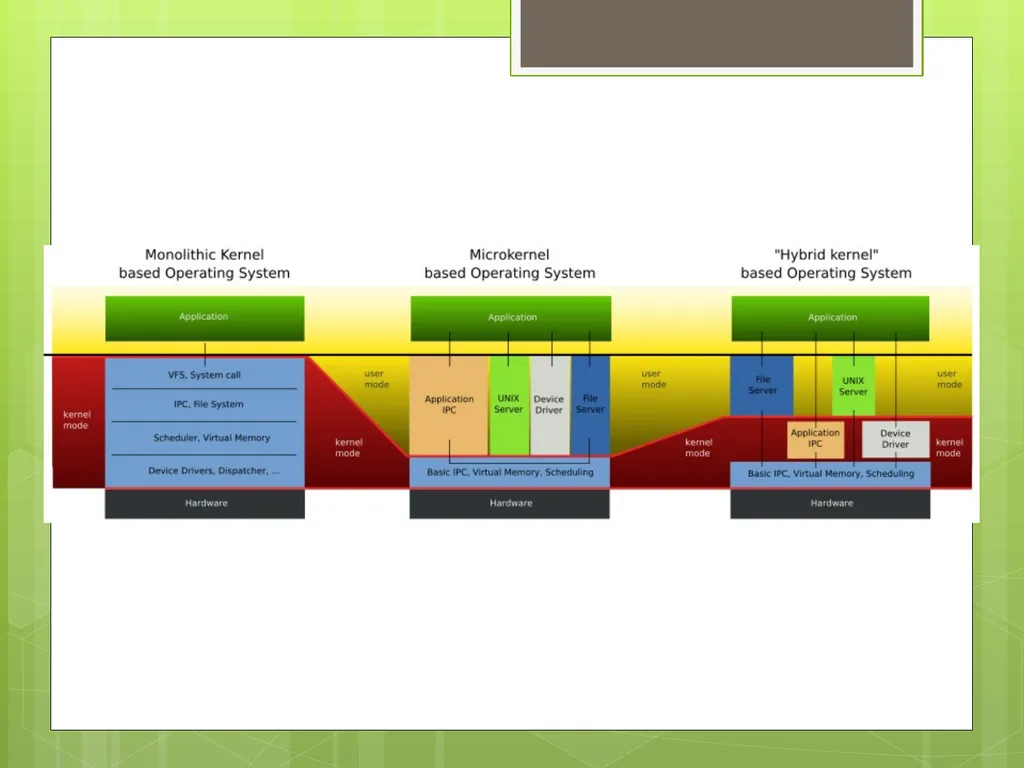
Types of Kernels Monolithic
monolithic architecture, the kernel consists of different modules which can be dynamically loaded and un-loaded.
With this approach, maintainability of kernel became very easy as only the concerned module needs to be loaded and unloaded every time there is a change or bug fix in a particular module.
Before, all the basic system services like process and memory management, interrupt handling etc were packaged into a single module in kernel space.
Monolithic kernels are part of Unix-like operating systems like Linux ,FreeBSD etc<br>
monolithic architecture, the kernel consists of different modules which can be dynamically loaded and un-loaded.
With this approach, maintainability of kernel became very easy as only the concerned module needs to be loaded and unloaded every time there is a change or bug fix in a particular module.
Before, all the basic system services like process and memory management, interrupt handling etc were packaged into a single module in kernel space.
Monolithic kernels are part of Unix-like operating systems like Linux ,FreeBSD etc<br>
43
Micro Kernel –
This architecture majorly caters to the problem of ever growing size of kernel code which we could not control in the monolithic approach.
This architecture allows some basic services like device driver management, protocol stack, file system etc to run in user space.
This reduces the kernel code size and also increases the security and stability of OS as we have the bare minimum code running in kernel.
part of the operating systems like AIX, BeOS, Hurd, Mach, Mac OS X, MINIX, QNX.<br>
This architecture majorly caters to the problem of ever growing size of kernel code which we could not control in the monolithic approach.
This architecture allows some basic services like device driver management, protocol stack, file system etc to run in user space.
This reduces the kernel code size and also increases the security and stability of OS as we have the bare minimum code running in kernel.
part of the operating systems like AIX, BeOS, Hurd, Mach, Mac OS X, MINIX, QNX.<br>
44
Hybrid kernels
These types of kernels are extensions of microkernels with some properties of monolithic kernels.
Unlike monolithic kernels, these types of kernels are unable to load modules at runtime on their own.
part of the operating systems such as Microsoft Windows NT, 2000 and XP and above, DragonFly BSD etc.<br>
These types of kernels are extensions of microkernels with some properties of monolithic kernels.
Unlike monolithic kernels, these types of kernels are unable to load modules at runtime on their own.
part of the operating systems such as Microsoft Windows NT, 2000 and XP and above, DragonFly BSD etc.<br>
45
Exokernel
operating system kernel developed by the MIT Parallel and Distributed Operating Systems group, and also a class of similar operating systems.
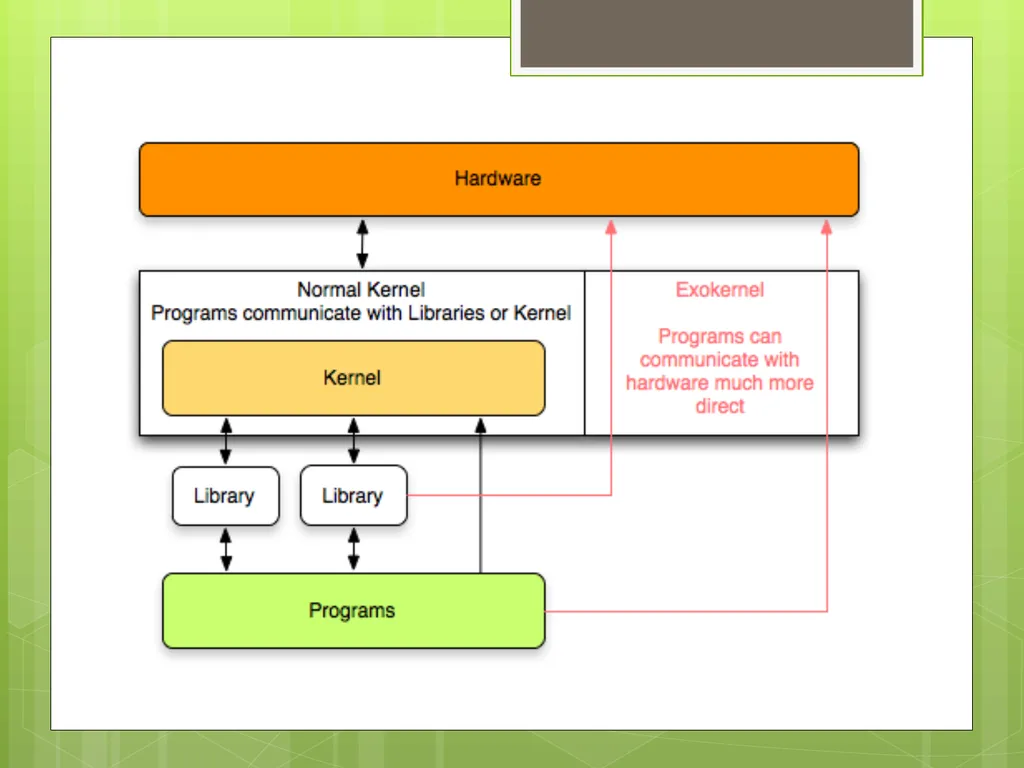
The idea for Exokernels is to allow an operating system that could incorporate multiple library operating systems and are intended to simultaneously run multiple operating systems of different kinds like Linux and Microsoft Windows together using appropriate Application Programming Interface (API).<br>
operating system kernel developed by the MIT Parallel and Distributed Operating Systems group, and also a class of similar operating systems.
The idea for Exokernels is to allow an operating system that could incorporate multiple library operating systems and are intended to simultaneously run multiple operating systems of different kinds like Linux and Microsoft Windows together using appropriate Application Programming Interface (API).<br>
46
What is Shell? Shell
is a software program that allows you to interact and access a computer system.
User can enter commands in the shell prompt, which will be executed by the shell.
Since the only means of communication through shell is text, it is known as Command-Line-Interface or CLI.
A shell is a command interpreter and serves as a user interface to the Linux kernel<br>
is a software program that allows you to interact and access a computer system.
User can enter commands in the shell prompt, which will be executed by the shell.
Since the only means of communication through shell is text, it is known as Command-Line-Interface or CLI.
A shell is a command interpreter and serves as a user interface to the Linux kernel<br>
47
Contact Information Mike Gomez magomez5@broncs.utpa.edu
Juan Prado
jdprado@broncs.utpa.edu
Sonny Kodali
skodali@broncs.utpa.edu<br>
Juan Prado
jdprado@broncs.utpa.edu
Sonny Kodali
skodali@broncs.utpa.edu<br>
48
Useful Information Become familiar with Virtual Machines for lab 3. - Virtualization
Download VMware
Installation of VMware
Install an O.S. into VMware
How to properly set settings for use.<br>
Download VMware
Installation of VMware
Install an O.S. into VMware
How to properly set settings for use.<br>