Lack of documented processes and reliance on

Published  . 0 views
↓ Download
Lack of documented processes and reliance on
1 / 1
Lack of documented processes and reliance on - slide 1 of 3 Lack of documented processes and reliance on - slide 2 of 3 Lack of documented processes and reliance on - slide 3 of 3
Description: Lack of documented processes and reliance on tribal knowledge hinder onboarding and consistent task execution across shifts and locations From Current Workflow Challenges Operator training depends on shadowing and static manuals Missing or

Related Topics

Download Presentation

"Lack of documented processes and reliance on" is the property of its rightful owner. Permission is granted to download and print the materials on this website for personal, non-commercial use only, and to display it on your personal computer provided you do not modify the materials and that you retain all copyright notices contained in the materials. By downloading content from our website, you accept the terms of this agreement.

Presentation Transcript

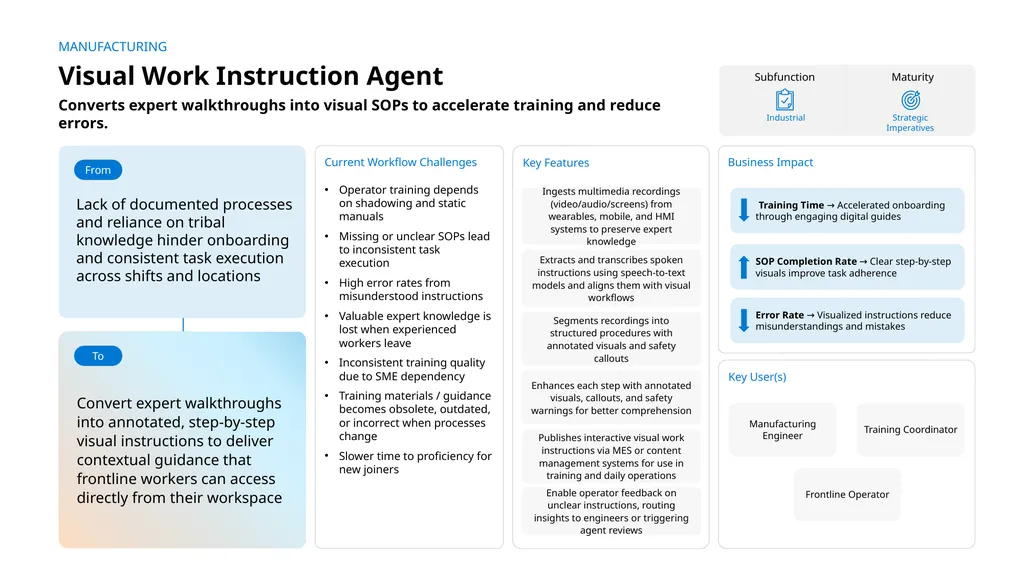
slide1. Lack of documented processes and reliance on tribal knowledge hinder onboarding and consistent task execution across shifts and locations From Current Workflow Challenges

Operator training depends on shadowing and static manuals
Missing or unclear SOPs lead to inconsistent task execution
High error rates from misunderstood instructions
Valuable expert knowledge is lost when experienced workers leave
Inconsistent training quality due to SME dependency
Training materials / guidance becomes obsolete, outdated, or incorrect when processes change
Slower time to proficiency for new joiners Key Features Ingests multimedia recordings (video/audio/screens) from wearables, mobile, and HMI systems to preserve expert knowledge Segments recordings into structured procedures with annotated visuals and safety callouts AI Agent drives real-time intent identification, intelligent routing, and hyper-personalized recommendations Key User(s) Manufacturing Engineer Business Impact Subfunction Industrial Extracts and transcribes spoken instructions using speech-to-text models and aligns them with visual workflows MANUFACTURING Visual Work Instruction Agent Convert expert walkthroughs into annotated, step-by-step visual instructions to deliver contextual guidance that frontline workers can access directly from their workspace To SOP Completion Rate → Clear step-by-step visuals improve task adherence Training Time → Accelerated onboarding through engaging digital guides Error Rate → Visualized instructions reduce misunderstandings and mistakes Training Coordinator Frontline Operator Enhances each step with annotated visuals, callouts, and safety warnings for better comprehension Converts expert walkthroughs into visual SOPs to accelerate training and reduce errors. Strategic Imperatives Maturity Publishes interactive visual work instructions via MES or content management systems for use in training and daily operations Enable operator feedback on unclear instructions, routing insights to engineers or triggering agent reviews<br>
slide2. Visual work instruction agent Available with:
Copilot Studio Manufacturing Scenario level:
Extend Transcribe & align instruction Transcribes spoken guidance and synchronizes it with video steps. Reduces Training Time Improves Task Adherence Cost savings Ingest multimedia capture Collects expert walkthroughs via mobile, wearable, or HMI recordings. AI Agent
Connection to IoT Systems (e.g., HMI logs) for video and interface recordings
Connection to Mobile Devices (e.g., Android/iOS) for camera feeds
Connection to Knowledge Base (e.g., SharePoint) for storage and retrieval Segment and annotate process steps Converts recordings into structured, annotated SOPs. Enhance safety & compliance Adds safety warnings, PPE icons, and compliance callouts to instructions. Employee Experience Reduces Error Rate AI Agent
Connection to speech recognition service for real-time transcription
Connection to Video Platform (e.g., Microsoft Stream) for audio-video synchronization
Connection to ERP (e.g., Dynamics 365) for step references or operation metadata AI Agent
Connection to computer vision service for activity recognition
Connection to MES (e.g., Dynamics 365 SCM) for aligning SOP steps with operations
Connection to Knowledge Base (e.g., SharePoint) for annotation templates and tagging Benefit: Collects recording to preserve expert knowledge in rich, reviewable formats. Benefit: Extracts and transcribes spoken instructions, to be aligned with visual workflows, to speed up the process. Benefit: Standardizes complex procedure into visual instructions. Publish interactive SOP Publishes SOPs into systems frontline workers already use. Enhance interactive SOP Enables operator feedback on unclear steps, routing insights to engineers or triggering agent reviews.<br>
slide3. Key Considerations to Address
Pulls expert videos from HMI systems and SOPs from MES system and store as knowledge
Detects actions in video, aligns with MES (e.g., Dynamics 365) operations, and tags steps using templates from SharePoint.
Captures the audio/ video transcript and push them as knowledge
Pulls safety data from EHS (e.g., Dynamics 365) and compliance rules from Knowledge Base (e.g., SharePoint) to give rich SOPs in overlaid PDF format
Routes flagged instruction steps from operator feedback to safety teams via Workflow Tools (e.g., Power Automate), triggering reviews through Agent Orchestration Systems (e.g., Power Platform)
PII includes faces and voices of experts in videos. Agent-to-Agent
Workflow Production Schedule Optimizer Agent MANUFACTURING INDUSTRY Visual Work Instruction Agent Converts expert walkthroughs into visual SOPs to accelerate training and reduce errors. Reference Architecture Assumptions
Agent will be hosted on Teams channel with Microsoft authentication
Engineer, coordinator will have M365 license to access the agent,
EHS , SAP and HMI systems would expose APIs or have connectors to fetch hazard info, SOP documents
PDF, PPTX and DOCX are the supported knowledge in SharePoint. Dataverse knowledge can be max two with max 15 tables each.
Other dependent agents should be ready and discoverable to be associated with this agent Orchestrator Agent Ops (logging, audit, observability) Structured Records Tools Channels Base Pre-trained OpenAI Models / custom Open AI models (preview) 9a. Agent logs are displayed Conversation Transcript Knowledge Base Structured Records Unstructured Documents (versioned) Manufacturing Engineer Training Coordinator Frontline Operator Licensed Users instruction_confidence High Low 0 1 3. SOPs docs are stored MES System EHS System HMI System Azure Function Apps Azure Speech to Text 9c. Sets the agent confidence threshold and updates instructions and prompts, 1b.Sends multimedia recordings 1c. Invokes speech to text endpoint and extracts transcript 1d. Recordings and extracted text sent and generates transcript score 1e. Sends SOP documents 1f. Sends hazard info 2. Past hazard info stored and labeled 4. Asks for audio/ visual guidance for maintenance of specific equipment 5. Forwards query 6. Invokes tools 7a. If confidence score >= 0.7, sends summary with citation to video links 7b. If confidence score <0.7, escalate 8. Response 9b. Logged entries are reviewed 1da. If the transcript score is low, sends for human review 1a. Stores the learning content multimedia D365 Customer Portal Dataverse Copilot Studio Agent Copilot Studio Kit - Extend Flow / Connector LEGEND SharePoint App Insights MS Teams 6a. Calculates confidence score Prompts Connector Rest API<br>