
Lesson 4 – Creating using the Guitar GarageBand
Description: Lesson 4 Creating using the Guitar GarageBand Lessons Lesson 4: Creating using the Guitar We are learning to create using different features of the guitar. I can recognise the parts of a guitar and the sounds they make. I can create using
Related Topics
Download Presentation
"Lesson 4 – Creating using the Guitar GarageBand" is the property of its rightful owner. Permission is granted to download and print the materials on this website for personal, non-commercial use only, and to display it on your personal computer provided you do not modify the materials and that you retain all copyright notices contained in the materials. By downloading content from our website, you accept the terms of this agreement.
Presentation Transcript
slide1. Lesson 4 – Creating using the Guitar GarageBand
Lessons<br>
slide2. Lesson 4: Creating using the Guitar We are learning to create using different features of the guitar.
I can recognise the parts of a guitar and the sounds they make.
I can create using strumming and finger picking.
I can create a song using multiple guitar tracks and techniques.<br>
slide3. Vocabulary/Topics to Explore Types of Guitar (Acoustic, Electric, Bass).
Guitar Techniques (Strumming, Finger Picking, Sustain).
Parts of Guitar (Strings, Tuning Head, Fret Board and Sound Hole).<br>
slide4. Listening Questions What can you hear?
What instruments did you hear?
Is it fast or slow?
What is the style of music?
Where in the world is the music from?
When do you think the music was written?<br>
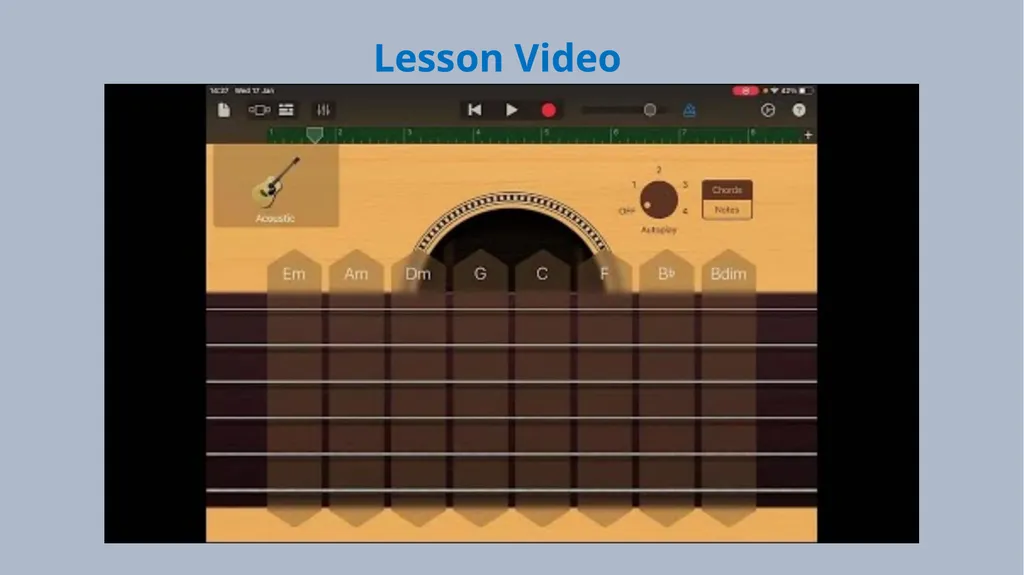
slide5. Lesson Video<br>
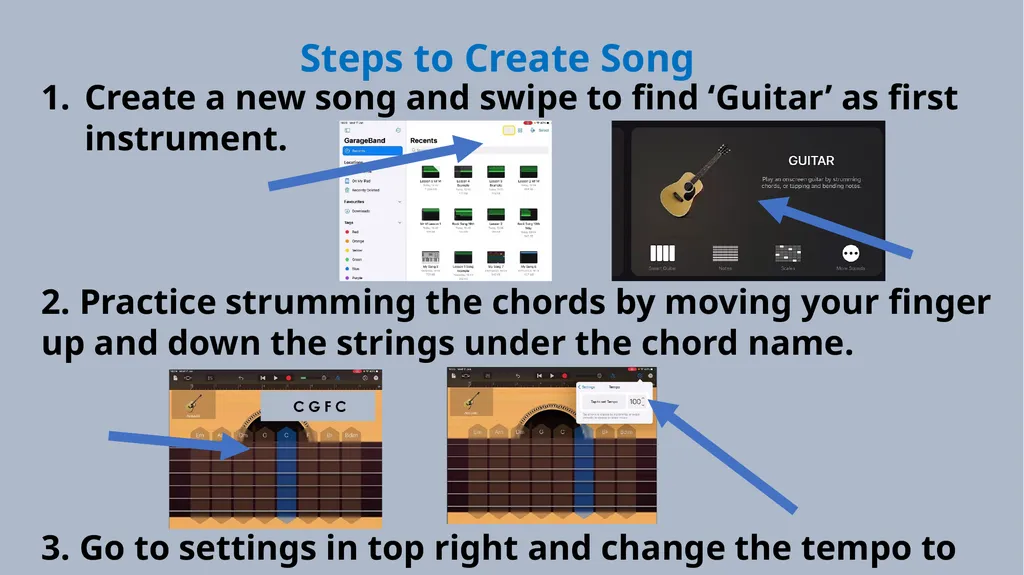
slide6. Steps to Create Song Create a new song and swipe to find ‘Guitar’ as first instrument.
2. Practice strumming the chords by moving your finger up and down the strings under the chord name.
3. Go to settings in top right and change the tempo to 100.<br>
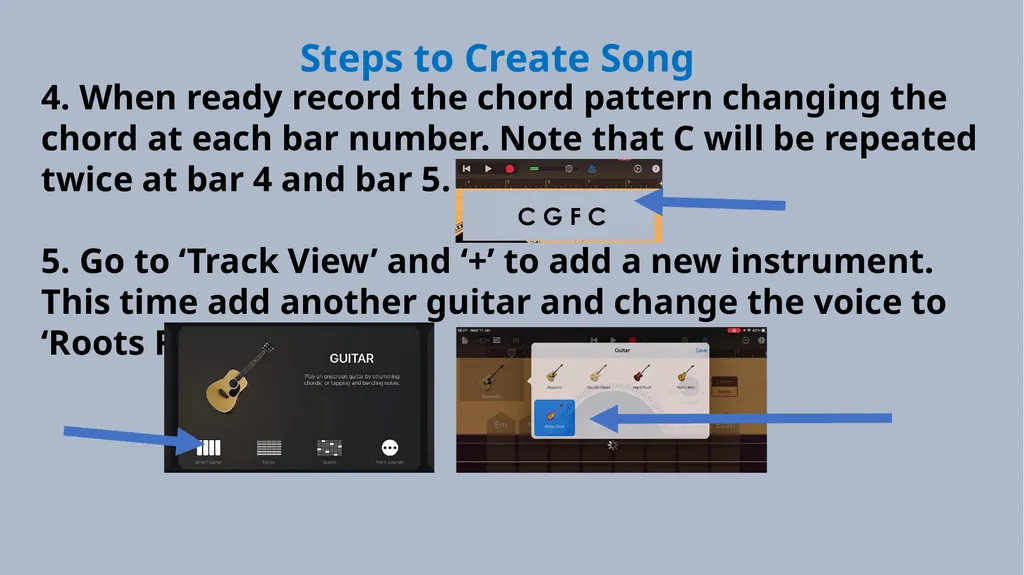
slide7. Steps to Create Song 4. When ready record the chord pattern changing the chord at each bar number. Note that C will be repeated twice at bar 4 and bar 5.
5. Go to ‘Track View’ and ‘+’ to add a new instrument. This time add another guitar and change the voice to ‘Roots Rock’.<br>
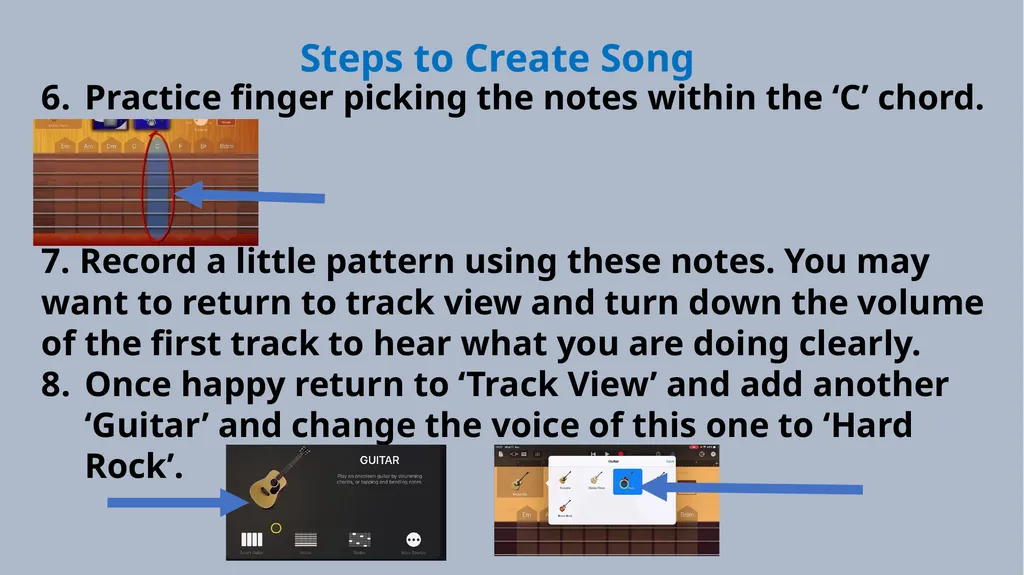
slide8. Steps to Create Song Practice finger picking the notes within the ‘C’ chord.
7. Record a little pattern using these notes. You may want to return to track view and turn down the volume of the first track to hear what you are doing clearly.
Once happy return to ‘Track View’ and add another ‘Guitar’ and change the voice of this one to ‘Hard Rock’.<br>
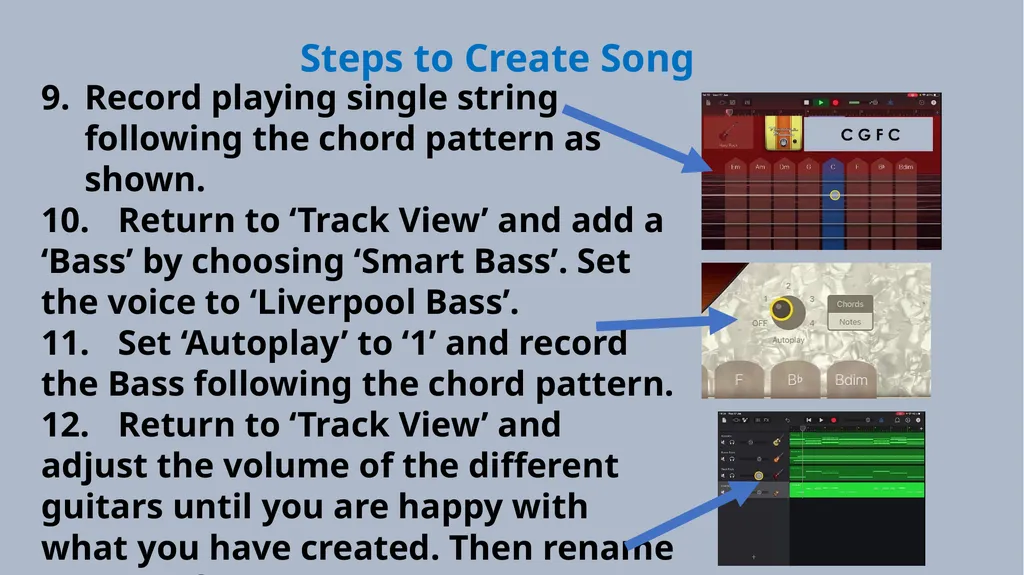
slide9. Steps to Create Song Record playing single string following the chord pattern as shown.
10. Return to ‘Track View’ and add a ‘Bass’ by choosing ‘Smart Bass’. Set the voice to ‘Liverpool Bass’.
11. Set ‘Autoplay’ to ‘1’ and record the Bass following the chord pattern.
12. Return to ‘Track View’ and adjust the volume of the different guitars until you are happy with what you have created. Then rename your track.<br>
slide10. Plenary Discussion Questions What did you enjoy the most about creating this track?
What did you find challenging about creating this track?
What did you learn about the Genre of Music we created?
What instrument or technique was your favourite to include?
What would you do differently if you created another track like this?<br>
Lessons<br>
slide2. Lesson 4: Creating using the Guitar We are learning to create using different features of the guitar.
I can recognise the parts of a guitar and the sounds they make.
I can create using strumming and finger picking.
I can create a song using multiple guitar tracks and techniques.<br>
slide3. Vocabulary/Topics to Explore Types of Guitar (Acoustic, Electric, Bass).
Guitar Techniques (Strumming, Finger Picking, Sustain).
Parts of Guitar (Strings, Tuning Head, Fret Board and Sound Hole).<br>
slide4. Listening Questions What can you hear?
What instruments did you hear?
Is it fast or slow?
What is the style of music?
Where in the world is the music from?
When do you think the music was written?<br>
slide5. Lesson Video<br>
slide6. Steps to Create Song Create a new song and swipe to find ‘Guitar’ as first instrument.
2. Practice strumming the chords by moving your finger up and down the strings under the chord name.
3. Go to settings in top right and change the tempo to 100.<br>
slide7. Steps to Create Song 4. When ready record the chord pattern changing the chord at each bar number. Note that C will be repeated twice at bar 4 and bar 5.
5. Go to ‘Track View’ and ‘+’ to add a new instrument. This time add another guitar and change the voice to ‘Roots Rock’.<br>
slide8. Steps to Create Song Practice finger picking the notes within the ‘C’ chord.
7. Record a little pattern using these notes. You may want to return to track view and turn down the volume of the first track to hear what you are doing clearly.
Once happy return to ‘Track View’ and add another ‘Guitar’ and change the voice of this one to ‘Hard Rock’.<br>
slide9. Steps to Create Song Record playing single string following the chord pattern as shown.
10. Return to ‘Track View’ and add a ‘Bass’ by choosing ‘Smart Bass’. Set the voice to ‘Liverpool Bass’.
11. Set ‘Autoplay’ to ‘1’ and record the Bass following the chord pattern.
12. Return to ‘Track View’ and adjust the volume of the different guitars until you are happy with what you have created. Then rename your track.<br>
slide10. Plenary Discussion Questions What did you enjoy the most about creating this track?
What did you find challenging about creating this track?
What did you learn about the Genre of Music we created?
What instrument or technique was your favourite to include?
What would you do differently if you created another track like this?<br>