LOOPS BY SANJAY AND ARVIND SESHAN This lesson uses

Published  . 0 views
↓ Download
LOOPS BY SANJAY AND ARVIND SESHAN This lesson uses
1 / 1
LOOPS BY SANJAY AND ARVIND SESHAN This lesson uses - slide 1 of 16 LOOPS BY SANJAY AND ARVIND SESHAN This lesson uses - slide 2 of 16 LOOPS BY SANJAY AND ARVIND SESHAN This lesson uses - slide 3 of 16 LOOPS BY SANJAY AND ARVIND SESHAN This lesson uses - slide 4 of 16 LOOPS BY SANJAY AND ARVIND SESHAN This lesson uses - slide 5 of 16 LOOPS BY SANJAY AND ARVIND SESHAN This lesson uses - slide 6 of 16 LOOPS BY SANJAY AND ARVIND SESHAN This lesson uses - slide 7 of 16 LOOPS BY SANJAY AND ARVIND SESHAN This lesson uses - slide 8 of 16 LOOPS BY SANJAY AND ARVIND SESHAN This lesson uses - slide 9 of 16 LOOPS BY SANJAY AND ARVIND SESHAN This lesson uses - slide 10 of 16 LOOPS BY SANJAY AND ARVIND SESHAN This lesson uses - slide 11 of 16 LOOPS BY SANJAY AND ARVIND SESHAN This lesson uses - slide 12 of 16 LOOPS BY SANJAY AND ARVIND SESHAN This lesson uses - slide 13 of 16 LOOPS BY SANJAY AND ARVIND SESHAN This lesson uses - slide 14 of 16 LOOPS BY SANJAY AND ARVIND SESHAN This lesson uses - slide 15 of 16 LOOPS BY SANJAY AND ARVIND SESHAN This lesson uses - slide 16 of 16
Description: LOOPS BY SANJAY AND ARVIND SESHAN This lesson uses SPIKE 3 software LESSON OBJECTIVES Learn how to repeat an action using loops Copyright 2021 Prime Lessons (primelessons.org) CC-BY-NC-SA. (Last edit: 09062023) REPEATING CODE Let us

Related Topics

Download Presentation

"LOOPS BY SANJAY AND ARVIND SESHAN This lesson uses" is the property of its rightful owner. Permission is granted to download and print the materials on this website for personal, non-commercial use only, and to display it on your personal computer provided you do not modify the materials and that you retain all copyright notices contained in the materials. By downloading content from our website, you accept the terms of this agreement.

Presentation Transcript

slide1. LOOPS BY SANJAY AND ARVIND SESHAN This lesson uses SPIKE 3 software<br>
slide2. LESSON OBJECTIVES Learn how to repeat an action using loops Copyright © 2021 Prime Lessons (primelessons.org) CC-BY-NC-SA. (Last edit: 09/06/2023) ‹#›<br>
slide3. REPEATING CODE Let us say that you want the robot to repeat an action over and over again.
Would you copy the code over and over?
What if you wanted to repeat the action forever?
You can use the loops to repeat an action for a number of times or until some exit condition is met
Python has two types of loops: for loops and while loops Copyright © 2021 Prime Lessons (primelessons.org) CC-BY-NC-SA. (Last edit: 09/06/2023) ‹#›<br>
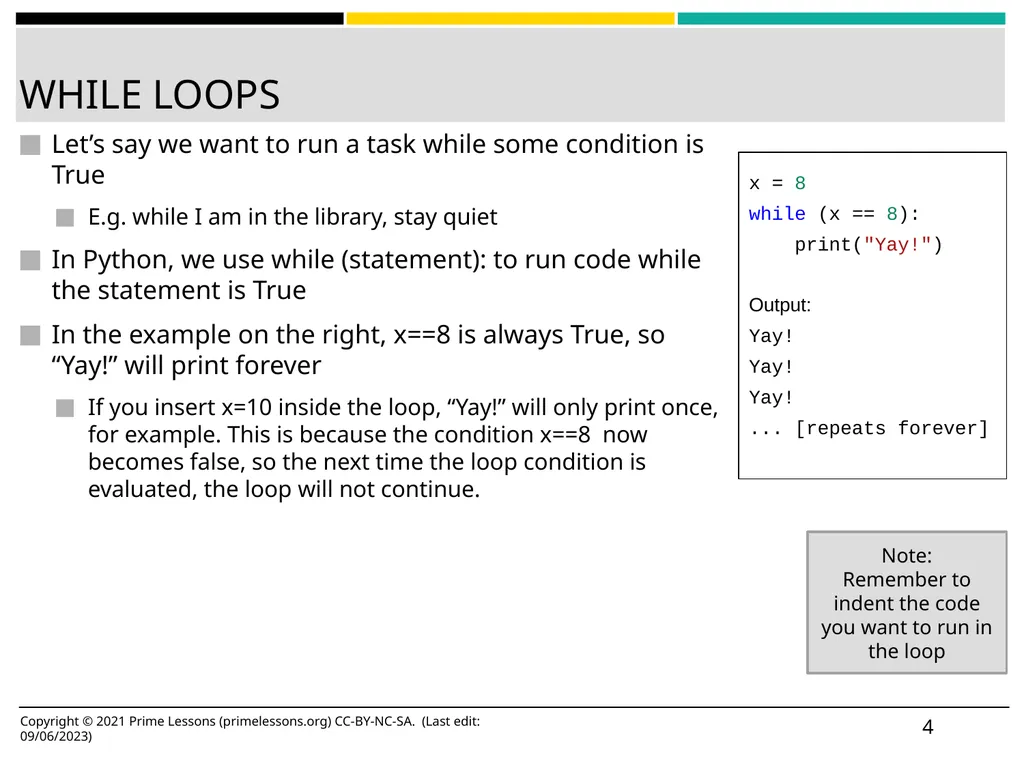
slide4. WHILE LOOPS Let’s say we want to run a task while some condition is True
E.g. while I am in the library, stay quiet
In Python, we use while (statement): to run code while the statement is True
In the example on the right, x==8 is always True, so “Yay!” will print forever
If you insert x=10 inside the loop, “Yay!” will only print once, for example. This is because the condition x==8 now becomes false, so the next time the loop condition is evaluated, the loop will not continue. ‹#› x = 8
while (x == 8):
print("Yay!")

Output:
Yay!
Yay!
Yay!
... [repeats forever] Note:
Remember to indent the code you want to run in the loop Copyright © 2021 Prime Lessons (primelessons.org) CC-BY-NC-SA. (Last edit: 09/06/2023)<br>
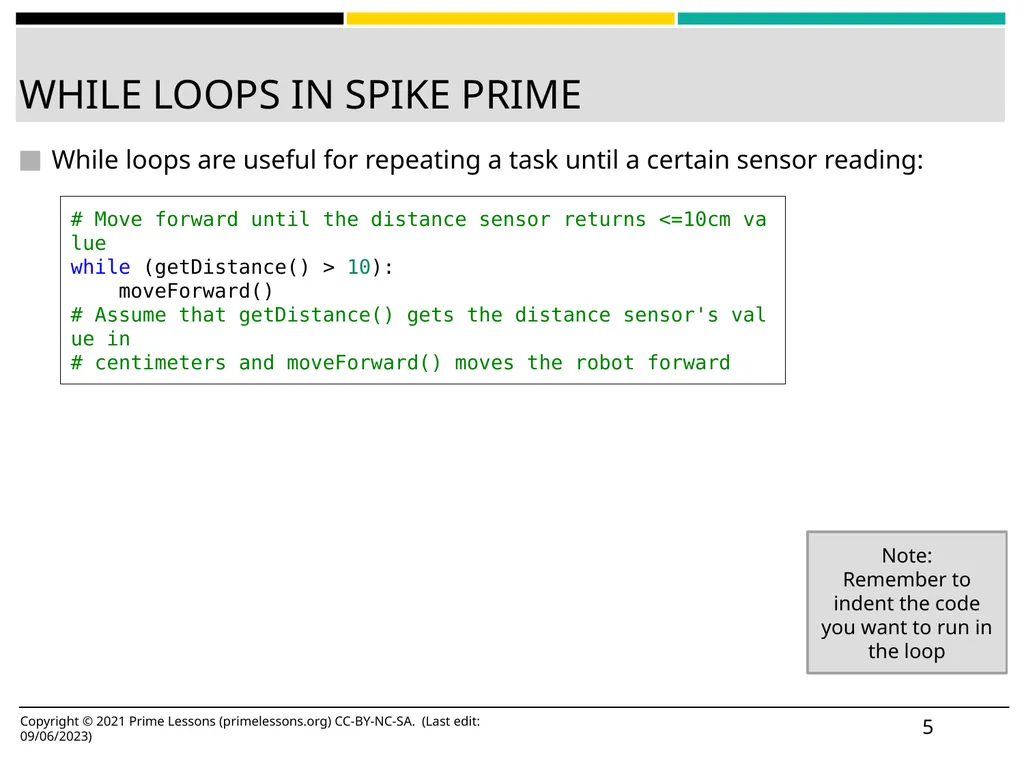
slide5. WHILE LOOPS IN SPIKE PRIME While loops are useful for repeating a task until a certain sensor reading: ‹#› # Move forward until the distance sensor returns <=10cm value
while (getDistance() > 10):
    moveForward()
# Assume that getDistance() gets the distance sensor's value in
# centimeters and moveForward() moves the robot forward Note:
Remember to indent the code you want to run in the loop Copyright © 2021 Prime Lessons (primelessons.org) CC-BY-NC-SA. (Last edit: 09/06/2023)<br>
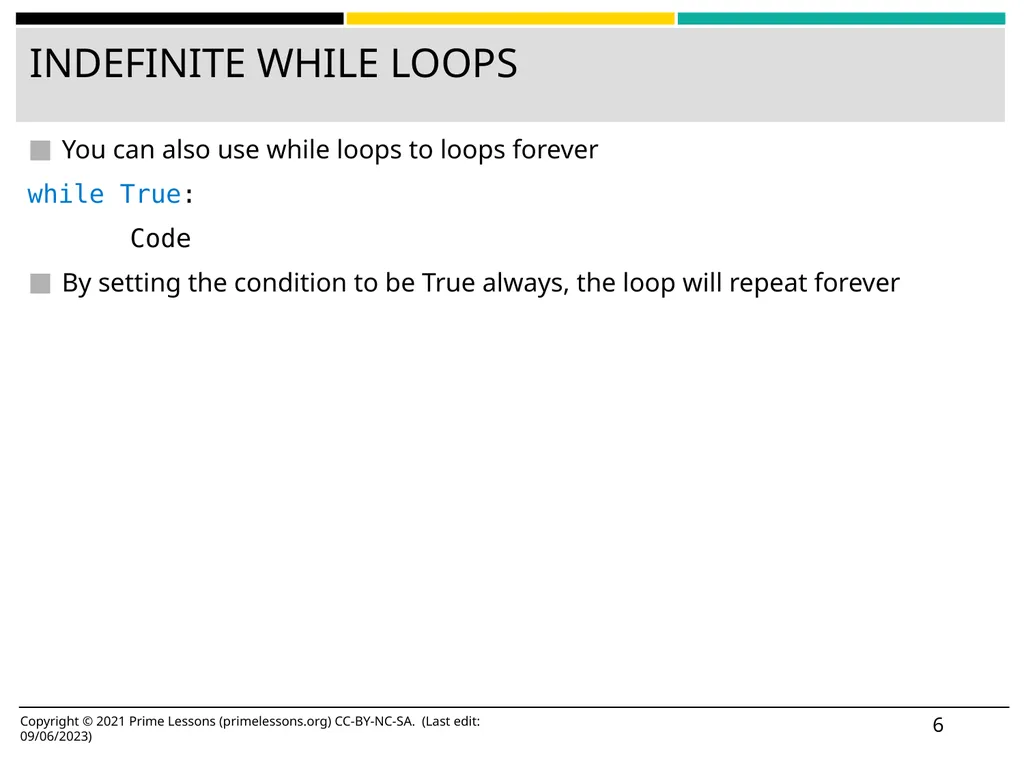
slide6. INDEFINITE WHILE LOOPS You can also use while loops to loops forever
while True:
Code
By setting the condition to be True always, the loop will repeat forever Copyright © 2021 Prime Lessons (primelessons.org) CC-BY-NC-SA. (Last edit: 09/06/2023) ‹#›<br>
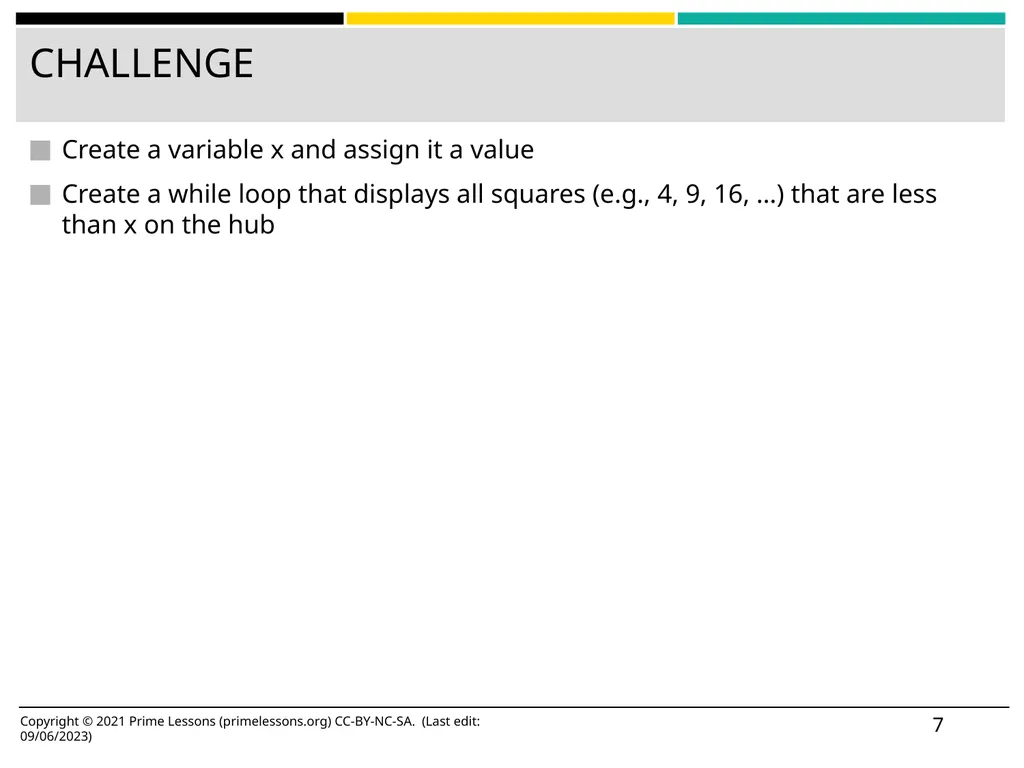
slide7. CHALLENGE Create a variable x and assign it a value
Create a while loop that displays all squares (e.g., 4, 9, 16, …) that are less than x on the hub Copyright © 2021 Prime Lessons (primelessons.org) CC-BY-NC-SA. (Last edit: 09/06/2023) ‹#›<br>
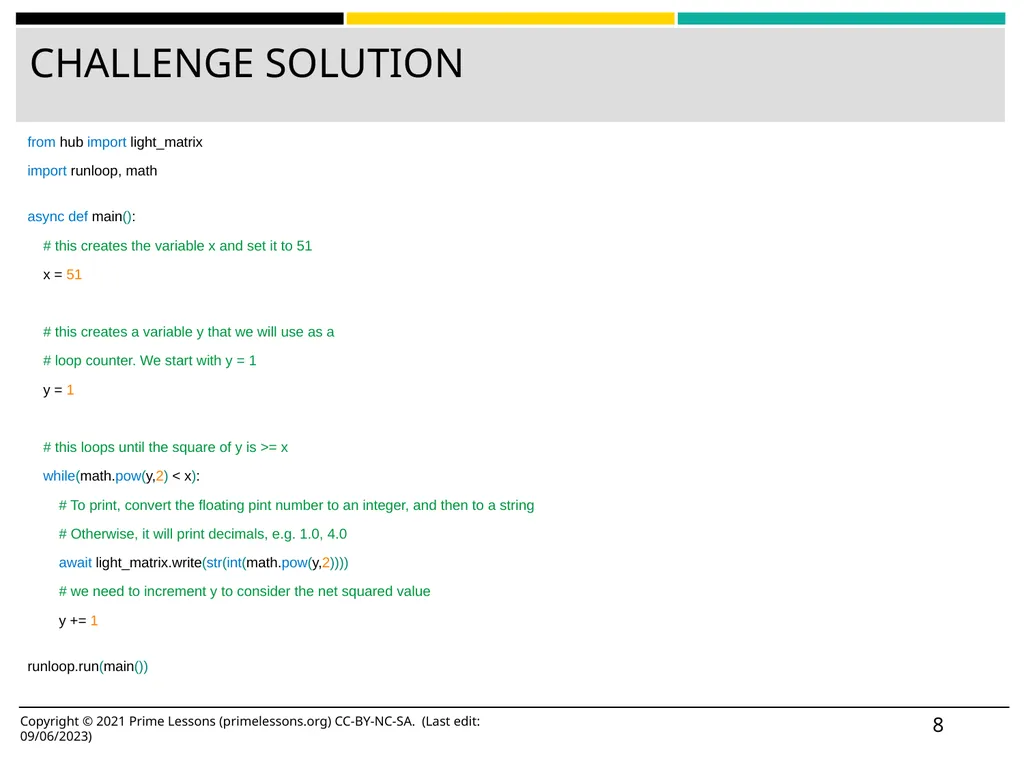
slide8. CHALLENGE SOLUTION from hub import light_matrix
import runloop, math
async def main():
# this creates the variable x and set it to 51
x = 51

# this creates a variable y that we will use as a
# loop counter. We start with y = 1
y = 1

# this loops until the square of y is >= x
while(math.pow(y,2) < x):
# To print, convert the floating pint number to an integer, and then to a string
# Otherwise, it will print decimals, e.g. 1.0, 4.0
await light_matrix.write(str(int(math.pow(y,2))))
# we need to increment y to consider the net squared value
y += 1
runloop.run(main()) Copyright © 2021 Prime Lessons (primelessons.org) CC-BY-NC-SA. (Last edit: 09/06/2023) ‹#›<br>
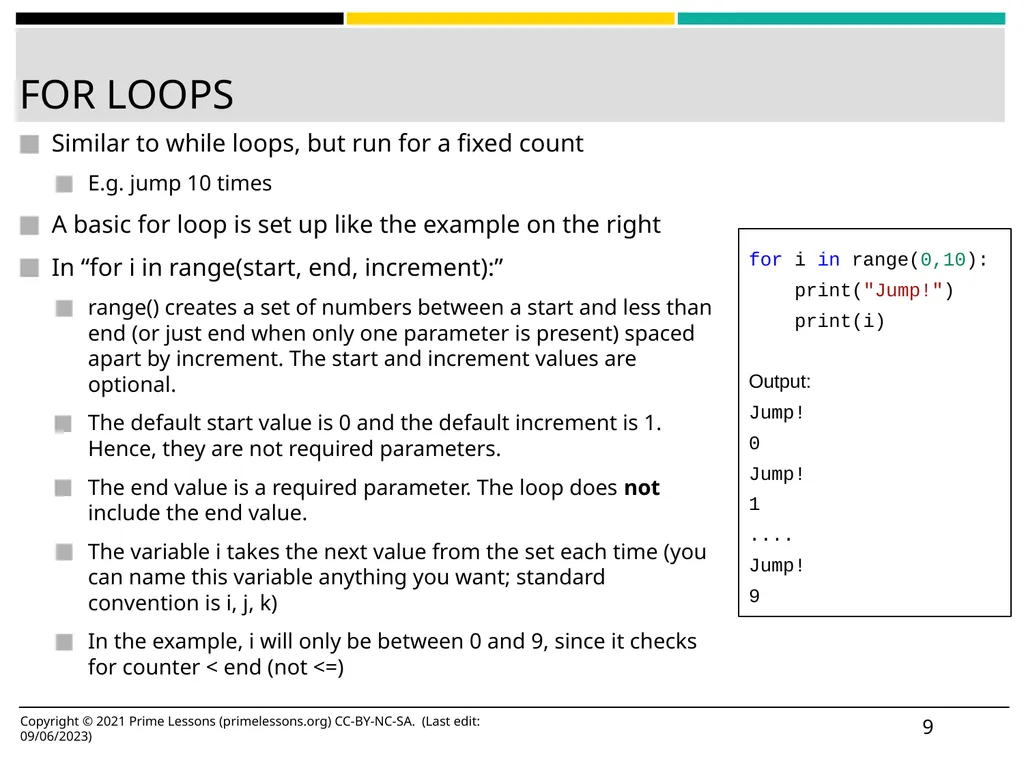
slide9. FOR LOOPS Similar to while loops, but run for a fixed count
E.g. jump 10 times
A basic for loop is set up like the example on the right
In “for i in range(start, end, increment):”
range() creates a set of numbers between a start and less than end (or just end when only one parameter is present) spaced apart by increment. The start and increment values are optional.
The default start value is 0 and the default increment is 1. Hence, they are not required parameters.
The end value is a required parameter. The loop does not include the end value.
The variable i takes the next value from the set each time (you can name this variable anything you want; standard convention is i, j, k)
In the example, i will only be between 0 and 9, since it checks for counter < end (not <=) ‹#› for i in range(0,10):
print("Jump!")
print(i)

Output:
Jump!
0
Jump!
1
....
Jump!
9 Copyright © 2021 Prime Lessons (primelessons.org) CC-BY-NC-SA. (Last edit: 09/06/2023)<br>
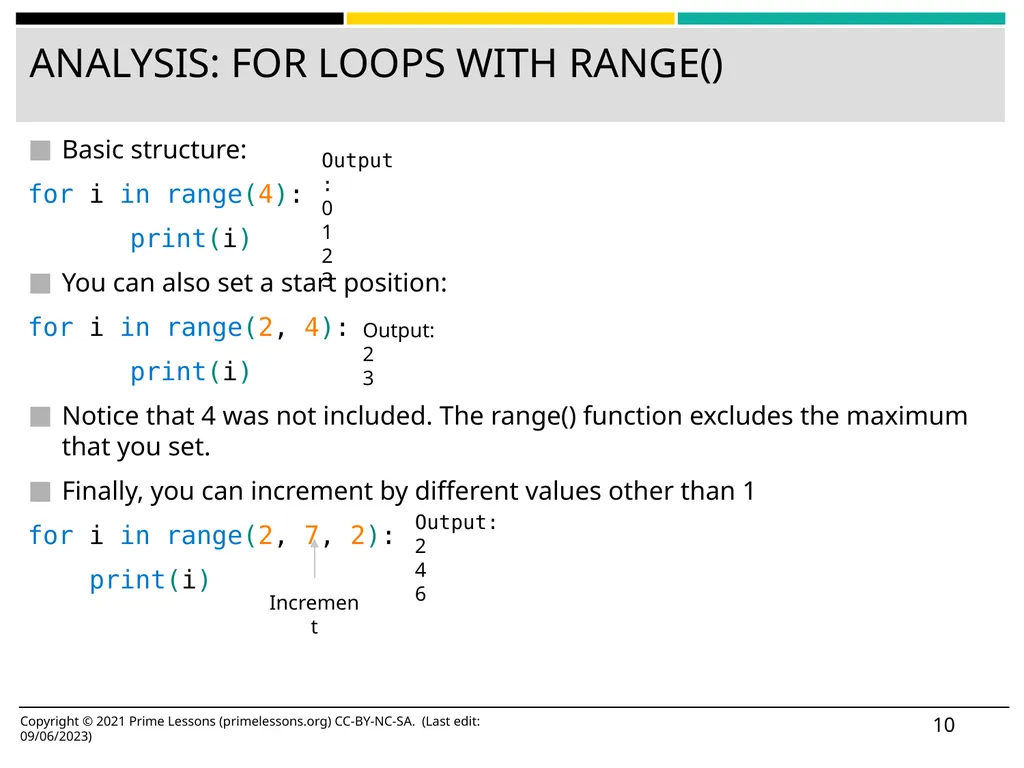
slide10. ANALYSIS: FOR LOOPS WITH RANGE() Basic structure:
for i in range(4):
print(i)
You can also set a start position:
for i in range(2, 4):
print(i)
Notice that 4 was not included. The range() function excludes the maximum that you set.
Finally, you can increment by different values other than 1
for i in range(2, 7, 2):
    print(i) Copyright © 2021 Prime Lessons (primelessons.org) CC-BY-NC-SA. (Last edit: 09/06/2023) ‹#› Increment Output:
0
1
2
3 Output:
2
3 Output:
2
4
6<br>
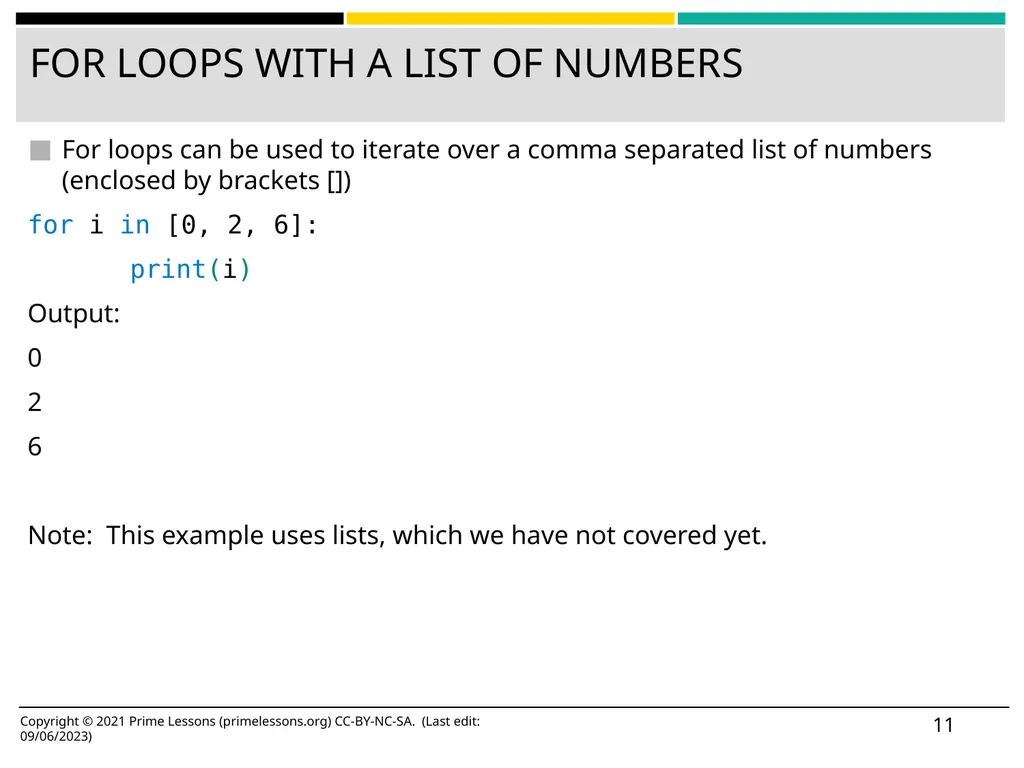
slide11. FOR LOOPS WITH A LIST OF NUMBERS For loops can be used to iterate over a comma separated list of numbers (enclosed by brackets [])
for i in [0, 2, 6]:
print(i)
Output:
0
2
6

Note: This example uses lists, which we have not covered yet. Copyright © 2021 Prime Lessons (primelessons.org) CC-BY-NC-SA. (Last edit: 09/06/2023) ‹#›<br>
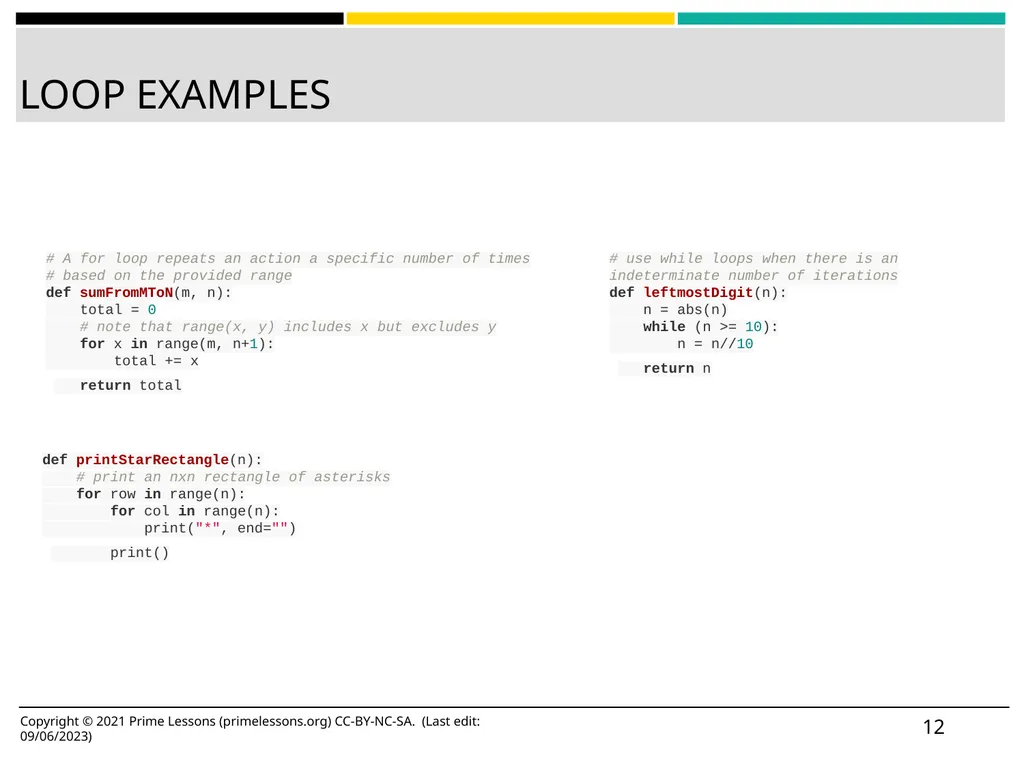
slide12. LOOP EXAMPLES ‹#› # A for loop repeats an action a specific number of times
# based on the provided range
def sumFromMToN(m, n):
total = 0
# note that range(x, y) includes x but excludes y
for x in range(m, n+1):
total += x
return total def printStarRectangle(n):
# print an nxn rectangle of asterisks
for row in range(n):
for col in range(n):
print("*", end="")
print() # use while loops when there is an indeterminate number of iterations
def leftmostDigit(n):
n = abs(n)
while (n >= 10):
n = n//10
return n Examples from https://www.cs.cmu.edu/~112/schedule.html Copyright © 2021 Prime Lessons (primelessons.org) CC-BY-NC-SA. (Last edit: 09/06/2023)<br>
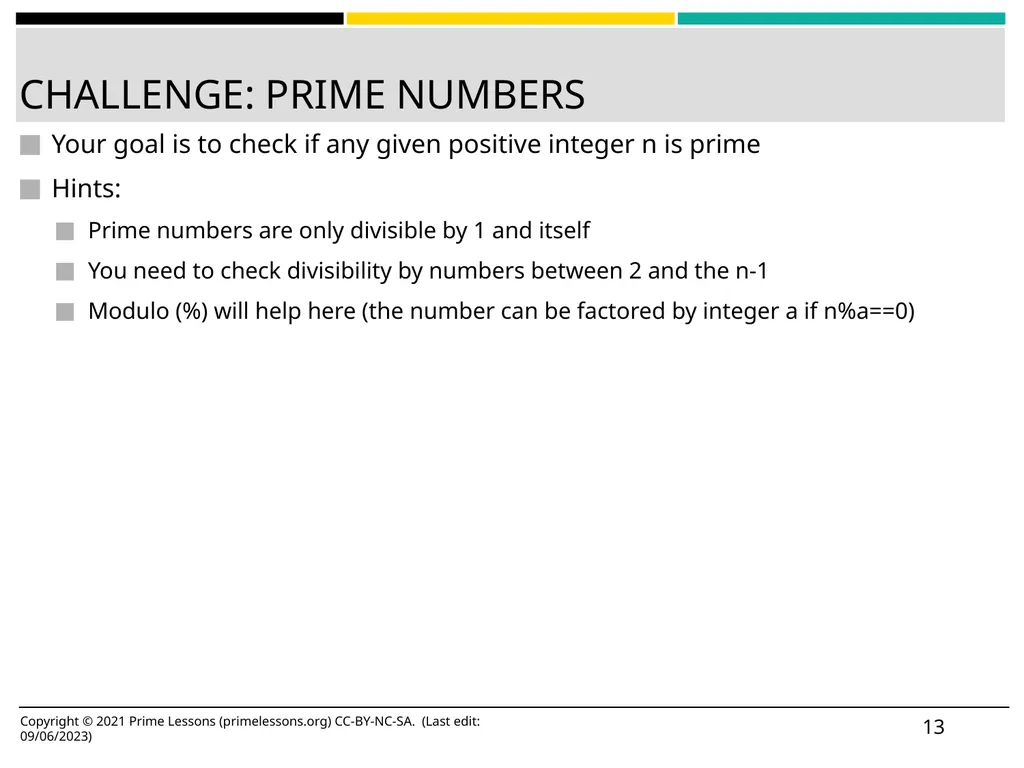
slide13. CHALLENGE: PRIME NUMBERS Your goal is to check if any given positive integer n is prime
Hints:
Prime numbers are only divisible by 1 and itself
You need to check divisibility by numbers between 2 and the n-1
Modulo (%) will help here (the number can be factored by integer a if n%a==0) ‹#› Copyright © 2021 Prime Lessons (primelessons.org) CC-BY-NC-SA. (Last edit: 09/06/2023)<br>
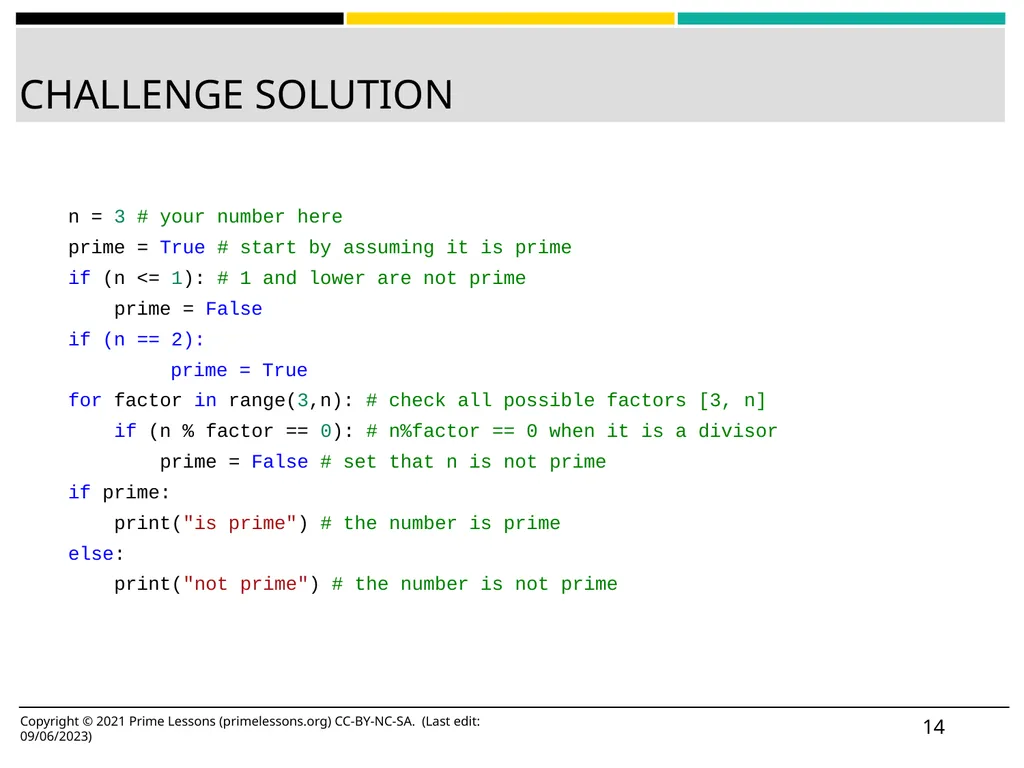
slide14. CHALLENGE SOLUTION ‹#› n = 3 # your number here
prime = True # start by assuming it is prime
if (n <= 1): # 1 and lower are not prime
prime = False
if (n == 2):
prime = True
for factor in range(3,n): # check all possible factors [3, n]
if (n % factor == 0): # n%factor == 0 when it is a divisor
prime = False # set that n is not prime
if prime:
print("is prime") # the number is prime
else:
print("not prime") # the number is not prime Copyright © 2021 Prime Lessons (primelessons.org) CC-BY-NC-SA. (Last edit: 09/06/2023)<br>
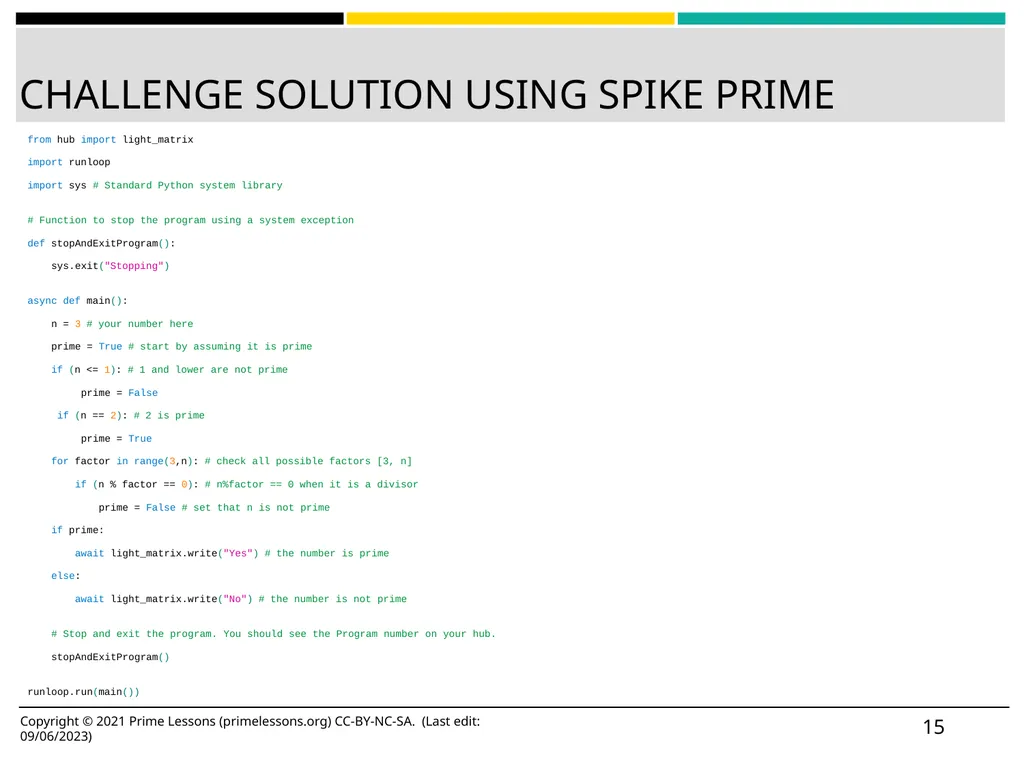
slide15. CHALLENGE SOLUTION USING SPIKE PRIME from hub import light_matrix
import runloop
import sys # Standard Python system library
# Function to stop the program using a system exception
def stopAndExitProgram():
sys.exit("Stopping")
async def main():
n = 3 # your number here
prime = True # start by assuming it is prime
if (n <= 1): # 1 and lower are not prime
prime = False
if (n == 2): # 2 is prime
prime = True
for factor in range(3,n): # check all possible factors [3, n]
if (n % factor == 0): # n%factor == 0 when it is a divisor
prime = False # set that n is not prime
if prime:
await light_matrix.write("Yes") # the number is prime
else:
await light_matrix.write("No") # the number is not prime
# Stop and exit the program. You should see the Program number on your hub.
stopAndExitProgram()
runloop.run(main()) ‹#› Copyright © 2021 Prime Lessons (primelessons.org) CC-BY-NC-SA. (Last edit: 09/06/2023)<br>
slide16. CREDITS This lesson was created by Arvind and Sanjay Seshan for Prime Lessons

Additional contributions by FLL Share & Learn community members.
More lessons are available at www.primelessons.org Copyright © 2021 Prime Lessons (primelessons.org) CC-BY-NC-SA. (Last edit: 09/06/2023) ‹#› This work is licensed under a Creative Commons Attribution-NonCommercial-ShareAlike 4.0 International License.<br>